Patna MuleSoft Meetup Group (15th
Meetup)
MuleSoft - SAP Integration using IDoc
3rd March 2023
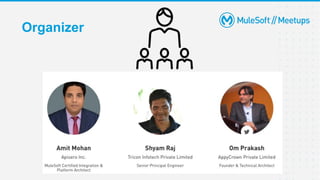
Organizer
Safe Harbour Statement
● Both the speaker and the host are organizing this meet-up in individual capacity only. We are
not representing our companies here.
● This presentation is strictly for learning purposes only. Organizer/Presenter do not hold any
responsibility that same solution will work for your business requirements.
● This presentation is not meant for any promotional activities.
3
A recording of this meetup will be uploaded to events page within 24 hours.
Questions can be submitted/asked at any time in the Chat/Questions & Answers
Tab. Make it more Interactive!!!
Give us feedback! Rate this meetup session by filling feedback form at the end of the
day.
We Love Feedbacks!!! Its Bread & Butter for Meetup.
Housekeeping
4
Speaker
Joydeep Paul
Solution Architect
Mahesh Subhash
Regional Service Owner- Integrations
6
Agenda
● About SAP
● MuleSoft SAP Connectivity
● Configuration for IDoc communication
● DEMO
● Common issues encountered and troubleshooting
● Q&A
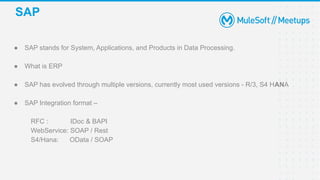
● SAP stands for System, Applications, and Products in Data Processing.
● What is ERP
● SAP has evolved through multiple versions, currently most used versions - R/3, S4 HANA
● SAP Integration format –
RFC : IDoc & BAPI
WebService: SOAP / Rest
S4/Hana: OData / SOAP
SAP
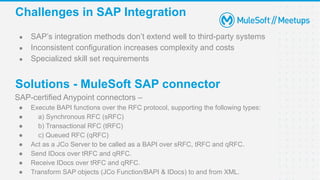
● SAP’s integration methods don’t extend well to third-party systems
● Inconsistent configuration increases complexity and costs
● Specialized skill set requirements
Challenges in SAP Integration
SAP-certified Anypoint connectors –
● Execute BAPI functions over the RFC protocol, supporting the following types:
● a) Synchronous RFC (sRFC)
● b) Transactional RFC (tRFC)
● c) Queued RFC (qRFC)
● Act as a JCo Server to be called as a BAPI over sRFC, tRFC and qRFC.
● Send IDocs over tRFC and qRFC.
● Receive IDocs over tRFC and qRFC.
● Transform SAP objects (JCo Function/BAPI & IDocs) to and from XML.
Solutions - MuleSoft SAP connector
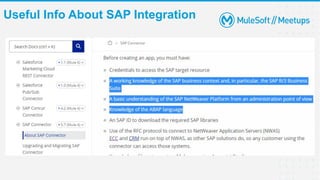
Useful Info About SAP Integration
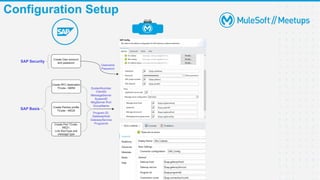
Configuration Setup
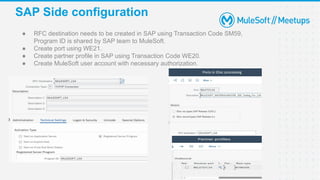
SAP Side configuration
● RFC destination needs to be created in SAP using Transaction Code SM59,
Program ID is shared by SAP team to MuleSoft.
● Create port using WE21.
● Create partner profile in SAP using Transaction Code WE20.
● Create MuleSoft user account with necessary authorization.
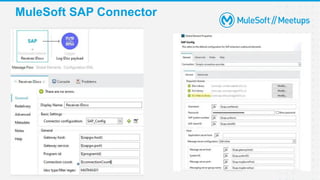
MuleSoft SAP Connector
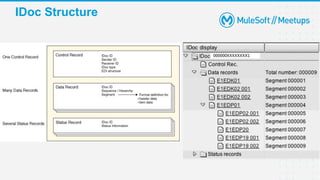
IDoc Structure
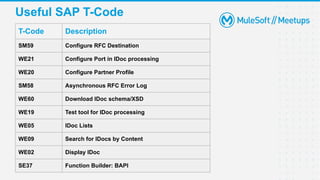
Useful SAP T-Code
T-Code Description
SM59 Configure RFC Destination
WE21 Configure Port in IDoc processing
WE20 Configure Partner Profile
SM58 Asynchronous RFC Error Log
WE60 Download IDoc schema/XSD
WE19 Test tool for IDoc processing
WE05 IDoc Lists
WE09 Search for IDocs by Content
WE02 Display IDoc
SE37 Function Builder: BAPI
Demo
Q&A
Take a stand !
● Nominate yourself for the next meetup speaker and suggest a topic as well.
21
● Share:
○ Tweet or share using the hashtag #MuleSoftMeetups
○ Invite your network to join: https://meetups.mulesoft.com/patna/
● Feedback:
○ Fill out the survey feedback and suggest topics for upcoming events
○ Contact MuleSoft at meetups@mulesoft.com for ways to improve the program
○ Reach out to Patna Meetup Leaders (Om/Amit/Shyam) to suggest topics for
next Meetup
23
What’s next?
Thank you

MuleSoft SAP Integration using IDocs

  • 1.
    Patna MuleSoft MeetupGroup (15th Meetup) MuleSoft - SAP Integration using IDoc 3rd March 2023
  • 2.
  • 3.
    Safe Harbour Statement ●Both the speaker and the host are organizing this meet-up in individual capacity only. We are not representing our companies here. ● This presentation is strictly for learning purposes only. Organizer/Presenter do not hold any responsibility that same solution will work for your business requirements. ● This presentation is not meant for any promotional activities. 3
  • 4.
    A recording ofthis meetup will be uploaded to events page within 24 hours. Questions can be submitted/asked at any time in the Chat/Questions & Answers Tab. Make it more Interactive!!! Give us feedback! Rate this meetup session by filling feedback form at the end of the day. We Love Feedbacks!!! Its Bread & Butter for Meetup. Housekeeping 4
  • 5.
    Speaker Joydeep Paul Solution Architect MaheshSubhash Regional Service Owner- Integrations
  • 6.
    6 Agenda ● About SAP ●MuleSoft SAP Connectivity ● Configuration for IDoc communication ● DEMO ● Common issues encountered and troubleshooting ● Q&A
  • 7.
    ● SAP standsfor System, Applications, and Products in Data Processing. ● What is ERP ● SAP has evolved through multiple versions, currently most used versions - R/3, S4 HANA ● SAP Integration format – RFC : IDoc & BAPI WebService: SOAP / Rest S4/Hana: OData / SOAP SAP
  • 8.
    ● SAP’s integrationmethods don’t extend well to third-party systems ● Inconsistent configuration increases complexity and costs ● Specialized skill set requirements Challenges in SAP Integration SAP-certified Anypoint connectors – ● Execute BAPI functions over the RFC protocol, supporting the following types: ● a) Synchronous RFC (sRFC) ● b) Transactional RFC (tRFC) ● c) Queued RFC (qRFC) ● Act as a JCo Server to be called as a BAPI over sRFC, tRFC and qRFC. ● Send IDocs over tRFC and qRFC. ● Receive IDocs over tRFC and qRFC. ● Transform SAP objects (JCo Function/BAPI & IDocs) to and from XML. Solutions - MuleSoft SAP connector
  • 9.
    Useful Info AboutSAP Integration
  • 10.
  • 11.
    SAP Side configuration ●RFC destination needs to be created in SAP using Transaction Code SM59, Program ID is shared by SAP team to MuleSoft. ● Create port using WE21. ● Create partner profile in SAP using Transaction Code WE20. ● Create MuleSoft user account with necessary authorization.
  • 12.
  • 13.
  • 14.
    Useful SAP T-Code T-CodeDescription SM59 Configure RFC Destination WE21 Configure Port in IDoc processing WE20 Configure Partner Profile SM58 Asynchronous RFC Error Log WE60 Download IDoc schema/XSD WE19 Test tool for IDoc processing WE05 IDoc Lists WE09 Search for IDocs by Content WE02 Display IDoc SE37 Function Builder: BAPI
  • 15.
  • 16.
  • 17.
    Take a stand! ● Nominate yourself for the next meetup speaker and suggest a topic as well. 21
  • 18.
    ● Share: ○ Tweetor share using the hashtag #MuleSoftMeetups ○ Invite your network to join: https://meetups.mulesoft.com/patna/ ● Feedback: ○ Fill out the survey feedback and suggest topics for upcoming events ○ Contact MuleSoft at meetups@mulesoft.com for ways to improve the program ○ Reach out to Patna Meetup Leaders (Om/Amit/Shyam) to suggest topics for next Meetup 23 What’s next?
  • 19.