Integrating with SAP
Presenters:
Mariano Capurro, Technical Engineering Manager, MuleSoft
Kira Patel, Moderator, MuleSoft
Author : Kiet Bui
Email : luis.goldster@gmail.com
Housekeeping Items
Recording: Will be made available and sent via email
Slides: Will be made available and also sent via email
Questions: Submit questions via the text box on the bottom right; Q&A will be
at the end of the presentation.
All contents Copyright © 2010, MuleSoft Inc. 2
Presenter
Mariano Capurro, Technical Engineering Manager, MuleSoft Argentina Office
10+ years of experience designing, building and using enterprise software
Native Spanish speaker, Advanced English speaker and Fluent Java speaker
Main areas of interest:
– Application integration
– Identity Management
– Scuba Diving
All contents Copyright © 2010, MuleSoft Inc. 3
Integrating with SAP
Presenters:
Mariano Capurro, Technical Engineering Manager, MuleSoft
Kira Patel, Moderator, MuleSoft
Agenda
Overview of SAP integration challenges
Introduction to SAP integration interfaces
SAP – MuleSoft relationship
Using Mule ESB for SAP integration
Mule and SAP use case examples
Demo
Q & A
All contents Copyright © 2010, MuleSoft Inc. 5
SAP Integration Challenges
SAP to Non-SAP applications
– SAP to/from other application (LAN)
– SAP to/from external application (Internet / VPN)
– SAP to/from cloud application (Internet)
Challenges
– Understand SAP integration options
– Develop the integration application
• Train developers on SAP integration technologies
– Reduce time to develop new use cases
– Build an architecture tolerant to new integration scenarios
All contents Copyright © 2010, MuleSoft Inc. 6
Introduction to SAP interfaces - BAPI
RFC interface
– RFC-enabled Function Modules
– A Business Application Programming Interface (BAPI) is a precisely defined
interface that can be used by SAP and non-SAP(external) applications.
– Works both master data and transactional data
– BAPI are synchronous in nature
All contents Copyright © 2010, MuleSoft Inc. 7
Introduction to SAP interfaces - IDoc
IDoc (ALE Interface)
– IDoc(Intermediate Document), is a SAP document format for transferring
data within SAP and non-SAP applications.
– Works both master data and transactional data
– IDoc are asynchronous in nature
– XML representation
All contents Copyright © 2010, MuleSoft Inc. 8
Other SAP interfaces
Files
– Programs to import/export files handle a specific file format
– Challenge of moving files in a network
SAP Netweaver XI/PI
– Middleware component to centralize all integration through a hub and spoke
approach
– Expensive
– Lack of support for many applications (SalesForce.com, QuickBooks, ...)
SOA / Web Services
– SAP NetWeaver AS ABAP
– Harder to manage transactions
All contents Copyright © 2010, MuleSoft Inc. 9
Introduction to SAP concepts - JCo
JCo
– SAP Java Connector (SAP JCo) is a middleware component that enables
the development of SAP-compatible components and applications in Java.
– SAP JCo supports communication with the SAP Server in both directions:
• inbound calls (Java calls ABAP)
• outbound calls (ABAP calls Java)
– SAP JCo can be implemented with Desktop applications and with Web
server applications
– SAP JCo can also be implemented as a standalone component, for
example to establish communication with the SAP system for individual
online (web) applications.
All contents Copyright © 2010, MuleSoft Inc. 10
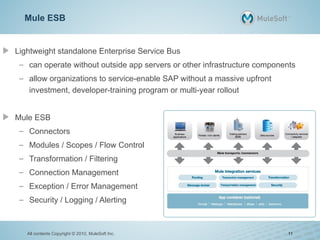
Mule ESB
Lightweight standalone Enterprise Service Bus
– can operate without outside app servers or other infrastructure components
– allow organizations to service-enable SAP without a massive upfront
investment, developer-training program or multi-year rollout
Mule ESB
– Connectors
– Modules / Scopes / Flow Control
– Transformation / Filtering
– Connection Management
– Exception / Error Management
– Security / Logging / Alerting
All contents Copyright © 2010, MuleSoft Inc. 11
SAP – MuleSoft Relationship
SAP Ventures is a major investor in MuleSoft
MuleSoft Enterprise Java Connector for SAP is certified by SAP
– Solution Manager ready → System Landscape Directory
All contents Copyright © 2010, MuleSoft Inc. 12
MuleSoft Enterprise Java Connector for SAP
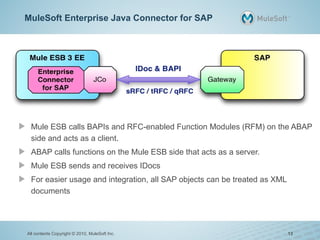
Mule ESB calls BAPIs and RFC-enabled Function Modules (RFM) on the ABAP
side and acts as a client.
ABAP calls functions on the Mule ESB side that acts as a server.
Mule ESB sends and receives IDocs
For easier usage and integration, all SAP objects can be treated as XML
documents
All contents Copyright © 2010, MuleSoft Inc. 13
Why use Mule for SAP integration?
Take advantage of Mule ESB capabilities in your SAP integration
– Orchestation
– Plenty of connectors (Cloud Applications, Databases, JMS, ...)
– Support
– Need more? Visit http://www.mulesoft.org/what-mule-esb
Connector abstracts complicated interfaces (JCo)
Increases ability to quickly build new applications
Any Mule/Java developer can interact with SAP apps
Lower costs, faster time to market, less developer training
All contents Copyright © 2010, MuleSoft Inc. 14
What's Next?
Mule Studio Support
– Reduce development time (browse functions, IDocs and manage their
metadata)
– Reduce the SAP knowledge required to create IDocs and BAPI calls
– Improve the way testing can be done
Multi Transaction Support
– JCo is not XA compliant, so this will allow implementing mixed transactions
from Mule
All contents Copyright © 2010, MuleSoft Inc. 15
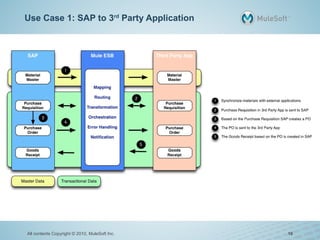
Use Case 1: SAP to 3rd
Party Application
All contents Copyright © 2010, MuleSoft Inc. 16
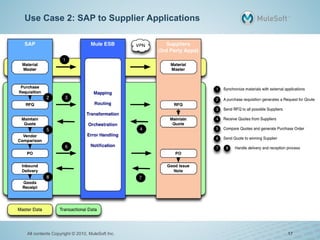
Use Case 2: SAP to Supplier Applications
All contents Copyright © 2010, MuleSoft Inc. 17
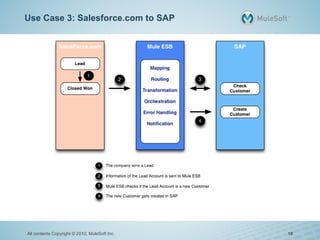
Use Case 3: Salesforce.com to SAP
All contents Copyright © 2010, MuleSoft Inc. 18
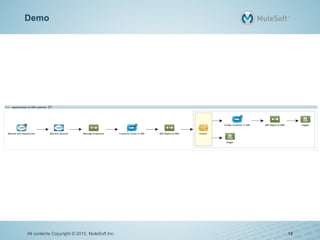
Demo
All contents Copyright © 2010, MuleSoft Inc. 19
Questions & Answers
How to Submit Questions
– Submit using the chat box located on the lower part of your screen.
Additional Questions: Ask an Expert
– tinyurl.com/AskMuleSoft
Recording
– A link to this presentation will be sent to you
Presentation
– A link to the recording of this presentation will also be sent to you
Thank you for your time and participation!
All contents Copyright © 2010, MuleSoft Inc. 20

Mule Sap Integration

  • 1.
    Integrating with SAP Presenters: MarianoCapurro, Technical Engineering Manager, MuleSoft Kira Patel, Moderator, MuleSoft Author : Kiet Bui Email : luis.goldster@gmail.com
  • 2.
    Housekeeping Items Recording: Willbe made available and sent via email Slides: Will be made available and also sent via email Questions: Submit questions via the text box on the bottom right; Q&A will be at the end of the presentation. All contents Copyright © 2010, MuleSoft Inc. 2
  • 3.
    Presenter Mariano Capurro, TechnicalEngineering Manager, MuleSoft Argentina Office 10+ years of experience designing, building and using enterprise software Native Spanish speaker, Advanced English speaker and Fluent Java speaker Main areas of interest: – Application integration – Identity Management – Scuba Diving All contents Copyright © 2010, MuleSoft Inc. 3
  • 4.
    Integrating with SAP Presenters: MarianoCapurro, Technical Engineering Manager, MuleSoft Kira Patel, Moderator, MuleSoft
  • 5.
    Agenda Overview of SAPintegration challenges Introduction to SAP integration interfaces SAP – MuleSoft relationship Using Mule ESB for SAP integration Mule and SAP use case examples Demo Q & A All contents Copyright © 2010, MuleSoft Inc. 5
  • 6.
    SAP Integration Challenges SAPto Non-SAP applications – SAP to/from other application (LAN) – SAP to/from external application (Internet / VPN) – SAP to/from cloud application (Internet) Challenges – Understand SAP integration options – Develop the integration application • Train developers on SAP integration technologies – Reduce time to develop new use cases – Build an architecture tolerant to new integration scenarios All contents Copyright © 2010, MuleSoft Inc. 6
  • 7.
    Introduction to SAPinterfaces - BAPI RFC interface – RFC-enabled Function Modules – A Business Application Programming Interface (BAPI) is a precisely defined interface that can be used by SAP and non-SAP(external) applications. – Works both master data and transactional data – BAPI are synchronous in nature All contents Copyright © 2010, MuleSoft Inc. 7
  • 8.
    Introduction to SAPinterfaces - IDoc IDoc (ALE Interface) – IDoc(Intermediate Document), is a SAP document format for transferring data within SAP and non-SAP applications. – Works both master data and transactional data – IDoc are asynchronous in nature – XML representation All contents Copyright © 2010, MuleSoft Inc. 8
  • 9.
    Other SAP interfaces Files –Programs to import/export files handle a specific file format – Challenge of moving files in a network SAP Netweaver XI/PI – Middleware component to centralize all integration through a hub and spoke approach – Expensive – Lack of support for many applications (SalesForce.com, QuickBooks, ...) SOA / Web Services – SAP NetWeaver AS ABAP – Harder to manage transactions All contents Copyright © 2010, MuleSoft Inc. 9
  • 10.
    Introduction to SAPconcepts - JCo JCo – SAP Java Connector (SAP JCo) is a middleware component that enables the development of SAP-compatible components and applications in Java. – SAP JCo supports communication with the SAP Server in both directions: • inbound calls (Java calls ABAP) • outbound calls (ABAP calls Java) – SAP JCo can be implemented with Desktop applications and with Web server applications – SAP JCo can also be implemented as a standalone component, for example to establish communication with the SAP system for individual online (web) applications. All contents Copyright © 2010, MuleSoft Inc. 10
  • 11.
    Mule ESB Lightweight standaloneEnterprise Service Bus – can operate without outside app servers or other infrastructure components – allow organizations to service-enable SAP without a massive upfront investment, developer-training program or multi-year rollout Mule ESB – Connectors – Modules / Scopes / Flow Control – Transformation / Filtering – Connection Management – Exception / Error Management – Security / Logging / Alerting All contents Copyright © 2010, MuleSoft Inc. 11
  • 12.
    SAP – MuleSoftRelationship SAP Ventures is a major investor in MuleSoft MuleSoft Enterprise Java Connector for SAP is certified by SAP – Solution Manager ready → System Landscape Directory All contents Copyright © 2010, MuleSoft Inc. 12
  • 13.
    MuleSoft Enterprise JavaConnector for SAP Mule ESB calls BAPIs and RFC-enabled Function Modules (RFM) on the ABAP side and acts as a client. ABAP calls functions on the Mule ESB side that acts as a server. Mule ESB sends and receives IDocs For easier usage and integration, all SAP objects can be treated as XML documents All contents Copyright © 2010, MuleSoft Inc. 13
  • 14.
    Why use Mulefor SAP integration? Take advantage of Mule ESB capabilities in your SAP integration – Orchestation – Plenty of connectors (Cloud Applications, Databases, JMS, ...) – Support – Need more? Visit http://www.mulesoft.org/what-mule-esb Connector abstracts complicated interfaces (JCo) Increases ability to quickly build new applications Any Mule/Java developer can interact with SAP apps Lower costs, faster time to market, less developer training All contents Copyright © 2010, MuleSoft Inc. 14
  • 15.
    What's Next? Mule StudioSupport – Reduce development time (browse functions, IDocs and manage their metadata) – Reduce the SAP knowledge required to create IDocs and BAPI calls – Improve the way testing can be done Multi Transaction Support – JCo is not XA compliant, so this will allow implementing mixed transactions from Mule All contents Copyright © 2010, MuleSoft Inc. 15
  • 16.
    Use Case 1:SAP to 3rd Party Application All contents Copyright © 2010, MuleSoft Inc. 16
  • 17.
    Use Case 2:SAP to Supplier Applications All contents Copyright © 2010, MuleSoft Inc. 17
  • 18.
    Use Case 3:Salesforce.com to SAP All contents Copyright © 2010, MuleSoft Inc. 18
  • 19.
    Demo All contents Copyright© 2010, MuleSoft Inc. 19
  • 20.
    Questions & Answers Howto Submit Questions – Submit using the chat box located on the lower part of your screen. Additional Questions: Ask an Expert – tinyurl.com/AskMuleSoft Recording – A link to this presentation will be sent to you Presentation – A link to the recording of this presentation will also be sent to you Thank you for your time and participation! All contents Copyright © 2010, MuleSoft Inc. 20