Karthik Selvaraj
Introduction
 Mule Expression Language (MEL) was introduced in
Mule 3.3.0
 Prior to version 3.3.0, expressions in Mule varied in
syntax according to their specific evaluator.
 The variation in syntax rules was time-consuming to
learn and hence MEL was created to address this
complexity.
 Mule Expression Language (MEL), implements a
single set of syntax rules.
Expression VS Scripting language
 An expression language, such as MEL, is similar, but
not the same as, a scripting language. It allows you to
write short scripts that resolve dynamically to get
values, set values, or perform an operation on data.
 Scripting languages are generally more useful if you
are writing something complex enough to require
more than just a few lines of code, or if you need to
include conditional logic.
 If you need to get or set values, invoke methods, or
perform functions, you can do so quickly and easily
using an expression language.
MEL – Assigning Values
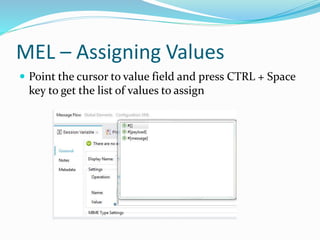
 Point the cursor to value field and press CTRL + Space
key to get the list of values to assign
MEL Context Objects
 Context Objects
 server: this object provides access to the fields for the
hardware, operating system, user, and network
interface.
 mule: this object provides access to the fields for your
Mule instance.
 app: this object provides access to the fields of your
Mule application.
 message: this object provides access to the fields of the
Mule message.
MEL Variables
 Variables
 flowVars
 sessionVars
 Usage
 flowVars
 #[flowVars.firstname = Karthik]
 sessionVars
 #[sessionVars.lastname = Selvaraj]
MEL Variable
 You can use the variable name directly in a MEL
expression
 #[firstname] is equivalent to #[flowVars.firstname]
 #[lastname] is equivalent to #[sessionVars.lastname]
 Mule assumes that it is a flowVars and, when MEL
evaluates the expression, looks for a variable by that
name. If Mule cannot find a flowVars by that name, it
looks for a sessionVars by that name before failing.
MEL Variable
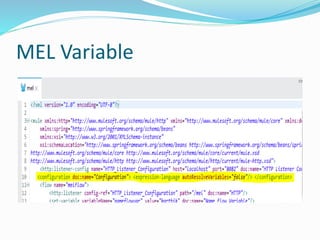
 If you wish to disable this auto-resolution of variables
by name, please include the below flow configuration
xml
 <configuration> <expression-language
autoResolveVariables="false"/> </configuration>
MEL Variable
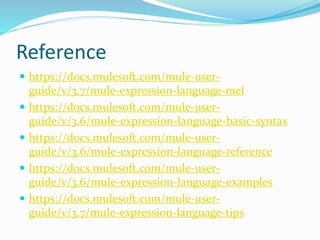
Reference
 https://docs.mulesoft.com/mule-user-
guide/v/3.7/mule-expression-language-mel
 https://docs.mulesoft.com/mule-user-
guide/v/3.6/mule-expression-language-basic-syntax
 https://docs.mulesoft.com/mule-user-
guide/v/3.6/mule-expression-language-reference
 https://docs.mulesoft.com/mule-user-
guide/v/3.6/mule-expression-language-examples
 https://docs.mulesoft.com/mule-user-
guide/v/3.7/mule-expression-language-tips
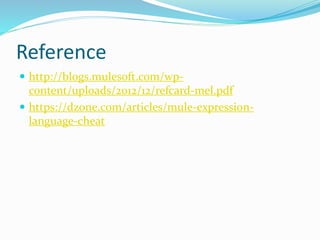
Reference
 http://blogs.mulesoft.com/wp-
content/uploads/2012/12/refcard-mel.pdf
 https://dzone.com/articles/mule-expression-
language-cheat
Mule Expression Language
THANK YOU

Mule expression language - Part 1

  • 1.
  • 2.
    Introduction  Mule ExpressionLanguage (MEL) was introduced in Mule 3.3.0  Prior to version 3.3.0, expressions in Mule varied in syntax according to their specific evaluator.  The variation in syntax rules was time-consuming to learn and hence MEL was created to address this complexity.  Mule Expression Language (MEL), implements a single set of syntax rules.
  • 3.
    Expression VS Scriptinglanguage  An expression language, such as MEL, is similar, but not the same as, a scripting language. It allows you to write short scripts that resolve dynamically to get values, set values, or perform an operation on data.  Scripting languages are generally more useful if you are writing something complex enough to require more than just a few lines of code, or if you need to include conditional logic.  If you need to get or set values, invoke methods, or perform functions, you can do so quickly and easily using an expression language.
  • 4.
    MEL – AssigningValues  Point the cursor to value field and press CTRL + Space key to get the list of values to assign
  • 5.
    MEL Context Objects Context Objects  server: this object provides access to the fields for the hardware, operating system, user, and network interface.  mule: this object provides access to the fields for your Mule instance.  app: this object provides access to the fields of your Mule application.  message: this object provides access to the fields of the Mule message.
  • 6.
    MEL Variables  Variables flowVars  sessionVars  Usage  flowVars  #[flowVars.firstname = Karthik]  sessionVars  #[sessionVars.lastname = Selvaraj]
  • 7.
    MEL Variable  Youcan use the variable name directly in a MEL expression  #[firstname] is equivalent to #[flowVars.firstname]  #[lastname] is equivalent to #[sessionVars.lastname]  Mule assumes that it is a flowVars and, when MEL evaluates the expression, looks for a variable by that name. If Mule cannot find a flowVars by that name, it looks for a sessionVars by that name before failing.
  • 8.
    MEL Variable  Ifyou wish to disable this auto-resolution of variables by name, please include the below flow configuration xml  <configuration> <expression-language autoResolveVariables="false"/> </configuration>
  • 9.
  • 10.
    Reference  https://docs.mulesoft.com/mule-user- guide/v/3.7/mule-expression-language-mel  https://docs.mulesoft.com/mule-user- guide/v/3.6/mule-expression-language-basic-syntax https://docs.mulesoft.com/mule-user- guide/v/3.6/mule-expression-language-reference  https://docs.mulesoft.com/mule-user- guide/v/3.6/mule-expression-language-examples  https://docs.mulesoft.com/mule-user- guide/v/3.7/mule-expression-language-tips
  • 11.
  • 12.