

ZRI ENTERPRISES
zrienterprises@outlook.com
MS WORD 2007
(Introduction)
MS WORD
MS Word is a Word Processor . Developed
by Microsoft.(Application Software)
Word Processor - a computer application
used for the production of potentially
printable material.
ZRI ENTERPRISES
Dheenathayalan.R.
Logo of MS Word
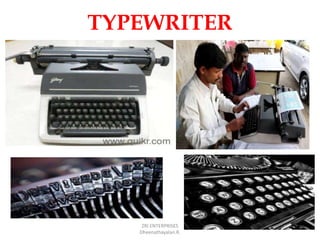
TYPEWRITER
ZRI ENTERPRISES
Dheenathayalan.R.
What can we do with
MS WORD
Can create business documents having various
graphics including pictures, charts, and diagrams.
Can store and reuse readymade content and formatted
elements such as cover pages and sidebars.
Can create letters and letterheads for personal and
business purpose.
Can design different documents such as resumes or
invitation cards etc.
Can create a range of correspondence from a simple
office memo to legal copies and reference documents.
Smart Typewriter
ZRI ENTERPRISES
Dheenathayalan.R.
ADVANTAGES
MS WORD Fast – Speedy typing (No Mechanical carriage Movement)
 Easy Editing (Insert, Delete etc.,)
 Permanent Storage(Can be saved for future use. Can be
retrieved and edited when required )
 Easy Formatting (Font style ,colour,size, Underline etc.,)
 OLE(Object Linking Embedding)- Charts, Pictures etc.,
 Spell Check –Capable of checking Spelling Mistakes, Suggest
Possible Alternatives.
 Tables
 Mail Merge – Personalized letters with different Names and
addresses.
 Retyping whole page not necessary.
 Graphics – Smart Art etc.,
ZRI ENTERPRISES
Dheenathayalan.R.
MS WORD 2007
(Getting Started)
ZRI ENTERPRISES
Dheenathayalan.R.
MS WORD
Getting Started –Step 1
ZRI ENTERPRISES
Dheenathayalan.R.
Start button
(Single Click Left Side
button of Mouse)
MS WORD
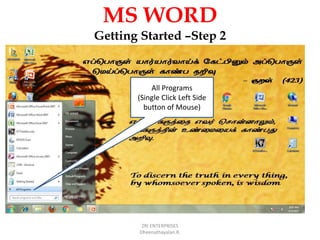
Getting Started –Step 2
ZRI ENTERPRISES
Dheenathayalan.R.
All Programs
(Single Click Left Side
button of Mouse)
MS WORD
Getting Started –Step 3
ZRI ENTERPRISES
Dheenathayalan.R.
Microsoft Office
(Single Click Left side button of Mouse or
Single click Right Side Button of Mouse –
Expand)
MS WORD
Getting Started –Step 4
ZRI ENTERPRISES
Dheenathayalan.R.
Microsoft Office Word 2007
(Single Click Left side button of Mouse or
Single click Right Side Button of mouse -
Open)
MS WORD
ZRI ENTERPRISES
Dheenathayalan.R.
MS WORD
ZRI ENTERPRISES
Dheenathayalan.R.
1.Single left click-Page
Layout
MS WORD
ZRI ENTERPRISES
Dheenathayalan.R.
2.Single left click -Size
3.Single left click & select
A4 paper size
MS WORD
ZRI ENTERPRISES
Dheenathayalan.R.
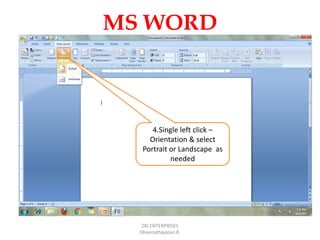
4.Single left click –
Orientation & select
Portrait or Landscape as
needed
MS WORD
ZRI ENTERPRISES
Dheenathayalan.R.
5.Single left click –
Margins & select as
needed
MS WORD
ZRI ENTERPRISES
Dheenathayalan.R.
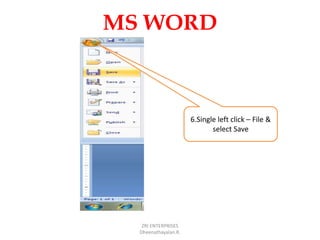
6.Single left click – File &
select Save
MS WORD
ZRI ENTERPRISES
Dheenathayalan.R.
MS WORD
ZRI ENTERPRISES
Dheenathayalan.R.
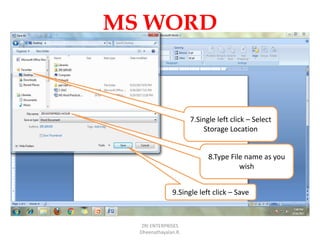
7.Single left click – Select
Storage Location
8.Type File name as you
wish
9.Single left click – Save
MS WORD
ZRI ENTERPRISES
Dheenathayalan.R.
We can see the MS Word
file Named ZRI ENTERPRISES
HOSUR in Desktop
MS WORD
ZRI ENTERPRISES
Dheenathayalan.R.
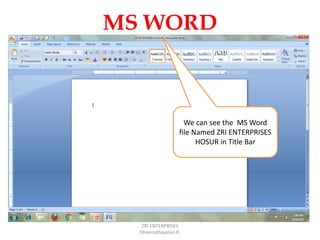
We can see the MS Word
file Named ZRI ENTERPRISES
HOSUR in Title Bar
Thank You
ZRI ENTERPRISES
Dheenathayalan.R.

Ms word 2007 introduction & getting started