Microsoft Word
Prepared By
Muhammad Z. Abdulla
Supervisor
Omer A. Al-Nakshabandi
Hawler Medical University
College Of Nursing
Microsoft Word is a word processor developed
by Microsoft. It was first released on October
25, 1983
Microsoft word for windows includes some
versions:
1)Office 95
2)Office 97
3)Office 2000
4)Office 2003
5)Office 2007
6)Office 2010
7)Office 2013
8)Office 2016
Microsoft Word has some parts which are
mentioned below :
1- File: which includes information about the
document and some other buttons like
(print,options,save…etc)
2- Home: its where you can edit font setting ,
adjust & give the writing a good design.
3- Insert: you can insert picture,shape,table..etc.
4- Page layout: you can edit page setting.
5- References: you can insert biblioghraphy.
6- Mailing: where you can share your work by
mail step by step …
7- Review: it’s the tab where you review your
work like checking the words spelling or leaving
a comment or research for a word , translate ,
choose language & know some details like word
counts .
8- View: where you can display your work in
different layouts and different sizes.
The most used parts are home and insert so
we’re going to talk about their details
1-Home : Home Tab is by far the most
important Tab in Microsoft Word . The Home
Tab contains all the commands that are used
most often.
These include formatting commands like
changing text size, font style, font color, list
types, includes features like text alignment,
line spacing, gallery styles and theme
settings.
Finally, the Home Tab includes the ability to
find and replace text.
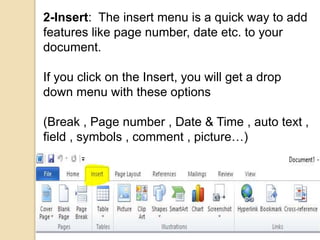
2-Insert: The insert menu is a quick way to add
features like page number, date etc. to your
document.
If you click on the Insert, you will get a drop
down menu with these options
(Break , Page number , Date & Time , auto text ,
field , symbols , comment , picture…)
3-Review: the Review Tab is useful in a lot of
ways. You can have the Spelling and Grammar
feature, the Research option, Thesaurus and
Translation functionality to help you improve your
documents.
Here is how it looks like….
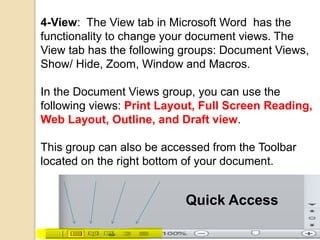
4-View: The View tab in Microsoft Word has the
functionality to change your document views. The
View tab has the following groups: Document Views,
Show/ Hide, Zoom, Window and Macros.
In the Document Views group, you can use the
following views: Print Layout, Full Screen Reading,
Web Layout, Outline, and Draft view.
This group can also be accessed from the Toolbar
located on the right bottom of your document.
Quick Access
Any Questions
?
Thanks For Listening

Microsoft word

  • 1.
    Microsoft Word Prepared By MuhammadZ. Abdulla Supervisor Omer A. Al-Nakshabandi Hawler Medical University College Of Nursing
  • 2.
    Microsoft Word isa word processor developed by Microsoft. It was first released on October 25, 1983 Microsoft word for windows includes some versions: 1)Office 95 2)Office 97 3)Office 2000 4)Office 2003 5)Office 2007 6)Office 2010 7)Office 2013 8)Office 2016
  • 3.
    Microsoft Word hassome parts which are mentioned below : 1- File: which includes information about the document and some other buttons like (print,options,save…etc) 2- Home: its where you can edit font setting , adjust & give the writing a good design. 3- Insert: you can insert picture,shape,table..etc. 4- Page layout: you can edit page setting. 5- References: you can insert biblioghraphy.
  • 4.
    6- Mailing: whereyou can share your work by mail step by step … 7- Review: it’s the tab where you review your work like checking the words spelling or leaving a comment or research for a word , translate , choose language & know some details like word counts . 8- View: where you can display your work in different layouts and different sizes.
  • 5.
    The most usedparts are home and insert so we’re going to talk about their details 1-Home : Home Tab is by far the most important Tab in Microsoft Word . The Home Tab contains all the commands that are used most often. These include formatting commands like changing text size, font style, font color, list types, includes features like text alignment, line spacing, gallery styles and theme settings. Finally, the Home Tab includes the ability to find and replace text.
  • 6.
    2-Insert: The insertmenu is a quick way to add features like page number, date etc. to your document. If you click on the Insert, you will get a drop down menu with these options (Break , Page number , Date & Time , auto text , field , symbols , comment , picture…)
  • 7.
    3-Review: the ReviewTab is useful in a lot of ways. You can have the Spelling and Grammar feature, the Research option, Thesaurus and Translation functionality to help you improve your documents. Here is how it looks like….
  • 8.
    4-View: The Viewtab in Microsoft Word has the functionality to change your document views. The View tab has the following groups: Document Views, Show/ Hide, Zoom, Window and Macros. In the Document Views group, you can use the following views: Print Layout, Full Screen Reading, Web Layout, Outline, and Draft view. This group can also be accessed from the Toolbar located on the right bottom of your document. Quick Access
  • 9.