MS-EXCEL FUNCTIONS
• In Excel, the calculation can be specified using
either a formula or a function.
Formulas are self-defined instructions for
performing calculations.
In contrast, functions are pre-defined formulas
that come with Excel.
• Functions differ from regular formulas in that, after the
equal sign, you supply the cell addresses but not the
arithmetic operators.
• Functions perform calculations by using specific values,
called arguments, in a particular order called syntax.
When using a function, remember the following:
. Use an equal sign to begin the function.
. Specify the function name.
. Enclose all of the function’s arguments within
parentheses.
. Use a comma to separate the function’s individual
arguments.
• Reference operators refer to a cell or a group
of cells. There are two main types of reference
operators:
– Range
• Refers to all of the cells between and including the
reference.
• Consists of two cell addresses separated by a colon
• Ex. A1:A5
– Union –
• Includes two or more references
• Consists of two or more cell addresses separated by a
comma.
• Ex. =A1,A2,C3
Function Wizard
• You can access all of the available functions in
Excel using the Function Wizard.
• Functions can be a more efficient way of
performing mathematical operations than
formulas.
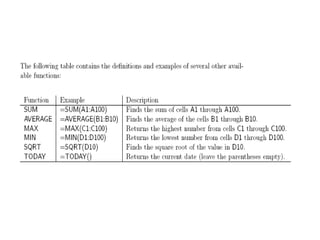
• a function will simplify formulas that you can
type in manually, such as average or sum.
MS excel functions

MS excel functions

  • 1.
  • 2.
    • In Excel,the calculation can be specified using either a formula or a function. Formulas are self-defined instructions for performing calculations. In contrast, functions are pre-defined formulas that come with Excel.
  • 3.
    • Functions differfrom regular formulas in that, after the equal sign, you supply the cell addresses but not the arithmetic operators. • Functions perform calculations by using specific values, called arguments, in a particular order called syntax. When using a function, remember the following: . Use an equal sign to begin the function. . Specify the function name. . Enclose all of the function’s arguments within parentheses. . Use a comma to separate the function’s individual arguments.
  • 4.
    • Reference operatorsrefer to a cell or a group of cells. There are two main types of reference operators: – Range • Refers to all of the cells between and including the reference. • Consists of two cell addresses separated by a colon • Ex. A1:A5
  • 5.
    – Union – •Includes two or more references • Consists of two or more cell addresses separated by a comma. • Ex. =A1,A2,C3
  • 6.
    Function Wizard • Youcan access all of the available functions in Excel using the Function Wizard. • Functions can be a more efficient way of performing mathematical operations than formulas. • a function will simplify formulas that you can type in manually, such as average or sum.