
Our Panel 
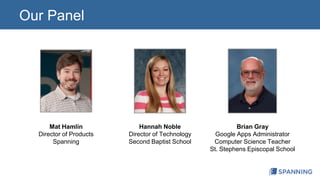
Mat Hamlin 
Director of Products 
Spanning 
Hannah Noble 
Director of Technology 
Second Baptist School 
Brian Gray 
Google Apps Administrator 
Computer Science Teacher 
St. Stephens Episcopal School
What We’ll Talk About Today 
1. How to use Google Apps to collaborate with teachers, students, 
administrators and parents 
1. How to ensure your Google Apps data is always recoverable in 
case a digital “dog” eats your homework 
1. Inventive ways educators are using Google Apps at their schools
Part I: 
New Ways to Collaborate and 
Communicate
New Ways to Collaborate and Communicate 
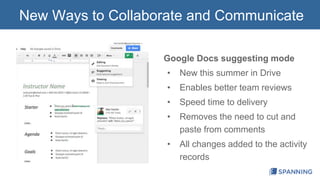
Google Docs suggesting mode 
• New this summer in Drive 
• Enables better team reviews 
• Speed time to delivery 
• Removes the need to cut and 
paste from comments 
• All changes added to the activity 
records
New Ways to Collaborate and Communicate 
• Classwork Management with Doctopus 
– Establishes control 
– Provides shared access 
– Supports migration between classes 
• Improved communications between teachers 
and students 
– Rapid review cycles with shared files 
– College counselors help students with 
college entrance applications
New Ways to Collaborate and Communicate 
• Community calendaring prevents conflicts 
– Test dates, equipment reservations 
• Shared Lesson Plans are easy 
– Shared in Google Docs amongst teachers 
– Replaces paper exchange, meetings 
• Snow days! 
– Planning to prepare snow day content with 
lectures, assignments, and collaboration
Part II: 
Protecting Your Google Apps
Protecting Your Google Apps 
Data Loss Story: 
The Retirement 
• Deletion of a Google Account for a teacher 
retiring, led to key documents being lost 
• “Spanning makes it easy for us to save the 
day when it comes to data recovery of Google 
Apps content.”
Protecting Your Google Apps 
Data Protection Story: 
User Empowerment 
• Acquired and implemented Spanning to fully 
enable faculty, staff and students to recover 
their own lost data 
• Created online video training program to 
educate and enable the whole school 
• “To me, the real benefit is I don’t have to worry 
about it, or manage it!”
Protecting Your Google Apps 
Your data is your data 
• Google will do with it what you tell them to do 
• Google promises to delete your data 
• Google data recovery is focused internally, not externally 
“If something bad happens to your data, ultimately you’re still 
responsible… the number one risk is the end-user… how will you 
minimize the impact of a breach?” 
- Eran Feigenbaum, Director of Security, Google Apps
Protecting Your Google Apps 
SaaS Data Recovery Mitigates this Risk 
• Key features of a SaaS data protection solution 
– Automated, “set it and forget” it backup 
– Complete transparency into data quality, knowing 
“you’ve got this” whenever someone loses data 
– Granular, perfect data restoration, enabling your end 
users to self serve and keep working 
– Unlimited cloud storage capacity, so you never have to 
choose between finding more budget and losing data
Protecting Your Google Apps 
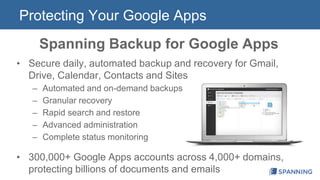
Spanning Backup for Google Apps 
• Secure daily, automated backup and recovery for Gmail, 
Drive, Calendar, Contacts and Sites 
– Automated and on-demand backups 
– Granular recovery 
– Rapid search and restore 
– Advanced administration 
– Complete status monitoring 
• 300,000+ Google Apps accounts across 4,000+ domains, 
protecting billions of documents and emails
Protecting Your Google Apps 
100% Restore Guarantee 
If we can back it up, we can restore it, guaranteed 
If we can't back it up, we’ll tell you through our 
industry-leading status reporting 
For each failed restore, we will give you 10X your 
money back for each affected user account
Part III: 
Cool Projects with Google Apps
Cool Projects with Google Apps 
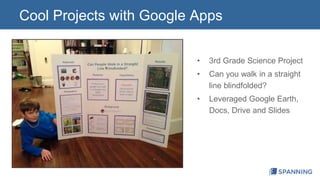
• 3rd Grade Science Project 
• Can you walk in a straight 
line blindfolded? 
• Leveraged Google Earth, 
Docs, Drive and Slides
Cool Projects with Google Apps 
• Google Hangouts 
– Drama teacher is planning to broadcast 
performances for parents 
– Have distant authors participate remotely 
in the Literary Festival 
– Use private Hangout On Air to record 
lessons for students in classes later in the 
day
Cool Projects with Google Apps 
• Google Docs 
– Students leverage the research 
capabilities in Docs 
• Google Hangout on Air 
– Regularly tune in for educational 
topics - NASA
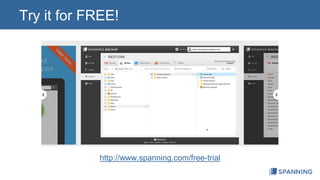
Try it for FREE! 
http://www.spanning.com/free-trial
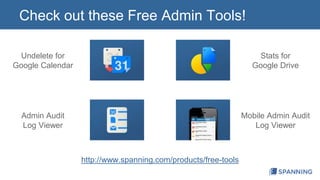
Check out these Free Admin Tools! 
http://www.spanning.com/products/free-tools 
Undelete for 
Google Calendar 
Admin Audit 
Log Viewer 
Stats for 
Google Drive 
Mobile Admin Audit 
Log Viewer
Thanks!

New Ways to Use Google Apps for Education

  • 2.
    Our Panel MatHamlin Director of Products Spanning Hannah Noble Director of Technology Second Baptist School Brian Gray Google Apps Administrator Computer Science Teacher St. Stephens Episcopal School
  • 3.
    What We’ll TalkAbout Today 1. How to use Google Apps to collaborate with teachers, students, administrators and parents 1. How to ensure your Google Apps data is always recoverable in case a digital “dog” eats your homework 1. Inventive ways educators are using Google Apps at their schools
  • 4.
    Part I: NewWays to Collaborate and Communicate
  • 5.
    New Ways toCollaborate and Communicate Google Docs suggesting mode • New this summer in Drive • Enables better team reviews • Speed time to delivery • Removes the need to cut and paste from comments • All changes added to the activity records
  • 6.
    New Ways toCollaborate and Communicate • Classwork Management with Doctopus – Establishes control – Provides shared access – Supports migration between classes • Improved communications between teachers and students – Rapid review cycles with shared files – College counselors help students with college entrance applications
  • 7.
    New Ways toCollaborate and Communicate • Community calendaring prevents conflicts – Test dates, equipment reservations • Shared Lesson Plans are easy – Shared in Google Docs amongst teachers – Replaces paper exchange, meetings • Snow days! – Planning to prepare snow day content with lectures, assignments, and collaboration
  • 8.
    Part II: ProtectingYour Google Apps
  • 9.
    Protecting Your GoogleApps Data Loss Story: The Retirement • Deletion of a Google Account for a teacher retiring, led to key documents being lost • “Spanning makes it easy for us to save the day when it comes to data recovery of Google Apps content.”
  • 10.
    Protecting Your GoogleApps Data Protection Story: User Empowerment • Acquired and implemented Spanning to fully enable faculty, staff and students to recover their own lost data • Created online video training program to educate and enable the whole school • “To me, the real benefit is I don’t have to worry about it, or manage it!”
  • 11.
    Protecting Your GoogleApps Your data is your data • Google will do with it what you tell them to do • Google promises to delete your data • Google data recovery is focused internally, not externally “If something bad happens to your data, ultimately you’re still responsible… the number one risk is the end-user… how will you minimize the impact of a breach?” - Eran Feigenbaum, Director of Security, Google Apps
  • 12.
    Protecting Your GoogleApps SaaS Data Recovery Mitigates this Risk • Key features of a SaaS data protection solution – Automated, “set it and forget” it backup – Complete transparency into data quality, knowing “you’ve got this” whenever someone loses data – Granular, perfect data restoration, enabling your end users to self serve and keep working – Unlimited cloud storage capacity, so you never have to choose between finding more budget and losing data
  • 13.
    Protecting Your GoogleApps Spanning Backup for Google Apps • Secure daily, automated backup and recovery for Gmail, Drive, Calendar, Contacts and Sites – Automated and on-demand backups – Granular recovery – Rapid search and restore – Advanced administration – Complete status monitoring • 300,000+ Google Apps accounts across 4,000+ domains, protecting billions of documents and emails
  • 14.
    Protecting Your GoogleApps 100% Restore Guarantee If we can back it up, we can restore it, guaranteed If we can't back it up, we’ll tell you through our industry-leading status reporting For each failed restore, we will give you 10X your money back for each affected user account
  • 15.
    Part III: CoolProjects with Google Apps
  • 16.
    Cool Projects withGoogle Apps • 3rd Grade Science Project • Can you walk in a straight line blindfolded? • Leveraged Google Earth, Docs, Drive and Slides
  • 17.
    Cool Projects withGoogle Apps • Google Hangouts – Drama teacher is planning to broadcast performances for parents – Have distant authors participate remotely in the Literary Festival – Use private Hangout On Air to record lessons for students in classes later in the day
  • 18.
    Cool Projects withGoogle Apps • Google Docs – Students leverage the research capabilities in Docs • Google Hangout on Air – Regularly tune in for educational topics - NASA
  • 19.
    Try it forFREE! http://www.spanning.com/free-trial
  • 20.
    Check out theseFree Admin Tools! http://www.spanning.com/products/free-tools Undelete for Google Calendar Admin Audit Log Viewer Stats for Google Drive Mobile Admin Audit Log Viewer
  • 21.