AIM
To have an in depth knowledge of the architecture and programming of 8-bit
and 16-bit Microprocessors, Microcontrollers and to study how to interface
various peripheral devices with them.
Downloaded from www.Rejinpaul.com
Get Unique study materials from www.rejinpaul.com
OBJECTIVE
 To study the architecture and Instruction set of 8085 and 8086
 To develop assembly language programs in 8085 and 8086.
 To design and understand multiprocessor configurations
 To study different peripheral devices and their interfacing to 8085/8086.
 To study the architecture and programming of 8051 microcontroller.
Downloaded from www.Rejinpaul.com
Get Unique study materials from www.rejinpaul.com
UNIT I
THE 8085 MICROPROCESSOR
 1.1 Introduction to 8085
 1.2 Microprocessor architecture
 1.3 Instruction set
 1.4 Addressing modes
 1.5 Programming the 8085.
Downloaded from www.Rejinpaul.com
Get Unique study materials from www.rejinpaul.com
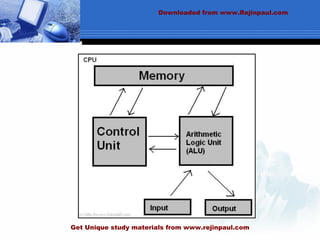
1.1 8085 PROCESSOR
•The first microprocessor was introduced in 1970 by Intel (named 4004).
• It ran at the speed of 108KHz.
• Four years later, Intel created the 8080 running at just over 2 Mhz.
•This microprocessor was used on the world's firs personal computer, named Altair.
•Also at this time, IBM started researching for their microprocessor, called POWER
(Performance Optimization With Enhanced RISC).
Downloaded from www.Rejinpaul.com
Get Unique study materials from www.rejinpaul.com
Downloaded from www.Rejinpaul.com
Get Unique study materials from www.rejinpaul.com
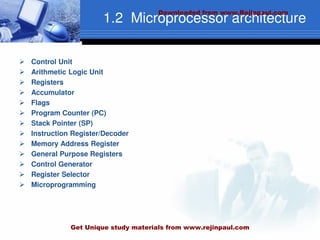
1.2 Microprocessor architecture
 Control Unit
 Arithmetic Logic Unit
 Registers
 Accumulator
 Flags
 Program Counter (PC)
 Stack Pointer (SP)
 Instruction Register/Decoder
 Memory Address Register
 General Purpose Registers
 Control Generator
 Register Selector
 Microprogramming
Downloaded from www.Rejinpaul.com
Get Unique study materials from www.rejinpaul.com
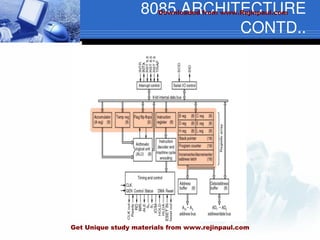
8085 ARCHITECTURE
CONTD..
Downloaded from www.Rejinpaul.com
Get Unique study materials from www.rejinpaul.com
1.3 INSTRUCTION SET
BASED ON FUNCTIONS
 Data Transfer Instructions
 Arithmetic Instructions
 Logical Instructions
 Branch Instructions
 Machine Control
BASED ON LENGTH
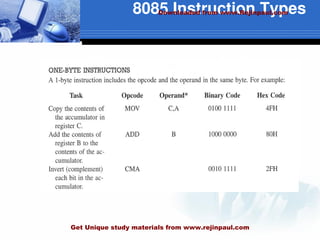
 One-word or 1-byte instructions
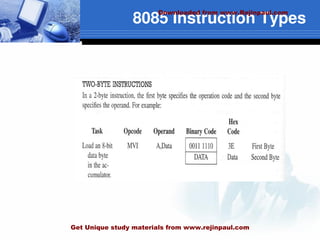
 Two-word or 2-byte instructions
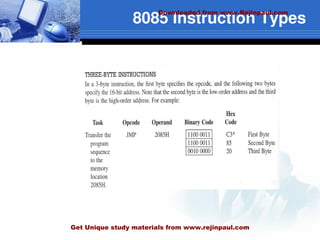
 Three-word or 3-byte instructions
Downloaded from www.Rejinpaul.com
Get Unique study materials from www.rejinpaul.com
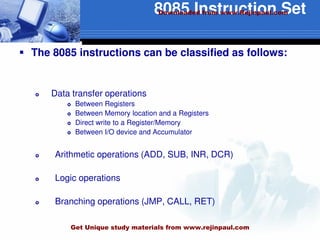
8085 Instruction Set
 The 8085 instructions can be classified as follows:
 Data transfer operations
 Between Registers
 Between Memory location and a Registers
 Direct write to a Register/Memory
 Between I/O device and Accumulator
 Arithmetic operations (ADD, SUB, INR, DCR)
 Logic operations
 Branching operations (JMP, CALL, RET)
Downloaded from www.Rejinpaul.com
Get Unique study materials from www.rejinpaul.com
8085 Instruction Types
Downloaded from www.Rejinpaul.com
Get Unique study materials from www.rejinpaul.com
8085 Instruction Types
Downloaded from www.Rejinpaul.com
Get Unique study materials from www.rejinpaul.com
8085 Instruction Types
Downloaded from www.Rejinpaul.com
Get Unique study materials from www.rejinpaul.com
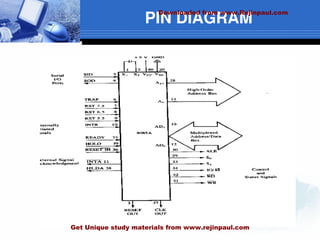
PIN DIAGRAM
Downloaded from www.Rejinpaul.com
Get Unique study materials from www.rejinpaul.com
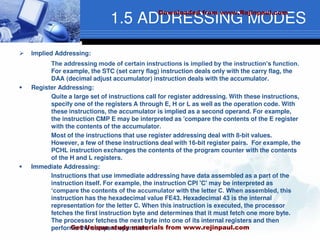
1.5 ADDRESSING MODES
 Implied Addressing:
The addressing mode of certain instructions is implied by the instruction’s function.
For example, the STC (set carry flag) instruction deals only with the carry flag, the
DAA (decimal adjust accumulator) instruction deals with the accumulator.
 Register Addressing:
Quite a large set of instructions call for register addressing. With these instructions,
specify one of the registers A through E, H or L as well as the operation code. With
these instructions, the accumulator is implied as a second operand. For example,
the instruction CMP E may be interpreted as 'compare the contents of the E register
with the contents of the accumulator.
Most of the instructions that use register addressing deal with 8-bit values.
However, a few of these instructions deal with 16-bit register pairs. For example, the
PCHL instruction exchanges the contents of the program counter with the contents
of the H and L registers.
 Immediate Addressing:
Instructions that use immediate addressing have data assembled as a part of the
instruction itself. For example, the instruction CPI 'C' may be interpreted as
‘compare the contents of the accumulator with the letter C. When assembled, this
instruction has the hexadecimal value FE43. Hexadecimal 43 is the internal
representation for the letter C. When this instruction is executed, the processor
fetches the first instruction byte and determines that it must fetch one more byte.
The processor fetches the next byte into one of its internal registers and then
performs the compare operation.
Downloaded from www.Rejinpaul.com
Get Unique study materials from www.rejinpaul.com
ADDRESSING MODES
CONTD…
 Direct Addressing:
Jump instructions include a 16-bit address as part of the instruction. For example,
the instruction JMP 1000H causes a jump to the hexadecimal address 1000 by
replacing the current contents of the program counter with the new value 1000H.
Instructions that include a direct address require three bytes of storage: one for the
instruction code, and two for the 16-bit address
 Register Indirect Addressing:
Register indirect instructions reference memory via a register pair. Thus, the
instruction MOV M,C moves the contents of the C register into the memory address
stored in the H and L register pair. The instruction LDAX B loads the accumulator
with the byte of data specified by the address in the B and C register pair.
Downloaded from www.Rejinpaul.com
Get Unique study materials from www.rejinpaul.com
UNIT- II
 Intel 8086 microprocessor
 Architecture
 Signals
 Instruction set
 Addressing modes
 Assembler directives
 Assembly language programming
 Procedures
 Macros
 Interrupts and interrupt service routines.
 BIOS Function Calls
Downloaded from www.Rejinpaul.com
Get Unique study materials from www.rejinpaul.com
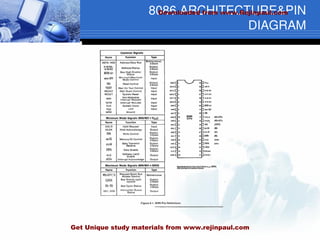
8086 ARCHITECTURE&PIN
DIAGRAM
Downloaded from www.Rejinpaul.com
Get Unique study materials from www.rejinpaul.com
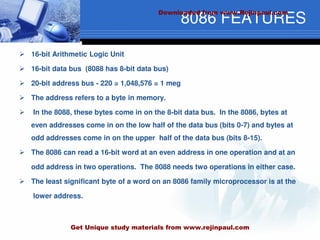
8086 FEATURES
 16-bit Arithmetic Logic Unit
 16-bit data bus (8088 has 8-bit data bus)
 20-bit address bus - 220 = 1,048,576 = 1 meg
 The address refers to a byte in memory.
 In the 8088, these bytes come in on the 8-bit data bus. In the 8086, bytes at
even addresses come in on the low half of the data bus (bits 0-7) and bytes at
odd addresses come in on the upper half of the data bus (bits 8-15).
 The 8086 can read a 16-bit word at an even address in one operation and at an
odd address in two operations. The 8088 needs two operations in either case.
 The least significant byte of a word on an 8086 family microprocessor is at the
lower address.
Downloaded from www.Rejinpaul.com
Get Unique study materials from www.rejinpaul.com
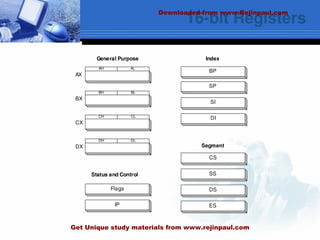
16-bit Registers
CS
SS
DS
ES
Segment
BP
Index
SP
SI
DI
AH
BH
CH
DH DL
CL
BL
AL
General Purpose
Status and Control
Flags
IP
AX
BX
CX
DX
Downloaded from www.Rejinpaul.com
Get Unique study materials from www.rejinpaul.com
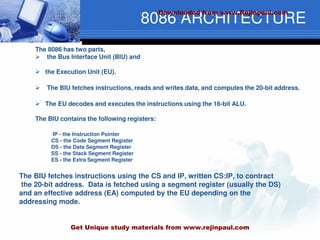
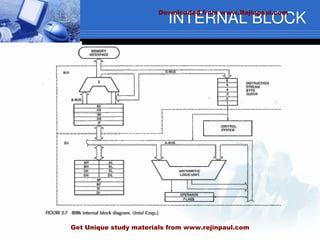
8086 ARCHITECTURE
The 8086 has two parts,
 the Bus Interface Unit (BIU) and
 the Execution Unit (EU).
 The BIU fetches instructions, reads and writes data, and computes the 20-bit address.
 The EU decodes and executes the instructions using the 16-bit ALU.
The BIU contains the following registers:
IP - the Instruction Pointer
CS - the Code Segment Register
DS - the Data Segment Register
SS - the Stack Segment Register
ES - the Extra Segment Register
The BIU fetches instructions using the CS and IP, written CS:IP, to contract
the 20-bit address. Data is fetched using a segment register (usually the DS)
and an effective address (EA) computed by the EU depending on the
addressing mode.
Downloaded from www.Rejinpaul.com
Get Unique study materials from www.rejinpaul.com
INTERNAL BLOCK
Downloaded from www.Rejinpaul.com
Get Unique study materials from www.rejinpaul.com
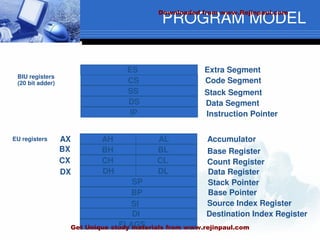
PROGRAM MODEL
8086 Programmer’s Model
ES
CS
SS
DS
IP
AH
BH
CH
DH
AL
BL
CL
DL
SP
BP
SI
DI
FLAGS
AX
BX
CX
DX
Extra Segment
Code Segment
Stack Segment
Data Segment
Instruction Pointer
Accumulator
Base Register
Count Register
Data Register
Stack Pointer
Base Pointer
Source Index Register
Destination Index Register
BIU registers
(20 bit adder)
EU registers
Downloaded from www.Rejinpaul.com
Get Unique study materials from www.rejinpaul.com
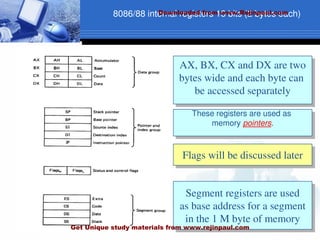
8086/88 internal registers 16 bits (2 bytes each)
AX, BX, CX and DX are two
bytes wide and each byte can
be accessed separately
These registers are used as
memory pointers.
Flags will be discussed later
Segment registers are used
as base address for a segment
in the 1 M byte of memory
Downloaded from www.Rejinpaul.com
Get Unique study materials from www.rejinpaul.com
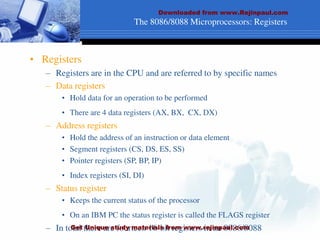
The 8086/8088 Microprocessors: Registers
• Registers
– Registers are in the CPU and are referred to by specific names
– Data registers
• Hold data for an operation to be performed
• There are 4 data registers (AX, BX, CX, DX)
– Address registers
• Hold the address of an instruction or data element
• Segment registers (CS, DS, ES, SS)
• Pointer registers (SP, BP, IP)
• Index registers (SI, DI)
– Status register
• Keeps the current status of the processor
• On an IBM PC the status register is called the FLAGS register
– In total there are fourteen 16-bit registers in an 8086/8088
Downloaded from www.Rejinpaul.com
Get Unique study materials from www.rejinpaul.com
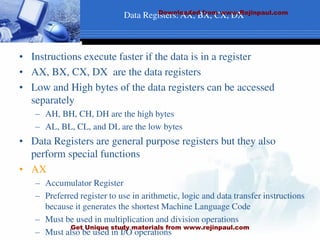
Data Registers: AX, BX, CX, DX
• Instructions execute faster if the data is in a register
• AX, BX, CX, DX are the data registers
• Low and High bytes of the data registers can be accessed
separately
– AH, BH, CH, DH are the high bytes
– AL, BL, CL, and DL are the low bytes
• Data Registers are general purpose registers but they also
perform special functions
• AX
– Accumulator Register
– Preferred register to use in arithmetic, logic and data transfer instructions
because it generates the shortest Machine Language Code
– Must be used in multiplication and division operations
– Must also be used in I/O operations
Downloaded from www.Rejinpaul.com
Get Unique study materials from www.rejinpaul.com
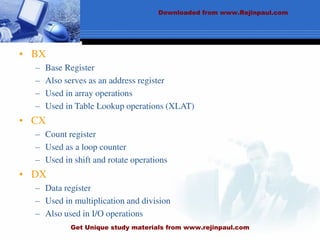
• BX
– Base Register
– Also serves as an address register
– Used in array operations
– Used in Table Lookup operations (XLAT)
• CX
– Count register
– Used as a loop counter
– Used in shift and rotate operations
• DX
– Data register
– Used in multiplication and division
– Also used in I/O operations
Downloaded from www.Rejinpaul.com
Get Unique study materials from www.rejinpaul.com
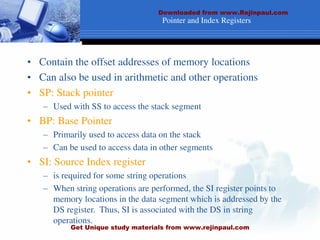
Pointer and Index Registers
• Contain the offset addresses of memory locations
• Can also be used in arithmetic and other operations
• SP: Stack pointer
– Used with SS to access the stack segment
• BP: Base Pointer
– Primarily used to access data on the stack
– Can be used to access data in other segments
• SI: Source Index register
– is required for some string operations
– When string operations are performed, the SI register points to
memory locations in the data segment which is addressed by the
DS register. Thus, SI is associated with the DS in string
operations.
Downloaded from www.Rejinpaul.com
Get Unique study materials from www.rejinpaul.com
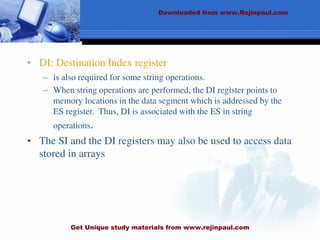
• DI: Destination Index register
– is also required for some string operations.
– When string operations are performed, the DI register points to
memory locations in the data segment which is addressed by the
ES register. Thus, DI is associated with the ES in string
operations.
• The SI and the DI registers may also be used to access data
stored in arrays
Downloaded from www.Rejinpaul.com
Get Unique study materials from www.rejinpaul.com
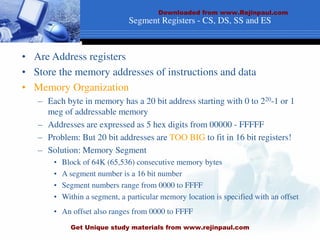
Segment Registers - CS, DS, SS and ES
• Are Address registers
• Store the memory addresses of instructions and data
• Memory Organization
– Each byte in memory has a 20 bit address starting with 0 to 220-1 or 1
meg of addressable memory
– Addresses are expressed as 5 hex digits from 00000 - FFFFF
– Problem: But 20 bit addresses are TOO BIG to fit in 16 bit registers!
– Solution: Memory Segment
• Block of 64K (65,536) consecutive memory bytes
• A segment number is a 16 bit number
• Segment numbers range from 0000 to FFFF
• Within a segment, a particular memory location is specified with an offset
• An offset also ranges from 0000 to FFFF
Downloaded from www.Rejinpaul.com
Get Unique study materials from www.rejinpaul.com
Downloaded from www.Rejinpaul.com
Get Unique study materials from www.rejinpaul.com
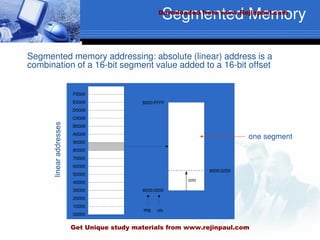
Segmented Memory
Segmented memory addressing: absolute (linear) address is a
combination of a 16-bit segment value added to a 16-bit offset
00000
10000
20000
30000
40000
50000
60000
70000
80000
90000
A0000
B0000
C0000
D0000
E0000
F0000
8000:0000
8000:FFFF
seg ofs
8000:0250
0250
one segment
Downloaded from www.Rejinpaul.com
Get Unique study materials from www.rejinpaul.com
Memory Address Generation
• The BIU has a dedicated adder for
determining physical memory addresses
Intel
Physical Address (20 Bits)
Adder
Segment Register (16 bits) 0 0 0 0
Offset Value (16 bits)
Downloaded from www.Rejinpaul.com
Get Unique study materials from www.rejinpaul.com
Example Address Calculation
• If the data segment starts at location 1000h
and a data reference contains the address
29h where is the actual data?
Intel
Offset: 0 0 0 0 0 0 0 0 0 0 1 0 1 0 0 1
2 9
0 0 0 1 0 0 0 0 0 0 0 0 0 0 0 0 0 0 0 0
Segment:
0 0 0 1 0 0 0 0 0 0 0 0 0 0 1 0 1 0 0 1
Address:
Downloaded from www.Rejinpaul.com
Get Unique study materials from www.rejinpaul.com
SEGMENT:OFFSET ADDRESS
• Logical Address is specified as segment:offset
• Physical address is obtained by shifting the segment address 4
bits to the left and adding the offset address
• Thus the physical address of the logical address A4FB:4872 is
A4FB0
+ 4872
A9822
Downloaded from www.Rejinpaul.com
Get Unique study materials from www.rejinpaul.com
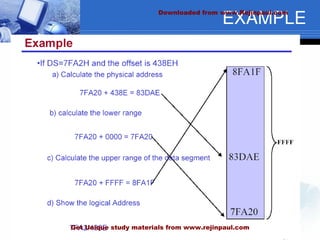
EXAMPLE
Downloaded from www.Rejinpaul.com
Get Unique study materials from www.rejinpaul.com
Segment Register
Offset
Physical or
Absolute Address
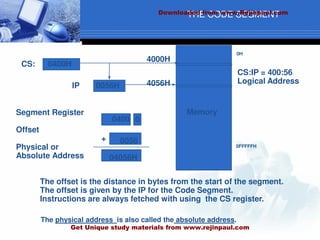
CS:IP = 400:56
Logical Address
0H
0FFFFFH
Memory
0
+
CS:
IP
0400H
0056H
4000H
4056H
0400
0056
04056H
The offset is the distance in bytes from the start of the segment.
The offset is given by the IP for the Code Segment.
Instructions are always fetched with using the CS register.
The physical address is also called the absolute address.
THE CODE SEGMENT
Downloaded from www.Rejinpaul.com
Get Unique study materials from www.rejinpaul.com
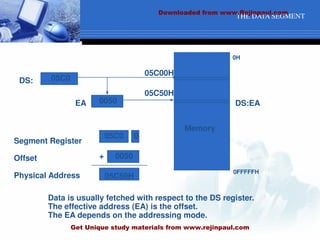
THE DATA SEGMENT
Data is usually fetched with respect to the DS register.
The effective address (EA) is the offset.
The EA depends on the addressing mode.
Memory
Segment Register
Offset
Physical Address
+
DS:
EA
05C0
0050
05C00H
05C50H
05C0 0
0050
05C50H
DS:EA
0H
0FFFFFH
Downloaded from www.Rejinpaul.com
Get Unique study materials from www.rejinpaul.com
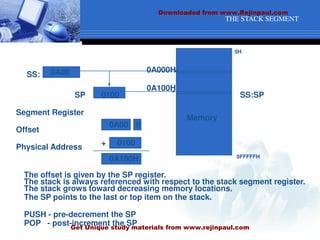
THE STACK SEGMENT
Segment Register
Offset
Physical Address
Memory
+
SS:
SP
0A00
0100
0A000H
0A100H
0A00 0
0100
0A100H
The stack is always referenced with respect to the stack segment register.
The stack grows toward decreasing memory locations.
The SP points to the last or top item on the stack.
PUSH - pre-decrement the SP
POP - post-increment the SP
The offset is given by the SP register.
SS:SP
0H
0FFFFFH
Downloaded from www.Rejinpaul.com
Get Unique study materials from www.rejinpaul.com
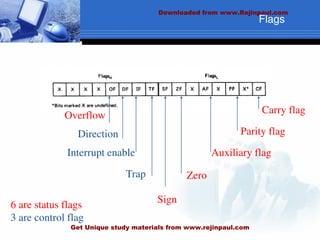
Carry flag
Parity flag
Auxiliary flag
Zero
Overflow
Direction
Interrupt enable
Trap
Sign
6 are status flags
3 are control flag
Flags
Downloaded from www.Rejinpaul.com
Get Unique study materials from www.rejinpaul.com
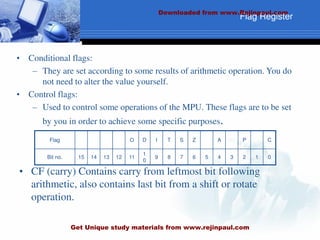
• CF (carry) Contains carry from leftmost bit following
arithmetic, also contains last bit from a shift or rotate
operation.
Flag Register
Flag O D I T S Z A P C
Bit no. 15 14 13 12 11
1
0
9 8 7 6 5 4 3 2 1 0
• Conditional flags:
– They are set according to some results of arithmetic operation. You do
not need to alter the value yourself.
• Control flags:
– Used to control some operations of the MPU. These flags are to be set
by you in order to achieve some specific purposes.
Downloaded from www.Rejinpaul.com
Get Unique study materials from www.rejinpaul.com
Flag Register
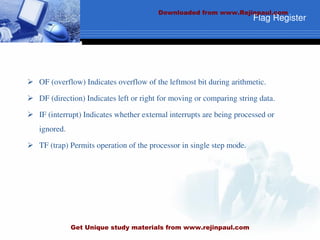
 OF (overflow) Indicates overflow of the leftmost bit during arithmetic.
 DF (direction) Indicates left or right for moving or comparing string data.
 IF (interrupt) Indicates whether external interrupts are being processed or
ignored.
 TF (trap) Permits operation of the processor in single step mode.
Downloaded from www.Rejinpaul.com
Get Unique study materials from www.rejinpaul.com
 SF (sign) Contains the resulting sign of an arithmetic operation (1=negative)
 ZF (zero) Indicates when the result of arithmetic or a comparison is zero.
(1=yes)
 AF (auxiliary carry) Contains carry out of bit 3 into bit 4 for specialized
arithmetic.
 PF (parity) Indicates the number of 1 bits that result from an operation.
Downloaded from www.Rejinpaul.com
Get Unique study materials from www.rejinpaul.com
Macros
 avoid repetitious SAS code
 create generalizable and flexible SAS code
 pass information from one part of a SAS job to another
 conditionally execute data steps and PROCs
 dynamically create code at execution time
Downloaded from www.Rejinpaul.com
Get Unique study materials from www.rejinpaul.com
Example
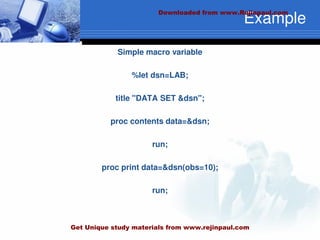
Simple macro variable
%let dsn=LAB;
title "DATA SET &dsn";
proc contents data=&dsn;
run;
proc print data=&dsn(obs=10);
run;
Downloaded from www.Rejinpaul.com
Get Unique study materials from www.rejinpaul.com
Procedures
Initial call to run an external program
 Run a LCA model to simulate data
 Estimate a model of simulated data
 Collect necessary output
 Check if output read is indeed output wanted
 Collect output in a single data matrix
Downloaded from www.Rejinpaul.com
Get Unique study materials from www.rejinpaul.com
Instruction Set
 Mov destination, source
 add, inc, dec and sub instructions
 Input/Output
 String Instructions
 Machine Control
 Flag Manipulation.
Downloaded from www.Rejinpaul.com
Get Unique study materials from www.rejinpaul.com
Addressing Modes
 Immediate addressing.
 Register addressing.
 Direct addressing.
 Indirect addressing
 Implied addressing.
 Indexed addressing
 Relative addressing
Downloaded from www.Rejinpaul.com
Get Unique study materials from www.rejinpaul.com
Interrupts &Interrupt Service
Routine
 An interrupt signals the processor to suspend its current activity
(i.e. running your program) and to pass control to an interrupt service
program (i.e. part of the operating system).
 A software interrupt is one generated by a program (as opposed to
one generated by hardware).
 The 8086 int instruction generates a software interrupt.
 It uses a single operand which is a number indicating which MSDOS
subprogram is to be invoked.
 This subprogram handles a variety of I/O operations by calling
appropriate subprograms.
Downloaded from www.Rejinpaul.com
Get Unique study materials from www.rejinpaul.com
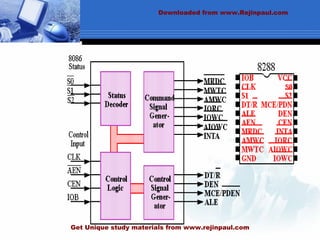
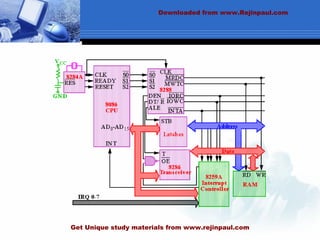
MAXIMUM MODE
Maximum mode
 Maximum mode is designed to be used with a coprocessor exists in the system.
 All the control signals (except RD) are not generated by the microprocessor.
 But we still need those control signals.
 Solution:
 8288.
Downloaded from www.Rejinpaul.com
Get Unique study materials from www.rejinpaul.com
8086 maximum & minimum
modes
 8086 maximum & minimum modes
 The mode is controlled by MN/MX.
 Maximum mode is obtained by connecting MN/MX to low and
minimum mode is by connecting it to high.
 Having two different modes (minimum and maximum) is used
only 8088/8086.
 Each mode enables a different control structure.
 Minimum mode operation and control signals are very similar to
those of 8085.
 So 8085 8-bit peripherals can be used with 8086 without special
considerations.
 Easy and least expensive way to build single processor systems
Downloaded from www.Rejinpaul.com
Get Unique study materials from www.rejinpaul.com
Downloaded from www.Rejinpaul.com
Get Unique study materials from www.rejinpaul.com
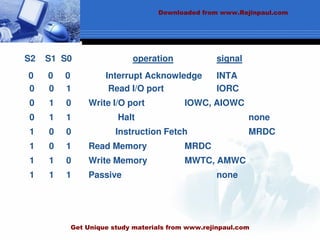
S2 S1 S0 operation signal
0 0 0 Interrupt Acknowledge INTA
0 0 1 Read I/O port IORC
0 1 0 Write I/O port IOWC, AIOWC
0 1 1 Halt none
1 0 0 Instruction Fetch MRDC
1 0 1 Read Memory MRDC
1 1 0 Write Memory MWTC, AMWC
1 1 1 Passive none
Downloaded from www.Rejinpaul.com
Get Unique study materials from www.rejinpaul.com
Downloaded from www.Rejinpaul.com
Get Unique study materials from www.rejinpaul.com
UNIT III
 Coprocessor Configuration
 Closely Coupled Configuration
 Loosely Coupled Configuration
 8087 Numeric Data Processor-architecture
 Data types
 8089 I/O Processor-Architecture
 Communication between CPU and IOP
Downloaded from www.Rejinpaul.com
Get Unique study materials from www.rejinpaul.com
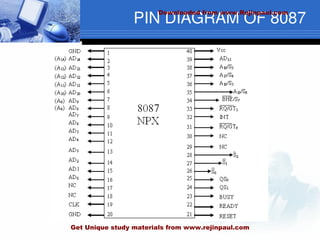
PIN DIAGRAM OF 8087
Downloaded from www.Rejinpaul.com
Get Unique study materials from www.rejinpaul.com
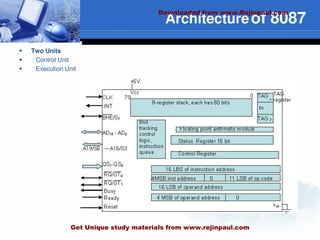
Architectureof 8087
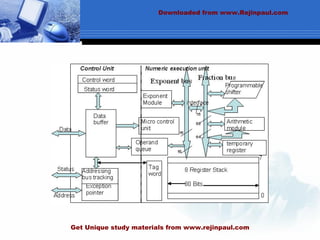
 Two Units
 ฀Control Unit
 ฀Execution Unit
Downloaded from www.Rejinpaul.com
Get Unique study materials from www.rejinpaul.com
Downloaded from www.Rejinpaul.com
Get Unique study materials from www.rejinpaul.com
Control Unit
 ฀Control unit: To synchronize the operation of the coprocessor and the processor.
 ฀This unit has a Control word and Status word and Data Buffer
 ฀If instruction is an ESCape (coprocessor) instruction, the coprocessor executes it, if not
 the microprocessor executes.
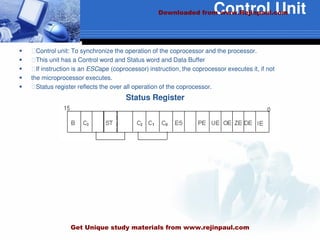
 ฀Status register reflects the over all operation of the coprocessor.
Status Register
Downloaded from www.Rejinpaul.com
Get Unique study materials from www.rejinpaul.com
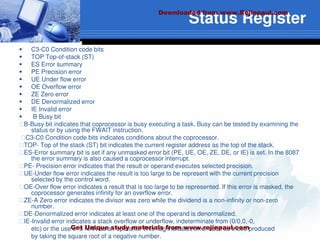
Status Register
 C3-C0 Condition code bits
 TOP Top-of-stack (ST)
 ES Error summary
 PE Precision error
 UE Under flow error
 OE Overflow error
 ZE Zero error
 DE Denormalized error
 IE Invalid error
 B Busy bit
฀B-Busy bit indicates that coprocessor is busy executing a task. Busy can be tested by examining the
status or by using the FWAIT instruction.
฀C3-C0 Condition code bits indicates conditions about the coprocessor.
฀TOP- Top of the stack (ST) bit indicates the current register address as the top of the stack.
฀ES-Error summary bit is set if any unmasked error bit (PE, UE, OE, ZE, DE, or IE) is set. In the 8087
the error summary is also caused a coprocessor interrupt.
฀PE- Precision error indicates that the result or operand executes selected precision.
฀UE-Under flow error indicates the result is too large to be represent with the current precision
selected by the control word.
฀OE-Over flow error indicates a result that is too large to be represented. If this error is masked, the
coprocessor generates infinity for an overflow error.
฀ZE-A Zero error indicates the divisor was zero while the dividend is a non-infinity or non-zero
number.
฀DE-Denormalized error indicates at least one of the operand is denormalized.
฀IE-Invalid error indicates a stack overflow or underflow, indeterminate from (0/0,0,-0,
etc) or the use of a NAN as an operand. This flag indicates error such as those produced
by taking the square root of a negative number.
Downloaded from www.Rejinpaul.com
Get Unique study materials from www.rejinpaul.com
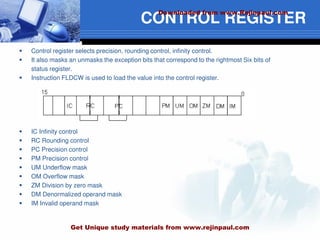
CONTROL REGISTER
 Control register selects precision, rounding control, infinity control.
 It also masks an unmasks the exception bits that correspond to the rightmost Six bits of
status register.
 Instruction FLDCW is used to load the value into the control register.
 IC Infinity control
 RC Rounding control
 PC Precision control
 PM Precision control
 UM Underflow mask
 OM Overflow mask
 ZM Division by zero mask
 DM Denormalized operand mask
 IM Invalid operand mask
Downloaded from www.Rejinpaul.com
Get Unique study materials from www.rejinpaul.com
 IC –Infinity control selects either affine or projective infinity. Affine allows positive and
negative infinity, while projective assumes infinity is unsigned.
 INFINITY CONTROL
0 = Projective
1 = Affine
 RC –Rounding control determines the type of rounding.
 ROUNDING CONTROL
00=Round to nearest or even
01=Round down towards minus infinity
10=Round up towards plus infinity
11=Chop or truncate towards zero
 PC- Precision control sets the precision of he result as define in table
 PRECISION CONTROL
00=Single precision (short)
01=Reserved
10=Double precision (long)
11=Extended precision (temporary)
 Exception Masks – It Determines whether the error indicated by the exception affects
the error bit in the status register. If a logic1 is placed in one of the exception control bits,
corresponding status register bit is masked off.
Downloaded from www.Rejinpaul.com
Get Unique study materials from www.rejinpaul.com
Numeric Execution Unit
 This performs all operations that access and manipulate the numeric data in the
coprocessor’s registers.
 Numeric registers in NUE are 80 bits wide.
 NUE is able to perform arithmetic, logical and transcendental operations as well as
supply a small number of mathematical constants from its on-chip ROM.
 Numeric data is routed into two parts ways a 64 bit mantissa bus and
a 16 bit sign/exponent bus.
Downloaded from www.Rejinpaul.com
Get Unique study materials from www.rejinpaul.com
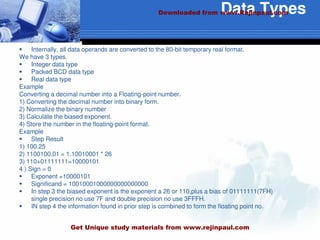
Data Types
 Internally, all data operands are converted to the 80-bit temporary real format.
We have 3 types.
 Integer data type
 Packed BCD data type
 Real data type
Example
Converting a decimal number into a Floating-point number.
1) Converting the decimal number into binary form.
2) Normalize the binary number
3) Calculate the biased exponent.
4) Store the number in the floating-point format.
Example
 Step Result
1) 100.25
2) 1100100.01 = 1.10010001 * 26
3) 110+01111111=10000101
4 ) Sign = 0
 Exponent =10000101
 Significand = 10010001000000000000000
 In step 3 the biased exponent is the exponent a 26 or 110,plus a bias of 01111111(7FH)
single precision no use 7F and double precision no use 3FFFH.
 IN step 4 the information found in prior step is combined to form the floating point no.
Downloaded from www.Rejinpaul.com
Get Unique study materials from www.rejinpaul.com
UNIT V
 Architecture of 8051
 Signals
 Operational features
 Memory and I/O addressing
 Interrupts
 Instruction set
 Applications.
Downloaded from www.Rejinpaul.com
Get Unique study materials from www.rejinpaul.com
RAM ROM
I/O
Port
Timer
Serial
COM
Port
Microcontroller
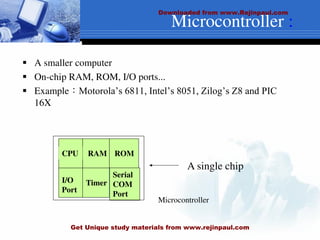
CPU
 A smaller computer
 On-chip RAM, ROM, I/O ports...
 Example:Motorola’s 6811, Intel’s 8051, Zilog’s Z8 and PIC
16X
A single chip
Microcontroller :
Downloaded from www.Rejinpaul.com
Get Unique study materials from www.rejinpaul.com
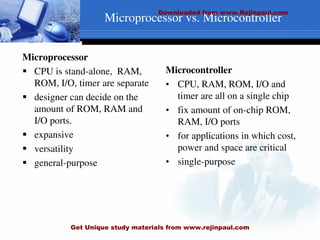
Microprocessor
 CPU is stand-alone, RAM,
ROM, I/O, timer are separate
 designer can decide on the
amount of ROM, RAM and
I/O ports.
 expansive
 versatility
 general-purpose
Microcontroller
• CPU, RAM, ROM, I/O and
timer are all on a single chip
• fix amount of on-chip ROM,
RAM, I/O ports
• for applications in which cost,
power and space are critical
• single-purpose
Microprocessor vs. Microcontroller
Downloaded from www.Rejinpaul.com
Get Unique study materials from www.rejinpaul.com
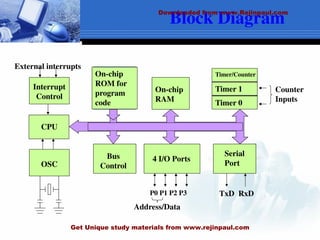
Block Diagram
CPU
On-chip
RAM
On-chip
ROM for
program
code
4 I/O Ports
Timer 0
Serial
Port
OSC
Interrupt
Control
External interrupts
Timer 1
Timer/Counter
Bus
Control
TxD RxD
P0 P1 P2 P3
Address/Data
Counter
Inputs
Downloaded from www.Rejinpaul.com
Get Unique study materials from www.rejinpaul.com
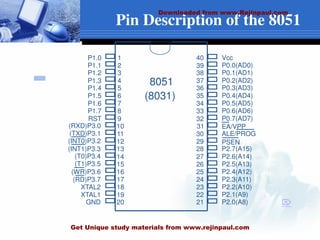
Pin Description of the 8051
1
2
3
4
5
6
7
8
9
10
11
12
13
14
15
16
17
18
19
20
40
39
38
37
36
35
34
33
32
31
30
29
28
27
26
25
24
23
22
21
P1.0
P1.1
P1.2
P1.3
P1.4
P1.5
P1.6
P1.7
RST
(RXD)P3.0
(TXD)P3.1
(T0)P3.4
(T1)P3.5
XTAL2
XTAL1
GND
(INT0)P3.2
(INT1)P3.3
(RD)P3.7
(WR)P3.6
Vcc
P0.0(AD0)
P0.1(AD1)
P0.2(AD2)
P0.3(AD3)
P0.4(AD4)
P0.5(AD5)
P0.6(AD6)
P0.7(AD7)
EA/VPP
ALE/PROG
PSEN
P2.7(A15)
P2.6(A14)
P2.5(A13)
P2.4(A12)
P2.3(A11)
P2.2(A10)
P2.1(A9)
P2.0(A8)
8051
(8031)

Downloaded from www.Rejinpaul.com
Get Unique study materials from www.rejinpaul.com
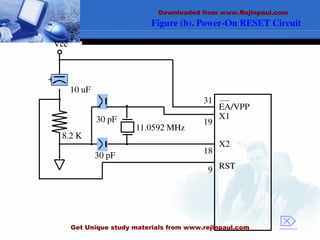
Figure (b). Power-On RESET Circuit
30 pF
30 pF
8.2 K
10 uF
+
Vcc
11.0592 MHz
EA/VPP
X1
X2
RST
31
19
18
9

Downloaded from www.Rejinpaul.com
Get Unique study materials from www.rejinpaul.com
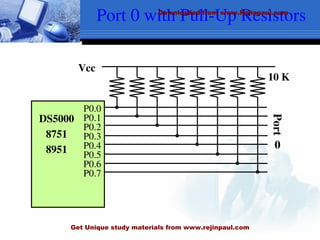
Port 0 with Pull-Up Resistors
P0.0
P0.1
P0.2
P0.3
P0.4
P0.5
P0.6
P0.7
DS5000
8751
8951
Vcc
10 K
Port
0
Downloaded from www.Rejinpaul.com
Get Unique study materials from www.rejinpaul.com
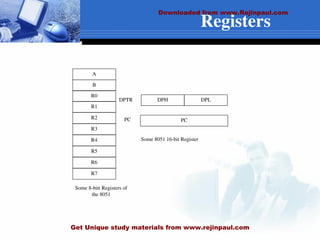
Registers
A
B
R0
R1
R3
R4
R2
R5
R7
R6
DPH DPL
PC
DPTR
PC
Some 8051 16-bit Register
Some 8-bitt Registers of
the 8051
Downloaded from www.Rejinpaul.com
Get Unique study materials from www.rejinpaul.com
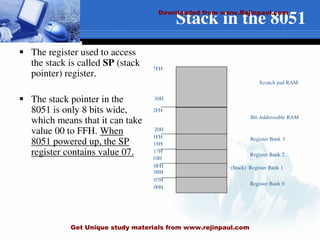
Stack in the 8051
 The register used to access
the stack is called SP (stack
pointer) register.
 The stack pointer in the
8051 is only 8 bits wide,
which means that it can take
value 00 to FFH. When
8051 powered up, the SP
register contains value 07.
7FH
30H
2FH
20H
1FH
17H
10H
0FH
07H
08H
18H
00H
Register Bank 0
(Stack) Register Bank 1
Register Bank 2
Register Bank 3
Bit-Addressable RAM
Scratch pad RAM
Downloaded from www.Rejinpaul.com
Get Unique study materials from www.rejinpaul.com
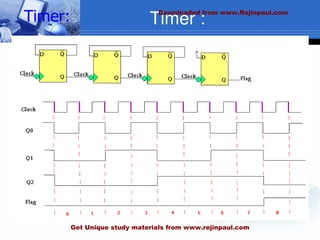
Timer :
:
Timer: Downloaded from www.Rejinpaul.com
Get Unique study materials from www.rejinpaul.com
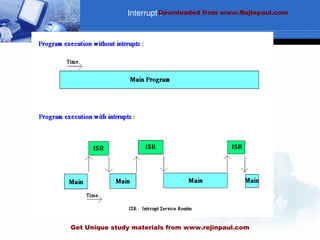
Interrupt :
Downloaded from www.Rejinpaul.com
Get Unique study materials from www.rejinpaul.com
Numerical Bases Used in
Programming
 Hexadecimal
 Binary
 BCD
Downloaded from www.Rejinpaul.com
Get Unique study materials from www.rejinpaul.com
Hexadecimal Basis
 Hexadecimal Digits:
1 2 3 4 5 6 7 8 9 A B C D E F
A=10
B=11
C=12
D=13
E=14
F=15
Downloaded from www.Rejinpaul.com
Get Unique study materials from www.rejinpaul.com
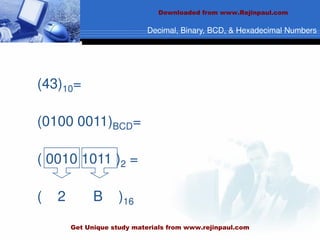
Decimal, Binary, BCD, & Hexadecimal Numbers
(43)10=
(0100 0011)BCD=
( 0010 1011 )2 =
( 2 B )16
Downloaded from www.Rejinpaul.com
Get Unique study materials from www.rejinpaul.com
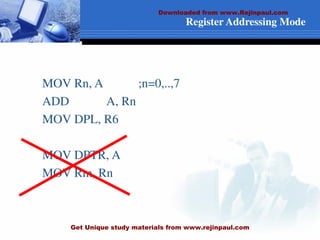
Register Addressing Mode
MOV Rn, A ;n=0,..,7
ADD A, Rn
MOV DPL, R6
MOV DPTR, A
MOV Rm, Rn
Downloaded from www.Rejinpaul.com
Get Unique study materials from www.rejinpaul.com
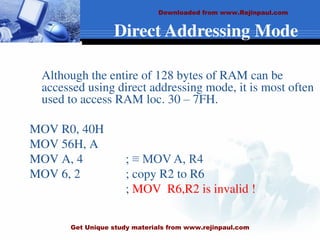
Direct Addressing Mode
Although the entire of 128 bytes of RAM can be
accessed using direct addressing mode, it is most often
used to access RAM loc. 30 – 7FH.
MOV R0, 40H
MOV 56H, A
MOV A, 4 ; ≡ MOV A, R4
MOV 6, 2 ; copy R2 to R6
; MOV R6,R2 is invalid !
Downloaded from www.Rejinpaul.com
Get Unique study materials from www.rejinpaul.com
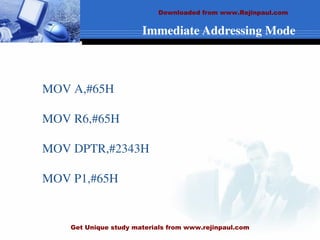
Immediate Addressing Mode
MOV A,#65H
MOV R6,#65H
MOV DPTR,#2343H
MOV P1,#65H
Downloaded from www.Rejinpaul.com
Get Unique study materials from www.rejinpaul.com
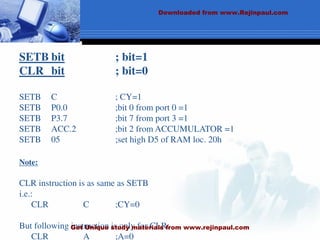
SETB bit ; bit=1
CLR bit ; bit=0
SETB C ; CY=1
SETB P0.0 ;bit 0 from port 0 =1
SETB P3.7 ;bit 7 from port 3 =1
SETB ACC.2 ;bit 2 from ACCUMULATOR =1
SETB 05 ;set high D5 of RAM loc. 20h
Note:
CLR instruction is as same as SETB
i.e.:
CLR C ;CY=0
But following instruction is only for CLR:
CLR A ;A=0
Downloaded from www.Rejinpaul.com
Get Unique study materials from www.rejinpaul.com
DEC byte ;byte=byte-1
INC byte ;byte=byte+1
INC R7
DEC A
DEC 40H ; [40]=[40]-1
Downloaded from www.Rejinpaul.com
Get Unique study materials from www.rejinpaul.com
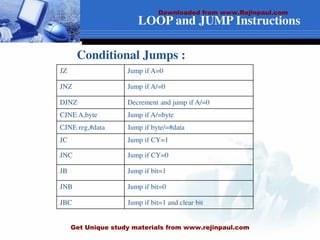
LOOP and JUMP Instructions
JZ Jump if A=0
JNZ Jump if A/=0
DJNZ Decrement and jump if A/=0
CJNE A,byte Jump if A/=byte
CJNE reg,#data Jump if byte/=#data
JC Jump if CY=1
JNC Jump if CY=0
JB Jump if bit=1
JNB Jump if bit=0
JBC Jump if bit=1 and clear bit
Conditional Jumps :
Downloaded from www.Rejinpaul.com
Get Unique study materials from www.rejinpaul.com
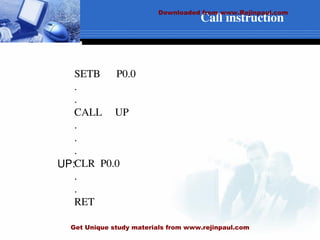
Call instruction
SETB P0.0
.
.
CALL UP
.
.
.
CLR P0.0
.
.
RET
UP:
Downloaded from www.Rejinpaul.com
Get Unique study materials from www.rejinpaul.com
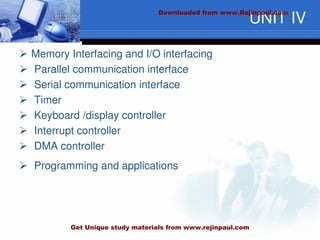
UNIT IV
 Memory Interfacing and I/O interfacing
 Parallel communication interface
 Serial communication interface
 Timer
 Keyboard /display controller
 Interrupt controller
 DMA controller
 Programming and applications
Downloaded from www.Rejinpaul.com
Get Unique study materials from www.rejinpaul.com
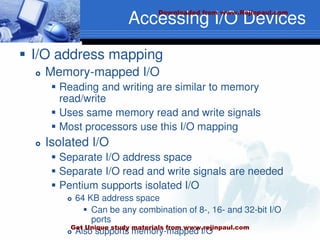
Accessing I/O Devices
 I/O address mapping
 Memory-mapped I/O
 Reading and writing are similar to memory
read/write
 Uses same memory read and write signals
 Most processors use this I/O mapping
 Isolated I/O
 Separate I/O address space
 Separate I/O read and write signals are needed
 Pentium supports isolated I/O
 64 KB address space
 Can be any combination of 8-, 16- and 32-bit I/O
ports
 Also supports memory-mapped I/O
Downloaded from www.Rejinpaul.com
Get Unique study materials from www.rejinpaul.com
Accessing I/O Devices
(cont’d)
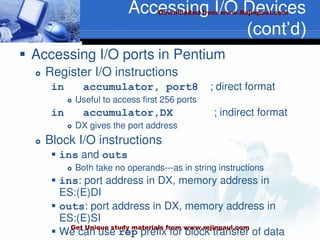
 Accessing I/O ports in Pentium
 Register I/O instructions
in accumulator, port8 ; direct format
 Useful to access first 256 ports
in accumulator,DX ; indirect format
 DX gives the port address
 Block I/O instructions
 ins and outs
 Both take no operands---as in string instructions
 ins: port address in DX, memory address in
ES:(E)DI
 outs: port address in DX, memory address in
ES:(E)SI
 We can use rep prefix for block transfer of data
Downloaded from www.Rejinpaul.com
Get Unique study materials from www.rejinpaul.com
An Example I/O Device
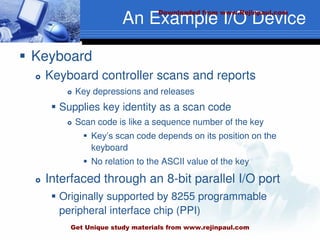
 Keyboard
 Keyboard controller scans and reports
 Key depressions and releases
 Supplies key identity as a scan code
 Scan code is like a sequence number of the key
 Key’s scan code depends on its position on the
keyboard
 No relation to the ASCII value of the key
 Interfaced through an 8-bit parallel I/O port
 Originally supported by 8255 programmable
peripheral interface chip (PPI)
Downloaded from www.Rejinpaul.com
Get Unique study materials from www.rejinpaul.com
An Example I/O Device
(cont’d)
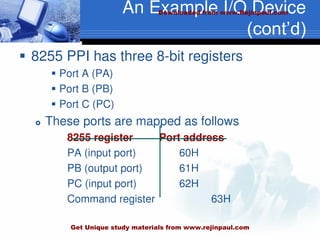
 8255 PPI has three 8-bit registers
 Port A (PA)
 Port B (PB)
 Port C (PC)
 These ports are mapped as follows
8255 register Port address
PA (input port) 60H
PB (output port) 61H
PC (input port) 62H
Command register 63H
Downloaded from www.Rejinpaul.com
Get Unique study materials from www.rejinpaul.com
An Example I/O Device
(cont’d)
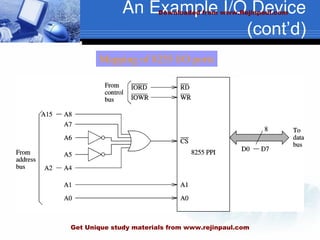
Mapping of 8255 I/O ports
Downloaded from www.Rejinpaul.com
Get Unique study materials from www.rejinpaul.com
An Example I/O Device
(cont’d)
 Mapping I/O ports is similar to mapping
memory
 Partial mapping
 Full mapping
 See our discussion in Chapter 16
 Keyboard scan code and status can be
read from port 60H
 7-bit scan code is available from
 PA0 – PA6
 Key status is available from PA7
 PA7 = 0 – key depressed
 PA0 = 1 – key released
Downloaded from www.Rejinpaul.com
Get Unique study materials from www.rejinpaul.com
I/O Data Transfer
 Data transfer involves two phases
 A data transfer phase
 It can be done either by
 Programmed I/O
 DMA
 An end-notification phase
 Programmed I/O
 Interrupt
 Three basic techniques
 Programmed I/O
 DMA
 Interrupt-driven I/O (discussed in Chapter 20)
Downloaded from www.Rejinpaul.com
Get Unique study materials from www.rejinpaul.com
I/O Data Transfer (cont’d)
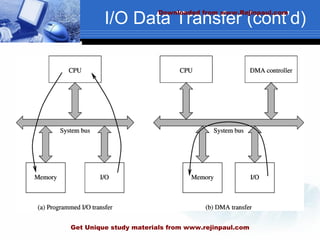
 Programmed I/O
 Done by busy-waiting
 This process is called polling
 Example
 Reading a key from the keyboard involves
 Waiting for PA7 bit to go low
 Indicates that a key is pressed
 Reading the key scan code
 Translating it to the ASCII value
 Waiting until the key is released
 Program 19.1 uses this process to read input
from the keyboard
Downloaded from www.Rejinpaul.com
Get Unique study materials from www.rejinpaul.com
I/O Data Transfer (cont’d)
 Direct memory access (DMA)
 Problems with programmed I/O
 Processor wastes time polling
 In our example
 Waiting for a key to be pressed,
 Waiting for it to be released
 May not satisfy timing constraints associated with
some devices
 Disk read or write
 DMA
 Frees the processor of the data transfer
responsibility
Downloaded from www.Rejinpaul.com
Get Unique study materials from www.rejinpaul.com
I/O Data Transfer (cont’d)
Downloaded from www.Rejinpaul.com
Get Unique study materials from www.rejinpaul.com
I/O Data Transfer (cont’d)
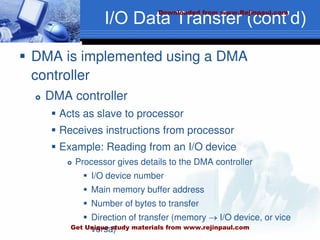
 DMA is implemented using a DMA
controller
 DMA controller
 Acts as slave to processor
 Receives instructions from processor
 Example: Reading from an I/O device
 Processor gives details to the DMA controller
 I/O device number
 Main memory buffer address
 Number of bytes to transfer
 Direction of transfer (memory  I/O device, or vice
versa)
Downloaded from www.Rejinpaul.com
Get Unique study materials from www.rejinpaul.com
I/O Data Transfer (cont’d)
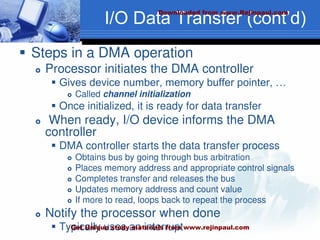
 Steps in a DMA operation
 Processor initiates the DMA controller
 Gives device number, memory buffer pointer, …
 Called channel initialization
 Once initialized, it is ready for data transfer
 When ready, I/O device informs the DMA
controller
 DMA controller starts the data transfer process
 Obtains bus by going through bus arbitration
 Places memory address and appropriate control signals
 Completes transfer and releases the bus
 Updates memory address and count value
 If more to read, loops back to repeat the process
 Notify the processor when done
 Typically uses an interrupt
Downloaded from www.Rejinpaul.com
Get Unique study materials from www.rejinpaul.com
I/O Data Transfer (cont’d)
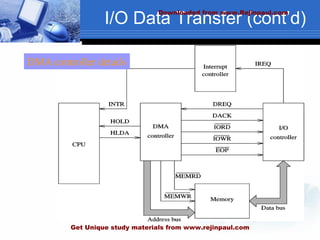
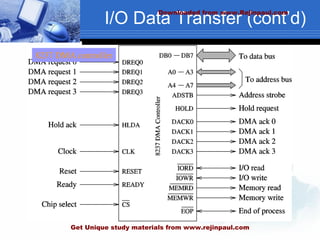
DMA controller details
Downloaded from www.Rejinpaul.com
Get Unique study materials from www.rejinpaul.com
I/O Data Transfer (cont’d)
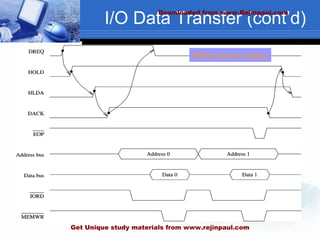
DMA transfer timing
Downloaded from www.Rejinpaul.com
Get Unique study materials from www.rejinpaul.com
I/O Data Transfer (cont’d)
8237 DMA controller
Downloaded from www.Rejinpaul.com
Get Unique study materials from www.rejinpaul.com
I/O Data Transfer (cont’d)
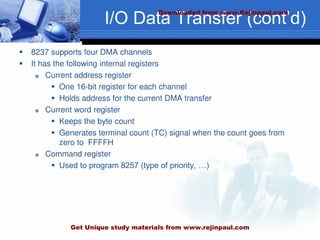
 8237 supports four DMA channels
 It has the following internal registers
 Current address register
 One 16-bit register for each channel
 Holds address for the current DMA transfer
 Current word register
 Keeps the byte count
 Generates terminal count (TC) signal when the count goes from
zero to FFFFH
 Command register
 Used to program 8257 (type of priority, …)
Downloaded from www.Rejinpaul.com
Get Unique study materials from www.rejinpaul.com
I/O Data Transfer (cont’d)
 Mode register
 Each channel can be programmed to
 Read or write
 Autoincrement or autodecrement the address
 Autoinitialize the channel
 Request register
 For software-initiated DMA
 Mask register
 Used to disable a specific channel
 Status register
 Temporary register
 Used for memory-to-memory transfers
Downloaded from www.Rejinpaul.com
Get Unique study materials from www.rejinpaul.com
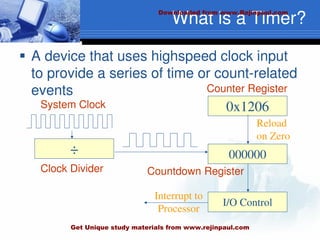
What is a Timer?
 A device that uses highspeed clock input
to provide a series of time or count-related
events
÷ 000000
0x1206
I/O Control
Clock Divider
Counter Register
Reload
on Zero
Countdown Register
Interrupt to
Processor
System Clock
Downloaded from www.Rejinpaul.com
Get Unique study materials from www.rejinpaul.com
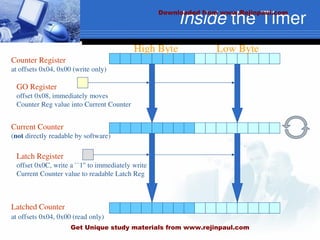
Inside the Timer
High Byte Low Byte
Counter Register
at offsets 0x04, 0x00 (write only)
Current Counter
(not directly readable by software)
GO Register
offset 0x08, immediately moves
Counter Reg value into Current Counter
Latch Register
offset 0x0C, write a ``1'' to immediately write
Current Counter value to readable Latch Reg
Latched Counter
at offsets 0x04, 0x00 (read only)
Downloaded from www.Rejinpaul.com
Get Unique study materials from www.rejinpaul.com
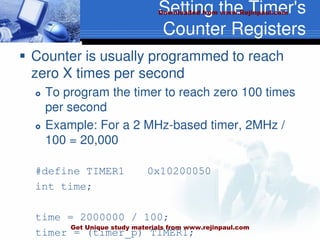
Setting the Timer's
Counter Registers
 Counter is usually programmed to reach
zero X times per second
 To program the timer to reach zero 100 times
per second
 Example: For a 2 MHz-based timer, 2MHz /
100 = 20,000
#define TIMER1 0x10200050
int time;
time = 2000000 / 100;
timer = (timer_p) TIMER1;
Downloaded from www.Rejinpaul.com
Get Unique study materials from www.rejinpaul.com
Interrupt vs. Polled I/O
 Polled I/O requires the CPU to ask a device (e.g. toggle switches) if the device requires
servicing
 For example, if the toggle switches have changed position
 Software plans for polling the devices and is written to know when a device will be
serviced
 Interrupt I/O allows the device to interrupt the processor, announcing that the device
requires attention
 This allows the CPU to ignore devices unless they request servicing (via interrupts)
 Software cannot plan for an interrupt because interrupts can happen at any time
therefore, software has no idea when an interrupt will occur
 This makes it more difficult to write code
 Processors can be programmed to ignore interrupts
 We call this masking of interrupts
 Different types of interrupts can be masked (IRQ vs. FIQ)
Downloaded from www.Rejinpaul.com
Get Unique study materials from www.rejinpaul.com
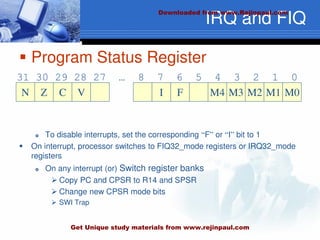
IRQ and FIQ
 Program Status Register
 To disable interrupts, set the corresponding “F” or “I” bit to 1
 On interrupt, processor switches to FIQ32_mode registers or IRQ32_mode
registers
 On any interrupt (or) Switch register banks
 Copy PC and CPSR to R14 and SPSR
 Change new CPSR mode bits
 SWI Trap
N
31 30 29 28 27 … 8 7 6 5 4 3 2 1 0
Z C V I F M4 M3 M2 M1 M0
Downloaded from www.Rejinpaul.com
Get Unique study materials from www.rejinpaul.com
INTERFACING
 Static RAM interfacing.
 Procedure
 Configuration.
 Dynamic RAM interfacing.
Downloaded from www.Rejinpaul.com
Get Unique study materials from www.rejinpaul.com
I/O Port Interfacing
 Steps in Interfacing
 Methods of interfacing
a) I/O Mapped
b) Memory Mapped.
Downloaded from www.Rejinpaul.com
Get Unique study materials from www.rejinpaul.com
PIO 8255
 Programmable input output Port.
 Architecture
 Signals
 Modes Of Operation
a) BSR Mode
b) I/O Modes
i) Mode 0(Basic I/O Mode)
ii) Mode 1 (Strobed I/O Mode)
iii) Mode 2 (Strobed Bidirectional Mode)
Downloaded from www.Rejinpaul.com
Get Unique study materials from www.rejinpaul.com
Controller 8259
 Programmable Interrupt Controller.
 Architecture and Signal Descriptions
 Interrupt Sequence .
 Command word
a) Initialization Command word (ICWs).
b) Operation Command words.
Modes of operation:
1.Nested mode.
2.Fully Nested Mode.
3.Poll mode
Automatic EOI Mode.
Downloaded from www.Rejinpaul.com
Get Unique study materials from www.rejinpaul.com
Display Controller 8279
 Output Mode
1)Display Scan
2) Display Entry
Command words.
Downloaded from www.Rejinpaul.com
Get Unique study materials from www.rejinpaul.com
8251 USART
 Methods of Data communication
a) Simplex
b) Duplex
c) Half Duplex
 Architecture
 Control Word
a) Mode Instruction control word
b) Command instruction control word
Downloaded from www.Rejinpaul.com
Get Unique study materials from www.rejinpaul.com
TEXT BOOKS
 Ramesh S.Gaonkar, “Microprocessor - Architecture, Programming
and Applications with the 8085”, Penram International publishing
private limited, fifth edition.
 (UNIT-1: – Chapters 3,5,6 and programming examples from
chapters 7-10)
 A.K. Ray & K.M.Bhurchandi, “Advanced Microprocessors and
peripherals- Architectures, Programming and Interfacing”, TMH,
2002 reprint. (UNITS 2 to 5: – Chapters 1-6, 7.1-7.3, 8, 16)
Downloaded from www.Rejinpaul.com
Get Unique study materials from www.rejinpaul.com
REFERENCES
 Douglas V.Hall, “Microprocessors and Interfacing: Programming and
Hardware”, TMH, Third edition
 Yu-cheng Liu, Glenn A.Gibson, “Microcomputer systems: The 8086 / 8088
Family architecture, Programming and Design”, PHI 2003
 Mohamed Ali Mazidi, Janice Gillispie Mazidi, “The 8051 microcontroller and
embedded systems”, Pearson education, 2004.
Downloaded from www.Rejinpaul.com
Get Unique study materials from www.rejinpaul.com

mpmc cse ppt.pdf

  • 1.
    AIM To have anin depth knowledge of the architecture and programming of 8-bit and 16-bit Microprocessors, Microcontrollers and to study how to interface various peripheral devices with them. Downloaded from www.Rejinpaul.com Get Unique study materials from www.rejinpaul.com
  • 2.
    OBJECTIVE  To studythe architecture and Instruction set of 8085 and 8086  To develop assembly language programs in 8085 and 8086.  To design and understand multiprocessor configurations  To study different peripheral devices and their interfacing to 8085/8086.  To study the architecture and programming of 8051 microcontroller. Downloaded from www.Rejinpaul.com Get Unique study materials from www.rejinpaul.com
  • 3.
    UNIT I THE 8085MICROPROCESSOR  1.1 Introduction to 8085  1.2 Microprocessor architecture  1.3 Instruction set  1.4 Addressing modes  1.5 Programming the 8085. Downloaded from www.Rejinpaul.com Get Unique study materials from www.rejinpaul.com
  • 4.
    1.1 8085 PROCESSOR •Thefirst microprocessor was introduced in 1970 by Intel (named 4004). • It ran at the speed of 108KHz. • Four years later, Intel created the 8080 running at just over 2 Mhz. •This microprocessor was used on the world's firs personal computer, named Altair. •Also at this time, IBM started researching for their microprocessor, called POWER (Performance Optimization With Enhanced RISC). Downloaded from www.Rejinpaul.com Get Unique study materials from www.rejinpaul.com
  • 5.
    Downloaded from www.Rejinpaul.com GetUnique study materials from www.rejinpaul.com
  • 6.
    1.2 Microprocessor architecture Control Unit  Arithmetic Logic Unit  Registers  Accumulator  Flags  Program Counter (PC)  Stack Pointer (SP)  Instruction Register/Decoder  Memory Address Register  General Purpose Registers  Control Generator  Register Selector  Microprogramming Downloaded from www.Rejinpaul.com Get Unique study materials from www.rejinpaul.com
  • 7.
    8085 ARCHITECTURE CONTD.. Downloaded fromwww.Rejinpaul.com Get Unique study materials from www.rejinpaul.com
  • 8.
    1.3 INSTRUCTION SET BASEDON FUNCTIONS  Data Transfer Instructions  Arithmetic Instructions  Logical Instructions  Branch Instructions  Machine Control BASED ON LENGTH  One-word or 1-byte instructions  Two-word or 2-byte instructions  Three-word or 3-byte instructions Downloaded from www.Rejinpaul.com Get Unique study materials from www.rejinpaul.com
  • 9.
    8085 Instruction Set The 8085 instructions can be classified as follows:  Data transfer operations  Between Registers  Between Memory location and a Registers  Direct write to a Register/Memory  Between I/O device and Accumulator  Arithmetic operations (ADD, SUB, INR, DCR)  Logic operations  Branching operations (JMP, CALL, RET) Downloaded from www.Rejinpaul.com Get Unique study materials from www.rejinpaul.com
  • 10.
    8085 Instruction Types Downloadedfrom www.Rejinpaul.com Get Unique study materials from www.rejinpaul.com
  • 11.
    8085 Instruction Types Downloadedfrom www.Rejinpaul.com Get Unique study materials from www.rejinpaul.com
  • 12.
    8085 Instruction Types Downloadedfrom www.Rejinpaul.com Get Unique study materials from www.rejinpaul.com
  • 13.
    PIN DIAGRAM Downloaded fromwww.Rejinpaul.com Get Unique study materials from www.rejinpaul.com
  • 14.
    1.5 ADDRESSING MODES Implied Addressing: The addressing mode of certain instructions is implied by the instruction’s function. For example, the STC (set carry flag) instruction deals only with the carry flag, the DAA (decimal adjust accumulator) instruction deals with the accumulator.  Register Addressing: Quite a large set of instructions call for register addressing. With these instructions, specify one of the registers A through E, H or L as well as the operation code. With these instructions, the accumulator is implied as a second operand. For example, the instruction CMP E may be interpreted as 'compare the contents of the E register with the contents of the accumulator. Most of the instructions that use register addressing deal with 8-bit values. However, a few of these instructions deal with 16-bit register pairs. For example, the PCHL instruction exchanges the contents of the program counter with the contents of the H and L registers.  Immediate Addressing: Instructions that use immediate addressing have data assembled as a part of the instruction itself. For example, the instruction CPI 'C' may be interpreted as ‘compare the contents of the accumulator with the letter C. When assembled, this instruction has the hexadecimal value FE43. Hexadecimal 43 is the internal representation for the letter C. When this instruction is executed, the processor fetches the first instruction byte and determines that it must fetch one more byte. The processor fetches the next byte into one of its internal registers and then performs the compare operation. Downloaded from www.Rejinpaul.com Get Unique study materials from www.rejinpaul.com
  • 15.
    ADDRESSING MODES CONTD…  DirectAddressing: Jump instructions include a 16-bit address as part of the instruction. For example, the instruction JMP 1000H causes a jump to the hexadecimal address 1000 by replacing the current contents of the program counter with the new value 1000H. Instructions that include a direct address require three bytes of storage: one for the instruction code, and two for the 16-bit address  Register Indirect Addressing: Register indirect instructions reference memory via a register pair. Thus, the instruction MOV M,C moves the contents of the C register into the memory address stored in the H and L register pair. The instruction LDAX B loads the accumulator with the byte of data specified by the address in the B and C register pair. Downloaded from www.Rejinpaul.com Get Unique study materials from www.rejinpaul.com
  • 16.
    UNIT- II  Intel8086 microprocessor  Architecture  Signals  Instruction set  Addressing modes  Assembler directives  Assembly language programming  Procedures  Macros  Interrupts and interrupt service routines.  BIOS Function Calls Downloaded from www.Rejinpaul.com Get Unique study materials from www.rejinpaul.com
  • 17.
    8086 ARCHITECTURE&PIN DIAGRAM Downloaded fromwww.Rejinpaul.com Get Unique study materials from www.rejinpaul.com
  • 18.
    8086 FEATURES  16-bitArithmetic Logic Unit  16-bit data bus (8088 has 8-bit data bus)  20-bit address bus - 220 = 1,048,576 = 1 meg  The address refers to a byte in memory.  In the 8088, these bytes come in on the 8-bit data bus. In the 8086, bytes at even addresses come in on the low half of the data bus (bits 0-7) and bytes at odd addresses come in on the upper half of the data bus (bits 8-15).  The 8086 can read a 16-bit word at an even address in one operation and at an odd address in two operations. The 8088 needs two operations in either case.  The least significant byte of a word on an 8086 family microprocessor is at the lower address. Downloaded from www.Rejinpaul.com Get Unique study materials from www.rejinpaul.com
  • 19.
    16-bit Registers CS SS DS ES Segment BP Index SP SI DI AH BH CH DH DL CL BL AL GeneralPurpose Status and Control Flags IP AX BX CX DX Downloaded from www.Rejinpaul.com Get Unique study materials from www.rejinpaul.com
  • 20.
    8086 ARCHITECTURE The 8086has two parts,  the Bus Interface Unit (BIU) and  the Execution Unit (EU).  The BIU fetches instructions, reads and writes data, and computes the 20-bit address.  The EU decodes and executes the instructions using the 16-bit ALU. The BIU contains the following registers: IP - the Instruction Pointer CS - the Code Segment Register DS - the Data Segment Register SS - the Stack Segment Register ES - the Extra Segment Register The BIU fetches instructions using the CS and IP, written CS:IP, to contract the 20-bit address. Data is fetched using a segment register (usually the DS) and an effective address (EA) computed by the EU depending on the addressing mode. Downloaded from www.Rejinpaul.com Get Unique study materials from www.rejinpaul.com
  • 21.
    INTERNAL BLOCK Downloaded fromwww.Rejinpaul.com Get Unique study materials from www.rejinpaul.com
  • 22.
    PROGRAM MODEL 8086 Programmer’sModel ES CS SS DS IP AH BH CH DH AL BL CL DL SP BP SI DI FLAGS AX BX CX DX Extra Segment Code Segment Stack Segment Data Segment Instruction Pointer Accumulator Base Register Count Register Data Register Stack Pointer Base Pointer Source Index Register Destination Index Register BIU registers (20 bit adder) EU registers Downloaded from www.Rejinpaul.com Get Unique study materials from www.rejinpaul.com
  • 23.
    8086/88 internal registers16 bits (2 bytes each) AX, BX, CX and DX are two bytes wide and each byte can be accessed separately These registers are used as memory pointers. Flags will be discussed later Segment registers are used as base address for a segment in the 1 M byte of memory Downloaded from www.Rejinpaul.com Get Unique study materials from www.rejinpaul.com
  • 24.
    The 8086/8088 Microprocessors:Registers • Registers – Registers are in the CPU and are referred to by specific names – Data registers • Hold data for an operation to be performed • There are 4 data registers (AX, BX, CX, DX) – Address registers • Hold the address of an instruction or data element • Segment registers (CS, DS, ES, SS) • Pointer registers (SP, BP, IP) • Index registers (SI, DI) – Status register • Keeps the current status of the processor • On an IBM PC the status register is called the FLAGS register – In total there are fourteen 16-bit registers in an 8086/8088 Downloaded from www.Rejinpaul.com Get Unique study materials from www.rejinpaul.com
  • 25.
    Data Registers: AX,BX, CX, DX • Instructions execute faster if the data is in a register • AX, BX, CX, DX are the data registers • Low and High bytes of the data registers can be accessed separately – AH, BH, CH, DH are the high bytes – AL, BL, CL, and DL are the low bytes • Data Registers are general purpose registers but they also perform special functions • AX – Accumulator Register – Preferred register to use in arithmetic, logic and data transfer instructions because it generates the shortest Machine Language Code – Must be used in multiplication and division operations – Must also be used in I/O operations Downloaded from www.Rejinpaul.com Get Unique study materials from www.rejinpaul.com
  • 26.
    • BX – BaseRegister – Also serves as an address register – Used in array operations – Used in Table Lookup operations (XLAT) • CX – Count register – Used as a loop counter – Used in shift and rotate operations • DX – Data register – Used in multiplication and division – Also used in I/O operations Downloaded from www.Rejinpaul.com Get Unique study materials from www.rejinpaul.com
  • 27.
    Pointer and IndexRegisters • Contain the offset addresses of memory locations • Can also be used in arithmetic and other operations • SP: Stack pointer – Used with SS to access the stack segment • BP: Base Pointer – Primarily used to access data on the stack – Can be used to access data in other segments • SI: Source Index register – is required for some string operations – When string operations are performed, the SI register points to memory locations in the data segment which is addressed by the DS register. Thus, SI is associated with the DS in string operations. Downloaded from www.Rejinpaul.com Get Unique study materials from www.rejinpaul.com
  • 28.
    • DI: DestinationIndex register – is also required for some string operations. – When string operations are performed, the DI register points to memory locations in the data segment which is addressed by the ES register. Thus, DI is associated with the ES in string operations. • The SI and the DI registers may also be used to access data stored in arrays Downloaded from www.Rejinpaul.com Get Unique study materials from www.rejinpaul.com
  • 29.
    Segment Registers -CS, DS, SS and ES • Are Address registers • Store the memory addresses of instructions and data • Memory Organization – Each byte in memory has a 20 bit address starting with 0 to 220-1 or 1 meg of addressable memory – Addresses are expressed as 5 hex digits from 00000 - FFFFF – Problem: But 20 bit addresses are TOO BIG to fit in 16 bit registers! – Solution: Memory Segment • Block of 64K (65,536) consecutive memory bytes • A segment number is a 16 bit number • Segment numbers range from 0000 to FFFF • Within a segment, a particular memory location is specified with an offset • An offset also ranges from 0000 to FFFF Downloaded from www.Rejinpaul.com Get Unique study materials from www.rejinpaul.com
  • 30.
    Downloaded from www.Rejinpaul.com GetUnique study materials from www.rejinpaul.com
  • 31.
    Segmented Memory Segmented memoryaddressing: absolute (linear) address is a combination of a 16-bit segment value added to a 16-bit offset 00000 10000 20000 30000 40000 50000 60000 70000 80000 90000 A0000 B0000 C0000 D0000 E0000 F0000 8000:0000 8000:FFFF seg ofs 8000:0250 0250 one segment Downloaded from www.Rejinpaul.com Get Unique study materials from www.rejinpaul.com
  • 32.
    Memory Address Generation •The BIU has a dedicated adder for determining physical memory addresses Intel Physical Address (20 Bits) Adder Segment Register (16 bits) 0 0 0 0 Offset Value (16 bits) Downloaded from www.Rejinpaul.com Get Unique study materials from www.rejinpaul.com
  • 33.
    Example Address Calculation •If the data segment starts at location 1000h and a data reference contains the address 29h where is the actual data? Intel Offset: 0 0 0 0 0 0 0 0 0 0 1 0 1 0 0 1 2 9 0 0 0 1 0 0 0 0 0 0 0 0 0 0 0 0 0 0 0 0 Segment: 0 0 0 1 0 0 0 0 0 0 0 0 0 0 1 0 1 0 0 1 Address: Downloaded from www.Rejinpaul.com Get Unique study materials from www.rejinpaul.com
  • 34.
    SEGMENT:OFFSET ADDRESS • LogicalAddress is specified as segment:offset • Physical address is obtained by shifting the segment address 4 bits to the left and adding the offset address • Thus the physical address of the logical address A4FB:4872 is A4FB0 + 4872 A9822 Downloaded from www.Rejinpaul.com Get Unique study materials from www.rejinpaul.com
  • 35.
    EXAMPLE Downloaded from www.Rejinpaul.com GetUnique study materials from www.rejinpaul.com
  • 36.
    Segment Register Offset Physical or AbsoluteAddress CS:IP = 400:56 Logical Address 0H 0FFFFFH Memory 0 + CS: IP 0400H 0056H 4000H 4056H 0400 0056 04056H The offset is the distance in bytes from the start of the segment. The offset is given by the IP for the Code Segment. Instructions are always fetched with using the CS register. The physical address is also called the absolute address. THE CODE SEGMENT Downloaded from www.Rejinpaul.com Get Unique study materials from www.rejinpaul.com
  • 37.
    THE DATA SEGMENT Datais usually fetched with respect to the DS register. The effective address (EA) is the offset. The EA depends on the addressing mode. Memory Segment Register Offset Physical Address + DS: EA 05C0 0050 05C00H 05C50H 05C0 0 0050 05C50H DS:EA 0H 0FFFFFH Downloaded from www.Rejinpaul.com Get Unique study materials from www.rejinpaul.com
  • 38.
    THE STACK SEGMENT SegmentRegister Offset Physical Address Memory + SS: SP 0A00 0100 0A000H 0A100H 0A00 0 0100 0A100H The stack is always referenced with respect to the stack segment register. The stack grows toward decreasing memory locations. The SP points to the last or top item on the stack. PUSH - pre-decrement the SP POP - post-increment the SP The offset is given by the SP register. SS:SP 0H 0FFFFFH Downloaded from www.Rejinpaul.com Get Unique study materials from www.rejinpaul.com
  • 39.
    Carry flag Parity flag Auxiliaryflag Zero Overflow Direction Interrupt enable Trap Sign 6 are status flags 3 are control flag Flags Downloaded from www.Rejinpaul.com Get Unique study materials from www.rejinpaul.com
  • 40.
    • CF (carry)Contains carry from leftmost bit following arithmetic, also contains last bit from a shift or rotate operation. Flag Register Flag O D I T S Z A P C Bit no. 15 14 13 12 11 1 0 9 8 7 6 5 4 3 2 1 0 • Conditional flags: – They are set according to some results of arithmetic operation. You do not need to alter the value yourself. • Control flags: – Used to control some operations of the MPU. These flags are to be set by you in order to achieve some specific purposes. Downloaded from www.Rejinpaul.com Get Unique study materials from www.rejinpaul.com
  • 41.
    Flag Register  OF(overflow) Indicates overflow of the leftmost bit during arithmetic.  DF (direction) Indicates left or right for moving or comparing string data.  IF (interrupt) Indicates whether external interrupts are being processed or ignored.  TF (trap) Permits operation of the processor in single step mode. Downloaded from www.Rejinpaul.com Get Unique study materials from www.rejinpaul.com
  • 42.
     SF (sign)Contains the resulting sign of an arithmetic operation (1=negative)  ZF (zero) Indicates when the result of arithmetic or a comparison is zero. (1=yes)  AF (auxiliary carry) Contains carry out of bit 3 into bit 4 for specialized arithmetic.  PF (parity) Indicates the number of 1 bits that result from an operation. Downloaded from www.Rejinpaul.com Get Unique study materials from www.rejinpaul.com
  • 43.
    Macros  avoid repetitiousSAS code  create generalizable and flexible SAS code  pass information from one part of a SAS job to another  conditionally execute data steps and PROCs  dynamically create code at execution time Downloaded from www.Rejinpaul.com Get Unique study materials from www.rejinpaul.com
  • 44.
    Example Simple macro variable %letdsn=LAB; title "DATA SET &dsn"; proc contents data=&dsn; run; proc print data=&dsn(obs=10); run; Downloaded from www.Rejinpaul.com Get Unique study materials from www.rejinpaul.com
  • 45.
    Procedures Initial call torun an external program  Run a LCA model to simulate data  Estimate a model of simulated data  Collect necessary output  Check if output read is indeed output wanted  Collect output in a single data matrix Downloaded from www.Rejinpaul.com Get Unique study materials from www.rejinpaul.com
  • 46.
    Instruction Set  Movdestination, source  add, inc, dec and sub instructions  Input/Output  String Instructions  Machine Control  Flag Manipulation. Downloaded from www.Rejinpaul.com Get Unique study materials from www.rejinpaul.com
  • 47.
    Addressing Modes  Immediateaddressing.  Register addressing.  Direct addressing.  Indirect addressing  Implied addressing.  Indexed addressing  Relative addressing Downloaded from www.Rejinpaul.com Get Unique study materials from www.rejinpaul.com
  • 48.
    Interrupts &Interrupt Service Routine An interrupt signals the processor to suspend its current activity (i.e. running your program) and to pass control to an interrupt service program (i.e. part of the operating system).  A software interrupt is one generated by a program (as opposed to one generated by hardware).  The 8086 int instruction generates a software interrupt.  It uses a single operand which is a number indicating which MSDOS subprogram is to be invoked.  This subprogram handles a variety of I/O operations by calling appropriate subprograms. Downloaded from www.Rejinpaul.com Get Unique study materials from www.rejinpaul.com
  • 49.
    MAXIMUM MODE Maximum mode Maximum mode is designed to be used with a coprocessor exists in the system.  All the control signals (except RD) are not generated by the microprocessor.  But we still need those control signals.  Solution:  8288. Downloaded from www.Rejinpaul.com Get Unique study materials from www.rejinpaul.com
  • 50.
    8086 maximum &minimum modes  8086 maximum & minimum modes  The mode is controlled by MN/MX.  Maximum mode is obtained by connecting MN/MX to low and minimum mode is by connecting it to high.  Having two different modes (minimum and maximum) is used only 8088/8086.  Each mode enables a different control structure.  Minimum mode operation and control signals are very similar to those of 8085.  So 8085 8-bit peripherals can be used with 8086 without special considerations.  Easy and least expensive way to build single processor systems Downloaded from www.Rejinpaul.com Get Unique study materials from www.rejinpaul.com
  • 51.
    Downloaded from www.Rejinpaul.com GetUnique study materials from www.rejinpaul.com
  • 52.
    S2 S1 S0operation signal 0 0 0 Interrupt Acknowledge INTA 0 0 1 Read I/O port IORC 0 1 0 Write I/O port IOWC, AIOWC 0 1 1 Halt none 1 0 0 Instruction Fetch MRDC 1 0 1 Read Memory MRDC 1 1 0 Write Memory MWTC, AMWC 1 1 1 Passive none Downloaded from www.Rejinpaul.com Get Unique study materials from www.rejinpaul.com
  • 53.
    Downloaded from www.Rejinpaul.com GetUnique study materials from www.rejinpaul.com
  • 54.
    UNIT III  CoprocessorConfiguration  Closely Coupled Configuration  Loosely Coupled Configuration  8087 Numeric Data Processor-architecture  Data types  8089 I/O Processor-Architecture  Communication between CPU and IOP Downloaded from www.Rejinpaul.com Get Unique study materials from www.rejinpaul.com
  • 55.
    PIN DIAGRAM OF8087 Downloaded from www.Rejinpaul.com Get Unique study materials from www.rejinpaul.com
  • 56.
    Architectureof 8087  TwoUnits  ฀Control Unit  ฀Execution Unit Downloaded from www.Rejinpaul.com Get Unique study materials from www.rejinpaul.com
  • 57.
    Downloaded from www.Rejinpaul.com GetUnique study materials from www.rejinpaul.com
  • 58.
    Control Unit  ฀Controlunit: To synchronize the operation of the coprocessor and the processor.  ฀This unit has a Control word and Status word and Data Buffer  ฀If instruction is an ESCape (coprocessor) instruction, the coprocessor executes it, if not  the microprocessor executes.  ฀Status register reflects the over all operation of the coprocessor. Status Register Downloaded from www.Rejinpaul.com Get Unique study materials from www.rejinpaul.com
  • 59.
    Status Register  C3-C0Condition code bits  TOP Top-of-stack (ST)  ES Error summary  PE Precision error  UE Under flow error  OE Overflow error  ZE Zero error  DE Denormalized error  IE Invalid error  B Busy bit ฀B-Busy bit indicates that coprocessor is busy executing a task. Busy can be tested by examining the status or by using the FWAIT instruction. ฀C3-C0 Condition code bits indicates conditions about the coprocessor. ฀TOP- Top of the stack (ST) bit indicates the current register address as the top of the stack. ฀ES-Error summary bit is set if any unmasked error bit (PE, UE, OE, ZE, DE, or IE) is set. In the 8087 the error summary is also caused a coprocessor interrupt. ฀PE- Precision error indicates that the result or operand executes selected precision. ฀UE-Under flow error indicates the result is too large to be represent with the current precision selected by the control word. ฀OE-Over flow error indicates a result that is too large to be represented. If this error is masked, the coprocessor generates infinity for an overflow error. ฀ZE-A Zero error indicates the divisor was zero while the dividend is a non-infinity or non-zero number. ฀DE-Denormalized error indicates at least one of the operand is denormalized. ฀IE-Invalid error indicates a stack overflow or underflow, indeterminate from (0/0,0,-0, etc) or the use of a NAN as an operand. This flag indicates error such as those produced by taking the square root of a negative number. Downloaded from www.Rejinpaul.com Get Unique study materials from www.rejinpaul.com
  • 60.
    CONTROL REGISTER  Controlregister selects precision, rounding control, infinity control.  It also masks an unmasks the exception bits that correspond to the rightmost Six bits of status register.  Instruction FLDCW is used to load the value into the control register.  IC Infinity control  RC Rounding control  PC Precision control  PM Precision control  UM Underflow mask  OM Overflow mask  ZM Division by zero mask  DM Denormalized operand mask  IM Invalid operand mask Downloaded from www.Rejinpaul.com Get Unique study materials from www.rejinpaul.com
  • 61.
     IC –Infinitycontrol selects either affine or projective infinity. Affine allows positive and negative infinity, while projective assumes infinity is unsigned.  INFINITY CONTROL 0 = Projective 1 = Affine  RC –Rounding control determines the type of rounding.  ROUNDING CONTROL 00=Round to nearest or even 01=Round down towards minus infinity 10=Round up towards plus infinity 11=Chop or truncate towards zero  PC- Precision control sets the precision of he result as define in table  PRECISION CONTROL 00=Single precision (short) 01=Reserved 10=Double precision (long) 11=Extended precision (temporary)  Exception Masks – It Determines whether the error indicated by the exception affects the error bit in the status register. If a logic1 is placed in one of the exception control bits, corresponding status register bit is masked off. Downloaded from www.Rejinpaul.com Get Unique study materials from www.rejinpaul.com
  • 62.
    Numeric Execution Unit This performs all operations that access and manipulate the numeric data in the coprocessor’s registers.  Numeric registers in NUE are 80 bits wide.  NUE is able to perform arithmetic, logical and transcendental operations as well as supply a small number of mathematical constants from its on-chip ROM.  Numeric data is routed into two parts ways a 64 bit mantissa bus and a 16 bit sign/exponent bus. Downloaded from www.Rejinpaul.com Get Unique study materials from www.rejinpaul.com
  • 63.
    Data Types  Internally,all data operands are converted to the 80-bit temporary real format. We have 3 types.  Integer data type  Packed BCD data type  Real data type Example Converting a decimal number into a Floating-point number. 1) Converting the decimal number into binary form. 2) Normalize the binary number 3) Calculate the biased exponent. 4) Store the number in the floating-point format. Example  Step Result 1) 100.25 2) 1100100.01 = 1.10010001 * 26 3) 110+01111111=10000101 4 ) Sign = 0  Exponent =10000101  Significand = 10010001000000000000000  In step 3 the biased exponent is the exponent a 26 or 110,plus a bias of 01111111(7FH) single precision no use 7F and double precision no use 3FFFH.  IN step 4 the information found in prior step is combined to form the floating point no. Downloaded from www.Rejinpaul.com Get Unique study materials from www.rejinpaul.com
  • 64.
    UNIT V  Architectureof 8051  Signals  Operational features  Memory and I/O addressing  Interrupts  Instruction set  Applications. Downloaded from www.Rejinpaul.com Get Unique study materials from www.rejinpaul.com
  • 65.
    RAM ROM I/O Port Timer Serial COM Port Microcontroller CPU  Asmaller computer  On-chip RAM, ROM, I/O ports...  Example:Motorola’s 6811, Intel’s 8051, Zilog’s Z8 and PIC 16X A single chip Microcontroller : Downloaded from www.Rejinpaul.com Get Unique study materials from www.rejinpaul.com
  • 66.
    Microprocessor  CPU isstand-alone, RAM, ROM, I/O, timer are separate  designer can decide on the amount of ROM, RAM and I/O ports.  expansive  versatility  general-purpose Microcontroller • CPU, RAM, ROM, I/O and timer are all on a single chip • fix amount of on-chip ROM, RAM, I/O ports • for applications in which cost, power and space are critical • single-purpose Microprocessor vs. Microcontroller Downloaded from www.Rejinpaul.com Get Unique study materials from www.rejinpaul.com
  • 67.
    Block Diagram CPU On-chip RAM On-chip ROM for program code 4I/O Ports Timer 0 Serial Port OSC Interrupt Control External interrupts Timer 1 Timer/Counter Bus Control TxD RxD P0 P1 P2 P3 Address/Data Counter Inputs Downloaded from www.Rejinpaul.com Get Unique study materials from www.rejinpaul.com
  • 68.
    Pin Description ofthe 8051 1 2 3 4 5 6 7 8 9 10 11 12 13 14 15 16 17 18 19 20 40 39 38 37 36 35 34 33 32 31 30 29 28 27 26 25 24 23 22 21 P1.0 P1.1 P1.2 P1.3 P1.4 P1.5 P1.6 P1.7 RST (RXD)P3.0 (TXD)P3.1 (T0)P3.4 (T1)P3.5 XTAL2 XTAL1 GND (INT0)P3.2 (INT1)P3.3 (RD)P3.7 (WR)P3.6 Vcc P0.0(AD0) P0.1(AD1) P0.2(AD2) P0.3(AD3) P0.4(AD4) P0.5(AD5) P0.6(AD6) P0.7(AD7) EA/VPP ALE/PROG PSEN P2.7(A15) P2.6(A14) P2.5(A13) P2.4(A12) P2.3(A11) P2.2(A10) P2.1(A9) P2.0(A8) 8051 (8031)  Downloaded from www.Rejinpaul.com Get Unique study materials from www.rejinpaul.com
  • 69.
    Figure (b). Power-OnRESET Circuit 30 pF 30 pF 8.2 K 10 uF + Vcc 11.0592 MHz EA/VPP X1 X2 RST 31 19 18 9  Downloaded from www.Rejinpaul.com Get Unique study materials from www.rejinpaul.com
  • 70.
    Port 0 withPull-Up Resistors P0.0 P0.1 P0.2 P0.3 P0.4 P0.5 P0.6 P0.7 DS5000 8751 8951 Vcc 10 K Port 0 Downloaded from www.Rejinpaul.com Get Unique study materials from www.rejinpaul.com
  • 71.
    Registers A B R0 R1 R3 R4 R2 R5 R7 R6 DPH DPL PC DPTR PC Some 805116-bit Register Some 8-bitt Registers of the 8051 Downloaded from www.Rejinpaul.com Get Unique study materials from www.rejinpaul.com
  • 72.
    Stack in the8051  The register used to access the stack is called SP (stack pointer) register.  The stack pointer in the 8051 is only 8 bits wide, which means that it can take value 00 to FFH. When 8051 powered up, the SP register contains value 07. 7FH 30H 2FH 20H 1FH 17H 10H 0FH 07H 08H 18H 00H Register Bank 0 (Stack) Register Bank 1 Register Bank 2 Register Bank 3 Bit-Addressable RAM Scratch pad RAM Downloaded from www.Rejinpaul.com Get Unique study materials from www.rejinpaul.com
  • 73.
    Timer : : Timer: Downloadedfrom www.Rejinpaul.com Get Unique study materials from www.rejinpaul.com
  • 74.
    Interrupt : Downloaded fromwww.Rejinpaul.com Get Unique study materials from www.rejinpaul.com
  • 75.
    Numerical Bases Usedin Programming  Hexadecimal  Binary  BCD Downloaded from www.Rejinpaul.com Get Unique study materials from www.rejinpaul.com
  • 76.
    Hexadecimal Basis  HexadecimalDigits: 1 2 3 4 5 6 7 8 9 A B C D E F A=10 B=11 C=12 D=13 E=14 F=15 Downloaded from www.Rejinpaul.com Get Unique study materials from www.rejinpaul.com
  • 77.
    Decimal, Binary, BCD,& Hexadecimal Numbers (43)10= (0100 0011)BCD= ( 0010 1011 )2 = ( 2 B )16 Downloaded from www.Rejinpaul.com Get Unique study materials from www.rejinpaul.com
  • 78.
    Register Addressing Mode MOVRn, A ;n=0,..,7 ADD A, Rn MOV DPL, R6 MOV DPTR, A MOV Rm, Rn Downloaded from www.Rejinpaul.com Get Unique study materials from www.rejinpaul.com
  • 79.
    Direct Addressing Mode Althoughthe entire of 128 bytes of RAM can be accessed using direct addressing mode, it is most often used to access RAM loc. 30 – 7FH. MOV R0, 40H MOV 56H, A MOV A, 4 ; ≡ MOV A, R4 MOV 6, 2 ; copy R2 to R6 ; MOV R6,R2 is invalid ! Downloaded from www.Rejinpaul.com Get Unique study materials from www.rejinpaul.com
  • 80.
    Immediate Addressing Mode MOVA,#65H MOV R6,#65H MOV DPTR,#2343H MOV P1,#65H Downloaded from www.Rejinpaul.com Get Unique study materials from www.rejinpaul.com
  • 81.
    SETB bit ;bit=1 CLR bit ; bit=0 SETB C ; CY=1 SETB P0.0 ;bit 0 from port 0 =1 SETB P3.7 ;bit 7 from port 3 =1 SETB ACC.2 ;bit 2 from ACCUMULATOR =1 SETB 05 ;set high D5 of RAM loc. 20h Note: CLR instruction is as same as SETB i.e.: CLR C ;CY=0 But following instruction is only for CLR: CLR A ;A=0 Downloaded from www.Rejinpaul.com Get Unique study materials from www.rejinpaul.com
  • 82.
    DEC byte ;byte=byte-1 INCbyte ;byte=byte+1 INC R7 DEC A DEC 40H ; [40]=[40]-1 Downloaded from www.Rejinpaul.com Get Unique study materials from www.rejinpaul.com
  • 83.
    LOOP and JUMPInstructions JZ Jump if A=0 JNZ Jump if A/=0 DJNZ Decrement and jump if A/=0 CJNE A,byte Jump if A/=byte CJNE reg,#data Jump if byte/=#data JC Jump if CY=1 JNC Jump if CY=0 JB Jump if bit=1 JNB Jump if bit=0 JBC Jump if bit=1 and clear bit Conditional Jumps : Downloaded from www.Rejinpaul.com Get Unique study materials from www.rejinpaul.com
  • 84.
    Call instruction SETB P0.0 . . CALLUP . . . CLR P0.0 . . RET UP: Downloaded from www.Rejinpaul.com Get Unique study materials from www.rejinpaul.com
  • 85.
    UNIT IV  MemoryInterfacing and I/O interfacing  Parallel communication interface  Serial communication interface  Timer  Keyboard /display controller  Interrupt controller  DMA controller  Programming and applications Downloaded from www.Rejinpaul.com Get Unique study materials from www.rejinpaul.com
  • 86.
    Accessing I/O Devices I/O address mapping  Memory-mapped I/O  Reading and writing are similar to memory read/write  Uses same memory read and write signals  Most processors use this I/O mapping  Isolated I/O  Separate I/O address space  Separate I/O read and write signals are needed  Pentium supports isolated I/O  64 KB address space  Can be any combination of 8-, 16- and 32-bit I/O ports  Also supports memory-mapped I/O Downloaded from www.Rejinpaul.com Get Unique study materials from www.rejinpaul.com
  • 87.
    Accessing I/O Devices (cont’d) Accessing I/O ports in Pentium  Register I/O instructions in accumulator, port8 ; direct format  Useful to access first 256 ports in accumulator,DX ; indirect format  DX gives the port address  Block I/O instructions  ins and outs  Both take no operands---as in string instructions  ins: port address in DX, memory address in ES:(E)DI  outs: port address in DX, memory address in ES:(E)SI  We can use rep prefix for block transfer of data Downloaded from www.Rejinpaul.com Get Unique study materials from www.rejinpaul.com
  • 88.
    An Example I/ODevice  Keyboard  Keyboard controller scans and reports  Key depressions and releases  Supplies key identity as a scan code  Scan code is like a sequence number of the key  Key’s scan code depends on its position on the keyboard  No relation to the ASCII value of the key  Interfaced through an 8-bit parallel I/O port  Originally supported by 8255 programmable peripheral interface chip (PPI) Downloaded from www.Rejinpaul.com Get Unique study materials from www.rejinpaul.com
  • 89.
    An Example I/ODevice (cont’d)  8255 PPI has three 8-bit registers  Port A (PA)  Port B (PB)  Port C (PC)  These ports are mapped as follows 8255 register Port address PA (input port) 60H PB (output port) 61H PC (input port) 62H Command register 63H Downloaded from www.Rejinpaul.com Get Unique study materials from www.rejinpaul.com
  • 90.
    An Example I/ODevice (cont’d) Mapping of 8255 I/O ports Downloaded from www.Rejinpaul.com Get Unique study materials from www.rejinpaul.com
  • 91.
    An Example I/ODevice (cont’d)  Mapping I/O ports is similar to mapping memory  Partial mapping  Full mapping  See our discussion in Chapter 16  Keyboard scan code and status can be read from port 60H  7-bit scan code is available from  PA0 – PA6  Key status is available from PA7  PA7 = 0 – key depressed  PA0 = 1 – key released Downloaded from www.Rejinpaul.com Get Unique study materials from www.rejinpaul.com
  • 92.
    I/O Data Transfer Data transfer involves two phases  A data transfer phase  It can be done either by  Programmed I/O  DMA  An end-notification phase  Programmed I/O  Interrupt  Three basic techniques  Programmed I/O  DMA  Interrupt-driven I/O (discussed in Chapter 20) Downloaded from www.Rejinpaul.com Get Unique study materials from www.rejinpaul.com
  • 93.
    I/O Data Transfer(cont’d)  Programmed I/O  Done by busy-waiting  This process is called polling  Example  Reading a key from the keyboard involves  Waiting for PA7 bit to go low  Indicates that a key is pressed  Reading the key scan code  Translating it to the ASCII value  Waiting until the key is released  Program 19.1 uses this process to read input from the keyboard Downloaded from www.Rejinpaul.com Get Unique study materials from www.rejinpaul.com
  • 94.
    I/O Data Transfer(cont’d)  Direct memory access (DMA)  Problems with programmed I/O  Processor wastes time polling  In our example  Waiting for a key to be pressed,  Waiting for it to be released  May not satisfy timing constraints associated with some devices  Disk read or write  DMA  Frees the processor of the data transfer responsibility Downloaded from www.Rejinpaul.com Get Unique study materials from www.rejinpaul.com
  • 95.
    I/O Data Transfer(cont’d) Downloaded from www.Rejinpaul.com Get Unique study materials from www.rejinpaul.com
  • 96.
    I/O Data Transfer(cont’d)  DMA is implemented using a DMA controller  DMA controller  Acts as slave to processor  Receives instructions from processor  Example: Reading from an I/O device  Processor gives details to the DMA controller  I/O device number  Main memory buffer address  Number of bytes to transfer  Direction of transfer (memory  I/O device, or vice versa) Downloaded from www.Rejinpaul.com Get Unique study materials from www.rejinpaul.com
  • 97.
    I/O Data Transfer(cont’d)  Steps in a DMA operation  Processor initiates the DMA controller  Gives device number, memory buffer pointer, …  Called channel initialization  Once initialized, it is ready for data transfer  When ready, I/O device informs the DMA controller  DMA controller starts the data transfer process  Obtains bus by going through bus arbitration  Places memory address and appropriate control signals  Completes transfer and releases the bus  Updates memory address and count value  If more to read, loops back to repeat the process  Notify the processor when done  Typically uses an interrupt Downloaded from www.Rejinpaul.com Get Unique study materials from www.rejinpaul.com
  • 98.
    I/O Data Transfer(cont’d) DMA controller details Downloaded from www.Rejinpaul.com Get Unique study materials from www.rejinpaul.com
  • 99.
    I/O Data Transfer(cont’d) DMA transfer timing Downloaded from www.Rejinpaul.com Get Unique study materials from www.rejinpaul.com
  • 100.
    I/O Data Transfer(cont’d) 8237 DMA controller Downloaded from www.Rejinpaul.com Get Unique study materials from www.rejinpaul.com
  • 101.
    I/O Data Transfer(cont’d)  8237 supports four DMA channels  It has the following internal registers  Current address register  One 16-bit register for each channel  Holds address for the current DMA transfer  Current word register  Keeps the byte count  Generates terminal count (TC) signal when the count goes from zero to FFFFH  Command register  Used to program 8257 (type of priority, …) Downloaded from www.Rejinpaul.com Get Unique study materials from www.rejinpaul.com
  • 102.
    I/O Data Transfer(cont’d)  Mode register  Each channel can be programmed to  Read or write  Autoincrement or autodecrement the address  Autoinitialize the channel  Request register  For software-initiated DMA  Mask register  Used to disable a specific channel  Status register  Temporary register  Used for memory-to-memory transfers Downloaded from www.Rejinpaul.com Get Unique study materials from www.rejinpaul.com
  • 103.
    What is aTimer?  A device that uses highspeed clock input to provide a series of time or count-related events ÷ 000000 0x1206 I/O Control Clock Divider Counter Register Reload on Zero Countdown Register Interrupt to Processor System Clock Downloaded from www.Rejinpaul.com Get Unique study materials from www.rejinpaul.com
  • 104.
    Inside the Timer HighByte Low Byte Counter Register at offsets 0x04, 0x00 (write only) Current Counter (not directly readable by software) GO Register offset 0x08, immediately moves Counter Reg value into Current Counter Latch Register offset 0x0C, write a ``1'' to immediately write Current Counter value to readable Latch Reg Latched Counter at offsets 0x04, 0x00 (read only) Downloaded from www.Rejinpaul.com Get Unique study materials from www.rejinpaul.com
  • 105.
    Setting the Timer's CounterRegisters  Counter is usually programmed to reach zero X times per second  To program the timer to reach zero 100 times per second  Example: For a 2 MHz-based timer, 2MHz / 100 = 20,000 #define TIMER1 0x10200050 int time; time = 2000000 / 100; timer = (timer_p) TIMER1; Downloaded from www.Rejinpaul.com Get Unique study materials from www.rejinpaul.com
  • 106.
    Interrupt vs. PolledI/O  Polled I/O requires the CPU to ask a device (e.g. toggle switches) if the device requires servicing  For example, if the toggle switches have changed position  Software plans for polling the devices and is written to know when a device will be serviced  Interrupt I/O allows the device to interrupt the processor, announcing that the device requires attention  This allows the CPU to ignore devices unless they request servicing (via interrupts)  Software cannot plan for an interrupt because interrupts can happen at any time therefore, software has no idea when an interrupt will occur  This makes it more difficult to write code  Processors can be programmed to ignore interrupts  We call this masking of interrupts  Different types of interrupts can be masked (IRQ vs. FIQ) Downloaded from www.Rejinpaul.com Get Unique study materials from www.rejinpaul.com
  • 107.
    IRQ and FIQ Program Status Register  To disable interrupts, set the corresponding “F” or “I” bit to 1  On interrupt, processor switches to FIQ32_mode registers or IRQ32_mode registers  On any interrupt (or) Switch register banks  Copy PC and CPSR to R14 and SPSR  Change new CPSR mode bits  SWI Trap N 31 30 29 28 27 … 8 7 6 5 4 3 2 1 0 Z C V I F M4 M3 M2 M1 M0 Downloaded from www.Rejinpaul.com Get Unique study materials from www.rejinpaul.com
  • 108.
    INTERFACING  Static RAMinterfacing.  Procedure  Configuration.  Dynamic RAM interfacing. Downloaded from www.Rejinpaul.com Get Unique study materials from www.rejinpaul.com
  • 109.
    I/O Port Interfacing Steps in Interfacing  Methods of interfacing a) I/O Mapped b) Memory Mapped. Downloaded from www.Rejinpaul.com Get Unique study materials from www.rejinpaul.com
  • 110.
    PIO 8255  Programmableinput output Port.  Architecture  Signals  Modes Of Operation a) BSR Mode b) I/O Modes i) Mode 0(Basic I/O Mode) ii) Mode 1 (Strobed I/O Mode) iii) Mode 2 (Strobed Bidirectional Mode) Downloaded from www.Rejinpaul.com Get Unique study materials from www.rejinpaul.com
  • 111.
    Controller 8259  ProgrammableInterrupt Controller.  Architecture and Signal Descriptions  Interrupt Sequence .  Command word a) Initialization Command word (ICWs). b) Operation Command words. Modes of operation: 1.Nested mode. 2.Fully Nested Mode. 3.Poll mode Automatic EOI Mode. Downloaded from www.Rejinpaul.com Get Unique study materials from www.rejinpaul.com
  • 112.
    Display Controller 8279 Output Mode 1)Display Scan 2) Display Entry Command words. Downloaded from www.Rejinpaul.com Get Unique study materials from www.rejinpaul.com
  • 113.
    8251 USART  Methodsof Data communication a) Simplex b) Duplex c) Half Duplex  Architecture  Control Word a) Mode Instruction control word b) Command instruction control word Downloaded from www.Rejinpaul.com Get Unique study materials from www.rejinpaul.com
  • 114.
    TEXT BOOKS  RameshS.Gaonkar, “Microprocessor - Architecture, Programming and Applications with the 8085”, Penram International publishing private limited, fifth edition.  (UNIT-1: – Chapters 3,5,6 and programming examples from chapters 7-10)  A.K. Ray & K.M.Bhurchandi, “Advanced Microprocessors and peripherals- Architectures, Programming and Interfacing”, TMH, 2002 reprint. (UNITS 2 to 5: – Chapters 1-6, 7.1-7.3, 8, 16) Downloaded from www.Rejinpaul.com Get Unique study materials from www.rejinpaul.com
  • 115.
    REFERENCES  Douglas V.Hall,“Microprocessors and Interfacing: Programming and Hardware”, TMH, Third edition  Yu-cheng Liu, Glenn A.Gibson, “Microcomputer systems: The 8086 / 8088 Family architecture, Programming and Design”, PHI 2003  Mohamed Ali Mazidi, Janice Gillispie Mazidi, “The 8051 microcontroller and embedded systems”, Pearson education, 2004. Downloaded from www.Rejinpaul.com Get Unique study materials from www.rejinpaul.com