Art Serna Using MOODLE in e-learning
What is Moodle? An acronym for  M odular  O bject  O riented  D evelopmental  L earning  E nvironment An Open-Source e-learning software A Course Management System (CMS)
What is Moodle? Moodle runs without modification on Unix, Linux, Windows, Mac OS X, Netware and any other system that supports PHP Data is stored in a single database: MySQL is best supported, but Oracle and Access can be supported
What is a CMS? Web application Runs on a server Accessed by using a web browser Offer a wide variety of tools Upload and share material Forums and chats Quizzes and surveys Gather and review assignments Recording grades
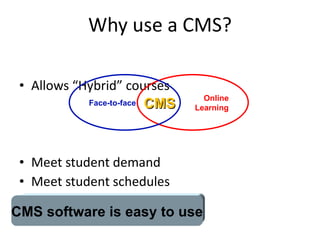
Why use a CMS? Allows “Hybrid” courses Meet student demand Meet student schedules Deliver better courses CMS software is easy to use Online Learning Face-to-face CMS
What makes Moodle special? Free Open-source Simple intuitive user interface Focus is on sharing ideas and engaging in the construction of knowledge Built around a  “Social Constructionism”  educational philosophy
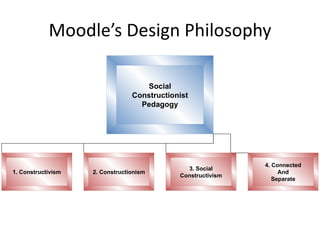
Moodle’s Design Philosophy Social Constructionist Pedagogy 1. Constructivism 3. Social Constructivism 4. Connected And Separate 2. Constructionism
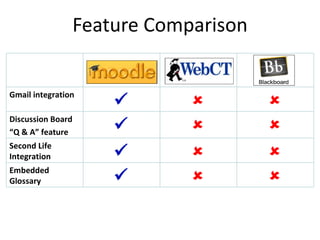
Feature Comparison Gmail integration    Discussion Board “ Q & A” feature    Second Life Integration    Embedded Glossary   
Moodle Basics Interface   Extensive help system Course Formats Weekly Format   – for courses with a fixed schedule Topics Format   – for concept oriented courses Social Format   – for less formal courses, or non-course uses like departmental sites
Components of a Moodle Course Moodle has a modular architecture Resources : tools for adding static content Text pages Web Sites Activities : tools for adding dynamic content Lessons Assignments Forums Quizzes Glossaries
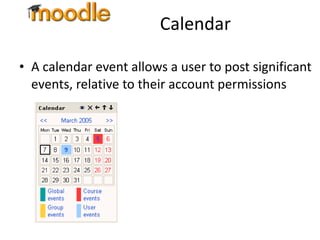
Calendar A calendar event allows a user to post significant events, relative to their account permissions
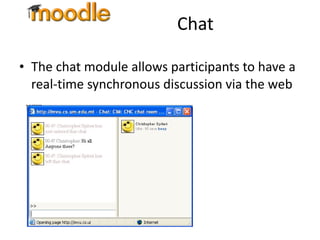
Chat The chat module allows participants to have a real-time synchronous discussion via the web
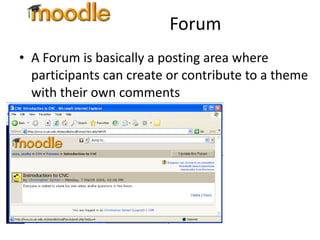
Forum A Forum is basically a posting area where participants can create or contribute to a theme with their own comments
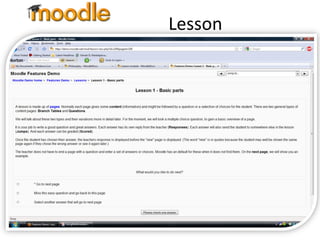
Lesson A lesson module delivers content in an interesting and flexible way Consists of a number of pages Each page normally ends with a question and a number of possible answers Student progresses onto next page depending on choice of answer
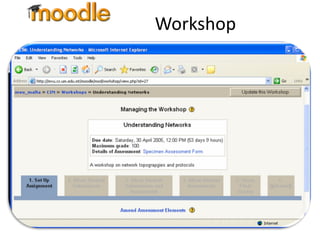
Workshop A Workshop is a peer assessment activity that allows participants to assess each other’s projects Allows the lecturer to both manage and grade material
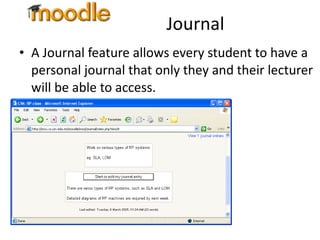
Journal A Journal feature allows every student to have a personal journal that only they and their lecturer will be able to access.
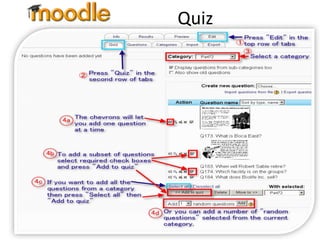
Quiz A quiz module consists of multiple choice, true-false, short answer questions Questions are kept in a categorized database, and can be reused within and between courses Can allow multiple attempts Teacher can provide feedback Includes grading facility
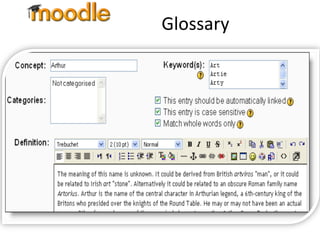
Glossary The Glossary feature in Moodle acts as a definition resource Can be presented in a number of formats Glossary entries can be linked to key phrases throughout system
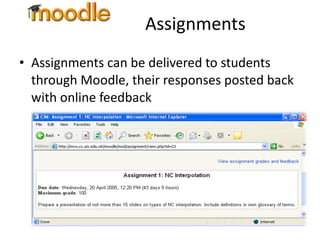
Assignments Assignments can be delivered to students through Moodle, their responses posted back with online feedback
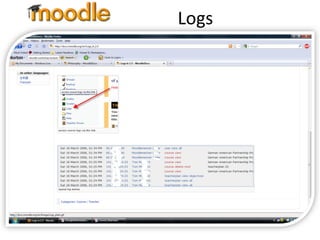
Logs Logs show the activity in a class for different days or times Check the time students spend on activities
Managing your class Ensure that only students officially enrolled in your course have access to your Moodle site     Enrolment key Manage student workgroups Separate Groups Visible Groups Moodle provides a backup tool to create archives of a course A backup course can be restored in case of server failures

Moodle in E learning

  • 1.
    Art Serna UsingMOODLE in e-learning
  • 2.
    What is Moodle?An acronym for M odular O bject O riented D evelopmental L earning E nvironment An Open-Source e-learning software A Course Management System (CMS)
  • 3.
    What is Moodle?Moodle runs without modification on Unix, Linux, Windows, Mac OS X, Netware and any other system that supports PHP Data is stored in a single database: MySQL is best supported, but Oracle and Access can be supported
  • 4.
    What is aCMS? Web application Runs on a server Accessed by using a web browser Offer a wide variety of tools Upload and share material Forums and chats Quizzes and surveys Gather and review assignments Recording grades
  • 5.
    Why use aCMS? Allows “Hybrid” courses Meet student demand Meet student schedules Deliver better courses CMS software is easy to use Online Learning Face-to-face CMS
  • 6.
    What makes Moodlespecial? Free Open-source Simple intuitive user interface Focus is on sharing ideas and engaging in the construction of knowledge Built around a “Social Constructionism” educational philosophy
  • 7.
    Moodle’s Design PhilosophySocial Constructionist Pedagogy 1. Constructivism 3. Social Constructivism 4. Connected And Separate 2. Constructionism
  • 8.
    Feature Comparison Gmailintegration    Discussion Board “ Q & A” feature    Second Life Integration    Embedded Glossary   
  • 9.
    Moodle Basics Interface Extensive help system Course Formats Weekly Format – for courses with a fixed schedule Topics Format – for concept oriented courses Social Format – for less formal courses, or non-course uses like departmental sites
  • 10.
    Components of aMoodle Course Moodle has a modular architecture Resources : tools for adding static content Text pages Web Sites Activities : tools for adding dynamic content Lessons Assignments Forums Quizzes Glossaries
  • 11.
    Calendar A calendarevent allows a user to post significant events, relative to their account permissions
  • 12.
    Chat The chatmodule allows participants to have a real-time synchronous discussion via the web
  • 13.
    Forum A Forumis basically a posting area where participants can create or contribute to a theme with their own comments
  • 14.
    Lesson A lessonmodule delivers content in an interesting and flexible way Consists of a number of pages Each page normally ends with a question and a number of possible answers Student progresses onto next page depending on choice of answer
  • 15.
    Workshop A Workshopis a peer assessment activity that allows participants to assess each other’s projects Allows the lecturer to both manage and grade material
  • 16.
    Journal A Journalfeature allows every student to have a personal journal that only they and their lecturer will be able to access.
  • 17.
    Quiz A quizmodule consists of multiple choice, true-false, short answer questions Questions are kept in a categorized database, and can be reused within and between courses Can allow multiple attempts Teacher can provide feedback Includes grading facility
  • 18.
    Glossary The Glossaryfeature in Moodle acts as a definition resource Can be presented in a number of formats Glossary entries can be linked to key phrases throughout system
  • 19.
    Assignments Assignments canbe delivered to students through Moodle, their responses posted back with online feedback
  • 20.
    Logs Logs showthe activity in a class for different days or times Check the time students spend on activities
  • 21.
    Managing your classEnsure that only students officially enrolled in your course have access to your Moodle site  Enrolment key Manage student workgroups Separate Groups Visible Groups Moodle provides a backup tool to create archives of a course A backup course can be restored in case of server failures

Editor's Notes

  • #4 PHP: Hypertext Preprocessor is a widely used, general-purpose scripting language that was originally designed for web development to produce dynamic web pages . For this purpose, PHP code is embedded into the HTML source document and interpreted by a web server with a PHP processor module, which generates the web page document.
  • #9 increased discussion board capabilities called “Q & A,” which allowed instructors to require all users to post to the discussion board before being able to see other responses. Integration with Gmail directly available in a course interface Glossary can be used in many ways. The entries can be searched or browsed in different formats. A glossary can be collaborative or entries only made by the teacher. Entries can be put in categories . The autolinking feature , will highlight any word in the course which is located in the glossary.
  • #16 Workshop is a peer assessment activity with many options. Students submit their work via an on line text tool and attachments. There are two grades for a student: their own work and their peer assessments of other students' work. These instructions are for the completely redesigned version for Moodle 2.0.
  • #18 The Quiz activity module allows the teacher to design and set quizzes consisting of a large variety of Question types , including multiple choice, true-false, and short answer questions. These questions are kept in the Question bank and can be re-used in multiple quizzes. Quizzes can be configured to allow multiple attempts. Each attempt is automatically marked, and the teacher can choose whether to give feedback and/or show the correct answers.
  • #21 A log can be thought of as a list of information, some might call it a table. Each line or record in the log contains a timestamp plus one or more fields that holds information about activity at that instant. Filters selectively reduce or focus the information shown in the report. To generate a log report, select any combination of group, student, date, activity and actions, then click the "Get these logs" button. Note: The log report page contains active links enabling you to access a student's profile page or a particular page that the student was viewing. The IP address link provides an estimate of the student's location.