Data Analytics with MongoDB
Jane Fine
Director of Product Marketing, Analytics
jane.fine@mongodb.com
@janeuyvova
Bryan Reinero
Product Manager
bryan@mongodb.com
@bryanreinero
Data Analytics with MongoDB
Custom Code +
Charting Libraries
ETL +
3rd Party BI
Tools
MongoDB BI Connector +
3rd Party BI Tools
MongoDB
Charts
MongoDB
Compass
But First, Setup
MongoDB Atlas Cluster
MongoDB Connector for BI
Charts Server
MongoDB Compass
https://github.com/breinero/workshop
MongoDB Connector
for Business Intelligence
MongoDB BI Connector
Visualize and explore MongoDB
data in SQL-based BI tools:
Automatically discovers the schema
Translates complex SQL statements
issued by the BI tool into MongoDB
aggregation queries
Converts the results into a tabular format
for rendering inside the BI tool
Atlas Hosted BI Connector
...
MongoDB ODBC Driver
...
Schema Translation
{
_id:
ObjectId("5b9a6d75f68257c5a994558d"),
id: 2318,
listing_url:
"https://www.airbnb.com/rooms/2318",
name: "Casa Madrona",
summary: "Gorgeous 1917 Dutch
Colonial…”
calendar: [
{ listing_id: 2318,
date: "2019-08-15",
available: "t",
price: 296
},
{ listing_id: 2318,
date: "2019-08-14",
available: "t",
price: 296
}
,...
mysql> show tables;
+----------------+
| Tables_in_test |
+----------------+
| sea |
| sea_calendar |
| sea_ratings |
+----------------+
3 rows in set (0.06 sec)
Demo
● use $ mongo to examine data in MongoDB
● use $ mysql to examine tabular representation of collections
● explain()
● mysql -h dataanalyticsworkshop-biconnector-sshrq.mongodb.net -P
27015 -u demo -p --default-auth=mongosql_auth
Exercise 1: Analysing AirBnB Data
with BI Connector
Make a DSN connection to MongoDB
Import Data Into Excel
Identify the most expensive neighborhood group in Austin
Determine average nightly price for an Airbed, per neighborhood
MongoDB BI Connector - When to Use
Want to speak SQL to MongoDB
Multi data sources (not just MongoDB)
Business analysts
Reporting only
Powerful but you lose some benefits of schema flexibility
MongoDB Charts
Options for Visualizing MongoDB Data
Custom Code + Charting
Libraries
ETL + 3rd Party BI ToolsBI Connector + 3rd Party
BI Tools
Wouldn’t it be nice if...
You could visualize your MongoDB Data…
without needing to write your own code
without needing to move your data into a different repository
without needing to purchase and configure third-party tools
without losing the richness of the Document Model
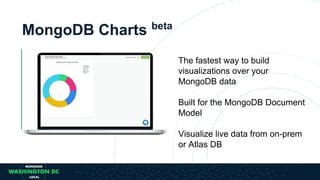
MongoDB Charts beta
The fastest way to build
visualizations over your
MongoDB data
Built for the MongoDB Document
Model
Visualize live data from on-prem
or Atlas DB
Charts Basic Concepts
A data source is a reference to a MongoDB collection or view that
contains data you want to visualize.
A chart is a visualization of data from a single data source.
A dashboard is a collection of charts which you manage as a unit
(name, layout, sharing)
What to Expect
Charting Capabilities
Common chart types
Aggregation functions
Filtering
Sample Mode
Binning
Sorting
Document Model Support
Type handling
Polymorphic collections
Nested documents
Array reductions
Sharing and Permissions
All users log onto Charts with their own account
• Users can be managed by anyone with the UserAdmin role
Any user can add a data source
• They must have a valid connection URI to connect to the MongoDB instance
• A data source owner can choose to share with nobody, specific people or
everybody
Any user can add a dashboard
• By default, the dashboard is only visible to the creator
• A dashboard owner can choose to share with nobody, specific people or
everybody
Exercise 2: Analysing AirBnB Data
with Charts
Add a Data Source
Create a Dashboard
Add some charts
Multi-Series Stacked Bar Chart
Coloured Bar Chart
Review Scores Histogram
Area Chart with Binning
The fastest way to build visualizations over your MongoDB
data
Ad hoc analyses
Benefit from the Document Model
Collaboration
Self-service
Intuitive enough for domain experts, non-devs to use!
BREAK!
2 minutes
MongoDB Aggregation Framework
and Compass
Rich Queries
Point | Range | Geospatial | Faceted Search | Aggregations | JOINs | Graph Traversals
JSON Documents Tabular Key-Value Text GraphGeospatial
MongoDB Aggregation Framework
MongoDB
{ customer_id : 1,
first_name : "Mark",
last_name : "Smith",
city : "San Francisco",
phones: [ {
number : "1-212-777-1212",
type : "work"
},
{
number : "1-212-777-1213",
type : "cell"
}]
……...
Expressive
Queries
Find anyone with phone # “1-212…”
Check if the person with number “555…” is on the “do not call” list
Geospatial
Find the best offer for the customer at geo coordinates of 42nd St.
and 6th Ave
Text Search Find all tweets that mention the firm within the last 2 days
Aggregation
Count and sort number of customers by city, compute min, max, and
average spend
Native Binary
JSON Support
Add an additional phone number to Mark Smith’s record without
rewriting the document
Update just 2 phone numbers out of 10
Sort on the modified date
JOIN
($lookup)
Query for all San Francisco residences, lookup their transactions,
and sum the amount by person
Graph Queries
($graphLookup)
Query for all people within 3 degrees of separation from Mark
Rich query functionality
Advanced data processing
pipeline for transformations
and analytics
Multiple stages
Similar to a unix pipe
Rich Expressions
Collection
db.orders.aggregate( [
$match stage {$match: { status: "A" } },
$group stage { $group: { _id: "$cust_id",total: { $sum: "$amount" } }
}
] )
{
cust_id: "A123",
amount: 500,
status: "A",
}
{
cust_id: "A123",
amount: 250,
status: "A",
}
{
cust_id: "B212",
amount: 200,
status: "A",
}
{
cust_id: "A123",
amount: 300,
status: "D",
}
Orders
{
cust_id: "A123",
amount: 500,
status: "A",
}
{
cust_id: "A123",
amount: 250,
status: "A",
}
{
cust_id: "B212",
amount: 200,
status: "A",
}
{
id: "A123",
total: 750
}
{
id: "B212",
total: 200
}
$match $group
Aggregations
$match
$group
$facet
$geoNear
$graphLookup
Pipeline Stages
Mathematical
$add, $abs,
$substract,
$multiply, $divide,
$log, $log10,
$stdDevPop,
$stdDevSam, $avg,
$sqrt, $pow, $sum,
$zip, $convert, etc.
Array
$push, $reduce,
$reverseArray,
$addToSet,
$arrayElemAt,
$slice, etc.
Operators
$lookup
$project
$sort
$unwind
Conditionals
$and, $or, $eq, $lt,
$lte, $gt, $gte,
$cmp, $cond,
$switch, $in, etc
Date
$dateFromParts,
$dateToParts,
$dateFromString,
$dateToString,
$dayOfMonth,
$isoWeek, $minute,
$month, $year, etc.
String
$toUpper, $toLower,
$substr,
$strcasecmp,
$concat, $split, etc.
Laterals
$exp, $let, $literal,
$map, $type, etc
Aggregation Features
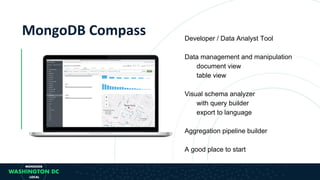
Developer / Data Analyst Tool
Data management and manipulation
document view
table view
Visual schema analyzer
with query builder
export to language
Aggregation pipeline builder
A good place to start
Exercise 3: Building Powerful
Aggregations
Explore data by doing some basic finds
Learn how to do aggregations you usually do in SQL
$match
$group
Learn how to do aggregations you cannot do in SQL
$objectToArray
$graphlookup
$geonear
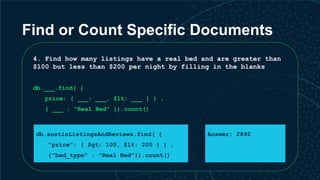
Find or Count Specific Documents
4. Find how many listings have a real bed and are greater than
$100 but less than $200 per night by filling in the blanks
db.___.find( {
price: { ___: ___, $lt: ___ } } ,
{ ___ : "Real Bed" }).count()
db.austinListingsAndReviews.find( {
"price": { $gt: 100, $lt: 200 } } ,
{"bed_type" : "Real Bed"}).count()
Answer: 2892
Minimum price per night by number
of beds
Take a look at this example aggregation which computes minimum
price per night by number of beds
db.austinListingsAndReviews.aggregate( [
{
$group: {
_id: "$beds",
avg_by_beds: { $min: "$price" }
}
},
{ $sort: { avg_by_beds: 1 } }
] )
Average price per night by room type
Construct a very similar query to find average price per night
by room type by filling in the blanks.
db.austinListingsAndReviews.aggregate( [
{
$group: {
_id: "___",
avg_by_roomtype: { $avg: "___" }
}
}}
] )
ANSWER: Average price per night by
room type
Construct a very similar query to find average price per night
by room type by filling in the blanks.
db.austinListingsAndReviews.aggregate( [
{
$group: {
_id: "$room_type",
avg_by_roomtype: { $avg: "$price" }
}
}}
] )
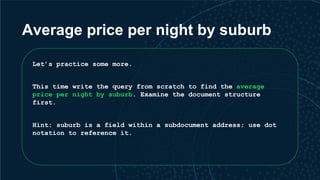
Average price per night by suburb
Let’s practice some more.
This time write the query from scratch to find the average
price per night by suburb. Examine the document structure
first.
Hint: suburb is a field within a subdocument address; use dot
notation to reference it.
ANSWER: Average price per night by
suburb
db.austinListingsAndReviews.aggregate( [
{
$group: {
_id: "$address.suburb",
avg_by_suburb: { $avg: "$price" }
}
}
] )
Count and average price per night
Compute the count of properties and average price per night by
suburbs and number of bedrooms by filling in the blanks.
db.austinListingsAndReviews.aggregate([
{"$group" :
{
_id:{suburb:"$___", bedrooms:"$___"},
___:{$sum:1},
avg:{$___:"$price"}}
}
])
ANSWER: Count and average price
per night
db.austinListingsAndReviews.aggregate([
{"$group" :
{
_id:{suburb:"$address.suburb", bedrooms:"$bedrooms"},
count:{$sum:1},
avg:{$avg:"$price"}}
}
])
Add $match Stage
Use the query from previous step and add a $match stage to only
show those properties that have a pool
db.austinListingsAndReviews.aggregate([
{ $match : {amenities: "Pool"} },
{"$group" :
{
_id:{suburb:"$address.suburb",bedrooms:"$bedrooms"},
count:{$sum:1},
avg:{$avg:"$price"}}
}
])
Learn how to do aggregations you
cannot do in SQL
We want to determine average review scores for all properties
in Austin based on some amenities.
Remember that review_scores is a sub document. Luckily we have
$objectToArray to transform our object into an array which we
can then $unwind and $group.
Average review scores for all
properties in Austin with amenities
db.austinListingsAndReviews.aggregate([
{ $match : {
amenities: { $in: ["Cable TV", "Garden or backyard",
"Coffee maker"] } } },
{ $project: { scores: { $objectToArray: "$review_scores" } } },
{ $unwind: "$scores" },
{ $group: { _id: "$scores.k", average_score: { $avg:
"$scores.v" } } }
])
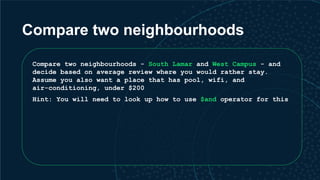
Compare two neighbourhoods
Compare two neighbourhoods - South Lamar and West Campus - and
decide based on average review where you would rather stay.
Assume you also want a place that has pool, wifi, and
air-conditioning, under $200
Hint: You will need to look up how to use $and operator for this
ANSWER: South Lamar
db.austinListingsAndReviews.aggregate([
{
$match: {
$and: [
{amenities: { $in: ["Pool", "Air conditioning", "Wifi"] } },
{price: { $lt: 200 } },
{"address.suburb": "South Lamar"}
]
}
},
{ $project: { scores: { $objectToArray: "$review_scores" } } },
{ $unwind: "$scores" },
{ $group: { _id: "$scores.k", average_score: { $avg: "$scores.v" } } }
])
ANSWER: West Campus
db.austinListingsAndReviews.aggregate([
{
$match: {
$and: [
{amenities: { $in: ["Pool", "Air conditioning", "Wifi"] } },
{price: { $lt: 200 } },
{"address.suburb": "West Campus"}
]
}
},
{ $project: { scores: { $objectToArray: "$review_scores" } } },
{ $unwind: "$scores" },
{ $group: { _id: "$scores.k", average_score: { $avg: "$scores.v" } } }
])
$geoNear
Use $geoNear to find airbnbs near location of your choice (or
near Alamo Drafthouse - 30.2988474,-97.7064386) and add the
same search criteria we used in in the prior exercise to only
show airbnbs that have pool, wifi, and air-conditioning, under
$200
ANSWER: $geoNear
db.austinListingsAndReviews.aggregate([
{
$geoNear: {
near: { type: "Point", coordinates: [ -97.7064386 , 30.2988474 ] },
distanceField: "dist.calculated",
maxDistance: 500,
query: { $and: [ {amenities: { $in: ["Pool", "Air conditioning", "Wifi"] } },
{price: { $lt: 200 } }]},
includeLocs: "dist.location",
num: 5,
spherical: true
}
}]).pretty()
$graphLookup
Let’s say we want to build a recommendation engine based on
users that reviewed the same properties.
We can use $graphLookup to run a recursive query that says:
“for a given reviewer, e.g. 7538 let’s find all listings
reviewed by users who also reviewed the same listings as 7538”
$graphLookup - example
db.austinListingsAndReviews.aggregate( [
{ $match: { "reviews.reviewer_id": "7538" } } ,{ $unwind: "$reviews" },{
$graphLookup: {
from: "austinListingsAndReviews",
startWith: "$reviews.reviewer_id",
connectFromField: "reviews.reviewer_id",
connectToField: "reviews.reviewer_id",
as: "reviewed_listings",
maxDepth: 1,
depthField: "depth",
restrictSearchWithMatch: { "reviews.reviewer_id": { $ne: "7538" } }
}},
{ $project: {
_id: 0,
listing: "$_id",
url: "$listing_url" }}]).pretty()
Now try $graphlookup yourself
Some host in Austin have multiple listings, for example,
host_id:100208662. Construct a $graphLookup query that finds
all the listings by that host.
ANSWER: $graphlookup
db.austinListingsAndReviews.aggregate( [
{ $match: { "host.host_id": "100208662" } },
{ $graphLookup:
{
from: "austinListingsAndReviews",
startWith: "$host.host_id",
connectFromField: "host.host_id",
connectToField: "host.host_id",
as: "multi-listing-hosts"
} }]).pretty()
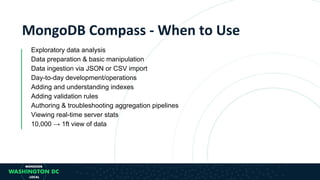
Exploratory data analysis
Data preparation & basic manipulation
Data ingestion via JSON or CSV import
Day-to-day development/operations
Adding and understanding indexes
Adding validation rules
Authoring & troubleshooting aggregation pipelines
Viewing real-time server stats
10,000 → 1ft view of data
MongoDB Connector
for Apache Spark
Business Intelligence, Analytics, Machine Learning
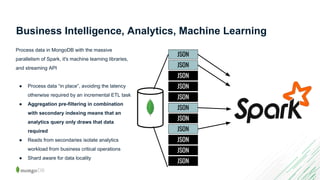
Process data in MongoDB with the massive parallelism
of Spark, it's machine learning libraries, and streaming
API
● Process data “in place”, avoiding the
latency otherwise required by an
incremental ETL task.
● Reduced Operational Complexity and Faster
Time-To-Analytics
● Aggregation pre-filtering in combination with
secondary indexing means that an analytics
query only draws that data required
● Multiple Language APIs
JSON
JSON
JSON
JSON
JSON
JSON
JSON
JSON
JSON
JSON
JSON
Business Intelligence, Analytics, Machine Learning
Process data in MongoDB with the massive
parallelism of Spark, it's machine learning libraries,
and streaming API
● Process data “in place”, avoiding the latency
otherwise required by an incremental ETL task
● Aggregation pre-filtering in combination
with secondary indexing means that an
analytics query only draws that data
required
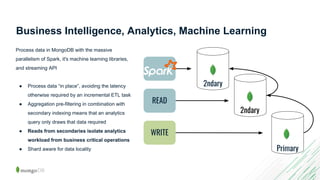
● Reads from secondaries isolate analytics
workload from business critical operations
● Shard aware for data locality
WRITE
READ
Primary
2ndary
2ndary
Business Intelligence, Analytics, Machine Learning
Process data in MongoDB with the massive
parallelism of Spark, it's machine learning libraries,
and streaming API
● Process data “in place”, avoiding the latency
otherwise required by an incremental ETL task
● Aggregation pre-filtering in combination with
secondary indexing means that an analytics
query only draws that data required
● Reads from secondaries isolate analytics
workload from business critical operations
● Shard aware for data locality
Business Intelligence, Analytics, Machine Learning
Process data in MongoDB with the massive
parallelism of Spark, it's machine learning libraries,
and streaming API
● Process data “in place”, avoiding the latency
otherwise required by an incremental ETL task
● Aggregation pre-filtering in combination with
secondary indexing means that an analytics
query only draws that data required
● Reads from secondaries isolate analytics
workload from business critical operations
● Multiple language APIs
Partners and Certifications
Coming soon,....
Using MongoDB Spark Connector
./spark-2.3.0/bin/spark-shell 
--conf 
"spark.mongodb.input.uri=mongodb+srv://demo:demo@dataanalyticsworks
hop-sshrq.mongodb.net/recommendation.ratings" 
--conf 
"spark.mongodb.output.uri=mongodb+srv://demo:demo@dataanalyticswork
shop-sshrq.mongodb.net/recommendation.perUser" 
--packages org.mongodb.spark:mongo-spark-connector_2.11:2.3.0
Exercise 4: MongoDB Spark
Connector
https://community.cloud.databricks.com/?o=2374217986360057#notebook/42327714871690/command/42327714871707
Databricks
Whats Next?
● Github: https://github.com/breinero/workshop
● M121: The MongoDB Aggregation Framework -
https://university.mongodb.com/courses/M121/about
● Videos
○ https://www.mongodb.com/presentations/world18-data-analytics-with-mongodb
○ Charts -
https://www.mongodb.com/presentations/world18-bringing-data-to-life-with-m
ongodb-charts
○ Spark -
https://www.mongodb.com/presentations/analytics-and-machine-learning-with-
spark-and-mongodb-bryan-reinero
Thank You!

MongoDB.local DC 2018: Tutorial - Data Analytics with MongoDB

  • 1.
  • 2.
    Jane Fine Director ofProduct Marketing, Analytics jane.fine@mongodb.com @janeuyvova
  • 3.
  • 4.
    Data Analytics withMongoDB Custom Code + Charting Libraries ETL + 3rd Party BI Tools MongoDB BI Connector + 3rd Party BI Tools MongoDB Charts MongoDB Compass
  • 5.
    But First, Setup MongoDBAtlas Cluster MongoDB Connector for BI Charts Server MongoDB Compass https://github.com/breinero/workshop
  • 6.
  • 7.
    MongoDB BI Connector Visualizeand explore MongoDB data in SQL-based BI tools: Automatically discovers the schema Translates complex SQL statements issued by the BI tool into MongoDB aggregation queries Converts the results into a tabular format for rendering inside the BI tool
  • 8.
    Atlas Hosted BIConnector ...
  • 9.
  • 10.
    Schema Translation { _id: ObjectId("5b9a6d75f68257c5a994558d"), id: 2318, listing_url: "https://www.airbnb.com/rooms/2318", name:"Casa Madrona", summary: "Gorgeous 1917 Dutch Colonial…” calendar: [ { listing_id: 2318, date: "2019-08-15", available: "t", price: 296 }, { listing_id: 2318, date: "2019-08-14", available: "t", price: 296 } ,... mysql> show tables; +----------------+ | Tables_in_test | +----------------+ | sea | | sea_calendar | | sea_ratings | +----------------+ 3 rows in set (0.06 sec)
  • 11.
    Demo ● use $mongo to examine data in MongoDB ● use $ mysql to examine tabular representation of collections ● explain() ● mysql -h dataanalyticsworkshop-biconnector-sshrq.mongodb.net -P 27015 -u demo -p --default-auth=mongosql_auth
  • 12.
    Exercise 1: AnalysingAirBnB Data with BI Connector Make a DSN connection to MongoDB Import Data Into Excel Identify the most expensive neighborhood group in Austin Determine average nightly price for an Airbed, per neighborhood
  • 13.
    MongoDB BI Connector- When to Use Want to speak SQL to MongoDB Multi data sources (not just MongoDB) Business analysts Reporting only Powerful but you lose some benefits of schema flexibility
  • 14.
  • 15.
    Options for VisualizingMongoDB Data Custom Code + Charting Libraries ETL + 3rd Party BI ToolsBI Connector + 3rd Party BI Tools
  • 16.
    Wouldn’t it benice if... You could visualize your MongoDB Data… without needing to write your own code without needing to move your data into a different repository without needing to purchase and configure third-party tools without losing the richness of the Document Model
  • 17.
    MongoDB Charts beta Thefastest way to build visualizations over your MongoDB data Built for the MongoDB Document Model Visualize live data from on-prem or Atlas DB
  • 18.
    Charts Basic Concepts Adata source is a reference to a MongoDB collection or view that contains data you want to visualize. A chart is a visualization of data from a single data source. A dashboard is a collection of charts which you manage as a unit (name, layout, sharing)
  • 19.
    What to Expect ChartingCapabilities Common chart types Aggregation functions Filtering Sample Mode Binning Sorting Document Model Support Type handling Polymorphic collections Nested documents Array reductions
  • 20.
    Sharing and Permissions Allusers log onto Charts with their own account • Users can be managed by anyone with the UserAdmin role Any user can add a data source • They must have a valid connection URI to connect to the MongoDB instance • A data source owner can choose to share with nobody, specific people or everybody Any user can add a dashboard • By default, the dashboard is only visible to the creator • A dashboard owner can choose to share with nobody, specific people or everybody
  • 21.
    Exercise 2: AnalysingAirBnB Data with Charts Add a Data Source Create a Dashboard Add some charts Multi-Series Stacked Bar Chart Coloured Bar Chart Review Scores Histogram Area Chart with Binning
  • 22.
    The fastest wayto build visualizations over your MongoDB data Ad hoc analyses Benefit from the Document Model Collaboration Self-service Intuitive enough for domain experts, non-devs to use!
  • 23.
  • 24.
  • 25.
    Rich Queries Point |Range | Geospatial | Faceted Search | Aggregations | JOINs | Graph Traversals JSON Documents Tabular Key-Value Text GraphGeospatial MongoDB Aggregation Framework
  • 26.
    MongoDB { customer_id :1, first_name : "Mark", last_name : "Smith", city : "San Francisco", phones: [ { number : "1-212-777-1212", type : "work" }, { number : "1-212-777-1213", type : "cell" }] ……... Expressive Queries Find anyone with phone # “1-212…” Check if the person with number “555…” is on the “do not call” list Geospatial Find the best offer for the customer at geo coordinates of 42nd St. and 6th Ave Text Search Find all tweets that mention the firm within the last 2 days Aggregation Count and sort number of customers by city, compute min, max, and average spend Native Binary JSON Support Add an additional phone number to Mark Smith’s record without rewriting the document Update just 2 phone numbers out of 10 Sort on the modified date JOIN ($lookup) Query for all San Francisco residences, lookup their transactions, and sum the amount by person Graph Queries ($graphLookup) Query for all people within 3 degrees of separation from Mark Rich query functionality
  • 27.
    Advanced data processing pipelinefor transformations and analytics Multiple stages Similar to a unix pipe Rich Expressions Collection db.orders.aggregate( [ $match stage {$match: { status: "A" } }, $group stage { $group: { _id: "$cust_id",total: { $sum: "$amount" } } } ] ) { cust_id: "A123", amount: 500, status: "A", } { cust_id: "A123", amount: 250, status: "A", } { cust_id: "B212", amount: 200, status: "A", } { cust_id: "A123", amount: 300, status: "D", } Orders { cust_id: "A123", amount: 500, status: "A", } { cust_id: "A123", amount: 250, status: "A", } { cust_id: "B212", amount: 200, status: "A", } { id: "A123", total: 750 } { id: "B212", total: 200 } $match $group Aggregations
  • 28.
    $match $group $facet $geoNear $graphLookup Pipeline Stages Mathematical $add, $abs, $substract, $multiply,$divide, $log, $log10, $stdDevPop, $stdDevSam, $avg, $sqrt, $pow, $sum, $zip, $convert, etc. Array $push, $reduce, $reverseArray, $addToSet, $arrayElemAt, $slice, etc. Operators $lookup $project $sort $unwind Conditionals $and, $or, $eq, $lt, $lte, $gt, $gte, $cmp, $cond, $switch, $in, etc Date $dateFromParts, $dateToParts, $dateFromString, $dateToString, $dayOfMonth, $isoWeek, $minute, $month, $year, etc. String $toUpper, $toLower, $substr, $strcasecmp, $concat, $split, etc. Laterals $exp, $let, $literal, $map, $type, etc Aggregation Features
  • 29.
    Developer / DataAnalyst Tool Data management and manipulation document view table view Visual schema analyzer with query builder export to language Aggregation pipeline builder A good place to start
  • 30.
    Exercise 3: BuildingPowerful Aggregations Explore data by doing some basic finds Learn how to do aggregations you usually do in SQL $match $group Learn how to do aggregations you cannot do in SQL $objectToArray $graphlookup $geonear
  • 31.
    Find or CountSpecific Documents 4. Find how many listings have a real bed and are greater than $100 but less than $200 per night by filling in the blanks db.___.find( { price: { ___: ___, $lt: ___ } } , { ___ : "Real Bed" }).count() db.austinListingsAndReviews.find( { "price": { $gt: 100, $lt: 200 } } , {"bed_type" : "Real Bed"}).count() Answer: 2892
  • 32.
    Minimum price pernight by number of beds Take a look at this example aggregation which computes minimum price per night by number of beds db.austinListingsAndReviews.aggregate( [ { $group: { _id: "$beds", avg_by_beds: { $min: "$price" } } }, { $sort: { avg_by_beds: 1 } } ] )
  • 33.
    Average price pernight by room type Construct a very similar query to find average price per night by room type by filling in the blanks. db.austinListingsAndReviews.aggregate( [ { $group: { _id: "___", avg_by_roomtype: { $avg: "___" } } }} ] )
  • 34.
    ANSWER: Average priceper night by room type Construct a very similar query to find average price per night by room type by filling in the blanks. db.austinListingsAndReviews.aggregate( [ { $group: { _id: "$room_type", avg_by_roomtype: { $avg: "$price" } } }} ] )
  • 35.
    Average price pernight by suburb Let’s practice some more. This time write the query from scratch to find the average price per night by suburb. Examine the document structure first. Hint: suburb is a field within a subdocument address; use dot notation to reference it.
  • 36.
    ANSWER: Average priceper night by suburb db.austinListingsAndReviews.aggregate( [ { $group: { _id: "$address.suburb", avg_by_suburb: { $avg: "$price" } } } ] )
  • 37.
    Count and averageprice per night Compute the count of properties and average price per night by suburbs and number of bedrooms by filling in the blanks. db.austinListingsAndReviews.aggregate([ {"$group" : { _id:{suburb:"$___", bedrooms:"$___"}, ___:{$sum:1}, avg:{$___:"$price"}} } ])
  • 38.
    ANSWER: Count andaverage price per night db.austinListingsAndReviews.aggregate([ {"$group" : { _id:{suburb:"$address.suburb", bedrooms:"$bedrooms"}, count:{$sum:1}, avg:{$avg:"$price"}} } ])
  • 39.
    Add $match Stage Usethe query from previous step and add a $match stage to only show those properties that have a pool db.austinListingsAndReviews.aggregate([ { $match : {amenities: "Pool"} }, {"$group" : { _id:{suburb:"$address.suburb",bedrooms:"$bedrooms"}, count:{$sum:1}, avg:{$avg:"$price"}} } ])
  • 40.
    Learn how todo aggregations you cannot do in SQL We want to determine average review scores for all properties in Austin based on some amenities. Remember that review_scores is a sub document. Luckily we have $objectToArray to transform our object into an array which we can then $unwind and $group.
  • 41.
    Average review scoresfor all properties in Austin with amenities db.austinListingsAndReviews.aggregate([ { $match : { amenities: { $in: ["Cable TV", "Garden or backyard", "Coffee maker"] } } }, { $project: { scores: { $objectToArray: "$review_scores" } } }, { $unwind: "$scores" }, { $group: { _id: "$scores.k", average_score: { $avg: "$scores.v" } } } ])
  • 42.
    Compare two neighbourhoods Comparetwo neighbourhoods - South Lamar and West Campus - and decide based on average review where you would rather stay. Assume you also want a place that has pool, wifi, and air-conditioning, under $200 Hint: You will need to look up how to use $and operator for this
  • 43.
    ANSWER: South Lamar db.austinListingsAndReviews.aggregate([ { $match:{ $and: [ {amenities: { $in: ["Pool", "Air conditioning", "Wifi"] } }, {price: { $lt: 200 } }, {"address.suburb": "South Lamar"} ] } }, { $project: { scores: { $objectToArray: "$review_scores" } } }, { $unwind: "$scores" }, { $group: { _id: "$scores.k", average_score: { $avg: "$scores.v" } } } ])
  • 44.
    ANSWER: West Campus db.austinListingsAndReviews.aggregate([ { $match:{ $and: [ {amenities: { $in: ["Pool", "Air conditioning", "Wifi"] } }, {price: { $lt: 200 } }, {"address.suburb": "West Campus"} ] } }, { $project: { scores: { $objectToArray: "$review_scores" } } }, { $unwind: "$scores" }, { $group: { _id: "$scores.k", average_score: { $avg: "$scores.v" } } } ])
  • 45.
    $geoNear Use $geoNear tofind airbnbs near location of your choice (or near Alamo Drafthouse - 30.2988474,-97.7064386) and add the same search criteria we used in in the prior exercise to only show airbnbs that have pool, wifi, and air-conditioning, under $200
  • 46.
    ANSWER: $geoNear db.austinListingsAndReviews.aggregate([ { $geoNear: { near:{ type: "Point", coordinates: [ -97.7064386 , 30.2988474 ] }, distanceField: "dist.calculated", maxDistance: 500, query: { $and: [ {amenities: { $in: ["Pool", "Air conditioning", "Wifi"] } }, {price: { $lt: 200 } }]}, includeLocs: "dist.location", num: 5, spherical: true } }]).pretty()
  • 47.
    $graphLookup Let’s say wewant to build a recommendation engine based on users that reviewed the same properties. We can use $graphLookup to run a recursive query that says: “for a given reviewer, e.g. 7538 let’s find all listings reviewed by users who also reviewed the same listings as 7538”
  • 48.
    $graphLookup - example db.austinListingsAndReviews.aggregate([ { $match: { "reviews.reviewer_id": "7538" } } ,{ $unwind: "$reviews" },{ $graphLookup: { from: "austinListingsAndReviews", startWith: "$reviews.reviewer_id", connectFromField: "reviews.reviewer_id", connectToField: "reviews.reviewer_id", as: "reviewed_listings", maxDepth: 1, depthField: "depth", restrictSearchWithMatch: { "reviews.reviewer_id": { $ne: "7538" } } }}, { $project: { _id: 0, listing: "$_id", url: "$listing_url" }}]).pretty()
  • 49.
    Now try $graphlookupyourself Some host in Austin have multiple listings, for example, host_id:100208662. Construct a $graphLookup query that finds all the listings by that host.
  • 50.
    ANSWER: $graphlookup db.austinListingsAndReviews.aggregate( [ {$match: { "host.host_id": "100208662" } }, { $graphLookup: { from: "austinListingsAndReviews", startWith: "$host.host_id", connectFromField: "host.host_id", connectToField: "host.host_id", as: "multi-listing-hosts" } }]).pretty()
  • 51.
    Exploratory data analysis Datapreparation & basic manipulation Data ingestion via JSON or CSV import Day-to-day development/operations Adding and understanding indexes Adding validation rules Authoring & troubleshooting aggregation pipelines Viewing real-time server stats 10,000 → 1ft view of data
  • 52.
  • 53.
    Business Intelligence, Analytics,Machine Learning Process data in MongoDB with the massive parallelism of Spark, it's machine learning libraries, and streaming API ● Process data “in place”, avoiding the latency otherwise required by an incremental ETL task. ● Reduced Operational Complexity and Faster Time-To-Analytics ● Aggregation pre-filtering in combination with secondary indexing means that an analytics query only draws that data required ● Multiple Language APIs
  • 54.
    JSON JSON JSON JSON JSON JSON JSON JSON JSON JSON JSON Business Intelligence, Analytics,Machine Learning Process data in MongoDB with the massive parallelism of Spark, it's machine learning libraries, and streaming API ● Process data “in place”, avoiding the latency otherwise required by an incremental ETL task ● Aggregation pre-filtering in combination with secondary indexing means that an analytics query only draws that data required ● Reads from secondaries isolate analytics workload from business critical operations ● Shard aware for data locality
  • 55.
    WRITE READ Primary 2ndary 2ndary Business Intelligence, Analytics,Machine Learning Process data in MongoDB with the massive parallelism of Spark, it's machine learning libraries, and streaming API ● Process data “in place”, avoiding the latency otherwise required by an incremental ETL task ● Aggregation pre-filtering in combination with secondary indexing means that an analytics query only draws that data required ● Reads from secondaries isolate analytics workload from business critical operations ● Shard aware for data locality
  • 56.
    Business Intelligence, Analytics,Machine Learning Process data in MongoDB with the massive parallelism of Spark, it's machine learning libraries, and streaming API ● Process data “in place”, avoiding the latency otherwise required by an incremental ETL task ● Aggregation pre-filtering in combination with secondary indexing means that an analytics query only draws that data required ● Reads from secondaries isolate analytics workload from business critical operations ● Multiple language APIs
  • 57.
  • 58.
    Using MongoDB SparkConnector ./spark-2.3.0/bin/spark-shell --conf "spark.mongodb.input.uri=mongodb+srv://demo:demo@dataanalyticsworks hop-sshrq.mongodb.net/recommendation.ratings" --conf "spark.mongodb.output.uri=mongodb+srv://demo:demo@dataanalyticswork shop-sshrq.mongodb.net/recommendation.perUser" --packages org.mongodb.spark:mongo-spark-connector_2.11:2.3.0
  • 59.
    Exercise 4: MongoDBSpark Connector https://community.cloud.databricks.com/?o=2374217986360057#notebook/42327714871690/command/42327714871707 Databricks
  • 60.
    Whats Next? ● Github:https://github.com/breinero/workshop ● M121: The MongoDB Aggregation Framework - https://university.mongodb.com/courses/M121/about ● Videos ○ https://www.mongodb.com/presentations/world18-data-analytics-with-mongodb ○ Charts - https://www.mongodb.com/presentations/world18-bringing-data-to-life-with-m ongodb-charts ○ Spark - https://www.mongodb.com/presentations/analytics-and-machine-learning-with- spark-and-mongodb-bryan-reinero
  • 61.