C o n f i d e n t i a l
MONGO DB
August, 2014
Akbar Gadhiya
Programmer Analyst
About presenter
 Akbar Gadhiya has 10 years of experience.
 He started his career in 2004 with HCL
Technologies.
 Joined Ishi systems in 2010 as a programmer
analyst.
 Got exposure to work on noSQL technologies
MongoDB, Hbase.
 Currently engaged in a web based product.
Agenda
 Introduction
 Features
 RDBMS & NoSQL (MongDB)
 CRUD
 Workshop
 Break
 Aggregation
 Workshop
 Replication & Shard
 Questions
The family of NoSQL DBs
 Key-values Stores
 Hash table where there is a unique key and a pointer
to a particular item of data.
 Focus on scaling to huge amounts of data
 E.g. Riak, Voldemort, Dynamo etc.
 Column Family Stores
 To store and process very large amounts of data
distributed over many machines
 E.g. Cassandra, HBase
The family of NoSQL DBs – Contd.
 Document Databases
 The next level of Key/value, allowing nested values
associated with each key.
 Appropriate for Web apps.
 E.g. CouchDB, MongoDb
 Graph Databases
 Bases on property-graph model
 Appropriate for Social networking, Recommendations
 E.g. Neo4J, Infinite Graph
Introduction
 Document-Oriented storage - BSON
 Full Index Support
 Schema free
 Capped collections (Fast R/W, Useful in logging)
 Replication & High Availability
 Auto-Sharding
 Querying
 Fast In-Place Updates
 Map/Reduce
Why to use MongoDB?
 MongoDB stores documents (or) objects.
 Everyone works with objects
(Python/Ruby/Java/etc.)
 And we need Databases to persist our objects.
Then why not store objects directly?
 Embedded documents and arrays reduce need
for joins. No Joins and No-multi document
transactions.
When to use MongoDB?
 High write load
 High availability in an unreliable environment
(cloud and real life)
 You need to grow big (and shard your data)
 Schema is not stable
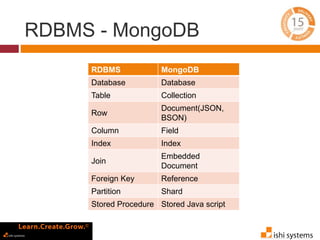
RDBMS - MongoDB
MongoDB is not a replacement of
RDBMS
RDBMS - MongoDB
RDBMS MongoDB
Database Database
Table Collection
Row
Document(JSON,
BSON)
Column Field
Index Index
Join
Embedded
Document
Foreign Key Reference
Partition Shard
Stored Procedure Stored Java script
RDBMS - MongoDB
RDBMS MongoDB
Database Database
Table, View Collection
Row Document(JSON,
BSON)
Column Field
Index Index
Join Embedded
Document
Foreign Key Reference
Partition Shard
Stored Procedure Stored Java script
> db.user.findOne({age:39})
{
"_id" :
ObjectId("5114e0bd42…"),
"first" : "John",
"last" : "Doe",
"age" : 39,
"interests" : [
"Reading",
"Mountain Biking ]
"favorites": {
"color": "Blue",
"sport": "Soccer"}
}
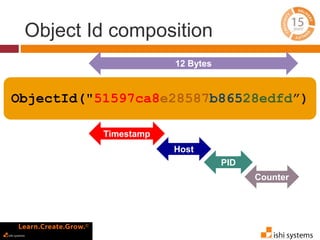
Object Id composition
ObjectId("51597ca8e28587b86528edfd”)
12 Bytes
Timestamp
Host
PID
Counter
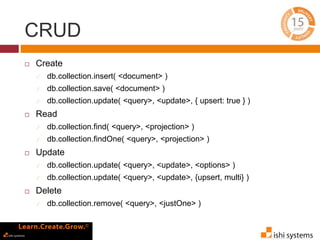
CRUD
 Create
 db.collection.insert( <document> )
 db.collection.save( <document> )
 db.collection.update( <query>, <update>, { upsert: true } )
 Read
 db.collection.find( <query>, <projection> )
 db.collection.findOne( <query>, <projection> )
 Update
 db.collection.update( <query>, <update>, <options> )
 db.collection.update( <query>, <update>, {upsert, multi} )
 Delete
 db.collection.remove( <query>, <justOne> )
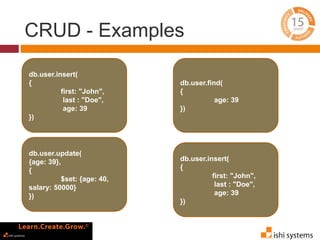
CRUD - Examples
db.user.insert(
{
first: "John",
last : "Doe",
age: 39
})
db.user.update(
{age: 39},
{
$set: {age: 40,
salary: 50000}
})
db.user.find(
{
age: 39
})
db.user.insert(
{
first: "John",
last : "Doe",
age: 39
})
Lets start server
 Download and unzip
https://fastdl.mongodb.org/win32/mongodb-
win32-x86_64-2008plus-2.6.3.zip
 Add bin directory to PATH (Optional)
 Create a data directory
 mkdir C:data
 mkdir C:datadb
 Open command line and go to bin directory
 Run mongod.exe [--dbpath C:datadb]
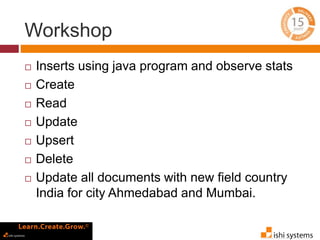
Workshop
 Inserts using java program and observe stats
 Create
 Read
 Update
 Upsert
 Delete
 Update all documents with new field country
India for city Ahmedabad and Mumbai.
Aggregation
 Pipeline
 Series of pipeline – Members of a collection are
passed through a pipeline to produce a result
 Takes two argument
 Aggregate – Name of a collection
 Pipeline – Array of pipeline operators
 $match, $sort, $project, $unwind, $group etc.
 Tips – Use $match in a pipeline as early as
possible
Aggregation – By examples
 Find max by subject
db.runCommand({ "aggregate" : "student" ,
"pipeline" : [
{ "$unwind" : "$subjects"} ,
{ "$match" : { "subjects.name" : "Maths"}} ,
{ "$group" : { "_id" : "$subjects.name" ,
"max" : { "$max" : "$subjects.marks"}}}]});
Aggregation – By examples
 Number of students who opted English as an
optional subject
 Count students by city
 Find top 10 students who scored maximum
marks in mathematics subject
Aggregation - Workshop
 find top 10 students by percentage in required
subjects only
Aggregation - Workshop
 find top 10 students by percentage in required
subjects only
{ "aggregate" : "student" , "pipeline" : [
{ "$unwind" : "$subjects"} ,
{ "$match" : { "subjects.name" :
{ "$in" : [ "Maths" , "Chemistry" , "Physics" ,
"Biology"]}}} ,
{ "$project" : { "firstName" : 1 , "lastName" : 1 ,
"subjects.marks" :1}} ,
{ "$group" : { "_id" : "$firstName" ,
"total" : { "$avg" : "$subjects.marks"}}} ,
{ "$sort" : { "total" : -1}} , { "$limit" : 10}]}
Map Reduce
 A data processing paradigm for large volumes
of data into useful aggregated results
 Output to a collection
 Runs inside MongoDB on local data
 Adds load to your DB only
 In Javascript
Map Reduce – Purchase
data
 Find total amount of purchases made from Mumbai and
Delhi
db.purchase.mapReduce(function(){
emit(this.city, this.amount);
},
function(key, values) {
return Array.sum(values)
},
{
query: {city: {$in: ["Mumbai", "Delhi"]}},
out: "total"
});
Map Reduce – Purchase
data
 Find total amount of purchases made from Mumbai and
Delhi
{
"city" : "Mumbai",
"name" : "Charles",
"amount" : 4534
}
{
"city" : "Mumbai",
"name" : "Charles",
"amount" : 1498
}
{
"city" : "Delhi",
"name" : "David",
"amount" : 4522
}
{
"city" : "Ahmedabad",
"name" : "David",
"amount" : 4974
}
{
"city" : "Mumbai",
"name" :
"Charles",
"amount" : 4534
}
{
"city" : "Mumbai",
"name" :
"Charles",
"amount" : 1498
}
{
"city" : "Delhi",
"name" : "David",
"amount" : 4522
}
{
“Mumbai" : [4534,
1498]
}
{
“Mumbai" : 6032
}
{ “Delhi" : 4522}
Query map
{
“Delhi" : [4522]
}
reduce
Map Reduce – By examples
 Find total purchases by name
 Find total number of purchases and total
purchases by city
 Find total purchases by name and city
Replication
 Automatic failover
 Highly available – No single point of failure
 Scaling horizontally
 Two or more nodes (usually three)
 Write to master, read from any
 Client libraries are replica set aware
 Client can block until data is replicated on all
servers (for important data)
Replica set
 A cluster of N servers
 Any (one) node can be primary
 Election of primary
 Heartbeat every 2 seconds
 All writes to primary
 Reads can be to primary (default) or a
secondary
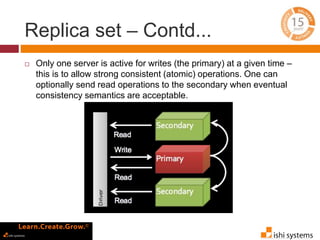
Replica set – Contd...
 Only one server is active for writes (the primary) at a given time –
this is to allow strong consistent (atomic) operations. One can
optionally send read operations to the secondary when eventual
consistency semantics are acceptable.
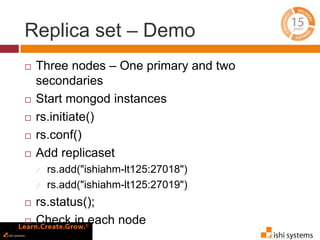
Replica set – Demo
 Three nodes – One primary and two
secondaries
 Start mongod instances
 rs.initiate()
 rs.conf()
 Add replicaset
 rs.add("ishiahm-lt125:27018")
 rs.add("ishiahm-lt125:27019")
 rs.status();
 Check in each node
Sharding
 Provides horizontal scaling vs vertical scaling
 Stores data across multiple machine
 Data partitioning
 High throughput
 Shard key
 Cloud-based providers provisions smaller
instances. As a result there is a practical
maximum capability for vertical scaling.
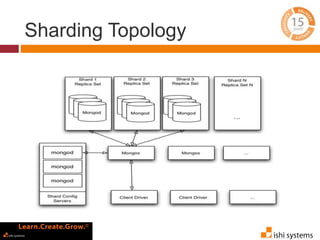
Sharding Topology
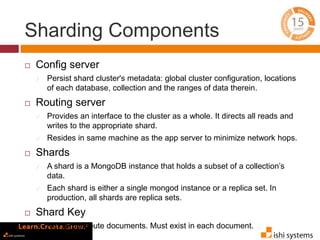
Sharding Components
 Config server
 Persist shard cluster's metadata: global cluster configuration, locations
of each database, collection and the ranges of data therein.
 Routing server
 Provides an interface to the cluster as a whole. It directs all reads and
writes to the appropriate shard.
 Resides in same machine as the app server to minimize network hops.
 Shards
 A shard is a MongoDB instance that holds a subset of a collection’s
data.
 Each shard is either a single mongod instance or a replica set. In
production, all shards are replica sets.
 Shard Key
 Key to distribute documents. Must exist in each document.
Sharding
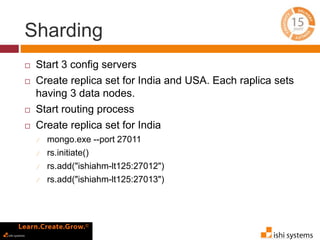
 Start 3 config servers
 Create replica set for India and USA. Each raplica sets
having 3 data nodes.
 Start routing process
 Create replica set for India
 mongo.exe --port 27011
 rs.initiate()
 rs.add("ishiahm-lt125:27012")
 rs.add("ishiahm-lt125:27013")
Sharding
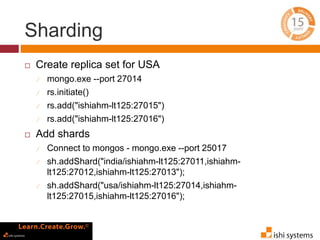
 Create replica set for USA
 mongo.exe --port 27014
 rs.initiate()
 rs.add("ishiahm-lt125:27015")
 rs.add("ishiahm-lt125:27016")
 Add shards
 Connect to mongos - mongo.exe --port 25017
 sh.addShard("india/ishiahm-lt125:27011,ishiahm-
lt125:27012,ishiahm-lt125:27013");
 sh.addShard("usa/ishiahm-lt125:27014,ishiahm-
lt125:27015,ishiahm-lt125:27016");
Sharding
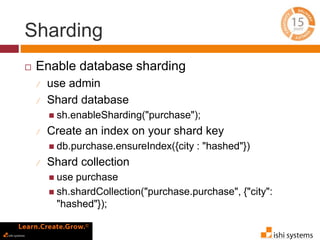
 Enable database sharding
 use admin
 Shard database
 sh.enableSharding("purchase");
 Create an index on your shard key
 db.purchase.ensureIndex({city : "hashed"})
 Shard collection
 use purchase
 sh.shardCollection("purchase.purchase", {"city":
"hashed"});
Sharding
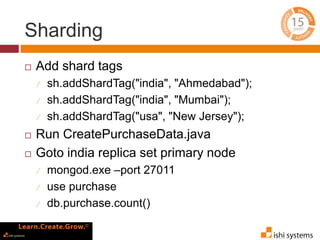
 Add shard tags
 sh.addShardTag("india", "Ahmedabad");
 sh.addShardTag("india", "Mumbai");
 sh.addShardTag("usa", "New Jersey");
 Run CreatePurchaseData.java
 Goto india replica set primary node
 mongod.exe –port 27011
 use purchase
 db.purchase.count()
Resources
 Online courses
 https://university.mongodb.com/
 Online Mongo Shell
 http://try.mongodb.org/
 MongoDB user manual
 http://docs.mongodb.org/manual/
 Google group
 mongodb-user@googlegroups.com
QUESTIONS?
Thank You!
For any other queries and question please send
an email on
akbar.gadhiya@ishisystems.com

Introduction to MongoDB and Workshop

  • 1.
    C o nf i d e n t i a l MONGO DB August, 2014 Akbar Gadhiya Programmer Analyst
  • 2.
    About presenter  AkbarGadhiya has 10 years of experience.  He started his career in 2004 with HCL Technologies.  Joined Ishi systems in 2010 as a programmer analyst.  Got exposure to work on noSQL technologies MongoDB, Hbase.  Currently engaged in a web based product.
  • 3.
    Agenda  Introduction  Features RDBMS & NoSQL (MongDB)  CRUD  Workshop  Break  Aggregation  Workshop  Replication & Shard  Questions
  • 4.
    The family ofNoSQL DBs  Key-values Stores  Hash table where there is a unique key and a pointer to a particular item of data.  Focus on scaling to huge amounts of data  E.g. Riak, Voldemort, Dynamo etc.  Column Family Stores  To store and process very large amounts of data distributed over many machines  E.g. Cassandra, HBase
  • 5.
    The family ofNoSQL DBs – Contd.  Document Databases  The next level of Key/value, allowing nested values associated with each key.  Appropriate for Web apps.  E.g. CouchDB, MongoDb  Graph Databases  Bases on property-graph model  Appropriate for Social networking, Recommendations  E.g. Neo4J, Infinite Graph
  • 6.
    Introduction  Document-Oriented storage- BSON  Full Index Support  Schema free  Capped collections (Fast R/W, Useful in logging)  Replication & High Availability  Auto-Sharding  Querying  Fast In-Place Updates  Map/Reduce
  • 7.
    Why to useMongoDB?  MongoDB stores documents (or) objects.  Everyone works with objects (Python/Ruby/Java/etc.)  And we need Databases to persist our objects. Then why not store objects directly?  Embedded documents and arrays reduce need for joins. No Joins and No-multi document transactions.
  • 8.
    When to useMongoDB?  High write load  High availability in an unreliable environment (cloud and real life)  You need to grow big (and shard your data)  Schema is not stable
  • 9.
    RDBMS - MongoDB MongoDBis not a replacement of RDBMS
  • 10.
    RDBMS - MongoDB RDBMSMongoDB Database Database Table Collection Row Document(JSON, BSON) Column Field Index Index Join Embedded Document Foreign Key Reference Partition Shard Stored Procedure Stored Java script
  • 11.
    RDBMS - MongoDB RDBMSMongoDB Database Database Table, View Collection Row Document(JSON, BSON) Column Field Index Index Join Embedded Document Foreign Key Reference Partition Shard Stored Procedure Stored Java script > db.user.findOne({age:39}) { "_id" : ObjectId("5114e0bd42…"), "first" : "John", "last" : "Doe", "age" : 39, "interests" : [ "Reading", "Mountain Biking ] "favorites": { "color": "Blue", "sport": "Soccer"} }
  • 12.
  • 13.
    CRUD  Create  db.collection.insert(<document> )  db.collection.save( <document> )  db.collection.update( <query>, <update>, { upsert: true } )  Read  db.collection.find( <query>, <projection> )  db.collection.findOne( <query>, <projection> )  Update  db.collection.update( <query>, <update>, <options> )  db.collection.update( <query>, <update>, {upsert, multi} )  Delete  db.collection.remove( <query>, <justOne> )
  • 14.
    CRUD - Examples db.user.insert( { first:"John", last : "Doe", age: 39 }) db.user.update( {age: 39}, { $set: {age: 40, salary: 50000} }) db.user.find( { age: 39 }) db.user.insert( { first: "John", last : "Doe", age: 39 })
  • 15.
    Lets start server Download and unzip https://fastdl.mongodb.org/win32/mongodb- win32-x86_64-2008plus-2.6.3.zip  Add bin directory to PATH (Optional)  Create a data directory  mkdir C:data  mkdir C:datadb  Open command line and go to bin directory  Run mongod.exe [--dbpath C:datadb]
  • 16.
    Workshop  Inserts usingjava program and observe stats  Create  Read  Update  Upsert  Delete  Update all documents with new field country India for city Ahmedabad and Mumbai.
  • 17.
    Aggregation  Pipeline  Seriesof pipeline – Members of a collection are passed through a pipeline to produce a result  Takes two argument  Aggregate – Name of a collection  Pipeline – Array of pipeline operators  $match, $sort, $project, $unwind, $group etc.  Tips – Use $match in a pipeline as early as possible
  • 18.
    Aggregation – Byexamples  Find max by subject db.runCommand({ "aggregate" : "student" , "pipeline" : [ { "$unwind" : "$subjects"} , { "$match" : { "subjects.name" : "Maths"}} , { "$group" : { "_id" : "$subjects.name" , "max" : { "$max" : "$subjects.marks"}}}]});
  • 19.
    Aggregation – Byexamples  Number of students who opted English as an optional subject  Count students by city  Find top 10 students who scored maximum marks in mathematics subject
  • 20.
    Aggregation - Workshop find top 10 students by percentage in required subjects only
  • 21.
    Aggregation - Workshop find top 10 students by percentage in required subjects only { "aggregate" : "student" , "pipeline" : [ { "$unwind" : "$subjects"} , { "$match" : { "subjects.name" : { "$in" : [ "Maths" , "Chemistry" , "Physics" , "Biology"]}}} , { "$project" : { "firstName" : 1 , "lastName" : 1 , "subjects.marks" :1}} , { "$group" : { "_id" : "$firstName" , "total" : { "$avg" : "$subjects.marks"}}} , { "$sort" : { "total" : -1}} , { "$limit" : 10}]}
  • 22.
    Map Reduce  Adata processing paradigm for large volumes of data into useful aggregated results  Output to a collection  Runs inside MongoDB on local data  Adds load to your DB only  In Javascript
  • 23.
    Map Reduce –Purchase data  Find total amount of purchases made from Mumbai and Delhi db.purchase.mapReduce(function(){ emit(this.city, this.amount); }, function(key, values) { return Array.sum(values) }, { query: {city: {$in: ["Mumbai", "Delhi"]}}, out: "total" });
  • 24.
    Map Reduce –Purchase data  Find total amount of purchases made from Mumbai and Delhi { "city" : "Mumbai", "name" : "Charles", "amount" : 4534 } { "city" : "Mumbai", "name" : "Charles", "amount" : 1498 } { "city" : "Delhi", "name" : "David", "amount" : 4522 } { "city" : "Ahmedabad", "name" : "David", "amount" : 4974 } { "city" : "Mumbai", "name" : "Charles", "amount" : 4534 } { "city" : "Mumbai", "name" : "Charles", "amount" : 1498 } { "city" : "Delhi", "name" : "David", "amount" : 4522 } { “Mumbai" : [4534, 1498] } { “Mumbai" : 6032 } { “Delhi" : 4522} Query map { “Delhi" : [4522] } reduce
  • 25.
    Map Reduce –By examples  Find total purchases by name  Find total number of purchases and total purchases by city  Find total purchases by name and city
  • 26.
    Replication  Automatic failover Highly available – No single point of failure  Scaling horizontally  Two or more nodes (usually three)  Write to master, read from any  Client libraries are replica set aware  Client can block until data is replicated on all servers (for important data)
  • 27.
    Replica set  Acluster of N servers  Any (one) node can be primary  Election of primary  Heartbeat every 2 seconds  All writes to primary  Reads can be to primary (default) or a secondary
  • 28.
    Replica set –Contd...  Only one server is active for writes (the primary) at a given time – this is to allow strong consistent (atomic) operations. One can optionally send read operations to the secondary when eventual consistency semantics are acceptable.
  • 29.
    Replica set –Demo  Three nodes – One primary and two secondaries  Start mongod instances  rs.initiate()  rs.conf()  Add replicaset  rs.add("ishiahm-lt125:27018")  rs.add("ishiahm-lt125:27019")  rs.status();  Check in each node
  • 30.
    Sharding  Provides horizontalscaling vs vertical scaling  Stores data across multiple machine  Data partitioning  High throughput  Shard key  Cloud-based providers provisions smaller instances. As a result there is a practical maximum capability for vertical scaling.
  • 31.
  • 32.
    Sharding Components  Configserver  Persist shard cluster's metadata: global cluster configuration, locations of each database, collection and the ranges of data therein.  Routing server  Provides an interface to the cluster as a whole. It directs all reads and writes to the appropriate shard.  Resides in same machine as the app server to minimize network hops.  Shards  A shard is a MongoDB instance that holds a subset of a collection’s data.  Each shard is either a single mongod instance or a replica set. In production, all shards are replica sets.  Shard Key  Key to distribute documents. Must exist in each document.
  • 33.
    Sharding  Start 3config servers  Create replica set for India and USA. Each raplica sets having 3 data nodes.  Start routing process  Create replica set for India  mongo.exe --port 27011  rs.initiate()  rs.add("ishiahm-lt125:27012")  rs.add("ishiahm-lt125:27013")
  • 34.
    Sharding  Create replicaset for USA  mongo.exe --port 27014  rs.initiate()  rs.add("ishiahm-lt125:27015")  rs.add("ishiahm-lt125:27016")  Add shards  Connect to mongos - mongo.exe --port 25017  sh.addShard("india/ishiahm-lt125:27011,ishiahm- lt125:27012,ishiahm-lt125:27013");  sh.addShard("usa/ishiahm-lt125:27014,ishiahm- lt125:27015,ishiahm-lt125:27016");
  • 35.
    Sharding  Enable databasesharding  use admin  Shard database  sh.enableSharding("purchase");  Create an index on your shard key  db.purchase.ensureIndex({city : "hashed"})  Shard collection  use purchase  sh.shardCollection("purchase.purchase", {"city": "hashed"});
  • 36.
    Sharding  Add shardtags  sh.addShardTag("india", "Ahmedabad");  sh.addShardTag("india", "Mumbai");  sh.addShardTag("usa", "New Jersey");  Run CreatePurchaseData.java  Goto india replica set primary node  mongod.exe –port 27011  use purchase  db.purchase.count()
  • 37.
    Resources  Online courses https://university.mongodb.com/  Online Mongo Shell  http://try.mongodb.org/  MongoDB user manual  http://docs.mongodb.org/manual/  Google group  mongodb-user@googlegroups.com
  • 38.
    QUESTIONS? Thank You! For anyother queries and question please send an email on akbar.gadhiya@ishisystems.com

Editor's Notes

  • #33 Routing server Typically the mongos process resides in the same machine as the application server in order to minimize the necessary network hops.