

Data Analytics with
MongoDB
JANE FINE
Director of Product Marketing,
Analytics
jane.fine@mongodb.com
@janeuyvova
SETH PAYNE
Product Manager
seth.payne@mongodb.com
Data Analytics with MongoDB
Custom Code +
Charting
Libraries
ETL +
3rd Party BI
Tools
MongoDB BI Connector
+
3rd Party BI Tools
MongoDB
Charts
MongoDB
Compass
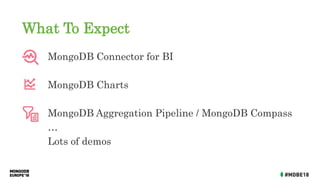
What To Expect
MongoDB Connector for BI
MongoDB Charts
MongoDB Aggregation Pipeline / MongoDB Compass
…
Lots of demos
MongoDB Connector for
Business Intelligence
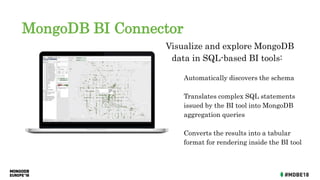
MongoDB BI Connector
Visualize and explore MongoDB
data in SQL-based BI tools:
Automatically discovers the schema
Translates complex SQL statements
issued by the BI tool into MongoDB
aggregation queries
Converts the results into a tabular
format for rendering inside the BI tool
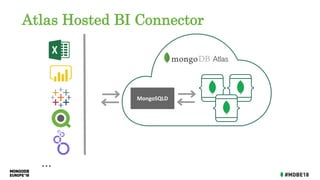
Atlas Hosted BI Connector
MongoSQLD
...
MongoDB ODBC Driver
MongoSQLD
...
ODBC Driver
Schema Translation
{
_id: ObjectId("5b9a6d75f68257c5a994558d"),
id: 2318,
listing_url:
"https://www.airbnb.com/rooms/2318",
name: "Casa Madrona",
summary: "Gorgeous 1917 Dutch Colonial…”
calendar: [
{ listing_id: 2318,
date: "2019-08-15",
available: "true",
price: 296
},
{ listing_id: 2318,
date: "2019-08-14",
available: "true",
price: 296
}
,...
mysql> show tables;
+----------------+
| Tables_in_test |
+----------------+
| sea |
| sea_calendar |
| sea_ratings |
+----------------+
3 rows in set (0.06 sec)
MongoDB BI Connector - When to Use
• Want to speak SQL to MongoDB
• Multi data sources (not just MongoDB)
• Business analysts
• Reporting only
• Powerful but you lose some benefits of schema flexibility
MongoDB Charts
Options for Visualizing MongoDB Data
Custom Code +
Charting Libraries
ETL + 3rd Party
BI Tools
BI Connector +
3rd Party BI Tools
Wouldn’t it be nice if...
You could visualize your MongoDB Data…
without needing to write your own code
without needing to move your data into a different repository
without needing to purchase and configure third-party tools
without losing the richness of the Document Model
MongoDB Charts beta
The fastest way to build
visualizations over your
MongoDB data
Built for the MongoDB Document
Model
Visualize live data from on-prem
or Atlas DB
Charts Basic Concepts
A data source is a reference to a MongoDB collection or view that
contains data you want to visualize.
A chart is a visualization of data from a single data source.
A dashboard is a collection of charts which you manage as a unit
(name, layout, sharing)
What to Expect
Common chart types
Aggregation functions
Filtering
Sample Mode
Binning
Sorting
Type handling
Polymorphic collections
Nested documents
Array reductions
Charting Capabilities Document Model Support
MongoDB Charts - When to Use
• The fastest way to build visualizations over your MongoDB
data
• Ad hoc analyses
• Benefit from the Document Model
• Collaboration
• Self-service
• Intuitive enough for domain experts, non-devs to use!
MongoDB Aggregation
Framework
and MongoDB Compass
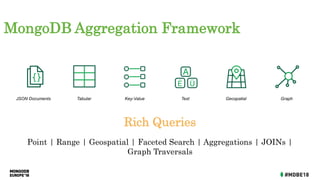
Rich Queries
Point | Range | Geospatial | Faceted Search | Aggregations | JOINs |
Graph Traversals
JSON Documents Tabular Key-Value Text GraphGeospatial
MongoDB Aggregation Framework
MongoDB
{ customer_id : 1,
first_name : "Mark",
last_name : "Smith",
city : "San Francisco",
phones: [ {
number : "1-212-777-1212",
type : "work"
},
{
number : "1-212-777-1213",
type : "cell"
}]
...
Expressive
Queries
Find anyone with phone # “1-212…”
Check if the person with number “555…” is on the “do not call” list
Geospatial
Find the best offer for the customer at geo coordinates of 42nd St.
and 6th Ave
Text Search Find all tweets that mention the firm within the last 2 days
Aggregation
Count and sort number of customers by city, compute min, max, and
average spend
Native Binary
JSON Support
Add an additional phone number to Mark Smith’s record without
rewriting the document
Update just 2 phone numbers out of 10
Sort on the modified date
JOIN
($lookup)
Query for all San Francisco residences, lookup their transactions,
and sum the amount by person
Graph Queries
($graphLookup)
Query for all people within 3 degrees of separation from Mark
Rich query functionality
Advanced data processing
pipeline for transformations
and analytics
Multiple stages
Similar to a unix pipe
Rich Expressions
Collection
db.orders.aggregate( [
$match stage {$match: { status: "A" } },
$group stage { $group: { _id:
"$cust_id",total: { $sum: "$amount" } } }
] )
{
cust_id: "A123",
amount: 500,
status: "A",
}
{
cust_id: "A123",
amount: 250,
status: "A",
}
{
cust_id: "B212",
amount: 200,
status: "A",
}
{
cust_id: "A123",
amount: 300,
status: "D",
}
Orders
{
cust_id: "A123",
amount: 500,
status: "A",
}
{
cust_id: "A123",
amount: 250,
status: "A",
}
{
cust_id: "B212",
amount: 200,
status: "A",
}
{
id: "A123",
total: 750
}
{
id: "B212",
total: 200
}
$match $group
Aggregations
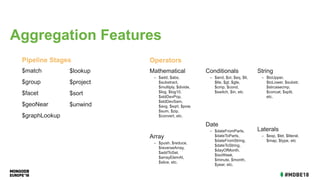
$match
$group
$facet
$geoNear
$graphLookup
Pipeline Stages
Mathematical
– $add, $abs,
$substract,
$multiply, $divide,
$log, $log10,
$stdDevPop,
$stdDevSam,
$avg, $sqrt, $pow,
$sum, $zip,
$convert, etc.
Array
– $push, $reduce,
$reverseArray,
$addToSet,
$arrayElemAt,
$slice, etc.
Operators
$lookup
$project
$sort
$unwind
Conditionals
– $and, $or, $eq, $lt,
$lte, $gt, $gte,
$cmp, $cond,
$switch, $in, etc
Date
– $dateFromParts,
$dateToParts,
$dateFromString,
$dateToString,
$dayOfMonth,
$isoWeek,
$minute, $month,
$year, etc.
String
– $toUpper,
$toLower, $substr,
$strcasecmp,
$concat, $split,
etc.
Laterals
– $exp, $let, $literal,
$map, $type, etc
Aggregation Features
MongoDB Compass
Developer / Data Analyst Tool
Data management and manipulation
document view
table view
Visual schema analyzer
with query builder
export to language
Aggregation pipeline builder
A good place to start
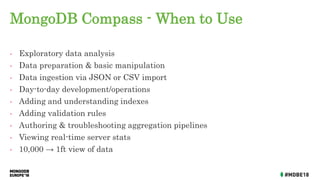
MongoDB Compass - When to Use
• Exploratory data analysis
• Data preparation & basic manipulation
• Data ingestion via JSON or CSV import
• Day-to-day development/operations
• Adding and understanding indexes
• Adding validation rules
• Authoring & troubleshooting aggregation pipelines
• Viewing real-time server stats
• 10,000 → 1ft view of data
Range of Possibilities
Custom Code +
Charting
Libraries
ETL +
3rd Party BI
Tools
MongoDB BI
Connector +
3rd Party BI
Tools
MongoDB
Charts
MongoDB
Compass
analyst
data engineer
developer
analyst
analyst
Range of Possibilities
Custom Code +
Charting Libraries
ETL +
3rd Party BI Tools
MongoDB BI
Connector +
3rd Party BI Tools
MongoDB
Charts
MongoDB
Compass
developer
data scientist
developer
analyst
data scientist data engineer
Thank you!

Data Analytics with MongoDB - Jane Fine

  • 1.
  • 2.
    JANE FINE Director ofProduct Marketing, Analytics jane.fine@mongodb.com @janeuyvova SETH PAYNE Product Manager seth.payne@mongodb.com
  • 3.
    Data Analytics withMongoDB Custom Code + Charting Libraries ETL + 3rd Party BI Tools MongoDB BI Connector + 3rd Party BI Tools MongoDB Charts MongoDB Compass
  • 4.
    What To Expect MongoDBConnector for BI MongoDB Charts MongoDB Aggregation Pipeline / MongoDB Compass … Lots of demos
  • 5.
  • 6.
    MongoDB BI Connector Visualizeand explore MongoDB data in SQL-based BI tools: Automatically discovers the schema Translates complex SQL statements issued by the BI tool into MongoDB aggregation queries Converts the results into a tabular format for rendering inside the BI tool
  • 7.
    Atlas Hosted BIConnector MongoSQLD ...
  • 8.
  • 9.
    Schema Translation { _id: ObjectId("5b9a6d75f68257c5a994558d"), id:2318, listing_url: "https://www.airbnb.com/rooms/2318", name: "Casa Madrona", summary: "Gorgeous 1917 Dutch Colonial…” calendar: [ { listing_id: 2318, date: "2019-08-15", available: "true", price: 296 }, { listing_id: 2318, date: "2019-08-14", available: "true", price: 296 } ,... mysql> show tables; +----------------+ | Tables_in_test | +----------------+ | sea | | sea_calendar | | sea_ratings | +----------------+ 3 rows in set (0.06 sec)
  • 10.
    MongoDB BI Connector- When to Use • Want to speak SQL to MongoDB • Multi data sources (not just MongoDB) • Business analysts • Reporting only • Powerful but you lose some benefits of schema flexibility
  • 11.
  • 12.
    Options for VisualizingMongoDB Data Custom Code + Charting Libraries ETL + 3rd Party BI Tools BI Connector + 3rd Party BI Tools
  • 13.
    Wouldn’t it benice if... You could visualize your MongoDB Data… without needing to write your own code without needing to move your data into a different repository without needing to purchase and configure third-party tools without losing the richness of the Document Model
  • 14.
    MongoDB Charts beta Thefastest way to build visualizations over your MongoDB data Built for the MongoDB Document Model Visualize live data from on-prem or Atlas DB
  • 15.
    Charts Basic Concepts Adata source is a reference to a MongoDB collection or view that contains data you want to visualize. A chart is a visualization of data from a single data source. A dashboard is a collection of charts which you manage as a unit (name, layout, sharing)
  • 16.
    What to Expect Commonchart types Aggregation functions Filtering Sample Mode Binning Sorting Type handling Polymorphic collections Nested documents Array reductions Charting Capabilities Document Model Support
  • 17.
    MongoDB Charts -When to Use • The fastest way to build visualizations over your MongoDB data • Ad hoc analyses • Benefit from the Document Model • Collaboration • Self-service • Intuitive enough for domain experts, non-devs to use!
  • 18.
  • 19.
    Rich Queries Point |Range | Geospatial | Faceted Search | Aggregations | JOINs | Graph Traversals JSON Documents Tabular Key-Value Text GraphGeospatial MongoDB Aggregation Framework
  • 20.
    MongoDB { customer_id :1, first_name : "Mark", last_name : "Smith", city : "San Francisco", phones: [ { number : "1-212-777-1212", type : "work" }, { number : "1-212-777-1213", type : "cell" }] ... Expressive Queries Find anyone with phone # “1-212…” Check if the person with number “555…” is on the “do not call” list Geospatial Find the best offer for the customer at geo coordinates of 42nd St. and 6th Ave Text Search Find all tweets that mention the firm within the last 2 days Aggregation Count and sort number of customers by city, compute min, max, and average spend Native Binary JSON Support Add an additional phone number to Mark Smith’s record without rewriting the document Update just 2 phone numbers out of 10 Sort on the modified date JOIN ($lookup) Query for all San Francisco residences, lookup their transactions, and sum the amount by person Graph Queries ($graphLookup) Query for all people within 3 degrees of separation from Mark Rich query functionality
  • 21.
    Advanced data processing pipelinefor transformations and analytics Multiple stages Similar to a unix pipe Rich Expressions Collection db.orders.aggregate( [ $match stage {$match: { status: "A" } }, $group stage { $group: { _id: "$cust_id",total: { $sum: "$amount" } } } ] ) { cust_id: "A123", amount: 500, status: "A", } { cust_id: "A123", amount: 250, status: "A", } { cust_id: "B212", amount: 200, status: "A", } { cust_id: "A123", amount: 300, status: "D", } Orders { cust_id: "A123", amount: 500, status: "A", } { cust_id: "A123", amount: 250, status: "A", } { cust_id: "B212", amount: 200, status: "A", } { id: "A123", total: 750 } { id: "B212", total: 200 } $match $group Aggregations
  • 22.
    $match $group $facet $geoNear $graphLookup Pipeline Stages Mathematical – $add,$abs, $substract, $multiply, $divide, $log, $log10, $stdDevPop, $stdDevSam, $avg, $sqrt, $pow, $sum, $zip, $convert, etc. Array – $push, $reduce, $reverseArray, $addToSet, $arrayElemAt, $slice, etc. Operators $lookup $project $sort $unwind Conditionals – $and, $or, $eq, $lt, $lte, $gt, $gte, $cmp, $cond, $switch, $in, etc Date – $dateFromParts, $dateToParts, $dateFromString, $dateToString, $dayOfMonth, $isoWeek, $minute, $month, $year, etc. String – $toUpper, $toLower, $substr, $strcasecmp, $concat, $split, etc. Laterals – $exp, $let, $literal, $map, $type, etc Aggregation Features
  • 23.
    MongoDB Compass Developer /Data Analyst Tool Data management and manipulation document view table view Visual schema analyzer with query builder export to language Aggregation pipeline builder A good place to start
  • 24.
    MongoDB Compass -When to Use • Exploratory data analysis • Data preparation & basic manipulation • Data ingestion via JSON or CSV import • Day-to-day development/operations • Adding and understanding indexes • Adding validation rules • Authoring & troubleshooting aggregation pipelines • Viewing real-time server stats • 10,000 → 1ft view of data
  • 25.
    Range of Possibilities CustomCode + Charting Libraries ETL + 3rd Party BI Tools MongoDB BI Connector + 3rd Party BI Tools MongoDB Charts MongoDB Compass
  • 26.
    analyst data engineer developer analyst analyst Range ofPossibilities Custom Code + Charting Libraries ETL + 3rd Party BI Tools MongoDB BI Connector + 3rd Party BI Tools MongoDB Charts MongoDB Compass developer data scientist developer analyst data scientist data engineer
  • 27.