NETWORK
MODEMS &
ROUTERS
DA N I E L L E DA M A N T E
FIRST THINGS FIRST
• Opening Activity:
– Let’s test your knowledge or network terms!
– Pair up with a few people around you and
discuss what these common network
abbreviations may be.
– You have 10 minutes to complete the opening
activity.
– The group that has the most correct answers,
wins!
– No Googling, or using any form of technology!
Just use your brain!
WHAT IS A MODEM?
(THE BASICS)
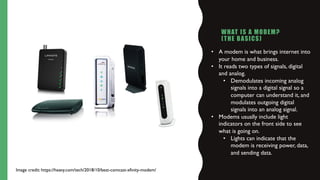
• A modem is what brings internet into
your home and business.
• It reads two types of signals, digital
and analog.
• Demodulates incoming analog
signals into a digital signal so a
computer can understand it, and
modulates outgoing digital
signals into an analog signal.
• Modems usually include light
indicators on the front side to see
what is going on.
• Lights can indicate that the
modem is receiving power, data,
and sending data.
Image credit: https://heavy.com/tech/2018/10/best-comcast-xfinity-modem/
ROUTERS
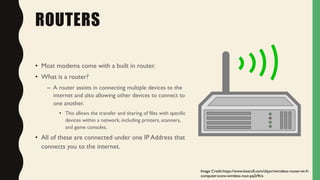
• Most modems come with a built in router.
• What is a router?
– A router assists in connecting multiple devices to the
internet and also allowing other devices to connect to
one another.
• This allows the transfer and sharing of files with specific
devices within a network, including printers, scanners,
and game consoles.
• All of these are connected under one IP Address that
connects you to the internet.
Image Credit:https://www.kisscc0.com/clipart/wireless-router-wi-fi-
computer-icons-wireless-rout-pq2t9t/a
WIRED VS WIRELESS ROUTERS
• Wired Router
– Uses an Ethernet port.This is a hard wire connection using an Ethernet cable to devices that are located
permanently around the router.
– Using a wired router can make for a faster performance and be useful for high bandwidth applications.
HOWEVER
• Wireless Routers are more common in today’s society.
– Wireless routers provide wireless network connectivity toWiFi enabled devices
• PCs, tablets, game consoles, smart phones
• Supports IPTV/digital TV services
• Wireless routers are more common and they are more convenient, but a wired router can be
quicker due to a wired connection.
CRASH COURSE: THE INTERNET
• Let’s watch this short, fun video on the Internet!
• https://youtu.be/AEaKrq3SpW8
TIMELINE ACTIVITY
1. Get with your assigned groups
2. Use your tables to do some research on modems and routers
3. Gather 5 facts on the history of modems and routers.
4. After, gather 7-10 facts on modems and routers and how they have changed throughout the
years.
5. When everyone is done we will discuss our findings as a class and make a timeline!
WHEN YOU ARE DONE
• Sit with your groups and feel free to discuss your findings.
• Bonus! Try and find a fact that you think no one else will find! I
might just give a prize to the group that has the most interesting
facts!
LET’S PLAY KAHOOT!
• https://create.kahoot.it/share/modems-routers/259aaf6f-a6cb-4e42-a500-d3ce527818c5
• Login and enter the pin written on the white board!
REFERENCES:
• https://www.howtogeek.com/191139/22-common-network-jargon-terms-explained/
• https://www.digitaltrends.com/computing/modem-vs-router/
• https://www.actiontec.com/wifihelp/understanding-basics-wireless-router-home-network/

Modems & Routers Lesson

  • 1.
    NETWORK MODEMS & ROUTERS DA NI E L L E DA M A N T E
  • 2.
    FIRST THINGS FIRST •Opening Activity: – Let’s test your knowledge or network terms! – Pair up with a few people around you and discuss what these common network abbreviations may be. – You have 10 minutes to complete the opening activity. – The group that has the most correct answers, wins! – No Googling, or using any form of technology! Just use your brain!
  • 3.
    WHAT IS AMODEM? (THE BASICS) • A modem is what brings internet into your home and business. • It reads two types of signals, digital and analog. • Demodulates incoming analog signals into a digital signal so a computer can understand it, and modulates outgoing digital signals into an analog signal. • Modems usually include light indicators on the front side to see what is going on. • Lights can indicate that the modem is receiving power, data, and sending data. Image credit: https://heavy.com/tech/2018/10/best-comcast-xfinity-modem/
  • 4.
    ROUTERS • Most modemscome with a built in router. • What is a router? – A router assists in connecting multiple devices to the internet and also allowing other devices to connect to one another. • This allows the transfer and sharing of files with specific devices within a network, including printers, scanners, and game consoles. • All of these are connected under one IP Address that connects you to the internet. Image Credit:https://www.kisscc0.com/clipart/wireless-router-wi-fi- computer-icons-wireless-rout-pq2t9t/a
  • 5.
    WIRED VS WIRELESSROUTERS • Wired Router – Uses an Ethernet port.This is a hard wire connection using an Ethernet cable to devices that are located permanently around the router. – Using a wired router can make for a faster performance and be useful for high bandwidth applications. HOWEVER • Wireless Routers are more common in today’s society. – Wireless routers provide wireless network connectivity toWiFi enabled devices • PCs, tablets, game consoles, smart phones • Supports IPTV/digital TV services • Wireless routers are more common and they are more convenient, but a wired router can be quicker due to a wired connection.
  • 6.
    CRASH COURSE: THEINTERNET • Let’s watch this short, fun video on the Internet! • https://youtu.be/AEaKrq3SpW8
  • 7.
    TIMELINE ACTIVITY 1. Getwith your assigned groups 2. Use your tables to do some research on modems and routers 3. Gather 5 facts on the history of modems and routers. 4. After, gather 7-10 facts on modems and routers and how they have changed throughout the years. 5. When everyone is done we will discuss our findings as a class and make a timeline!
  • 8.
    WHEN YOU AREDONE • Sit with your groups and feel free to discuss your findings. • Bonus! Try and find a fact that you think no one else will find! I might just give a prize to the group that has the most interesting facts!
  • 9.
    LET’S PLAY KAHOOT! •https://create.kahoot.it/share/modems-routers/259aaf6f-a6cb-4e42-a500-d3ce527818c5 • Login and enter the pin written on the white board!
  • 10.