Copyright © 2006 by The McGraw-Hill Companies, Inc. All rights reserved.McGraw-Hill Technology Education
McGraw-Hill Technology Education Copyright © 2006 by The McGraw-Hill Companies, Inc. All rights reserved.
Copyright © 2006 by The McGraw-Hill Companies, Inc. All rights reserved.McGraw-Hill Technology Education
Chapter 9A
Network Basics
9A-3
Network Definition
• Set of technologies including hardware,
software and media that connects
computers.
• Resource sharing
• Allows communication and collaboration
between users.
• Networks allow users to access shared
data and programs.
9A-4
The Uses of a Network
• Simultaneous access to data
– Data files are shared
• Access can be limited
– Shared files stored on a server
– Software can be shared
• Site licenses
• Network versions
• Application servers
9A-5
The Uses of a Network
• Shared peripheral device
– Printers and faxes are common shares
– Reduces the cost per user
– Devices can be connected to the network
– Print servers control network printing
• Manage the print queue
9A-6
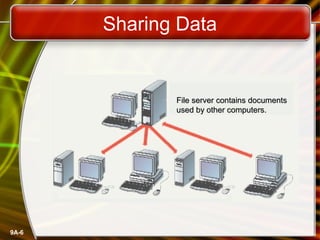
Sharing Data
File server contains documentsFile server contains documents
used by other computers.used by other computers.
9A-7
The Uses of a Network
• Personal communication
– Email
• Instantaneous communication
– Conferencing
• Tele conferencing
• Videoconferencing
• Audio-conferencing
• Data-conferencing
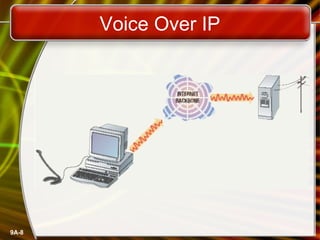
– Voice over IP
• Phone communication over network wires
9A-8
Voice Over IP
9A-9
The Uses of a Network
• Easier data backup
– Backup copies data to removable media
– Server data backed up in one step
9A-10
Common Network Types
• Local Area Network (LAN)
– Contains printers, servers and computers
– Systems are close to each other
– Contained in one office or building
– Organizations often have several LANS
9A-11
Common Network Types
• Wide Area Networks (WAN)
– Two or more LANs connected
– Over a large geographic area
– Typically use public or leased lines
• Phone lines
• Satellite
– The Internet is a WAN
9A-12
Hybrid Network Types
• Campus Area Networks (CAN)
– A LAN in one large geographic area
– Resources related to the same organization
– Each department shares the LAN
9A-13
Hybrid Network Types
• Metropolitan Area Network (MAN)
– Large network that connects different
organizations
– Shares regional resources
– A network provider sells time
9A-14
Hybrid Network Types
• Home Area Network (HAN)
– Small scale network
– Connects computers and entertainment
appliances
– Found mainly in the home
9A-15
Hybrid Network Types
• Personal Area Network (PAN)
– Very small scale network
– Range is less than 2 meters
– Cell phones, PDAs, Bluetooth, infrared
9A-16
How Networks Are Structured
• Server based network
– Node is any network device
– Servers control what the node accesses
– Users gain access by logging in
– Server is the most important computer
– Examples include
• File Server
• Network Server
• Application Server
9A-17
How Networks Are Structured
• Client/Server network
– Individual computers share the processing
and storage workload with a central server.
– Requires special software for the nodes
and the server.
– Nodes are called clients
– Servers are used to control access
– Example: Database software
• Access to data controlled by server
9A-18
How Networks Are Structured
• Peer to peer networks (P2PN)
– All nodes have equal relationships to all
other nodes and all have similar types of
software that supports the sharing of
resources.
– Nodes access resources on other nodes
– Each node controls its own resources
– Most modern OS allow P2PN without using
any specialized software.
– Distributing computing is a form
– Kazaa
9A-19
Network Topologies
• Topology
– Logical layout of wires and devices is called
topology.
– Factors for deciding network topology
• Cost of setting up network
• Network size
• Speed of data travelling around the network
– Several different types
9A-20
Network Topologies
• Packets (Datagrams)
– Pieces of data transmitted over a network
• Packets are created by sending node
• Data is reassembled by receiving node
– Packet header
• Sending and receiving address
• Contains information needed by the network
– Packet payload
• Actual data
• Number and size of data
9A-21
Network Topologies
• 1. Bus topology
– Also called linear bus
– One wire connects all nodes
– Terminator ends the wires
– Advantages
• Easy to setup
• Small amount of wire
– Disadvantages
• Slow
• Easy to crash
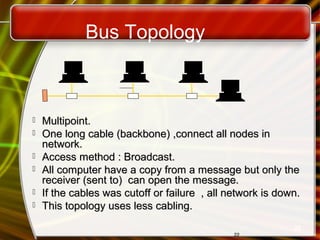
Bus Topology
2222
 Multipoint.Multipoint.
 One long cable (backbone) ,connect all nodes inOne long cable (backbone) ,connect all nodes in
network.network.
 Access method : Broadcast.Access method : Broadcast.
 All computer have a copy from a message but only theAll computer have a copy from a message but only the
receiver (sent to) can open the message.receiver (sent to) can open the message.
 If the cables was cutoff or failure , all network is down.If the cables was cutoff or failure , all network is down.
 This topology uses less cabling.This topology uses less cabling.
22
9A-23
Network Topologies
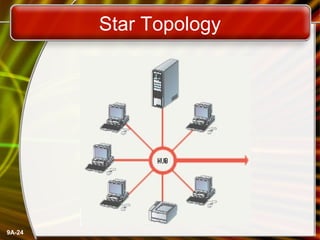
• 2. Star topology
– All nodes connect to a hub
• Packets sent to hub
• Hub sends packet to destination
– Advantages
• Easy to setup
• One cable can not crash network
– Disadvantages
• One hub crashing downs entire network
• Uses lots of cable
– Most common topology
9A-24
Star Topology
9A-25
Network Topologies
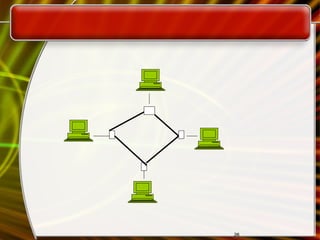
• 3. Ring topology
– Nodes connected in a circle
– Tokens used to transmit data
• Nodes must wait for token to send
– Advantages
• Time to send data is known
• No data collisions
– Disadvantages
• Slow
• Lots of cable
2626
9A-27
Network Topologies
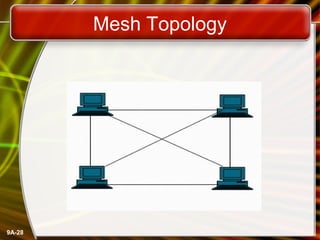
• 4. Mesh topology
– All computers connected together
– Internet is a mesh network
– Advantage
• Data will always be delivered
– Disadvantages
• Lots of cable
• Hard to setup
9A-28
Mesh Topology
9A-29
Network Media
• Links that connect nodes
• Choice impacts
– Speed
– Security
– Size
9A-30
Wire Based Media
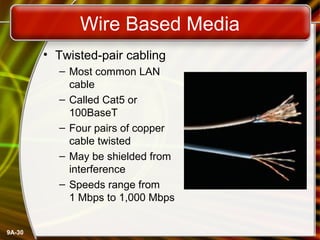
• Twisted-pair cabling
– Most common LAN
cable
– Called Cat5 or
100BaseT
– Four pairs of copper
cable twisted
– May be shielded from
interference
– Speeds range from
1 Mbps to 1,000 Mbps
9A-31
Wire Based Media
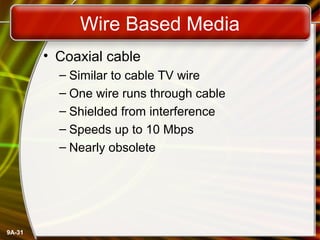
• Coaxial cable
– Similar to cable TV wire
– One wire runs through cable
– Shielded from interference
– Speeds up to 10 Mbps
– Nearly obsolete
9A-32
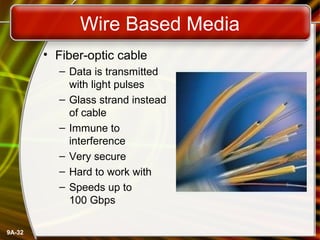
Wire Based Media
• Fiber-optic cable
– Data is transmitted
with light pulses
– Glass strand instead
of cable
– Immune to
interference
– Very secure
– Hard to work with
– Speeds up to
100 Gbps
9A-33
Wireless Media
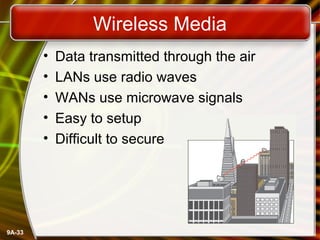
• Data transmitted through the air
• LANs use radio waves
• WANs use microwave signals
• Easy to setup
• Difficult to secure
9A-34
Network Hardware
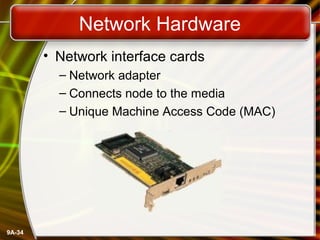
• Network interface cards
– Network adapter
– Connects node to the media
– Unique Machine Access Code (MAC)
9A-35
Network Hardware
• Hubs
– Center of a star network
– All nodes receive transmitted packets
– Slow and insecure
9A-36
Network Hardware
• Switches
– Replacement for hubs
– Only intended node receives transmission
– Fast and secure
9A-37
Network Hardware
• Bridge
– Connects two or more LANs together
– Packets sent to remote LAN cross
• Other packets do not cross
– Segments the network on MAC addresses
9A-38
Network Hardware
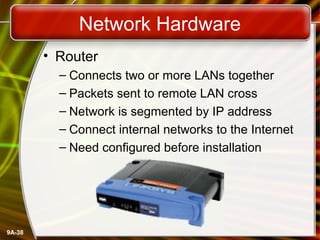
• Router
– Connects two or more LANs together
– Packets sent to remote LAN cross
– Network is segmented by IP address
– Connect internal networks to the Internet
– Need configured before installation

Chap 9A Networks (Lecture) IT Slides # 1

  • 1.
    Copyright © 2006by The McGraw-Hill Companies, Inc. All rights reserved.McGraw-Hill Technology Education McGraw-Hill Technology Education Copyright © 2006 by The McGraw-Hill Companies, Inc. All rights reserved.
  • 2.
    Copyright © 2006by The McGraw-Hill Companies, Inc. All rights reserved.McGraw-Hill Technology Education Chapter 9A Network Basics
  • 3.
    9A-3 Network Definition • Setof technologies including hardware, software and media that connects computers. • Resource sharing • Allows communication and collaboration between users. • Networks allow users to access shared data and programs.
  • 4.
    9A-4 The Uses ofa Network • Simultaneous access to data – Data files are shared • Access can be limited – Shared files stored on a server – Software can be shared • Site licenses • Network versions • Application servers
  • 5.
    9A-5 The Uses ofa Network • Shared peripheral device – Printers and faxes are common shares – Reduces the cost per user – Devices can be connected to the network – Print servers control network printing • Manage the print queue
  • 6.
    9A-6 Sharing Data File servercontains documentsFile server contains documents used by other computers.used by other computers.
  • 7.
    9A-7 The Uses ofa Network • Personal communication – Email • Instantaneous communication – Conferencing • Tele conferencing • Videoconferencing • Audio-conferencing • Data-conferencing – Voice over IP • Phone communication over network wires
  • 8.
  • 9.
    9A-9 The Uses ofa Network • Easier data backup – Backup copies data to removable media – Server data backed up in one step
  • 10.
    9A-10 Common Network Types •Local Area Network (LAN) – Contains printers, servers and computers – Systems are close to each other – Contained in one office or building – Organizations often have several LANS
  • 11.
    9A-11 Common Network Types •Wide Area Networks (WAN) – Two or more LANs connected – Over a large geographic area – Typically use public or leased lines • Phone lines • Satellite – The Internet is a WAN
  • 12.
    9A-12 Hybrid Network Types •Campus Area Networks (CAN) – A LAN in one large geographic area – Resources related to the same organization – Each department shares the LAN
  • 13.
    9A-13 Hybrid Network Types •Metropolitan Area Network (MAN) – Large network that connects different organizations – Shares regional resources – A network provider sells time
  • 14.
    9A-14 Hybrid Network Types •Home Area Network (HAN) – Small scale network – Connects computers and entertainment appliances – Found mainly in the home
  • 15.
    9A-15 Hybrid Network Types •Personal Area Network (PAN) – Very small scale network – Range is less than 2 meters – Cell phones, PDAs, Bluetooth, infrared
  • 16.
    9A-16 How Networks AreStructured • Server based network – Node is any network device – Servers control what the node accesses – Users gain access by logging in – Server is the most important computer – Examples include • File Server • Network Server • Application Server
  • 17.
    9A-17 How Networks AreStructured • Client/Server network – Individual computers share the processing and storage workload with a central server. – Requires special software for the nodes and the server. – Nodes are called clients – Servers are used to control access – Example: Database software • Access to data controlled by server
  • 18.
    9A-18 How Networks AreStructured • Peer to peer networks (P2PN) – All nodes have equal relationships to all other nodes and all have similar types of software that supports the sharing of resources. – Nodes access resources on other nodes – Each node controls its own resources – Most modern OS allow P2PN without using any specialized software. – Distributing computing is a form – Kazaa
  • 19.
    9A-19 Network Topologies • Topology –Logical layout of wires and devices is called topology. – Factors for deciding network topology • Cost of setting up network • Network size • Speed of data travelling around the network – Several different types
  • 20.
    9A-20 Network Topologies • Packets(Datagrams) – Pieces of data transmitted over a network • Packets are created by sending node • Data is reassembled by receiving node – Packet header • Sending and receiving address • Contains information needed by the network – Packet payload • Actual data • Number and size of data
  • 21.
    9A-21 Network Topologies • 1.Bus topology – Also called linear bus – One wire connects all nodes – Terminator ends the wires – Advantages • Easy to setup • Small amount of wire – Disadvantages • Slow • Easy to crash
  • 22.
    Bus Topology 2222  Multipoint.Multipoint. One long cable (backbone) ,connect all nodes inOne long cable (backbone) ,connect all nodes in network.network.  Access method : Broadcast.Access method : Broadcast.  All computer have a copy from a message but only theAll computer have a copy from a message but only the receiver (sent to) can open the message.receiver (sent to) can open the message.  If the cables was cutoff or failure , all network is down.If the cables was cutoff or failure , all network is down.  This topology uses less cabling.This topology uses less cabling. 22
  • 23.
    9A-23 Network Topologies • 2.Star topology – All nodes connect to a hub • Packets sent to hub • Hub sends packet to destination – Advantages • Easy to setup • One cable can not crash network – Disadvantages • One hub crashing downs entire network • Uses lots of cable – Most common topology
  • 24.
  • 25.
    9A-25 Network Topologies • 3.Ring topology – Nodes connected in a circle – Tokens used to transmit data • Nodes must wait for token to send – Advantages • Time to send data is known • No data collisions – Disadvantages • Slow • Lots of cable
  • 26.
  • 27.
    9A-27 Network Topologies • 4.Mesh topology – All computers connected together – Internet is a mesh network – Advantage • Data will always be delivered – Disadvantages • Lots of cable • Hard to setup
  • 28.
  • 29.
    9A-29 Network Media • Linksthat connect nodes • Choice impacts – Speed – Security – Size
  • 30.
    9A-30 Wire Based Media •Twisted-pair cabling – Most common LAN cable – Called Cat5 or 100BaseT – Four pairs of copper cable twisted – May be shielded from interference – Speeds range from 1 Mbps to 1,000 Mbps
  • 31.
    9A-31 Wire Based Media •Coaxial cable – Similar to cable TV wire – One wire runs through cable – Shielded from interference – Speeds up to 10 Mbps – Nearly obsolete
  • 32.
    9A-32 Wire Based Media •Fiber-optic cable – Data is transmitted with light pulses – Glass strand instead of cable – Immune to interference – Very secure – Hard to work with – Speeds up to 100 Gbps
  • 33.
    9A-33 Wireless Media • Datatransmitted through the air • LANs use radio waves • WANs use microwave signals • Easy to setup • Difficult to secure
  • 34.
    9A-34 Network Hardware • Networkinterface cards – Network adapter – Connects node to the media – Unique Machine Access Code (MAC)
  • 35.
    9A-35 Network Hardware • Hubs –Center of a star network – All nodes receive transmitted packets – Slow and insecure
  • 36.
    9A-36 Network Hardware • Switches –Replacement for hubs – Only intended node receives transmission – Fast and secure
  • 37.
    9A-37 Network Hardware • Bridge –Connects two or more LANs together – Packets sent to remote LAN cross • Other packets do not cross – Segments the network on MAC addresses
  • 38.
    9A-38 Network Hardware • Router –Connects two or more LANs together – Packets sent to remote LAN cross – Network is segmented by IP address – Connect internal networks to the Internet – Need configured before installation

Editor's Notes

  • #5 Teaching Tip Figure 9A.2 on page 342 visually describes the sharing process. It can be helpful to have students open a shared file that you control. Make a change then have the students open it again. Alternatively, share a document and allow your students to write in it. Then demonstrate how the shared document changes. Spend time discussing why application servers need to be so powerful.
  • #6 Teaching tip Figure 9A.4 on page 344 shows a print queue. It can be helpful to demonstrate your classroom queue.
  • #8 Teaching tip It is fun if you can setup a teleconference in your classroom. Students get to learn how to join or create the conference. Additionally, they learn how to participate. Finally, students have fun, especially with shared whiteboards.
  • #10 Insider information The text describes needing special software to back up data from user drives. However, the backup utility that comes with Windows 2000 and XP is capable of performing this chore.
  • #11 Teaching tip Use a real world example to describe an organization with interconnected LANs.
  • #12 Teaching tip Blockbuster Video uses a WAN to connect it’s stores nationwide. Customers from Pittsburgh may rent videos in Hilton Head. Late fees will even be displayed!
  • #14 Teaching tip An example of a regional resource is a supercomputer. For example, Pittsburgh has the Pittsburgh Super Computing center (www.psc.edu). The various colleges in Pittsburgh connect to the center through a MAN in Pittsburgh.
  • #16 Insider information PAN is very new. Few devices support PAN. High end cell phones include Bluetooth technology. Once the technology matures, Bluetooth will allow the creation of a PAN.
  • #17 Teaching tip Spend a few minutes here discussing password policies. Describe why it is important not to give out a password. Also describe why longer, more complicated passwords are important.
  • #19 Teaching tip Discuss how users managing their own security settings can be bad.
  • #20 Teaching tip Discuss how your network topology handles collisions. If your students are technical, contrast this with an inferior topology.
  • #21 Teaching tip For technical students take the time to draw the packet structure on the board. The typical structure is destination address | sending address | packet number | total packets | data size | payload | error control.
  • #22 Teaching tip Pages 352 and 353 have diagrams of each network topology
  • #31 Insider information Interference is usually electrical. Magnets, solar flares or electronic devices generate interference.
  • #33 Teaching tip Remind students that bps is bits per second. Gbps then is billion bits per second.
  • #34 Teaching tip Now is the time to briefly discuss 802.11 standards. A full discussion of 802.11 is covered in the next section.
  • #35 Insider Information The Xerox Corporation controls the assignment of Ethernet addresses to NIC manufacturers.
  • #37 Insider information Twisted pair networks cannot achieve higher than 10 Mbps using a hub. Switches are necessary to achieve 100 Mbps or higher.
  • #39 Discussion point Ask who in the class has high speed Internet. Then determine if anyone is sharing this to the rest of the house or dorm. If they are, see if they can describe the setup. Most likely, the sharing is done with a router.