Brightspace Mobile
Mobile has been a huge focus
Mobile
ePortfolio
Binder™ Assignment
Grader
Mobile
Web
There is a new application in the mobile family…
Pulse
Introducing
Brightspace Pulse
Built for the learner
Focused on what they want
Notifications
Workload and pacing
D2L Binder
• All your learning content in one place
• D2L LE Course Content, eTextbooks & more!
• Essential Annotations
• Offline Access
• Import/export from:
• Available for free!
D2L Binder
Learning Environment
Dropbox
OneDrive
Photos App
Other Device Apps
Google Drive
Access your learning material on multiple devices and platforms.
D2L Binder: Tablet Applications
iPad AndroidWindows 8
ePortfolio
ePortfolio Mobile
Campus Life – Dub Labs
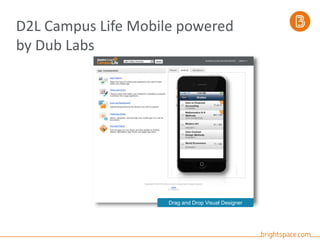
D2L Campus Life Mobile powered
by Dub Labs
Drag and Drop Visual Designer
Assignment Grader
Save time.
Assignments can be saved for offline use,
allowing instructors to shorten the turnaround
time for grading and feedback and work at their
own pace when providing simple text, audio, or
video feedback on downloaded assignments.
Improve feedback.
Assess using rubrics, annotate with inline comments,
and provide personalized feedback using grading
tools for teachers that allow them to leave time-
consuming manual grading behind.
Stay organized.
Support for multiple submission types and the ability to
switch between multiple views helps keep things
organized, offering instructors the flexibility to quickly
navigate through submissions and grade in the workflow
that they prefer.
Assignment Grader
Questions?

Mobilize Your Integrated Learning Platform with Brightspace

  • 1.
  • 2.
    Mobile has beena huge focus Mobile ePortfolio Binder™ Assignment Grader Mobile Web There is a new application in the mobile family…
  • 3.
  • 4.
    Introducing Brightspace Pulse Built forthe learner Focused on what they want Notifications Workload and pacing
  • 5.
  • 6.
    • All yourlearning content in one place • D2L LE Course Content, eTextbooks & more! • Essential Annotations • Offline Access • Import/export from: • Available for free! D2L Binder Learning Environment Dropbox OneDrive Photos App Other Device Apps Google Drive
  • 7.
    Access your learningmaterial on multiple devices and platforms. D2L Binder: Tablet Applications iPad AndroidWindows 8
  • 8.
  • 9.
  • 10.
  • 12.
    D2L Campus LifeMobile powered by Dub Labs Drag and Drop Visual Designer
  • 13.
  • 14.
    Save time. Assignments canbe saved for offline use, allowing instructors to shorten the turnaround time for grading and feedback and work at their own pace when providing simple text, audio, or video feedback on downloaded assignments. Improve feedback. Assess using rubrics, annotate with inline comments, and provide personalized feedback using grading tools for teachers that allow them to leave time- consuming manual grading behind. Stay organized. Support for multiple submission types and the ability to switch between multiple views helps keep things organized, offering instructors the flexibility to quickly navigate through submissions and grade in the workflow that they prefer. Assignment Grader
  • 15.

Editor's Notes

  • #3 We’ve always had a focus on mobile. You can do reflections in ePortfolio whenever it hits you in your experiential learning You can download content-to-go on Binder. You can grade assignments by the pool with Assignment Grader And you can use Mobile Web to access the Brightspace Learning Environment on most devices.
  • #7 D2L Binder Digital content is here to stay, and D2L Binder is your students’ avenue to success.  Our cross-platform tablet and desktop applications makes learning accessible, engaging and interactive.  It’s never been easier for students to collect, organize and discover learning content, whether that be from the D2L Learning Environment or a digital textbook – D2L Binder is ready when they are.  A Better Way to Learn. Collect. It’s never been this easy to bring together and organize course content from the D2L Learning Environment, favourite cloud drives and digital titles – including textbooks, journals and other educational resources. And with reliable, cloud-based storage there’s no need to worry about where everything is – All in one place! Learn. Read.  Annotate.  Review.  Help your students achieve their learning outcomes.  Add notes, highlight, underline, bookmark and export digital learning content.  Binder is a simple, fun and engaging way to interact with course content, digital textbooks and more! Anytime. Stay connected to learning content whenever, wherever they want to learn.  On a bus, in a coffee shop or even away on spring break – Binder works anywhere they do. Available for Web, iPad, Windows 8 and Android Tablets.
  • #10  Take photos, record videos and audio, and add them to your portfolio Create items and share, tag, or add them to collections in one location Share your items with peers, mentors, and instructors Comment on other learners’ shared items and feedback Create reflections on your smartphone Search and view both your items and those shared by other users Create link artifacts by sending a link from the Chrome™ browser to ePortfolio Create a file artifact by sending photos and videos from the Gallery to ePortfolio View recent ePortfolio activity
  • #12 D2L Campus Life: Enhance the campus/professional experience for users with a mobile application that keeps everyone informed, connected, and happy. Campus Life is a set of smartphone features that provide up-to-the minute information from the institution to users. D2L Campus Life enables anyone to create their own campus mobile apps in minutes Features: Campus/Organizational News, Events/Calendar, Schedules, Directory, Social Networking, Maps, Media Library, Local Venues, Campus/Organizational Services, and Weather. Users don’t have to be an existing D2L client in order to utilize the Campus Life application. Users can link to their current LMS from the Campus Life application. There is a separate charge for this mobile solution. Benefits: Increase student engagement Improve access to course content and discussions Make communication and connecting easy for faculty and students Manage the cost of building and maintaining a mobile app
  • #13 The online app builder lets users drag-and-drop, configure and brand native mobile applications for iOS, Android, and BlackBerry. Prototype designs quickly Construct, review, and repeat; iterate design until it’s right Fast time-to-market from concept to implementation Design customized apps branded to the organization Highly customizable – every image, color and word can be changed