

Presentation on
Mobile Viruses & Worms
Sourav Verma
11EBKCS054
Contents:
Introduction
Definition of various terms
Motivation for Creating Virus
Characteristics of Viruses
Virus/Worm type overview
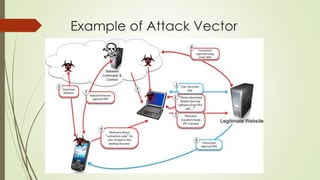
Attack Vector for mobile malware
Harm causes by Mobile Malware
Protection & Prevention Mechanisms
Case Study
Introduction
All of us are familiar with cell phones. The use of
cell phones to access internet and to share
executable files have increased. With the
number of functionalities, the amount of
personal data at risk is high. If mobile devices
are not handled properly, it may prove to be
fatal to our privacy. It’s not just PCs that are
vulnerable to virus attacks these days now. We
also have to protect our phone from mobile
virus & PDA(Personal Digital Assistants) too.
Definition of Various Terms
VIRUS: Virus Stands for “Vital Information
Resources Under Seize”. It’s a malicious piece of
code that attach itself to a host program to be
able to replicate & performs destructive actions.
A virus might rapidly infect every file on
individual computer or slowly infect documents
in the computer but it does not intentionally try
to spread itself from infected computer to other.
Worms: Worm is a program that is designed to
copy itself from one device to another. Worms
are insidious because they rely less(or not at all)
upon human behavior in order to spread
themselves from one computer to another.
TROJAN HORSES: Trojan Horse is a program that
pretends to be useful program but do some
unwanted actions. Trojan Horse does not require
a host and does not replicate. A special type is
backdoor Trojan, which does not do anything
destructive, but sets computer open for Remote
Control & Unauthorized Access.
Mobile Phone Virus: Mobile virus is an electronic
virus that targets mobile phones or wireless
devices like pda, Smartphone, tablets etc. It’s a
computer virus specifically adapted for the
cellular environment and designed to spread
from one vulnerable phone to another.
Motivation For Creating Virus
Curiosity
Challenge
To gain wider attention
Some new antivirus companies wants to
enter new market.
Characteristics of Virus
Size
Versatility
Propagation
Effectiveness
Functionality
Persistence
Virus/Worm Type Overview
Binary File Virus and Worms
Binary Stream Worm
Script File Virus or Worm
Macro Virus
Boot Virus
Multipartite Virus
Attack Vectors For Mobile Malware
Bluetooth
WiFi
SMS/MMS
Internet
Serial/USB
Example of Attack Vector
Harm causes by Mobile Malware
 Causing Financial Loss to the user
 Initiate unnecessary calls, send SMS or MMS
 Send private information to predefines phone/Server
 Spread via Bluetooth, causing drainage of battery
 Cause the device to work slowly
 Infect Files or Wipe out information
 Install bogus applications on the device
 Allow remote control of the device
 Cause system crash or failure
PROTECTION & Prevention Mechanisms
Keeping Device in non-discoverable Bluetooth
Mode
Installing an Antivirus or Intrusion Detection
System
Installing Firmware updates
Exercising cautions when installing or
downloading applications from untrusted
sources.
Filtering out Malware at service Provider
Case Study- CABIR
First Mobile Worm
Only as Proof-Of-Concept
Spread vector – Bluetooth
Infected file – caribe.sis
15 new variants exist
Case Study- COMWAR
Second landmark in mobile worms
Spread vector - Bluetooth and MMS
Large spread area due to MMS
Not as proof of concept – Intention to harm by
charging the mobile user
Multiple variants detected
Case Study- CARDTRAP
First cross-over mobile virus found
Can migrate from mobile to PC
Propagates as infected mobile application as
well as Windows worm
2 variants found – Both install with legitimate
applications
– Black Symbian
– Camcorder Pro
THANK YOU 

Mobile virus & worms

  • 1.
    Presentation on Mobile Viruses& Worms Sourav Verma 11EBKCS054
  • 2.
    Contents: Introduction Definition of variousterms Motivation for Creating Virus Characteristics of Viruses Virus/Worm type overview Attack Vector for mobile malware Harm causes by Mobile Malware Protection & Prevention Mechanisms Case Study
  • 3.
    Introduction All of usare familiar with cell phones. The use of cell phones to access internet and to share executable files have increased. With the number of functionalities, the amount of personal data at risk is high. If mobile devices are not handled properly, it may prove to be fatal to our privacy. It’s not just PCs that are vulnerable to virus attacks these days now. We also have to protect our phone from mobile virus & PDA(Personal Digital Assistants) too.
  • 4.
    Definition of VariousTerms VIRUS: Virus Stands for “Vital Information Resources Under Seize”. It’s a malicious piece of code that attach itself to a host program to be able to replicate & performs destructive actions. A virus might rapidly infect every file on individual computer or slowly infect documents in the computer but it does not intentionally try to spread itself from infected computer to other. Worms: Worm is a program that is designed to copy itself from one device to another. Worms are insidious because they rely less(or not at all) upon human behavior in order to spread themselves from one computer to another.
  • 5.
    TROJAN HORSES: TrojanHorse is a program that pretends to be useful program but do some unwanted actions. Trojan Horse does not require a host and does not replicate. A special type is backdoor Trojan, which does not do anything destructive, but sets computer open for Remote Control & Unauthorized Access. Mobile Phone Virus: Mobile virus is an electronic virus that targets mobile phones or wireless devices like pda, Smartphone, tablets etc. It’s a computer virus specifically adapted for the cellular environment and designed to spread from one vulnerable phone to another.
  • 6.
    Motivation For CreatingVirus Curiosity Challenge To gain wider attention Some new antivirus companies wants to enter new market.
  • 7.
  • 8.
    Virus/Worm Type Overview BinaryFile Virus and Worms Binary Stream Worm Script File Virus or Worm Macro Virus Boot Virus Multipartite Virus
  • 9.
    Attack Vectors ForMobile Malware Bluetooth WiFi SMS/MMS Internet Serial/USB
  • 10.
  • 11.
    Harm causes byMobile Malware  Causing Financial Loss to the user  Initiate unnecessary calls, send SMS or MMS  Send private information to predefines phone/Server  Spread via Bluetooth, causing drainage of battery  Cause the device to work slowly  Infect Files or Wipe out information  Install bogus applications on the device  Allow remote control of the device  Cause system crash or failure
  • 12.
    PROTECTION & PreventionMechanisms Keeping Device in non-discoverable Bluetooth Mode Installing an Antivirus or Intrusion Detection System Installing Firmware updates Exercising cautions when installing or downloading applications from untrusted sources. Filtering out Malware at service Provider
  • 13.
    Case Study- CABIR FirstMobile Worm Only as Proof-Of-Concept Spread vector – Bluetooth Infected file – caribe.sis 15 new variants exist
  • 14.
    Case Study- COMWAR Secondlandmark in mobile worms Spread vector - Bluetooth and MMS Large spread area due to MMS Not as proof of concept – Intention to harm by charging the mobile user Multiple variants detected
  • 15.
    Case Study- CARDTRAP Firstcross-over mobile virus found Can migrate from mobile to PC Propagates as infected mobile application as well as Windows worm 2 variants found – Both install with legitimate applications – Black Symbian – Camcorder Pro
  • 16.