1 © Nokia Siemens Networks Presentation / Author / Date
I insert classification level
LTE Mobility management
LTE optimization training, Sao Paulo December 2011
2 © Nokia Siemens Networks Presentation / Author / Date
Soc Classification level
Contents
• Connected mode mobility
– Overview
– Mobility triggers and handover thresholds
– Measurement configuration
– LTE intra-frequency handover
– LTE inter-frequency handover
– S1 handover
– RRC release with redirect
– CS fallback
– IRAT HO to WCDMA
– ANR – Automated neighbour relations
• Idle mode mobility
– SIB and SIB-mapping
– Cell selection
– LTE intra-frequency reselection
– LTE inter-frequency reselection
– Inter RAT reselection
3 © Nokia Siemens Networks Presentation / Author / Date
I insert classification level
Connected Mode Mobility
4 © Nokia Siemens Networks Presentation / Author / Date
Soc Classification level
Connected Mode Mobility
Overview
• Mobility Management sets the mobility procedures when the UE is in active state
• Procedures supported:
– Handover: Transfer of an ongoing call/data session from a radio channel to
another without call interruption. Handovers in LTE are:
o Network controlled
o UE assisted
o Hard handovers: Only a connection exist to one cell at a time
– Redirection: Similar to handover, but requires connection release prior to the
transfer the ongoing call
– Cell change: procedure dedicated for call transfer from LTE to GSM; it requires
connection release
Presentation / Author / Date
Licensing:
• All IRAT HO, inter-frequency HO, CSFT to UTRAN/GERAN via redirect and S1
handovers are optional features:
• When enabled they are activated for the whole eNodeB
• If deactivated the eNB does not configure UE to measure other technologies/
frequencies so handover is not triggered
5 © Nokia Siemens Networks Presentation / Author / Date
I insert classification level
Mobility triggers and handover thresholds
6 © Nokia Siemens Networks Presentation / Author / Date
Soc Classification level
Mobility triggers (1/2)
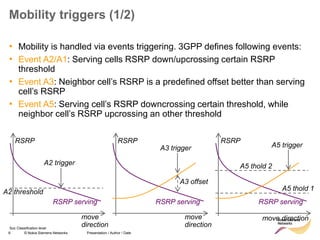
• Mobility is handled via events triggering. 3GPP defines following events:
• Event A2/A1: Serving cells RSRP down/upcrossing certain RSRP
threshold
• Event A3: Neighbor cell’s RSRP is a predefined offset better than serving
cell’s RSRP
• Event A5: Serving cell’s RSRP downcrossing certain threshold, while
neighbor cell’s RSRP upcrossing an other threshold
RSRP
RSRP serving
A2 trigger
A2 threshold
move
direction
RSRP
RSRP serving
A3 trigger
A3 offset
move
direction
RSRP
RSRP serving
A5 trigger
A5 thold 1
A5 thold 2
move direction
7 © Nokia Siemens Networks Presentation / Author / Date
Soc Classification level
Mobility Triggers (2/2)
• Inter-RAT measurements (GERAN or UMTS supported in RL30)
• Event B2: Serving cell’s RSRP down crossing threshold 1, while neighbor cell
RSSI or CPICH RSCP or CPICH Ec/No up crossing threshold 2
• Triggers for Inter-RAT reports are:
– RSSI in case of GERAN
– CPICH RSCP or CPICH EC/N0 in case of UMTS
Signal
Level
RSRP serving
B2 trigger
B2 thold 1
B2 thold 2
move direction
Inter-RAT
Neighbor cell
signal
8 © Nokia Siemens Networks Presentation / Author / Date
Soc Classification level
Handover Thresholds
Measurement Activations
• Threshold 1 (Th1): UE does not perform measurements of neighbour cells when
the serving cell RSRP is above Threshold1 (Th1)
• Thresholds 2 (Th2a/ Th2_interfreq/Th2_WCDMA/Th2_GSM):UE starts
performing measurement gaps when one of the Th2 events is reported to the
eNodeB in a measurement report
• Threshold2a (Th2a): Measurement gaps are cancelled if serving cell RSRP rises
above Th2a
• Threshold 4 (Th4):RRC Connection Release with redirection is triggered if no
suitable intra or inter frequency/IRAT cells are found
Presentation / Author / Date
RSRP (dBm)
No measurements
except serving cell
Intra –LTE
measurements
Intra –LTE + Inter
Freq measurements
Intra –LTE + Inter
Freq + WCDMA
measurements
Intra –LTE + Inter
Freq + WCDMA +
GSM
measurements
Th4
Th2_GSM
Th2_WCDMA
Th2_InterFreq
Th1 Th2a
RRC
Connection
Release and
re-direction
9 © Nokia Siemens Networks Presentation / Author / Date
Soc Classification level
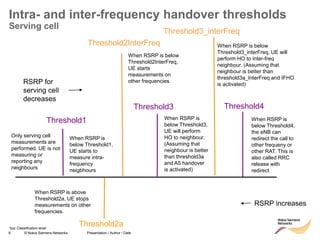
Intra- and inter-frequency handover thresholds
Serving cell
Threshold1
RSRP for
serving cell
decreases
Only serving cell
measurements are
performed. UE is not
measuring or
reporting any
neighbours
Threshold2InterFreq
When RSRP is
below Threshold1,
UE starts to
measure intra-
frequency
neigbhours
When RSRP is below
Threshold2InterFreq,
UE starts
measurements on
other frequencies.
Threshold2a
RSRP increases
When RSRP is above
Threshold2a, UE stops
measurements on other
frequencies.
Threshold3
When RSRP is
below Threshold3,
UE will perform
HO to neighbour.
(Assuming that
neighbour is better
than threshold3a
and A5 handover
is activated)
Threshold4
When RSRP is
below Threshold4,
the eNB can
redirect the call to
other frequeny or
other RAT. This is
also called RRC
release with
redirect
Threshold3_interFreq
When RSRP is below
Threshold3_interFreq, UE will
perform HO to inter-freq
neighbour. (Assuming that
neighbour is better than
threshold3a_InterFreq and IFHO
is activated)
10 © Nokia Siemens Networks Presentation / Author / Date
Soc Classification level
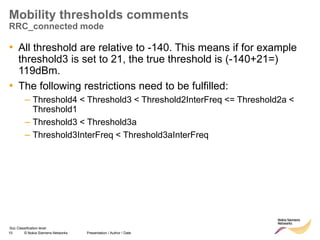
Mobility thresholds comments
RRC_connected mode
• All threshold are relative to -140. This means if for example
threshold3 is set to 21, the true threshold is (-140+21=)
119dBm.
• The following restrictions need to be fulfilled:
– Threshold4 < Threshold3 < Threshold2InterFreq <= Threshold2a <
Threshold1
– Threshold3 < Threshold3a
– Threshold3InterFreq < Threshold3aInterFreq
11 © Nokia Siemens Networks Presentation / Author / Date
I insert classification level
Measurement configuration
12 © Nokia Siemens Networks Presentation / Author / Date
Soc Classification level
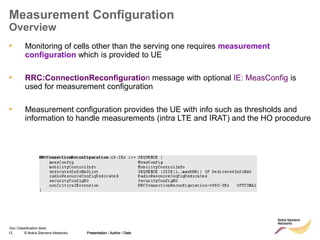
Measurement Configuration
Overview
• Monitoring of cells other than the serving one requires measurement
configuration which is provided to UE
• RRC:ConnectionReconfiguration message with optional IE: MeasConfig is
used for measurement configuration
• Measurement configuration provides the UE with info such as thresholds and
information to handle measurements (intra LTE and IRAT) and the HO procedure
Presentation / Author / Date
13 © Nokia Siemens Networks Presentation / Author / Date
Soc Classification level
Measurement Configuration
Structure
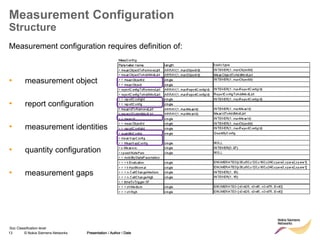
Measurement configuration requires definition of:
• measurement object
• report configuration
• measurement identities
• quantity configuration
• measurement gaps
Presentation / Author / Date
14 © Nokia Siemens Networks Presentation / Author / Date
Soc Classification level
Measurement Gaps (1/2)
• Depending on UE capabilities measurement gaps may be required for several
types of handovers. E.g. inter-RAT-HO, inter-frequency-HO, network assisted cell
change
• During measurement Gaps the UE is measuring Inter-frequency/ I-RAT
candidates and does not transmit nor receive any data from the serving cell
MeasGapConfig
The IE MeasGapConfig specifies the measurement gap configuration and controls setup/ release of measurement gaps.
MeasGapConfig information element
-- ASN1START
MeasGapConfig ::= CHOICE {
release NULL,
setup SEQUENCE {
gapOffset CHOICE {
gp0 INTEGER (0..39),
gp1 INTEGER (0..79),
...
}
}
}
-- ASN1STOP
MeasGapConfig field descriptions
gapOffset
Value gapOffset of gp0 corresponds to gap offset of Gap Pattern Id “0” with TGRP = 40ms, gapOffset of gp1
corresponds to gap offset of Gap Pattern Id “1” with TGRP = 80ms. Also used to specify the measurement gap pattern
to be applied, as defined in TS 36.133 [16].
15 © Nokia Siemens Networks Presentation / Author / Date
Soc Classification level
Measurement Gaps (2/2)
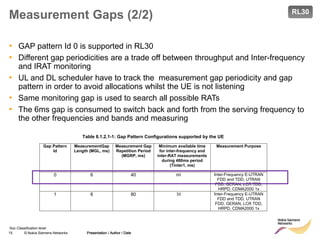
• GAP pattern Id 0 is supported in RL30
• Different gap periodicities are a trade off between throughput and Inter-frequency
and IRAT monitoring
• UL and DL scheduler have to track the measurement gap periodicity and gap
pattern in order to avoid allocations whilst the UE is not listening
• Same monitoring gap is used to search all possible RATs
• The 6ms gap is consumed to switch back and forth from the serving frequency to
the other frequencies and bands and measuring
Presentation / Author / Date
Table 8.1.2.1-1: Gap Pattern Configurations supported by the UE
Gap Pattern
Id
MeasurementGap
Length (MGL, ms)
Measurement Gap
Repetition Period
(MGRP, ms)
Minimum available time
for inter-frequency and
inter-RAT measurements
during 480ms period
(Tinter1, ms)
Measurement Purpose
0 6 40 60 Inter-Frequency E-UTRAN
FDD and TDD, UTRAN
FDD, GERAN, LCR TDD,
HRPD, CDMA2000 1x
1 6 80 30 Inter-Frequency E-UTRAN
FDD and TDD, UTRAN
FDD, GERAN, LCR TDD,
HRPD, CDMA2000 1x
RL30
16 © Nokia Siemens Networks Presentation / Author / Date
Soc Classification level
MeasObjectEUTRA
Example
value DL-DCCH-Message ::=
{
message c1 : rrcConnectionReconfiguration :
{
rrc-TransactionIdentifier 1,
criticalExtensions c1 : rrcConnectionReconfiguration-r8 :
{
measConfig
{
measObjectToAddModList
{
{
measObjectId 1,
measObject measObjectEUTRA :
{
carrierFreq 2075,
allowedMeasBandwidth mbw25,
presenceAntennaPort1 TRUE,
neighCellConfig '00'B
}
},
{
measObjectId 2,
measObject measObjectEUTRA :
{
carrierFreq 2100,
allowedMeasBandwidth mbw50,
presenceAntennaPort1 TRUE,
neighCellConfig '00'B
}
}
},
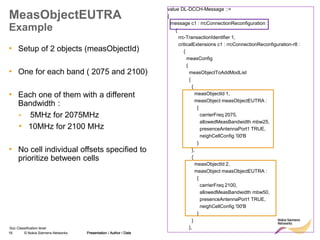
• Setup of 2 objects (measObjectId)
• One for each band ( 2075 and 2100)
• Each one of them with a different
Bandwidth :
• 5MHz for 2075MHz
• 10MHz for 2100 MHz
• No cell individual offsets specified to
prioritize between cells
Presentation / Author / Date
17 © Nokia Siemens Networks Presentation / Author / Date
Soc Classification level
Definition of Report Configuration
Id1( A3 event) and Id2 (A5 event)
Presentation / Author / Date
reportConfigToAddModList
{
{
reportConfigId 1,
reportConfig reportConfigEUTRA :
{
triggerType event :
{
eventId eventA3 :
{
a3-Offset 6,
reportOnLeave FALSE
},
hysteresis 0,
timeToTrigger ms320
},
triggerQuantity rsrp,
reportQuantity sameAsTriggerQuantity,
maxReportCells 8,
reportInterval ms1024,
reportAmount infinity
}
},
{
reportConfigId 2,
reportConfig reportConfigEUTRA :
{
triggerType event :
{
eventId eventA5 :
{
a5-Threshold1 threshold-RSRP : 30,
a5-Threshold2 threshold-RSRP : 32
},
hysteresis 0,
timeToTrigger ms640
},
triggerQuantity rsrp,
reportQuantity sameAsTriggerQuantity,
maxReportCells 8,
reportInterval ms240,
reportAmount infinity
}
},
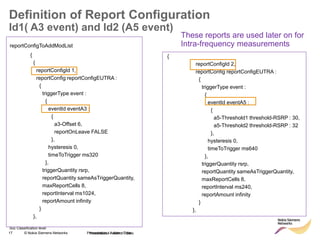
These reports are used later on for
Intra-frequency measurements
18 © Nokia Siemens Networks Presentation / Author / Date
Soc Classification level
Definition of Report Configuration
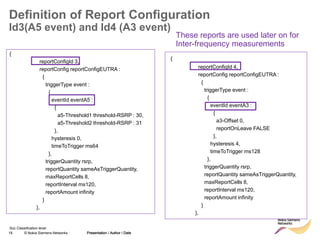
Id3(A5 event) and Id4 (A3 event)
Presentation / Author / Date
{
reportConfigId 3,
reportConfig reportConfigEUTRA :
{
triggerType event :
{
eventId eventA5 :
{
a5-Threshold1 threshold-RSRP : 30,
a5-Threshold2 threshold-RSRP : 31
},
hysteresis 0,
timeToTrigger ms64
},
triggerQuantity rsrp,
reportQuantity sameAsTriggerQuantity,
maxReportCells 8,
reportInterval ms120,
reportAmount infinity
}
},
{
reportConfigId 4,
reportConfig reportConfigEUTRA :
{
triggerType event :
{
eventId eventA3 :
{
a3-Offset 0,
reportOnLeave FALSE
},
hysteresis 4,
timeToTrigger ms128
},
triggerQuantity rsrp,
reportQuantity sameAsTriggerQuantity,
maxReportCells 8,
reportInterval ms120,
reportAmount infinity
}
},
These reports are used later on for
Inter-frequency measurements
19 © Nokia Siemens Networks Presentation / Author / Date
Soc Classification level
Definition of Report Configuration
Id5(A2 event) and Id6 (A1 event)
• Event A2 is used to enable the Inter frequency measurements and Event A1 to
disable other cell measurements
Presentation / Author / Date
{
reportConfigId 5,
reportConfig reportConfigEUTRA :
{
triggerType event :
{
eventId eventA2 :
{
a2-Threshold threshold-RSRP : 32
},
hysteresis 0,
timeToTrigger ms256
},
triggerQuantity rsrp,
reportQuantity sameAsTriggerQuantity,
maxReportCells 8,
reportInterval min60,
reportAmount r1
}
},
{
reportConfigId 6,
reportConfig reportConfigEUTRA :
{
triggerType event :
{
eventId eventA1 :
{
a1-Threshold threshold-RSRP : 33
},
hysteresis 0,
timeToTrigger ms128
},
triggerQuantity rsrp,
reportQuantity sameAsTriggerQuantity,
maxReportCells 8,
reportInterval min60,
reportAmount r1
}
}
},
20 © Nokia Siemens Networks Presentation / Author / Date
Soc Classification level
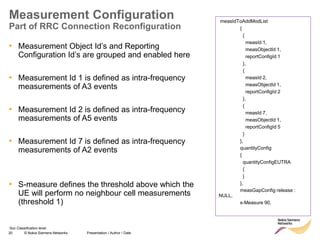
measIdToAddModList
{
{
measId 1,
measObjectId 1,
reportConfigId 1
},
{
measId 2,
measObjectId 1,
reportConfigId 2
},
{
measId 7,
measObjectId 1,
reportConfigId 5
}
},
quantityConfig
{
quantityConfigEUTRA
{
}
},
measGapConfig release :
NULL,
s-Measure 90,
Measurement Configuration
Part of RRC Connection Reconfiguration
• Measurement Object Id’s and Reporting
Configuration Id’s are grouped and enabled here
• Measurement Id 1 is defined as intra-frequency
measurements of A3 events
• Measurement Id 2 is defined as intra-frequency
measurements of A5 events
• Measurement Id 7 is defined as intra-frequency
measurements of A2 events
• S-measure defines the threshold above which the
UE will perform no neighbour cell measurements
(threshold 1)
21 © Nokia Siemens Networks Presentation / Author / Date
I insert classification level
Intra-frequency handovers
22 © Nokia Siemens Networks Presentation / Author / Date
Soc Classification level
Handovers
• Two main types of handovers in LTE:
– Better Cell Handover, also called A3 HO.
– Coverage Handover, also called A5 HO.
• Better Cell Handover aims to keep the UE always on best
cell (measured by RSRP), e.g. when neighbour cell becomes
more than 4 dB better than serving cell.
• Coverage Handover is used when serving cell RSRP gets
below a certain threshold (for example -95 dBm) AND
neighbour cell RSRP gets better than an absolute threshold
(for example -92 dBm).
23 © Nokia Siemens Networks Presentation / Author / Date
Soc Classification level
Better cell Handover
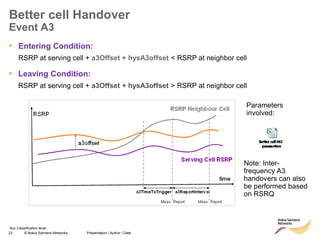
Event A3
• Entering Condition:
RSRP at serving cell + a3Offset + hysA3offset < RSRP at neighbor cell
• Leaving Condition:
RSRP at serving cell + a3Offset + hysA3offset > RSRP at neighbor cell
Parameters
involved:
Note: Inter-
frequency A3
handovers can also
be performed based
on RSRQ
24 © Nokia Siemens Networks Presentation / Author / Date
Soc Classification level
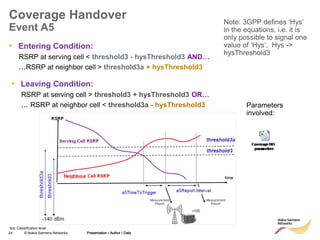
Coverage Handover
Event A5
Presentation / Author / Date
• Entering Condition:
RSRP at serving cell < threshold3 - hysThreshold3 AND…
…RSRP at neighbor cell > threshold3a + hysThreshold3
Note: 3GPP defines ‘Hys’
in the equations. i.e. it is
only possible to signal one
value of ‘Hys’. Hys ->
hysThreshold3
• Leaving Condition:
RSRP at serving cell > threshold3 + hysThreshold3 OR…
… RSRP at neighbor cell < threshold3a - hysThreshold3 Parameters
involved:
25 © Nokia Siemens Networks Presentation / Author / Date
Soc Classification level
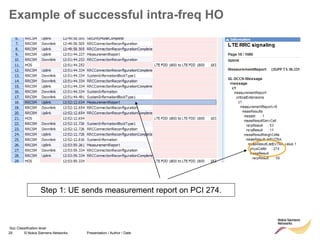
Example of successful intra-freq HO
Step 1: UE sends measurement report on PCI 274.
26 © Nokia Siemens Networks Presentation / Author / Date
Soc Classification level
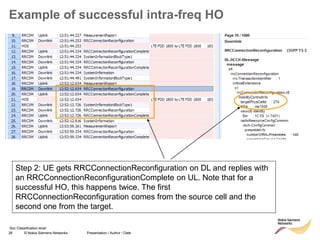
Example of successful intra-freq HO
Step 2: UE gets RRCConnectionReconfiguration on DL and replies with
an RRCConnectionReconfigurationComplete on UL. Note that for a
successful HO, this happens twice. The first
RRCConnectionReconfiguration comes from the source cell and the
second one from the target.
27 © Nokia Siemens Networks Presentation / Author / Date
Soc Classification level
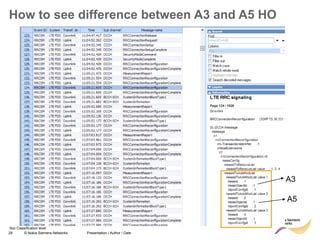
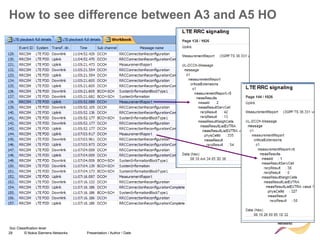
Identifying the trigger condition for a Handover
• The measurement report before a handover doesn’t specify the triggering reason
i.e. A3 or A5 handover
• Instead, the measurement report indicates the measurement id (measId).
• It is necessary to look in the second RRC connection reconfiguration msg before
the measurement report in order to identify which measurement id is mapped to
which reportConfigId
– measId1 = A3
– measId2 = A5
– measId3 = A2
• See following slides for example
28 © Nokia Siemens Networks Presentation / Author / Date
Soc Classification level
How to see difference between A3 and A5 HO
A3
A5
29 © Nokia Siemens Networks Presentation / Author / Date
Soc Classification level
How to see difference between A3 and A5 HO
30 © Nokia Siemens Networks Presentation / Author / Date
I insert classification level
Inter-frequency handovers
31 © Nokia Siemens Networks Presentation / Author / Date
Soc Classification level
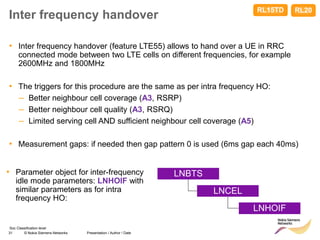
Inter frequency handover
• Inter frequency handover (feature LTE55) allows to hand over a UE in RRC
connected mode between two LTE cells on different frequencies, for example
2600MHz and 1800MHz
• The triggers for this procedure are the same as per intra frequency HO:
– Better neighbour cell coverage (A3, RSRP)
– Better neighbour cell quality (A3, RSRQ)
– Limited serving cell AND sufficient neighbour cell coverage (A5)
• Measurement gaps: if needed then gap pattern 0 is used (6ms gap each 40ms)
LNBTS
LNCEL
LNHOIF
• Parameter object for inter-frequency
idle mode parameters: LNHOIF with
similar parameters as for intra
frequency HO:
RL20
RL15TD
32 © Nokia Siemens Networks Presentation / Author / Date
Soc Classification level
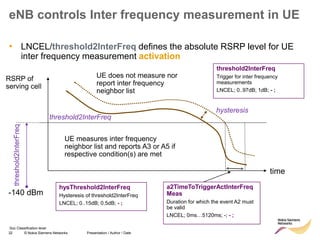
eNB controls Inter frequency measurement in UE
• LNCEL/threshold2InterFreq defines the absolute RSRP level for UE
inter frequency measurement activation
RSRP of
serving cell
time
threshold2InterFreq
UE does not measure nor
report inter frequency
neighbor list
UE measures inter frequency
neighbor list and reports A3 or A5 if
respective condition(s) are met
-140 dBm
threshold2InterFreq
threshold2InterFreq
Trigger for inter frequency
measurements
LNCEL; 0..97dB; 1dB; - ;
hysThreshold2InterFreq
Hysteresis of threshold2InterFreq
LNCEL; 0..15dB; 0.5dB; - ;
a2TimeToTriggerActInterFreq
Meas
Duration for which the event A2 must
be valid
LNCEL; 0ms…5120ms; -; - ;
hysteresis
33 © Nokia Siemens Networks Presentation / Author / Date
Soc Classification level
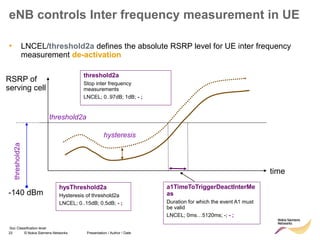
eNB controls Inter frequency measurement in UE
• LNCEL/threshold2a defines the absolute RSRP level for UE inter frequency
measurement de-activation
RSRP of
serving cell
time
threshold2a
-140 dBm
threshold2a
threshold2a
Stop inter frequency
measurements
LNCEL; 0..97dB; 1dB; - ;
hysThreshold2a
Hysteresis of threshold2a
LNCEL; 0..15dB; 0.5dB; - ;
a1TimeToTriggerDeactInterMe
as
Duration for which the event A1 must
be valid
LNCEL; 0ms…5120ms; -; - ;
hysteresis
34 © Nokia Siemens Networks Presentation / Author / Date
Soc Classification level
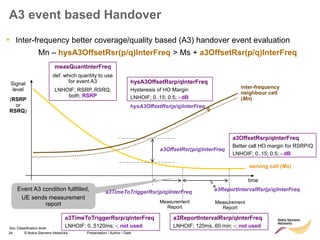
A3 event based Handover
Signal
level
(RSRP
or
RSRQ)
serving cell (Ms)
inter-frequency
neighbour cell
(Mn)
time
hysA3OffsetRsr(p/q)InterFreq
a3OffsetRsr(p/q)InterFreq
• Inter-frequency better coverage/quality based (A3) handover event evaluation
Mn – hysA3OffsetRsr(p/q)InterFreq > Ms + a3OffsetRsr(p/q)InterFreq
Event A3 condition fullfilled,
UE sends measurement
report Measurement
Report
Measurement
Report
a3ReportIntervalRsr(p/q)InterFreq
a3TimeToTriggerRsr(p/q)InterFreq
a3OffsetRsrp/qInterFreq
Better cell HO margin for RSRP/Q
LNHOIF; 0..15; 0.5; - dB
hysA3OffsetRsrp/qInterFreq
Hysteresis of HO Margin
LNHOIF; 0..15; 0.5; - dB
measQuantInterFreq
def. which quantity to use
for event A3
LNHOIF; RSRP, RSRQ;
both; RSRP
a3TimeToTriggerRsrp/qInterFreq
LNHOIF; 0..5120ms; -; not used
a3ReportIntervalRsrp/qInterFreq
LNHOIF; 120ms..60 min; -; not used
35 © Nokia Siemens Networks Presentation / Author / Date
Soc Classification level
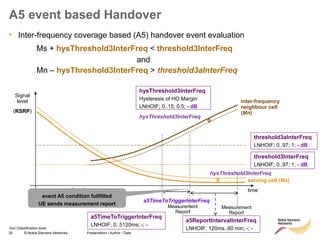
• Inter-frequency coverage based (A5) handover event evaluation
Ms + hysThreshold3InterFreq < threshold3InterFreq
and
Mn – hysThreshold3InterFreq > threshold3aInterFreq
A5 event based Handover
Signal
level
(RSRP)
serving cell (Ms)
inter-frequency
neighbour cell
(Mn)
hysThreshold3InterFreq
time
a5TimeToTriggerInterFreq
hysThreshold3InterFreq
event A5 condition fullfilled
UE sends measurement report Measurement
Report
Measurement
Report
hysThreshold3InterFreq
Hysteresis of HO Margin
LNHOIF; 0..15; 0.5; - dB
threshold3InterFreq
LNHOIF; 0..97; 1; - dB
threshold3aInterFreq
LNHOIF; 0..97; 1; - dB
a5TimeToTriggerInterFreq
LNHOIF; 0..5120ms; -; -
a5ReportIntervalInterFreq
LNHOIF; 120ms..60 min; -; -
36 © Nokia Siemens Networks Presentation / Author / Date
Soc Classification level
Inter-Frequency HO
Configuration
• LNBTS:actIfHo must be
enabled
• Inter-frequency HO is activated
on site level
• Need to create a LNHOIF
object per cell defining the
parameters that will be used in
the Measurement Configuration
message and all the thresholds
for A3/A5 event
• Need to define the LNCEL
parameters regarding
threshold2/2a to
activate/deactivate inter-
frequency measurements
• Inter-frequency HO parameters:
Presentation / Author / Date
37 © Nokia Siemens Networks Presentation / Author / Date
Soc Classification level
Inter-frequency HO Example
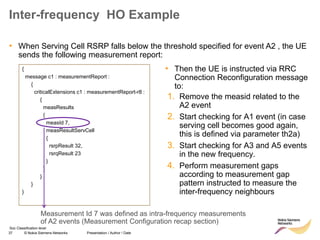
• When Serving Cell RSRP falls below the threshold specified for event A2 , the UE
sends the following measurement report:
{
message c1 : measurementReport :
{
criticalExtensions c1 : measurementReport-r8 :
{
measResults
{
measId 7,
measResultServCell
{
rsrpResult 32,
rsrqResult 23
}
}
}
}
}
1. Remove the measid related to the
A2 event
2. Start checking for A1 event (in case
serving cell becomes good again,
this is defined via parameter th2a)
3. Start checking for A3 and A5 events
in the new frequency.
4. Perform measurement gaps
according to measurement gap
pattern instructed to measure the
inter-frequency neighbours
Measurement Id 7 was defined as intra-frequency measurements
of A2 events (Measurement Configuration recap section)
• Then the UE is instructed via RRC
Connection Reconfiguration message
to:
38 © Nokia Siemens Networks Presentation / Author / Date
Soc Classification level
{
message c1 : rrcConnectionReconfiguration :
{
rrc-TransactionIdentifier 1,
criticalExtensions c1 : rrcConnectionReconfiguration-r8
:
{
measConfig
{
measIdToRemoveList
{
7
},
measIdToAddModList
{
{
measId 5,
measObjectId 1,
reportConfigId 6
},
{
measId 10,
measObjectId 2,
reportConfigId 3
},
{
measId 11,
measObjectId 2,
reportConfigId 4
}
},
measGapConfig setup :
{
gapOffset gp0 : 28
}
}
}
}
}
Inter-frequency HO Example
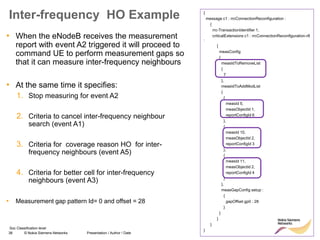
• When the eNodeB receives the measurement
report with event A2 triggered it will proceed to
command UE to perform measurement gaps so
that it can measure inter-frequency neighbours
• At the same time it specifies:
1. Stop measuring for event A2
2. Criteria to cancel inter-frequency neighbour
search (event A1)
3. Criteria for coverage reason HO for inter-
frequency neighbours (event A5)
4. Criteria for better cell for inter-frequency
neighbours (event A3)
• Measurement gap pattern Id= 0 and offset = 28
39 © Nokia Siemens Networks Presentation / Author / Date
Soc Classification level
Inter frequency handover
Measurement gaps
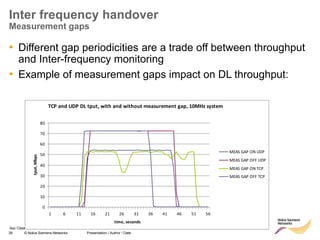
• Different gap periodicities are a trade off between throughput
and Inter-frequency monitoring
• Example of measurement gaps impact on DL throughput:
TCP and UDP DL tput, with and without measurement gap, 10MHz system
0
10
20
30
40
50
60
70
80
1 6 11 16 21 26 31 36 41 46 51 56
time, seconds
tput,
Mbps
MEAS GAP ON UDP
MEAS GAP OFF UDP
MEAS GAP ON TCP
MEAS GAP OFF TCP
40 © Nokia Siemens Networks Presentation / Author / Date
Soc Classification level
Inter frequency handover
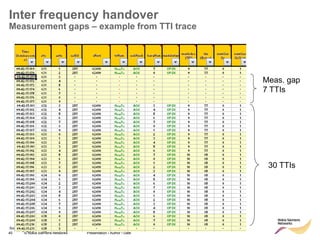
Measurement gaps – example from TTI trace
Meas. gap
7 TTIs
30 TTIs
41 © Nokia Siemens Networks Presentation / Author / Date
Soc Classification level
Inter-frequency handover
UE capability
• Make sure inter-frequency HO is also supported on the UE
side.
– For example, for Qualcomm chipset: QCT3.0 is needed.
• How to find UE capability: check Feature Group Indicator IE
in UE Capability Info message (S1AP or RRC). Bitmap
decoding explained in Annex B, 3GPP TS 36.331
– Not all tools support automatic decoding of this IE!
42 © Nokia Siemens Networks Presentation / Author / Date
I insert classification level
S1 handover
43 © Nokia Siemens Networks Presentation / Author / Date
Soc Classification level
Presentation / Author / Date
Intra LTE Handover via S1
Extended mobility option to X2 handover
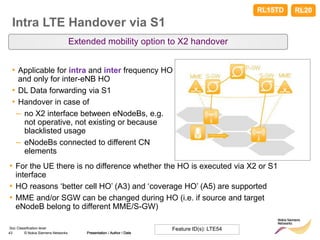
• Applicable for intra and inter frequency HO
and only for inter-eNB HO
• DL Data forwarding via S1
• Handover in case of
– no X2 interface between eNodeBs, e.g.
not operative, not existing or because
blacklisted usage
– eNodeBs connected to different CN
elements
Feature ID(s): LTE54
RL20
• For the UE there is no difference whether the HO is executed via X2 or S1
interface
• HO reasons ‘better cell HO’ (A3) and ‘coverage HO’ (A5) are supported
• MME and/or SGW can be changed during HO (i.e. if source and target
eNodeB belong to different MME/S-GW)
RL15TD
44 © Nokia Siemens Networks Presentation / Author / Date
Soc Classification level
Intra-LTE handover via S1
Parameter settings 1/2
• S1 handover doesn’t seem to be enabled in live networks but it is normally tested
to ensure the proper configuration and functioning
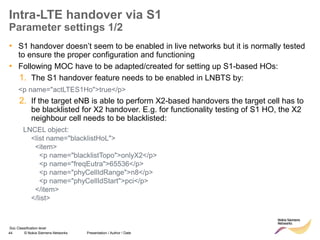
• Following MOC have to be adapted/created for setting up S1-based HOs:
1. The S1 handover feature needs to be enabled in LNBTS by:
<p name="actLTES1Ho">true</p>
2. If the target eNB is able to perform X2-based handovers the target cell has to
be blacklisted for X2 handover. E.g. for functionality testing of S1 HO, the X2
neighbour cell needs to be blacklisted:
LNCEL object:
<list name="blacklistHoL">
<item>
<p name="blacklistTopo">onlyX2</p>
<p name="freqEutra">65536</p>
<p name="phyCellIdRange">n8</p>
<p name="phyCellIdStart">pci</p>
</item>
</list>
45 © Nokia Siemens Networks Presentation / Author / Date
Soc Classification level
Intra-LTE handover via S1
Parameter settings (2/2)
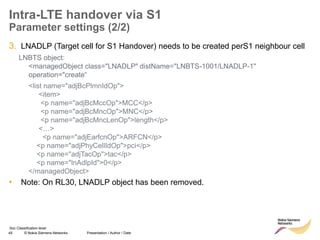
3. LNADLP (Target cell for S1 Handover) needs to be created perS1 neighbour cell
LNBTS object:
<managedObject class="LNADLP" distName="LNBTS-1001/LNADLP-1"
operation="create“
<list name="adjBcPlmnIdOp">
<item>
<p name="adjBcMccOp">MCC</p>
<p name="adjBcMncOp">MNC</p>
<p name="adjBcMncLenOp">length</p>
<…>
<p name="adjEarfcnOp">ARFCN</p>
<p name="adjPhyCellIdOp">pci</p>
<p name="adjTacOp">tac</p>
<p name="lnAdlpId">0</p>
</managedObject>
• Note: On RL30, LNADLP object has been removed.
46 © Nokia Siemens Networks Presentation / Author / Date
I insert classification level
RRC release with redirect
47 © Nokia Siemens Networks Presentation / Author / Date
Soc Classification level
RRC connection release with redirect
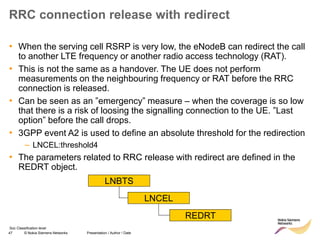
• When the serving cell RSRP is very low, the eNodeB can redirect the call
to another LTE frequency or another radio access technology (RAT).
• This is not the same as a handover. The UE does not perform
measurements on the neighbouring frequency or RAT before the RRC
connection is released.
• Can be seen as an ”emergency” measure – when the coverage is so low
that there is a risk of loosing the signalling connection to the UE. ”Last
option” before the call drops.
• 3GPP event A2 is used to define an absolute threshold for the redirection
– LNCEL:threshold4
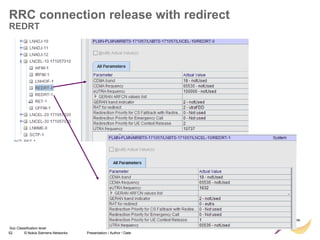
• The parameters related to RRC release with redirect are defined in the
REDRT object.
LNBTS
LNCEL
REDRT
48 © Nokia Siemens Networks Presentation / Author / Date
Soc Classification level
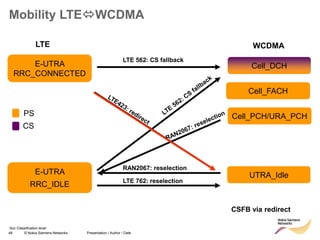
Mobility LTEWCDMA
E-UTRA
RRC_CONNECTED
E-UTRA
RRC_IDLE
Cell_DCH
UTRA_Idle
Cell_FACH
PS
CS
CSFB via redirect
LTE 562: CS fallback
LTE 762: reselection
RAN2067: reselection
Cell_PCH/URA_PCH
LTE WCDMA
49 © Nokia Siemens Networks Presentation / Author / Date
Soc Classification level
RRC connection release with redirect
• Redirect feature can be enabled on LNBTS level:
[..] RRC: MEASUREMENT REPORT
RRC: RRC CONNECTION RELEASE
event A2
for redirection
target RAT
indicated
enableCovHo
LNBTS; 0 (disabled), 1 (enabled);
1 (enabled)
50 © Nokia Siemens Networks Presentation / Author / Date
Soc Classification level
RRC connection release with redirect
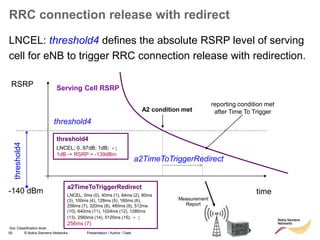
LNCEL: threshold4 defines the absolute RSRP level of serving
cell for eNB to trigger RRC connection release with redirection.
RSRP
time
threshold4
-140 dBm
threshold4
A2 condition met
reporting condition met
after Time To Trigger
Measurement
Report
a2TimeToTriggerRedirect
Serving Cell RSRP
threshold4
LNCEL; 0..97dB; 1dB; - ;
1dB -> RSRP = -139dBm
a2TimeToTriggerRedirect
LNCEL; 0ms (0), 40ms (1), 64ms (2), 80ms
(3), 100ms (4), 128ms (5), 160ms (6),
256ms (7), 320ms (8), 480ms (9), 512ms
(10), 640ms (11), 1024ms (12), 1280ms
(13), 2560ms (14), 5120ms (15); - ;
256ms (7)
51 © Nokia Siemens Networks Presentation / Author / Date
Soc Classification level
RRC connection release with redirect
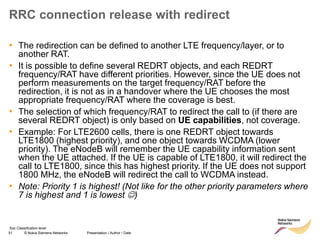
• The redirection can be defined to another LTE frequency/layer, or to
another RAT.
• It is possible to define several REDRT objects, and each REDRT
frequency/RAT have different priorities. However, since the UE does not
perform measurements on the target frequency/RAT before the
redirection, it is not as in a handover where the UE chooses the most
appropriate frequency/RAT where the coverage is best.
• The selection of which frequency/RAT to redirect the call to (if there are
several REDRT object) is only based on UE capabilities, not coverage.
• Example: For LTE2600 cells, there is one REDRT object towards
LTE1800 (highest priority), and one object towards WCDMA (lower
priority). The eNodeB will remember the UE capability information sent
when the UE attached. If the UE is capable of LTE1800, it will redirect the
call to LTE1800, since this has highest priority. If the UE does not support
1800 MHz, the eNodeB will redirect the call to WCDMA instead.
• Note: Priority 1 is highest! (Not like for the other priority parameters where
7 is highest and 1 is lowest )
52 © Nokia Siemens Networks Presentation / Author / Date
Soc Classification level
RRC connection release with redirect
REDRT
53 © Nokia Siemens Networks Presentation / Author / Date
Soc Classification level
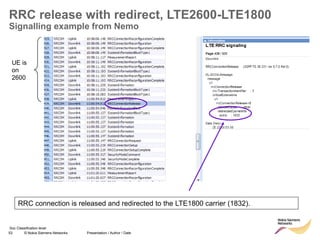
RRC release with redirect, LTE2600-LTE1800
Signalling example from Nemo
UE is
on
2600
RRC connection is released and redirected to the LTE1800 carrier (1832).
54 © Nokia Siemens Networks Presentation / Author / Date
Soc Classification level
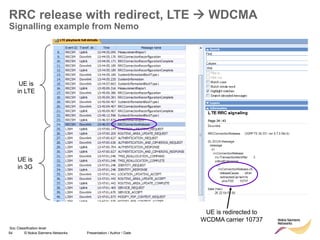
RRC release with redirect, LTE  WDCMA
Signalling example from Nemo
UE is redirected to
WCDMA carrier 10737
UE is
in LTE
UE is
in 3G
55 © Nokia Siemens Networks Presentation / Author / Date
Soc Classification level
FTP download – LTE1800->3G
redirection
56 © Nokia Siemens Networks Presentation / Author / Date
Soc Classification level
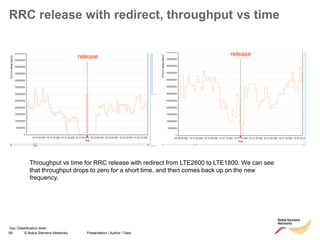
RRC release with redirect, throughput vs time
Throughput vs time for RRC release with redirect from LTE2600 to LTE1800. We can see
that throughput drops to zero for a short time, and then comes back up on the new
frequency.
release release
57 © Nokia Siemens Networks Presentation / Author / Date
Soc Classification level
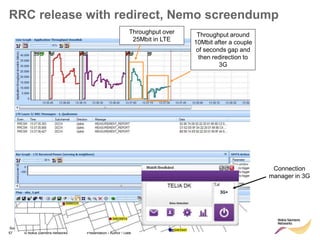
RRC release with redirect, Nemo screendump
Connection
manager in 3G
Throughput over
25Mbit in LTE
Throughput around
10Mbit after a couple
of seconds gap and
then redirection to
3G
58 © Nokia Siemens Networks Presentation / Author / Date
Soc Classification level
Redirect failure due to UE Network Mode setting
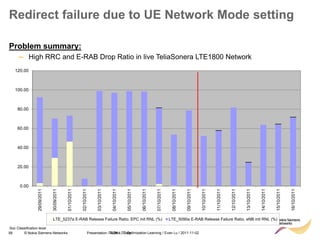
Problem summary:
– High RRC and E-RAB Drop Ratio in live TeliaSonera LTE1800 Network
0.00
20.00
40.00
60.00
80.00
100.00
120.00
29/09/2011
30/09/2011
01/10/2011
02/10/2011
03/10/2011
04/10/2011
05/10/2011
06/10/2011
07/10/2011
08/10/2011
09/10/2011
10/10/2011
11/10/2011
12/10/2011
13/10/2011
14/10/2011
15/10/2011
16/10/2011
LTE_5237a E-RAB Release Failure Ratio, EPC init RNL (%) LTE_5090a E-RAB Release Failure Ratio, eNB init RNL (%)
TSDK LTE Optimisation Learning / Evan Lu / 2011-11-02
59 © Nokia Siemens Networks Presentation / Author / Date
Soc Classification level
Redirect failure due to UE Network Mode setting
Analysis Results:
– Only a couple of sites are affected, but because the ZTE connection manager has an
auto-connect feature, one problematic UE can cause thousands of drops in one day. UE
drops -> automatically connects again -> drops etc etc.
– According to eNB traces collected from most affected sites, the drops occur in case when
conditions for RRC connection release with redirect are met on UE side
– The redirect failure is due to “LTE only” Network mode setting of UE by end user. In this
mode UE does not provide any IRAT capabilities to the eNB within “UE Radio Capability”
IE so eNB decides that redirect to 3G WCDMA is not supported by UE and releases the
call after Measurement Report A2.
Solution Options:
– eNB SW RL20 EP4.0 - No A2 triggered RRC Connection Release without redirect in case
target frequency layer or IRAT for redirect is not supported by UE according to “UE Radio
Capability” IE
– Change threshold4 from -110dBm to -120? -126? -130? Risk of quality degradation to all
LTE end users in whole network.
– Inform end users to change UE Network Mode setting from 4G only to 4G preferred
TSDK LTE Optimisation Learning / Evan Lu / 2011-11-02
60 © Nokia Siemens Networks Presentation / Author / Date
Soc Classification level
Redirect failure due to UE Network Mode setting
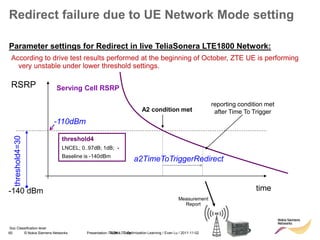
Parameter settings for Redirect in live TeliaSonera LTE1800 Network:
According to drive test results performed at the beginning of October, ZTE UE is performing
very unstable under lower threshold settings.
RSRP
time
-110dBm
-140 dBm
threshold4=30
A2 condition met
reporting condition met
after Time To Trigger
Measurement
Report
a2TimeToTriggerRedirect
Serving Cell RSRP
threshold4
LNCEL; 0..97dB; 1dB; -
Baseline is -140dBm
TSDK LTE Optimisation Learning / Evan Lu / 2011-11-02
61 © Nokia Siemens Networks Presentation / Author / Date
Soc Classification level
Redirect failure due to UE Network Mode setting
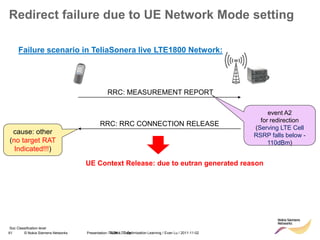
RRC: MEASUREMENT REPORT
RRC: RRC CONNECTION RELEASE
event A2
for redirection
(Serving LTE Cell
RSRP falls below -
110dBm)
cause: other
(no target RAT
Indicated!!!)
Failure scenario in TeliaSonera live LTE1800 Network:
UE Context Release: due to eutran generated reason
TSDK LTE Optimisation Learning / Evan Lu / 2011-11-02
62 © Nokia Siemens Networks Presentation / Author / Date
Soc Classification level
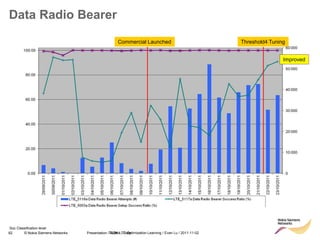
Data Radio Bearer
TSDK LTE Optimisation Learning / Evan Lu / 2011-11-02
Commercial Launched Threshold4 Tuning
Improved
63 © Nokia Siemens Networks Presentation / Author / Date
Soc Classification level
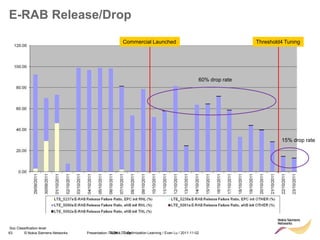
E-RAB Release/Drop
TSDK LTE Optimisation Learning / Evan Lu / 2011-11-02
Commercial Launched Threshold4 Tuning
60% drop rate
15% drop rate
64 © Nokia Siemens Networks Presentation / Author / Date
I insert classification level
IRAT HO to WCDMA
65 © Nokia Siemens Networks Presentation / Author / Date
Soc Classification level
Inter RAT Handover to WCDMA
2. Handover preparation:
▪ Resource allocation on target side (E-RAB
parameters mapped into PDP context)
3. Handover execution:
▪ UE moves into WCDMA cell after receiving
‘MobilityfromEUTRACommand’ message
4. Handover completion:
▪ Release of S1 connection and internal
resources after successful HO (no timers
expired)
Presentation / Author / Date
RL30
RL25TD
• IRAT hard handover from LTE to WCDMA PS domain through S1 interface
• Phases:
1. Handover initiation:
 eNB starts a HO to WCDMA following a received measurement report with event B2
 Max. 8 cells reported (strongest first) that create the TCL (target cell list)
66 © Nokia Siemens Networks Presentation / Author / Date
Soc Classification level
Inter-RAT Handover to WCDMA
Event B2
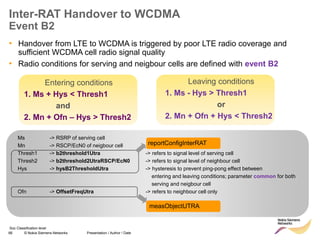
• Handover from LTE to WCDMA is triggered by poor LTE radio coverage and
sufficient WCDMA cell radio signal quality
• Radio conditions for serving and neigbour cells are defined with event B2
Entering conditions
1. Ms + Hys < Thresh1
and
2. Mn + Ofn – Hys > Thresh2
Leaving conditions
1. Ms - Hys > Thresh1
or
2. Mn + Ofn + Hys < Thresh2
Ms -> RSRP of serving cell
Mn -> RSCP/EcN0 of neigbour cell
Thresh1 -> b2threshold1Utra -> refers to signal level of serving cell
Thresh2 -> b2threshold2UtraRSCP/EcN0 -> refers to signal level of neighbour cell
Hys -> hysB2ThresholdUtra -> hysteresis to prevent ping-pong effect between
entering and leaving conditions; parameter common for both
serving and neigbour cell
Ofn -> OffsetFreqUtra -> refers to neighbour cell only
reportConfigInterRAT
measObjectUTRA
67 © Nokia Siemens Networks Presentation / Author / Date
Soc Classification level
Inter-RAT Handover to WCDMA
Event B2
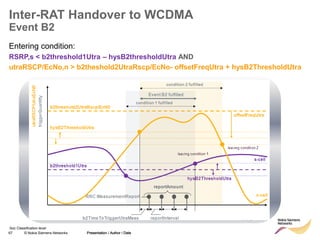
Entering condition:
RSRP,s < b2threshold1Utra – hysB2thresholdUtra AND
utraRSCP/EcNo,n > b2theshold2UtraRscp/EcNo- offsetFreqUtra + hysB2ThresholdUtra
Presentation / Author / Date
68 © Nokia Siemens Networks Presentation / Author / Date
Soc Classification level
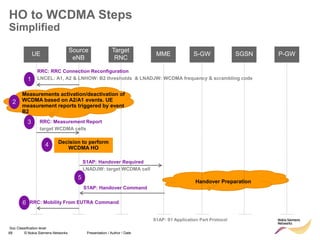
HO to WCDMA Steps
Simplified
UE MME
Target
RNC
Source
eNB
P-GW
S-GW SGSN
RRC: Measurement Report
target WCDMA cells
RRC: RRC Connection Reconfiguration
LNCEL: A1, A2 & LNHOW: B2 thresholds & LNADJW: WCDMA frequency & scrambling code
Decision to perform
WCDMA HO
S1AP: Handover Required
LNADJW: target WCDMA cell
S1AP: Handover Command
Handover Preparation
RRC: Mobility From EUTRA Command
S1AP: S1 Application Part Protocol
1
Measurements activation/deactivation of
WCDMA based on A2/A1 events. UE
measurement reports triggered by event
B2
2
3
4
5
6
70 © Nokia Siemens Networks Presentation / Author / Date
Soc Classification level
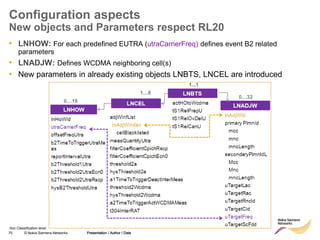
Configuration aspects
New objects and Parameters respect RL20
Presentation / Author / Date
• LNHOW: For each predefined EUTRA (utraCarrierFreq) defines event B2 related
parameters
• LNADJW: Defines WCDMA neighboring cell(s)
• New parameters in already existing objects LNBTS, LNCEL are introduced
71 © Nokia Siemens Networks Presentation / Author / Date
Soc Classification level
Configuration
LNBTS
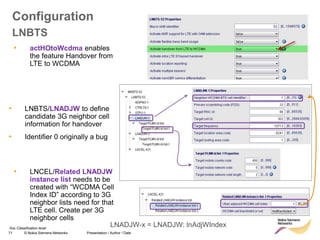
• LNBTS/LNADJW to define
candidate 3G neighbor cell
information for handover
• Identifier 0 originally a bug
• LNCEL/Related LNADJW
instance list needs to be
created with “WCDMA Cell
Index ID” according to 3G
neighbor lists need for that
LTE cell. Create per 3G
neighbor cells
• actHOtoWcdma enables
the feature Handover from
LTE to WCDMA
LNADJW-x = LNADJW: lnAdjWIndex
72 © Nokia Siemens Networks Presentation / Author / Date
Soc Classification level
Configuration
LNCEL
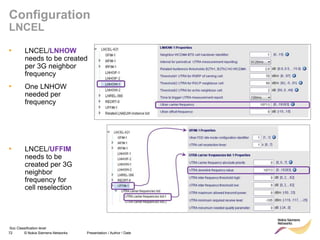
• LNCEL/LNHOW
needs to be created
per 3G neighbor
frequency
• One LNHOW
needed per
frequency
• LNCEL/UFFIM
needs to be
created per 3G
neighbor
frequency for
cell reselection
73 © Nokia Siemens Networks Presentation / Author / Date
I insert classification level
CS Fallback
74 © Nokia Siemens Networks Presentation / Author / Date
Soc Classification level
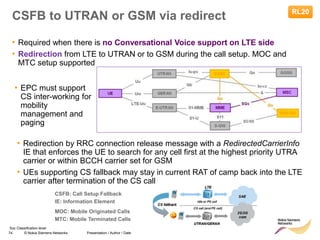
CSFB to UTRAN or GSM via redirect RL20
CSFB: Call Setup Fallback
IE: Information Element
• Required when there is no Conversational Voice support on LTE side
• Redirection from LTE to UTRAN or to GSM during the call setup. MOC and
MTC setup supported
MOC: Mobile Originated Calls
MTC: Mobile Terminated Calls
• EPC must support
CS inter-working for
mobility
management and
paging
• Redirection by RRC connection release message with a RedirectedCarrierInfo
IE that enforces the UE to search for any cell first at the highest priority UTRA
carrier or within BCCH carrier set for GSM
• UEs supporting CS fallback may stay in current RAT of camp back into the LTE
carrier after termination of the CS call
75 © Nokia Siemens Networks Presentation / Author / Date
Soc Classification level
Configuration
LNBTS, LNCEL, UFFIM, GFIM
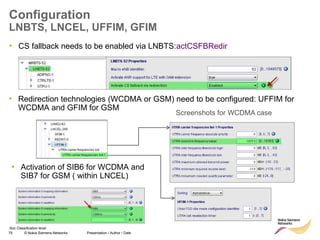
• CS fallback needs to be enabled via LNBTS:actCSFBRedir
• Redirection technologies (WCDMA or GSM) need to be configured: UFFIM for
WCDMA and GFIM for GSM
• Activation of SIB6 for WCDMA and
SIB7 for GSM ( within LNCEL)
Screenshots for WCDMA case
76 © Nokia Siemens Networks Presentation / Author / Date
Soc Classification level
Configuration
REDRT
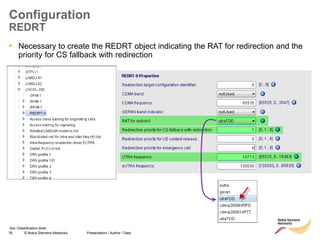
• Necessary to create the REDRT object indicating the RAT for redirection and the
priority for CS fallback with redirection
77 © Nokia Siemens Networks Presentation / Author / Date
Soc Classification level
CS Fallback Signalling Example
MOC in ECM_Connected
UE needs to be
IMSI attached
UE starts Initial Access
procedure and sends
Extended Service Request
message with Service Type
set to “mobile originating CS
fallback”
eNB send
“RRCConnectRelease”
message with redirect
information of WCDMA
Frequency to be used
for redirection
Further examples ( ECM_IDLE, MTC) in:
https://sharenet-
ims.inside.nokiasiemensnetworks.com/Overview/D4376
59035
78 © Nokia Siemens Networks Presentation / Author / Date
Soc Classification level
Successfully MOC to WCDMA
79 © Nokia Siemens Networks Presentation / Author / Date
I insert classification level
ANR – Automated Neighbour Relations
80 © Nokia Siemens Networks Presentation / Author / Date
Soc Classification level
ANR – Automated Neighbour Relations
Overview
• RL10: LTE539 – Central ANR
– Configurator triggers NetAct Optimizer via eNB Auto Configuration
workflow (pre-planning step)
– NetAct Optimizer creates and provides a list of neighbor eNBs and
physical cell ID (PCI) values
• RL20/RL15TD: LTE492 – ANR for LTE
– NetAct Optimizer creates a list of potential neighbour cells and related
IP connectivity information
– Works with any UE
• RL30/RL25TD: LTE782 – ANR for LTE fully UE based
– Optimizer not needed, but requires SON/ANR-supporting UE.
81 © Nokia Siemens Networks Presentation / Author / Date
Soc Classification level
ANR
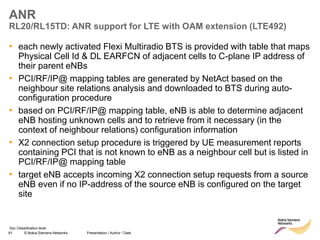
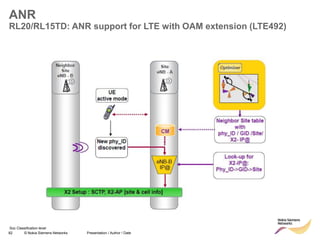
RL20/RL15TD: ANR support for LTE with OAM extension (LTE492)
• each newly activated Flexi Multiradio BTS is provided with table that maps
Physical Cell Id & DL EARFCN of adjacent cells to C-plane IP address of
their parent eNBs
• PCI/RF/IP@ mapping tables are generated by NetAct based on the
neighbour site relations analysis and downloaded to BTS during auto-
configuration procedure
• based on PCI/RF/IP@ mapping table, eNB is able to determine adjacent
eNB hosting unknown cells and to retrieve from it necessary (in the
context of neighbour relations) configuration information
• X2 connection setup procedure is triggered by UE measurement reports
containing PCI that is not known to eNB as a neighbour cell but is listed in
PCI/RF/IP@ mapping table
• target eNB accepts incoming X2 connection setup requests from a source
eNB even if no IP-address of the source eNB is configured on the target
site
82 © Nokia Siemens Networks Presentation / Author / Date
Soc Classification level
ANR
RL20/RL15TD: ANR support for LTE with OAM extension (LTE492)
83 © Nokia Siemens Networks Presentation / Author / Date
Soc Classification level
ANR
RL30/RL25TD: LTE782 – ANR for LTE fully UE based
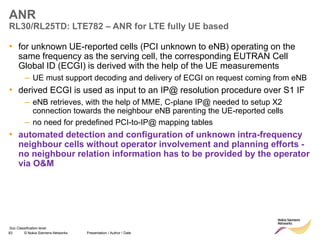
• for unknown UE-reported cells (PCI unknown to eNB) operating on the
same frequency as the serving cell, the corresponding EUTRAN Cell
Global ID (ECGI) is derived with the help of the UE measurements
– UE must support decoding and delivery of ECGI on request coming from eNB
• derived ECGI is used as input to an IP@ resolution procedure over S1 IF
– eNB retrieves, with the help of MME, C-plane IP@ needed to setup X2
connection towards the neighbour eNB parenting the UE-reported cells
– no need for predefined PCI-to-IP@ mapping tables
• automated detection and configuration of unknown intra-frequency
neighbour cells without operator involvement and planning efforts -
no neighbour relation information has to be provided by the operator
via O&M
84 © Nokia Siemens Networks Presentation / Author / Date
Soc Classification level
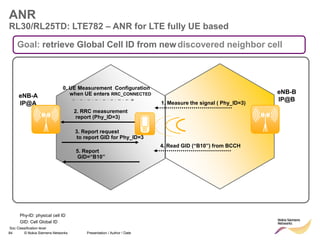
eNB-B
IP@B
ANR
RL30/RL25TD: LTE782 – ANR for LTE fully UE based
Phy-ID: physical cell ID
GID: Cell Global ID
2. RRC measurement
report (Phy_ID=3)
1. Measure the signal ( Phy_ID=3)
4. Read GID (“B10”) from BCCH
3. Report request
to report GID for Phy_ID=3
5. Report
GID=“B10”
eNB-A
IP@A
0. UE Measurement Configuration
when UE enters RRC_CONNECTED
Goal: retrieve Global Cell ID from newdiscovered neighbor cell
85 © Nokia Siemens Networks Presentation / Author / Date
Soc Classification level
MME
ANR
RL30/RL25TD: LTE782 – ANR for LTE fully UE based
Site
eNB - A
Neighbor
Site
eNB - B
New cell
discovered
New cell
identified
by GID
CM
X2 Setup : IPsec, SCTP, X2-AP [site & cell info]
UE
connected
S1 : Request X2 Transport Configuration (GID)
S1: Request X2 Transport Configuration
relays
request
S1: Respond X2 Transport Configuration (IP@)
S1 : Respond X2 Transport Configuration (IP@)
CM
relays
response
Add Site & Cell
parameter of
eNB-A
CM CM
Add Site & Cell
Parameter of
eNB-B
Neighbor Cell Tables in both eNB updated
86 © Nokia Siemens Networks Presentation / Author / Date
Soc Classification level
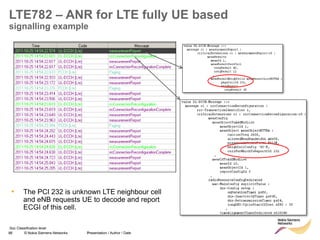
LTE782 – ANR for LTE fully UE based
signalling example
• The PCI 232 is unknown LTE neighbour cell
and eNB requests UE to decode and report
ECGI of this cell.
/
87 © Nokia Siemens Networks Presentation / Author / Date
Soc Classification level
Connected mode mobility
Exercise – inter-frequency A5 handover
• Operator X has an existing LTE network on 2600MHz, now
they want to launch LTE on 1800MHz also. They have 20MHz
BW on 2600 and only 10MHz BW on 1800, so they want to
keep the traffic as long as possible on the 2600MHz layer.
• Which threshold are suitable for inter-frequency A5 handover
for the 1800 cells? Do any parameters need to be changed
for the 2600 cells?
• Existing thresholds for LTE2600 cells:
– Threshold1: 90
– Threshold3: 45
– Threshold3a: 48
88 © Nokia Siemens Networks Presentation / Author / Date
I insert classification level
Idle Mode Mobility
89 © Nokia Siemens Networks Presentation / Author / Date
I insert classification level
SIB and SIB mapping
90 © Nokia Siemens Networks Presentation / Author / Date
Soc Classification level
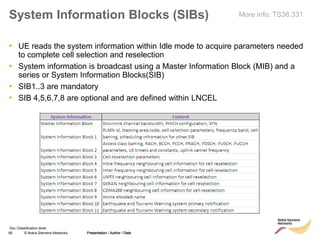
System Information Blocks (SIBs)
• UE reads the system information within Idle mode to acquire parameters needed
to complete cell selection and reselection
• System information is broadcast using a Master Information Block (MIB) and a
series or System Information Blocks(SIB)
• SIB1..3 are mandatory
• SIB 4,5,6,7,8 are optional and are defined within LNCEL
Presentation / Author / Date
More info: TS36.331
91 © Nokia Siemens Networks Presentation / Author / Date
Soc Classification level
siXMappingInfo Parameter
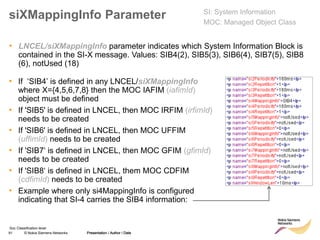
• LNCEL/siXMappingInfo parameter indicates which System Information Block is
contained in the SI-X message. Values: SIB4(2), SIB5(3), SIB6(4), SIB7(5), SIB8
(6), notUsed (18)
Presentation / Author / Date
SI: System Information
MOC: Managed Object Class
• If ‘SIB4’ is defined in any LNCEL/siXMappingInfo
where X={4,5,6,7,8} then the MOC IAFIM (iafimId)
object must be defined
• If 'SIB5' is defined in LNCEL, then MOC IRFIM (irfimId)
needs to be created
• If 'SIB6' is defined in LNCEL, then MOC UFFIM
(uffimId) needs to be created
• If 'SIB7‘ is defined in LNCEL, then MOC GFIM (gfimId)
needs to be created
• If 'SIB8‘ is defined in LNCEL, them MOC CDFIM
(cdfimId) needs to be created
• Example where only si4MappingInfo is configured
indicating that SI-4 carries the SIB4 information:
92 © Nokia Siemens Networks Presentation / Author / Date
I insert classification level
Cell selection
93 © Nokia Siemens Networks Presentation / Author / Date
Soc Classification level
Cell Selection
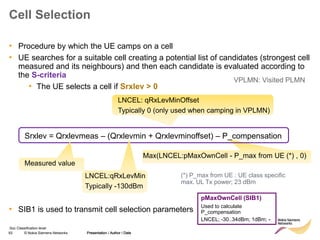
• Procedure by which the UE camps on a cell
• UE searches for a suitable cell creating a potential list of candidates (strongest cell
measured and its neighbours) and then each candidate is evaluated according to
the S-criteria
• The UE selects a cell if Srxlev > 0
• SIB1 is used to transmit cell selection parameters
Presentation / Author / Date
LNCEL: qRxLevMinOffset
Typically 0 (only used when camping in VPLMN)
VPLMN: Visited PLMN
Max(LNCEL:pMaxOwnCell - P_max from UE (*) , 0)
Srxlev = Qrxlevmeas – (Qrxlevmin + Qrxlevminoffset) – P_compensation
Measured value
LNCEL:qRxLevMin
Typically -130dBm
(*) P_max from UE : UE class specific
max. UL Tx power; 23 dBm
pMaxOwnCell (SIB1)
Used to calculate
P_compensation
LNCEL; -30..34dBm; 1dBm; -
94 © Nokia Siemens Networks Presentation / Author / Date
Soc Classification level
S – Criterion Cell Selection
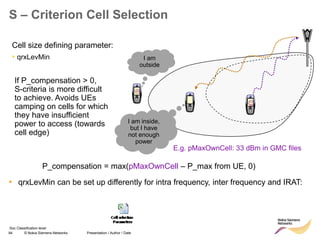
P_compensation = max(pMaxOwnCell – P_max from UE, 0)
Cell size defining parameter:
• qrxLevMin I am
outside
I am inside,
but I have
not enough
power


If P_compensation > 0,
S-criteria is more difficult
to achieve. Avoids UEs
camping on cells for which
they have insufficient
power to access (towards
cell edge)
E.g. pMaxOwnCell: 33 dBm in GMC files
• qrxLevMin can be set up differently for intra frequency, inter frequency and IRAT:
95 © Nokia Siemens Networks Presentation / Author / Date
I insert classification level
Intra frequency cell reselection
96 © Nokia Siemens Networks Presentation / Author / Date
Soc Classification level
Intra frequency cell reselection
Triggering Measurements
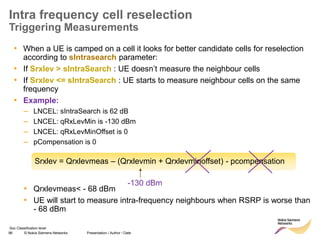
• When a UE is camped on a cell it looks for better candidate cells for reselection
according to sIntrasearch parameter:
• If Srxlev > sIntraSearch : UE doesn’t measure the neighbour cells
• If Srxlev <= sIntraSearch : UE starts to measure neighbour cells on the same
frequency
• Example:
– LNCEL: sIntraSearch is 62 dB
– LNCEL: qRxLevMin is -130 dBm
– LNCEL: qRxLevMinOffset is 0
– pCompensation is 0
• Qrxlevmeas< - 68 dBm
• UE will start to measure intra-frequency neighbours when RSRP is worse than
- 68 dBm
-130 dBm
Srxlev = Qrxlevmeas – (Qrxlevmin + Qrxlevminoffset) - pcompensation
97 © Nokia Siemens Networks Presentation / Author / Date
Soc Classification level
Intra frequency cell reselection
R-Criterion (Ranking Criterion)
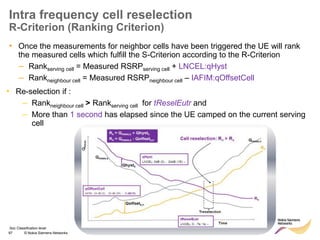
• Once the measurements for neighbor cells have been triggered the UE will rank
the measured cells which fulfill the S-Criterion according to the R-Criterion
– Rankserving cell = Measured RSRPserving cell + LNCEL:qHyst
– Rankneighbour cell = Measured RSRPneighbour cell – IAFIM:qOffsetCell
Presentation / Author / Date
• Re-selection if :
– Rankneighbour cell > Rankserving cell for tReselEutr and
– More than 1 second has elapsed since the UE camped on the current serving
cell
98 © Nokia Siemens Networks Presentation / Author / Date
Soc Classification level
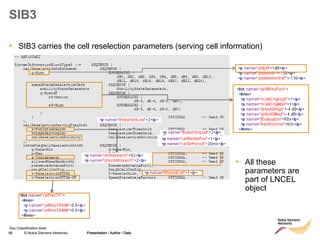
SIB3
• SIB3 carries the cell reselection parameters (serving cell information)
Presentation / Author / Date
• All these
parameters are
part of LNCEL
object
99 © Nokia Siemens Networks Presentation / Author / Date
Soc Classification level
SIB4 and IAFIM (1/2)
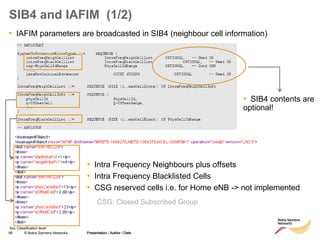
• IAFIM parameters are broadcasted in SIB4 (neighbour cell information)
Presentation / Author / Date
• SIB4 contents are
optional!
• Intra Frequency Neighbours plus offsets
• Intra Frequency Blacklisted Cells
• CSG reserved cells i.e. for Home eNB -> not implemented
CSG: Closed Subscribed Group
100 © Nokia Siemens Networks Presentation / Author / Date
Soc Classification level
SIB4 and IAFIM (2/2)
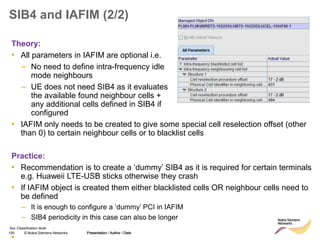
• IAFIM only needs to be created to give some special cell reselection offset (other
than 0) to certain neighbour cells or to blacklist cells
Practice:
• Recommendation is to create a ‘dummy’ SIB4 as it is required for certain terminals
e.g. Huaweii LTE-USB sticks otherwise they crash
• If IAFIM object is created them either blacklisted cells OR neighbour cells need to
be defined
– It is enough to configure a ‘dummy’ PCI in IAFIM
– SIB4 periodicity in this case can also be longer
•
Presentation / Author / Date
Theory:
• All parameters in IAFIM are optional i.e.
– No need to define intra-frequency idle
mode neighbours
– UE does not need SIB4 as it evaluates
the available found neighbour cells +
any additional cells defined in SIB4 if
configured
101 © Nokia Siemens Networks Presentation / Author / Date
Soc Classification level
Intra frequency cell reselection
Practical Experience
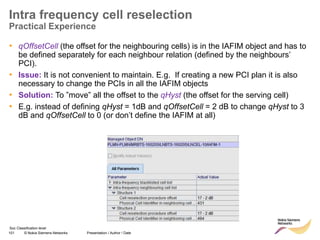
• qOffsetCell (the offset for the neighbouring cells) is in the IAFIM object and has to
be defined separately for each neighbour relation (defined by the neighbours’
PCI).
• Issue: It is not convenient to maintain. E.g. If creating a new PCI plan it is also
necessary to change the PCIs in all the IAFIM objects
• Solution: To ”move” all the offset to the qHyst (the offset for the serving cell)
• E.g. instead of defining qHyst = 1dB and qOffsetCell = 2 dB to change qHyst to 3
dB and qOffsetCell to 0 (or don’t define the IAFIM at all)
102 © Nokia Siemens Networks Presentation / Author / Date
Soc Classification level
Intra frequency cell reselection
Practical Experience: Example
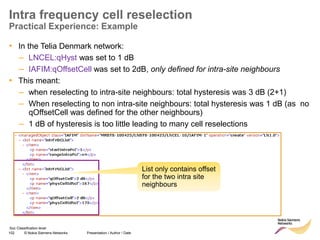
• In the Telia Denmark network:
– LNCEL:qHyst was set to 1 dB
– IAFIM:qOffsetCell was set to 2dB, only defined for intra-site neighbours
• This meant:
– when reselecting to intra-site neighbours: total hysteresis was 3 dB (2+1)
– When reselecting to non intra-site neighbours: total hysteresis was 1 dB (as no
qOffsetCell was defined for the other neighbours)
– 1 dB of hysteresis is too little leading to many cell reselections
List only contains offset
for the two intra site
neighbours
103 © Nokia Siemens Networks Presentation / Author / Date
Soc Classification level
Intra frequency cell reselection
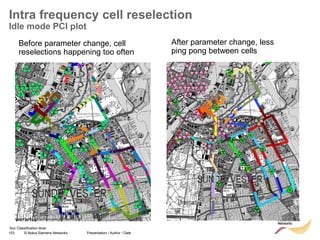
Idle mode PCI plot
Before parameter change, cell
reselections happening too often
After parameter change, less
ping pong between cells
104 © Nokia Siemens Networks Presentation / Author / Date
Soc Classification level
Intra frequency cell reselection
Blacklisting
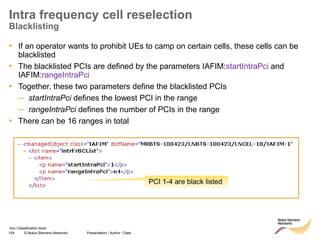
• If an operator wants to prohibit UEs to camp on certain cells, these cells can be
blacklisted
• The blacklisted PCIs are defined by the parameters IAFIM:startIntraPci and
IAFIM:rangeIntraPci
• Together, these two parameters define the blacklisted PCIs
– startIntraPci defines the lowest PCI in the range
– rangeIntraPci defines the number of PCIs in the range
• There can be 16 ranges in total
PCI 1-4 are black listed
105 © Nokia Siemens Networks Presentation / Author / Date
I insert classification level
Inter frequency cell reselection
106 © Nokia Siemens Networks Presentation / Author / Date
Soc Classification level
Inter frequency cell reselection
Triggering Measurements
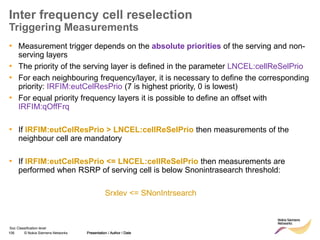
• Measurement trigger depends on the absolute priorities of the serving and non-
serving layers
• The priority of the serving layer is defined in the parameter LNCEL:cellReSelPrio
• For each neighbouring frequency/layer, it is necessary to define the corresponding
priority: IRFIM:eutCelResPrio (7 is highest priority, 0 is lowest)
• For equal priority frequency layers it is possible to define an offset with
IRFIM:qOffFrq
• If IRFIM:eutCelResPrio > LNCEL:cellReSelPrio then measurements of the
neighbour cell are mandatory
• If IRFIM:eutCelResPrio <= LNCEL:cellReSelPrio then measurements are
performed when RSRP of serving cell is below Snonintrasearch threshold:
Srxlev <= SNonIntrsearch
Presentation / Author / Date
107 © Nokia Siemens Networks Presentation / Author / Date
Soc Classification level
Inter frequency cell reselection
Triggering Measurements
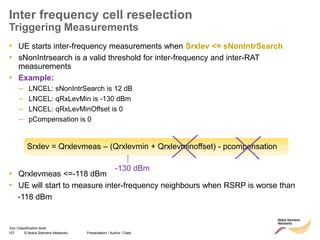
• UE starts inter-frequency measurements when Srxlev <= sNonIntrSearch
• sNonIntrsearch is a valid threshold for inter-frequency and inter-RAT
measurements
• Example:
– LNCEL: sNonIntrSearch is 12 dB
– LNCEL: qRxLevMin is -130 dBm
– LNCEL: qRxLevMinOffset is 0
– pCompensation is 0
• Qrxlevmeas <=-118 dBm
• UE will start to measure inter-frequency neighbours when RSRP is worse than
-118 dBm
-130 dBm
Srxlev = Qrxlevmeas – (Qrxlevmin + Qrxlevminoffset) - pcompensation
108 © Nokia Siemens Networks Presentation / Author / Date
Soc Classification level
Inter Frequency Reselection
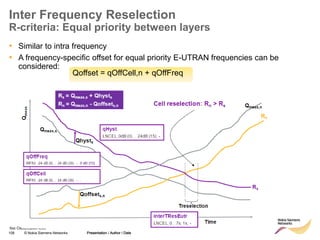
R-criteria: Equal priority between layers
• Similar to intra frequency
• A frequency-specific offset for equal priority E-UTRAN frequencies can be
considered:
Presentation / Author / Date
Qoffset = qOffCell,n + qOffFreq
109 © Nokia Siemens Networks Presentation / Author / Date
Soc Classification level
Inter Frequency Reselection
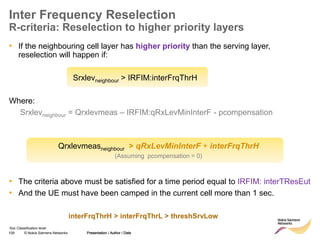
R-criteria: Reselection to higher priority layers
• If the neighbouring cell layer has higher priority than the serving layer,
reselection will happen if:
Srxlevneighbour > IRFIM:interFrqThrH
Where:
Srxlevneighbour = Qrxlevmeas – IRFIM:qRxLevMinInterF - pcompensation
• The criteria above must be satisfied for a time period equal to IRFIM: interTResEut
• And the UE must have been camped in the current cell more than 1 sec.
Presentation / Author / Date
Qrxlevmeasneighbour > qRxLevMinInterF + interFrqThrH
(Assuming pcompensation = 0)
interFrqThrH > interFrqThrL > threshSrvLow
110 © Nokia Siemens Networks Presentation / Author / Date
Soc Classification level
Inter Frequency Reselection
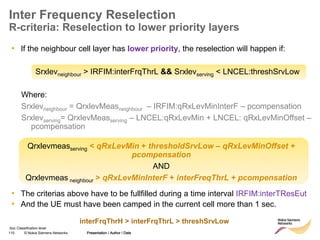
R-criteria: Reselection to lower priority layers
• If the neighbour cell layer has lower priority, the reselection will happen if:
Srxlevneighbour > IRFIM:interFrqThrL && Srxlevserving < LNCEL:threshSrvLow
Where:
Srxlevneighbour = QrxlevMeasneighbour – IRFIM:qRxLevMinInterF – pcompensation
Srxlevserving= QrxlevMeasserving – LNCEL:qRxLevMin + LNCEL: qRxLevMinOffset –
pcompensation
• The criterias above have to be fullfilled during a time interval IRFIM:interTResEut
• And the UE must have been camped in the current cell more than 1 sec.
Presentation / Author / Date
Qrxlevmeasserving < qRxLevMin + thresholdSrvLow – qRxLevMinOffset +
pcompensation
AND
Qrxlevmeas neighbour > qRxLevMinInterF + interFreqThrL + pcompensation
interFrqThrH > interFrqThrL > threshSrvLow
111 © Nokia Siemens Networks Presentation / Author / Date
Soc Classification level
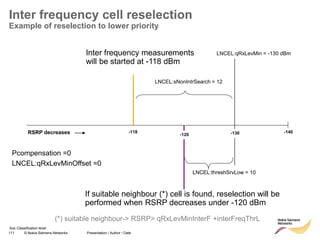
Inter frequency cell reselection
Example of reselection to lower priority
-130
LNCEL:qRxLevMin = -130 dBm
LNCEL:threshSrvLow = 10
If suitable neighbour (*) cell is found, reselection will be
performed when RSRP decreases under -120 dBm
-120
-118
Inter frequency measurements
will be started at -118 dBm
LNCEL:sNonIntrSearch = 12
-140
RSRP decreases
Pcompensation =0
LNCEL:qRxLevMinOffset =0
(*) suitable neighbour-> RSRP> qRxLevMinInterF +interFreqThrL
112 © Nokia Siemens Networks Presentation / Author / Date
Soc Classification level
Inter frequency cell reselection
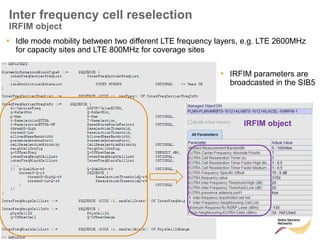
IRFIM object
• Idle mode mobility between two different LTE frequency layers, e.g. LTE 2600MHz
for capacity sites and LTE 800MHz for coverage sites
• IRFIM parameters are
broadcasted in the SIB5
IRFIM object
113 © Nokia Siemens Networks Presentation / Author / Date
I insert classification level
Inter RAT cell reselection
114 © Nokia Siemens Networks Presentation / Author / Date
Soc Classification level
Inter RAT cell reselection
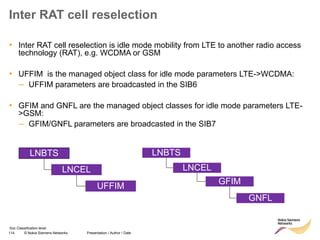
• Inter RAT cell reselection is idle mode mobility from LTE to another radio access
technology (RAT), e.g. WCDMA or GSM
• UFFIM is the managed object class for idle mode parameters LTE->WCDMA:
– UFFIM parameters are broadcasted in the SIB6
• GFIM and GNFL are the managed object classes for idle mode parameters LTE-
>GSM:
– GFIM/GNFL parameters are broadcasted in the SIB7
LNBTS
LNCEL
UFFIM
LNBTS
LNCEL
GFIM
GNFL
115 © Nokia Siemens Networks Presentation / Author / Date
Soc Classification level
Inter RAT cell reselection
Measurements Trigger
• IRAT cell reselection procedure and related parameters are similar to those for
inter frequency cell reselection
• Similar to the inter frequency case, there is the priority concept (7 is highest
priority, 0 is lowest):
– The priority of serving cell is defined with LNCEL:cellReSelPrio
– The priority of the neighbouring cell is defined:
▪ For WCDMA: UFFIM: uCelResPrio
▪ For GSM: GFIM: gCelResPrio
• If UFFIM: uCelResPrio/GFIM: gCelResPrio > LNCEL:cellReSelPrio then
measurements of the neighbour WCDMA/GSM cell are mandatory
• If UFFIM: uCelResPrio/GFIM: gCelResPrio <= LNCEL:cellReSelPrio then
measurements are performed when RSRP of serving cell is below
Snonintrasearch threshold (same as per inter-frequency):
Srxlev <= SNonIntrsearch
116 © Nokia Siemens Networks Presentation / Author / Date
Soc Classification level
Inter RAT cell reselection
R-criteria
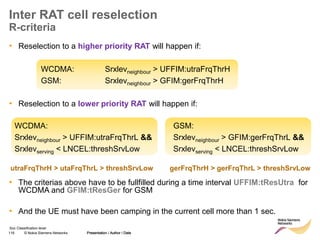
• Reselection to a higher priority RAT will happen if:
WCDMA: Srxlevneighbour > UFFIM:utraFrqThrH
GSM: Srxlevneighbour > GFIM:gerFrqThrH
• Reselection to a lower priority RAT will happen if:
• The criterias above have to be fullfilled during a time interval UFFIM:tResUtra for
WCDMA and GFIM:tResGer for GSM
• And the UE must have been camping in the current cell more than 1 sec.
Presentation / Author / Date
GSM:
Srxlevneighbour > GFIM:gerFrqThrL &&
Srxlevserving < LNCEL:threshSrvLow
WCDMA:
Srxlevneighbour > UFFIM:utraFrqThrL &&
Srxlevserving < LNCEL:threshSrvLow
utraFrqThrH > utaFrqThrL > threshSrvLow gerFrqThrH > gerFrqThrL > threshSrvLow
117 © Nokia Siemens Networks Presentation / Author / Date
Soc Classification level
Inter RAT cell reselection
R-criteria
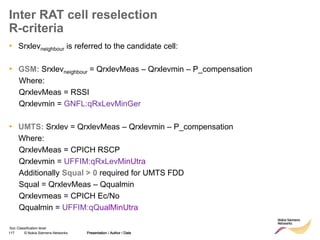
• Srxlevneighbour is referred to the candidate cell:
• GSM: Srxlevneighbour = QrxlevMeas – Qrxlevmin – P_compensation
Where:
QrxlevMeas = RSSI
Qrxlevmin = GNFL:qRxLevMinGer
• UMTS: Srxlev = QrxlevMeas – Qrxlevmin – P_compensation
Where:
QrxlevMeas = CPICH RSCP
Qrxlevmin = UFFIM:qRxLevMinUtra
Additionally Squal > 0 required for UMTS FDD
Squal = QrxlevMeas – Qqualmin
Qrxlevmeas = CPICH Ec/No
Qqualmin = UFFIM:qQualMinUtra
Presentation / Author / Date
118 © Nokia Siemens Networks Presentation / Author / Date
Soc Classification level
Inter RAT cell reselection
SIB6 and UFFIM object
• SIB6 and UFFIM with priorities and reselection
thresholds towards 3 different WCDMA carriers
Presentation / Author / Date
119 © Nokia Siemens Networks Presentation / Author / Date
Soc Classification level
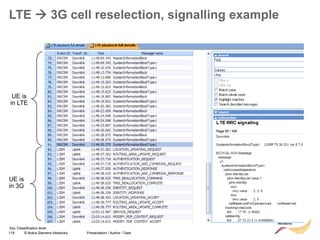
LTE  3G cell reselection, signalling example
UE is
in LTE
UE is
in 3G
120 © Nokia Siemens Networks Presentation / Author / Date
Soc Classification level
Inter RAT cell reselection
Settings on WCDMA side (1/2)
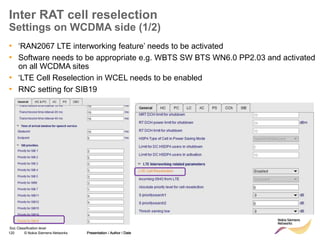
• ‘RAN2067 LTE interworking feature’ needs to be activated
• Software needs to be appropriate e.g. WBTS SW BTS WN6.0 PP2.03 and activated
on all WCDMA sites
• ‘LTE Cell Reselection in WCEL needs to be enabled
• RNC setting for SIB19
Presentation / Author / Date
121 © Nokia Siemens Networks Presentation / Author / Date
Soc Classification level
08 April 2022
121
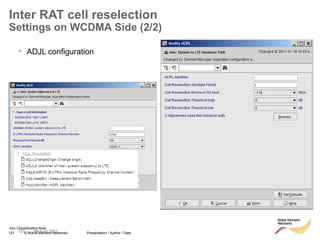
• ADJL configuration
Inter RAT cell reselection
Settings on WCDMA Side (2/2)
122 © Nokia Siemens Networks Presentation / Author / Date
Soc Classification level
LTE to GSM reselection
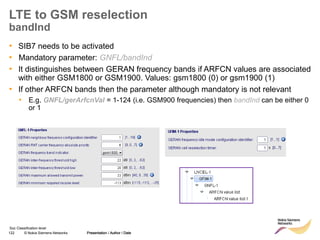
bandInd
• SIB7 needs to be activated
• Mandatory parameter: GNFL/bandInd
• It distinguishes between GERAN frequency bands if ARFCN values are associated
with either GSM1800 or GSM1900. Values: gsm1800 (0) or gsm1900 (1)
• If other ARFCN bands then the parameter although mandatory is not relevant
• E.g. GNFL/gerArfcnVal = 1-124 (i.e. GSM900 frequencies) then bandInd can be either 0
or 1
Presentation / Author / Date
123 © Nokia Siemens Networks Presentation / Author / Date
Soc Classification level
Testing notes
Terminals and Measurement Tools
• Nemo is better than XCAL as it provides more information. XCAL also requires a
license upgrade to support Qualcomm chipset
• Terminals:
• ZTE MF820 with the following SW/FW
▪ Firmware : BD_ZTE_MF820V1.0.0.0B12
Software : PCW_TEAGLBLTEP18EMV1.0.0B15
▪ Cost: 265 EUR
• ZTE poor performance:
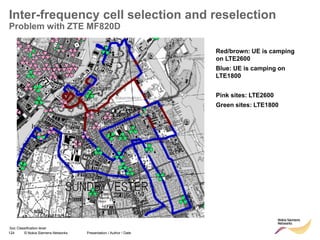
• When 2 LTE layers (LTE1800 and LTE2600) it camps on LTE1800 even if parameters
are set to camp in LTE2600. See next slide for example.
• Frequent crashes
• Difficult communication with ZTE
• Bandrich UE (C501, Qualcomm chipset):
• Requires engineering mode to see L3 messages (2600 eur vs. 140 eur normal mode).
• Known issues: https://twiki.inside.nokiasiemensnetworks.com/bin/view/LTESyVe/BandrichC501
• Inter frequency HO not supported
• Idle Mode IRAT between GSM and LTE not supported
Presentation / Author / Date
124 © Nokia Siemens Networks Presentation / Author / Date
Soc Classification level
Inter-frequency cell selection and reselection
Problem with ZTE MF820D
Red/brown: UE is camping
on LTE2600
Blue: UE is camping on
LTE1800
Pink sites: LTE2600
Green sites: LTE1800
125 © Nokia Siemens Networks Presentation / Author / Date
Soc Classification level
Idle mode mobility
Exercise
• Operator X has two layers for LTE, 2600 and 1800.
• 2600 has highest priority, 1800 has second highest priority.
The operator also has WCDMA.
• Define suitable idle mode parameters for 2600 cells and 1800
cells, respectively. The parameters should enable both LTE
intra-frequency mobility and inter-frequency mobility as well
as inter RAT mobility from LTE to WCDMA.

06a_LTE mobility management v1_0.ppt

  • 1.
    1 © NokiaSiemens Networks Presentation / Author / Date I insert classification level LTE Mobility management LTE optimization training, Sao Paulo December 2011
  • 2.
    2 © NokiaSiemens Networks Presentation / Author / Date Soc Classification level Contents • Connected mode mobility – Overview – Mobility triggers and handover thresholds – Measurement configuration – LTE intra-frequency handover – LTE inter-frequency handover – S1 handover – RRC release with redirect – CS fallback – IRAT HO to WCDMA – ANR – Automated neighbour relations • Idle mode mobility – SIB and SIB-mapping – Cell selection – LTE intra-frequency reselection – LTE inter-frequency reselection – Inter RAT reselection
  • 3.
    3 © NokiaSiemens Networks Presentation / Author / Date I insert classification level Connected Mode Mobility
  • 4.
    4 © NokiaSiemens Networks Presentation / Author / Date Soc Classification level Connected Mode Mobility Overview • Mobility Management sets the mobility procedures when the UE is in active state • Procedures supported: – Handover: Transfer of an ongoing call/data session from a radio channel to another without call interruption. Handovers in LTE are: o Network controlled o UE assisted o Hard handovers: Only a connection exist to one cell at a time – Redirection: Similar to handover, but requires connection release prior to the transfer the ongoing call – Cell change: procedure dedicated for call transfer from LTE to GSM; it requires connection release Presentation / Author / Date Licensing: • All IRAT HO, inter-frequency HO, CSFT to UTRAN/GERAN via redirect and S1 handovers are optional features: • When enabled they are activated for the whole eNodeB • If deactivated the eNB does not configure UE to measure other technologies/ frequencies so handover is not triggered
  • 5.
    5 © NokiaSiemens Networks Presentation / Author / Date I insert classification level Mobility triggers and handover thresholds
  • 6.
    6 © NokiaSiemens Networks Presentation / Author / Date Soc Classification level Mobility triggers (1/2) • Mobility is handled via events triggering. 3GPP defines following events: • Event A2/A1: Serving cells RSRP down/upcrossing certain RSRP threshold • Event A3: Neighbor cell’s RSRP is a predefined offset better than serving cell’s RSRP • Event A5: Serving cell’s RSRP downcrossing certain threshold, while neighbor cell’s RSRP upcrossing an other threshold RSRP RSRP serving A2 trigger A2 threshold move direction RSRP RSRP serving A3 trigger A3 offset move direction RSRP RSRP serving A5 trigger A5 thold 1 A5 thold 2 move direction
  • 7.
    7 © NokiaSiemens Networks Presentation / Author / Date Soc Classification level Mobility Triggers (2/2) • Inter-RAT measurements (GERAN or UMTS supported in RL30) • Event B2: Serving cell’s RSRP down crossing threshold 1, while neighbor cell RSSI or CPICH RSCP or CPICH Ec/No up crossing threshold 2 • Triggers for Inter-RAT reports are: – RSSI in case of GERAN – CPICH RSCP or CPICH EC/N0 in case of UMTS Signal Level RSRP serving B2 trigger B2 thold 1 B2 thold 2 move direction Inter-RAT Neighbor cell signal
  • 8.
    8 © NokiaSiemens Networks Presentation / Author / Date Soc Classification level Handover Thresholds Measurement Activations • Threshold 1 (Th1): UE does not perform measurements of neighbour cells when the serving cell RSRP is above Threshold1 (Th1) • Thresholds 2 (Th2a/ Th2_interfreq/Th2_WCDMA/Th2_GSM):UE starts performing measurement gaps when one of the Th2 events is reported to the eNodeB in a measurement report • Threshold2a (Th2a): Measurement gaps are cancelled if serving cell RSRP rises above Th2a • Threshold 4 (Th4):RRC Connection Release with redirection is triggered if no suitable intra or inter frequency/IRAT cells are found Presentation / Author / Date RSRP (dBm) No measurements except serving cell Intra –LTE measurements Intra –LTE + Inter Freq measurements Intra –LTE + Inter Freq + WCDMA measurements Intra –LTE + Inter Freq + WCDMA + GSM measurements Th4 Th2_GSM Th2_WCDMA Th2_InterFreq Th1 Th2a RRC Connection Release and re-direction
  • 9.
    9 © NokiaSiemens Networks Presentation / Author / Date Soc Classification level Intra- and inter-frequency handover thresholds Serving cell Threshold1 RSRP for serving cell decreases Only serving cell measurements are performed. UE is not measuring or reporting any neighbours Threshold2InterFreq When RSRP is below Threshold1, UE starts to measure intra- frequency neigbhours When RSRP is below Threshold2InterFreq, UE starts measurements on other frequencies. Threshold2a RSRP increases When RSRP is above Threshold2a, UE stops measurements on other frequencies. Threshold3 When RSRP is below Threshold3, UE will perform HO to neighbour. (Assuming that neighbour is better than threshold3a and A5 handover is activated) Threshold4 When RSRP is below Threshold4, the eNB can redirect the call to other frequeny or other RAT. This is also called RRC release with redirect Threshold3_interFreq When RSRP is below Threshold3_interFreq, UE will perform HO to inter-freq neighbour. (Assuming that neighbour is better than threshold3a_InterFreq and IFHO is activated)
  • 10.
    10 © NokiaSiemens Networks Presentation / Author / Date Soc Classification level Mobility thresholds comments RRC_connected mode • All threshold are relative to -140. This means if for example threshold3 is set to 21, the true threshold is (-140+21=) 119dBm. • The following restrictions need to be fulfilled: – Threshold4 < Threshold3 < Threshold2InterFreq <= Threshold2a < Threshold1 – Threshold3 < Threshold3a – Threshold3InterFreq < Threshold3aInterFreq
  • 11.
    11 © NokiaSiemens Networks Presentation / Author / Date I insert classification level Measurement configuration
  • 12.
    12 © NokiaSiemens Networks Presentation / Author / Date Soc Classification level Measurement Configuration Overview • Monitoring of cells other than the serving one requires measurement configuration which is provided to UE • RRC:ConnectionReconfiguration message with optional IE: MeasConfig is used for measurement configuration • Measurement configuration provides the UE with info such as thresholds and information to handle measurements (intra LTE and IRAT) and the HO procedure Presentation / Author / Date
  • 13.
    13 © NokiaSiemens Networks Presentation / Author / Date Soc Classification level Measurement Configuration Structure Measurement configuration requires definition of: • measurement object • report configuration • measurement identities • quantity configuration • measurement gaps Presentation / Author / Date
  • 14.
    14 © NokiaSiemens Networks Presentation / Author / Date Soc Classification level Measurement Gaps (1/2) • Depending on UE capabilities measurement gaps may be required for several types of handovers. E.g. inter-RAT-HO, inter-frequency-HO, network assisted cell change • During measurement Gaps the UE is measuring Inter-frequency/ I-RAT candidates and does not transmit nor receive any data from the serving cell MeasGapConfig The IE MeasGapConfig specifies the measurement gap configuration and controls setup/ release of measurement gaps. MeasGapConfig information element -- ASN1START MeasGapConfig ::= CHOICE { release NULL, setup SEQUENCE { gapOffset CHOICE { gp0 INTEGER (0..39), gp1 INTEGER (0..79), ... } } } -- ASN1STOP MeasGapConfig field descriptions gapOffset Value gapOffset of gp0 corresponds to gap offset of Gap Pattern Id “0” with TGRP = 40ms, gapOffset of gp1 corresponds to gap offset of Gap Pattern Id “1” with TGRP = 80ms. Also used to specify the measurement gap pattern to be applied, as defined in TS 36.133 [16].
  • 15.
    15 © NokiaSiemens Networks Presentation / Author / Date Soc Classification level Measurement Gaps (2/2) • GAP pattern Id 0 is supported in RL30 • Different gap periodicities are a trade off between throughput and Inter-frequency and IRAT monitoring • UL and DL scheduler have to track the measurement gap periodicity and gap pattern in order to avoid allocations whilst the UE is not listening • Same monitoring gap is used to search all possible RATs • The 6ms gap is consumed to switch back and forth from the serving frequency to the other frequencies and bands and measuring Presentation / Author / Date Table 8.1.2.1-1: Gap Pattern Configurations supported by the UE Gap Pattern Id MeasurementGap Length (MGL, ms) Measurement Gap Repetition Period (MGRP, ms) Minimum available time for inter-frequency and inter-RAT measurements during 480ms period (Tinter1, ms) Measurement Purpose 0 6 40 60 Inter-Frequency E-UTRAN FDD and TDD, UTRAN FDD, GERAN, LCR TDD, HRPD, CDMA2000 1x 1 6 80 30 Inter-Frequency E-UTRAN FDD and TDD, UTRAN FDD, GERAN, LCR TDD, HRPD, CDMA2000 1x RL30
  • 16.
    16 © NokiaSiemens Networks Presentation / Author / Date Soc Classification level MeasObjectEUTRA Example value DL-DCCH-Message ::= { message c1 : rrcConnectionReconfiguration : { rrc-TransactionIdentifier 1, criticalExtensions c1 : rrcConnectionReconfiguration-r8 : { measConfig { measObjectToAddModList { { measObjectId 1, measObject measObjectEUTRA : { carrierFreq 2075, allowedMeasBandwidth mbw25, presenceAntennaPort1 TRUE, neighCellConfig '00'B } }, { measObjectId 2, measObject measObjectEUTRA : { carrierFreq 2100, allowedMeasBandwidth mbw50, presenceAntennaPort1 TRUE, neighCellConfig '00'B } } }, • Setup of 2 objects (measObjectId) • One for each band ( 2075 and 2100) • Each one of them with a different Bandwidth : • 5MHz for 2075MHz • 10MHz for 2100 MHz • No cell individual offsets specified to prioritize between cells Presentation / Author / Date
  • 17.
    17 © NokiaSiemens Networks Presentation / Author / Date Soc Classification level Definition of Report Configuration Id1( A3 event) and Id2 (A5 event) Presentation / Author / Date reportConfigToAddModList { { reportConfigId 1, reportConfig reportConfigEUTRA : { triggerType event : { eventId eventA3 : { a3-Offset 6, reportOnLeave FALSE }, hysteresis 0, timeToTrigger ms320 }, triggerQuantity rsrp, reportQuantity sameAsTriggerQuantity, maxReportCells 8, reportInterval ms1024, reportAmount infinity } }, { reportConfigId 2, reportConfig reportConfigEUTRA : { triggerType event : { eventId eventA5 : { a5-Threshold1 threshold-RSRP : 30, a5-Threshold2 threshold-RSRP : 32 }, hysteresis 0, timeToTrigger ms640 }, triggerQuantity rsrp, reportQuantity sameAsTriggerQuantity, maxReportCells 8, reportInterval ms240, reportAmount infinity } }, These reports are used later on for Intra-frequency measurements
  • 18.
    18 © NokiaSiemens Networks Presentation / Author / Date Soc Classification level Definition of Report Configuration Id3(A5 event) and Id4 (A3 event) Presentation / Author / Date { reportConfigId 3, reportConfig reportConfigEUTRA : { triggerType event : { eventId eventA5 : { a5-Threshold1 threshold-RSRP : 30, a5-Threshold2 threshold-RSRP : 31 }, hysteresis 0, timeToTrigger ms64 }, triggerQuantity rsrp, reportQuantity sameAsTriggerQuantity, maxReportCells 8, reportInterval ms120, reportAmount infinity } }, { reportConfigId 4, reportConfig reportConfigEUTRA : { triggerType event : { eventId eventA3 : { a3-Offset 0, reportOnLeave FALSE }, hysteresis 4, timeToTrigger ms128 }, triggerQuantity rsrp, reportQuantity sameAsTriggerQuantity, maxReportCells 8, reportInterval ms120, reportAmount infinity } }, These reports are used later on for Inter-frequency measurements
  • 19.
    19 © NokiaSiemens Networks Presentation / Author / Date Soc Classification level Definition of Report Configuration Id5(A2 event) and Id6 (A1 event) • Event A2 is used to enable the Inter frequency measurements and Event A1 to disable other cell measurements Presentation / Author / Date { reportConfigId 5, reportConfig reportConfigEUTRA : { triggerType event : { eventId eventA2 : { a2-Threshold threshold-RSRP : 32 }, hysteresis 0, timeToTrigger ms256 }, triggerQuantity rsrp, reportQuantity sameAsTriggerQuantity, maxReportCells 8, reportInterval min60, reportAmount r1 } }, { reportConfigId 6, reportConfig reportConfigEUTRA : { triggerType event : { eventId eventA1 : { a1-Threshold threshold-RSRP : 33 }, hysteresis 0, timeToTrigger ms128 }, triggerQuantity rsrp, reportQuantity sameAsTriggerQuantity, maxReportCells 8, reportInterval min60, reportAmount r1 } } },
  • 20.
    20 © NokiaSiemens Networks Presentation / Author / Date Soc Classification level measIdToAddModList { { measId 1, measObjectId 1, reportConfigId 1 }, { measId 2, measObjectId 1, reportConfigId 2 }, { measId 7, measObjectId 1, reportConfigId 5 } }, quantityConfig { quantityConfigEUTRA { } }, measGapConfig release : NULL, s-Measure 90, Measurement Configuration Part of RRC Connection Reconfiguration • Measurement Object Id’s and Reporting Configuration Id’s are grouped and enabled here • Measurement Id 1 is defined as intra-frequency measurements of A3 events • Measurement Id 2 is defined as intra-frequency measurements of A5 events • Measurement Id 7 is defined as intra-frequency measurements of A2 events • S-measure defines the threshold above which the UE will perform no neighbour cell measurements (threshold 1)
  • 21.
    21 © NokiaSiemens Networks Presentation / Author / Date I insert classification level Intra-frequency handovers
  • 22.
    22 © NokiaSiemens Networks Presentation / Author / Date Soc Classification level Handovers • Two main types of handovers in LTE: – Better Cell Handover, also called A3 HO. – Coverage Handover, also called A5 HO. • Better Cell Handover aims to keep the UE always on best cell (measured by RSRP), e.g. when neighbour cell becomes more than 4 dB better than serving cell. • Coverage Handover is used when serving cell RSRP gets below a certain threshold (for example -95 dBm) AND neighbour cell RSRP gets better than an absolute threshold (for example -92 dBm).
  • 23.
    23 © NokiaSiemens Networks Presentation / Author / Date Soc Classification level Better cell Handover Event A3 • Entering Condition: RSRP at serving cell + a3Offset + hysA3offset < RSRP at neighbor cell • Leaving Condition: RSRP at serving cell + a3Offset + hysA3offset > RSRP at neighbor cell Parameters involved: Note: Inter- frequency A3 handovers can also be performed based on RSRQ
  • 24.
    24 © NokiaSiemens Networks Presentation / Author / Date Soc Classification level Coverage Handover Event A5 Presentation / Author / Date • Entering Condition: RSRP at serving cell < threshold3 - hysThreshold3 AND… …RSRP at neighbor cell > threshold3a + hysThreshold3 Note: 3GPP defines ‘Hys’ in the equations. i.e. it is only possible to signal one value of ‘Hys’. Hys -> hysThreshold3 • Leaving Condition: RSRP at serving cell > threshold3 + hysThreshold3 OR… … RSRP at neighbor cell < threshold3a - hysThreshold3 Parameters involved:
  • 25.
    25 © NokiaSiemens Networks Presentation / Author / Date Soc Classification level Example of successful intra-freq HO Step 1: UE sends measurement report on PCI 274.
  • 26.
    26 © NokiaSiemens Networks Presentation / Author / Date Soc Classification level Example of successful intra-freq HO Step 2: UE gets RRCConnectionReconfiguration on DL and replies with an RRCConnectionReconfigurationComplete on UL. Note that for a successful HO, this happens twice. The first RRCConnectionReconfiguration comes from the source cell and the second one from the target.
  • 27.
    27 © NokiaSiemens Networks Presentation / Author / Date Soc Classification level Identifying the trigger condition for a Handover • The measurement report before a handover doesn’t specify the triggering reason i.e. A3 or A5 handover • Instead, the measurement report indicates the measurement id (measId). • It is necessary to look in the second RRC connection reconfiguration msg before the measurement report in order to identify which measurement id is mapped to which reportConfigId – measId1 = A3 – measId2 = A5 – measId3 = A2 • See following slides for example
  • 28.
    28 © NokiaSiemens Networks Presentation / Author / Date Soc Classification level How to see difference between A3 and A5 HO A3 A5
  • 29.
    29 © NokiaSiemens Networks Presentation / Author / Date Soc Classification level How to see difference between A3 and A5 HO
  • 30.
    30 © NokiaSiemens Networks Presentation / Author / Date I insert classification level Inter-frequency handovers
  • 31.
    31 © NokiaSiemens Networks Presentation / Author / Date Soc Classification level Inter frequency handover • Inter frequency handover (feature LTE55) allows to hand over a UE in RRC connected mode between two LTE cells on different frequencies, for example 2600MHz and 1800MHz • The triggers for this procedure are the same as per intra frequency HO: – Better neighbour cell coverage (A3, RSRP) – Better neighbour cell quality (A3, RSRQ) – Limited serving cell AND sufficient neighbour cell coverage (A5) • Measurement gaps: if needed then gap pattern 0 is used (6ms gap each 40ms) LNBTS LNCEL LNHOIF • Parameter object for inter-frequency idle mode parameters: LNHOIF with similar parameters as for intra frequency HO: RL20 RL15TD
  • 32.
    32 © NokiaSiemens Networks Presentation / Author / Date Soc Classification level eNB controls Inter frequency measurement in UE • LNCEL/threshold2InterFreq defines the absolute RSRP level for UE inter frequency measurement activation RSRP of serving cell time threshold2InterFreq UE does not measure nor report inter frequency neighbor list UE measures inter frequency neighbor list and reports A3 or A5 if respective condition(s) are met -140 dBm threshold2InterFreq threshold2InterFreq Trigger for inter frequency measurements LNCEL; 0..97dB; 1dB; - ; hysThreshold2InterFreq Hysteresis of threshold2InterFreq LNCEL; 0..15dB; 0.5dB; - ; a2TimeToTriggerActInterFreq Meas Duration for which the event A2 must be valid LNCEL; 0ms…5120ms; -; - ; hysteresis
  • 33.
    33 © NokiaSiemens Networks Presentation / Author / Date Soc Classification level eNB controls Inter frequency measurement in UE • LNCEL/threshold2a defines the absolute RSRP level for UE inter frequency measurement de-activation RSRP of serving cell time threshold2a -140 dBm threshold2a threshold2a Stop inter frequency measurements LNCEL; 0..97dB; 1dB; - ; hysThreshold2a Hysteresis of threshold2a LNCEL; 0..15dB; 0.5dB; - ; a1TimeToTriggerDeactInterMe as Duration for which the event A1 must be valid LNCEL; 0ms…5120ms; -; - ; hysteresis
  • 34.
    34 © NokiaSiemens Networks Presentation / Author / Date Soc Classification level A3 event based Handover Signal level (RSRP or RSRQ) serving cell (Ms) inter-frequency neighbour cell (Mn) time hysA3OffsetRsr(p/q)InterFreq a3OffsetRsr(p/q)InterFreq • Inter-frequency better coverage/quality based (A3) handover event evaluation Mn – hysA3OffsetRsr(p/q)InterFreq > Ms + a3OffsetRsr(p/q)InterFreq Event A3 condition fullfilled, UE sends measurement report Measurement Report Measurement Report a3ReportIntervalRsr(p/q)InterFreq a3TimeToTriggerRsr(p/q)InterFreq a3OffsetRsrp/qInterFreq Better cell HO margin for RSRP/Q LNHOIF; 0..15; 0.5; - dB hysA3OffsetRsrp/qInterFreq Hysteresis of HO Margin LNHOIF; 0..15; 0.5; - dB measQuantInterFreq def. which quantity to use for event A3 LNHOIF; RSRP, RSRQ; both; RSRP a3TimeToTriggerRsrp/qInterFreq LNHOIF; 0..5120ms; -; not used a3ReportIntervalRsrp/qInterFreq LNHOIF; 120ms..60 min; -; not used
  • 35.
    35 © NokiaSiemens Networks Presentation / Author / Date Soc Classification level • Inter-frequency coverage based (A5) handover event evaluation Ms + hysThreshold3InterFreq < threshold3InterFreq and Mn – hysThreshold3InterFreq > threshold3aInterFreq A5 event based Handover Signal level (RSRP) serving cell (Ms) inter-frequency neighbour cell (Mn) hysThreshold3InterFreq time a5TimeToTriggerInterFreq hysThreshold3InterFreq event A5 condition fullfilled UE sends measurement report Measurement Report Measurement Report hysThreshold3InterFreq Hysteresis of HO Margin LNHOIF; 0..15; 0.5; - dB threshold3InterFreq LNHOIF; 0..97; 1; - dB threshold3aInterFreq LNHOIF; 0..97; 1; - dB a5TimeToTriggerInterFreq LNHOIF; 0..5120ms; -; - a5ReportIntervalInterFreq LNHOIF; 120ms..60 min; -; -
  • 36.
    36 © NokiaSiemens Networks Presentation / Author / Date Soc Classification level Inter-Frequency HO Configuration • LNBTS:actIfHo must be enabled • Inter-frequency HO is activated on site level • Need to create a LNHOIF object per cell defining the parameters that will be used in the Measurement Configuration message and all the thresholds for A3/A5 event • Need to define the LNCEL parameters regarding threshold2/2a to activate/deactivate inter- frequency measurements • Inter-frequency HO parameters: Presentation / Author / Date
  • 37.
    37 © NokiaSiemens Networks Presentation / Author / Date Soc Classification level Inter-frequency HO Example • When Serving Cell RSRP falls below the threshold specified for event A2 , the UE sends the following measurement report: { message c1 : measurementReport : { criticalExtensions c1 : measurementReport-r8 : { measResults { measId 7, measResultServCell { rsrpResult 32, rsrqResult 23 } } } } } 1. Remove the measid related to the A2 event 2. Start checking for A1 event (in case serving cell becomes good again, this is defined via parameter th2a) 3. Start checking for A3 and A5 events in the new frequency. 4. Perform measurement gaps according to measurement gap pattern instructed to measure the inter-frequency neighbours Measurement Id 7 was defined as intra-frequency measurements of A2 events (Measurement Configuration recap section) • Then the UE is instructed via RRC Connection Reconfiguration message to:
  • 38.
    38 © NokiaSiemens Networks Presentation / Author / Date Soc Classification level { message c1 : rrcConnectionReconfiguration : { rrc-TransactionIdentifier 1, criticalExtensions c1 : rrcConnectionReconfiguration-r8 : { measConfig { measIdToRemoveList { 7 }, measIdToAddModList { { measId 5, measObjectId 1, reportConfigId 6 }, { measId 10, measObjectId 2, reportConfigId 3 }, { measId 11, measObjectId 2, reportConfigId 4 } }, measGapConfig setup : { gapOffset gp0 : 28 } } } } } Inter-frequency HO Example • When the eNodeB receives the measurement report with event A2 triggered it will proceed to command UE to perform measurement gaps so that it can measure inter-frequency neighbours • At the same time it specifies: 1. Stop measuring for event A2 2. Criteria to cancel inter-frequency neighbour search (event A1) 3. Criteria for coverage reason HO for inter- frequency neighbours (event A5) 4. Criteria for better cell for inter-frequency neighbours (event A3) • Measurement gap pattern Id= 0 and offset = 28
  • 39.
    39 © NokiaSiemens Networks Presentation / Author / Date Soc Classification level Inter frequency handover Measurement gaps • Different gap periodicities are a trade off between throughput and Inter-frequency monitoring • Example of measurement gaps impact on DL throughput: TCP and UDP DL tput, with and without measurement gap, 10MHz system 0 10 20 30 40 50 60 70 80 1 6 11 16 21 26 31 36 41 46 51 56 time, seconds tput, Mbps MEAS GAP ON UDP MEAS GAP OFF UDP MEAS GAP ON TCP MEAS GAP OFF TCP
  • 40.
    40 © NokiaSiemens Networks Presentation / Author / Date Soc Classification level Inter frequency handover Measurement gaps – example from TTI trace Meas. gap 7 TTIs 30 TTIs
  • 41.
    41 © NokiaSiemens Networks Presentation / Author / Date Soc Classification level Inter-frequency handover UE capability • Make sure inter-frequency HO is also supported on the UE side. – For example, for Qualcomm chipset: QCT3.0 is needed. • How to find UE capability: check Feature Group Indicator IE in UE Capability Info message (S1AP or RRC). Bitmap decoding explained in Annex B, 3GPP TS 36.331 – Not all tools support automatic decoding of this IE!
  • 42.
    42 © NokiaSiemens Networks Presentation / Author / Date I insert classification level S1 handover
  • 43.
    43 © NokiaSiemens Networks Presentation / Author / Date Soc Classification level Presentation / Author / Date Intra LTE Handover via S1 Extended mobility option to X2 handover • Applicable for intra and inter frequency HO and only for inter-eNB HO • DL Data forwarding via S1 • Handover in case of – no X2 interface between eNodeBs, e.g. not operative, not existing or because blacklisted usage – eNodeBs connected to different CN elements Feature ID(s): LTE54 RL20 • For the UE there is no difference whether the HO is executed via X2 or S1 interface • HO reasons ‘better cell HO’ (A3) and ‘coverage HO’ (A5) are supported • MME and/or SGW can be changed during HO (i.e. if source and target eNodeB belong to different MME/S-GW) RL15TD
  • 44.
    44 © NokiaSiemens Networks Presentation / Author / Date Soc Classification level Intra-LTE handover via S1 Parameter settings 1/2 • S1 handover doesn’t seem to be enabled in live networks but it is normally tested to ensure the proper configuration and functioning • Following MOC have to be adapted/created for setting up S1-based HOs: 1. The S1 handover feature needs to be enabled in LNBTS by: <p name="actLTES1Ho">true</p> 2. If the target eNB is able to perform X2-based handovers the target cell has to be blacklisted for X2 handover. E.g. for functionality testing of S1 HO, the X2 neighbour cell needs to be blacklisted: LNCEL object: <list name="blacklistHoL"> <item> <p name="blacklistTopo">onlyX2</p> <p name="freqEutra">65536</p> <p name="phyCellIdRange">n8</p> <p name="phyCellIdStart">pci</p> </item> </list>
  • 45.
    45 © NokiaSiemens Networks Presentation / Author / Date Soc Classification level Intra-LTE handover via S1 Parameter settings (2/2) 3. LNADLP (Target cell for S1 Handover) needs to be created perS1 neighbour cell LNBTS object: <managedObject class="LNADLP" distName="LNBTS-1001/LNADLP-1" operation="create“ <list name="adjBcPlmnIdOp"> <item> <p name="adjBcMccOp">MCC</p> <p name="adjBcMncOp">MNC</p> <p name="adjBcMncLenOp">length</p> <…> <p name="adjEarfcnOp">ARFCN</p> <p name="adjPhyCellIdOp">pci</p> <p name="adjTacOp">tac</p> <p name="lnAdlpId">0</p> </managedObject> • Note: On RL30, LNADLP object has been removed.
  • 46.
    46 © NokiaSiemens Networks Presentation / Author / Date I insert classification level RRC release with redirect
  • 47.
    47 © NokiaSiemens Networks Presentation / Author / Date Soc Classification level RRC connection release with redirect • When the serving cell RSRP is very low, the eNodeB can redirect the call to another LTE frequency or another radio access technology (RAT). • This is not the same as a handover. The UE does not perform measurements on the neighbouring frequency or RAT before the RRC connection is released. • Can be seen as an ”emergency” measure – when the coverage is so low that there is a risk of loosing the signalling connection to the UE. ”Last option” before the call drops. • 3GPP event A2 is used to define an absolute threshold for the redirection – LNCEL:threshold4 • The parameters related to RRC release with redirect are defined in the REDRT object. LNBTS LNCEL REDRT
  • 48.
    48 © NokiaSiemens Networks Presentation / Author / Date Soc Classification level Mobility LTEWCDMA E-UTRA RRC_CONNECTED E-UTRA RRC_IDLE Cell_DCH UTRA_Idle Cell_FACH PS CS CSFB via redirect LTE 562: CS fallback LTE 762: reselection RAN2067: reselection Cell_PCH/URA_PCH LTE WCDMA
  • 49.
    49 © NokiaSiemens Networks Presentation / Author / Date Soc Classification level RRC connection release with redirect • Redirect feature can be enabled on LNBTS level: [..] RRC: MEASUREMENT REPORT RRC: RRC CONNECTION RELEASE event A2 for redirection target RAT indicated enableCovHo LNBTS; 0 (disabled), 1 (enabled); 1 (enabled)
  • 50.
    50 © NokiaSiemens Networks Presentation / Author / Date Soc Classification level RRC connection release with redirect LNCEL: threshold4 defines the absolute RSRP level of serving cell for eNB to trigger RRC connection release with redirection. RSRP time threshold4 -140 dBm threshold4 A2 condition met reporting condition met after Time To Trigger Measurement Report a2TimeToTriggerRedirect Serving Cell RSRP threshold4 LNCEL; 0..97dB; 1dB; - ; 1dB -> RSRP = -139dBm a2TimeToTriggerRedirect LNCEL; 0ms (0), 40ms (1), 64ms (2), 80ms (3), 100ms (4), 128ms (5), 160ms (6), 256ms (7), 320ms (8), 480ms (9), 512ms (10), 640ms (11), 1024ms (12), 1280ms (13), 2560ms (14), 5120ms (15); - ; 256ms (7)
  • 51.
    51 © NokiaSiemens Networks Presentation / Author / Date Soc Classification level RRC connection release with redirect • The redirection can be defined to another LTE frequency/layer, or to another RAT. • It is possible to define several REDRT objects, and each REDRT frequency/RAT have different priorities. However, since the UE does not perform measurements on the target frequency/RAT before the redirection, it is not as in a handover where the UE chooses the most appropriate frequency/RAT where the coverage is best. • The selection of which frequency/RAT to redirect the call to (if there are several REDRT object) is only based on UE capabilities, not coverage. • Example: For LTE2600 cells, there is one REDRT object towards LTE1800 (highest priority), and one object towards WCDMA (lower priority). The eNodeB will remember the UE capability information sent when the UE attached. If the UE is capable of LTE1800, it will redirect the call to LTE1800, since this has highest priority. If the UE does not support 1800 MHz, the eNodeB will redirect the call to WCDMA instead. • Note: Priority 1 is highest! (Not like for the other priority parameters where 7 is highest and 1 is lowest )
  • 52.
    52 © NokiaSiemens Networks Presentation / Author / Date Soc Classification level RRC connection release with redirect REDRT
  • 53.
    53 © NokiaSiemens Networks Presentation / Author / Date Soc Classification level RRC release with redirect, LTE2600-LTE1800 Signalling example from Nemo UE is on 2600 RRC connection is released and redirected to the LTE1800 carrier (1832).
  • 54.
    54 © NokiaSiemens Networks Presentation / Author / Date Soc Classification level RRC release with redirect, LTE  WDCMA Signalling example from Nemo UE is redirected to WCDMA carrier 10737 UE is in LTE UE is in 3G
  • 55.
    55 © NokiaSiemens Networks Presentation / Author / Date Soc Classification level FTP download – LTE1800->3G redirection
  • 56.
    56 © NokiaSiemens Networks Presentation / Author / Date Soc Classification level RRC release with redirect, throughput vs time Throughput vs time for RRC release with redirect from LTE2600 to LTE1800. We can see that throughput drops to zero for a short time, and then comes back up on the new frequency. release release
  • 57.
    57 © NokiaSiemens Networks Presentation / Author / Date Soc Classification level RRC release with redirect, Nemo screendump Connection manager in 3G Throughput over 25Mbit in LTE Throughput around 10Mbit after a couple of seconds gap and then redirection to 3G
  • 58.
    58 © NokiaSiemens Networks Presentation / Author / Date Soc Classification level Redirect failure due to UE Network Mode setting Problem summary: – High RRC and E-RAB Drop Ratio in live TeliaSonera LTE1800 Network 0.00 20.00 40.00 60.00 80.00 100.00 120.00 29/09/2011 30/09/2011 01/10/2011 02/10/2011 03/10/2011 04/10/2011 05/10/2011 06/10/2011 07/10/2011 08/10/2011 09/10/2011 10/10/2011 11/10/2011 12/10/2011 13/10/2011 14/10/2011 15/10/2011 16/10/2011 LTE_5237a E-RAB Release Failure Ratio, EPC init RNL (%) LTE_5090a E-RAB Release Failure Ratio, eNB init RNL (%) TSDK LTE Optimisation Learning / Evan Lu / 2011-11-02
  • 59.
    59 © NokiaSiemens Networks Presentation / Author / Date Soc Classification level Redirect failure due to UE Network Mode setting Analysis Results: – Only a couple of sites are affected, but because the ZTE connection manager has an auto-connect feature, one problematic UE can cause thousands of drops in one day. UE drops -> automatically connects again -> drops etc etc. – According to eNB traces collected from most affected sites, the drops occur in case when conditions for RRC connection release with redirect are met on UE side – The redirect failure is due to “LTE only” Network mode setting of UE by end user. In this mode UE does not provide any IRAT capabilities to the eNB within “UE Radio Capability” IE so eNB decides that redirect to 3G WCDMA is not supported by UE and releases the call after Measurement Report A2. Solution Options: – eNB SW RL20 EP4.0 - No A2 triggered RRC Connection Release without redirect in case target frequency layer or IRAT for redirect is not supported by UE according to “UE Radio Capability” IE – Change threshold4 from -110dBm to -120? -126? -130? Risk of quality degradation to all LTE end users in whole network. – Inform end users to change UE Network Mode setting from 4G only to 4G preferred TSDK LTE Optimisation Learning / Evan Lu / 2011-11-02
  • 60.
    60 © NokiaSiemens Networks Presentation / Author / Date Soc Classification level Redirect failure due to UE Network Mode setting Parameter settings for Redirect in live TeliaSonera LTE1800 Network: According to drive test results performed at the beginning of October, ZTE UE is performing very unstable under lower threshold settings. RSRP time -110dBm -140 dBm threshold4=30 A2 condition met reporting condition met after Time To Trigger Measurement Report a2TimeToTriggerRedirect Serving Cell RSRP threshold4 LNCEL; 0..97dB; 1dB; - Baseline is -140dBm TSDK LTE Optimisation Learning / Evan Lu / 2011-11-02
  • 61.
    61 © NokiaSiemens Networks Presentation / Author / Date Soc Classification level Redirect failure due to UE Network Mode setting RRC: MEASUREMENT REPORT RRC: RRC CONNECTION RELEASE event A2 for redirection (Serving LTE Cell RSRP falls below - 110dBm) cause: other (no target RAT Indicated!!!) Failure scenario in TeliaSonera live LTE1800 Network: UE Context Release: due to eutran generated reason TSDK LTE Optimisation Learning / Evan Lu / 2011-11-02
  • 62.
    62 © NokiaSiemens Networks Presentation / Author / Date Soc Classification level Data Radio Bearer TSDK LTE Optimisation Learning / Evan Lu / 2011-11-02 Commercial Launched Threshold4 Tuning Improved
  • 63.
    63 © NokiaSiemens Networks Presentation / Author / Date Soc Classification level E-RAB Release/Drop TSDK LTE Optimisation Learning / Evan Lu / 2011-11-02 Commercial Launched Threshold4 Tuning 60% drop rate 15% drop rate
  • 64.
    64 © NokiaSiemens Networks Presentation / Author / Date I insert classification level IRAT HO to WCDMA
  • 65.
    65 © NokiaSiemens Networks Presentation / Author / Date Soc Classification level Inter RAT Handover to WCDMA 2. Handover preparation: ▪ Resource allocation on target side (E-RAB parameters mapped into PDP context) 3. Handover execution: ▪ UE moves into WCDMA cell after receiving ‘MobilityfromEUTRACommand’ message 4. Handover completion: ▪ Release of S1 connection and internal resources after successful HO (no timers expired) Presentation / Author / Date RL30 RL25TD • IRAT hard handover from LTE to WCDMA PS domain through S1 interface • Phases: 1. Handover initiation:  eNB starts a HO to WCDMA following a received measurement report with event B2  Max. 8 cells reported (strongest first) that create the TCL (target cell list)
  • 66.
    66 © NokiaSiemens Networks Presentation / Author / Date Soc Classification level Inter-RAT Handover to WCDMA Event B2 • Handover from LTE to WCDMA is triggered by poor LTE radio coverage and sufficient WCDMA cell radio signal quality • Radio conditions for serving and neigbour cells are defined with event B2 Entering conditions 1. Ms + Hys < Thresh1 and 2. Mn + Ofn – Hys > Thresh2 Leaving conditions 1. Ms - Hys > Thresh1 or 2. Mn + Ofn + Hys < Thresh2 Ms -> RSRP of serving cell Mn -> RSCP/EcN0 of neigbour cell Thresh1 -> b2threshold1Utra -> refers to signal level of serving cell Thresh2 -> b2threshold2UtraRSCP/EcN0 -> refers to signal level of neighbour cell Hys -> hysB2ThresholdUtra -> hysteresis to prevent ping-pong effect between entering and leaving conditions; parameter common for both serving and neigbour cell Ofn -> OffsetFreqUtra -> refers to neighbour cell only reportConfigInterRAT measObjectUTRA
  • 67.
    67 © NokiaSiemens Networks Presentation / Author / Date Soc Classification level Inter-RAT Handover to WCDMA Event B2 Entering condition: RSRP,s < b2threshold1Utra – hysB2thresholdUtra AND utraRSCP/EcNo,n > b2theshold2UtraRscp/EcNo- offsetFreqUtra + hysB2ThresholdUtra Presentation / Author / Date
  • 68.
    68 © NokiaSiemens Networks Presentation / Author / Date Soc Classification level HO to WCDMA Steps Simplified UE MME Target RNC Source eNB P-GW S-GW SGSN RRC: Measurement Report target WCDMA cells RRC: RRC Connection Reconfiguration LNCEL: A1, A2 & LNHOW: B2 thresholds & LNADJW: WCDMA frequency & scrambling code Decision to perform WCDMA HO S1AP: Handover Required LNADJW: target WCDMA cell S1AP: Handover Command Handover Preparation RRC: Mobility From EUTRA Command S1AP: S1 Application Part Protocol 1 Measurements activation/deactivation of WCDMA based on A2/A1 events. UE measurement reports triggered by event B2 2 3 4 5 6
  • 69.
    70 © NokiaSiemens Networks Presentation / Author / Date Soc Classification level Configuration aspects New objects and Parameters respect RL20 Presentation / Author / Date • LNHOW: For each predefined EUTRA (utraCarrierFreq) defines event B2 related parameters • LNADJW: Defines WCDMA neighboring cell(s) • New parameters in already existing objects LNBTS, LNCEL are introduced
  • 70.
    71 © NokiaSiemens Networks Presentation / Author / Date Soc Classification level Configuration LNBTS • LNBTS/LNADJW to define candidate 3G neighbor cell information for handover • Identifier 0 originally a bug • LNCEL/Related LNADJW instance list needs to be created with “WCDMA Cell Index ID” according to 3G neighbor lists need for that LTE cell. Create per 3G neighbor cells • actHOtoWcdma enables the feature Handover from LTE to WCDMA LNADJW-x = LNADJW: lnAdjWIndex
  • 71.
    72 © NokiaSiemens Networks Presentation / Author / Date Soc Classification level Configuration LNCEL • LNCEL/LNHOW needs to be created per 3G neighbor frequency • One LNHOW needed per frequency • LNCEL/UFFIM needs to be created per 3G neighbor frequency for cell reselection
  • 72.
    73 © NokiaSiemens Networks Presentation / Author / Date I insert classification level CS Fallback
  • 73.
    74 © NokiaSiemens Networks Presentation / Author / Date Soc Classification level CSFB to UTRAN or GSM via redirect RL20 CSFB: Call Setup Fallback IE: Information Element • Required when there is no Conversational Voice support on LTE side • Redirection from LTE to UTRAN or to GSM during the call setup. MOC and MTC setup supported MOC: Mobile Originated Calls MTC: Mobile Terminated Calls • EPC must support CS inter-working for mobility management and paging • Redirection by RRC connection release message with a RedirectedCarrierInfo IE that enforces the UE to search for any cell first at the highest priority UTRA carrier or within BCCH carrier set for GSM • UEs supporting CS fallback may stay in current RAT of camp back into the LTE carrier after termination of the CS call
  • 74.
    75 © NokiaSiemens Networks Presentation / Author / Date Soc Classification level Configuration LNBTS, LNCEL, UFFIM, GFIM • CS fallback needs to be enabled via LNBTS:actCSFBRedir • Redirection technologies (WCDMA or GSM) need to be configured: UFFIM for WCDMA and GFIM for GSM • Activation of SIB6 for WCDMA and SIB7 for GSM ( within LNCEL) Screenshots for WCDMA case
  • 75.
    76 © NokiaSiemens Networks Presentation / Author / Date Soc Classification level Configuration REDRT • Necessary to create the REDRT object indicating the RAT for redirection and the priority for CS fallback with redirection
  • 76.
    77 © NokiaSiemens Networks Presentation / Author / Date Soc Classification level CS Fallback Signalling Example MOC in ECM_Connected UE needs to be IMSI attached UE starts Initial Access procedure and sends Extended Service Request message with Service Type set to “mobile originating CS fallback” eNB send “RRCConnectRelease” message with redirect information of WCDMA Frequency to be used for redirection Further examples ( ECM_IDLE, MTC) in: https://sharenet- ims.inside.nokiasiemensnetworks.com/Overview/D4376 59035
  • 77.
    78 © NokiaSiemens Networks Presentation / Author / Date Soc Classification level Successfully MOC to WCDMA
  • 78.
    79 © NokiaSiemens Networks Presentation / Author / Date I insert classification level ANR – Automated Neighbour Relations
  • 79.
    80 © NokiaSiemens Networks Presentation / Author / Date Soc Classification level ANR – Automated Neighbour Relations Overview • RL10: LTE539 – Central ANR – Configurator triggers NetAct Optimizer via eNB Auto Configuration workflow (pre-planning step) – NetAct Optimizer creates and provides a list of neighbor eNBs and physical cell ID (PCI) values • RL20/RL15TD: LTE492 – ANR for LTE – NetAct Optimizer creates a list of potential neighbour cells and related IP connectivity information – Works with any UE • RL30/RL25TD: LTE782 – ANR for LTE fully UE based – Optimizer not needed, but requires SON/ANR-supporting UE.
  • 80.
    81 © NokiaSiemens Networks Presentation / Author / Date Soc Classification level ANR RL20/RL15TD: ANR support for LTE with OAM extension (LTE492) • each newly activated Flexi Multiradio BTS is provided with table that maps Physical Cell Id & DL EARFCN of adjacent cells to C-plane IP address of their parent eNBs • PCI/RF/IP@ mapping tables are generated by NetAct based on the neighbour site relations analysis and downloaded to BTS during auto- configuration procedure • based on PCI/RF/IP@ mapping table, eNB is able to determine adjacent eNB hosting unknown cells and to retrieve from it necessary (in the context of neighbour relations) configuration information • X2 connection setup procedure is triggered by UE measurement reports containing PCI that is not known to eNB as a neighbour cell but is listed in PCI/RF/IP@ mapping table • target eNB accepts incoming X2 connection setup requests from a source eNB even if no IP-address of the source eNB is configured on the target site
  • 81.
    82 © NokiaSiemens Networks Presentation / Author / Date Soc Classification level ANR RL20/RL15TD: ANR support for LTE with OAM extension (LTE492)
  • 82.
    83 © NokiaSiemens Networks Presentation / Author / Date Soc Classification level ANR RL30/RL25TD: LTE782 – ANR for LTE fully UE based • for unknown UE-reported cells (PCI unknown to eNB) operating on the same frequency as the serving cell, the corresponding EUTRAN Cell Global ID (ECGI) is derived with the help of the UE measurements – UE must support decoding and delivery of ECGI on request coming from eNB • derived ECGI is used as input to an IP@ resolution procedure over S1 IF – eNB retrieves, with the help of MME, C-plane IP@ needed to setup X2 connection towards the neighbour eNB parenting the UE-reported cells – no need for predefined PCI-to-IP@ mapping tables • automated detection and configuration of unknown intra-frequency neighbour cells without operator involvement and planning efforts - no neighbour relation information has to be provided by the operator via O&M
  • 83.
    84 © NokiaSiemens Networks Presentation / Author / Date Soc Classification level eNB-B IP@B ANR RL30/RL25TD: LTE782 – ANR for LTE fully UE based Phy-ID: physical cell ID GID: Cell Global ID 2. RRC measurement report (Phy_ID=3) 1. Measure the signal ( Phy_ID=3) 4. Read GID (“B10”) from BCCH 3. Report request to report GID for Phy_ID=3 5. Report GID=“B10” eNB-A IP@A 0. UE Measurement Configuration when UE enters RRC_CONNECTED Goal: retrieve Global Cell ID from newdiscovered neighbor cell
  • 84.
    85 © NokiaSiemens Networks Presentation / Author / Date Soc Classification level MME ANR RL30/RL25TD: LTE782 – ANR for LTE fully UE based Site eNB - A Neighbor Site eNB - B New cell discovered New cell identified by GID CM X2 Setup : IPsec, SCTP, X2-AP [site & cell info] UE connected S1 : Request X2 Transport Configuration (GID) S1: Request X2 Transport Configuration relays request S1: Respond X2 Transport Configuration (IP@) S1 : Respond X2 Transport Configuration (IP@) CM relays response Add Site & Cell parameter of eNB-A CM CM Add Site & Cell Parameter of eNB-B Neighbor Cell Tables in both eNB updated
  • 85.
    86 © NokiaSiemens Networks Presentation / Author / Date Soc Classification level LTE782 – ANR for LTE fully UE based signalling example • The PCI 232 is unknown LTE neighbour cell and eNB requests UE to decode and report ECGI of this cell. /
  • 86.
    87 © NokiaSiemens Networks Presentation / Author / Date Soc Classification level Connected mode mobility Exercise – inter-frequency A5 handover • Operator X has an existing LTE network on 2600MHz, now they want to launch LTE on 1800MHz also. They have 20MHz BW on 2600 and only 10MHz BW on 1800, so they want to keep the traffic as long as possible on the 2600MHz layer. • Which threshold are suitable for inter-frequency A5 handover for the 1800 cells? Do any parameters need to be changed for the 2600 cells? • Existing thresholds for LTE2600 cells: – Threshold1: 90 – Threshold3: 45 – Threshold3a: 48
  • 87.
    88 © NokiaSiemens Networks Presentation / Author / Date I insert classification level Idle Mode Mobility
  • 88.
    89 © NokiaSiemens Networks Presentation / Author / Date I insert classification level SIB and SIB mapping
  • 89.
    90 © NokiaSiemens Networks Presentation / Author / Date Soc Classification level System Information Blocks (SIBs) • UE reads the system information within Idle mode to acquire parameters needed to complete cell selection and reselection • System information is broadcast using a Master Information Block (MIB) and a series or System Information Blocks(SIB) • SIB1..3 are mandatory • SIB 4,5,6,7,8 are optional and are defined within LNCEL Presentation / Author / Date More info: TS36.331
  • 90.
    91 © NokiaSiemens Networks Presentation / Author / Date Soc Classification level siXMappingInfo Parameter • LNCEL/siXMappingInfo parameter indicates which System Information Block is contained in the SI-X message. Values: SIB4(2), SIB5(3), SIB6(4), SIB7(5), SIB8 (6), notUsed (18) Presentation / Author / Date SI: System Information MOC: Managed Object Class • If ‘SIB4’ is defined in any LNCEL/siXMappingInfo where X={4,5,6,7,8} then the MOC IAFIM (iafimId) object must be defined • If 'SIB5' is defined in LNCEL, then MOC IRFIM (irfimId) needs to be created • If 'SIB6' is defined in LNCEL, then MOC UFFIM (uffimId) needs to be created • If 'SIB7‘ is defined in LNCEL, then MOC GFIM (gfimId) needs to be created • If 'SIB8‘ is defined in LNCEL, them MOC CDFIM (cdfimId) needs to be created • Example where only si4MappingInfo is configured indicating that SI-4 carries the SIB4 information:
  • 91.
    92 © NokiaSiemens Networks Presentation / Author / Date I insert classification level Cell selection
  • 92.
    93 © NokiaSiemens Networks Presentation / Author / Date Soc Classification level Cell Selection • Procedure by which the UE camps on a cell • UE searches for a suitable cell creating a potential list of candidates (strongest cell measured and its neighbours) and then each candidate is evaluated according to the S-criteria • The UE selects a cell if Srxlev > 0 • SIB1 is used to transmit cell selection parameters Presentation / Author / Date LNCEL: qRxLevMinOffset Typically 0 (only used when camping in VPLMN) VPLMN: Visited PLMN Max(LNCEL:pMaxOwnCell - P_max from UE (*) , 0) Srxlev = Qrxlevmeas – (Qrxlevmin + Qrxlevminoffset) – P_compensation Measured value LNCEL:qRxLevMin Typically -130dBm (*) P_max from UE : UE class specific max. UL Tx power; 23 dBm pMaxOwnCell (SIB1) Used to calculate P_compensation LNCEL; -30..34dBm; 1dBm; -
  • 93.
    94 © NokiaSiemens Networks Presentation / Author / Date Soc Classification level S – Criterion Cell Selection P_compensation = max(pMaxOwnCell – P_max from UE, 0) Cell size defining parameter: • qrxLevMin I am outside I am inside, but I have not enough power   If P_compensation > 0, S-criteria is more difficult to achieve. Avoids UEs camping on cells for which they have insufficient power to access (towards cell edge) E.g. pMaxOwnCell: 33 dBm in GMC files • qrxLevMin can be set up differently for intra frequency, inter frequency and IRAT:
  • 94.
    95 © NokiaSiemens Networks Presentation / Author / Date I insert classification level Intra frequency cell reselection
  • 95.
    96 © NokiaSiemens Networks Presentation / Author / Date Soc Classification level Intra frequency cell reselection Triggering Measurements • When a UE is camped on a cell it looks for better candidate cells for reselection according to sIntrasearch parameter: • If Srxlev > sIntraSearch : UE doesn’t measure the neighbour cells • If Srxlev <= sIntraSearch : UE starts to measure neighbour cells on the same frequency • Example: – LNCEL: sIntraSearch is 62 dB – LNCEL: qRxLevMin is -130 dBm – LNCEL: qRxLevMinOffset is 0 – pCompensation is 0 • Qrxlevmeas< - 68 dBm • UE will start to measure intra-frequency neighbours when RSRP is worse than - 68 dBm -130 dBm Srxlev = Qrxlevmeas – (Qrxlevmin + Qrxlevminoffset) - pcompensation
  • 96.
    97 © NokiaSiemens Networks Presentation / Author / Date Soc Classification level Intra frequency cell reselection R-Criterion (Ranking Criterion) • Once the measurements for neighbor cells have been triggered the UE will rank the measured cells which fulfill the S-Criterion according to the R-Criterion – Rankserving cell = Measured RSRPserving cell + LNCEL:qHyst – Rankneighbour cell = Measured RSRPneighbour cell – IAFIM:qOffsetCell Presentation / Author / Date • Re-selection if : – Rankneighbour cell > Rankserving cell for tReselEutr and – More than 1 second has elapsed since the UE camped on the current serving cell
  • 97.
    98 © NokiaSiemens Networks Presentation / Author / Date Soc Classification level SIB3 • SIB3 carries the cell reselection parameters (serving cell information) Presentation / Author / Date • All these parameters are part of LNCEL object
  • 98.
    99 © NokiaSiemens Networks Presentation / Author / Date Soc Classification level SIB4 and IAFIM (1/2) • IAFIM parameters are broadcasted in SIB4 (neighbour cell information) Presentation / Author / Date • SIB4 contents are optional! • Intra Frequency Neighbours plus offsets • Intra Frequency Blacklisted Cells • CSG reserved cells i.e. for Home eNB -> not implemented CSG: Closed Subscribed Group
  • 99.
    100 © NokiaSiemens Networks Presentation / Author / Date Soc Classification level SIB4 and IAFIM (2/2) • IAFIM only needs to be created to give some special cell reselection offset (other than 0) to certain neighbour cells or to blacklist cells Practice: • Recommendation is to create a ‘dummy’ SIB4 as it is required for certain terminals e.g. Huaweii LTE-USB sticks otherwise they crash • If IAFIM object is created them either blacklisted cells OR neighbour cells need to be defined – It is enough to configure a ‘dummy’ PCI in IAFIM – SIB4 periodicity in this case can also be longer • Presentation / Author / Date Theory: • All parameters in IAFIM are optional i.e. – No need to define intra-frequency idle mode neighbours – UE does not need SIB4 as it evaluates the available found neighbour cells + any additional cells defined in SIB4 if configured
  • 100.
    101 © NokiaSiemens Networks Presentation / Author / Date Soc Classification level Intra frequency cell reselection Practical Experience • qOffsetCell (the offset for the neighbouring cells) is in the IAFIM object and has to be defined separately for each neighbour relation (defined by the neighbours’ PCI). • Issue: It is not convenient to maintain. E.g. If creating a new PCI plan it is also necessary to change the PCIs in all the IAFIM objects • Solution: To ”move” all the offset to the qHyst (the offset for the serving cell) • E.g. instead of defining qHyst = 1dB and qOffsetCell = 2 dB to change qHyst to 3 dB and qOffsetCell to 0 (or don’t define the IAFIM at all)
  • 101.
    102 © NokiaSiemens Networks Presentation / Author / Date Soc Classification level Intra frequency cell reselection Practical Experience: Example • In the Telia Denmark network: – LNCEL:qHyst was set to 1 dB – IAFIM:qOffsetCell was set to 2dB, only defined for intra-site neighbours • This meant: – when reselecting to intra-site neighbours: total hysteresis was 3 dB (2+1) – When reselecting to non intra-site neighbours: total hysteresis was 1 dB (as no qOffsetCell was defined for the other neighbours) – 1 dB of hysteresis is too little leading to many cell reselections List only contains offset for the two intra site neighbours
  • 102.
    103 © NokiaSiemens Networks Presentation / Author / Date Soc Classification level Intra frequency cell reselection Idle mode PCI plot Before parameter change, cell reselections happening too often After parameter change, less ping pong between cells
  • 103.
    104 © NokiaSiemens Networks Presentation / Author / Date Soc Classification level Intra frequency cell reselection Blacklisting • If an operator wants to prohibit UEs to camp on certain cells, these cells can be blacklisted • The blacklisted PCIs are defined by the parameters IAFIM:startIntraPci and IAFIM:rangeIntraPci • Together, these two parameters define the blacklisted PCIs – startIntraPci defines the lowest PCI in the range – rangeIntraPci defines the number of PCIs in the range • There can be 16 ranges in total PCI 1-4 are black listed
  • 104.
    105 © NokiaSiemens Networks Presentation / Author / Date I insert classification level Inter frequency cell reselection
  • 105.
    106 © NokiaSiemens Networks Presentation / Author / Date Soc Classification level Inter frequency cell reselection Triggering Measurements • Measurement trigger depends on the absolute priorities of the serving and non- serving layers • The priority of the serving layer is defined in the parameter LNCEL:cellReSelPrio • For each neighbouring frequency/layer, it is necessary to define the corresponding priority: IRFIM:eutCelResPrio (7 is highest priority, 0 is lowest) • For equal priority frequency layers it is possible to define an offset with IRFIM:qOffFrq • If IRFIM:eutCelResPrio > LNCEL:cellReSelPrio then measurements of the neighbour cell are mandatory • If IRFIM:eutCelResPrio <= LNCEL:cellReSelPrio then measurements are performed when RSRP of serving cell is below Snonintrasearch threshold: Srxlev <= SNonIntrsearch Presentation / Author / Date
  • 106.
    107 © NokiaSiemens Networks Presentation / Author / Date Soc Classification level Inter frequency cell reselection Triggering Measurements • UE starts inter-frequency measurements when Srxlev <= sNonIntrSearch • sNonIntrsearch is a valid threshold for inter-frequency and inter-RAT measurements • Example: – LNCEL: sNonIntrSearch is 12 dB – LNCEL: qRxLevMin is -130 dBm – LNCEL: qRxLevMinOffset is 0 – pCompensation is 0 • Qrxlevmeas <=-118 dBm • UE will start to measure inter-frequency neighbours when RSRP is worse than -118 dBm -130 dBm Srxlev = Qrxlevmeas – (Qrxlevmin + Qrxlevminoffset) - pcompensation
  • 107.
    108 © NokiaSiemens Networks Presentation / Author / Date Soc Classification level Inter Frequency Reselection R-criteria: Equal priority between layers • Similar to intra frequency • A frequency-specific offset for equal priority E-UTRAN frequencies can be considered: Presentation / Author / Date Qoffset = qOffCell,n + qOffFreq
  • 108.
    109 © NokiaSiemens Networks Presentation / Author / Date Soc Classification level Inter Frequency Reselection R-criteria: Reselection to higher priority layers • If the neighbouring cell layer has higher priority than the serving layer, reselection will happen if: Srxlevneighbour > IRFIM:interFrqThrH Where: Srxlevneighbour = Qrxlevmeas – IRFIM:qRxLevMinInterF - pcompensation • The criteria above must be satisfied for a time period equal to IRFIM: interTResEut • And the UE must have been camped in the current cell more than 1 sec. Presentation / Author / Date Qrxlevmeasneighbour > qRxLevMinInterF + interFrqThrH (Assuming pcompensation = 0) interFrqThrH > interFrqThrL > threshSrvLow
  • 109.
    110 © NokiaSiemens Networks Presentation / Author / Date Soc Classification level Inter Frequency Reselection R-criteria: Reselection to lower priority layers • If the neighbour cell layer has lower priority, the reselection will happen if: Srxlevneighbour > IRFIM:interFrqThrL && Srxlevserving < LNCEL:threshSrvLow Where: Srxlevneighbour = QrxlevMeasneighbour – IRFIM:qRxLevMinInterF – pcompensation Srxlevserving= QrxlevMeasserving – LNCEL:qRxLevMin + LNCEL: qRxLevMinOffset – pcompensation • The criterias above have to be fullfilled during a time interval IRFIM:interTResEut • And the UE must have been camped in the current cell more than 1 sec. Presentation / Author / Date Qrxlevmeasserving < qRxLevMin + thresholdSrvLow – qRxLevMinOffset + pcompensation AND Qrxlevmeas neighbour > qRxLevMinInterF + interFreqThrL + pcompensation interFrqThrH > interFrqThrL > threshSrvLow
  • 110.
    111 © NokiaSiemens Networks Presentation / Author / Date Soc Classification level Inter frequency cell reselection Example of reselection to lower priority -130 LNCEL:qRxLevMin = -130 dBm LNCEL:threshSrvLow = 10 If suitable neighbour (*) cell is found, reselection will be performed when RSRP decreases under -120 dBm -120 -118 Inter frequency measurements will be started at -118 dBm LNCEL:sNonIntrSearch = 12 -140 RSRP decreases Pcompensation =0 LNCEL:qRxLevMinOffset =0 (*) suitable neighbour-> RSRP> qRxLevMinInterF +interFreqThrL
  • 111.
    112 © NokiaSiemens Networks Presentation / Author / Date Soc Classification level Inter frequency cell reselection IRFIM object • Idle mode mobility between two different LTE frequency layers, e.g. LTE 2600MHz for capacity sites and LTE 800MHz for coverage sites • IRFIM parameters are broadcasted in the SIB5 IRFIM object
  • 112.
    113 © NokiaSiemens Networks Presentation / Author / Date I insert classification level Inter RAT cell reselection
  • 113.
    114 © NokiaSiemens Networks Presentation / Author / Date Soc Classification level Inter RAT cell reselection • Inter RAT cell reselection is idle mode mobility from LTE to another radio access technology (RAT), e.g. WCDMA or GSM • UFFIM is the managed object class for idle mode parameters LTE->WCDMA: – UFFIM parameters are broadcasted in the SIB6 • GFIM and GNFL are the managed object classes for idle mode parameters LTE- >GSM: – GFIM/GNFL parameters are broadcasted in the SIB7 LNBTS LNCEL UFFIM LNBTS LNCEL GFIM GNFL
  • 114.
    115 © NokiaSiemens Networks Presentation / Author / Date Soc Classification level Inter RAT cell reselection Measurements Trigger • IRAT cell reselection procedure and related parameters are similar to those for inter frequency cell reselection • Similar to the inter frequency case, there is the priority concept (7 is highest priority, 0 is lowest): – The priority of serving cell is defined with LNCEL:cellReSelPrio – The priority of the neighbouring cell is defined: ▪ For WCDMA: UFFIM: uCelResPrio ▪ For GSM: GFIM: gCelResPrio • If UFFIM: uCelResPrio/GFIM: gCelResPrio > LNCEL:cellReSelPrio then measurements of the neighbour WCDMA/GSM cell are mandatory • If UFFIM: uCelResPrio/GFIM: gCelResPrio <= LNCEL:cellReSelPrio then measurements are performed when RSRP of serving cell is below Snonintrasearch threshold (same as per inter-frequency): Srxlev <= SNonIntrsearch
  • 115.
    116 © NokiaSiemens Networks Presentation / Author / Date Soc Classification level Inter RAT cell reselection R-criteria • Reselection to a higher priority RAT will happen if: WCDMA: Srxlevneighbour > UFFIM:utraFrqThrH GSM: Srxlevneighbour > GFIM:gerFrqThrH • Reselection to a lower priority RAT will happen if: • The criterias above have to be fullfilled during a time interval UFFIM:tResUtra for WCDMA and GFIM:tResGer for GSM • And the UE must have been camping in the current cell more than 1 sec. Presentation / Author / Date GSM: Srxlevneighbour > GFIM:gerFrqThrL && Srxlevserving < LNCEL:threshSrvLow WCDMA: Srxlevneighbour > UFFIM:utraFrqThrL && Srxlevserving < LNCEL:threshSrvLow utraFrqThrH > utaFrqThrL > threshSrvLow gerFrqThrH > gerFrqThrL > threshSrvLow
  • 116.
    117 © NokiaSiemens Networks Presentation / Author / Date Soc Classification level Inter RAT cell reselection R-criteria • Srxlevneighbour is referred to the candidate cell: • GSM: Srxlevneighbour = QrxlevMeas – Qrxlevmin – P_compensation Where: QrxlevMeas = RSSI Qrxlevmin = GNFL:qRxLevMinGer • UMTS: Srxlev = QrxlevMeas – Qrxlevmin – P_compensation Where: QrxlevMeas = CPICH RSCP Qrxlevmin = UFFIM:qRxLevMinUtra Additionally Squal > 0 required for UMTS FDD Squal = QrxlevMeas – Qqualmin Qrxlevmeas = CPICH Ec/No Qqualmin = UFFIM:qQualMinUtra Presentation / Author / Date
  • 117.
    118 © NokiaSiemens Networks Presentation / Author / Date Soc Classification level Inter RAT cell reselection SIB6 and UFFIM object • SIB6 and UFFIM with priorities and reselection thresholds towards 3 different WCDMA carriers Presentation / Author / Date
  • 118.
    119 © NokiaSiemens Networks Presentation / Author / Date Soc Classification level LTE  3G cell reselection, signalling example UE is in LTE UE is in 3G
  • 119.
    120 © NokiaSiemens Networks Presentation / Author / Date Soc Classification level Inter RAT cell reselection Settings on WCDMA side (1/2) • ‘RAN2067 LTE interworking feature’ needs to be activated • Software needs to be appropriate e.g. WBTS SW BTS WN6.0 PP2.03 and activated on all WCDMA sites • ‘LTE Cell Reselection in WCEL needs to be enabled • RNC setting for SIB19 Presentation / Author / Date
  • 120.
    121 © NokiaSiemens Networks Presentation / Author / Date Soc Classification level 08 April 2022 121 • ADJL configuration Inter RAT cell reselection Settings on WCDMA Side (2/2)
  • 121.
    122 © NokiaSiemens Networks Presentation / Author / Date Soc Classification level LTE to GSM reselection bandInd • SIB7 needs to be activated • Mandatory parameter: GNFL/bandInd • It distinguishes between GERAN frequency bands if ARFCN values are associated with either GSM1800 or GSM1900. Values: gsm1800 (0) or gsm1900 (1) • If other ARFCN bands then the parameter although mandatory is not relevant • E.g. GNFL/gerArfcnVal = 1-124 (i.e. GSM900 frequencies) then bandInd can be either 0 or 1 Presentation / Author / Date
  • 122.
    123 © NokiaSiemens Networks Presentation / Author / Date Soc Classification level Testing notes Terminals and Measurement Tools • Nemo is better than XCAL as it provides more information. XCAL also requires a license upgrade to support Qualcomm chipset • Terminals: • ZTE MF820 with the following SW/FW ▪ Firmware : BD_ZTE_MF820V1.0.0.0B12 Software : PCW_TEAGLBLTEP18EMV1.0.0B15 ▪ Cost: 265 EUR • ZTE poor performance: • When 2 LTE layers (LTE1800 and LTE2600) it camps on LTE1800 even if parameters are set to camp in LTE2600. See next slide for example. • Frequent crashes • Difficult communication with ZTE • Bandrich UE (C501, Qualcomm chipset): • Requires engineering mode to see L3 messages (2600 eur vs. 140 eur normal mode). • Known issues: https://twiki.inside.nokiasiemensnetworks.com/bin/view/LTESyVe/BandrichC501 • Inter frequency HO not supported • Idle Mode IRAT between GSM and LTE not supported Presentation / Author / Date
  • 123.
    124 © NokiaSiemens Networks Presentation / Author / Date Soc Classification level Inter-frequency cell selection and reselection Problem with ZTE MF820D Red/brown: UE is camping on LTE2600 Blue: UE is camping on LTE1800 Pink sites: LTE2600 Green sites: LTE1800
  • 124.
    125 © NokiaSiemens Networks Presentation / Author / Date Soc Classification level Idle mode mobility Exercise • Operator X has two layers for LTE, 2600 and 1800. • 2600 has highest priority, 1800 has second highest priority. The operator also has WCDMA. • Define suitable idle mode parameters for 2600 cells and 1800 cells, respectively. The parameters should enable both LTE intra-frequency mobility and inter-frequency mobility as well as inter RAT mobility from LTE to WCDMA.