- Arulkumar V
Assistant Professor, SECE
Thread
Java – Thread:
12/19/20172
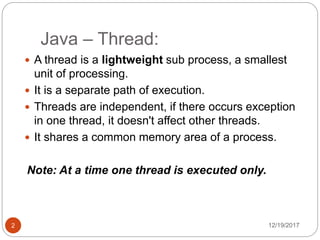
 A thread is a lightweight sub process, a smallest
unit of processing.
 It is a separate path of execution.
 Threads are independent, if there occurs exception
in one thread, it doesn't affect other threads.
 It shares a common memory area of a process.
Note: At a time one thread is executed only.
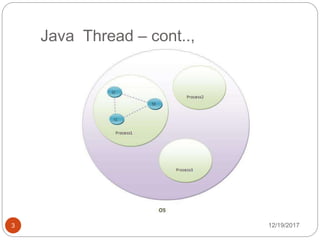
Java Thread – cont..,
12/19/20173
Life cycle of a Thread:
12/19/20174
 A thread can be in one of the five states.
 The life cycle of the thread in java is controlled by
JVM. The java thread states are as follows:
New
Runnable
Running
Non-Runnable (Blocked)
Terminated
Life cycle of a Thread:
12/19/20175
States of a Thread:
12/19/20176
1) New: The thread is in new state if you create an
instance of Thread class but before the invocation of start()
method.
2) Runnable: The thread is in runnable state after
invocation of start() method, but the thread scheduler has
not selected it to be the running thread.
3) Running: The thread is in running state if the thread
scheduler has selected it.
4) Non-Runnable (Blocked): This is the state when the
thread is still alive, but is currently not eligible to run.
5) Terminated: A thread is in terminated or dead state
when its run() method exits.
Creating thread:
12/19/20177
There are two ways to create a thread:
 By extending Thread class
 By implementing Runnable interface.
Thread class:
12/19/20178
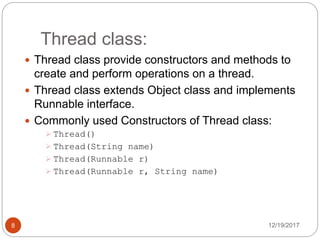
 Thread class provide constructors and methods to
create and perform operations on a thread.
 Thread class extends Object class and implements
Runnable interface.
 Commonly used Constructors of Thread class:
 Thread()
 Thread(String name)
 Thread(Runnable r)
 Thread(Runnable r, String name)
Commonly used methods of
Thread class:
12/19/20179
 public void run(): is used to perform action for a
thread.
 public void start(): starts the execution of the
thread. JVM calls the run() method on the thread.
 public void sleep(long miliseconds): Causes
the currently executing thread to sleep (temporarily
cease execution) for the specified number of
milliseconds.
 public void join(): waits for a thread to die.
Starting a thread:
12/19/201710
start() method of Thread class is used to start a
newly created thread. It performs following tasks:
 A new thread starts.
 The thread moves from New state to the Runnable
state.
 When the thread gets a chance to execute, its
target run() method will run.
1)By extending Thread class:
12/19/201711
class Multi extends Thread{
public void run(){
System.out.println("Thread is running…");
}
public static void main(String args[]){
Multi t1=new Multi();
t1.start();
}
}
Output:
Thread is running….
2)By implementing the Runnable
interface:
12/19/201712
class Multi3 implements Runnable{
public void run(){
System.out.println("Thread is running...");
}
public static void main(String args[]){
Multi3 m1=new Multi3();
Thread t1 =new Thread(m1);
t1.start();
}
}
Output:
Thread is running….
Multithreading in Java
12/19/201713
 Multithreading in java is a process of executing
multiple threads simultaneously.
 Thread is basically a lightweight sub-process, a
smallest unit of processing.
 Multiprocessing and multithreading, both are used to
achieve multitasking.

Advantages of Java Multithreading
12/19/201714
 1) It doesn't block the user because threads are
independent and you can perform multiple operations
at same time.
 2) You can perform many operations together so it
saves time.
 3) Threads are independent so it doesn't affect other
threads if exception occur in a single thread.
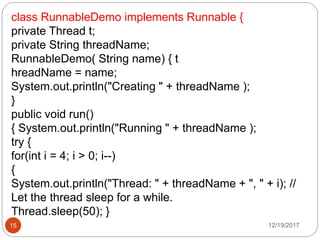
12/19/201715
class RunnableDemo implements Runnable {
private Thread t;
private String threadName;
RunnableDemo( String name) { t
hreadName = name;
System.out.println("Creating " + threadName );
}
public void run()
{ System.out.println("Running " + threadName );
try {
for(int i = 4; i > 0; i--)
{
System.out.println("Thread: " + threadName + ", " + i); //
Let the thread sleep for a while.
Thread.sleep(50); }
12/19/201716
catch (InterruptedException e)
{
System.out.println("Thread " + threadName + "
interrupted.");
}
System.out.println("Thread " + threadName + " exiting.");
}
public void start ()
{ System.out.println("Starting " + threadName );
if (t == null)
{
t = new Thread (this, threadName);
t.start (); } } }
12/19/201717
public class TestThread
{
public static void main(String args[])
{
RunnableDemo R1 = new RunnableDemo( "Thread-1");
R1.start(); RunnableDemo R2 = new RunnableDemo(
"Thread-2");
R2.start();
}
}
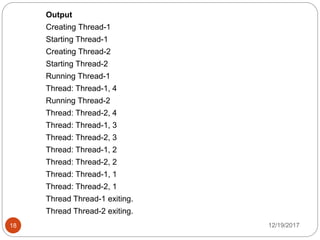
12/19/201718
Output
Creating Thread-1
Starting Thread-1
Creating Thread-2
Starting Thread-2
Running Thread-1
Thread: Thread-1, 4
Running Thread-2
Thread: Thread-2, 4
Thread: Thread-1, 3
Thread: Thread-2, 3
Thread: Thread-1, 2
Thread: Thread-2, 2
Thread: Thread-1, 1
Thread: Thread-2, 1
Thread Thread-1 exiting.
Thread Thread-2 exiting.
12/19/201719
12/19/201720
Thank You

Thread&multithread

  • 1.
    - Arulkumar V AssistantProfessor, SECE Thread
  • 2.
    Java – Thread: 12/19/20172 A thread is a lightweight sub process, a smallest unit of processing.  It is a separate path of execution.  Threads are independent, if there occurs exception in one thread, it doesn't affect other threads.  It shares a common memory area of a process. Note: At a time one thread is executed only.
  • 3.
    Java Thread –cont.., 12/19/20173
  • 4.
    Life cycle ofa Thread: 12/19/20174  A thread can be in one of the five states.  The life cycle of the thread in java is controlled by JVM. The java thread states are as follows: New Runnable Running Non-Runnable (Blocked) Terminated
  • 5.
    Life cycle ofa Thread: 12/19/20175
  • 6.
    States of aThread: 12/19/20176 1) New: The thread is in new state if you create an instance of Thread class but before the invocation of start() method. 2) Runnable: The thread is in runnable state after invocation of start() method, but the thread scheduler has not selected it to be the running thread. 3) Running: The thread is in running state if the thread scheduler has selected it. 4) Non-Runnable (Blocked): This is the state when the thread is still alive, but is currently not eligible to run. 5) Terminated: A thread is in terminated or dead state when its run() method exits.
  • 7.
    Creating thread: 12/19/20177 There aretwo ways to create a thread:  By extending Thread class  By implementing Runnable interface.
  • 8.
    Thread class: 12/19/20178  Threadclass provide constructors and methods to create and perform operations on a thread.  Thread class extends Object class and implements Runnable interface.  Commonly used Constructors of Thread class:  Thread()  Thread(String name)  Thread(Runnable r)  Thread(Runnable r, String name)
  • 9.
    Commonly used methodsof Thread class: 12/19/20179  public void run(): is used to perform action for a thread.  public void start(): starts the execution of the thread. JVM calls the run() method on the thread.  public void sleep(long miliseconds): Causes the currently executing thread to sleep (temporarily cease execution) for the specified number of milliseconds.  public void join(): waits for a thread to die.
  • 10.
    Starting a thread: 12/19/201710 start()method of Thread class is used to start a newly created thread. It performs following tasks:  A new thread starts.  The thread moves from New state to the Runnable state.  When the thread gets a chance to execute, its target run() method will run.
  • 11.
    1)By extending Threadclass: 12/19/201711 class Multi extends Thread{ public void run(){ System.out.println("Thread is running…"); } public static void main(String args[]){ Multi t1=new Multi(); t1.start(); } } Output: Thread is running….
  • 12.
    2)By implementing theRunnable interface: 12/19/201712 class Multi3 implements Runnable{ public void run(){ System.out.println("Thread is running..."); } public static void main(String args[]){ Multi3 m1=new Multi3(); Thread t1 =new Thread(m1); t1.start(); } } Output: Thread is running….
  • 13.
    Multithreading in Java 12/19/201713 Multithreading in java is a process of executing multiple threads simultaneously.  Thread is basically a lightweight sub-process, a smallest unit of processing.  Multiprocessing and multithreading, both are used to achieve multitasking. 
  • 14.
    Advantages of JavaMultithreading 12/19/201714  1) It doesn't block the user because threads are independent and you can perform multiple operations at same time.  2) You can perform many operations together so it saves time.  3) Threads are independent so it doesn't affect other threads if exception occur in a single thread.
  • 15.
    12/19/201715 class RunnableDemo implementsRunnable { private Thread t; private String threadName; RunnableDemo( String name) { t hreadName = name; System.out.println("Creating " + threadName ); } public void run() { System.out.println("Running " + threadName ); try { for(int i = 4; i > 0; i--) { System.out.println("Thread: " + threadName + ", " + i); // Let the thread sleep for a while. Thread.sleep(50); }
  • 16.
    12/19/201716 catch (InterruptedException e) { System.out.println("Thread" + threadName + " interrupted."); } System.out.println("Thread " + threadName + " exiting."); } public void start () { System.out.println("Starting " + threadName ); if (t == null) { t = new Thread (this, threadName); t.start (); } } }
  • 17.
    12/19/201717 public class TestThread { publicstatic void main(String args[]) { RunnableDemo R1 = new RunnableDemo( "Thread-1"); R1.start(); RunnableDemo R2 = new RunnableDemo( "Thread-2"); R2.start(); } }
  • 18.
    12/19/201718 Output Creating Thread-1 Starting Thread-1 CreatingThread-2 Starting Thread-2 Running Thread-1 Thread: Thread-1, 4 Running Thread-2 Thread: Thread-2, 4 Thread: Thread-1, 3 Thread: Thread-2, 3 Thread: Thread-1, 2 Thread: Thread-2, 2 Thread: Thread-1, 1 Thread: Thread-2, 1 Thread Thread-1 exiting. Thread Thread-2 exiting.
  • 19.
  • 20.