Mobile Applications
Chapter 2
BY
MR. A. B. MOMIN
ASSISTANT PROFESSOR
DEPARTMENT OF COMPUTER SCIENCE & ENGINEERING
ATS’S, SANJAY BHOKARE GROUP OF INSTITUTES, MIRAJ
WAP
Mobile Applications Mr. A. B. Momin, Assistant Professor, Department of CSE
➢Wireless Application Protocol (WAP)
- Application Layer Networks
- Allows the transportation of information between a device
and the Internet
- WAP has two main versions: 1.1, released in 1998, and 2.0,
released in 2002
WAP Key Points
Mobile Applications Mr. A. B. Momin, Assistant Professor, Department of CSE
- General Packet Radio Service (GPRS)
- Wireless Mark-up Language (WML) — an XML
- WAP browsers
- WAP Sites
WAP Push
Mobile Applications Mr. A. B. Momin, Assistant Professor, Department of CSE
- Allows content to be pushed to a mobile devices at any
time.
- A WAP Push is generally an SMS (Short Message Service)
message to a special port with a URL to content or a
website.
- Modern smartphone platforms support Push messages using
an operating system layer that is out of the scope of carriers,
working through TCP protocols.
Fragmentation
Mobile Applications Mr. A. B. Momin, Assistant Professor, Department of CSE
- Fragmentation in this context refers to how the market is
“fragmented” in pieces supporting different interfaces,
hardware, operating systems, and abilities offered to
developers.
Display
Mobile Applications Mr. A. B. Momin, Assistant Professor, Department of CSE
- Resolutions
How many pixels (width and height) are available on a given device?
- Aspect ratio
To solve the problem of having different-resolution devices in the same device category,
some mobile browsers support a feature called device pixel ratio.
- Pixel density ratio
A device’s aspect ratio is the ratio between its longer and shorter dimensions.
vertical (or portrait) and horizontal (or landscape) ratio
Input Methods
Mobile Applications Mr. A. B. Momin, Assistant Professor, Department of CSE
• Numeric keypad
• Alphanumeric keypad (ABC or QWERTY)
• Virtual keypad on screen
• Touch
• Multitouch
• External keypad (wireless or not)
• Handwriting recognition
• Voice recognition
Features
Mobile Applications Mr. A. B. Momin, Assistant Professor, Department of CSE
• Geolocation
Many devices can detect the user’s geographical location using one or many technologies,
like GPS (Global Positioning System), A-GPS (Assisted GPS), WPS (Wi-Fi Positioning System), or
cell-based location tracking.
• Phone calls
Yes, mobile devices also make phone calls!
• Accelerometer
An accelerometer is a sensor that measures proper acceleration in three axes— x, y, and z—
and can be used for games and orientation purposes.
• Gyroscope
A gyroscope is a sensor that measures orientation based on the principles of angular
momentum. It can be used in conjunction with the accelerometer.
• Magnetometer
A magnetometer is a sensor that measures the direction of magnetic fields and can be used
as a digital compass.
• Application installation
Many devices allow the user to download and install applications over the air (OTA).
This means that we can serve applications to a device from our websites.
Browsers and Web Platforms
Mobile Applications Mr. A. B. Momin, Assistant Professor, Department of CSE
• Google Chrome, Internet Explorer, Firefox, Safari, and Opera.
• more than 5,000 devices on the market.
• All mobile devices come with one preinstalled mobile
browser.
• Many web developers curse desktop browsers and
compatibility issues between them.
Browsers and Web Platforms
Mobile Applications Mr. A. B. Momin, Assistant Professor, Department of CSE
• Platforms that aren’t browsers.
• HTML5 Web Apps:
• Support HTML5 language.
• It’s full screen web app.
• Don’t need to compile and sign anything for publish.
• iOS Web Apps:
• Upgrade a mobile website to a full-screen HTML5 app
• It support full-screen experience based browsers.
• Use series of meta tags and technique using HTML5
Browsers and Web Platforms
Mobile Applications Mr. A. B. Momin, Assistant Professor, Department of CSE
• Chrome Apps:
• Started with the idea of HTML5 apps on the desktop and
notebook Side.
• Available on Windows, Mac, Linux, Android and Chrome
OS etc.
• Chrome apps are also known as packaged apps.
• Firefox open web apps:
• Supports on all of its platforms—desktops, tablets, and
smartphones.
• Every application is based on HTML5.
Browsers and Web Platforms
Mobile Applications Mr. A. B. Momin, Assistant Professor, Department of CSE
• S40 web apps:
• Nokia provides a web app platform for its mid-range
device series, called Series 40.
• Platform allows us to create cloud-based apps with web
technologies that can be distributed (and sold) through
the Nokia Store.
• Samsung web API:
• Samsung released an SDK to create web apps for
smartphones and smart TVs using web technologies and a
JavaScript API.
• Writing it’s compatible with devices such as the Galaxy SIII
and Galaxy Note II.
Web View
Mobile Applications Mr. A. B. Momin, Assistant Professor, Department of CSE
• A native application is compiled and signed using official
SDKs.
• Non web programming languages, such as C, Objective-C,
Java, or C#.
• “Almost every native mobile platform includes a control or
component that allows web content to be embedded inside
a native application, this type of component is called as
Web View.”
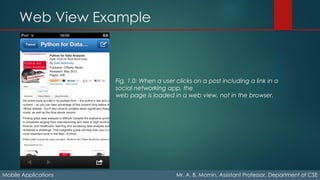
Examples of web views in action include most social networking applications for
smartphones and tablets. When you find a post or tweet with a link to the Web, these
applications open a web view for you to see this web page inside the social app, not in
the browser.
Web View Example
Mobile Applications Mr. A. B. Momin, Assistant Professor, Department of CSE
Fig. 1.0: When a user clicks on a post including a link in a
social networking app, the
web page is loaded in a web view, not in the browser.
Native Web, Packaged and Hybrids Apps
Mobile Applications Mr. A. B. Momin, Assistant Professor, Department of CSE
• A native web application is a compiled native application
that usually uses a full-screen web view as the whole
application container.
• The whole application is developed using web technologies
(HTML, CSS, JavaScript).
• It is packaged and compiled as a native application.
• After compilation of native application using any SDK is
called as packaged app.
• Combination of native and packaged is called as Hybrid
app.
Tools for Mobile Web Development
Mobile Applications Mr. A. B. Momin, Assistant Professor, Department of CSE
• Adobe Dreamweaver:
• Useful for website designing.
• It’s support HTML5
• Multiple screen previews
• jQuery Mobile Integration
• PhoneGap Build Integration
• Provides professional web templates
• Provides professional web controls
Tools for Mobile Web Development
Mobile Applications Mr. A. B. Momin, Assistant Professor, Department of CSE
• Adobe Edge:
Adobe offers a group of tools under the name of Edge that
help designers and developers to create HTML5 app.
• Edge Code
A complete HTML5 editor based on web technologies. This tool is based on the
open source editor Brackets and it includes several interesting ideas on how to
code HTML, CSS, and JavaScript quickly and easily.
• Edge Reflow
A tool that helps designers to create responsive web design solutions.
• Edge Inspect
A tool for mobile HTML5 testing.
• Edge Animate
A tool to design HTML5 animations visually.
Tools for Mobile Web Development
Mobile Applications Mr. A. B. Momin, Assistant Professor, Department of CSE
• Microsoft Visual Studio and WebMatrix:
Microsoft IDEs have supported HTML5 syntax and IntelliSense
since version 2010 SP1.
WebMatrix has supported mobile websites since version 2:
• Use WebMatrix for mobile web development; it’s
available for free.
• Mobile-friendly templates
• Connection with the Windows Phone emulator and iOS
simulation through partners, such as Electrium Plumb
• Code completion for HTML5 and the jQuery Mobile UI
framework
Tools for Mobile Web Development
Mobile Applications Mr. A. B. Momin, Assistant Professor, Department of CSE
• Eclipse:
• It’s support various plugins for HTML5 app development.
• Aptana from Titanium
• Responsive site from Bootstrap, Materialized etc.
• Android SDK plugins from Google Android SDK
Tools for Mobile Web Development
Mobile Applications Mr. A. B. Momin, Assistant Professor, Department of CSE
• Native Web IDE’s:
• Nokia Web Tools
For testing and compilation of S40 web apps. A legacy 1.2 version
that will help with the legacy WRT Symbian format is still available.
• Tizen IDE
For the creation of Tizen apps based on HTML5.
• Intel XDK
A nonofficial for creating tool for creating Apache Cordova HTML5
native apps.
• Titanium Studio
An Eclipse plug-in to create Appcelerator Titanium JavaScript
mobile apps.
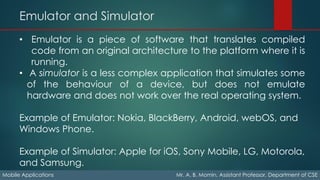
Emulator and Simulator
Mobile Applications Mr. A. B. Momin, Assistant Professor, Department of CSE
• Emulator is a piece of software that translates compiled
code from an original architecture to the platform where it is
running.
• A simulator is a less complex application that simulates some
of the behaviour of a device, but does not emulate
hardware and does not work over the real operating system.
Example of Emulator: Nokia, BlackBerry, Android, webOS, and
Windows Phone.
Example of Simulator: Apple for iOS, Sony Mobile, LG, Motorola,
and Samsung.
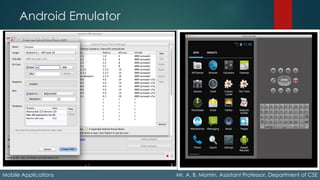
Android Emulator
Mobile Applications Mr. A. B. Momin, Assistant Professor, Department of CSE
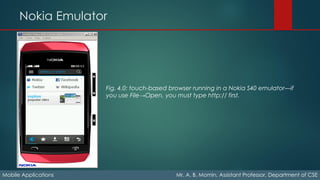
Nokia Emulator
Mobile Applications Mr. A. B. Momin, Assistant Professor, Department of CSE
Fig. 4.0: touch-based browser running in a Nokia S40 emulator—if
you use File→Open, you must type http:// first.
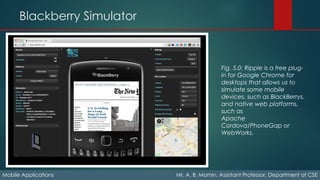
Blackberry Simulator
Mobile Applications Mr. A. B. Momin, Assistant Professor, Department of CSE
Fig. 5.0: Ripple is a free plug-
in for Google Chrome for
desktops that allows us to
simulate some mobile
devices, such as BlackBerrys,
and native web platforms,
such as
Apache
Cordova/PhoneGap or
WebWorks.
Opera Mini Simulator
Mobile Applications Mr. A. B. Momin, Assistant Professor, Department of CSE
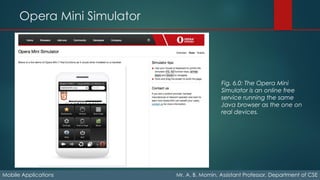
Fig. 6.0: The Opera Mini
Simulator is an online free
service running the same
Java browser as the one on
real devices.

Mobile applications chapter 2

  • 1.
    Mobile Applications Chapter 2 BY MR.A. B. MOMIN ASSISTANT PROFESSOR DEPARTMENT OF COMPUTER SCIENCE & ENGINEERING ATS’S, SANJAY BHOKARE GROUP OF INSTITUTES, MIRAJ
  • 2.
    WAP Mobile Applications Mr.A. B. Momin, Assistant Professor, Department of CSE ➢Wireless Application Protocol (WAP) - Application Layer Networks - Allows the transportation of information between a device and the Internet - WAP has two main versions: 1.1, released in 1998, and 2.0, released in 2002
  • 3.
    WAP Key Points MobileApplications Mr. A. B. Momin, Assistant Professor, Department of CSE - General Packet Radio Service (GPRS) - Wireless Mark-up Language (WML) — an XML - WAP browsers - WAP Sites
  • 4.
    WAP Push Mobile ApplicationsMr. A. B. Momin, Assistant Professor, Department of CSE - Allows content to be pushed to a mobile devices at any time. - A WAP Push is generally an SMS (Short Message Service) message to a special port with a URL to content or a website. - Modern smartphone platforms support Push messages using an operating system layer that is out of the scope of carriers, working through TCP protocols.
  • 5.
    Fragmentation Mobile Applications Mr.A. B. Momin, Assistant Professor, Department of CSE - Fragmentation in this context refers to how the market is “fragmented” in pieces supporting different interfaces, hardware, operating systems, and abilities offered to developers.
  • 6.
    Display Mobile Applications Mr.A. B. Momin, Assistant Professor, Department of CSE - Resolutions How many pixels (width and height) are available on a given device? - Aspect ratio To solve the problem of having different-resolution devices in the same device category, some mobile browsers support a feature called device pixel ratio. - Pixel density ratio A device’s aspect ratio is the ratio between its longer and shorter dimensions. vertical (or portrait) and horizontal (or landscape) ratio
  • 7.
    Input Methods Mobile ApplicationsMr. A. B. Momin, Assistant Professor, Department of CSE • Numeric keypad • Alphanumeric keypad (ABC or QWERTY) • Virtual keypad on screen • Touch • Multitouch • External keypad (wireless or not) • Handwriting recognition • Voice recognition
  • 8.
    Features Mobile Applications Mr.A. B. Momin, Assistant Professor, Department of CSE • Geolocation Many devices can detect the user’s geographical location using one or many technologies, like GPS (Global Positioning System), A-GPS (Assisted GPS), WPS (Wi-Fi Positioning System), or cell-based location tracking. • Phone calls Yes, mobile devices also make phone calls! • Accelerometer An accelerometer is a sensor that measures proper acceleration in three axes— x, y, and z— and can be used for games and orientation purposes. • Gyroscope A gyroscope is a sensor that measures orientation based on the principles of angular momentum. It can be used in conjunction with the accelerometer. • Magnetometer A magnetometer is a sensor that measures the direction of magnetic fields and can be used as a digital compass. • Application installation Many devices allow the user to download and install applications over the air (OTA). This means that we can serve applications to a device from our websites.
  • 9.
    Browsers and WebPlatforms Mobile Applications Mr. A. B. Momin, Assistant Professor, Department of CSE • Google Chrome, Internet Explorer, Firefox, Safari, and Opera. • more than 5,000 devices on the market. • All mobile devices come with one preinstalled mobile browser. • Many web developers curse desktop browsers and compatibility issues between them.
  • 10.
    Browsers and WebPlatforms Mobile Applications Mr. A. B. Momin, Assistant Professor, Department of CSE • Platforms that aren’t browsers. • HTML5 Web Apps: • Support HTML5 language. • It’s full screen web app. • Don’t need to compile and sign anything for publish. • iOS Web Apps: • Upgrade a mobile website to a full-screen HTML5 app • It support full-screen experience based browsers. • Use series of meta tags and technique using HTML5
  • 11.
    Browsers and WebPlatforms Mobile Applications Mr. A. B. Momin, Assistant Professor, Department of CSE • Chrome Apps: • Started with the idea of HTML5 apps on the desktop and notebook Side. • Available on Windows, Mac, Linux, Android and Chrome OS etc. • Chrome apps are also known as packaged apps. • Firefox open web apps: • Supports on all of its platforms—desktops, tablets, and smartphones. • Every application is based on HTML5.
  • 12.
    Browsers and WebPlatforms Mobile Applications Mr. A. B. Momin, Assistant Professor, Department of CSE • S40 web apps: • Nokia provides a web app platform for its mid-range device series, called Series 40. • Platform allows us to create cloud-based apps with web technologies that can be distributed (and sold) through the Nokia Store. • Samsung web API: • Samsung released an SDK to create web apps for smartphones and smart TVs using web technologies and a JavaScript API. • Writing it’s compatible with devices such as the Galaxy SIII and Galaxy Note II.
  • 13.
    Web View Mobile ApplicationsMr. A. B. Momin, Assistant Professor, Department of CSE • A native application is compiled and signed using official SDKs. • Non web programming languages, such as C, Objective-C, Java, or C#. • “Almost every native mobile platform includes a control or component that allows web content to be embedded inside a native application, this type of component is called as Web View.” Examples of web views in action include most social networking applications for smartphones and tablets. When you find a post or tweet with a link to the Web, these applications open a web view for you to see this web page inside the social app, not in the browser.
  • 14.
    Web View Example MobileApplications Mr. A. B. Momin, Assistant Professor, Department of CSE Fig. 1.0: When a user clicks on a post including a link in a social networking app, the web page is loaded in a web view, not in the browser.
  • 15.
    Native Web, Packagedand Hybrids Apps Mobile Applications Mr. A. B. Momin, Assistant Professor, Department of CSE • A native web application is a compiled native application that usually uses a full-screen web view as the whole application container. • The whole application is developed using web technologies (HTML, CSS, JavaScript). • It is packaged and compiled as a native application. • After compilation of native application using any SDK is called as packaged app. • Combination of native and packaged is called as Hybrid app.
  • 16.
    Tools for MobileWeb Development Mobile Applications Mr. A. B. Momin, Assistant Professor, Department of CSE • Adobe Dreamweaver: • Useful for website designing. • It’s support HTML5 • Multiple screen previews • jQuery Mobile Integration • PhoneGap Build Integration • Provides professional web templates • Provides professional web controls
  • 17.
    Tools for MobileWeb Development Mobile Applications Mr. A. B. Momin, Assistant Professor, Department of CSE • Adobe Edge: Adobe offers a group of tools under the name of Edge that help designers and developers to create HTML5 app. • Edge Code A complete HTML5 editor based on web technologies. This tool is based on the open source editor Brackets and it includes several interesting ideas on how to code HTML, CSS, and JavaScript quickly and easily. • Edge Reflow A tool that helps designers to create responsive web design solutions. • Edge Inspect A tool for mobile HTML5 testing. • Edge Animate A tool to design HTML5 animations visually.
  • 18.
    Tools for MobileWeb Development Mobile Applications Mr. A. B. Momin, Assistant Professor, Department of CSE • Microsoft Visual Studio and WebMatrix: Microsoft IDEs have supported HTML5 syntax and IntelliSense since version 2010 SP1. WebMatrix has supported mobile websites since version 2: • Use WebMatrix for mobile web development; it’s available for free. • Mobile-friendly templates • Connection with the Windows Phone emulator and iOS simulation through partners, such as Electrium Plumb • Code completion for HTML5 and the jQuery Mobile UI framework
  • 19.
    Tools for MobileWeb Development Mobile Applications Mr. A. B. Momin, Assistant Professor, Department of CSE • Eclipse: • It’s support various plugins for HTML5 app development. • Aptana from Titanium • Responsive site from Bootstrap, Materialized etc. • Android SDK plugins from Google Android SDK
  • 20.
    Tools for MobileWeb Development Mobile Applications Mr. A. B. Momin, Assistant Professor, Department of CSE • Native Web IDE’s: • Nokia Web Tools For testing and compilation of S40 web apps. A legacy 1.2 version that will help with the legacy WRT Symbian format is still available. • Tizen IDE For the creation of Tizen apps based on HTML5. • Intel XDK A nonofficial for creating tool for creating Apache Cordova HTML5 native apps. • Titanium Studio An Eclipse plug-in to create Appcelerator Titanium JavaScript mobile apps.
  • 21.
    Emulator and Simulator MobileApplications Mr. A. B. Momin, Assistant Professor, Department of CSE • Emulator is a piece of software that translates compiled code from an original architecture to the platform where it is running. • A simulator is a less complex application that simulates some of the behaviour of a device, but does not emulate hardware and does not work over the real operating system. Example of Emulator: Nokia, BlackBerry, Android, webOS, and Windows Phone. Example of Simulator: Apple for iOS, Sony Mobile, LG, Motorola, and Samsung.
  • 22.
    Android Emulator Mobile ApplicationsMr. A. B. Momin, Assistant Professor, Department of CSE
  • 23.
    Nokia Emulator Mobile ApplicationsMr. A. B. Momin, Assistant Professor, Department of CSE Fig. 4.0: touch-based browser running in a Nokia S40 emulator—if you use File→Open, you must type http:// first.
  • 24.
    Blackberry Simulator Mobile ApplicationsMr. A. B. Momin, Assistant Professor, Department of CSE Fig. 5.0: Ripple is a free plug- in for Google Chrome for desktops that allows us to simulate some mobile devices, such as BlackBerrys, and native web platforms, such as Apache Cordova/PhoneGap or WebWorks.
  • 25.
    Opera Mini Simulator MobileApplications Mr. A. B. Momin, Assistant Professor, Department of CSE Fig. 6.0: The Opera Mini Simulator is an online free service running the same Java browser as the one on real devices.