Sayed Ahmed
BSc. Eng. In Computer Sc. and Eng. (BUET), Bangladesh
MSc., Computer Science, Canada
President/Chief Architect/Lead Developer
Justetc (Just et cetera) Technologies
http://www.justetc.net
http://sayed.justetc.net
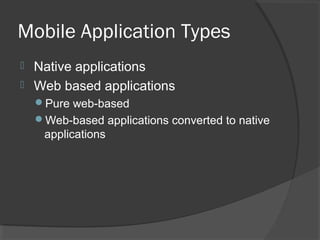
Mobile Application Types
 Native applications
 Web based applications
Pure web-based
Web-based applications converted to native
applications
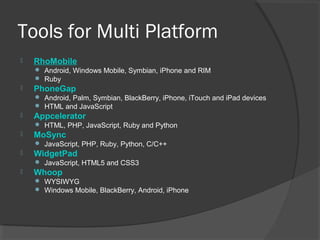
Tools for Multi Platform
 RhoMobile
 Android, Windows Mobile, Symbian, iPhone and RIM
 Ruby
 PhoneGap
 Android, Palm, Symbian, BlackBerry, iPhone, iTouch and iPad devices
 HTML and JavaScript
 Appcelerator
 HTML, PHP, JavaScript, Ruby and Python
 MoSync
 JavaScript, PHP, Ruby, Python, C/C++
 WidgetPad
 JavaScript, HTML5 and CSS3
 Whoop
 WYSIWYG
 Windows Mobile, BlackBerry, Android, iPhone
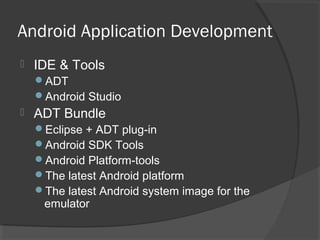
Android Application Development
 IDE & Tools
ADT
Android Studio
 ADT Bundle
Eclipse + ADT plug-in
Android SDK Tools
Android Platform-tools
The latest Android platform
The latest Android system image for the
emulator
ADT Bundle
 Full Java IDE
 Graphical UI Builders
 On-device Developer Options
 Develop on Hardware Devices
 Powerful Debugging
 Testing
 Native Development
 Develop on Virtual Devices
Android Studio
 Android Studio
Grade-based build support
Android-specific refactoring and quick fixes
Lint tools to catch performance, usability,
version compatibility and other problems
ProGuard and app-signing capabilities
Template-based wizards to create common
Android designs and components
A rich layout editor that allows you
○ to drag-and-drop UI components, preview layouts
on multiple screen configurations
Additional Tools
 When developing in IDEs or editors
other than Eclipse, be familiar with all of
the tools below
android Create and update Android projects
and create, move, and delete AVDs.
Android Emulator Run your Android
applications on an emulated Android
platform.
Android Debug Bridge Interface with your
emulator or connected device (install apps,
shell the device, issue commands, etc.).
Additional Tools
 Additional tools
Ant:
○ To compile and build your Android project into an
installable .apk file
Keytool:
○ To generate a keystore and private key, used to
sign your .apk file. Keytool is part of the JDK
Jarsigner (or similar signing tool):
○ To sign your .apk file with a private key generated
by Keytool. Jarsigner is part of the JDK
Developing in IntelliJ IDEA
 IntelliJ IDEA
is a powerful Java IDE from JetBrains that
provides full-cycle Android development support
in both the free Community Edition and the
Ultimate edition
 The IDE
ensures compatibility with the latest Android
SDK and offers a smart code editor with
completion, quick navigation between code and
resources, a graphical debugger, unit testing
support using Android Testing Framework, and
the ability to run applications in either the
emulator or a USB-connected device
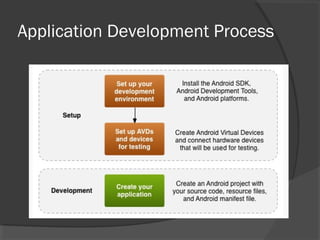
Application Development Process
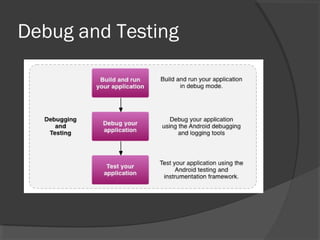
Debug and Testing
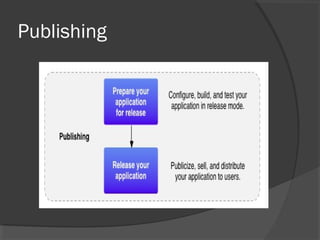
Publishing
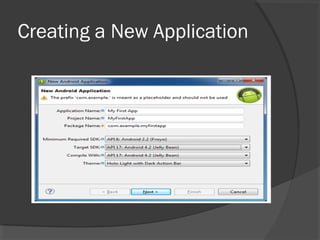
Creating a New Application
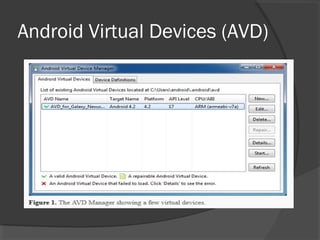
Android Virtual Devices (AVD)
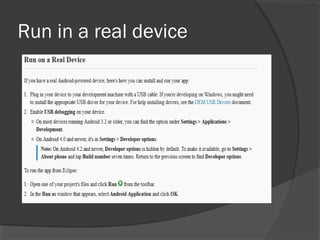
Run in a real device
References And Resources
 Java Download:
http://www.java.com/en/download/manual.js
p
http://mobiledevices.about.com/od/mobileap
pbasics/tp/Top-5-Tools-Multi-Platform-
Mobile-App-Development.htm
http://developer.android.com/
References And Resources
 http://developer.android.com
 http://www.java.com/en/download/manu
al.jsp
 http://mobiledevices.about.com/od/mobil
eappbasics/tp/Top-5-Tools-Multi-
Platform-Mobile-App-Development.htm

Mobile development

  • 1.
    Sayed Ahmed BSc. Eng.In Computer Sc. and Eng. (BUET), Bangladesh MSc., Computer Science, Canada President/Chief Architect/Lead Developer Justetc (Just et cetera) Technologies http://www.justetc.net http://sayed.justetc.net
  • 2.
    Mobile Application Types Native applications  Web based applications Pure web-based Web-based applications converted to native applications
  • 3.
    Tools for MultiPlatform  RhoMobile  Android, Windows Mobile, Symbian, iPhone and RIM  Ruby  PhoneGap  Android, Palm, Symbian, BlackBerry, iPhone, iTouch and iPad devices  HTML and JavaScript  Appcelerator  HTML, PHP, JavaScript, Ruby and Python  MoSync  JavaScript, PHP, Ruby, Python, C/C++  WidgetPad  JavaScript, HTML5 and CSS3  Whoop  WYSIWYG  Windows Mobile, BlackBerry, Android, iPhone
  • 4.
    Android Application Development IDE & Tools ADT Android Studio  ADT Bundle Eclipse + ADT plug-in Android SDK Tools Android Platform-tools The latest Android platform The latest Android system image for the emulator
  • 5.
    ADT Bundle  FullJava IDE  Graphical UI Builders  On-device Developer Options  Develop on Hardware Devices  Powerful Debugging  Testing  Native Development  Develop on Virtual Devices
  • 6.
    Android Studio  AndroidStudio Grade-based build support Android-specific refactoring and quick fixes Lint tools to catch performance, usability, version compatibility and other problems ProGuard and app-signing capabilities Template-based wizards to create common Android designs and components A rich layout editor that allows you ○ to drag-and-drop UI components, preview layouts on multiple screen configurations
  • 7.
    Additional Tools  Whendeveloping in IDEs or editors other than Eclipse, be familiar with all of the tools below android Create and update Android projects and create, move, and delete AVDs. Android Emulator Run your Android applications on an emulated Android platform. Android Debug Bridge Interface with your emulator or connected device (install apps, shell the device, issue commands, etc.).
  • 8.
    Additional Tools  Additionaltools Ant: ○ To compile and build your Android project into an installable .apk file Keytool: ○ To generate a keystore and private key, used to sign your .apk file. Keytool is part of the JDK Jarsigner (or similar signing tool): ○ To sign your .apk file with a private key generated by Keytool. Jarsigner is part of the JDK
  • 9.
    Developing in IntelliJIDEA  IntelliJ IDEA is a powerful Java IDE from JetBrains that provides full-cycle Android development support in both the free Community Edition and the Ultimate edition  The IDE ensures compatibility with the latest Android SDK and offers a smart code editor with completion, quick navigation between code and resources, a graphical debugger, unit testing support using Android Testing Framework, and the ability to run applications in either the emulator or a USB-connected device
  • 10.
  • 11.
  • 12.
  • 13.
    Creating a NewApplication
  • 14.
  • 15.
    Run in areal device
  • 16.
    References And Resources Java Download: http://www.java.com/en/download/manual.js p http://mobiledevices.about.com/od/mobileap pbasics/tp/Top-5-Tools-Multi-Platform- Mobile-App-Development.htm http://developer.android.com/
  • 17.
    References And Resources http://developer.android.com  http://www.java.com/en/download/manu al.jsp  http://mobiledevices.about.com/od/mobil eappbasics/tp/Top-5-Tools-Multi- Platform-Mobile-App-Development.htm