- Md. Mizanur Rahman Sarker
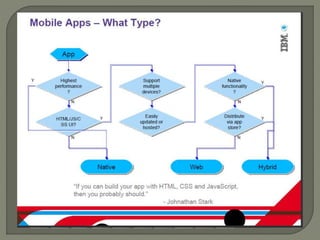
Mobile Web Application
Native Application
Hybrid Application
Written using web technologies
All content will be loaded using browser
HTML5, CSS
Familiar web-based programming
Quick and easy development iteration
Easy application update/re-branding
• Change web server content
Easy distribution
• Does not need to be packaged or distribution via
app store
Installation is optional
Potentially the widest range of device
support
No native look/feel
Slower than native apps
• App loaded over network and run in browser
• App Cache speeds up
• Some device have hardware acceleration for
CSS, faster Javascript engine
Binary executable explicitly installed on the
device
Specific application for each device
Distribution through app stores or markets
Write to device-specific SDK API
• iOS: Objective C/XCOde
• Android: Java/Eclipse
• Blackbery: Java/Eclipse
Highest performance
Native UI and behavior (look/feel)
Can use any capabilities that the device
API supports
Launched from icon on home screen
Must write app for each device supported
Write to device-specific SDK API
• IOS: Objective C/XCOde
• Android: Java/Eclipse
• Blackbery: Java/Eclipse
Most costly development model (dev+
maintenance)
 2-3X dev cost + multiple platforms
Specific skills needed for development
 Best from Web and Native Apps
 App written using Web technologies
• HTML5+CSS3+Javascript
 Open web standards
 Wrapped as a native app that runs inside a
web container(i.e. Web kit)
 Full access to native functions from
JavaScript
• accelerometer, network, media, contacts
 Web code is the same across multiple
platforms
Android 4 and later (4.4 provides the best
developer experience)
IOS 6 and IOS 7
Windows 8 (Windows Store)
Windows Phone 8
To get the Multi-Device Hybrid Apps
extension, go to
the http://msdn.microsoft.com/en-
us/vstudio/dn722381.aspx.
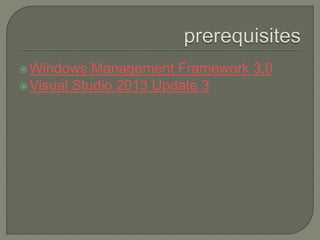
Windows Management Framework 3.0
Visual Studio 2013 Update 3
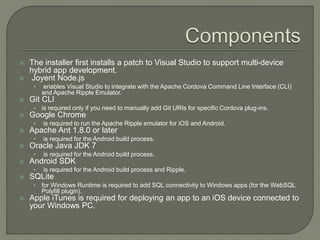
 The installer first installs a patch to Visual Studio to support multi-device
hybrid app development.
 Joyent Node.js
• enables Visual Studio to integrate with the Apache Cordova Command Line Interface (CLI)
and Apache Ripple Emulator.
 Git CLI
• is required only if you need to manually add Git URIs for specific Cordova plug-ins.
 Google Chrome
• is required to run the Apache Ripple emulator for iOS and Android.
 Apache Ant 1.8.0 or later
• is required for the Android build process.
 Oracle Java JDK 7
• is required for the Android build process.
 Android SDK
• is required for the Android build process and Ripple.
 SQLite
• for Windows Runtime is required to add SQL connectivity to Windows apps (for the WebSQL
Polyfill plugin).
 Apple iTunes is required for deploying an app to an iOS device connected to
your Windows PC.
 css contains basic CSS style sheets that are included with the blank
template.
 images is the suggested location for images for your app.
 merges is used to add platform-specific code. For more information,
 By default, the Blank App template includes commonly used
platform-specific code for Windows and Android devices in
the merges folder. (platformOverrides.js us used to specify the
platform file.)
• For Android devices, a .js file is included to provide support for the
JavaScript Function.prototype.bind() function on Android 2.3 devices.
• For Windows, a winstore-jscompat.js file is included to enable support for a variety
of JavaScript libraries.
 res is used for platform-specific visual assets (icons and splash
screens) and signing certificates.
 script is the default location for all JavaScript or TypeScript files.
A config.xml file included in each project
provides most of your app configuration
such as the app's display name and start
page.
Visual Studio also provides two other ways
to configure your app to support platform-
specific content:
Platform-specific visual assets
Platform-specific content
Platform-specific visual assets
• You can use the res folder in your project to
specify visual assets such as icons and splash
screens based on device resolution and platform.
resiconsplatform contains the app icons
for each platform.
resscreensplatform contains splash
screens for each platform.
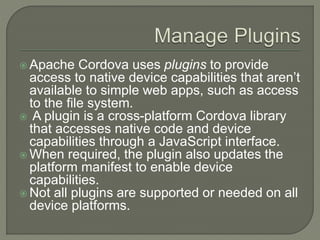
 Apache Cordova uses plugins to provide
access to native device capabilities that aren’t
available to simple web apps, such as access
to the file system.
 A plugin is a cross-platform Cordova library
that accesses native code and device
capabilities through a JavaScript interface.
 When required, the plugin also updates the
platform manifest to enable device
capabilities.
 Not all plugins are supported or needed on all
device platforms.
In Solution Explorer, open the shortcut
menu for the config.xml file, and then
choose Open or View Designer.
In the configuration designer, choose
the Plugins tab.
Select the plugins that you want to enable
in your app. (See the List of available
plugins.)
There are many options for running your
multi-device hybrid apps on Android. From
Visual Studio, you can run and debug
Android apps on the following emulators
and devices:
Apache Ripple emulator (discussed in a
separate article)
Android emulator
Genymotion emulator
Android device
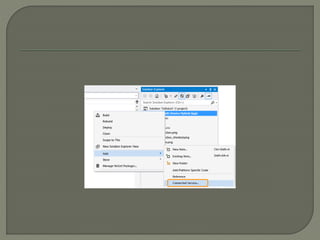
 The Visual Studio Services Manager for
connected services lets you integrate
Microsoft services like Azure Mobile Services,
Office 365, and other services into your multi-
device hybrid apps. The manager makes it
easy to add services without leaving Visual
Studio.
 In this article:
 Opening Service Manager
 Adding Azure Mobile Services
 Adding Office 365 services
Apache Cordova is a set of device APIs
that allow a mobile app developer to
access native device function such as the
camera or accelerometer from JavaScript.
Free and open source, Ionic offers a library
of mobile-optimized HTML, CSS and JS
components for building highly interactive
apps.
Speed is important. So important that you
only notice when it isn't there.
 Ionic is built to perform and behave great
on the latest mobile devices.
 With minimal DOM manipulation,
Zero jQuery,
Hardware accelerated transitions, one
thing is for sure: You'll be impressed.
A match made in heaven. Ionic
utilizes AngularJS in order to create a
framework most suited to develop rich and
robust applications. Ionic not only looks
nice, but its core architecture is for serious
app development, and AngularJS ties in
perfectly.
Ionic is modeled on popular native mobile
development SDKs, making it easy to
understand for anyone that has built a
native app for iOS or Android.
 Just drop it in your code to get going, and
push through PhoneGap when it's
ready. Develop once, deploy everywhere.
Clean, simple, and functional. Ionic has
been designed to work and display
beautifully on all current mobile devices.
With tons of popular mobile components,
typography, interactive paradigms, and a
gorgeous (yet extensible) base theme,
you'll wonder how you lived without it.
Reusable and customizable front-end UI elements
 Header
 Content
 Footer
 Buttons
 List
 Cards
 Forms
 Toggle
 Checkbox
 Radio Buttons
 Range
 Select
 Tabs
 Grid
 Utility
Ionic is both a CSS framework and a
Javascript UI library. Many components
need Javascript in order to produce magic,
though often components can easily be
used without coding through framework
extensions such as our AngularIonic
extensions.
http://ngCordova.com
ngCordova gives you simple AngularJS
wrappers for common Cordova plugins.
Created by the Ionic Framework team and
the community.
 ngCordova currently has support for the following plugins:
 org.apache.cordova.camera org.apache.cordova.console
org.apache.cordova.contacts org.apache.cordova.device
org.apache.cordova.device-motion
org.apache.cordova.device-orientation
org.apache.cordova.dialogs org.apache.cordova.file
org.apache.cordova.geolocation
org.apache.cordova.globalization
org.apache.cordova.network-information
org.apache.cordova.splashscreen
org.apache.cordova.statusbar org.apache.cordova.vibration
org.apache.cordova.battery-status
https://github.com/Paldom/PinDialog.git
 https://github.com/phonegap-build/PushPlugin.git
https://github.com/EddyVerbruggen/SocialSharing-PhoneGap-
Plugin.git https://github.com/Paldom/SpinnerDialog.git
https://github.com/brodysoft/Cordova-SQLitePlugin.git
https://github.com/EddyVerbruggen/Toast-PhoneGap-
Plugin.git https://github.com/phonegap-build/GAPlugin.git
https://github.com/driftyco/ionic-plugins-keyboard
https://github.com/wildabeast/BarcodeScanner
https://github.com/EddyVerbruggen/Flashlight-PhoneGap-
Plugin https://github.com/apache/cordova-plugin-media-
capture https://github.com/ohh2ahh/AppAvailability
https://github.com/dferrell/plugins-application-preferences
https://github.com/shazron/KeychainPlugin.git
https://github.com/katzer/cordova-plugin-printer
https://github.com/aharris88/phonegap-sms-plugin
Demo

Cross-Platform Development using Angulr JS in Visual Studio

  • 1.
    - Md. MizanurRahman Sarker
  • 3.
    Mobile Web Application NativeApplication Hybrid Application
  • 4.
    Written using webtechnologies All content will be loaded using browser HTML5, CSS
  • 5.
    Familiar web-based programming Quickand easy development iteration Easy application update/re-branding • Change web server content Easy distribution • Does not need to be packaged or distribution via app store Installation is optional Potentially the widest range of device support
  • 6.
    No native look/feel Slowerthan native apps • App loaded over network and run in browser • App Cache speeds up • Some device have hardware acceleration for CSS, faster Javascript engine
  • 7.
    Binary executable explicitlyinstalled on the device Specific application for each device Distribution through app stores or markets Write to device-specific SDK API • iOS: Objective C/XCOde • Android: Java/Eclipse • Blackbery: Java/Eclipse
  • 8.
    Highest performance Native UIand behavior (look/feel) Can use any capabilities that the device API supports Launched from icon on home screen
  • 9.
    Must write appfor each device supported Write to device-specific SDK API • IOS: Objective C/XCOde • Android: Java/Eclipse • Blackbery: Java/Eclipse Most costly development model (dev+ maintenance)  2-3X dev cost + multiple platforms Specific skills needed for development
  • 10.
     Best fromWeb and Native Apps  App written using Web technologies • HTML5+CSS3+Javascript  Open web standards  Wrapped as a native app that runs inside a web container(i.e. Web kit)  Full access to native functions from JavaScript • accelerometer, network, media, contacts  Web code is the same across multiple platforms
  • 13.
    Android 4 andlater (4.4 provides the best developer experience) IOS 6 and IOS 7 Windows 8 (Windows Store) Windows Phone 8
  • 14.
    To get theMulti-Device Hybrid Apps extension, go to the http://msdn.microsoft.com/en- us/vstudio/dn722381.aspx.
  • 15.
    Windows Management Framework3.0 Visual Studio 2013 Update 3
  • 16.
     The installerfirst installs a patch to Visual Studio to support multi-device hybrid app development.  Joyent Node.js • enables Visual Studio to integrate with the Apache Cordova Command Line Interface (CLI) and Apache Ripple Emulator.  Git CLI • is required only if you need to manually add Git URIs for specific Cordova plug-ins.  Google Chrome • is required to run the Apache Ripple emulator for iOS and Android.  Apache Ant 1.8.0 or later • is required for the Android build process.  Oracle Java JDK 7 • is required for the Android build process.  Android SDK • is required for the Android build process and Ripple.  SQLite • for Windows Runtime is required to add SQL connectivity to Windows apps (for the WebSQL Polyfill plugin).  Apple iTunes is required for deploying an app to an iOS device connected to your Windows PC.
  • 17.
     css containsbasic CSS style sheets that are included with the blank template.  images is the suggested location for images for your app.  merges is used to add platform-specific code. For more information,  By default, the Blank App template includes commonly used platform-specific code for Windows and Android devices in the merges folder. (platformOverrides.js us used to specify the platform file.) • For Android devices, a .js file is included to provide support for the JavaScript Function.prototype.bind() function on Android 2.3 devices. • For Windows, a winstore-jscompat.js file is included to enable support for a variety of JavaScript libraries.  res is used for platform-specific visual assets (icons and splash screens) and signing certificates.  script is the default location for all JavaScript or TypeScript files.
  • 18.
    A config.xml fileincluded in each project provides most of your app configuration such as the app's display name and start page.
  • 19.
    Visual Studio alsoprovides two other ways to configure your app to support platform- specific content: Platform-specific visual assets Platform-specific content
  • 20.
    Platform-specific visual assets •You can use the res folder in your project to specify visual assets such as icons and splash screens based on device resolution and platform. resiconsplatform contains the app icons for each platform. resscreensplatform contains splash screens for each platform.
  • 21.
     Apache Cordovauses plugins to provide access to native device capabilities that aren’t available to simple web apps, such as access to the file system.  A plugin is a cross-platform Cordova library that accesses native code and device capabilities through a JavaScript interface.  When required, the plugin also updates the platform manifest to enable device capabilities.  Not all plugins are supported or needed on all device platforms.
  • 22.
    In Solution Explorer,open the shortcut menu for the config.xml file, and then choose Open or View Designer. In the configuration designer, choose the Plugins tab. Select the plugins that you want to enable in your app. (See the List of available plugins.)
  • 23.
    There are manyoptions for running your multi-device hybrid apps on Android. From Visual Studio, you can run and debug Android apps on the following emulators and devices: Apache Ripple emulator (discussed in a separate article) Android emulator Genymotion emulator Android device
  • 24.
     The VisualStudio Services Manager for connected services lets you integrate Microsoft services like Azure Mobile Services, Office 365, and other services into your multi- device hybrid apps. The manager makes it easy to add services without leaving Visual Studio.  In this article:  Opening Service Manager  Adding Azure Mobile Services  Adding Office 365 services
  • 26.
    Apache Cordova isa set of device APIs that allow a mobile app developer to access native device function such as the camera or accelerometer from JavaScript.
  • 27.
    Free and opensource, Ionic offers a library of mobile-optimized HTML, CSS and JS components for building highly interactive apps.
  • 28.
    Speed is important.So important that you only notice when it isn't there.  Ionic is built to perform and behave great on the latest mobile devices.  With minimal DOM manipulation, Zero jQuery, Hardware accelerated transitions, one thing is for sure: You'll be impressed.
  • 29.
    A match madein heaven. Ionic utilizes AngularJS in order to create a framework most suited to develop rich and robust applications. Ionic not only looks nice, but its core architecture is for serious app development, and AngularJS ties in perfectly.
  • 30.
    Ionic is modeledon popular native mobile development SDKs, making it easy to understand for anyone that has built a native app for iOS or Android.  Just drop it in your code to get going, and push through PhoneGap when it's ready. Develop once, deploy everywhere.
  • 31.
    Clean, simple, andfunctional. Ionic has been designed to work and display beautifully on all current mobile devices. With tons of popular mobile components, typography, interactive paradigms, and a gorgeous (yet extensible) base theme, you'll wonder how you lived without it.
  • 32.
    Reusable and customizablefront-end UI elements  Header  Content  Footer  Buttons  List  Cards  Forms  Toggle  Checkbox  Radio Buttons  Range  Select  Tabs  Grid  Utility
  • 34.
    Ionic is botha CSS framework and a Javascript UI library. Many components need Javascript in order to produce magic, though often components can easily be used without coding through framework extensions such as our AngularIonic extensions.
  • 36.
    http://ngCordova.com ngCordova gives yousimple AngularJS wrappers for common Cordova plugins. Created by the Ionic Framework team and the community.
  • 37.
     ngCordova currentlyhas support for the following plugins:  org.apache.cordova.camera org.apache.cordova.console org.apache.cordova.contacts org.apache.cordova.device org.apache.cordova.device-motion org.apache.cordova.device-orientation org.apache.cordova.dialogs org.apache.cordova.file org.apache.cordova.geolocation org.apache.cordova.globalization org.apache.cordova.network-information org.apache.cordova.splashscreen org.apache.cordova.statusbar org.apache.cordova.vibration org.apache.cordova.battery-status https://github.com/Paldom/PinDialog.git
  • 38.
     https://github.com/phonegap-build/PushPlugin.git https://github.com/EddyVerbruggen/SocialSharing-PhoneGap- Plugin.git https://github.com/Paldom/SpinnerDialog.git https://github.com/brodysoft/Cordova-SQLitePlugin.git https://github.com/EddyVerbruggen/Toast-PhoneGap- Plugin.githttps://github.com/phonegap-build/GAPlugin.git https://github.com/driftyco/ionic-plugins-keyboard https://github.com/wildabeast/BarcodeScanner https://github.com/EddyVerbruggen/Flashlight-PhoneGap- Plugin https://github.com/apache/cordova-plugin-media- capture https://github.com/ohh2ahh/AppAvailability https://github.com/dferrell/plugins-application-preferences https://github.com/shazron/KeychainPlugin.git https://github.com/katzer/cordova-plugin-printer https://github.com/aharris88/phonegap-sms-plugin
  • 39.