IBP200
SAP IBP Platform Features and
Time Series Based Heuristics
.
.
PARTICIPANT HANDBOOK
INSTRUCTOR-LED TRAINING
.
Course Version: 2505
Course Duration: 5 Days
Librería ERP — Sample | libreriaerp.com/us | info@libreriaerp.com
SAP Copyrights, Trademarks and
Disclaimers
© 2025 SAP SE or an SAP affiliate company. All rights reserved.
No part of this publication may be reproduced or transmitted in any form or for any
purpose without the express permission of SAP SE or an SAP affiliate company.
SAP and other SAP products and services mentioned herein as well as their
respective logos are trademarks or registered trademarks of SAP SE (or an SAP
affiliate company) in Germany and other countries. Please see https://
www.sap.com/corporate/en/legal/copyright.html for additional trademark
information and notices.
Some software products marketed by SAP SE and its distributors contain proprietary
software components of other software vendors.
National product specifications may vary.
These materials may have been machine translated and may contain grammatical
errors or inaccuracies.
These materials are provided by SAP SE or an SAP affiliate company for
informational purposes only, without representation or warranty of any kind, and SAP
SE or its affiliated companies shall not be liable for errors or omissions with respect
to the materials. The only warranties for SAP SE or SAP affiliate company products
and services are those that are set forth in the express warranty statements
accompanying such products and services, if any. Nothing herein should be
construed as constituting an additional warranty.
In particular, SAP SE or its affiliated companies have no obligation to pursue any
course of business outlined in this document or any related presentation, or to
develop or release any functionality mentioned therein. This document, or any related
presentation, and SAP SE’s or its affiliated companies’ strategy and possible future
developments, products, and/or platform directions and functionality are all subject
to change and may be changed by SAP SE or its affiliated companies at any time for
any reason without notice. The information in this document is not a commitment,
promise, or legal obligation to deliver any material, code, or functionality. All forward-
looking statements are subject to various risks and uncertainties that could cause
actual results to differ materially from expectations. Readers are cautioned not to
place undue reliance on these forward-looking statements, which speak only as of
their dates, and they should not be relied upon in making purchasing decisions.
Librería ERP — Sample | libreriaerp.com/us | info@libreriaerp.com
Typographic Conventions
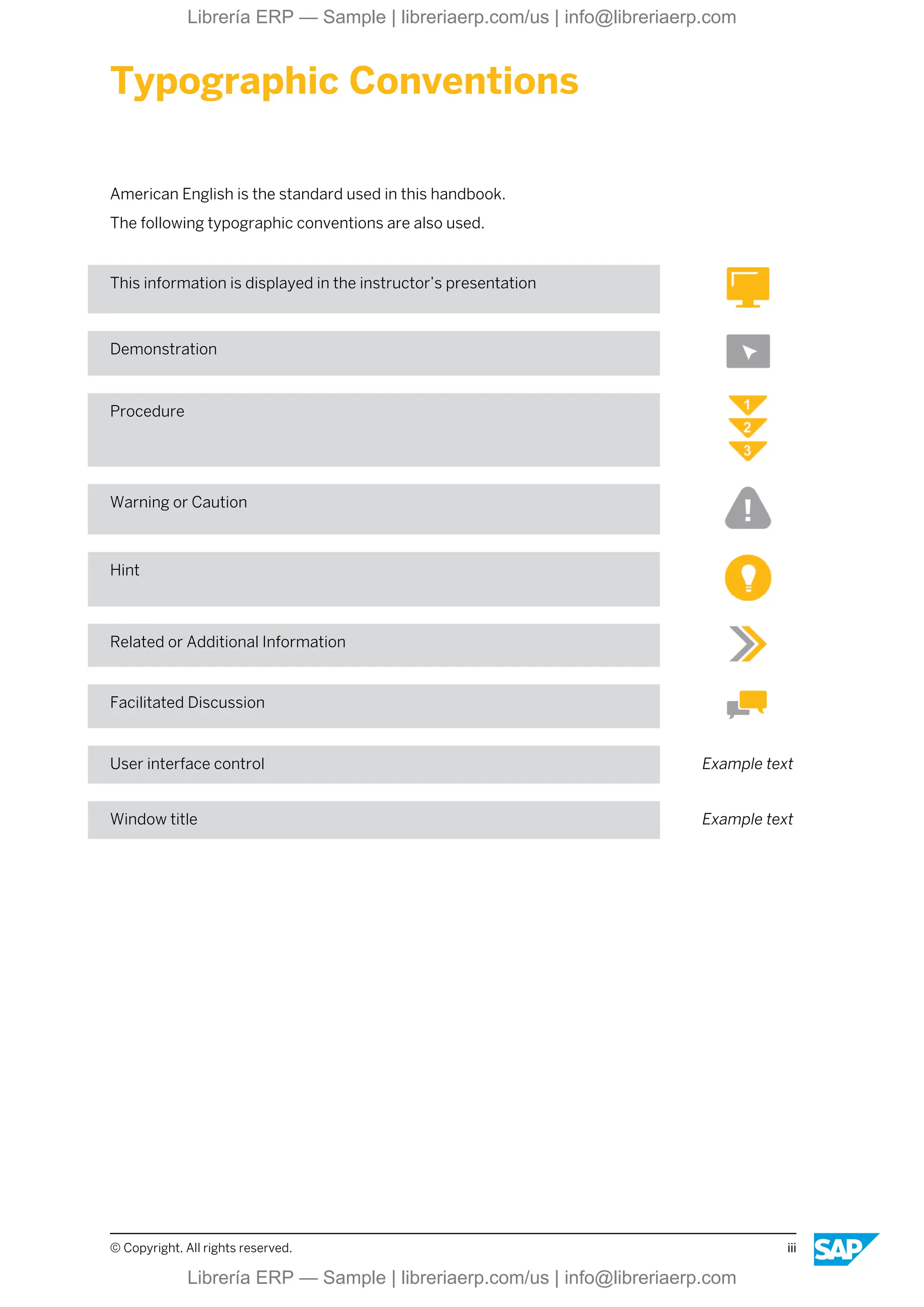
American English is the standard used in this handbook.
The following typographic conventions are also used.
This information is displayed in the instructor’s presentation
Demonstration
Procedure
Warning or Caution
Hint
Related or Additional Information
Facilitated Discussion
User interface control Example text
Window title Example text
© Copyright. All rights reserved. iii
Librería ERP — Sample | libreriaerp.com/us | info@libreriaerp.com
iv © Copyright. All rights reserved.
Librería ERP — Sample | libreriaerp.com/us | info@libreriaerp.com
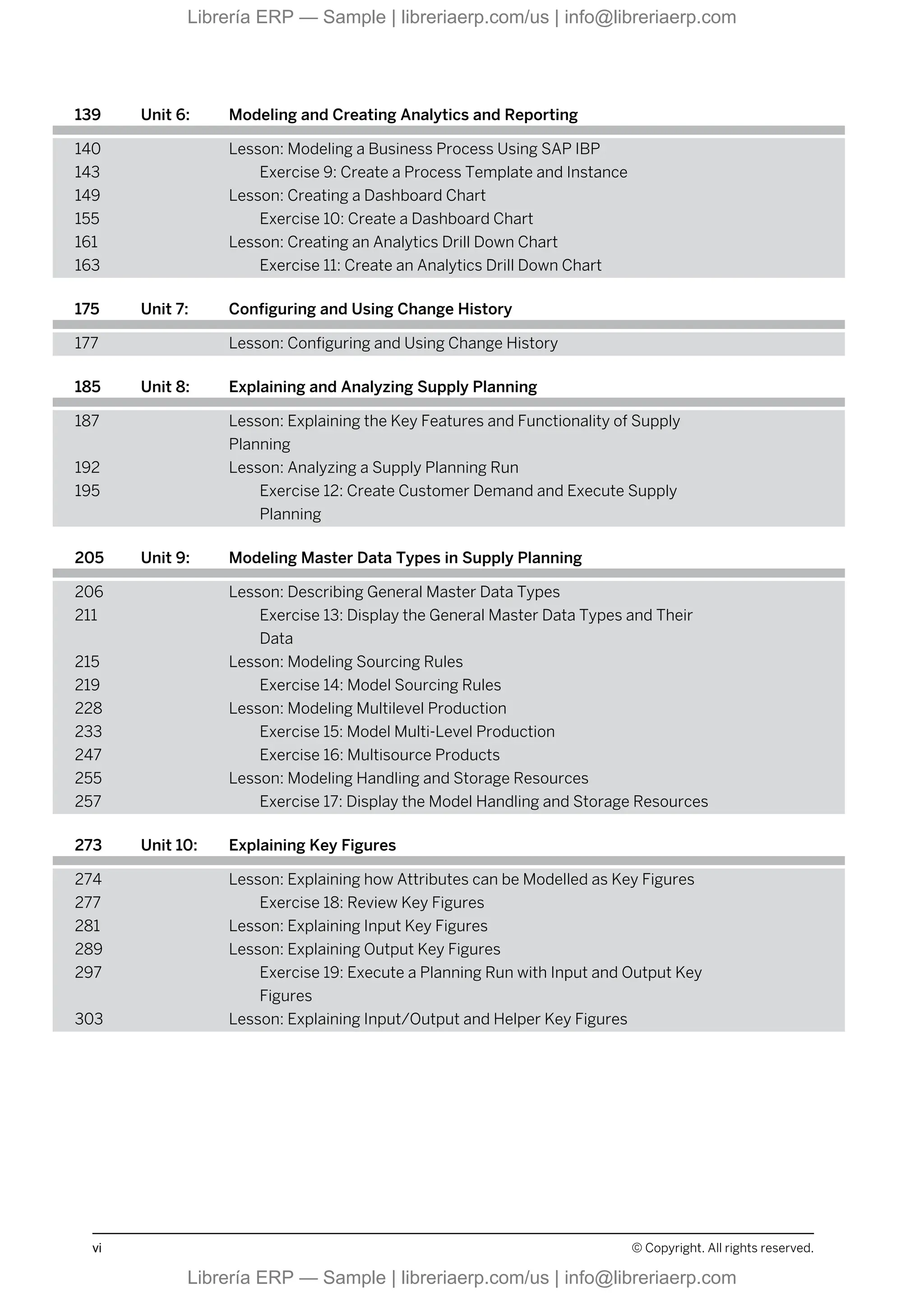
Contents
ix Course Overview
1 Unit 1: Introduction Supply Chain Planning with SAP IBP
3 Lesson: Optimizing Supply Chain Planning Efficiency with SAP
Integrated Business Planning
13 Lesson: Implementing Time-Series-Based Supply Planning with SAP
IBP
23 Lesson: Demand Planning capabilities with SAP IBP for sales and
operations
33 Lesson: Supply Planning with SAP IBP for sales and operations
47 Unit 2: Navigating the User Interface
49 Lesson: Navigating in the SAP IBP Web UI
50 Lesson: Personalizing the SAP Fiori Launchpad
55 Exercise 1: Personalize the SAP Fiori Launchpad
59 Lesson: Configuring an SAP IBP, add-in for Microsoft Excel
63 Exercise 2: How to Configure a connection to SAP IBP, add-in
for Microsoft Excel
71 Exercise 3: Create a Planning View
77 Exercise 4: Maintain Excel User Settings
85 Unit 3: Identifying and Importing Data Integration
87 Lesson: Identifying Data Import Options
89 Lesson: Importing Data Using the SAP IBP Web UI
93 Exercise 5: Review Data Importing Using the SAP Integrated
Business Planning WebUI
101 Unit 4: Creating and Performing Microsoft Excel Planning and Reporting
102 Lesson: Creating a Microsoft Excel Template and Favorite
105 Exercise 6: Create a Microsoft Excel Template and Favorite
111 Lesson: Performing a Simulation
113 Exercise 7: Perform a Simulation
119 Unit 5: Disaggregating and Using Key Figure Functions
121 Lesson: Incorporating Disaggregation Methods in SAP IBP
125 Lesson: Fixing Key Figure Values in the Planning View
128 Lesson: Creating Planning Notes
131 Exercise 8: Create Planning Notes
© Copyright. All rights reserved. v
Librería ERP — Sample | libreriaerp.com/us | info@libreriaerp.com
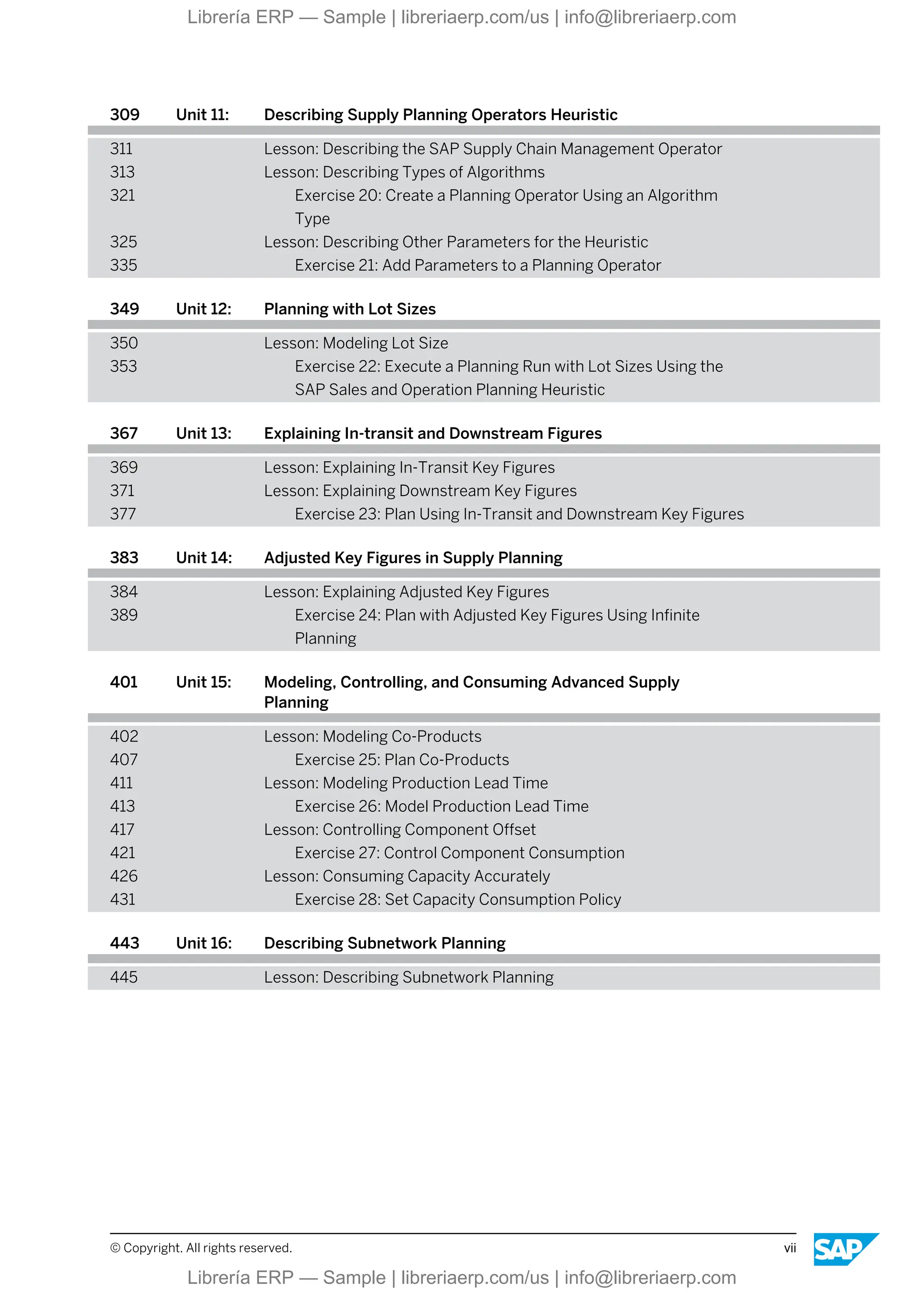
139 Unit 6: Modeling and Creating Analytics and Reporting
140 Lesson: Modeling a Business Process Using SAP IBP
143 Exercise 9: Create a Process Template and Instance
149 Lesson: Creating a Dashboard Chart
155 Exercise 10: Create a Dashboard Chart
161 Lesson: Creating an Analytics Drill Down Chart
163 Exercise 11: Create an Analytics Drill Down Chart
175 Unit 7: Configuring and Using Change History
177 Lesson: Configuring and Using Change History
185 Unit 8: Explaining and Analyzing Supply Planning
187 Lesson: Explaining the Key Features and Functionality of Supply
Planning
192 Lesson: Analyzing a Supply Planning Run
195 Exercise 12: Create Customer Demand and Execute Supply
Planning
205 Unit 9: Modeling Master Data Types in Supply Planning
206 Lesson: Describing General Master Data Types
211 Exercise 13: Display the General Master Data Types and Their
Data
215 Lesson: Modeling Sourcing Rules
219 Exercise 14: Model Sourcing Rules
228 Lesson: Modeling Multilevel Production
233 Exercise 15: Model Multi-Level Production
247 Exercise 16: Multisource Products
255 Lesson: Modeling Handling and Storage Resources
257 Exercise 17: Display the Model Handling and Storage Resources
273 Unit 10: Explaining Key Figures
274 Lesson: Explaining how Attributes can be Modelled as Key Figures
277 Exercise 18: Review Key Figures
281 Lesson: Explaining Input Key Figures
289 Lesson: Explaining Output Key Figures
297 Exercise 19: Execute a Planning Run with Input and Output Key
Figures
303 Lesson: Explaining Input/Output and Helper Key Figures
vi © Copyright. All rights reserved.
Librería ERP — Sample | libreriaerp.com/us | info@libreriaerp.com
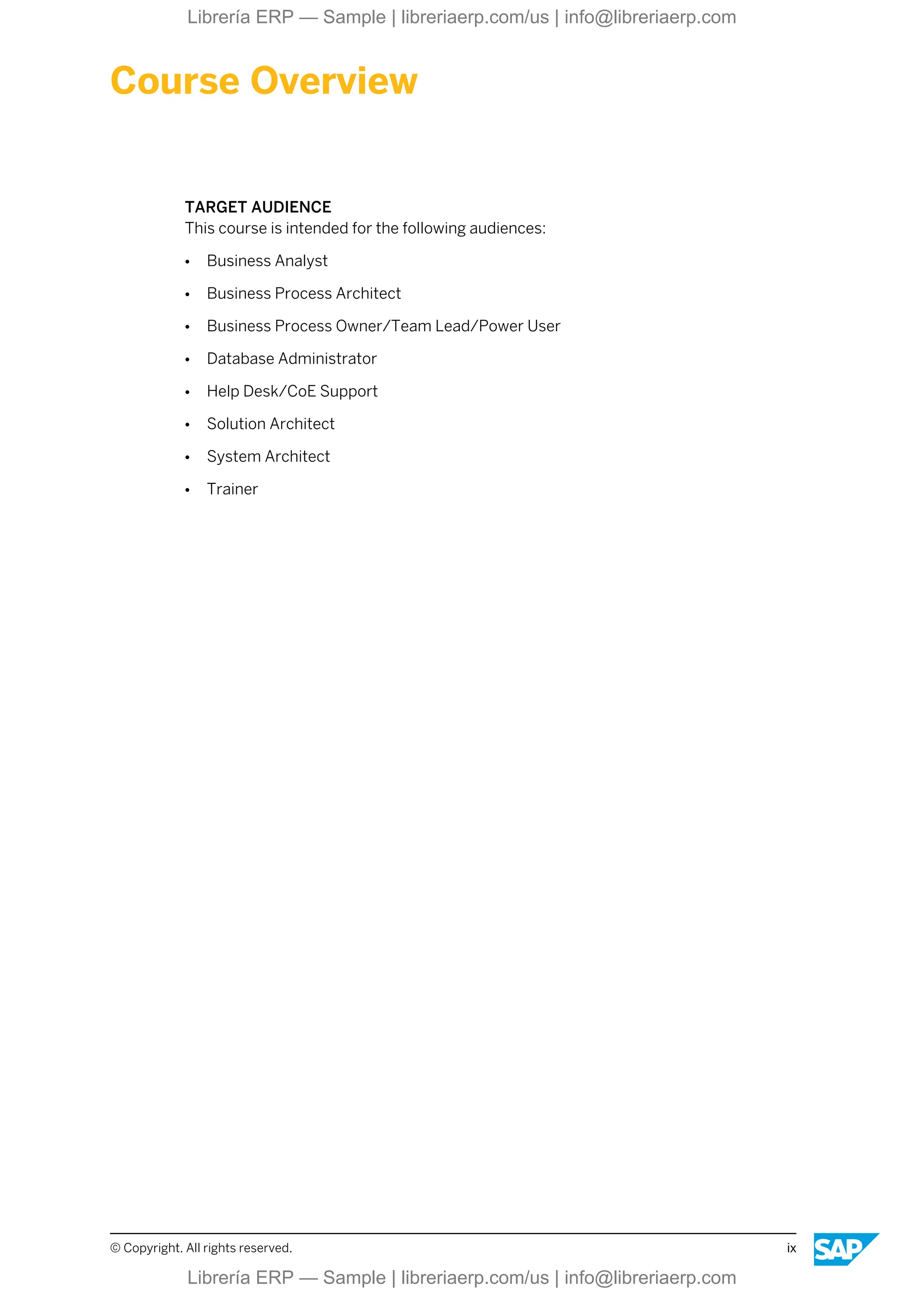
309 Unit 11: Describing Supply Planning Operators Heuristic
311 Lesson: Describing the SAP Supply Chain Management Operator
313 Lesson: Describing Types of Algorithms
321 Exercise 20: Create a Planning Operator Using an Algorithm
Type
325 Lesson: Describing Other Parameters for the Heuristic
335 Exercise 21: Add Parameters to a Planning Operator
349 Unit 12: Planning with Lot Sizes
350 Lesson: Modeling Lot Size
353 Exercise 22: Execute a Planning Run with Lot Sizes Using the
SAP Sales and Operation Planning Heuristic
367 Unit 13: Explaining In-transit and Downstream Figures
369 Lesson: Explaining In-Transit Key Figures
371 Lesson: Explaining Downstream Key Figures
377 Exercise 23: Plan Using In-Transit and Downstream Key Figures
383 Unit 14: Adjusted Key Figures in Supply Planning
384 Lesson: Explaining Adjusted Key Figures
389 Exercise 24: Plan with Adjusted Key Figures Using Infinite
Planning
401 Unit 15: Modeling, Controlling, and Consuming Advanced Supply
Planning
402 Lesson: Modeling Co-Products
407 Exercise 25: Plan Co-Products
411 Lesson: Modeling Production Lead Time
413 Exercise 26: Model Production Lead Time
417 Lesson: Controlling Component Offset
421 Exercise 27: Control Component Consumption
426 Lesson: Consuming Capacity Accurately
431 Exercise 28: Set Capacity Consumption Policy
443 Unit 16: Describing Subnetwork Planning
445 Lesson: Describing Subnetwork Planning
© Copyright. All rights reserved. vii
Librería ERP — Sample | libreriaerp.com/us | info@libreriaerp.com
viii © Copyright. All rights reserved.
Librería ERP — Sample | libreriaerp.com/us | info@libreriaerp.com
Course Overview
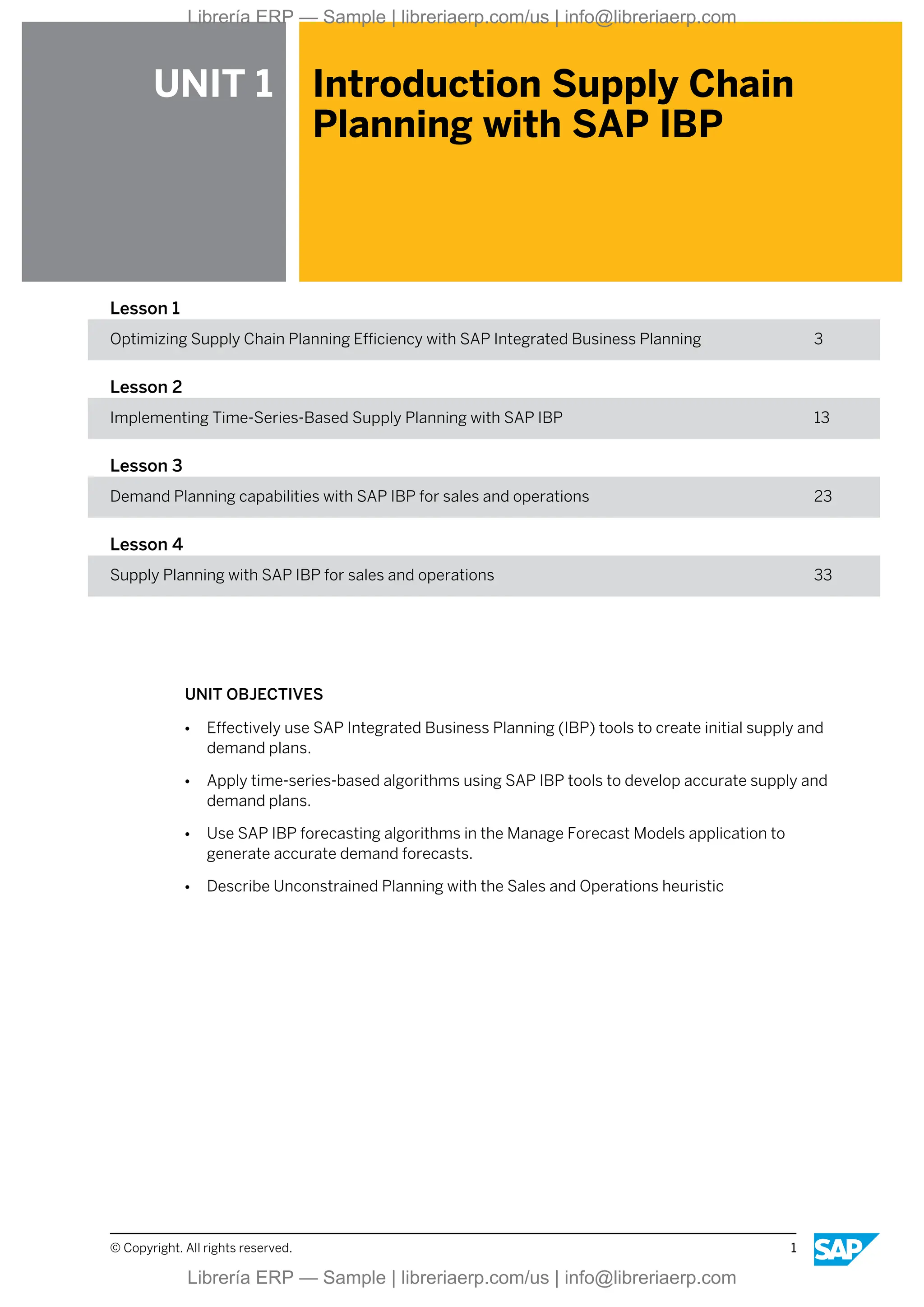
TARGET AUDIENCE
This course is intended for the following audiences:
● Business Analyst
● Business Process Architect
● Business Process Owner/Team Lead/Power User
● Database Administrator
● Help Desk/CoE Support
● Solution Architect
● System Architect
● Trainer
© Copyright. All rights reserved. ix
Librería ERP — Sample | libreriaerp.com/us | info@libreriaerp.com
x © Copyright. All rights reserved.
Librería ERP — Sample | libreriaerp.com/us | info@libreriaerp.com
UNIT 1 Introduction Supply Chain
Planning with SAP IBP
Lesson 1
Optimizing Supply Chain Planning Efficiency with SAP Integrated Business Planning 3
Lesson 2
Implementing Time-Series-Based Supply Planning with SAP IBP 13
Lesson 3
Demand Planning capabilities with SAP IBP for sales and operations 23
Lesson 4
Supply Planning with SAP IBP for sales and operations 33
UNIT OBJECTIVES
● Effectively use SAP Integrated Business Planning (IBP) tools to create initial supply and
demand plans.
● Apply time-series-based algorithms using SAP IBP tools to develop accurate supply and
demand plans.
● Use SAP IBP forecasting algorithms in the Manage Forecast Models application to
generate accurate demand forecasts.
● Describe Unconstrained Planning with the Sales and Operations heuristic
© Copyright. All rights reserved. 1
Librería ERP — Sample | libreriaerp.com/us | info@libreriaerp.com
Unit 1: Introduction Supply Chain Planning with SAP IBP
2 © Copyright. All rights reserved.
Librería ERP — Sample | libreriaerp.com/us | info@libreriaerp.com
Unit 1
Lesson 1
Optimizing Supply Chain Planning Efficiency
with SAP Integrated Business Planning
LESSON OBJECTIVES
After completing this lesson, you will be able to:
● Effectively use SAP Integrated Business Planning (IBP) tools to create initial supply and
demand plans.
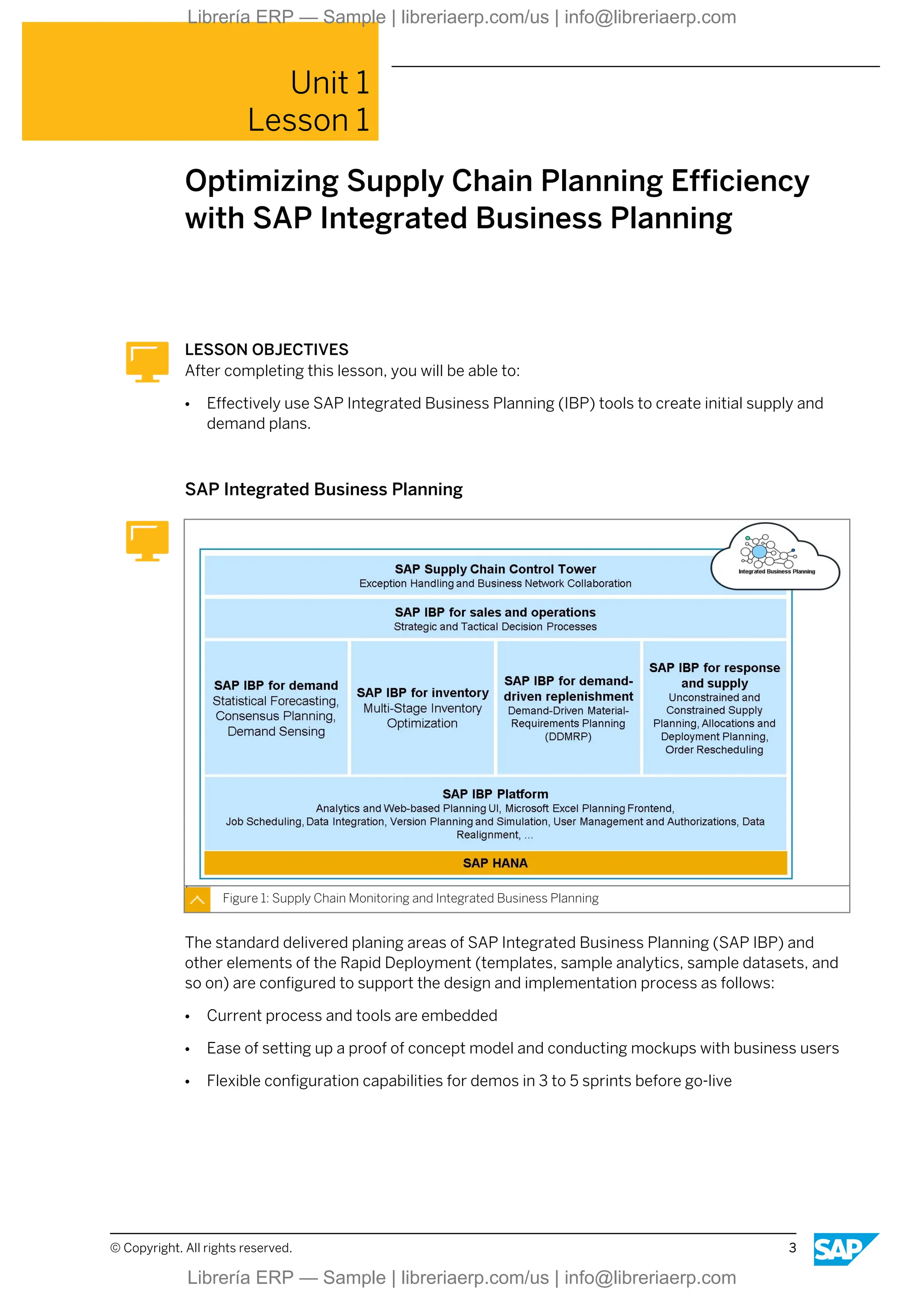
SAP Integrated Business Planning
Figure 1: Supply Chain Monitoring and Integrated Business Planning
The standard delivered planing areas of SAP Integrated Business Planning (SAP IBP) and
other elements of the Rapid Deployment (templates, sample analytics, sample datasets, and
so on) are configured to support the design and implementation process as follows:
● Current process and tools are embedded
● Ease of setting up a proof of concept model and conducting mockups with business users
● Flexible configuration capabilities for demos in 3 to 5 sprints before go-live
© Copyright. All rights reserved. 3
Librería ERP — Sample | libreriaerp.com/us | info@libreriaerp.com
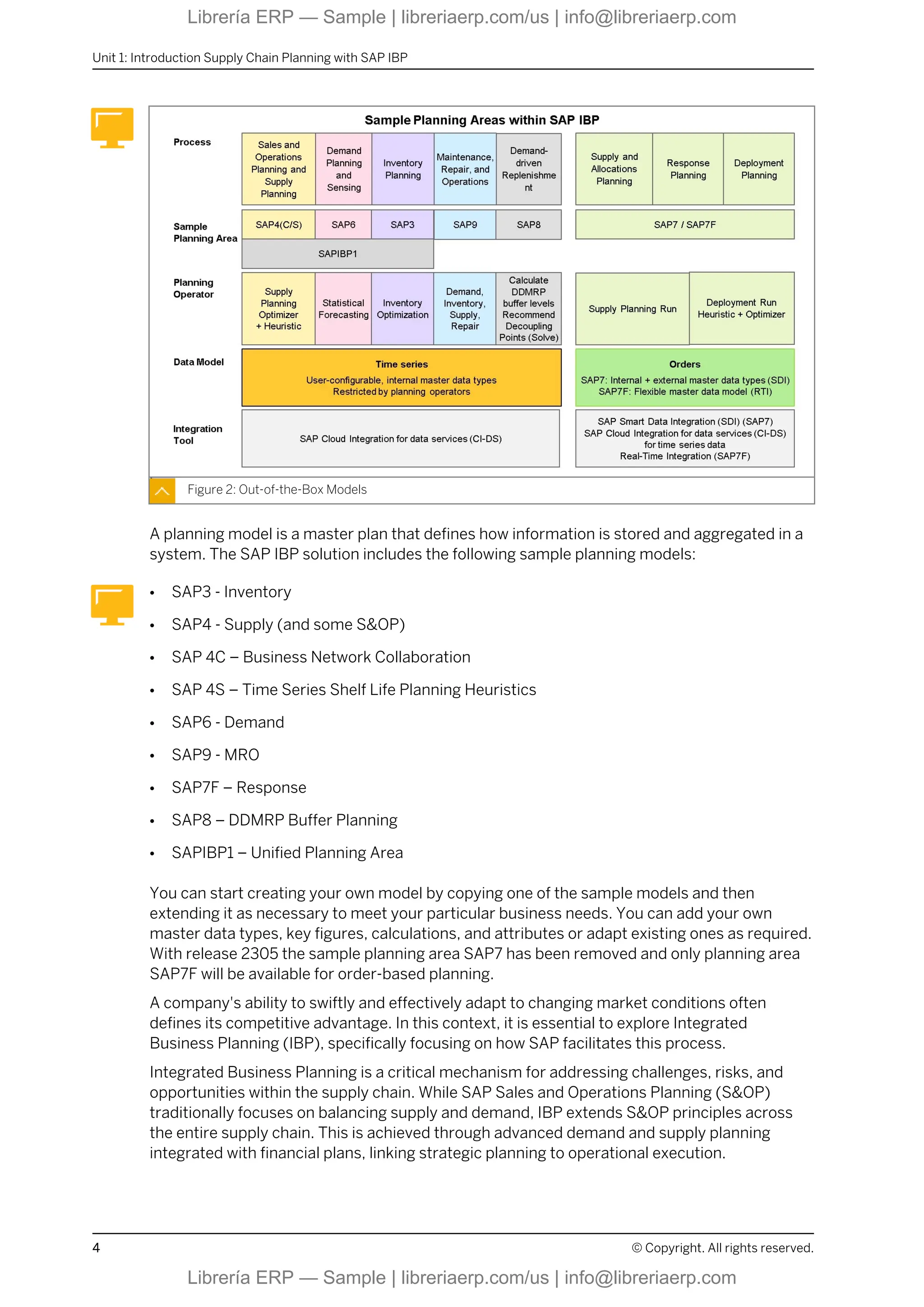
Figure 2: Out-of-the-Box Models
A planning model is a master plan that defines how information is stored and aggregated in a
system. The SAP IBP solution includes the following sample planning models:
● SAP3 - Inventory
● SAP4 - Supply (and some S&OP)
● SAP 4C – Business Network Collaboration
● SAP 4S – Time Series Shelf Life Planning Heuristics
● SAP6 - Demand
● SAP9 - MRO
● SAP7F – Response
● SAP8 – DDMRP Buffer Planning
● SAPIBP1 – Unified Planning Area
You can start creating your own model by copying one of the sample models and then
extending it as necessary to meet your particular business needs. You can add your own
master data types, key figures, calculations, and attributes or adapt existing ones as required.
With release 2305 the sample planning area SAP7 has been removed and only planning area
SAP7F will be available for order-based planning.
A company's ability to swiftly and effectively adapt to changing market conditions often
defines its competitive advantage. In this context, it is essential to explore Integrated
Business Planning (IBP), specifically focusing on how SAP facilitates this process.
Integrated Business Planning is a critical mechanism for addressing challenges, risks, and
opportunities within the supply chain. While SAP Sales and Operations Planning (S&OP)
traditionally focuses on balancing supply and demand, IBP extends S&OP principles across
the entire supply chain. This is achieved through advanced demand and supply planning
integrated with financial plans, linking strategic planning to operational execution.
Unit 1: Introduction Supply Chain Planning with SAP IBP
4 © Copyright. All rights reserved.
Librería ERP — Sample | libreriaerp.com/us | info@libreriaerp.com
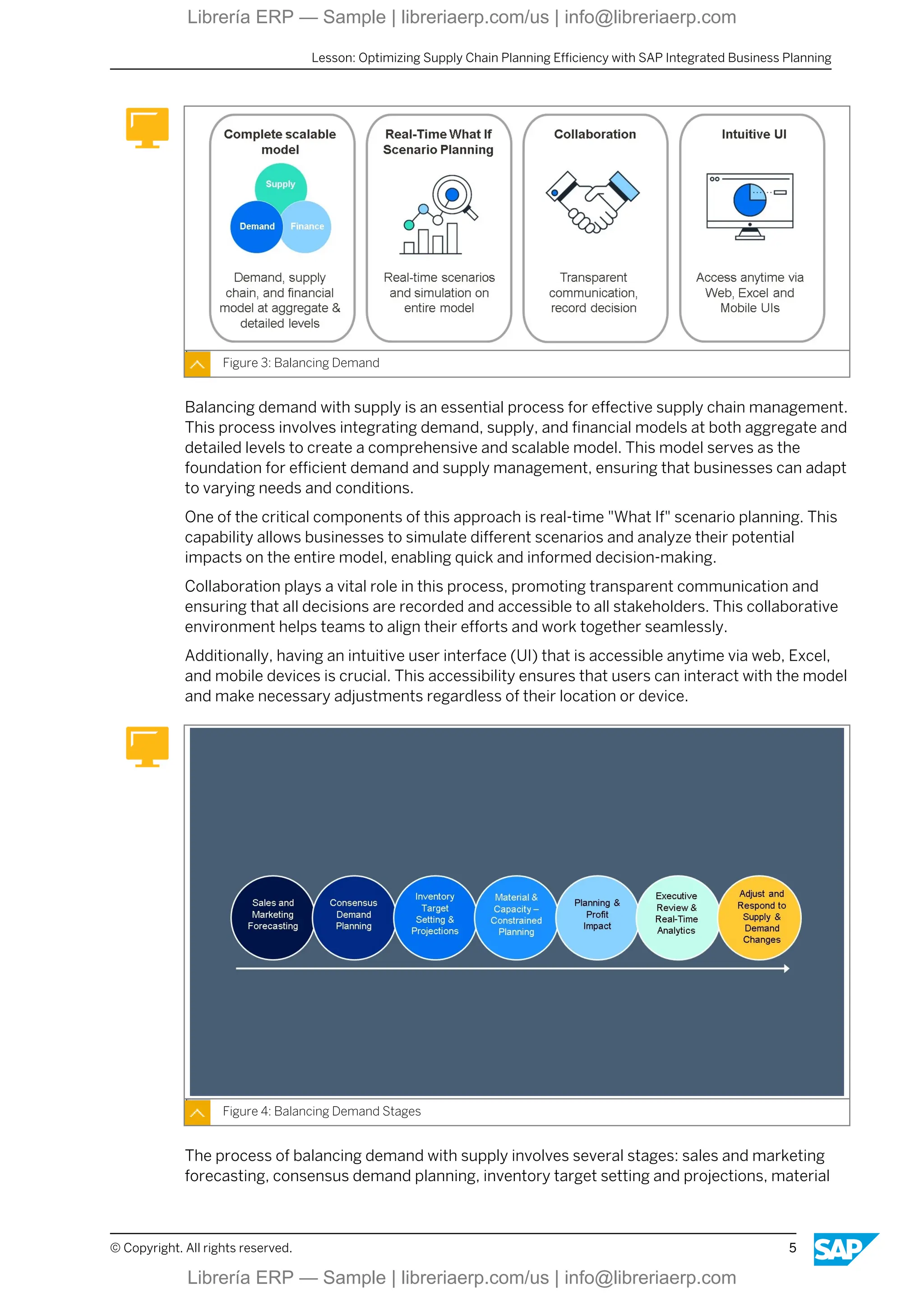
Figure 3: Balancing Demand
Balancing demand with supply is an essential process for effective supply chain management.
This process involves integrating demand, supply, and financial models at both aggregate and
detailed levels to create a comprehensive and scalable model. This model serves as the
foundation for efficient demand and supply management, ensuring that businesses can adapt
to varying needs and conditions.
One of the critical components of this approach is real-time "What If" scenario planning. This
capability allows businesses to simulate different scenarios and analyze their potential
impacts on the entire model, enabling quick and informed decision-making.
Collaboration plays a vital role in this process, promoting transparent communication and
ensuring that all decisions are recorded and accessible to all stakeholders. This collaborative
environment helps teams to align their efforts and work together seamlessly.
Additionally, having an intuitive user interface (UI) that is accessible anytime via web, Excel,
and mobile devices is crucial. This accessibility ensures that users can interact with the model
and make necessary adjustments regardless of their location or device.
Figure 4: Balancing Demand Stages
The process of balancing demand with supply involves several stages: sales and marketing
forecasting, consensus demand planning, inventory target setting and projections, material
Lesson: Optimizing Supply Chain Planning Efficiency with SAP Integrated Business Planning
© Copyright. All rights reserved. 5
Librería ERP — Sample | libreriaerp.com/us | info@libreriaerp.com
and capacity-constrained planning, planning and profit impact, executive review and real-time
analytics, and adjusting and responding to supply and demand changes. Each stage
represents a critical step in the overall process, contributing to a comprehensive and dynamic
approach to managing demand and supply effectively.
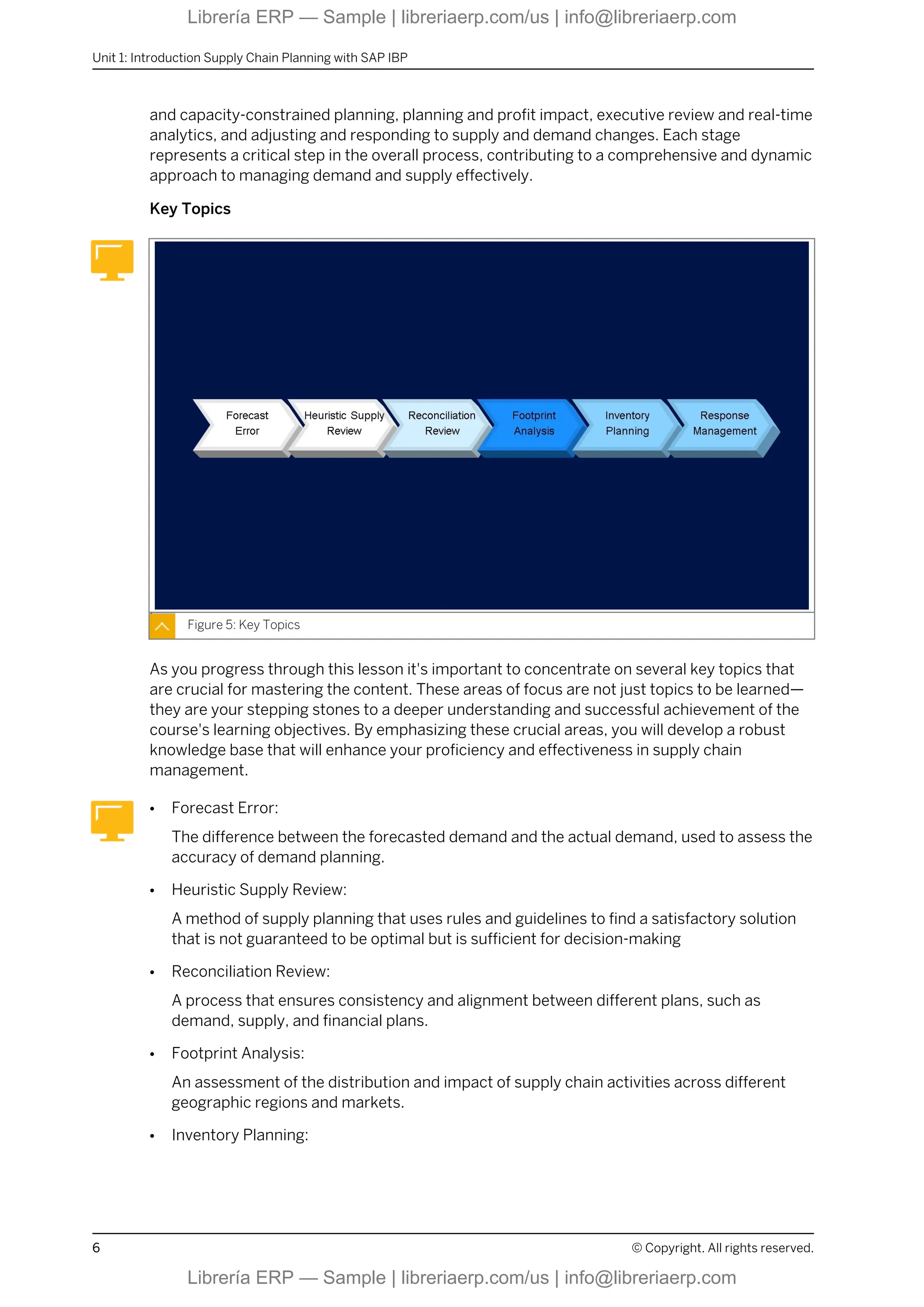
Key Topics
Figure 5: Key Topics
As you progress through this lesson it's important to concentrate on several key topics that
are crucial for mastering the content. These areas of focus are not just topics to be learned—
they are your stepping stones to a deeper understanding and successful achievement of the
course's learning objectives. By emphasizing these crucial areas, you will develop a robust
knowledge base that will enhance your proficiency and effectiveness in supply chain
management.
● Forecast Error:
The difference between the forecasted demand and the actual demand, used to assess the
accuracy of demand planning.
● Heuristic Supply Review:
A method of supply planning that uses rules and guidelines to find a satisfactory solution
that is not guaranteed to be optimal but is sufficient for decision-making
● Reconciliation Review:
A process that ensures consistency and alignment between different plans, such as
demand, supply, and financial plans.
● Footprint Analysis:
An assessment of the distribution and impact of supply chain activities across different
geographic regions and markets.
● Inventory Planning:
Unit 1: Introduction Supply Chain Planning with SAP IBP
6 © Copyright. All rights reserved.
Librería ERP — Sample | libreriaerp.com/us | info@libreriaerp.com
The process of determining the optimal quantity and timing of inventory to meet demand
while minimizing costs.
● Response Management::
The capability to react quickly and effectively to changes in supply and demand conditions,
ensuring that customer needs are met.
Supply Chain Monitoring and Integrated Business Planning
SAP offers a comprehensive Integrated Business Planning solution, some of its features
include:
● Holistic Model:
This model encompasses demand, finance, and supply chain planning. It is flexible and
accessible via Microsoft Excel and can be easily reconfigured as needed. Built on SAP
HANA, this "in-memory" data and analytical solution supports scalability and handles large
volumes of data and calculations.
● Real-Time Scenario Planning:
The platform enables real-time scenario planning and comparison of various plans at both
granular and aggregated levels. Powered by SAP HANA, it offers highly flexible and
efficient analytic capabilities. The "what-if" simulation feature allows planners to explore
strategic decisions. SAP HANA's high-speed, in-memory computing sets it apart in the
market.
● User-Friendly Interfaces:
Available across multiple platforms—web-based desktop browsers, Microsoft Excel, and
mobile applications—these interfaces provide quick access and immediate visualization of
planning data, enhancing user experience.
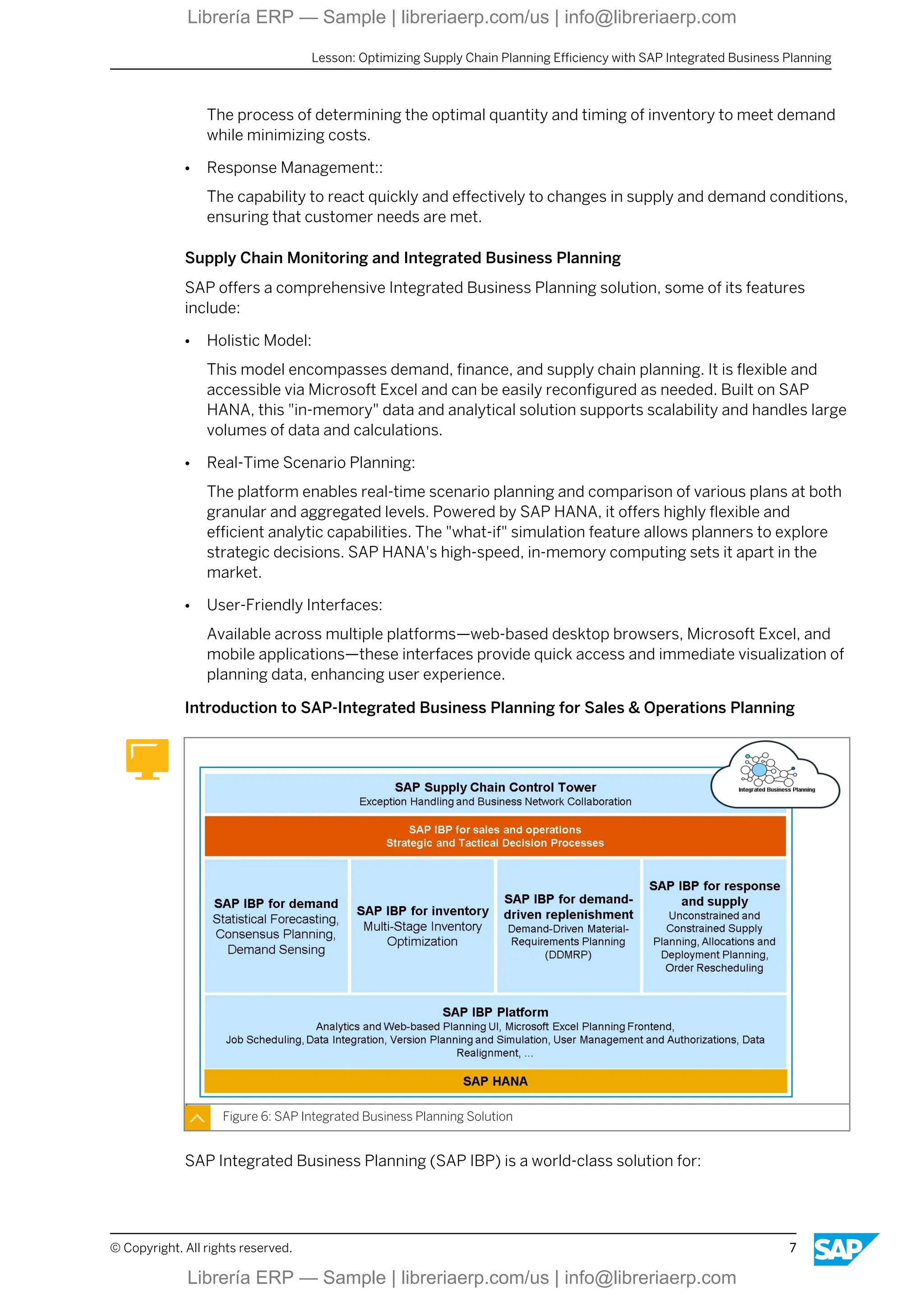
Introduction to SAP-Integrated Business Planning for Sales & Operations Planning
Figure 6: SAP Integrated Business Planning Solution
SAP Integrated Business Planning (SAP IBP) is a world-class solution for:
Lesson: Optimizing Supply Chain Planning Efficiency with SAP Integrated Business Planning
© Copyright. All rights reserved. 7
Librería ERP — Sample | libreriaerp.com/us | info@libreriaerp.com
● Sales and operations planning (S&OP)
● Supply chain monitoring
● Demand management
● Inventory planning
● Supply planning
● Response management
It is important to note that S&OP is the core of Integrated Business Planning. This process
aligns demand and supply to drive a business outcome.
It has become increasingly important for businesses to power growth, resiliency, and
efficiency. Several maturity models have been developed by analytical consultancy/corporate
entities. These models facilitate the determination of the different stages of S&OP, which
include the following:
1. Creating a feasible plan
2. Matching demand with supply
3. Driving the most profitable response
4. Building demand-driven supply chain capabilities
5. Orchestrating through market driven value networks
6. Optimizing inventory
Key Capabilities.
SAP provides a solution to cover all six stages of the above planning process. This approach
includes the following key capabilities:
● Analytical Capabilities:
Embedded analytical and integration tools in the planning process allow users to quickly
assess and study the effects of various supply and demand scenarios without switching
between systems.
● User-Friendly Interface:
The interface combines the familiarity of Microsoft Excel with the power of the SAP IBP
solution, eliminating the need for separate spreadsheet-like programs and enhancing user
experience.
● Real-time scenario planning
Built on the SAP HANA platform, it streamlines access to planning data with in-memory
database structures, allowing efficient real-time adjustments.
● End-to-End Integration:
SAP IBP allows seamless integration with various systems, enabling the exchange of
diverse data types (e.g., master data, order data, POS data) and ensuring cohesive
synchronization between SAP Business Suite and external third-party tools.
Functional Areas.
Unit 1: Introduction Supply Chain Planning with SAP IBP
8 © Copyright. All rights reserved.
Librería ERP — Sample | libreriaerp.com/us | info@libreriaerp.com
The following lists the planning provided by the out-of-the-box SAP Integrated Business
Planning for Sales and Operations model provided by SAP:
● Demand review
● Supply review – heuristic
● Reconciliation review
● Management business review
● Forecast error calculation and analysis
● Time-series-based forecast consumption
● Footprint analysis
Personal Reflection
Reflect on a time when you were involved in a project or task that required coordination
between different departments or teams. How did you manage the communication and
alignment between these groups to achieve your goals? What challenges did you face, and
how did you overcome them? Relate your experience to the principles of Integrated Business
Planning (IBP) as discussed in the lesson.
Out-of-the-Box Configuration SAP Integrated Business Planning For Sales and
Operations
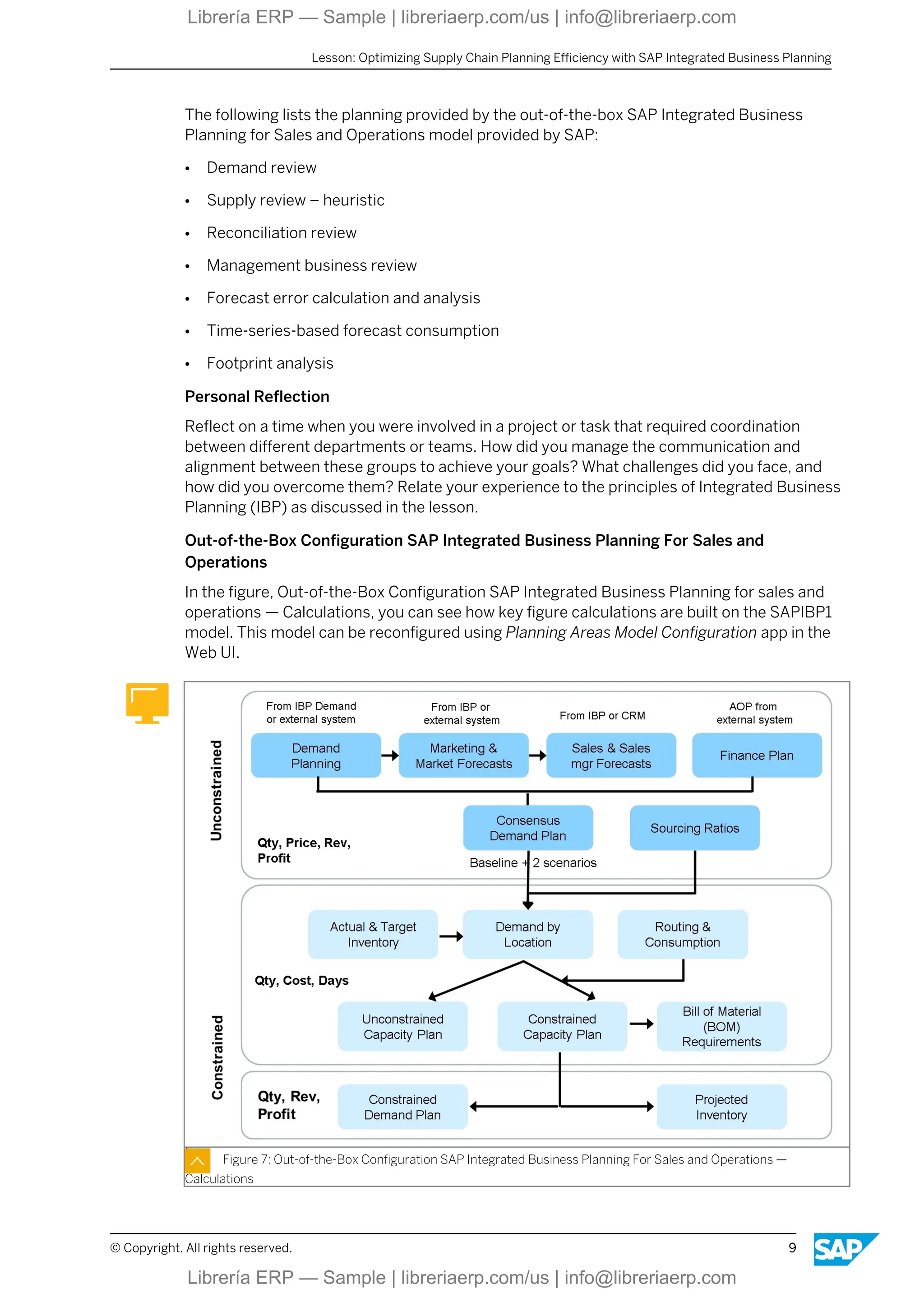
In the figure, Out-of-the-Box Configuration SAP Integrated Business Planning for sales and
operations — Calculations, you can see how key figure calculations are built on the SAPIBP1
model. This model can be reconfigured using Planning Areas Model Configuration app in the
Web UI.
Figure 7: Out-of-the-Box Configuration SAP Integrated Business Planning For Sales and Operations —
Calculations
Lesson: Optimizing Supply Chain Planning Efficiency with SAP Integrated Business Planning
© Copyright. All rights reserved. 9
Librería ERP — Sample | libreriaerp.com/us | info@libreriaerp.com
Expert Response
In my role as a supply chain manager, I was tasked with launching a new product line, which
required close coordination between the marketing, production, and finance departments.
To manage communication and alignment, I implemented regular cross-functional meetings
where each department provided updates and discussed potential issues. We used
collaborative tools to ensure everyone had access to the latest data and could provide real-
time input.
One significant challenge was aligning the production schedule with marketing's promotional
activities while staying within budget constraints set by finance. To address this, we utilized
scenario planning to evaluate different production timelines and marketing strategies,
ensuring we could meet demand without overextending our resources.
By applying principles of IBP, such as real-time scenario planning and end-to-end integration,
we achieved a successful product launch that met our sales targets and stayed within budget.
This experience highlighted the importance of cohesive planning and communication across
all departments to achieve strategic business goals.
Lesson Wrap-Up
In this lesson, we explored the importance of Integrated Business Planning (IBP) and how
SAP's IBP solution facilitates effective supply chain management.
Key points covered include:
● Integrated Business Planning (IBP):
A strategic process that aligns demand, supply, and financial planning across the supply
chain to enhance decision-making and performance.
● SAP HANA Platform:
The backbone of SAP IBP, offering high-speed, in-memory computing for real-time data
processing and analytics.
● Key Features of SAP IBP:
Holistic model integrating demand, finance, and supply chain planning, accessible through
familiar tools like Microsoft Excel. Real-time scenario planning and "what-if" simulations to
support strategic decision-making. User-friendly interfaces available across web-based
browsers, Microsoft Excel, and mobile applications for quick data visualization. End-to-end
integration with various systems, enabling seamless data exchange and synchronization.
● Core Functional Areas:
Sales and operations planning (S&OP), supply chain monitoring, demand management,
inventory planning, supply planning, and response management.
● Stages of S&OP:
Creating feasible plans, matching demand with supply, driving profitable responses,
building demand-driven capabilities, orchestrating value networks, and optimizing
inventory.
● Analytical Capabilities:
Embedded tools for swift analysis of supply and demand scenarios without switching
between systems.
Unit 1: Introduction Supply Chain Planning with SAP IBP
10 © Copyright. All rights reserved.
Librería ERP — Sample | libreriaerp.com/us | info@libreriaerp.com

IBP200 Col2505 SAP IBP Platform Features and Time Series Based Heuristics

  • 1.
    IBP200 SAP IBP PlatformFeatures and Time Series Based Heuristics . . PARTICIPANT HANDBOOK INSTRUCTOR-LED TRAINING . Course Version: 2505 Course Duration: 5 Days Librería ERP — Sample | libreriaerp.com/us | info@libreriaerp.com Librería ERP — Sample | libreriaerp.com/us | info@libreriaerp.com
  • 2.
    SAP Copyrights, Trademarksand Disclaimers © 2025 SAP SE or an SAP affiliate company. All rights reserved. No part of this publication may be reproduced or transmitted in any form or for any purpose without the express permission of SAP SE or an SAP affiliate company. SAP and other SAP products and services mentioned herein as well as their respective logos are trademarks or registered trademarks of SAP SE (or an SAP affiliate company) in Germany and other countries. Please see https:// www.sap.com/corporate/en/legal/copyright.html for additional trademark information and notices. Some software products marketed by SAP SE and its distributors contain proprietary software components of other software vendors. National product specifications may vary. These materials may have been machine translated and may contain grammatical errors or inaccuracies. These materials are provided by SAP SE or an SAP affiliate company for informational purposes only, without representation or warranty of any kind, and SAP SE or its affiliated companies shall not be liable for errors or omissions with respect to the materials. The only warranties for SAP SE or SAP affiliate company products and services are those that are set forth in the express warranty statements accompanying such products and services, if any. Nothing herein should be construed as constituting an additional warranty. In particular, SAP SE or its affiliated companies have no obligation to pursue any course of business outlined in this document or any related presentation, or to develop or release any functionality mentioned therein. This document, or any related presentation, and SAP SE’s or its affiliated companies’ strategy and possible future developments, products, and/or platform directions and functionality are all subject to change and may be changed by SAP SE or its affiliated companies at any time for any reason without notice. The information in this document is not a commitment, promise, or legal obligation to deliver any material, code, or functionality. All forward- looking statements are subject to various risks and uncertainties that could cause actual results to differ materially from expectations. Readers are cautioned not to place undue reliance on these forward-looking statements, which speak only as of their dates, and they should not be relied upon in making purchasing decisions. Librería ERP — Sample | libreriaerp.com/us | info@libreriaerp.com Librería ERP — Sample | libreriaerp.com/us | info@libreriaerp.com
  • 3.
    Typographic Conventions American Englishis the standard used in this handbook. The following typographic conventions are also used. This information is displayed in the instructor’s presentation Demonstration Procedure Warning or Caution Hint Related or Additional Information Facilitated Discussion User interface control Example text Window title Example text © Copyright. All rights reserved. iii Librería ERP — Sample | libreriaerp.com/us | info@libreriaerp.com Librería ERP — Sample | libreriaerp.com/us | info@libreriaerp.com
  • 4.
    iv © Copyright.All rights reserved. Librería ERP — Sample | libreriaerp.com/us | info@libreriaerp.com Librería ERP — Sample | libreriaerp.com/us | info@libreriaerp.com
  • 5.
    Contents ix Course Overview 1Unit 1: Introduction Supply Chain Planning with SAP IBP 3 Lesson: Optimizing Supply Chain Planning Efficiency with SAP Integrated Business Planning 13 Lesson: Implementing Time-Series-Based Supply Planning with SAP IBP 23 Lesson: Demand Planning capabilities with SAP IBP for sales and operations 33 Lesson: Supply Planning with SAP IBP for sales and operations 47 Unit 2: Navigating the User Interface 49 Lesson: Navigating in the SAP IBP Web UI 50 Lesson: Personalizing the SAP Fiori Launchpad 55 Exercise 1: Personalize the SAP Fiori Launchpad 59 Lesson: Configuring an SAP IBP, add-in for Microsoft Excel 63 Exercise 2: How to Configure a connection to SAP IBP, add-in for Microsoft Excel 71 Exercise 3: Create a Planning View 77 Exercise 4: Maintain Excel User Settings 85 Unit 3: Identifying and Importing Data Integration 87 Lesson: Identifying Data Import Options 89 Lesson: Importing Data Using the SAP IBP Web UI 93 Exercise 5: Review Data Importing Using the SAP Integrated Business Planning WebUI 101 Unit 4: Creating and Performing Microsoft Excel Planning and Reporting 102 Lesson: Creating a Microsoft Excel Template and Favorite 105 Exercise 6: Create a Microsoft Excel Template and Favorite 111 Lesson: Performing a Simulation 113 Exercise 7: Perform a Simulation 119 Unit 5: Disaggregating and Using Key Figure Functions 121 Lesson: Incorporating Disaggregation Methods in SAP IBP 125 Lesson: Fixing Key Figure Values in the Planning View 128 Lesson: Creating Planning Notes 131 Exercise 8: Create Planning Notes © Copyright. All rights reserved. v Librería ERP — Sample | libreriaerp.com/us | info@libreriaerp.com Librería ERP — Sample | libreriaerp.com/us | info@libreriaerp.com
  • 6.
    139 Unit 6:Modeling and Creating Analytics and Reporting 140 Lesson: Modeling a Business Process Using SAP IBP 143 Exercise 9: Create a Process Template and Instance 149 Lesson: Creating a Dashboard Chart 155 Exercise 10: Create a Dashboard Chart 161 Lesson: Creating an Analytics Drill Down Chart 163 Exercise 11: Create an Analytics Drill Down Chart 175 Unit 7: Configuring and Using Change History 177 Lesson: Configuring and Using Change History 185 Unit 8: Explaining and Analyzing Supply Planning 187 Lesson: Explaining the Key Features and Functionality of Supply Planning 192 Lesson: Analyzing a Supply Planning Run 195 Exercise 12: Create Customer Demand and Execute Supply Planning 205 Unit 9: Modeling Master Data Types in Supply Planning 206 Lesson: Describing General Master Data Types 211 Exercise 13: Display the General Master Data Types and Their Data 215 Lesson: Modeling Sourcing Rules 219 Exercise 14: Model Sourcing Rules 228 Lesson: Modeling Multilevel Production 233 Exercise 15: Model Multi-Level Production 247 Exercise 16: Multisource Products 255 Lesson: Modeling Handling and Storage Resources 257 Exercise 17: Display the Model Handling and Storage Resources 273 Unit 10: Explaining Key Figures 274 Lesson: Explaining how Attributes can be Modelled as Key Figures 277 Exercise 18: Review Key Figures 281 Lesson: Explaining Input Key Figures 289 Lesson: Explaining Output Key Figures 297 Exercise 19: Execute a Planning Run with Input and Output Key Figures 303 Lesson: Explaining Input/Output and Helper Key Figures vi © Copyright. All rights reserved. Librería ERP — Sample | libreriaerp.com/us | info@libreriaerp.com Librería ERP — Sample | libreriaerp.com/us | info@libreriaerp.com
  • 7.
    309 Unit 11:Describing Supply Planning Operators Heuristic 311 Lesson: Describing the SAP Supply Chain Management Operator 313 Lesson: Describing Types of Algorithms 321 Exercise 20: Create a Planning Operator Using an Algorithm Type 325 Lesson: Describing Other Parameters for the Heuristic 335 Exercise 21: Add Parameters to a Planning Operator 349 Unit 12: Planning with Lot Sizes 350 Lesson: Modeling Lot Size 353 Exercise 22: Execute a Planning Run with Lot Sizes Using the SAP Sales and Operation Planning Heuristic 367 Unit 13: Explaining In-transit and Downstream Figures 369 Lesson: Explaining In-Transit Key Figures 371 Lesson: Explaining Downstream Key Figures 377 Exercise 23: Plan Using In-Transit and Downstream Key Figures 383 Unit 14: Adjusted Key Figures in Supply Planning 384 Lesson: Explaining Adjusted Key Figures 389 Exercise 24: Plan with Adjusted Key Figures Using Infinite Planning 401 Unit 15: Modeling, Controlling, and Consuming Advanced Supply Planning 402 Lesson: Modeling Co-Products 407 Exercise 25: Plan Co-Products 411 Lesson: Modeling Production Lead Time 413 Exercise 26: Model Production Lead Time 417 Lesson: Controlling Component Offset 421 Exercise 27: Control Component Consumption 426 Lesson: Consuming Capacity Accurately 431 Exercise 28: Set Capacity Consumption Policy 443 Unit 16: Describing Subnetwork Planning 445 Lesson: Describing Subnetwork Planning © Copyright. All rights reserved. vii Librería ERP — Sample | libreriaerp.com/us | info@libreriaerp.com Librería ERP — Sample | libreriaerp.com/us | info@libreriaerp.com
  • 8.
    viii © Copyright.All rights reserved. Librería ERP — Sample | libreriaerp.com/us | info@libreriaerp.com Librería ERP — Sample | libreriaerp.com/us | info@libreriaerp.com
  • 9.
    Course Overview TARGET AUDIENCE Thiscourse is intended for the following audiences: ● Business Analyst ● Business Process Architect ● Business Process Owner/Team Lead/Power User ● Database Administrator ● Help Desk/CoE Support ● Solution Architect ● System Architect ● Trainer © Copyright. All rights reserved. ix Librería ERP — Sample | libreriaerp.com/us | info@libreriaerp.com Librería ERP — Sample | libreriaerp.com/us | info@libreriaerp.com
  • 10.
    x © Copyright.All rights reserved. Librería ERP — Sample | libreriaerp.com/us | info@libreriaerp.com Librería ERP — Sample | libreriaerp.com/us | info@libreriaerp.com
  • 11.
    UNIT 1 IntroductionSupply Chain Planning with SAP IBP Lesson 1 Optimizing Supply Chain Planning Efficiency with SAP Integrated Business Planning 3 Lesson 2 Implementing Time-Series-Based Supply Planning with SAP IBP 13 Lesson 3 Demand Planning capabilities with SAP IBP for sales and operations 23 Lesson 4 Supply Planning with SAP IBP for sales and operations 33 UNIT OBJECTIVES ● Effectively use SAP Integrated Business Planning (IBP) tools to create initial supply and demand plans. ● Apply time-series-based algorithms using SAP IBP tools to develop accurate supply and demand plans. ● Use SAP IBP forecasting algorithms in the Manage Forecast Models application to generate accurate demand forecasts. ● Describe Unconstrained Planning with the Sales and Operations heuristic © Copyright. All rights reserved. 1 Librería ERP — Sample | libreriaerp.com/us | info@libreriaerp.com Librería ERP — Sample | libreriaerp.com/us | info@libreriaerp.com
  • 12.
    Unit 1: IntroductionSupply Chain Planning with SAP IBP 2 © Copyright. All rights reserved. Librería ERP — Sample | libreriaerp.com/us | info@libreriaerp.com Librería ERP — Sample | libreriaerp.com/us | info@libreriaerp.com
  • 13.
    Unit 1 Lesson 1 OptimizingSupply Chain Planning Efficiency with SAP Integrated Business Planning LESSON OBJECTIVES After completing this lesson, you will be able to: ● Effectively use SAP Integrated Business Planning (IBP) tools to create initial supply and demand plans. SAP Integrated Business Planning Figure 1: Supply Chain Monitoring and Integrated Business Planning The standard delivered planing areas of SAP Integrated Business Planning (SAP IBP) and other elements of the Rapid Deployment (templates, sample analytics, sample datasets, and so on) are configured to support the design and implementation process as follows: ● Current process and tools are embedded ● Ease of setting up a proof of concept model and conducting mockups with business users ● Flexible configuration capabilities for demos in 3 to 5 sprints before go-live © Copyright. All rights reserved. 3 Librería ERP — Sample | libreriaerp.com/us | info@libreriaerp.com Librería ERP — Sample | libreriaerp.com/us | info@libreriaerp.com
  • 14.
    Figure 2: Out-of-the-BoxModels A planning model is a master plan that defines how information is stored and aggregated in a system. The SAP IBP solution includes the following sample planning models: ● SAP3 - Inventory ● SAP4 - Supply (and some S&OP) ● SAP 4C – Business Network Collaboration ● SAP 4S – Time Series Shelf Life Planning Heuristics ● SAP6 - Demand ● SAP9 - MRO ● SAP7F – Response ● SAP8 – DDMRP Buffer Planning ● SAPIBP1 – Unified Planning Area You can start creating your own model by copying one of the sample models and then extending it as necessary to meet your particular business needs. You can add your own master data types, key figures, calculations, and attributes or adapt existing ones as required. With release 2305 the sample planning area SAP7 has been removed and only planning area SAP7F will be available for order-based planning. A company's ability to swiftly and effectively adapt to changing market conditions often defines its competitive advantage. In this context, it is essential to explore Integrated Business Planning (IBP), specifically focusing on how SAP facilitates this process. Integrated Business Planning is a critical mechanism for addressing challenges, risks, and opportunities within the supply chain. While SAP Sales and Operations Planning (S&OP) traditionally focuses on balancing supply and demand, IBP extends S&OP principles across the entire supply chain. This is achieved through advanced demand and supply planning integrated with financial plans, linking strategic planning to operational execution. Unit 1: Introduction Supply Chain Planning with SAP IBP 4 © Copyright. All rights reserved. Librería ERP — Sample | libreriaerp.com/us | info@libreriaerp.com Librería ERP — Sample | libreriaerp.com/us | info@libreriaerp.com
  • 15.
    Figure 3: BalancingDemand Balancing demand with supply is an essential process for effective supply chain management. This process involves integrating demand, supply, and financial models at both aggregate and detailed levels to create a comprehensive and scalable model. This model serves as the foundation for efficient demand and supply management, ensuring that businesses can adapt to varying needs and conditions. One of the critical components of this approach is real-time "What If" scenario planning. This capability allows businesses to simulate different scenarios and analyze their potential impacts on the entire model, enabling quick and informed decision-making. Collaboration plays a vital role in this process, promoting transparent communication and ensuring that all decisions are recorded and accessible to all stakeholders. This collaborative environment helps teams to align their efforts and work together seamlessly. Additionally, having an intuitive user interface (UI) that is accessible anytime via web, Excel, and mobile devices is crucial. This accessibility ensures that users can interact with the model and make necessary adjustments regardless of their location or device. Figure 4: Balancing Demand Stages The process of balancing demand with supply involves several stages: sales and marketing forecasting, consensus demand planning, inventory target setting and projections, material Lesson: Optimizing Supply Chain Planning Efficiency with SAP Integrated Business Planning © Copyright. All rights reserved. 5 Librería ERP — Sample | libreriaerp.com/us | info@libreriaerp.com Librería ERP — Sample | libreriaerp.com/us | info@libreriaerp.com
  • 16.
    and capacity-constrained planning,planning and profit impact, executive review and real-time analytics, and adjusting and responding to supply and demand changes. Each stage represents a critical step in the overall process, contributing to a comprehensive and dynamic approach to managing demand and supply effectively. Key Topics Figure 5: Key Topics As you progress through this lesson it's important to concentrate on several key topics that are crucial for mastering the content. These areas of focus are not just topics to be learned— they are your stepping stones to a deeper understanding and successful achievement of the course's learning objectives. By emphasizing these crucial areas, you will develop a robust knowledge base that will enhance your proficiency and effectiveness in supply chain management. ● Forecast Error: The difference between the forecasted demand and the actual demand, used to assess the accuracy of demand planning. ● Heuristic Supply Review: A method of supply planning that uses rules and guidelines to find a satisfactory solution that is not guaranteed to be optimal but is sufficient for decision-making ● Reconciliation Review: A process that ensures consistency and alignment between different plans, such as demand, supply, and financial plans. ● Footprint Analysis: An assessment of the distribution and impact of supply chain activities across different geographic regions and markets. ● Inventory Planning: Unit 1: Introduction Supply Chain Planning with SAP IBP 6 © Copyright. All rights reserved. Librería ERP — Sample | libreriaerp.com/us | info@libreriaerp.com Librería ERP — Sample | libreriaerp.com/us | info@libreriaerp.com
  • 17.
    The process ofdetermining the optimal quantity and timing of inventory to meet demand while minimizing costs. ● Response Management:: The capability to react quickly and effectively to changes in supply and demand conditions, ensuring that customer needs are met. Supply Chain Monitoring and Integrated Business Planning SAP offers a comprehensive Integrated Business Planning solution, some of its features include: ● Holistic Model: This model encompasses demand, finance, and supply chain planning. It is flexible and accessible via Microsoft Excel and can be easily reconfigured as needed. Built on SAP HANA, this "in-memory" data and analytical solution supports scalability and handles large volumes of data and calculations. ● Real-Time Scenario Planning: The platform enables real-time scenario planning and comparison of various plans at both granular and aggregated levels. Powered by SAP HANA, it offers highly flexible and efficient analytic capabilities. The "what-if" simulation feature allows planners to explore strategic decisions. SAP HANA's high-speed, in-memory computing sets it apart in the market. ● User-Friendly Interfaces: Available across multiple platforms—web-based desktop browsers, Microsoft Excel, and mobile applications—these interfaces provide quick access and immediate visualization of planning data, enhancing user experience. Introduction to SAP-Integrated Business Planning for Sales & Operations Planning Figure 6: SAP Integrated Business Planning Solution SAP Integrated Business Planning (SAP IBP) is a world-class solution for: Lesson: Optimizing Supply Chain Planning Efficiency with SAP Integrated Business Planning © Copyright. All rights reserved. 7 Librería ERP — Sample | libreriaerp.com/us | info@libreriaerp.com Librería ERP — Sample | libreriaerp.com/us | info@libreriaerp.com
  • 18.
    ● Sales andoperations planning (S&OP) ● Supply chain monitoring ● Demand management ● Inventory planning ● Supply planning ● Response management It is important to note that S&OP is the core of Integrated Business Planning. This process aligns demand and supply to drive a business outcome. It has become increasingly important for businesses to power growth, resiliency, and efficiency. Several maturity models have been developed by analytical consultancy/corporate entities. These models facilitate the determination of the different stages of S&OP, which include the following: 1. Creating a feasible plan 2. Matching demand with supply 3. Driving the most profitable response 4. Building demand-driven supply chain capabilities 5. Orchestrating through market driven value networks 6. Optimizing inventory Key Capabilities. SAP provides a solution to cover all six stages of the above planning process. This approach includes the following key capabilities: ● Analytical Capabilities: Embedded analytical and integration tools in the planning process allow users to quickly assess and study the effects of various supply and demand scenarios without switching between systems. ● User-Friendly Interface: The interface combines the familiarity of Microsoft Excel with the power of the SAP IBP solution, eliminating the need for separate spreadsheet-like programs and enhancing user experience. ● Real-time scenario planning Built on the SAP HANA platform, it streamlines access to planning data with in-memory database structures, allowing efficient real-time adjustments. ● End-to-End Integration: SAP IBP allows seamless integration with various systems, enabling the exchange of diverse data types (e.g., master data, order data, POS data) and ensuring cohesive synchronization between SAP Business Suite and external third-party tools. Functional Areas. Unit 1: Introduction Supply Chain Planning with SAP IBP 8 © Copyright. All rights reserved. Librería ERP — Sample | libreriaerp.com/us | info@libreriaerp.com Librería ERP — Sample | libreriaerp.com/us | info@libreriaerp.com
  • 19.
    The following liststhe planning provided by the out-of-the-box SAP Integrated Business Planning for Sales and Operations model provided by SAP: ● Demand review ● Supply review – heuristic ● Reconciliation review ● Management business review ● Forecast error calculation and analysis ● Time-series-based forecast consumption ● Footprint analysis Personal Reflection Reflect on a time when you were involved in a project or task that required coordination between different departments or teams. How did you manage the communication and alignment between these groups to achieve your goals? What challenges did you face, and how did you overcome them? Relate your experience to the principles of Integrated Business Planning (IBP) as discussed in the lesson. Out-of-the-Box Configuration SAP Integrated Business Planning For Sales and Operations In the figure, Out-of-the-Box Configuration SAP Integrated Business Planning for sales and operations — Calculations, you can see how key figure calculations are built on the SAPIBP1 model. This model can be reconfigured using Planning Areas Model Configuration app in the Web UI. Figure 7: Out-of-the-Box Configuration SAP Integrated Business Planning For Sales and Operations — Calculations Lesson: Optimizing Supply Chain Planning Efficiency with SAP Integrated Business Planning © Copyright. All rights reserved. 9 Librería ERP — Sample | libreriaerp.com/us | info@libreriaerp.com Librería ERP — Sample | libreriaerp.com/us | info@libreriaerp.com
  • 20.
    Expert Response In myrole as a supply chain manager, I was tasked with launching a new product line, which required close coordination between the marketing, production, and finance departments. To manage communication and alignment, I implemented regular cross-functional meetings where each department provided updates and discussed potential issues. We used collaborative tools to ensure everyone had access to the latest data and could provide real- time input. One significant challenge was aligning the production schedule with marketing's promotional activities while staying within budget constraints set by finance. To address this, we utilized scenario planning to evaluate different production timelines and marketing strategies, ensuring we could meet demand without overextending our resources. By applying principles of IBP, such as real-time scenario planning and end-to-end integration, we achieved a successful product launch that met our sales targets and stayed within budget. This experience highlighted the importance of cohesive planning and communication across all departments to achieve strategic business goals. Lesson Wrap-Up In this lesson, we explored the importance of Integrated Business Planning (IBP) and how SAP's IBP solution facilitates effective supply chain management. Key points covered include: ● Integrated Business Planning (IBP): A strategic process that aligns demand, supply, and financial planning across the supply chain to enhance decision-making and performance. ● SAP HANA Platform: The backbone of SAP IBP, offering high-speed, in-memory computing for real-time data processing and analytics. ● Key Features of SAP IBP: Holistic model integrating demand, finance, and supply chain planning, accessible through familiar tools like Microsoft Excel. Real-time scenario planning and "what-if" simulations to support strategic decision-making. User-friendly interfaces available across web-based browsers, Microsoft Excel, and mobile applications for quick data visualization. End-to-end integration with various systems, enabling seamless data exchange and synchronization. ● Core Functional Areas: Sales and operations planning (S&OP), supply chain monitoring, demand management, inventory planning, supply planning, and response management. ● Stages of S&OP: Creating feasible plans, matching demand with supply, driving profitable responses, building demand-driven capabilities, orchestrating value networks, and optimizing inventory. ● Analytical Capabilities: Embedded tools for swift analysis of supply and demand scenarios without switching between systems. Unit 1: Introduction Supply Chain Planning with SAP IBP 10 © Copyright. All rights reserved. Librería ERP — Sample | libreriaerp.com/us | info@libreriaerp.com Librería ERP — Sample | libreriaerp.com/us | info@libreriaerp.com