Microsoft Threat Modeling Tool 2016
Rihab CHEBBAH
June 16, 2016
Rihab CHEBBAH Microsoft Threat Modeling Tool 2016 June 16, 2016 1 / 14
Contents
1 Introduction
Threat Modeling
Microsoft Security Development Lifecycle Threat Modeling
2 Microsoft Threat Modeling Tool 2016
Definition
Model in use
The design View and DFDs
The Analysis View and Threat Management
3 Conclusion
Rihab CHEBBAH Microsoft Threat Modeling Tool 2016 June 16, 2016 2 / 14
Introduction Threat Modeling
Threat Modeling?
Definition
Offers a description of the security issues and resources the
designer cares about;
can help to assess the probability, the potential harm, the priority
etc., of attacks, and thus help to minimize or eradicate the threats.
Rihab CHEBBAH Microsoft Threat Modeling Tool 2016 June 16, 2016 3 / 14
Introduction Microsoft Security Development Lifecycle Threat Modeling
Microsoft Security Development Lifecycle Threat
Modeling?
Definition
Microsoft’s Security Development Lifecycle (SDL) acts as a
security assurance process which focuses on software
development used to ensure a reduction in the number and
severity of vulnerabilities in software;
Threat Modeling is a core element of the Microsoft SDL;
Rihab CHEBBAH Microsoft Threat Modeling Tool 2016 June 16, 2016 4 / 14
Microsoft Threat Modeling Tool 2016 Definition
Microsoft Threat Modeling Tool 2016
Definition
graphically identifies processes and data flows (DFD) that
comprise an application or service.
enables any developer or software architect to
Communicate about the security design of their systems;
Analyze those designs for potential security issues using a proven
methodology;
Suggest and manage mitigations for security issues.
based on the STRIDE Model.
Rihab CHEBBAH Microsoft Threat Modeling Tool 2016 June 16, 2016 5 / 14
Microsoft Threat Modeling Tool 2016 Model in use
STRIDE model
STRIDE model
The name STRIDE is based on of the initial letter of possible
threats:
Spoofing
Tampering
Repudiation
Information disclosure
Denial of service
Elevation of privilege
It classifies threats in accordance with their categories. By using
these categories of threats, one has the ability to create a security
strategy for a particular system in order to have planned
responses and mitigations to threats or attacks.
Rihab CHEBBAH Microsoft Threat Modeling Tool 2016 June 16, 2016 6 / 14
Microsoft Threat Modeling Tool 2016 The design View and DFDs
The design View
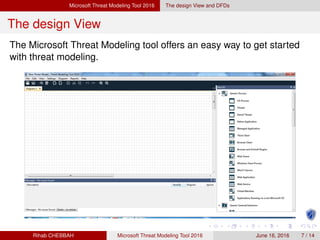
The Microsoft Threat Modeling tool offers an easy way to get started
with threat modeling.
Rihab CHEBBAH Microsoft Threat Modeling Tool 2016 June 16, 2016 7 / 14
Microsoft Threat Modeling Tool 2016 The design View and DFDs
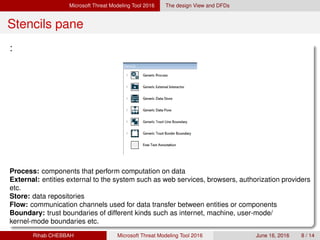
Stencils pane
:
Process: components that perform computation on data
External: entities external to the system such as web services, browsers, authorization providers
etc.
Store: data repositories
Flow: communication channels used for data transfer between entities or components
Boundary: trust boundaries of different kinds such as internet, machine, user-mode/
kernel-mode boundaries etc.
Rihab CHEBBAH Microsoft Threat Modeling Tool 2016 June 16, 2016 8 / 14
Microsoft Threat Modeling Tool 2016 The design View and DFDs
DFD
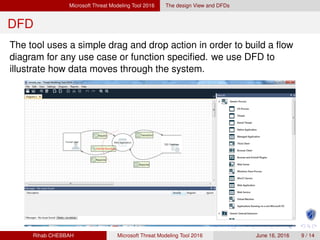
The tool uses a simple drag and drop action in order to build a flow
diagram for any use case or function specified. we use DFD to
illustrate how data moves through the system.
Rihab CHEBBAH Microsoft Threat Modeling Tool 2016 June 16, 2016 9 / 14
Microsoft Threat Modeling Tool 2016 The Analysis View and Threat Management
The Analysis View
Switching to the Analysis view displays an auto generated list of possible threats based on the
data flow diagram.
we illustrate with this view the different threats as well as their properties such as (name,
categories, description, Threat Priority: High, Medium, or, Low)
Rihab CHEBBAH Microsoft Threat Modeling Tool 2016 June 16, 2016 10 / 14
Microsoft Threat Modeling Tool 2016 The Analysis View and Threat Management
Reporting
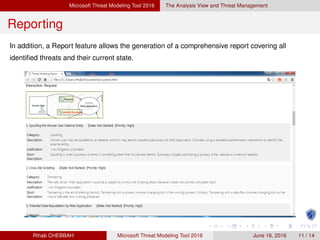
In addition, a Report feature allows the generation of a comprehensive report covering all
identified threats and their current state.
Rihab CHEBBAH Microsoft Threat Modeling Tool 2016 June 16, 2016 11 / 14
Conclusion
Conclusion
The Microsoft’s SDL threat Modeling Tool 2016 offers an easy drawing
environment,an automatic threat generation using the stride per
interaction approach .
It helps engineers analyze the security of their systems to find and
address design issues early in the software lifecycle.
Rihab CHEBBAH Microsoft Threat Modeling Tool 2016 June 16, 2016 12 / 14
That’s all folks
Thank you for your attention !
Rihab CHEBBAH Microsoft Threat Modeling Tool 2016 June 16, 2016 13 / 14

Microsoft threat modeling tool 2016

  • 1.
    Microsoft Threat ModelingTool 2016 Rihab CHEBBAH June 16, 2016 Rihab CHEBBAH Microsoft Threat Modeling Tool 2016 June 16, 2016 1 / 14
  • 2.
    Contents 1 Introduction Threat Modeling MicrosoftSecurity Development Lifecycle Threat Modeling 2 Microsoft Threat Modeling Tool 2016 Definition Model in use The design View and DFDs The Analysis View and Threat Management 3 Conclusion Rihab CHEBBAH Microsoft Threat Modeling Tool 2016 June 16, 2016 2 / 14
  • 3.
    Introduction Threat Modeling ThreatModeling? Definition Offers a description of the security issues and resources the designer cares about; can help to assess the probability, the potential harm, the priority etc., of attacks, and thus help to minimize or eradicate the threats. Rihab CHEBBAH Microsoft Threat Modeling Tool 2016 June 16, 2016 3 / 14
  • 4.
    Introduction Microsoft SecurityDevelopment Lifecycle Threat Modeling Microsoft Security Development Lifecycle Threat Modeling? Definition Microsoft’s Security Development Lifecycle (SDL) acts as a security assurance process which focuses on software development used to ensure a reduction in the number and severity of vulnerabilities in software; Threat Modeling is a core element of the Microsoft SDL; Rihab CHEBBAH Microsoft Threat Modeling Tool 2016 June 16, 2016 4 / 14
  • 5.
    Microsoft Threat ModelingTool 2016 Definition Microsoft Threat Modeling Tool 2016 Definition graphically identifies processes and data flows (DFD) that comprise an application or service. enables any developer or software architect to Communicate about the security design of their systems; Analyze those designs for potential security issues using a proven methodology; Suggest and manage mitigations for security issues. based on the STRIDE Model. Rihab CHEBBAH Microsoft Threat Modeling Tool 2016 June 16, 2016 5 / 14
  • 6.
    Microsoft Threat ModelingTool 2016 Model in use STRIDE model STRIDE model The name STRIDE is based on of the initial letter of possible threats: Spoofing Tampering Repudiation Information disclosure Denial of service Elevation of privilege It classifies threats in accordance with their categories. By using these categories of threats, one has the ability to create a security strategy for a particular system in order to have planned responses and mitigations to threats or attacks. Rihab CHEBBAH Microsoft Threat Modeling Tool 2016 June 16, 2016 6 / 14
  • 7.
    Microsoft Threat ModelingTool 2016 The design View and DFDs The design View The Microsoft Threat Modeling tool offers an easy way to get started with threat modeling. Rihab CHEBBAH Microsoft Threat Modeling Tool 2016 June 16, 2016 7 / 14
  • 8.
    Microsoft Threat ModelingTool 2016 The design View and DFDs Stencils pane : Process: components that perform computation on data External: entities external to the system such as web services, browsers, authorization providers etc. Store: data repositories Flow: communication channels used for data transfer between entities or components Boundary: trust boundaries of different kinds such as internet, machine, user-mode/ kernel-mode boundaries etc. Rihab CHEBBAH Microsoft Threat Modeling Tool 2016 June 16, 2016 8 / 14
  • 9.
    Microsoft Threat ModelingTool 2016 The design View and DFDs DFD The tool uses a simple drag and drop action in order to build a flow diagram for any use case or function specified. we use DFD to illustrate how data moves through the system. Rihab CHEBBAH Microsoft Threat Modeling Tool 2016 June 16, 2016 9 / 14
  • 10.
    Microsoft Threat ModelingTool 2016 The Analysis View and Threat Management The Analysis View Switching to the Analysis view displays an auto generated list of possible threats based on the data flow diagram. we illustrate with this view the different threats as well as their properties such as (name, categories, description, Threat Priority: High, Medium, or, Low) Rihab CHEBBAH Microsoft Threat Modeling Tool 2016 June 16, 2016 10 / 14
  • 11.
    Microsoft Threat ModelingTool 2016 The Analysis View and Threat Management Reporting In addition, a Report feature allows the generation of a comprehensive report covering all identified threats and their current state. Rihab CHEBBAH Microsoft Threat Modeling Tool 2016 June 16, 2016 11 / 14
  • 12.
    Conclusion Conclusion The Microsoft’s SDLthreat Modeling Tool 2016 offers an easy drawing environment,an automatic threat generation using the stride per interaction approach . It helps engineers analyze the security of their systems to find and address design issues early in the software lifecycle. Rihab CHEBBAH Microsoft Threat Modeling Tool 2016 June 16, 2016 12 / 14
  • 13.
    That’s all folks Thankyou for your attention ! Rihab CHEBBAH Microsoft Threat Modeling Tool 2016 June 16, 2016 13 / 14