Security Analysis aNd Evaluation Lab.
Name Jisoo Park
Appstore Security
5 lines of defence against malware
2016. 8. 31
2
Contents
 Introduction
 Dataflow diagram of an app ecosystem
 Attacker Model
 STRIDE Threat analysis
 Defending against the threats
3
Introduction
 About ENISA
 European Network and Information Security Agency
 Authors
 Dr.Marnix Dekker and Dr.Giles Hogben
 Collaboration with the ‘DistriNet Research Group’
 This paper is part of a number of ENISA activates
around smartphone security
- Smartphones : Information security risks,
opportunities and recommendations for user
4
Introduction
 Executive Summary
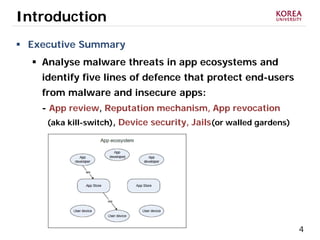
 Analyse malware threats in app ecosystems and
identify five lines of defence that protect end-users
from malware and insecure apps:
- App review, Reputation mechanism, App revocation
(aka kill-switch), Device security, Jails(or walled gardens)
5
Introduction
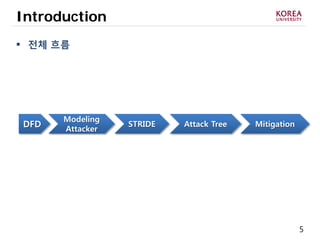
 전체 흐름
DFD Attack TreeSTRIDE Mitigation
Modeling
Attacker
6
Data Flow Diagram of an app ecosystem
7
Dataflow diagram of an app ecosystem
 Why Diagram?
 Give more clear view for entities that we need to
focus on
 The goal of diagram is to communicate how the
system works, so that everyone involved in threat
modeling has the same understanding
 Why Data Flow Diagram?
 Attacker consider attack surface or method through
data flow and trust boundaries
 Sometimes called “Threat model diagram”
8
Dataflow diagram of an app ecosystem
 Why Diagram?
 Give more clear view for entities that we need to
focus on
 Data Flow Diagram
 Commonly used for the threat analysis of software
system
 etc: UML, Swim line Diagram, State Diagram…
 Support the use of tools such as the Microsoft SDL
Threat Modeling Tool
 https://www.microsoft.com/en-us/download/details.aspx?id=49168
9
Dataflow diagram of an app ecosystem
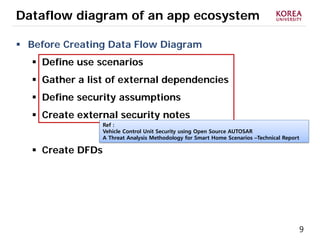
 Before Creating Data Flow Diagram
 Define use scenarios
 Gather a list of external dependencies
 Define security assumptions
 Create external security notes
 Create DFDs
Ref :
Vehicle Control Unit Security using Open Source AUTOSAR
A Threat Analysis Methodology for Smart Home Scenarios –Technical Report
10
Dataflow diagram of an app ecosystem
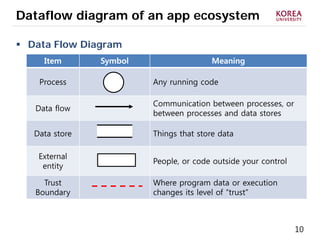
 Data Flow Diagram
Item Symbol Meaning
Process Any running code
Data flow
Communication between processes, or
between processes and data stores
Data store Things that store data
External
entity
People, or code outside your control
Trust
Boundary
Where program data or execution
changes its level of “trust”
11
Dataflow diagram of an app ecosystem
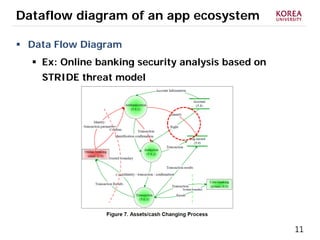
 Data Flow Diagram
 Ex: Online banking security analysis based on
STRIDE threat model
12
Dataflow diagram of an app ecosystem
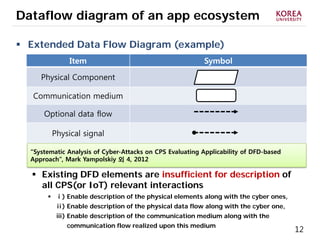
 Extended Data Flow Diagram (example)
 Existing DFD elements are insufficient for description of
all CPS(or IoT) relevant interactions
 ⅰ) Enable description of the physical elements along with the cyber ones,
ⅱ) Enable description of the physical data flow along with the cyber one,
ⅲ) Enable description of the communication medium along with the
communication flow realized upon this medium
Item Symbol
Physical Component
Communication medium
Optional data flow
Physical signal
“Systematic Analysis of Cyber-Attacks on CPS Evaluating Applicability of DFD-based
Approach”, Mark Yampolskiy 외 4, 2012
13
Dataflow diagram of an app ecosystem
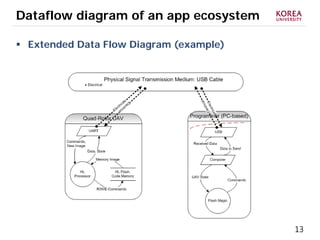
 Extended Data Flow Diagram (example)
14
Dataflow diagram of an app ecosystem
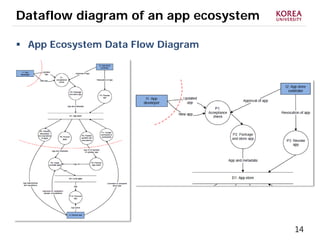
 App Ecosystem Data Flow Diagram
15
Dataflow diagram of an app ecosystem
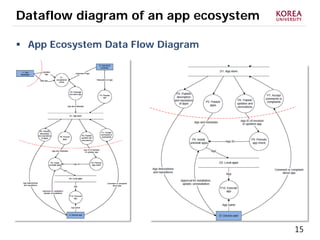
 App Ecosystem Data Flow Diagram
16
Attacker Model
17
Attacker Model
 Set the scope of the threat analysis and
define which attacks and attacker are in scope
 Target of Attackers :
 Don’t distinguish between stand-alone malware and malware
that relies on other apps
 Goals of Attacker :
 Ignore : attacks which have no impact on the end-user (e.g.
Click-fraud, plagiarism, unfair competition), Social
engineering attacks
Users, Consumers, Professionals in private or public sector
organizations, who download and install apps.
• To get malicious code on the user device, and (if that works)
• To keep malicious code on the user device
18
Attacker Model
 Set the scope of the threat analysis and
define which attacks and attacker are in scope
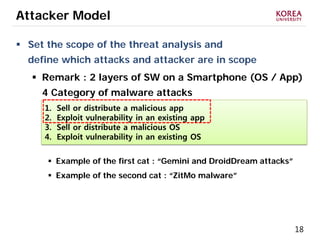
 Remark : 2 layers of SW on a Smartphone (OS / App)
4 Category of malware attacks
 Example of the first cat : “Gemini and DroidDream attacks”
 Example of the second cat : “ZitMo malware”
1. Sell or distribute a malicious app
2. Exploit vulnerability in an existing app
3. Sell or distribute a malicious OS
4. Exploit vulnerability in an existing OS
19
Attacker Model
 Set the scope of the threat analysis and
define which attacks and attacker are in scope
 Remark : 2 layers of SW on a Smartphone (OS / App)
4 Category of malware attacks
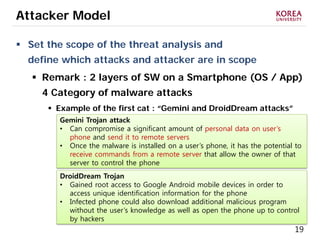
 Example of the first cat : “Gemini and DroidDream attacks”
Gemini Trojan attack
• Can compromise a significant amount of personal data on user’s
phone and send it to remote servers
• Once the malware is installed on a user’s phone, it has the potential to
receive commands from a remote server that allow the owner of that
server to control the phone
DroidDream Trojan
• Gained root access to Google Android mobile devices in order to
access unique identification information for the phone
• Infected phone could also download additional malicious program
without the user’s knowledge as well as open the phone up to control
by hackers
20
Attacker Model
 Set the scope of the threat analysis and
define which attacks and attacker are in scope
 Remark : 2 layers of SW on a Smartphone (OS / App)
4 Category of malware attacks
 Example of the second cat : “Zitmo Malware”
Zitmo(Zeus-in-the-mobile)
• Compromise a significant amount of personal data.
• More than 50 applications have been found to be infected.
21
STRIDE
22
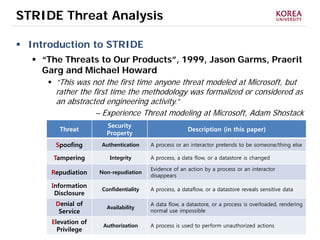
STRIDE Threat Analysis
 Introduction to STRIDE
 “The Threats to Our Products”, 1999, Jason Garms, Praerit
Garg and Michael Howard
 “This was not the first time anyone threat modeled at Microsoft, but
rather the first time the methodology was formalized or considered as
an abstracted engineering activity.”
– Experience Threat modeling at Microsoft, Adam Shostack
Threat
Security
Property
Description (in this paper)
Spoofing Authentication A process or an interactor pretends to be someone/thing else
Tampering Integrity A process, a data flow, or a datastore is changed
Repudiation Non-repudiation
Evidence of an action by a process or an interactor
disappears
Information
Disclosure
Confidentiality A process, a dataflow, or a datastore reveals sensitive data
Denial of
Service
Availability
A data flow, a datastore, or a process is overloaded, rendering
normal use impossible
Elevation of
Privilege
Authorization A process is used to perform unauthorized actions
23
STRIDE Threat Analysis
 Introduction to STRIDE
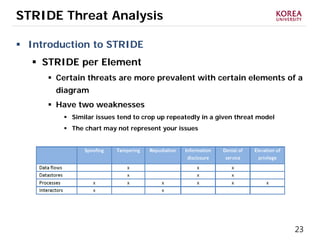
 STRIDE per Element
 Certain threats are more prevalent with certain elements of a
diagram
 Have two weaknesses
 Similar issues tend to crop up repeatedly in a given threat model
 The chart may not represent your issues
24
STRIDE Threat Analysis
 Introduction to STRIDE
 STRIDE per Interaction
 Developed by Larry Osterman, Douglas MacIver (Microsoft)
 Approach to threat enumeration that considers tuples(origin,
destination, interaction) of and enumerates threats against them
 Threats may be easier to understand with this approach
25
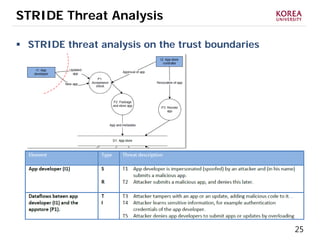
STRIDE Threat Analysis
 STRIDE threat analysis on the trust boundaries
26
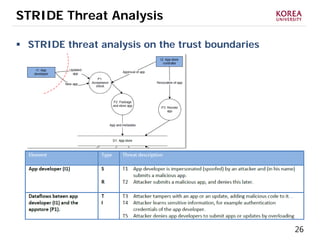
STRIDE Threat Analysis
 STRIDE threat analysis on the trust boundaries
27
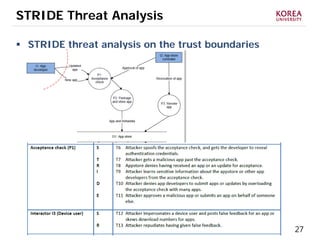
STRIDE Threat Analysis
 STRIDE threat analysis on the trust boundaries
28
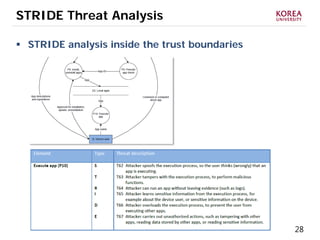
STRIDE Threat Analysis
 STRIDE analysis inside the trust boundaries
29
Defending against the threats
30
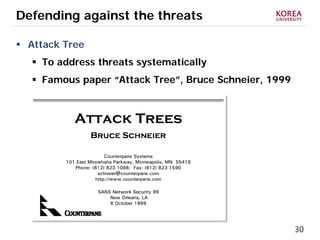
Defending against the threats
 Attack Tree
 To address threats systematically
 Famous paper “Attack Tree”, Bruce Schneier, 1999
31
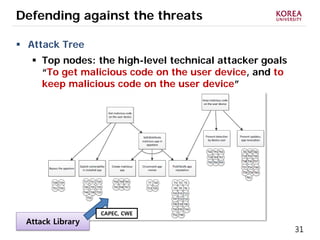
Defending against the threats
 Attack Tree
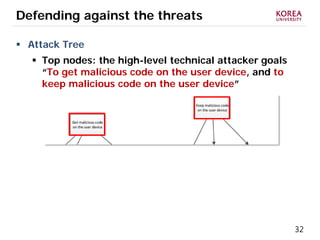
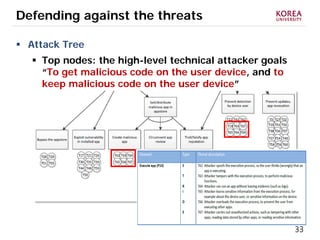
 Top nodes: the high-level technical attacker goals
“To get malicious code on the user device, and to
keep malicious code on the user device”
Attack Library
CAPEC, CWE
32
Defending against the threats
 Attack Tree
 Top nodes: the high-level technical attacker goals
“To get malicious code on the user device, and to
keep malicious code on the user device”
33
Defending against the threats
 Attack Tree
 Top nodes: the high-level technical attacker goals
“To get malicious code on the user device, and to
keep malicious code on the user device”
34
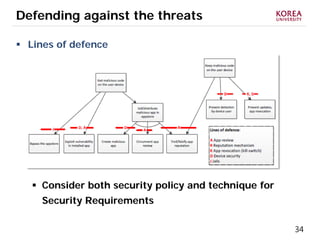
Defending against the threats
 Lines of defence
 Consider both security policy and technique for
Security Requirements
35
Defending against the threats
 Lines of defence : App review
 Automated software analysis tools
 Static Analysis / Dynamic Analysis
ex) Apple’s submission process / Microsoft’s ‘Hopper’ tool
 Manual analysis
 There are a number of aspects that can only be checked by a human
ex) if an app is trying to spoof another app to fool user
 Sharing analysis results
 Appstores could also leverage the expertise of 3rd party researchers
and security companies by allowing them to bulk-download and
analyse apps
36
Defending against the threats
 Lines of defence : App review
 Authentication of app developers
 App developers should be securely authenticated so that rogue app
developers cannot piggy-back on the reputation of other app
developers
 Risk profiling of app developers
 The appstore should monitor and create risk profiles of app
developers. New app developers, or app developers who submit
unsafe or malicious apps, should be treated with special care.
 Continuous process
 App review should be a continuous process, and appstores should
analyse apps even after they have been admitted to the appstore
 Priority for updates
 Appstores should consider priority vetting for updates to existing
apps to allow app developers to patch vulnerabilities quickly
37
Defending against the threats
 Lines of defence : Reputation mechanism
 App track record
 The reputation of an app should show the history and track record of
app developers and apps, download statistics of apps, user votes,
and detailed comments and complaints from users
 Separate security and privacy reputation
 Sybil attack resistance
 Second-order reputation
38
Defending against the threats
 Lines of defence : Reputation mechanism
 Anonymous feedback
 Exchanging reputation information
 Permission feedback
39
Defending against the threats
 Lines of defence : App revocation (Kill-switch)
 User communication and consent
 Spawning
 Update frequency
 Detection
 False positives
40
Defending against the threats
 Lines of defence : Device security
 Code signing
 Sandboxes
 Minimal set of privileges
 Monitoring by the smartphone use
 Clean slating
41
Defending against the threats
 Lines of defence : Jails or wall gardens
 Closed app ecosystems
 Enterprise app stores
 Open app ecosystems
 Federated appstores
 App reputation across appstores
42
Reference
[1] “Threat modeling using attack trees”, Vineet Saimi
[2] “Threat modeling Smart Home – Technical report”, Kristian Beckers
[3] “Vehicle Control Unit Security using Open source AUTOSAR”,
Anton Bretting & Mei Ha
[4] “Systematic Analysis of Cyber-attacks on CPS-Evaluating applicability of DFD-based
Approach”, Mark Yampolskiy
[5] “Introduction to Microsoft Security Development Lifecycle(SDL) Threat modeling”,
Microsoft
[6] “Google Android security report 2014”, Google
[7] “A threat-driven approach to Cyber security”, Michael Muckin
[8] “How Google Play Security Still Falls Short”, MinPyo Hong
[9] “Online Banking Security Analysis based on STRIDE Threat Model”, Tong Xin
[10] “Threat Modeling as a Basis for Security Requirements”, Suvda Myagmar
Security Analysis aNd Evaluation Lab.
Name Jisoo Park
(jisoo8881@korea.ac.kr)
Appstore Security
5 lines of defence against malware
2016. 8. 31

20160831_app_storesecurity_Seminar

  • 1.
    Security Analysis aNdEvaluation Lab. Name Jisoo Park Appstore Security 5 lines of defence against malware 2016. 8. 31
  • 2.
    2 Contents  Introduction  Dataflowdiagram of an app ecosystem  Attacker Model  STRIDE Threat analysis  Defending against the threats
  • 3.
    3 Introduction  About ENISA European Network and Information Security Agency  Authors  Dr.Marnix Dekker and Dr.Giles Hogben  Collaboration with the ‘DistriNet Research Group’  This paper is part of a number of ENISA activates around smartphone security - Smartphones : Information security risks, opportunities and recommendations for user
  • 4.
    4 Introduction  Executive Summary Analyse malware threats in app ecosystems and identify five lines of defence that protect end-users from malware and insecure apps: - App review, Reputation mechanism, App revocation (aka kill-switch), Device security, Jails(or walled gardens)
  • 5.
    5 Introduction  전체 흐름 DFDAttack TreeSTRIDE Mitigation Modeling Attacker
  • 6.
    6 Data Flow Diagramof an app ecosystem
  • 7.
    7 Dataflow diagram ofan app ecosystem  Why Diagram?  Give more clear view for entities that we need to focus on  The goal of diagram is to communicate how the system works, so that everyone involved in threat modeling has the same understanding  Why Data Flow Diagram?  Attacker consider attack surface or method through data flow and trust boundaries  Sometimes called “Threat model diagram”
  • 8.
    8 Dataflow diagram ofan app ecosystem  Why Diagram?  Give more clear view for entities that we need to focus on  Data Flow Diagram  Commonly used for the threat analysis of software system  etc: UML, Swim line Diagram, State Diagram…  Support the use of tools such as the Microsoft SDL Threat Modeling Tool  https://www.microsoft.com/en-us/download/details.aspx?id=49168
  • 9.
    9 Dataflow diagram ofan app ecosystem  Before Creating Data Flow Diagram  Define use scenarios  Gather a list of external dependencies  Define security assumptions  Create external security notes  Create DFDs Ref : Vehicle Control Unit Security using Open Source AUTOSAR A Threat Analysis Methodology for Smart Home Scenarios –Technical Report
  • 10.
    10 Dataflow diagram ofan app ecosystem  Data Flow Diagram Item Symbol Meaning Process Any running code Data flow Communication between processes, or between processes and data stores Data store Things that store data External entity People, or code outside your control Trust Boundary Where program data or execution changes its level of “trust”
  • 11.
    11 Dataflow diagram ofan app ecosystem  Data Flow Diagram  Ex: Online banking security analysis based on STRIDE threat model
  • 12.
    12 Dataflow diagram ofan app ecosystem  Extended Data Flow Diagram (example)  Existing DFD elements are insufficient for description of all CPS(or IoT) relevant interactions  ⅰ) Enable description of the physical elements along with the cyber ones, ⅱ) Enable description of the physical data flow along with the cyber one, ⅲ) Enable description of the communication medium along with the communication flow realized upon this medium Item Symbol Physical Component Communication medium Optional data flow Physical signal “Systematic Analysis of Cyber-Attacks on CPS Evaluating Applicability of DFD-based Approach”, Mark Yampolskiy 외 4, 2012
  • 13.
    13 Dataflow diagram ofan app ecosystem  Extended Data Flow Diagram (example)
  • 14.
    14 Dataflow diagram ofan app ecosystem  App Ecosystem Data Flow Diagram
  • 15.
    15 Dataflow diagram ofan app ecosystem  App Ecosystem Data Flow Diagram
  • 16.
  • 17.
    17 Attacker Model  Setthe scope of the threat analysis and define which attacks and attacker are in scope  Target of Attackers :  Don’t distinguish between stand-alone malware and malware that relies on other apps  Goals of Attacker :  Ignore : attacks which have no impact on the end-user (e.g. Click-fraud, plagiarism, unfair competition), Social engineering attacks Users, Consumers, Professionals in private or public sector organizations, who download and install apps. • To get malicious code on the user device, and (if that works) • To keep malicious code on the user device
  • 18.
    18 Attacker Model  Setthe scope of the threat analysis and define which attacks and attacker are in scope  Remark : 2 layers of SW on a Smartphone (OS / App) 4 Category of malware attacks  Example of the first cat : “Gemini and DroidDream attacks”  Example of the second cat : “ZitMo malware” 1. Sell or distribute a malicious app 2. Exploit vulnerability in an existing app 3. Sell or distribute a malicious OS 4. Exploit vulnerability in an existing OS
  • 19.
    19 Attacker Model  Setthe scope of the threat analysis and define which attacks and attacker are in scope  Remark : 2 layers of SW on a Smartphone (OS / App) 4 Category of malware attacks  Example of the first cat : “Gemini and DroidDream attacks” Gemini Trojan attack • Can compromise a significant amount of personal data on user’s phone and send it to remote servers • Once the malware is installed on a user’s phone, it has the potential to receive commands from a remote server that allow the owner of that server to control the phone DroidDream Trojan • Gained root access to Google Android mobile devices in order to access unique identification information for the phone • Infected phone could also download additional malicious program without the user’s knowledge as well as open the phone up to control by hackers
  • 20.
    20 Attacker Model  Setthe scope of the threat analysis and define which attacks and attacker are in scope  Remark : 2 layers of SW on a Smartphone (OS / App) 4 Category of malware attacks  Example of the second cat : “Zitmo Malware” Zitmo(Zeus-in-the-mobile) • Compromise a significant amount of personal data. • More than 50 applications have been found to be infected.
  • 21.
  • 22.
    22 STRIDE Threat Analysis Introduction to STRIDE  “The Threats to Our Products”, 1999, Jason Garms, Praerit Garg and Michael Howard  “This was not the first time anyone threat modeled at Microsoft, but rather the first time the methodology was formalized or considered as an abstracted engineering activity.” – Experience Threat modeling at Microsoft, Adam Shostack Threat Security Property Description (in this paper) Spoofing Authentication A process or an interactor pretends to be someone/thing else Tampering Integrity A process, a data flow, or a datastore is changed Repudiation Non-repudiation Evidence of an action by a process or an interactor disappears Information Disclosure Confidentiality A process, a dataflow, or a datastore reveals sensitive data Denial of Service Availability A data flow, a datastore, or a process is overloaded, rendering normal use impossible Elevation of Privilege Authorization A process is used to perform unauthorized actions
  • 23.
    23 STRIDE Threat Analysis Introduction to STRIDE  STRIDE per Element  Certain threats are more prevalent with certain elements of a diagram  Have two weaknesses  Similar issues tend to crop up repeatedly in a given threat model  The chart may not represent your issues
  • 24.
    24 STRIDE Threat Analysis Introduction to STRIDE  STRIDE per Interaction  Developed by Larry Osterman, Douglas MacIver (Microsoft)  Approach to threat enumeration that considers tuples(origin, destination, interaction) of and enumerates threats against them  Threats may be easier to understand with this approach
  • 25.
    25 STRIDE Threat Analysis STRIDE threat analysis on the trust boundaries
  • 26.
    26 STRIDE Threat Analysis STRIDE threat analysis on the trust boundaries
  • 27.
    27 STRIDE Threat Analysis STRIDE threat analysis on the trust boundaries
  • 28.
    28 STRIDE Threat Analysis STRIDE analysis inside the trust boundaries
  • 29.
  • 30.
    30 Defending against thethreats  Attack Tree  To address threats systematically  Famous paper “Attack Tree”, Bruce Schneier, 1999
  • 31.
    31 Defending against thethreats  Attack Tree  Top nodes: the high-level technical attacker goals “To get malicious code on the user device, and to keep malicious code on the user device” Attack Library CAPEC, CWE
  • 32.
    32 Defending against thethreats  Attack Tree  Top nodes: the high-level technical attacker goals “To get malicious code on the user device, and to keep malicious code on the user device”
  • 33.
    33 Defending against thethreats  Attack Tree  Top nodes: the high-level technical attacker goals “To get malicious code on the user device, and to keep malicious code on the user device”
  • 34.
    34 Defending against thethreats  Lines of defence  Consider both security policy and technique for Security Requirements
  • 35.
    35 Defending against thethreats  Lines of defence : App review  Automated software analysis tools  Static Analysis / Dynamic Analysis ex) Apple’s submission process / Microsoft’s ‘Hopper’ tool  Manual analysis  There are a number of aspects that can only be checked by a human ex) if an app is trying to spoof another app to fool user  Sharing analysis results  Appstores could also leverage the expertise of 3rd party researchers and security companies by allowing them to bulk-download and analyse apps
  • 36.
    36 Defending against thethreats  Lines of defence : App review  Authentication of app developers  App developers should be securely authenticated so that rogue app developers cannot piggy-back on the reputation of other app developers  Risk profiling of app developers  The appstore should monitor and create risk profiles of app developers. New app developers, or app developers who submit unsafe or malicious apps, should be treated with special care.  Continuous process  App review should be a continuous process, and appstores should analyse apps even after they have been admitted to the appstore  Priority for updates  Appstores should consider priority vetting for updates to existing apps to allow app developers to patch vulnerabilities quickly
  • 37.
    37 Defending against thethreats  Lines of defence : Reputation mechanism  App track record  The reputation of an app should show the history and track record of app developers and apps, download statistics of apps, user votes, and detailed comments and complaints from users  Separate security and privacy reputation  Sybil attack resistance  Second-order reputation
  • 38.
    38 Defending against thethreats  Lines of defence : Reputation mechanism  Anonymous feedback  Exchanging reputation information  Permission feedback
  • 39.
    39 Defending against thethreats  Lines of defence : App revocation (Kill-switch)  User communication and consent  Spawning  Update frequency  Detection  False positives
  • 40.
    40 Defending against thethreats  Lines of defence : Device security  Code signing  Sandboxes  Minimal set of privileges  Monitoring by the smartphone use  Clean slating
  • 41.
    41 Defending against thethreats  Lines of defence : Jails or wall gardens  Closed app ecosystems  Enterprise app stores  Open app ecosystems  Federated appstores  App reputation across appstores
  • 42.
    42 Reference [1] “Threat modelingusing attack trees”, Vineet Saimi [2] “Threat modeling Smart Home – Technical report”, Kristian Beckers [3] “Vehicle Control Unit Security using Open source AUTOSAR”, Anton Bretting & Mei Ha [4] “Systematic Analysis of Cyber-attacks on CPS-Evaluating applicability of DFD-based Approach”, Mark Yampolskiy [5] “Introduction to Microsoft Security Development Lifecycle(SDL) Threat modeling”, Microsoft [6] “Google Android security report 2014”, Google [7] “A threat-driven approach to Cyber security”, Michael Muckin [8] “How Google Play Security Still Falls Short”, MinPyo Hong [9] “Online Banking Security Analysis based on STRIDE Threat Model”, Tong Xin [10] “Threat Modeling as a Basis for Security Requirements”, Suvda Myagmar
  • 43.
    Security Analysis aNdEvaluation Lab. Name Jisoo Park (jisoo8881@korea.ac.kr) Appstore Security 5 lines of defence against malware 2016. 8. 31