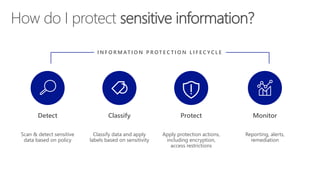
Detect
Scan & detect sensitive
data based on policy
Classify
Classify data and apply
labels based on sensitivity
Protect
Apply protection actions,
including encryption,
access restrictions
Monitor
Reporting, alerts,
remediation
I N F O R M AT I O N P R OT E C T I O N L I F E C Y C L E
How do I protect sensitive information?
%##&$^#*!~@&
FINANCE
CONFIDENTIAL
%$^#*@&
Open
Copy
Paste
Edit
aEZQAR]ibr{qU@M]
BXNoHp9nMDAtnBfr
fC;jx+Tg@XL2,Jzu
()&(*7812(*:
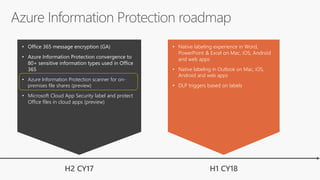
• Native labeling experience in Word,
PowerPoint & Excel on Mac, iOS, Android
and web apps
• Native labeling in Outlook on Mac, iOS,
Android and web apps
• DLP triggers based on labels
• Office 365 message encryption (GA)
• Azure Information Protection convergence to
80+ sensitive information types used in Office
365
• Azure Information Protection scanner for on-
premises file shares (preview)
• Microsoft Cloud App Security label and protect
Office files in cloud apps (preview)
H1 CY18H2 CY17
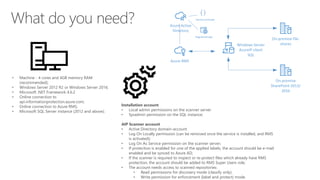
• Machine - 4 cores and 4GB memory RAM
(recommended);
• Windows Server 2012 R2 or Windows Server 2016;
• Microsoft .NET Framework 4.6.2
• Online connection to
api.informationprotection.azure.com;
• Online connection to Azure RMS;
• Microsoft SQL Server instance (2012 and above);
Installation account
• Local admin permissions on the scanner server
• Sysadmin permission on the SQL instance;
AIP Scanner account
• Active Directory domain-account
• Log On Locally permission (can be removed once the service is installed, and RMS
is activated);
• Log On As Service permission on the scanner server;
• If protection is enabled for one of the applied labels, the account should be e-mail
enabled and be synced to Azure AD;
• If the scanner is required to inspect or re-protect files which already have RMS
protection, the account should be added to RMS Super Users role;
• The account needs access to scanned repositories:
• Read permissions for discovery mode (classify only).
• Write permission for enforcement (label and protect) mode.
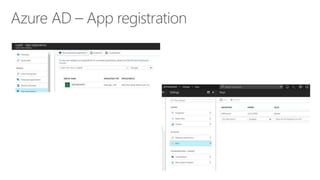
Azure RMS
On-premise file-
shares
On-premise
SharePoint 2013/
2016
Azure Active
Directory
Service principle
Windows Server
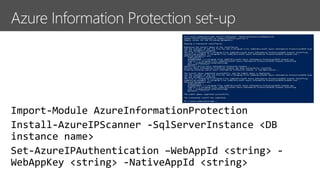
AzureIP client
SQL
Registered app
Demo
Azure Information
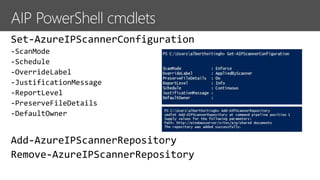
Protection scanner
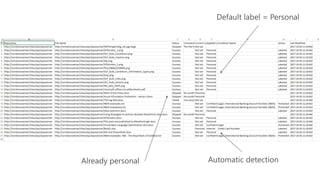
running and config
Microsoft TechDays Netherlands 2017 - Azure Information Protection Scanner

Microsoft TechDays Netherlands 2017 - Azure Information Protection Scanner

  • 4.
    Detect Scan & detectsensitive data based on policy Classify Classify data and apply labels based on sensitivity Protect Apply protection actions, including encryption, access restrictions Monitor Reporting, alerts, remediation I N F O R M AT I O N P R OT E C T I O N L I F E C Y C L E How do I protect sensitive information?
  • 5.
  • 6.
    • Native labelingexperience in Word, PowerPoint & Excel on Mac, iOS, Android and web apps • Native labeling in Outlook on Mac, iOS, Android and web apps • DLP triggers based on labels • Office 365 message encryption (GA) • Azure Information Protection convergence to 80+ sensitive information types used in Office 365 • Azure Information Protection scanner for on- premises file shares (preview) • Microsoft Cloud App Security label and protect Office files in cloud apps (preview) H1 CY18H2 CY17
  • 8.
    • Machine -4 cores and 4GB memory RAM (recommended); • Windows Server 2012 R2 or Windows Server 2016; • Microsoft .NET Framework 4.6.2 • Online connection to api.informationprotection.azure.com; • Online connection to Azure RMS; • Microsoft SQL Server instance (2012 and above); Installation account • Local admin permissions on the scanner server • Sysadmin permission on the SQL instance; AIP Scanner account • Active Directory domain-account • Log On Locally permission (can be removed once the service is installed, and RMS is activated); • Log On As Service permission on the scanner server; • If protection is enabled for one of the applied labels, the account should be e-mail enabled and be synced to Azure AD; • If the scanner is required to inspect or re-protect files which already have RMS protection, the account should be added to RMS Super Users role; • The account needs access to scanned repositories: • Read permissions for discovery mode (classify only). • Write permission for enforcement (label and protect) mode. Azure RMS On-premise file- shares On-premise SharePoint 2013/ 2016 Azure Active Directory Service principle Windows Server AzureIP client SQL Registered app
  • 15.