Securing MS
SharePoint with IRM
2
OVERVIEW
Overview
Documents stored within Microsoft SharePoint are often highly confidential-
ranging from invoices to intellectual property.
It is possible to define user-specific access permissions on SharePoint
libraries to mitigate security risk. But once downloaded, these permissions
are lost.
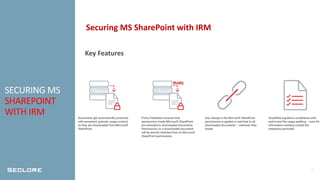
Seclore Rights Management for Microsoft SharePoint automatically protects
documents as they are downloaded.
This ensures that your documents stay protected not just inside MS
SharePoint, but wherever they go – to any location, network, or device.
3
KEY
BUSINESS
BENEFITS
Key Business Benefits
• Increased Business Agility
Freedom to secure information that travels beyond your corporate borders
– to vendors, partners and contractors
• End-to-End Auditing and Regulatory Compliance
Govern your information throughout its entire lifecycle – both within and
outside the organization
• Increased ROI from your Box Investment
Get maximum value for your investment by enabling IRM solutions on
stored and download documents and adding ERM with file-sharing drives
4
SECURING MS
SHAREPOINT
WITH IRM
Securing MS SharePoint with IRM
Key Features
5
ABOUT
SECLORE
About Seclore
● Seclore offers the market’s first browser-based Data-Centric Security
Platform, which gives organizations the agility to utilize best-of-breed
solutions to discover, identify, protect, and audit the usage of data
wherever it goes, both within and outside of the organization’s
boundaries.
● The ability to automate the data-centric security process enables
organizations to fully protect information with minimal friction and cost.
● Over 2000 companies in 29 countries are using Seclore to achieve their
data security, governance, and compliance objectives.
6
CONTACT US
Contact US
● 691 S. MILPITAS BLVD SUITE # 217
MILPITAS, CA 95035
● 1-844-4-SECLORE
1-844-473-2567
● INFO@SECLORE.COM
Thank you!
Questions?

Securing MS SharePoint with IRM

  • 1.
  • 2.
    2 OVERVIEW Overview Documents stored withinMicrosoft SharePoint are often highly confidential- ranging from invoices to intellectual property. It is possible to define user-specific access permissions on SharePoint libraries to mitigate security risk. But once downloaded, these permissions are lost. Seclore Rights Management for Microsoft SharePoint automatically protects documents as they are downloaded. This ensures that your documents stay protected not just inside MS SharePoint, but wherever they go – to any location, network, or device.
  • 3.
    3 KEY BUSINESS BENEFITS Key Business Benefits •Increased Business Agility Freedom to secure information that travels beyond your corporate borders – to vendors, partners and contractors • End-to-End Auditing and Regulatory Compliance Govern your information throughout its entire lifecycle – both within and outside the organization • Increased ROI from your Box Investment Get maximum value for your investment by enabling IRM solutions on stored and download documents and adding ERM with file-sharing drives
  • 4.
    4 SECURING MS SHAREPOINT WITH IRM SecuringMS SharePoint with IRM Key Features
  • 5.
    5 ABOUT SECLORE About Seclore ● Secloreoffers the market’s first browser-based Data-Centric Security Platform, which gives organizations the agility to utilize best-of-breed solutions to discover, identify, protect, and audit the usage of data wherever it goes, both within and outside of the organization’s boundaries. ● The ability to automate the data-centric security process enables organizations to fully protect information with minimal friction and cost. ● Over 2000 companies in 29 countries are using Seclore to achieve their data security, governance, and compliance objectives.
  • 6.
    6 CONTACT US Contact US ●691 S. MILPITAS BLVD SUITE # 217 MILPITAS, CA 95035 ● 1-844-4-SECLORE 1-844-473-2567 ● INFO@SECLORE.COM
  • 7.