Microsoft Project (MSP)
Presented to,
IT-4th-Evening-2013-2017
Presented by,
Ubaid-ur-Rehman -:- 3014
Table of Contents
►Define
►History
►Feature descriptions
►MSP Offers
►Project Map
►Track and maintain project
►Enhancments
15.04.2015 Microsoft Project 2/15
15. 4. 2015. Microsoft Project 3/15
What is Microsoft Project?
►Microsoft Project (or MSP) is a project
management software program
►It is designed to assist project managers in:
• developing plans
• assigning resources to tasks
• tracking progress
• managing budgets
• analyzing workloads
15. 4. 2015. Microsoft Project 4/15
Short History of MSP
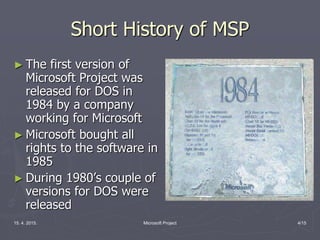
► The first version of
Microsoft Project was
released for DOS in
1984 by a company
working for Microsoft
► Microsoft bought all
rights to the software in
1985
► During 1980’s couple of
versions for DOS were
released
15. 4. 2015. Microsoft Project 5/15
Short History of MSP
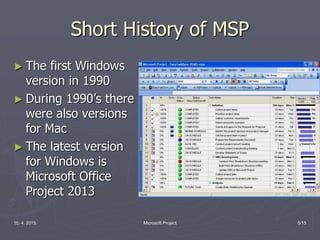
► The first Windows
version in 1990
► During 1990’s there
were also versions
for Mac
► The latest version
for Windows is
Microsoft Office
Project 2013
15. 4. 2015. Microsoft Project 6/15
Feature Description
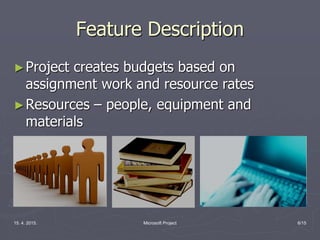
►Project creates budgets based on
assignment work and resource rates
►Resources – people, equipment and
materials
15. 4. 2015.. Microsoft Project 7/15
Feature Description
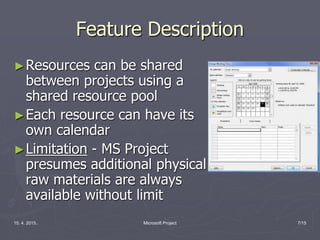
►Resources can be shared
between projects using a
shared resource pool
►Each resource can have its
own calendar
►Limitation - MS Project
presumes additional physical
raw materials are always
available without limit
15. 4. 2015. Microsoft Project 8/15
MSP Offers
►Robust management tools with the right
blend of:
 Usability
 Power
 Flexibility
►That’s why you can manage projects more
efficiently and effectively.
15. 4. 2015. Microsoft Project 9/15
MSP Offers
►MSP enables you to stay informed and
control:
 Project work
 Schedules
 Finances
►And to keep project teams aligned
15. 4. 2015. Microsoft Project 10/15
The Project Map
► The Project Map can
help you accomplish
your project goals by
using the accepted
standards and
practices of project
management
methodology
15. 4. 2015. Microsoft Project 11/15
The Project Map
►The Project Map outlines the three phases
of the project life cycle:
• Build a plan
• Track and manage a project
• Close a project
15. 4. 2015. Microsoft Project 12/15
Build a Plan Activities
►Define a project
►Plan project activities
►Plan for a procure resources
►Plan project costs
►Plan for quality and risks
►Plan communication and security
►Optimize a project plan
►Print and distribute project information
15. 4. 2015. Microsoft Project 13/15
Track and Manage a Project
Activities
►Track progress
►Manage a schedule
►Manage resources
►Manage costs
►Manage risks
15. 4. 2015. Microsoft Project 14/15
Close a Project Activity
► Review final project information
Each one of project phase’s activities has it’s own
goals
15. 4. 2015. Microsoft Project 15/15
Enhancements
►Microsoft Project’s capabilities were
extended with the introduction of:
 Microsoft Office Project Server
 Microsoft Project Web Access
►Also, newer versions provide for cross-
functionality with products like:
 PowerPoint
 Visio
Conclusion
►This is an awesome Software to done Your
projects more efficiently and accurately.
►We can save lots of time, paper work, men
power and money.
15. 4. 2015. Microsoft Project 16/15
Reference
►https://products.office.com/en-
us/project/project-and-portfolio-
management-software
►www.ese.upenn.edu/seniordesign/resources
/MS_Project_Tutorial.pdf
►http://en.wikipedia.org/wiki/Microsoft_Proje
ct
15.4.2015. Microsoft Project 17/15

Microsoft Project

  • 1.
    Microsoft Project (MSP) Presentedto, IT-4th-Evening-2013-2017 Presented by, Ubaid-ur-Rehman -:- 3014
  • 2.
    Table of Contents ►Define ►History ►Featuredescriptions ►MSP Offers ►Project Map ►Track and maintain project ►Enhancments 15.04.2015 Microsoft Project 2/15
  • 3.
    15. 4. 2015.Microsoft Project 3/15 What is Microsoft Project? ►Microsoft Project (or MSP) is a project management software program ►It is designed to assist project managers in: • developing plans • assigning resources to tasks • tracking progress • managing budgets • analyzing workloads
  • 4.
    15. 4. 2015.Microsoft Project 4/15 Short History of MSP ► The first version of Microsoft Project was released for DOS in 1984 by a company working for Microsoft ► Microsoft bought all rights to the software in 1985 ► During 1980’s couple of versions for DOS were released
  • 5.
    15. 4. 2015.Microsoft Project 5/15 Short History of MSP ► The first Windows version in 1990 ► During 1990’s there were also versions for Mac ► The latest version for Windows is Microsoft Office Project 2013
  • 6.
    15. 4. 2015.Microsoft Project 6/15 Feature Description ►Project creates budgets based on assignment work and resource rates ►Resources – people, equipment and materials
  • 7.
    15. 4. 2015..Microsoft Project 7/15 Feature Description ►Resources can be shared between projects using a shared resource pool ►Each resource can have its own calendar ►Limitation - MS Project presumes additional physical raw materials are always available without limit
  • 8.
    15. 4. 2015.Microsoft Project 8/15 MSP Offers ►Robust management tools with the right blend of:  Usability  Power  Flexibility ►That’s why you can manage projects more efficiently and effectively.
  • 9.
    15. 4. 2015.Microsoft Project 9/15 MSP Offers ►MSP enables you to stay informed and control:  Project work  Schedules  Finances ►And to keep project teams aligned
  • 10.
    15. 4. 2015.Microsoft Project 10/15 The Project Map ► The Project Map can help you accomplish your project goals by using the accepted standards and practices of project management methodology
  • 11.
    15. 4. 2015.Microsoft Project 11/15 The Project Map ►The Project Map outlines the three phases of the project life cycle: • Build a plan • Track and manage a project • Close a project
  • 12.
    15. 4. 2015.Microsoft Project 12/15 Build a Plan Activities ►Define a project ►Plan project activities ►Plan for a procure resources ►Plan project costs ►Plan for quality and risks ►Plan communication and security ►Optimize a project plan ►Print and distribute project information
  • 13.
    15. 4. 2015.Microsoft Project 13/15 Track and Manage a Project Activities ►Track progress ►Manage a schedule ►Manage resources ►Manage costs ►Manage risks
  • 14.
    15. 4. 2015.Microsoft Project 14/15 Close a Project Activity ► Review final project information Each one of project phase’s activities has it’s own goals
  • 15.
    15. 4. 2015.Microsoft Project 15/15 Enhancements ►Microsoft Project’s capabilities were extended with the introduction of:  Microsoft Office Project Server  Microsoft Project Web Access ►Also, newer versions provide for cross- functionality with products like:  PowerPoint  Visio
  • 16.
    Conclusion ►This is anawesome Software to done Your projects more efficiently and accurately. ►We can save lots of time, paper work, men power and money. 15. 4. 2015. Microsoft Project 16/15
  • 17.