Project Management Tools
(PMT)
Using Microsoft Project 2013
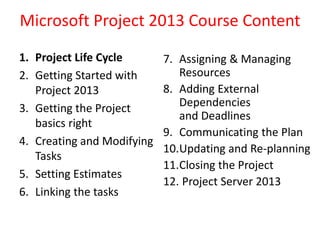
Microsoft Project 2013 Course Content
1. Project Life Cycle
2. Getting Started with
Project 2013
3. Getting the Project
basics right
4. Creating and Modifying
Tasks
5. Setting Estimates
6. Linking the tasks
7. Assigning & Managing
Resources
8. Adding External
Dependencies
and Deadlines
9. Communicating the Plan
10.Updating and Re-planning
11.Closing the Project
12. Project Server 2013
Introduction to Course Content
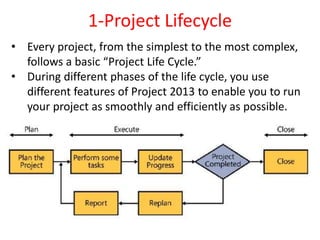
1-Project Lifecycle
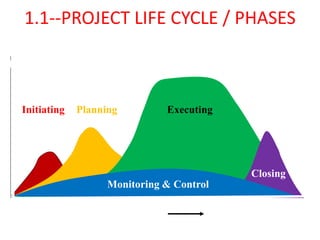
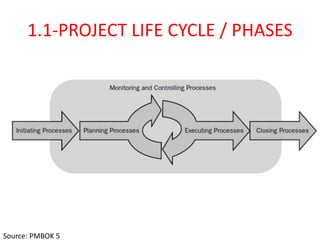
• Every project, from the simplest to the most complex,
follows a basic “Project Life Cycle.”
• During different phases of the life cycle, you use
different features of Project 2013 to enable you to run
your project as smoothly and efficiently as possible.
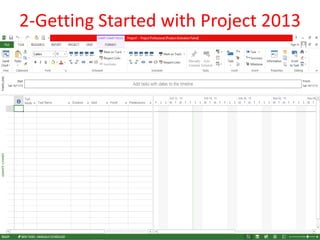
2-Getting Started with Project 2013
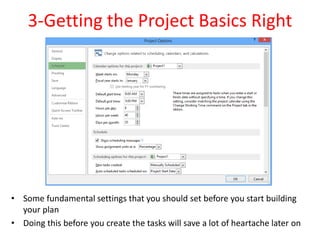
3-Getting the Project Basics Right
• Some fundamental settings that you should set before you start building
your plan
• Doing this before you create the tasks will save a lot of heartache later on
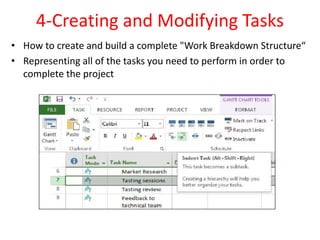
4-Creating and Modifying Tasks
• How to create and build a complete "Work Breakdown Structure“
• Representing all of the tasks you need to perform in order to
complete the project
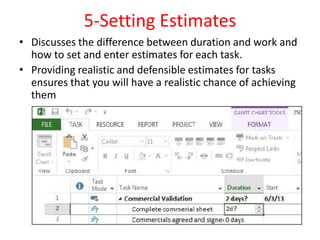
5-Setting Estimates
• Discusses the difference between duration and work and
how to set and enter estimates for each task.
• Providing realistic and defensible estimates for tasks
ensures that you will have a realistic chance of achieving
them
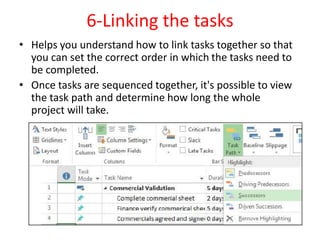
6-Linking the tasks
• Helps you understand how to link tasks together so that
you can set the correct order in which the tasks need to
be completed.
• Once tasks are sequenced together, it's possible to view
the task path and determine how long the whole
project will take.
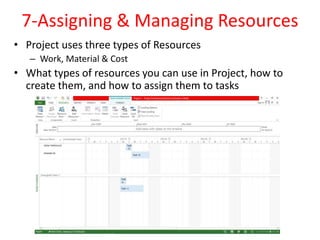
7-Assigning & Managing Resources
• Project uses three types of Resources
– Work, Material & Cost
• What types of resources you can use in Project, how to
create them, and how to assign them to tasks
8-Adding External Dependencies
and Deadlines
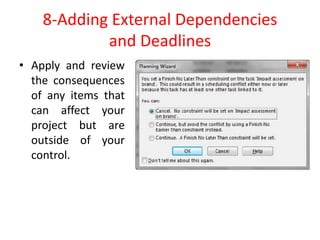
• Apply and review
the consequences
of any items that
can affect your
project but are
outside of your
control.
9-Communicating the Plan
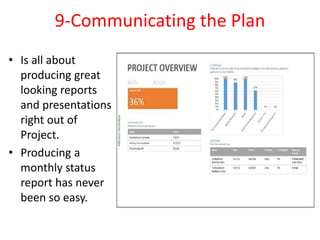
• Is all about
producing great
looking reports
and presentations
right out of
Project.
• Producing a
monthly status
report has never
been so easy.
10-Updating and Re-planning
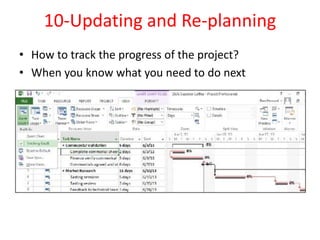
• How to track the progress of the project?
• When you know what you need to do next
11-Closing the Project
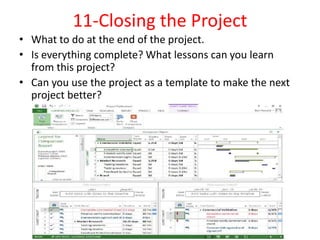
• What to do at the end of the project.
• Is everything complete? What lessons can you learn
from this project?
• Can you use the project as a template to make the next
project better?
12-Project Server 2013
• Product philosophy and architecture
of Microsoft Project 2013
• Role concept (managers, project
managers, resource managers, and
team members)
• Project initiation with Project
Professional and Web App (Project
Start, Enterprise Calendars,
Enterprise Global, Enterprise
Templates, EPTs)
• Planning options in Project Web
App
• Resource planning in Project Server
(Enterprise Resources, Team
Builder)
• Project implementation (My
Tasks, My Timesheets, Time
Reporting methods, updating)
• Project and resource
evaluation in Web App (Project
Center, Resource Center,
Reports)
• Project closure(project
archiving)
• Project Sites (documents,
issues, risks)
• Multi-project management
(master/subprojects,
deliverables, cross-project
links)
Activity
Level
e
Project Start Project Close
Initiating Planning Executing
Monitoring & Control
Closing
1.1--PROJECT LIFE CYCLE / PHASES
1.1-PROJECT LIFE CYCLE / PHASES
Source: PMBOK 5

Lesson 1 PMT Project Life Cycle (Microsoft Project Management)

  • 1.
  • 3.
    Microsoft Project 2013Course Content 1. Project Life Cycle 2. Getting Started with Project 2013 3. Getting the Project basics right 4. Creating and Modifying Tasks 5. Setting Estimates 6. Linking the tasks 7. Assigning & Managing Resources 8. Adding External Dependencies and Deadlines 9. Communicating the Plan 10.Updating and Re-planning 11.Closing the Project 12. Project Server 2013
  • 4.
  • 5.
    1-Project Lifecycle • Everyproject, from the simplest to the most complex, follows a basic “Project Life Cycle.” • During different phases of the life cycle, you use different features of Project 2013 to enable you to run your project as smoothly and efficiently as possible.
  • 6.
  • 7.
    3-Getting the ProjectBasics Right • Some fundamental settings that you should set before you start building your plan • Doing this before you create the tasks will save a lot of heartache later on
  • 8.
    4-Creating and ModifyingTasks • How to create and build a complete "Work Breakdown Structure“ • Representing all of the tasks you need to perform in order to complete the project
  • 9.
    5-Setting Estimates • Discussesthe difference between duration and work and how to set and enter estimates for each task. • Providing realistic and defensible estimates for tasks ensures that you will have a realistic chance of achieving them
  • 10.
    6-Linking the tasks •Helps you understand how to link tasks together so that you can set the correct order in which the tasks need to be completed. • Once tasks are sequenced together, it's possible to view the task path and determine how long the whole project will take.
  • 11.
    7-Assigning & ManagingResources • Project uses three types of Resources – Work, Material & Cost • What types of resources you can use in Project, how to create them, and how to assign them to tasks
  • 12.
    8-Adding External Dependencies andDeadlines • Apply and review the consequences of any items that can affect your project but are outside of your control.
  • 13.
    9-Communicating the Plan •Is all about producing great looking reports and presentations right out of Project. • Producing a monthly status report has never been so easy.
  • 14.
    10-Updating and Re-planning •How to track the progress of the project? • When you know what you need to do next
  • 15.
    11-Closing the Project •What to do at the end of the project. • Is everything complete? What lessons can you learn from this project? • Can you use the project as a template to make the next project better?
  • 16.
    12-Project Server 2013 •Product philosophy and architecture of Microsoft Project 2013 • Role concept (managers, project managers, resource managers, and team members) • Project initiation with Project Professional and Web App (Project Start, Enterprise Calendars, Enterprise Global, Enterprise Templates, EPTs) • Planning options in Project Web App • Resource planning in Project Server (Enterprise Resources, Team Builder) • Project implementation (My Tasks, My Timesheets, Time Reporting methods, updating) • Project and resource evaluation in Web App (Project Center, Resource Center, Reports) • Project closure(project archiving) • Project Sites (documents, issues, risks) • Multi-project management (master/subprojects, deliverables, cross-project links)
  • 17.
    Activity Level e Project Start ProjectClose Initiating Planning Executing Monitoring & Control Closing 1.1--PROJECT LIFE CYCLE / PHASES
  • 18.
    1.1-PROJECT LIFE CYCLE/ PHASES Source: PMBOK 5