Bruce Cowper IT Pro Advisor Microsoft Canada
Agenda Windows Server™ 2003 R2 Principal Scenarios Identity and Access Management Efficient Storage Management Simplified Branch Server Management Cost-Effective Virtualization
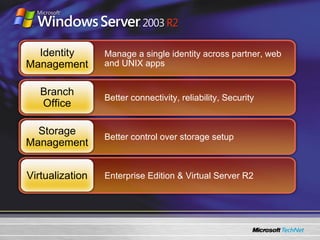
Manage a single identity across partner, web and UNIX apps Better connectivity, reliability, Security Better control over storage setup Enterprise Edition & Virtual Server R2 Identity Management Branch Office Storage Management Virtualization
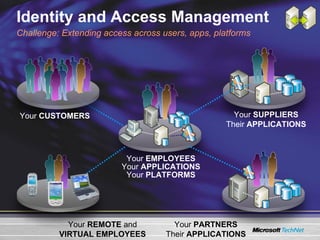
Identity and Access Management Your  EMPLOYEES Your  APPLICATIONS Your  PLATFORMS Your  PARTNERS Their  APPLICATIONS Your  REMOTE  and VIRTUAL EMPLOYEES Challenge: Extending access across users, apps, platforms Your  SUPPLIERS Their  APPLICATIONS Your  CUSTOMERS
Identity and Access Management Active Directory ÂŽ  Application Mode (ADAM) Lightweight, domain-independent mode of Active Directory for application directory scenarios Interoperability with Domain Mode for authentication Benefit: Tailor directory services infrastructure for local control/autonomy or shared services UNIX Identity Management Server for Network Information Service (NIS) helps integrate Windows and UNIX domains Password synchronization simplifies password maintenance across platforms Benefit: Efficient multi-platform identity management   Active Directory Federation Services (ADFS) Windows Server 2003 R2 Features
Active Directory Application Mode Lightweight, domain-independent mode of Active Directory for application directory scenarios Same code as Active Directory = same programming model, admin tools, replication model Simple wizard-based install; no DCPROMO Schema flexibility; synchronization with Active Directory possible via Identity Integration Feature Pack Free web download Authentication in Active Directory, authorization in ADAM for increased security
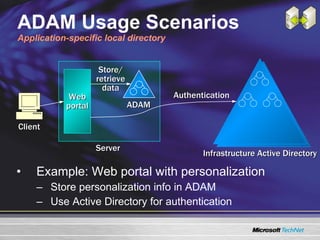
ADAM Usage Scenarios Application-specific local directory Example: Web portal with personalization Store personalization info in ADAM Use Active Directory for authentication Infrastructure Active Directory Store/ retrieve data Client Authentication Server ADAM Web portal
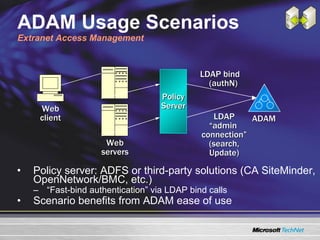
ADAM Usage Scenarios Extranet Access Management Policy server: ADFS or third-party solutions (CA SiteMinder, OpenNetwork/BMC, etc.) “ Fast-bind authentication” via LDAP bind calls Scenario benefits from ADAM ease of use LDAP “ admin  connection” (search, Update) Web client LDAP bind (authN) Web servers ADAM Policy Server
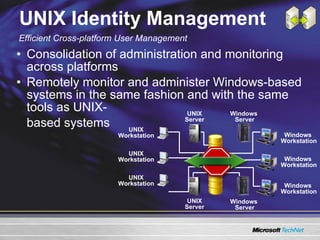
UNIX Identity Management Consolidation of administration and monitoring across platforms Remotely monitor and administer Windows-based systems in the same fashion and with the same tools as UNIX- based systems Efficient Cross-platform User Management UNIX Server Windows  Server Windows  Workstation UNIX Workstation Windows  Server UNIX Server UNIX Workstation UNIX Workstation Windows  Workstation Windows  Workstation
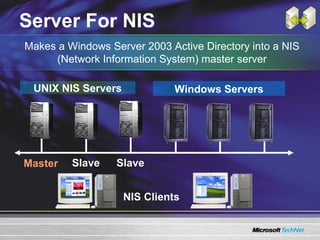
Server For NIS NIS Clients UNIX NIS Servers Master Slave Windows Servers Slave Makes a Windows Server 2003 Active Directory into a NIS (Network Information System) master server
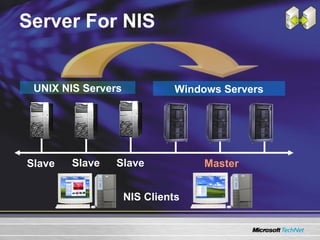
Server For NIS UNIX NIS Servers Windows Servers NIS Clients Slave Slave Slave Master
UNIX Password Synchronization Pull NIS schema into Active Directory Bidirectional Password Sync, user name mapping, supported on: HP-UX 11i Sun Solaris 8 & 9 IBM AIX 5L 5.2 Red Hat Linux 9.0 Mapping Server Map Windows ÂŽ  User and Group Accounts to UNIX
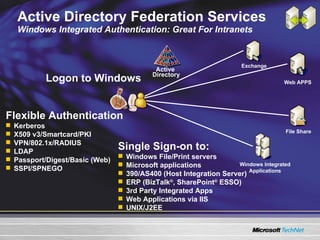
Active Directory Federation Services Windows Integrated Authentication: Great For Intranets Logon to Windows Flexible Authentication Kerberos X509 v3/Smartcard/PKI VPN/802.1x/RADIUS LDAP Passport/Digest/Basic (Web) SSPI/SPNEGO Single Sign-on to: Windows File/Print servers Microsoft applications 390/AS400 (Host Integration Server) ERP (BizTalk ÂŽ , SharePoint ÂŽ  ESSO) 3rd Party Integrated Apps Web Applications via IIS UNIX/J2EE Active  Directory Exchange Web APPS File Share Windows Integrated Applications
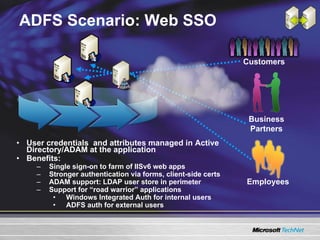
ADFS Scenario: Web SSO User credentials  and attributes managed in Active Directory/ADAM at the application Benefits: Single sign-on to farm of IISv6 web apps Stronger authentication via forms, client-side certs ADAM support: LDAP user store in perimeter Support for “road warrior” applications Windows Integrated Auth for internal users ADFS auth for external users Customers Business Partners Employees
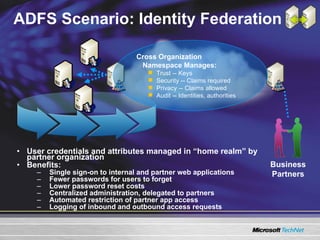
ADFS Scenario: Identity Federation User credentials and attributes managed in “home realm” by partner organization Benefits: Single sign-on to internal and partner web applications Fewer passwords for users to forget Lower password reset costs Centralized administration, delegated to partners Automated restriction of partner app access Logging of inbound and outbound access requests Business Partners Cross Organization  Namespace Manages: Trust -- Keys Security -- Claims required Privacy -- Claims allowed Audit -- Identities, authorities
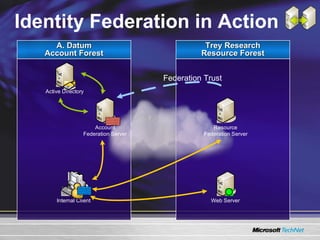
Identity Federation in Action A. Datum Account Forest Trey Research Resource Forest Federation Trust
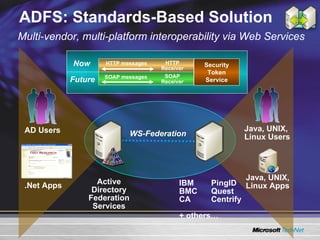
ADFS: Standards-Based Solution Active Directory Federation Services IBM  PingID BMC  Quest CA  Centrify  + others… Multi-vendor, multi-platform interoperability via Web Services WS-Federation AD Users .Net Apps Java, UNIX,  Linux Users Java, UNIX, Linux Apps Security Token Service HTTP messages SOAP messages SOAP Receiver HTTP Receiver Now Future
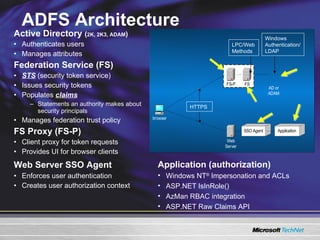
ADFS Architecture Active Directory  ( 2K, 2K3, ADAM ) Authenticates users  Manages attributes Federation Service (FS) STS  (security token service)  Issues security tokens Populates  claims Statements an authority makes about security principals Manages federation trust policy FS Proxy (FS-P) Client proxy for token requests Provides UI for browser clients Web Server SSO Agent   Enforces user authentication Creates user authorization context HTTPS LPC/Web Methods Windows Authentication/LDAP Application (authorization) Windows NT ÂŽ  Impersonation and ACLs ASP.NET IsInRole() AzMan RBAC integration ASP.NET Raw Claims API
ADFS Mapping trusts in ADFS demonstration
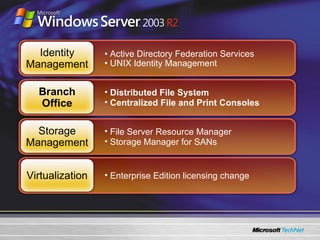
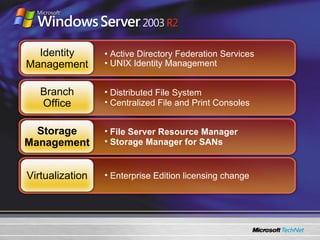
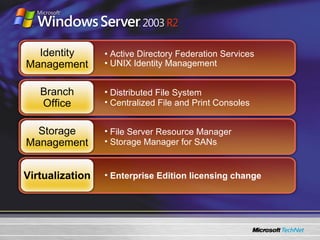
Active Directory Federation Services  UNIX Identity Management Distributed File System Centralized File and Print Consoles File Server Resource Manager Storage Manager for SANs Enterprise Edition licensing change  Identity Management Branch Office Storage Management Virtualization
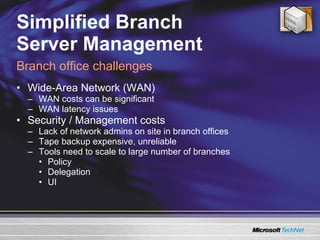
Simplified Branch  Server Management Wide-Area Network (WAN) WAN costs can be significant  WAN latency issues Security / Management costs Lack of network admins on site in branch offices Tape backup expensive, unreliable Tools need to scale to large number of branches Policy Delegation UI Branch office challenges
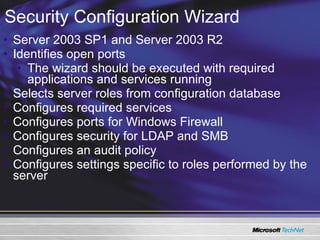
Server 2003 SP1 and Server 2003 R2 Identifies open ports The wizard should be executed with required applications and services running Selects server roles from configuration database Configures required services Configures ports for Windows Firewall Configures security for LDAP and SMB Configures an audit policy Configures settings specific to roles performed by the server Security Configuration Wizard
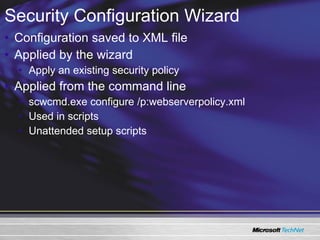
Configuration saved to XML file Applied by the wizard Apply an existing security policy Applied from the command line scwcmd.exe configure /p:webserverpolicy.xml  Used in scripts Unattended setup scripts Security Configuration Wizard
Security Configuration Wizard Using the Security Configuration Wizard Roles and Templates demonstration
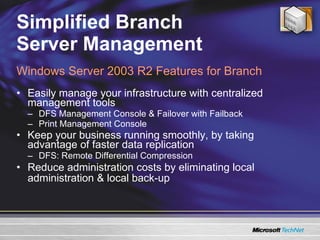
Simplified Branch  Server Management Easily manage your infrastructure with centralized management tools DFS Management Console & Failover with Failback Print Management Console Keep your business running smoothly, by taking advantage of faster data replication DFS: Remote Differential Compression Reduce administration costs by eliminating local administration & local back-up Windows Server 2003 R2 Features for Branch
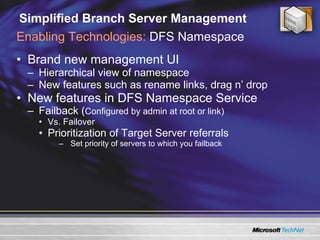
Simplified Branch Server Management Brand new management UI Hierarchical view of namespace New features such as rename links, drag n’ drop  New features in DFS Namespace Service Failback ( Configured by admin at root or link) Vs. Failover Prioritization of Target Server referrals Set priority of servers to which you failback Enabling Technologies:  DFS Namespace
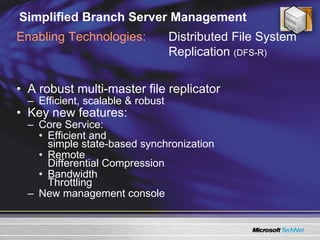
Simplified Branch Server Management A robust multi-master file replicator Efficient, scalable & robust  Key new features: Core Service: Efficient and  simple state-based synchronization Remote  Differential Compression Bandwidth  Throttling New management console Enabling Technologies: Distributed File System Replication  (DFS-R)
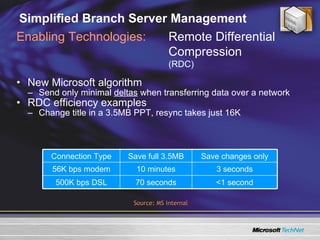
Simplified Branch Server Management New Microsoft algorithm  Send only minimal  deltas  when transferring data over a network RDC efficiency examples Change title in a 3.5MB PPT, resync takes just 16K Enabling Technologies: Remote Differential Compression  (RDC)  Source: MS Internal <1 second 70 seconds 500K bps DSL 3 seconds 10 minutes 56K bps modem Save changes only Save full 3.5MB Connection Type
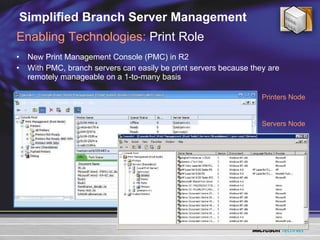
Simplified Branch Server Management New Print Management Console (PMC) in R2 With PMC, branch servers can easily be print servers because they are remotely manageable on a 1-to-many basis Enabling Technologies:  Print Role Printers Node Servers Node
DFS Setting up and Securing DFS demonstration
Active Directory Federation Services  UNIX Identity Management Distributed File System Centralized File and Print Consoles File Server Resource Manager Storage Manager for SANs Enterprise Edition licensing change  Identity Management Branch Office Storage Management Virtualization
Efficient Storage Management Storage growth estimates: 60-100% per year Managing storage growth effectively is a challenge  Direct Attached Storage (DAS) solutions have limitations Storage Area Network (SAN) solutions can be complex Few IT professionals are storage experts: 35% of SMBs have moved from DAS to SAN  40% of SMBs are considering moving to SAN  Costs of managing storage can be 10x the cost of storage Process of consolidating File Servers/Storage is involving Complex and error prone Potential disruption to end users The Challenges of Storage Today
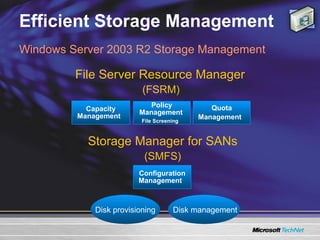
Efficient Storage Management Windows Server 2003 R2 Storage Management (FSRM) (SMFS) Capacity Management  Policy Management   File Screening   Quota Management  Configuration Management  File Server Resource Manager Storage Manager for SANs Disk provisioning  Disk management
Efficient Storage Management Capacity Management Determine existing storage capacity usage across the organization Determine whether usage effectively supports organizational goals Define and implement storage policies  Adjust the policies as capacity needs grow and as organization needs change Policy Management   No easy way to control the type of data stored on file servers  Unwanted content must be identified manually Quota Management User home directories often grow quickly causing servers to run out of space Departmental shares can also grow unexpectedly  Administrators are only aware of storage crises when the server is already out of space FSRM: Administrator Challenges
Efficient Storage Management Capacity Management Identify where storage capacity is used inefficiently  Identify mechanisms to prevent future capacity misuse Monitor usage patterns and utilization levels Policy Management   Eliminate non-business files and improve storage utilization while reducing management costs Implement policies to restrict unauthorized files in order to limit legal exposure Promote a culture of accountability Quota Management Control the amount of space used for a folder or share and limit its impact on server utilization  Monitor disk space usage growth per volume, folder, or share Slow down storage growth FSRM: User Scenarios and Benefits
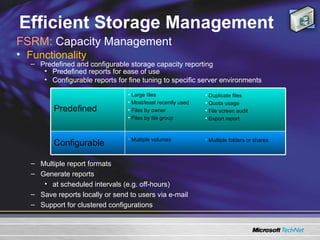
Efficient Storage Management FSRM:  Capacity Management  Functionality  Predefined and configurable storage capacity reporting Predefined reports for ease of use Configurable reports for fine tuning to specific server environments Multiple report formats  Generate reports  at scheduled intervals (e.g. off-hours)  Save reports locally or send to users via e-mail  Support for clustered configurations Multiple folders or shares Multiple volumes Configurable Duplicate files Quota usage File screen audit Export report Large files Most/least recently used Files by owner Files by file group Predefined
Efficient Storage Management Functionality  Applies to a folder tree or volume Screening rules  Based on file groups Apply to all user files in the folder  File screening settings can be saved in template Passive and active screening supported Screening events recorded in audit log Same set of notification as quotas  File system interoperability Only NTFS volumes are supported  Usage is tracked in real time  Only volumes with screening configuration are monitored Screening is based on file name patterns (*.mp3, FY04*)  Self-consistent volume configuration Cluster support FSRM:  Policy Management  (File Screening)
Efficient Storage Management Functionality  Quotas limit the size of a directory tree or a volume Quota applies to all users files in directory Limit can be soft or hard  File system interoperability Only NTFS volumes are supported Usage is tracked in real time, failing I/Os at hard limit Only volumes with quota configuration are monitored Quota usage is charged based on disk size Support for special files  Compressed, sparse, named streams, hard links, reparse points Multiple notification thresholds at configurable quota utilization levels Self-consistent volume configuration Quota settings travel with volume (SAN, hot-pluggable disks) Cluster support FSRM:  Quota Management
Storage Management Quotas and reporting File Screening demonstration
Active Directory Federation Services  UNIX Identity Management Distributed File System Centralized File and Print Consoles File Server Resource Manager Storage Manager for SANs Enterprise Edition licensing change  Identity Management Branch Office Storage Management Virtualization
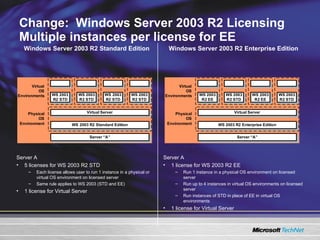
Change:  Windows Server 2003 R2 Licensing  Multiple instances per license for EE Server A 1 license for WS 2003 R2 EE Run 1 instance in a physical OS environment on licensed server Run up to 4 instances in virtual OS environments on licensed server Run instances of STD in place of EE in virtual OS environments 1 license for Virtual Server Server A 5 licenses for WS 2003 R2 STD Each license allows user to run 1 instance in a physical or virtual OS environment on licensed server Same rule applies to WS 2003 (STD and EE) 1 license for Virtual Server Windows Server 2003 R2 Enterprise Edition Windows Server 2003 R2 Standard Edition
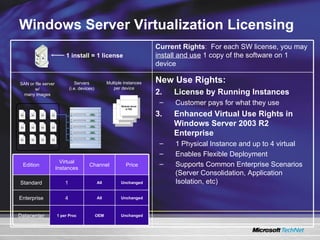
Windows Server Virtualization Licensing 1 install = 1 license SAN or file server w/ many images Servers (i.e. devices) Multiple instances per device New Use Rights: License by Running Instances Customer pays for what they use Enhanced Virtual Use Rights in Windows Server 2003 R2 Enterprise 1 Physical Instance and up to 4 virtual Enables Flexible Deployment Supports Common Enterprise Scenarios (Server Consolidation, Application Isolation, etc) Current Rights :   For each SW license, you may  install and use  1 copy of the software on 1 device OEM All All Channel Price Virtual Instances Edition Unchanged 1 per Proc Datacenter Unchanged 4 Enterprise Unchanged 1 Standard
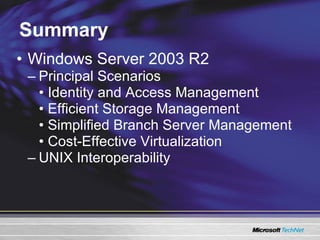
Summary Windows Server 2003 R2 Principal Scenarios Identity and Access Management Efficient Storage Management Simplified Branch Server Management Cost-Effective Virtualization UNIX Interoperability
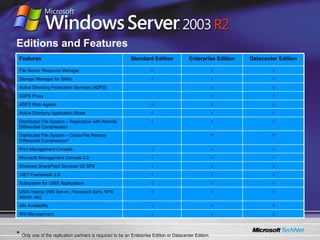
Editions and Features *  Only one of the replication partners is required to be an Enterprise Edition or Datacenter Edition  √ √ √ ADFS Web Agents √ √ ADFS Proxy √ √ √ UNIX Interop (NIS Server, Password Sync, NFS Admin, etc) √ √ √ WS-Management √ √ √ x64 Availability √ √ √ Subsystem for UNIX Applications √ √ √ .NET Framework 2.0 √ √ √ Windows SharePoint Services V2 SP2 √ √ √ Microsoft Management Console 3.0 √ √ √ Print Management Console √ * √ * Distributed File System – Cross-File Remote Differential Compression* √ √ √ Distributed File System – Replication with Remote Differential Compression √ √ √ Active Directory Application Mode √ √ Active Directory Federation Services (ADFS) √ √ √ Storage Manager for SANs √ √ √ File Server Resource Manager Datacenter Edition Enterprise Edition Standard Edition Features
Š 2005 Microsoft Corporation. All rights reserved. This presentation is for informational purposes only. Microsoft makes no warranties, express or implied, in this summary. All other trademarks are property of their respective owners. The names of actual companies and products mentioned herein may be the trademarks of their respective owners. Bruce Cowper IT Pro Advisor Microsoft Canada Blogs.TechNet.com/brucecowper

Windows server 2003_r2

  • 1.
    Bruce Cowper ITPro Advisor Microsoft Canada
  • 2.
    Agenda Windows Server™2003 R2 Principal Scenarios Identity and Access Management Efficient Storage Management Simplified Branch Server Management Cost-Effective Virtualization
  • 3.
    Manage a singleidentity across partner, web and UNIX apps Better connectivity, reliability, Security Better control over storage setup Enterprise Edition & Virtual Server R2 Identity Management Branch Office Storage Management Virtualization
  • 4.
    Identity and AccessManagement Your EMPLOYEES Your APPLICATIONS Your PLATFORMS Your PARTNERS Their APPLICATIONS Your REMOTE and VIRTUAL EMPLOYEES Challenge: Extending access across users, apps, platforms Your SUPPLIERS Their APPLICATIONS Your CUSTOMERS
  • 5.
    Identity and AccessManagement Active Directory ÂŽ Application Mode (ADAM) Lightweight, domain-independent mode of Active Directory for application directory scenarios Interoperability with Domain Mode for authentication Benefit: Tailor directory services infrastructure for local control/autonomy or shared services UNIX Identity Management Server for Network Information Service (NIS) helps integrate Windows and UNIX domains Password synchronization simplifies password maintenance across platforms Benefit: Efficient multi-platform identity management Active Directory Federation Services (ADFS) Windows Server 2003 R2 Features
  • 6.
    Active Directory ApplicationMode Lightweight, domain-independent mode of Active Directory for application directory scenarios Same code as Active Directory = same programming model, admin tools, replication model Simple wizard-based install; no DCPROMO Schema flexibility; synchronization with Active Directory possible via Identity Integration Feature Pack Free web download Authentication in Active Directory, authorization in ADAM for increased security
  • 7.
    ADAM Usage ScenariosApplication-specific local directory Example: Web portal with personalization Store personalization info in ADAM Use Active Directory for authentication Infrastructure Active Directory Store/ retrieve data Client Authentication Server ADAM Web portal
  • 8.
    ADAM Usage ScenariosExtranet Access Management Policy server: ADFS or third-party solutions (CA SiteMinder, OpenNetwork/BMC, etc.) “ Fast-bind authentication” via LDAP bind calls Scenario benefits from ADAM ease of use LDAP “ admin connection” (search, Update) Web client LDAP bind (authN) Web servers ADAM Policy Server
  • 9.
    UNIX Identity ManagementConsolidation of administration and monitoring across platforms Remotely monitor and administer Windows-based systems in the same fashion and with the same tools as UNIX- based systems Efficient Cross-platform User Management UNIX Server Windows Server Windows Workstation UNIX Workstation Windows Server UNIX Server UNIX Workstation UNIX Workstation Windows Workstation Windows Workstation
  • 10.
    Server For NISNIS Clients UNIX NIS Servers Master Slave Windows Servers Slave Makes a Windows Server 2003 Active Directory into a NIS (Network Information System) master server
  • 11.
    Server For NISUNIX NIS Servers Windows Servers NIS Clients Slave Slave Slave Master
  • 12.
    UNIX Password SynchronizationPull NIS schema into Active Directory Bidirectional Password Sync, user name mapping, supported on: HP-UX 11i Sun Solaris 8 & 9 IBM AIX 5L 5.2 Red Hat Linux 9.0 Mapping Server Map Windows ÂŽ User and Group Accounts to UNIX
  • 13.
    Active Directory FederationServices Windows Integrated Authentication: Great For Intranets Logon to Windows Flexible Authentication Kerberos X509 v3/Smartcard/PKI VPN/802.1x/RADIUS LDAP Passport/Digest/Basic (Web) SSPI/SPNEGO Single Sign-on to: Windows File/Print servers Microsoft applications 390/AS400 (Host Integration Server) ERP (BizTalk ÂŽ , SharePoint ÂŽ ESSO) 3rd Party Integrated Apps Web Applications via IIS UNIX/J2EE Active Directory Exchange Web APPS File Share Windows Integrated Applications
  • 14.
    ADFS Scenario: WebSSO User credentials and attributes managed in Active Directory/ADAM at the application Benefits: Single sign-on to farm of IISv6 web apps Stronger authentication via forms, client-side certs ADAM support: LDAP user store in perimeter Support for “road warrior” applications Windows Integrated Auth for internal users ADFS auth for external users Customers Business Partners Employees
  • 15.
    ADFS Scenario: IdentityFederation User credentials and attributes managed in “home realm” by partner organization Benefits: Single sign-on to internal and partner web applications Fewer passwords for users to forget Lower password reset costs Centralized administration, delegated to partners Automated restriction of partner app access Logging of inbound and outbound access requests Business Partners Cross Organization Namespace Manages: Trust -- Keys Security -- Claims required Privacy -- Claims allowed Audit -- Identities, authorities
  • 16.
    Identity Federation inAction A. Datum Account Forest Trey Research Resource Forest Federation Trust
  • 17.
    ADFS: Standards-Based SolutionActive Directory Federation Services IBM PingID BMC Quest CA Centrify + others… Multi-vendor, multi-platform interoperability via Web Services WS-Federation AD Users .Net Apps Java, UNIX, Linux Users Java, UNIX, Linux Apps Security Token Service HTTP messages SOAP messages SOAP Receiver HTTP Receiver Now Future
  • 18.
    ADFS Architecture ActiveDirectory ( 2K, 2K3, ADAM ) Authenticates users Manages attributes Federation Service (FS) STS (security token service) Issues security tokens Populates claims Statements an authority makes about security principals Manages federation trust policy FS Proxy (FS-P) Client proxy for token requests Provides UI for browser clients Web Server SSO Agent Enforces user authentication Creates user authorization context HTTPS LPC/Web Methods Windows Authentication/LDAP Application (authorization) Windows NT ÂŽ Impersonation and ACLs ASP.NET IsInRole() AzMan RBAC integration ASP.NET Raw Claims API
  • 19.
    ADFS Mapping trustsin ADFS demonstration
  • 20.
    Active Directory FederationServices UNIX Identity Management Distributed File System Centralized File and Print Consoles File Server Resource Manager Storage Manager for SANs Enterprise Edition licensing change Identity Management Branch Office Storage Management Virtualization
  • 21.
    Simplified Branch Server Management Wide-Area Network (WAN) WAN costs can be significant WAN latency issues Security / Management costs Lack of network admins on site in branch offices Tape backup expensive, unreliable Tools need to scale to large number of branches Policy Delegation UI Branch office challenges
  • 22.
    Server 2003 SP1and Server 2003 R2 Identifies open ports The wizard should be executed with required applications and services running Selects server roles from configuration database Configures required services Configures ports for Windows Firewall Configures security for LDAP and SMB Configures an audit policy Configures settings specific to roles performed by the server Security Configuration Wizard
  • 23.
    Configuration saved toXML file Applied by the wizard Apply an existing security policy Applied from the command line scwcmd.exe configure /p:webserverpolicy.xml Used in scripts Unattended setup scripts Security Configuration Wizard
  • 24.
    Security Configuration WizardUsing the Security Configuration Wizard Roles and Templates demonstration
  • 25.
    Simplified Branch Server Management Easily manage your infrastructure with centralized management tools DFS Management Console & Failover with Failback Print Management Console Keep your business running smoothly, by taking advantage of faster data replication DFS: Remote Differential Compression Reduce administration costs by eliminating local administration & local back-up Windows Server 2003 R2 Features for Branch
  • 26.
    Simplified Branch ServerManagement Brand new management UI Hierarchical view of namespace New features such as rename links, drag n’ drop New features in DFS Namespace Service Failback ( Configured by admin at root or link) Vs. Failover Prioritization of Target Server referrals Set priority of servers to which you failback Enabling Technologies: DFS Namespace
  • 27.
    Simplified Branch ServerManagement A robust multi-master file replicator Efficient, scalable & robust Key new features: Core Service: Efficient and simple state-based synchronization Remote Differential Compression Bandwidth Throttling New management console Enabling Technologies: Distributed File System Replication (DFS-R)
  • 28.
    Simplified Branch ServerManagement New Microsoft algorithm Send only minimal deltas when transferring data over a network RDC efficiency examples Change title in a 3.5MB PPT, resync takes just 16K Enabling Technologies: Remote Differential Compression (RDC) Source: MS Internal <1 second 70 seconds 500K bps DSL 3 seconds 10 minutes 56K bps modem Save changes only Save full 3.5MB Connection Type
  • 29.
    Simplified Branch ServerManagement New Print Management Console (PMC) in R2 With PMC, branch servers can easily be print servers because they are remotely manageable on a 1-to-many basis Enabling Technologies: Print Role Printers Node Servers Node
  • 30.
    DFS Setting upand Securing DFS demonstration
  • 31.
    Active Directory FederationServices UNIX Identity Management Distributed File System Centralized File and Print Consoles File Server Resource Manager Storage Manager for SANs Enterprise Edition licensing change Identity Management Branch Office Storage Management Virtualization
  • 32.
    Efficient Storage ManagementStorage growth estimates: 60-100% per year Managing storage growth effectively is a challenge Direct Attached Storage (DAS) solutions have limitations Storage Area Network (SAN) solutions can be complex Few IT professionals are storage experts: 35% of SMBs have moved from DAS to SAN 40% of SMBs are considering moving to SAN Costs of managing storage can be 10x the cost of storage Process of consolidating File Servers/Storage is involving Complex and error prone Potential disruption to end users The Challenges of Storage Today
  • 33.
    Efficient Storage ManagementWindows Server 2003 R2 Storage Management (FSRM) (SMFS) Capacity Management Policy Management File Screening Quota Management Configuration Management File Server Resource Manager Storage Manager for SANs Disk provisioning Disk management
  • 34.
    Efficient Storage ManagementCapacity Management Determine existing storage capacity usage across the organization Determine whether usage effectively supports organizational goals Define and implement storage policies Adjust the policies as capacity needs grow and as organization needs change Policy Management No easy way to control the type of data stored on file servers Unwanted content must be identified manually Quota Management User home directories often grow quickly causing servers to run out of space Departmental shares can also grow unexpectedly Administrators are only aware of storage crises when the server is already out of space FSRM: Administrator Challenges
  • 35.
    Efficient Storage ManagementCapacity Management Identify where storage capacity is used inefficiently Identify mechanisms to prevent future capacity misuse Monitor usage patterns and utilization levels Policy Management Eliminate non-business files and improve storage utilization while reducing management costs Implement policies to restrict unauthorized files in order to limit legal exposure Promote a culture of accountability Quota Management Control the amount of space used for a folder or share and limit its impact on server utilization Monitor disk space usage growth per volume, folder, or share Slow down storage growth FSRM: User Scenarios and Benefits
  • 36.
    Efficient Storage ManagementFSRM: Capacity Management Functionality Predefined and configurable storage capacity reporting Predefined reports for ease of use Configurable reports for fine tuning to specific server environments Multiple report formats Generate reports at scheduled intervals (e.g. off-hours) Save reports locally or send to users via e-mail Support for clustered configurations Multiple folders or shares Multiple volumes Configurable Duplicate files Quota usage File screen audit Export report Large files Most/least recently used Files by owner Files by file group Predefined
  • 37.
    Efficient Storage ManagementFunctionality Applies to a folder tree or volume Screening rules Based on file groups Apply to all user files in the folder File screening settings can be saved in template Passive and active screening supported Screening events recorded in audit log Same set of notification as quotas File system interoperability Only NTFS volumes are supported Usage is tracked in real time Only volumes with screening configuration are monitored Screening is based on file name patterns (*.mp3, FY04*) Self-consistent volume configuration Cluster support FSRM: Policy Management (File Screening)
  • 38.
    Efficient Storage ManagementFunctionality Quotas limit the size of a directory tree or a volume Quota applies to all users files in directory Limit can be soft or hard File system interoperability Only NTFS volumes are supported Usage is tracked in real time, failing I/Os at hard limit Only volumes with quota configuration are monitored Quota usage is charged based on disk size Support for special files Compressed, sparse, named streams, hard links, reparse points Multiple notification thresholds at configurable quota utilization levels Self-consistent volume configuration Quota settings travel with volume (SAN, hot-pluggable disks) Cluster support FSRM: Quota Management
  • 39.
    Storage Management Quotasand reporting File Screening demonstration
  • 40.
    Active Directory FederationServices UNIX Identity Management Distributed File System Centralized File and Print Consoles File Server Resource Manager Storage Manager for SANs Enterprise Edition licensing change Identity Management Branch Office Storage Management Virtualization
  • 41.
    Change: WindowsServer 2003 R2 Licensing Multiple instances per license for EE Server A 1 license for WS 2003 R2 EE Run 1 instance in a physical OS environment on licensed server Run up to 4 instances in virtual OS environments on licensed server Run instances of STD in place of EE in virtual OS environments 1 license for Virtual Server Server A 5 licenses for WS 2003 R2 STD Each license allows user to run 1 instance in a physical or virtual OS environment on licensed server Same rule applies to WS 2003 (STD and EE) 1 license for Virtual Server Windows Server 2003 R2 Enterprise Edition Windows Server 2003 R2 Standard Edition
  • 42.
    Windows Server VirtualizationLicensing 1 install = 1 license SAN or file server w/ many images Servers (i.e. devices) Multiple instances per device New Use Rights: License by Running Instances Customer pays for what they use Enhanced Virtual Use Rights in Windows Server 2003 R2 Enterprise 1 Physical Instance and up to 4 virtual Enables Flexible Deployment Supports Common Enterprise Scenarios (Server Consolidation, Application Isolation, etc) Current Rights : For each SW license, you may install and use 1 copy of the software on 1 device OEM All All Channel Price Virtual Instances Edition Unchanged 1 per Proc Datacenter Unchanged 4 Enterprise Unchanged 1 Standard
  • 43.
    Summary Windows Server2003 R2 Principal Scenarios Identity and Access Management Efficient Storage Management Simplified Branch Server Management Cost-Effective Virtualization UNIX Interoperability
  • 44.
    Editions and Features* Only one of the replication partners is required to be an Enterprise Edition or Datacenter Edition √ √ √ ADFS Web Agents √ √ ADFS Proxy √ √ √ UNIX Interop (NIS Server, Password Sync, NFS Admin, etc) √ √ √ WS-Management √ √ √ x64 Availability √ √ √ Subsystem for UNIX Applications √ √ √ .NET Framework 2.0 √ √ √ Windows SharePoint Services V2 SP2 √ √ √ Microsoft Management Console 3.0 √ √ √ Print Management Console √ * √ * Distributed File System – Cross-File Remote Differential Compression* √ √ √ Distributed File System – Replication with Remote Differential Compression √ √ √ Active Directory Application Mode √ √ Active Directory Federation Services (ADFS) √ √ √ Storage Manager for SANs √ √ √ File Server Resource Manager Datacenter Edition Enterprise Edition Standard Edition Features
  • 45.
    Š 2005 MicrosoftCorporation. All rights reserved. This presentation is for informational purposes only. Microsoft makes no warranties, express or implied, in this summary. All other trademarks are property of their respective owners. The names of actual companies and products mentioned herein may be the trademarks of their respective owners. Bruce Cowper IT Pro Advisor Microsoft Canada Blogs.TechNet.com/brucecowper