Microsoft Access 2003
Dhafin Year 7
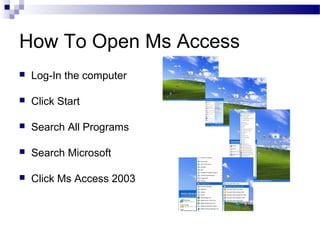
How To Open Ms Access
 Log-In the computer
 Click Start
 Search All Programs
 Search Microsoft
 Click Ms Access 2003
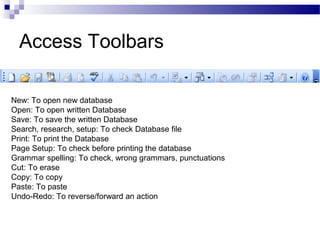
Access Toolbars
New: To open new database
Open: To open written Database
Save: To save the written Database
Search, research, setup: To check Database file
Print: To print the Database
Page Setup: To check before printing the database
Grammar spelling: To check, wrong grammars, punctuations
Cut: To erase
Copy: To copy
Paste: To paste
Undo-Redo: To reverse/forward an action
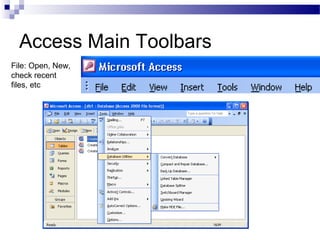
Access Main Toolbars
File: Open, New,
check recent
files, etc
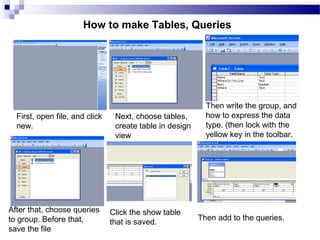
First, open file, and click
new.
Next, choose tables,
create table in design
view
After that, choose queries
to group. Before that,
save the file
Then write the group, and
how to express the data
type. (then lock with the
yellow key in the toolbar.
Click the show table
that is saved.
Then add to the queries.
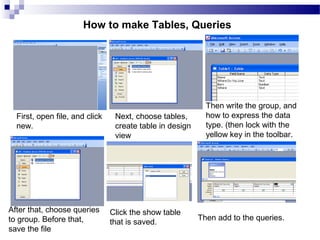
How to make Tables, Queries
First, open file, and click
new.
Next, choose tables,
create table in design
view
After that, choose queries
to group. Before that,
save the file
Then write the group, and
how to express the data
type. (then lock with the
yellow key in the toolbar.
Click the show table
that is saved.
Then add to the queries.
How to make Tables, Queries

Microsoft Access 2003

  • 1.
  • 2.
    How To OpenMs Access  Log-In the computer  Click Start  Search All Programs  Search Microsoft  Click Ms Access 2003
  • 3.
    Access Toolbars New: Toopen new database Open: To open written Database Save: To save the written Database Search, research, setup: To check Database file Print: To print the Database Page Setup: To check before printing the database Grammar spelling: To check, wrong grammars, punctuations Cut: To erase Copy: To copy Paste: To paste Undo-Redo: To reverse/forward an action
  • 4.
    Access Main Toolbars File:Open, New, check recent files, etc
  • 5.
    First, open file,and click new. Next, choose tables, create table in design view After that, choose queries to group. Before that, save the file Then write the group, and how to express the data type. (then lock with the yellow key in the toolbar. Click the show table that is saved. Then add to the queries. How to make Tables, Queries
  • 6.
    First, open file,and click new. Next, choose tables, create table in design view After that, choose queries to group. Before that, save the file Then write the group, and how to express the data type. (then lock with the yellow key in the toolbar. Click the show table that is saved. Then add to the queries. How to make Tables, Queries