SMS COMPUTERS MS-OFFICE (ACCESS)
MS – ACCESS
Introduction :
MS – Access is used to create a Tables, Queries, Forms and Reports and etc.
The extension of MS – Access is ".mdb"
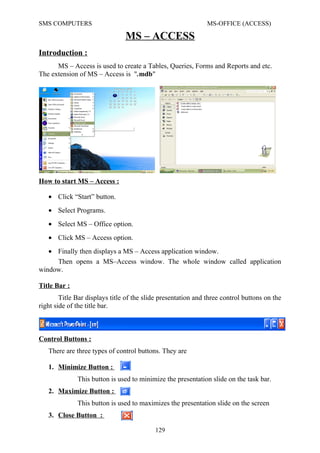
How to start MS – Access :
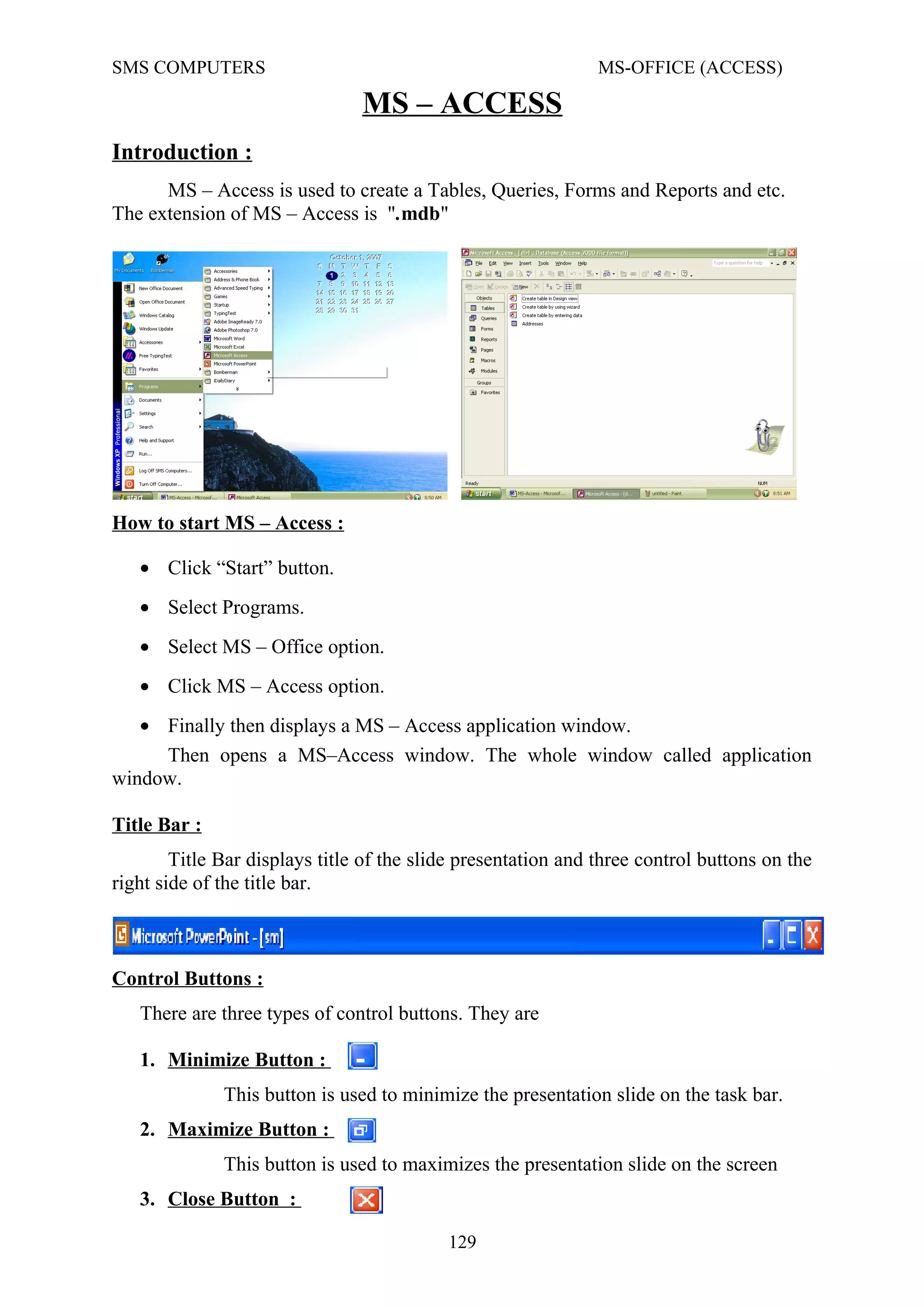
Then opens a MS–Access window. The whole window called application
window.
Title Bar :
Title Bar displays title of the slide presentation and three control buttons on the
right side of the title bar.
Control Buttons :
There are three types of control buttons. They are
1. Minimize Button :
This button is used to minimize the presentation slide on the task bar.
2. Maximize Button :
This button is used to maximizes the presentation slide on the screen
3. Close Button :
129
• Click “Start” button.
• Select Programs.
• Select MS – Office option.
• Click MS – Access option.
• Finally then displays a MS – Access application window.
SMS COMPUTERS MS-OFFICE (ACCESS)
This button is used to closes the whole PowerPoint application..
Status bar :
Status bar displays the current setting of the MS-Access file.
Menu Bar :
Menu Bar displays different types of menus in the menu bar. They are
File Menu Edit Menu View Menu Insert Menu
Tools Menu Window Menu Help Menu.
(Each menu displays menu options.)
MS – Access files is called database files. MS – Access displays a
Database Objects window. We are using Tables, Queries, Forms and Reports
etc. First We are creating a Table, click Table option on the database window.
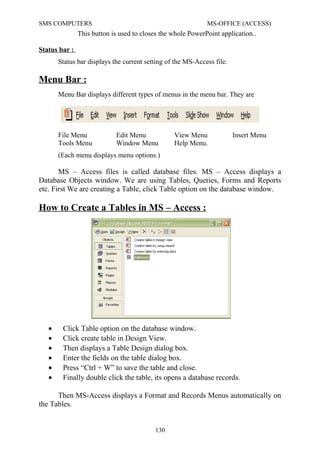
How to Create a Tables in MS – Access :
• Click Table option on the database window.
• Click create table in Design View.
• Then displays a Table Design dialog box.
• Enter the fields on the table dialog box.
• Press “Ctrl + W” to save the table and close.
• Finally double click the table, its opens a database records.
Then MS-Access displays a Format and Records Menus automatically on
the Tables.
130
SMS COMPUTERS MS-OFFICE (ACCESS)
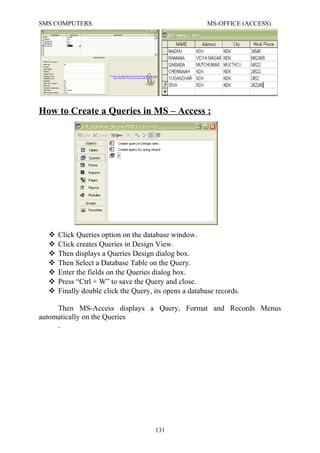
How to Create a Queries in MS – Access :
 Click Queries option on the database window.
 Click creates Queries in Design View.
 Then displays a Queries Design dialog box.
 Then Select a Database Table on the Query.
 Enter the fields on the Queries dialog box.
 Press “Ctrl + W” to save the Query and close.
 Finally double click the Query, its opens a database records.
Then MS-Access displays a Query, Format and Records Menus
automatically on the Queries
.
131
SMS COMPUTERS MS-OFFICE (ACCESS)
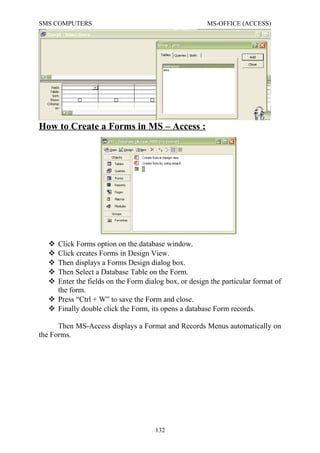
How to Create a Forms in MS – Access :
 Click Forms option on the database window.
 Click creates Forms in Design View.
 Then displays a Forms Design dialog box.
 Then Select a Database Table on the Form.
 Enter the fields on the Form dialog box, or design the particular format of
the form.
 Press “Ctrl + W” to save the Form and close.
 Finally double click the Form, its opens a database Form records.
Then MS-Access displays a Format and Records Menus automatically on
the Forms.
132
SMS COMPUTERS MS-OFFICE (ACCESS)
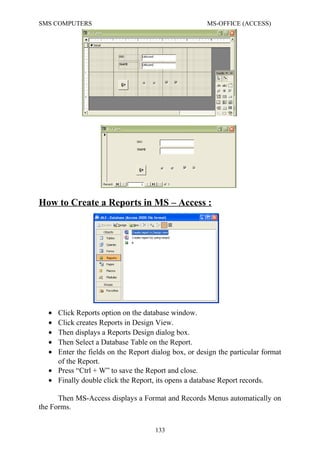
How to Create a Reports in MS – Access :
• Click Reports option on the database window.
• Click creates Reports in Design View.
• Then displays a Reports Design dialog box.
• Then Select a Database Table on the Report.
• Enter the fields on the Report dialog box, or design the particular format
of the Report.
• Press “Ctrl + W” to save the Report and close.
• Finally double click the Report, its opens a database Report records.
Then MS-Access displays a Format and Records Menus automatically on
the Forms.
133
SMS COMPUTERS MS-OFFICE (ACCESS)

S. MADHU MOHAN
M.A.,MBA.,PGDSE & DHE.
SMS Computer Education
NANDIKOTKUR.
Ph. No : 9032900170
9440289220
134
SMS COMPUTERS MS-OFFICE (ACCESS)

S. MADHU MOHAN
M.A.,MBA.,PGDSE & DHE.
SMS Computer Education
NANDIKOTKUR.
Ph. No : 9032900170
9440289220
134

012 ms access

  • 1.
    SMS COMPUTERS MS-OFFICE(ACCESS) MS – ACCESS Introduction : MS – Access is used to create a Tables, Queries, Forms and Reports and etc. The extension of MS – Access is ".mdb" How to start MS – Access : Then opens a MS–Access window. The whole window called application window. Title Bar : Title Bar displays title of the slide presentation and three control buttons on the right side of the title bar. Control Buttons : There are three types of control buttons. They are 1. Minimize Button : This button is used to minimize the presentation slide on the task bar. 2. Maximize Button : This button is used to maximizes the presentation slide on the screen 3. Close Button : 129 • Click “Start” button. • Select Programs. • Select MS – Office option. • Click MS – Access option. • Finally then displays a MS – Access application window.
  • 2.
    SMS COMPUTERS MS-OFFICE(ACCESS) This button is used to closes the whole PowerPoint application.. Status bar : Status bar displays the current setting of the MS-Access file. Menu Bar : Menu Bar displays different types of menus in the menu bar. They are File Menu Edit Menu View Menu Insert Menu Tools Menu Window Menu Help Menu. (Each menu displays menu options.) MS – Access files is called database files. MS – Access displays a Database Objects window. We are using Tables, Queries, Forms and Reports etc. First We are creating a Table, click Table option on the database window. How to Create a Tables in MS – Access : • Click Table option on the database window. • Click create table in Design View. • Then displays a Table Design dialog box. • Enter the fields on the table dialog box. • Press “Ctrl + W” to save the table and close. • Finally double click the table, its opens a database records. Then MS-Access displays a Format and Records Menus automatically on the Tables. 130
  • 3.
    SMS COMPUTERS MS-OFFICE(ACCESS) How to Create a Queries in MS – Access :  Click Queries option on the database window.  Click creates Queries in Design View.  Then displays a Queries Design dialog box.  Then Select a Database Table on the Query.  Enter the fields on the Queries dialog box.  Press “Ctrl + W” to save the Query and close.  Finally double click the Query, its opens a database records. Then MS-Access displays a Query, Format and Records Menus automatically on the Queries . 131
  • 4.
    SMS COMPUTERS MS-OFFICE(ACCESS) How to Create a Forms in MS – Access :  Click Forms option on the database window.  Click creates Forms in Design View.  Then displays a Forms Design dialog box.  Then Select a Database Table on the Form.  Enter the fields on the Form dialog box, or design the particular format of the form.  Press “Ctrl + W” to save the Form and close.  Finally double click the Form, its opens a database Form records. Then MS-Access displays a Format and Records Menus automatically on the Forms. 132
  • 5.
    SMS COMPUTERS MS-OFFICE(ACCESS) How to Create a Reports in MS – Access : • Click Reports option on the database window. • Click creates Reports in Design View. • Then displays a Reports Design dialog box. • Then Select a Database Table on the Report. • Enter the fields on the Report dialog box, or design the particular format of the Report. • Press “Ctrl + W” to save the Report and close. • Finally double click the Report, its opens a database Report records. Then MS-Access displays a Format and Records Menus automatically on the Forms. 133
  • 6.
    SMS COMPUTERS MS-OFFICE(ACCESS)  S. MADHU MOHAN M.A.,MBA.,PGDSE & DHE. SMS Computer Education NANDIKOTKUR. Ph. No : 9032900170 9440289220 134
  • 7.
    SMS COMPUTERS MS-OFFICE(ACCESS)  S. MADHU MOHAN M.A.,MBA.,PGDSE & DHE. SMS Computer Education NANDIKOTKUR. Ph. No : 9032900170 9440289220 134