MEMORY SYSTEM– BCA II SEM (NEP)
Computer Architecture
- Asst.Prof.Niveditha P
(CICMS)
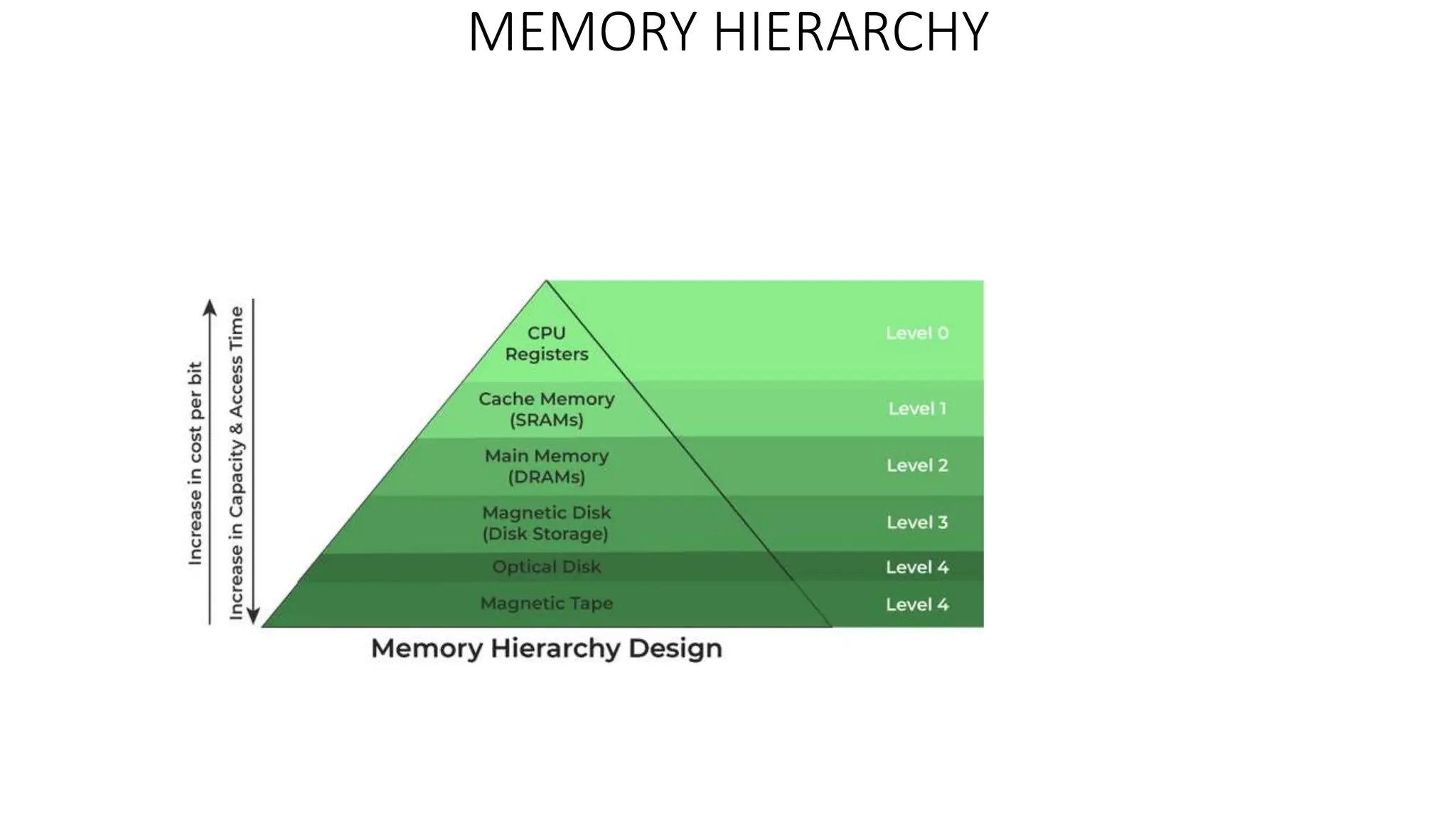
MEMORY HIERARCHY
• A memory unit is an essential component in any digital computer
since it is needed for storing programs and data.
• Typically, a memory unit can be classified into two categories:
• The memory unit that establishes direct communication with the CPU
is called Main Memory. The main memory is often referred to as
RAM (Random Access Memory).
• The memory units that provide backup storage are called Auxiliary
Memory. For instance, magnetic disks and magnetic tapes are the
most commonly used auxiliary memories.
• Apart from the basic classifications of a memory unit, the memory
hierarchy consists all of the storage devices available in a computer
system ranging from the slow but high-capacity auxiliary memory to
relatively faster main memory.
Auxiliary Memory
• Auxiliary memory is known as the lowest-cost, highest-capacity and slowest-access storage in a computer
system. Auxiliary memory provides storage for programs and data that are kept for long-term storage or
when not in immediate use. The most common examples of auxiliary memories are magnetic tapes and
magnetic disks.
• A magnetic disk is a digital computer memory that uses a magnetization process to write, rewrite and access
data. For example, hard drives, zip disks, and floppy disks.
• Magnetic tape is a storage medium that allows for data archiving, collection, and backup for different kinds
of data.
Main Memory
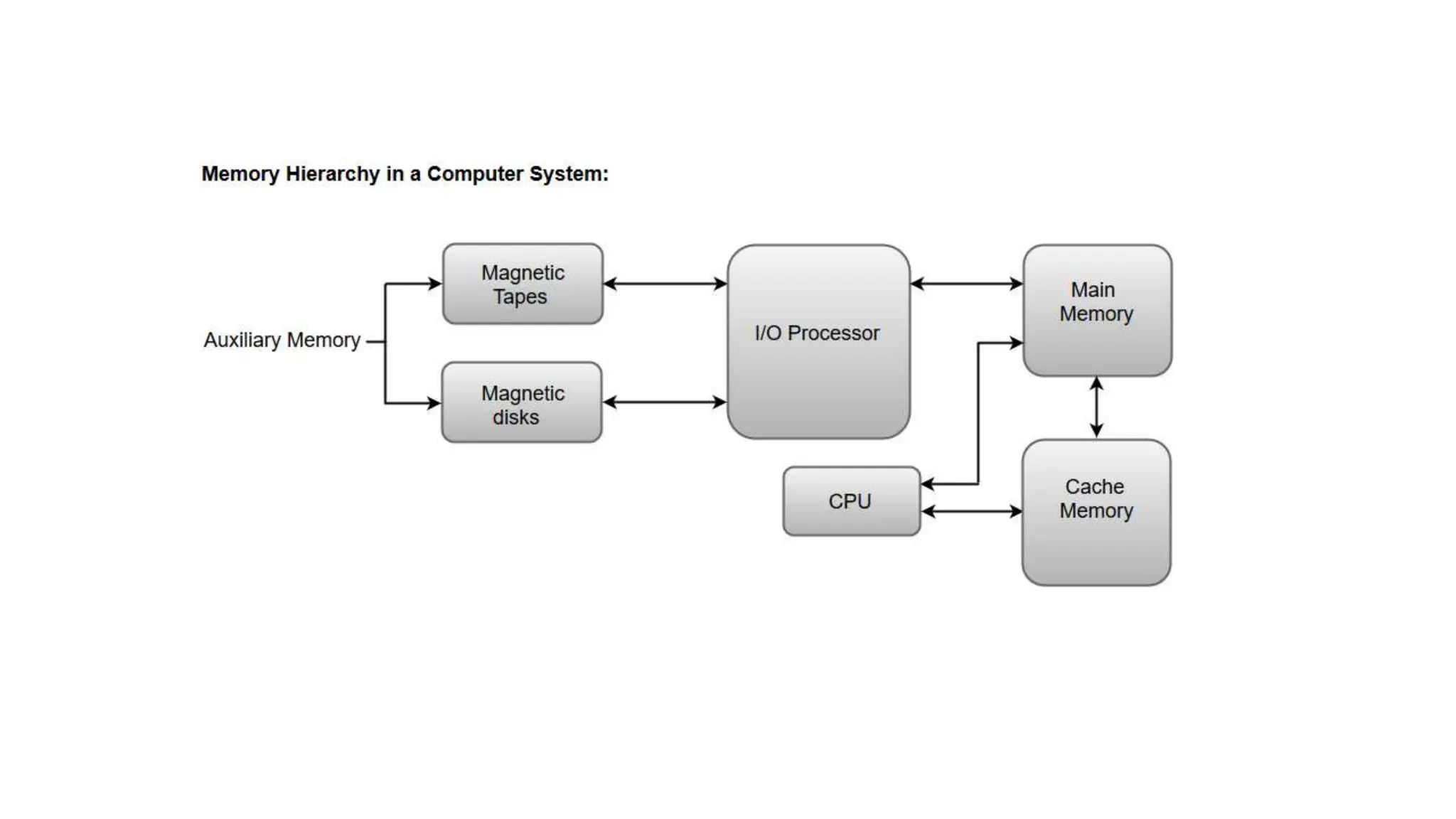
• The main memory in a computer system is often referred to as Random Access Memory (RAM). This
memory unit communicates directly with the CPU and with auxiliary memory devices through an I/O
processor.
• The programs that are not currently required in the main memory are transferred into auxiliary memory to
provide space for currently used programs and data.
I/O Processor
• The primary function of an I/O Processor is to manage the data transfers between auxiliary memories and
the main memory.
Cache Memory
• The data or contents of the main memory that are used frequently by CPU are stored in the cache memory
so that the processor can easily access that data in a shorter time. Whenever the CPU requires accessing
memory, it first checks the required data into the cache memory. If the data is found in the cache memory, it
is read from the fast memory. Otherwise, the CPU moves onto the main memory for the required data.
Characteristics of Memory Hierarchy
• Capacity: It is the global volume of information the memory can store. As
we move from top to bottom in the Hierarchy, the capacity increases.
• Access Time: It is the time interval between the read/write request and the
availability of the data. As we move from top to bottom in the Hierarchy,
the access time increases.
• Performance: Earlier when the computer system was designed without a
Memory Hierarchy design, the speed gap increased between the CPU
registers and Main Memory due to a large difference in access time. This
results in lower performance of the system and thus, enhancement was
required. This enhancement was made in the form of Memory Hierarchy
Design because of which the performance of the system increases. One of
the most significant ways to increase system performance is minimizing
how far down the memory hierarchy one has to go to manipulate data.
• Cost Per Bit: As we move from bottom to top in the Hierarchy, the cost per
bit increases i.e. Internal Memory is costlier than External Memory.
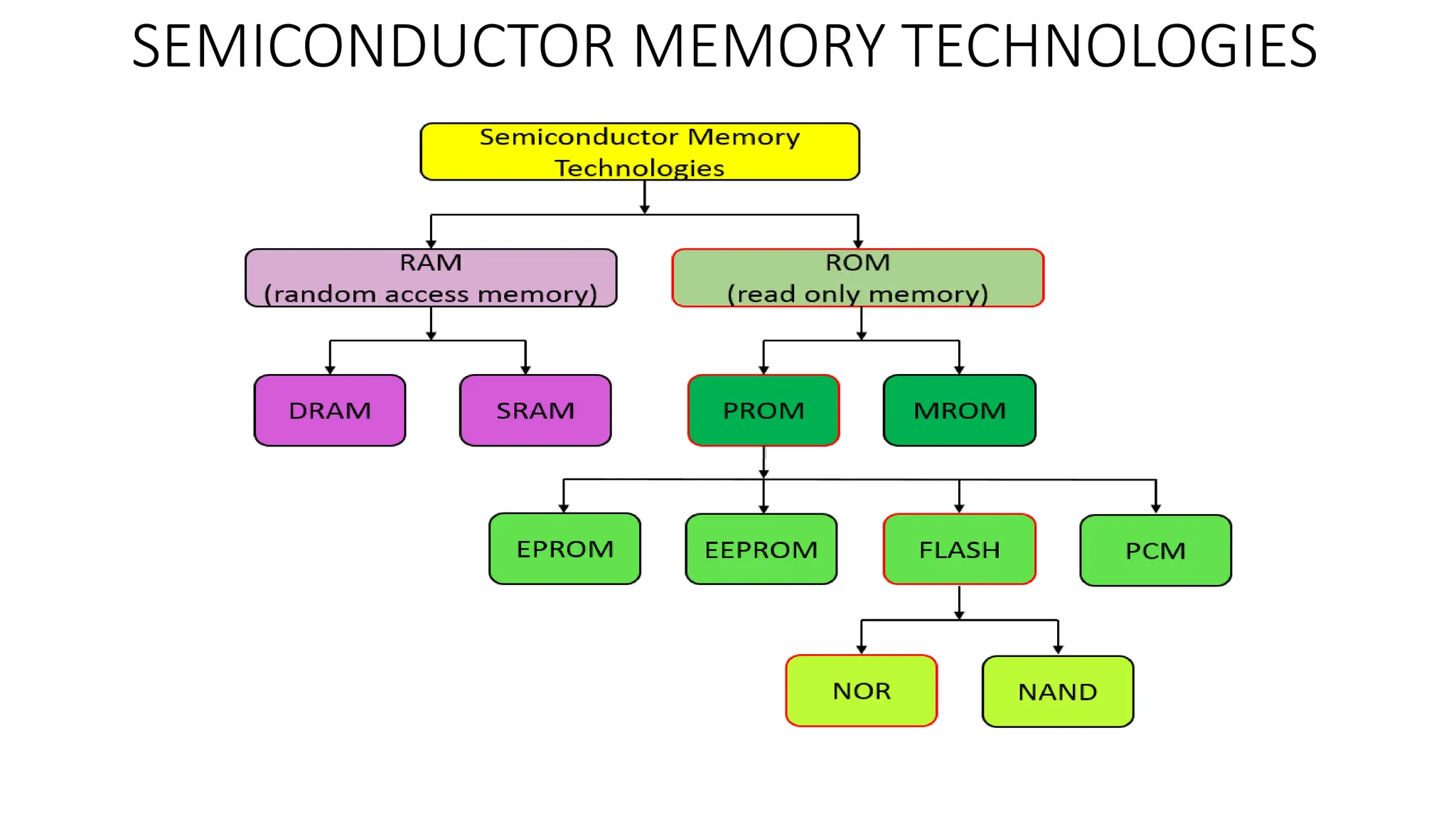
SEMICONDUCTOR MEMORY TECHNOLOGIES
Semiconductor memory is the main memory element of a
microcomputer-based system and is used to store program and data.
The main memory elements are nothing but semiconductor devices
that stores code and information permanently. The semiconductor
memory is directly accessible by the microprocessor. And the access
time of the data present in the primary memory must be compatible
with the operating time of the microprocessor.
Types of semiconductor memory
Electronic semiconductor memory technology can be split into two
main types or categories, according to the way in which the memory
operates :
• RAM - Random Access Memory
• ROM - Read Only Memory
• RAM or random access memory is a form of semiconductor memory technology that is used for reading and writing data in any order - in other words as
it is required by the processor. It is used for such applications as the computer or processor memory where variables and other storage are required on a
random basis. Data is stored and read many times to and from this type of memory.
• Dynamic RAM is a form of random access memory. DRAM uses a capacitor to store each bit of data, and the level of charge on each capacitor
determines whether that bit is a logical 1 or 0. However these capacitors do not hold their charge indefinitely, and therefore the data needs to be
refreshed periodically. As a result of this dynamic refreshing it gains its name of being a dynamic RAM.
• SRAM is stands for Static Random Access Memory. This form of semiconductor memory gains its name from the fact that, unlike DRAM, the data does
not need to be refreshed dynamically. These semiconductor devices are able to support faster read and write times than DRAM (typically 10 ns against
60 ns for DRAM), and in addition its cycle time is much shorter because it does not need to pause between accesses.
• ROM is a form of semiconductor memory technology used where the data is written once and then not changed. In view of this it is used where data
needs to be stored permanently, even when the power is removed - many memory technologies lose the data once the power is removed. As a result,
this type of semiconductor memory technology is widely used for storing programs and data that must survive when a computer or processor is
powered down.
• PROM- Programmable Read Only Memory. It is a semiconductor memory which can only have data written to it once, the data written to it is
permanent. These memories are bought in a blank format and they are programmed using a special PROM programmer. Typically a PROM will consist of
an array of fuseable links some of which are "blown" during the programming process to provide the required data pattern.
• EPROM- Erasable Programmable Read Only Memory. This form of semiconductor memory can be programmed and then erased at a later time. This is
normally achieved by exposing the silicon to ultraviolet light. To enable this to happen there is a circular window in the package of the EPROM to enable
the light to reach the silicon of the chip. When the PROM is in use, this window is normally covered by a label, especially when the data may need to be
preserved for an extended period.
• EEPROM - Electrically Erasable Programmable Read Only Memory. Data can be written to it and it can be erased using an electrical voltage. This is
typically applied to an erase pin on the chip. Like other types of PROM, EEPROM retains the contents of the memory even when the power is turned off.
Also like other types of ROM, EEPROM is not as fast as RAM. EEPROM memory cells are made from floating-gate MOSFETS (known as FGMOS).
• Flash memory may be considered as a development of EEPROM technology. Data can be written to it and it can be erased, although only in blocks, but
data can be read on an individual cell basis. To erase and re-program areas of the chip, programming voltages at levels that are available within
electronic equipment are used. It is also non-volatile, and this makes it particularly useful. As a result Flash memory is widely used in many applications
including memory cards for digital cameras, mobile phones, computer memory sticks and many other applications.
• Phase change Random Access Memory, P-RAM or just Phase Change memory, PCM. It is based around a phenomenon where a form of chalcogenide
glass changes is state or phase between an amorphous state (high resistance) and a polycrystalline state (low resistance). It is possible to detect the state
of an individual cell and hence use this for data storage. Currently this type of memory has not been widely commercialized, but it is expected to be a
competitor for flash memory.
MEMORY CONNECTION TO CPU
Computer memory is similar to the human brain. It is used to save data, information, or instructions. Computers
accept the data, process that data, and give the desired output. It is capable of storing both input and output. A
computer's memory is of three types:
• Primary memory
• Secondary memory
• Cache memory
The main memory is the central storage unit. It is an essential component of a digital computer since it stores
data and programs. It is of two types:
• RAM (Random Access Memory)
• ROM (Read Only Memory)
RAM: It's a volatile memory. Volatile memory stores data that is dependent on the power supply. If the power
supply fails, is interrupted, or is turned off, all data and information on this memory will be erased. RAM is
utilized to start or boot up the computer. Read this to learn more about RAM.
ROM: It is a type of non-volatile memory. Non-volatile memory keeps data even if the power source is turned
off. The data that is used to run the system is stored in the ROM. Read this to learn more about ROM.
Memory Connection to CPU
• The data and address buses are used to connect RAM and ROM chips to a CPU.
• The low-order lines in the address bus choose the byte within the chips, while the other lines in the address
bus select a particular chip through its chip select inputs.
CACHE MEMORY
• Usually, the data on which the processor is working is placed in the main memory
(RAM). When the processor is processing the data it is also placed in much faster
memory than the main memory. We refer this memory to as a cache.
• So, whenever a processor needs a piece of data it first searches for that data in
the cache. If the data is available in cache the processor directly accesses it from
there. If the data is not available in the cache the processor uses the data from its
source. Here the source is the main memory.
• It also copies data into the cache assuming that the processor will soon require
this data. Thus, we can conclude that the cache holds frequently used data. So,
whenever the processor requires the data next time it can access it from the
cache at a much faster rate.
• Here we can say that cache acts as a buffer between the main memory and
processor. The capacity of the cache ranges from 2 KB to a few MB.
MAPPING PROCESS – REFER TEXT BOOK
• Direct-Mapped Cache – It implies that each block of main memory could
be mapped to only one possible cache line. Consider that the cache line
chosen is already taken by other memory blocks. Then the cache controller
removes the old memory block to empty the cache line for the new
memory block.
However, there is a formula to decide, which memory block will map onto
which cache line.
• Associative-Mapped Cache – It implies that any main memory block can be
mapped to any cache line. It is more flexible than direct mapping.
• Set-Associate-Mapped Cache – This technique is somewhere in between
direct mapping and associative mapping. Here the cache lines are grouped
into sets. Now a memory block can be mapped onto any of the cache lines
of a specific set.
VIRTUAL MEMORY – REFER TEXT BOOK
OTHER TOPICS REFER TEXT BOOK

Computer architecture bca 2nd semes.pptx

  • 1.
    MEMORY SYSTEM– BCAII SEM (NEP) Computer Architecture - Asst.Prof.Niveditha P (CICMS)
  • 2.
  • 3.
    • A memoryunit is an essential component in any digital computer since it is needed for storing programs and data. • Typically, a memory unit can be classified into two categories: • The memory unit that establishes direct communication with the CPU is called Main Memory. The main memory is often referred to as RAM (Random Access Memory). • The memory units that provide backup storage are called Auxiliary Memory. For instance, magnetic disks and magnetic tapes are the most commonly used auxiliary memories. • Apart from the basic classifications of a memory unit, the memory hierarchy consists all of the storage devices available in a computer system ranging from the slow but high-capacity auxiliary memory to relatively faster main memory.
  • 5.
    Auxiliary Memory • Auxiliarymemory is known as the lowest-cost, highest-capacity and slowest-access storage in a computer system. Auxiliary memory provides storage for programs and data that are kept for long-term storage or when not in immediate use. The most common examples of auxiliary memories are magnetic tapes and magnetic disks. • A magnetic disk is a digital computer memory that uses a magnetization process to write, rewrite and access data. For example, hard drives, zip disks, and floppy disks. • Magnetic tape is a storage medium that allows for data archiving, collection, and backup for different kinds of data. Main Memory • The main memory in a computer system is often referred to as Random Access Memory (RAM). This memory unit communicates directly with the CPU and with auxiliary memory devices through an I/O processor. • The programs that are not currently required in the main memory are transferred into auxiliary memory to provide space for currently used programs and data. I/O Processor • The primary function of an I/O Processor is to manage the data transfers between auxiliary memories and the main memory. Cache Memory • The data or contents of the main memory that are used frequently by CPU are stored in the cache memory so that the processor can easily access that data in a shorter time. Whenever the CPU requires accessing memory, it first checks the required data into the cache memory. If the data is found in the cache memory, it is read from the fast memory. Otherwise, the CPU moves onto the main memory for the required data.
  • 6.
    Characteristics of MemoryHierarchy • Capacity: It is the global volume of information the memory can store. As we move from top to bottom in the Hierarchy, the capacity increases. • Access Time: It is the time interval between the read/write request and the availability of the data. As we move from top to bottom in the Hierarchy, the access time increases. • Performance: Earlier when the computer system was designed without a Memory Hierarchy design, the speed gap increased between the CPU registers and Main Memory due to a large difference in access time. This results in lower performance of the system and thus, enhancement was required. This enhancement was made in the form of Memory Hierarchy Design because of which the performance of the system increases. One of the most significant ways to increase system performance is minimizing how far down the memory hierarchy one has to go to manipulate data. • Cost Per Bit: As we move from bottom to top in the Hierarchy, the cost per bit increases i.e. Internal Memory is costlier than External Memory.
  • 7.
  • 8.
    Semiconductor memory isthe main memory element of a microcomputer-based system and is used to store program and data. The main memory elements are nothing but semiconductor devices that stores code and information permanently. The semiconductor memory is directly accessible by the microprocessor. And the access time of the data present in the primary memory must be compatible with the operating time of the microprocessor. Types of semiconductor memory Electronic semiconductor memory technology can be split into two main types or categories, according to the way in which the memory operates : • RAM - Random Access Memory • ROM - Read Only Memory
  • 9.
    • RAM orrandom access memory is a form of semiconductor memory technology that is used for reading and writing data in any order - in other words as it is required by the processor. It is used for such applications as the computer or processor memory where variables and other storage are required on a random basis. Data is stored and read many times to and from this type of memory. • Dynamic RAM is a form of random access memory. DRAM uses a capacitor to store each bit of data, and the level of charge on each capacitor determines whether that bit is a logical 1 or 0. However these capacitors do not hold their charge indefinitely, and therefore the data needs to be refreshed periodically. As a result of this dynamic refreshing it gains its name of being a dynamic RAM. • SRAM is stands for Static Random Access Memory. This form of semiconductor memory gains its name from the fact that, unlike DRAM, the data does not need to be refreshed dynamically. These semiconductor devices are able to support faster read and write times than DRAM (typically 10 ns against 60 ns for DRAM), and in addition its cycle time is much shorter because it does not need to pause between accesses. • ROM is a form of semiconductor memory technology used where the data is written once and then not changed. In view of this it is used where data needs to be stored permanently, even when the power is removed - many memory technologies lose the data once the power is removed. As a result, this type of semiconductor memory technology is widely used for storing programs and data that must survive when a computer or processor is powered down. • PROM- Programmable Read Only Memory. It is a semiconductor memory which can only have data written to it once, the data written to it is permanent. These memories are bought in a blank format and they are programmed using a special PROM programmer. Typically a PROM will consist of an array of fuseable links some of which are "blown" during the programming process to provide the required data pattern. • EPROM- Erasable Programmable Read Only Memory. This form of semiconductor memory can be programmed and then erased at a later time. This is normally achieved by exposing the silicon to ultraviolet light. To enable this to happen there is a circular window in the package of the EPROM to enable the light to reach the silicon of the chip. When the PROM is in use, this window is normally covered by a label, especially when the data may need to be preserved for an extended period. • EEPROM - Electrically Erasable Programmable Read Only Memory. Data can be written to it and it can be erased using an electrical voltage. This is typically applied to an erase pin on the chip. Like other types of PROM, EEPROM retains the contents of the memory even when the power is turned off. Also like other types of ROM, EEPROM is not as fast as RAM. EEPROM memory cells are made from floating-gate MOSFETS (known as FGMOS). • Flash memory may be considered as a development of EEPROM technology. Data can be written to it and it can be erased, although only in blocks, but data can be read on an individual cell basis. To erase and re-program areas of the chip, programming voltages at levels that are available within electronic equipment are used. It is also non-volatile, and this makes it particularly useful. As a result Flash memory is widely used in many applications including memory cards for digital cameras, mobile phones, computer memory sticks and many other applications. • Phase change Random Access Memory, P-RAM or just Phase Change memory, PCM. It is based around a phenomenon where a form of chalcogenide glass changes is state or phase between an amorphous state (high resistance) and a polycrystalline state (low resistance). It is possible to detect the state of an individual cell and hence use this for data storage. Currently this type of memory has not been widely commercialized, but it is expected to be a competitor for flash memory.
  • 10.
  • 11.
    Computer memory issimilar to the human brain. It is used to save data, information, or instructions. Computers accept the data, process that data, and give the desired output. It is capable of storing both input and output. A computer's memory is of three types: • Primary memory • Secondary memory • Cache memory The main memory is the central storage unit. It is an essential component of a digital computer since it stores data and programs. It is of two types: • RAM (Random Access Memory) • ROM (Read Only Memory) RAM: It's a volatile memory. Volatile memory stores data that is dependent on the power supply. If the power supply fails, is interrupted, or is turned off, all data and information on this memory will be erased. RAM is utilized to start or boot up the computer. Read this to learn more about RAM. ROM: It is a type of non-volatile memory. Non-volatile memory keeps data even if the power source is turned off. The data that is used to run the system is stored in the ROM. Read this to learn more about ROM. Memory Connection to CPU • The data and address buses are used to connect RAM and ROM chips to a CPU. • The low-order lines in the address bus choose the byte within the chips, while the other lines in the address bus select a particular chip through its chip select inputs.
  • 12.
    CACHE MEMORY • Usually,the data on which the processor is working is placed in the main memory (RAM). When the processor is processing the data it is also placed in much faster memory than the main memory. We refer this memory to as a cache. • So, whenever a processor needs a piece of data it first searches for that data in the cache. If the data is available in cache the processor directly accesses it from there. If the data is not available in the cache the processor uses the data from its source. Here the source is the main memory. • It also copies data into the cache assuming that the processor will soon require this data. Thus, we can conclude that the cache holds frequently used data. So, whenever the processor requires the data next time it can access it from the cache at a much faster rate. • Here we can say that cache acts as a buffer between the main memory and processor. The capacity of the cache ranges from 2 KB to a few MB.
  • 13.
    MAPPING PROCESS –REFER TEXT BOOK • Direct-Mapped Cache – It implies that each block of main memory could be mapped to only one possible cache line. Consider that the cache line chosen is already taken by other memory blocks. Then the cache controller removes the old memory block to empty the cache line for the new memory block. However, there is a formula to decide, which memory block will map onto which cache line. • Associative-Mapped Cache – It implies that any main memory block can be mapped to any cache line. It is more flexible than direct mapping. • Set-Associate-Mapped Cache – This technique is somewhere in between direct mapping and associative mapping. Here the cache lines are grouped into sets. Now a memory block can be mapped onto any of the cache lines of a specific set.
  • 14.
    VIRTUAL MEMORY –REFER TEXT BOOK
  • 16.