Topic:
Memory hierarchy of Computer architecture
Group no 6:
Nazish Boota
Javeria Tariq
Sharook binte sohail
As if Hayat
Introduction
Memory Hierarchy Design and its Characteristics
In the Computer System Design, Memory Hierarchy is an enhancement to organize the memory such
that it can minimize the access time. The Memory Hierarchy was developed based on a
program behavior known as locality of references (same data or nearby data is likely to be accessed
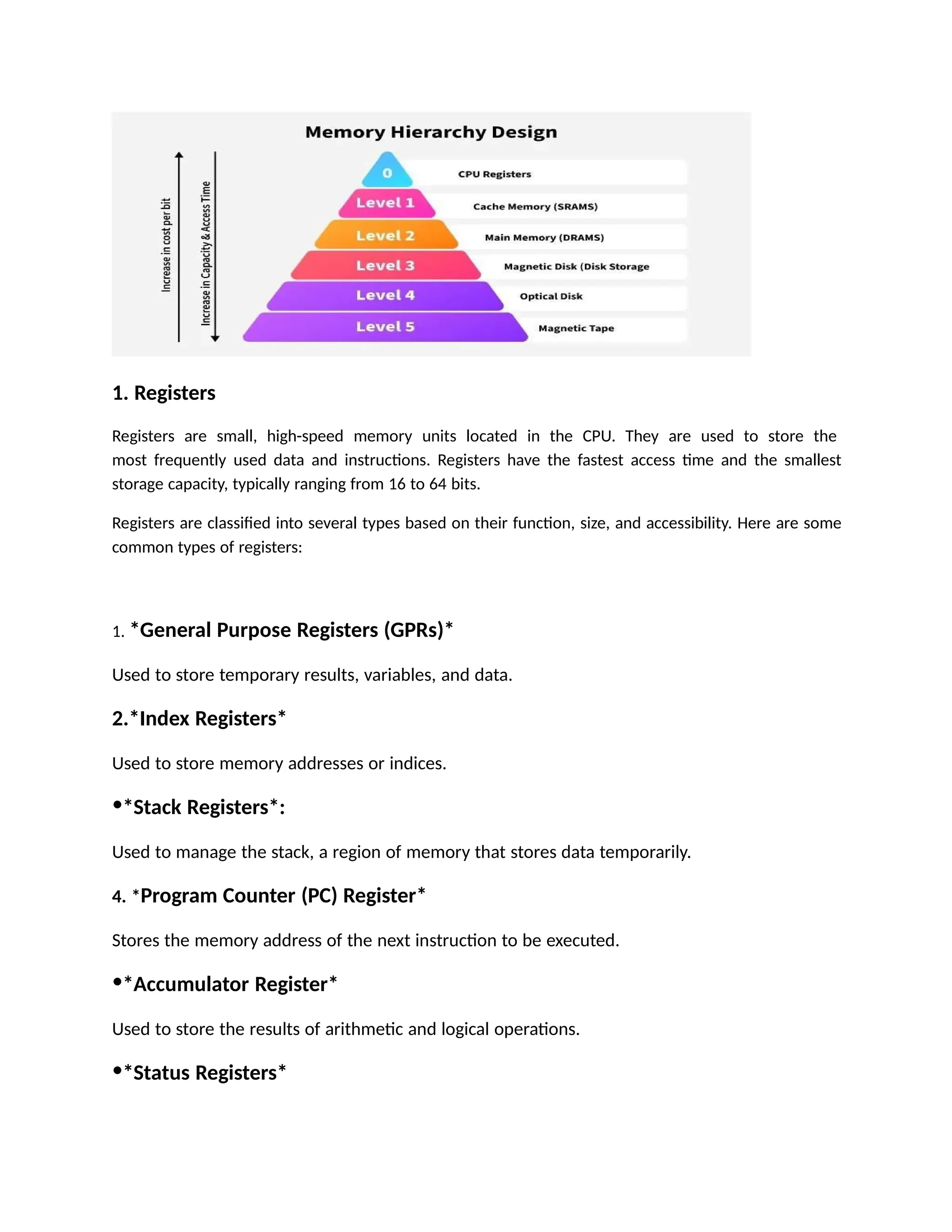
again and again). The figure below clearly demonstrates the different levels of the memory hierarchy.
Why Memory Hierarchy is Required in the System?
Memory Hierarchy helps in optimizing the memory available in the computer. There are multiple levels
present in the memory, each one having a different size, different cost, etc. Some types of memory like
cache, and main memory are faster as compared to other types of memory but they are having a little
less size and are also costly whereas some memory has a little higher storage value, but they are a little
slower. Accessing of data is not similar in all types of memory, some have faster access whereas some
have slower access.
Types of Memory Hierarchy
This Memory Hierarchy Design is divided into 4 main types:
Register
Cache memory
Primary memory
Secondary memory
1. Registers
Registers are small, high-speed memory units located in the CPU. They are used to store the
most frequently used data and instructions. Registers have the fastest access time and the smallest
storage capacity, typically ranging from 16 to 64 bits.
Registers are classified into several types based on their function, size, and accessibility. Here are some
common types of registers:
1. *General Purpose Registers (GPRs)*
Used to store temporary results, variables, and data.
2.*Index Registers*
Used to store memory addresses or indices.
•*Stack Registers*:
Used to manage the stack, a region of memory that stores data temporarily.
4. *Program Counter (PC) Register*
Stores the memory address of the next instruction to be executed.
•*Accumulator Register*
Used to store the results of arithmetic and logical operations.
•*Status Registers*
Store information about the status of the processor, such as flags, error codes, and
condition codes.
7. *Floating-Point Registers (FPRs)*
Used to store floating-point numbers and perform floating-point operations.
2. Cache Memory
Cache memory is a small, fast memory unit located close to the CPU. It stores frequently used
data and instructions that have been recently accessed from the main memory. Cache memory
is designed to minimize the time it takes to access data by providing the CPU with quick access
to frequently used data.
Performance of Cache memory
Cache memory performance is measured by its ability to quickly provide the CPU with the data it
needs. A cache with good performance will have a high hit ratio, meaning it can provide the data
quickly, and a low miss ratio, meaning it doesn't have to access slower memory often.
3 Primary memory
Primary memory refers to the internal memory of a computer, which is directly accessible by the CPU. It
includes:
- RAM (Random Access
Memory)
- ROM (Read-Only Memory)
Primary memory is volatile, meaning its contents are lost when the power is turned off. It's used to
store data and programs temporarily while the computer is running.
Main Memory
Main memory, also known as RAM (Random Access Memory), is the primary memory of a computer
system. It has a larger storage capacity than cache memory, but it is slower. Main memory is used to
store data and instructions that are currently in use by the CPU.
Types of Main Memory Static RAM:
Static RAM stores the binary information in flip flops and information remains valid until power
is supplied.
Static RAM
has a faster access time and is used in implementing cache memory.
Dynamic RAM:
It stores the binary information as a charge on the capacitor. It requires refreshing circuitry to maintain
the charge on the capacitors after a few milliseconds. It contains more memory cells per unit area as
compared to SRAM.
4. Secondary Storage
Secondary storage, such as hard disk drives (HDD) and solid-state drives (SSD) , is a non-volatile memory
unit that has a larger storage capacity than main memory. It is used to store data and instructions that
are not currently in use by the CPU. Secondary storage has the slowest access time and is typically the
least expensive type of memory in the memory hierarchy.
Types of Secondary memory
. Magnetic Disk
Magnetic Disks are simply circular plates that are fabricated with either a metal or a plastic or
a magnetized material. The Magnetic disks work at a high speed inside the computer and these
are frequently used.
Magnetic Tape
Magnetic Tape is simply a magnetic recording device that is covered with a plastic film. Magnetic Tape
is generally used for the backup of data. In the case of a magnetic tape, the access time for a computer
is a little slower and therefore, it requires some amount of time for accessing the strip.
Hard disk
A Hard Disk is a type of non-volatile secondary memory that stores data permanently, even when the
power is turned off. It consists of one or more disks coated with magnetic material, and read/write
heads that access the data.
Characteristics of Memory Hierarchy
Capacity:
It is the global volume of information the memory can store. As we move from top to bottom in the
Hierarchy, the capacity increases.
Access Time:
It is the time interval between the read/write request and the availability of the data. As we move from
top to bottom in the Hierarchy, the access time increases.
Performance:
The Memory Hierarch design ensures that frequently accessed data is stored in faster memory
to improve system performance.
Cost Per Bit:
As we move from bottom to top in the Hierarchy, the cost per bit increases i.e. Internal Memory is
costlier than External Memory.
Optimized Resource Utilization:
Combines the benefits of small, fast memory and large, cost-effective storage to maximize
system performance.
Efficient Data Management:
Frequently accessed data is kept closer to the CPU, while less frequently used data is stored in larger,
slower memory, ensuring efficient data handling.
Disadvantages of Memory Hierarchy
Complex Design:
Managing and coordinating data across different levels of the hierarchy adds complexity to the system’s
design and operation.
Cost:
Faster memory components like registers and cache are expensive, limiting their size and increasing the
overall cost of the system.
 Latency:
Accessing data stored in slower memory (like secondary or tertiary storage) increases the latency
and reduces system performance.
 Maintenance Overhead:
Managing and maintaining different types of memory adds overhead in terms of hardware and
software.

Memory hierarchy of computer architecture.ppt

  • 1.
    Topic: Memory hierarchy ofComputer architecture Group no 6: Nazish Boota Javeria Tariq Sharook binte sohail As if Hayat Introduction Memory Hierarchy Design and its Characteristics In the Computer System Design, Memory Hierarchy is an enhancement to organize the memory such that it can minimize the access time. The Memory Hierarchy was developed based on a program behavior known as locality of references (same data or nearby data is likely to be accessed again and again). The figure below clearly demonstrates the different levels of the memory hierarchy. Why Memory Hierarchy is Required in the System? Memory Hierarchy helps in optimizing the memory available in the computer. There are multiple levels present in the memory, each one having a different size, different cost, etc. Some types of memory like cache, and main memory are faster as compared to other types of memory but they are having a little less size and are also costly whereas some memory has a little higher storage value, but they are a little slower. Accessing of data is not similar in all types of memory, some have faster access whereas some have slower access. Types of Memory Hierarchy This Memory Hierarchy Design is divided into 4 main types: Register Cache memory Primary memory Secondary memory
  • 2.
    1. Registers Registers aresmall, high-speed memory units located in the CPU. They are used to store the most frequently used data and instructions. Registers have the fastest access time and the smallest storage capacity, typically ranging from 16 to 64 bits. Registers are classified into several types based on their function, size, and accessibility. Here are some common types of registers: 1. *General Purpose Registers (GPRs)* Used to store temporary results, variables, and data. 2.*Index Registers* Used to store memory addresses or indices. •*Stack Registers*: Used to manage the stack, a region of memory that stores data temporarily. 4. *Program Counter (PC) Register* Stores the memory address of the next instruction to be executed. •*Accumulator Register* Used to store the results of arithmetic and logical operations. •*Status Registers*
  • 3.
    Store information aboutthe status of the processor, such as flags, error codes, and condition codes. 7. *Floating-Point Registers (FPRs)* Used to store floating-point numbers and perform floating-point operations. 2. Cache Memory Cache memory is a small, fast memory unit located close to the CPU. It stores frequently used data and instructions that have been recently accessed from the main memory. Cache memory is designed to minimize the time it takes to access data by providing the CPU with quick access to frequently used data. Performance of Cache memory Cache memory performance is measured by its ability to quickly provide the CPU with the data it needs. A cache with good performance will have a high hit ratio, meaning it can provide the data quickly, and a low miss ratio, meaning it doesn't have to access slower memory often. 3 Primary memory Primary memory refers to the internal memory of a computer, which is directly accessible by the CPU. It includes: - RAM (Random Access Memory) - ROM (Read-Only Memory) Primary memory is volatile, meaning its contents are lost when the power is turned off. It's used to store data and programs temporarily while the computer is running. Main Memory Main memory, also known as RAM (Random Access Memory), is the primary memory of a computer system. It has a larger storage capacity than cache memory, but it is slower. Main memory is used to store data and instructions that are currently in use by the CPU.
  • 4.
    Types of MainMemory Static RAM: Static RAM stores the binary information in flip flops and information remains valid until power is supplied. Static RAM has a faster access time and is used in implementing cache memory. Dynamic RAM: It stores the binary information as a charge on the capacitor. It requires refreshing circuitry to maintain the charge on the capacitors after a few milliseconds. It contains more memory cells per unit area as compared to SRAM. 4. Secondary Storage Secondary storage, such as hard disk drives (HDD) and solid-state drives (SSD) , is a non-volatile memory unit that has a larger storage capacity than main memory. It is used to store data and instructions that are not currently in use by the CPU. Secondary storage has the slowest access time and is typically the least expensive type of memory in the memory hierarchy. Types of Secondary memory . Magnetic Disk Magnetic Disks are simply circular plates that are fabricated with either a metal or a plastic or a magnetized material. The Magnetic disks work at a high speed inside the computer and these are frequently used. Magnetic Tape Magnetic Tape is simply a magnetic recording device that is covered with a plastic film. Magnetic Tape is generally used for the backup of data. In the case of a magnetic tape, the access time for a computer is a little slower and therefore, it requires some amount of time for accessing the strip. Hard disk
  • 5.
    A Hard Diskis a type of non-volatile secondary memory that stores data permanently, even when the power is turned off. It consists of one or more disks coated with magnetic material, and read/write heads that access the data. Characteristics of Memory Hierarchy Capacity: It is the global volume of information the memory can store. As we move from top to bottom in the Hierarchy, the capacity increases. Access Time: It is the time interval between the read/write request and the availability of the data. As we move from top to bottom in the Hierarchy, the access time increases. Performance: The Memory Hierarch design ensures that frequently accessed data is stored in faster memory to improve system performance. Cost Per Bit: As we move from bottom to top in the Hierarchy, the cost per bit increases i.e. Internal Memory is costlier than External Memory. Optimized Resource Utilization: Combines the benefits of small, fast memory and large, cost-effective storage to maximize system performance. Efficient Data Management: Frequently accessed data is kept closer to the CPU, while less frequently used data is stored in larger, slower memory, ensuring efficient data handling. Disadvantages of Memory Hierarchy Complex Design: Managing and coordinating data across different levels of the hierarchy adds complexity to the system’s design and operation. Cost: Faster memory components like registers and cache are expensive, limiting their size and increasing the overall cost of the system.
  • 6.
     Latency: Accessing datastored in slower memory (like secondary or tertiary storage) increases the latency and reduces system performance.  Maintenance Overhead: Managing and maintaining different types of memory adds overhead in terms of hardware and software.