A ppt by Shreedhi
Pandey
Memory
What is memory ?
The computer has memory,
which it uses to store data and
instructions . It can bring back
information from its memory as
and when required.
Measuring the memory of the computer
The memory of the computer is measured in units of
bits and bytes.
The full form of bit is binary digit. It is the smallest unit of
memory . It can have a single numeric value of 0 or 1.
Chart
Types of memory
A computer has two types of memory.
1. Primary or internal memory
2. Secondary or external memory
Primary or main memory
The primary memory is a part of the Central Processing Unit .
It is also called the main memory or the internal memory.
The primary memory is fixed on the motherboard inside
the CPU
Box.
There are two types of primary memory.
1.Read only memory (ROM)
2.Random access memory (RAM)
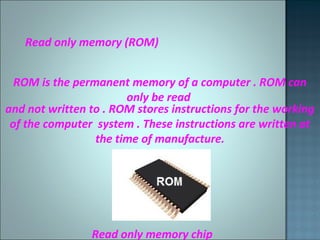
Read only memory (ROM)
ROM is the permanent memory of a computer . ROM can
only be read
and not written to . ROM stores instructions for the working
of the computer system . These instructions are written at
the time of manufacture.
Read only memory chip
Random access memory (RAM)
RAM is used to store data and instructions that are currently
being processed by a computer’ s CPU . It is also known as
Read and write memory .We can read and write data onto
it.
The data stored in RAM is temporary and disappears when a
Program is closed or the computer is shut down.
RAM of a computer is measured in gigabytes (GB) .
Random access memory chip
Secondary Memory
The computer uses the secondary memory , or external
memory , to
store large volumes of data. Storage devices like hard disks,
CDs ,
DVDs, pen drives , external hard drives and Blu - ray disks
make up
The secondary memory.
Types of secondary devices
There are many types of secondary memory devic
such as :
1.Hard disks
2.Compact disks (C.D. )
3.Digital video disk (D.V.D. )
4.Pen drive
5.External hard drive
6. Punching device
7. Magnetic tape
8. Flash disk
The hard disk is a metallic disk coated with a
magnetic
Material . It is permanently fixed inside the CPU
box. The hard disk stores the computer ‘s
operating system software and many other
software . Whatever we save on a computer gets
written to the hard disk , which can be retrieved
later . Hard disks can have storage capacities
As high as 500 GB (gigabytes ) to 2 TB (terabytes
) or even more . Most hard disks are partitioned
into different
compartments or drives . The drives are named
as C; ,
D ; ,E ; , and so on
Compact disk (CD)
Compact disks or CDs , are external storage
devices
that can hold up to 700 MB of data . CDs are
ideal for storing videos , music and lots of
images . To read a CD, we place it in a CD drive .
Types of
CDs
3. CD-RW (Compact Disk –Rewritable ) :
A CD-RW can be used to write and rewrite data .
The data can be erased and modified as many
times as required.
DVD (Digital Video Disk )
A DVD looks like a CD but can hold much more
information than a CD .A DVD can hold 4.7 GB
(gigabytes ) to 16 GB of data . You could store
two to three movies on a DVD .
Thanks
for
watching !!!!

Memory of a computer

  • 1.
    A ppt byShreedhi Pandey
  • 2.
    Memory What is memory? The computer has memory, which it uses to store data and instructions . It can bring back information from its memory as and when required.
  • 3.
    Measuring the memoryof the computer The memory of the computer is measured in units of bits and bytes. The full form of bit is binary digit. It is the smallest unit of memory . It can have a single numeric value of 0 or 1.
  • 4.
  • 5.
    Types of memory Acomputer has two types of memory. 1. Primary or internal memory 2. Secondary or external memory
  • 7.
    Primary or mainmemory The primary memory is a part of the Central Processing Unit . It is also called the main memory or the internal memory. The primary memory is fixed on the motherboard inside the CPU Box. There are two types of primary memory. 1.Read only memory (ROM) 2.Random access memory (RAM)
  • 8.
    Read only memory(ROM) ROM is the permanent memory of a computer . ROM can only be read and not written to . ROM stores instructions for the working of the computer system . These instructions are written at the time of manufacture. Read only memory chip
  • 9.
    Random access memory(RAM) RAM is used to store data and instructions that are currently being processed by a computer’ s CPU . It is also known as Read and write memory .We can read and write data onto it. The data stored in RAM is temporary and disappears when a Program is closed or the computer is shut down. RAM of a computer is measured in gigabytes (GB) . Random access memory chip
  • 10.
    Secondary Memory The computeruses the secondary memory , or external memory , to store large volumes of data. Storage devices like hard disks, CDs , DVDs, pen drives , external hard drives and Blu - ray disks make up The secondary memory.
  • 11.
    Types of secondarydevices There are many types of secondary memory devic such as : 1.Hard disks 2.Compact disks (C.D. ) 3.Digital video disk (D.V.D. ) 4.Pen drive 5.External hard drive 6. Punching device 7. Magnetic tape 8. Flash disk
  • 12.
    The hard diskis a metallic disk coated with a magnetic Material . It is permanently fixed inside the CPU box. The hard disk stores the computer ‘s operating system software and many other software . Whatever we save on a computer gets written to the hard disk , which can be retrieved later . Hard disks can have storage capacities As high as 500 GB (gigabytes ) to 2 TB (terabytes ) or even more . Most hard disks are partitioned into different compartments or drives . The drives are named as C; , D ; ,E ; , and so on
  • 13.
    Compact disk (CD) Compactdisks or CDs , are external storage devices that can hold up to 700 MB of data . CDs are ideal for storing videos , music and lots of images . To read a CD, we place it in a CD drive .
  • 14.
  • 15.
    3. CD-RW (CompactDisk –Rewritable ) : A CD-RW can be used to write and rewrite data . The data can be erased and modified as many times as required.
  • 16.
    DVD (Digital VideoDisk ) A DVD looks like a CD but can hold much more information than a CD .A DVD can hold 4.7 GB (gigabytes ) to 16 GB of data . You could store two to three movies on a DVD .
  • 17.