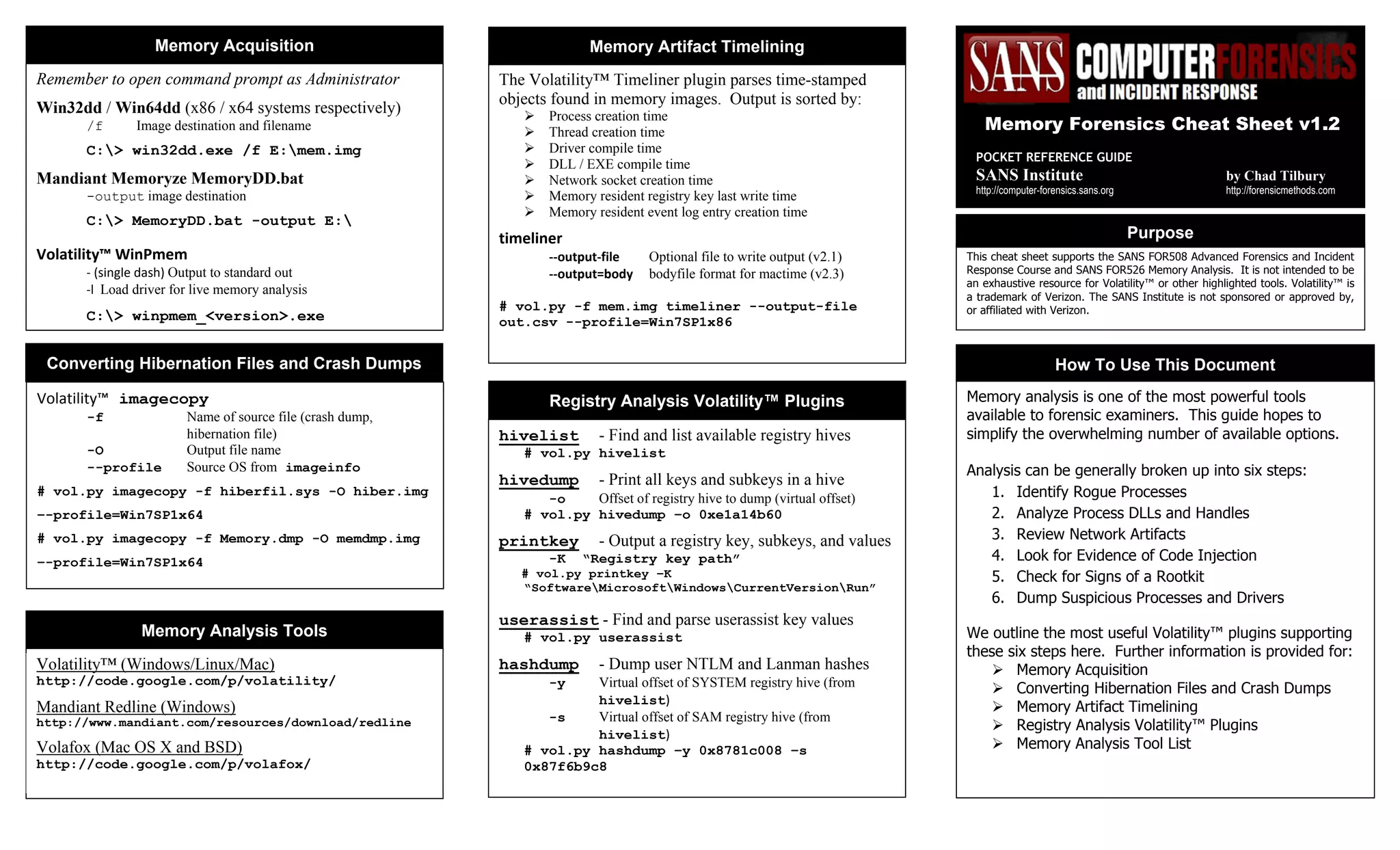
This cheat sheet supports the SANS FOR508 Advanced Forensics and Incident
Response Course and SANS FOR526 Memory Analysis. It is not intended to be
an exhaustive resource for Volatility™ or other highlighted tools. Volatility™ is
a trademark of Verizon. The SANS Institute is not sponsored or approved by,
or affiliated with Verizon.
The Volatility™ Timeliner plugin parses time-stamped
objects found in memory images. Output is sorted by:
 Process creation time
 Thread creation time
 Driver compile time
 DLL / EXE compile time
 Network socket creation time
 Memory resident registry key last write time
 Memory resident event log entry creation time
timeliner 
‐‐output‐file    Optional file to write output (v2.1)  
‐‐output=body  bodyfile format for mactime (v2.3) 
 
# vol.py -f mem.img timeliner --output-file
out.csv --profile=Win7SP1x86
Memory Artifact Timelining
Purpose
How To Use This Document
Memory analysis is one of the most powerful tools
available to forensic examiners. This guide hopes to
simplify the overwhelming number of available options.
Analysis can be generally broken up into six steps:
1. Identify Rogue Processes
2. Analyze Process DLLs and Handles
3. Review Network Artifacts
4. Look for Evidence of Code Injection
5. Check for Signs of a Rootkit
6. Dump Suspicious Processes and Drivers
We outline the most useful Volatility™ plugins supporting
these six steps here. Further information is provided for:
 Memory Acquisition
 Converting Hibernation Files and Crash Dumps
 Memory Artifact Timelining
 Registry Analysis Volatility™ Plugins
 Memory Analysis Tool List
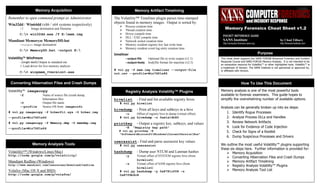
Remember to open command prompt as Administrator
Win32dd / Win64dd (x86 / x64 systems respectively)
/f    Image destination and filename  
C:> win32dd.exe /f E:mem.img
Mandiant Memoryze MemoryDD.bat
-output image destination
C:> MemoryDD.bat -output E:
Volatility™ WinPmem 
‐ (single dash) Output to standard out 
‐l  Load driver for live memory analysis 
 
C:> winpmem_<version>.exe
Memory Acquisition
Volatility™ imagecopy
-f    Name of source file (crash dump,
hibernation file)
-O      Output file name
--profile    Source OS from imageinfo  
# vol.py imagecopy -f hiberfil.sys -O hiber.img
–-profile=Win7SP1x64
# vol.py imagecopy -f Memory.dmp -O memdmp.img
–-profile=Win7SP1x64
Converting Hibernation Files and Crash Dumps
Memory Forensics Cheat Sheet v1.2
POCKET REFERENCE GUIDE
SANS Institute by Chad Tilbury
http://computer-forensics.sans.org http://forensicmethods.com
hivelist - Find and list available registry hives
# vol.py hivelist
hivedump - Print all keys and subkeys in a hive 
-o    Offset of registry hive to dump (virtual offset)
# vol.py hivedump –o 0xe1a14b60
printkey  - Output a registry key, subkeys, and values 
-K “Registry key path”
# vol.py printkey –K
“SoftwareMicrosoftWindowsCurrentVersionRun”
userassist - Find and parse userassist key values 
# vol.py userassist
hashdump - Dump user NTLM and Lanman hashes 
-y    Virtual offset of SYSTEM registry hive (from 
hivelist) 
-s    Virtual offset of SAM registry hive (from 
hivelist) 
# vol.py hashdump –y 0x8781c008 –s
0x87f6b9c8
Registry Analysis Volatility™ Plugins
Memory Analysis Tools
Volatility™ (Windows/Linux/Mac)
http://code.google.com/p/volatility/
Mandiant Redline (Windows)
http://www.mandiant.com/resources/download/redline
Volafox (Mac OS X and BSD)
http://code.google.com/p/volafox/
Dump Suspicious Processes and Drivers
pslist  - High level view of running processes
# vol.py pslist
psscan  - Scan memory for EPROCESS blocks 
# vol.py psscan 
pstree  - Display parent-process relationships
# vol.py pstree 
Identify Rogue Processes
dlllist - List of loaded dlls by process
-p    Show information only for specific process identifiers
(PIDs)
# vol.py dlllist –p 4,868
getsids - Print process security identifiers
-p    Show information only for specific PIDs  
# vol.py getsids –p 868
handles  - List of open handles for each process 
-p    Show information only for specific PIDs
-t    Display only handles of a certain type
{Process, Thread, Key, Event, File, Mutant, Token, Port}
# vol.py handles –p 868 –t Process,Mutant
filescan  ‐ Scan memory for FILE_OBJECT handles 
# vol.py filescan
svcscan  - Scan for Windows Service information 
# vol.py svcscan 
Analyze Process DLLs and Handles
dlldump - Extract DLLs from specific processes
-p    Dump DLLs only for specific PIDs
-b    Dump DLLs from process at physical memory offset 
-r    Dump DLLs matching REGEX name
--dump-dir  Directory to save extracted files 
# vol.py dlldump --dump-dir ./output –r metsrv
moddump  - Extract kernel drivers 
-o    Dump driver using offset address (from modscan) 
-r    Dump drivers matching REGEX name
--dump-dir    Directory to save extracted files 
# vol.py moddump --dump-dir ./output –r gaopdx
procmemdump - Dump process to executable sample
-p    Dump only specific PIDs
-o    Specify process by physical memory offset
--dump-dir    Directory to save extracted files 
# vol.py procmemdump --dump-dir ./output –p 868
memdump  - Dump every memory section into a file
-p      Dump memory sections from these PIDs
--dump-dir    Directory to save extracted files 
# vol.py memdump –dump-dir ./output –p 868
Connections - [XP] List of open TCP connections
# vol.py connections
connscan - [XP] ID TCP connections, including closed
# vol.py connscan 
sockets  - [XP] Print listening sockets (any protocol) 
# vol.py sockets 
sockscan  - [XP] ID sockets, including closed/unlinked 
# vol.py sockscan
netscan  - [Win7] Scan for connections and sockets
# vol.py netscan 
Review Network Artifacts
malfind  - Find injected code and dump sections
-p    Show information only for specific PIDs
-o   Provide physical offset of single process to scan 
--dump-dir   Directory to save  memory sections 
# vol.py malfind --dump-dir ./output_dir
ldrmodules  - Detect unlinked DLLs
-p    Show information only for specific PIDs
-v    Verbose: show full paths from three DLL lists
# vol.py ldrmodules –p 868 -v
Look for Evidence of Code Injection
psxview - Find hidden processes using cross-view
# vol.py psxview
modscan  - Scan memory for loaded, unloaded, and
unlinked drivers
# vol.py modscan 
apihooks  - Find API/DLL function hooks
-p    Operate only on specific PIDs
-Q    Only scan critical processes and DLLS 
# vol.py apihooks 
ssdt    - Hooks in System Service Descriptor Table
# vol.py ssdt | egrep –v ‘(ntoskrnl|win32k)’ 
driverirp  - Identify I/O Request Packet (IRP) hooks
-r    Analyze drivers matching REGEX name pattern  
# vol.py driverirp –r tcpip
idt    - Display Interrupt Descriptor Table 
# vol.py idt 
Check for Signs of a Rootkit
Getting Help
# vol.py –h   (show options and supported plugins)
# vol.py plugin –h   (show plugin usage) 
# vol.py plugin --info   (show available OS profiles) 
Sample Command Line
# vol.py -f image --profile=profile plugin 
Identify System Profile
imageinfo  - Display memory image metadata 
# vol.py –f mem.img imageinfo 
Using Environment Variables
Set name of memory image (takes place of -f )
# export VOLATILITY_LOCATION=file:///images/mem.img
Set profile type (takes place of --profile= )
# export VOLATILITY_PROFILE=WinXPSP3x86
Getting Started with Volatility™

Memory forensics cheat sheet

  • 1.
    This cheat sheetsupports the SANS FOR508 Advanced Forensics and Incident Response Course and SANS FOR526 Memory Analysis. It is not intended to be an exhaustive resource for Volatility™ or other highlighted tools. Volatility™ is a trademark of Verizon. The SANS Institute is not sponsored or approved by, or affiliated with Verizon. The Volatility™ Timeliner plugin parses time-stamped objects found in memory images. Output is sorted by:  Process creation time  Thread creation time  Driver compile time  DLL / EXE compile time  Network socket creation time  Memory resident registry key last write time  Memory resident event log entry creation time timeliner  ‐‐output‐file    Optional file to write output (v2.1)   ‐‐output=body  bodyfile format for mactime (v2.3)    # vol.py -f mem.img timeliner --output-file out.csv --profile=Win7SP1x86 Memory Artifact Timelining Purpose How To Use This Document Memory analysis is one of the most powerful tools available to forensic examiners. This guide hopes to simplify the overwhelming number of available options. Analysis can be generally broken up into six steps: 1. Identify Rogue Processes 2. Analyze Process DLLs and Handles 3. Review Network Artifacts 4. Look for Evidence of Code Injection 5. Check for Signs of a Rootkit 6. Dump Suspicious Processes and Drivers We outline the most useful Volatility™ plugins supporting these six steps here. Further information is provided for:  Memory Acquisition  Converting Hibernation Files and Crash Dumps  Memory Artifact Timelining  Registry Analysis Volatility™ Plugins  Memory Analysis Tool List Remember to open command prompt as Administrator Win32dd / Win64dd (x86 / x64 systems respectively) /f    Image destination and filename   C:> win32dd.exe /f E:mem.img Mandiant Memoryze MemoryDD.bat -output image destination C:> MemoryDD.bat -output E: Volatility™ WinPmem  ‐ (single dash) Output to standard out  ‐l  Load driver for live memory analysis    C:> winpmem_<version>.exe Memory Acquisition Volatility™ imagecopy -f    Name of source file (crash dump, hibernation file) -O      Output file name --profile    Source OS from imageinfo   # vol.py imagecopy -f hiberfil.sys -O hiber.img –-profile=Win7SP1x64 # vol.py imagecopy -f Memory.dmp -O memdmp.img –-profile=Win7SP1x64 Converting Hibernation Files and Crash Dumps Memory Forensics Cheat Sheet v1.2 POCKET REFERENCE GUIDE SANS Institute by Chad Tilbury http://computer-forensics.sans.org http://forensicmethods.com hivelist - Find and list available registry hives # vol.py hivelist hivedump - Print all keys and subkeys in a hive  -o    Offset of registry hive to dump (virtual offset) # vol.py hivedump –o 0xe1a14b60 printkey  - Output a registry key, subkeys, and values  -K “Registry key path” # vol.py printkey –K “SoftwareMicrosoftWindowsCurrentVersionRun” userassist - Find and parse userassist key values  # vol.py userassist hashdump - Dump user NTLM and Lanman hashes  -y    Virtual offset of SYSTEM registry hive (from  hivelist)  -s    Virtual offset of SAM registry hive (from  hivelist)  # vol.py hashdump –y 0x8781c008 –s 0x87f6b9c8 Registry Analysis Volatility™ Plugins Memory Analysis Tools Volatility™ (Windows/Linux/Mac) http://code.google.com/p/volatility/ Mandiant Redline (Windows) http://www.mandiant.com/resources/download/redline Volafox (Mac OS X and BSD) http://code.google.com/p/volafox/
  • 2.
    Dump Suspicious Processesand Drivers pslist  - High level view of running processes # vol.py pslist psscan  - Scan memory for EPROCESS blocks  # vol.py psscan  pstree  - Display parent-process relationships # vol.py pstree  Identify Rogue Processes dlllist - List of loaded dlls by process -p    Show information only for specific process identifiers (PIDs) # vol.py dlllist –p 4,868 getsids - Print process security identifiers -p    Show information only for specific PIDs   # vol.py getsids –p 868 handles  - List of open handles for each process  -p    Show information only for specific PIDs -t    Display only handles of a certain type {Process, Thread, Key, Event, File, Mutant, Token, Port} # vol.py handles –p 868 –t Process,Mutant filescan  ‐ Scan memory for FILE_OBJECT handles  # vol.py filescan svcscan  - Scan for Windows Service information  # vol.py svcscan  Analyze Process DLLs and Handles dlldump - Extract DLLs from specific processes -p    Dump DLLs only for specific PIDs -b    Dump DLLs from process at physical memory offset  -r    Dump DLLs matching REGEX name --dump-dir  Directory to save extracted files  # vol.py dlldump --dump-dir ./output –r metsrv moddump  - Extract kernel drivers  -o    Dump driver using offset address (from modscan)  -r    Dump drivers matching REGEX name --dump-dir    Directory to save extracted files  # vol.py moddump --dump-dir ./output –r gaopdx procmemdump - Dump process to executable sample -p    Dump only specific PIDs -o    Specify process by physical memory offset --dump-dir    Directory to save extracted files  # vol.py procmemdump --dump-dir ./output –p 868 memdump  - Dump every memory section into a file -p      Dump memory sections from these PIDs --dump-dir    Directory to save extracted files  # vol.py memdump –dump-dir ./output –p 868 Connections - [XP] List of open TCP connections # vol.py connections connscan - [XP] ID TCP connections, including closed # vol.py connscan  sockets  - [XP] Print listening sockets (any protocol)  # vol.py sockets  sockscan  - [XP] ID sockets, including closed/unlinked  # vol.py sockscan netscan  - [Win7] Scan for connections and sockets # vol.py netscan  Review Network Artifacts malfind  - Find injected code and dump sections -p    Show information only for specific PIDs -o   Provide physical offset of single process to scan  --dump-dir   Directory to save  memory sections  # vol.py malfind --dump-dir ./output_dir ldrmodules  - Detect unlinked DLLs -p    Show information only for specific PIDs -v    Verbose: show full paths from three DLL lists # vol.py ldrmodules –p 868 -v Look for Evidence of Code Injection psxview - Find hidden processes using cross-view # vol.py psxview modscan  - Scan memory for loaded, unloaded, and unlinked drivers # vol.py modscan  apihooks  - Find API/DLL function hooks -p    Operate only on specific PIDs -Q    Only scan critical processes and DLLS  # vol.py apihooks  ssdt    - Hooks in System Service Descriptor Table # vol.py ssdt | egrep –v ‘(ntoskrnl|win32k)’  driverirp  - Identify I/O Request Packet (IRP) hooks -r    Analyze drivers matching REGEX name pattern   # vol.py driverirp –r tcpip idt    - Display Interrupt Descriptor Table  # vol.py idt  Check for Signs of a Rootkit Getting Help # vol.py –h   (show options and supported plugins) # vol.py plugin –h   (show plugin usage)  # vol.py plugin --info   (show available OS profiles)  Sample Command Line # vol.py -f image --profile=profile plugin  Identify System Profile imageinfo  - Display memory image metadata  # vol.py –f mem.img imageinfo  Using Environment Variables Set name of memory image (takes place of -f ) # export VOLATILITY_LOCATION=file:///images/mem.img Set profile type (takes place of --profile= ) # export VOLATILITY_PROFILE=WinXPSP3x86 Getting Started with Volatility™