Memory Forensics
A Practical Approach to Investigate Data Leakage with Volatility 2
Memory and Memory Dump
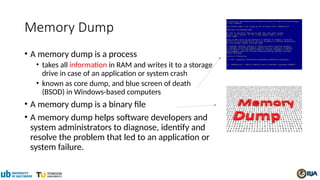
Memory Dump
• A memory dump is a process
• takes all information in RAM and writes it to a storage
drive in case of an application or system crash
• known as core dump, and blue screen of death
(BSOD) in Windows-based computers
• A memory dump is a binary file
• A memory dump helps software developers and
system administrators to diagnose, identify and
resolve the problem that led to an application or
system failure.
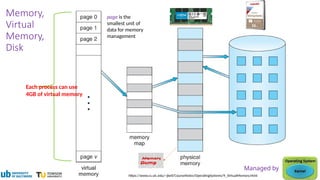
https://www.cs.uic.edu/~jbell/CourseNotes/OperatingSystems/9_VirtualMemory.html
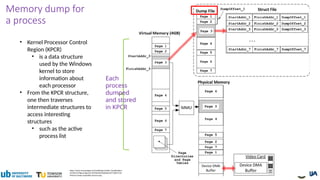
Each process can use
4GB of virtual memory
Memory,
Virtual
Memory,
Disk
Managed by
page is the
smallest unit of
data for memory
management
https://www.researchgate.net/profile/Igor-Korkin-2/publication/
263365115/figure/fig1/AS:296534018150400@1447710627176/
Memory-dump-acquisition-process.png
Each
process
dumped
and stored
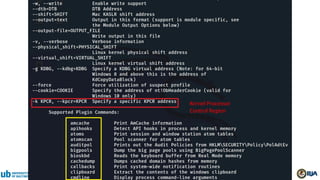
in KPCR
• Kernel Processor Control
Region (KPCR)
• is a data structure
used by the Windows
kernel to store
information about
each processor
• From the KPCR structure,
one then traverses
intermediate structures to
access interesting
structures
• such as the active
process list
Memory dump for
a process
Dump memory
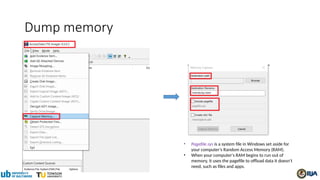
• Pagefile.sys is a system file in Windows set aside for
your computer’s Random Access Memory (RAM).
• When your computer's RAM begins to run out of
memory, it uses the pagefile to offload data it doesn't
need, such as files and apps.
Volatility Framework- Volatile memory
extraction utility framework
• For the extraction of digital artifacts from volatile memory (RAM) samples
(dumps).
• offer visibility into the runtime state of the system
• support Win, Linux, and iOS
• Analyse raw dumps
• memory dumps, crash dumps, virtual machine snapshots, VMware dumps (.vmem),
Microsoft crash dumps, hibernation files, virtual box dumps
• An open collection of tools (plugins)
• Version 2 is implemented in Python [2.6-3.0)
• under the GNU General Public License (run, study, share, and modify )
• Provide a platform for further work in forensic research.
Pre-investigation
Volatility 2.X installation
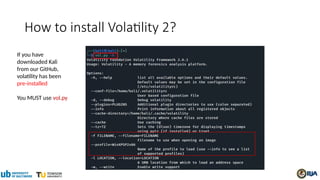
If you have
downloaded Kali
from our GitHub,
volatility has been
pre-installed
You MUST use vol.py
How to install Volatility 2?
Kernel Processor
Control Region
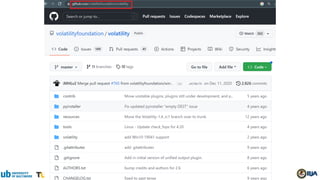
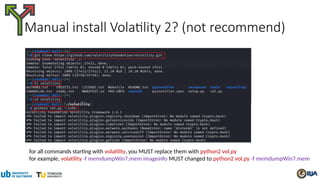
Manual install Volatility 2? (not recommend)
for all commands starting with volatility, you MUST replace them with python2 vol.py
for example, volatility -f memdumpWin7.mem imageinfo MUST changed to python2 vol.py -f memdumpWin7.mem
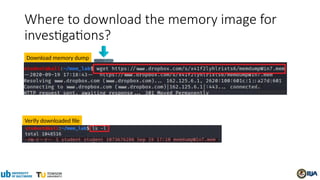
Where to download the memory image for
investigations?
Download memory dump
Verify downloaded file
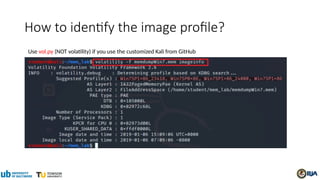
How to identify the image profile?
Use vol.py (NOT volatility) if you use the customized Kali from GitHub
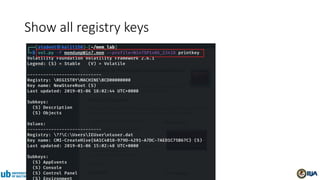
Show all registry keys
Investigation
• Understand the Suspect and Accounts
• Understand the Suspect’s PC
• Network Forensics
• Investigate Command History
• Investigate Suspect’s USB
• Investigate Internet Explorer History
• Investigate File Explorer History
• Timeline Analysis
Understand the Suspect and
Accounts
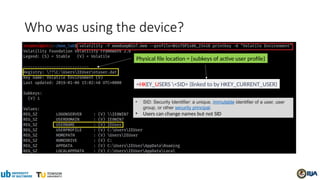
Who was using the device?
=HKEY_USERS <SID> (linked to by HKEY_CURRENT_USER)
• SID: Security Identifier: a unique, immutable identifier of a user, user
group, or other security principal.
• Users can change names but not SID
Physical file location = {subkeys of active user profile}
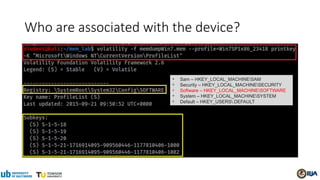
Who are associated with the device?
• Sam – HKEY_LOCAL_MACHINESAM
• Security – HKEY_LOCAL_MACHINESECURITY
• Software – HKEY_LOCAL_MACHINESOFTWARE
• System – HKEY_LOCAL_MACHINESYSTEM
• Default – HKEY_USERS.DEFAULT
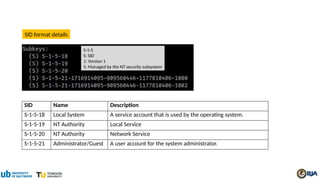
S-1-5
S: SID
1: Version 1
5: Managed by the NT security subsystem
SID Name Description
S-1-5-18 Local System A service account that is used by the operating system.
S-1-5-19 NT Authority Local Service
S-1-5-20 NT Authority Network Service
S-1-5-21 Administrator/Guest A user account for the system administrator.
SID format details
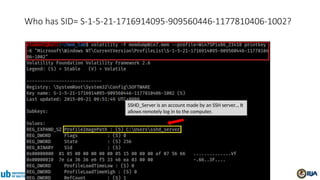
SSHD_Server is an account made by an SSH server.., It
allows remotely log in to the computer.
Who has SID= S-1-5-21-1716914095-909560446-1177810406-1002?
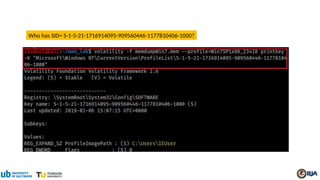
Who has SID= S-1-5-21-1716914095-909560446-1177810406-1000?
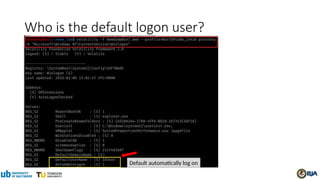
Who is the default logon user?
Default automatically log on
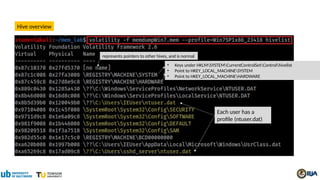
Hive overview
Each user has a
profile (ntuser.dat)
represents pointers to other hives, and is normal
• Keys under HKLMSYSTEMCurrentControlSetControlhivelist
• Point to HKEY_LOCAL_MACHINESYSTEM
• Point to HKEY_LOCAL_MACHINEHARDWARE
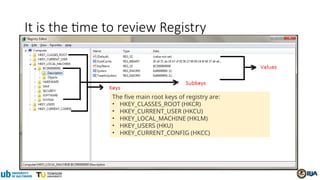
It is the time to review Registry
The five main root keys of registry are:
• HKEY_CLASSES_ROOT (HKCR)
• HKEY_CURRENT_USER (HKCU)
• HKEY_LOCAL_MACHINE (HKLM)
• HKEY_USERS (HKU)
• HKEY_CURRENT_CONFIG (HKCC)
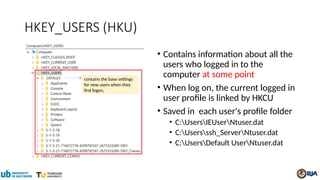
HKEY_USERS (HKU)
• Contains information about all the
users who logged in to the
computer at some point
• When log on, the current logged in
user profile is linked by HKCU
• Saved in each user's profile folder
• C:UsersIEUserNtuser.dat
• C:Usersssh_ServerNtuser.dat
• C:UsersDefault UserNtuser.dat
contains the base settings
for new users when they
first logon,
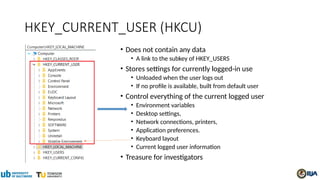
HKEY_CURRENT_USER (HKCU)
• Does not contain any data
• A link to the subkey of HKEY_USERS
• Stores settings for currently logged-in use
• Unloaded when the user logs out
• If no profile is available, built from default user
• Control everything of the current logged user
• Environment variables
• Desktop settings,
• Network connections, printers,
• Application preferences.
• Keyboard layout
• Current logged user information
• Treasure for investigators
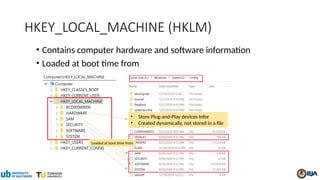
HKEY_LOCAL_MACHINE (HKLM)
• Contains computer hardware and software information
• Loaded at boot time from
• Store Plug-and-Play devices Infor
• Created dynamically, not stored in a file
Loaded at boot time from
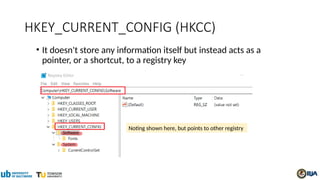
HKEY_CURRENT_CONFIG (HKCC)
• It doesn't store any information itself but instead acts as a
pointer, or a shortcut, to a registry key
Noting shown here, but points to other registry
Understand the Suspect’s PC
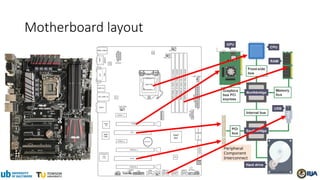
Motherboard layout
Peripheral
Component
Interconnect
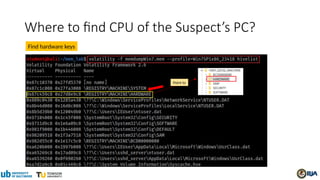
Where to find CPU of the Suspect’s PC?
Find hardware keys
Point to
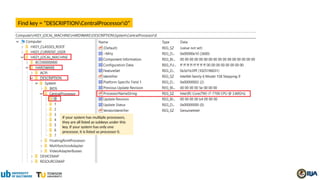
Find key = “DESCRIPTIONCentralProcessor0”
If your system has multiple processors,
they are all listed as subkeys under this
key. If your system has only one
processor, it is listed as processor 0.
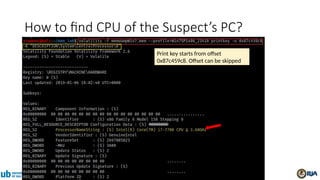
Print key starts from offset
0x87c459c8. Offset can be skipped
How to find CPU of the Suspect’s PC?
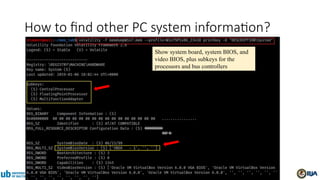
Show system board, system BIOS, and
video BIOS, plus subkeys for the
processors and bus controllers
How to find other PC system information?
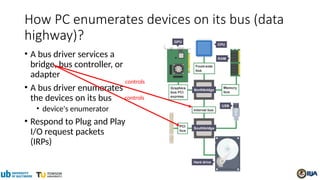
How PC enumerates devices on its bus (data
highway)?
• A bus driver services a
bridge, bus controller, or
adapter
• A bus driver enumerates
the devices on its bus
• device's enumerator
• Respond to Plug and Play
I/O request packets
(IRPs)
controls
controls
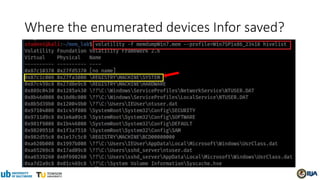
Where the enumerated devices Infor saved?
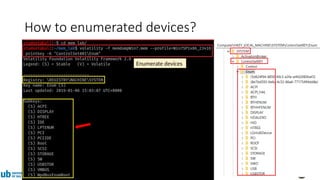
Enumerate devices
How to enumerated devices?
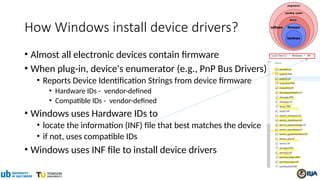
How Windows install device drivers?
• Almost all electronic devices contain firmware
• When plug-in, device's enumerator (e.g., PnP Bus Drivers)
• Reports Device Identification Strings from device firmware
• Hardware IDs - vendor-defined
• Compatible IDs - vendor-defined
• Windows uses Hardware IDs to
• locate the information (INF) file that best matches the device
• if not, uses compatible IDs
• Windows uses INF file to install device drivers
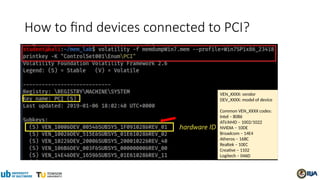
VEN_XXXX: vendor
DEV_XXXX: model of device
Common VEN_XXXX codes:
Intel – 8086
ATI/AMD – 1002/1022
NVIDIA – 10DE
Broadcom – 14E4
Atheros – 168C
Realtek – 10EC
Creative – 1102
Logitech – 046D
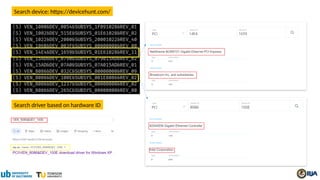
How to find devices connected to PCI?
Search device: https://devicehunt.com/
Search driver based on hardware ID
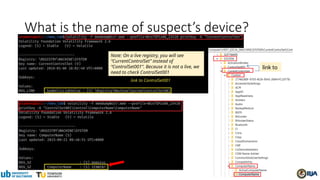
What is the name of suspect’s device?
link to
Note: On a live registry, you will see
“CurrentControlSet” instead of
“ControlSet001”. Because it is not a live, we
need to check ControlSet001
Network Forensics
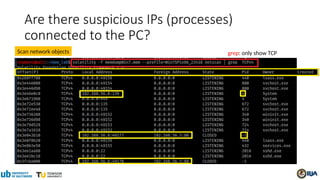
grep: only show TCP
Are there suspicious IPs (processes)
connected to the PC?
Scan network objects
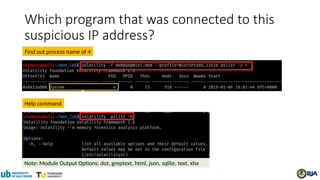
Which program that was connected to this
suspicious IP address?
Help command
Note: Module Output Options: dot, greptext, html, json, sqlite, text, xlsx
Find out process name of 4
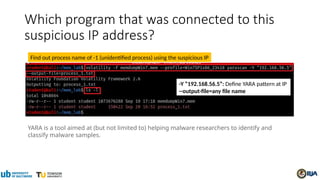
Which program that was connected to this
suspicious IP address?
Find out process name of -1 (unidentified process) using the suspicious IP
YARA is a tool aimed at (but not limited to) helping malware researchers to identify and
classify malware samples.
-Y “192.168.56.5”: Define YARA pattern at IP
--output-file=any file name
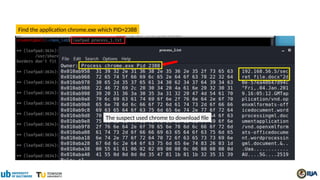
Find the application chrome.exe which PID=2388
The suspect used chrome to download file
Investigate Command History
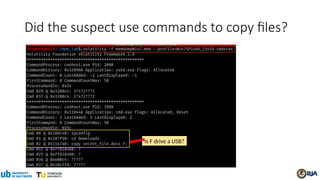
cmdscan and consoles
Is F drive a USB?
Did the suspect use commands to copy files?
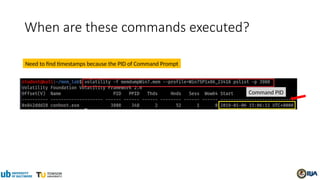
Command PID
When are these commands executed?
Need to find timestamps because the PID of Command Prompt
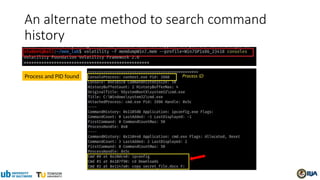
An alternate method to search command
history
Process and PID found
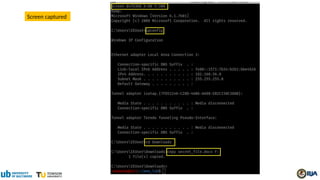
Screen captured
Investigate Suspect’s USB
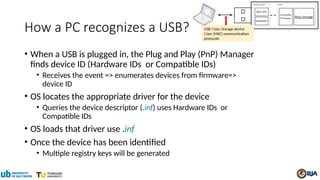
How a PC recognizes a USB?
• When a USB is plugged in, the Plug and Play (PnP) Manager
finds device ID (Hardware IDs or Compatible IDs)
• Receives the event => enumerates devices from firmware=>
device ID
• OS locates the appropriate driver for the device
• Queries the device descriptor (.inf) uses Hardware IDs or
Compatible IDs
• OS loads that driver use .inf
• Once the device has been identified
• Multiple registry keys will be generated
USB Mass Storage device
Class (MSC) communication
protocols
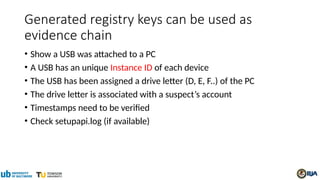
Generated registry keys can be used as
evidence chain
• Show a USB was attached to a PC
• A USB has an unique Instance ID of each device
• The USB has been assigned a drive letter (D, E, F..) of the PC
• The drive letter is associated with a suspect’s account
• Timestamps need to be verified
• Check setupapi.log (if available)
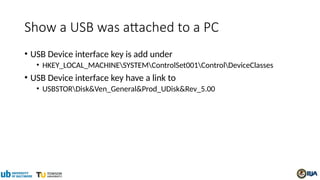
Show a USB was attached to a PC
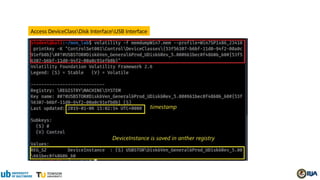
• USB Device interface key is add under
• HKEY_LOCAL_MACHINESYSTEMControlSet001ControlDeviceClasses
• USB Device interface key have a link to
• USBSTORDisk&Ven_General&Prod_UDisk&Rev_5.00
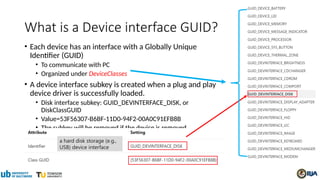
What is a Device interface GUID?
• Each device has an interface with a Globally Unique
Identifier (GUID)
• To communicate with PC
• Organized under DeviceClasses
• A device interface subkey is created when a plug and play
device driver is successfully loaded.
• Disk interface subkey: GUID_DEVINTERFACE_DISK, or
DiskClassGUID
• Value=53F56307-B6BF-11D0-94F2-00A0C91EFB8B
• The subkey will be removed if the device is removed
a hard disk storage (e.g.,
USB) device interface
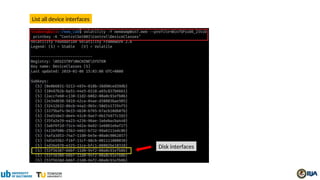
List all device interfaces
Disk interfaces
List Disk Interfaces
#USBSTOR
#Disk
&Ven_[VendorName]
&Prod_[ProductName]
&Rev_[RevisionID]
#[UID/SerialNo.]
#{DeviceInterfaceClassID}.
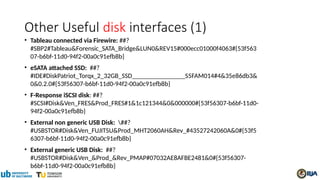
Other Useful disk interfaces (1)
• Tableau connected via Firewire: ##?
#SBP2#Tableau&Forensic_SATA_Bridge&LUN0&REV15#000ecc01000f4063#{53f563
07-b6bf-11d0-94f2-00a0c91efb8b}
• eSATA attached SSD: ##?
#IDE#DiskPatriot_Torqx_2_32GB_SSD________________S5FAM014#4&35e86db3&
0&0.2.0#{53f56307-b6bf-11d0-94f2-00a0c91efb8b}
• F-Response iSCSI disk: ##?
#SCSI#Disk&Ven_FRES&Prod_FRES#1&1c121344&0&000000#{53f56307-b6bf-11d0-
94f2-00a0c91efb8b}
• External non generic USB Disk: ##?
#USBSTOR#Disk&Ven_FUJITSU&Prod_MHT2060AH&Rev_#43527242060A&0#{53f5
6307-b6bf-11d0-94f2-00a0c91efb8b}
• External generic USB Disk: ##?
#USBSTOR#Disk&Ven_&Prod_&Rev_PMAP#07032AE8AFBE2481&0#{53f56307-
b6bf-11d0-94f2-00a0c91efb8b}
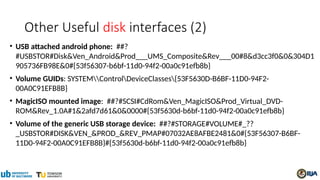
Other Useful disk interfaces (2)
• USB attached android phone: ##?
#USBSTOR#Disk&Ven_Android&Prod___UMS_Composite&Rev___00#8&d3cc3f0&0&304D1
905736FB98E&0#{53f56307-b6bf-11d0-94f2-00a0c91efb8b}
• Volume GUIDs: SYSTEMControlDeviceClasses{53F5630D-B6BF-11D0-94F2-
00A0C91EFB8B}
• MagicISO mounted image: ##?#SCSI#CdRom&Ven_MagicISO&Prod_Virtual_DVD-
ROM&Rev_1.0A#1&2afd7d61&0&0000#{53f5630d-b6bf-11d0-94f2-00a0c91efb8b}
• Volume of the generic USB storage device: ##?#STORAGE#VOLUME#_??
_USBSTOR#DISK&VEN_&PROD_&REV_PMAP#07032AE8AFBE2481&0#{53F56307-B6BF-
11D0-94F2-00A0C91EFB8B}#{53f5630d-b6bf-11d0-94f2-00a0c91efb8b}
Access DeviceClassDisk InterfaceUSB Interface
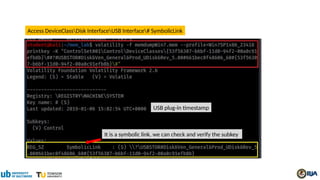
Access DeviceClassDisk InterfaceUSB Interface# SymbolicLink
USB plug-in timestamp
It is a symbolic link, we can check and verify the subkey
Verify USBTOR subkey and timestamp
Ven_ [vendor name]
Prod_[product name assigned by vendor]
Rev_[revision ID]
USB Storage
Same timestamp
Can we find Vendor ID and Product ID?
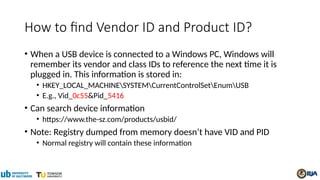
How to find Vendor ID and Product ID?
• When a USB device is connected to a Windows PC, Windows will
remember its vendor and class IDs to reference the next time it is
plugged in. This information is stored in:
• HKEY_LOCAL_MACHINESYSTEMCurrentControlSetEnumUSB
• E.g., Vid_0c55&Pid_5416
• Can search device information
• https://www.the-sz.com/products/usbid/
• Note: Registry dumped from memory doesn’t have VID and PID
• Normal registry will contain these information
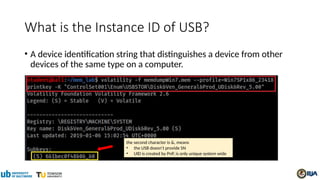
What is the Instance ID of USB?
• A device identification string that distinguishes a device from other
devices of the same type on a computer.
the second character is &, means
• the USB doesn’t provide SN
• UID is created by PnP, is only unique system wide
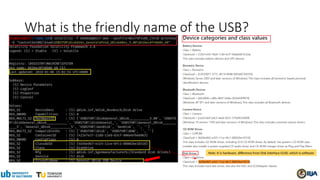
What is the friendly name of the USB?
Note: It is hardware, difference from Disk interface GUID, which is software
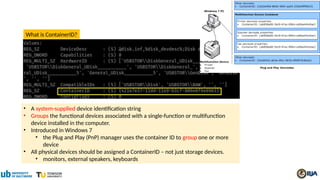
What is ContainerID?
• A system-supplied device identification string
• Groups the functional devices associated with a single-function or multifunction
device installed in the computer.
• Introduced in Windows 7
• the Plug and Play (PnP) manager uses the container ID to group one or more
device
• All physical devices should be assigned a ContainerID – not just storage devices.
• monitors, external speakers, keyboards
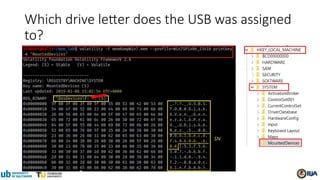
Which drive letter does the USB was assigned
to?
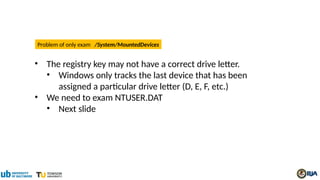
• The registry key may not have a correct drive letter.
• Windows only tracks the last device that has been
assigned a particular drive letter (D, E, F, etc.)
• We need to exam NTUSER.DAT
• Next slide
Problem of only exam /System/MountedDevices
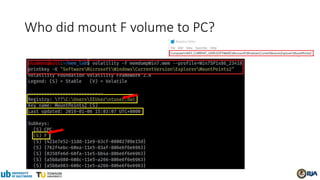
Who did mount F volume to PC?
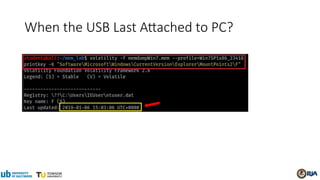
When the USB Last Attached to PC?
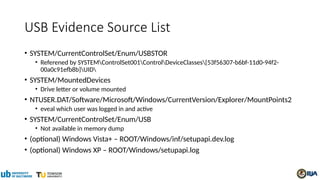
USB Evidence Source List
• SYSTEM/CurrentControlSet/Enum/USBSTOR
• Referened by SYSTEMControlSet001ControlDeviceClasses{53f56307-b6bf-11d0-94f2-
00a0c91efb8b}UID
• SYSTEM/MountedDevices
• Drive letter or volume mounted
• NTUSER.DAT/Software/Microsoft/Windows/CurrentVersion/Explorer/MountPoints2
• eveal which user was logged in and active
• SYSTEM/CurrentControlSet/Enum/USB
• Not available in memory dump
• (optional) Windows Vista+ – ROOT/Windows/inf/setupapi.dev.log
• (optional) Windows XP – ROOT/Windows/setupapi.log
Investigate Internet History
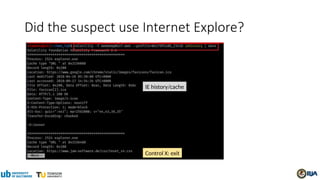
Did the suspect use Internet Explore?
IE history/cache
Control X: exit
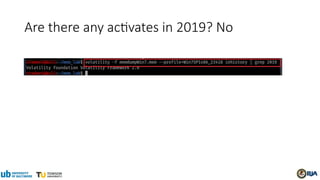
Are there any activates in 2019? No
Investigate File Explorer History
Shellbags
What are Shellbags?
• Registry keys to track a folder window when viewed through File Explorer;
• views, sizes and positions
• includes network folders and removable devices
• available since Windows XP
• Giving the investigator great insight into
• the folder
• browsing history of a suspect
• details for any folder that might no longer exist on a system
• due to deletion, or being located on a removable device
• Note: shellbags only get created when accessing the folders
• copying, moving, deleted, etc. will not change anything.
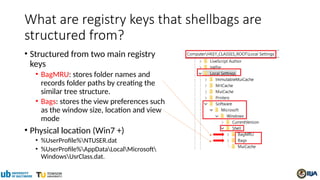
What are registry keys that shellbags are
structured from?
• Structured from two main registry
keys
• BagMRU: stores folder names and
records folder paths by creating the
similar tree structure.
• Bags: stores the view preferences such
as the window size, location and view
mode
• Physical location (Win7 +)
• %UserProfile%NTUSER.dat
• %UserProfile%AppDataLocalMicrosoft
WindowsUsrClass.dat.
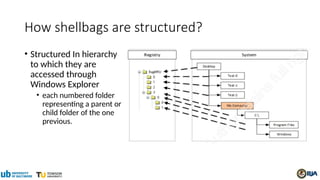
How shellbags are structured?
• Structured In hierarchy
to which they are
accessed through
Windows Explorer
• each numbered folder
representing a parent or
child folder of the one
previous.
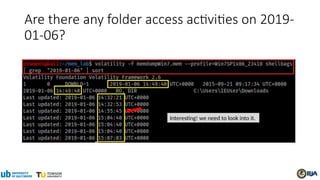
Are there any folder access activities on 2019-
01-06?
Interesting! we need to look into it.
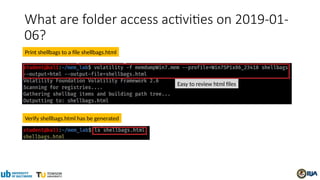
What are folder access activities on 2019-01-
06?
Print shellbags to a file shellbags.html
Easy to review html files
Verify shellbags.html has be generated
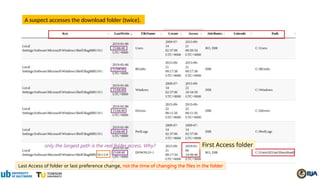
A suspect accesses the download folder (twice).
Last Access of folder or last preference change, not the time of changing the files in the folder
First Access folder
Timeline Analysis
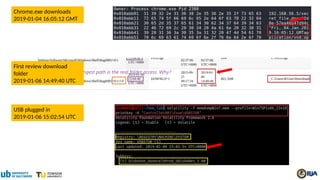
Chrome.exe downloads
2019-01-04 16:05:12 GMT
USB plugged in
2019-01-06 15:02:54 UTC
First review download
folder
2019-01-06 14:49:40 UTC
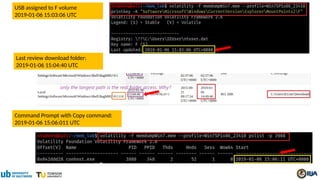
Command Prompt with Copy command:
2019-01-06 15:06:011 UTC
USB assigned to F volume
2019-01-06 15:03:06 UTC
Last review download folder:
2019-01-06 15:04:40 UTC
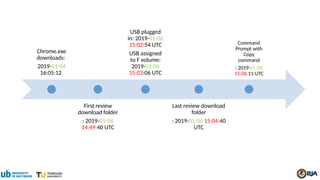
Chrome.exe
downloads:
2019-01-04
16:05:12
First review
download folder
: 2019-01-06
14:49:40 UTC
USB plugged
in: 2019-01-06
15:02:54 UTC
USB assigned
to F volume:
2019-01-06
15:03:06 UTC
Last review download
folder
: 2019-01-06 15:04:40
UTC
Command
Prompt with
Copy
command
: 2019-01-06
15:06:11 UTC
Note
• When a folder is deleted, the correspondent ShellBag registry keys
and values will not be removed.
• However, several tools have been developed to remove the ShellBag
information from the registry.
Post-Investigation
What is Windows 7 password?
• Dump password hashes from memory
• Using John the Ripper to crack password
• John the Ripper is a free password cracking software tool.
• password.lst is the default password dictionary
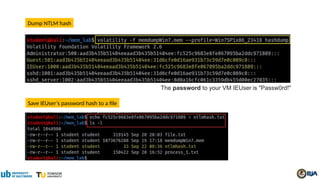
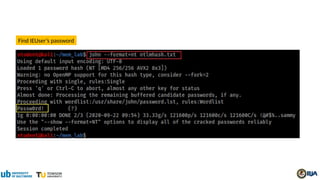
The password to your VM IEUser is "Passw0rd!"
Dump NTLM hash
Save IEUser’s password hash to a file
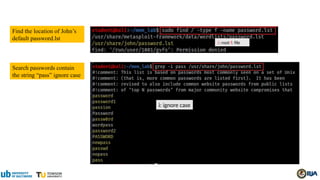
Find the location of John’s
default password.lst
/: root f: file
Search passwords contain
the string “pass” ignore case
i: ignore case
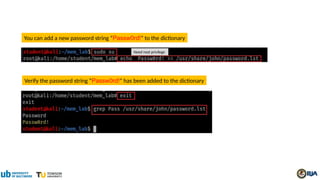
You can add a new password string “Passw0rd!” to the dictionary
Verify the password string “Passw0rd!” has been added to the dictionary
Need root privilege
Find IEUser’s password
Try Other Plugins
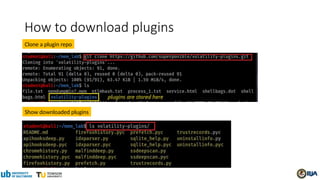
How to download plugins
Clone a plugin repo
Show downloaded plugins
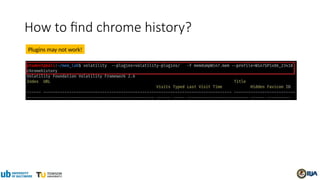
How to find chrome history?
Plugins may not work!
References
• https://www.forwarddefense.com/pdfs/Memory-Analysis-with-Volatility.pdf
• https://www.andreafortuna.org/2017/07/31/volatility-my-own-cheatsheet-part-6-windows-registry/
• http://www.mrtweaks.com/regedit.htm
• https://tweaklibrary.com/what-are-registry-root-keys/
• https://docs.microsoft.com/en-us/windows-hardware/drivers/usbcon/usb-device-specific-registry-setting
s
• https://docs.microsoft.com/en-us/windows-hardware/drivers/install/standard-usb-identifiers
• https://www.forensicfocus.com/forums/general/usbstor-registry-entries-windows-7/
• https://docs.microsoft.com/en-us/windows-hardware/drivers/install/instance-ids
• http://techexe.net/computer-fundamentals/
• https://docs.microsoft.com/en-us/windows-hardware/drivers/install/device-identification-strings
• https://kuscholarworks.ku.edu/bitstream/handle/1808/19390/Kang_ku_0099M_14318_DATA_1.pdf;jsess
ionid=8069E32208405DF2EC49129DDE02DF4D?sequence=1
• http://what-when-how.com/windows-forensic-analysis/registry-analysis-windows-forensic-analysis-part-
5/

Illegal_File_Transferring_Memory_Forensics.pptx

  • 1.
    Memory Forensics A PracticalApproach to Investigate Data Leakage with Volatility 2
  • 2.
  • 3.
    Memory Dump • Amemory dump is a process • takes all information in RAM and writes it to a storage drive in case of an application or system crash • known as core dump, and blue screen of death (BSOD) in Windows-based computers • A memory dump is a binary file • A memory dump helps software developers and system administrators to diagnose, identify and resolve the problem that led to an application or system failure.
  • 4.
    https://www.cs.uic.edu/~jbell/CourseNotes/OperatingSystems/9_VirtualMemory.html Each process canuse 4GB of virtual memory Memory, Virtual Memory, Disk Managed by page is the smallest unit of data for memory management
  • 5.
    https://www.researchgate.net/profile/Igor-Korkin-2/publication/ 263365115/figure/fig1/AS:296534018150400@1447710627176/ Memory-dump-acquisition-process.png Each process dumped and stored in KPCR •Kernel Processor Control Region (KPCR) • is a data structure used by the Windows kernel to store information about each processor • From the KPCR structure, one then traverses intermediate structures to access interesting structures • such as the active process list Memory dump for a process
  • 6.
    Dump memory • Pagefile.sysis a system file in Windows set aside for your computer’s Random Access Memory (RAM). • When your computer's RAM begins to run out of memory, it uses the pagefile to offload data it doesn't need, such as files and apps.
  • 7.
    Volatility Framework- Volatilememory extraction utility framework • For the extraction of digital artifacts from volatile memory (RAM) samples (dumps). • offer visibility into the runtime state of the system • support Win, Linux, and iOS • Analyse raw dumps • memory dumps, crash dumps, virtual machine snapshots, VMware dumps (.vmem), Microsoft crash dumps, hibernation files, virtual box dumps • An open collection of tools (plugins) • Version 2 is implemented in Python [2.6-3.0) • under the GNU General Public License (run, study, share, and modify ) • Provide a platform for further work in forensic research.
  • 8.
  • 10.
    If you have downloadedKali from our GitHub, volatility has been pre-installed You MUST use vol.py How to install Volatility 2?
  • 11.
  • 12.
    Manual install Volatility2? (not recommend) for all commands starting with volatility, you MUST replace them with python2 vol.py for example, volatility -f memdumpWin7.mem imageinfo MUST changed to python2 vol.py -f memdumpWin7.mem
  • 13.
    Where to downloadthe memory image for investigations? Download memory dump Verify downloaded file
  • 14.
    How to identifythe image profile? Use vol.py (NOT volatility) if you use the customized Kali from GitHub
  • 15.
  • 16.
    Investigation • Understand theSuspect and Accounts • Understand the Suspect’s PC • Network Forensics • Investigate Command History • Investigate Suspect’s USB • Investigate Internet Explorer History • Investigate File Explorer History • Timeline Analysis
  • 17.
  • 18.
    Who was usingthe device? =HKEY_USERS <SID> (linked to by HKEY_CURRENT_USER) • SID: Security Identifier: a unique, immutable identifier of a user, user group, or other security principal. • Users can change names but not SID Physical file location = {subkeys of active user profile}
  • 19.
    Who are associatedwith the device? • Sam – HKEY_LOCAL_MACHINESAM • Security – HKEY_LOCAL_MACHINESECURITY • Software – HKEY_LOCAL_MACHINESOFTWARE • System – HKEY_LOCAL_MACHINESYSTEM • Default – HKEY_USERS.DEFAULT
  • 20.
    S-1-5 S: SID 1: Version1 5: Managed by the NT security subsystem SID Name Description S-1-5-18 Local System A service account that is used by the operating system. S-1-5-19 NT Authority Local Service S-1-5-20 NT Authority Network Service S-1-5-21 Administrator/Guest A user account for the system administrator. SID format details
  • 21.
    SSHD_Server is anaccount made by an SSH server.., It allows remotely log in to the computer. Who has SID= S-1-5-21-1716914095-909560446-1177810406-1002?
  • 22.
    Who has SID=S-1-5-21-1716914095-909560446-1177810406-1000?
  • 23.
    Who is thedefault logon user? Default automatically log on
  • 24.
    Hive overview Each userhas a profile (ntuser.dat) represents pointers to other hives, and is normal • Keys under HKLMSYSTEMCurrentControlSetControlhivelist • Point to HKEY_LOCAL_MACHINESYSTEM • Point to HKEY_LOCAL_MACHINEHARDWARE
  • 25.
    It is thetime to review Registry The five main root keys of registry are: • HKEY_CLASSES_ROOT (HKCR) • HKEY_CURRENT_USER (HKCU) • HKEY_LOCAL_MACHINE (HKLM) • HKEY_USERS (HKU) • HKEY_CURRENT_CONFIG (HKCC)
  • 26.
    HKEY_USERS (HKU) • Containsinformation about all the users who logged in to the computer at some point • When log on, the current logged in user profile is linked by HKCU • Saved in each user's profile folder • C:UsersIEUserNtuser.dat • C:Usersssh_ServerNtuser.dat • C:UsersDefault UserNtuser.dat contains the base settings for new users when they first logon,
  • 27.
    HKEY_CURRENT_USER (HKCU) • Doesnot contain any data • A link to the subkey of HKEY_USERS • Stores settings for currently logged-in use • Unloaded when the user logs out • If no profile is available, built from default user • Control everything of the current logged user • Environment variables • Desktop settings, • Network connections, printers, • Application preferences. • Keyboard layout • Current logged user information • Treasure for investigators
  • 28.
    HKEY_LOCAL_MACHINE (HKLM) • Containscomputer hardware and software information • Loaded at boot time from • Store Plug-and-Play devices Infor • Created dynamically, not stored in a file Loaded at boot time from
  • 29.
    HKEY_CURRENT_CONFIG (HKCC) • Itdoesn't store any information itself but instead acts as a pointer, or a shortcut, to a registry key Noting shown here, but points to other registry
  • 30.
  • 31.
  • 32.
    Where to findCPU of the Suspect’s PC? Find hardware keys Point to
  • 33.
    Find key =“DESCRIPTIONCentralProcessor0” If your system has multiple processors, they are all listed as subkeys under this key. If your system has only one processor, it is listed as processor 0.
  • 34.
    Print key startsfrom offset 0x87c459c8. Offset can be skipped How to find CPU of the Suspect’s PC?
  • 35.
    Show system board,system BIOS, and video BIOS, plus subkeys for the processors and bus controllers How to find other PC system information?
  • 36.
    How PC enumeratesdevices on its bus (data highway)? • A bus driver services a bridge, bus controller, or adapter • A bus driver enumerates the devices on its bus • device's enumerator • Respond to Plug and Play I/O request packets (IRPs) controls controls
  • 37.
    Where the enumerateddevices Infor saved?
  • 38.
    Enumerate devices How toenumerated devices?
  • 39.
    How Windows installdevice drivers? • Almost all electronic devices contain firmware • When plug-in, device's enumerator (e.g., PnP Bus Drivers) • Reports Device Identification Strings from device firmware • Hardware IDs - vendor-defined • Compatible IDs - vendor-defined • Windows uses Hardware IDs to • locate the information (INF) file that best matches the device • if not, uses compatible IDs • Windows uses INF file to install device drivers
  • 40.
    VEN_XXXX: vendor DEV_XXXX: modelof device Common VEN_XXXX codes: Intel – 8086 ATI/AMD – 1002/1022 NVIDIA – 10DE Broadcom – 14E4 Atheros – 168C Realtek – 10EC Creative – 1102 Logitech – 046D How to find devices connected to PCI?
  • 41.
  • 42.
    What is thename of suspect’s device? link to Note: On a live registry, you will see “CurrentControlSet” instead of “ControlSet001”. Because it is not a live, we need to check ControlSet001
  • 43.
  • 44.
    grep: only showTCP Are there suspicious IPs (processes) connected to the PC? Scan network objects
  • 45.
    Which program thatwas connected to this suspicious IP address? Help command Note: Module Output Options: dot, greptext, html, json, sqlite, text, xlsx Find out process name of 4
  • 46.
    Which program thatwas connected to this suspicious IP address? Find out process name of -1 (unidentified process) using the suspicious IP YARA is a tool aimed at (but not limited to) helping malware researchers to identify and classify malware samples. -Y “192.168.56.5”: Define YARA pattern at IP --output-file=any file name
  • 47.
    Find the applicationchrome.exe which PID=2388 The suspect used chrome to download file
  • 48.
  • 49.
    Is F drivea USB? Did the suspect use commands to copy files?
  • 50.
    Command PID When arethese commands executed? Need to find timestamps because the PID of Command Prompt
  • 51.
    An alternate methodto search command history Process and PID found
  • 52.
  • 53.
  • 54.
    How a PCrecognizes a USB? • When a USB is plugged in, the Plug and Play (PnP) Manager finds device ID (Hardware IDs or Compatible IDs) • Receives the event => enumerates devices from firmware=> device ID • OS locates the appropriate driver for the device • Queries the device descriptor (.inf) uses Hardware IDs or Compatible IDs • OS loads that driver use .inf • Once the device has been identified • Multiple registry keys will be generated USB Mass Storage device Class (MSC) communication protocols
  • 55.
    Generated registry keyscan be used as evidence chain • Show a USB was attached to a PC • A USB has an unique Instance ID of each device • The USB has been assigned a drive letter (D, E, F..) of the PC • The drive letter is associated with a suspect’s account • Timestamps need to be verified • Check setupapi.log (if available)
  • 56.
    Show a USBwas attached to a PC • USB Device interface key is add under • HKEY_LOCAL_MACHINESYSTEMControlSet001ControlDeviceClasses • USB Device interface key have a link to • USBSTORDisk&Ven_General&Prod_UDisk&Rev_5.00
  • 57.
    What is aDevice interface GUID? • Each device has an interface with a Globally Unique Identifier (GUID) • To communicate with PC • Organized under DeviceClasses • A device interface subkey is created when a plug and play device driver is successfully loaded. • Disk interface subkey: GUID_DEVINTERFACE_DISK, or DiskClassGUID • Value=53F56307-B6BF-11D0-94F2-00A0C91EFB8B • The subkey will be removed if the device is removed a hard disk storage (e.g., USB) device interface
  • 58.
    List all deviceinterfaces Disk interfaces
  • 59.
  • 60.
    Other Useful diskinterfaces (1) • Tableau connected via Firewire: ##? #SBP2#Tableau&Forensic_SATA_Bridge&LUN0&REV15#000ecc01000f4063#{53f563 07-b6bf-11d0-94f2-00a0c91efb8b} • eSATA attached SSD: ##? #IDE#DiskPatriot_Torqx_2_32GB_SSD________________S5FAM014#4&35e86db3& 0&0.2.0#{53f56307-b6bf-11d0-94f2-00a0c91efb8b} • F-Response iSCSI disk: ##? #SCSI#Disk&Ven_FRES&Prod_FRES#1&1c121344&0&000000#{53f56307-b6bf-11d0- 94f2-00a0c91efb8b} • External non generic USB Disk: ##? #USBSTOR#Disk&Ven_FUJITSU&Prod_MHT2060AH&Rev_#43527242060A&0#{53f5 6307-b6bf-11d0-94f2-00a0c91efb8b} • External generic USB Disk: ##? #USBSTOR#Disk&Ven_&Prod_&Rev_PMAP#07032AE8AFBE2481&0#{53f56307- b6bf-11d0-94f2-00a0c91efb8b}
  • 61.
    Other Useful diskinterfaces (2) • USB attached android phone: ##? #USBSTOR#Disk&Ven_Android&Prod___UMS_Composite&Rev___00#8&d3cc3f0&0&304D1 905736FB98E&0#{53f56307-b6bf-11d0-94f2-00a0c91efb8b} • Volume GUIDs: SYSTEMControlDeviceClasses{53F5630D-B6BF-11D0-94F2- 00A0C91EFB8B} • MagicISO mounted image: ##?#SCSI#CdRom&Ven_MagicISO&Prod_Virtual_DVD- ROM&Rev_1.0A#1&2afd7d61&0&0000#{53f5630d-b6bf-11d0-94f2-00a0c91efb8b} • Volume of the generic USB storage device: ##?#STORAGE#VOLUME#_?? _USBSTOR#DISK&VEN_&PROD_&REV_PMAP#07032AE8AFBE2481&0#{53F56307-B6BF- 11D0-94F2-00A0C91EFB8B}#{53f5630d-b6bf-11d0-94f2-00a0c91efb8b}
  • 62.
  • 63.
    Access DeviceClassDisk InterfaceUSBInterface# SymbolicLink USB plug-in timestamp It is a symbolic link, we can check and verify the subkey
  • 64.
    Verify USBTOR subkeyand timestamp Ven_ [vendor name] Prod_[product name assigned by vendor] Rev_[revision ID] USB Storage Same timestamp Can we find Vendor ID and Product ID?
  • 65.
    How to findVendor ID and Product ID? • When a USB device is connected to a Windows PC, Windows will remember its vendor and class IDs to reference the next time it is plugged in. This information is stored in: • HKEY_LOCAL_MACHINESYSTEMCurrentControlSetEnumUSB • E.g., Vid_0c55&Pid_5416 • Can search device information • https://www.the-sz.com/products/usbid/ • Note: Registry dumped from memory doesn’t have VID and PID • Normal registry will contain these information
  • 66.
    What is theInstance ID of USB? • A device identification string that distinguishes a device from other devices of the same type on a computer. the second character is &, means • the USB doesn’t provide SN • UID is created by PnP, is only unique system wide
  • 67.
    What is thefriendly name of the USB? Note: It is hardware, difference from Disk interface GUID, which is software
  • 68.
    What is ContainerID? •A system-supplied device identification string • Groups the functional devices associated with a single-function or multifunction device installed in the computer. • Introduced in Windows 7 • the Plug and Play (PnP) manager uses the container ID to group one or more device • All physical devices should be assigned a ContainerID – not just storage devices. • monitors, external speakers, keyboards
  • 69.
    Which drive letterdoes the USB was assigned to?
  • 70.
    • The registrykey may not have a correct drive letter. • Windows only tracks the last device that has been assigned a particular drive letter (D, E, F, etc.) • We need to exam NTUSER.DAT • Next slide Problem of only exam /System/MountedDevices
  • 71.
    Who did mountF volume to PC?
  • 72.
    When the USBLast Attached to PC?
  • 73.
    USB Evidence SourceList • SYSTEM/CurrentControlSet/Enum/USBSTOR • Referened by SYSTEMControlSet001ControlDeviceClasses{53f56307-b6bf-11d0-94f2- 00a0c91efb8b}UID • SYSTEM/MountedDevices • Drive letter or volume mounted • NTUSER.DAT/Software/Microsoft/Windows/CurrentVersion/Explorer/MountPoints2 • eveal which user was logged in and active • SYSTEM/CurrentControlSet/Enum/USB • Not available in memory dump • (optional) Windows Vista+ – ROOT/Windows/inf/setupapi.dev.log • (optional) Windows XP – ROOT/Windows/setupapi.log
  • 74.
  • 75.
    Did the suspectuse Internet Explore? IE history/cache Control X: exit
  • 76.
    Are there anyactivates in 2019? No
  • 77.
    Investigate File ExplorerHistory Shellbags
  • 78.
    What are Shellbags? •Registry keys to track a folder window when viewed through File Explorer; • views, sizes and positions • includes network folders and removable devices • available since Windows XP • Giving the investigator great insight into • the folder • browsing history of a suspect • details for any folder that might no longer exist on a system • due to deletion, or being located on a removable device • Note: shellbags only get created when accessing the folders • copying, moving, deleted, etc. will not change anything.
  • 79.
    What are registrykeys that shellbags are structured from? • Structured from two main registry keys • BagMRU: stores folder names and records folder paths by creating the similar tree structure. • Bags: stores the view preferences such as the window size, location and view mode • Physical location (Win7 +) • %UserProfile%NTUSER.dat • %UserProfile%AppDataLocalMicrosoft WindowsUsrClass.dat.
  • 80.
    How shellbags arestructured? • Structured In hierarchy to which they are accessed through Windows Explorer • each numbered folder representing a parent or child folder of the one previous.
  • 81.
    Are there anyfolder access activities on 2019- 01-06? Interesting! we need to look into it.
  • 82.
    What are folderaccess activities on 2019-01- 06? Print shellbags to a file shellbags.html Easy to review html files Verify shellbags.html has be generated
  • 83.
    A suspect accessesthe download folder (twice). Last Access of folder or last preference change, not the time of changing the files in the folder First Access folder
  • 84.
  • 85.
    Chrome.exe downloads 2019-01-04 16:05:12GMT USB plugged in 2019-01-06 15:02:54 UTC First review download folder 2019-01-06 14:49:40 UTC
  • 86.
    Command Prompt withCopy command: 2019-01-06 15:06:011 UTC USB assigned to F volume 2019-01-06 15:03:06 UTC Last review download folder: 2019-01-06 15:04:40 UTC
  • 87.
    Chrome.exe downloads: 2019-01-04 16:05:12 First review download folder :2019-01-06 14:49:40 UTC USB plugged in: 2019-01-06 15:02:54 UTC USB assigned to F volume: 2019-01-06 15:03:06 UTC Last review download folder : 2019-01-06 15:04:40 UTC Command Prompt with Copy command : 2019-01-06 15:06:11 UTC
  • 88.
    Note • When afolder is deleted, the correspondent ShellBag registry keys and values will not be removed. • However, several tools have been developed to remove the ShellBag information from the registry.
  • 89.
  • 90.
    What is Windows7 password? • Dump password hashes from memory • Using John the Ripper to crack password • John the Ripper is a free password cracking software tool. • password.lst is the default password dictionary
  • 91.
    The password toyour VM IEUser is "Passw0rd!" Dump NTLM hash Save IEUser’s password hash to a file
  • 92.
    Find the locationof John’s default password.lst /: root f: file Search passwords contain the string “pass” ignore case i: ignore case
  • 93.
    You can adda new password string “Passw0rd!” to the dictionary Verify the password string “Passw0rd!” has been added to the dictionary Need root privilege
  • 94.
  • 95.
  • 96.
    How to downloadplugins Clone a plugin repo Show downloaded plugins
  • 97.
    How to findchrome history? Plugins may not work!
  • 98.
    References • https://www.forwarddefense.com/pdfs/Memory-Analysis-with-Volatility.pdf • https://www.andreafortuna.org/2017/07/31/volatility-my-own-cheatsheet-part-6-windows-registry/ •http://www.mrtweaks.com/regedit.htm • https://tweaklibrary.com/what-are-registry-root-keys/ • https://docs.microsoft.com/en-us/windows-hardware/drivers/usbcon/usb-device-specific-registry-setting s • https://docs.microsoft.com/en-us/windows-hardware/drivers/install/standard-usb-identifiers • https://www.forensicfocus.com/forums/general/usbstor-registry-entries-windows-7/ • https://docs.microsoft.com/en-us/windows-hardware/drivers/install/instance-ids • http://techexe.net/computer-fundamentals/ • https://docs.microsoft.com/en-us/windows-hardware/drivers/install/device-identification-strings • https://kuscholarworks.ku.edu/bitstream/handle/1808/19390/Kang_ku_0099M_14318_DATA_1.pdf;jsess ionid=8069E32208405DF2EC49129DDE02DF4D?sequence=1 • http://what-when-how.com/windows-forensic-analysis/registry-analysis-windows-forensic-analysis-part- 5/

Editor's Notes

  • #12 git clone https://github.com/volatilityfoundation/volatility.git cd volatility
  • #13 wget https://www.dropbox.com/s/x41f2lyhlrixts6/memdumpWin7.mem
  • #14 volatility -f memdumpWin7.mem imageinfo
  • #15 vol.py -f memdumpWin7.mem --profile=Win7SP1x86_23418 printkey
  • #18 vol.py -f memdumpWin7.mem --profile=Win7SP1x86_23418 printkey -K "Volatile Environment"
  • #19 volatility -f memdumpWin7.mem --profile=Win7SP1x86_23418 printkey -K "Microsoft\Windows NT\CurrentVersion\ProfileList"
  • #21 volatility -f memdumpWin7.mem --profile=Win7SP1x86_23418 printkey -K "Microsoft\Windows NT\CurrentVersion\ProfileList\S-1-5-21-1716914095-909560446-1177810406-1002"
  • #22 volatility -f memdumpWin7.mem --profile=Win7SP1x86_23418 printkey -K "Microsoft\Windows NT\CurrentVersion\ProfileList\S-1-5-21-1716914095-909560446-1177810406-1000"
  • #31 https://www.techspot.com/article/1965-anatomy-motherboard/ PCI is a parallel connection, and devices connected to the PCI bus appear to be a bus master to connect directly to its own bus. While PCIe card is a high-speed serial connection. Instead of one bus that handles data from multiple sources, PCIe has a switch that controls several point-to-point serial connections.
  • #42 volatility -f memdumpWin7.mem --profile=Win7SP1x86_23418 printkey -K "ControlSet001\Control\ComputerName"
  • #57 https://docs.microsoft.com/en-us/windows-hardware/drivers/install/guid-devinterface-disk https://www.sciencedirect.com/topics/computer-science/removable-storage-device https://docs.microsoft.com/en-us/previous-versions//ff553412(v=vs.85)?redirectedfrom=MSDN 53F56307-B6BF-11D0-94F2-00A0C91EFB8B
  • #58 {53f56307-b6bf-11d0-94f2-00a0c91efb8b}
  • #59 volatility -f memdumpWin7.mem --profile=Win7SP1x86_23418 printkey -K "ControlSet001\Control\DeviceClasses\{53f56307-b6bf-11d0-94f2-00a0c91efb8b}"
  • #60 https://www.hecfblog.com/2013/08/daily-blog-67-understanding-artifacts.html
  • #62 volatility -f memdumpWin7.mem --profile=Win7SP1x86_23418 printkey -K "ControlSet001\Control\DeviceClasses\{53f56307-b6bf-11d0-94f2-00a0c91efb8b}\##?#USBSTOR#Disk&Ven_General&Prod_UDisk&Rev_5.00#6&1bec0f48&0&_&0#{53f56307-b6bf-11d0-94f2-00a0c91efb8b}"
  • #63 volatility -f memdumpWin7.mem --profile=Win7SP1x86_23418 printkey -K "ControlSet001\Control\DeviceClasses\{53f56307-b6bf-11d0-94f2-00a0c91efb8b}\##?#USBSTOR#Disk&Ven_General&Prod_UDisk&Rev_5.00#6&1bec0f48&0&_&0#{53f56307-b6bf-11d0-94f2-00a0c91efb8b}\#"
  • #64 volatility -f memdumpWin7.mem --profile=Win7SP1x86_23418 printkey -K "ControlSet001\Enum\USBSTOR"
  • #66 volatility -f memdumpWin7.mem --profile=Win7SP1x86_23418 printkey -K "ControlSet001\Enum\USBSTOR\Disk&Ven_General&Prod_UDisk&Rev_5.00“ Although a unique serial number is required for devices that manufacturers want to qualify for the Windows Logo program (www.microsoft.com/whdc/archive/usbfaq.mspx#ERCAC), not all devices include a serial number. For devices that do not have a serial number, the PnP Manager will create a unique instance ID for that device(6&1bec0f48&0&_&0)
  • #67 volatility -f memdumpWin7.mem --profile=Win7SP1x86_23418 printkey -K "ControlSet001\Enum\USBSTOR\Disk&Ven_General&Prod_UDisk&Rev_5.00\6&1bec0f48&0&_&0“ ClassGuid = {4d36e967-e325-11ce-bfc1-08002be10318} https://docs.microsoft.com/en-us/windows-hardware/drivers/install/system-defined-device-setup-classes-reserved-for-system-use
  • #69 volatility -f memdumpWin7.mem --profile=Win7SP1x86_23418 printkey -K "MountedDevices"
  • #71 volatility -f memdumpWin7.mem --profile=Win7SP1x86_23418 printkey -K "Software\Microsoft\Windows\CurrentVersion\Explorer\MountPoints2"
  • #72 volatility -f memdumpWin7.mem --profile=Win7SP1x86_23418 printkey -K "Software\Microsoft\Windows\CurrentVersion\Explorer\MountPoints2\F"
  • #75 vol.py -f memdumpWin7.mem --profile=Win7SP1x86_23418 iehistory
  • #76 volatility -f memdumpWin7.mem --profile=Win7SP1x86_23418 iehistory | grep 2019
  • #78 https://www.magnetforensics.com/blog/forensic-analysis-of-windows-shellbags/
  • #80 https://www.sans.org/reading-room/whitepapers/forensics/windows-shellbag-forensics-in-depth-34545
  • #81 volatility -f memdumpWin7.mem --profile=Win7SP1x86_23418 shellbags | grep "Last updated: 2019-01-06" | sort Last updated: 2019-01-06 14:32:21 UTC+0000 Last updated: 2019-01-06 14:32:53 UTC+0000 Last updated: 2019-01-06 14:55:45 UTC+0000 Last updated: 2019-01-06 15:04:40 UTC+0000 Last updated: 2019-01-06 15:04:40 UTC+0000 Last updated: 2019-01-06 15:04:40 UTC+0000 Last updated: 2019-01-06 15:07:03 UTC+0000
  • #83 https://www.sans.org/blog/computer-forensic-artifacts-windows-7-shellbags/
  • #91 Administrator:500:aad3b435b51404eeaad3b435b51404ee:fc525c9683e8fe067095ba2ddc971889::: Guest:501:aad3b435b51404eeaad3b435b51404ee:31d6cfe0d16ae931b73c59d7e0c089c0::: IEUser:1000:aad3b435b51404eeaad3b435b51404ee:fc525c9683e8fe067095ba2ddc971889::: sshd:1001:aad3b435b51404eeaad3b435b51404ee:31d6cfe0d16ae931b73c59d7e0c089c0::: sshd_server:1002:aad3b435b51404eeaad3b435b51404ee:8d0a16cfc061c3359db455d00ec27035:::
  • #96 https://github.com/cube0x8/chrome_ragamuffin.git