Lecture # 4
Memory Vs Storage
Memory and Storage
• Both terms are used to refer to internal
storage space on a computer. Memory, usually
referred to as Random Access Memory (RAM),
is the place where an application loads its data
during processing, while a hard disk drive is
usually the place where data is stored for long
or short term retention.
Memory
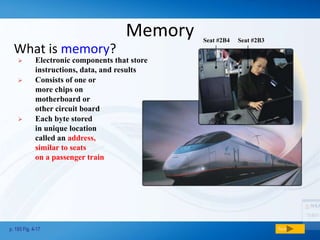
What is memory?
p. 193 Fig. 4-17 Next
 Electronic components that store
instructions, data, and results
 Consists of one or
more chips on
motherboard or
other circuit board
 Each byte stored
in unique location
called an address,
similar to seats
on a passenger train
Seat #2B4 Seat #2B3
Memory
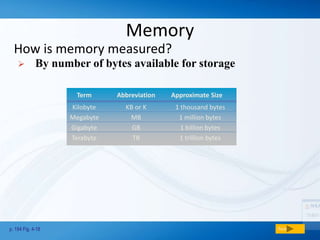
How is memory measured?
p. 194 Fig. 4-18 Next
Term Abbreviation Approximate Size
Kilobyte KB or K 1 thousand bytes
Megabyte MB 1 million bytes
Gigabyte GB 1 billion bytes
Terabyte TB 1 trillion bytes
 By number of bytes available for storage
Memory
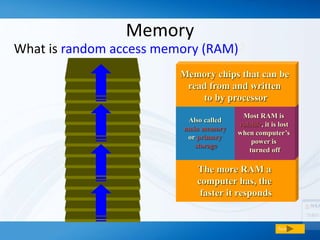
What is random access memory (RAM)?
Next
The more RAM a
computer has, the
faster it responds
Also called
main memory
or primary
storage
Most RAM is
volatile, it is lost
when computer’s
power is
turned off
Memory chips that can be
read from and written
to by processor
Types of RAM
• There are two different types of RAM: DRAM
(Dynamic Random Access Memory) and SRAM
(Static Random Access Memory).
• DRAM needs to be refreshed thousands of
times per second while
• SRAM does not need to be refreshed, which is
what makes it faster than DRAM. Both types
of RAM are volatile, meaning that they lose
their contents when the power is turned off.
Memory
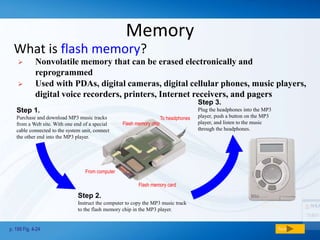
What is flash memory?
p. 199 Fig. 4-24 Next
Step 1.
Purchase and download MP3 music tracks
from a Web site. With one end of a special
cable connected to the system unit, connect
the other end into the MP3 player.
Step 2.
Instruct the computer to copy the MP3 music track
to the flash memory chip in the MP3 player.
Step 3.
Plug the headphones into the MP3
player, push a button on the MP3
player, and listen to the music
through the headphones.
MP3 Player
Flash memory chip
Flash memory card
From computer
To headphones
 Nonvolatile memory that can be erased electronically and
reprogrammed
 Used with PDAs, digital cameras, digital cellular phones, music players,
digital voice recorders, printers, Internet receivers, and pagers
Storage
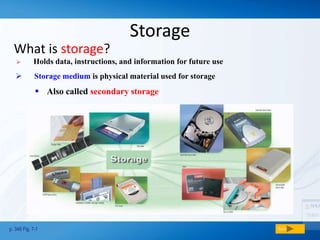
What is storage?
p. 348 Fig. 7-1 Next
 Holds data, instructions, and information for future use
 Storage medium is physical material used for storage
 Also called secondary storage
Floppy Disks
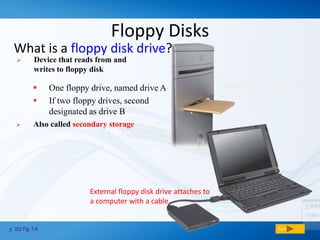
What is a floppy disk drive?
p. 352 Fig. 7-6 Next
Floppy disk drive built into
a desktop computer
External floppy disk drive attaches to
a computer with a cable
 Also called secondary storage
 One floppy drive, named drive A
 If two floppy drives, second
designated as drive B
 Device that reads from and
writes to floppy disk
Hard Disks
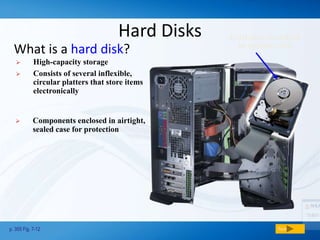
What is a hard disk?
p. 355 Fig. 7-12 Next
hard disk installed
in system unit
 High-capacity storage
 Consists of several inflexible,
circular platters that store items
electronically
 Components enclosed in airtight,
sealed case for protection
Hard Disks
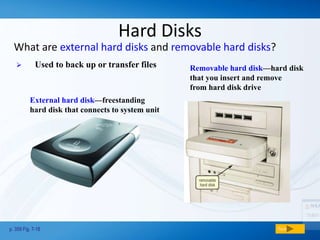
What are external hard disks and removable hard disks?
p. 359 Fig. 7-18 Next
External hard disk—freestanding
hard disk that connects to system unit
Removable hard disk—hard disk
that you insert and remove
from hard disk drive
 Used to back up or transfer files
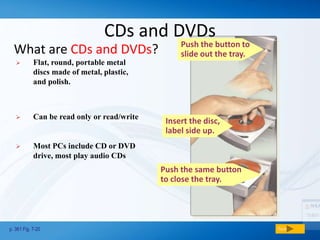
Push the same button
to close the tray.
CDs and DVDs
What are CDs and DVDs?
p. 361 Fig. 7-20 Next
 Most PCs include CD or DVD
drive, most play audio CDs
 Flat, round, portable metal
discs made of metal, plastic,
and polish.
 Can be read only or read/write
Insert the disc,
label side up.
Push the button to
slide out the tray.
CDs and DVDs
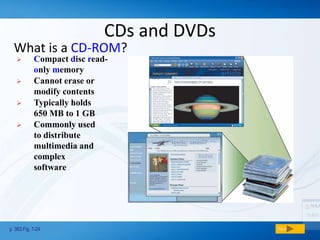
What is a CD-ROM?
p. 363 Fig. 7-24 Next
 Compact disc read-
only memory
 Cannot erase or
modify contents
 Typically holds
650 MB to 1 GB
 Commonly used
to distribute
multimedia and
complex
software
CDs and DVDs
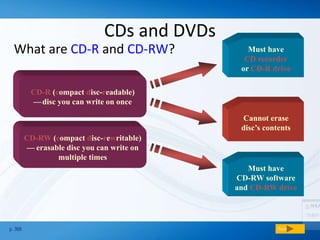
What are CD-R and CD-RW?
p. 366 Next
Must have
CD recorder
or CD-R drive
Cannot erase
disc’s contents
CD-R (compact disc-readable)
—cdisc you can write on once
CD-RW (compact disc-rewritable)
—ceerasable disc you can write on
multiple times
Must have
CD-RW software
and CD-RW drive
CDs and DVDs
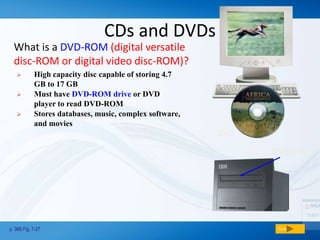
What is a DVD-ROM (digital versatile
disc-ROM or digital video disc-ROM)?
p. 368 Fig. 7-27 Next
DVD
DVD drive
 High capacity disc capable of storing 4.7
GB to 17 GB
 Must have DVD-ROM drive or DVD
player to read DVD-ROM
 Stores databases, music, complex software,
and movies
Tape
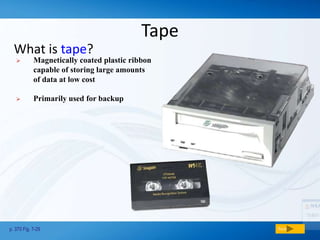
What is tape?
p. 370 Fig. 7-29 Next
 Magnetically coated plastic ribbon
capable of storing large amounts
of data at low cost
 Primarily used for backup
Miniature Mobile Storage Media
p. 373 Fig. 7-35 Next
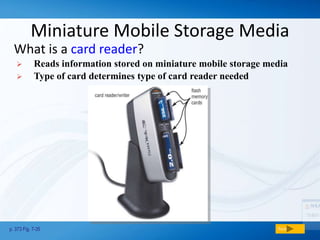
What is a card reader?
 Reads information stored on miniature mobile storage media
 Type of card determines type of card reader needed

Memory and storage

  • 1.
  • 2.
    Memory and Storage •Both terms are used to refer to internal storage space on a computer. Memory, usually referred to as Random Access Memory (RAM), is the place where an application loads its data during processing, while a hard disk drive is usually the place where data is stored for long or short term retention.
  • 3.
    Memory What is memory? p.193 Fig. 4-17 Next  Electronic components that store instructions, data, and results  Consists of one or more chips on motherboard or other circuit board  Each byte stored in unique location called an address, similar to seats on a passenger train Seat #2B4 Seat #2B3
  • 4.
    Memory How is memorymeasured? p. 194 Fig. 4-18 Next Term Abbreviation Approximate Size Kilobyte KB or K 1 thousand bytes Megabyte MB 1 million bytes Gigabyte GB 1 billion bytes Terabyte TB 1 trillion bytes  By number of bytes available for storage
  • 5.
    Memory What is randomaccess memory (RAM)? Next The more RAM a computer has, the faster it responds Also called main memory or primary storage Most RAM is volatile, it is lost when computer’s power is turned off Memory chips that can be read from and written to by processor
  • 6.
    Types of RAM •There are two different types of RAM: DRAM (Dynamic Random Access Memory) and SRAM (Static Random Access Memory). • DRAM needs to be refreshed thousands of times per second while • SRAM does not need to be refreshed, which is what makes it faster than DRAM. Both types of RAM are volatile, meaning that they lose their contents when the power is turned off.
  • 7.
    Memory What is flashmemory? p. 199 Fig. 4-24 Next Step 1. Purchase and download MP3 music tracks from a Web site. With one end of a special cable connected to the system unit, connect the other end into the MP3 player. Step 2. Instruct the computer to copy the MP3 music track to the flash memory chip in the MP3 player. Step 3. Plug the headphones into the MP3 player, push a button on the MP3 player, and listen to the music through the headphones. MP3 Player Flash memory chip Flash memory card From computer To headphones  Nonvolatile memory that can be erased electronically and reprogrammed  Used with PDAs, digital cameras, digital cellular phones, music players, digital voice recorders, printers, Internet receivers, and pagers
  • 8.
    Storage What is storage? p.348 Fig. 7-1 Next  Holds data, instructions, and information for future use  Storage medium is physical material used for storage  Also called secondary storage
  • 9.
    Floppy Disks What isa floppy disk drive? p. 352 Fig. 7-6 Next Floppy disk drive built into a desktop computer External floppy disk drive attaches to a computer with a cable  Also called secondary storage  One floppy drive, named drive A  If two floppy drives, second designated as drive B  Device that reads from and writes to floppy disk
  • 10.
    Hard Disks What isa hard disk? p. 355 Fig. 7-12 Next hard disk installed in system unit  High-capacity storage  Consists of several inflexible, circular platters that store items electronically  Components enclosed in airtight, sealed case for protection
  • 11.
    Hard Disks What areexternal hard disks and removable hard disks? p. 359 Fig. 7-18 Next External hard disk—freestanding hard disk that connects to system unit Removable hard disk—hard disk that you insert and remove from hard disk drive  Used to back up or transfer files
  • 12.
    Push the samebutton to close the tray. CDs and DVDs What are CDs and DVDs? p. 361 Fig. 7-20 Next  Most PCs include CD or DVD drive, most play audio CDs  Flat, round, portable metal discs made of metal, plastic, and polish.  Can be read only or read/write Insert the disc, label side up. Push the button to slide out the tray.
  • 13.
    CDs and DVDs Whatis a CD-ROM? p. 363 Fig. 7-24 Next  Compact disc read- only memory  Cannot erase or modify contents  Typically holds 650 MB to 1 GB  Commonly used to distribute multimedia and complex software
  • 14.
    CDs and DVDs Whatare CD-R and CD-RW? p. 366 Next Must have CD recorder or CD-R drive Cannot erase disc’s contents CD-R (compact disc-readable) —cdisc you can write on once CD-RW (compact disc-rewritable) —ceerasable disc you can write on multiple times Must have CD-RW software and CD-RW drive
  • 15.
    CDs and DVDs Whatis a DVD-ROM (digital versatile disc-ROM or digital video disc-ROM)? p. 368 Fig. 7-27 Next DVD DVD drive  High capacity disc capable of storing 4.7 GB to 17 GB  Must have DVD-ROM drive or DVD player to read DVD-ROM  Stores databases, music, complex software, and movies
  • 16.
    Tape What is tape? p.370 Fig. 7-29 Next  Magnetically coated plastic ribbon capable of storing large amounts of data at low cost  Primarily used for backup
  • 17.
    Miniature Mobile StorageMedia p. 373 Fig. 7-35 Next What is a card reader?  Reads information stored on miniature mobile storage media  Type of card determines type of card reader needed