Meeting the Needs
of Digital Learners:
Learner Support
Patterns and
Strategies
Greig Krull and Josep M Duart
5 July 2017
ICEL Conference, Cape Town
Research Objectives
• Lack of awareness of how students use different devices for
learning and how distance universities can provide effective
support to students using different technologies
Problem
• Determine the academic and technological support needs of
students learning with multiple devices
• To improve the design of learning experiences and support offered
Objectives
Effective and timely learner
support can be the difference
between learning success and
failure (Bates, 2015)
Photo by rawpixel on Unsplash
Help learners develop the
competencies and attributes for
successful online and lifelong
learning (Peters et al, 2017)
Photo by Juliette Leufke on Unsplash
Key learner support strategies include early
intervention, anticipatory guidance and
preparedness for study (Brindley, 2014)
Photo by Tran Mau Tri Tam on Unsplash
As academic content becomes more freely available,
students will look to local institutions for support with
their learning, rather than for the delivery of content
(Bates, 2015)
Photo by John Schnobrich on Unsplash
Learning design and student support used to be
seen as separate activities. However, student
support needs to be integrated into the design
of teaching and learning (Tait, 2014)
Photo by Simon Rae on Unsplash
Academic and Technological Support
Academic Support
• Helping students to be able to complete
activities, where to look for information and
provide feedback on progress (Bates, 2015)
• Enables the development of cognitive and
learning skills (Makoe, 2012)
Technological Support
• Enables the development of technical and
technological skills related to learning
• Make meaning of the technologies
encountered at university (Selwyn, 2016)
Methodology
Distance University Cases
• UOC: 488 responses (random sample of 5000 students) (May 2016)
• UNISA: 613 responses (random sample of 50000 students) (Aug
2016)
Quantitative Data (Online Survey)
• UOC: 18 interviews
• UNISA: 16 interviews
Follow up Qualitative Online/Telephonic
Interviews
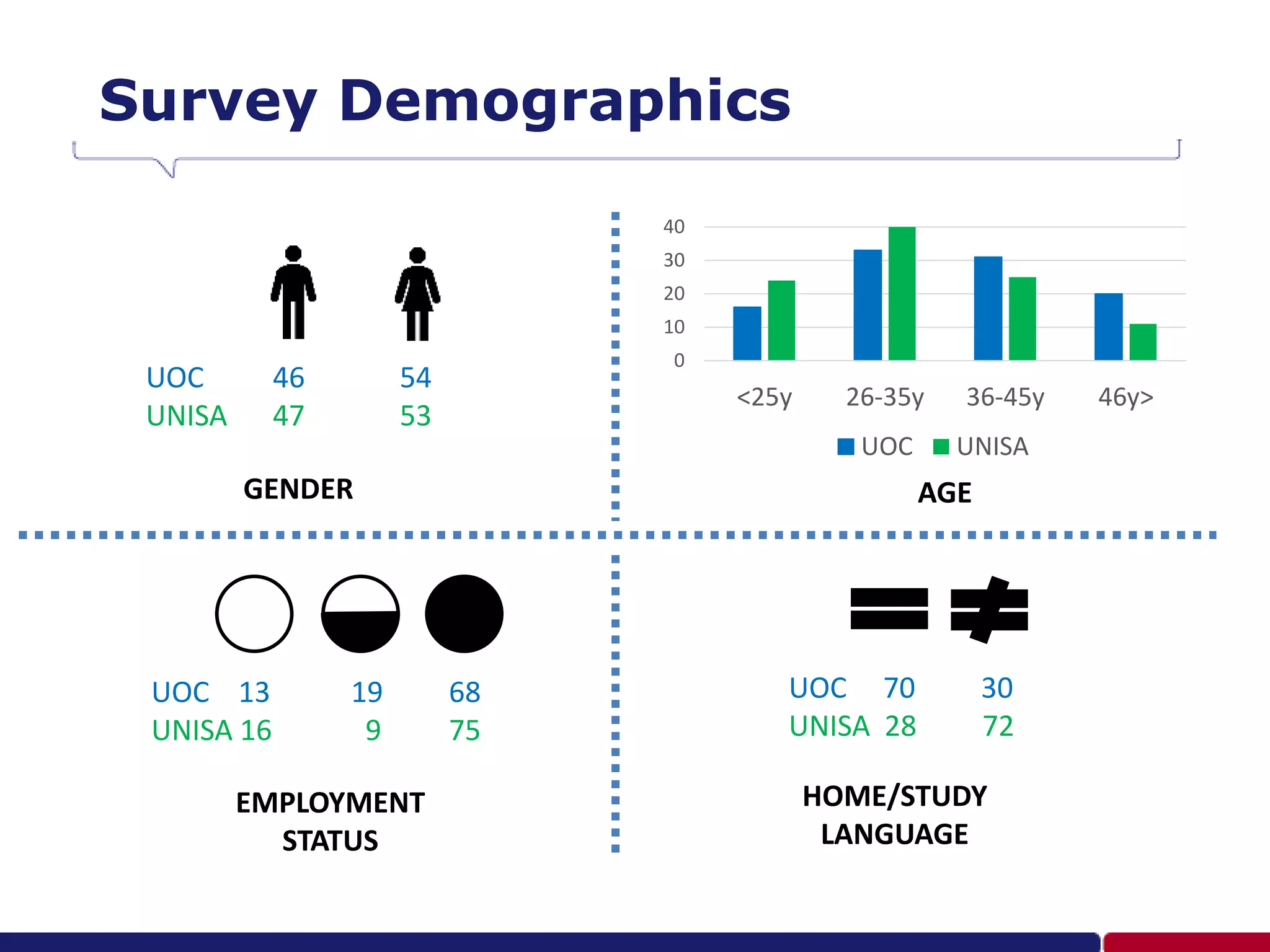
Survey Demographics
UOC 46 54
UNISA 47 53
0
10
20
30
40
<25y 26-35y 36-45y 46y>
UOC UNISA
GENDER AGE
UOC 13 19 68
UNISA 16 9 75
EMPLOYMENT
STATUS
UOC 70 30
UNISA 28 72
HOME/STUDY
LANGUAGE
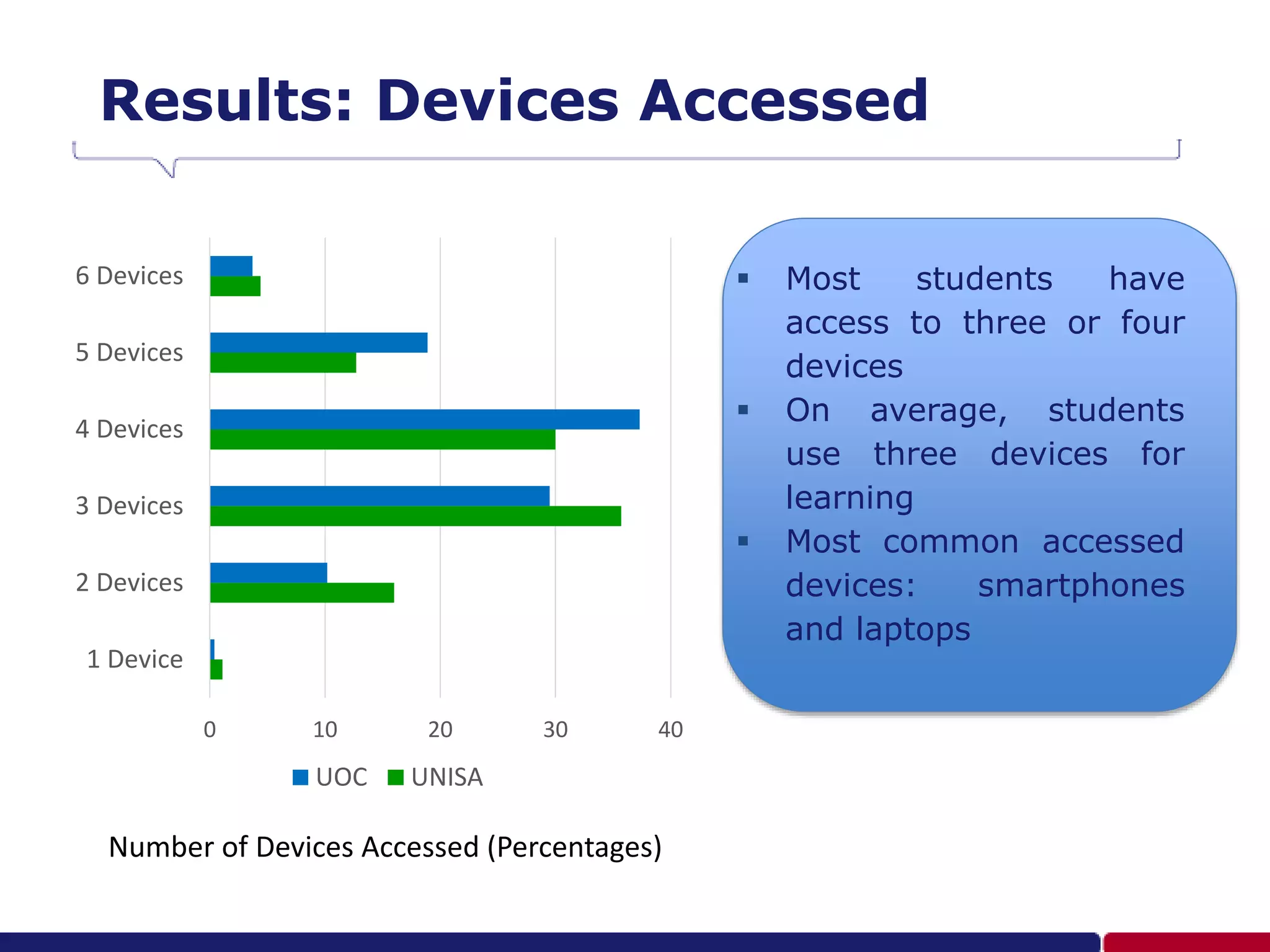
Results: Devices Accessed
 Most students have
access to three or four
devices
 On average, students
use three devices for
learning
 Most common accessed
devices: smartphones
and laptops
1 Device
2 Devices
3 Devices
4 Devices
5 Devices
6 Devices
0 10 20 30 40
UOC UNISA
Number of Devices Accessed (Percentages)
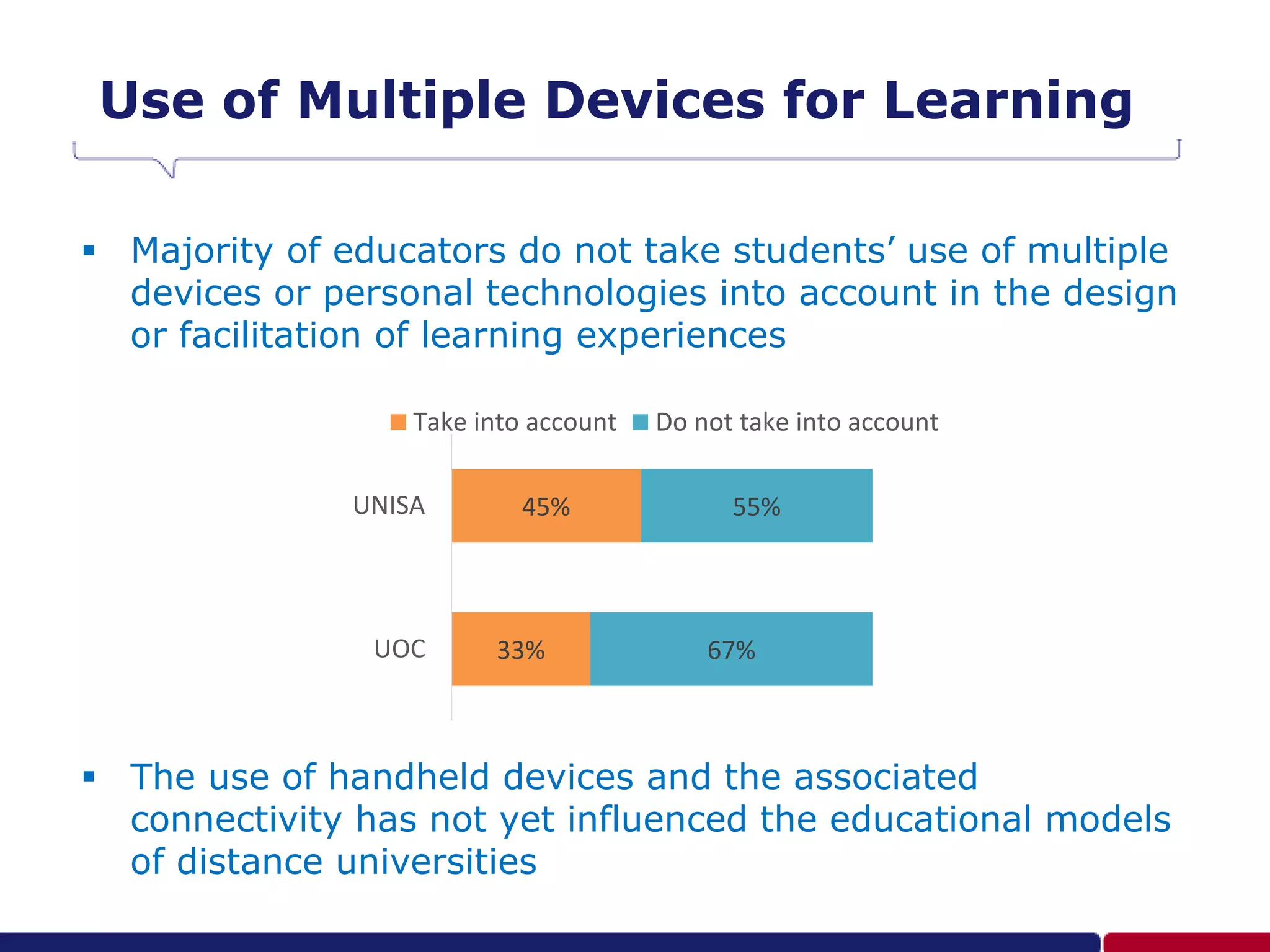
Use of Multiple Devices for Learning
 Majority of educators do not take students’ use of multiple
devices or personal technologies into account in the design
or facilitation of learning experiences
 The use of handheld devices and the associated
connectivity has not yet influenced the educational models
of distance universities
33%
45%
67%
55%
UOC
UNISA
Take into account Do not take into account
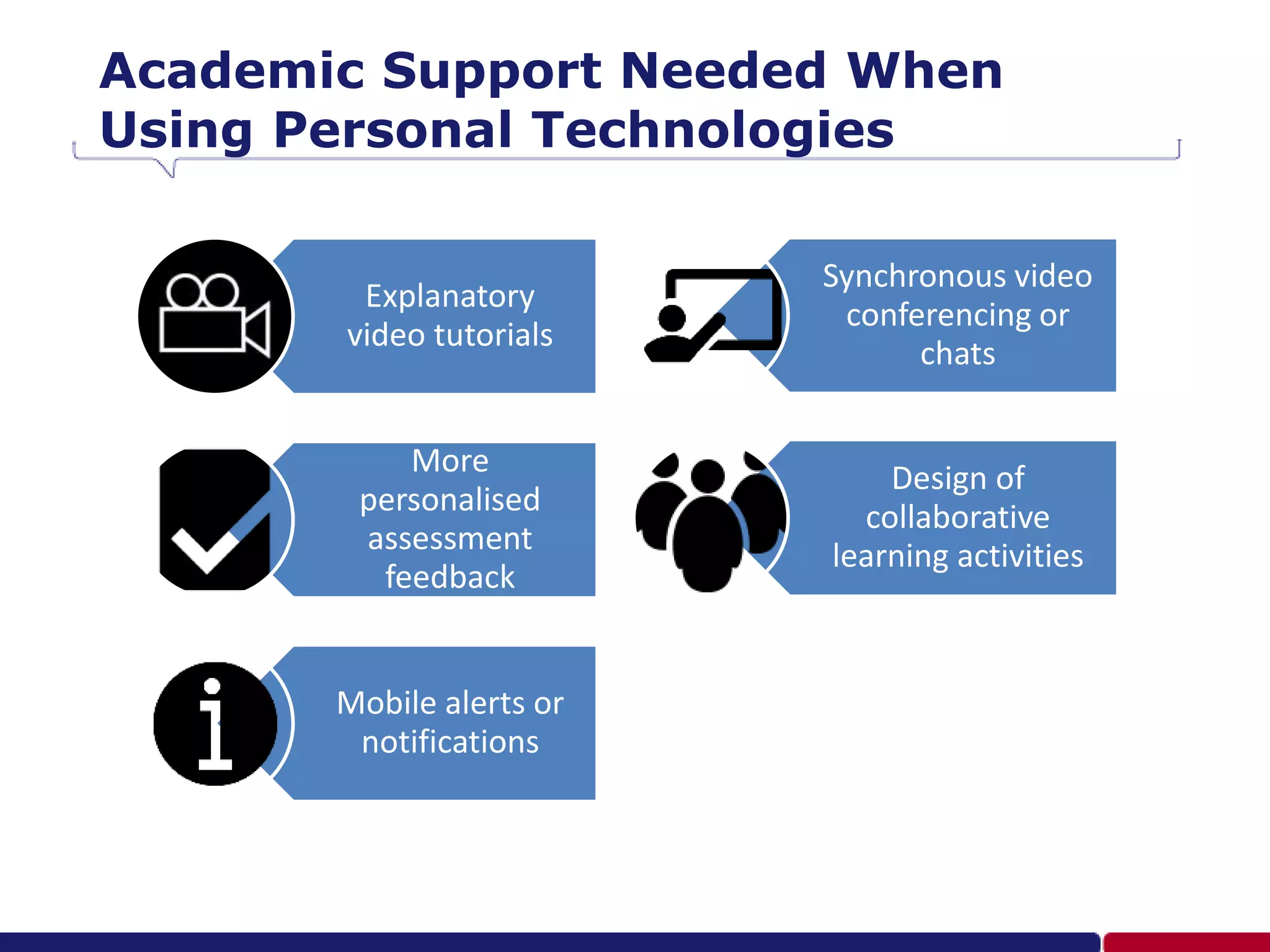
Academic Support Needed When
Using Personal Technologies
Explanatory
video tutorials
More
personalised
assessment
feedback
Mobile alerts or
notifications
Synchronous video
conferencing or
chats
Design of
collaborative
learning activities
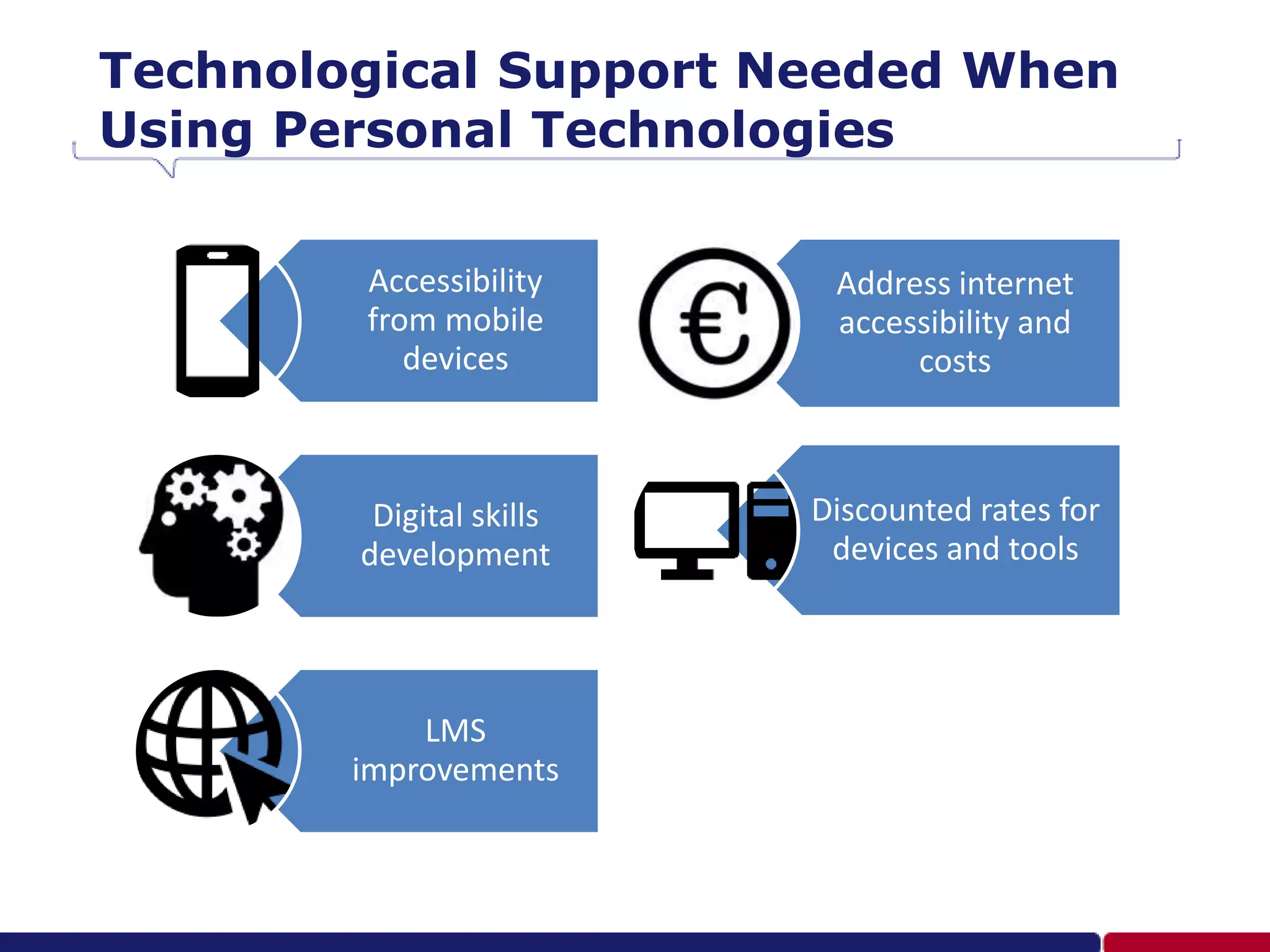
Technological Support Needed When
Using Personal Technologies
Accessibility
from mobile
devices
Digital skills
development
LMS
improvements
Address internet
accessibility and
costs
Discounted rates for
devices and tools
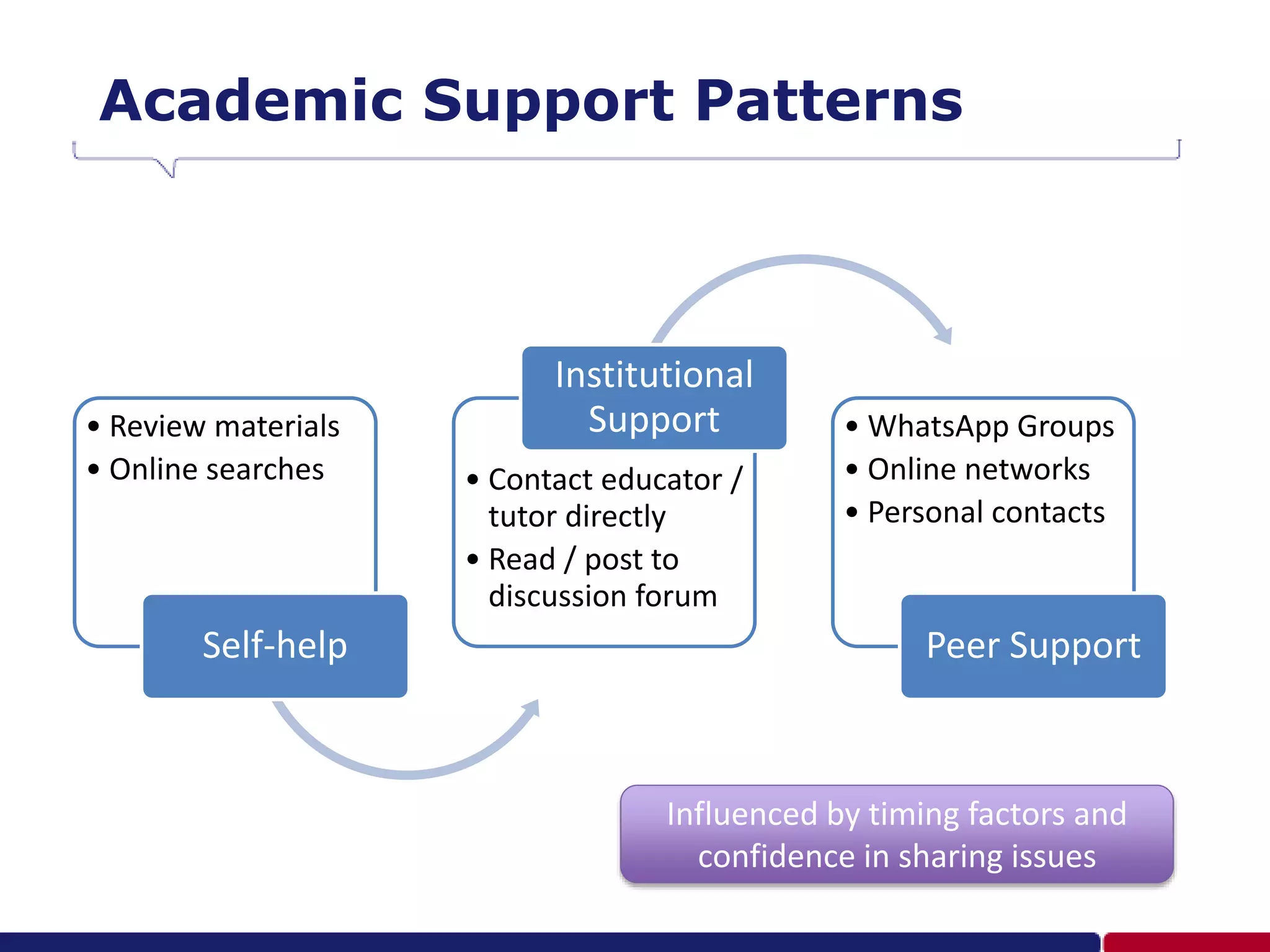
Academic Support Patterns
• Review materials
• Online searches
Self-help
• Contact educator /
tutor directly
• Read / post to
discussion forum
Institutional
Support • WhatsApp Groups
• Online networks
• Personal contacts
Peer Support
Influenced by timing factors and
confidence in sharing issues
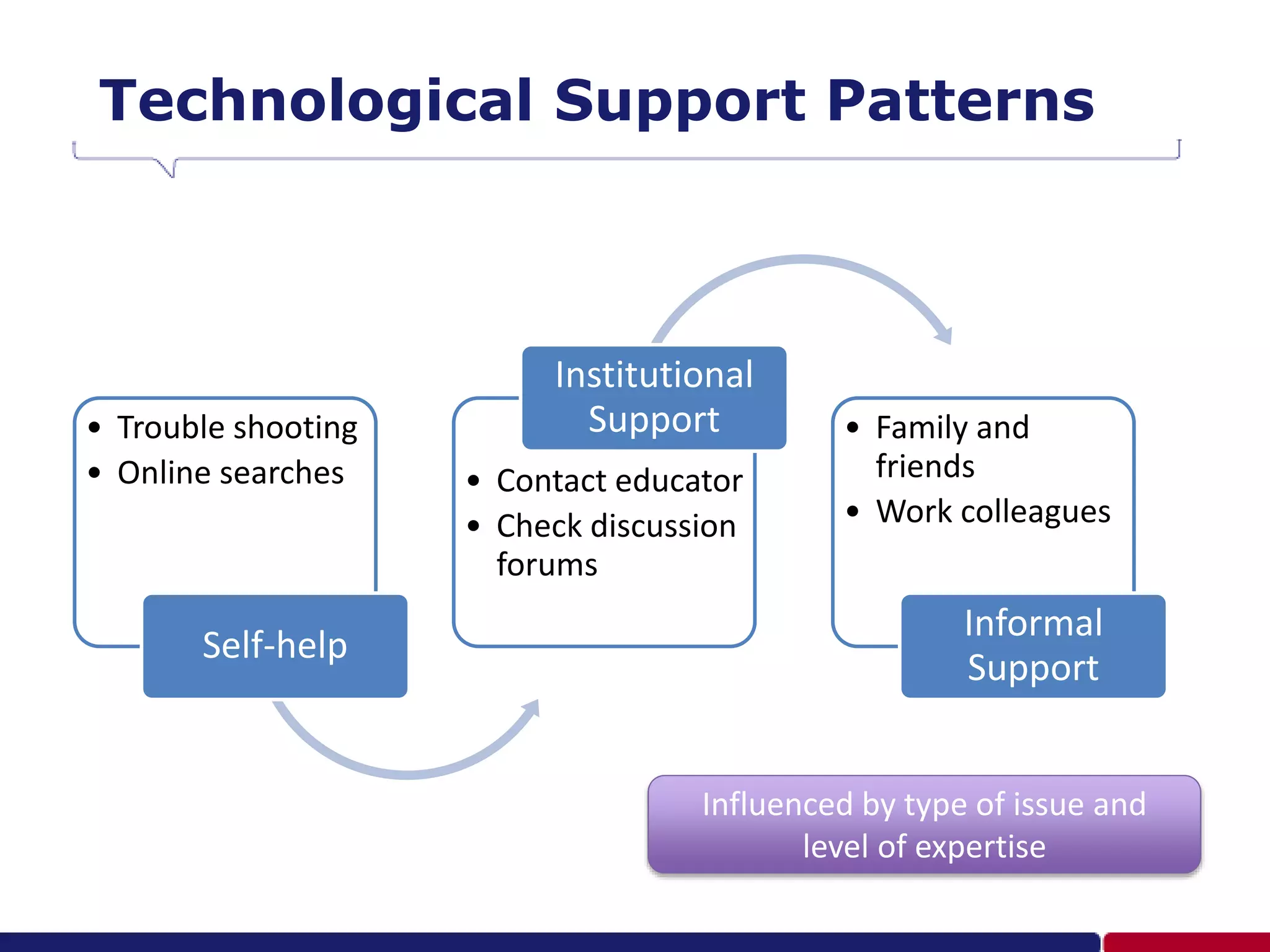
Technological Support Patterns
• Trouble shooting
• Online searches
Self-help
• Contact educator
• Check discussion
forums
Institutional
Support • Family and
friends
• Work colleagues
Informal
Support
Influenced by type of issue and
level of expertise
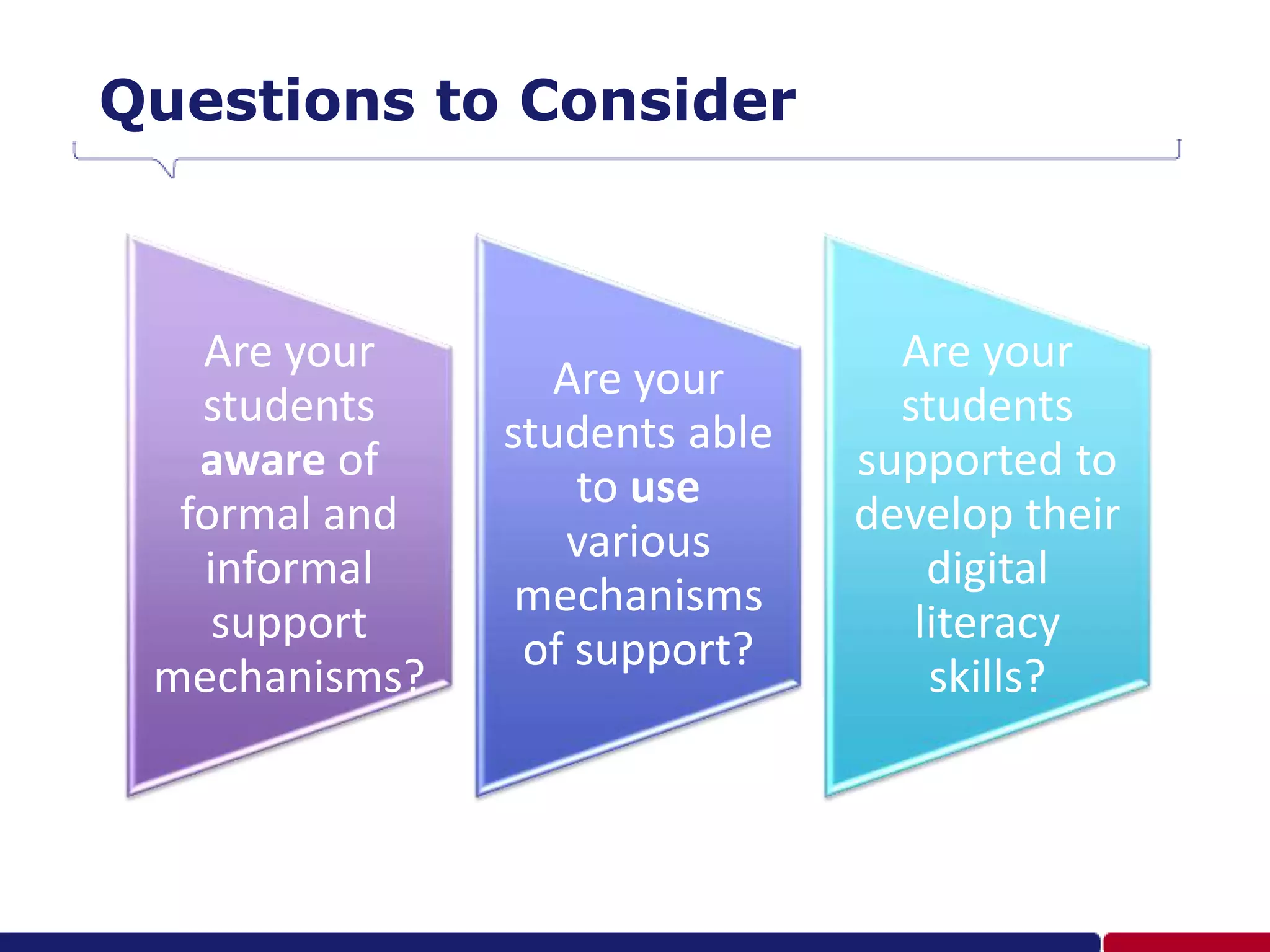
Questions to Consider
Are your
students
aware of
formal and
informal
support
mechanisms?
Are your
students able
to use
various
mechanisms
of support?
Are your
students
supported to
develop their
digital
literacy
skills?
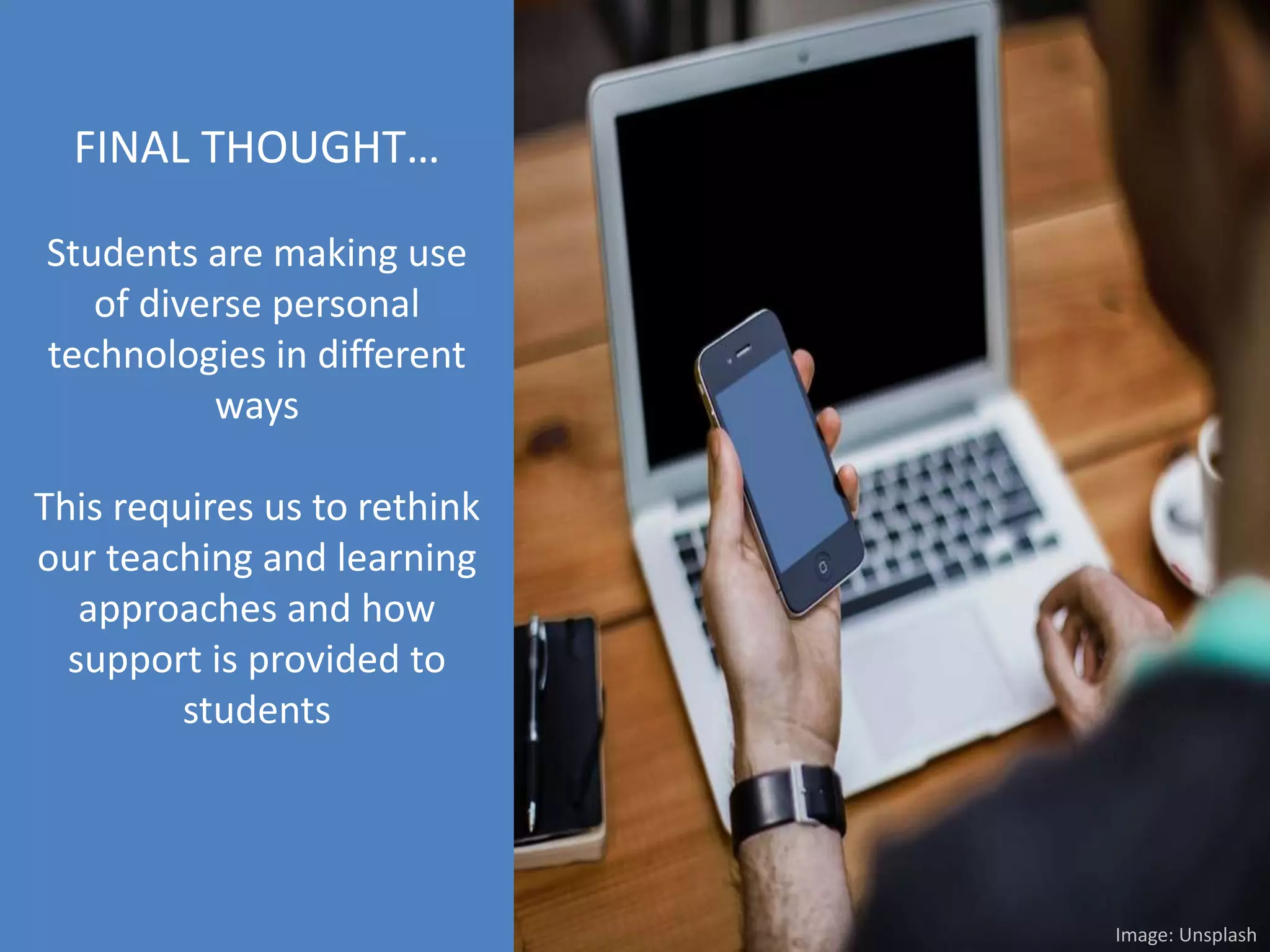
FINAL THOUGHT…
Students are making use
of diverse personal
technologies in different
ways
This requires us to rethink
our teaching and learning
approaches and how
support is provided to
students
Image: Unsplash
gkrull@iqacademy.ac.za
greigkr
Greig Krull (slideshare.net/greigk)
References
 Bates, T. (2015) Teaching in a Digital Age. Tony Bates Associates Ltd.
 Brindley, J. E. (2014) ‘Learner Support in Online Distance Education: Essential and
Evolving’, in Zawacki-Richter, O. and Anderson, T. (eds) Online Distance Education:
Towards a Research Agenda. Edmonton: AU Press, pp. 287–310.
 Makoe, M. (2012) ‘Bridging the Distance: The Pedagogy of Mobile Learning in
Supporting Distance Learners’, in Muyinda, P. B. (ed.) Distance Education. InTech, pp.
63–80.
 Peters, B., Crawley, A. & Brindley, J. E. (2017). Student Support Services for Online
Learning Re-imagined and Re-invigorated: Then, Now and What’s To Come. Contact
North.
 Selwyn, N. (2016). Digital downsides: exploring university students’ negative
engagements with digital technology. Teaching in Higher Education, 21(8), 1006–1021.
 Tait, A. (2014) ‘From place to virtual space: reconfiguring student support for distance
and e-learning in the digital age’, Open Praxis, 6(1), pp. 5–16.

Meeting the Needs of Digital Learners: Learner Support Patterns and Strategies

  • 1.
    Meeting the Needs ofDigital Learners: Learner Support Patterns and Strategies Greig Krull and Josep M Duart 5 July 2017 ICEL Conference, Cape Town
  • 2.
    Research Objectives • Lackof awareness of how students use different devices for learning and how distance universities can provide effective support to students using different technologies Problem • Determine the academic and technological support needs of students learning with multiple devices • To improve the design of learning experiences and support offered Objectives
  • 3.
    Effective and timelylearner support can be the difference between learning success and failure (Bates, 2015) Photo by rawpixel on Unsplash
  • 4.
    Help learners developthe competencies and attributes for successful online and lifelong learning (Peters et al, 2017) Photo by Juliette Leufke on Unsplash
  • 5.
    Key learner supportstrategies include early intervention, anticipatory guidance and preparedness for study (Brindley, 2014) Photo by Tran Mau Tri Tam on Unsplash
  • 6.
    As academic contentbecomes more freely available, students will look to local institutions for support with their learning, rather than for the delivery of content (Bates, 2015) Photo by John Schnobrich on Unsplash
  • 7.
    Learning design andstudent support used to be seen as separate activities. However, student support needs to be integrated into the design of teaching and learning (Tait, 2014) Photo by Simon Rae on Unsplash
  • 8.
    Academic and TechnologicalSupport Academic Support • Helping students to be able to complete activities, where to look for information and provide feedback on progress (Bates, 2015) • Enables the development of cognitive and learning skills (Makoe, 2012) Technological Support • Enables the development of technical and technological skills related to learning • Make meaning of the technologies encountered at university (Selwyn, 2016)
  • 9.
    Methodology Distance University Cases •UOC: 488 responses (random sample of 5000 students) (May 2016) • UNISA: 613 responses (random sample of 50000 students) (Aug 2016) Quantitative Data (Online Survey) • UOC: 18 interviews • UNISA: 16 interviews Follow up Qualitative Online/Telephonic Interviews
  • 10.
    Survey Demographics UOC 4654 UNISA 47 53 0 10 20 30 40 <25y 26-35y 36-45y 46y> UOC UNISA GENDER AGE UOC 13 19 68 UNISA 16 9 75 EMPLOYMENT STATUS UOC 70 30 UNISA 28 72 HOME/STUDY LANGUAGE
  • 11.
    Results: Devices Accessed Most students have access to three or four devices  On average, students use three devices for learning  Most common accessed devices: smartphones and laptops 1 Device 2 Devices 3 Devices 4 Devices 5 Devices 6 Devices 0 10 20 30 40 UOC UNISA Number of Devices Accessed (Percentages)
  • 12.
    Use of MultipleDevices for Learning  Majority of educators do not take students’ use of multiple devices or personal technologies into account in the design or facilitation of learning experiences  The use of handheld devices and the associated connectivity has not yet influenced the educational models of distance universities 33% 45% 67% 55% UOC UNISA Take into account Do not take into account
  • 13.
    Academic Support NeededWhen Using Personal Technologies Explanatory video tutorials More personalised assessment feedback Mobile alerts or notifications Synchronous video conferencing or chats Design of collaborative learning activities
  • 14.
    Technological Support NeededWhen Using Personal Technologies Accessibility from mobile devices Digital skills development LMS improvements Address internet accessibility and costs Discounted rates for devices and tools
  • 15.
    Academic Support Patterns •Review materials • Online searches Self-help • Contact educator / tutor directly • Read / post to discussion forum Institutional Support • WhatsApp Groups • Online networks • Personal contacts Peer Support Influenced by timing factors and confidence in sharing issues
  • 16.
    Technological Support Patterns •Trouble shooting • Online searches Self-help • Contact educator • Check discussion forums Institutional Support • Family and friends • Work colleagues Informal Support Influenced by type of issue and level of expertise
  • 17.
    Questions to Consider Areyour students aware of formal and informal support mechanisms? Are your students able to use various mechanisms of support? Are your students supported to develop their digital literacy skills?
  • 18.
    FINAL THOUGHT… Students aremaking use of diverse personal technologies in different ways This requires us to rethink our teaching and learning approaches and how support is provided to students Image: Unsplash
  • 19.
  • 20.
    References  Bates, T.(2015) Teaching in a Digital Age. Tony Bates Associates Ltd.  Brindley, J. E. (2014) ‘Learner Support in Online Distance Education: Essential and Evolving’, in Zawacki-Richter, O. and Anderson, T. (eds) Online Distance Education: Towards a Research Agenda. Edmonton: AU Press, pp. 287–310.  Makoe, M. (2012) ‘Bridging the Distance: The Pedagogy of Mobile Learning in Supporting Distance Learners’, in Muyinda, P. B. (ed.) Distance Education. InTech, pp. 63–80.  Peters, B., Crawley, A. & Brindley, J. E. (2017). Student Support Services for Online Learning Re-imagined and Re-invigorated: Then, Now and What’s To Come. Contact North.  Selwyn, N. (2016). Digital downsides: exploring university students’ negative engagements with digital technology. Teaching in Higher Education, 21(8), 1006–1021.  Tait, A. (2014) ‘From place to virtual space: reconfiguring student support for distance and e-learning in the digital age’, Open Praxis, 6(1), pp. 5–16.

Editor's Notes

  • #3 Understanding the needs and learning practices of students can help universities to improve the design of learning experiences and support offered to students.
  • #4 Image: https://unsplash.com/photos/_XfY_071JGo Dropout is a common issue in distance learning. Learner support aims to enhance the learning experience and reduce drop out (Tait, 2014) Major causes of students not progressing include time pressure, self-management, personal responsibilities (such as family), logistics and support (including technical support) and the relevance of the curriculum (Street 2010, cited in Tait 2014).
  • #5 Image: https://unsplash.com/photos/RKz2iYpKliY Support needs of students are different. A one-size-fits all approach to support services will not work (Peters et al, 2017). Consider readiness for online learning. And options of self-service.
  • #6 Image: https://unsplash.com/photos/tZnbakTUcTI Needs to be responsive to student needs and evolve with advances in education and technologies (Makoe, 2012)
  • #7 https://unsplash.com/photos/2FPjlAyMQTA Organisational support is not the only form of support available Students refer to online resources and interact with online communities, e.g. look for videos on YouTube or communicate on social media
  • #8 https://unsplash.com/photos/jJYlr6H1ClM In distance learning, seen as separate. But move away from design of learning content to design of learning pathways
  • #9 Image 1: https://commons.wikimedia.org/wiki/File:Free_Customer_Service_Software,_Free_Customer_Support_Platform.jpg Image 2: https://pixabay.com/en/icon-technical-icon-support-icon-1379276/ Various forms of support available, including counselling and administrative sup[ort, but interested here in support provided by lecturers and tutors. For technological support, newer technologies enable synchronous communication (messaging) or the use of learning analytics to identify students not engaged
  • #10 Used a case approach to understand the support needs in two different local contexts Mixed methods design Quantitative – focused on use of technologies for learning and support required, focused on descriptive analysis Qualitative – used grounded theory approach
  • #11 Similar across both cases and representative of university profiles Similar gender Mostly mature students Majority employed Different study languages
  • #12 Not just devices, but associated software and internet services Other devices: tablets and desktops
  • #13 According to students…. Examples: Resources in different formats Activities accessible from different devices Tools such as Google Drive/WhatsApp/Skype for group work. Submit assignments from different devices. Varies from lecturer to lecturer and subject to subject.
  • #14 Some educators design collaborative activities that require the use of collaborative tools such as wikis and Google Drive Video - The use of multimedia (text, audio or video) – to explain difficult concepts Feedback – timely and personal, in an easy format, help to identify how to improve Alerts Synchronous – Q&A for exam preparation
  • #15 Ensure that learning resources and activities are accessible from different devices (such as a mobile app). Make resources available in different formats (html, PDF, epub) so that students can utilize resources in the easiest way for them Resources available in different formats Accessibility from different devices Improve skills LMS – usability and performance, design, Difference in South Africa – mobile data expensive, not always high quality Subsidies or purchase discounts for hardware and software
  • #16 Clearer answers from lecturers Students create their own informal whatsapp groups
  • #17 These challenges ranged from being unable to access the VLE, unable to upload an assignment to software and hardware issues.