EVALUATION QUESTION
4
HOW DID YOU USE NEW TECHNOLOGIES IN THE
CONSTRUCTION AND RESEARCH, PLANNING AND EVALUATION
STAGES?
CONSTRUCTION
• FOR THE PRODUCTION PROCESS, I HAD EXPERIENCE USING THE DSLR
CANON EOS 650D CAMERA TO FILM SHOTS FOR THE MUSIC VIDEO.
• USING THIS CAMERA PUT ME IN THE ROLE OF DIRECTOR AND
CINEMATOGRAPHY AS IT ALLOWED ME TO CREATE HIGH-DEFINITION
FOOTAGE WITH CONTROLLED IMAGE FOCUS.
• I WAS INTRODUCED TO THE RULE OF THIRDS GRID WHERE I EXPLORED
WITH THE POSITIONING OF IMAGES IN THE SHOT; I.E WHEN THE ARTIST IS
SITTING IN FRONT OF THE BRIDGE, AND I WAS TRYING TO GET A BACK SHOT
OF HIS HEAD.
As a text producer, it was my
intention to create convincing and
realistic media texts. Learning and
exploring these techniques, I found
strengthened the cinematography
and therefore, made my scenes
more advanced and professional
looking.
CONSTRUCTION
The more I practiced with the DSLR (Canon EOS 650D),
the more familiarized I became with the tools, effects and
settings that was available on the camera. I eventually was
able to use these skills to produce specific shots, such as
unfocused shots and panning shots. I experimented with a
variety of shots and ensured that I recorded it all so that
when it came to the post production process, I would have
a lot of raw footage to work with. This allowed me to
further have more expertise to edit as the raw footage
allowed to work with lots of different angles and ways I
could produce my music video.
This camera was also used to capture
photographs that would be used for
my digipak and advert. These would
also be edited during the post-
production process, but ensuring
which aspects of the photograph was
in focus needed to be considered
whilst taking these photos.
EDITING : VISUALS
When editing the shots and clips for my music video, I
used Final Cut Pro to arrange and move around the raw
footage to create verisimilitude with the use of continuity
editing.
There were many effects, transitions and settings
on Final Cut Pro that I could use for my music
video. However, I did not want to over use special
effects as it would then not conform to real pop
music videos. Some of the effects I used were…
•Slow motion (1.)
•Layering footage (2.)
•Editing/cutting on the beat (3.)
•Transitions: fade, cross dissolve, blur
•Blade tool, allowing me to cut specific parts and
add them somewhere else.
Having a lot of raw footage to work with allowed
me to use these tools to their full extent.
DIGIPAK/ADVERT
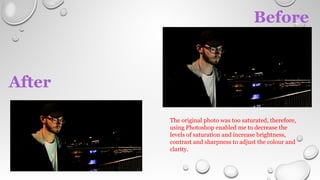
To edit my photographs, I was then
introduced to the program Adobe
Photoshop to take my gained video
editing skills onto still images and
photographs.
I used it to increase brightness, contrast
and sharpness on the artist to make her
stand out from the backdrop. I also used
this programme to add the essential
characteristics of a digipak/advert such
as text, barcodes and logos. I also applied
different filters to aspects of my digipak
to create a appealing look.
I further used another app on my phone
called ‘MojiPic’, allowing to match the
font to the one the songwriter Brayton
Bowman uses on his website to give a
sense of authenticity.
Before
After
The original photo was too saturated, therefore,
using Photoshop enabled me to decrease the
levels of saturation and increase brightness,
contrast and sharpness to adjust the colour and
clarity.
From creating the digipak, it was then easier
for me to create the magazine advert as I could
then use my new gained skills from using
Photoshop to produce the next print product.
For instance, the image used in the magazine
advert needed edited as well. I used the same
filters and effects that I used for the front
cover so achieve a similar outcome. I added
the front cover and production logo onto the
advert. I also experimented with different
fonts and since I decided to shape the advert
as a landscape design. I also added names of
other songs by the artist, the artist’s name
itself and the album name. I further, also used
‘Paint’ to create more visualizing deign, and it
allowed me to create different font styles and
merge the four pictures together.
RESEARCH
For most of my research, such as audience feedback, focus
groups, and recordings of development, I used Photo Booth
on the iMac to record the footage and used iMovie to edit
these. From my experience with adding text in my
digipak/advert and editing video clips in order using
Photoshop, it was easy for me to edit the raw footage of my
research videos and add text, transitions, music and sound
effects to make informative and entertaining.
ANIMATICS
• FOR THE PLANNING OF MY MUSIC VIDEO, A STORYBOARD WAS CREATED BY
DRAWING EACH INITIAL SHOT OF THE VIDEO WHICH WAS SCANNED INTO THE
COMPUTER AND EDITED ON IMOVIE…
• THE SONG WAS THEN IMPORTED AND THE DRAWINGS WERE EDITED TO THE
SONG; FOCUSING ON THE DURATIONS AND ORDER OF EACH CLIP.
• IN TERMS OF FILMING, IT HELPED ME HAVE A GENERAL IDEA OF WHAT SHOTS
TO COLLECT AT WHAT ANGLES. ALSO, IN TERMS OF EDITING, IT ACTED AS A
GUIDE/VISUAL TIMELINE TO SHOW ME THE ORDER OF THE CLIPS AND WHERE
EACH PIECE OF FOOTAGE GOES.
Websites/Social Media
I used Microsoft Excel to record information that I
received and to display it on a much clearer and
informative way.
to edit the raw footage i.e. genre research
Used public/official websites to research news and
popular events of contemporary pop. i.e. Capital FM
In today’s modern society, social media is
now one of the easiest modes of
communication. Therefore, when I wanted
information from others, I used Twitter,
Facebook and snapchat to communicate
with them.
To access the
real music videos
of the pop genre,
I used YouTube
to research these
and to guide me
in my own music
video
production.
As I was analyzing real music videos, I used Prezi as an
element for my research…
I used Google to find images of the artist albums so that I
could paste them onto the Prezi.
In this, I embedded music videos from
YouTube by pasting hyperlinks so that they
could be played on the Prezi.
I used screenshots of YouTube clips to aid
my analysis and evaluations…
The screenshots were hard to achieve, and
to get the perfect clear shot from a moving
video was hard, but I got used to it by the
end.
AUDIENCE FEEDBACK
It was important to understand and take into
consideration the consumers’/audience’s opinions
on my products to ensure that if it were a real
media product, it would do well in the market
place and be popular with the target audience. I
found that my music video was successful in terms
of this as when I showed this to my target audience
for feedback, I gained a lot of positive comments
on the realism and continuity of the overall video.
This allowed me to have lots of audience feedback
on the realism of all 3 of my products.
A lot of research was needed in order to create this product as it
provided me with guides and structures to make my final outcome as
conventional and realistic as possible. In order to keep track of my
research and development, I used Blogger to record all of the sources
that I had collected.
It enabled me to explore different platforms of digital technologies to
record and present my work from Prezis and Slideshares to podcasts
and videos. I was able to access all of the research into media
products as well as my primary research like audience feedbacks and
focus groups that helped me create the final product. In doing so, I
learnt how to embed links onto posts and share relevant videos from
other websites (like YouTube) and post them onto my blog,
furthermore embed other presentations I had created on other
platforms.
Not only did it help me access my
own research, Blogger also allowed
me to share my individual posts
with the rest of my group.
PLANNING
I constructed a mood
board to show the
different visual motifs
that would be seen in
my music video giving
me a general outlook
on what the
appearance of the
video would
eventually be.
FONT PLANNING
It was important to make the fonts clear
and bold especially in the digipak in order
to catch a buyer's attention. Although it
was difficult to structure the digipak and
magazine advert to appear realistic, it
became easier once I researched real artist
digipaks and adverts. Again, I used the
Internet to research real media products,
to inspire me with my designs. I blogged
these consistently, in order to inform the
rest of my group about it too.
EVALUATION
1.I created a Prezi as it allowed me to import images to compare my main
and ancillary texts as well as add text explaining how effective they are
when they are linked together. Prezi also allowed me to add YouTube
videos of my audience feedback on my print products.
2.I created a sound cloud voiceover, which allowed me to talk about my
products in detail on how the feedback from my audience played a big
role in allowing my music video to evolve.
3.I created a presentation using Microsoft Powerpoint, then I used
Slideshare to share it onto blogger. It includes images and text that work
together to create a visual and informative presentation.
4.I also, had a range of my products out onto blogger allowing me to
share all of my posts on a single blog.

Media eval q 4

  • 1.
    EVALUATION QUESTION 4 HOW DIDYOU USE NEW TECHNOLOGIES IN THE CONSTRUCTION AND RESEARCH, PLANNING AND EVALUATION STAGES?
  • 2.
    CONSTRUCTION • FOR THEPRODUCTION PROCESS, I HAD EXPERIENCE USING THE DSLR CANON EOS 650D CAMERA TO FILM SHOTS FOR THE MUSIC VIDEO. • USING THIS CAMERA PUT ME IN THE ROLE OF DIRECTOR AND CINEMATOGRAPHY AS IT ALLOWED ME TO CREATE HIGH-DEFINITION FOOTAGE WITH CONTROLLED IMAGE FOCUS. • I WAS INTRODUCED TO THE RULE OF THIRDS GRID WHERE I EXPLORED WITH THE POSITIONING OF IMAGES IN THE SHOT; I.E WHEN THE ARTIST IS SITTING IN FRONT OF THE BRIDGE, AND I WAS TRYING TO GET A BACK SHOT OF HIS HEAD. As a text producer, it was my intention to create convincing and realistic media texts. Learning and exploring these techniques, I found strengthened the cinematography and therefore, made my scenes more advanced and professional looking.
  • 3.
    CONSTRUCTION The more Ipracticed with the DSLR (Canon EOS 650D), the more familiarized I became with the tools, effects and settings that was available on the camera. I eventually was able to use these skills to produce specific shots, such as unfocused shots and panning shots. I experimented with a variety of shots and ensured that I recorded it all so that when it came to the post production process, I would have a lot of raw footage to work with. This allowed me to further have more expertise to edit as the raw footage allowed to work with lots of different angles and ways I could produce my music video. This camera was also used to capture photographs that would be used for my digipak and advert. These would also be edited during the post- production process, but ensuring which aspects of the photograph was in focus needed to be considered whilst taking these photos.
  • 4.
    EDITING : VISUALS Whenediting the shots and clips for my music video, I used Final Cut Pro to arrange and move around the raw footage to create verisimilitude with the use of continuity editing. There were many effects, transitions and settings on Final Cut Pro that I could use for my music video. However, I did not want to over use special effects as it would then not conform to real pop music videos. Some of the effects I used were… •Slow motion (1.) •Layering footage (2.) •Editing/cutting on the beat (3.) •Transitions: fade, cross dissolve, blur •Blade tool, allowing me to cut specific parts and add them somewhere else. Having a lot of raw footage to work with allowed me to use these tools to their full extent.
  • 5.
    DIGIPAK/ADVERT To edit myphotographs, I was then introduced to the program Adobe Photoshop to take my gained video editing skills onto still images and photographs. I used it to increase brightness, contrast and sharpness on the artist to make her stand out from the backdrop. I also used this programme to add the essential characteristics of a digipak/advert such as text, barcodes and logos. I also applied different filters to aspects of my digipak to create a appealing look. I further used another app on my phone called ‘MojiPic’, allowing to match the font to the one the songwriter Brayton Bowman uses on his website to give a sense of authenticity.
  • 6.
    Before After The original photowas too saturated, therefore, using Photoshop enabled me to decrease the levels of saturation and increase brightness, contrast and sharpness to adjust the colour and clarity.
  • 7.
    From creating thedigipak, it was then easier for me to create the magazine advert as I could then use my new gained skills from using Photoshop to produce the next print product. For instance, the image used in the magazine advert needed edited as well. I used the same filters and effects that I used for the front cover so achieve a similar outcome. I added the front cover and production logo onto the advert. I also experimented with different fonts and since I decided to shape the advert as a landscape design. I also added names of other songs by the artist, the artist’s name itself and the album name. I further, also used ‘Paint’ to create more visualizing deign, and it allowed me to create different font styles and merge the four pictures together.
  • 8.
    RESEARCH For most ofmy research, such as audience feedback, focus groups, and recordings of development, I used Photo Booth on the iMac to record the footage and used iMovie to edit these. From my experience with adding text in my digipak/advert and editing video clips in order using Photoshop, it was easy for me to edit the raw footage of my research videos and add text, transitions, music and sound effects to make informative and entertaining.
  • 9.
    ANIMATICS • FOR THEPLANNING OF MY MUSIC VIDEO, A STORYBOARD WAS CREATED BY DRAWING EACH INITIAL SHOT OF THE VIDEO WHICH WAS SCANNED INTO THE COMPUTER AND EDITED ON IMOVIE… • THE SONG WAS THEN IMPORTED AND THE DRAWINGS WERE EDITED TO THE SONG; FOCUSING ON THE DURATIONS AND ORDER OF EACH CLIP. • IN TERMS OF FILMING, IT HELPED ME HAVE A GENERAL IDEA OF WHAT SHOTS TO COLLECT AT WHAT ANGLES. ALSO, IN TERMS OF EDITING, IT ACTED AS A GUIDE/VISUAL TIMELINE TO SHOW ME THE ORDER OF THE CLIPS AND WHERE EACH PIECE OF FOOTAGE GOES.
  • 10.
    Websites/Social Media I usedMicrosoft Excel to record information that I received and to display it on a much clearer and informative way. to edit the raw footage i.e. genre research Used public/official websites to research news and popular events of contemporary pop. i.e. Capital FM In today’s modern society, social media is now one of the easiest modes of communication. Therefore, when I wanted information from others, I used Twitter, Facebook and snapchat to communicate with them. To access the real music videos of the pop genre, I used YouTube to research these and to guide me in my own music video production.
  • 11.
    As I wasanalyzing real music videos, I used Prezi as an element for my research… I used Google to find images of the artist albums so that I could paste them onto the Prezi. In this, I embedded music videos from YouTube by pasting hyperlinks so that they could be played on the Prezi. I used screenshots of YouTube clips to aid my analysis and evaluations… The screenshots were hard to achieve, and to get the perfect clear shot from a moving video was hard, but I got used to it by the end.
  • 12.
    AUDIENCE FEEDBACK It wasimportant to understand and take into consideration the consumers’/audience’s opinions on my products to ensure that if it were a real media product, it would do well in the market place and be popular with the target audience. I found that my music video was successful in terms of this as when I showed this to my target audience for feedback, I gained a lot of positive comments on the realism and continuity of the overall video. This allowed me to have lots of audience feedback on the realism of all 3 of my products.
  • 13.
    A lot ofresearch was needed in order to create this product as it provided me with guides and structures to make my final outcome as conventional and realistic as possible. In order to keep track of my research and development, I used Blogger to record all of the sources that I had collected. It enabled me to explore different platforms of digital technologies to record and present my work from Prezis and Slideshares to podcasts and videos. I was able to access all of the research into media products as well as my primary research like audience feedbacks and focus groups that helped me create the final product. In doing so, I learnt how to embed links onto posts and share relevant videos from other websites (like YouTube) and post them onto my blog, furthermore embed other presentations I had created on other platforms. Not only did it help me access my own research, Blogger also allowed me to share my individual posts with the rest of my group.
  • 14.
    PLANNING I constructed amood board to show the different visual motifs that would be seen in my music video giving me a general outlook on what the appearance of the video would eventually be.
  • 15.
  • 16.
    It was importantto make the fonts clear and bold especially in the digipak in order to catch a buyer's attention. Although it was difficult to structure the digipak and magazine advert to appear realistic, it became easier once I researched real artist digipaks and adverts. Again, I used the Internet to research real media products, to inspire me with my designs. I blogged these consistently, in order to inform the rest of my group about it too.
  • 17.
    EVALUATION 1.I created aPrezi as it allowed me to import images to compare my main and ancillary texts as well as add text explaining how effective they are when they are linked together. Prezi also allowed me to add YouTube videos of my audience feedback on my print products. 2.I created a sound cloud voiceover, which allowed me to talk about my products in detail on how the feedback from my audience played a big role in allowing my music video to evolve. 3.I created a presentation using Microsoft Powerpoint, then I used Slideshare to share it onto blogger. It includes images and text that work together to create a visual and informative presentation. 4.I also, had a range of my products out onto blogger allowing me to share all of my posts on a single blog.