How did you use media technologies in the
construction and research, planning and
evaluation stages?
EVALUATION QUESTION 4
Video website used to search for and watch different music videos for
inspiration and research examples of model videos we strived to emulate. This
helped us to come up with ideas as we had almost every video ever made at
our finger tips. Youtube also recommends videos based on the ones you have
already watched, so it meant that I could watch relevant videos to songs I had
never heard of before and therefore would not have previously watched.
RESEARCH
Another website which is a library of music videos. One advantage of Vevo is
that there are less videos to sort through than Youtube as the site only has
music videos, but it restricted me to a limited amount of videos as not every
artist is contracted to Vevo, meaning they do not have as big a selection as
Youtube.
These were used to find information about videos and artists. By typing in key
words I could bring up everything on the internet associated with the subject
matter.
This is the internet browser for Mac which allowed me access to the internet.
Without the internet I would not have been able to do my research, as there
are no published books containing up to date analysis of current music videos.
My phone became my portable computer. It has both Youtube and Safari apps
which enabled me to do research on the move, or when I didn't have access to
a computer. This meant that if a music video was recommended to me, I
could find and watch it there and then. However, the small screen could have
resulted in me missing or not picking up on important details.
My laptop, the source of all my work which gives me unlimited access to use
the internet.
The software used to record the Synatsethia task and document the audience
research. It was easy to record people’s opinions as they could answer
questions sitting in front of a laptop which was filming. It also enabled us to
cut down the material and add effects with ease.
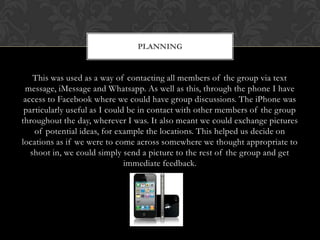
This was used as a way of contacting all members of the group via text
message, iMessage and Whatsapp. As well as this, through the phone I have
access to Facebook where we could have group discussions. The iPhone was
particularly useful as I could be in contact with other members of the group
throughout the day, wherever I was. It also meant we could exchange pictures
of potential ideas, for example the locations. This helped us decide on
locations as if we were to come across somewhere we thought appropriate to
shoot in, we could simply send a picture to the rest of the group and get
immediate feedback.
PLANNING
My laptop, the source of all my work which gives me unlimited access to use
the internet.
A Facebook group allowed easy sharing of videos, pictures and links. As well
as another source of communication.
A Whatsapp group was used the same way as the Facebook group. Messages
would be sent into both groups to ensure everyone would see them.
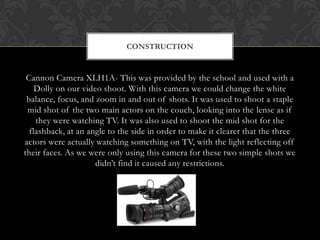
Cannon Camera XLH1A- This was provided by the school and used with a
Dolly on our video shoot. With this camera we could change the white
balance, focus, and zoom in and out of shots. It was used to shoot a staple
mid shot of the two main actors on the couch, looking into the lense as if
they were watching TV. It was also used to shoot the mid shot for the
flashback, at an angle to the side in order to make it clearer that the three
actors were actually watching something on TV, with the light reflecting off
their faces. As we were only using this camera for these two simple shots we
didn’t find it caused any restrictions.
CONSTRUCTION
Go Pro Camera – This was purchased additionally to the main camera – it’s a
hand held camera with a fish eye lens, used on a rod to allow the person
holding it to film themselves on the move. It enabled us to shoot extreme
close ups, and at various awkward angles, and meant we could obtain shots
that would be impossible to capture with the Cannon camera. Movement of
the camera when actors were walking gives the audience a greater sense of
being involved in the video as they 'move with the actors'. When actors are
still but camera doesn't remain so, it gives more of an indie and urban feel and
portrays laziness as it appears there is a lack of care for perfection.
Adobe Premier Pro – Software used to edit our material and to dub the
recording of the song on to the video. The cut and sew technique was used to
piece together all the shots taken in different locations. Black and white filters
on the flashback with a border around the edges were used to emphasise the
fact that the scene happened at a time prior to the rest of the video. On shots
with the main camera we added a sepia effect, to give the scenes an orange
tinge, in order to create a similar effect to that which Rizzle Kicks use in their
videos. We loaded all the video recordings onto the software, then put the
song on seperately. This meant that we could then find the individual shots
that matched the specific lyrics and line them up with that part of the song.
The software did constrain us in one area though, as due to the nature of the
software we were limited when choosing the font to use for the song title. We
managed to find one which fits our criteria but it was not the one which we
had intended on using.
Nikon D60 – This is the camera we used for our photo shoot. The camera
belonged to Barney who is a photography student so it was more than
appropriate. It allowed us to take high quality photos, making the most of the
auto focus and zoom features.
Photoshop CS6 – Software used for creating the Digipack and pullout. I
resized the images taken during our photoshoot to 12 x 12 and added a sepia
effect on all of them, gradient of 60%, in keeping with Rizzle Kicks style. I
used the Art History Brush tool to blur out Adam and Barney’s faces, the
Magic Wand Tool for the Universal logo, and Blemish tool to smooth out
surfaces. I found this enormously useful as it is software that is used by
professionals and the only constraint was the limited amount of options when
it came to choosing the font.
Wix.com – This Website creator provides templates to fill in. The templates
consist of stock text, images and videos which you simply click on to be given
the option to replace with your own content. It’s easy to use due to clear
instructions which sped up the process of creating the website, however there
is a cap on how creative you can be as, due to the nature of the template
structure, you can't just do whatever you want.
An online, interactive presentation maker. This is an innovative way of
displaying information in a moving presentation. It’s a more entertaining way
of displaying content as the whole screen moves around rather than just
putting effects on a power point. There are a limited amount of templates
though, and some are created for specific topics so aren't appropriate. This
restricts the amount of variation available.
EVALUATION
Website used to document everything involved in the project
3D presentation software. This is similar to a Prezi except the templates and
themes are more creative and are made to be more visually appealing.
I used this to record the evaluation questions. It allowed me to explain my
points directly to camera and directly communicate with the audience. It also
enabled me to separate the audio from the video and replace the video with
pictures to emphasise what was being said.
A presentation made on a power point can then be uploaded to slideshare so
that it can be viewed online as well as be placed on blog. It’s a good way of
sharing power points that I made on my Apple Mac computer.

Evaluation q4

  • 1.
    How did youuse media technologies in the construction and research, planning and evaluation stages? EVALUATION QUESTION 4
  • 2.
    Video website usedto search for and watch different music videos for inspiration and research examples of model videos we strived to emulate. This helped us to come up with ideas as we had almost every video ever made at our finger tips. Youtube also recommends videos based on the ones you have already watched, so it meant that I could watch relevant videos to songs I had never heard of before and therefore would not have previously watched. RESEARCH
  • 3.
    Another website whichis a library of music videos. One advantage of Vevo is that there are less videos to sort through than Youtube as the site only has music videos, but it restricted me to a limited amount of videos as not every artist is contracted to Vevo, meaning they do not have as big a selection as Youtube.
  • 4.
    These were usedto find information about videos and artists. By typing in key words I could bring up everything on the internet associated with the subject matter.
  • 5.
    This is theinternet browser for Mac which allowed me access to the internet. Without the internet I would not have been able to do my research, as there are no published books containing up to date analysis of current music videos.
  • 6.
    My phone becamemy portable computer. It has both Youtube and Safari apps which enabled me to do research on the move, or when I didn't have access to a computer. This meant that if a music video was recommended to me, I could find and watch it there and then. However, the small screen could have resulted in me missing or not picking up on important details.
  • 7.
    My laptop, thesource of all my work which gives me unlimited access to use the internet.
  • 8.
    The software usedto record the Synatsethia task and document the audience research. It was easy to record people’s opinions as they could answer questions sitting in front of a laptop which was filming. It also enabled us to cut down the material and add effects with ease.
  • 9.
    This was usedas a way of contacting all members of the group via text message, iMessage and Whatsapp. As well as this, through the phone I have access to Facebook where we could have group discussions. The iPhone was particularly useful as I could be in contact with other members of the group throughout the day, wherever I was. It also meant we could exchange pictures of potential ideas, for example the locations. This helped us decide on locations as if we were to come across somewhere we thought appropriate to shoot in, we could simply send a picture to the rest of the group and get immediate feedback. PLANNING
  • 10.
    My laptop, thesource of all my work which gives me unlimited access to use the internet.
  • 11.
    A Facebook groupallowed easy sharing of videos, pictures and links. As well as another source of communication.
  • 12.
    A Whatsapp groupwas used the same way as the Facebook group. Messages would be sent into both groups to ensure everyone would see them.
  • 13.
    Cannon Camera XLH1A-This was provided by the school and used with a Dolly on our video shoot. With this camera we could change the white balance, focus, and zoom in and out of shots. It was used to shoot a staple mid shot of the two main actors on the couch, looking into the lense as if they were watching TV. It was also used to shoot the mid shot for the flashback, at an angle to the side in order to make it clearer that the three actors were actually watching something on TV, with the light reflecting off their faces. As we were only using this camera for these two simple shots we didn’t find it caused any restrictions. CONSTRUCTION
  • 14.
    Go Pro Camera– This was purchased additionally to the main camera – it’s a hand held camera with a fish eye lens, used on a rod to allow the person holding it to film themselves on the move. It enabled us to shoot extreme close ups, and at various awkward angles, and meant we could obtain shots that would be impossible to capture with the Cannon camera. Movement of the camera when actors were walking gives the audience a greater sense of being involved in the video as they 'move with the actors'. When actors are still but camera doesn't remain so, it gives more of an indie and urban feel and portrays laziness as it appears there is a lack of care for perfection.
  • 15.
    Adobe Premier Pro– Software used to edit our material and to dub the recording of the song on to the video. The cut and sew technique was used to piece together all the shots taken in different locations. Black and white filters on the flashback with a border around the edges were used to emphasise the fact that the scene happened at a time prior to the rest of the video. On shots with the main camera we added a sepia effect, to give the scenes an orange tinge, in order to create a similar effect to that which Rizzle Kicks use in their videos. We loaded all the video recordings onto the software, then put the song on seperately. This meant that we could then find the individual shots that matched the specific lyrics and line them up with that part of the song. The software did constrain us in one area though, as due to the nature of the software we were limited when choosing the font to use for the song title. We managed to find one which fits our criteria but it was not the one which we had intended on using.
  • 16.
    Nikon D60 –This is the camera we used for our photo shoot. The camera belonged to Barney who is a photography student so it was more than appropriate. It allowed us to take high quality photos, making the most of the auto focus and zoom features.
  • 17.
    Photoshop CS6 –Software used for creating the Digipack and pullout. I resized the images taken during our photoshoot to 12 x 12 and added a sepia effect on all of them, gradient of 60%, in keeping with Rizzle Kicks style. I used the Art History Brush tool to blur out Adam and Barney’s faces, the Magic Wand Tool for the Universal logo, and Blemish tool to smooth out surfaces. I found this enormously useful as it is software that is used by professionals and the only constraint was the limited amount of options when it came to choosing the font.
  • 18.
    Wix.com – ThisWebsite creator provides templates to fill in. The templates consist of stock text, images and videos which you simply click on to be given the option to replace with your own content. It’s easy to use due to clear instructions which sped up the process of creating the website, however there is a cap on how creative you can be as, due to the nature of the template structure, you can't just do whatever you want.
  • 19.
    An online, interactivepresentation maker. This is an innovative way of displaying information in a moving presentation. It’s a more entertaining way of displaying content as the whole screen moves around rather than just putting effects on a power point. There are a limited amount of templates though, and some are created for specific topics so aren't appropriate. This restricts the amount of variation available. EVALUATION
  • 20.
    Website used todocument everything involved in the project
  • 21.
    3D presentation software.This is similar to a Prezi except the templates and themes are more creative and are made to be more visually appealing.
  • 22.
    I used thisto record the evaluation questions. It allowed me to explain my points directly to camera and directly communicate with the audience. It also enabled me to separate the audio from the video and replace the video with pictures to emphasise what was being said.
  • 23.
    A presentation madeon a power point can then be uploaded to slideshare so that it can be viewed online as well as be placed on blog. It’s a good way of sharing power points that I made on my Apple Mac computer.