EVALUATION QUESTION 4: HOW DID YOU USE
MEDIA TECHNOLOGIES IN THE CONSTRUCTION,
PLANNING, RESEARCH AND EVALUATION STAGES ?
BLOGGER
• Blogger has been a website that has helped bring together each
element of my advanced portfolio, seamlessly connecting my research
and planning to my production and evaluation. This enabled me to
document my creative process and the reasoning behind creative
decisions easily and meant that I could view the progression of my ideas
as the process developed. As well as being able to evaluate creative
decisions, the website meant that I could constantly refer to my research
and planning when trying to emulate existing products during
production. Blogger has also enabled me to publish my work in
multimedia formats and embed links into my work such as YouTube
videos and links to be websites.
CAMERAS
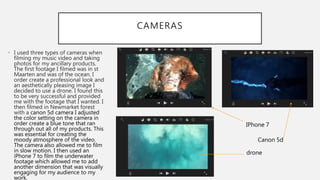
• I used three types of cameras when
filming my music video and taking
photos for my ancillary products.
The first footage I filmed was in st
Maarten and was of the ocean. I
order create a professional look and
an aesthetically pleasing image I
decided to use a drone. I found this
to be very successful and provided
me with the footage that I wanted. I
then filmed in Newmarket forest
with a canon 5d camera I adjusted
the color setting on the camera in
order create a blue tone that ran
through out all of my products. This
was essential for creating the
moody atmosphere of the video.
The camera also allowed me to film
in slow motion. I then used an
iPhone 7 to film the underwater
footage which allowed me to add
another dimension that was visually
engaging for my audience to my
work.
IPhone 7
Canon 5d
drone
IPHOTO
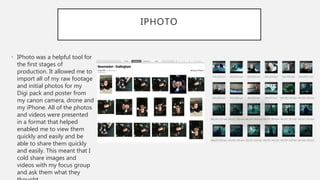
• IPhoto was a helpful tool for
the first stages of
production. It allowed me to
import all of my raw footage
and initial photos for my
Digi pack and poster from
my canon camera, drone and
my iPhone. All of the photos
and videos were presented
in a format that helped
enabled me to view them
quickly and easily and be
able to share them quickly
and easily. This meant that I
cold share images and
videos with my focus group
and ask them what they
ADOBE PHOTOSHOP:
EXPERIMENTATION
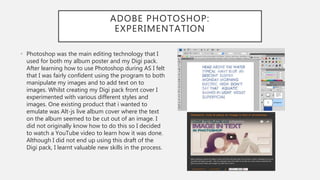
• Photoshop was the main editing technology that I
used for both my album poster and my Digi pack.
After learning how to use Photoshop during AS I felt
that I was fairly confident using the program to both
manipulate my images and to add text on to
images. Whilst creating my Digi pack front cover I
experimented with various different styles and
images. One existing product that i wanted to
emulate was Alt-js live album cover where the text
on the album seemed to be cut out of an image. I
did not originally know how to do this so I decided
to watch a YouTube video to learn how it was done.
Although I did not end up using this draft of the
Digi pack, I learnt valuable new skills in the process.
ADOBE PHOTOSHOP: MANIPULATING
IMAGES
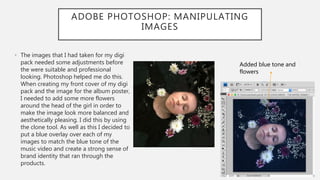
• The images that I had taken for my digi
pack needed some adjustments before
the were suitable and professional
looking. Photoshop helped me do this.
When creating my front cover of my digi
pack and the image for the album poster,
I needed to add some more flowers
around the head of the girl in order to
make the image look more balanced and
aesthetically pleasing. I did this by using
the clone tool. As well as this I decided to
put a blue overlay over each of my
images to match the blue tone of the
music video and create a strong sense of
brand identity that ran through the
products.
Added blue tone and
flowers
PHOTOSHOP: CREATING MY DIGI PACK
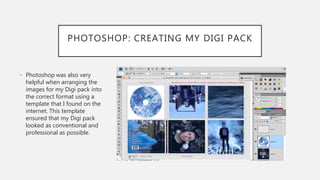
• Photoshop was also very
helpful when arranging the
images for my Digi pack into
the correct format using a
template that I found on the
internet. This template
ensured that my Digi pack
looked as conventional and
professional as possible.
IMOVIE INITIAL STAGES
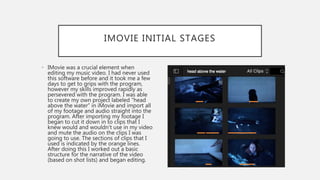
• IMovie was a crucial element when
editing my music video. I had never used
this software before and it took me a few
days to get to grips with the program,
however my skills improved rapidly as
persevered with the program. I was able
to create my own project labeled “head
above the water” in iMovie and import all
of my footage and audio straight into the
program. After importing my footage I
began to cut it down in to clips that I
knew would and wouldn't use in my video
and mute the audio on the clips I was
going to use. The sections of clips that I
used is indicated by the orange lines.
After doing this I worked out a basic
structure for the narrative of the video
(based on shot lists) and began editing.
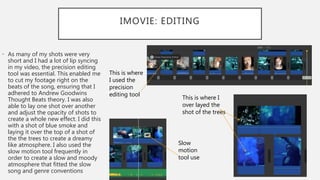
IMOVIE: EDITING
• As many of my shots were very
short and I had a lot of lip syncing
in my video, the precision editing
tool was essential. This enabled me
to cut my footage right on the
beats of the song, ensuring that I
adhered to Andrew Goodwins
Thought Beats theory. I was also
able to lay one shot over another
and adjust the opacity of shots to
create a whole new effect. I did this
with a shot of blue smoke and
laying it over the top of a shot of
the the trees to create a dreamy
like atmosphere. I also used the
slow motion tool frequently in
order to create a slow and moody
atmosphere that fitted the slow
song and genre conventions
This is where I
over layed the
shot of the trees
This is where
I used the
precision
editing tool
Slow
motion
tool use
VIMEO
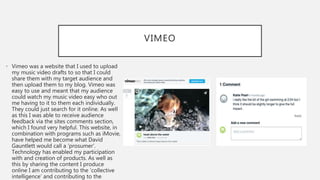
• Vimeo was a website that I used to upload
my music video drafts to so that I could
share them with my target audience and
then upload them to my blog. Vimeo was
easy to use and meant that my audience
could watch my music video easy who out
me having to it to them each individually.
They could just search for it online. As well
as this I was able to receive audience
feedback via the sites comments section,
which I found very helpful. This website, in
combination with programs such as iMovie,
have helped me become what David
Gauntlett would call a ‘prosumer’.
Technology has enabled my participation
with and creation of products. As well as
this by sharing the content I produce
online I am contributing to the ‘collective
intelligence’ and contributing to the
GOOGLE FORMS
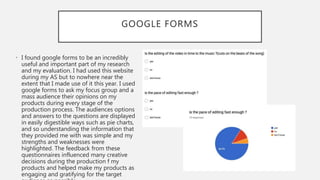
• I found google forms to be an incredibly
useful and important part of my research
and my evaluation. I had used this website
during my AS but to nowhere near the
extent that I made use of it this year. I used
google forms to ask my focus group and a
mass audience their opinions on my
products during every stage of the
production process. The audiences options
and answers to the questions are displayed
in easily digestible ways such as pie charts,
and so understanding the information that
they provided me with was simple and my
strengths and weaknesses were
highlighted. The feedback from these
questionnaires influenced many creative
decisions during the production f my
products and helped make my products as
engaging and gratifying for the target
APPLICATIONS USED FOR RESEARCH
AND EVALUATION
• During my research and evaluation I used many
applications and websites to present my findings
theses included, flip snack, slide share and Prezi.
Each of these applications allowed me to create
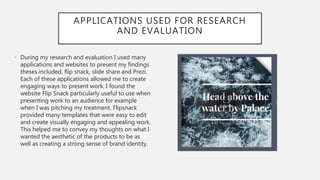
engaging ways to present work. I found the
website Flip Snack particularly useful to use when
presenting work to an audience for example
when I was pitching my treatment. Flipsnack
provided many templates that were easy to edit
and create visually engaging and appealing work.
This helped me to convey my thoughts on what I
wanted the aesthetic of the products to be as
well as creating a strong sense of brand identity.
TECHNOLOGY USED FOR PLANNING
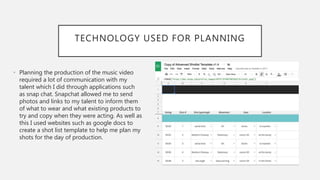
• Planning the production of the music video
required a lot of communication with my
talent which I did through applications such
as snap chat. Snapchat allowed me to send
photos and links to my talent to inform them
of what to wear and what existing products to
try and copy when they were acting. As well as
this I used websites such as google docs to
create a shot list template to help me plan my
shots for the day of production.
CONCLUSION
• In conclusion this task would have been almost impossible to undertake
with out the aid of digital technology. I has been a crucial element of
every process from the planning and research to the production and
evaluation. Using such a wide range of digital technology has ensured
that my products were of the highest quality they they could have been.
Some of the technology was very new to me, such as iMovie, but it
provided an interesting challenge and helped me develop new skills that
I did not previously have at AS. Finally, digital technology enabled others
and myself to evaluate my products through the use of applications
such as google forms.

Evaluation question 4 digital tech a2

  • 1.
    EVALUATION QUESTION 4:HOW DID YOU USE MEDIA TECHNOLOGIES IN THE CONSTRUCTION, PLANNING, RESEARCH AND EVALUATION STAGES ?
  • 2.
    BLOGGER • Blogger hasbeen a website that has helped bring together each element of my advanced portfolio, seamlessly connecting my research and planning to my production and evaluation. This enabled me to document my creative process and the reasoning behind creative decisions easily and meant that I could view the progression of my ideas as the process developed. As well as being able to evaluate creative decisions, the website meant that I could constantly refer to my research and planning when trying to emulate existing products during production. Blogger has also enabled me to publish my work in multimedia formats and embed links into my work such as YouTube videos and links to be websites.
  • 3.
    CAMERAS • I usedthree types of cameras when filming my music video and taking photos for my ancillary products. The first footage I filmed was in st Maarten and was of the ocean. I order create a professional look and an aesthetically pleasing image I decided to use a drone. I found this to be very successful and provided me with the footage that I wanted. I then filmed in Newmarket forest with a canon 5d camera I adjusted the color setting on the camera in order create a blue tone that ran through out all of my products. This was essential for creating the moody atmosphere of the video. The camera also allowed me to film in slow motion. I then used an iPhone 7 to film the underwater footage which allowed me to add another dimension that was visually engaging for my audience to my work. IPhone 7 Canon 5d drone
  • 4.
    IPHOTO • IPhoto wasa helpful tool for the first stages of production. It allowed me to import all of my raw footage and initial photos for my Digi pack and poster from my canon camera, drone and my iPhone. All of the photos and videos were presented in a format that helped enabled me to view them quickly and easily and be able to share them quickly and easily. This meant that I cold share images and videos with my focus group and ask them what they
  • 5.
    ADOBE PHOTOSHOP: EXPERIMENTATION • Photoshopwas the main editing technology that I used for both my album poster and my Digi pack. After learning how to use Photoshop during AS I felt that I was fairly confident using the program to both manipulate my images and to add text on to images. Whilst creating my Digi pack front cover I experimented with various different styles and images. One existing product that i wanted to emulate was Alt-js live album cover where the text on the album seemed to be cut out of an image. I did not originally know how to do this so I decided to watch a YouTube video to learn how it was done. Although I did not end up using this draft of the Digi pack, I learnt valuable new skills in the process.
  • 6.
    ADOBE PHOTOSHOP: MANIPULATING IMAGES •The images that I had taken for my digi pack needed some adjustments before the were suitable and professional looking. Photoshop helped me do this. When creating my front cover of my digi pack and the image for the album poster, I needed to add some more flowers around the head of the girl in order to make the image look more balanced and aesthetically pleasing. I did this by using the clone tool. As well as this I decided to put a blue overlay over each of my images to match the blue tone of the music video and create a strong sense of brand identity that ran through the products. Added blue tone and flowers
  • 7.
    PHOTOSHOP: CREATING MYDIGI PACK • Photoshop was also very helpful when arranging the images for my Digi pack into the correct format using a template that I found on the internet. This template ensured that my Digi pack looked as conventional and professional as possible.
  • 8.
    IMOVIE INITIAL STAGES •IMovie was a crucial element when editing my music video. I had never used this software before and it took me a few days to get to grips with the program, however my skills improved rapidly as persevered with the program. I was able to create my own project labeled “head above the water” in iMovie and import all of my footage and audio straight into the program. After importing my footage I began to cut it down in to clips that I knew would and wouldn't use in my video and mute the audio on the clips I was going to use. The sections of clips that I used is indicated by the orange lines. After doing this I worked out a basic structure for the narrative of the video (based on shot lists) and began editing.
  • 9.
    IMOVIE: EDITING • Asmany of my shots were very short and I had a lot of lip syncing in my video, the precision editing tool was essential. This enabled me to cut my footage right on the beats of the song, ensuring that I adhered to Andrew Goodwins Thought Beats theory. I was also able to lay one shot over another and adjust the opacity of shots to create a whole new effect. I did this with a shot of blue smoke and laying it over the top of a shot of the the trees to create a dreamy like atmosphere. I also used the slow motion tool frequently in order to create a slow and moody atmosphere that fitted the slow song and genre conventions This is where I over layed the shot of the trees This is where I used the precision editing tool Slow motion tool use
  • 10.
    VIMEO • Vimeo wasa website that I used to upload my music video drafts to so that I could share them with my target audience and then upload them to my blog. Vimeo was easy to use and meant that my audience could watch my music video easy who out me having to it to them each individually. They could just search for it online. As well as this I was able to receive audience feedback via the sites comments section, which I found very helpful. This website, in combination with programs such as iMovie, have helped me become what David Gauntlett would call a ‘prosumer’. Technology has enabled my participation with and creation of products. As well as this by sharing the content I produce online I am contributing to the ‘collective intelligence’ and contributing to the
  • 11.
    GOOGLE FORMS • Ifound google forms to be an incredibly useful and important part of my research and my evaluation. I had used this website during my AS but to nowhere near the extent that I made use of it this year. I used google forms to ask my focus group and a mass audience their opinions on my products during every stage of the production process. The audiences options and answers to the questions are displayed in easily digestible ways such as pie charts, and so understanding the information that they provided me with was simple and my strengths and weaknesses were highlighted. The feedback from these questionnaires influenced many creative decisions during the production f my products and helped make my products as engaging and gratifying for the target
  • 12.
    APPLICATIONS USED FORRESEARCH AND EVALUATION • During my research and evaluation I used many applications and websites to present my findings theses included, flip snack, slide share and Prezi. Each of these applications allowed me to create engaging ways to present work. I found the website Flip Snack particularly useful to use when presenting work to an audience for example when I was pitching my treatment. Flipsnack provided many templates that were easy to edit and create visually engaging and appealing work. This helped me to convey my thoughts on what I wanted the aesthetic of the products to be as well as creating a strong sense of brand identity.
  • 13.
    TECHNOLOGY USED FORPLANNING • Planning the production of the music video required a lot of communication with my talent which I did through applications such as snap chat. Snapchat allowed me to send photos and links to my talent to inform them of what to wear and what existing products to try and copy when they were acting. As well as this I used websites such as google docs to create a shot list template to help me plan my shots for the day of production.
  • 14.
    CONCLUSION • In conclusionthis task would have been almost impossible to undertake with out the aid of digital technology. I has been a crucial element of every process from the planning and research to the production and evaluation. Using such a wide range of digital technology has ensured that my products were of the highest quality they they could have been. Some of the technology was very new to me, such as iMovie, but it provided an interesting challenge and helped me develop new skills that I did not previously have at AS. Finally, digital technology enabled others and myself to evaluate my products through the use of applications such as google forms.