

Nick Belhomme January 26th,   PHPBenelux Conference 2013, Belgium
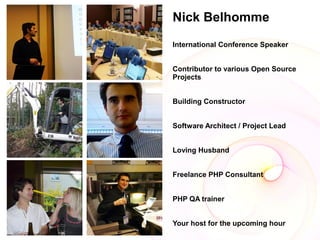
Nick Belhomme
International Conference Speaker


Contributor to various Open Source
Projects


Building Constructor


Software Architect / Project Lead


Loving Husband


Freelance PHP Consultant


PHP QA trainer


Your host for the upcoming hour
Selenium
       34
    Claims, Benefits:

    Prevents cancer

    Aging
Selenium – the web browser
automation tool set
Acceptance Tests
●   System tests
●   Black box
●   Functional testing
Browser Compatibility Tests
●   Different Browsers
●   Different Operating Systems
Regression Tests

●   Internal Changes
●   Partner Changes
Tools
●   Humans
●   Capture and replay
●   Scripts and bots
●   Selenium
Manual Testing
●   Time-intensive
●   Nerve-stretching
●   Human error / understanding of the flow
●   Costly
Capture and Replay
●   Captures mouse movements and inputs
●   Replays later
●   Screenresolution, operating systems, window
    sizes, makes this very unmaintainable
Scripts and Bots
●   Bot makes screen-shots, analyzes them for
    visual blocks
●   Calculates visual blocks x-y positions and
    generates mouse clicks on that location and
    user input.
●   Generating a test is time-intensive
●   Error prone on design changes.
Selenium
●   Records and playback browser tests
●   Asserts on DOM
●   Javascript is being executed and testable
●   Css selectors or xpath position sensitive
●   Hard to detect layout errors
Learning Curve

●   Jump in quickly
●   Steep – If you want to do it right
●   Mastering it – creating readable,
    understandable, maintainable and robust tests -
    takes time and effort.
Worth it

           Ask a Salary
           Increase
           and
           own a second
           modest
           vacation property
And as an added bonus
●   Better code architecture
●   More functional code
●   High browser compatibility
●   No more regressions
●   Neat cool stuff to brag about at your local pub!!!
Setting it up client side
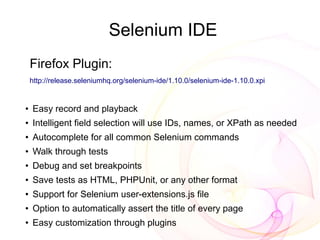
Selenium IDE
    Firefox Plugin:
    http://release.seleniumhq.org/selenium-ide/1.10.0/selenium-ide-1.10.0.xpi


●
    Easy record and playback
●   Intelligent field selection will use IDs, names, or XPath as needed
●
    Autocomplete for all common Selenium commands
●   Walk through tests
●
    Debug and set breakpoints
●   Save tests as HTML, PHPUnit, or any other format
●
    Support for Selenium user-extensions.js file
●
    Option to automatically assert the title of every page
●
    Easy customization through plugins
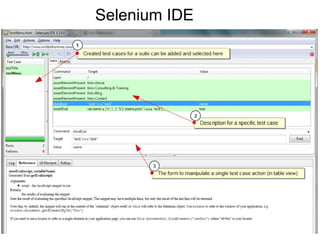
Selenium IDE
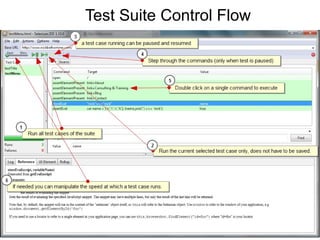
Test Suite Control Flow
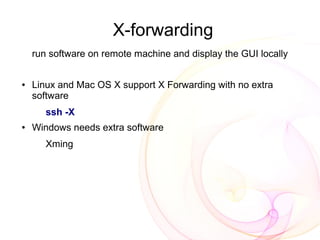
X-forwarding
    run software on remote machine and display the GUI locally


●   Linux and Mac OS X support X Forwarding with no extra
    software
       ssh -X
●   Windows needs extra software
       Xming
Xming
                     (X-forwarding for windows)

http://sourceforge.net/projects/xming/files/latest/download

Configure Xming
   Windows Start => Xming => XLaunch
   Display settings dialog box:
     Multiple windows
     Display number as 0
   Keep clicking next then Finish.
Putty (windows)


●   Connection => SSH => X11
●   Enable X11 forwarding
●   Set X display location as :0.0
Setting it up server side
       (headless)
Firefox

●   [64 bit] wget
    http://download-origin.cdn.mozilla.net/pub/mozilla.org/firefox/relea
●   [32 bit] wget
    http://download-origin.cdn.mozilla.net/pub/mozilla.org/firefox/relea

●   tar -jxvf firefox-18.0.tar.bz2 -C /opt
●   ln -s /opt/firefox/firefox /usr/bin/firefox
●
    Firefox (No X-Display needed thanks to forwarding)
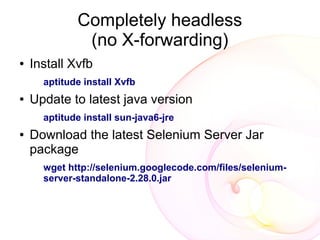
Completely headless
              (no X-forwarding)
●   Install Xvfb
      aptitude install Xvfb
●   Update to latest java version
      aptitude install sun-java6-jre
●   Download the latest Selenium Server Jar
    package
      wget http://selenium.googlecode.com/files/selenium-
      server-standalone-2.28.0.jar
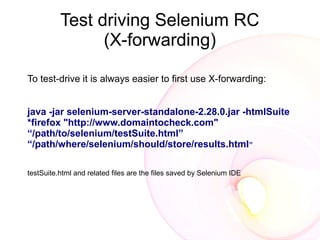
Test driving Selenium RC
                (X-forwarding)

To test-drive it is always easier to first use X-forwarding:


java -jar selenium-server-standalone-2.28.0.jar -htmlSuite
*firefox "http://www.domaintocheck.com"
“/path/to/selenium/testSuite.html”
“/path/where/selenium/should/store/results.html”

testSuite.html and related files are the files saved by Selenium IDE
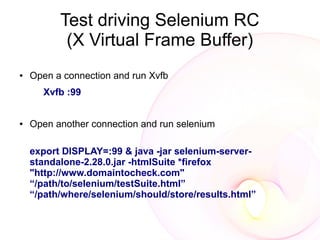
Test driving Selenium RC
           (X Virtual Frame Buffer)
●   Open a connection and run Xvfb
      Xvfb :99


●   Open another connection and run selenium

    export DISPLAY=:99 & java -jar selenium-server-
    standalone-2.28.0.jar -htmlSuite *firefox
    "http://www.domaintocheck.com"
    “/path/to/selenium/testSuite.html”
    “/path/where/selenium/should/store/results.html”
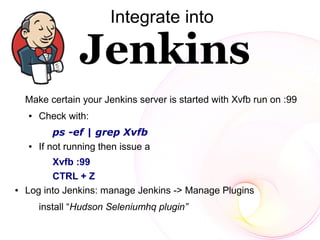
Integrate into


    Make certain your Jenkins server is started with Xvfb run on :99
    ●   Check with:
            ps -ef | grep Xvfb
    ●   If not running then issue a
          Xvfb :99
          CTRL + Z
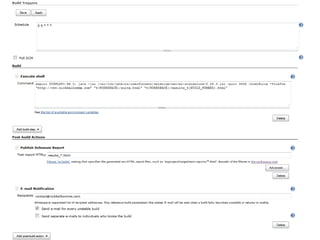
●   Log into Jenkins: manage Jenkins -> Manage Plugins
        install “Hudson Seleniumhq plugin”
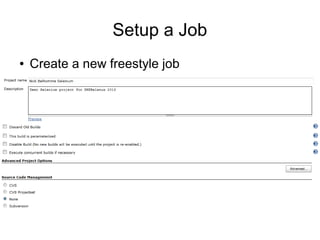
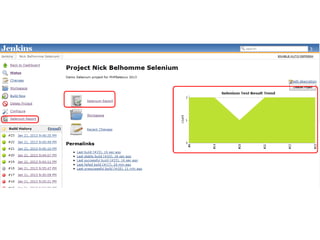
Setup a Job
●   Create a new freestyle job
Problem
●   remote control is slow at driving the browser.

●   limited number of concurrent tests on the same
    remote control before seriously impacting its
    stability.

●   Multiple Selenium Remote Controls In Jenkins
    to work around the limitation on the number of
    parallel tests.
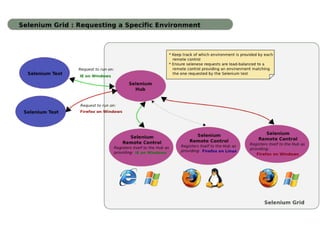
The Grid

●   Run tests against multiple browsers

●   multiple versions of browser

●   browsers running on different operating systems

●   To reduce the time it takes for the test suite to
    complete a test pass.
The Hub
●   1 instance

●   Allocating a Selenium Remote Control to a specific
    test (transparently)

●   Limiting the number of concurrent test runs on each
    Remote Control

●   Shielding the tests from the actual grid
    infrastructure
A Node
●   Remote Control

●   Multiple instances (across machines preferably)

●   Multiple Browsers

●   Can be configured using a json file
Setting up the grid
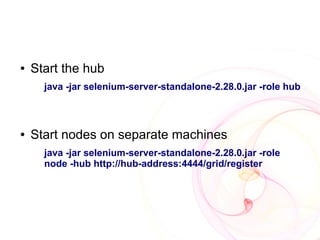
●   Start the hub
      java -jar selenium-server-standalone-2.28.0.jar -role hub


●   Start nodes on separate machines
      java -jar selenium-server-standalone-2.28.0.jar -role
      node -hub http://hub-address:4444/grid/register
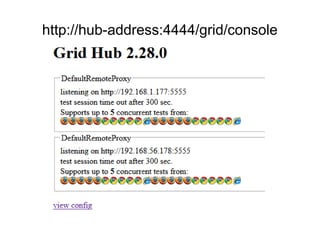
http://hub-address:4444/grid/console
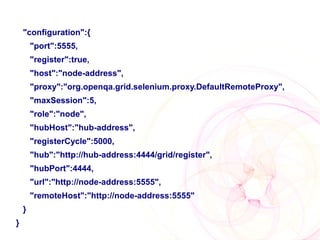
Optimizing a Node with js
     ●   java -jar selenium-server-standalone-2.28.0.jar -role node -nodeConfig nodeConfig.js


    //nodeConfig.js
{
    "class":"org.openqa.grid.common.RegistrationRequest",
    "capabilities":[
         {
              "platform":"VISTA",
              "seleniumProtocol":"Selenium",
              "browserName":"*firefox",
              "maxInstances":5
         },
         {
              "platform":"VISTA",
              "seleniumProtocol":"Selenium",
              "browserName":"*iexplore",
              "maxInstances":1
         }
    ],
"configuration":{
        "port":5555,
        "register":true,
        "host":"node-address",
        "proxy":"org.openqa.grid.selenium.proxy.DefaultRemoteProxy",
        "maxSession":5,
        "role":"node",
        "hubHost":"hub-address",
        "registerCycle":5000,
        "hub":"http://hub-address:4444/grid/register",
        "hubPort":4444,
        "url":"http://node-address:5555",
        "remoteHost":"http://node-address:5555"
    }
}
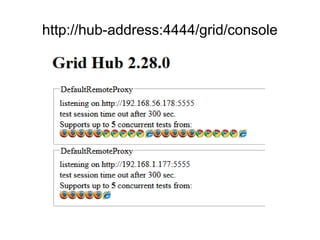
http://hub-address:4444/grid/console
Run the suite
●   No Native HTML Selenese tests support

●   Web driver needed

●   PHPUnit
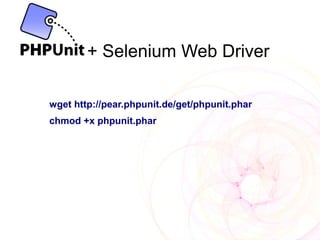
+ Selenium Web Driver

wget http://pear.phpunit.de/get/phpunit.phar
chmod +x phpunit.phar
Selenium-ide-php-formatters

Convert Html Selenese tests to PHPUnit test
cases


Firefox Addon:
https://addons.mozilla.org/en-US/firefox/addon/selenium-ide-
php-formatters/
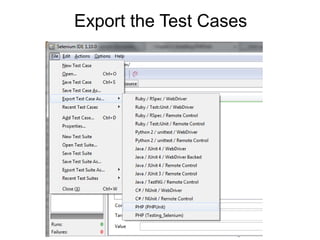
Export the Test Cases
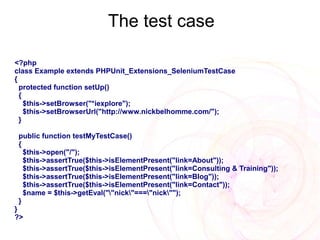
The test case

<?php
class Example extends PHPUnit_Extensions_SeleniumTestCase
{
  protected function setUp()
  {
    $this->setBrowser("*iexplore");
    $this->setBrowserUrl("http://www.nickbelhomme.com/");
  }

 public function testMyTestCase()
 {
   $this->open("/");
   $this->assertTrue($this->isElementPresent("link=About"));
   $this->assertTrue($this->isElementPresent("link=Consulting & Training"));
   $this->assertTrue($this->isElementPresent("link=Blog"));
   $this->assertTrue($this->isElementPresent("link=Contact"));
   $name = $this->getEval(""nick"==="nick"");
 }
}
?>
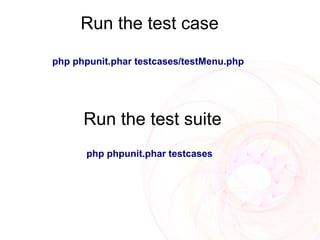
Run the test case
php phpunit.phar testcases/testMenu.php


      Run the test suite
      php phpunit.phar testcases
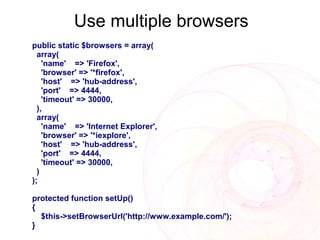
Use multiple browsers
public static $browsers = array(
  array(
    'name' => 'Firefox',
    'browser' => '*firefox',
    'host' => 'hub-address',
    'port' => 4444,
    'timeout' => 30000,
  ),
  array(
    'name' => 'Internet Explorer',
    'browser' => '*iexplore',
    'host' => 'hub-address',
    'port' => 4444,
    'timeout' => 30000,
  )
);

protected function setUp()
{
  $this->setBrowserUrl('http://www.example.com/');
}
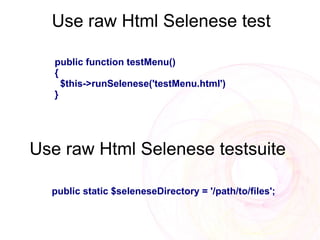
Use raw Html Selenese test

   public function testMenu()
   {
     $this->runSelenese('testMenu.html')
   }


Use raw Html Selenese testsuite

  public static $seleneseDirectory = '/path/to/files';
Taking it Parallel
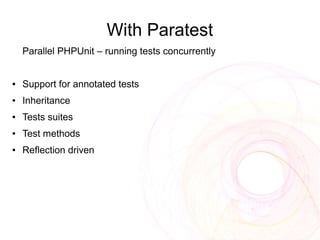
With Paratest
    Parallel PHPUnit – running tests concurrently


●   Support for annotated tests
●   Inheritance
●   Tests suites
●   Test methods
●   Reflection driven
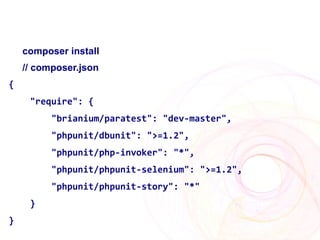
composer install
    // composer.json
{
     "require": {
          "brianium/paratest": "dev-master",
          "phpunit/dbunit": ">=1.2",
          "phpunit/php-invoker": "*",
          "phpunit/phpunit-selenium": ">=1.2",
          "phpunit/phpunit-story": "*"
     }
}
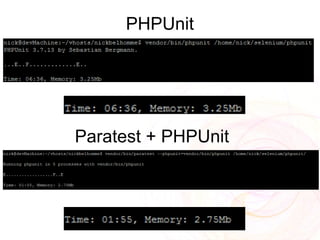
PHPUnit


Paratest + PHPUnit
References
●   X-Forwarding:
       http://en.gentoo-wiki.com/wiki/X-Forwarding
       http://www.straightrunning.com/XmingNotes/
●   Xvfb
       http://www.x.org/releases/X11R7.6/doc/man/man1/Xvfb.1.xhtml
●   Driving Selenium with PHPUnit
       http://www.phpunit.de/manual/3.8/en/selenium.html
●   Selenium Hq
       http://seleniumhq.org/docs/index.jsp
●   Composer
       http://getcomposer.org
●   Paratest
       http://brianscaturro.com/2012/11/02/parallel-phpunit.html
Troubleshooting
●   Firefox install dependencies
    http://www.thinkplexx.com/learn/howto/linux/system/installing-
    and-running-firefox-on-debian-linux-getting-missing-
    dependencies-shared-libs
●   Specify different ports in Jenkins for each RC when not using
    the grid
●   Proxy settings in Browser – use X-Forwarding to run Browser
    and change settings, use profile as a RC param when needed.
Link to slides and other updates is
            available at
http://www.facebook.com/NickBelhommeFanPage
The End!

                   THANK YOU
          Please rate my talk
          https://joind.in/7796
contact@nickbelhomme.com

Slideshare, Twitter, IRC: NickBelhomme

http://blog.nickbelhomme.com
Flickr Photo Credits
Backgrounds by Flikr
   http://www.flickr.com/photos/flikr/146538982/
   http://www.flickr.com/photos/flikr/147274362/