





Selenium in the life of day-to-day
    testing. Practical aspects.
          Ruslan Strazhnyk
             February 2012
About me
Ruslan Strazhnyk   • Experience – more than 6 years in IT
                   • Position:
                      – QA Automation Engineer
                   • Skills:
                      – Python, Selenium, Jenkins
                      – Jmeter, Cloud Services


                       www.maven.co
Agenda
• Part1
  – Selenium Grid and Jenkins
  – xUnit frameworks
  – Issues with some browsers

• Part2
  – Selenium in the cloud. Integration with various
    cloud services
  – Build your own infrastructure in the cloud
Part 1

Using selenium for functional testing
     in continuous integration.
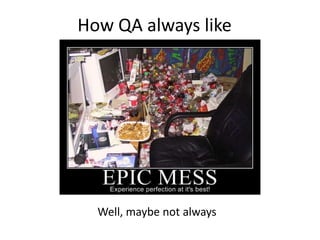
How QA always like


  Well, maybe not always
Introduction. How do we QA?
• What do we always have:
  – QA mess on the project
  – How to support all specifications
  – Team coordination?!
• What do we want to achieve:
  – Results visibility
  – Better cooperation
  – Customer satisfaction
Customer satisfaction
Selenium Grid and Jenkins plugin.
•   What is Continuous Integration
•   Role of Selenium Grid in CI
•   Jenkins Selenium plugin
•   Other plugins that should help:
     – Test Report (xUnit)
     – Violations, TestCoverage
     – Rebuild
     – Extended choice plugin
     – Repository connectors
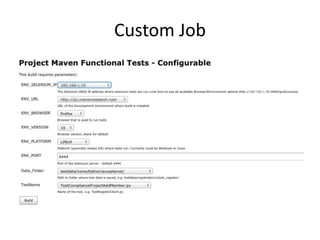
Custom Job
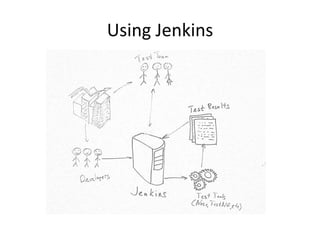
Using Jenkins
How can Jenkins serve you
•   What it helps and what it doesn’t
•   Create as many jobs as needed
•   CI for you project is not only test automation
•   Has a lot of really useful plugins and features
•   Let your all team work on it, not only you
Want to know more? Refer to book!
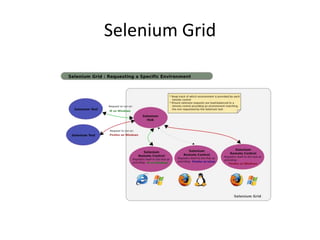
Selenium Grid
Jenkins Selenium Plugin
            Pros                          Cons
• Almost as built-in. Easy to   • Manual update to new
  install and track               Selenium Server through
• Console output                  workaround
• All in one                    • No control
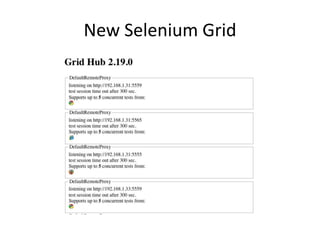
New Selenium Grid
Nodes tune-up
• How to add multiple OS/ browser version
  support
• Different run-scripts for every browser
  – Firefox profile template
  – Googlechrome driver
  – Iexplore security issues
• Autostart tasks
• VM environment
Tune-up
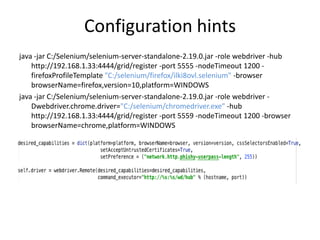
Configuration hints
java -jar C:/Selenium/selenium-server-standalone-2.19.0.jar -role webdriver -hub
    http://192.168.1.33:4444/grid/register -port 5555 -nodeTimeout 1200 -
    firefoxProfileTemplate "C:/selenium/firefox/ilki8ovl.selenium" -browser
    browserName=firefox,version=10,platform=WINDOWS
java -jar C:/Selenium/selenium-server-standalone-2.19.0.jar -role webdriver -
    Dwebdriver.chrome.driver="C:/selenium/chromedriver.exe" -hub
    http://192.168.1.33:4444/grid/register -port 5559 -nodeTimeout 1200 -browser
    browserName=chrome,platform=WINDOWS
Browser support
Potential Browser problems
• It all suck, no ONE FITS ALL solution
   – Better to do it one by one
   – Start with easier
• Windows is Windows
   – Different CSS and XPATH
   – Slow performance
• SSL support
• Proxy support
• Let you control the browser not browser control
  you
Universal Framework
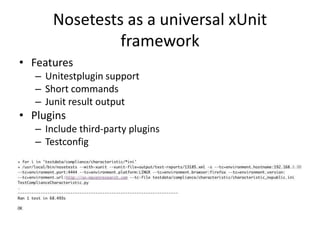
Nosetests as a universal xUnit
                framework
• Features
   – Unitestplugin support
   – Short commands
   – Junit result output
• Plugins
   – Include third-party plugins
   – Testconfig
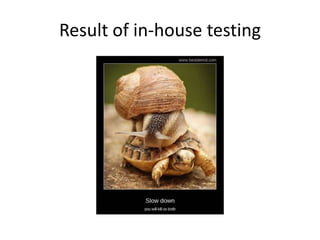
Result of in-house testing
Part 2

Selenium in the cloud. Integration
  with BrowserMob, SauceLabs,
    ShiningPanda, AmazonEC2
How could cloud testing help your
    project. When to turn cloud.
• When you need cloud services:
  – Everybody needs unless you’re not Facebook,
    Google, Cisco
  – Having own cluster base is expensive
  – You have a start-up and your team is remote
  – You want to quickly show results to customers,
    investors etc.
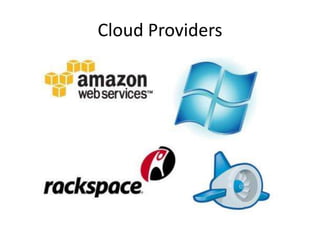
Cloud Providers
Semi-paid and semi-free services.
• A lot of services grow up recently:
  – Saas services
  – Cloud hosting(Amazon, Rackspace)
• You are the boss, you choose:
  – Strong tech skills and you want full control –
    Rackspace, Amazon EC2
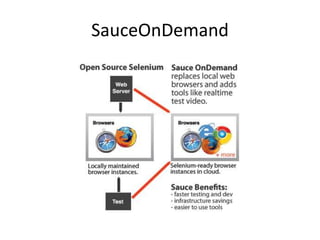
  – Less skills to admin – Sauce Labs, BrowserMob,
    others
Load Testing
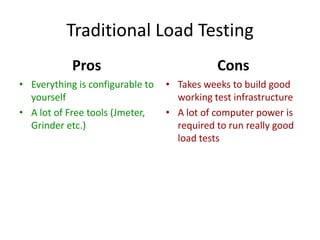
Traditional Load Testing
            Pros                             Cons
• Everything is configurable to   • Takes weeks to build good
  yourself                          working test infrastructure
• A lot of Free tools (Jmeter,    • A lot of computer power is
  Grinder etc.)                     required to run really good
                                    load tests
Computing power
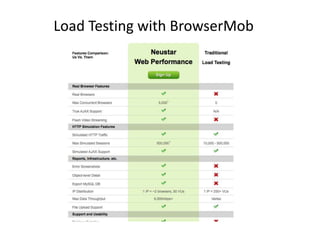
Load Testing with BrowserMob
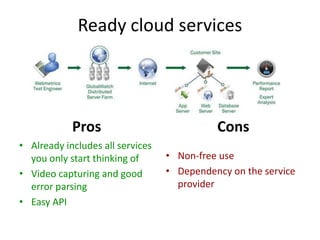
Ready cloud services


            Pros                            Cons
• Already includes all services
  you only start thinking of      • Non-free use
• Video capturing and good        • Dependency on the service
  error parsing                     provider
• Easy API
SauceOnDemand
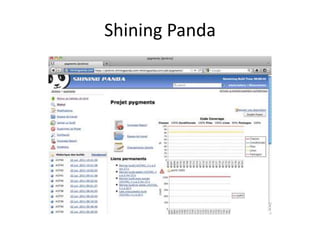
Shining Panda
Is it Really Fast?
Do it yourself. Dedicated Cloud
• When you need something done right, do it
  yourself
• Traditional way of using cloud - PaaS
• A lot of providers, most of them have good
  pricing:
  –   Rackspace Cloud Servers
  –   Amazon Web Services
  –   Joyent
  –   GoGrid
  –   SkytapNetworks
DIY Instrument Kit
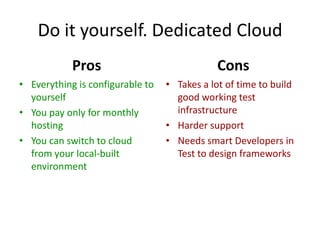
Do it yourself. Dedicated Cloud
            Pros                              Cons
• Everything is configurable to   • Takes a lot of time to build
  yourself                          good working test
• You pay only for monthly          infrastructure
  hosting                         • Harder support
• You can switch to cloud         • Needs smart Developers in
  from your local-built             Test to design frameworks
  environment
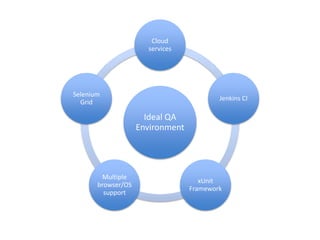
Cloud
                      services


Selenium
                                          Jenkins CI
  Grid

                      Ideal QA
                    Environment


        Multiple
                                     xUnit
       browser/OS
                                  Framework
         support
Questions? Ideas?
         My contact info:
ua.linkedin.com/in/ruslanstraznhyk
twitter.com/strazhnyk
ruslanstrazhnyk

         strazhnyk@gmail.com

         http://www.maven.co/join/TUHvWu8K

Selenium practical

  • 1.
    Selenium in thelife of day-to-day testing. Practical aspects. Ruslan Strazhnyk February 2012
  • 2.
    About me Ruslan Strazhnyk • Experience – more than 6 years in IT • Position: – QA Automation Engineer • Skills: – Python, Selenium, Jenkins – Jmeter, Cloud Services www.maven.co
  • 3.
    Agenda • Part1 – Selenium Grid and Jenkins – xUnit frameworks – Issues with some browsers • Part2 – Selenium in the cloud. Integration with various cloud services – Build your own infrastructure in the cloud
  • 5.
    Part 1 Using seleniumfor functional testing in continuous integration.
  • 6.
    How QA alwayslike Well, maybe not always
  • 7.
    Introduction. How dowe QA? • What do we always have: – QA mess on the project – How to support all specifications – Team coordination?! • What do we want to achieve: – Results visibility – Better cooperation – Customer satisfaction
  • 8.
  • 9.
    Selenium Grid andJenkins plugin. • What is Continuous Integration • Role of Selenium Grid in CI • Jenkins Selenium plugin • Other plugins that should help: – Test Report (xUnit) – Violations, TestCoverage – Rebuild – Extended choice plugin – Repository connectors
  • 10.
  • 11.
  • 12.
    How can Jenkinsserve you • What it helps and what it doesn’t • Create as many jobs as needed • CI for you project is not only test automation • Has a lot of really useful plugins and features • Let your all team work on it, not only you
  • 13.
    Want to knowmore? Refer to book!
  • 14.
  • 15.
    Jenkins Selenium Plugin Pros Cons • Almost as built-in. Easy to • Manual update to new install and track Selenium Server through • Console output workaround • All in one • No control
  • 16.
  • 17.
    Nodes tune-up • Howto add multiple OS/ browser version support • Different run-scripts for every browser – Firefox profile template – Googlechrome driver – Iexplore security issues • Autostart tasks • VM environment
  • 18.
  • 19.
    Configuration hints java -jarC:/Selenium/selenium-server-standalone-2.19.0.jar -role webdriver -hub http://192.168.1.33:4444/grid/register -port 5555 -nodeTimeout 1200 - firefoxProfileTemplate "C:/selenium/firefox/ilki8ovl.selenium" -browser browserName=firefox,version=10,platform=WINDOWS java -jar C:/Selenium/selenium-server-standalone-2.19.0.jar -role webdriver - Dwebdriver.chrome.driver="C:/selenium/chromedriver.exe" -hub http://192.168.1.33:4444/grid/register -port 5559 -nodeTimeout 1200 -browser browserName=chrome,platform=WINDOWS
  • 20.
  • 21.
    Potential Browser problems •It all suck, no ONE FITS ALL solution – Better to do it one by one – Start with easier • Windows is Windows – Different CSS and XPATH – Slow performance • SSL support • Proxy support • Let you control the browser not browser control you
  • 22.
  • 23.
    Nosetests as auniversal xUnit framework • Features – Unitestplugin support – Short commands – Junit result output • Plugins – Include third-party plugins – Testconfig
  • 24.
  • 25.
    Part 2 Selenium inthe cloud. Integration with BrowserMob, SauceLabs, ShiningPanda, AmazonEC2
  • 26.
    How could cloudtesting help your project. When to turn cloud. • When you need cloud services: – Everybody needs unless you’re not Facebook, Google, Cisco – Having own cluster base is expensive – You have a start-up and your team is remote – You want to quickly show results to customers, investors etc.
  • 27.
  • 28.
    Semi-paid and semi-freeservices. • A lot of services grow up recently: – Saas services – Cloud hosting(Amazon, Rackspace) • You are the boss, you choose: – Strong tech skills and you want full control – Rackspace, Amazon EC2 – Less skills to admin – Sauce Labs, BrowserMob, others
  • 29.
  • 30.
    Traditional Load Testing Pros Cons • Everything is configurable to • Takes weeks to build good yourself working test infrastructure • A lot of Free tools (Jmeter, • A lot of computer power is Grinder etc.) required to run really good load tests
  • 31.
  • 32.
  • 33.
    Ready cloud services Pros Cons • Already includes all services you only start thinking of • Non-free use • Video capturing and good • Dependency on the service error parsing provider • Easy API
  • 34.
  • 35.
  • 36.
  • 37.
    Do it yourself.Dedicated Cloud • When you need something done right, do it yourself • Traditional way of using cloud - PaaS • A lot of providers, most of them have good pricing: – Rackspace Cloud Servers – Amazon Web Services – Joyent – GoGrid – SkytapNetworks
  • 38.
  • 39.
    Do it yourself.Dedicated Cloud Pros Cons • Everything is configurable to • Takes a lot of time to build yourself good working test • You pay only for monthly infrastructure hosting • Harder support • You can switch to cloud • Needs smart Developers in from your local-built Test to design frameworks environment
  • 40.
    Cloud services Selenium Jenkins CI Grid Ideal QA Environment Multiple xUnit browser/OS Framework support
  • 41.
    Questions? Ideas? My contact info: ua.linkedin.com/in/ruslanstraznhyk twitter.com/strazhnyk ruslanstrazhnyk strazhnyk@gmail.com http://www.maven.co/join/TUHvWu8K

Editor's Notes

  • #5 To be practical – find a balance in your testing projectsDo things rationally
  • #7 How QA always like: Mess in the project. Nobody knows who is doing something. Developers don’t care about build frequency, unit tests. Testers do not know who failed the build.