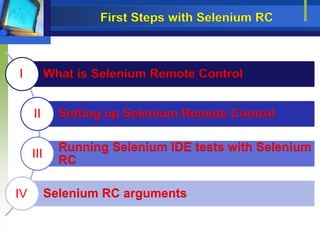
What is Selenium Remote Control
Setting up Selenium Remote Control
Running Selenium IDE tests with Selenium
RC
Selenium RC arguments
I
II
III
IV
First Steps with Selenium RC
• Selenium IDE only works with Firefox so we have only
been checking a small subsection of the browsers that our
users prefer
• Selenium Remote Control was initially developed by Patrick
Lightbody as a way to test all of these different web
browsers without having to install Selenium Core on the
web server
• It was developed to act as a proxy between the application
under test and the test scripts. Selenium Core is bundled
with Selenium Remote Control instead of being installed on
the server.
I. What is Selenium Remote Control
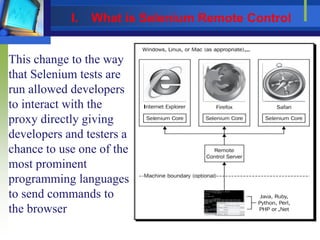
This change to the way
that Selenium tests are
run allowed developers
to interact with the
proxy directly giving
developers and testers a
chance to use one of the
most prominent
programming languages
to send commands to
the browser
I. What is Selenium Remote Control
• Java and C# have been the main languages used by
developers to create Selenium Tests. This is due to most
web applications being created in one of those languages.
• Ruby and Python are the most popular languages that
people are moving to.
• Using programming languages to write your tests instead
of using the HTML-style tests with Selenium IDE
 make your tests more robust and take advantage of
all setups and tear down those that are common in most
testing frameworks.
I. What is Selenium Remote Control
• Selenium Remote Control is required on all machines that
will be used to run tests. It is good practice to limit the
number of Selenium Remote Control instances to one per
CPU core
• Limiting the Selenium instances to one per core makes sure
that the browsers load cleanly and Selenium will run as
quickly as possible
1. Download Selenium Remote Control from
http://seleniumhq.org/download.
2. Extract the ZIP file.
3. Start a Command Prompt or a console window and
navigate to where the ZIP file was extracted.
I. What is Selenium Remote Control
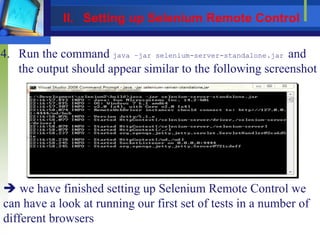
4. Run the command java –jar selenium-server-standalone.jar and
the output should appear similar to the following screenshot
 we have finished setting up Selenium Remote Control we
can have a look at running our first set of tests in a number of
different browsers
II. Setting up Selenium Remote Control
 we have only been able to test our applications in Firefox
 the testing coverage that you are offering is very limited
 Browser and operating system combinations can mean that a
developer or tester will have to run your tests more than
nine times.  to make sure that you cover all the popular
browser and operating system combinations.
 To run our tests in Selenium Remote Control we will have
to use the –htmlsuite argument. Our command in
Command Prompt or a console window will be similar to
the following snippet:
Java –jar selenium-server-standalone.jar –htmlsuite *firefox
http://book.theautomatedtester.co.uk c:pathtotestsuite.html
c:pathtoresult.html
III. Running Selenium IDE tests with
Selenium RC
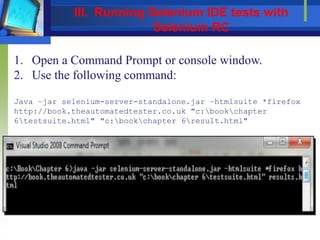
1. Open a Command Prompt or console window.
2. Use the following command:
Java –jar selenium-server-standalone.jar –htmlsuite *firefox
http://book.theautomatedtester.co.uk "c:bookchapter
6testsuite.html" "c:bookchapter 6result.html"
III. Running Selenium IDE tests with
Selenium RC
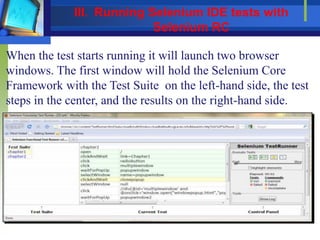
When the test starts running it will launch two browser
windows. The first window will hold the Selenium Core
Framework with the Test Suite on the left-hand side, the test
steps in the center, and the results on the right-hand side.
III. Running Selenium IDE tests with
Selenium RC
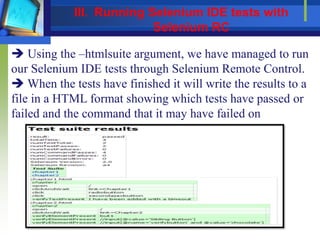
 Using the –htmlsuite argument, we have managed to run
our Selenium IDE tests through Selenium Remote Control.
 When the tests have finished it will write the results to a
file in a HTML format showing which tests have passed or
failed and the command that it may have failed on
III. Running Selenium IDE tests with
Selenium RC
III. Running Selenium IDE tests with
Selenium RC
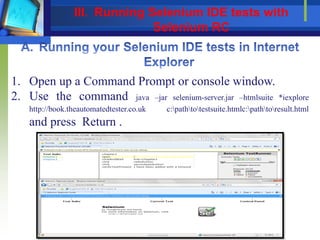
1. Open up a Command Prompt or console window.
2. Use the command java –jar selenium-server.jar –htmlsuite *iexplore
http://book.theautomatedtester.co.uk c:pathtotestsuite.htmlc:pathtoresult.html
and press Return .
III. Running Selenium IDE tests with
Selenium RC
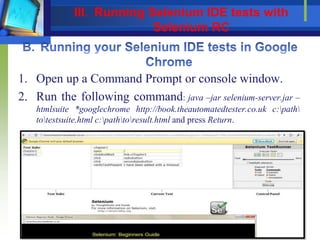
1. Open up a Command Prompt or console window.
2. Run the following command: java –jar selenium-server.jar –
htmlsuite *googlechrome http://book.theautomatedtester.co.uk c:path
totestsuite.html c:pathtoresult.html and press Return.
III. Running Selenium IDE tests with
Selenium RC
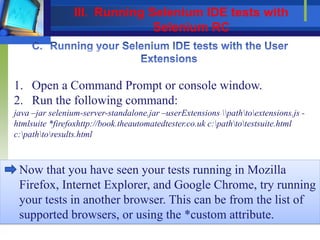
1. Open a Command Prompt or console window.
2. Run the following command:
java –jar selenium-server-standalone.jar –userExtensions pathtoextensions.js -
htmlsuite *firefoxhttp://book.theautomatedtester.co.uk c:pathtotestsuite.html
c:pathtoresults.html
Now that you have seen your tests running in Mozilla
Firefox, Internet Explorer, and Google Chrome, try running
your tests in another browser. This can be from the list of
supported browsers, or using the *custom attribute.
III. Running Selenium IDE tests with
Selenium RC
-port
Adding –port <port number> allows you to use a different port
number without conflicts.
-userExtensions
By using –userExtensionsc:pathtofile.js we can access all the extra
commands in our tests.
-firefoxProfileTemplate
If you require a special profile, or if you need to make sure
that a specific Firefox Add-on is installed,
use –firefoxProfileTemplate/path/to/firefox/profile.
This command will take the profile that you want and then
clone it to be used in your test.
IV. Selenium RC arguments
 Selenium Remote Control: We had a look at how Selenium
Remote Control works. It is a proxy web server that sits
between our tests which are running and the web application
 Setting up Selenium Remote Control: We saw how
Selenium Server and Selenium are just Java .jar files that can
run from a Command Prompt.
 Running Selenium IDE tests within Selenium Remote
Control: we had a look at how we can use all the test cases
we created in previous chapters to test our web applications
 Selenium Remote Control arguments: we had a look at the
rest of the Selenium Remote Control arguments that we may
need in our tests
Summary

First steps with selenium rc

  • 1.
    What is SeleniumRemote Control Setting up Selenium Remote Control Running Selenium IDE tests with Selenium RC Selenium RC arguments I II III IV First Steps with Selenium RC
  • 2.
    • Selenium IDEonly works with Firefox so we have only been checking a small subsection of the browsers that our users prefer • Selenium Remote Control was initially developed by Patrick Lightbody as a way to test all of these different web browsers without having to install Selenium Core on the web server • It was developed to act as a proxy between the application under test and the test scripts. Selenium Core is bundled with Selenium Remote Control instead of being installed on the server. I. What is Selenium Remote Control
  • 3.
    This change tothe way that Selenium tests are run allowed developers to interact with the proxy directly giving developers and testers a chance to use one of the most prominent programming languages to send commands to the browser I. What is Selenium Remote Control
  • 4.
    • Java andC# have been the main languages used by developers to create Selenium Tests. This is due to most web applications being created in one of those languages. • Ruby and Python are the most popular languages that people are moving to. • Using programming languages to write your tests instead of using the HTML-style tests with Selenium IDE  make your tests more robust and take advantage of all setups and tear down those that are common in most testing frameworks. I. What is Selenium Remote Control
  • 5.
    • Selenium RemoteControl is required on all machines that will be used to run tests. It is good practice to limit the number of Selenium Remote Control instances to one per CPU core • Limiting the Selenium instances to one per core makes sure that the browsers load cleanly and Selenium will run as quickly as possible 1. Download Selenium Remote Control from http://seleniumhq.org/download. 2. Extract the ZIP file. 3. Start a Command Prompt or a console window and navigate to where the ZIP file was extracted. I. What is Selenium Remote Control
  • 6.
    4. Run thecommand java –jar selenium-server-standalone.jar and the output should appear similar to the following screenshot  we have finished setting up Selenium Remote Control we can have a look at running our first set of tests in a number of different browsers II. Setting up Selenium Remote Control
  • 7.
     we haveonly been able to test our applications in Firefox  the testing coverage that you are offering is very limited  Browser and operating system combinations can mean that a developer or tester will have to run your tests more than nine times.  to make sure that you cover all the popular browser and operating system combinations.  To run our tests in Selenium Remote Control we will have to use the –htmlsuite argument. Our command in Command Prompt or a console window will be similar to the following snippet: Java –jar selenium-server-standalone.jar –htmlsuite *firefox http://book.theautomatedtester.co.uk c:pathtotestsuite.html c:pathtoresult.html III. Running Selenium IDE tests with Selenium RC
  • 8.
    1. Open aCommand Prompt or console window. 2. Use the following command: Java –jar selenium-server-standalone.jar –htmlsuite *firefox http://book.theautomatedtester.co.uk "c:bookchapter 6testsuite.html" "c:bookchapter 6result.html" III. Running Selenium IDE tests with Selenium RC
  • 9.
    When the teststarts running it will launch two browser windows. The first window will hold the Selenium Core Framework with the Test Suite on the left-hand side, the test steps in the center, and the results on the right-hand side. III. Running Selenium IDE tests with Selenium RC
  • 10.
     Using the–htmlsuite argument, we have managed to run our Selenium IDE tests through Selenium Remote Control.  When the tests have finished it will write the results to a file in a HTML format showing which tests have passed or failed and the command that it may have failed on III. Running Selenium IDE tests with Selenium RC
  • 11.
    III. Running SeleniumIDE tests with Selenium RC
  • 12.
    1. Open upa Command Prompt or console window. 2. Use the command java –jar selenium-server.jar –htmlsuite *iexplore http://book.theautomatedtester.co.uk c:pathtotestsuite.htmlc:pathtoresult.html and press Return . III. Running Selenium IDE tests with Selenium RC
  • 13.
    1. Open upa Command Prompt or console window. 2. Run the following command: java –jar selenium-server.jar – htmlsuite *googlechrome http://book.theautomatedtester.co.uk c:path totestsuite.html c:pathtoresult.html and press Return. III. Running Selenium IDE tests with Selenium RC
  • 14.
    1. Open aCommand Prompt or console window. 2. Run the following command: java –jar selenium-server-standalone.jar –userExtensions pathtoextensions.js - htmlsuite *firefoxhttp://book.theautomatedtester.co.uk c:pathtotestsuite.html c:pathtoresults.html Now that you have seen your tests running in Mozilla Firefox, Internet Explorer, and Google Chrome, try running your tests in another browser. This can be from the list of supported browsers, or using the *custom attribute. III. Running Selenium IDE tests with Selenium RC
  • 15.
    -port Adding –port <portnumber> allows you to use a different port number without conflicts. -userExtensions By using –userExtensionsc:pathtofile.js we can access all the extra commands in our tests. -firefoxProfileTemplate If you require a special profile, or if you need to make sure that a specific Firefox Add-on is installed, use –firefoxProfileTemplate/path/to/firefox/profile. This command will take the profile that you want and then clone it to be used in your test. IV. Selenium RC arguments
  • 16.
     Selenium RemoteControl: We had a look at how Selenium Remote Control works. It is a proxy web server that sits between our tests which are running and the web application  Setting up Selenium Remote Control: We saw how Selenium Server and Selenium are just Java .jar files that can run from a Command Prompt.  Running Selenium IDE tests within Selenium Remote Control: we had a look at how we can use all the test cases we created in previous chapters to test our web applications  Selenium Remote Control arguments: we had a look at the rest of the Selenium Remote Control arguments that we may need in our tests Summary