Managing Data Center
                 Connectivity


                                                             Version 1.0


• Defining your environment and requirements
• EMC Connectrix Manager Converged Network Edition (CMCNE)
• Brocade Network Advisor (BNA)
• Cisco Data Center Network Manager (DCNM)


Todd Bolton
Mark Anthony P. De Castro
Avan Cheng Kian Meng
Copyright © 2012 EMC Corporation. All rights reserved.
    EMC believes the information in this publication is accurate as of its publication date. The information is
    subject to change without notice.

    THE INFORMATION IN THIS PUBLICATION IS PROVIDED “AS IS.” EMC CORPORATION MAKES NO
    REPRESENTATIONS OR WARRANTIES OF ANY KIND WITH RESPECT TO THE INFORMATION IN THIS
    PUBLICATION, AND SPECIFICALLY DISCLAIMS IMPLIED WARRANTIES OF MERCHANTABILITY OR
    FITNESS FOR A PARTICULAR PURPOSE.

    Use, copying, and distribution of any EMC software described in this publication requires an applicable
    software license.

    For the most up-to-date regulatory document for your product line, go to the Technical Documentation and
    Advisories section on EMC Powerlink.

    For the most up-to-date listing of EMC product names, see EMC Corporation Trademarks on EMC.com.

    All other trademarks used herein are the property of their respective owners.


    Part number H8081


2       SAN Management TechBook
Contents


Preface.............................................................................................................................. 7

Chapter 1                   Introduction to Managing Data Center Connectivity
                            Introduction .......................................................................................   14
                            Defining your environment.............................................................                 15
                                Local Area Network (LAN)......................................................                     16
                                Storage Area Network (SAN) ..................................................                      16
                                Converged network...................................................................               17
                                Virtualization .............................................................................       18
                            Defining your requirements ............................................................                19
                            Software management tools ............................................................                 20


Chapter 2                   CMCNE and BNA
                            EMC Connectrix Manager Converged Network Edition ...........                                           24
                                Licensing .....................................................................................    25
                                User interface..............................................................................       26
                                Components ...............................................................................         27
                                New features ..............................................................................        33
                                References ...................................................................................     40
                            Brocade Network Advisor...............................................................                 41
                                Licensing .....................................................................................    41
                                BNA Dashboard.........................................................................             41
                                Brocade VDX switches ..............................................................                42
                                Brocade VCS Fabric technology ..............................................                       43
                                Ethernet fabrics ..........................................................................        44
                                References ...................................................................................     46
                            Using CMCNE and BNA to manage data center
                            connectivity........................................................................................   47


                                                                                    SAN Management TechBook                               3
Contents


                                                 Network management .............................................................. 47
                                                 IP features ................................................................................... 52


               Chapter 3                  Cisco DCNM
                                          DCNM ................................................................................................    56
                                             Licensing .....................................................................................       57
                                             Views ...........................................................................................     57
                                          Web-based interface (Dashboard) ..................................................                       59
                                          DCNM-SAN ......................................................................................          66
                                             Licensing .....................................................................................       66
                                             Views ...........................................................................................     68
                                             Benefits........................................................................................      68
                                             Components ...............................................................................            69
                                             Features .......................................................................................      69
                                             References ...................................................................................        77
                                          DCNM-LAN......................................................................................           78
                                             Licensing .....................................................................................       78
                                             Views ...........................................................................................     79
                                             Benefits........................................................................................      80
                                             Component .................................................................................           80
                                             Features .......................................................................................      80
                                             References ...................................................................................        89


               Chapter 4                  Choosing A Software Management Tool
                                          Considerations in choosing a tool ..................................................                     92
                                          Decision makers................................................................................          93
                                          Scalability...........................................................................................   94
                                              Can this tool scale to larger environments?...........................                               94
                                          Installation .........................................................................................   95
                                              Is the product easy to install? ..................................................                   95
                                          Ease of use..........................................................................................    96
                                              Is the product easy to use? .......................................................                  96
                                          Out-of-the-box...................................................................................        97
                                              Can I use this product straight out of the box? .....................                                97
                                          Customization ...................................................................................        98
                                              Can it be customized? ...............................................................                98


               Glossary ......................................................................................................................... 99


4          SAN Management TechBook
Figures


     Title                                                                                                    Page
1    FCoE, Bridging the LAN and SAN ..............................................................                    15
2    CMCNE View All ...........................................................................................       24
3    CMCNE Main window .................................................................................              26
4    CMCNE Discover Fabrics and Add Fabric Discovery dialog box ..........                                            28
5    CMCNE Zoning dialog box, Zone DB Operation drop-down men .......                                                 29
6    Monitoring alerts ............................................................................................   31
7    Real time performance graph .......................................................................              32
8    Historical performance graph ......................................................................              33
9    CMCNE Top Taler dialog box ......................................................................                35
10   Logical Switches dialog box ..........................................................................           36
11   Diagnostic Port test dialog box ....................................................................             37
12   Connection utilization ...................................................................................       38
13   Connection utilization legend ......................................................................             38
14   Real time performance graphs dialog .........................................................                    39
15    Brocade Network Advisor Dashboard .......................................................                       42
16   Brocade VCS Fabric technology ...................................................................                44
17   Hierarchical Ethernet compared to Ethernet Fabric architecture ...........                                       45
18   DCB configuration .........................................................................................      49
19   Enable 802.1x configuration ..........................................................................           50
20   Configuration dialog box ..............................................................................          51
21   Brocade Network Advisor Traffic analyzer ...............................................                         52
22   IP features under the IP tab ..........................................................................          53
23   CMCNE IP accessible features .....................................................................               54
24   DCNM-SAN Dashboard summary view ....................................................                             60
25   Event drill down .............................................................................................   61
26   Using mouse-over in Performance view .....................................................                       62
27   Switch CPU performance ..............................................................................            63
28   Host Port performance ..................................................................................         64
29   Module inventory ...........................................................................................     65
30   DCNM-SAN option in Data Center Network Manager ...........................                                       67


                                                                       SAN Management TechBook                             5
Figures


              31     Discover dialog box .......................................................................................      70
              32     DCNM-SAN main window ..........................................................................                  71
              33     DCNM-SAN Zoning view ............................................................................                72
              34     Alerts in the Main window ...........................................................................            73
              35     Alerts in the Device Manager view .............................................................                  74
              36     Monitoring environment health using DCNM-SAN Dashboard ...........                                               75
              37     Device Manager performance monitor .......................................................                       76
              38     Performance monitoring using DCNM-SAN Dashboard ........................                                         77
              39     DCNM-LAN main view ................................................................................              79
              40     VLAN configuration in DCNM-LAN .........................................................                         81
              41     FIP Snooping Wizard ....................................................................................         82
              42     Gateway redundancy features .....................................................................                83
              43     Layer 2 security features, DCNM-LAN ......................................................                       84
              44     Network Analysis wizard .............................................................................            85
              45     Network inventory in DCNM-LAN ............................................................                       86
              46     DCNM Help ....................................................................................................   87
              47     DCNM-LAN option in Data Center Network Manager ..........................                                        88


6         SAN Management TechBook
Preface


                      This EMC Engineering TechBook provides insight and understanding of
                      some options available for managing your data center connectivity,
                      including information on some new software management tools developed to
                      bridge the gap in the I/O consolidation environment.
                      E-Lab would like to thank all the contributors to this document, including
                      EMC engineers, EMC field personnel, and partners. Your contributions are
                      invaluable.
                      As part of an effort to improve and enhance the performance and capabilities
                      of its product lines, EMC periodically releases revisions of its hardware and
                      software. Therefore, some functions described in this document may not be
                      supported by all versions of the software or hardware currently in use. For
                      the most up-to-date information on product features, refer to your product
                      release notes. If a product does not function properly or does not function as
                      described in this document, please contact your EMC representative.

         Audience     This TechBook is intended for EMC field personnel, including
                      technology consultants, and for the storage architect, administrator,
                      and operator involved in acquiring, managing, operating, or
                      designing data center connectivity.

EMC Support Matrix    For the most up-to-date information, always consult the EMC Support
        and E-Lab     Matrix (ESM), available through E-Lab Interoperability Navigator
   Interoperability   (ELN), at http://elabnavigator.EMC.com, under the PDFs and
         Navigator    Guides tab.
                      The EMC Support Matrix links within this guide will take you to
                      Powerlink where you are asked to log in to the E-Lab Interoperability
                      Navigator. Instructions on how to best use the ELN (tutorial, queries,
                      wizards) are provided below this Log in window. If you are

                                                                 SAN Management TechBook               7
Preface


                               unfamiliar with finding information on this site, please read these
                               instructions before proceeding any further.
                               Under the PDFs and Guides tab resides a collection of printable
                               resources for reference or download. All of the matrices, including
                               the ESM (which does not include most software), are subsets of the
                               E-Lab Interoperability Navigator database. Included under this tab
                               are:
                               ◆    The EMC Support Matrix, a complete guide to interoperable, and
                                    supportable, configurations.
                               ◆    Subset matrices for specific storage families, server families,
                                    operating systems or software products.
                               ◆    Host connectivity guides for complete, authoritative information
                                    on how to configure hosts effectively for various storage
                                    environments.
                               Under the PDFs and Guides tab, consult the Internet Protocol pdf
                               under the "Miscellaneous" heading for EMC's policies and
                               requirements for the EMC Support Matrix.

                  Related      Related documents include:
             documentation
                               ◆    The former EMC Networked Storage Topology Guide has been
                                    divided into several TechBooks and reference manuals. The
                                    following documents, including this one, are available through
                                    the E-Lab Interoperability Navigator, Topology Resource Center
                                    tab, at http://elabnavigator.EMC.com.
                                    These documents are also available at the following location:
    http://www.emc.com/products/interoperability/topology-resource-center.htm

                                    • Backup and Recovery in a SAN TechBook
                                    • Building Secure SANs TechBook
                                    • Extended Distance Technologies TechBook
                                    • Fibre Channel over Ethernet (FCoE) Data Center Bridging (DCB)
                                      Case Studies TechBook
                                    • Fibre Channel over Ethernet (FCoE): Data Center Bridging (DCB)
                                      Concepts and Protocols TechBook
                                    • Fibre Channel SAN Topologies TechBook
                                    • iSCSI SAN Topologies TechBook
                                    • Networked Storage Concepts and Protocols TechBook


8         SAN Management TechBook
Preface


                      • Networking for Storage Virtualization and RecoverPoint TechBook
                      • WAN Optimization Controller Technologies TechBook
                      • EMC Connectrix SAN Products Data Reference Manual
                      • Legacy SAN Technologies Reference Manual
                      • Non-EMC SAN Products Data Reference Manual
                  ◆   EMC Support Matrix, available through E-Lab Interoperability
                      Navigator at http://elabnavigator.EMC.com > PDFs and Guides
                  ◆   RSA security solutions documentation, which can be found at
                      http://RSA.com > Content Library
                  All of the following documentation and release notes can be found at
                  http://Powerlink.EMC.com. From the toolbar, select Support >
                  Technical Documentation and Advisories, then choose the
                  appropriate Hardware/Platforms, Software, or Host
                  Connectivity/HBAs documentation links.
                  The following E-Lab documentation is also available:
                  ◆   Host Connectivity Guides
                  ◆   HBA Guides
                  For Cisco and Brocade documentation, refer to the vendor’s website.
                  ◆   http://cisco.com
                  ◆   http://brocade.com

Authors of this   This TechBook was authored by Todd Bolton with contributions from
    TechBook      EMC engineers, EMC field personnel, and partners.
                  Todd Bolton is a Senior Systems Integration Engineer and has been
                  with EMC since 1997. For the past several years, Todd has worked in
                  the E-Lab qualifying existing EMC SAN software with new Fibre
                  Channel switch hardware, firmware, and storage management
                  applications. Prior to E-Lab, Todd worked for the EMC Executive
                  Briefing Center, demonstrating new products to customers.
                  Avan Cheng Kian Meng is a Senior Systems Integration Engineer in
                  EMC E-Lab with over 9 years of experience in the IT storage and
                  security industry. Before joining EMC in 2008, Avan has held
                  Technical Specialist roles in the Ministry of Home Affairs in
                  Singapore. Avan holds a Bachelor's degree in Computing and
                  Information Systems. He is also a VMware Certified Professional
                  (VCP) and is IT Infrastructure Library v3 (ITIL v3) certified.


                                                         SAN Management TechBook           9
Preface


                                Mark Anthony P. De Castro is a Senior System Integration Engineer
                                in EMC E-Lab with over 9 years of experience in the networking
                                industry, including engineering, provisioning, implementation, and
                                support roles. Prior to joining EMC in 2008, Mark worked at the Cisco
                                Technical Assistance Center, AT&T in Singapore, and BT in
                                Singapore. He holds a Bachelor's degree in Computer Science and is a
                                Cisco Certified Network Professional (CCNP) and Cisco Certified
                                Internet Professional (CCIP).

          Conventions used in   EMC uses the following conventions for special notices:
              this document

                          !     IMPORTANT
                                An important notice contains information essential to software or
                                hardware operation.


                                Note: A note presents information that is important, but not hazard-related.


                                Typographical conventions
                                EMC uses the following type style conventions in this document.
                                Normal                 Used in running (nonprocedural) text for:
                                                       • Names of interface elements (such as names of windows,
                                                         dialog boxes, buttons, fields, and menus)
                                                       • Names of resources, attributes, pools, Boolean expressions,
                                                         buttons, DQL statements, keywords, clauses, environment
                                                         variables, functions, utilities
                                                       • URLs, pathnames, filenames, directory names, computer
                                                         names, filenames, links, groups, service keys, file systems,
                                                         notifications
                                Bold                   Used in running (nonprocedural) text for:
                                                       • Names of commands, daemons, options, programs,
                                                         processes, services, applications, utilities, kernels,
                                                         notifications, system calls, man pages
                                                       Used in procedures for:
                                                       • Names of interface elements (such as names of windows,
                                                         dialog boxes, buttons, fields, and menus)
                                                       • What user specifically selects, clicks, presses, or types
                                Italic                 Used in all text (including procedures) for:
                                                       • Full titles of publications referenced in text
                                                       • Emphasis (for example a new term)
                                                       • Variables


10        SAN Management TechBook
Preface


                    Courier               Used for:
                                          • System output, such as an error message or script
                                          • URLs, complete paths, filenames, prompts, and syntax when
                                            shown outside of running text
                    Courier bold          Used for:
                                          • Specific user input (such as commands)
                    Courier italic        Used in procedures for:
                                          • Variables on command line
                                          • User input variables
                    <>                    Angle brackets enclose parameter or variable values supplied by
                                          the user
                    []                    Square brackets enclose optional values
                    |                     Vertical bar indicates alternate selections - the bar means “or”
                    {}                    Braces indicate content that you must specify (that is, x or y or z)
                    ...                   Ellipses indicate nonessential information omitted from the
                                          example


Where to get help   EMC support, product, and licensing information can be obtained as
                    follows.
                    Product information — For documentation, release notes, software
                    updates, or for information about EMC products, licensing, and
                    service, go to the EMC Powerlink website (registration required) at:
                    http://Powerlink.EMC.com

                    Technical support — For technical support, go to Powerlink and
                    choose Support. On the Support page, you will see several options,
                    including one for making a service request. Note that to open a
                    service request, you must have a valid support agreement. Please
                    contact your EMC sales representative for details about obtaining a
                    valid support agreement or with questions about your account.
                    We'd like to hear from you!
                    Your feedback on our TechBooks is important to us! We want our
                    books to be as helpful and relevant as possible, so please feel free to
                    send us your comments, opinions and thoughts on this or any other
                    TechBook:
                    TechBooks@emc.com


                                                                  SAN Management TechBook                        11
Preface


12        SAN Management TechBook
1

                                                            Introduction to
                                                     Managing Data Center
                                                              Connectivity


This chapter contains the following basic information to help you
manage your data center connectivity:
◆   Introduction ........................................................................................   14
◆   Defining your environment..............................................................                 15
◆   Defining your requirements .............................................................                19
◆   Software management tools .............................................................                 20


                          Introduction to Managing Data Center Connectivity                                      13
Introduction to Managing Data Center Connectivity


     Introduction
                                   Data centers are becoming larger and more complex. The
                                   introduction of new technologies, such as virtualization and I/O
                                   consolidation, present a challenge for data center management to be
                                   aware of the latest, most efficient software management tools to
                                   manage large and small data centers.
                                   The need for software management tools continues to exist in the
                                   converged data center. The new approaches of I/O consolidation
                                   present another challenge for data center personnel in the selection of
                                   software management tools. Data center management may want to
                                   use the new technology, but when they look around for management
                                   packages they find few, if any, available that will handle the
                                   convergence.
                                   Today, as in the past, many software packages are written to solve a
                                   single task while others try to act as an all-encompassing tool that can
                                   monitor the entire data center. Each product has pros and cons, and
                                   what works for one data center may not work for another.
                                   This document focuses on some new software management tools that
                                   are bridging the gap in the I/O consolidation area. It attempts to
                                   provide insight and understanding about some options available for
                                   managing your data center connectivity.
                                   This document provides basic information on Fibre Channel over
                                   Ethernet (FCoE), part of a new technology known as I/O
                                   convergence, and the new software tools to manage this
                                   environment. FCoE bridges the gap in the I/O consolidation area.
                                   More extensive information on FCoE can be found in the following
                                   two TechBooks, available through the EMC® E-Lab™ Interoperability
                                   Navigator, Topology Resource Center tab, at
                                   http://elabnavigator.EMC.com.
                                   ◆   Fibre Channel over Ethernet (FCoE) Data Center Bridging (DCB) Case
                                       Studies TechBook
                                   ◆   Fibre Channel over Ethernet (FCoE): Data Center Bridging (DCB)
                                       Concepts and Protocols TechBook


14      SAN Management TechBook
Introduction to Managing Data Center Connectivity


Defining your environment
                    The data center was traditionally managed by two different
                    organizations with at least two different software management
                    programs. However, the new I/O consolidation technology is an
                    integration of traditional LAN management and SAN management.
                    Figure 1 provides a view of the traditional LAN and SAN but now
                    using Fiber Channel over Ethernet (FCoE) technology to bridge the
                    gap in the I/O consolidation area. FCoE provides I/O consolidation
                    over Ethernet, allowing Fibre Channel and Ethernet networks to
                    share a single, integrated infrastructure, thereby reducing network
                    complexities in the data center.
                    This section briefly discusses the following:
                    ◆   “Local Area Network (LAN)” on page 16
                    ◆   “Storage Area Network (SAN)” on page 16
                    ◆   “Converged network” on page 17
                    ◆   “Virtualization” on page 18


         Figure 1   FCoE, Bridging the LAN and SAN


                                                              Defining your environment        15
Introduction to Managing Data Center Connectivity


     Local Area Network (LAN)
                                   The left side of Figure 1 on page 15 shows a typical layout of a LAN
                                   environment. This area is where you find core routers and switches,
                                   working their way out to the edge switches and down to host
                                   connectivity. Traditionally you would use tools like EMC Ionix™ IT
                                   Operations, which monitors all your connectivity components and
                                   provides you with root cause analysis if something should fail.
                                   There are other tools that could provide some high-level network
                                   monitoring, but were designed more for system and data center
                                   environment monitoring.


     Storage Area Network (SAN)
                                   The right side of Figure 1 displays a more traditional SAN
                                   environment. This area is typically managed by storage
                                   administrators and consists largely of hosts connected to storage
                                   arrays through Fibre Channel switches.
                                   Administrators wanted a tool that would allow them to make
                                   connections from their hosts to their storage and to be able to monitor
                                   the flow of data from one end of the connection through the switch to
                                   the storage. Tools existed to perform these functions.
                                   One such tool is EMC Ionix ControlCenter,® which not only manages
                                   switches, but provides a wide array of other tools, like array
                                   management, host management, and reporting capabilities. Older
                                   management software from Brocade and Cisco tend to focus mostly
                                   on the management of the switches.


16      SAN Management TechBook
Introduction to Managing Data Center Connectivity


Converged network
                    iSCSI and FCoE are two ways of sending Fibre Channel protocol over
                    Ethernet. FCoE, which blends Fibre Channel and Ethernet (typically
                    managed separately). This document focuses on FCoE, part of a new
                    technology known as I/O convergence, and the new software tools to
                    manage this environment. FCoE bridges the gap in the I/O
                    consolidation area.
                    Like many new technologies, there were questions about whether
                    FCoE would replace the need for the traditional SAN environments.
                    However, SANs are still part of the data center and there is no sign of
                    them disappearing in the near future. What FCoE allows is a true
                    blending of technologies. Fibre Channel packets are now being mixed
                    in an Ethernet world.
                    Protocol convergence, such as FCoE, acts as a bridge for LAN and
                    SAN traffic. Figure 1 on page 15 shows FCoE overlapping the
                    traditional LAN and SAN areas. As a result there is also an overlap of
                    management responsibilities.
                    For detailed information about FCoE, refer to the Fibre Channel over
                    Ethernet (FCoE) Data Center Bridging (DCB) Concepts and Protocols
                    TechBook available in the E-Lab Navigator, Topology Resource
                    Center tab at http://elabnavigator.EMC.com. Also available is an
                    FCoE TechBook that provides case studies to further understand and
                    use this new technology, Fibre Channel over Ethernet (FCoE) Data
                    Center Bridging (DCB) Case Studies TechBook.
                    It is important to know what types of software management is
                    available to support this new technology. “Software management
                    tools” on page 20 lists three of these new tools, which will be further
                    discussed this document:
                    ◆   Connectrix Manager Converged Network Edition (CMCNE),
                    ◆   Brocade Network Advisor (BNA)
                    ◆   Cisco Data Center Network Manager (CDCNM)


                                                              Defining your environment        17
Introduction to Managing Data Center Connectivity


     Virtualization
                                   With the advent of virtualization and unified networking, the
                                   complexity of managing data center infrastructure has greatly
                                   increased. New tools are being developed to work in this new virtual
                                   environment.
                                   Virtualization lets you run multiple virtual machines on a single
                                   physical machine, with each virtual machine sharing the resources of
                                   that one physical computer across multiple environments. Different
                                   virtual machines can run different operating systems and multiple
                                   applications on the same physical computer.
                                   The traditional, inflexible, and hierarchical model of separately
                                   provisioned and maintained server, storage, and network resources
                                   constrains organizations from cost-effectively providing on-demand
                                   support for applications and meeting unprecedented service levels.
                                   The efficiency and availability of IT resources and applications can be
                                   improved through virtualization. You can eliminate the old “one
                                   server, one application” model and run multiple virtual machines on
                                   each physical machine.
                                   This direction allows IT administrators to spend more time on
                                   innovation rather than managing servers. Too often approximately
                                   70% of a typical IT budget in a non-virtualized data center goes
                                   toward maintaining the existing infrastructure.
                                   Virtual networking uses data center physical networking features,
                                   standards, and principles to complement and extend existing data
                                   center networks to the virtual machine level of granularity and
                                   control.
                                   Various components of a virtual network include virtual Ethernet
                                   adapters, virtual switches, and VLANs, that all work together to
                                   make virtualization possible.
                                   It is beyond the scope of this TechBook to provide more information
                                   on virtualization and products such as VMware, VPLEX, Invista,
                                   Ionix Server Manager, and other tools that can be used to manage a
                                   virtual infrastructure.


18      SAN Management TechBook
Introduction to Managing Data Center Connectivity


Defining your requirements
                  When tasked with the responsibility of selecting which tools or
                  products your organization will need in order to manage the overall
                  connectivity in the data center, there are many questions to ask and
                  variables to weigh and consider. The following are only some things
                  to consider when choosing software management tools:
                  ◆   Size of the data center
                  ◆   Scalability
                  ◆   Cost
                  ◆   Resources
                  ◆   Usability
                  ◆   Customization
                  ◆   Installation
                  ◆   Time
                  ◆   Performance
                  ◆   Flexibility
                  ◆   Simplicity
                  ◆   Security
                  ◆   Software requirements
                  ◆   Hardware requirements
                  For some questions and answers about selecting the right software
                  management tool for managing your data center connectivity, refer to
                  Chapter 4, ”Choosing A Software Management Tool.”


                                                            Defining your requirements        19
Introduction to Managing Data Center Connectivity


     Software management tools
                                   The needs of the group in a particular data center often dictate the
                                   type of software management tools required. Refer to “Defining your
                                   requirements” on page 19 to identify some important features you
                                   require from a management tool. New tools are being designed to
                                   help manage the connectivity environment as a whole.
                                   To address the need of managing converged, network data centers,
                                   the following management tools are currently available and are the
                                   focus of this document:
                                   ◆   Connectrix Manager Converged Network Edition (CMCNE)
                                       Refer to “CMCNE and BNA,” “EMC Connectrix Manager
                                       Converged Network Edition” on page 24.
                                   ◆   Brocade Network Advisor (BNA)
                                       Refer to “CMCNE and BNA,” “Brocade Network Advisor” on
                                       page 41.
                                   ◆   Cisco Data Center Network Manager (CDCNM)
                                       Refer to “Cisco DCNM” on page 55.
                                   EMC also has solutions that can manage both host and storage
                                   environments and perform some basic monitoring and discovery of
                                   the switch environment, which are beyond the scope of this
                                   document, including:
                                   ◆   ProSphere. This new product is deployed as a VMware
                                       application, so an ESX server would have to be present in order to
                                       deploy the software. The intended purpose of this product is
                                       more about storage management than it is about switch
                                       management.
                                   ◆   EMC Ionix ControlCenter (in the event VMware is not present in
                                       the data center). This product has been available for a long time
                                       and is a good fit for many of the traditional SAN environments.
                                   In addition to monitoring the SAN environments both of these
                                   products provide solid array and host management capabilities.
                                   More information can be found on these, and other, EMC products on
                                   http://Powerlink.EMC.com.


20      SAN Management TechBook
Introduction to Managing Data Center Connectivity


Connectivity work can also be performed using command line
interface (CLI). CLI will always have its place, but in most cases
where the learning curve is much shorter and the speed at which one
can start managing a connectivity environment is much faster, a
software management tool is a better fit.
Overall, software management tools provides quicker and easier
ways to monitor, troubleshoot, and maintain environments. A good
software management package aids in the overall productivity in the
data center.
There are other possible solutions and certainly more products will
be released to meet the needs of rapidly evolving technologies, but it
is beyond the scope of this document to discuss them all.


                                        Software management tools          21
Introduction to Managing Data Center Connectivity


22      SAN Management TechBook
2

                                                           CMCNE and BNA


EMC Connectrix Manager Converged Network Edition (CMCNE)
and Brocade Network Advisor (BNA) are closely aligned. Therefore,
much of the information contained in this chapter is applicable to both
tools. The main difference is that CMCNE has Call Home functionality
and BNA does not.
This chapter contains the following information:
◆   EMC Connectrix Manager Converged Network Edition.............. 24
◆   Brocade Network Advisor ................................................................. 41
◆   Using CMCNE and BNA to manage data center connectivity .... 47


                                                                    CMCNE and BNA                  23
CMCNE and BNA


     EMC Connectrix Manager Converged Network Edition
                            EMC Connectrix Manager Converged Network Edition (CMCNE) is
                            a management application capable of managing both traditional SAN
                            environments as well as the newer converged ethernet technology,
                            Fibre Channel over Ethernet (FCoE). CMCNE can manage traditional
                            SAN switch technology, but also has the ability to work with FCoE
                            and IP. This section briefly discusses the following information:
                            ◆    “Licensing” on page 25
                            ◆    “User interface” on page 26
                            ◆    “Components” on page 27
                            ◆    “New features” on page 33
                            ◆    “References” on page 40
                            Figure 2 shows the main view of CMCNE, where users can complete
                            most fabric and switch configuration and perform fabric monitoring.


                 Figure 2   CMCNE View All


24     SAN Management TechBook
CMCNE and BNA


            For more detailed information, refer to the EMC Connectrix Manager
            Converged Network Edition Professional, Professional Plus, and Enterprise
            User Guide, located on Powerlink.


Licensing
            A license key is required to run the CMCNE application. The
            following three versions of the application are available:
            ◆   Connectrix Manager Converged Network Edition - Enterprise
                Edition
            ◆   Connectrix Manager Converged Network Edition - Professional
                Plus Edition
            ◆   Connectrix Manager Converged Network Edition - Professional
                Edition
            The Enterprise Edition is the full-featured version for the
            Director-class market.
            The Professional Plus is designed for medium sized businesses or
            departmental storage networks. Professional Plus is very similar in
            functionality to the Enterprise version but limited in
            features/scalability by a license key.
            The Professional Edition has limited features and is targeted for the
            small SAN switch market. The Professional Edition is included for
            free with every switch product sold.

            The key specifies the expiration date of a trial license, as well as the
            number of ports allowed. If you selected 75 days trial during
            installation, you can use the application, including all of its features,
            for a trial period of 75 days. At the termination of the trial period, a
            License expired confirmation message displays. You must enter a
            license key to continue using the application. There are options to
            have IP license only or SAN + IP license.
            For more information on CMCNE or licensing, refer to
            http://www.powerlink.emc.com or contact your EMC CMCNE
            account representative.


                           EMC Connectrix Manager Converged Network Edition             25
CMCNE and BNA


     User interface
                             The management application provides easy, centralized management
                             of the SAN, as well as quick access to all product configuration
                             applications. Using this application, you can easily configure,
                             manage, and monitor your networks.
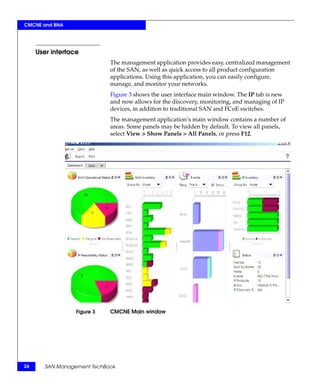
                             Figure 3 shows the user interface main window. The IP tab is new
                             and now allows for the discovery, monitoring, and managing of IP
                             devices, in addition to traditional SAN and FCoE switches.
                             The management application’s main window contains a number of
                             areas. Some panels may be hidden by default. To view all panels,
                             select View > Show Panels > All Panels, or press F12.


                  Figure 3   CMCNE Main window


26      SAN Management TechBook
CMCNE and BNA


Components
                    Basic information on the following CMCNE components is included
                    in this section:
                    ◆   “Discovery” on page 27
                    ◆   “Zoning” on page 28
                    ◆   “Alerting” on page 30
                    ◆   “Monitoring” on page 31

        Discovery   Discovery is the process by which the management application
                    contacts the devices in your environment. Discovery interfaces with
                    the switches in a fabric, or multiple fabrics, and loads information
                    about those switches into a resident database. Among other things,
                    the information includes hardware type, firmware versions, and port
                    information.
                    Once a discovery is completed, a user has the ability to display a
                    topology view that provides a layout of the overall fabric as it has
                    been discovered. For more detailed information or step-by-step
                    procedures on how to discover a switch or fabric, refer to the
                    appropriate user guide.
                    Similar to Brocade Network Advisor (BNA), discussed further in
                    “Brocade Network Advisor” on page 41, CMCNE discovers devices
                    through a seed switch and is capable of handling multiple fabrics
                    within one topology view. For firmware and switch model
                    requirements of a seed switch, refer to the EMC Connectrix Manager
                    Converged Network Edition Professional, Professional Plus, and Enterprise
                    User Guide, located on Powerlink.
                    Figure 4 on page 28 shows the CMCNE Discovered Fabrics dialog
                    box. You click Add to specify the IP addresses of the devices you
                    want to discover.


                                   EMC Connectrix Manager Converged Network Edition             27
CMCNE and BNA


                           The Add Fabric Discovery dialog box displays, also shown in
                           Figure 4.


                Figure 4   CMCNE Discover Fabrics and Add Fabric Discovery dialog box

                           You fill in the blanks and then select OK for the discovery process to
                           begin.

                 Zoning    Zoning defines the communication paths in a fabric. Zoning enables a
                           set of devices connected to a switched Fibre Channel fabric, or a Fibre
                           Channel over Ethernet (FCoE) fabric, to communicate with each
                           other; for example, a host and a storage array.
                           Each zone groups the end ports of the devices involved or the switch
                           ports physically connected to those end ports. Using multiple zones,
                           a single host can communicate with multiple storage devices, and
                           vice versa.
                           A zone set is a collection of zones that can be activated together,
                           partitioning a fabric into zones. Only one of the zone sets associated
                           with a fabric can be active at any time. It is this active zone set that
                           determines which of the devices connected to the fabric can
                           communicate with each other.


28    SAN Management TechBook
CMCNE and BNA


           Zoning information is retained in a zoning library, which can be
           maintained at a switch level or in a database within the connectivity
           tool being used.
           CMCNE can configure zoning both online and offline.
           ◆   Online zoning directly modifies the fabric zone database that
               resides on each individual switch.
           ◆   Offline zoning modifies the zone library that is stored in the
               CMCNE resident database.
           Aliases are used in CMCNE zoning system to associate with a group
           of port index numbers and WWNs. This makes zone configuration
           easier by enabling you to configure zones using an alias rather than
           by inputting a long string of individual members.
           Zoning by WWN, Domain/Port Index, or alias is supported. The
           CMCNE zoning configuration Compare function can be found in the
           Zone DB Operation drop-down menu in the upper right-hand
           corner of the Zoning configuration window, as shown in Figure 5. It
           highlights the differences between two selected databases and
           merges them under users' permission and preferences.


Figure 5   CMCNE Zoning dialog box, Zone DB Operation drop-down men


                          EMC Connectrix Manager Converged Network Edition         29
CMCNE and BNA


                           Multiple zone configurations can be present within CMCNE. An
                           active zone set is indicated by a green label in front of the zone set
                           name, as shown in Figure 5.

                Alerting   Problem notification is an integral part of any connectivity tool.
                           Administrators need to know immediately when there are problems
                           or issues within their environments. Notification is one component of
                           alerting, but the ability to set thresholds for performance issues is also
                           important.
                           The main view from CMCNE shows current alerts and updates and
                           refreshes with any new alerts. You can choose to generate emails or
                           notifications when alerts occur.
                           To drill down to a reported problem, in the SAN tab select a switch
                           that has an alert, right-click the switch, and select Events from the
                           Monitor tab drop-down menu.
                           When an alert occurs, you can drill down to the offending component
                           to get more details as well as examine log files to determine root
                           causes. Under the Monitor tab drop-down menu, you have the
                           ability to set up SNMP so traps generated by an alert can be sent to an
                           Enterprise tool and monitoring tools that can translate the trap. As


30    SAN Management TechBook
CMCNE and BNA


             shown in Figure 6, there are many options from the Monitor tab
             drop-down menu.


  Figure 6   Monitoring alerts

Monitoring   It is essential to be able to monitor your environment. The ability to
             take a quick glance at your environment and see potential problems,
             or be aware of breakdowns as they happen, is a key element in any
             connectivity tool. Almost all tools today have the ability to display a
             main view allowing for a quick check of your environment. Some
             tools allow various modifications to tailor your environment.
             Monitoring is not limited to just alerts or status. It should also
             provide an ability to follow the performance of your fabric. The
             following performance monitoring tools are briefly discussed:
             ◆   “Real-time performance graph” on page 32
             ◆   “Historical performance graph” on page 33
             Both the real-time and historical graph can be opened from the
             Monitor tab drop-down list in CMCNE main view.


                            EMC Connectrix Manager Converged Network Edition           31
CMCNE and BNA


                           Real-time performance graph
                           CMCNE performance monitoring provides details about how much
                           traffic and errors a specific port or switch generates on the fabric over
                           a specific timeframe. You can monitor a switch's real-time
                           performance through a performance graph that displays transmitted
                           and received data, as shown in Figure 7.


                Figure 7   Real time performance graph


32    SAN Management TechBook
CMCNE and BNA


                         Historical performance graph
                         You can also refer to the historical performance chart or report to get
                         an idea of port performance over time, as shown in Figure 8.


             Figure 8    Historical performance graph


New features
                         This section discusses some new features in CMCNE, including:
                         ◆   “Top Talker monitoring” on page 33
                         ◆   “Virtual Fabrics” on page 35
                         ◆   “Diagnostic Port (D_Port)” on page 36
                         ◆   “Connection utilization” on page 37
                         ◆   “Performance analysis” on page 39

 Top Talker monitoring   Top Talker monitoring allows SAN administrators to find out more
                         about the port utilization of the devices. It displays the connections
                         using the most bandwidth on a selected device or port.
                         The Top Talker feature and Fibre Channel routing can be used
                         concurrently for FOS firmware v7.x and later.


                                        EMC Connectrix Manager Converged Network Edition           33
CMCNE and BNA


                           Note: This feature requires the Brocade Advanced Performance Monitoring
                           license and switches running on FOS 6.2 and later.

                           For FOS 6.x, this feature cannot be used when Fibre Channel routing is
                           turned on for the switches.

                           Note the following:
                           ◆    Up to 10 switches can be monitored for the fabric mode Top
                                Talkers.
                           ◆    Up to 32 ports (24 - 8 Gb/s FC port, 8 - 10 Gb/s port) can be
                                monitored for the F_Port Top Talkers.
                           ◆    Top Talkers is only supported on the 8 Gb/s (and higher) FC
                                ports.
                           ◆    By default, the top five busiest ports are listed in the Top Talker
                                dialog. You can choose to view the top 1 to 20 in a a drop-down
                                dialog box.
                           ◆    The Top Talker summary table displays all Top Talkers that
                                occurred since the dialog box was opened, up to a maximum of
                                360 records. Details such as Rx/Tx average, occurrences, source,
                                source switch/port, destination, destination switch/port, percent
                                utilization, last occurred, SID, source port, DID, destination port,
                                and port speed can be viewed in the summary table.
                           The CMCNE Top Talkers dialog box, shown in Figure 9 on page 35,
                           displays the Current Top Talkers and Top Talker Summary for a
                           selected switch (Fabric Mode) or F_Port.


34    SAN Management TechBook
CMCNE and BNA


      Figure 9    CMCNE Top Taler dialog box

Virtual Fabrics   Virtual Fabrics allows SAN administrators to view the entire SAN,
                  both physical and logical, at a glance. It easily determines the logical
                  switches with the icon (V) and provides logical isolation of data,
                  control, and management paths at the port level.
                  The Virtual Fabrics feature divides a physical chassis into multiple
                  logical switches. Logical switches can consist of one or more ports
                  and act like a single Fibre Channel switch. Logical switches can be
                  interconnected to create a logical fabric.
                  The following are some of the benefits of using CMCNE to manage
                  Virtual Fabrics.
                  ◆   Ability to manage a logical switch the same as a physical switch.
                  ◆   Ability to use a logical switch for discovery and eliminate the
                      requirement for one physical chassis for one fabric.


                                 EMC Connectrix Manager Converged Network Edition            35
CMCNE and BNA


                            ◆   Ability to manage multiple Virtual Fabrics-capable physical
                                chassis from the same interface.
                            Figure 10 shows the Logical Switches dialog box.


                Figure 10   Logical Switches dialog box

          Diagnostic Port   This feature is used to diagnose optics (16 G SFP+) and cables for the
                (D_Port)    Condor 3 platform. It can be used to perform functional or stress
                            testing. The following lists testing that can be performed:
                            ◆   Electrical loopback test
                            ◆   Optical loopback test
                            ◆   Link distance test
                            ◆   Link saturation test
                            Figure 11 on page 37 shows the how to use the Diagnostic Port Test
                            dialog box to select an existing fabric as a template or to create a new
                            template.


36    SAN Management TechBook
CMCNE and BNA


             Figure 11   Diagnostic Port test dialog box

Connection utilization   This feature provides a visual representation for connection
                         utilization using different color codes. By default:
                         ◆   Grey line represents 0% to 1% utilization
                         ◆   Blue line represents 1% to 40% utilization
                         ◆   Yellow line represents 40%-80% utilization
                         ◆   Red line represents 80% to 100% utilization.
                         The range of percentages can be adjusted to suit different
                         organizational needs. If connection utilization is disabled, black lines
                         will be displayed in the topology pane.
                         Figure 12 on page 38 shows the blue and grey line connections
                         between different switches.


                                        EMC Connectrix Manager Converged Network Edition            37
CMCNE and BNA


                Figure 12   Connection utilization

                            Figure 13 shows the connection utilization legend.


                Figure 13   Connection utilization legend


38    SAN Management TechBook
CMCNE and BNA


Performance analysis    This feature collects data from managed switches in the SAN. It
                        currently supports only the FC ports (E_Ports and F_Ports), GE ports,
                        and FCIP tunnels. The polling rate can be adjusted from 10 seconds
                        up to 1 minute. Up to 32 ports and 10 devices can be selected for
                        graphing performance.
                        In addition to real-time performance graphs, CMCNE can also
                        provide historical graph (as shown in Figure 8 on page 33) and
                        report, and perform an initiator-to-target monitor (end-to-end
                        monitor).
                        Figure 14 shows an example of the Real Time Performance Graphs
                        dialog box.


            Figure 14   Real time performance graphs dialog


                                      EMC Connectrix Manager Converged Network Edition          39
CMCNE and BNA


     References
                            For more detailed information, refer to the EMC Connectrix Manager
                            Converged Network Edition Professional, Professional Plus, and Enterprise
                            User Guide, located on Powerlink.


40     SAN Management TechBook
CMCNE and BNA


Brocade Network Advisor
                Brocade and EMC have a long-standing partnership to provide
                customers with innovative solutions in an ever-changing and
                challenging environment.
                Brocade Network Advisor (BNA) is a unified network management
                solution designed to simplify and automate network operations by
                unifying network management of SAN, IP (including Ethernet
                fabric), and wireless environments. Again, CMCNE and BNA are
                closely aligned. This section briefly describes the following:
                ◆   “Licensing” on page 41
                ◆   “BNA Dashboard” on page 41
                ◆   “Brocade VDX switches” on page 42
                ◆   “Brocade VCS Fabric technology” on page 43
                ◆   “Ethernet fabrics” on page 44
                ◆   “References” on page 46


Licensing
                Licensing information for Brocade products can be found in the
                "Licenses" section available on http://www.brocade.com, or contact
                your Brocade BNA account representative.


BNA Dashboard
                Brocade Network Advisor (BNA) supports Fibre Channel SANs,
                FCoE, IP switching and routing (including Ethernet fabrics), and
                MPLS networks, providing end-to-end visibility across different
                network types through a seamless and unified user experience.
                BNA supports the following networks:
                ◆   Fibre Channel Storage Area Network (SANs),
                ◆   Fibre Channel over Ethernet (FCoE)
                ◆   Layer 2/3 IP networks (including those running Brocade VCS
                    technology)
                ◆   Wireless networks
                ◆   Application delivery
                ◆   Multiprotocol Label Switching (MPLES)


                                                         Brocade Network Advisor     41
CMCNE and BNA


                             Brocade Network Advisor can manage thousands of devices across
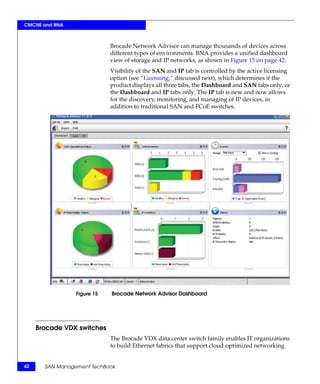
                             different types of environments. BNA provides a unified dashboard
                             view of storage and IP networks, as shown in Figure 15 on page 42.
                             Visibility of the SAN and IP tab is controlled by the active licensing
                             option (see “Licensing,” discussed next), which determines if the
                             product displays all three tabs, the Dashboard and SAN tabs only, or
                             the Dashboard and IP tabs only. The IP tab is new and now allows
                             for the discovery, monitoring, and managing of IP devices, in
                             addition to traditional SAN and FCoE switches.


                 Figure 15   Brocade Network Advisor Dashboard


     Brocade VDX switches
                             The Brocade VDX data center switch family enables IT organizations
                             to build Ethernet fabrics that support cloud-optimized networking


42     SAN Management TechBook
CMCNE and BNA


                     and greater enterprise agility. These switches simplify network
                     architecture, increase scalability, and increase network performance
                     and resiliency with Ethernet fabrics in virtualized data centers.
                     VDX switches support comprehensive Layer 2 LAN capabilities and
                     protocols, including Link Aggregation Control Protocol (LACP) and
                     802.1Q.


Brocade VCS Fabric technology
                     Brocade VCS Fabric technology enables organizations to build
                     high-performance cloud-optimized data centers while preserving
                     existing network designs and cabling, and gaining active-active
                     server connections. For scale-out fabric architectures, Brocade VCS
                     Fabric technology allows organizations to flatten network designs,
                     provide Virtual Machine (VM) mobility without network
                     reconfiguration, and manage the entire fabric more efficiently.
                     Brocade VCS Fabric technology offers features to support virtualized
                     server and storage environments. It simplifies network architectures
                     and enables cloud computing by enabling organizations to build data
                     center Ethernet fabrics.
                     VCS Fabric technology is embedded in the Brocade FDX data center
                     switch family.


                                                               Brocade Network Advisor      43
CMCNE and BNA


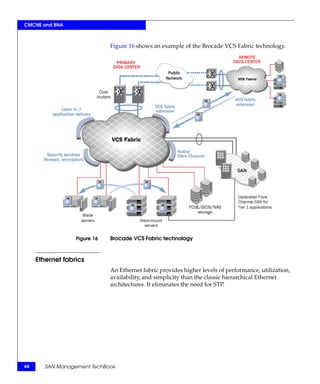
                              Figure 16 shows an example of the Brocade VCS Fabric technology.


                  Figure 16   Brocade VCS Fabric technology


     Ethernet fabrics
                              An Ethernet fabric provides higher levels of performance, utilization,
                              availability, and simplicity than the classic hierarchical Ethernet
                              architectures. It eliminates the need for STP.


44      SAN Management TechBook
CMCNE and BNA


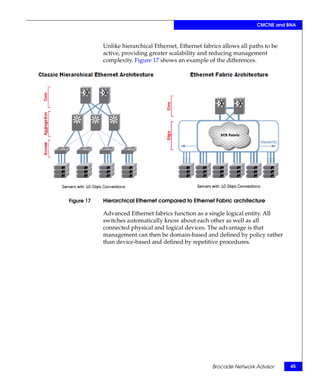
            Unlike hierarchical Ethernet, Ethernet fabrics allows all paths to be
            active, providing greater scalability and reducing management
            complexity. Figure 17 shows an example of the differences.


Figure 17   Hierarchical Ethernet compared to Ethernet Fabric architecture

            Advanced Ethernet fabrics function as a single logical entity. All
            switches automatically know about each other as well as all
            connected physical and logical devices. The advantage is that
            management can then be domain-based and defined by policy rather
            than device-based and defined by repetitive procedures.


                                                       Brocade Network Advisor      45
CMCNE and BNA


     References
                            Further information on the Brocade technologies discussed in this
                            section can be found in the Brocade Network Advisor IP User Manual,
                            available on the Brocade website, http://www.brocade.com,
                            MyBrocade, Brocade Network Advisor documentation.
                            Subjects in this manual include:
                            ◆    Fiber Channel over Ethernet
                            ◆    Security Management section
                                 • MAC and Layer 3 Access Control lists
                            ◆    SSL Certificate Manager for Application Products
                            ◆    Virtual IP (VIP) Server Manager
                            ◆    Global Server Load Balancing (GSLB)
                            ◆    MPLS Manager (Multiprotocol Label Switching)
                            The following data sheets on the Brocade website are also useful:
                            ◆    Brocade Network Advisor Data Sheet
                            ◆    Brocade VDX 6720 Data Center Switch Data Sheet


46     SAN Management TechBook
CMCNE and BNA


Using CMCNE and BNA to manage data center connectivity
                     This section briefly describes the benefits of CMCNE and BNA to
                     manage your data center connectivity. These tools are closely related
                     so much of the information in this section is applicable to both. The
                     only difference is that CMCNE has Call Home functionality.
                     This section further discusses these tools and how they relate to the
                     following:
                     ◆   “Network management” on page 47
                     ◆   “IP features” on page 52
                     CMCNE and BNA provide an easy, user-friendly centralized data
                     center management. They give quick access to all product
                     configuration applications. Using these intuitive applications, you
                     can configure, manage, and monitor your networks with ease.


Network management
                     The most important aspect of data center network management is the
                     technology that supports most, if not all, of the activities associated
                     with running a data center infrastructure. CMCNE and BNA are
                     unified network management systems for managing converged data
                     network and storage network. CMCNE and BNA support intuitive
                     and intelligent features that an administrator needs in maintaining,
                     monitoring, and managing data center network components. They
                     provide comprehensive operations support within a single
                     framework.
                     CMCNE and BNA also support unified networking (through FCoE,
                     10 Gb/s Ethernet and SAN) and have virtualization awareness
                     (through association between port profiles) and VMware port groups
                     (through integration with VMware vCenter).
                     Administrators can use the easy-to-use Device Configuration wizard
                     to configure and manage network devices.
                     Additionally, the integrated Change Manager allows administrators
                     to:
                     ◆   Track device configuration changes
                     ◆   Enable viewing
                     ◆   Retrieve files


                              Using CMCNE and BNA to manage data center connectivity           47
CMCNE and BNA


                           ◆    Restore configuration files
                           ◆    Monitor configuration change for troubleshooting purposes
                           One important new feature of CMCNE and BNA network
                           management software is the Brocade Virtual Cluster Switching (VCS)
                           fabric management. This new Ethernet technology removes many
                           limitations of classic Ethernet networks in the data center.
                           In addition to Layer 2 switching and Layer 3 routing, CMCNE and
                           BNA also support Metro and Carrier Ethernet networks. It provides
                           comprehensive management of MPLS services through the MPLS
                           Manager and supports MPLS Virtual Private LAN Services (VPLS),
                           Label Switched Path (LSP), Local VPLS, Virtual Leased Line (VLL),
                           and Local VLL services with an intuitive interface.
                           The following are some examples of main features of using CMCNE
                           or BNA in a data center, including some example screenshots.
                           ◆    Layer 2 switching
                                • VLANs, DCB, Spanning Tree Protocols such as 802.1D and
                                  Rapid STP, PortChannels, 802.1ag, Power over Ethernet (PoE).

                                   Figure 18 on page 49 shows an example of a DCB
                                   configuration, where most of the L2 options can be
                                   configured.


48    SAN Management TechBook
CMCNE and BNA


Figure 18   DCB configuration

            ◆   Layer 3 routing
                • Layer 3 Mobility, Virtual IP (VIP), Global Server Load
                  Balancing (GSLB).
            ◆   Support for Fiber Channel over Ethernet (FCoE), wireless
                networks, application delivery networks, and Multiprotocol
                Label Switching (MPLS) networks in service provider
                environments.
            ◆   Security, including
                • RBAC, AAA, MAC Access Control lists, Layer 3 Access
                  Control lists, 802.1x, SSL Certificate Manager.


                     Using CMCNE and BNA to manage data center connectivity      49
CMCNE and BNA


                                   Figure 19 shows an example of how an 802.1x configuration
                                   can be accessed from a DCB configuration.


                Figure 19   Enable 802.1x configuration

                            ◆   Comprehensive management, including
                                • Configuration, monitoring, and management of Brocade VDX
                                  switches, the Brocade DCX Backbone family, Brocade routers,
                                  Brocade Ethernet switches, Brocade Host Bus Adapters
                                  (HBAs), and Converged Network Adapters (CNAs).
                            ◆   Easy-to-use Deployment Manger and Device Configuration
                                wizard to configure and manage devices.
                                Figure 20 on page 51 shows an example of the Configuration
                                dialog box.


50    SAN Management TechBook
CMCNE and BNA


Figure 20   Configuration dialog box

            ◆   Network device configuration tracking and retrieval through
                Change Manager.
            ◆   Real-time and historical performance monitoring, traffic analysis,
                change management, and policy-driven remedial actions.
                Figure 7 on page 32 provides an example of a real-time
                performance graph. Figure 8 on page 33 provides an example of
                an historic performance graph. Figure 21 on page 52 shows an
                example of a traffic analyzer.


                     Using CMCNE and BNA to manage data center connectivity          51
CMCNE and BNA


                   Figure 21   Brocade Network Advisor Traffic analyzer

                               ◆   Troubleshooting tools through proactive alerts with real-time
                                   logging, diagnostic, and fault isolation capabilities.
                               ◆   Simplified data center automation through advanced Brocade
                                   VCS fabric management, an Ethernet fabric technology available
                                   in the Brocade VDX switch family.
                               ◆   VM awareness through association of profiles to Virtual Machines
                                   (VMs).
                               ◆   Intuitive features, including
                                   • CLI Manager, IP Element Manager, Image Repository for IP
                                     products, Packet Capture (Pcap), Frame Monitor.


     IP features
                               With the advent of virtualization and unified networking, the
                               complexity of managing data center infrastructure has greatly
                               increased. The intricacy of data networking and the dramatic growth
                               of different IP services such as the world-wide web, email, online


52      SAN Management TechBook
CMCNE and BNA


            shopping, video conferences, and multicast applications (such as
            music streaming), depend on reliable wired and wireless networks.
            To address this need, a new IP tab was developed for the CMCNE
            and BNA. The IP protocol can be used not only in LAN, but also in IP
            SAN and converged networking.
            Figure 22 shows the information contained in the IP tab, including
            the Product List, Topology Map, Master Log, and Minimap.


Figure 22   IP features under the IP tab

            CMCNE and BNA support FCoE, Layer 2 switching, Layer 3 IP
            networks (including those running Brocade VCS technology),
            wireless networks, application delivery networks, and Multiprotocol
            Label Switching (MPLS) networks in service provider environments.


                     Using CMCNE and BNA to manage data center connectivity        53
CMCNE and BNA


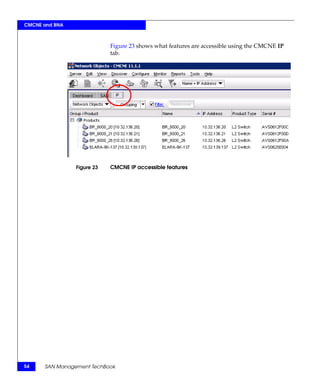
                            Figure 23 shows what features are accessible using the CMCNE IP
                            tab.


                Figure 23   CMCNE IP accessible features


54    SAN Management TechBook
3

                                                                               Cisco DCNM


Cisco Data Center Network Manager (DCNM) can manage storage
and data networking over the converged, virtualized data center.
This chapter provides basic information on the Cisco DCNM product
and how it works in the IP, SAN, and LAN environments.
◆   DCNM .................................................................................................   56
◆   Web-based interface (Dashboard)....................................................                      59
◆   DCNM-SAN........................................................................................         66
◆   DCNM-LAN .......................................................................................         78


                                                                                     Cisco DCNM                   55
Cisco DCNM


     DCNM
                            Data center network management involves numerous complex
                            functions. From monitoring and maintaining the network devices to
                            provisioning the services, from data center network infrastructure
                            troubleshooting to capacity planning, from detecting security threats
                            to assessing the impact of scheduled network maintenance or
                            migration.
                            To address the need of managing converged, virtualized data centers,
                            Cisco merged two management solutions, Cisco Fabric Manager and
                            Cisco Data Center Network Manager for LAN, into one product, the
                            Cisco Data Center Network Manager (DCNM).
                            The DCNM has two main components:
                            ◆    DCNM-SAN to manage storage fabrics, discussed further in
                                 “DCNM-SAN” on page 66
                            ◆    DCNM-LAN to manage data networks, discussed further in
                                 “DCNM-LAN” on page 78
                            Administrators can still maintain control and segmentation through
                            role-based access control (RBAC) but now with easier visibility across
                            the network and storage access infrastructure.
                            DCNM simplifies management of the virtual infrastructure by
                            enabling management of the entire path through the physical to the
                            virtual network across the entire data center environment through a
                            single management dashboard.
                            This section provides the following basic information for the Cisco
                            Data Center Network Manager (DCNM).
                            ◆    “Licensing” on page 57
                            ◆    “Views” on page 57
                            More detailed information on DCNM can be found at the Cisco
                            website at http://www.cisco.com.


56     SAN Management TechBook
Cisco DCNM


Licensing
                  Different features for managing the SAN and LAN infrastructure are
                  available depending on licensing options. You can license the SAN
                  and LAN environments separately or together.
                  The following types of licensing for DCNM for SAN and DCNM for
                  LAN are available:

            SAN   ◆   Essentials Edition
                      • Cisco DCNM for SAN Essentials Edition is included with
                        Cisco MDS 9000 Family hardware.
                  ◆   Advanced Edition
                      • Cisco DCNM for SAN Advanced Edition adds capabilities
                        such as performance monitoring and trending, virtual
                        machine–aware path analysis, event forwarding, and
                        federation across multiple data centers.

            LAN   ◆   Essentials Edition
                      • Cisco DCNM for LAN Essentials Edition is included with
                        Cisco Nexus Family hardware.
                  ◆   Advanced Edition
                      • Cisco DCNM for LAN Advanced Edition adds capabilities
                        such as configuration management, image management,
                        virtual device contexts (VDCs), and Cisco FabricPath.
                  Licenses are now hosted on the management server and not the
                  switch. Detailed information on licensing options is available on the
                  Cisco website at http://www.cisco.com/go/dcnm.


Views
                  Cisco DCNM is a Java-based client-server application that allows the
                  client to be run remotely. Server and client components can be
                  deployed over various hardware and OS platforms. A browser-based
                  interactive dashboard to simplify the management of the virtual
                  infrastructure is also available.


                                                                              DCNM        57
Cisco DCNM


                            There are three main ways to view the information discussed further
                            throughout this chapter:
                            ◆    DCNM-SAN or DCNM-LAN main window
                                 • An example of the DCNM-SAN main view is shown in
                                   Figure 32 on page 71.
                                 • An example of the DCNM-LAN main window is shown in
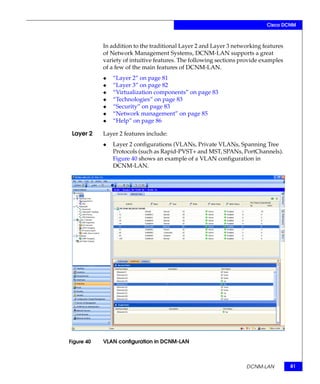
                                   Figure 40 on page 81.
                            ◆    Device Manager (for DCNM-SAN)
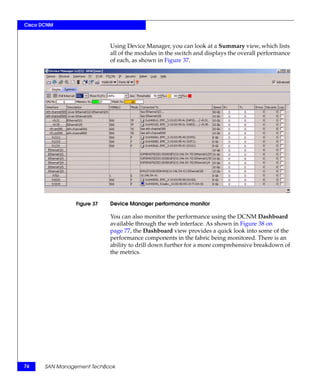
                                 An element manager for MDS and N5K switches. An example of
                                 the Device Manager view is shown in Figure 35 on page 74.
                            ◆    DCNM Web interface (Dashboard is the default screen)
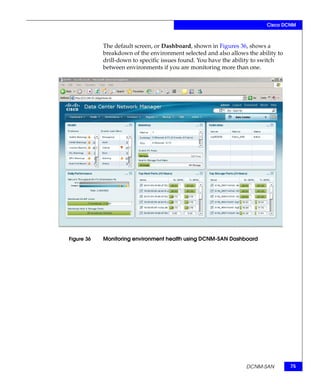
                                 The Dashboard is the default window of the web interface. An
                                 example is shown in Figure 36 on page 75.
                                 More information is provided in “Web-based interface
                                 (Dashboard)” on page 59.
                            To check for any hardware problems on the switches within the
                            environment, use the Main window or the Device Manager.
                            To check the overall health of the monitored environments, use the
                            web interface (Dashboard).


58     SAN Management TechBook
Cisco DCNM


Web-based interface (Dashboard)
                The DCNM main window and Device Manager are used to manage
                the SAN and LAN. These are similar to Fabric Manager. However, to
                simplify the management of the virtual infrastructure, DCNM
                provides a new, easy-to-use web interface, which this section will
                briefly discuss. This window is sometimes referred to as the
                Dashboard since that is the default window.
                You can view all the dependencies from the virtual machine out to
                the physical host, through the fabric, and to the storage array using
                the virtual machine-aware (VM-aware) topology view. This view
                allows easy access to a detailed view of the path attributes.
                All the information needed to manage the virtual environment
                including performance charts, inventory information, events, and
                virtual machine and VMware ESX utilization information, is
                displayed. Cisco DCNM maps paths from the server to storage,
                enabling you to track mission-critical workloads across the entire
                network.
                The tabs of this interface are briefly described in the following
                sections:
                ◆   “Dashboard tab” on page 60
                ◆   “Health tab” on page 61
                ◆   “Performance tab” on page 62
                ◆   “Inventory tab” on page 64


                                                  Web-based interface (Dashboard)           59
Cisco DCNM


             Dashboard tab    Reporting and drill-down capabilities have been greatly improved.
                              Figure 24 show the default view, the Dashboard, when logging into
                              the client web interface of DCNM-SAN.


                  Figure 24   DCNM-SAN Dashboard summary view

                              If multiple fabrics are discovered within the DCNM-SAN server
                              environment, you can select which specific fabric you want to view
                              and drill down further to specific events, switches, or performance
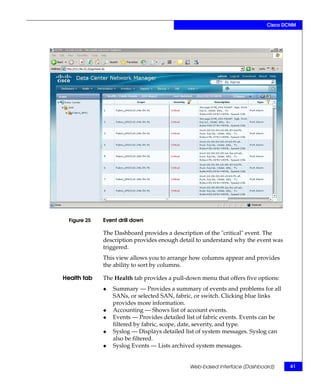
                              metrics. In Figure 25 on page 61 "critical" events" is selected.


60     SAN Management TechBook
Cisco DCNM


  Figure 25   Event drill down

              The Dashboard provides a description of the "critical" event. The
              description provides enough detail to understand why the event was
              triggered.
              This view allows you to arrange how columns appear and provides
              the ability to sort by columns.

Health tab    The Health tab provides a pull-down menu that offers five options:
              ◆   Summary — Provides a summary of events and problems for all
                  SANs, or selected SAN, fabric, or switch. Clicking blue links
                  provides more information.
              ◆   Accounting — Shows list of account events.
              ◆   Events — Provides detailed list of fabric events. Events can be
                  filtered by fabric, scope, date, severity, and type.
              ◆   Syslog — Displays detailed list of system messages. Syslog can
                  also be filtered.
              ◆   Syslog Events — Lists archived system messages.


                                              Web-based interface (Dashboard)       61
Cisco DCNM


         Performance tab     The Performance tab displays the overall performance within the
                             environment in the last twenty-four hour period. In addition to the
                             quick view provided, you have the ability to use a mouse fly-over to
                             better view a breakdown, such as a timeline, as shown in Figure 26.


                 Figure 26   Using mouse-over in Performance view

                             From the Performance pull-down menu you can select switch, ISL,
                             NPV Links, Ethernet, End Devices, Flows, and Other performance
                             statistics. For example, if you select a switch, you have three more
                             options: CPU, Memory, and Bandwidth.


62     SAN Management TechBook
Cisco DCNM


            In Figure 27, Switch CPU is selected. The display initially gives
            values, but there is an option to chart the numbers over a selected
            period of time. This would prove useful if you are trying to correlate
            peak usage times with overall switch performance.


Figure 27   Switch CPU performance


                                             Web-based interface (Dashboard)         63
Cisco DCNM


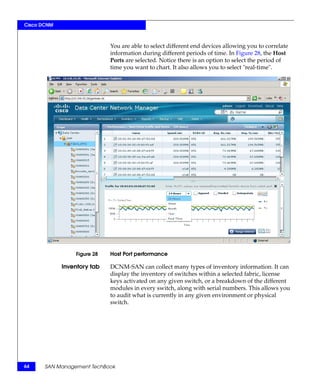
                             You are able to select different end devices allowing you to correlate
                             information during different periods of time. In Figure 28, the Host
                             Ports are selected. Notice there is an option to select the period of
                             time you want to chart. It also allows you to select "real-time".


                 Figure 28   Host Port performance

             Inventory tab   DCNM-SAN can collect many types of inventory information. It can
                             display the inventory of switches within a selected fabric, license
                             keys activated on any given switch, or a breakdown of the different
                             modules in every switch, along with serial numbers. This allows you
                             to audit what is currently in any given environment or physical
                             switch.


64     SAN Management TechBook
Cisco DCNM


            The example shown in Figure 29 displays the module inventory of
            the fabric selected.


Figure 29   Module inventory

            Other tabs are available in this Dashboard, including Reports,
            Backup, SME, and Admin. For more details on other options, refer to
            the Cisco website at http://www.cisco.com/go/dcnm.


                                            Web-based interface (Dashboard)       65
Cisco DCNM


     DCNM-SAN
                            Although there is a new web interface with several new features,
                            many of the SAN or connectivity functions look and work like the
                            original Cisco Fabric Manager product. This section discusses the
                            following information and introduces the new web interface:
                            ◆    “Licensing” on page 66
                            ◆    “Views” on page 68
                            ◆    “Benefits” on page 68
                            ◆    “Components” on page 69
                            ◆    “Features” on page 69
                            ◆    “References” on page 77

                            DCNM-SAN is installed via a CD-ROM, unlike Fabric Manager that
                            was downloaded from a switch. Installation information can be
                            found on the Cisco website at http://www.cisco.com/go/dcnm.


     Licensing
                            Refer to “Licensing” on page 57 for more detailed information on
                            licensing options.
                            The following types of licensing for DCNM for SAN are available:

                     SAN    ◆    Essentials Edition
                                 • Cisco DCNM for SAN Essentials Edition is included with
                                   Cisco MDS 9000 Family hardware.
                            ◆    Advanced Edition
                                 • Cisco DCNM for SAN Advanced Edition adds capabilities
                                   such as performance monitoring and trending, virtual
                                   machine–aware path analysis, event forwarding, and
                                   federation across multiple data centers.
                                 • Cisco DCNM for LAN Advanced Edition adds capabilities
                                   such as configuration management, image management,
                                   virtual device contexts (VDCs), and Cisco FabricPath.
                            Licenses are now hosted on the management server and not the
                            switch. Detailed information on licensing options is available on the
                            Cisco website at http://www.cisco.com/go/dcnm.


66     SAN Management TechBook
Cisco DCNM


            Once the DCNM-SAN license is available, the DCNM option can be
            launched from the server through http or https web access.
            Figure 30 shows the DCNM-SAN option from the DCNM main page.


Figure 30   DCNM-SAN option in Data Center Network Manager

            For more information on DCNM-LAN installation, refer to the Cisco
            DCNM Installation and Licensing Guide available on the Cisco website
            at http://www.cisco.com/go/dcnm.
            For more information about the Cisco DCNM software or other
            licensing information, contact your Cisco account representative.


                                                                  DCNM-SAN         67
Cisco DCNM


     Views
                             There are three main ways to view the information discussed
                             throughout the DCNM-SAN sections:
                             ◆    DCNM-SAN main window
                                  An example of the DCNM-SAN main view is shown in Figure 32
                                  on page 71.
                             ◆    Device Manager (for DCNM-SAN)
                                  An element manager for MDS and N5K switches. An example of
                                  the Device Manager view is shown in Figure 35 on page 74.
                             ◆    DCNM Web interface (Dashboard is the default screen)
                                  The Dashboard is the default window of the web interface. An
                                  example is shown in Figure 36 on page 75.
                             To check for any hardware problems on the switches within the
                             environment, use the Main window or the Device Manager.
                             To check the overall health of the monitored environments, use the
                             web interface (Dashboard).


     Benefits
                             Cisco DCNM simplifies management of the data center, offering the
                             following benefits with the new web interface:
                             ◆    Virtual Machine-aware path management
                                  Enables management of the entire path through the physical to
                                  the virtual network across the entire data center environment
                                  using VMpath (identifies bottlenecks) and VM-aware (shows
                                  dependencies) views.
                             ◆    Performance and troubleshooting
                                  Monitors and provides alerts for fabric availability and
                                  performance.
                             ◆    Interactive dashboard
                                  Provides capability to view more details of key performance
                                  indicators (KPIs). Proactively measures, analyzes, and predicts
                                  performance of SAN infrastructure.


68      SAN Management TechBook
Cisco DCNM


                       ◆   Scalability
                           Uses federation to scale to large and distributed data center
                           deployments.
                       For more information, refer to “Web-based interface (Dashboard)” on
                       page 59.


Components
                       DCNM-SAN uses interdependent software components that
                       communicate with the switches. Components include:
                       ◆   DCNM-SAN Server
                       ◆   DCNM-SAN Client
                       ◆   Device Manager
                       ◆   DCNM-SAN Web Client
                       ◆   Performance Manager
                       ◆   Cisco Traffic Analyzer
                       ◆   Network Monitoring
                       ◆   Performance Monitoring
                       Detailed information on these components can be found in the Cisco
                       DCNM Fundamentals Guide and other documents located on the Cisco
                       website at http://www.cisco.com/go/dcnm.


Features
                       This section discusses some of the necessary features used to manage
                       a connectivity environment, including:
                       ◆   “Discovery” on page 69
                       ◆   “Zoning” on page 71
                       ◆   “Alerts” on page 72
                       ◆   “Monitoring” on page 74

           Discovery   After installing the DCNM-SAN server components, one option
                       when logging into the server will be to discover a fabric. Enter the IP
                       address of the seed switch in the Fabric you wish to discover, provide
                       the necessary login credentials, and click Discover from the Control


                                                                               DCNM-SAN          69
Cisco DCNM


                             Panel. The Discover dialog box displays, as shown in Figure 31 on
                             page 70.


                 Figure 31   Discover dialog box

                             After the initial discovery is performed, there is no need to perform
                             subsequent discoveries when logging in to DCNM. Simply select the
                             fabric you want in the DCNM-SAN main window in the Logical
                             Domains top-left pane, under SAN and click OK.


70     SAN Management TechBook
Cisco DCNM


            The DCNM-SAN main window will now be the default view when
            logging in to DCNM-SAN, as shown in Figure 32.


Figure 32   DCNM-SAN main window

            Like Fabric Manager, you can still launch Device Manager from
            DCNM-SAN's main view, as shown in Figure 33 on page 72.
            Device Manager provides the Device and Summary View.
            ◆   Summary view is used to monitor interfaces on the switch.
            ◆   Device view is used to perform switch-level configurations.

 Zoning     Zones and zone sets are based on Cisco VSANs. Each VSAN has its
            own zoning database containing zones and zone set information
            applicable to the VSAN. A zone or zoneset from one VSAN cannot be
            applied to another VSAN.


                                                                  DCNM-SAN        71
Cisco DCNM


                             Multiple zones and zonesets can reside within each VSAN created.
                             However, only one zoneset can be active at any given time. Figure 33
                             on page 72 shows an example of the Zoning view in a DCNM-SAN.


                 Figure 33   DCNM-SAN Zoning view

                             By highlighting a particular VSAN in the upper left-hand pane, the
                             corresponding VSAN components is highlighted in the map display.
                             Once you have selected a VSAN, simply select the Zone option from
                             the drop-down menu to begin your zoning configuration.

                    Alerts   Alerts can be monitored throughout the environment from either:
                             ◆   Main window
                             ◆   Device Manager
                             ◆   Web interface


72     SAN Management TechBook
Cisco DCNM


            To check for any hardware problems on the switches within the
            environment, use the Main window or the Device Manager. The
            Dashboard is used to check the overall health of the monitored
            environments.
            In the Main window, highlight Switches under the Physical
            Attributes pane on the bottom right-hand side of the window, as
            shown in Figure 34, to view attributes of the switch.


Figure 34   Alerts in the Main window


                                                                 DCNM-SAN       73
Cisco DCNM


                             Device Manager, shown in Figure 35, drills down into an individual
                             switch, providing a view of the physical layout of a switch, allowing
                             a quick way to check for any hardware problems on switches in the
                             environment.


                 Figure 35   Alerts in the Device Manager view

              Monitoring     You can monitor the overall health of your fabric using DCNM-SAN.
                             There is also an ability to monitor performance real-time.
                             To check the health of the environments being monitored, you can
                             invoke DCNM-SAN through the web interface.


74     SAN Management TechBook
Cisco DCNM


            The default screen, or Dashboard, shown in Figures 36, shows a
            breakdown of the environment selected and also allows the ability to
            drill-down to specific issues found. You have the ability to switch
            between environments if you are monitoring more than one.


Figure 36   Monitoring environment health using DCNM-SAN Dashboard


                                                                  DCNM-SAN         75
Cisco DCNM


                             Using Device Manager, you can look at a Summary view, which lists
                             all of the modules in the switch and displays the overall performance
                             of each, as shown in Figure 37.


                 Figure 37   Device Manager performance monitor

                             You can also monitor the performance using the DCNM Dashboard
                             available through the web interface. As shown in Figure 38 on
                             page 77, the Dashboard view provides a quick look into some of the
                             performance components in the fabric being monitored. There is an
                             ability to drill down further for a more comprehensive breakdown of
                             the metrics.


76     SAN Management TechBook
Cisco DCNM


             Figure 38   Performance monitoring using DCNM-SAN Dashboard


References
                         For more detailed information on the DCNM, refer to:
                         ◆   Cisco DCNM Fundamentals Guide and other documents located on
                             the Cisco website at http://www.cisco.com/go/dcnm.
                         ◆   Cisco Data Center Network Manager Data Sheet
                         For installation, licensing, and other documentation, refer to
                         http://www.cisco.com/go/dcnm.


                                                                                 DCNM-SAN         77
Cisco DCNM


     DCNM-LAN
                            Proliferation of new technologies, such as virtualization and unified
                            networking (for example, FCoE) added new level of data center
                            network management complexity. Cisco DCNM-LAN provides a
                            robust framework and comprehensive feature set that meets the
                            routing and switching needs of present and future virtualized data
                            centers. This tool can deliver converged network management,
                            scalability, and intelligence.
                            The features of Cisco DCNM-LAN focus on supporting efficient
                            operations and management of unified networks and new
                            networking technologies (such as vPC) and provide visibility to
                            virtualization components (such as virtual switches).
                            ◆    “Licensing” on page 78
                            ◆    “Views” on page 79
                            ◆    “Benefits” on page 80
                            ◆    “Component” on page 80
                            ◆    “Features” on page 80
                            ◆    “References” on page 89
                            The DCNM-LAN can be accessed via DCNM-LAN client access
                            through http or https, depending on the access configured during the
                            installation. Normally, the software is not managed on the server.
                            During troubleshooting a need may arise to open up the
                            DCNM-LAN in the server. To open, click Programs > Cisco DCNM
                            Server > DCNM-LAN Client.


     Licensing
                            Refer to “Licensing” on page 57 for more detailed information. The
                            following types of licensing for DCNM for LAN are available:

                     LAN    ◆    Essentials Edition
                                 • Cisco DCNM for LAN Essentials Edition is included with
                                   Cisco Nexus Family hardware.
                            ◆    Advanced Edition
                                 • Cisco DCNM for LAN Advanced Edition adds capabilities
                                   such as configuration management, image management,
                                   virtual device contexts (VDCs), and Cisco FabricPath.

78     SAN Management TechBook
Cisco DCNM


                    Licenses are now hosted on the management server and not the
                    switch. Detailed information on licensing options is available on the
                    Cisco website at http://www.cisco.com/go/dcnm.
                    Once the DCNM-LAN license is available, the DCNM option can be
                    launched from the server through http or https web access.


Views
                    There are three main ways to view the information discussed
                    throughout the DCNM-SAN sections:
                    ◆   DCNM-LAN main window
                        An example of the DCNM-LAN main view is shown in Figure 39.


        Figure 39   DCNM-LAN main view

                    ◆   Device Manager
                        An element manager for MDS and N5K switches. An example of
                        the Device Manager view is shown in Figure 35 on page 74.
                    ◆   DCNM Web interface (Dashboard is the default screen)
                        The Dashboard is the default window of the web interface. An
                        example is shown in Figure 36 on page 75.
                    To check for any hardware problems on the switches within the
                    environment, use the Main window or the Device Manager.


                                                                           DCNM-LAN         79
Cisco DCNM


                             To check the overall health of the monitored environments, use the
                             web interface (Dashboard).


     Benefits
                             Benefits include:
                             ◆    Proactive monitoring
                             ◆    Detailed visibility into performance and capacity
                             ◆    Simplifies management of virtual infrastructure
                             ◆    Displays real-time operationally focused topology of the data
                                  center infrastructure
                             ◆    Streamlines troubleshooting process
                             ◆    Provides custom reports
                             ◆    Provides configuration wizards
                             ◆    Easy integration with third-party applications


     Component
                             DCNM-LAN client.


     Features
                             The features of Cisco DCNM-LAN focus on supporting efficient
                             operations and management of unified networks and new
                             networking technologies (such as vPC) and provide visibility to
                             virtualization components (such as virtual switches).
                             This tool provides proactive monitoring of the overall health of the
                             network and generates alerts when it detects a component fault or
                             network issue that may impact the network service.
                             DCNM-LAN Network Path Analysis identifies network bottlenecks
                             and predicts whether they will occur based on historical trending and
                             forecasting, enhancing capacity planning. It helps data center
                             administrators provision unified network through user-friendly and
                             easy to follow wizards that check configuration compliance before
                             committing changes.
                             The DCNM-LAN user interface and software layout is easy to
                             understand, shortening an administrators' learning curve. The
                             features and configuration options are laid out on the left side of the
                             screen. Functions are easy to use.


80      SAN Management TechBook
Cisco DCNM


            In addition to the traditional Layer 2 and Layer 3 networking features
            of Network Management Systems, DCNM-LAN supports a great
            variety of intuitive features. The following sections provide examples
            of a few of the main features of DCNM-LAN.
            ◆   “Layer 2” on page 81
            ◆   “Layer 3” on page 82
            ◆   “Virtualization components” on page 83
            ◆   “Technologies” on page 83
            ◆   “Security” on page 83
            ◆   “Network management” on page 85
            ◆   “Help” on page 86

 Layer 2    Layer 2 features include:
            ◆   Layer 2 configurations (VLANs, Private VLANs, Spanning Tree
                Protocols (such as Rapid-PVST+ and MST, SPANs, PortChannels).
                Figure 40 shows an example of a VLAN configuration in
                DCNM-LAN.


Figure 40   VLAN configuration in DCNM-LAN


                                                                   DCNM-LAN          81
Cisco DCNM


                             ◆   Template-based configuration and easy-to-use provisioning
                                 capabilities for new technologies, such as FIP Snooping Wizard
                                 for efficient rollout of new technologies. Figure 41 shows an
                                 example of the FIP Snooping Wizard.


                 Figure 41   FIP Snooping Wizard

                  Layer 3    Layer 3 features include:
                             ◆   Layer 3 Interface Configuration
                             ◆   Hot Standby Router Protocol (HSRP)
                             ◆   Gateway Load Balancing Protocol (GLBP)


82     SAN Management TechBook
Cisco DCNM


                 Figure 42 shows an example of the GLBP.


     Figure 42   Gateway redundancy features

Virtualization   Provides support for the following Cisco switches:
components
                 ◆   Cisco Nexus 7000, 5000, 4000, and 3000Sseries switches
                 ◆   Fabric Extender Nexus 2000 Series switches
                 ◆   Cisco Nexus 1000v virtual switches
                 ◆   Cisco Catalyst 6500 series switches

Technologies     Provides better management for new technologies, including:
                 ◆   vPC (virtual Port-Channel)
                 ◆   VDC (virtual device context)
                 ◆   Cisco FabricPath
                 ◆   Fibre Channel over Ethernet (FCoE)

     Security    Supports configuration and monitoring for network security features,
                 including:
                 ◆   RBAC
                 ◆   VLAN Access Control Lists
                 ◆   MAC Access Control lists
                 ◆   IPv4/IPv6 Access Control lists
                 ◆   ARP Inspection
                 ◆   Port Security

                                                                       DCNM-LAN         83
Cisco DCNM


                             ◆   DHCP Snooping
                             ◆   IP Source Guard,
                             ◆   Traffic Storm Control
                             Figure 43 shows an example of some of the security features of the
                             DCNM-LAN for Layer 2.


                 Figure 43   Layer 2 security features, DCNM-LAN

              Monitoring     Monitoring features provide the following:
                             ◆   Proactive monitoring and problem diagnosis less time needed to
                                 troubleshoot problems
                             ◆   Performance and capacity monitoring and tending for LAN
                                 infrastructure


84     SAN Management TechBook
Cisco DCNM


                Figure 44 shows an example of the Network Analysis Wizard.


    Figure 44   Network Analysis wizard

    Network     Network management tools include:
management
                ◆   Network Inventory
                ◆   Device ODS management
                ◆   Configuration management


                                                                  DCNM-LAN           85
Cisco DCNM


                             Figure 45 shows an example of how you can view network inventory
                             in the DCNM-LAN.


                 Figure 45   Network inventory in DCNM-LAN

                     Help    DCNM provides a comprehensive help system. Searching
                             configuration guides is faster because help files are stored locally on
                             the server where the DCNM is installed. The help offers concise
                             explanations about the feature or technology you are configuring, for
                             example, IP Access List.


86     SAN Management TechBook
Cisco DCNM


            Figure 46 shows a comprehensive DCNM Help with a brief
            introduction to the feature you are configuring and step-by-step
            instructions from the Configuration Guide.


Figure 46   DCNM Help


                                                                  DCNM-LAN        87
Cisco DCNM


                             Figure 47 shows the DCNM-LAN option from the DCNM main page.


                 Figure 47   DCNM-LAN option in Data Center Network Manager

                             For more information on DCNM-LAN installation, refer to the Cisco
                             DCNM Installation and Licensing Guide available on the Cisco website
                             at http://www.cisco.com/go/dcnm.
                             For more information about the Cisco DCNM software or other
                             licensing information, contact your Cisco account representative.


88     SAN Management TechBook
Cisco DCNM


References
             For more detailed information on the DCNM, refer to the following
             documentation located on the Cisco website at
             http://www.cisco.com/go/dcnm.
             ◆   Cisco DCNM Fundamentals Guide
             ◆   Cisco Data Center Network Manager Data Sheet
             ◆   Fabric Path Configuration Guide, Cisco DCNM for LAN
             ◆   Security Configuration Guide, Cisco DCNM for LAN
             ◆   Interfaces Configuration Guide, Cisco DCNM for LAN
                 • Layer 2 and Layer 3 interfaces, vPCs, Port-Channels, Fabric
                   Extender, Port Profiles, IP Tunnels For more information on
                   DCNM Configuration Guide for VLANs, Spanning Tree
                   Protocol, IGMP Snooping, FIP Snooping refer to Layer 2
                   Switching Configuration Guide, Cisco DCNM for LAN, available
                   on http://www.cisco.com
             ◆   Unicast Routing Configuration Guide, Cisco DCNM for LAN
                 • Gateway Redundancy (HSRP and GLBP)
             ◆   System Management Configuration Guide, Cisco DCNM for LAN
                 • SPAN, LLDP, Device OS management, Configuration
                   management, Network Inventory, and Managing Events
             For installation, licensing, and other documentation, refer to
             http://www.cisco.com/go/dcnm.


                                                                      DCNM-LAN        89
Cisco DCNM


90     SAN Management TechBook
4

                                                            Choosing A Software
                                                              Management Tool


This chapter contains some questions to ask and information to help
you select the right software management tool for managing your
data center connectivity. Questions are followed by brief answers
relating to CMCNE, BNA, and DCNM.
◆   Considerations in choosing a tool ...................................................                      92
◆   Decision makers .................................................................................          93
◆   Scalability ............................................................................................   94
◆   Installation...........................................................................................    95
◆   Ease of use...........................................................................................     96
◆   Out-of-the-box ....................................................................................        97
◆   Customization ....................................................................................         98


                                             Choosing A Software Management Tool                                    91
Choosing A Software Management Tool


     Considerations in choosing a tool
                                 New software management tools are becoming available to help
                                 manage data center connectivity. This chapter provides some
                                 questions and answers to consider during the tool selection process.
                                 A more complete list of considerations is provided in Chapter 1,
                                 ”Introduction to Managing Data Center Connectivity.” This chapter
                                 only addresses a few of these areas:
                                 ◆    “Scalability” on page 94
                                 ◆    “Ease of use” on page 96
                                 ◆    “Out-of-the-box” on page 97
                                 ◆    “Customization” on page 98
                                 For in-depth information on the features and use of the software
                                 management tools discussed in this chapter, refer to the following
                                 chapters:
                                 Chapter 2, ”CMCNE and BNA,” and Chapter 3, ”Cisco DCNM.”


92     SAN Management TechBook
Choosing A Software Management Tool


Decision makers
                  The data center was traditionally managed by two different
                  organizations with at least two different software management
                  programs. The new I/O consolidation environment, using Fiber
                  Channel over Ethernet (FCoE) to bridge the gap in the I/O
                  consolidation area, integrates the traditional LAN management and
                  SAN management. Therefore, when evaluating the best tool for the
                  company, all the right people should be involved to decide the
                  priorities of the organization.
                  Because the tool needs to meet many needs, it is important to have
                  the appropriate people involved so you ask all the right questions.
                  You may want to consider having some, or all, of the following
                  people as part of the discussion-making process:
                  ◆   IT managers
                  ◆   Data center managers
                  ◆   Network administrators
                  ◆   Network engineers
                  ◆   SAN architects
                  ◆   Storage architects


                                                                    Decision makers      93
Choosing A Software Management Tool


     Scalability

     Can this tool scale to larger environments?
          CMCNE and BNA          Not only will CMCNE discover SAN switches and network devices,
                                 but it will manage FCoE devices as well.
                                 CMCNE and BNA support up to 9,000 SAN switch ports, and over
                                 250,000 IP device ports, or more than 5000 IP products.
                                 In order to run in a large scale environment effectively, you need to
                                 dedicate a larger set of resources for the products to still function
                                 properly.
                                 For a large scale installation, the server requires Intel quad dual core
                                 or dual quad core, 2.4 GHz, 6 GB RAM, and 80 GB disk. Although not
                                 considered a super high-end server, it has the ability to scale in large
                                 data center environments, although a 64-bit O/S is required.
                                 Refer to the CMCNE User Guide on http://www.powerlink.emc.com
                                 and BNA documentation on http://brocade.com for specific details
                                 to answer the scalability questions for your environment.

                      DCNM       Depending on server resources, a single large server instance can
                                 handle upwards of 15,000 ports. Through federation, multiple servers
                                 can be deployed, and yet you can maintain a single monitoring view.
                                 DCNM can scale upwards and yet can handle much smaller data
                                 centers as well.
                                 The resources required for installation vary according to size of the
                                 environment.
                                 For the large environments the server requirements are quad-core
                                 CPUs, 8 Gb of memory, and 60 Gb of disk space.
                                 The client requires 2 GHz CPU, 1 Gb of memory, and 1 Gb of disk
                                 space. Overall, not a huge server, so some dedicated resources would
                                 be required.
                                 Refer to DCNM documentation at http://cisco.com for specific
                                 details to answer the scalability questions for your environment.


94     SAN Management TechBook
Choosing A Software Management Tool


Installation

Is the product easy to install?
     CMCNE and BNA       A SAN architect or administrator who is familiar with the
                         environment should have little to no issues installing this product.
                         Insert the CD, review license agreement, select installation
                         folder/directory, and review. The installation takes little time.
                         Once installed, you are asked several configuration questions, at
                         which point you can migrate a previous Brocade SAN installation.
                         When performing a migration, remember that you can only migrate
                         either the LAN segment or the SAN segment. You cannot migrate
                         both. CMCNE and BNA are a merging of two products from Brocade:
                         the Connectrix Manager for SAN management and the Ironview
                         Network Manger (INM). So, when asked what you would like to
                         migrate, think in terms of whether it would be easier to discover your
                         SAN environment again, or your IP environment, since you can only
                         choose one. This is not a problem for most customers, but it is a
                         limitation that should be pointed out.

               DCNM      With some preparation, SAN administrators should be able to install
                         this without a problem.
                         For easier installation, make sure you know what passwords are
                         being used across your environment. Browse through the installation
                         guide to familiarize yourself with the terminology you will encounter
                         during the installation since to access the DCNM server you have the
                         option to either install the client or use a web browser. This would not
                         be obvious to someone who had not prepared for the installation by
                         reading the installation documentation.


                                                                                   Installation     95
Choosing A Software Management Tool


     Ease of use

     Is the product easy to use?
                                 A follow-on question might be Can I migrate my current SAN
                                 environment to this new product?

          CMCNE and BNA          For customers who have used previous versions of Connectrix
                                 Manager, the learning curve will be relatively flat as most of the
                                 features and options available in previous versions have been carried
                                 over and added into CMCNE and BNA.
                                 What is new is the discovery and management of the IP and FCoE
                                 environment. These tools are fairly intuitive. The initial screen, the
                                 Dashboard tab, gives you a quick view of the overall status of your
                                 discovered connectivity environment. There is currently no
                                 interaction, so this screen is essentially for display purposes only.
                                 In addition to the Dashboard tab, there are also two other tabs
                                 available: SAN, and IP. You will not see all three tabs unless the proper
                                 license key is installed. Depending on which tab is selected, a different
                                 set of drop-down menu options appear. Again, for those who have
                                 previously used Connectrix Manager, the SAN tab will look virtually
                                 the same. The IP tab is new and now allows for the discovery,
                                 monitoring, and managing of IP devices, in addition to traditional
                                 SAN and FCoE switches.

                      DCNM       Once you invoke the DCNM, you will notice a new look and feel to
                                 the old Fabric Manager (FM). The initial screen provides a Dashboard
                                 view and then the ability to drill down into other levels for switch
                                 management and monitoring. Although the interface is nicely laid
                                 out, not everything is inherently obvious. This is another reason to
                                 read the documentation before you begin.


96     SAN Management TechBook
Choosing A Software Management Tool


Out-of-the-box

Can I use this product straight out of the box?
                        The more a software management tool can do after the initial install,
                        the more value the product has.

    CMCNE and BNA       Initially, without having to make any modifications to CMCNE and
                        BNA, you are able to discover your SAN environment in its entirety.
                        You can also perform discoveries in the IP environment.
                        There are a few ways to perform discoveries so that you can control
                        the traffic sent out over the network. After discoveries are completed,
                        monitoring and alerting are available in the SAN tab and, although
                        not quite as extensive in the IP world, it can initially provide basic
                        alerting that would cover any type of unavailability of a switch or
                        port.
                        There is also some basic capability within CMCNE and BNA to
                        discover hosts; however, you must have a Brocade HBA or CNA
                        installed in the host to get down to this level.

               DCNM     There is some preparatory work to start to take advantage of features
                        being offered by DCNM, but overall you can at the very least begin
                        discovery of the environment after the installation.


                                                                             Out-of-the-box       97
Choosing A Software Management Tool


     Customization

     Can it be customized?
                                 If you want to view specific performance metrics or specific traps, can
                                 the product be tailored to fit your needs?

          CMCNE and BNA          There is a good amount of flexibility within these products, especially
                                 when it comes to performance monitoring. CMCNE and BNA
                                 provide a good amount of alerting straight out-of-the-box, but also
                                 allow you to configure specific thresholds for alerts and to monitor
                                 traffic flows in general. In addition to the built-in alerting and
                                 monitoring, there are options to send SNMP traps out to collectors
                                 and even the ability to receive events.

                      DCNM       There is definitely flexibility when it comes to customization and, in
                                 fact, it is probably best to go in and review thresholds for alerting and
                                 tailor these to fit what standards are important for your particular
                                 environment.


98     SAN Management TechBook
Glossary


                   This glossary contains terms related to EMC products and EMC
                   networked storage concepts.

                   A
  access control   A service that allows or prohibits access to a resource. Storage
                   management products implement access control to allow or prohibit
                   specific users. Storage platform products implement access control,
                   often called LUN Masking, to allow or prohibit access to volumes by
                   Initiators (HBAs). See also “persistent binding” and “zoning.”

active domain ID   The domain ID actively being used by a switch. It is assigned to a
                   switch by the principal switch.

 active zone set   The Active Zone Set is the Zone Set Definition currently in effect and
                   enforced by the Fabric or other entity (for example, the Name Server).
                   Only one zone set at a time can be active.

          agent    An autonomous agent is a system situated within (and is part of) an
                   environment that senses that environment, and acts on it over time in
                   pursuit of its own agenda. Storage management software centralizes
                   the control and monitoring of highly distributed storage
                   infrastructure. The centralizing part of the software management
                   system can depend on agents that are installed on the distributed
                   parts of the infrastructure. For example, an agent (software
                   component) can be installed on each of the hosts (servers) in an
                   environment to allow the centralizing software to control and
                   monitor the hosts.


                                                         SAN Management TechBook            99
Glossary


                       alarm     An SNMP message notifying an operator of a network problem.

              any-to-any port    A characteristic of a Fibre Channel switch that allows any port on the
                 connectivity    switch to communicate with any other port on the same switch.

                  application    Application software is a defined subclass of computer software that
                                 employs the capabilities of a computer directly to a task that users
                                 want to perform. This is in contrast to system software that
                                 participates with integration of various capabilities of a computer,
                                 and typically does not directly apply these capabilities to performing
                                 tasks that benefit users. The term application refers to both the
                                 application software and its implementation which often refers to the
                                 use of an information processing system. (For example, a payroll
                                 application, an airline reservation application, or a network
                                 application.) Typically an application is installed “on top of” an
                                 operating system like Windows or LINUX, and contains a user
                                 interface.

       application-specific      A circuit designed for a specific purpose, such as implementing
         integrated circuit      lower-layer Fibre Channel protocols (FC-1 and FC-0). ASICs contrast
                    (ASIC)       with general-purpose devices such as memory chips or
                                 microprocessors, which can be used in many different applications.

                   arbitration   The process of selecting one respondent from a collection of several
                                 candidates that request service concurrently.

                  ASIC family    Different switch hardware platforms that utilize the same port ASIC
                                 can be grouped into collections known as an ASIC family. For
                                 example, the Fuji ASIC family which consists of the ED-64M and
                                 ED-140M run different microprocessors, but both utilize the same
                                 port ASIC to provide Fibre Channel connectivity, and are therefore in
                                 the same ASIC family. For inter operability concerns, it is useful to
                                 understand to which ASIC family a switch belongs.

                        ASCII    ASCII (American Standard Code for Information Interchange),
                                 generally pronounced [aeski], is a character encoding based on
                                 the English alphabet. ASCII codes represent text in computers,
                                 communications equipment, and other devices that work with
                                 text. Most modern character encodings, which support many
                                 more characters, have a historical basis in ASCII.

                    audit log    A log containing summaries of actions taken by a Connectrix
                                 Management software user that creates an audit trail of changes.
                                 Adding, modifying, or deleting user or product administration


100        SAN Management TechBook
Glossary


                   values, creates a record in the audit log that includes the date and
                   time.

authentication     Verification of the identity of a process or person.

                   B
backpressure       The effect on the environment leading up to the point of restriction.
                   See “congestion.”

     BB_Credit     See “buffer-to-buffer credit.”

   beaconing       Repeated transmission of a beacon light and message until an error is
                   corrected or bypassed. Typically used by a piece of equipment when
                   an individual Field Replaceable Unit (FRU) needs replacement.
                   Beaconing helps the field engineer locate the specific defective
                   component. Some equipment management software systems such as
                   Connectrix Manager offer beaconing capability.

            BER    See “bit error rate.”

 bidirectional     In Fibre Channel, the capability to simultaneously communicate
                   at maximum speeds in both directions over a link.

  bit error rate   Ratio of received bits that contain errors to total of all bits
                   transmitted.

 blade server      A consolidation of independent servers and switch technology in the
                   same chassis.

 blocked port      Devices communicating with a blocked port are prevented from
                   logging in to the Fibre Channel switch containing the port or
                   communicating with other devices attached to the switch. A blocked
                   port continuously transmits the off-line sequence (OLS).

        bridge     A device that provides a translation service between two network
                   segments utilizing different communication protocols. EMC supports
                   and sells bridges that convert iSCSI storage commands from a NIC-
                   attached server to Fibre Channel commands for a storage platform.

    broadcast      Sends a transmission to all ports in a network. Typically used in
                   IP networks. Not typically used in Fibre Channel networks.


                                                             SAN Management TechBook           101
Glossary


            broadcast frames    Data packet, also known as a broadcast packet, whose
                                destination address specifies all computers on a network. See also
                                “multicast.”

                       buffer   Storage area for data in transit. Buffers compensate for differences in
                                link speeds and link congestion between devices.

      buffer-to-buffer credit   The number of receive buffers allocated by a receiving FC_Port to a
                                transmitting FC_Port. The value is negotiated between Fibre Channel
                                ports during link initialization. Each time a port transmits a frame it
                                decrements this credit value. Each time a port receives an R_Rdy
                                frame it increments this credit value. If the credit value is
                                decremented to zero, the transmitter stops sending any new frames
                                until the receiver has transmitted an R_Rdy frame. Buffer-to-buffer
                                credit is particularly important in SRDF and Mirror View distance
                                extension solutions.

                                C
                   Call Home    A product feature that allows the Connectrix service processor to
                                automatically dial out to a support center and report system
                                problems. The support center server accepts calls from the Connectrix
                                service processor, logs reported events, and can notify one or more
                                support center representatives. Telephone numbers and other
                                information are configured through the Windows NT dial-up
                                networking application. The Call Home function can be enabled and
                                disabled through the Connectrix Product Manager.

                     channel    With Open Systems, a channel is a point-to-point link that
                                transports data from one point to another on the communication
                                path, typically with high throughput and low latency that is
                                generally required by storage systems. With Mainframe
                                environments, a channel refers to the server-side of the
                                server-storage communication path, analogous to the HBA in
                                Open Systems.

      Class 2 Fibre Channel     In Class 2 service, the fabric and destination N_Ports provide
            class of service    connectionless service with notification of delivery or nondelivery
                                between the two N_Ports. Historically Class 2 service is not widely
                                used in Fibre Channel system.

      Class 3 Fibre Channel     Class 3 service provides a connectionless service without notification
            class of service    of delivery between N_Ports. (This is also known as datagram
                                service.) The transmission and routing of Class 3 frames is the same

102        SAN Management TechBook
Glossary


                         as for Class 2 frames. Class 3 is the dominant class of communication
                         used in Fibre Channel for moving data between servers and storage
                         and may be referred to as “Ship and pray.”

Class F Fibre Channel    Class F service is used for all switch-to-switch communication in a
      class of service   multiswitch fabric environment. It is nearly identical to class 2 from a
                         flow control point of view.

          community      A relationship between an SNMP agent and a set of SNMP managers
                         that defines authentication, access control, and proxy characteristics.

   community name        A name that represents an SNMP community that the agent software
                         recognizes as a valid source for SNMP requests. An SNMP
                         management program that sends an SNMP request to an agent
                         program must identify the request with a community name that the
                         agent recognizes or the agent discards the message as an
                         authentication failure. The agent counts these failures and reports the
                         count to the manager program upon request, or sends an
                         authentication failure trap message to the manager program.

   community profile     Information that specifies which management objects are
                         available to what management domain or SNMP community
                         name.

          congestion     Occurs at the point of restriction. See “backpressure.”

      connectionless     Non dedicated link. Typically used to describe a link between
                         nodes that allows the switch to forward Class 2 or Class 3 frames
                         as resources (ports) allow. Contrast with the dedicated bandwidth
                         that is required in a Class 1 Fibre Channel Service point-to-point
                         link.

    Connectivity Unit    A hardware component that contains hardware (and possibly
                         software) that provides Fibre Channel connectivity across a fabric.
                         Connectrix switches are example of Connectivity Units. This is a term
                         popularized by the Fibre Alliance MIB, sometimes abbreviated to
                         connunit.

         Connectrix      The software application that implements the management user
       management        interface for all managed Fibre Channel products, typically the
           software      Connectrix -M product line. Connectrix Management software is a
                         client/server application with the server running on the Connectrix
                         service processor, and clients running remotely or on the service
                         processor.


                                                                 SAN Management TechBook            103
Glossary


           Connectrix service    An optional 1U server shipped with the Connectrix -M product line
                   processor     to run the Connectrix Management server software and EMC remote
                                 support application software.

                  Control Unit   In mainframe environments, a Control Unit controls access to storage.
                                 It is analogous to a Target in Open Systems environments.

                  core switch    Occupies central locations within the interconnections of a fabric.
                                 Generally provides the primary data paths across the fabric and the
                                 direct connections to storage devices. Connectrix directors are
                                 typically installed as core switches, but may be located anywhere in
                                 the fabric.

                        credit   A numeric value that relates to the number of available BB_Credits
                                 on a Fibre Channel port. See“buffer-to-buffer credit”.

                                 D
                        DASD     Direct Access Storage Device.

                      default    Pertaining to an attribute, value, or option that is assumed when
                                 none is explicitly specified.

                 default zone    A zone containing all attached devices that are not members of any
                                 active zone. Typically the default zone is disabled in a Connectrix M
                                 environment which prevents newly installed servers and storage
                                 from communicating until they have been provisioned.

        Dense Wavelength         A process that carries different data channels at different wavelengths
       Division Multiplexing     over one pair of fiber optic links. A conventional fiber-optic system
                    (DWDM)       carries only one channel over a single wavelength traveling through a
                                 single fiber.

                destination ID   A field in a Fibre Channel header that specifies the destination
                                 address for a frame. The Fibre Channel header also contains a Source
                                 ID (SID). The FCID for a port contains both the SID and the DID.

                      device     A piece of equipment, such as a server, switch or storage system.

                  dialog box     A user interface element of a software product typically implemented
                                 as a pop-up window containing informational messages and fields
                                 for modification. Facilitates a dialog between the user and the
                                 application. Dialog box is often used interchangeably with window.


104        SAN Management TechBook
Glossary


                DID    An acronym used to refer to either Domain ID or Destination ID. This
                       ambiguity can create confusion. As a result E-Lab recommends this
                       acronym be used to apply to Domain ID. Destination ID can be
                       abbreviated to FCID.

            director   An enterprise-class Fibre Channel switch, such as the Connectrix
                       ED-140M, MDS 9509, or ED-48000B. Directors deliver high
                       availability, failure ride-through, and repair under power to insure
                       maximum uptime for business critical applications. Major assemblies,
                       such as power supplies, fan modules, switch controller cards,
                       switching elements, and port modules, are all hot-swappable.
                       The term director may also refer to a board-level module in the
                       Symmetrix that provides the interface between host channels
                       (through an associated adapter module in the Symmetrix) and
                       Symmetrix disk devices. (This description is presented here only to
                       clarify a term used in other EMC documents.)

                DNS    See “domain name service name.”

          domain ID    A byte-wide field in the three byte Fibre Channel address that
                       uniquely identifies a switch in a fabric. The three fields in a FCID are
                       domain, area, and port. A distinct Domain ID is requested from the
                       principal switch. The principal switch allocates one Domain ID to
                       each switch in the fabric. A user may be able to set a Preferred ID
                       which can be requested of the Principal switch, or set an Insistent
                       Domain ID. If two switches insist on the same DID one or both
                       switches will segment from the fabric.

domain name service    Host or node name for a system that is translated to an IP address
             name      through a name server. All DNS names have a host name component
                       and, if fully qualified, a domain component, such as host1.abcd.com. In
                       this example, host1 is the host name.

  dual-attached host   A host that has two (or more) connections to a set of devices.

                       E
            E_D_TOV    A time-out period within which each data frame in a Fibre Channel
                       sequence transmits. This avoids time-out errors at the destination
                       Nx_Port. This function facilitates high speed recovery from dropped
                       frames. Typically this value is 2 seconds.


                                                               SAN Management TechBook            105
Glossary


                         E_Port    Expansion Port, a port type in a Fibre Channel switch that attaches to
                                   another E_Port on a second Fibre Channel switch forming an
                                   Interswitch Link (ISL). This link typically conforms to the FC-SW
                                   standards developed by the T11 committee, but might not support
                                   heterogeneous inter operability.

                  edge switch      Occupies the periphery of the fabric, generally providing the direct
                                   connections to host servers and management workstations. No two
                                   edge switches can be connected by interswitch links (ISLs).
                                   Connectrix departmental switches are typically installed as edge
                                   switches in a multiswitch fabric, but may be located anywhere in the
                                   fabric

              Embedded Web         A management interface embedded on the switch’s code that offers
                     Server        features similar to (but not as robust as) the Connectrix Manager and
                                   Product Manager.

       error detect time out       Defines the time the switch waits for an expected response before
                       value       declaring an error condition. The error detect time out value
                                   (E_D_TOV) can be set within a range of two-tenths of a second to one
                                   second using the Connectrix switch Product Manager.

                error message      An indication that an error has been detected. See also “information
                                   message” and “warning message.”

                       Ethernet    A baseband LAN that allows multiple station access to the
                                   transmission medium at will without prior coordination and which
                                   avoids or resolves contention.

                     event log     A record of significant events that have occurred on a Connectrix
                                   switch, such as FRU failures, degraded operation, and port problems.

                expansionport      See “E_Port.”

           explicit fabric login   In order to join a fabric, an Nport must login to the fabric (an
                                   operation referred to as an FLOGI). Typically this is an explicit
                                   operation performed by the Nport communicating with the F_port of
                                   the switch, and is called an explicit fabric login. Some legacy Fibre
                                   Channel ports do not perform explicit login, and switch vendors
                                   perform login for ports creating an implicit login. Typically logins are
                                   explicit.


106        SAN Management TechBook
Glossary


                         F
                   FA    Fibre Adapter, another name for a Symmetrix Fibre Channel director.

               F_Port    Fabric Port, a port type on a Fibre Channel switch. An F_Port attaches
                         to an N_Port through a point-to-point full-duplex link connection. A
                         G_Port automatically becomes an F_port or an E-Port depending on
                         the port initialization process.

               fabric    One or more switching devices that interconnect Fibre Channel
                         N_Ports, and route Fibre Channel frames based on destination IDs in
                         the frame headers. A fabric provides discovery, path provisioning,
                         and state change management services for a Fibre Channel
                         environment.

     fabric element      Any active switch or director in the fabric.

        fabric login     Process used by N_Ports to establish their operating parameters
                         including class of service, speed, and buffer-to-buffer credit value.

          fabric port    A port type (F_Port) on a Fibre Channel switch that attaches to an
                         N_Port through a point-to-point full-duplex link connection. An
                         N_Port is typically a host (HBA) or a storage device like Symmetrix
                         or CLARiiON.

fabric shortest path     A routing algorithm implemented by Fibre Channel switches in a
          first (FSPF)   fabric. The algorithm seeks to minimize the number of hops traversed
                         as a Fibre Channel frame travels from its source to its destination.

          fabric tree    A hierarchical list in Connectrix Manager of all fabrics currently
                         known to the Connectrix service processor. The tree includes all
                         members of the fabrics, listed by WWN or nickname.

             failover    The process of detecting a failure on an active Connectrix switch FRU
                         and the automatic transition of functions to a backup FRU.

      fan-in/fan-out     Term used to describe the server:storage ratio, where a graphic
                         representation of a 1:n (fan-in) or n:1 (fan-out) logical topology looks
                         like a hand-held fan, with the wide end toward n. By convention
                         fan-out refers to the number of server ports that share a single storage
                         port. Fan-out consolidates a large number of server ports on a fewer
                         number of storage ports. Fan-in refers to the number of storage ports
                         that a single server port uses. Fan-in enlarges the storage capacity
                         used by a server. A fan-in or fan-out rate is often referred to as just the


                                                                  SAN Management TechBook              107
Glossary


                                 n part of the ratio; For example, a 16:1 fan-out is also called a fan-out
                                 rate of 16, in this case 16 server ports are sharing a single storage port.

                         FCP     See “Fibre Channel Protocol.”

                       FC-SW     The Fibre Channel fabric standard. The standard is developed by the
                                 T11 organization whose documentation can be found at T11.org.
                                 EMC actively participates in T11. T11 is a committee within the
                                 InterNational Committee for Information Technology (INCITS).

                  fiber optics   The branch of optical technology concerned with the transmission of
                                 radiant power through fibers made of transparent materials such as
                                 glass, fused silica, and plastic.
                                 Either a single discrete fiber or a non spatially aligned fiber bundle
                                 can be used for each information channel. Such fibers are often called
                                 optical fibers to differentiate them from fibers used in
                                 non-communication applications.

                         fibre   A general term used to cover all physical media types supported by
                                 the Fibre Channel specification, such as optical fiber, twisted pair, and
                                 coaxial cable.

               Fibre Channel     The general name of an integrated set of ANSI standards that define
                                 new protocols for flexible information transfer. Logically, Fibre
                                 Channel is a high-performance serial data channel.

               Fibre Channel     A standard Fibre Channel FC-4 level protocol used to run SCSI over
                     Protocol    Fibre Channel.

      Fibre Channel switch       The embedded switch modules in the back plane of the blade server.
                 modules         See “blade server” on page 101.

                    firmware     The program code (embedded software) that resides and executes on
                                 a connectivity device, such as a Connectrix switch, a Symmetrix Fibre
                                 Channel director, or a host bus adapter (HBA).

                       F_Port    Fabric Port, a physical interface within the fabric. An F_Port attaches
                                 to an N_Port through a point-to-point full-duplex link connection.

                       frame     A set of fields making up a unit of transmission. Each field is made of
                                 bytes. The typical Fibre Channel frame consists of fields:
                                 Start-of-frame, header, data-field, CRC, end-of-frame. The maximum
                                 frame size is 2148 bytes.


108        SAN Management TechBook
Glossary


   frame header      Control information placed before the data-field when encapsulating
                     data for network transmission. The header provides the source and
                     destination IDs of the frame.

              FRU    Field-replaceable unit, a hardware component that can be replaced as
                     an entire unit. The Connectrix switch Product Manager can display
                     status for the FRUs installed in the unit.

             FSPF    Fabric Shortest Path First, an algorithm used for routing traffic. This
                     means that, between the source and destination, only the paths that
                     have the least amount of physical hops will be used for frame
                     delivery.

                     G
gateway address      In TCP/IP, a device that connects two systems that use the same
                     or different protocols.

  gigabyte (GB)      A unit of measure for storage size, loosely one billion (109) bytes. One
                     gigabyte actually equals 1,073,741,824 bytes.

          G_Port     A port type on a Fibre Channel switch capable of acting either as an
                     F_Port or an E_Port, depending on the port type at the other end of
                     the link.

              GUI    Graphical user interface.

                     H
             HBA     See “host bus adapter.”

   hexadecimal       Pertaining to a numbering system with base of 16; valid numbers use
                     the digits 0 through 9 and characters A through F (which represent
                     the numbers 10 through 15).

 high availability   A performance feature characterized by hardware component
                     redundancy and hot-swappability (enabling non-disruptive
                     maintenance). High-availability systems maximize system
                     uptime while providing superior reliability, availability, and
                     serviceability.

             hop     A hop refers to the number of InterSwitch Links (ISLs) a Fibre
                     Channel frame must traverse to go from its source to its destination.


                                                             SAN Management TechBook            109
Glossary


                                 Good design practice encourages three hops or less to minimize
                                 congestion and performance management complexities.

             host bus adapter    A bus card in a host system that allows the host system to connect to
                                 the storage system. Typically the HBA communicates with the host
                                 over a PCI or PCI Express bus and has a single Fibre Channel link to
                                 the fabric. The HBA contains an embedded microprocessor with on
                                 board firmware, one or more ASICs, and a Small Form Factor
                                 Pluggable module (SFP) to connect to the Fibre Channel link.

                                 I
                          I/O    See “input/output.”

      in-band management         Transmission of monitoring and control functions over the Fibre
                                 Channel interface. You can also perform these functions out-of-band
                                 typically by use of the ethernet to manage Fibre Channel devices.

       information message       A message telling a user that a function is performing normally or
                                 has completed normally. User acknowledgement might or might not
                                 be required, depending on the message. See also “error message” and
                                 “warning message.”

                 input/output    (1) Pertaining to a device whose parts can perform an input process
                                 and an output process at the same time. (2) Pertaining to a functional
                                 unit or channel involved in an input process, output process, or both
                                 (concurrently or not), and to the data involved in such a process.
                                 (3) Pertaining to input, output, or both.

                    interface    (1) A shared boundary between two functional units, defined by
                                 functional characteristics, signal characteristics, or other
                                 characteristics as appropriate. The concept includes the specification
                                 of the connection of two devices having different functions. (2)
                                 Hardware, software, or both, that links systems, programs, or
                                 devices.

             Internet Protocol   See “IP.”

              interoperability   The ability to communicate, execute programs, or transfer data
                                 between various functional units over a network. Also refers to a
                                 Fibre Channel fabric that contains switches from more than one
                                 vendor.


110        SAN Management TechBook
Glossary


interswitch link (ISL)   Interswitch link, a physical E_Port connection between any two
                         switches in a Fibre Channel fabric. An ISL forms a hop in a fabric.

                    IP   Internet Protocol, the TCP/IP standard protocol that defines the
                         datagram as the unit of information passed across an internet and
                         provides the basis for connectionless, best-effort packet delivery
                         service. IP includes the ICMP control and error message protocol as
                         an integral part.

          IP address     A unique string of numbers that identifies a device on a network. The
                         address consists of four groups (quadrants) of numbers delimited by
                         periods. (This is called dotted-decimal notation.) All resources on the
                         network must have an IP address. A valid IP address is in the form
                         nnn.nnn.nnn.nnn, where each nnn is a decimal in the range 0 to 255.

                   ISL   Interswitch link, a physical E_Port connection between any two
                         switches in a Fibre Channel fabric.

                         K
         kilobyte (K)    A unit of measure for storage size, loosely one thousand bytes. One
                         kilobyte actually equals 1,024 bytes.

                         L
                laser    A device that produces optical radiation using a population inversion
                         to provide light amplification by stimulated emission of radiation
                         and (generally) an optical resonant cavity to provide positive
                         feedback. Laser radiation can be highly coherent temporally, spatially,
                         or both.

                  LED    Light-emitting diode.

                  link   The physical connection between two devices on a switched fabric.

        link incident    A problem detected on a fiber-optic link; for example, loss of light, or
                         invalid sequences.

    load balancing       The ability to distribute traffic over all network ports that are the
                         same distance from the destination address by assigning different
                         paths to different messages. Increases effective network bandwidth.
                         EMC PowerPath software provides load-balancing services for server
                         IO.


                                                                 SAN Management TechBook            111
Glossary


              logical volume     A named unit of storage consisting of a logically contiguous set of
                                 disk sectors.

       Logical Unit Number       A number, assigned to a storage volume, that (in combination with
                      (LUN)      the storage device node's World Wide Port Name (WWPN))
                                 represents a unique identifier for a logical volume on a storage area
                                 network.

                                 M
                MAC address      Media Access Control address, the hardware address of a device
                                 connected to a shared network.

           managed product       A hardware product that can be managed using the Connectrix
                                 Product Manager. For example, a Connectrix switch is a managed
                                 product.

      management session         Exists when a user logs in to the Connectrix Management software
                                 and successfully connects to the product server. The user must
                                 specify the network address of the product server at login time.

                       media     The disk surface on which data is stored.

      media access control       See “MAC address.”

              megabyte (MB)      A unit of measure for storage size, loosely one million (106) bytes.
                                 One megabyte actually equals 1,048,576 bytes.

                          MIB    Management Information Base, a related set of objects (variables)
                                 containing information about a managed device and accessed
                                 through SNMP from a network management station.

                    multicast    Multicast is used when multiple copies of data are to be sent to
                                 designated, multiple, destinations.

            multiswitch fabric   Fibre Channel fabric created by linking more than one switch or
                                 director together to allow communication. See also “ISL.”

           multiswitch linking   Port-to-port connections between two switches.

                                 N
           name server (dNS)     A service known as the distributed Name Server provided by a Fibre
                                 Channel fabric that provides device discovery, path provisioning, and


112        SAN Management TechBook
Glossary


                    state change notification services to the N_Ports in the fabric. The
                    service is implemented in a distributed fashion, for example, each
                    switch in a fabric participates in providing the service. The service is
                    addressed by the N_Ports through a Well Known Address.

network address     A name or address that identifies a managed product, such as a
                    Connectrix switch, or a Connectrix service processor on a TCP/IP
                    network. The network address can be either an IP address in dotted
                    decimal notation, or a Domain Name Service (DNS) name as
                    administered on a customer network. All DNS names have a host
                    name component and (if fully qualified) a domain component, such
                    as host1.emc.com. In this example, host1 is the host name and EMC.com
                    is the domain component.

      nickname      A user-defined name representing a specific WWxN, typically used in
                    a Connectrix -M management environment. The analog in the
                    Connectrix -B and MDS environments is alias.

           node     The point at which one or more functional units connect to the
                    network.

          N_Port    Node Port, a Fibre Channel port implemented by an end device
                    (node) that can attach to an F_Port or directly to another N_Port
                    through a point-to-point link connection. HBAs and storage systems
                    implement N_Ports that connect to the fabric.

         NVRAM      Nonvolatile random access memory.

                    O
offline sequence    The OLS Primitive Sequence is transmitted to indicate that the
            (OLS)   FC_Port transmitting the Sequence is:
                        a. initiating the Link Initialization Protocol
                        b. receiving and recognizing NOS
                        c. or entering the offline state

             OLS    See “offline sequence (OLS)”.

operating mode      Regulates what other types of switches can share a multiswitch fabric
                    with the switch under consideration.


                                                            SAN Management TechBook            113
Glossary


            operating system     Software that controls the execution of programs and that may
                                 provide such services as resource allocation, scheduling,
                                 input/output control, and data management. Although operating
                                 systems are predominantly software, partial hardware
                                 implementations are possible.

                optical cable    A fiber, multiple fibers, or a fiber bundle in a structure built to meet
                                 optical, mechanical, and environmental specifications.

                           OS    See “operating system.”

                 out-of-band     Transmission of monitoring/control functions outside of the Fibre
                management       Channel interface, typically over ethernet.

             oversubscription    The ratio of bandwidth required to bandwidth available. When all
                                 ports, associated pair-wise, in any random fashion, cannot sustain
                                 full duplex at full line-rate, the switch is oversubscribed.

                                 P
                   parameter     A characteristic element with a variable value that is given a constant
                                 value for a specified application. Also, a user-specified value for an
                                 item in a menu; a value that the system provides when a menu is
                                 interpreted; data passed between programs or procedures.

                    password     (1) A value used in authentication or a value used to establish
                                 membership in a group having specific privileges. (2) A unique string
                                 of characters known to the computer system and to a user who must
                                 specify it to gain full or limited access to a system and to the
                                 information stored within it.

                         path    In a network, any route between any two nodes.

            persistent binding   Use of server-level access control configuration information to
                                 persistently bind a server device name to a specific Fibre Channel
                                 storage volume or logical unit number, through a specific HBA and
                                 storage port WWN. The address of a persistently bound device does
                                 not shift if a storage target fails to recover during a power cycle. This
                                 function is the responsibility of the HBA device driver.

                         port    (1) An access point for data entry or exit. (2) A receptacle on a device
                                 to which a cable for another device is attached.


114        SAN Management TechBook
Glossary


            port card     Field replaceable hardware component that provides the connection
                          for fiber cables and performs specific device-dependent logic
                          functions.

           port name      A symbolic name that the user defines for a particular port through
                          the Product Manager.

 preferred domain ID      An ID configured by the fabric administrator. During the fabric
                          build process a switch requests permission from the principal
                          switch to use its preferred domain ID. The principal switch can
                          deny this request by providing an alternate domain ID only if
                          there is a conflict for the requested Domain ID. Typically a
                          principal switch grants the non-principal switch its requested
                          Preferred Domain ID.

      principal switch    In a multiswitch fabric, the switch that allocates domain IDs to
                          itself and to all other switches in the fabric. There is always one
                          principal switch in a fabric. If a switch is not connected to any
                          other switches, it acts as its own principal switch.

principle downstream      The ISL to which each switch will forward frames originating from
                   ISL    the principal switch.

          principle ISL   The principal ISL is the ISL that frames destined to, or coming from,
                          the principal switch in the fabric will use. An example is an RDI
                          frame.

principle upstream ISL    The ISL to which each switch will forward frames destined for the
                          principal switch. The principal switch does not have any upstream
                          ISLs.

              product     (1) Connectivity Product, a generic name for a switch, director, or any
                          other Fibre Channel product. (2) Managed Product, a generic
                          hardware product that can be managed by the Product Manager (a
                          Connectrix switch is a managed product). Note distinction from the
                          definition for “device.”

    Product Manager       A software component of Connectrix Manager software such as a
                          Connectrix switch product manager, that implements the
                          management user interface for a specific product. When a product
                          instance is opened from the Connectrix Manager software products
                          view, the corresponding product manager is invoked. The product
                          manager is also known as an Element Manager.


                                                                  SAN Management TechBook            115
Glossary


               product name      A user configurable identifier assigned to a Managed Product.
                                 Typically, this name is stored on the product itself. For a Connectrix
                                 switch, the Product Name can also be accessed by an SNMP Manager
                                 as the System Name. The Product Name should align with the host
                                 name component of a Network Address.

                products view    The top-level display in the Connectrix Management software user
                                 interface that displays icons of Managed Products.

                     protocol    (1) A set of semantic and syntactic rules that determines the behavior
                                 of functional units in achieving communication. (2) A specification
                                 for the format and relative timing of information exchanged between
                                 communicating parties.

                                 R
                     R_A_TOV     See “resource allocation time out value.”

           remote access link    The ability to communicate with a data processing facility through a
                                 remote data link.

           remote notification   The system can be programmed to notify remote sites of certain
                                 classes of events.

                  remote user    A workstation, such as a PC, using Connectrix Management software
                   workstation   and Product Manager software that can access the Connectrix service
                                 processor over a LAN connection. A user at a remote workstation can
                                 perform all of the management and monitoring tasks available to a
                                 local user on the Connectrix service processor.

           resource allocation   A value used to time-out operations that depend on a maximum time
                time out value   that an exchange can be delayed in a fabric and still be delivered. The
                                 resource allocation time-out value of (R_A_TOV) can be set within a
                                 range of two-tenths of a second to 120 seconds using the Connectrix
                                 switch product manager. The typical value is 10 seconds.

                                 S
                         SAN     See “storage area network (SAN).”

                segmentation     A non-connection between two switches. Numerous reasons exist for
                                 an operational ISL to segment, including interop mode
                                 incompatibility, zoning conflicts, and domain overlaps.


116        SAN Management TechBook
Glossary


   segmented E_Port      E_Port that has ceased to function as an E_Port within a
                         multiswitch fabric due to an incompatibility between the fabrics
                         that it joins.

   service processor     See “Connectrix service processor.”

              session    See “management session.”

 single attached host    A host that only has a single connection to a set of devices.

    small form factor    An optical module implementing a shortwave or long wave optical
     pluggable (SFP)     transceiver.

                SMTP     Simple Mail Transfer Protocol, a TCP/IP protocol that allows users to
                         create, send, and receive text messages. SMTP protocols specify how
                         messages are passed across a link from one system to another. They
                         do not specify how the mail application accepts, presents or stores the
                         mail.

               SNMP      Simple Network Management Protocol, a TCP/IP protocol that
                         generally uses the User Datagram Protocol (UDP) to exchange
                         messages between a management information base (MIB) and a
                         management client residing on a network.

storage area network     A network linking servers or workstations to disk arrays, tape
               (SAN)     backup systems, and other devices, typically over Fibre Channel and
                         consisting of multiple fabrics.

        subnet mask      Used by a computer to determine whether another computer
                         with which it needs to communicate is located on a local or
                         remote network. The network mask depends upon the class of
                         networks to which the computer is connecting. The mask
                         indicates which digits to look at in a longer network address and
                         allows the router to avoid handling the entire address. Subnet
                         masking allows routers to move the packets more quickly.
                         Typically, a subnet may represent all the machines at one
                         geographic location, in one building, or on the same local area
                         network.

       switch priority   Value configured into each switch in a fabric that determines its
                         relative likelihood of becoming the fabric’s principal switch.


                                                                 SAN Management TechBook           117
Glossary


                                 T
                       TCP/IP    Transmission Control Protocol/Internet Protocol. TCP/IP refers to
                                 the protocols that are used on the Internet and most computer
                                 networks. TCP refers to the Transport layer that provides flow control
                                 and connection services. IP refers to the Internet Protocol level where
                                 addressing and routing are implemented.

                      toggle     To change the state of a feature/function that has only two states. For
                                 example, if a feature/function is enabled, toggling changes the state to
                                 disabled.

                    topology     Logical and/or physical arrangement of switches on a network.

                         trap    An asynchronous (unsolicited) notification of an event originating on
                                 an SNMP-managed device and directed to a centralized SNMP
                                 Network Management Station.

                                 U
              unblocked port     Devices communicating with an unblocked port can log in to a
                                 Connectrix switch or a similar product and communicate with
                                 devices attached to any other unblocked port if the devices are in the
                                 same zone.

                      Unicast    Unicast routing provides one or more optimal path(s) between any of
                                 two switches that make up the fabric. (This is used to send a single
                                 copy of the data to designated destinations.)

       upper layer protocol      The protocol user of FC-4 including IPI, SCSI, IP, and SBCCS. In a
                      (ULP)      device driver ULP typically refers to the operations that are managed
                                 by the class level of the driver, not the port level.

                          URL    Uniform Resource Locater, the addressing system used by the World
                                 Wide Web. It describes the location of a file or server anywhere on the
                                 Internet.

                                 V
                virtual switch   A Fibre Channel switch function that allows users to subdivide a
                                 physical switch into multiple virtual switches. Each virtual switch
                                 consists of a subset of ports on the physical switch, and has all the
                                 properties of a Fibre Channel switch. Multiple virtual switches can be
                                 connected through ISL to form a virtual fabric or VSAN.

118        SAN Management TechBook
Glossary


virtual storage area   An allocation of switch ports that can span multiple physical
     network (VSAN)    switches, and forms a virtual fabric. A single physical switch can
                       sometimes host more than one VSAN.

            volume     A general term referring to an addressable logically contiguous
                       storage space providing block IO services.

              VSAN     Virtual Storage Area Network.

                       W
 warning message       An indication that a possible error has been detected. See also “error
                       message” and “information message.”

 World Wide Name       A unique identifier, even on global networks. The WWN is a 64-bit
           (WWN)       number (XX:XX:XX:XX:XX:XX:XX:XX). The WWN contains an OUI
                       which uniquely determines the equipment manufacturer. OUIs are
                       administered by the Institute of Electronic and Electrical Engineers
                       (IEEE). The Fibre Channel environment uses two types of WWNs; a
                       World Wide Node Name (WWNN) and a World Wide Port Name
                       (WWPN). Typically the WWPN is used for zoning (path provisioning
                       function).

                       Z
               zone    An information object implemented by the distributed Nameserver
                       (dNS) of a Fibre Channel switch. A zone contains a set of members
                       which are permitted to discover and communicate with one another.
                       The members can be identified by a WWPN or port ID. EMC
                       recommends the use of WWPNs in zone management.

           zone set    An information object implemented by the distributed Nameserver
                       (dNS) of a Fibre Channel switch. A Zone Set contains a set of Zones.
                       A Zone Set is activated against a fabric, and only one Zone Set can be
                       active in a fabric.

              zonie    A storage administrator who spends a large percentage of his
                       workday zoning a Fibre Channel network and provisioning storage.

             zoning    Zoning allows an administrator to group several devices by function
                       or by location. All devices connected to a connectivity product, such
                       as a Connectrix switch, may be configured into one or more zones.


                                                              SAN Management TechBook            119
Glossary


120        SAN Management TechBook

Managing Data Center Connectivity TechBook

  • 1.
    Managing Data Center Connectivity Version 1.0 • Defining your environment and requirements • EMC Connectrix Manager Converged Network Edition (CMCNE) • Brocade Network Advisor (BNA) • Cisco Data Center Network Manager (DCNM) Todd Bolton Mark Anthony P. De Castro Avan Cheng Kian Meng
  • 2.
    Copyright © 2012EMC Corporation. All rights reserved. EMC believes the information in this publication is accurate as of its publication date. The information is subject to change without notice. THE INFORMATION IN THIS PUBLICATION IS PROVIDED “AS IS.” EMC CORPORATION MAKES NO REPRESENTATIONS OR WARRANTIES OF ANY KIND WITH RESPECT TO THE INFORMATION IN THIS PUBLICATION, AND SPECIFICALLY DISCLAIMS IMPLIED WARRANTIES OF MERCHANTABILITY OR FITNESS FOR A PARTICULAR PURPOSE. Use, copying, and distribution of any EMC software described in this publication requires an applicable software license. For the most up-to-date regulatory document for your product line, go to the Technical Documentation and Advisories section on EMC Powerlink. For the most up-to-date listing of EMC product names, see EMC Corporation Trademarks on EMC.com. All other trademarks used herein are the property of their respective owners. Part number H8081 2 SAN Management TechBook
  • 3.
    Contents Preface.............................................................................................................................. 7 Chapter 1 Introduction to Managing Data Center Connectivity Introduction ....................................................................................... 14 Defining your environment............................................................. 15 Local Area Network (LAN)...................................................... 16 Storage Area Network (SAN) .................................................. 16 Converged network................................................................... 17 Virtualization ............................................................................. 18 Defining your requirements ............................................................ 19 Software management tools ............................................................ 20 Chapter 2 CMCNE and BNA EMC Connectrix Manager Converged Network Edition ........... 24 Licensing ..................................................................................... 25 User interface.............................................................................. 26 Components ............................................................................... 27 New features .............................................................................. 33 References ................................................................................... 40 Brocade Network Advisor............................................................... 41 Licensing ..................................................................................... 41 BNA Dashboard......................................................................... 41 Brocade VDX switches .............................................................. 42 Brocade VCS Fabric technology .............................................. 43 Ethernet fabrics .......................................................................... 44 References ................................................................................... 46 Using CMCNE and BNA to manage data center connectivity........................................................................................ 47 SAN Management TechBook 3
  • 4.
    Contents Network management .............................................................. 47 IP features ................................................................................... 52 Chapter 3 Cisco DCNM DCNM ................................................................................................ 56 Licensing ..................................................................................... 57 Views ........................................................................................... 57 Web-based interface (Dashboard) .................................................. 59 DCNM-SAN ...................................................................................... 66 Licensing ..................................................................................... 66 Views ........................................................................................... 68 Benefits........................................................................................ 68 Components ............................................................................... 69 Features ....................................................................................... 69 References ................................................................................... 77 DCNM-LAN...................................................................................... 78 Licensing ..................................................................................... 78 Views ........................................................................................... 79 Benefits........................................................................................ 80 Component ................................................................................. 80 Features ....................................................................................... 80 References ................................................................................... 89 Chapter 4 Choosing A Software Management Tool Considerations in choosing a tool .................................................. 92 Decision makers................................................................................ 93 Scalability........................................................................................... 94 Can this tool scale to larger environments?........................... 94 Installation ......................................................................................... 95 Is the product easy to install? .................................................. 95 Ease of use.......................................................................................... 96 Is the product easy to use? ....................................................... 96 Out-of-the-box................................................................................... 97 Can I use this product straight out of the box? ..................... 97 Customization ................................................................................... 98 Can it be customized? ............................................................... 98 Glossary ......................................................................................................................... 99 4 SAN Management TechBook
  • 5.
    Figures Title Page 1 FCoE, Bridging the LAN and SAN .............................................................. 15 2 CMCNE View All ........................................................................................... 24 3 CMCNE Main window ................................................................................. 26 4 CMCNE Discover Fabrics and Add Fabric Discovery dialog box .......... 28 5 CMCNE Zoning dialog box, Zone DB Operation drop-down men ....... 29 6 Monitoring alerts ............................................................................................ 31 7 Real time performance graph ....................................................................... 32 8 Historical performance graph ...................................................................... 33 9 CMCNE Top Taler dialog box ...................................................................... 35 10 Logical Switches dialog box .......................................................................... 36 11 Diagnostic Port test dialog box .................................................................... 37 12 Connection utilization ................................................................................... 38 13 Connection utilization legend ...................................................................... 38 14 Real time performance graphs dialog ......................................................... 39 15 Brocade Network Advisor Dashboard ....................................................... 42 16 Brocade VCS Fabric technology ................................................................... 44 17 Hierarchical Ethernet compared to Ethernet Fabric architecture ........... 45 18 DCB configuration ......................................................................................... 49 19 Enable 802.1x configuration .......................................................................... 50 20 Configuration dialog box .............................................................................. 51 21 Brocade Network Advisor Traffic analyzer ............................................... 52 22 IP features under the IP tab .......................................................................... 53 23 CMCNE IP accessible features ..................................................................... 54 24 DCNM-SAN Dashboard summary view .................................................... 60 25 Event drill down ............................................................................................. 61 26 Using mouse-over in Performance view ..................................................... 62 27 Switch CPU performance .............................................................................. 63 28 Host Port performance .................................................................................. 64 29 Module inventory ........................................................................................... 65 30 DCNM-SAN option in Data Center Network Manager ........................... 67 SAN Management TechBook 5
  • 6.
    Figures 31 Discover dialog box ....................................................................................... 70 32 DCNM-SAN main window .......................................................................... 71 33 DCNM-SAN Zoning view ............................................................................ 72 34 Alerts in the Main window ........................................................................... 73 35 Alerts in the Device Manager view ............................................................. 74 36 Monitoring environment health using DCNM-SAN Dashboard ........... 75 37 Device Manager performance monitor ....................................................... 76 38 Performance monitoring using DCNM-SAN Dashboard ........................ 77 39 DCNM-LAN main view ................................................................................ 79 40 VLAN configuration in DCNM-LAN ......................................................... 81 41 FIP Snooping Wizard .................................................................................... 82 42 Gateway redundancy features ..................................................................... 83 43 Layer 2 security features, DCNM-LAN ...................................................... 84 44 Network Analysis wizard ............................................................................. 85 45 Network inventory in DCNM-LAN ............................................................ 86 46 DCNM Help .................................................................................................... 87 47 DCNM-LAN option in Data Center Network Manager .......................... 88 6 SAN Management TechBook
  • 7.
    Preface This EMC Engineering TechBook provides insight and understanding of some options available for managing your data center connectivity, including information on some new software management tools developed to bridge the gap in the I/O consolidation environment. E-Lab would like to thank all the contributors to this document, including EMC engineers, EMC field personnel, and partners. Your contributions are invaluable. As part of an effort to improve and enhance the performance and capabilities of its product lines, EMC periodically releases revisions of its hardware and software. Therefore, some functions described in this document may not be supported by all versions of the software or hardware currently in use. For the most up-to-date information on product features, refer to your product release notes. If a product does not function properly or does not function as described in this document, please contact your EMC representative. Audience This TechBook is intended for EMC field personnel, including technology consultants, and for the storage architect, administrator, and operator involved in acquiring, managing, operating, or designing data center connectivity. EMC Support Matrix For the most up-to-date information, always consult the EMC Support and E-Lab Matrix (ESM), available through E-Lab Interoperability Navigator Interoperability (ELN), at http://elabnavigator.EMC.com, under the PDFs and Navigator Guides tab. The EMC Support Matrix links within this guide will take you to Powerlink where you are asked to log in to the E-Lab Interoperability Navigator. Instructions on how to best use the ELN (tutorial, queries, wizards) are provided below this Log in window. If you are SAN Management TechBook 7
  • 8.
    Preface unfamiliar with finding information on this site, please read these instructions before proceeding any further. Under the PDFs and Guides tab resides a collection of printable resources for reference or download. All of the matrices, including the ESM (which does not include most software), are subsets of the E-Lab Interoperability Navigator database. Included under this tab are: ◆ The EMC Support Matrix, a complete guide to interoperable, and supportable, configurations. ◆ Subset matrices for specific storage families, server families, operating systems or software products. ◆ Host connectivity guides for complete, authoritative information on how to configure hosts effectively for various storage environments. Under the PDFs and Guides tab, consult the Internet Protocol pdf under the "Miscellaneous" heading for EMC's policies and requirements for the EMC Support Matrix. Related Related documents include: documentation ◆ The former EMC Networked Storage Topology Guide has been divided into several TechBooks and reference manuals. The following documents, including this one, are available through the E-Lab Interoperability Navigator, Topology Resource Center tab, at http://elabnavigator.EMC.com. These documents are also available at the following location: http://www.emc.com/products/interoperability/topology-resource-center.htm • Backup and Recovery in a SAN TechBook • Building Secure SANs TechBook • Extended Distance Technologies TechBook • Fibre Channel over Ethernet (FCoE) Data Center Bridging (DCB) Case Studies TechBook • Fibre Channel over Ethernet (FCoE): Data Center Bridging (DCB) Concepts and Protocols TechBook • Fibre Channel SAN Topologies TechBook • iSCSI SAN Topologies TechBook • Networked Storage Concepts and Protocols TechBook 8 SAN Management TechBook
  • 9.
    Preface • Networking for Storage Virtualization and RecoverPoint TechBook • WAN Optimization Controller Technologies TechBook • EMC Connectrix SAN Products Data Reference Manual • Legacy SAN Technologies Reference Manual • Non-EMC SAN Products Data Reference Manual ◆ EMC Support Matrix, available through E-Lab Interoperability Navigator at http://elabnavigator.EMC.com > PDFs and Guides ◆ RSA security solutions documentation, which can be found at http://RSA.com > Content Library All of the following documentation and release notes can be found at http://Powerlink.EMC.com. From the toolbar, select Support > Technical Documentation and Advisories, then choose the appropriate Hardware/Platforms, Software, or Host Connectivity/HBAs documentation links. The following E-Lab documentation is also available: ◆ Host Connectivity Guides ◆ HBA Guides For Cisco and Brocade documentation, refer to the vendor’s website. ◆ http://cisco.com ◆ http://brocade.com Authors of this This TechBook was authored by Todd Bolton with contributions from TechBook EMC engineers, EMC field personnel, and partners. Todd Bolton is a Senior Systems Integration Engineer and has been with EMC since 1997. For the past several years, Todd has worked in the E-Lab qualifying existing EMC SAN software with new Fibre Channel switch hardware, firmware, and storage management applications. Prior to E-Lab, Todd worked for the EMC Executive Briefing Center, demonstrating new products to customers. Avan Cheng Kian Meng is a Senior Systems Integration Engineer in EMC E-Lab with over 9 years of experience in the IT storage and security industry. Before joining EMC in 2008, Avan has held Technical Specialist roles in the Ministry of Home Affairs in Singapore. Avan holds a Bachelor's degree in Computing and Information Systems. He is also a VMware Certified Professional (VCP) and is IT Infrastructure Library v3 (ITIL v3) certified. SAN Management TechBook 9
  • 10.
    Preface Mark Anthony P. De Castro is a Senior System Integration Engineer in EMC E-Lab with over 9 years of experience in the networking industry, including engineering, provisioning, implementation, and support roles. Prior to joining EMC in 2008, Mark worked at the Cisco Technical Assistance Center, AT&T in Singapore, and BT in Singapore. He holds a Bachelor's degree in Computer Science and is a Cisco Certified Network Professional (CCNP) and Cisco Certified Internet Professional (CCIP). Conventions used in EMC uses the following conventions for special notices: this document ! IMPORTANT An important notice contains information essential to software or hardware operation. Note: A note presents information that is important, but not hazard-related. Typographical conventions EMC uses the following type style conventions in this document. Normal Used in running (nonprocedural) text for: • Names of interface elements (such as names of windows, dialog boxes, buttons, fields, and menus) • Names of resources, attributes, pools, Boolean expressions, buttons, DQL statements, keywords, clauses, environment variables, functions, utilities • URLs, pathnames, filenames, directory names, computer names, filenames, links, groups, service keys, file systems, notifications Bold Used in running (nonprocedural) text for: • Names of commands, daemons, options, programs, processes, services, applications, utilities, kernels, notifications, system calls, man pages Used in procedures for: • Names of interface elements (such as names of windows, dialog boxes, buttons, fields, and menus) • What user specifically selects, clicks, presses, or types Italic Used in all text (including procedures) for: • Full titles of publications referenced in text • Emphasis (for example a new term) • Variables 10 SAN Management TechBook
  • 11.
    Preface Courier Used for: • System output, such as an error message or script • URLs, complete paths, filenames, prompts, and syntax when shown outside of running text Courier bold Used for: • Specific user input (such as commands) Courier italic Used in procedures for: • Variables on command line • User input variables <> Angle brackets enclose parameter or variable values supplied by the user [] Square brackets enclose optional values | Vertical bar indicates alternate selections - the bar means “or” {} Braces indicate content that you must specify (that is, x or y or z) ... Ellipses indicate nonessential information omitted from the example Where to get help EMC support, product, and licensing information can be obtained as follows. Product information — For documentation, release notes, software updates, or for information about EMC products, licensing, and service, go to the EMC Powerlink website (registration required) at: http://Powerlink.EMC.com Technical support — For technical support, go to Powerlink and choose Support. On the Support page, you will see several options, including one for making a service request. Note that to open a service request, you must have a valid support agreement. Please contact your EMC sales representative for details about obtaining a valid support agreement or with questions about your account. We'd like to hear from you! Your feedback on our TechBooks is important to us! We want our books to be as helpful and relevant as possible, so please feel free to send us your comments, opinions and thoughts on this or any other TechBook: TechBooks@emc.com SAN Management TechBook 11
  • 12.
    Preface 12 SAN Management TechBook
  • 13.
    1 Introduction to Managing Data Center Connectivity This chapter contains the following basic information to help you manage your data center connectivity: ◆ Introduction ........................................................................................ 14 ◆ Defining your environment.............................................................. 15 ◆ Defining your requirements ............................................................. 19 ◆ Software management tools ............................................................. 20 Introduction to Managing Data Center Connectivity 13
  • 14.
    Introduction to ManagingData Center Connectivity Introduction Data centers are becoming larger and more complex. The introduction of new technologies, such as virtualization and I/O consolidation, present a challenge for data center management to be aware of the latest, most efficient software management tools to manage large and small data centers. The need for software management tools continues to exist in the converged data center. The new approaches of I/O consolidation present another challenge for data center personnel in the selection of software management tools. Data center management may want to use the new technology, but when they look around for management packages they find few, if any, available that will handle the convergence. Today, as in the past, many software packages are written to solve a single task while others try to act as an all-encompassing tool that can monitor the entire data center. Each product has pros and cons, and what works for one data center may not work for another. This document focuses on some new software management tools that are bridging the gap in the I/O consolidation area. It attempts to provide insight and understanding about some options available for managing your data center connectivity. This document provides basic information on Fibre Channel over Ethernet (FCoE), part of a new technology known as I/O convergence, and the new software tools to manage this environment. FCoE bridges the gap in the I/O consolidation area. More extensive information on FCoE can be found in the following two TechBooks, available through the EMC® E-Lab™ Interoperability Navigator, Topology Resource Center tab, at http://elabnavigator.EMC.com. ◆ Fibre Channel over Ethernet (FCoE) Data Center Bridging (DCB) Case Studies TechBook ◆ Fibre Channel over Ethernet (FCoE): Data Center Bridging (DCB) Concepts and Protocols TechBook 14 SAN Management TechBook
  • 15.
    Introduction to ManagingData Center Connectivity Defining your environment The data center was traditionally managed by two different organizations with at least two different software management programs. However, the new I/O consolidation technology is an integration of traditional LAN management and SAN management. Figure 1 provides a view of the traditional LAN and SAN but now using Fiber Channel over Ethernet (FCoE) technology to bridge the gap in the I/O consolidation area. FCoE provides I/O consolidation over Ethernet, allowing Fibre Channel and Ethernet networks to share a single, integrated infrastructure, thereby reducing network complexities in the data center. This section briefly discusses the following: ◆ “Local Area Network (LAN)” on page 16 ◆ “Storage Area Network (SAN)” on page 16 ◆ “Converged network” on page 17 ◆ “Virtualization” on page 18 Figure 1 FCoE, Bridging the LAN and SAN Defining your environment 15
  • 16.
    Introduction to ManagingData Center Connectivity Local Area Network (LAN) The left side of Figure 1 on page 15 shows a typical layout of a LAN environment. This area is where you find core routers and switches, working their way out to the edge switches and down to host connectivity. Traditionally you would use tools like EMC Ionix™ IT Operations, which monitors all your connectivity components and provides you with root cause analysis if something should fail. There are other tools that could provide some high-level network monitoring, but were designed more for system and data center environment monitoring. Storage Area Network (SAN) The right side of Figure 1 displays a more traditional SAN environment. This area is typically managed by storage administrators and consists largely of hosts connected to storage arrays through Fibre Channel switches. Administrators wanted a tool that would allow them to make connections from their hosts to their storage and to be able to monitor the flow of data from one end of the connection through the switch to the storage. Tools existed to perform these functions. One such tool is EMC Ionix ControlCenter,® which not only manages switches, but provides a wide array of other tools, like array management, host management, and reporting capabilities. Older management software from Brocade and Cisco tend to focus mostly on the management of the switches. 16 SAN Management TechBook
  • 17.
    Introduction to ManagingData Center Connectivity Converged network iSCSI and FCoE are two ways of sending Fibre Channel protocol over Ethernet. FCoE, which blends Fibre Channel and Ethernet (typically managed separately). This document focuses on FCoE, part of a new technology known as I/O convergence, and the new software tools to manage this environment. FCoE bridges the gap in the I/O consolidation area. Like many new technologies, there were questions about whether FCoE would replace the need for the traditional SAN environments. However, SANs are still part of the data center and there is no sign of them disappearing in the near future. What FCoE allows is a true blending of technologies. Fibre Channel packets are now being mixed in an Ethernet world. Protocol convergence, such as FCoE, acts as a bridge for LAN and SAN traffic. Figure 1 on page 15 shows FCoE overlapping the traditional LAN and SAN areas. As a result there is also an overlap of management responsibilities. For detailed information about FCoE, refer to the Fibre Channel over Ethernet (FCoE) Data Center Bridging (DCB) Concepts and Protocols TechBook available in the E-Lab Navigator, Topology Resource Center tab at http://elabnavigator.EMC.com. Also available is an FCoE TechBook that provides case studies to further understand and use this new technology, Fibre Channel over Ethernet (FCoE) Data Center Bridging (DCB) Case Studies TechBook. It is important to know what types of software management is available to support this new technology. “Software management tools” on page 20 lists three of these new tools, which will be further discussed this document: ◆ Connectrix Manager Converged Network Edition (CMCNE), ◆ Brocade Network Advisor (BNA) ◆ Cisco Data Center Network Manager (CDCNM) Defining your environment 17
  • 18.
    Introduction to ManagingData Center Connectivity Virtualization With the advent of virtualization and unified networking, the complexity of managing data center infrastructure has greatly increased. New tools are being developed to work in this new virtual environment. Virtualization lets you run multiple virtual machines on a single physical machine, with each virtual machine sharing the resources of that one physical computer across multiple environments. Different virtual machines can run different operating systems and multiple applications on the same physical computer. The traditional, inflexible, and hierarchical model of separately provisioned and maintained server, storage, and network resources constrains organizations from cost-effectively providing on-demand support for applications and meeting unprecedented service levels. The efficiency and availability of IT resources and applications can be improved through virtualization. You can eliminate the old “one server, one application” model and run multiple virtual machines on each physical machine. This direction allows IT administrators to spend more time on innovation rather than managing servers. Too often approximately 70% of a typical IT budget in a non-virtualized data center goes toward maintaining the existing infrastructure. Virtual networking uses data center physical networking features, standards, and principles to complement and extend existing data center networks to the virtual machine level of granularity and control. Various components of a virtual network include virtual Ethernet adapters, virtual switches, and VLANs, that all work together to make virtualization possible. It is beyond the scope of this TechBook to provide more information on virtualization and products such as VMware, VPLEX, Invista, Ionix Server Manager, and other tools that can be used to manage a virtual infrastructure. 18 SAN Management TechBook
  • 19.
    Introduction to ManagingData Center Connectivity Defining your requirements When tasked with the responsibility of selecting which tools or products your organization will need in order to manage the overall connectivity in the data center, there are many questions to ask and variables to weigh and consider. The following are only some things to consider when choosing software management tools: ◆ Size of the data center ◆ Scalability ◆ Cost ◆ Resources ◆ Usability ◆ Customization ◆ Installation ◆ Time ◆ Performance ◆ Flexibility ◆ Simplicity ◆ Security ◆ Software requirements ◆ Hardware requirements For some questions and answers about selecting the right software management tool for managing your data center connectivity, refer to Chapter 4, ”Choosing A Software Management Tool.” Defining your requirements 19
  • 20.
    Introduction to ManagingData Center Connectivity Software management tools The needs of the group in a particular data center often dictate the type of software management tools required. Refer to “Defining your requirements” on page 19 to identify some important features you require from a management tool. New tools are being designed to help manage the connectivity environment as a whole. To address the need of managing converged, network data centers, the following management tools are currently available and are the focus of this document: ◆ Connectrix Manager Converged Network Edition (CMCNE) Refer to “CMCNE and BNA,” “EMC Connectrix Manager Converged Network Edition” on page 24. ◆ Brocade Network Advisor (BNA) Refer to “CMCNE and BNA,” “Brocade Network Advisor” on page 41. ◆ Cisco Data Center Network Manager (CDCNM) Refer to “Cisco DCNM” on page 55. EMC also has solutions that can manage both host and storage environments and perform some basic monitoring and discovery of the switch environment, which are beyond the scope of this document, including: ◆ ProSphere. This new product is deployed as a VMware application, so an ESX server would have to be present in order to deploy the software. The intended purpose of this product is more about storage management than it is about switch management. ◆ EMC Ionix ControlCenter (in the event VMware is not present in the data center). This product has been available for a long time and is a good fit for many of the traditional SAN environments. In addition to monitoring the SAN environments both of these products provide solid array and host management capabilities. More information can be found on these, and other, EMC products on http://Powerlink.EMC.com. 20 SAN Management TechBook
  • 21.
    Introduction to ManagingData Center Connectivity Connectivity work can also be performed using command line interface (CLI). CLI will always have its place, but in most cases where the learning curve is much shorter and the speed at which one can start managing a connectivity environment is much faster, a software management tool is a better fit. Overall, software management tools provides quicker and easier ways to monitor, troubleshoot, and maintain environments. A good software management package aids in the overall productivity in the data center. There are other possible solutions and certainly more products will be released to meet the needs of rapidly evolving technologies, but it is beyond the scope of this document to discuss them all. Software management tools 21
  • 22.
    Introduction to ManagingData Center Connectivity 22 SAN Management TechBook
  • 23.
    2 CMCNE and BNA EMC Connectrix Manager Converged Network Edition (CMCNE) and Brocade Network Advisor (BNA) are closely aligned. Therefore, much of the information contained in this chapter is applicable to both tools. The main difference is that CMCNE has Call Home functionality and BNA does not. This chapter contains the following information: ◆ EMC Connectrix Manager Converged Network Edition.............. 24 ◆ Brocade Network Advisor ................................................................. 41 ◆ Using CMCNE and BNA to manage data center connectivity .... 47 CMCNE and BNA 23
  • 24.
    CMCNE and BNA EMC Connectrix Manager Converged Network Edition EMC Connectrix Manager Converged Network Edition (CMCNE) is a management application capable of managing both traditional SAN environments as well as the newer converged ethernet technology, Fibre Channel over Ethernet (FCoE). CMCNE can manage traditional SAN switch technology, but also has the ability to work with FCoE and IP. This section briefly discusses the following information: ◆ “Licensing” on page 25 ◆ “User interface” on page 26 ◆ “Components” on page 27 ◆ “New features” on page 33 ◆ “References” on page 40 Figure 2 shows the main view of CMCNE, where users can complete most fabric and switch configuration and perform fabric monitoring. Figure 2 CMCNE View All 24 SAN Management TechBook
  • 25.
    CMCNE and BNA For more detailed information, refer to the EMC Connectrix Manager Converged Network Edition Professional, Professional Plus, and Enterprise User Guide, located on Powerlink. Licensing A license key is required to run the CMCNE application. The following three versions of the application are available: ◆ Connectrix Manager Converged Network Edition - Enterprise Edition ◆ Connectrix Manager Converged Network Edition - Professional Plus Edition ◆ Connectrix Manager Converged Network Edition - Professional Edition The Enterprise Edition is the full-featured version for the Director-class market. The Professional Plus is designed for medium sized businesses or departmental storage networks. Professional Plus is very similar in functionality to the Enterprise version but limited in features/scalability by a license key. The Professional Edition has limited features and is targeted for the small SAN switch market. The Professional Edition is included for free with every switch product sold. The key specifies the expiration date of a trial license, as well as the number of ports allowed. If you selected 75 days trial during installation, you can use the application, including all of its features, for a trial period of 75 days. At the termination of the trial period, a License expired confirmation message displays. You must enter a license key to continue using the application. There are options to have IP license only or SAN + IP license. For more information on CMCNE or licensing, refer to http://www.powerlink.emc.com or contact your EMC CMCNE account representative. EMC Connectrix Manager Converged Network Edition 25
  • 26.
    CMCNE and BNA User interface The management application provides easy, centralized management of the SAN, as well as quick access to all product configuration applications. Using this application, you can easily configure, manage, and monitor your networks. Figure 3 shows the user interface main window. The IP tab is new and now allows for the discovery, monitoring, and managing of IP devices, in addition to traditional SAN and FCoE switches. The management application’s main window contains a number of areas. Some panels may be hidden by default. To view all panels, select View > Show Panels > All Panels, or press F12. Figure 3 CMCNE Main window 26 SAN Management TechBook
  • 27.
    CMCNE and BNA Components Basic information on the following CMCNE components is included in this section: ◆ “Discovery” on page 27 ◆ “Zoning” on page 28 ◆ “Alerting” on page 30 ◆ “Monitoring” on page 31 Discovery Discovery is the process by which the management application contacts the devices in your environment. Discovery interfaces with the switches in a fabric, or multiple fabrics, and loads information about those switches into a resident database. Among other things, the information includes hardware type, firmware versions, and port information. Once a discovery is completed, a user has the ability to display a topology view that provides a layout of the overall fabric as it has been discovered. For more detailed information or step-by-step procedures on how to discover a switch or fabric, refer to the appropriate user guide. Similar to Brocade Network Advisor (BNA), discussed further in “Brocade Network Advisor” on page 41, CMCNE discovers devices through a seed switch and is capable of handling multiple fabrics within one topology view. For firmware and switch model requirements of a seed switch, refer to the EMC Connectrix Manager Converged Network Edition Professional, Professional Plus, and Enterprise User Guide, located on Powerlink. Figure 4 on page 28 shows the CMCNE Discovered Fabrics dialog box. You click Add to specify the IP addresses of the devices you want to discover. EMC Connectrix Manager Converged Network Edition 27
  • 28.
    CMCNE and BNA The Add Fabric Discovery dialog box displays, also shown in Figure 4. Figure 4 CMCNE Discover Fabrics and Add Fabric Discovery dialog box You fill in the blanks and then select OK for the discovery process to begin. Zoning Zoning defines the communication paths in a fabric. Zoning enables a set of devices connected to a switched Fibre Channel fabric, or a Fibre Channel over Ethernet (FCoE) fabric, to communicate with each other; for example, a host and a storage array. Each zone groups the end ports of the devices involved or the switch ports physically connected to those end ports. Using multiple zones, a single host can communicate with multiple storage devices, and vice versa. A zone set is a collection of zones that can be activated together, partitioning a fabric into zones. Only one of the zone sets associated with a fabric can be active at any time. It is this active zone set that determines which of the devices connected to the fabric can communicate with each other. 28 SAN Management TechBook
  • 29.
    CMCNE and BNA Zoning information is retained in a zoning library, which can be maintained at a switch level or in a database within the connectivity tool being used. CMCNE can configure zoning both online and offline. ◆ Online zoning directly modifies the fabric zone database that resides on each individual switch. ◆ Offline zoning modifies the zone library that is stored in the CMCNE resident database. Aliases are used in CMCNE zoning system to associate with a group of port index numbers and WWNs. This makes zone configuration easier by enabling you to configure zones using an alias rather than by inputting a long string of individual members. Zoning by WWN, Domain/Port Index, or alias is supported. The CMCNE zoning configuration Compare function can be found in the Zone DB Operation drop-down menu in the upper right-hand corner of the Zoning configuration window, as shown in Figure 5. It highlights the differences between two selected databases and merges them under users' permission and preferences. Figure 5 CMCNE Zoning dialog box, Zone DB Operation drop-down men EMC Connectrix Manager Converged Network Edition 29
  • 30.
    CMCNE and BNA Multiple zone configurations can be present within CMCNE. An active zone set is indicated by a green label in front of the zone set name, as shown in Figure 5. Alerting Problem notification is an integral part of any connectivity tool. Administrators need to know immediately when there are problems or issues within their environments. Notification is one component of alerting, but the ability to set thresholds for performance issues is also important. The main view from CMCNE shows current alerts and updates and refreshes with any new alerts. You can choose to generate emails or notifications when alerts occur. To drill down to a reported problem, in the SAN tab select a switch that has an alert, right-click the switch, and select Events from the Monitor tab drop-down menu. When an alert occurs, you can drill down to the offending component to get more details as well as examine log files to determine root causes. Under the Monitor tab drop-down menu, you have the ability to set up SNMP so traps generated by an alert can be sent to an Enterprise tool and monitoring tools that can translate the trap. As 30 SAN Management TechBook
  • 31.
    CMCNE and BNA shown in Figure 6, there are many options from the Monitor tab drop-down menu. Figure 6 Monitoring alerts Monitoring It is essential to be able to monitor your environment. The ability to take a quick glance at your environment and see potential problems, or be aware of breakdowns as they happen, is a key element in any connectivity tool. Almost all tools today have the ability to display a main view allowing for a quick check of your environment. Some tools allow various modifications to tailor your environment. Monitoring is not limited to just alerts or status. It should also provide an ability to follow the performance of your fabric. The following performance monitoring tools are briefly discussed: ◆ “Real-time performance graph” on page 32 ◆ “Historical performance graph” on page 33 Both the real-time and historical graph can be opened from the Monitor tab drop-down list in CMCNE main view. EMC Connectrix Manager Converged Network Edition 31
  • 32.
    CMCNE and BNA Real-time performance graph CMCNE performance monitoring provides details about how much traffic and errors a specific port or switch generates on the fabric over a specific timeframe. You can monitor a switch's real-time performance through a performance graph that displays transmitted and received data, as shown in Figure 7. Figure 7 Real time performance graph 32 SAN Management TechBook
  • 33.
    CMCNE and BNA Historical performance graph You can also refer to the historical performance chart or report to get an idea of port performance over time, as shown in Figure 8. Figure 8 Historical performance graph New features This section discusses some new features in CMCNE, including: ◆ “Top Talker monitoring” on page 33 ◆ “Virtual Fabrics” on page 35 ◆ “Diagnostic Port (D_Port)” on page 36 ◆ “Connection utilization” on page 37 ◆ “Performance analysis” on page 39 Top Talker monitoring Top Talker monitoring allows SAN administrators to find out more about the port utilization of the devices. It displays the connections using the most bandwidth on a selected device or port. The Top Talker feature and Fibre Channel routing can be used concurrently for FOS firmware v7.x and later. EMC Connectrix Manager Converged Network Edition 33
  • 34.
    CMCNE and BNA Note: This feature requires the Brocade Advanced Performance Monitoring license and switches running on FOS 6.2 and later. For FOS 6.x, this feature cannot be used when Fibre Channel routing is turned on for the switches. Note the following: ◆ Up to 10 switches can be monitored for the fabric mode Top Talkers. ◆ Up to 32 ports (24 - 8 Gb/s FC port, 8 - 10 Gb/s port) can be monitored for the F_Port Top Talkers. ◆ Top Talkers is only supported on the 8 Gb/s (and higher) FC ports. ◆ By default, the top five busiest ports are listed in the Top Talker dialog. You can choose to view the top 1 to 20 in a a drop-down dialog box. ◆ The Top Talker summary table displays all Top Talkers that occurred since the dialog box was opened, up to a maximum of 360 records. Details such as Rx/Tx average, occurrences, source, source switch/port, destination, destination switch/port, percent utilization, last occurred, SID, source port, DID, destination port, and port speed can be viewed in the summary table. The CMCNE Top Talkers dialog box, shown in Figure 9 on page 35, displays the Current Top Talkers and Top Talker Summary for a selected switch (Fabric Mode) or F_Port. 34 SAN Management TechBook
  • 35.
    CMCNE and BNA Figure 9 CMCNE Top Taler dialog box Virtual Fabrics Virtual Fabrics allows SAN administrators to view the entire SAN, both physical and logical, at a glance. It easily determines the logical switches with the icon (V) and provides logical isolation of data, control, and management paths at the port level. The Virtual Fabrics feature divides a physical chassis into multiple logical switches. Logical switches can consist of one or more ports and act like a single Fibre Channel switch. Logical switches can be interconnected to create a logical fabric. The following are some of the benefits of using CMCNE to manage Virtual Fabrics. ◆ Ability to manage a logical switch the same as a physical switch. ◆ Ability to use a logical switch for discovery and eliminate the requirement for one physical chassis for one fabric. EMC Connectrix Manager Converged Network Edition 35
  • 36.
    CMCNE and BNA ◆ Ability to manage multiple Virtual Fabrics-capable physical chassis from the same interface. Figure 10 shows the Logical Switches dialog box. Figure 10 Logical Switches dialog box Diagnostic Port This feature is used to diagnose optics (16 G SFP+) and cables for the (D_Port) Condor 3 platform. It can be used to perform functional or stress testing. The following lists testing that can be performed: ◆ Electrical loopback test ◆ Optical loopback test ◆ Link distance test ◆ Link saturation test Figure 11 on page 37 shows the how to use the Diagnostic Port Test dialog box to select an existing fabric as a template or to create a new template. 36 SAN Management TechBook
  • 37.
    CMCNE and BNA Figure 11 Diagnostic Port test dialog box Connection utilization This feature provides a visual representation for connection utilization using different color codes. By default: ◆ Grey line represents 0% to 1% utilization ◆ Blue line represents 1% to 40% utilization ◆ Yellow line represents 40%-80% utilization ◆ Red line represents 80% to 100% utilization. The range of percentages can be adjusted to suit different organizational needs. If connection utilization is disabled, black lines will be displayed in the topology pane. Figure 12 on page 38 shows the blue and grey line connections between different switches. EMC Connectrix Manager Converged Network Edition 37
  • 38.
    CMCNE and BNA Figure 12 Connection utilization Figure 13 shows the connection utilization legend. Figure 13 Connection utilization legend 38 SAN Management TechBook
  • 39.
    CMCNE and BNA Performanceanalysis This feature collects data from managed switches in the SAN. It currently supports only the FC ports (E_Ports and F_Ports), GE ports, and FCIP tunnels. The polling rate can be adjusted from 10 seconds up to 1 minute. Up to 32 ports and 10 devices can be selected for graphing performance. In addition to real-time performance graphs, CMCNE can also provide historical graph (as shown in Figure 8 on page 33) and report, and perform an initiator-to-target monitor (end-to-end monitor). Figure 14 shows an example of the Real Time Performance Graphs dialog box. Figure 14 Real time performance graphs dialog EMC Connectrix Manager Converged Network Edition 39
  • 40.
    CMCNE and BNA References For more detailed information, refer to the EMC Connectrix Manager Converged Network Edition Professional, Professional Plus, and Enterprise User Guide, located on Powerlink. 40 SAN Management TechBook
  • 41.
    CMCNE and BNA BrocadeNetwork Advisor Brocade and EMC have a long-standing partnership to provide customers with innovative solutions in an ever-changing and challenging environment. Brocade Network Advisor (BNA) is a unified network management solution designed to simplify and automate network operations by unifying network management of SAN, IP (including Ethernet fabric), and wireless environments. Again, CMCNE and BNA are closely aligned. This section briefly describes the following: ◆ “Licensing” on page 41 ◆ “BNA Dashboard” on page 41 ◆ “Brocade VDX switches” on page 42 ◆ “Brocade VCS Fabric technology” on page 43 ◆ “Ethernet fabrics” on page 44 ◆ “References” on page 46 Licensing Licensing information for Brocade products can be found in the "Licenses" section available on http://www.brocade.com, or contact your Brocade BNA account representative. BNA Dashboard Brocade Network Advisor (BNA) supports Fibre Channel SANs, FCoE, IP switching and routing (including Ethernet fabrics), and MPLS networks, providing end-to-end visibility across different network types through a seamless and unified user experience. BNA supports the following networks: ◆ Fibre Channel Storage Area Network (SANs), ◆ Fibre Channel over Ethernet (FCoE) ◆ Layer 2/3 IP networks (including those running Brocade VCS technology) ◆ Wireless networks ◆ Application delivery ◆ Multiprotocol Label Switching (MPLES) Brocade Network Advisor 41
  • 42.
    CMCNE and BNA Brocade Network Advisor can manage thousands of devices across different types of environments. BNA provides a unified dashboard view of storage and IP networks, as shown in Figure 15 on page 42. Visibility of the SAN and IP tab is controlled by the active licensing option (see “Licensing,” discussed next), which determines if the product displays all three tabs, the Dashboard and SAN tabs only, or the Dashboard and IP tabs only. The IP tab is new and now allows for the discovery, monitoring, and managing of IP devices, in addition to traditional SAN and FCoE switches. Figure 15 Brocade Network Advisor Dashboard Brocade VDX switches The Brocade VDX data center switch family enables IT organizations to build Ethernet fabrics that support cloud-optimized networking 42 SAN Management TechBook
  • 43.
    CMCNE and BNA and greater enterprise agility. These switches simplify network architecture, increase scalability, and increase network performance and resiliency with Ethernet fabrics in virtualized data centers. VDX switches support comprehensive Layer 2 LAN capabilities and protocols, including Link Aggregation Control Protocol (LACP) and 802.1Q. Brocade VCS Fabric technology Brocade VCS Fabric technology enables organizations to build high-performance cloud-optimized data centers while preserving existing network designs and cabling, and gaining active-active server connections. For scale-out fabric architectures, Brocade VCS Fabric technology allows organizations to flatten network designs, provide Virtual Machine (VM) mobility without network reconfiguration, and manage the entire fabric more efficiently. Brocade VCS Fabric technology offers features to support virtualized server and storage environments. It simplifies network architectures and enables cloud computing by enabling organizations to build data center Ethernet fabrics. VCS Fabric technology is embedded in the Brocade FDX data center switch family. Brocade Network Advisor 43
  • 44.
    CMCNE and BNA Figure 16 shows an example of the Brocade VCS Fabric technology. Figure 16 Brocade VCS Fabric technology Ethernet fabrics An Ethernet fabric provides higher levels of performance, utilization, availability, and simplicity than the classic hierarchical Ethernet architectures. It eliminates the need for STP. 44 SAN Management TechBook
  • 45.
    CMCNE and BNA Unlike hierarchical Ethernet, Ethernet fabrics allows all paths to be active, providing greater scalability and reducing management complexity. Figure 17 shows an example of the differences. Figure 17 Hierarchical Ethernet compared to Ethernet Fabric architecture Advanced Ethernet fabrics function as a single logical entity. All switches automatically know about each other as well as all connected physical and logical devices. The advantage is that management can then be domain-based and defined by policy rather than device-based and defined by repetitive procedures. Brocade Network Advisor 45
  • 46.
    CMCNE and BNA References Further information on the Brocade technologies discussed in this section can be found in the Brocade Network Advisor IP User Manual, available on the Brocade website, http://www.brocade.com, MyBrocade, Brocade Network Advisor documentation. Subjects in this manual include: ◆ Fiber Channel over Ethernet ◆ Security Management section • MAC and Layer 3 Access Control lists ◆ SSL Certificate Manager for Application Products ◆ Virtual IP (VIP) Server Manager ◆ Global Server Load Balancing (GSLB) ◆ MPLS Manager (Multiprotocol Label Switching) The following data sheets on the Brocade website are also useful: ◆ Brocade Network Advisor Data Sheet ◆ Brocade VDX 6720 Data Center Switch Data Sheet 46 SAN Management TechBook
  • 47.
    CMCNE and BNA UsingCMCNE and BNA to manage data center connectivity This section briefly describes the benefits of CMCNE and BNA to manage your data center connectivity. These tools are closely related so much of the information in this section is applicable to both. The only difference is that CMCNE has Call Home functionality. This section further discusses these tools and how they relate to the following: ◆ “Network management” on page 47 ◆ “IP features” on page 52 CMCNE and BNA provide an easy, user-friendly centralized data center management. They give quick access to all product configuration applications. Using these intuitive applications, you can configure, manage, and monitor your networks with ease. Network management The most important aspect of data center network management is the technology that supports most, if not all, of the activities associated with running a data center infrastructure. CMCNE and BNA are unified network management systems for managing converged data network and storage network. CMCNE and BNA support intuitive and intelligent features that an administrator needs in maintaining, monitoring, and managing data center network components. They provide comprehensive operations support within a single framework. CMCNE and BNA also support unified networking (through FCoE, 10 Gb/s Ethernet and SAN) and have virtualization awareness (through association between port profiles) and VMware port groups (through integration with VMware vCenter). Administrators can use the easy-to-use Device Configuration wizard to configure and manage network devices. Additionally, the integrated Change Manager allows administrators to: ◆ Track device configuration changes ◆ Enable viewing ◆ Retrieve files Using CMCNE and BNA to manage data center connectivity 47
  • 48.
    CMCNE and BNA ◆ Restore configuration files ◆ Monitor configuration change for troubleshooting purposes One important new feature of CMCNE and BNA network management software is the Brocade Virtual Cluster Switching (VCS) fabric management. This new Ethernet technology removes many limitations of classic Ethernet networks in the data center. In addition to Layer 2 switching and Layer 3 routing, CMCNE and BNA also support Metro and Carrier Ethernet networks. It provides comprehensive management of MPLS services through the MPLS Manager and supports MPLS Virtual Private LAN Services (VPLS), Label Switched Path (LSP), Local VPLS, Virtual Leased Line (VLL), and Local VLL services with an intuitive interface. The following are some examples of main features of using CMCNE or BNA in a data center, including some example screenshots. ◆ Layer 2 switching • VLANs, DCB, Spanning Tree Protocols such as 802.1D and Rapid STP, PortChannels, 802.1ag, Power over Ethernet (PoE). Figure 18 on page 49 shows an example of a DCB configuration, where most of the L2 options can be configured. 48 SAN Management TechBook
  • 49.
    CMCNE and BNA Figure18 DCB configuration ◆ Layer 3 routing • Layer 3 Mobility, Virtual IP (VIP), Global Server Load Balancing (GSLB). ◆ Support for Fiber Channel over Ethernet (FCoE), wireless networks, application delivery networks, and Multiprotocol Label Switching (MPLS) networks in service provider environments. ◆ Security, including • RBAC, AAA, MAC Access Control lists, Layer 3 Access Control lists, 802.1x, SSL Certificate Manager. Using CMCNE and BNA to manage data center connectivity 49
  • 50.
    CMCNE and BNA Figure 19 shows an example of how an 802.1x configuration can be accessed from a DCB configuration. Figure 19 Enable 802.1x configuration ◆ Comprehensive management, including • Configuration, monitoring, and management of Brocade VDX switches, the Brocade DCX Backbone family, Brocade routers, Brocade Ethernet switches, Brocade Host Bus Adapters (HBAs), and Converged Network Adapters (CNAs). ◆ Easy-to-use Deployment Manger and Device Configuration wizard to configure and manage devices. Figure 20 on page 51 shows an example of the Configuration dialog box. 50 SAN Management TechBook
  • 51.
    CMCNE and BNA Figure20 Configuration dialog box ◆ Network device configuration tracking and retrieval through Change Manager. ◆ Real-time and historical performance monitoring, traffic analysis, change management, and policy-driven remedial actions. Figure 7 on page 32 provides an example of a real-time performance graph. Figure 8 on page 33 provides an example of an historic performance graph. Figure 21 on page 52 shows an example of a traffic analyzer. Using CMCNE and BNA to manage data center connectivity 51
  • 52.
    CMCNE and BNA Figure 21 Brocade Network Advisor Traffic analyzer ◆ Troubleshooting tools through proactive alerts with real-time logging, diagnostic, and fault isolation capabilities. ◆ Simplified data center automation through advanced Brocade VCS fabric management, an Ethernet fabric technology available in the Brocade VDX switch family. ◆ VM awareness through association of profiles to Virtual Machines (VMs). ◆ Intuitive features, including • CLI Manager, IP Element Manager, Image Repository for IP products, Packet Capture (Pcap), Frame Monitor. IP features With the advent of virtualization and unified networking, the complexity of managing data center infrastructure has greatly increased. The intricacy of data networking and the dramatic growth of different IP services such as the world-wide web, email, online 52 SAN Management TechBook
  • 53.
    CMCNE and BNA shopping, video conferences, and multicast applications (such as music streaming), depend on reliable wired and wireless networks. To address this need, a new IP tab was developed for the CMCNE and BNA. The IP protocol can be used not only in LAN, but also in IP SAN and converged networking. Figure 22 shows the information contained in the IP tab, including the Product List, Topology Map, Master Log, and Minimap. Figure 22 IP features under the IP tab CMCNE and BNA support FCoE, Layer 2 switching, Layer 3 IP networks (including those running Brocade VCS technology), wireless networks, application delivery networks, and Multiprotocol Label Switching (MPLS) networks in service provider environments. Using CMCNE and BNA to manage data center connectivity 53
  • 54.
    CMCNE and BNA Figure 23 shows what features are accessible using the CMCNE IP tab. Figure 23 CMCNE IP accessible features 54 SAN Management TechBook
  • 55.
    3 Cisco DCNM Cisco Data Center Network Manager (DCNM) can manage storage and data networking over the converged, virtualized data center. This chapter provides basic information on the Cisco DCNM product and how it works in the IP, SAN, and LAN environments. ◆ DCNM ................................................................................................. 56 ◆ Web-based interface (Dashboard).................................................... 59 ◆ DCNM-SAN........................................................................................ 66 ◆ DCNM-LAN ....................................................................................... 78 Cisco DCNM 55
  • 56.
    Cisco DCNM DCNM Data center network management involves numerous complex functions. From monitoring and maintaining the network devices to provisioning the services, from data center network infrastructure troubleshooting to capacity planning, from detecting security threats to assessing the impact of scheduled network maintenance or migration. To address the need of managing converged, virtualized data centers, Cisco merged two management solutions, Cisco Fabric Manager and Cisco Data Center Network Manager for LAN, into one product, the Cisco Data Center Network Manager (DCNM). The DCNM has two main components: ◆ DCNM-SAN to manage storage fabrics, discussed further in “DCNM-SAN” on page 66 ◆ DCNM-LAN to manage data networks, discussed further in “DCNM-LAN” on page 78 Administrators can still maintain control and segmentation through role-based access control (RBAC) but now with easier visibility across the network and storage access infrastructure. DCNM simplifies management of the virtual infrastructure by enabling management of the entire path through the physical to the virtual network across the entire data center environment through a single management dashboard. This section provides the following basic information for the Cisco Data Center Network Manager (DCNM). ◆ “Licensing” on page 57 ◆ “Views” on page 57 More detailed information on DCNM can be found at the Cisco website at http://www.cisco.com. 56 SAN Management TechBook
  • 57.
    Cisco DCNM Licensing Different features for managing the SAN and LAN infrastructure are available depending on licensing options. You can license the SAN and LAN environments separately or together. The following types of licensing for DCNM for SAN and DCNM for LAN are available: SAN ◆ Essentials Edition • Cisco DCNM for SAN Essentials Edition is included with Cisco MDS 9000 Family hardware. ◆ Advanced Edition • Cisco DCNM for SAN Advanced Edition adds capabilities such as performance monitoring and trending, virtual machine–aware path analysis, event forwarding, and federation across multiple data centers. LAN ◆ Essentials Edition • Cisco DCNM for LAN Essentials Edition is included with Cisco Nexus Family hardware. ◆ Advanced Edition • Cisco DCNM for LAN Advanced Edition adds capabilities such as configuration management, image management, virtual device contexts (VDCs), and Cisco FabricPath. Licenses are now hosted on the management server and not the switch. Detailed information on licensing options is available on the Cisco website at http://www.cisco.com/go/dcnm. Views Cisco DCNM is a Java-based client-server application that allows the client to be run remotely. Server and client components can be deployed over various hardware and OS platforms. A browser-based interactive dashboard to simplify the management of the virtual infrastructure is also available. DCNM 57
  • 58.
    Cisco DCNM There are three main ways to view the information discussed further throughout this chapter: ◆ DCNM-SAN or DCNM-LAN main window • An example of the DCNM-SAN main view is shown in Figure 32 on page 71. • An example of the DCNM-LAN main window is shown in Figure 40 on page 81. ◆ Device Manager (for DCNM-SAN) An element manager for MDS and N5K switches. An example of the Device Manager view is shown in Figure 35 on page 74. ◆ DCNM Web interface (Dashboard is the default screen) The Dashboard is the default window of the web interface. An example is shown in Figure 36 on page 75. More information is provided in “Web-based interface (Dashboard)” on page 59. To check for any hardware problems on the switches within the environment, use the Main window or the Device Manager. To check the overall health of the monitored environments, use the web interface (Dashboard). 58 SAN Management TechBook
  • 59.
    Cisco DCNM Web-based interface(Dashboard) The DCNM main window and Device Manager are used to manage the SAN and LAN. These are similar to Fabric Manager. However, to simplify the management of the virtual infrastructure, DCNM provides a new, easy-to-use web interface, which this section will briefly discuss. This window is sometimes referred to as the Dashboard since that is the default window. You can view all the dependencies from the virtual machine out to the physical host, through the fabric, and to the storage array using the virtual machine-aware (VM-aware) topology view. This view allows easy access to a detailed view of the path attributes. All the information needed to manage the virtual environment including performance charts, inventory information, events, and virtual machine and VMware ESX utilization information, is displayed. Cisco DCNM maps paths from the server to storage, enabling you to track mission-critical workloads across the entire network. The tabs of this interface are briefly described in the following sections: ◆ “Dashboard tab” on page 60 ◆ “Health tab” on page 61 ◆ “Performance tab” on page 62 ◆ “Inventory tab” on page 64 Web-based interface (Dashboard) 59
  • 60.
    Cisco DCNM Dashboard tab Reporting and drill-down capabilities have been greatly improved. Figure 24 show the default view, the Dashboard, when logging into the client web interface of DCNM-SAN. Figure 24 DCNM-SAN Dashboard summary view If multiple fabrics are discovered within the DCNM-SAN server environment, you can select which specific fabric you want to view and drill down further to specific events, switches, or performance metrics. In Figure 25 on page 61 "critical" events" is selected. 60 SAN Management TechBook
  • 61.
    Cisco DCNM Figure 25 Event drill down The Dashboard provides a description of the "critical" event. The description provides enough detail to understand why the event was triggered. This view allows you to arrange how columns appear and provides the ability to sort by columns. Health tab The Health tab provides a pull-down menu that offers five options: ◆ Summary — Provides a summary of events and problems for all SANs, or selected SAN, fabric, or switch. Clicking blue links provides more information. ◆ Accounting — Shows list of account events. ◆ Events — Provides detailed list of fabric events. Events can be filtered by fabric, scope, date, severity, and type. ◆ Syslog — Displays detailed list of system messages. Syslog can also be filtered. ◆ Syslog Events — Lists archived system messages. Web-based interface (Dashboard) 61
  • 62.
    Cisco DCNM Performance tab The Performance tab displays the overall performance within the environment in the last twenty-four hour period. In addition to the quick view provided, you have the ability to use a mouse fly-over to better view a breakdown, such as a timeline, as shown in Figure 26. Figure 26 Using mouse-over in Performance view From the Performance pull-down menu you can select switch, ISL, NPV Links, Ethernet, End Devices, Flows, and Other performance statistics. For example, if you select a switch, you have three more options: CPU, Memory, and Bandwidth. 62 SAN Management TechBook
  • 63.
    Cisco DCNM In Figure 27, Switch CPU is selected. The display initially gives values, but there is an option to chart the numbers over a selected period of time. This would prove useful if you are trying to correlate peak usage times with overall switch performance. Figure 27 Switch CPU performance Web-based interface (Dashboard) 63
  • 64.
    Cisco DCNM You are able to select different end devices allowing you to correlate information during different periods of time. In Figure 28, the Host Ports are selected. Notice there is an option to select the period of time you want to chart. It also allows you to select "real-time". Figure 28 Host Port performance Inventory tab DCNM-SAN can collect many types of inventory information. It can display the inventory of switches within a selected fabric, license keys activated on any given switch, or a breakdown of the different modules in every switch, along with serial numbers. This allows you to audit what is currently in any given environment or physical switch. 64 SAN Management TechBook
  • 65.
    Cisco DCNM The example shown in Figure 29 displays the module inventory of the fabric selected. Figure 29 Module inventory Other tabs are available in this Dashboard, including Reports, Backup, SME, and Admin. For more details on other options, refer to the Cisco website at http://www.cisco.com/go/dcnm. Web-based interface (Dashboard) 65
  • 66.
    Cisco DCNM DCNM-SAN Although there is a new web interface with several new features, many of the SAN or connectivity functions look and work like the original Cisco Fabric Manager product. This section discusses the following information and introduces the new web interface: ◆ “Licensing” on page 66 ◆ “Views” on page 68 ◆ “Benefits” on page 68 ◆ “Components” on page 69 ◆ “Features” on page 69 ◆ “References” on page 77 DCNM-SAN is installed via a CD-ROM, unlike Fabric Manager that was downloaded from a switch. Installation information can be found on the Cisco website at http://www.cisco.com/go/dcnm. Licensing Refer to “Licensing” on page 57 for more detailed information on licensing options. The following types of licensing for DCNM for SAN are available: SAN ◆ Essentials Edition • Cisco DCNM for SAN Essentials Edition is included with Cisco MDS 9000 Family hardware. ◆ Advanced Edition • Cisco DCNM for SAN Advanced Edition adds capabilities such as performance monitoring and trending, virtual machine–aware path analysis, event forwarding, and federation across multiple data centers. • Cisco DCNM for LAN Advanced Edition adds capabilities such as configuration management, image management, virtual device contexts (VDCs), and Cisco FabricPath. Licenses are now hosted on the management server and not the switch. Detailed information on licensing options is available on the Cisco website at http://www.cisco.com/go/dcnm. 66 SAN Management TechBook
  • 67.
    Cisco DCNM Once the DCNM-SAN license is available, the DCNM option can be launched from the server through http or https web access. Figure 30 shows the DCNM-SAN option from the DCNM main page. Figure 30 DCNM-SAN option in Data Center Network Manager For more information on DCNM-LAN installation, refer to the Cisco DCNM Installation and Licensing Guide available on the Cisco website at http://www.cisco.com/go/dcnm. For more information about the Cisco DCNM software or other licensing information, contact your Cisco account representative. DCNM-SAN 67
  • 68.
    Cisco DCNM Views There are three main ways to view the information discussed throughout the DCNM-SAN sections: ◆ DCNM-SAN main window An example of the DCNM-SAN main view is shown in Figure 32 on page 71. ◆ Device Manager (for DCNM-SAN) An element manager for MDS and N5K switches. An example of the Device Manager view is shown in Figure 35 on page 74. ◆ DCNM Web interface (Dashboard is the default screen) The Dashboard is the default window of the web interface. An example is shown in Figure 36 on page 75. To check for any hardware problems on the switches within the environment, use the Main window or the Device Manager. To check the overall health of the monitored environments, use the web interface (Dashboard). Benefits Cisco DCNM simplifies management of the data center, offering the following benefits with the new web interface: ◆ Virtual Machine-aware path management Enables management of the entire path through the physical to the virtual network across the entire data center environment using VMpath (identifies bottlenecks) and VM-aware (shows dependencies) views. ◆ Performance and troubleshooting Monitors and provides alerts for fabric availability and performance. ◆ Interactive dashboard Provides capability to view more details of key performance indicators (KPIs). Proactively measures, analyzes, and predicts performance of SAN infrastructure. 68 SAN Management TechBook
  • 69.
    Cisco DCNM ◆ Scalability Uses federation to scale to large and distributed data center deployments. For more information, refer to “Web-based interface (Dashboard)” on page 59. Components DCNM-SAN uses interdependent software components that communicate with the switches. Components include: ◆ DCNM-SAN Server ◆ DCNM-SAN Client ◆ Device Manager ◆ DCNM-SAN Web Client ◆ Performance Manager ◆ Cisco Traffic Analyzer ◆ Network Monitoring ◆ Performance Monitoring Detailed information on these components can be found in the Cisco DCNM Fundamentals Guide and other documents located on the Cisco website at http://www.cisco.com/go/dcnm. Features This section discusses some of the necessary features used to manage a connectivity environment, including: ◆ “Discovery” on page 69 ◆ “Zoning” on page 71 ◆ “Alerts” on page 72 ◆ “Monitoring” on page 74 Discovery After installing the DCNM-SAN server components, one option when logging into the server will be to discover a fabric. Enter the IP address of the seed switch in the Fabric you wish to discover, provide the necessary login credentials, and click Discover from the Control DCNM-SAN 69
  • 70.
    Cisco DCNM Panel. The Discover dialog box displays, as shown in Figure 31 on page 70. Figure 31 Discover dialog box After the initial discovery is performed, there is no need to perform subsequent discoveries when logging in to DCNM. Simply select the fabric you want in the DCNM-SAN main window in the Logical Domains top-left pane, under SAN and click OK. 70 SAN Management TechBook
  • 71.
    Cisco DCNM The DCNM-SAN main window will now be the default view when logging in to DCNM-SAN, as shown in Figure 32. Figure 32 DCNM-SAN main window Like Fabric Manager, you can still launch Device Manager from DCNM-SAN's main view, as shown in Figure 33 on page 72. Device Manager provides the Device and Summary View. ◆ Summary view is used to monitor interfaces on the switch. ◆ Device view is used to perform switch-level configurations. Zoning Zones and zone sets are based on Cisco VSANs. Each VSAN has its own zoning database containing zones and zone set information applicable to the VSAN. A zone or zoneset from one VSAN cannot be applied to another VSAN. DCNM-SAN 71
  • 72.
    Cisco DCNM Multiple zones and zonesets can reside within each VSAN created. However, only one zoneset can be active at any given time. Figure 33 on page 72 shows an example of the Zoning view in a DCNM-SAN. Figure 33 DCNM-SAN Zoning view By highlighting a particular VSAN in the upper left-hand pane, the corresponding VSAN components is highlighted in the map display. Once you have selected a VSAN, simply select the Zone option from the drop-down menu to begin your zoning configuration. Alerts Alerts can be monitored throughout the environment from either: ◆ Main window ◆ Device Manager ◆ Web interface 72 SAN Management TechBook
  • 73.
    Cisco DCNM To check for any hardware problems on the switches within the environment, use the Main window or the Device Manager. The Dashboard is used to check the overall health of the monitored environments. In the Main window, highlight Switches under the Physical Attributes pane on the bottom right-hand side of the window, as shown in Figure 34, to view attributes of the switch. Figure 34 Alerts in the Main window DCNM-SAN 73
  • 74.
    Cisco DCNM Device Manager, shown in Figure 35, drills down into an individual switch, providing a view of the physical layout of a switch, allowing a quick way to check for any hardware problems on switches in the environment. Figure 35 Alerts in the Device Manager view Monitoring You can monitor the overall health of your fabric using DCNM-SAN. There is also an ability to monitor performance real-time. To check the health of the environments being monitored, you can invoke DCNM-SAN through the web interface. 74 SAN Management TechBook
  • 75.
    Cisco DCNM The default screen, or Dashboard, shown in Figures 36, shows a breakdown of the environment selected and also allows the ability to drill-down to specific issues found. You have the ability to switch between environments if you are monitoring more than one. Figure 36 Monitoring environment health using DCNM-SAN Dashboard DCNM-SAN 75
  • 76.
    Cisco DCNM Using Device Manager, you can look at a Summary view, which lists all of the modules in the switch and displays the overall performance of each, as shown in Figure 37. Figure 37 Device Manager performance monitor You can also monitor the performance using the DCNM Dashboard available through the web interface. As shown in Figure 38 on page 77, the Dashboard view provides a quick look into some of the performance components in the fabric being monitored. There is an ability to drill down further for a more comprehensive breakdown of the metrics. 76 SAN Management TechBook
  • 77.
    Cisco DCNM Figure 38 Performance monitoring using DCNM-SAN Dashboard References For more detailed information on the DCNM, refer to: ◆ Cisco DCNM Fundamentals Guide and other documents located on the Cisco website at http://www.cisco.com/go/dcnm. ◆ Cisco Data Center Network Manager Data Sheet For installation, licensing, and other documentation, refer to http://www.cisco.com/go/dcnm. DCNM-SAN 77
  • 78.
    Cisco DCNM DCNM-LAN Proliferation of new technologies, such as virtualization and unified networking (for example, FCoE) added new level of data center network management complexity. Cisco DCNM-LAN provides a robust framework and comprehensive feature set that meets the routing and switching needs of present and future virtualized data centers. This tool can deliver converged network management, scalability, and intelligence. The features of Cisco DCNM-LAN focus on supporting efficient operations and management of unified networks and new networking technologies (such as vPC) and provide visibility to virtualization components (such as virtual switches). ◆ “Licensing” on page 78 ◆ “Views” on page 79 ◆ “Benefits” on page 80 ◆ “Component” on page 80 ◆ “Features” on page 80 ◆ “References” on page 89 The DCNM-LAN can be accessed via DCNM-LAN client access through http or https, depending on the access configured during the installation. Normally, the software is not managed on the server. During troubleshooting a need may arise to open up the DCNM-LAN in the server. To open, click Programs > Cisco DCNM Server > DCNM-LAN Client. Licensing Refer to “Licensing” on page 57 for more detailed information. The following types of licensing for DCNM for LAN are available: LAN ◆ Essentials Edition • Cisco DCNM for LAN Essentials Edition is included with Cisco Nexus Family hardware. ◆ Advanced Edition • Cisco DCNM for LAN Advanced Edition adds capabilities such as configuration management, image management, virtual device contexts (VDCs), and Cisco FabricPath. 78 SAN Management TechBook
  • 79.
    Cisco DCNM Licenses are now hosted on the management server and not the switch. Detailed information on licensing options is available on the Cisco website at http://www.cisco.com/go/dcnm. Once the DCNM-LAN license is available, the DCNM option can be launched from the server through http or https web access. Views There are three main ways to view the information discussed throughout the DCNM-SAN sections: ◆ DCNM-LAN main window An example of the DCNM-LAN main view is shown in Figure 39. Figure 39 DCNM-LAN main view ◆ Device Manager An element manager for MDS and N5K switches. An example of the Device Manager view is shown in Figure 35 on page 74. ◆ DCNM Web interface (Dashboard is the default screen) The Dashboard is the default window of the web interface. An example is shown in Figure 36 on page 75. To check for any hardware problems on the switches within the environment, use the Main window or the Device Manager. DCNM-LAN 79
  • 80.
    Cisco DCNM To check the overall health of the monitored environments, use the web interface (Dashboard). Benefits Benefits include: ◆ Proactive monitoring ◆ Detailed visibility into performance and capacity ◆ Simplifies management of virtual infrastructure ◆ Displays real-time operationally focused topology of the data center infrastructure ◆ Streamlines troubleshooting process ◆ Provides custom reports ◆ Provides configuration wizards ◆ Easy integration with third-party applications Component DCNM-LAN client. Features The features of Cisco DCNM-LAN focus on supporting efficient operations and management of unified networks and new networking technologies (such as vPC) and provide visibility to virtualization components (such as virtual switches). This tool provides proactive monitoring of the overall health of the network and generates alerts when it detects a component fault or network issue that may impact the network service. DCNM-LAN Network Path Analysis identifies network bottlenecks and predicts whether they will occur based on historical trending and forecasting, enhancing capacity planning. It helps data center administrators provision unified network through user-friendly and easy to follow wizards that check configuration compliance before committing changes. The DCNM-LAN user interface and software layout is easy to understand, shortening an administrators' learning curve. The features and configuration options are laid out on the left side of the screen. Functions are easy to use. 80 SAN Management TechBook
  • 81.
    Cisco DCNM In addition to the traditional Layer 2 and Layer 3 networking features of Network Management Systems, DCNM-LAN supports a great variety of intuitive features. The following sections provide examples of a few of the main features of DCNM-LAN. ◆ “Layer 2” on page 81 ◆ “Layer 3” on page 82 ◆ “Virtualization components” on page 83 ◆ “Technologies” on page 83 ◆ “Security” on page 83 ◆ “Network management” on page 85 ◆ “Help” on page 86 Layer 2 Layer 2 features include: ◆ Layer 2 configurations (VLANs, Private VLANs, Spanning Tree Protocols (such as Rapid-PVST+ and MST, SPANs, PortChannels). Figure 40 shows an example of a VLAN configuration in DCNM-LAN. Figure 40 VLAN configuration in DCNM-LAN DCNM-LAN 81
  • 82.
    Cisco DCNM ◆ Template-based configuration and easy-to-use provisioning capabilities for new technologies, such as FIP Snooping Wizard for efficient rollout of new technologies. Figure 41 shows an example of the FIP Snooping Wizard. Figure 41 FIP Snooping Wizard Layer 3 Layer 3 features include: ◆ Layer 3 Interface Configuration ◆ Hot Standby Router Protocol (HSRP) ◆ Gateway Load Balancing Protocol (GLBP) 82 SAN Management TechBook
  • 83.
    Cisco DCNM Figure 42 shows an example of the GLBP. Figure 42 Gateway redundancy features Virtualization Provides support for the following Cisco switches: components ◆ Cisco Nexus 7000, 5000, 4000, and 3000Sseries switches ◆ Fabric Extender Nexus 2000 Series switches ◆ Cisco Nexus 1000v virtual switches ◆ Cisco Catalyst 6500 series switches Technologies Provides better management for new technologies, including: ◆ vPC (virtual Port-Channel) ◆ VDC (virtual device context) ◆ Cisco FabricPath ◆ Fibre Channel over Ethernet (FCoE) Security Supports configuration and monitoring for network security features, including: ◆ RBAC ◆ VLAN Access Control Lists ◆ MAC Access Control lists ◆ IPv4/IPv6 Access Control lists ◆ ARP Inspection ◆ Port Security DCNM-LAN 83
  • 84.
    Cisco DCNM ◆ DHCP Snooping ◆ IP Source Guard, ◆ Traffic Storm Control Figure 43 shows an example of some of the security features of the DCNM-LAN for Layer 2. Figure 43 Layer 2 security features, DCNM-LAN Monitoring Monitoring features provide the following: ◆ Proactive monitoring and problem diagnosis less time needed to troubleshoot problems ◆ Performance and capacity monitoring and tending for LAN infrastructure 84 SAN Management TechBook
  • 85.
    Cisco DCNM Figure 44 shows an example of the Network Analysis Wizard. Figure 44 Network Analysis wizard Network Network management tools include: management ◆ Network Inventory ◆ Device ODS management ◆ Configuration management DCNM-LAN 85
  • 86.
    Cisco DCNM Figure 45 shows an example of how you can view network inventory in the DCNM-LAN. Figure 45 Network inventory in DCNM-LAN Help DCNM provides a comprehensive help system. Searching configuration guides is faster because help files are stored locally on the server where the DCNM is installed. The help offers concise explanations about the feature or technology you are configuring, for example, IP Access List. 86 SAN Management TechBook
  • 87.
    Cisco DCNM Figure 46 shows a comprehensive DCNM Help with a brief introduction to the feature you are configuring and step-by-step instructions from the Configuration Guide. Figure 46 DCNM Help DCNM-LAN 87
  • 88.
    Cisco DCNM Figure 47 shows the DCNM-LAN option from the DCNM main page. Figure 47 DCNM-LAN option in Data Center Network Manager For more information on DCNM-LAN installation, refer to the Cisco DCNM Installation and Licensing Guide available on the Cisco website at http://www.cisco.com/go/dcnm. For more information about the Cisco DCNM software or other licensing information, contact your Cisco account representative. 88 SAN Management TechBook
  • 89.
    Cisco DCNM References For more detailed information on the DCNM, refer to the following documentation located on the Cisco website at http://www.cisco.com/go/dcnm. ◆ Cisco DCNM Fundamentals Guide ◆ Cisco Data Center Network Manager Data Sheet ◆ Fabric Path Configuration Guide, Cisco DCNM for LAN ◆ Security Configuration Guide, Cisco DCNM for LAN ◆ Interfaces Configuration Guide, Cisco DCNM for LAN • Layer 2 and Layer 3 interfaces, vPCs, Port-Channels, Fabric Extender, Port Profiles, IP Tunnels For more information on DCNM Configuration Guide for VLANs, Spanning Tree Protocol, IGMP Snooping, FIP Snooping refer to Layer 2 Switching Configuration Guide, Cisco DCNM for LAN, available on http://www.cisco.com ◆ Unicast Routing Configuration Guide, Cisco DCNM for LAN • Gateway Redundancy (HSRP and GLBP) ◆ System Management Configuration Guide, Cisco DCNM for LAN • SPAN, LLDP, Device OS management, Configuration management, Network Inventory, and Managing Events For installation, licensing, and other documentation, refer to http://www.cisco.com/go/dcnm. DCNM-LAN 89
  • 90.
    Cisco DCNM 90 SAN Management TechBook
  • 91.
    4 Choosing A Software Management Tool This chapter contains some questions to ask and information to help you select the right software management tool for managing your data center connectivity. Questions are followed by brief answers relating to CMCNE, BNA, and DCNM. ◆ Considerations in choosing a tool ................................................... 92 ◆ Decision makers ................................................................................. 93 ◆ Scalability ............................................................................................ 94 ◆ Installation........................................................................................... 95 ◆ Ease of use........................................................................................... 96 ◆ Out-of-the-box .................................................................................... 97 ◆ Customization .................................................................................... 98 Choosing A Software Management Tool 91
  • 92.
    Choosing A SoftwareManagement Tool Considerations in choosing a tool New software management tools are becoming available to help manage data center connectivity. This chapter provides some questions and answers to consider during the tool selection process. A more complete list of considerations is provided in Chapter 1, ”Introduction to Managing Data Center Connectivity.” This chapter only addresses a few of these areas: ◆ “Scalability” on page 94 ◆ “Ease of use” on page 96 ◆ “Out-of-the-box” on page 97 ◆ “Customization” on page 98 For in-depth information on the features and use of the software management tools discussed in this chapter, refer to the following chapters: Chapter 2, ”CMCNE and BNA,” and Chapter 3, ”Cisco DCNM.” 92 SAN Management TechBook
  • 93.
    Choosing A SoftwareManagement Tool Decision makers The data center was traditionally managed by two different organizations with at least two different software management programs. The new I/O consolidation environment, using Fiber Channel over Ethernet (FCoE) to bridge the gap in the I/O consolidation area, integrates the traditional LAN management and SAN management. Therefore, when evaluating the best tool for the company, all the right people should be involved to decide the priorities of the organization. Because the tool needs to meet many needs, it is important to have the appropriate people involved so you ask all the right questions. You may want to consider having some, or all, of the following people as part of the discussion-making process: ◆ IT managers ◆ Data center managers ◆ Network administrators ◆ Network engineers ◆ SAN architects ◆ Storage architects Decision makers 93
  • 94.
    Choosing A SoftwareManagement Tool Scalability Can this tool scale to larger environments? CMCNE and BNA Not only will CMCNE discover SAN switches and network devices, but it will manage FCoE devices as well. CMCNE and BNA support up to 9,000 SAN switch ports, and over 250,000 IP device ports, or more than 5000 IP products. In order to run in a large scale environment effectively, you need to dedicate a larger set of resources for the products to still function properly. For a large scale installation, the server requires Intel quad dual core or dual quad core, 2.4 GHz, 6 GB RAM, and 80 GB disk. Although not considered a super high-end server, it has the ability to scale in large data center environments, although a 64-bit O/S is required. Refer to the CMCNE User Guide on http://www.powerlink.emc.com and BNA documentation on http://brocade.com for specific details to answer the scalability questions for your environment. DCNM Depending on server resources, a single large server instance can handle upwards of 15,000 ports. Through federation, multiple servers can be deployed, and yet you can maintain a single monitoring view. DCNM can scale upwards and yet can handle much smaller data centers as well. The resources required for installation vary according to size of the environment. For the large environments the server requirements are quad-core CPUs, 8 Gb of memory, and 60 Gb of disk space. The client requires 2 GHz CPU, 1 Gb of memory, and 1 Gb of disk space. Overall, not a huge server, so some dedicated resources would be required. Refer to DCNM documentation at http://cisco.com for specific details to answer the scalability questions for your environment. 94 SAN Management TechBook
  • 95.
    Choosing A SoftwareManagement Tool Installation Is the product easy to install? CMCNE and BNA A SAN architect or administrator who is familiar with the environment should have little to no issues installing this product. Insert the CD, review license agreement, select installation folder/directory, and review. The installation takes little time. Once installed, you are asked several configuration questions, at which point you can migrate a previous Brocade SAN installation. When performing a migration, remember that you can only migrate either the LAN segment or the SAN segment. You cannot migrate both. CMCNE and BNA are a merging of two products from Brocade: the Connectrix Manager for SAN management and the Ironview Network Manger (INM). So, when asked what you would like to migrate, think in terms of whether it would be easier to discover your SAN environment again, or your IP environment, since you can only choose one. This is not a problem for most customers, but it is a limitation that should be pointed out. DCNM With some preparation, SAN administrators should be able to install this without a problem. For easier installation, make sure you know what passwords are being used across your environment. Browse through the installation guide to familiarize yourself with the terminology you will encounter during the installation since to access the DCNM server you have the option to either install the client or use a web browser. This would not be obvious to someone who had not prepared for the installation by reading the installation documentation. Installation 95
  • 96.
    Choosing A SoftwareManagement Tool Ease of use Is the product easy to use? A follow-on question might be Can I migrate my current SAN environment to this new product? CMCNE and BNA For customers who have used previous versions of Connectrix Manager, the learning curve will be relatively flat as most of the features and options available in previous versions have been carried over and added into CMCNE and BNA. What is new is the discovery and management of the IP and FCoE environment. These tools are fairly intuitive. The initial screen, the Dashboard tab, gives you a quick view of the overall status of your discovered connectivity environment. There is currently no interaction, so this screen is essentially for display purposes only. In addition to the Dashboard tab, there are also two other tabs available: SAN, and IP. You will not see all three tabs unless the proper license key is installed. Depending on which tab is selected, a different set of drop-down menu options appear. Again, for those who have previously used Connectrix Manager, the SAN tab will look virtually the same. The IP tab is new and now allows for the discovery, monitoring, and managing of IP devices, in addition to traditional SAN and FCoE switches. DCNM Once you invoke the DCNM, you will notice a new look and feel to the old Fabric Manager (FM). The initial screen provides a Dashboard view and then the ability to drill down into other levels for switch management and monitoring. Although the interface is nicely laid out, not everything is inherently obvious. This is another reason to read the documentation before you begin. 96 SAN Management TechBook
  • 97.
    Choosing A SoftwareManagement Tool Out-of-the-box Can I use this product straight out of the box? The more a software management tool can do after the initial install, the more value the product has. CMCNE and BNA Initially, without having to make any modifications to CMCNE and BNA, you are able to discover your SAN environment in its entirety. You can also perform discoveries in the IP environment. There are a few ways to perform discoveries so that you can control the traffic sent out over the network. After discoveries are completed, monitoring and alerting are available in the SAN tab and, although not quite as extensive in the IP world, it can initially provide basic alerting that would cover any type of unavailability of a switch or port. There is also some basic capability within CMCNE and BNA to discover hosts; however, you must have a Brocade HBA or CNA installed in the host to get down to this level. DCNM There is some preparatory work to start to take advantage of features being offered by DCNM, but overall you can at the very least begin discovery of the environment after the installation. Out-of-the-box 97
  • 98.
    Choosing A SoftwareManagement Tool Customization Can it be customized? If you want to view specific performance metrics or specific traps, can the product be tailored to fit your needs? CMCNE and BNA There is a good amount of flexibility within these products, especially when it comes to performance monitoring. CMCNE and BNA provide a good amount of alerting straight out-of-the-box, but also allow you to configure specific thresholds for alerts and to monitor traffic flows in general. In addition to the built-in alerting and monitoring, there are options to send SNMP traps out to collectors and even the ability to receive events. DCNM There is definitely flexibility when it comes to customization and, in fact, it is probably best to go in and review thresholds for alerting and tailor these to fit what standards are important for your particular environment. 98 SAN Management TechBook
  • 99.
    Glossary This glossary contains terms related to EMC products and EMC networked storage concepts. A access control A service that allows or prohibits access to a resource. Storage management products implement access control to allow or prohibit specific users. Storage platform products implement access control, often called LUN Masking, to allow or prohibit access to volumes by Initiators (HBAs). See also “persistent binding” and “zoning.” active domain ID The domain ID actively being used by a switch. It is assigned to a switch by the principal switch. active zone set The Active Zone Set is the Zone Set Definition currently in effect and enforced by the Fabric or other entity (for example, the Name Server). Only one zone set at a time can be active. agent An autonomous agent is a system situated within (and is part of) an environment that senses that environment, and acts on it over time in pursuit of its own agenda. Storage management software centralizes the control and monitoring of highly distributed storage infrastructure. The centralizing part of the software management system can depend on agents that are installed on the distributed parts of the infrastructure. For example, an agent (software component) can be installed on each of the hosts (servers) in an environment to allow the centralizing software to control and monitor the hosts. SAN Management TechBook 99
  • 100.
    Glossary alarm An SNMP message notifying an operator of a network problem. any-to-any port A characteristic of a Fibre Channel switch that allows any port on the connectivity switch to communicate with any other port on the same switch. application Application software is a defined subclass of computer software that employs the capabilities of a computer directly to a task that users want to perform. This is in contrast to system software that participates with integration of various capabilities of a computer, and typically does not directly apply these capabilities to performing tasks that benefit users. The term application refers to both the application software and its implementation which often refers to the use of an information processing system. (For example, a payroll application, an airline reservation application, or a network application.) Typically an application is installed “on top of” an operating system like Windows or LINUX, and contains a user interface. application-specific A circuit designed for a specific purpose, such as implementing integrated circuit lower-layer Fibre Channel protocols (FC-1 and FC-0). ASICs contrast (ASIC) with general-purpose devices such as memory chips or microprocessors, which can be used in many different applications. arbitration The process of selecting one respondent from a collection of several candidates that request service concurrently. ASIC family Different switch hardware platforms that utilize the same port ASIC can be grouped into collections known as an ASIC family. For example, the Fuji ASIC family which consists of the ED-64M and ED-140M run different microprocessors, but both utilize the same port ASIC to provide Fibre Channel connectivity, and are therefore in the same ASIC family. For inter operability concerns, it is useful to understand to which ASIC family a switch belongs. ASCII ASCII (American Standard Code for Information Interchange), generally pronounced [aeski], is a character encoding based on the English alphabet. ASCII codes represent text in computers, communications equipment, and other devices that work with text. Most modern character encodings, which support many more characters, have a historical basis in ASCII. audit log A log containing summaries of actions taken by a Connectrix Management software user that creates an audit trail of changes. Adding, modifying, or deleting user or product administration 100 SAN Management TechBook
  • 101.
    Glossary values, creates a record in the audit log that includes the date and time. authentication Verification of the identity of a process or person. B backpressure The effect on the environment leading up to the point of restriction. See “congestion.” BB_Credit See “buffer-to-buffer credit.” beaconing Repeated transmission of a beacon light and message until an error is corrected or bypassed. Typically used by a piece of equipment when an individual Field Replaceable Unit (FRU) needs replacement. Beaconing helps the field engineer locate the specific defective component. Some equipment management software systems such as Connectrix Manager offer beaconing capability. BER See “bit error rate.” bidirectional In Fibre Channel, the capability to simultaneously communicate at maximum speeds in both directions over a link. bit error rate Ratio of received bits that contain errors to total of all bits transmitted. blade server A consolidation of independent servers and switch technology in the same chassis. blocked port Devices communicating with a blocked port are prevented from logging in to the Fibre Channel switch containing the port or communicating with other devices attached to the switch. A blocked port continuously transmits the off-line sequence (OLS). bridge A device that provides a translation service between two network segments utilizing different communication protocols. EMC supports and sells bridges that convert iSCSI storage commands from a NIC- attached server to Fibre Channel commands for a storage platform. broadcast Sends a transmission to all ports in a network. Typically used in IP networks. Not typically used in Fibre Channel networks. SAN Management TechBook 101
  • 102.
    Glossary broadcast frames Data packet, also known as a broadcast packet, whose destination address specifies all computers on a network. See also “multicast.” buffer Storage area for data in transit. Buffers compensate for differences in link speeds and link congestion between devices. buffer-to-buffer credit The number of receive buffers allocated by a receiving FC_Port to a transmitting FC_Port. The value is negotiated between Fibre Channel ports during link initialization. Each time a port transmits a frame it decrements this credit value. Each time a port receives an R_Rdy frame it increments this credit value. If the credit value is decremented to zero, the transmitter stops sending any new frames until the receiver has transmitted an R_Rdy frame. Buffer-to-buffer credit is particularly important in SRDF and Mirror View distance extension solutions. C Call Home A product feature that allows the Connectrix service processor to automatically dial out to a support center and report system problems. The support center server accepts calls from the Connectrix service processor, logs reported events, and can notify one or more support center representatives. Telephone numbers and other information are configured through the Windows NT dial-up networking application. The Call Home function can be enabled and disabled through the Connectrix Product Manager. channel With Open Systems, a channel is a point-to-point link that transports data from one point to another on the communication path, typically with high throughput and low latency that is generally required by storage systems. With Mainframe environments, a channel refers to the server-side of the server-storage communication path, analogous to the HBA in Open Systems. Class 2 Fibre Channel In Class 2 service, the fabric and destination N_Ports provide class of service connectionless service with notification of delivery or nondelivery between the two N_Ports. Historically Class 2 service is not widely used in Fibre Channel system. Class 3 Fibre Channel Class 3 service provides a connectionless service without notification class of service of delivery between N_Ports. (This is also known as datagram service.) The transmission and routing of Class 3 frames is the same 102 SAN Management TechBook
  • 103.
    Glossary as for Class 2 frames. Class 3 is the dominant class of communication used in Fibre Channel for moving data between servers and storage and may be referred to as “Ship and pray.” Class F Fibre Channel Class F service is used for all switch-to-switch communication in a class of service multiswitch fabric environment. It is nearly identical to class 2 from a flow control point of view. community A relationship between an SNMP agent and a set of SNMP managers that defines authentication, access control, and proxy characteristics. community name A name that represents an SNMP community that the agent software recognizes as a valid source for SNMP requests. An SNMP management program that sends an SNMP request to an agent program must identify the request with a community name that the agent recognizes or the agent discards the message as an authentication failure. The agent counts these failures and reports the count to the manager program upon request, or sends an authentication failure trap message to the manager program. community profile Information that specifies which management objects are available to what management domain or SNMP community name. congestion Occurs at the point of restriction. See “backpressure.” connectionless Non dedicated link. Typically used to describe a link between nodes that allows the switch to forward Class 2 or Class 3 frames as resources (ports) allow. Contrast with the dedicated bandwidth that is required in a Class 1 Fibre Channel Service point-to-point link. Connectivity Unit A hardware component that contains hardware (and possibly software) that provides Fibre Channel connectivity across a fabric. Connectrix switches are example of Connectivity Units. This is a term popularized by the Fibre Alliance MIB, sometimes abbreviated to connunit. Connectrix The software application that implements the management user management interface for all managed Fibre Channel products, typically the software Connectrix -M product line. Connectrix Management software is a client/server application with the server running on the Connectrix service processor, and clients running remotely or on the service processor. SAN Management TechBook 103
  • 104.
    Glossary Connectrix service An optional 1U server shipped with the Connectrix -M product line processor to run the Connectrix Management server software and EMC remote support application software. Control Unit In mainframe environments, a Control Unit controls access to storage. It is analogous to a Target in Open Systems environments. core switch Occupies central locations within the interconnections of a fabric. Generally provides the primary data paths across the fabric and the direct connections to storage devices. Connectrix directors are typically installed as core switches, but may be located anywhere in the fabric. credit A numeric value that relates to the number of available BB_Credits on a Fibre Channel port. See“buffer-to-buffer credit”. D DASD Direct Access Storage Device. default Pertaining to an attribute, value, or option that is assumed when none is explicitly specified. default zone A zone containing all attached devices that are not members of any active zone. Typically the default zone is disabled in a Connectrix M environment which prevents newly installed servers and storage from communicating until they have been provisioned. Dense Wavelength A process that carries different data channels at different wavelengths Division Multiplexing over one pair of fiber optic links. A conventional fiber-optic system (DWDM) carries only one channel over a single wavelength traveling through a single fiber. destination ID A field in a Fibre Channel header that specifies the destination address for a frame. The Fibre Channel header also contains a Source ID (SID). The FCID for a port contains both the SID and the DID. device A piece of equipment, such as a server, switch or storage system. dialog box A user interface element of a software product typically implemented as a pop-up window containing informational messages and fields for modification. Facilitates a dialog between the user and the application. Dialog box is often used interchangeably with window. 104 SAN Management TechBook
  • 105.
    Glossary DID An acronym used to refer to either Domain ID or Destination ID. This ambiguity can create confusion. As a result E-Lab recommends this acronym be used to apply to Domain ID. Destination ID can be abbreviated to FCID. director An enterprise-class Fibre Channel switch, such as the Connectrix ED-140M, MDS 9509, or ED-48000B. Directors deliver high availability, failure ride-through, and repair under power to insure maximum uptime for business critical applications. Major assemblies, such as power supplies, fan modules, switch controller cards, switching elements, and port modules, are all hot-swappable. The term director may also refer to a board-level module in the Symmetrix that provides the interface between host channels (through an associated adapter module in the Symmetrix) and Symmetrix disk devices. (This description is presented here only to clarify a term used in other EMC documents.) DNS See “domain name service name.” domain ID A byte-wide field in the three byte Fibre Channel address that uniquely identifies a switch in a fabric. The three fields in a FCID are domain, area, and port. A distinct Domain ID is requested from the principal switch. The principal switch allocates one Domain ID to each switch in the fabric. A user may be able to set a Preferred ID which can be requested of the Principal switch, or set an Insistent Domain ID. If two switches insist on the same DID one or both switches will segment from the fabric. domain name service Host or node name for a system that is translated to an IP address name through a name server. All DNS names have a host name component and, if fully qualified, a domain component, such as host1.abcd.com. In this example, host1 is the host name. dual-attached host A host that has two (or more) connections to a set of devices. E E_D_TOV A time-out period within which each data frame in a Fibre Channel sequence transmits. This avoids time-out errors at the destination Nx_Port. This function facilitates high speed recovery from dropped frames. Typically this value is 2 seconds. SAN Management TechBook 105
  • 106.
    Glossary E_Port Expansion Port, a port type in a Fibre Channel switch that attaches to another E_Port on a second Fibre Channel switch forming an Interswitch Link (ISL). This link typically conforms to the FC-SW standards developed by the T11 committee, but might not support heterogeneous inter operability. edge switch Occupies the periphery of the fabric, generally providing the direct connections to host servers and management workstations. No two edge switches can be connected by interswitch links (ISLs). Connectrix departmental switches are typically installed as edge switches in a multiswitch fabric, but may be located anywhere in the fabric Embedded Web A management interface embedded on the switch’s code that offers Server features similar to (but not as robust as) the Connectrix Manager and Product Manager. error detect time out Defines the time the switch waits for an expected response before value declaring an error condition. The error detect time out value (E_D_TOV) can be set within a range of two-tenths of a second to one second using the Connectrix switch Product Manager. error message An indication that an error has been detected. See also “information message” and “warning message.” Ethernet A baseband LAN that allows multiple station access to the transmission medium at will without prior coordination and which avoids or resolves contention. event log A record of significant events that have occurred on a Connectrix switch, such as FRU failures, degraded operation, and port problems. expansionport See “E_Port.” explicit fabric login In order to join a fabric, an Nport must login to the fabric (an operation referred to as an FLOGI). Typically this is an explicit operation performed by the Nport communicating with the F_port of the switch, and is called an explicit fabric login. Some legacy Fibre Channel ports do not perform explicit login, and switch vendors perform login for ports creating an implicit login. Typically logins are explicit. 106 SAN Management TechBook
  • 107.
    Glossary F FA Fibre Adapter, another name for a Symmetrix Fibre Channel director. F_Port Fabric Port, a port type on a Fibre Channel switch. An F_Port attaches to an N_Port through a point-to-point full-duplex link connection. A G_Port automatically becomes an F_port or an E-Port depending on the port initialization process. fabric One or more switching devices that interconnect Fibre Channel N_Ports, and route Fibre Channel frames based on destination IDs in the frame headers. A fabric provides discovery, path provisioning, and state change management services for a Fibre Channel environment. fabric element Any active switch or director in the fabric. fabric login Process used by N_Ports to establish their operating parameters including class of service, speed, and buffer-to-buffer credit value. fabric port A port type (F_Port) on a Fibre Channel switch that attaches to an N_Port through a point-to-point full-duplex link connection. An N_Port is typically a host (HBA) or a storage device like Symmetrix or CLARiiON. fabric shortest path A routing algorithm implemented by Fibre Channel switches in a first (FSPF) fabric. The algorithm seeks to minimize the number of hops traversed as a Fibre Channel frame travels from its source to its destination. fabric tree A hierarchical list in Connectrix Manager of all fabrics currently known to the Connectrix service processor. The tree includes all members of the fabrics, listed by WWN or nickname. failover The process of detecting a failure on an active Connectrix switch FRU and the automatic transition of functions to a backup FRU. fan-in/fan-out Term used to describe the server:storage ratio, where a graphic representation of a 1:n (fan-in) or n:1 (fan-out) logical topology looks like a hand-held fan, with the wide end toward n. By convention fan-out refers to the number of server ports that share a single storage port. Fan-out consolidates a large number of server ports on a fewer number of storage ports. Fan-in refers to the number of storage ports that a single server port uses. Fan-in enlarges the storage capacity used by a server. A fan-in or fan-out rate is often referred to as just the SAN Management TechBook 107
  • 108.
    Glossary n part of the ratio; For example, a 16:1 fan-out is also called a fan-out rate of 16, in this case 16 server ports are sharing a single storage port. FCP See “Fibre Channel Protocol.” FC-SW The Fibre Channel fabric standard. The standard is developed by the T11 organization whose documentation can be found at T11.org. EMC actively participates in T11. T11 is a committee within the InterNational Committee for Information Technology (INCITS). fiber optics The branch of optical technology concerned with the transmission of radiant power through fibers made of transparent materials such as glass, fused silica, and plastic. Either a single discrete fiber or a non spatially aligned fiber bundle can be used for each information channel. Such fibers are often called optical fibers to differentiate them from fibers used in non-communication applications. fibre A general term used to cover all physical media types supported by the Fibre Channel specification, such as optical fiber, twisted pair, and coaxial cable. Fibre Channel The general name of an integrated set of ANSI standards that define new protocols for flexible information transfer. Logically, Fibre Channel is a high-performance serial data channel. Fibre Channel A standard Fibre Channel FC-4 level protocol used to run SCSI over Protocol Fibre Channel. Fibre Channel switch The embedded switch modules in the back plane of the blade server. modules See “blade server” on page 101. firmware The program code (embedded software) that resides and executes on a connectivity device, such as a Connectrix switch, a Symmetrix Fibre Channel director, or a host bus adapter (HBA). F_Port Fabric Port, a physical interface within the fabric. An F_Port attaches to an N_Port through a point-to-point full-duplex link connection. frame A set of fields making up a unit of transmission. Each field is made of bytes. The typical Fibre Channel frame consists of fields: Start-of-frame, header, data-field, CRC, end-of-frame. The maximum frame size is 2148 bytes. 108 SAN Management TechBook
  • 109.
    Glossary frame header Control information placed before the data-field when encapsulating data for network transmission. The header provides the source and destination IDs of the frame. FRU Field-replaceable unit, a hardware component that can be replaced as an entire unit. The Connectrix switch Product Manager can display status for the FRUs installed in the unit. FSPF Fabric Shortest Path First, an algorithm used for routing traffic. This means that, between the source and destination, only the paths that have the least amount of physical hops will be used for frame delivery. G gateway address In TCP/IP, a device that connects two systems that use the same or different protocols. gigabyte (GB) A unit of measure for storage size, loosely one billion (109) bytes. One gigabyte actually equals 1,073,741,824 bytes. G_Port A port type on a Fibre Channel switch capable of acting either as an F_Port or an E_Port, depending on the port type at the other end of the link. GUI Graphical user interface. H HBA See “host bus adapter.” hexadecimal Pertaining to a numbering system with base of 16; valid numbers use the digits 0 through 9 and characters A through F (which represent the numbers 10 through 15). high availability A performance feature characterized by hardware component redundancy and hot-swappability (enabling non-disruptive maintenance). High-availability systems maximize system uptime while providing superior reliability, availability, and serviceability. hop A hop refers to the number of InterSwitch Links (ISLs) a Fibre Channel frame must traverse to go from its source to its destination. SAN Management TechBook 109
  • 110.
    Glossary Good design practice encourages three hops or less to minimize congestion and performance management complexities. host bus adapter A bus card in a host system that allows the host system to connect to the storage system. Typically the HBA communicates with the host over a PCI or PCI Express bus and has a single Fibre Channel link to the fabric. The HBA contains an embedded microprocessor with on board firmware, one or more ASICs, and a Small Form Factor Pluggable module (SFP) to connect to the Fibre Channel link. I I/O See “input/output.” in-band management Transmission of monitoring and control functions over the Fibre Channel interface. You can also perform these functions out-of-band typically by use of the ethernet to manage Fibre Channel devices. information message A message telling a user that a function is performing normally or has completed normally. User acknowledgement might or might not be required, depending on the message. See also “error message” and “warning message.” input/output (1) Pertaining to a device whose parts can perform an input process and an output process at the same time. (2) Pertaining to a functional unit or channel involved in an input process, output process, or both (concurrently or not), and to the data involved in such a process. (3) Pertaining to input, output, or both. interface (1) A shared boundary between two functional units, defined by functional characteristics, signal characteristics, or other characteristics as appropriate. The concept includes the specification of the connection of two devices having different functions. (2) Hardware, software, or both, that links systems, programs, or devices. Internet Protocol See “IP.” interoperability The ability to communicate, execute programs, or transfer data between various functional units over a network. Also refers to a Fibre Channel fabric that contains switches from more than one vendor. 110 SAN Management TechBook
  • 111.
    Glossary interswitch link (ISL) Interswitch link, a physical E_Port connection between any two switches in a Fibre Channel fabric. An ISL forms a hop in a fabric. IP Internet Protocol, the TCP/IP standard protocol that defines the datagram as the unit of information passed across an internet and provides the basis for connectionless, best-effort packet delivery service. IP includes the ICMP control and error message protocol as an integral part. IP address A unique string of numbers that identifies a device on a network. The address consists of four groups (quadrants) of numbers delimited by periods. (This is called dotted-decimal notation.) All resources on the network must have an IP address. A valid IP address is in the form nnn.nnn.nnn.nnn, where each nnn is a decimal in the range 0 to 255. ISL Interswitch link, a physical E_Port connection between any two switches in a Fibre Channel fabric. K kilobyte (K) A unit of measure for storage size, loosely one thousand bytes. One kilobyte actually equals 1,024 bytes. L laser A device that produces optical radiation using a population inversion to provide light amplification by stimulated emission of radiation and (generally) an optical resonant cavity to provide positive feedback. Laser radiation can be highly coherent temporally, spatially, or both. LED Light-emitting diode. link The physical connection between two devices on a switched fabric. link incident A problem detected on a fiber-optic link; for example, loss of light, or invalid sequences. load balancing The ability to distribute traffic over all network ports that are the same distance from the destination address by assigning different paths to different messages. Increases effective network bandwidth. EMC PowerPath software provides load-balancing services for server IO. SAN Management TechBook 111
  • 112.
    Glossary logical volume A named unit of storage consisting of a logically contiguous set of disk sectors. Logical Unit Number A number, assigned to a storage volume, that (in combination with (LUN) the storage device node's World Wide Port Name (WWPN)) represents a unique identifier for a logical volume on a storage area network. M MAC address Media Access Control address, the hardware address of a device connected to a shared network. managed product A hardware product that can be managed using the Connectrix Product Manager. For example, a Connectrix switch is a managed product. management session Exists when a user logs in to the Connectrix Management software and successfully connects to the product server. The user must specify the network address of the product server at login time. media The disk surface on which data is stored. media access control See “MAC address.” megabyte (MB) A unit of measure for storage size, loosely one million (106) bytes. One megabyte actually equals 1,048,576 bytes. MIB Management Information Base, a related set of objects (variables) containing information about a managed device and accessed through SNMP from a network management station. multicast Multicast is used when multiple copies of data are to be sent to designated, multiple, destinations. multiswitch fabric Fibre Channel fabric created by linking more than one switch or director together to allow communication. See also “ISL.” multiswitch linking Port-to-port connections between two switches. N name server (dNS) A service known as the distributed Name Server provided by a Fibre Channel fabric that provides device discovery, path provisioning, and 112 SAN Management TechBook
  • 113.
    Glossary state change notification services to the N_Ports in the fabric. The service is implemented in a distributed fashion, for example, each switch in a fabric participates in providing the service. The service is addressed by the N_Ports through a Well Known Address. network address A name or address that identifies a managed product, such as a Connectrix switch, or a Connectrix service processor on a TCP/IP network. The network address can be either an IP address in dotted decimal notation, or a Domain Name Service (DNS) name as administered on a customer network. All DNS names have a host name component and (if fully qualified) a domain component, such as host1.emc.com. In this example, host1 is the host name and EMC.com is the domain component. nickname A user-defined name representing a specific WWxN, typically used in a Connectrix -M management environment. The analog in the Connectrix -B and MDS environments is alias. node The point at which one or more functional units connect to the network. N_Port Node Port, a Fibre Channel port implemented by an end device (node) that can attach to an F_Port or directly to another N_Port through a point-to-point link connection. HBAs and storage systems implement N_Ports that connect to the fabric. NVRAM Nonvolatile random access memory. O offline sequence The OLS Primitive Sequence is transmitted to indicate that the (OLS) FC_Port transmitting the Sequence is: a. initiating the Link Initialization Protocol b. receiving and recognizing NOS c. or entering the offline state OLS See “offline sequence (OLS)”. operating mode Regulates what other types of switches can share a multiswitch fabric with the switch under consideration. SAN Management TechBook 113
  • 114.
    Glossary operating system Software that controls the execution of programs and that may provide such services as resource allocation, scheduling, input/output control, and data management. Although operating systems are predominantly software, partial hardware implementations are possible. optical cable A fiber, multiple fibers, or a fiber bundle in a structure built to meet optical, mechanical, and environmental specifications. OS See “operating system.” out-of-band Transmission of monitoring/control functions outside of the Fibre management Channel interface, typically over ethernet. oversubscription The ratio of bandwidth required to bandwidth available. When all ports, associated pair-wise, in any random fashion, cannot sustain full duplex at full line-rate, the switch is oversubscribed. P parameter A characteristic element with a variable value that is given a constant value for a specified application. Also, a user-specified value for an item in a menu; a value that the system provides when a menu is interpreted; data passed between programs or procedures. password (1) A value used in authentication or a value used to establish membership in a group having specific privileges. (2) A unique string of characters known to the computer system and to a user who must specify it to gain full or limited access to a system and to the information stored within it. path In a network, any route between any two nodes. persistent binding Use of server-level access control configuration information to persistently bind a server device name to a specific Fibre Channel storage volume or logical unit number, through a specific HBA and storage port WWN. The address of a persistently bound device does not shift if a storage target fails to recover during a power cycle. This function is the responsibility of the HBA device driver. port (1) An access point for data entry or exit. (2) A receptacle on a device to which a cable for another device is attached. 114 SAN Management TechBook
  • 115.
    Glossary port card Field replaceable hardware component that provides the connection for fiber cables and performs specific device-dependent logic functions. port name A symbolic name that the user defines for a particular port through the Product Manager. preferred domain ID An ID configured by the fabric administrator. During the fabric build process a switch requests permission from the principal switch to use its preferred domain ID. The principal switch can deny this request by providing an alternate domain ID only if there is a conflict for the requested Domain ID. Typically a principal switch grants the non-principal switch its requested Preferred Domain ID. principal switch In a multiswitch fabric, the switch that allocates domain IDs to itself and to all other switches in the fabric. There is always one principal switch in a fabric. If a switch is not connected to any other switches, it acts as its own principal switch. principle downstream The ISL to which each switch will forward frames originating from ISL the principal switch. principle ISL The principal ISL is the ISL that frames destined to, or coming from, the principal switch in the fabric will use. An example is an RDI frame. principle upstream ISL The ISL to which each switch will forward frames destined for the principal switch. The principal switch does not have any upstream ISLs. product (1) Connectivity Product, a generic name for a switch, director, or any other Fibre Channel product. (2) Managed Product, a generic hardware product that can be managed by the Product Manager (a Connectrix switch is a managed product). Note distinction from the definition for “device.” Product Manager A software component of Connectrix Manager software such as a Connectrix switch product manager, that implements the management user interface for a specific product. When a product instance is opened from the Connectrix Manager software products view, the corresponding product manager is invoked. The product manager is also known as an Element Manager. SAN Management TechBook 115
  • 116.
    Glossary product name A user configurable identifier assigned to a Managed Product. Typically, this name is stored on the product itself. For a Connectrix switch, the Product Name can also be accessed by an SNMP Manager as the System Name. The Product Name should align with the host name component of a Network Address. products view The top-level display in the Connectrix Management software user interface that displays icons of Managed Products. protocol (1) A set of semantic and syntactic rules that determines the behavior of functional units in achieving communication. (2) A specification for the format and relative timing of information exchanged between communicating parties. R R_A_TOV See “resource allocation time out value.” remote access link The ability to communicate with a data processing facility through a remote data link. remote notification The system can be programmed to notify remote sites of certain classes of events. remote user A workstation, such as a PC, using Connectrix Management software workstation and Product Manager software that can access the Connectrix service processor over a LAN connection. A user at a remote workstation can perform all of the management and monitoring tasks available to a local user on the Connectrix service processor. resource allocation A value used to time-out operations that depend on a maximum time time out value that an exchange can be delayed in a fabric and still be delivered. The resource allocation time-out value of (R_A_TOV) can be set within a range of two-tenths of a second to 120 seconds using the Connectrix switch product manager. The typical value is 10 seconds. S SAN See “storage area network (SAN).” segmentation A non-connection between two switches. Numerous reasons exist for an operational ISL to segment, including interop mode incompatibility, zoning conflicts, and domain overlaps. 116 SAN Management TechBook
  • 117.
    Glossary segmented E_Port E_Port that has ceased to function as an E_Port within a multiswitch fabric due to an incompatibility between the fabrics that it joins. service processor See “Connectrix service processor.” session See “management session.” single attached host A host that only has a single connection to a set of devices. small form factor An optical module implementing a shortwave or long wave optical pluggable (SFP) transceiver. SMTP Simple Mail Transfer Protocol, a TCP/IP protocol that allows users to create, send, and receive text messages. SMTP protocols specify how messages are passed across a link from one system to another. They do not specify how the mail application accepts, presents or stores the mail. SNMP Simple Network Management Protocol, a TCP/IP protocol that generally uses the User Datagram Protocol (UDP) to exchange messages between a management information base (MIB) and a management client residing on a network. storage area network A network linking servers or workstations to disk arrays, tape (SAN) backup systems, and other devices, typically over Fibre Channel and consisting of multiple fabrics. subnet mask Used by a computer to determine whether another computer with which it needs to communicate is located on a local or remote network. The network mask depends upon the class of networks to which the computer is connecting. The mask indicates which digits to look at in a longer network address and allows the router to avoid handling the entire address. Subnet masking allows routers to move the packets more quickly. Typically, a subnet may represent all the machines at one geographic location, in one building, or on the same local area network. switch priority Value configured into each switch in a fabric that determines its relative likelihood of becoming the fabric’s principal switch. SAN Management TechBook 117
  • 118.
    Glossary T TCP/IP Transmission Control Protocol/Internet Protocol. TCP/IP refers to the protocols that are used on the Internet and most computer networks. TCP refers to the Transport layer that provides flow control and connection services. IP refers to the Internet Protocol level where addressing and routing are implemented. toggle To change the state of a feature/function that has only two states. For example, if a feature/function is enabled, toggling changes the state to disabled. topology Logical and/or physical arrangement of switches on a network. trap An asynchronous (unsolicited) notification of an event originating on an SNMP-managed device and directed to a centralized SNMP Network Management Station. U unblocked port Devices communicating with an unblocked port can log in to a Connectrix switch or a similar product and communicate with devices attached to any other unblocked port if the devices are in the same zone. Unicast Unicast routing provides one or more optimal path(s) between any of two switches that make up the fabric. (This is used to send a single copy of the data to designated destinations.) upper layer protocol The protocol user of FC-4 including IPI, SCSI, IP, and SBCCS. In a (ULP) device driver ULP typically refers to the operations that are managed by the class level of the driver, not the port level. URL Uniform Resource Locater, the addressing system used by the World Wide Web. It describes the location of a file or server anywhere on the Internet. V virtual switch A Fibre Channel switch function that allows users to subdivide a physical switch into multiple virtual switches. Each virtual switch consists of a subset of ports on the physical switch, and has all the properties of a Fibre Channel switch. Multiple virtual switches can be connected through ISL to form a virtual fabric or VSAN. 118 SAN Management TechBook
  • 119.
    Glossary virtual storage area An allocation of switch ports that can span multiple physical network (VSAN) switches, and forms a virtual fabric. A single physical switch can sometimes host more than one VSAN. volume A general term referring to an addressable logically contiguous storage space providing block IO services. VSAN Virtual Storage Area Network. W warning message An indication that a possible error has been detected. See also “error message” and “information message.” World Wide Name A unique identifier, even on global networks. The WWN is a 64-bit (WWN) number (XX:XX:XX:XX:XX:XX:XX:XX). The WWN contains an OUI which uniquely determines the equipment manufacturer. OUIs are administered by the Institute of Electronic and Electrical Engineers (IEEE). The Fibre Channel environment uses two types of WWNs; a World Wide Node Name (WWNN) and a World Wide Port Name (WWPN). Typically the WWPN is used for zoning (path provisioning function). Z zone An information object implemented by the distributed Nameserver (dNS) of a Fibre Channel switch. A zone contains a set of members which are permitted to discover and communicate with one another. The members can be identified by a WWPN or port ID. EMC recommends the use of WWPNs in zone management. zone set An information object implemented by the distributed Nameserver (dNS) of a Fibre Channel switch. A Zone Set contains a set of Zones. A Zone Set is activated against a fabric, and only one Zone Set can be active in a fabric. zonie A storage administrator who spends a large percentage of his workday zoning a Fibre Channel network and provisioning storage. zoning Zoning allows an administrator to group several devices by function or by location. All devices connected to a connectivity product, such as a Connectrix switch, may be configured into one or more zones. SAN Management TechBook 119
  • 120.
    Glossary 120 SAN Management TechBook