Front cover


IBM Data Center Networking
Planning for Virtualization and
Cloud Computing
Drivers for change in the
data center

IBM systems management
networking capabilities

The new data center
design landscape


                                            Marian Friedman
                                               Michele Girola
                                                  Mark Lewis
                                          Alessio M. Tarenzio


ibm.com/redbooks
International Technical Support Organization

IBM Data Center Networking: Planning for
Virtualization and Cloud Computing

May 2011


                                               SG24-7928-00
Note: Before using this information and the product it supports, read the information in
 “Notices” on page vii.


First Edition (May 2011)


© Copyright International Business Machines Corporation 2011. All rights reserved.
Note to U.S. Government Users Restricted Rights -- Use, duplication or disclosure restricted by GSA ADP
Schedule Contract with IBM Corp.
Contents

                 Notices . . . . . . . . . . . . . . . . . . . . . . . . . . . . . . . . . . . . . . . . . . . . . . . . . . . . . . vii
                 Trademarks . . . . . . . . . . . . . . . . . . . . . . . . . . . . . . . . . . . . . . . . . . . . . . . . . . . viii

                 Preface . . . . . . . . . . . . . . . . . . . . . . . . . . . . . . . . . . . . . . . . . . . . . . . . . . . . . . . ix
                 The team who wrote this book . . . . . . . . . . . . . . . . . . . . . . . . . . . . . . . . . . . . . . x
                 Now you can become a published author, too! . . . . . . . . . . . . . . . . . . . . . . . . . xi
                 Comments welcome. . . . . . . . . . . . . . . . . . . . . . . . . . . . . . . . . . . . . . . . . . . . . . xi
                 Stay connected to IBM Redbooks . . . . . . . . . . . . . . . . . . . . . . . . . . . . . . . . . . xii

                 Chapter 1. Drivers for a dynamic infrastructure. . . . . . . . . . . . . . . . . . . . . . 1
                 1.1 Key operational challenges . . . . . . . . . . . . . . . . . . . . . . . . . . . . . . . . . . . . . 3
                    1.1.1 Costs and service delivery . . . . . . . . . . . . . . . . . . . . . . . . . . . . . . . . . 4
                    1.1.2 Energy efficiency. . . . . . . . . . . . . . . . . . . . . . . . . . . . . . . . . . . . . . . . . 5
                    1.1.3 Business resiliency and security . . . . . . . . . . . . . . . . . . . . . . . . . . . . . 5
                    1.1.4 Changing applications and business models . . . . . . . . . . . . . . . . . . . 5
                    1.1.5 Harnessing new technologies to support the business . . . . . . . . . . . . 6
                    1.1.6 Evolving business models . . . . . . . . . . . . . . . . . . . . . . . . . . . . . . . . . . 6
                 1.2 Cloud computing can change how IT supports business . . . . . . . . . . . . . . 7
                    1.2.1 The spectrum of cloud solutions . . . . . . . . . . . . . . . . . . . . . . . . . . . . . 8
                 1.3 Benefits and challenges of cloud computing . . . . . . . . . . . . . . . . . . . . . . . 10
                 1.4 Perceived barriers to cloud computing . . . . . . . . . . . . . . . . . . . . . . . . . . . 12
                 1.5 Implications for today’s CIO . . . . . . . . . . . . . . . . . . . . . . . . . . . . . . . . . . . 16
                 1.6 Dynamic infrastructure business goals . . . . . . . . . . . . . . . . . . . . . . . . . . . 16
                    1.6.1 Reduce cost . . . . . . . . . . . . . . . . . . . . . . . . . . . . . . . . . . . . . . . . . . . 17
                    1.6.2 Improve service . . . . . . . . . . . . . . . . . . . . . . . . . . . . . . . . . . . . . . . . . 18
                    1.6.3 Manage risk. . . . . . . . . . . . . . . . . . . . . . . . . . . . . . . . . . . . . . . . . . . . 18
                 1.7 Enabling the dynamic infrastructure . . . . . . . . . . . . . . . . . . . . . . . . . . . . . 19
                 1.8 The shift in the data center network architectural thinking . . . . . . . . . . . . 21
                    1.8.1 Networking nonfunctional requirements . . . . . . . . . . . . . . . . . . . . . . 23

                 Chapter 2. Servers, storage, and software components . . . . . . . . . . . . . . 31
                 2.1 Virtualization . . . . . . . . . . . . . . . . . . . . . . . . . . . . . . . . . . . . . . . . . . . . . . . 33
                    2.1.1 Server virtualization techniques . . . . . . . . . . . . . . . . . . . . . . . . . . . . 33
                    2.1.2 Storage virtualization. . . . . . . . . . . . . . . . . . . . . . . . . . . . . . . . . . . . . 37
                 2.2 The System z platform . . . . . . . . . . . . . . . . . . . . . . . . . . . . . . . . . . . . . . . 38
                    2.2.1 Introduction to the System z architecture . . . . . . . . . . . . . . . . . . . . . 39
                    2.2.2 Mainframe virtualization technologies . . . . . . . . . . . . . . . . . . . . . . . . 40
                    2.2.3 Linux on System z. . . . . . . . . . . . . . . . . . . . . . . . . . . . . . . . . . . . . . . 45
                    2.2.4 z/VM . . . . . . . . . . . . . . . . . . . . . . . . . . . . . . . . . . . . . . . . . . . . . . . . . 47


© Copyright IBM Corp. 2011. All rights reserved.                                                                                      iii
2.2.5 System z network connectivity . . . . . . . . . . . . . . . . . . . . . . . . . . . . . 51
                   2.2.6 z/OS Communications Server for IP . . . . . . . . . . . . . . . . . . . . . . . . . 54
                2.3 Power Systems . . . . . . . . . . . . . . . . . . . . . . . . . . . . . . . . . . . . . . . . . . . . . 59
                   2.3.1 PowerVM. . . . . . . . . . . . . . . . . . . . . . . . . . . . . . . . . . . . . . . . . . . . . . 60
                   2.3.2 PowerVM Editions . . . . . . . . . . . . . . . . . . . . . . . . . . . . . . . . . . . . . . . 60
                   2.3.3 POWER Hypervisor . . . . . . . . . . . . . . . . . . . . . . . . . . . . . . . . . . . . . 61
                   2.3.4 Live Partition Mobility . . . . . . . . . . . . . . . . . . . . . . . . . . . . . . . . . . . . 64
                   2.3.5 Virtual I/O Server. . . . . . . . . . . . . . . . . . . . . . . . . . . . . . . . . . . . . . . . 64
                   2.3.6 Virtual Ethernet . . . . . . . . . . . . . . . . . . . . . . . . . . . . . . . . . . . . . . . . . 65
                   2.3.7 Virtual Ethernet switch . . . . . . . . . . . . . . . . . . . . . . . . . . . . . . . . . . . 65
                   2.3.8 External connectivity . . . . . . . . . . . . . . . . . . . . . . . . . . . . . . . . . . . . . 67
                   2.3.9 IPv4 routing features . . . . . . . . . . . . . . . . . . . . . . . . . . . . . . . . . . . . . 70
                2.4 System x and BladeCenter virtualization. . . . . . . . . . . . . . . . . . . . . . . . . . 71
                   2.4.1 Benefits of virtualization . . . . . . . . . . . . . . . . . . . . . . . . . . . . . . . . . . 72
                   2.4.2 Hardware support for full virtualization . . . . . . . . . . . . . . . . . . . . . . . 73
                   2.4.3 IBM BladeCenter. . . . . . . . . . . . . . . . . . . . . . . . . . . . . . . . . . . . . . . . 74
                2.5 Other x86 virtualization software offerings . . . . . . . . . . . . . . . . . . . . . . . . 77
                   2.5.1 Xen . . . . . . . . . . . . . . . . . . . . . . . . . . . . . . . . . . . . . . . . . . . . . . . . . . 78
                   2.5.2 KVM . . . . . . . . . . . . . . . . . . . . . . . . . . . . . . . . . . . . . . . . . . . . . . . . . 80
                   2.5.3 VMware vSphere 4.1. . . . . . . . . . . . . . . . . . . . . . . . . . . . . . . . . . . . . 83
                   2.5.4 Hyper-V R2 . . . . . . . . . . . . . . . . . . . . . . . . . . . . . . . . . . . . . . . . . . . 101
                2.6 Storage virtualization. . . . . . . . . . . . . . . . . . . . . . . . . . . . . . . . . . . . . . . . 104
                   2.6.1 Storage Area Networks (SAN) and SAN Volume Controller (SVC) 105
                   2.6.2 Virtualization Engine TS7520: virtualization for open systems . . . . 108
                   2.6.3 Virtualization Engine TS7700: mainframe virtual tape . . . . . . . . . . 109
                   2.6.4 XIV Enterprise Storage . . . . . . . . . . . . . . . . . . . . . . . . . . . . . . . . . . 109
                   2.6.5 IBM Disk Systems . . . . . . . . . . . . . . . . . . . . . . . . . . . . . . . . . . . . . . 110
                   2.6.6 Storwize V7000 . . . . . . . . . . . . . . . . . . . . . . . . . . . . . . . . . . . . . . . . 110
                   2.6.7 Network Attached Storage . . . . . . . . . . . . . . . . . . . . . . . . . . . . . . . 111
                   2.6.8 N Series . . . . . . . . . . . . . . . . . . . . . . . . . . . . . . . . . . . . . . . . . . . . . 112
                2.7 Virtualized infrastructure management . . . . . . . . . . . . . . . . . . . . . . . . . . 112
                   2.7.1 IT Service Management . . . . . . . . . . . . . . . . . . . . . . . . . . . . . . . . . 114
                   2.7.2 Event Management - Netcool/OMNIbus . . . . . . . . . . . . . . . . . . . . . 118
                   2.7.3 IBM Tivoli Provisioning Manager. . . . . . . . . . . . . . . . . . . . . . . . . . . 120
                   2.7.4 Systems and Network management - IBM Systems Director . . . . . 123
                   2.7.5 Network management - IBM Tivoli Network Manager. . . . . . . . . . . 128
                   2.7.6 Network configuration change management -
                          Tivoli Netcool Configuration Manager. . . . . . . . . . . . . . . . . . . . . . . 132
                   2.7.7 System and network management product integration scenarios . 136
                2.8 IBM integrated data center solutions. . . . . . . . . . . . . . . . . . . . . . . . . . . . 139
                   2.8.1 iDataplex . . . . . . . . . . . . . . . . . . . . . . . . . . . . . . . . . . . . . . . . . . . . . 140
                   2.8.2 CloudBurst . . . . . . . . . . . . . . . . . . . . . . . . . . . . . . . . . . . . . . . . . . . 146


iv   IBM Data Center Networking: Planning for Virtualization and Cloud Computing
Chapter 3. Data center network functional components . . . . . . . . . . . . . 149
3.1 Network virtualization . . . . . . . . . . . . . . . . . . . . . . . . . . . . . . . . . . . . . . . 150
3.2 Impact of server and storage virtualization trends on the data center network
     152
3.3 Impact of data center consolidation on the data center network . . . . . . . 157
3.4 Virtualization technologies for the data center network. . . . . . . . . . . . . . 163
   3.4.1 Data center network access switching techniques . . . . . . . . . . . . . 163
   3.4.2 Traffic patterns at the access layer . . . . . . . . . . . . . . . . . . . . . . . . . 164
   3.4.3 Network Node virtualization . . . . . . . . . . . . . . . . . . . . . . . . . . . . . . 166
   3.4.4 Building a single distributed data center . . . . . . . . . . . . . . . . . . . . . 169
   3.4.5 Network services deployment models. . . . . . . . . . . . . . . . . . . . . . . 176
   3.4.6 Virtual network security . . . . . . . . . . . . . . . . . . . . . . . . . . . . . . . . . . 178
   3.4.7 Virtualized network resources in servers . . . . . . . . . . . . . . . . . . . . 185

Chapter 4. The new data center design landscape . . . . . . . . . . . . . . . . . 193
4.1 The changing IT landscape and data center networking. . . . . . . . . . . . . 195
   4.1.1 Increasing importance of the data center network . . . . . . . . . . . . . 196
   4.1.2 Multivendor networks . . . . . . . . . . . . . . . . . . . . . . . . . . . . . . . . . . . 197
   4.1.3 Networks - essential to the success of cloud computing initiatives . 197
   4.1.4 IPv6 and the data center . . . . . . . . . . . . . . . . . . . . . . . . . . . . . . . . . 199
4.2 Assuring service delivery - the data center network point of view . . . . . . 201
   4.2.1 Today’s data center network challenges . . . . . . . . . . . . . . . . . . . . . 202
   4.2.2 Burgeoning solutions for the data center network . . . . . . . . . . . . . . 208
   4.2.3 Additional points of concern . . . . . . . . . . . . . . . . . . . . . . . . . . . . . . 209
4.3 Setting the evolutionary imperatives . . . . . . . . . . . . . . . . . . . . . . . . . . . . 212
   4.3.1 Developing a strategic approach. . . . . . . . . . . . . . . . . . . . . . . . . . . 213
   4.3.2 The value of standardization . . . . . . . . . . . . . . . . . . . . . . . . . . . . . . 215
   4.3.3 Service delivery oriented DCN design . . . . . . . . . . . . . . . . . . . . . . 217
4.4 IBM network strategy, assessment, optimization, and integration services .
     220
   4.4.1 Services lifecycle approach. . . . . . . . . . . . . . . . . . . . . . . . . . . . . . . 222
   4.4.2 Networking services methodology . . . . . . . . . . . . . . . . . . . . . . . . . 224
   4.4.3 Data center network architecture and design . . . . . . . . . . . . . . . . . 225
   4.4.4 Why IBM? . . . . . . . . . . . . . . . . . . . . . . . . . . . . . . . . . . . . . . . . . . . . 226

Related publications . . . . . . . . . . . . . . . . . . . . . . . . . . . . . . . . . . . . . . . . . . 229
IBM Redbooks . . . . . . . . . . . . . . . . . . . . . . . . . . . . . . . . . . . . . . . . . . . . . . . . 229
Online resources . . . . . . . . . . . . . . . . . . . . . . . . . . . . . . . . . . . . . . . . . . . . . . 230
How to get Redbooks . . . . . . . . . . . . . . . . . . . . . . . . . . . . . . . . . . . . . . . . . . . 231
Help from IBM . . . . . . . . . . . . . . . . . . . . . . . . . . . . . . . . . . . . . . . . . . . . . . . . 231

Index . . . . . . . . . . . . . . . . . . . . . . . . . . . . . . . . . . . . . . . . . . . . . . . . . . . . . . . 233


                                                                                                    Contents         v
vi   IBM Data Center Networking: Planning for Virtualization and Cloud Computing
Notices

This information was developed for products and services offered in the U.S.A.

IBM may not offer the products, services, or features discussed in this document in other countries. Consult
your local IBM representative for information on the products and services currently available in your area.
Any reference to an IBM product, program, or service is not intended to state or imply that only that IBM
product, program, or service may be used. Any functionally equivalent product, program, or service that
does not infringe any IBM intellectual property right may be used instead. However, it is the user's
responsibility to evaluate and verify the operation of any non-IBM product, program, or service.

IBM may have patents or pending patent applications covering subject matter described in this document.
The furnishing of this document does not give you any license to these patents. You can send license
inquiries, in writing, to:
IBM Director of Licensing, IBM Corporation, North Castle Drive, Armonk, NY 10504-1785 U.S.A.

The following paragraph does not apply to the United Kingdom or any other country where such
provisions are inconsistent with local law: INTERNATIONAL BUSINESS MACHINES CORPORATION
PROVIDES THIS PUBLICATION "AS IS" WITHOUT WARRANTY OF ANY KIND, EITHER EXPRESS OR
IMPLIED, INCLUDING, BUT NOT LIMITED TO, THE IMPLIED WARRANTIES OF NON-INFRINGEMENT,
MERCHANTABILITY OR FITNESS FOR A PARTICULAR PURPOSE. Some states do not allow disclaimer
of express or implied warranties in certain transactions, therefore, this statement may not apply to you.

This information could include technical inaccuracies or typographical errors. Changes are periodically made
to the information herein; these changes will be incorporated in new editions of the publication. IBM may
make improvements and/or changes in the product(s) and/or the program(s) described in this publication at
any time without notice.

Any references in this information to non-IBM websites are provided for convenience only and do not in any
manner serve as an endorsement of those websites. The materials at those websites are not part of the
materials for this IBM product and use of those websites is at your own risk.

IBM may use or distribute any of the information you supply in any way it believes appropriate without
incurring any obligation to you.

Information concerning non-IBM products was obtained from the suppliers of those products, their published
announcements or other publicly available sources. IBM has not tested those products and cannot confirm
the accuracy of performance, compatibility or any other claims related to non-IBM products. Questions on
the capabilities of non-IBM products should be addressed to the suppliers of those products.

This information contains examples of data and reports used in daily business operations. To illustrate them
as completely as possible, the examples include the names of individuals, companies, brands, and products.
All of these names are fictitious and any similarity to the names and addresses used by an actual business
enterprise is entirely coincidental.

COPYRIGHT LICENSE:

This information contains sample application programs in source language, which illustrate programming
techniques on various operating platforms. You may copy, modify, and distribute these sample programs in
any form without payment to IBM, for the purposes of developing, using, marketing or distributing application
programs conforming to the application programming interface for the operating platform for which the
sample programs are written. These examples have not been thoroughly tested under all conditions. IBM,
therefore, cannot guarantee or imply reliability, serviceability, or function of these programs.


© Copyright IBM Corp. 2011. All rights reserved.                                                          vii
Trademarks
IBM, the IBM logo, and ibm.com are trademarks or registered trademarks of International Business
Machines Corporation in the United States, other countries, or both. These and other IBM trademarked
terms are marked on their first occurrence in this information with the appropriate symbol (® or ™),
indicating US registered or common law trademarks owned by IBM at the time this information was
published. Such trademarks may also be registered or common law trademarks in other countries. A current
list of IBM trademarks is available on the Web at http://www.ibm.com/legal/copytrade.shtml

The following terms are trademarks of the International Business Machines Corporation in the
United States, other countries, or both:
   AIX®                              MVS™                               Service Request Manager®
   BladeCenter®                      Netcool®                           Solid®
   CloudBurst™                       Parallel Sysplex®                  System p®
   DB2®                              POWER Hypervisor™                  System Storage®
   DS6000™                           Power Systems™                     System x®
   DS8000®                           POWER5™                            System z®
   Dynamic Infrastructure®           POWER6®                            Systems Director VMControl™
   ESCON®                            POWER7™                            Tivoli®
   FICON®                            PowerPC®                           TotalStorage®
   GDPS®                             PowerVM™                           Virtual Patch®
   Geographically Dispersed          POWER®                             X-Architecture®
       Parallel Sysplex™             PR/SM™                             X-Force®
   Global Business Services®         Processor Resource/Systems         XIV®
   HiperSockets™                        Manager™                        z/Architecture®
   IBM®                              Proventia®                         z/OS®
   iDataPlex™                        pSeries®                           z/VM®
   Informix®                         RACF®                              z/VSE™
   Maximo®                           Redbooks®                          z10™
   Micro-Partitioning™               Redbooks (logo)    ®

The following terms are trademarks of other companies:

ITIL is a registered trademark, and a registered community trademark of the Office of
Government Commerce, and is registered in the U.S. Patent and Trademark Office.

IT Infrastructure Library is a registered trademark of the Central Computer and
Telecommunications Agency which is now part of the Office of Government Commerce.

Data ONTAP, and the NetApp logo are trademarks or registered trademarks of NetApp, Inc. in the
U.S. and other countries.

Microsoft, Windows, and the Windows logo are trademarks of Microsoft Corporation in the United
States, other countries, or both.

Intel, Intel logo, Intel Inside logo, and Intel Centrino logo are trademarks or registered trademarks
of Intel Corporation or its subsidiaries in the United States and other countries.

UNIX is a registered trademark of The Open Group in the United States and other countries.


viii   IBM Data Center Networking: Planning for Virtualization and Cloud Computing
Preface

                 The enterprise data center has evolved dramatically in recent years. It has
                 moved from a model that placed multiple data centers closer to users to a more
                 centralized dynamic model. The factors influencing this evolution are varied but
                 can mostly be attributed to regulatory, service level improvement, cost savings,
                 and manageability. Multiple legal issues regarding the security of data housed in
                 the data center have placed security requirements at the forefront of data center
                 architecture. As the cost to operate data centers has increased, architectures
                 have moved towards consolidation of servers and applications in order to better
                 utilize assets and reduce “server sprawl.” The more diverse and distributed the
                 data center environment becomes, the more manageability becomes an issue.
                 These factors have led to a trend of data center consolidation and resources on
                 demand using technologies such as virtualization, higher WAN bandwidth
                 technologies, and newer management technologies.

                 The intended audience of this book is network architects and network
                 administrators.

                 The network has been widely viewed as the “plumbing” of the system. It has
                 been architected without much if any consideration for the type of device at the
                 end point. The usual consideration for the end-point requirements consisted of
                 speed, duplex, and possibly some traffic engineering technology. There have
                 been well-documented designs that allowed redundancy and availability of
                 access ports that were considered interchangeable at best and indistinguishable
                 at worst.

                 With the rise of highly virtualized environments and the drive towards dynamic
                 infrastructures and cloud computing, the network can no longer remain just
                 plumbing. It must be designed to become dynamic itself. It will have to provide
                 the ability to interconnect both the physical and virtual infrastructure of the new
                 enterprise data center and provide for cutting edge features such as workload
                 mobility that will drive enterprise IT architecture for years to come.

                 In this IBM® Redbooks® publication we discuss the following topics:
                     The current state of the data center network
                     The business drivers making the case for change
                     The unique capabilities and network requirements of system platforms
                     The impact of server and storage consolidation on the data center network


© Copyright IBM Corp. 2011. All rights reserved.                                                   ix
The functional overview of the main data center network virtualization and
                   consolidation technologies
                   The new data center network design landscape


The team who wrote this book
               This book was produced by a team of specialists from around the world working
               at the International Technical Support Organization, Poughkeepsie Center.

               Marian Friedman is a member of the Offering Management and Development
               organization in IBM Global Technology Services where she focuses on Network
               Strategy, Assessment, Optimization, and Integration Services. She also leads
               the Integrated Communications and Networking Community of Practice for IBM.
               Prior to her role in global offering development, Marian was a networking and
               systems management consultant for Global Technology Services in the United
               States.

               Michele Girola is part of the ITS Italy Network Delivery team. His area of
               expertise includes Network Integration Services and Wireless Networking
               solutions. As of 2010, Michele is the Global Service Product Manager for GTS
               Network Integration Services. Prior to joining IBM, Michele worked for NBC News
               and Motorola. He holds an M.S. degree “Laurea” in Telecommunications
               Engineering from the Politecnico di Torino, and an M.B.A. from the MIP -
               Politecnico di Milano.

               Mark Lewis is in the IBM Global Technology Services Division where he serves
               as the Network Integration Services Portfolio Team Leader in the Integrated
               Communications Services product line. Network Integration Services
               project-based services assist clients with the design and implementation of
               campus and data center networks. He is responsible for understanding the
               network marketplace, developing the investment justification for new services,
               defining and managing development projects, and deploying the new services to
               the marketplace. Mark has 20 years of data center experience with IBM working
               in the areas of mainframe development, data center structured fiber cabling, and
               network integration services. He has a Bachelor of Science degree in Electrical
               Engineering from Rensselaer Polytechnic Institute, located in Troy, New York.

               Alessio M. Tarenzio is a technical pre-sales IT Specialist in IBM Italy SpA. He
               has extensive experience in blending IT architecture techniques with a deep
               understanding of specific industry and technology trends. Working in the IT area
               for over 15 years, Alessio designs and implements sophisticated data center
               networking projects and converged communications solutions that are capable of
               sustaining business requirements.


x   IBM Data Center Networking: Planning for Virtualization and Cloud Computing
Thanks to the following people for their contributions to this project:

        Lydia Parziale, Alfred Schwab
        International Technical Support Organization, Poughkeepsie Center

        Jeffrey Sanden
        Global Technology Services, Executive IT Architect, Global Integrated
        Communications Services CTO team
        Alan Fishman, Stephen Sauer, Iain Neville, Joe Welsh, Dave Johnson, and
        WesToman
        IBM

        Special thanks to the Data Center Networking Center of Excellence:
           Miguel Cachim
           Gino DePinto
           Roberta J Flinn
           Patrick Frejborg
           Hua He
           Mikio Itaba
           Raymund Schuenke


Now you can become a published author, too!
        Here's an opportunity to spotlight your skills, grow your career, and become a
        published author - all at the same time! Join an ITSO residency project and help
        write a book in your area of expertise, while honing your experience using
        leading-edge technologies. Your efforts will help to increase product acceptance
        and customer satisfaction, as you expand your network of technical contacts and
        relationships. Residencies run from two to six weeks in length, and you can
        participate either in person or as a remote resident working from your home
        base.

        Find out more about the residency program, browse the residency index, and
        apply online at:
        ibm.com/redbooks/residencies.html


Comments welcome
        Your comments are important to us!


                                                                                  Preface   xi
We want our books to be as helpful as possible. Send us your comments about
                this book or other IBM Redbooks® in one of the following ways:
                   Use the online Contact us review Redbooks form found at:
                   ibm.com/redbooks
                   Send your comments in an e-mail to:
                   redbooks@us.ibm.com
                   Mail your comments to:
                   IBM Corporation, International Technical Support Organization
                   Dept. HYTD Mail Station P099
                   2455 South Road
                   Poughkeepsie, NY 12601-5400


Stay connected to IBM Redbooks
                   Find us on Facebook:
                   http://www.facebook.com/IBMRedbooks
                   Follow us on Twitter:
                   http://twitter.com/ibmredbooks
                   Look for us on LinkedIn:
                   http://www.linkedin.com/groups?home=&gid=2130806
                   Explore new Redbooks publications, residencies, and workshops with the
                   IBM Redbooks weekly newsletter:
                   https://www.redbooks.ibm.com/Redbooks.nsf/subscribe?OpenForm
                   Stay current on recent Redbooks publications with RSS Feeds:
                   http://www.redbooks.ibm.com/rss.html


xii   IBM Data Center Networking: Planning for Virtualization and Cloud Computing
1


    Chapter 1.   Drivers for a dynamic
                 infrastructure
                 Globalization and knowledge-based economies are forcing companies to
                 embrace new business models and emerging technologies to stay competitive.
                 The global integration is changing the corporate model and the nature of work
                 itself. The reality of global integration can be seen, for example, by:
                     Tight credit markets and limited access to capital
                     Economic difficulties and uncertainty about the future
                     Energy shortfalls and erratic commodity prices
                     Information explosion and risk and opportunity growth
                     Emerging economies
                     New client demands and business models

                 Most IT infrastructures were not built to support the explosive growth in
                 computing capacity and information that we see today. Many data centers have
                 become highly distributed and somewhat fragmented. As a result, they are
                 limited in their ability to change quickly and support the integration of new types
                 of technologies or to easily scale to power the business as needed.

                 A more integrated IT approach is needed. IT service delivery needs to be
                 changed to help move beyond today’s operational challenges to a data center


© Copyright IBM Corp. 2011. All rights reserved.                                                   1
model that is more efficient, service-oriented, and responsive to business
               needs—a model with improved levels of economies, rapid service delivery, and
               one that can provide tighter alignment with business goals.

               IBM uses an evolutionary approach for efficient IT delivery that helps to drive
               business innovation. This approach allows organizations to be better positioned
               to adopt integrated new technologies, such as virtualization and cloud
               computing, to help deliver dynamic and seamless access to IT services and
               resources. As a result, IT departments will spend less time fixing IT problems
               and more time solving real business challenges.

               With this approach to efficient IT service delivery, IBM captures an end-to-end
               view of the IT data center and its key components. The strategy for planning and
               building the dynamic infrastructure integrates the following elements:
                   Highly virtualized resources
                   Efficient, green, and optimized infrastructures and facilities
                   Business-driven service management
                   Business resiliency and security
                   Information infrastructure

               In this chapter, we examine the operational challenges leading to an approach to
               implement a dynamic infrastructure.


2   IBM Data Center Networking: Planning for Virtualization and Cloud Computing
1.1 Key operational challenges
         The delivery of business operations impacts IT in terms of application services
         and infrastructure. Business drivers also impose key requirements for data
         center networking:
            Support cost-saving technologies such as consolidation and virtualization
            with network virtualization
            Provide for rapid deployment of networking services
            Support mobile and pervasive access to corporate resources
            Align network security with IT security based on enterprise policies and legal
            issues
            Develop enterprise-grade network design to meet energy resource
            requirements
            Deliver a highly available and resilient networking infrastructure
            Provide scalability to support applications’ need to access services on
            demand
            Align network management with business-driven IT Service Management in
            terms of processes, organization, Service Level Agreements, and tools

         When equipped with a highly efficient, shared, and dynamic infrastructure, along
         with the tools needed to free up resources from traditional operational demands,
         IT can more efficiently respond to new business needs. As a result, organizations
         can focus on innovation and on aligning resources to broader strategic priorities.
         Decisions can be based on real-time information. Far from the “break or fix”
         mentality gripping many data centers today, this new environment creates an
         infrastructure that provides automated, process-driven service delivery and is
         economical, integrated, agile, and responsive.

         IBM has taken a holistic approach to the transformation of IT and developed a
         vision and strategy for the future of enterprise computing based on leading
         practices and technologies. This approach enables businesses to better manage
         costs, improve operational performance and resiliency, and quickly respond to
         business needs. Its goal is to deliver the following benefits:
            Improved IT efficiency
            A dynamic infrastructure helps enterprises to transcend traditional operational
            issues and achieve new levels of efficiency, flexibility, and responsiveness.
            Virtualization can uncouple applications and business services from the
            underlying IT resources to improve portability. It also exploits highly optimized
            systems and networks to improve efficiency and reduce overall cost.


                                            Chapter 1. Drivers for a dynamic infrastructure   3
Rapid service deployment
                     The ability to deliver quality service is critical to businesses of all sizes.
                     Service management enables visibility, control, and automation to deliver
                     quality service at any scale. Maintaining stakeholder satisfaction through cost
                     efficiency and rapid return on investment depends upon the ability to see the
                     business (visibility), manage the business (control), and leverage automation
                     (automate) to drive efficiency and operational agility.
                     High responsiveness and business goal-driven infrastructure
                     A highly efficient, shared infrastructure can help businesses respond quickly
                     to evolving demands. It creates opportunities to make sound business
                     decisions based on information obtained in real time. Alignment with a
                     service-oriented approach to IT delivery provides the framework to free up
                     resources from more traditional operational demands and to focus them on
                     real-time integration of transactions, information, and business analytics.

               IT professionals have continued to express concerns about the magnitude of the
               operational issues they face. These operational issues are described in the
               following sections.


1.1.1 Costs and service delivery
               The daily expense of managing systems and networks is increasing, along with
               the cost and availability of skilled labor. Meanwhile, there is an explosion in the
               volume of data and information that must be managed, stored and shared. These
               pressing issues result in growing difficulty for IT departments to deploy new
               applications and services. Here are some facts to consider:
                     Server management and administration costs grew four-fold between 1996
                     and 20081
                     Data volumes and network bandwidth consumed are doubling every 18
                     months, with devices accessing data over networks doubling every 2.5 years.
                     37% of data is expired or inactive.2


               1
                   Virtualization 2.0: The Next Phase in Customer Adoption. Doc. 204904 IDC, Dec. 2006 - from the
                   IBM's Vision for the New Enterprise Data Center white paper
                   http://www-05.ibm.com/innovation/nl/shapeyourfuture/pdf/New_Enterprise_Data_Center.pdf

               2
                   IBM Information Infrastructure Newsletter, March 2009
                   http://www-05.ibm.com/il/systems/storage/pdf/information_infastructure_custnews1Q.pdf


4   IBM Data Center Networking: Planning for Virtualization and Cloud Computing
1.1.2 Energy efficiency
           The larger a company grows, the greater its need for power and cooling. But with
           power at a premium—and in some areas, capped—organizations are forced to
           become more energy efficient.

           These trends are forcing technology organizations to control costs while
           developing a flexible foundation from which to scale. In fact, power and cooling
           costs grew eight-fold between 1996 and 20083.


1.1.3 Business resiliency and security
           Global expansion has increased the need for tighter security measures. Users
           require real-time access to confidential, critical data. Enterprise risk
           management is now being integrated into corporate ratings. At the same time,
           companies are demanding that users have instantaneous access to this
           information, putting extra—and often, conflicting—pressure on the enterprise to
           be available, secure, and resilient.

           Consider some facts:
                The average US legal discovery request can cost organizations from
                $150,000 to $250,000.4
                Downtime costs can amount to up to 16% of revenue in some industries4 .
                84% of security breaches come from internal sources4 .


1.1.4 Changing applications and business models
           A major shift has taken place in the way people connect, not only to each other
           but also to information, services, and products. The actions and movements of
           people, processes, and objects with embedded technology are creating vast
           amounts of data, which consumers use to make more informed decisions and
           drive action.
                As of June, 2010, almost two billion people are Internet users5.
                Connected objects, such as cars, appliances, cameras, roadways, and
                pipelines will reach one trillion6.
           3
               Virtualization 2.0: The Next Phase in Customer Adoption. Doc. 204904 IDC, Dec. 2006 - from the
               IBM's Vision for the New Enterprise Data Center white paper
               http://www-05.ibm.com/innovation/nl/shapeyourfuture/pdf/New_Enterprise_Data_Center.pdf
           4
               CIO Magazine, Survey 2007 as cited in
               ftp://public.dhe.ibm.com/software/uk/itsolutions/optimiseit/energy-efficiency-solutions
               /1-new-enterprise-data-centre-ibm-s-vision-nedc.pdf
           5
                http://www.internetworldstats.com/stats.htm


                                                     Chapter 1. Drivers for a dynamic infrastructure       5
1.1.5 Harnessing new technologies to support the business
               If an IT organization spends most of its time mired in day-to-day operations, it is
               difficult to evaluate and leverage new technologies that could streamline IT
               operations and help keep the company competitive and profitable. As noted in
               “The Enterprise of the Future: Immplications for the CEO”7 which is a paper
               based on a 2008 IBM CEO Study8, the design of the IT environment needs to do
               the following::
                    Provide a flexible, resilient, highly scalable IT infrastructure
                    Enable collaboration and help turn information into business insight
                    Facilitate global integration with a shared service model
                    Support evolving business models and rapid integration of acquisitions and
                    mergers
                    Provide support for broad company-wide “green” initiatives

               Increasing speed and availability of network bandwidth is creating new
               opportunities to deliver services across the web and integrate distributed IT
               resources. Easier access to trusted information and real-time data and analytics
               will soon become basic expectations.

               Further, the proliferation of data sources, RFID and mobile devices, unified
               communications, cloud computing, SOA, Web 2.0 and technologies such as
               mashups and XML create opportunities for new types of business solutions.

               Ultimately, all of these innovations have a tremendous effect on improving
               communication and service, reducing barriers for market entry, and on how
               organizations do business.


1.1.6 Evolving business models
               The Internet has gone beyond a research, entertainment, or commerce platform.
               It is now a platform for collaboration and networking, and has given rise to means
               of communication that we would not have thought possible just a few years ago.
               For example:
                    Google’s implementation of their MapReduce method is an effective way to
                    support dynamic infrastructures.


               6
                   http://wwic2008.cs.tut.fi/1-Internet_of_Smart_Things.pdf
               7
                   ftp://public.dhe.ibm.com/common/ssi/ecm/en/ciw03040usen/CIW03040USEN.PDF
               8
                   http://cssp.us/pdf/Global%20CEO%20Study%20The%20Enterprise%20of%20the%20Future.pdf


6   IBM Data Center Networking: Planning for Virtualization and Cloud Computing
The delivery of standardized applications via the Internet, such as:
            http://SalesForce.com
            is bringing a new model to the market.

        Furthermore, mobile devices now give us the ability to transport information, or
        access it online, nearly anywhere. Today, the people at the heart of this
        technology acceleration, Generation Y, cannot imagine a world without the
        Internet. They are the ones entering the workforce in droves, and they are a
        highly attractive and sought-after consumer segment. Because of this, business
        models are no longer limited to business-to-business or business-to-consumer.
        Instead, these new generations of technology—and people—have created a
        bidirectional business model that spreads influential content from
        consumer-to-consumer to communities-to-business.

        Today, the power of information, and the sharing of that information, rests firmly
        in the hands of the user while real-time data tracking and integration are
        becoming the norm.


1.2 Cloud computing can change how IT supports
    business
        Information technology (IT) is at a breaking point, and there is a critical need to
        improve IT's impact on the business.9

        Consider the following:
            As much as 85% of computing capacity sits idle in distributed computing
            environments.
            Seventy percent of IT budgets is typically spent on maintaining current IT
            infrastructures, and only 30% is typically spent on new capabilities.
            Over 30% of consumers notified of a security breach will terminate their
            relationship with the company that contributed to the breach.

        Clearly, infrastructures need to be more dynamic to free up budgets for new
        investments and accelerate deployment of superior capabilities being demanded
        by the business. Nearly all CEOs are adapting business models; cloud adoption
        can support these changing business dynamics.

        9
          This section is sourced from “Capturing the Potential of Cloud - How cloud drives value in
          enterprise IT strategy”, IBM Global Business Services® White Paper. Document
          #GBW03097-USEN-00, September, 2009. Available at:
        ftp://submit.boulder.ibm.com/sales/ssi/sa/wh/n/gbw03097usen/GBW03097USEN.PDF


                                                   Chapter 1. Drivers for a dynamic infrastructure     7
Some are calling cloud computing the next big paradigm shift for technology. As
               with any major technology transformation, there are many definitions of cloud
               computing, each with their own nuances and subtleties. In very simple terms,
               cloud computing is a new consumption and delivery model for information
               technology (IT) and business services and is characterized by:
                   On-demand self-service
                   Ubiquitous network access
                   Location-independent resource pooling
                   Rapid elasticity and provisioning
                   Pay-per-use

               Cloud has evolved from on demand and grid computing, while building on
               significant advances in virtualization, networking, provisioning, and multitenant
               architectures. As with any new technology, the exciting impact comes from
               enabling new service consumption and delivery models that support business
               model innovation.


1.2.1 The spectrum of cloud solutions
               Even within the cloud computing space there is a spectrum of offering types.
               There are five commonly used categories:
                   Storage as a Service - SaaS
                   Provisioning of database-like services, billed on a utility computing basis, for
                   example, per gigabyte per month.
                   Infrastructure as a Service - IaaS
                   Provisioning of hardware or virtual computers where the client has control
                   over the OS, therefore allowing the execution of arbitrary software.
                   Platform as a Service - PaaS
                   Provisioning of hardware and OS, frameworks and databases, for which
                   developers write custom applications. There will be restrictions on the type of
                   software they can write, offset by built-in application scalability.
                   Software as a Service - SaaS
                   Provisioning of hardware, OS, and special-purpose software made available
                   through the Internet.
                   Desktop as a Service - DaaS
                   Provisioning of the desktop environment, either within a browser or as a
                   Terminal Server.


8   IBM Data Center Networking: Planning for Virtualization and Cloud Computing
Figure 1-1 10 demonstrates these five layers of cloud offerings.


Figure 1-1 Simplified version of cloud offerings

                  The distinction between the five categories of cloud offering is not necessarily
                  clear-cut. In particular, the transition from Infrastructure as a Service to Platform
                  as a Service is a very gradual one, as shown in Figure 1-2 on page 10.


                  10
                        Youseff, Lamia: Toward a Unified Ontology of Cloud Computing, November 2008, Available from:
                       http://www.cs.ucsb.edu/~lyouseff/CCOntology/CloudOntology.pdf


                                                             Chapter 1. Drivers for a dynamic infrastructure       9
Vendor manages the (virtual) hardware                            IaaS   GridLayer
                 (Like having your own data center but with infinitely flexible          FlexiScale
                 capacity)                                                               Joyent
                 Vendor provides pre-configured OS                                       Amazon EC2
                 (Customers then have to manage it themselves.)
                 Vendor manages the OS                                                   GoGrid
                 (Customers can install any stack they want, but have to                 Mosso
                 manage it and pay for it themselves.)
                 Vendor manages the framework and/or database                            IBM
                 (Applications can be dropped into a fully-managed                       Private Clouds
                 environment)
                 Vendor hides the framework and/or database                              Google AppEngine
                 (Applications have to be (re)written in the vendor’s                    Force.com
                                                                                  PaaS
                 environment)

               Figure 1-2 The gradual change from Iaas to Paas


1.3 Benefits and challenges of cloud computing
               SaaS, PaaS, and IaaS suit different target audiences:
                   SaaS is intended to simplify the provisioning of specific business services.
                   PaaS provides a software development environment that enables rapid
                   deployment of new applications.
                   IaaS provides a managed environment into which existing applications and
                   services can be migrated to reduce operational costs.

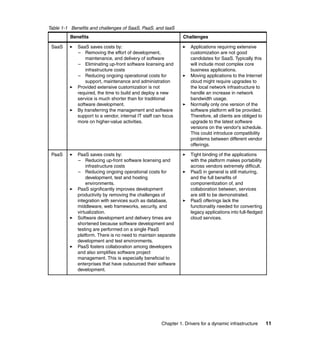
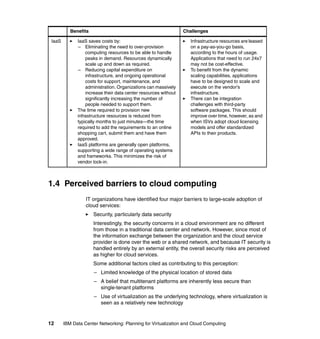
               Table 1-1 on page 11 lists the benefits and challenges of SaaS, PaaS, and IaaS.


10   IBM Data Center Networking: Planning for Virtualization and Cloud Computing
Table 1-1 Benefits and challenges of SaaS, PaaS, and IaaS
         Benefits                                                Challenges

 SaaS        SaaS saves costs by:                                    Applications requiring extensive
             – Removing the effort of development,                   customization are not good
                 maintenance, and delivery of software               candidates for SaaS. Typically this
             – Eliminating up-front software licensing and           will include most complex core
                 infrastructure costs                                business applications.
             – Reducing ongoing operational costs for                Moving applications to the Internet
                 support, maintenance and administration             cloud might require upgrades to
             Provided extensive customization is not                 the local network infrastructure to
             required, the time to build and deploy a new            handle an increase in network
             service is much shorter than for traditional            bandwidth usage.
             software development.                                   Normally only one version of the
             By transferring the management and software             software platform will be provided.
             support to a vendor, internal IT staff can focus        Therefore, all clients are obliged to
             more on higher-value activities.                        upgrade to the latest software
                                                                     versions on the vendor's schedule.
                                                                     This could introduce compatibility
                                                                     problems between different vendor
                                                                     offerings.

 PaaS        PaaS saves costs by:                                    Tight binding of the applications
             – Reducing up-front software licensing and              with the platform makes portability
                 infrastructure costs                                across vendors extremely difficult.
             – Reducing ongoing operational costs for                PaaS in general is still maturing,
                 development, test and hosting                       and the full benefits of
                 environments.                                       componentization of, and
             PaaS significantly improves development                 collaboration between, services
             productivity by removing the challenges of              are still to be demonstrated.
             integration with services such as database,             PaaS offerings lack the
             middleware, web frameworks, security, and               functionality needed for converting
             virtualization.                                         legacy applications into full-fledged
             Software development and delivery times are             cloud services.
             shortened because software development and
             testing are performed on a single PaaS
             platform. There is no need to maintain separate
             development and test environments.
             PaaS fosters collaboration among developers
             and also simplifies software project
             management. This is especially beneficial to
             enterprises that have outsourced their software
             development.


                                                       Chapter 1. Drivers for a dynamic infrastructure       11
Benefits                                              Challenges

 IaaS         IaaS saves costs by:                                  Infrastructure resources are leased
              – Eliminating the need to over-provision              on a pay-as-you-go basis,
                  computing resources to be able to handle          according to the hours of usage.
                  peaks in demand. Resources dynamically            Applications that need to run 24x7
                  scale up and down as required.                    may not be cost-effective.
              – Reducing capital expenditure on                     To benefit from the dynamic
                  infrastructure, and ongoing operational           scaling capabilities, applications
                  costs for support, maintenance, and               have to be designed to scale and
                  administration. Organizations can massively       execute on the vendor's
                  increase their data center resources without      infrastructure.
                  significantly increasing the number of            There can be integration
                  people needed to support them.                    challenges with third-party
              The time required to provision new                    software packages. This should
              infrastructure resources is reduced from              improve over time, however, as and
              typically months to just minutes—the time             when ISVs adopt cloud licensing
              required to add the requirements to an online         models and offer standardized
              shopping cart, submit them and have them              APIs to their products.
              approved.
              IaaS platforms are generally open platforms,
              supporting a wide range of operating systems
              and frameworks. This minimizes the risk of
              vendor lock-in.


1.4 Perceived barriers to cloud computing
                  IT organizations have identified four major barriers to large-scale adoption of
                  cloud services:
                      Security, particularly data security
                      Interestingly, the security concerns in a cloud environment are no different
                      from those in a traditional data center and network. However, since most of
                      the information exchange between the organization and the cloud service
                      provider is done over the web or a shared network, and because IT security is
                      handled entirely by an external entity, the overall security risks are perceived
                      as higher for cloud services.
                      Some additional factors cited as contributing to this perception:
                      – Limited knowledge of the physical location of stored data
                      – A belief that multitenant platforms are inherently less secure than
                        single-tenant platforms
                      – Use of virtualization as the underlying technology, where virtualization is
                        seen as a relatively new technology


12      IBM Data Center Networking: Planning for Virtualization and Cloud Computing
– Limited capabilities for monitoring access to applications hosted in the
     cloud
   Governance and regulatory compliance
   Large enterprises are still trying to sort out the appropriate data governance
   model for cloud services, and ensuring data privacy. This is particularly
   significant when there is a regulatory compliance requirement such as SOX or
   the European Data Protection Laws.
   Service level agreements and quality of service
   Quality of service (availability, reliability, and performance) is still cited as a
   major concern for large organizations:
   – Not all cloud service providers have well-defined SLAs, or SLAs that meet
     stricter corporate standards. Recovery times may be stated as “as soon as
     possible” rather than a guaranteed number of hours. Corrective measures
     specified in the cloud provider's SLAs are often fairly minimal and do not
     cover the potential consequent losses to the client's business in the event
     of an outage.
   – Inability to influence the SLA contracts. From the cloud service provider's
     point of view it is impractical to tailor individual SLAs for every client they
     support.
   – The risk of poor performance is perceived higher for a complex
     cloud-delivered application than for a relatively simpler on-site service
     delivery model. Overall performance of a cloud service is dependent on
     the performance of components outside the direct control of both the client
     and the cloud service provider, such as the network connection.
1. Integration and interoperability
   Identifying and migrating appropriate applications to the cloud is made
   complicated by the interdependencies typically associated with business
   applications. Integration and interoperability issues include:
   – A lack of standard interfaces or APIs for integrating legacy applications
     with cloud services. This is worse if services from multiple vendors are
     involved.
   – Software dependencies that must also reside in the cloud for performance
     reasons, but which may not be ready for licensing on the cloud.
   – Interoperability issues between cloud providers. There are worries about
     how disparate applications on multiple platforms, deployed in
     geographically dispersed locations, can interact flawlessly and can provide
     the expected levels of service.


                                   Chapter 1. Drivers for a dynamic infrastructure       13
Public clouds versus private clouds
                  A public cloud:
                      Is a shared cloud computing infrastructure that anyone can access.
                      Provides hardware and virtualization layers that are owned by the vendor and
                      are shared between all clients.
                      Presents the illusion of infinitely elastic resources.
                      Is connected to the public Internet.

                  A private cloud:
                      Is a cloud computing infrastructure owned by a single party.
                      Provides hardware and virtualization layers that are owned by, or reserved for,
                      the client.
                      Presents an elastic but finite resource.
                      May or may not be connected to the public Internet.

                  While very similar solutions from a technical point of view, there are significant
                  differences in the advantages and disadvantages that result from the two models.
                  Table 1-2 compares the major cloud computing features for the two solutions,
                  categorizing them as:

                   - a major advantage

                  - an advantage

                   - a disadvantage
                   - a major disadvantage
Table 1-2 Comparison of major cloud computing features
 Feature               Public cloud                               Private cloud

 Initial investment    - No up-front capital investment in      - The infrastructure has to be
                       infrastructure.                            provisioned and paid for up front
                                                                  (however, may leverage existing
                                                                  resources - sunk costs).

 Consumption-          - The client pays for resources as       - The client pays for resources as
 based pricing         used, allowing for capacity fluctuations   used, allowing for capacity fluctuations
                       over time.                                 over time.

 Provisioning          - Simple web interface for               - Self-service provisioning of
                       self-service provisioning of               infrastructure capacity only possible up
                       infrastructure capacity.                   to a point. Standard capacity planning
                                                                  and purchasing processes required for
                                                                  major increases.


14     IBM Data Center Networking: Planning for Virtualization and Cloud Computing
Feature               Public cloud                               Private cloud

Economies of          - Potentially significant cost savings   - For a large enterprise-wide
scale                 are possible from providers’ economies     solution, some cost savings are
                      of scale.                                  possible from providers’ economies of
                                                                 scale.

Cloud operating       - Operating costs for the cloud are      - The client maintains ongoing
costs                 absorbed in the usage-based pricing.       operating costs for the cloud.

Platform              - Separate provider has to be            - Cloud vendor may offer a
maintenance           found (and paid for) to maintain the       fully-managed service (for a price).
                      computing stack. (May be part of the
                      client's own organization or
                      outsourcing provider, or may be an
                      independent company such as
                      RightScale.)

SLAs                  - The client has no say in SLAs or       - SLAs and contractual terms and
                      contractual terms and conditions.          conditions are negotiable between
                                                                 client and the cloud vendor to meet
                                                                 specific requirements.

Service Level         - Vendors are motivated to deliver to     - Users may not get service level
Commitment            contract.                                  desired

Data Security         - Sensitive data is shared beyond the     - All data and secure information
                      corporate firewall.                        remains behind the corporate firewall.

Geographic            - Distance may pose challenges with       - The option exists for close proximity
locality              access performance and user                to non-cloud data center resources or
                      application content.                       to offices if required for performance
                                                                 reasons.

Platform choice       - Limited choices: Support for           - Private clouds can be designed
                      operating system and application           for specific operating systems,
                      stacks may not address the needs of        applications and use cases unique to
                      the client.                                the client.

                  There is no clear “right answer”, and the choice of cloud model will depend on the
                  application requirements. For example, a public cloud could be ideally suited for
                  development and testing environments, where the ability to provision and
                  decommission capacity at short notice is the primary consideration, while the
                  requirements on SLAs are not particularly strict. Conversely, a private cloud
                  could be more suitable for a production application where the capacity
                  fluctuations are well-understood, but security concerns are high.

                  Many of IBM’s largest clients are looking at the introduction of Web 2.0
                  applications and cloud computing style data centers. Numerous newer


                                                      Chapter 1. Drivers for a dynamic infrastructure       15
Web 2.0-enabled data centers are starting to expand and while they have some
               key strengths, such as scalability and service delivery, they are also facing
               operational challenges similar to traditional data centers.

               The infrastructures that are exploiting some of the early cloud IT models for
               either acquiring or delivering services, or both, can be very nimble and scale very
               quickly. As a style of computing in which IT-enabled capabilities are delivered as
               a service to external clients using Internet technologies—popularized by such
               companies as Google and SalesForce.com—cloud computing can enable large,
               traditional-style enterprises to start delivering IT as a service to any user, at any
               time, in a highly responsive way. Yet, data centers using these new models are
               facing familiar issues of resiliency and security as the need increases for
               consistent levels of service.


1.5 Implications for today’s CIO
               CIOs who take a transformational approach to the data center can point to better
               alignment with business values through clients who are satisfied, systems that
               are meeting key Service Level Agreements, and IT that is driving business
               innovation. The open, scalable, and flexible nature of the new dynamic
               infrastructure enables collaboration and global integration, while supporting
               continually changing business models.

               The solution to these challenges will not come from today’s distributed computing
               models, but from more integrated and cost-efficient approaches to managing
               technology and aligning it with the priorities of organizations and users. To that
               end, we see an evolutionary computing model emerging, one that takes into
               account and supports the interconnected natures of the following:
                  The maturing role of the mobile web
                  The rise of social networking
                  Globalization and the availability of global resources
                  The onset of real-time data streaming and access to information


1.6 Dynamic infrastructure business goals
               Dynamic infrastructure may help to reduce cost, improve service and manage
               risk.


16   IBM Data Center Networking: Planning for Virtualization and Cloud Computing
1.6.1 Reduce cost
          In conversations with numerous IT executives and professionals over the last few
          years, a recurring theme has surfaced: continued concerns about the magnitude
          of the operational issues they face, including server sprawl, virtualization
          management, and the increasing cost of space, power, and labor.

          The combination of these issues results in increasing difficulty to deploy new
          applications and services. The top priority for most CIOs is not just to drive down
          overall costs, but to make better investments overall. This requires not just
          incremental improvements in savings or cost reductions, but dramatic
          improvements, brought about by leveraging consolidation and virtualization with
          optimized systems and networks across all system resources in the data center.
          By breaking down individual silos of similar resources and deploying end-to-end
          systems and network management tools, organizations can help simplify the
          management of the IT infrastructure, improve utilization, and reduce costs.

          Leveraging alternative service delivery models such as cloud computing, IT
          outsourcing—without the investment and skills needed to build the infrastructure
          in house—can also complement this approach.

          In addition to energy efficiency and enhancements in both systems and service
          management, this simplification of the data center helps make information more
          readily available for business applications regardless of the source or the
          changes to the physical infrastructure, and be more flexible and responsive to
          rapidly changing business demands.

          Cloud computing brings a new paradigm to the cost equation, as well. This
          approach of applying engineering discipline and mainframe-style security and
          control to an Internet-inspired architecture can bring in improved levels of
          economics through virtualization and standardization. Virtualization provides the
          ability to pool the IT resources to reduce the capital expense of hardware,
          software, and facilities. Standardization, with common software stacks and
          operational policies, helps to reduce operating expenses, such as labor and
          downtime—which is far and away the fastest-growing piece of the IT cost.

          While these technologies have improved the way we do business, they can put a
          tremendous strain on data centers and IT operations. IT professionals must
          balance the challenges associated with managing data centers as they increase
          in cost and complexity against the need to be highly responsive to ongoing
          demands from the business.


                                            Chapter 1. Drivers for a dynamic infrastructure   17
1.6.2 Improve service
               To succeed in today's fast-paced business landscape, organizations must
               transform their service delivery models to achieve superior, differentiated delivery
               of goods and services. Smarter service delivery requires comprehensive visibility
               into the full breadth of business and IT assets that support services. It also
               requires effective control over those assets, as well as the business processes
               they enable, and extensive automation of these processes so that services can
               be delivered more reliably and economically.

               An effective service delivery model is optimized and aligned to meet the needs of
               both the internal business and external consumers of goods and services. As the
               infrastructure becomes more dynamic and flexible, integrated service
               management takes on a primary role to help organizations do the following:
                  Identify new opportunities for substantial cost efficiencies
                  Measurably improve service quality and reliability
                  Discover and respond quickly to new business opportunities
                  Manage complexity and change, improve security and compliance, and
                  deliver more value from all business assets

               To become more dynamic and service-aligned, organizations must take a broad
               view of their infrastructure that encompasses traditional IT assets, physical
               assets, and emerging “smart” assets that cut across the boundaries that once
               divided the IT and operational spheres. In an effective service delivery model, all
               these assets, plus the people who support them, are integrated, optimized, and
               managed holistically.

               The increasing digital instrumentation of once “dumb” physical, operational, and
               mobile assets presents exciting opportunities for organizations seeking to deliver
               differentiated service. More than ever before, it is possible for organizations to
               see, control, and automate the contributions of individual assets towards
               complex processes and services. From the data center to the plant floor to the
               delivery fleet, “smart” organizations are finding ways to leverage their dynamic
               infrastructures in support of accelerated, differentiated, and cost-effective service
               delivery.


1.6.3 Manage risk
               Enterprises of all sizes and industries are seeing that global expansion,
               emerging technologies and the rising volume and sophistication of new threats
               have increased the need for improved security and resiliency measures. Users
               require real-time access to confidential, critical data. Enterprise risk
               management is now being integrated into corporate ratings delivered by such
               organizations as Fitch, Moody’s and Standard & Poor’s. At the same time,


18   IBM Data Center Networking: Planning for Virtualization and Cloud Computing
companies are demanding that both internal and external users have
         instantaneous access to this information, putting extra—and often
         conflicting—pressure on the enterprise for improved availability, security, and
         resilience in the evolving IT environment.

         By enhancing security and resiliency, IT becomes more responsive and better
         prepared to meet the needs of the business. Some of these critical areas include:
            Infrastructure security and resiliency - Protecting against evolving threats
            while enabling accelerated innovation, agility, and reduced operational costs
            through improved security, disaster recovery, and continuity efforts.
            Information and data protection - Ensuring that data is accessed by only
            authorized users, remains available and accessible in the event of a
            disruption, and that it is protected both at rest and in-flight.
            Regulatory compliance - Planning for and responding to regulatory
            requirements associated with security and business resiliency, such as The
            Health Insurance Portability and Accountability Act (HIPAA), Sarbanes-Oxley
            (SOX), and Payment Card Industry Standards (PCI).


1.7 Enabling the dynamic infrastructure
         A dynamic infrastructure in this digitally-connected world helps support the
         convergence of business and IT needs and assets, creating integrated “smart”
         assets. This converged, dynamic infrastructure must be a cost-effective, highly
         scalable, secure and resilient service delivery model that enables collaboration
         and accelerates innovation. The dynamic infrastructure must flex and adapt with
         the business. By design, a dynamic infrastructure is service-oriented and
         focused on supporting and enabling the users in a highly responsive way.

         One implementation of a dynamic infrastructure is cloud computing. A dynamic
         infrastructure conditions the IT environment for a cloud execution model.

         Cloud resources can be accessed through a variety of methods, and can be
         rapidly scaled up and scaled down in a secure way to deliver a high quality of
         service. As discussed in “Public clouds versus private clouds” on page 14,
         clouds can be created for internal (private) or external (public) use but always
         with scalability, elasticity and share-ability of the application deployment and
         management environment in mind. Users can gain access to their applications
         from anywhere through their connected devices.

         With regards to infrastructures, the good news is that there is more than one
         “right” answer. The correct solution is to pull the best from existing infrastructure
         designs and harness new technologies, solutions and deployment options that


                                            Chapter 1. Drivers for a dynamic infrastructure   19
will free up IT to help run the business—not just support it. Combining the “old”
               best practices (learned from years of managing high-volume, information-intense
               data centers) with the “new” best practices enabled by technologies such as
               virtualization and cloud computing, or pairing one’s own IT resources with
               strategic outsourcing such as managed services from IBM, can assist clients in
               creating a more dynamic infrastructure.

               The key initiatives for implementing a dynamic infrastructure are:
               Virtualization            Breaking out of the barriers of physical devices in a data
                                         center, such as servers, storage, networks, data, and
                                         applications, giving clients improved TCO, resiliency and
                                         flexibility for a Dynamic Infrastructure®.
               Energy efficiency         Optimizing the energy efficiency of the IT infrastructure
                                         to reduce costs, resolve space, power, and cooling
                                         constraints, and achieve green strategy objectives.
               Service management Achieving integrated visibility, control, and automation
                                  across all of the business and IT infrastructure
                                  components that support differentiated service delivery
                                  and accelerated business growth. Service management
                                  includes all aspects of managing complex service
                                  environments by controlling both physical and logical
                                  resources, targeting Service Level Agreements agreed
                                  with the users of any specific service.
               Asset management          Improving asset reliability, availability, and uptime that
                                         underpin quality delivery of service according to the
                                         priorities of the business, while also maximizing the
                                         return on lifetime asset investment along with inventory
                                         optimization, labor efficiency, and mitigating the risk of
                                         equipment failures that jeopardize the environment and
                                         the health and safety of people.
               Security                  A new approach to managing risk, providing a full range
                                         of security capabilities to organizations, processes, and
                                         information as the IT and business infrastructure
                                         become more interconnected.
               Business resiliency       Providing the ability to rapidly adapt and respond to
                                         risks, as well as opportunities, in order to maintain
                                         continuous business operations, reduce operational
                                         costs, enable growth and be a more trusted partner.
               Information infrastructure
                                      A comprehensive approach to a resilient infrastructure
                                      for securely storing and managing information and
                                      mitigating business risks.


20   IBM Data Center Networking: Planning for Virtualization and Cloud Computing
1.8 The shift in the data center network architectural
    thinking
         In order to enable a dynamic infrastructure capable of handling the new
         requirements that have been presented in the previous section, a radical shift in
         how the data center network is designed is required.

         The figures here show the comparison between the traditional thinking and the
         new thinking that enables this change of paradigm.

         Figure 1-3 illustrates a traditional, multitier, physical server-oriented, data center
         infrastructure.


                                                                          ---------------------------------------------- Data Center Edge Connectivity --------------------------------------

                                                                                               Extended Services                         Internet/ExtraNet                        Internal
            Data Center Infrastructure Services


                                                                                                           Core Switches
                                                  Access/Distribution

                                                                           Switch Pairs


                                                                                          Si          Si                                      Si     Si


                                                                                                                                                                                  Management and Tools
                                                                                                                                                                                        Access
                                                                                                              Application Services
                                                   Storage Area Network


                                                                                                                                                             Network Accessible
                                                                                                                                                              Storage Switches
                                                                           Switches


                                                                                                                           Storage Services


         Figure 1-3 Traditional multitier data center infrastructure


                                                                                                                                       Chapter 1. Drivers for a dynamic infrastructure                   21
Figure 1-4 illustrates a logical architectural overview of a virtualized data center
               network that supports server and storage consolidation and virtualization.


               Figure 1-4 Virtualized data center network architectural overview

               Consolidation began as a trend towards centralizing all the scattered IT assets of
               an enterprise for better cost control, operational optimization, and efficiency.
               Virtualization introduced an abstraction layer between hardware and software,
               allowing enterprises to consolidate even further—getting the most out of each
               physical server platform in the data center by running multiple virtual servers on
               it.

               The leading edge of virtualization is beginning to enable dramatic shifts in the
               way the data center infrastructures are designed, managed, sourced, and
               delivered.

               The emerging trend toward dynamic infrastructures, such as cloud, call for elastic
               scaling and automated provisioning; attributes that drive new and challenging
               requirements for the data center network.

               By comparing the two diagrams we can highlight some important trends that
               impact the data center network architects and managers and that are described
               in detail throughout this document:


22   IBM Data Center Networking: Planning for Virtualization and Cloud Computing
The virtual machine is the new IT building block inside the data center. The
             physical server platform is no longer the basic component but instead is made
             up of several logical resources that are aggregated in virtual resource pools.
             Network architects can no longer stop their design at the NIC level, but need
             to take into account the server platforms’ network-specific features and
             requirements, such as vSwitches. These will be presented in detail in
             Chapter 2, “Servers, storage, and software components” on page 31.
             The virtualization technologies that are available today (for servers, storage,
             and networks) decouple the logical function layer from the physical
             implementation layer so that physical connectivity becomes less meanigful
             than in the past. A deeper understanding of the rest of the infrastructure
             becomes paramount for network architects and managers to understand for a
             proper data center network design. The network itself can be virtualized;
             these technologies are described in Chapter 3, “Data center network
             functional components” on page 149.
             The architecture view is moving from physical to logical, focused on functions
             and how they can be deployed rather than on appliances and where they
             should be placed.
             Infrastructure management integration becomes more important in this
             environment because the inter-relations between appliances and functions
             are more difficult to control and manage. Without integrated tools that simplify
             the DC operations, managing the infrastructure box-by-box becomes
             cumbersome and more difficult. IBM software technologies that can be
             leveraged in order to achieve this goal are presented in Chapter 2, “Servers,
             storage, and software components” on page 31.
             The shift to “logical” applies also when interconnecting distributed data
             centers. In order to achieve high availability and maximize resource utilization,
             it is key to have all the available data centers in an active state. In order to do
             this, from a network standpoint, the network core must be able to offer layer 1
             virtualization services (lamda on fiber connections), layer 2 virtualization
             services (for example VPLS connectivity to enable VM mobility) together with
             the usual layer 3 services leveraging proven technologies such as MPLS.


1.8.1 Networking nonfunctional requirements
          The nonfunctional requirements (NFRs) of a network infrastructure are the
          quality requirements or constraints of the system that must be satisfied. These
          requirements address major operational and functional areas of the system in
          order to ensure its robustness. The infrastructure virtualization paradigm shift
          does not change the number of NFRs, but it does affect their priorities, the way
          they are met, and the inter-relations.


                                            Chapter 1. Drivers for a dynamic infrastructure   23
This section discusses each of the NFRs of an IT network system.

               Availability
               Availability means that data or information is accessible and usable upon
               demand by an authorized person. Network availability is affected by failure of a
               component such as a link.

               Two factors that allow improved availability are redundancy of components and
               convergence in case of a failure.
                  Redundancy - Redundant data centers involve complex solution sets
                  depending on a client’s requirements for backup and recovery, resilience, and
                  disaster recovery.
                  Convergence - Convergence is the time required for a redundant network to
                  recover from a failure and resume traffic forwarding. Data center
                  environments typically include strict uptime requirements and therefore need
                  fast convergence.

               Backup and recovery
               Although the ability to recover from a server or storage device failure is beyond
               the scope of network architecture NFRs, potential failures such as the failure of a
               server network interface card (NIC) have to be taken into consideration. If the
               server has a redundant NIC, then the network must be capable of redirecting
               traffic to the secondary network as needed.

               As to network devices, the backup and recovery ability typically requires the use
               of diverse routes and redundant power supplies and modules. It also requires
               defined processes and procedures for ensuring that current backups exist in
               case of firmware and configuration failures.

               Capacity estimates and planning
               Network capacity is defined in two dimensions, vertical and horizontal capacity:
                  Vertical capacity relates to the forwarding and processing capacity—in this
                  case, a matrix such as bandwidth, packet rate, concurrent sessions, and so
                  on.
                  Horizontal capacity involves the breadth and reach of the network—in this
                  case, a matrix such as server port counts, external connectivity bandwidth,
                  and so on.

               Configuration management
               Configuration management covers the identification, recording, and reporting of
               IT/network components, including their versions, constituent components, states
               and relationships to other network components. Configuration Items (CIs) that


24   IBM Data Center Networking: Planning for Virtualization and Cloud Computing
should be under the control of configuration management include network
hardware, network software, services, and associated documentation.

It also includes activities associated with change management policies and
procedures, administration, and implementation of new installations and
equipment moves, additions, or changes.

The goal of configuration management is to ensure that a current backup of each
network device’s configuration exists in a format that can be quickly restored in
case of failure.

Also, a trail of the changes that have been made to the different components is
needed for auditing purposes.

Disaster recovery
The requirement for disaster recovery is the ability to resume functional
operations following a catastrophic failure. The definition of functional operations
depends upon the depth and scope of an enterprise’s operational requirements
and its business continuity and recovery plans.

Multidata center environments that provide a hot standby solution is one example
of a disaster recovery plan.

Environment
There are environmental factors such as availability of power or air conditioning
and maximum floor loading that influence the average data center today. The
network architecture must take these factors into consideration.

Extensibility and flexibility
The network architecture must allow the infrastructure to expand as needed to
accommodate new services and applications.

Failure management
All failures must be documented and tracked. The root cause of failures must be
systematically determined and proactive measures taken to prevent a repeat of
the failure. Failure management processes and procedures will be fully
documented in a well-architected data center environment.


                                  Chapter 1. Drivers for a dynamic infrastructure   25
Performance
               Network performance is usually defined by the following terms:
                  Capacity
                  Capacity refers to the amount of data that can be carried on the network at
                  any time. A network architecture should take into account anticipated
                  minimum, average, and peak utilization of traffic patterns.
                  Throughput
                  Throughput is related to capacity, but focuses on the speed of data transfer
                  between session pairs versus the utilization of links.
                  Delay
                  Delay, also known as “lag” or “latency,” is defined as a measurement of
                  end-to-end propagation times. This requirement is primarily related to
                  isochronous traffic, such as voice and video services.
                  Jitter
                  Jitter is the variation in the time between packets arriving, caused by network
                  congestion, timing drift, or route changes. It is most typically associated with
                  telephony and video-based traffic.
                  Quality of Service
                  Quality of Service (QoS) requirements include the separation of traffic into
                  predefined priorities. QoS helps to arbitrate temporary resource contention. It
                  also provides an adequate service level for business-critical administrative
                  functions, as well as for delay-sensitive applications such as voice, video, and
                  high-volume research applications.

               Reliability
               Reliabilty is the ability of a system to perform a given function, under given
               conditions, for a given time interval.

               There is a difference between availability and reliability. A system can be
               unavailable but not considered as unreliable because this system is not in use at
               the given time. An example is a maintenance window where the system is shut
               down for an upgrade and restarted. During this window, we know the system is
               not available, but the reliability is not affected. Since today’s data center houses
               critical applications and services for the enterprise, outages are becoming less
               and less tolerable. Reliability is expressed in terms of the percentage of time a
               network is available, as shown in Table 1-3 on page 27.


26   IBM Data Center Networking: Planning for Virtualization and Cloud Computing
Table 1-3 Reliability
                   Total downtime (HH:MM:SS)

 Availability      per day         per month         per year

 99.9999%          00:00:00.08     00:00:02.7        00:00:32

 99.999%           00:00:00.4      00:00.26          00:05:15

 99.99%            00:00:08        00:04:22          00:52:35

 99.9%             00:01:26        00:43:49          08:45:56

 99%               00:14:23        07:18:17          87:39:29

Very few enterprises can afford a 99.9999% level of reliability, because it is
usually too costly. Instead, many moderate-sized businesses opt for a 99.99% or
99.9% level of reliability.

Scalability
In networking terms, scalability is the ability of the network to grow incrementally
in a controlled manner.

For enterprises that are constantly adding new servers and sites, architects may
want to specify something more flexible, such as a modular-based system.
Constraints that may affect scalability, such as defining spanning trees across
multiple switching domains or additional IP addressing segments to
accommodate the delineation between various server functions, must be
considered.

Security
Security in a network is the definition of permission to access devices, services,
or data within the network. The following components of a security system will be
considered:
   Security policy
   Security policies define how, where, and when a network can be accessed.
   An enterprise normally develops security policies related to networking as a
   requirement. The policies will also include the management of logging,
   monitoring, and audit events and records.
   Network segmentation
   Network segmentation divides a network into multiple zones. Common zones
   include various degrees of trusted and semi-trusted regions of the network.


                                  Chapter 1. Drivers for a dynamic infrastructure   27
Firewalls and inter-zone connectivity
                  Security zones are typically connected with some form of security boundary,
                  often firewalls or access control lists. This may take the form of either physical
                  or logical segmentation.
                  Access controls
                  Access controls are used to secure network access. All access to network
                  devices will be via user-specific login credentials; there must be no
                  anonymous or generic logins.
                  Security monitoring
                  To secure a data center network, a variety of mechanisms are available
                  including IDS, IPS, content scanners, and so on. The depth and breadth of
                  monitoring will depend upon both the client’s requirements as well as legal
                  and regulatory compliance mandates.
                  External regulations
                  External regulations often play a role in network architecture and design due
                  to compliance policies such as Sarbanes-Oxley (SOX), Payment Card
                  Industry Standards (PCI), the Health Insurance Portability and Accountability
                  Act (HIPAA); and a variety of other industry and non-industry-specific
                  regulatory compliance requirements.

               Serviceability
               Serviceability refers to the ability to service the equipment. Several factors can
               influence serviceability, such as modular or fixed configurations or requirements
               of regular maintenance.

               Service Level Agreement
               A Service Level Agreement (SLA) is an agreement or commitment by a service
               provider to provide reliable, high-quality service to its clients. An SLA is
               dependent on accurate baselines and performance measurements. Baselines
               provide the standard for collecting service-level data, which is used to verify
               whether or not negotiated service levels are being met.

               Service level agreements can apply to all parts of the data center, including the
               network. In the network, SLAs are supported by various means such as QoS and
               configuration management, and availability. IT can also negotiate Operational
               Level Agreements (OLAs) with the Business Units in order to guarantee and
               end-to-end service level to the final users.


28   IBM Data Center Networking: Planning for Virtualization and Cloud Computing
Standards
Network standards are key to the ongoing viability of any network infrastructure.
They define such standards as:
   Infrastructure naming
   Port assignment
   Server attachment
   Protocol, ratified for example by IEEE and IETF
   IP addressing

System management
Network management must facilitate key management processes, including:
   Network Discovery and Topology Visualization
   This includes the discovery of network devices, network topology, and the
   presentation of graphical data in an easily understood format.
   Availability management
   This provides for the monitoring of network device connectivity.
   Event management
   This provides for the receipt, analysis, and correlation of network events.
   Asset management
   This facilitates the discovery, reporting, and maintenance of the network
   hardware infrastructure.
   Performance management
   This provides for monitoring and reporting network traffic levels and device
   utilization.
   Incident management
   The goal of incident management is to recover standard service operation as
   quickly as possible. The incident management process is used by many
   functional groups to manage an individual incident. The process includes
   minimizing the impact of incidents affecting the availability and/or
   performance, which is accomplished through analysis, tracking, and solving of
   incidents that have impact on managed IT resources.
   Problem management
   This includes identifying problems through analysis of incidents that have the
   same symptoms, then finding the root cause and fixing it in order to prevent
   malfunction reoccurrence.


                                 Chapter 1. Drivers for a dynamic infrastructure   29
User and accounting management
                  This is responsible for ensuring that only those authorized can access the
                  needed resources.
                  Security management
                  This provides secure connections to managed devices and management of
                  security provisions in device configurations.


30   IBM Data Center Networking: Planning for Virtualization and Cloud Computing
2


    Chapter 2.   Servers, storage, and
                 software components
                 New economic trends necessitate cost-saving approaches, such as
                 consolidation and virtualization. Our focus in this chapter is on the networking
                 features and impacts of server and storage platforms on the network, while the
                 next chapter focuses on key data center networking considerations. This chapter
                 offers examples of those platforms, the related technologies, and analyzes the
                 software stack that is capable of managing the consolidated and virtualized
                 building blocks.

                 This chapter contains the following sections:
                     Section 2.1 briefly describes what technologies underlie the concepts of
                     server, storage, and network virtualization.
                     Section 2.2 describes the IBM System z® server platform, the network
                     features it utilizes, and the data center network impact of consolidating
                     workloads on this platform.
                     Section 2.3 describes the IBM Power Systems™ server platforms, the
                     network features it utilizes, and the data center network impact of
                     consolidating workloads on this platform.
                     Section 2.4 describes IBM System x® and BladeCenter®,the network
                     features utilized, and the data center network impact of consolidating
                     workloads on these platforms.


© Copyright IBM Corp. 2011. All rights reserved.                                                 31
Section 2.5 describes the main x86 virtualization technologies available on
                  the market today, together with the main network virtualization features.
                  Section 2.6 briefly describes the IBM Storage platforms portfolio and the main
                  consolidation and virtualization technologies.
                  Section 2.7 presents the main IBM Software products for the management
                  and provisioning of the virtualized data center, from a networking point of
                  view.
                  Section 2.8 describes the main IBM Integrated Data Center Solutions:
                  iDataPlex™ and Cloudburst, highlighting the networking options that are
                  available today.


32   IBM Data Center Networking: Planning for Virtualization and Cloud Computing
2.1 Virtualization
           Virtualization refers to the abstraction of logical resources away from their
           underlying physical resources to improve agility and flexibility, reduce costs, and
           thus enhance business value. Virtualization allows a set of underutilized physical
           infrastructure components to be consolidated into a smaller number of better
           utilized devices, contributing to significant cost savings.
              Server virtualization
              A physical server is abstracted to provide, or host, multiple virtual servers or
              multiple operating systems on a single platform.
              Storage virtualization
              The storage devices used by servers are presented in the form of abstracted
              devices, partitioned and dedicated to servers as needed, independent of the
              actual structure of the physical devices.
              Network virtualization (will be described in more detail in Chapter 3, “Data
              center network functional components” on page 149).
              Network devices such as switches, routers, links and network interface cards
              (NICs) are abstracted to provide many virtualized network resources on few
              physical resources, or combine many physical resources into few virtual
              resources.


2.1.1 Server virtualization techniques
           Server virtualization is a method of abstracting the operating system from the
           hardware platform. This allows multiple operating systems or multiple instances
           of the same operating system to coexist on one or more processors. A hypervisor
           or virtual machine monitor (VMM) is inserted between the operating system and
           the hardware to achieve this separation. These operating systems are called
           “guests” or “guest OSs.” The hypervisor provides hardware emulation to the
           guest operating systems. It also manages allocation of hardware resources
           between operating systems.

           Currently there are three common types of hypervisors: type 1, type 2, and
           containers, as explained here:

           Type 1 - Virtualization code that runs directly on the system hardware that
           creates fully emulated instances of the hardware on which it is executed. Also
           known as “full,” “native,” or “bare metal.”

           Type 2 - Virtualization code that runs as an application within a traditional
           operating system environment that creates fully emulated instances of the


                                       Chapter 2. Servers, storage, and software components   33
hardware made available to it by the traditional operating system on which it is
               executed. These are also known as “hosted” hypervisors.

               Containers - Virtualization code that runs as an application within a traditional
               operating system that creates encapsulated, isolated virtual instances that are
               pointers to the underlying host operating system on which they are executed.
               This is also known as “operating system virtualization.”

               Figure 2-1 depicts the three hypervisor types.


                                               App              App
                  App
                        ...        App
                                               OS
                                                      ...        OS        App     ...   App
                  OS               OS
                                                  Hypervisor                OS Virtualization
                      Hypervisor                  Host OS                    Host OS
                     SMP server                   SMP server                 SMP server
                     Type 1                       Type 2                     Containers

               Figure 2-1 Hypervisor types

               Type 1 or bare metal hypervisors are the most common in the market today, and
               they can be further classified into three main subtypes:
                  Standalone (for example, VMware ESX and vSphere)
                  Hybrid (for example, Hyper-V or XenServer)
                  Mixed (Kernel Virtual Machine)

               Type 1 standalone
               In a standalone hypervisor, all hardware virtualization and virtual machine
               monitor (VMM) functions are provided by a single, tightly integrated set of code.
               This architecture is synonymous with the construct of VMware vSphere and
               previous generations of the ESX hypervisor. Figure 2-2 on page 35 shows a
               sample diagram of the architectural overview of VMware vSphere 4.0 (also
               referred to as ESX 4).

               Contrary to common belief, VMware is not a Linux®-based hypervisor. Rather,
               ESX is comprised of a strictly proprietary, highly sophisticated operating system
               called VMkernel, providing all virtual machine monitor and hardware
               virtualization functions. The full version of ESX does provide a Linux-based
               service console (shown to the left of the diagram). As described in the VMware


34   IBM Data Center Networking: Planning for Virtualization and Cloud Computing
section of this document, ESXi (the embedded version of the hypervisor) does
not contain this service console instance.


                   Traditional OS     Traditional OS     Traditional OS        Traditional OS

     Console      Virtual Machine    Virtual Machine     Virtual Machine      Virtual Machine
      and/or
    MGMT API
                                       Type 1 Hypervisor Stand-Alone
                                              (Vmware ESX)


                                IBM X-Architecture Server


                                                               Key:
                                                                           Storage & Network I/O

                                                                           Memory & CPU


Figure 2-2 Example of Type 1 standalone hypervisor architecture


Type 1 Hybrid
The hybrid type 1 architecture includes a split software model where a “thin”
hypervisor provides hardware virtualization in conjunction with a parent partition
(privileged virtual machine) which provides virtual machine monitor (VMM)
functionality. This model is associated primarily with Microsoft® Hyper-V and
Xen-based hypervisors.The parent partition, also called “Domain 0” (Dom0), is
typically a virtual machine that runs a full version of the native operating system
with root authority. For example, Dom0 for Xen-enabled and executed within
Novell SUSE Linux Enterprise Server (SLES) would execute as a full instance of
SLES, providing the management layer of VM creation, modification, deletion,
and other similar configuration tasks. At system boot, the Xen-enabled kernel
loads initially, followed by the parent partition, which runs with VMM privileges,
serves as the interface for VM management, and manages the I/O stack.

Similar to VMware, all hybrid products available today provide paravirtualized
drivers for guests, enabling improved performance to network and I/O resources.
Guests not implementing paravirtualized drivers must traverse the I/O stack in
the parent partition, degrading guest performance. Operating system (OS)
paravirtualization is becoming increasingly common to achieve optimal guest
performance and improved interoperability across hypervisors. For example,
Microsoft Hyper-V/Windows® Server 2008 R2 provides full OS paravirtualization


                            Chapter 2. Servers, storage, and software components                   35
support (also known as “Enlightened” guest support) for Windows Server 2008
               and SUSE Enterprise Linux guests; see Figure 2-3.


                     Parent/      Traditional OS      Traditional OS      Traditional OS       Traditional OS
                     Dom0          Virtual Machine     Vir tual Machine   Virtual Machine       Virtual Machine

                     Partition
                                                  Type 1 Hypervisor Hybrid
                                               (Hyper-V, XenServer,Virtual Iron)


                                               IBM X-Architecture Server


                                                                                   Key:
                                                                                            Storage & Network I/O

                                                                                             Memory & CPU


               Figure 2-3 Type 1 Hybrid hypervisor architecture


               Type 1 mixed
               The Linux-based Kernel Virtual Machine (KVM) hypervisor model provides a
               unique approach to Type 1 architecture. Rather than executing a proprietary
               hypervisor on bare-metal, the KVM approach leverages open-source Linux
               (including RHEL, SUSE, Ubuntu, and so on) as the base operating system and
               provides a kernel-integrated module (named KVM) that provides hardware
               virtualization.

               The KVM module is executed in user mode (unlike standalone and hybrid
               hypervisors, which run in kernel or root mode), but it enables virtual machines to
               execute with kernel-level authority using a new instruction execution context
               called Guest Mode; see Figure 2-4 on page 37.


36   IBM Data Center Networking: Planning for Virtualization and Cloud Computing
Traditional OS          Traditional OS       Emulated Storage & Network I/O


                            Virtual Machine          Virtual Machine

               Memory & CPU
              Paravirtualized I/O    KVM Guest Mode
                                                                          QEMU
                                KVM Hypervisor Kernel Module                            Linux User Mode
                                        (/dev/kvm)                                      Linux Kernel Mode


                                                           IBM X-Architecture Server


           Figure 2-4 Operating system-level virtualization

           Virtualization is a critical part of the data center. It offers the capability to balance
           loads, provide better availability, reduce power and cooling requirements, and
           allow resources to be managed fluidly.

           For more detailed information, see IBM Systems Virtualization: Servers, Storage,
           and Software, REDP-4396.


2.1.2 Storage virtualization
           Only a high-level view of storage virtualization is presented in this document.

           Currently, storage is virtualized by partitioning the SAN into separate partitions
           called Logical Unit Numbers (LUNs), as shown in Figure 2-5 on page 38. Each
           LUN can only be connected to one server at a time.


                                                Chapter 2. Servers, storage, and software components        37
LUN 0


                                                              LUN 1


                                                              LUN 2


                                                              LUN 3

                                Fiber             SAN
                              channel
                               Switch
               Figure 2-5 Storage virtualization overview

               This SAN is connected to the server through a Fibre Channel connection switch.

               The advantages of SAN virtualization are:
                  Provides centralized stored data.
                  Eases backup of stored data.
                  Has the ability to remap a LUN to a different server in case of server failure.
                  Makes storage appear local to servers and to users.
                  Improves utilization and reduces storage growth.
                  Reduces power and cooling requirements.

               See 2.6 “Storage virtualization” on page 104 for more details.


2.2 The System z platform
               System z is the IBM platform designed to provide the most reliable environment
               for high-value critical enterprise applications, with the goal of reaching near-zero


38   IBM Data Center Networking: Planning for Virtualization and Cloud Computing
service downtime. The System z platform is commonly referred to as a
           mainframe.

           The newest zEnterprise System consists of the IBM zEnterprise 196 central
           processor complex, IBM zEnterprise Unified Resource Manager, and IBM
           zEnterprise BladeCenter Extension. The z196 is designed with improved
           scalability, performance, security, resiliency, availability, and virtualization. The
           z196 Model M80 provides up to 1.6 times the total system capacity of the z10™
           EC Model E64, and all z196 models provide up to twice the available memory of
           the z10 EC. The zBX infrastructure works with the z196 to enhance System z
           virtualization and management through an integrated hardware platform that
           spans mainframe and POWER7™ technologies. Through the Unified Resource
           Manager, the zEnterprise System is managed as a single pool of resources,
           integrating system and workload management across the environment.

           The following sections contain network-related information about the System z
           architecture in general. The zEnterpise, however, introduces some new
           network-specific functions. In fact, the most significant change is that other kinds
           of servers can now be “plugged into” the mainframe to create an “Ensemble
           Network” where security exposures are minimized and the data center can be
           managed as if it were a single pool of virtualized resources.

           For more information on zEnterprise networking, refer to this site:
              http://www.ibm.com/systems/z/faqs


2.2.1 Introduction to the System z architecture
           The System z architecture was designed with the concept of sharing. Sharing
           starts in the hardware components and ends with the data that is being used by
           the platform. The ability to share everything is based on one of the major
           strengths of the System z mainframe: virtualization.

           As it is commonly used in computing systems, virtualization refers to the
           technique of hiding the physical characteristics of the computing resources from
           users of those resources. Virtualizing the System z environment involves
           creating virtual systems (logical partitions and virtual machines), and assigning
           virtual resources (such as processors, memory, and I/O channels) to them.
           Resources can be dynamically added or removed from these logical partitions
           through operator commands.

           For more information about the System z architecture, refer to the IBM
           zEnterprise System Technical Guide at:
              http://www.redbooks.ibm.com/abstracts/sg247833.html?Open


                                     Chapter 2. Servers, storage, and software components    39
2.2.2 Mainframe virtualization technologies
               The virtualization capabilities of the IBM mainframe represent some of the most
               mature and sophisticated virtualization technologies in the industry today. For
               example, a single IBM System z mainframe can scale up to millions of
               transactions per day or scale out to manage tens to hundreds of virtual servers. It
               can also redistribute system resources dynamically to manage varying server
               demands on the system resources automatically.

               The major virtualization technologies available on IBM System z are:
                  PR/SM™ and logical partitioning
                  Address spaces within LPARS
                  HiperSockets™
                  Channel Subsystem (CSS)
                  z/OS® Workload Manager
                  Intelligent Resource Director
                  System z Parallel Sysplex®
                  Geographically Dispersed Parallel Sysplex™ (GDPS®)
                  Capacity Upgrade on Demand
                  z/OS Capacity Provisioning

               PR/SM and logical partitioning
               Processor Resource/Systems Manager™ (PR/SM) is a hypervisor integrated
               with all System z elements that maps physical resources into virtual resources so
               that many logical partitions can share the physical resources.

               PR/SM provides the logical partitioning function of the central processor complex
               (CPC). It provides isolation between partitions, which enables installations to
               separate users into distinct processing images, or to restrict access to certain
               workloads where different security clearances are required.

               Each logical partition operates as an independent server running its own
               operating environment. On the latest System z models, up to 60 logical partitions
               running z/OS, z/VM®, z/VSE™, z/TPF, and Linux on System z operating systems
               can be defined. PR/SM enables each logical partition to have dedicated or
               shared processors and I/O channels, and dedicated memory (which can be
               dynamically reconfigured as needed).


40   IBM Data Center Networking: Planning for Virtualization and Cloud Computing
There are two types of partitions, dedicated and shared:
                  A dedicated partition runs on the same dedicated physical processors at all
                  times, which means the processors are not available for use by other
                  partitions even if the operating system running on that partition has no work to
                  do. This eliminates the need for PR/SM to get involved with swapping out one
                  guest and dispatching another.
                  Shared partitions, alternatively, can run on all remaining processors (those
                  that are not being used by dedicated partitions). This allows idle systems to
                  be replaced by systems with real work to do at the expense of PR/SM
                  overhead incurred by the dispatching of the operating systems. In contrast
                  with dedicated partitions, shared partitions provide increased processor
                  utilization, but at the potential expense of performance for a single operating
                  system.

               PR/SM transforms physical resources into virtual resources so that several
               logical partitions can share the same physical resources. Figure 2-6 illustrates
               the PR/SM and LPAR concepts.


                                                      Intelligent Resource Director (IRD)

                   Processor Resource / System Manager (PR/SM)

Figure 2-6 PR/SM and LPAR concepts


                                        Chapter 2. Servers, storage, and software components      41
For a better understanding of the above IBM System z functionalities, we will now
               briefly describe the most important network-related topics in more detail.

               Channel Sub System (CSS)
               The role of the Channel Sub System (CSS) is to control communication of
               internal and external channels, and control units and devices. The configuration
               definitions of the CSS specify the operating environment for the correct execution
               of all system I/O operations. The CSS provides the server communications to
               external devices through channel connections. The channels permit transfer of
               data between main storage and I/O devices or other servers under the control of
               a channel program. The CSS allows channel I/O operations to continue
               independently of other operations in the central processors (CPs).

               The building blocks that make up a CSS are shown in Figure 2-7.


                            System z


                        Channel Subsystem               Channel Subsystem: Controls queuing, de-queuing, and
                                                        priority management, and I/O identification of all I/O
                                                        operations performed by any logical partitions in a CSS.


                            Partitions                  Partitions: Supports the running of a System Control
                                                        Program (SCP), such as z/OS and allows CPs, memory,
                                                        and Subchannels access to channels.


                                                        Subchannels: A subchannel represents an I/O device to
                          Subchannels
                                                        the hardware, and is used by the SCP to pass an I/O request
                                                        from the SCP to the channel subsystem.


                           Channels                     Channels: The communication path from the channel
                                                        subsystem to the I/O network and the connected control
                                                        units / devices.


               Figure 2-7 Channel Sub System

               One of the major functions is the Multiple Image Facility (MIF). MIF capability
               enables logical partitions to share channel paths, such as ESCON®, FICON®,
               and Coupling Facility sender channel paths, between logical partitions within a
               processor complex. If a processor complex has MIF capability, and is running in
               LPAR mode, all logical partitions can access the same shared channel paths,
               thereby reducing the number of required physical connections. In contrast, if a


42   IBM Data Center Networking: Planning for Virtualization and Cloud Computing
processor complex does not have MIF capability, all logical partitions must use
                  separate channel paths to share I/O devices.

                  For more information about CSS, refer to section 2.1 in IBM System z
                  Connectivity Handbook, SG24-5444, which can be found at:
                          http://www.redbooks.ibm.com/abstracts/sg245444.html?Open

                  HiperSockets
                  HiperSockets provides the fastest TCP/IP communication between consolidated
                  Linux, z/VM, z/VSE, and z/OS virtual servers on a System z server. HiperSockets
                  provides internal “virtual” LANs, which act like TCP/IP networks in the System z
                  server. It eliminates the need for any physical cabling or external networking
                  connection between these virtual servers. Figure 2-8 shows an example of
                  HiperSockets connectivity with multiple LPs and virtual servers.


                            z/VM LP-1
                                                                           Sysplex A
                Linux      Linux     Linux   z/VM
                Guest 1    Guest 2   Guest n TCP/IP                  z/OS     z/OS      z/OS
                                                                     LP-5     LP-6      LP-7

                                                                                               Sysplex traffic
                                                                                               isolated from
                                                                                               non-sysplex
  Application                        HiperSockets                             FE               traffic
  traffic                                 FD
  separation

                                                                                               Different sysplex
                                                                               FF              traffic on same
                                                                                               server
                     Linux      Linux    Linux
                     LP-2       LP-3     LP-4
                                                                    z/OS      z/OS     z/OS
                                                                    LP-8      LP-9     LP-10


                               FC                                           Sysplex B


Figure 2-8 HiperSockets connectivity

                  HiperSockets is implemented in the Licensed Internal Code (LIC) of a System z,
                  with the communication path being in system memory. HiperSockets uses
                  internal Queued Direct Input/Output (iQDIO) at memory speed to transfer


                                                      Chapter 2. Servers, storage, and software components         43
information between the virtual servers. This iQDIO is an integrated function on
               the System z servers that provides users with attachment to high-speed “logical”
               LANs with minimal system and network overhead.

               Since HiperSockets does not use an external network, it can free up system and
               network resources, eliminating attachment costs while improving availability and
               performance. And also, because HiperSockets has no external components, it
               provides a very secure connection.

               Intelligent Resource Director
               Intelligent Resource Director (IRD) is a feature that extends the concept of
               goal-oriented resource management by allowing grouping system images that
               are resident on the same System z running in LPAR mode, and in the same
               Parallel Sysplex, into an LPAR cluster. This gives Workload Manager (WLM) the
               ability to manage resources, both processor and I/O, not just in one single image,
               but across the entire cluster of system images.

               WLM is responsible for enabling business-goal policies to be met for the set of
               applications and workloads. IRD implements the adjustments that WLM
               recommends to local sysplex images by dynamically taking the hardware
               (processor and channels) to the LPAR where it is most needed.

               IRD addresses three separate but mutually supportive functions:
                  LPAR processor management
                  The goal of LPAR processor management is to help simplify the configuration
                  task by automatically managing physical processor resources to allow high
                  utilization of physical processor capacity, while allowing performance
                  objectives to be met at times of peak demands. IRD LPAR processor
                  management extends WLM goal-oriented resource management to allow for
                  dynamic adjustment of logical partition processor weight. This function moves
                  processor to the partition with the most deserving workload, based on the
                  WLM policy, and enables the system to adapt to changes in the workload mix.
                  Channel Subsystem Priority Queuing
                  z/OS in WLM uses this new function to dynamically manage the channel
                  subsystem priority of I/O operations for given workloads based on the
                  performance goals for these workloads as specified in the WLM policy. In
                  addition, because Channel Subsystem I/O Priority Queuing works at the
                  channel subsystem level, and therefore affects every I/O request (for every
                  device, from every LPAR) on the machine, a single channel subsystem I/O
                  priority can be specified, used for all I/O requests from systems that do not
                  actively exploit Channel Subsystem I/O Priority Queuing.


44   IBM Data Center Networking: Planning for Virtualization and Cloud Computing
Dynamic channel path management (DCM)
              Dynamic channel path management is designed to dynamically adjust the
              channel configuration in response to shifting workload patterns. It is a function
              in IRD, together with WLM LPAR processor management and Channel
              Subsystem I/O Priority Queuing.
              DCM can improve performance by dynamically moving the available channel
              bandwidth to where it is most needed. Prior to DCM, the available channels
              had to be manually balanced across the I/O devices, trying to provide
              sufficient paths to handle the average load on every controller. This means
              that at any one time, some controllers probably have more I/O paths available
              than they need, while other controllers possibly have too few.

           System z Parallel Sysplex
           While System z hardware, operating systems, and middleware have long
           supported multiple applications on a single server, Parallel Sysplex clustering
           allows multiple applications to communicate across servers—and it can even
           support one large application spanning multiple servers, resulting in optimal
           availability for that application.

           With Parallel Sysplex clustering and its ability to support data sharing across
           servers, IT architects can design and develop applications that have one
           integrated view of a shared data store. This eliminates the need to partition
           databases, which in non-System z environments typically creates workload
           skews requiring lengthy and disruptive database repartitioning. Also, ensuring
           data integrity with non-System z partitioned databases often requires
           application-level locking, which in high-volume transaction environments could
           lead to service level agreements not being met.

           For more information on System z Parallel Sysplex, refer to IBM z/OS Parallel
           Sysplex Operational Scenarios, SG24-2079, which can be found here:
              http://www.redbooks.ibm.com/abstracts/sg242079.html?Open


2.2.3 Linux on System z
           With the ability to run Linux on System z, IT departments can simplify their
           processes by consolidating their multiple server farms down to a single System z
           running z/VM and Linux on System z. This can lead to both hardware savings
           and power savings, and could also simplify the management of the infrastructure.

           Using virtualization, bringing up Linux systems takes a matter of minutes rather
           than days waiting for new hardware and the installation process to complete.


                                     Chapter 2. Servers, storage, and software components    45
Because each Linux image is running in its own virtual system, the Linux images
               do not affect the other systems around them.

               By consolidating Linux servers onto one platform, hundreds or thousands of
               Linux instances on a single server require less energy, cooling, and floor space.

               Linux on System z is able to run in three modes: basic, LPAR, and z/VM guest.
               The most common way to consolidate distributed applications is to a single
               image of Linux running in one of the other two modes, shown in Figure 2-9,
               depending on application footprints and resource usage.


               Figure 2-9 Linux on System z

               Virtually any application that is portable to Linux can be consolidated to Linux on
               System z.

               Integrated Facility for Linux
               The Integrated Facility for Linux (IFL) is a central processor (CP) that is
               dedicated to Linux workloads. IFLs are managed by PR/SM in logical partitions
               with dedicated or shared processors. The implementation of an IFL requires a
               logical partition (LPAR) definition, following the normal LPAR activation
               procedure. An LPAR defined with an IFL cannot be shared with a general
               purpose processor. IFLs are supported by z/VM, the Linux operating system and
               Linux applications, and cannot run other IBM operating systems.

               A Linux workload on the IFL does not result in any increased IBM software
               charges for the traditional System z operating systems and middleware.


46   IBM Data Center Networking: Planning for Virtualization and Cloud Computing
For more information on Linux on System z, refer to z/VM and Linux Operations
             for z/OS System Programmers, which can be found here:
                http://www.redbooks.ibm.com/abstracts/sg247603.html?Open


2.2.4 z/VM
             z/VM is key to the software side of virtualization on the mainframe. It provides
             each user with an individual working environment known as a virtual machine
             (VM). The virtual machine uses virtualization to simulate the existence of a real
             machine by sharing resources of a real machine, which include processors,
             storage, memory, and input/output (I/O) resources.

             Operating systems and application programs can run in virtual machines as
             guests. For example, multiple Linux and z/OS images can run on the same z/VM
             system that is also supporting various applications and users. As a result,
             development, testing, and production environments can share a single physical
             platform.

             Figure 2-10 on page 48 shows an example of a configuration of an LPAR with
             z/VM. A first-level z/VM means that it is the base operating system that is
             installed directly on top of the real hardware. A second-level system is a user
             brought up in z/VM where an operating system can be executed upon the
             first-level z/VM.

             In other words, a first-level z/VM operating system sits directly on the hardware,
             but the guests of this first-level z/VM system are virtualized. By virtualizing the
             hardware from the first level, as many guests as needed can be created with a
             small amount of actual real hardware.


                                       Chapter 2. Servers, storage, and software components    47
Conversational Monitor          Group Control               Linux01
                      System (CMS)                 System (GCS)

                   CPUs                        CPUs                     CPUs


                            Memory


                                                       Memory


                                                                                Memory
  Guests/Virtual
  Machines
  (User Ids)
  Second Level             z/VM                        z/OS                    Linux02


                   CPUs                        CPUs                     CPUs
                                                                                                           console
                            Memory


                                                       Memory


                                                                                Memory
 Hypervisor                                 z/VM -- (Control Program)
 First Level


                                                                   CPUs    CPUs


                                                                                         Memory

                                                                                                  Memory
  Hardware                                                         CPUs    CPUs


Figure 2-10 Sample configuration of an LPAR

                   z/VM consists of many components and facilities that bring the reliability,
                   availability, scalability, security, and serviceability characteristics of System z
                   servers, such as:
                       TCP/IP for z/VM brings the power and resources of the mainframe server to
                       the Internet. Using the TCP/IP protocol suite of TCP/IP for z/VM, multiple
                       vendor networking environments can be reached from the z/VM system.
                       Applications can be shared transparently across z/VM, Linux, and other
                       environments. Users can send messages, transfer files, share printers, and
                       access remote resources with a broad range of systems from multiple
                       vendors.
                       Open Systems Adapter-Express (OSA-Express), Open Systems Adapter
                       Express2 (OSA-Express2), and Open Systems Adapter Express3
                       (OSA-Express3) are integrated hardware features that enable the System z


48      IBM Data Center Networking: Planning for Virtualization and Cloud Computing
platform to provide industry-standard connectivity directly to clients on local
   area networks (LANs) and wide area networks (WANs).
   The Resource Access Control Facility (RACF®) Security Server for z/VM is a
   security tool that works together with existing functions in the z/VM base
   system to provide improved data security for an installation. RACF protects
   information by controlling access to it. RACF also controls what can be done
   on the operating system and protects the resources. It provides this security
   by identifying and verifying users, authorizing users to access protected
   resources, and recording and reporting access attempts.

Contrasted with a discrete server implementation, z/VM-based System z
solutions are designed to provide significant savings, which can help lower total
cost of ownership (TCO) for deploying new business and enterprise application
workloads on a mainframe.

How z/VM virtualization works
The heart of z/VM is a multi-programming, multi-processing operating system
kernel known as the Control Program (CP). One CP is the component of z/VM
that creates and dispatches virtual machines on the real System z hardware.

CP supports hundreds of commands, including the configuration of the virtual
machine, and lets users change virtual machine configurations nearly at will.

z/VM virtualization covers processors, memory, and I/O devices:
   Virtualization of processors
   Because the z/Architecture® defines that a System z data processing system
   can house 1 to 64 processors, each virtual machine z/VM creates can have
   1 to 64 virtual processors. z/VM provides control over processor resources by
   letting a system administrator assign a share value to each virtual machine.
   z/VM also lets the system administrator define a maximum share value to
   prevent a guest from excessively consuming processor resource. The z/VM
   system administrator or system operator can adjust share settings while
   virtual machines are running.
   Virtualization of memory
   z/VM lets virtual machines share memory, which helps reduce memory
   requirements. All guest memory is virtual. CP overcommits physical memory
   by keeping resident only those guest pages that appear to have been needed
   in the recent past. When physical memory is scarce, CP moves stagnant
   guest pages first to expanded storage (a high-speed page storage buffer) and
   eventually to disk. CP brings these pages back to memory if the guest ever
   needs them again.


                          Chapter 2. Servers, storage, and software components   49
Virtualization of I/O devices
                  z/VM uses various methods to provide devices to virtual machines. CP can
                  dedicate, or attach, a real device to a virtual machine. This gives the virtual
                  machine exclusive use of the entire real device. CP can also virtualize a
                  device, which means it gives a guest a portion of a real device. This can be a
                  portion in time, such as of a processor, or a portion of the device’s storage
                  capacity, such as of a disk drive.
                  Network connectivity is an important concern in many environments. z/VM
                  meets customers’ network needs by offering several networking options. The
                  Control Program can dedicate network devices to virtual machines. The
                  dedicated device can be a channel-to-channel adapter, an IBM Open
                  Systems Adapter (OSA) that provides Ethernet connectivity, or a
                  HiperSockets device, a kind of network adapter that connects one LPAR to
                  another. z/VM also has its own TCP/IP stack, which guests can use as though
                  it were an IP router.
                  A common network option used today is the virtual switch. Here, CP equips
                  each virtual machine with a simulated IBM OSA and connects all those
                  simulated OSAs to a simulated LAN segment called a guest LAN. Also
                  connected to the guest LAN is a real OSA that CP manages. With this
                  configuration established, CP can provide packet- or frame-switching
                  functions for the guests, just as a real switch would in a real external network.
                  In this way, the guest LAN becomes an extension of a real external LAN
                  segment.

               z/VM virtual switch
               The z/VM virtual switch is built on guest LAN technology and consists of a
               network of virtual adapters that can be used to interconnect guest systems. The
               virtual switch can also be associated with one or more OSA ports. This capability
               allows access to external LAN segments without requiring an intermediate router
               between the external LAN and the internal z/VM guest LAN.

               The virtual switch can operate at Layer 2 (data link layer) or Layer 3 (network
               layer) of the OSI model and bridges real hardware and virtualized LANs, using
               virtual QDIO adapters.

               External LAN connectivity is achieved through OSA Ethernet features configured
               in QDIO mode. Like the OSA Ethernet features, the virtual switch supports the
               transport of Layer 2 (Ethernet frames) and Layer 3 (IP packets) traffic.

               By default, the virtual switch operates in IP mode (Layer 3) and data is
               transported in IP packets. Each guest system is identified by one or more IP
               addresses for the delivery of IP packets. All outbound traffic destined for the
               physical portion of the LAN segment is encapsulated in Ethernet frames, with the
               MAC address of the OSA port as the source MAC address. With inbound traffic,


50   IBM Data Center Networking: Planning for Virtualization and Cloud Computing
the OSA port strips the Ethernet frame and forwards the IP packets to the virtual
           switch for delivery to the guest system based on the destination IP address in
           each IP packet.

           When operating in Ethernet mode (Layer 2), the virtual switch uses a unique
           MAC address for forwarding frames to each connecting guest system. Data is
           transported and delivered in Ethernet frames. This provides the ability to
           transport both TCP/IP and non-TCP/IP based application data through the virtual
           switch. The address-resolution process allows each guest system’s MAC
           address to become known to hosts residing on the physical side of the LAN
           segment through an attached OSA port. All inbound or outbound frames passing
           through the OSA port have the guest system’s corresponding MAC address as
           the destination or source address.

           The switching logic resides in the z/VM Control Program (CP), which owns the
           OSA port connection and performs all data transfers between guest systems
           connected to the virtual switch and the OSA port; see Figure 2-11.


                         z/VM Control Program

                    Guest 1           Guest 2             Guest 3

                     NIC               NIC                 NIC


                     Port 1            Port 2              Port 3

                                                  Real
                     Virtual Switch              Device

                                                                         Ethernet
                                                                          Switch
                                                OSA Port


           Figure 2-11 Data transfers between guest systems


2.2.5 System z network connectivity
           IBM System z servers provide a wide range of interface options for connecting
           the system to an IP network or to another IP host. The System z interface
           description is listed in Table 2-1 on page 52.


                                                Chapter 2. Servers, storage, and software components   51
Table 2-1 System z network interfaces
 Interface type        Attachment type           Protocol type          Description

 Common link           IBM System p®             Point-to-point         Provides access from IBM
 access to             Channel-attached          Point-to-Multipoint    System p server directly to a
 workstation           routers                                          TCP/IP stack over a channel.
 (CLAW)                                                                 Can also be used to provide
                                                                        connectivity to other vendor
                                                                        platforms.

 Channel-to-           FICON/ESCON channel       Point-to-point         Provides access to TCP/IP
 channel (CTC)                                                          hosts by way of a CTC
                                                                        connection established over a
                                                                        FICON or ESCON channel.

 HYPERchannel          Series A devices          Point-to-Multipoint    Provides access to TCP/IP
                                                                        hosts by way of a series A
                                                                        devices and series DX
                                                                        devices that function as
                                                                        series A devices.

 LAN Channel           OSA-Express:              LAN:                   A variety of channel adapters
 Station (LCS)           1000BASE-T                 IEEE802.3           support a protocol called the
                         Fast Ethernet              IEEE802.3           LCS. The most common are
                         Token Ring                 IEEE802.5           OSA-Express features.
                         ATM Native and             ATM network
                         LAN Emulation

 MultiPath Channel     HiperSocketsa             Internal LAN           Provides access to TCP/IP
 IP Assist             OSA-Express:              LAN:                   hosts, using OSA-Express in
 (MPCIPA)                 10 Gigabit Ethernet        IEEE802.3          Queued Direct I/O (QDIO)
                          Gigabit Ethernet           IEEE802.3          mode and HiperSockets
                          1000BASE-T                 IEEE802.3          using the internal Queued
                          Fast Ethernet              IEEE802.3          Direct I/O (iQDIO).
                          Token Ring                 IEEE802.5
                          ATM LAN Emulation          ATM network

 MultiPath Channel     IUTSAMEH (XCF link)       Point-to-point         Provides access to directly
 Point-to-Point                                                         connect z/OS hosts or z/OS
 (MPCPTP)                                                               LPARs, or by configuring it to
                                                                        utilize Coupling Facility links
                                                                        (if it is part of a sysplex).

 SAMEHOST (Data        SNALINK LU0               Point-to-point         Enables communication
 Link Control)         SNALINK LU6.2             Point-to-point         between CS for z/OS IP and
                       X25NPSI                   X.25 network           other servers running on the
                                                                        same MVS™ image.
     a. Can also be used in conjunction with DYNAMICXCF


52     IBM Data Center Networking: Planning for Virtualization and Cloud Computing
Here, some further considerations about the network features of the OSA,
Hipersocket and Dynamic Cross-System Coupling Facility interfaces are
provided.

The following interfaces are supported by System z hardware and z/OS
Communications Server. They deliver the best throughput and performance, as
well as offer the most flexibility and highest levels of availability. These interfaces
include:
   OSA-Express
   OSA-Express utilizes a direct memory access (DMA) protocol to transfer the
   data to and from the TCP/IP stack. It also provides the offloading of IP
   processing from the host. The OSA-Express Ethernet features support IEEE
   standards 802.1p/q (priority tagging and VLAN identifier tagging).
   OSA-Express also provides primary (PRIRouter) and secondary
   (SECRouter) router support. This function enables a single TCP/IP stack, on
   a per-protocol (IPv4 and IPv6) basis, to register and act as a router stack
   based on a given OSA-Express port. Secondary routers can also be
   configured to provide for conditions in which the primary router becomes
   unavailable and the secondary router takes over for the primary router.
   HiperSockets
   As described in “HiperSockets” on page 43, HiperSockets provides
   high-speed LPAR-to-LPAR communications within the same server (through
   memory). It also provides secure data flows between LPARs and high
   availability, if there is no network attachment dependency or exposure to
   adapter failures.
   HiperSockets connection supports VLAN tagging. This allows to split the
   internal LAN represented by a single HiperSockets CHPID into multiple virtual
   LANs, providing isolation for security or administrative purposes. Only stacks
   attached to the same HiperSockets VLAN can communicate with each other.
   Stacks attached to a different HiperSockets VLAN on the same CHPID cannot
   use the HiperSockets path to communicate with the stacks on a different
   VLAN.
   When the TCP/IP stack is configured with HiperSockets Accelerator, it allows
   IP packets received from HiperSockets to be forwarded to an OSA-Express
   port (or vice versa) without the need for those IP packets to be processed by
   the TCP/IP stack.
   Dynamic Cross-System Coupling Facility (dynamic XCF)
   Cross-System Coupling Facility (XCF) allows communication between
   multiple Communications Servers (CSs) for z/OS IP stacks in a Parallel
   Sysplex. The XCF connectivity to other TCP/IP stacks can be defined
   individually, or using the dynamic XCF definition facility. Dynamic XCF
   significantly reduces the number of definitions needed whenever a new


                           Chapter 2. Servers, storage, and software components     53
system joins the sysplex or when a new TCP/IP stack needs to be started up.
                  These changes become more numerous as the number of stacks and
                  systems in the sysplex grows. This could lead to configuration errors. With
                  dynamic XCF, the definitions of the existing stacks do not need to be changed
                  in order to accommodate the new stack.

               Design considerations
               To design connectivity in a z/OS environment, the following considerations
               should be taken into account:
                  As a server environment, network connectivity to the external corporate
                  network should be carefully designed to provide a high-availability
                  environment, avoiding single points of failure.
                  If a z/OS LPAR is seen as a standalone server environment on the corporate
                  network, it should be designed as an end point.

               If a z/OS LPAR will be used as a front-end concentrator (for example, making use
               of HiperSockets Accelerator), it should be designed as an intermediate network
               or node.
               Although there are specialized cases where multiple stacks per LPAR can
               provide value, in general we recommend implementing only one TCP/IP stack
               per LPAR. The reasons for this recommendation are as follows:
                  A TCP/IP stack is capable of exploiting all available resources defined to the
                  LPAR in which it is running. Therefore, starting multiple stacks will not yield
                  any increase in throughput.
                  When running multiple TCP/IP stacks, additional system resources, such as
                  memory, CPU cycles, and storage, are required.
                  Multiple TCP/IP stacks add a significant level of complexity to TCP/IP system
                  administration tasks.

               One example where multiple stacks can have value is when an LPAR needs to
               be connected to multiple isolated security zones in such a way that there is no
               network level connectivity between the security zones. In this case, a TCP/IP
               stack per security zone can be used to provide that level of isolation, without any
               network connectivity between the stacks.


2.2.6 z/OS Communications Server for IP
               z/OS Communications Server provides the industry-standard TCP/IP protocol
               suite, allowing z/OS environments to share data and computing resources with
               other TCP/IP computing environments, when authorized. CS for z/OS IP enables


54   IBM Data Center Networking: Planning for Virtualization and Cloud Computing
anyone in a non-z/OS TCP/IP environment to access the z/OS Communications
Server, and perform tasks and functions provided by the TCP/IP protocol suite.

Routing support
z/OS Communications Server supports static routing and two different types of
dynamic routing: Open Shortest Path First (OSPF) and Routing Information
Protocol (RIP). z/OS Communications Server also supports policy-based routing,
which determines the destination based on a defined policy. Traffic descriptors
such as TCP/UDP port numbers, application name, and source IP addresses
can be used to define the policy to enable optimized route selection.

Virtual Medium Access Control support
Virtual Medium Access Control (VMAC) support enables an OSA interface to
have not only a physical MAC address, but also distinct virtual MAC addresses
for each device or interface in a stack.

Prior to the introduction of the virtual MAC function, an OSA interface only had
one MAC address. This restriction caused problems when using load balancing
technologies in conjunction with TCP/IP stacks that share OSA interfaces.

The single MAC address of the OSA also causes a problem when using TCP/IP
stacks as a forwarding router for packets destined for unregistered IP addresses.

With the use of the VMAC function, packets destined for a TCP/IP stack are
identified by an assigned VMAC address and packets sent to the LAN from the
stack use the VMAC address as the source MAC address. This means that all IP
addresses associated with a TCP/IP stack are accessible through their own
VMAC address, instead of sharing a single physical MAC address of an OSA
interface.

Fundamental technologies for z/OS TCP/IP availability
TCP/IP availability is supported as follows:
   Virtual IP Addressing (VIPA)
   VIPA provides physical interface independence for the TCP/IP stack (the part
   of a z/OS Communications Server software that provides TCP/IP protocol
   support) and applications so that interface failures will not impact application
   availability.
   – Static VIPA
      A static VIPA is an IP address that is associated with a particular TCP/IP
      stack. Using either ARP takeover or a dynamic routing protocol (such as
      OSPF), static VIPAs can enable mainframe application communications to


                          Chapter 2. Servers, storage, and software components   55
continue unaffected by network interface failures. As long as a single
                      network interface is operational on a host, communication with
                      applications on the host will persist.
                   – Dynamic VIPA (DVIPA)
                      Dynamic VIPAs (DVIPAs) can be defined on multiple stacks and moved
                      from one TCP/IP stack in the sysplex to another automatically. One stack
                      is defined as the primary or owning stack, and the others are defined as
                      backup stacks. Only the primary stack is made known to the IP network.
                      TCP/IP stacks in a sysplex exchange information about DVIPAs and their
                      existence and current location, and the stacks are continuously aware of
                      whether the partner stacks are still functioning.
                      If the owning stack leaves the XCF group (resulting from some sort of
                      failure, for example), then one of the backup stacks automatically takes its
                      place and assumes ownership of the DVIPA. The network simply sees a
                      change in the routing tables (or in the adapter that responds to ARP
                      requests).
                  Address Resolution Protocol takeover
                  Address Resolution Protocol (ARP) enables the system to transparently
                  exploit redundant physical interfaces without implementing a dynamic routing
                  protocol in the mainframe. ARP takeover is a function that allows traffic to be
                  redirected from a failing OSA connection to another OSA connection. If an
                  OSA port fails while there is a backup OSA port available on the same
                  subnetwork, then TCP/IP informs the backup adapter as to which IP
                  addresses (real and VIPA) to take over, and network connections are
                  maintained. After it is set up correctly, the fault tolerance provided by the ARP
                  takeover function is automatic.
                  Dynamic routing
                  Dynamic routing leverages network-based routing protocols (such as OSPF)
                  in the mainframe environment to exploit redundant network connectivity for
                  higher availability (when used in conjunction with VIPA).
                  Internal application workload balancing
                   – Sysplex Distributor (SD)
                      The application workload balancing decision-maker provided with the
                      Communications Server is the Sysplex Distributor (SD). The design of the
                      SD provides an advisory mechanism that checks the availability of
                      applications running on different z/OS servers in the same sysplex, and
                      then selects the best-suited target server for a new connection request.
                      The Sysplex Distributor bases its selections on real-time information from
                      sources such as Workload Manager (WLM) and QoS data from the
                      Service Policy Agent. Sysplex Distributor also measures the


56   IBM Data Center Networking: Planning for Virtualization and Cloud Computing
responsiveness of target servers in accepting new TCP connection setup
   requests, favoring those servers that are more successfully accepting new
   requests.
   Internal workload balancing within the sysplex ensures that a group or
   cluster of application server instances can maintain optimum performance
   by serving client requests simultaneously. High availability considerations
   suggest at least two application server instances should exist, both
   providing the same services to their clients. If one application instance
   fails, the other carries on providing service. Multiple application instances
   minimize the number of users affected by the failure of a single application
   server instance. Thus, load balancing and availability are closely linked.
– Portsharing
   In order for a TCP server application to support a large number of client
   connections on a single system, it might be necessary to run more than
   one instance of the server application. Portsharing is a method to
   distribute workload for IP applications in a z/OS LPAR. TCP/IP allows
   multiple listeners to listen on the same combination of port and interface.
   Workload destined for this application can be distributed among the group
   of servers that listen on the same port.
External application workload balancing
With external application workload distribution, decisions for load balancing
are made by external devices. Such devices typically have very robust
capabilities and are often part of a suite of networking components.
From a z/OS viewpoint, there are two types of external load balancers
available today. One type bases decisions completely on parameters in the
external mechanism, while the other type uses sysplex awareness matrixes
for each application and each z/OS system as part of the decision process
through the Load Balancing Advisor (LBA) function. Which technique is best
depends on many factors, but the best method usually involves knowledge of
the health and status of the application instances and the z/OS systems.
z/OS Parallel Sysplex
z/OS Parallel Sysplex combines parallel processing with data sharing across
multiple systems to harness the power of plural z/OS mainframe systems, yet
make these systems behave like a single, logical computing facility. This
combination gives the z/OS Parallel Sysplex unique availability and scalability
capabilities.


                        Chapter 2. Servers, storage, and software components   57
Security and network management
                  RACF
                  RACF has evolved over more than 30 years to provide protection for a variety
                  of resources, features, facilities, programs, and commands on the z/OS
                  platform. The RACF concept is very simple: it keeps a record of all the
                  resources that it protects in the RACF database.
                  A resource can be a data set, a program, and even a subnetwork. RACF can,
                  for example, set permissions for file patterns even for files that do not yet
                  exist. Those permissions are then used if the file (or other object) is created at
                  a later time. In other words, RACF establishes security policies rather than
                  just permission records.
                  RACF initially identifies and authenticates users through a user ID and
                  password when they log on to the system. When a user tries to access a
                  resource, RACF checks its database. Then, based upon the information that it
                  finds in the database, RACF either allows or denies the access request.
                  Network Security
                  Network Security protects sensitive data and the operation of the TCP/IP
                  stack on z/OS, by using the following:
                   – IPsec/VPN functions that enable the secure transfer of data over a
                     network using standards for encryption, authentication, and data integrity.
                   – Intrusion Detection Services (IDS), which evaluates the stack for attacks
                     that would undermine the integrity of its operation. Events to examine and
                     actions to take (such as logging) at event occurrence are defined by the
                     IDS policy.
                   – Application Transparent Transport Layer (AT-TLS) and Transport Layer
                     Security (TLS) enablement ensure that data is protected as it flows across
                     the network.
                  Network Management
                  Network Management support collects network topology, status, and
                  performance information and makes it available to network management
                  tools, including the following:
                   – Local management applications that can access management data
                     through a specialized high-performing network management programming
                     interface that is known as NMI.
                   – Support of remote management applications with the SNMP protocol. CS
                     z/OS Communications Server supports the latest SNMP standard,
                     SNMPv3. z/OSCommunications Server also supports standard
                     TCP/IP-based Management Information Base (MIB) data.


58   IBM Data Center Networking: Planning for Virtualization and Cloud Computing
– Additional MIB support is also provided by enterprise-specific MIB, which
                     supports management data for Communications Server TCP/IP
                     stack-specific functions.


2.3 Power Systems
                PowerVM™ on POWER® Systems offers industry-leading virtualization
                capabilities for AIX® (the IBM UNIX®-based operating system) and Linux. With
                the Standard Edition of PowerVM, micro-partitioning enables businesses to
                increase the utilization of their servers, with server definitions (such as processor
                resources, memory allocation, and so on) down to 1/10th of a processor and the
                ability to allow server size to flex with demand. In addition, with PowerVM-SE,
                there is the Virtual I/O Server, which allows the sharing of expensive disk and
                network resources while minimizing management and maintenance costs.
                Figure 2-12 highlights the breadth of the POWER Systems portfolio, which was
                refreshed in 2010 with the launch of the new POWER 7 line.


                                                                            Power 795


                                                           Power 780


                                                  Power 770


                  Power 740

                                   Power 750

           Power 720
                                                              Power 755
                              Power 730
                 Power 710
       Blades


Figure 2-12 POWER 7 Systems Portfolio


                                          Chapter 2. Servers, storage, and software components    59
2.3.1 PowerVM
               The PowerVM platform is the family of technologies, capabilities, and offerings
               that delivers industry-leading virtualization on the IBM Power Systems. It is the
               new umbrella branding term for Power Systems Virtualization (Logical
               Partitioning, Micro-Partitioning™, Power Hypervisor, Virtual I/O Server, Live
               Partition Mobility, Workload Partitions, and so on). As with Advanced Power
               Virtualization in the past, PowerVM is a combination of hardware enablement
               and value-added software.


2.3.2 PowerVM Editions
               PowerVM Editions are optional hardware features available on IBM System p
               servers based on POWER5™, POWER6®, or POWER7 processors.

               There are three versions of PowerVM, suited for different purposes:
                  PowerVM Express Edition
                  This edition is intended for evaluations, pilots, proof of concepts, generally in
                  single-server projects.
                  PowerVM Standard Edition
                  This edition is intended for production deployments and server consolidation.
                  PowerVM Enterprise Edition
                  The Enterprise Edition is suitable for large server deployments such as
                  multiserver deployments and cloud infrastructure.

               The PowerVM Express Edition is available on the POWER6 technology-based
               System p550 and System p520 Express servers, or the POWER7
               technology-based System p750 Express servers, and includes the following:
                  Up to three partitions per server
                  Shared dedicated capacity
                  PowerVM Lx86, which enables x86-based Linux applications to run on these
                  servers
                  The Virtual I/O Server
                  Integrated Virtualization Manager
                  Power Hypervisor

               The PowerVM Standard Edition supports POWER5-based systems, allows a
               greater number of LPARs, and adds Multiple Shared Processor pools for
               POWER6-based and POWER7-based systems.


60   IBM Data Center Networking: Planning for Virtualization and Cloud Computing
The PowerVM Enterprise Edition is only available on the new POWER6-based
          and POWER7-based systems, and adds PowerVM Live Partition Mobility to the
          suite of functions.

          It is possible to upgrade from the Express Edition to the Standard or Enterprise
          Edition, and from Standard to Enterprise Editions.

          Table 2-2 lists the versions of PowerVM that are available on each model of
          POWER7 processor technology-based servers.

          Table 2-2 Availability of PowerVM per POWER7 processor technology-based server
          model
            PowerVM Editions         Express          Standard         Enterprise

            IBM Power 750            #7793            #7794            #7795

            IBM Power 755            No               No               No

            IBM Power 770            No               #7942            #7995

            IBM Power 780            No               #7942            #7995

          It is possible to upgrade from the Express Edition to the Standard or Enterprise
          Edition, and from Standard to Enterprise Editions. Table 2-3 outlines the
          functional elements of the three PowerVM editions.

          Table 2-3 PowerVM capabilities
            PowerVM Editions         Express          Standard         Enterprise

            Micro-partitions         Yes              Yes              Yes

            Maximum LPARs            1+2 per server   10/core          10/core

            Management               VMcontrol         VMcontrol       VMcontrol
                                    IVM               IVM, HMC        IVM, HMC

            Virtual IO Server        Yes              Yes              Yes

            NPIV                     Yes              Yes              Yes


2.3.3 POWER Hypervisor
          POWER Hypervisor™ is the foundation for virtualization on IBM System p
          servers, allowing the hardware to be divided into multiple partitions, and ensuring
          isolation between them.

          Always active on POWER5-, POWER6-, and POWER7-based servers, POWER
          Hypervisor is responsible for dispatching the logical partition workload across the


                                    Chapter 2. Servers, storage, and software components   61
shared physical processors. It also enforces partition security, and can provide
               inter-partition communication that enables the Virtual I/O Server’s virtual SCSI
               and virtual Ethernet functions.

               Combined with features designed into the IBM POWER processors, the POWER
               Hypervisor delivers functions that enable capabilities including dedicated
               processor partitions, Micro-Partitioning, virtual processors, IEEE VLAN
               compatible virtual switch, virtual Ethernet adapters, virtual SCSI adapters, and
               virtual consoles.

               The POWER Hypervisor is a firmware layer sitting between the hosted operating
               systems and the server hardware, as shown in Figure 2-13 on page 63. The
               POWER Hypervisor has no specific or dedicated processor resources assigned
               to it.

               The POWER Hypervisor also performs the following tasks:
                  Enforces partition integrity by providing a security layer between logical
                  partitions.
                  Provides an abstraction layer between the physical hardware resources and
                  the logical partitions using them. It controls the dispatch of virtual processors
                  to physical processors, and saves and restores all processor state information
                  during virtual processor context switch.
                  Controls hardware I/O interrupts and management facilities for partitions.


62   IBM Data Center Networking: Planning for Virtualization and Cloud Computing
Virtual and physical resources


   Partition                              Partition                                     Partition
                I/O Slot                               I/O Slot                                                         I/O Slot
    MEM                                     MEM                                                 MEM
                I/O Slot                               I/O Slot                                                         I/O Slot
    MEM                     ...........                             ...........                 MEM
                I/O Slot                                                                                                I/O Slot


      P5          P5                          P5          P5                                     P5          P5               P5


                                           POWER Hypervisor


                                                        MEM       MEM
       POWERS    POWERS      POWERS       POWERS


                                                                          I/O Slot


                                                                                     I/O Slot


                                                                                                  I/O Slot


                                                                                                             I/O Slot


                                                                                                                           I/O Slot
                                                        MEM       MEM


                                                        MEM
   Server hardware resources


Figure 2-13 The POWER Hypervisor abstracts the physical server hardware

                 The POWER Hypervisor firmware and the hosted operating systems
                 communicate with each other through POWER Hypervisor calls. Through
                 Micro-Partitioning, the POWER Hypervisor allows multiple instances of operating
                 systems to run on POWER5-based, POWER6- and POWER7-based servers
                 concurrently.

                 A logical partition can be regarded as a logical server. It is capable of booting an
                 operating system and running a workload. Logical partitions (LPARs) and
                 virtualization increase utilization of system resources and add a new level of
                 configuration possibilities.

                 This IBM Power 750 system can be configured with up to 32 cores, and the IBM
                 Power 770 and 780 servers up to 64 cores. At the time of writing, these systems
                 can support:
                       Up to 32 and 64 dedicated partitions, respectively
                       Up to 160 micro-partitions


                                                Chapter 2. Servers, storage, and software components                                  63
It is important to point out that the maximums stated are supported by the
               hardware, but the practical limits depend on the application workload demands.


2.3.4 Live Partition Mobility
               Live Partition Mobility, licensed through PowerVM Enterprise Edition, is a feature
               that relies on a number of components, including:
                  POWER Hypervisor
                  Virtual I/O Server (or IVM)
                  Hardware Management Console (or IVM)

               Live Partition Mobility makes it possible to move running AIX or Linux partitions
               from one physical POWER6 and POWER7 server to another without disruption.
               The movement of the partition includes everything that partition is running, that
               is, all hosted applications. Some possible uses and their advantages are:
                  Moving partitions from a server to allow planned maintenance of the server
                  without disruption to the service and users
                  Moving heavily used partitions to larger machines without interruption to the
                  service and users
                  Moving partitions to appropriate servers depending on workload demands;
                  adjusting the utilization of the server-estate to maintain an optimal level of
                  service to users at optimal cost
                  Consolidation of underutilized partitions out-of-hours to enable unused
                  servers to be shut down, saving power and cooling expenditure

               A partition migration operation can occur either when a partition is powered off
               (inactive), or when a partition is providing service (active).

               During an active partition migration, there is no disruption of system operation or
               user service.

               For more information on Live Partition Mobility, see PowerVM Virtualization on
               IBM System p: Introduction and Configuration Fourth Edition, SG24-7940.

               We now focus on the network-specific characteristics of the POWER platform.


2.3.5 Virtual I/O Server
               As part of PowerVM there is an appliance server with which physical resources
               can be associated and that allows to share these resources among a group of


64   IBM Data Center Networking: Planning for Virtualization and Cloud Computing
logical partitions. The Virtual I/O Server can use both virtualized storage and
           network adapters, making use of the virtual SCSI and virtual Ethernet facilities.

           For storage virtualization, the following backing devices can be used:
              Direct-attached entire disks from the Virtual I/O Server
              SAN disks attached to the Virtual I/O Server
              Logical volumes defined on either of the previous disks
              File-backed storage, with the files residing on either of the first two disks
              Optical storage devices

           For virtual Ethernet we can define Shared Ethernet Adapters on the Virtual I/O
           Server, bridging network traffic from the virtual Ethernet networks out to physical
           Ethernet networks.

           The Virtual I/O Server technology facilitates the consolidation of LAN and disk
           I/O resources and minimizes the number of physical adapters that are required,
           while meeting the non-functional requirements of the server. To understand the
           support for storage devices, refer to the website at:
              http://www14.software.ibm.com/webapp/set2/sas/f/vios/documentation/d
              atasheet.html

           Virtual I/O Server can run in either a dedicated processor partition or a
           micro-partition. For the configurations for Virtual I/O Server and associated I/O
           subsystems, refer to Advanced POWER Virtualization on IBM System p: Virtual
           I/O Server Deployment Examples, REDP-4224.


2.3.6 Virtual Ethernet
           The virtual Ethernet function is provided by the POWER Hypervisor. The
           POWER Hypervisor implements the Ethernet transport mechanism as well as an
           Ethernet switch that supports VLAN capability. Virtual LAN allows secure
           communication between logical partitions without the need for a physical I/O
           adapter or cabling. The ability to securely share Ethernet bandwidth across
           multiple partitions increases hardware utilization.


2.3.7 Virtual Ethernet switch
           POWER Hypervisor implements a virtual Ethernet switch to deal with traffic from
           virtual Ethernet adapters. Every virtual Ethernet adapter has a corresponding
           virtual switch port on the virtual Ethernet switch. The virtual Ethernet switch uses
           Virtual LANs (VLANs) to segregate traffic; the switch is consistent with the IEEE
           802.1q frame format.


                                     Chapter 2. Servers, storage, and software components     65
The virtual Ethernet switch is not fully compliant with the 802.1q specification
               since it does not support spanning-tree algorithms and will not participate in
               spanning-tree calculations. The hypervisor knows the MAC addresses of all
               virtual Ethernet adapters and thus can switch datagrams between the virtual
               Ethernet adapters if the adapters belong to the same VLAN.

               In Figure 2-14, packets can be exchanged between Partition 1 and Partition 2.
               Partition 2 and Partition 3 can also exchange packets. But Partition 1 and
               Partition 3 cannot exchange packets at the virtual Ethernet switch.


                                     Partition 1            Partition 2            Partition 3
                                        AIX                   Linux                   AIX


                                        Virtual          Virtual     Virtual             Virtual
                                       Ethernet         Ethernet    Ethernet            Ethernet
                                       Adapter          Adapter     Adapter             Adapter
                  POWER
                  Hypervisor

                                                  VLAN 12                      VLAN 6


               Figure 2-14 Packet exchange

               By default, POWER Hypervisor has only one virtual switch but it can be changed
               to support up to 16 virtual Ethernet switches per system. Currently, the number of
               switches must be changed through the Advanced System Management (ASM)
               interface. The same VLANs can be used on different virtual switches and traffic
               will still be separated by the POWER Hypervisor.

               Benefits of the virtual Ethernet switch concept are:
                  Partitions “think” they have a dedicated Ethernet adapter.
                  For pure inter-partition communication, no physical Ethernet adapters are
                  needed.
                  Currently AIX-to-AIX communication over Virtual Ethernet 64 KB MTU is
                  possible as long as there are no non-AIX LPARs in the system. In the
                  presence of other Linux or i5OS LPARs, the MTU must be capped at 9 KB to
                  allow for interoperability.
                  Several VLANs may be defined on one virtual Ethernet adapter, one native
                  VLAN (without a 802.1q tag), and up to 20 tagged VLANs.


66   IBM Data Center Networking: Planning for Virtualization and Cloud Computing
SEA is the component that provides connectivity to an external Ethernet switch,
                 bridging network traffic from the virtual Ethernet adapters out to physical
                 Ethernet networks. In 2.3.8 “External connectivity” on page 67 we discuss SEA
                 architecture in detail and how external Ethernet switches can be connected.

                 All virtual Ethernet adapters in a Shared Ethernet Adapter (SEA) must belong to
                 the same virtual switch, or SEA creation will fail.


2.3.8 External connectivity
                 To provide access for users to the POWER System, the virtual Ethernet switch
                 needs to be connected to an external Ethernet switch. This is done through the
                 SEA, which provides bridging functionality between the virtual network and one
                 or several physical adapters; see Figure 2-15.


                   Partition 1   Partition 2     Partition 3                           VIOS
                      AIX          Linux            AIX
                                                                              SEA
                                                                             Adapter


                                                                        Virtual    Virtual
                      Virtual       Virtual         Virtual
                                                                       Ethernet   Ethernet
                     Ethernet      Ethernet        Ethernet
                                                                        Trunk      Trunk
                     Adapter       Adapter         Adapter
    POWER                                                              Adapter    Adapter
                                                                                              Physical
    Hypervisor                                                                                Ethernet
                                                                                              Adapter
                                                              VLAN 6
                                               VLAN 12
                                                                                                    Ethernet
                                                                                                    Network


Figure 2-15 The Shared Ethernet Adapter

                 SEA provides the following functions:
                    Datagrams from the virtual network can be sent on a physical network, and
                    vice versa.
                    One or more physical adapters can be shared by multiple virtual Ethernet
                    adapters.
                    Virtual Ethernet MAC is visible to outside systems.
                    Broadcast and multicast datagrams are bridged.


                                                  Chapter 2. Servers, storage, and software components         67
Both VLAN-tagged and untagged datagrams are bridged.

                       SEA has the following characteristics:
                             A Physical Ethernet adapter will not receive datagrams not addressed to
                             itself. SEA puts the physical adapter in “promiscuous mode,” where it receives
                             all packets seen on the wire.
                             POWER Hypervisor will not give datagrams to a virtual Ethernet if they are
                             not addressed to its MAC address. Virtual Ethernet adapters that belong to
                             the SEA must be created as “trunk” adapters: when the hypervisor sees a
                             datagram destined for a MAC address it does not know about, it gives it to the
                             trunk adapter.
                             SEA does IPv4 fragmentation when a physical adapter’s MTU is smaller than
                             the size of a datagram.
                             If the VIOS fails (crashes, hangs, or is rebooted), all communication between
                             the virtual and the physical networks ceases. SEA can be placed in a
                             redundant failover mode.

                       To avoid single points of failure, the SEA can be configured in redundant failover
                       mode; see Figure 2-16. This mode is desirable when the external Ethernet
                       network can provide high availability. Also, more than one physical adapter is
                       needed at the POWER System.


                     VIOS (Primary)                      Partition 1 Partition 2 Partition 3                               VIOS (Backup)
                                                            AIX        Linux        AIX
                                       SEA                                                                           SEA
                                    Adapter                                                                         Adapter


                        Virtual    Virtual     Virtual                                                    Virtual        Virtual    Virtual
                                                            Virtual        Virtual             Virtual                             Ethernet
                       Ethernet   Ethernet    Ethernet                                                   Ethernet       Ethernet
                                                           Ethernet       Ethernet            Ethernet
                       Control     Trunk       Trunk                                                      Trunk          Trunk     Control
                                                           Adapter        Adapter             Adapter                              Channel
                       Channel    Adapter     Adapter                                                    Adapter        Adapter

        Physical                                                                                                                              Physical
        Ethernet                                                                                                                              Ethernet
        Adapter                                                                                                                               Adapter
                                                                                     VLAN 6

                                                                       VLAN 12
                                                                                                                                                Ethernet
     Ethernet        POWER Hypervisor                             VLAN 99 (control channel)
                                                                                                                                                Network
     Network


     PSU_temp_0522


Figure 2-16 SEA in redundant failover mode


68        IBM Data Center Networking: Planning for Virtualization and Cloud Computing
Primary and backup SEAs communicate through a control channel on a
dedicated VLAN visible only internally to the POWER Hypervisor. A proprietary
protocol is used between SEAs to determine which is the primary and which is
the backup.

One backup SEA may be configured for each primary SEA. The backup SEA is
idle until a failure occurs on the primary SEA; failover occurs transparently to
client LPARs.

Failure may be due to:
   Physical adapter failure
   VIOS crash or hang or reboot
   Inability to ping a remote host (optionally)

Each SEA in a failover domain has a different priority. A lower priority means that
an SEA is favored to be the primary. All virtual Ethernet adapters on an SEA
must have the same priority. Virtual Ethernet adapters of primary and backup
SEAs must belong to the same virtual switch.

SEAs also support EtherChannel (Cisco proprietary) and IEEE 802.3ad
solutions, that is, several Ethernet adapters are aggregated to form one virtual
adapter. The adapter aggregation is useful to address increased bandwidth
demands between the server and network, or to improve resilience with the
adjacent Ethernet network—especially when a Multichassis EtherChannel
solution is implemented in the Ethernet network.

SEA supports four hash modes for EtherChannel and IEEE 802.3ad to distribute
the outgoing traffic:
   Default mode - The adapter selection algorithm uses the last byte of the
   destination IP address (for TCP/IP traffic) or MAC address (for ARP and other
   non-IP traffic). This mode is typically the best initial choice for a server with a
   large number of clients.
   Src_dst_port - The outgoing adapter path is selected through an algorithm
   using the combined source and destination TCP or UDP port values: Average
   the TCP/IP address suffix values in the Local and Foreign columns shown by
   the netstat -an command.
   Since each connection has a unique TCP or UDP port, the three port-based
   hash modes provide additional adapter distribution flexibility when there are
   several separate TCP or UDP connections between an IP address pair.
   Src_dst_port hash mode is recommended when possible.
   src_port - The adapter selection algorithm uses the source TCP or UDP port
   value. In netstat -an command output, the port is the TCP/IP address suffix
   value in the Local column.


                          Chapter 2. Servers, storage, and software components     69
Dst_prt - The outgoing adapter path is selected through an algorithm using
                  the destination system port value. In netstat -an command output, the
                  TCP/IP address suffix in the Foreign column is the TCP or UDP destination
                  port value.

               SEA supports a fifth hash mode, but it is only available in EtherChannel mode.
               When used, the outgoing datagrams are scheduled in a round-robin fashion, that
               is, outgoing traffic is spread evenly across all adapter ports. This mode is the
               typical choice for two hosts connected back-to-back (that is, without an
               intervening switch).

               AIX supports a backup adapter capability for EtherChannel and 802.3ad.
               Network Interface Backup (NIB) is possible with two adapters (primary and
               backup).


2.3.9 IPv4 routing features
               POWER System supports both static and dynamic routing protocols. Static IP
               routes can be added or deleted using the route command. AIX ships routed and
               gated, which implement IP routing protocols (RIP, OSPF, and BGP) and can
               update the routing table of the kernel. By default, IP routing is off but can be
               turned on.

               AIX also supports IP Multipath Routing, that is, multiple routes can be specified
               to the same destination (host or net routes), thus achieving load balancing.

               If the upstream IP network does not support First Hop Redundancy Protocol
               (FHRP)—such as Virtual Router Redundancy Protocol (VRRP), Hot Standby
               Router Protocol (HSRP), or Gateway Load Balancing Protocol (GLBP)—POWER
               System can use a Dead Gateway Detection (DGD) mechanism: If DGD detects
               that the gateway is down, DGD allows an alternative route to be selected. Using
               DGD in conjunction with IP multipathing, the platform can provide IP level load
               balancing and failover. DGD uses ICMP and TCP mechanisms to detect gateway
               failures. HSRP and GLBP are Cisco proprietary protocols.

               AIX supports Virtual IP Address (VIPA) interfaces (vi0, vi1, and so on) that can
               be associated with multiple underlying interfaces. The use of a VIPA enables
               applications to bind to a single IP address. This feature can be used as failover
               and load balancing in conjunction with multipath routing and DGD.


70   IBM Data Center Networking: Planning for Virtualization and Cloud Computing
Considerations
         The following could be reasons for not using routing features at the server level:
            Troubleshooting and modifications of routing issues are more complex
            because the routing domain is spread over several administrators and thus
            will increase operational expenses.
            Routed and gated are not as advanced as commercial routing solutions. For
            example, IP fast rerouting mechanisms are not implemented in gated and
            routed.

         An FHRP solution could be implemented in the Ethernet network devices so that
         servers do not participate in the routing domain at all, when possible. When a
         FHRP schema is implemented in the network, the server will have only a default
         gateway parameter configured—no other routing features are implemented at the
         server.

         In POWER5, POWER6, and POWER7 machines, all resources are controlled by
         the POWER Hypervisor. The POWER Hypervisor ensures that any partition
         attempting to access resources within the system has permission to do so.

         PowerVM has introduced technologies that allow partitions to securely
         communicate within a physical system. To maintain complete isolation of partition
         resources, the POWER Hypervisor enforces communications standards, as
         normally applied to external infrastructure communications. For example, the
         virtual Ethernet implementation is based on the IEEE 802.1q standard.

         The IBM System p partition architecture, AIX, and the Virtual I/O Server have
         been security certified to the EAL4+ level. For more information, see:
            http://www-03.ibm.com/systems/p/os/aix/certifications/index.html

         More information about this section can be found in PowerVM Virtualization on
         IBM System p: Introduction and Configuration Fourth Edition, SG24-7940, and
         IBM Power 770 and 780 Technical Overview and Introduction, REDP-4639.


2.4 System x and BladeCenter virtualization
         IBM offers a complete and robust portfolio built from client requirements across
         the industries. In System x and BladeCenter, enterprise-level technology
         standards are implemented. The products span a portfolio for any environment
         (small, medium, and enterprise) by covering a full range of servers from tower or
         rack servers designed to run single applications that can be implemented by
         itself or in extremely large installations to high-performance, enterprise servers
         and clusters and iDataPlex for HPC and cloud computing.


                                  Chapter 2. Servers, storage, and software components   71
These products use Intel®-based chipsets. Both Intel and AMD have developed
               hardware technology that allows guest operating systems to run reliably and
               securely in this virtual environment.

               x86 technology is probably the most widely used today. IBM System x servers
               support both Intel and AMD hardware virtualization assistance. System x servers
               are built with the IBM X-Architecture® blueprint, which melds industry standards
               and innovative IBM technology. Some models even include VMware embedded
               in hardware to minimize deployment time and improve performance.

               IBM System x and BladeCenter are now part of the IBM CloudBurst™ offering
               (see 2.8.2, “CloudBurst”), so these platforms are also available as integrated
               modules for a cloud data center.


2.4.1 Benefits of virtualization
               The System x and BladeCenter portfolio is designed to deliver the benefits of a
               dynamic infrastructure. X-Architecture servers and tools such as Systems
               Director reduce costs by delivering lower operating expenses and increased
               utilization. X-Architecture builds resilient systems and offers management tools
               to simplify infrastructure management. Especially in the small and medium
               market, where clients often have limited rack space and facilities resources, x86
               and BladeCenter virtualization allows them to consolidate multiple servers into
               one (System x or BladeCenter) platform.

               The following are some important benefits of virtualization that can be achieved
               with System x and BladeCenter:
                  Optimize and lower the costs (CAPEX and OPEX) due to:
                   – A higher degree of server utilization
                   – Reduced power and cooling costs
                   – Simpler, more comprehensive server management
                   – Reliability and availability to minimize downtime
                  IBM x3850 M2 and x3950 M2 servers deliver consolidation and virtualization
                  capabilities, such as:
                   –   IBM X-Architecture and eX4 chipsets are designed for virtualization.
                   –   Scales easily from 4 to 16 sockets.
                  IBM BladeCenter provides end-to-end blade platform for virtualization of
                  client, server, I/O, networking, and storage.
                  IBM Systems Director enables new and innovative ways to manage IBM
                  Systems across a multisystem environment, improving service with integrated


72   IBM Data Center Networking: Planning for Virtualization and Cloud Computing
systems management by streamlining the way physical and virtual systems
               are managed.
               – Unifies the management of physical and virtual IBM systems, delivering a
                 consistent look and feel for common management tasks.
               – Multisystem support for IBM Power Systems, System x, BladeCenter,
                 System z, and Storage Systems.
               – Reduced training cost by means of a consistent and unified platform
                 management foundation and interface.
               Full integration of Virtualization Manager into IBM Systems Director 6.1 base
               functionality:
               – Consolidate management for different virtualized environments and tools
                 includes VMware ESX, Microsoft Virtual Server and Xen virtualization, as
                 well as Power Systems Hardware Management Console (HMC) and
                 Integrated Virtualization Manager (IVM).
               – Track alerts and system status for virtual resources and their resources to
                 easily diagnose problems affecting virtual resources.
               – Perform lifecycle management tasks, such as creating additional virtual
                 servers, editing virtual server resources, or relocating virtual servers to
                 alternate physical hosts.
               – Get quick access to native virtualization management tools through
                 launch-in-context.
               – Create automation plans based on events and actions from virtual and
                 physical resources, such as relocating a virtual server.
               IBM System Director integration with VMware Virtual Center
               – VMware VirtualCenter client is installed on the management console and
                 VMware VirtualCenter server is installed on a physical system with:
                  •   IBM Systems Director Agent
                  •   Virtualization Manager Agent for VMware VirtualCenter
               – Drive VMware VMotion using physical hardware status information
                 through automated policies.


2.4.2 Hardware support for full virtualization
            For industry standard x86 systems, virtualization approaches use either a hosted
            or a hypervisor architecture. A hosted architecture installs and runs the
            virtualization layer as an application on top of an operating system and supports
            the broadest range of hardware configurations.


                                     Chapter 2. Servers, storage, and software components      73
In contrast, a hypervisor (bare-metal) architecture installs the virtualization layer
               directly on a clean x86-based system. Since it has direct access to the hardware
               resources rather than going through an operating system, theoretically a
               hypervisor is more efficient than a hosted architecture and delivers greater
               scalability, robustness and performance. ESX Server, for example, employs a
               hypervisor architecture on certified hardware for data center class performance;
               the hypervisor runs directly on the hardware.

               The functionality of the hypervisor varies greatly based on architecture and
               implementation. Each virtual machine monitor (VMM) running on the hypervisor
               implements the virtual machine hardware abstraction and is responsible for
               running a guest operating system. Each VMM has to partition and share the
               processor, memory, and I/O devices to successfully virtualize the system.

               Hardware support for virtualization on x86 systems is provided by Intel or AMD.
               In the past, limitations of the x86 architecture have posed some issues with
               virtualization. Both Intel and AMD have made improvements that overcome many
               of these limitations. VMware is currently utilizing all of these x86 virtualization
               techniques. Virtualization for the x86 architecture is essentially full virtualization
               architecture with hardware-assisted technology to overcome some of the
               limitations of full virtualization.


2.4.3 IBM BladeCenter
               IBM BladeCenter technology places physical “server blades” in a chassis design
               with “service blades” such as connectivity services. This architecture allows both
               physical and virtual separation of operating systems. It provides a reduced
               footprint in the data center. Additionally, a hypervisor such as VMware or KVM
               can provide further virtualization on each blade.


               Figure 2-17 IBM BladeCenter portfolio

               The combined characteristics of extremely compact, mature, manageable,
               flexible, green, open, and scalable make the IBM BladeCenter family of products
               a very attractive solution for server virtualization and consolidation initiatives. For


74   IBM Data Center Networking: Planning for Virtualization and Cloud Computing
more information about the IBM BladeCenter, refer to the IBM BladeCenter
Products and Technology Redbooks publication, which can be found here:
   http://www.redbooks.ibm.com/abstracts/sg247523.html?Open

The IBM blade technologies cover a very broad spectrum in the market by
including Intel, AMD, POWER servers, and Cell BE blades. This allows great
flexibility for using disparate workloads.

The IBM BladeCenter chassis portfolio (shown in Figure 2-17 on page 74) is
designed for different customer needs:
   BladeCenter S - For SMBs or remote locations
   BladeCenter E - High density and energy efficiency for the enterprise
   BladeCenter H - For commercial applications, high-performance computing
   (HPC), technical clusters, and virtualized enterprise solutions needing high
   throughput
   BladeCenter HT - For telecommunications and rugged environments that
   require high performance and flexible I/O
   BladeCenter T - For telecommunications and rugged environments such as
   military, manufacturing, or medical

The IBM BladeCenter network hardware supports 1 Gbps and 10 Gbps native
Ethernet or the new converged enhanced Ethernet. Blade servers can have
several 10 Gbps converged network adapters or just 1-Gbps Ethernet adapters.

Switches can be from several vendors such as BNT, Brocade or Cisco and can
also be legacy Ethernet (1 or 10 Gbps) or 10-Gbps FCoE switches with up to 10
10-Gbps uplink ports each. Each H chassis, for example, can have up to four
switches, which represents up to 400 Gbps full-duplex.

All this hardware is standards-based, so standard switches (IBM, Juniper,
Brocade, or Cisco) can be used for connecting the BladeCenter switches,
thereby eliminating the need to buy special proprietary switches.

IBM BladeCenter also has the following storage options available, external or
internal, including internal Solid® State Drives:
   External storage: NAS, FC SAN, iSCSI SAN, SAS SAN
   Internal storage: Solid state (SSD), Flash, SAS, SATA

Characteristics of Solid State Drives include:
   More than twice the MTBF of conventional drives.
   Optimized for disk mirroring.
   Reduced power consumption compared to conventional drives.
   Despite smaller capacity, the performance advantage is significant and solves
   some previous speed bottlenecks.


                         Chapter 2. Servers, storage, and software components   75
IBM also supports RAID 5 and battery-backed cache configurations through the
               use of an optional ServeRAID-MR10e controller.

               Hardware address virtualization: BladeCenter Open Fabric
               manager
               The BladeCenter Open Fabric enables virtualization of hardware addresses
               across the BladeCenter and can manage up to 100 chassis or 1400 blades. Both
               Ethernet NICs and MAC addresses can be assigned dynamically. For Fiber
               Channel SAN, the world-wide name (WWN) can be assigned dynamically. This
               technology enables these critical addresses to follow the virtual machine when
               that machine is reprovisioned on another physical device.

               The server can also be booted from the SAN, which further virtualizes the
               operating system from the physical device.

               Blade Open Fabric Manager (BOFM) is also useful when replacing failed blades.
               After replacement the switch tables are unchanged and any other configuration
               depending on the MAC address or the WW name is unaffected. In addition,
               installations can be preconfigured before plugging in the first blade.

               Hardware virtualization: Virtual Fabric
               The Virtual Fabric for IBM BladeCenter is a fast, flexible, and reliable I/O solution
               that helps virtualize I/O. This new and innovative fabric can be multiple fabrics by
               port at the same time. To use Virtual Fabric, a virtual fabric adapter is needed in
               the blade and a Virtual fabric-enabled switch is needed in the BladeCenter.

               By using the Virtual Fabric solution, the number of ports on the Virtual Fabric
               adapter can quadruple, while at the same time reducing switch modules by up to
               75%. Characteristics that are leveraged by this technology include:
                  Multiple virtual ports and protocols (Ethernet, FCoE, and iSCSI) from a single
                  physical port.
                  Up to 8 virtual NICs or mix of vNICs and vCNA per adapter.
                  Each virtual port operates anywhere between 100 Mb to 10 Gb and can run
                  as Ethernet, FCoE, or iSCSI.
                  Shared bandwidth across multiple applications.
                  Support of vendor-branded switches.

               For more information about the Virtual Fabric, refer to IBM BladeCenter Virtual
               Fabric Solutions, REDP-4673, which can be found here:
                  http://www.redbooks.ibm.com/abstracts/redp4673.html?Open


76   IBM Data Center Networking: Planning for Virtualization and Cloud Computing
2.5 Other x86 virtualization software offerings
         Today, IBM server virtualization technologies are at the forefront of helping
         businesses with consolidation, cost management, and business resiliency.

         Virtualization was first introduced by IBM in the 1960s to allow the partitioning of
         large mainframe environments. IBM has continued to innovate around server
         virtualization and has extended it from the mainframe to the IBM Power Systems,
         IBM System p, and IBM System i product lines. In the industry-standard
         environment, VMware, Microsoft Hyper-V, and Xen offerings are for IBM
         System x and IBM BladeCenter systems.

         With server virtualization, multiple virtual machines (VMs) can be created on a
         single physical server. Each VM has its own set of virtual hardware on which the
         guest operating systems and applications are loaded. There are several types of
         virtualization techniques to help position the relative strengths of each and relate
         them to the systems virtualization offerings from IBM.

         In the x86 server environment, virtualization has become the standard. First by
         consolidating the number of underutilized physical servers into virtual machines
         that are placed onto a smaller number of more powerful servers, resulting in cost
         reduction in the number of physical servers and environmental usage (electrical
         power, air conditioning and computer room floor space). Secondly, by
         encapsulating the x86 server into a single logical file, it becomes easier to move
         this server from one site to another site for disaster recovery purposes. Besides
         the x86 servers being virtualized, the next virtualization environment being
         undertaken is the desktops.

         There has been significant work to introduce virtualization to Linux in the x86
         markets using hypervisor technology. Advantages to Linux-based hypervisor
         include:
            The hypervisor has the advantage of contributions from the entire open
            source communities, not just related to one vendor (Open Sources Solutions).
            Currently Linux supports a very large base of hardware platforms, so it is not
            limited to just the platforms certified by a single vendor. Also, as new
            technologies are developed, a Linux-based hypervisor can take advantage of
            these technologies, such as iSCSI, InfiniBand, 10 Gig Ethernet, and so forth.

         The rise of Linux in the IT world, from an interesting academic exercise to a
         popular platform for hosting enterprise applications, is changing the way
         enterprises think about their computing models.


                                   Chapter 2. Servers, storage, and software components    77
2.5.1 Xen
               Xen originated as a research project at the University of Cambridge, led by Ian
               Pratt, founder of XenSource, Inc., and developed collaboratively by the Xen
               community spearheaded by XenSource and engineers at over 20 of the most
               innovative data center solution vendors, with IBM second only to Citrix as the
               most active contributor. The first public release of Xen was made available in
               2003. XenSource, Inc. was acquired by Citrix Systems in October 2007.
               XenSource’s products have subsequently been renamed under the Citrix brand:
               XenExpress was renamed XenServer Express Edition and XenServer OEM
               Edition (embedded hypervisor), XenServer was renamed XenServer Standard
               Edition, and XenEnterprise was renamed XenServer Enterprise Edition. The Xen
               project website has been moved to:
                     http://xen.org

               Although Xen was owned by XenSource, the nature of Open Source software
               ensures that there are multiple forks and distributions, many released by other
               vendors, apart from Citrix. In fact Virtual Iron, OracleVM, and Sun xVM are all
               based on Xen. Red Hat Inc. includes the Xen hypervisor as part of Red Hat
               Enterprise Linux (RHEL) software.1 At the time of writing, Xen Server v5.5 is the
               most widely supported version.

               Xen is a Type 1 hybrid hypervisor. It uses both paravirtualization and full
               virtualization with device emulation (QEMU2) and/or hardware assistance. With
               paravirtualization, the guest’s operating system (Solaris, SLES, RHEL, or
               FreeBSD) has to be modified to run on Xen. Together with QEMU, it can also
               provide support for the Windows operating system, which cannot be modified by
               third parties to support paravirtualization techniques. Figure 2-18 on page 79
               displays an overview of Xen.

               Xen allows paravirtual guests to have direct access to I/O hardware. The
               scheduler is optimized to support virtual machine guests. I/O overhead is
               reduced in Xen, as compared to full virtualization techniques.

               On the other hand, hardware assistance technology processes today offer better
               performance than paravirtualization. Since the release of Xen Server 3.0,
               hardware-assisted virtualization has been supported through the use of the Intel
               VTx and AMD AMD-V, integrated into modern x86/x64 processors.

               1
                   Red Hat is taking two directions. Although its current portfolio is built around the Xen hypervisor, it
                   seems RH's strategic route will be KVM. Actually, Red Hat is supporting both the paravirtualized
                   version and the full virtualized version. The latest requires hardware support (Intel VT-x or AMD
                   Pacifica).
               2
                   QEMU is a community-driven project and all Open Source hypervisors exploit it. It can emulate nine
                   target architectures on 13 host architectures and provide full system emulation supporting more
                   than 200 devices.


78   IBM Data Center Networking: Planning for Virtualization and Cloud Computing
Windows hosted on XenServer products is supported by Microsoft; the
collaboration between Microsoft and Citrix is focused on driving industry
standards within virtualization. This extends to interoperability between Microsoft
and Xen guests, allowing the optional Citrix Essentials package to enable
dynamic virtual machine migration between Microsoft Hyper-V and Citrix
XenServer.


                                          Virtualization Stack

                                              Storage              Network
                                           Virtualization        Virtualization                     User           User                 User
                                                                                                 Applications   Applications         Applications
    Xen Management API


                         Xen Tool Stack


                                                                                                  Guest OS      Guest OS              Guest OS
                                               DMP.              Value-added
                                               CoW.              I/O features
                                            Volume Mgt             eg: IDS                       SOLARIS                               Windows

                                              Storage              Network
                                              Drivers              Drivers
                                                Direct Access


                                                                      Direct Access


  Xen Control                                                                            Xen Hypercall API
     API
                                                                                       XenTM Hypervisor

                                                                                      Hardware
                                                                                                                   Preferred platform Intel VT/AMD V


                                                IDE, SATA, SCSI, SAN


Figure 2-18 Xen overview

From a network perspective, Xen requires an extended Layer 2 topology to allow
virtual machine mobility (XenMotion). When the movement has occurred, the
switching infrastructure expects the VM’s MAC to be reachable through a specific
interface, which has now changed.

To update the external devices, the destination host sends a gratuitous ARP
packet as the last step of the migration. Spanning tree protocol should not be a
problem because loops are automatically prevented inside the hypervisor. Citrix
Xen Server 5.5 supports up to 6 physical Ethernet NICs per physical server.
Physical NICs can be bonded in XenServer so that they could act like one.


                                                                Chapter 2. Servers, storage, and software components                                   79
Citrix XenServer v5.5 runs the Xen 3.3 kernel. The Xen 4.0 kernel is expected to
               incorporate networking-related features such as VLAN tagging per NIC in the VM
               Configuration File and a Virtual Ethernet Switch.

               Currently, XenServer uses virtual Ethernet bridging to allow VMs to communicate
               among each other and to share a physical NIC among many virtual NICs,
               assigned to the running VMs. MAC address assignments can be randomly
               assigned or allocated by the administrator. On the internal network, the bridge
               will be allocated a unicast MAC address, which is FE:FF:FF:FF:FF:FF, while on
               the external network the bridge will share the MAC address of the physical NIC.
               Ethernet frames coming from the outside to a specific VM arrive properly
               because the NIC has to be set in promiscuous mode. When VLANs are enabled
               (the link to the physical access layer is a trunk), every distinct VLAN will have its
               own bridge.

               Security is provided basically by keeping the guest operating systems separated.
               Note the following considerations:
                  It is critical to partition the memory for each guest operating system so that
                  each VM has its dedicated memory. The VM monitor keeps all guests in their
                  dedicated memory sandbox.
                  Assure that there is no memory sharing when partitioning I/O devices are to
                  be shared across different guests.
                  Set the appropriate privilege hierarchy. Only the root user can start and stop
                  guests and run management tasks and scheduling priority.
                  Partitioning should prevent denial of service (DoS) attacks if, for example,
                  there is a bug in a guest. The VM monitor needs to make sure that this will not
                  affect the other guests.

               From a management perspective, Xen has its own kernel, so it uses a separate
               VM monitor. Being a root user is not needed to monitor a guest to see how it is
               performing. Xen is the first thing that comes up in the machine. Then Xen loads
               its first Linux operating system (Domain 0).

               IBM supports both the management tools and the VM image packaging.


2.5.2 KVM
               Kernel-based Virtual Machine (KVM) is a Linux kernel module that turns Linux
               into a hypervisor; this is known as Linux-based virtualization. It requires
               hardware virtualization assistance (Intel VT-x or AMD Pacifica). It consists of a
               loadable kernel module, kvm.ko. This module provides the core virtualization
               infrastructure and a processor-specific module, kvm-intel.ko or kvm-amd.ko.


80   IBM Data Center Networking: Planning for Virtualization and Cloud Computing
KVM development, which has been carried out since 2006 by the start-up
Qumranet, originated with the effort of trying to find an alternative to Xen that
could overcome some limitations such as support for NUMA computing
architectures. Originally, KVM was intended as a base technology for desktop
virtualization and was never intended to be a stand-alone hypervisor. The KVM
original patchset was submitted in October 2006. It has been included in the
Linux kernel since then and Kumranet was acquired by Red Hat Inc. in
September 2008. RHEV3 from Red Hat incorporates KVM. For more information
about this subject, visit the following site:
      http://www.linux-kvm.org/

Without QEMU, KVM is not a hypervisor. With QEMU, KVM can run unmodified
guest operating systems (Windows, FreeBSD, or Linux). The emulation has very
good performance (near-native) because it is supported by the hardware.

KVM can run on any x86 platform with a Linux operating system running. The
first step is to boot Linux. Then the virtual machines (VMs) are seen as Linux
processes, which can be assigned with a different scheduling priority.
Figure 2-19 on page 82 displays an overview of KVM.

KVM is not a hosted hypervisor. Instead, it uses the hardware to get control of
the machine. No modifications to the Linux operating system are required (in
upstream Linux). In fact, Linux provides essential services (hardware support,
bootstrap memory management, process management and scheduling, and
access control), and KVM becomes a loadable module. It is essentially a
CPU/MMU driver.

Moreover, running under a Linux kernel allows for not only physical but also
virtual memory paging and oversubscription. Recently (accepted for inclusion in
the Linux kernel 2.6.32 release) the Kernel Samepage Merging (KSM) feature
has been added. By looking for identical pages and merging them, this provides
the memory overcommit capabilities to make efficient usage of the available
physical memory and achieve more VMs per host and thus higher consolidation
ratios.

KVM introduces a new instruction execution mode known as Guest Mode.
Usually applications run in User Mode, and an application goes into Kernel Mode
when certain system operations are needed, such as writing on the hard drive.
KVM Guest Mode processes are run from the VMs. This allows the execution of
the VMs to occur closer to the kernel, thereby avoiding User Mode
context-switching.

3
    RHEV is short for Red Hat Enterprise Virtualization, which is a distribution from Red Hat that is
    comprised of two components: RHEV-H and RHEV-M. RHEV-H (or Red Hat Enterprise
    Virtualization Hypervisor) is based on the KVM open source hypervisor. RHEV-M is Red Hat
    Enterprise Virtualization Manager, an enterprise grade server management system.


                                  Chapter 2. Servers, storage, and software components                  81
A slightly modified QEMU is used for I/O. VirtIO is an API for Virtual I/O that
               implements network and block driver logic. The goal behind VirtIO is to provide a
               single driver abstraction layer for multiple hypervisors instead of maintaining
               several drivers for all the different hypervisors. In fact, VirtIO uses User Mode
               VirtIO drivers to emulate storage and network I/O to maximize performance. This
               approach is called paravirtualized I/O. The different instruction execution modes
               in KVM are highlighted in Figure 2-19.

               To overcome the limits of the paravirtualized I/O approach, KVM can leverage
               hardware-assisted virtualization for PCI pass-through on Intel and AMD
               platforms and SR-IOV adapters for hypervisor-bypass, making it possible to
               obtain near-native I/O performance.


                                   Traditional OS          Traditional OS       Emulated Storage & Network I/O


                                  Virtual Machine          Virtual Machine

                     Memory & CPU
                    Paravirtualized I/O    KVM Guest Mode                          QEMU
                                      KVM Hypervisor Kernel Module                            Linux User Mode
                                              (/dev/kvm)                                      Linux Kernel Mode


                                                                 IBM X-Architecture Server


               Figure 2-19 KVM overview

               From a network perspective, KVM requires an extended Layer 2 topology to allow
               virtual machine mobility. Spanning tree protocol should not be a problem
               because loops are automatically prevented inside the hypervisors. Linux
               management tools can be used to manage KVM. KVM supports VLANs in the
               same way that the Linux kernel supports them.

               These technologies reduce the overhead on the VM monitor through extended
               page table support. Moreover, KVM supports virtual machine mobility.

               With regard to virtual networking (or guest networking), KVM internal network
               can be configured in different modes4:
                    User Networking - The VM simply accesses the external network and the
                    Internet.
                    Private Virtual Bridge - A private network between two or more VMs that is not
                    seen by the other VMs and the external network.


               4
                   Excerpt from http://www.linux-kvm.org/page/Networking


82   IBM Data Center Networking: Planning for Virtualization and Cloud Computing
Public Bridge - The same as Private Virtual Bridge, but with external
             connectivity.

          KVM can also be seen as a virtualization driver, and in that sense it can add
          virtualization support of multiple computing architectures, and it is not confined
          only to the x86 space: IA64, S390, and Embedded PowerPC®.

          IBM supports KVM in terms of management tools, VM image packaging, and
          hardware platforms (System x, BladeCenter, and System z).

          KVM permits hybrid mode operation; regular Linux applications can run
          side-by-side with VMs, achieving a very high rate of hardware efficiency.
          Moreover, being based on Linux, KVM supports all the hardware that Linux
          supports. VM Storage access, for example, is performed through Linux.

          KVM uses Linux and is a self-contained, non-intrusive patchset. IBM supports
          RHEL 5.4 with KVM in production environments today, and will continue to work
          with clients and others to enhance KVM over time.


2.5.3 VMware vSphere 4.1
          VMware vSphere 4.1 is an infrastructure virtualization suite that provides
          enterprise clients with:
             Virtualization capabilities for x86 platforms using ESX or ESXi
             Management for this environment using vCenter
             Resource optimization using dynamic resource scheduler
             Application availability using high availability and fault tolerance
             Operational automation capabilities

          The VMware vSphere component can be summarized in Figure 2-20 on
          page 84.


                                    Chapter 2. Servers, storage, and software components   83
Existing applications                                 Future applications

            App           App          App         App                   App    App             App        App


                                                 VMware vCenter Suite


                                                  VMware vSphere 4
                                  Availability                Security                     Scalability
                            VMotion                      vShield Zones                DRS
         Application        Storage vMotion              VMSafey                      Hot Add
          Services          HA
                            Fault Tolerance
                            Disaster Recovery

                                  vCompute                     vStorage                     vNetwork
                           ESX                           VMFS                         Distributed Switch
                           ESXi                          Thin
                           DRS                           Provisioning


                                      Internal cloud                                            External cloud


Figure 2-20 VMware vSphere Components

                  The vSphere 4 kernel has been developed for 64-bit processors. Also, vSphere
                  utilizes the virtualization acceleration feature on microprocessors, such as Intel
                  VT and AMD-V. This will enhance virtualization performance and scalability
                  compared with ESX Version 3, which is built as 32 bit and software-based.

                  vSphere virtualizes and aggregates the underlying physical hardware resources
                  across multiple x86 servers providing pools of virtual resources to the data
                  center. vSphere is a hypervisor-based solution that is installed on the bare metal
                  of the x86 server and creates an abstraction layer between the physical CPU,
                  memory, storage, and network to the virtual machines. 5

                  There are two types of vSphere software. The vSphere ESX software has a
                  service console that is compatible with Red Hat Enterprise Linux (RHEL) 5.2.
                  5
                       VMware, Introduction to VMware vSphere, EN-000102-00,
                       http://www.vmware.com/pdf/vsphere4/r40/vsp_40_intro_vs.pdf


84    IBM Data Center Networking: Planning for Virtualization and Cloud Computing
Third-party applications can be installed into the service console to provide
additional management for the ESX server.

The other type is called ESXi; it does not have a service console. VMware has
published a set of APIs that can be used by third parties to manage this
environment. This environment is deemed more secure by not having this Linux
environment to maintain. ESXi is maintained using the VMkernel interface.

Figure 2-4 on page 85 describes some of the performance and capacity
enhancements of vSphere as it relates to virtual machines and the network.

Table 2-4 Performance and capacity enhancements of vSphere
 Maximum                          ESX 3.5          ESX 4.1

 Number of processors per VM      4                8

 Memory per VM                    64 GB            255 GB

 Network throughput per Host      9 Gbps           40 Gbps

 IOPS per Host                    100,000          200,000+


ESX overview
All virtual machines (VMs) run on top of the VMkernel and share the physical
resources. VMs are connected to the internal networking layer and gain
transparent access to the ESX server. With virtual networking, virtual machines
can be networked in the same way as physical machines. Figure 2-21 on
page 86 shows an overview of the ESX structure.


                         Chapter 2. Servers, storage, and software components   85
ESX Server
                  Virtual Host Layer


                        Virtual      Virtual      Virtual      Virtual
                       Machine      Machine      Machine      Machine      Service
                                                                           console


                   Virtualization
                   Kernel Layer           Virtual Network Layer
                                           Hardware Layer

                                            HDD            Physical      Physical
                     CPU        Memory     CD-ROM          Network        SAN
                                             etc           Adaptor       Adaptor

               Figure 2-21 Overview of the ESX structure


               vSphere vNetwork overview
               ESX/ESXi (whenever ESX is referenced in this document, it includes ESXi) has
               its own internal networking layer, the virtual switch architecture, which mirrors
               that used in a physical environment.

               There are similarities and differences between virtual switches and physical
               switches. There are two types of virtual switches: vNetwork Standard Switch
               (vSS) and the vNetwork Distributed Switch (vDS). The vSS is configured at the
               ESX host level, whereas the vDS is configured at the vCenter level and functions
               as a single virtual switch across the associated ESX hosts.

               vNetwork Standard Switch overview
               The vNetwork Standard Switch is referred to here as the vSwitch or virtual
               switch. The elements of a virtual switch are as follows:
                  Virtual switch
                  This is the internal switch inside the ESX server. You can configure up to 248
                  virtual switches per ESX server. A virtual switch has Layer 2 forwarding
                  capability and has virtualized ports and uplink ports. Virtual switches combine
                  the bandwidth of multiple network adapters and balance communication
                  traffic between them. They can also be configured to handle physical NIC
                  failover. There is no need for each VM to have its own failover configuration.


86   IBM Data Center Networking: Planning for Virtualization and Cloud Computing
Virtual NIC
   Virtual NIC, also called Virtual Ethernet Adapter, is a virtualized adapter that
   emulates Ethernet and is used by each VM. Virtual NIC has its own MAC
   address, which is transparent to the external network.
   Virtual switch port
   A virtual port corresponds to a physical port on a physical Ethernet switch. A
   virtual NIC connects to the port that you define on the virtual switch. The
   maximum number of virtual switch ports per ESX server is 4096. The
   maximum number of active ports per ESX server is 1016.
   Port group
   A port group specifies port configuration options such as bandwidth
   limitations and VLAN tagging policies for each member port. The maximum
   number of port groups per ESX server is 512.
   Uplink port
   Uplink ports are ports associated with physical adapters, providing a
   connection between a virtual network and a physical network.
   Physical NIC
   Physical NIC is a physical Ethernet adapter that is installed on the server. The
   maximum number of physical NICs per ESX server varies depending on the
   Ethernet adapter hardware.

Figure 2-22 on page 88 shows an overview of how ESX virtual network
components relate to each other.


                         Chapter 2. Servers, storage, and software components    87
Virtual             Virtual         Virtual        Virtual
                                           Machine             Machine         Machine        Machine
                                              VM1                   VM2            VM3           VM4


                                             Virtual          Virtual          Virtual         Virtual
                                              NIC              NIC              NIC             NIC


                                   Virtual Port        Port Group         Port Group      Port Group
                     Virtual                              PG1                PG2             PG3
                     Switch

                                   Uplink Port


                                                  Physical              Physical          Physical
                                                   NIC -1                NIC -2            NIC -3


               Figure 2-22 Relationship of VMware ESX virtual network components


               Difference between a virtual switch and a physical switch
               A virtual switch maintains a MAC address and port forwarding table, and
               forwards a frame to one or more ports for transmission, just as a physical switch
               does. A virtual switch does not have Layer 3 functionality.

               A single-tier networking topology is enforced within the ESX server. In other
               words, there is no way to interconnect multiple virtual switches except through a
               virtual firewall or router. Thus, the ESX network cannot be configured to
               introduce loops. Because of this, the virtual switch on the ESX host does not
               support the Spanning Tree Protocol (STP).

               No private VLANs are supported on a virtual switch. However, there is support on
               a virtual distributed switch.

               VLAN tagging
               802.1Q tagging is supported on a virtual switch. There are three types of
               configuration modes:
                  Virtual switch tagging (VST)
                  Define one port group on a virtual switch for each VLAN, then attach the
                  virtual machine’s virtual adapter to the port group instead of to the virtual
                  switch directly. The virtual switch port group tags all outbound frames and


88   IBM Data Center Networking: Planning for Virtualization and Cloud Computing
removes tags for all inbound frames. It also ensures that frames on one VLAN
   do not leak into a different VLAN. Use of this mode requires that the physical
   switch provide a trunk. This is the most typical configuration.
   Virtual machine guest tagging (VGT)
   Install an 802.1Q VLAN trunking driver inside the virtual machine, and tags
   will be preserved between the virtual machine networking stack and external
   switch when frames are passed from or to virtual switches.
   External switch tagging (EST)
   Use external switches for VLAN tagging. This is similar to a physical network,
   and a VLAN configuration is normally transparent to each individual physical
   server.

QoS
The virtual switch shapes traffic by establishing parameters for three outbound
traffic characteristics: Average bandwidth, burst size, and peak bandwidth. You
can set values for these characteristics for each port group. For the virtual
Distributed Switch, the same traffic classifications can be placed on the inbound
traffic.

High availability
In terms of networking, you can configure a single virtual switch to multiple
physical Ethernet adapters using NIC teaming. A team can share the load of
traffic between physical and virtual networks and provide passive failover in the
event of a hardware failure or a network outage. You can set NIC teaming
policies (virtual port ID, source MAC hash, or IP hash) at the port group level.
High availability of VM is described later in this section.

Examples of virtual switch configuration
Figure 2-23 on page 90 shows an example of a virtual switch configuration of a
server that has four physical NICs. VMware recommends that the ESX
administration network and VMotion must be separated from other VMs. VMware
recommends that dedicated 1-Gbps interfaces be assigned to VMotion. Physical
NIC teaming can be configured on a virtual switch. Redundancy configuration on
each VM is not required.


                         Chapter 2. Servers, storage, and software components   89
Figure 2-23 Virtual switch configuration of a server with four physical NICs


               vNetwork Distributed Switch (vDS)
               As discussed in “vSphere vNetwork overview” on page 86, vSphere has two
               types of virtual switches. The vNetwork Standard Switch (vSS) has already been
               discussed, and the new vNetwork Distributed Switch (vDS).

               The distributed switch is an enhancement of the standard switch. In the
               distributed switch, the vCenter server stores the state of distributed virtual
               network ports in the vCenter database. Networking statistics and policies migrate
               with virtual machines when moved from host to host. With a vNetwork Standard
               Switch, when a vMotion is performed, the networking statistics are not kept with
               the virtual machine, they are reset to zero.

               Figure 2-24 on page 91 shows an overview diagram of vDS. The vDS is really a
               vSS with additional enhancements. Virtual port groups are associated with a
               vDS and specify port configuration options for each member port. Distributed
               virtual port groups define how a connection is made through the vDS to the
               network. Configuration parameters are similar to those available with port groups
               on standard switches. The VLAN ID, traffic shaping parameters, port security,
               teaming, the load balancing configuration, and other settings are configured
               here.

               Virtual uplinks provide a level of abstraction for the physical NICs (vmnics) on
               each host. NIC teaming, load balancing, and failover policies on the vDS and


90   IBM Data Center Networking: Planning for Virtualization and Cloud Computing
virtual port Groups are applied to the uplinks and not the vmnics on individual
hosts. Each vmnic on each host is mapped to virtual uplinks, permitting teaming
and failover consistency, irrespective of vmnic assignments.


            Virtual             Virtual                     Virtual                 vCenter
          Port Group          Port Group                  Port Group


                                                                                 Distributed
         Virtual           Virtual                    Virtual                      Switch
         Uplink            Uplink                     Uplink


                   VM                   VM                      VM


                                                                                                 Individual
                                                                                               virtual switch
          Virtual Switch             Virtual Switch             Virtual Switch                    (Hidden)


            ESX Server                ESX Server                  ESX Server


Figure 2-24 vDS overview

With vCenter management, the distributed switch is configured like a logical
single switch that combines multiple virtual switches on different ESX servers.
vDS does not provide switch-to-switch interconnection such as STP.

Access to corresponding VLANs should be prepared by physical network layers
prior to configuring the vDS. Uplinks on each vDS should be in the same
broadcast domain. Consider vDS as a template for the network configuration.

Other new features with vDS
The distributed switch enhances the standard switch. vDS provides bidirectional
traffic shaping. The previous version and the standard switch can control
outbound bandwidth only. The distributed switch also provides private VLANs,
which isolates ports within the same VLAN.

IPv6 support for guest operating systems was introduced in VMware ESX 3.5.
With vSphere, IPv6 support is extended to include the VMkernel and service
console, allowing IP storage and other ESX services to communicate over IPv6.

Nexus 1000V
VMware provides the Software Development Kit (SDK) to third-party partners to
create their own plug-in to distributed virtual switches. Nexus 1000V is one of the


                           Chapter 2. Servers, storage, and software components                                 91
third-party enhancements from Cisco. After 1000V is installed, it acts as
               substitution for the virtual Distributed Switch.

               Note the following major differences:
                  Switching function
                   – Virtual port channel
                   – Link Aggregation Control Protocol (LACP)
                   – Load balancing algorithm enhancement, source and destination MAC
                     address, IP address, IP port and hash
                  Traffic control
                   – DSCP and ToS marking
                   – Service Class (CoS)
                  Security
                   – Access control list
                   – DHCP snooping
                   – Dynamic ARP inspection (DAI)
                  Management
                   – Same command line interface (CLI) as other Cisco devices
                   – Port analyzer (SPAN and ERSPAN)
                   – Netflow v9 support
                   – RADIUS and TACCS support

               Nexus 1000V has two major components: the Virtual Ethernet Module (VEM)
               running on each ESX hypervisor kernel, and, as in vDS, a Virtual Supervisor
               Module (VSM) managing multiple clustered VEMs as a single logical switch.
               VSM is an appliance that is integrated into vCenter management.

               Cisco implements VN-Link on both Nexus 1000v and other Nexus hardware
               switch. VN-Link offloads switching function from the virtual switch. It defines
               association with virtual NIC and virtual port called VNtag ID. For more
               information about VN-Link, see:
                  http://www.cisco.com/en/US/netsol/ns894/index.html

               Communications between VMs are processed on an external hardware switch
               even if those VMs are on the same segment on the same virtual switch.
               Currently, this function is Cisco proprietary; Nexus 1000v and Cisco Nexus
               2000/4000/5000 are required. Cisco has proposed this technology to IEEE.


92   IBM Data Center Networking: Planning for Virtualization and Cloud Computing
There are other, similar technologies. Virtual Ethernet Port Aggregator (VEPA)
and Virtual Ethernet Bridging (VEB), which can offload switching function from a
virtual switch, are also proposed to IEEE.

Security and management
VMware provides integrated management tools called the VMware vSphere
vCenter management server. Using vCenter, you can provision virtual machines
and monitor performance of physical servers and virtual machines. VMware
vCenter is the administrative interface to configure the Dynamic Resource
Scheduler (DRS) and High Availability (HA). The HA process itself is handled by
ESX servers, independently from vCenter. In case of a vCenter failure, HA still
functions. Within each cluster, up to five “masters” are elected to govern this.

Support for dynamic environments
There are a few unique VMware technologies to support dynamic environments.
One of these is Dynamic Resource Scheduling (DRS). To understand DRS it is
important to grasp the concepts of clusters and resource pools. The balancing of
resources is handled by the DRS function. DRS leverages VMware VMotion
technology.


                         Chapter 2. Servers, storage, and software components   93
Clusters and resource pools
               A cluster is a set of loosely connected ESX hosts sharing the same resources
               (memory, processors, storage, and network). A resource pool is used to
               subdivide clusters into pools with different characteristics (for example, different
               service levels, production, or development, and so on). Figure 2-25 shows an
               overview of the concept of clusters and resource pools.


                                                         Cluster
                                                                                  Root Resource Pool:
                      Physical   Physical   Physical   Physical   Physical
                                                                                   5x (4.0 GHz, 4 GB)
                       Server     Server     Server     Server     Server
                                                                                    (CPU = 24 GHz
                                                                                     Mem = 20 GB)


                           Resource Pool 1:                                  Resource Pool 2:
                           (CPU = 16 GHz                                      (CPU = 3 GHz
                            Mem = 12 GB)                                       Mem = 3 GB)


                         Virtual        Virtual                         Virtual        Virtual
                         Machine        Machine                         Machine        Machine


               Figure 2-25 Clusters and resource pools

               The VMware vCenter management server monitors the utilization of resources
               and balances computing resources across resource pools. Resource allocation
               is based on predefined rules. This capability is based on VMotion, which makes it
               possible to move an entire VM environment to another physical ESX server.


94   IBM Data Center Networking: Planning for Virtualization and Cloud Computing
VMotion overview
This function moves a running VM from one physical server to another with
minimum impact to users. Figure 2-26 shows an overview of VMotion.


                                            VCenter

                                           Management                  ESX Server B
                ESX Server A                Console

                                                             Virtual       Virtual      Virtual
     Virtual       Virtual     Virtual                      Machine       Machine      Machine
    Machine       Machine      Machine
                                           Physical           V3            V4           V5
      V1            V2           V3        Network


               VMWare Kernel                                           VMWare Kernel


                                               Shared
                                              Storage
                                             (e.g. SAN)


Figure 2-26 VMotion overview

In this overview, the ESX servers (ESX Server A and ESX Server B) share the
storage (for example, the SAN or iSCSI volume). When VM3 is VMotion from
ESX Server A, it is moved, which means the memory contents of the virtual
machine are copied to ESX Server B. After the transfer is completed, VM3 is
activated on ESX Server B. This technology provides for a dynamic infrastructure
that includes features for:
   Dynamic resource optimization in the resource group
   High availability of VM
   Easy deployment of VM

VMotion only works in an L2 environment. In other words, source and target ESX
servers should be located within the same broadcast domain.

VM Direct I/O
VMDirectPath is a new capability provided in vSphere for direct assignment of
physical NIC/HBA to a VM as guest. VMDirectPath is designed for VMs that
require the dedicated network bandwidth. But virtual machines that use Direct
I/O cannot perform additional VM functions such as VMotion, fault tolerance, and
suspend/resume. Note that this function requires specific network adapters listed
on the compatibility list provided by VMware.


                                  Chapter 2. Servers, storage, and software components            95
VMSafe and vShield zones
               VMsafe is a set of security-oriented APIs created by VMware and introduced with
               the launch of vSphere 4. VMsafe enables third-party ISVs to develop products
               that closely integrate with vSphere to deliver new capabilities for securing the
               virtual environment. The three areas covered by VMsafe are memory, disk, and
               network.

               In general, these APIs enable a security product to inspect and control certain
               aspects of VM access to memory, disk, and the network from “outside” VM, using
               the hypervisor to look inside a VM without actually loading any host agents. One
               of the examples of VMsafe implementation is VSS from IBM. Refer to the VSS
               section for details (3.4.6, “Virtual network security”).

               vShield Zones is a new application service on vSphere. It is a virtual appliance
               that allows you to monitor and restrict inter-VM traffic within and between ESX
               hosts to provide security and compliance within shared resource pools. vShield
               Zones is configured like the L2 bridged firewall. It works between the virtual
               switch and VMs, monitors and controls network access, and isolates VMs
               grouped with clusters or VLANs. vShield Zones provides stateful inspection and
               logging functions such as a generic firewall, but the IDS/IPS function is not
               provided.

               VMware Fault Tolerance
               VMware Fault Tolerance (FT) creates a duplicate, secondary copy of the virtual
               machine on a different host. Record/Replay technology records all executions on
               the primary virtual machine and replays them on the secondary instance. FT
               ensures that the two copies stay synchronized and allows the workload to run on
               two different ESX/ESXi hosts simultaneously. To the external world, the virtual
               machines appear as one virtual machine. That is, they have one IP address and
               one MAC address, and you only manage the primary virtual machine.

               Heartbeats and replay information allow the virtual machines to communicate
               continuously to monitor the status of their complementary virtual machine. If a
               failure is detected, FT creates a new copy of the virtual machine on another host
               in the cluster. If the failed virtual machine is the primary, the secondary takes
               over and a new secondary is established. If the secondary fails, another
               secondary is created to replace the one that was lost.

               FT provides a higher level of business continuity than HA but requires more
               overhead and resources than HA. To preserve the state of VMs, dedicated
               physical NIC for Record/Replay and dedicated VMotion NIC are required in
               addition to the production network and the management network. Record/Replay
               and VMotion NIC require a minimum 1-Gbps bandwidth; however, more
               bandwidth (for example 10 Gbps) may be required, depending on the traffic.


96   IBM Data Center Networking: Planning for Virtualization and Cloud Computing
Careful capacity planning and testing should be performed. At this time, only
virtual machines with one virtual CPU are supported.

VMware vSphere 4.1 enhancements
VMware vSphere 4.1 includes the following set of enhancements. For more
information, see:
   http://www.vmware.com/support/vsphere4/doc/vsp_41_new_feat.html

Network I/O Control
Network I/O Control (NetIOC) is a new traffic-management feature of the vDS.
NetIOC implements a software scheduler within the vDS to isolate and prioritize
specific traffic types contending for bandwidth on the uplinks connecting
ESX/ESXi 4.1 hosts with the physical network.

NetIOC is able to individually identify and prioritize the following traffic types
leaving an ESX/ESXi host on a vDS-connected uplink:
   Virtual machine traffic
   Management traffic
   iSCSI
   NFS
   VMware Fault Tolerance (VFT) logging
   VMotion

NetIOC is particularly applicable to environments in which multiple traffic types
are converged over a pair of 10GbE interfaces. If an interface is oversubscribed
(that is, more than 10 Gbps is contending for a 10GbE interface), NetIOC is able
to ensure each traffic type is given a selectable and configurable minimum level
of service.

In Figure 2-27 on page 98, NetIOC is implemented on the vDS using shares and
maximum limits. Shares are used to prioritize and schedule traffic for each
physical NIC, and maximum limits on egress traffic are applied over a team of
physical NICs. Limits are applied first and then shares.


                           Chapter 2. Servers, storage, and software components      97
Management
                      Guest VMs


                                                                                     vMotion
                                                  ISCSI


                                                                            NFS
                                                                 FT
     APP          APP        APP     APP
      OS          OS          OS      OS


                                                                       vmkernel TCP/IP


                                                                                                            Virtual
                                                                                                            Port

                                                                                                            vDS Data Plane
                                     Switching Forwarding                                                   Component on
                                                                                                            each ESX/ESXI
                                                                                                            Host
                                              Teaming
                                                                                                            Shaper applies
                                                                                                            an absolue limit
                                               Shaper                                                       ( if configured)
                                                                                                            for each traffic
                                                                                                            type over he NIC
                         Scheduler                                       Scheduler                          team


         NetIOC
      Policles appy                    Scheduler prioritized traffic
         to traffic                   leaving the host according to
                                         relative "shares" values
       leaving the
                                        configured for each traffic
     ESX/ESXI Host
                                             type on the vDS


Figure 2-27 NetIOC flow diagram


                      Load Based Teaming
                      Load Based Teaming (LBT) is a new load balancing technique for the virtual
                      Distributed Switch. It is not supported on the virtual Standard Switch.

                      LBT dynamically adjusts the mapping of virtual ports to physical NICs to best
                      balance the network load entering or leaving the ESX/ESXi 4.1 host. When LBT
                      detects an ingress or egress congestion condition on an uplink, signified by a
                      mean utilization of 75% or more over a 30-second period, it will attempt to move
                      one or more of the virtual ports to vmnic-mapped flows to lesser-used links within
                      the team.

                      LBT is applied on virtual distributed port groups by selecting “Route based on
                      physical NIC load.”


98     IBM Data Center Networking: Planning for Virtualization and Cloud Computing
IPv6 enhancements
vSphere 4.1 is undergoing testing for U.S. NIST Host Profile compliance that
includes requirements for IPsec and IKEv2 functionality (with the exception of
MLDv2 plus PKI and DH-24 support within IKE).

In vSphere 4.1, IPv6 is supported for:
      Guest virtual machines
      ESX/ESXi management
      vSphere client
      vCenter Server
      vMotion
      IP storage (iSCSI, NFS) - experimental

    Note: IPv6 is not supported for vSphere vCLI, VMware HA and VMware FT
    logging. IKEv2 is disabled by default.

Network scaling increases
Many of the networking maximums are increased in vSphere 4.1. Some of the
notable increases are shown in Figure 2-5.

Table 2-5 Network scaling changes
                                 vSphere 4.0         vSphere 4.1

    Hosts per vDS                64                  350

    Ports per vDS                4096                20,000

    vDS per vCenter              16                  32


VMware vCloud Director6
vCloud Director provides the interface, automation, and management features
that allow enterprises and service providers to supply vSphere resources as a
web-based service. The vCloud Director is based on technologies from VMware
Lab Manager where catalog-based services are delivered to users.

The system administrator creates the organization and assigns resources. After
the organization is created, the system administrator emails the organization's
URL to the administrator assigned to the organization. Using the URL, the
organization administrator logs in to the organization and sets it up, configures
resource use, adds users, and selects organization-specific profiles and settings.
Users create, use, and manage virtual machines and vApps.

6
    Taken from “Cloud Director Installation and Configuration Guide”, EN-000338-00 found at
    http://www.vmware.com/pdf/vcd_10_install.pdf


                                Chapter 2. Servers, storage, and software components          99
In a VMware vCloud Director cluster, the organization is linked with one or more
               vCenter servers and vShield Manager servers, and an arbitrary number of
               ESX/ESXi hosts. The vCloud Director cluster and its database manage access
               by cloud clients to vCenter resources (see Figure 2-28).


                       VMware vCloud Director Cluster


                         VMware vCloud Director
                             Server Host
                                                                       VMware vCloud
                                   Cell                                  Director
                                                                         Database


                                                                                           VMware vCloud Director
                   VMware vSphere

                                                                                                              vCenter
                              vCenter                                                                        Database
                   ESX/ESXi
                    ESX/ESXi       vCenter                                                        vCenter
                                                                                                  Database
                     ESX/ESXi
                                    vCenter                                             vCenter
                      ESX/ESXi                                                         Database
                        ESX/ESXi
                                                                      vShield
                                                                      Manager
                                                              vShield
                                                              Manager
                                                        vShield
                                                        Manager


               Figure 2-28 A simple cloud

               Figure 2-28 shows a vCloud Director cluster comprised of four server hosts.
               Each host runs a group of services called a vCloud Director cell. All hosts in the
               cluster share a single database. The entire cluster is connected to three vCenter
               servers and the ESX/ESXi hosts that they manage. Each vCenter server is
               connected to a vShield Manager host, which provides network services to the
               cloud.

               Table 2-6 provides information about the limits in a vCloud Director installation.

               Table 2-6 Limits in a Cloud Director installation
                Category                                     Maximum number

                Virtual Machines                             10,000

                ESX/ESXi Hosts                               1000

                vCenter Servers                              10


100   IBM Data Center Networking: Planning for Virtualization and Cloud Computing
Category                            Maximum number

           Users                               5000

          The vCloud Director installation and configuration process creates the cells,
          connects them to the shared database, and establishes the first connections to a
          vCenter server, ESX/ESXi hosts, and vShield Manager. After installation and
          configuration is complete, a system administrator can connect additional vCenter
          servers, vShield Manager servers, and ESX/ESXi hosts to the Cloud Director
          cluster at any time.

          vCloud Director includes three different techniques to isolate network pools:
             VLAN backed - A range of VLAN IDs and a vNetwork distributed switch are
             available in vSphere. The VLAN IDs must be valid IDs that are configured in
             the physical switch to which the ESX/ESXi servers are connected.
             vSphere port groups - Unlike other types of network pools, a network pool
             that is backed by port groups does not require a vNetwork distributed switch.
             This is the only type of network pool that works with Cisco Nexus 1000V
             virtual switches.
             vCloud Director Network Isolation (VCDNI) - An isolation-backed network
             pool does not require preexisting port groups in vSphere but needs a vSphere
             vNetwork distributed switch. It uses portgroups that are dynamically created.
             A cloud isolated network spans hosts and provides traffic isolation from other
             networks. This technique uses MAC-in-MAC encapsulation.

          To learn more about the value of IBM System x, BladeCenter, and VMware, see
          IBM Systems Virtualization: Servers, Storage, and Software, REDP-4396.


2.5.4 Hyper-V R2
          Windows Server 2008 R2 includes Hyper-V R2, which is a hypervisor-based
          architecture (“bare metal” hypervisor) that is a very thin software layer (less than
          1 MB in space). It was released in the summer of 2008. The free, standalone
          version of Hyper-V (Microsoft Hyper-V Server 2008) was released in October.
          The two biggest concerns with Hyper-V have been addressed in the R2 release:
             It fully supports failover clustering.
             It now includes live migration, which is the ability to move a virtual machine
             from one physical host to another without service interruption.

          Hyper-V is a Type 1 hybrid hypervisor; that is, a “thin” hypervisor provides
          hardware virtualization in conjunction with a parent partition (privileged virtual
          machine), which provides virtual machine monitor (VMM) functionality. It


                                    Chapter 2. Servers, storage, and software components   101
leverages both paravirtualization and full virtualization because it is the
               hypervisor that mediates between the hardware and the unmodified operating
               systems. It can run only on 64-bit servers, but can host both 32-bit and 64-bit
               virtual machines.

               It is capable of virtualizing multiple Windows and non-Windows operating
               systems (only SUSE Linux Enterprise Server 10 is officially certified for
               paravirtualization at this time) on a single server. It requires hardware-assisted
               virtualization (Intel VT or AMD Pacifica) and hardware Data Execution Prevention
               (DEP).

               A primary virtual machine (parent partition) runs only Windows Server 2008 and
               the virtualization stack, and has direct access to the physical machine’s hardware
               and I/O. The other VMs (children) do not have direct access to the hardware.
               Also, Hyper-V implements a virtual switch. The virtual switch is the only
               networking component that is bound to the physical network adapter. The parent
               partition and the child partitions use virtual network adapters (known as vNICs),
               which communicate with the virtual switch using Microsoft Virtual Network Switch
               Protocol. Multiple virtual switches can be implemented, originating different
               virtual networks.

               There are three types of virtual networks in Hyper-V:
                  External Virtual Network - The VMs can access the external network and the
                  Internet. This must be tied to a specific physical network adapter.
                  Internal Virtual Switch - This permits VM-to-VM communication but not
                  external connectivity. It can also facilitate communications between the host
                  operating system and the guests.
                  Private Virtual Network - The same as an internal virtual switch, but they
                  cannot access the host operating system.

               VLAN IDs can be specified on each Virtual Network Virtual Switch except for the
               Private Network Virtual Switch.

               Figure 2-29 on page 103 shows an overview of Hyper-V. The purple VMs are
               fully virtualized. The green VMs are paravirtualized (enlightened partitions).
               Paravirtualized drivers are available for guests; guests not implementing
               paravirtualized drivers must traverse the I/O stack in the parent partition,
               degrading guest performance. The VMbus is a logical channel that connects
               each VM, using the Virtualization Service Client (VSC) to the parent partition that
               runs the Virtualization Service Provider (VSP). The VSP handles the device
               access connections from the child partitions (VMs).


102   IBM Data Center Networking: Planning for Virtualization and Cloud Computing
SLES 10 SP1
                               WS08 Natively          Enlightened W/                       Windows 2000         RHEL 4
                                 Enlightened           Hen Kernel        WS03 Server not     Server not           Not
                               (Paravirtualized)     (Paravirtualized)    Enlightened       Enlightened       Enlightened
        WS08 Parent             w/ Integration        w/ Integration      w/ Integration   w/o Integration   w/o Integration
          Partition              Components            Components         Components        Components        Components

         VM Worker
         Processes

        WMI Provider                                                                                                           User
                                                                                                                               Mode
         VM Service


        WS08 Kernel                                          IC
                                                                                 IC                                            Kernel
                                     IC               VSC                                                                      Mode
         IHV Drivers           VSC                                         VSC
                                                            Hypercall
                                                            Adapter

           VSP
                                  VMBus                  VMBus               VMBus           Emulation         Emulation


                                             Hyper-V-Hypervisor (bare metal)


                                                   IBM X-Architecture Server


Figure 2-29 Hyper-V overview

                      At least one VLAN must be created to allow the VMs to communicate with the
                      network (VLAN creation is supported by Hyper-V). The physical NIC is then
                      configured to act as a virtual switch on the parent partition. Then the virtual NICs
                      are configured for each child partition to communicate with the network using the
                      virtual switch.

                      Each virtual NIC can be configured with either a static or dynamic MAC address.
                      At this time NIC teaming is not supported. Spanning tree protocol should not be a
                      problem because loops are prevented by the virtual switch itself.

                      If it is small or medium-sized, the entire environment can be managed by the
                      Hyper-V Manager. In an enterprise scenario, Microsoft System Center Server
                      Management Suite Enterprise (SMSE) is the recommended choice. In the future,
                      this should also allow the management of Citrix XenServer and VMware ESX v3
                      hosts, apart from Hyper-V hosts.

                      One significant advantage of the Microsoft approach is that SMSE is not limited
                      to managing virtual environments because it was designed to manage all
                      systems, including physical and virtual.


                                                         Chapter 2. Servers, storage, and software components                           103
For more information about implementing Hyper-V on System x, see
               “Virtualization cookbook: Microsoft Hyper-V R2 on IBM System x” at this link:
                  http://www-01.ibm.com/common/ssi/cgi-bin/ssialias?infotype=SA&subtyp
                  e=WH&htmlfid=XSW03046USEN&appname=STG_BC_USEN_WH


2.6 Storage virtualization
               Storage virtualization refers to the process of completely abstracting logical
               storage from physical storage. The physical storage resources are aggregated
               into storage pools, from which the logical storage is created. It presents to the
               user a logical space for data storage and transparently handles the process of
               mapping it to the actual physical location. This is currently implemented inside
               each modern disk array, using vendors’ proprietary solution. However, the goal is
               to virtualize multiple disk arrays, made by different vendors, scattered over the
               network, into a single monolithic storage device, which can be managed
               uniformly.

               The following are key storage and virtualization technologies from IBM,
               discussed further in this section:
                  Storage Area Networks (SAN) and SAN Volume Controller (SVC)
                  Virtualization Engine TS7520: virtualization for open systems
                  Virtualization Engine TS7700: mainframe virtual tape
                  XIV Enterprise Storage
                  IBM Disk Systems
                  Storwize V7000
                  Network Attached Storage (NAS)
                  N Series

               Figure 2-30 on page 105 illustrates the IBM Storage Disk Systems portfolio, with
               the components that will be briefly described in the next sections.


104   IBM Data Center Networking: Planning for Virtualization and Cloud Computing
IBM Disk Portfolio 4Q2010                                                Optimized for Open Systems                Optimized for z/OS and
                                                                                                                            POWER

                                                                 Block                                                         File
                           DS8000                                       XIV                                        SONAS
                           For clients requiring:                       For clients requiring:                     For clients requiring:
       Enterprise          •Advanced disaster recovery with 3-                                                     •Massive I/O, backup or
                                                                        •Breakthrough ease of use and
                           way mirroring and System z GDPS              management                                 restores
                           support                                      •High utilization with automated           •Consolidation, or scale large
                           •Continuous availability, no downtime        performance (“hot spot”) management        numbers of clusters
                           for upgrades                                 •Virtually unlimited snapshots
                           •Best-in-class response time for OLTP or     •Advanced self-healing architecture
                           transaction workloads, flash                                                            N series
                           optimization                                                                            For clients requiring:
                           •Single system capacity scalable to the                                                 •NAS storage
                           PB range                                                                                •Simple two-site high
                                                                                                                   availability
                           DS5000                                       Storwize V7000
        Midrange           For clients requiring:                       For clients requiring:
                           •Good cost/performance, general-
                                                                        •10s of TB of rack-mounted storage
                           purpose storage
                                                                        with sophisticated software functions
                           •Need to add capacity to existing
                                                                        •Breakthrough ease of use and
                           configuration
                                                                        management
                           •10s of TB of capacity
                                                                        •Non-disruptive migration from or
                                                                        virtualization of, existing disk


          Entry            DS3000
                           For clients requiring:
                           •SMBs or branch office locations; cost sensitive; start at as small as 100s GB, up to
                           low TB capacity

    Storage Optimizers     SVC
                           For clients requiring optimization of storage costs:
                           •Storage technologies that add function, performance, ease of use or efficiency to new or existing storage


Figure 2-30 IBM Disk portfolio

                    For more information about IBM Storage Solutions, refer to IBM System Storage
                    Solutions Handbook, SG24-5250, which can be found here:
                       http://www.redbooks.ibm.com/abstracts/sg245250.html?Open


2.6.1 Storage Area Networks (SAN) and SAN Volume Controller (SVC)
                    SAN-attached storage connects storage to servers with a Storage Area Network
                    using ESCON or Fibre Channel technology. Storage area networks make it
                    possible to share homogeneous storage resources across the enterprise. For
                    many companies, however, information resources are spread over various
                    locations and storage environments with products from different vendors. With
                    this in mind, the best storage solution takes advantage of the existing investment
                    and provides growth when it is needed.


                                                         Chapter 2. Servers, storage, and software components                                       105
For more detailed information about this subject, see “SAN Volume Controller” in
               IBM Systems Virtualization: Servers, Storage, and Software, REDP-4396, which
               can be found at:
                  http://www.redbooks.ibm.com/abstracts/redp4396.html?Open

               As illustrated in Figure 2-31, a SAN has the following characteristics:
                  Remote, shared storage access
                  Private network for storage
                  Storage protocols
                  Centralized management


                                                                                     Client


                         LAN


                      Network                                                       Network
                       Server                                                       Server


                                                Backup Server


                                                       SAN
                   Disk Storage
                                                                                       Tape

               Figure 2-31 SAN high-level architecture overview

               Based on virtualization technology, SAN Virtual Controller (SVC) supports a
               virtualized pool of storage from the storage systems attached to a SAN. This
               storage pool helps to tap unused storage capacity and make the business more
               efficient and resilient.


106   IBM Data Center Networking: Planning for Virtualization and Cloud Computing
SVC helps to simplify storage management by presenting a single view of
storage volumes. Similarly, SVC is an integrated solution supporting high
performance and continuous availability in open system environments, as shown
in Figure 2-32.


Figure 2-32 The SAN Volume Controller

The solution runs on clustered storage engines, based on System x servers and
open standards-based technology. Industry-standard host bus adapters (HBAs)
interface with the SAN fabric. SVC represents storage to applications as virtual
disks, created from the pool of managed disks residing behind the storage
engines. Storage administrators can scale performance by adding storage
engines and capacity by adding disks to the managed storage pool.

The SAN Volume Controller allows to do the following:
   Manage storage volumes from the SANs
   Virtualize the capacity of multiple storage controllers
   Migrate data from one device to another without taking the storage offline
   Increase storage capacity utilization and uptime
   Virtualize and centralize management
   Support advanced copy services across all attached storage
   Use virtual disks and management


                        Chapter 2. Servers, storage, and software components    107
Support local area network (LAN)-free and server-free backups
                  Manage up to 8 petabytes (PBs) of total usable storage capacity
                  Apply copy services across disparate storage devices within the network
                  Respond with flexibility and speed
                  Experience high availability in terms of SVC nodes, mirrors, and fault
                  tolerance

               SVC is designed to support the delivery of potential benefits to meet a client’s
               business requirements. These benefits include, but are not limited to:
                  Keeping applications running
                  – Supporting continued access to data via data migration capabilities
                  – Allocating more capacity to an application automatically
                  Reducing cost and complexity
                  – Saving costs of midrange storage while achieving the benefits of
                    enterprise storage
                  – Managing systems from different vendors and automation
                  – Providing a single place to manage multiple, different systems
                  – Providing a common set of functions
                  Increasing staff productivity
                  – Creating a virtualized pool of heterogeneous storage environments
                  – Reducing administration efforts
                  – Generating additional operational savings
                  Utilizing storage assets more efficiently
                  – Combining storage capacity from many disk arrays into a single storage
                    resource
                  – Centralizing storage management
                  – Applying copy services and replication across disparate storage arrays


2.6.2 Virtualization Engine TS7520: virtualization for open systems
               The IBM Virtualization Engine TS7520 combines hardware and software into an
               integrated tiered solution designed to provide tape virtualization for open
               systems servers connecting over Fibre Channel and iSCSI physical connections.

               When combined with physical tape resources for longer-term data storage, the
               TS7520 Virtualization Engine is designed to provide an increased level of


108   IBM Data Center Networking: Planning for Virtualization and Cloud Computing
operational simplicity and energy efficiency, support a low cost of ownership, and
           increase reliability to provide significant operational efficiencies.

           For further details, see “Virtualization Engine TS7520: Virtualization for open
           systems” in IBM Systems Virtualization: Servers, Storage, and Software,
           REDP-4396, which can be found at:
              http://www.redbooks.ibm.com/abstracts/redp4396.html?Open


2.6.3 Virtualization Engine TS7700: mainframe virtual tape
           The IBM Virtualization Engine TS7700 is a mainframe virtual tape solution that is
           designed to optimize tape processing. Through the implementation of a fully
           integrated tiered storage hierarchy of disk and tape, the benefits of both
           technologies can be used to help enhance performance and provide the capacity
           needed for today’s tape processing requirements. Deploying this innovative
           subsystem can help reduce batch processing time, total cost of ownership, and
           management overhead.

           For further details, see “Virtualization Engine TS7700: Mainframe virtual-tape” in
           IBM Systems Virtualization: Servers, Storage, and Software, REDP-4396, which
           can be found at:
              http://www.redbooks.ibm.com/abstracts/redp4396.html?Open


2.6.4 XIV Enterprise Storage
           The XIV® Storage System is designed to be a scalable enterprise storage
           system that is based upon a grid array of hardware components. It can attach to
           both Fibre Channel Protocol (FCP) and IP network Small Computer System
           Interface (iSCSI) capable hosts. This system is a good fit for enterprises that
           want to be able to grow capacity without managing multiple tiers of storage.

           The XIV Storage System is well suited for mixed or random access workloads,
           such as the processing of transactions, video clips, images, and email; and
           industries such as telecommunications, media and entertainment, finance, and
           pharmaceutical; as well as new and emerging workload areas, such as Web 2.0.
           Storage virtualization is inherent to the basic principles of the XIV Storage
           System design: physical drives and their locations are completely hidden from
           the user, which dramatically simplifies storage configuration, letting the system
           lay out the user’s volume in an optimal way.


                                   Chapter 2. Servers, storage, and software components      109
Here are some key properties of this solution:
                  Massive parallelism and sophisticated distributed algorithms that yield
                  superior power and value and very high scalability (both with a scale out and
                  with a scale up model)
                  Compatibility benefits due to the use of standard, off-the-shelf components.
                  The system can leverage the newest hardware technologies without the need
                  to deploy a whole new subsystem
                  Maximized utilization of all disks, true distributed cache implementation
                  coupled with more effective cache bandwidth, and practically zero overhead
                  incurred by snapshots
                  Distributed architecture, redundant components, self-monitoring and
                  auto-recovery processes; ability to sustain failure of a complete disk module
                  and three more disks with minimal performance degradation

               For more information about IBM XIV Storage System, refer to IBM XIV Storage
               System: Architecture, Implementation, and Usage, SG24-7659, which can be
               found at:
                  http://www.redbooks.ibm.com/abstracts/sg247659.html?Open


2.6.5 IBM Disk Systems
               The IBM Disk Systems portfolio is vast and covers entry disk storage systems
               (EXP3000, DS3400, DS3300, and DS3200) mid-range systems (DS4700
               Express, DS5000 Series, and DS5020 Express) and high-end, enterprise-class
               systems (DS6000™ and DS8000®). They support iSCSI and Fibre Channel
               interfaces to Fibre Channel or SATA physical storage, depending on the specific
               model. High-end systems may also contain dedicated Gigabit Ethernet switches
               to connect the disk enclosure and the processor complexes.

               For more information about IBM Disk Systems Solutions, refer to IBM System
               Storage Solutions Handbook, SG24-5250, which can be found at:
                  http://www.redbooks.ibm.com/abstracts/sg245250.html?Open


2.6.6 Storwize V7000
               IBM Storwize V7000 is a new storage offering that delivers essential storage
               efficiency technologies and exceptional ease of use and performance—all
               integrated into a compact, modular design. The functions it provides are:
                  Easy to use GUI, similar to XIV
                  Smart placement of data (EasyTier)


110   IBM Data Center Networking: Planning for Virtualization and Cloud Computing
Management integration with IBM Systems Director
             Fibre Channel or iSCSI interfaces


2.6.7 Network Attached Storage
          Advanced features generally found in high-end products such as external storage
          virtualization are based on SVC technology, thin provisioning, robust data
          protection, SSD support and non-disruptive data migration.

          Network Attached Storage (NAS) uses IP networks to connect servers with
          storage. Servers access the storage using specialized file access and file sharing
          protocols. NAS products provide an ideal choice for a shared file environment
          among many servers, especially among heterogeneous servers.

          IBM also developed a cutting edge solution for distributed NAS called Scale Out
          NAS (SoNAS). For more information about SoNAS, refer to IBM Scale Out
          Network Attached Storage Architecture and Implementation, SG24-7875, which
          can be found at:
             http://www.redbooks.ibm.com/redpieces/abstracts/sg247875.html?Open

          Network Attached Storage, illustrated in Figure 2-33, has the following
          characteristics:
             Uses remote, shared file access
             Shares user networks
             Uses Network protocols
             Uses distributed management


                                                                         Client


                              File I/O               File I/O


                                           NAS

          Figure 2-33 Network Attached Storage overview


                                  Chapter 2. Servers, storage, and software components   111
2.6.8 N Series
               The IBM System Storage® N Series provides a range of reliable, scalable
               storage solutions for a variety of storage requirements. These capabilities are
               achieved by using network access protocols such as Network File System (NFS),
               Common Internet File System (CIFS), HTTP, iSCSI, and FCoE as well as storage
               area network technologies such as Fibre Channel (FC), SAS, and SATA, utilizing
               built-in Redundant Array of Inexpensive Disks (RAID) technologies.

               The N series is a specialized, thin server storage system with a customized
               operating system, similar to a stripped-down UNIX kernel, hereafter referred to
               as Data ONTAP®.

               The IBM System Storage N series Gateways, an evolution of the N5000 series
               product line, is a network-based virtualization solution that virtualizes tiered,
               heterogeneous storage arrays, allowing clients to utilize the dynamic
               virtualization capabilities available in Data ONTAP across multiple tiers of IBM
               and vendor-acquired storage.

               For more information about N Series Storage Systems, refer to IBM System
               Storage N Series Hardware Guide, SG24-7840, which can be found here:
                  http://www.redbooks.ibm.com/abstracts/sg247840.html?Open


2.7 Virtualized infrastructure management
               Specific IBM tools are available that provide the capability to manage today’s
               virtualized infrastructure. These tools, at the higher level, are focused on service
               management and the need to align the IT infrastructure with the business
               objectives and SLAs. This is done by gathering event information from diverse
               sources using specific tools focused on:
                  Systems - primarily IBM Systems Director
                  Storage - primarily IBM TotalStorage® Productivity Center
                  Networks - primarily IBM Tivoli® Network Manager

               IBM IT management solutions deliver operational management products to
               visualize, control, and automate the management of the virtual environment.
               Together these technologies and products allow the business to increase
               workload velocity and utilization, respond to changing market conditions faster,
               and adapt to client requirements.

               Managing virtualized environments creates new and unique requirements. The
               ability to take a virtual machine and resize the memory or processor power


112   IBM Data Center Networking: Planning for Virtualization and Cloud Computing
dynamically brings new capabilities to the business that can be exploited to
deliver higher efficiencies.

The ability to move virtual machines from physical host to physical host while the
virtual machines remain operational is another compelling capability. One of the
key values that IBM systems management software can provide is to mask the
complexities that are introduced by virtualization.

Businesses are embracing virtualization because it brings value and enhances
capabilities for business continuity and disaster recovery. The ability to use
business policy-based process automation for orchestrating, provisioning,
workload, and service level management in line with business goals will drive
higher levels of virtualization adaptation.

In dynamic infrastructure and cloud computing environments, the support of
automated provisioning of servers, storage and network is a key enabler to
support services in a highly-virtualized infrastructure. Managed provisioning is
the interlock between the service management supported by Tivoli’s Service
Automation Manager and the resources management supported by single
platform applications (such as Systems Director or Tivoli Network Manager).

Figure 2-34 on page 114 illustrates the solution overview of a service-oriented
architecture to deploy provisioning services to the virtualized managed nodes at
the resources level. The solution is comprised of the following elements:
   Self-service provisioning of virtualized network, storage, and server
   resources
   User-initiated scheduling and reservation through a service catalog model
   Self-service provisioning of a preconfigured application
   Customized deployment workflows implementing client-specific processes
   and enforcing specific policies
   Integrated Service Management of the Provisioning Environment


                        Chapter 2. Servers, storage, and software components   113
Self – Service Portal


                                            Business Process Workflow Application
                                         Business Process Workflow Management


                      Capacity           Provisioning                                Metering
                                                                       Monitoring
                     Management        and Orchestration                            and Rating


                                                 Virtualized Infrastructure


               Figure 2-34 Provisioning solution overview


2.7.1 IT Service Management
               Today, network and IT operations are under tremendous pressure to deliver
               next-generation services more quickly than ever before. At the same time, lines
               of business (LOBs) and clients demand more services and service level
               agreements (SLAs) to ensure that they receive the service quality that they
               expect. These challenges are further compounded by increased regulatory and
               audit requirements that often require budget and labor shifts from more strategic
               growth initiatives.

               IBM Tivoli enables clients to take a more comprehensive approach to aligning
               operations and processes with their organization’s business needs—an
               approach that leverages best practices such as those of the IT Infrastructure
               Library® (ITIL®) and the NGOSS Business Process Framework of the TMForum
               enhanced Telecom Operations Map (eTOM). IBM calls this approach IBM
               Service Management. The reference model is illustrated in Figure 2-35 on
               page 115.


114   IBM Data Center Networking: Planning for Virtualization and Cloud Computing
IBM Service Management Reference Model
                                                                            Deployment Types


         Internal                       Managed Services                            Appliances                               SaaS             Cloud (Public/Private/Hybrid)


       Consume                                                              Provide Services
                                                                                                                                                          Design &
       Services                                                                                                                                           Activate
                                                                   Integrated Service Management                             Availability,
                                                                                                                              Capacity,                   Services
     Self-Service Portal                 Service Desk
                                                                             Conf. Management                               Performance
                                                                                   System
                                           Incident &      Change &                                      Service Asset        Business                   Service Planning
          Dashboard
                                            Problem         Release                                      Management           Continuity
        Consolidated                                                                                                                                     Solution Design
         Reporting
                                                           Operational                                     Dynamic           Workload                       Workflow
                                        Fault & Event                               Federation
                                                            Security                                      Provisioning      Management                      Modeling

                                                                                Reconciliation
                                           Usage &          Energy                                        Software Pkg        Backup &                    Data Modeling
       Serv ice Catalog                   Accounting       Efficiency               Discovery             & Distribution      Recovery
                                                                                                                                                              Tool
         Request                                                                                                             Application
                                         Server Mgmt      Storage Mgmt                                   Network Mgmt                                     Configurat ion
        Management                                                                                                             Mgmt

                                                                                                                                                         Develop & Test
      Ordering & Billing
                                                             Automated Operational Management


                                                                         Assets and Infrastructure
                               Div erse Assets                                                        Virtualized & Heterogeneous Infrastructure


   Pr oduction Dist ribution   Transpor tation   People    F acilities     Remote    Applications Information   System       Storage         N etw ork     Voice    Security


Figure 2-35 IBM Service Management reference model

                               IBM Service Management offerings provide a complete solution, automating the
                               full life cycle of service requests, incidents, and trouble tickets from their creation
                               through to the environmental changes that they produce.

                               IBM Service Management products are integrated to capture incoming requests,
                               incidents, and problems; route them to the correct decision-makers; and expedite
                               resolution with enterprise-strength server and desktop provisioning tools. They
                               do this while keeping an accurate record of all the configuration items in a
                               federated management database and a real-time picture of the deployed
                               infrastructure, thus matching hardware and software services with the business
                               needs that they fulfill.

                               By automating change, configuration, provisioning, release, and asset
                               management tasks, IBM Service Management software helps to reduce cost and
                               avoid errors.


                                                                           Chapter 2. Servers, storage, and software components                                                115
Figure 2-36 shows a view of the overall architecture of IBM Service Management
                 (ISM). It is based on the Tivoli Process Automation Engine (TPAe), which
                 provides a common runtime and infrastructure (shown in green) for the various
                 ISM components. TPAe provides a process runtime, as well as a common user
                 interface and configuration services that can be leveraged by other components.

                 On top of TPAe, Process Management Products (PMPs) can be deployed. The
                 PMPs provide implementation of processes around the ITSM service life cycle.
                 The Change Management PMP, for example, provides a good practices
                 framework for implementing the change management process according to ITSM
                 and ITIL.

                 IT management products that are outside the scope of TPAe, so-called
                 Operational Management Products (OMPs), are accessible by means of
                 Integration Modules, so their functionality can be used by PMPs inside TPAe.


Figure 2-36 Tivoli Service Automation Manager and ISM Architecture

                 Tivoli Service Automation Manager (TSAM) allows to quickly roll out new
                 services in the data center to support dynamic infrastructure and cloud
                 computing services. The TSAM component is also based on the Tivoli Process
                 Automation Engine (TPAe), implementing a data model, workflows and


116     IBM Data Center Networking: Planning for Virtualization and Cloud Computing
applications for automating the management of IT services by using the notion of
Service Definitions and Service Deployment Instances.

The set of applications provided by TSAM can be collectively referred to as the
TSAM Admin User Interface (UI), which provides access to all TSAM-specific
functionality. It should be noted that this UI is not aimed at users, because some
level of detailed knowledge about TSAM itself and about the concrete types of
services automated using TSAM is required. The TSAM Admin UI is therefore
more likely to be used by designers, operators, and administrators of services.

A more user-centered interface for requesting and managing IT services
automated through TSAM can be provided by exposing certain functionality as
service catalog offerings using the Service Request Management (SRM)
component. By means of service offerings and offering UIs, the level of
complexity exposed for any kind of service can be reduced to a level consumable
by users, hiding many of the details that are exposed by the TSAM Admin UI.

TSAM and SRM rely on the CCMDB component to access information about
resources in the managed data center.

As illustrated in Figure 2-37, TSAM interlocks with Tivoli Provisioning Manager
(TPM) to drive automated provisioning and deployment actions on the managed
IT infrastructure. That is, while TSAM concentrates on the process layer of IT
Service Management and hooks automation into these processes, TPM can be
used for really implementing these automated actions in the backend.


                                                                           Admin GUI
                    MEA / REST APIs


                                            Tivoli Service               Tivoli Service      Tivoli
       Web 2.0
                                               Request                    Automation      Provisioning
        GUI
                                              Manager                      Manager         Manager


                                                   Tivoli Process Automation Engine


                                      IBM Tivoli                      Tivoli Usage and
                                      Monitoring                     Accounting Manager


Figure 2-37 TSAM - high-level architecture


                                       Chapter 2. Servers, storage, and software components              117
2.7.2 Event Management - Netcool/OMNIbus
               IBM Tivoli Netcool/OMNIbus software delivers real-time, centralized supervision
               and event management for complex IT domains and next-generation network
               environments. With scalability that exceeds many millions of events per day,
               Tivoli Netcool/OMNIbus offers round-the-clock management and high
               automation to deliver continuous uptime of business, IT, and network services.
               Figure 2-38 shows an overview of Netcool/OMNIbus.

               OMNIbus leverages the Netcool® Knowledge Library for SNMP integration with
               many different technologies (more than 175 MIBs), more than 200 different
               probes, and approximately 25 vendor alliances (including Cisco, Motorola,
               Juniper, Ciena, Checkpoint, Alcatel, Nokia, and so on) to provide extensive
               integration capabilities with third-party products.

               Many external gateways are also available to provide integration with other Tivoli,
               IBM (DB2® 7.1, Informix® 9.20, and so on), and non-IBM products (Oracle
               10.1.0.2 EE, Siebel, Remedy 7, and MS SQL).


                                                       OMNIBUS                       OMNIBUS
                                                      ObjectServer                Console (Desktop)


                                                URE
                                          ITECT
                                RIC   ARCH
                           GENE


                Omnibus
                 Probe      Security      Network           System   Performance Application          Storage   Transaction   Mainframe
                            Events        Events            Events      Events     Events             Events      Events       Events


                                                                                                                              OMEGAMON
                                                                                                                   ITCAM
                                                                        Netcool
                                                                        Proviso                           TSM
                                                                                      ITM
                          TSOM


                                             TNM IP (aka.
                                               Netcool
                                              Precision)
                                                              ITM


               Figure 2-38 Netcool/OMNIbus overview

               Tivoli Netcool/OMNIbus software is available on a variety of platforms, such as
               Microsoft Windows Vista, Sun Solaris and Linux on IBM System z. Operations
               staff can launch in context directly from Tivoli Netcool/OMNIbus events to
               detailed Tivoli Network Manager topology and root cause views, as well as other


118   IBM Data Center Networking: Planning for Virtualization and Cloud Computing
views from the Tivoli Monitoring family, Tivoli Service Request Manager®, Tivoli
Application Dependency Manager, and many more. Tivoli Netcool/OMNIbus can
serve as a “manager of managers” that leverages existing investments in
management systems such as HP OpenView, NetIQ, CA Unicenter TNG, and
many others.

The current Netcool/OMNIbus version 7.3 includes, as the strategic Event
Management Desktop, the web user interface previously provided by
Netcool/Webtop. Netcool/OMNIbus v7.3 also includes Tivoli Netcool/Impact for
the query and integration of data stored and generated by IBM Tivoli Software
products only, and not for other data management or automation purposes with
data sources that are not Tivoli products.

For example, Tivoli Netcool/Impact can be used to integrate with information
generated by IBM Tivoli Netcool/OMNIbus or correlated with information from
other licensed Tivoli product data stores, but cannot be used to integrate with
non-Tivoli, custom or 3rd party data sources, read/write data to such data
sources, or any resources managed by Tivoli products.

Netcool/OMNIbus V7.3 has implemented significant improvements and
enhancements in the following areas:
   Performance and scalability
   – High performance Active Event List (AEL)
   – Ultra-fast event filtering through user-defined indexes and automatic filter
     optimization
   – Managed events from multiple silos (ObjectServers) in a single AEL
   – Improved multi-threading and event consumption rates
   – Tiered Architecture (ESF) configuration included in the default
     configurations and documentation
   – Enhanced event flood protection and event rate anomaly detection
     including new event generation at the probe
   – ObjectServer gateways with smarter resynchronization for improved
     disaster recovery performance
   Deployment integration and interoperability
   – Improved operator workflows
      •   Ability to view and work with events from multiple ObjectServers in a
          single event list
      •   New Active Event List configuration options providing familiar look and
          feel


                        Chapter 2. Servers, storage, and software components   119
•   New dashboard portlet to create monitor box views, supporting
                          drag-and-drop configuration
                  – Map Refresh
                      •   New graphics engine for improved look and feel
                      •   Improved user interactions with the map, including customizable
                          mouseover effects
                  – Native desktop convergence
                      •   Improved performance with more than 50 K events supported in a
                          single AEL
                      •   Replacement of entities with system filters and views
                  – Usability/consumability
                      •   Consistent “look and feel” based on Tivoli guidelines

               Tivoli Netcool/OMNIbus provides “single pane of glass” visibility to help leverage
               and extend the native capabilities provided by the Tivoli common portal interface
               with cross-domain, multivendor event management, thereby enabling centralized
               visualization and reporting of real-time and historical data across both IBM and
               third-party tools. This information is consolidated in an easy-to-use, role-based
               portal interface, accessed through single sign-on, so that all the monitoring data
               and management information needed can be retrieved from one place.


2.7.3 IBM Tivoli Provisioning Manager
               Main issues involved in the deployment of provisioning services include:
                  The proliferation of virtual resources and images makes it time-consuming.
                  The deployment process is error-prone.
                  There is an inability to quickly provision and deprovision environments (for
                  example, for building test environments).

               With Tivoli Provisioning Manager, we address three major enhancement areas
               for the deployment of a virtualized infrastructure:
                  Built on the new Common Process Automation Engine
                  – Provides seamless process and data integration with Asset, Change,
                    Release and Service Request Management flows.
                  – Adds common runbook technology coordinates across products and
                    human, process, and IT tasks.


120   IBM Data Center Networking: Planning for Virtualization and Cloud Computing
Enhanced virtualization management
   – Provides the ability to provision, delete, move, and configure virtual
     machines across multiple platforms.
   – Provides improved integration and management of storage infrastructure
     supporting virtual systems through IBM TotalStorage Productivity Center.
   Consolidated orchestration capability
   – Provides an integrated Tivoli Intelligent Orchestrator (TIO) product into the
     core TPM product for increased value at no additional cost.

Tivoli Provisioning Manager (TPM), current version 7.1.1, helps organizations to
provision, configure, and maintain virtual servers, operating systems,
middleware, applications, storage and network devices acting as routers,
switches, firewalls, and load balancers. TPM can be integrated with an
organization’s best practices through both prebuilt and customized automation
packages. Customized automation packages can implement a company's data
center best practices and procedures and execute these in a consistent and
error-free manner. These workflows can provide full end-to-end automation of
the virtual server, storage, and network environment to achieve the goals of
uninterrupted quick provisioning of changes.

Figure 2-39 on page 122 provides an overview of Tivoli Provisioning Manager
functionality.


                        Chapter 2. Servers, storage, and software components   121
Figure 2-39 Tivoli Provisioning Manager core functionality

                 IBM Tivoli Provisioning Manager 7.1.1 software uses the Tivoli process
                 automation engine that is also used by other IBM Service Management products
                 (such as the Change and Configuration Management Database and Tivoli
                 Service Request Manager) to provide a common “look and feel” and seamless
                 integration across different products.

                 TPM simplifies and automates data center tasks. The main capabilities are
                 summarized here:
                     It provides operating system imaging and bare metal provisioning.
                     TPM offers flexible alternatives for quickly creating and managing operating
                     systems cloned or scripted installs such as dynamic image management,
                     single instance storage, encrypted mass deployments, and bandwidth
                     optimization.
                     It provides software distribution and patch management over a scalable,
                     secure infrastructure.
                     TPM can automatically distribute and install software products defined in the
                     software catalog without creating specific workflows or automation packages
                     to deploy each type of software.


122     IBM Data Center Networking: Planning for Virtualization and Cloud Computing
It provides automated deployment of physical and virtual servers through
             software templates.
             It provides provisioning support for different system platforms.
             – It provisions new virtual machines on VMWare ESX servers.
             – It provisions Windows OS and applications onto a new ESX virtual
               machine.
             – It creates new LPARs on pSeries®.
             – It provisions new AIX OS onto a pSeries LPAR through NIM.
             It integrates with the IBM TotalStorage Productivity Center to provide a
             storage capacity provisioning solution designed to simplify and automate
             complex cross-discipline tasks.
             It supports a broad range of networking devices and nodes, including
             firewalls, routers, switches, load balancers and power units from leading
             manufacturers (such as Cisco, Brocade Networks, Extreme, Alteon, F5, and
             others).
             It provides compliance and remediation support.
             – Using compliance management, the software and security setup on a
               target computer (or group of computers) can be examined, and then that
               setup can be compared to the desired setup to determine whether they
               match.
             – If they do not match, noncompliance occurs and recommendations about
               how to fix the noncompliant issues are generated.
             It provides report preparation.
             Reports are used to retrieve current information about enterprise inventory,
             activity, and system compliance. There are several report categories. Each
             category has predefined reports that can be run from the main report page or
             customized, in the wizard, to suit the business needs. Also, the report wizard
             can be used to create new reports.
             It supports patch management.
             TPM provides “out-of-the-box” support for Microsoft Windows, Red Hat Linux,
             AIX, Solaris, HP Unix, and SUSE Linux Enterprise Sever using a common
             user interface. Accurate patch recommendations for each system are based
             on vendor scan technology.


2.7.4 Systems and Network management - IBM Systems Director
          IBM Systems Director is the platform management family that provides IT
          professionals with the tools they need to better coordinate and manage virtual


                                  Chapter 2. Servers, storage, and software components   123
and physical resources in the data center. It helps to address these needs by
               unifying under one family its industry-leading server and storage management
               products, IBM Systems Director and IBM TotalStorage Productivity Center, with
               newly enhanced virtualization management support.

               IBM Systems Director (see Figure 2-40 on page 125) is a cross-platform
               hardware management solution that is designed to deliver superior hardware
               manageability, enable maximum system availability, and help lower IT costs. It is
               a platform manager, because it aggregates several single resources to provide
               an aggregated single or multi-system view. Single device-specific management
               tools do not provide policy-driven management and configuration; they are
               generally command line tools.

               IBM Systems Director is included with the purchase of IBM System p, System x,
               System z, and BladeCenter systems. It is offered for sale to help manage select
               non-IBM systems. Because it runs on a dedicated server, it provides secure
               isolation from the production IT environment. It is a Web server-based
               infrastructure so that it can be a single point of control accessible via a Web
               browser. In the future IBM Systems Software intends to release virtual appliance
               solutions that include a pre-built Systems Director software stack that can run as
               a virtual machine and will include integrated High Availability features.

               One of the most notable extensions to Directors that came out during 2009 is
               Systems Director VMControl™. IBM Systems Director VMControl is a
               cross-platform suite of products that provides assistance in rapidly deploying
               virtual appliances to create virtual servers that are configured with the desired
               operating systems and software applications. It also allows to group resources
               into system pools that can be centrally managed, and to control the different
               workloads in the IT environment. Figure 2-40 on page 125 shows the
               components of the IBM Systems Director.


124   IBM Data Center Networking: Planning for Virtualization and Cloud Computing
Management
    Enterprise                                       Da tacente r / Enterprise Upwar d Integration (T ivoli, e tc)


                                                                                      RE ST AP I    CLI
                                                                                 Northbound Interfaces                                           Platform Management
                  Advanced Managers                                             Base Dire ctor Foundation
                                                                                                                                                       Storag e
                        V MCont rol
                                                                     Vi rt uali zation M anager      Service Manager                                 Managemen t
                                                                                                                                                       Network
                                                                       Disc overy Manager            St at us Manager                                Management
                      Net work Cont rol
                                                                                                                                                    Power Systems
  Management


                                                                        Updat e Manager            A ut omation M anager
                   Ac tive E nergy Manager                                                                                                           Management*
   Platform


                                                                                                     Remot e Acces s
                                                                     Conf iguration M anager         Manager
                           BOF M                                                                                                                    BC / X Systems
                                                   Ex te nd                          Console Assembl y                          Ext e nd
                                                                                                                                                     Ma nagement*
                       S TG Ot hers. .              B as e                                                                       Ba se                 z System
                                                   Dir e ct or               Management Server Asse mbl y                       Dir e ct or
                                                                                                                                                     Mana gement*
                    SWG / Tivol i Others. .
                                                Ad va n ce d             Age nt Assembly (Common & Platfo rm)                  Re so u r ce
                                                 T a sk s                                                                     M an ag e m en t       STG Ot hers
                        IS V Others..                                     Hosti ng R untime (LWI)              Da ta ba se

                                                                                                                                                  IHV Others (CI SCO,
                                                                                Southbound Interfaces                                                    et c)
                                                                          SS H DCOM SLP SNM P CIM               CAS
  Manageability


                                                                 Base Manageable Resources
   Resource


                           Physi cal Servers                          Vi rtual Servers                        Operat ing Sy st em s
                     (CI M, SNMP, S LP , SSH, other)                 (CIM, S LP , ot her)             (S SH/DCOM /SNMP , SLP, CI M, CAS)


                            Sto ra ge Resources                    N etwork Resource s
                              (CI M, SNMP, SLP )                  (CIM , S NMP, SLP , ot her)
                                                                                                      Racks / BC / Cluste r / Ensemb le


Figure 2-40 IBM Systems Director components

                           IBM Systems Director provides the core capabilities that are needed to manage
                           the full lifecycle of IBM server, storage, network, and virtualization systems:
                                  Discovery Manager discovers virtual and physical systems and related
                                  resources.
                                  Status Manager provides health status and monitoring of system resources.
                                  Update Manager acquires, distributes, and installs update packages to
                                  systems.
                                  Automation Manager performs actions based on system events.
                                  Configuration Manager configures one or more system resource settings.
                                  Virtualization Manager creates, edits, relocates, and deletes virtual
                                  resources.
                                  Remote Access Manager provides a remote console, a command line, and
                                  file transfer features to target systems.


                                                                                Chapter 2. Servers, storage, and software components                                    125
Apart from these basic features, there are platform-specific plug-ins for every
               IBM platform.

               Enhancements improve ease of use and deliver a more open, integrated toolset.
               Its industry-standard foundation enables heterogeneous hardware support and
               works with a variety of operating systems and network protocols. Taking
               advantage of industry standards allows for easy integration with the management
               tools and applications of other systems.

               Optional, fee-based extensions to IBM Systems Director are available for more
               advanced management capabilities. Extensions are designed to be modular,
               thereby enabling IT professionals to tailor their management capabilities to their
               specific needs and environments. Version 6.1, launched in November 2008,
               provides storage management capabilities. Version 6.1.1, which shipped starting
               in May 2009, also includes basic (SNMP-based) network management and
               discovery capabilities (Network Manager).

               IBM System Director Network Manager provides platform network management
               for IBM Ethernet switches7:
                     Network devices Discovery and Inventory
                     Thresholds definition and monitoring
                     Troubleshooting tools such as ping and traceroute
                     A set of default groups of network resources to enable users to view status of
                     a group of related devices or perform tasks across a set of devices

               Using Figure 2-40 on page 125 as a reference, Systems Director integrations
               can be categorized into the following four macro areas:
                     Through northbound interfaces
                     This includes, for example, using REST APIs towards Tivoli products such as
                     TEP (ITM) or to leverage ITNM network discovery capabilities, and also
                     towards non-IBM products such as CA Unicenter, HP OpenView and
                     Microsoft Systems Management Server.
                     Through southbound interfaces
                     This includes, for example, accessing physical network resources using
                     SNMP.
                     With other platform management tools
                     Such tools provide launch-in-context capabilities with Cisco, Brocade, and
                     Juniper fabric management tools and API-based integration in the future.
               7
                   For more information about the supported Network Devices, refer to this site:
                   http://publib.boulder.ibm.com/infocenter/director/v6r1x/topic/director.plan_6.1/fqm0_r_supported_h
                   ardware_and_software_requirements.html


126   IBM Data Center Networking: Planning for Virtualization and Cloud Computing
With other System Director advanced managers
   These include, for example, the BladeCenter Open Fabric Manager (BOFM)
   or VMControl.

From a networking point of view, the pivotal element that provides integration with
Tivoli products and the rest of the Data Center Infrastructure is Systems Director
Network Control. IBM Systems Director Network Control builds on Network
Management base capabilities by integrating the launch of vendor-based device
management tools, topology views of network connectivity, and subnet-based
views of servers and network devices. It is responsible for:
   Integration with Tivoli Network Management products
   Broadening Systems Director ecosystem
   Enhanced platform management
   Virtualization Automation

The differences between the basic Network Management functionalities
(included in Director free of charge) and the Network Control enhancements
(which are fee-based) are listed inTable 2-7.

Table 2-7 Network management functionality of IBM Systems Director
 Task or feature                                     IBM Systems      IBM Systems
                                                     Director         Director
                                                     Network          Network
                                                     Management       Control

 Network system discovery                            Yes              Yes

 Health summary                                      Yes              Yes

 Request access (SNMP, Telnet)                       Yes              Yes

 Collect and view inventory                          Yes              Yes

 View network system properties                      Yes              Yes

 Network-specific default groups                     Yesa             Yesa

 View network problems and events                    Yes              Yes

 Network monitors and thresholds                     Yes              Yes

 Event filters and automation plans                  Yes              Yes

 Network diagnostics (ping, traceroute)              Yes              Yes

 Vendor-based management tool integration            No               Yes

 Network topology collectionb                        No               Yes


                          Chapter 2. Servers, storage, and software components   127
Task or feature                                     IBM Systems      IBM Systems
                                                                    Director         Director
                                                                    Network          Network
                                                                    Management       Control

                Network topology perspectivesb                      No               Yes

                View systems by subnet                              No               Yes
                  a. IBM Systems Director Network Control provides an additional “Subnets” group.
                  b. This is not supported on Linux for System p.

               For more information about IBM Systems Director, refer to the Systems Director
               6.1.x Information Center page at:
                  http://publib.boulder.ibm.com/infocenter/director/v6r1x/index.jsp


2.7.5 Network management - IBM Tivoli Network Manager
               Today’s business operations are increasingly dependent on the networking
               infrastructure and its performance and availability. IBM Tivoli Network Manager
               (ITNM) provides visibility, control, and automation of the network infrastructure,
               ensuring that network operations can deliver on network availability service level
               agreements, thus minimizing capital and operational costs.

               ITNM simplifies the management of complex networks and provides better
               utilization of existing network resources. At the same time it can reduce the mean
               time to resolution of faults so that network availability can be assured even
               against the most aggressive service level agreements. This is achieved through:
                  A scalable network discovery capability (Layer 2 and Layer 3 networks
                  including IP, Ethernet, ATM/Frame, VPNs, and MPLS)
                  ITNM supports the discovery of devices, their physical configuration, and
                  physical and logical connectivity between devices.
                  ITNM populates and exposes a network topology model (based on TMF/SID
                  data models) hosted on MySQL, DB2, or Oracle.
                  This network topology model can be automatically updated by using
                  scheduled discovery tasks or as network change is detected.
                  Real-time web-based network topology visualization integrated with event
                  management and business service views (provided by Netcool/OMNIbus and
                  TBSM)
                  Third-party tools such as CiscoWorks or HP OpenView can be in-context
                  launched for device-specific monitoring, configuration, and troubleshooting.


128   IBM Data Center Networking: Planning for Virtualization and Cloud Computing
Accurate monitoring and root cause analysis
   ITNM can be configured to actively monitor the network for availability and
   performance problems. ITNM uses the network topology model to group
   related events and identify the root cause of network problems, thereby
   speeding mean time to repair.
   Event correlation uses a network topology model to identify the root cause of
   network problems. Network events can be triggered by setting personalized
   thresholds for any SNMP performance metrics including complex expressions
   such as bandwidth utilization.

Figure 2-41 on page 130 illustrates the Network Manager processes. The
discovery agents discover the existence, configuration and connectivity
information for network devices, updating the network connectivity and
information model (NCIM). At the same time, OMNIbus probes receive and
process events from the network.

The polling agents poll the network for conditions such as device availability and
SNMP threshold breaches. If a problem or resolution is detected, the polling
agents generate events and send them to OMNIbus.

The Event Gateway provides the communication functionality for ITNM to enrich
and correlate events from OMNIbus.


                        Chapter 2. Servers, storage, and software components   129
Network
                                                                     Manager

                                                           Event                      RCA
                                                          Gateway                    Engine


                                                                      NCIM
                         OMNIbus


                                            Omnibus        Polling                  Discovery
                                             Probes        Agents                    Agents


               Figure 2-41 Network Manager process

               Topology-based root cause analysis (RCA) consists of the event stream being
               analyzed in the context of the discovered relationships (physical and logical).
               Root cause analysis can be performed on any events from any source. Dynamic
               root cause analysis recalculates the root cause and symptoms as new events
               arrive.

               The RCA process can include simple hierarchical networks or even complex
               meshed networks, with remote (OSPF and BGP, for example), intra-device
               correlation (such as card failure), and intra-device dependencies (such as cable
               failures). ITNM enriches events from Netcool probes and the Netcool Knowledge
               Library. SNMP traps and other events from Netcool probes are enriched from an
               extensive set of rules known as the Netcool Knowledge Library. ITNM further
               enriches these events with topology information to provide the user with useful
               contextual information including navigating to topology maps to see the device in
               various network contexts, and using diagnostic tooling. Events can be configured
               to alert the operator when network services, such as VPNs, have been effected,
               providing the operator with information about priority in order to perform triage.


130   IBM Data Center Networking: Planning for Virtualization and Cloud Computing
IBM Tivoli Network Manager’s latest release at the time of this writing is 3.8.0.2. It
is available as a standalone product or integrated with Netcool/OMNIbus (O&NM
- OMNIbus and Network Manager).

These are the most recently included features:
   IPv6 support
   Support for new technologies and products: Juniper, MPLS TE, Multicast
   PIM, Cisco Nexus 5000/7000, and Brocade 8000
   An option to use Informix to host the network topology model

ITNM can be integrated with Tivoli products such as ITM, TBSM,
Netcool/OMNIbus, TPM, Impact, and others. Several scenarios illustrating these
integrations are presented in the next section. A comprehensive overview of
possible ITNM integrations is shown in Figure 2-42.


Figure 2-42 ITNM integrations

For more information about ITNM, refer to the IBM Tivoli Network Management
information center at:
   http://publib.boulder.ibm.com/infocenter/tivihelp/v8r1/index.jsp?toc
   =/com.ibm.netcool_OMNIbus.doc/toc.xml


                         Chapter 2. Servers, storage, and software components     131
2.7.6 Network configuration change management -
      Tivoli Netcool Configuration Manager
               The IBM Tivoli Netcool Configuration Manager (ITNCM) provides a
               comprehensive network configuration and change management solution, as well
               as a policy-based network compliance solution for managing network devices in
               complex, rapidly changing environments. The ITNCM will normalize the resource
               configuration and simplify the resource configuration change request that will
               reduce the cost and increase the quality of resource and managed service that
               the client delivers to customers. It mediates the data and communication
               between the operational support systems (within the IT infrastructure library)
               implemented in the management architecture and the production infrastructure.

               In this section, we briefly discuss the capabilities of the major functions of the
               IBM Tivoli Netcool Configuration Manager.

               The network configuration and change management function forms the
               foundation for the IBM Tivoli Netcool Configuration Manager. Initially, clients load
               network device definitions into the application and organize these definitions into
               their specified categories, such as geography or function. Following the initial
               setup, clients can begin to manage their device configuration changes and
               backups through Tivoli Netcool Configuration Manager. The following capabilities
               are available under the network configuration and change management function
               of ITNCM:
                  Back up device configurations dynamically or on a scheduled basis. The
                  product maintains historical configuration versions as defined by the client.
                  Detect out-of-band configuration changes and trigger a configuration backup.
                  Apply configuration changes to device configurations:
                  –   You can make changes to a single device configuration.
                  –   You can make mass changes to multiple devices simultaneously.
                  –   Scheduled changes can execute during normal maintenance windows.
                  –   Templated changes configured and applied using command sets reduce
                      errors that can result from manually applied changes.
                  Upgrade device operating systems. An automated upgrade process upgrades
                  the operating system on multiple devices.
                  Access device terminals through the GUI that allows for access to devices:
                  – The device terminal logs all keystrokes for a user session.
                  – The device terminal allows direct access to devices by building a secure
                    tunnel to the device.
                  – The device terminal allows for automatic configuration backup following
                    each terminal session.


132   IBM Data Center Networking: Planning for Virtualization and Cloud Computing
The policy-based compliance management function of Tivoli Netcool
Configuration Manager provides a rules-based tool for checking and maintaining
network device configuration compliance with various sets of policies.

You can configure compliance checks to check for the presence or absence of
specific commands or data in a device's configuration or a response from a query
to a device. Based on the results of the compliance check, the tool either reports
the results or, if desired, initiates a configuration change to bring a device back
into compliance. You can organize and group related compliance checks into
higher-level policies. You can schedule compliance checks to execute on a
dynamic or scheduled basis. Likewise, you can set up compliance checks to
trigger automatically as a result of a configuration change on a device.

The following capabilities are available in the policy-based compliance
management function of Tivoli Netcool Configuration Manager:
   Policy-based compliance management uses reusable building blocks for
   creating compliance checks:
   – Definitions - The lowest level component that contains the configuration
     data to be checked
   – Rules - Composed of definitions and the actions to take if a device
     configuration passes or fails
   – Policies - Composed of rules, which can be grouped together across
     various device types and compliance checks
   – Processes - Group one or more policies to execute against a set of
     devices on a scheduled basis
   The function allows you to run compliance checks in either a dynamic,
   scheduled, or automatically triggered manner.
   The function automatically fixes out-of-compliance device configurations to
   get them back in compliance.
   Policy-based compliance management allows you to configure compliance
   reports for automatic generation and distribution.

The integration of Tivoli Network Manager, Tivoli Netcool/OMNIbus, and Tivoli
Netcool Configuration Manager provides a closed loop network management
problem resolution in one single solution.

Figure 2-43 on page 134 shows the closed loop problem resolution provided by
the integration of Tivoli Network Manager, Tivoli Netcool/OMNIbus, and Tivoli
Netcool Configuration Manager.


                        Chapter 2. Servers, storage, and software components   133
ITNM
                                                                              ITNM enables RCA and
                                                                              impact analysis of problem


                                                                 RCA


                                                             Netcool
                   Today events come into
                                                           Management
                   OMNIbus and faults are
                   localized                                Solutions

                                OMNIbus
                                                                                                           ITNCM


                            DETECT                                                                   FIX

                                                                                                  TNCM enables automated
                                                                                                  correction of common
                                                                                                  problems through
                                                                                                  automated remediation


                                                                    ITNCM
                          Triggering traps to OMNIbus
                          for policy breaches
                                                                              Check if Network devices
                                                                              are compliant to best
                                                                              practices.
                                                        Policy Compliance


               Figure 2-43 Closed loop problem resolution

               The integration scenario described in this documentation provides the following
               benefits:
                  The integration reduces inefficiencies associated with separate products to
                  monitor different aspects of the same network. By sharing specific device
                  information and preserving device groupings and hierarchies between Tivoli
                  Network Manager, Tivoli Netcool/OMNIbus and Tivoli Netcool Configuration
                  Manager, you reduce the need to run separate discoveries. The integration
                  ensures both Tivoli Network Manager and Tivoli Netcool Configuration
                  Manager have the same view of the network, and one that is constantly
                  updated as the network changes. This ensures that the administrators for the
                  two products have a consistent view of network outages and enables them to
                  isolate the root cause of outages easily.
                  Device configuration problems can be difficult to isolate and identify. By
                  integrating with Tivoli Netcool Configuration Manager, a unified view of events
                  is created that helps operators isolate the problems caused by changes to the
                  network device configuration.
                  Tivoli Netcool Configuration Manager maintains a backup of the network
                  configuration, including audit trails. Accidental misconfigurations of a network


134   IBM Data Center Networking: Planning for Virtualization and Cloud Computing
device are easy to spot, isolate, and rectify, by simply rolling back the changes
   via Tivoli Netcool Configuration Manager.
   The integration provides the ability to implement network policies and enforce
   compliance by utilizing the capability of Tivoli Netcool Configuration Manager
   to make a change to a large number of devices in one go, while ensuring that
   the changes are accurate without manual intervention. This reduces the time
   to value of network management implementation

Within a single application, ITNCM forms the foundation to the network and
network services resource configuration, and a combined multi-service,
multivendor device configuration management and service activation supporting
platform.

In addition, the ITNCM application combines elements of internal workflow,
inventory of the infrastructure under management, and automation of the
activation of the business services to be deployed on the production
infrastructure. Consequently it is possible that ITNCM can be used to launch
services onto the network infrastructure in a low risk, low cost, efficient manner,
providing a faster return of investment and a rapid service turn-up to customers
on the infrastructure without the need to implement huge, complex, and
expensive operational support systems (OSS) or business support systems
(BSS) infrastructures.

OSS/BSS integration is a key element in the ITNCM solutions architecture. With
ITNCM's network automation foundation in place and the Web Services API,
ITNCM has the ability to integrate the network and network services, seamlessly
into the business workflow, and client management systems at a later stage.

Built upon the patented Intelliden R-Series Platform, ITNCM offers network
control by simplifying network configurations, standardizing best practices and
policies across the entire network, and automating routine tasks such as
configuration and change management, service activation, compliance and
security of mission critical network. Figure 2-44 demonstrates this.


         Simplify                      Standardize                   Automate

    configuration management           best practices while       service activation through
       to enable lower level           delivering converged        flexible vendor-agnostic
      engineers to do more                   services             network aware definitions


Figure 2-44 Network automation solutions


                               Chapter 2. Servers, storage, and software components            135
ITNCM provides flexibility to support a breadth of network changes for
               heterogeneous devices. By automating the time-consuming, error-prone
               configuration process, ITNCM supports the vast majority of network devices
               available from Cisco, Juniper, Brocade, and many other vendors' equipment.

               Programmable templates allow you to make bulk changes to multiple devices
               simultaneously. Changes are driven by predefined policies that determine who
               can make what changes where in the network.

               The key to policy-based change management is a configurable workflow engine
               for automating error-prone manual and scripted network configuration tasks. It
               also provides repeatability and a full audit trail of all network changes.

               Key configuration management features:
                  Change management implements security approvals and scheduled
                  configuration changes.
                  Automated conflict detection alerts you to potentially conflicting updates.
                  Change detection identifies and reports on configuration changes.
                  A complete audit trail tracks all changes, both through ITNCM and outside of
                  the system.


2.7.7 System and network management product integration
      scenarios
               Tivoli products can be used as standalone products. However, to fully address
               the needs of a dynamic infrastructure, these products can be integrated, thus
               providing a comprehensive system management solution to specific business
               requirements. For a more detailed analysis, see Integration Guide for IBM Tivoli
               Netcool/OMNIbus, IBM Tivoli Network Manager, and IBM Tivoli Netcool
               Configuration Manager, SG24-7893.

               From a networking perspective, the various network management, provisioning,
               and automation products that can be integrated to deliver an integrated solution
               are shown in Figure 2-45 on page 137.


136   IBM Data Center Networking: Planning for Virtualization and Cloud Computing
Figure 2-45 Network management integration framework

                The three main areas of integration for network management are listed here:
                   Integration with Event Management
                   This allows the incorporation of network-related events into an overall event
                   dashboard, for example ITNM-Netcool/OMNIbus integration.
                   Integration with Systems Management
                   This allows the inclusion of networking infrastructure management and
                   provisioning within systems and storage management and provisioning tools,
                   for example the Systems Director Network Manager module.
                   Integration with Service Management
                   This allows relating networking management and provisioning with IT service
                   management provisioning. Also, the automation of recurring tasks can be
                   performed, theoretically leveraging this kind of integration. The network
                   infrastructure provisioning has to be orchestrated with the server and storage
                   provisioning, for example the TBSM-ITNM integration.


                                        Chapter 2. Servers, storage, and software components   137
Tivoli development started an integration initiative that provides a guideline about
               how to converge the products to a common set of rules to allow the products to
               work together. IBM is implementing this initiative with each product release to
               enhance the overall integration. The integration initiatives cover the following
               tracks:
                  Security integration initiatives
                  Security integration enables Tivoli products to integrate on security aspects,
                  such as authentication and single sign-on, shared user registry support,
                  centralized user account management, consistent authorization, audit log
                  consolidation, and compliance reporting.
                  Navigation integration initiatives
                  Navigation initiatives allow seamless user interface transition from different
                  Tivoli products when the context is needed. This seamless integration
                  involves integrated user interface and launch in context (LIC) abilities.
                  Data integration initiatives
                  Data integration allows data structures to be exchanged to ensure the
                  management context is available across different Tivoli products. This data
                  integration includes event transfer and management resource consolidation.
                  Task integration initiatives
                  Task integration allows a Tivoli management application to use a facility that is
                  provided by a separate Tivoli product. Therefore, it is not necessary to provide
                  an overlapping functionality.
                  Reporting integration
                  Reporting integration provides centralized management reporting across
                  various Tivoli products. This reporting integration is realized by using Tivoli
                  Common Reporting.
                  Agent management
                  Agent management allows self-monitoring of various Tivoli products using
                  IBM Tivoli Monitoring agents.

               In addition, different levels of integration can be achieved regarding a certain
               aspect. For example, for navigation integration this can be provided by:
                  Basic navigation, which is the ability to move seamlessly between views
                  provided by multiple related products.
                  Launch, where one product console can be launched from another.
                  Launch in context, where the launched console comes up in the same context
                  that the user had in the launching console. A user might be looking at an
                  event about a problem with a computer system and launch in context to
                  another product console. When it comes up, it displays further information


138   IBM Data Center Networking: Planning for Virtualization and Cloud Computing
about that computer system. Single Sign On integration should also be
            enabled to provide a seamless navigation integration.
            Shared console is an even deeper level of integration. The same console has
            panels with information from multiple products. When the user changes
            contexts in one panel, the other panels switch to the same context. The Tivoli
            Integrated Portal can perform this function.

         Generally speaking, the following integration technologies can be leveraged to
         accomplish these tasks:
            By using Application Programming Interfaces (APIs), for example RESTful
            By using IDML files exchange, using Discovery Library Adapters (DLAs) to
            translate data structures for different DBs, for example. DLAs are an
            easy-to-develop, lightweight solution that allows for rapid integration between
            management products, customer data, and other third-party data sources.
            These IDML files are created by DLAs on a periodic frequency (set by the
            client) and then sent to a common location (set by the client) for multiple
            management products to consume the same set of IDML files.
            Using Tivoli Integration Composer as a gateway between ex-Micromuse and
            ex-MRO products such as Maximo®.

         For more information about these topics, see Integrating Tivoli Products,
         SG24-7757, available at:
            http://www.redbooks.ibm.com/abstracts/sg247757.html?Open


2.8 IBM integrated data center solutions
         Because demands for IT capacity are unrelenting and often unpredictable, CIOs
         have found it difficult to design an optimum data center to meet future needs.
         How can a large, capital-intensive data center be designed to last 30 years when
         the technology it supports changes every two or three years?

         Integrated solutions become more attractive to overcome the complexity of
         today’s IT environments. We present here a brief overview of the main IBM
         offerings in this space: iDataPlex and Cloudburst.


                                 Chapter 2. Servers, storage, and software components   139
2.8.1 iDataplex
               iDataPlex is an innovative, high density, scale out x86 computing solution. Its
               design goals are as follows:
                  Optimized both mechanically as a half-depth server solution and
                  component-wise for maximum power and cooling efficiency
                  Designed to maximize utilization of data center floor space, power, and
                  cooling infrastructure with an industry standard-based server platform
                  Easy-to-maintain solution with individually serviceable servers, front access
                  hard drives and cabling
                  Customer-specific computer, storage, or I/O needs and delivered
                  preconfigured for rapid deployment
                  Common tools across the System x portfolio for management at the node,
                  rack, or data center level

               These design goals go far beyond a single server or a single rack level; they are
               goals for the entire data center. With the new philosophy and the new design, the
               iDataPlex solution promises to address the data center challenges at various
               levels:
                  An innovative rack design achieves higher node density within the traditional
                  rack footprint. Various networking, storage, and I/O options are optimized for
                  the rack design.
                  An optional Rear Door Heat eXchanger virtually eliminates traditional cooling
                  based on computer room air conditioning (CRAC) units.
                  An innovative flex node chassis and server technology are based on industry
                  standard components.
                  Shared power and cooling components improve efficiency at the node and
                  rack level.
                  Intelligent, centralized management is available through a management
                  appliance.

               Each of these innovations is described in the following paragraphs.

               The iDataPlex rack
               The iDataPlex rack cabinet design offers 100 rack units (U) of space. It is
               essentially two 42U racks connected and provides additional vertical bays. The
               iDataPlex rack is shown in Figure 2-46 on page 141.


140   IBM Data Center Networking: Planning for Virtualization and Cloud Computing
48”

                                                                                                  23.6”


                                                                              16 units of
                                                                              Vertical Space
    42 Flex 2U chassis                                                        for switches,
    Side by Side Layout                                                       cables & PDU’s


                                                                              Labeled vertical
    Latch Lock for                                                            slots on front        82.4”
    Security                                                                  and rear


  102 Units of capacity in                                                    Double Perforated
  same standard 42U                                                           Doors for Airflow
  rack dimensions


            Flexible Cable Layout connect                                  Caster wheels for
            top (ceiling) or bottom (floor)                                rolling onto floor


Figure 2-46 Front view of iDataPlex 100U rack

                     However, the iDataPlex rack is shallower in depth compared to a standard 42U
                     server rack as shown in Figure 2-47 on page 142. The shallow depth of the rack
                     and the iDataPlex nodes is part of the reason that the cooling efficiency of
                     iDataPlex is higher than the traditional rack design (20% less cooling required,
                     63% less fan power), because air travels a much shorter distance to cool the
                     internals of the server compared to airflow in a traditional rack.


                                              Chapter 2. Servers, storage, and software components          141
444 mm       444 mm     1050 mm
                                                             x 700 mm     x 700 mm
                600 mm          446 mm      446 mm
                  (840 mm      x 520 mm    x 520 mm
               with RDHx)


                                     1200 mm                      1280 mm

                               One iDataPlex rack          Two standard 19” racks
                                     (Top view)                     (Top view)


               Figure 2-47 Comparison of iDataPlex with two standard 42U racks (top view)

               An iDataPlex rack provides 84U (2 columns of 42U) of horizontal mounting space
               for compute nodes and 16U (2 sets of 8U) of vertical mounting space (sometimes
               called pockets) for power distribution units and networking equipment. This
               makes a total of 100U usable space on two floor tiles.

               Flex node technology
               The servers for iDataPlex can be configured in numerous ways by using flex
               node technology, which is an innovative 2U modular chassis design. The
               iDataPlex 2U Flex chassis can hold one server with multiple drives or two servers
               in a 2U mechanical enclosure. Figure 2-48 on page 143 shows two possible
               configurations of the iDataPlex 2U Flex chassis.


142   IBM Data Center Networking: Planning for Virtualization and Cloud Computing
Storage node


                                                                   Two compute
                                                                   nodes


Figure 2-48 Two possible configurations of the iDataPlex 2U Flex chassis

This approach provides maximum flexibility for data center solutions to
incorporate a combination of configurations in a rack.

The big picture of iDataPlex
The iDataPlex solution has the following main components:
   A special iDataPlex rack
   Up to 42 2U chassis that are mounted in the rack
   Servers, storage and I/O components that are installed in the chassis
   Switches and power distribution units that are also mounted in the rack

Figure 2-49 on page 144 gives an idea of how these components are integrated.


                         Chapter 2. Servers, storage, and software components     143
Rack Management
                                                                                      Appliance


   2U Chassis
                                                                                 iDataPlex Rear Door
                                                                                   Heat Exchanger


                 dx320 server   dx360 server


  Storage Tray         Storage Drives          I/O Tray
                         & Options
                                                                                        Switches


                                                                                         PDUs

   3U Chassis


Figure 2-49 iDataPlex and its components

                    On the left side is a 2U (top) and a 3U chassis (bottom). These can be equipped
                    with several different server, storage, and I/O components. The populated
                    chassis are mounted in an iDataPlex rack (middle). This rack was specifically
                    designed to meet high-density data center requirements. It allows mandatory
                    infrastructure components like switches and power distribution units (PDUs), as
                    shown on the right, to be installed into the rack without sacrificing valuable server
                    space. In addition, the iDataPlex solution provides management on the rack level
                    and a water-based cooling option with the Rear Door Heat eXchanger.

                    Ethernet switch options
                    Several Ethernet switches are supported, as listed in Table 2-8 on page 145.
                    They cover a wide range of application scenarios.


144       IBM Data Center Networking: Planning for Virtualization and Cloud Computing
Table 2-8 Supported Ethernet switches

 Switch                              Ports          Layer          Port speed

 BNT RackSwitchTM G8000F             48             L2/3           1 Gbpsa

 BNT RackSwitch G8100F               24             L2             10 Gbps

 BNT RackSwitch G8124F               24             L2             10 Gbps

 Cisco 2960G-24TC-L                  24             L2             1 Gbps

 Cisco 3750G-48TS                    48             L2/3           1 Gbps

 Cisco 4948-10GE                     48             L2/3/4         1 Gbpsa

 Force10 S50N                        48             L2/3           1 Gbpsa

 Force 10 S2410CP                    24             L2             10 Gbps

 SMC 8024L2                          24             L2b            1 Gbps

 SMC 8126L2                          26             L2             1 Gbps

 SMC 8708L2                          8              L2             10 Gbps

 SMC 8848M                           48             L2c            1 Gbpsa
   a. 10 Gb uplink modules available
   b. Has L2/3/4 Quality of Service features
   c. Has limited L3 capabilities

If the plan is to use copper-based InfiniBand and Ethernet cabling, then mount
both switches horizontally, if possible. This is due to the number of cables that go
along the B and D columns; all the copper cables take up so much space in front
of the vertical pockets that proper cabling to vertically-mounted switches is no
longer possible. Figure 2-50 on page 146 illustrates the recommended cabling.


                          Chapter 2. Servers, storage, and software components   145
Switch


                                                          Switch
                                                                    IB Switch            IB Switch
                                                                     Plenum               Plenum


                              PDU


                                                                                  PDU
                                                    PDU


                                                                                                       PDU
                     42 U                    42 U                  E-Net Switch         E-Net Switch

                                                                     42 U                 42 U


                                    Switch


                                                          Switch
                                                                    IB Switch            IB Switch
                                                                     Plenum               Plenum


                              PDU


                                                    PDU


                                                                                  PDU


                                                                                                       PDU
                                                                   E-Net Switch         E-Net Switch


               Figure 2-50 Recommended cabling for Ethernet-only (left) and Ethernet plus InfiniBand
               (right)

               For more information, see Implementing an IBM System x iDataPlex Solution,
               SG24-7629 at:
                  http://www.redbooks.ibm.com/redbooks/pdfs/sg247629.pdf


2.8.2 CloudBurst
               IBM CloudBurst is a prepackaged private cloud offering that brings together the
               hardware, software, and services needed to establish a private cloud. This
               offering takes the guesswork out of establishing a private cloud by preinstalling
               and configuring the necessary software on the hardware and leveraging services
               for customization to the environment. Just install the applications and begin
               exploiting the benefits of cloud computing, such as virtualization, scalability, and
               a self-server portal for provisioning new services.

               IBM CloudBurst includes a self-service portal that allows users to request their
               own services, automation to provision the services, and virtualization to make
               system resources available for the new services. This is all delivered through the
               integrated, prepackaged IBM CloudBurst offering and includes a single support
               interface to keep things simple.

               IBM CloudBurst is positioned for enterprise clients looking to get started with a
               private cloud computing model. It enables users to rapidly implement a complete
               cloud environment including both the cloud management infrastructure and the
               cloud resources to be provisioned.


146   IBM Data Center Networking: Planning for Virtualization and Cloud Computing
Built on the IBM BladeCenter platform, IBM CloudBurst provides preinstalled
capabilities essential to a cloud model, including:
   A self-service portal interface for reservation of compute, storage, and
   networking resources, including virtualized resources
   Automated provisioning and deprovisioning of resources
   Prepackaged automation templates and workflows for most common
   resource types, such as VMware virtual machines
   Service management for cloud computing
   Real-time monitoring for elasticity
   Backup and recovery
   Preintegrated service delivery platforms that include the hardware, storage,
   networking, virtualization, and management software to create a private cloud
   environment faster and more efficiently

IBM CloudBurst is a prepackaged and self-contained service delivery platform
that can be easily and quickly implemented in a data center environment. It
provides an enhanced request-driven user experience, and aids in an effort to
help drive down costs and accelerate time to market for the business.

The service management capabilities of IBM CloudBurst include:
   IBM Tivoli Service Automation Manager.
   – Enhanced Web 2.0 interface image management capability
   – Resource reservation capabilities allowing environments to be scheduled
   The delivery of integrated IBM Tivoli Usage and Accounting capability to help
   enable chargeback for cloud services to optimize system usage.
   This enables the creation of resource usage and accounting data to feed into
   Tivoli Usage and Accounting Manager, which allows for tracking, planning,
   budgeting, and chargeback of system resource usage.
   A high availability option using Tivoli Systems Automation and VMware high
   availability that provides protection against unplanned blade outages and that
   can help simplify virtual machine mobility during planned changes.
   Integration with Tivoli Monitoring for Energy Management that enables
   monitoring and management of energy usage of IT and facility resources,
   which can assist with efforts to optimize energy consumption for higher
   efficiency of resources, in an effort to help lower operating cost.
   An optional secure cloud management server with IBM Proventia®
   Virtualized Network Security platform from IBM Security. IBM Proventia
   protects the CloudBurst production cloud with Virtual Patch®, Threat


                        Chapter 2. Servers, storage, and software components   147
Detection and Prevention, Proventia Content Analysis, Proventia Web
                  Application Security, and Network Policy enforcement.
                  – Detects and blocks network attacks and unauthorized network access.
                  – Enables cloud computing service providers to deliver segmented security
                    in multi-tenant virtual environments.
                  – Integrates virtualized security with traditional network protection to reduce
                    complexity of security operations.
                  Support for the ability to manage other heterogeneous resources outside of
                  the IBM CloudBurst environment (this requires the purchase of additional
                  licenses).


               Figure 2-51 The front view of a 42U rack for IBM Cloudburst

               For more information, see:
                  http://www.ibm.com/ibm/cloud/cloudburst/


148   IBM Data Center Networking: Planning for Virtualization and Cloud Computing
3


    Chapter 3.   Data center network
                 functional components
                 After presenting Chapter 2, “Servers, storage, and software components” on
                 page 31, we now concentrate on network virtualization concepts and key
                 functional areas that need to be understood and applied while designing data
                 center networks. This chapter contains the following sections:
                     Section 3.1 describes the domains of network virtualization technologies for
                     the data center network.
                     Section 3.2 describes the impact on the data center network of the server and
                     storage consolidation and virtualization technologies described in Chapter 2,
                     “Servers, storage, and software components” on page 31.
                     Section 3.3 describes the impact on the data center network of consolidating
                     multiple, scattered data centers into a “single distributed data center.”
                     Section 3.4 presents the main network virtualization technologies that can be
                     leveraged in the data center.

                 For a general overview of the main networking protocols and standards, refer to
                 TCP/IP Tutorial and Technical Overview, GG24-3376, which can be found at:
                     http://www.redbooks.ibm.com/abstracts/gg243376.html?Open


© Copyright IBM Corp. 2011. All rights reserved.                                              149
3.1 Network virtualization
               Network virtualization techniques can be leveraged in the networking
               infrastructure to achieve the same benefits obtained through server and storage
               virtualization. Moreover, the network, especially in the data center, must also
               support this new dynamic environment where the computing and storage
               infrastructures are consolidated and virtualized, to meet new requirements (VM
               mobility, for example) and facilitate the delivery of IT services across
               heterogeneous network access technologies to multiple user devices (see 3.3,
               “Impact of data center consolidation on the data center network” on page 157
               and 3.4.2, “Traffic patterns at the access layer” on page 164 for more
               information).

               Network virtualization can be seen as an umbrella term, since many different
               techniques exist at many different levels of the networking infrastructure. In the
               early ages of IT, communication lines were tightly coupled with systems and
               applications. The fact that one single link could carry traffic for different
               applications and systems was indeed one of the first manifestations of network
               virtualization, enabled by the standardization of interfaces, protocols and drivers.
               In this case one physical link can be seen as made up by different logical wires,
               so it is an example of one-to-many virtualization (or partitioning), that is, a single
               entity logically partitioned into multiple logical entities. The exact opposite is
               many-to-one virtualization (aggregation); in this case multiple entities are
               combined to represent one logical entity.

               Current network virtualization techniques leverage both partitioning and
               aggregation and can be categorized generically as depicted in Figure 3-1 on
               page 151. All these features are discussed in detail in the next sections, along
               with the network requirements for the consolidation and virtualization of the rest
               of the infrastructure.
                  Network interface virtualization - These techniques refer to the Ethernet NICs
                  and how they can be partitioned or aggregated. Sometimes these features
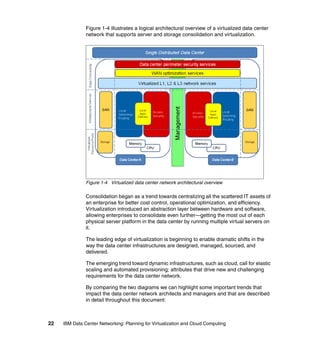
                  are categorized as I/O Virtualization techniques (see 3.4.7, “Virtualized
                  network resources in servers” on page 185 for further details).
                  Network Link virtualization - These techniques refer to how physical wires can
                  be logically aggregated or partitioned to increase throughput and reliability or
                  to provide traffic separation using the same physical infrastructure.
                  Network Node virtualization - These techniques refer to how network devices
                  can be logically aggregated (for example, using stacking) or partitioned (see
                  3.4.3, “Network Node virtualization” on page 166 for further details).


150   IBM Data Center Networking: Planning for Virtualization and Cloud Computing
Data Center Network-wide virtualization - These techniques extend the
   virtualization domain to the whole Data Center Network and even to the WAN
   in case there are multiple Data Centers.


                One-to-many                                                                     Many-to-one
                      Physical Switch


                                                                   Virtualized Server

                                                                   VM1             VM2
                                                                   APP             APP
                                                                    OS             OS

  Logical
   SW 1                                        Logic al              Hypervisor / VMM
            Logical                             S W5
             SW 2                  L ogi cal
                        Logic al
                                    SW4
                         S W3


   vNICs, NIC Sharing,                                                                     NIC teaming, NIC
   SR-IOV, vSwitching                                              Network Interfaces      bonding
                                                                                           Link aggregation, Port
   802.1q, MPLS                                                      Network Links         Channel, Tunneling

   Node partitioning                                                                       Node aggregation
   techniques. Virtual                                              Network Nodes          techniques: Stacking,
   routers, switches, FWs                                                                  Virtual Chassis, VSS

   VLANs, MPLS L3                                                                          Internet VPNs
   VPNs
                                                                      Data Center
                                                                       Network


Figure 3-1 Network virtualization domains

Some of these virtualization features are based on open standards (such as
802.1q VLANs), but many others are still tied to specific vendor implementations,
so interoperability is not always guaranteed.

The virtualization features that were introduced are targeted mostly at the
forwarding and control planes. However, management plane and services plane
virtualization techniques are also emerging in the marketplace.
   Management plane virtualization enables multitenant data center network
   infrastructures because different virtual networks can be managed
   independently without conflicting with each other.
   Services plane virtualization (see 3.4.5, “Network services deployment
   models” on page 176) allows you to create virtual services contexts that can
   be mapped to different virtual networks, potentially in a dynamic fashion. This
   is a pivotal functionality in a dynamic infrastructure because it provides


                                                          Chapter 3. Data center network functional components      151
simplified scaling, reduced time-to-deploy and more flexibility compared to the
                  appliance-based deployment model.

               Another level of abstraction that is quite common in networking is the concept of
               an overlay network. This can be defined as a virtual network defined on top of a
               physical network infrastructure. An example of an overlay network is the Internet
               in its early stages, which was an overlay on the plain old telephone service
               (POTS). The same approach can be used for large scale content delivery and for
               video surveillance applications over IP, for example.

               Other networking-related virtualization features can refer to the ways network
               addresses are used in the data center. Both layer 2 (MACs) and layer 3 (IP)
               addresses virtualization techniques are available and can bring management
               issues to the table.


3.2 Impact of server and storage virtualization trends on
    the data center network
               The current landscape in the data center is characterized by several business
               issues and leading edge technology trends. From a business perspective:
                   New economic trends necessitate cost-saving technologies, such as
                  consolidation and virtualization, like never before.
                  Mergers and acquisition activities bring pressure for rapid integration,
                  business agility, and fast delivery of IT services.
                  The workforce is getting increasingly mobile; pervasive access to corporate
                  resources becomes imperative.
                  Data security is becoming a legal issue. Companies can be sued and fined, or
                  incur other financial damages for security breaches and for non-compliance.
                  Energy resources are becoming a constraint and should be considered a
                  requirement for an enterprise-grade network design.
                  Users’ dependency on IT services puts increasing pressure on the availability
                  and resilience of the infrastructure, and competition and on demand for
                  real-time access to services and support.

               Those business drivers are causing new trends to develop in data center
               architectures and the network must adapt with new technologies and solutions,
               as follows:
                  The new landscape brings the focus back to the centralized environment. The
                  distributed computing paradigm may not always match the needs of this
                  dynamic environment. Virtualization and consolidation together put more


152   IBM Data Center Networking: Planning for Virtualization and Cloud Computing
traffic on single links since the “one machine-one application” correlation is
   changing. This can cause bottlenecks and puts pressure on the access layer
   network.
   For example, the End of Row (EoR) model may be unfit to sustain this new
   traffic pattern and so the Top of Rack (ToR) model is rapidly becoming
   attractive. The access switch sprawl can be effectively managed by
   consolidating several access nodes into a bigger, virtual one.
   Figure 3-2 shows the consolidation and virtualization of server and storage.


      SRVR        SRVR        SRVR                       SERVER/BLADE SERVER
                                                                                 …
                                                           SRVR         SRVR
      NIC

            NIC

                  NIC

                        NIC

                              NIC

                                    NIC
                                                           LAN NIC/SW      SAN HBA/SW


          LAN
          LAN                                                   LAN
                                                                LAN
        ACCESS                 SAN SW                         ACCESS            SAN SW
       ACCESS
          SW                  SAN SW                         ACCESS
                                                                SW             SAN SW
           SW                                                    SW

Figure 3-2 Server Consolidation

   Virtualization brings a new network element into the picture. The virtual switch
   in the hypervisor cannot always be managed efficiently by traditional network
   management tools, and it is usually seen as part of the server and not part of
   the network. Moreover, these virtual switches have limited capabilities
   compared with the traditional network hardware (no support for multicast and
   port mirroring, plus limited security features). However, virtual switches are
   becoming much more capable over time. Hypervisor development is opening
   up new opportunities for more feature-rich virtual switches.
   Figure 3-3 on page 154 shows networking challenges due to virtual switches
   and local physical switches.


                                    Chapter 3. Data center network functional components   153
SRVR       SRVR       SRVR        SERVER/BLADE SERVER
                                                                                      …
                                                              SRVR          SRVR
                           C
                           I     C
                                 I     C
                                       I    C
                                            I    C
                                                 I     C
                                                       I
                           N     N     N    N    N     N      LAN NIC/SW       SAN HBA/SW


                              LAN
                              L AN                                 LAN
                                                                   LA N
                            AC CE SS             SA N SW         AC CE SS           SA N SW
                           ACCESS
                              SW                SAN SW          ACCESS
                                                                   SW              SAN SW
                               SW                                   SW


               Figure 3-3 Server virtualization

                  The server and its storage are being increasingly decoupled, through SANs
                  or NAS, thus leading to the possibility of application mobility in the data
                  center.
                  The 10 Gb Ethernet is reaching its price point for attractiveness. This
                  increased capacity makes it theoretically possible to carry the storage traffic
                  on the same Ethernet cable. This is also an organizational issue because the
                  storage and the Ethernet networks are usually designed by different teams.
                  Figure 3-4 on page 155 shows storage and data convergence and its impact
                  on the network infrastructure.


154   IBM Data Center Networking: Planning for Virtualization and Cloud Computing
VIRTUAL SERVER
     SERVER/BLADE SERVER
                                                                                     …
                               …                             SRVR         SRVR
       SRVR         SRVR
                                                             VLAN       VLAN      VLAN
         LAN SW            SAN SW
                                                              LAN NIC            SAN HBA


            LAN
           LAN
          AC CESS            SAN SW
         ACCESS
            SW              SAN SW                               LAN
                                                                 LAN
             SW                                                 ACCE SS
                                                               ACCESS
                                                                                   SAN SW
                                                                                  SAN SW
                                                                 SW
                                                                  SW


Figure 3-4 Storage and data convergence impact on the network infrastructure

   The consolidation of the distributed IT environment into single distributed data
   centers struggles with an increasingly mobile workforce and distributed
   branch offices. Distance, and thus latency, increases for remote access users.
   New technologies are available to address this issue and bring better
   response times and performance to this scattered user base.
   This becomes even more critical for applications that exchange significant
   amounts of data back and forth, because both bandwidth and latency must be
   optimized on an application and protocol level, but optimizing network
   utilization is not usually a priority during application development.


                                Chapter 3. Data center network functional components        155
Figure 3-5 shows how increasing distance may impact application response
                  time. This diagram does not show security layers, which also add end-to-end
                  latency.


               Figure 3-5 Impact of increasing distance on latency

                  Designing a traditional data center network usually implied deploying firewalls
                  between the users and the applications, but this is rapidly changing because
                  network and security must be designed together with a comprehensive
                  architecture in order to ensure that security appliances do not decrease
                  end-to-end performance. The high-level design should include secure
                  segmenting based on business needs and priorities. Security services should
                  be coupled with the applications even if these are mobile across data centers.
                  Additional technologies can be used to provide this secure segmentation, for
                  example VRFs. At the same time remote users must be authenticated and
                  access is to be controlled and virtualized to enter the IP core and use the
                  centralized, virtualized IT resources.
                  Figure 3-6 illustrates access control and defined policies, as well as support
                  for remote and mobile application access.


156   IBM Data Center Networking: Planning for Virtualization and Cloud Computing
SERVER/BLADE SERVER
                              SRVR    SRVR            …            SRVR     SRVR
                                              SRVR
                                                 LAN NIC/SW


                             SERVER LAN ACCESS L2

                                 VN            VN             VN            VN


                                      DATACENTER SECURITY SERVICES

                             IP CORE L3

                                 VN            VN             VN            VN


                                          ACCESS SECURITY SERVICES
                             MPLS WAN
                                                                          INTERNET
                                 VN            VN             VN

                                 ACCESS SECURITY SERVICES
                                                                          ACCESS
                                                                          SECURITY
                                                                          SERVICES
                                              USER


                                                                            USER


         Figure 3-6 Access control and defined policies


3.3 Impact of data center consolidation on the data
    center network
         Currently there is a clear trend in how applications are delivered to clients over
         the network: a return to a centralized IT model and away from distributed
         computing environments. This gives birth to the concept of a “single distributed
         data center,” which means that multiple data centers can behave logically as one
         single entity. The main enablers of this recentralization include:
            Server consolidation patterns across enterprise data centers resulting from
            the constantly increasing computing power available in the same physical
            space.
            This consolidation makes it possible to simplify administration, management,
            backup, and support by keeping the IT resources concentrated in one place
            rather than having a distributed model, and also allows adherence to
            regulatory compliance.


                                     Chapter 3. Data center network functional components   157
Server virtualization patterns that allow many applications to run concurrently,
                  yet independently, on a single physical server.
                  The increasing availability of WAN services at lower prices. Application
                  servers can be positioned in a central data center, accessed across a WAN
                  and still be responsive enough for business requirements.

               Server consolidation and virtualization combined clearly increase the average
               traffic volume per server dramatically, thus increasing the risk of network
               congestion.

               The main effects of consolidating several geographically dispersed data centers
               into a single logical one are listed here:
                  Infrastructure scalability requirements become more important. The
                  architecture of a single, very large data center is very different from the one
                  supporting multiple, smaller data centers.
                  Single faults affect a larger part of the infrastructure. Hardware problems
                  occurring on a single physical machine may affect multiple services that rely
                  on the logical servers inside the physical host.
                  From a network point of view, the forwarding plane becomes more complex.
                  Additional resiliency is required using, for example, load sharing solutions to
                  avoid chokepoints and single points of failure.

               In addition to recentralization of the IT infrastructure, users now also need to
               access these resources from increasingly scattered locations. Laptop computers,
               mobile devices and wireless connectivity (such as WiFi and cellular networks)
               allow users to meet their business requirements in an increasingly
               “connected-yet-dispersed” fashion.

               Users that access centralized applications from branch offices or remote
               locations expect LAN-like performance regardless of the connection they are
               relying on. However, this requirement can be difficult to fulfill and also very
               expensive if it is addressed only by acquiring more WAN bandwidth. This
               approach may also be ineffective in some cases due to, for example, the TCP
               transmission window mechanism.

               Furthermore, with applications growing richer in content and application
               developers often overlooking the need to optimize network consumption, it
               becomes challenging to offer LAN-like performance to remote users accessing
               centralized IT applications. This is especially true because low priority
               applications share the same WAN resources used by business-critical
               applications and congestions may occur. This is why it is very important to
               classify applications according to a consistent QoS model and apply it end to
               end.


158   IBM Data Center Networking: Planning for Virtualization and Cloud Computing
This scenario also impacts the latency that users experience when accessing
applications, given that data travels over a longer distance and more appliances
are involved in the traffic flow. This is particularly harmful for applications that rely
on a large number of small packets travelling back and forth with a small amount
of data (chattiness).

In addition to WAN slowing down the application access to users, another critical
requirement in this scenario is the availability of the centralized IT infrastructure.
A single fault, without a proper single point of failure avoidance and disaster
recovery (or even business continuity) strategy, would affect a very large
population with a dramatic negative impact on productivity (service uptime and
revenues are increasingly tightly coupled).

Increased application availability can be provided by:
   Leveraging increased HA features of single systems and components
   From a network perspective, this also means being able to upgrade software
   and hardware components without turning off the entire system. This
   becomes even more important if the system leverages virtualization
   technologies because several logical systems may experience downtime.
   Providing redundancy at every level in the network
   – Interface level (NIC teaming, NIC sharing, and so on)
   – LAN Link level (either spanning tree-based or with an active/active model)
   – Device level (node aggregation)
   – WAN Access level (Dual/Multi-homed Service Provider Connectivity that
     can be implemented using BGP or dedicated appliances)
   – Site level (disaster recovery, global load balancing). This can also be
     implemented with an Active-Active scheme (DNS-based or using
     dedicated devices) to maximize resource utilization.

As consolidation initiatives arrive at a concrete implementation phase, bandwidth
costs may still be an important item in the business case for emerging
economies. IT managers might have a need to properly manage their
connectivity to make sure critical-application traffic gets priority over traffic that
can be delayed or that is not time sensitive. In more mature markets, prices for
bandwidth are decreasing but traffic shaping is still a possible method for
approaching these situations and preventing slow response times during high
usage conditions and avoid increasing bandwidth for some locations including
the data center links.

Concurrent access to centralized applications and sources of data from several
branch offices, from an application resources perspective, might not pose any
problems, even if the committed rate of the connectivity itself looks to be enough
for average traffic. Traffic shapers have to be considered when the need is to
allocate precisely the right amount of bandwidth resources to the right service


                          Chapter 3. Data center network functional components       159
and thus have a means to guarantee the operational level agreement with the
               business units. Figure 3-7 on page 161 demonstrates policy enforcement using
               traffic shapers.

               From a data center perspective this implies that a certain slice of bandwidth is
               dedicated to the single branch office to deliver the mission-critical services.
               Classification of traffic needs to be done in advance because the number of
               applications that travel the wide area network (WAN) can be vast, and traffic
               shapers can also limit the bandwidth of some kind of applications (for example ftp
               transfer, p2p applications) so that all services are available but performance can
               vary over different conditions.

               This approach gracefully avoids service disruption by preventing services from
               contending for the same network resources. Classification needs to evolve with
               traffic patterns and applications that change over time. This aspect is critical for
               management of the solution and does not have to turn into something
               overwhelming for the IT department. A sound financial analysis is advisable in
               order to understand what should be done strategically over time to guarantee the
               service levels to all branch offices and other external users.


160   IBM Data Center Networking: Planning for Virtualization and Cloud Computing
Figure 3-7 Policy enforcement with traffic shapers

                 Another technique that can be used to optimize bandwidth resources is WAN
                 optimization. WAN Optimization Controllers (WOCs) are appliances deployed in
                 a symmetrical fashion, both in the data center and in the remote office, creating a
                 “tunnel” between sites that need to be accelerated. The goal of WOCs is to use
                 bandwidth more efficiently and to free up some space for new applications or
                 flows to be delivered over the wide area network.

                 WOC techniques can also reduce latency at the session level, not at the link
                 level, which depends on other factors the WOC cannot change. This is important
                 because WOCs do not accelerate traffic on the link but are appliances that sit in
                 the middle of the session to understand the packet flows, avoid data duplication
                 and combine and reduce packets of the application sessions in order for a single
                 IP datagram sent over the tunnel to carry more packets of the same or different
                 sessions, thus reducing the overall latency of a single session.


                                            Chapter 3. Data center network functional components   161
An additional approach is to deploy application front-end special-purpose
               solutions known as Application Delivery Controllers (ADCs). This asymmetric
               WAN Optimization approach is provided by deploying feature-rich and
               application-fluent devices that are capable of handling Layer 4 through Layer 7
               information, together with the traditional load balancing features such as server
               health monitoring and content switching. As stated above, this layer sits in front
               of the application to mainly offload servers from:
                  Terminating the SSL sessions, leaving more processor cycles to the
                  application
                  Serving repetitive and duplicate content to the users by instructing the users’
                  browser to use the dynamic or static objects that will be cached locally.

               This approach has the benefit of lowering the use of disk, memory, and
               processor resources in both a virtualized or traditional environment. For example,
               the consequence in a virtualized data center is more VMs per physical server
               due to reduced resource utilization.

               Another aspect of ADCs is that they are tied to the application layer and, as
               application traffic, are adapted to VM migrations, even between data centers or to
               the cloud. Downtime and user disruption are therefore avoided by accelerated
               data transmission and flexibility in the expansion of the overall service delivery
               capacity of the service delivery. Other features to consider when approaching
               ADC solutions are compression that allows less data to be sent over the WAN,
               and TCP Connections management.

               Note that this process can be transparent to both server and client applications,
               but it is crucial to redirect traffic flows in real time if needed. It is also important
               that the choice of where to deploy the envisioned solution is meeting the
               performance and, above all, cost objectives. These functions, just as the other
               network services, can be implemented using different deployment models (see
               3.4.5, “Network services deployment models” on page 176 for more details).

               For example, software-based ADCs are entering the market from various
               vendors. A hybrid deployment model can also be used, leveraging hardware
               platforms for resource-intensive operations such as SSL termination, and
               offloading other functions such as session management or load balancing to
               software-based ADCs.

               Each of the described approaches can address different aspects of the overall
               design and does not necessarily mean that one excludes the other. In fact, the
               combination of features can efficiently solve the identified issues in bandwidth
               management.


162   IBM Data Center Networking: Planning for Virtualization and Cloud Computing
3.4 Virtualization technologies for the data center
    network
           In this section we present the main virtualization technologies that can be
           exploited in a data center network context.


3.4.1 Data center network access switching techniques
           In this section we present the main techniques that can be leveraged to attach
           virtual machine-based server platforms to the physical network infrastructure.
           The term access switch is used to represent the first network device (either
           physical or logical) that aggregates traffic from multiple VMs up to the core of the
           data center network.

           These techniques can be generally categorized as follows:
              Top of Rack switching - ToR - using fixed form factor, appliance-based
              switches to aggregate traffic from a single rack and offer connectivity to the
              data center network core via copper of fiber uplinks. It requires more switches
              than the End of Row technique (but at a lower price per box), but it simplifies
              cabling and it is a good fit to enable modular, PoD-based data centers. Note
              that this is the only option available today (together with Blade switches) for
              converged access switch solutions capable of handling both Ethernet and
              fiber channel traffic (Fiber Channel Forwarders - FCFs).
              End (or Middle) of Row switching - EoR (MoR) - using chassis-based modular
              switches. This model implies having switches in dedicated racks at the end or
              middle of each row of racks to aggregate traffic from the different racks and
              connecting them to the data center network core. Usually uplink
              oversubscription is an issue with this approach since it is not dealt with in a
              rack-by-rack fashion, and it is difficult and expensive to scale if the number of
              racks exceeds a certain threshold. On the other hand, there are fewer
              switches to manage compared with the ToR model, but cabling is more
              difficult and less flexible.
              Models that mix the best of the ToR and EoR worlds are emerging (for
              instance virtual End of Row (vEoR) switching, for example using unmanaged
              (that can act like remote line cards) or managed appliances (fixed form factor
              switches that can be logically aggregated) in dedicated racks instead of
              chassis-based switches. This approach aims at minimizing the number of
              management points and creating a single, big, logical switch that can satisfy
              the scalability and flexibility requirements driven by consolidation and
              virtualization.


                                    Chapter 3. Data center network functional components   163
Blade Switching - Using Blade Center modules that perform switching
                  functions for the Blade servers and aggregate traffic all the way to the data
                  center network core. These switches have most of the features of the ToRs
                  and EoRs but are specific for a certain Blade server chassis, so there is
                  limited flexibility and also less choice.
                  Virtual Switching (vSwitching) - Using part of the hypervisor resources to
                  perform Ethernet switching functions for intra-server VM-to-VM
                  communications. These techniques have limited functionalities compared to
                  physical switches and are typically hypervisor-specific, as shown throughout
                  Chapter 2, “Servers, storage, and software components” on page 31.

               The latency introduced by having multiple switching stages (and also, depending
               on the design, perhaps multiple security stages) from the server to the data
               center network core, and the availability of high port density 10 GbE core
               switches is driving the trend towards the delayering of the data center network,
               which can achieve both significant cost benefits (less equipment to manage) and
               service delivery improvement (less latency turns into improved application
               performance for the users).

               On the other hand, servers equipped with 10 GbE interfaces induce higher
               bandwidth traffic flowing to the core layer, so oversubscription on the access
               layer uplinks may become detrimental for service performance. The development
               of IEEE standards for 40 GBE and 100 GBE will alleviate this potential bottleneck
               going forward and help simplify the data center network design.


3.4.2 Traffic patterns at the access layer
               During the design phase of a dynamic infrastructure, the traffic patterns of the
               applications are generally not known by the network architect and are difficult to
               predict. Without this data, you have to consider trends that will have an impact on
               the network.

               Because of the increasing virtualization of servers, the availability of more
               powerful multicore processor architectures, and higher bandwidth I/O solutions, it
               is obvious that the access layer will face huge growth in terms of bandwidth
               demands.

               On the other hand, this trend faces limitations in highly virtualized environments
               because I/O operations experience significant overhead passing through the
               operating system, the hypervisor, and the network adapter. This may limit the
               ability of the virtualized system to saturate the physical network link.

               Various technologies are emerging to mitigate this. For example, bypassing the
               hypervisor using a Single Root I/O Virtualization (SR-IOV) adapter allows a guest


164   IBM Data Center Networking: Planning for Virtualization and Cloud Computing
VM to directly access the physical adapter, boosting I/O performance
significantly. This means that the new network access layer becomes the
adapter, which incorporates switching capabilities.

However, there is no “one-size-fits-all” solution. For example, there may be
different requirements for north-to-south traffic (client to server) and east-to-west
traffic (server to server). Because IT services are delivered using an increasing
number of different servers that can reside in the same data center (favored by
application development methodologies such as SOA), the interaction between
these hosts (east-to-west traffic) may play a fundamental role for overall
performance, even more important than traffic patterns coming in and out of the
data center (north-to-south traffic).

Sometimes the I/O subsystem can be the bottleneck of system virtualization
performance, but for other processor-intensive workloads (for example,
analytics), I/O subsystem performance may not be an issue.

The outcome of these trends is that the access layer is evolving towards Top of
Rack (ToR) topologies rather than pure End of Row (EoR) topologies. A ToR
topology is more scalable, flexible, and cost-effective, and it consumes less
energy than an EoR topology when dealing with the increased bandwidth
demands at the access layer.

In the long term it is desirable to have 10 Gbps capability as close as possible to
the servers, especially when a converged access switch solution is installed at
the access layer. A converged server can utilize the converged 10 Gbps adapter
to burst large files over the Ethernet, if the SAN traffic is low, and the downstream
Ethernet network must be able to properly deliver the required bandwidth
throughout the network.

Because the traffic pattern varies from data center to data center (actually it is
the architecture of the applications and how users are accessing the applications
that will generate requirements on the design of the access layer) it is difficult to
provide baselines for developing a design.

The modular ToR approach can provide a sufficient solution for today’s
bandwidth demands. Because bandwidth can be added where it is needed, it is
important that port utilization (both server and uplink ports) is monitored with
proper management tools so that bandwidth can be added to the data center
infrastructure before bandwidth constraints are recognized by users.

The growth of traffic volume generated at the access layer is tightly coupled with
the increase of latency, which is originated by having additional switching stages
(virtual switches or blade switches, for example). To lower the latency introduced
by the data center network, different architectural patterns are emerging. One
possible option is to adopt a two-tiered network by collapsing the core and


                         Chapter 3. Data center network functional components    165
aggregation layer. Another alternative is to adopt a cut through ToR switching
               architecture for the access layer. This switching architecture in the Ethernet world
               is not something new (it has been popular for Infiniband networks), but it is
               gaining traction again due to the reduced latency brought by these kinds of
               switches. Manufacturers are releasing devices with this architecture, which has
               differences compared to the traditional Store and Forward model:
                  Cut through switches forward the Ethernet frames as soon as the Destination
                  MAC address is read.
                  No error correction/CRC means that a requirement for cut through switches is
                  that a very low error rate is needed because otherwise physical or data link
                  layer errors will be forwarded to other segments of the network. The host’s
                  NIC must perform the discard function instead.
                  Virtual Output Queueing architectures are needed to avoid head-of-line
                  blocking, and thereby avoid having the cut through switch behave like Store
                  and Forward due to port contentions. Using windowed protocols such as TCP
                  can exacerbate this situation by increasing response times.


3.4.3 Network Node virtualization
               Traditional network virtualization techniques such as VLANs may not be fit to
               match the complexity and requirements of today’s data centers, depending on
               factors such as scale and requirements. Recently, other techniques have
               emerged to address this limitation by simplifying the network topology by
               reducing the nodes count (aggregation), or by reducing the number of nodes
               needed to sustain the network infrastructure (partitioning). These are all
               proprietary techniques tied to a specific vendor, but they are key enablers for the
               next generation dynamic data center.

               Node aggregation
               Node aggregation techniques are similar to server clustering in some ways
               because many physical entities are logically grouped as one, single entity. The
               network impact of this approach is that there are fewer logical nodes to monitor
               and manage, thus allowing you to disable the spanning tree protocol aggregating
               links across different physical switches. At the same time, risk is reduced
               because nodes are still physically redundant, with no single point of failure. In
               fact the network becomes a logical hub-and-spoke topology with a proprietary
               control plane replacing the spanning tree protocol. Figure 3-8 on page 167
               illustrates node aggregation techniques.


166   IBM Data Center Networking: Planning for Virtualization and Cloud Computing
Aggregation layer
                                                         2:1


  Access layer                                                            N:1
                                                                          Across
                                                                          racks
    N:1
    Single rack
    (stack)


  Servers


Figure 3-8 Node aggregation techniques

These techniques can be separated into two types:
   2:1 aggregation
   This is performed at the core or aggregation layer, providing an extended
   backplane and simplifying dual-homing topologies. This allows for
   active/active configurations and link aggregation techniques. The logical
   network becomes a point-to-point topology, so spanning tree protocol can be
   disabled. By using a logical hub-and-spoke topology you can use all the
   available bandwidth with multichassis link aggregation techniques that
   logically group multiple links across different appliances into a single one.
   This also allows to disable default gateway redundancy (such as VRRP),
   providing the same level of resilience and availability. The L3 processing and
   routing tables are also simplified because they are shared by two physical
   nodes.
   N:1 aggregation
   This is performed at the aggregation or access layer and allows many
   physical switches (especially Top of Rack, or ToR) to be seen as one. This is
   very important because it simplifies the ToR model, which can add a high
   degree of complexity even if it better suits the need for an easy-to-manage yet
   dynamic data center.


                        Chapter 3. Data center network functional components   167
N:1 aggregation can be used in the same physical rack by stacking and
                  interconnecting many access servers. Or it can be used across different racks
                  to virtualize the whole access/aggregation layer. Furthermore, with this
                  approach the aggregation layer can be reduced if not eliminated. More traffic
                  can be confined within the access layer.
                  Sample scenarios of this virtualized environment are many ToR switches that
                  act like a single ToR, or multiple blade switches that act as a single ToR. In
                  these scenarios, multiple uplinks can be combined into an aggregated link to
                  provide more capacity with the same resilience. If one link fails, the overall
                  capacity is reduced but the overall availability is preserved.
                  Note that the classic L2 topology (Spanning Tree based) is replaced by a
                  private topology that requires some degree of understanding in order to
                  properly design the network, and it may not always be possible to extend
                  these functionalities in a multivendor network environment.

               Node partitioning
               Node partitioning techniques allow you to split the resources of a single node
               while maintaining separation and providing simplified (and thus improved)
               security management and enforcement. Partitioned nodes go beyond virtualizing
               the forwarding and control planes, such as you have with VLANs.

               This type of virtual node also virtualizes the management plane by partitioning
               the node’s resources and protecting them from one another. In this scenario a
               multitenant environment can be implemented without needing dedicated
               hardware for each tenant. Another possible use case of this technology is to
               collapse network zones with different security requirements that were physically
               separated on the same hardware, thereby improving efficiency and reducing the
               overall node count.

               This model is analogous to the server virtualization techniques in which a
               hypervisor allows multiple operating system instances to run concurrently on the
               same hardware. This approach allows for cost-effective, responsive, and flexible
               provisioning but needs a low-latency network for location-independence.

               Typical deployment scenarios are virtual routers, switches, and firewalls that can
               serve different network segments without having to reconfigure the whole
               environment if new equipment is added inside the data center. This can be
               extremely helpful for firewalls because these virtual firewall solutions reduce the
               need for dedicated in-line firewalling that can become bottlenecks, especially if
               the link speed is very high.


168   IBM Data Center Networking: Planning for Virtualization and Cloud Computing
3.4.4 Building a single distributed data center
           The trend to physically flatten data center networks highlights the need for a well
           thought out logical network architecture that is able to embrace different physical
           data center technologies, tools and processes to offer to the entire enterprise the
           correct levels of reliability, availability and efficiency.

           The idea is to create an overlay logical network that can transport data providing
           to the services a single virtualized view of the overall infrastructure. The final goal
           that this approach can provide is efficiency in the operational costs that can
           derive from the following factors:
              Better resources utilization: virtualized resource pools that comprises
              processor, memory and disks, for instance, can be planned and allocated with
              a greater degree of flexibility by leveraging underlying physical resources that
              are available in different, yet unified data centers. Also, new workloads can be
              provisioned leveraging resources that are not necessarily tied up to a physical
              location. The role of the “standby” data centers can change considerably to an
              “active” role, with the immediate advantage of better utilization of investments
              that have been made or are planned to be made. In fact, the scalability of one
              data center can be lowered because peaks can be handled by assigning
              workloads to the other data centers.
              Lower service downtime: when data centers are interconnected to create a
              single logical entity, the importance of redundancy at the link level becomes
              critical in supporting this model. Redundancy needs to be coupled with overall
              utilization of the links, which needs to be continuous and at the expected level
              of consumption. Capacity planning becomes key to enable the overall
              availability of the services that rely on the IT infrastructure.
              Consistent security policy: distributed yet interconnected data centers can
              rely on a level of security abstraction that consists of technologies and
              processes that tend to guarantee a common set of procedures that maintain
              business operations and are able to address crisis management when
              needed. Secure segregation of applications and data in restricted zones is
              also extended to the virtualized data center layer to ensure compliance with
              the enterprise security framework.
              Correct level of traffic performance by domain or service or type:
              interconnecting data centers results in even more business transactions
              contending for network resources. A possible methodology to adopt to
              address this aspect could be as follows:
              – Gain complete visibility of all the traffic flows.
              – Guided by business requirements, set the right level of priorities mainly
                from an availability and performance point of view.


                                     Chapter 3. Data center network functional components     169
– Enable solutions that can adapt network resources (such as bandwidth on
                    WAN links) depending on the agreed needs (for example, traffic
                    managers) or that can reduce traffic on the WAN links by avoiding
                    deduplication of data patterns (WAN Optimization Controllers).
                  – Monitor the overall service performance.

               Three major areas need to be considered to plan the interconnection between
               data centers:
                  Layer 2 extension: some applications need to rely on layer 2. If high
                  availability or workload mobility are among the drivers for interconnecting data
                  centers, the layer 2 of the single data center needs to be extended to all the
                  data centers that are relevant to the service.
                  Layer 3 extension: some applications (such as backups) can rely on layer 3
                  and therefore adequate IP connectivity needs to be provisioned between data
                  centers.
                  Storage Area Network extension: data within the enterprise is considered a
                  critical asset. Not only the replication, but the availability of data is essential to
                  achieve significant efficiency in the overall journey of building a single
                  distributed data center.

               Figure 3-9 on page 171 shows a sample scenario.


170   IBM Data Center Networking: Planning for Virtualization and Cloud Computing
Figure 3-9 Interconnecting data centers

Examples of the drivers behind layer 2 extensions, creating larger bridged
domains, are:
   The need for applications that use “hard-coded” IP parameters that cannot be
   easily modified to be available from different locations. That is, the same
   subnet needs to be available in different remote locations.
   Data center consolidation initiatives or the feasibility of outsourcing models
   can result in a portion of the server farm to be moved to another location.
   Layer 2 heartbeat mechanism to deploy high availability server clusters.
   Virtual machine mobility.
   There are network, server load balancing, and security devices that require
   high availability, as well as heartbeat and First Router Hop Protocols that
   need bridged connectivity.

There are several different approaches available today for extending layer 2
networks, and others that are in draft version in the standardization bodies. Each
approach needs to be carefully evaluated in terms of how they meet different
requirements such as availability features, implementation processes, cost, and
management. We outline three approaches:


                         Chapter 3. Data center network functional components   171
The first approach is to create a switching domain, made of multiple switches
                  that operate as a unified, high bandwidth device. Multi-Chassis-Link
                  aggregation techniques are an example of this approach: switches that are in
                  different data centers can be linked over optical links (over dark fiber or a
                  protected WDM-based network) over large distances. This technique is
                  especially suitable for dual site interconnection. Security on the link can be
                  added as an option. Also, the technique has the additional feature of
                  leveraging link aggregation (formerly known as 802.1ad, which has recently
                  been moved to a stand-alone IEEE 802.1AX-2008 standard).
                  Another important aspect when designing the interconnection between data
                  centers at this level is the speed of links and related standards. With the
                  objective of providing a larger, more durable bandwidth pipeline, IEEE have
                  announced the ratification of IEEE 802.3ba 40 Gb/s and 100 Gb/s Ethernet, a
                  new standard governing 40 Gb/s and 100 Gb/s Ethernet operations that
                  considers distances up to 40 km. For data centers that need to be
                  interconnected within this distance, this option can extend the core switching
                  infrastructure.
                  The second major approach is to deploy Virtual Private LAN Service (VPLS).
                  The primary purpose of VPLS is to extend Layer 2 broadcast domains across
                  WANs/Metro Area Networks (MANs) using a Multiprotocol Label Switching
                  (MPLS) backbone. Enterprises that decide to deploy VPLS have found the
                  deployment easy, a low latency variation, and a very scalable solution. In fact,
                  VPLS can scale to a very large number of MAC addresses.
                  Additional features that can be deployed aim to manipulate virtual local area
                  networks (VLANs) within a bridge domain or a virtual private LAN service
                  (VPLS) instance. VLAN translation is an example of such features.
                  The third approach is based on internet standards that are not yet finalized.
                  Cisco-sponsored Overlay Transport Virtualization (OTV) and the efforts of the
                  IETF L2VPN working group (also known as E-VPN) are examples of potential
                  alternatives to consider in the short-to-medium term. An IETF draft has been
                  submitted to describe OTV. At the time of this publication, the draft can be
                  found at:
                  http://www.ietf.org/id/draft-hasmit-otv-01.txt
                  OTV can be considered as a very recent alternative for extending Layer 2
                  domains because it relies on a “MAC in IP” technique for supporting L2 VPNs
                  over, mainly, an IP infrastructure. OTV can be positioned at the L2/L3
                  boundary at the DC aggregation and promises operational simplicity.
                  Additional requirements that need to be carefully examined when considering
                  OTV are:
                  – MAC addresses scalability
                  – VLAN scalability
                  – Convergence time


172   IBM Data Center Networking: Planning for Virtualization and Cloud Computing
– Additional VLAN features (for example, VLAN translation and VLAN
     re-use)
   The IETF L2VPN working group is the same group that is working on VPLS.

While alternatives are available and the business relevance is increasing today,
there can be some aspects that need to be considered and addressed in all the
components just stated but that are particularly severe for Layer 2 extensions:
   Latency - Since there is no market solution today that can address the latency
   derived from the speed of light, this aspect might not always be an issue when
   data centers are within shorter distances. Latency becomes an important
   factor to be considered when data centers are to be “actively” interconnected
   over longer distances.
   Bandwidth - Workload mobility and data replication require high-speed
   connectivity that is able to support a large amount of traffic. Moving virtual
   machines across data centers means that the snapshot of the virtual machine
   needs to cross the links between the data centers. If the end-to-end link
   between the sites does not comply with the vendor specification, the switch
   off of a VM and the restarting of a new one can fail.
   The real challenge is data synchronization across data centers, with the
   objective of having the most recent data as close as possible to the
   application. In both situations, techniques such as WAN Optimization
   Controllers can help in reducing the amount of bandwidth by avoiding
   deduplication of data. Quality of Service complemented by traffic shapers
   could also be an alternative for preserving the overall operational level
   agreements (OLAs).
   Organization (that is, DC team and WAN team) - Alternative selection criteria
   is also based on the enterprise organization structure and the skills
   associated with each alternative. For example, the fact that VPLS is based on
   an MPLS infrastructure implies that skills have to be in place, either internal or
   external to the organization if VPLS will be selected as a Layer 2 extension.
   Data flows of multitier applications - When data centers are servicing users,
   the changes in traffic flows that are built within the overall network
   infrastructure need to be well understood and anticipated when moving a
   service. Especially when the service is built upon a multilevel application
   approach (that is, front end service - application service - data service),
   moving single workloads (front end service layer) from one data center to
   another might result in increased latency and security flow impacts in the
   overall business transaction. In many situations, security needs to be applied
   within the flow and this layer needs to be aware of transactions that are going
   through different paths that must be created, or that the path is changing
   within interconnected data centers.


                         Chapter 3. Data center network functional components    173
Fast convergence - The longer convergence times of spanning tree protocol
                  (STP) are well known in the industry. When extending layer 2 in data centers,
                  the simple STP approach can result in unpredictable results as convergence
                  is concerned, and resynchronization of a large STP domain can take too
                  much time for business requirements. Because MPLS relies on the underlying
                  IP network, some critical configuration parameters of both IP and MPLS have
                  to be analyzed. Moreover, the convergence time that an IGP, EGP, and First
                  Hop Router Protocol (for example, VRRP) with default parameters provide is
                  usually not suitable for today's business requirements. In an MPLS network,
                  two main types of fast convergence architectures can be used:
                  – MPLS Fast Rerouting Traffic Engineering (FRR TE)
                  – IP Fast Rerouting (IP FRR)
                  In order to achieve a sub-second convergence time, the following aspects
                  have to considered:
                  – Failure detection
                  – Label Distribution Protocol session protection mechanisms
                  – IGP tuning
                  – BGP tuning
                  – First Hop Router Protocol (FHRP) tuning
                  – System scheduler tuning
                  Scalability (MAC/VLANs/Data Centers) - Large enterprises have the need to
                  extend a certain number of VLANs across data centers. Also, the number of
                  MAC addresses that the network must be aware of can grow significantly, in
                  the order of thousands of entries. Each node at the edge should have the
                  information of where the different MAC addresses are in order to send the
                  frames to the correct data centers.The number of sites that need to be
                  connected is also relevant to the technology choice. For example, a large
                  number of sites that are connected can have a Layer 2 domain that is too big
                  for STP to handle.
                  Policy synchronization - The security framework includes policies related to
                  how the services are protected. Interconnecting data centers are an
                  opportunity for policy enforcement to match in all locations. On the other
                  hand, it represents a challenge where enterprises strive to create an
                  homogeneous set of policies and do not necessarily own the infrastructure,
                  but are renting it or are outsourcing a service or part of it.
                  Also, encryption and security play an important role: the merger of Layer 2
                  and Layer 3 can have important implications on the current security
                  framework. When the MPLS services are outsourced to a service provider,
                  security from the service provider has a very important role in the chain.
                  Encryption can be an option to think about. In the same conditions PE routers


174   IBM Data Center Networking: Planning for Virtualization and Cloud Computing
are shared among multiple clients. Both aspects and, in general, internal audit
   requirements, might impact the overall solution approach.
   Management - Determining the impact of deploying new technologies and
   other IT-related services and analyzing how the management infrastructure
   will support the related architectures aims at network efficiency and overall
   reduction in the cost of ownership. Understanding the gaps in the current
   network management processes or tools is advisable. For instance, MPLS
   connectivity management might address the need for dynamic and
   automated provisioning, as well as resource management for tunnels. Also,
   troubleshooting differs from that for a routed network. Therefore, diagnostic
   capabilities are an important aspect of all the management processes.
   Storms or loops - A major difference between a router and a bridge is that a
   router discards a packet if the destination is not in the routing table. In
   contrast, a bridge will flood a packet with unknown destination addresses to
   all ports except to the port it received the packet from. In routed networks, IP
   routers decrease the TimeToLive value by one at each router hop. The TTL
   value can be set to a maximum of 255, and when the TTL reaches zero, the
   packet is dropped.
   This, of course, does not solve loops consequences in a routing domain but
   considering that in a bridged network there is no such mechanism, the
   available bandwidth can be severely degraded until the loop condition is
   removed. When interconnecting data centers at Layer 2, the flooding of
   broadcasts or multicasts or the propagation of unknown frames needs to be
   avoided or strictly controlled so that a problem in one data center is not
   propagated into another one.
   Split brain - This situation might occur if both nodes are up but there is no
   communication (network failure) between sites. Of course this situation needs
   to be avoided by carefully planning the redundancy of paths at different levels
   (node, interface, and link).

Cloud computing models imply additional thinking for the interconnection of data
centers. The alternatives offered by the market—private, public, or hybrid
cloud—all have in common the need for a careful networking strategy to ensure
availability, performance and security. Especially in multitenant environments
where service providers offer shared services, it is essential to consider which
aspects of service levels and security have strong relationships with the
networking and therefore must be addressed in a complementary manner.

Interaction with cloud models may imply different locations for the applications
and the related connectivity with respect to users. The techniques for the
interconnection with the cloud should not only deliver reliable and secure data
between different points, but must, above all, adapt to the variability of resources
that can be dynamically and automatically relocated geographically and in real


                         Chapter 3. Data center network functional components   175
time, inside and outside the cloud. An example is the availability in the cloud of
               additional processing power to meet peaks in the workloads on the same day or
               the temporary allocation of additional storage for specific projects. The network
               must be designed with flexibility in the ability to modify and extend the service to
               the rest of the cloud in a way that is completely transparent to end users.

               In designing and implementing cloud models, the networking component should
               be built in synergy with and sustain all other system components of cloud
               computing, such as applications, processes, delivery, and automation systems.


3.4.5 Network services deployment models
               There are many network service appliances in today’s network market. In this
               section, we focus on current appliance virtualization technology. These
               appliances fall into the following categories:
                  Application delivery appliances - Improve end-to-end response time; ADC,
                  WAN accelerator, caching device (proxy), content distribution.
                  Resource utilization optimization - Balances the traffic among distributed
                  servers and data centers; Server Load Balancers, Global Load Balancing,
                  traffic shapers.
                  Network security - Enables authentication, authorization access control, and
                  contents inspection; Firewall, IPS/IDS. VPN, AAA, and NAC.
                  IP network service - Provides IP assignment and IP resolution to servers or
                  clients; DNS and DHCP.

               In this section, we focus on the possible deployment models for those services,
               highlighting how virtualization can be leveraged and pointing out the pros and
               cons of each approach.

               Focusing on application acceleration and security services, the trends in the
               marketplace can be summarized by these three deployment models:
                  Physical appliances
                  This is the mainstream deployment model. It consists of deploying dedicated
                  hardware to perform a specific function for a specific network segment.
                  Virtualized appliances
                  This model consists of deploying shared and virtualized hardware to perform
                  one or more specific functions for different network segments.
                  Soft appliances
                  This is an emerging deployment model. It consists of deploying a
                  software-based appliance to perform a specific function for one or more


176   IBM Data Center Networking: Planning for Virtualization and Cloud Computing
specific virtual machines (VMs) in the same network segment. Both traditional
   vendors and new entrants are focusing on this kind of technology.

The deployment models can be mixed when addressing different categories of
network service, depending on the specific functions and their requirements. For
example, some functions that are resource-intensive still need to be performed in
hardware to avoid performance bottlenecks.

On the other hand, application delivery functions can be broken down further and
then split depending on the best deployment model for each function. Using
application delivery as an example, SSL termination may be a better fit for a
hardware platform, while other more application-specific functions may be
virtualized.

The characteristics of each approach can be expressed in the following terms:
   Performance - Generally indicated by how many packets are processed per
   second by the appliance or other similar performance metrics. This can
   impact the performance of the entire network (if the appliance becomes a
   bottleneck) or the hypervisor, in the case of a software appliance.
   Provisioning effort - Defined as the time and effort required to get the network
   service up and running. An appliance approach needs to consider all of the
   aspects of a dedicated hardware in terms of hardware provisioning and setup
   that might be shared among other services with software-only models.
   Scalability - In networking terms, the ability to grow incrementally. Scalability
   can be horizontal (scale out model), adding network nodes in the systems or
   vertical (scale up model), adding resources to a single network node.
   Management integration - Defines the possibilities in terms of systems
   management integration.
   Functional richness - Defines the various functions a single appliance or
   cluster carries out.
   Point of enforcement - Defines where network services can be deployed.
   Location - Defines where the appliance is located and with how much
   flexibility it can be relocated.
   Cost - Defines the required financial impact of each deployment model.

Physical hardware appliances have a broader applicability because they perform
their functions as long as the protocols they rely on are running and supported
throughout the network. Some applications that cannot be virtualized or are
chosen not to be virtualized still need to rely on this type of deployment model for
network services. Performance can be very high, depending on the traffic load for
each appliance, but it may come at a very high price. Moreover, physical
appliances may incorporate several functions that are not required in most


                         Chapter 3. Data center network functional components   177
deployments. Virtualized appliances, in contrast, are generally based on modular
               hardware, with different blades or service modules that can be deployed as
               needed for specific functions or to allow growth with a scale up model.

               Virtual appliances are a better fit for cloud computing networking infrastructures
               because of their infinite scalability and the ability to closely integrate with the
               virtual infrastructure because the services can easily be moved to another
               physical host.


3.4.6 Virtual network security
               Although the virtualized environment provides benefits, it also presents new
               security challenges. Many existing security solutions are not optimized for
               security threats in the virtual environment. In this section, we briefly list the main
               security functional components for the virtualized environment from the data
               center network viewpoint and some IBM products.

               IBM has developed a high-level security framework. This is shown in Figure 3-10
               on page 179. The IBM Security Framework was developed to describe security in
               terms of the business resources that need to be protected, and it looks at the
               different resource domains from a business point of view.

               For more information, refer to Introducing the IBM Security Framework and IBM
               Security Blueprint to Realize Business-Driven Security, REDP-4528, and the
               Cloud Security Guidance IBM Recommendations for the Implementation of
               Cloud Security, REDP-4614.


178   IBM Data Center Networking: Planning for Virtualization and Cloud Computing
Figure 3-10 IBM Security Framework

As shown in Figure 3-10, network security is only a component of the overall
framework and can be seen as the enforcement at the network level of the
enterprise security policies. In a highly virtualized data center, for example,
security boundaries are no longer defined only by physical appliances but those
move inside the server and storage platforms. Also the server-to-server
communications often occur within the same physical box and traditional network
security appliances such as firewalls cannot enforce the security policies within
the hypervisor. This new environment shift is depicted in Figure 3-11 on
page 180.

A functional view of network security can be categorized in the following areas:
   Remote access (SSL/IPSec VPN) - Both site-to-site and to allow remote
   users to access enterprise resources outside of the perimeter.
   Threat management - Network level, network boundary security enforcement
   (firewalling, IPS, IDS, Anti-Spam) Layers 2 through 4 in the OSI model.
   Threat management - Application level security enforcement (application
   firewalling) Layer 7 in the OSI model. Functions such as URL filtering fall into
   this category.


                        Chapter 3. Data center network functional components   179
Resource access management and identity management to control and audit
                  who is entitled to access the network resources in order to monitor, manage
                  and configure the various appliances.


                         Before                                                     After


                                                                       APP                    APP
                                                                        APP         Virtual    APP
                                                                          APP       Switch       APP
                                                                       OS APP                 OS APP
                                                                         OS                     OS
                                                                       VM OS                  VM OS
                                                                         VM OS                  VM OS
                                                                          VM                     VM


                                                    Physical NICs
                                                                            VM                     VM

                                                                                                   Virtual
                                                                                                   Switch


                                                                                 Virtual
                                                                                 Switch       APP
                                                                                               APP
                                                                                                 APP
                                                                                              OS APP
                                                                       Management               OS
                                                                          VM                  VM OS
                                                                                                VM OS
                                                                                                 VM
                                                                                                   VM


                   Physical Network                                 Virtual Network


               Figure 3-11 Network security shift from physical to virtual

               Bear in mind that all these functional components can be deployed using the
               different models that have been presented in the previous section.

               We will now briefly describe some relevant IBM products in the virtualized data
               center network environment.

               The IBM security product portfolio covers professional and managed security
               services and security software and appliances. To learn about comprehensive
               security architecture with IBM Security, see Enterprise Security Architecture
               using IBM ISS Security Solutions, SG24-7581.


180   IBM Data Center Networking: Planning for Virtualization and Cloud Computing
IBM Security network components
The protocol analysis module (PAM) is a modular architecture for network
protection. PAM is the base architecture throughout all IBM Security products; it
includes the following components:
   IBM Virtual Patch technology
   This shields vulnerable systems from attack regardless of a vendor-supplied
   software patch.
   Threat detection and prevention technology
   This detects and prevents virus and worm attacks, and hacker obfuscation.
   IBM Proventia Content Analyzer
   This monitors and identifies the content of network flow to prevent data leak or
   to satisfy regulatory requirements.
   Web Application Security
   This provides web application vulnerabilities protection, such as SQL injection
   and command injections.
   Network Policy Enforcement
   This enforces policy and controls to prevent risky behavior, such as the use of
   P2P applications or tunneling protocols.

IBM security has a research and development team known as X-Force®.
X-Force discovers and analyzes previously unknown vulnerabilities in critical
software and infrastructures, such as email, network infrastructure, Internet
applications, security protocols, and business applications. PAM’s protection is
always up-to-date with X-Force research through automatic deployment.

IBM Virtual Server Security for VMware
IBM Virtual Server Security for VMware (VSS) provides a multilayered IPS and
firewall technology to protect the virtual data center in a solution that is
purpose-built to protect the virtual environment at the core of the infrastructure.
VSS runs on vSphere 4. It cannot run on previous versions of VMware. An
overview of this component is shown in Figure 3-12 on page 182Figure 3-12 on
page 182.

A virtual security appliance is installed on a virtualized server such as VM. The
VM is hardened to prevent access from other VMs or external access, except
management access; it is named Security VM (SVM). The appliance utilizes the
hypervisor API to inspect and control the virtual switch network and VM behavior.
VSS utilizes the vSphere API, which is provided as VMsafe. For more information
about vSphere and VMSafe, refer to “vSphere vNetwork overview” on page 86.


                         Chapter 3. Data center network functional components   181
Management             SVM                        VM               VM

                                            Policy
                     Applications                                  Applications     Applications
                                           Response

                                           Engines


                         OS               Hardened                     OS               OS
                                             OS

                       Kernel              Kernel                    Kernel           Kernel


                                           VMsafe


                                                      Hypervisor

                                                      Hardware


               Figure 3-12 Virtual Security appliance

               Each SVM on virtualized servers is managed and configured through Site
               Protector (SP), which is the central manager of SVM.

               VSS has the following functions:
                  Inter-VM IPS and Firewall
                  Virtual Machine Observer (VMO)
                  Antirootkit (ARK)
                  Network Access Control (NAC)
                  Discovery
                  License and Update Management (LUM)

               Inter-VM IPS and firewall
               The VSS IPS module monitors all traffic involving VMs on a single ESX server.
               Only one SVM is allowed per physical server. One SVM can protect up to 200
               VMs. The IPS covers the following traffic flows:
                  Traffic between a VM and an outside host
                  Traffic between VMs on the server
                  Traffic to SVM itself


182   IBM Data Center Networking: Planning for Virtualization and Cloud Computing
There are two ways to monitor traffic. One way is by using VMsafe architecture,
called DV filters, and the other is by using accelerated mode.

With DV filters, all NICs of VMs are monitored. An overview of a DV filter is shown
in Figure 3-13. A DV filter does not require any configuration changes to the
internal network.


                IPS                  VM                       VM
     SVM


               VNIC                    VNIC                     VNIC


               vSwitch                DV Filter                 DV Filter


                                      vSwitch                  vSwitch


                                        PNIC                    PNIC


Figure 3-13 DV filter

Because of performance and resource consumption considerations, accelerated
mode can be configured. Unlike a DV filter, accelerated mode monitors vSwitch
inbound and outbound traffic. Thus, inter-VM traffic within vSwitch is not
monitored. This mode is illustrated in Figure 3-14 on page 184.

In both methods, the same IPS function is supported, but traffic coverage is
different.


                         Chapter 3. Data center network functional components   183
IPS                    VM                        VM
                  SVM


                            VNIC       VNIC           VNIC                          VNIC


                            vSwitch                       vSwitch


                             PNIC

               Figure 3-14 Accelerated mode

               VSS also provides protocol access control like a normal IPS appliance from ISS.
               It filters network packets based on protocol, source and destination ports, and IP
               addresses. It can be enabled or disabled globally or for specific VMs. Because
               the VMware internal network does not support Layer 3, this function does not
               support L3 security zoning, which normal firewall appliances can.

               Virtual Machine Observer
               The main task of Virtual Machine Observer (VMO) is to communicate with the
               ESX server and obtain information on VM state changes, such as VM powered
               on and off. VMO facilitates configurations to bring VMs into protection based on
               policies. It also records VM inventory information such as IP addresses. If VMO
               finds a new VM, it sends signals to the VSS discovery function.

               Discovery
               The discovery module collects inventory information about VMs, such as
               operating system name and version, open TCP ports, and so on. A vulnerability
               check is not performed in this version.

               Antirootkit (ARK)
               A rootkit is a program that is designed to hide itself and other programs, data,
               and/or activity including viruses, backdoors, keyloggers and spyware on a
               computer system. For example, Haxdoor is a known rootkit of the Windows
               platform, and LinuxRootkit targets Linux OS. Generally, it is difficult to detect a
               rootkit that rewrites kernel code of OS. However, in a virtualized environment, it is
               possible that the hypervisor can monitor OS memory tables from outside OS.
               VMsafe supports a vendor tool that inspects each memory table on VM. VSS can
               detect malicious software inside OS by inspecting each kernel memory space.


184   IBM Data Center Networking: Planning for Virtualization and Cloud Computing
Network Access Control
           Network Access Control (NAC) controls which VMs can access the network. It
           classifies each VM as trusted or untrusted. The trusted list is maintained
           manually. Any VM that comes online, and is not on the trusted list, is quarantined.


3.4.7 Virtualized network resources in servers
           Historically, the network has consisted of separate Network Interface Cards
           (NICs) per server or a pair of separate NICs for redundancy. The connection to
           this NIC from the upstream network device was a single Ethernet link at speeds
           of 10/100/1000 Mbps. As virtualization appeared and multiple operating systems
           lived in one server, standards had to be developed to manage network
           connectivity for guest operating systems. The hypervisor is responsible for
           creating and managing the virtual network components of the solution.
           Hypervisors are capable of different levels of network virtualization.

           This section introduces best practice options for virtualized network resources in
           servers. The following approaches are discussed:
              NIC sharing
              vNIC - Virtual Switching
              NIC teaming
              Source Route - I/O Virtualization

           NIC sharing
           The most basic of the new connectivity standards simply assigns an operating
           system to share available network resources. In its most basic format, each
           operating system has to be assigned manually to each NIC in the platform.

           Logical NIC sharing allows each operating system to send packets to a single
           physical NIC. Each operating system has its own IP address. The server
           manager software generally has an additional IP address for configuration and
           management. A requirement of this solution is that all guest operating systems
           have to be in the same Layer 2 domain (subnet) with each guest operating
           system assigned an IP address and a MAC address. Because the number of
           guest operating systems that could reside on one platform was relatively small,
           the MAC address could be a modified version of the NIC’s burned-in MAC
           address, and the IP addresses consisted of a small block of addresses in the
           same IP subnet. One additional IP address was used for the management
           console of the platform.

           Features to manage QoS and load balancing to the physical NIC from the guest
           operating systems were limited. In addition, any traffic from Guest OS 1 destined


                                   Chapter 3. Data center network functional components   185
to Guest OS 2 traveled out to a connected switch and then returned along the
               same physical connection; see Figure 3-15. This had the potential of adding
               extra load on the Ethernet connection.


                      M a n a g e m e n t C o n s o le         10
                                                                    .1
                                                                         .1
                                                          10                  .1
                            G u est O S 1                      .1 .
                                                                      1 .2
                                                          10
                            G ue st O S 2                      .1 .
                                                                      1 .3

                                                         1 0 . 1 .1 .4
                            G ue st O S 3
                                                          1 0 .1 . 1 . 5
                            G u est O S 4


               Figure 3-15 NIC sharing


               vNIC - virtual switching
               The advent of vNIC technology enables each server to have a virtual NIC that
               connects to a virtual switch. This approach allows each operating system to exist
               in a separate Layer 2 domain. The connection between the virtual switch and the
               physical NIC then becomes an 802.1q trunk. The physical connection between
               the physical NIC and the physical switch is also an 802.1q trunk, as shown in
               Figure 3-16 on page 187.


186   IBM Data Center Networking: Planning for Virtualization and Cloud Computing
Platform
    Management             Separate
                           VLANS or
                            Subnets
    Guest
    OS

                                                802.1q                       802.1q
                                                 Trunk                        Trunk
    Guest
    OS

                                      Virtual
                                      Switch
    Guest
    OS


                         Virtual                                        Physical


Figure 3-16 Virtual switching

                 A Layer 3 implementation of this feature allows traffic destined for a server that
                 resides on the same platform to be routed between VLANs totally within the host
                 platform, and avoids the traffic traversing the Ethernet connection, both outbound
                 and inbound.

                 A Layer 2 implementation of this feature effectively makes the physical Layer 3
                 switch or router a “Switch-on-a-stick” or a “One-armed” router. The traffic from
                 one guest operating system destined for a second guest operating system on
                 that platform traverses the physical NIC and the Ethernet two times.

                 The challenge that this presents to the network architecture is that now we have
                 a mix of virtual and physical devices in our infrastructure. We have effectively
                 moved our traditional access layer to the virtual realm. This implies that a virtual
                 NIC (vNIC) and a virtual switch all have the same access controls, QoS
                 capabilities, monitoring, and other features that are normally resident and
                 required on access-level physical devices. Also, the virtual and physical elements
                 may not be manageable from the same management platforms, which adds
                 complexity to network management.


                                            Chapter 3. Data center network functional components   187
Troubleshooting network outages becomes more difficult to manage when there
               is a mixture of virtual and physical devices in the network. In any network
               architecture that employs virtual elements, methods will have to be employed to
               enable efficient monitoring and management of the LAN.

               NIC teaming
               To eliminate server and switch single point-of-failure, servers are dual-homed to
               two different access switches. NIC teaming features are provided by NIC
               vendors, such as NIC teaming drivers and software for failover mechanisms,
               used in the server systems. In case the primary NIC card fails, the secondary
               NIC card takes over the operation without disruption. NIC teaming can be
               implemented with the options Adapter Fault Tolerance (AFT), Switch Fault
               Tolerance (SFT), or Adaptive Load Balancing (ALB). Figure 3-17 on page 189
               illustrates the most common options, SFT and ALB.

               The main goal of NIC teaming is to use two or more Ethernet ports connected to
               two different access switches. The standby NIC port in the server configured for
               NIC teaming uses the same IP and MAC address (in case of Switch Fault
               Tolerance) of the failed primary server NIC. When using Adaptive Load
               Balancing, the standby NIC ports are configured with the same IP address but
               using multiple MAC addresses. One port receives data packets only and all ports
               transmit data to the connected network switch. Optionally, a heartbeat signaling
               protocol can be used between active and standby NIC ports.

               There are other teaming modes in which more than one adapter can receive the
               data. The default Broadcom teaming establishes a connection between one team
               member and the client, the next connection goes to the next team member and
               that target and so on, thus balancing the workload. If a team member fails, then
               the work of the failing member is redistributed to the remaining members.


188   IBM Data Center Networking: Planning for Virtualization and Cloud Computing
NIC teaming with Switch Fault Tolerance                            NIC team with Adaptive Load Balancing
                                                                                       ing
         One Ethermet port is active second port is standby                  One Ethermet port receives and all ports transmit
                   Using one IP and M address
                                     AC                                            Using one IP and multiple MAC addresses


 Default gateway                                                     Default gateway
                                     VRRP                                                                VRRP
    10.1.1.1                                                            10.1.1.1


                               x                                                                   x
           Ethernet Interface 0:             Ethernet Interface 1:             Ethernet Interface 0:          Ethernet Interfaces 1 to N:
                   10.1.1.30                       10.1.1.30                           10.1.1.30                       10.1.1.30
                   MAC A                            M A
                                                     AC                                 MAC A                       MAC B, C,…N


Figure 3-17 NIC teaming with Switch Fault Tolerance Adaptive Load Balancing


Single root I/O virtualization
Today’s server virtual switching infrastructure (such as Hypervisor) associates a
VM entity to access the network through a virtual switch port. With the advent of
PCIe adapters supporting multiqueue, multifunction, or Single-Root I/O
Virtualization (SR-IOV), methods for directly sharing I/O are becoming available
for x86 server models.

These virtualization approaches enable a Virtual Machine’s device driver to
bypass the Hypervisor and thereby directly share a single PCIe adapter across
multiple Virtual Machines (VMs).

The PCI Special Interest Group (SIG) standardized the North side of I/O
virtualization in a server. The network functions, such as switching or bridging,
were outside the PCI SIG scope. For a detailed description of SR-IV and sharing
specifications, see the following website:
    http://www.pcisig.com/specifications/iov/single_root/


                                           Chapter 3. Data center network functional components                                     189
The configuration of that generic platform is composed of the following
               components (see Figure 3-18 on page 191):
                  Processor - general purpose, embedded, or specialized processing element.
                  Memory - general purpose or embedded.
                  PCIe Root Complex (RC) - one or more RCs can be supported per platform.
                  PCIe Root Port (RP) - one or more RPs can be supported per RC. Each RP
                  represents a separate hierarchy per the PCI Express Base Specification.
                  PCIe Switch - provides I/O fan-out and connectivity.
                  PCIe Device - multiple I/O device types, for example network, storage, and so
                  on.
                  System Image - software that is used to execute applications or services.

               To increase the effective hardware resource utilization without requiring hardware
               modifications, multiple SIs can be executed. Therefore, a software layer
               (Virtualization Intermediary (VI)) is interposed between the system hardware and
               the SI. VI controls the underlying hardware and abstracts the hardware to
               present each SI with its own virtual system.

               The intermediary role for I/O virtualization (IO VI) is used to support IOV by
               intervening on one or more of the following: Configuration, I/O, and memory
               operations from a system image, and DMA, completion, and interrupt operations
               to a system image.


190   IBM Data Center Networking: Planning for Virtualization and Cloud Computing
SI 1                SI 2         SI 3                                 SI N
                                                     .............

                             Virtualization Intermediary


                                      Processor
                                       Memory


                                  Root Complex (RC)
                 Root                                          Root
               Port (RP)                                    Port (RP)


              PCI device
                                                  Switch


                                                  PCI device            PCI device


Figure 3-18 Generic SR-IOV platform


Network design considerations
Virtualized network technologies add complexity and specific design
considerations that should be addressed when these technologies are
introduced into an architecture, as explained here:
   Does the virtual switch in the proposed hypervisor provide all the required
   network attributes, such as VLAN tagging or QoS?
   Quality of service, latency, packet loss, and traffic engineering requirements
   need to be fully understood, documented, and maintained for each proposed
   virtual device.
   – Will applications running on separate guest operating systems require
     different levels of latency, packet loss, TCP connectivity, or other special
     environments?
   – Does each guest operating system require approximately the same traffic
     load?


                            Chapter 3. Data center network functional components     191
Will the converged network traffic to each guest operating system
                  oversubscribe the physical NIC?
                  Do any of the guest operating systems require Layer 2 separation?
                  Does each guest operating system require the same security or access
                  restrictions?
                  Who will be responsible for the end-to-end network architecture?
                  Enterprise naming standards, MAC address standards, and IP address
                  standards need to be applied to the virtual devices.
                  Separate Layer 2 domains may exist in the virtual design. They need to
                  adhere to the enterprise architecture standards.
                  Are there organizational issues that need to be addressed pertaining to
                  services management? Historically, different groups own management of the
                  servers and the network. Will organizational roles have to be redefined or
                  reorganized to allow efficient management of the dynamic infrastructure?
                  What combination of tools will be used to manage the infrastructure?
                  Currently, there are no tools that perform end-to-end network management
                  across virtual, logical, and physical environments. Several network
                  management systems have plans for this functionality but none have
                  implemented it at this time.
                  Can the selected platform and hypervisor support a virtual switch?
                  – If so, can this virtual switch support QoS?
                  – Does it participate in Layer 3 switching (routing)? What routing protocols?
                  – Does it do VLAN tagging?
                  – Can it assign QoS tags?

               All of these considerations will affect the network architecture required to support
               NIC virtualization.


192   IBM Data Center Networking: Planning for Virtualization and Cloud Computing
4


    Chapter 4.   The new data center design
                 landscape
                 This chapter describes the new inputs, approaches and thinking that are required
                 for a proper data center network design given what has been described in the
                 previous chapters.
                     Section 4.1, “The changing IT landscape and data center networking” on
                     page 195 discusses the market landscape for data center networking with the
                     goal of highlighting key trends in the industry from both sides of the business:
                     Network Equipment and IT vendors and customers.
                     Section 4.2, “Assuring service delivery - the data center network point of
                     view” on page 201 describes the new challenges that the DCN faces at the
                     light of the new business requirements that are described in Chapter 1,
                     “Drivers for a dynamic infrastructure” on page 1. The burgeoning solutions
                     that are or will be available are briefly presented, highlighting how these solve
                     some of the challenges at the price of introducing additional points of concern
                     that clients must face to be successful in this new environment.
                     Section 4.3, “Setting the evolutionary imperatives” on page 212 presents
                     some mindshifting evolutionary imperatives that must be used as general
                     guidelines in order to overcome the points of concern we discussed in 4.2.
                     Section 4.4, “IBM network strategy, assessment, optimization, and integration
                     services” on page 220 describes the IBM Integrated Communications
                     Services portfolio, focusing on how Enterprise Networking Services can help


© Copyright IBM Corp. 2011. All rights reserved.                                                  193
clients navigate through the available options and achieve their business
                  goals of minimizing risks and future-proofing the technology choices.


194   IBM Data Center Networking: Planning for Virtualization and Cloud Computing
4.1 The changing IT landscape and data center
    networking
         As organizations undertake information technology (IT) optimization projects,
         such as data center consolidation and server virtualization, they need to ensure
         that the proper level of focus is given to the critical role of the network in terms of
         planning, execution, and overall project success. While many consider the
         network early in the planning stages of these projects and spend time
         considering this aspect of these initiatives, many more feel that additional
         network planning could have helped their projects be more successful.

         The most common types of network changes in IT optimization projects include
         implementing new network equipment, adding greater redundancy, increasing
         capacity by upgrading switches, improving network security, and adding network
         bandwidth. However, many network requirements associated with these changes
         and the overall initiative are typically not identified until after the initial stages of
         the project and often require rework and add unanticipated costs. Regardless of
         project type, network challenges run the risk of contributing to increased project
         time lines and/or costs.

         The networking aspects of projects can be challenging and user complaints
         about the network are frequently heard. Important challenges include the inability
         to perform accurate and timely root-cause analysis, understand application level
         responsiveness, and address network performance issues. Simply buying more
         network equipment does not necessarily or appropriately address the real
         requirements.

         Looking ahead, many expect that the network will become more important to
         their companies' overall success. To address this, networking investments
         related to support of server and storage virtualization are currently at the top of
         the list for consideration, followed by overall enhancement and optimization of the
         networking environment.

         To support virtualization of the entire IT infrastructure and to continue to optimize
         the network, IT organizations need to make architectural decisions in the context
         of the existing infrastructure, IT strategy, and overall business goals.

         Developing a plan for the network and associated functional design is critical.
         Without a strong plan and a solid functional design, networking transitions can be
         risky, leading to reduced control of IT services delivered over the network, the
         potential for high costs with insufficient results, and unexpected performance or
         availability issues for critical business processes.


                                        Chapter 4. The new data center design landscape       195
With a plan and a solid functional design, the probability of success is raised: a
               more responsive network with optimized delivery, lower costs, increased ability to
               meet application service level commitments, and a network that supports and
               fully contributes to a responsive IT environment.


4.1.1 Increasing importance of the data center network
               A wave of merger and acquisition activity in the IT industry focused on data
               center networks is easily visible to observers of the IT and networking scene. IT
               and networking companies have realized that a highly consolidated and
               virtualized data center environment cannot succeed if the network is an
               afterthought. In response, they are bringing products and services to the market
               to address a myriad of new networking challenges faced by enterprise data
               centers. Some of these challenges are:
                  Selecting standards, techniques, and technologies to consolidate I/O in the
                  data center, allowing fiber channel and Ethernet networks to share a single,
                  integrated fabric.
                  Dealing with a massive increase in the use of hypervisors and virtual
                  machines and the need to migrate the network state associated with a virtual
                  device when it moves across physical hardware and physical facilities.
                  Instituting a virtual data center, where the data center is extended to several
                  physical sites to resolve room and power limitations.
                  Supporting business resilience and disaster recovery, often under the
                  pressure of regulatory requirements.
                  Introducing high levels of network automation when minor changes in network
                  configurations may affect the entire infrastructure because, unlike servers and
                  storage, network devices are not a collection of independent elements—they
                  exchange information among each other and problems are often propagated
                  rather than isolated.

               With so many vendor, product, and technology options available and so much to
               explore, it is easy to fall into the trap of working backwards from product literature
               and technology tutorials rather than beginning a network design with an
               understanding of business and IT requirements. When focus is unduly placed on
               products and emerging technologies before business and IT requirements are
               determined, the data center network that results may not be the data center
               network a business truly needs.

               New products and new technologies should be deployed with an eye towards
               avoiding risk and complexity during transition. When introducing anything new,
               extra effort and rigor should be factored into the necessary design and testing
               activities. Also, it would be atypical to start from scratch in terms of network


196   IBM Data Center Networking: Planning for Virtualization and Cloud Computing
infrastructure, networking staff, or supporting network management tools and
           processes. That means careful migration planning will be in order, as will
           considerations concerning continuing to support aspects of the legacy data
           center networking environment, along with anything new.


4.1.2 Multivendor networks
           The 2009 IBM Global CIO Study, “The New Voice of the CIO”1 showed that IT
           executives are seeking alternatives to help them manage risks and reduce costs.
           Introducing a dual or multivendor strategy for a data center network using
           interoperability and open standards can enable flexible sourcing options for
           networking equipment. It also can help to address the high costs that can result
           from depending on a single network technology vendor to meet all data center
           networking requirements.

           It is good to keep an open mind about technology options and equipment
           suppliers by evaluating vendor technologies based on best fit rather than past
           history to achieve the right mix of function, flexibility, and cost. Of course, it is
           wise to look before taking a leap into a multivendor approach by analyzing the
           existing data center network and making an assessment of the readiness to
           move to a multivendor networking environment. The current data center network
           technology and protocols need to be considered as well as the processes and
           design, engineering and operational skills used to run and maintain the network.
           In addition, a migration to a multivendor network must be supportive of business
           and IT strategies and based on networking requirements.


4.1.3 Networks - essential to the success of cloud computing
      initiatives
           An IBM study from April 20092 showed that moving from a traditional IT
           infrastructure to a public cloud computing service can yield cost reductions, with
           even more significant savings made possible by migration to a private cloud
           infrastructure1 . This study corroborates much of the discussion about the cost
           benefits of cloud computing. In addition to cost savings, a survey by IBM of 1,090
           IT and line-of-business decision makers published in January 20103 indicated
           that speed of service delivery, increased availability, and elasticity that allows for
           easy expansion and contraction of services are other drivers toward an interest in
           1
             2009 IBM Global CIO Study, “The New Voice of the CIO” -
           ftp://public.dhe.ibm.com/common/ssi/ecm/en/cie03046usen/CIE03046USEN.PDF
           2
             Advantages of a dynamic infrastructure: A Closer Look at Private Cloud TCO -
             http://www-01.ibm.com/software/se/collaboration/pdf/CloudTCOWhitepaper_04212009.pdf
           3
             Dispelling the vapor around cloud computing: drivers, barriers and considerations for public and
             private cloud adoption -
           ftp://public.dhe.ibm.com/common/ssi/ecm/en/ciw03062usen/CIW03062USEN.PDF


                                              Chapter 4. The new data center design landscape              197
cloud computing. The study findings validate that many organizations are
               considering cloud computing with 64% rating private cloud delivery as “very
               appealing or appealing,” and 38% and 30% giving a similar rating for hybrid cloud
               computing and public cloud computing, respectively.

               By definition, cloud computing uses the network to gain access to computing
               resources—the network becomes the medium for delivery of enormous
               computing capability and hence plays a critical role. This critical role means that
               it is crucial to “get the network right” in terms of the right levels of performance,
               security, availability, responsiveness, and manageability for the selected cloud
               computing deployment model.

               Enterprises that adopt cloud computing have a range of deployment models from
               which to choose, based on their business objectives. The most commonly
               discussed model in the press is public cloud computing where any user with a
               credit card can gain access to IT resources. On the other end of the spectrum
               are private cloud computing deployments where all IT resources are owned,
               managed and controlled by the enterprise. In between, there is a range of
               options including third-party-managed, third-party-hosted and shared or member
               cloud services. It is also possible to merge cloud computing deployment models
               to create hybrid clouds that use both public and private resources.

               Each cloud computing deployment model has different characteristics and
               implications for the network. That said, organizations select their cloud
               deployment models based on business requirements and needs. Whether a
               company opts to buy from a cloud provider or build its own private cloud
               computing environment, the enterprise network design must be revisited to
               validate that security, reliability and performance levels will be acceptable.

               In particular, the networking attributes for a private cloud data center network
               design are different from traditional data center network design. Traditionally, the
               data center network has been relatively static and inflexible and thought of as a
               separate area of IT. It has been built out over time in response to point-in-time
               requirements, resulting in device sprawl much like the rest of the data center IT
               infrastructure. The data center network has been optimized for availability, which
               typically has been achieved via redundant equipment and pathing, adding to cost
               and sprawl as well.

               The attractiveness of a private cloud deployment model is all about lower cost
               and greater flexibility. Low cost and greater flexibility are the two key tenets the
               network must support for success in cloud computing. This means the network
               will need to be optimized for flexibility so it can support services provisioning
               (both scale up and down) and take a new approach to availability that does not
               require costly redundancy. An example of this could be moving an application
               workload to another server if a NIC or uplink fails versus providing redundant
               links to each server.


198   IBM Data Center Networking: Planning for Virtualization and Cloud Computing
Private cloud adoption models require a new set of network design attributes;
           these are demonstrated in Figure 4-1.


                    Enterprise                                       Enterprise
                    data center                                      data center


                Traditional Network                                Cloud Network
                       Design                                         Design

                Optimized for availability                        Optimized for availability
                Slow to adapt                                     New approach to availability
                Costly                                            Cost more important
                Rigid, inflexible                                 Variable, metered
                Infrastructure silos                              Integrated infrastructure
                Dedicated                                         Shared
                Device sprawl                                     Consolidation/Virtualization
                Location dependence                               Location independence


           Figure 4-1 Private cloud adoption models

           In addition, network design can no longer be accomplished as a standalone
           exercise. The network design must encompass key requirements from other
           areas of the data center IT infrastructure, including server, storage, security and
           applications. The central design principles for the network must be based on
           present and planned application workloads, server and storage platform
           virtualization capabilities, IT services for internal and external customers, and
           anticipated schedules for growth and investment.

           From an organizational standpoint, the network design must address existing
           boundaries between the network, servers and storage and establish better
           interfaces that allow operational teams to work effectively in virtualized and
           dynamic environments. This requires the networking team to develop a greater
           operational awareness of server and storage virtualization technologies,
           capabilities and management.


4.1.4 IPv6 and the data center
           The public Internet and most enterprise networks route traffic based on the IPv4
           protocol, developed by the Internet Engineering Task Force (IETF) in 1981. The
           address space available in IPv4 is being outstripped by a spiraling number of
           servers and other network-attached devices that need or will need


                                             Chapter 4. The new data center design landscape     199
addresses—traditional computer and networking equipment, smart phones,
               sensors in cars and trucks and on outdoor light and utility posts, and more.

               A newer protocol, IPv6, also developed by the IETF, is available. IPv6 offers a
               bigger address space to accommodate the budding need for new IP addresses.
               IPv6 also promises improvements in security, mobility and systems
               management. While IPv4 and IPv6 can coexist, ultimately the network of every
               organization that uses the public Internet will need to support IPv6. Once the
               available IPv4 address space for the world is exhausted, the ability to route
               network traffic from and to hosts that are IPv6-only will become a requirement.
               No matter the reason why a company introduces IPv6, deployment of IPv6 will
               take focus, planning, execution and testing and require operational changes, all
               of which will impact servers, other devices in the data center and applications, in
               addition to the network itself.

               The Number Resource Organization (NRO)4, the coordinating body for the five
               Regional Internet Registries (RIRs) that distribute Internet addresses, says that
               as of September 2010 just 5.47% of the worldwide IPv4 address space remains
               available for new allocations (see Figure 4-2). When the remaining addresses
               are assigned, new allocations will be for IPv6 addresses only.


                    Available 8s                                                       IPv4 /8s Remaining
                    As of September 2010                                               As of September 2010
                                                                     62 62
                                                                             59
                                   ----- Unavailable 13.67%                       55
                                                                                       49 49
                                                                                               44 42
                                           ----- Available 5.47%                                     41 39 39
                                                                                                                34 32
                                                                                                                      30
                                                                                                                            26 26
                                                                                                                                    22
                                                                                                                                         16 14

                                            - ----Allocated 81.64%

                                                                     Mar Jun Sep Dec Mar Jun Sep DecMar Jun Sep Dec Mar Jun Sep Dec Mar Jun Sep


               Figure 4-2 IPv4 address space status5

               Network equipment providers ship new equipment that is IPv6-ready.
               Telecommunications carriers can, in many cases, handle IPv6 traffic or have
               backbone upgrade projects underway. However, for a specific enterprise, the
               network, network-attached devices, the tools used to manage data centers and
               4
                   Internet Number Resource Status Report - September 2010, Number Resource Organization
                   http://www.nro.net/documents/presentations/jointstats-sep10.pdf
               5
                   Global IP Addressing Statistics Sheet, American Registry for Internet Numbers (ARIN), September
                   2010 https://www.arin.net/knowledge/stats.pdf


200   IBM Data Center Networking: Planning for Virtualization and Cloud Computing
other IT resources, and the applications that are used to run the business need
         to be checked for their readiness to support IPv6 and plans must be made and
         executed for any upgrades. Also, each enterprise must determine its strategy for
         the coexistence of IPv4 and IPv6—tunnelling, translation, dual stack or a
         combination because both protocols will need to be supported and interoperate
         until IPv4 can be retired.

         Depending on the geography, the IP address range allocated to an organization,
         and any workarounds in place to conserve IP addresses, such as Network
         Address Translation (NAT) or Classless Inter-Domain Routing (CIDR), planning
         and readiness for IPv6 may be considered prudent or essential. However, it is
         risky to wait until IP addresses and workarounds are exhausted or important
         customers or supply chain partners—or government bodies—require IPv6 as a
         condition of doing business and implementation must be hurried or performed in
         a makeshift fashion. This is especially true in an environment like the data center
         that has limited change windows and cannot afford unplanned downtime or
         performance degradation.


4.2 Assuring service delivery - the data center network
    point of view
         As described in Chapter 1, “Drivers for a dynamic infrastructure” on page 1, the
         business requirements that impact a CIO’s decision-making process in a global
         economy significantly influence the IT environment and hence the data center
         network, which must support broader IT initiatives. The purpose of the data
         center network in this new context can be summarized with one simple goal:
         assuring service delivery. This objective’s impact on the data center network can
         be broadly categorized along two main axes:
            Service drivers
            The data center network must support and enable broader strategic IT
            initiatives such as server consolidation and virtualization, cloud computing
            and IT optimization. In this sense the network must ensure performance,
            availability, serviceability and shorten the time required to set up new
            services.
            Cost drivers
            The data center network must achieve the service delivery objectives at the
            right cost. In this sense, the data center network must be consolidated and
            virtualized itself in order to achieve the same cost savings (both on OPEX and
            CAPEX) gained through server and storage consolidation and virtualization.


                                      Chapter 4. The new data center design landscape   201
The structure of this section and the flow of the presented content are described
               by Figure 4-3.


                                                                                  Setting the
                         Assuring                      Burgeoning                evolutionary
                      service delivery                  solutions                imperatives


                                         Today's DCN                    Additional
                                          challenges                    points of
                                                                         concern


               Figure 4-3 Content flow

               These business and service objectives cause nontrivial challenges for data
               center network managers and architects since the traditional data center network
               infrastructure is not up to the task of satisfying all these new requirements. In
               fact, many technology-related challenges arise in this context.

               In order to overcome the limitation of the data center network’s static, traditional
               physical model, emerging standards and new architectural alternatives
               (described in 4.2.2, “Burgeoning solutions for the data center network” on
               page 208) can be exploited. The drawback of this path, however, is that while
               alleviating today’s challenges, additional points of concern emerge. These will be
               presented in 4.2.3, “Additional points of concern” on page 209. The only way to
               overcome these is to set high level but yet actionable guidelines to follow, as
               shown in Figure 4-3. These will be presented and discussed in section 4.2.3.


4.2.1 Today’s data center network challenges
               In this section we focus on highlighting the key challenges with today’s data
               center networks and how they impact the data center networks’ non-functional
               requirements (NFRs). The NFRs (introduced in Chapter 1.) do not really change
               in this new context from a definition standpoint. What changes dramatically is the
               priority of the NFRs, the way they are met and their inter-relations.

               In order to frame the discussion around functional areas, the data center network
               functional architecture that has been presented in Chapter 1, “Drivers for a
               dynamic infrastructure” on page 1 is shown again in Figure 4-4 on page 203.


202   IBM Data Center Networking: Planning for Virtualization and Cloud Computing
Single Distributed Data Center

                                                        Data center perimeter security services


        Edg Connectivity
                       y
                                                                  WAN optimization services


          ge
                                                       Virtualized L1 L2 & L3 network services
                                                                   L1,


                      ervices
       nfrastructure Se


                                                                                  ement
                                 SAN      Local         Local                                         Local                 SAN
                                                                  Access                  Access                Local
                                          Switching/    Apps                                          Apps
                                                       Delivery   Security                Security              Switching
                                          Routing                                                    Delivery
                                                                                                                /Routing


                                                                             Manage
      In
    Resource Pools
      Virtualized
               P


                                Storage                                                                                     Storage
                                                 Memory                                     Memory
                                                              CPU                                       CPU


                                          Data C t
                                          D t Center A                                                  Data Center
                                                                                                        D t C t B


Figure 4-4 Data center network logical architectural overview

This diagram can be used as a guide to document client-server flows and
impacts on the overall data center network infrastructure. In fact, for clients
accessing the data center services, the IT infrastructure looks like a “single
distributed data center”. The geo-load balancing components take care of
redirecting the client to the most appropriate data center (if these are
active/active) or it may redirect clients in case of a disaster recovery situation.
The Wide Area Network (WAN) acceleration layer optimizes the delivery of
services for the remote clients. It is important to highlight that these functions
(WAN optimization and perimeter security as well) may be different if the clients
are accessing via the Internet or intranet. So in order to document these
differences, different diagrams should be used.

The interconnection shown between data centers (there are two in Figure 4-4 but
there can be more) has to encompass traditional Layer 1 services (for example,
dense wavelength division multiplexing or DWDM connectivity for storage
extension) and Layer 3 services (for example, via multiprotocol label switching or
MPLS), but also, a Layer 2 extension may be needed, driven by server
virtualization requirements.


                                                              Chapter 4. The new data center design landscape                         203
The trend towards virtualized resource pools for servers and storage has a
               two-fold implication from a networking point of view:
                  Some network-specific functions may be performed within the virtualized
                  server and storage pools, as described in Chapter 2. For example, access
                  switching and firewalling functions may be performed within the hypervisor,
                  and the storage infrastructure may leverage dedicated Ethernet networks.
                  Some server and storage-specific functionalities may significantly impact the
                  network infrastructure that has to be able to support these
                  virtualization-driven features, such as virtual machine (VM) mobility.

               As shown in Figure 4-4, network-specific functions such as local switching and
               routing, application delivery and access security may be performed at the server
               virtual resource pool level. While access security and switching are needed in
               most situations, application delivery may be optional for some specific application
               requirements (but can be performed both at a physical or virtual level).
               Infrastructure management (shown in green in the diagram) should encompass
               the whole infrastructure end-to-end, and in this context the integration between
               system and network management becomes more meaningful, for example.

               Figure 4-5 on page 205 shows examples of how the diagrams can be used in
               different situations:
                  Example A shows a typical client-server flow where access security,
                  application delivery, and local switching functions are all performed in
                  hardware by specialized network equipment.
                  Example B shows a client-server flow where switching is also performed
                  virtually at the hypervisor level and access security and application delivery
                  functions are not needed.
                  Example C shows an example of a VM mobility flow between Data Center A
                  and Data Center B.


204   IBM Data Center Networking: Planning for Virtualization and Cloud Computing
Single Distributed Data Center                                                                                                                             Single Distributed Data Center

                                                Data center perimeter security services                                                                                                                 Data center perimeter security services
Data Center Edge


                                                                                                                                                       Data Center Edge
  Connectivity


                                                                                                                                                         Connectivity
                                               WAN optimization GEO load balance services                                                                                                               WAN optimization GEO load balance services

                                      Data center access                                         Data center access                                                                            Data center access                             Data center access
                                       security serviices                                         security serviices                                                                            security serviices                             security serviices
Infrastructure Services


                                               Virtualized L1, L2 & L3 network services                                                                                                                     Virtualized L1, L2 & L3 network services


                                                                                                                                                       Infrastructure Services
      Data Center


                                                                                                                                                             Data Center
                                                                      Management


                                                                                                                                                                                                                             Management
                           SAN                Local   Local                                  Local       Local                  SAN                                                                           Local                       Local
                                    Access                                                                       Access                                                           SAN       Access    Local                                           Local
                                                                                                                                                                                                                                                              Access      SAN
                                              Apps    Switching/                             Switching/ Apps                                                                                          Apps    Switching/                  Switching/ Apps
                                    Security Delivery                                                   Delivery Security                                                                   Security Delivery
                                                      Routing                                Routing
                                                                                                                                                                                                              Routing                     Routing    Delivery Security
Resource Pools


                                                                                                                                                       Resource Pools
  Virtualized


                                                                                                                                                         Virtualized
                          Storage       Memory                                                    Memory
                                                                                                                               Storage                                           Storage         Memory                                        Memory
                                                      CPU                                                      CPU                                                                                                                                                       Storage
                                                                                                                                                                                                                 CPU                                        CPU

                                    Data Center A                                                      Data Center B
                                                                                                                                                                                             Data Center A                                         Data Center B

                                                            Example A
                                                                                                                                                                                                                          Example B
                                                                                                                            Single Distributed Data Center

                                                                                                                     Data center perimeter security services
                                                                   Data Center Edge
                                                                     Connectivity


                                                                                                                    WAN optimization GEO load balance services

                                                                                                             Data center access                                                   Data center access
                                                                                                              security serviices                                                   security serviices
                                                                   Infrastructure Services


                                                                                                                       Virtualized L1, L2 & L3 network services
                                                                         Data Center


                                                                                                                                          Management
                                                                                              SAN                  Local   Local                                             Local       Local                   SAN
                                                                                                         Access                                                                                  Access
                                                                                                                   Apps    Switching/                                        Switching/ Apps
                                                                                                         Security Delivery                                                              Delivery Security
                                                                                                                           Routing                                           Routing
                                                                   Resource Pools
                                                                     Virtualized


                                                                                             Storage         Memory                                                               Memory
                                                                                                                                                                                                                Storage
                                                                                                                             CPU                                                               CPU


                                                                                                         Data Center A                                                                Data Center B

                                                                                                                                    Example C

Figure 4-5 Data center network logical architectural overview

                                                   Given the complex situation we just described, we now provide a list of the most
                                                   relevant of the networking challenges in the data center, from a technology point
                                                   of view, that need to be addressed in order to obtain a logical, functional view of
                                                   the infrastructure as shown in Figure 4-5. Note that the order does not imply
                                                   relative importance of the impact of these challenges on the specific
                                                   environment, processes, and requirements.

                                                   The first set of challenges described here is related to the service drivers as they
                                                   impact the data center because the network must support other strategic IT
                                                   initiatives.
                                                           Layer 2 extension
                                                           The widespread adoption of server virtualization technologies drives a
                                                           significant expansion of the Layer 2 domain, and also brings the need to
                                                           extend Layer 2 domains across physically separated data centers in order to


                                                                                                                                         Chapter 4. The new data center design landscape                                                                                           205
stretch VLANs to enable VM mobility using technologies such as VMware,
                  VMotion, or POWER Live Partition Mobility. These are very challenging
                  requirements to satisfy in order to achieve the service delivery objectives
                  since they directly impact the scalability (in terms of new MAC addresses that
                  can be included in a Layer 2 domain) and flexibility (in terms of the time and
                  effort needed to deploy new services) of the data center network.
                  Control plane stability
                  The stability of the control plane in a typical Layer 2 data center network is
                  typically controlled by the spanning tree protocol—STP or one of its many
                  variants. This approach, however, does not have the robustness, flexibility and
                  efficiency that is required to assure service delivery to the business. For
                  example, the typical convergence time required to recover from a link failure is
                  not in synch with the needs of today’s network-dependent and high-paced
                  business environment. This limitation hence has a huge impact on the
                  availability and reliability of the data center network.
                  Optimal use of network resources
                  Another drawback of the STP is that in order to avoid loops in a Layer 2
                  network, a tree topology must be enforced by disabling a subset of the
                  available links. So usually 50% of the available links are idle and the efficiency
                  of the capacity usage is suboptimal at best. This can be mitigated by
                  balancing the available VLANs across different STP instances, but it goes
                  without saying that being able to exploit 100% of the available capacity would
                  be a huge improvement from a data center network performance point of
                  view.
                  Obtain VM-level network awareness
                  As described in detail throughout Chapter 2, “Servers, storage, and software
                  components” on page 31, the VM is the new building block in the data center
                  and the importance of physical NICs for the network architecture fades when
                  compared to the virtual networking realm inside the server platforms. On the
                  other hand, it is difficult to manage both the virtual and the physical network
                  environment with a consistent set of tools and orchestrate changes in an
                  end-to-end fashion. This trend puts a lot of pressure on the serviceability and
                  manageability of the data center network and can also impact its availability if
                  changes are not agreed across different functional teams in charge of the
                  infrastructure management.
                  End-to-end network visibility
                  Server consolidation and virtualization initiatives demand more bandwidth per
                  physical machine and the same is true on a WAN scale when consolidating
                  scattered data centers into fewer ones. This and the fact that it is very difficult
                  to obtain end-to-end visibility of the network flows (different teams in charge of
                  managing virtual resources inside servers, Blade switches, LAN switches,


206   IBM Data Center Networking: Planning for Virtualization and Cloud Computing
and WAN routers) have the risky consequence that it is becoming
   increasingly more difficult to spot and remove network bottlenecks in a timely
   and seamless fashion. Clearly this has a significant impact on the
   performance and even the availability of the enterprise network if the quality
   of service (QOS) model is not designed and enforced properly.
   Support new, network-demanding services
   New services and applications that have very demanding network
   requirements, such as video, cannot be accommodated easily in traditional
   data center network environments. So the challenge is to be able to exploit
   these new technologies that are demanded by the business while minimizing
   the CAPEX expenditures that are needed and the risk of heavily changing the
   data center network infrastructure, whose stability has been traditionally
   enforced by it being static. These challenging new requirements impact both
   the performance and the capacity planning nonfunctional requirements.

The next set of data center network challenges is related to the cost drivers
because the network must bring operating expenses (OPEX) and capital
expense (CAPEX) cost savings, exploiting automation, consolidation and
virtualization technologies leveraged in other IT domains such as storage and
servers.
   Appliance sprawl
   Today’s data center network environments are typically over-sophisticated
   and characterized by dedicated appliances that perform specific tasks for
   specific network segments. Some functions may be replicated so
   consolidation and virtualization of the network can be leveraged to reap cost
   savings and achieve greater flexibility for the setup of new services without
   the need to procure new hardware. This appliance sprawl puts pressure on
   the scalability and manageability of the data center network.
   Heterogeneous management tools
   The plethora of dedicated hardware appliances has another consequence
   that impacts the operating expenses more than the capital expenses. In fact,
   different appliances use different vertical, vendor and model-specific tools for
   the management of those servers. This heterogeneity has a significant impact
   on the manageability and serviceability of the data center network.
   Network resources consolidation
   Another challenge that is driven by cost reduction and resource efficiency is
   the ability to share the physical network resources across different business
   units, application environments, or network segments with different security
   requirements by carving logical partitions out of a single network resource.
   The concern about isolation security and independence of logical resources
   assigned to each partition limits the widespread adoption of those
   technologies. So logically sharing physical network resources has a


                             Chapter 4. The new data center design landscape   207
significant impact on the security requirements, but may also limit
                    performance and availability of the data center network.


4.2.2 Burgeoning solutions for the data center network
               After listing and describing the main challenges in today’s data center network
               environment, this section discusses the new architectural alternatives and the
               emerging standards that have been ratified or are in the process of being ratified
               by bodies of standards such as IEEE and IETF, which can be leveraged to
               alleviate these challenges. Among these are:
                    Vendor-specific data center network architectures such as Cisco FabricPath,
                    Juniper Stratus and Brocade Virtual Cluster Switching (VCSTM ). By enabling
                    features such as multipathing and non-blocking any-to-any connectivity in a
                    Layer 2 domain, these solutions look to alleviate the challenges induced by
                    today’s inefficient and spanning tree-based Layer 2 data center network
                    topology by introducing a proprietary control plane architecture. At the same
                    time, the ability to manage the network as one single logical switch drives cost
                    savings because the network is easier to manage and provision.
                    Standards-based fabrics, leveraging emerging standards such as IETF TRILL
                    (Transparent Interconnect of Lots of Links) and IEEE 802.1aq6, Shortest Path
                    Bridging (SPB). Early manifestations of these fabrics are appearing on the
                    market. The basic idea is to merge the plug-and-play nature of an Ethernet
                    Layer 2 network with the reliability and self configuring characteristics of a
                    Layer 3 IP network. The challenges that these standards aim to solve are the
                    same as the vendor fabrics but also guaranteeing interoperability across
                    different network equipment vendors.
                    The price attractiveness of 10 gigabit Ethernet (GbE) network interface cards
                    and network equipment ports make it easier to sustain increased traffic loads
                    at the access layer virtualizing and consolidating server platforms. The
                    imminent standardization of 40 GBE and 100 GbE makes this even more true
                    in the near future in order to be able to handle the increased server traffic at
                    the core layer.
                    Fiber Channel over Ethernet (FCoE) disks and network appliances make it
                    possible to converge storage and data networks in order to achieve cost
                    savings by sharing converged network adapters, collapsing Ethernet and
                    Fiber Channel Switches in the same physical appliance, and simplifying
                    cabling. The FCoE standard provides the foundation for the forthcoming
                    converged data center fabric, but other protocols are also needed in order to
                    deliver a fully functional, end-to-end, DC-wide unified fabric. The IEEE
                    standards body is working in the Data Center Bridging task group7 (DCB) to
               6
                   For more information on IEEE 802.1aq refer to http://www.ieee802.org/1/pages/802.1aq.html
                   For more information on IETF TRILL refer to http://datatracker.ietf.org/wg/trill/charter/


208   IBM Data Center Networking: Planning for Virtualization and Cloud Computing
provide a framework to ensure lossless transmission of packets in a
                best-effort Ethernet network.
                New deployment models for network services such as multipurpose
                virtualized appliances and virtual appliances can be exploited in order to
                consolidate and virtualize network services such as firewalling, application
                acceleration, and load balancing—thereby speeding up the time needed to
                deploy new services and improving the scalability and manageability of the
                data center network components.
                Regulatory and industry-specific regulations together with IPv4 address
                exhaustion drive the adoption of IPv6 networks.
                In order to bridge the gap between physical and virtual network resources,
                standards are being developed by IEEE (802.1Qbg and 802.1Qbh) to
                orchestrate the network state of the virtual machines with the port settings on
                physical appliances, thus enabling network-aware resource mobility inside the
                data center. Again, these are standards-based solutions that can be
                compared with vendor-specific implementations such as Cisco Nexus 1000v
                and BNT VMReady.
                Network resources can also be logically aggregated and partitioned in order
                to logically group or share physical appliances to improve the efficiency and
                the manageability of the data center network components.
                In order to overcome the limits of the vendor-specific network management
                tools, abstraction layers can enable network change and configuration
                management features in a multivendor network environment. These tools,
                more common in the server and storage space, can also provide linkage to
                the service management layer in order to orchestrate network provisioning
                with the setup of new IT services, speeding up the time to deploy metrics and
                reducing capital and operating expenses associated with the growth of the
                data center infrastructure.


4.2.3 Additional points of concern
           In this section we present additional points of concern to those discussed in
           4.2.2. In fact, the new possibilities presented in the previous section alleviate
           some of today’s data center network challenges at the expense of raising new
           issues that must be faced by network managers and architects.

           These issues are not just technology related; they can be broadly categorized in
           three main areas: technology, business, and organization.


           7
               For more information on IEEE DCB refer to http://www.ieee802.org/1/pages/dcbridges.html


                                             Chapter 4. The new data center design landscape         209
Technology:
                  – The ability of navigating through vendor-specific alternatives in the data
                    center network solution space is a challenging task. Also, these solutions
                    are solving some concrete challenges that available standards are not
                    ready to overcome. This situation poises a serious threat to the
                    interoperability of Ethernet networks, which has been a key characteristic
                    over the years in order to minimize vendor transition cost and assure
                    seamless interoperability. In a way the data center network LAN is shifting
                    towards a SAN-like model, where the functionality lowest common
                    denominator is not high enough to make multivendor networks an
                    attractive solution for clients.
                  – The journey towards IT simplification is a recurring theme in the industry,
                    but there is a significant gap between the idea of shared resource pools
                    that can be leveraged to provision new services dynamically and the
                    reality of today’s heterogeneous, scattered, and highly customized
                    enterprise IT environment.
                  – New cutting-edge technology solutions that significantly enhance packet
                    services delivery are very promising in order to overcome some of the
                    data center network challenges, but these are not the universal panacea
                    for the data center network manager and architect headaches. In fact, a
                    network services and application-aware data center network requires the
                    ability of linking the data plane understanding with control plane and
                    management plane services, and also a broader understanding of the
                    overall IT environment.
                  – The consolidation and virtualization of server platforms and network
                    resources has to be carefully balanced in order to adapt to the security
                    policies. The tradeoff between resource efficiency and guaranteeing
                    secure isolation is a significant point of concern when collapsing services
                    with different security requirements on the same physical resources. A
                    high-level scenario of this is shown in Figure 4-6 on page 211. This has a
                    twofold implication: the hardware vendors should be able to prove this
                    isolation (both from a security and from a performance independence
                    standpoint) and this has to be proven for auditing, adding a regulatory
                    compliance dimension to this issue.


210   IBM Data Center Networking: Planning for Virtualization and Cloud Computing
Physical zoning pattern                                           Virtual zoning pattern


      VM VM VM        VM VM VM VM               VM VM
                                                                          S VM VM VM VM VM VM VM VM
                         Security Zone                                    V         Security Zone
                                                                          M

                       Virtualized Server                                           Virtualized Server
                                                              Virtual security
                                                               appliances


                    Server access layer                                            Server access layer


                             Core Layer                                                       Core Layer


                                            Security Zoning
                                              Controlled

    Internet                                  Restricted            Internet
                                               Secured


Figure 4-6 Collapsing different security zones on shared server and network hardware

   Business:
   – The cost reduction imperative driven by the global economy has put a lot
     of stress on enterprise IT budgets, so that projects and initiatives that
     cannot clearly demonstrate the value for the business have very little
     chance of being approved and launched by the decision makers. In this
     context, network and IT managers are struggling to obtain tools and
     methodologies that can show clear return on investment to their business
     executives.
   – Networking industry consolidation and the forces driving new alliances
     among IT and networking vendors may impact the existing business
     relationships together with the integration and interoperability governance
     that have been in place previously.
   Organization:
   – IT organizations can no longer be grouped into independent silos. The
     interdependencies between different teams managing and developing new
     solutions for the data center are just too many to rely on the traditional
     organizational model. Just to name a few examples: application
     characteristics that cannot be ignored by network architects and


                                            Chapter 4. The new data center design landscape                211
managers, virtual switch management boundaries blur and storage and
                      data converged network project responsibilities have to be carefully
                      balanced between the storage and the network teams.
                  – The data center professionals’ mindset must include the new evolutionary
                    step. T-shaped skills (the vertical bar on the T represents the depth of
                    related skills as expertise in a same field, whereas the horizontal bar is the
                    ability to collaborate across disciplines with experts in other areas, and to
                    apply knowledge in areas of expertise other than their own) must be
                    developed and the over-specialization paradigm has to be complemented
                    by skills in adjacent disciplines (for example hypervisors, storage, and
                    security). So it is a matter of new skills that must be sought after both from
                    a technological standpoint and from a communication and teamworking
                    point of view.


4.3 Setting the evolutionary imperatives
               As discussed in these previous sections, there are several technology
               alternatives and solution options and concepts that can be considered. The
               overall governance of the data center network becomes pivotal to guaranteeing
               the expected service delivery at the right cost. This section illustrates what an
               enterprise should consider for its needed governance around the data center
               network.

               Important goals to consider in order to set the enterprise networking guideline
               principles are:
                  Accelerate the investment decision-making process.
                  Build plans that leverage networking technologies and solutions for business
                  advantage.
                  Facilitate consensus across the organization.
                  Mitigate risk by providing guidance and suggestions that help enhance
                  availability, resiliency, performance, and manageability of the networking
                  infrastructure.

               The definition of these principles should also avoid:
                  Delay in the time to market of service delivery because the current networking
                  infrastructure may not support new business initiatives.
                  Improper use of the enterprise IT organization structure that could lead to
                  inefficiencies that might arise from new projects that are not deployed in a
                  timely or prioritized fashion.
                  Delays in justifying technology investments.


212   IBM Data Center Networking: Planning for Virtualization and Cloud Computing
Duplicated or suboptimal investments in tools and resources.

           In the following sections we present three key evolutionary imperatives that help
           to overcome the required shift in terms of mindset.


4.3.1 Developing a strategic approach
           IT managers are in the position to enable networking solutions to achieve current
           and future business objectives and streamline day-to-day operations
           management.

           The contribution of IT, and in particular the identification, prioritization and
           optimization of networking investments, becomes critical to achieving the
           enterprise business goals. Setting business priorities for networking initiatives
           will provide synergy among IT domains.

           Since networks are not acting as a “network interface card to network interface
           card” domain anymore, the IT infrastructures such as servers, storage, and
           applications have dependencies on what networking has to offer. Keeping a
           tactical approach can result in the networking domain bringing a suboptimal
           performance to the enterprise. Also, networking is not made exclusively by data
           packet forwarding fabrics, but other networking services that guarantee the
           service delivery objectives within and outside the enterprise. This is the reason
           why the IT organization should orchestrate the change with the current service
           delivery assurance in mind, but also looking at the horizon in order to organize
           the infrastructure, processes, and people around the necessary level of flexibility,
           efficiency, and future service delivery models.

           The network strategy and planning must therefore be driven by the business
           requirements and guided by a set of common design principles. In addition, the
           network must provide efficient, timely collection and access for the information
           services and must enable the protection of enterprise assets, while facilitating
           compliance with local, country, and international laws.

           An enterprise should identify the scope, requirements and strategy for each
           identified networking initiative inside the enterprise’s unique business
           environment, obtain visibility of the current IT infrastructure (for example,
           performing an assessment of the current environment), analyze gaps and set the
           actionable roadmap to define the potential for the effects such a strategy could
           have on the organization, the networking, and the IT infrastructures.

           We have seen how envisioning a single distributed data center network that
           provides reliable access to all authorized services, provides efficiencies in
           management and cost, and enables more consistent service delivery needs,


                                        Chapter 4. The new data center design landscape    213
goes through a well-defined process that aims to make educated and consistent
               decisions on network infrastructure and network application growth.

               The methodology that needs to be enforced is tightly linked to business
               objectives and overall IT governance and needs to consider all the specific
               interdependencies that provide a framework for the development of the scope
               and direction of the data center network.

               Enterprises should assess the current status of the networking environment and
               uncover the networking future state requirements by analyzing both business
               and IT objectives. This methodology often needs to leverage reference models,
               best practices, and intellectual capital. The analysis will then identify technology
               solutions that address a migration process that leverages the current IT
               investments in a sustainable operating environment.

               A fundamental aspect is to understand how IT integrates with the business
               domain. Aspects that should be defined include:
                  Business environment and objectives
                  Current IT environment and plans
                  Current technology environment
                  Current networking environment:
                  Current principles and standards
                  Budget and IT investments process
                  IT strategy and plans
                  Business satisfaction with the existing network

               The next steps aim at unleashing the potential of a sound transformation that
               matters to the enterprise:
                  Determine the existing versus the required state.
                  Identify the gaps between the enterprise's current environment and the new
                  networking strategy.
                  Build a portfolio of initiatives that overcome the gaps.
                  Prioritize the different identified initiatives and the networking and overall IT
                  dependencies.
                  Determine the initiative’s overall impact (including on the organization) and
                  transition strategy.
                  Plan an actionable roadmap in conjunction with the business ROI expectation
                  in terms of costs versus the value derived.


214   IBM Data Center Networking: Planning for Virtualization and Cloud Computing
Develop possible solution approaches for each planned initiative and select
              which approach to pursue.
              Schedule initiatives.
              Complete the transition plan.

           With the reiteration of this process the enterprise has set the strategy and the
           path to a comprehensive networking design that encompasses and unifies
           networking data forwarding, networking security and networking services.


4.3.2 The value of standardization
           As described in the previous sections, the typical data center environment is
           characterized by heterogeneous technology domains and heterogeneous
           physical appliances in each domain. These two levels of complexity need to be
           dealt with in order to leverage virtualized resource pools to simplify and speed up
           the creation of new IT services and lower operating and capital expenses.
           Standardization is also the first step in order to enable orchestrated automated
           infrastructure provisioning because it is somehow difficult, expensive and risky to
           achieve this in a highly customized and heterogeneous environment.

           From a high-level point of view, standardization in the data center spans these
           three dimensions:
              Technology: for example, rationalizing the supported software stacks
              (operating systems, hypervisors, data bases, application development
              environment, applications but also network appliances OSs) and their
              versioning simplifies the development process, lowers license costs and
              suppliers management costs and shortens the creation of service catalogues
              and image management tools and processes.
              Processes: for example, centralizing processes that span the organization (for
              example procurement, external support, and crisis management) improve
              consistency and speed up lead time. Also, cost savings can be achieved by
              eliminating duplicate processes optimizing resource efficiency both physical
              and intellectual.
              Tools: for example, reducing the number of vertical tools that are required to
              manage and provision the infrastructure can bring cost benefits in terms of
              required platforms and skills and also improve service delivery by leveraging
              consistent user interfaces.

           So the goal of standardization in this context can be broadly categorized as
           follows:
              Lower transition costs to new technologies or suppliers by leveraging
              standard-based protocols. But also vendor-specific features that are de facto


                                        Chapter 4. The new data center design landscape   215
standards can be leveraged in this context, not just IEEE or IETF ratified
                  ones. This also implies that procurement processes across different
                  technology domains (for example, network and security equipment) should be
                  centralized and coordinated in order to avoid duplication and ensure a
                  common strategy and interoperability.
                  Lower coordination costs (which also encompass skills and time) by
                  decoupling the functional layer from the implementation layer. Tools that
                  provide this abstraction layer are pivotal in order to use standard interfaces
                  (such as APIs) that application developers and other infrastructure domains
                  can understand, regardless of the low-level implementation of the specific
                  function.
                  Lower management costs and improved service delivery by using common
                  interfaces and operational policies so that advanced functions like correlation
                  and analytics can be implemented without requiring complicated and time
                  consuming ad-hoc customizations.
                  External and internal regulatory compliance is easier to achieve and
                  demonstrate because changes, inter-dependencies and control are easier to
                  trace back and fix.

               On the other hand, there are also barriers to the standardization process as it
               has been previously described:
                  Standards might offer limited functionality, lower adoption rates and less skills
                  available than other more customized alternatives, which may already be in
                  use.
                  It is not always easy to coordinate across different organizational
                  departments.
                  It is very difficult to have an over-encompassing view of the overall
                  infrastructure and its interdependencies because applications, technology
                  domains and even data centers may be handled independently and not in a
                  synchronized, consistent fashion.
                  The upfront capital investments that may be required and the risks of shifting
                  away from what is well known and familiar are also barriers in this context.
                  Network professionals typically operate through command line interfaces
                  (CLIs) so a shift in terms of tooling, mindset and skills is required in order to
                  integrate network management and configuration into more consumable
                  interfaces, such as the one used in the storage and server arenas.
                  The over-sophisticated and highly customized and heterogeneous IT world
                  struggles with the end goal of a homogeneous resource pool-based IT
                  environment without actionable, well-understood and agreed-upon milestones
                  and initiatives that might depend on tools and technologies that offer limited
                  functionalities compared to what is required.


216   IBM Data Center Networking: Planning for Virtualization and Cloud Computing
Standardization is a journey that requires coordination and understanding of
           common goals across people, tools, technologies and processes. On the other
           hand, it is a key enabler for automation, cost and service delivery optimization
           and is something that should always be kept in mind when integrating new
           functionalities and technologies inside a dynamic data center infrastructure.


4.3.3 Service delivery oriented DCN design
           A collaborative approach is needed to gain consensus among all IT domains,
           networks, servers, applications, and storage. In fact, the needs of the enterprise
           services (for instance core business processes, HR applications, safety-related
           services) impact IT with a series of requirements that strategic planning can help
           optimize from the very beginning. An overall architectural governance of the
           various specialties of IT is needed to ensure that while assembling different
           domain components, a common objective is met. The ultimate goal is to identify
           the strengths and weaknesses of the current organization and culture in relation
           to the stated business strategy, vision, and goals in order to set key priorities for
           transformation.

           The data center network should be designed around service delivery starting
           from a high-level design that outlines the basic solution structure to support the
           enterprise strategy and goals by establishing a set of guiding principles and
           using them to identify and describe the major components that will provide the
           solution functionality. Typically, items that should be developed are:
              Guiding principles: Principles relate business and IT requirements in a
              language meaningful to IT and network managers. Each principle is
              supported by the reason or the rationale for its inclusion and the effect or the
              implications it will have on future technology decisions. Each principle refers
              to at least one of the enterprise's key business requirements. The principles
              are also developed to help explain why certain products, standards, and
              techniques are preferred and how these principles respond to the needs of
              enterprise security, servers, applications, storage and so on.
              A network conceptual design: This is the first step in crafting a network
              solution to support business requirements. It describes the relationship
              between the building blocks or functions that comprise the network and
              services required to meet business needs. This design also shows the
              interactions between networking and other IT domains. At this level,
              technology is not specified but support of the business purpose is shown.
              Business requirements are then mapped to the network through guiding
              principles, conceptual network design diagrams and application flows.
              A specified design: This process refines the conceptual design by developing
              the technical specifications of the major components of the solution in terms
              of interfaces, capacity, performance, availability, security and management,


                                         Chapter 4. The new data center design landscape    217
and how they relate to other IT domains. This approach gives detailed
                  specification of the topology, sizing, and functionality of the network. At this
                  point decisions are made, sorting through architectural and functional
                  alternatives.
                  A physical design: This documents the most intricate details of the design that
                  are required for the implementation. At this level of the design, it is important
                  to:
                  – Identify product selection criteria.
                  – Select products that meet specific requirements.
                  – Select connection technologies.
                  – Rationalize and validate the design with the architectural governance.
                  – Develop infrastructure and facility plans for the network.
                  – Develop a detailed bill of materials.
                  – Prepare a network infrastructure implementation plan that also lists
                    organizational impacts and dependencies for the master plan that the
                    architectural board needs to craft.

               Once the physical design is complete, the enterprise will have a level of detail
               appropriate to execute the initiative.

               In Figure 4-7 on page 219, the possible interactions among the IT infrastructure
               teams that are needed for a service-oriented DCN design are depicted, along
               with examples, that the network domain might experience with other IT and
               non-IT domains.


218   IBM Data Center Networking: Planning for Virtualization and Cloud Computing
Enterprise Services Needs

                            Architectural Governance
                            Assuring Service Delivery

                           WAN,
                           Internet,QoS,
                                                       Applications
                           latency, BW,...


                          vSwitching,hyp


                                                                                               Framework
                                                           Server


                                                                                    Security
                          ports, ...
                Network
  Regulations

                           NAS-FC-iSCSI-
   Industry


                           FCoIP-FCoE                     Storage


                          Power, space,...               Facilities

                                Zoning, device access,port security protocols,...

                                       SNMP-
                                       NETCONF-
                Network Mngmt                        Network Provisioning
                                       Web-Interface
                    Tools                             & AutomationTools


                                   Service Management


Figure 4-7 Data center network design requirement gathering

Networking is in a truly unique position to connect the pieces of the IT
environment and drive the transformation towards efficiency at the right cost for
the business.

While we see industry regulations as external yet mandatory to follow, for each of
the planned IT initiatives, the network team, as shown in Figure 4-7, can leverage
and work with:
    Application teams to determine how the network should treat the flows and
    assure the required availability. It is also important to prove to the business
    the cost that the network must sustain in order to satisfy all the requirements.
    For example, the expected level of availability of a certain application has to
    be matched with similar (if not higher) network availability. This holds true
    both for client-to-server and server-to-server traffic flows.
    Server teams to define the right level of synergy to avoid layer and
    functionality duplications and delays in the application flow processing. For
    example, the virtual switching functions implemented in the hypervisors are


                                  Chapter 4. The new data center design landscape                          219
important requirements to document at this stage to clearly define the
                  infrastructure management boundaries.
                  Storage teams to explore and implement ways to improve the overall
                  transaction quality and cost while maximizing data security. For example, data
                  and storage convergence initiatives should be architected and implemented
                  with the storage, server, and network teams acting as a single entity.
                  Security teams to protect data with the right impact on the operations service
                  agreements following the guiding principles, constraints, and requirements
                  that govern, control or influence the final solution design and delivery. In this
                  sense the network must be the manifestation of the enterprise security
                  policies (for example, zoning, port access security, and so on) by adopting the
                  broader security framework. For example, network and security features may
                  be implemented on the same appliance, thus bringing the need to
                  synchronize architecture and operations between the network and security
                  teams.
                  Site and facilities teams to understand the consequences that new initiatives
                  have on cabling, cooling, and rack space. For example, even if rack space is
                  not an issue, power constraints may be a barrier for a data center
                  augmentation.
                  Service management teams to assess the current and planned portfolio of
                  management tools and processes for the IT environment and identify any
                  gaps or overlaps in the coverage provided by that portfolio. For example,
                  service provisioning and automation tools may need specific configurations
                  on the network side both on the physical devices and on a network
                  management level.

               Deep skills and extensive experience are necessary to detail and specify the
               complete enterprise architecture. It is necessary to link network services and
               security to other aspects of IT and business organization at key design decision
               points, including systems management, applications development,
               organizational change, testing and business continuity. The approach we
               recommend enables the enterprise to deliver a robust and resilient solution that
               aligns with and supports the ever changing business and industry regulations
               environment.


4.4 IBM network strategy, assessment, optimization,
    and integration services
               Business demands for greater cost efficiency while being able to respond faster
               to market changes to stay competitive is driving the IT industry to innovate like
               never before. Consolidation and virtualization technologies are enabling greater


220   IBM Data Center Networking: Planning for Virtualization and Cloud Computing
IT resource efficiencies while cloud computing is changing the paradigm of how
IT resources are sourced and delivered. This major shift in how IT resources are
perceived and utilized is changing how the IT infrastructure needs to be designed
to support the changing business requirements and take advantage of
tremendous industry innovation.

When equipped with a highly efficient, shared, and dynamic infrastructure, along
with the tools needed to free up resources from traditional operational demands,
IT can more efficiently respond to new business needs. As a result, organizations
can focus on innovation and aligning resources to broader strategic priorities.
Decisions can be based on real-time information. Far from the “break/fix”
mentality gripping many data centers today, this new environment creates an
infrastructure that provides automated, process-driven service delivery and is
economical, integrated, agile, and responsive.

What does this evolution mean for the network? Throughout the evolution of the
IT infrastructure, you can see the increasing importance of stronger relationships
between infrastructure components that were once separately planned and
managed. In a dynamic infrastructure, the applications, servers, storage and
network must be considered as a whole and managed and provisioned jointly for
optimal function. Security integration is at every level and juncture to help provide
effective protection across your infrastructure, and across your business.

Rapid innovation in virtualization, provisioning, and systems automation
necessitates expanding the considerations and trade-offs of network capabilities.
Additionally, the ultimate direction for dynamic provisioning of server, storage and
networking resources includes automatic responses to changes in business
demands, such as user requests, business continuity and energy constraints, so
your current network design decisions must be made within the context of your
long-term IT and business strategies.

IBM Global Technology Services (GTS) has a suite of services to help you
assess, design, implement, and manage your data center network. Network
strategy, assessment, optimization and integration services combine the IBM IT
and business solutions expertise, proven methodologies, highly skilled global
resources, industry-leading management platforms and processes, and strategic
partnerships with other industry leaders to help you create an integrated
communications environment that drives business flexibility and growth.

IBM network strategy, assessment and optimization services help identify where
you can make improvements, recommend actions for improvements and
implement those recommendations. In addition, you can:
   Resolve existing network availability, performance, or management issues.
   Establish a more cost-effective networking and communications environment.
   Enhance employee and organizational productivity.


                             Chapter 4. The new data center design landscape     221
Enable and support new and innovative business models.

               IBM Network Integration Services for data center networks help you position your
               network to better meet the high-availability, high-performance and security
               requirements you need to stay competitive. We help you understand, plan for and
               satisfy dynamic networking demands with a flexible, robust and resilient data
               center network design and implementation. Whether you are upgrading, moving,
               building or consolidating your data centers, our goal is to help improve the
               success of your projects.

               To help you deliver a reliable networking infrastructure, we offer services that
               include:
                  Network architecture and design based on your data center requirements.
                  A comprehensive design that integrates with your data center servers,
                  storage, existing networking infrastructure and systems management
                  processes.
                  Project management, configuration, implementation, network cabling and
                  system testing of server-to-network connectivity, routers, switches,
                  acceleration devices and high-availability Internet Protocol (IP) server
                  connections.
                  Options for proactive network monitoring and management of your enterprise
                  network infrastructure to help achieve optimal levels of performance and
                  availability at a predictable monthly cost.


4.4.1 Services lifecycle approach
               Based on a tested and refined lifecycle model for networking, IBM Network
               Strategy and Optimization Services and Network Integration Services can help
               ensure your network's ability to provide the level of availability and performance
               your business requires.

               Figure 4-8 on page 223 depicts the approach taken for the IBM services
               approach.


222   IBM Data Center Networking: Planning for Virtualization and Cloud Computing
Help me decide what to do                                                    Help me do it


   Plan                               Design                       Implement                            Operate
   •Assess existing network          •Develop the                  •Build network according             •Monitor and manage the
   •Develop actionable               network architecture          to design specified                  network remotely
   recommendations                   •Create a detailed design     •Test network in limited             •Provide equipment
   •Deliver a                        •Make a plan                  production environment               maintenance services
   transition roadmap                for implementation            •Deploy network in full
                                                                   production environment


                                                       Project management


Figure 4-8 Services lifecycle approach

                      In all phases shown in Figure 4-8, we will work with you to:
                              Plan
                              –   Understand your current IT and networking environment.
                              –   Collect and document your requirements.
                              –   Identify performance and capacity issues.
                              –   Determine your options.
                              –   Compare your current environment to your plans.
                              –   Make recommendations for transition.
                              Design
                              – Develop a conceptual-level design that meets the identified solution
                                requirements.
                              – Create a functional design with target components and operational
                                features of the solution.
                              – Create a physical design to document the intricate details of the solution,
                                including vendor and physical specifications, so that the design may be
                                implemented.
                              – Deliver a bill of materials and a plan for implementation.


                                                                 Chapter 4. The new data center design landscape                  223
Implement
                  –   Review the implementation plans.
                  –   Perform a site readiness survey.
                  –   Procure the equipment.
                  –   Develop installation procedures, solution testing and certification plans.
                  –   Stage the solution.
                  –   Implement and test the solution.
                  –   Train your in-house support staff.
                  Support the network - monitor and manage the environment
                  –   Review information about your networking environment.
                  –   Configure remote monitoring and management of your devices.
                  –   Test and start the service.
                  –   Provide proactive 24x7 monitoring.
                  –   Manage and report based on the level of service you have selected.
                  –   Deliver these services for a monthly fee based on the number of devices
                      under management.


4.4.2 Networking services methodology
               The foundation of our networking services methodology is based on the IBM
               Unified Method Framework and IBM Reference Architectures. The IBM Unified
               Method Framework provides a single framework to establish a common
               language among all IBM practitioners delivering business solutions. It is the
               fundamental component in our asset-based services, providing a mechanism for
               IBM practitioners to reuse knowledge and assets using a consistent, integrated
               approach.

               IBM Reference Architectures provide a blueprint of a to-be model with a
               well-defined scope, the requirements it satisfies, and architectural decisions it
               realizes. By delivering best practices in a standardized, methodical way,
               Reference Architectures ensure consistency and quality across development and
               delivery projects. It consists of a set of formal Unified Method Framework assets,
               defining requirements, and functional and operational aspects.

               IBM is world-renowned for employing solid project governance during the
               execution of a project. IBM's project managers establish a framework for
               communications, reporting, procedural and contractual activities for the project.
               IBM adheres to the Project Management Institute (PMI), Project Management
               Body of Knowledge (PMBOK) and uses the PMBOK phase processes to aid in
               project delivery. For the execution of all projects, IBM leverages appropriate
               proven tools, templates and processes. This critical oversight is imperative to
               deliver both cost effectiveness and accelerated and optimized timelines. IBM
               recognizes the importance of effective planning and governance in managing


224   IBM Data Center Networking: Planning for Virtualization and Cloud Computing
large, complex projects such as this project. Establishing the appropriate
           planning and governance frameworks at the outset will define the business
           partnership relationships at varying levels and help both organizations maximize
           the value and objective attainment that each can realize from this relationship.


4.4.3 Data center network architecture and design
           IBM understands that the first step to modernizing the network infrastructure is to
           develop a sound enterprise network architecture that takes the business and IT
           environments, security and privacy policies, service priorities, and growth plans
           into account. We analyze your business, current IT and networking environment
           and plans, and use the analysis to establish network design requirements; any
           previously performed assessments are also input to this analysis. Following data
           collection and analysis, we develop an architecture and design using three
           progressively more detailed levels of granularity, each providing more detail as
           the networking requirements are refined.

           Solution architecture and high-level design
           The IBM solution architecture and high-level design develop the basic solution
           structure and design to support your strategy and goals by establishing a set of
           guiding principals and using them to identify and describe the major components
           that will provide the solution functionality. Typically, IBM develops and documents
           the following items:
              Guiding principles
              Principles relate business and IT requirements in a language meaningful to IT
              and network managers. Each principle is supported by the reason or the
              rationale for its inclusion and the effect or the implications it will have on future
              technology decisions. Each principle refers to at least one of the client's key
              business requirements. The principles are also developed to help explain why
              certain products, standards, and techniques are preferred.
              Network high-level design
              A network high-level (conceptual) design is the first step in crafting a network
              solution to support business requirements. It describes the relationship
              between the building blocks or functions (that is, connections for point of sale
              terminals) that comprise the network and services required to meet business
              needs. At this level, technology is not specified but support of the business
              purpose is shown. Business requirements are mapped to the network through
              guiding principles, conceptual network design diagrams, and profiles. The
              security design is elaborated and included during the design cycle.


                                         Chapter 4. The new data center design landscape       225
Solution logical design
               The IBM solution logical (specified) design activity refines the conceptual design
               by developing the technical specifications of the major components of the
               solution in terms of interfaces, capacity, performance, availability, security, and
               management. The “specified” level of design is an intermediate step that will take
               all the architectural decisions made in the solution architecture and use them to
               give detailed specification of the topology, sizing, and functionality of the network
               and all components.

               The solution logical design contains information about the topology, sizing, and
               functionality of the network, routing versus switching, segmentation, connections,
               and nodes. The solution logical design is where the decisions are made
               concerning OSI Layer implementation on specific nodes. Sizing information is
               taken into account for connections and nodes to reflect the requirements (for
               example, capacity and performance) and the nodes' ability to handle the
               expected traffic. Functionality is documented for both nodes and connections to
               reflect basic connectivity, protocols, capabilities, management, operations, and
               security characteristics.

               The solution logical design addresses physical connectivity (cabling), Layer 2
               characteristics (VLANs, Spanning tree), Layer 3 characteristics (IP design),
               Quality of Service design, topological units (access, distribution, core, remote
               office, WAN, data center), network management, and traffic filtering.

               Solution physical design
               The IBM solution physical design documents the most intricate details of the
               design that are required for implementation, including: profiles of each type of
               product to be installed, exact hardware and software configurations, and tools.

               At this level of the design, IBM identifies product selection criteria; selects
               products that meet specific node requirements; selects connection technologies;
               rationalizes and validates the design with you; develops infrastructure and
               facilities plans for the network; develops a detailed bill of materials; and prepares
               a network infrastructure implementation plan.

               Once the solution physical design is complete, you will have an architecture and
               design specified to a level of detail appropriate to execute a network procurement
               activity and, following delivery, to begin implementation of the new network.


4.4.4 Why IBM?
               As a total solutions provider, IBM can offer a single source for the components
               that are necessary for a turnkey networking solution, including architecture,
               design or design validation, integration, logistics, ordering support and


226   IBM Data Center Networking: Planning for Virtualization and Cloud Computing
procurement, site preparation, cabling configuration, installation, system testing,
and project management.

IBM has the deep networking skills and extensive experience necessary to assist
you in detailing and specifying a data center network architecture. Our Network
Integration Services team links network services and security to other aspects of
your IT and business organization at key design decision points, including
systems management, applications development, organizational change, testing
and business continuity. Our approach enables us to deliver a robust and resilient
solution that aligns with and supports your changing business. A strong partner
ecosystem with suppliers like Cisco, Juniper, F5, and Riverbed also enables our
network and security architects to support the right combination of networking
technology for you.


                             Chapter 4. The new data center design landscape   227
228   IBM Data Center Networking: Planning for Virtualization and Cloud Computing
Related publications

                 The publications listed in this section are considered particularly suitable for a
                 more detailed discussion of the topics covered in this book.


IBM Redbooks
                 For information about ordering these publications, see “How to get Redbooks” on
                 page 231. Note that some of the documents referenced here may be available in
                 softcopy only.
                     Best Practices for IBM TEC to Netcool Omnibus Upgrade, SG24-7557
                     Communications Server for z/OS V1R9 TCP/IP Implementation Volume 1
                     Base Functions, Connectivity and Routing, SG24-7532
                     Communications Server for z/OS V1R9 TCP/IP Implementation Volume 2
                     Standard Applications, SG24-7533
                     Communications Server for z/OS V1R9 TCP/IP Implementation Volume 3
                     High Availability, Scalability and Performance, SG24-7534
                     Communications Server for z/OS V1R9 TCP/IP Implementation Volume 4
                     Security and Policy-Based Networking, SG24-7535
                     IBM Systems Virtualization Servers, Storage, and Software, REDP-4396
                     IBM System z Capacity on Demand, SG24-7504
                     IBM System z Connectivity Handbook, SG24-5444
                     IBM System z Strengths and Values, SG24-7333
                     IBM System z10 BC Technical Overview, SG24-7632
                     IBM System z10 EC Technical Guide, SG24-7516
                     IBM System z10 EC Technical Introduction, SG24-7515
                     Introduction to the New Mainframe - z/VM Basics, SG24-7316
                     Migrating to Netcool Precision for IP Networks - Best Practices for Migrating
                     from IBM Tivoli NetView, SG24-7375
                     PowerVM Virtualization on IBM System p Introduction and Configuration 4th
                     Edition, SG24-7940
                     z/VM and Linux Operations for z/OS System Programmers, SG24-7603
                     GDPS Family - An Introduction to Concepts and Capabilities, SG24-6374


© Copyright IBM Corp. 2011. All rights reserved.                                                  229
Clustering Solutions Overview - Parallel Sysplex and Other Platforms,
                  REDP-4072
                  Cloud Security Guidance IBM Recommendations for the Implementation of
                  Cloud Security, REDP-4614
                  IBM Scale Out Network Attached Storage Architecture, Planning, and
                  Implementation Basics, SG24-7875
                  IBM zEnterprise System Technical Guide, SG24-7833
                  IBM zEnterprise System Technical Introduction, SG24-7832
                  IBM XIV Storage System: Architecture, Implementation, and Usage,
                  SG24-7659
                  IBM System Storage Solutions Handbook, SG24-5250
                  Integration Guide for IBM Tivoli Netcool/OMNIbus, IBM Tivoli Network
                  Manager, and IBM Tivoli Netcool Configuration Manager, SG24-7893
                  IBM System Storage N Series Hardware Guide, SG24-7840
                  IBM System Storage N series Software Guide, SG24-7129
                  IBM b-type Data Center Networking: Design and Best Practices Introduction,
                  SG24-7786
                  IBM b-type Data Center Networking: Product Introduction and Initial Setup,
                  SG24-7785
                  IBM j-type Data Center Networking Introduction, SG24-7820
                  TCP/IP Tutorial and Technical Overview, GG24-3376
                  IBM BladeCenter Virtual Fabric Solutions, REDP-4673
                  Cloud Security Guidance IBM Recommendations for the Implementation of
                  Cloud Security, REDP-4614
                  Enterprise Security Architecture using IBM ISS Security Solutions,
                  SG24-7581
                  IBM BladeCenter Products and Technology, SG24-7523


Online resources
              These Web sites are also relevant as further information sources:
                  ICS SalesOne Portal
                  http://w3-03.ibm.com/services/salesone/S1_US/html/htmlpages/networki
                  ngsvcs/ns_splash.html


230   IBM Data Center Networking: Planning for Virtualization and Cloud Computing
Virtual Ethernet Port Aggregator Standards Body Discussion, Paul Congdon,
           10th November 2009
           www.ieee802.org/1/files/public/docs2008/new-congdon-vepa-1108-
           vo1.pdf
           First Workshop on Data Center - Converged and Virtual Ethernet Switching
           (DC CAVES)
           http://www.i-teletraffic.org/itc21/dc-caves-workshop/
           VSI Discovery and Configuration - Definitions, Semantics, and State
           Machines
           http://www.ieee802.org/1/files/public/docs2010/bg-sharma-evb-VSI-dis
           covery-0110-v01.pdf
           Trivial TLP Transport (T3P) - Proposed T3P DU and State Machines
           http://www.ieee802.org/1/files/public/docs2010/bg-recio-evb-t3pr-011
           0-v01.pdf


How to get Redbooks
        You can search for, view, or download Redbooks, Redpapers, Technotes, draft
        publications and Additional materials, as well as order hardcopy Redbooks, at
        this Web site:
        ibm.com/redbooks


Help from IBM
        IBM Support and downloads
        ibm.com/support

        IBM Global Services
        ibm.com/services


                                                              Related publications   231
232   IBM Data Center Networking: Planning for Virtualization and Cloud Computing
Index
                                                         VCS 208
Numerics                                             Build 212
10 gigabit Ethernet 208
                                                     build plans that leverage networking technologies
802.1q trunk 186
                                                     212
                                                     business 209, 211
A                                                    business and service objectives 202
A Closer Look at Private Cloud TCO 197               business model 1, 5
abstraction layer 22, 209                            business requirement 158, 193, 198
accelerate 212                                           too much time 174
access controls 28                                   business requirements
access layer 153, 164                                    that impact the CIO’s decision making 201
    increased bandwidth demands 165
access switch
    sprawl 153
                                                     C
                                                     capacity, definition of 26
achieve greater flexibility 207
                                                     capacity, estimate 24
actionable roadmap 213
                                                     CAPEX 201
active/active configuration 167
                                                     capital expenses 207
active/active model 159
                                                     Challenges 1
Adapter Fault Tolerance (AFT) 188
                                                         appliance sprawl 207
Adaptive Load Balancing (ALB) 188
                                                         Control Plane Stability 206
adding greater redundancy 195
                                                         end-to-end network visibility 206
adding network bandwidth 195
                                                         Heterogeneous Management tools 207
additional points of concern 209
                                                         important challenges 195
address network performance issues 195
                                                         instituting a virtual data center 196
ad-hoc customizations 216
                                                         introducing high levels of network automation
Advanced POWER Virtualization editions 60
                                                         196
alleviate the challenges 208
                                                         Layer 2 Extension 205
alternatives to help manage risks and reduce costs
                                                         network resources consolidation 207
197
                                                         obtain VM-level network awareness 206
analyze gap 213
                                                         optimal use of network resources 206
appliance sprawl 207
                                                         supporting business resilience and disaster re-
application acceleration 209
                                                         covery 196
application characteristics 211
                                                         technology related 202
application firewalling 179
                                                     Channel Sub System (CSS) 42
application session 161
                                                     Channel Subsystem Priority Queuing 44
approaches 193
                                                     chassis-based switch 163
architectural decisions 195
                                                     Cisco FabricPath 208
avoiding complexity 196
                                                     Cisco Nexus 1000v 209
avoiding risk 196
                                                     Classless Inter-Domain Routing 201
                                                     client-server flow 204
B                                                    cloud computing 6–8, 10, 175, 197
BNT VMReady 209                                          cost benefits 197
Brocade Virtual Cluster Switching                        many definitions 8


© Copyright IBM Corp. 2011. All rights reserved.                                                    233
other system components 176                            service delivery objectives 201
    Unified Ontology 9                                     support and enablement 201
    uses the network 198                               DCM (dynamic channel path management) 45
cloud deployment models 198                            DCN 193
cloud solution 8                                       de facto standard 215
cluster 94                                             dealing with a massive increase 196
collaborate across disciplines 212                     dedicated hardware appliances 207
collapsing different security zones on shared server   dedicated partition 41
and network hardware 211                               delay, definition of 26
commited rate 159                                      delay-sensitive applications 26
configuration management 25, 28–29                     delivery of services for the remote clients
consistant set of tools 206                                optimization 203
consolidation and virtualization of the network 207    demanding network requirements 207
converge storage and data networks 208                 dense wavelength division multiplexing (DWDM)
convergence 24                                         203
corporate firewall 15                                  deployment model 152, 176, 198
cost drivers 201, 207                                      attractiveness of a private cloud 198
cost reduction 207, 211                                    new 209
cost savings 207–208                                       required financial impact 177
current data center network 197                        developing a plan for the network and associated
                                                       functional design 195
                                                       developing a strategic approach 213
D                                                      digitally-connected world 19
Data Center
                                                           dynamic infrastructure 19
   A 204
                                                       disaster recovery 203
   B 204
                                                       dispelling the vapor around cloud computing 197
data center 2–3, 12, 149, 170, 193
                                                       DV filter 183
   application mobility 154
                                                       DVIPAs (Dynamic VIPAs) 56
   bridging 209
                                                       DWDM 203
   consolidation 149, 157, 195
                                                       dynamic channel path management (DCM) 45
   current landscape 152
                                                       Dynamic Cross-System Coupling Facility (dynamic
   data synchronization 173
                                                       XCF) 53
   Layer 2 174
                                                       dynamic environment 150, 152
   network access 150
                                                       dynamic infrastructure 1, 3, 19–20, 151, 164, 197,
   network-aware resource mobility 209
                                                       221
   networking challenges 205
                                                           efficient management 192
   network-wide virtualization 151
                                                           emerging trend 22
   new building block 206
                                                           open, scalable, and flexible nature 16
   new solutions 211
                                                           pivotal functionality 151
   other devices 200
                                                           strategy 2
   physical server platform 22–23
                                                       dynamic routing 56
   systems resources 17
                                                       Dynamic VIPAs (DVIPAs) 56
   tremendous strain 17
   virtual machines 173
data center network 196                                E
   architectures 208                                   emerging economy 1
   design 193                                          End of Row (EOR) 153
   has been optimized 198                              End of Row (EoR) 153
   logical architectural overview diagram 203          enterprises that adopt cloud computing 198


234     IBM Data Center Networking: Planning for Virtualization and Cloud Computing
Ethernet connection 186                     H
Ethernet frame 166                          hardware platform 162, 177
Ethernet mode (Layer 2) 51                  Health Insurance Portability and Accountability Act
Ethernet port 188                           (HIPAA) 19, 28
Ethernet world 166                          higher-value activity 11
evaluating vendor technologies 197          HiperSockets 43
evolution of the data center                homogeneous resource 216
   factors influencing ix, 244              hypervisor API 181
evolutionary imperatives 193                hypervisor development 153
example hypervisors 212                     hypervisor level 204
expected service delivery 212               hypervisor resource 164
extended backplane 167
extensive customization 11
external regulations 28                     I
                                            I/O (IO) 189
external switch tagging (EST) 89
                                            I/O operation 164
                                            I/O performance 165
F                                           IBM Integrated Communications Services portfolio
facilitate 212                              193
facilities team 220                         IBM Security
fact VPLS 172                                   Framework 178
failure management 25                           network component 181
FCoE                                            product 181
     Fiber Channel over Ethernet 208        IBM Security, see (ISS) 184
Fiber Channel                               IBM Systems Director 123
     Forwarder 163                          IBM Tivoli Network Manager (ITNM) 128
     over Ethernet 208                      IBM Virtualization Engine TS7700 109
     Switch 208                             IDS (Intrusion Detection Services) 58
Fiber Channel over Ethernet                 IEEE
     FCoE 208                                   802.1Qbg 209
firewalling 209                                 802.1Qbh 209
First Hop Router Protocol (FHRP) 174        IEEE 802.1aq 208
FRR TE 174                                  IEEE standard 164
                                            IETF 208
                                            IETF draft 172
G
geo-load balancing 203                      IETF L2VPN 172
Gigabit Ethernet 52                         IETF TRILL 208
global economy 211                          IFL (Integrated Facility for Linux) 46
global integration                          IGP 174
   indicators 1                             impact on the security requirements 208
Global Technology Services (GTS) 221        implementing new network equipmen 195
goals                                       improve the efficiency 209
   networking guideline principle 212       improving network security 195
governance 212                              inability to perform accurate and timely root-cause
governance of the data center network 212   analysis 195
guest VM 164                                increasing capacity by upgrading switches 195
guiding principle 217                       independant silo 211
                                            independence of logical resources 207
                                            individual SLAs 13


                                                                                  Index     235
Infiniband network 166                                L
infrastructure management 204                         L2/L3 boundary 172
Integrated Facility for Linux (IFL) 46                LAN is shifting 210
Integrated Virtualization Manager, IVM 64             LAN-like performance 158
interconnection between data centers 203              Layer 2 (data link layer) 50
interdependencies 211                                 Layer 2 domain 208
Internet address 200                                  Layer 3 (network layer) 50
Internet Number 200                                   Layer 3 IP network 208
    American Registry 200                             legacy data center 197
Internet standard 172                                 License and Update Management (LUM) 182
interoperability governance 211                       Live Partition Mobility 64
interoperability issue 13                             load balancing 209
Inter-VM IPS 182                                      logical partitions 207
Intrusion Detection Services (IDS) 58                 Logical Unit Number (LUN) 37
IO VI 190                                             logically aggregate 209
IP address 184, 200                                   logically group 209
    range 201                                         looking ahead 195
    standard 192                                      low cost 198
IP address range allocated to an organization 201     low-level implementation 216
IP assignment 176
IP core 156
IP resolution 176                                     M
                                                      main enablers 157
IP router 175
                                                      manage the network as one single logical switch
IPS/IDS. VPN 176
                                                      208
IPv4 address
                                                      manageability of the data center network compo-
    exhaustion 209
                                                      nents 209
IPv4 address space
                                                      management cost 215
    number remaining 200
                                                      management of servers 207
IPv4 and IPv6 can coexist 200
                                                      MapReduce method 6
IPv6 200
                                                      Market Landscape for Data Center Networking 193
    address spaces 200
                                                      master plan 218
    network support 200
                                                      merge the plug-and-play nature of an Ethernet Lay-
    planning and readiness 201
                                                      er 2 network 208
    promises 200
                                                      Microsoft System Center Virtual Machine Manager
IPv6 and the data center 199
                                                      2007 (SCVMM) 103
IPv6 networks
                                                      migration planning 197
    adoption of 209
                                                      mitigate 212
isolation security 207
                                                      mobile device 6–7
IT infrastructure 203
                                                      moving an application workload to another server
IT simplification 210
                                                      198
                                                      MPLS 203
J                                                     MPLS service 174
jitter, definition of 26                              multipathing 208
Juniper Stratus 208                                   multiple SI 190
                                                      multi-protocol label switching (MPLS) 203
                                                      multipurpose virtualized appliances 209
K
key enabler 217                                       multitenant architecture 8
                                                      multitenant environment 175


236      IBM Data Center Networking: Planning for Virtualization and Cloud Computing
multitenant platform 12                                 new technologies 196
multivendor networking environment 197                  NFR
multivendor networks 197                                    non-functional requirements 202
                                                        non-blocking 208
                                                        non-functional requirements
N                                                           NFR 202
navigating vendor-specific alternatives 210
                                                        non-functional requirements (NFR) 202
Network Access Control (NAC) 182
                                                        non-functional requirements (NFRs) 23
Network Address Translation 201
                                                        north-to-south traffic 165
network architecture 25, 28, 187–188, 206
                                                            different requirements 165
network challenges
                                                        NRO (Number Resource Organization) 200
    relevant 205
                                                        Number Resource Organization (NRO) 200
    risks 195
network changes
    most common types of 195                            O
network critical role 198                               Open Shortest Path First (OSPF) 55
network device 25, 29                                   Open Systems Adapter-Express (OSA-Express)
network infrastructure 23, 29, 152, 154, 196, 202           OSA-Express (Open Systems Adapter-Express)
    data convergence impact 155                             48
    educated and consistent decisions 214               operating expenses 207
network interface card (NIC) 23, 159, 198               operating system 15, 164
network requirements 195                                OPEX 201
network resources 209                                   optimized for flexibility 198
network service 162, 176, 209                           options 212
    deployment model 177                                organization 209, 211
    different categories 177                            OSA-Express 53
network virtualization 3, 33, 149                       OSI model 179
    different levels 185                                    layer 7 179
    first manifestations 150                            outside OS 184
    technology 149                                          OS memory tables 184
network-attached device 199                             overall initiative 195
networking attributes for a private cloud data center   Overlay Transport Virtualization (OTV) 172
network design 198
networking industry consolidation 211
networking investments 195
                                                        P
                                                        packet services delivery 210
networking vender 211
                                                        Parallel Sysplex 57
networks - essential to the success of cloud comput-
                                                        Parallel Sysplex clustering 45
ing initiatives 197
                                                        partitioned 209
network-specific function 204
                                                        Payment Card Industry (PCI) 19, 28
network-specific functions 204
                                                        perceived barrier 12
    access security 204
                                                        performance and availability 208
    application delivery 204
                                                        physical appliances 209
    local switching and routing 204
                                                        physical server
new inputs 193
                                                            platform 22
new issues 209
                                                        physical switch 153
new products 196
                                                        plain old telephone service (POTS) 152
new products and new technologies 196
                                                        PMBOK phase 224
new services 207
                                                        points of concern 193
new skills 212
                                                        policy enforcement 161, 174


                                                                                           Index   237
polling agents 129                                   Root Complex (RC) 190
portsharing 57                                       Root Port (RP) 190
POWER Hypervisor 61                                  rootkit 184
primary router (PRIRouter) 53                        Routing Information Protocol (RIP) 55
private cloud
    adoption models 199
Project Management
                                                     S
                                                     same IP 185
    Body 224
                                                         address 188
    Institute 224
                                                     same subnet need 171
Project Management Institute (PMI) 224
                                                     SAN Virtual Controller (SVC) 106
proprietary control plane architecture 208
                                                     SAN-like model 210
protocol analysis module (PAM) 181
                                                     scalability 27, 209
public Internet 14, 199
                                                     scalability and manageability 207
                                                     SEA (Shared Ethernet Adapter) 67
Q                                                    secondary router (SECRouter) 53
QDIO mode 50                                         security 71
QoS capability 187                                       certifications 71
QoS tag 192                                          security framework 169, 174, 220
Quality of Service (QOS) 26, 28, 207                     important implications 174
Quality of Service (QoS) requirements 26             security layer 156
                                                     security policy 27
                                                     security zones 28
R                                                    security, definition of 27
RACF 58
                                                     selecting standards, techniques, and technologies
RACF (Resource Access Control Facility) 49
                                                     196
real-time access 5, 18, 152
                                                     semi-trusted region 27
real-time data 6
                                                     server and storage specific functionalities 204
real-time information 3, 221
                                                     server consolidation and virtualization initiatives
real-time integration 4
                                                     206
recentralization 157
                                                     server network interface card (NIC) 24
Redbooks website 231
                                                     server virtualization 33
    Contact us xii
                                                         requirement 203
redundant data centers 24
                                                         technique 168
Regional Internet Registries
                                                         techologies 205
    RIR 200
                                                     service delivery 2–4, 162, 197, 201
regulatory and industry-specific regulations 209
                                                     service drivers 201
regulatory compliance 13
                                                     Service Level Agreement (SLA) 28
related skills 212
                                                     Service Management 2–3
requirement
                                                     service provider 28
    IPV6 only 200
                                                     service-oriented approach 4
Resource Access Control Facility (RACF) 49
                                                     share physical appliances 209
resource efficiency 207, 210
                                                     share the physical network resources 207
resource pools 94
                                                     Shared Ethernet Adapter (SEA) 67
right cost 212
                                                     shared partition 41
RIP (Routing Information Protocol) 55
                                                     shared resources pools 210
RIRs (Regional Internet Registries) 200
                                                     Shortest Path Bridging
risk/opportunity growth 1
                                                         SPB 208
role of the network
                                                     significant saving 197
    critical focus 195


238     IBM Data Center Networking: Planning for Virtualization and Cloud Computing
single distributed data center 203                 ToR topology 165
Single Root I/O Virtualization (SR-IOV) 164, 189   trade-off 210
single ToR 168                                     Traffic Engineering (TE) 174
Site Protector (SP) 182                            Transparent Interconnect of Lots of Links
Software Development Kit (SDK) 91                      TRILL 208
software-based ADCs 162                            Transport Layer Security (TLS) 58
software-based appliance 176                       TRILL (Transparent Interconnect of Lots of Links)
spanning tree protocol (STP) 166, 206              208
SPB                                                TSAM - High-Level Architecture 117
    Shortest Path Bridging 208                     T-shaped skill 212
Special Interest Group (SIG) 189                   TTL 175
special-purpose software 8                         two-fold implication 204
spiraling number 199
SSL termination 162
stability of the control plane 206
                                                   U
                                                   understand application-level responsiveness 195
standards-based fabrics 208
                                                   use case 15
static VIPA 55
storage and data converged networks 212
storage virtualization 33, 65                      V
    technology 199                                 VCS
    trend 152                                          Brocade Virtual Cluster Switching 208
STP                                                vendor lock-in 12
    Spanning Tree Protocol 206                     vendor-specific alternative 210
STP approach 174                                   vendor-specific data center architectures 208
STP instance 206                                   vendor-specific feature 215
STP instances 206                                  vendor-specific implementation 209
suboptimal performance 213                         vertical, vendor and model specific tools 207
support new, network-demanding services 207        VIPA (Virtual IP Addressing) 55
supporting virtualization 195                      virtual appliances 209
SVC (SAN Virtual Controller) 106                   virtual End of Row (VEOR) 163
Switch Fault Tolerance (SFT) 188                   virtual Ethernet 65
Sysplex Distributor (SD) 56                        Virtual Ethernet Port Aggregator (VEPA) 231
system management 29                               Virtual I/O Server 64–65
                                                       Shared Ethernet Adapters 65
                                                   Virtual IP Addressing (VIPA) 55
T                                                  virtual MAC function 55
technology 209–210
                                                   virtual machine
technology alternatives 212
                                                       network state 209
The New Voice of the CIO 197
                                                   virtual machine (VM) 23, 47, 163, 196
thinking 193
                                                   virtual machine (VM) mobility 204
throughput, definition of 26
                                                   virtual machine guest tagging (VGT) 89
Tivoli Service Automation Manager and ISM Archi-
                                                   Virtual Machine Observer
tecture 116
                                                       main task 184
TLS (Transport Layer Security) 58
                                                   Virtual Machine Observer (VMO) 182
Today’s DCN Challenges 202
                                                   virtual networking 206
tools and methodologies 211
                                                   Virtual Private LAN Service (VPLS) 172
Top of Rack (TOR) 153
                                                   virtual resource pool level 204
Top of Rack (ToR) 153
                                                   Virtual Server Security (VSS) 181
ToR model 163
                                                   virtual switch 153, 186


                                                                                        Index      239
management boundary 212
    network 181
    port 189
    support QoS 192
virtual switch tagging (VST) 88
virtualization layer 14
virtualization technology 23, 149, 207, 220
virtualized data center
    layer 169
    network 22
    network environment 180
virtualized resource pools
    implications 204
virtualized system 164
virtualized, to meet (VM) 150, 184
VLAN tagging 191
VLAN translation 172
VM
    behavior 181
    building block 206
    entity 189
    migration 162
VM (virtual machine) 47
VMotion 94
VMs 181
VMWare VMotion 206


W
WAN Acceleration 203
wide area network (WAN) 160–161, 203
WOC 161
workforce 7, 152
www.internetworldstats.com/stats.htm 5


Z
z/VM guest 46
z/VM virtual switch 50


240     IBM Data Center Networking: Planning for Virtualization and Cloud Computing
IBM Data Center Networking: Planning for Virtualization and Cloud Computing
                                                                                 (0.2”spine)
                                                                               0.17”<->0.473”
                                                                              90<->249 pages
Back cover                                                     ®


IBM Data Center Networking
Planning for Virtualization and
Cloud Computing                                                                                                                ®


Drivers for change in   The enterprise data center has evolved dramatically in recent
                        years. It has moved from a model that placed multiple data                  INTERNATIONAL
the data center
                        centers closer to users to a more centralized dynamic model.                TECHNICAL
                        The factors influencing this evolution are varied but can mostly            SUPPORT
IBM systems             be attributed to regulatory, service level improvement, cost                ORGANIZATION
management              savings, and manageability. Multiple legal issues regarding the
networking              security of data housed in the data center have placed security
capabilities            requirements at the forefront of data center architecture. As the
                        cost to operate data centers has increased, architectures have
The new data center     moved towards consolidation of servers and applications in                  BUILDING TECHNICAL
                        order to better utilize assets and reduce “server sprawl.” The              INFORMATION BASED ON
design landscape        more diverse and distributed the data center environment                    PRACTICAL EXPERIENCE
                        becomes, the more manageability becomes an issue. These
                        factors have led to a trend of data center consolidation and                IBM Redbooks are developed
                        resources on demand using technologies such as                              by the IBM International
                        virtualization, higher WAN bandwidth technologies, and newer                Technical Support
                        management technologies.                                                    Organization. Experts from
                                                                                                    IBM, Customers and Partners
                        The intended audience of this book is network architects and network        from around the world create
                        administrators.                                                             timely technical information
                        In this IBM Redbooks publication we discuss the following topics:           based on realistic scenarios.
                                                                                                    Specific recommendations
                           The current state of the data center network                             are provided to help you
                           The business drivers making the case for change                          implement IT solutions more
                           The unique capabilities and network requirements of system platforms     effectively in your
                           The impact of server and storage consolidation on the data center        environment.
                           network
                           The functional overview of the main data center network virtualization
                           and consolidation technologies
                           The new data center network design landscape                             For more information:
                                                                                                    ibm.com/redbooks


                            SG24-7928-00                  ISBN0738435392

IBM Data Center Networking: Planning for Virtualization and Cloud Computing

  • 1.
    Front cover IBM DataCenter Networking Planning for Virtualization and Cloud Computing Drivers for change in the data center IBM systems management networking capabilities The new data center design landscape Marian Friedman Michele Girola Mark Lewis Alessio M. Tarenzio ibm.com/redbooks
  • 3.
    International Technical SupportOrganization IBM Data Center Networking: Planning for Virtualization and Cloud Computing May 2011 SG24-7928-00
  • 4.
    Note: Before usingthis information and the product it supports, read the information in “Notices” on page vii. First Edition (May 2011) © Copyright International Business Machines Corporation 2011. All rights reserved. Note to U.S. Government Users Restricted Rights -- Use, duplication or disclosure restricted by GSA ADP Schedule Contract with IBM Corp.
  • 5.
    Contents Notices . . . . . . . . . . . . . . . . . . . . . . . . . . . . . . . . . . . . . . . . . . . . . . . . . . . . . . vii Trademarks . . . . . . . . . . . . . . . . . . . . . . . . . . . . . . . . . . . . . . . . . . . . . . . . . . . viii Preface . . . . . . . . . . . . . . . . . . . . . . . . . . . . . . . . . . . . . . . . . . . . . . . . . . . . . . . ix The team who wrote this book . . . . . . . . . . . . . . . . . . . . . . . . . . . . . . . . . . . . . . x Now you can become a published author, too! . . . . . . . . . . . . . . . . . . . . . . . . . xi Comments welcome. . . . . . . . . . . . . . . . . . . . . . . . . . . . . . . . . . . . . . . . . . . . . . xi Stay connected to IBM Redbooks . . . . . . . . . . . . . . . . . . . . . . . . . . . . . . . . . . xii Chapter 1. Drivers for a dynamic infrastructure. . . . . . . . . . . . . . . . . . . . . . 1 1.1 Key operational challenges . . . . . . . . . . . . . . . . . . . . . . . . . . . . . . . . . . . . . 3 1.1.1 Costs and service delivery . . . . . . . . . . . . . . . . . . . . . . . . . . . . . . . . . 4 1.1.2 Energy efficiency. . . . . . . . . . . . . . . . . . . . . . . . . . . . . . . . . . . . . . . . . 5 1.1.3 Business resiliency and security . . . . . . . . . . . . . . . . . . . . . . . . . . . . . 5 1.1.4 Changing applications and business models . . . . . . . . . . . . . . . . . . . 5 1.1.5 Harnessing new technologies to support the business . . . . . . . . . . . . 6 1.1.6 Evolving business models . . . . . . . . . . . . . . . . . . . . . . . . . . . . . . . . . . 6 1.2 Cloud computing can change how IT supports business . . . . . . . . . . . . . . 7 1.2.1 The spectrum of cloud solutions . . . . . . . . . . . . . . . . . . . . . . . . . . . . . 8 1.3 Benefits and challenges of cloud computing . . . . . . . . . . . . . . . . . . . . . . . 10 1.4 Perceived barriers to cloud computing . . . . . . . . . . . . . . . . . . . . . . . . . . . 12 1.5 Implications for today’s CIO . . . . . . . . . . . . . . . . . . . . . . . . . . . . . . . . . . . 16 1.6 Dynamic infrastructure business goals . . . . . . . . . . . . . . . . . . . . . . . . . . . 16 1.6.1 Reduce cost . . . . . . . . . . . . . . . . . . . . . . . . . . . . . . . . . . . . . . . . . . . 17 1.6.2 Improve service . . . . . . . . . . . . . . . . . . . . . . . . . . . . . . . . . . . . . . . . . 18 1.6.3 Manage risk. . . . . . . . . . . . . . . . . . . . . . . . . . . . . . . . . . . . . . . . . . . . 18 1.7 Enabling the dynamic infrastructure . . . . . . . . . . . . . . . . . . . . . . . . . . . . . 19 1.8 The shift in the data center network architectural thinking . . . . . . . . . . . . 21 1.8.1 Networking nonfunctional requirements . . . . . . . . . . . . . . . . . . . . . . 23 Chapter 2. Servers, storage, and software components . . . . . . . . . . . . . . 31 2.1 Virtualization . . . . . . . . . . . . . . . . . . . . . . . . . . . . . . . . . . . . . . . . . . . . . . . 33 2.1.1 Server virtualization techniques . . . . . . . . . . . . . . . . . . . . . . . . . . . . 33 2.1.2 Storage virtualization. . . . . . . . . . . . . . . . . . . . . . . . . . . . . . . . . . . . . 37 2.2 The System z platform . . . . . . . . . . . . . . . . . . . . . . . . . . . . . . . . . . . . . . . 38 2.2.1 Introduction to the System z architecture . . . . . . . . . . . . . . . . . . . . . 39 2.2.2 Mainframe virtualization technologies . . . . . . . . . . . . . . . . . . . . . . . . 40 2.2.3 Linux on System z. . . . . . . . . . . . . . . . . . . . . . . . . . . . . . . . . . . . . . . 45 2.2.4 z/VM . . . . . . . . . . . . . . . . . . . . . . . . . . . . . . . . . . . . . . . . . . . . . . . . . 47 © Copyright IBM Corp. 2011. All rights reserved. iii
  • 6.
    2.2.5 System znetwork connectivity . . . . . . . . . . . . . . . . . . . . . . . . . . . . . 51 2.2.6 z/OS Communications Server for IP . . . . . . . . . . . . . . . . . . . . . . . . . 54 2.3 Power Systems . . . . . . . . . . . . . . . . . . . . . . . . . . . . . . . . . . . . . . . . . . . . . 59 2.3.1 PowerVM. . . . . . . . . . . . . . . . . . . . . . . . . . . . . . . . . . . . . . . . . . . . . . 60 2.3.2 PowerVM Editions . . . . . . . . . . . . . . . . . . . . . . . . . . . . . . . . . . . . . . . 60 2.3.3 POWER Hypervisor . . . . . . . . . . . . . . . . . . . . . . . . . . . . . . . . . . . . . 61 2.3.4 Live Partition Mobility . . . . . . . . . . . . . . . . . . . . . . . . . . . . . . . . . . . . 64 2.3.5 Virtual I/O Server. . . . . . . . . . . . . . . . . . . . . . . . . . . . . . . . . . . . . . . . 64 2.3.6 Virtual Ethernet . . . . . . . . . . . . . . . . . . . . . . . . . . . . . . . . . . . . . . . . . 65 2.3.7 Virtual Ethernet switch . . . . . . . . . . . . . . . . . . . . . . . . . . . . . . . . . . . 65 2.3.8 External connectivity . . . . . . . . . . . . . . . . . . . . . . . . . . . . . . . . . . . . . 67 2.3.9 IPv4 routing features . . . . . . . . . . . . . . . . . . . . . . . . . . . . . . . . . . . . . 70 2.4 System x and BladeCenter virtualization. . . . . . . . . . . . . . . . . . . . . . . . . . 71 2.4.1 Benefits of virtualization . . . . . . . . . . . . . . . . . . . . . . . . . . . . . . . . . . 72 2.4.2 Hardware support for full virtualization . . . . . . . . . . . . . . . . . . . . . . . 73 2.4.3 IBM BladeCenter. . . . . . . . . . . . . . . . . . . . . . . . . . . . . . . . . . . . . . . . 74 2.5 Other x86 virtualization software offerings . . . . . . . . . . . . . . . . . . . . . . . . 77 2.5.1 Xen . . . . . . . . . . . . . . . . . . . . . . . . . . . . . . . . . . . . . . . . . . . . . . . . . . 78 2.5.2 KVM . . . . . . . . . . . . . . . . . . . . . . . . . . . . . . . . . . . . . . . . . . . . . . . . . 80 2.5.3 VMware vSphere 4.1. . . . . . . . . . . . . . . . . . . . . . . . . . . . . . . . . . . . . 83 2.5.4 Hyper-V R2 . . . . . . . . . . . . . . . . . . . . . . . . . . . . . . . . . . . . . . . . . . . 101 2.6 Storage virtualization. . . . . . . . . . . . . . . . . . . . . . . . . . . . . . . . . . . . . . . . 104 2.6.1 Storage Area Networks (SAN) and SAN Volume Controller (SVC) 105 2.6.2 Virtualization Engine TS7520: virtualization for open systems . . . . 108 2.6.3 Virtualization Engine TS7700: mainframe virtual tape . . . . . . . . . . 109 2.6.4 XIV Enterprise Storage . . . . . . . . . . . . . . . . . . . . . . . . . . . . . . . . . . 109 2.6.5 IBM Disk Systems . . . . . . . . . . . . . . . . . . . . . . . . . . . . . . . . . . . . . . 110 2.6.6 Storwize V7000 . . . . . . . . . . . . . . . . . . . . . . . . . . . . . . . . . . . . . . . . 110 2.6.7 Network Attached Storage . . . . . . . . . . . . . . . . . . . . . . . . . . . . . . . 111 2.6.8 N Series . . . . . . . . . . . . . . . . . . . . . . . . . . . . . . . . . . . . . . . . . . . . . 112 2.7 Virtualized infrastructure management . . . . . . . . . . . . . . . . . . . . . . . . . . 112 2.7.1 IT Service Management . . . . . . . . . . . . . . . . . . . . . . . . . . . . . . . . . 114 2.7.2 Event Management - Netcool/OMNIbus . . . . . . . . . . . . . . . . . . . . . 118 2.7.3 IBM Tivoli Provisioning Manager. . . . . . . . . . . . . . . . . . . . . . . . . . . 120 2.7.4 Systems and Network management - IBM Systems Director . . . . . 123 2.7.5 Network management - IBM Tivoli Network Manager. . . . . . . . . . . 128 2.7.6 Network configuration change management - Tivoli Netcool Configuration Manager. . . . . . . . . . . . . . . . . . . . . . . 132 2.7.7 System and network management product integration scenarios . 136 2.8 IBM integrated data center solutions. . . . . . . . . . . . . . . . . . . . . . . . . . . . 139 2.8.1 iDataplex . . . . . . . . . . . . . . . . . . . . . . . . . . . . . . . . . . . . . . . . . . . . . 140 2.8.2 CloudBurst . . . . . . . . . . . . . . . . . . . . . . . . . . . . . . . . . . . . . . . . . . . 146 iv IBM Data Center Networking: Planning for Virtualization and Cloud Computing
  • 7.
    Chapter 3. Datacenter network functional components . . . . . . . . . . . . . 149 3.1 Network virtualization . . . . . . . . . . . . . . . . . . . . . . . . . . . . . . . . . . . . . . . 150 3.2 Impact of server and storage virtualization trends on the data center network 152 3.3 Impact of data center consolidation on the data center network . . . . . . . 157 3.4 Virtualization technologies for the data center network. . . . . . . . . . . . . . 163 3.4.1 Data center network access switching techniques . . . . . . . . . . . . . 163 3.4.2 Traffic patterns at the access layer . . . . . . . . . . . . . . . . . . . . . . . . . 164 3.4.3 Network Node virtualization . . . . . . . . . . . . . . . . . . . . . . . . . . . . . . 166 3.4.4 Building a single distributed data center . . . . . . . . . . . . . . . . . . . . . 169 3.4.5 Network services deployment models. . . . . . . . . . . . . . . . . . . . . . . 176 3.4.6 Virtual network security . . . . . . . . . . . . . . . . . . . . . . . . . . . . . . . . . . 178 3.4.7 Virtualized network resources in servers . . . . . . . . . . . . . . . . . . . . 185 Chapter 4. The new data center design landscape . . . . . . . . . . . . . . . . . 193 4.1 The changing IT landscape and data center networking. . . . . . . . . . . . . 195 4.1.1 Increasing importance of the data center network . . . . . . . . . . . . . 196 4.1.2 Multivendor networks . . . . . . . . . . . . . . . . . . . . . . . . . . . . . . . . . . . 197 4.1.3 Networks - essential to the success of cloud computing initiatives . 197 4.1.4 IPv6 and the data center . . . . . . . . . . . . . . . . . . . . . . . . . . . . . . . . . 199 4.2 Assuring service delivery - the data center network point of view . . . . . . 201 4.2.1 Today’s data center network challenges . . . . . . . . . . . . . . . . . . . . . 202 4.2.2 Burgeoning solutions for the data center network . . . . . . . . . . . . . . 208 4.2.3 Additional points of concern . . . . . . . . . . . . . . . . . . . . . . . . . . . . . . 209 4.3 Setting the evolutionary imperatives . . . . . . . . . . . . . . . . . . . . . . . . . . . . 212 4.3.1 Developing a strategic approach. . . . . . . . . . . . . . . . . . . . . . . . . . . 213 4.3.2 The value of standardization . . . . . . . . . . . . . . . . . . . . . . . . . . . . . . 215 4.3.3 Service delivery oriented DCN design . . . . . . . . . . . . . . . . . . . . . . 217 4.4 IBM network strategy, assessment, optimization, and integration services . 220 4.4.1 Services lifecycle approach. . . . . . . . . . . . . . . . . . . . . . . . . . . . . . . 222 4.4.2 Networking services methodology . . . . . . . . . . . . . . . . . . . . . . . . . 224 4.4.3 Data center network architecture and design . . . . . . . . . . . . . . . . . 225 4.4.4 Why IBM? . . . . . . . . . . . . . . . . . . . . . . . . . . . . . . . . . . . . . . . . . . . . 226 Related publications . . . . . . . . . . . . . . . . . . . . . . . . . . . . . . . . . . . . . . . . . . 229 IBM Redbooks . . . . . . . . . . . . . . . . . . . . . . . . . . . . . . . . . . . . . . . . . . . . . . . . 229 Online resources . . . . . . . . . . . . . . . . . . . . . . . . . . . . . . . . . . . . . . . . . . . . . . 230 How to get Redbooks . . . . . . . . . . . . . . . . . . . . . . . . . . . . . . . . . . . . . . . . . . . 231 Help from IBM . . . . . . . . . . . . . . . . . . . . . . . . . . . . . . . . . . . . . . . . . . . . . . . . 231 Index . . . . . . . . . . . . . . . . . . . . . . . . . . . . . . . . . . . . . . . . . . . . . . . . . . . . . . . 233 Contents v
  • 8.
    vi IBM Data Center Networking: Planning for Virtualization and Cloud Computing
  • 9.
    Notices This information wasdeveloped for products and services offered in the U.S.A. IBM may not offer the products, services, or features discussed in this document in other countries. Consult your local IBM representative for information on the products and services currently available in your area. Any reference to an IBM product, program, or service is not intended to state or imply that only that IBM product, program, or service may be used. Any functionally equivalent product, program, or service that does not infringe any IBM intellectual property right may be used instead. However, it is the user's responsibility to evaluate and verify the operation of any non-IBM product, program, or service. IBM may have patents or pending patent applications covering subject matter described in this document. The furnishing of this document does not give you any license to these patents. You can send license inquiries, in writing, to: IBM Director of Licensing, IBM Corporation, North Castle Drive, Armonk, NY 10504-1785 U.S.A. The following paragraph does not apply to the United Kingdom or any other country where such provisions are inconsistent with local law: INTERNATIONAL BUSINESS MACHINES CORPORATION PROVIDES THIS PUBLICATION "AS IS" WITHOUT WARRANTY OF ANY KIND, EITHER EXPRESS OR IMPLIED, INCLUDING, BUT NOT LIMITED TO, THE IMPLIED WARRANTIES OF NON-INFRINGEMENT, MERCHANTABILITY OR FITNESS FOR A PARTICULAR PURPOSE. Some states do not allow disclaimer of express or implied warranties in certain transactions, therefore, this statement may not apply to you. This information could include technical inaccuracies or typographical errors. Changes are periodically made to the information herein; these changes will be incorporated in new editions of the publication. IBM may make improvements and/or changes in the product(s) and/or the program(s) described in this publication at any time without notice. Any references in this information to non-IBM websites are provided for convenience only and do not in any manner serve as an endorsement of those websites. The materials at those websites are not part of the materials for this IBM product and use of those websites is at your own risk. IBM may use or distribute any of the information you supply in any way it believes appropriate without incurring any obligation to you. Information concerning non-IBM products was obtained from the suppliers of those products, their published announcements or other publicly available sources. IBM has not tested those products and cannot confirm the accuracy of performance, compatibility or any other claims related to non-IBM products. Questions on the capabilities of non-IBM products should be addressed to the suppliers of those products. This information contains examples of data and reports used in daily business operations. To illustrate them as completely as possible, the examples include the names of individuals, companies, brands, and products. All of these names are fictitious and any similarity to the names and addresses used by an actual business enterprise is entirely coincidental. COPYRIGHT LICENSE: This information contains sample application programs in source language, which illustrate programming techniques on various operating platforms. You may copy, modify, and distribute these sample programs in any form without payment to IBM, for the purposes of developing, using, marketing or distributing application programs conforming to the application programming interface for the operating platform for which the sample programs are written. These examples have not been thoroughly tested under all conditions. IBM, therefore, cannot guarantee or imply reliability, serviceability, or function of these programs. © Copyright IBM Corp. 2011. All rights reserved. vii
  • 10.
    Trademarks IBM, the IBMlogo, and ibm.com are trademarks or registered trademarks of International Business Machines Corporation in the United States, other countries, or both. These and other IBM trademarked terms are marked on their first occurrence in this information with the appropriate symbol (® or ™), indicating US registered or common law trademarks owned by IBM at the time this information was published. Such trademarks may also be registered or common law trademarks in other countries. A current list of IBM trademarks is available on the Web at http://www.ibm.com/legal/copytrade.shtml The following terms are trademarks of the International Business Machines Corporation in the United States, other countries, or both: AIX® MVS™ Service Request Manager® BladeCenter® Netcool® Solid® CloudBurst™ Parallel Sysplex® System p® DB2® POWER Hypervisor™ System Storage® DS6000™ Power Systems™ System x® DS8000® POWER5™ System z® Dynamic Infrastructure® POWER6® Systems Director VMControl™ ESCON® POWER7™ Tivoli® FICON® PowerPC® TotalStorage® GDPS® PowerVM™ Virtual Patch® Geographically Dispersed POWER® X-Architecture® Parallel Sysplex™ PR/SM™ X-Force® Global Business Services® Processor Resource/Systems XIV® HiperSockets™ Manager™ z/Architecture® IBM® Proventia® z/OS® iDataPlex™ pSeries® z/VM® Informix® RACF® z/VSE™ Maximo® Redbooks® z10™ Micro-Partitioning™ Redbooks (logo) ® The following terms are trademarks of other companies: ITIL is a registered trademark, and a registered community trademark of the Office of Government Commerce, and is registered in the U.S. Patent and Trademark Office. IT Infrastructure Library is a registered trademark of the Central Computer and Telecommunications Agency which is now part of the Office of Government Commerce. Data ONTAP, and the NetApp logo are trademarks or registered trademarks of NetApp, Inc. in the U.S. and other countries. Microsoft, Windows, and the Windows logo are trademarks of Microsoft Corporation in the United States, other countries, or both. Intel, Intel logo, Intel Inside logo, and Intel Centrino logo are trademarks or registered trademarks of Intel Corporation or its subsidiaries in the United States and other countries. UNIX is a registered trademark of The Open Group in the United States and other countries. viii IBM Data Center Networking: Planning for Virtualization and Cloud Computing
  • 11.
    Preface The enterprise data center has evolved dramatically in recent years. It has moved from a model that placed multiple data centers closer to users to a more centralized dynamic model. The factors influencing this evolution are varied but can mostly be attributed to regulatory, service level improvement, cost savings, and manageability. Multiple legal issues regarding the security of data housed in the data center have placed security requirements at the forefront of data center architecture. As the cost to operate data centers has increased, architectures have moved towards consolidation of servers and applications in order to better utilize assets and reduce “server sprawl.” The more diverse and distributed the data center environment becomes, the more manageability becomes an issue. These factors have led to a trend of data center consolidation and resources on demand using technologies such as virtualization, higher WAN bandwidth technologies, and newer management technologies. The intended audience of this book is network architects and network administrators. The network has been widely viewed as the “plumbing” of the system. It has been architected without much if any consideration for the type of device at the end point. The usual consideration for the end-point requirements consisted of speed, duplex, and possibly some traffic engineering technology. There have been well-documented designs that allowed redundancy and availability of access ports that were considered interchangeable at best and indistinguishable at worst. With the rise of highly virtualized environments and the drive towards dynamic infrastructures and cloud computing, the network can no longer remain just plumbing. It must be designed to become dynamic itself. It will have to provide the ability to interconnect both the physical and virtual infrastructure of the new enterprise data center and provide for cutting edge features such as workload mobility that will drive enterprise IT architecture for years to come. In this IBM® Redbooks® publication we discuss the following topics: The current state of the data center network The business drivers making the case for change The unique capabilities and network requirements of system platforms The impact of server and storage consolidation on the data center network © Copyright IBM Corp. 2011. All rights reserved. ix
  • 12.
    The functional overviewof the main data center network virtualization and consolidation technologies The new data center network design landscape The team who wrote this book This book was produced by a team of specialists from around the world working at the International Technical Support Organization, Poughkeepsie Center. Marian Friedman is a member of the Offering Management and Development organization in IBM Global Technology Services where she focuses on Network Strategy, Assessment, Optimization, and Integration Services. She also leads the Integrated Communications and Networking Community of Practice for IBM. Prior to her role in global offering development, Marian was a networking and systems management consultant for Global Technology Services in the United States. Michele Girola is part of the ITS Italy Network Delivery team. His area of expertise includes Network Integration Services and Wireless Networking solutions. As of 2010, Michele is the Global Service Product Manager for GTS Network Integration Services. Prior to joining IBM, Michele worked for NBC News and Motorola. He holds an M.S. degree “Laurea” in Telecommunications Engineering from the Politecnico di Torino, and an M.B.A. from the MIP - Politecnico di Milano. Mark Lewis is in the IBM Global Technology Services Division where he serves as the Network Integration Services Portfolio Team Leader in the Integrated Communications Services product line. Network Integration Services project-based services assist clients with the design and implementation of campus and data center networks. He is responsible for understanding the network marketplace, developing the investment justification for new services, defining and managing development projects, and deploying the new services to the marketplace. Mark has 20 years of data center experience with IBM working in the areas of mainframe development, data center structured fiber cabling, and network integration services. He has a Bachelor of Science degree in Electrical Engineering from Rensselaer Polytechnic Institute, located in Troy, New York. Alessio M. Tarenzio is a technical pre-sales IT Specialist in IBM Italy SpA. He has extensive experience in blending IT architecture techniques with a deep understanding of specific industry and technology trends. Working in the IT area for over 15 years, Alessio designs and implements sophisticated data center networking projects and converged communications solutions that are capable of sustaining business requirements. x IBM Data Center Networking: Planning for Virtualization and Cloud Computing
  • 13.
    Thanks to thefollowing people for their contributions to this project: Lydia Parziale, Alfred Schwab International Technical Support Organization, Poughkeepsie Center Jeffrey Sanden Global Technology Services, Executive IT Architect, Global Integrated Communications Services CTO team Alan Fishman, Stephen Sauer, Iain Neville, Joe Welsh, Dave Johnson, and WesToman IBM Special thanks to the Data Center Networking Center of Excellence: Miguel Cachim Gino DePinto Roberta J Flinn Patrick Frejborg Hua He Mikio Itaba Raymund Schuenke Now you can become a published author, too! Here's an opportunity to spotlight your skills, grow your career, and become a published author - all at the same time! Join an ITSO residency project and help write a book in your area of expertise, while honing your experience using leading-edge technologies. Your efforts will help to increase product acceptance and customer satisfaction, as you expand your network of technical contacts and relationships. Residencies run from two to six weeks in length, and you can participate either in person or as a remote resident working from your home base. Find out more about the residency program, browse the residency index, and apply online at: ibm.com/redbooks/residencies.html Comments welcome Your comments are important to us! Preface xi
  • 14.
    We want ourbooks to be as helpful as possible. Send us your comments about this book or other IBM Redbooks® in one of the following ways: Use the online Contact us review Redbooks form found at: ibm.com/redbooks Send your comments in an e-mail to: redbooks@us.ibm.com Mail your comments to: IBM Corporation, International Technical Support Organization Dept. HYTD Mail Station P099 2455 South Road Poughkeepsie, NY 12601-5400 Stay connected to IBM Redbooks Find us on Facebook: http://www.facebook.com/IBMRedbooks Follow us on Twitter: http://twitter.com/ibmredbooks Look for us on LinkedIn: http://www.linkedin.com/groups?home=&gid=2130806 Explore new Redbooks publications, residencies, and workshops with the IBM Redbooks weekly newsletter: https://www.redbooks.ibm.com/Redbooks.nsf/subscribe?OpenForm Stay current on recent Redbooks publications with RSS Feeds: http://www.redbooks.ibm.com/rss.html xii IBM Data Center Networking: Planning for Virtualization and Cloud Computing
  • 15.
    1 Chapter 1. Drivers for a dynamic infrastructure Globalization and knowledge-based economies are forcing companies to embrace new business models and emerging technologies to stay competitive. The global integration is changing the corporate model and the nature of work itself. The reality of global integration can be seen, for example, by: Tight credit markets and limited access to capital Economic difficulties and uncertainty about the future Energy shortfalls and erratic commodity prices Information explosion and risk and opportunity growth Emerging economies New client demands and business models Most IT infrastructures were not built to support the explosive growth in computing capacity and information that we see today. Many data centers have become highly distributed and somewhat fragmented. As a result, they are limited in their ability to change quickly and support the integration of new types of technologies or to easily scale to power the business as needed. A more integrated IT approach is needed. IT service delivery needs to be changed to help move beyond today’s operational challenges to a data center © Copyright IBM Corp. 2011. All rights reserved. 1
  • 16.
    model that ismore efficient, service-oriented, and responsive to business needs—a model with improved levels of economies, rapid service delivery, and one that can provide tighter alignment with business goals. IBM uses an evolutionary approach for efficient IT delivery that helps to drive business innovation. This approach allows organizations to be better positioned to adopt integrated new technologies, such as virtualization and cloud computing, to help deliver dynamic and seamless access to IT services and resources. As a result, IT departments will spend less time fixing IT problems and more time solving real business challenges. With this approach to efficient IT service delivery, IBM captures an end-to-end view of the IT data center and its key components. The strategy for planning and building the dynamic infrastructure integrates the following elements: Highly virtualized resources Efficient, green, and optimized infrastructures and facilities Business-driven service management Business resiliency and security Information infrastructure In this chapter, we examine the operational challenges leading to an approach to implement a dynamic infrastructure. 2 IBM Data Center Networking: Planning for Virtualization and Cloud Computing
  • 17.
    1.1 Key operationalchallenges The delivery of business operations impacts IT in terms of application services and infrastructure. Business drivers also impose key requirements for data center networking: Support cost-saving technologies such as consolidation and virtualization with network virtualization Provide for rapid deployment of networking services Support mobile and pervasive access to corporate resources Align network security with IT security based on enterprise policies and legal issues Develop enterprise-grade network design to meet energy resource requirements Deliver a highly available and resilient networking infrastructure Provide scalability to support applications’ need to access services on demand Align network management with business-driven IT Service Management in terms of processes, organization, Service Level Agreements, and tools When equipped with a highly efficient, shared, and dynamic infrastructure, along with the tools needed to free up resources from traditional operational demands, IT can more efficiently respond to new business needs. As a result, organizations can focus on innovation and on aligning resources to broader strategic priorities. Decisions can be based on real-time information. Far from the “break or fix” mentality gripping many data centers today, this new environment creates an infrastructure that provides automated, process-driven service delivery and is economical, integrated, agile, and responsive. IBM has taken a holistic approach to the transformation of IT and developed a vision and strategy for the future of enterprise computing based on leading practices and technologies. This approach enables businesses to better manage costs, improve operational performance and resiliency, and quickly respond to business needs. Its goal is to deliver the following benefits: Improved IT efficiency A dynamic infrastructure helps enterprises to transcend traditional operational issues and achieve new levels of efficiency, flexibility, and responsiveness. Virtualization can uncouple applications and business services from the underlying IT resources to improve portability. It also exploits highly optimized systems and networks to improve efficiency and reduce overall cost. Chapter 1. Drivers for a dynamic infrastructure 3
  • 18.
    Rapid service deployment The ability to deliver quality service is critical to businesses of all sizes. Service management enables visibility, control, and automation to deliver quality service at any scale. Maintaining stakeholder satisfaction through cost efficiency and rapid return on investment depends upon the ability to see the business (visibility), manage the business (control), and leverage automation (automate) to drive efficiency and operational agility. High responsiveness and business goal-driven infrastructure A highly efficient, shared infrastructure can help businesses respond quickly to evolving demands. It creates opportunities to make sound business decisions based on information obtained in real time. Alignment with a service-oriented approach to IT delivery provides the framework to free up resources from more traditional operational demands and to focus them on real-time integration of transactions, information, and business analytics. IT professionals have continued to express concerns about the magnitude of the operational issues they face. These operational issues are described in the following sections. 1.1.1 Costs and service delivery The daily expense of managing systems and networks is increasing, along with the cost and availability of skilled labor. Meanwhile, there is an explosion in the volume of data and information that must be managed, stored and shared. These pressing issues result in growing difficulty for IT departments to deploy new applications and services. Here are some facts to consider: Server management and administration costs grew four-fold between 1996 and 20081 Data volumes and network bandwidth consumed are doubling every 18 months, with devices accessing data over networks doubling every 2.5 years. 37% of data is expired or inactive.2 1 Virtualization 2.0: The Next Phase in Customer Adoption. Doc. 204904 IDC, Dec. 2006 - from the IBM's Vision for the New Enterprise Data Center white paper http://www-05.ibm.com/innovation/nl/shapeyourfuture/pdf/New_Enterprise_Data_Center.pdf 2 IBM Information Infrastructure Newsletter, March 2009 http://www-05.ibm.com/il/systems/storage/pdf/information_infastructure_custnews1Q.pdf 4 IBM Data Center Networking: Planning for Virtualization and Cloud Computing
  • 19.
    1.1.2 Energy efficiency The larger a company grows, the greater its need for power and cooling. But with power at a premium—and in some areas, capped—organizations are forced to become more energy efficient. These trends are forcing technology organizations to control costs while developing a flexible foundation from which to scale. In fact, power and cooling costs grew eight-fold between 1996 and 20083. 1.1.3 Business resiliency and security Global expansion has increased the need for tighter security measures. Users require real-time access to confidential, critical data. Enterprise risk management is now being integrated into corporate ratings. At the same time, companies are demanding that users have instantaneous access to this information, putting extra—and often, conflicting—pressure on the enterprise to be available, secure, and resilient. Consider some facts: The average US legal discovery request can cost organizations from $150,000 to $250,000.4 Downtime costs can amount to up to 16% of revenue in some industries4 . 84% of security breaches come from internal sources4 . 1.1.4 Changing applications and business models A major shift has taken place in the way people connect, not only to each other but also to information, services, and products. The actions and movements of people, processes, and objects with embedded technology are creating vast amounts of data, which consumers use to make more informed decisions and drive action. As of June, 2010, almost two billion people are Internet users5. Connected objects, such as cars, appliances, cameras, roadways, and pipelines will reach one trillion6. 3 Virtualization 2.0: The Next Phase in Customer Adoption. Doc. 204904 IDC, Dec. 2006 - from the IBM's Vision for the New Enterprise Data Center white paper http://www-05.ibm.com/innovation/nl/shapeyourfuture/pdf/New_Enterprise_Data_Center.pdf 4 CIO Magazine, Survey 2007 as cited in ftp://public.dhe.ibm.com/software/uk/itsolutions/optimiseit/energy-efficiency-solutions /1-new-enterprise-data-centre-ibm-s-vision-nedc.pdf 5 http://www.internetworldstats.com/stats.htm Chapter 1. Drivers for a dynamic infrastructure 5
  • 20.
    1.1.5 Harnessing newtechnologies to support the business If an IT organization spends most of its time mired in day-to-day operations, it is difficult to evaluate and leverage new technologies that could streamline IT operations and help keep the company competitive and profitable. As noted in “The Enterprise of the Future: Immplications for the CEO”7 which is a paper based on a 2008 IBM CEO Study8, the design of the IT environment needs to do the following:: Provide a flexible, resilient, highly scalable IT infrastructure Enable collaboration and help turn information into business insight Facilitate global integration with a shared service model Support evolving business models and rapid integration of acquisitions and mergers Provide support for broad company-wide “green” initiatives Increasing speed and availability of network bandwidth is creating new opportunities to deliver services across the web and integrate distributed IT resources. Easier access to trusted information and real-time data and analytics will soon become basic expectations. Further, the proliferation of data sources, RFID and mobile devices, unified communications, cloud computing, SOA, Web 2.0 and technologies such as mashups and XML create opportunities for new types of business solutions. Ultimately, all of these innovations have a tremendous effect on improving communication and service, reducing barriers for market entry, and on how organizations do business. 1.1.6 Evolving business models The Internet has gone beyond a research, entertainment, or commerce platform. It is now a platform for collaboration and networking, and has given rise to means of communication that we would not have thought possible just a few years ago. For example: Google’s implementation of their MapReduce method is an effective way to support dynamic infrastructures. 6 http://wwic2008.cs.tut.fi/1-Internet_of_Smart_Things.pdf 7 ftp://public.dhe.ibm.com/common/ssi/ecm/en/ciw03040usen/CIW03040USEN.PDF 8 http://cssp.us/pdf/Global%20CEO%20Study%20The%20Enterprise%20of%20the%20Future.pdf 6 IBM Data Center Networking: Planning for Virtualization and Cloud Computing
  • 21.
    The delivery ofstandardized applications via the Internet, such as: http://SalesForce.com is bringing a new model to the market. Furthermore, mobile devices now give us the ability to transport information, or access it online, nearly anywhere. Today, the people at the heart of this technology acceleration, Generation Y, cannot imagine a world without the Internet. They are the ones entering the workforce in droves, and they are a highly attractive and sought-after consumer segment. Because of this, business models are no longer limited to business-to-business or business-to-consumer. Instead, these new generations of technology—and people—have created a bidirectional business model that spreads influential content from consumer-to-consumer to communities-to-business. Today, the power of information, and the sharing of that information, rests firmly in the hands of the user while real-time data tracking and integration are becoming the norm. 1.2 Cloud computing can change how IT supports business Information technology (IT) is at a breaking point, and there is a critical need to improve IT's impact on the business.9 Consider the following: As much as 85% of computing capacity sits idle in distributed computing environments. Seventy percent of IT budgets is typically spent on maintaining current IT infrastructures, and only 30% is typically spent on new capabilities. Over 30% of consumers notified of a security breach will terminate their relationship with the company that contributed to the breach. Clearly, infrastructures need to be more dynamic to free up budgets for new investments and accelerate deployment of superior capabilities being demanded by the business. Nearly all CEOs are adapting business models; cloud adoption can support these changing business dynamics. 9 This section is sourced from “Capturing the Potential of Cloud - How cloud drives value in enterprise IT strategy”, IBM Global Business Services® White Paper. Document #GBW03097-USEN-00, September, 2009. Available at: ftp://submit.boulder.ibm.com/sales/ssi/sa/wh/n/gbw03097usen/GBW03097USEN.PDF Chapter 1. Drivers for a dynamic infrastructure 7
  • 22.
    Some are callingcloud computing the next big paradigm shift for technology. As with any major technology transformation, there are many definitions of cloud computing, each with their own nuances and subtleties. In very simple terms, cloud computing is a new consumption and delivery model for information technology (IT) and business services and is characterized by: On-demand self-service Ubiquitous network access Location-independent resource pooling Rapid elasticity and provisioning Pay-per-use Cloud has evolved from on demand and grid computing, while building on significant advances in virtualization, networking, provisioning, and multitenant architectures. As with any new technology, the exciting impact comes from enabling new service consumption and delivery models that support business model innovation. 1.2.1 The spectrum of cloud solutions Even within the cloud computing space there is a spectrum of offering types. There are five commonly used categories: Storage as a Service - SaaS Provisioning of database-like services, billed on a utility computing basis, for example, per gigabyte per month. Infrastructure as a Service - IaaS Provisioning of hardware or virtual computers where the client has control over the OS, therefore allowing the execution of arbitrary software. Platform as a Service - PaaS Provisioning of hardware and OS, frameworks and databases, for which developers write custom applications. There will be restrictions on the type of software they can write, offset by built-in application scalability. Software as a Service - SaaS Provisioning of hardware, OS, and special-purpose software made available through the Internet. Desktop as a Service - DaaS Provisioning of the desktop environment, either within a browser or as a Terminal Server. 8 IBM Data Center Networking: Planning for Virtualization and Cloud Computing
  • 23.
    Figure 1-1 10demonstrates these five layers of cloud offerings. Figure 1-1 Simplified version of cloud offerings The distinction between the five categories of cloud offering is not necessarily clear-cut. In particular, the transition from Infrastructure as a Service to Platform as a Service is a very gradual one, as shown in Figure 1-2 on page 10. 10 Youseff, Lamia: Toward a Unified Ontology of Cloud Computing, November 2008, Available from: http://www.cs.ucsb.edu/~lyouseff/CCOntology/CloudOntology.pdf Chapter 1. Drivers for a dynamic infrastructure 9
  • 24.
    Vendor manages the(virtual) hardware IaaS GridLayer (Like having your own data center but with infinitely flexible FlexiScale capacity) Joyent Vendor provides pre-configured OS Amazon EC2 (Customers then have to manage it themselves.) Vendor manages the OS GoGrid (Customers can install any stack they want, but have to Mosso manage it and pay for it themselves.) Vendor manages the framework and/or database IBM (Applications can be dropped into a fully-managed Private Clouds environment) Vendor hides the framework and/or database Google AppEngine (Applications have to be (re)written in the vendor’s Force.com PaaS environment) Figure 1-2 The gradual change from Iaas to Paas 1.3 Benefits and challenges of cloud computing SaaS, PaaS, and IaaS suit different target audiences: SaaS is intended to simplify the provisioning of specific business services. PaaS provides a software development environment that enables rapid deployment of new applications. IaaS provides a managed environment into which existing applications and services can be migrated to reduce operational costs. Table 1-1 on page 11 lists the benefits and challenges of SaaS, PaaS, and IaaS. 10 IBM Data Center Networking: Planning for Virtualization and Cloud Computing
  • 25.
    Table 1-1 Benefitsand challenges of SaaS, PaaS, and IaaS Benefits Challenges SaaS SaaS saves costs by: Applications requiring extensive – Removing the effort of development, customization are not good maintenance, and delivery of software candidates for SaaS. Typically this – Eliminating up-front software licensing and will include most complex core infrastructure costs business applications. – Reducing ongoing operational costs for Moving applications to the Internet support, maintenance and administration cloud might require upgrades to Provided extensive customization is not the local network infrastructure to required, the time to build and deploy a new handle an increase in network service is much shorter than for traditional bandwidth usage. software development. Normally only one version of the By transferring the management and software software platform will be provided. support to a vendor, internal IT staff can focus Therefore, all clients are obliged to more on higher-value activities. upgrade to the latest software versions on the vendor's schedule. This could introduce compatibility problems between different vendor offerings. PaaS PaaS saves costs by: Tight binding of the applications – Reducing up-front software licensing and with the platform makes portability infrastructure costs across vendors extremely difficult. – Reducing ongoing operational costs for PaaS in general is still maturing, development, test and hosting and the full benefits of environments. componentization of, and PaaS significantly improves development collaboration between, services productivity by removing the challenges of are still to be demonstrated. integration with services such as database, PaaS offerings lack the middleware, web frameworks, security, and functionality needed for converting virtualization. legacy applications into full-fledged Software development and delivery times are cloud services. shortened because software development and testing are performed on a single PaaS platform. There is no need to maintain separate development and test environments. PaaS fosters collaboration among developers and also simplifies software project management. This is especially beneficial to enterprises that have outsourced their software development. Chapter 1. Drivers for a dynamic infrastructure 11
  • 26.
    Benefits Challenges IaaS IaaS saves costs by: Infrastructure resources are leased – Eliminating the need to over-provision on a pay-as-you-go basis, computing resources to be able to handle according to the hours of usage. peaks in demand. Resources dynamically Applications that need to run 24x7 scale up and down as required. may not be cost-effective. – Reducing capital expenditure on To benefit from the dynamic infrastructure, and ongoing operational scaling capabilities, applications costs for support, maintenance, and have to be designed to scale and administration. Organizations can massively execute on the vendor's increase their data center resources without infrastructure. significantly increasing the number of There can be integration people needed to support them. challenges with third-party The time required to provision new software packages. This should infrastructure resources is reduced from improve over time, however, as and typically months to just minutes—the time when ISVs adopt cloud licensing required to add the requirements to an online models and offer standardized shopping cart, submit them and have them APIs to their products. approved. IaaS platforms are generally open platforms, supporting a wide range of operating systems and frameworks. This minimizes the risk of vendor lock-in. 1.4 Perceived barriers to cloud computing IT organizations have identified four major barriers to large-scale adoption of cloud services: Security, particularly data security Interestingly, the security concerns in a cloud environment are no different from those in a traditional data center and network. However, since most of the information exchange between the organization and the cloud service provider is done over the web or a shared network, and because IT security is handled entirely by an external entity, the overall security risks are perceived as higher for cloud services. Some additional factors cited as contributing to this perception: – Limited knowledge of the physical location of stored data – A belief that multitenant platforms are inherently less secure than single-tenant platforms – Use of virtualization as the underlying technology, where virtualization is seen as a relatively new technology 12 IBM Data Center Networking: Planning for Virtualization and Cloud Computing
  • 27.
    – Limited capabilitiesfor monitoring access to applications hosted in the cloud Governance and regulatory compliance Large enterprises are still trying to sort out the appropriate data governance model for cloud services, and ensuring data privacy. This is particularly significant when there is a regulatory compliance requirement such as SOX or the European Data Protection Laws. Service level agreements and quality of service Quality of service (availability, reliability, and performance) is still cited as a major concern for large organizations: – Not all cloud service providers have well-defined SLAs, or SLAs that meet stricter corporate standards. Recovery times may be stated as “as soon as possible” rather than a guaranteed number of hours. Corrective measures specified in the cloud provider's SLAs are often fairly minimal and do not cover the potential consequent losses to the client's business in the event of an outage. – Inability to influence the SLA contracts. From the cloud service provider's point of view it is impractical to tailor individual SLAs for every client they support. – The risk of poor performance is perceived higher for a complex cloud-delivered application than for a relatively simpler on-site service delivery model. Overall performance of a cloud service is dependent on the performance of components outside the direct control of both the client and the cloud service provider, such as the network connection. 1. Integration and interoperability Identifying and migrating appropriate applications to the cloud is made complicated by the interdependencies typically associated with business applications. Integration and interoperability issues include: – A lack of standard interfaces or APIs for integrating legacy applications with cloud services. This is worse if services from multiple vendors are involved. – Software dependencies that must also reside in the cloud for performance reasons, but which may not be ready for licensing on the cloud. – Interoperability issues between cloud providers. There are worries about how disparate applications on multiple platforms, deployed in geographically dispersed locations, can interact flawlessly and can provide the expected levels of service. Chapter 1. Drivers for a dynamic infrastructure 13
  • 28.
    Public clouds versusprivate clouds A public cloud: Is a shared cloud computing infrastructure that anyone can access. Provides hardware and virtualization layers that are owned by the vendor and are shared between all clients. Presents the illusion of infinitely elastic resources. Is connected to the public Internet. A private cloud: Is a cloud computing infrastructure owned by a single party. Provides hardware and virtualization layers that are owned by, or reserved for, the client. Presents an elastic but finite resource. May or may not be connected to the public Internet. While very similar solutions from a technical point of view, there are significant differences in the advantages and disadvantages that result from the two models. Table 1-2 compares the major cloud computing features for the two solutions, categorizing them as:  - a major advantage - an advantage  - a disadvantage  - a major disadvantage Table 1-2 Comparison of major cloud computing features Feature Public cloud Private cloud Initial investment - No up-front capital investment in - The infrastructure has to be infrastructure. provisioned and paid for up front (however, may leverage existing resources - sunk costs). Consumption- - The client pays for resources as - The client pays for resources as based pricing used, allowing for capacity fluctuations used, allowing for capacity fluctuations over time. over time. Provisioning - Simple web interface for - Self-service provisioning of self-service provisioning of infrastructure capacity only possible up infrastructure capacity. to a point. Standard capacity planning and purchasing processes required for major increases. 14 IBM Data Center Networking: Planning for Virtualization and Cloud Computing
  • 29.
    Feature Public cloud Private cloud Economies of - Potentially significant cost savings - For a large enterprise-wide scale are possible from providers’ economies solution, some cost savings are of scale. possible from providers’ economies of scale. Cloud operating - Operating costs for the cloud are - The client maintains ongoing costs absorbed in the usage-based pricing. operating costs for the cloud. Platform - Separate provider has to be - Cloud vendor may offer a maintenance found (and paid for) to maintain the fully-managed service (for a price). computing stack. (May be part of the client's own organization or outsourcing provider, or may be an independent company such as RightScale.) SLAs - The client has no say in SLAs or - SLAs and contractual terms and contractual terms and conditions. conditions are negotiable between client and the cloud vendor to meet specific requirements. Service Level - Vendors are motivated to deliver to - Users may not get service level Commitment contract. desired Data Security - Sensitive data is shared beyond the - All data and secure information corporate firewall. remains behind the corporate firewall. Geographic - Distance may pose challenges with - The option exists for close proximity locality access performance and user to non-cloud data center resources or application content. to offices if required for performance reasons. Platform choice - Limited choices: Support for - Private clouds can be designed operating system and application for specific operating systems, stacks may not address the needs of applications and use cases unique to the client. the client. There is no clear “right answer”, and the choice of cloud model will depend on the application requirements. For example, a public cloud could be ideally suited for development and testing environments, where the ability to provision and decommission capacity at short notice is the primary consideration, while the requirements on SLAs are not particularly strict. Conversely, a private cloud could be more suitable for a production application where the capacity fluctuations are well-understood, but security concerns are high. Many of IBM’s largest clients are looking at the introduction of Web 2.0 applications and cloud computing style data centers. Numerous newer Chapter 1. Drivers for a dynamic infrastructure 15
  • 30.
    Web 2.0-enabled datacenters are starting to expand and while they have some key strengths, such as scalability and service delivery, they are also facing operational challenges similar to traditional data centers. The infrastructures that are exploiting some of the early cloud IT models for either acquiring or delivering services, or both, can be very nimble and scale very quickly. As a style of computing in which IT-enabled capabilities are delivered as a service to external clients using Internet technologies—popularized by such companies as Google and SalesForce.com—cloud computing can enable large, traditional-style enterprises to start delivering IT as a service to any user, at any time, in a highly responsive way. Yet, data centers using these new models are facing familiar issues of resiliency and security as the need increases for consistent levels of service. 1.5 Implications for today’s CIO CIOs who take a transformational approach to the data center can point to better alignment with business values through clients who are satisfied, systems that are meeting key Service Level Agreements, and IT that is driving business innovation. The open, scalable, and flexible nature of the new dynamic infrastructure enables collaboration and global integration, while supporting continually changing business models. The solution to these challenges will not come from today’s distributed computing models, but from more integrated and cost-efficient approaches to managing technology and aligning it with the priorities of organizations and users. To that end, we see an evolutionary computing model emerging, one that takes into account and supports the interconnected natures of the following: The maturing role of the mobile web The rise of social networking Globalization and the availability of global resources The onset of real-time data streaming and access to information 1.6 Dynamic infrastructure business goals Dynamic infrastructure may help to reduce cost, improve service and manage risk. 16 IBM Data Center Networking: Planning for Virtualization and Cloud Computing
  • 31.
    1.6.1 Reduce cost In conversations with numerous IT executives and professionals over the last few years, a recurring theme has surfaced: continued concerns about the magnitude of the operational issues they face, including server sprawl, virtualization management, and the increasing cost of space, power, and labor. The combination of these issues results in increasing difficulty to deploy new applications and services. The top priority for most CIOs is not just to drive down overall costs, but to make better investments overall. This requires not just incremental improvements in savings or cost reductions, but dramatic improvements, brought about by leveraging consolidation and virtualization with optimized systems and networks across all system resources in the data center. By breaking down individual silos of similar resources and deploying end-to-end systems and network management tools, organizations can help simplify the management of the IT infrastructure, improve utilization, and reduce costs. Leveraging alternative service delivery models such as cloud computing, IT outsourcing—without the investment and skills needed to build the infrastructure in house—can also complement this approach. In addition to energy efficiency and enhancements in both systems and service management, this simplification of the data center helps make information more readily available for business applications regardless of the source or the changes to the physical infrastructure, and be more flexible and responsive to rapidly changing business demands. Cloud computing brings a new paradigm to the cost equation, as well. This approach of applying engineering discipline and mainframe-style security and control to an Internet-inspired architecture can bring in improved levels of economics through virtualization and standardization. Virtualization provides the ability to pool the IT resources to reduce the capital expense of hardware, software, and facilities. Standardization, with common software stacks and operational policies, helps to reduce operating expenses, such as labor and downtime—which is far and away the fastest-growing piece of the IT cost. While these technologies have improved the way we do business, they can put a tremendous strain on data centers and IT operations. IT professionals must balance the challenges associated with managing data centers as they increase in cost and complexity against the need to be highly responsive to ongoing demands from the business. Chapter 1. Drivers for a dynamic infrastructure 17
  • 32.
    1.6.2 Improve service To succeed in today's fast-paced business landscape, organizations must transform their service delivery models to achieve superior, differentiated delivery of goods and services. Smarter service delivery requires comprehensive visibility into the full breadth of business and IT assets that support services. It also requires effective control over those assets, as well as the business processes they enable, and extensive automation of these processes so that services can be delivered more reliably and economically. An effective service delivery model is optimized and aligned to meet the needs of both the internal business and external consumers of goods and services. As the infrastructure becomes more dynamic and flexible, integrated service management takes on a primary role to help organizations do the following: Identify new opportunities for substantial cost efficiencies Measurably improve service quality and reliability Discover and respond quickly to new business opportunities Manage complexity and change, improve security and compliance, and deliver more value from all business assets To become more dynamic and service-aligned, organizations must take a broad view of their infrastructure that encompasses traditional IT assets, physical assets, and emerging “smart” assets that cut across the boundaries that once divided the IT and operational spheres. In an effective service delivery model, all these assets, plus the people who support them, are integrated, optimized, and managed holistically. The increasing digital instrumentation of once “dumb” physical, operational, and mobile assets presents exciting opportunities for organizations seeking to deliver differentiated service. More than ever before, it is possible for organizations to see, control, and automate the contributions of individual assets towards complex processes and services. From the data center to the plant floor to the delivery fleet, “smart” organizations are finding ways to leverage their dynamic infrastructures in support of accelerated, differentiated, and cost-effective service delivery. 1.6.3 Manage risk Enterprises of all sizes and industries are seeing that global expansion, emerging technologies and the rising volume and sophistication of new threats have increased the need for improved security and resiliency measures. Users require real-time access to confidential, critical data. Enterprise risk management is now being integrated into corporate ratings delivered by such organizations as Fitch, Moody’s and Standard & Poor’s. At the same time, 18 IBM Data Center Networking: Planning for Virtualization and Cloud Computing
  • 33.
    companies are demandingthat both internal and external users have instantaneous access to this information, putting extra—and often conflicting—pressure on the enterprise for improved availability, security, and resilience in the evolving IT environment. By enhancing security and resiliency, IT becomes more responsive and better prepared to meet the needs of the business. Some of these critical areas include: Infrastructure security and resiliency - Protecting against evolving threats while enabling accelerated innovation, agility, and reduced operational costs through improved security, disaster recovery, and continuity efforts. Information and data protection - Ensuring that data is accessed by only authorized users, remains available and accessible in the event of a disruption, and that it is protected both at rest and in-flight. Regulatory compliance - Planning for and responding to regulatory requirements associated with security and business resiliency, such as The Health Insurance Portability and Accountability Act (HIPAA), Sarbanes-Oxley (SOX), and Payment Card Industry Standards (PCI). 1.7 Enabling the dynamic infrastructure A dynamic infrastructure in this digitally-connected world helps support the convergence of business and IT needs and assets, creating integrated “smart” assets. This converged, dynamic infrastructure must be a cost-effective, highly scalable, secure and resilient service delivery model that enables collaboration and accelerates innovation. The dynamic infrastructure must flex and adapt with the business. By design, a dynamic infrastructure is service-oriented and focused on supporting and enabling the users in a highly responsive way. One implementation of a dynamic infrastructure is cloud computing. A dynamic infrastructure conditions the IT environment for a cloud execution model. Cloud resources can be accessed through a variety of methods, and can be rapidly scaled up and scaled down in a secure way to deliver a high quality of service. As discussed in “Public clouds versus private clouds” on page 14, clouds can be created for internal (private) or external (public) use but always with scalability, elasticity and share-ability of the application deployment and management environment in mind. Users can gain access to their applications from anywhere through their connected devices. With regards to infrastructures, the good news is that there is more than one “right” answer. The correct solution is to pull the best from existing infrastructure designs and harness new technologies, solutions and deployment options that Chapter 1. Drivers for a dynamic infrastructure 19
  • 34.
    will free upIT to help run the business—not just support it. Combining the “old” best practices (learned from years of managing high-volume, information-intense data centers) with the “new” best practices enabled by technologies such as virtualization and cloud computing, or pairing one’s own IT resources with strategic outsourcing such as managed services from IBM, can assist clients in creating a more dynamic infrastructure. The key initiatives for implementing a dynamic infrastructure are: Virtualization Breaking out of the barriers of physical devices in a data center, such as servers, storage, networks, data, and applications, giving clients improved TCO, resiliency and flexibility for a Dynamic Infrastructure®. Energy efficiency Optimizing the energy efficiency of the IT infrastructure to reduce costs, resolve space, power, and cooling constraints, and achieve green strategy objectives. Service management Achieving integrated visibility, control, and automation across all of the business and IT infrastructure components that support differentiated service delivery and accelerated business growth. Service management includes all aspects of managing complex service environments by controlling both physical and logical resources, targeting Service Level Agreements agreed with the users of any specific service. Asset management Improving asset reliability, availability, and uptime that underpin quality delivery of service according to the priorities of the business, while also maximizing the return on lifetime asset investment along with inventory optimization, labor efficiency, and mitigating the risk of equipment failures that jeopardize the environment and the health and safety of people. Security A new approach to managing risk, providing a full range of security capabilities to organizations, processes, and information as the IT and business infrastructure become more interconnected. Business resiliency Providing the ability to rapidly adapt and respond to risks, as well as opportunities, in order to maintain continuous business operations, reduce operational costs, enable growth and be a more trusted partner. Information infrastructure A comprehensive approach to a resilient infrastructure for securely storing and managing information and mitigating business risks. 20 IBM Data Center Networking: Planning for Virtualization and Cloud Computing
  • 35.
    1.8 The shiftin the data center network architectural thinking In order to enable a dynamic infrastructure capable of handling the new requirements that have been presented in the previous section, a radical shift in how the data center network is designed is required. The figures here show the comparison between the traditional thinking and the new thinking that enables this change of paradigm. Figure 1-3 illustrates a traditional, multitier, physical server-oriented, data center infrastructure. ---------------------------------------------- Data Center Edge Connectivity -------------------------------------- Extended Services Internet/ExtraNet Internal Data Center Infrastructure Services Core Switches Access/Distribution Switch Pairs Si Si Si Si Management and Tools Access Application Services Storage Area Network Network Accessible Storage Switches Switches Storage Services Figure 1-3 Traditional multitier data center infrastructure Chapter 1. Drivers for a dynamic infrastructure 21
  • 36.
    Figure 1-4 illustratesa logical architectural overview of a virtualized data center network that supports server and storage consolidation and virtualization. Figure 1-4 Virtualized data center network architectural overview Consolidation began as a trend towards centralizing all the scattered IT assets of an enterprise for better cost control, operational optimization, and efficiency. Virtualization introduced an abstraction layer between hardware and software, allowing enterprises to consolidate even further—getting the most out of each physical server platform in the data center by running multiple virtual servers on it. The leading edge of virtualization is beginning to enable dramatic shifts in the way the data center infrastructures are designed, managed, sourced, and delivered. The emerging trend toward dynamic infrastructures, such as cloud, call for elastic scaling and automated provisioning; attributes that drive new and challenging requirements for the data center network. By comparing the two diagrams we can highlight some important trends that impact the data center network architects and managers and that are described in detail throughout this document: 22 IBM Data Center Networking: Planning for Virtualization and Cloud Computing
  • 37.
    The virtual machineis the new IT building block inside the data center. The physical server platform is no longer the basic component but instead is made up of several logical resources that are aggregated in virtual resource pools. Network architects can no longer stop their design at the NIC level, but need to take into account the server platforms’ network-specific features and requirements, such as vSwitches. These will be presented in detail in Chapter 2, “Servers, storage, and software components” on page 31. The virtualization technologies that are available today (for servers, storage, and networks) decouple the logical function layer from the physical implementation layer so that physical connectivity becomes less meanigful than in the past. A deeper understanding of the rest of the infrastructure becomes paramount for network architects and managers to understand for a proper data center network design. The network itself can be virtualized; these technologies are described in Chapter 3, “Data center network functional components” on page 149. The architecture view is moving from physical to logical, focused on functions and how they can be deployed rather than on appliances and where they should be placed. Infrastructure management integration becomes more important in this environment because the inter-relations between appliances and functions are more difficult to control and manage. Without integrated tools that simplify the DC operations, managing the infrastructure box-by-box becomes cumbersome and more difficult. IBM software technologies that can be leveraged in order to achieve this goal are presented in Chapter 2, “Servers, storage, and software components” on page 31. The shift to “logical” applies also when interconnecting distributed data centers. In order to achieve high availability and maximize resource utilization, it is key to have all the available data centers in an active state. In order to do this, from a network standpoint, the network core must be able to offer layer 1 virtualization services (lamda on fiber connections), layer 2 virtualization services (for example VPLS connectivity to enable VM mobility) together with the usual layer 3 services leveraging proven technologies such as MPLS. 1.8.1 Networking nonfunctional requirements The nonfunctional requirements (NFRs) of a network infrastructure are the quality requirements or constraints of the system that must be satisfied. These requirements address major operational and functional areas of the system in order to ensure its robustness. The infrastructure virtualization paradigm shift does not change the number of NFRs, but it does affect their priorities, the way they are met, and the inter-relations. Chapter 1. Drivers for a dynamic infrastructure 23
  • 38.
    This section discusseseach of the NFRs of an IT network system. Availability Availability means that data or information is accessible and usable upon demand by an authorized person. Network availability is affected by failure of a component such as a link. Two factors that allow improved availability are redundancy of components and convergence in case of a failure. Redundancy - Redundant data centers involve complex solution sets depending on a client’s requirements for backup and recovery, resilience, and disaster recovery. Convergence - Convergence is the time required for a redundant network to recover from a failure and resume traffic forwarding. Data center environments typically include strict uptime requirements and therefore need fast convergence. Backup and recovery Although the ability to recover from a server or storage device failure is beyond the scope of network architecture NFRs, potential failures such as the failure of a server network interface card (NIC) have to be taken into consideration. If the server has a redundant NIC, then the network must be capable of redirecting traffic to the secondary network as needed. As to network devices, the backup and recovery ability typically requires the use of diverse routes and redundant power supplies and modules. It also requires defined processes and procedures for ensuring that current backups exist in case of firmware and configuration failures. Capacity estimates and planning Network capacity is defined in two dimensions, vertical and horizontal capacity: Vertical capacity relates to the forwarding and processing capacity—in this case, a matrix such as bandwidth, packet rate, concurrent sessions, and so on. Horizontal capacity involves the breadth and reach of the network—in this case, a matrix such as server port counts, external connectivity bandwidth, and so on. Configuration management Configuration management covers the identification, recording, and reporting of IT/network components, including their versions, constituent components, states and relationships to other network components. Configuration Items (CIs) that 24 IBM Data Center Networking: Planning for Virtualization and Cloud Computing
  • 39.
    should be underthe control of configuration management include network hardware, network software, services, and associated documentation. It also includes activities associated with change management policies and procedures, administration, and implementation of new installations and equipment moves, additions, or changes. The goal of configuration management is to ensure that a current backup of each network device’s configuration exists in a format that can be quickly restored in case of failure. Also, a trail of the changes that have been made to the different components is needed for auditing purposes. Disaster recovery The requirement for disaster recovery is the ability to resume functional operations following a catastrophic failure. The definition of functional operations depends upon the depth and scope of an enterprise’s operational requirements and its business continuity and recovery plans. Multidata center environments that provide a hot standby solution is one example of a disaster recovery plan. Environment There are environmental factors such as availability of power or air conditioning and maximum floor loading that influence the average data center today. The network architecture must take these factors into consideration. Extensibility and flexibility The network architecture must allow the infrastructure to expand as needed to accommodate new services and applications. Failure management All failures must be documented and tracked. The root cause of failures must be systematically determined and proactive measures taken to prevent a repeat of the failure. Failure management processes and procedures will be fully documented in a well-architected data center environment. Chapter 1. Drivers for a dynamic infrastructure 25
  • 40.
    Performance Network performance is usually defined by the following terms: Capacity Capacity refers to the amount of data that can be carried on the network at any time. A network architecture should take into account anticipated minimum, average, and peak utilization of traffic patterns. Throughput Throughput is related to capacity, but focuses on the speed of data transfer between session pairs versus the utilization of links. Delay Delay, also known as “lag” or “latency,” is defined as a measurement of end-to-end propagation times. This requirement is primarily related to isochronous traffic, such as voice and video services. Jitter Jitter is the variation in the time between packets arriving, caused by network congestion, timing drift, or route changes. It is most typically associated with telephony and video-based traffic. Quality of Service Quality of Service (QoS) requirements include the separation of traffic into predefined priorities. QoS helps to arbitrate temporary resource contention. It also provides an adequate service level for business-critical administrative functions, as well as for delay-sensitive applications such as voice, video, and high-volume research applications. Reliability Reliabilty is the ability of a system to perform a given function, under given conditions, for a given time interval. There is a difference between availability and reliability. A system can be unavailable but not considered as unreliable because this system is not in use at the given time. An example is a maintenance window where the system is shut down for an upgrade and restarted. During this window, we know the system is not available, but the reliability is not affected. Since today’s data center houses critical applications and services for the enterprise, outages are becoming less and less tolerable. Reliability is expressed in terms of the percentage of time a network is available, as shown in Table 1-3 on page 27. 26 IBM Data Center Networking: Planning for Virtualization and Cloud Computing
  • 41.
    Table 1-3 Reliability Total downtime (HH:MM:SS) Availability per day per month per year 99.9999% 00:00:00.08 00:00:02.7 00:00:32 99.999% 00:00:00.4 00:00.26 00:05:15 99.99% 00:00:08 00:04:22 00:52:35 99.9% 00:01:26 00:43:49 08:45:56 99% 00:14:23 07:18:17 87:39:29 Very few enterprises can afford a 99.9999% level of reliability, because it is usually too costly. Instead, many moderate-sized businesses opt for a 99.99% or 99.9% level of reliability. Scalability In networking terms, scalability is the ability of the network to grow incrementally in a controlled manner. For enterprises that are constantly adding new servers and sites, architects may want to specify something more flexible, such as a modular-based system. Constraints that may affect scalability, such as defining spanning trees across multiple switching domains or additional IP addressing segments to accommodate the delineation between various server functions, must be considered. Security Security in a network is the definition of permission to access devices, services, or data within the network. The following components of a security system will be considered: Security policy Security policies define how, where, and when a network can be accessed. An enterprise normally develops security policies related to networking as a requirement. The policies will also include the management of logging, monitoring, and audit events and records. Network segmentation Network segmentation divides a network into multiple zones. Common zones include various degrees of trusted and semi-trusted regions of the network. Chapter 1. Drivers for a dynamic infrastructure 27
  • 42.
    Firewalls and inter-zoneconnectivity Security zones are typically connected with some form of security boundary, often firewalls or access control lists. This may take the form of either physical or logical segmentation. Access controls Access controls are used to secure network access. All access to network devices will be via user-specific login credentials; there must be no anonymous or generic logins. Security monitoring To secure a data center network, a variety of mechanisms are available including IDS, IPS, content scanners, and so on. The depth and breadth of monitoring will depend upon both the client’s requirements as well as legal and regulatory compliance mandates. External regulations External regulations often play a role in network architecture and design due to compliance policies such as Sarbanes-Oxley (SOX), Payment Card Industry Standards (PCI), the Health Insurance Portability and Accountability Act (HIPAA); and a variety of other industry and non-industry-specific regulatory compliance requirements. Serviceability Serviceability refers to the ability to service the equipment. Several factors can influence serviceability, such as modular or fixed configurations or requirements of regular maintenance. Service Level Agreement A Service Level Agreement (SLA) is an agreement or commitment by a service provider to provide reliable, high-quality service to its clients. An SLA is dependent on accurate baselines and performance measurements. Baselines provide the standard for collecting service-level data, which is used to verify whether or not negotiated service levels are being met. Service level agreements can apply to all parts of the data center, including the network. In the network, SLAs are supported by various means such as QoS and configuration management, and availability. IT can also negotiate Operational Level Agreements (OLAs) with the Business Units in order to guarantee and end-to-end service level to the final users. 28 IBM Data Center Networking: Planning for Virtualization and Cloud Computing
  • 43.
    Standards Network standards arekey to the ongoing viability of any network infrastructure. They define such standards as: Infrastructure naming Port assignment Server attachment Protocol, ratified for example by IEEE and IETF IP addressing System management Network management must facilitate key management processes, including: Network Discovery and Topology Visualization This includes the discovery of network devices, network topology, and the presentation of graphical data in an easily understood format. Availability management This provides for the monitoring of network device connectivity. Event management This provides for the receipt, analysis, and correlation of network events. Asset management This facilitates the discovery, reporting, and maintenance of the network hardware infrastructure. Performance management This provides for monitoring and reporting network traffic levels and device utilization. Incident management The goal of incident management is to recover standard service operation as quickly as possible. The incident management process is used by many functional groups to manage an individual incident. The process includes minimizing the impact of incidents affecting the availability and/or performance, which is accomplished through analysis, tracking, and solving of incidents that have impact on managed IT resources. Problem management This includes identifying problems through analysis of incidents that have the same symptoms, then finding the root cause and fixing it in order to prevent malfunction reoccurrence. Chapter 1. Drivers for a dynamic infrastructure 29
  • 44.
    User and accountingmanagement This is responsible for ensuring that only those authorized can access the needed resources. Security management This provides secure connections to managed devices and management of security provisions in device configurations. 30 IBM Data Center Networking: Planning for Virtualization and Cloud Computing
  • 45.
    2 Chapter 2. Servers, storage, and software components New economic trends necessitate cost-saving approaches, such as consolidation and virtualization. Our focus in this chapter is on the networking features and impacts of server and storage platforms on the network, while the next chapter focuses on key data center networking considerations. This chapter offers examples of those platforms, the related technologies, and analyzes the software stack that is capable of managing the consolidated and virtualized building blocks. This chapter contains the following sections: Section 2.1 briefly describes what technologies underlie the concepts of server, storage, and network virtualization. Section 2.2 describes the IBM System z® server platform, the network features it utilizes, and the data center network impact of consolidating workloads on this platform. Section 2.3 describes the IBM Power Systems™ server platforms, the network features it utilizes, and the data center network impact of consolidating workloads on this platform. Section 2.4 describes IBM System x® and BladeCenter®,the network features utilized, and the data center network impact of consolidating workloads on these platforms. © Copyright IBM Corp. 2011. All rights reserved. 31
  • 46.
    Section 2.5 describesthe main x86 virtualization technologies available on the market today, together with the main network virtualization features. Section 2.6 briefly describes the IBM Storage platforms portfolio and the main consolidation and virtualization technologies. Section 2.7 presents the main IBM Software products for the management and provisioning of the virtualized data center, from a networking point of view. Section 2.8 describes the main IBM Integrated Data Center Solutions: iDataPlex™ and Cloudburst, highlighting the networking options that are available today. 32 IBM Data Center Networking: Planning for Virtualization and Cloud Computing
  • 47.
    2.1 Virtualization Virtualization refers to the abstraction of logical resources away from their underlying physical resources to improve agility and flexibility, reduce costs, and thus enhance business value. Virtualization allows a set of underutilized physical infrastructure components to be consolidated into a smaller number of better utilized devices, contributing to significant cost savings. Server virtualization A physical server is abstracted to provide, or host, multiple virtual servers or multiple operating systems on a single platform. Storage virtualization The storage devices used by servers are presented in the form of abstracted devices, partitioned and dedicated to servers as needed, independent of the actual structure of the physical devices. Network virtualization (will be described in more detail in Chapter 3, “Data center network functional components” on page 149). Network devices such as switches, routers, links and network interface cards (NICs) are abstracted to provide many virtualized network resources on few physical resources, or combine many physical resources into few virtual resources. 2.1.1 Server virtualization techniques Server virtualization is a method of abstracting the operating system from the hardware platform. This allows multiple operating systems or multiple instances of the same operating system to coexist on one or more processors. A hypervisor or virtual machine monitor (VMM) is inserted between the operating system and the hardware to achieve this separation. These operating systems are called “guests” or “guest OSs.” The hypervisor provides hardware emulation to the guest operating systems. It also manages allocation of hardware resources between operating systems. Currently there are three common types of hypervisors: type 1, type 2, and containers, as explained here: Type 1 - Virtualization code that runs directly on the system hardware that creates fully emulated instances of the hardware on which it is executed. Also known as “full,” “native,” or “bare metal.” Type 2 - Virtualization code that runs as an application within a traditional operating system environment that creates fully emulated instances of the Chapter 2. Servers, storage, and software components 33
  • 48.
    hardware made availableto it by the traditional operating system on which it is executed. These are also known as “hosted” hypervisors. Containers - Virtualization code that runs as an application within a traditional operating system that creates encapsulated, isolated virtual instances that are pointers to the underlying host operating system on which they are executed. This is also known as “operating system virtualization.” Figure 2-1 depicts the three hypervisor types. App App App ... App OS ... OS App ... App OS OS Hypervisor OS Virtualization Hypervisor Host OS Host OS SMP server SMP server SMP server Type 1 Type 2 Containers Figure 2-1 Hypervisor types Type 1 or bare metal hypervisors are the most common in the market today, and they can be further classified into three main subtypes: Standalone (for example, VMware ESX and vSphere) Hybrid (for example, Hyper-V or XenServer) Mixed (Kernel Virtual Machine) Type 1 standalone In a standalone hypervisor, all hardware virtualization and virtual machine monitor (VMM) functions are provided by a single, tightly integrated set of code. This architecture is synonymous with the construct of VMware vSphere and previous generations of the ESX hypervisor. Figure 2-2 on page 35 shows a sample diagram of the architectural overview of VMware vSphere 4.0 (also referred to as ESX 4). Contrary to common belief, VMware is not a Linux®-based hypervisor. Rather, ESX is comprised of a strictly proprietary, highly sophisticated operating system called VMkernel, providing all virtual machine monitor and hardware virtualization functions. The full version of ESX does provide a Linux-based service console (shown to the left of the diagram). As described in the VMware 34 IBM Data Center Networking: Planning for Virtualization and Cloud Computing
  • 49.
    section of thisdocument, ESXi (the embedded version of the hypervisor) does not contain this service console instance. Traditional OS Traditional OS Traditional OS Traditional OS Console Virtual Machine Virtual Machine Virtual Machine Virtual Machine and/or MGMT API Type 1 Hypervisor Stand-Alone (Vmware ESX) IBM X-Architecture Server Key: Storage & Network I/O Memory & CPU Figure 2-2 Example of Type 1 standalone hypervisor architecture Type 1 Hybrid The hybrid type 1 architecture includes a split software model where a “thin” hypervisor provides hardware virtualization in conjunction with a parent partition (privileged virtual machine) which provides virtual machine monitor (VMM) functionality. This model is associated primarily with Microsoft® Hyper-V and Xen-based hypervisors.The parent partition, also called “Domain 0” (Dom0), is typically a virtual machine that runs a full version of the native operating system with root authority. For example, Dom0 for Xen-enabled and executed within Novell SUSE Linux Enterprise Server (SLES) would execute as a full instance of SLES, providing the management layer of VM creation, modification, deletion, and other similar configuration tasks. At system boot, the Xen-enabled kernel loads initially, followed by the parent partition, which runs with VMM privileges, serves as the interface for VM management, and manages the I/O stack. Similar to VMware, all hybrid products available today provide paravirtualized drivers for guests, enabling improved performance to network and I/O resources. Guests not implementing paravirtualized drivers must traverse the I/O stack in the parent partition, degrading guest performance. Operating system (OS) paravirtualization is becoming increasingly common to achieve optimal guest performance and improved interoperability across hypervisors. For example, Microsoft Hyper-V/Windows® Server 2008 R2 provides full OS paravirtualization Chapter 2. Servers, storage, and software components 35
  • 50.
    support (also knownas “Enlightened” guest support) for Windows Server 2008 and SUSE Enterprise Linux guests; see Figure 2-3. Parent/ Traditional OS Traditional OS Traditional OS Traditional OS Dom0 Virtual Machine Vir tual Machine Virtual Machine Virtual Machine Partition Type 1 Hypervisor Hybrid (Hyper-V, XenServer,Virtual Iron) IBM X-Architecture Server Key: Storage & Network I/O Memory & CPU Figure 2-3 Type 1 Hybrid hypervisor architecture Type 1 mixed The Linux-based Kernel Virtual Machine (KVM) hypervisor model provides a unique approach to Type 1 architecture. Rather than executing a proprietary hypervisor on bare-metal, the KVM approach leverages open-source Linux (including RHEL, SUSE, Ubuntu, and so on) as the base operating system and provides a kernel-integrated module (named KVM) that provides hardware virtualization. The KVM module is executed in user mode (unlike standalone and hybrid hypervisors, which run in kernel or root mode), but it enables virtual machines to execute with kernel-level authority using a new instruction execution context called Guest Mode; see Figure 2-4 on page 37. 36 IBM Data Center Networking: Planning for Virtualization and Cloud Computing
  • 51.
    Traditional OS Traditional OS Emulated Storage & Network I/O Virtual Machine Virtual Machine Memory & CPU Paravirtualized I/O KVM Guest Mode QEMU KVM Hypervisor Kernel Module Linux User Mode (/dev/kvm) Linux Kernel Mode IBM X-Architecture Server Figure 2-4 Operating system-level virtualization Virtualization is a critical part of the data center. It offers the capability to balance loads, provide better availability, reduce power and cooling requirements, and allow resources to be managed fluidly. For more detailed information, see IBM Systems Virtualization: Servers, Storage, and Software, REDP-4396. 2.1.2 Storage virtualization Only a high-level view of storage virtualization is presented in this document. Currently, storage is virtualized by partitioning the SAN into separate partitions called Logical Unit Numbers (LUNs), as shown in Figure 2-5 on page 38. Each LUN can only be connected to one server at a time. Chapter 2. Servers, storage, and software components 37
  • 52.
    LUN 0 LUN 1 LUN 2 LUN 3 Fiber SAN channel Switch Figure 2-5 Storage virtualization overview This SAN is connected to the server through a Fibre Channel connection switch. The advantages of SAN virtualization are: Provides centralized stored data. Eases backup of stored data. Has the ability to remap a LUN to a different server in case of server failure. Makes storage appear local to servers and to users. Improves utilization and reduces storage growth. Reduces power and cooling requirements. See 2.6 “Storage virtualization” on page 104 for more details. 2.2 The System z platform System z is the IBM platform designed to provide the most reliable environment for high-value critical enterprise applications, with the goal of reaching near-zero 38 IBM Data Center Networking: Planning for Virtualization and Cloud Computing
  • 53.
    service downtime. TheSystem z platform is commonly referred to as a mainframe. The newest zEnterprise System consists of the IBM zEnterprise 196 central processor complex, IBM zEnterprise Unified Resource Manager, and IBM zEnterprise BladeCenter Extension. The z196 is designed with improved scalability, performance, security, resiliency, availability, and virtualization. The z196 Model M80 provides up to 1.6 times the total system capacity of the z10™ EC Model E64, and all z196 models provide up to twice the available memory of the z10 EC. The zBX infrastructure works with the z196 to enhance System z virtualization and management through an integrated hardware platform that spans mainframe and POWER7™ technologies. Through the Unified Resource Manager, the zEnterprise System is managed as a single pool of resources, integrating system and workload management across the environment. The following sections contain network-related information about the System z architecture in general. The zEnterpise, however, introduces some new network-specific functions. In fact, the most significant change is that other kinds of servers can now be “plugged into” the mainframe to create an “Ensemble Network” where security exposures are minimized and the data center can be managed as if it were a single pool of virtualized resources. For more information on zEnterprise networking, refer to this site: http://www.ibm.com/systems/z/faqs 2.2.1 Introduction to the System z architecture The System z architecture was designed with the concept of sharing. Sharing starts in the hardware components and ends with the data that is being used by the platform. The ability to share everything is based on one of the major strengths of the System z mainframe: virtualization. As it is commonly used in computing systems, virtualization refers to the technique of hiding the physical characteristics of the computing resources from users of those resources. Virtualizing the System z environment involves creating virtual systems (logical partitions and virtual machines), and assigning virtual resources (such as processors, memory, and I/O channels) to them. Resources can be dynamically added or removed from these logical partitions through operator commands. For more information about the System z architecture, refer to the IBM zEnterprise System Technical Guide at: http://www.redbooks.ibm.com/abstracts/sg247833.html?Open Chapter 2. Servers, storage, and software components 39
  • 54.
    2.2.2 Mainframe virtualizationtechnologies The virtualization capabilities of the IBM mainframe represent some of the most mature and sophisticated virtualization technologies in the industry today. For example, a single IBM System z mainframe can scale up to millions of transactions per day or scale out to manage tens to hundreds of virtual servers. It can also redistribute system resources dynamically to manage varying server demands on the system resources automatically. The major virtualization technologies available on IBM System z are: PR/SM™ and logical partitioning Address spaces within LPARS HiperSockets™ Channel Subsystem (CSS) z/OS® Workload Manager Intelligent Resource Director System z Parallel Sysplex® Geographically Dispersed Parallel Sysplex™ (GDPS®) Capacity Upgrade on Demand z/OS Capacity Provisioning PR/SM and logical partitioning Processor Resource/Systems Manager™ (PR/SM) is a hypervisor integrated with all System z elements that maps physical resources into virtual resources so that many logical partitions can share the physical resources. PR/SM provides the logical partitioning function of the central processor complex (CPC). It provides isolation between partitions, which enables installations to separate users into distinct processing images, or to restrict access to certain workloads where different security clearances are required. Each logical partition operates as an independent server running its own operating environment. On the latest System z models, up to 60 logical partitions running z/OS, z/VM®, z/VSE™, z/TPF, and Linux on System z operating systems can be defined. PR/SM enables each logical partition to have dedicated or shared processors and I/O channels, and dedicated memory (which can be dynamically reconfigured as needed). 40 IBM Data Center Networking: Planning for Virtualization and Cloud Computing
  • 55.
    There are twotypes of partitions, dedicated and shared: A dedicated partition runs on the same dedicated physical processors at all times, which means the processors are not available for use by other partitions even if the operating system running on that partition has no work to do. This eliminates the need for PR/SM to get involved with swapping out one guest and dispatching another. Shared partitions, alternatively, can run on all remaining processors (those that are not being used by dedicated partitions). This allows idle systems to be replaced by systems with real work to do at the expense of PR/SM overhead incurred by the dispatching of the operating systems. In contrast with dedicated partitions, shared partitions provide increased processor utilization, but at the potential expense of performance for a single operating system. PR/SM transforms physical resources into virtual resources so that several logical partitions can share the same physical resources. Figure 2-6 illustrates the PR/SM and LPAR concepts. Intelligent Resource Director (IRD) Processor Resource / System Manager (PR/SM) Figure 2-6 PR/SM and LPAR concepts Chapter 2. Servers, storage, and software components 41
  • 56.
    For a betterunderstanding of the above IBM System z functionalities, we will now briefly describe the most important network-related topics in more detail. Channel Sub System (CSS) The role of the Channel Sub System (CSS) is to control communication of internal and external channels, and control units and devices. The configuration definitions of the CSS specify the operating environment for the correct execution of all system I/O operations. The CSS provides the server communications to external devices through channel connections. The channels permit transfer of data between main storage and I/O devices or other servers under the control of a channel program. The CSS allows channel I/O operations to continue independently of other operations in the central processors (CPs). The building blocks that make up a CSS are shown in Figure 2-7. System z Channel Subsystem Channel Subsystem: Controls queuing, de-queuing, and priority management, and I/O identification of all I/O operations performed by any logical partitions in a CSS. Partitions Partitions: Supports the running of a System Control Program (SCP), such as z/OS and allows CPs, memory, and Subchannels access to channels. Subchannels: A subchannel represents an I/O device to Subchannels the hardware, and is used by the SCP to pass an I/O request from the SCP to the channel subsystem. Channels Channels: The communication path from the channel subsystem to the I/O network and the connected control units / devices. Figure 2-7 Channel Sub System One of the major functions is the Multiple Image Facility (MIF). MIF capability enables logical partitions to share channel paths, such as ESCON®, FICON®, and Coupling Facility sender channel paths, between logical partitions within a processor complex. If a processor complex has MIF capability, and is running in LPAR mode, all logical partitions can access the same shared channel paths, thereby reducing the number of required physical connections. In contrast, if a 42 IBM Data Center Networking: Planning for Virtualization and Cloud Computing
  • 57.
    processor complex doesnot have MIF capability, all logical partitions must use separate channel paths to share I/O devices. For more information about CSS, refer to section 2.1 in IBM System z Connectivity Handbook, SG24-5444, which can be found at: http://www.redbooks.ibm.com/abstracts/sg245444.html?Open HiperSockets HiperSockets provides the fastest TCP/IP communication between consolidated Linux, z/VM, z/VSE, and z/OS virtual servers on a System z server. HiperSockets provides internal “virtual” LANs, which act like TCP/IP networks in the System z server. It eliminates the need for any physical cabling or external networking connection between these virtual servers. Figure 2-8 shows an example of HiperSockets connectivity with multiple LPs and virtual servers. z/VM LP-1 Sysplex A Linux Linux Linux z/VM Guest 1 Guest 2 Guest n TCP/IP z/OS z/OS z/OS LP-5 LP-6 LP-7 Sysplex traffic isolated from non-sysplex Application HiperSockets FE traffic traffic FD separation Different sysplex FF traffic on same server Linux Linux Linux LP-2 LP-3 LP-4 z/OS z/OS z/OS LP-8 LP-9 LP-10 FC Sysplex B Figure 2-8 HiperSockets connectivity HiperSockets is implemented in the Licensed Internal Code (LIC) of a System z, with the communication path being in system memory. HiperSockets uses internal Queued Direct Input/Output (iQDIO) at memory speed to transfer Chapter 2. Servers, storage, and software components 43
  • 58.
    information between thevirtual servers. This iQDIO is an integrated function on the System z servers that provides users with attachment to high-speed “logical” LANs with minimal system and network overhead. Since HiperSockets does not use an external network, it can free up system and network resources, eliminating attachment costs while improving availability and performance. And also, because HiperSockets has no external components, it provides a very secure connection. Intelligent Resource Director Intelligent Resource Director (IRD) is a feature that extends the concept of goal-oriented resource management by allowing grouping system images that are resident on the same System z running in LPAR mode, and in the same Parallel Sysplex, into an LPAR cluster. This gives Workload Manager (WLM) the ability to manage resources, both processor and I/O, not just in one single image, but across the entire cluster of system images. WLM is responsible for enabling business-goal policies to be met for the set of applications and workloads. IRD implements the adjustments that WLM recommends to local sysplex images by dynamically taking the hardware (processor and channels) to the LPAR where it is most needed. IRD addresses three separate but mutually supportive functions: LPAR processor management The goal of LPAR processor management is to help simplify the configuration task by automatically managing physical processor resources to allow high utilization of physical processor capacity, while allowing performance objectives to be met at times of peak demands. IRD LPAR processor management extends WLM goal-oriented resource management to allow for dynamic adjustment of logical partition processor weight. This function moves processor to the partition with the most deserving workload, based on the WLM policy, and enables the system to adapt to changes in the workload mix. Channel Subsystem Priority Queuing z/OS in WLM uses this new function to dynamically manage the channel subsystem priority of I/O operations for given workloads based on the performance goals for these workloads as specified in the WLM policy. In addition, because Channel Subsystem I/O Priority Queuing works at the channel subsystem level, and therefore affects every I/O request (for every device, from every LPAR) on the machine, a single channel subsystem I/O priority can be specified, used for all I/O requests from systems that do not actively exploit Channel Subsystem I/O Priority Queuing. 44 IBM Data Center Networking: Planning for Virtualization and Cloud Computing
  • 59.
    Dynamic channel pathmanagement (DCM) Dynamic channel path management is designed to dynamically adjust the channel configuration in response to shifting workload patterns. It is a function in IRD, together with WLM LPAR processor management and Channel Subsystem I/O Priority Queuing. DCM can improve performance by dynamically moving the available channel bandwidth to where it is most needed. Prior to DCM, the available channels had to be manually balanced across the I/O devices, trying to provide sufficient paths to handle the average load on every controller. This means that at any one time, some controllers probably have more I/O paths available than they need, while other controllers possibly have too few. System z Parallel Sysplex While System z hardware, operating systems, and middleware have long supported multiple applications on a single server, Parallel Sysplex clustering allows multiple applications to communicate across servers—and it can even support one large application spanning multiple servers, resulting in optimal availability for that application. With Parallel Sysplex clustering and its ability to support data sharing across servers, IT architects can design and develop applications that have one integrated view of a shared data store. This eliminates the need to partition databases, which in non-System z environments typically creates workload skews requiring lengthy and disruptive database repartitioning. Also, ensuring data integrity with non-System z partitioned databases often requires application-level locking, which in high-volume transaction environments could lead to service level agreements not being met. For more information on System z Parallel Sysplex, refer to IBM z/OS Parallel Sysplex Operational Scenarios, SG24-2079, which can be found here: http://www.redbooks.ibm.com/abstracts/sg242079.html?Open 2.2.3 Linux on System z With the ability to run Linux on System z, IT departments can simplify their processes by consolidating their multiple server farms down to a single System z running z/VM and Linux on System z. This can lead to both hardware savings and power savings, and could also simplify the management of the infrastructure. Using virtualization, bringing up Linux systems takes a matter of minutes rather than days waiting for new hardware and the installation process to complete. Chapter 2. Servers, storage, and software components 45
  • 60.
    Because each Linuximage is running in its own virtual system, the Linux images do not affect the other systems around them. By consolidating Linux servers onto one platform, hundreds or thousands of Linux instances on a single server require less energy, cooling, and floor space. Linux on System z is able to run in three modes: basic, LPAR, and z/VM guest. The most common way to consolidate distributed applications is to a single image of Linux running in one of the other two modes, shown in Figure 2-9, depending on application footprints and resource usage. Figure 2-9 Linux on System z Virtually any application that is portable to Linux can be consolidated to Linux on System z. Integrated Facility for Linux The Integrated Facility for Linux (IFL) is a central processor (CP) that is dedicated to Linux workloads. IFLs are managed by PR/SM in logical partitions with dedicated or shared processors. The implementation of an IFL requires a logical partition (LPAR) definition, following the normal LPAR activation procedure. An LPAR defined with an IFL cannot be shared with a general purpose processor. IFLs are supported by z/VM, the Linux operating system and Linux applications, and cannot run other IBM operating systems. A Linux workload on the IFL does not result in any increased IBM software charges for the traditional System z operating systems and middleware. 46 IBM Data Center Networking: Planning for Virtualization and Cloud Computing
  • 61.
    For more informationon Linux on System z, refer to z/VM and Linux Operations for z/OS System Programmers, which can be found here: http://www.redbooks.ibm.com/abstracts/sg247603.html?Open 2.2.4 z/VM z/VM is key to the software side of virtualization on the mainframe. It provides each user with an individual working environment known as a virtual machine (VM). The virtual machine uses virtualization to simulate the existence of a real machine by sharing resources of a real machine, which include processors, storage, memory, and input/output (I/O) resources. Operating systems and application programs can run in virtual machines as guests. For example, multiple Linux and z/OS images can run on the same z/VM system that is also supporting various applications and users. As a result, development, testing, and production environments can share a single physical platform. Figure 2-10 on page 48 shows an example of a configuration of an LPAR with z/VM. A first-level z/VM means that it is the base operating system that is installed directly on top of the real hardware. A second-level system is a user brought up in z/VM where an operating system can be executed upon the first-level z/VM. In other words, a first-level z/VM operating system sits directly on the hardware, but the guests of this first-level z/VM system are virtualized. By virtualizing the hardware from the first level, as many guests as needed can be created with a small amount of actual real hardware. Chapter 2. Servers, storage, and software components 47
  • 62.
    Conversational Monitor Group Control Linux01 System (CMS) System (GCS) CPUs CPUs CPUs Memory Memory Memory Guests/Virtual Machines (User Ids) Second Level z/VM z/OS Linux02 CPUs CPUs CPUs console Memory Memory Memory Hypervisor z/VM -- (Control Program) First Level CPUs CPUs Memory Memory Hardware CPUs CPUs Figure 2-10 Sample configuration of an LPAR z/VM consists of many components and facilities that bring the reliability, availability, scalability, security, and serviceability characteristics of System z servers, such as: TCP/IP for z/VM brings the power and resources of the mainframe server to the Internet. Using the TCP/IP protocol suite of TCP/IP for z/VM, multiple vendor networking environments can be reached from the z/VM system. Applications can be shared transparently across z/VM, Linux, and other environments. Users can send messages, transfer files, share printers, and access remote resources with a broad range of systems from multiple vendors. Open Systems Adapter-Express (OSA-Express), Open Systems Adapter Express2 (OSA-Express2), and Open Systems Adapter Express3 (OSA-Express3) are integrated hardware features that enable the System z 48 IBM Data Center Networking: Planning for Virtualization and Cloud Computing
  • 63.
    platform to provideindustry-standard connectivity directly to clients on local area networks (LANs) and wide area networks (WANs). The Resource Access Control Facility (RACF®) Security Server for z/VM is a security tool that works together with existing functions in the z/VM base system to provide improved data security for an installation. RACF protects information by controlling access to it. RACF also controls what can be done on the operating system and protects the resources. It provides this security by identifying and verifying users, authorizing users to access protected resources, and recording and reporting access attempts. Contrasted with a discrete server implementation, z/VM-based System z solutions are designed to provide significant savings, which can help lower total cost of ownership (TCO) for deploying new business and enterprise application workloads on a mainframe. How z/VM virtualization works The heart of z/VM is a multi-programming, multi-processing operating system kernel known as the Control Program (CP). One CP is the component of z/VM that creates and dispatches virtual machines on the real System z hardware. CP supports hundreds of commands, including the configuration of the virtual machine, and lets users change virtual machine configurations nearly at will. z/VM virtualization covers processors, memory, and I/O devices: Virtualization of processors Because the z/Architecture® defines that a System z data processing system can house 1 to 64 processors, each virtual machine z/VM creates can have 1 to 64 virtual processors. z/VM provides control over processor resources by letting a system administrator assign a share value to each virtual machine. z/VM also lets the system administrator define a maximum share value to prevent a guest from excessively consuming processor resource. The z/VM system administrator or system operator can adjust share settings while virtual machines are running. Virtualization of memory z/VM lets virtual machines share memory, which helps reduce memory requirements. All guest memory is virtual. CP overcommits physical memory by keeping resident only those guest pages that appear to have been needed in the recent past. When physical memory is scarce, CP moves stagnant guest pages first to expanded storage (a high-speed page storage buffer) and eventually to disk. CP brings these pages back to memory if the guest ever needs them again. Chapter 2. Servers, storage, and software components 49
  • 64.
    Virtualization of I/Odevices z/VM uses various methods to provide devices to virtual machines. CP can dedicate, or attach, a real device to a virtual machine. This gives the virtual machine exclusive use of the entire real device. CP can also virtualize a device, which means it gives a guest a portion of a real device. This can be a portion in time, such as of a processor, or a portion of the device’s storage capacity, such as of a disk drive. Network connectivity is an important concern in many environments. z/VM meets customers’ network needs by offering several networking options. The Control Program can dedicate network devices to virtual machines. The dedicated device can be a channel-to-channel adapter, an IBM Open Systems Adapter (OSA) that provides Ethernet connectivity, or a HiperSockets device, a kind of network adapter that connects one LPAR to another. z/VM also has its own TCP/IP stack, which guests can use as though it were an IP router. A common network option used today is the virtual switch. Here, CP equips each virtual machine with a simulated IBM OSA and connects all those simulated OSAs to a simulated LAN segment called a guest LAN. Also connected to the guest LAN is a real OSA that CP manages. With this configuration established, CP can provide packet- or frame-switching functions for the guests, just as a real switch would in a real external network. In this way, the guest LAN becomes an extension of a real external LAN segment. z/VM virtual switch The z/VM virtual switch is built on guest LAN technology and consists of a network of virtual adapters that can be used to interconnect guest systems. The virtual switch can also be associated with one or more OSA ports. This capability allows access to external LAN segments without requiring an intermediate router between the external LAN and the internal z/VM guest LAN. The virtual switch can operate at Layer 2 (data link layer) or Layer 3 (network layer) of the OSI model and bridges real hardware and virtualized LANs, using virtual QDIO adapters. External LAN connectivity is achieved through OSA Ethernet features configured in QDIO mode. Like the OSA Ethernet features, the virtual switch supports the transport of Layer 2 (Ethernet frames) and Layer 3 (IP packets) traffic. By default, the virtual switch operates in IP mode (Layer 3) and data is transported in IP packets. Each guest system is identified by one or more IP addresses for the delivery of IP packets. All outbound traffic destined for the physical portion of the LAN segment is encapsulated in Ethernet frames, with the MAC address of the OSA port as the source MAC address. With inbound traffic, 50 IBM Data Center Networking: Planning for Virtualization and Cloud Computing
  • 65.
    the OSA portstrips the Ethernet frame and forwards the IP packets to the virtual switch for delivery to the guest system based on the destination IP address in each IP packet. When operating in Ethernet mode (Layer 2), the virtual switch uses a unique MAC address for forwarding frames to each connecting guest system. Data is transported and delivered in Ethernet frames. This provides the ability to transport both TCP/IP and non-TCP/IP based application data through the virtual switch. The address-resolution process allows each guest system’s MAC address to become known to hosts residing on the physical side of the LAN segment through an attached OSA port. All inbound or outbound frames passing through the OSA port have the guest system’s corresponding MAC address as the destination or source address. The switching logic resides in the z/VM Control Program (CP), which owns the OSA port connection and performs all data transfers between guest systems connected to the virtual switch and the OSA port; see Figure 2-11. z/VM Control Program Guest 1 Guest 2 Guest 3 NIC NIC NIC Port 1 Port 2 Port 3 Real Virtual Switch Device Ethernet Switch OSA Port Figure 2-11 Data transfers between guest systems 2.2.5 System z network connectivity IBM System z servers provide a wide range of interface options for connecting the system to an IP network or to another IP host. The System z interface description is listed in Table 2-1 on page 52. Chapter 2. Servers, storage, and software components 51
  • 66.
    Table 2-1 Systemz network interfaces Interface type Attachment type Protocol type Description Common link IBM System p® Point-to-point Provides access from IBM access to Channel-attached Point-to-Multipoint System p server directly to a workstation routers TCP/IP stack over a channel. (CLAW) Can also be used to provide connectivity to other vendor platforms. Channel-to- FICON/ESCON channel Point-to-point Provides access to TCP/IP channel (CTC) hosts by way of a CTC connection established over a FICON or ESCON channel. HYPERchannel Series A devices Point-to-Multipoint Provides access to TCP/IP hosts by way of a series A devices and series DX devices that function as series A devices. LAN Channel OSA-Express: LAN: A variety of channel adapters Station (LCS) 1000BASE-T IEEE802.3 support a protocol called the Fast Ethernet IEEE802.3 LCS. The most common are Token Ring IEEE802.5 OSA-Express features. ATM Native and ATM network LAN Emulation MultiPath Channel HiperSocketsa Internal LAN Provides access to TCP/IP IP Assist OSA-Express: LAN: hosts, using OSA-Express in (MPCIPA) 10 Gigabit Ethernet IEEE802.3 Queued Direct I/O (QDIO) Gigabit Ethernet IEEE802.3 mode and HiperSockets 1000BASE-T IEEE802.3 using the internal Queued Fast Ethernet IEEE802.3 Direct I/O (iQDIO). Token Ring IEEE802.5 ATM LAN Emulation ATM network MultiPath Channel IUTSAMEH (XCF link) Point-to-point Provides access to directly Point-to-Point connect z/OS hosts or z/OS (MPCPTP) LPARs, or by configuring it to utilize Coupling Facility links (if it is part of a sysplex). SAMEHOST (Data SNALINK LU0 Point-to-point Enables communication Link Control) SNALINK LU6.2 Point-to-point between CS for z/OS IP and X25NPSI X.25 network other servers running on the same MVS™ image. a. Can also be used in conjunction with DYNAMICXCF 52 IBM Data Center Networking: Planning for Virtualization and Cloud Computing
  • 67.
    Here, some furtherconsiderations about the network features of the OSA, Hipersocket and Dynamic Cross-System Coupling Facility interfaces are provided. The following interfaces are supported by System z hardware and z/OS Communications Server. They deliver the best throughput and performance, as well as offer the most flexibility and highest levels of availability. These interfaces include: OSA-Express OSA-Express utilizes a direct memory access (DMA) protocol to transfer the data to and from the TCP/IP stack. It also provides the offloading of IP processing from the host. The OSA-Express Ethernet features support IEEE standards 802.1p/q (priority tagging and VLAN identifier tagging). OSA-Express also provides primary (PRIRouter) and secondary (SECRouter) router support. This function enables a single TCP/IP stack, on a per-protocol (IPv4 and IPv6) basis, to register and act as a router stack based on a given OSA-Express port. Secondary routers can also be configured to provide for conditions in which the primary router becomes unavailable and the secondary router takes over for the primary router. HiperSockets As described in “HiperSockets” on page 43, HiperSockets provides high-speed LPAR-to-LPAR communications within the same server (through memory). It also provides secure data flows between LPARs and high availability, if there is no network attachment dependency or exposure to adapter failures. HiperSockets connection supports VLAN tagging. This allows to split the internal LAN represented by a single HiperSockets CHPID into multiple virtual LANs, providing isolation for security or administrative purposes. Only stacks attached to the same HiperSockets VLAN can communicate with each other. Stacks attached to a different HiperSockets VLAN on the same CHPID cannot use the HiperSockets path to communicate with the stacks on a different VLAN. When the TCP/IP stack is configured with HiperSockets Accelerator, it allows IP packets received from HiperSockets to be forwarded to an OSA-Express port (or vice versa) without the need for those IP packets to be processed by the TCP/IP stack. Dynamic Cross-System Coupling Facility (dynamic XCF) Cross-System Coupling Facility (XCF) allows communication between multiple Communications Servers (CSs) for z/OS IP stacks in a Parallel Sysplex. The XCF connectivity to other TCP/IP stacks can be defined individually, or using the dynamic XCF definition facility. Dynamic XCF significantly reduces the number of definitions needed whenever a new Chapter 2. Servers, storage, and software components 53
  • 68.
    system joins thesysplex or when a new TCP/IP stack needs to be started up. These changes become more numerous as the number of stacks and systems in the sysplex grows. This could lead to configuration errors. With dynamic XCF, the definitions of the existing stacks do not need to be changed in order to accommodate the new stack. Design considerations To design connectivity in a z/OS environment, the following considerations should be taken into account: As a server environment, network connectivity to the external corporate network should be carefully designed to provide a high-availability environment, avoiding single points of failure. If a z/OS LPAR is seen as a standalone server environment on the corporate network, it should be designed as an end point. If a z/OS LPAR will be used as a front-end concentrator (for example, making use of HiperSockets Accelerator), it should be designed as an intermediate network or node. Although there are specialized cases where multiple stacks per LPAR can provide value, in general we recommend implementing only one TCP/IP stack per LPAR. The reasons for this recommendation are as follows: A TCP/IP stack is capable of exploiting all available resources defined to the LPAR in which it is running. Therefore, starting multiple stacks will not yield any increase in throughput. When running multiple TCP/IP stacks, additional system resources, such as memory, CPU cycles, and storage, are required. Multiple TCP/IP stacks add a significant level of complexity to TCP/IP system administration tasks. One example where multiple stacks can have value is when an LPAR needs to be connected to multiple isolated security zones in such a way that there is no network level connectivity between the security zones. In this case, a TCP/IP stack per security zone can be used to provide that level of isolation, without any network connectivity between the stacks. 2.2.6 z/OS Communications Server for IP z/OS Communications Server provides the industry-standard TCP/IP protocol suite, allowing z/OS environments to share data and computing resources with other TCP/IP computing environments, when authorized. CS for z/OS IP enables 54 IBM Data Center Networking: Planning for Virtualization and Cloud Computing
  • 69.
    anyone in anon-z/OS TCP/IP environment to access the z/OS Communications Server, and perform tasks and functions provided by the TCP/IP protocol suite. Routing support z/OS Communications Server supports static routing and two different types of dynamic routing: Open Shortest Path First (OSPF) and Routing Information Protocol (RIP). z/OS Communications Server also supports policy-based routing, which determines the destination based on a defined policy. Traffic descriptors such as TCP/UDP port numbers, application name, and source IP addresses can be used to define the policy to enable optimized route selection. Virtual Medium Access Control support Virtual Medium Access Control (VMAC) support enables an OSA interface to have not only a physical MAC address, but also distinct virtual MAC addresses for each device or interface in a stack. Prior to the introduction of the virtual MAC function, an OSA interface only had one MAC address. This restriction caused problems when using load balancing technologies in conjunction with TCP/IP stacks that share OSA interfaces. The single MAC address of the OSA also causes a problem when using TCP/IP stacks as a forwarding router for packets destined for unregistered IP addresses. With the use of the VMAC function, packets destined for a TCP/IP stack are identified by an assigned VMAC address and packets sent to the LAN from the stack use the VMAC address as the source MAC address. This means that all IP addresses associated with a TCP/IP stack are accessible through their own VMAC address, instead of sharing a single physical MAC address of an OSA interface. Fundamental technologies for z/OS TCP/IP availability TCP/IP availability is supported as follows: Virtual IP Addressing (VIPA) VIPA provides physical interface independence for the TCP/IP stack (the part of a z/OS Communications Server software that provides TCP/IP protocol support) and applications so that interface failures will not impact application availability. – Static VIPA A static VIPA is an IP address that is associated with a particular TCP/IP stack. Using either ARP takeover or a dynamic routing protocol (such as OSPF), static VIPAs can enable mainframe application communications to Chapter 2. Servers, storage, and software components 55
  • 70.
    continue unaffected bynetwork interface failures. As long as a single network interface is operational on a host, communication with applications on the host will persist. – Dynamic VIPA (DVIPA) Dynamic VIPAs (DVIPAs) can be defined on multiple stacks and moved from one TCP/IP stack in the sysplex to another automatically. One stack is defined as the primary or owning stack, and the others are defined as backup stacks. Only the primary stack is made known to the IP network. TCP/IP stacks in a sysplex exchange information about DVIPAs and their existence and current location, and the stacks are continuously aware of whether the partner stacks are still functioning. If the owning stack leaves the XCF group (resulting from some sort of failure, for example), then one of the backup stacks automatically takes its place and assumes ownership of the DVIPA. The network simply sees a change in the routing tables (or in the adapter that responds to ARP requests). Address Resolution Protocol takeover Address Resolution Protocol (ARP) enables the system to transparently exploit redundant physical interfaces without implementing a dynamic routing protocol in the mainframe. ARP takeover is a function that allows traffic to be redirected from a failing OSA connection to another OSA connection. If an OSA port fails while there is a backup OSA port available on the same subnetwork, then TCP/IP informs the backup adapter as to which IP addresses (real and VIPA) to take over, and network connections are maintained. After it is set up correctly, the fault tolerance provided by the ARP takeover function is automatic. Dynamic routing Dynamic routing leverages network-based routing protocols (such as OSPF) in the mainframe environment to exploit redundant network connectivity for higher availability (when used in conjunction with VIPA). Internal application workload balancing – Sysplex Distributor (SD) The application workload balancing decision-maker provided with the Communications Server is the Sysplex Distributor (SD). The design of the SD provides an advisory mechanism that checks the availability of applications running on different z/OS servers in the same sysplex, and then selects the best-suited target server for a new connection request. The Sysplex Distributor bases its selections on real-time information from sources such as Workload Manager (WLM) and QoS data from the Service Policy Agent. Sysplex Distributor also measures the 56 IBM Data Center Networking: Planning for Virtualization and Cloud Computing
  • 71.
    responsiveness of targetservers in accepting new TCP connection setup requests, favoring those servers that are more successfully accepting new requests. Internal workload balancing within the sysplex ensures that a group or cluster of application server instances can maintain optimum performance by serving client requests simultaneously. High availability considerations suggest at least two application server instances should exist, both providing the same services to their clients. If one application instance fails, the other carries on providing service. Multiple application instances minimize the number of users affected by the failure of a single application server instance. Thus, load balancing and availability are closely linked. – Portsharing In order for a TCP server application to support a large number of client connections on a single system, it might be necessary to run more than one instance of the server application. Portsharing is a method to distribute workload for IP applications in a z/OS LPAR. TCP/IP allows multiple listeners to listen on the same combination of port and interface. Workload destined for this application can be distributed among the group of servers that listen on the same port. External application workload balancing With external application workload distribution, decisions for load balancing are made by external devices. Such devices typically have very robust capabilities and are often part of a suite of networking components. From a z/OS viewpoint, there are two types of external load balancers available today. One type bases decisions completely on parameters in the external mechanism, while the other type uses sysplex awareness matrixes for each application and each z/OS system as part of the decision process through the Load Balancing Advisor (LBA) function. Which technique is best depends on many factors, but the best method usually involves knowledge of the health and status of the application instances and the z/OS systems. z/OS Parallel Sysplex z/OS Parallel Sysplex combines parallel processing with data sharing across multiple systems to harness the power of plural z/OS mainframe systems, yet make these systems behave like a single, logical computing facility. This combination gives the z/OS Parallel Sysplex unique availability and scalability capabilities. Chapter 2. Servers, storage, and software components 57
  • 72.
    Security and networkmanagement RACF RACF has evolved over more than 30 years to provide protection for a variety of resources, features, facilities, programs, and commands on the z/OS platform. The RACF concept is very simple: it keeps a record of all the resources that it protects in the RACF database. A resource can be a data set, a program, and even a subnetwork. RACF can, for example, set permissions for file patterns even for files that do not yet exist. Those permissions are then used if the file (or other object) is created at a later time. In other words, RACF establishes security policies rather than just permission records. RACF initially identifies and authenticates users through a user ID and password when they log on to the system. When a user tries to access a resource, RACF checks its database. Then, based upon the information that it finds in the database, RACF either allows or denies the access request. Network Security Network Security protects sensitive data and the operation of the TCP/IP stack on z/OS, by using the following: – IPsec/VPN functions that enable the secure transfer of data over a network using standards for encryption, authentication, and data integrity. – Intrusion Detection Services (IDS), which evaluates the stack for attacks that would undermine the integrity of its operation. Events to examine and actions to take (such as logging) at event occurrence are defined by the IDS policy. – Application Transparent Transport Layer (AT-TLS) and Transport Layer Security (TLS) enablement ensure that data is protected as it flows across the network. Network Management Network Management support collects network topology, status, and performance information and makes it available to network management tools, including the following: – Local management applications that can access management data through a specialized high-performing network management programming interface that is known as NMI. – Support of remote management applications with the SNMP protocol. CS z/OS Communications Server supports the latest SNMP standard, SNMPv3. z/OSCommunications Server also supports standard TCP/IP-based Management Information Base (MIB) data. 58 IBM Data Center Networking: Planning for Virtualization and Cloud Computing
  • 73.
    – Additional MIBsupport is also provided by enterprise-specific MIB, which supports management data for Communications Server TCP/IP stack-specific functions. 2.3 Power Systems PowerVM™ on POWER® Systems offers industry-leading virtualization capabilities for AIX® (the IBM UNIX®-based operating system) and Linux. With the Standard Edition of PowerVM, micro-partitioning enables businesses to increase the utilization of their servers, with server definitions (such as processor resources, memory allocation, and so on) down to 1/10th of a processor and the ability to allow server size to flex with demand. In addition, with PowerVM-SE, there is the Virtual I/O Server, which allows the sharing of expensive disk and network resources while minimizing management and maintenance costs. Figure 2-12 highlights the breadth of the POWER Systems portfolio, which was refreshed in 2010 with the launch of the new POWER 7 line. Power 795 Power 780 Power 770 Power 740 Power 750 Power 720 Power 755 Power 730 Power 710 Blades Figure 2-12 POWER 7 Systems Portfolio Chapter 2. Servers, storage, and software components 59
  • 74.
    2.3.1 PowerVM The PowerVM platform is the family of technologies, capabilities, and offerings that delivers industry-leading virtualization on the IBM Power Systems. It is the new umbrella branding term for Power Systems Virtualization (Logical Partitioning, Micro-Partitioning™, Power Hypervisor, Virtual I/O Server, Live Partition Mobility, Workload Partitions, and so on). As with Advanced Power Virtualization in the past, PowerVM is a combination of hardware enablement and value-added software. 2.3.2 PowerVM Editions PowerVM Editions are optional hardware features available on IBM System p servers based on POWER5™, POWER6®, or POWER7 processors. There are three versions of PowerVM, suited for different purposes: PowerVM Express Edition This edition is intended for evaluations, pilots, proof of concepts, generally in single-server projects. PowerVM Standard Edition This edition is intended for production deployments and server consolidation. PowerVM Enterprise Edition The Enterprise Edition is suitable for large server deployments such as multiserver deployments and cloud infrastructure. The PowerVM Express Edition is available on the POWER6 technology-based System p550 and System p520 Express servers, or the POWER7 technology-based System p750 Express servers, and includes the following: Up to three partitions per server Shared dedicated capacity PowerVM Lx86, which enables x86-based Linux applications to run on these servers The Virtual I/O Server Integrated Virtualization Manager Power Hypervisor The PowerVM Standard Edition supports POWER5-based systems, allows a greater number of LPARs, and adds Multiple Shared Processor pools for POWER6-based and POWER7-based systems. 60 IBM Data Center Networking: Planning for Virtualization and Cloud Computing
  • 75.
    The PowerVM EnterpriseEdition is only available on the new POWER6-based and POWER7-based systems, and adds PowerVM Live Partition Mobility to the suite of functions. It is possible to upgrade from the Express Edition to the Standard or Enterprise Edition, and from Standard to Enterprise Editions. Table 2-2 lists the versions of PowerVM that are available on each model of POWER7 processor technology-based servers. Table 2-2 Availability of PowerVM per POWER7 processor technology-based server model PowerVM Editions Express Standard Enterprise IBM Power 750 #7793 #7794 #7795 IBM Power 755 No No No IBM Power 770 No #7942 #7995 IBM Power 780 No #7942 #7995 It is possible to upgrade from the Express Edition to the Standard or Enterprise Edition, and from Standard to Enterprise Editions. Table 2-3 outlines the functional elements of the three PowerVM editions. Table 2-3 PowerVM capabilities PowerVM Editions Express Standard Enterprise Micro-partitions Yes Yes Yes Maximum LPARs 1+2 per server 10/core 10/core Management VMcontrol VMcontrol VMcontrol IVM IVM, HMC IVM, HMC Virtual IO Server Yes Yes Yes NPIV Yes Yes Yes 2.3.3 POWER Hypervisor POWER Hypervisor™ is the foundation for virtualization on IBM System p servers, allowing the hardware to be divided into multiple partitions, and ensuring isolation between them. Always active on POWER5-, POWER6-, and POWER7-based servers, POWER Hypervisor is responsible for dispatching the logical partition workload across the Chapter 2. Servers, storage, and software components 61
  • 76.
    shared physical processors.It also enforces partition security, and can provide inter-partition communication that enables the Virtual I/O Server’s virtual SCSI and virtual Ethernet functions. Combined with features designed into the IBM POWER processors, the POWER Hypervisor delivers functions that enable capabilities including dedicated processor partitions, Micro-Partitioning, virtual processors, IEEE VLAN compatible virtual switch, virtual Ethernet adapters, virtual SCSI adapters, and virtual consoles. The POWER Hypervisor is a firmware layer sitting between the hosted operating systems and the server hardware, as shown in Figure 2-13 on page 63. The POWER Hypervisor has no specific or dedicated processor resources assigned to it. The POWER Hypervisor also performs the following tasks: Enforces partition integrity by providing a security layer between logical partitions. Provides an abstraction layer between the physical hardware resources and the logical partitions using them. It controls the dispatch of virtual processors to physical processors, and saves and restores all processor state information during virtual processor context switch. Controls hardware I/O interrupts and management facilities for partitions. 62 IBM Data Center Networking: Planning for Virtualization and Cloud Computing
  • 77.
    Virtual and physicalresources Partition Partition Partition I/O Slot I/O Slot I/O Slot MEM MEM MEM I/O Slot I/O Slot I/O Slot MEM ........... ........... MEM I/O Slot I/O Slot P5 P5 P5 P5 P5 P5 P5 POWER Hypervisor MEM MEM POWERS POWERS POWERS POWERS I/O Slot I/O Slot I/O Slot I/O Slot I/O Slot MEM MEM MEM Server hardware resources Figure 2-13 The POWER Hypervisor abstracts the physical server hardware The POWER Hypervisor firmware and the hosted operating systems communicate with each other through POWER Hypervisor calls. Through Micro-Partitioning, the POWER Hypervisor allows multiple instances of operating systems to run on POWER5-based, POWER6- and POWER7-based servers concurrently. A logical partition can be regarded as a logical server. It is capable of booting an operating system and running a workload. Logical partitions (LPARs) and virtualization increase utilization of system resources and add a new level of configuration possibilities. This IBM Power 750 system can be configured with up to 32 cores, and the IBM Power 770 and 780 servers up to 64 cores. At the time of writing, these systems can support: Up to 32 and 64 dedicated partitions, respectively Up to 160 micro-partitions Chapter 2. Servers, storage, and software components 63
  • 78.
    It is importantto point out that the maximums stated are supported by the hardware, but the practical limits depend on the application workload demands. 2.3.4 Live Partition Mobility Live Partition Mobility, licensed through PowerVM Enterprise Edition, is a feature that relies on a number of components, including: POWER Hypervisor Virtual I/O Server (or IVM) Hardware Management Console (or IVM) Live Partition Mobility makes it possible to move running AIX or Linux partitions from one physical POWER6 and POWER7 server to another without disruption. The movement of the partition includes everything that partition is running, that is, all hosted applications. Some possible uses and their advantages are: Moving partitions from a server to allow planned maintenance of the server without disruption to the service and users Moving heavily used partitions to larger machines without interruption to the service and users Moving partitions to appropriate servers depending on workload demands; adjusting the utilization of the server-estate to maintain an optimal level of service to users at optimal cost Consolidation of underutilized partitions out-of-hours to enable unused servers to be shut down, saving power and cooling expenditure A partition migration operation can occur either when a partition is powered off (inactive), or when a partition is providing service (active). During an active partition migration, there is no disruption of system operation or user service. For more information on Live Partition Mobility, see PowerVM Virtualization on IBM System p: Introduction and Configuration Fourth Edition, SG24-7940. We now focus on the network-specific characteristics of the POWER platform. 2.3.5 Virtual I/O Server As part of PowerVM there is an appliance server with which physical resources can be associated and that allows to share these resources among a group of 64 IBM Data Center Networking: Planning for Virtualization and Cloud Computing
  • 79.
    logical partitions. TheVirtual I/O Server can use both virtualized storage and network adapters, making use of the virtual SCSI and virtual Ethernet facilities. For storage virtualization, the following backing devices can be used: Direct-attached entire disks from the Virtual I/O Server SAN disks attached to the Virtual I/O Server Logical volumes defined on either of the previous disks File-backed storage, with the files residing on either of the first two disks Optical storage devices For virtual Ethernet we can define Shared Ethernet Adapters on the Virtual I/O Server, bridging network traffic from the virtual Ethernet networks out to physical Ethernet networks. The Virtual I/O Server technology facilitates the consolidation of LAN and disk I/O resources and minimizes the number of physical adapters that are required, while meeting the non-functional requirements of the server. To understand the support for storage devices, refer to the website at: http://www14.software.ibm.com/webapp/set2/sas/f/vios/documentation/d atasheet.html Virtual I/O Server can run in either a dedicated processor partition or a micro-partition. For the configurations for Virtual I/O Server and associated I/O subsystems, refer to Advanced POWER Virtualization on IBM System p: Virtual I/O Server Deployment Examples, REDP-4224. 2.3.6 Virtual Ethernet The virtual Ethernet function is provided by the POWER Hypervisor. The POWER Hypervisor implements the Ethernet transport mechanism as well as an Ethernet switch that supports VLAN capability. Virtual LAN allows secure communication between logical partitions without the need for a physical I/O adapter or cabling. The ability to securely share Ethernet bandwidth across multiple partitions increases hardware utilization. 2.3.7 Virtual Ethernet switch POWER Hypervisor implements a virtual Ethernet switch to deal with traffic from virtual Ethernet adapters. Every virtual Ethernet adapter has a corresponding virtual switch port on the virtual Ethernet switch. The virtual Ethernet switch uses Virtual LANs (VLANs) to segregate traffic; the switch is consistent with the IEEE 802.1q frame format. Chapter 2. Servers, storage, and software components 65
  • 80.
    The virtual Ethernetswitch is not fully compliant with the 802.1q specification since it does not support spanning-tree algorithms and will not participate in spanning-tree calculations. The hypervisor knows the MAC addresses of all virtual Ethernet adapters and thus can switch datagrams between the virtual Ethernet adapters if the adapters belong to the same VLAN. In Figure 2-14, packets can be exchanged between Partition 1 and Partition 2. Partition 2 and Partition 3 can also exchange packets. But Partition 1 and Partition 3 cannot exchange packets at the virtual Ethernet switch. Partition 1 Partition 2 Partition 3 AIX Linux AIX Virtual Virtual Virtual Virtual Ethernet Ethernet Ethernet Ethernet Adapter Adapter Adapter Adapter POWER Hypervisor VLAN 12 VLAN 6 Figure 2-14 Packet exchange By default, POWER Hypervisor has only one virtual switch but it can be changed to support up to 16 virtual Ethernet switches per system. Currently, the number of switches must be changed through the Advanced System Management (ASM) interface. The same VLANs can be used on different virtual switches and traffic will still be separated by the POWER Hypervisor. Benefits of the virtual Ethernet switch concept are: Partitions “think” they have a dedicated Ethernet adapter. For pure inter-partition communication, no physical Ethernet adapters are needed. Currently AIX-to-AIX communication over Virtual Ethernet 64 KB MTU is possible as long as there are no non-AIX LPARs in the system. In the presence of other Linux or i5OS LPARs, the MTU must be capped at 9 KB to allow for interoperability. Several VLANs may be defined on one virtual Ethernet adapter, one native VLAN (without a 802.1q tag), and up to 20 tagged VLANs. 66 IBM Data Center Networking: Planning for Virtualization and Cloud Computing
  • 81.
    SEA is thecomponent that provides connectivity to an external Ethernet switch, bridging network traffic from the virtual Ethernet adapters out to physical Ethernet networks. In 2.3.8 “External connectivity” on page 67 we discuss SEA architecture in detail and how external Ethernet switches can be connected. All virtual Ethernet adapters in a Shared Ethernet Adapter (SEA) must belong to the same virtual switch, or SEA creation will fail. 2.3.8 External connectivity To provide access for users to the POWER System, the virtual Ethernet switch needs to be connected to an external Ethernet switch. This is done through the SEA, which provides bridging functionality between the virtual network and one or several physical adapters; see Figure 2-15. Partition 1 Partition 2 Partition 3 VIOS AIX Linux AIX SEA Adapter Virtual Virtual Virtual Virtual Virtual Ethernet Ethernet Ethernet Ethernet Ethernet Trunk Trunk Adapter Adapter Adapter POWER Adapter Adapter Physical Hypervisor Ethernet Adapter VLAN 6 VLAN 12 Ethernet Network Figure 2-15 The Shared Ethernet Adapter SEA provides the following functions: Datagrams from the virtual network can be sent on a physical network, and vice versa. One or more physical adapters can be shared by multiple virtual Ethernet adapters. Virtual Ethernet MAC is visible to outside systems. Broadcast and multicast datagrams are bridged. Chapter 2. Servers, storage, and software components 67
  • 82.
    Both VLAN-tagged anduntagged datagrams are bridged. SEA has the following characteristics: A Physical Ethernet adapter will not receive datagrams not addressed to itself. SEA puts the physical adapter in “promiscuous mode,” where it receives all packets seen on the wire. POWER Hypervisor will not give datagrams to a virtual Ethernet if they are not addressed to its MAC address. Virtual Ethernet adapters that belong to the SEA must be created as “trunk” adapters: when the hypervisor sees a datagram destined for a MAC address it does not know about, it gives it to the trunk adapter. SEA does IPv4 fragmentation when a physical adapter’s MTU is smaller than the size of a datagram. If the VIOS fails (crashes, hangs, or is rebooted), all communication between the virtual and the physical networks ceases. SEA can be placed in a redundant failover mode. To avoid single points of failure, the SEA can be configured in redundant failover mode; see Figure 2-16. This mode is desirable when the external Ethernet network can provide high availability. Also, more than one physical adapter is needed at the POWER System. VIOS (Primary) Partition 1 Partition 2 Partition 3 VIOS (Backup) AIX Linux AIX SEA SEA Adapter Adapter Virtual Virtual Virtual Virtual Virtual Virtual Virtual Virtual Virtual Ethernet Ethernet Ethernet Ethernet Ethernet Ethernet Ethernet Ethernet Ethernet Control Trunk Trunk Trunk Trunk Control Adapter Adapter Adapter Channel Channel Adapter Adapter Adapter Adapter Physical Physical Ethernet Ethernet Adapter Adapter VLAN 6 VLAN 12 Ethernet Ethernet POWER Hypervisor VLAN 99 (control channel) Network Network PSU_temp_0522 Figure 2-16 SEA in redundant failover mode 68 IBM Data Center Networking: Planning for Virtualization and Cloud Computing
  • 83.
    Primary and backupSEAs communicate through a control channel on a dedicated VLAN visible only internally to the POWER Hypervisor. A proprietary protocol is used between SEAs to determine which is the primary and which is the backup. One backup SEA may be configured for each primary SEA. The backup SEA is idle until a failure occurs on the primary SEA; failover occurs transparently to client LPARs. Failure may be due to: Physical adapter failure VIOS crash or hang or reboot Inability to ping a remote host (optionally) Each SEA in a failover domain has a different priority. A lower priority means that an SEA is favored to be the primary. All virtual Ethernet adapters on an SEA must have the same priority. Virtual Ethernet adapters of primary and backup SEAs must belong to the same virtual switch. SEAs also support EtherChannel (Cisco proprietary) and IEEE 802.3ad solutions, that is, several Ethernet adapters are aggregated to form one virtual adapter. The adapter aggregation is useful to address increased bandwidth demands between the server and network, or to improve resilience with the adjacent Ethernet network—especially when a Multichassis EtherChannel solution is implemented in the Ethernet network. SEA supports four hash modes for EtherChannel and IEEE 802.3ad to distribute the outgoing traffic: Default mode - The adapter selection algorithm uses the last byte of the destination IP address (for TCP/IP traffic) or MAC address (for ARP and other non-IP traffic). This mode is typically the best initial choice for a server with a large number of clients. Src_dst_port - The outgoing adapter path is selected through an algorithm using the combined source and destination TCP or UDP port values: Average the TCP/IP address suffix values in the Local and Foreign columns shown by the netstat -an command. Since each connection has a unique TCP or UDP port, the three port-based hash modes provide additional adapter distribution flexibility when there are several separate TCP or UDP connections between an IP address pair. Src_dst_port hash mode is recommended when possible. src_port - The adapter selection algorithm uses the source TCP or UDP port value. In netstat -an command output, the port is the TCP/IP address suffix value in the Local column. Chapter 2. Servers, storage, and software components 69
  • 84.
    Dst_prt - Theoutgoing adapter path is selected through an algorithm using the destination system port value. In netstat -an command output, the TCP/IP address suffix in the Foreign column is the TCP or UDP destination port value. SEA supports a fifth hash mode, but it is only available in EtherChannel mode. When used, the outgoing datagrams are scheduled in a round-robin fashion, that is, outgoing traffic is spread evenly across all adapter ports. This mode is the typical choice for two hosts connected back-to-back (that is, without an intervening switch). AIX supports a backup adapter capability for EtherChannel and 802.3ad. Network Interface Backup (NIB) is possible with two adapters (primary and backup). 2.3.9 IPv4 routing features POWER System supports both static and dynamic routing protocols. Static IP routes can be added or deleted using the route command. AIX ships routed and gated, which implement IP routing protocols (RIP, OSPF, and BGP) and can update the routing table of the kernel. By default, IP routing is off but can be turned on. AIX also supports IP Multipath Routing, that is, multiple routes can be specified to the same destination (host or net routes), thus achieving load balancing. If the upstream IP network does not support First Hop Redundancy Protocol (FHRP)—such as Virtual Router Redundancy Protocol (VRRP), Hot Standby Router Protocol (HSRP), or Gateway Load Balancing Protocol (GLBP)—POWER System can use a Dead Gateway Detection (DGD) mechanism: If DGD detects that the gateway is down, DGD allows an alternative route to be selected. Using DGD in conjunction with IP multipathing, the platform can provide IP level load balancing and failover. DGD uses ICMP and TCP mechanisms to detect gateway failures. HSRP and GLBP are Cisco proprietary protocols. AIX supports Virtual IP Address (VIPA) interfaces (vi0, vi1, and so on) that can be associated with multiple underlying interfaces. The use of a VIPA enables applications to bind to a single IP address. This feature can be used as failover and load balancing in conjunction with multipath routing and DGD. 70 IBM Data Center Networking: Planning for Virtualization and Cloud Computing
  • 85.
    Considerations The following could be reasons for not using routing features at the server level: Troubleshooting and modifications of routing issues are more complex because the routing domain is spread over several administrators and thus will increase operational expenses. Routed and gated are not as advanced as commercial routing solutions. For example, IP fast rerouting mechanisms are not implemented in gated and routed. An FHRP solution could be implemented in the Ethernet network devices so that servers do not participate in the routing domain at all, when possible. When a FHRP schema is implemented in the network, the server will have only a default gateway parameter configured—no other routing features are implemented at the server. In POWER5, POWER6, and POWER7 machines, all resources are controlled by the POWER Hypervisor. The POWER Hypervisor ensures that any partition attempting to access resources within the system has permission to do so. PowerVM has introduced technologies that allow partitions to securely communicate within a physical system. To maintain complete isolation of partition resources, the POWER Hypervisor enforces communications standards, as normally applied to external infrastructure communications. For example, the virtual Ethernet implementation is based on the IEEE 802.1q standard. The IBM System p partition architecture, AIX, and the Virtual I/O Server have been security certified to the EAL4+ level. For more information, see: http://www-03.ibm.com/systems/p/os/aix/certifications/index.html More information about this section can be found in PowerVM Virtualization on IBM System p: Introduction and Configuration Fourth Edition, SG24-7940, and IBM Power 770 and 780 Technical Overview and Introduction, REDP-4639. 2.4 System x and BladeCenter virtualization IBM offers a complete and robust portfolio built from client requirements across the industries. In System x and BladeCenter, enterprise-level technology standards are implemented. The products span a portfolio for any environment (small, medium, and enterprise) by covering a full range of servers from tower or rack servers designed to run single applications that can be implemented by itself or in extremely large installations to high-performance, enterprise servers and clusters and iDataPlex for HPC and cloud computing. Chapter 2. Servers, storage, and software components 71
  • 86.
    These products useIntel®-based chipsets. Both Intel and AMD have developed hardware technology that allows guest operating systems to run reliably and securely in this virtual environment. x86 technology is probably the most widely used today. IBM System x servers support both Intel and AMD hardware virtualization assistance. System x servers are built with the IBM X-Architecture® blueprint, which melds industry standards and innovative IBM technology. Some models even include VMware embedded in hardware to minimize deployment time and improve performance. IBM System x and BladeCenter are now part of the IBM CloudBurst™ offering (see 2.8.2, “CloudBurst”), so these platforms are also available as integrated modules for a cloud data center. 2.4.1 Benefits of virtualization The System x and BladeCenter portfolio is designed to deliver the benefits of a dynamic infrastructure. X-Architecture servers and tools such as Systems Director reduce costs by delivering lower operating expenses and increased utilization. X-Architecture builds resilient systems and offers management tools to simplify infrastructure management. Especially in the small and medium market, where clients often have limited rack space and facilities resources, x86 and BladeCenter virtualization allows them to consolidate multiple servers into one (System x or BladeCenter) platform. The following are some important benefits of virtualization that can be achieved with System x and BladeCenter: Optimize and lower the costs (CAPEX and OPEX) due to: – A higher degree of server utilization – Reduced power and cooling costs – Simpler, more comprehensive server management – Reliability and availability to minimize downtime IBM x3850 M2 and x3950 M2 servers deliver consolidation and virtualization capabilities, such as: – IBM X-Architecture and eX4 chipsets are designed for virtualization. – Scales easily from 4 to 16 sockets. IBM BladeCenter provides end-to-end blade platform for virtualization of client, server, I/O, networking, and storage. IBM Systems Director enables new and innovative ways to manage IBM Systems across a multisystem environment, improving service with integrated 72 IBM Data Center Networking: Planning for Virtualization and Cloud Computing
  • 87.
    systems management bystreamlining the way physical and virtual systems are managed. – Unifies the management of physical and virtual IBM systems, delivering a consistent look and feel for common management tasks. – Multisystem support for IBM Power Systems, System x, BladeCenter, System z, and Storage Systems. – Reduced training cost by means of a consistent and unified platform management foundation and interface. Full integration of Virtualization Manager into IBM Systems Director 6.1 base functionality: – Consolidate management for different virtualized environments and tools includes VMware ESX, Microsoft Virtual Server and Xen virtualization, as well as Power Systems Hardware Management Console (HMC) and Integrated Virtualization Manager (IVM). – Track alerts and system status for virtual resources and their resources to easily diagnose problems affecting virtual resources. – Perform lifecycle management tasks, such as creating additional virtual servers, editing virtual server resources, or relocating virtual servers to alternate physical hosts. – Get quick access to native virtualization management tools through launch-in-context. – Create automation plans based on events and actions from virtual and physical resources, such as relocating a virtual server. IBM System Director integration with VMware Virtual Center – VMware VirtualCenter client is installed on the management console and VMware VirtualCenter server is installed on a physical system with: • IBM Systems Director Agent • Virtualization Manager Agent for VMware VirtualCenter – Drive VMware VMotion using physical hardware status information through automated policies. 2.4.2 Hardware support for full virtualization For industry standard x86 systems, virtualization approaches use either a hosted or a hypervisor architecture. A hosted architecture installs and runs the virtualization layer as an application on top of an operating system and supports the broadest range of hardware configurations. Chapter 2. Servers, storage, and software components 73
  • 88.
    In contrast, ahypervisor (bare-metal) architecture installs the virtualization layer directly on a clean x86-based system. Since it has direct access to the hardware resources rather than going through an operating system, theoretically a hypervisor is more efficient than a hosted architecture and delivers greater scalability, robustness and performance. ESX Server, for example, employs a hypervisor architecture on certified hardware for data center class performance; the hypervisor runs directly on the hardware. The functionality of the hypervisor varies greatly based on architecture and implementation. Each virtual machine monitor (VMM) running on the hypervisor implements the virtual machine hardware abstraction and is responsible for running a guest operating system. Each VMM has to partition and share the processor, memory, and I/O devices to successfully virtualize the system. Hardware support for virtualization on x86 systems is provided by Intel or AMD. In the past, limitations of the x86 architecture have posed some issues with virtualization. Both Intel and AMD have made improvements that overcome many of these limitations. VMware is currently utilizing all of these x86 virtualization techniques. Virtualization for the x86 architecture is essentially full virtualization architecture with hardware-assisted technology to overcome some of the limitations of full virtualization. 2.4.3 IBM BladeCenter IBM BladeCenter technology places physical “server blades” in a chassis design with “service blades” such as connectivity services. This architecture allows both physical and virtual separation of operating systems. It provides a reduced footprint in the data center. Additionally, a hypervisor such as VMware or KVM can provide further virtualization on each blade. Figure 2-17 IBM BladeCenter portfolio The combined characteristics of extremely compact, mature, manageable, flexible, green, open, and scalable make the IBM BladeCenter family of products a very attractive solution for server virtualization and consolidation initiatives. For 74 IBM Data Center Networking: Planning for Virtualization and Cloud Computing
  • 89.
    more information aboutthe IBM BladeCenter, refer to the IBM BladeCenter Products and Technology Redbooks publication, which can be found here: http://www.redbooks.ibm.com/abstracts/sg247523.html?Open The IBM blade technologies cover a very broad spectrum in the market by including Intel, AMD, POWER servers, and Cell BE blades. This allows great flexibility for using disparate workloads. The IBM BladeCenter chassis portfolio (shown in Figure 2-17 on page 74) is designed for different customer needs: BladeCenter S - For SMBs or remote locations BladeCenter E - High density and energy efficiency for the enterprise BladeCenter H - For commercial applications, high-performance computing (HPC), technical clusters, and virtualized enterprise solutions needing high throughput BladeCenter HT - For telecommunications and rugged environments that require high performance and flexible I/O BladeCenter T - For telecommunications and rugged environments such as military, manufacturing, or medical The IBM BladeCenter network hardware supports 1 Gbps and 10 Gbps native Ethernet or the new converged enhanced Ethernet. Blade servers can have several 10 Gbps converged network adapters or just 1-Gbps Ethernet adapters. Switches can be from several vendors such as BNT, Brocade or Cisco and can also be legacy Ethernet (1 or 10 Gbps) or 10-Gbps FCoE switches with up to 10 10-Gbps uplink ports each. Each H chassis, for example, can have up to four switches, which represents up to 400 Gbps full-duplex. All this hardware is standards-based, so standard switches (IBM, Juniper, Brocade, or Cisco) can be used for connecting the BladeCenter switches, thereby eliminating the need to buy special proprietary switches. IBM BladeCenter also has the following storage options available, external or internal, including internal Solid® State Drives: External storage: NAS, FC SAN, iSCSI SAN, SAS SAN Internal storage: Solid state (SSD), Flash, SAS, SATA Characteristics of Solid State Drives include: More than twice the MTBF of conventional drives. Optimized for disk mirroring. Reduced power consumption compared to conventional drives. Despite smaller capacity, the performance advantage is significant and solves some previous speed bottlenecks. Chapter 2. Servers, storage, and software components 75
  • 90.
    IBM also supportsRAID 5 and battery-backed cache configurations through the use of an optional ServeRAID-MR10e controller. Hardware address virtualization: BladeCenter Open Fabric manager The BladeCenter Open Fabric enables virtualization of hardware addresses across the BladeCenter and can manage up to 100 chassis or 1400 blades. Both Ethernet NICs and MAC addresses can be assigned dynamically. For Fiber Channel SAN, the world-wide name (WWN) can be assigned dynamically. This technology enables these critical addresses to follow the virtual machine when that machine is reprovisioned on another physical device. The server can also be booted from the SAN, which further virtualizes the operating system from the physical device. Blade Open Fabric Manager (BOFM) is also useful when replacing failed blades. After replacement the switch tables are unchanged and any other configuration depending on the MAC address or the WW name is unaffected. In addition, installations can be preconfigured before plugging in the first blade. Hardware virtualization: Virtual Fabric The Virtual Fabric for IBM BladeCenter is a fast, flexible, and reliable I/O solution that helps virtualize I/O. This new and innovative fabric can be multiple fabrics by port at the same time. To use Virtual Fabric, a virtual fabric adapter is needed in the blade and a Virtual fabric-enabled switch is needed in the BladeCenter. By using the Virtual Fabric solution, the number of ports on the Virtual Fabric adapter can quadruple, while at the same time reducing switch modules by up to 75%. Characteristics that are leveraged by this technology include: Multiple virtual ports and protocols (Ethernet, FCoE, and iSCSI) from a single physical port. Up to 8 virtual NICs or mix of vNICs and vCNA per adapter. Each virtual port operates anywhere between 100 Mb to 10 Gb and can run as Ethernet, FCoE, or iSCSI. Shared bandwidth across multiple applications. Support of vendor-branded switches. For more information about the Virtual Fabric, refer to IBM BladeCenter Virtual Fabric Solutions, REDP-4673, which can be found here: http://www.redbooks.ibm.com/abstracts/redp4673.html?Open 76 IBM Data Center Networking: Planning for Virtualization and Cloud Computing
  • 91.
    2.5 Other x86virtualization software offerings Today, IBM server virtualization technologies are at the forefront of helping businesses with consolidation, cost management, and business resiliency. Virtualization was first introduced by IBM in the 1960s to allow the partitioning of large mainframe environments. IBM has continued to innovate around server virtualization and has extended it from the mainframe to the IBM Power Systems, IBM System p, and IBM System i product lines. In the industry-standard environment, VMware, Microsoft Hyper-V, and Xen offerings are for IBM System x and IBM BladeCenter systems. With server virtualization, multiple virtual machines (VMs) can be created on a single physical server. Each VM has its own set of virtual hardware on which the guest operating systems and applications are loaded. There are several types of virtualization techniques to help position the relative strengths of each and relate them to the systems virtualization offerings from IBM. In the x86 server environment, virtualization has become the standard. First by consolidating the number of underutilized physical servers into virtual machines that are placed onto a smaller number of more powerful servers, resulting in cost reduction in the number of physical servers and environmental usage (electrical power, air conditioning and computer room floor space). Secondly, by encapsulating the x86 server into a single logical file, it becomes easier to move this server from one site to another site for disaster recovery purposes. Besides the x86 servers being virtualized, the next virtualization environment being undertaken is the desktops. There has been significant work to introduce virtualization to Linux in the x86 markets using hypervisor technology. Advantages to Linux-based hypervisor include: The hypervisor has the advantage of contributions from the entire open source communities, not just related to one vendor (Open Sources Solutions). Currently Linux supports a very large base of hardware platforms, so it is not limited to just the platforms certified by a single vendor. Also, as new technologies are developed, a Linux-based hypervisor can take advantage of these technologies, such as iSCSI, InfiniBand, 10 Gig Ethernet, and so forth. The rise of Linux in the IT world, from an interesting academic exercise to a popular platform for hosting enterprise applications, is changing the way enterprises think about their computing models. Chapter 2. Servers, storage, and software components 77
  • 92.
    2.5.1 Xen Xen originated as a research project at the University of Cambridge, led by Ian Pratt, founder of XenSource, Inc., and developed collaboratively by the Xen community spearheaded by XenSource and engineers at over 20 of the most innovative data center solution vendors, with IBM second only to Citrix as the most active contributor. The first public release of Xen was made available in 2003. XenSource, Inc. was acquired by Citrix Systems in October 2007. XenSource’s products have subsequently been renamed under the Citrix brand: XenExpress was renamed XenServer Express Edition and XenServer OEM Edition (embedded hypervisor), XenServer was renamed XenServer Standard Edition, and XenEnterprise was renamed XenServer Enterprise Edition. The Xen project website has been moved to: http://xen.org Although Xen was owned by XenSource, the nature of Open Source software ensures that there are multiple forks and distributions, many released by other vendors, apart from Citrix. In fact Virtual Iron, OracleVM, and Sun xVM are all based on Xen. Red Hat Inc. includes the Xen hypervisor as part of Red Hat Enterprise Linux (RHEL) software.1 At the time of writing, Xen Server v5.5 is the most widely supported version. Xen is a Type 1 hybrid hypervisor. It uses both paravirtualization and full virtualization with device emulation (QEMU2) and/or hardware assistance. With paravirtualization, the guest’s operating system (Solaris, SLES, RHEL, or FreeBSD) has to be modified to run on Xen. Together with QEMU, it can also provide support for the Windows operating system, which cannot be modified by third parties to support paravirtualization techniques. Figure 2-18 on page 79 displays an overview of Xen. Xen allows paravirtual guests to have direct access to I/O hardware. The scheduler is optimized to support virtual machine guests. I/O overhead is reduced in Xen, as compared to full virtualization techniques. On the other hand, hardware assistance technology processes today offer better performance than paravirtualization. Since the release of Xen Server 3.0, hardware-assisted virtualization has been supported through the use of the Intel VTx and AMD AMD-V, integrated into modern x86/x64 processors. 1 Red Hat is taking two directions. Although its current portfolio is built around the Xen hypervisor, it seems RH's strategic route will be KVM. Actually, Red Hat is supporting both the paravirtualized version and the full virtualized version. The latest requires hardware support (Intel VT-x or AMD Pacifica). 2 QEMU is a community-driven project and all Open Source hypervisors exploit it. It can emulate nine target architectures on 13 host architectures and provide full system emulation supporting more than 200 devices. 78 IBM Data Center Networking: Planning for Virtualization and Cloud Computing
  • 93.
    Windows hosted onXenServer products is supported by Microsoft; the collaboration between Microsoft and Citrix is focused on driving industry standards within virtualization. This extends to interoperability between Microsoft and Xen guests, allowing the optional Citrix Essentials package to enable dynamic virtual machine migration between Microsoft Hyper-V and Citrix XenServer. Virtualization Stack Storage Network Virtualization Virtualization User User User Applications Applications Applications Xen Management API Xen Tool Stack Guest OS Guest OS Guest OS DMP. Value-added CoW. I/O features Volume Mgt eg: IDS SOLARIS Windows Storage Network Drivers Drivers Direct Access Direct Access Xen Control Xen Hypercall API API XenTM Hypervisor Hardware Preferred platform Intel VT/AMD V IDE, SATA, SCSI, SAN Figure 2-18 Xen overview From a network perspective, Xen requires an extended Layer 2 topology to allow virtual machine mobility (XenMotion). When the movement has occurred, the switching infrastructure expects the VM’s MAC to be reachable through a specific interface, which has now changed. To update the external devices, the destination host sends a gratuitous ARP packet as the last step of the migration. Spanning tree protocol should not be a problem because loops are automatically prevented inside the hypervisor. Citrix Xen Server 5.5 supports up to 6 physical Ethernet NICs per physical server. Physical NICs can be bonded in XenServer so that they could act like one. Chapter 2. Servers, storage, and software components 79
  • 94.
    Citrix XenServer v5.5runs the Xen 3.3 kernel. The Xen 4.0 kernel is expected to incorporate networking-related features such as VLAN tagging per NIC in the VM Configuration File and a Virtual Ethernet Switch. Currently, XenServer uses virtual Ethernet bridging to allow VMs to communicate among each other and to share a physical NIC among many virtual NICs, assigned to the running VMs. MAC address assignments can be randomly assigned or allocated by the administrator. On the internal network, the bridge will be allocated a unicast MAC address, which is FE:FF:FF:FF:FF:FF, while on the external network the bridge will share the MAC address of the physical NIC. Ethernet frames coming from the outside to a specific VM arrive properly because the NIC has to be set in promiscuous mode. When VLANs are enabled (the link to the physical access layer is a trunk), every distinct VLAN will have its own bridge. Security is provided basically by keeping the guest operating systems separated. Note the following considerations: It is critical to partition the memory for each guest operating system so that each VM has its dedicated memory. The VM monitor keeps all guests in their dedicated memory sandbox. Assure that there is no memory sharing when partitioning I/O devices are to be shared across different guests. Set the appropriate privilege hierarchy. Only the root user can start and stop guests and run management tasks and scheduling priority. Partitioning should prevent denial of service (DoS) attacks if, for example, there is a bug in a guest. The VM monitor needs to make sure that this will not affect the other guests. From a management perspective, Xen has its own kernel, so it uses a separate VM monitor. Being a root user is not needed to monitor a guest to see how it is performing. Xen is the first thing that comes up in the machine. Then Xen loads its first Linux operating system (Domain 0). IBM supports both the management tools and the VM image packaging. 2.5.2 KVM Kernel-based Virtual Machine (KVM) is a Linux kernel module that turns Linux into a hypervisor; this is known as Linux-based virtualization. It requires hardware virtualization assistance (Intel VT-x or AMD Pacifica). It consists of a loadable kernel module, kvm.ko. This module provides the core virtualization infrastructure and a processor-specific module, kvm-intel.ko or kvm-amd.ko. 80 IBM Data Center Networking: Planning for Virtualization and Cloud Computing
  • 95.
    KVM development, whichhas been carried out since 2006 by the start-up Qumranet, originated with the effort of trying to find an alternative to Xen that could overcome some limitations such as support for NUMA computing architectures. Originally, KVM was intended as a base technology for desktop virtualization and was never intended to be a stand-alone hypervisor. The KVM original patchset was submitted in October 2006. It has been included in the Linux kernel since then and Kumranet was acquired by Red Hat Inc. in September 2008. RHEV3 from Red Hat incorporates KVM. For more information about this subject, visit the following site: http://www.linux-kvm.org/ Without QEMU, KVM is not a hypervisor. With QEMU, KVM can run unmodified guest operating systems (Windows, FreeBSD, or Linux). The emulation has very good performance (near-native) because it is supported by the hardware. KVM can run on any x86 platform with a Linux operating system running. The first step is to boot Linux. Then the virtual machines (VMs) are seen as Linux processes, which can be assigned with a different scheduling priority. Figure 2-19 on page 82 displays an overview of KVM. KVM is not a hosted hypervisor. Instead, it uses the hardware to get control of the machine. No modifications to the Linux operating system are required (in upstream Linux). In fact, Linux provides essential services (hardware support, bootstrap memory management, process management and scheduling, and access control), and KVM becomes a loadable module. It is essentially a CPU/MMU driver. Moreover, running under a Linux kernel allows for not only physical but also virtual memory paging and oversubscription. Recently (accepted for inclusion in the Linux kernel 2.6.32 release) the Kernel Samepage Merging (KSM) feature has been added. By looking for identical pages and merging them, this provides the memory overcommit capabilities to make efficient usage of the available physical memory and achieve more VMs per host and thus higher consolidation ratios. KVM introduces a new instruction execution mode known as Guest Mode. Usually applications run in User Mode, and an application goes into Kernel Mode when certain system operations are needed, such as writing on the hard drive. KVM Guest Mode processes are run from the VMs. This allows the execution of the VMs to occur closer to the kernel, thereby avoiding User Mode context-switching. 3 RHEV is short for Red Hat Enterprise Virtualization, which is a distribution from Red Hat that is comprised of two components: RHEV-H and RHEV-M. RHEV-H (or Red Hat Enterprise Virtualization Hypervisor) is based on the KVM open source hypervisor. RHEV-M is Red Hat Enterprise Virtualization Manager, an enterprise grade server management system. Chapter 2. Servers, storage, and software components 81
  • 96.
    A slightly modifiedQEMU is used for I/O. VirtIO is an API for Virtual I/O that implements network and block driver logic. The goal behind VirtIO is to provide a single driver abstraction layer for multiple hypervisors instead of maintaining several drivers for all the different hypervisors. In fact, VirtIO uses User Mode VirtIO drivers to emulate storage and network I/O to maximize performance. This approach is called paravirtualized I/O. The different instruction execution modes in KVM are highlighted in Figure 2-19. To overcome the limits of the paravirtualized I/O approach, KVM can leverage hardware-assisted virtualization for PCI pass-through on Intel and AMD platforms and SR-IOV adapters for hypervisor-bypass, making it possible to obtain near-native I/O performance. Traditional OS Traditional OS Emulated Storage & Network I/O Virtual Machine Virtual Machine Memory & CPU Paravirtualized I/O KVM Guest Mode QEMU KVM Hypervisor Kernel Module Linux User Mode (/dev/kvm) Linux Kernel Mode IBM X-Architecture Server Figure 2-19 KVM overview From a network perspective, KVM requires an extended Layer 2 topology to allow virtual machine mobility. Spanning tree protocol should not be a problem because loops are automatically prevented inside the hypervisors. Linux management tools can be used to manage KVM. KVM supports VLANs in the same way that the Linux kernel supports them. These technologies reduce the overhead on the VM monitor through extended page table support. Moreover, KVM supports virtual machine mobility. With regard to virtual networking (or guest networking), KVM internal network can be configured in different modes4: User Networking - The VM simply accesses the external network and the Internet. Private Virtual Bridge - A private network between two or more VMs that is not seen by the other VMs and the external network. 4 Excerpt from http://www.linux-kvm.org/page/Networking 82 IBM Data Center Networking: Planning for Virtualization and Cloud Computing
  • 97.
    Public Bridge -The same as Private Virtual Bridge, but with external connectivity. KVM can also be seen as a virtualization driver, and in that sense it can add virtualization support of multiple computing architectures, and it is not confined only to the x86 space: IA64, S390, and Embedded PowerPC®. IBM supports KVM in terms of management tools, VM image packaging, and hardware platforms (System x, BladeCenter, and System z). KVM permits hybrid mode operation; regular Linux applications can run side-by-side with VMs, achieving a very high rate of hardware efficiency. Moreover, being based on Linux, KVM supports all the hardware that Linux supports. VM Storage access, for example, is performed through Linux. KVM uses Linux and is a self-contained, non-intrusive patchset. IBM supports RHEL 5.4 with KVM in production environments today, and will continue to work with clients and others to enhance KVM over time. 2.5.3 VMware vSphere 4.1 VMware vSphere 4.1 is an infrastructure virtualization suite that provides enterprise clients with: Virtualization capabilities for x86 platforms using ESX or ESXi Management for this environment using vCenter Resource optimization using dynamic resource scheduler Application availability using high availability and fault tolerance Operational automation capabilities The VMware vSphere component can be summarized in Figure 2-20 on page 84. Chapter 2. Servers, storage, and software components 83
  • 98.
    Existing applications Future applications App App App App App App App App VMware vCenter Suite VMware vSphere 4 Availability Security Scalability VMotion vShield Zones DRS Application Storage vMotion VMSafey Hot Add Services HA Fault Tolerance Disaster Recovery vCompute vStorage vNetwork ESX VMFS Distributed Switch ESXi Thin DRS Provisioning Internal cloud External cloud Figure 2-20 VMware vSphere Components The vSphere 4 kernel has been developed for 64-bit processors. Also, vSphere utilizes the virtualization acceleration feature on microprocessors, such as Intel VT and AMD-V. This will enhance virtualization performance and scalability compared with ESX Version 3, which is built as 32 bit and software-based. vSphere virtualizes and aggregates the underlying physical hardware resources across multiple x86 servers providing pools of virtual resources to the data center. vSphere is a hypervisor-based solution that is installed on the bare metal of the x86 server and creates an abstraction layer between the physical CPU, memory, storage, and network to the virtual machines. 5 There are two types of vSphere software. The vSphere ESX software has a service console that is compatible with Red Hat Enterprise Linux (RHEL) 5.2. 5 VMware, Introduction to VMware vSphere, EN-000102-00, http://www.vmware.com/pdf/vsphere4/r40/vsp_40_intro_vs.pdf 84 IBM Data Center Networking: Planning for Virtualization and Cloud Computing
  • 99.
    Third-party applications canbe installed into the service console to provide additional management for the ESX server. The other type is called ESXi; it does not have a service console. VMware has published a set of APIs that can be used by third parties to manage this environment. This environment is deemed more secure by not having this Linux environment to maintain. ESXi is maintained using the VMkernel interface. Figure 2-4 on page 85 describes some of the performance and capacity enhancements of vSphere as it relates to virtual machines and the network. Table 2-4 Performance and capacity enhancements of vSphere Maximum ESX 3.5 ESX 4.1 Number of processors per VM 4 8 Memory per VM 64 GB 255 GB Network throughput per Host 9 Gbps 40 Gbps IOPS per Host 100,000 200,000+ ESX overview All virtual machines (VMs) run on top of the VMkernel and share the physical resources. VMs are connected to the internal networking layer and gain transparent access to the ESX server. With virtual networking, virtual machines can be networked in the same way as physical machines. Figure 2-21 on page 86 shows an overview of the ESX structure. Chapter 2. Servers, storage, and software components 85
  • 100.
    ESX Server Virtual Host Layer Virtual Virtual Virtual Virtual Machine Machine Machine Machine Service console Virtualization Kernel Layer Virtual Network Layer Hardware Layer HDD Physical Physical CPU Memory CD-ROM Network SAN etc Adaptor Adaptor Figure 2-21 Overview of the ESX structure vSphere vNetwork overview ESX/ESXi (whenever ESX is referenced in this document, it includes ESXi) has its own internal networking layer, the virtual switch architecture, which mirrors that used in a physical environment. There are similarities and differences between virtual switches and physical switches. There are two types of virtual switches: vNetwork Standard Switch (vSS) and the vNetwork Distributed Switch (vDS). The vSS is configured at the ESX host level, whereas the vDS is configured at the vCenter level and functions as a single virtual switch across the associated ESX hosts. vNetwork Standard Switch overview The vNetwork Standard Switch is referred to here as the vSwitch or virtual switch. The elements of a virtual switch are as follows: Virtual switch This is the internal switch inside the ESX server. You can configure up to 248 virtual switches per ESX server. A virtual switch has Layer 2 forwarding capability and has virtualized ports and uplink ports. Virtual switches combine the bandwidth of multiple network adapters and balance communication traffic between them. They can also be configured to handle physical NIC failover. There is no need for each VM to have its own failover configuration. 86 IBM Data Center Networking: Planning for Virtualization and Cloud Computing
  • 101.
    Virtual NIC Virtual NIC, also called Virtual Ethernet Adapter, is a virtualized adapter that emulates Ethernet and is used by each VM. Virtual NIC has its own MAC address, which is transparent to the external network. Virtual switch port A virtual port corresponds to a physical port on a physical Ethernet switch. A virtual NIC connects to the port that you define on the virtual switch. The maximum number of virtual switch ports per ESX server is 4096. The maximum number of active ports per ESX server is 1016. Port group A port group specifies port configuration options such as bandwidth limitations and VLAN tagging policies for each member port. The maximum number of port groups per ESX server is 512. Uplink port Uplink ports are ports associated with physical adapters, providing a connection between a virtual network and a physical network. Physical NIC Physical NIC is a physical Ethernet adapter that is installed on the server. The maximum number of physical NICs per ESX server varies depending on the Ethernet adapter hardware. Figure 2-22 on page 88 shows an overview of how ESX virtual network components relate to each other. Chapter 2. Servers, storage, and software components 87
  • 102.
    Virtual Virtual Virtual Virtual Machine Machine Machine Machine VM1 VM2 VM3 VM4 Virtual Virtual Virtual Virtual NIC NIC NIC NIC Virtual Port Port Group Port Group Port Group Virtual PG1 PG2 PG3 Switch Uplink Port Physical Physical Physical NIC -1 NIC -2 NIC -3 Figure 2-22 Relationship of VMware ESX virtual network components Difference between a virtual switch and a physical switch A virtual switch maintains a MAC address and port forwarding table, and forwards a frame to one or more ports for transmission, just as a physical switch does. A virtual switch does not have Layer 3 functionality. A single-tier networking topology is enforced within the ESX server. In other words, there is no way to interconnect multiple virtual switches except through a virtual firewall or router. Thus, the ESX network cannot be configured to introduce loops. Because of this, the virtual switch on the ESX host does not support the Spanning Tree Protocol (STP). No private VLANs are supported on a virtual switch. However, there is support on a virtual distributed switch. VLAN tagging 802.1Q tagging is supported on a virtual switch. There are three types of configuration modes: Virtual switch tagging (VST) Define one port group on a virtual switch for each VLAN, then attach the virtual machine’s virtual adapter to the port group instead of to the virtual switch directly. The virtual switch port group tags all outbound frames and 88 IBM Data Center Networking: Planning for Virtualization and Cloud Computing
  • 103.
    removes tags forall inbound frames. It also ensures that frames on one VLAN do not leak into a different VLAN. Use of this mode requires that the physical switch provide a trunk. This is the most typical configuration. Virtual machine guest tagging (VGT) Install an 802.1Q VLAN trunking driver inside the virtual machine, and tags will be preserved between the virtual machine networking stack and external switch when frames are passed from or to virtual switches. External switch tagging (EST) Use external switches for VLAN tagging. This is similar to a physical network, and a VLAN configuration is normally transparent to each individual physical server. QoS The virtual switch shapes traffic by establishing parameters for three outbound traffic characteristics: Average bandwidth, burst size, and peak bandwidth. You can set values for these characteristics for each port group. For the virtual Distributed Switch, the same traffic classifications can be placed on the inbound traffic. High availability In terms of networking, you can configure a single virtual switch to multiple physical Ethernet adapters using NIC teaming. A team can share the load of traffic between physical and virtual networks and provide passive failover in the event of a hardware failure or a network outage. You can set NIC teaming policies (virtual port ID, source MAC hash, or IP hash) at the port group level. High availability of VM is described later in this section. Examples of virtual switch configuration Figure 2-23 on page 90 shows an example of a virtual switch configuration of a server that has four physical NICs. VMware recommends that the ESX administration network and VMotion must be separated from other VMs. VMware recommends that dedicated 1-Gbps interfaces be assigned to VMotion. Physical NIC teaming can be configured on a virtual switch. Redundancy configuration on each VM is not required. Chapter 2. Servers, storage, and software components 89
  • 104.
    Figure 2-23 Virtualswitch configuration of a server with four physical NICs vNetwork Distributed Switch (vDS) As discussed in “vSphere vNetwork overview” on page 86, vSphere has two types of virtual switches. The vNetwork Standard Switch (vSS) has already been discussed, and the new vNetwork Distributed Switch (vDS). The distributed switch is an enhancement of the standard switch. In the distributed switch, the vCenter server stores the state of distributed virtual network ports in the vCenter database. Networking statistics and policies migrate with virtual machines when moved from host to host. With a vNetwork Standard Switch, when a vMotion is performed, the networking statistics are not kept with the virtual machine, they are reset to zero. Figure 2-24 on page 91 shows an overview diagram of vDS. The vDS is really a vSS with additional enhancements. Virtual port groups are associated with a vDS and specify port configuration options for each member port. Distributed virtual port groups define how a connection is made through the vDS to the network. Configuration parameters are similar to those available with port groups on standard switches. The VLAN ID, traffic shaping parameters, port security, teaming, the load balancing configuration, and other settings are configured here. Virtual uplinks provide a level of abstraction for the physical NICs (vmnics) on each host. NIC teaming, load balancing, and failover policies on the vDS and 90 IBM Data Center Networking: Planning for Virtualization and Cloud Computing
  • 105.
    virtual port Groupsare applied to the uplinks and not the vmnics on individual hosts. Each vmnic on each host is mapped to virtual uplinks, permitting teaming and failover consistency, irrespective of vmnic assignments. Virtual Virtual Virtual vCenter Port Group Port Group Port Group Distributed Virtual Virtual Virtual Switch Uplink Uplink Uplink VM VM VM Individual virtual switch Virtual Switch Virtual Switch Virtual Switch (Hidden) ESX Server ESX Server ESX Server Figure 2-24 vDS overview With vCenter management, the distributed switch is configured like a logical single switch that combines multiple virtual switches on different ESX servers. vDS does not provide switch-to-switch interconnection such as STP. Access to corresponding VLANs should be prepared by physical network layers prior to configuring the vDS. Uplinks on each vDS should be in the same broadcast domain. Consider vDS as a template for the network configuration. Other new features with vDS The distributed switch enhances the standard switch. vDS provides bidirectional traffic shaping. The previous version and the standard switch can control outbound bandwidth only. The distributed switch also provides private VLANs, which isolates ports within the same VLAN. IPv6 support for guest operating systems was introduced in VMware ESX 3.5. With vSphere, IPv6 support is extended to include the VMkernel and service console, allowing IP storage and other ESX services to communicate over IPv6. Nexus 1000V VMware provides the Software Development Kit (SDK) to third-party partners to create their own plug-in to distributed virtual switches. Nexus 1000V is one of the Chapter 2. Servers, storage, and software components 91
  • 106.
    third-party enhancements fromCisco. After 1000V is installed, it acts as substitution for the virtual Distributed Switch. Note the following major differences: Switching function – Virtual port channel – Link Aggregation Control Protocol (LACP) – Load balancing algorithm enhancement, source and destination MAC address, IP address, IP port and hash Traffic control – DSCP and ToS marking – Service Class (CoS) Security – Access control list – DHCP snooping – Dynamic ARP inspection (DAI) Management – Same command line interface (CLI) as other Cisco devices – Port analyzer (SPAN and ERSPAN) – Netflow v9 support – RADIUS and TACCS support Nexus 1000V has two major components: the Virtual Ethernet Module (VEM) running on each ESX hypervisor kernel, and, as in vDS, a Virtual Supervisor Module (VSM) managing multiple clustered VEMs as a single logical switch. VSM is an appliance that is integrated into vCenter management. Cisco implements VN-Link on both Nexus 1000v and other Nexus hardware switch. VN-Link offloads switching function from the virtual switch. It defines association with virtual NIC and virtual port called VNtag ID. For more information about VN-Link, see: http://www.cisco.com/en/US/netsol/ns894/index.html Communications between VMs are processed on an external hardware switch even if those VMs are on the same segment on the same virtual switch. Currently, this function is Cisco proprietary; Nexus 1000v and Cisco Nexus 2000/4000/5000 are required. Cisco has proposed this technology to IEEE. 92 IBM Data Center Networking: Planning for Virtualization and Cloud Computing
  • 107.
    There are other,similar technologies. Virtual Ethernet Port Aggregator (VEPA) and Virtual Ethernet Bridging (VEB), which can offload switching function from a virtual switch, are also proposed to IEEE. Security and management VMware provides integrated management tools called the VMware vSphere vCenter management server. Using vCenter, you can provision virtual machines and monitor performance of physical servers and virtual machines. VMware vCenter is the administrative interface to configure the Dynamic Resource Scheduler (DRS) and High Availability (HA). The HA process itself is handled by ESX servers, independently from vCenter. In case of a vCenter failure, HA still functions. Within each cluster, up to five “masters” are elected to govern this. Support for dynamic environments There are a few unique VMware technologies to support dynamic environments. One of these is Dynamic Resource Scheduling (DRS). To understand DRS it is important to grasp the concepts of clusters and resource pools. The balancing of resources is handled by the DRS function. DRS leverages VMware VMotion technology. Chapter 2. Servers, storage, and software components 93
  • 108.
    Clusters and resourcepools A cluster is a set of loosely connected ESX hosts sharing the same resources (memory, processors, storage, and network). A resource pool is used to subdivide clusters into pools with different characteristics (for example, different service levels, production, or development, and so on). Figure 2-25 shows an overview of the concept of clusters and resource pools. Cluster Root Resource Pool: Physical Physical Physical Physical Physical 5x (4.0 GHz, 4 GB) Server Server Server Server Server (CPU = 24 GHz Mem = 20 GB) Resource Pool 1: Resource Pool 2: (CPU = 16 GHz (CPU = 3 GHz Mem = 12 GB) Mem = 3 GB) Virtual Virtual Virtual Virtual Machine Machine Machine Machine Figure 2-25 Clusters and resource pools The VMware vCenter management server monitors the utilization of resources and balances computing resources across resource pools. Resource allocation is based on predefined rules. This capability is based on VMotion, which makes it possible to move an entire VM environment to another physical ESX server. 94 IBM Data Center Networking: Planning for Virtualization and Cloud Computing
  • 109.
    VMotion overview This functionmoves a running VM from one physical server to another with minimum impact to users. Figure 2-26 shows an overview of VMotion. VCenter Management ESX Server B ESX Server A Console Virtual Virtual Virtual Virtual Virtual Virtual Machine Machine Machine Machine Machine Machine Physical V3 V4 V5 V1 V2 V3 Network VMWare Kernel VMWare Kernel Shared Storage (e.g. SAN) Figure 2-26 VMotion overview In this overview, the ESX servers (ESX Server A and ESX Server B) share the storage (for example, the SAN or iSCSI volume). When VM3 is VMotion from ESX Server A, it is moved, which means the memory contents of the virtual machine are copied to ESX Server B. After the transfer is completed, VM3 is activated on ESX Server B. This technology provides for a dynamic infrastructure that includes features for: Dynamic resource optimization in the resource group High availability of VM Easy deployment of VM VMotion only works in an L2 environment. In other words, source and target ESX servers should be located within the same broadcast domain. VM Direct I/O VMDirectPath is a new capability provided in vSphere for direct assignment of physical NIC/HBA to a VM as guest. VMDirectPath is designed for VMs that require the dedicated network bandwidth. But virtual machines that use Direct I/O cannot perform additional VM functions such as VMotion, fault tolerance, and suspend/resume. Note that this function requires specific network adapters listed on the compatibility list provided by VMware. Chapter 2. Servers, storage, and software components 95
  • 110.
    VMSafe and vShieldzones VMsafe is a set of security-oriented APIs created by VMware and introduced with the launch of vSphere 4. VMsafe enables third-party ISVs to develop products that closely integrate with vSphere to deliver new capabilities for securing the virtual environment. The three areas covered by VMsafe are memory, disk, and network. In general, these APIs enable a security product to inspect and control certain aspects of VM access to memory, disk, and the network from “outside” VM, using the hypervisor to look inside a VM without actually loading any host agents. One of the examples of VMsafe implementation is VSS from IBM. Refer to the VSS section for details (3.4.6, “Virtual network security”). vShield Zones is a new application service on vSphere. It is a virtual appliance that allows you to monitor and restrict inter-VM traffic within and between ESX hosts to provide security and compliance within shared resource pools. vShield Zones is configured like the L2 bridged firewall. It works between the virtual switch and VMs, monitors and controls network access, and isolates VMs grouped with clusters or VLANs. vShield Zones provides stateful inspection and logging functions such as a generic firewall, but the IDS/IPS function is not provided. VMware Fault Tolerance VMware Fault Tolerance (FT) creates a duplicate, secondary copy of the virtual machine on a different host. Record/Replay technology records all executions on the primary virtual machine and replays them on the secondary instance. FT ensures that the two copies stay synchronized and allows the workload to run on two different ESX/ESXi hosts simultaneously. To the external world, the virtual machines appear as one virtual machine. That is, they have one IP address and one MAC address, and you only manage the primary virtual machine. Heartbeats and replay information allow the virtual machines to communicate continuously to monitor the status of their complementary virtual machine. If a failure is detected, FT creates a new copy of the virtual machine on another host in the cluster. If the failed virtual machine is the primary, the secondary takes over and a new secondary is established. If the secondary fails, another secondary is created to replace the one that was lost. FT provides a higher level of business continuity than HA but requires more overhead and resources than HA. To preserve the state of VMs, dedicated physical NIC for Record/Replay and dedicated VMotion NIC are required in addition to the production network and the management network. Record/Replay and VMotion NIC require a minimum 1-Gbps bandwidth; however, more bandwidth (for example 10 Gbps) may be required, depending on the traffic. 96 IBM Data Center Networking: Planning for Virtualization and Cloud Computing
  • 111.
    Careful capacity planningand testing should be performed. At this time, only virtual machines with one virtual CPU are supported. VMware vSphere 4.1 enhancements VMware vSphere 4.1 includes the following set of enhancements. For more information, see: http://www.vmware.com/support/vsphere4/doc/vsp_41_new_feat.html Network I/O Control Network I/O Control (NetIOC) is a new traffic-management feature of the vDS. NetIOC implements a software scheduler within the vDS to isolate and prioritize specific traffic types contending for bandwidth on the uplinks connecting ESX/ESXi 4.1 hosts with the physical network. NetIOC is able to individually identify and prioritize the following traffic types leaving an ESX/ESXi host on a vDS-connected uplink: Virtual machine traffic Management traffic iSCSI NFS VMware Fault Tolerance (VFT) logging VMotion NetIOC is particularly applicable to environments in which multiple traffic types are converged over a pair of 10GbE interfaces. If an interface is oversubscribed (that is, more than 10 Gbps is contending for a 10GbE interface), NetIOC is able to ensure each traffic type is given a selectable and configurable minimum level of service. In Figure 2-27 on page 98, NetIOC is implemented on the vDS using shares and maximum limits. Shares are used to prioritize and schedule traffic for each physical NIC, and maximum limits on egress traffic are applied over a team of physical NICs. Limits are applied first and then shares. Chapter 2. Servers, storage, and software components 97
  • 112.
    Management Guest VMs vMotion ISCSI NFS FT APP APP APP APP OS OS OS OS vmkernel TCP/IP Virtual Port vDS Data Plane Switching Forwarding Component on each ESX/ESXI Host Teaming Shaper applies an absolue limit Shaper ( if configured) for each traffic type over he NIC Scheduler Scheduler team NetIOC Policles appy Scheduler prioritized traffic to traffic leaving the host according to relative "shares" values leaving the configured for each traffic ESX/ESXI Host type on the vDS Figure 2-27 NetIOC flow diagram Load Based Teaming Load Based Teaming (LBT) is a new load balancing technique for the virtual Distributed Switch. It is not supported on the virtual Standard Switch. LBT dynamically adjusts the mapping of virtual ports to physical NICs to best balance the network load entering or leaving the ESX/ESXi 4.1 host. When LBT detects an ingress or egress congestion condition on an uplink, signified by a mean utilization of 75% or more over a 30-second period, it will attempt to move one or more of the virtual ports to vmnic-mapped flows to lesser-used links within the team. LBT is applied on virtual distributed port groups by selecting “Route based on physical NIC load.” 98 IBM Data Center Networking: Planning for Virtualization and Cloud Computing
  • 113.
    IPv6 enhancements vSphere 4.1is undergoing testing for U.S. NIST Host Profile compliance that includes requirements for IPsec and IKEv2 functionality (with the exception of MLDv2 plus PKI and DH-24 support within IKE). In vSphere 4.1, IPv6 is supported for: Guest virtual machines ESX/ESXi management vSphere client vCenter Server vMotion IP storage (iSCSI, NFS) - experimental Note: IPv6 is not supported for vSphere vCLI, VMware HA and VMware FT logging. IKEv2 is disabled by default. Network scaling increases Many of the networking maximums are increased in vSphere 4.1. Some of the notable increases are shown in Figure 2-5. Table 2-5 Network scaling changes vSphere 4.0 vSphere 4.1 Hosts per vDS 64 350 Ports per vDS 4096 20,000 vDS per vCenter 16 32 VMware vCloud Director6 vCloud Director provides the interface, automation, and management features that allow enterprises and service providers to supply vSphere resources as a web-based service. The vCloud Director is based on technologies from VMware Lab Manager where catalog-based services are delivered to users. The system administrator creates the organization and assigns resources. After the organization is created, the system administrator emails the organization's URL to the administrator assigned to the organization. Using the URL, the organization administrator logs in to the organization and sets it up, configures resource use, adds users, and selects organization-specific profiles and settings. Users create, use, and manage virtual machines and vApps. 6 Taken from “Cloud Director Installation and Configuration Guide”, EN-000338-00 found at http://www.vmware.com/pdf/vcd_10_install.pdf Chapter 2. Servers, storage, and software components 99
  • 114.
    In a VMwarevCloud Director cluster, the organization is linked with one or more vCenter servers and vShield Manager servers, and an arbitrary number of ESX/ESXi hosts. The vCloud Director cluster and its database manage access by cloud clients to vCenter resources (see Figure 2-28). VMware vCloud Director Cluster VMware vCloud Director Server Host VMware vCloud Cell Director Database VMware vCloud Director VMware vSphere vCenter vCenter Database ESX/ESXi ESX/ESXi vCenter vCenter Database ESX/ESXi vCenter vCenter ESX/ESXi Database ESX/ESXi vShield Manager vShield Manager vShield Manager Figure 2-28 A simple cloud Figure 2-28 shows a vCloud Director cluster comprised of four server hosts. Each host runs a group of services called a vCloud Director cell. All hosts in the cluster share a single database. The entire cluster is connected to three vCenter servers and the ESX/ESXi hosts that they manage. Each vCenter server is connected to a vShield Manager host, which provides network services to the cloud. Table 2-6 provides information about the limits in a vCloud Director installation. Table 2-6 Limits in a Cloud Director installation Category Maximum number Virtual Machines 10,000 ESX/ESXi Hosts 1000 vCenter Servers 10 100 IBM Data Center Networking: Planning for Virtualization and Cloud Computing
  • 115.
    Category Maximum number Users 5000 The vCloud Director installation and configuration process creates the cells, connects them to the shared database, and establishes the first connections to a vCenter server, ESX/ESXi hosts, and vShield Manager. After installation and configuration is complete, a system administrator can connect additional vCenter servers, vShield Manager servers, and ESX/ESXi hosts to the Cloud Director cluster at any time. vCloud Director includes three different techniques to isolate network pools: VLAN backed - A range of VLAN IDs and a vNetwork distributed switch are available in vSphere. The VLAN IDs must be valid IDs that are configured in the physical switch to which the ESX/ESXi servers are connected. vSphere port groups - Unlike other types of network pools, a network pool that is backed by port groups does not require a vNetwork distributed switch. This is the only type of network pool that works with Cisco Nexus 1000V virtual switches. vCloud Director Network Isolation (VCDNI) - An isolation-backed network pool does not require preexisting port groups in vSphere but needs a vSphere vNetwork distributed switch. It uses portgroups that are dynamically created. A cloud isolated network spans hosts and provides traffic isolation from other networks. This technique uses MAC-in-MAC encapsulation. To learn more about the value of IBM System x, BladeCenter, and VMware, see IBM Systems Virtualization: Servers, Storage, and Software, REDP-4396. 2.5.4 Hyper-V R2 Windows Server 2008 R2 includes Hyper-V R2, which is a hypervisor-based architecture (“bare metal” hypervisor) that is a very thin software layer (less than 1 MB in space). It was released in the summer of 2008. The free, standalone version of Hyper-V (Microsoft Hyper-V Server 2008) was released in October. The two biggest concerns with Hyper-V have been addressed in the R2 release: It fully supports failover clustering. It now includes live migration, which is the ability to move a virtual machine from one physical host to another without service interruption. Hyper-V is a Type 1 hybrid hypervisor; that is, a “thin” hypervisor provides hardware virtualization in conjunction with a parent partition (privileged virtual machine), which provides virtual machine monitor (VMM) functionality. It Chapter 2. Servers, storage, and software components 101
  • 116.
    leverages both paravirtualizationand full virtualization because it is the hypervisor that mediates between the hardware and the unmodified operating systems. It can run only on 64-bit servers, but can host both 32-bit and 64-bit virtual machines. It is capable of virtualizing multiple Windows and non-Windows operating systems (only SUSE Linux Enterprise Server 10 is officially certified for paravirtualization at this time) on a single server. It requires hardware-assisted virtualization (Intel VT or AMD Pacifica) and hardware Data Execution Prevention (DEP). A primary virtual machine (parent partition) runs only Windows Server 2008 and the virtualization stack, and has direct access to the physical machine’s hardware and I/O. The other VMs (children) do not have direct access to the hardware. Also, Hyper-V implements a virtual switch. The virtual switch is the only networking component that is bound to the physical network adapter. The parent partition and the child partitions use virtual network adapters (known as vNICs), which communicate with the virtual switch using Microsoft Virtual Network Switch Protocol. Multiple virtual switches can be implemented, originating different virtual networks. There are three types of virtual networks in Hyper-V: External Virtual Network - The VMs can access the external network and the Internet. This must be tied to a specific physical network adapter. Internal Virtual Switch - This permits VM-to-VM communication but not external connectivity. It can also facilitate communications between the host operating system and the guests. Private Virtual Network - The same as an internal virtual switch, but they cannot access the host operating system. VLAN IDs can be specified on each Virtual Network Virtual Switch except for the Private Network Virtual Switch. Figure 2-29 on page 103 shows an overview of Hyper-V. The purple VMs are fully virtualized. The green VMs are paravirtualized (enlightened partitions). Paravirtualized drivers are available for guests; guests not implementing paravirtualized drivers must traverse the I/O stack in the parent partition, degrading guest performance. The VMbus is a logical channel that connects each VM, using the Virtualization Service Client (VSC) to the parent partition that runs the Virtualization Service Provider (VSP). The VSP handles the device access connections from the child partitions (VMs). 102 IBM Data Center Networking: Planning for Virtualization and Cloud Computing
  • 117.
    SLES 10 SP1 WS08 Natively Enlightened W/ Windows 2000 RHEL 4 Enlightened Hen Kernel WS03 Server not Server not Not (Paravirtualized) (Paravirtualized) Enlightened Enlightened Enlightened WS08 Parent w/ Integration w/ Integration w/ Integration w/o Integration w/o Integration Partition Components Components Components Components Components VM Worker Processes WMI Provider User Mode VM Service WS08 Kernel IC IC Kernel IC VSC Mode IHV Drivers VSC VSC Hypercall Adapter VSP VMBus VMBus VMBus Emulation Emulation Hyper-V-Hypervisor (bare metal) IBM X-Architecture Server Figure 2-29 Hyper-V overview At least one VLAN must be created to allow the VMs to communicate with the network (VLAN creation is supported by Hyper-V). The physical NIC is then configured to act as a virtual switch on the parent partition. Then the virtual NICs are configured for each child partition to communicate with the network using the virtual switch. Each virtual NIC can be configured with either a static or dynamic MAC address. At this time NIC teaming is not supported. Spanning tree protocol should not be a problem because loops are prevented by the virtual switch itself. If it is small or medium-sized, the entire environment can be managed by the Hyper-V Manager. In an enterprise scenario, Microsoft System Center Server Management Suite Enterprise (SMSE) is the recommended choice. In the future, this should also allow the management of Citrix XenServer and VMware ESX v3 hosts, apart from Hyper-V hosts. One significant advantage of the Microsoft approach is that SMSE is not limited to managing virtual environments because it was designed to manage all systems, including physical and virtual. Chapter 2. Servers, storage, and software components 103
  • 118.
    For more informationabout implementing Hyper-V on System x, see “Virtualization cookbook: Microsoft Hyper-V R2 on IBM System x” at this link: http://www-01.ibm.com/common/ssi/cgi-bin/ssialias?infotype=SA&subtyp e=WH&htmlfid=XSW03046USEN&appname=STG_BC_USEN_WH 2.6 Storage virtualization Storage virtualization refers to the process of completely abstracting logical storage from physical storage. The physical storage resources are aggregated into storage pools, from which the logical storage is created. It presents to the user a logical space for data storage and transparently handles the process of mapping it to the actual physical location. This is currently implemented inside each modern disk array, using vendors’ proprietary solution. However, the goal is to virtualize multiple disk arrays, made by different vendors, scattered over the network, into a single monolithic storage device, which can be managed uniformly. The following are key storage and virtualization technologies from IBM, discussed further in this section: Storage Area Networks (SAN) and SAN Volume Controller (SVC) Virtualization Engine TS7520: virtualization for open systems Virtualization Engine TS7700: mainframe virtual tape XIV Enterprise Storage IBM Disk Systems Storwize V7000 Network Attached Storage (NAS) N Series Figure 2-30 on page 105 illustrates the IBM Storage Disk Systems portfolio, with the components that will be briefly described in the next sections. 104 IBM Data Center Networking: Planning for Virtualization and Cloud Computing
  • 119.
    IBM Disk Portfolio4Q2010 Optimized for Open Systems Optimized for z/OS and POWER Block File DS8000 XIV SONAS For clients requiring: For clients requiring: For clients requiring: Enterprise •Advanced disaster recovery with 3- •Massive I/O, backup or •Breakthrough ease of use and way mirroring and System z GDPS management restores support •High utilization with automated •Consolidation, or scale large •Continuous availability, no downtime performance (“hot spot”) management numbers of clusters for upgrades •Virtually unlimited snapshots •Best-in-class response time for OLTP or •Advanced self-healing architecture transaction workloads, flash N series optimization For clients requiring: •Single system capacity scalable to the •NAS storage PB range •Simple two-site high availability DS5000 Storwize V7000 Midrange For clients requiring: For clients requiring: •Good cost/performance, general- •10s of TB of rack-mounted storage purpose storage with sophisticated software functions •Need to add capacity to existing •Breakthrough ease of use and configuration management •10s of TB of capacity •Non-disruptive migration from or virtualization of, existing disk Entry DS3000 For clients requiring: •SMBs or branch office locations; cost sensitive; start at as small as 100s GB, up to low TB capacity Storage Optimizers SVC For clients requiring optimization of storage costs: •Storage technologies that add function, performance, ease of use or efficiency to new or existing storage Figure 2-30 IBM Disk portfolio For more information about IBM Storage Solutions, refer to IBM System Storage Solutions Handbook, SG24-5250, which can be found here: http://www.redbooks.ibm.com/abstracts/sg245250.html?Open 2.6.1 Storage Area Networks (SAN) and SAN Volume Controller (SVC) SAN-attached storage connects storage to servers with a Storage Area Network using ESCON or Fibre Channel technology. Storage area networks make it possible to share homogeneous storage resources across the enterprise. For many companies, however, information resources are spread over various locations and storage environments with products from different vendors. With this in mind, the best storage solution takes advantage of the existing investment and provides growth when it is needed. Chapter 2. Servers, storage, and software components 105
  • 120.
    For more detailedinformation about this subject, see “SAN Volume Controller” in IBM Systems Virtualization: Servers, Storage, and Software, REDP-4396, which can be found at: http://www.redbooks.ibm.com/abstracts/redp4396.html?Open As illustrated in Figure 2-31, a SAN has the following characteristics: Remote, shared storage access Private network for storage Storage protocols Centralized management Client LAN Network Network Server Server Backup Server SAN Disk Storage Tape Figure 2-31 SAN high-level architecture overview Based on virtualization technology, SAN Virtual Controller (SVC) supports a virtualized pool of storage from the storage systems attached to a SAN. This storage pool helps to tap unused storage capacity and make the business more efficient and resilient. 106 IBM Data Center Networking: Planning for Virtualization and Cloud Computing
  • 121.
    SVC helps tosimplify storage management by presenting a single view of storage volumes. Similarly, SVC is an integrated solution supporting high performance and continuous availability in open system environments, as shown in Figure 2-32. Figure 2-32 The SAN Volume Controller The solution runs on clustered storage engines, based on System x servers and open standards-based technology. Industry-standard host bus adapters (HBAs) interface with the SAN fabric. SVC represents storage to applications as virtual disks, created from the pool of managed disks residing behind the storage engines. Storage administrators can scale performance by adding storage engines and capacity by adding disks to the managed storage pool. The SAN Volume Controller allows to do the following: Manage storage volumes from the SANs Virtualize the capacity of multiple storage controllers Migrate data from one device to another without taking the storage offline Increase storage capacity utilization and uptime Virtualize and centralize management Support advanced copy services across all attached storage Use virtual disks and management Chapter 2. Servers, storage, and software components 107
  • 122.
    Support local areanetwork (LAN)-free and server-free backups Manage up to 8 petabytes (PBs) of total usable storage capacity Apply copy services across disparate storage devices within the network Respond with flexibility and speed Experience high availability in terms of SVC nodes, mirrors, and fault tolerance SVC is designed to support the delivery of potential benefits to meet a client’s business requirements. These benefits include, but are not limited to: Keeping applications running – Supporting continued access to data via data migration capabilities – Allocating more capacity to an application automatically Reducing cost and complexity – Saving costs of midrange storage while achieving the benefits of enterprise storage – Managing systems from different vendors and automation – Providing a single place to manage multiple, different systems – Providing a common set of functions Increasing staff productivity – Creating a virtualized pool of heterogeneous storage environments – Reducing administration efforts – Generating additional operational savings Utilizing storage assets more efficiently – Combining storage capacity from many disk arrays into a single storage resource – Centralizing storage management – Applying copy services and replication across disparate storage arrays 2.6.2 Virtualization Engine TS7520: virtualization for open systems The IBM Virtualization Engine TS7520 combines hardware and software into an integrated tiered solution designed to provide tape virtualization for open systems servers connecting over Fibre Channel and iSCSI physical connections. When combined with physical tape resources for longer-term data storage, the TS7520 Virtualization Engine is designed to provide an increased level of 108 IBM Data Center Networking: Planning for Virtualization and Cloud Computing
  • 123.
    operational simplicity andenergy efficiency, support a low cost of ownership, and increase reliability to provide significant operational efficiencies. For further details, see “Virtualization Engine TS7520: Virtualization for open systems” in IBM Systems Virtualization: Servers, Storage, and Software, REDP-4396, which can be found at: http://www.redbooks.ibm.com/abstracts/redp4396.html?Open 2.6.3 Virtualization Engine TS7700: mainframe virtual tape The IBM Virtualization Engine TS7700 is a mainframe virtual tape solution that is designed to optimize tape processing. Through the implementation of a fully integrated tiered storage hierarchy of disk and tape, the benefits of both technologies can be used to help enhance performance and provide the capacity needed for today’s tape processing requirements. Deploying this innovative subsystem can help reduce batch processing time, total cost of ownership, and management overhead. For further details, see “Virtualization Engine TS7700: Mainframe virtual-tape” in IBM Systems Virtualization: Servers, Storage, and Software, REDP-4396, which can be found at: http://www.redbooks.ibm.com/abstracts/redp4396.html?Open 2.6.4 XIV Enterprise Storage The XIV® Storage System is designed to be a scalable enterprise storage system that is based upon a grid array of hardware components. It can attach to both Fibre Channel Protocol (FCP) and IP network Small Computer System Interface (iSCSI) capable hosts. This system is a good fit for enterprises that want to be able to grow capacity without managing multiple tiers of storage. The XIV Storage System is well suited for mixed or random access workloads, such as the processing of transactions, video clips, images, and email; and industries such as telecommunications, media and entertainment, finance, and pharmaceutical; as well as new and emerging workload areas, such as Web 2.0. Storage virtualization is inherent to the basic principles of the XIV Storage System design: physical drives and their locations are completely hidden from the user, which dramatically simplifies storage configuration, letting the system lay out the user’s volume in an optimal way. Chapter 2. Servers, storage, and software components 109
  • 124.
    Here are somekey properties of this solution: Massive parallelism and sophisticated distributed algorithms that yield superior power and value and very high scalability (both with a scale out and with a scale up model) Compatibility benefits due to the use of standard, off-the-shelf components. The system can leverage the newest hardware technologies without the need to deploy a whole new subsystem Maximized utilization of all disks, true distributed cache implementation coupled with more effective cache bandwidth, and practically zero overhead incurred by snapshots Distributed architecture, redundant components, self-monitoring and auto-recovery processes; ability to sustain failure of a complete disk module and three more disks with minimal performance degradation For more information about IBM XIV Storage System, refer to IBM XIV Storage System: Architecture, Implementation, and Usage, SG24-7659, which can be found at: http://www.redbooks.ibm.com/abstracts/sg247659.html?Open 2.6.5 IBM Disk Systems The IBM Disk Systems portfolio is vast and covers entry disk storage systems (EXP3000, DS3400, DS3300, and DS3200) mid-range systems (DS4700 Express, DS5000 Series, and DS5020 Express) and high-end, enterprise-class systems (DS6000™ and DS8000®). They support iSCSI and Fibre Channel interfaces to Fibre Channel or SATA physical storage, depending on the specific model. High-end systems may also contain dedicated Gigabit Ethernet switches to connect the disk enclosure and the processor complexes. For more information about IBM Disk Systems Solutions, refer to IBM System Storage Solutions Handbook, SG24-5250, which can be found at: http://www.redbooks.ibm.com/abstracts/sg245250.html?Open 2.6.6 Storwize V7000 IBM Storwize V7000 is a new storage offering that delivers essential storage efficiency technologies and exceptional ease of use and performance—all integrated into a compact, modular design. The functions it provides are: Easy to use GUI, similar to XIV Smart placement of data (EasyTier) 110 IBM Data Center Networking: Planning for Virtualization and Cloud Computing
  • 125.
    Management integration withIBM Systems Director Fibre Channel or iSCSI interfaces 2.6.7 Network Attached Storage Advanced features generally found in high-end products such as external storage virtualization are based on SVC technology, thin provisioning, robust data protection, SSD support and non-disruptive data migration. Network Attached Storage (NAS) uses IP networks to connect servers with storage. Servers access the storage using specialized file access and file sharing protocols. NAS products provide an ideal choice for a shared file environment among many servers, especially among heterogeneous servers. IBM also developed a cutting edge solution for distributed NAS called Scale Out NAS (SoNAS). For more information about SoNAS, refer to IBM Scale Out Network Attached Storage Architecture and Implementation, SG24-7875, which can be found at: http://www.redbooks.ibm.com/redpieces/abstracts/sg247875.html?Open Network Attached Storage, illustrated in Figure 2-33, has the following characteristics: Uses remote, shared file access Shares user networks Uses Network protocols Uses distributed management Client File I/O File I/O NAS Figure 2-33 Network Attached Storage overview Chapter 2. Servers, storage, and software components 111
  • 126.
    2.6.8 N Series The IBM System Storage® N Series provides a range of reliable, scalable storage solutions for a variety of storage requirements. These capabilities are achieved by using network access protocols such as Network File System (NFS), Common Internet File System (CIFS), HTTP, iSCSI, and FCoE as well as storage area network technologies such as Fibre Channel (FC), SAS, and SATA, utilizing built-in Redundant Array of Inexpensive Disks (RAID) technologies. The N series is a specialized, thin server storage system with a customized operating system, similar to a stripped-down UNIX kernel, hereafter referred to as Data ONTAP®. The IBM System Storage N series Gateways, an evolution of the N5000 series product line, is a network-based virtualization solution that virtualizes tiered, heterogeneous storage arrays, allowing clients to utilize the dynamic virtualization capabilities available in Data ONTAP across multiple tiers of IBM and vendor-acquired storage. For more information about N Series Storage Systems, refer to IBM System Storage N Series Hardware Guide, SG24-7840, which can be found here: http://www.redbooks.ibm.com/abstracts/sg247840.html?Open 2.7 Virtualized infrastructure management Specific IBM tools are available that provide the capability to manage today’s virtualized infrastructure. These tools, at the higher level, are focused on service management and the need to align the IT infrastructure with the business objectives and SLAs. This is done by gathering event information from diverse sources using specific tools focused on: Systems - primarily IBM Systems Director Storage - primarily IBM TotalStorage® Productivity Center Networks - primarily IBM Tivoli® Network Manager IBM IT management solutions deliver operational management products to visualize, control, and automate the management of the virtual environment. Together these technologies and products allow the business to increase workload velocity and utilization, respond to changing market conditions faster, and adapt to client requirements. Managing virtualized environments creates new and unique requirements. The ability to take a virtual machine and resize the memory or processor power 112 IBM Data Center Networking: Planning for Virtualization and Cloud Computing
  • 127.
    dynamically brings newcapabilities to the business that can be exploited to deliver higher efficiencies. The ability to move virtual machines from physical host to physical host while the virtual machines remain operational is another compelling capability. One of the key values that IBM systems management software can provide is to mask the complexities that are introduced by virtualization. Businesses are embracing virtualization because it brings value and enhances capabilities for business continuity and disaster recovery. The ability to use business policy-based process automation for orchestrating, provisioning, workload, and service level management in line with business goals will drive higher levels of virtualization adaptation. In dynamic infrastructure and cloud computing environments, the support of automated provisioning of servers, storage and network is a key enabler to support services in a highly-virtualized infrastructure. Managed provisioning is the interlock between the service management supported by Tivoli’s Service Automation Manager and the resources management supported by single platform applications (such as Systems Director or Tivoli Network Manager). Figure 2-34 on page 114 illustrates the solution overview of a service-oriented architecture to deploy provisioning services to the virtualized managed nodes at the resources level. The solution is comprised of the following elements: Self-service provisioning of virtualized network, storage, and server resources User-initiated scheduling and reservation through a service catalog model Self-service provisioning of a preconfigured application Customized deployment workflows implementing client-specific processes and enforcing specific policies Integrated Service Management of the Provisioning Environment Chapter 2. Servers, storage, and software components 113
  • 128.
    Self – ServicePortal Business Process Workflow Application Business Process Workflow Management Capacity Provisioning Metering Monitoring Management and Orchestration and Rating Virtualized Infrastructure Figure 2-34 Provisioning solution overview 2.7.1 IT Service Management Today, network and IT operations are under tremendous pressure to deliver next-generation services more quickly than ever before. At the same time, lines of business (LOBs) and clients demand more services and service level agreements (SLAs) to ensure that they receive the service quality that they expect. These challenges are further compounded by increased regulatory and audit requirements that often require budget and labor shifts from more strategic growth initiatives. IBM Tivoli enables clients to take a more comprehensive approach to aligning operations and processes with their organization’s business needs—an approach that leverages best practices such as those of the IT Infrastructure Library® (ITIL®) and the NGOSS Business Process Framework of the TMForum enhanced Telecom Operations Map (eTOM). IBM calls this approach IBM Service Management. The reference model is illustrated in Figure 2-35 on page 115. 114 IBM Data Center Networking: Planning for Virtualization and Cloud Computing
  • 129.
    IBM Service ManagementReference Model Deployment Types Internal Managed Services Appliances SaaS Cloud (Public/Private/Hybrid) Consume Provide Services Design & Services Activate Integrated Service Management Availability, Capacity, Services Self-Service Portal Service Desk Conf. Management Performance System Incident & Change & Service Asset Business Service Planning Dashboard Problem Release Management Continuity Consolidated Solution Design Reporting Operational Dynamic Workload Workflow Fault & Event Federation Security Provisioning Management Modeling Reconciliation Usage & Energy Software Pkg Backup & Data Modeling Serv ice Catalog Accounting Efficiency Discovery & Distribution Recovery Tool Request Application Server Mgmt Storage Mgmt Network Mgmt Configurat ion Management Mgmt Develop & Test Ordering & Billing Automated Operational Management Assets and Infrastructure Div erse Assets Virtualized & Heterogeneous Infrastructure Pr oduction Dist ribution Transpor tation People F acilities Remote Applications Information System Storage N etw ork Voice Security Figure 2-35 IBM Service Management reference model IBM Service Management offerings provide a complete solution, automating the full life cycle of service requests, incidents, and trouble tickets from their creation through to the environmental changes that they produce. IBM Service Management products are integrated to capture incoming requests, incidents, and problems; route them to the correct decision-makers; and expedite resolution with enterprise-strength server and desktop provisioning tools. They do this while keeping an accurate record of all the configuration items in a federated management database and a real-time picture of the deployed infrastructure, thus matching hardware and software services with the business needs that they fulfill. By automating change, configuration, provisioning, release, and asset management tasks, IBM Service Management software helps to reduce cost and avoid errors. Chapter 2. Servers, storage, and software components 115
  • 130.
    Figure 2-36 showsa view of the overall architecture of IBM Service Management (ISM). It is based on the Tivoli Process Automation Engine (TPAe), which provides a common runtime and infrastructure (shown in green) for the various ISM components. TPAe provides a process runtime, as well as a common user interface and configuration services that can be leveraged by other components. On top of TPAe, Process Management Products (PMPs) can be deployed. The PMPs provide implementation of processes around the ITSM service life cycle. The Change Management PMP, for example, provides a good practices framework for implementing the change management process according to ITSM and ITIL. IT management products that are outside the scope of TPAe, so-called Operational Management Products (OMPs), are accessible by means of Integration Modules, so their functionality can be used by PMPs inside TPAe. Figure 2-36 Tivoli Service Automation Manager and ISM Architecture Tivoli Service Automation Manager (TSAM) allows to quickly roll out new services in the data center to support dynamic infrastructure and cloud computing services. The TSAM component is also based on the Tivoli Process Automation Engine (TPAe), implementing a data model, workflows and 116 IBM Data Center Networking: Planning for Virtualization and Cloud Computing
  • 131.
    applications for automatingthe management of IT services by using the notion of Service Definitions and Service Deployment Instances. The set of applications provided by TSAM can be collectively referred to as the TSAM Admin User Interface (UI), which provides access to all TSAM-specific functionality. It should be noted that this UI is not aimed at users, because some level of detailed knowledge about TSAM itself and about the concrete types of services automated using TSAM is required. The TSAM Admin UI is therefore more likely to be used by designers, operators, and administrators of services. A more user-centered interface for requesting and managing IT services automated through TSAM can be provided by exposing certain functionality as service catalog offerings using the Service Request Management (SRM) component. By means of service offerings and offering UIs, the level of complexity exposed for any kind of service can be reduced to a level consumable by users, hiding many of the details that are exposed by the TSAM Admin UI. TSAM and SRM rely on the CCMDB component to access information about resources in the managed data center. As illustrated in Figure 2-37, TSAM interlocks with Tivoli Provisioning Manager (TPM) to drive automated provisioning and deployment actions on the managed IT infrastructure. That is, while TSAM concentrates on the process layer of IT Service Management and hooks automation into these processes, TPM can be used for really implementing these automated actions in the backend. Admin GUI MEA / REST APIs Tivoli Service Tivoli Service Tivoli Web 2.0 Request Automation Provisioning GUI Manager Manager Manager Tivoli Process Automation Engine IBM Tivoli Tivoli Usage and Monitoring Accounting Manager Figure 2-37 TSAM - high-level architecture Chapter 2. Servers, storage, and software components 117
  • 132.
    2.7.2 Event Management- Netcool/OMNIbus IBM Tivoli Netcool/OMNIbus software delivers real-time, centralized supervision and event management for complex IT domains and next-generation network environments. With scalability that exceeds many millions of events per day, Tivoli Netcool/OMNIbus offers round-the-clock management and high automation to deliver continuous uptime of business, IT, and network services. Figure 2-38 shows an overview of Netcool/OMNIbus. OMNIbus leverages the Netcool® Knowledge Library for SNMP integration with many different technologies (more than 175 MIBs), more than 200 different probes, and approximately 25 vendor alliances (including Cisco, Motorola, Juniper, Ciena, Checkpoint, Alcatel, Nokia, and so on) to provide extensive integration capabilities with third-party products. Many external gateways are also available to provide integration with other Tivoli, IBM (DB2® 7.1, Informix® 9.20, and so on), and non-IBM products (Oracle 10.1.0.2 EE, Siebel, Remedy 7, and MS SQL). OMNIBUS OMNIBUS ObjectServer Console (Desktop) URE ITECT RIC ARCH GENE Omnibus Probe Security Network System Performance Application Storage Transaction Mainframe Events Events Events Events Events Events Events Events OMEGAMON ITCAM Netcool Proviso TSM ITM TSOM TNM IP (aka. Netcool Precision) ITM Figure 2-38 Netcool/OMNIbus overview Tivoli Netcool/OMNIbus software is available on a variety of platforms, such as Microsoft Windows Vista, Sun Solaris and Linux on IBM System z. Operations staff can launch in context directly from Tivoli Netcool/OMNIbus events to detailed Tivoli Network Manager topology and root cause views, as well as other 118 IBM Data Center Networking: Planning for Virtualization and Cloud Computing
  • 133.
    views from theTivoli Monitoring family, Tivoli Service Request Manager®, Tivoli Application Dependency Manager, and many more. Tivoli Netcool/OMNIbus can serve as a “manager of managers” that leverages existing investments in management systems such as HP OpenView, NetIQ, CA Unicenter TNG, and many others. The current Netcool/OMNIbus version 7.3 includes, as the strategic Event Management Desktop, the web user interface previously provided by Netcool/Webtop. Netcool/OMNIbus v7.3 also includes Tivoli Netcool/Impact for the query and integration of data stored and generated by IBM Tivoli Software products only, and not for other data management or automation purposes with data sources that are not Tivoli products. For example, Tivoli Netcool/Impact can be used to integrate with information generated by IBM Tivoli Netcool/OMNIbus or correlated with information from other licensed Tivoli product data stores, but cannot be used to integrate with non-Tivoli, custom or 3rd party data sources, read/write data to such data sources, or any resources managed by Tivoli products. Netcool/OMNIbus V7.3 has implemented significant improvements and enhancements in the following areas: Performance and scalability – High performance Active Event List (AEL) – Ultra-fast event filtering through user-defined indexes and automatic filter optimization – Managed events from multiple silos (ObjectServers) in a single AEL – Improved multi-threading and event consumption rates – Tiered Architecture (ESF) configuration included in the default configurations and documentation – Enhanced event flood protection and event rate anomaly detection including new event generation at the probe – ObjectServer gateways with smarter resynchronization for improved disaster recovery performance Deployment integration and interoperability – Improved operator workflows • Ability to view and work with events from multiple ObjectServers in a single event list • New Active Event List configuration options providing familiar look and feel Chapter 2. Servers, storage, and software components 119
  • 134.
    New dashboard portlet to create monitor box views, supporting drag-and-drop configuration – Map Refresh • New graphics engine for improved look and feel • Improved user interactions with the map, including customizable mouseover effects – Native desktop convergence • Improved performance with more than 50 K events supported in a single AEL • Replacement of entities with system filters and views – Usability/consumability • Consistent “look and feel” based on Tivoli guidelines Tivoli Netcool/OMNIbus provides “single pane of glass” visibility to help leverage and extend the native capabilities provided by the Tivoli common portal interface with cross-domain, multivendor event management, thereby enabling centralized visualization and reporting of real-time and historical data across both IBM and third-party tools. This information is consolidated in an easy-to-use, role-based portal interface, accessed through single sign-on, so that all the monitoring data and management information needed can be retrieved from one place. 2.7.3 IBM Tivoli Provisioning Manager Main issues involved in the deployment of provisioning services include: The proliferation of virtual resources and images makes it time-consuming. The deployment process is error-prone. There is an inability to quickly provision and deprovision environments (for example, for building test environments). With Tivoli Provisioning Manager, we address three major enhancement areas for the deployment of a virtualized infrastructure: Built on the new Common Process Automation Engine – Provides seamless process and data integration with Asset, Change, Release and Service Request Management flows. – Adds common runbook technology coordinates across products and human, process, and IT tasks. 120 IBM Data Center Networking: Planning for Virtualization and Cloud Computing
  • 135.
    Enhanced virtualization management – Provides the ability to provision, delete, move, and configure virtual machines across multiple platforms. – Provides improved integration and management of storage infrastructure supporting virtual systems through IBM TotalStorage Productivity Center. Consolidated orchestration capability – Provides an integrated Tivoli Intelligent Orchestrator (TIO) product into the core TPM product for increased value at no additional cost. Tivoli Provisioning Manager (TPM), current version 7.1.1, helps organizations to provision, configure, and maintain virtual servers, operating systems, middleware, applications, storage and network devices acting as routers, switches, firewalls, and load balancers. TPM can be integrated with an organization’s best practices through both prebuilt and customized automation packages. Customized automation packages can implement a company's data center best practices and procedures and execute these in a consistent and error-free manner. These workflows can provide full end-to-end automation of the virtual server, storage, and network environment to achieve the goals of uninterrupted quick provisioning of changes. Figure 2-39 on page 122 provides an overview of Tivoli Provisioning Manager functionality. Chapter 2. Servers, storage, and software components 121
  • 136.
    Figure 2-39 TivoliProvisioning Manager core functionality IBM Tivoli Provisioning Manager 7.1.1 software uses the Tivoli process automation engine that is also used by other IBM Service Management products (such as the Change and Configuration Management Database and Tivoli Service Request Manager) to provide a common “look and feel” and seamless integration across different products. TPM simplifies and automates data center tasks. The main capabilities are summarized here: It provides operating system imaging and bare metal provisioning. TPM offers flexible alternatives for quickly creating and managing operating systems cloned or scripted installs such as dynamic image management, single instance storage, encrypted mass deployments, and bandwidth optimization. It provides software distribution and patch management over a scalable, secure infrastructure. TPM can automatically distribute and install software products defined in the software catalog without creating specific workflows or automation packages to deploy each type of software. 122 IBM Data Center Networking: Planning for Virtualization and Cloud Computing
  • 137.
    It provides automateddeployment of physical and virtual servers through software templates. It provides provisioning support for different system platforms. – It provisions new virtual machines on VMWare ESX servers. – It provisions Windows OS and applications onto a new ESX virtual machine. – It creates new LPARs on pSeries®. – It provisions new AIX OS onto a pSeries LPAR through NIM. It integrates with the IBM TotalStorage Productivity Center to provide a storage capacity provisioning solution designed to simplify and automate complex cross-discipline tasks. It supports a broad range of networking devices and nodes, including firewalls, routers, switches, load balancers and power units from leading manufacturers (such as Cisco, Brocade Networks, Extreme, Alteon, F5, and others). It provides compliance and remediation support. – Using compliance management, the software and security setup on a target computer (or group of computers) can be examined, and then that setup can be compared to the desired setup to determine whether they match. – If they do not match, noncompliance occurs and recommendations about how to fix the noncompliant issues are generated. It provides report preparation. Reports are used to retrieve current information about enterprise inventory, activity, and system compliance. There are several report categories. Each category has predefined reports that can be run from the main report page or customized, in the wizard, to suit the business needs. Also, the report wizard can be used to create new reports. It supports patch management. TPM provides “out-of-the-box” support for Microsoft Windows, Red Hat Linux, AIX, Solaris, HP Unix, and SUSE Linux Enterprise Sever using a common user interface. Accurate patch recommendations for each system are based on vendor scan technology. 2.7.4 Systems and Network management - IBM Systems Director IBM Systems Director is the platform management family that provides IT professionals with the tools they need to better coordinate and manage virtual Chapter 2. Servers, storage, and software components 123
  • 138.
    and physical resourcesin the data center. It helps to address these needs by unifying under one family its industry-leading server and storage management products, IBM Systems Director and IBM TotalStorage Productivity Center, with newly enhanced virtualization management support. IBM Systems Director (see Figure 2-40 on page 125) is a cross-platform hardware management solution that is designed to deliver superior hardware manageability, enable maximum system availability, and help lower IT costs. It is a platform manager, because it aggregates several single resources to provide an aggregated single or multi-system view. Single device-specific management tools do not provide policy-driven management and configuration; they are generally command line tools. IBM Systems Director is included with the purchase of IBM System p, System x, System z, and BladeCenter systems. It is offered for sale to help manage select non-IBM systems. Because it runs on a dedicated server, it provides secure isolation from the production IT environment. It is a Web server-based infrastructure so that it can be a single point of control accessible via a Web browser. In the future IBM Systems Software intends to release virtual appliance solutions that include a pre-built Systems Director software stack that can run as a virtual machine and will include integrated High Availability features. One of the most notable extensions to Directors that came out during 2009 is Systems Director VMControl™. IBM Systems Director VMControl is a cross-platform suite of products that provides assistance in rapidly deploying virtual appliances to create virtual servers that are configured with the desired operating systems and software applications. It also allows to group resources into system pools that can be centrally managed, and to control the different workloads in the IT environment. Figure 2-40 on page 125 shows the components of the IBM Systems Director. 124 IBM Data Center Networking: Planning for Virtualization and Cloud Computing
  • 139.
    Management Enterprise Da tacente r / Enterprise Upwar d Integration (T ivoli, e tc) RE ST AP I CLI Northbound Interfaces Platform Management Advanced Managers Base Dire ctor Foundation Storag e V MCont rol Vi rt uali zation M anager Service Manager Managemen t Network Disc overy Manager St at us Manager Management Net work Cont rol Power Systems Management Updat e Manager A ut omation M anager Ac tive E nergy Manager Management* Platform Remot e Acces s Conf iguration M anager Manager BOF M BC / X Systems Ex te nd Console Assembl y Ext e nd Ma nagement* S TG Ot hers. . B as e Ba se z System Dir e ct or Management Server Asse mbl y Dir e ct or Mana gement* SWG / Tivol i Others. . Ad va n ce d Age nt Assembly (Common & Platfo rm) Re so u r ce T a sk s M an ag e m en t STG Ot hers IS V Others.. Hosti ng R untime (LWI) Da ta ba se IHV Others (CI SCO, Southbound Interfaces et c) SS H DCOM SLP SNM P CIM CAS Manageability Base Manageable Resources Resource Physi cal Servers Vi rtual Servers Operat ing Sy st em s (CI M, SNMP, S LP , SSH, other) (CIM, S LP , ot her) (S SH/DCOM /SNMP , SLP, CI M, CAS) Sto ra ge Resources N etwork Resource s (CI M, SNMP, SLP ) (CIM , S NMP, SLP , ot her) Racks / BC / Cluste r / Ensemb le Figure 2-40 IBM Systems Director components IBM Systems Director provides the core capabilities that are needed to manage the full lifecycle of IBM server, storage, network, and virtualization systems: Discovery Manager discovers virtual and physical systems and related resources. Status Manager provides health status and monitoring of system resources. Update Manager acquires, distributes, and installs update packages to systems. Automation Manager performs actions based on system events. Configuration Manager configures one or more system resource settings. Virtualization Manager creates, edits, relocates, and deletes virtual resources. Remote Access Manager provides a remote console, a command line, and file transfer features to target systems. Chapter 2. Servers, storage, and software components 125
  • 140.
    Apart from thesebasic features, there are platform-specific plug-ins for every IBM platform. Enhancements improve ease of use and deliver a more open, integrated toolset. Its industry-standard foundation enables heterogeneous hardware support and works with a variety of operating systems and network protocols. Taking advantage of industry standards allows for easy integration with the management tools and applications of other systems. Optional, fee-based extensions to IBM Systems Director are available for more advanced management capabilities. Extensions are designed to be modular, thereby enabling IT professionals to tailor their management capabilities to their specific needs and environments. Version 6.1, launched in November 2008, provides storage management capabilities. Version 6.1.1, which shipped starting in May 2009, also includes basic (SNMP-based) network management and discovery capabilities (Network Manager). IBM System Director Network Manager provides platform network management for IBM Ethernet switches7: Network devices Discovery and Inventory Thresholds definition and monitoring Troubleshooting tools such as ping and traceroute A set of default groups of network resources to enable users to view status of a group of related devices or perform tasks across a set of devices Using Figure 2-40 on page 125 as a reference, Systems Director integrations can be categorized into the following four macro areas: Through northbound interfaces This includes, for example, using REST APIs towards Tivoli products such as TEP (ITM) or to leverage ITNM network discovery capabilities, and also towards non-IBM products such as CA Unicenter, HP OpenView and Microsoft Systems Management Server. Through southbound interfaces This includes, for example, accessing physical network resources using SNMP. With other platform management tools Such tools provide launch-in-context capabilities with Cisco, Brocade, and Juniper fabric management tools and API-based integration in the future. 7 For more information about the supported Network Devices, refer to this site: http://publib.boulder.ibm.com/infocenter/director/v6r1x/topic/director.plan_6.1/fqm0_r_supported_h ardware_and_software_requirements.html 126 IBM Data Center Networking: Planning for Virtualization and Cloud Computing
  • 141.
    With other SystemDirector advanced managers These include, for example, the BladeCenter Open Fabric Manager (BOFM) or VMControl. From a networking point of view, the pivotal element that provides integration with Tivoli products and the rest of the Data Center Infrastructure is Systems Director Network Control. IBM Systems Director Network Control builds on Network Management base capabilities by integrating the launch of vendor-based device management tools, topology views of network connectivity, and subnet-based views of servers and network devices. It is responsible for: Integration with Tivoli Network Management products Broadening Systems Director ecosystem Enhanced platform management Virtualization Automation The differences between the basic Network Management functionalities (included in Director free of charge) and the Network Control enhancements (which are fee-based) are listed inTable 2-7. Table 2-7 Network management functionality of IBM Systems Director Task or feature IBM Systems IBM Systems Director Director Network Network Management Control Network system discovery Yes Yes Health summary Yes Yes Request access (SNMP, Telnet) Yes Yes Collect and view inventory Yes Yes View network system properties Yes Yes Network-specific default groups Yesa Yesa View network problems and events Yes Yes Network monitors and thresholds Yes Yes Event filters and automation plans Yes Yes Network diagnostics (ping, traceroute) Yes Yes Vendor-based management tool integration No Yes Network topology collectionb No Yes Chapter 2. Servers, storage, and software components 127
  • 142.
    Task or feature IBM Systems IBM Systems Director Director Network Network Management Control Network topology perspectivesb No Yes View systems by subnet No Yes a. IBM Systems Director Network Control provides an additional “Subnets” group. b. This is not supported on Linux for System p. For more information about IBM Systems Director, refer to the Systems Director 6.1.x Information Center page at: http://publib.boulder.ibm.com/infocenter/director/v6r1x/index.jsp 2.7.5 Network management - IBM Tivoli Network Manager Today’s business operations are increasingly dependent on the networking infrastructure and its performance and availability. IBM Tivoli Network Manager (ITNM) provides visibility, control, and automation of the network infrastructure, ensuring that network operations can deliver on network availability service level agreements, thus minimizing capital and operational costs. ITNM simplifies the management of complex networks and provides better utilization of existing network resources. At the same time it can reduce the mean time to resolution of faults so that network availability can be assured even against the most aggressive service level agreements. This is achieved through: A scalable network discovery capability (Layer 2 and Layer 3 networks including IP, Ethernet, ATM/Frame, VPNs, and MPLS) ITNM supports the discovery of devices, their physical configuration, and physical and logical connectivity between devices. ITNM populates and exposes a network topology model (based on TMF/SID data models) hosted on MySQL, DB2, or Oracle. This network topology model can be automatically updated by using scheduled discovery tasks or as network change is detected. Real-time web-based network topology visualization integrated with event management and business service views (provided by Netcool/OMNIbus and TBSM) Third-party tools such as CiscoWorks or HP OpenView can be in-context launched for device-specific monitoring, configuration, and troubleshooting. 128 IBM Data Center Networking: Planning for Virtualization and Cloud Computing
  • 143.
    Accurate monitoring androot cause analysis ITNM can be configured to actively monitor the network for availability and performance problems. ITNM uses the network topology model to group related events and identify the root cause of network problems, thereby speeding mean time to repair. Event correlation uses a network topology model to identify the root cause of network problems. Network events can be triggered by setting personalized thresholds for any SNMP performance metrics including complex expressions such as bandwidth utilization. Figure 2-41 on page 130 illustrates the Network Manager processes. The discovery agents discover the existence, configuration and connectivity information for network devices, updating the network connectivity and information model (NCIM). At the same time, OMNIbus probes receive and process events from the network. The polling agents poll the network for conditions such as device availability and SNMP threshold breaches. If a problem or resolution is detected, the polling agents generate events and send them to OMNIbus. The Event Gateway provides the communication functionality for ITNM to enrich and correlate events from OMNIbus. Chapter 2. Servers, storage, and software components 129
  • 144.
    Network Manager Event RCA Gateway Engine NCIM OMNIbus Omnibus Polling Discovery Probes Agents Agents Figure 2-41 Network Manager process Topology-based root cause analysis (RCA) consists of the event stream being analyzed in the context of the discovered relationships (physical and logical). Root cause analysis can be performed on any events from any source. Dynamic root cause analysis recalculates the root cause and symptoms as new events arrive. The RCA process can include simple hierarchical networks or even complex meshed networks, with remote (OSPF and BGP, for example), intra-device correlation (such as card failure), and intra-device dependencies (such as cable failures). ITNM enriches events from Netcool probes and the Netcool Knowledge Library. SNMP traps and other events from Netcool probes are enriched from an extensive set of rules known as the Netcool Knowledge Library. ITNM further enriches these events with topology information to provide the user with useful contextual information including navigating to topology maps to see the device in various network contexts, and using diagnostic tooling. Events can be configured to alert the operator when network services, such as VPNs, have been effected, providing the operator with information about priority in order to perform triage. 130 IBM Data Center Networking: Planning for Virtualization and Cloud Computing
  • 145.
    IBM Tivoli NetworkManager’s latest release at the time of this writing is 3.8.0.2. It is available as a standalone product or integrated with Netcool/OMNIbus (O&NM - OMNIbus and Network Manager). These are the most recently included features: IPv6 support Support for new technologies and products: Juniper, MPLS TE, Multicast PIM, Cisco Nexus 5000/7000, and Brocade 8000 An option to use Informix to host the network topology model ITNM can be integrated with Tivoli products such as ITM, TBSM, Netcool/OMNIbus, TPM, Impact, and others. Several scenarios illustrating these integrations are presented in the next section. A comprehensive overview of possible ITNM integrations is shown in Figure 2-42. Figure 2-42 ITNM integrations For more information about ITNM, refer to the IBM Tivoli Network Management information center at: http://publib.boulder.ibm.com/infocenter/tivihelp/v8r1/index.jsp?toc =/com.ibm.netcool_OMNIbus.doc/toc.xml Chapter 2. Servers, storage, and software components 131
  • 146.
    2.7.6 Network configurationchange management - Tivoli Netcool Configuration Manager The IBM Tivoli Netcool Configuration Manager (ITNCM) provides a comprehensive network configuration and change management solution, as well as a policy-based network compliance solution for managing network devices in complex, rapidly changing environments. The ITNCM will normalize the resource configuration and simplify the resource configuration change request that will reduce the cost and increase the quality of resource and managed service that the client delivers to customers. It mediates the data and communication between the operational support systems (within the IT infrastructure library) implemented in the management architecture and the production infrastructure. In this section, we briefly discuss the capabilities of the major functions of the IBM Tivoli Netcool Configuration Manager. The network configuration and change management function forms the foundation for the IBM Tivoli Netcool Configuration Manager. Initially, clients load network device definitions into the application and organize these definitions into their specified categories, such as geography or function. Following the initial setup, clients can begin to manage their device configuration changes and backups through Tivoli Netcool Configuration Manager. The following capabilities are available under the network configuration and change management function of ITNCM: Back up device configurations dynamically or on a scheduled basis. The product maintains historical configuration versions as defined by the client. Detect out-of-band configuration changes and trigger a configuration backup. Apply configuration changes to device configurations: – You can make changes to a single device configuration. – You can make mass changes to multiple devices simultaneously. – Scheduled changes can execute during normal maintenance windows. – Templated changes configured and applied using command sets reduce errors that can result from manually applied changes. Upgrade device operating systems. An automated upgrade process upgrades the operating system on multiple devices. Access device terminals through the GUI that allows for access to devices: – The device terminal logs all keystrokes for a user session. – The device terminal allows direct access to devices by building a secure tunnel to the device. – The device terminal allows for automatic configuration backup following each terminal session. 132 IBM Data Center Networking: Planning for Virtualization and Cloud Computing
  • 147.
    The policy-based compliancemanagement function of Tivoli Netcool Configuration Manager provides a rules-based tool for checking and maintaining network device configuration compliance with various sets of policies. You can configure compliance checks to check for the presence or absence of specific commands or data in a device's configuration or a response from a query to a device. Based on the results of the compliance check, the tool either reports the results or, if desired, initiates a configuration change to bring a device back into compliance. You can organize and group related compliance checks into higher-level policies. You can schedule compliance checks to execute on a dynamic or scheduled basis. Likewise, you can set up compliance checks to trigger automatically as a result of a configuration change on a device. The following capabilities are available in the policy-based compliance management function of Tivoli Netcool Configuration Manager: Policy-based compliance management uses reusable building blocks for creating compliance checks: – Definitions - The lowest level component that contains the configuration data to be checked – Rules - Composed of definitions and the actions to take if a device configuration passes or fails – Policies - Composed of rules, which can be grouped together across various device types and compliance checks – Processes - Group one or more policies to execute against a set of devices on a scheduled basis The function allows you to run compliance checks in either a dynamic, scheduled, or automatically triggered manner. The function automatically fixes out-of-compliance device configurations to get them back in compliance. Policy-based compliance management allows you to configure compliance reports for automatic generation and distribution. The integration of Tivoli Network Manager, Tivoli Netcool/OMNIbus, and Tivoli Netcool Configuration Manager provides a closed loop network management problem resolution in one single solution. Figure 2-43 on page 134 shows the closed loop problem resolution provided by the integration of Tivoli Network Manager, Tivoli Netcool/OMNIbus, and Tivoli Netcool Configuration Manager. Chapter 2. Servers, storage, and software components 133
  • 148.
    ITNM ITNM enables RCA and impact analysis of problem RCA Netcool Today events come into Management OMNIbus and faults are localized Solutions OMNIbus ITNCM DETECT FIX TNCM enables automated correction of common problems through automated remediation ITNCM Triggering traps to OMNIbus for policy breaches Check if Network devices are compliant to best practices. Policy Compliance Figure 2-43 Closed loop problem resolution The integration scenario described in this documentation provides the following benefits: The integration reduces inefficiencies associated with separate products to monitor different aspects of the same network. By sharing specific device information and preserving device groupings and hierarchies between Tivoli Network Manager, Tivoli Netcool/OMNIbus and Tivoli Netcool Configuration Manager, you reduce the need to run separate discoveries. The integration ensures both Tivoli Network Manager and Tivoli Netcool Configuration Manager have the same view of the network, and one that is constantly updated as the network changes. This ensures that the administrators for the two products have a consistent view of network outages and enables them to isolate the root cause of outages easily. Device configuration problems can be difficult to isolate and identify. By integrating with Tivoli Netcool Configuration Manager, a unified view of events is created that helps operators isolate the problems caused by changes to the network device configuration. Tivoli Netcool Configuration Manager maintains a backup of the network configuration, including audit trails. Accidental misconfigurations of a network 134 IBM Data Center Networking: Planning for Virtualization and Cloud Computing
  • 149.
    device are easyto spot, isolate, and rectify, by simply rolling back the changes via Tivoli Netcool Configuration Manager. The integration provides the ability to implement network policies and enforce compliance by utilizing the capability of Tivoli Netcool Configuration Manager to make a change to a large number of devices in one go, while ensuring that the changes are accurate without manual intervention. This reduces the time to value of network management implementation Within a single application, ITNCM forms the foundation to the network and network services resource configuration, and a combined multi-service, multivendor device configuration management and service activation supporting platform. In addition, the ITNCM application combines elements of internal workflow, inventory of the infrastructure under management, and automation of the activation of the business services to be deployed on the production infrastructure. Consequently it is possible that ITNCM can be used to launch services onto the network infrastructure in a low risk, low cost, efficient manner, providing a faster return of investment and a rapid service turn-up to customers on the infrastructure without the need to implement huge, complex, and expensive operational support systems (OSS) or business support systems (BSS) infrastructures. OSS/BSS integration is a key element in the ITNCM solutions architecture. With ITNCM's network automation foundation in place and the Web Services API, ITNCM has the ability to integrate the network and network services, seamlessly into the business workflow, and client management systems at a later stage. Built upon the patented Intelliden R-Series Platform, ITNCM offers network control by simplifying network configurations, standardizing best practices and policies across the entire network, and automating routine tasks such as configuration and change management, service activation, compliance and security of mission critical network. Figure 2-44 demonstrates this. Simplify Standardize Automate configuration management best practices while service activation through to enable lower level delivering converged flexible vendor-agnostic engineers to do more services network aware definitions Figure 2-44 Network automation solutions Chapter 2. Servers, storage, and software components 135
  • 150.
    ITNCM provides flexibilityto support a breadth of network changes for heterogeneous devices. By automating the time-consuming, error-prone configuration process, ITNCM supports the vast majority of network devices available from Cisco, Juniper, Brocade, and many other vendors' equipment. Programmable templates allow you to make bulk changes to multiple devices simultaneously. Changes are driven by predefined policies that determine who can make what changes where in the network. The key to policy-based change management is a configurable workflow engine for automating error-prone manual and scripted network configuration tasks. It also provides repeatability and a full audit trail of all network changes. Key configuration management features: Change management implements security approvals and scheduled configuration changes. Automated conflict detection alerts you to potentially conflicting updates. Change detection identifies and reports on configuration changes. A complete audit trail tracks all changes, both through ITNCM and outside of the system. 2.7.7 System and network management product integration scenarios Tivoli products can be used as standalone products. However, to fully address the needs of a dynamic infrastructure, these products can be integrated, thus providing a comprehensive system management solution to specific business requirements. For a more detailed analysis, see Integration Guide for IBM Tivoli Netcool/OMNIbus, IBM Tivoli Network Manager, and IBM Tivoli Netcool Configuration Manager, SG24-7893. From a networking perspective, the various network management, provisioning, and automation products that can be integrated to deliver an integrated solution are shown in Figure 2-45 on page 137. 136 IBM Data Center Networking: Planning for Virtualization and Cloud Computing
  • 151.
    Figure 2-45 Networkmanagement integration framework The three main areas of integration for network management are listed here: Integration with Event Management This allows the incorporation of network-related events into an overall event dashboard, for example ITNM-Netcool/OMNIbus integration. Integration with Systems Management This allows the inclusion of networking infrastructure management and provisioning within systems and storage management and provisioning tools, for example the Systems Director Network Manager module. Integration with Service Management This allows relating networking management and provisioning with IT service management provisioning. Also, the automation of recurring tasks can be performed, theoretically leveraging this kind of integration. The network infrastructure provisioning has to be orchestrated with the server and storage provisioning, for example the TBSM-ITNM integration. Chapter 2. Servers, storage, and software components 137
  • 152.
    Tivoli development startedan integration initiative that provides a guideline about how to converge the products to a common set of rules to allow the products to work together. IBM is implementing this initiative with each product release to enhance the overall integration. The integration initiatives cover the following tracks: Security integration initiatives Security integration enables Tivoli products to integrate on security aspects, such as authentication and single sign-on, shared user registry support, centralized user account management, consistent authorization, audit log consolidation, and compliance reporting. Navigation integration initiatives Navigation initiatives allow seamless user interface transition from different Tivoli products when the context is needed. This seamless integration involves integrated user interface and launch in context (LIC) abilities. Data integration initiatives Data integration allows data structures to be exchanged to ensure the management context is available across different Tivoli products. This data integration includes event transfer and management resource consolidation. Task integration initiatives Task integration allows a Tivoli management application to use a facility that is provided by a separate Tivoli product. Therefore, it is not necessary to provide an overlapping functionality. Reporting integration Reporting integration provides centralized management reporting across various Tivoli products. This reporting integration is realized by using Tivoli Common Reporting. Agent management Agent management allows self-monitoring of various Tivoli products using IBM Tivoli Monitoring agents. In addition, different levels of integration can be achieved regarding a certain aspect. For example, for navigation integration this can be provided by: Basic navigation, which is the ability to move seamlessly between views provided by multiple related products. Launch, where one product console can be launched from another. Launch in context, where the launched console comes up in the same context that the user had in the launching console. A user might be looking at an event about a problem with a computer system and launch in context to another product console. When it comes up, it displays further information 138 IBM Data Center Networking: Planning for Virtualization and Cloud Computing
  • 153.
    about that computersystem. Single Sign On integration should also be enabled to provide a seamless navigation integration. Shared console is an even deeper level of integration. The same console has panels with information from multiple products. When the user changes contexts in one panel, the other panels switch to the same context. The Tivoli Integrated Portal can perform this function. Generally speaking, the following integration technologies can be leveraged to accomplish these tasks: By using Application Programming Interfaces (APIs), for example RESTful By using IDML files exchange, using Discovery Library Adapters (DLAs) to translate data structures for different DBs, for example. DLAs are an easy-to-develop, lightweight solution that allows for rapid integration between management products, customer data, and other third-party data sources. These IDML files are created by DLAs on a periodic frequency (set by the client) and then sent to a common location (set by the client) for multiple management products to consume the same set of IDML files. Using Tivoli Integration Composer as a gateway between ex-Micromuse and ex-MRO products such as Maximo®. For more information about these topics, see Integrating Tivoli Products, SG24-7757, available at: http://www.redbooks.ibm.com/abstracts/sg247757.html?Open 2.8 IBM integrated data center solutions Because demands for IT capacity are unrelenting and often unpredictable, CIOs have found it difficult to design an optimum data center to meet future needs. How can a large, capital-intensive data center be designed to last 30 years when the technology it supports changes every two or three years? Integrated solutions become more attractive to overcome the complexity of today’s IT environments. We present here a brief overview of the main IBM offerings in this space: iDataPlex and Cloudburst. Chapter 2. Servers, storage, and software components 139
  • 154.
    2.8.1 iDataplex iDataPlex is an innovative, high density, scale out x86 computing solution. Its design goals are as follows: Optimized both mechanically as a half-depth server solution and component-wise for maximum power and cooling efficiency Designed to maximize utilization of data center floor space, power, and cooling infrastructure with an industry standard-based server platform Easy-to-maintain solution with individually serviceable servers, front access hard drives and cabling Customer-specific computer, storage, or I/O needs and delivered preconfigured for rapid deployment Common tools across the System x portfolio for management at the node, rack, or data center level These design goals go far beyond a single server or a single rack level; they are goals for the entire data center. With the new philosophy and the new design, the iDataPlex solution promises to address the data center challenges at various levels: An innovative rack design achieves higher node density within the traditional rack footprint. Various networking, storage, and I/O options are optimized for the rack design. An optional Rear Door Heat eXchanger virtually eliminates traditional cooling based on computer room air conditioning (CRAC) units. An innovative flex node chassis and server technology are based on industry standard components. Shared power and cooling components improve efficiency at the node and rack level. Intelligent, centralized management is available through a management appliance. Each of these innovations is described in the following paragraphs. The iDataPlex rack The iDataPlex rack cabinet design offers 100 rack units (U) of space. It is essentially two 42U racks connected and provides additional vertical bays. The iDataPlex rack is shown in Figure 2-46 on page 141. 140 IBM Data Center Networking: Planning for Virtualization and Cloud Computing
  • 155.
    48” 23.6” 16 units of Vertical Space 42 Flex 2U chassis for switches, Side by Side Layout cables & PDU’s Labeled vertical Latch Lock for slots on front 82.4” Security and rear 102 Units of capacity in Double Perforated same standard 42U Doors for Airflow rack dimensions Flexible Cable Layout connect Caster wheels for top (ceiling) or bottom (floor) rolling onto floor Figure 2-46 Front view of iDataPlex 100U rack However, the iDataPlex rack is shallower in depth compared to a standard 42U server rack as shown in Figure 2-47 on page 142. The shallow depth of the rack and the iDataPlex nodes is part of the reason that the cooling efficiency of iDataPlex is higher than the traditional rack design (20% less cooling required, 63% less fan power), because air travels a much shorter distance to cool the internals of the server compared to airflow in a traditional rack. Chapter 2. Servers, storage, and software components 141
  • 156.
    444 mm 444 mm 1050 mm x 700 mm x 700 mm 600 mm 446 mm 446 mm (840 mm x 520 mm x 520 mm with RDHx) 1200 mm 1280 mm One iDataPlex rack Two standard 19” racks (Top view) (Top view) Figure 2-47 Comparison of iDataPlex with two standard 42U racks (top view) An iDataPlex rack provides 84U (2 columns of 42U) of horizontal mounting space for compute nodes and 16U (2 sets of 8U) of vertical mounting space (sometimes called pockets) for power distribution units and networking equipment. This makes a total of 100U usable space on two floor tiles. Flex node technology The servers for iDataPlex can be configured in numerous ways by using flex node technology, which is an innovative 2U modular chassis design. The iDataPlex 2U Flex chassis can hold one server with multiple drives or two servers in a 2U mechanical enclosure. Figure 2-48 on page 143 shows two possible configurations of the iDataPlex 2U Flex chassis. 142 IBM Data Center Networking: Planning for Virtualization and Cloud Computing
  • 157.
    Storage node Two compute nodes Figure 2-48 Two possible configurations of the iDataPlex 2U Flex chassis This approach provides maximum flexibility for data center solutions to incorporate a combination of configurations in a rack. The big picture of iDataPlex The iDataPlex solution has the following main components: A special iDataPlex rack Up to 42 2U chassis that are mounted in the rack Servers, storage and I/O components that are installed in the chassis Switches and power distribution units that are also mounted in the rack Figure 2-49 on page 144 gives an idea of how these components are integrated. Chapter 2. Servers, storage, and software components 143
  • 158.
    Rack Management Appliance 2U Chassis iDataPlex Rear Door Heat Exchanger dx320 server dx360 server Storage Tray Storage Drives I/O Tray & Options Switches PDUs 3U Chassis Figure 2-49 iDataPlex and its components On the left side is a 2U (top) and a 3U chassis (bottom). These can be equipped with several different server, storage, and I/O components. The populated chassis are mounted in an iDataPlex rack (middle). This rack was specifically designed to meet high-density data center requirements. It allows mandatory infrastructure components like switches and power distribution units (PDUs), as shown on the right, to be installed into the rack without sacrificing valuable server space. In addition, the iDataPlex solution provides management on the rack level and a water-based cooling option with the Rear Door Heat eXchanger. Ethernet switch options Several Ethernet switches are supported, as listed in Table 2-8 on page 145. They cover a wide range of application scenarios. 144 IBM Data Center Networking: Planning for Virtualization and Cloud Computing
  • 159.
    Table 2-8 SupportedEthernet switches Switch Ports Layer Port speed BNT RackSwitchTM G8000F 48 L2/3 1 Gbpsa BNT RackSwitch G8100F 24 L2 10 Gbps BNT RackSwitch G8124F 24 L2 10 Gbps Cisco 2960G-24TC-L 24 L2 1 Gbps Cisco 3750G-48TS 48 L2/3 1 Gbps Cisco 4948-10GE 48 L2/3/4 1 Gbpsa Force10 S50N 48 L2/3 1 Gbpsa Force 10 S2410CP 24 L2 10 Gbps SMC 8024L2 24 L2b 1 Gbps SMC 8126L2 26 L2 1 Gbps SMC 8708L2 8 L2 10 Gbps SMC 8848M 48 L2c 1 Gbpsa a. 10 Gb uplink modules available b. Has L2/3/4 Quality of Service features c. Has limited L3 capabilities If the plan is to use copper-based InfiniBand and Ethernet cabling, then mount both switches horizontally, if possible. This is due to the number of cables that go along the B and D columns; all the copper cables take up so much space in front of the vertical pockets that proper cabling to vertically-mounted switches is no longer possible. Figure 2-50 on page 146 illustrates the recommended cabling. Chapter 2. Servers, storage, and software components 145
  • 160.
    Switch Switch IB Switch IB Switch Plenum Plenum PDU PDU PDU PDU 42 U 42 U E-Net Switch E-Net Switch 42 U 42 U Switch Switch IB Switch IB Switch Plenum Plenum PDU PDU PDU PDU E-Net Switch E-Net Switch Figure 2-50 Recommended cabling for Ethernet-only (left) and Ethernet plus InfiniBand (right) For more information, see Implementing an IBM System x iDataPlex Solution, SG24-7629 at: http://www.redbooks.ibm.com/redbooks/pdfs/sg247629.pdf 2.8.2 CloudBurst IBM CloudBurst is a prepackaged private cloud offering that brings together the hardware, software, and services needed to establish a private cloud. This offering takes the guesswork out of establishing a private cloud by preinstalling and configuring the necessary software on the hardware and leveraging services for customization to the environment. Just install the applications and begin exploiting the benefits of cloud computing, such as virtualization, scalability, and a self-server portal for provisioning new services. IBM CloudBurst includes a self-service portal that allows users to request their own services, automation to provision the services, and virtualization to make system resources available for the new services. This is all delivered through the integrated, prepackaged IBM CloudBurst offering and includes a single support interface to keep things simple. IBM CloudBurst is positioned for enterprise clients looking to get started with a private cloud computing model. It enables users to rapidly implement a complete cloud environment including both the cloud management infrastructure and the cloud resources to be provisioned. 146 IBM Data Center Networking: Planning for Virtualization and Cloud Computing
  • 161.
    Built on theIBM BladeCenter platform, IBM CloudBurst provides preinstalled capabilities essential to a cloud model, including: A self-service portal interface for reservation of compute, storage, and networking resources, including virtualized resources Automated provisioning and deprovisioning of resources Prepackaged automation templates and workflows for most common resource types, such as VMware virtual machines Service management for cloud computing Real-time monitoring for elasticity Backup and recovery Preintegrated service delivery platforms that include the hardware, storage, networking, virtualization, and management software to create a private cloud environment faster and more efficiently IBM CloudBurst is a prepackaged and self-contained service delivery platform that can be easily and quickly implemented in a data center environment. It provides an enhanced request-driven user experience, and aids in an effort to help drive down costs and accelerate time to market for the business. The service management capabilities of IBM CloudBurst include: IBM Tivoli Service Automation Manager. – Enhanced Web 2.0 interface image management capability – Resource reservation capabilities allowing environments to be scheduled The delivery of integrated IBM Tivoli Usage and Accounting capability to help enable chargeback for cloud services to optimize system usage. This enables the creation of resource usage and accounting data to feed into Tivoli Usage and Accounting Manager, which allows for tracking, planning, budgeting, and chargeback of system resource usage. A high availability option using Tivoli Systems Automation and VMware high availability that provides protection against unplanned blade outages and that can help simplify virtual machine mobility during planned changes. Integration with Tivoli Monitoring for Energy Management that enables monitoring and management of energy usage of IT and facility resources, which can assist with efforts to optimize energy consumption for higher efficiency of resources, in an effort to help lower operating cost. An optional secure cloud management server with IBM Proventia® Virtualized Network Security platform from IBM Security. IBM Proventia protects the CloudBurst production cloud with Virtual Patch®, Threat Chapter 2. Servers, storage, and software components 147
  • 162.
    Detection and Prevention,Proventia Content Analysis, Proventia Web Application Security, and Network Policy enforcement. – Detects and blocks network attacks and unauthorized network access. – Enables cloud computing service providers to deliver segmented security in multi-tenant virtual environments. – Integrates virtualized security with traditional network protection to reduce complexity of security operations. Support for the ability to manage other heterogeneous resources outside of the IBM CloudBurst environment (this requires the purchase of additional licenses). Figure 2-51 The front view of a 42U rack for IBM Cloudburst For more information, see: http://www.ibm.com/ibm/cloud/cloudburst/ 148 IBM Data Center Networking: Planning for Virtualization and Cloud Computing
  • 163.
    3 Chapter 3. Data center network functional components After presenting Chapter 2, “Servers, storage, and software components” on page 31, we now concentrate on network virtualization concepts and key functional areas that need to be understood and applied while designing data center networks. This chapter contains the following sections: Section 3.1 describes the domains of network virtualization technologies for the data center network. Section 3.2 describes the impact on the data center network of the server and storage consolidation and virtualization technologies described in Chapter 2, “Servers, storage, and software components” on page 31. Section 3.3 describes the impact on the data center network of consolidating multiple, scattered data centers into a “single distributed data center.” Section 3.4 presents the main network virtualization technologies that can be leveraged in the data center. For a general overview of the main networking protocols and standards, refer to TCP/IP Tutorial and Technical Overview, GG24-3376, which can be found at: http://www.redbooks.ibm.com/abstracts/gg243376.html?Open © Copyright IBM Corp. 2011. All rights reserved. 149
  • 164.
    3.1 Network virtualization Network virtualization techniques can be leveraged in the networking infrastructure to achieve the same benefits obtained through server and storage virtualization. Moreover, the network, especially in the data center, must also support this new dynamic environment where the computing and storage infrastructures are consolidated and virtualized, to meet new requirements (VM mobility, for example) and facilitate the delivery of IT services across heterogeneous network access technologies to multiple user devices (see 3.3, “Impact of data center consolidation on the data center network” on page 157 and 3.4.2, “Traffic patterns at the access layer” on page 164 for more information). Network virtualization can be seen as an umbrella term, since many different techniques exist at many different levels of the networking infrastructure. In the early ages of IT, communication lines were tightly coupled with systems and applications. The fact that one single link could carry traffic for different applications and systems was indeed one of the first manifestations of network virtualization, enabled by the standardization of interfaces, protocols and drivers. In this case one physical link can be seen as made up by different logical wires, so it is an example of one-to-many virtualization (or partitioning), that is, a single entity logically partitioned into multiple logical entities. The exact opposite is many-to-one virtualization (aggregation); in this case multiple entities are combined to represent one logical entity. Current network virtualization techniques leverage both partitioning and aggregation and can be categorized generically as depicted in Figure 3-1 on page 151. All these features are discussed in detail in the next sections, along with the network requirements for the consolidation and virtualization of the rest of the infrastructure. Network interface virtualization - These techniques refer to the Ethernet NICs and how they can be partitioned or aggregated. Sometimes these features are categorized as I/O Virtualization techniques (see 3.4.7, “Virtualized network resources in servers” on page 185 for further details). Network Link virtualization - These techniques refer to how physical wires can be logically aggregated or partitioned to increase throughput and reliability or to provide traffic separation using the same physical infrastructure. Network Node virtualization - These techniques refer to how network devices can be logically aggregated (for example, using stacking) or partitioned (see 3.4.3, “Network Node virtualization” on page 166 for further details). 150 IBM Data Center Networking: Planning for Virtualization and Cloud Computing
  • 165.
    Data Center Network-widevirtualization - These techniques extend the virtualization domain to the whole Data Center Network and even to the WAN in case there are multiple Data Centers. One-to-many Many-to-one Physical Switch Virtualized Server VM1 VM2 APP APP OS OS Logical SW 1 Logic al Hypervisor / VMM Logical S W5 SW 2 L ogi cal Logic al SW4 S W3 vNICs, NIC Sharing, NIC teaming, NIC SR-IOV, vSwitching Network Interfaces bonding Link aggregation, Port 802.1q, MPLS Network Links Channel, Tunneling Node partitioning Node aggregation techniques. Virtual Network Nodes techniques: Stacking, routers, switches, FWs Virtual Chassis, VSS VLANs, MPLS L3 Internet VPNs VPNs Data Center Network Figure 3-1 Network virtualization domains Some of these virtualization features are based on open standards (such as 802.1q VLANs), but many others are still tied to specific vendor implementations, so interoperability is not always guaranteed. The virtualization features that were introduced are targeted mostly at the forwarding and control planes. However, management plane and services plane virtualization techniques are also emerging in the marketplace. Management plane virtualization enables multitenant data center network infrastructures because different virtual networks can be managed independently without conflicting with each other. Services plane virtualization (see 3.4.5, “Network services deployment models” on page 176) allows you to create virtual services contexts that can be mapped to different virtual networks, potentially in a dynamic fashion. This is a pivotal functionality in a dynamic infrastructure because it provides Chapter 3. Data center network functional components 151
  • 166.
    simplified scaling, reducedtime-to-deploy and more flexibility compared to the appliance-based deployment model. Another level of abstraction that is quite common in networking is the concept of an overlay network. This can be defined as a virtual network defined on top of a physical network infrastructure. An example of an overlay network is the Internet in its early stages, which was an overlay on the plain old telephone service (POTS). The same approach can be used for large scale content delivery and for video surveillance applications over IP, for example. Other networking-related virtualization features can refer to the ways network addresses are used in the data center. Both layer 2 (MACs) and layer 3 (IP) addresses virtualization techniques are available and can bring management issues to the table. 3.2 Impact of server and storage virtualization trends on the data center network The current landscape in the data center is characterized by several business issues and leading edge technology trends. From a business perspective: New economic trends necessitate cost-saving technologies, such as consolidation and virtualization, like never before. Mergers and acquisition activities bring pressure for rapid integration, business agility, and fast delivery of IT services. The workforce is getting increasingly mobile; pervasive access to corporate resources becomes imperative. Data security is becoming a legal issue. Companies can be sued and fined, or incur other financial damages for security breaches and for non-compliance. Energy resources are becoming a constraint and should be considered a requirement for an enterprise-grade network design. Users’ dependency on IT services puts increasing pressure on the availability and resilience of the infrastructure, and competition and on demand for real-time access to services and support. Those business drivers are causing new trends to develop in data center architectures and the network must adapt with new technologies and solutions, as follows: The new landscape brings the focus back to the centralized environment. The distributed computing paradigm may not always match the needs of this dynamic environment. Virtualization and consolidation together put more 152 IBM Data Center Networking: Planning for Virtualization and Cloud Computing
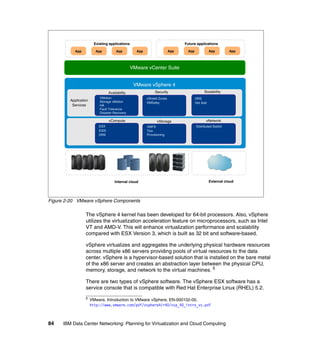
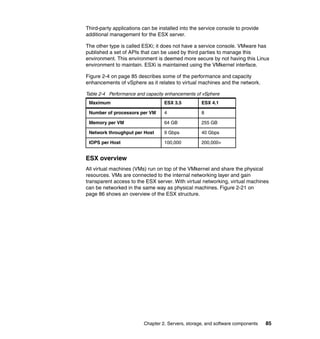
  • 167.
    traffic on singlelinks since the “one machine-one application” correlation is changing. This can cause bottlenecks and puts pressure on the access layer network. For example, the End of Row (EoR) model may be unfit to sustain this new traffic pattern and so the Top of Rack (ToR) model is rapidly becoming attractive. The access switch sprawl can be effectively managed by consolidating several access nodes into a bigger, virtual one. Figure 3-2 shows the consolidation and virtualization of server and storage. SRVR SRVR SRVR SERVER/BLADE SERVER … SRVR SRVR NIC NIC NIC NIC NIC NIC LAN NIC/SW SAN HBA/SW LAN LAN LAN LAN ACCESS SAN SW ACCESS SAN SW ACCESS SW SAN SW ACCESS SW SAN SW SW SW Figure 3-2 Server Consolidation Virtualization brings a new network element into the picture. The virtual switch in the hypervisor cannot always be managed efficiently by traditional network management tools, and it is usually seen as part of the server and not part of the network. Moreover, these virtual switches have limited capabilities compared with the traditional network hardware (no support for multicast and port mirroring, plus limited security features). However, virtual switches are becoming much more capable over time. Hypervisor development is opening up new opportunities for more feature-rich virtual switches. Figure 3-3 on page 154 shows networking challenges due to virtual switches and local physical switches. Chapter 3. Data center network functional components 153
  • 168.
    SRVR SRVR SRVR SERVER/BLADE SERVER … SRVR SRVR C I C I C I C I C I C I N N N N N N LAN NIC/SW SAN HBA/SW LAN L AN LAN LA N AC CE SS SA N SW AC CE SS SA N SW ACCESS SW SAN SW ACCESS SW SAN SW SW SW Figure 3-3 Server virtualization The server and its storage are being increasingly decoupled, through SANs or NAS, thus leading to the possibility of application mobility in the data center. The 10 Gb Ethernet is reaching its price point for attractiveness. This increased capacity makes it theoretically possible to carry the storage traffic on the same Ethernet cable. This is also an organizational issue because the storage and the Ethernet networks are usually designed by different teams. Figure 3-4 on page 155 shows storage and data convergence and its impact on the network infrastructure. 154 IBM Data Center Networking: Planning for Virtualization and Cloud Computing
  • 169.
    VIRTUAL SERVER SERVER/BLADE SERVER … … SRVR SRVR SRVR SRVR VLAN VLAN VLAN LAN SW SAN SW LAN NIC SAN HBA LAN LAN AC CESS SAN SW ACCESS SW SAN SW LAN LAN SW ACCE SS ACCESS SAN SW SAN SW SW SW Figure 3-4 Storage and data convergence impact on the network infrastructure The consolidation of the distributed IT environment into single distributed data centers struggles with an increasingly mobile workforce and distributed branch offices. Distance, and thus latency, increases for remote access users. New technologies are available to address this issue and bring better response times and performance to this scattered user base. This becomes even more critical for applications that exchange significant amounts of data back and forth, because both bandwidth and latency must be optimized on an application and protocol level, but optimizing network utilization is not usually a priority during application development. Chapter 3. Data center network functional components 155
  • 170.
    Figure 3-5 showshow increasing distance may impact application response time. This diagram does not show security layers, which also add end-to-end latency. Figure 3-5 Impact of increasing distance on latency Designing a traditional data center network usually implied deploying firewalls between the users and the applications, but this is rapidly changing because network and security must be designed together with a comprehensive architecture in order to ensure that security appliances do not decrease end-to-end performance. The high-level design should include secure segmenting based on business needs and priorities. Security services should be coupled with the applications even if these are mobile across data centers. Additional technologies can be used to provide this secure segmentation, for example VRFs. At the same time remote users must be authenticated and access is to be controlled and virtualized to enter the IP core and use the centralized, virtualized IT resources. Figure 3-6 illustrates access control and defined policies, as well as support for remote and mobile application access. 156 IBM Data Center Networking: Planning for Virtualization and Cloud Computing
  • 171.
    SERVER/BLADE SERVER SRVR SRVR … SRVR SRVR SRVR LAN NIC/SW SERVER LAN ACCESS L2 VN VN VN VN DATACENTER SECURITY SERVICES IP CORE L3 VN VN VN VN ACCESS SECURITY SERVICES MPLS WAN INTERNET VN VN VN ACCESS SECURITY SERVICES ACCESS SECURITY SERVICES USER USER Figure 3-6 Access control and defined policies 3.3 Impact of data center consolidation on the data center network Currently there is a clear trend in how applications are delivered to clients over the network: a return to a centralized IT model and away from distributed computing environments. This gives birth to the concept of a “single distributed data center,” which means that multiple data centers can behave logically as one single entity. The main enablers of this recentralization include: Server consolidation patterns across enterprise data centers resulting from the constantly increasing computing power available in the same physical space. This consolidation makes it possible to simplify administration, management, backup, and support by keeping the IT resources concentrated in one place rather than having a distributed model, and also allows adherence to regulatory compliance. Chapter 3. Data center network functional components 157
  • 172.
    Server virtualization patternsthat allow many applications to run concurrently, yet independently, on a single physical server. The increasing availability of WAN services at lower prices. Application servers can be positioned in a central data center, accessed across a WAN and still be responsive enough for business requirements. Server consolidation and virtualization combined clearly increase the average traffic volume per server dramatically, thus increasing the risk of network congestion. The main effects of consolidating several geographically dispersed data centers into a single logical one are listed here: Infrastructure scalability requirements become more important. The architecture of a single, very large data center is very different from the one supporting multiple, smaller data centers. Single faults affect a larger part of the infrastructure. Hardware problems occurring on a single physical machine may affect multiple services that rely on the logical servers inside the physical host. From a network point of view, the forwarding plane becomes more complex. Additional resiliency is required using, for example, load sharing solutions to avoid chokepoints and single points of failure. In addition to recentralization of the IT infrastructure, users now also need to access these resources from increasingly scattered locations. Laptop computers, mobile devices and wireless connectivity (such as WiFi and cellular networks) allow users to meet their business requirements in an increasingly “connected-yet-dispersed” fashion. Users that access centralized applications from branch offices or remote locations expect LAN-like performance regardless of the connection they are relying on. However, this requirement can be difficult to fulfill and also very expensive if it is addressed only by acquiring more WAN bandwidth. This approach may also be ineffective in some cases due to, for example, the TCP transmission window mechanism. Furthermore, with applications growing richer in content and application developers often overlooking the need to optimize network consumption, it becomes challenging to offer LAN-like performance to remote users accessing centralized IT applications. This is especially true because low priority applications share the same WAN resources used by business-critical applications and congestions may occur. This is why it is very important to classify applications according to a consistent QoS model and apply it end to end. 158 IBM Data Center Networking: Planning for Virtualization and Cloud Computing
  • 173.
    This scenario alsoimpacts the latency that users experience when accessing applications, given that data travels over a longer distance and more appliances are involved in the traffic flow. This is particularly harmful for applications that rely on a large number of small packets travelling back and forth with a small amount of data (chattiness). In addition to WAN slowing down the application access to users, another critical requirement in this scenario is the availability of the centralized IT infrastructure. A single fault, without a proper single point of failure avoidance and disaster recovery (or even business continuity) strategy, would affect a very large population with a dramatic negative impact on productivity (service uptime and revenues are increasingly tightly coupled). Increased application availability can be provided by: Leveraging increased HA features of single systems and components From a network perspective, this also means being able to upgrade software and hardware components without turning off the entire system. This becomes even more important if the system leverages virtualization technologies because several logical systems may experience downtime. Providing redundancy at every level in the network – Interface level (NIC teaming, NIC sharing, and so on) – LAN Link level (either spanning tree-based or with an active/active model) – Device level (node aggregation) – WAN Access level (Dual/Multi-homed Service Provider Connectivity that can be implemented using BGP or dedicated appliances) – Site level (disaster recovery, global load balancing). This can also be implemented with an Active-Active scheme (DNS-based or using dedicated devices) to maximize resource utilization. As consolidation initiatives arrive at a concrete implementation phase, bandwidth costs may still be an important item in the business case for emerging economies. IT managers might have a need to properly manage their connectivity to make sure critical-application traffic gets priority over traffic that can be delayed or that is not time sensitive. In more mature markets, prices for bandwidth are decreasing but traffic shaping is still a possible method for approaching these situations and preventing slow response times during high usage conditions and avoid increasing bandwidth for some locations including the data center links. Concurrent access to centralized applications and sources of data from several branch offices, from an application resources perspective, might not pose any problems, even if the committed rate of the connectivity itself looks to be enough for average traffic. Traffic shapers have to be considered when the need is to allocate precisely the right amount of bandwidth resources to the right service Chapter 3. Data center network functional components 159
  • 174.
    and thus havea means to guarantee the operational level agreement with the business units. Figure 3-7 on page 161 demonstrates policy enforcement using traffic shapers. From a data center perspective this implies that a certain slice of bandwidth is dedicated to the single branch office to deliver the mission-critical services. Classification of traffic needs to be done in advance because the number of applications that travel the wide area network (WAN) can be vast, and traffic shapers can also limit the bandwidth of some kind of applications (for example ftp transfer, p2p applications) so that all services are available but performance can vary over different conditions. This approach gracefully avoids service disruption by preventing services from contending for the same network resources. Classification needs to evolve with traffic patterns and applications that change over time. This aspect is critical for management of the solution and does not have to turn into something overwhelming for the IT department. A sound financial analysis is advisable in order to understand what should be done strategically over time to guarantee the service levels to all branch offices and other external users. 160 IBM Data Center Networking: Planning for Virtualization and Cloud Computing
  • 175.
    Figure 3-7 Policyenforcement with traffic shapers Another technique that can be used to optimize bandwidth resources is WAN optimization. WAN Optimization Controllers (WOCs) are appliances deployed in a symmetrical fashion, both in the data center and in the remote office, creating a “tunnel” between sites that need to be accelerated. The goal of WOCs is to use bandwidth more efficiently and to free up some space for new applications or flows to be delivered over the wide area network. WOC techniques can also reduce latency at the session level, not at the link level, which depends on other factors the WOC cannot change. This is important because WOCs do not accelerate traffic on the link but are appliances that sit in the middle of the session to understand the packet flows, avoid data duplication and combine and reduce packets of the application sessions in order for a single IP datagram sent over the tunnel to carry more packets of the same or different sessions, thus reducing the overall latency of a single session. Chapter 3. Data center network functional components 161
  • 176.
    An additional approachis to deploy application front-end special-purpose solutions known as Application Delivery Controllers (ADCs). This asymmetric WAN Optimization approach is provided by deploying feature-rich and application-fluent devices that are capable of handling Layer 4 through Layer 7 information, together with the traditional load balancing features such as server health monitoring and content switching. As stated above, this layer sits in front of the application to mainly offload servers from: Terminating the SSL sessions, leaving more processor cycles to the application Serving repetitive and duplicate content to the users by instructing the users’ browser to use the dynamic or static objects that will be cached locally. This approach has the benefit of lowering the use of disk, memory, and processor resources in both a virtualized or traditional environment. For example, the consequence in a virtualized data center is more VMs per physical server due to reduced resource utilization. Another aspect of ADCs is that they are tied to the application layer and, as application traffic, are adapted to VM migrations, even between data centers or to the cloud. Downtime and user disruption are therefore avoided by accelerated data transmission and flexibility in the expansion of the overall service delivery capacity of the service delivery. Other features to consider when approaching ADC solutions are compression that allows less data to be sent over the WAN, and TCP Connections management. Note that this process can be transparent to both server and client applications, but it is crucial to redirect traffic flows in real time if needed. It is also important that the choice of where to deploy the envisioned solution is meeting the performance and, above all, cost objectives. These functions, just as the other network services, can be implemented using different deployment models (see 3.4.5, “Network services deployment models” on page 176 for more details). For example, software-based ADCs are entering the market from various vendors. A hybrid deployment model can also be used, leveraging hardware platforms for resource-intensive operations such as SSL termination, and offloading other functions such as session management or load balancing to software-based ADCs. Each of the described approaches can address different aspects of the overall design and does not necessarily mean that one excludes the other. In fact, the combination of features can efficiently solve the identified issues in bandwidth management. 162 IBM Data Center Networking: Planning for Virtualization and Cloud Computing
  • 177.
    3.4 Virtualization technologiesfor the data center network In this section we present the main virtualization technologies that can be exploited in a data center network context. 3.4.1 Data center network access switching techniques In this section we present the main techniques that can be leveraged to attach virtual machine-based server platforms to the physical network infrastructure. The term access switch is used to represent the first network device (either physical or logical) that aggregates traffic from multiple VMs up to the core of the data center network. These techniques can be generally categorized as follows: Top of Rack switching - ToR - using fixed form factor, appliance-based switches to aggregate traffic from a single rack and offer connectivity to the data center network core via copper of fiber uplinks. It requires more switches than the End of Row technique (but at a lower price per box), but it simplifies cabling and it is a good fit to enable modular, PoD-based data centers. Note that this is the only option available today (together with Blade switches) for converged access switch solutions capable of handling both Ethernet and fiber channel traffic (Fiber Channel Forwarders - FCFs). End (or Middle) of Row switching - EoR (MoR) - using chassis-based modular switches. This model implies having switches in dedicated racks at the end or middle of each row of racks to aggregate traffic from the different racks and connecting them to the data center network core. Usually uplink oversubscription is an issue with this approach since it is not dealt with in a rack-by-rack fashion, and it is difficult and expensive to scale if the number of racks exceeds a certain threshold. On the other hand, there are fewer switches to manage compared with the ToR model, but cabling is more difficult and less flexible. Models that mix the best of the ToR and EoR worlds are emerging (for instance virtual End of Row (vEoR) switching, for example using unmanaged (that can act like remote line cards) or managed appliances (fixed form factor switches that can be logically aggregated) in dedicated racks instead of chassis-based switches. This approach aims at minimizing the number of management points and creating a single, big, logical switch that can satisfy the scalability and flexibility requirements driven by consolidation and virtualization. Chapter 3. Data center network functional components 163
  • 178.
    Blade Switching -Using Blade Center modules that perform switching functions for the Blade servers and aggregate traffic all the way to the data center network core. These switches have most of the features of the ToRs and EoRs but are specific for a certain Blade server chassis, so there is limited flexibility and also less choice. Virtual Switching (vSwitching) - Using part of the hypervisor resources to perform Ethernet switching functions for intra-server VM-to-VM communications. These techniques have limited functionalities compared to physical switches and are typically hypervisor-specific, as shown throughout Chapter 2, “Servers, storage, and software components” on page 31. The latency introduced by having multiple switching stages (and also, depending on the design, perhaps multiple security stages) from the server to the data center network core, and the availability of high port density 10 GbE core switches is driving the trend towards the delayering of the data center network, which can achieve both significant cost benefits (less equipment to manage) and service delivery improvement (less latency turns into improved application performance for the users). On the other hand, servers equipped with 10 GbE interfaces induce higher bandwidth traffic flowing to the core layer, so oversubscription on the access layer uplinks may become detrimental for service performance. The development of IEEE standards for 40 GBE and 100 GBE will alleviate this potential bottleneck going forward and help simplify the data center network design. 3.4.2 Traffic patterns at the access layer During the design phase of a dynamic infrastructure, the traffic patterns of the applications are generally not known by the network architect and are difficult to predict. Without this data, you have to consider trends that will have an impact on the network. Because of the increasing virtualization of servers, the availability of more powerful multicore processor architectures, and higher bandwidth I/O solutions, it is obvious that the access layer will face huge growth in terms of bandwidth demands. On the other hand, this trend faces limitations in highly virtualized environments because I/O operations experience significant overhead passing through the operating system, the hypervisor, and the network adapter. This may limit the ability of the virtualized system to saturate the physical network link. Various technologies are emerging to mitigate this. For example, bypassing the hypervisor using a Single Root I/O Virtualization (SR-IOV) adapter allows a guest 164 IBM Data Center Networking: Planning for Virtualization and Cloud Computing
  • 179.
    VM to directlyaccess the physical adapter, boosting I/O performance significantly. This means that the new network access layer becomes the adapter, which incorporates switching capabilities. However, there is no “one-size-fits-all” solution. For example, there may be different requirements for north-to-south traffic (client to server) and east-to-west traffic (server to server). Because IT services are delivered using an increasing number of different servers that can reside in the same data center (favored by application development methodologies such as SOA), the interaction between these hosts (east-to-west traffic) may play a fundamental role for overall performance, even more important than traffic patterns coming in and out of the data center (north-to-south traffic). Sometimes the I/O subsystem can be the bottleneck of system virtualization performance, but for other processor-intensive workloads (for example, analytics), I/O subsystem performance may not be an issue. The outcome of these trends is that the access layer is evolving towards Top of Rack (ToR) topologies rather than pure End of Row (EoR) topologies. A ToR topology is more scalable, flexible, and cost-effective, and it consumes less energy than an EoR topology when dealing with the increased bandwidth demands at the access layer. In the long term it is desirable to have 10 Gbps capability as close as possible to the servers, especially when a converged access switch solution is installed at the access layer. A converged server can utilize the converged 10 Gbps adapter to burst large files over the Ethernet, if the SAN traffic is low, and the downstream Ethernet network must be able to properly deliver the required bandwidth throughout the network. Because the traffic pattern varies from data center to data center (actually it is the architecture of the applications and how users are accessing the applications that will generate requirements on the design of the access layer) it is difficult to provide baselines for developing a design. The modular ToR approach can provide a sufficient solution for today’s bandwidth demands. Because bandwidth can be added where it is needed, it is important that port utilization (both server and uplink ports) is monitored with proper management tools so that bandwidth can be added to the data center infrastructure before bandwidth constraints are recognized by users. The growth of traffic volume generated at the access layer is tightly coupled with the increase of latency, which is originated by having additional switching stages (virtual switches or blade switches, for example). To lower the latency introduced by the data center network, different architectural patterns are emerging. One possible option is to adopt a two-tiered network by collapsing the core and Chapter 3. Data center network functional components 165
  • 180.
    aggregation layer. Anotheralternative is to adopt a cut through ToR switching architecture for the access layer. This switching architecture in the Ethernet world is not something new (it has been popular for Infiniband networks), but it is gaining traction again due to the reduced latency brought by these kinds of switches. Manufacturers are releasing devices with this architecture, which has differences compared to the traditional Store and Forward model: Cut through switches forward the Ethernet frames as soon as the Destination MAC address is read. No error correction/CRC means that a requirement for cut through switches is that a very low error rate is needed because otherwise physical or data link layer errors will be forwarded to other segments of the network. The host’s NIC must perform the discard function instead. Virtual Output Queueing architectures are needed to avoid head-of-line blocking, and thereby avoid having the cut through switch behave like Store and Forward due to port contentions. Using windowed protocols such as TCP can exacerbate this situation by increasing response times. 3.4.3 Network Node virtualization Traditional network virtualization techniques such as VLANs may not be fit to match the complexity and requirements of today’s data centers, depending on factors such as scale and requirements. Recently, other techniques have emerged to address this limitation by simplifying the network topology by reducing the nodes count (aggregation), or by reducing the number of nodes needed to sustain the network infrastructure (partitioning). These are all proprietary techniques tied to a specific vendor, but they are key enablers for the next generation dynamic data center. Node aggregation Node aggregation techniques are similar to server clustering in some ways because many physical entities are logically grouped as one, single entity. The network impact of this approach is that there are fewer logical nodes to monitor and manage, thus allowing you to disable the spanning tree protocol aggregating links across different physical switches. At the same time, risk is reduced because nodes are still physically redundant, with no single point of failure. In fact the network becomes a logical hub-and-spoke topology with a proprietary control plane replacing the spanning tree protocol. Figure 3-8 on page 167 illustrates node aggregation techniques. 166 IBM Data Center Networking: Planning for Virtualization and Cloud Computing
  • 181.
    Aggregation layer 2:1 Access layer N:1 Across racks N:1 Single rack (stack) Servers Figure 3-8 Node aggregation techniques These techniques can be separated into two types: 2:1 aggregation This is performed at the core or aggregation layer, providing an extended backplane and simplifying dual-homing topologies. This allows for active/active configurations and link aggregation techniques. The logical network becomes a point-to-point topology, so spanning tree protocol can be disabled. By using a logical hub-and-spoke topology you can use all the available bandwidth with multichassis link aggregation techniques that logically group multiple links across different appliances into a single one. This also allows to disable default gateway redundancy (such as VRRP), providing the same level of resilience and availability. The L3 processing and routing tables are also simplified because they are shared by two physical nodes. N:1 aggregation This is performed at the aggregation or access layer and allows many physical switches (especially Top of Rack, or ToR) to be seen as one. This is very important because it simplifies the ToR model, which can add a high degree of complexity even if it better suits the need for an easy-to-manage yet dynamic data center. Chapter 3. Data center network functional components 167
  • 182.
    N:1 aggregation canbe used in the same physical rack by stacking and interconnecting many access servers. Or it can be used across different racks to virtualize the whole access/aggregation layer. Furthermore, with this approach the aggregation layer can be reduced if not eliminated. More traffic can be confined within the access layer. Sample scenarios of this virtualized environment are many ToR switches that act like a single ToR, or multiple blade switches that act as a single ToR. In these scenarios, multiple uplinks can be combined into an aggregated link to provide more capacity with the same resilience. If one link fails, the overall capacity is reduced but the overall availability is preserved. Note that the classic L2 topology (Spanning Tree based) is replaced by a private topology that requires some degree of understanding in order to properly design the network, and it may not always be possible to extend these functionalities in a multivendor network environment. Node partitioning Node partitioning techniques allow you to split the resources of a single node while maintaining separation and providing simplified (and thus improved) security management and enforcement. Partitioned nodes go beyond virtualizing the forwarding and control planes, such as you have with VLANs. This type of virtual node also virtualizes the management plane by partitioning the node’s resources and protecting them from one another. In this scenario a multitenant environment can be implemented without needing dedicated hardware for each tenant. Another possible use case of this technology is to collapse network zones with different security requirements that were physically separated on the same hardware, thereby improving efficiency and reducing the overall node count. This model is analogous to the server virtualization techniques in which a hypervisor allows multiple operating system instances to run concurrently on the same hardware. This approach allows for cost-effective, responsive, and flexible provisioning but needs a low-latency network for location-independence. Typical deployment scenarios are virtual routers, switches, and firewalls that can serve different network segments without having to reconfigure the whole environment if new equipment is added inside the data center. This can be extremely helpful for firewalls because these virtual firewall solutions reduce the need for dedicated in-line firewalling that can become bottlenecks, especially if the link speed is very high. 168 IBM Data Center Networking: Planning for Virtualization and Cloud Computing
  • 183.
    3.4.4 Building asingle distributed data center The trend to physically flatten data center networks highlights the need for a well thought out logical network architecture that is able to embrace different physical data center technologies, tools and processes to offer to the entire enterprise the correct levels of reliability, availability and efficiency. The idea is to create an overlay logical network that can transport data providing to the services a single virtualized view of the overall infrastructure. The final goal that this approach can provide is efficiency in the operational costs that can derive from the following factors: Better resources utilization: virtualized resource pools that comprises processor, memory and disks, for instance, can be planned and allocated with a greater degree of flexibility by leveraging underlying physical resources that are available in different, yet unified data centers. Also, new workloads can be provisioned leveraging resources that are not necessarily tied up to a physical location. The role of the “standby” data centers can change considerably to an “active” role, with the immediate advantage of better utilization of investments that have been made or are planned to be made. In fact, the scalability of one data center can be lowered because peaks can be handled by assigning workloads to the other data centers. Lower service downtime: when data centers are interconnected to create a single logical entity, the importance of redundancy at the link level becomes critical in supporting this model. Redundancy needs to be coupled with overall utilization of the links, which needs to be continuous and at the expected level of consumption. Capacity planning becomes key to enable the overall availability of the services that rely on the IT infrastructure. Consistent security policy: distributed yet interconnected data centers can rely on a level of security abstraction that consists of technologies and processes that tend to guarantee a common set of procedures that maintain business operations and are able to address crisis management when needed. Secure segregation of applications and data in restricted zones is also extended to the virtualized data center layer to ensure compliance with the enterprise security framework. Correct level of traffic performance by domain or service or type: interconnecting data centers results in even more business transactions contending for network resources. A possible methodology to adopt to address this aspect could be as follows: – Gain complete visibility of all the traffic flows. – Guided by business requirements, set the right level of priorities mainly from an availability and performance point of view. Chapter 3. Data center network functional components 169
  • 184.
    – Enable solutionsthat can adapt network resources (such as bandwidth on WAN links) depending on the agreed needs (for example, traffic managers) or that can reduce traffic on the WAN links by avoiding deduplication of data patterns (WAN Optimization Controllers). – Monitor the overall service performance. Three major areas need to be considered to plan the interconnection between data centers: Layer 2 extension: some applications need to rely on layer 2. If high availability or workload mobility are among the drivers for interconnecting data centers, the layer 2 of the single data center needs to be extended to all the data centers that are relevant to the service. Layer 3 extension: some applications (such as backups) can rely on layer 3 and therefore adequate IP connectivity needs to be provisioned between data centers. Storage Area Network extension: data within the enterprise is considered a critical asset. Not only the replication, but the availability of data is essential to achieve significant efficiency in the overall journey of building a single distributed data center. Figure 3-9 on page 171 shows a sample scenario. 170 IBM Data Center Networking: Planning for Virtualization and Cloud Computing
  • 185.
    Figure 3-9 Interconnectingdata centers Examples of the drivers behind layer 2 extensions, creating larger bridged domains, are: The need for applications that use “hard-coded” IP parameters that cannot be easily modified to be available from different locations. That is, the same subnet needs to be available in different remote locations. Data center consolidation initiatives or the feasibility of outsourcing models can result in a portion of the server farm to be moved to another location. Layer 2 heartbeat mechanism to deploy high availability server clusters. Virtual machine mobility. There are network, server load balancing, and security devices that require high availability, as well as heartbeat and First Router Hop Protocols that need bridged connectivity. There are several different approaches available today for extending layer 2 networks, and others that are in draft version in the standardization bodies. Each approach needs to be carefully evaluated in terms of how they meet different requirements such as availability features, implementation processes, cost, and management. We outline three approaches: Chapter 3. Data center network functional components 171
  • 186.
    The first approachis to create a switching domain, made of multiple switches that operate as a unified, high bandwidth device. Multi-Chassis-Link aggregation techniques are an example of this approach: switches that are in different data centers can be linked over optical links (over dark fiber or a protected WDM-based network) over large distances. This technique is especially suitable for dual site interconnection. Security on the link can be added as an option. Also, the technique has the additional feature of leveraging link aggregation (formerly known as 802.1ad, which has recently been moved to a stand-alone IEEE 802.1AX-2008 standard). Another important aspect when designing the interconnection between data centers at this level is the speed of links and related standards. With the objective of providing a larger, more durable bandwidth pipeline, IEEE have announced the ratification of IEEE 802.3ba 40 Gb/s and 100 Gb/s Ethernet, a new standard governing 40 Gb/s and 100 Gb/s Ethernet operations that considers distances up to 40 km. For data centers that need to be interconnected within this distance, this option can extend the core switching infrastructure. The second major approach is to deploy Virtual Private LAN Service (VPLS). The primary purpose of VPLS is to extend Layer 2 broadcast domains across WANs/Metro Area Networks (MANs) using a Multiprotocol Label Switching (MPLS) backbone. Enterprises that decide to deploy VPLS have found the deployment easy, a low latency variation, and a very scalable solution. In fact, VPLS can scale to a very large number of MAC addresses. Additional features that can be deployed aim to manipulate virtual local area networks (VLANs) within a bridge domain or a virtual private LAN service (VPLS) instance. VLAN translation is an example of such features. The third approach is based on internet standards that are not yet finalized. Cisco-sponsored Overlay Transport Virtualization (OTV) and the efforts of the IETF L2VPN working group (also known as E-VPN) are examples of potential alternatives to consider in the short-to-medium term. An IETF draft has been submitted to describe OTV. At the time of this publication, the draft can be found at: http://www.ietf.org/id/draft-hasmit-otv-01.txt OTV can be considered as a very recent alternative for extending Layer 2 domains because it relies on a “MAC in IP” technique for supporting L2 VPNs over, mainly, an IP infrastructure. OTV can be positioned at the L2/L3 boundary at the DC aggregation and promises operational simplicity. Additional requirements that need to be carefully examined when considering OTV are: – MAC addresses scalability – VLAN scalability – Convergence time 172 IBM Data Center Networking: Planning for Virtualization and Cloud Computing
  • 187.
    – Additional VLANfeatures (for example, VLAN translation and VLAN re-use) The IETF L2VPN working group is the same group that is working on VPLS. While alternatives are available and the business relevance is increasing today, there can be some aspects that need to be considered and addressed in all the components just stated but that are particularly severe for Layer 2 extensions: Latency - Since there is no market solution today that can address the latency derived from the speed of light, this aspect might not always be an issue when data centers are within shorter distances. Latency becomes an important factor to be considered when data centers are to be “actively” interconnected over longer distances. Bandwidth - Workload mobility and data replication require high-speed connectivity that is able to support a large amount of traffic. Moving virtual machines across data centers means that the snapshot of the virtual machine needs to cross the links between the data centers. If the end-to-end link between the sites does not comply with the vendor specification, the switch off of a VM and the restarting of a new one can fail. The real challenge is data synchronization across data centers, with the objective of having the most recent data as close as possible to the application. In both situations, techniques such as WAN Optimization Controllers can help in reducing the amount of bandwidth by avoiding deduplication of data. Quality of Service complemented by traffic shapers could also be an alternative for preserving the overall operational level agreements (OLAs). Organization (that is, DC team and WAN team) - Alternative selection criteria is also based on the enterprise organization structure and the skills associated with each alternative. For example, the fact that VPLS is based on an MPLS infrastructure implies that skills have to be in place, either internal or external to the organization if VPLS will be selected as a Layer 2 extension. Data flows of multitier applications - When data centers are servicing users, the changes in traffic flows that are built within the overall network infrastructure need to be well understood and anticipated when moving a service. Especially when the service is built upon a multilevel application approach (that is, front end service - application service - data service), moving single workloads (front end service layer) from one data center to another might result in increased latency and security flow impacts in the overall business transaction. In many situations, security needs to be applied within the flow and this layer needs to be aware of transactions that are going through different paths that must be created, or that the path is changing within interconnected data centers. Chapter 3. Data center network functional components 173
  • 188.
    Fast convergence -The longer convergence times of spanning tree protocol (STP) are well known in the industry. When extending layer 2 in data centers, the simple STP approach can result in unpredictable results as convergence is concerned, and resynchronization of a large STP domain can take too much time for business requirements. Because MPLS relies on the underlying IP network, some critical configuration parameters of both IP and MPLS have to be analyzed. Moreover, the convergence time that an IGP, EGP, and First Hop Router Protocol (for example, VRRP) with default parameters provide is usually not suitable for today's business requirements. In an MPLS network, two main types of fast convergence architectures can be used: – MPLS Fast Rerouting Traffic Engineering (FRR TE) – IP Fast Rerouting (IP FRR) In order to achieve a sub-second convergence time, the following aspects have to considered: – Failure detection – Label Distribution Protocol session protection mechanisms – IGP tuning – BGP tuning – First Hop Router Protocol (FHRP) tuning – System scheduler tuning Scalability (MAC/VLANs/Data Centers) - Large enterprises have the need to extend a certain number of VLANs across data centers. Also, the number of MAC addresses that the network must be aware of can grow significantly, in the order of thousands of entries. Each node at the edge should have the information of where the different MAC addresses are in order to send the frames to the correct data centers.The number of sites that need to be connected is also relevant to the technology choice. For example, a large number of sites that are connected can have a Layer 2 domain that is too big for STP to handle. Policy synchronization - The security framework includes policies related to how the services are protected. Interconnecting data centers are an opportunity for policy enforcement to match in all locations. On the other hand, it represents a challenge where enterprises strive to create an homogeneous set of policies and do not necessarily own the infrastructure, but are renting it or are outsourcing a service or part of it. Also, encryption and security play an important role: the merger of Layer 2 and Layer 3 can have important implications on the current security framework. When the MPLS services are outsourced to a service provider, security from the service provider has a very important role in the chain. Encryption can be an option to think about. In the same conditions PE routers 174 IBM Data Center Networking: Planning for Virtualization and Cloud Computing
  • 189.
    are shared amongmultiple clients. Both aspects and, in general, internal audit requirements, might impact the overall solution approach. Management - Determining the impact of deploying new technologies and other IT-related services and analyzing how the management infrastructure will support the related architectures aims at network efficiency and overall reduction in the cost of ownership. Understanding the gaps in the current network management processes or tools is advisable. For instance, MPLS connectivity management might address the need for dynamic and automated provisioning, as well as resource management for tunnels. Also, troubleshooting differs from that for a routed network. Therefore, diagnostic capabilities are an important aspect of all the management processes. Storms or loops - A major difference between a router and a bridge is that a router discards a packet if the destination is not in the routing table. In contrast, a bridge will flood a packet with unknown destination addresses to all ports except to the port it received the packet from. In routed networks, IP routers decrease the TimeToLive value by one at each router hop. The TTL value can be set to a maximum of 255, and when the TTL reaches zero, the packet is dropped. This, of course, does not solve loops consequences in a routing domain but considering that in a bridged network there is no such mechanism, the available bandwidth can be severely degraded until the loop condition is removed. When interconnecting data centers at Layer 2, the flooding of broadcasts or multicasts or the propagation of unknown frames needs to be avoided or strictly controlled so that a problem in one data center is not propagated into another one. Split brain - This situation might occur if both nodes are up but there is no communication (network failure) between sites. Of course this situation needs to be avoided by carefully planning the redundancy of paths at different levels (node, interface, and link). Cloud computing models imply additional thinking for the interconnection of data centers. The alternatives offered by the market—private, public, or hybrid cloud—all have in common the need for a careful networking strategy to ensure availability, performance and security. Especially in multitenant environments where service providers offer shared services, it is essential to consider which aspects of service levels and security have strong relationships with the networking and therefore must be addressed in a complementary manner. Interaction with cloud models may imply different locations for the applications and the related connectivity with respect to users. The techniques for the interconnection with the cloud should not only deliver reliable and secure data between different points, but must, above all, adapt to the variability of resources that can be dynamically and automatically relocated geographically and in real Chapter 3. Data center network functional components 175
  • 190.
    time, inside andoutside the cloud. An example is the availability in the cloud of additional processing power to meet peaks in the workloads on the same day or the temporary allocation of additional storage for specific projects. The network must be designed with flexibility in the ability to modify and extend the service to the rest of the cloud in a way that is completely transparent to end users. In designing and implementing cloud models, the networking component should be built in synergy with and sustain all other system components of cloud computing, such as applications, processes, delivery, and automation systems. 3.4.5 Network services deployment models There are many network service appliances in today’s network market. In this section, we focus on current appliance virtualization technology. These appliances fall into the following categories: Application delivery appliances - Improve end-to-end response time; ADC, WAN accelerator, caching device (proxy), content distribution. Resource utilization optimization - Balances the traffic among distributed servers and data centers; Server Load Balancers, Global Load Balancing, traffic shapers. Network security - Enables authentication, authorization access control, and contents inspection; Firewall, IPS/IDS. VPN, AAA, and NAC. IP network service - Provides IP assignment and IP resolution to servers or clients; DNS and DHCP. In this section, we focus on the possible deployment models for those services, highlighting how virtualization can be leveraged and pointing out the pros and cons of each approach. Focusing on application acceleration and security services, the trends in the marketplace can be summarized by these three deployment models: Physical appliances This is the mainstream deployment model. It consists of deploying dedicated hardware to perform a specific function for a specific network segment. Virtualized appliances This model consists of deploying shared and virtualized hardware to perform one or more specific functions for different network segments. Soft appliances This is an emerging deployment model. It consists of deploying a software-based appliance to perform a specific function for one or more 176 IBM Data Center Networking: Planning for Virtualization and Cloud Computing
  • 191.
    specific virtual machines(VMs) in the same network segment. Both traditional vendors and new entrants are focusing on this kind of technology. The deployment models can be mixed when addressing different categories of network service, depending on the specific functions and their requirements. For example, some functions that are resource-intensive still need to be performed in hardware to avoid performance bottlenecks. On the other hand, application delivery functions can be broken down further and then split depending on the best deployment model for each function. Using application delivery as an example, SSL termination may be a better fit for a hardware platform, while other more application-specific functions may be virtualized. The characteristics of each approach can be expressed in the following terms: Performance - Generally indicated by how many packets are processed per second by the appliance or other similar performance metrics. This can impact the performance of the entire network (if the appliance becomes a bottleneck) or the hypervisor, in the case of a software appliance. Provisioning effort - Defined as the time and effort required to get the network service up and running. An appliance approach needs to consider all of the aspects of a dedicated hardware in terms of hardware provisioning and setup that might be shared among other services with software-only models. Scalability - In networking terms, the ability to grow incrementally. Scalability can be horizontal (scale out model), adding network nodes in the systems or vertical (scale up model), adding resources to a single network node. Management integration - Defines the possibilities in terms of systems management integration. Functional richness - Defines the various functions a single appliance or cluster carries out. Point of enforcement - Defines where network services can be deployed. Location - Defines where the appliance is located and with how much flexibility it can be relocated. Cost - Defines the required financial impact of each deployment model. Physical hardware appliances have a broader applicability because they perform their functions as long as the protocols they rely on are running and supported throughout the network. Some applications that cannot be virtualized or are chosen not to be virtualized still need to rely on this type of deployment model for network services. Performance can be very high, depending on the traffic load for each appliance, but it may come at a very high price. Moreover, physical appliances may incorporate several functions that are not required in most Chapter 3. Data center network functional components 177
  • 192.
    deployments. Virtualized appliances,in contrast, are generally based on modular hardware, with different blades or service modules that can be deployed as needed for specific functions or to allow growth with a scale up model. Virtual appliances are a better fit for cloud computing networking infrastructures because of their infinite scalability and the ability to closely integrate with the virtual infrastructure because the services can easily be moved to another physical host. 3.4.6 Virtual network security Although the virtualized environment provides benefits, it also presents new security challenges. Many existing security solutions are not optimized for security threats in the virtual environment. In this section, we briefly list the main security functional components for the virtualized environment from the data center network viewpoint and some IBM products. IBM has developed a high-level security framework. This is shown in Figure 3-10 on page 179. The IBM Security Framework was developed to describe security in terms of the business resources that need to be protected, and it looks at the different resource domains from a business point of view. For more information, refer to Introducing the IBM Security Framework and IBM Security Blueprint to Realize Business-Driven Security, REDP-4528, and the Cloud Security Guidance IBM Recommendations for the Implementation of Cloud Security, REDP-4614. 178 IBM Data Center Networking: Planning for Virtualization and Cloud Computing
  • 193.
    Figure 3-10 IBMSecurity Framework As shown in Figure 3-10, network security is only a component of the overall framework and can be seen as the enforcement at the network level of the enterprise security policies. In a highly virtualized data center, for example, security boundaries are no longer defined only by physical appliances but those move inside the server and storage platforms. Also the server-to-server communications often occur within the same physical box and traditional network security appliances such as firewalls cannot enforce the security policies within the hypervisor. This new environment shift is depicted in Figure 3-11 on page 180. A functional view of network security can be categorized in the following areas: Remote access (SSL/IPSec VPN) - Both site-to-site and to allow remote users to access enterprise resources outside of the perimeter. Threat management - Network level, network boundary security enforcement (firewalling, IPS, IDS, Anti-Spam) Layers 2 through 4 in the OSI model. Threat management - Application level security enforcement (application firewalling) Layer 7 in the OSI model. Functions such as URL filtering fall into this category. Chapter 3. Data center network functional components 179
  • 194.
    Resource access managementand identity management to control and audit who is entitled to access the network resources in order to monitor, manage and configure the various appliances. Before After APP APP APP Virtual APP APP Switch APP OS APP OS APP OS OS VM OS VM OS VM OS VM OS VM VM Physical NICs VM VM Virtual Switch Virtual Switch APP APP APP OS APP Management OS VM VM OS VM OS VM VM Physical Network Virtual Network Figure 3-11 Network security shift from physical to virtual Bear in mind that all these functional components can be deployed using the different models that have been presented in the previous section. We will now briefly describe some relevant IBM products in the virtualized data center network environment. The IBM security product portfolio covers professional and managed security services and security software and appliances. To learn about comprehensive security architecture with IBM Security, see Enterprise Security Architecture using IBM ISS Security Solutions, SG24-7581. 180 IBM Data Center Networking: Planning for Virtualization and Cloud Computing
  • 195.
    IBM Security networkcomponents The protocol analysis module (PAM) is a modular architecture for network protection. PAM is the base architecture throughout all IBM Security products; it includes the following components: IBM Virtual Patch technology This shields vulnerable systems from attack regardless of a vendor-supplied software patch. Threat detection and prevention technology This detects and prevents virus and worm attacks, and hacker obfuscation. IBM Proventia Content Analyzer This monitors and identifies the content of network flow to prevent data leak or to satisfy regulatory requirements. Web Application Security This provides web application vulnerabilities protection, such as SQL injection and command injections. Network Policy Enforcement This enforces policy and controls to prevent risky behavior, such as the use of P2P applications or tunneling protocols. IBM security has a research and development team known as X-Force®. X-Force discovers and analyzes previously unknown vulnerabilities in critical software and infrastructures, such as email, network infrastructure, Internet applications, security protocols, and business applications. PAM’s protection is always up-to-date with X-Force research through automatic deployment. IBM Virtual Server Security for VMware IBM Virtual Server Security for VMware (VSS) provides a multilayered IPS and firewall technology to protect the virtual data center in a solution that is purpose-built to protect the virtual environment at the core of the infrastructure. VSS runs on vSphere 4. It cannot run on previous versions of VMware. An overview of this component is shown in Figure 3-12 on page 182Figure 3-12 on page 182. A virtual security appliance is installed on a virtualized server such as VM. The VM is hardened to prevent access from other VMs or external access, except management access; it is named Security VM (SVM). The appliance utilizes the hypervisor API to inspect and control the virtual switch network and VM behavior. VSS utilizes the vSphere API, which is provided as VMsafe. For more information about vSphere and VMSafe, refer to “vSphere vNetwork overview” on page 86. Chapter 3. Data center network functional components 181
  • 196.
    Management SVM VM VM Policy Applications Applications Applications Response Engines OS Hardened OS OS OS Kernel Kernel Kernel Kernel VMsafe Hypervisor Hardware Figure 3-12 Virtual Security appliance Each SVM on virtualized servers is managed and configured through Site Protector (SP), which is the central manager of SVM. VSS has the following functions: Inter-VM IPS and Firewall Virtual Machine Observer (VMO) Antirootkit (ARK) Network Access Control (NAC) Discovery License and Update Management (LUM) Inter-VM IPS and firewall The VSS IPS module monitors all traffic involving VMs on a single ESX server. Only one SVM is allowed per physical server. One SVM can protect up to 200 VMs. The IPS covers the following traffic flows: Traffic between a VM and an outside host Traffic between VMs on the server Traffic to SVM itself 182 IBM Data Center Networking: Planning for Virtualization and Cloud Computing
  • 197.
    There are twoways to monitor traffic. One way is by using VMsafe architecture, called DV filters, and the other is by using accelerated mode. With DV filters, all NICs of VMs are monitored. An overview of a DV filter is shown in Figure 3-13. A DV filter does not require any configuration changes to the internal network. IPS VM VM SVM VNIC VNIC VNIC vSwitch DV Filter DV Filter vSwitch vSwitch PNIC PNIC Figure 3-13 DV filter Because of performance and resource consumption considerations, accelerated mode can be configured. Unlike a DV filter, accelerated mode monitors vSwitch inbound and outbound traffic. Thus, inter-VM traffic within vSwitch is not monitored. This mode is illustrated in Figure 3-14 on page 184. In both methods, the same IPS function is supported, but traffic coverage is different. Chapter 3. Data center network functional components 183
  • 198.
    IPS VM VM SVM VNIC VNIC VNIC VNIC vSwitch vSwitch PNIC Figure 3-14 Accelerated mode VSS also provides protocol access control like a normal IPS appliance from ISS. It filters network packets based on protocol, source and destination ports, and IP addresses. It can be enabled or disabled globally or for specific VMs. Because the VMware internal network does not support Layer 3, this function does not support L3 security zoning, which normal firewall appliances can. Virtual Machine Observer The main task of Virtual Machine Observer (VMO) is to communicate with the ESX server and obtain information on VM state changes, such as VM powered on and off. VMO facilitates configurations to bring VMs into protection based on policies. It also records VM inventory information such as IP addresses. If VMO finds a new VM, it sends signals to the VSS discovery function. Discovery The discovery module collects inventory information about VMs, such as operating system name and version, open TCP ports, and so on. A vulnerability check is not performed in this version. Antirootkit (ARK) A rootkit is a program that is designed to hide itself and other programs, data, and/or activity including viruses, backdoors, keyloggers and spyware on a computer system. For example, Haxdoor is a known rootkit of the Windows platform, and LinuxRootkit targets Linux OS. Generally, it is difficult to detect a rootkit that rewrites kernel code of OS. However, in a virtualized environment, it is possible that the hypervisor can monitor OS memory tables from outside OS. VMsafe supports a vendor tool that inspects each memory table on VM. VSS can detect malicious software inside OS by inspecting each kernel memory space. 184 IBM Data Center Networking: Planning for Virtualization and Cloud Computing
  • 199.
    Network Access Control Network Access Control (NAC) controls which VMs can access the network. It classifies each VM as trusted or untrusted. The trusted list is maintained manually. Any VM that comes online, and is not on the trusted list, is quarantined. 3.4.7 Virtualized network resources in servers Historically, the network has consisted of separate Network Interface Cards (NICs) per server or a pair of separate NICs for redundancy. The connection to this NIC from the upstream network device was a single Ethernet link at speeds of 10/100/1000 Mbps. As virtualization appeared and multiple operating systems lived in one server, standards had to be developed to manage network connectivity for guest operating systems. The hypervisor is responsible for creating and managing the virtual network components of the solution. Hypervisors are capable of different levels of network virtualization. This section introduces best practice options for virtualized network resources in servers. The following approaches are discussed: NIC sharing vNIC - Virtual Switching NIC teaming Source Route - I/O Virtualization NIC sharing The most basic of the new connectivity standards simply assigns an operating system to share available network resources. In its most basic format, each operating system has to be assigned manually to each NIC in the platform. Logical NIC sharing allows each operating system to send packets to a single physical NIC. Each operating system has its own IP address. The server manager software generally has an additional IP address for configuration and management. A requirement of this solution is that all guest operating systems have to be in the same Layer 2 domain (subnet) with each guest operating system assigned an IP address and a MAC address. Because the number of guest operating systems that could reside on one platform was relatively small, the MAC address could be a modified version of the NIC’s burned-in MAC address, and the IP addresses consisted of a small block of addresses in the same IP subnet. One additional IP address was used for the management console of the platform. Features to manage QoS and load balancing to the physical NIC from the guest operating systems were limited. In addition, any traffic from Guest OS 1 destined Chapter 3. Data center network functional components 185
  • 200.
    to Guest OS2 traveled out to a connected switch and then returned along the same physical connection; see Figure 3-15. This had the potential of adding extra load on the Ethernet connection. M a n a g e m e n t C o n s o le 10 .1 .1 10 .1 G u est O S 1 .1 . 1 .2 10 G ue st O S 2 .1 . 1 .3 1 0 . 1 .1 .4 G ue st O S 3 1 0 .1 . 1 . 5 G u est O S 4 Figure 3-15 NIC sharing vNIC - virtual switching The advent of vNIC technology enables each server to have a virtual NIC that connects to a virtual switch. This approach allows each operating system to exist in a separate Layer 2 domain. The connection between the virtual switch and the physical NIC then becomes an 802.1q trunk. The physical connection between the physical NIC and the physical switch is also an 802.1q trunk, as shown in Figure 3-16 on page 187. 186 IBM Data Center Networking: Planning for Virtualization and Cloud Computing
  • 201.
    Platform Management Separate VLANS or Subnets Guest OS 802.1q 802.1q Trunk Trunk Guest OS Virtual Switch Guest OS Virtual Physical Figure 3-16 Virtual switching A Layer 3 implementation of this feature allows traffic destined for a server that resides on the same platform to be routed between VLANs totally within the host platform, and avoids the traffic traversing the Ethernet connection, both outbound and inbound. A Layer 2 implementation of this feature effectively makes the physical Layer 3 switch or router a “Switch-on-a-stick” or a “One-armed” router. The traffic from one guest operating system destined for a second guest operating system on that platform traverses the physical NIC and the Ethernet two times. The challenge that this presents to the network architecture is that now we have a mix of virtual and physical devices in our infrastructure. We have effectively moved our traditional access layer to the virtual realm. This implies that a virtual NIC (vNIC) and a virtual switch all have the same access controls, QoS capabilities, monitoring, and other features that are normally resident and required on access-level physical devices. Also, the virtual and physical elements may not be manageable from the same management platforms, which adds complexity to network management. Chapter 3. Data center network functional components 187
  • 202.
    Troubleshooting network outagesbecomes more difficult to manage when there is a mixture of virtual and physical devices in the network. In any network architecture that employs virtual elements, methods will have to be employed to enable efficient monitoring and management of the LAN. NIC teaming To eliminate server and switch single point-of-failure, servers are dual-homed to two different access switches. NIC teaming features are provided by NIC vendors, such as NIC teaming drivers and software for failover mechanisms, used in the server systems. In case the primary NIC card fails, the secondary NIC card takes over the operation without disruption. NIC teaming can be implemented with the options Adapter Fault Tolerance (AFT), Switch Fault Tolerance (SFT), or Adaptive Load Balancing (ALB). Figure 3-17 on page 189 illustrates the most common options, SFT and ALB. The main goal of NIC teaming is to use two or more Ethernet ports connected to two different access switches. The standby NIC port in the server configured for NIC teaming uses the same IP and MAC address (in case of Switch Fault Tolerance) of the failed primary server NIC. When using Adaptive Load Balancing, the standby NIC ports are configured with the same IP address but using multiple MAC addresses. One port receives data packets only and all ports transmit data to the connected network switch. Optionally, a heartbeat signaling protocol can be used between active and standby NIC ports. There are other teaming modes in which more than one adapter can receive the data. The default Broadcom teaming establishes a connection between one team member and the client, the next connection goes to the next team member and that target and so on, thus balancing the workload. If a team member fails, then the work of the failing member is redistributed to the remaining members. 188 IBM Data Center Networking: Planning for Virtualization and Cloud Computing
  • 203.
    NIC teaming withSwitch Fault Tolerance NIC team with Adaptive Load Balancing ing One Ethermet port is active second port is standby One Ethermet port receives and all ports transmit Using one IP and M address AC Using one IP and multiple MAC addresses Default gateway Default gateway VRRP VRRP 10.1.1.1 10.1.1.1 x x Ethernet Interface 0: Ethernet Interface 1: Ethernet Interface 0: Ethernet Interfaces 1 to N: 10.1.1.30 10.1.1.30 10.1.1.30 10.1.1.30 MAC A M A AC MAC A MAC B, C,…N Figure 3-17 NIC teaming with Switch Fault Tolerance Adaptive Load Balancing Single root I/O virtualization Today’s server virtual switching infrastructure (such as Hypervisor) associates a VM entity to access the network through a virtual switch port. With the advent of PCIe adapters supporting multiqueue, multifunction, or Single-Root I/O Virtualization (SR-IOV), methods for directly sharing I/O are becoming available for x86 server models. These virtualization approaches enable a Virtual Machine’s device driver to bypass the Hypervisor and thereby directly share a single PCIe adapter across multiple Virtual Machines (VMs). The PCI Special Interest Group (SIG) standardized the North side of I/O virtualization in a server. The network functions, such as switching or bridging, were outside the PCI SIG scope. For a detailed description of SR-IV and sharing specifications, see the following website: http://www.pcisig.com/specifications/iov/single_root/ Chapter 3. Data center network functional components 189
  • 204.
    The configuration ofthat generic platform is composed of the following components (see Figure 3-18 on page 191): Processor - general purpose, embedded, or specialized processing element. Memory - general purpose or embedded. PCIe Root Complex (RC) - one or more RCs can be supported per platform. PCIe Root Port (RP) - one or more RPs can be supported per RC. Each RP represents a separate hierarchy per the PCI Express Base Specification. PCIe Switch - provides I/O fan-out and connectivity. PCIe Device - multiple I/O device types, for example network, storage, and so on. System Image - software that is used to execute applications or services. To increase the effective hardware resource utilization without requiring hardware modifications, multiple SIs can be executed. Therefore, a software layer (Virtualization Intermediary (VI)) is interposed between the system hardware and the SI. VI controls the underlying hardware and abstracts the hardware to present each SI with its own virtual system. The intermediary role for I/O virtualization (IO VI) is used to support IOV by intervening on one or more of the following: Configuration, I/O, and memory operations from a system image, and DMA, completion, and interrupt operations to a system image. 190 IBM Data Center Networking: Planning for Virtualization and Cloud Computing
  • 205.
    SI 1 SI 2 SI 3 SI N ............. Virtualization Intermediary Processor Memory Root Complex (RC) Root Root Port (RP) Port (RP) PCI device Switch PCI device PCI device Figure 3-18 Generic SR-IOV platform Network design considerations Virtualized network technologies add complexity and specific design considerations that should be addressed when these technologies are introduced into an architecture, as explained here: Does the virtual switch in the proposed hypervisor provide all the required network attributes, such as VLAN tagging or QoS? Quality of service, latency, packet loss, and traffic engineering requirements need to be fully understood, documented, and maintained for each proposed virtual device. – Will applications running on separate guest operating systems require different levels of latency, packet loss, TCP connectivity, or other special environments? – Does each guest operating system require approximately the same traffic load? Chapter 3. Data center network functional components 191
  • 206.
    Will the convergednetwork traffic to each guest operating system oversubscribe the physical NIC? Do any of the guest operating systems require Layer 2 separation? Does each guest operating system require the same security or access restrictions? Who will be responsible for the end-to-end network architecture? Enterprise naming standards, MAC address standards, and IP address standards need to be applied to the virtual devices. Separate Layer 2 domains may exist in the virtual design. They need to adhere to the enterprise architecture standards. Are there organizational issues that need to be addressed pertaining to services management? Historically, different groups own management of the servers and the network. Will organizational roles have to be redefined or reorganized to allow efficient management of the dynamic infrastructure? What combination of tools will be used to manage the infrastructure? Currently, there are no tools that perform end-to-end network management across virtual, logical, and physical environments. Several network management systems have plans for this functionality but none have implemented it at this time. Can the selected platform and hypervisor support a virtual switch? – If so, can this virtual switch support QoS? – Does it participate in Layer 3 switching (routing)? What routing protocols? – Does it do VLAN tagging? – Can it assign QoS tags? All of these considerations will affect the network architecture required to support NIC virtualization. 192 IBM Data Center Networking: Planning for Virtualization and Cloud Computing
  • 207.
    4 Chapter 4. The new data center design landscape This chapter describes the new inputs, approaches and thinking that are required for a proper data center network design given what has been described in the previous chapters. Section 4.1, “The changing IT landscape and data center networking” on page 195 discusses the market landscape for data center networking with the goal of highlighting key trends in the industry from both sides of the business: Network Equipment and IT vendors and customers. Section 4.2, “Assuring service delivery - the data center network point of view” on page 201 describes the new challenges that the DCN faces at the light of the new business requirements that are described in Chapter 1, “Drivers for a dynamic infrastructure” on page 1. The burgeoning solutions that are or will be available are briefly presented, highlighting how these solve some of the challenges at the price of introducing additional points of concern that clients must face to be successful in this new environment. Section 4.3, “Setting the evolutionary imperatives” on page 212 presents some mindshifting evolutionary imperatives that must be used as general guidelines in order to overcome the points of concern we discussed in 4.2. Section 4.4, “IBM network strategy, assessment, optimization, and integration services” on page 220 describes the IBM Integrated Communications Services portfolio, focusing on how Enterprise Networking Services can help © Copyright IBM Corp. 2011. All rights reserved. 193
  • 208.
    clients navigate throughthe available options and achieve their business goals of minimizing risks and future-proofing the technology choices. 194 IBM Data Center Networking: Planning for Virtualization and Cloud Computing
  • 209.
    4.1 The changingIT landscape and data center networking As organizations undertake information technology (IT) optimization projects, such as data center consolidation and server virtualization, they need to ensure that the proper level of focus is given to the critical role of the network in terms of planning, execution, and overall project success. While many consider the network early in the planning stages of these projects and spend time considering this aspect of these initiatives, many more feel that additional network planning could have helped their projects be more successful. The most common types of network changes in IT optimization projects include implementing new network equipment, adding greater redundancy, increasing capacity by upgrading switches, improving network security, and adding network bandwidth. However, many network requirements associated with these changes and the overall initiative are typically not identified until after the initial stages of the project and often require rework and add unanticipated costs. Regardless of project type, network challenges run the risk of contributing to increased project time lines and/or costs. The networking aspects of projects can be challenging and user complaints about the network are frequently heard. Important challenges include the inability to perform accurate and timely root-cause analysis, understand application level responsiveness, and address network performance issues. Simply buying more network equipment does not necessarily or appropriately address the real requirements. Looking ahead, many expect that the network will become more important to their companies' overall success. To address this, networking investments related to support of server and storage virtualization are currently at the top of the list for consideration, followed by overall enhancement and optimization of the networking environment. To support virtualization of the entire IT infrastructure and to continue to optimize the network, IT organizations need to make architectural decisions in the context of the existing infrastructure, IT strategy, and overall business goals. Developing a plan for the network and associated functional design is critical. Without a strong plan and a solid functional design, networking transitions can be risky, leading to reduced control of IT services delivered over the network, the potential for high costs with insufficient results, and unexpected performance or availability issues for critical business processes. Chapter 4. The new data center design landscape 195
  • 210.
    With a planand a solid functional design, the probability of success is raised: a more responsive network with optimized delivery, lower costs, increased ability to meet application service level commitments, and a network that supports and fully contributes to a responsive IT environment. 4.1.1 Increasing importance of the data center network A wave of merger and acquisition activity in the IT industry focused on data center networks is easily visible to observers of the IT and networking scene. IT and networking companies have realized that a highly consolidated and virtualized data center environment cannot succeed if the network is an afterthought. In response, they are bringing products and services to the market to address a myriad of new networking challenges faced by enterprise data centers. Some of these challenges are: Selecting standards, techniques, and technologies to consolidate I/O in the data center, allowing fiber channel and Ethernet networks to share a single, integrated fabric. Dealing with a massive increase in the use of hypervisors and virtual machines and the need to migrate the network state associated with a virtual device when it moves across physical hardware and physical facilities. Instituting a virtual data center, where the data center is extended to several physical sites to resolve room and power limitations. Supporting business resilience and disaster recovery, often under the pressure of regulatory requirements. Introducing high levels of network automation when minor changes in network configurations may affect the entire infrastructure because, unlike servers and storage, network devices are not a collection of independent elements—they exchange information among each other and problems are often propagated rather than isolated. With so many vendor, product, and technology options available and so much to explore, it is easy to fall into the trap of working backwards from product literature and technology tutorials rather than beginning a network design with an understanding of business and IT requirements. When focus is unduly placed on products and emerging technologies before business and IT requirements are determined, the data center network that results may not be the data center network a business truly needs. New products and new technologies should be deployed with an eye towards avoiding risk and complexity during transition. When introducing anything new, extra effort and rigor should be factored into the necessary design and testing activities. Also, it would be atypical to start from scratch in terms of network 196 IBM Data Center Networking: Planning for Virtualization and Cloud Computing
  • 211.
    infrastructure, networking staff,or supporting network management tools and processes. That means careful migration planning will be in order, as will considerations concerning continuing to support aspects of the legacy data center networking environment, along with anything new. 4.1.2 Multivendor networks The 2009 IBM Global CIO Study, “The New Voice of the CIO”1 showed that IT executives are seeking alternatives to help them manage risks and reduce costs. Introducing a dual or multivendor strategy for a data center network using interoperability and open standards can enable flexible sourcing options for networking equipment. It also can help to address the high costs that can result from depending on a single network technology vendor to meet all data center networking requirements. It is good to keep an open mind about technology options and equipment suppliers by evaluating vendor technologies based on best fit rather than past history to achieve the right mix of function, flexibility, and cost. Of course, it is wise to look before taking a leap into a multivendor approach by analyzing the existing data center network and making an assessment of the readiness to move to a multivendor networking environment. The current data center network technology and protocols need to be considered as well as the processes and design, engineering and operational skills used to run and maintain the network. In addition, a migration to a multivendor network must be supportive of business and IT strategies and based on networking requirements. 4.1.3 Networks - essential to the success of cloud computing initiatives An IBM study from April 20092 showed that moving from a traditional IT infrastructure to a public cloud computing service can yield cost reductions, with even more significant savings made possible by migration to a private cloud infrastructure1 . This study corroborates much of the discussion about the cost benefits of cloud computing. In addition to cost savings, a survey by IBM of 1,090 IT and line-of-business decision makers published in January 20103 indicated that speed of service delivery, increased availability, and elasticity that allows for easy expansion and contraction of services are other drivers toward an interest in 1 2009 IBM Global CIO Study, “The New Voice of the CIO” - ftp://public.dhe.ibm.com/common/ssi/ecm/en/cie03046usen/CIE03046USEN.PDF 2 Advantages of a dynamic infrastructure: A Closer Look at Private Cloud TCO - http://www-01.ibm.com/software/se/collaboration/pdf/CloudTCOWhitepaper_04212009.pdf 3 Dispelling the vapor around cloud computing: drivers, barriers and considerations for public and private cloud adoption - ftp://public.dhe.ibm.com/common/ssi/ecm/en/ciw03062usen/CIW03062USEN.PDF Chapter 4. The new data center design landscape 197
  • 212.
    cloud computing. Thestudy findings validate that many organizations are considering cloud computing with 64% rating private cloud delivery as “very appealing or appealing,” and 38% and 30% giving a similar rating for hybrid cloud computing and public cloud computing, respectively. By definition, cloud computing uses the network to gain access to computing resources—the network becomes the medium for delivery of enormous computing capability and hence plays a critical role. This critical role means that it is crucial to “get the network right” in terms of the right levels of performance, security, availability, responsiveness, and manageability for the selected cloud computing deployment model. Enterprises that adopt cloud computing have a range of deployment models from which to choose, based on their business objectives. The most commonly discussed model in the press is public cloud computing where any user with a credit card can gain access to IT resources. On the other end of the spectrum are private cloud computing deployments where all IT resources are owned, managed and controlled by the enterprise. In between, there is a range of options including third-party-managed, third-party-hosted and shared or member cloud services. It is also possible to merge cloud computing deployment models to create hybrid clouds that use both public and private resources. Each cloud computing deployment model has different characteristics and implications for the network. That said, organizations select their cloud deployment models based on business requirements and needs. Whether a company opts to buy from a cloud provider or build its own private cloud computing environment, the enterprise network design must be revisited to validate that security, reliability and performance levels will be acceptable. In particular, the networking attributes for a private cloud data center network design are different from traditional data center network design. Traditionally, the data center network has been relatively static and inflexible and thought of as a separate area of IT. It has been built out over time in response to point-in-time requirements, resulting in device sprawl much like the rest of the data center IT infrastructure. The data center network has been optimized for availability, which typically has been achieved via redundant equipment and pathing, adding to cost and sprawl as well. The attractiveness of a private cloud deployment model is all about lower cost and greater flexibility. Low cost and greater flexibility are the two key tenets the network must support for success in cloud computing. This means the network will need to be optimized for flexibility so it can support services provisioning (both scale up and down) and take a new approach to availability that does not require costly redundancy. An example of this could be moving an application workload to another server if a NIC or uplink fails versus providing redundant links to each server. 198 IBM Data Center Networking: Planning for Virtualization and Cloud Computing
  • 213.
    Private cloud adoptionmodels require a new set of network design attributes; these are demonstrated in Figure 4-1. Enterprise Enterprise data center data center Traditional Network Cloud Network Design Design Optimized for availability Optimized for availability Slow to adapt New approach to availability Costly Cost more important Rigid, inflexible Variable, metered Infrastructure silos Integrated infrastructure Dedicated Shared Device sprawl Consolidation/Virtualization Location dependence Location independence Figure 4-1 Private cloud adoption models In addition, network design can no longer be accomplished as a standalone exercise. The network design must encompass key requirements from other areas of the data center IT infrastructure, including server, storage, security and applications. The central design principles for the network must be based on present and planned application workloads, server and storage platform virtualization capabilities, IT services for internal and external customers, and anticipated schedules for growth and investment. From an organizational standpoint, the network design must address existing boundaries between the network, servers and storage and establish better interfaces that allow operational teams to work effectively in virtualized and dynamic environments. This requires the networking team to develop a greater operational awareness of server and storage virtualization technologies, capabilities and management. 4.1.4 IPv6 and the data center The public Internet and most enterprise networks route traffic based on the IPv4 protocol, developed by the Internet Engineering Task Force (IETF) in 1981. The address space available in IPv4 is being outstripped by a spiraling number of servers and other network-attached devices that need or will need Chapter 4. The new data center design landscape 199
  • 214.
    addresses—traditional computer andnetworking equipment, smart phones, sensors in cars and trucks and on outdoor light and utility posts, and more. A newer protocol, IPv6, also developed by the IETF, is available. IPv6 offers a bigger address space to accommodate the budding need for new IP addresses. IPv6 also promises improvements in security, mobility and systems management. While IPv4 and IPv6 can coexist, ultimately the network of every organization that uses the public Internet will need to support IPv6. Once the available IPv4 address space for the world is exhausted, the ability to route network traffic from and to hosts that are IPv6-only will become a requirement. No matter the reason why a company introduces IPv6, deployment of IPv6 will take focus, planning, execution and testing and require operational changes, all of which will impact servers, other devices in the data center and applications, in addition to the network itself. The Number Resource Organization (NRO)4, the coordinating body for the five Regional Internet Registries (RIRs) that distribute Internet addresses, says that as of September 2010 just 5.47% of the worldwide IPv4 address space remains available for new allocations (see Figure 4-2). When the remaining addresses are assigned, new allocations will be for IPv6 addresses only. Available 8s IPv4 /8s Remaining As of September 2010 As of September 2010 62 62 59 ----- Unavailable 13.67% 55 49 49 44 42 ----- Available 5.47% 41 39 39 34 32 30 26 26 22 16 14 - ----Allocated 81.64% Mar Jun Sep Dec Mar Jun Sep DecMar Jun Sep Dec Mar Jun Sep Dec Mar Jun Sep Figure 4-2 IPv4 address space status5 Network equipment providers ship new equipment that is IPv6-ready. Telecommunications carriers can, in many cases, handle IPv6 traffic or have backbone upgrade projects underway. However, for a specific enterprise, the network, network-attached devices, the tools used to manage data centers and 4 Internet Number Resource Status Report - September 2010, Number Resource Organization http://www.nro.net/documents/presentations/jointstats-sep10.pdf 5 Global IP Addressing Statistics Sheet, American Registry for Internet Numbers (ARIN), September 2010 https://www.arin.net/knowledge/stats.pdf 200 IBM Data Center Networking: Planning for Virtualization and Cloud Computing
  • 215.
    other IT resources,and the applications that are used to run the business need to be checked for their readiness to support IPv6 and plans must be made and executed for any upgrades. Also, each enterprise must determine its strategy for the coexistence of IPv4 and IPv6—tunnelling, translation, dual stack or a combination because both protocols will need to be supported and interoperate until IPv4 can be retired. Depending on the geography, the IP address range allocated to an organization, and any workarounds in place to conserve IP addresses, such as Network Address Translation (NAT) or Classless Inter-Domain Routing (CIDR), planning and readiness for IPv6 may be considered prudent or essential. However, it is risky to wait until IP addresses and workarounds are exhausted or important customers or supply chain partners—or government bodies—require IPv6 as a condition of doing business and implementation must be hurried or performed in a makeshift fashion. This is especially true in an environment like the data center that has limited change windows and cannot afford unplanned downtime or performance degradation. 4.2 Assuring service delivery - the data center network point of view As described in Chapter 1, “Drivers for a dynamic infrastructure” on page 1, the business requirements that impact a CIO’s decision-making process in a global economy significantly influence the IT environment and hence the data center network, which must support broader IT initiatives. The purpose of the data center network in this new context can be summarized with one simple goal: assuring service delivery. This objective’s impact on the data center network can be broadly categorized along two main axes: Service drivers The data center network must support and enable broader strategic IT initiatives such as server consolidation and virtualization, cloud computing and IT optimization. In this sense the network must ensure performance, availability, serviceability and shorten the time required to set up new services. Cost drivers The data center network must achieve the service delivery objectives at the right cost. In this sense, the data center network must be consolidated and virtualized itself in order to achieve the same cost savings (both on OPEX and CAPEX) gained through server and storage consolidation and virtualization. Chapter 4. The new data center design landscape 201
  • 216.
    The structure ofthis section and the flow of the presented content are described by Figure 4-3. Setting the Assuring Burgeoning evolutionary service delivery solutions imperatives Today's DCN Additional challenges points of concern Figure 4-3 Content flow These business and service objectives cause nontrivial challenges for data center network managers and architects since the traditional data center network infrastructure is not up to the task of satisfying all these new requirements. In fact, many technology-related challenges arise in this context. In order to overcome the limitation of the data center network’s static, traditional physical model, emerging standards and new architectural alternatives (described in 4.2.2, “Burgeoning solutions for the data center network” on page 208) can be exploited. The drawback of this path, however, is that while alleviating today’s challenges, additional points of concern emerge. These will be presented in 4.2.3, “Additional points of concern” on page 209. The only way to overcome these is to set high level but yet actionable guidelines to follow, as shown in Figure 4-3. These will be presented and discussed in section 4.2.3. 4.2.1 Today’s data center network challenges In this section we focus on highlighting the key challenges with today’s data center networks and how they impact the data center networks’ non-functional requirements (NFRs). The NFRs (introduced in Chapter 1.) do not really change in this new context from a definition standpoint. What changes dramatically is the priority of the NFRs, the way they are met and their inter-relations. In order to frame the discussion around functional areas, the data center network functional architecture that has been presented in Chapter 1, “Drivers for a dynamic infrastructure” on page 1 is shown again in Figure 4-4 on page 203. 202 IBM Data Center Networking: Planning for Virtualization and Cloud Computing
  • 217.
    Single Distributed DataCenter Data center perimeter security services Edg Connectivity y WAN optimization services ge Virtualized L1 L2 & L3 network services L1, ervices nfrastructure Se ement SAN Local Local Local SAN Access Access Local Switching/ Apps Apps Delivery Security Security Switching Routing Delivery /Routing Manage In Resource Pools Virtualized P Storage Storage Memory Memory CPU CPU Data C t D t Center A Data Center D t C t B Figure 4-4 Data center network logical architectural overview This diagram can be used as a guide to document client-server flows and impacts on the overall data center network infrastructure. In fact, for clients accessing the data center services, the IT infrastructure looks like a “single distributed data center”. The geo-load balancing components take care of redirecting the client to the most appropriate data center (if these are active/active) or it may redirect clients in case of a disaster recovery situation. The Wide Area Network (WAN) acceleration layer optimizes the delivery of services for the remote clients. It is important to highlight that these functions (WAN optimization and perimeter security as well) may be different if the clients are accessing via the Internet or intranet. So in order to document these differences, different diagrams should be used. The interconnection shown between data centers (there are two in Figure 4-4 but there can be more) has to encompass traditional Layer 1 services (for example, dense wavelength division multiplexing or DWDM connectivity for storage extension) and Layer 3 services (for example, via multiprotocol label switching or MPLS), but also, a Layer 2 extension may be needed, driven by server virtualization requirements. Chapter 4. The new data center design landscape 203
  • 218.
    The trend towardsvirtualized resource pools for servers and storage has a two-fold implication from a networking point of view: Some network-specific functions may be performed within the virtualized server and storage pools, as described in Chapter 2. For example, access switching and firewalling functions may be performed within the hypervisor, and the storage infrastructure may leverage dedicated Ethernet networks. Some server and storage-specific functionalities may significantly impact the network infrastructure that has to be able to support these virtualization-driven features, such as virtual machine (VM) mobility. As shown in Figure 4-4, network-specific functions such as local switching and routing, application delivery and access security may be performed at the server virtual resource pool level. While access security and switching are needed in most situations, application delivery may be optional for some specific application requirements (but can be performed both at a physical or virtual level). Infrastructure management (shown in green in the diagram) should encompass the whole infrastructure end-to-end, and in this context the integration between system and network management becomes more meaningful, for example. Figure 4-5 on page 205 shows examples of how the diagrams can be used in different situations: Example A shows a typical client-server flow where access security, application delivery, and local switching functions are all performed in hardware by specialized network equipment. Example B shows a client-server flow where switching is also performed virtually at the hypervisor level and access security and application delivery functions are not needed. Example C shows an example of a VM mobility flow between Data Center A and Data Center B. 204 IBM Data Center Networking: Planning for Virtualization and Cloud Computing
  • 219.
    Single Distributed DataCenter Single Distributed Data Center Data center perimeter security services Data center perimeter security services Data Center Edge Data Center Edge Connectivity Connectivity WAN optimization GEO load balance services WAN optimization GEO load balance services Data center access Data center access Data center access Data center access security serviices security serviices security serviices security serviices Infrastructure Services Virtualized L1, L2 & L3 network services Virtualized L1, L2 & L3 network services Infrastructure Services Data Center Data Center Management Management SAN Local Local Local Local SAN Local Local Access Access SAN Access Local Local Access SAN Apps Switching/ Switching/ Apps Apps Switching/ Switching/ Apps Security Delivery Delivery Security Security Delivery Routing Routing Routing Routing Delivery Security Resource Pools Resource Pools Virtualized Virtualized Storage Memory Memory Storage Storage Memory Memory CPU CPU Storage CPU CPU Data Center A Data Center B Data Center A Data Center B Example A Example B Single Distributed Data Center Data center perimeter security services Data Center Edge Connectivity WAN optimization GEO load balance services Data center access Data center access security serviices security serviices Infrastructure Services Virtualized L1, L2 & L3 network services Data Center Management SAN Local Local Local Local SAN Access Access Apps Switching/ Switching/ Apps Security Delivery Delivery Security Routing Routing Resource Pools Virtualized Storage Memory Memory Storage CPU CPU Data Center A Data Center B Example C Figure 4-5 Data center network logical architectural overview Given the complex situation we just described, we now provide a list of the most relevant of the networking challenges in the data center, from a technology point of view, that need to be addressed in order to obtain a logical, functional view of the infrastructure as shown in Figure 4-5. Note that the order does not imply relative importance of the impact of these challenges on the specific environment, processes, and requirements. The first set of challenges described here is related to the service drivers as they impact the data center because the network must support other strategic IT initiatives. Layer 2 extension The widespread adoption of server virtualization technologies drives a significant expansion of the Layer 2 domain, and also brings the need to extend Layer 2 domains across physically separated data centers in order to Chapter 4. The new data center design landscape 205
  • 220.
    stretch VLANs toenable VM mobility using technologies such as VMware, VMotion, or POWER Live Partition Mobility. These are very challenging requirements to satisfy in order to achieve the service delivery objectives since they directly impact the scalability (in terms of new MAC addresses that can be included in a Layer 2 domain) and flexibility (in terms of the time and effort needed to deploy new services) of the data center network. Control plane stability The stability of the control plane in a typical Layer 2 data center network is typically controlled by the spanning tree protocol—STP or one of its many variants. This approach, however, does not have the robustness, flexibility and efficiency that is required to assure service delivery to the business. For example, the typical convergence time required to recover from a link failure is not in synch with the needs of today’s network-dependent and high-paced business environment. This limitation hence has a huge impact on the availability and reliability of the data center network. Optimal use of network resources Another drawback of the STP is that in order to avoid loops in a Layer 2 network, a tree topology must be enforced by disabling a subset of the available links. So usually 50% of the available links are idle and the efficiency of the capacity usage is suboptimal at best. This can be mitigated by balancing the available VLANs across different STP instances, but it goes without saying that being able to exploit 100% of the available capacity would be a huge improvement from a data center network performance point of view. Obtain VM-level network awareness As described in detail throughout Chapter 2, “Servers, storage, and software components” on page 31, the VM is the new building block in the data center and the importance of physical NICs for the network architecture fades when compared to the virtual networking realm inside the server platforms. On the other hand, it is difficult to manage both the virtual and the physical network environment with a consistent set of tools and orchestrate changes in an end-to-end fashion. This trend puts a lot of pressure on the serviceability and manageability of the data center network and can also impact its availability if changes are not agreed across different functional teams in charge of the infrastructure management. End-to-end network visibility Server consolidation and virtualization initiatives demand more bandwidth per physical machine and the same is true on a WAN scale when consolidating scattered data centers into fewer ones. This and the fact that it is very difficult to obtain end-to-end visibility of the network flows (different teams in charge of managing virtual resources inside servers, Blade switches, LAN switches, 206 IBM Data Center Networking: Planning for Virtualization and Cloud Computing
  • 221.
    and WAN routers)have the risky consequence that it is becoming increasingly more difficult to spot and remove network bottlenecks in a timely and seamless fashion. Clearly this has a significant impact on the performance and even the availability of the enterprise network if the quality of service (QOS) model is not designed and enforced properly. Support new, network-demanding services New services and applications that have very demanding network requirements, such as video, cannot be accommodated easily in traditional data center network environments. So the challenge is to be able to exploit these new technologies that are demanded by the business while minimizing the CAPEX expenditures that are needed and the risk of heavily changing the data center network infrastructure, whose stability has been traditionally enforced by it being static. These challenging new requirements impact both the performance and the capacity planning nonfunctional requirements. The next set of data center network challenges is related to the cost drivers because the network must bring operating expenses (OPEX) and capital expense (CAPEX) cost savings, exploiting automation, consolidation and virtualization technologies leveraged in other IT domains such as storage and servers. Appliance sprawl Today’s data center network environments are typically over-sophisticated and characterized by dedicated appliances that perform specific tasks for specific network segments. Some functions may be replicated so consolidation and virtualization of the network can be leveraged to reap cost savings and achieve greater flexibility for the setup of new services without the need to procure new hardware. This appliance sprawl puts pressure on the scalability and manageability of the data center network. Heterogeneous management tools The plethora of dedicated hardware appliances has another consequence that impacts the operating expenses more than the capital expenses. In fact, different appliances use different vertical, vendor and model-specific tools for the management of those servers. This heterogeneity has a significant impact on the manageability and serviceability of the data center network. Network resources consolidation Another challenge that is driven by cost reduction and resource efficiency is the ability to share the physical network resources across different business units, application environments, or network segments with different security requirements by carving logical partitions out of a single network resource. The concern about isolation security and independence of logical resources assigned to each partition limits the widespread adoption of those technologies. So logically sharing physical network resources has a Chapter 4. The new data center design landscape 207
  • 222.
    significant impact onthe security requirements, but may also limit performance and availability of the data center network. 4.2.2 Burgeoning solutions for the data center network After listing and describing the main challenges in today’s data center network environment, this section discusses the new architectural alternatives and the emerging standards that have been ratified or are in the process of being ratified by bodies of standards such as IEEE and IETF, which can be leveraged to alleviate these challenges. Among these are: Vendor-specific data center network architectures such as Cisco FabricPath, Juniper Stratus and Brocade Virtual Cluster Switching (VCSTM ). By enabling features such as multipathing and non-blocking any-to-any connectivity in a Layer 2 domain, these solutions look to alleviate the challenges induced by today’s inefficient and spanning tree-based Layer 2 data center network topology by introducing a proprietary control plane architecture. At the same time, the ability to manage the network as one single logical switch drives cost savings because the network is easier to manage and provision. Standards-based fabrics, leveraging emerging standards such as IETF TRILL (Transparent Interconnect of Lots of Links) and IEEE 802.1aq6, Shortest Path Bridging (SPB). Early manifestations of these fabrics are appearing on the market. The basic idea is to merge the plug-and-play nature of an Ethernet Layer 2 network with the reliability and self configuring characteristics of a Layer 3 IP network. The challenges that these standards aim to solve are the same as the vendor fabrics but also guaranteeing interoperability across different network equipment vendors. The price attractiveness of 10 gigabit Ethernet (GbE) network interface cards and network equipment ports make it easier to sustain increased traffic loads at the access layer virtualizing and consolidating server platforms. The imminent standardization of 40 GBE and 100 GbE makes this even more true in the near future in order to be able to handle the increased server traffic at the core layer. Fiber Channel over Ethernet (FCoE) disks and network appliances make it possible to converge storage and data networks in order to achieve cost savings by sharing converged network adapters, collapsing Ethernet and Fiber Channel Switches in the same physical appliance, and simplifying cabling. The FCoE standard provides the foundation for the forthcoming converged data center fabric, but other protocols are also needed in order to deliver a fully functional, end-to-end, DC-wide unified fabric. The IEEE standards body is working in the Data Center Bridging task group7 (DCB) to 6 For more information on IEEE 802.1aq refer to http://www.ieee802.org/1/pages/802.1aq.html For more information on IETF TRILL refer to http://datatracker.ietf.org/wg/trill/charter/ 208 IBM Data Center Networking: Planning for Virtualization and Cloud Computing
  • 223.
    provide a frameworkto ensure lossless transmission of packets in a best-effort Ethernet network. New deployment models for network services such as multipurpose virtualized appliances and virtual appliances can be exploited in order to consolidate and virtualize network services such as firewalling, application acceleration, and load balancing—thereby speeding up the time needed to deploy new services and improving the scalability and manageability of the data center network components. Regulatory and industry-specific regulations together with IPv4 address exhaustion drive the adoption of IPv6 networks. In order to bridge the gap between physical and virtual network resources, standards are being developed by IEEE (802.1Qbg and 802.1Qbh) to orchestrate the network state of the virtual machines with the port settings on physical appliances, thus enabling network-aware resource mobility inside the data center. Again, these are standards-based solutions that can be compared with vendor-specific implementations such as Cisco Nexus 1000v and BNT VMReady. Network resources can also be logically aggregated and partitioned in order to logically group or share physical appliances to improve the efficiency and the manageability of the data center network components. In order to overcome the limits of the vendor-specific network management tools, abstraction layers can enable network change and configuration management features in a multivendor network environment. These tools, more common in the server and storage space, can also provide linkage to the service management layer in order to orchestrate network provisioning with the setup of new IT services, speeding up the time to deploy metrics and reducing capital and operating expenses associated with the growth of the data center infrastructure. 4.2.3 Additional points of concern In this section we present additional points of concern to those discussed in 4.2.2. In fact, the new possibilities presented in the previous section alleviate some of today’s data center network challenges at the expense of raising new issues that must be faced by network managers and architects. These issues are not just technology related; they can be broadly categorized in three main areas: technology, business, and organization. 7 For more information on IEEE DCB refer to http://www.ieee802.org/1/pages/dcbridges.html Chapter 4. The new data center design landscape 209
  • 224.
    Technology: – The ability of navigating through vendor-specific alternatives in the data center network solution space is a challenging task. Also, these solutions are solving some concrete challenges that available standards are not ready to overcome. This situation poises a serious threat to the interoperability of Ethernet networks, which has been a key characteristic over the years in order to minimize vendor transition cost and assure seamless interoperability. In a way the data center network LAN is shifting towards a SAN-like model, where the functionality lowest common denominator is not high enough to make multivendor networks an attractive solution for clients. – The journey towards IT simplification is a recurring theme in the industry, but there is a significant gap between the idea of shared resource pools that can be leveraged to provision new services dynamically and the reality of today’s heterogeneous, scattered, and highly customized enterprise IT environment. – New cutting-edge technology solutions that significantly enhance packet services delivery are very promising in order to overcome some of the data center network challenges, but these are not the universal panacea for the data center network manager and architect headaches. In fact, a network services and application-aware data center network requires the ability of linking the data plane understanding with control plane and management plane services, and also a broader understanding of the overall IT environment. – The consolidation and virtualization of server platforms and network resources has to be carefully balanced in order to adapt to the security policies. The tradeoff between resource efficiency and guaranteeing secure isolation is a significant point of concern when collapsing services with different security requirements on the same physical resources. A high-level scenario of this is shown in Figure 4-6 on page 211. This has a twofold implication: the hardware vendors should be able to prove this isolation (both from a security and from a performance independence standpoint) and this has to be proven for auditing, adding a regulatory compliance dimension to this issue. 210 IBM Data Center Networking: Planning for Virtualization and Cloud Computing
  • 225.
    Physical zoning pattern Virtual zoning pattern VM VM VM VM VM VM VM VM VM S VM VM VM VM VM VM VM VM Security Zone V Security Zone M Virtualized Server Virtualized Server Virtual security appliances Server access layer Server access layer Core Layer Core Layer Security Zoning Controlled Internet Restricted Internet Secured Figure 4-6 Collapsing different security zones on shared server and network hardware Business: – The cost reduction imperative driven by the global economy has put a lot of stress on enterprise IT budgets, so that projects and initiatives that cannot clearly demonstrate the value for the business have very little chance of being approved and launched by the decision makers. In this context, network and IT managers are struggling to obtain tools and methodologies that can show clear return on investment to their business executives. – Networking industry consolidation and the forces driving new alliances among IT and networking vendors may impact the existing business relationships together with the integration and interoperability governance that have been in place previously. Organization: – IT organizations can no longer be grouped into independent silos. The interdependencies between different teams managing and developing new solutions for the data center are just too many to rely on the traditional organizational model. Just to name a few examples: application characteristics that cannot be ignored by network architects and Chapter 4. The new data center design landscape 211
  • 226.
    managers, virtual switchmanagement boundaries blur and storage and data converged network project responsibilities have to be carefully balanced between the storage and the network teams. – The data center professionals’ mindset must include the new evolutionary step. T-shaped skills (the vertical bar on the T represents the depth of related skills as expertise in a same field, whereas the horizontal bar is the ability to collaborate across disciplines with experts in other areas, and to apply knowledge in areas of expertise other than their own) must be developed and the over-specialization paradigm has to be complemented by skills in adjacent disciplines (for example hypervisors, storage, and security). So it is a matter of new skills that must be sought after both from a technological standpoint and from a communication and teamworking point of view. 4.3 Setting the evolutionary imperatives As discussed in these previous sections, there are several technology alternatives and solution options and concepts that can be considered. The overall governance of the data center network becomes pivotal to guaranteeing the expected service delivery at the right cost. This section illustrates what an enterprise should consider for its needed governance around the data center network. Important goals to consider in order to set the enterprise networking guideline principles are: Accelerate the investment decision-making process. Build plans that leverage networking technologies and solutions for business advantage. Facilitate consensus across the organization. Mitigate risk by providing guidance and suggestions that help enhance availability, resiliency, performance, and manageability of the networking infrastructure. The definition of these principles should also avoid: Delay in the time to market of service delivery because the current networking infrastructure may not support new business initiatives. Improper use of the enterprise IT organization structure that could lead to inefficiencies that might arise from new projects that are not deployed in a timely or prioritized fashion. Delays in justifying technology investments. 212 IBM Data Center Networking: Planning for Virtualization and Cloud Computing
  • 227.
    Duplicated or suboptimalinvestments in tools and resources. In the following sections we present three key evolutionary imperatives that help to overcome the required shift in terms of mindset. 4.3.1 Developing a strategic approach IT managers are in the position to enable networking solutions to achieve current and future business objectives and streamline day-to-day operations management. The contribution of IT, and in particular the identification, prioritization and optimization of networking investments, becomes critical to achieving the enterprise business goals. Setting business priorities for networking initiatives will provide synergy among IT domains. Since networks are not acting as a “network interface card to network interface card” domain anymore, the IT infrastructures such as servers, storage, and applications have dependencies on what networking has to offer. Keeping a tactical approach can result in the networking domain bringing a suboptimal performance to the enterprise. Also, networking is not made exclusively by data packet forwarding fabrics, but other networking services that guarantee the service delivery objectives within and outside the enterprise. This is the reason why the IT organization should orchestrate the change with the current service delivery assurance in mind, but also looking at the horizon in order to organize the infrastructure, processes, and people around the necessary level of flexibility, efficiency, and future service delivery models. The network strategy and planning must therefore be driven by the business requirements and guided by a set of common design principles. In addition, the network must provide efficient, timely collection and access for the information services and must enable the protection of enterprise assets, while facilitating compliance with local, country, and international laws. An enterprise should identify the scope, requirements and strategy for each identified networking initiative inside the enterprise’s unique business environment, obtain visibility of the current IT infrastructure (for example, performing an assessment of the current environment), analyze gaps and set the actionable roadmap to define the potential for the effects such a strategy could have on the organization, the networking, and the IT infrastructures. We have seen how envisioning a single distributed data center network that provides reliable access to all authorized services, provides efficiencies in management and cost, and enables more consistent service delivery needs, Chapter 4. The new data center design landscape 213
  • 228.
    goes through awell-defined process that aims to make educated and consistent decisions on network infrastructure and network application growth. The methodology that needs to be enforced is tightly linked to business objectives and overall IT governance and needs to consider all the specific interdependencies that provide a framework for the development of the scope and direction of the data center network. Enterprises should assess the current status of the networking environment and uncover the networking future state requirements by analyzing both business and IT objectives. This methodology often needs to leverage reference models, best practices, and intellectual capital. The analysis will then identify technology solutions that address a migration process that leverages the current IT investments in a sustainable operating environment. A fundamental aspect is to understand how IT integrates with the business domain. Aspects that should be defined include: Business environment and objectives Current IT environment and plans Current technology environment Current networking environment: Current principles and standards Budget and IT investments process IT strategy and plans Business satisfaction with the existing network The next steps aim at unleashing the potential of a sound transformation that matters to the enterprise: Determine the existing versus the required state. Identify the gaps between the enterprise's current environment and the new networking strategy. Build a portfolio of initiatives that overcome the gaps. Prioritize the different identified initiatives and the networking and overall IT dependencies. Determine the initiative’s overall impact (including on the organization) and transition strategy. Plan an actionable roadmap in conjunction with the business ROI expectation in terms of costs versus the value derived. 214 IBM Data Center Networking: Planning for Virtualization and Cloud Computing
  • 229.
    Develop possible solutionapproaches for each planned initiative and select which approach to pursue. Schedule initiatives. Complete the transition plan. With the reiteration of this process the enterprise has set the strategy and the path to a comprehensive networking design that encompasses and unifies networking data forwarding, networking security and networking services. 4.3.2 The value of standardization As described in the previous sections, the typical data center environment is characterized by heterogeneous technology domains and heterogeneous physical appliances in each domain. These two levels of complexity need to be dealt with in order to leverage virtualized resource pools to simplify and speed up the creation of new IT services and lower operating and capital expenses. Standardization is also the first step in order to enable orchestrated automated infrastructure provisioning because it is somehow difficult, expensive and risky to achieve this in a highly customized and heterogeneous environment. From a high-level point of view, standardization in the data center spans these three dimensions: Technology: for example, rationalizing the supported software stacks (operating systems, hypervisors, data bases, application development environment, applications but also network appliances OSs) and their versioning simplifies the development process, lowers license costs and suppliers management costs and shortens the creation of service catalogues and image management tools and processes. Processes: for example, centralizing processes that span the organization (for example procurement, external support, and crisis management) improve consistency and speed up lead time. Also, cost savings can be achieved by eliminating duplicate processes optimizing resource efficiency both physical and intellectual. Tools: for example, reducing the number of vertical tools that are required to manage and provision the infrastructure can bring cost benefits in terms of required platforms and skills and also improve service delivery by leveraging consistent user interfaces. So the goal of standardization in this context can be broadly categorized as follows: Lower transition costs to new technologies or suppliers by leveraging standard-based protocols. But also vendor-specific features that are de facto Chapter 4. The new data center design landscape 215
  • 230.
    standards can beleveraged in this context, not just IEEE or IETF ratified ones. This also implies that procurement processes across different technology domains (for example, network and security equipment) should be centralized and coordinated in order to avoid duplication and ensure a common strategy and interoperability. Lower coordination costs (which also encompass skills and time) by decoupling the functional layer from the implementation layer. Tools that provide this abstraction layer are pivotal in order to use standard interfaces (such as APIs) that application developers and other infrastructure domains can understand, regardless of the low-level implementation of the specific function. Lower management costs and improved service delivery by using common interfaces and operational policies so that advanced functions like correlation and analytics can be implemented without requiring complicated and time consuming ad-hoc customizations. External and internal regulatory compliance is easier to achieve and demonstrate because changes, inter-dependencies and control are easier to trace back and fix. On the other hand, there are also barriers to the standardization process as it has been previously described: Standards might offer limited functionality, lower adoption rates and less skills available than other more customized alternatives, which may already be in use. It is not always easy to coordinate across different organizational departments. It is very difficult to have an over-encompassing view of the overall infrastructure and its interdependencies because applications, technology domains and even data centers may be handled independently and not in a synchronized, consistent fashion. The upfront capital investments that may be required and the risks of shifting away from what is well known and familiar are also barriers in this context. Network professionals typically operate through command line interfaces (CLIs) so a shift in terms of tooling, mindset and skills is required in order to integrate network management and configuration into more consumable interfaces, such as the one used in the storage and server arenas. The over-sophisticated and highly customized and heterogeneous IT world struggles with the end goal of a homogeneous resource pool-based IT environment without actionable, well-understood and agreed-upon milestones and initiatives that might depend on tools and technologies that offer limited functionalities compared to what is required. 216 IBM Data Center Networking: Planning for Virtualization and Cloud Computing
  • 231.
    Standardization is ajourney that requires coordination and understanding of common goals across people, tools, technologies and processes. On the other hand, it is a key enabler for automation, cost and service delivery optimization and is something that should always be kept in mind when integrating new functionalities and technologies inside a dynamic data center infrastructure. 4.3.3 Service delivery oriented DCN design A collaborative approach is needed to gain consensus among all IT domains, networks, servers, applications, and storage. In fact, the needs of the enterprise services (for instance core business processes, HR applications, safety-related services) impact IT with a series of requirements that strategic planning can help optimize from the very beginning. An overall architectural governance of the various specialties of IT is needed to ensure that while assembling different domain components, a common objective is met. The ultimate goal is to identify the strengths and weaknesses of the current organization and culture in relation to the stated business strategy, vision, and goals in order to set key priorities for transformation. The data center network should be designed around service delivery starting from a high-level design that outlines the basic solution structure to support the enterprise strategy and goals by establishing a set of guiding principles and using them to identify and describe the major components that will provide the solution functionality. Typically, items that should be developed are: Guiding principles: Principles relate business and IT requirements in a language meaningful to IT and network managers. Each principle is supported by the reason or the rationale for its inclusion and the effect or the implications it will have on future technology decisions. Each principle refers to at least one of the enterprise's key business requirements. The principles are also developed to help explain why certain products, standards, and techniques are preferred and how these principles respond to the needs of enterprise security, servers, applications, storage and so on. A network conceptual design: This is the first step in crafting a network solution to support business requirements. It describes the relationship between the building blocks or functions that comprise the network and services required to meet business needs. This design also shows the interactions between networking and other IT domains. At this level, technology is not specified but support of the business purpose is shown. Business requirements are then mapped to the network through guiding principles, conceptual network design diagrams and application flows. A specified design: This process refines the conceptual design by developing the technical specifications of the major components of the solution in terms of interfaces, capacity, performance, availability, security and management, Chapter 4. The new data center design landscape 217
  • 232.
    and how theyrelate to other IT domains. This approach gives detailed specification of the topology, sizing, and functionality of the network. At this point decisions are made, sorting through architectural and functional alternatives. A physical design: This documents the most intricate details of the design that are required for the implementation. At this level of the design, it is important to: – Identify product selection criteria. – Select products that meet specific requirements. – Select connection technologies. – Rationalize and validate the design with the architectural governance. – Develop infrastructure and facility plans for the network. – Develop a detailed bill of materials. – Prepare a network infrastructure implementation plan that also lists organizational impacts and dependencies for the master plan that the architectural board needs to craft. Once the physical design is complete, the enterprise will have a level of detail appropriate to execute the initiative. In Figure 4-7 on page 219, the possible interactions among the IT infrastructure teams that are needed for a service-oriented DCN design are depicted, along with examples, that the network domain might experience with other IT and non-IT domains. 218 IBM Data Center Networking: Planning for Virtualization and Cloud Computing
  • 233.
    Enterprise Services Needs Architectural Governance Assuring Service Delivery WAN, Internet,QoS, Applications latency, BW,... vSwitching,hyp Framework Server Security ports, ... Network Regulations NAS-FC-iSCSI- Industry FCoIP-FCoE Storage Power, space,... Facilities Zoning, device access,port security protocols,... SNMP- NETCONF- Network Mngmt Network Provisioning Web-Interface Tools & AutomationTools Service Management Figure 4-7 Data center network design requirement gathering Networking is in a truly unique position to connect the pieces of the IT environment and drive the transformation towards efficiency at the right cost for the business. While we see industry regulations as external yet mandatory to follow, for each of the planned IT initiatives, the network team, as shown in Figure 4-7, can leverage and work with: Application teams to determine how the network should treat the flows and assure the required availability. It is also important to prove to the business the cost that the network must sustain in order to satisfy all the requirements. For example, the expected level of availability of a certain application has to be matched with similar (if not higher) network availability. This holds true both for client-to-server and server-to-server traffic flows. Server teams to define the right level of synergy to avoid layer and functionality duplications and delays in the application flow processing. For example, the virtual switching functions implemented in the hypervisors are Chapter 4. The new data center design landscape 219
  • 234.
    important requirements todocument at this stage to clearly define the infrastructure management boundaries. Storage teams to explore and implement ways to improve the overall transaction quality and cost while maximizing data security. For example, data and storage convergence initiatives should be architected and implemented with the storage, server, and network teams acting as a single entity. Security teams to protect data with the right impact on the operations service agreements following the guiding principles, constraints, and requirements that govern, control or influence the final solution design and delivery. In this sense the network must be the manifestation of the enterprise security policies (for example, zoning, port access security, and so on) by adopting the broader security framework. For example, network and security features may be implemented on the same appliance, thus bringing the need to synchronize architecture and operations between the network and security teams. Site and facilities teams to understand the consequences that new initiatives have on cabling, cooling, and rack space. For example, even if rack space is not an issue, power constraints may be a barrier for a data center augmentation. Service management teams to assess the current and planned portfolio of management tools and processes for the IT environment and identify any gaps or overlaps in the coverage provided by that portfolio. For example, service provisioning and automation tools may need specific configurations on the network side both on the physical devices and on a network management level. Deep skills and extensive experience are necessary to detail and specify the complete enterprise architecture. It is necessary to link network services and security to other aspects of IT and business organization at key design decision points, including systems management, applications development, organizational change, testing and business continuity. The approach we recommend enables the enterprise to deliver a robust and resilient solution that aligns with and supports the ever changing business and industry regulations environment. 4.4 IBM network strategy, assessment, optimization, and integration services Business demands for greater cost efficiency while being able to respond faster to market changes to stay competitive is driving the IT industry to innovate like never before. Consolidation and virtualization technologies are enabling greater 220 IBM Data Center Networking: Planning for Virtualization and Cloud Computing
  • 235.
    IT resource efficiencieswhile cloud computing is changing the paradigm of how IT resources are sourced and delivered. This major shift in how IT resources are perceived and utilized is changing how the IT infrastructure needs to be designed to support the changing business requirements and take advantage of tremendous industry innovation. When equipped with a highly efficient, shared, and dynamic infrastructure, along with the tools needed to free up resources from traditional operational demands, IT can more efficiently respond to new business needs. As a result, organizations can focus on innovation and aligning resources to broader strategic priorities. Decisions can be based on real-time information. Far from the “break/fix” mentality gripping many data centers today, this new environment creates an infrastructure that provides automated, process-driven service delivery and is economical, integrated, agile, and responsive. What does this evolution mean for the network? Throughout the evolution of the IT infrastructure, you can see the increasing importance of stronger relationships between infrastructure components that were once separately planned and managed. In a dynamic infrastructure, the applications, servers, storage and network must be considered as a whole and managed and provisioned jointly for optimal function. Security integration is at every level and juncture to help provide effective protection across your infrastructure, and across your business. Rapid innovation in virtualization, provisioning, and systems automation necessitates expanding the considerations and trade-offs of network capabilities. Additionally, the ultimate direction for dynamic provisioning of server, storage and networking resources includes automatic responses to changes in business demands, such as user requests, business continuity and energy constraints, so your current network design decisions must be made within the context of your long-term IT and business strategies. IBM Global Technology Services (GTS) has a suite of services to help you assess, design, implement, and manage your data center network. Network strategy, assessment, optimization and integration services combine the IBM IT and business solutions expertise, proven methodologies, highly skilled global resources, industry-leading management platforms and processes, and strategic partnerships with other industry leaders to help you create an integrated communications environment that drives business flexibility and growth. IBM network strategy, assessment and optimization services help identify where you can make improvements, recommend actions for improvements and implement those recommendations. In addition, you can: Resolve existing network availability, performance, or management issues. Establish a more cost-effective networking and communications environment. Enhance employee and organizational productivity. Chapter 4. The new data center design landscape 221
  • 236.
    Enable and supportnew and innovative business models. IBM Network Integration Services for data center networks help you position your network to better meet the high-availability, high-performance and security requirements you need to stay competitive. We help you understand, plan for and satisfy dynamic networking demands with a flexible, robust and resilient data center network design and implementation. Whether you are upgrading, moving, building or consolidating your data centers, our goal is to help improve the success of your projects. To help you deliver a reliable networking infrastructure, we offer services that include: Network architecture and design based on your data center requirements. A comprehensive design that integrates with your data center servers, storage, existing networking infrastructure and systems management processes. Project management, configuration, implementation, network cabling and system testing of server-to-network connectivity, routers, switches, acceleration devices and high-availability Internet Protocol (IP) server connections. Options for proactive network monitoring and management of your enterprise network infrastructure to help achieve optimal levels of performance and availability at a predictable monthly cost. 4.4.1 Services lifecycle approach Based on a tested and refined lifecycle model for networking, IBM Network Strategy and Optimization Services and Network Integration Services can help ensure your network's ability to provide the level of availability and performance your business requires. Figure 4-8 on page 223 depicts the approach taken for the IBM services approach. 222 IBM Data Center Networking: Planning for Virtualization and Cloud Computing
  • 237.
    Help me decidewhat to do Help me do it Plan Design Implement Operate •Assess existing network •Develop the •Build network according •Monitor and manage the •Develop actionable network architecture to design specified network remotely recommendations •Create a detailed design •Test network in limited •Provide equipment •Deliver a •Make a plan production environment maintenance services transition roadmap for implementation •Deploy network in full production environment Project management Figure 4-8 Services lifecycle approach In all phases shown in Figure 4-8, we will work with you to: Plan – Understand your current IT and networking environment. – Collect and document your requirements. – Identify performance and capacity issues. – Determine your options. – Compare your current environment to your plans. – Make recommendations for transition. Design – Develop a conceptual-level design that meets the identified solution requirements. – Create a functional design with target components and operational features of the solution. – Create a physical design to document the intricate details of the solution, including vendor and physical specifications, so that the design may be implemented. – Deliver a bill of materials and a plan for implementation. Chapter 4. The new data center design landscape 223
  • 238.
    Implement – Review the implementation plans. – Perform a site readiness survey. – Procure the equipment. – Develop installation procedures, solution testing and certification plans. – Stage the solution. – Implement and test the solution. – Train your in-house support staff. Support the network - monitor and manage the environment – Review information about your networking environment. – Configure remote monitoring and management of your devices. – Test and start the service. – Provide proactive 24x7 monitoring. – Manage and report based on the level of service you have selected. – Deliver these services for a monthly fee based on the number of devices under management. 4.4.2 Networking services methodology The foundation of our networking services methodology is based on the IBM Unified Method Framework and IBM Reference Architectures. The IBM Unified Method Framework provides a single framework to establish a common language among all IBM practitioners delivering business solutions. It is the fundamental component in our asset-based services, providing a mechanism for IBM practitioners to reuse knowledge and assets using a consistent, integrated approach. IBM Reference Architectures provide a blueprint of a to-be model with a well-defined scope, the requirements it satisfies, and architectural decisions it realizes. By delivering best practices in a standardized, methodical way, Reference Architectures ensure consistency and quality across development and delivery projects. It consists of a set of formal Unified Method Framework assets, defining requirements, and functional and operational aspects. IBM is world-renowned for employing solid project governance during the execution of a project. IBM's project managers establish a framework for communications, reporting, procedural and contractual activities for the project. IBM adheres to the Project Management Institute (PMI), Project Management Body of Knowledge (PMBOK) and uses the PMBOK phase processes to aid in project delivery. For the execution of all projects, IBM leverages appropriate proven tools, templates and processes. This critical oversight is imperative to deliver both cost effectiveness and accelerated and optimized timelines. IBM recognizes the importance of effective planning and governance in managing 224 IBM Data Center Networking: Planning for Virtualization and Cloud Computing
  • 239.
    large, complex projectssuch as this project. Establishing the appropriate planning and governance frameworks at the outset will define the business partnership relationships at varying levels and help both organizations maximize the value and objective attainment that each can realize from this relationship. 4.4.3 Data center network architecture and design IBM understands that the first step to modernizing the network infrastructure is to develop a sound enterprise network architecture that takes the business and IT environments, security and privacy policies, service priorities, and growth plans into account. We analyze your business, current IT and networking environment and plans, and use the analysis to establish network design requirements; any previously performed assessments are also input to this analysis. Following data collection and analysis, we develop an architecture and design using three progressively more detailed levels of granularity, each providing more detail as the networking requirements are refined. Solution architecture and high-level design The IBM solution architecture and high-level design develop the basic solution structure and design to support your strategy and goals by establishing a set of guiding principals and using them to identify and describe the major components that will provide the solution functionality. Typically, IBM develops and documents the following items: Guiding principles Principles relate business and IT requirements in a language meaningful to IT and network managers. Each principle is supported by the reason or the rationale for its inclusion and the effect or the implications it will have on future technology decisions. Each principle refers to at least one of the client's key business requirements. The principles are also developed to help explain why certain products, standards, and techniques are preferred. Network high-level design A network high-level (conceptual) design is the first step in crafting a network solution to support business requirements. It describes the relationship between the building blocks or functions (that is, connections for point of sale terminals) that comprise the network and services required to meet business needs. At this level, technology is not specified but support of the business purpose is shown. Business requirements are mapped to the network through guiding principles, conceptual network design diagrams, and profiles. The security design is elaborated and included during the design cycle. Chapter 4. The new data center design landscape 225
  • 240.
    Solution logical design The IBM solution logical (specified) design activity refines the conceptual design by developing the technical specifications of the major components of the solution in terms of interfaces, capacity, performance, availability, security, and management. The “specified” level of design is an intermediate step that will take all the architectural decisions made in the solution architecture and use them to give detailed specification of the topology, sizing, and functionality of the network and all components. The solution logical design contains information about the topology, sizing, and functionality of the network, routing versus switching, segmentation, connections, and nodes. The solution logical design is where the decisions are made concerning OSI Layer implementation on specific nodes. Sizing information is taken into account for connections and nodes to reflect the requirements (for example, capacity and performance) and the nodes' ability to handle the expected traffic. Functionality is documented for both nodes and connections to reflect basic connectivity, protocols, capabilities, management, operations, and security characteristics. The solution logical design addresses physical connectivity (cabling), Layer 2 characteristics (VLANs, Spanning tree), Layer 3 characteristics (IP design), Quality of Service design, topological units (access, distribution, core, remote office, WAN, data center), network management, and traffic filtering. Solution physical design The IBM solution physical design documents the most intricate details of the design that are required for implementation, including: profiles of each type of product to be installed, exact hardware and software configurations, and tools. At this level of the design, IBM identifies product selection criteria; selects products that meet specific node requirements; selects connection technologies; rationalizes and validates the design with you; develops infrastructure and facilities plans for the network; develops a detailed bill of materials; and prepares a network infrastructure implementation plan. Once the solution physical design is complete, you will have an architecture and design specified to a level of detail appropriate to execute a network procurement activity and, following delivery, to begin implementation of the new network. 4.4.4 Why IBM? As a total solutions provider, IBM can offer a single source for the components that are necessary for a turnkey networking solution, including architecture, design or design validation, integration, logistics, ordering support and 226 IBM Data Center Networking: Planning for Virtualization and Cloud Computing
  • 241.
    procurement, site preparation,cabling configuration, installation, system testing, and project management. IBM has the deep networking skills and extensive experience necessary to assist you in detailing and specifying a data center network architecture. Our Network Integration Services team links network services and security to other aspects of your IT and business organization at key design decision points, including systems management, applications development, organizational change, testing and business continuity. Our approach enables us to deliver a robust and resilient solution that aligns with and supports your changing business. A strong partner ecosystem with suppliers like Cisco, Juniper, F5, and Riverbed also enables our network and security architects to support the right combination of networking technology for you. Chapter 4. The new data center design landscape 227
  • 242.
    228 IBM Data Center Networking: Planning for Virtualization and Cloud Computing
  • 243.
    Related publications The publications listed in this section are considered particularly suitable for a more detailed discussion of the topics covered in this book. IBM Redbooks For information about ordering these publications, see “How to get Redbooks” on page 231. Note that some of the documents referenced here may be available in softcopy only. Best Practices for IBM TEC to Netcool Omnibus Upgrade, SG24-7557 Communications Server for z/OS V1R9 TCP/IP Implementation Volume 1 Base Functions, Connectivity and Routing, SG24-7532 Communications Server for z/OS V1R9 TCP/IP Implementation Volume 2 Standard Applications, SG24-7533 Communications Server for z/OS V1R9 TCP/IP Implementation Volume 3 High Availability, Scalability and Performance, SG24-7534 Communications Server for z/OS V1R9 TCP/IP Implementation Volume 4 Security and Policy-Based Networking, SG24-7535 IBM Systems Virtualization Servers, Storage, and Software, REDP-4396 IBM System z Capacity on Demand, SG24-7504 IBM System z Connectivity Handbook, SG24-5444 IBM System z Strengths and Values, SG24-7333 IBM System z10 BC Technical Overview, SG24-7632 IBM System z10 EC Technical Guide, SG24-7516 IBM System z10 EC Technical Introduction, SG24-7515 Introduction to the New Mainframe - z/VM Basics, SG24-7316 Migrating to Netcool Precision for IP Networks - Best Practices for Migrating from IBM Tivoli NetView, SG24-7375 PowerVM Virtualization on IBM System p Introduction and Configuration 4th Edition, SG24-7940 z/VM and Linux Operations for z/OS System Programmers, SG24-7603 GDPS Family - An Introduction to Concepts and Capabilities, SG24-6374 © Copyright IBM Corp. 2011. All rights reserved. 229
  • 244.
    Clustering Solutions Overview- Parallel Sysplex and Other Platforms, REDP-4072 Cloud Security Guidance IBM Recommendations for the Implementation of Cloud Security, REDP-4614 IBM Scale Out Network Attached Storage Architecture, Planning, and Implementation Basics, SG24-7875 IBM zEnterprise System Technical Guide, SG24-7833 IBM zEnterprise System Technical Introduction, SG24-7832 IBM XIV Storage System: Architecture, Implementation, and Usage, SG24-7659 IBM System Storage Solutions Handbook, SG24-5250 Integration Guide for IBM Tivoli Netcool/OMNIbus, IBM Tivoli Network Manager, and IBM Tivoli Netcool Configuration Manager, SG24-7893 IBM System Storage N Series Hardware Guide, SG24-7840 IBM System Storage N series Software Guide, SG24-7129 IBM b-type Data Center Networking: Design and Best Practices Introduction, SG24-7786 IBM b-type Data Center Networking: Product Introduction and Initial Setup, SG24-7785 IBM j-type Data Center Networking Introduction, SG24-7820 TCP/IP Tutorial and Technical Overview, GG24-3376 IBM BladeCenter Virtual Fabric Solutions, REDP-4673 Cloud Security Guidance IBM Recommendations for the Implementation of Cloud Security, REDP-4614 Enterprise Security Architecture using IBM ISS Security Solutions, SG24-7581 IBM BladeCenter Products and Technology, SG24-7523 Online resources These Web sites are also relevant as further information sources: ICS SalesOne Portal http://w3-03.ibm.com/services/salesone/S1_US/html/htmlpages/networki ngsvcs/ns_splash.html 230 IBM Data Center Networking: Planning for Virtualization and Cloud Computing
  • 245.
    Virtual Ethernet PortAggregator Standards Body Discussion, Paul Congdon, 10th November 2009 www.ieee802.org/1/files/public/docs2008/new-congdon-vepa-1108- vo1.pdf First Workshop on Data Center - Converged and Virtual Ethernet Switching (DC CAVES) http://www.i-teletraffic.org/itc21/dc-caves-workshop/ VSI Discovery and Configuration - Definitions, Semantics, and State Machines http://www.ieee802.org/1/files/public/docs2010/bg-sharma-evb-VSI-dis covery-0110-v01.pdf Trivial TLP Transport (T3P) - Proposed T3P DU and State Machines http://www.ieee802.org/1/files/public/docs2010/bg-recio-evb-t3pr-011 0-v01.pdf How to get Redbooks You can search for, view, or download Redbooks, Redpapers, Technotes, draft publications and Additional materials, as well as order hardcopy Redbooks, at this Web site: ibm.com/redbooks Help from IBM IBM Support and downloads ibm.com/support IBM Global Services ibm.com/services Related publications 231
  • 246.
    232 IBM Data Center Networking: Planning for Virtualization and Cloud Computing
  • 247.
    Index VCS 208 Numerics Build 212 10 gigabit Ethernet 208 build plans that leverage networking technologies 802.1q trunk 186 212 business 209, 211 A business and service objectives 202 A Closer Look at Private Cloud TCO 197 business model 1, 5 abstraction layer 22, 209 business requirement 158, 193, 198 accelerate 212 too much time 174 access controls 28 business requirements access layer 153, 164 that impact the CIO’s decision making 201 increased bandwidth demands 165 access switch sprawl 153 C capacity, definition of 26 achieve greater flexibility 207 capacity, estimate 24 actionable roadmap 213 CAPEX 201 active/active configuration 167 capital expenses 207 active/active model 159 Challenges 1 Adapter Fault Tolerance (AFT) 188 appliance sprawl 207 Adaptive Load Balancing (ALB) 188 Control Plane Stability 206 adding greater redundancy 195 end-to-end network visibility 206 adding network bandwidth 195 Heterogeneous Management tools 207 additional points of concern 209 important challenges 195 address network performance issues 195 instituting a virtual data center 196 ad-hoc customizations 216 introducing high levels of network automation Advanced POWER Virtualization editions 60 196 alleviate the challenges 208 Layer 2 Extension 205 alternatives to help manage risks and reduce costs network resources consolidation 207 197 obtain VM-level network awareness 206 analyze gap 213 optimal use of network resources 206 appliance sprawl 207 supporting business resilience and disaster re- application acceleration 209 covery 196 application characteristics 211 technology related 202 application firewalling 179 Channel Sub System (CSS) 42 application session 161 Channel Subsystem Priority Queuing 44 approaches 193 chassis-based switch 163 architectural decisions 195 Cisco FabricPath 208 avoiding complexity 196 Cisco Nexus 1000v 209 avoiding risk 196 Classless Inter-Domain Routing 201 client-server flow 204 B cloud computing 6–8, 10, 175, 197 BNT VMReady 209 cost benefits 197 Brocade Virtual Cluster Switching many definitions 8 © Copyright IBM Corp. 2011. All rights reserved. 233
  • 248.
    other system components176 service delivery objectives 201 Unified Ontology 9 support and enablement 201 uses the network 198 DCM (dynamic channel path management) 45 cloud deployment models 198 DCN 193 cloud solution 8 de facto standard 215 cluster 94 dealing with a massive increase 196 collaborate across disciplines 212 dedicated hardware appliances 207 collapsing different security zones on shared server dedicated partition 41 and network hardware 211 delay, definition of 26 commited rate 159 delay-sensitive applications 26 configuration management 25, 28–29 delivery of services for the remote clients consistant set of tools 206 optimization 203 consolidation and virtualization of the network 207 demanding network requirements 207 converge storage and data networks 208 dense wavelength division multiplexing (DWDM) convergence 24 203 corporate firewall 15 deployment model 152, 176, 198 cost drivers 201, 207 attractiveness of a private cloud 198 cost reduction 207, 211 new 209 cost savings 207–208 required financial impact 177 current data center network 197 developing a plan for the network and associated functional design 195 developing a strategic approach 213 D digitally-connected world 19 Data Center dynamic infrastructure 19 A 204 disaster recovery 203 B 204 dispelling the vapor around cloud computing 197 data center 2–3, 12, 149, 170, 193 DV filter 183 application mobility 154 DVIPAs (Dynamic VIPAs) 56 bridging 209 DWDM 203 consolidation 149, 157, 195 dynamic channel path management (DCM) 45 current landscape 152 Dynamic Cross-System Coupling Facility (dynamic data synchronization 173 XCF) 53 Layer 2 174 dynamic environment 150, 152 network access 150 dynamic infrastructure 1, 3, 19–20, 151, 164, 197, network-aware resource mobility 209 221 networking challenges 205 efficient management 192 network-wide virtualization 151 emerging trend 22 new building block 206 open, scalable, and flexible nature 16 new solutions 211 pivotal functionality 151 other devices 200 strategy 2 physical server platform 22–23 dynamic routing 56 systems resources 17 Dynamic VIPAs (DVIPAs) 56 tremendous strain 17 virtual machines 173 data center network 196 E architectures 208 emerging economy 1 design 193 End of Row (EOR) 153 has been optimized 198 End of Row (EoR) 153 logical architectural overview diagram 203 enterprises that adopt cloud computing 198 234 IBM Data Center Networking: Planning for Virtualization and Cloud Computing
  • 249.
    Ethernet connection 186 H Ethernet frame 166 hardware platform 162, 177 Ethernet mode (Layer 2) 51 Health Insurance Portability and Accountability Act Ethernet port 188 (HIPAA) 19, 28 Ethernet world 166 higher-value activity 11 evaluating vendor technologies 197 HiperSockets 43 evolution of the data center homogeneous resource 216 factors influencing ix, 244 hypervisor API 181 evolutionary imperatives 193 hypervisor development 153 example hypervisors 212 hypervisor level 204 expected service delivery 212 hypervisor resource 164 extended backplane 167 extensive customization 11 external regulations 28 I I/O (IO) 189 external switch tagging (EST) 89 I/O operation 164 I/O performance 165 F IBM Integrated Communications Services portfolio facilitate 212 193 facilities team 220 IBM Security fact VPLS 172 Framework 178 failure management 25 network component 181 FCoE product 181 Fiber Channel over Ethernet 208 IBM Security, see (ISS) 184 Fiber Channel IBM Systems Director 123 Forwarder 163 IBM Tivoli Network Manager (ITNM) 128 over Ethernet 208 IBM Virtualization Engine TS7700 109 Switch 208 IDS (Intrusion Detection Services) 58 Fiber Channel over Ethernet IEEE FCoE 208 802.1Qbg 209 firewalling 209 802.1Qbh 209 First Hop Router Protocol (FHRP) 174 IEEE 802.1aq 208 FRR TE 174 IEEE standard 164 IETF 208 IETF draft 172 G geo-load balancing 203 IETF L2VPN 172 Gigabit Ethernet 52 IETF TRILL 208 global economy 211 IFL (Integrated Facility for Linux) 46 global integration IGP 174 indicators 1 impact on the security requirements 208 Global Technology Services (GTS) 221 implementing new network equipmen 195 goals improve the efficiency 209 networking guideline principle 212 improving network security 195 governance 212 inability to perform accurate and timely root-cause governance of the data center network 212 analysis 195 guest VM 164 increasing capacity by upgrading switches 195 guiding principle 217 independant silo 211 independence of logical resources 207 individual SLAs 13 Index 235
  • 250.
    Infiniband network 166 L infrastructure management 204 L2/L3 boundary 172 Integrated Facility for Linux (IFL) 46 LAN is shifting 210 Integrated Virtualization Manager, IVM 64 LAN-like performance 158 interconnection between data centers 203 Layer 2 (data link layer) 50 interdependencies 211 Layer 2 domain 208 Internet address 200 Layer 3 (network layer) 50 Internet Number 200 Layer 3 IP network 208 American Registry 200 legacy data center 197 Internet standard 172 License and Update Management (LUM) 182 interoperability governance 211 Live Partition Mobility 64 interoperability issue 13 load balancing 209 Inter-VM IPS 182 logical partitions 207 Intrusion Detection Services (IDS) 58 Logical Unit Number (LUN) 37 IO VI 190 logically aggregate 209 IP address 184, 200 logically group 209 range 201 looking ahead 195 standard 192 low cost 198 IP address range allocated to an organization 201 low-level implementation 216 IP assignment 176 IP core 156 IP resolution 176 M main enablers 157 IP router 175 manage the network as one single logical switch IPS/IDS. VPN 176 208 IPv4 address manageability of the data center network compo- exhaustion 209 nents 209 IPv4 address space management cost 215 number remaining 200 management of servers 207 IPv4 and IPv6 can coexist 200 MapReduce method 6 IPv6 200 Market Landscape for Data Center Networking 193 address spaces 200 master plan 218 network support 200 merge the plug-and-play nature of an Ethernet Lay- planning and readiness 201 er 2 network 208 promises 200 Microsoft System Center Virtual Machine Manager IPv6 and the data center 199 2007 (SCVMM) 103 IPv6 networks migration planning 197 adoption of 209 mitigate 212 isolation security 207 mobile device 6–7 IT infrastructure 203 moving an application workload to another server IT simplification 210 198 MPLS 203 J MPLS service 174 jitter, definition of 26 multipathing 208 Juniper Stratus 208 multiple SI 190 multi-protocol label switching (MPLS) 203 multipurpose virtualized appliances 209 K key enabler 217 multitenant architecture 8 multitenant environment 175 236 IBM Data Center Networking: Planning for Virtualization and Cloud Computing
  • 251.
    multitenant platform 12 new technologies 196 multivendor networking environment 197 NFR multivendor networks 197 non-functional requirements 202 non-blocking 208 non-functional requirements N NFR 202 navigating vendor-specific alternatives 210 non-functional requirements (NFR) 202 Network Access Control (NAC) 182 non-functional requirements (NFRs) 23 Network Address Translation 201 north-to-south traffic 165 network architecture 25, 28, 187–188, 206 different requirements 165 network challenges NRO (Number Resource Organization) 200 relevant 205 Number Resource Organization (NRO) 200 risks 195 network changes most common types of 195 O network critical role 198 Open Shortest Path First (OSPF) 55 network device 25, 29 Open Systems Adapter-Express (OSA-Express) network infrastructure 23, 29, 152, 154, 196, 202 OSA-Express (Open Systems Adapter-Express) data convergence impact 155 48 educated and consistent decisions 214 operating expenses 207 network interface card (NIC) 23, 159, 198 operating system 15, 164 network requirements 195 OPEX 201 network resources 209 optimized for flexibility 198 network service 162, 176, 209 options 212 deployment model 177 organization 209, 211 different categories 177 OSA-Express 53 network virtualization 3, 33, 149 OSI model 179 different levels 185 layer 7 179 first manifestations 150 outside OS 184 technology 149 OS memory tables 184 network-attached device 199 overall initiative 195 networking attributes for a private cloud data center Overlay Transport Virtualization (OTV) 172 network design 198 networking industry consolidation 211 networking investments 195 P packet services delivery 210 networking vender 211 Parallel Sysplex 57 networks - essential to the success of cloud comput- Parallel Sysplex clustering 45 ing initiatives 197 partitioned 209 network-specific function 204 Payment Card Industry (PCI) 19, 28 network-specific functions 204 perceived barrier 12 access security 204 performance and availability 208 application delivery 204 physical appliances 209 local switching and routing 204 physical server new inputs 193 platform 22 new issues 209 physical switch 153 new products 196 plain old telephone service (POTS) 152 new products and new technologies 196 PMBOK phase 224 new services 207 points of concern 193 new skills 212 policy enforcement 161, 174 Index 237
  • 252.
    polling agents 129 Root Complex (RC) 190 portsharing 57 Root Port (RP) 190 POWER Hypervisor 61 rootkit 184 primary router (PRIRouter) 53 Routing Information Protocol (RIP) 55 private cloud adoption models 199 Project Management S same IP 185 Body 224 address 188 Institute 224 same subnet need 171 Project Management Institute (PMI) 224 SAN Virtual Controller (SVC) 106 proprietary control plane architecture 208 SAN-like model 210 protocol analysis module (PAM) 181 scalability 27, 209 public Internet 14, 199 scalability and manageability 207 SEA (Shared Ethernet Adapter) 67 Q secondary router (SECRouter) 53 QDIO mode 50 security 71 QoS capability 187 certifications 71 QoS tag 192 security framework 169, 174, 220 Quality of Service (QOS) 26, 28, 207 important implications 174 Quality of Service (QoS) requirements 26 security layer 156 security policy 27 security zones 28 R security, definition of 27 RACF 58 selecting standards, techniques, and technologies RACF (Resource Access Control Facility) 49 196 real-time access 5, 18, 152 semi-trusted region 27 real-time data 6 server and storage specific functionalities 204 real-time information 3, 221 server consolidation and virtualization initiatives real-time integration 4 206 recentralization 157 server network interface card (NIC) 24 Redbooks website 231 server virtualization 33 Contact us xii requirement 203 redundant data centers 24 technique 168 Regional Internet Registries techologies 205 RIR 200 service delivery 2–4, 162, 197, 201 regulatory and industry-specific regulations 209 service drivers 201 regulatory compliance 13 Service Level Agreement (SLA) 28 related skills 212 Service Management 2–3 requirement service provider 28 IPV6 only 200 service-oriented approach 4 Resource Access Control Facility (RACF) 49 share physical appliances 209 resource efficiency 207, 210 share the physical network resources 207 resource pools 94 Shared Ethernet Adapter (SEA) 67 right cost 212 shared partition 41 RIP (Routing Information Protocol) 55 shared resources pools 210 RIRs (Regional Internet Registries) 200 Shortest Path Bridging risk/opportunity growth 1 SPB 208 role of the network significant saving 197 critical focus 195 238 IBM Data Center Networking: Planning for Virtualization and Cloud Computing
  • 253.
    single distributed datacenter 203 ToR topology 165 Single Root I/O Virtualization (SR-IOV) 164, 189 trade-off 210 single ToR 168 Traffic Engineering (TE) 174 Site Protector (SP) 182 Transparent Interconnect of Lots of Links Software Development Kit (SDK) 91 TRILL 208 software-based ADCs 162 Transport Layer Security (TLS) 58 software-based appliance 176 TRILL (Transparent Interconnect of Lots of Links) spanning tree protocol (STP) 166, 206 208 SPB TSAM - High-Level Architecture 117 Shortest Path Bridging 208 T-shaped skill 212 Special Interest Group (SIG) 189 TTL 175 special-purpose software 8 two-fold implication 204 spiraling number 199 SSL termination 162 stability of the control plane 206 U understand application-level responsiveness 195 standards-based fabrics 208 use case 15 static VIPA 55 storage and data converged networks 212 storage virtualization 33, 65 V technology 199 VCS trend 152 Brocade Virtual Cluster Switching 208 STP vendor lock-in 12 Spanning Tree Protocol 206 vendor-specific alternative 210 STP approach 174 vendor-specific data center architectures 208 STP instance 206 vendor-specific feature 215 STP instances 206 vendor-specific implementation 209 suboptimal performance 213 vertical, vendor and model specific tools 207 support new, network-demanding services 207 VIPA (Virtual IP Addressing) 55 supporting virtualization 195 virtual appliances 209 SVC (SAN Virtual Controller) 106 virtual End of Row (VEOR) 163 Switch Fault Tolerance (SFT) 188 virtual Ethernet 65 Sysplex Distributor (SD) 56 Virtual Ethernet Port Aggregator (VEPA) 231 system management 29 Virtual I/O Server 64–65 Shared Ethernet Adapters 65 Virtual IP Addressing (VIPA) 55 T virtual MAC function 55 technology 209–210 virtual machine technology alternatives 212 network state 209 The New Voice of the CIO 197 virtual machine (VM) 23, 47, 163, 196 thinking 193 virtual machine (VM) mobility 204 throughput, definition of 26 virtual machine guest tagging (VGT) 89 Tivoli Service Automation Manager and ISM Archi- Virtual Machine Observer tecture 116 main task 184 TLS (Transport Layer Security) 58 Virtual Machine Observer (VMO) 182 Today’s DCN Challenges 202 virtual networking 206 tools and methodologies 211 Virtual Private LAN Service (VPLS) 172 Top of Rack (TOR) 153 virtual resource pool level 204 Top of Rack (ToR) 153 Virtual Server Security (VSS) 181 ToR model 163 virtual switch 153, 186 Index 239
  • 254.
    management boundary 212 network 181 port 189 support QoS 192 virtual switch tagging (VST) 88 virtualization layer 14 virtualization technology 23, 149, 207, 220 virtualized data center layer 169 network 22 network environment 180 virtualized resource pools implications 204 virtualized system 164 virtualized, to meet (VM) 150, 184 VLAN tagging 191 VLAN translation 172 VM behavior 181 building block 206 entity 189 migration 162 VM (virtual machine) 47 VMotion 94 VMs 181 VMWare VMotion 206 W WAN Acceleration 203 wide area network (WAN) 160–161, 203 WOC 161 workforce 7, 152 www.internetworldstats.com/stats.htm 5 Z z/VM guest 46 z/VM virtual switch 50 240 IBM Data Center Networking: Planning for Virtualization and Cloud Computing
  • 255.
    IBM Data CenterNetworking: Planning for Virtualization and Cloud Computing (0.2”spine) 0.17”<->0.473” 90<->249 pages
  • 258.
    Back cover ® IBM Data Center Networking Planning for Virtualization and Cloud Computing ® Drivers for change in The enterprise data center has evolved dramatically in recent years. It has moved from a model that placed multiple data INTERNATIONAL the data center centers closer to users to a more centralized dynamic model. TECHNICAL The factors influencing this evolution are varied but can mostly SUPPORT IBM systems be attributed to regulatory, service level improvement, cost ORGANIZATION management savings, and manageability. Multiple legal issues regarding the networking security of data housed in the data center have placed security capabilities requirements at the forefront of data center architecture. As the cost to operate data centers has increased, architectures have The new data center moved towards consolidation of servers and applications in BUILDING TECHNICAL order to better utilize assets and reduce “server sprawl.” The INFORMATION BASED ON design landscape more diverse and distributed the data center environment PRACTICAL EXPERIENCE becomes, the more manageability becomes an issue. These factors have led to a trend of data center consolidation and IBM Redbooks are developed resources on demand using technologies such as by the IBM International virtualization, higher WAN bandwidth technologies, and newer Technical Support management technologies. Organization. Experts from IBM, Customers and Partners The intended audience of this book is network architects and network from around the world create administrators. timely technical information In this IBM Redbooks publication we discuss the following topics: based on realistic scenarios. Specific recommendations The current state of the data center network are provided to help you The business drivers making the case for change implement IT solutions more The unique capabilities and network requirements of system platforms effectively in your The impact of server and storage consolidation on the data center environment. network The functional overview of the main data center network virtualization and consolidation technologies The new data center network design landscape For more information: ibm.com/redbooks SG24-7928-00 ISBN0738435392