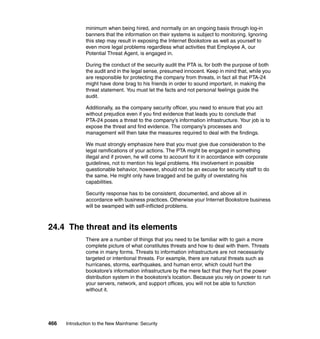
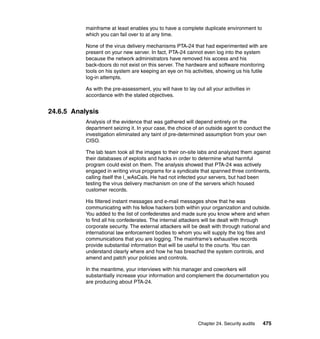
ibm.com/redbooks
Introduction to the New
Mainframe:
Security
Rica Weller
Ross Clements
Ken Dugdale
Per Fremstad
Olegario Hernandez
William C Johnston
Patrick Kappeler
Linda Kochersberger
Abey Tedla
Jeff Thompson
Ashwin Venkatraman
Fundamentals of security
Security on mainframe
hardware and software
Compliancewithsecurity
standards
Front cover
Introduction to the New Mainframe: Security
March 2007
International Technical Support Organization
SG24-6776-00
© Copyright International Business Machines Corporation 2007. All rights reserved.
Note to U.S. Government Users Restricted Rights -- Use, duplication or disclosure restricted by GSA ADP
Schedule Contract with IBM Corp.
First Edition (March 2007)
Note: Before using this information and the product it supports, read the information in
“Notices” on page 505.
© Copyright IBM Corp. 2007. All rights reserved. iii
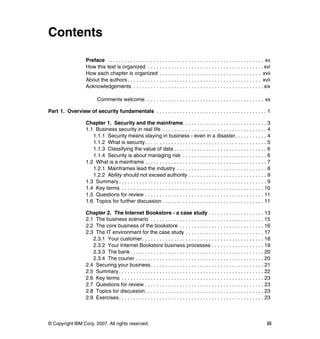
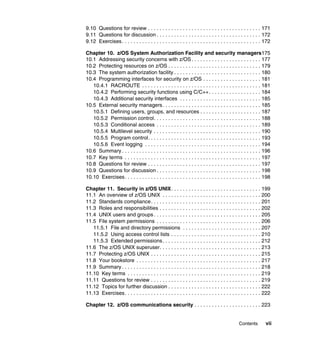
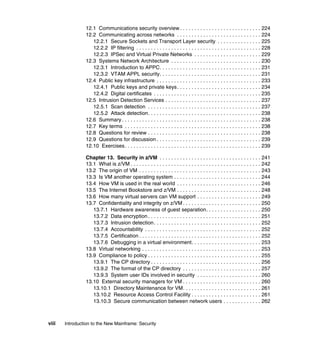
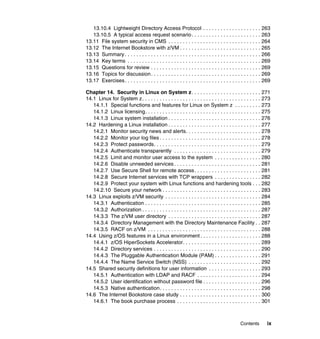
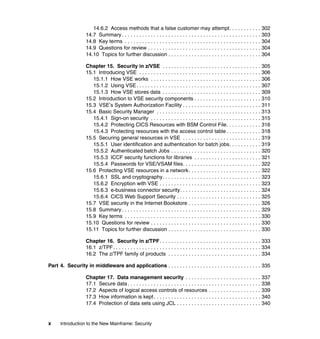
Contents
Preface . . . . . . . . . . . . . . . . . . . . . . . . . . . . . . . . . . . . . . . . . . . . . . . . . . . . . . xv
How this text is organized . . . . . . . . . . . . . . . . . . . . . . . . . . . . . . . . . . . . . . . . xvi
How each chapter is organized . . . . . . . . . . . . . . . . . . . . . . . . . . . . . . . . . . . xvii
About the authors. . . . . . . . . . . . . . . . . . . . . . . . . . . . . . . . . . . . . . . . . . . . . . xvii
Acknowledgements . . . . . . . . . . . . . . . . . . . . . . . . . . . . . . . . . . . . . . . . . . . . . xix
Comments welcome . . . . . . . . . . . . . . . . . . . . . . . . . . . . . . . . . . . . . . . . . xx
Part 1. Overview of security fundamentals . . . . . . . . . . . . . . . . . . . . . . . . . . . . . . . . . . . . . . 1
Chapter 1. Security and the mainframe. . . . . . . . . . . . . . . . . . . . . . . . . . . . . 3
1.1 Business security in real life . . . . . . . . . . . . . . . . . . . . . . . . . . . . . . . . . . . . 4
1.1.1 Security means staying in business - even in a disaster. . . . . . . . . . . 4
1.1.2 What is security. . . . . . . . . . . . . . . . . . . . . . . . . . . . . . . . . . . . . . . . . . 5
1.1.3 Classifying the value of data . . . . . . . . . . . . . . . . . . . . . . . . . . . . . . . . 6
1.1.4 Security is about managing risk . . . . . . . . . . . . . . . . . . . . . . . . . . . . . 6
1.2 What is a mainframe . . . . . . . . . . . . . . . . . . . . . . . . . . . . . . . . . . . . . . . . . . 7
1.2.1 Mainframes lead the industry . . . . . . . . . . . . . . . . . . . . . . . . . . . . . . . 8
1.2.2 Ability should not exceed authority . . . . . . . . . . . . . . . . . . . . . . . . . . . 9
1.3 Summary . . . . . . . . . . . . . . . . . . . . . . . . . . . . . . . . . . . . . . . . . . . . . . . . . . . 9
1.4 Key terms . . . . . . . . . . . . . . . . . . . . . . . . . . . . . . . . . . . . . . . . . . . . . . . . . 10
1.5 Questions for review . . . . . . . . . . . . . . . . . . . . . . . . . . . . . . . . . . . . . . . . . 11
1.6 Topics for further discussion . . . . . . . . . . . . . . . . . . . . . . . . . . . . . . . . . . . 11
Chapter 2. The Internet Bookstore - a case study . . . . . . . . . . . . . . . . . . . 13
2.1 The business scenario . . . . . . . . . . . . . . . . . . . . . . . . . . . . . . . . . . . . . . . 15
2.2 The core business of the bookstore . . . . . . . . . . . . . . . . . . . . . . . . . . . . . 16
2.3 The IT environment for the case study . . . . . . . . . . . . . . . . . . . . . . . . . . . 17
2.3.1 Your customer. . . . . . . . . . . . . . . . . . . . . . . . . . . . . . . . . . . . . . . . . . 18
2.3.2 Your Internet Bookstore business processes . . . . . . . . . . . . . . . . . . 19
2.3.3 The bank . . . . . . . . . . . . . . . . . . . . . . . . . . . . . . . . . . . . . . . . . . . . . . 20
2.3.4 The courier . . . . . . . . . . . . . . . . . . . . . . . . . . . . . . . . . . . . . . . . . . . . 20
2.4 Securing your business . . . . . . . . . . . . . . . . . . . . . . . . . . . . . . . . . . . . . . . 21
2.5 Summary . . . . . . . . . . . . . . . . . . . . . . . . . . . . . . . . . . . . . . . . . . . . . . . . . . 22
2.6 Key terms . . . . . . . . . . . . . . . . . . . . . . . . . . . . . . . . . . . . . . . . . . . . . . . . . 23
2.7 Questions for review . . . . . . . . . . . . . . . . . . . . . . . . . . . . . . . . . . . . . . . . . 23
2.8 Topics for discussion. . . . . . . . . . . . . . . . . . . . . . . . . . . . . . . . . . . . . . . . . 23
2.9 Exercises. . . . . . . . . . . . . . . . . . . . . . . . . . . . . . . . . . . . . . . . . . . . . . . . . . 23
iv Introduction to the New Mainframe: Security
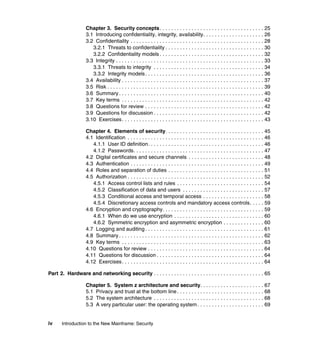
Chapter 3. Security concepts. . . . . . . . . . . . . . . . . . . . . . . . . . . . . . . . . . . . 25
3.1 Introducing confidentiality, integrity, availability. . . . . . . . . . . . . . . . . . . . . 26
3.2 Confidentiality . . . . . . . . . . . . . . . . . . . . . . . . . . . . . . . . . . . . . . . . . . . . . . 28
3.2.1 Threats to confidentiality . . . . . . . . . . . . . . . . . . . . . . . . . . . . . . . . . . 30
3.2.2 Confidentiality models . . . . . . . . . . . . . . . . . . . . . . . . . . . . . . . . . . . . 32
3.3 Integrity . . . . . . . . . . . . . . . . . . . . . . . . . . . . . . . . . . . . . . . . . . . . . . . . . . . 33
3.3.1 Threats to integrity . . . . . . . . . . . . . . . . . . . . . . . . . . . . . . . . . . . . . . 34
3.3.2 Integrity models. . . . . . . . . . . . . . . . . . . . . . . . . . . . . . . . . . . . . . . . . 36
3.4 Availability . . . . . . . . . . . . . . . . . . . . . . . . . . . . . . . . . . . . . . . . . . . . . . . . . 37
3.5 Risk . . . . . . . . . . . . . . . . . . . . . . . . . . . . . . . . . . . . . . . . . . . . . . . . . . . . . . 39
3.6 Summary . . . . . . . . . . . . . . . . . . . . . . . . . . . . . . . . . . . . . . . . . . . . . . . . . . 40
3.7 Key terms . . . . . . . . . . . . . . . . . . . . . . . . . . . . . . . . . . . . . . . . . . . . . . . . . 42
3.8 Questions for review . . . . . . . . . . . . . . . . . . . . . . . . . . . . . . . . . . . . . . . . . 42
3.9 Questions for discussion . . . . . . . . . . . . . . . . . . . . . . . . . . . . . . . . . . . . . . 42
3.10 Exercises. . . . . . . . . . . . . . . . . . . . . . . . . . . . . . . . . . . . . . . . . . . . . . . . . 43
Chapter 4. Elements of security. . . . . . . . . . . . . . . . . . . . . . . . . . . . . . . . . . 45
4.1 Identification . . . . . . . . . . . . . . . . . . . . . . . . . . . . . . . . . . . . . . . . . . . . . . . 46
4.1.1 User ID definition. . . . . . . . . . . . . . . . . . . . . . . . . . . . . . . . . . . . . . . . 46
4.1.2 Passwords. . . . . . . . . . . . . . . . . . . . . . . . . . . . . . . . . . . . . . . . . . . . . 47
4.2 Digital certificates and secure channels . . . . . . . . . . . . . . . . . . . . . . . . . . 48
4.3 Authentication . . . . . . . . . . . . . . . . . . . . . . . . . . . . . . . . . . . . . . . . . . . . . . 49
4.4 Roles and separation of duties . . . . . . . . . . . . . . . . . . . . . . . . . . . . . . . . . 51
4.5 Authorization . . . . . . . . . . . . . . . . . . . . . . . . . . . . . . . . . . . . . . . . . . . . . . . 52
4.5.1 Access control lists and rules . . . . . . . . . . . . . . . . . . . . . . . . . . . . . . 54
4.5.2 Classification of data and users . . . . . . . . . . . . . . . . . . . . . . . . . . . . 57
4.5.3 Conditional access and temporal access . . . . . . . . . . . . . . . . . . . . . 58
4.5.4 Discretionary access controls and mandatory access controls. . . . . 59
4.6 Encryption and cryptography. . . . . . . . . . . . . . . . . . . . . . . . . . . . . . . . . . . 59
4.6.1 When do we use encryption . . . . . . . . . . . . . . . . . . . . . . . . . . . . . . . 60
4.6.2 Symmetric encryption and asymmetric encryption . . . . . . . . . . . . . . 60
4.7 Logging and auditing. . . . . . . . . . . . . . . . . . . . . . . . . . . . . . . . . . . . . . . . . 61
4.8 Summary . . . . . . . . . . . . . . . . . . . . . . . . . . . . . . . . . . . . . . . . . . . . . . . . . . 62
4.9 Key terms . . . . . . . . . . . . . . . . . . . . . . . . . . . . . . . . . . . . . . . . . . . . . . . . . 63
4.10 Questions for review . . . . . . . . . . . . . . . . . . . . . . . . . . . . . . . . . . . . . . . . 64
4.11 Questions for discussion . . . . . . . . . . . . . . . . . . . . . . . . . . . . . . . . . . . . . 64
4.12 Exercises. . . . . . . . . . . . . . . . . . . . . . . . . . . . . . . . . . . . . . . . . . . . . . . . . 64
Part 2. Hardware and networking security . . . . . . . . . . . . . . . . . . . . . . . . . . . . . . . . . . . . . . 65
Chapter 5. System z architecture and security. . . . . . . . . . . . . . . . . . . . . . 67
5.1 Privacy and trust at the bottom line . . . . . . . . . . . . . . . . . . . . . . . . . . . . . . 68
5.2 The system architecture . . . . . . . . . . . . . . . . . . . . . . . . . . . . . . . . . . . . . . 68
5.3 A very particular user: the operating system . . . . . . . . . . . . . . . . . . . . . . . 69
Contents v
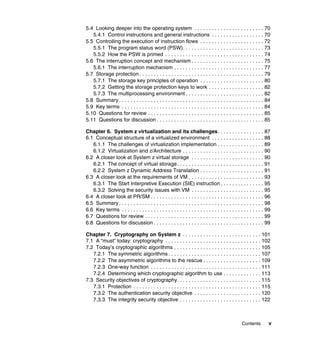
5.4 Looking deeper into the operating system . . . . . . . . . . . . . . . . . . . . . . . . 70
5.4.1 Control instructions and general instructions . . . . . . . . . . . . . . . . . . 70
5.5 Controlling the execution of instruction flows . . . . . . . . . . . . . . . . . . . . . . 72
5.5.1 The program status word (PSW). . . . . . . . . . . . . . . . . . . . . . . . . . . . 73
5.5.2 How the PSW is primed . . . . . . . . . . . . . . . . . . . . . . . . . . . . . . . . . . 74
5.6 The interruption concept and mechanism . . . . . . . . . . . . . . . . . . . . . . . . . 75
5.6.1 The interruption mechanism . . . . . . . . . . . . . . . . . . . . . . . . . . . . . . . 77
5.7 Storage protection. . . . . . . . . . . . . . . . . . . . . . . . . . . . . . . . . . . . . . . . . . . 79
5.7.1 The storage key principles of operation . . . . . . . . . . . . . . . . . . . . . . 80
5.7.2 Getting the storage protection keys to work . . . . . . . . . . . . . . . . . . . 82
5.7.3 The multiprocessing environment . . . . . . . . . . . . . . . . . . . . . . . . . . . 82
5.8 Summary . . . . . . . . . . . . . . . . . . . . . . . . . . . . . . . . . . . . . . . . . . . . . . . . . . 84
5.9 Key terms . . . . . . . . . . . . . . . . . . . . . . . . . . . . . . . . . . . . . . . . . . . . . . . . . 84
5.10 Questions for review . . . . . . . . . . . . . . . . . . . . . . . . . . . . . . . . . . . . . . . . 85
5.11 Questions for discussion . . . . . . . . . . . . . . . . . . . . . . . . . . . . . . . . . . . . . 85
Chapter 6. System z virtualization and its challenges. . . . . . . . . . . . . . . . 87
6.1 Conceptual structure of a virtualized environment . . . . . . . . . . . . . . . . . . 88
6.1.1 The challenges of virtualization implementation . . . . . . . . . . . . . . . . 89
6.1.2 Virtualization and z/Architecture . . . . . . . . . . . . . . . . . . . . . . . . . . . . 90
6.2 A closer look at System z virtual storage . . . . . . . . . . . . . . . . . . . . . . . . . 90
6.2.1 The concept of virtual storage. . . . . . . . . . . . . . . . . . . . . . . . . . . . . . 91
6.2.2 System z Dynamic Address Translation . . . . . . . . . . . . . . . . . . . . . . 91
6.3 A closer look at the requirements of VM . . . . . . . . . . . . . . . . . . . . . . . . . . 93
6.3.1 The Start Interpretive Execution (SIE) instruction . . . . . . . . . . . . . . . 95
6.3.2 Solving the security issues with VM . . . . . . . . . . . . . . . . . . . . . . . . . 95
6.4 A closer look at PR/SM . . . . . . . . . . . . . . . . . . . . . . . . . . . . . . . . . . . . . . . 96
6.5 Summary . . . . . . . . . . . . . . . . . . . . . . . . . . . . . . . . . . . . . . . . . . . . . . . . . . 98
6.6 Key terms . . . . . . . . . . . . . . . . . . . . . . . . . . . . . . . . . . . . . . . . . . . . . . . . . 99
6.7 Questions for review . . . . . . . . . . . . . . . . . . . . . . . . . . . . . . . . . . . . . . . . . 99
6.8 Questions for discussion . . . . . . . . . . . . . . . . . . . . . . . . . . . . . . . . . . . . . . 99
Chapter 7. Cryptography on System z . . . . . . . . . . . . . . . . . . . . . . . . . . . 101
7.1 A “must” today: cryptography . . . . . . . . . . . . . . . . . . . . . . . . . . . . . . . . . 102
7.2 Today’s cryptographic algorithms . . . . . . . . . . . . . . . . . . . . . . . . . . . . . . 105
7.2.1 The symmetric algorithms . . . . . . . . . . . . . . . . . . . . . . . . . . . . . . . . 107
7.2.2 The asymmetric algorithms to the rescue . . . . . . . . . . . . . . . . . . . . 109
7.2.3 One-way function . . . . . . . . . . . . . . . . . . . . . . . . . . . . . . . . . . . . . . 111
7.2.4 Determining which cryptographic algorithm to use . . . . . . . . . . . . . 113
7.3 Security objectives of cryptography. . . . . . . . . . . . . . . . . . . . . . . . . . . . . 115
7.3.1 Protection . . . . . . . . . . . . . . . . . . . . . . . . . . . . . . . . . . . . . . . . . . . . 115
7.3.2 The authentication security objective . . . . . . . . . . . . . . . . . . . . . . . 120
7.3.3 The integrity security objective . . . . . . . . . . . . . . . . . . . . . . . . . . . . 122
vi Introduction to the New Mainframe: Security
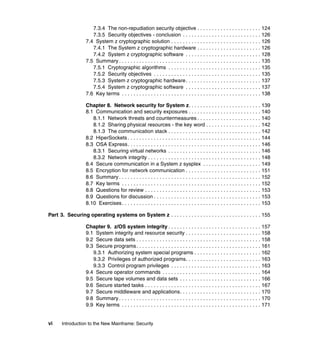
7.3.4 The non-repudiation security objective . . . . . . . . . . . . . . . . . . . . . . 124
7.3.5 Security objectives - conclusion . . . . . . . . . . . . . . . . . . . . . . . . . . . 126
7.4 System z cryptographic solution . . . . . . . . . . . . . . . . . . . . . . . . . . . . . . . 126
7.4.1 The System z cryptographic hardware . . . . . . . . . . . . . . . . . . . . . . 126
7.4.2 System z cryptographic software . . . . . . . . . . . . . . . . . . . . . . . . . . 128
7.5 Summary . . . . . . . . . . . . . . . . . . . . . . . . . . . . . . . . . . . . . . . . . . . . . . . . . 135
7.5.1 Cryptographic algorithms . . . . . . . . . . . . . . . . . . . . . . . . . . . . . . . . 135
7.5.2 Security objectives . . . . . . . . . . . . . . . . . . . . . . . . . . . . . . . . . . . . . 135
7.5.3 System z cryptographic hardware. . . . . . . . . . . . . . . . . . . . . . . . . . 137
7.5.4 System z cryptographic software . . . . . . . . . . . . . . . . . . . . . . . . . . 137
7.6 Key terms . . . . . . . . . . . . . . . . . . . . . . . . . . . . . . . . . . . . . . . . . . . . . . . . 138
Chapter 8. Network security for System z. . . . . . . . . . . . . . . . . . . . . . . . . 139
8.1 Communication and security exposures . . . . . . . . . . . . . . . . . . . . . . . . . 140
8.1.1 Network threats and countermeasures . . . . . . . . . . . . . . . . . . . . . . 140
8.1.2 Sharing physical resources - the key word . . . . . . . . . . . . . . . . . . . 142
8.1.3 The communication stack . . . . . . . . . . . . . . . . . . . . . . . . . . . . . . . . 142
8.2 HiperSockets . . . . . . . . . . . . . . . . . . . . . . . . . . . . . . . . . . . . . . . . . . . . . . 144
8.3 OSA Express. . . . . . . . . . . . . . . . . . . . . . . . . . . . . . . . . . . . . . . . . . . . . . 146
8.3.1 Securing virtual networks . . . . . . . . . . . . . . . . . . . . . . . . . . . . . . . . 146
8.3.2 Network integrity . . . . . . . . . . . . . . . . . . . . . . . . . . . . . . . . . . . . . . . 148
8.4 Secure communication in a System z sysplex . . . . . . . . . . . . . . . . . . . . 149
8.5 Encryption for network communication . . . . . . . . . . . . . . . . . . . . . . . . . . 151
8.6 Summary . . . . . . . . . . . . . . . . . . . . . . . . . . . . . . . . . . . . . . . . . . . . . . . . . 152
8.7 Key terms . . . . . . . . . . . . . . . . . . . . . . . . . . . . . . . . . . . . . . . . . . . . . . . . 152
8.8 Questions for review . . . . . . . . . . . . . . . . . . . . . . . . . . . . . . . . . . . . . . . . 153
8.9 Questions for discussion . . . . . . . . . . . . . . . . . . . . . . . . . . . . . . . . . . . . . 153
8.10 Exercises. . . . . . . . . . . . . . . . . . . . . . . . . . . . . . . . . . . . . . . . . . . . . . . . 153
Part 3. Securing operating systems on System z . . . . . . . . . . . . . . . . . . . . . . . . . . . . . . . 155
Chapter 9. z/OS system integrity . . . . . . . . . . . . . . . . . . . . . . . . . . . . . . . . 157
9.1 System integrity and resource security . . . . . . . . . . . . . . . . . . . . . . . . . . 158
9.2 Secure data sets . . . . . . . . . . . . . . . . . . . . . . . . . . . . . . . . . . . . . . . . . . . 158
9.3 Secure programs. . . . . . . . . . . . . . . . . . . . . . . . . . . . . . . . . . . . . . . . . . . 161
9.3.1 Authorizing system special programs . . . . . . . . . . . . . . . . . . . . . . . 162
9.3.2 Privileges of authorized programs. . . . . . . . . . . . . . . . . . . . . . . . . . 163
9.3.3 Control program privileges . . . . . . . . . . . . . . . . . . . . . . . . . . . . . . . 163
9.4 Secure operator commands . . . . . . . . . . . . . . . . . . . . . . . . . . . . . . . . . . 164
9.5 Secure tape volumes and data sets . . . . . . . . . . . . . . . . . . . . . . . . . . . . 166
9.6 Secure started tasks . . . . . . . . . . . . . . . . . . . . . . . . . . . . . . . . . . . . . . . . 167
9.7 Secure middleware and applications. . . . . . . . . . . . . . . . . . . . . . . . . . . . 170
9.8 Summary . . . . . . . . . . . . . . . . . . . . . . . . . . . . . . . . . . . . . . . . . . . . . . . . . 170
9.9 Key terms . . . . . . . . . . . . . . . . . . . . . . . . . . . . . . . . . . . . . . . . . . . . . . . . 171
Contents vii
9.10 Questions for review . . . . . . . . . . . . . . . . . . . . . . . . . . . . . . . . . . . . . . . 171
9.11 Questions for discussion . . . . . . . . . . . . . . . . . . . . . . . . . . . . . . . . . . . . 172
9.12 Exercises. . . . . . . . . . . . . . . . . . . . . . . . . . . . . . . . . . . . . . . . . . . . . . . . 172
Chapter 10. z/OS System Authorization Facility and security managers175
10.1 Addressing security concerns with z/OS . . . . . . . . . . . . . . . . . . . . . . . . 177
10.2 Protecting resources on z/OS . . . . . . . . . . . . . . . . . . . . . . . . . . . . . . . . 179
10.3 The system authorization facility . . . . . . . . . . . . . . . . . . . . . . . . . . . . . . 180
10.4 Programming interfaces for security on z/OS . . . . . . . . . . . . . . . . . . . . 181
10.4.1 RACROUTE . . . . . . . . . . . . . . . . . . . . . . . . . . . . . . . . . . . . . . . . . 181
10.4.2 Performing security functions using C/C++. . . . . . . . . . . . . . . . . . 184
10.4.3 Additional security interfaces . . . . . . . . . . . . . . . . . . . . . . . . . . . . 185
10.5 External security managers. . . . . . . . . . . . . . . . . . . . . . . . . . . . . . . . . . 185
10.5.1 Defining users, groups, and resources . . . . . . . . . . . . . . . . . . . . . 187
10.5.2 Permission control. . . . . . . . . . . . . . . . . . . . . . . . . . . . . . . . . . . . . 188
10.5.3 Conditional access . . . . . . . . . . . . . . . . . . . . . . . . . . . . . . . . . . . . 189
10.5.4 Multilevel security . . . . . . . . . . . . . . . . . . . . . . . . . . . . . . . . . . . . . 190
10.5.5 Program control. . . . . . . . . . . . . . . . . . . . . . . . . . . . . . . . . . . . . . . 193
10.5.6 Event logging . . . . . . . . . . . . . . . . . . . . . . . . . . . . . . . . . . . . . . . . 194
10.6 Summary . . . . . . . . . . . . . . . . . . . . . . . . . . . . . . . . . . . . . . . . . . . . . . . . 196
10.7 Key terms . . . . . . . . . . . . . . . . . . . . . . . . . . . . . . . . . . . . . . . . . . . . . . . 197
10.8 Questions for review . . . . . . . . . . . . . . . . . . . . . . . . . . . . . . . . . . . . . . . 197
10.9 Questions for discussion . . . . . . . . . . . . . . . . . . . . . . . . . . . . . . . . . . . . 198
10.10 Exercises. . . . . . . . . . . . . . . . . . . . . . . . . . . . . . . . . . . . . . . . . . . . . . . 198
Chapter 11. Security in z/OS UNIX. . . . . . . . . . . . . . . . . . . . . . . . . . . . . . . 199
11.1 An overview of z/OS UNIX . . . . . . . . . . . . . . . . . . . . . . . . . . . . . . . . . . 200
11.2 Standards compliance. . . . . . . . . . . . . . . . . . . . . . . . . . . . . . . . . . . . . . 201
11.3 Roles and responsibilities . . . . . . . . . . . . . . . . . . . . . . . . . . . . . . . . . . . 202
11.4 UNIX users and groups . . . . . . . . . . . . . . . . . . . . . . . . . . . . . . . . . . . . . 205
11.5 File system permissions . . . . . . . . . . . . . . . . . . . . . . . . . . . . . . . . . . . . 206
11.5.1 File and directory permissions . . . . . . . . . . . . . . . . . . . . . . . . . . . 207
11.5.2 Using access control lists . . . . . . . . . . . . . . . . . . . . . . . . . . . . . . . 210
11.5.3 Extended permissions. . . . . . . . . . . . . . . . . . . . . . . . . . . . . . . . . . 212
11.6 The z/OS UNIX superuser. . . . . . . . . . . . . . . . . . . . . . . . . . . . . . . . . . . 213
11.7 Protecting z/OS UNIX . . . . . . . . . . . . . . . . . . . . . . . . . . . . . . . . . . . . . . 215
11.8 Your bookstore . . . . . . . . . . . . . . . . . . . . . . . . . . . . . . . . . . . . . . . . . . . 217
11.9 Summary . . . . . . . . . . . . . . . . . . . . . . . . . . . . . . . . . . . . . . . . . . . . . . . . 218
11.10 Key terms . . . . . . . . . . . . . . . . . . . . . . . . . . . . . . . . . . . . . . . . . . . . . . 219
11.11 Questions for review . . . . . . . . . . . . . . . . . . . . . . . . . . . . . . . . . . . . . . 219
11.12 Topics for further discussion . . . . . . . . . . . . . . . . . . . . . . . . . . . . . . . . 222
11.13 Exercises. . . . . . . . . . . . . . . . . . . . . . . . . . . . . . . . . . . . . . . . . . . . . . . 222
Chapter 12. z/OS communications security . . . . . . . . . . . . . . . . . . . . . . . 223
viii Introduction to the New Mainframe: Security
12.1 Communications security overview . . . . . . . . . . . . . . . . . . . . . . . . . . . . 224
12.2 Communicating across networks . . . . . . . . . . . . . . . . . . . . . . . . . . . . . 224
12.2.1 Secure Sockets and Transport Layer security . . . . . . . . . . . . . . . 225
12.2.2 IP filtering . . . . . . . . . . . . . . . . . . . . . . . . . . . . . . . . . . . . . . . . . . . 228
12.2.3 IPSec and Virtual Private Networks . . . . . . . . . . . . . . . . . . . . . . . 229
12.3 Systems Network Architecture . . . . . . . . . . . . . . . . . . . . . . . . . . . . . . . 230
12.3.1 Introduction to APPC. . . . . . . . . . . . . . . . . . . . . . . . . . . . . . . . . . . 231
12.3.2 VTAM APPL security. . . . . . . . . . . . . . . . . . . . . . . . . . . . . . . . . . . 231
12.4 Public key infrastructure . . . . . . . . . . . . . . . . . . . . . . . . . . . . . . . . . . . . 233
12.4.1 Public keys and private keys. . . . . . . . . . . . . . . . . . . . . . . . . . . . . 234
12.4.2 Digital certificates . . . . . . . . . . . . . . . . . . . . . . . . . . . . . . . . . . . . . 235
12.5 Intrusion Detection Services . . . . . . . . . . . . . . . . . . . . . . . . . . . . . . . . . 237
12.5.1 Scan detection . . . . . . . . . . . . . . . . . . . . . . . . . . . . . . . . . . . . . . . 237
12.5.2 Attack detection. . . . . . . . . . . . . . . . . . . . . . . . . . . . . . . . . . . . . . . 238
12.6 Summary . . . . . . . . . . . . . . . . . . . . . . . . . . . . . . . . . . . . . . . . . . . . . . . . 238
12.7 Key terms . . . . . . . . . . . . . . . . . . . . . . . . . . . . . . . . . . . . . . . . . . . . . . . 238
12.8 Questions for review . . . . . . . . . . . . . . . . . . . . . . . . . . . . . . . . . . . . . . . 238
12.9 Questions for discussion . . . . . . . . . . . . . . . . . . . . . . . . . . . . . . . . . . . . 239
12.10 Exercises. . . . . . . . . . . . . . . . . . . . . . . . . . . . . . . . . . . . . . . . . . . . . . . 239
Chapter 13. Security in z/VM . . . . . . . . . . . . . . . . . . . . . . . . . . . . . . . . . . . 241
13.1 What is z/VM . . . . . . . . . . . . . . . . . . . . . . . . . . . . . . . . . . . . . . . . . . . . . 242
13.2 The origin of VM . . . . . . . . . . . . . . . . . . . . . . . . . . . . . . . . . . . . . . . . . . 243
13.3 Is VM another operating system . . . . . . . . . . . . . . . . . . . . . . . . . . . . . . 244
13.4 How VM is used in the real world . . . . . . . . . . . . . . . . . . . . . . . . . . . . . 246
13.5 The Internet Bookstore and z/VM . . . . . . . . . . . . . . . . . . . . . . . . . . . . . 248
13.6 How many virtual servers can VM support . . . . . . . . . . . . . . . . . . . . . . 249
13.7 Confidentiality and integrity on z/VM . . . . . . . . . . . . . . . . . . . . . . . . . . . 250
13.7.1 Hardware awareness of guest separation. . . . . . . . . . . . . . . . . . . 250
13.7.2 Data encryption. . . . . . . . . . . . . . . . . . . . . . . . . . . . . . . . . . . . . . . 251
13.7.3 Intrusion detection. . . . . . . . . . . . . . . . . . . . . . . . . . . . . . . . . . . . . 252
13.7.4 Accountability . . . . . . . . . . . . . . . . . . . . . . . . . . . . . . . . . . . . . . . . 252
13.7.5 Certification . . . . . . . . . . . . . . . . . . . . . . . . . . . . . . . . . . . . . . . . . . 252
13.7.6 Debugging in a virtual environment. . . . . . . . . . . . . . . . . . . . . . . . 253
13.8 Virtual networking . . . . . . . . . . . . . . . . . . . . . . . . . . . . . . . . . . . . . . . . . 253
13.9 Compliance to policy . . . . . . . . . . . . . . . . . . . . . . . . . . . . . . . . . . . . . . . 255
13.9.1 The CP directory . . . . . . . . . . . . . . . . . . . . . . . . . . . . . . . . . . . . . . 256
13.9.2 The format of the CP directory . . . . . . . . . . . . . . . . . . . . . . . . . . . 257
13.9.3 System user IDs involved in security . . . . . . . . . . . . . . . . . . . . . . 260
13.10 External security managers for VM . . . . . . . . . . . . . . . . . . . . . . . . . . . 260
13.10.1 Directory Maintenance for VM. . . . . . . . . . . . . . . . . . . . . . . . . . . 261
13.10.2 Resource Access Control Facility . . . . . . . . . . . . . . . . . . . . . . . . 261
13.10.3 Secure communication between network users . . . . . . . . . . . . . 262
Contents ix
13.10.4 Lightweight Directory Access Protocol . . . . . . . . . . . . . . . . . . . . 263
13.10.5 A typical access request scenario. . . . . . . . . . . . . . . . . . . . . . . . 263
13.11 File system security in CMS . . . . . . . . . . . . . . . . . . . . . . . . . . . . . . . . 264
13.12 The Internet Bookstore with z/VM . . . . . . . . . . . . . . . . . . . . . . . . . . . . 265
13.13 Summary. . . . . . . . . . . . . . . . . . . . . . . . . . . . . . . . . . . . . . . . . . . . . . . 266
13.14 Key terms . . . . . . . . . . . . . . . . . . . . . . . . . . . . . . . . . . . . . . . . . . . . . . 269
13.15 Questions for review . . . . . . . . . . . . . . . . . . . . . . . . . . . . . . . . . . . . . . 269
13.16 Topics for discussion. . . . . . . . . . . . . . . . . . . . . . . . . . . . . . . . . . . . . . 269
13.17 Exercises. . . . . . . . . . . . . . . . . . . . . . . . . . . . . . . . . . . . . . . . . . . . . . . 269
Chapter 14. Security in Linux on System z. . . . . . . . . . . . . . . . . . . . . . . . 271
14.1 Linux for System z. . . . . . . . . . . . . . . . . . . . . . . . . . . . . . . . . . . . . . . . . 273
14.1.1 Special functions and features for Linux on System z . . . . . . . . . 273
14.1.2 Linux licensing. . . . . . . . . . . . . . . . . . . . . . . . . . . . . . . . . . . . . . . . 275
14.1.3 Linux system installation . . . . . . . . . . . . . . . . . . . . . . . . . . . . . . . . 276
14.2 Hardening a Linux installation . . . . . . . . . . . . . . . . . . . . . . . . . . . . . . . . 277
14.2.1 Monitor security news and alerts. . . . . . . . . . . . . . . . . . . . . . . . . . 278
14.2.2 Monitor your log files . . . . . . . . . . . . . . . . . . . . . . . . . . . . . . . . . . . 278
14.2.3 Protect passwords. . . . . . . . . . . . . . . . . . . . . . . . . . . . . . . . . . . . . 279
14.2.4 Authenticate transparently . . . . . . . . . . . . . . . . . . . . . . . . . . . . . . 279
14.2.5 Limit and monitor user access to the system . . . . . . . . . . . . . . . . 280
14.2.6 Disable unneeded services . . . . . . . . . . . . . . . . . . . . . . . . . . . . . . 281
14.2.7 Use Secure Shell for remote access. . . . . . . . . . . . . . . . . . . . . . . 281
14.2.8 Secure Internet services with TCP wrappers . . . . . . . . . . . . . . . . 282
14.2.9 Protect your system with Linux functions and hardening tools . . . 282
14.2.10 Secure your network . . . . . . . . . . . . . . . . . . . . . . . . . . . . . . . . . . 283
14.3 Linux exploits z/VM security . . . . . . . . . . . . . . . . . . . . . . . . . . . . . . . . . 284
14.3.1 Authentication . . . . . . . . . . . . . . . . . . . . . . . . . . . . . . . . . . . . . . . . 285
14.3.2 Authorization . . . . . . . . . . . . . . . . . . . . . . . . . . . . . . . . . . . . . . . . . 287
14.3.3 The z/VM user directory . . . . . . . . . . . . . . . . . . . . . . . . . . . . . . . . 287
14.3.4 Directory Management with the Directory Maintenance Facility . . 287
14.3.5 RACF on z/VM . . . . . . . . . . . . . . . . . . . . . . . . . . . . . . . . . . . . . . . 288
14.4 Using z/OS features in a Linux environment . . . . . . . . . . . . . . . . . . . . . 288
14.4.1 z/OS HiperSockets Accelerator. . . . . . . . . . . . . . . . . . . . . . . . . . . 289
14.4.2 Directory services . . . . . . . . . . . . . . . . . . . . . . . . . . . . . . . . . . . . . 290
14.4.3 The Pluggable Authentication Module (PAM) . . . . . . . . . . . . . . . . 291
14.4.4 The Name Service Switch (NSS) . . . . . . . . . . . . . . . . . . . . . . . . . 292
14.5 Shared security definitions for user information . . . . . . . . . . . . . . . . . . 293
14.5.1 Authentication with LDAP and RACF . . . . . . . . . . . . . . . . . . . . . . 294
14.5.2 User identification without password file . . . . . . . . . . . . . . . . . . . . 296
14.5.3 Native authentication. . . . . . . . . . . . . . . . . . . . . . . . . . . . . . . . . . . 298
14.6 The Internet Bookstore case study . . . . . . . . . . . . . . . . . . . . . . . . . . . . 300
14.6.1 The book purchase process . . . . . . . . . . . . . . . . . . . . . . . . . . . . . 301
x Introduction to the New Mainframe: Security
14.6.2 Access methods that a false customer may attempt. . . . . . . . . . . 302
14.7 Summary . . . . . . . . . . . . . . . . . . . . . . . . . . . . . . . . . . . . . . . . . . . . . . . . 303
14.8 Key terms . . . . . . . . . . . . . . . . . . . . . . . . . . . . . . . . . . . . . . . . . . . . . . . 304
14.9 Questions for review . . . . . . . . . . . . . . . . . . . . . . . . . . . . . . . . . . . . . . . 304
14.10 Topics for further discussion . . . . . . . . . . . . . . . . . . . . . . . . . . . . . . . . 304
Chapter 15. Security in z/VSE . . . . . . . . . . . . . . . . . . . . . . . . . . . . . . . . . . 305
15.1 Introducing VSE . . . . . . . . . . . . . . . . . . . . . . . . . . . . . . . . . . . . . . . . . . 306
15.1.1 How VSE works . . . . . . . . . . . . . . . . . . . . . . . . . . . . . . . . . . . . . . 306
15.1.2 Using VSE. . . . . . . . . . . . . . . . . . . . . . . . . . . . . . . . . . . . . . . . . . . 307
15.1.3 How VSE stores data . . . . . . . . . . . . . . . . . . . . . . . . . . . . . . . . . . 309
15.2 Introduction to VSE security components . . . . . . . . . . . . . . . . . . . . . . . 310
15.3 VSE’s System Authorization Facility . . . . . . . . . . . . . . . . . . . . . . . . . . . 311
15.4 Basic Security Manager . . . . . . . . . . . . . . . . . . . . . . . . . . . . . . . . . . . . 313
15.4.1 Sign-on security . . . . . . . . . . . . . . . . . . . . . . . . . . . . . . . . . . . . . . 315
15.4.2 Protecting CICS Resources with BSM Control File. . . . . . . . . . . . 316
15.4.3 Protecting resources with the access control table . . . . . . . . . . . . 318
15.5 Securing general resources in VSE . . . . . . . . . . . . . . . . . . . . . . . . . . . 319
15.5.1 User identification and authentication for batch jobs. . . . . . . . . . . 319
15.5.2 Authenticated batch Jobs . . . . . . . . . . . . . . . . . . . . . . . . . . . . . . . 320
15.5.3 ICCF security functions for libraries . . . . . . . . . . . . . . . . . . . . . . . 321
15.5.4 Passwords for VSE/VSAM files. . . . . . . . . . . . . . . . . . . . . . . . . . . 322
15.6 Protecting VSE resources in a network. . . . . . . . . . . . . . . . . . . . . . . . . 322
15.6.1 SSL and cryptography. . . . . . . . . . . . . . . . . . . . . . . . . . . . . . . . . . 323
15.6.2 Encryption with VSE . . . . . . . . . . . . . . . . . . . . . . . . . . . . . . . . . . . 323
15.6.3 e-business connector security. . . . . . . . . . . . . . . . . . . . . . . . . . . . 324
15.6.4 CICS Web Support Security . . . . . . . . . . . . . . . . . . . . . . . . . . . . . 325
15.7 VSE security in the Internet Bookstore . . . . . . . . . . . . . . . . . . . . . . . . . 326
15.8 Summary . . . . . . . . . . . . . . . . . . . . . . . . . . . . . . . . . . . . . . . . . . . . . . . . 329
15.9 Key terms . . . . . . . . . . . . . . . . . . . . . . . . . . . . . . . . . . . . . . . . . . . . . . . 330
15.10 Questions for review . . . . . . . . . . . . . . . . . . . . . . . . . . . . . . . . . . . . . . 330
15.11 Topics for further discussion . . . . . . . . . . . . . . . . . . . . . . . . . . . . . . . . 330
Chapter 16. Security in z/TPF. . . . . . . . . . . . . . . . . . . . . . . . . . . . . . . . . . . 333
16.1 z/TPF. . . . . . . . . . . . . . . . . . . . . . . . . . . . . . . . . . . . . . . . . . . . . . . . . . . 334
16.2 The z/TPF family of products . . . . . . . . . . . . . . . . . . . . . . . . . . . . . . . . 334
Part 4. Security in middleware and applications . . . . . . . . . . . . . . . . . . . . . . . . . . . . . . . . 335
Chapter 17. Data management security . . . . . . . . . . . . . . . . . . . . . . . . . . 337
17.1 Secure data. . . . . . . . . . . . . . . . . . . . . . . . . . . . . . . . . . . . . . . . . . . . . . 338
17.2 Aspects of logical access controls of resources . . . . . . . . . . . . . . . . . . 339
17.3 How information is kept. . . . . . . . . . . . . . . . . . . . . . . . . . . . . . . . . . . . . 340
17.4 Protection of data sets using JCL . . . . . . . . . . . . . . . . . . . . . . . . . . . . . 340
Contents xi
17.4.1 Protection through RACF . . . . . . . . . . . . . . . . . . . . . . . . . . . . . . . 340
17.4.2 Protection for ISO/ANSI/FIPS Version 3 tapes . . . . . . . . . . . . . . . 341
17.4.3 Protection by passwords . . . . . . . . . . . . . . . . . . . . . . . . . . . . . . . . 341
17.4.4 Protection of BSAM or BDAM data sets . . . . . . . . . . . . . . . . . . . . 341
17.5 System Managed Storage. . . . . . . . . . . . . . . . . . . . . . . . . . . . . . . . . . . 342
17.5.1 Providing security in the DFSMS environment . . . . . . . . . . . . . . . 342
17.5.2 Access authorities for DASD data sets . . . . . . . . . . . . . . . . . . . . . 343
17.6 Virtual Storage Access Method data sets . . . . . . . . . . . . . . . . . . . . . . . 344
17.6.1 Protecting VSAM files with passwords . . . . . . . . . . . . . . . . . . . . . 345
17.6.2 Protecting VSAM files with RACF . . . . . . . . . . . . . . . . . . . . . . . . . 345
17.7 Database security . . . . . . . . . . . . . . . . . . . . . . . . . . . . . . . . . . . . . . . . . 346
17.8 DB2 security . . . . . . . . . . . . . . . . . . . . . . . . . . . . . . . . . . . . . . . . . . . . . 347
17.8.1 Access control within DB2. . . . . . . . . . . . . . . . . . . . . . . . . . . . . . . 348
17.8.2 Controlling access to the DB2 system . . . . . . . . . . . . . . . . . . . . . 349
17.8.3 Controlling access to the actual DB2 data sets. . . . . . . . . . . . . . . 349
17.9 IBM Information Management System . . . . . . . . . . . . . . . . . . . . . . . . . 350
17.9.1 Restricting the scope of data access . . . . . . . . . . . . . . . . . . . . . . 350
17.9.2 Restricting processing authority . . . . . . . . . . . . . . . . . . . . . . . . . . 352
17.9.3 Restricting access by non-IMS programs . . . . . . . . . . . . . . . . . . . 353
17.9.4 Encrypting your database . . . . . . . . . . . . . . . . . . . . . . . . . . . . . . . 353
17.9.5 Using the dictionary to help establish security . . . . . . . . . . . . . . . 354
17.10 Security in other database software . . . . . . . . . . . . . . . . . . . . . . . . . . 354
17.10.1 Oracle . . . . . . . . . . . . . . . . . . . . . . . . . . . . . . . . . . . . . . . . . . . . . 354
17.10.2 Adabas . . . . . . . . . . . . . . . . . . . . . . . . . . . . . . . . . . . . . . . . . . . . 355
17.11 Repositories . . . . . . . . . . . . . . . . . . . . . . . . . . . . . . . . . . . . . . . . . . . . 356
17.12 Summary. . . . . . . . . . . . . . . . . . . . . . . . . . . . . . . . . . . . . . . . . . . . . . . 358
17.13 Key terms . . . . . . . . . . . . . . . . . . . . . . . . . . . . . . . . . . . . . . . . . . . . . . 359
17.14 Questions for review . . . . . . . . . . . . . . . . . . . . . . . . . . . . . . . . . . . . . . 360
17.15 Questions for discussion . . . . . . . . . . . . . . . . . . . . . . . . . . . . . . . . . . . 360
Chapter 18. Transaction security. . . . . . . . . . . . . . . . . . . . . . . . . . . . . . . . 361
18.1 Security concepts for transactions . . . . . . . . . . . . . . . . . . . . . . . . . . . . 362
18.2 Security for job processing . . . . . . . . . . . . . . . . . . . . . . . . . . . . . . . . . . 363
18.2.1 Securing a job through a network . . . . . . . . . . . . . . . . . . . . . . . . . 364
18.2.2 Securing jobs with an external security manager . . . . . . . . . . . . . 365
18.3 Security in transaction-processing systems . . . . . . . . . . . . . . . . . . . . . 365
18.3.1 Securing transactions in the CICS Transaction Server. . . . . . . . . 366
18.3.2 Securing transactions in the IMS Transaction Manager . . . . . . . . 369
18.4 Summary . . . . . . . . . . . . . . . . . . . . . . . . . . . . . . . . . . . . . . . . . . . . . . . . 371
18.5 Key terms . . . . . . . . . . . . . . . . . . . . . . . . . . . . . . . . . . . . . . . . . . . . . . . 373
18.6 Questions for review . . . . . . . . . . . . . . . . . . . . . . . . . . . . . . . . . . . . . . . 373
18.7 Questions for discussion . . . . . . . . . . . . . . . . . . . . . . . . . . . . . . . . . . . . 373
18.8 Exercises. . . . . . . . . . . . . . . . . . . . . . . . . . . . . . . . . . . . . . . . . . . . . . . . 373
xii Introduction to the New Mainframe: Security
Chapter 19. Web-based security . . . . . . . . . . . . . . . . . . . . . . . . . . . . . . . . 375
19.1 Internet security. . . . . . . . . . . . . . . . . . . . . . . . . . . . . . . . . . . . . . . . . . . 376
19.2 Security for Web servers . . . . . . . . . . . . . . . . . . . . . . . . . . . . . . . . . . . . 377
19.3 The J2EE architecture and security . . . . . . . . . . . . . . . . . . . . . . . . . . . 380
19.4 Security in application servers. . . . . . . . . . . . . . . . . . . . . . . . . . . . . . . . 382
19.5 Connector security . . . . . . . . . . . . . . . . . . . . . . . . . . . . . . . . . . . . . . . . 384
19.6 Messaging security . . . . . . . . . . . . . . . . . . . . . . . . . . . . . . . . . . . . . . . . 387
19.7 Web Services security. . . . . . . . . . . . . . . . . . . . . . . . . . . . . . . . . . . . . . 388
19.8 Summary . . . . . . . . . . . . . . . . . . . . . . . . . . . . . . . . . . . . . . . . . . . . . . . . 389
19.9 Key terms . . . . . . . . . . . . . . . . . . . . . . . . . . . . . . . . . . . . . . . . . . . . . . . 389
19.10 Questions for review . . . . . . . . . . . . . . . . . . . . . . . . . . . . . . . . . . . . . . 390
19.11 Questions for discussion . . . . . . . . . . . . . . . . . . . . . . . . . . . . . . . . . . . 390
19.12 Exercises. . . . . . . . . . . . . . . . . . . . . . . . . . . . . . . . . . . . . . . . . . . . . . . 391
Chapter 20. Security for identity management. . . . . . . . . . . . . . . . . . . . . 393
20.1 Identity and authentication . . . . . . . . . . . . . . . . . . . . . . . . . . . . . . . . . . 394
20.2 Identity mapping . . . . . . . . . . . . . . . . . . . . . . . . . . . . . . . . . . . . . . . . . . 397
20.3 Identity managers . . . . . . . . . . . . . . . . . . . . . . . . . . . . . . . . . . . . . . . . . 398
20.3.1 Managing disparate data repositories . . . . . . . . . . . . . . . . . . . . . . 398
20.3.2 Trust association . . . . . . . . . . . . . . . . . . . . . . . . . . . . . . . . . . . . . . 399
20.4 Reverse proxy server . . . . . . . . . . . . . . . . . . . . . . . . . . . . . . . . . . . . . . 399
20.5 Summary . . . . . . . . . . . . . . . . . . . . . . . . . . . . . . . . . . . . . . . . . . . . . . . . 400
20.6 Key terms . . . . . . . . . . . . . . . . . . . . . . . . . . . . . . . . . . . . . . . . . . . . . . . 401
20.7 Questions for review . . . . . . . . . . . . . . . . . . . . . . . . . . . . . . . . . . . . . . . 401
20.8 Questions for discussion . . . . . . . . . . . . . . . . . . . . . . . . . . . . . . . . . . . . 401
20.9 Exercises. . . . . . . . . . . . . . . . . . . . . . . . . . . . . . . . . . . . . . . . . . . . . . . . 402
Part 5. Information Security Program and compliance . . . . . . . . . . . . . . . . . . . . . . . . . . . 403
Chapter 21. Creating an Information Security Program . . . . . . . . . . . . . 405
21.1 Critical infrastructure and its protection. . . . . . . . . . . . . . . . . . . . . . . . . 406
21.2 Chief Information Security Officer . . . . . . . . . . . . . . . . . . . . . . . . . . . . . 408
21.3 Creating the security requirements document. . . . . . . . . . . . . . . . . . . . 412
21.4 Tracking conflicting requirements . . . . . . . . . . . . . . . . . . . . . . . . . . . . . 413
21.5 Risk analysis and mitigation . . . . . . . . . . . . . . . . . . . . . . . . . . . . . . . . . 413
21.6 Mapping the compliance environment. . . . . . . . . . . . . . . . . . . . . . . . . . 416
21.7 Summary . . . . . . . . . . . . . . . . . . . . . . . . . . . . . . . . . . . . . . . . . . . . . . . . 417
21.8 Key terms . . . . . . . . . . . . . . . . . . . . . . . . . . . . . . . . . . . . . . . . . . . . . . . 418
21.9 Questions for review . . . . . . . . . . . . . . . . . . . . . . . . . . . . . . . . . . . . . . . 418
21.10 Questions for discussion . . . . . . . . . . . . . . . . . . . . . . . . . . . . . . . . . . . 419
21.11 Exercises. . . . . . . . . . . . . . . . . . . . . . . . . . . . . . . . . . . . . . . . . . . . . . . 419
Chapter 22. Compliance and certification. . . . . . . . . . . . . . . . . . . . . . . . . 421
22.1 Legal compliance . . . . . . . . . . . . . . . . . . . . . . . . . . . . . . . . . . . . . . . . . 423
Contents xiii
22.2 Standards and security methodologies . . . . . . . . . . . . . . . . . . . . . . . . . 430
22.3 Certification and evaluation. . . . . . . . . . . . . . . . . . . . . . . . . . . . . . . . . . 433
22.3.1 Certification . . . . . . . . . . . . . . . . . . . . . . . . . . . . . . . . . . . . . . . . . . 433
22.3.2 Personnel certification. . . . . . . . . . . . . . . . . . . . . . . . . . . . . . . . . . 434
22.3.3 System certification - Common Criteria. . . . . . . . . . . . . . . . . . . . . 435
22.3.4 Process certification . . . . . . . . . . . . . . . . . . . . . . . . . . . . . . . . . . . 436
22.3.5 Evaluation . . . . . . . . . . . . . . . . . . . . . . . . . . . . . . . . . . . . . . . . . . . 439
22.4 Summary . . . . . . . . . . . . . . . . . . . . . . . . . . . . . . . . . . . . . . . . . . . . . . . . 439
22.5 Key terms . . . . . . . . . . . . . . . . . . . . . . . . . . . . . . . . . . . . . . . . . . . . . . . 441
22.6 Questions for review . . . . . . . . . . . . . . . . . . . . . . . . . . . . . . . . . . . . . . . 441
22.7 Questions for discussion . . . . . . . . . . . . . . . . . . . . . . . . . . . . . . . . . . . . 441
22.8 Exercises. . . . . . . . . . . . . . . . . . . . . . . . . . . . . . . . . . . . . . . . . . . . . . . . 442
Chapter 23. Operational Information Security Policy and management 443
23.1 Set up the Operational Information Security Policy. . . . . . . . . . . . . . . . 444
23.2 Elements of the Information Security Plan . . . . . . . . . . . . . . . . . . . . . . 446
23.2.1 Considerations before policy creation . . . . . . . . . . . . . . . . . . . . . . 448
23.2.2 Foundation policies . . . . . . . . . . . . . . . . . . . . . . . . . . . . . . . . . . . . 450
23.3 Managing the Information Security Program. . . . . . . . . . . . . . . . . . . . . 455
23.3.1 Awareness . . . . . . . . . . . . . . . . . . . . . . . . . . . . . . . . . . . . . . . . . . 456
23.3.2 Awareness training . . . . . . . . . . . . . . . . . . . . . . . . . . . . . . . . . . . . 456
23.4 Summary . . . . . . . . . . . . . . . . . . . . . . . . . . . . . . . . . . . . . . . . . . . . . . . . 460
23.5 Key terms . . . . . . . . . . . . . . . . . . . . . . . . . . . . . . . . . . . . . . . . . . . . . . . 461
23.6 Questions for review . . . . . . . . . . . . . . . . . . . . . . . . . . . . . . . . . . . . . . . 461
23.7 Exercises. . . . . . . . . . . . . . . . . . . . . . . . . . . . . . . . . . . . . . . . . . . . . . . . 461
Chapter 24. Security audits . . . . . . . . . . . . . . . . . . . . . . . . . . . . . . . . . . . . 463
24.1 Audit types for information security . . . . . . . . . . . . . . . . . . . . . . . . . . . . 464
24.2 Employee A - Hacker Extraordinaire . . . . . . . . . . . . . . . . . . . . . . . . . . . 464
24.3 Legal considerations . . . . . . . . . . . . . . . . . . . . . . . . . . . . . . . . . . . . . . . 465
24.4 The threat and its elements. . . . . . . . . . . . . . . . . . . . . . . . . . . . . . . . . . 466
24.5 Reactive Audit: pre-assessment . . . . . . . . . . . . . . . . . . . . . . . . . . . . . . 468
24.5.1 Pre-assessment document . . . . . . . . . . . . . . . . . . . . . . . . . . . . . . 468
24.5.2 Pre-assessment tools . . . . . . . . . . . . . . . . . . . . . . . . . . . . . . . . . . 470
24.6 Incident response: full audit. . . . . . . . . . . . . . . . . . . . . . . . . . . . . . . . . . 471
24.6.1 Objectives . . . . . . . . . . . . . . . . . . . . . . . . . . . . . . . . . . . . . . . . . . . 472
24.6.2 Audit tools and procedures . . . . . . . . . . . . . . . . . . . . . . . . . . . . . . 472
24.6.3 Planning . . . . . . . . . . . . . . . . . . . . . . . . . . . . . . . . . . . . . . . . . . . . 473
24.6.4 Execution . . . . . . . . . . . . . . . . . . . . . . . . . . . . . . . . . . . . . . . . . . . 473
24.6.5 Analysis. . . . . . . . . . . . . . . . . . . . . . . . . . . . . . . . . . . . . . . . . . . . . 475
24.6.6 Conclusion of the audit . . . . . . . . . . . . . . . . . . . . . . . . . . . . . . . . . 476
24.7 Summary . . . . . . . . . . . . . . . . . . . . . . . . . . . . . . . . . . . . . . . . . . . . . . . . 476
24.8 Key terms . . . . . . . . . . . . . . . . . . . . . . . . . . . . . . . . . . . . . . . . . . . . . . . 478
xiv Introduction to the New Mainframe: Security
24.9 Questions for review . . . . . . . . . . . . . . . . . . . . . . . . . . . . . . . . . . . . . . . 478
24.10 Questions for discussion . . . . . . . . . . . . . . . . . . . . . . . . . . . . . . . . . . . 478
24.11 Exercises. . . . . . . . . . . . . . . . . . . . . . . . . . . . . . . . . . . . . . . . . . . . . . . 479
Part 6. Appendixes . . . . . . . . . . . . . . . . . . . . . . . . . . . . . . . . . . . . . . . . . . . . . . . . . . . . . . . . 481
Appendix A. Security integrity models . . . . . . . . . . . . . . . . . . . . . . . . . . . 483
Biba model . . . . . . . . . . . . . . . . . . . . . . . . . . . . . . . . . . . . . . . . . . . . . . . . . . . 484
Goguen-Meseguer model. . . . . . . . . . . . . . . . . . . . . . . . . . . . . . . . . . . . . . . . 484
Clark-Wilson model . . . . . . . . . . . . . . . . . . . . . . . . . . . . . . . . . . . . . . . . . . . . 485
Brewer-Nash model . . . . . . . . . . . . . . . . . . . . . . . . . . . . . . . . . . . . . . . . . . . . 485
Appendix B. z/OS UNIX general resource classes. . . . . . . . . . . . . . . . . . 487
Protecting z/OS UNIX functions - the FACILITY class . . . . . . . . . . . . . . . . . . 488
Protecting z/OS UNIX privileges - UNIXPRIV class . . . . . . . . . . . . . . . . . . . . 492
Appendix C. The Mainframe Charter . . . . . . . . . . . . . . . . . . . . . . . . . . . . . 503
Notices . . . . . . . . . . . . . . . . . . . . . . . . . . . . . . . . . . . . . . . . . . . . . . . . . . . . . 505
Trademarks . . . . . . . . . . . . . . . . . . . . . . . . . . . . . . . . . . . . . . . . . . . . . . . . . . 506
Glossary . . . . . . . . . . . . . . . . . . . . . . . . . . . . . . . . . . . . . . . . . . . . . . . . . . . . 507
Related publications . . . . . . . . . . . . . . . . . . . . . . . . . . . . . . . . . . . . . . . . . . 509
IBM Redbooks . . . . . . . . . . . . . . . . . . . . . . . . . . . . . . . . . . . . . . . . . . . . . . . . 509
Other publications . . . . . . . . . . . . . . . . . . . . . . . . . . . . . . . . . . . . . . . . . . . . . 510
Online resources . . . . . . . . . . . . . . . . . . . . . . . . . . . . . . . . . . . . . . . . . . . . . . 510
How to get IBM Redbooks . . . . . . . . . . . . . . . . . . . . . . . . . . . . . . . . . . . . . . . 512
Help from IBM . . . . . . . . . . . . . . . . . . . . . . . . . . . . . . . . . . . . . . . . . . . . . . . . 512
Index . . . . . . . . . . . . . . . . . . . . . . . . . . . . . . . . . . . . . . . . . . . . . . . . . . . . . . . 513
© Copyright IBM Corp. 2007. All rights reserved. xv
Preface
This book is designed to provide students of information systems with the
background knowledge and skills necessary to begin using the basic security
facilities of IBM System z™. It enables a broad understanding of both the
security principles and the hardware and software components needed to insure
that the mainframe resources and environment are secure. The text also
discusses how System z components interface with some non-System z
components.
A multi-user, multi-application, multi-task environment such as System z, with
thousands of users and applications simultaneously executing a wide variety of
applications with different performance profiles, requires a different level of
security than that typically encountered on a single-user platform. In addition,
when a mainframe is connected in a network to other processors, a multi-layered
approach to security is recommended.
Students are assumed to have successfully completed introductory courses in
computer system concepts such as computer organization and architecture,
operating systems, data management and data communications, and systems
design and analysis. Although this course looks into all the operating systems on
System z, the main focus is on IBM z/OS®. Thus, it is strongly recommended
that students have also completed an introductory course on z/OS.
Others who will benefit from this course include experienced data processing
professionals who have worked with non-mainframe-based platforms, as well as
those who are familiar with some aspects of the mainframe environment or
applications but want to learn more about the security and integrity facilities and
advantages offered by the mainframe environment.
At the end of this course, you will:
Understand the general principles involved in insuring the integrity of the
mainframe environment and associated hardware and software security
components
Be aware of typical user security requirements and what factors to consider
when implementing a z/OS-based environment to meet those requirements
xvi Introduction to the New Mainframe: Security
How this text is organized
This text is organized into six parts, as follows:
Part 1. “Overview of security fundamentals” explains why it is important to
design security into the mainframe environment, and then describes the major
considerations and some of the functions and roles of the security professionals.
This part provides the rationale for having a secure environment, and gives a
high-level view of the security capabilities of the mainframe.
Part 1 also introduces a case study representing several typical applications and
environments, which are then used throughout the book as an example when
specific security components are discussed. It explains how several of the
customer applications briefly presented here could use the hardware and
software components presented in Part 2 and Part 3 to implement a secure
mainframe environment. And finally, this part presents various design
considerations and alternatives, and describes a recommended possible design.
Part 2. “Hardware and networking security” covers the mainframe hardware
architecture and network security features that provide the basis for the software
security components.
Part 3. “Securing operating systems on System z” describes the
implementation of security concepts and requirements in the operating system
environment, examining z/OS, Linux® on System z, z/VM®, z/VSE™, and TPF.
Basic z/OS security mechanisms are explained in more detail and, where
appropriate, the capabilities available on other security software products (for
example, ACF2 and TopSecret) are discussed.
Part 4. “Security in middleware and applications” examines the security
software components available from both IBM and other software vendors. It
opens with an overview of security issues in data managers, then looks at these
issues in regard to transaction managers, Internet applications, and identity
management.
Part 5. “Information Security Program and compliance” explains how
Security professionals create information security policies to protect the
information infrastructure. It covers legal compliance and certification topics, and
goes on to describe Operational Information Security Policy and Management
considerations and security auditing.
Part 6. “Appendixes” contain supplementary material about various security
integrity models, z/OS UNIX® General Resource Classes, and the IBM
Mainframe Charter.
Preface xvii
How each chapter is organized
Each chapter follows a common format:
Objectives for the student
Topics that teach a central theme related to mainframe computing
Summary of the main ideas of the chapter
A list of key terms introduced in the chapter
Questions for review to help students verify their understanding of the
material
Topics for further discussion to encourage students to explore issues that
extend beyond the chapter objectives
Instructor notes to provide the instructor with additional background
knowledge when necessary
About the authors
This book was produced by a team of specialists from around the world working
at the International Technical Support Organization, Poughkeepsie Center.
Rica Weller is a Project Manager at the International Technical Support
Organization (ITSO), working in New Zealand and the U.S. She worked as a
Systems Engineer for S/390® for two years and as a Senior Consultant for IBM
WebSphere® Business Integration on z/OS in the Competence Center with IBM
Germany for three years. She has also taught classes, presented at several
conferences, and coauthored several IBM Redbooks™ publications about
WebSphere for z/OS and textbooks about System z basics. Rica holds a degree
in Business Administration from the University of Technology, Dresden,
Germany, and a Master’s Degree in Management from Massey University, New
Zealand.
Ross Clements is a Senior Security Analyst. For the last ten years, he has
provided technical advice and administration support for mainframe security to
IBM clients in Australia and Asia for IBM Global Services in Australia. Working in
various roles involving mainframe computers for 38 years, Ross has worked on
MVS™ and z/OS platforms for the last 22 years, specializing in the IBM Security
Server, RACF®.
Ken Dugdale has worked at IBM for 11 years, and is a Coordinator of System z
Security Advisories at IBM for North America involved in site, network, and host
security. He has 30 years of experience in Information Technology, working with
some of Canada's largest companies. His experience includes network and
xviii Introduction to the New Mainframe: Security
firewall auditing, mainframe operations and analysis, system programming of VM
internals, and application development on the VM and OS/2® platforms. Ken has
served as a security process auditor on Windows® Server, OS/2 LAN Server,
Novel, AIX®, Linux, and VM. He has experience in technical writing, as well as in
educational material design and training.
Per Fremstad is an IBM Certified IT Specialist with IBM Systems & Technology
Group, Norway. He has worked for IBM since 1982 and has extensive
experience with System z and z/OS. His areas of expertise include the Internet,
IBM WebSphere product family, and Web-enabling applications on z/OS. Per
teaches frequently on WebSphere and Java™ topics, and about System z and
z/OS at several universities. He holds a Bachelor of Science degree from the
University of Oslo, Norway.
Helmut Hellner is a z/VSE Developer in the IBM Development Laboratory,
Boeblingen, Germany. He studied Computer Science at the University of
Stuttgart, graduating in 1981. After several years of working with OS/390® and
VM, he joined the VSE development and service team.
Olegario Hernandez is a former IBM Advisory Systems Engineer. He has more
than 35 years of experience in application design and development projects in
the IBM mainframe area. He has written extensively on CICS/Application
Interface, systems management, and grid computing through his participation in
projects at various ITSO Centers. He holds a degree in Chemical Engineering
from Universidad de Chile.
William C. Johnston is a Software Engineer at IBM in Poughkeepsie, NY, who
joined IBM in 1982. His primary focus has been testing and quality assurance,
including testing the 308x and 3090 families of processors (precursors of System
z systems). Since 1990, he has designed and executed tests on RACF and other
z/OS-related security components. William currently designs and coordinates
testing strategies against security services provided by components and
products for z/OS and other platforms.
Patrick Kappeler is an IBM Certified I/T Specialist who joined IBM in 1970 as a
diagnostic programs designer. He has held specialist and management positions
in France and in several international assignments, all dealing with S/390 and
System z Technical Support. He has been part of the EMEA Products and
Solutions Support Center, located in Montpellier (France) since 1996, where his
area of expertise is e-business security on System z. Patrick extensively writes
and presents on this topic.
Linda Kochersberger is a Senior IT Specialist currently with the IBM Software
Migration Project Office (SMPO) in North America. She has more than 20 years
of IT experience in MVS and related areas. Her areas of expertise include RACF
migrations from competitive security software, z/OS system software products,
Preface xix
z/OS systems programming, DB2® systems programming and auditing. Linda
has earned a graduate certificate from George Washington University in
Information System Security, and is working toward her Masters degree in
Information System Technology at George Washington University.
Abey Tedla is a Certified Information Security Architect based in Washington,
DC, currently consulting with WORLDSPACE Corporation. He worked for IBM
from 1998 to 2003 as a Quality Assurance Engineer supporting eSuite, Entrust
and Defense Messaging Product teams in server stress and security testing.
Abey’s areas of expertise include information security and computer forensics.
He audits security controls in business practices and helps to create awareness
of safe computing.
Jeff Thompson is an IT Architect with IBM Global Services in North America. He
has 20 years of system programming experience in installing, migrating,
upgrading, and supporting z/OS and precursor operating systems. He has
worked at IBM for 15 years in the commercial outsourcing business. Jeff earned
a Bachelor of Science in Computer Science from Louisiana Tech University and
a Master’s degree in Computer Information Systems from the University of
Denver.
Ashwin Venkatraman is a Software Engineer at the z/OS Integration Test team
based in Poughkeepsie, NY. His experience includes testing z/OS, WebSphere
Application Server and other related middleware, as well as specifically
exploiting z/OS security features. Ashwin graduated with an undergraduate
degree in Software Engineering from Clarkson University in Potsdam, NY, and is
currently working on his Master of Science degree in Information Technology
from Rensselaer Polytechnic Institute. Ashwin has been involved with IBM and
System z mainframes for two years.
Acknowledgements
Special appreciation to the following additional contributors:
James Catchpole
Jan De Decker
Edward Doan
Diane Levesque
Peter Larkin
Mako Katayama
Linda Kochersburg
Vicente Raneri Junior
Joel Tilton
Jan Vandesande
xx Introduction to the New Mainframe: Security
Grateful acknowledgement to the following people for their help with this project:
Mike Ebbers
Rich Guski
Thomas Hanicke
Susan LeVangia
Nancy Lewallen
Scott Loveland
Mark Nelson
Matt Nuttall
Wayne O’Brien
Jun Ogata
Kathleen Pfeiffer
Geoff Rousell
Peter Spera
Mary Sweat
Comments welcome
Your comments are important to us!
We want our Textbooks and Redbooks to be as helpful as possible. Send us
your comments about this or other Textbooks in one of the following ways:
Use the online Contact us review redbook form found at:
ibm.com/redbooks
Send your comments in an email to:
redbook@us.ibm.com
Mail your comments to:
IBM Corporation, International Technical Support Organization
Dept. HYTD Mail Station P099
2455 South Road
Poughkeepsie, NY 12601-5400
© Copyright IBM Corp. 2007. All rights reserved. 1
Part 1 Overview of
security
fundamentals
By this point in time, Information Technology (IT) has become woven into the
very fabric of business. Few people today can afford to be without the
specialized computing and security knowledge that enables them to make sound
business decisions. In this IBM Redbook, we explain the security risks that
businesses face, and teach you the methodologies and technologies that are
available to minimize those risks.
This part of the document describes the business need for security in Information
Technology, and explains its fundamental concepts. These requirements and
concepts are independent of any hardware or software platform. Therefore, we
Part 1
2 Introduction to the New Mainframe: Security
also discuss the mainframe technical procedures that are used to implement a
set of secure business applications.
We document how these concepts are implemented on various software
platforms and in example environments, and describe the specific elements of
security which comprise these concepts in four chapters.
Chapter 1, “Security and the mainframe” on page 3, defines information
security and describes the mainframe computer. It outlines the features which
differentiate the mainframe from other types of computer systems, and
compares the value of data to the cost of protecting it.
Chapter 2, “The Internet Bookstore - a case study” on page 13, introduces a
case study that allows you to see how security is implemented in various
corporate environments using mainframe computers.
Chapter 3, “Security concepts” on page 25, describes the concepts of
confidentiality, integrity, and availability in detail. It discusses the importance
of each concept, then goes on to explain the threats each one faces in today’s
environment.
Chapter 4, “Elements of security” on page 45, defines the elements that make
up computer security concepts. Identification and authentication are
described in detail, and data classification and separation of duty are
expanded upon with examples of “roles” in the enterprise. We introduce
authorization with a focus on access control, and also consider encryption as
a security element.
After completing Part 1, you will have an understanding of why security is such a
concern to business enterprises. You will be able to list specific examples of
where data is at risk and the consequences of failing to secure it. You will also be
able to describe how threats are identified and risks are assessed, and list some
options that can help deal with the risks.
© Copyright IBM Corp. 2007. All rights reserved. 3
Chapter 1. Security and the mainframe
Information Technology has become an integral part of today’s businesses. And
few businesspeople can afford to be without the specialized computing and
security knowledge that enables them to make sound decisions. They need to
know the risks an enterprise faces, and the methodologies and technologies that
are available to minimize those risks.
1
Objectives
After completing this chapter, you will be able to:
Address the purpose of security and explain why we use it
Explain the importance of information security in business
Understand the costs of classification of assets that security tries to offset
Describe what a mainframe is
List the major benefits delivered by the mainframe in comparison to other
platforms
Understand separation of duties
4 Introduction to the New Mainframe: Security
1.1 Business security in real life
At one time, hackers might have been children breaking into computer systems
for “fun”. Today’s hackers, however, use sophisticated tools to break computer
security for profit. As a result, security professionals must continually improve
their skills in order to keep a step ahead.
To some, the word security might bring to mind the image of an armed guard or a
spy in an environment of intrigue, while others might equate it with national
security organizations. Those are popular images in the entertainment industry,
but they are far from the reality of security in the world of Information Technology.
This book can help you develop a new understanding of the importance of
security, because hardly a day goes by without media stories reporting the
exposure of personal and corporate data. Here are some examples:
Hundreds of thousands of bank customers were informed that their financial
records may have been sold to an individual illegally posing as a collection
agency.
A group of Internet criminals posed as legitimate customers of another bank
and obtained personal information about thousands of people.
A computer containing the names and Social Security numbers of thousands
of company employees was stolen from the car of a company financial
analyst.
Other thefts have been reported at universities and companies, highlighting
the need for stronger security and encryption of databases and more care in
protecting the information residing on computers.
1.1.1 Security means staying in business - even in a disaster
IT security is a serious discipline that takes business seriously. IT security
implements the concept of business resilience and continuity. This practice
attempts to ensure that nothing prevents a business transaction or other
authorized exchange of money or information from occurring, and that
information is protected from unauthorized access.
We know, however, that there are no absolutes in the world. Therefore, when an
event occurs that prevents business from operating normally, the disaster
recovery practice of the IT security discipline should be available in order to
minimize loss by quickly restoring service.
Security professionals, under the direction of management, are responsible for
the privacy of data, the integrity of data, and the ability to access data as
needed. In fact, IT security is so important to companies today that most
businesses permanently employ security specialists who might be certified in
Chapter 1. Security and the mainframe 5
one or more disciplines, and security certifications are recognized the world over.
Staff members who are in a position to influence the surety of a completed
transaction are responsible for their part of the process.
When to implement security
It is important to understand that security is not something to be considered at a
later date, to be added on after the design or implementation stages, as if it were
an exterior steel door being added to a straw hut. No doubt it would be nice if we
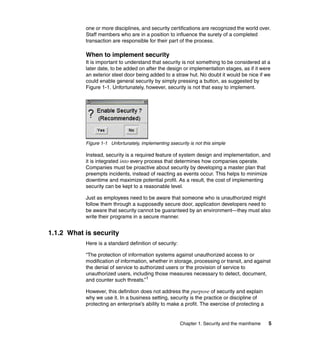
could enable general security by simply pressing a button, as suggested by
Figure 1-1. Unfortunately, however, security is not that easy to implement.
Figure 1-1 Unfortunately, implementing ssecurity is not this simple
Instead, security is a required feature of system design and implementation, and
it is integrated into every process that determines how companies operate.
Companies must be proactive about security by developing a master plan that
preempts incidents, instead of reacting as events occur. This helps to minimize
downtime and maximize potential profit. As a result, the cost of implementing
security can be kept to a reasonable level.
Just as employees need to be aware that someone who is unauthorized might
follow them through a supposedly secure door, application developers need to
be aware that security cannot be guaranteed by an environment—they must also
write their programs in a secure manner.
1.1.2 What is security
Here is a standard definition of security:
“The protection of information systems against unauthorized access to or
modification of information, whether in storage, processing or transit, and against
the denial of service to authorized users or the provision of service to
unauthorized users, including those measures necessary to detect, document,
and counter such threats.”1
However, this definition does not address the purpose of security and explain
why we use it. In a business setting, security is the practice or discipline of
protecting an enterprise’s ability to make a profit. The exercise of protecting a
6 Introduction to the New Mainframe: Security
business investment should be as integrated into a business model as the idea
that the product will be obtained or manufactured and then sold to earn revenue.
Many people think of security only as a process by which items are “locked
away”. But security is equally important in allowing a business and its customers
to have access to assets when necessary, and to knowing when to share openly
and when not to share openly.
For example, as an enterprise discovers that previously unclassified data can
have drastic effects on its business and shareholder value, the data moves up
the security classification chain from unclassified to internal use only, to
business-critical, and finally to strictly confidential.
Furthermore, each classification needs to have its own handling instructions and
detailed safeguards against loss or theft. Merely hiding program source code
does not guarantee that a software product is secure if it is flawed, but hiding
source code is beneficial if your livelihood depends on the intellectual property
within it.
1.1.3 Classifying the value of data
It is very expensive to lock away things that do not increase in value by being
protected. Hiding everything is redundant, therefore we must classify items by
value. The value of an asset can be thought of as the amount of loss incurred if it
were stolen or unavailable. The cost of protecting the asset must be weighed
against the likelihood that it is desirable enough to others to try to steal it, as well
as against the loss to a business in revenue or customer confidence if data is lost
or inaccessible.
1.1.4 Security is about managing risk
In order to conduct business transactions and share data with other parties,
some degree of risk is necessary. The processes involved in reducing,
mitigating, or transferring risk and thereby helping to keep costs low are known
as risk management.
Security should be considered a way of limiting potential loss, rather than strictly
a business cost. Security is a type of “insurance” against losing an asset, and
that asset is information. Security tries to offset the potential cost of replacing lost
data, software, time, and legal ramifications, as well as a business’s
trustworthiness and competitive advantage.
1
NATIONAL INFORMATION SYSTEMS SECURITY (INFOSEC) GLOSSARY, NSTISSI No. 4009,
September 2000, http://security.isu.edu/pdf/4009.pdf
Chapter 1. Security and the mainframe 7
1.2 What is a mainframe
A mainframe is a computer that is capable of performing large-scale data
processing in a self-contained structure, as opposed to having many individual
(usually smaller) computers.
Mainframes typically have multiple processors. And they can be connected in a
cluster and operate in a distributed computing system. However, the
distinguishing feature of a mainframe is that it can run independently as a
“centralized cluster” by dividing itself internally to work on problems in a parallel
or multi-tasking way for extended periods of time, even years.
Mainframes offer virtualization. Virtualization allows you to create multiple
logical computers within a single mainframe. Connecting several of those logical
computers (also called logical partitions or LPARs) to work together is known as
creating a cluster or sysplex. When multiple physical entities (mainframes) are
physically connected, they are called sysplexes. Together, using virtualization,
LPARS, and sysplexes offers enhanced horizontal scalability.
An important benefit offered by this design is that expensive reliability features
are needed in only one server (as compared to being built in to many smaller
servers). Also, the physical “footprint” of a mainframe is much smaller than that
of a distributed server farm, and therefore is less expensive from an
environmental perspective (that is, the amount of power, cooling, and floor space
needed is much less). Mainframes can therefore be more cost-effective in
solving the same business problems over the long term.
Mainframes are usually larger than most servers because of the necessary
redundancy of design and components that allow the computer to deliver high
availability as well as vertical and horizontal scalability (the ability to increase
the capacity of the computer without replacing the entire unit). Also, mainframe
components such as hot-pluggable processors, disks, interface adapters such
as network cards or cryptographic engines, and even the power supply, can all
be replaced or upgraded without taking the server offline.
The reliability of System z mainframe hardware is renowned; the “z” has been
said to stand for zero downtime. In fact, the anticipated mean time between
failures of IBM System z systems approaches 30 years.2
To learn more about the
System z platform, refer to the IBM Redbook Introduction to the New Mainframe:
z/OS Basics or check this Web site:
http://www-03.ibm.com/servers/eserver/Systemz/
2
S. Loveland, G. Miller, R. Prewitt, and M. Shannon: Testing z/OS: The premier operating system for
IBM's System z server, IBM Systems Journal Volume 41, Number 1, 2002
8 Introduction to the New Mainframe: Security
1.2.1 Mainframes lead the industry
The mainframe is essentially a large server, as shown in Figure 1-2. It replaces
many smaller servers. It is designed to keep running. The mainframe is not
obsolete, aging, or a “dinosaur”, as once described. Rather, its design has kept
up with changes in the industry as a whole. In fact, the IT industry strives to keep
up with innovation on the mainframe. Industry media often offers articles about
other platforms attempting to achieve the same degree of virtualization,
reliability, and security as found on the mainframe.
Figure 1-2 An IBM System z server: the z9™
The usual argument concerning mainframes is cost. However, trying to achieve
the same reliability and security with a distributed cluster of servers can result in
having to spend as much (or even more) when all factors are taken into account.
For example, as business needs grow, the cost of upgrading several hundred
individual servers can become prohibitive. Typically, as more small machines are
added, the complexity, administration, and maintenance costs increase
non-linearly. So, rather than implementing this scenario, businesses can
leverage the scalability offered by mainframe technology to make enterprise
growth more cost-efficient.
Chapter 1. Security and the mainframe 9
Later chapters in this book show how others in the industry endeavor to copy and
emulate the benefits delivered by the mainframe and its various operating
systems. Those with UNIX skills may see some very familiar concepts being
described. These concepts are new to UNIX systems but they have been
implemented and honed for decades on the mainframe.
To learn about the history of the mainframe, refer to the following site:
http://www-03.ibm.com/ibm/history/exhibits/mainframe/mainframe_intro.html
1.2.2 Ability should not exceed authority
A significant difference to note, when deploying a mainframe as opposed to a
distributed server environment, is the way in which job definitions and roles are
defined and how the IT staff is assigned duties, as explained here:
In a distributed environment, people often handle multiple duties in the
interest of efficiency. For example, an operator who has the authority to shut
down the system might also have the ability to delete user IDs.
However, giving staff the authorization for many tasks, while in one sense
efficient, opens the door for abusing this power. For example, a database
administrator who sold a corporation’s information to its competition might
have the ability to hide these actions from auditors.
In a mainframe environment, by contrast, skills are generally more focused on
a specific responsibility. That is, there tends to be more separation of duties.
Each mainframe support person is a specialist3
, yet mainframes usually
operate with fewer support personnel relative to the size of the user
community because of the centralized nature of mainframe management
tools. The efficiency derives from the platform architecture, not from people
sharing duties.
1.3 Summary
The IT security discipline is an attempt to implement the concept of business
resilience and continuity. Business resilience and continuity is the practice of
ensuring that nothing prevents a business transaction or other authorized
exchange of money or information from occurring, and ensuring that information
is protected from unauthorized access. Security should be a component of the
business plan, and it needs to be considered in every step of the business setup
process.
3
Vertical skill sets are specialized in knowledge, but apply across all customers or markets.
Horizontal skill sets are general in knowledge, and apply to specific customers or markets.
10 Introduction to the New Mainframe: Security
We must classify business assets by value in regard to security. The value of an
asset can be thought of as the amount of loss incurred if it were stolen or not
available. The cost of protecting this asset must be weighed against the
likelihood that it is desirable enough to others to try to steal it, as well as against
the loss to a business in revenue or customer confidence if data is lost or
inaccessible.
As mentioned earlier, security should be considered a way of limiting potential
loss, rather than strictly a business cost. Security is insurance against losing an
asset, and that asset is information. Security tries to offset the potential cost of
replacing lost data, software, time, and legal ramifications, as well as a
business’s trustworthiness and competitive advantage.
A mainframe is a computer that is capable of performing large-scale data
processing in a self-contained structure, as opposed to many individual
computers that are distributed over an area. It can run independently as a
“centralized cluster”, dividing itself internally to work on problems in a parallel or
multi-tasking nature for extended periods of time before failure.
Mainframes are usually larger than most servers because of the necessary
redundancy of design and components that allow the computer to deliver high
availability and vertical scalability, virtualization, and sysplex clustering.
Mainframes usually operate with fewer support personnel for a given size of user
community because of the centralized nature of mainframe management tools.
Mainframe environments are structured, with formal roles (such as systems
programmer, security administrator, and auditor) that are assigned to separate
individuals. This separation of duties is a cornerstone of security and mainframe
management.
1.4 Key terms
Key terms in this chapter
business continuity business resilience data classification
disaster recovery risk management security
separation of duty virtualization
Chapter 1. Security and the mainframe 11
1.5 Questions for review
To help test your understanding of the material in this chapter, complete the
following review questions:
1. Describe business continuity in the context of security.
2. Explain how you value assets in terms of security.
3. List at least three example levels of data classification.
1.6 Topics for further discussion
This material is intended to be discussed in class, and these discussions should
be regarded as part of the basic course text.
1. In the context of security, what might be the consequences of not holding
contractors accountable to your employee guidelines?
2. Compare and contrast the security or business benefits of mainframes and
distributed server networks, and describe the risks that each exposes to the
business.
3. Describe at least three examples of the consequences of failing to separate
IT duties among personnel.
12 Introduction to the New Mainframe: Security
© Copyright IBM Corp. 2007. All rights reserved. 13
Chapter 2. The Internet Bookstore - a
case study
This chapter introduces a bookstore case study that illustrates basic IT security
assumptions. When buying a book, for example, you might use online or
Internet-based services. Maybe you use your credit card for the purchase, and
then pay the credit card bill online from your bank. Or perhaps you buy a book
from an Internet bookstore and have it mailed to you. In any case, several online
transactions are involved for one purchased item. Overall, literally billions of
transactions occur online every day. And they all need to be secure in order to
maintain the trust of consumers. So how do we achieve IT security in such a
busy environment?
The processes involved can be very complex and deeply technical, so working
through an example will help to explain them. As the example, assume you want
to set up your own Internet bookstore. Your customers clearly need to trust your
bookstore; that is, they must be assured that your bookstore’s system is secure.
In this chapter we develop the bookstore case study and provide basic security
assumptions about its environment.
2
14 Introduction to the New Mainframe: Security
Objectives
After completing this chapter, you will be able to:
Describe a sample scenario in which security concepts are implemented,
such as:
– Name the partners and describe their involvement
– Explain the process of buying a book
– Describe security risks for this process and when dealing with partners
Explain the major components of a security policy
Describe the role that audit and metrics play for IT security
Chapter 2. The Internet Bookstore - a case study 15
2.1 The business scenario
First we look at how your proposed business venture might interface with
partners. Figure 2-1 shows the major players involved: your Internet bookstore,
the customers who buy your books online, the bank as your backer and partner
in financial transactions (such as credit card acceptance), and the courier who
will ensure that the books get to the customers.
Figure 2-1 Case study: The Internet Bookstore and its partners
To run the business, you will require direct interfaces to the most popular credit
card companies and possibly to some banks or online payment providers. Also,
Note: The assumption here is that you want to focus on your core business
and not be directly responsible for the shipment of books to customers. So you
could maintain a stock of the most popular books, then have agreements with
at least one publisher who has other books in large quantities and a courier
service. However, to simplify the scenario we will not include a publisher here
and instead assume you have the books in stock.
BankBank
CustomerCustomer
CourierCourier
Internet BookstoreInternet Bookstore
16 Introduction to the New Mainframe: Security
you will want the customer’s experience to go as smoothly as possible; thus
operations such as inventory, payment, shipment, and customer complaint
handling should all occur “transparently”, without being apparent outside the
company.
These partners, their systems, and the bookstore’s business processes are used
throughout this book to apply the technical details of this example to the real
world. They will help you understand the security concepts in a wider context.
2.2 The core business of the bookstore
Our case study uses a simplified process of buying a book. Then we use this
process in later chapters to explain the related security issues and concepts.The
process proceeds as follows:
1. The potential customer goes to the bookstore on the Internet.
2. The customer searches for books and adds them to a virtual shopping cart.
3. When book selection is complete, the customer clicks to check out.
4. The bookstore system prompts the customer for an e-mail address and asks
if the customer is a new or an existing customer.
5. If the customer is already registered, the system asks the customer to sign in
with the account password; otherwise, new customer registration is required.
6. The customer is directed to choose a shipping address and payment method
by entering new information or confirming the information on record.
7. The customer selects to pay with a credit card, and the system asks for the
credit card details or confirms the information on record.
8. Bookstore applications process the customer order and transmit information
to the inventory system and the courier (books purchased, payment
information, shipping address) so that the courier can deliver the books to the
customer.
9. After the books have been delivered, the courier informs the bookstore that
the shipment was made.
With these steps in mind, and being aware of common business processes, we
can add those processes into our online bookstore diagram, as shown in
Figure 2-2 on page 17.
Chapter 2. The Internet Bookstore - a case study 17
Figure 2-2 Business perspective of Internet Bookstore
2.3 The IT environment for the case study
Now imagine that your bookstore has access to an IBM mainframe. You plan to
deploy as much of your processing as possible on that platform to maximize your
return on that investment, rather than purchase a number of smaller servers.
The IBM mainframe1
, through its virtualization ability, provides you with many
choices as your business grows. We will discuss more on that later.
Figure 2-3 on page 18 shows the operating systems used by each partner
involved in the case study. Throughout the book, you will learn more about each
operating system and its security implementations.
Internet BookstoreInternet Bookstore
BankBank
CustomerCustomer
CourierCourier
Browsing/Shopping HR
Order fulfillment Systems
Advertising
Billing/Collections Tracking
Security PolicySecurity Policy
Inventory
Branch Accounts Accounting
Corporate Accounts Loans
HRSystemsRetail Payments
Administration Compliance
Security PolicySecurity Policy
Security practices
Security PolicySecurity Policy
Audit Packaging Services
Billing/Collections HR
Freight Services Systems
Advertising
1
IBM computers are branded by processor architecture. iSeries™ and pSeries® (or System i™ and
System p™) for POWER™-based, xSeries® or System x™ for x86-based, and System z and
zSeries® for mainframes. When we talk about the mainframe, we always refer to System z and z
Series.
18 Introduction to the New Mainframe: Security
Figure 2-3 Operating system platforms used in case study
2.3.1 Your customer
Your customers are Internet users. In this case study, we will assume they use
Apple Macintosh computers or personal computers running Windows or Linux.
You want to reach the maximum number of potential customers, so you remain
as browser-neutral as possible.
Because you collect personal and financial information from the customers, you
require them to use a current browser with generally accepted security features
to transmit their order and confidential information. This protects the customer’s
privacy. You publicize this feature in order to instill confidence in your customers.
Customers expect your bookstore to be available at their convenience; they
expect to be able select one or more books for purchase; and they expect to be
able to provide credit card and mailing address information safely when buying
books from your bookstore. Furthermore, they expect every transaction to
proceed without incident. However, you provide customer representatives and
toll-free telephone lines that are available 24 hours per day for assistance in
Internet BookstoreInternet Bookstore
z/VM
Linux
z/OS
CustomerCustomer
Database
Start
End
BankBankCourierCourier
Linux
z/VM
z/OS
Windows/Linux/Mac
z/VSE
z/TPF
z/OS
Database
Database
Chapter 2. The Internet Bookstore - a case study 19
several languages if problems should arise. You also retain records for reference
in case of a dispute or other issues.
Interim processes and communication are not significant to the overall
completion of the transaction as far as the customers are concerned; they simply
happen. The customer’s only concern is that the correct book is paid for and
received in a timely and secure manner. End users typically do not have
documented security policies, although some might implement a de facto policy
by running anti-virus software, a personal firewall, and spyware or adware
elimination software. At the same time, they expect you to protect their private
information and identity.
2.3.2 Your Internet Bookstore business processes
The business processes of your Internet Bookstore include selling books to the
customer, interacting with various financial institutions to validate and procure
payment, and interacting with a courier service that delivers the purchased items
and bills you for the service.
One main advantage of the Internet store is that it can remain open 24 hours a
day. Therefore, you want to take advantage of technology that is proven to
deliver excellent uptime, remarkable stability, and resilience. In case of system
outages, you want to utilize backup and recovery techniques to ensure that
incomplete orders do not cause overbilling to the customer, and that completed
transactions are not lost but rather are correctly billed.
As shown in Figure 2-2 on page 17, your customers’ perspective is that they are
dealing directly with an Internet Bookstore that takes the order, requests payment
from their bank, and delivers the book. This transaction starts, from their
perspective, when the book is ordered and ends when the book is received.
Your business plan states that you represent the service to the customers and
will protect them from the hassle of dealing with third parties—you “do it all” for
your customers. For that reason, you employ the best security practices in every
aspect of the transaction so your customers will not have a bad experience.
However, those security practices change over time and must be kept current.
Personal information must remain unavailable to others. You and your customers
must have a high level of confidence in the accuracy of all information, and
nothing must prevent an authorized transaction from occurring. You employ
methods of ensuring that the data arrives at your site without having been
altered, and you retain logs of all communications for audit purposes.
Your IT security department must retain data forensics skills and develop
documented processes for cases where data integrity or confidentiality is called
20 Introduction to the New Mainframe: Security
into question. You keep in mind the legal considerations: your company
representatives might be called upon to prove that your business has sufficient
safeguards in place, has taken every reasonable precaution in common use, and
can demonstrate an evidential chain of custody.
And you also keep in mind that you owe your employees the same degree of
privacy that you provide your customers.
Your system environment
On your mainframe, you run z/OS in one logical partition and multiple instances
of Linux for System z under z/VM in a separate partition. You use Transmission
Control Protocol/Internet Protocol (TCP/IP) for all communications to minimize
concerns with compatibility across dissimilar systems. Providing a secure
physical site for your system is also a concern. For this reason, co-location,
where your server is housed by a company that is in the computer operations
business, might be a viable option to consider.
2.3.3 The bank
The bank is your financial backer. You interface with your bank over a dedicated
and encrypted connection at their mandate. Their security requirements are
extremely demanding, not only when you deal with them on a day-to-day basis,
but they also require that you keep certain logs and operate in specific ways that
are audited annually and with random assessments. That is how the bank
protects its investment in your company and tries to assist your profitability.
Transactions include validating the credit cards of certain customers, who also
deal with your bank, and uploading batch updates twice daily to keep your
corporate account up to date with payments that you received from customers.
All amounts are reconciled with records of purchase transactions, which require
a high degree of integrity if revenue, cost, and profit numbers are to be used for
budgets and business projections.
Among many other types of machines, the bank runs multiple System z servers
with multiple logical partitions; a mixture of z/OS in the back-end for corporate
database access; and Linux for System z under z/VM for boundary interfaces
and departmental servers.
2.3.4 The courier
The courier is ultimately responsible for the delivery of products to your
customers. In the execution of this duty, the courier might subcontract the work
to various agencies. You have an agreement which states that you do not need
to be informed of that delegation—but it specifies that the courier is responsible
Chapter 2. The Internet Bookstore - a case study 21
for holding their subcontractors to the same security standards as those to which
you hold them, and they are subject to audits at your discretion. You work with
the courier through the Internet with Virtual Private Network (VPN)
communications. Transactions include sending shipping orders, authorizing
customer returns, and receiving a monthly bill from the courier.
The courier system
The courier’s operating system platforms are z/OS, z/VSE, and z/TPF on a
partitioned mainframe System z to support its entire business.
2.4 Securing your business
For your new Web-based business, you need financial backing. One of the first
questions you will be asked by your potential backers is how you intend to handle
security. So you need to demonstrate an understanding of the concerns of your
backers, your customers, and your business partners. The answers you develop
to these questions become an integral part of your business plan, and evolve into
ongoing processes for the life of your business. This is your security policy and it
needs to be documented.
Your security policy document should mandate that an IT security program be
established for your company. This IT security program needs to be owned by a
security office at the CEO or board level. It should establish security objectives,
instruct that the program be implemented, assign responsibilities, and require
that results be measured. The policy is a directive that there must be standards,
procedures, and baselines, and possibly guidelines2
, as explained here:
Standard Defines mandatory activities, actions, rules, or regulations that
are designed to provide the structure required to address the
policy. Examples include schedule and scope of audits and
password syntax requirements.
Procedure A specific description of how policy, standards, and guidelines
are implemented. An example is how to grant an employee
access to a database.
Baseline A platform-specific description of how to implement procedures
and standards, where specifics are possible. An example is the
checks and controls required when validating an employee’s
need for access to data.
2
Definitions paraphrased from Hansche, et al., Official (ISC)2 Guide To The CISSP Exam, Auerbach,
2004, 0-8493-1707-X
22 Introduction to the New Mainframe: Security
Guideline A general description of policy requirements that can be used
where platform specific baselines are not possible (for example,
employee conduct). Guidelines are optional.
Your financial backers also want to know that everything is being done to
minimize the risk to their investment. They test the implementation of your
business plan by auditing results. Audit scope can range from the examination of
financial records, business processes, and controls, to the validation of highly
technical settings and parameters, as well as ethical hacking attempts.
Note that, in many situations, audits can be a legal or government mandate.
Audits produce records, and records can be compared to previous records to
produce indicators of improvement. These are called metrics.
Change happens, and changes must be controlled and recorded. Change
records will be audited. An interesting aspect of IT is that, after a period of time,
what you once thought to be the epitome of security and stability turns out to be
full of holes, if left unchanged. Software patches are issued, and they must be
implemented. How they are implemented is a matter for procedures and
standards to deal with. Change management is a critical component of a security
architecture and policy.
2.5 Summary
Imagine that you want to open your own Internet bookstore. You need an
agreement with at least one publisher who has a source of books in large
quantities, and a courier service. You require direct interfaces to the most
popular credit card companies, and potentially to some banks or online payment
providers. You want the customer’s experience to be trouble-free, so you will
handle all aspects of inventory, payment, shipment, and customer service
yourself.
Your customers need to trust your bookstore; that is, they must be assured that
your bookstore is secure. Your security policy should establish security
objectives, instruct that the program be implemented, assign responsibilities, and
require that results be measured. The policy is a directive that there must be
standards, procedures, and baselines, and possibly guidelines.
Audits and metrics related to your financial records, business processes and
controls, the validation of highly technical settings and parameters, can ensure
that everything is being done to minimize the security risk for your business.
Metrics
The means of
measuring
performance;
indicators of
improvement.
Chapter 2. The Internet Bookstore - a case study 23
Change happens, and changes must be controlled and recorded. This means
that change management is a critical component of a security architecture and
policy.
2.6 Key terms
2.7 Questions for review
1. Give two types of information that are exposed through a bookstore
transaction.
2. Who are the partners that comprise the Internet Bookstore case study, and
and what operating systems are involved in each computer environment?
2.8 Topics for discussion
1. How would a security policy benefit a computer environment?
2. How can change management benefit the security organization?
2.9 Exercises
Write a high level security policy to protect your Internet Bookstore’s financial,
customer, transactional, and employee information. The security policy should
describe in detail what the contents of lower level procedures, standards and
guidelines contain, and indicate the scope of compliance, including who must
comply with this policy.
Key terms in this chapter
change management guideline metrics
procedure security policy standard
24 Introduction to the New Mainframe: Security
© Copyright IBM Corp. 2007. All rights reserved. 25
Chapter 3. Security concepts
Information is both a valuable business asset and critical infrastructure, just like
buildings and communication towers. Its value to the case study Internet
Bookstore is directly dependent on how reliable, timely and useful it can be to
outselling our competition. We therefore discuss information security using three
concepts: confidentiality, integrity, and availability, also known as the CIA
model.
3
Objectives
After completing this chapter, you will be able to:
List the basic concepts of information security, known as the CIA model
Explain the confidentiality component of information security, and discuss
the flow and access control models of the confidentiality component
Discuss the integrity component
Explain availability and denial of service
26 Introduction to the New Mainframe: Security
3.1 Introducing confidentiality, integrity, availability
The purpose of information security is to preserve the three elements:
confidentiality, integrity and availability. When protecting information, you need to
consider the following questions:
1. What information needs to be protected?
2. How much protection is needed?
3. How long must the protection be active for?
We understand the value and need for security. Some information is meant to be
available to everyone. Some information is meant to be shared only with a
specific audience. Some information could be dangerous if it were widely
distributed.
You should limit access to your information in order to ensure that critical data is
protected from unauthorized access by someone else who might use it against
you or profit from it. It should remain protected and private to you or to a known
and documented delegate; in other words, it should be confidential.
Confidentiality means allowing only authorized users or systems to access
protected data. The most widespread form of confidentiality failure today occurs
with identity theft. Industrial espionage can also cause loss of confidentiality.
So what does confidentiality mean for your Internet Bookstore? Consider this
possibility: If a business competitor learns that your online bookstore is
contracting with several universities to offer merchandise in addition to books, it
may try to approach the same universities with a counter proposal in order to
gain competitive advantage - and that could result in a lost revenue opportunity
for your company. It is therefore important to you as well as to your channel
partners (the bank and courier service) that the confidentiality of your business
processes and future plans is well-planned and effectively implemented.
The trustworthiness of your information is measured by your ability to detect if it
has been modified, whether in storage, processing, or transit. This is integrity.
Integrity means that you must know, with reasonable certainty, that your
information is accurate and will not mislead you or another recipient. Information
that cannot be trusted is of little value. It is expensive, on many levels, to create,
maintain, and store data that is not accurate or reliable.
System integrity means that no unauthorized parties have intentionally or
unintentionally altered your information (for example, billing records), and do not
have the means to alter it. Additionally, the proof that your data has not been
modified by unauthorized persons is the accountability that bank auditors seek
the most.
Confidentiality
Protecting data
from
unauthorized
access or
disclosure.
Integrity
Ensure
information is
accurate and
has not been
modified.
Chapter 3. Security concepts 27
So what does integrity mean for your bookstore? It is vital to your business. For
example, the bank would want to make sure that when the bookstore
communicated an order to pay the courier or refund a customer, that the order
actually came from the bookstore and not from an imposter.
When we talk about access to your data, we mean availability. Anything that
denies you the service of obtaining or saving your information is to be
recognized, planned for, and avoided. Availability is synonymous with uptime
when discussing hardware. When considered in the larger picture, uptime is not
just a function of hardware, but also of software stability and resilience to disaster
or attack. Availability is about resilience, business continuity, and disaster
recovery. You must ensure backup information and systems are in place for
recovery purposes.
For your online bookstore, availability means that your systems are accessible to
those authorized or with a business requirement to access them. Your customers
need your systems to be available and online so they can place orders. Your
channel partners will require that you commit to deliver a level of service that
allows them to enter into a business agreement with you.
This is an important lesson to learn. When dealing with security, there is a need
to create balance between the competing interests of operational viability and
information security. Figure 3-1 on page 28 shows the high level trust relationship
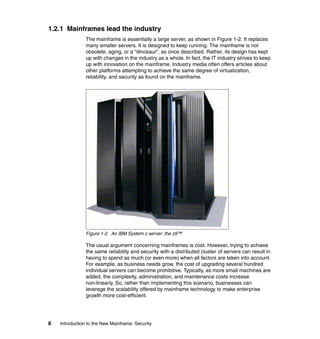
between the online bookstore and its channel partners. This relationship
depends on an information security policy that adheres to the concepts of
confidentiality, integrity, and availability.
Availability
Your data is
accessible when
you need it.
28 Introduction to the New Mainframe: Security
Figure 3-1 The online bookstore and its trust relationships
3.2 Confidentiality
The concept of confidentiality in information security pertains to the protection of
information and the prevention of unauthorized access or disclosure. This
concept seems simple enough, and preventing violations from occurring may
seem easy. Indeed, as shown in Figure 3-2 on page 29, though not visible to the
customer or business channel partners, the information security policy
determines the bookstore’s internal as well as external practices.
Internet BookstoreInternet Bookstore
BankBank
CustomerCustomer
CourierCourier
Browsing/Shopping HR
Order fulfillment Systems
Advertising
Billing/Collections Tracking
Security PolicySecurity Policy
Inventory
Branch Accounts Accounting
Corporate Accounts Loans
HRSystemsRetail Payments
Administration Compliance
Security PolicySecurity Policy
Security practices
Security PolicySecurity Policy
Audit Packaging Services
Billing/Collections HR
Freight Services Systems
Advertising
Chapter 3. Security concepts 29
Figure 3-2 The bookstore, its information security policy, and the involved partners
Practices and policies that are extremely restrictive will reduce the likelihood of a
security exposure. Certain government entities, for example, need confidentiality
above and beyond any other business considerations. Therefore, a restricted
environment works well with their organizational responsibilities.
Your online bookstore, however, should balance your business needs with
security considerations. If you practices are too restrictive, they may make it too
difficult for customers to order books. On the other hand, if your practices are too
permissive, your computers and databases may be compromised easily. In that
case, customers will not want to order from you for fear that their personal
information will be compromised. Either way, you would lose customers and the
business would shortly lose its viability.
Therefore, the best balance of information security practices needs to be
planned and implemented, wherein customers can easily purchase books online,
while being confident their information will not be stolen. This requires
confidentiality to be applied in a deliberate structured manner with an information
Critical Infrastructure Protection
Program
Executive Information Security Policy (EISP)
(1) Customer Facing
Browsing/Shopping
Order Fulfillment
Inventory
Advertising
Tracking
Billing/Collections
(2a) Partner Facing
Bank
(2b) Partner Facing
Courier/Delivery
Company
(3) Internal Operational Security
Policy
Information Security
practices
Security
Audits
General Policies
Human Resources
Information Technology
Purchasing
Physical Security
Departmental Standards / policies
Operational Information Security Policy(OISP)
Customer Customer
OISP
InternetExtranet
Internet
Information Security Policy
Internet Bookstore
Bank
OISP
Courier
Company
Bank
Security Policy
Courier
OISP
Bank
OISP
30 Introduction to the New Mainframe: Security
security professional, who might have the title of Corporate (or Chief) Information
Security Officer (CISO). The information security policy would need to be fine
tuned in accordance with the bookstore’s ongoing business needs. Senior
management, and the CISO in particular, would need to familiarize themselves
with the basic legal requirements as outlined in international, national and state
laws that apply to your area of business.
The factors driving recent information technology-related legislative efforts, such
as the Graham-Leach-Bliley Act (GLBA), the Health Insurance Portability and
Accountability Act (HIPAA), and California Senate Bill 1386, are related to
concerns about loss of confidentiality. (We cover legislation in more detail in
Part 5, “Information Security Program and compliance” on page 403.) Since your
company’s business is selling books online, you must pay particular attention to
how your customers and information are secured and what some of the threats
to that security are, as discussed in the following section.
3.2.1 Threats to confidentiality
There are many threats to confidentiality. This section provides just a few
examples.
Hackers
There are as many definitions of what hackers are as there are documents
written about them. For our purposes, we define a hacker is a person who is
skilled at bypassing controls and accessing data or information that the hacker
has not been given authorization to do so. Though there is great emphasis on
securing credit card information during business transactions, information of all
types, including credit card numbers, is regularly stolen due to compromised
databases. In the Internet Bookstore scenario, you need to be wary of hackers
since you have a significant amount of customer information residing in your
databases.
Masqueraders
Unlike hackers, masqueraders may be authorized users on a system who have
obtained another person’s system credentials. Masquerading often occurs in
companies with a low awareness of security concerns, where users may share
computers and even passwords. So you will also have to secure your computers
from illegal access from within the company. According to government estimates,
a majority of illegal access originates from sources within the network.
Phishing
A relatively new form of computer crime is known as phishing. Phishing is an
attempt to masquerade as a legitimate entity to fraudulently acquire sensitive
Chapter 3. Security concepts 31
data such as login IDs, passwords, or credit card numbers. Based mostly on
social engineering, phishing usually takes the form of an unsolicited e-mail that
appears to be sent from a legitimate entity, such as a bank or credit card
company.
In the online bookstore scenario, for example, customers might receive an
legitimate-looking e-mail asking them to confirm their credit card information.
Users might click a link within the e-mail that takes them to a Web site that
appears nearly identical to your bookstore, but is actually owned by the hacker.
After customers enter their confidential information, the hacker can exploit it for
malicious purposes.
Unauthorized users
Within certain companies an “honor code” rule governs access to documentation
and data. Users who do not observe the honor code can gain access to the
system or to information to which they are not authorized. Certain systems allow
users to browse files and execute commands in administrative or “root”
directories simply by going up the directory tree.
Unprotected downloads
Downloads of files from secure environments to non-secure environments or
media compromises the security of the system.
Malware
Malware (viruses, worms and other exploitation software) has seen a change in
orientation from destructive actions to financial and political exploitation. Earlier
malware relied on repetitive user behavior to propagate itself as well as to wreak
destruction on computing resources. Modern malware code seeks to either copy
data from secure to insecure locations, or to create an opening for its developers
to access protected resources.
Software hooks (trapdoors)
Like organizational users, the software development community needs a more
disciplined approach to the process of software development. Many software
developers and quality assurance engineers are technical experts who have
been in the industry for a number of years. However, they may fail to recognize
that others who are just as technically adept understand, and are ready to
exploit, their software.
For example, during the product development phase, software developers often
create “hooks” that allow them to bypass authentication processes and access
the internal workings of the program in order to work more efficiently. When the
product development phase is over, however, developers do not always
32 Introduction to the New Mainframe: Security
remember to remove hooks and may leave them in place, where they may be
exploited by hackers.
Threats to case study Internet Bookstore confidentiality
Now we can take a look at some of the threats to confidentiality we discussed
that could face your bookstore.
To begin, e-mail and the Internet are public infrastructure, although the
bookstore owns and controls a very small segment of that infrastructure. And
because your customers are for the most part strangers to you, you could be
manipulated into revealing information about the company or its customer
database that could lead to identity theft or fraud. That could lead to loss of
revenue, negative publicity and, possibly, legal action against the company if the
proper precautions had not been taken to reduce this risk.
Misdirected e-mail or books
One threat you face is e-mail being sent to a person with confidential information
about another customer, or packages and other products with account
information being delivered to an unintended recipient. Lost messages and
packages usually have little consequence other than the cost of re-sending.
Occasionally, however, misdirected e-mail or packages may result in the
included information being exploited for fraud. There are rare occasions where
system malfunctions will result in misdirected or misdelivered mail; most often,
however, human error is involved.
Exposure of sensitive information
If we tracked a system, process, or message, we may at some point in its lifetime
find it residing unprotected (or “exposed”) in temporary buffers on a router,
gateway, or host. Wiretapping, hacking message delivery mechanisms, and
interception at source, destination, or enroute are all examples of exposures.
3.2.2 Confidentiality models
There are two types of confidentiality models:
1. Flow model
2. Access-control model
The flow model
The flow model is the most common, and it lays out a scheme that relates
objects (programs, files, or computers that store information) with subjects (such
as users, programs or systems) accessing the information. Information flows
between equal classifications or from one classification level to a higher level, but
never to a lower level.
Flow model
Subjects access
information from
objects.
Chapter 3. Security concepts 33
The Bell-LaPadula Model (BLP) is an example of the flow model. It uses the
Lattice structure. This restricts the access of subjects to:
Write to objects at their level (or at a higher level) of classification
Read to objects at their level (or at a lower level) of classification
Read and write to objects at their level of classification
This is illustrated in Figure 3-3.
Figure 3-3 BLP flow model sample
The access control model
The second type of confidentiality model is the access control model. In this
model, in addition to the subjects and objects described in the flow model, we
have operations (the transaction taking place between the two). Sets of rules
determine what operations may be performed by which subject and on which
object, giving the access control model much more control in assuring not only
availability but also integrity. And the concept of data integrity is as important as
that of confidentiality, as we learn in the next section.
3.3 Integrity
The information security concept of integrity deals with prevention of intentional
or accidental modification by an unauthorized or authorized user. The concept of
integrity further breaks down into authenticity, accountability, non-repudiation,
and dependability.
Authenticity means that the information is from whomever we expect it to be, and
it is whatever we expect it to be.
Top Secret Top Secret
Secret Secret
Confidential Confidential
Read, Write,
Read and Write
W
rite only
Read only
Subjects Objects
Access control
model
Like the flow
model, plus
operations.
Authenticity
We trust the item
to be what we
think it is.
34 Introduction to the New Mainframe: Security
Accountability means that the information has an owner or custodian who will
stand by its contents.
Non-repudiation means that data transmission devices have built-in security
features that include a “signature” of the sender. The sender cannot repudiate or
deny sending the data as long as the sender’s signature is included.
An increasingly important area of integrity checking is in the realm of accidental
changes to data. Informal figures put the loss of information as a consequence of
user error at a higher level than external hacking. Inadvertent modification of
data that renders mission-critical data and systems unusable costs organizations
valuable resources and time. In certain cases, such as air and ground traffic
controls, drug manufacturing controls, and control for utility companies operating
dams and atomic energy plants, errors could result in damage along with
consequences of incalculable proportions. So you can see, data integrity is a
serious concern.
Integrity checks are established around certain control principles or abstractions
that can be implemented. These abstractions are need-to-know,
rotation-of-duties, and separation-of-duties, and we explain them in more detail
here:
For the need-to-know controls, users are granted access to resources on the
basis of what they need to know, at a particular time, to complete an assigned
task, to a degree also stipulated by the control. You may already be familiar
with this term because of its use in spy movies, where the hero is given
assignments and information on a “need to know” basis.
Separation-of-duties controls lessen the likelihood of abuse by dividing
activities so the person authorizing or certifying the validity of the activity is
not the one to also execute it. Thus, the person who is allowed to certify the
validity of a transaction such as a transfer of funds from the bookstore to the
courier service will not be the same person that signs and mails the courier’s
check.
Rotation-of-duties controls change the responsibilities of individuals so that
no person stays in a position long enough to find and exploit the weakness in
business controls that person may discover over the span of time. This
means of control is the most challenging to implement because it incurs a
large overhead in reassigning access control passwords and systems.
3.3.1 Threats to integrity
In some ways process integrity, data integrity, and systems integrity are much
more serpentine and complicated than confidentiality and availability. With
integrity, we are checking not only unintentional and accidental modification, but
Accountability
Information has
an owner who
will vouch for it.
Non-repudiation
Information will
not be denied by
owner.
Abstraction
Ignore physical
and logical
boundaries to
obtain a larger
picture.
Chapter 3. Security concepts 35
also intentional modification of data or processes both from authorized and
unauthorized users.
The online bookstore will inevitably come into contact with some
software/hardware systems that have been coded badly and lack good
error-checking capabilities. And sometimes you will undoubtedly be tempted to
ignore certain alerts and error messages because they may seem unimportant.
But keep in mind that, while this may make your work day a little easier in the
short run, following this path means that in the long run a certain level of control
is now gone and that the integrity of your system may come into question at any
time. You may never know when the alert on the system indicates a real problem
and will require a response to correct a security concern.
Attacks on integrity weaken the perception of reliability of the system or process.
In the case study, if the bookstore’s reliability regarding handling confidential
customer information and billing comes into question, then customers and the
bank would not work with you and you would be unable to continue the online
business. Examples of threats to integrity include falsification of records or
communications and noise (signal interference), and we detail those in the
following sections.
Falsification
Message and record falsification compromises your trust relationship with your
customers and partners. An attacker’s ability to alter part of or all of a message,
destroy a message to prevent delivery, or create unauthorized messages,
destroys your ability to distinguish between actual and falsified records.
Falsification attacks would have direct bearing on the bookstore’s security
concerns if they were, for example, directed at the mailing or billing system.
Hackers could change customer records and direct shipments to people who did
not order them. The idea behind such an attack is that the frustration of not
getting their books on time and the fear that hackers were able to get access to
their records would cause customers not to order books from the bookstore
anymore.
Noise
Signal (electronic) traffic picks up electronic charges (known as “noise”), in the
form of interference as it travels through media, in various ways—from the
medium it is travelling through, from natural sources such as lightning and static
electricity, and from man-made sources such as electric circuits and generators
(motors). And losing signal energy (which is the opposite of picking up additional
charge) occurs as a result of repeaters, as signal traffic travels through different
types of wiring and media. Communication stacks correct such errors by filtering
or boosting to compensate.
36 Introduction to the New Mainframe: Security
A recent and troubling trend involves attackers who render customer accounts
unusable through several means, including noise, and demanding ransom for
releasing the accounts. Financial institutions, reluctant to admit such crimes were
committed or that they were forced to pay the instigators, have nevertheless
been cracking down with new tools and policies, and making headway.
3.3.2 Integrity models
In order to define and control integrity to any degree in the information security
function, you need to create integrity models that define both the system and
infrastructure of the Internet Bookstore enterprise. If the system (business
controls and laws) is flawless, but the infrastructure (software, hardware,
customers and staff users) is prone to mistakes or unauthorized actions (which is
often the case), the bookstore will not have the integrity required for either
customers or partners such as the bank to trust you to conduct their business for
them.
For this reason, the integrity of both system and infrastructure has to be
implemented in the form of a model. Then business controls and programs have
to be set up to put that model into effect. After that, you can test the integrity of
your system in the form of audits. If you and your partners find that it has a low
rate of failure, you can move a step closer toward conducting business.
Integrity models need to enforce policies that:
Prevent intentional changes to programs by unauthorized means or persons
Prevent unintentional changes to programs by authorized means or persons
Establish consistency in performance of programs across the corporate
infrastructure and outside
Now, that is a challenge! So, how can you meet it? You need two procedures
and a connecting element to develop an integrity model:
1. The valid state procedure assures you that a data item, system, or process is
in a valid state. This means it is in the same state that its owner or creator
intended and believes it to be.
2. The transformation procedure concerns the well-formed transaction; that is,
where a data item, system, or process changes from one valid state to
another.
3. The consistency of transformation, that is, the connecting element to
procedures, is often overlooked but absolutely necessary. To achieve
Valid state
The state that
the data owner or
creator intended
or believes it
to be.
Chapter 3. Security concepts 37
uncompromising system integrity, the system (or process, or data item) must
always behave the same way.
The importance of this point cannot be overstated. If the same action yields
two different outcomes, the system cannot be said to have any integrity,
regardless of the two procedures.
Appendix A, “Security integrity models” on page 483, describes and explains
other integrity models that represent different approaches to preserving the
integrity of data, systems, and processes.
3.4 Availability
Availability assures you that authorized parties are able to access resources in
the way needed. Availability is a natural result of confidentiality and integrity.
That is, if system confidentiality and integrity is assured, then system availability
for the purpose intended is a direct consequence.
Threats to availability
Availability can be affected by a number of events that break down into human
and non-human influenced factors. These further break down into unintentional
and intentional acts.
Examples of unintentional (non-directed) acts can be overwriting (in part or
whole) of data, and compromising of systems or network infrastructure by
organizational staff. Examples of intentional acts can be conventional warfare, or
informational warfare (Denial of Service, or DoS, and Distributed Denial of
Service, or DDoS). Non-human factors include loss of availability due to fires,
floods, earthquakes, and storms.
In the past, availability attacks sought to deny resources and were generally
“mischief-related”. More recently, however, attacks on availability (such as buffer
overflow and DoS) have focused on overwhelming a service or host, causing it to
shut down and re-engineer the code, or download new code that would allow the
attacker access to the compromised system’s resources.
The loss of computing resources due to natural disasters is a relatively common
event that often results in companies scrambling to restore their systems. The
Important: Having consistency of transformation is fundamental. In
information security, particularly in understanding integrity models, the
process needs to be replicated without fail.
Denial of
Service
Renders
resources
unavailable by
attacking
systems that
provide the
service.
38 Introduction to the New Mainframe: Security
reasons for this are two-fold: organizational security plans rarely detail disaster
recovery for information systems, and organizations that do have disaster
recovery plans often set very challenging standards that they do not follow.
Availability can be a direct result of how physical, technical, and administrative
controls and issues are handled by an organization, as described in the following
sections.
Physical issues
Physical issues include access, fire and water control mechanisms, and hotsites
and coldsites. A hot site is a manned offsite failover location; a cold site is an
unmanned offsite failover location. Here we look at these sites in more detail:
A hot site is an alternate facility with equipment and resources to recover the
critical business functions affected by a disaster. Hot sites vary, depending on
the type of facilities offered (such as data processing equipment,
communications equipment, electrical power, and so on). However, because
the hot site is a duplicate of the primary site, data will be backed up or
transferred to the hot site on a regular basis, so the cost of maintaining a hot
site is high.
A cold site is an alternate operating facility devoid of resources or equipment
except for air-conditioning and electrical wiring. Equipment and resources
must be installed in such a facility to duplicate the critical business functions
of the organization. (Using a cold site requires lead time for equipment
delivery, installation, and testing.)
At the cold site, the system would be brought up with no applications running
on the equipment. The backup tapes from the primary site would be
transported to the cold site, and the system would then be loaded with the
most recent backup tapes. There could be some data loss with this process,
so synchronization would be needed after the backups have been restored to
the cold site.
Technical issues
Technical issues (also hardware-related) include fault tolerance, automatic
backup, and the technical aspects of physical access controls mechanisms.
Administrative issues
Administrative issues (also software-related) include policies concerning access
control, information security or infrastructure protection plan, contingency or
disaster recovery plans training and documentations and reporting guidelines.
Hot site
Manned offsite
failover
l ti
Cold site
Unmanned
offsite failover
location.
Chapter 3. Security concepts 39
3.5 Risk
In our daily lives, risk is the potential or possibility of harm or loss occurring. We
all take risks every day, from changing lanes in traffic to changing jobs or moving
to a different location. We all have to choose how much risk we are willing to
accept, be aware of the consequences associated with those risks, and decide
how we are going to handle the risks.
In information technology, risk is the level of possibility and degree of loss or
failure in an application or process. Businesses also have to deal with risk and
determine how best to avoid, minimize, and handle it.
In the bookstore example, there may be multiple areas that pose a potential for
risk. One example is an attack on the Web site. A masquerader might create a
look-alike Web site to yours, with the intention of capturing the personal data of
your customers. You would need to decide on the likelihood that this would
occur, as well as if there is anything that you can do to change the outcome. After
you identify this as a potential risk, you need to determine how to limit the risk.
One way to limit this risk is by blocking an attack on the bookstore's Web site
using intrusion protection software.
Another possible risk the bookstore might face is someone making unauthorized
modifications to your customer data. Again, you need to determine the likelihood
of this occurring, and you should have controls in place that can inform and alert
you if there have been unauthorized attempts made to modify your data. You
would want to react in a manner consistent with your information system policies,
and would want the ability to recover from any of the undesirable changes
caused by the risks.
For example, say that August is a stellar month for the bookstore. Sales are
above average for that month, and are the best seen in the past four years,
which is highly desirable. As a result, however, your inventory is reduced. And a
reduction in inventory could cause delays in shipping orders, which is something
that you want to avoid. If a shipping delay means losing orders, then that
presents a possible risk (loss of revenue). So you need to be aware of this
potential risk in order to determine an alternate plan of action.
There are two points to keep in mind when analyzing risk:
Where is the risk?
How significant is the risk?
We could identify some additional, potential risk areas for our bookstore.
Overtime costs, inventory shortages, future sales, unpredictable demand,
change in transportation costs from our courier, and changing labor costs, are
just a few potential risks that we would need to evaluate.
Risk
Level of
possibility and
degree of loss
or failure.
40 Introduction to the New Mainframe: Security
Risk assessment is the process used to identify and understand risks that can
affect the confidentiality, integrity, and availability of information. It involves
identifying the risk, and estimating the level of risk and prioritizing risks.
With risk assessment, you estimate the probability of an event occurring and the
magnitude of how it would affect your business if the event does occur. Risk
assessments provide the necessary information about an organization’s
infrastructure and its current level of security.
Based on the results of the assessment, you can make recommendations as
how much protection you should provide for your assets. You need to be
prepared to ensure the continuity of your business operations in the event of
unexpected disruption. You also should ensure that data integrity is maintained.
After you identify the risks, then how do you limit your exposure to them? You
identify safeguards or controls that can prevent, detect or reduce threats. Risk
mitigation consists of the activities designed to reduce risks. It involves efforts
taken to reduce the probability or consequences of a threat.
In the case study, such efforts may include adding physical security measures for
the bookstore. You might consider adding a protective fence around the
warehouse, or installing badge-activated access at the entrance of the property
to monitor when people enter and exit the facility. You might hire security guards
to monitor the perimeter of your location. And you might also consider
purchasing and installing information security protection for your network to limit
hacking attempts. Risk mitigation leads to the development of a list of
safeguards, including policies, procedures, standards and security architecture
that could deliver the right level of security protection.
There are many threats that you need to recognize and be aware of. Viruses can
present a threat to information and systems. Hackers who gain access to your
company’s system have the potential to exploit its proprietary information,
withdrawing funds from your bank or stealing your customer list. So as you can
see, you need to ensure that you have the proper policies in place to handle such
possibilities.
3.6 Summary
Information security has three basic concepts as its guiding purpose:
confidentiality, integrity, and availability. Specific security policy formulation and
implementation may differ across organizations, as long as these three basic
concepts are addressed in the information security program. The terminology
and organization is of less importance than the business need addressed,
depending on an organization’s core mission.
Risk
assessment
Identify,
estimate, and
understand
risks.
Chapter 3. Security concepts 41
Although confidentiality has usually been the focus of attention in capability
development, availability and integrity are now also receiving increased attention
as the importance of each in maintaining overall information security becomes
apparent. The need to protect the integrity of information is critical, because
information that cannot be trusted is essentially useless.
Enterprises must determine the amount of focus to put on each of these security
concepts. For example, a pharmaceutical company may emphasize integrity
above confidentiality and availability, because it would be most important to the
company to have its manufacturing process and systems avoid errors in the
mixing of different ingredients to formulate medications.
As we also saw, there are many potential threats to confidentiality. Some of the
more common are vandals or hackers, who attack just because systems exist.
Hackers pose a threat because they often try to gain competitive knowledge. Or
perhaps they are attacking to achieve recognition; hackers become recognized
in the “hacker world” if they can say that they broke into a well-known company’s
data. Trapdoors (hooks) are another potential threat to confidentiality. Using a
trapdoor it is a way to sneak into a system without being noticed. There are many
other examples that could be cited, but these are highlighted to emphasis that
threats can destroy a business.
Regarding availability, keep in mind that information that is not available when
required is of no use, even if its confidentiality is secure and its integrity is intact.
In the case study, for example, customers would depend on your Internet
Bookstore’s Web site availability, and the company might suffer a loss of revenue
if they could not reach your Web site when ready to order books.
Availability assures that authorized parties are able to access resources in the
way they are needed. Attacks on the availability of the systems are called Denial
of Service (DoS) attacks. DoS attacks can deny access to resources that users
need and expect to have.
In this chapter, we discussed the concepts of using hot sites and cold sites for
recovery from a crisis situation. A hot site is a manned computer facility that has
existing computer equipment, telecommunication lines, and power supplies. In a
hot site, company data is backed up or transferred to the hot site on a regular
basis. Recovery time is shorter with a hot site, but the cost of maintaining a hot
site is high. A cold site is an alternate operating facility, but does not have any
equipment other than basic power and air conditioning. To implement a cold site,
you would need to install equipment and load the data from backup tapes. This
would be a more time-consuming, but less expensive option.
As you have seen, information systems are vulnerable to attacks, so security
plans must be developed to identify the possibility of attacks and determine the
level of risk. Risk is the level of possibility of harm that can occur. You need to
42 Introduction to the New Mainframe: Security
evaluate what the risks are to your business and develop plans to minimize those
risks.
You will want to act on some of the risks that you encounter, although you e
might want to accept other risks. It may be virtually impossible to eliminate all
risk, but you can minimize those risks that you determine could be harmful to the
viability of your business.
3.7 Key terms
3.8 Questions for review
1. Explain the concepts of information security and how they fit into the
information security program.
2. Mention one risk that threatens each security concept.
3. Explain the difference between hardware on software availability and the IT
security concept of availability.
4. Describe the differences between hot sites and cold sites, as well as which
information security component they address directly.
3.9 Questions for discussion
1. Assume that your Internet Bookstore has been approached by a hot site
vendor. The vendor wants to enter into a service contract with you for
$100,000 per year, which would include three weeks of emergency hosting.
Your bookstore business uses an IBM System z mainframe system. Does it
Key terms in this chapter
Access control model availability Bell LaPadula model
confidentiality Distributed Denial of
Service (DDoS)
flow model
hot sites and cold sites integrity read, write, read and write
risk risk assessment risk mitigation
security policy subjects and objects
confidentiality models
Chapter 3. Security concepts 43
make business sense for you to invest in this hot site contract? Explain your
answer.
2. Is attempting to break in to a computing system without authorization is
illegal? Explain your answer.
3. Which confidentiality and integrity model would you choose for your Internet
Bookstore business? Explain your answer.
4. What is the difference between computer hackers and masquerader? What
other names exist for system security violators?
5. What is meant by malware? What is meant by phishing?
6. What are Denial of Service (DoS) and Distributed Denial of Service (DDoS)
attacks, and what do they mean for a business?
3.10 Exercises
1. Your Internet Bookstore business allows customers to order products from
the Web. Who might want to attack that business? What kinds of
vulnerabilities might they exploit? What safeguards can you put in place to
minimize this threat?
2. Within three years, you want to reduce the staffing level of your Internet
Bookstore business from 10 Information Security Architects and Auditors to
three. With this goal in mind, what approaches can you use to transfer the
responsibility for security practices to the various departments?
44 Introduction to the New Mainframe: Security
© Copyright IBM Corp. 2007. All rights reserved. 45
Chapter 4. Elements of security
So far in this book we have explained that a security policy should be based on
the following security concepts: confidentiality, integrity and availability. Integral
to the implementation of these security concepts is an understanding of the basic
elements of security: identification and authentication, authorization, and event
logging. These security elements are used to implement and control the
company's security policy.In this chapter we discuss these security elements in
detail and explain how are they are applied on System z, and how they could be
applied to the case study Internet Bookstore.
4
Objectives
After completing this chapter, you will be able to:
Describe the security elements
Explain why user IDs are needed and password standards are important
Describe the three methods of authentication
List various means to achieve authorization
Explain the purposes of encryption and logging
Describe the role that auditing plays and its importance to system security
46 Introduction to the New Mainframe: Security
4.1 Identification
As previously explained, confidentiality is the prevention of unauthorized access
or disclosure of privileged information.
If a system were unconditionally opened to anyone, without regard to identity, it
would be difficult, if not impossible, to apply the concept of confidentiality. The
ability to distinguish between users of your system is the first step in providing
your security system with the capability to protect information from unwanted
intrusion.
To protect confidentiality, potential users (people and programs, for example) of
your Online Bookstore Application must first identify themselves to the computer
system using a well-defined process, such as a login sequence, digital
certificate, and so on. Each user needs to be identified uniquely by the
computer’s security program in order for the application to be able to determine
what, if any, information this user is allowed to access. For example, you may
want to allow any user, known or unknown, to browse through your bookstore
inventory, while at the same time requiring users to specifically identify
themselves through an already existing user ID (a unique identification string), or
providing a registration process that assigns user IDs and passwords and
validates credit information, before allowing them access to your ordering
process.
On System z, as with most computer systems, identity can be validated through
a variety of mechanisms. For the Bookstore Application we use a user ID. Any
access to the Bookstore Application, except for browsing, will require the user to
provide a valid user ID.
4.1.1 User ID definition
For your bookstore, one of your first tasks is to develop a security standard which
explicitly details how the security administrator must handle the creation of user
IDs for employees. When an employee needs a user ID, for example, the
employee must provide a management-approved request to the security
administrator so that the request can be processed according to the company
security standard document.
The security administrator then processes the request according to the defined
user ID process. The process should, at a minimum, ensure that the new user ID
is unique and allow the administrator to assign appropriate privileges for a
specific job responsibility.
For the employees of the bookstore, it is necessary to keep in mind that the
approach used for user ID creation needs to satisfy the current situation as well
User ID
A unique
identification
string used to
identify a user to
the system.
Chapter 4. Elements of security 47
as future organizational changes. Relying on current departmental names or
abbreviations, therefore, could cause major disruption if departments are later
reorganized, renamed or changed in their responsibility function. The
uniqueness of user IDs must remain, despite any relocation of the employee
within the company. Thus, these user IDs must be defined to a separate
standard from those defined for customers to your bookstore.
Various formats of user IDs can be applied at your site, depending on which
program you choose to manage your security.
Customers are likely to access your bookstore from the Internet. If they want to
make a purchase, your system performs registration checks. If a user is not a
previous customer with an existing user ID, then the system will perform an initial
registration for that user. At this point, a user ID needs to be issued to the new
customer.
Generally, it is acceptable for the new customer to nominate a user ID of their
own choosing, although minimum and maximum criteria can be enforced by a
controlling program. To ensure uniqueness, this program checks the nominated
user ID and then validates it by comparing it to other user IDs already existing in
a database of user IDs. If the standards and criteria are met, then the user ID is
then issued to the new customer, along with a password.
From a security standpoint, equating a user ID with anything other than an
individual can be undesirable because individual accountability is lost. And
individual accountability should be one of your company's primary security
objectives.
Some formats are based on using a unique employee serial number embedded
within the user ID, while others might use a pre-determined prefix and the initials
of the requester’s name. The latter gives visual recognition about you and your
job role to those who need to quickly identify who you are.
However, keep in mind that a user ID is not always associated with an individual.
For example, a user ID can be associated with a system task. And in some
enterprises, a user ID is equated with a function rather than an individual. For
example, the Internet Bookstore might chose to have employees who perform
the same function in the Inventory department all use the same user ID.
4.1.2 Passwords
In the past, in storybooks and secret clubs, you may have come across terms like
“open sesame” or “Joe sent me!” when trying to get access to somewhere that is
not secured by a physical key. These phrases were the keys to allow you entry.
You have to give the “word” to be able to “pass” through the entrance, hence we
48 Introduction to the New Mainframe: Security
get the term “password”. Today, by similar means, gaining entry to a computer
system requires you to have a password. Passwords are a means by which a
user gets authenticated. Just as a security department must adopt a user ID
standard, it must also adopt password standards. These are implemented to
prevent passwords from being easily guessed by hackers or masqueraders.
Your security department adheres to a security standard to be enforced for
passwords. It is accepted practice for the standard to enforce that passwords
must contain a minimum of eight characters, of which some must be numerics or
special characters. Sometimes the reuse of previous passwords is restricted.
Additionally, the security standard enforces the regular interval at which
passwords must be changed. The security product tracks your change dates to
ensure that a new password is entered before that date and will not allow further
access until a change of password has been successfully completed.
4.2 Digital certificates and secure channels
In some instances, it is impractical to use a user ID and password protocol to
provide secure access to an application. In the Bookstore application there are
requirements to communicate with your bank, and there may be a requirement to
communicate with various credit card companies in order to validate a
customer’s credit card.
In these cases, in order to set up a secure communications channel, it is more
than likely that you will use some implementation of digital certificates, such as
Public-Key Key Management. Accordingly, both the bank and your Bookstore
Application will register with a Trusted Certification Authority (TCA), which
registers and validates both your bookstore’s public certificate and the bank’s
public certificate, and then participates in the process of your application setting
up a secure channel (link) with the bank’s application.
Both the bank and your Bookstore application have a pair of keys. One key is
public, and the other key is secure (that is, known only to the owner). When you
want to communicate with the bank, the process unfolds as follows:
1. Your Bookstore application communicates with the TCA and requests the
bank’s public key.
2. Your application then initiates the process of requesting the TCA to set up a
link with the bank.
3. Next, the Bookstore application uses the bank’s public key to encrypt
requests to the bank.
4. The bank then uses its secure key to decrypt the information you have sent.
Chapter 4. Elements of security 49
5. The bank uses the Bookstore application’s public key to encrypt and respond
to the Bookstore application request.
6. Your Bookstore application then uses its secure key to decrypt the response.
4.3 Authentication
Authentication is the process by which the computer system verifies who you
are. As a user enters the system, the user’s identity must be verified through the
use of some mechanism which assures the system that the user is indeed who it
says it is.
Methods of authentication can classified by one of three methods:
Something you know (such as a passphrase or password)
Something you have (such as a pass card, smartcard, digital certificates, key
fob)
Something you are (such as a fingerprint)
Table 4-1 lists several authentication methods that can be used to increase the
level of security. These methods are explained in more detail in the sections that
follow.
Table 4-1 Methods of authenticating users
Method Explanation
user ID and password The user ID and password method is in general use. It
protects a system by forcing the user to prove knowledge of
a shared secret - the password. The system compares the
password given by the user with a stored password. If the
two passwords match, then the user is authentic.
swipe card A swipe card has a magnetic strip embedded that contains
your identifying information. No physical data entry is
necessary, although PIN entry is sometimes used. These
cards are in very common usage today; examples include
Automated Teller Machines (ATMs), employee badges, and
credit cards.
Authentication
Process bywhich
the computer
system verifies
who you are.
50 Introduction to the New Mainframe: Security
Using passwords (the “something you know” method) is currently the most
widespread way of having users validate their identity. Because each user has a
unique password, and only the user should know this password, this ensures
personal accountability.
However, the use of digital certificates or smart cards (the “something you have”
method) is quickly becoming a more common way of performing electronic
identity authentication. Digital certificates provide proof to the recipient of who
the data sender is, and provides the sender with a receipt for the delivery of data
to the intended party.
Digital certificates are used to authenticate from a client to a server and establish
a secure connection. After the client has been authenticated to the server, the
data flow between client and server is protected.
Keep in mind, however, that digital certificates are not used to check
authorization to data or resources. They are used for authentication purposes.
The owning identity is mapped to an existing user ID for purposes of
authorization checking. For the Internet Bookstore, for example, digital
certificates could be used to establish a secure connection between all partners
digital certificate A digital certificate is a protected piece of data that contains
information about its owner, creator, generation and
expiration dates and more, to uniquely identify a user. Digital
certificates (which are protected from tampering, that is,
signed) are used to authenticate from a client to a server
and establish a secure connection.
key fob A key fob is a small electronic display device which
generates and displays a new random password
synchronized to the main computer system, so that you do
not have to remember different passwords. You enter that
displayed password into the system along with your user ID.
When validated by the system, access is permitted. Key
fobs are now finding very common usage as a remote
access device for dial-in users.
biometrics Biometrics are increasingly part of authentication
processes, as implemented in retinal scanners and
fingerprint readers. In biometrics, parts of the body are
considered unique enough to allow authentication to
computer systems, based on their properties. Fingerprint
recognition is already appearing in some laptop computers.
Method Explanation
Chapter 4. Elements of security 51
(bookstore, bank, courier), thus ensuring that when a customer's sensitive data is
sent between partners, it is secure and not accessible to unauthorized users.
Biometrics (the “something you are” method), which was mostly used in the past
by government agencies, has been becoming ever more popular as threats to
confidentiality increase.
Another authentication method worth mentioning uses trust association. Trust
association offers robust authentication for client/server applications by using
strong cryptography. Several products (such as Kerberos) provide this type of
authentication support. For example, after a client and a server have used
Kerberos to prove their identities, they can also encrypt all of their
communications to assure privacy and data integrity as they go about their
business.
Because more companies are becoming Web-enabled, like our case study the
Internet Bookstore, they are combining several of the authentication methods to
prevent unauthorized access or disclosure of information.
4.4 Roles and separation of duties
In 3.3, “Integrity” on page 33, we discussed the implementation of integrity in the
form of separation of duties. In order to separate duties, an enterprise needs to
set up different roles for different functions. These are the most important roles
related to security:
Security administrator1
The person in this security role defines all the required
resources that need protecting, such as user IDs, data
sets and general resources. After approval has been
obtained from an authorized person (in some cases,
the requester is the authorized person), the
administrator performs the tasks and informs the
requester of completion.
Database administrator The person in this security role looks after the data
within databases. This administrator ensures
availability to authorized users and maintains the
backup and recovery functions according to company
security standard guidelines. In some cases, this
includes ensuring that sensitive data is encrypted
correctly.
1
System administrator in the mainframe world refers to the person who is responsible for granting
and revoking privilege. In contrast, system administrator in the mid-range server world refers to the
person who is responsible for installing applications and implementing operating system patches -
which are the duties of a “system programmer” in the mainframe world!
52 Introduction to the New Mainframe: Security
System programmer The person in this security role ensures that all the
operating system parameters are in place in order for the
system and applications to perform correctly. This role
also involves applying updates and fixes (also called
patches) to existing systems software.
System operator The person in this security role runs the computer
system. System operator responsibilities include
stopping and starting the system, mounting tapes,
responding to program and operating system requests at
the operator console, and interpreting and resolving
error conditions when they occur.
System auditor The person in this security role ensures that an
enterprise’s information security standards and controls
are in place, analyzes what activities are taking place on
the system, and determines who is attempting to gain
access to the systems. Auditing is critical to the business
information security standard.
It is important that the system access granted to each role avoids overlapping or
crossing over to another role’s activities—because this would enable the
performance of the other role’s duties. From a security perspective, it is vital that
the person who initiates an action is not the person who approves or benefits
from the action! Granting each security role a different level of access helps to
ensure that separation is controlled, and helps to maintain checks and balances
of power.
4.5 Authorization
Now that you understand how the identification and authentication element of a
security product functions, we can examine how the security product controls the
interaction between the user and the system resources.
The security products authorizes which resources the user may access and
authorizes in what way the user may access them (read only, read and update).
The security administrator is responsible for defining the system resources that
need protecting (data, transactions, terminals, programs, and various other types
of resources that are described in subsequent chapters), and specifying the
authorities by which those resources are made available to users. The security
product records these definitions in its database and then refers to this
information to decide if a user should be permitted to access a system resource.
Authorization
Granting or
denyingresource
access to a
user ID.
Chapter 4. Elements of security 53
Identification and authorization work together to implement the concepts of
security. So, what does authorization mean for security concepts? We explain

that relationship in the following list.
Confidentiality With confidentiality, a user’s identity is authenticated by
the system. That user is subsequently represented in the
system by a token, which is either character or numerical
data. By using this token, access to data and resources
can be allowed or denied.
Integrity Integrity means proving that the user is authentic, and that
authenticity cannot be repudiated. Authorization assures
that users are indeed who the system believes they are.
Availability Availability means the ability to reach resources that you
are permitted to reach, and it is backed by the ability to
authorize users to resources.
Now let us examine the basic process flow to achieve authorization to a resource
in a System z environment:
1. The user initiates an action, which causes a request for access.
2. The resource manager sends the request to the security product for a
determination whether the user is allowed to have the access.
3. The security product refers to the security database, or UNIX PFC control
block, and checks resources for the user ID.
4. Based on the result of the checking, the security product returns a “yes” or
“no” status back to the resource manager.
5. The resource manager then allows the access or denies the request. If the
access is denied, the denial includes an appropriate message for the user,
explaining why it was denied.
For security administrators on a System z environment, it is important to
understand that security products provide various methodologies to perform
resource authorization. Depending on the company's security policy, one or a
combination of these methodologies will be implemented:
1. Access control lists and rules
2. Classification of data and users
3. Conditional and temporal access
4. Compartmentalization or categorization
5. Discretionary and mandatory access control
In the following sections, we explain each of these methods in more detail.
54 Introduction to the New Mainframe: Security
4.5.1 Access control lists and rules
Access control lists (ACLs) allow you to control user access to resources. Each
resource in the system needs to have a list of user IDs or groups associated with
it that directly specifies who has what level of authority when they access the
resource. These lists (or rules, as they are referred to by certain security
products) are maintained by the security administrator at the higher level, but can
be delegated to data owners who can manage their own resources. Depending
on the environment, the resource owner can specify who can access the
information, how it can be accessed, when it can be accessed, and under what
conditions.
The various security management products available to System z operating
systems follow different philosophies regarding how they give access after the
user ID is created. Some products might use a grouping of user IDs concept,
because of the ability to use a group name to allow access to resources. A group
is considered a collection of users with similar access requirements to resources.
Other products may use a role-based abbreviation as a prefix in combination with
a unique identifier. The prefix is used to relate the user ID to the resource access
rules.
The various security management products also follow different philosophies
regarding how they provide universal access, which is the access authority
allowed to any group or user that is not specifically permitted access to the
resource. Each resource has a universal access authority associated with it. The
universal access can be any of the access levels previously mentioned.
If the security product allows it, a security administrator can define groups that
are role-based or function-based. Each group is given access to various
resources and with differing levels, like read only, update, or full access. When
user IDs are connected to a group, they are being given the same access that
already applies to the group. Therefore it is possible to have a user ID connected
to many groups, allowing access to different applications at various access
levels.
When using the grouping process, the security administrator can determine that
access to a group can be locally controlled by an authorized designated person
responsible for that group of users. The administrator gives this person additional
authority to be able to connect and remove user IDs for the group in order to
maintain direct control of the users who access those resources.
Using grouping for user IDs also makes it easier for the security administrator to
grant new accesses. The security administrator can apply access by just the
group name, thereby immediately giving all users connected to that group the
same level of access. Administrators should avoid giving access by user ID if
access control
list
List associated
with a resource
that identifies all
users/groups
that can access a
resource and
their access
rights or
permissions.
Chapter 4. Elements of security 55
possible, because of higher administration costs. When the user ID is removed
from a group, all the access privileges a user had through the group access are
no longer available to that user.
So, how could this grouping concept be applied to the case study Internet
Bookstore and what would be the benefits? In our previous discussion of user ID
standards, found in 4.1.1, “User ID definition” on page 46, we demonstrated how
using department name abbreviations in a user ID could be an administrative
nightmare, and that equating a user ID to a function (such as Inventory
department function) rather than to an individual is undesirable because it results
in a loss of individual accountability.
The Internet Bookstore's Inventory department has employees who are
responsible for placing orders to restock the bookstore with books, as well as
employees who are responsible for approving these orders. Separating these
employees into two distinct groups, for example INVGRP1 and INVGRP2,
ensures the separation of roles (that is, the employees that have the
authorization to place an order do not also have the authorization to approve the
order).
Thus, adding INVGRP1 and INVGRP2 (rather than user IDs) to the access lists
of resources each group needs to access will greatly reduce the security
administrator's work if an employee relocates from INVGRP1 to INVGRP2—the
security administrator would only need to remove the employee's user ID from
INVGRP1 and connect it to INVGRP2. To lessen the workload further, the
security administrator could also delegate security administrative authority for
INVGRP1 and INVGRP2 to an employee in the Inventory department.
Figure 4-1 on page 56 illustrates the options for grouping; Option 3 is the most
preferred.
56 Introduction to the New Mainframe: Security
Figure 4-1 Resource access methods through user IDs and groups
Figure 4-2 on page 57 summarizes access control conditions, decisions, and
their results in an overview.
User1
User2
User3
User4
User5
User2
User3
User4
User1
User2
User3
User4
User5
User1
User2
Group1
Group1
Group2
Resource
Resource
Resource1
Resource2
Least preferred - all users
are getting direct access to
the resource
More preferred - some users are
getting direct access to the
resource, others get the access
level granted to the group
Most preferred - all users get
the access level granted to
the group
Option 1 - Least preferred
Option 2 - More preferred
Option 3 - Most preferred
Chapter 4. Elements of security 57
Figure 4-2 Access Control summary
4.5.2 Classification of data and users
In the past, it was mostly government agencies that were required by their
security policy to impose additional access controls on sensitive resources.
Today some commercial organizations also have this requirement. Security can
be enhanced by classifying data depending on importance and classifying users
into categories (non-hierarchical groups). The methods used to accomplish this
are:
Security levels
Data can be classed with levels of importance by the allocation of a
predetermined number to rate the importance of the data. The higher the
number allocated, the more secure it needs to be. Level 1 might be general
access, level 99 absolutely limited access, and all the levels in between might
have various restrictions for access according to security standards.
Classification names
Various data elements can be classified to have higher or lower ranking for
security than other data. Security levels are given classifications to reflect
this. Normal names are used and associated to differing level numbers for
ALLOW ACCESS
NO
SECURITY CLASSIFICATION
OF USER >= RESOURCE
YES
userID IN ACCESS LIST
NO
USER'S GROUP(S) IN ACCESS LIST
NO
UACC > OR = USER'S INTENT
NO
OPERATIONS ATTRIBUTE
NO
RESOURCE IN CONDITIONAL ACCESS LIST
ACCESS REQUEST
GLOBAL ACCESS TABLE
ENTRY > OR < USER’S INTENT
DENY ACCESS
YES
FIND BEST-FITTING
RESOURCE PROFILE
NO
ACCESS = NONE
ACCESS = NONE
YES
YES
YES
YES
YES
NO
58 Introduction to the New Mainframe: Security
each name. Names like SECRET, SENSITIVE, and UNCLASSIFIED are
commonly used terms.
Security categories
These are used to group a department or area within an organization with
similar security requirements. Categories are a non-hierarchical grouping.
Labels
Labels, also known as SECLABELs, are a combination of security levels and
categories. Labels are integral to providing a multi-secure environment.
These methods provide what we call multi-level security. You can choose to
implement one of the following to enhance security:
1. Security levels
2. Security categories
3. Both security levels or security categories
4. Security labels
Companies usually choose to implement security labels, because they provide
several advantages over the other methods; for example, they are easier to
maintain.
The primary goals that companies have in mind when they choose to implement
one of these methods is to prevent unauthorized users from accessing data at a
higher classification, and prevent users from declassifying data by writing data to
a lower classification than the classification at which it was read. More detailed
explanations on the implementation of these functions are provided in 10.5,
“External security managers” on page 185.
Compartmentalization and categorization
Compartments, also called categories, are an extension of data security to meet
requirements for government ratings. They are used as a means to segregate
data from other categories, each with separate access. Although they may
contain similar data, each category is an independent entity.
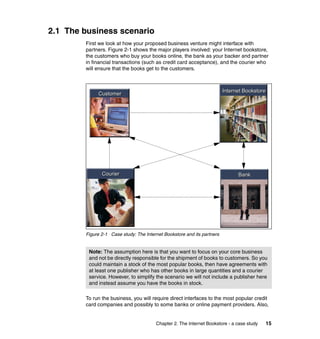
A category with a higher rating controls lower categories, and access within this
higher category allows access to any lower categories. An example is a head
office and branch offices: the head office can see the data of all the branches,
but each branch cannot see data relating to another branch.
4.5.3 Conditional access and temporal access
Sometimes we just want to give a user access to a resource when requested
under certain conditions. This is called conditional access. The security
administrator applies conditional access rules to the resource so that the user
Category
Non-hierarchical
grouping of
sensitive
information used
to control access
to data.
Chapter 4. Elements of security 59
can access only specific data if certain conditions are met, such as executing a
program from a particular library or entering the system on a specific device (for
example, a terminal).
Temporal access is a type of conditional access that allows users to access a
system only during a predetermined time of the day or day of the week. Each
user can be described for this attribute separately, depending on that user’s
allowable and authorized function.
4.5.4 Discretionary access controls and mandatory access controls
There are two major access control policies for supporting confidentiality of
information resources:
Discretionary Access Control
Mandatory Access Control
Discretionary access control allows data owners to apply the level of access
control, through access control lists (ACLs), that they deem appropriate or which
company security standards dictate. This method is called “discretionary”
because the data owners use their discretion to allow different levels of access to
data, based on requirements of a requester or their job role.
Mandatory access control restricts access to data on the basis of its sensitivity or
importance (represented by a security label) and the authorization of users to
access data of this sensitivity (security label). These controls allow greater
security if systems handle more sensitive data. It is outside the control of the
owners of the data and usually under control of a security administrator. The
control is mandatory in the sense that a user cannot control or bypass it.
The implementation of these types of control is discussed in 10.5, “External
security managers” on page 185.
4.6 Encryption and cryptography
Cryptography, the science behind the topic known as encryption, is the art of
secret or disguised writing. It is thousands of years old and the written records of
past great civilizations contain records of uses of such secret writing, especially
for diplomatic and military communications.
Encryption expands on this secret writing and deals with the methods involved in
preparing coded text called ciphertext. This is data that is intended to be
unintelligible to all except those who legitimately possess the means to
reproduce it back to plain text. Conversion of the plain text into ciphertext is
60 Introduction to the New Mainframe: Security
called enciphering (or encryption) while the conversion of ciphertext back to plain
text is called deciphering (or decryption).
4.6.1 When do we use encryption
The case study Internet Bookstore needs to encrypt data that is passed between
customers and the store. Your customers would expect that you have processes
in place to ensure that the information they provide will only be read by you and
not by anyone else who may access the data—illegally or unintentionally. When
you deal with your bank, encryption of the data you send them would also be
necessary in order to protect your own sensitive information.
Thus, you can see that encryption is needed at each step in the transmission of
personal details throughout the cycle of a transaction: from the customer, to your
bookstore, to the bank and to the courier company.
However, as you develop your security plans, keep in mind that encryption is not
absolute; it is always possible to break a cipher or encrypted code, though not
necessarily easy.
At its simplest, encryption is the process of using cryptographic tools to disguise
information. Hidden data cannot be detected, understood, and acted upon as
quickly as non-encrypted data. By using encryption, you introduce a time delay
for agents who want unauthorized access to your information. The more difficult
it is to access, the longer it takes to (unlawfully) see the data.
Generally, only sensitive data such as personal or financial details needs to be
encrypted, due to the expensive overhead incurred during processing. You
should consider encrypting your sensitive, top secret, and confidential files.
4.6.2 Symmetric encryption and asymmetric encryption
Symmetric encryption uses the same encryption key to encrypt and decrypt data.
In contrast, asymmetric encryption uses key pairs: one key encrypts, and the
other key decrypts or inverts the encryption key of the first key.
Asymmetric encryption is the stronger algorithm because neither of the elements
(the key or the encryption engine) can be used independently to disclose the
secret data.
More details about encryption are discussed in later chapters of this book. See
7.1, “A “must” today: cryptography” on page 102 and 8.5, “Encryption for network
communication” on page 151.
Chapter 4. Elements of security 61
4.7 Logging and auditing
Logging in an information technology context means writing a history of actions
and changes. It is the recording of data about specific events and is vital to
problem determination, auditing, accountability and system access reporting.
This recorded data is maintained in a data file, called a log, for later investigation
and possible analysis. The log should contain information about valid accesses,
as well as about attempted compromises of system security controls. Some
security products and tools examine and format detailed reports that can be used
to present facts on selective actions taken on System z.
Auditing in an information technology context is similar to an accountant
checking bookkeeping to ensure that all items are correctly accounted for.
Auditing on mainframe computer systems is handled by a systems auditor, who
deals with the high level management activity according to specific policies and
guidelines. Systems and systems usage are audited on a set periodic basis, as
well as during random spot checks.
The information security management plan may also require that user accounts
be audited for dormancy and other criteria about usage, such as scanning for key
phases, suspected sites, and suspicious activity after business hours. The plan
may require the audit of certain ports that viruses and worms exploit, including
software with known vulnerabilities.
Audits are not necessarily confined to system and network infrastructure. They
can involve physical security, system backups, workstation and workplace
environment and examination of disaster recovery policies. The breadth of what
is covered by the audit is defined by the information security standard or critical
infrastructure protection plan at your company. Products and tools also exist to
enable comprehensive reporting of status and settings within your System z
systems.
Note: The subject of violation or compromise logging needs more attention
than it gets. With vulnerability exploitation averaging several days, you need to
be able to respond quickly and effectively to suspicious access and probing
activity on your system.
Unfortunately, however, your security professionals might have to invest a
great deal of time studying logs from different systems in order to diagnose
and respond to suspicious behavior on your system, because these logs may
have many different formats. So, until a general consensus is reached
regarding the format of logging, they may need to continue troubleshooting by
laboriously printing out and poring over listings of logging files.
Logging
Writing a
history of
actions and
changes.
62 Introduction to the New Mainframe: Security
4.8 Summary
At this point, you should be able to list the major basic elements of security:
identification and authentication, authorization, and event logging, and explain
how these security elements are used to implement and control the company's
security policy on your System z.
Identification refers to a process of users making themselves known to the
computer system and proving it so that the system can allow them access. Every
person who is required to perform any activity on the computer needs to be
identified uniquely within that computer system’s security program. On a System
z, a user’s identity is confirmed through a user ID, a unique user identification
string. The importance of user ID standards, and of having a user ID associated
with an individual rather than a function so that individual accountability is not
lost, were also discussed.
Authentication is the process by which the computer system verifies who you are
through the use of some mechanism that assures the system that the user is
indeed who they say they are. There are three methods of authentication. Users
identify themselves by something they know (like a password); something they
have (like a swipe card); or by something they are, (like the person with a specific
fingerprint). You learned that passwords, or “something you know”, is the most
common method used to have users validate their identity, and you became
aware of the importance of enforcing password standards. Because business
enterprises are becoming more Web-enabled, and are facing increasing threats
to the confidentiality of company information, combining authentication through
passwords with digital certificates or biometrics is becoming more popular.
Authorization is the granting or denial of access to a resource to a user ID. The
security product used authorizes what resources a user can access, and also
authorizes in what way the user can access them. Depending on a company's
security policy, one (or a combination) of these methodologies will be
implemented:
1. Access control lists and rules - most common
2. Classification of data and users
3. Conditional and temporal access
4. Compartmentalization or categorization
5. Discretionary and mandatory access control
The concept of grouping IDs and how it relates to access lists was introduced so
you could see the benefits this practice offers. The authorization methodologies
were also introduced, and they are explored in more detail in later chapters.
Logging is simply writing a history of actions and changes recording data about
specific events. It is vital to problem determination, auditing, accountability and
Chapter 4. Elements of security 63
system access reporting. This recorded data is maintained in a data file, called a
log, for later investigation. The log should contain a record of valid accesses, as
well as of attempted compromises of system security controls.
Auditing is handled by a systems auditor who ensures that a company’s
information security standards and controls are in place, analyzes what activities
are taking place on the system, and identifies who is attempting to gain access to
the systems. Auditing is critical to a business in order to protect the company’s
infrastructure. Auditing needs to be done both periodically and through random
spot checks.
Remember that one method of enforcing systems integrity is through separation
of duties. System auditor, security administrator, database administrator, system
programmer, and system operator represent five major roles that help to ensure
separation of duties in a company. It is important that each role’s system access
does not overlap or cross over to another role’s activities, which would enable it
to perform the duties of the other role. It is vital that the person who initiates an
action is not the person who approves or benefits from the action.
Cryptography is the science of encryption. Encryption deals with the methods
involved in preparing coded text called ciphertext. Ciphertext is data that is
intended to be unintelligible to all except those who legitimately possess the
means to reproduce it back to plain text. Enciphering or encryption is the
conversion of plain text into ciphertext. Deciphering or decryption is the
conversion of ciphertext into plain text. Generally only sensitive data, such as
personal details and financial information, needs to be encrypted.
4.9 Key terms
Key terms in this chapter
authorization categories classification
compartmentalization conditional access discretionary access
control
encryption grouping mandatory access control
security label security level separation of duties and
roles
temporal access user ID
64 Introduction to the New Mainframe: Security
4.10 Questions for review
1. What considerations need to be made for user ID creation?
2. What is a good standard for passwords?
3. How is authentication performed?
4. Describe at least two roles in a security department.
5. Why is there a need for a separation of roles and duties?
6. Describe at least three methods of authorization.
7. What is the most preferred method of resource access?
8. Explain the difference between discretionary access and mandatory access.
9. Explain why and when encryption is necessary.
10.Differentiate between symmetric encryption and asymmetric encryption.
11.Why is logging performed?
12.What purpose does auditing serve?
4.11 Questions for discussion
1. Discuss the various ways that user IDs could be defined for the case study
Internet Bookstore.
2. Discuss the ways you think the Internet Bookstore should implement
authorization.
3. Discuss which resources are best suited by encryption, and which encryption
method you would use.
4. Discuss which logging options you would activate at the Internet Bookstore.
4.12 Exercises
Prepare a plan of how you might implement security elements into the Internet
Bookstore. Consider how user IDs are defined, and discuss how you will
implement access rules. Your plan also needs to consider what logging and
auditing is to be done, and at what points in the data flow events are logged.
© Copyright IBM Corp. 2007. All rights reserved. 65
Part 2 Hardware and
networking security
In this part, we describe how the fundamental security and integrity hardware
features that are available on the System z are used (in conjunction with
software and proper business policies) to provide a secure environment. The
several operating systems that support the System z (z/OS, z/VM, z/TPF, and
z/VSE) each use these hardware features to some degree.
Familiarity with the System z hardware and architecture is key to understanding
how operating systems and applications maintain data and process integrity.
After completing Part 2, you will understand:
The security issues in a multiprogramming and multiuser system
The relationship between operating systems and the z/Architecture®
How the architecture provides isolation of processes
The concepts of virtualization and their Security issues
What cryptography is and how it is implemented
Part 2
66 Introduction to the New Mainframe: Security
Why cryptography is important to computing installations
How cryptography secures communications between servers and clients
The hardware cryptographic facilities available to programs executing in
System z
How security is being addressed in the implementation of System z
networking facilities
© Copyright IBM Corp. 2007. All rights reserved. 67
Chapter 5. System z architecture and
security
In the case study Internet Bookstore application, we assume System z is used.
Additionally, both z/OS and Linux running under the control of z/VM will be used.
In order to be able to implement acceptable security, it is essential that you
understand the System z architecture and how the various operating systems
and applications are able to exploit the built-in System z security features. This
chapter focuses on the System z architecture and the interfaces that available to
the operating systems and authorized applications.
5
Objectives
After completing this chapter, you will be able to:
Identify the unique features of the System z architecture
Understand how these features contribute to a secure environment
Identify which of these features are applicable to the case study Internet
Bookstore application
68 Introduction to the New Mainframe: Security
5.1 Privacy and trust at the bottom line
Mainframes have been designed from the very beginning to provide computing
resources to concurrent users. This capability is called multiprogramming,
indicating that the programs scheduled for execution are not serialized in
sequence of execution, but instead are called and executed whenever the
system resources that each requires are available.
It was obvious that such systems had to be designed so that data ownership and
privacy would be strictly honored, despite the coexistence of a variety of data in
the system memory and the many processes that multiple users could start on
the same processing unit. These systems had to integrate, starting at the lowest
possible level (that is, the hardware circuitry), mechanisms for the identification
of processes and the control of the accesses to data and programs by these
processes.
What was at stake then, and still is today—was the trust that users were putting
in these systems regarding the integrity and privacy of their data and programs.
The concept of trust must always remain the focus and driving force behind any
security model. One definition of trust, according to the Internet Engineering
Task Force (IETF) is “...an entity can be said to ‘trust’ a second entity when it
makes the assumption that the second entity will behave exactly as the first
entity expects.”
In the case study, the Internet Bookstore owns a System z with three different
operating systems. Each operating system relates to the others, as well as to
external operating systems, network and security protocols, and database
managements systems. In the following sections you will see how a System z,
through its internal structure and mechanisms, provides trust for the Internet
Bookstore multi-operating environment.
5.2 The system architecture
The system architecture can be looked at from two different perspectives:
1. The “behavioral” perspective
The architecture is the specification of the set of functions that the computer
provides to its users—that is, how these functions are invoked, with what
inputs, and the results they return. This concept can be thought of as a very
well-defined layer of abstraction above the physical architecture, which is
actually where the users place their trust. This specification is known as the
“z/Architecture Principles of Operation”.
Chapter 5. System z architecture and security 69
The z/Architecture describes the “machine” instructions (that is, the
instruction set closest to the executing hardware), as opposed to high level
language instructions which have to eventually be transformed (that is,
“compiled” into machine instructions). The z/Architecture instructions are the
instructions directly mapped to the System z Assembler Language
instructions.
2. The physical architecture perspective
3. This is the physical implementation of circuits and firmware that backs up the
behavioral model. It consists of a very specific set of technical problems and
solutions to insure an extremely strict compliance with the user’s view of
system architecture. The mainframe physical architecture has evolved over
time into a set of many independent subunits with very complex
infrastructures. These must perform in accordance with the behavioral model.
5.3 A very particular user: the operating system
In simplest terms, an operating system is a collection of programs that manage
the internal workings of a computer system. An important mission of the
operating system is to built a secure execution environment (that is, to relieve the
applications of the responsibility for implementing the mechanisms required to
meet security objectives such as user authentication and authorization). Refer to
Chapter 4, “Elements of security” on page 45, for a detailed discussion about
authentication and authorization.
The operating system requires very specific privileges over the other programs,
and its code, by definition, has to be absolutely trusted from the perspective of
functionality and integrity. This, of course, implies that the operating system is in
charge of its own protection.
From the perspective of implementation, and for the sake of both performance
and trustworthiness, it is highly desirable to have the operating system exploit all
the hardware capabilities that help meet these requirements. Ideally, hardware
and operating system designs should influence each other to create a high level
of synergy.
So, what does an operating system have to protect? It has to protect its own
programs; programs running in its environment; the data related to those
programs and put in by users; and the system users themselves.
“Programs” are actually data, and they have to be considered as such up to the
point that their contents are fed from memory into a processing unit to be
executed. The processing unit keeps track of the machine instructions to be
executed using their address in memory, which it keeps in an instruction counter.
70 Introduction to the New Mainframe: Security
Typically, data is located via pointers known as addresses when it resides in
random access devices, or by using a displacement relative to the beginning of a
record when it is located in system-external storage devices. This is generally
accomplished by a mix of software and hardware mechanisms. At any moment in
its lifetime, data should remain related to its owners. This relationship can be
established by the software running in the system or by the hardware circuitry,
but must be verifiable at any time.
In Chapter 4, “Elements of security” on page 45, we discussed the concept of
identification, which enables authorized users to obtain access to the system and
utilize resources. The implementation of the concept of user identity can take
different forms, depending on where it has to be exploited. Typically, software is
uses a name to designate a user. A form of user identity also has to be
implemented in some hardware components. Within the architecture, users are
represented by tasks to be executed on their behalf.
In other words, the operating system is a user with special rights to access
resources, also called data or programs. In the following sections we look deeper
into the operating system to understand how secure it is, while still working as
designed.
5.4 Looking deeper into the operating system
User programs, called applications, implement the processes that the user
wants the system to execute. However, user programs should not interfere with
or substitute their functions for the operating system. It would obviously diminish
the user’s trust in the system if another entity could perform system management
functions.
5.4.1 Control instructions and general instructions
The z/Architecture implements the concepts of control instructions and general
instructions.
Control instructions
Control instructions are able to affect the user execution environment, and they
should only be available to the operating system. A hardware indicator can be
set that indicates that a specific executing program has the privilege or not to use
control instructions. Control instructions deal with many aspects of the user
execution environment, such as:
Memory allocation and access control
Data transfer between the system memory and external devices
User program execution and resumption
Chapter 5. System z architecture and security 71
General instructions
The z/Architecture also provides a set of general instructions that can be
executed by any program; that is, both by user programs and operating systems.
These general instructions are intended to be the building blocks of the user’s
problem-solving process.
Figure 5-1 illustrates the concepts of control instructions and general
instructions.
Figure 5-1 Concepts of control and general instructions
Examples of control instructions:
Start Subchannel (SSCH)
This is the machine instruction that triggers an I/O operation between an
external storage device and the system memory.
Load PSW (LPSW)
This is an instruction used by the OS to start or resume user execution.
Invalidate Page Table Entry (IPTE)
This instruction deals with the management of virtual storage.
Set Clock (SCK)
This machine instruction sets the content of the system’s Time Of Day
(TOD) clock. The TOD clock is the time stamping reference made available
to programs running n the system.
User
programs
and data
IPL
volume
Operating System
User
Program
(application)
Request for
OS action
User
Program
User
Program
Control instructions General instructions
CPU Execution Element
Instruction processing flow
72 Introduction to the New Mainframe: Security
As shown in Figure 5-1 on page 71, the hardware central processing unit (CPU),
through its execution element, executes both control and general instructions.
The operating system is loaded into storage and started from a hardware
process called Initial Program Load (IPL).
When IPL completes, it is expected that the operating system will be
automatically started in a condition that allows it to execute control instructions.
The operating system is therefore the first program to start in the system. In its
early startup stage, it has to set up its own protected environment.
The operating system sets up its own protected environment by using hardware
facilities that are described in “5.5, “Controlling the execution of instruction flows”
on page 72”. Later it can complete the security setup by calling specialized
programs that it has loaded. Users’ programs are eventually loaded by the
operating system.
Because system services, such as obtaining memory or reading from I/O
devices, require the execution of control instructions, programs need to request
that the operating system perform these duties on their behalf. A very large set of
system services is available to the users. User programs have a specific
supervisor (SVC) instruction to invoke the operating system and communicate a
number that designates the required service.
5.5 Controlling the execution of instruction flows
Normally, operation of the CPU is controlled by instructions in storage that are
executed sequentially, one at a time, from left to right, in an ascending sequence
of storage addresses. A change in the sequential operation may be caused by
branching, LOAD PSW, interruptions, SIGNAL PROCESSOR orders, or manual
intervention.
Isolation
Figure 5-1 on page 71 has a single CPU executing the instructions. This means
that there is only one flow of machine instructions being executed at any point in
time. In this case, there is only one program in control of the CPU at any one
time. When a program is interrupted and gives up control, steps must be taken to
hide its information from the next program to gain control. This is called isolation.
Note: IPL is a process typically triggered by a system hardware operator, and
access to the IPL function must be secured.
Chapter 5. System z architecture and security 73
Full isolation can only be achieved by backing up software mechanisms
executing in the operating system with hardware facilities that enforce the
isolation of a process. In subsequent sections, we explain how such isolation is
achieved, using mechanisms such as interruptions, z/Architecture storage
protection, and dynamic address translation.
5.5.1 The program status word (PSW)
System z owes the concept of the program status word (PSW) to its S/360™
ancestor. The PSW has been refined over time and is implemented as hardware
registers in the CPU. In this publication, we focus on the security-related
information that is held in the PSW. Figure 5-2 depicts the format of the program
status word.
Figure 5-2 Format of the PSW
The PSW includes the instruction address, condition code, and other information
used to control instruction sequencing and to determine the state of the CPU.
The active or controlling PSW is called the current PSW. The current PSW
governs the program currently being executed.
The CPU has an interruption capability, which permits the CPU to switch rapidly
to another program in response to exceptional conditions and external stimuli.
When an interruption occurs, the CPU places the current PSW in an assigned
storage location, known as the old PSW location, for the particular class of
interruption. The CPU fetches a new PSW from a second assigned storage
location. This new PSW determines the next program to be executed. When it
74 Introduction to the New Mainframe: Security
has finished processing the interruption, the program handling the interruption
may reload the old PSW, making it again the current PSW, so that the interrupted
program can continue.
Here we describe the first PSW fields we are interested in:
PSW key
Bits 8-11 form the access key for storage references by the CPU. Storage
obtained in a specific key can only be used by programs with the same key in
their PSW.
The supervisor state and problem state indicator
The PSW keeps a one-bit binary indicator that indicates whether the program
in control can contain control instructions. This is bit 15. Note the following:
– When the bit is on, the executing program is in the problem state and can
only execute general instructions.
– When the bit is off, the executing program is in the supervisor state and
can therefore contain both control and general instructions.
The instruction counter
The PSW holds a 64-bit binary value that is the memory address of the next
machine instruction to be executed. The instruction counter is incremented as
soon as the next instruction is fetched from memory and its length has been
recognized. z/Architecture machine instructions have different byte lengths,
depending on the instruction.
In System z, the PSW is complemented by the control registers. The control
registers are another collection of binary indicators (a total of 16 registers at 64
bits each) that deal with system management oriented functions.
5.5.2 How the PSW is primed
A PSW can be prepared as a string of 128 bits of data in memory, with the format
shown in Figure 5-3 on page 75. Then the real PSW can be loaded with this
binary string using the control instruction Load PSW (LPSW). At the completion
of the execution of Load PSW, the CPU starts executing the instruction pointed
to by the instruction counter in the newly loaded PSW. Note the following points:
This is how the operating system gives control to another program.
Note: The operating system, by definition, is intended to execute in supervisor
state. User programs are expected to execute with PSW bit 15 on, which is
problem state.
Chapter 5. System z architecture and security 75
If the program that is given control is not authorized to execute control
instructions, then the operating system provides a PSW with bit 15 on.
This mechanism is also extensively used to resume the execution of a
program that was interrupted.
Figure 5-3 shows the Load PSW hardware process.
Figure 5-3 Using the Load PSW z/Architecture instruction
5.6 The interruption concept and mechanism
At this point in our discussion, the operating system has given control of the CPU
to a user program as a consequence of executing an LPSW. The system’s
hardware monitors for the events (defined in the z/Architecture) that can occur
during the execution of a user program instruction. There are six categories of
those events (see “The six interruption conditions” on page 76) that lead the
system to interrupt the execution of a program in the CPU in order to give control
back to the operating system.
Control instructions
CPU Execution Element
CPU hardware
LPSW
Current PSW0 127
0 127
Operating System
Data area
Operating System's
Sequence of
instructions
_____________
______________
_____________
System memory
76 Introduction to the New Mainframe: Security
The CPU interruption capability permits the CPU to switch rapidly to another
program in response to exceptional conditions external to the system, in
subchannels or input/output (I/O) devices, in other CPUs, or in the CPU itself.
When an interrupt occurs, the CPU places the current PSW in an assigned
storage location (the old PSW location) for the particular class of interruption.
The CPU fetches a new PSW from a second assigned storage location. This new
PSW determines the next program to be executed.
When it has finished processing the interruption, the program handling the
interruption (sometimes referred to as the “interrupt handler”) may reload the old
PSW, making it again the current PSW, so that the interrupted program can
continue.
The six interruption conditions
In order to permit a quick response to conditions of high priority and immediate
recognition of the type of condition, interruption conditions are grouped into six
classes: restart, supervisor call, external, input/output, machine-check and
program. Each class has a distinct pair of old PSW and new PSW locations
permanently assigned in real storage. Here we explain the interruption conditions
in more detail:
Restart interruption condition
This interruption provides a means for the operator or another CPU to invoke
the execution of a specified program. The CPU cannot be disabled for
(instructed to ignore) a restart interruption.
Supervisor call interruption condition
This interruption occurs when the supervisor call (SVC) instruction is
executed. The CPU cannot be disabled for the supervisor call interruption,
and the interruption occurs immediately upon the execution of the instruction.
External interruption condition
This interruption provides a means by which the CPU responds to various
signals originating from either inside or outside the configuration. An example
of external signal is a signal issued by the CPU Timer or the Clock
Comparator.
I/O interruption condition
With this interruption, the system receives a signal indicating that an I/O
operation completed. I/O operations are relatively slow compared with CPU
speed, and are designed to be asynchronous. The program needs to be
signalled when the operation completes.
Chapter 5. System z architecture and security 77
Machine-check interruption condition
With this interruption, the system self-detects a hardware malfunction. Most of
the time the system recovers by itself from these incidents, but the users want
the operating system to maintain statistics on these occurrences.
In case of a more serious problem, the operating system reverts to its
recovery processing. This can cause the system to produce error records,
shut down an application, or even shut itself down.
Program interruption condition
With this interruption, the system detects that a program instruction being
submitted to the CPU for execution cannot be executed. One reason for this
may be that an instruction flow is executing with a PSW bit 15 (the P bit) on,
but the instruction to be executed is a control instruction.
The following section describes the mechanisms of interrupt processing.
5.6.1 The interruption mechanism
The interruption mechanism is actually based on the swap of PSW performed by
the CPU hardware when an interruption condition is met. The current PSW in
control of a program execution (presumably a user program) is being replaced,
by the hardware, with a “new PSW” that is pointing, in its instruction counter field,
to an instruction flow in the operating system. This requires some strict
conventions and preparation.
The new PSW binary values are fetched from memory locations fixed by the
z/Architecture. It is up to the operating system to prepare these new PSWs so
that the proper instruction sequences are given control when the interruption
occurs.
The z/Architecture also defines the fixed memory locations where the current
PSW is stored at the time the interruption occurred. The operating system can
therefore retrieve these “old PSWs” from these locations.
Figure 5-4 on page 78 shows the process flow of an interruption.
78 Introduction to the New Mainframe: Security
Figure 5-4 The interruption process flow
With reference to Figure 5-4, the process flow of an interruption proceeds as
follows:
1. An Internet Bookstore program is executing; assume that there is an
instruction READ to read the bookstore customer's file.
2. An I/O interruption event occurs; assume that a preceding process initiated
an I/O operation which is now signaling its conclusion.
3. The CPU hardware detects the I/O interruption condition and stores the
current PSW into a fixed memory location as the I/O old PSW.
Note: The READ instruction is not the interrupt in itself. It is just initiating a
chain of instructions that will drive the real interrupt.
The input/output (I/O) interruption provides a means by which the CPU
responds to conditions originating in I/O devices and the channel
subsystem. A request for an I/O interruption may occur at any time, and
more than one request may occur at the same time.
The requests are preserved and remain pending until accepted by a CPU,
or until cleared by some other means, such as subsystem reset.
The I/O interruption occurs at the completion of a unit of operation. Priority
is established among requests so that in each CPU, only one interruption
request is processed at a time.
User program
Execution
_____________
_____________
_____________
OS I/O interrupt
Handler
_____________
______________
_____________
Old PSW New PSW
LPSW (old PSW)
_____________
_____________
_____________
_____________
_____________
1
3
2
4
5
I/O interruption
Chapter 5. System z architecture and security 79
4. The CPU hardware loads the I/O new PSW (prepared by the operating
system during its initialization phase) that gives control to the operating
system I/O interrupt handler module.
5. The I/O interrupt handler does whatever processing is needed. When the
processing is done, the interrupt handler performs a LPSW instruction giving
the fixed memory address of the I/O old PSW. Thus the user program
resumes processing at the point it has been interrupted.
From the perspective of security, there should be no way for a user program to:
Fake an interruption (that is, to enter the operating system instruction flow
that is intended to process an interruption).
Modify the interruption execution environment (that is, new and old PSWs
and the interruption code so that the operating system could be misled while
processing the interruption).
The problem of faking interruptions is addressed by the control instruction
mechanism and by System z storage protection, as discussed in “5.7, “Storage
protection” on page 79”. The problem of modifying interruption execution
environments is fully covered by the System z storage protection mechanism.
5.7 Storage protection
Four protection facilities are provided to protect the contents of main storage
from destruction or misuse by programs that contain errors or are unauthorized:
Key-controlled protection
Access-list-controlled protection
Page protection
Low-address protection
The protection facilities are applied independently; access to main storage is
only permitted when none of the facilities prohibits the access. In this publication,
we focus on key-controlled protection.
Key-controlled protection
Key-controlled protection affords protection against improper storing or against
both improper storing and fetching—but not against improper fetching alone.
The System z memory (usually called “storage”) is divided in 4K-byte blocks
known as page frames. A page frame hosts a contiguous range of 4K memory
addresses. Every page frame is allocated a storage key, which consists of a set
80 Introduction to the New Mainframe: Security
of four bits known as the access-control bits plus an additional bit called the fetch
protection bit.
The storage key is physically located in an associated system-only memory; that
is, storage keys and fetch protection bits are not accessible as regular memory
data by instructions.
If a reference is subject to key-controlled protection, the four access-control bits
(bit 0 to bit 3) are matched with the four-bit access key when information is stored
and when information is fetched from a location that is protected against fetching.
If a reference is subject to key-controlled protection, the fetch-protection bit
(which is bit 4) controls whether key-controlled protection applies to fetch-type
references, as explained here (no distinction is made between the fetching of
instructions and of operands):
A zero (0) indicates that only store-type references are monitored and that
fetching with any access key is permitted.
A one (1) indicates that key-controlled protection applies to both fetching and
storing.
5.7.1 The storage key principles of operation
A control instruction allows you to set a storage key value (that is, a specific
value out of 16 possible values) for a given page frame.
There is also a PSW key value that can be set in bits 8 to 11 of the PSW. When
an instruction being executed in the CPU requests a memory access, the
hardware compares the storage key and the current PSW key values before
proceeding with any effective access. Figure 5-5 on page 81 illustrates the
decision algorithm that the system follows before denying or granting memory
access. Note the effect of the fetch protection bit in the decision-making process.
When memory access is denied, the requesting program is interrupted. The
storage protection key violation event falls in the category of program check
interrupt. It is typically expected that in such a case, the operating system is not
to resume the execution of the interrupted program, as it is either an addressing
mistake in the user program or the user program deliberately attempting to
penetrate memory areas it is not authorized to access.
When key-controlled protection applies to a storage access:
A store (copy data to memory) is permitted only when the storage key
matches the access key associated with the request for storage access.
Chapter 5. System z architecture and security 81
A fetch (load data, or an instruction from memory into a CPU register before it
can be executed) is permitted when the keys match or when the
fetch-protection bit of the storage key is zero (0).
The keys are said to “match” when the four access control bits of the storage key
are equal to the access key, or when the access key is zero (0).
As shown in Figure 5-5, a program running with a PSW key of zero (0) is granted
all accesses to memory. (Note that this PSW key value is, of course, reserved for
the operating system or for highly privileged programs.)
Figure 5-5 System z storage protection keys
The Key Storage protection mechanism is also exploited when transferring data
between an external device and the system memory.
Memory areas that are reserved for the exclusive use of the operating system
must have their page frames allocated a storage key value of zero (0). Only a
program with a PSW Key of zero (0), which is typically the operating system, will
get access to these areas. This is, for example, the storage key value which is
protecting the fixed memory locations where new PSWs are prepared and where
old PSWs and interrupt codes are stored.
Conditions Is Access to Storage
Permitted?
Fetch-Protection
Bit of
Storage Key
Key Relation Fetch Store
0
0
1
1
Match
Mismatch
Match
Mismatch
Yes
Yes
Yes
No
Yes
No
Yes
No
Explanation:
Match: The four access-control bits of the storage are equal
to the access key or the access key is zero
Yes: Access is permitted
No: Access is not permitted. On fetching, the
information is not made available to the program; on
storing, the contents of the storage location are not
changed.
82 Introduction to the New Mainframe: Security
5.7.2 Getting the storage protection keys to work
The storage protection key mechanism was originally designed for the S/360
family of computers in the early 1960s; it was planned so that up to 16 concurrent
users, including the operating system, could share the system memory (hence
the 4-bit value of the key).
More conventions
As systems evolved, new inter-user isolation capabilities were developed, such
as the use of virtual memory. The values of the Storage Protection keys became
less related to a specific user and more about establishing memory
compartments between families of programs. The PSW key of zero (0) continued
to be reserved for the operating system.
Dynamic storage allocation
As previously mentioned, the operating system is in charge of loading user
programs into memory or getting the data requested by a program transferred
into memory. These operations are started after the operating system has
dynamically allocated enough memory to receive the program instructions or
data.
During this memory allocation process, the operating system also assigns a
storage key with a proper value to the allocated page frames; this eventually
makes the risk of undesired storage overlay, as it happens in the infamous
“buffer overflow”, extremely low.
When buffer overflow does occur, the program is thrown out of the system and
the address space is destroyed before it gets a chance to affect another program
(intentionally or accidentally). Recovery routines ensure that a new address
space is created for application recovery with full security functions in place.
5.7.3 The multiprocessing environment
Today’s systems have several CPUs sharing the same memory, and therefore
sharing the same single instance of operating system and user programs. This
configuration is known as a tightly-coupled multiprocessing system. Such a
system is shown in Figure 5-6 on page 83.
Each CPU has its own PSW. Programs execute on all CPUs concurrently,
implying that several instruction flows are executing in parallel, both for the
operating system and the user programs. The CPUs also process interruptions;
that is, they swap PSWs. However, note the following:
Chapter 5. System z architecture and security 83
After this PSW swap occurs, the pending interruption condition is reset at the
system level, meaning that it will not cause another PSW swap in any other
CPU until the hardware detects a new interruption condition.
For purposes of addressing main storage, three basic types of addresses are
recognized: virtual, real, and absolute. The addresses are distinguished on
the basis of the transformations that are applied to the address during a
storage access: address translation converts virtual to real, and prefixing
converts real to absolute.
The prefixing is used to avoid overlaying other CPUs with one specific CPU's
new PSW, old PSW, and interrupt code. As you can guess, it is very
important from the standpoint of system integrity not to mix up these PSW
values!
Figure 5-6 The multiprocessing environment
From the standpoint of security, a multiprocessing configuration still exploits the
basic schemes of control instructions and hardware interruptions. However,
there is another degree of complexity, resulting from the multiplicity of concurrent
processing units accessing the same memory. The problems to be solved at this
level do not appear to the user. Rather, these are internal implementation
problems where, for instance, memory accesses from multiple requestors have
to be serialized.
User
programs
and data
IPL
volume
Operating System
User
Program
(application)
Request for
OS action
User
Program
User
Program
Prefixed fixed locations CPU0
Control
instructions
General
instructions
Control
instructions
General
instructions
Control
instructions
General
instructions
PSW PSW PSW
CPU0 CPU1 CPU2
Prefixed fixed locations CPU1
Prefixed fixed locations CPU2
84 Introduction to the New Mainframe: Security
Also, some memory operations must be guaranteed to be “atomic” operations,
meaning that no other entity gets access to the data being worked on until the
operation is complete. The z/Architecture specifies in which cases such an
atomicity can be expected from the system.
5.8 Summary
In this chapter, you have seen how the system's hardware pieces are closely
related to and controlled through the operating system, and how it can manage
the access to the system by the differentiation between general instructions and
control instructions. The representation of that kind of instruction in the program
status word (PSW) allows the system the provision to authorize, or not authorize,
access to the system through a simple indicator, which is bit 15 of the PSW.
The control that the CPU has over user programs is kept in a constant way using
six classes of interruption conditions: restart, supervisor call, external,
input/output, machine-check, and program. These show the CPU what the user
programs are doing.
Protecting access to storage (memory) is very important. This is accomplished
by matching the four bits of the storage key assigned to page frames during fetch
or store instructions.
Finally, you learned about the mechanisms and properties that control
instructions and hardware interruptions using a simple configuration. These can
be applied to your understanding of a tightly-coupled multiprocessing systems
environment. They keep the system secure by using the prefixing memory
addressing hardware mechanism when accessing the same memory by different
systems.
5.9 Key terms
Key terms in this chapter
control instructions general instructions interruption
operating system problem state program status word
(PSW)
PSW key storage protection key supervisor state
z/Architecture
Chapter 5. System z architecture and security 85
5.10 Questions for review
1. Does the z/Architecture describe the actual hardware implementation of the
System z systems?
2. Are all the programs coexisting in a System z running with the same set of
hardware-controlled privileges?
3. Are you expecting an instruction that can change the privileges of a program
to be a general instruction or control instruction?
4. Why is it important to secure the access to the IPL function?
5. Which hardware indicator allows a program to execute control instructions?
6. What is the setup needed for an hardware interruption to give control to the
operating system?
7. Under what conditions can a program can bypass the memory protection
provided by the storage protection keys?
8. How does the virtual storage facility add to user isolation in the System z?
5.11 Questions for discussion
1. What are interruption priorities?
2. In addition to the storage protection keys, are there other mechanisms
available to protect System z main storage?
86 Introduction to the New Mainframe: Security
© Copyright IBM Corp. 2007. All rights reserved. 87
Chapter 6. System z virtualization and
its challenges
The term virtual is an intriguing concept in the computing environment, because
it means that you have something that is not there but it acts as though it is there!
Not real, yet real. Virtualization can describe many kinds of computing resources
where the apparent number exceeds the actual number: virtual CPU, virtual I/O
devices, virtual storage, virtual network, and so on.
6
Objectives
After completing this chapter, you will be able to:
Explain the concept of virtual storage
Explain how System z implements the virtualization of storage
Describe how System z hardware and software translate virtual addresses
to real addresses
Explain how a single physical System z system can host several operating
systems under control of the Processor Resource/Systems Manager™
(PR/SM™) microcode
Describe the concepts of virtualization and their Security issues
88 Introduction to the New Mainframe: Security
6.1 Conceptual structure of a virtualized environment
Virtualization of the computing environment has been a very attractive idea since
the early days of computing. The idea behind virtualization was to have another
layer of software between the user operating system and the physical hardware
of the system. Sometimes called a hypervisor, this software layer would present
to the user’s operating system a more efficient “virtual” environment than the
physical system could possibly offer. In this hierarchy of operating systems, the
user’s operating system manages the execution of the user’s workload by
exploiting the virtual resources that it “sees” using the hypervisor. The hypervisor
takes care of mapping of these virtual resources to the physical resources
available on the system.
Virtualization also implicitly offers the capability of duplicating the virtualized
environments, so that several user operating systems can run concurrently on
the same physical system. Each one of these virtual environments can be seen
as a virtual machine that behaves, from the end-user’s perspective, exactly the
same as a real machine.
Figure 6-1 on page 89 illustrates such a conceptual structure. In this example,
one physical CPU processes instructions for two virtualized environments and
the hypervisor system. Each one of these virtualized environments is running an
operating system and user programs.
Chapter 6. System z virtualization and its challenges 89
Figure 6-1 Conceptual structure of a virtualized environment
6.1.1 The challenges of virtualization implementation
There are two main challenges when you implement virtualization:
Keeping performance, as seen by the end user, at its best. This implies that
virtualization implementation has to be much cleverer than simple software
simulation. This puts requirements both on the software design of the
hypervisor and internal hardware mechanisms.
From the perspective of security, the challenge is maintaining proper isolation
between virtualized environments so that they actually behave like separate
machines as seen by the end user. This requirement (and other operational
considerations) leads to the implementation, at the hypervisor level, of control
of access to physical resources by the virtualized environments.
Operating
System
Operating
System
User
Program
User
Program
User
Program
User
Program
User
Program
User
Program
(application)
Request for
OS action
(application)
Request for
OS action
Virtual CPU
Possible simulation
of control instruction
Virtual CPU
Possible simulation
of control instruction
Virtual CPU
Possible simulation
of control instruction
Control instruction
Hypervisor
IPL volume
IPL volume
User
programs
and data
User
programs
and data
Virtual hardware
console
Control instruction
PSW
Virtualized
Environment 1
- Memory
Virtualized
Environment 2
- Memory
Control instruction Control instruction
CPU execution element
Instruction processing flow
Virtualized Environment 1 - Memory Virtualized Environment 2 - Memory
90 Introduction to the New Mainframe: Security
6.1.2 Virtualization and z/Architecture
Mapping this conceptual view to the z/Architecture principles of operation leads
to the following design points:
The virtualization mechanisms exploit the z/Architecture virtual storage facility
described in “A closer look at System z virtual storage” on page 90.
The concurrently executing programs, including the hypervisor system, share
the physical CPU. Switching between the instruction flows is driven by
interruptions or the LPSW control instruction, as discussed in Chapter 5,
“System z architecture and security” on page 67.
General instructions issued by programs running in the virtualized
environment are processed “as is” by the physical CPUs (refer to the black
arrows shown in Figure 6-1 on page 89).
Control instructions issued by programs running in the virtualized
environment go through a special hardware process. That process ends up
by either executing the instruction “as is” in the physical CPUs (shown by red
arrows in Figure 6-1 on page 89), and implying here that there is no integrity
or security exposure in doing so—or by having the hypervisor simulate the
execution of the control instruction (shown by blue arrows) as seen from the
issuing program. In the latter case, it means that the hardware has detected a
potential integrity or security exposure condition and control has been given
back, through an interruption, to the hypervisor.
The hypervisor system is the first program to be loaded, via an hardware IPL,
into the system. The users’ operating systems are loaded by the hypervisor
as a regular I/O transfer ending up giving control to the loaded program as a
hardware IPL would do. This virtual IPL is triggered from a virtual hardware
console, which is actually a terminal communicating with the hypervisor
system.
6.2 A closer look at System z virtual storage
A description of the history of virtualization in mainframes is beyond the scope of
this publication. However, it is worth noting that the principles that led to today’s
virtualization mechanisms, both at the software and hardware level, were
experimented with beginning in the early 1960s.
The main gateway to providing viable commercial products was the price and
performance of hardware circuits in those days. In the early 1970s, as circuit
integration progressed, it was possible to release mainframes with virtual storage
capability and hypervisor systems, such as VM/370. The former Disk Operating
System (DOS) and Operating System (OS) became DOS/VS (virtual storage)
and OS/VS.
Chapter 6. System z virtualization and its challenges 91
The System z virtual storage implementation is exploited today by all IBM
operating systems executing on the System z platform.
6.2.1 The concept of virtual storage
Data located in computer memory is retrieved using an “address” pointer. Since
the first days of random memories technology, the value of a memory address
was directly mapped by the addressing hardware to the physical cell in storage
that contains the byte of data. This physical mapping is transparent to programs
in that programs use the memory address in a purely conceptual view. Program
designers are expecting that:
An address used to store data is also the address to be used to retrieve that
same data.
Contiguous address values point to contiguous data.
Computer architects realized that address values as used by programs can be
decoupled from actual physical addresses used by the memory technology.
Such a decoupling allows:
Better use the available space in the physical memory, which then becomes
the “real storage”.
Provision for ranges of “logical addresses” that would go beyond the actual
limit of real storage. The logical address is the address used by the CPU to
fetch the instructions to be executed, to fetch the data to be worked on, and to
store the results of instruction execution. The term virtual storage was coined
to designate the capability, offered by a system, for using logical addressing.
Provision for inter-user isolation at the virtual storage level.
This led to the implementation of a Dynamic Address Translation (DAT)
mechanism, as described in the following section.
6.2.2 System z Dynamic Address Translation
Virtual storage implementation in System z uses both hardware and software
mechanisms. Dynamic Address Translation (DAT) is a hardware mechanism
that, as the name implies, translates “on the fly” a logical address provided by the
CPU to a real storage address. However, DAT relies on translation tables
prepared in advance by the operating system, as shown in Figure 6-2 on
page 92.
92 Introduction to the New Mainframe: Security
Figure 6-2 System z Dynamic Address Translation (DAT)
Figure 6-2 shows the following:
The DAT hardware mechanism is active when the CPU current PSW has bit 5
on (the DAT mode bit in the figure). The operating system provides DAT with
the real address of the translation tables to be used.
Having the PSW DAT bit 5 on implies that instructions and operand
addresses are virtual (logical) addresses that need to be translated into real
addresses. The translation tables, prepared by the operating system (as
explained in further detail below), provide DAT with enough information to
translate the logical address into the real address of page frame (the 4K-block
of storage discussed in “Storage protection” on page 79).
In this example we assume that the translation tables are set up in such a
way that a range of contiguous addresses, as seen from the program, is
actually made of three disjointed page frames in real storage.
Note the following points:
1. The translation table contents can be considered very sensitive information,
from the process isolation standpoint. The table contents are managed only
Page frame
Data 3
Data 1
Page frame
Data 2
Page frame
DAT tables
Real storage addressing
Real address
CPU
DAT tables
Real address
DAT
Operand address logical
PSW
5 64 127
logical
Instruction address
DAT mode bit
Chapter 6. System z virtualization and its challenges 93
by the operating system. All instructions dealing with their management are
control instructions.
2. Storage protection keys still apply to real storage page frames.
3. The translation tables are specific to each user environment. So, when a CPU
switches instruction processing flow (remember that the operating system is
always involved when performing such a switch, whether by an LPSW
instruction or an interruption), DAT is set up with the real address of the
translation tables pertaining to the new instruction flow environment.
Keep in mind that storage protection keys, and therefore the PSW key, are also
set up on the fly according to the “identity” of the information being brought into
real storage page frames by the operating system.
6.3 A closer look at the requirements of VM
z/Virtual Machine (z/VM) is today’s version of a hypervisor operating system. VM
design began in the early 1960s, when IBM was exploring how to meet customer
expectations by using virtualization. The development of VM was closely tied to
the development of virtual storage, because they both had to operate together.
The core of z/VM (that is, the hypervisor), is actually the “control program”, or
CP. The control program creates and maintains virtual environments for virtual
machines (guests), as shown in Figure 6-3 on page 94. Note the following points:
Only the control program (CP) is IPLed using the actual hardware IPL
sequence. The guest IPL sequence is simulated by CP.
The CP operator console is actually providing CP emulated “hardware
consoles” for the guest virtual environment. CP commands, on top of the
guest IPL command, are providing, for example, the equivalent of a “System
reset” or “Restart” hardware functions for the guest machines.
The operating systems running in each guest have their usual operator
console, which are physically connected via I/O channels to their respective
OS.
z/VM has its own scheme of disk storage partitioning, known as “minidisks”,
which the CP uses to share one physical disk among several guests.
Note: The support of virtual storage is an added complexity to the
operating system. However, from the security standpoint, the use of
translation tables specific to each user environment improves the
intra-memory user isolation.
94 Introduction to the New Mainframe: Security
z/VM can itself be running in a guest virtual machine, thus creating “second
level” guest VMs.
The security requirements, as seen from the z/VM software perspective, are
to insure that the guest VMs have access only to the physical resources they
are entitled to, and to guarantee inter-guest isolation. Each guest operating
system being responsible of its security environment as seen by its own
users.
Figure 6-3 z/VM implementation
Important: Keep in mind that all these CP and guest software layers piling up
in a z/VM exploit the z/Architecture, and use the physical CPUs by switching
instruction flows and address spaces between CP, guests operating systems,
and user programs. They all exploit the same System z instruction set, with
the exception of CP—CP also uses a very specific instruction, designed for
VM use in the 1980s, called the Start Interpretive Execution (SIE), as
explained in the following section.
z/VM CP
zSeries hardware
PCI
Crypto
HiperSockets
OSA
Express IFL
Guest LAN IUCV VCTC
FICON
Channel
Linux
Guest VM
Linux
virtual
devices
Linux
Guest VM
Linux
virtual
devices
Linux
Guest VM
Linux
virtual
devices
VLAN
Linux
Guest VM
Linux
virtual
devices
VM
Guest VM
virtual
devices
z/OS
Guest VM
z/OS
virtual
devices
CP
CP IPL and
resident
Linux guest IPL
and resident
z/OS guest IPL
and resident
z/VM guest IPL
and resident
Guests
« minidisks »
z/VM operator
Guest OS operators
Chapter 6. System z virtualization and its challenges 95
6.3.1 The Start Interpretive Execution (SIE) instruction
The System z hardware can make the difference between an instruction flow that
belongs to CP, and an instruction flow that belongs to a guest machine, by using
the Start Interpretive Execution (SIE). The SIE instruction is used by CP to give
control to a guest machine.
Before issuing the SIE instruction, CP prepares a control block known as the
state descriptor that contains the information needed by the hardware to
establish a machine virtual environment. In this information, the state descriptor
contains, for example, the guest machine PSW value, the storage protection key,
and the real storage allocated to the guest machine. When CP issues the SIE
instruction, the guest machine takes control of the physical CPU based on this
PSW value.
The state descriptor also contains information about the conditions under which
control should be given back to CP. Note that when CP regains control (a
process called interception), the state descriptor of the guest machine is updated
by the hardware so that at the next SIE instruction, the guest machine will
resume at the point it where it was intercepted.
6.3.2 Solving the security issues with VM
As you can see, these are complex processes. The objective is to ensure perfect
isolation between guest machines. This is achieved by a combination of software
and hardware mechanisms:
The dynamic address translation mechanism.
The SIE instruction and the specification of the guest storage extent
limitation.
Specific hardware features such as the Set Address Limit facility, which
allows you to establish hardware boundaries in the system memory between
guest machines, and the disk extent limitation feature, which does the same
on the physical disk storage shared between guest machines as mini-disks.
At time of writing, z/VM is being evaluated under the Common Criteria Labelled
Security Protection Profile and the Controlled Access protection profile, for an
assessment level of EAL 3.
96 Introduction to the New Mainframe: Security
6.4 A closer look at PR/SM
Processor resource/systems manager (PR/SM) is a standard feature of System z
that allows the user to define “logical partitions” (LPARs) in the physical system.
A logical partition provides the set of resources necessary to load and execute
an operating system and user applications. A single physical System z system
can host several operating systems that operate concurrently under control of
the PR/SM microcode and hardware mechanisms. Each logical partition appears
as a complete system to its users and administrators.
The set of resources made available to a logical partition consists of the
following:
Physical memory.
Each logical partition has its own piece of the physical system memory. There
is a strict separation between the physical address ranges provided to each
partition.
CPU.
Typically, the physical CPUs are shared between the logical partitions. That
is, on a time-sharing basis, each LPAR has a piece of its instruction stream
executed by the physical CPU.
I/O channel paths.
I/O channels can be dedicated to logical partitions, or can be time-shared
between them. An LPAR can have a mixed set of dedicated and shared
channels. This includes the sharing of the Open System Adapter (OSA)
network adapter and the hipersocket facility in PR/SM. The OSA and
hipersocket facilities are described in 8.2, “HiperSockets” on page 144.
Important: The main security issue for z/VM is to ensure isolation between
guest virtual machines.
The operating systems running in the virtual machines are responsible for
managing the security environment of their own users. That is, from the
operating system’s standpoint, its security behavior should be exactly the
same as if it were running in a real machine.
Note: Here again, the main security issue for VM is to ensure isolation of
LPARs from each other.
Each operating system is responsible for its own users’ security.
Chapter 6. System z virtualization and its challenges 97
Optionally, the hardware cryptographic coprocessors can also be shared
between logical partitions.
Here we define some terms:
The shared resources appear to logical partitions as “logical” resources, as
opposed to “physical” resources.
The logical partitions and the allocations of the I/O channel paths are defined
in the I/O configuration data set (IOCDS) file, which resides in the Support
Element (SE) of the system.
Each logical partition has a dedicated “image profile” file, which also resides
in the system’s Support Element. The image profile defines the resources
(other than the I/O channel paths) that are made available to the logical
partition.
Only an authorized system administrator can have access to the IOCDS and
image profile files.
The System z PR/SM has been evaluated under the Common Criteria with a
specific Target of Evaluation, and has been assessed at evaluation level EAL 5.
That evaluation level certifies that PR/SM, as run in the evaluation conditions,
can separate and isolate partitions as if they were running on physically separate
systems.
The following security features were evaluated:
Identification and Authentication
– PR/SM will associate a unique identifier with each logical partition in the
current configuration
– Each LPAR is uniquely identified, based on IOCDS definitions.
– The identifier is used to mediate access control.
Audit and accountability
– All security-related events are recorded in an hardware audit log.
– The audit log is protected from unauthorized deletions or modifications.
– Applications in LPARs cannot read the audit log.
Access control
– LPAR security controls define a partition's access to the IOCDS,
performance data, cryptographic coprocessors, and reconfigurable
channels.
– Access to control units and devices on shared channels can be restricted.
Note: The PR/SM microcode exploits, internally, the same hardware facilities
as the SIE instruction.
98 Introduction to the New Mainframe: Security
– Channels, storage, and CPs can be dedicated to specific LPARs and, as a
consequence, are maintained non-sharable by PR/SM.
– PR/SM will prevent the transfer of a message between a logical partition
and any resource not explicitly allocated to it.
Object reuse
– Storage will be cleared prior to allocation or re-allocation.
– All information in physical processors or coprocessors will be reset before
dispatching the processor to a new logical partition. Non-shared channel
paths and attached I/O devices will be reset prior to allocation to an LPAR.
6.5 Summary
In this chapter, you have learned that security is a major design and
implementation point in the System z machine hardware. The behavioral model
described by the z/Architecture provides the machine instructions and facilities
that the operating system needs to preserve user data integrity and privacy.
The concepts and evolution of virtual storage were described, and we explained
how the System z manages the execution of control instructions and general
instructions.
You learned about the information contained in the PSW. The PSW plays an
important role in triggering the translation of virtual addresses in order to convert
them in the real addresses managed by physical CPU, where the instructions are
finally executed. We also detailed the Dynamic Address Translation (DAT)
facility.
You also learned about a special case of virtualization, whereby a single physical
System z can host several operating systems that can operate concurrently,
under control of the PR/SM microcode and hardware mechanisms.
And because the System z also provides several forms of virtuaIized
environments, we described the related challenges from the perspective of
security and explained how these challenges are met both at the hardware and
software levels.
We used z/VM, the virtual machine operating system, to represent the virtualized
environment. You learned how the Control Program (CP) component prepares
the state descriptor with information to establish the machine virtual environment,
and issues the SIE instruction give control to the guest machine.
Finally, you learned how a single physical System z system can be divided into
logical partitions. It can host several operating systems operating concurrently
under control of the PR/SM microcode and hardware mechanisms.
Chapter 6. System z virtualization and its challenges 99
6.6 Key terms
6.7 Questions for review
1. Define virtualization.
2. What are the benefits of virtualization?
3. What compromises are made when an environment is virtualized?
4. Describe Dynamic Address Translation (DAT) and how it relates to
virtualization in the zArchitecture.
5. In a given virtualized environment, which entity is responsible for managing
inter-user isolation?
6. Why does the virtual storage facility add to the user isolation in the System z?
6.8 Questions for discussion
1. Describe the role of a hypervisor and how that role is different from that of an
operating system in a virtualized environment.
Key terms in this chapter
Dynamic Address
Translation (DAT)
hypervisor logical partition (LPAR)
page frame Process Resource/System
Manager (PR/SM)
Start Interpretive
Execution (SIE)
virtual z/VM
100 Introduction to the New Mainframe: Security
© Copyright IBM Corp. 2007. All rights reserved. 101
Chapter 7. Cryptography on System z
Cryptography is the cornerstone of many security solutions in today’s computing
environments. However, just as the cornerstone of a building is not the whole
building, the use of cryptography alone cannot be considered a security solution.
This may seem like a simple idea, but it is surprisingly often misunderstood.
This chapter guides you through the basics of cryptography and cryptographic
algorithms and concepts. And it introduces you to the hardware and software that
the System z mainframe provides to support your cryptographic requirements.
7
Objectives
After completing this chapter, you will be able to:
Explain why you need cryptography and where you might encounter it
Describe the basic types of cryptographic algorithms, give examples of
each, and describe the inherent strengths and weaknesses of each type
List the security objectives solved by cryptography and explain how they
apply to modern computing
List the type and purpose of the System z cryptographic hardware
List the software provided on the various System z operating systems and
describe the functionality
102 Introduction to the New Mainframe: Security
7.1 A “must” today: cryptography
Many people believe that, by simply applying cryptography to a problem, it can
be made secure. However, in reality many pieces are involved in providing an
effective security solution, and cryptography is only one piece.
To continue the building analogy introduced in this chapter, the strength of a
building often depends on the strength and placement of the cornerstone.
Likewise, with security, the strength of a given security solution is often defined
by the strength and application of the underlying cryptography. It is imperative;
therefore, that you develop a solid understanding of cryptography and of the
cryptographic tools at your disposal.
As mentioned in 4.6, “Encryption and cryptography” on page 59, cryptography
has been around in one form or another for thousands of years. In the early days
of computing, however, cryptography did not have much of a presence, simply
because it was not seen as necessary. In those days, computers were
self-contained and locked away in secure facilities.
Even when computer networks were developed, they were configured from
point-to-point. That is, the transmission line over which a terminal communicated
to a computer was dedicated to that conversation, so data did not stray from its
intended route and encrypting it was not deemed necessary.
Furthermore, data encryption is comparatively costly, and in former times
computers simply did not have the power to do much encryption, so companies
were reluctant to devote expensive and limited resources to the task of
encryption.
Cryptography eventually began making inroads into computing environments as
a specialized function performed by government, military, and financial
institutions, as well as by other businesses that handled highly security-sensitive
data.
Today, these distinctive requirements still exist, but cryptography is no longer
limited to only these applications. Virtually every computing environment today
uses some level of cryptographic solution, from the occasional SSL-type
encryption of the Web surfer when entering passwords or credit card information,
Chapter 7. Cryptography on System z 103
to large-scale encryption of all network traffic and stored data by a corporation.
Several developments in the computing industry have fostered this change:
Computing environments are no longer small and self-contained. The notion
of securing your data simply by securing the environment that contains your
mainframe has been outmoded for a long time.
Today's computing environment extends well beyond the traditional “raised
floor” of the computer room—and often beyond the physical bounds of a
single building or even city, state, or country.
Networking has moved from the traditional point-to-point connection to the
much more robust, but less secure, TCP/IP protocol. As a result, businesses
can no longer be certain where their data has traveled between transmission
and reception.
The use of computing services has expanded dramatically. Computing
services are no longer limited to the back offices of large corporations.
Computers and networking are used for activities that were unavailable a
decade ago, for example: Internet banking, online shopping,
business-to-business transactions involving millions of dollars, and so on.
This vast increase in usage not only brings about the need for greater
protection of data as it flows across the network, but also introduces new
challenges concerning authentication, identity management, non-repudiation,
and so on. These challenges are answered, in part or in whole, by
cryptography.
New legislation regarding privacy requires greater diligence when it comes to
how companies deal with customer data. This typically means more
widespread applications of encryption. Compliance with these regulatory and
legislative bodies is mandatory, and noncompliance can cost businesses
large amounts in fines and can even force companies out of business.
The cost of computing has fallen dramatically over the years, and the cost of
using cryptography in even the smallest environments (like smartcards,
personal digital assistants (PDAs) and cell phones) is also greatly reduced.
However, implementing cryptography is still costly, and businesses
sometimes still resist the idea, but today encryption has nowhere near the
cost (or performance impact) that it once had.
So what benefits does cryptography offer in the modern computing environment?
It addresses these major objectives:
Protection
Protection is the most prominent idea associated with cryptography; that is,
data is scrambled using a known algorithm and secret keys such that the
intended party can descramble the data but an interloper cannot. In many
cryptographic discussions, this idea is also referred to as confidentiality.
104 Introduction to the New Mainframe: Security
Authentication
Authentication, as explained earlier, is the process of deciding “how you
know we are who we say we are, and how we know you are who you say you
are”.
Integrity
The process of integrity ensures that what we receive was what you sent, and
vice versa (for example, that no one has altered a transmission, or that the
decimal point in a number is exactly where it is supposed to be).
Non-repudiation
Non-repudiation ensures that we know you agreed to what was exchanged,
and not someone masquerading as you. Non-repudiation implies a legal
liability. We know you and only you agreed to the matter at hand and,
therefore, you are legally and contractually obligated. This is the same as a
signature on a contract.
Cryptography requires two main elements, an algorithm and a key, as explained
here:
The algorithm is the mathematical or logical formula that is applied to the
key(s) and the data to arrive at the scrambled result or cipher, or to take a
cipher and arrive at the original text. Many people will use the same
algorithm.
The key is what separates our use of an algorithm from someone else's. As
an analogy, we can all purchase the same deadbolt for our front doors, but as
long as each person has a unique key, we do not have to worry about
whether anyone else can open our door.
The concept of a key is important; the keying material that makes an algorithm
strong is, surprisingly, an often-overlooked aspect of encryption. Systems staff
sometimes comment “I know my data is safe because I use 128-bit encryption”
or “I use Triple DES to protect my data”. However, such statements address only
half of the issue of encryption. Until you can determine where the keys came
from and how they are protected, a “strong” encryption solution is suspect. Poor
management of a cryptographic key would be synonymous with buying the
state-of-the-art locking system for your front door and storing the key under the
mat.
So, as you can see, protecting the secret cryptographic key is of utmost
importance in any cryptographic solution!
Chapter 7. Cryptography on System z 105
7.2 Today’s cryptographic algorithms
Over time, different cryptographic algorithms have been developed and there are
many available today. In the following sections, we cover the most popular ones.
But first, we need to discuss the following cryptography algorithm truisms:
As pointed out in Chapter 4, “Elements of security” on page 45, any
cryptographic solution can be broken. There is no such thing as an
unbreakable algorithm or key.
The best you can hope for is that your solution is robust enough to discourage
anyone from attempting to break it; that is, the time or computing power
involved in attempting to break your encryption would be far costlier than any
potential gain.
No cryptographic solution can be declared to be secure. We can only make
absolute statements when an algorithm is proven to be not secure.
All cryptographic algorithms work off some basic assumption from which they
draw their strength. For instance, algorithms like AES rely on the assumption
that it is computationally difficult to calculate the encryption key that was
used. So, in lieu of calculation, a brute force attack must be used (that is, the
intruder needs to guess the key), and such an attack is computationally
unfeasible.
By using an algorithm that is not published, you weaken your security.
It is a common misconception that if no one knows the algorithm being used,
or how the algorithm works, you will be more secure. Why? Because first of
all, the algorithm was never completely “secret”. If it was developed in secret
by a software or hardware vendor, then the people who worked on the
development know what it is and how it works. So it must be assumed that the
secret is not as well preserved as the vendor intends; people talk, after all.
Next, and perhaps more importantly, if an algorithm is not subjected to the
scrutiny of the industry at large, there is a much greater chance that the
algorithm you are using has a flaw that the author had not foreseen. If flaws of
this nature are found by the computing community at large, they soon become
common knowledge and are fixed, or the algorithm is abandoned. On the
other hand, if a flaw exists and only system intruders discover it, you will most
likely be unaware that your security has been compromised, with damaging
consequences. This is like someone having the key to your front door without
your knowledge; you do not realize that your home is insecure.
Keep in mind, however, that an algorithm which is not known is not
necessarily weak (for example, the popular RSA, described in “Rivest Shamir
Adelman (RSA) algorithm” on page 111, was once a proprietary algorithm).
But without the widespread scrutiny of the industry, you do not know whether
106 Introduction to the New Mainframe: Security
or not it is weak. So, the best course of action is to stick to the “beaten path”
wherever possible.
Choosing a strong algorithm and a strong key (or keys) does not make your
solution secure on its own. As you look at how you are securing your data,
you must also consider the data itself.
A classic example would be trying to protect a customer personal
identification number (PIN) for banking by using a 4- to 6-digit numeric.
We consider this to be a very important piece of data, so we decide to use the
best security we have: RSA with a 4096-bit key. We will also make sure that
our key is well protected inside a secure crypto chip. So we are all secure,
right?
Well, not exactly. The PIN is a 4- to 6-digit number; therefore it will only have
between 9,999 and 999,999 possible values. An intruder could take all
possible values and encrypt them using this key and store them in a
dictionary of all possible ciphers. It would then be relatively easy to look up
the encrypted value of a customer's PIN and compare it to this dictionary to
find what the value is.
Next, we look at three basic algorithm classes: symmetric algorithms,
asymmetric algorithms, and one-way algorithms, as described here:
Symmetric algorithms
Symmetric algorithms use the same key to encrypt and decrypt data. The
function used to decrypt data is the opposite of the function used to encrypt.
Because the same key is used on both sides of an operation, it must be
negotiated between both parties and kept secret. Symmetric algorithms are
also known as secret key algorithms.
Asymmetric algorithms
Asymmetric algorithms use two distinct but related keys, the public key and
the private key. As the name implies, the private key must be kept secret.
However, with asymmetric cryptography, it is not important who sees or
knows the public key. Whatever is done with one key can only be undone by
the other key. For instance, data encrypted by the public key can only be
decrypted by the associated private key, and vice versa.
Unlike symmetric algorithms, which use distinct functions to perform
encryption and decryption, there is only one function in asymmetric
algorithms. Depending on the values passed to this function it will either
encrypt or decrypt the data. Asymmetric algorithms are also known as public
key cryptography.
Chapter 7. Cryptography on System z 107
One-way algorithms
One-way algorithms are, arguably, not cryptographic functions at all. For
example, they do not use keys, and they can only scramble data, they cannot
descramble it (hence the name “one-way”).
That being said, one-way functions are used extensively within cryptographic
functions (for digital signing, for instance) and the functions tend to be
developed and governed by the same principles as cryptographic routines.
One-way functions are also referred to as hash routines or message digest
routines.
In the following sections, we explain the algorithms in more detail. Note,
however, that is not a comprehensive list; many other useful algorithms exist in
each category. Our intention here is to briefly describe the main algorithms in
each category.
7.2.1 The symmetric algorithms
Data Encryption Standard (DES)
Data Encryption Standard (DES) uses a 64-bit secret key. However, 1 bit in
every 8 bits of the key is used to establish odd parity. This means that the
effective key size is actually 56 bits. The intent of the DES algorithm is to have
every bit of keying material influence every bit of plain text in producing a block of
cipher text.
DES has long been the cryptographic solution of choice. Because the financial
industry was one of the early users of cryptographic solutions, a whole suite of
cryptographic solutions based on DES was developed after its inception.
DES remains very prevalent in systems today. However, with the speed of
computers today, DES can be more easily deciphered. So the 56-bit key of DES
is no longer sufficient to provide long-term protection of data.
Triple DES: Keeping the dream alive
Rather than abandon DES entirely, it was strengthened by using multiple rounds
of encryption on the same piece of data with different keys. This has become
known as Triple DES, EDE, or 3DES. This solution not only strengthened the
Assumption: A symmetric algorithm is considered strong if it is
computationally unfeasible (that is, it would not be practical or cost effective to
use the computational power needed to calculate and test all possible key
values for a given application of a symmetric algorithm).
108 Introduction to the New Mainframe: Security
algorithm, but also permitted users to upgrade part of their processes to Triple
DES and still provide support for older DES devices.
Triple DES uses two or three DES keys to provide this function. This brings up its
key length to 128 or 192 bits (112 or 168 bits, after we drop the parity). Triple
DES works as follows:
1. It uses the first key to encrypt the input data.
2. Then it takes the second key and decrypts the result.
3. Finally it uses the third key, if provided, to re-encrypt the data. If a third key is
not provided, this encryption is done with the first key again.
It is important to point out, however, that if any of these key parts are equal,
Triple DES is not fully implemented and the added security does not exist. So
why do it at all?
The answer is because it allows corporations like banks to replace their
back-room cryptographic solution so they can start their rollout of newer, Triple
DES-capable equipment while still supporting the older equipment. This makes
the movement to stronger cryptography much easier.
Triple DES is now the mainstay of the financial industry and the rest of the
computing industry. Financial solutions typically rely on double length keys.
However, many analysts predict this level of security will not be strong enough to
meet future computing needs.
AES now and into the future
There is a need to replace DES and Triple DES with something stronger and
more advanced. Advanced Encryption Standard (AES) is an adoption of the
existing Rijndael algorithm. This method of selecting a new cryptographic
standard was far superior to attempting to create one “from the ground up”. By
evaluating existing, time-tested, algorithms, the process of finding a replacement
for DES was dramatically shortened.
Diffie-Hellman key agreement protocol
A key agreement protocol, also called a key exchange protocol, allows two
parties with no prior knowledge of each other to jointly establish a shared secret
key over an insecure communications channel. This key can then be used to
encrypt subsequent communications using a secret key algorithm.
One example of such a protocol is known as the Diffie-Hellman key agreement
protocol. It has two system parameters: p and g. They are both public and can be
used by all users in a system.
Chapter 7. Cryptography on System z 109
Here is an example that demonstrates how the key agreement protocol works.
Suppose there are two people, “Alice” and “Bob”, who want to agree on a shared
secret key using the Diffie-Hellman key agreement protocol. They proceed as
follows:
They agree upon a prime number p and a generator g.
Alice generates a random private integer and then derives her public value.
Alice sends her public value to Bob.
Bob generates a random private integer and then derives his public value.
Bob sends his public value to Alice.
Bob and Alice process both keys and now have a shared secret key.
“Man-in-the-middle” attack
The Diffie-Hellman key agreement protocol as described in this example,
however, is vulnerable to what is known as a “man-in-the-middle” attack. In such
an attack, a third party “Eve” (for eavesdropper) intercepts Alice’s public value
and sends her own public value to Bob. When Bob transmits his public value,
Eve substitutes it with her own and sends it to Alice. Eve and Alice thus agree on
one shared key, and Eve and Bob agree on another shared key. After this
exchange, Eve simply decrypts any messages sent out by Alice or Bob, and then
reads (and possibly modifies) them before re-encrypting with the appropriate key
and transmitting them to the other party.
This vulnerability exists because the protocol does not authenticate the
participants. The protocol as described is sometimes called anonymous
Diffie-Hellman.
7.2.2 The asymmetric algorithms to the rescue
As the name implies, asymmetric cryptographic algorithms work on the principle
that the keys are not symmetrical. Instead, asymmetric algorithms require two
different but related keys: a private key and a public key. The security of the
solution requires that the private key must be kept secret, but it is immaterial who
knows the public key. Anything encrypted with the public key can only be
decrypted with the corresponding private key, and vice versa.
Here is an example that demonstrates how an asymmetric cryptographic
algorithm works. Returning to the case study Internet Bookstore, when an online
shopper is ready to enter credit card information, the bookstore can send its
public key to the shopper over the public Internet channel. In this case, the key is
public information so it does not matter whether an eavesdropper obtains this
key.
110 Introduction to the New Mainframe: Security
The shopper subsequently enters private information (such as a credit card
number), which gets encrypted with the public key before being transmitted. An
eavesdropper who is watching this transaction now sees the encrypted data.
However, even though the eavesdropper has the public key and the encrypted
data, security is not compromised, because nothing can be done with this
information without the private key.
When this transaction reaches the bookstore, the bookstore can use its safely
stored private key to retrieve the information; see Figure 7-1 on page 110.
Figure 7-1 Using an asymmetric key
Using asymmetric keys, the bookstore can send the public key to customers.
This key can then be used to protect the secret data, which can only be
accessed via the private key that is safely stored on the system at the bookstore.
BankBank
CustomerCustomer
CourierCourier
Internet BookstoreInternet Bookstore
Chapter 7. Cryptography on System z 111
Rivest Shamir Adelman (RSA) algorithm
Rivest Shamir Adelman (RSA) is an actual encryption/decryption algorithm. In
fact, RSA is the first publicly proposed algorithm to adequately address both
encryption and digital signatures.
With the RSA algorithm, combining two large prime numbers of approximately
the same length creates the keys. Because of this, in order to “break” RSA, one
would need to be able to factor a large number and find the prime numbers that
were used to construct it (for instance, the factors for 39 are 3 and 13). There is
no efficient method of doing this today. RSA keys are typically 1024, 2048 or
4096 bits in length. Therefore, it is inconceivable that these can be factored using
today's mathematical tools or computers.
The Digital Signature Algorithm
The Digital Signature Algorithm (DSA) was written to answer the requirement to
produce and verify digital signatures. DSA, like RSA, makes use of prime
numbers—but unlike RSA, there is no expectation of privacy with these
numbers. In fact, they are shared as part of the public key.
The security behind DSA has not been successfully challenged, and it is likely
that DSA's use will continue. However, with RSA becoming royalty-free, it is
likely the use of DSA will decline over time. DSA is only a signature algorithm,
but RSA is multipurpose; it can be used to exchange keys and to process digital
signatures.
The problem with asymmetric cryptography: performance
If symmetric cryptography provides such a strong basis for encryption, why do
you need to use anything else? The answer is simple: performance. Symmetric
cryptography, whether DES-based or AES-based, is accomplished by shifting
data and doing logical XORs. Although these operations can use up some CPU
cycles, when compared to the CPU power that is required for asymmetric
algorithms, that cost is negligible. This is why, when we discuss asymmetric
solutions, we only focus on key protection/negotiation and digital signatures,
which are the lowest users of CPU cycles.
7.2.3 One-way function
A one-way function operates very differently than anything discussed so far, and
some people do not even consider it to be a cryptographic function. A one-way
function is sometimes known as a hash or message digest algorithm. Its purpose
Note: A digital signature is comparable to a traditional handwritten signature in
that it uniquely identifies the signer.
112 Introduction to the New Mainframe: Security
is to produce a digital representation of an input stream of data that uniquely
identifies it from other pieces of data. At the same time, the function must
produce a value that cannot be worked backward to find the original value.
There are three design principles that a successful one-way function must meet:
It must produce a value that is representative of all the bits of input data.
Altering a single bit of the input stream should alter the result in dramatic and
unpredictable ways. One-way functions achieve this by incorporating a
cascading function such that a single bit cascades changes throughout the
multiple rounds of the formula in much the same way a single pebble can
cascade into an avalanche.
It must be computationally infeasible, given a hash or message digest, to
work back to the original source data (the “one-way” terminology derives from
this aspect).
It must be computationally infeasible to calculate two messages that create
the same result.
This rule is often broken first in one-way functions. Based on the nature of
these algorithms, many messages will produce the same message digest or
hash; such is the nature of the algorithm. However, it should not be possible
to predict or find two messages that produce the same hash.
Although hash algorithms do not provide the same functions as the other
cryptographic algorithms discussed, they have come to play a major role in
security subsystems. There are several areas where a hash is often used:
Digital signature
A digital signature is an encryption of a representation of an input message.
In reality, we do not encrypt the message when producing a signature. We
first “hash” the message, which gives a unique representation of the message
that is also a predictable size. We can then sign the hash.
Message integrity
Message integrity means that we can verify that a message arrives at its
destination unaltered. The way we do that is to hash it before we send it. You
can find more details about this topic in “Keyed-Hash Message Authentication
Code (HMAC)” on page 124.
Protection
Normally you would not associate a one-way function with data protection
because, by its nature, you can never recover anything you protect with it. It
would be like storing your important files in the paper shredder!
However, one-way functions have a property that condenses data and gives it
a unique fingerprint. So, even if we cannot retrieve the protected data, we
Chapter 7. Cryptography on System z 113
could take a trial piece of data and see if it creates the same fingerprint—and
is therefore the same as what is stored.
For this reason, passwords are often stored under some variation of a
one-way function. You should include data that is unique to an instance when
hashing. This keeps one instance of a hashed password from looking like
another and, therefore, eliminates the risk of a dictionary attack.
Over time, the field of eligible one-way algorithms has thinned dramatically. In
this publication, we focus on 2 one-way functions: Message Digest 5 (MD5)
and Secure Hash Algorithm (SHA).
Message Digest 5 (MD5)
Of the long line of MDn algorithms, only Message Digest 5 (MD5) is worth noting
these days. Even so, with a message digest of only 128 bits, MD5 is waning.
Although it continues to be used, it is not recommended for solutions expecting
to last beyond the year 2010. Increasing computing power and new forms of
attack have made hashes and message digests of less than 160 bits more
vulnerable. Even 160-bit digests are no longer ideal.
Secure Hash Algorithm (SHA)
The description of Secure Hash Algorithm (SHA), at least on the surface, looks
very much like MD5 in that it processes 512-bit blocks, padded in the same
fashion, and includes the same message length as MD5 does. In fact, SHA only
differs from MD5 in that it has extra operations per round and it produces a
160-bit result as opposed to MD5's 128-bit. This 160-bit hash length has given
SHA-1 the staying power to outlast MD5.
7.2.4 Determining which cryptographic algorithm to use
At this point you have been introduced to some of the most common
cryptographic algorithms, and you may be wondering which one to use in your
computing environment. The answer depends on what you want to achieve, what
you need to protect, and how much computing power you want to devote to that
process.
There are general guidelines, based on an algorithm's strengths and
weaknesses, that suggest which algorithms are most appropriate for which task.
We cover this topic in more depth in 7.3, “Security objectives of cryptography” on
page 115, which relates the use of cryptography to security objectives.
But for a brief comparison of the cryptographic algorithms we discussed, refer to
Table 7-1 on page 114.
114 Introduction to the New Mainframe: Security
Table 7-1 Comparison of some of the most common cryptographic algorithms
You can achieve your security objectives by combining the best features of each
class. This is especially true in terms of modern cryptographic solutions, where
one tends find all cryptographic classes being used.
Algorithm
class
Pros Cons Comment
Symmetric Relatively fast;
much faster than
asymmetric.
Requires
extensive key
management.
Keys must be
negotiated
manually ahead
of time or
through some
other, secure
means. Once
negotiated, keys
must be secured
on both sides of
the conversation.
Used most often when data needs to be
protected (encrypted) because it does not
have the same performance impact that
asymmetric cryptography does.
Often, however, asymmetric cryptography is
used to ease the problem of secure key
management.
Asymmetric Allows for
keys (public
keys) to be
shared freely
over insecure
channels.
Supports a
digital
signature
construct.
Very slow and
computer
power-intensive.
Too expensive to use in large-scale
encryption applications. To that end, the
protocols have not even been developed to
support this cryptography. Rather,
asymmetric cryptography is used to securely
negotiate keys required by the symmetric
algorithms doing the encryption. In addition,
because of their properties, asymmetric
cryptographic algorithms can be used to
create and verify digital signatures.
One-way
functions
Fast.
No keys
required,
which means
no special
secure
processing is
required and
no key
management
overhead is
incurred.
Anyone can
do it.
Only one
way; there is
no undo.
Anyone can
do it.
Cannot be used to encrypt data, but are
often used in conjunction with asymmetric
cryptography for digital signatures.
Also used for message integrity.
Chapter 7. Cryptography on System z 115
7.3 Security objectives of cryptography
So what do you do with these cryptographic tools? First, review the objectives for
cryptography:
Protection
Authentication
Integrity
Non-repudiation
Next, we start by describing how to use symmetric encryption to protect large
quantities of data.
7.3.1 Protection
Protection refers to how you protect your information from unintentional viewing.
Cryptography is the art of encrypting data.
Electronic Code Book versus Cipher Block Chaining
You have learned that the block size for DES encryption is 64 bits or 8 bytes. To
encrypt data larger than this, you have to break up your data into blocks. You
could simply break your message up into 8-byte blocks and encrypt each block
with your key. This is known as Electronic Code Book (ECB) encryption.
However, this method is very easy to decipher. So how can you overcome this
limitation? What you need is a means of hiding similar blocks of data and tying
the whole message block together. There are many supported ways of doing
this, but the most common method is known as Cipher Block Chaining (CBC).
This method provides a means of chaining a whole message together.
CBC mode encryption helps you hide all aspects of your data from a casual
viewer. For that reason, all data that is longer than the block size of the cipher
algorithm should be chained in some form. CBC is a tried and trusted method.
Where data protection is needed
So far, you know that you will use symmetric cryptography and some form of
cipher chaining. Next, you need to determine where to protect your data, and
whether that choice will have an impact on how you handle the protection. So,
we first look at the states (data in transit, data at rest, and data in flight) in which
data could reside when it needs protection.
116 Introduction to the New Mainframe: Security
Data in transit
The most common place to protect data is in transit over a network. Because of
the nature of the TCP/IP protocol, your data could be virtually anywhere after you
transmit it, so this tends to be the first place you think to protect your data.
Here are a few of the most common methods used to protect data while in
transit; refer to Figure 7-2 on page 117.
Virtual Private Network (VPN) or IPsec
A Virtual Private Network (VPN) establishes strong authentication and
encryption between participants at the network layer. That is, the VPN
protocol is called by the TCP/IP stack and typically is used to protect all traffic
flowing through that stack.
IPsec is one of the most common VPN technologies in use today. IPsec (and
other VPN technology) can be implemented independent of the application.
The application does not need to change in order to provide this level of
encryption.
Secure Sockets Layer (SSL) or Transport Layer Security (TLS)
Secure Sockets Layer (SSL) also establishes an encryption tunnel between
two network users. Unlike IPsec, however, which is implemented at the
TCP/IP stack level, the TLS protocol is driven by the application. This means
that an application must be aware of the SSL or TLS encryption. It cannot be
turned on and off without changing the application. SSL was a protocol first
proposed by the Netscape organization, and TLS is the successor.
Chapter 7. Cryptography on System z 117
Figure 7-2 Data in transit
In the first connection, illustrated at the top of Figure 7-2, we show a Web
server-to-Web browser connection with no protection. Anyone spying on this
connection in the Internet “cloud” could see everything—the message and all the
TCP/IP descriptors.
The next link, illustrated in the middle of the figure, shows the same connection
with TLS. Here, a spy could see the TCP/IP headers, but not the content of the
message.
Finally, the bottom link shows the same connection with IPsec added. Now a spy
could only see the TCP/IP headers that define each firewall; the remaining data
would be unknown.
IPsec is used when you want to establish a strong link between two nodes; for
example, if you wanted to extend your network beyond the computer room to link
multiple sites. You would also use a VPN if, for instance, you wanted to provide
employees access to internal systems over the Internet from their homes. This
would again be like a logical extension of your network. Another place to use a
VPN would be where you want to establish a strong, secure link between
companies.
WEB
Browser
WEB
serverTCP/IP Packet
TCP IP Message
WEB
server
WEB
Browser
TLS
TCP/IP Packet
TLS
WEB
server
WEB
Browser
TLS TLSTCP IP
TCP/IP Packet
TCP IP MessageTCP IP Message
118 Introduction to the New Mainframe: Security
In the Internet Bookstore example, you could use VPN to secure the link
between the bookstore and the bank, and between the bank and the courier.
You would assume that the data flowing to and from the bank would warrant
strong encryption and strong authentication. Also, because these are
corporations, they are more likely to have the software and hardware required to
support a VPN; refer to Figure 7-3.
Conversely, you would not employ IPsec or a VPN with a customer. Unlike the
bank or courier, you cannot assume that a customer would be able to support or
sustain a VPN. Instead, client communications that need encryption are usually
performed through an SSL tunnel and then, only when needed (such as when it
is time to enter payment details or passwords).
SSL could also be used within your bookstore when you need to send
information over your internal network that needs extra security (for example,
passwords). Furthermore, you might use SSL to enable telnet services to protect
the password information when it flows from the client to the server. Finally, you
might also use SSL with file transfer (FTP) to protect the transmitted password
and data.
Figure 7-3 Using a VPN
VPN security is often used between corporations that have to exchange a large
quantity of data securely (for example, the bank). With the customer, however,
you would only encrypt those bits of data that are required (such as credit card
Password
Acct
Info BankBank
CustomerCustomer
CourierCourier
Internet BookstoreInternet Bookstore
VPN
Credit
card#
VPN
Chapter 7. Cryptography on System z 119
information, a secure password, or banking information). For this you would rely
on SSL or TLS rather than a VPN.
Another area with data in transit requiring encryption is e-mail. There are several
products that address this requirement, including Pretty Good Privacy (PGP) and
Secure Multipurpose Internet Mail Extension (S/MIME) protocols.
Data at rest
Data at rest refers to the data that resides on disk drives and tapes. This is not a
well-established field. Bulk encryption of data is challenging on many fronts—so
much so, in fact, that it has only begun to be addressed in recent times.
As previously mentioned, the biggest issue with symmetric encryption is key
management. This is particularly relevant when discussing protecting data at
rest. With communication, the challenge was to successfully and securely
exchange keys with parties outside a company. With data at rest, however, the
challenge becomes much greater—in this case, you need to establish which key
goes with which file. This may not seem like a big issue for a laptop with a single
hard disk. But when you are dealing with a mainframe with hundreds of
Terabytes of data, the task can seem insurmountable!
So why would you do it? A quick search of the Internet with your favorite search
engine will find, literally, hundreds of stories where stolen laptops or disks have
resulted in the exposure of personal data. Also, we rely heavily on tape for
backup and archive. But how readable is the data on the tape? Based on recent
security breaches and on a heightened awareness of customer privacy, bulk
encryption of data at rest is an emerging discipline, complete with key
management plans.
Data in flight
Data in flight is data that is actively being used by a program. This data resides
in this state for only an instant, so why worry about protecting it? Well, the
assumption that the data exists only for “an instant” may turn out to be false.
For example, consider what can happen when the data is written to temporary
storage—what if the program fails before it can get around to tidying up? And
what about the virtual aspect of operating systems? Almost every system uses
some form of virtualized storage concept, such as page data sets or swapper
files—so what happens to your data after it is recorded in a swapper file? The
answer depends on the operating system and is completely beyond the control of
the application programmer. Sometimes this data can persist for a very long
time. Finally, what happens to core dumps? What if your sensitive data was in
storage when a dump was taken?
120 Introduction to the New Mainframe: Security
So how do we address this requirement? In reality, this requirement is more of an
implementation philosophy than a set of standards that can be followed. Many
types of data (such as PINs and keys) do have standards that allow for their
management in ways that do not expose them. Other than that, however, it is up
to the system architects to determine how this requirement can be met.
In any case, protecting data at this level requires a secure cryptographic
hardware environment. We examine the hardware cryptographic environment in
more detail in 7.4.1, “The System z cryptographic hardware” on page 126.
7.3.2 The authentication security objective
The next security objective to talk about is authentication, which answers the
question “Who are you?” This subject is briefly introduced in 7.3, “Security
objectives of cryptography” on page 115, but in this section we focus on a
detailed explanation of the role that authentication plays in establishing effective
system security.
In early computing, authentication was implemented without the aid of
cryptography. The earliest and easiest form of authentication was established
with a user name and password. Soon after the inception of passwords,
however, cryptography started being applied. It became apparent that, as the
repository of passwords started piling up, there was a big risk that someone
could simply steal that list of passwords. User passwords are only an effective
means of authentication if there is a reasonable assurance that the password is
secret to all but the user it was intended for. So it was determined that these
large stores of passwords needed some form of protection.
Because the only person who needs to know a password is the user, this
protection took the form of a one-way function. Although these early solutions
were not based on the hash or message digest algorithms we know today, the
concept is the same. Passwords were stored as one-way scrambled values.
When a user entered a password, it was presented to the security manager
where it was “hashed” in the same form as the stored password. If the resulting
hash was the same as the stored hash, the password was accepted.
Next came the realization that passwords traveled across the network in the
clear, as well. Although these were trial passwords, all an unauthorized user had
to do was record the trial password and then watch for the response from the
security system. If it were a positive response, the unauthorized user would know
that the password was good.
As a result, it was determined that passwords should also be encrypted as they
traveled on the network. Unlike the hashing that we would use for password
storage, however, this encryption needs to be two-way. That is, the password
Chapter 7. Cryptography on System z 121
needs to be protected as it travels across the network, but then decrypted at the
point where it is to be presented to the security manager for verification. Most
often this protection is accomplished with SSL, TLS, or something similar.
Public key certificate
Passwords are still a very important aspect of authentication in computing, but
there are requirements for other authentication mechanisms. For instance, in the
case study Internet Bookstore example, when customers talk to the bank, they
enter their user ID and password so the bank knows who they are—but how can
customers be sure they are talking to the bank? There need to be additional
authentication vehicles involved. Obviously, the bank cannot use a user ID and
password to authenticate itself to each client, and yet it is very important to have
clients establish trust with the online companies they are dealing with. This is one
of the areas where a Public Key Certificate can provide a solution.
A digital certificate or public key certificate is the packaging of an individual's
public key and credentials into a package that incorporates trust. The most
common form of digital certificate is the x.509 certificate standard, as put forward
by the International Telecommunication Union (ITU).
From the perspective of cryptography, the simplest form of digital certificate is a
self-signed certificate. A self-signed certificate is signed by the private key that
corresponds to the public key it contains. The self-signed certificate can be
verified by anyone receiving it, because the public key it contains is used to verify
the signature.
While this solution is easy to implement, the self-signed certificate model does
not carry any trust with it: anyone can create a self-signed certificate. This is
acceptable if your purpose is to use the certificates only as a means of sharing
your public key. For instance, you might allow a self-signed certificate as part of
an SSL handshake if you already know who you are talking to and you simply
want to exchange your public key in order to establish an encryption tunnel.
But the way to establish trust in a Public Key Infrastructure (PKI) architecture is
by getting someone else to sign your certificate. This signing authority is called a
Certificate Authority (CA).
So how does this authentication work? Well, assume bookstore customers point
their Web browsers at your site. You establish an SSL session with them, which
requires you to send your certificate. This is the certificate you just had t signed
by the CA. The customers must now authenticate this signature.
To do so, they must have the public key that corresponds to the private key that
signed your certificate. Fortunately, you used a common, well-established CA so
the likelihood is that our customers already have the CA's public key (in the form
122 Introduction to the New Mainframe: Security
of a certificate called the Root CA certificate). The customers now extract the
public key from the Root certificate and validate the digital signature on your
certificate.
This verification process is similar to the signing process. The content of the
certificate (your credentials and your public key) are hashed in the same way
they were for the signature creation. You then use the public key to decrypt the
signature which was provided on the certificate and compare the recovered
hash.
If the hash you recovered and the hash you created match, then you know this
certificate was indeed signed by that CA. And assuming you trust the Certificate
Authority, you can now confer that trust on the certificate you received. (There
are additional steps to verify that this certificate is really from the CA.)
7.3.3 The integrity security objective
The security objective of integrity deals with prevention of intentional or
accidental modification by an unauthorized or authorized user. This subject is
introduced in 3.3, “Integrity” on page 33, but in this section we focus on a detailed
explanation of the role that integrity plays in establishing effective system
security.
Using protection, you can send information across the Internet without someone
reading it. This can also give you reasonable assurance the message is intact
(see “CBC Message Authentication Code (MAC)” on page 123).
But what if you do not need to encrypt the message? How can you ensure that a
message has not been modified if you do not encrypt it first?
Do you remember our example of Alice, Bob, and Eva, whom you met in
“Diffie-Hellman key agreement protocol” on page 108? This time, suppose Alice
is sending Bob her shipping address. Normally this information would not be
something that you would consider needed encryption. But what if Eve
substituted her mail address, instead?
So you can see, Bob needs a way to ensure he received the message Alice sent
and not something Eve modified. How do you go about enabling that? Instead of
encrypting, you can apply cryptographic functions to the task of creating Message
Authentication Codes (MACs). The concept of the MAC is not to hide the
message, but to provide a means of confirming that the message is unaltered.
You can achieve this with a hash or a message digest if we are simply guarding
against errors in the transmission—flipped bits or missing segments—but how
does this relate to cryptography, which assumes evil intent? If you lose bits due
Chapter 7. Cryptography on System z 123
to system errors, you can validate and even reconstruct them with a
well-constructed checksum process, but what stops someone from altering your
message? If they are clever enough to change the message, one must assume
that they are clever enough to construct a checksum or hash to replace the
original.
For that reason, a MAC uses a secret key. The idea is that Alice and Bob know
the MAC key, but Eve does not. If Alice wants to send Bob a message, she first
creates a MAC of the message with her key. When Bob receives the message,
he uses his key to verify the MAC before trusting it. In this way, if Eve intercepts
the message and alters it, she cannot replace the MAC code with anything
meaningful because she does not know Alice and Bob's secret MAC key.
If the MAC of the message does not verify, then Bob would not know what Eve
changed, or even that it was Eve who changed the message—but he would
know that the message should not be trusted.
In the following section we discuss the two most common MAC methods: CBC
MAC and HMAC. CBC MAC, has been used for decades and is based on DES.
More recently, a MAC method has been devised based on hash algorithms, and
is known as HMAC. These methodologies are based on the principles of
symmetric cryptography, and derive their strength from the strength and secrecy
of the key,
CBC Message Authentication Code (MAC)
The integrity challenge was recognized and addressed with the suite of
standards that evolved to allow the financial industry to use DES. ANSI x9.9
American National Standard for Financial Institution Message Authentication
(wholesale), published in 1986, describes using DES in CBC mode to create a
Message Authentication Code or MAC. The MAC is applied to a message using
a secret MAC key, which follows the same format as a regular DES key. Then,
when the message is received, the MAC that accompanied it could be verified
using the same key.
A MAC generation using the DES CBC method looks very much like a CBC
encryption, except that we only care about the last block of output in the chain.
We do not save the results of any encryptions until the very last one.
Instead, each block is encrypted and then XORed to the next block in the
message until the end. In this way we are accumulating a representation of each
block of data. After we have the last encrypted block, which is now a
representation of all the blocks that precede it, we select some of the digits
(usually 4 to 6) of the last block of encrypted data. This is the MAC code.
124 Introduction to the New Mainframe: Security
Unlike the definition of a hash, which states it should be computationally
infeasible to calculate multiple messages that result in the same hash, it is very
easy to create multiple messages that result in the same MAC code. This is not
seen as a problem, however, since you first need the key to create these
messages. The integrity of the CBC MAC algorithm hinges solely on the secrecy
and strength of the MAC key.
Keyed-Hash Message Authentication Code (HMAC)
Another widely used algorithm was introduced in 1996 based on the common
hash algorithms of the time (notably SHA-1 and MD5). The HMAC algorithm
takes a randomly generated key and combines it with the message text through
a series of hash operations and XORs. FIPS 198, The Keyed-Hash Message
Authentication Code (HMAC), explains how this operation works. As long as
both parties have the same key, they can arrive at the same MAC value and
have a reasonable assurance that the message has not been manipulated in
transit.
HMACs are widely used in SSL and TLS protocols, as well as in IPsec. Because
the HMAC protocol is applicable to any valid hash algorithm, it has the potential
to be adapted as cryptographic strength requirements increase, as long as there
is a sufficiently strong hash algorithm available.
7.3.4 The non-repudiation security objective
The last topic in our discussion of security objectives that we address with
cryptography is non-repudiation. We introduce this concept with an example:
Alice asks Bob to do some work for her and Bob agrees. They settle on a fee of
$100. Bob completes the work on time and Alice pays him the amount $10.
Obviously Bob is not happy.
Their dispute goes to court and the agreement is reviewed. Both the work order
and the agreed price had been written down and signed by both Alice and Bob.
The court determines that Bob is right, so Alice is required to pay the rest of the
agreed fee. In this example, non-repudiation was established when the work was
agreed on. Alice denied seeing the $100 price, but her signature proves
otherwise.
Handwritten signatures have been used for centuries to establish
non-repudiation in commerce. The challenge now is, how do we establish the
same thing when the commerce and agreements are being carried out over
electronic media?
Handwritten signatures serve us in the non-electronic world, so it is logical that
we establish non-repudiation with digital signatures in the electronic realm. A
digital signature is a form of electronic signature that is produced entirely by
Chapter 7. Cryptography on System z 125
cryptographic means. While other forms of electronic signatures are affixed to a
document, a digital signature is actually a representation of the document
cryptographically assured with the signor's private key; refer to “Public key
certificate” on page 121 for more information about digital signatures.
A signed document can now be verified because our private key has signed it
and we have provided our public key to the reviewer. Before we can trust this
entirely, however, the reviewer must be sure that it is our public key, and not
someone impersonating us; see Figure 7-4.
Figure 7-4 Digital signing
Here is the process of digital signing, as illustrated in the figure:
1. Alice creates her private and public keys.
2. She encapsulates her public key in a certificate and has it signed by a trusted
CA.
3. She prepares her document and then signs it with her private key.
4. She affixes the certificate she had signed and sends the package to Bob.
5. Bob verifies the certificate using the CA root certificate he already has.
6. He extracts Alice's public key from her certificate and uses it to verify her
signature on the document.
SignatureCertificate SignatureCertificate SignatureCertificate
126 Introduction to the New Mainframe: Security
Digital signatures require a degree of certainty that the private key that is used to
sign the message is held in secrecy. So far, this makes digital signatures
somewhat impractical to use for the casual computer user, like your Internet
Bookstore customers. On the other hand, corporations generally have the means
to manage their keys, so digital signatures are more widely applied in that realm.
7.3.5 Security objectives - conclusion
This concludes our discussion of the security objectives that we can achieve with
cryptography, although we have only scratched the surface of this complex topic
here. The important point to remember is that you are not tied to just one
methodology when applying cryptography to a solution; instead, you can
incorporate multiple cryptographic disciplines.
Like cryptographic algorithms, cryptographic solutions also come under scrutiny
from the security industry. It is always a good idea to stick to the solutions that
most of the industry is using.
In the following section, we look at what System z has to offer that can help you
develop effective cryptographic implementations.
7.4 System z cryptographic solution
The System z is well equipped to address modern cryptographic security needs.
Since early in the 1990s, the hardware has shipped with one form or another of
cryptographic processor included, and upgrades were available shortly after to
allow you to customize and expand that solution. And all the System z operating
systems (z/OS, zLinux, z/VM and zVSE) provide the necessary software to
implement the necessary solutions. Today, the mainframe offers everything you
need for an effective cryptographic solution in your environment.
7.4.1 The System z cryptographic hardware
Cryptographic hardware consists of special processors that are customized to
perform cryptographic functions for a finite number of algorithms. There are two
types:
Hardware Security Module (HSM)
A Hardware Security Module (also sometimes referred to as a Tamper
Resistant Security Module or TSRM) is a highly specialized piece of
equipment that is designed to be the basis of your cryptographic security
solution. These devices are the “strongboxes” that you can use to protect
your symmetric keys and our asymmetric private keys.
Chapter 7. Cryptography on System z 127
They are designed to withstand the most physical of attacks (that is, removing
the hardware) to the subtlest attacks (that is, measuring the electromagnetic
pulses and radiation emitted by the hardware) without revealing any of their
secrets. If tampering is detected, the typical response for an HSM is to erase
any secret information (typically, the secret master keys) from its memory.
Cryptographic accelerators
Cryptographic accelerators are specialized processors that are designed to
support a cryptographic algorithm’s computing requirements. For instance, a
DES or SHA accelerator is specifically designed to sift through lots of data. A
RSA accelerator is effective at exponential and modulus mathematics.
Unlike the HSM, the accelerator hardware does not have the most stringent
security requirements, so they are much faster, as the name implies.
Accelerators allow for more cryptography to be applied to a solution without
impacting throughput or performance, but without the same cost incurred with
an HSM-based solution. They also offload cryptographic work from the
general purpose processors, thus freeing them up for the more general
purpose work they were designed to do.
The System z supports a full range of cryptographic hardware in both classes,
made by IBM and other manufacturers.
Figure 7-5 Crypto card and components
The crypto card shown on the left encases the key security processors and
memory inside a shielded, tamper-resistant membrane making it FIPS 140-2
level 4-compliant. For more information about this topic, refer to the following
site:
http://www-03.ibm.com/security/cryptocards/pdfs/4764-001_PCIX_Data_Shee
t.pdf
Tamper Responding
Membrane Shield
PCI Board Secured Circuitry
and Sensors
128 Introduction to the New Mainframe: Security
7.4.2 System z cryptographic software
How do we make use of cryptographic hardware? The System z solution
provides a suite of software. In addition, each platform that supports
cryptographic devices does so by a common architecture called Common
Cryptographic Architecture (CCA).
Common Cryptographic Architecture
Common Cryptographic Architecture (CCA) is an architecture, and not strictly
“software”. It represents several implementation philosophies surrounding the
cryptographic environment. CCA defines the manner in which:
Keys are referenced, stored, recovered, and used within a cryptographic
environment
Cryptographic services are invoked in a cryptographic environment
Control vectors
One of the important things any HSM must do, in addition to managing the
secrecy of the keys, is to look after the separation of duty of a key. Key
separation refers to the ability to enforce a single purpose on any given key. For
example, a key used for generating customer PIN numbers must only be used
for generating customer PIN numbers. This is because if a key can be used for a
purpose other than its intended purpose, an attacker can use that key to attack
the data it was intended to protect or even to launch an attack against the master
key in the HSM. The way Common Cryptographic Architecture enforces key
separation is through the use of something called a control vector.
These control vectors are strings of bits that are the same length as a DES key.
They have either just a left side for single DES keys, or a left and a right side for
Triple DES keys. When the cryptographic module protects a key under its master
key, it first determines the key type, then modifies the symmetric master key with
the corresponding control vector (by XORing it) and then uses the result to
encrypt the key; see Figure 7-6 on page 129.
Chapter 7. Cryptography on System z 129
Figure 7-6 Using a control vector
Application programming interface
Common Cryptographic Architecture also influences how we interact with our
cryptographic environment by defining the way applications can call its services.
Regardless of the platform or the operating system, a call to the cryptographic
environment supported by CCA will always follow the same format. A call to
CSNBENC to encrypt data will look the same whether it is coded in COBOL or
Assembler, REXX™ or C++. It will also look the same whether it is coded for
z/OS, Linux or Windows.
Operating system-specific solutions
Now we can look at each operating system and the major cryptographic software
solutions each one provides.
Symmetric Master key
Data key Control Vector Data key Control Vector Data key Control Vector
Effective Master
key for data keys
Effective Master
key for PIN keys
Effective Master
key for Mac keys
Data key PIN key MAC key
E E E
CCA Protected
data key
CCA Protected
PIN key
CCA Protected
MAC key
130 Introduction to the New Mainframe: Security
Cryptographic Software Support: z/OS
z/OS has been providing cryptographic solutions on System z longer than any
other operating system.
Integrated Cryptographic Services Facility (ICSF)
In the z/OS world, ICSF is considered to be synonymous with the
cryptographic solution. In addition to providing the CCA APIs and interfacing
with the hardware, ICSF performs some other very important roles:
– ICSF interfaces with the External Security Manager to ensure that
requesters are authorized to access the cryptographic services and
resources they are requesting.
– ICSF manages two key storage files: the Cryptographic Key Data Store
(CKDS) and the Private Key Data Store (PKDS). When these keys are
stored in the CKDS or PKDS, they are converted automatically as part of
the master key change process. Furthermore, this service can be carried
out without stopping your cryptographic processing. Within an
environment that requires high availability, where one often finds the
System z used, this is a great benefit.
ICSF provides the CCA APIs to z/OS-based applications. It also interfaces to
the External Security Manager (ESM) to verify that requestors have authority
to access the services and resources, and interfaces with the installed
cryptographic hardware, and also manages two key data stores; refer to
Figure 7-7.
Chapter 7. Cryptography on System z 131
Figure 7-7 ICSF architecture
Open Cryptographic Services Facility (OCSF)
OCSF is the z/OS implementation of the Common Data Security Architecture
(CDSA) that was developed by the Open Group; see Figure 7-8 on page 132.
ESMESM
ICSFICSF
CKDSCKDS PKDSPKDS
CCA API
CCA API
CCA API
Application
132 Introduction to the New Mainframe: Security
Figure 7-8 OCSF architecture: a layered approach
The CDSA architecture is made up of four major layers. Each builds on the
services of the layer below it:
– The application domain, which is the highest level, calls upon a standard
set of system security services like SSL, S/MIME, IPSEC, and so on.
– The system services layer calls upon the OCSF framework to invoke the
specific security services.
– The OCSF framework provides a standard set of APIs and relates them to
the installed service provider modules via a registry construct.
– Finally, the service provider modules either provide the security services
required or interface with other system elements to provide the services
required.
IBM provides several service provider modules that may be added into
OCSF. They include:
– Cryptographic Service Provider Modules
– Trust Policy Modules
– Certificate Library Modules
– Data Storage Library Modules
Chapter 7. Cryptography on System z 133
While not specific to z/OS or System z, there are several
cryptography-related extensions made available to Java on System z:
– IBMJSSE
JSSE is the security extension that allows Java to participate in secure
SSL-type or TLS-type communications. This extension will use internal
(software) cryptographic services.
– IBMJSSE2
This extension replaces the original JSSE and allows for the use of IBM
Cryptographic extensions. IBMJSSE2 also allows for the creation and
reference of certificates stored in RACF (or other External Security
Managers).
– IBMJCE
The Cryptographic Extension provides the implementation of several
cryptographic solutions including: encryption, key generation, key
agreement and message authentication code algorithms. This is a
software implementation of cryptographic services.
– IBMJCE4758
The JCE4758 further extends the capabilities of the JCE by, seamlessly,
allowing the cryptographic services, where possible, to be satisfied using
the hardware cryptographic environment.
– CCA for Java
Finally and most recently, IBM released CCA for Java. Where
IBMJCE4758 offered CCA support for those algorithms and
methodologies supported under the traditional JCE extension, CCA for
Java provides wrapper classes for a wider range of CCA-based services.
On z/OS, all Java interfaces to cryptographic functions through CCA interfaces
will still pass through ICSF to get to the cryptographic hardware.
Cryptographic Software Support: Linux
Linux is starting to take over computing duties from many traditional platforms.
The System z platform with its high availability, connectivity, scalability and
virtualization, provides an ideal platform on which to host Linux servers.
Linux implementations have access to all of the cryptographic packages that any
other Linux deployment might have, which would typically include many software
cryptographic toolkits and products. What makes Linux distinct in this area is that
it also has access to the System z hardware cryptography environment.
Figure 7-9 on page 134 shows a generalized view of the software hierarchy of a
Linux implementation on System z.
134 Introduction to the New Mainframe: Security
Figure 7-9 Linux cryptography on System z
Cryptographic Software Support: z/VM
Virtual machines enable the sharing of System z hardware among many
operating systems. As a virtualization solution, the z/VM operating system does
not provide a direct interface into any of the cryptographic hardware, nor does it
require cryptographic services itself. What z/VM does do is provide a means of
sharing the hardware cryptographic resources among the operating systems
being hosted (known as guests). Cryptographic resources can be shared through
VM as follows:
For all available cryptographic accelerators, z/VM can provide unlimited
access to all guests. This includes access to the CPACF processors, the
PCICA processors, and the CEX2C when configured as a pure accelerator
(CEX2A). In this case, VM shares the cryptographic hardware in the same
manner that regular CPU processors are shared.
For secure key HSM processors (CEX2C) VM can assign them to guests as
well, but like logical partitioning, VM must assign the domains to each guest.
A guest can have more than one domain. Also, multiple guests can be
assigned the same domain, but only one guest can be active in a domain at
any time.
Chapter 7. Cryptography on System z 135
Cryptographic Software Support: z/VSE
The z/VSE operating system also supports cryptographic processing in order to
support SSL for its TCP/IP-based processes. If cryptographic accelerator
hardware is available, z/VSE will use it automatically. This includes CPACF,
PCICA, and CEX2C/CEX2A hardware. If there is no cryptographic hardware
available, z/VSE will perform the necessary cryptography in software.
7.5 Summary
So we conclude our tour of cryptography on the System z. Here we review what
was covered in this chapter.
7.5.1 Cryptographic algorithms
You learned about two distinct types of cryptographic algorithms:
Symmetric (or secret key) algorithms
Each party involved must share the same secret key value. The main
symmetric algorithms in use today (from weakest to strongest) are DES,
Triple DES and AES. Symmetric algorithms are beneficial in that they are
faster and more compact than their asymmetric counterparts. On the other
hand, everyone who receives a secret key must also make sure the key
remains a secret.
Asymmetric (or public key) algorithms
These algorithms answer many of the concerns with secret keys. They use
two complementary keys: a private key, which should be kept secret from
everyone but the person using it; and a public key, which can be freely
shared.
One-way algorithms
These algorithms are not really cryptographic routines in the sense that they
do not have keys, and information protected by them cannot be recovered.
They take a string of information and to condense it to a digital
representation. But their viability has been questioned, except for SHA-2.
Often security solutions, like SSL, combine the types to allow us to take
advantage of all the strengths and counter the weaknesses.
7.5.2 Security objectives
You learned about the four major security objectives you could address with
cryptography: protection, authentication, integrity, and non-repudiation.
136 Introduction to the New Mainframe: Security
Protection
Protection refers to the act of encrypting data or scrambling it so it is not readable
by anyone but the person it is intended for. We talked about symmetric
encryption routines such as Cipher Block Chaining. We discussed the various
states of data and the protection requirements for each:
Data in transit
This state is where you first apply cryptography to your data. This ensures
that while the data is on the network, it is protected against eavesdroppers.
We employ solutions like SSL or IPsec to secure data when in transit.
Data at rest
This state refers to data that is being stored on tape or disk. There is an
emerging need to protect data even when it is stored in secure data centers.
At this point, there is no single standard or process for meeting this need, but
technology is being geared up for this challenge.
Data in flight
This state applies to information that is in use by a program. You need a
special hardware platform and special coding to protect data that is in flight.
Authentication
Authentication is how we ascertain the identity of who we are talking to, such as
with a username (or user ID) and a password, or with a digital certificate.
Integrity
Cryptographic integrity involves making sure that our message arrives at its
destination intact. The first (and oldest) method involves creating Message
Authentication Codes (MACs) using symmetric encryption algorithms.
You also learned about creating an HMAC, which also shares a secret key but
uses a one-way function rather than a symmetric encryption algorithm.
Non-repudiation
Non-reputable means that it will hold up in a court of law. In other words, a
contract must be proven to have been viewed and agreed upon by both parties.
Digital signatures are used to establish this.
Chapter 7. Cryptography on System z 137
7.5.3 System z cryptographic hardware
Cryptographic hardware is broken into two categories, both available on the
modern System z mainframe: cryptographic accelerators and Hardware Security
Modules (HSM).
Cryptographic accelerators
These are hardware features that are designed to offload the processing
required when performing cryptographic operations. Cryptographic
accelerators do not increase the security of the cryptographic solution over
that of a software-based cryptographic solution. Instead, they allow for more
cryptographic processing and faster turnaround.
Hardware Security Modules (HSM)
An HSM is designed to meet strict security requirements (FIPS 140-2 level 3
or 4). These devices are tamper-proof and allow for the secure storage of
keys. The use of an HSM in a cryptographic solution greatly improves the
overall security potential for a solution.
7.5.4 System z cryptographic software
You learned about Common Cryptographic Architecture (CCA), which governs
how IBM cryptographic hardware operates. We discussed two main principles of
CCA:
Control vectors
These are the means that CCA employs to enforce “key separation”.
CCA APIs
CCA architecture dictates the manner in which applications interact with the
hardware through a structured set of application programming interfaces.
z/OS cryptographic software includes:
Integrated Cryptographic Services Facility (ISCF)
Open Cryptographic Services Facility (OCSF)
Java
– IBMJSSE
– IBMJSSE2
– IBMJCE
– IBMJCE4758
– CCA for Java
Linux also has a series of products on System z:
– z90crypt
– LibICA
138 Introduction to the New Mainframe: Security
– OpenSSL
– OpenCryptokI
z/VM provides support for the cryptographic hardware, but only for the purposes
of making the hardware available to guest operating systems.
z/VSE also provides minimal access to the System z cryptographic acceleration
hardware for the purposes of accelerating its SSL cryptography.
7.6 Key terms
Key terms in this chapter
asymmetric algorithm CBC Message
Authentication Code
(MAC)
Certificate Authority (CA)
Common Cryptographic
Architecture (CCA)
Data Encryption Standard
(DES)
Diffie-Hellman key
agreement protocol
Digital Signature Algorithm
(DSA)
Hardware Security Module
(HSM)
Keyed-Hash Message
Authentication Code
(HMAC)
Message Digest 5 (MD5) Rivest Shamir Adelman
(RSA) algorithm
Secure Hash Algorithm
(SHA)
© Copyright IBM Corp. 2007. All rights reserved. 139
Chapter 8. Network security for
System z
In this chapter you will be introduced to the System z imbedded networking
facilities, and learn how security is being addressed in the implementation of
these facilities.
8
Objectives
After completing this chapter, you will be able to:
List some networking security exposures
Discuss the features and benefits of HiperSockets™
Describe security techniques using an OSA card
Discuss security in a sysplex
140 Introduction to the New Mainframe: Security
8.1 Communication and security exposures
The security objectives in networking aim to achieve data integrity and privacy
despite all the threats that networks are exposed to in today’s computing
environment. This would not be a complex challenge if each communication
between two applications were given a physically isolated and dedicated wire
link for each conversation. However, physical networks share resources among
numerous users. Furthermore, technologies such as TCP/IP have been
designed to make this sharing easy. Therefore, network security is an area that
needs to be addressed.
8.1.1 Network threats and countermeasures
Network threats, as illustrated in a simplified way in Figure 8-1 on page 141, can
manifest themselves at any layer of network protocol. For example, the IP
protocol faces the following types of threat and attack:
Impersonation
This refers to changing the origin address in the IP packet so that processes
relying on this address are misled about who is the originating entity.
Message modification
This refers to the modification of the transported message data while the IP
packet is transiting over the network; that is, what is received is not the same
as what has been sent.
Traffic monitoring
This refers to attackers just “listening” to (“sniffing”) the network. They guess
the occurrence of certain events because of modifications in the traffic pattern
and even plainly read secrets that are being delivered unencrypted in data
packets.
Intrusion
This refers to an attempt by an attacker to go farther than the machine’s
connection to the network; that is, the attacker tries to penetrate the files and
programs residing on the machine, or even penetrate other networks that the
machine is connected to.
Denial of service
This is the generic term for attacks that result in preventing users from getting
network access to the services provided by the machine. A well-known type
of denial of service attack is to flood the machine with so many requests that it
cannot answer the requests of legitimate users.
Chapter 8. Network security for System z 141
Figure 8-1 Network threats
Typically, the countermeasures to these threats are implemented as software
processes, or firmware code for some machines. They operate in the TCP/IP
stack (as is the case for the firewall kind of protection) or in the applications
themselves (as it happens with the SSL/TLS secure protocol). These processes
execute in the security environment that has been set up by the underlying
operating system.
System z does have integrated hardware network adapters, and the
countermeasures to the mentioned threats are left to the software running in the
system. However, there are other needs for security at the hardware level,
because these adapters are also resources that must be sharable between
logical partitions and even, in the case of VLANs, between networks.
Another consideration regarding network security with System z is that in some
System z configurations, the TCP/IP protocol can be transported by IBM
proprietary technologies and as such, is less exposed to the classical networking
threats. This is explained in the following sections.
Platform Security
hardware and operating system security
Network
Connection
Security
Application
Transaction
Security
Real or virtualized environment
Non secure network
TRAFFIC
MONITORING
MESSAGE
MODIFICATION
IMPERSONATION
INTRUSION
DENIAL
OF
SERVICE
e.g. Firewall, ... e.g. SSL/TLS ...
e.g. RACF ...
e.g. PR/SM ...
142 Introduction to the New Mainframe: Security
8.1.2 Sharing physical resources - the key word
The capability to share physical resources is present in all implementations of IT
technologies. This is justified by the fact that today’s IT installation configurations
are demanding a huge number of instances of given computing or networking
facilities, resulting in very high costs of acquisition and high cost of ownership.
Thus, the direction over the past twenty years has been for many logical
instances to share a single physical instance of the same facility. For this reason,
security must be a major consideration of system design and implementation in
order to provide proper isolation between users of logical facilities.
8.1.3 The communication stack
The layers of processes involved in network communications that link a physical
network infrastructure to a communicating application have been modelled in the
Open Systems Interconnect (OSI) “stack”. The seven OSI layers, as described
here, comprise an architectural model to describe the communication protocol
defined by the International Standards Organization (ISO).
Layer 7: Application layer. This layer's protocol provides network service to
application with the functions provided by the following six layers.
Examples: HTTP, FTP, Telnet, SMTP, APPC
Layer 6: Presentation layer. It converts incoming and outgoing data from one
presentation format to another (for example, converting an EBCDIC-coded
text file to an ASCII-coded file).
Layer 5: Session layer. It establishes, maintains and ends sessions across
the network
Layer 4: Transport layer. It assures an end-to-end session and divides the
message into packets at the sender and reassembles the message from
packets at the receiver. It also provides error-handling such as requesting
re-transmission of lost packets, and manages the flow control of data.
Examples: TCP, UDP and ICMP.
Layer 3: Network layer. It delivers packets between networks.
Examples: IP and Internet Packet Exchange (IPX™)
Layer 2: Data Link layer. It turns bits into frames, and transfers frame
between network entities using MAC Address to address destination.
Examples: Ethernet V2, Ethernet (IEEE802.3), Token-Ring (IEEE802.5),
FDDI, X.25, Frame relay and ATM.
Chapter 8. Network security for System z 143
Layer 1: Physical layer. It transmits raw bit streams over a physical cable.
Examples: 10Base-T and RJ45.
It appears that the OSI stack model remains a theoretical and comprehensive
view of a generic set of hardware and software layers involved in achieving
applications communications through a network, whereas practical
implementations are aiming at simplifying this model.
TCP/IP is such a simplified implementation. The TCP/IP protocol stack has four
layers: Application, Transport, Network, and Link.
TCP/IP's Application layer includes OSI's Application, Presentation and Session.
layers. Transport and Network are almost same as OSI's. The Link layer is OSI's
Data Link and a part of the Physical layer. Figure 8-2 shows both the OSI stack
and the TCP/IP stack, and illustrates how their layers map.
Figure 8-2 The OSI and TCP/IP stack
TCP/IP's Transport layer divides application data into “segments” of the same
size and adds control data. Its Network layer make “packets” from “segments” by
adding an IP header. The Link layer encapsulates “packets” into “frames” by
adding a source MAC address, a destination MAC address, a frame check
sequence, and other information.
Layer 7 – Application
Layer 6 – Presentation
Layer 5 – Session
Layer 4 – Transport
Layer 3 – Network
Layer 2 – Data Link
ISO’s OSI Reference Model TCP/IP Protocol Stack
Layer 1 – Physical
Application
Telnet, FTP, SMTP, etc.
Transport – TCP,UDP
Network – IP
Link Layer
IEEE802, X25(LAPB), etc.
Hardware
144 Introduction to the New Mainframe: Security
8.2 HiperSockets
A HiperSocket is an integrated networking facility that can be optionally used in
the System z family of machines, to allow inter-logical partitions communications
using a simulated ethernet LAN. The simulation is performed by the PR/SM
microcode.
The transfer of data on the simulated LAN is actually achieved by moving the
data through the physical memory of the system. The HiperSocket networking
facility cannot therefore span several physical System z physical systems, and is
constrained to the single physical machine being controlled by the PR/SM
microcode instance.
The HiperSockets network does not actually “exist”, and therefore is protected
against all the physical exposures that threaten regular networks (mainly an
unexpected host connecting to the network to achieve “sniffing” or “tapping” of
the traffic).
Figure 8-3 on page 145 illustrates a configuration example in which the logical
partitions are establishing a secure network environment. Requests coming from
the Internet are filtered by a first partition (the Linux partition), then executed by a
second partition (z/OS WebSphere Application Server partition), and finally are
getting to the production data which is kept secure in a third partition (z/OS
Enterprise Information System partitions). Such an arrangement, known as a
demilitarized zone (DMZ), is quite common in network configurations. Here,
instead of connecting several physically separate machines, the DMZ
arrangement is achieved using logical partitions.
The data is moved using memory-to-memory transfers, from the Linux partition
to the z/OS WebSphere partition, to the z/OS EIS partition. This transfer occurs
much faster than a real network data transfer. So the network between partitions
is provided by HiperSockets for added performance and physical security.
Chapter 8. Network security for System z 145
Figure 8-3 HiperSockets in System z
HiperSockets are activated by definition statements in a file kept at the system's
Support Element known as the Input Output Configuration Data Set (IOCDS).
Only the system hardware administrator has access to this file.
Figure 8-3 shows an example of HiperSockets definitions in a System z system.
Note that there can be as many as 16 HiperSockets local area networks (LANs)
in a single System z system (as of the time writing). Each logical partition is
granted (or denied) access to one or several HiperSockets by the system
hardware administrator.
To a logical partition, the HiperSockets network appears as a regular network
adapter, to be driven by the TCP/IP stack of the operating system residing in the
logical partition.
Also note, that as seen from the software running in the partition, HiperSockets
behave like a regular ethernet LAN, so classical firewall technologies can also be
implemented in the TCP/IP stack connected to the HiperSockets. Obviously,
though, there is no way to connect an external firewall unit to a HiperSockets
network—because the network does not physically exist.
FW = Firewall
Linux LPAR z/OS WAS LPAR z/OS EIS LPAR
TCP/IP
WebSphere
Application
Server
Connectors
TCP/IP TCP/IP
HTTP
Proxy
Enterprise
Information
System
Enterprise Data
HiperSockets HiperSocketsPR/SM
FW
Internal Network
Internet
FW
FWFW
146 Introduction to the New Mainframe: Security
8.3 OSA Express
The Open System Adapter (OSA) hardware facility in System z is a network
adapter card that connects the system to an external LAN that can support
ethernet or token ring networks. As with other physical facilities, the OSA Adapter
can be shared among logical partitions. Each TCP/IP stack running in the logical
partitions is driving its logical OSA Adapter.
The allocation of a logical OSA is defined in advance by the system hardware
administrator in the IOCDS file, and the OSA card and hardware manages the
sharing of the physical facility among the partitions.
In addition to the fact that a physical OSA Express (OSA-E) adapter can act as
an internal LAN between two logical partitions that share the adapter, it also
participates in the network security by supporting the VLAN technology, as
explained in the next section.
8.3.1 Securing virtual networks
Virtual LAN (VLAN) is a network technology that allows you to share a physical
network as if it were actually made up of many separate virtual networks, hence
the name. In a simple VLAN configured by one switch, the switch has a table that
relates hosts to VLAN ID. A host gets frames only from hosts of the same VLAN
ID.This approach offers an advantage from the perspective of security,
considering that an ordinary switch without VLAN sends broadcast packets to all
devices.
When a VLAN network has more than one switch, a VLAN mechanism is used
that is based on identification tags carried by the basic unit of LAN
communications (the frame in the Layer 2 Standard frame and Tagged frame
(802.1Q) shown in Figure 8-4 on page 147). The VLAN-compliant layer 2 switch
adds a VLAN tag (containing a VLAN identifier) to the ethernet frame before
sending out to another switch. The receiving switch removes the tag. The VLAN
mechanism is described in standard 802.1Q.
Chapter 8. Network security for System z 147
Figure 8-4 Layer 2 Standard frame and Tagged frame (802.1Q)
From the perspective of the using application, each VLAN appears as just
another LAN. Actually, the frames flowing over the physical network and carrying
a VLAN identifier are being sorted out by VLAN to enable network adapters
and/or TCP/IP stacks.
The OSA facility in System z supports VLAN in that it can receive the frames of
different VLANs and route these frames to different logical partitions, based on
the VLAN identifiers in the received frames. This is shown in Figure 8-5 on
page 148, where the operating systems are seeing only the VLAN data that the
OSA card has been configured to provide to each specific logical partition.
Note that in Figure 8-5 on page 148, the OSA card has been set up to not make
a VLAN-based discrimination for the first logical partition on the left. In other
words, z/OS TCP/IP stack is receiving all data regardless of the VLAN identifier
in the frames.
Layer 2 Standard frame and Tagged frame (802.1Q)
Standard frame
Tagged frame
recalculate
insert
Data
(ex: IP packet)
Destination
MAC Address
Source
MAC Address
FCS
Length/
Type
6 bytes 6 bytes 2 bytes variable 4 bytes
6 bytes 6 bytes 2 bytes variable 4 bytes4 bytes
Data
(ex: IP packet)
Destination
MAC Address
Source
MAC Address
Length/
Type
FCSTag
FCS : Frame Check Sequence
VLAN Tag
x’8100’
3-bit Priority 1-bit
Canonical
12-bit
VLAN ID
148 Introduction to the New Mainframe: Security
Figure 8-5 A VLAN configuration
8.3.2 Network integrity
The z/OS and Linux on System z environments provide the capability of
calculating and validating the Transmission Control Protocol/User Datagram
Protocol (TCP/UDP) and IP header checksums. Checksums are used to verify
the integrity of data when transmitted over a network. They are short values
derived from the actual contents of the message and sent with it.
The receiving TCP/IP stack validates the TCP, UDP, and IP header
checksums that arrive with inbound packets by recomputing a checksum for
the received data and comparing that with the checksum sent.
Switch
VLAN ID#200VLAN ID#100
z/OS
TCP/IP stack #1
z/OS
TCP/IP stack #1
z/OS
TCP/IP stack #2
VLAN ID 100
z/OS
TCP/IP stack #2
VLAN ID 100
z/OS
TCP/IP stack #3
VLAN ID 100
z/OS
TCP/IP stack #3
VLAN ID 100
OSA-Express
z/VM
TCP/IP stack #4
VLAN ID 200
z/VM
TCP/IP stack #4
VLAN ID 200
ID#100ID#100 ID#200ID#200
VLAN Configuration
Checksum
offload
Hardware that
generates and
validates
checksums.
Chapter 8. Network security for System z 149
The sending TCP/IP stack calculates the TCP, UDP, and IP header
checksums for outbound packets, and attaches the checksum to the packet
contents.
Checksum offload is a hardware function supported by the OSA card on
System z, which then takes care of the generation and validation of the
checksums. Figure 8-6 illustrates an IP datagram.
Figure 8-6 IP datagram
8.4 Secure communication in a System z sysplex
In a sysplex configuration, TCP/IP communications can be carried between the
sysplex members using an IBM proprietary protocol called the cross Coupling
Facility (XCF).
The TCP/IP over XCF communications are contained within the sysplex and are
usually deemed as occurring over a secure “network” since connecting hosts can
only be members of the sysplex. Such a configuration is shown in Figure 8-7 on
page 150.
Note that the XCF blocks shown in Figure 8-7 on page 150 are actually the
hardware facility that receives or sends XCF messages. This facility can be an
IBM Coupling Facility link or an IBM Channel-to-channel device.
IP Datagram
Payload (TCP/UDP/ICMP etc.)
PaddingOptions
Destination IP Address
Source IP Address
Header ChecksumProtocolTTL
Fragment OffsetFlagsIdentification
Total LengthTOSIHLVersion
Payload (TCP/UDP/ICMP etc.)
PaddingOptions
Destination IP Address
Source IP Address
Header ChecksumProtocolTTL
Fragment OffsetFlagsIdentification
Total LengthTOSIHLVersion
0 3115 163 4 7 8 18 19 23 24
150 Introduction to the New Mainframe: Security
Sysplex members MEMBER1, 2, 3 and 4 can communicate with each other over
XCF link. MEMBER2 and MEMBER4 have firewalls in their TCP/IP stacks.
MEMBER1 has an OSA card that connects to an external network and works as
a router.
Because the z/OS TCP/IP stack sees these communications occurring on a
TCP/IP network, classical protection technologies such as firewall can be used.
Note, however, that the firewall function can be activated in the z/OS TCP/IP
stack only, because you cannot connect a standard TCP/IP firewall unit to an
XCF link.
Figure 8-7 IP over XCF in a System z sysplex
TCP/IP
TCP/IP
O
S
A
X
C
F
X
C
F
TCP/IP
X
C
F
TCP/IP
X
C
F
MEMBER1 MEMBER2
MEMBER3
MEMBER4
routing
external
network
IPcommunications
are occuring over the
XCF connections
FWFW
FW
FW=firewall
z/OS z/OS
z/OS z/OS
Chapter 8. Network security for System z 151
8.5 Encryption for network communication
Encrypting TCP/IP data is a common way to secure these communications.
Actually, the data is not only encrypted for the sake of confidentiality by the
sender, but also it contains cryptographic check sums that assure the recipient of
their integrity and the trustworthiness of the sender.
Exploitation of the System z hardware cryptographic coprocessors
The System z hardware cryptographic coprocessors can be used for encrypting
and decrypting data, as well as for generating and verifying the cryptographic
checksums. The two methods that are commonly used today for protecting a
TCP/IP flow of data with encryption are the IPSec protocol and the SSL/TLS
protocol.
IPSec
The IPSec (IPSecurity) protocol is performed by TCP/IP stacks exchanging
information by encrypting the IP packets and adding cryptographic checksums to
them. This is also known as Virtual Private Networks (VPNs) because the
encrypted data can flow securely over non-secure networks, and can be
exploited only by the owners of the secret key.
The IPsec protocol actually comes in two “flavors”: the Authentication Header
(AH) protocol, which provides only cryptographic checksum, and the Encrypted
Security Payload (ESP) protocol that also encrypts the data.
The z/OS TCP/IP stack can be enabled to create or accept IPSec VPNs
communications, and it automatically checks for hardware cryptographic
coprocessors being in operation in the system. If this is the case, then the z/OS
TCP/IP stack offloads the cryptographic computations to the coprocessors.
SSL/TLS
SSL stands for Secure Sockets Layer (SSL), and it is now being replaced by the
more recent Transport Layer Security (TLS) protocol.
What makes SSL/TLS different from IPSec, from the implementation standpoint,
is that the protocol is executed by the application itself, as opposed to the IPSec
protocol which is performed by the TCP/IP stack. That is, the applications
encrypt and decrypt the information meaningful to them, but for the TCP/IP stack
this is just information carried over by regular IP packets which do not require
extra processing as IPSec packets would.
152 Introduction to the New Mainframe: Security
8.6 Summary
The security objectives in networking can be summarized as achieving data
integrity and privacy despite all the threats that data transiting over networks can
be exposed to.
Network threats can be impersonation, message modification, traffic monitoring
(“sniffing”), intrusion, and denial of services. Countermeasures are implemented
by software, firmware code, TCP/IP stack, or applications.
The TCP/IP stack has four layers: Application, Transport, Network, and Link. The
transport layer fashions segments into the same size from application data. The
network layer makes packets from segments, adding an IP header. The link layer
encapsulates packets into frames containing a MAC address, frame check
sequence, and so forth.
In System z, the TCP/IP protocol is less exposed to the classical networking
threats, because of the following functions:
When LPARs are sharing the OSA port, inter-LPAR communication does not
go outside of System z hardware.
Virtual LAN (VLAN) is a network technology that allows sharing of a physical
network as if it were made up of many separate virtual networks. OSA can be
configured as a VLAN.
A HiperSockets network transfers data between memory areas. That makes
communication faster and more secure.
With a sysplex, you can configure IP over XCF. This is secure because
connecting hosts can only be members of the sysplex.
Encryption is a method used to protect a message. The two common
methods for using encryption are the IPSec protocol and the SSL/TLS
protocol. The z/OS TCP/IP stack can be enabled to create or to accept IPSec.
z/OS IPSec can use System z Cryptographic Hardware.
8.7 Key terms
Key terms in this chapter
checksum Denial of Service (DoS) HiperSockets
impersonation intrusion IOCDS
IPSec message modification OSI
Chapter 8. Network security for System z 153
8.8 Questions for review
1. What is the relationship between the OSI stack and the TCP/IP stack?
2. Can you connect a HiperSockets network to a device that is external to the
System z system?
3. Who decides which logical partitions have access to a HiperSockets network?
Where is this defined?
4. What are TCP/IP checksums used for?
5. Is an XCF link a regular network segment?
6. Can you run the firewall functions integrated to the z/OS TCP/IP stack when
TCP/IP communications occur over a HiperSockets network or an XCF link?
8.9 Questions for discussion
1.When should you implement cryptography on a network? On which network
and for what purpose should you use encryption?
2.VLAN has also a weakness. In what way could you try to attack a VLAN
network?
8.10 Exercises
1. Study the TCP header format and draw it.
SSL/TLS TCP/IP traffic monitoring
VLAN XCF
154 Introduction to the New Mainframe: Security
© Copyright IBM Corp. 2007. All rights reserved. 155
Part 3 Securing operating
systems on
System z
The hasp, a lock and key, metal detectors, and retinal scanners are examples of
hardware that perform security functions. Such devices keep unauthorized
people away from your valuables, and assure your security.
Computer systems have similar security concerns. Locking the room where the
terminals are kept is a simple way to keep a computer secure—at least it was,
long ago. In today’s world, however, computer systems such as the System z
system are interconnected, with terminals or access points around the world on
the Internet. And they are increasingly vulnerable to attack from unknown and
malicious users.
While it is important to protect the physical system, that is only part of the story.
Computers no longer have “built-in”, ready to go, software. Hardware is capable
Part 3
156 Introduction to the New Mainframe: Security
of a vast array of tasks, but these tasks must execute under the supervision of a
basic control program, an operating system.
In Part 3, we describe the security for the major operating systems that run on
System z systems. Because z/OS is the most popular operating system for the
System z platform, we first focus on the z/OS operating system.
Here you will discover how z/OS implements the security fundamentals
discussed in Part 1. The chapters on z/OS will help you to understand the
security implications of such a robust environment, as well as the features of
z/OS that are used to address security issues. Other System z operating
systems and their security aspects are also covered.
z/VM, while not exactly an “operating system”, is loaded onto System z systems
as if it were. z/VM allows the execution of other operating system environments
such as z/OS, OS/390, TPF, z/VSE, CMS, Linux for S/390, or Linux for System z.
z/VM has security aspects that are covered in Chapter 13, “Security in z/VM” on
page 241.
Linux on System z combines the advantages of the System z mainframes with
the flexibility and open standards of the Linux operating systems. Linux security
on System z is addressed in Chapter 14, “Security in Linux on System z” on
page 271.
Virtual Storage Extended (z/VSE) is mostly used on smaller System z systems,
such as the z800 and z890. z/VSE takes advantage of the underlying hardware
to perform background processing of applications. Chapter 15, “Security in
z/VSE” on page 305 contains a discussion on z/VSE security.
TPF, which is described in Chapter 16, “Security in z/TPF” on page 333, remains
the “high volume transaction processing” (HVTP) platform of choice for many
large installations, such as airlines and railroads.
© Copyright IBM Corp. 2007. All rights reserved. 157
Chapter 9. z/OS system integrity
The integrity of a z/OS system involves more than protecting data sets, or the
use of hardware resources to perform security functions. z/OS provides the
capability to restrict which programs can enter privileged states to exercise
hardware instructions where authorization is required. Managing these
capabilities properly is key to extending the integrity of z/OS to applications and
resources on the platform.
9
Objectives
After completing this chapter, you will be able to:
Discuss the importance of maintaining system integrity
Describe how to protect operating system components
Explain why application libraries require protection
158 Introduction to the New Mainframe: Security
9.1 System integrity and resource security
The z/OS operating system is designed to provide system integrity and security.
System integrity is the ability of an operating system to prevent users or
programs from bypassing its security, auditing, or accounting controls. An
operating system has system integrity when:
It is designed, implemented, and maintained to ensure that unauthorized
users and unauthorized programs cannot bypass the functions that protect
other users or programs.
Applications cannot obtain control in an authorized execution state, and
cannot bypass the system-level security functions.
IBM has had a formal commitment to system integrity since 1973, and continues
this commitment with each new generation of operating systems.
A company’s critical data needs to be securely managed and controlled. It would
be catastrophic for a competitor to obtain a company’s confidential files.
Precautions must be taken to protect these information assets. Security and
security policies are concerned with the safeguarding of various types of
resources. The following sections describe how resources are protected on
z/OS. We concentrate these topics:
Secure data sets
Secure programs
Secure operator commands
Secure tape volumes and data sets
Secure started tasks
Secure middleware and applications
To assist with illustrating the operating system security components that should
be protected on the z/OS system, we will continue to use the case study Internet
Bookstore example.
9.2 Secure data sets
There are many areas of the z/OS operating system that must be considered
when you are deciding how to protect your system. Often, your company’s
management and security policies will dictate how you should protect data and
how you should maintain system integrity.
One of the methods of protection that your external security manager (ESM)
provides is the protection of data sets. Along with user authentication, data set
security is one of the fundamental functions of a security manager. The ESM
Chapter 9. z/OS system integrity 159
makes calls to a security database in order to return a code to the caller (which
can be an application, product, the operating system, and so on), and allow the
caller to make a security decision.
Remember, a data set is a collection of logically related data records stored on a
volume. There is a profile associated with a data set that contains information
regarding the owner of the data set, the data set name, list of users and groups
that have access to the data set and auditing capabilities to the data set. When
you try to access a data set, an external security manager (such as RACF) will
check both the level of data set authorization allowed, as well as the access list
for the data set, to determine whether you are authorized to the perform the
function that you are requesting.
Making data secure on z/OS platforms involves not only protection of data from
unauthorized access, but equally important—it protects from inadvertent
destruction of data sets or files. Data sets can be protected by controlling who
has access to them, and what access the individuals or groups have.
In your Internet Bookstore z/OS environment, as illustrated in Figure 9-1 on
page 160, there will be data sets that are necessary for inventory, billing, tracking
and orders. The courier system will have data sets that contain credit card
information and delivery destination addresses. The bank system will contain
data sets that have additional financial information pertaining to you and your
accounts. Because the data on all of these systems will contain such personal
information as customer credit card numbers, your address, financial account
balance information, and credit history information, you must ensure that these
data sets are properly protected from unauthorized access.
160 Introduction to the New Mainframe: Security
Figure 9-1 Internet Bookstore example
One of the most important system data sets that must be considered when you
are planning or reviewing the protection and integrity of your z/OS system is the
User Attribute Data Set (SYS1.UADS).
SYS1.UADS is now an optional data set for user authentication, but it is still
required by Time Sharing Option/Extended (TSO/E). TSO is a component of
z/OS that enables a user to access the z/OS system from a terminal or
workstation.1
SYS1.UADS contains details of TSO user IDs that have specifically been added
to that data set, including the special users that are authorized to use the system,
and details of their logon procedures, account numbers, and so on. The TSO
user attribute information can now be located in the external security manager
(such as RACF). Putting this information in the ESM’s database eliminates the
need to have an entry in SYS1.UADS for every user that resides on the system.
However, you must maintain a user entry, with information, for the system default
user (for RACF, this is always called IBMUSER).
It also is recommended that you have an entry in the SYS1.UADS data set for
your system programmers, to ensure that even if the security database becomes
corrupted and unavailable, certain eligible users will still be able to log on to TSO.
1
The term TSO and TSO/E are used synonymously in this text.
Internet BookstoreInternet Bookstore
z/VM
Linux
z/OS
CustomerCustomer
Database
Start
End
BankBankCourierCourier
Linux
z/VM
z/OS
Windows/Linux/Mac
z/VSE
z/TPF
z/OS
Database
Database
SYS1.UADS
SYS1.UADS
SYS1.UADS
Operator
console
Operator
consoleOperator
console
Tape drives
Tape drives
Tape drives
Inventory d.s.
Tracking d.s.
Billing d.s.
Order d.s.
Credit
card
info
d.s.
Delivery
d.s.
Financial info
d.s.
Acct info d.s.
Chapter 9. z/OS system integrity 161
When the ESM is not active, the system checks SYS1.UADS to determine who is
authorized to log on to the system. This data set will ensure that, even if there
were a catastrophe in which the security database at the bank’s z/OS
environment was corrupted, you would still be able to have your system
programmer log on to the system. After logging on, the system programmer
would be able to investigate the problem on the system and take the appropriate
corrective action to resolve the problem. The SYS1.UADS data set will contain
the special user names and accesses they are allowed to have.
The SYS1.UADS data set would also be found each of your z/OS systems. In the
SYS1.UADS data set, you would have entries for IBMUSER and for your system
programmers. Because the user IDs specified in SYS1.UADS are powerful and
also have password information, protecting SYS1.UADS on all of your systems
would safeguard against an unauthorized person obtaining a user ID that they
were not allowed to have, potentially masquerading as that authorized user, and
causing destruction.
9.3 Secure programs
In addition to protecting data sets, another equally important method of
protection used with z/OS is the protection of programs. Program security allows
for the protection of controlling programs, program libraries, and program access
to data. Program security would be implemented on the case study at the
Internet Bookstore, the courier system, and the bank’s systems. By using
program security to protect programs, you limit the potential of modification of
sensitive utilities and system-altering programs by unauthorized users.
The three major external security managers—RACF, eTrust CA-ACF2, and
eTrust CA-Top Secret—can control the execution of programs. This usually
involves protecting the load libraries and protecting the programs in those
libraries. As you may recall, a load library is a library that contains programs that
are ready to be executed. Load libraries are data sets and are protected like
other data sets, through profiles or rules.
Program protection operates differently, however. Only compiled programs, such
as REXX, can be protected. Programs in interpreted languages such as CLIST
or Java cannot be protected with program protection.
The reason why programs in interpreted languages cannot benefit from program
protection is because the user must have read access and be able to read the
program in order for it to execute. Program protection means the user can only
run the program and thus can only have execute access to the library in which
the program resides. This protects the program’s source code. The program is
162 Introduction to the New Mainframe: Security
compiled, and should be compiled without including the source code, and the
user does not have access to the library in which the program resides.
Program libraries can be for general purpose use or specific use. The level of
protection that you provide should be determined by your management and
security policies. With RACF, the protection is defined using the PROGRAM
class.
Program control provides the following functions:
Simple controls to restrict the ability to execute specified programs by
granting users either READ or NONE access through the PROGRAM class,
and (when necessary) READ access to the DATA SET profile that protects
the load library that contains the program.
More complex controls that can prevent users from copying sensitive
programs or viewing the contents of such programs by granting the users
either EXECUTE or NONE access through the PROGRAM class, or (in some
cases) EXECUTE to the DATA SET profile that protects the library that
contains the program. Programs controlled in this way are referred to as
execute-controlled programs.
Program access to data sets (PADS), to allow users to have more access to
data sets than they would otherwise have while running specified programs
that provide restricted access to the data.
9.3.1 Authorizing system special programs
Within the z/OS operating system, there is a feature that allows the platform to
identify system special programs, as well as user programs that are permitted to
use sensitive security functions. This feature is known as the Authorized
Program Facility (APF). This feature is unique to the System z operating systems
and is one of the major security features that gives System z an advantage over
other operating systems. Windows and UNIX do not have any equivalent feature.
By controlling which programs are APF authorized, you control the security and
integrity of the operating systems. For example, on other platforms, it is possible
to have a program get a higher authority even if the program is not given that
authority. On System z, however, if the program is not APF authorized, then it is
not possible for that program to gain access to any unauthorized privileges.
Libraries listed in the APF are authorized to perform tasks that require the
execution of privileged instructions. An example of a privileged instruction is the
LOAD PSW (LPSW) instruction. It would be unacceptable and inadvisable to
have any program control the contents of the system PSW. Programs need to be
authorized to do that. Refer to 5.2, “The system architecture” on page 68 for a
more detailed discussion about privileged instructions.
Chapter 9. z/OS system integrity 163
Understand that libraries with APF authorization are extensions to the operating
system. Controlling access to these libraries, through data set protection, is
essential to protecting the integrity of your installation.
9.3.2 Privileges of authorized programs
Programs from APF authorized libraries, if linked with authorization code 1, will
not fail if they attempt to execute privileged instructions. Since any user can link
AC(1), it is essential to protect the libraries.
Here we describe what an APF authorized program can do:
It can put itself into supervisor state or a system key.
It can modify system control blocks.
It can execute privileged instructions (after becoming supervisor state).
It can turn off logging to cover its tracks.
An APF authorized program has the ability to do almost anything on the system
that you want it to do. This is because it can put itself in supervisor state.
Supervisor state allows the program to run both privileged instructions, and
non-privileged instructions. If a program is APF authorized, it can also modify
system control blocks. As mentioned, an APF authorized program can turn off
logging, so there would be no trace in the audit log that an event took place.
There are certain libraries in z/OS that are considered authorized libraries.
SYS1.LINKLIB, the library that contains many of the basic execution modules of
the system, is always APF authorized. Your installation can specify the
remaining entries in the APF list.
9.3.3 Control program privileges
SYS1.PARMLIB is to z/OS what config.sys is to DOS. That is, SYS1.PARMLIB is
a partitioned data set with members used to configure most aspects of z/OS.
Here are a few of the members that are used to control program privileges:
Important: Be aware that a trusted program has great power. It even can
change system-level information, including security settings.
164 Introduction to the New Mainframe: Security
PROGxx
The PROGxx parmlib member contains the following optional statement
types:
– APF, which defines the format and contents of the APF-authorized
program library list. For example:
APF ADD DSNAME(MY.SECLIB.LOAD) VOLUME(SECVOL)
– LNKLST, which controls the definition and activation of a LNKLST set of
data sets for the LNKLST concatenation. For example:
LNKLST ADD NAME(DYNLNK) DSN(MY.SECLIB.LOAD)
– LPA, which defines the modules to be added to, or deleted from, LPA after
IPL. For example:
LPA ADD MODNAME(secmod)DSNAME(MYSECLIB.LOAD)
LNKLSTxx
LNKLSTxx takes effect at IPL time. It contains the list of cataloged data sets
that make up part of the system search order for executables. This is
analogous to a PATH statement in DOS or UNIX.
IEALPAxx
IEALPAxx contains a list of modules, not libraries, that are places in an area
of storage common to all system processes. Modules in LPA are ahead of
those from libraries named in LNKLSTxx in the system search order.
LPALSTxx
LPAPSTxx is a listing of libraries, not the executable modules, which are
loaded at IPLtime into common storage.
9.4 Secure operator commands
It is not enough to only protect data sets and programs in your z/OS
environments. You also need to properly protect any program, data set,
command, or resource that can potentially be altered and destroyed.
In the z/OS environment, there also needs to be control over who can enter
modifying commands and where they can enter them. Operator command
security controls which commands can be entered on the system console. Often
these commands can be used to not only monitor the z/OS environment, but also
to modify the environment. In addition to controlling access regarding who can
issue commands that can modify the environment, auditing parameters need to
be set on the profiles in the ESM such that you can tell who issued which
commands.
Chapter 9. z/OS system integrity 165
Again using the Internet Bookstore example, you will have operator consoles at
the bank’s data center, the courier data center and the bookstore data center.
Protection of the operator consoles is often performed by isolating the consoles
in the locked data center area. This provides limited access to the consoles.
In addition to this physical protection of the consoles, it is also necessary to
protect the commands that are entered at the consoles. In a sysplex
environment, commands entered from one console can affect processing on
another system. The ESM can authorize individual commands and groups of
commands and restrict the usage to particular consoles, if required.
To protect commands issued at a console, the operator must be logged on to the
console. Command protection can be controlled using the LOGON parameter in
the CONSOLxx member of parmlib. However, in the real world command
protection is impractical for operator consoles or the master console, so they
must be physically secured. In an emergency or other severe problem situations,
it might not be possible for the operator to log on to fix the problem. So these
consoles typically reside in special areas that require a key card or fingerprint
scanner so that positive identification of all personnel who enter or leave that
room can be logged.
Figure 9-2 Hardware resources used by z/OS
Data storage
(DASD devices
System Console
(Hardware)
Master Console
(z/OS)
Operator Console
(z/OS)
Mainframe computer
(CPU, processor storage)
z/OS
DASD
Controller
Tape Drive Tape cartridges
166 Introduction to the New Mainframe: Security
Operator commands are also issued when a user enters commands from a
system console or enters a command through System Display and Search
Facility (SDSF). SDSF provides the ability to monitor, manage, and control
processes and output on your z/OS system. It lets you control jobs and output
devices, such as printers, initiators, system tasks, system resources, system log
and messages
Because commands can be entered that could cancel jobs and modify system
resources, it is critical that the execution of these commands be protected and
restricted to those who have a need to perform this function.
Through the ESM’s OPERCMDS, SDSF, JESSPOOL, and WRITER classes, the
ability to issue any given operator command from a console environment can be
restricted by user ID or group.
9.5 Secure tape volumes and data sets
Tapes are usually considered for backup and archiving of data because tapes
are typically less expensive than Direct Access Storage Devices (DASD) and are
easier to store. When referring to tapes, we can mean any similar media,
including tape reels, cartridges, CDs, and floppy disks. In today’s z/OS
computing environment, the main storage media for data is DASD.
Data sets on tape are now solely protected using the DATA SET class starting
with z/OS V1R8. This is a new feature available with DFSMSrmm™, the
Removable Media Manager. Note that when data sets are stacked on the same
tape, the DATA SET class is still used to protect them. This is a major change to
efficiency and security over the previous technology, which duplicated
information from the RMM database into the database of the ESM and increased
I/O between the ESM database and RMM database.
Special consideration is necessary when processing foreign tapes. A foreign
tape is a tape that has been received from an outside source. An example of a
foreign tape would be a product installation tape from a vendor. In this instance, it
would be recommended to protect this tape with the profile
STGADMIN.EDG.IGNORE.NORMM.volser in the RACF FACILITY class. Using
this method you can grant access to a specific tape volume that is out of RMM’s
control.
In general, bypass label processing (BLP) should also be controlled and no one
should need access to it. BLP allows anyone to bypass tape labels and read tape
data directly, without any checking for user access. For that reason, no one
should need to use BLP. There may be rare instances where bypassing a tape
Chapter 9. z/OS system integrity 167
label is the only option for reading a tape, but if that occurs, then access can be
set up and removed immediately after the tape is read.
The case study Internet Bookstore, bank, and courier z/OS systems all will utilize
data backup to tapes. For an example of how backup to tape and expected
availability of the data occurs, we can look at what happens when a customer
purchases a textbook from the Internet Bookstore. The customer will have to fill
out a form indicating name, address, title of the book and credit card information.
For each subsequent purchase, the customer would expect that information to
still be available.
Even if a year passes before the next purchase, the customer still assumes that
the bookstore has this information. Because this customer’s activity had not been
current, however, the bookstore has policies in place stipulating that data is not
accessed in 9 months, that customer’s information is migrated to tape.
So when the customer orders a book a year later, the customer’s data is still
retrievable when requested, but it is not on DASD—it is retained on less
expensive tape. From the perspective of security, it is important to protect both
the data that resides on DASD and the copy that resides on tape with the same
level of protection. Because even if the data is not immediately accessible, it is
still valuable to your business and needs to be protected appropriately.
Note that if sensitive data (such as credit card information or Social Security
numbers) is stored on tape, then the backup tapes should be encrypted. Many
United States Government federal laws (such as the Health Insurance Portability
and Accountability Act (HIPAA), and Sarbanes-Oxley) require that sensitive
information remain encrypted regardless of what kind of media it is stored on.
This makes the task of simply backing up and recovering the system in the event
of a disaster more challenging then ever for Information Technology support
personnel.
9.6 Secure started tasks
Some of the system tasks that also need to be protected on the z/OS
environment are started tasks. Started tasks are system jobs that are brought up
at system initialization time. Started tasks can also be kicked off at any time by
an operator (or anyone with the authority to do so). Daemons such as LDAP,
FTPD, and the HTTP Server are started tasks on z/OS. When a job is submitted
on the system, it requires a user ID to validate that the user is authorized to
submit jobs.
Normally, jobs submitted to z/OS inherit the “security context” of the submitting
user. That is to say, the user ID that asked that the program be executed must
168 Introduction to the New Mainframe: Security
have all the rights and privileges that the program requires. However, started
tasks are different in this regard because they are initiated by an operator
command. And because all address spaces require a security context, and a
started task does not inherit a security context, then one must be derived from
the system configuration settings.
There are two ways to assign a user ID to a started task within the ESM:
1. By using the started procedure (ICHRIN03) table. The started procedure table
provides a way for your installation to assign RACF identities to your started
tasks.
2. By using the STARTED class.
Note that ICHRIN03 requires an IPL to take effect. The STARTED class does not
require an IPL to take effect. Therefore, using the STARTED class is the
recommended method because you are not faced with the disruption of system
availability.
z/OS provides a default backup ICHRIN03 in case the STARTED class is
inactive. ICHRIN03 is an Assembler structure that needs to be assembled and
linked into the LNKLST concatenation prior to IPL. Figure 9-3 shows the
ICHRIN03 shipped with z/OS.
Figure 9-3 Sample ICHRIN03 provided with z/OS
It is more desirable to protect your started tasks by using the STARTED class
rather than ICHRIN03 because of the flexibility provided. However, even if your
installation uses the STARTED class, you must have a ICHRIN03. Some ESMs
cannot be initialized if ICHRIN03 is not present.
The STARTED class contains the same information as ICHRIN03, but presents it
in a much more user-friendly manner. Figure 9-4 on page 169 shows the
ICHRIN03 TITLE 'ICHRIN03 - Defines the backup definitions for STCs'
ICHRIN03 CSECT
*---------------------------------------------------------------------*
* Backup definition for all STC's *
*---------------------------------------------------------------------*
SPACE 1
DC XL2'8001' One entry in the case STARTED is off
DC C'* ' Valid for all STC's
DC C'IBMUSER ' UserID that exists everywhere
DC C'SYS1 ' Group that exists everywhere
DC X'40' All STC's run TRUSTED
DC X'00000000000000'
END
Chapter 9. z/OS system integrity 169
STARTED class profile for the IBM Web server IMWebSRV. You can see in the
figure that the program will execute with the rights of user ID xxxxxxxx, that
user’s default group for that instance is xxxxxxxx; and that the task will run
privileged, but not trusted. (JES2 is a system-critical task; so critical, in fact, that
a mainframe will not start without it.)
Figure 9-4 STARTED class profile for JES2
The PRIVILEGED attribute allows the started task to pass most authorization
checking. No installation exits are called, no SMF records are generated, and no
statistics are updated. (Note that bypassing authorization checking includes
bypassing the checks for security classification of users and data.)
CLASS NAME
----- ----
STARTED JES2.** (G)
LEVEL OWNER UNIVERSAL ACCESS YOUR ACCESS WARNING
----- -------- ---------------- ----------- -------
00 PDS NONE NONE NO
INSTALLATION DATA
-----------------
NONE
APPLICATION DATA
----------------
NONE
AUDITING
--------
FAILURES(READ)
NOTIFY
------
NO USER TO BE NOTIFIED
STDATA INFORMATION
------------------
USER= JES2
GROUP=
TRUSTED= YES
PRIVILEGED= NO
TRACE= NO
170 Introduction to the New Mainframe: Security
The TRUSTED attribute is similar to the PRIVILEGED attribute except that
auditing can be requested using the SETROPTS LOGOPTIONS command. The
TRUSTED attribute is preferred by most auditors and security personnel. Given
the increase in security legislation and heightened focus on security, having an
audit trail is always preferred. A major advantage of using z/OS is that an audit
trail is always provided, thus it is possible to determine exactly who did what,
where, when, and how.
9.7 Secure middleware and applications
There are programmers and applications that use the z/OS system to run their
programs, perform testing, create new applications, and perform development
functions. Applications may use system-supplied security services that are
available with an ESM, or they may supply their own to protect access.
Application security can be used as an enhancement to the ESM security. In the
Internet Bookstore example, the bank uses an ESM for its overall security
protection. However, it might also want to verify the customer’s identity for
purchases over $1000. In this instance, the application program would know the
threshold dollar amount and would initiate its own authentication. Application
security is not platform-dependent; it can also be ported to other environments.
In addition to application program security, you can use your ESM for
authorization checking. It is also recommended that you protect access to
applications. The level of protection would need to be determined by the
application staff, and policies would need to be in place.
Your ESM can be used to allow a user to access a specific application. When a
user logs on to an application, the application can specify that your ESM should
check whether the user is authorized to use the application. More detail about
this topic can be found in Part 4, “Security in middleware and applications” on
page 335.
9.8 Summary
Making data secure does not mean just making confidential information
inaccessible to those who should not have access to it. Securing data means
preventing the inadvertent destruction of files by people, whether intentional or
inadvertently. An operating system is said to have system integrity when it is
designed, implemented, and maintained to protect itself against unauthorized
access, and does so to ensure that security controls specified for that system
cannot be compromised. Specifically for z/OS, this means that there should be
Chapter 9. z/OS system integrity 171
no way for any unauthorized program, using any system interface, defined or
undefined, to do the following:
Obtain control in an authorized state
Bypass password, or External Security Manager security checking
There are many operating system components that need to be protected from
unauthorized or unintended use. These include, but are not limited to, data set
security, program security, operator command security, tape security, started
task security, and middleware and application security.
z/OS contains a feature called the Authorized Program Facility (APF) to allow
selected programs to access sensitive system functions. APF was designed to
avoid integrity exposures. The installation identifies which libraries contain those
special functions or programs. Those libraries are then called APF libraries.
An APF-authorized program can do virtually anything that it wants. It is
essentially an extension of the operating system. It can put itself into supervisor
state or a system key. It can modify system control blocks. It can execute
privileged instructions (while in supervisor state). And it can turn off logging to
“cover its tracks”.
9.9 Key terms
9.10 Questions for review
1. What are the important things needed to protect, provide, and maintain
system integrity?
2. In a z/OS environment, what are main system components to protect? Why?
3. How do you assign a user ID to a started task with the ESM?
Key terms in this chapter
APF authorized application security dynamic format
execute-controlled
programs
LNKLST libraries operator command
security
started task security system integrity tape volume security
TSO security user attribute data set
172 Introduction to the New Mainframe: Security
4. What is the difference between the PRIVILIGED attribute and the TRUSTED
attribute?
5. What data sets are typically included in the APF list?
6. What is APF authorization?
7. What can an APF authorized program can do?
8. Who should have access to APF authorized libraries? Why?
9. What is the goal of system integrity?
10.Is there a way to prevent the execution of a specific application?
11.In the following situation, what will occur with the program if no authorized
SVC or special functions are invoked?
a. One program link-edited with AC=0
b. Running from an APF-authorized library
9.11 Questions for discussion
1. What would be the impact to your company if the operating system and
system data were compromised?
2. What system components do you think should be protected? Why?
3. What resources must you protect? Why?
4. How do you decide on security protection for system functions?
5. List recommendations for data set security for system data sets.
6. Using the Internet Bookstore, how would you design security for the z/OS?
7. Should you limit the commands an operator can use? Why?
8. Why would you want to restrict the consoles an operator can use to enter
certain commands?
9. What commands should you allow jobs, workstations, and nodes to submit to
your system?
10.Do you want only selected output devices to process particular output?
9.12 Exercises
1. Using the Internet Bookstore as an example, how would you ensure that
system integrity is maintained?
2. Design z/OS security protection for the Internet Bookstore example.
Chapter 9. z/OS system integrity 173
3. Diagram a z/OS system and identify key areas where system protection is
needed.
4. Verify that the SYS1.LINKLIB library is an APF authorized library.
– Using the DISPLAY APF command to display the entire APF list.
– Using the ENTRY= operand in the DISPLAY APF command.
– Using the DSNAME= operand in the DISPLAY APF command.
Verify the entry number in the command display result in the syslog.
5. If you could access a z/OS system, how would you set up your z/OS system
to protect:
– Programs
– Operator commands
– Tape data sets
– Started tasks
– Applications
174 Introduction to the New Mainframe: Security
© Copyright IBM Corp. 2007. All rights reserved. 175
Chapter 10. z/OS System Authorization
Facility and security
managers
As you design the role that the z/OS system plays in your enterprise, you need to
consider how security concepts are implemented on the platform. The security of
z/OS is centralized on the System Authorization Facility, which can provide its
own security services, but is more likely to route requests for security services to
another security manager. Applications and system services expect their security
requests to be processed quickly and consistently.
10
176 Introduction to the New Mainframe: Security
Objectives
After completing this chapter, you will be able to:
Understand the security concepts on z/OS
Explain what access levels are available
Differentiate between mandatory and discretionary access control, and
how they work together to protect z/OS
Describe the interaction between z/OS and security managers
List the external security manager functions
Discuss the security events that z/OS logs, and the mechanics of retrieving
the log records
Chapter 10. z/OS System Authorization Facility and security managers 177
10.1 Addressing security concerns with z/OS
In the case study Internet Bookstore, we assumed the bank has a z/OS system
to run their business activities, as shown in Figure 10-1.
Figure 10-1 Overview of case study Internet Bookstore
Here we examine the bank’s z/OS system in more detail with regard to how the
security mechanics are implemented. Figure 10-2 on page 178 gives you an
overview of z/OS security.
As described in 2.3.3, “The bank” on page 20, the bank runs multiple System z
machines with multiple logical partitions and a mixture of z/OS in the back-end
for corporate database access. In order to access resources on the z/OS system,
such as transactions and databases, on the z/OS system, a user must first
authenticate to the system.
To simplify this explanation, assume that a user ID and password are used to
authenticate to the bank’s z/OS system by an employee at the bookstore who
wants to run a transaction such as reconciling the day’s receipts.
The bookstore user may not be directly connected to the bank’s mainframe. They
are more likely to be using applications that interact with z/OS across the
Internet. Using an SSL-protected TCP/IP socket, the application at the bookstore
authenticates to the z/OS system at the bank.
Internet BookstoreInternet Bookstore
CourierCourier
End
CustomerCustomer
Start
Bank
Database
Linux
z/VM
z/OS
178 Introduction to the New Mainframe: Security
Figure 10-2 z/OS security overview
Figure 10-2 shows a request flowing from the Internet Bookstore into the bank.
The identity of the bookstore user is used to request payment from a buyer’s
account. The bank verifies that the bookstore user ID is valid, and a z/OS
security context is created for the transaction. As the transaction progresses it
makes requests for services, such as database retrievals. These requests are
checked for the proper authorizations. As the transaction completes its work on
the banking system, the security context is deleted.
A user ID is passed from the application to the database resource manager. The
resource manager maintains the data that the user wishes to access, in this case
the bank account records of the bookstore. The resource manager may provide
its own security, but is more likely to call System Authorization Facility (SAF) to
perform an authorization check.
SAF passes the user ID, resource name, and access type requested, to the
external security manager. The external security manager (ESM) refers to its
own database to gather enough information to pass back to the resource
manager. The resource manager makes the decision to allow or deny access
based on the security information received from the external security manager.
Additionally, the eternal security manager may request that an event log record
be created by the System Management Facility (SMF).
z/OS
Application
or z/OS
component
User ID
z/OS
Resource
Manager
SAF
External
Security
Manager
Security
Database
System
Management
Facility
Event
Logs
Access Control
Event Logging
Chapter 10. z/OS System Authorization Facility and security managers 179
10.2 Protecting resources on z/OS
Programs running on or as a part of z/OS have a user identity associated with
them. As the program uses system resources, the authority of the user identity,
and therefore that of the program, to use a given resource is checked through
calls to the z/OS SAF.
The user identity associated with running programs is contained in a security
context. The security context may be associated either at the address space
level or at the task level. Address spaces have multiple tasks, each with their
own security context, as shown in Figure 10-3.
A daemon, for example, may start tasks for each client that requests its services.
Each task could then run with the less privileged identity of the requesting client
identity, while the daemon executes with higher privileges.
Figure 10-3 Address space and thread security
When an authentication request is made to z/OS, a call to SAF occurs. SAF
returns a security context that contains the user ID and the user ID’s
Note: In z/OS, an address space is a process and a task is a thread.
Remember that every address space and task in z/OS must have a security
context.
Address space
A process in
z/OS.
Task
A thread in z/OS.
Thread
Information
Security
Context
Address
Space
Information
Security
Context
Thread
Information
Security
Context
Thread
Information
Security
Context
ASUSER
USERA
USERB
USERC
180 Introduction to the New Mainframe: Security
system-wide attributes. These attributes indicate whether the user has special
privileges, such as the ability to run auditing functions or operator commands.
The security context remains with the process or thread until it is removed or
replaced through subsequent SAF calls.
When a process attempts to access a resource such as a file, printer, or system
service, the access control list (ACL) of the resource is checked by the ESM to
determine whether the user ID has the requested privilege. The ESM, through
SAF, returns specific codes to indicate the status of the request.
It may be necessary for a daemon to attain the privileges to resources on behalf
of a client. The ability of a program running under one identity to check the
authority of another identity to a resource is called third party authorization. In
performing third party authorization, the daemon calls the ESM with the security
context of the client.
10.3 The system authorization facility
As previously mentioned, requests for security services on z/OS are passed
through the System Authorization Facility (SAF). This facility is the interface
between system services and the external security manager (ESM) installed on
the system. SAF routes requests for authentication, resource accesses
checking, and other security-related processes to the ESM through control
points.
SAF supports the use of common control points across products and across
systems. Applications and system components call these common control points
in order to interface with the ESM. Security on z/OS is therefore centralized on
SAF and the installed ESM. z/OS does not contain an ESM, although there are
several available to the installation. When there is no ESM installed, SAF creates
the security constructs needed by system services.
SAF provides an installation with centralized control over system security
processing by using a system service called the SAF router. The SAF router
provides a focal point and a common system interface for all products providing
resource control.
External security managers provide tables to SAF which direct specific calls for
security functions to specific routines within the ESM. The use of these tables
allows z/OS to provide support for pluggable ESMs, thus giving the installation
the flexibility to determine which ESM to use.
Note: SAF and the SAF router are present on all z/OS systems, regardless of
whether an ESM is installed or not.
SAF router
A service that
provides a focal
point for all
resource control.
Chapter 10. z/OS System Authorization Facility and security managers 181
10.4 Programming interfaces for security on z/OS
System services are designed with security integrated into their functionality. For
example, when a data set is opened by a user, the system code responsible for
accessing the data set contacts the security manager to assess whether the
desired access is permitted. The application the user is executing has no need to
worry about the data set security.
Another example is when a user attempts to view online the output from a TSO
session. TSO (which is the application that the user is running to access z/OS
resources) checks with the security manager to assess whether the user has the
requested authority to the appropriate JESSPOOL class profile.
Keep in mind that by itself, using z/OS does not guarantee application
security—you have to design your applications with security in mind, because it
is very difficult to retro-fit security into a program after it has been written.
However, there are many interfaces into the security functions of z/OS; so
whether your code runs in batch, under the UNIX System Services kernel, is
Java, or C/C++, there are security-related APIs that you can implement.
10.4.1 RACROUTE
SAF is accessed through the RACROUTE macro. RACROUTE provides the
services to authenticate a user ID, interrogate access permissions, perform
security event logging, and obtain a security context for address spaces and
tasks running on the system. Regardless of the ESM installed, applications and
system services use RACROUTE.
The RACROUTE feature of z/OS removes the need for the application
requesting security services to understand the underlying system security
infrastructure implemented by the installation. The application does not need to
know which ESM is installed, or indeed if one is present at all.
The SAF router uses the routing table to associate the correct ESM programs
with the related RACROUTE call, as illustrated in Figure 10-4 on page 182.
RACROUTE
The primary API
for security
control requests
on z/OS.
182 Introduction to the New Mainframe: Security
Figure 10-4 Overview of SAF routing
Usually when a user tries to access your system, whether through UNIX shell
applications, FTP, a Web page, some other network application, or even through
TN3270 and TSO, authentication all boils down to a RACROUTE. Understanding
security on z/OS means understanding how programs interface with the external
security manager. Independent of the ESM installed, applications need to issue a
RACROUTE or have one issued on their behalf in order to gather the information
needed for subsequent authorization checks.
Here we examine the mechanics of an authorization request by looking at the
RACROUTE macro. RACROUTE, being the main access point into SAF, has
many variants known as request types. The different request types are listed and
described in Table 10-1.
Table 10-1 Functions performed by RACROUTE
Request Function
Audit Record events in system-management-facilities (SMF) type 80 records,
and issue messages to the network security administrator.
Auth Check a user's authority to access a resource.
User application,
system service,
or resource manager
RACROUTE
SAF
Routing
Table
Authenticate
Authorize
Audit
Authorize
Get Information
Get Status
Chapter 10. z/OS System Authorization Facility and security managers 183
RACROUTE is executed within the resource managers on z/OS. A typical
application would not code a RACROUTE directly. For example, applications
written in C/C++ use pthread_security_np() or __passwd() calls instead.
The bank in the case study Internet Bookstore application hosts a Web server.
This Web server may be running out of the UNIX System Services shell. Users
accessing the Web server authenticate using a user ID and password.
The user requires a security context to access z/OS resources. The Web server
issues a pthread_security_np() to create the thread level security for the user.
The pthread_security_np() resolves, deep down in the dark recesses of z/OS as
a RACROUTE REQUEST=VERIFY, ENVIR=CREATE. Example 10-1 shows an
authentication check using RACROUTE REQUEST=VERIFY. It is not C++, or
even Java; instead, RACROUTE is a System/390® Assembler macro.
Example 10-1 Example of using RACROUTE to verify a user ID
label RACROUTE
REQUEST=VERIFY,ENVIR=CREATE,USERID=USERDATA,PASSWRD=USRPASS,RELEASE=2.2,MF=S
Define Define, modify, or rename a resource profile.
DirAuth Compare two security labels.
Extract Retrieve or replace certain specified fields from a protection profile.
FastAuth Verify access to resources whose protection profiles have been brought
into main storage by the RACROUTE REQUEST=LIST service.
List Build in-storage profiles for protected resources.
SignOn Provide management of the signed-on lists associated with persistent
verification (PV), a feature of the APPC architecture of LU 6.2.
Stat Determine if an ESM is active and, optionally, whether a given resource
class is defined. If a resource class name is defined, and if so, whether
the class is active.
TokenBld Build a UTOKEN.
TokenMap Access individual fields within the UTOKEN.
TokenXtr Extract a UTOKEN from the current address space, task or a
caller-specified ACEE.
Verify Identify a user, and verify that the user is defined and has supplied a
valid password.
VerifyX Verify a user and build a UTOKEN.
Request Function
184 Introduction to the New Mainframe: Security
This example assumes that USERDATA and USRPASS have been defined.
Now, as the Web server processes requests such as access to account
information, it runs with the authority of the user, not that of the more powerful
server. Figure 10-3 on page 179 shows an address space and a few tasks, each
running with a different security context. This is what is going on with our Web
server. The Web server is running with the authority of ASUSER, as shown in the
figure. The account access requests run at the thread level using USERx’s
privileges.
10.4.2 Performing security functions using C/C++
As explained, the main interface into security functions is the RACROUTE
macro. High level Assembler skills are required to use it. Typically, application
programmers do not have these skills and are reluctant to learn them. Performing
security functions from a high level programing language is possible. Table 10-2
lists some of the functions available to C/C++ programmers who wish to access
security functions on UNIX System Services-managed resources. Note that this
is just a small portion of an ever-growing list of security interfaces available on
z/OS.
Table 10-2 C/C++ security-relevant functions
Function Explanation
__check_resource_auth_np() Determine access to MVS resources
__convert_id_np() Convert between DCE UUID and user ID
__login() Create a new security environment for process
__certificate() Register/Deregister/Authenticate a digital certificate
__passwd() Verify or change a user password
chaudit() Change audit flags for a file by path
chlabel() Add a SECLABEL to a file or directory
chown() Change the owner of a file or directory
getlogin() Get the user login name
pthread_security_np() Create or delete thread-level security
Chapter 10. z/OS System Authorization Facility and security managers 185
10.4.3 Additional security interfaces
There are many system components that provide APIs into z/OS. Without listing
all the callable services, macros, and commands, here we look at the general
areas where security-related interfaces are available:
SAF, as discussed in 10.3, “The system authorization facility” on page 180
SAF is the router between system services and applications, and the external
security manager. SAF also provides functions and exit points which are used
by z/OS installations to manage security. You access SAF via RACROUTE.
ESM, as discussed in 10.5, “External security managers” on page 185
The installed security manager provides the majority of the security functions
on z/OS. You access the ESM through SAF via RACROUTE. Additionally, the
ESM may provide non-SAF APIs.
Hardware cryptography on z/OS
The Integrated Cryptographic Services Facility (ICSF) component manages
access to the cryptographic hardware of the System z. ICSF provides
interfaces for data conversion, key generation, public key manipulation, and
digital signature verification. Refer to Chapter 7, “Cryptography on System z”
on page 101 for more information.
Software cryptography
z/OS provides the SSL and OCSF components for software cryptography.
Refer to 12.2, “Communicating across networks” on page 224, for more
information on SSL.
z/OS UNIX System Services
The POSIX implementation on z/OS provides a set of commands, such as
chmod, chown, and chlabel, to manage file system security. Refer to
Chapter 11, “Security in z/OS UNIX” on page 199, for a discussion on UNIX
security on z/OS.
10.5 External security managers
When users consider the security of the system, it is usually the ESM that they
think about. The ESM provides the responses for security requests. The ESM
makes a distinction between the resources to be protected and the entities which
would like to access them. Think of entities as the users of your system;
resources are everything else.
The ESM provides the capability to uniquely describe resources and users.
When users attempt to access a resource, the system calls the ESM to indicate
186 Introduction to the New Mainframe: Security
whether or not that user has the requested access permissions. It is then the
system's decision, not the ESM's, to allow or deny the access request.
The major advantages of using a security product for securing access to
resources are as follows:
One product may be used to implement the security requirements for multiple
subsystems, such as IMS™ or CICS®.
All of the security information may be stored and maintained in one place.
Having one, centralized database repository contain all an installation’s
security specifications has eliminated, or significantly minimized, the previous
requirements to have security information distributed among several
subsystems, and to have the security enforcement functions implemented in
multiple products.
RACF protects resources by granting access only to authorized users of the
protected resources. To accomplish this, RACF gives you the ability to:
Identify and authenticate users
Authorize users to access the protected resources
Log and report various attempts of unauthorized access to protected
resources
Control the means of access to resources
Allow applications to use the RACF macros
RACF retains information about the users, resources, and access authorities in
security profiles on the RACF database, and refers to the profiles when deciding
which users should be permitted access to protected system resources.
Some components of z/OS require that an external security manager be present.
The UNIX System Services kernel needs an ESM to interrogate the security
packets contained in file and directory streams. The UNIX System Services
kernel requires a numerical User ID (UID) for all users accessing its resources.
The default groups of the user ID using these services must have a Group ID
(GID).
UIDs represent the user to a UNIX system in the same way that the user ID string
represents a user to z/OS. GIDs are the representation of groups to UNIX, and
are analogous to the group ID string used by z/OS.
UIDs and GIDs are stored and retrieved through the external security manager.
Therefore, any system services that are provided through the UNIX System
Services kernel are unavailable if there is no external security manager available
Chapter 10. z/OS System Authorization Facility and security managers 187
to secure the environment. TCP/IP support on z/OS runs as a UNIX System
Services process.
There are several security managers available for z/OS. The most popular ones
are:
Secure Server for z/OS Resource Access Control Facility from IBM (RACF)
eTrust CA-ACF2 Security for z/OS from Computer Associates
eTrust CA-Top Secret Security for z/OS from Computer Associates
Examples within this text use the perspective of the IBM security manager RACF
to illustrate the concepts.
10.5.1 Defining users, groups, and resources
Regardless of which external security manager is used on z/OS, applications
expect the resource protection to follow a specific hierarchy. For example, z/OS
system services, using RACROUTE to call SAF, pass the security class name
along with the name of the resource within that class that is being interrogated.
The external security manager then knows exactly which protection profile to
check using this information.
Resources are described to the ESM with a defined set of attributes. This set is
called a general resource profile. General resource profiles describe the
resource under the protection of the ESM. There are many types of general
resource profiles. A group of similar general resource profiles is known as a
class. The external security manager determines what classes of profiles it
supports. Figure 10-5 on page 188 shows the hierarchy of classes and profiles.
Users are also described by a set of attributes; this is known as their user profile.
Users may be collected into groups. Groups are also defined by a set of
attributes. It is up to the ESM to determine what attributes a particular type of
profile contains. For example, a user’s profile contains that person’s name, the
type of authorities the person has, and what groups the person is in. A group
profile contains the list of user IDs that are a part of that group, as well as
information about the group hierarchy such as the owning group name.
Important: Applications that use TCP/IP protocols, such as a Web server,
FTP, telnet, LDAP, and NFS, are unavailable unless an ESM is installed.
188 Introduction to the New Mainframe: Security
Figure 10-5 Protection hierarchy
10.5.2 Permission control
The main function of the external security manager is to maintain access control
lists for resources. An access control list (ACL) denotes which user IDs and
groups have access to the described resource, the level of that access, and any
additional conditions placed on that access level. The profile may contain a
universal access level which is granted unless explicitly changed for a user ID or
group in an access list.
Normally, access is controlled by the owner of the resource.This is known as
discretionary access control because it is left to the discretion or judgement of
the resource owner to decide which users and groups of users are granted what
access to the resource.
When a user attempts to use a resource, the resource manager calls SAF via
RACROUTE to check that user’s permission to access that resource. For
example, whenever a user submits a job to the system, several access checks
are performed. That is, the user must have the authority to submit a job for
processing, and also have the proper level of access to the resources read from
or written to by the program. Further, the user must have permission to execute
the program itself, and they need access to the z/OS catalog in order to create
any data sets within the job.
Requesting access to resources
Each authorization request contains the following information:
User ID that is requesting access
Name of the resource to be accessed
Conditional
Access List
Access List
GlobalProfile
Data
Profile
Class
Grouped by class
Identified by resource name
Have universal access
Resources are
Chapter 10. z/OS System Authorization Facility and security managers 189
The class name for the resource
The access type
The profile covering the resource is interrogated using this information to
determine whether the user ID has the requested authority. If the request is for
an equal or lesser authority than the user ID has permission to receive, the ESM
returns an indication that the authorization request is granted.
Types of access
None No access is granted to the specified resource.
Execute Users and groups are allowed to execute programs from the
library, but they cannot read or write to the library.
Read The lowest level of permission to a resource, it allows users and
groups to access the resource, but not to alter its contents.
Update Allows users and groups to change the contents of resource, but
users are not authorized to delete the resource.
Control Grants users and groups authority to VSAM data sets that
equivalent to the VSAM control password.
Alter Allows users and groups full control over the resource.
On z/OS, a general resource profile is checked when an application or user
attempts to perform a specific function (this is different from trying to access a file
or data set). A general resource profile usually protects the ability of a user to
perform an action, as opposed to physically changing the contents of a file or
data set. For example, a user wishing to issue a z/OS operator command needs
READ access to the profile protecting the use of that command in the
OPERCMDS class. The z/OS command processor consults with the security
manager to determine whether the user has access to issue the command.
Sometimes, multiple access control checks are performed for a single access
attempt. When a user attempts to write to a data set, the data set profile is
checked, and the profile protecting the disk drive that houses the data set are
both checked. The user may have UPDATE access to the data set, but may only
have READ to the disk. In such a case, the write request is denied.
10.5.3 Conditional access
Conditional access is a special type of permission that is dependent upon where
the user accessed the system. The information that is sent to SAF when an
authorization check is made may contain the user’s port of entry (POE), such as
a terminal or location in the network. The conditional access list states what level
190 Introduction to the New Mainframe: Security
of permission the user can successfully request when accessing the resource
from that POE.
Conditional access allows the installation to only authorize access from a specific
set of terminals. For example, users may be allowed to access the resource if
they are using a terminal that is in a locked room, but not from a terminal in a
public area.
10.5.4 Multilevel security
This section deals with the concepts of multilevel security (MLS) and labeled
security. It helps to see these things in action, so a discussion relative to the
Internet Bookstore example is warranted.
The bank may have implemented multi-level security on its z/OS systems. In this
case, every resource in the system, including transactions and database
tablespace, has security labels. The mechanics of these labels is described later
in this section. These labels must have a hierarchical relationship with the labels
on transactions that are to be run to reconcile the bookstore’s accounts.
Otherwise, authorization to run the transaction will be denied.
Security labels may be assigned based upon any criteria, including user ID or
network address. The installation decides how and which labels are assigned to
users entering the system.
As bookstore users enter the system, they are assigned a security label. The
security labels on the banking transactions will determine whether the user is
allowed to run them. There are many transactions, such as database
reconciliation, that the bank will use to manage the database, but the typical end
user will not be authorized to execute. These transactions will have higher
security labels than transactions intended for account activity by bookstore
users.
Mandatory access
Another function of the external security manager is Mandatory Access Control
(MAC). Mandatory Access Control uses security labels to determine the
sensitivity of the system resources. Systems which implement MAC are said to
be “multi-level secure”. Characteristics of a multilevel-secure system include the
following:
The system controls access to resources.
The system does not allow a storage object to be reused until it is purged of
residual data.
Chapter 10. z/OS System Authorization Facility and security managers 191
The system enforces accountability by requiring each user to be identified,
and by creating audit records that associate security-relevant events with the
users who cause them.
The system labels all hardcopy with security information.
The system optionally hides the names of data sets, files, and directories from
users who do not have access to those data objects.
The system does not allow a user to declassify data by “writing down” (that is,
writing data to a lower classification than the classification at which it was
read) except with explicit authorization to do so.
z/OS components that are sensitive to MAC include:
Distributed File Service (zFS)
Data Facility Storage Management Subsystem (DFSMS™)
Job Entry Subsystem 2 (JES2)
Job Entry Subsystem 3 (JES3)
Multiple Virtual Storage (MVS) - the base of z/OS
Print Services Facility™ (PSF)
Resource Access Control Facility (RACF)
Resource Measurement Facility (RMF™)
Spool Display and Search Facility (SDSF)
Communications Sever/390
Time Sharing Option (TSO/E)
z/OS UNIX System Services
MAC checking works in conjunction with DAC checking to further secure the
system. After MAC authority has been granted, DAC checking occurs to assure
authorization at the requested access level.
Security level
The hierarchical security level defines the degree of sensitivity of the data.
SECLEVELs have a name and a value assigned. For example, SECRET/30,
SENSITIVE/20,UNCLASSIFIED/10, SECRET, SENSITIVE, and
UNCLASSIFIED are examples of levels you could define.
Any name is permitted for a security level (for example, you could use “Bob”).
You might define SECRET to be a security level of 30, SENSITIVE to be a level
of 20, and UNCLASSIFIED to be a level of 10. The security administrator can
define up to 254 security levels.
Note: Mandatory Access Control only permits or denies access to the
resource based on the security label. MAC does not further interrogate the
request for the level of access (execute, read, alter, update, or control). So it is
important to further protect resources with DAC access lists.
192 Introduction to the New Mainframe: Security
Security categories
The non-hierarchical categories further qualify the access capability. The
security administrator can define zero or more categories that correspond to
some grouping arrangement in the installation. PROJECTA, PROJECTB, and
PROJECTC could all be categories defined.
Users require access to the categories applied to a resource unless a security
label, or SECLABEL, is used. If a SECLABEL is used, then they need access to
the SECLABEL.
SECLABELs
A security label establishes an association between a RACF security level and a
set of zero or more RACF security categories. For example, a system might have
three security levels, known as: unclassified, sensitive, and secret. The system
might also have three security categories, known as: Project A, Project B, and
Project C.
Further, EAGLE could be a security label name indicating Secret for Project A,
Project B, and Project C. HAWK could be a security label name meaning
Sensitive for Project A and Project B. SPARROW could be a security label name
indicating unclassified for Project C. Figure 10-6 shows how such security levels
and categories can be combined to create SECLABELs.
Figure 10-6 Relationship between levels and categories
Mechanics of multilevel security
Now that the components of a multilevel secure system have been described, we
can take a look at how system security is strengthened by using the SECLABELs
described in Figure 10-6.
When a user logs into your system, the ESM retrieves the SECLABEL of
SPARROW from the user’s profile. Any files the user touches on the system
must also have a SECLABEL of SPARROW, since this is the lowest defined
label in the system. If the user attempts to read a file that has a SECLABEL of
HAWK, that access is denied. This will occur even when the user is in a group
Chapter 10. z/OS System Authorization Facility and security managers 193
with READ access to the HAWK SECLABEL profile and that group is in the
access control list for the file.
Now suppose another user logs into your system. This user is assigned a
SECLABEL of HAWK. The same discretionary rules apply for resource access.
This user can access SPARROW and HAWK labeled resources, because
HAWK, having a SECLEVEL higher than that in SPARROW, dominates
SPARROW.
However, because it would compromise the security of the data, no HAWK
labeled files can be sent to a user with only SPARROW access; that would
effectively downgrade the security of the data. This is also true when the target
“user” is another data set, a printer, or even another z/OS system.
To complete the picture, a user logging in with a SECLABEL of EAGLE can
access all the labeled resources in the system. Of course, the discretionary rules
still apply.
10.5.5 Program control
Controlling who can execute programs is just as important as protecting data and
system resources. Programs are a resource, after all. Malicious users attempting
to gain control over your system will do so through programs, not data.
Within z/OS is the concept of authorized and unauthorized programs. The ESM
can store information about which members of specific libraries are to be
considered trusted and authorized. When users execute any program which is
unauthorized, their address space is marked as corrupted. Once an address
space is corrupted, no authorized programs are allowed to execute there.
Program control provides the following functions:
1. Simple controls to restrict the ability to execute specified programs by
granting users either READ or NONE access through the PROGRAM class,
and (when necessary) READ access to the DATA SET profile that protects
the load library that contains the program.
2. More complex controls that can prevent users from copying sensitive
programs or viewing the contents of such programs by granting the users
either EXECUTE or NONE access through the PROGRAM class, or (in some
cases) EXECUTE to the DATA SET profile that protects the library that
contains the program. Programs controlled in this way are referred to as
execute-controlled programs.
3. Improved resistance to attacks by malicious users or programs implementing
malicious functions (such as Trojan horses) in a z/OS UNIX environment
when you define the BPX.DAEMON profile in the FACILITY class and require
194 Introduction to the New Mainframe: Security
that the program execution environments for UNIX daemons and servers
remain clean.
4. Program access to data sets (PADS) to allow users to have more access to
data sets than they would otherwise have while running specified programs
that provide restricted access to the data.
5. Program access to SERVAUTH resources to allow access to IP addresses
only when executing certain programs.
By defining programs in the PROGRAM class, you indicate that you place some
amount of trust in their behavior. Although the level of trust can vary, these
programs are trusted more than programs created by general users of the
system. An environment in which someone has run a program not defined in the
PROGRAM class is considered a corrupted, unsafe, or uncontrolled
environment.
RACF requires a clean environment in functions 2 through 5 because allowing
use of those functions in an uncontrolled environment would make it relatively
simple for malicious users with some specific knowledge to bypass the
program-related security controls and gain inappropriate access to the data.
10.5.6 Event logging
The external security manager is responsible for logging security-related events.
A system needs to log all attempts to access corporate resources to determine if
the system is secure. This logging can also facilitate management decisions by
allowing analysis of use patterns.
System Management Facility
System Management Facility (SMF) collects and records system and job-related
information that your installation can use in the following tasks:
Billing users
Reporting reliability
Analyzing the configuration
Scheduling jobs
Summarizing direct access volume activity
Evaluating data set activity
Profiling system resource use
Maintaining system security
SMF maintains a data set of event records. There are many types of SMF
records that have specific meaning to security auditors. From a security aspect,
the ESM creates records for many types of events. Refer to this URL for a list of
Chapter 10. z/OS System Authorization Facility and security managers 195
these event types and when they are recorded:
http://publibz.boulder.ibm.com/epubs/pdf/iea2g270.pdf
z/OS provides services that you can use to extract the security event data from
SMF, such as the SMF Dump Utility. The SMF dump utility, IFASMFDP, is the
method by which SMF records are extracted from the SMF data sets. The SMF
records, as they reside in the SMF data sets, are not human-readable.
The installed external security manager should supply pluggable extensions to
IFASMFDP to extract the security relevant record created by the ESM.
Example 10-2 shows how RACF can be used to process these records. The
System Management Facility has collected records into data set
USER01.RACF.SMFDATA. The job extracts the record types from 0 through 255 and
pass them to two routines for processing. IRRADU00 and IRRADU86 select and
format the security relevant events from the SMF data set. The output is placed
in data set USER01.RACF.IRRADU00.
Because the security-relevant events are only associated with specific record
types, it makes sense to limit the number of records processed by IFASMFDP to
only those you are interested in. These are process records (SMF type 20, 30,
80, and 83) and status records (SMF type 81).
To sort out the security relevant records, change the OUTDD statement to
OUTDD(SMFOUT,TYPE(20,30,80,81,83)). That should make processing quicker
because you will only be dealing with the records that interest you.
Example 10-2 Job to invoke RACF’s SMFUnload Utility
//SMFUNLD JOB,'SMF DATA UNLOAD',
// MSGLEVEL=(1,1)
//SMFDUMP EXEC PGM=IFASMFDP
//SYSPRINT DD SYSOUT=A
//ADUPRINT DD SYSOUT=A
//OUTDD DD DISP=SHR,DSN=USER01.RACF.IRRADU00
//SMFDATA DD DISP=SHR,DSN=USER01.RACF.SMFDATA
//SMFOUT DD DUMMY
//SYSIN DD *
INDD(SMFDATA,OPTIONS(DUMP))
OUTDD(SMFOUT,TYPE(000:255))
ABEND(NORETRY)
USER2(IRRADU00)
USER3(IRRADU86)
/*
196 Introduction to the New Mainframe: Security
10.6 Summary
z/OS provides the operating environment with the functions it needs to run
securely. It is up to the installation to determine what level of security is required
for the application environments it supports. A powered-down system, buried six
feet below the ground and encased in concrete, probably does not have many
security concerns. However, the z/OS system you are running to drive your
business has a broad set of security considerations.
Through the use of SAF and an external security manager, you can address
these concerns without having to understand the internal workings of each
application or the operating system itself. SAF provides a centralized security
control point. The external security manager maintains the classes, profiles, and
access control lists that applications and z/OS refer to in order to determine
whether to allow a specific entity to access a given resource for a particular
reason.
There are many different types of security events in the environment. When your
system is being audited for regulation compliance, you are capable of showing
exactly who came into and left your system, what resources were accessed,
whether they were altered in any way, and when these events occurred.
Billing users for their time on your system is always a point of interest. Through
the event logging that z/OS provides, you are able to accurately determine
system usage.
Mandatory access control provides the ability to section off resources on your
system so that users would not even know those resources exist. Because z/OS
is designed from the ground up as a multiprocessing and multiuser operating
system, this capability allows many different types of applications and user
communities to utilize the power of your mainframe without direct interaction or
interference with each other.
z/OS addresses the security concepts described in Chapter 3, “Security
concepts” on page 25, through system services and plug points.
Confidentiality z/OS protects the confidentiality of your data through the
use of a central security control point and external
security managers.
Integrity z/OS supports the use of digital certificates. Messages
sent from z/OS can be signed by the sender to assure
authenticity of both the sender and the data.
Availability z/OS is designed to be available at all times. Error
recovery processing is standard on system components.
As long as you are able to get onto the z/OS system, your
data is accessible to you.
Chapter 10. z/OS System Authorization Facility and security managers 197
10.7 Key terms
10.8 Questions for review
To help test your understanding of this material, complete the following review
questions:
1. If no external security manager (ESM) is present, what provides the security
contexts for applications?
2. Explain why an external security manager is required for some components
of z/OS.
3. Explain the functions that an external security manager provides.
4. What are the types of access lists?
5. List the following terms in order of hierarchy:
– Universal access
– Conditional access list
– Access list
– Class
– Profile
6. Which of the following is not an access level?
– Universal
– Read
– Alter
– Update
– Control
7. What are the components of a security label?
Key terms in this chapter
access list access types class
ESM IFASMFDP mandatory access control
(MAC)
profiles RACROUTE SAF
SAF router security category SMF record
System Monitoring Facility
(SMF)
198 Introduction to the New Mainframe: Security
10.9 Questions for discussion
1. What purposes are served by event logging?
2. Describe the differences between mandatory access control (MAC) and
discretionary access control (DAC).
3. How can mandatory access control be used to protect aggregated data?
10.10 Exercises
1. Develop a security standard, for each section of the Internet Bookstore
example, which incorporates discretionary and mandatory access controls for
system resources. The security standards must consider when
security-relevant events should be logged, and how often the log record data
sets are to be audited. A tool which can assist in this exercise is available
online from IBM at:
http://publib.boulder.ibm.com/infocenter/eserver/v1r1/en_US/index.htm?info/
secplanr/securwiz.htm
© Copyright IBM Corp. 2007. All rights reserved. 199
Chapter 11. Security in z/OS UNIX
This chapter provides an overview of the z/OS UNIX component of z/OS and its
various security features. Differences in how security is implemented on z/OS
versus on a traditional UNIX operating system are highlighted.
It may surprise you to learn that a mainframe can run UNIX. In fact, z/OS would
not be able to survive in the modern e-business world without being able to run
UNIX. TCP/IP can only work on z/OS by running under z/OS UNIX. This is more
than just another POSIX-compliant UNIX, however. IBM has built z/OS UNIX
with the mainframe in mind, and it leverages the tight security that z/OS is known
for worldwide.
11
Objectives
After completing this chapter, you will be able to:
Explain the role of z/OS UNIX in the z/OS operating system
Understand file and directory permissions
Explain the advantage of using access control lists
Understand the role of the z/OS UNIX superuser
Describe the methods used to protect and secure the z/OS UNIX system
Identify the additional z/OS UNIX security profiles that can be used to grant
administrative capabilities to normal z/OS UNIX users
200 Introduction to the New Mainframe: Security
11.1 An overview of z/OS UNIX
The mainframe computing platform has undergone tremendous change in the
past decade. As illustrated in Figure 11-1, the mainframe has always excelled at
processing online transaction processing workloads, as well as processing large
amounts of information in batch processing workloads. In fact, one reason that
customers need a mainframe is for maximum throughput of their data in a
minimum amount of time.
Figure 11-1 Mainframe workloads
The z/OS operating system contains a fully integrated UNIX component named
z/OS UNIX. The addition of UNIX has allowed the z/OS operating system to add
open standard technologies to its already impressive online and batch
processing capabilities. z/OS UNIX workload may execute as either online or
batch workloads, depending on the nature of the workload.
The z/OS Web Server, for example, runs under z/OS UNIX and is an online
workload, because the HTTP requests are interactive in nature and the user is
waiting for the results to be displayed within their browser. Following is a partial
list of technologies that have been implemented on z/OS using z/OS UNIX
system services:
TCP/IP and related services, such as telnet, FTP, smtp
Web server
LDAP server
Chapter 11. Security in z/OS UNIX 201
Java Development Kit (JDK™)
Java Run-time Environment (JRE™)
This list of services is growing with each z/OS release, and z/OS UNIX provides
an excellent environment to port Interne-based technologies to the System z
platform. The z/OS UNIX component provides essentially two open systems
interfaces on the z/OS operating system:
An application programming interface (API) - a C programming language
interface. Some of the C interfaces are managed within the C language
run-time library; others access z/OS UNIX kernel interfaces.
An interactive z/OS shell interface - a command line user interface that allows
users to run programs and to write and execute shell scripts or commands
from the interactive shell prompt.
The addition of the z/OS UNIX API allows programs originally written for UNIX or
UNIX-like systems to be ported to z/OS and run natively within the z/OS
operating system. This is an important feature because many of today’s open
standard technologies either originated or have been implemented on UNIX
systems. So, because z/OS UNIX (through its API) looks like a UNIX system to
an application program, software developers can port their application to z/OS
without having to learn a completely new programming interface.
The z/OS shell interface provides UNIX application developers and UNIX users
with a familiar command line interface.
11.2 Standards compliance
Open standards compliance plays an ever-increasing important role in today’s
multiplatform computing environments. Porting applications from a traditional
UNIX environment to the z/OS UNIX environment is simplified by the z/OS
adherence to POSIX open standards. However, you will still face the same
issues of porting an application from one platform to another.
z/OS UNIX is recognized by the IEEE organization as being POSIX.2
(P1003.2)-compliant. IEEE stands for the Institute of Electrical and Electronics
Engineers (IEEE) organization. POSIX stands for the Portable Operating System
Interface (POSIX) standards, which are a series of standards for applications
and user interfaces to open systems.
The POSIX standard recognizes three different levels of standards compliance:
POSIX.0 Definitions identified by Part 0: Standards Project, Draft
Guide to the POSIX Open System Environment (P1003.0)
202 Introduction to the New Mainframe: Security
POSIX.1 Definitions identified by Part 1: System Application
Program Interface (API) [C Language] (P1003.1)
POSIX.2 Definitions identified by Part 2: Shells and Utilities
(P1003.2)
11.3 Roles and responsibilities
As previously discussed, and as shown in Figure 11-2, there are typical roles for
mainframe support and the concept of separation of duties, as described in 4.4,
“Roles and separation of duties” on page 51.
Figure 11-2 Typical mainframe roles
Here we provide brief descriptions of the typical roles and responsibilities for a
mainframe support organization as related to z/OS UNIX.
Application developer
An application developer designs, builds, tests, and delivers mainframe
applications to a company’s end users and customers. Application developers
use the development tools and utilities that are installed on the mainframe to
perform their job responsibilities.
Chapter 11. Security in z/OS UNIX 203
For z/OS UNIX, the application developer uses the z/OS UNIX interactive shell
for editing, building, and testing applications. Application programs designed and
built for z/OS UNIX can be written in the same programming languages used on
other UNIX platforms, including C/C++, Java, or PHP.
End user
End users are the company employees, customers, or business partners that
use the applications supported by application developers. Often, end users are
unaware of the specific design or implementation of the application program they
use. In this sense, the end user does not typically “need” or “use” z/OS UNIX
directly. For z/OS or z/OS UNIX, the end user typically uses a front-end and is
unaware of what actually goes on behind the front-end (or “underneath the
hood”).
Operator
An operator monitors and controls the mainframe hardware and system software
installed on the mainframe. The operator is responsible for starting and stopping
system tasks, as well as for monitoring the system console for unusual
conditions. The operator consults with the system programmer and production
control analyst when diagnosing problems.
The operator is responsible for the total system startup and shutdown, including
z/OS UNIX and any applications running under z/OS UNIX. The software
products used for aiding the operator in monitoring z/OS have been expanded to
z/OS UNIX.
Production control analyst
The production control analyst is responsible for ensuring that the batch
processing for an application completes successfully and without unnecessary
delay. For example, a series of batch jobs may be executed daily to summarize
the activity of a Web-based application. The execution and monitoring of these
jobs is performed by the production control analyst. If a problem occurs for one or
more of the batch jobs, the production control analyst works with the application
programmer to determine the cause of the problem and be involved in the
successful resolution of the problem.
Production control analysts typically do not use z/OS UNIX directly. However, the
batch jobs they execute may use the services of z/OS UNIX. For example, the
built-in UNIX scheduler cron is usually replaced by an enterprise-grade software
package. Typically, the same software package that handles job scheduling and
management for z/OS can also do that for z/OS UNIX.
204 Introduction to the New Mainframe: Security
System administrator
The system administrator is responsible for the day-to-day tasks related to
maintaining the critical business data that resides on the mainframe. The system
programmer focuses on maintaining the system itself.
In some mainframe environments, however, the roles of system administrator
and system programmer involve the same responsibility. These environments
are typically smaller, where a single person or small group of people are
responsible for the system programming and system administrator duties. In
larger environments, it is not possible for a small group of people to perform both
system administrator and system programmer responsibilities, so it makes sense
to separate these responsibilities.
Another reason for separating these responsibilities is to comply with audit
procedures, which may require that no one person in the IT organization be
allowed to have unlimited access to sensitive data or data processing resources.
For z/OS UNIX, the system administrator is responsible for maintaining the z/OS
UNIX security profiles, including the file and directory permissions for z/OS UNIX
filesystems. These duties are often tasked to the security administrator or, by
using the access control lists and the UNIXPRIV class, to the data guardian for
the application itself.
In large environments, a decentralized security model is used. So, the security
administrator is a consultant for overall security of the mainframe, and each data
guardian or IT support staff is responsible for the security of their applications
and resources. By using this model, the security administrator is directly
responsible for few, if any, resources.
System programmer
In a mainframe IT organization, the system programmer plays a central role. The
system programmer installs, upgrades, customizes, and maintains the operating
system software by performing tasks like these:
Planning software and hardware upgrades for the mainframe
Performing preventive and corrective maintenance
Training the system operators and application programmers
Automating system operations
Performing capacity planning to maximize hardware utilization
Chapter 11. Security in z/OS UNIX 205
Performing system-wide performance tuning to ensure that the system
delivers the expected level of service for the business applications
Note that all of these responsibilities apply to z/OS UNIX as well. So the system
programmer does double duty, having to understand both z/OS and z/OS UNIX.
The personnel that already understand UNIX or have administered it before have
an advantage over the system programmer who only knows the mainframe.
For more information regarding these roles, refer to the IBM Redbook z/OS
Basics, SG24-6366.
11.4 UNIX users and groups
A user is the term used to describe an individual person in a computer system. A
group is the term used to describe a list of users that are somehow associated or
“grouped” together.
In any UNIX system, including z/OS, a unique numeric identifier is used to
identify each user (UID) or group (GID) in UNIX systems. When adding a user or
group to the system, the system administrator provides a alphanumeric name to
represent the user or group and the system assigns an available numeric
identifier to each user or group added. For example, the alphanumeric name for
a person named “John Green” might be “johng” and the numeric UID associated
with “johng” might be 500.
We tend to equate the alphanumeric name of the user or group to the user
identifier or group identifier. In face, however, the numeric UID and GID are the
values used to distinguish one user or group from another on UNIX systems. The
alphanumeric identifier may be changed without affecting the ownership or
protection of resources owned by the numeric UID and GID.
These numeric UIDs and GIDs, along with other information related to the user
or group, have been traditionally stored in files named /etc/passwd and
/etc/group, respectively. Because these files contain identifying information about
the users and groups of users defined on the system, they are often a valuable
source of information for hackers, so their contents should be protected from
unauthorized access.
In 10.5, “External security managers” on page 185, we introduce the concept of
the external security manager (ESM) and describe its roles and responsibilities in
the overall security architecture of the z/OS operating system environment. It
should come as no surprise that the creators of z/OS UNIX chose to leverage the
capabilities of the ESM to store and manage users and groups of users for z/OS
UNIX. After all, the ESM’s role is provide the following:
206 Introduction to the New Mainframe: Security
A secure method for storage of security-related resources
An administrative interface for maintaining users, groups, and security
profiles
On z/OS, the ESM is used to store all information about users and groups. The
ESM is used to store the UNIX UID and GID values in the user and group
profiles, respectively. The ESM can also be used to automatically assign the next
available UID or GID by use of the AUTOUID and AUTOGID keywords,
respectively.
11.5 File system permissions
z/OS UNIX provides several different types of filesystems available for use on a
z/OS system. Each filesystem serves a different purpose, and a particular z/OS
UNIX system may utilize any or all of the supported filesystem types at a given
time.
Here is a brief overview of the UNIX filesystem types supported on z/OS UNIX:
HFS The Hierarchical File System (HFS) is created within a z/OS data set
residing on a direct access storage device (DASD). The HFS is
mounted at a given location within the z/OS UNIX directory hierarchy
zFS The System z File System (zFS) is similar to a HFS, with a few
notable exceptions:
- The zFS must be used if you want to implement multilevel security
(MLS). The security label (SECLABEL) used to establish security
levels is only supported on zFS filesystems.
- A zFS may optionally contain more than one logical filesystem,
whereas a HFS is limited to a single filesystem.
TFS The Temporary File System (TFS) is a in-memory-only filesystem
that looks and acts like a HFS filesystem. The major advantage of a
TFS is that it is a very high-performance filesystem, because data
does not have to be read and written to and from disk devices. TFS
filesystems are typically used for temporary files normally contained
within the /tmp directory.
NFS The Network File System (NFS) allows a local system to access a
remote filesystem via the network. The remote system may be
another z/OS UNIX system, or it may be a UNIX operating system
available from any number of vendors.
Regardless of the filesystem type, all filesystems provide essentially two main
features:
A method of accessing, organizing, and storing files and directories
Chapter 11. Security in z/OS UNIX 207
Maintenances of UNIX file and directory permissions for each file and
directory in the filesystem
Explaining the specifics of how the various filesystems access, organize, and
store files and directories is beyond the scope of this publication. “11.5.1, “File
and directory permissions” on page 207”, however, covers file and directory
permissions in more detail. This brief introduction to filesystems is needed in
order to demonstrate that file and directory permissions are stored in the
filesystem that contains the files and directory entries.
11.5.1 File and directory permissions
In UNIX systems, file and directory permissions are maintained for each file or
directory in the system. The permissions are used to control what access, if any,
a given user has to each file or directory.
The z/OS UNIX ls command is used to display a listing of files and directories
within the z/OS UNIX shell. By default, the ls command displays its output in the
normal, or short directory format. The short directory format is shown in
Example 11-1.
Example 11-1 Directory listing, short format
$ ls
abc bin foo tmp usr
You may have noticed that the listing in Example 11-1 is not especially verbose
and it is difficult (if not impossible) for you do determine which entries may be
directories or which entries may be files in the file system. Fortunately, you can
add a command line switch to the ls command alter its default behavior, asking it
to display its listing in “long format”. The ls -l command can be used to display
the long format listing, as illustrated in Example 11-2.
Example 11-2 Directory listing, long format
$ ls -l
total 11
-rwxr--r-- 1 ROOT SYS1 640 Mar 12 19:33 abc
drwxr-xr-x 2 ROOT SYS1 0 Mar 12 19:32 bin
-rwxr--r-- 1 ROOT SYS1 572 Mar 12 19:32 foo
drwxr-xr-x 3 ROOT SYS1 0 Mar 12 19:32 tmp
drwxrwxrwx 4 ROOT SYS1 0 Mar 12 19:32 usr
The long directory format shown in Example 11-2 shows the permission settings
for files and directories listed by the ls -l command. As you can see, there is
208 Introduction to the New Mainframe: Security
much more information displayed for the long format of the ls command. Next,
we explain what all of this additional information means.
The first line of output, total 11, lists the total number of 512-byte blocks used
by the file and directory entries listed. For the purposes of this explanation
related to security, we will not discuss this line of output in detail.
The second and subsequent lines are shown for each file or directory listed by
the ls command. The first 10 characters of the second and subsequent lines
contain import information that tells you the type of entry and what the entry’s
permission settings are. There is a great deal of information displayed for these
entries, so we examine the line in more detail, by considering the directory entry
shown in Example 11-3.
Example 11-3 Sample directory entry
drwxr-xr-x 3 ROOT SYS1 0 May 05 05:05 foo
Using the sample directory entry shown in Example 11-3, Table 11-1 describes
the possible meaning of the first column (column 1) of a directory entry.
Table 11-1 ls -l command output - type of entry
Character Meaning
- This entry is for a regular file.
b This entry is for a block special file. This particular value is not
supported on z/OS UNIX systems.
c This entry is for a character special file.
d This entry is a directory.
e This entry is an external link to a file on another filesystem.
l This entry is a symbolic link to another file or directory. A symbolic
link is similar to an alias, in that it provides a different name for a file
or directory.
p This entry is for a special type of file called a FIFO. It can be used to
link the output of one program to the input of another, if one program
writes to this entry while another program is reading from this entry.
s This entry is for a socket. A socket represents a network connection
between two programs. The programs communicate with each other
using the TCP/IP protocol, and this file entry represents the
connection between the two programs.
Chapter 11. Security in z/OS UNIX 209
Again referring to the sample directory entry shown in Example 11-3, columns
2-10 represent the file and directory permissions for this entry and should be
examined as three groups of 3 characters each. The groups of 3 represent the
owner permissions, the group permissions, and everyone else’s (world)
permissions for this file. Characters that can appear in each permissions group
are shown in Table 11-2.
Table 11-2 Standard permission tuple values
If any of the read, write, or execute permissions are not set, the entry is displayed
with a dash (-) as a placeholder to denote that the permission bit is not set.
The execute (or x) permission may also contain the values listed in Table 11-3.
Table 11-3 Extended permission values
If the file or directory listed contains an extended access control list (ACL)
entries, the permissions are followed by an equal (+) sign.
To help understand how to interpret ls -l command output, we review the
example shown in Example 11-3 on page 208 next. In this example, we show
what a typical line of output looks like for a directory entry. The various parts of
Character Meaning
r Permission to read the file
w Permission to write on the file
x Permission to execute the file
Character Meaning
s If this is the owner permissions section, the set-uid-bit is on.
If this is in the group permissions section, the set-gid-bit is on.
The set-uid-bit and set-gid-bit settings cause the program to
execute with the owner user or group during execution,
regardless of the user that runs the program.
S Same as the s character, except that the execute bit (x) is turned
off.
t The sticky bit is on. If the entry is a file, the sticky bit causes a
search for the program in the user’s STEPLIB, the linkpack area,
or link list concatenation of libraries.
For a directory entry, the sticky bit allows files in the directory or
subdirectory to be deleted or renamed by the owner of the file,
the owner of the directory, or a superuser.
T Same as the t character, except that the execute bit is turned off.
210 Introduction to the New Mainframe: Security
the output are described in Table 11-4 on page 210, where each “field” is
delimited by one or more spaces.
Table 11-4 Interpreting ls -l command output (long format)
11.5.2 Using access control lists
In addition to the standard UNIX file and directory permissions, z/OS UNIX
allows a more advanced method of specifying permissions using an access
control list (ACL). An ACL is a modern and flexible method of managing security
permissions in UNIX systems. With traditional UNIX permissions, access to a
given file or directory is limited to only three categories of people:
1. You own the file or directory, or
2. You are a member of a group that owns the file or directory, or
3. You are neither of the above
Columns or space
delimited field
Value Meaning
field 1, column 1 d This entry is for a directory named “foo”.
field 1, column 2-4 rwx The user (ROOT) that owns the file has
read, write, and execute permission for this
directory.
field 1, column 5-7 r-x The group (SYS1) that owns the file has
read and execute permission, but not write
permission.
field 1, column 8-10 r-x All other users that are not the owning user
or a member of the owning group have read
and execute permission, but not write
permission.
field 2 3 The number of links that exist to this file.
field 3 ROOT The user ID of the person that owns this file.
field 4 SYS1 The group name of the group of users that
owns this file.
field 5 0 The size of the file or directory.
field 6, 7, 8 May 05 05:05 The “mmm dd hh:mm” that this file was
created or modified. This file was created or
last modified on May 05 at 05:05 local time.
field 9 foo The name of the directory or file. In this
case, “foo” is a directory.
Chapter 11. Security in z/OS UNIX 211
Obviously, there is not much granularity available to the system administrator
when restricting or granting access to files and directories using UNIX
permissions. To address this problem, ACLs were invented.
The ACL is used to set up a default permission list for directories and files, much
like the original UNIX permissions settings. The benefit, however, is that
individual users or groups of users can then be placed into the ACL, either
restricting or granting privileges as required, to individual users or groups of
users.
This allows much finer control over the list of users and groups of users that have
permissions over the file or directory entry. The use of ACLs removes the
restriction that a single user or single group is allowed to have privileges to a file
or directory. With ACLs, you simply set the default permissions the way you want
and then build the access list with as many users or groups as necessary to meet
your security needs.
The ACL is administered with the setfacl command. Using the setfacl
command, you may:
Set (replace) the entire ACL
Delete (remove) the entire ACL
Add, delete, or modify existing entries within the ACL
The extended ACL entries have the following format:
[d[efault]: | f[default]:]u[ser]:uid:[+|^]perm
[d[efault]: | f[default]:]g[roup]:gid:[+|^]perm
where:
d[efault] If specified, then this extended ACL refers to the directory default
ACL.
f[default] If specified, then this extended ACL refers to the file default ACL.
u[ser] This extended ACL refers to a particular numeric user ID (UID) or
user name.
g[roup] This extended ACL refers to a particular numeric group ID (GID) or
group name.
uid User name or numeric user ID (UID).
gid Group name or numeric group ID (GID).
perm The permissions specified in either absolute form (string rwx or
with a dash (-) as a placeholder) or in relative form using the plus
(+) sign or carat (^) modifiers.
For the relative format, only one of + or ^ is allowed per ACL entry.
Also, when using the relative format, you must specify at least one
212 Introduction to the New Mainframe: Security
of r, w, or x. For example: +rw means to add read and write
privileges to the ACL entry.
When using the relative format of the ACL permissions, if the ACL entry does not
already exist, the relative permissions are assigned as though they were given in
absolute form, and any permissions not specified default to no permission.
For example, you intend to update a ACL entry using the following extended ACL
entry:
user:tot184:+rw
However, the ACL entry does not yet exist, so the permissions are converted to
absolute permissions and any permissions that are not specified will default to no
permission, resulting in the following ACL entry:
user:tot184:rw-
Similarly, if you attempt to remove permissions for an ACL entry that does not
exist, the resulting permissions are:
user:tot184:---
To establish or maintain ACL entries, you must:
Be the owner of the file or directory
Be the superuser or have access to the class FACILITY
SUPERUSER.FILESYS profile
11.5.3 Extended permissions
In addition to the standard UNIX file and directory permissions, z/OS UNIX
includes several extended permission bits that are unique to z/OS UNIX.
To display the extended permission settings, you need to add the -E option to the
ls command, for example ls -E. Example 11-4 illustrates a directory listing that
shows the extended permission bits on a z/OS UNIX system:
Example 11-4 Directory listing, extended permissions
$ ls -E
total 11
-rwxr--r-- --sl 1 ROOT SYS1 640 Mar 12 19:33 abc
-rwxr--r-- ap-l 1 ROOT SYS1 572 Mar 12 19:32 foo
Note: In the preceding text, the square brackets [ ] are used to show that the
text between the brackets is optional and not required. The brackets are not
part of the commands.
Chapter 11. Security in z/OS UNIX 213
-rwxr-xr-x+ -ps- 1 ROOT SYS1 101 Mar 12 19:32 her
-rwxr-xr-x a--- 1 ROOT SYS1 40 Mar 12 19:32 temp
-rwxrwxrwx a-s- 1 ROOT SYS1 654 Mar 12 19:32 test
The extended permission values are displayed after the normal UNIX permission
values as four positional values. The extended permission values are explained
in Table 11-5.
Table 11-5 Extended attribute values
If a given extended permission is not set, it is displayed as a dash (-), thereby
indicating that the extended permission is not set.
Extended permissions are maintained using the extattr z/OS UNIX command.
For example, to indicate that the /bin/tso program is APF authorized and
loaded from a shared library, you would issue the following command:
extattr +al /bin/tso
During the installation of the z/OS operating system, the extended attributes for
z/OS components are set correctly. The system programmer normally uses the
extattr command to set extended attributes for any locally written programs or
third party programs installed in the z/OS UNIX system that require an extended
privilege.
11.6 The z/OS UNIX superuser
What would you call a user who has super-human powers? The term superuser
would probably be one of your first choices. And the UNIX superuser is just that,
a user ID that has unrestricted access to the entire UNIX system.
Character Meaning
a The program is APF authorized (see 9.3.1, “Authorizing system
special programs” on page 162).
p The program is considered program controlled (see 9.3, “Secure
programs” on page 161).
s The program is enabled to run in a shared address space.
Normally, programs run in their own address space within z/OS,
and this extended attribute can be used to alter the default
behavior.
l The program is loaded from the shared library region. The
shared library region is for programs that are loaded in z/OS.
214 Introduction to the New Mainframe: Security
As explained in 11.4, “UNIX users and groups” on page 205, a numeric UID is
used to uniquely identify users on a UNIX system. The numeric UID of zero has
special meaning on UNIX systems and is reserved to indicate that a user with
UID=0 is a superuser.
The alphanumeric name for the superuser account is traditionally called root.
However, any user having a numeric UID of zero is considered a UNIX
superuser. In an effort to distribute system administrative duties among different
users, some system administrators assign multiple users a UID of 0. For
example, if the users “admin” and “secadmin” both are assigned a UID of 0, then
they are both considered UNIX superusers. While this practice may be
commonplace, it is not the recommended method of granting superuser authority
in a z/OS UNIX system.
The preferred method of managing superuser authority in a z/OS UNIX system is
to leverage external security manager (ESM) capabilities. Refer to Chapter 10,
“z/OS System Authorization Facility and security managers” on page 175 for a
review of the ESM and its overall role in z/OS security.
To accomplish this, z/OS UNIX checks for the existence of a resource profile
named BPX.SUPERUSER defined in the FACILITY class managed by the ESM.
If the BPX.SUPERUSER profile exists and the z/OS UNIX user has READ
access to the profile, then the user is allowed to become a superuser.
The advantage of using the ESM to determine superuser authority is that the
individual z/OS UNIX users each have their own non-zero UID, making them a
normal z/OS UNIX user. If the user needs to become the superuser to perform a
task that requires superuser privileges, they can issue the su z/OS UNIX
command to become a superuser and issue the command.
The UNIX superuser account has complete and unrestricted access to all files,
directories, programs, devices, and complete control over UNIX systems,
including z/OS UNIX. Because the superuser has unrestricted access to the
UNIX system, the superuser can:
Read, write, and execute all files and directories, regardless of their
permission settings
Change permissions for any file or directory
Add, remove, or update any UNIX user or group
Mount or unmount any filesystem
Access any device
Change the priority of any tasks running within the system
Chapter 11. Security in z/OS UNIX 215
Start up and shut down the system
As you can see, the UNIX superuser is a very powerful privilege that needs to be
granted to only those users responsible for maintaining the UNIX system
software and its security protection.
z/OS UNIX provides the su (switch user) command to allow users to switch from
one user ID to another. The user ID that you want to switch to is specified as a
parameter to the su command. If no user ID is specified on the command line,
z/OS UNIX assumes that you wish to switch to the superuser user ID.
The superuser may switch to any other z/OS UNIX user ID without having to
know the password for the target user. Normal users, however, must know the
password of the target user ID when attempting to switch identities to that
user ID.
11.7 Protecting z/OS UNIX
In addition to the normal UNIX file permissions and access control lists (ACLs),
z/OS UNIX extends the typical UNIX security model by allowing additional
security profiles to be defined using the External Security Manager (ESM). These
profiles can be used to further enhance and protect z/OS UNIX users and
programs executed by z/OS UNIX users.
These z/OS UNIX ESM security profiles fall into two categories:
Profiles to protect z/OS UNIX functions
You can control who can use certain z/OS UNIX functions when you define
resource profiles to the external security manager (ESM). To control access
to these functions, the z/OS UNIX system checks to see if the resource
profiles identified in the , “Protecting z/OS UNIX functions - the FACILITY
class” on page 488, have been defined to the ESMs FACILITY class and
whether the user attempting to use the function has sufficient access to the
resource profile. Refer to 10.5, “External security managers” on page 185 for
more information on classes and profiles managed by the ESM.
Profiles to protect z/OS UNIX privileges
z/OS UNIX allows a more granular level of control for many administrative
functions that normally require superuser authority on traditional UNIX
Note: As described in “11.7, “Protecting z/OS UNIX” on page 215”, z/OS
UNIX provides a method to limit the absolute privileges normally granted to
the superuser in traditional UNIX systems.
su command
Use the z/OS
UNIX su
command to
become the
superuser.
Facility class
Used to protect
z/OS UNIX
functions.
216 Introduction to the New Mainframe: Security
systems. z/OS UNIX allows the installation to define a special class to the
external security manager (ESM) named UNIXPRIV.
The privileges discussed in Appendix , “Protecting z/OS UNIX privileges -
UNIXPRIV class” on page 492 are automatically granted to the z/OS UNIX
superuser. These resource profiles may be defined to allow non-superusers
to perform administrative tasks normally limited to the superuser.
Using the UNIXPRIV class profiles is the recommended method of granting
superuser privileges to z/OS UNIX users. z/OS UNIX consults the ESM to
determine whether the UNIXPRIV class is defined and active to the system.
The security auditor or system administrator can create formatted reports from
the system management facilities (SMF) records written during z/OS UNIX
processing. A SMF record may be written at each point where the system makes
a security decision; for more information about event logging, refer to 10.5,
“External security managers” on page 185.
The z/OS UNIX chaudit command is used to turn on or off the audit options for
any file within the z/OS UNIX filesystem.
The level of security defined for z/OS UNIX servers and daemons is determined
by the system administrator. Two levels of privileges are available for z/OS UNIX
servers and daemons:
UNIX level
z/OS UNIX level
The security level of servers depends on whether the class FACILITY profile
BPX.SERVER is defined to the ESM. The security level for servers is determined
as follows:
BPX.SERVER is defined.
The system is using z/OS UNIX level security and is more secure than UNIX
level security.
BPX.SERVER is not defined.
The system is using UNIX level security and is less secure than z/OS UNIX
level security.
Similarly, the security level of daemons depends on whether the class FACILITY
profile BPX.DAEMON is defined to the ESM. The security level for daemons is
determined as follows:
BPX.DAEMON is defined.
The system is using z/OS UNIX level security and is more secure than UNIX
level security.
UNIXPRIV class
Used to protect
z/OS UNIX
privileges.
z/OS UNIX level
security
Moresecurethan
UNIX level
security.
Chapter 11. Security in z/OS UNIX 217
BPX.DAEMON is not defined.
The system is using UNIX level security and is less secure than z/OS UNIX
level security.
For both servers and daemons, a more secure environment can be achieved
with z/OS UNIX level security. Even a z/OS UNIX superuser’s authority may be
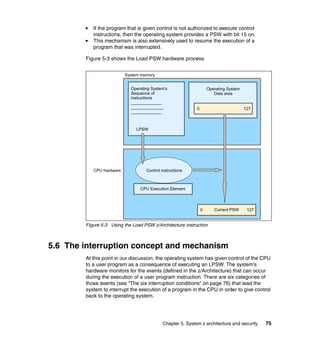
limited when using z/OS UNIX level security. Additionally, some superuser
privileges can be granted to normal z/OS UNIX users by permitting access to the
various class FACILITY and class UNIXPRIV profiles presented in this chapter.
For a complete list of all z/OS UNIX security resources, refer to Appendix B,
“z/OS UNIX general resource classes” on page 487.
11.8 Your bookstore
The case study Internet Bookstore has a z/OS operating system on the System z
hardware platform. The Lightweight Directory Access Protocol (LDAP) server
running in the z/OS system, shown in Figure 11-3 on page 218, is a component
of the Secure Server for z/OS.
While not depicted in Figure 11-3 on page 218, the Internet Bookstore uses the
TCP/IP networking protocol to communicate with users and client programs.
Both the TCP/IP and LDAP server components are z/OS UNIX applications that
leverage and require the usage of z/OS UNIX functionality.
LPAR A, running z/VM, serves as a virtual firewall providing a testing
environment and demilitarized zone (DMZ) local area network (LAN) to ensure
appropriate subnets are isolated from one another. This leverages the power of
z/VM to virtually route and protect multiple TCP/IP stacks.
LPAR B, running z/OS, runs LDAP to communicate to the z/VM LPAR LDAP
client using HiperSockets. On the z/OS side, we protect all of our databases by
having them in a separate LPAR. This leverages the power of System z to isolate
databases virtually and ensure that no one on LPAR A can access databases on
LPAR B unless authorized from the ESM.
218 Introduction to the New Mainframe: Security
Figure 11-3 Internet Bookstore example
11.9 Summary
z/OS UNIX is an integral component on modern day z/OS operating systems.
z/OS UNIX has evolved into a full-featured, UNIX branded environment in which
users are able to run the latest Internet-based applications on the z/OS operating
system.
On traditional UNIX systems, the superuser’s authority is absolute. The
superuser has complete and total access to the entire UNIX system, its users,
and its programs. z/OS UNIX improves the overall security of the system by
allowing superuser-like privileges to be protected individually. Specific pieces of
the superuser authority can be granted, instead of having to grant someone all
privileges. The concept of the Authorized Program Facility (APF) also exists. So
unless programs are in a library specifically authorized for supervisor state or
higher level access, they cannot gain access to the entire system.
Border Router
Internet BookstoreInternet Bookstore
Database
z/VM
Linux
z/OS
CustomerCustomer
Internet z/VM z/OS
Linux
LPAR A LPAR B
Linux
Guest
LAN 1
Storefront Inventory
Linux Linux
Firewall -1 Firewall - 2
Linux
MAINT
CMS
Mail
DMZ
LAN
Test
Storefront
Test
Inventory
Linux Linux
Linux Linux
LDAP
Server
Printer
CourierCourier BankBank
Logs
Finanace
RACF
Order
Fulfillment
Identification
Linux
Guest
LAN 2
LDAP
Client
zSeriesCryptographic Services HiperSockets
Storefront Inventory SpoolCustomers
DIRMAINT
CMS
RSCS
GCS
RACF
Chapter 11. Security in z/OS UNIX 219
The addition of access control lists and multilevel security provide flexible and
stringent security options not available with most UNIX or Linux operating
systems. The powerful zFS file system can be shared with all LPARs of the
sysplex, thus saving on security administration efforts.
The modern e-business mainframe has new life thanks to z/OS UNIX, while at
the same time the hardened security concepts of System z make the z/OS UNIX
one of the safest, most secure, and most auditable UNIX operating systems
available today.
11.10 Key terms
11.11 Questions for review
To help test your understanding of the material presented in this chapter, answer
the following questions. A question may have more than one correct answer.
Select all answers that apply:
1. Which type of workload characterizes the work accomplished by z/OS UNIX
programs?
a. Online workload
b. Batch workload
c. Offline workload
d. None of the above
2. Which role in the IT support organization is typically responsible for the
administration of z/OS UNIX security profiles?
a. Application developer
b. System administrator
c. System operator
d. System programmer
Key terms in this chapter
access control list (ACL) daemon group
group ID permissions privilege
server superuser user
z/OS UNIX
220 Introduction to the New Mainframe: Security
3. A z/OS UNIX user is uniquely identified by a numeric user ID (UID).
a. True
b. False
4. The z/OS UNIX superuser’s numeric user ID is:
a. 0
b. 128
c. 512
d. 1024
5. Which type of z/OS UNIX filesystem is a in-memory-only filesystem?
a. HFS
b. zFS
c. TFS
d. NFS
6. Which type of z/OS UNIX filesystem is required if you wish to use multi-level
security (MLS)?
a. HFS
b. zFS
c. TFS
d. NFS
7. File permissions are specified as three groups of permissions, with the order
of permissions having the following meaning:
a. Group, owner, other
b. Other, group, owner
c. Group, owner, other
d. Owner, group, other
8. If a user has permissions rw- to a particular file, the user may:
a. Read, write, and execute the file
b. Read and write the file
c. Read and execute the file
d. Write and execute the file
9. An access control list (ACL) can contain entries for multiple users or groups
and can grant or restrict permissions to a file.
a. True
b. False
10.The z/OS UNIX extended file permission value oF “a” means:
a. Accesses to the file are be audited.
b. The file can be appended to.
Chapter 11. Security in z/OS UNIX 221
c. The file has been archived.
d. The file is APF authorized.
11.A z/OS UNIX superuser may switch to another user’s identity without having
to know the target user’s password.
a. False
b. True
12.Which External Security Manager (ESM) class can be used to protect z/OS
UNIX functions?
a. FUNCTION
b. UNIXPRIV
c. FACILITY
d. SUPERUSER
13.Which ESM class can be used to protect z/OS UNIX privileges:
a. FUNCTION
b. UNIXPRIV
c. FACILITY
d. SUPERUSER
14.Which ESM resource profile is used to protect daemon authority on z/OS
UNIX?
a. BPX.SERVER
b. BPX.DAEMON.HFSCTL
c. BPX.DAEMON
d. BPX.SUPERUSER
15.Which ESM resource profile is used to allow normal z/OS UNIX to change
ownership of their own files?
a. CHOWN.UNRESTRICTED
b. RESTRICTED.FILESYS.ACCESS
c. SUPERUSER.FILESYS
d. USER.CHANGE.OWNER
16.The security audit options for individual files can be turned on or off using the
z/OS UNIX chaudit command.
a. False
b. True
17.If the BPX.SERVER resource profile is not defined to the ESM, the z/OS
UNIX system is running with which of the following?
a. z/OS UNIX level security
b. UNIX level security
c. No security
d. Minimal security
222 Introduction to the New Mainframe: Security
11.12 Topics for further discussion
1. Discuss the security profiles that can be established to limit superuser
privileges in a z/OS UNIX system.
2. Compare and contrast the difference between UNIX level security and z/OS
UNIX level security available in z/OS UNIX.
3. Explain the benefit that is achieved by using access control lists versus
standard UNIX file permissions.
11.13 Exercises
Assume that you are responsible for designing a security policy to protect your
z/OS UNIX system.
1. Document the roles and responsibilities of the system programmer and
system administrators, and state the reasons why you have chosen to
separate their security-related responsibilities, if applicable.
2. Determine whether you will implement z/OS UNIX level security or UNIX level
security. State the reasons why you have chosen one method over the other.
© Copyright IBM Corp. 2007. All rights reserved. 223
Chapter 12. z/OS communications security
In today’s world, the Internet plays a significant role in connecting computer
systems. Systems are exposed to anyone with a laptop and a connection to a
service provider. Not everyone “out there” plays by the rules, so you need to
protect your system environment and communications.
Objectives
After completing this chapter, you will be able to:
Understand why securing connections is important
Use Secure Sockets Layer and Transport Layer security
Explain what session keys are, and how they are used to secure
conversations across the Internet
Describe IP filtering
Understand virtual private networks
Describe TCP/IP and SNA security on z/OS
Understand public key infrastructure and the z/OS PKI Server
List the Intrusion Detection Services available on z/OS
12
224 Introduction to the New Mainframe: Security
12.1 Communications security overview
Figure 12-1 illustrates the case study Internet Bookstore example. Up to this
point in the text, we have addressed the content of the major elements in the
figure. In this chapter, we describe with the “connecting lines”, that is, the
communications between the elements.
Computing systems, both hardware and software, need to connect to other
systems in order to perform most tasks today. In the Internet Bookstore example,
you see the customer connecting to the bookstore, the bank, and the courier.
Sensitive data is passed on these connections, and that sensitive data must be
protected.
Figure 12-1 Communications connections in the Internet Bookstore environment
12.2 Communicating across networks
The primary protocol in use today is Telecommunications Protocol/Internet
Protocol, commonly referred to as TCP/IP. Everything from small systems like
personal digital assistants and laptops, to the largest systems such as z/OS and
BankBank
CustomerCustomer
CourierCourier
Internet BookstoreInternet Bookstore
Chapter 12. z/OS communications security 225
Linux, provide the ability to connect to the Internet. This capability is a powerful
driver of business. Users can connect to your system without knowing what type
of server it is running on, or the underlying operating system you have chosen to
implement.
Because connectivity is so easy, however, you need to implement
communications security. Doing so allows you to open up your enterprise to
everyone on the Internet, or to tailor the user community to only those users
whom you feel comfortable serving. You can turn security off on trustworthy
applications, but enforce strict controls on others. z/OS provides the flexibility
you need to conduct business, while protecting critical resources.
Users of the Internet Bookstore can be either real people or other systems in a
network. For example, users of the banking system expect secure connections
when they are browsing their personal sensitive data, such as account balances
and transaction histories. The bookstore system expects a secure connection
when sending its user’s sensitive data to the bank, such as a withdrawal
transaction containing account numbers. The bank expects a secure connection
when sending and receiving sensitive data from its users. The courier connects
to the bookstore, the bank, and the user, all over secure connections. For all
these transactions, you do not want unauthorized users snooping on your
personal data, or on the applications that carry that data.
So the question is, how can you secure all these connections? For an answer,
we examine the methods of networking and the security that pertains to them.
12.2.1 Secure Sockets and Transport Layer security
Using Secure Sockets Layer (SSL) protocol, you can encrypt data flowing in and
out of your system, either within or beyond the scope of your business. SSL
assures clients that the server is genuine because it requires the server to
authenticate to the client using a digital certificate. It allows you to be certain of
the origin of any data flowing into your system, and you can be sure that the data
was not altered from when it was created. SSL provides the ability for users of
your services (such as FTP, HTTP, and shell) to authenticate using complex
digital certificates rather than simpler user ID and password semantics.
Establishing an SSL connection begins with a handshake during, which the
server is authenticated to the client using a digital certificate. During the
handshake, security session parameters (such as which cryptographic
algorithms to use) are negotiated and session keys are created. Also, the client
can optionally be authenticated to the server. After the handshake, the data
flowing between the client and the server is protected.
226 Introduction to the New Mainframe: Security
z/OS provides a set of SSL C/C++ APIs that, when used with the z/OS Sockets
APIs, provide the functions required for z/OS applications to establish secure
sockets communications.
Transport Layer Security (TLS) is the latest in the continuing evolution of SSL.
TLS 1.0 might as readily have been titled “SSL 3.1”. In fact, when negotiating a
TLS handshake, the client and server hello messages use version specification
3.1 (SSL 3.0 uses version specification 3.0).
Finally, TLS 3.1 is a protocol designed with the intent of allowing enhancements
for future improvements to privacy over TCP connections.
The RFC for TLS 3.1 includes support for extensions which:
Allow TLS clients to provide to the TLS server the name of the server they are
contacting.
Allow TLS clients and servers to negotiate the maximum fragment length to
be sent.
Allow TLS clients and servers to negotiate the use of client certificate URLs.
Allow TLS clients to indicate to TLS servers which CA root keys they possess.
Allow TLS clients and servers to negotiate the use of truncated MACs.
Allow TLS clients and servers to negotiate that the server sends the client
certificate status information (for example, an Online Certificate Status
Protocol (OCSP) [OCSP] response) during a TLS handshake.
SSL does not provide for such enhancements.
Encryption algorithms
An encryption algorithm is a mathematical procedure for converting a plaintext
message into ciphertext. Through the use of an algorithm, information is made
into meaningless cipher text and requires the use of a key to transform the data
back into its original form. There are several algorithms, each with its own
advantages and drawbacks. DES, 3DES, and AES are examples of encryption
algorithms; refer to 7.2.1, “The symmetric algorithms” on page 107, for more
information about this topic.
Session keys
Session keys are the seeds to the cryptographic algorithms used to encipher the
data that flows between parties over a public network. The algorithms are well
known, but the session keys are known only to the applications at the ends of the
conversation.
Chapter 12. z/OS communications security 227
During SSL handshaking, the applications agree on what algorithm to use for
encryption, and then they agree on the seed or key for the session. The session
key lasts only for the life of the conversation. If another conversation starts
between the same two ends, then a new session key is generated and shared.
Symmetric and asymmetric encryption
Symmetric encryption is a type of encryption where the same key is used to
encrypt and decrypt the message; refer to 7.2.1, “The symmetric algorithms” on
page 107, for more information about this topic.
Asymmetric encryption is a form of encryption where keys come in pair. What
one key encrypts, only the other can decrypt. It is also known as public key
technology, since users typically create a matching key pair, and make one
public while keeping the other private; refer to 7.2.2, “The asymmetric algorithms
to the rescue” on page 109, for more information about this topic.
Figure 12-2 illustrates the comparison between these encryption methods.
Figure 12-2 Comparing symmetric and asymmetric key usage
Some very
sensitive data
that is to be
encrypted
Some very
sensitive data
that is to be
encrypted
Symmetric encryption
Thesamekey isused to encrypt and decrypt
Asymmetric encryption
Different keysareused to encrypt and decrypt
A key is
generated
and shared
A key-pair is
used.
Some very
sensitive data
that is to be
encrypted
Data isencrypted with
thereceiver’sPublic
Key.
Data isdecrypted with the
receiver’sPrivateKey.
Some very
sensitive data
that is to be
encrypted
encrypted data
issent to the
receiver
encrypted data
issent to the
receiver
Data isencrypted with
theshared key
Data isdecrypted with
theshared key
228 Introduction to the New Mainframe: Security
12.2.2 IP filtering
As you open your system up to the Internet, you want to consider who will be
accessing your resources from outside of your internal networks. The ability to
filter out unknown and unwanted traffic is very useful. This capability is
sometimes called a firewall. In construction, a firewall prevents fire (a most
unwanted entity) from moving from one part of a building to another. On
computer networks, a firewall performs much the same function:
It lets users that are known to you use resources from the outside, without
compromising your network's data and other resources.
It keeps unknown users from coming in to compromise or attack your
network.
IP filters are rules defined to either discard or permit traffic coming into your
system. These rules determine which packets will be received and processed,
and which will be ignored as if they were never received.
You can apply different rules to decide how your filters will work. You can base
the filtering on the source or destination of the packet, the protocols being used,
and even the socket number. By filtering TCP/IP packets, you can eliminate
some threats as they attempt to contact your systems, as Figure 12-3 on
page 229 shows.
Chapter 12. z/OS communications security 229
Figure 12-3 IP filtering
12.2.3 IPSec and Virtual Private Networks
A Virtual Private Network (VPN) enables an enterprise to extend its network
across a public network such as the Internet through a secure tunnel (or security
association). IPSec allows the creation of a VPN. IPSec and VPN enable you to
send data over a public network, like the Internet or within you own internal
network. Figure 12-4 on page 230 shows IPSec security associations between
two firewalls, between client and firewall, and between client and System z
server.
z/OS
Applications
z/OS CS
TCP
Sockets
Filter Deny
IP
Permit
Data Link
230 Introduction to the New Mainframe: Security
Figure 12-4 Typical IPSec configuration
12.3 Systems Network Architecture
Systems Network Architecture (SNA) is a set of protocols which provide
communication services to z/OS. SNA is based on the assumption that in order
to communicate to a system, you must first be connected to the system.
In contrast, TCP/IP does not make this assumption. TCP/IP flows packets of
data, or “datagrams” over the network. Each packet contains destination
information and is received independently of any other packets that make up the
entire message. SNA establishes a session between logical units on two
systems. A conversation can then flow across the session. On z/OS, the Virtual
Telecommunications Access Method (VTAM) component of the Communications
Server provides the support for creating logical units, establishing sessions, and
managing conversations.
A particular type of logical unit supports the Advanced Peer to Peer
Communications (APPC) protocols. The APPC/MVS component of z/OS
manages the APPC conversations.
S/390
Enterprise Network
or Intranet
Enterprise Network
or Intranet
Business
Partner
Internet
Remote
Access
Intranet
Host
IPSec
Security
Associations
Chapter 12. z/OS communications security 231
12.3.1 Introduction to APPC
To help explain SNA security, we use APPC/MVS as an example. First, however,
we need to take a brief detour to understand what APPC is, and how
conversations are held over this protocol.
An APPC conversation is like a telephone call. In order to call a friend, you need
to know a few things first. You need the telephone number to dial, your friend’s
name, and a topic for discussion. You also need to know your name.
In APPC, the logical unit you are using acts like your “telephone”. Your friend also
has a “phone”. You start a session by dialing the number. Someone other than
your friend picks up the call on the other end. VTAM establishes a session
between logical units and passes control to APPC/MVS, which answers requests
for conversations at the partner system. You ask to speak with your friend.
APPC/MVS requires the name of the program you wish to start. The person who
answered the phone asks for your name. APPC/MVS requires a user ID and
password. Your friend picks up the phone. APPC/MVS establishes a
conversation between you and your friend. Now you’re talking!
12.3.2 VTAM APPL security
VTAM applications, known as logical units, are protected by the external security
manager. APPC/MVS uses VTAM APPLS as the ports of entry and exit on z/OS.
A description of APPC/MVS security serves as an example of VTAM APPL
security.
APPC/MVS Security
APPC/MVS provides a transaction scheduler that initiates and schedules
transaction programs (TPs) in response to inbound requests from other TPs in
an SNA network. As with any communications vehicle, APPC/MVS has ports of
entry. These ports are defined in the Communications Server as logical units.
Traffic flowing through the logical units must be secured. Communications
Server provides several options for defining the security level required on an
APPC/MVS logical unit. APPC/MVS uses type LU6.2 logical units.
APPC/MVS manages conversations that are held over Communications Server
sessions. Sessions are held on logical units. A single logical unit may hold
multiple sessions as shown in Figure 12-5 on page 232.
232 Introduction to the New Mainframe: Security
Figure 12-5 Multiple sessions on single logical units
Conversations are allocated which forces a session to be bound between the
initiating or local system, and the remote or partner system. The allocation
request in part contains:
The user ID and password for the identity to use on the partner system
The name of the transaction program to start on the partner system
The logical unit on the local system
The logical unit on the partner system
An indication that the details of the conversation request reside in a local data
set. These details are called side information.
Security classes
Several classes of APPC/MVS-related security profiles are maintained by the
external security manager:
APPL - profiles in this class protect VTAM logical units.
APPCLU - profiles in this class protect logical unit-to-logical unit (LU-to-LU)
access authority for a specific LU and one or more of its partners.
APPCTP - profiles in this class protect APPC/MVS transaction programs.
APPCSI - profiles in this class protect APPC/MVS side information.
APPCPORT - profiles in this class protect APPC/MVS LUs by controlling
which LU the user's request can come from.
LU
6.2
TP1
TP4
LU
6.2
TP2
TP3
TP5
parallel sessions
Chapter 12. z/OS communications security 233
Security checking on the local system
The user ID on the local system requires at least READ access to the local
LU6.2. If the allocation indicates that APPC/MVS should use side information,
the local user ID needs READ access to the side information data set and the
requested side information within the data set.
Security checking on the partner system
As the request flows from one system to the other, the user ID provided on the
allocation request needs at least READ access to the LU6.2 on the partner
system. Of course, the user ID passed on the allocation must exist on the partner
system.
APPC/MVS maintains a database of the transactions it is aware of. The user ID
on the incoming request requires at least READ access to this database, and the
specific transaction that is being requested.
The transaction is made up of JCL that is submitted into a scheduling
environment. The user ID requires access to any data sets that are described by
the JCL.
12.4 Public key infrastructure
The public key infrastructure (PKI) provides applications with a framework for
performing the following types of security-related activities:
Authenticate all parties that engage in electronic transactions
Authorize access to sensitive systems and repositories
Verify the author of each message through its digital signature
Encrypt the content of all communications
As digital certificates become increasingly important in securing transactions on
the Internet—with capabilities far beyond those of mere password
protection—large enterprises are looking for a complete and scalable solution for
managing these certificates. The PKI infrastructure is the standard for public-key
cryptographic security, which is used to ensure the security of digital certificates.
With the PKI infrastructure, digital certificates can provide the trusted
infrastructure for security-rich transactions over the Internet. As part of the
Security Server element of z/OS, PKI Services for z/OS, a base component,
provides this same trusted infrastructure for security-rich, Web-based
transactions.
234 Introduction to the New Mainframe: Security
The z/OS PKI Server is a complete Certification Authority package, always
enabled independently of the installed security manager. The Certification
Authority keys are located in a secure file or within the ESM. The z/OS PKI can
be a root CA, or an intermediate CA. It provides these functions to implement
and perform full certificate life cycle management:
User request driven via customizable Web pages
Automatic or administrator approval process
End user/administrator revocation process
With PKI Services, z/OS installations have the capability to establish a PKI
infrastructure and serve as a certificate authority for internal and external users.
The issuance and administration of digital certificates and certificate revocation
lists are performed in accordance with the CA policy that the owning organization
puts in place.
12.4.1 Public keys and private keys
In order to discuss public and private key technology, we should first discuss
encryption. As discussed previously, encryption is the process of changing the
representation of data from a easily read form into a form where the content of
the data is unrecognizable. Well-known mathematical algorithms which rely on a
specific number or “key” to produce a result are used by programs to encrypt or
decrypt data. The key is shared between entities whom trust each other.
Data is encrypted and sent to its destination, To decipher the message, the
receiver of the encrypted data must have the proper decryption key. In traditional
encryption schemes, the sender and the receiver use the same key to encrypt
and decrypt data.
The inherent problem with single key encryption methods is the sharing of the
key. If the key is compromised in any way, then the data is no longer secure.
Public keys are used to address this problem.
When a public key is generated, a matching private key is also generated. These
keys are numerically different, and it is not possible to derive the value of one key
from the value of the other. Data encrypted in one key can only be decrypted with
the other. One key is kept very secure on the owner’s system. The other key can
be broadcast for all the world to see.
It is immaterial which key is the “public” key and which is the “private” key. It only
matters that one is highly secured and the other is distributed to where it can be
used to for secure communications with its owner.
Chapter 12. z/OS communications security 235
Figure 12-6 Using public and private keys
Figure 12-6 illustrates the use of public keys and private keys. Next, we describe
the process in detail.
The Internet Bookstore accepts digital certificates as an authentication
mechanism. A customer has her digital certificate installed into her browser.
Before her browser transmits her credit card information across the vast expanse
of the World Wide Web, it encrypts the data using the customer’s private key as
the key to the algorithm (refer to “Encryption algorithms” on page 226, for details
about how System z performs encryption functions). The encrypted data flows
across the Internet, bouncing from server to server. The server, having a copy of
the customer’s digital certificate, which contains her public key, then decrypts the
data and reads her card number.
12.4.2 Digital certificates
Digital certificates bind an identity to a public key, through which you can verify
the sender or the recipient of an encrypted transfer. A digital certificate is an
encrypted piece of data which contains information about its owner, creator,
generation and expiration dates, and other data to uniquely identify a user.
Digital certificates are used to authenticate from a client to a server and establish
a secure connection. Digital certificates are not used to acquire authorization
information about z/OS. The owning identity is mapped to an existing user ID for
purposes of authorization checking.
Internet applications, such as FTP clients and Web browsers, may support the
use of a digital certificate as a means to authenticate to the server. The daemon
being connected to must be configured to accept a digital certificate as the user’s
security credentials.
Data decrypted using
the user’s public key
Data encrypted using
the user’s private key
Data decrypted using
the user’s private key
Data encrypted using
the user’s public key
236 Introduction to the New Mainframe: Security
In reality, the digital certificate you are using is located in your application, such
as in the browser on your laptop. It is also stored on the system you are
attempting to access. Thus, users will be known to the serving system prior to the
connection for any specific transaction. The digital certificate is used mostly for
authentication purposes; beyond that, the session is secured using SSL.
Table 12-1lists the types of certificates that you can request, based on the
certificate templates that are included with PKI Services. Certificate templates
are samples of the most commonly requested certificate types. You can add,
modify, and remove certificate templates to customize the variety of certificate
types you offer to your users.
Table 12-1 Types of digital certificates available from z/OS PKI Services
Type of certificate Use
One-year PKI SSL browser certificate End-user client authentication using SSL
Two-year PKI browser certificate for
authenticating to z/OS
End-user client authorization using SSL
when logging onto z/OS
Five-year PKI SSL server certificate SSL Web server certification
Five-year PKI IPSEC server (firewall)
certificate
Firewall server identification and key
exchange
Five-year PKI intermediate CA certificate Subordinate (non-self-signed) Certificate
Authority certification
Two-year Identrus authenticode - code
signing certificate
Software signing for Identrus
Four-year Identrus end-entity certificate Identrus client communication signing and
S/MIME signatures
Four-year Identrus end-entity server
signing certificate
Identrus server communications signing
and S/MIME signatures
Four-year Identrus end-entity utility
certificate
Identrus client SSL authentication and
S/MIME encryption
Four-year Identrus end-entity server
encipherment(SSL) certificate
Identrus server SSL authentication and
S/MIME encryption
One-year SAF browser certificate End-user client authentication where
RACF (not PKI Services) is the certificate
provider
One-year SAF server certificate Web server SSL certification where RACF
(not PKI Services) is the certificate
provider
Chapter 12. z/OS communications security 237
Inside a digital certificate is information about where that certificate was
generated. The system that generates the certificate is a Certificate Authority
(CA). Your z/OS system can act as a CA and generate certificate for your user
community. However, in the grand scheme of things, your system is probably not
trussed by the rest of the world. There are well known entities that create
certificates which can be used by your system to generate certificates for your
users. This way the certificates that your system issues can be traced back to the
well known entity and thus proven to be genuine.
12.5 Intrusion Detection Services
It is becoming increasingly important to not only protect systems from attacks,
but also detect patterns of usage that might indicate impending attacks. Many
attacks follow a sequence of information gathering, unauthorized access to
resources, and denial of service. It can be difficult to determine the originator of
denial of service attacks. Correlating information gathering activities with access
violation may help identify intruders before they succeed.
Intrusion Detection Services (IDS) provides support for:
Scan detection and reporting
Attack detection, reporting and prevention
Your Internet Bookstore could become vulnerable to intruders. As the
bookstore’s popularity grows, your Internet address will become known to more
and more people. And because the bookstore is on the World Wide Web, anyone
in the world can get to your system—and not everyone will be coming to buy
books. Some will visit your system in an effort to do damage.
The more popular a business, the greater risk that it will be attacked. You should
implement intrusion detection devices to catch intruders before they bring your
business to a halt. Remember, profits are hard to generate if the system is not
available to buyers. A secure system is one that is available to users who have a
legitimate reason for being on it—and unavailable to those who do not.
12.5.1 Scan detection
Scans are recognized as the result of multiple information-gathering events from
a single source IP within a defined period of time. Scanning in and of itself is not
harmful. However, many serious attacks, especially access violation attacks, are
preceded by information-gathering scans. Because scans by their nature must
use reliable source IP addresses, they can be interesting events to monitor.
238 Introduction to the New Mainframe: Security
12.5.2 Attack detection
An attack can be a single packet designed to crash or hang a system. An attack
can also consist of multiple packets designed to consume a limited resource,
thus causing a network, system or application to be unavailable to its intended
users (that is, denial of service). IDS attack policy allows you to turn on attack
detection for one or more categories of attacks independently of each other. In
general, the types of actions that can be specified for an attack policy are event
logging, statistics gathering, packet tracing and discarding of the attack packets.
12.6 Summary
The Internet is a wild and scary place for a computer system to live. There are
crackers, hackers, and attackers out there waiting for an unsecured system to
open up. These intruders will try to clog your ports, ride Trojan horses, and tunnel
in with worms. They want to shut you down, steal your data, and change your
settings. It is up to you to stop them.
So, secure your ports, batten down the hatches, make everyone declare
themselves—and banish anonymous users! Protect your system so that those
who should use your system for legitimate reasons are free to do so, as long as
they present the proper credentials.
12.7 Key terms
12.8 Questions for review
1. When using SSL, how does the client know that it is connected to the server it
expects to be using?
2. What is the advantage of TLS over SSL?
3. How are encryption algorithm used?
4. What is a session key? How is it used?
Key terms in this chapter
APPC/MVS APPL Communications Server
digital certificate intrusion detection PKI
SNA
Chapter 12. z/OS communications security 239
5. What is monitored for IP filtering?
6. What is done with the filtered data?
7. What is a Virtual Private Network used for?
8. Briefly describe the difference between TCP/IP and SNA security.
9. What is the relationship between a digital certificate and a public key?
10.Name two types of Intrusion Detection Services.
12.9 Questions for discussion
1. What is the difference between TCP/IP and SNA security?
2. When is it preferable to use digital certificates instead of user IDs and
passwords?
12.10 Exercises
1. Develop a security policy which incorporates discretionary and mandatory
access controls for network resources. The security policy must consider
when security-relevant events should be logged, and how often the log record
data sets are to be audited.
240 Introduction to the New Mainframe: Security
© Copyright IBM Corp. 2007. All rights reserved. 241
Chapter 13. Security in z/VM
13
Objectives
After completing this chapter, you will be able to:
Describe the primary function of the z/VM operating environment
List the operating systems that z/VM supports
List the major components of z/VM
Describe how z/VM is used by businesses
Discuss how z/VM implements the security concepts
242 Introduction to the New Mainframe: Security
13.1 What is z/VM
As a brief explanation, z/VM provides you with a mainframe implemented in
software, that is, virtualization of the System z hardware; it gives you a virtual
machine.
z/VM hosts other operating systems as guests in a virtual machine. It does so by
emulating the System z hardware within that same hardware, while providing
extra features and benefits that are implemented in software more cost
effectively than hardware can provide.
Some features of the System z server are designed solely for the purpose of
maintaining user integrity1
. All elements of our security concepts (information
confidentiality, integrity, and availability) can be implemented through user
integrity.
Virtualization of the machine allows you to do the following:
Manage many servers using universal management tools
Reduce labor costs
Help to limit the potential for anomalies, and maximize the utilization of
existing hardware
Like all System z operating systems, z/VM can run alone or share the mainframe
with others by using the Processor Resource/System Manager (PRSM) facility of
the System z. z/VM can either emulate the same System z server it is running
on, or certain hardware features that are not necessarily installed on that
particular model of server, and it can provide a custom environment for each
guest.
z/VM supplies System z server features to a number of guest operating systems
transparently and simultaneously, without the need for a physical server per
guest, while it isolates each guest OS and schedules access to real devices as
needed. This is particularly important at this time as we move into 64-bit
computing, because z/VM allows you to host 32-bit guests and 64-bit guests
simultaneously. Devices that z/VM can optionally share with guests include CPU
cycles, real memory, disk volumes, network adapters, hardcopy input and output
devices, and devices specific to the System z such as cryptographic cards.
In the case of disk storage, z/VM is capable of partitioning a disk volume and
assigning portions to each user. Control of read-only and read-write access, or
none at all, is at the discretion of the partition owner. It also supports the latest
Storage Area Network (SAN) and virtual tape library systems.
1
User integrity is the hardware feature that identifies guests and prevents unauthorized tampering
outside of address space; refer to Chapter 4, “Elements of security” on page 45 for more information.
Virtualization
Allows sharing of
a few resources
across many
applications.
Chapter 13. Security in z/VM 243
z/VM can host the following operating systems:
z/VM
z/OS
z/VSE
Linux for System z
z/TPF
Conversational Monitor System (CMS)
Each operating system runs its own application set. Inter-user communication
occurs with virtual adapters in RAM storage at memory speed. The number of
guests that z/VM can operate concurrently is limited only by the amount of
resource available to the System z server; that is, the hardware. This is in
contrast to the Processor Resource/System Manager (PRSM) facility, which has
a fixed limit to the number of LPARs (depending on the model of eServer
System z).
13.2 The origin of VM
The product that goes by the name “VM” was announced in August 1972. Part of
that announcement reads:
“By way of analogy, think of the beam of light as an IBM System z; the prism, as
z/VM. The many colors produced by the prism from the one light source are now
many virtual System z produced by z/VM from one real System z. And each
virtual System z has the capability to run its own programming system, such as
z/OS, z/VSE, or CMS. Many from one...many virtual System z from one real
System z. And z/VM makes it happen!”2
For the complete story of VM development, see Melinda Varian’s paper VM and
the VM Community: Past, Present, and Future, which is available at the following
site:
http://www.princeton.edu/~melinda/25paper.pdf
Figure 13-1 on page 244 illustrates a timeline of VM and its name changes.
2
IBM Virtual Machine Facility/370 (VM/370) Demonstration, GV20-0388, IBM Corp., August 2, 1972
244 Introduction to the New Mainframe: Security
Figure 13-1 VM evolution
13.3 Is VM another operating system
So, is VM considered to be another operating system? The answer is: maybe.
An operating system can be defined as the program that is initially loaded onto a
computer when it is started, and that interfaces between the hardware and the
user or applications to control access to memory, input and output devices, and
files within the file system.
However, z/VM does not completely satisfy this definition because its file system
is not designed to contain files, but instead to partition disks so that multiple
guests can operate their own file system on the disk. Also, its hosted
“application” is not an end user or a word processor but another operating
system. For these reasons, z/VM is usually referred to as a monitor or
hypervisor, rather than an operating system.
Guests of a VM host run within user IDs, or just “ID”, for short. Typically, people
who log on to VM are called “users”, whereas automated user IDs are known as
“service machines” and run in a disconnected state (that is, without a console or
display terminal attached).
Hardware
CP-67
S/360
VM/370
VM/SP
VM/HPO
VM/ESA
z/VM
S/370
N-way
64-MB real
31-bit
VM/XA
ESA
64-bit zSeries
Operating
System
1960s 1972 1980 1981 1988 1995 200xTimeline
Chapter 13. Security in z/VM 245
Logging on to VM is accomplished by initiating communications and starting a
terminal session (local or telnet), and then responding to challenges with a z/VM
user ID and its associated password. But you can also make use of virtual
servers running under z/VM without logging on to VM itself, just as you utilize any
Web server by browsing the Internet and do not actually log on to the Web
server.
Conversational Monitor System
VM consists of the Control Program (CP), which is the virtual machine hypervisor
that interfaces between real devices and the guest, and the Conversational
Monitor System (CMS) which is a single-user operating system for use within a
CP virtual machine.
CMS provides a text-based environment much like PC-DoS. Using CMS, you
can create and edit files, and build applications to automate routine tasks. Many
programming and scripting languages are supported under CMS. CMS does not
recognize the concept of a user ID; instead, that distinction belongs to CP.
Within CP you have your very own mainframe to operate, and you can use it to
create files that contain data or programs, share them with other CMS users,
compile them, execute them, or send them to other virtual machines running
other operating systems. But in order to perform those tasks, you must first
LOGON to CP with a user ID.
Whereas System z operating systems are all batch-oriented (that is, designed to
start, run, and end a job), VM is different in that it is a time-sharing environment.
Interactive in nature, VM is designed to begin running and remain running,
servicing ad hoc user requests until shutdown.
CMS is often loaded into a CP virtual machine first in order to prepare the virtual
machine for loading a second, batch-oriented, operating system. It supports one
of the most useful tools that VM provides, the REstructured eXtended eXecutor
(REXX). REXX is a scripting language that runs on all IBM platforms, and more.
It is similar to the C or Python languages in structure, while providing an
Assembler-like level of control. REXX can also be compiled and executed with a
run-time library much like Java.
An article in the Computing History Museum Forum states:
“By far the most important influence on the development of Rexx was the
availability of the IBM electronic network, called VNET. In 1979, more than three
hundred of IBM's mainframe computers, mostly running the Virtual Machine/370
(VM) operating system, were linked by VNET. This store-and-forward network
allowed very rapid exchange of messages (chat) and e-mail, and reliable
distribution of software. It made it possible to design, develop, and distribute
CP + CMS=VM
246 Introduction to the New Mainframe: Security
Rexx and its first implementation from one country (the UK) even though most of
its users were five to eight time zones distant, in the USA. A side effect of this
geographical separation was that nearly all the discussions on the Rexx
language took place using electronic mail which was recorded, hence forming an
unusual historical record of the development of a programming language. It has
therefore been possible to determine the exact chronology of the early history of
Rexx.”3
13.4 How VM is used in the real world
You should find the economies of scale to be evident in this discussion of VM
usage. Multiple instances of software on the mainframe share the same
hardware devices, floor space, and cooling requirements. Administrators can
manage problems and change by way of tool automation. They can more easily
control a given number of servers than in topologies where one disparate server
is required for each operating system.
The two most complex administration tasks in a distributed environment are
managing the network and the storage farm. The greatest costs in a distributed
environment are caused by the necessity for backup servers or hot spares,
development machines, quality-assurance machines, and regression machines
for testing, in addition to the production servers. All the infrastructure necessities
of a network and server farm are integrated into and provided by the mainframe
with high availability supplied by built-in redundancies. Addition or removal of
new servers to this virtual farm can occur at a rate of several per second, should
need dictate.
Certain models of System z servers allow the customer to enable and disable
hardware engines to meet temporary peak business needs and quiet periods.
Monetary charges related to both hardware and software are tied to the duration
of the temporary condition and the capacity enabled, putting the customer in
control of their costs. This is especially true with open source deployments due to
differences in licensing structure. It is similar to the concept of utilizing contract
personnel instead of full-time employees to enable you to grow and shrink your
workforce with little or no notice.
If based on open standards, uniform virtual servers can be designed to be
shared among business processes or customers. This allows the processing to
be viewed as a utility that supports your business. A utility can respond very
rapidly to changing resource needs, ensuring that processing cycles are
delivered to business processes as needed. Business ebbs and flows, so should
the environment supporting it.
3
Mike Cowlishaw, The Early History of Rexx, IEEE Annals of History, Winter 1994, Volume 16, #4,
© 1999 IEEE
Economies of
scale
When a large
number of
elements share a
resource, the
cost per element
decreases.
Server
consolidation
Combining
smaller server
workloads onto a
larger server.
Utility
computing
Collection of
technologies and
business
practices that
enables
computing to be
delivered
seamlessly and
reliably across
multiple
computers.
Chapter 13. Security in z/VM 247
Figure 13-2 on page 248 shows a simple diagram of server consolidation
through virtualization that provides economy of scale. The consolidated server
farm could be used for utility computing.
You can see that multiple server machines are running within the mainframe.
These servers may be connected by a communications network within the
mainframe, sharing data with each other and using space on real disks for
permanent storage.
As illustrated, the information and processing cycles of these virtual servers can
be exchanged or shared with computers outside of the mainframe; these can
represent personal computers being used by employees and customers, or local
department file and print servers.
Some security considerations in this environment are:
How are users identified, authenticated, authorized
Which external users are authorized to access the environment
Which users have access to what data
Which users have special privileges
How authorization is performed, logged, and audited
How data is backed up, stored, and restored
Figure 13-3 on page 249 illustrates z/VM deployment at the Internet Bookstore.
248 Introduction to the New Mainframe: Security
Figure 13-2 Server consolidation through virtualization
13.5 The Internet Bookstore and z/VM
Now we look at the use of z/VM within the case study Internet Bookstore. Your
customer connects through the Internet to a border router that protects the
downstream virtual Firewall-1 from Denial of Service (DoS) types of attacks that
can reduce service availability for all users. Once inside the virtual network, an
identification server presents the storefront Web pages and allows anonymous
guests to browse and register, and allows registered customers to log on and
purchase the inventory.
z/OS
z/VSE
z/VM
z/TPF
Linux
z/OS USS
CMS
terminal
CMS
terminal
CMS
terminal
Linux
Chapter 13. Security in z/VM 249
Figure 13-3 z/VM deployment at bookstore - continued
Note that the admin user ID running CMS is not connected to the virtual LAN.
The system administrator is a role with special privileges, but is not like being a
network administrator. It is more like being on the floor of the server farm and
able to add or remove servers, and control which are operating in a given period.
For example, if a server fails, the admin user ID can merely restart it. The admin
also has the ability to attach or detach disks and printers to each server, and to
alter the amount of memory available to each. Servers can be duplicated or
cloned in minutes and brought online by the admin user ID to perform immediate
restoration work and resume operations.
13.6 How many virtual servers can VM support
So, how many virtual servers can VM support? The answer depends on the
amount of resources available to the System z server, but here we look at an
example of what is possible.
Storefront InventoryCustomers
Internet BookstoreInternet Bookstore
Database
z/VM
Linux
z/OS
CustomerCustomer
Internet z/VM z/OS
Linux
LPAR A LPAR B
Linux
Guest
LAN 1
Storefront Inventory
Linux Linux
Firewall -1
Border Router
Logs
Admin
CMS
Identification
Linux
zSeriesCryptographic Services HiperSockets
250 Introduction to the New Mainframe: Security
Just how many virtual copies of Linux can you run on an S/390? David Boyes, a
Virginia-based engineer, has gained some notoriety in the Linux community for
his “Test Plan Charlie’ effort in which he ran 41,400 copies of Linux on the same
S/390 CPU. “Each virtual machine was a complete multi-user
network-accessible Linux system configured for a specific task”, he said. “Some
generated Web traffic, some handled network connectivity, others were
applications servers, others were shared file servers.” In this test, the system ran
smoothly, although it did slow as more virtual systems were added. It did not
crash, however, Boyes says, even when VM ran out of resources to allocate.
This sort of nearly-unlimited scalability, either on multiple virtual machines or on
one copy of Linux, seems to be one of the things attracting users to Linux on the
mainframe.4
13.7 Confidentiality and integrity on z/VM
There are several aspects and features of z/VM that contribute to confidentiality
and integrity:
Hardware awareness of guest separation
Data encryption
Intrusion detection
Accountability features
Certified implementations
Debugging aids
We describe them in more detail in this section.
13.7.1 Hardware awareness of guest separation
By default, z/VM does not allow guest operating systems to be aware of each
other. It achieves this by utilizing the Interpretive Execution Facility (IEF)5
of the
System z that is built in specifically for this purpose.
IEF provides the function of executing an entire virtual machine instruction
stream as a single instruction called SIE. The virtual machine is dispatched to
run by the Control Program in a way that makes the System z firmware aware of
the virtual machine details, and the guest runs on the hardware until its time slice
expires or if an instruction that cannot be virtualized is attempted, such as
4
Daisy Whitney, “Linux on Big Iron: 41,400 copies of Linux running on one box? No problem”, found
at: http://www.developer.com/tech/article.php/625891
5
A token received from a given one of the virtual machine guests is used to identify a particular host
data space. The guest also supplies an offset. The offset and the identified host data space are then
used to derive a host absolute address representative of a data location in the host data space.
United States Patent 5230069
Chapter 13. Security in z/VM 251
reference to a real address. At that point, CP regains control to simulate the
operation. Should a guest operating system fail, control is always returned to CP
for error recovery. In this way, guests are isolated and protected from others.
This results in very low overhead for a virtualized environment and delivers
confidentiality and integrity among virtual servers.
This feature is described in greater detail in z/VM Security and Integrity,
GM13-0145.
Each virtual machine sees a duplicate of the server and has no concept that it is
sharing the System z, unless you specifically want it to. The memory of each
guest is protected with a dual layer approach. The System z server performs
dynamic address translation through a hardware feature, and z/VM makes use of
that feature to fully virtualize the address space of each guest within main
memory just as each guest operating system is allocating its allotted storage
between applications that it is running.
The operating system running as a guest can perform its own address translation
and maintain its own tables of “real” and “virtual” memory without awareness that
its entire address space is virtual. What appears to be page or swap space to an
operating system can be, in reality, real memory. Performance improvements
can be realized in this way with certain operating systems. Conversely, a poorly
behaving application will be paged out by VM and not drag the entire system
down. In such a protected environment, a guest OS running on z/VM can
communicate over a virtual network with another guest of the same mainframe,
or with another server externally and not notice the difference.
Clearly, not all devices can be shared simultaneously as can real memory,
network interfaces, and direct access disks. Tape drives, for example do not lend
themselves to being used by multiple programs concurrently. Thus, serial
devices are attached to a guest for the duration of use, while random access
devices are controlled by CP and instructions for each guest interleaved in an
efficient manner. Printers and other unit record devices are, in general, owned by
CP and the spooling subsystem controls which output set is printing at any given
time. In certain circumstances, a serial device will be dedicated to a guest with
the attach command and be unavailable to other guests during that session.
13.7.2 Data encryption
In addition to the SIE feature, System z servers offer four distinct and one
combination cryptographic hardware options:
CMOS Cryptographic Coprocessor
Peripheral Component Interconnect (PCI) Cryptographic Coprocessor
(PCICC)
PCI Cryptographic Accelerator (PCICA)
252 Introduction to the New Mainframe: Security
PCIX Cryptographic Coprocessor (PCIXCC)
Crypto Express2, which provides the functions of PCICC and PCIXCC in a
single feature
13.7.3 Intrusion detection
One element of z/VM intrusion detection capabilities is that if a login is denied,
the event is tracked and a security journal entry made when the number of
denials exceeds an installation-defined maximum. When a second maximum is
reached, logon to the user ID is disabled, an operator message is issued, and the
terminal session is terminated.
Journaling is supported on z/VM. Virtual machine logon attempts and linking to
other virtual machine’s minidisks are detected and recorded. Using the recorded
information, you can identify attempts to log on to a virtual machine or to link to
minidisks using invalid passwords.
13.7.4 Accountability
A special capability available with z/VM is “Logon By.” This function is similar to
the UNIX Switch User SU command in that it enables the user to make use of a
shared virtual machine without knowing the password to that machine.
When users log on to the shared user ID using this option, they provide their own
user ID and password. An audit trail is maintained of who is actually logged into a
shared user ID, so the problems inherent in sharing passwords are avoided. This
tracks the identity of the user of a shared user ID, ensures user authority is
validated, and provides accountability.
13.7.5 Certification
z/VM V5.1 is currently in evaluation for conformance to the Controlled Access
Protection Profile (CAPP) and the Labeled Security Protection Profile (LSPP) of
the Common Criteria, both at Evaluation Assurance Level (EAL) 3+.
The IBM PCI Cryptographic Coprocessor (PCICC) has earned the FIPS 140-1
Level 4 certification required by US government agencies. The z890, z800, z900
and z990 are the only servers in the world currently running with EAL5
certification, the industry's top hardware security rating, as granted by Germany's
Federal Office of Information Security6.
6
Bundesamt fuer Sicherheit in der Informationstechnik (BSI); for more information, visit:
http://www.bsi.de
Chapter 13. Security in z/VM 253
13.7.6 Debugging in a virtual environment
Using a virtual environment to debug operating systems and applications gives
you the distinct advantage of using CP commands to query memory locations
while the virtual machine is running, or in a stopped state at some chosen point
of interruption. IBM debugs new versions of z/VM in various virtual machine
types created by a previous version of z/VM.
Another important advantage is that, because the entire environment is virtual,
little harm can come to the system by incorrect device calls and operations. An
instruction that could potentially freeze up a device when running on real
hardware and require operator invention is trapped by CP, recognized as illegal,
and an appropriate response code returned to the calling application without
affecting hardware availability to other guests of the mainframe.
13.8 Virtual networking
Communication between virtual machines is provided by various simulated
devices or by facilities that are unique to the z/VM operating environment.
Available communications paths include z/VM Guest LANs, Inter-User
Communication Vehicle (IUCV), and Virtual Channel-to-Channel Adapter
(VCTCA).
Each of these options provides a highly secure communication path which is not
detectable or in any way “sniffable” by other virtual machines. That is, no other
virtual machine may eavesdrop on the data moving between virtual machines. Of
course, these virtual network connections are only as secure as the guests
connected to them. A virtual network is typically connected to the outside world
using virtual firewalls or routers. These are virtual machines which have both
virtual network connections and real network connections, routing traffic as
needed between the two.
Virtual networks should be planned with the same care and attention to security
as would be utilized for a real, physical network. Networks, virtual or physical,
must be designed and implemented so that no unauthorized access to data or
resources is possible. For system administration tasks, a separate network with
secure access is recommended. The ability to define multiple virtual routers
gives the ability to completely isolate traffic moving in and out of the mainframe.
The best LAN is one without wires
The z/VM Guest LAN, introduced with z/VM Version 4 Release 2, provides
multipoint any-to-any virtual shared media connections between guests. A virtual
machine accesses a Guest LAN using a virtual Network Interface Card (NIC),
which emulates either a System z HiperSockets adapter or, in z/VM Version 4
Guest LAN
A virtual network
connection
between two
guest machines
running in the
same VM
environment.
254 Introduction to the New Mainframe: Security
Release 3, an IBM OSA-Express adapter in QDIO mode. As many Guest LANs
as are needed may be defined and used simultaneously; all are distinct with no
cross-talk between them unless that traffic is routed from one LAN to another by
a virtual router.
In order to prevent unauthorized connection to a Guest LAN, the creator of the
LAN can define it to be restricted, permitting only specific virtual machines to
connect to it. Further, only a user with special privilege class is allowed to create
a Guest LAN. Such a LAN would be owned by the Control Program and survive
even after the virtual machine that created it logs off. It is these persistent Guest
LANs that would most often have restricted membership. Connections to a Guest
LAN are established dynamically via the CP COUPLE command or by a
SPECIAL statement in the virtual machine’s system directory entry.
Highly secure communication between LPARs can be easily handled by using
System z HiperSockets connections.
The Virtual Channel-To-Channel (VCTC) service emulates a real CTC adapter
(IBM 3088). The guest defines a VCTC and then uses the CP COUPLE
command to connect the two endpoints. I/O operations to the device are
intercepted by the Control Program, which moves the data between two different
virtual machines.
A VCTC can be defined dynamically via the CP DEFINE CTCA command, or it
can be defined in the virtual machine’s system directory entry. If defined in the
system directory, the partner user ID may be specified in order to restrict who
may connect to the virtual machine. A VCTC would be used in cases where
communications are always necessary between two known points, and massive
amounts of data are often exchanged, because it is a dedicated and secure pipe.
The Inter-User Communication Vehicle (IUCV) provides ad hoc high speed
connection-oriented messages to be sent between virtual machines. It is the
peer-to-peer “instant messenger” between VM guest operating systems.
Unlike simulated I/O devices, the IUCV connections can be established between
pairs of virtual machines on the same z/VM system or on different z/VM systems.
IUCV provides the cross-memory communication of virtual CTC devices, but
without the overhead required to simulate an I/O device. Authorization to
establish IUCV connections is defined using the IUCV statement in a virtual
machine’s system directory entry. A particular virtual machine may be authorized
to establish IUCV connections to any virtual machine, or to only specific virtual
machines. To ease system administration, a server can be configured to accept
IUCV connections from any user, eliminating the need to provide explicit
authorization for each client. In many cases, such servers provide their own
identity and authentication functions as necessary.
Virtual
Channel-To-
Channel (VCTC)
adapter
A virutal
channel-to-
channel
connection
between two
guest machines
in the same VM
environment.
Inter-User
Communication
Vehicle (IUCV)
A peer-to
peer “instant
messenger”
between VM
guests
operating
systems in the
same VM
environment or
in different VM
environments.
Chapter 13. Security in z/VM 255
13.9 Compliance to policy
A z/VM system is secured by utilizing security features of the System z hardware
by maintaining compliance to security policy within operating practices, and by
making use of the user directory which contains a list of users of the system.
Typically, a security standard is structured as shown in Figure 13-4. Compliance
to it is stipulated by a Mandatory Employee Conduct document.
Figure 13-4 Security standard content
The main control point of VM security is the user directory file, called CP
DIRECT. For that reason, it is also called the CP directory. It is owned by the
1. User and System-to-system Identification
a. Unique Identification
b. Employment & Trust Verification
c. Server & Device Registration
2. User and System-to-system Authentication
3. Access Authorization
4. Information Classification and Protection
5. Service Integrity and Availability
a. Operating System Resource Protection
b. System Administrative Privilege
c. Harmful Code
d. Vulnerability Scanning
e. Security Patch Management
f. Change control
g. Service Availability Management
i. Denial of Service Prevention
ii.Systematic Logon Attack Detection
iii.Server and Service Activation
iv.Server and Service Deactivation
v. Client and Server Services
6. Logging and Audit
7. Assurance
a. Health Checking Requirements
b. Security Technical Testing
c. c) Security Control & Process Reviews
8. Incident Reporting
a. Reporting Security Incidents
b. Access Violations & Invalid Logons
c. Exceeding Authority
9. Physical access control
Operating
practices
Rules
established by an
organization to
promote security.
User directory
File that lists all
the VM users and
their resources.
256 Introduction to the New Mainframe: Security
system administrator and every user of the system is identified within this file,
including the system administrator. Also, each user’s resources are defined in
the file. Clearly, the directory and the ability to promote a directory into active
state must be the most protected assets of a VM system. The system
administrator must lead the way in following security standards and guidelines if
the community is to be safe.
There are three methods of securing a z/VM user directory, each providing an
additional level of security:
Basic Editing the directory manually
Automated Using the DirMaint™ program to manage the directory
Advanced Using the external security manager (RACF) program
13.9.1 The CP directory
The CP Directory is the reference repository which VM uses to perform its
access control. By default, each VM user’s address space, filesystem, and all
files are private to the user or virtual server.
It requires some special action to expose data to another user, although, as with
all platforms, the OPERATOR or superuser is able to gain all access rights to
them if they have a need. In this directory, each guest’s privilege class is
assigned.
The privilege class determines their rights to issue certain CP commands and
program instructions (Diagnose codes) that reference the world outside their own
virtual machine. Although a default set of classes is defined when you initially
install VM, you can also create your own custom classes.
There can be up to 32 classes defined. The standard class for General users is
class G. Class G users cannot affect other users or CP operation, although by
using certain query commands, they can become aware of other guests.
It is possible, even desirable, to create classes with less than general user
privilege which allow certain virtual machines only the minimum functionality
required to perform their assigned duty.
The CP directory has basically two forms:
1. Human readable in the CMS file called CP DIRECT.
Chapter 13. Security in z/VM 257
2. Machine readable in object form, placed on a reserved area of disk by the
privileged CP direct command.
In VM, access rights can be granted in two ways:
1. Mandatory access rights to system resources. These are granted by the
CLASS value in the user’s CP DIRECT entry and are thus controlled by a
System Administrator7
. Mandatory privileges are grouped into classes, with
users having one or more classes assigned to them. For example, it takes a
special VM privilege class to issue the DIRECT command to update the user
directory.
2. Discretionary access rights to a user ID’s resources can be granted by the
owner of the resource or another authorized user. These are granted to other
users, giving them Read or Write access to virtual disks that contain files.
They can be overridden by a system administrator.
13.9.2 The format of the CP directory
The CP directory file contains groups of statements. Each group is associated
with a single and unique user. The user is identified and distinguished from each
other with the USER statement, with all records following that statement applying
to that named user. Figure 13-5 on page 258 shows an example of some
directory entries. Here we explain the most common ones within the CP DIRECT
file in more detail:
USER Defines the user ID, password (if not running an external
security manager), virtual memory, privilege class.
Example: The USER statement begins a directory entry.
The user ID for this virtual machine is LINUX001.
“xxxxxxxx” represents the user's logon password. The
virtual machine has a default storage of 256 megabytes
“256M” when initially loaded, but the owner can redefine
storage up to a maximum of 1 gigabyte, “1G”. The “L”
means the virtual machine user is of a class of user that
7
System Administrator in the mainframe context refers to the person who grants and revokes
privilege. Contrast with the same title in the mid-range server field, who installs applications and
implements operating system patches (known as a System Programmer in the mainframe world).
258 Introduction to the New Mainframe: Security
can execute commands designated only for users within
that class.8
Figure 13-5 Linux server CP Directory example
ACCOUNT Defines accounting information for the user ID described
in USER. This might be the department number of the
bookstore employee.
IPL Defines the user’s program or device to Initially Load
(which is known as boot on other platforms).
Example: The IPL statement indicates which operating
system to load when you log on to the virtual machine.
Figure 13-5 shows that CMS will be loaded. Loading CMS
is handy because it allows you to make changes to the
normal environment, as well as to run some REXX
EXECs to prepare an environment for another operating
system like Linux.
SPOOL Defines virtual I/O devices available to this user with one
statement per device. Typical devices and addresses are
8
IBM Redpaper Running Linux Guests with less than CP Class G Privilege, REDP-3847, describes
how to harden a z/VM system to run Linux virtual machines in a hostile environment.
USER LINUX001 xxxxxxxx 256M 256M L 64
ACCOUNT MI6
IPL CMS
MACHINE ESA 4
OPTION ACCT
CONSOLE 0009 3215 T
NICDEF BC0 TYPE QDIO LAN SYSTEM VSWITCH1
SPOOL 00C 2540 READER *
SPOOL 00D 2540 PUNCH A
SPOOL 00E 1403 A
LINK MAINT 0190 0190 RR
LINK MAINT 019D 019D RR
LINK MAINT 019E 019E RR
LINK LINUXMON 0291 0191 RR
MDISK 0101 FB-512 V-DISK 131072 M
MDISK 0102 FB-512 V-DISK 262144 M
MDISK 0103 FB-512 V-DISK 131072 M
MDISK 0301 3390 1476 1000 USXF36 MR
MDISK 0302 3390 2201 850 USXF27 M
MDISK 0303 3390 2476 850 USXF36 M
MDISK 0401 3390 601 200 USXF27 MR
MDISK 0407 3390 3031 150 USXF29 M
MDISK 0408 3390 3191 145 USXF35 M
Chapter 13. Security in z/VM 259
a virtual input device, that is, a card reader, at address
00C, an output device, card punch, at 00D, and a virtual
printer at 00E. Many other types are possible.
CP controls the real devices, and provides a pool of spool
space for the user’s files while they are in transmission
between users or waiting for real devices. That is, you can
“punch” a file from your user ID to another user ID to
“read” without a card deck actually being produced (this
described the original e-mail, which was in widespread
use before the personal computer existed).
Example: SPOOL statements define the unit record
devices. By convention, device number 000C is for the
virtual reader (type 3505), device number 000D is for the
virtual punch (type 3525), and device number 000E is for
the virtual printer (type 1403).
MDISK Defines areas of disk that are owned by this user. Termed
minidisk, it is an area of a real direct access storage
device (DASD) that is partitioned and assigned to a
specific address and owned by a specific user for storage
of the employee’s personal files. From the perspective of
that user, it is a volume of DASD. It could be an entire real
volume of DASD in size that is managed by a virtual
server. There is virtually no limit to the number of MDISK
statements present for each user.
LINK Defines access to other user’s MDISK statements.
Minidisks can be shared in Read or Write mode, but it is
the responsibility of the user to ensure proper
Reserve/Release protocols are followed to maintain data
integrity. There is one LINK statement per shared
minidisk.
MACHINE Describes the processor architecture of the virtual
machine. The maximum number of virtual CPUs that can
be defined for this virtual machine is four. The default is
one.
CONSOLE Defines the operating console (virtual console) for the
virtual machine. CMS requires console type 3215. If
supported by the operating system, you can specify 3270
or issue the CP command TERMINAL CONSOLE 3270 in
the PROFILE EXEC prior to loading the operating system.
260 Introduction to the New Mainframe: Security
NICDEF Defines this virtual machine's attachment to a z/VM virtual
switch.
The group of statements is repeated for each user.
You should follow with other statements to define the other characteristics of the
clone virtual machine. You can define as many clones as your estimation of the
capacity of the hardware machine allows an acceptable planned performance.
13.9.3 System user IDs involved in security
Typically, each type of directory record appears for each user at least once,
except for the USER statement, which is unique for each user. The standard
user IDs on the Internet Bookstore’s VM system, as a default system install, are:
OPERATOR System operator, high privilege user ID. Equal to root on
UNIX systems.
MAINT Used by a person for system administration and
maintenance. At least equal in power to OPERATOR.
EREP Environmental Record Editing and Printing Program.
Hardware anomaly detection and predictive failure
system.
DISKACNT Records events such as logon and logoff.
OPERSYMP Retrieves symptom records. System dump analyzer and
problem tracking system.
13.10 External security managers for VM
An external security manager (ESM) is an application that provides enhanced
security controls and reporting functions as contrasted with a basic system
product, and which utilizes the application programming interfaces that an
operating system provides for this purpose. This can improve not only security,
but also efficiency, through automation. 10.5, “External security managers” on
page 185 describes ESMs in more detail.
Using an ESM the bookstore might require fewer system administrators. This
section provides a brief introduction to three of the external security managers
available: DirMaint, RACF, RSCS, and shows a method to link these ESMs with
those of other operating systems running as guests (that is, LDAP). We also
provide an example of how all three ESMs can work together in a typical access
request scenario.
Chapter 13. Security in z/VM 261
13.10.1 Directory Maintenance for VM
The IBM Directory Maintenance (DirMaint) for VM product is a CMS application
that could help the bookstore security administrator manage the CP directory by
checking syntax validity and tracking changes.
Directory management is simplified by the DirMaint command interface and
automated facilities. DirMaint directory statement-like commands are used to
initiate directory transactions. DirMaint error checking ensures that only valid
changes are made to the directory, and that only authorized personnel are able
to make the requested changes. Any transaction requiring the allocation or
de-allocation of minidisk extents can be handles automatically. All user-initiated
transactions can be password controlled and can be recorded for auditing
purposes.
You can spawn clones of the LINUX001 user ID to the user directory easily by
using the DirMaint command as shown here, where you supply a password for
<new_password>:
dirm add linux002 like linux001 pw <new_password>
The system user IDs that the DirMaint product adds are:
DIRMAINT The primary ID that processes user requests and
manages the CP directory file, and controls the other two
service machines.
DATAMOVE A service machine that performs disk copies, moves, and
changes as instructed by DIRMAINT.
DIRMSAT A satellite service machine in clustered mainframe
networks to perform delegated work from a central
DirMaint authority and maintain synchronization of the
local CP directory.
Note: These are automated user IDs which are not normally connected to a
display terminal or attended by a person.
13.10.2 Resource Access Control Facility
The Resource Access Control Facility (RACF) licensed program for VM is a
strategic product that provides comprehensive security capabilities. RACF
controls user access to the system, checks authorization for use of system
resources, and audits the use of system resources.
In the z/VM environment, RACF verifies logon passwords and can check for
authority to access minidisks, data in spool files, and RSCS nodes. You can use
RACF in the Internet Bookstore to keep statistical information, such as the date,
262 Introduction to the New Mainframe: Security
time, number of times a user enters a system, and the number of times a specific
resource was accessed by any one user. Events that you can audit include:
Any CP command or DIAGNOSE code (including privileged commands and
DIAGNOSE codes)
The creation, opening, and deletion of spool files
The dumping and loading of spool files through SPXTAPE commands
IUCCONNECT and SERVER operations and certain VMCF functions
APPC/VM CONNECT and SERVER operations
The creation and deletion of logical devices
If you install RACF as an ESM on the VM system of the Internet Bookstore, the
following user IDs (virtual servers) are created:
RACF
RACFSMF
RACFRMB
RACFRMBA
Those user IDs have special privileges beyond the average user and therefore
must have equally special safeguards against exposures.
13.10.3 Secure communication between network users
The VM/Remote Spooling Communications Subsystem (RSCS) is a
store-and-forward networking product which enables users on one system to
exchange messages, files, commands, and jobs to other users within a network.
RSCS connects systems using links, and each system that hosts RSCS is called
a node. These links allow files to be transferred between the nodes: local and
remote, adjacent and nonadjacent. There are security considerations for this
environment as well:
Propagation of virus-laden files
There is no recorded instance of a virus on VM.
Denial of Service (DoS) attacks
There is one recorded case of a denial of service attack against the IBM
mainframe: the CHRISTMA EXEC. A trojan program or “mass mailer” with no
payload, it was released in December 1987 to systems connected to EARN,
BITNET, and IBM’s internal VNET networks. Displaying a “Christmas card” to
the CMS user that received and executed it, the program also read their
address book (userid NAMES file), and sent a copy of itself to all contacts
within. This quickly overloaded IBM’s VNET network which typically handled
simple e-mail, because for each user receiving the file, many were sent out to
people who had already received it. To halt the spread, RSCS servers were
Chapter 13. Security in z/VM 263
shut down on each system while the file was purged from reader queues en
mass.
If RSCS is installed on the VM system of the Internet Bookstore, you will have
the following user IDs (virtual servers) created:
RSCS
PVTAM
TCPIP
NETVIEW
PVM
These IDs are granted certain special privileges beyond those of the average
user and so must be protected from exposures by average processes.
13.10.4 Lightweight Directory Access Protocol
A VM system with people logging on to it can be easily managed with a standard
security tool such as DirMaint. But when hosting other operating systems, many
issues are introduced that need to be dealt with. If the Internet Bookstore VM
system is to host guest operating systems, they will each likely require their own
security management subsystems. Many of these can interface with security
subsystems on z/VM and with each other, even remotely. The result is a
superset of security management for the control of assets and resources spread
across and between entire organizations and enterprises if necessary.
The Lightweight Directory Access Protocol (LDAP) open standard provides you
with a method for exchanging identification and authentication information
among external security management tools. Using LDAP, disparate security
subsystems can share event information and the task of assessing identification
and authorization.
Using the LDAP communications protocol, the Pluggable Authentication Modules
(PAM) component of a Linux System z guest, or FreeBSD and Solaris™ can
utilize RACF on z/OS, for example, to confirm user identification and access
authorization. This provides a cost-effective central point of control and audit.
13.10.5 A typical access request scenario
Employees of the Internet Bookstore have their managers request access to one
or more systems or databases. The requests are sent to either a Userid
Management team or to the database owners who can grant access.
A security administration office who receives a request would issue a RACF
command that might involve passing commands to the DirMaint product. The
DirMaint product executes “workunits” consisting of multiple stages to complete
264 Introduction to the New Mainframe: Security
tasks. These workunits might span hosts, using the RSCS product to transmit
commands and results between them.
If certain tasks need changes to be implemented on non-VM systems such as
Linux, RACF would utilize LDAP to pass requests through to the other host. Each
product, that is, RACF, RSCS, DirMaint, and LDAP, retain their own transaction
logs. Notification of new system or database access is sent from the security
administrator to the manager, who then forwards the information to the
employee.
13.11 File system security in CMS
When a z/VM user logs on, the Conversational Monitor System (CMS) is
employed. CMS provides file-level integrity while sharing files among users with
the Shared File System (SFS). Sharing files raises security concerns.
To resolve security concerns for SFS data and Byte File System (BFS) data
stored in them, CMS shared file pools consider the following:
To access a file pool, you must be authorized (enrolled) by someone with
administrator authority for that file pool, or it must be classified as PUBLIC.
If an administrator allocates you an SFS file space in a file pool, you are the
only one (other than an administrator) who can create files in that file space,
unless you specifically grant this authority to another user.
You can control access to your SFS files and directories by granting and
revoking authority to other users.
Only the owner of an SFS directory or an administrator can delete the
directory.
Implicit and explicit locks prevent simultaneous updates.
An auditing facility is available that documents attempts to access file pool
resources.
Use of Coordinated Resource Recovery (CRR) server operator commands
and file pool server operator commands, which erase CRR and SFS log data
in the intervention of CRR activity.
In addition, an ESM, such as RACF for z/VM, can replace file pool authorizations
for those objects protected by the ESM. File pools can exploit ESM services
through documented interfaces including the use of the RACROUTE
programming interface.
User management is responsible for evaluation, selection and implementation of
these features, for administrative procedures, and for appropriate controls in
application systems and communications facilities.
Chapter 13. Security in z/VM 265
13.12 The Internet Bookstore with z/VM
Now we apply this new knowledge about z/VM security to the case study Internet
Bookstore. Figure 13-6 visualizes some of the ideas discussed in this chapter. It
also demonstrates that an entire business can be set up under z/VM.
We added a printer and a disk volume for spool space and more user IDs. There
are three virtual networks:
One for Internet customers
One for intranet employees
One for testing
We also included the company’s mail servers and an LDAP Client which uses
the System z HiperSockets facility to communicate between logical partitions
with a z/OS system on the same System z (but not running under z/VM). This
setup provides authentication, which is an element of the confidentiality and
integrity concepts.
Figure 13-6 z/VM at the bookstore
Internet BookstoreInternet Bookstore
Database
z/VM
Linux
z/OS
CustomerCustomer
Internet z/VM z/OS
Linux
LPAR A LPAR B
Border Router
Logs
Linux
Guest
LAN 1
Storefront Inventory
Linux Linux
Firewall -1 Firewall - 2
Linux
Admin
CMS
Mail
DMZ
LAN
Test
Storefront
Test
Inventory
Linux Linux
Linux Linux
LDAP
Server
Printer
Identification
Linux
Guest
LAN 2
LDAP
Client
zSeriesCryptographic Services HiperSockets
Storefront Inventory SpoolCustomers
266 Introduction to the New Mainframe: Security
The bookstore employees, in particular customer service personnel, system
administrators, billing/collections personnel, human resources staff, and so on,
can now access the store environment at Firewall-2. Everybody has their access
customized to suit their job responsibilities.
Figure 13-7 shows the additions of identification and authentication through a
RACF server from the virtual server farm under z/VM. We have also included
disk storage for the filled and pending orders, and the finance department, which
bills the customer. With these new functions secured, the Internet Bookstore
connects to the bank and courier partners for credit card validation and payment,
and shipment of the books.
Figure 13-7 Virtual server farm at the bookstore
13.13 Summary
z/VM is an operating environment that virtualizes a mainframe in software. z/VM
supplies System z server features to a number of guest operating systems
transparently and simultaneously without the need for a physical server per
Border Router
Internet BookstoreInternet Bookstore
Database
z/VM
Linux
z/OS
CustomerCustomer
Internet z/VM z/OS
Linux
LPAR A LPAR B
Linux
Guest
LAN 1
Storefront Inventory
Linux Linux
Firewall -1 Firewall - 2
Linux
MAINT
CMS
Mail
DMZ
LAN
Test
Storefront
Test
Inventory
Linux Linux
Linux Linux
LDAP
Server
Printer
CourierCourier BankBank
Logs
Finanace
RACF
Order
Fulfillment
Identification
Linux
Guest
LAN 2
LDAP
Client
zSeriesCryptographic Services HiperSockets
Storefront Inventory SpoolCustomers
DIRMAINT
CMS
RSCS
GCS
RACF
Chapter 13. Security in z/VM 267
guest, while it isolates each guest OS and schedules access to real devices as
needed.
The benefits of virtualization are: managing many servers using universal
management tools, reducing labor costs, limiting the potential for anomalies
between servers, and maximizing the utilization of hardware by directing
resources where they are needed most.
z/VM does not completely satisfy the definition of an operating system because
its file system is not designed to contain files, but instead to partition disks so that
multiple guests can operate their own file system on the disk. Also, its hosted
“application” is not an end user or a word processor, but another operating
system. For these reasons, z/VM is usually referred to as a “monitor” or
“hypervisor”, rather than an operating system.
Devices that z/VM can optionally share with guests include CPU cycles, real
memory, disk volumes, network adapters, hardcopy input and output devices,
and devices specific to the System z such as cryptographic cards. In the case of
disk storage, z/VM is capable of partitioning a disk volume and assigning
portions to each user. Control of read-only and read-write access, or none at all,
is at the discretion of the partition owner. It also supports the latest Storage Area
Network (SAN) and virtual tape library systems.
Operating systems that z/VM can host are: z/VM, z/OS, z/VSE, Linux for System
z, z/TPF, and Conversational Monitor System (CMS). Each operating system
runs its own application set. Inter-user communication occurs with virtual
adapters in RAM storage at memory speed. The number of guests that z/VM can
operate concurrently is limited only by the amount of resource available to the
System z server.
The major components of VM are:
The Control Program, which is the virtual machine hypervisor that interfaces
between real devices and the guest
The Conversational Monitor System, which is a single-user operating system
for use within a CP virtual machine
CMS provides a text-based environment allowing you to create and edit files, and
to build applications to automate routine tasks. Many programming and scripting
languages are supported under CMS.
VM provides the opportunity for economy of scale and server consolidation
because multiple instances of software on the mainframe share the same
hardware devices, floor space, and cooling requirements. Administrators can
manage problems and change by way of tool automation. They can more easily
268 Introduction to the New Mainframe: Security
control a given number of servers than in topologies where one disparate server
is required for each OS.
z/VM applies the concepts of confidentiality and integrity by providing:
Hardware awareness of guest separation
Data encryption
Intrusion detection
Accountability features
Certified implementations
Debugging aids
Communication between virtual machines is provided by various simulated
devices or by facilities that are unique to the z/VM operating environment.
Available communications paths include z/VM Guest LANs, Inter-User
Communication Vehicle (IUCV), and Virtual Channel-to-Channel Adapter
(VCTCA). Each of these options provides a highly secure communication path
which is not detectable or in any way “sniffable” by other virtual machines.
The main control point of VM security is the user directory file, called CP
DIRECT. It is owned by the system administrator and identifies all system users
and their resources. The CP Directory is the reference repository which VM uses
to perform its access control. By default, each VM user’s address space,
filesystem, and all files are private to the user or virtual server. Compliance to
security standards and policy is stipulated by a Mandatory Employee Conduct
document.
An external security manager (ESM) is an application that provides enhanced
security controls and reporting functions utilizing the application programming
interfaces that an operating system provides for this purpose. There are three
ESMs available for VM: DirMaint, RACF, and RSCS.
The IBM Directory Maintenance (DirMaint) for VM is a CMS application that
allows to manage the CP directory by checking syntax validity and tracking
changes. RACF controls user access to the system, checks authorization for use
of system resources, and audits the use of system resources. The Remote
Spooling Communications Subsystem is a product that provides secure
communication between networked users on external systems. The Lightweight
Directory Access Protocol (LDAP) is a method of linking these ESMs with those
of other operating systems running as guests.
Chapter 13. Security in z/VM 269
13.14 Key terms
13.15 Questions for review
1. Describe the techniques that z/VM uses to share the mainframe with other
operating systems.
2. Describe how the primary cost savings are achieved when using z/VM to
consolidate servers.
3. Compare and contrast three ways in which the z/VM user directory can be
managed.
4. Describe utility computing and the features of z/VM that apply to it.
13.16 Topics for discussion
1. List some possible contributors to system overhead that hypervisors such as
z/VM introduce, and contrast with the benefits that virtualization provides over
distributed networks.
13.17 Exercises
1. Develop rough drafts of security standards for z/VM and for Linux for
System z. Consider that there are virtual servers running under a server
environment. Security concepts and elements apply to both environments,
but in different ways. For example, a CP user ID for a virtual Linux server can
Key terms in this chapter
Control Program Conversational Monitor
System (CMS)
CP directory
DirMaint hypervisor interpretive execution
facility
inter-user communications
vehicle
LDAP minidisk
RACF RSCS server consolidation
Shared File System (SFS) utility computing virtual channel-to-channel
virtualization
270 Introduction to the New Mainframe: Security
be set to disallow logon from remote terminal, but the Linux server
administrator user ID must allow login if user IDs on the Linux server are to be
administered.
2. Develop two different business scenarios: one utilizing distributed server
networks, and one utilizing consolidated virtualized servers on System z.
Compare and contrast the cost benefits and pitfalls of each, assuming growth
within the companies over an extended period. Exchange the technology
within the scenarios and compare and contrast cost again.
© Copyright IBM Corp. 2007. All rights reserved. 271
Chapter 14. Security in Linux on
System z
It is said that no computer system is 100% secure, but an effective level of
security can be achieved. Effective security is not achieved, however, simply
through the use of settings and tools, but rather through careful planning in
advance by means of a well thought-out and integrated security policy.
In this chapter, we discuss tools and integration techniques that you can use to
increase the level of security as you install and run Linux for System z.
14
272 Introduction to the New Mainframe: Security
Objectives
After completing this chapter, you will be able to:
Understand the aspects of Linux security in general
Describe the aspects of Linux security under z/VM
Explain how to integrate Linux security and that of z/VM
Describe the role of RACF for a z/VM guest operating system like Linux
Describe the role of LDAP
Explain the shared security definitions for LDAP and RACF
Recognize the security and risk aspects of using Linux running on a
System z mainframe as a virtual machine under the control of a hypervisor
like z/VM
Chapter 14. Security in Linux on System z 273
14.1 Linux for System z
You are probably quite familiar with Linux on other platforms. But can Linux run
on a mainframe and provide a secure environment? What exactly is Linux on
System z?
Linux and the System z make a great team. The Linux kernel is always the same,
independent of the hardware platform on which it runs. The operating system is
modular in design and this allows for ease of portability between system and
processor architectures. It is open standards-based, supporting rapid application
portability and it can be quickly adapted to suit changing business needs.
These features combine to provide Linux users with access to a very large
application base. Linux for System z can run natively on the System z hardware,
or up to hundreds of virtual Linux servers can run simultaneously under z/VM,
providing massive scalability within a single server, and unique server
consolidation capabilities that reduce both cost and complexity.
14.1.1 Special functions and features for Linux on System z
Linux for System z supports the 64-bit architecture available on System z
processors. This architecture eliminates the previous main storage limitation of
2 GB. Currently, Linux for System z is based on the Linux 2.4 kernel, exploiting
fully the System z architecture in both real and virtual modes. Linux for S/390 is
also able to execute on System z and S/390 in 32-bit mode.
The following System z hardware is supported by Linux.
Linux can run in:
– A System z single image (and S/390 single image)
– A System z LPAR (and S/390 LPAR)
– A VM/ESA® guest machine and as a z/VM guest
For more information about these topics, refer to Chapter 6, “System z
virtualization and its challenges” on page 87. A special feature of System z is
the Integrated Facility for Linux (IFL), which is an IBM mainframe processor
dedicated to running the Linux operating system, with or without z/VM.
This optional feature provides a way to add processing capacity, exclusively
for the Linux workload, with no limit on the System z model selected. Linux
can also run on IFL engines natively, that is, in a System z LPAR.
Linux supports these storage devices:
– VM minidisks
– Traditional ECKD™ 3380 or 3390 DASDs
– VM virtual disk in storage
274 Introduction to the New Mainframe: Security
For more information about this topic, refer to Chapter 6, “System z
virtualization and its challenges” on page 87, Chapter 9, “z/OS system
integrity” on page 157, and the IBM Redbook Introduction to the New
Mainframe: z/OS Basics.
Linux supports these network devices:
– Virtual Channel-to-Channel adapter
– ESCON® Channel-to-Channel adapter
– OSA-Express (Gigabit Ethernet, Ethernet, Fast Ethernet, Token-Ring)
adapters
The driver supports the Internet Protocol Version 6 (IPv6)1
protocol,
Virtual LAN (VLAN)2
, Simple Network Management Protocol (SNMP)
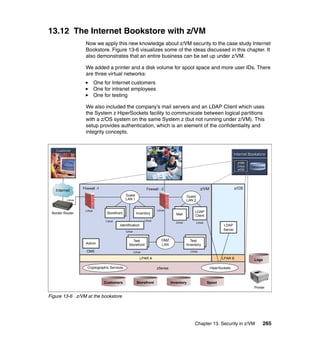
management, broadcast support3
and increased control of the Address
Resolution Protocol (ARP) cache allowing a more rapid communication
across a network between virtual Linux instances on a single machine
(LPAR or virtual mode), or a Linux for System z instance communicating
with another physical system.
– Fibre Channel adapter (FCP channel)
Support for FCP channels means that System z can connect to select
Fibre Channel Switches and FCP/SCSI devices under Linux for System z.
This expanded attach ability provides more choice in these solutions for
Linux implementations.
– HiperSockets
HiperSockets can be used for communication between Linux images and
Linux or z/OS images, whether Linux is running in an IFL LPAR, natively
or under z/VM.
– 3172 Interconnect controller
– Inter-User Communications Vehicle (IUCV) facility
– Character devices
– 3215 console
– Integrated console
See Chapter 8, “Network security for System z” on page 139 and the System
z Basics textbook.
1
IPv6 is intended to support the growth of network addresses required for the explosion of new
devices.
2
VLAN support adds a new dimension of security and cost savings permitting the sharing of a
physical network while logically maintaining separation among unrelated users.
3
New SNMP support provides an ability to retrieve management data which describes OSA-Express
operational characteristics.
Chapter 14. Security in Linux on System z 275
Linux exploits the cryptographic System z feature
Linux for System z is capable of exploiting the hardware cryptographic feature
provided by the Peripheral Component Interconnect (PCI) card for SSL
acceleration. This enables you to implement e-business applications on Linux
for System z that utilize enhanced hardware security.
14.1.2 Linux licensing
Linux is an operating system kernel that, along with various utilities, tools and
applications, is publicly available under the Gnu Public License (GPL)4. Anyone
can use it to build a complete operating system that provides functionality equal
to most available proprietary systems.
The GPL states, in simple terms, that if you take software code licensed under it,
alter it, and share the resulting compiled object, you must also share the altered
source code so that others can do the same. You are allowed to charge a fee for
this service, and let the free market decide whether your alterations are worth the
fee.
These are the most common alterations for System z, provided as packaged
distributions by the following Linux Distribution Partners:
SUSE Linux Enterprise Server 7 for S/390 and System z
See product information at:
http://suse.de/en/produkte/susesoft/S390/
Turbolinux Server 6 for System z and S/390
See product information at:
http://turbolinux.com/products/s390
Red Hat Linux 7.2 for S/390
See product information at:
http://redhat.com/software/S390
More information about Linux is available at:
http://www.ibm.com/linux/
More information about Linux on System z is available at:
http://www.ibm.com/Systemz/linux/
4
See http://www.gnu.org/copyleft/gpl.html
276 Introduction to the New Mainframe: Security
14.1.3 Linux system installation
It is important to ensure that no malicious or untrustworthy code is installed on
the system. When initially installing Linux, always use validated images from a
supported distributor, preferably over a secure medium such as the
distributor-provided CD-ROM which you keep locked away when not in use.
It is not very difficult today to create a CD-ROM or tape that appears to have
come from the trusted source but which has been tampered with, if the original
were left unattended for periods of time. Take regular backups to ensure that
recovery to a secure install is possible in the event the system is compromised.
RPM5 packages should always be authenticated before installation. This ensures
that the package contents have not been altered. Check the author’s digital
signature by using the command:
rpm -Kvv package
Example 14-1 illustrates how to authenticate a package signature.
Example 14-1 Verifying an RPM package
# rpm -Kvv tripwire-1.2-385.s390.rpm
D: New Header signature
D: Signature size: 156
D: Signature pad : 4
D: sigsize : 160
D: Header + Archive: 204491
D: expected size : 204491
tripwire-1.2-385.s390.rpm:
MD5 sum OK: 63b2c0ea8302f6db86b02ec025b913e0
gpg: Warning: unsafe permissions on directory "/usr/lib/rpm/gnupg"
gpg: Warning: unsafe permissions on file "/usr/lib/rpm/gnupg/pubring.gpg"
gpg: Signature made Tue Nov 5 19:09:00 2002 PST using DSA key ID 9C800ACA (1)
gpg: Good signature from "SuSE Package Signing Key <build@suse.de>" (2)
gpg: Warning: unsafe permissions on file "/usr/lib/rpm/gnupg/trustdb.gpg"
gpg: WARNING: This key is not certified with a trusted signature! (3)
gpg: There is no indication that the signature belongs to the owner.
Fingerprint: 79C1 79B2 E1C8 20C1 890F 9994 A84E DAE8 9C80 0ACA
The numbered notes in Example 14-1 are explained here:
(1) The RPM package contains a Pretty Good Privacy (PGP) digital signature.
(2) The signature belongs to SuSE, and it appears to be valid. That is, it has
not been tampered with.
5
RPM stands for Red Hat Package Manager. It is a powerful software manager, allowing you to
install, remove, query, and verify the software on your system. Many other modern distributions, such
as Caldera and SUSE, also use RPM.
Chapter 14. Security in Linux on System z 277
(3) Although the signature appears valid, it has not been registered with a
central authority. In this case, the RPM package came from an official SUSE
CD, and therefore can be trusted.
Example 14-2 shows verification of an unsigned RPM package.
Example 14-2 Verifying an unsigned RPM package
# rpm -Kvv tcpshow-1.0-2.src.rpm
D: New Header signature
D: Signature size: 68
D: Signature pad : 4
D: sigsize : 72
D: Header + Archive: 16064
D: expected size : 16064
tcpshow-1.0-2.src.rpm:
MD5 sum OK: 7c5753f34a8c6b50e1ade11ade311c1a
In this case, no signature information is displayed. Packages from unknown or
questionable sources should not be installed. Use only packages from an
authorized Linux distributor.
14.2 Hardening a Linux installation
The process of securing a system, that is, protecting a system against attackers,
is called hardening. In this section we discuss these processes, procedures, and
tools to prevent system compromise:
Monitor security news and alerts
Monitor your log files
Protect passwords
Authenticate transparently
Limit and monitor user access to the system
Disable unneeded services
Use Secure Shell for remote access
Secure Internet services with TCP wrappers
Protect your system with Linux functions and hardening tools
Secure your network
In the following sections, we explain how these features work.
Note: If a signed RPM package is modified, the check listed in the second
point will fail. It is possible for an RPM package to be signed with a forged
certificate. This can be detected if the original signer registers their certificate
with a trusted third party as in check three in Example 14-2.
278 Introduction to the New Mainframe: Security
14.2.1 Monitor security news and alerts
Software on your system might have defects or vulnerabilities that are not known
at a certain point in time. Linux vendors such as SUSE periodically release
warnings and patches for vulnerabilities, ranging from flaws, virus information, or
simply updates for malfunctioning code. When such vulnerabilities are
discovered, it is important that they are fixed as soon as possible, because they
can quickly be exploited by crackers.
Alerts provide bypasses or recommendations for a code update, often
security-related. Regardless of which operating system or software you use,
always be aware of security risks and therefore seek information about the latest
development and security concerns for your specific environment. There are
many Web sites which provide this information, such as:
http://securitytracker.com
http://www.securityportal.com
http://www.securitysearch.net
http://www.securityfocus.com
http://www.lwn.net
http://www.linuxsecurity.com
14.2.2 Monitor your log files
Linux logging is controlled by the syslog utility. The syslogd daemon accepts
incoming log messages from a variety of sources, such as:
The Linux kernel
System services, such as mail, cron, and Pluggable Authentication Modules
Applications programs
In addition to the message text, incoming log messages indicate:
The service or application generating the message (the facility)
The severity of the message (the level)
The syslog utility adds a time stamp, host identifier, and process identifier to
incoming messages, and then processes the messages according to the
specification found in the /etc/syslog.conf configuration file. Collectively, the
message facility and level are referred to as the message selector.
It is important for you to know where your log files are being written so you can
monitor them for security breaches or gaps. Nearly all applications write to log
files in the directory /var/log/. By default, warning messages are sent to the file
/var/log/warn, and all other messages are written to the file /var/log/messages.
Chapter 14. Security in Linux on System z 279
However, some applications write to other directories and this may vary by
distribution. For example, Samba typically writes log files to the directory
/var/log/samba.
14.2.3 Protect passwords
User information, including passwords, is kept in the system file /etc/passwd.
The password for each user is stored in an encrypted or encoded form in the
following process:
1. The user’s password is encrypted (or encoded) by using a
randomly-generated encryption key between 1 and 4096 and a one-way
hashing function to arrive at a value that is actually stored. Note that the
stored result is not a value that you can type in as a password itself.
1. The key (referred to as the “salt”) is stored with the resulting value. Note that
the key itself cannot be used to decode the value because the encoding
works in a one-way fashion.
1. When you enter a password to logon, your password is rehashed with the salt
value and compared with the stored value. If they match, the user is given
access to the system.
Despite encoding the password with a randomly-generated one-way hash
function, a cracker might still resolve a password if they had access to the
/etc/passwd file using a dictionary attack. That is, methodically testing each value
in the file against a dictionary of commonly-used passwords, each encoded 4096
different ways (to cover all the hash possibilities).
If the system was lax in its password creation requirements and some user used
one of the many commonly-used passwords, at least one password could be
discovered. In Linux, we avoid this vulnerability by moving passwords from the
/etc/passwd file to another file, usually named /etc/shadow, and making this file
readable only by those who have access to the system root directory. Within
Linux, a shadow password file is one in which encrypted user passwords are
stored so that they are not available to unauthorized persons.
14.2.4 Authenticate transparently
The traditional way to authenticate users is by password. Many programs write
their own authentication code. Sometimes the code is well-written, and other
times it is not. Whenever authentication code is included in programs, it is often
duplicated. If you want to use another authentication method, you have to
recompile each program.
Shadow
password file
Encrypted user
passwords
in access-
authorized
directory.
280 Introduction to the New Mainframe: Security
In contrast, if the program is compiled with the support of the Pluggable
Authentication Module (PAM), then you can switch between several
authentication methods without having to recompile each program. PAM
provides centralized authentication for common services such as login, FTP,
Telnet, and SSH. PAM is implemented using dynamic load libraries (DLLs).
Authentication can be customized for PAM-aware services using PAM
configurations files.
Authentication for each PAM-aware application is configured by a configuration
file in the /etc/pam.d directory (the file name indicates the service it configures).
PAM modules implement user authentication; by default, PAM modules are
located in the /lib/security directory. Some PAM modules read global
configuration files located in the /etc/security directory.
The major advantage of using PAM lies in its transparent authentication method.
In a heterogeneous network, for example, the system administrator might want to
authenticate the users against an Intel® server, or a NIS service. If there is a
PAM module for such authentication, the administrator can request
authentication without having to maintain several databases listing all users for
all different systems—that means one authentication method can be used for
different systems. Any suitable method can be used for authentication, that is,
magnetic card or retinal scan.
Using PAM functionality you should:
Limit superuser login to secure terminals
Restrict user login
Apply mandatory access control
Apply access control implementations based on the Linux Security Module
framework which mediates access to internal kernel objects
14.2.5 Limit and monitor user access to the system
Procedures should be in place limiting and monitoring user access to the system,
such as:
Authenticate users from a central repository, such as LDAP or RACF, to lower
maintenance overhead.
Maintain user password standards and expiration policies.
Limit the number of users authorized to access the system.
Limit the number of running services.
Install and upgrade RPM packages from trusted sources.
Logging to a central log server and log all system accesses.
Apply recommended security patches to Linux hosts.
Chapter 14. Security in Linux on System z 281
Restrict the number of hosts running X Windows.
Do not allow programming languages and compilers on production machines.
Include the acceptable use policy as part of the system logon screen.
14.2.6 Disable unneeded services
Many network requests are handled by either the Internet Daemon (inetd), or the
Extended Internet Daemon (xinetd). The Red Hat system uses xinetd as its
default Internet daemon. All other distributions use inetd.
The inetd daemon listens on several network ports and starts the program that
handles the connection. It has its own configuration file, in which all inetd
services are listed. If a service, for instance a Web server, is not handled by inetd
it might instead run its own daemon and listen on its agreed-upon port.
We recommend that you check all services running on the system before you
connect Linux to an insecure network. All services that are not used should be
disabled.
14.2.7 Use Secure Shell for remote access
Internet services provided by the inetd daemon, such as telnet, FTP, rlogin, and
rsh, are inherently insecure. These services pass unencrypted data over the
network, including user IDs and passwords.
By default, Internet services are disabled in most Linux distributions. Before
enabling the inetd daemon, consider using an alternate secure service such as
Secure Shell (SSH). The SSH connection is encrypted and protects you from:
IP spoofing
DNS spoofing
Interception of clear text passwords
An SSH daemon must be running on the target host in order to be able to
establish the connection. The authentication methods available with SSH are:
Password authentication
Key authentication
Host authentication
Kerberos
Authentication by password is the most common way to login via SSH. These
services are offered by the TCP/IP feature of z/VM.
Spoofing
An untrusted
external host
impersonates
a trusted
known host.
282 Introduction to the New Mainframe: Security
14.2.8 Secure Internet services with TCP wrappers
Some sites might choose to enable specific Internet services, for example, to run
an anonymous FTP server. In these cases, it is important to take precautions to
minimize security exposures. A common facility to secure Internet services is
TCP_wrappers.
TCP_wrappers provide the ability to filter incoming connections from Internet
services, such as FTP, Telnet, or SSH. Filtering can be applied without changing
the underlying server software. Most TCP/IP applications implement the
standard client/server model:
1. A client initiates a service request (a connection) on a socket.
2. The server listening on the socket responds to the connection request.
TCP_wrappers are implemented by the tcpd daemon, which interposes an
additional layer (or wrapper) between the client and server. Clients requests are
examined and access controls applied to determine whether to allow or deny the
connection. TCP_wrappers provide the ability to log incoming client requests to
the system logger (the syslogd daemon).
Access control is implemented using two configuration files:
The /etc/hosts.allow file
This file contains the specification for allowed client access.
_ The /etc/hosts.deny file
This file contains the specification for denied client access.
TCP_wrappers provide an access control mechanism based on the examination
of incoming TCP/IP packets. TCP_wrappers cannot protect against
man-in-the-middle attacks, or situations where a network router has been
compromised. In addition, all unencrypted network data is open for inspection.
TCP_wrappers should only be considered as part of a “defense-in-depth”
strategy.
14.2.9 Protect your system with Linux functions and hardening tools
The kernel itself is able to handle incoming and outgoing network traffic in
several ways. For each TCP or UDP packet, you can specify what to do with it.
Ipchains is used to set up, maintain, and inspect the IP firewall rules in the Linux
kernel.
IPchains is used not only to act as a firewall between several networks, it can
also be used to restrict network access to your machine, for example, if you want
Chapter 14. Security in Linux on System z 283
to give only dedicated hosts access to services such as HTTP. For more
information, see the following Web sites:
http://en.tldp.org/HOWTO/IPCHAINS-HOWTO.html
http://www.flounder.net/ipchains/ipchains-howto.html
It is common to use FTP to transfer files over the network. But with FTP, as with
telnet, the password is transferred in clear text and can be “sniffed” by an
attacker. Therefore we recommend that you use the secure copy command scp
for file transfers instead of FTP. This connection is encrypted and you can take
advantage of other, more advanced, authentication methods.
There are many hardening tools available for Linux; for example, Bastille Linux.
After installing a Linux distribution you can install Bastille, which then
recommends software settings you should change to make the system more
secure. See more information on the Bastille Linux Web site:
http://www.bastille-linux.org
If attackers manage to infiltrate a system, they could install utilities for sniffing
passwords. This may not only be difficult to detect in your system, but also hard
to determine how your system has been compromised. One safe approach is to
totally reinstall the operating system from the last trusted backup. But again, you
may not even know your system is compromised.
Because of this exposure, tools such as Tripwire have been developed to
maintain an overview of all files and their modification in the system. This tool is
able to detect added, deleted and changed file/directory modifications. For more
information, see:
http://www.tripwiresecurity.com
Delegate superuser authority with sudo. The tool sudo is an open source security
tool distributed with SUSE Linux (since SLES8) that enables administrators to
delegate authority to specific commands. The sudo home page is located at:
http://www.gratisoft.us/sudo/
Also see the IBM Redbooks Putting the Latest z/OS Security Features to Work,
SG24-6540, and Linux on IBM eServer zSeries and S/390: Best Security
Practices, SG24-7023, for more information about stools that you can use to
secure your Linux system.
14.2.10 Secure your network
If hosts are connected to a public network, it is critical to secure this access.
However, it is equally important to secure access within internal networks, also
Sniffing
Viewing of
network data
by an
unauthorized
person or
system.
284 Introduction to the New Mainframe: Security
called “corporate networks”. The majority of network security incidents originate
from within an internal network. To secure your network, keep in mind to:
Limit the number of trusted hosts and monitor the inventory tightly. Examples
of trusted hosts are:
– Hosts within an internal or corporate network
– Hosts accessed over a virtual private network
Encrypt remote connections with an industry-approved encryption algorithm
equal to or exceeding 1024 bits.
Restrict access to untrusted hosts by using a firewall. Examples of untrusted
hosts are:
– Hosts on the demilitarized zone (DMZ)
– Hosts on external networks
– Hosts for vendor systems
Use server certificates for secure HTTP traffic.
Physical and logical access to servers that perform security-related functions,
such as a firewall or log server, should be strictly limited to authorized security
personnel.
14.3 Linux exploits z/VM security
Linux is not normally supplied with z/VM or with a System z mainframe. Linux for
System z is available with such IBM-available offerings as the IBM eServer
Integrated Platform for e-business on System z and the Integrated Facility for
Linux Engine (IFL) option. It is also available from third party distributors, as
previously described.
VM security processes should be implemented in conjunction with those of Linux
security. Operating system failures that occur in virtual machines do not normally
affect the VM operating system running on the mainframe. If the error is isolated
to a virtual machine, only that virtual machine fails, and the user can re-boot
without affecting the testing and production work running in other virtual
machines. The Control Program (CP) common to VM and z/VM has integrity
such that programs running in a virtual machine are unable to do the following:
Circumvent or disable the CP real or auxiliary storage protection.
Access a resource protected by RACF. Resources protected by RACF
include virtual machines, minidisks, and terminals
Access a CP password protected resource.
Obtain control in real supervisor state, or with a privilege class authority or
directory capabilities greater than those it was assigned.
Chapter 14. Security in Linux on System z 285
Circumvent the system integrity of any guest operating system that itself has
system integrity as the result of an operation by any VM CP facility.
Following are more detailed explanations of these terms:
Real storage protection
The isolation of one virtual machine from another. CP accomplishes this by
hardware dynamic address translation, start interpretive-execution guest
storage extent limitation, and the Set Address Limit facility.
Auxiliary storage protection
The disk extent isolation implemented for minidisks/virtual disks through
channel program translation.
Password-protected resource.
A resource protected by CP logon passwords and minidisk passwords.
Guest operating system
An operating system, such as Linux for System z, that operates under the
Control Program.
Directory capabilities
Those directory classes and options that control functions intended to be
restricted by specific assignment, such as those that permit system integrity
controls to be bypassed, or those not intended to be generally granted to
users.
VM provides many facilities to enhance security and integrity of the system, see
Chapter 13, “Security in z/VM” on page 241.
14.3.1 Authentication
Remember the definition of authentication from Chapter 4, “Elements of security”
on page 45? Authentication is the process of establishing a client’s identity and
determining that this identity is indeed authentic and not an imposter who poses
as the real client. It is a simple challenge-response authentication scheme in
which the client is challenged for a user ID and a password. In the case of the
Internet, it is divided into realms. A realm is supposed to have one user
repository, so a combination of user ID and password is unique within a realm.
The user challenge contains the name of the realm so that users with different
user IDs and passwords on different systems know which one to apply. For
HTTP, the user challenge has the following format:
WWW-Authenticate: Basic realm=”realm_name”
Realm
Protected area of
a Web site.
286 Introduction to the New Mainframe: Security
The user agent, for example a Web browser, returns the following HTTP header
field:
Authorization: Basic userid:password
Login to a z/VM system is achieved by starting a terminal session with z/VM
(local or telnet) and then responding with a z/VM user ID and its associated
password to a challenge presented automatically. Local terminal sessions are by
definition highly secure since the data does not travel over a foreign network.
Remote terminal (telnet) or file transfer (FTP) sessions which travel over internal
or external IP networks can be made highly secure by configuring and using the
z/VM Secure Sockets Layer (SSL) support. The processing required for SSL is
delivered through an SSL server supplied with z/VM and supports 40-bit, 56-bit,
and 128-bit encryption and decryption services. The z/VM SSL server runs a
copy of Linux, and must be installed separately. You install, configure, and use a
telnet or FTP client which supports SSL sessions.
After you have supplied the user ID and password, the Control Program validates
the information. If the user ID and password are valid, your login is permitted and
the terminal session is connected to the virtual machine’s virtual console.
Because the server console is protected by a CP password, you can enhance
the level of protection as compared to a disparate server’s console. Automation
techniques are greatly simplified if the automation tools do not have to, for
example, enter the root password of a Linux server in order to shut it down or
reboot it. While at first glance this may seem to reduce security, it actually
improves security by not requiring the root password to be coded into the
automation programming. It adds a level of security not found outside a
virtualized environment.
Remote access protocols such as REXEC, FTP, and NFS, all require the client
to authenticate using a z/VM user ID and password. At no time will z/VM trust the
claims of an unauthenticated client. Once authenticated, the remote client has
the same access rights as the user would have if the same user were logged into
the system with a local terminal session. For network applications, z/VM can
provide a Kerberos server and the programming interfaces that permit
applications to take advantage of Kerberos authentication and encryption
facilities. It should be noted that the IBM-provided network application suite and
the z/VM Control Program itself do not use Kerberos authentication.
While anonymous access to specific resources or to a virtual machine can be
allowed by z/VM, such access must be explicitly enabled by the z/VM system
administrator.
Chapter 14. Security in Linux on System z 287
14.3.2 Authorization
Once logged into the z/VM system, the virtual machine can access various types
of resources available to the host, including entire DASD volumes, minidisks,
tape drives, network adapters, user files, system files, and so on. The security
features of z/VM are designed so the a virtual machine can access only the
resources specifically permitted to it. Those permissions may be granted by the
system administrator in such a way as to make the resource available when the
virtual machine is started. Alternatively, permissions may be granted dynamically
by either the system administrator or the owner of the resource.
14.3.3 The z/VM user directory
The CP directory (or user registry) describes the configuration and operating
characteristics of each virtual machine that can be created by CP. A z/VM user
directory exists in two forms:
A source form that consists of one or more CMS files
An object form, compiled from the source, on a CP-formatted disk
The source format of the user directory can exist as a monolithic file that contains
the entire user directory, or as several files to define the user directory. In either
case, the compiled format is created using the DIRECTXA utility.
14.3.4 Directory Management with the Directory Maintenance Facility
Maintaining the user directory can be simplified using the automation and
command interface provided by the Directory Maintenance Facility (DirMaint).
Every directory entry statement is implemented as a DirMaint command.
DirMaint provides the following facilities to ensure system integrity when creating
or updating the user directory:
Error checking is performed to ensure only valid changes are applied to the
user directory.
Authorization to modify specific directory statements can be delegated to
z/VM users.
Modifications to the user directory are performed by DirMaint service
machines (thus reducing the need to grant elevated authorization to other
z/VM virtual machines).
288 Introduction to the New Mainframe: Security
DirMaint can maintain the user directory for both local and remote z/VM
systems (again reducing the need to grant elevated user authorization).
The DirMaint product may be used in conjunction with:
Resource Access Control Facility (RACF).
Other External Security Managers (ESMs) providing equivalent interfaces for
password verification and audit recording; and optionally providing equivalent
function for user enrollment and unenrollment, resource registration and
removal, and resource authorization checking.
More information about DirMaint can be found in 13.10, “External security
managers for VM” on page 260.
14.3.5 RACF on z/VM
The Resource Access Control Facility (RACF) licensed program is an enterprise
security facility that provides comprehensive security capabilities. RACF controls
user access to the system, checks authorization for use of system resources,
and audits the use of system resources. A more complete description of RACF
can be found in Chapter 10, “z/OS System Authorization Facility and security
managers” on page 175.
In the z/VM environment, RACF verifies logon passwords and checks access to
minidisks and spool files. You can use RACF commands to audit
security-relevant events and prevent users from entering the CP DIAL and MSG
commands before they log on. There is more information on RACF for z/VM in
Chapter 13, “Security in z/VM” on page 241.
14.4 Using z/OS features in a Linux environment
Now we discuss a number of z/OS features that can be used to enhance security
in a Linux on System z environment. In addition, Linux for System z can provide
a number of security functions for greater flexibility in a z/OS environment. For
more details, refer to IBM Redbook Linux on IBM eServer zSeries and S/390:
Best Security Practices, SG24-7023.
We consider:
z/OS HiperSockets Accelerator
Lightweight Directory Access Protocol (LDAP)
Pluggable Authentication Module (PAM)
The Name Service Switch (NSS)
Chapter 14. Security in Linux on System z 289
14.4.1 z/OS HiperSockets Accelerator
What is HiperSockets? The HiperSockets feature provides totally integrated, no
charge, any-to-any virtual TCP/IP communications between servers running in
different logical partitions (LPARs) on a z800 or z900 server with near-zero
latency. The communication uses the System z memory bus. The virtual servers
that are so connected form a “virtual LAN”. HiperSockets uses internal Queued
Input/Output (iQDIO) to pass traffic between the virtual servers with bandwidth
far surpassing an external network connection.
System z HiperSockets is a microcode function of a z800 or z900 processor. It is
supported by the operating systems z/OS V1R2, z/OS.e, z/VM V5R1, Linux for
System z (64-bit mode), and Linux for S/390 (31-bit mode). HiperSockets allows
up to four independent “virtual LANs”, which operate as TCP/IP networks within a
System z CEC.
HiperSockets Accelerator can simplify the management of OSA-Express
interfaces; network traffic to and from Linux guests is routed over internal path
HiperSockets networks. Figure 14-1 illustrates an example of HiperSockets
Accelerator configuration for Linux guests.
Figure 14-1 Example of HiperSockets Accelerator configuration for Linux guests
z/OS
TCP/IP
HiperSockets
Ethernet
Linux
hsi1
Linux
z900 Server
z/VM
hsi1
290 Introduction to the New Mainframe: Security
Detailed discussion and setup information about HiperSockets Accelerator can
be found in the IBM Redbook Linux on IBM eServer zSeries and S/390: Large
Scale Linux Deployment, SG24-6824.
14.4.2 Directory services
Lightweight Directory Access Protocol (LDAP) is an open Internet standard for
providing directory services over the TCP/IP communication protocol. It allows
information to be managed and queried through a set of easy-to-use utilities and
API. Today there are many Lightweight Directory Access Protocol (LDAP)
implementations available, such as those provided by Netscape, Sun™, Novell
and IBM. OpenLDAP is an LDAP implementation created at the University of
Michigan. It is part of the SUSE Linux 7.0 distribution. Here is an overview of
LDAP.
The LDAP directory service model is based on entries. An entry is a collection of
attributes that forms a unique identifier, called a distinguished name (DN). The
DN is used to refer to the entry unambiguously.
As we see in Figure 14-2 the data in an LDAP server is arranged in a hierarchical
format, a directory tree, that reflects political, geographic, relational, or
organizational boundaries.
Figure 14-2 LDAP directory tree
For example, entries representing relationships appear at the top of the tree.
Below them are entries representing status or relationships. Below them might
be entries representing companies, people, printers, documents, or just about
anything else you can think of.
root
c=Customers c=Employees c=Competitors
o=Rivals o=Partnerso=Rivals o=Partners o=Rivals o=Partnerso=Rivals o=Partners
cn=A cn=B cn=C cn=E cn=E cn=F
o=Developerso=Sales
Chapter 14. Security in Linux on System z 291
LDAP allows you to control which attributes are required and allowed in an entry
through the use of a special attribute called objectClass. The values of the
objectClass attribute determine the attributes that can be specified in the entry.
An entry is referenced by its distinguished name, which is constructed by taking
the name of the entry itself (called the relative distinguished name, or RDN™)
and concatenating the names of its ancestor entries. For example, the entry for A
in the preceding example has an RDN of cn=A and a DN of cn=A, o=Rivals,
c=Customers.
In many cases, an entry can consist of more than one object class. For example
an object class InetOrgPerson defining entries for a person, has as required
attributes a commonName (cn), surname (sn) and objectClass; an object class
organizationalUnit defining entries for organizational units, has as required
attributes ou and objectClass; and an object class organization defining entries
for organizations, has as required attributes o and objectClass.
LDAP defines operations for managing information in the directory through a set
of simple-to-use utilities and APIs. These operations are provided for adding and
deleting entries from the directory and for modifying an existing entry. The LDAP
search operation allows some portion of the directory to be searched for entries
that match criteria specified by a search filter. Information can be requested from
each entry that matches the criteria.
For example, you might want to search the entire directory subtree below IBM for
people with the name A, retrieving the e-mail address of each entry found.
Or you might want to search the entries directly below the c=Customers entry for
organizations with the string Lotus® in their name, and that have a fax number.
An Access Control List (ACL) provides a means to protect information stored in
an LDAP directory. Administrators use ACLs to restrict access to different
portions of the directory, specific directory entries, or information within an entry.
Access control can be specified for individual users or groups.
LDAP directory service is based on a client/server model. An LDAP server
contains the data making up the directory. An LDAP client application connects
to this server using LDAP APIs and requests a function. The server responds
with a reply, or with a pointer to where the application can get more information
(typically, another LDAP server).
14.4.3 The Pluggable Authentication Module (PAM)
On the client side, a pam_ldap module is used to provide the authentication
mechanism. The Pluggable Authentication Module (PAM) is the standard
292 Introduction to the New Mainframe: Security
authentication framework of the SUSE Linux distribution. It provides an API
through which authentication requests for services such as login, passwd, ftp,
and so on are mapped into technology-specific actions (implemented in PAM
modules).
This mapping is done by PAM configuration files (found in /etc/pam.d) in which
each service is given the authentication mechanisms to use.
PAMs are the standard authentication framework for many Linux distributions.
They allow integration of various authentication technologies into Linux system
services, such as login, passwd, ssh, ftp, su, rlogin, and so on without changing
these services. The modules can be configured to pass authentication requests
to LDAP.
14.4.4 The Name Service Switch (NSS)
Also on the client side, the Name Service Switch (NSS) needs to be configured.
To avoid having to store user information on each individual Linux system in
/etc/goup and /etc/shadow, and to avoid having to maintain user information
multiple times, you can store this information in a central LDAP directory. This
central repository can then be accessed by LDAP clients from the Linux system,
and the information can be provided through Name Service Switch (NSS). NSS
is a service of the GNU C Library, and can be configured to retrieve data from an
LDAP server and provide it for the desired purposes.
After a user is authenticated, many applications still need access to user
information. This information is traditionally contained in text files (/etc/goup,
/etc/shadow, and /etc/goup), but can also be provided by other name services.
As a new name service (such as LDAP) is introduced, it can be implemented
either in the C library (as it was for NIS and DNS) or in the application that wants
to use the new name service.
This can be avoided by using a common, general purpose, name service API
and by using a set of libraries to perform the task of retrieving this information by
performing technology-based operations. This solution was adopted in the
GNU C Library that implements the Name Service Switch. NSS uses a common
API and a configuration file in which the name service providers for every
supported database are specified.
By using PAM and NSS, you can configure your Linux for System z server to
pass user authentication requests (password check) as well as user identification
requests (accessing user information) by configuring LDAP clients to a central
LDAP server in the network. This helps to avoid storing password information (in
Chapter 14. Security in Linux on System z 293
/etc/shadow) as well as user information (in /etc/goup, /etc/shadow, /etc/goup) in
files on the local system.
14.5 Shared security definitions for user information
It is possible to have the central LDAP server on the z/OS system, and combine
and share the existing information of RACF users with Linux accounts, while
simultaneously keeping the passwords protected by RACF. This enables you to
enjoy the same high quality of service in both your z/OS environment and Linux
for System z user administration. In a z/OS environment, a place already exists
where user information and passwords are kept centrally: the RACF database.
Linux servers can be configured to cooperate with a z/OS system on which all
Linux user information is kept. The technology to achieve this uses Pluggable
Authentication Modules and the Name Service Switch, and configures them to
use appropriate LDAP clients to pass the authentication and user identification
requests to an z/OS LDAP server with its back-end. The z/OS LDAP server can
be configured to use RACF as one back-end.
Using a z/OS LDAP server in combination with RACF to keep Linux user
information and passwords allows you to make use of existing RACF user
definitions for Linux users, and to benefit from the known availability and
scalability of z/OS systems for central data storage.
In an environment with many Linux for System z servers, having a single
instance of user information in a central data store (a directory with this
information) helps to maintain users from a single management point (add,
delete, change user account information, reset of passwords, and so on). If the
information is stored in an LDAP directory centrally in a network, Linux for
System z systems can access this information by using LDAP clients to send
messages and requests to the central LDAP server.
For Linux for System z servers that run on the same System z machine as the
z/OS, the necessary communication between LDAP clients and the central z/OS
LDAP server may not generate any external network traffic, since technologies
like HiperSockets can be used.
Also, users with access to multiple Linux for System z systems can use the same
account information on all these systems.
If you have Linux for System z systems that do not reside on the same System z
machine as the z/OS LDAP server (and therefore use an external network
connection)—and depending on your environment, needs, and enterprise
policies—consider encrypting the communication between the LDAP client and
294 Introduction to the New Mainframe: Security
the LDAP server using Secure Sockets Layer (SSL), to avoid sending plain text
password information over the network.
In the following paragraphs we will see three different cases of authentication:
Authentication with LDAP and RACF
User identification with LDAP and DB2 back-end - instead of using passwd
file
Native authentication
14.5.1 Authentication with LDAP and RACF
Validating the authentication of a user (with a correct password) is one of the
most important parts of establishing a secure computer environment. Passwords
are therefore very sensitive information and must be protected from unauthorized
use in an effective way. For that reason, instead of storing passwords in a Linux
system (usually in a specific file, /etc/shadow) and performing the authentication
check of a user locally, you can perform this check for Linux users in a central
RACF system by using LDAP technologies.
It is a simple matter to enable a Linux system for LDAP-based authentication and
to configure RACF to be used for password checking via LDAP. RACF can be
configured as a back-end for the LDAP server (SDBM), which makes all RACF
user information available automatically to LDAP clients while passwords remain
protected by RACF. You do not need to add additional data to the LDAP
directory for authentication checking; any RACF-defined user, with an OMVS
segment in RACF, can log in to a Linux system if the Linux username is equal to
the RACF user ID.
Passwords are kept centrally, and are protected by RACF. On the Linux side,
passwords are no longer necessary within /etc/shadow. You still have to
maintain user information in /etc/goup for each of your Linux systems for local
user information retrieval (user identification).
Using LDAP does not change the well-known behavior of the RACF database;
that is, it is not possible, with any LDAP request, to retrieve the user password
from RACF. For this reason, verifying the password via LDAP is performed by
connecting with a specific identity to the LDAP server with the RACF back-end.
This connection is established with an LDAP bind request.
If it is possible to bind successfully from the Linux system with the specified user
ID and password to the LDAP server, then the correct password was supplied. If
the bind is rejected, the password was not valid for the specified user ID.
Chapter 14. Security in Linux on System z 295
Each Linux service which is intended to use a RACF-based authentication check
must be configured to use a PAM module to send the check to an LDAP client.
The LDAP client then forwards the request to the LDAP server.
Figure 14-3 shows the elements involved and the information flow for an
authentication check for Linux services with RACF via LDAP.
Figure 14-3 Authentication via LDAP with RACF client
To configure Linux to perform the authentication of users with RACF, you follow
these steps:
1. Install the PAM for LDAP package.
2. Configure services to use the PAM LDAP.
3. Configure the PAM LDAP client for authentication.
4. Set up the LDAP server with SDBM to use RACF for authentication check via
LDAP.
z/VM
Linux for zSeries
PAM
LDAP
client
telnet ssh ftp SAMBA ......
LPAR
z/OS
LPAR
LDAP
server
RACF
296 Introduction to the New Mainframe: Security
14.5.2 User identification without password file
As we have seen, we can avoid storing any user passwords in a Linux system.
However, even if a user is authenticated successfully, there are additional
services and applications which still need user information (like the name of the
home directory, or resolution of uid to username). This information is usually kept
in plain text files (such as /etc/goup, /etc/shadow, and /etc/goup), but could be
provided by name services, too.
As described in the NSS service, you can avoid storing user information on each
individual Linux system in /etc/goup and /etc/shadow and avoid having to
maintain user information multiple times by using a central LDAP directory.
Because of its fixed schema and the limited amount of user information stored in
RACF, the SDBM back-end of the LDAP server is not well suited to be used as a
user registry for Linux.
If you want to store and access the Linux user information centrally from the
LDAP server, you cannot use the SDBM back-end. Instead, you must use the
DB2 (TDBM) back-end. TDBM is flexible enough to fulfill all requirements.
All necessary data for authentication and user information retrieval (NSS) of
Linux users can be kept in a central LDAP server, but within different back-ends
RACF (SDBM) and DB2 (TDBM) simultaneously, as shown in Figure 14-4 on
page 297.
Chapter 14. Security in Linux on System z 297
Figure 14-4 User identification with LDAP and DB2 back-end
Authentication requests or NSS requests sent by the Linux system to the LDAP
server are parsed by the LDAP protocol handler and directed automatically to the
appropriate back-end, as illustrated in Figure 14-5 on page 298.
z/VM
Linux for zSeries
PAM
LDAP
client
telnet ssh ftp SAMBA ......
LPAR
z/OS
LPAR
LDAP
server
RACF
DB2
298 Introduction to the New Mainframe: Security
Figure 14-5 Authentication and identification on one LDAP server
To configure Linux to use NSS with LDAP to access information from a central
LDAP server, follow these steps:
1. Install the NSS PAM package.
2. Configure the LDAP client to use NSS.
3. Edit the NSS configuration file.
4. Provide user information in the TDBM backend.
14.5.3 Native authentication
We have explained how using LDAP technologies to identify and authenticate a
Linux for System z user can eliminate the necessity of having user information
stored on the local Linux for System z system.
Native authentication allows you to store user information centrally and
simultaneously protect passwords with the proven quality of RACF by using only
z/VM
Linux for zSeries
LDAP
client
telnet ssh .......
z/OS
z/OS Security Server
LDAP Server
RACF
Backend
DB2
Backend
PAM
NSS
LDAP protocol Handler
RACFRACF DB2DB2
SDBM TDBM
Authentication Data
(Passwords)
Identification Data
(User information)
SSL encryption
possible
Chapter 14. Security in Linux on System z 299
one back-end of the LDAP server (namely, the TDBM). Figure 14-6 shows the
information flow when a Linux for System z user is authenticated with native
authentication.
Figure 14-6 Central User authentication and identification with central LDAP server for Linux for System z
When using native authentication, all LDAP requests are sent to the TDBM
backend. Retrieval of user information is handled by TDBM directly, and
password verification requests are sent automatically to RACF (the __passwd()
service is used) covertly, as the password information is not kept in TDBM, but
this is transparent to the LDAP client.
For existing user accounts in RACF, you have only one additional entity of user
information for any number of Linux systems. For a Linux user that is not already
a RACF user, you need to store only a small amount of additional information in
RACF to benefit from RACF password protection.
For native authentication, you need to set up both sides: Linux for System z and
z/OS. On the Linux side, you need the setup for the authentication check using
LDAP and for retrieving user identification using NSS and LDAP.
SSL encryption possible
z/VM
Linux for zSeries
LDAP
client
telnet ssh .......
PAM
NSS
z/OS
z/OS Security Server
LDAP Server
RACF
Backend
DB2
Backend
LDAP protocol Handler
RACFRACF DB2DB2
SDBM TDBM
Authentication Data
(Passwords)
Identification Data
(User information)
Secure Native
Authentication
LDAP
client
.Webshere
Application
Server
Linux for zSeries
z/VM
http or https
300 Introduction to the New Mainframe: Security
14.6 The Internet Bookstore case study
Figure 14-7 Another view of one LDAP server applied to case study Internet Bookstore
Looking at our bookstore (described in Chapter 2, “The Internet Bookstore - a
case study” on page 13) and Figure 14-6 on page 299, we see that the functions
described there can be perfectly applied. This can be seen in Figure 14-7.
RACF has been configured as a back-end for the LDAP server, which makes all
RACF user information available automatically to LDAP clients while passwords
remain protected by RACF. We are assuming that the potential bookstore's client
(the buyer) is a bank's customer or owns a credit card and that the client is a
registered customer and is in the system. You do not need to add additional data
to the LDAP directory for authentication checking; any RACF-defined user can
log in to the Linux system if the Linux username is equal to the RACF user ID.
The application in the bookstore can manage the connection with the bank, and
there, in the bank, apply a similar situation as the described in the beginning of
z/VM z/OS
Security Server
LDAP Server
LDAP Protocol Handler
DB2DB2RACFRACF
LDAP
client
NSS
PAM
zSeries
RACF
Backend
DB2
Backend
Authentication Data
(passwords)
Identification Data
(user details)
Bookstore
Applications
LPAR BLPAR BLPAR ALPAR A
HiperSockets
CourierCourier
BankBank
SSH
Chapter 14. Security in Linux on System z 301
this section, for the authorizations required to pay for the books through the bank
if the client is also a client of the bank. The bank must inform the courier that the
service was paid, or not paid.
14.6.1 The book purchase process
In this section, we describe the process of how a customer purchases a book
from the Internet Bookstore:
1. A new or existing customer, who owns the e-mail ID
bookcustid@anynode.com, accesses the Internet.
2. The potential customer selects the URL www.bookstore.com
3. The connection to the Web site is not ciphered because the default index
page has no requirements for transactional security.
4. The customer connects through the Internet to a border router which protects
a downstream virtual firewall running Linux on System z under z/VM from
Denial of Service (DoS) types of attacks.
5. At this time there is no requirement for identification and it is therefore an
anonymous authentication. If the new customer examines the certificate, the
customer will find that the page does not use certificates. The protocol used is
just “transference of hypertext”.
6. The customer navigates to a link called BOOKS and starts searching and
adding books to the customer’s virtual shopping cart.
7. When book selection is complete, the customer clicks to check out.
8. The bookstore system prompts the customer for an e-mail address, and asks
if they are a new or an existing customer.
9. If the customer is already registered, the system will ask for the previously
given password. Validity is checked by using the security authorization facility
router as part of the security decision-making functions in their processing.
The SAF router is invoked by a RACROUTE call (macro). Once invoked, the
SAF router calls the external security manager (RACF, in our case).
10.After the sign-in is complete, the customer is directed to a shipping address
procedure.
11.The protocol, now using ciphered SSL, changes to “transference of hypertext
with privacy” indicating that information is encrypted and certificates are
employed to verify the identity of the remote equipment.
12.Now in the shipping address procedure, the customer enters a new shipping
address and method, or confirms the information on record if an existing
customer.
302 Introduction to the New Mainframe: Security
13.The bookstore system asks for a payment method. The customer selects to
pay through a credit card and the system asks for credit card type, number,
expiration date, and holder's name. And, if it is a new customer, the system
asks the customer to create a password for future access to the now created
account.
14.Data is received and sent to the proper applications in the bookstore, which
has interfaces to other applications of its own credit card validity checking
and, eventually, to the bank.
15.The customer’s user ID and other data are recorded now as a bookstore
customer for further processing by bookstore applications.
16.After payment is verified by the bank, then bookstore applications process the
customer order and transmits the information to the courier (books, payment
conformance, shipping address) so that the courier can deliver the customer's
books.
17.The z/VSE system at the courier is using a remote access VPN connected to
the Internet through an external VPN. The bookstore sends a transaction to
the courier’s z/VSE system to initiate the delivery process, and receives and
stores confirmation of that transmission.
18.After the books have been delivered to the customer, the courier informs the
bookstore that the shipment was made. For recording purposes, the courier
also sends confirmation to bookcustid@anynode.com.
19.The bookstore, courier and bank all exchange transaction journals monthly
for reconciliation.
14.6.2 Access methods that a false customer may attempt
Access to the bank other than through the bookstore processes. Every
resource must be controlled and protected through RACF or other external
security manager.
Access to z/VM: logon to CP and linking of minidisks requires a user ID
password. Any attempt CALL to the RACROUTE macro for authorization
checking via user ID and password.
Access to z/VSE in the courier (VPN): there is no communication from
customer to z/VSE. It is the courier that, eventually, communicates with the
customer to inform him that the shipment was made. Billing or solutions for
any problem claimed by the customer are made directly through
communications from the customer to the bookstore and vice versa.
Web access to the courier z/VSE internal site: Registration Authority (RA) of
VPN accepts and asks Certificate Authority and because the customer does
not have one, z/VSE denies the access.
Chapter 14. Security in Linux on System z 303
Access to z/TPF: The customer should be authorized to connect to not only
the TPF server node itself, but to the requested server application. At the
network level, this can be done using firewall filter rules or access control
lists. A comprehensive security strategy should include firewalls at the edge
routers of the private network and in server nodes as well.
The TPF TCP/IP native stack includes a built-in firewall that allows you to
define filter rules to control access to TPF applications from external users as
well as users on the private network. For end-to-end security, it is preferable
to implement Secure Sockets Layer (SSL) functionality in the applications.
SSL-enabled applications are able to validate the identity of the partner and
exchange data in a secure manner over public networks. In addition to
standard SSL support, TPF has shared SSL support that provides
TPF-unique capabilities like the ability to share SSL sessions across multiple
event control blocks (ECBs) and the activate_on_receipt (AOR) functionality
for SSL sessions.
14.7 Summary
In this chapter, you have seen the characteristics of an operating system acting
as a real machine under the control of an hypervisor like z/VM. We applied this
concept to Linux, showing how independent it is even as a VM guest.
However, the way an individual Linux server should be protected is highly
dependent upon the server’s purpose. You need to consider what kind of access
to the server is required, what exposures have to be taken into account, what
kind of security attacks can be expected, and which tools to use to maintain the
security of the system.
System integrity allows the z/VM Control Program (CP) to operate without
interference or harm, intentional or not, from the guest virtual machines, as well
as protect the guest virtual machines from interfering with each other. Within
z/VM, the term “security” is a reference to the authentication and authorization
schemes used to identify users and to control access to resources.Remember
that your virtual Linux servers are only as secure as you make your z/VM
hypervisor.
We have also described here how the process of authentication and
authorization can be managed in different ways: independently, or by using
external security managers like RACF.
304 Introduction to the New Mainframe: Security
14.8 Key terms
14.9 Questions for review
1. What is a virtual machine?
2. What is a guest operating system?
3. What kind of information is stored in a directory?
4. What is LDAP? And which is its purpose?
5. Can I, as a user, have access to a directory? How?
6. Where is stored the directory in a Linux system operating under the control of
z/VM?
14.10 Topics for further discussion
1. How does a grid computing environment affect security in Linux systems
under z/VM?
Key terms in this chapter
directory external security manager
(ESM)
guest
minidisk password security
server user authenticationhrn user ID
© Copyright IBM Corp. 2007. All rights reserved. 305
Chapter 15. Security in z/VSE
Back in the 1960s, the Beatles rose to international fame and produced a string
of hits, many of which have become rock classics. During that same period, in
1965, a classic series of operating systems also began. It was called Disk
Operating System DOS/360. DOS/360 evolved to DOS/VS, then to DOS/VSE,
then to VSE/System Package, then to VSE/ESA™, and most recently to z/VSE
due to technical innovations and customer requirements. VSE stands for Virtual
Storage Extended and is often seen as “the little brother” of z/OS.
15
Objectives
After completing this chapter, you will be able to:
Explain how z/VSE handles the major challenges of security
Describe z/VSE’s main components, how it stores data and why you use it
Explain how the SAF works as a security interface
Understand what the Basic Security Manager does
Explain how z/VSE secures resources
Discuss the security concepts of the connections to other systems and the
Internet
306 Introduction to the New Mainframe: Security
15.1 Introducing VSE
z/VSE is designed to exploit selected features of IBM eServer System z
hardware. Although many products and functions refer to the term z/VSE or
continue to use VSE/ESA in their names, we use the term VSE in this chapter.
15.1.1 How VSE works
As previously mentioned, VSE stands for Virtual Storage Extended. We can
explain virtual storage by using an example. A program consists of program
code, or statements, and data areas. To execute a program, it has to be loaded
into storage. During execution of that program not all parts are needed in storage
at the same time. That means, that the physical storage could be smaller than
the storage that the whole program and its data areas address. The whole
storage that the program sees is called virtual storage. The operating system
VSE is responsible to provide this virtual storage for the program. It loads the
active parts of the program into storage and saves the inactive parts on disk. The
virtual storage that a program sees includes also the operating system functions.
It is called address space or partition. VSE provides multiple address spaces to
allow parallel processing of programs. To protect the address spaces from each
other it uses the security functions of the System z architecture that is explained
in more detail in 5.2, “The system architecture” on page 68.
VSE is designed to provide robust, cost-effective solutions for customers with a
wide range of processor capacity needs. Especially customers with lower
processor capacity needs value the relatively small cost of operation and
administration.
You can operate your VSE system as:
A native system
This means that VSE is the only operating system installed on a
processor/machine. Both local and remote devices can be attached to that
processor/machine.
A guest system under a z/VM host system
Multiple VSE systems can run as guest systems under the z/VM virtualization
technology that grants the encapsulation of the guest systems. Refer to
Chapter 13, “Security in z/VM” on page 241.
A system running in LPAR mode
VSE runs on a processor/machine that is divided into a number of logical
Chapter 15. Security in z/VSE 307
partitions (LPARs). Each LPAR can have a system that runs independently
from other systems in other LPARs. The integrity is ensured by the Hardware.
VSE exploits the System z Hardware capabilities provided by PCI Cryptographic
Accelerator (PCICA) and Crypto Express2 to address customer’s specific
security requirements and concerns. VSE also supports HiperSockets, which is
an internal TCP/IP connection between LPARs. Because HiperSockets are
internal connections they are more secure than external TCP/IP connections. For
more explanations refer to 8.2, “HiperSockets” on page 144.
15.1.2 Using VSE
Most of the VSE customers use this operating system for batch and online
processing. Batch processing means you start a job which consists of one or
more tasks, and runs in the background without further interaction necessary.
When it finishes, you get the result (which can be, for example, jobs for payroll,
print accounting lists, and backups of databases for the courier company).
Online processing, in contrast, means that you engage in a dialog with the
machine. And there can be thousands of other interactive users working with this
particular machine at the same time as you; for example, employees of the
courier company processing delivery orders, and updating track and tracing
information.
In principle, all online applications do the same thing: they start and run
transactions. On VSE, these transactions are processed by the IBM CICS
Transaction Server for VSE (CICS TS).
VSE’s major components are:
Advanced Functions (AF)
Spooling system Priority Output Writer Execution Reader (POWER)
Interactive Computing and Control Facility (ICCF)
Interactive Interface
e-business connector
Next, we explain these components in more detail to help you understand how
they work and ensure security in the VSE environment.
VSE Advanced Functions (AF)
This is the base component of VSE. It is also known as VSE Central
Functions, which describes its role better.
Advanced Functions provides basic system control for a VSE system through
the supervisor. Basic system control includes storage management and
308 Introduction to the New Mainframe: Security
input/output handling for the hardware attached to the machine. Advanced
Functions also contains various programs and functions such as the central
security services and the Job Control Language (JCL).
The process works as follows. A job or a job stream consists of JCL
statements or commands which define a task to VSE and specify its
requirements, like loading a program (called a phase in VSE), or assigning
input/output devices to symbolic names. The VSE dialogs make it easy for
you to create the job streams for many required tasks, or to provide job
stream skeletons for further completion.
VSE Priority Output Writer Execution Reader (POWER)
This is the spooling system of VSE, and it performs the following functions:
– Reads jobs from various input devices, including a Remote Job Entry
(RJE) workstation, and stores them in the input queue.
– Starts jobs from the input queue in one of the partitions, which it controls.
– Stores output from various jobs in one of the output queues (LIST,
PUNCH, or XMIT) or on tape and, if required, controls the writing of it on a
printer.
– On request, it transfers spooled output to a subsystem in another partition.
The subsystem then can print, display, or punch this output.
– Maintains a transmit queue for jobs or output to be transmitted to another
node.
In addition to the POWER commands, you can use dialogs for managing
batch queues and for the VSE/POWER networking facilities.
VSE Interactive Computing and Control Facility (ICCF)
This is the interactive tool for system administration and for program
development. You enter source code and data at your terminal, edit this
information, and save it in an ICCF library. You can also create jobs and
submit them for processing in a batch partition, or in an ICCF interactive
partition. ICCF provides support for system control and functions such as
dialog processing.
VSE Interactive Interface
This is an extension of the ICCF dialog functions for system administration. It
is an implementation of a CICS Transaction Server application. The
Interactive Interface's dialogs also include ICCF dialogs. It is the central place
to define user IDs in VSE, and protect CICS resources like CICS files.
Chapter 15. Security in z/VSE 309
VSE e-business connector
In order to enhance interoperability of VSE with other systems, new functions
based on client/server technology were implemented in recent releases of
VSE, and this is known as the VSE e-business connector.
The Java-based connector enables you to integrate your VSE system into an
e-business world. You can have real-time access to VSE resources from
remote platforms. The VSE e-business connector consists of two parts:
– The VSE Connector Client
This client runs on a middle tier between the end user (for example, a Web
browser) and VSE. It provides a VSE Java Beans class library, online
documentation, programming reference, and many samples including
Java source code for writing Web applications such as applets, servlets,
Enterprise Java Beans (EJBs) and so on. The VSE Connector Client is
part of the VSE Connector component, and is available for download from
the VSE home page.
– The VSE Connector Server
The server runs on VSE and implements native access methods to VSE
data, to POWER, allowing you to submit jobs and access the VSE
operator console. The VSE Connector Server accepts secure SSL
connections from the VSE Connector Client. This enhances the security
between the middle tier and VSE.
VSE can be connected to other platforms via CICS Web Support (CWS).
CWS allows a user direct access to CICS TS application from a Web browser
without using a middle tier.
VSE can also act as a client, which means that you can access data such as
databases or flat files on other systems from your VSE programs.
15.1.3 How VSE stores data
VSE stores data in various affirmatives files, VSE libraries, and ICCF libraries, as
explained here:
VSE files, such as:
– Basic Access Method (BAM) files
When you define a VSE BAM file, you must exactly know where and on
what disk your file should be allocated. You store this information in a label
area to make it available when you work with this file later on.
– Virtual Storage Access Method (VSAM) files
First you have to define a VSAM space with detailed location specification
and store it in a so called VSAM catalog. Then you can define one or more
310 Introduction to the New Mainframe: Security
VSAM files in this catalog. VSAM allocates storage for these file in the
VSAM space and provides the access methods. It also ensures
Input/Output processing. This makes it easier for programmers to use
VSAM files than BAM files.
VSE libraries
VSE libraries can be defined in a VSAM space or similar to a BAM file on
disk, but they have their own access method to support a tree structure:
– The library at the top level
– Sublibraries in the next level
– Members at the bottom level containing data like programs, procedures,
text, and so on.
ICCF libraries
ICCF uses a totally different concept. The ICCF data and the ICCF user IDs
are stored in one file, called DTSFILE. The DTSFILE is allocated like a BAM
file. It contains the ICCF libraries, which are identified by numbers, not by
names. The ICCF libraries consist of members. The contents of a member
can be a job skeleton to administrate your system, source code of a program
to be compiled, or another batch job to catalog a member in a VSE sublibrary.
15.2 Introduction to VSE security components
In the previous sections we introduced the components of VSE and explained
how they are used. So, how does VSE ensure that all the courier company data
from the case study Internet Bookstore example is stored securely, and that all
the transactions processed are safe and sound?
To ensure security in the bookstore, the courier company using VSE follows the
security concepts of confidentiality, integrity, and availability, as explained in
Chapter 3, “Security concepts” on page 25 and Chapter 4, “Elements of security”
on page 45.
VSE security support allows you to introduce access control in your environment
and to implement an acceptable degree of data security. It meets requirements
of personal accountability and provides support for:
User Identification and Authentication to control who uses the system
Access Authorization to ensure that only authorized users can access
resources like data or CICS transactions
Logging, Reporting, and Auditing to be able to analyze the security-related
events of your system and change your security definition as required
Encryption to secure data, especially when transferred in networks
Chapter 15. Security in z/VSE 311
Previously, most customers had CICS/VSE® and its internal security features
implemented, and used VSE mainly for transaction processing. When the CICS
Transaction Server (CICS TS) replaced CICS/VSE, additional security needed to
be implemented into the operating system itself because the CICS TS does not
provide all the security functions that were available with CICS/VSE. Therefore,
CICS TS uses the System Authorization Facility (SAF) as the standard interface
to external security function. VSE now includes a System Authorization Facility
(SAF) that allows you to invoke both security implementations:
Basic Security Manager (BSM), which is included in z/VSE and explained in
15.4, “Basic Security Manager” on page 313.
An external security manager (ESM) that provides additional functionality
compared to BSM and is only available from independent software vendors
(ISV). Examples include CA-Top Secret for VSE from Computer Associates
and BIM-ALERT from Connectivity Systems Incorporated; for more
information about these products, contact the vendors.
In the following section, we cover VSE’s SAF in more detail.
15.3 VSE’s System Authorization Facility
The System Authorization Facility (SAF) of VSE provides centralized control for
security processing through a system service called the SAF router. The
resource manager components and subsystems (that is, the CICS TS for VSE)
call the SAF router to make security decisions, such as checking for access
control and authorization.
To use the SAF router, a resource management component or subsystem issues
a RACROUTE call (a macro) which invokes the SAF router. Once invoked, the
SAF router first calls an optional installation exit routine and then calls the
Security Manager (BSM or ESM), as shown in Figure 15-1.
312 Introduction to the New Mainframe: Security
Figure 15-1 Overview of SAF in VSE
The RACROUTE macro is the interface to Resource Access Control Facility
(RACF) or another security manager for z/OS and z/VSE resource managers.
This does not imply, however, that both the z/OS and z/VSE operating systems
support all the functions allowed by the interface. Rather, it defines the macros
and keywords that are available for z/OS and z/VSE resource managers to
implement security for data and other resources.
The SAF provided with z/VSE was ported from z/OS. Although z/VSE and z/OS
are based on the same hardware, there are differences in the internal services
and control blocks. To obtain more detailed information about the differences,
refer to 10.3, “The system authorization facility” on page 180. You can find the
publication z/VSE V3R1.0 Planning, SC33-8221, as well as links to related
information about SAF and RACROUTE, at the VSE documentation Web site:
http://www-03.ibm.com/servers/eserver/Systemz/zvse/documentation/
VSE security is granular, which means you can decide which type of security
you want to enable when starting VSE, depending on you needs. The starting (or
booting) of the VSE system is called initial program load (IPL). During the IPL,
you decide whether you want:
Protection for online or batch processing
The BSM or an ESM active
This is accomplished by loading the system parameters with various commands.
The SYS command is especially important for setting up VSE security. If you
specify the SYS command with parameter SEC=YES, batch security is initiated.
The security manager processes user IDs and passwords of the batch jobs, and
performs access authorization checking for VSE files and VSE libraries. This
protection is a common standard.
Resource Managers
CICS
RACROUTE REQUEST=...
VSE SAF Router SAF Router Exit
Security Manager
ICHRTX00
BSM / ESM
SYS
SEC=YES
The standard
setting, which
enables batch
security.
Chapter 15. Security in z/VSE 313
In our case, we assume that you only have a few administrators who access files
and libraries via batch, but have many online users who access resources under
security control of CICS. In such an environment you can reduce the cost of
administration by setting SYS SEC=NO with IPL, which means batch security is
disabled. (You should understand, however, that with this setting, you are
accepting a certain security risk, which is that administrator batch activities are
not tracked.)
CICS TS security may be active, though. CICS TS works like a resource manger
and controls the access of its resources, such as transactions, files, and
programs. It issues RACROUTE calls when users sign on or access a CICS
resource.
The security manger evaluates the request according to its information in its
repositories and passes the result back to CICS. CICS uses this result to decide
whether it allows or denies access to a resource. Because the Basic Security
Manager does not support all types of CICS resources (known as resource
classes), it might be necessary to install an external security manager (ESM).
To start an ESM, you have to specify the SYS command with the parameter
ESM=ESM-initialization-phase-name. Each ESM has its own initialization phase
later in the IPL process. If the ESM parameter is not specified, the BSM is
started. Because the BSM is part of VSE, we provide more details in “15.4,
“Basic Security Manager” on page 313”.
In our Internet Bookstore example, the courier decides to enable batch security
and wants to use the Basic Security Manager together with CICS TS security,
instead of buying another product.
15.4 Basic Security Manager
The Basic Security Manager (BSM) allows basic security support. It is ready for
customization after initial installation of VSE, and it provides security support for
sign-on with user IDs, for VSE files and libraries, for CICS resources, and
general resources. To provide this support, the BSM requires a Security Server
for security checking. The Security Server runs, by default, in the FB partition,
and is always active.
A security manager like the BSM normally does not reject access requests. It
works like a database system. It gets the access request via RACROUTE calls or
other system internal calls, and builds the answer from the information in its
security repositories. The repositories of the BSM are:
Basic Security
Manager (BSM)
The default.
regardless of
ESM parameter.
314 Introduction to the New Mainframe: Security
The VSE.CONTROL.FILE
Used to keep the information of the user IDs (user profiles).
The BSM Control File
Used to keep the information of the CICS-owned resources including
transactions, files, programs, journals, temporary storage queues, transient
data queues, and internally initiated transactions, and general resources such
as applications and program facilities.
The table DTSECTAB
Used for the security definitions of VSE files, libraries, sublibraries, and
members. The table name is the same as the macro name used to define
security entries in the table.
Figure 15-2 on page 315 illustrates Basic Security Manager support and shows
the related repositories (VSE.CONTROL.FILE for the user profiles and the table
DTSECTAB and the BSM Control File for the resource definitions).
The RACROUTE processing in BSM does not directly access the
VSE.CONTROL.FILE nor the BSM Control File. Instead, it accesses these files
through the Security Server. The Security Server provides a set of commands to
control its operation and display server status information. These commands can
be entered from the system console.
Chapter 15. Security in z/VSE 315
Figure 15-2 Basic security support as provided by the BSM
The BSM is always activated during startup, independent of the SEC setting in
the IPL SYS command. BSM supports:
Sign-on (log-on) security
Access control for resources defined in the BSM Control File
Access control for resources defined in DTSECTAB.
These functions are described in the next few sections.
15.4.1 Sign-on security
Before you can sign on to the VSE system with a user ID, this user ID must be
defined to the BSM in a user profile. User profiles are stored in the
VSE.CONTROL.FILE. A user profile specifies, for an individual user, the access
rights to resources. You define user profiles via a dialog called Maintain User
Profile Dialog of the Interactive Interface that you use to communicate with VSE.
In the user profile, you specify also the access right to the resources defined in
the DTSECTAB.
BSM
(Basic Security Manager)
Security
Server
FB partition
VSE
Access
Control
Function
DTSECTAB
Files
Libraries
Sublibraries
Members
User
Profiles
VSE.Control.File
Resource Managers (like CICS) Batch jobs
Sign-on requests
Resource access requests
* $$ JOB...SEC=(userid,pwd)
// ID USER=userid,PWD=pwd
Resource access requests
CICS and
General
Resources
BSM Control File
316 Introduction to the New Mainframe: Security
Resources defined in DTSECTAB can have up to 32 access control classes. In
the user profile, you can specify for which access control classes this user should
be authorized, as well as which access rights should be associated to each of the
access control class of this user. A user's access control class can have the
access right of alter, update, read-only, or connect to a resource defined in the
DTSECTAB. If the user should be authorized to access a resource, the definition
of that resource must have the same access control class as the user.
For example, the user A has access control class 5 with read authorization. The
user B has access control class 5 with update authorization. In the DTSECTAB,
we have defined a member DRIVERS with access control class 5. Using these
definitions, user A can only read the member DRIVERS, but user B can read and
change the contents of this member.
An access control class can also be seen as a group of users. We have 64
security keys for CICS transactions and 24 resource security level for the other
CICS resources. But for these resources defined in the BSM Control File, you
can define user groups which are not necessarily restricted to 24 or 64 groups.
These groups of users are defined in the BSM Control File.
A user that is defined as system administrator in the user profile has unrestricted
access with access right of ALT (alter) to all protected resources. You must be a
system administrator to perform security definitions like defining new user
profiles.
The security checking for user IDs consists of user identification and user
authentication, as described here:
User identification is performed by checking that the user ID is defined to the
BSM.
User authentication is checked either via an explicit password supplied with a
job, or via an indication that the password had been validated at some earlier
stage. This may have been done during sign-on, for example, before the job
was submitted. In this case, no further password check is necessary. (You will
learn more about jobs later when we discuss batch jobs and POWER.)
If the sign-on fails, a detailed violation message will be written to the console log
for batch jobs. If the failing sign-on was to a CICS application, CICS writes an
entry to its log with containing the user ID, terminal ID, and reason of the failure.
15.4.2 Protecting CICS Resources with BSM Control File
The common VSE user is the online user of CICS. The user signs on to CICS
with user ID and password and gets an entry panel of a CICS application, from
which the user can select different actions. At the Internet Bookstore, these
Chapter 15. Security in z/VSE 317
actions could be to update a list of the truck drivers, change the bills for the
bookstores, or start the accounting jobs. Each of these activities results in one or
more CICS transactions.
It is good security practice to prevent each user from being allowed to do
everything. Thus, to restrict access to these activities to only what is needed to
meet a user’s job responsibility, we protect the CICS transaction and the
CICS-owned resources such as programs or files.
When you protect CICS transactions, you have to add a profile to the BSM
Control File. This profile contains all of the following:
Resource class name
Name of the resource
The access right
The resource class names are predefined names, like TCICSTRN for CICS
transactions. The access right can be specified in two ways:
1. If all users should have the same access right (for example, READ), you
specify a universal access right (for example, UACC(READ)).
2. If you have users that need different access to the resource, you add them to
the access list of the profile with the required access right. You can specify a
single user or a group of users on the access list.
If you are an administrator, then you can define profiles in the BSM Control File
through either the dialog or through the commands of the BSTADMIN program.
When, for example, a user's authorization for a transaction is verified, the typical
access authorization process is as follows:
1. The BSM takes the profile for this transaction and verifies whether the UACC
has at least READ access.
2. If not, the BSM determines whether the user is defined on the access list of
this profile.
3. If the user is defined on the access list and the access right is sufficient (like
READ for transactions), the access is allowed; otherwise, the access is
denied.
4. If the user is not on the access list, BSM checks the access list for groups with
sufficient access rights.
5. If the user is part of such a group, the access is allowed; otherwise, the
access is denied.
CICS does not allow access to transactions which are not defined to BSM. If an
unauthorized user attempts to invoke a CICS transaction or another CICS
318 Introduction to the New Mainframe: Security
resource, the BSM writes a violation message to the system console. This
message includes the user ID, the resource class, and the resource name. CICS
in parallel writes a similar message into its own log.
CICS transaction security is, by default, always active. It does not rely on the
SEC setting in the IPL SYS command like the DTSECTAB.
15.4.3 Protecting resources with the access control table
Other than the DTSECTXN, with the DTSECTAB macro (DTSECTAB is a
synonym for access control table), you protect data and programs from
unauthorized access. This is necessary if you have online users that have
access to tools which allow changes to programs or data. Such actions must be
allowed for your administrators only. Otherwise, your system will be unsecured
and out of control.
The DTSECTAB now protects the storage for data and programs. But this
storage is not the storage in your computer—it is the storage on external disks or
tapes. Such a disk is also called direct access storage device (DASD) in VSE.
The data on the DASD is organized in files, libraries, sublibraries, and members.
This is the level on which you define these resources in the DTSECTAB.
With the DTSECTAB macro, you define entries for files, libraries, sublibraries,
and members and their access control parameters in the DTSECTAB. The
access control parameters contain the 32 access control classes which
correspond with the access control classes and access rights defined at the
user IDs. To be authorized to access a resource, the access class of this
resource must match with the access class defined at the user profile of this
user, and the access right must also be sufficient for the access request.
If the access right is not sufficient, a violation message is written to the console
log. If you need more granular logging and reporting of the DTSECTAB security
checks, you can use the optional program VSE/Access Control Logging and
Reporting (ACLR). This program writes its log entries to a file and not to the
system console. It also writes log entries for successful access, if you specify it at
the entries in the DTSECTAB. The access of an administrator to a protected
DTSECTAB resource is always logged by ACLR.
From the log file, you can create reports with the reporting program of ACLR.
With these reports you can control the activities of your administrators, or detect
suspected accumulations of access violations.
To activate access control for DTSECTAB resources, you have to set SEC=YES
in the IPL SYS command. This command not only activates the protection of the
Chapter 15. Security in z/VSE 319
DTSECTAB resource, but also activates the user identification and
authentication for the batch jobs.
15.5 Securing general resources in VSE
In this section we describe how to secure batch jobs, ICCF libraries, and VSAM
files by applying security concepts in z/VSE.
15.5.1 User identification and authentication for batch jobs
When you want to access a resource, such as a file, that is protected in the
DTSECTAB table, you first have to assign your user ID to your batch job. In a
secured VSE system, batch jobs that are submitted for processing are checked
for user identification and authentication like a normal sign-on. After you have
identified yourself to the system, you can access the resources according to the
access rights you have.
In VSE, you have two types of jobs:
The VSE job
The POWER job - which can contain one or more VSE jobs
You have several ways to identify yourself in the jobs. In the POWER job, you
specify your user ID and password in the SEC parameter of the VSE/POWER
Job Entry Control Language (JECL) statement * $$ JOB, as shown here:
* $$ JOB ... SEC=(userid,password)
An equivalent identification can be given for jobs submitted via the VSE internal
interface VSE/POWER Spool Access Support.
The security information in the * $$ JOB statement is valid for the entire
sequence of VSE jobs included in a POWER job stream.
Each VSE job starts with the job control statement // JOB. Following this job
control statement, you specify the // ID job control statement. It carries the
same information as the JECL statement * $$ JOB, that is: user ID and
password. Note that this information is valid for one VSE job only (the one in
which it is included), and not for any other job that might follow.
Note: If you are signed on to the VSE Interactive Interface or ICCF and submit
your jobs from there, you do not need to specify the SEC parameter with user
ID and password. The jobs will run under the sign-on user ID.
320 Introduction to the New Mainframe: Security
A // ID statement overrides the POWER security information for the length of
the VSE job. After that, POWER's security information becomes effective again.
Retrieving a job from the POWER reader queue generally does not reveal user
ID and password. Exceptions are the special task user IDs, however. These user
IDs can be specified without password in the ID statement, if the job is submitted
from an administrator.
Special task user IDs are used where it is necessary to know the user ID of a job
in the reader queue without exposing its password. This is the case with CICS.
CICS uses the user ID as a prefix in CICS reports to identify the different CICS
entries when more than one CICS is active in a VSE system.
Apart from this special function, a special task user ID works like a normal
user ID; it authenticates the job and its access rights will be used in the
authorization checks for resources used by the job.
15.5.2 Authenticated batch Jobs
A job that is submitted on behalf of a user whose user ID and password have
been validated earlier is known as an authenticated job. The user ID, which VSE
knows, for example, from sign-on, is sufficient for user authentication if a batch
job is submitted from one of these five sources:
VSE Interactive Interface
ICCF
A workstation via the SEND/RECEIVE command interface
A job with explicit user ID and password specification
Another authenticated job
Therefore, a user who submits a job from any of these sources does not need to
care about the user ID or the password for this job.
Normally, a user who submits a batch job does not have to pass a user ID and
password for the job submitted. The system automatically makes sure that the
job will run with the user's profile information. But if the job is to run with another
user profile, the submitter must specify the other user's security identification. In
such a case, a user identification and authentication will be done for the other
user ID.
Important: The use of // ID statements should be avoided because users
with access to jobs in the POWER reader queue can see both user ID and
password. Specifying the user ID and password in the * $$ JOB statement is
the recommended solution.
Chapter 15. Security in z/VSE 321
For POWER, a job is considered authenticated if the user ID and password of the
submitter were checked successfully before the job was submitted. This type of
job thus is called an authenticated job. Only the user ID of the submitter is
associated with the job.
An authenticated job retains its status even when being transferred under the
condition that the originating system and the executing system belong to the
same security zone. A security zone consists of a group of systems where a
given user ID that occurs on any of these systems identifies the same user.
There are three kinds of job transfer that you can use for the authenticated jobs:
Transfer in a PNET network to another VSE/POWER system
PNET is POWER Networking support available under VSE/POWER. It
supports transmission of selected jobs, operator commands, messages, and
program output between the nodes of a network.
Job transfer to another system via POWER shared spooling
Job transfer via a POFFLOAD tape to another system
POFFLOAD is a command to save some (or all) jobs of the POWER queues
on tape, and later reload them for processing, printing, or transmitting.
For more information, refer to VSE/POWER Administration and Operation,
SC33-6633, which is available from the VSE Web site:
http://www-03.ibm.com/servers/eserver/Systemz/zvse/documentation/
15.5.3 ICCF security functions for libraries
As you may remember from 15.1.3, “How VSE stores data” on page 309, ICCF is
different from the rest of the VSE world. This is also true for the security functions
of ICCF. It does not use the VSE security support to control the logon process
and access to ICCF members. Instead, it uses its own functions.
In ICCF, access to ICCF libraries is controlled by defining a library as public or as
private. A public library is always accessible to you. On the other hand, a
private library is only accessible to you if your profile record indicates that this
library is your primary library, or one of your alternate libraries. In addition to an
ICCF user's primary library, up to eight alternate (private) libraries can be
allocated to the user. Note the following:
If SEC=NO ...., then ICCF uses tables of its own to control the access to
batch resources such as files and programs in VSE libraries.
322 Introduction to the New Mainframe: Security
If SEC=YES ...., then ICCF's protection mechanism is bypassed. VSE Access
Control checks all accesses from ICCF interactive partitions in the same way
as accesses from batch partitions via DTSECTAB.
Access checking for jobs running in interactive partitions uses the ID of the ICCF
terminal user. Therefore, the ICCF terminal user must have a user profile entry in
VSE.CONTROL.FILE. The passwords do not need to match because the user's
authentication was already done at logon.
15.5.4 Passwords for VSE/VSAM files
So far, you have learned how to protect VSE files, libraries, sublibraries, and
members with the DTSECTAB, and how libraries are protected in ICCF. Now, we
describe an additional protection mechanism for VSAM data. The VSE/Virtual
Storage Access Method (VSAM) allows you to define passwords for accessing
VSAM objects like clusters, alternate indexes, components (data and index),
paths and catalogs.
To gain access to a protected object, a program or the operator must provide the
password defined for it. You define passwords with the Access Method Services
DEFINE command. Passwords can be defined for four different levels of access:
Read access
Update access
Control-interval access
Full access
You can define file access with more granulation if you use an external security
manager (ESM). You can supply a user security verification routine to
double-check the authority of a program accessing a file.
For a more detailed information about this topic, refer to VSE/VSAM V7R1.0
User's Guide and Application Programming, SC33-8246, which is available from
the z/VSE Web site:
http://www-03.ibm.com/servers/eserver/System z/zvse/documentation/
15.6 Protecting VSE resources in a network
TCP/IP is commonly used to transfer information within a network. Because
method this is insecure, you need to understand how VSE implements security
for this form of message transmission. VSE has incorporated the use of many
facilities to improve security, like a TCP/IP security exit issuing RACROUTE calls
to control FTP access to VSE resources, and use of Secure Sockets Layer
(SSL). We explain SSL in the following section.
Chapter 15. Security in z/VSE 323
15.6.1 SSL and cryptography
Secure Sockets Layer (SSL) has become the dominant technique used by
enterprises to communicate securely with their customers via Internet browsers.
SSL uses cryptography both for authentication of clients and servers, and for
data confidentiality. SSL is a public key cryptography-based extension to TCP/IP
networking.
The concept behind public key cryptography is that you have a pair of keys for
decrypting and encrypting information. One key is your private key, which you
have to keep secret. The other key is the public key, which you allow anyone to
use.
If information is encrypted with the public key, it can only be decrypted with the
private key. For example, if someone sends you a mail encrypted with your
public key, only you can decrypt it with your private key and read it. On the other
hand, if you send a mail encrypted with you private key to someone, that person
can decrypt it with your public key and thus be sure that this mail is from you.
These keys are also called asymmetric keys.
However, public key cryptography consumes significant CPU. Therefore, SSL
uses it only during handshake to build a secured connection. The data transfer is
encrypted and decrypted with one symmetric that is generated during the
handshake. This is faster than using the public key cryptography for data
transfer. SSL provides secure messaging for TCP/IP applications on VSE by
using:
Public Key Infrastructure for server and client authentication
Data encryption for confidentiality
One-way keyed hash functions for message integrity
Digital Signatures for proof of authorship
15.6.2 Encryption with VSE
Hardware crypto support in VSE makes use of the following hardware functions:
Support of PCI Cryptographic Accelerator (PCICA) and Crypto Express2
(CEX2) cards. PCICA cards are available for all IBM System z processors,
Crypto Express2 cards are available for System z processors z890, z990 and
higher.
Support of the CP Assist for Cryptographic Function (CPACF), which is part
of the hardware of a z890, z990 or higher.
For more detailed information about these System z hardware features, refer to
Chapter 7, “Cryptography on System z” on page 101.
324 Introduction to the New Mainframe: Security
PCICA and Crypto Express2 cards provide encryption-assist support, and can
help to increase the throughput in a TCP/IP network using Secure Sockets Layer
(SSL). SSL releases the CPU from the intensive work of the public key
cryptography during the SSL handshaking. CPACF provides hardware support
for symmetric cryptographic algorithms, like DES, Triple-DES, and SHA-1. This
helps to improve the data encryption with a symmetric key.
From z/VSE 3.1 onwards, SSL support for TCP/IP transparently uses Crypto
Express2 and PCICA cards, if available. There is no need to change any
applications already using SSL. For example, existing applications that use SSL
(such as CICS Web Support (CWS) and VSE e-business connectors)
automatically benefit from this transparent use of Crypto Express 2 and PCICA
cards.
15.6.3 e-business connector security
VSE e-business connectors normally do not communicate directly with an
end-user's browser. Instead, the connectors communicate with a middle tier,
which could have connections to users in the Internet. The middle tier supports
IBM WebSphere, which is a software platform for e-business.
The VSE Connector Server on VSE and the VSE Connector Client on the middle
tier have been enhanced to accept secure SSL connections. This improves the
security for the data transfer between the middle tier and VSE.
The VSE Connector Server can be started either in secure mode or non-secure
mode. In secure mode, the VSE Connector Server acts as a resource manager.
The client has to sign on with user ID and password, and the server issues
RACROUTE calls to verify it. In addition, the security concept allows filtering of
incoming requests from the VSE Connector Client. In the same skeleton from the
ICCF library where you specify whether you want security or not, you can also
specify a user-based or IP-based generic include and exclude list for VSE
Connector access.
After the successful sign-on, the client would request access to VSE resources
via the connector server. The connector server, in its function as a resource
manager, issues RACROUTE calls to check whether the client is allowed to
access the resources.
For more detailed information about this topic, refer to z/VSE V3R1 e-business
Connectors User's Guide, SC33-8231, which is available from the VSE Web site:
http://www-03.ibm.com/servers/eserver/Systemz/zvse/documentation/
Chapter 15. Security in z/VSE 325
15.6.4 CICS Web Support Security
With CICS Web Support (CWS), you can directly contact CICS via your browser
and start transactions. These transactions start programs that process the data
provided from the browser. Depending on the security requirement of the data,
the CWS connection to your browser can be either unsecured, or protected with
SSL.
If you use SSL, CWS will send a server certificate to your browser. This
certificate identifies the CWS to you to ensure that your browser has connected
to the right CWS. Now, the client knows that it is connected to the right partner.
If the CWS needs to know the identity of the client, you have two possibilities:
The client has a user ID on the VSE system, and specifies this user ID and
password after the secured connection is established.
The client has a certificate and provides it to the server during the SSL
handshake. CWS assigns this client certificate to a VSE user ID to provide
the client with the required access authorization in order to use the
transactions and programs.
Figure 15-3 on page 326 provides an overview of CWS and connectors.
326 Introduction to the New Mainframe: Security
Figure 15-3 CICS Web Support and Connectors using SSL
Figure 15-3 illustrates how CWS directly connects to the end user, and how the
connectors link to the middle tier. Both can use SSL to make the connections
secure.
15.7 VSE security in the Internet Bookstore
At this point, you have become aware of VSE and its security processes. Next,
we apply this knowledge by building a secure courier service in the case study
Internet Bookstore.
In our scenario, the courier has z/OS, z/VSE, and z/TPF on a partitioned
System z to support its entire business. There is no direct communication
CICS
Web Support
z/VSE
Connectors
SSL
SSL
SSL
SSL
SSL
zSeries
xSeries
pSeries
iSeries
Chapter 15. Security in z/VSE 327
between the z/VSE system and the customer. Communication takes place with
the bookstore’s systems (Linux, z/VM, or z/OS).
After the bookstore receives a customer order and processes it, the bookstore
contacts the courier. For purposes of this example, there are two ways the
bookstore can provide the order information for delivery:
Through the VSE e-business connectors
In this case, the bookstore needs a middle tier or additional client software.
By using the CICS Web Support (CWS)
With CWS, the bookstore only needs a browser. This method offers the
advantage that the bookstore does not depend on special software to
communicate with the courier.
Normally, a courier cooperates with more than one bookstore, and each
bookstore would have browsers. Therefore, the courier should implement the
CWS solution.
To secure the connection to the bookstore, we use SSL. By using SSL, the
bookstore can be sure that it really talks to the courier. To ensure that only
known bookstores can connect with the courier’s system, each bookstore must
provide a client certificate and register it. With this information, the courier is able
to create the correct monthly invoice/statement for each bookstore.
In our case study, we assume that the bookstore has provided the courier with
the information needed for the delivery (such as the book details, payment
conformance, and shipping address) via CWS secured by SSL with client
authentication, and that the courier has delivered the books. Now the information
needs to be fed into the system, so the employee responsible for this does a
sign-on to a CICS application. This application builds the e-mails for the
bookstore, notifying it that the books were delivered.
Behind the CICS applications, there are transactions which are protected by the
BSM Control File. The programs started by these transactions generate a batch
job and submit it to POWER with the access rights of the signed-on user. This
batch job puts the e-mails in a special output queue for TCP/IP. TCP/IP takes
these e-mails and sends them via an external e-mail server to the bookstore,
which then informs the customer about the intended delivery date and time, as
well about the successful completion of the order.
Once a month, the accounting jobs run to create the statements for the
bookstores. If the accounting information was modified or destroyed, the courier
would be in deep trouble. Therefore, the courier service needs to activate batch
security and protect the data with the DTSECTAB. Only an authorized user can
start these accounting jobs to create the statements.
328 Introduction to the New Mainframe: Security
The courier then sends these statements via e-mail to the bookstore (like the
delivery message) and to a print server, in order to send hardcopy statements as
well. Figure 15-4 illustrates this process.
Figure 15-4 Courier processing system with z/VSE connected to the bookstore
This scenario reflects the “best case” situation for the courier. However, there are
potential problems that could occur in the process:
Customer complaints due to delivery problems are sent directly to the
bookstore, although the courier needs to follow up on them. This requires
more effort on the bookstore side to ensure customer satisfaction, but
protects the courier from additional risk due to customer involvement.
If somebody on the Web tries to access the courier system, a client certificate
of a registered bookstore has to be provided. VSE rejects the access attempt
if there is a wrong certificate or no certificate.
If TCP/IP has activated FTP, someone could try to access VSE resources via
FTP. TCP/IP requests a sign-on and the TCP/IP security exit will issue a
Database
z/VM
Linux
z/OS
z/VSE z/OS
LPAR A LPAR C
CourierCourier
BankBank
Printer
Logs
Finance
RACF
Order
Fulfillment
Inventory SpoolDatabase
z/TPF
CourierCourier
z/VSE
z/TPF
z/OS
Internet
Border Router
Firewall -1
Internet BookstoreInternet Bookstore
LPAR B
TCP/IP
Connectors
FTP
Security
CICS TS
Batch
SAF
BSM
Security
Server
Inventory
Mail
Payroll
zSeriesCryptographic Services HiperSockets
Chapter 15. Security in z/VSE 329
RACROUTE request for user identification and authentication to the BSM. If
this fails, the access request is already rejected at sign-on.
If successful, the user is only able to access files and libraries when
authorized by DTSECTAB, because the TCP/IP security exit controls access
to the resources authorized via RACROUTE requests.
Ultimately, we can conclude the courier works in a safe and protected
environment when using z/VSE.
15.8 Summary
Virtual Storage Extended on System z (z/VSE) is an operating system that
provides a secure environment for both batch and online processing. Customers
with lower processor capacity needs value z/VSE’s relatively low cost of
operation and administration. You can operate your z/VSE system as a native
system, a guest system under a z/VM host system, or as a system running in
LPAR mode.
VSE’s major components are:
1. Advanced Functions (AF)
2. Spooling system Priority Output Writer Execution Reader (POWER)
3. Interactive Computing and Control Facility (ICCF)
4. Interactive Interface
5. e-business connectors
z/VSE security support allows you to introduce access control in your
environment, and to implement an acceptable degree of data security. It meets
requirements of personal accountability and provides support for:
User identification and authentication, to control who uses the system
Access authorization, to ensure that only authorized users can access
resources like data or CICS transactions
Logging, Reporting, and Auditing, to be able to analyze the security-related
events of your system and change your security definition as required
Encryption, to secure data especially when transferred in networks
z/VSE’s Basic Security Manager (BSM) allows basic security support. It is ready
for customization after the initial installation of z/VSE, and it provides security
support for sign-on with user IDs, for z/VSE files and libraries, for CICS
resources, and general resources. To provide this support, the BSM requires a
Security Server for security checking.
z/VSE provides the System Authorization Facility (SAF) interface, which ensures
centralized control for security processing through a system service called SAF
330 Introduction to the New Mainframe: Security
router. Resource manager components and subsystems (POWER, ICCF, and
CICS integrated in a central security concept) call the SAF router to make
security decisions, such as checking for access control and authorization. SAF
allows interaction with an external security manager from an independent
software vendor (ISV) for z/VSE customers with greater security needs.
We have also seen that z/VSE is not an “island” system. It can exchange data
securely with external partners. z/VSE uses its e-business connectors, Hardware
Crypto support and SSL to cooperate with other systems in a secured way. It
allows Internet users to access CICS transactions protected with SSL and BSM
via CICS Web Support. Therefore, z/VSE is a secured partner for the future.
15.9 Key terms
15.10 Questions for review
1. When and how do you define that batch security is required for a z/VSE
system, and in what situation would you not use it?
2. What is the Basic Security Manager and how does it implement security?
3. How does the system know that an external security manager should be
used?
4. How does z/VSE connect to other systems, and what security function should
be used?
15.11 Topics for further discussion
1. Discuss the various ways in which a user ID can be assigned to a batch job to
be used for authorization checks.
Key terms in this chapter
Basic Security Manager
(BSM)
batch security CICS transaction security
connections job security partition
sign-on SYS SEC=YES user profile
Chapter 15. Security in z/VSE 331
2. Which additional tasks do you think can be executed by z/VSE for our courier
sample, and explain your reasons.
332 Introduction to the New Mainframe: Security
© Copyright IBM Corp. 2007. All rights reserved. 333
Chapter 16. Security in z/TPF
16
Objectives
After completing this chapter, you will be able to:
Describe the primary function of the z/TPF operating environment
334 Introduction to the New Mainframe: Security
16.1 z/TPF
System z Transaction Processing Facility (z/TPF) is a special purpose operating
system used by a few, very large installations1. It was once known as the Airline
Control Program (ACP) and was written for airline reservation systems. It is still
used for this purpose and has been extended for other very large reservation
systems and similar high volume transaction processing requirements.
TPF can use multiple mainframes and LPARs in a loosely-coupled environment
to routinely handle thousands of transactions per second while experiencing
uninterrupted availabilities measured in years. Very large terminal networks,
including special-protocol networks used by portions of the reservation industry,
are common. Early versions used applications written to rather limited, special
interfaces and written in assembly language. Recent versions of TPF have added
a high volume Web server, application programming in C, standard links to
relational databases on z/OS systems, and cross-platform application
development using z/OS.
16.2 The z/TPF family of products
The z/TPF Database Facility (z/TPFDF) is co-requisite to z/TPF itself. z/TPFDF
provides the z/TPF programmer with a higher level interface to the z/TPF
database, maintaining the performance attributes of z/TPF while offering both
virtualization of the z/TPF data constructs and improved maintainability and
accessibility.
The IBM TPF Toolkit for WebSphere Studio is an application development
platform built on the open and standards-based Eclipse tooling framework. The
IBM TPF Toolkit for WebSphere Studio includes a programmable editor,
C/C++/Assembler build support, full-featured debugger, performance analyzer,
high performance remote file transfer mechanism, and much more.
The TPF Operations Server is a console automation and enhancement
application for the TPF system. This PC-based application provides a tool for the
administration and maintenance of your TPF system through TPF operations
consoles. The TPF Operations Server runs outside the TPF system complex and
allows you to monitor your TPF system, automate operational tasks, and
diagnose problems quickly and accurately, thereby improving the productivity of
your operations staff and enhancing system availability. More information about
the TPF Family of Products is available on the IBM TPF Web site at:
http://www.ibm.com/tpf
1
For more information, refer to z/TPF and WebSphere Application Server in a Service Oriented
Architecture, SG24-7309.
© Copyright IBM Corp. 2007. All rights reserved. 335
Part 4 Security in
middleware and
applications
At this point, you have learned about basic security concepts, System z
hardware, and System z operating system software. Part 4 takes you one layer
higher in the system architecture, and provides an overview of middleware
security. Middleware is the layer of software that sits on top of the operating
system and provides specific functionality for enterprise applications, like a
framework.
Security exposures in this layer could diminish the value of all work done to
secure the underlying hardware and operating systems. In this part, you will learn
about security concepts for managing large amounts of data (for example, in
databases and user repositories). You will also delve into transactions,
Part 4
336 Introduction to the New Mainframe: Security
transaction managers, and transaction security. Transactions are very important
to enterprises, because they cannot afford to lose data, or expose information
when transferring or processing it. Transactional properties, as well as the risks
associated with them, are examined.
Later you learn about the risks associated with the Internet, as well as about
emerging technologies that make it easier to mitigate those risks. We focus on
middleware and technology that is most visible to Web users today, such as Web
servers, application servers, J2EE concepts and enterprise messaging.
Finally, you will gain exposure to the problems (such as single sign-on)
associated with managing identities in organizations from a software point of
view, and read about the issues that range through the lifecycle of an identity,
from provisioning to termination.
And as you read through the chapters in Part 4, challenge yourself to see how
the different applications that we mention apply to the case study Internet
Bookstore.
© Copyright IBM Corp. 2007. All rights reserved. 337
Chapter 17. Data management security
Business applications evolve around data. Therefore, managing data in a secure
way is a requirement of the utmost importance to any enterprise. This chapter
introduces you to security mechanisms used by database systems to meet that
requirement.
17
Objectives
After completing this chapter, you will be able to:
Describe the concepts of data management security
Discuss database security
Discuss the application of user repositories
338 Introduction to the New Mainframe: Security
17.1 Secure data
Data is any kind of information that can be useful for any entity that has a
particular interest on it, including human beings or different kind of processes. In
general, there are two types of data: public and private. The data's owner is
responsible for providing the qualification of public, or restricts the use of the
information.
As information technology professionals, we need to ensure that our enterprise’s
private data is only accessed by authorized entities (such as people or
programs). We must protect the data and ensure that it is secure (that is, it will
not be stolen or used by unauthorized entities).
Data management is the part of the operating system that organizes, identifies,
stores, catalogs, and retrieves all the information (including programs) that an
installation uses. Data management performs the following main tasks:
Sets aside (allocates) space on DASD volumes.
Automatically retrieves cataloged data sets by name.
Mounts magnetic tape volumes in the drive.
Establishes a logical connection between the application program and the
medium.
Transfers data between the application program and the medium.
Controls access to data.
Explaining how to control access to data is the focus of this chapter. Data is
physically resident on magnetic tapes (cartridges) or DASD device types in the
form of files, data sets, or databases.
After data is produced it can be in two states: stored in a secure location, or
traveling from one point to another, remote point. When data is stored you have
to deal with two classes of protection or security: physical and logical.
As you can imagine, it is essential to physically protect stored data, especially
when the storage media is removable (magnetic tapes, optical or magnetic disk
and cartridges, and so on). However, a detailed discussion of physical security is
beyond the scope of this publication.
Instead, here we look at data management security in System z from the
perspective of logical access. Logical access security can be defined based on
the type of control, or which events you need to control, when an entity wants to
access your data and resources.
Chapter 17. Data management security 339
17.2 Aspects of logical access controls of resources
Logical access control refers to what you need to protect, and possibly the
actions to take if unauthorized access is attempted. Note the following main
aspects of logical access controls:
Identify and authenticate users
Ensure that a unique identifier (user ID) can be associated with each potential
user of the system where data resides or can be a path to get it. When the
user enters the system, ensure that a further level of identification (a
password) verifies that the user is who it claims to be.
Define and protect resources
Ensure that each resource on the system can be identified; access to that
resource can be allowed at the appropriate level for authorized users; and
that access will denied for unauthorized users.
System and security administration
Ensure that only authorized users can set, modify, or disable system security
functions.
Log access attempts
Ensure that an audit record can be created for each successful or
unsuccessful access attempt to the system or to protected resources of the
system.
Report access violations
Ensure that unauthorized access attempts to system or information can be
recognized as violations, either immediately or on subsequent analysis.
Access to systems (and how the system protects its own resources), based
on the operating system. Data systems
For a detailed discussion of securing system access, and an explanation about
how systems protect their resources, refer to the following chapters:
z/OS - Chapter 9, “z/OS system integrity” on page 157 and Chapter 10, “z/OS
System Authorization Facility and security managers” on page 175
z/OS UNIX - Chapter 11, “Security in z/OS UNIX” on page 199
z/VM - Chapter 13, “Security in z/VM” on page 241
Linux - Chapter 14, “Security in Linux on System z” on page 271
z/VSE - Chapter 15, “Security in z/VSE” on page 305
z/TPF - Chapter 16, “Security in z/TPF” on page 333
340 Introduction to the New Mainframe: Security
In the following section we discuss data security considerations when the access
is related to data resources when the stored data takes the form of a flat file,
VSAM data set, or DBMS database.
17.3 How information is kept
Data is a resource and it has an owner, and the owner is the only entity that can
authorize access to it.
From a computing viewpoint, data is always kept or stored in files (although over
time, the word “file” has been used to refer to sequential files, data sets,
databases and so on, depending on organization access method). For example,
System z deals with information organized and stored according different data
management systems: data sets are VSAM data sets, non-VSAM data sets, or
they are DBMS databases. There are also other kinds of files, such as
sequential, consecutive, or CMS files.
17.4 Protection of data sets using JCL
You can protect access to a data set by using job control language (JCL) and
requesting the following:
Protection through RACF
Protection for ISO/ANSI/FIPS Version 3 tapes
Protection by passwords
Protection of access to BSAM or BDAM data sets
You must include certain special parameters in the data definition (DD)
statement, as described in the following sections.
17.4.1 Protection through RACF
To request RACF protection (this is a request to RACF to create a discrete profile
to protect a data set on direct access or a tape volume), use:
//ddname DD PROTECT=YES,...
With SMS, use:
//ddname DD SECMODEL=profile-name,...
Chapter 17. Data management security 341
17.4.2 Protection for ISO/ANSI/FIPS Version 3 tapes
To control access to an ISO/ANSI/FIPS Version 3 tape data set, use:
//ddname DD ACCODE=access-code,...
The system must contain an installation-written file-access exit routine. This
routine verifies that the ACCODE parameter specifies the correct code for an
existing data set and, therefore, can use a data set.
17.4.3 Protection by passwords
Use the PASSWORD subparameter of the LABEL parameter to specify a
password to be used for protecting a data set. SMS ignores the PASSWORD
subparameter for SMS-managed data sets.
To protect a data set with a password, use:
//ddname DD LABEL=(,,PASSWORD)
To use a password-protected data set, use:
//ddname DD LABEL=(,,PASSWORD)
Or you can use:
//ddname DD LABEL=(data-set-sequence-number,label,NOPWREAD)
These subparameters mean the following:
PASSWORD The data set cannot be read from, written to, or deleted by
another job or step unless the operator supplies the
system with the correct password.
NOPWREAD The data set cannot be written to or deleted by another
job or step unless the operator supplies the system with
the correct password. However, the data set can be read
without the password.
To protect a data set with a password, specify PASSWORD when the data set is
created. Password-protected data sets must have standard labels, IBM
standard; ISO/ANSI Version 1; or ISO/ANSI/FIPS Version 3 labels.
17.4.4 Protection of BSAM or BDAM data sets
The LABEL parameter can modify the data set processing through the IN and
OUT subparameters. The LABEL subparameters are coded:
//ddname DD LABEL=(data-set-sequence-number,label,PASSWORD,IN)
//ddname DD LABEL=(,label,PASSWORD,OUT)
342 Introduction to the New Mainframe: Security
//ddname DD LABEL=(,,NOPWREAD,IN)
//ddname DD LABEL=(,,,OUT)
17.5 System Managed Storage
System Managed Storage (SMS) is the IBM automated approach to managing
storage resources. It uses software programs to manage data security,
placement, migration, backup, recall, recovery, and deletion so that current data
is available when needed, space is made available for creating new data and for
extending current data, and obsolete data is removed from storage.
You can tailor system-managed storage to your needs. You define the
requirements for performance, security, and availability, along with storage
management policies used to automatically manage the direct access, tape, and
optical devices used by the operating systems. The IBM product that performs
those functions is known as DFSMS.
DFSMS functional components and related program products automate and
centralize storage management, based on policies your installation defines for
availability, performance, space, and security. DFSMS consists of the following
functional components:
DFSMSdfp™ Provides storage, data, program, and device
management functions. Contains the VSAM data sets
support.
DFSMSdss™ Copies and moves data for z/OS.
DFSMShsm™ Provides automation for backup, recovery, migration,
recall, disaster recovery and space management
functions in the DFSMS environment.
DFSMSrmm Provides the management functions for removable media,
including tape cartridges and reels.
DFSMStvs Optional feature of DFSMS, allows batch VSAM
processing concurrently with CICS online transactions.
17.5.1 Providing security in the DFSMS environment
Work with your security administrator to create a security policy that supports
system-managed data sets, and controls access to SMS control data sets,
programs, and functions. RACF lets you define users and groups of users, their
various attributes, and their rights and privileges to access data and use system
facilities. RACF can also provide default data, storage, and management classes
associated with a data set owner to your ACS routines to help you determine the
storage resources and management services required by the data set.
Chapter 17. Data management security 343
With System Managed Storage, RACF controls access to the following functions:
System-managed data sets
SMS control data sets
SMS functions and commands
Fields in the RACF profile
SMS classes
ISMF functions
Password-Protected Data Sets
When a data set is both password-protected and RACF-protected, access to the
data set is authorized through RACF authorization checking. If an authorization
request for a password-protected data set is satisfied by a RACF global access
table entry or a RACF data set profile, password checking is ignored.
When a data set is password-protected but not RACF-protected, access to the
data set is authorized through password protection.
When a RACF-protected data set is moved to a system without RACF support,
you cannot perform authorization checking. Therefore, after you have installed
RACF, your users may need to maintain password protection only for those data
sets that:
Are not RACF-protected
Are RACF-protected and are used on other systems that do not have RACF
support
Password protection is not used for SMS-managed data sets. Therefore, if your
installation has procedures that use password protection for data sets, you must
modify these procedures accordingly.
17.5.2 Access authorities for DASD data sets
You permit users and groups to access a RACF-protected data set by:
Adding them to the access list of the discrete or generic profile that applies to
the data set
Giving them one of the access authorities described below.
These are the access authorities associated with data set profiles. Many
operations for cataloged data sets involve access not only to the data set profile
protecting the data set, but also to the catalog in which the data set is cataloged.
NONE Does not allow users to access the data set.
344 Introduction to the New Mainframe: Security
EXECUTE For a private load library, allows users to load and
execute, but not read or copy, programs (load modules) in
the library.
READ Allows users to access the data set for reading only.
(Note that users who can read the data set can copy or
print it.)
UPDATE Allows users to read from, copy from, or write to the data
set. However, UPDATE does not authorize a user to
delete, rename, move, or scratch the data set. Allows
users to perform normal VSAM I/O (not improved control
interval processing) to VSAM data sets.
CONTROL For VSAM data sets, it allows users to perform improved
control interval processing. This is control-interval access
(access to individual VSAM data blocks), and the ability to
retrieve, update, insert, or delete records in the specified
data set. For non-VSAM data sets, CONTROL is
equivalent to UPDATE.
ALTER Allows users to read, update, delete, rename, move, or
scratch the data set.
17.6 Virtual Storage Access Method data sets
The word “virtual “means that VSAM was introduced at approximately the same
time as the initial IBM virtual storage operating systems (OS/VS1 and OS/VS2).
Since then, VSAM has been continually improved and enhanced.
VSAM is one of several access methods in z/OS. It only applies to data stored in
DASD devices. This access method makes it easier for an application to execute
an I/O operation (moving data between an I/O device and memory). There are
two major parts to VSAM: catalog management and record management.
Catalog management
VSAM maintains extensive information about data sets and direct access
storage space in an integrated catalog facility (ICF) catalog. The catalog's
collection of information about a data set defines that data set's
characteristics. All VSAM files must be defined in an ICF catalog.
Record management
The record management part of VSAM contains the access method code. In
this book, when we say “VSAM” we mean VSAM record management, unless
the opposite is stated. VSAM is used to organize records into four types of
data sets: key-sequenced, entry-sequenced, linear, or relative record. The
Chapter 17. Data management security 345
primary difference between the types of VSAM data sets is the way their
records are stored and accessed.
17.6.1 Protecting VSAM files with passwords
VSAM files can be protected using passwords. The problem with this is that you
may need to use a large number of passwords. To use password protection
effectively, you need to understand the difference between operations on a
catalog and operations on a data set represented by a catalog entry, as
explained here:
Referring to a catalog entry when new entries are defined (ALLOCATE or
DEFINE), or existing entries are altered (ALTER), deleted (DELETE), or listed
(LISTCAT).
Using the data set represented by a catalog entry when it is connected to a
user's program (OPEN), or disconnected (CLOSE).
OPEN and CLOSE operations on a data set can be authorized by the
password pointed to by the PASSWD parameter of the ACB macro.
Different passwords might be needed for each type of operation. Operations
on a catalog can be authorized by the catalog's password or, sometimes, by
the password of the data set defined in the catalog. The following are
examples of passwords required for defining, listing, and deleting
non-system-managed catalog entries:
Defining a non-system-managed data set in a password-protected catalog
requires the catalog's update (or higher) password.
Listing, altering, or deleting a data set's catalog entry requires the appropriate
password of either the catalog or the data set. However, if the catalog (but not
the data set) is protected, no password is needed to list, alter, or delete the
data set's catalog entry.
17.6.2 Protecting VSAM files with RACF
The parameter PROTECT=YES in the DD statement indicates that the file will be
RACF protected. Note that with SMS, the DD SECMODEL parameter overrides
the PROTECT=YES parameter. The SECMODEL parameter, with SMS only,
specifies SECMODEL=(profile-name [GENERIC]), where profile-name is the
name of a model profile and GENERIC when the model is a generic profile. Both
specify a RACF profile to be used for a new data set.
The SECMODEL parameter is used to specify the name of an existing RACF
data set profile that is copied to the discrete data set profile that RACF builds for
the new data set.
346 Introduction to the New Mainframe: Security
The following information from the RACF data set profile, which RACF uses to
control access to the data set, is copied to the discrete data set profile of the new
data set:
OWNER Indicates the user or group assigned as the owner of the data set
profile.
ID Indicates the access list of users or groups authorized to access
the data set.
UACC Indicates the universal access authority associated with the data
set.
AUDIT/GLOBALAUDIT
Indicates which access attempts are logged.
ERASE Indicates that the data set is to be erased when it is deleted
(scratched).
LEVEL Indicates the installation-defined level indicator.
DATA Indicates installation-defined information.
WARNING Indicates that an unauthorized access causes RACF to issue a
warning message but allow access to the data set.
SECLEVEL Indicates the name of an installation-defined security level.
The SECMODEL parameter can be specified when:
You want to use a different RACF data set profile than the default selected by
RACF.
There is no default profile.
If SMS is not installed or is not active, the system syntax checks and then
ignores the SECMODEL parameter.
17.7 Database security
Several database systems are available for the System z environment, including
DB2 UDB for z/OS, IMS DB, ORACLE, and ADABAS.
A security plan for the database manager should always be developed
independent of which database manager is actually implemented. This security
plan should set objectives for a security system determining who has access to
what and under which circumstances. The security plan also should describe
how to meet the objectives set by using functions of the database manager,
functions of other programs or systems, and also by using administrative
procedures.
Chapter 17. Data management security 347
Reviewing the specific security mechanisms in all of these database managers is
beyond the scope of this publication. Instead, we focus on DB2 UDB for z/OS,
which is probably is the most well-known database manager on the System z
platform In the following sections, we explain some of the security mechanisms
offered by this database manager.
17.8 DB2 security
To protect data and resources associated with the database system, DB2 uses a
combination of external security services and internal access control information.
To access a database system, you must pass some security checks before you
are given access to database data or resources. As described previously, the
first step in database security is authentication (where you must prove that you
are who you say you are), and the second step is authorization (where the
database manager decides if the validated user is allowed to perform the
requested action, or access the requested data).
Access to data in a database can be from programs running in batch mode, from
interactive users, or from programs running in a transaction system like IMS or
CICS. In DB2 terms, all accesses to data within DB2 originate from a process.
Figure 17-1 illustrates a simple overview of the DB2 access control.
348 Introduction to the New Mainframe: Security
Figure 17-1 DB2 data access
17.8.1 Access control within DB2
Within the DB2 database system, access control is based on the use of one or
more identifiers (IDs). These IDs represent the process describe. Without going
into details, your own security and network systems will affect the use of these
IDs. Also, when granting a requester access to the DB2 database system, you
can manipulate the IDs in a user-written exit routine (if desired). DB2
distinguishes between primary and secondary IDs. However, we will only use the
term “ID” here.
DB2 relies only on IDs when determining whether to allow or prohibit certain
processes. An ID can hold privileges that allow the ID to take certain actions,
while prohibiting the ID from taking other types of actions. DB2 does not
determine access control based on the process. Hence, if the same ID is
associated with two different accesses to DB2, DB2 cannot determine whether
the two accesses are from the same process or from different processes.
DB2 allows you a wide range of granularity when you grant privileges to an ID.
You can grant all of the privileges over a table to an ID, or you can grant
Process
Control of access to
DB2
Primary
ID
Secondary
ID 1
Secondary
ID n
....
Control of access to
DB2 data
DB2 data
Data set
protection
Access control
within DB2
Chapter 17. Data management security 349
individual privileges to an ID. By granting or not granting privileges, you can
determine exactly what an ID can do, down to the granularity of specific fields.
If security is not important for your data (for example, a company directory
containing the names, office numbers, and telephone extentions of each
employee could be accessible to all viewers without the need for security), then
you can disable access control within DB2. Keep in mind, though, that if
protection in DB2 is disabled, any user that gains access to the DB2 database
system can do anything. Using this option should be carefully considered and the
controls for gaining access to the database system should be strictly controlled
and audited.
17.8.2 Controlling access to the DB2 system
As mentioned, in order to gain access to the database manager, you will need to
pass some security checks. You can control whether a process can gain access
to the DB2 database manager from outside of DB2. A common way of doing this
in the z/OS environment is to control and grant this access only via an external
(to DB2) security manager based on the SAF interface in z/OS. As mentioned,
the IBM offering for such a security manager is RACF. There are also other
security manager offerings for z/OS available in the marketplace. (Note that the
terms “security manager” and “security server” are synonymous, in this context.)
In our case, we assume you are using RACF as your security server. Security
profiles for access to DB2 from various environments are defined as resources to
RACF. Each request to access DB2 from the outside is associated with an ID.
RACF determines whether the ID should be granted access to DB2 and DB2
resources. If the ID is authorized, RACF would allow the access to DB2. If not,
RACF would deny the access and also log and report the unauthorized attempt
to get access to the database manager. User-written exit routines can also be
employed when an ID is granted access to DB2. Such an exit routine could
re-verify the ID and also change it. The exit routine can also manipulate
secondary IDs.
17.8.3 Controlling access to the actual DB2 data sets
Referring to Figure 17-1 on page 348, the actual user data in a DB2 database
system is contained in z/OS data sets. As the figure illustrates, those data sets
can be accessed without going through the DB2 database system. In almost all
situations, you would want to control any access route to DB2 data that DB2
does not control!
If using RACF or a similar security manager to control access to DB2, the
simplest way to control data set access outside of DB2 is to use RACF for this
350 Introduction to the New Mainframe: Security
purpose also. Using RACF for data set protection outside of DB2 implies defining
RACF profiles for the data sets and only permitting access to the data sets for
certain DB2 IDs. If you are really concerned about protecting your data, using
DB2 as the database manager also offers you several options to encrypt the data
in your data sets
In this section we have introduced you to some of the security mechanisms in the
DB2 database system. Similar mechanisms exist in the other database systems
mentioned in the introduction.
17.9 IBM Information Management System
Information Management System (IMS) is composed of two parts: IMS Database
Manager and IMS Transaction Manager. IMS Database Manager manages the
physical storage of records in the database. IMS Transaction Manager manages
the terminal network, the input and output of messages, and online system
resources.
In IMS, the database component is a hierarchical database, also called the DL/I
database (from Data Language/I). In this database, the information related to a
certain entity is divided in different subclasses or types of information called
segments. These segments are then distributed in a hierarchical way to conform
to what we call a “record” in other data sets.
Next, we look at how security aspects are managed for the IMS databases. The
two aspects of database security are as follows:
Data access or user verification
How to establish that the person using an online database is in fact the
person that has been authorized.
Processing authority or user authority
After the user's identity is verified, how to control what is seen, and what can
be done with what is seen.
17.9.1 Restricting the scope of data access
The program control block (PCB) defines a program's (and therefore the user's)
view of the database. The PCB can be thought of as a “mask” over the data
structure defined by the database definition (DBD), hiding certain parts of it.
Therefore, it is possible, simply by limiting the scope of the PCB, to limit the
user's access to (and even knowledge of) elements of the database you need to
restrict.
Chapter 17. Data management security 351
For instance, the DBD in Example describes an Internet Bookstore's customer
database which stores the customer’s name, address, bookstore account
information and credit information (bank account, credit card, and so on). DBD
for CUSTOMER database
DBD NAME=CUSTOMER,...
DATA SET ...
SEGM NAME=NAME,PARENT=0...
FIELD NAME=
SEGM NAME=ADDRESS,PARENT=NAME,...
FIELD NAME=
SEGM NAME=BS_ACCOUNT,PARENT=NAME,...
FIELD NAME=
SEGM NAME=CREDIT,PARENT=NAME,...
FIELD NAME=
.
.
The hierarchical structure of the database record is shown in Figure 17-2 on
page 351. The figure shows how you can configure an IMS database record for
the bookstore example. The top of the figure shows the hierarchical structure for
a CUSTOMER database as seen by you and defined by the DBD. For certain
applications, it is neither necessary or desirable to access the CREDIT segment.
So, by simply omitting the SENSEG statement in the DB PCB for the CREDIT
segment, you can make it seem as if that segment does not even exist. You
therefore deny unauthorized users access to the segment, and deny users
knowledge of its existence.
Figure 17-2 CUSTOMER database record for bookstore example without a mask
In order for this method to succeed, however, the segment being masked off
must not be in the search path of an accessed segment. If it is, then the
application is made aware of at least the key of the segment to be “hidden.”
NAME
ADDRESS BS_ACCOUNT CREDIT
352 Introduction to the New Mainframe: Security
With field-level sensitivity, you can achieve the same masking effect at the field
level. If CREDIT and NAME were in the same segment, you could still restrict
access to the CREDIT field without denying access to other fields in the
segment.
17.9.2 Restricting processing authority
After you have controlled the scope of data that a user has access to, you can
also control authority within that scope. Controlling authority allows you to decide
what processing actions against the data a given user is permitted. For example,
you could give some application programs authority only to read segments in a
database, while you give others authority to update or delete segments. You can
do this through the PROCOPT parameter of the SENSEG statement and through
the PCB statement. The PROCOPT statement tells IMS what actions you will
permit against the database. A program can do what is declared in the
PROCOPT.
In addition to restricting access and authority, the number of sensitive segments
and the processing option specified can have an impact on data availability. To
achieve maximum data availability, the PSB should be sensitive only to the
segments required and the processing option should be as restrictive as
possible.
For example, if an application needs access to the name, address, and
bookstore's account information of customers, but not the CREDIT information,
you can use the SENSEG statement of the DB PCB to make the application
sensitive to only the name, address, and BS_ACCOUNT segments. The
SENSEG statements on the DB PCB creates a mask over the database record,
thus hiding segments from the application. Example 17-1 shows the DB PCB that
masks the CREDIT segment of the CUSTOMER database from the application.
Example 17-1 PCB for CUSTOMER database
PCB TYPE=DB.DBDNAME=CUSTOMER,...
SENSEG NAME=NAME,PARENT=0,...
SENSEG NAME=ADDRESS,PARENT=NAME,...
SENSEG NAME=BS_ACCOUNT,PARENT=NAME,...
Figure 17-3 shows what the customer database record looks like to the
application based on the DB PCB. It looks similar to the database record in
Figure 17-2 on page 351, except that the CREDIT segment is hidden.
Chapter 17. Data management security 353
Figure 17-3 CUSTOMER database record with CREDIT segment masked
17.9.3 Restricting access by non-IMS programs
One potential security exposure is from people attempting to access IMS data
sets with non-IMS programs. Two methods of protecting against this exposure
are data set password protection and database encryption, as explained here.
Protecting data with VSAM passwords
You can take advantage of VSAM password protection to prevent non-IMS
programs from reading VSAM data sets on which you have your IMS databases.
To protect data with VSAM passwords, specify password protection for your
VSAM data sets and code PASSWD=YES on the DBD statement. IMS then
passes the DBD name as the password. If you specify PASSWD=NO on the
DBD statement, the console operator is prompted to provide a password to
VSAM each time the data set is opened.
Note: This method is only useful in the batch environment, and VSAM password
checking is bypassed entirely in the online system. (If you have RACF installed,
you can use it to protect VSAM data sets.)
17.9.4 Encrypting your database
Another precaution you can take against non-IMS programs reading DL/I
databases is to encrypt the databases. You can encrypt DL/I segments using
your own encryption routine, entered at the segment edit/compression exit.
Before segments are written on the database, IMS passes control to your
routine, which encrypts them. Then, each time they are retrieved, they are
decrypted by your routine before presentation to the application program.
NAME
ADDRESS BS_ACCOUNT
354 Introduction to the New Mainframe: Security
17.9.5 Using the dictionary to help establish security
The dictionary monitors relationships among entities in your computing
environment (such as, which programs use which data elements). This ability
makes the dictionary the ideal tool for you to use to administer security.
You can use the dictionary to define your authorization matrixes. Through the
extensibility feature, you can define terminals, programs, users, data, and their
relationships to each other. In this way, you can produce reports that show, for
example, dangerous trends, who uses what from which terminal, and which user
gets what data. For each user, the dictionary could be used to list the following
information:
Programs that can be used
Types of transactions that can be entered
Data sets that can be read
Data sets that can be modified
Categories of data within a data set that can be read
Categories of data that can be modified
17.10 Security in other database software
Next, we briefly examine the security facilities in other database software,
namely Oracle® and Adabase.
17.10.1 Oracle
An Oracle database comprises an instance and data storage. The instance
comprises a set of operating system processes and memory structures that
interact with the storage. Typical processes include PMON (the process monitor)
and SMON (the system monitor).
The Oracle RDBMS stores data logically in the form of tablespaces and
physically in the form of data files. Tablespaces can contain various types of
segments (for example, data segments, index segments, and so on). Segments
in turn comprise one or more extents. Extents comprise groups of contiguous
data blocks. Data blocks form the basic units of data storage. At the physical
level, data files comprise one or more data blocks, where the blocksize can vary.
Oracle keeps track of its data storage with the help of information stored in the
SYSTEM tablespace. The SYSTEM tablespace contains the data dictionary, and
often (by default) indexes and clusters. A data dictionary consists of a special
collection of tables that contains information about all user objects in the
database.
Chapter 17. Data management security 355
Ever since version 8i, the Oracle RDBMS also supports “locally managed”
tablespaces which can store space management information in bitmaps in their
own headers rather than in the SYSTEM tablespace (as is the case for
“dictionary managed” tablespaces).
The security features built into Oracle Database 10g Release 2 deliver the
capability to create and deploy secure applications with a defense-in-depth
approach. Robust privilege management, row level security, transparent data
encryption, network encryption, enterprise user security, integration with identity
management, fine-grained auditing, data classification, proxy authentication,
strong authentication/PKI, secure application roles and Virtual Private Database
are some of the technologies available with Oracle Database 10g Release 2 that
enable applications to be built and deployed securely. These technologies form
the basis of Oracle's approach to security.
Wikipedia information about Oracle:
http://en.wikipedia.org/wiki/oracle
For more detailed information:
http://www.oracle.com/database/index.html
17.10.2 Adabas
Adabas is Software AG's advanced database management system. As an
interface to the plug-in security packages, the IBM System Authorization Facility
(SAF) is used by most OS/390 and compatible sites, for rigorous control of
system resources, including data sets, storage volumes, and CICS transactions.
SAF helps you determine who does what with your Adabas data. Adabas SAF
Security resides close to the database, and checks each request before
executing it. It has an online administration system, which provides statistics for
monitoring and tuning.
ADABAS provides a security facility to prevent unauthorized access to data
stored in ADABAS files. Security is available through password protection and by
maintaining data in enciphered form, as explained here:
Passwords
Passwords provide protection at the ADABAS file level, data field level, and
data value level. These security options are defined with the SECURITY utility
ADASCR and are stored in the ADABAS SECURITY system file.
Note: System Authorization Facility is a z/OS facility through which programs
communicate with an external security manager such as RACF.
356 Introduction to the New Mainframe: Security
To access an ADABAS file protected by a password, you must provide the
valid password. Each data field in an ADABAS file can be assigned up to
fifteen levels of read and update security. A user password specifies the
authority for the data field, and ADABAS automatically determines whether
the user is authorized to perform the requested operation. If the permission
level of a user's password is equal to or greater than the permission level for
the file the user is trying to access, access is granted.
Any ADABAS file can be protected on individual data field values. In this
case, the password specifies value restrictions on logical records to be
selected, read, and updated.
Cipher codes
Cipher codes are simple numeric codes that you can assign using the
ADACMP utility when creating an ADABAS file. Ciphering renders data
records unreadable when they are displayed with a non-ADABAS program or
utility. You must supply this cipher code in order to access the enciphered
data.
An interesting point to note that passwords and cipher codes are held in RACF
(INSTDATA), and are inserted at the target database, so there is no longer a
need to carry the cipher or password “on the wire,” or to hardcode ciphers or
passwords in the application.
For more detailed information, refer to:
http://www.softwareag.com
17.11 Repositories
According to IBM terminology, a repository can be defined as:
A storage area for data.
Every repository has a name and an associated business item type. By
default, the name will be the same as the name of the business item. For
example, a repository for invoices will be called Invoices. There are two types
of information repositories: local (specific to the process), and global
(reusable).
A VSAM data set in which the states of Business Transaction Service (BTS)
processes are stored.
When a process is not executing under the control of BTS, its state (and the
states of its constituent activities) are preserved by being written to a
repository data set. The states of all processes of a particular process type
Chapter 17. Data management security 357
(and of their activity instances) are stored on the same repository data set.
Records for multiple process types can be written to the same repository.
A persistent storage area for source code and other application resources.
In a team programming environment, a shared repository enables multi-user
access to application resources.
A collection of information about the queue managers that are members of a
cluster.
This information includes queue manager names, their locations, their
channels, what queues they host, and so on.
Sometimes there is another conception of what a repository is. For example, a
data warehouse is defined as the cohesive data model that defines the central
data repository for an organization, and also as a collection of databases where
data is collected for the purpose of being analyzed. This collection of databases
can be formed by one or more databases. Another example is the definition of a
directory which establishes that in computer terms, a directory is a specialized
database, also called a data repository, that stores typed and ordered
information about objects.
Figure 17-2 on page 351 illustrates an IBM DB2 Data Warehouse Manager
structure diagram. DB2 Warehouse Manager is a legacy ETL (extract, transform
and load - which is the process of collecting data from one or more sources,
cleansing and transforming it, and then loading it into a database) product that
was previously included in DB2 Enterprise Server Edition and DB2 Data
Warehouse Edition. It has been superseded by WebSphere DataStage™. We
include Figure 17-2 on page 351 simply to show you that a data warehouse, as a
repository, may be conformed by different data sets, databases, or flat files.
Note: There is a separately installable part of a Tivoli® software product
called WareHouse Enablement Pack that provides Tivoli Enterprise™ Data
Warehouse functionality. The warehouse enablement pack provides extract,
transform, and load programs to populate the central data warehouse and to
create data marts, as well as customizable reports to answer specific business
questions. A data mart is a subset of a data warehouse that contains data that
is tailored and optimized for the specific reporting needs of a department or
team.
358 Introduction to the New Mainframe: Security
Figure 17-4 An IBM DB2 data warehouse repository
The individual components of a repository of this type that is composed of
different types of data sets may manage its security aspects in a different form
for each particular kind of data set, database, or file.
17.12 Summary
It is clear why we need to protect data. A data resource has a value and normally
is expensive. Besides that, consequences of the misuse of data are
immeasurable. But in the computing environment behind data there is an
ownership characteristic that carries with it the responsibility to protect such data
resources.
Data is normally stored on magnetic tapes, cartridges, and optical or magnetic
DASD devices. So the first level of protection is usually physical, which means
Client
Warehouse
Server
Warehouse
Agents
Databases End Users
Message
Data
Warehouse
Center
Metadata
Central
Database
Message
Metadata
Message
Message
Data
Relational
Source
DB2 Target
Non-
Relational
Source
Non-DB2
Target
Data
Data
Data
Data
Data
DB2
Flat Files,
Web or SAP
R/3
Data
Chapter 17. Data management security 359
that access to the physical entrance of the location where the data physically
resides is controlled (permitted or denied). This also applies to logical access,
which is the “entrance” to data by computing means. Logical access is permitted
for authorized programs, which can access data sets, databases or files in the
system; unauthorized programs are denied logical access.
You have learned that JCL statements, using DD parameters such as LABEL or
PASSWORD, may allow or deny access to a particular data set. You have also
learned that the use of external security managers such as RACF can also
protect access to those device-resident data sets.
These concepts also apply to some kinds of manual personal intervention. The
System z does its own data management using System Managed Storage
products, and these products have ways to protect data resources.
Data sets are organized in various ways, known as access methods or as data
management systems. In particular you have seen how data protection is
implemented for VSAM files, relational databases like DB2, ORACLE and
ADABAS, and hierarchical database systems like IMS. In most of these cases,
protection arises from restricting usage (by authorizing access to those
resources, either through the use of passwords or by specifically providing some
privileges to users when the users try to access data).
You learned that a repository can be considered to be a collection of databases,
and that the security protection for the repository is comprised of the protection of
individual components and the grants given to enter into the repository
application.
Finally, there is a special kind of security protection known as cryptography.
Encrypting a data resource renders it unreadable, thus it is protected.
17.13 Key terms
Key terms in this chapter
data management data set database
DB2 IMS label
password repositoryRACF System Managed Storage
(SMS)
VSAM
360 Introduction to the New Mainframe: Security
17.14 Questions for review
1. What is data management?
2. How can security protection be given to a VSAM file?
3. How can you limit the access to a data set residing on a magnetic tape or
cartridge?
4. What is the purpose of system-managed storage? Name some of its
components.
5. How do you pass protection control to an external security manager like
RACF?
6. What is the most common way to protect a DB2 database?
7. How do you manage the access to a hierarchical database such as IMS/DB?
8. What is a repository?
17.15 Questions for discussion
1. What does the IBM Data Encryption for IMS and DB2 Databases to provide?
2. What is the purpose of an auditing process?
© Copyright IBM Corp. 2007. All rights reserved. 361
Chapter 18. Transaction security
As you have learned throughout this text, you need to secure many different
components of your System z environment to ensure that the Internet Bookstore
is protected properly, and you need to be vigilant that your security policies are
enforced. In this chapter we focus on an area that is of particular importance to
security: transactions. In order for a business to ensure that its transactions are
kept secure, it must protect the transactions in addition to the data; this is often
accomplished with access control and authentication.
This level of security allows a consumer to safely conduct business with a
merchant, or a merchant to safely transact business with a supplier or bank. It
also provides a basis to enable the payment for goods and services to occur with
privacy and with assurance that each party knows the identity of the other parties
that participate in the transaction. And that is exactly what you are looking for to
protect your Internet Bookstore!
18
Objectives
After completing this chapter, you will be able to:
Relate online transaction processing to platform security
Describe the functions that a transaction manager performs
Explain how different transaction managers maintain user identities and
authorizations
362 Introduction to the New Mainframe: Security
18.1 Security concepts for transactions
A transaction is a set of tasks or functions that must succeed or fail as an entire
group. For example, when you move money from your savings account to your
checking account, you are really doing a withdrawal from one account and a
deposit to the other account. These are two functions, from the bank’s
perspective, but only one transaction from your viewpoint. If one function or the
other fails, the money is not properly moved and can become lost.
A transaction manager marshals the functions together based on the input
request. You request to transfer money, so the transaction manager queues up
both the withdrawal and deposit functions as one transaction. The transaction
manager has the additional responsibility of authenticating your identity and
proving your authorization to perform all the functions within the transaction.
The transaction manager guarantees the integrity of transactions by applying the
“ACID” concepts; ACID stands for Atomicity, Consistency, Isolation, and
Durability. We can look at these concepts in more detail:
Atomicity is the ability to guarantee that all of the tasks that make up the
transaction successfully complete; otherwise, the entire transaction is voided.
The transfer of funds can fail for any number of reasons. System failures may
occur anywhere between you and your bank’s System z system. These
failures could interrupt the withdrawal-to-deposit function. Atomicity
guarantees an “all or nothing” transaction. It is just as unwanted for you to
lose the money as it is for the bank to deposit money without the preceding
withdrawal.
Consistency means that the transaction must maintain the integrity of the data
at all times. If any failure occurs, the data must be returned to the state it was
in before the transaction started.
For example, if the bank does not allow negative balances, the withdrawal
function of the transaction would not be able to take more money out than
your balance indicates is available. If this is the case, the entire transaction
must be ended and the balance should show the same amount as before you
attempted to transfer money.
Isolation means that the transaction will not show data in its intermediate
steps.
Note that in our example, you transferred funds. You did not request a
withdrawal and a deposit, although that is what occurred behind the scenes.
You, or anyone else authorized to look, should not be able to see the savings
account withdrawal without also seeing the checking account deposit. This is
most often done by the transaction manager locking the accounts and
working with copies of the data. After the arithmetic computation is
Chapter 18. Transaction security 363
completed, the live database is updated with both results (the withdrawal and
deposit occur concurrently).
Durability is the guarantee that after the transaction completes, the results
will remain in the database ready for the next transaction. If, for some reason,
the system fails or the database crashes, the content of the database can be
regenerated correctly without loss of data. Contrast this with data backups,
where you can get your data from the system in an earlier state. Durability
means that the latest real-time state can be retrieved if necessary.
The ACID concept is described in International Organization of Standardization
documentation ISO/IEC 10026-1:1992 Section 4. For more detail, refer to the
ISO Web site:
http://www.iso.org
In this text we focus on the following transaction managers, which have the ACID
concept implemented, and are well-known in the System z environment:
Job Entry Subsystem (JES)
Customer Information Control System (CICS)
Information Management System (IMS)
18.2 Security for job processing
z/OS uses the Job Entry Subsystem (JES) to receive jobs into the operating
system, schedule them for processing, and control their output processing. While
not strictly a transaction manager, JES is the “container” for batch processing.
Jobs, in the form of Job Control Language (JCL) streams, enter the system by
being submitted by a user, either locally or across a SNA network. The job is
defined as a computer program that provides supplementary job management,
data management, and task management functions such as scheduling, control
of job flow, and spooling.
So, what does all that mean? Simply stated, JES is the component of the
operating system that provides the necessary functions to get jobs into, and
output out of, the system. It is designed to provide efficient spooling, scheduling,
and job management facilities for z/OS.
JES provides a basic level of security for resources through initialization
statements. That control can be broadened by implementing several exits
available for this purpose. A more complete security policy can be implemented
with System Security Facility (SAF) and an external security manager (refer to
364 Introduction to the New Mainframe: Security
Chapter 10, “z/OS System Authorization Facility and security managers” on
page 175, for information about SAF and ESM).
Background jobs, also known as “batch jobs”, are executed without direct user
intervention; that is, they are not interactive. As such, these jobs are handled
differently than a Web request.
A TSO user (on z/OS) submits a file to z/OS which contains Job Control
Language (JCL). The JCL directs the JES on how to run the job. Example 18-1 is
a sample of a job. Each line is a JCL statement, or “card”. Each statement begins
with double forward slash (//) characters. The numbers are for reference in this
section.
Example 18-1 Sample JCL
1) //SAMPLE JOB MSGLEVEL=(1,1),CLASS=A,MSGCLASS=A, USER=SECUSER
2) //STEP01 EXEC PGM=IEFBR14
3) //DD0001 DD DSN=MY.NEW.DATA SET,
4) // DISP=(NEW,CATLG),UNIT=3390,
5) // RECFM=FB,LRECL=80,SPACE=(TRK,(25,5,10))
Line 1) is the JOB card. The JOB card marks the beginning of the job and tells
the system how to process. The job runs in CLASS A under the user ID
SECUSER. MSGLEVEL=(1,1) tells the JES to print all the JCL statements and
all messages. Notice that each job carries some identification and authorization
information in itself.
Line 2) is the EXEC card which tells the system what program to execute. In this
example the program IEFBR14 will execute when the job is submitted. This is a
program that simply returns to its caller.
Line 3), Line 4), and Line 5) constitute a single DD statement. The example
describes a new data set that is to be created.
This job will only be successful if the USER is authorized to execute the program
IEFBR14 and allowed to create the data set with the specifics from the //DD
statement.
18.2.1 Securing a job through a network
It is quite possible that jobs will enter the system over SNA lines. These jobs are
propagated using Network Job Entry (NJE) protocols.
Security information is sent from node to node in an NJE network. When a node
receives a job through a network, the external security manager (ESM)
determines who submitted the job. After determining the submitting user ID, the
Chapter 18. Transaction security 365
ESM can translate the submitting user ID to a valid user ID on this system if a
profile on the receiving node specifies that the user ID must be translated.
Security information that is propagated contains:
User ID
Password
Security label
18.2.2 Securing jobs with an external security manager
The external security manager (ESM) maintains several classes of profiles
directly related to the Job Entry Subsystem:
JESINPUT Conditional access support for commands or jobs entered
into the system through a JES input device.
JESJOBS Controlling the submission and cancellation of jobs by job
name.
JESSPOOL Controlling access to job data sets on the JES spool.
NODES Controlling whether jobs are allowed to enter the system
from other nodes, and whether jobs that enter the system
from other nodes have to pass user identification and
password verification checks.
Security may be extended to the job output itself based on the owning user ID of
the job, the security labelling of the data, and other constraints.
18.3 Security in transaction-processing systems
The two most well-known transaction-processing systems in the System z
environment are Information Management System Transaction Manager
(IMS TM) and Customer Information Control System Transaction Server
(CICS TS). This section focuses on the security mechanism of these two
products; it does not explain them in detail. If you are interested in finding out
more about CICS TS and IMS TM, refer to the following sites:
http://www-306.ibm.com/software/htp/cics/tserver/v23/
http://www-306.ibm.com/software/data/ims/shelf/v7pdf/
We use the term IMS to refer to IMS TM.
366 Introduction to the New Mainframe: Security
18.3.1 Securing transactions in the CICS Transaction Server
CICS TS provides the base for the majority of mainframe applications today, and
it excels in the execution of high-volume business applications. It supports the
development of applications in popular languages: COBOL, PL/I, C/C++, and
Java. For simplicity, we use the term CICS if we refer to CICS TS.
A CICS transaction can be thought of as a unit of work, and usually it is a single
program that performs an update or returns the result of an inquiry. As an online
transaction-processing system (often supporting many thousands of terminals),
CICS clearly needs the protection of a security system to ensure that the
resources to which it manages access are protected, and are secure from
unauthorized access.
The application assets you want to protect in a CICS environment are:
Programs
Data
Output
To prevent disclosure, destruction, or corruption of these assets, you must first
safeguard the CICS system components themselves. CICS appears to the user
to be a separate environment, but is a regular job which runs under the control of
z/OS, and therefore under z/OS protection. See Chapter 9, “z/OS system
integrity” on page 157 for more information about this topic.
Additionally, you need to secure potential areas of exposure of CICS resources:
External access to data sources
CICS users
The first of these is from sources external to CICS. You can use data set
protection as the primary means of preventing unauthorized access from either
TSO users or batch jobs.
To provide the necessary security for your CICS regions, CICS uses the MVS
system authorization facility (SAF) to route authorization requests to an external
security manager (ESM). See Chapter 10, “z/OS System Authorization Facility
and security managers” on page 175, for SAF and ESM explanations.
The other potential area of exposure arises from CICS users. In many cases, a
user is a human operator, interacting with CICS through a terminal or a
workstation. However, this is not always the case; the user can also be a Web
browser user or a program executing in a client system. Most often that will be
the case with the Internet Bookstore customers. Requests to attach transactions,
and requests by transactions to access resources, are associated with a CICS
Chapter 18. Transaction security 367
user ID. In general, a CICS user is an entity that is identified by a user ID
accessing CICS resources.
To protect resources from unauthorized access, CICS must be able to identify its
users. This is done by a sign-on procedure. The sign-on procedure involves
specifying a user ID and a password. In order to perform productive work, users
must sign on to CICS and will thereby obtain authorization to run the transactions
that they are permitted to use.
The CICS sign-on process also involves verifying that the entered user ID is not
already signed on, as well as validating the entered user ID and password.
Verification of the user ID and password involves a request to the ESM via SAF.
This could be performed by RACF or one of the other ESMs available in the
marketplace.
If the user sign-on is valid, the CICS user domain keeps track of the signed-on
user. Thereafter, CICS uses the information about the user when calling SAF to
make authorization checks. If the user ID does not have the correct authority,
CICS denies the request.
CICS provides even more security and control mechanisms. These can limit the
activities of a CICS user to only those functions that the user is authorized to use.
The security mechanisms are:
Transaction security This ensures that users who attempt to run a transaction
are entitled to do so. Transaction profiles will have to be
defined to the external security manager for all
transactions that need to be protected from unauthorized
access
Resource security This ensures that users who use CICS resources are
entitled to do so. Resource security provides a further
level of security by controlling access to the resources
used by the CICS transactions.
Command security This ensures that users who use CICS system
programming commands are entitled to do so. Security
checking is performed for these commands when they are
issued from CICS application programs.
Surrogate security A surrogate user is a RACF-defined user who is
authorized to act on behalf of another user. A surrogate
user is authorized to act for that user without knowing the
other user’s password
The first two techniques are based on the use of security keys. Each transaction
and other resource that is in the CICS region has a predefined key. Several
368 Introduction to the New Mainframe: Security
resources can have the same key, forming a group of resources that all have the
same authorizations.
Resources can also be defined as public (if available to all users) or private (if
available to only specially trusted transactions). Each user has a predefined set
of keys that must match the keys of transactions and other resources that the
user needs. Keys that are used to authenticate user transactions are called
transaction level security (TSL) keys. Keys that are used for other resources are
called resource level security (RSL) keys.
Figure 18-1 Transactional system
Figure 18-1 shows a generic transactional system. Here we demonstrate how
transaction security works, using the Internet Bookstore as an example.
A customer has decided to order a textbook from your bookstore. The customer
logs on to the bookstore Web site and enters a user ID and password
combination, and is successfully authenticated to the bookstore system. Next,
the customer responds to prompts regarding the course that the customer is
taking.
Behind the scenes, in a z/OS system, CICS provides a layer of function for
managing transactions, while the operating system remains the final interface
with the computer hardware. CICS essentially separates a particular kind of
application program (namely, online applications) from others in the system, and
handles these programs itself. When an application program accesses a terminal
or any device, for example, it does not communicate directly with it. The program
issues commands to communicate with CICS, and CICS communicates with the
needed access methods of the operating system. Finally, the access method
z/OSz/OS
Transactional
system
ApplicationApplication
ProgramProgramDATADATA
User
Chapter 18. Transaction security 369
communicates with the terminal or device. When this process completes, the
book request is processed.
However, there are still additional steps and processes that will take place. The
order will be sent to the shipping department, to process it for shipment. It will
also be processed by the Internet Bookstore accounting department, where
billing will occur.
CICS classes maintained by the ESM
You can use an ESM instead of, or in conjunction with, CICS internal security to
authenticate CICS users and authorize access to CICS transactions and other
resources. CICS passes information about the user, transaction, and resource to
the ESM. The ESM uses this to determine whether authorization is allowed. The
CICS region must then be informed, through the interface, of the ESM’s
authorization decision.
A general resource profile provides the ESM (such as RACF), protection for
computer resources, other than data sets. The information in the profile includes
the general resource profile name, the profile owner, the universal access
authority, the access list, and other data. General resources with similar
characteristics typically belong to the same class.
RACF supplies a number of resource classes that CICS uses for its resources.
To protect a resource, you must define a profile for the resource and define an
access list that provides which users are allowed to access the data and what
level of authority they are allowed. Like a generic profile, a resource group profile
protects several resources with identical security requirements
The external security manager maintains several classes of profiles directly
related to the Job Entry Subsystem. Here are a few examples of CICS classes:
CCICSCMD Used by CICS/ESA® 3.1, or later, to verify that a user is
permitted to use CICS system programmer commands
such as INQUIRE, SET, PERFORM, and COLLECT
FCICSFCT CICS file control table
GCICSTRN Resource group class for TCICSTRN class
TCICSTRN CICS transactions
18.3.2 Securing transactions in the IMS Transaction Manager
The IMS Transaction Manager is another important transaction manager. It
provides network users with access to applications running under IMS. The
users can be people at terminals or workstations, or other application programs,
that are on the same z/OS system, or on others, and even on other platforms.
370 Introduction to the New Mainframe: Security
Just like the CICS environment, IMS needs the protection of a security system to
ensure that its resources are protected, and are secure from unauthorized
access. When IMS was developed, external security managers (ESM) had not
yet been developed, or were not in use by most installations.
Therefore, it was common during this early period to have each subsystem
implement its own security. Thus, the IMS product offered some basic levels of
protection for IMS resources. Although not supporting security features such as
user identification and verification, IMS internal security modules may be used to
implement access to IMS transactions, commands, and other IMS resources.
The facility that is used to define the IMS resources that will be secured is called
the security maintenance utility (SMU). SMU does not actually enforce the
security choices made by the installation. Although IMS security modules
actually implement the security specifications defined using SMU, the IMS
internally-provided security is commonly referred to as SMU security. IMS
internal security can do the following:
Restrict the entry of secured commands and transactions to specific terminals
(LTERMs)
Assign a password to a command and/or transaction and require that the
valid password be supplied with command and/or transaction entry
Require a password on the /LOCK and /UNLOCK commands to lock and
unlock a database, program, physical terminal and logical terminal
Require that some or all terminals perform sign-on
Secure a program specification block (PSB) by restricting where the
dependent region can be scheduled, and preventing unauthorized dependent
regions to schedule the PSB
Determine whether IMS commands can be issued from automated operator
(AO) programs, and which AO transactions can enter IMS commands
IMS internal security, or SMU security, may be used only for IMS resources that
have been statically defined. The installation identifies the resources that are
secured (such as transactions and commands) and the type of protection (such
as password protection and LTERMs where the command and transaction may
be entered) by providing input statements to SMU. The SMU generation process
results in the security specifications being written to tables (IMS.MATRIXx) that
are loaded and used by IMS to enforce the security specifications.
The integrated IMS Connect support allows high performance communications
with advanced security and transactional integrity between one or more TCP/IP
or local (z/OS) clients, and one or more IMS subsystems. This support provides
commands to manage the environment and assist with workload balancing.
Chapter 18. Transaction security 371
These internal IMS security facilities are still available for protecting many IMS
resource types, and are used by some IMS installations today. In IMS Version 9,
it is possible to convert completely from the SMU to an external security
manager, which provides a centralized security model. ESMs offer a wide range
of security choices. For more information about this topic, refer to Chapter 10,
“z/OS System Authorization Facility and security managers” on page 175.
The IMS Version 9 security is called Resource Access Security (RAS). RAS
enables you to provide security protection by using an ESM (such as RACF), a
new user exit routine, or both. The IMS resources that RAS security protects
include transactions, PSBs, and LTERMs. The specific set of resources
protected for each dependent region type is the same set of resources protected
by the previous IMS security support.
The ESM enforces transaction security by checking the TIMS/GIMS RACF
classes for transaction security profiles. If a security profile for a transaction
exists in one of the classes (TIMS or GIMS), then the transaction has been
secured and protected. The ESM checks to see if the user ID (or group name)
has been authorized to execute the transaction.
IMS classes maintained by the ESM
A few examples of security classes used by IMS are:
IIMS Program specification block (PSB)
LIMS Logical terminal (LTERM)
PIMS Database
TIMS Transaction (trancode)
18.4 Summary
Transactions are the aggregation of functions into single units where all
contained functions must complete successfully or be backed out. Transaction
managers provide the function marshalling ability to create and coordinate
transaction processing. Transactions may touch sensitive data, such as bank
accounts and investment information; therefore, they need to be properly
secured. The transaction manager determines the level of security on specific
resources, typically through the use of the installed security manager.
Data stored by the security manager is used by the transaction manager to
determine whether a user is valid and has the requested rights to specific
resources.
System z and its predecessors have provided inherent, robust security for
decades, with security providing a key design point for hardware, operating
372 Introduction to the New Mainframe: Security
system, subsystems, and applications. Security requirements have changed
over time from the earlier days when system-level security would suffice, to
today's environment, which requires comprehensive network and
transaction-level security.
System z has evolved to support these newer requirements, and that evolution
will continue to provide both enhanced functionality and the enhanced security
you need to manage it.
There are two major transactions managers: CICS and IMS. CICS can apply two
levels of security to a transaction. The first is security checking on the transaction
itself, sometimes referred to as attach-time, or transaction-attach security.
Transaction-attach security applies to transactions that a user enters directly at a
terminal, and also to transactions started from another CICS transaction. The
other level of security you can use for CICS transactions applies to the resources
used by the transactions: files, databases, PSBs, and CICS commands.
Another type of transaction that need to be protected are IMS transactions.
There are six methods that may be used to secure IMS transactions.
Resource access security (LTERM-based)
Resource access security (password-based)
Extended resource access security
Resource access security (user ID-based)
Extended resource access security (user ID-based)
User customizable (DFSCTRN0)
In order to maintain and enforce protection of the Internet Bookstore
environment, you must protect many system components. This would include
protection of transactions. Transactions are often protected with access control
and authentication. This level of security enables a consumer to conduct
business with the bookstore, and also allows you to conduct business
transactions with your suppliers and bank.
By using this type of security, you are ensured that each party knows the identity
of the other parties that participate in the transaction. This is exactly what you are
looking for with our bookstore.
Chapter 18. Transaction security 373
18.5 Key terms
18.6 Questions for review
1. Describe the difference between a function and a transaction.
2. Describe the ACID concept of transaction processing.
3. Where do transaction managers typically store security-related information?
4. What does a transaction manager do?
18.7 Questions for discussion
1. Which resources are not explicitly protected by the transaction managers
(CICS and IMS) themselves?
2. How are CICS and IMS resources protected?
3. How does JES protect data on input and output queues?
4. What determines the security context of a background job?
18.8 Exercises
1. Develop a security policy for the Internet Bookstore installation using CICS as
the transaction manager. This installation uses DB2 as its back-end
datastore. Refer to Chapter 17, “Data management security” on page 337 to
Key terms in this chapter
atomocity CICS TS consistency
durability IMS TM isolation
JES transaction Transaction Manager
transaction security
374 Introduction to the New Mainframe: Security
assist in this exercise. The primary function of the transaction manager is to
secure transactions relevant to an online bookstore.
You can use the security wizard to assist in this exercise. It is available on the
Web site at:
http://publib.boulder.ibm.com/infocenter/eserver/v1r1/en_US/index.htm?info/
secplanr/securwiz.htm
© Copyright IBM Corp. 2007. All rights reserved. 375
Chapter 19. Web-based security
As you have seen so far, there are many security risks that need to be thought
about and addressed wherever there is data that needs to be protected.
Unfortunately, these security risks multiply and become increasingly complex to
handle when that protected data is exposed to the Internet, which is currently the
network of choice for transferring data across remote locations. In this chapter,
you will learn about the types of System z middleware and software that are used
to host such Web applications, as well about the framework that most enterprises
use to Web-enable their mainframe workloads, the J2EE architecture.
Objectives
After completing this chapter, you will be able to:
Understand what security in the World Wide Web (WWW) means
Explain the J2EE security architecture
List and explain security functions within Web components, such as HTTP
servers, application servers, and connectors
19
376 Introduction to the New Mainframe: Security
19.1 Internet security
A database that stores 12 million books is not very useful without the applications
that allow customers to browse and buy those books. These applications are
known as the front-end applications, because they connect a user to the
back-end subsystems, such as databases. Enterprises are moving many of their
front-end applications to the Web, which means that malicious users will also
have access to these applications.
Identity theft is becoming a bigger problem than it ever has in the history of the
Information Technology age. Every day, more and more people find
unauthorized transactions on their credit card statements, and can even find their
Social Security numbers being used for bogus loan requests. So, how does
someone get access to your private information? And are you safe just because
you avoid the World Wide Web (WWW)?
The answer is no. Hiding from and sacrificing the conveniences of the Web is not
a solution. Many cases of identity theft occur directly at the companies which
store your information. Unfortunately most users of information systems do not
have any control over how their information gets stored. The best approach for
users is to be knowledgeable about the different security threats and understand
the many security practices in place to protect them.
Figure 19-1 on page 377 illustrates a generic picture of data and the different
types of security surrounding it at a high level. Previously, we covered the data
management layer of security, as well as z/OS networking security. In this
chapter, we discuss the middleware layer that is responsible for creating the path
from the insecure World Wide Web to your secure data.
Chapter 19. Web-based security 377
Figure 19-1 Layers of security surrounding sensitive data
19.2 Security for Web servers
Web servers, also referred to as HTTP servers, “serve” up static and dynamic
Web pages to browsers. Web servers have the ability to forward a user to the
correct Web page based on that user’s request. Network administrators must
maintain the delicate balance between keeping the server open so that users
browse the Web site (which you want) and keeping the server locked so that
users cannot damage your systems.
A static Web page is one that does not change after it is downloaded from the
server. Static Web pages are written in plain HTML or other markup languages.
The serving of a static Web page with a Web server on z/OS is similar to the way
those pages would be served on many other platforms. The user issues a
request to view a particular file on the server’s system, and the Web server
returns that file to the user with any extra information that the user needs.
The major difference between files on z/OS and other platforms is that the z/OS
files are encoded in EBCDIC. This means that either the Web server or the
browser on the user’s end needs to perform some sort of conversion. The IBM
Networking Security
Generic application security
zSeries Middleware Components
zSeries Operating System security
zSeries Hardware Security
i.e. Cryptographic cards
i.e. External Security Managers
i.e. WebSphere Security
i.e. Java Security
i.e. Transport Layer Security
SECURE DATA
Networking Security
Generic application security
zSeries Middleware Components
zSeries Operating System security
zSeries Hardware Security
i.e. Cryptographic cards
i.e. External Security Managers
i.e. WebSphere Security
i.e. Java Security
i.e. Transport Layer Security
SECURE DATA
378 Introduction to the New Mainframe: Security
HTTP Server (IBM HS) has the functionality to perform these conversions to
avoid any miscommunication between applications.
The IBM HTTP Server (IHS) on System z uses the following industry standards:
Secure Sockets Layer (SSL) protocol for connection security
Public key cryptography from RSA Data Security, Inc. for encryption and
authentication
X.500 and X.509 for certificate authentication and processing as part of an
enterprise Public Key Infrastructure (PKI)
Figure 19-2 illustrates a generic static Web transaction when a user connects to
a Web server.
Figure 19-2 A generic user request for a static Web page
A dynamic Web page is one that can change, depending on the information in
that user’s browser session. A dynamic page can be provided through the use of
the Common Gateway Interface (CGI). The HTTP server passes the end user’s
request to a CGI program. The CGI program is then executed on the host
machine and the output is given back to the HTTP server, which forwards that
response back to the end user.
Newer dynamic technologies such as servlets and JSPs cannot be processed by
Web servers. Instead, you will need to use an application server, as described in
19.4, “Security in application servers” on page 382. This is not a problem,
however, because HTTP servers support a plug-in to the application server. The
plug-in allows the Web server to forward dynamic data requests to the
application server. The IBM application server is known as WebSphere
Application Server.
The application server needs to generate a plug-in configuration file so that the
HTTP server knows how to direct requests properly and to pass control to the
Chapter 19. Web-based security 379
application server. The application server can then process the servlets and
JSPs, and return the output to the Web server, which will forward that output to
the end user.
In fact, Web servers have evolved to the point where they can cache all the static
content (for speed and efficiency), and just forward the dynamic requests to the
application servers. An example of a plug-in and a dynamic Web transaction is
shown in Figure 19-3.
Figure 19-3 A generic user request for a dynamic Web page
Web servers also listen to different ports. Many applications use two “dedicated”
ports, one for HTTP requests on unencrypted TCP/IP traffic, and the other for
SSL encrypted requests over TCP/IP.
As a default in most installations, port 80 is used for regular traffic and port 443 is
used for SSL traffic.
Security and the Web server
A security administrator needs to understand how all the prior security concepts
and mechanisms explained in this book relate to the Web server. There are two
main considerations:
1. System view (where the Web server is running)
Security mechanisms here include file permissions, proper access control
and authentication mechanisms. For further reading on file system security,
refer to the chapters on specific operating system security. For example,
UNIX System Services (USS) is the file system manager for the z/OS
operating system.
380 Introduction to the New Mainframe: Security
2. Network view
The Web server security configuration should be robust enough to allow
applications and users to connect in a variety of secure mediums. This means
that a proper implementation of the Public Key Infrastructure (PKI) services is
needed. The administrator should assume and enforce that SSL connections
are used by most Web applications to protect the transmission of data
between the client and the server. This means that the administrator should
understand what utilities are used to generate and store digital certificates, as
well as the levels of encryption used.
The administrator also needs to have security policies in place for audit
reasons, and to ensure that security best practices are shared by all
applications using the Web serving system.
SSL encryption has become essential to implement in Web-based architectures.
The security it provides comes at a price: performance. Performance is a major
consideration in enterprise applications because of the large scale of users that
will exist on the system.
Our case study Internet Bookstore applications, for example, need to consider
transaction speed when a user browses for a book to buy. A user will not tolerate
a long delay between each page while browsing for books. Web sites may lose
significant business because of the slow performance of an application—even if
it is highly secure.
One advantage of the System z operating system is the ability to use hardware
encryption to improve the performance of SSL sessions between the client and
the server. The biggest gain in performance for a Web server is in the SSL
handshake. This is covered in Chapter 8, “Network security for System z” on
page 139.
19.3 The J2EE architecture and security
Enterprise applications are much more than just static Web pages. Your
bookstore customers need to be able to interact with live data in their bank
accounts, make and track book orders, and be able to take advantage of the
latest book deals. The bookstore also needs to be able to perform electronic
business-to-business transactions.
In order to obtain the same qualities of service that older, legacy business
applications used to provide in this newer Web-enabled world, architectures such
as J2EE were developed to standardize and simplify enterprise application
design.
Chapter 19. Web-based security 381
What is J2EE? Before answering this question, we first explain what it is not:
J2EE is not a programming language or a program.
J2EE is not an API.
J2EE is not even an application development toolkit.
J2EE is a framework that lets developers, designers and administrators use a
component-based approach to create enterprise applications. Because J2EE
enterprise applications are componentized, they can be enhanced by graphics
designers, database administrators, system administrators and Java developers
independently. This is a very powerful feature considering that today’s enterprise
applications involve significantly large teams and efforts to develop and maintain.
A J2EE enterprise application, in coordination with the component-based theme
of the specifications, follows the concept of two distinct containers: a Web
container and an EJB™ container. The Web container is comprised of Java
Servlets, Java Server Pages (JSPs), Extensible Markup Language (XML) files,
and HyperText Transfer Protocol (HTTP) files. The EJB container is comprised
of the Enterprise JavaBeans™ (EJBs) used in the application. Details of how
Servlets, JSPs and EJBs work are beyond the scope of this publication, but there
are many other references on the J2EE architecture and Web-based application
development that you can consult for more information about those topics.
Because J2EE specifies a component-based programming model, security must
be considered at different levels. J2EE containers are responsible for enforcing
access control on component objects and methods. They provide two types of
security:
Programmatic
Declarative
The security APIs used in the logic of the application programs (for example,
Java) are referred to as programmatic security. The declared security properties,
called declarative security, are found in the deployment descriptors of the
components and in policy files.
One objective of the J2EE programming model is to encourage the use of
declarative security, which is enforced by the container. This removes much of
the responsibility for security from the application developer. This also enables
Web administrators to control secure access to parts of the program at the time
of deployment.
382 Introduction to the New Mainframe: Security
19.4 Security in application servers
A Web application server hosts applications that are implemented in accordance
to the J2EE specifications. The server processes and hosts dynamic Web
content. A Web server can have an application server plug-in so that it can
forward dynamic data requests to the application server, or a Web user can point
directly to the application server for both the static and dynamic content. The
application server of choice for a System z system is the IBM WebSphere
Application Server (WebSphere for z/OS). Web application server software such
as WebSphere for z/OS is used to deploy, integrate, execute and manage
e-business applications by the largest enterprises in the world today.
WebSphere for z/OS takes advantage of many of the System z-specific security
functions. Especially useful for Web traffic is the underlying cryptographic
infrastructure on both the System z hardware and software levels. WebSphere
for z/OS takes advantage of the z/OS System SSL repertoire most suitable for
the different container types. For the SSL handshakes, the Public-Key
Infrastructure certificates are stored in the External Security Manager (ESM)
used by the operating system.
WebSphere for z/OS also provides several APIs that can be used within the
J2EE programming model for direct implementation of the z/OS System SSL
functionality, such as:
Java Security Socket Extension (JSSE)
This provides functionality for invoking a Java version of SSL and Transport
Layer Security (TLS) from within a component.
Java Cryptography Extension (JCE)
This provides direct application access to cryptographic functions such as
data encryption, key generation and key agreement, and Message
Authentication Code (MAC) generation and verification.
WebSphere for z/OS takes direct advantage of the System z hardware
cryptography by means of the Integrated Cryptographic Services Facility (ICSF)
authentication mechanism.
Normally, Web applications have a large base of users. Mapping each user
individually to an entry in the ESM, such as RACF, is very resource-intensive.
Large groups of users with similar security needs can all be mapped to a smaller
subset of z/OS user IDs through the use of trusted certificates. For more
information about trusted association as an identity mapping concept supported
by application servers, see Chapter 20, “Security for identity management” on
page 393.
Chapter 19. Web-based security 383
Application servers such as WebSphere for z/OS sit on a high layer in the
software stack. This provides a large amount of flexibility with respect to what
enterprise applications can achieve when hosted by the application server.
Applications can connect to a variety of subsystems which may contain legacy
code, and also connect to databases and transaction servers. While they can do
all that, they can also take advantage of many of the different hardware services
provided by the operating system they sit on.
As a person with a security-centric view of the world, you must realize that with
something as flexible and large as WebSphere for z/OS, there are even greater
and more complex security issues to worry about. For instance, the application
server might rely on DB2, CICS, IMS, LDAP, SSL and a variety of other elements
of the software stack to function properly. This means that an administrator in
charge of deployment needs to take all the security considerations into effect for
each subsystem for each layer, as well as for the connections between each
layer and each subsystem.
Security administrative points from a system view include:
z/OS infrastructure - basic setup, users and groups, naming conventions
z/OS UNIX System Services security - file system structures and security
ICS - basic setup
WebSphere for z/OS runtime - all setup associated with the application server
Connector security - security functions between middleware and applications
Network security - SSL, transport security, TCP/IP security
Auditing - System z logging facilities
Unfortunately, system security, although complex to configure correctly, is not
enough by itself. After a particular piece of software is given the authorization to
run on a system, the system is only as secure as that piece of software’s
weakest security point.
For example, suppose the bank in the Internet Bookstore scenario has an
enterprise application running (potentially on an application server) that
processes various accounting functions. This means that the banking application
itself has access to much of the secure data in the bank (that is, user accounts,
balances, and so on).
If the banking application becomes compromised and a malicious user tries to
gain access to different sensitive areas, the system itself might be
unaware—because as far as the system is concerned, the banking application
has access to confidential information and is using that access. Therefore, you
also need to concern yourself with software security, and application security.
This includes topics such as programmatic security (like Java security), and
role-based security, as discussed in the following section.
384 Introduction to the New Mainframe: Security
Programmatic security
Programmatic security includes any actions taken by the application program
code to authenticate users, test for authorization to resources, or change the
effective user in the current execution context. The Java Authentication and
Authorization Service (JAAS) provides a Java API to perform programmatic login
authentication. It also supports the ability to use Pluggable Authentication
Modules (PAM) in your applications.
Pluggable modules are a mechanism that applications use for implementing
independently-written software (such as authentication software), on top of
whichever underlying scheme the middleware software uses. For example,
WebSphere for z/OS uses JAAS to underlay the authentication mechanism,
even if other pluggable modules are used.
Role-based authorization
Role-based authorization is a mechanism used to group application users into
security roles, and give those roles the specific access to resources they should
have. According to the J2EE specification, a security role is “a logical grouping of
users that are defined by an Application Component Provider or Assembler”. A
security administrator defines roles in the System z operating system and maps
them in the application server settings. The application developer can then take
those roles and modularize the application appropriately so that the functionality
falls right into the role mapping.
The J2EE framework contains functionality called “run-as” to take advantage of
these roles. A unique characteristic of a SAF user registry is that it can manage
and store these roles. Roles that are used by the enterprise applications are
mapped to the SAF EJBROLE profile. WebSphere for z/OS also provides the
usability of a J2EE specification that makes roles open standards-based. This is
called the Java Authorization Contract for Containers (JACC) specification.
JACC defines the interface that a third-party authorization provider must define
for use by containers. This means that middleware such as Tivoli Access
Manager (TAM) becomes an alternative to the ESM (for example, RACF) for
managing roles.
19.5 Connector security
Larger, more mature enterprises have built their IT infrastructures over long
periods of time. Many of these enterprises still use software written thirty years
ago to achieve their business needs today! And this is not a negative thing.
Some older applications become “time-tested” and contain incredibly efficient
and unbreakable code. It is also a big cost-saving mechanism to not have to
rewrite reliable software that works in an enterprise environment. To integrate
Chapter 19. Web-based security 385
different middleware and software, a connector mechanism is used. Figure 19-4
shows the concept of a database connector. Java Database Connectivity
(JDBC™) is the protocol used by many Web-based J2EE applications to connect
to databases.
Figure 19-4 The concept of a connector between two Enterprise Information Systems
Connectors provide the ability for effective interaction between systems that do
not follow a standard, such as J2EE. The J2EE Connector Architecture (JCA) is
a specification that defines a standard architecture for accessing heterogeneous
Enterprise Information Systems (EIS) using JCA resource adapters normally
supplied by the EIS vendor. Typical examples of EIS include high-end mainframe
transaction systems such as Customer Information Control System (CICS),
Information Management System (IMS) and database systems.
There are two methods of authentication that an application server using a
connector to an EIS can use for the connector:
Container-managed authentication
Component-managed authentication
In container-managed authentication, the application can rely on the J2EE
containers and the application server administrator to provide the authentication
for the connector. This means that the application server administrator defines
the resource principal and sign-on information (such as the username and
password) used for the connection in the deployment descriptor of the J2EE
application. Remember that a deployment descriptor is one of the mechanisms
Application Server
J2EE
application
DB2
database
JDBC
Connector
1 2
3
Application Server
J2EE
application
DB2
database
JDBC
Connector
1 2
3
386 Introduction to the New Mainframe: Security
used for declarative security in J2EE programming, where security aspects of the
application are set externally to the code.
Component-managed authentication occurs when the application code contains
all the authentication that is going to be used by the resource principal.
Figure 19-5 illustrates container-based authentication and component-based
authentication.
Figure 19-5 Container-managed and Component-managed authentication
The z/OS operating system has exclusive security options that are available for
application servers (more specifically, for IBM’s WebSphere Application Server):
Thread identity
Thread security
Thread identity, in the WebSphere for z/OS context, refers to the J2EE security
identity of the application, or the identity of the “Java principal within the Subject”.
This is not the same as the identity that the thread uses to run on the operating
system.
When an address space starts in z/OS, an accessor environment element
(ACEE) is associated with that address space and acts as the credential for
future authorization checks. That is the identity of the address space, as far as
the operating system is concerned. The application server address space takes
this ACEE and maps it with its own internal credential. This is the J2EE thread
identity. WebSphere for z/OS allows for the identity to be used to flow through
JCA-compliant connectors to the EIS. That is thread identity support.
Container-
managed
authentication
Component-
managed
authentication
J2EE Container
J2EE
Application
code
………
……….
……….
Database
1
2
3
J2EE Container
J2EE
Application
code
Database
1
2
web.xml
Container-
managed
authentication
Component-
managed
authentication
J2EE Container
J2EE
Application
code
………
……….
……….
Database
1
2
3
J2EE Container
J2EE
Application
code
Database
1
2
web.xml
Chapter 19. Web-based security 387
Thread security (also referred to as SynchToOSThread functionality) is the
mechanism that allows the current J2EE identity stored in WebSphere for z/OS
to be pushed down into the operating system identity. By default, the thread
identity used by the operating system is the application server’s user ID.
Thread security allows that to be changed. However, there are security risks to
using thread security. For example, thread security provides the ability to change
users in the operating system without the need to authenticate; this is a big
security hazard, so thread security should only be used when there is no doubt
that the application can be trusted and will not be malicious.
19.6 Messaging security
Messaging allows for communication between different pieces of middleware and
software applications. Messages are asynchronous, which means that the
sender and receiver do not to reply to messages instantaneously, and that there
can be a time delay between messages.
The principal operation of messaging is to exchange information as follows:
In an asynchronous way
With guaranteed delivery
With time-independence and failure-independence between the sender and
receiver
Along with various quality of services such as persistence of messages,
transactional characteristics and security
With the capability of triggering processes on the reception of a message
Being shielded from the multi-platform environment and network complexity
by using the same, single API as whatever platform the sending and receiving
applications are running on
Messaging security itself ranges between several areas. The actual messaging
middleware (for example, WebSphere MQ) has its own set of standard security
settings. These settings include topics such as defining the administrators, and
having the proper underlying data set security. After the middleware is secure,
the messages themselves need to be secured. This is done through a standard
use of secure protocols such as SSL.
The final piece of securing messages is the application end-to-end security. This
is an area that is above the transport layer and out of reach of the messaging
middleware. The message needs to be secured after reaching its destination.
One method of aiding messaging security is to restrict the set of users who can
access the queues.
388 Introduction to the New Mainframe: Security
19.7 Web Services security
Web Services has quickly become popular for enterprises. The idea behind Web
Services is that an enterprise application can act as a “service” for another
enterprise application. Figure 19-6 illustrates the services concept.
Web Services provides the programmatic interfaces that standardize the
communication between the applications. In our example, the communication
between the courier’s system and the bookstore could be done through the use
of Web Services.
Figure 19-6 The concept of Web Services
Web Services technologies need to be protected and secured the same way as
any other distributed technology. SSL is again the most obvious choice for
encrypting the networked data. Extensible Markup Language (XML) is used for
storing many settings and for communication, but the inherent problem with XML
is that it is clear text (which means anyone can modify it).
The tool for overcoming that identity problem is something called an XML Digital
Signature. This technology lets a user edit part of an XML document and sign
that portion of the document. Thus, no matter how many intermediaries the
document passes through, the end user will know that the document has not
been modified by someone who should not have modified it.
XML also allows the encryption of specific parts of a document. The XML
Encryption standard even allows different parts of the same document to be
encrypted with different algorithms. A special feature of XML encryption is that
encrypted data can be represented as XML. This is useful in Web Services
scenarios where one application might need to see some information in order to
process a message, but does not need to see the actual message itself.
Chapter 19. Web-based security 389
A Web Services security standard called WS-Security is currently being refined
by many experts in the computer industry. Right now, it has become the de facto
standard for Web Services security, but is still in draft mode. WS-Security
provides a foundation set of security specifications that can be used when
providing secure services. These specifications, when completed, will define a
robust, end-to-end security architecture. This specification is an Organization for
the Advancement of Structured Information Standards (OASIS)-nurtured project.
19.8 Summary
In this chapter, you have seen that the enterprise application space has quickly
shifted to the World Wide Web (WWW). Security is a big concern as more people
are starting to put their identities on the Web and more corporations are creating
Web access to their sensitive data. In this chapter, we discussed the concepts of
security as they related to an enterprise’s “doorway” to the WWW. This included
Web servers and application servers, as well as new emerging technologies
such as Web Services.
You have learned that several layers of protection are necessary to keep data
safe. In a mainframe, there are mechanisms that support Web security starting
right at the hardware level. As you move up the software stack, you will see the
need to worry about operating system security, middleware security and
application security. New standards such as J2EE and Web Services make the
WWW a more integrated, efficient medium to host applications and transport
data across the globe, but the key thing to remember here is that as enterprise
infrastructures become more globalized and more complex, security needs to be
integrated from the beginning into piece of this puzzle.
19.9 Key terms
Key terms in this chapter
application server declarative security component-managed
authentication
container-managed
authentication
enterprise connectors enterprise messaging
J2EE programmatic security role-based security
Secure Sockets Layer
(SSL)
Web Services
390 Introduction to the New Mainframe: Security
19.10 Questions for review
1. What are the different layers of security an administrator should consider
while safeguarding data?
2. What is the difference between a Web server and an application server?
3. What is the difference between container-managed authentication and
component-managed authentication?
4. What is the difference between thread identity and thread security?
5. Describe the principal operation of messaging.
19.11 Questions for discussion
1. What are the benefits of cryptographic hardware in today’s Web-based
transactions?
2. What is J2EE?
3. Discuss practical applications of Web Services in an enterprise.
Chapter 19. Web-based security 391
19.12 Exercises
Figure 19-7 The Internet Bookstore design
Referring to the case study Internet Bookstore shown in Figure 19-7 and referred
to throughout this book:
Identify possible areas where Web servers fit in, and discuss various means
of protecting them.
Do the same for application servers and Web Services.
392 Introduction to the New Mainframe: Security
© Copyright IBM Corp. 2007. All rights reserved. 393
Chapter 20. Security for identity
management
A decade ago, no one looked at “identity management” as an issue.
Corporations would build enterprise software and give their employees access to
it using some sort of database for access control. But before long, these
databases, repositories and applications proliferated. The identities of
employees were all over the place, and they were not being managed efficiently.
This led to identity management concerns.
20
Objectives
After completing this chapter, you will be able to:
Explain identity mapping and why it is a growing concern
Discuss different identity managers and their purpose
Understand what role reverse proxy and trust association in security
implementations play
394 Introduction to the New Mainframe: Security
20.1 Identity and authentication
Everyone has an identity, but what exactly is that? How can someone’s identity
be captured and tracked by computers? For the purposes of this text, we define
identity as the grouping of individual characteristics that makes a person or thing
unique.
In Chapter 4, “Elements of security” on page 45, we explained authentication as
the process by which the computer verifies who you are. This means that
authentication is the verification of your identity. Thus, the three methods of
authentication (what you know, what you have, and what you are) also apply to
identity. An identity can be captured in three ways:
What you know
This is the most common method of having users validate their identities.
Examples of “what you know” are your passwords, your mother’s maiden
name, the name of the city that you were born in, and the names of your pets.
What you have
This method is becoming a more common way of performing electronic
identity authentication. Examples of “what you have” include smartcards and
certificates, a drivers’ license, and picture identification cards.
What you are
This method has been used by government agencies for a while, but is
rapidly being adopted for more common items such as laptops. Examples of
“what you have” include biometrics, such as fingerprints, retinal scans, and
voice recognition.
As more enterprises and companies become Web-enabled, users need to
remember an increasing number of user names and passwords. They have so
many user names and passwords today, in fact, that they often write them down
so that they can remember and reference them—talk about a security hazard!
That security issue arises from a user’s point of view.
Now imagine a user request that is being handled by several applications before
returning results to the user. All these applications need to know who requests
access to which resources and under what authorization, without having to ask
users to identify themselves again and again. Therefore, we need to look at
security issues for identity management from the application point of view, as
well.
Returning to the case study Internet Bookstore, we can look at what happens
when a user logs into the bookstore. Figure 20-1 on page 395 is a high level
Chapter 20. Security for identity management 395
diagram showing the variety of components that help establish user identity
when a customer buys a book.
Figure 20-1 A user’s identity needs to travel across many systems
First, the user’s identity needs to be authenticated programmatically to log onto
the Web site. The Web site will have a large number of users with specific user
IDs that you do not really want in the operating system’s security manager
(depicted here as RACF). Therefore, many companies use repositories to store
such information (depicted here as LDAP).
After the user’s identity is authenticated through the security manager via a
repository, the user can browse the bookstore catalog. This catalog is a Web
application running in the application server connected to a database (where the
book information is stored).
If the Web application connects to a database to retrieve information, a more
generic identity (for example, the application server’s identity) is used, as shown
in Figure 20-2 on page 396.
Application Server
LDAP
DB2
RACFWeb user wants
to buy a book
Bookstore
Bank
Application Server
RACF LDAP
DB2
Business-to-
Business
Transaction
396 Introduction to the New Mainframe: Security
Figure 20-2 An example of a Web user’s identity
This is a violation of a good security audit policy because the identity of the Web
user is not mapped to all of the transactions that the user initiates. A process put
in place to overcome issues such as this is called identity management. Identity
management is a comprehensive, process-oriented, and policy-driven security
approach that helps organizations consolidate identity data and automate the
deployment across the enterprise.
In terms of managing identities and Web-based applications, you need to
consider that after a user logs on to a Web page, the application hosting the user
has to keep track of the user’s identity during the entire flow of that particular
session in order to enable a smooth user experience in a secure environment
and to comply to security policies.
There are three lifecycle stages in identity management:
1. Provisioning - managing identity provisioning, or managing the act of
distributing identities and assigning privileges to users who have identities on
multiple disparate systems.
2. Modification - managing identities across disparate systems during
application run-time.
3. Termination - terminating (or revoking) identities.
Another way to categorize identity management solutions is to break them down
into four categories:
1. Identity lifecycle management involves user definition processes and
applications such as user enrollment, provisioning and self-care.
Application
Server DB2
RACF
Bob’s
identity
Bookstore
Jane’s
identity
Nancy’s
identity
App
Server’s
identity
Chapter 20. Security for identity management 397
2. Identity control involves user authorization processes such as access control
mechanisms, auditing, and single sign-on.
3. Identity federation is the concept of sharing user authentication and attribute
information among other trusted applications.
4. Identity foundation includes areas such as directory integration and workflow.
In the next sections, we look at identity mapping and identity managers in more
detail.
20.2 Identity mapping
In the past, an organization may have chosen to keep track of its identities by
using a registry for each system, or even for each application, that it used. This
invariably led to multiple user registries for disparate systems. Eventually, it
became apparent that the organization needed to connect those systems, and so
it created mappings between users in all the registries.
The problem with this approach is the complexity involved when attempting to
manage all the user identities in all of these registries. For example, if a user
changes a password in one registry, then that mapping needs to be updated as
well. Administrators in this type of identity management process will sometimes
spend more time auditing password failures and setting new passwords than
designing better solutions!
To conquer such overhead issues, you need to consolidate the registries and
use a distributed user registry, such as Lightweight Directory Access Protocol
(LDAP). Sometimes, however, this involves rewriting or replacing existing
applications, which is not always an option.
The manual nature of managing identities in this manner drove the creation of
identity mapping software, or software that specializes in mapping identities from
one user registry to another. Enterprise Identity Mapping (EIM) is a technology
that addresses this problem. EIM is an architecture used to describe the
relationships between the different types of entities in an enterprise.
Identity mapping architectures allow you to have different registries for different
purposes. For example, you can have one centralized registry which contains all
the authentication information for the users of that enterprise, and another
registry which contains the authorization information. These will be mapped with
a technology such as EIM.
Note: EIM, like some other applications that are available on System z, is based
on open standards and can be used with any registry.
398 Introduction to the New Mainframe: Security
20.3 Identity managers
Identity managers are used by organizations to manage the entire lifecycle of an
identity (as mentioned, there are three main stages that an identity goes through:
Provisioning, Modification, and Termination).
One such identity manager is IBM Tivoli Identity Manager (TIM). TIM has the
ability to manage user ids on multiple disparate systems, but does not offer
features such as password synchronization. Identity managers must also deal
with managing workflows, worklists, passwords, system configuration, data, user
authorization, security policies and accounts in addition to identities.
Another product that promotes identity management is Tivoli Access Manager
(TAM). TAM is software that provides access control and single-policy access to
a broad range of resources from one point.
20.3.1 Managing disparate data repositories
It is possible to have a distributed directory system spread out geographically. It
is also possible to have disparate directory systems, meaning that they are not
interconnected. Many organizations have department-specific applications,
resulting in many disparate databases and user repositories. Directory
integration software, such as Tivoli Directory Integrator (TDI), help you to
manage these situations. TDI provides an infrastructure to integrate existing
repositories and leverage existing data and tools to create a complete identity
management solution.
These types of applications are known as metadirectory products, which
basically means that they maintain metadata and can synchronize data between
various directories and repositories. The security planning for metadirectory
structures is similar to the individual directory structures, but also requires the
secure configuration of connectors. There are different connectors for the various
types of databases and directories that are integrated by TDI.
One method that TDI uses to implement single sign-on solutions is password
synchronization. TDI can keep track of one identity’s various passwords and
credentials in many systems, and then synchronize them when the password
changes. This is inherently flawed to some extent, because it means that
passwords must be passed from one system to another. To combat that, z/OS
allows the use of pass tickets. Pass tickets are dynamic password substitutes
that are only “alive” for a short period of time.
Chapter 20. Security for identity management 399
20.3.2 Trust association
Trust association means that if an identity is authenticated to one domain, and
another domain “trusts” the first, then it will let the trusted identity from the first
domain have access to some data in its own domain.
Several products support this strong authentication to enable trust among
applications. Kerberos, a network authentication protocol created by the
Massachusetts Institute of Technology (MIT), is one such product that uses
secret-key cryptography to provide this type of authentication. After two products
or servers establish trust with an association from Kerberos, they can they
communicate (securely), but with confidence they are communicating to the
proper entity as well.
20.4 Reverse proxy server
A reverse proxy server is a computer network service that acts as a filtering
mechanism to guard Web servers from Internet traffic. All traffic that needs to go
to the Web servers will first have to go through the reverse proxy. This means
that the reverse proxy server needs the capability to convert HTTP requests and
responses efficiently and act as a forwarder. Reverse proxy servers are also
used for authentication of users to be allowed into a network. Another useful
feature of a reverse proxy server is to help achieve single sign-on within
enterprises.
In Figure 20-3 on page 400, Mr. Bob User sends an HTTP request to the
bookstore’s Web site. The reverse proxy server intercepts Bob’s request and
realizes that he needs to be authenticated. The reverse proxy server uses a user
registry such as LDAP to authenticate Mr. Bob User, and then forwards his
request to any of the Web servers which host the Internet Bookstore.
After the Web server gives the response back to the reverse proxy server, it will
forward that response back to Bob. The user never notices that the request was
not handled by the server to which the user is connected. In this manner, a
reverse proxy server provides one more layer of security to stop unauthorized
access to your system’s resources and also provides authentication for our
back-end servers.
400 Introduction to the New Mainframe: Security
Figure 20-3 A reverse proxy server is another method to protect your enterprise
WebSEAL is an IBM implementation of reverse proxy servers that runs on
System z machines. WebSEAL is optimized to provide high performance
because of its multi-threaded architecture and SSL hardware acceleration
support.
It supports the hardware acceleration for SSL to minimize the CPU impact of
secure communications, and this results in a large performance boost. Some
organizations use SSL communication only up to the point of the reverse proxy
server, and, of course, their firewall. Behind the firewall, they are happy to use
unencrypted transactions inside their secure systems to provide faster
transactional times. In the example shown in Figure 20-3, Mr. Bob User would
use SSL for encrypted communication with the reverse proxy server, but the
reverse proxy server might use regular communication between itself and the
Web servers.
20.5 Summary
Identity management covers a broad spectrum of applications and concepts. It
covers issues from identity provisioning to identity termination, as well as all the
identity issues in between.
Single sign-on is a concept that enterprises are struggling with. In this age of
multiple accounts, single sign-on is an efficient feature that enables users to go
to any server where they are authorized by signing in to the enterprise once.
Web Server
Bookstore
Mr. Bob
User
Reverse
Proxy Server
LDAP
1
2
3
4
Web Server
Web Server
Chapter 20. Security for identity management 401
Identity management is rapidly evolving, and many more innovative solutions are
on the horizon.
20.6 Key terms
20.7 Questions for review
1. What is an identity in the IT security context?
2. What are disparate systems?
3. What is identity mapping?
4. What functionalities do identity managers provide and how?
20.8 Questions for discussion
1. Discuss new and innovative ways of capturing a person’s identity.
2. Discuss ways of achieving single sign-on. Remember, the more identity
management you can get your systems to do and the less you need to do
manually, the better the solution.
Key terms in this chapter
identity identity management identity mapping
identity provisioning metadirectory pass ticket
reverse proxy trust association
402 Introduction to the New Mainframe: Security
20.9 Exercises
Figure 20-4 Bookstore example
1. Take a look at the Internet Bookstore example that is being referred to
throughout this book. Identify possible areas where identity management
solutions fit in, and discuss various means of ensuring their security.
2. Do the same for identity managers and reverse proxy servers.
BankBank
CustomerCustomer
CourierCourier
Internet BookstoreInternet Bookstore
© Copyright IBM Corp. 2007. All rights reserved. 403
Part 5 Information
Security
Program and
compliance
When discussing security, a discussion on ethics is warranted. Ethics is an
inherent and necessary component of sound business practices in general, and
of the security field in particular. In the following five chapters, we relate ethics to
security policies and security audits.
Chapter 21, “Creating an Information Security Program” on page 405 provides a
high level discussion of how the case study Internet Bookstore creates an
Part 5
404 Introduction to the New Mainframe: Security
information security policy. It showcases the current legislative and compliance
requirements in different parts of the world.
An information security program is comprised of component parts that you put
together like building blocks, at the outset. The components must be tailored to fit
a particular organization, whether private or public, small business or
international enterprise. Your policy has to be modular so that you can remove
parts without harming the whole, and it has to be adaptive and flexible so it can
reflect the information community that it serves, allowing it to grow and expand
as organizational requirements and risk profile grow.
For the case study Internet Bookstore, the Information Security program has the
mandate of the highest authority of the company, the Chief Executive Officer
(CEO), as well as the commitment of the different business units through the
Information Security Council. The program operates under the direction of the
Chief Information Security Officer (CISO), who reports directly to the CEO. The
CISO has a defined set of metrics for the different business units, in order to
allow them to map their deliverables, and to assist the CISO as required.
Chapter 22, “Compliance and certification” on page 421, showcases the current
legislative and compliance requirements in different parts of the world.
Chapter 23, “Operational Information Security Policy and management” on
page 443, discusses how to create and manage an operational Information
Security policy. As you look at the various aspects of running an Internet
Bookstore, you may not come to fully experience the challenges that come from
the actual day-to-day operations as well as long term strategic decisions.
Resource allocation, partner issues (such as delivery and payment issues),
market cycles, and customer concerns may bring unique challenges to running
the Internet Bookstore. By the time you complete this chapter, you will know why
you need an information security program, and you will gain insight into how to
best to implement one. You will also learn about the decisions and actions
involved in a reactive information security audit.
Chapter 24, “Security audits” on page 463, introduces you to the topic of reactive
information security audits. After putting together an information security
program, you need to know how to investigate system security compromises. An
information security audit takes place when one or more of the information
security components (confidentiality, integrity, availability) are potentially
compromised or breached. Corporations plan well ahead for the purchase of
their corporate headquarters and furniture. Likewise, they also need to plan
ahead for system security. Security breaches present dynamic chaos that you
need to plan around in order to discover and mitigate the breach, as well as to
add to your best practices arsenal.
© Copyright IBM Corp. 2007. All rights reserved. 405
Chapter 21. Creating an Information
Security Program
By now, you have seen that security is achieved through not only technology but
also through policies. But how do those policies get created? What information
do you need to consider when creating the security policies for the Internet
Bookstore? In this chapter, we examine the critical components needed when
creating a security program, focusing on how information security maps to
corporate business practices.
21
Objectives
After completing this chapter, you will be able to:
Describe governance, compliance, and legal requirements that the
business community operates under today
Understand the need for organizational information handling and
information security guidelines
Generate an organizational requirements list
Explain the relevance of information security within the broader framework
of critical infrastructure protection
406 Introduction to the New Mainframe: Security
21.1 Critical infrastructure and its protection
To be effective, information security has to be well-defined and well-planned. As
you learned other chapters, you must plan for many different types of incidents.
The case study Internet Bookstore’s upper management must ultimately decide
how much protection to implement for our infrastructure. But how is that
ultimately accomplished?
Essential to managing your information business assets is the creation of the
information security program. Organizations create Critical Infrastructure
Protection Programs (CIPPs) to protect business-critical infrastructure. A critical
infrastructure refers to the indispensable resources that are essential for an
organization to continue its mission. Such resources can include energy supply,
telecommunications, financial and accounting services, transport and logistics,
emergency services and water supply.
You may have recently heard or read about the implementation of CIPPs.
Organizations, mostly in the public sector, have always had such security and
control programs and processes with varying degrees of coherence and
corresponding effectiveness.
At the bookstore, you are aware that you can realize financial savings by
managing various security programs centrally. You also know that a slip in
security, however minor, can result in a significant cost in terms of customer and
partner confidence, and possibly business. The current regulatory environment
has also introduced very large and significant risks of fines for non-compliance
(for example, for not protecting your customers’ data). Throughout, we have
established the theme that the bookstore needs to ensure security, and therefore
also needs to implement an information security program so the entire bookstore
team has guidelines and restrictions regarding security.
As described in Chapter 3, “Security concepts” on page 25, information is both a
valuable business asset and critical infrastructure, just as buildings, and
communications towers are. In companies that span the globe or that have a
large footprint, the critical infrastructure protection program (CIPP) enumerates
information assets and establishes requirements for their protection. The CIPP
details a high level plan that lists the organization’s critical infrastructure and
creates an enterprise level policy safeguarding the component parts.
Describing CIPP details is beyond the scope of this book. However, it is
important that the information security program resides within a CIPP, and that
all corporate security functions within the Critical Infrastructure Protection
framework; Figure 21-1 on page 407 illustrates this framework.
Chapter 21. Creating an Information Security Program 407
Figure 21-1 Critical Infrastructure Protection Framework
The Information Security Program (ISP) consists of four components, which also
represent an implementation process:
1. Corporate Executive Information Security Policy
2. Departmental Policies & Requirements
3. Operational Information Security Policy
4. Constituent Policies & Standards
In the case study Internet Bookstore, senior management understood what was
needed in order for the bookstore to be profitable. The senior management team
also realized that it needed to ensure that measures were taken to incorporate
Note: Some organizations include critical infrastructure protection within the
information security program itself, but such a discussion is beyond the scope
of this book.
Corporate Executive (high/level)
Information Security Policy
Company
Core mission and
CISO
Operational Information
Security Policy
Company
1. Workstation
Configuration
2. Acceptable Use
3. Password Policy
1. CISO
2. Authority
Constituent
Policies/standards
Workstation
Configuration
Acceptable
Use
Password
Policy
Departmental Policies
Requirements (SLR's)
Purchasing Department
Acquisition
Personnel
Department Hiring
policy
Executive protection Threat Intelligence
and assessment
Corporate Physical security
Risk Analysis and Assessment
Information Security Program (ISP)
408 Introduction to the New Mainframe: Security
physical, personnel, and operational security. Thus, the management team
made the decision to implement an information security program.
The Executive Information Security Policy, a component of the ISP, defines the
scope of the policy and describes the need to protect information infrastructure in
general. Management drafts a document defining the program for these areas:
The protection of information infrastructure and assets
The compliance with regulatory requirements
The creation of service level agreements (SLAs) with security included with
partners
The creation of service level requirements (SLRs) of business unit
communications
The creation of the office of the Chief Information Security Officer (CISO) to
oversee the program
The update and change of the Corporate Information Security Policy
documentation, including assigning of specific responsibilities so everyone
knows what they are supposed to do and what is expected of them
This document details the high level requirements in general terms, and explains
how they map to the core mission of the organization; that is, the bookstore
selling books online. Management then needs to create the necessary corporate
positions to fulfill these requirements. In order to implement security policies to
protect the information infrastructure, very capable security professionals are
needed. The one person in charge is typically known as the Chief Information
Security Officer (CISO).
Different titles are used for this role across different industries and in different
parts of the world (for example, Corporate Infrastructure Security Officer), and
the responsibilities are similar. For our purposes we focus on the Chief
Information Security Officer, while at the same time recognizing that information
security is a component of the Infrastructure Security Program.
21.2 Chief Information Security Officer
The Chief Information Security Officer (CISO) oversees the creation,
implementation and maintenance of the Information Security Program. You have
learned that the cost of an oversight in security, however minor, can become
major in terms of lost customer and partner confidence for the Internet bookstore.
If bookstore customers thought that their personal information was accessible to
people who were not authorized to it, they would not trust our business and
would shop elsewhere. The bookstore could not remain a viable business for
long in such a situation.
Chapter 21. Creating an Information Security Program 409
In addition, the current regulatory environment has introduced significant risks of
fines for non-compliance, as mentioned, so you have additional motivation for
protecting customer information. To succeed as a business, security policies and
programs need to be created and enforced.
The CISO is not only responsible for implementing corporate security guidelines
and policies within an organization—but also for ensuring that the organization is
protected from the actions of its staff and partners in case they are not working in
the organization’s best interests. Any illegal activity could jeopardize an
organization’s reputation and expose it to lawsuits and criminal charges.
For example, suppose you suspect that the warehouse manager was altering the
inventory by not registering all new shipments as they arrived. The manager was
taking the non-registered shipments and illegally selling them at discounted rates
to a competitor. All employees of the bookstore need to be cognizant of what is
happening and must be diligent in reporting violations of the security policies and
programs. In this case, you could bring the discovery to the attention of the
CISO. As discussed in Chapter 3, an investigation would likely take place to
determine if there indeed was a violation. That means the CISO’s job is like all
law enforcement officers: to be vigilant without impeding the organization’s
business capabilities.
Traditionally, Information Technology departments and Chief Information
Officers often see security as “part of what they do” and may not support the
creation of an office dealing with IT security specifically. One way of getting past
this is requiring infrastructure security business units such as Physical Security
and Information Security to line-report to the Chief Information Security Office
(see Figure 21-2 on page 410).
Such an approach can temporarily preserve the traditional management setup of
Information Technology controlling IT security and Physical Security controlling
gates and entrances, while at the same time eliminating unproductive resource
control of security in either office. Information Security practices can be
abstracted at the CISO level, while tactile control and the control experiences of
the different departments contribute to stability and transition as required.
Line-reports can be changed for robustness in accordance with business
requirements.
410 Introduction to the New Mainframe: Security
Figure 21-2 The CISO’s authority, area of responsibility and report line
Next to creating the office of the Chief Information Security Officer is the
executive mandate that the Executive Information Security Plan (EISP) gave to
the CISO. As a security practitioner, the bookstore’s CISO sometimes requires
the services of other departments. The CISO also needs to hire employees, and
consultants. Table 21-1 lists some of the bodies that the CISO may require
operational or long-term assistance from and control over, in carrying out a
certain responsibility.
Table 21-1 Entities the CISO may need to work with directly
CISO responsibilities include the following, as appropriate: stopping the practices
of certain departments, and authorizing the interception of traffic, the termination
of accounts, and the seizure of computers. The CISO may also need to deal with
authorities such as international, federal, and local law enforcement and courts.
Legal and standards
bodies
Corporate Departmental
Law Enforcement Board of Directors Departments
Attorneys Internet Bookstore Senior
Management
Technologists
Standards bodies Partner Senior
Management
Non-technical staff
Chief Executive Officer
Chief Operations Officer
Due Diligence &
Legal affairs
Chief Corporate
Counsel
Information
Technology
Chief Information
Officer
Finance &
Accounting
Chief Financial
Officer
Chief Information
Security Officer
InformationSecurity
Confidentiality, Availability and Integrity of business
critical information and infrastructure
Traditional
Chapter 21. Creating an Information Security Program 411
The CISO position is very powerful, and it is important to create clear guidelines
for both the authority and the limitations of this role, which can involve a delicate
balance.
The executive mandate topic should detail the CISO’s independence to
investigate, report, and cooperate in investigations with all departments and
external authorities, as needed, without fear of retribution.
While CISOs require a broad mandate, there must be controls in place to require
oversight of the CISO role. The CISO’s mandate and control derive directly from
the highest authority of the bookstore, the Chief Executive Officer (CEO). The
CISO also line reports to the Chief Information Officer on IT and the Chief
Operations Officer on all other aspects of the organization.
Additionally, the CISO convenes the Corporate Information Security Council, an
internal implementation and counseling body that is composed of the heads of
the departments, customer service representatives and representatives of the
channel partners in an ad hoc advisory capacity. Figure 21-3 illustrates the
overlapping responsibilities of the business executives in relation to information
security.
Figure 21-3 Information Security Program and responsibility delineation
Executive
Mandate
Authority from
the highest
corporate
governing
authority.
CISO and
Staff
Create and implement program.
Manage the program with feedback
from community
Mandate and direction
Information
Security
Program
CEO or
Board of Directors
Implementation and
feedback
Information
Security Council
Helps implement information
security policy, gives feedback to
CISO
Direct and empower the
CISO
Feedback
412 Introduction to the New Mainframe: Security
21.3 Creating the security requirements document
When drafting the Executive Information Security Policy (EISP), it helps to think
about scenarios. One scenario could involve the discovery of theft or of illegal
material on a computer belonging to a very senior management member. The
EISP should include steps and guidelines on how to handle that situation.
Another scenario might involve the guidelines to protect customer information
when an information leak or theft is discovered. There should be documented
processes on the steps to take if that were to occur. A third scenario might
involve the most efficient way to protect and maintain passwords. The CISO
should be able to understand from the EISP how to proceed in order to protect
the organization’s interests.
Now assume, at this point, that the heads of the various bookstore departments
have met with their staffs to review the existing security guidelines and look into
existing and new requirements related to security. The CISO, responsible for the
creation, implementation and maintenance of the Information Security Program,
then called for a meeting with the heads of the different departments, including
customer service representatives, to put together a high level requirements
document and analyze it. Table 21-2 shows such a list.
Table 21-2 Requirements by department
# Department Requirement related to security
1 Customer
Service
Web site to support dynamic content
An e-mail storefront
Use customer data remotely
Provisions to edit customer data
2 Information
Technology (IT)
Unrestricted and unimpeded traffic (by firewalls and other security appliances)
Limit remote access to internal servers
Limit administration of personal computers
Monitor systems and users suspected of hacking
3 Purchasing Wi-Fi traffic metering
Secure systems from internal access
Automatic encryption and biometric controls on office doors
Review authority on software and hardware purchases
4 Personnel Process new hires without delay
Ensure procedures for termination followed
5 Sales Provide partners’ customer data
Allow remote access to partners (bank and courier to log in and download sales
reports form internal FTP servers.
Forward phones to any of-site locations.
Chapter 21. Creating an Information Security Program 413
After all of these requirements have been gathered and guidelines have been
determined, the corporate EISP would be developed, published, and distributed
throughout the organization.
21.4 Tracking conflicting requirements
A requirements document will always include conflicting entries due to the fact
that each department comes up with its own ideas about creating the most
efficient way to secure their specific environment, not considering that it
potentially limits the possibilities and processes of another department. All
departments have to work together to ensure the organization as a whole can
fulfill its mission and therefore ensure its business functions.
Table 21-2 on page 412 illustrates a method of cataloging each requirement;
referring to it by the departmental tracking number and the requirement number.
For example Customer Service is Department 1 and Information Technology (IT)
is Department 2. The Customer Service requirement for the corporate Web site
to support dynamic content is requirement 1.1. The IT requirement for
unrestricted traffic is 2.1, and so on.
You may have noted, from Table 21-2 on page 412, that departments often have
conflicting requirements related to security. In real life, such conflicts are often left
unresolved, resulitng in departmental “stove-piping”, which is the unproductive
control of information and information assets. The CISO is responsible for
measuring these requirements against the stated high level requirements of the
Executive Information Security document and applying an appropriate resolution.
21.5 Risk analysis and mitigation
Another major component of Information Security is the process of risk analysis
and mitigation. Risk mitigation is the process of removing or reducing risk. Risk
mitigation may include risk analysis, or minimizing the damage that could come
from an exposure.
After you compile your requirements document, the next step is to create an
Information Security Plan (ISP). This step involves evaluating the requirements
for the risks that the organization and the bookstore are exposed to.
For example, the Sales Department’s has requirements regarding how you set
up partner access to customer data, and analyzing and mitigating the accesses
they require. The goal is to mitigate or minimize risk to a level that is acceptable,
small, or residual.
Stove-piping
Unproductive
control of
resources and
assets.
414 Introduction to the New Mainframe: Security
You might wonder if it is possible to completely eliminate risk. While 100%
elimination is not possible (unless you unplug all information outlets and turn off
all the power), you can reduce risk to very small numbers. However, the return
on investment (ROI), meaning the amount by which your system would be safer,
would be too marginal to implement. Minimizing almost all risk would require a
significant financial investment to constantly purchase the latest gadgets and
tools and retrain staff. And even then you could never entirely protect against the
vulnerabilities of misuse and insider attacking, hacking and social engineering.
However, technical solutions such as firewalls, encryption, strong authentication
and other security measures can mitigate many of the problems and provide
acceptable overall protection. The CISO will need to work with all of the
departments and management to determine how much risk to accept and how
much security is affordable. This is known as risk management.
Now assume that the CISO has conducted the risk analysis and planned the
corresponding mitigation measures. Do you think all the departments got what
they wanted? Will IT be able to bypass the firewall for selected applications? Will
the Sales Department be able to share customer lists with partners?
There may be some requirements which cannot be implemented because of
conflicting requirements within the business units. For example, the IT
department absolutely would not want internal servers accessed from outside the
intranet. And both the Sales and Customer Service Departments want the
servers to be accessible both for their own use and for partners. This conflict can
only be resolved by using a combination of service level agreements (SLAs) with
partners giving limited access, situating servers outside the perimeter to serve
remote workers, and at some point telling one or the other business what they
will have to live with.
For example, after examining the requests, requirements such as departments
wanting their traffic to completely bypass the firewall will simply have to be
refused. Regardless of why the IT department requires this policy, the CISO’s
mandate allows you to tell the Chief Information Officer (who is in charge of IT)
that this will not be allowed. Alternatives such as higher throughput firewall
appliances or a higher bandwidth pipe for selected IT traffic should be examined.
Chapter 21. Creating an Information Security Program 415
Figure 21-4 Risk analysis and handling
The risk handling or reduction process begins with identification of risk from the
requirements document. An example of “risk” could be a requirement by the
Sales Department to give partners access to customer records.
Risk analysis would lead the CISO to ask what parts of those records the
partners could absolutely not do without. The partner-facing Operational Security
panel, which is part of the Information Security policy, would incorporate
provisions of those parts of the customer record that reduce risk from exposure.
Incidentally, customers would also be made aware, when they give their
information, of the extent to which the bookstore would share information they
entrust to it.
The security policy would also include plans on database placement, as well as
an incident response plan (as part of information security) which allows you to
react to any compromise of your database by an insider hacker. The database
that contains Social Security and credit card number information is spread
across three servers and encrypted, so the result is a reduced (not eliminated)
level of risk, also called residual risk, that the Internet Bookstore can live with.
Source: Adapted with modifications from IBM Redbook Lotus Security Handbook, SG24-7017
Analyze Mitigate
Left over
Risk
Risk
Analysis
Security
Policy
Incident
Response
Plan
Residual
Risk
Residual risk
Risk remaining
after mitigation
efforts.
416 Introduction to the New Mainframe: Security
21.6 Mapping the compliance environment
In addition to creating the requirements, the CISO has undertaken the creation of
a document that maps the security regulatory environment. This entails, with the
help of the corporate counsel (lawyer), the listing of international, regional,
national and local laws, as well as guidelines for private associations such as
international or national online bookstores.
Senior management has to run organizations, both public and private, in
accordance with policies and standards that direct both their internal and
external activities. These policies and standards are known as corporate
governance guidelines or controls; Figure 21-5 illustrates a corporate
governance implementation process.
Figure 21-5 Corporate governance implementation process
Government and professional bodies impose strict control requirements through
legislation or certification requirements to protect citizens’ rights and professional
standards. Organizations integrate these regulatory controls into their business
practices. It is easier to establish uniform standards and monitor their
compliance, than it is to inspect each company to ensure that it is protecting
customer identities and is of the utmost integrity, although governments may
check.
Compliance
Yielding to
requirements
or laws.
Corporate
governance
Internal
controls that
organization
are led by.
Chapter 21. Creating an Information Security Program 417
Governments and standards boards seek to protect healthy and competitive
business environments, and they impose standards or controls only to protect
the viability of the corporate environment, consumer privacy, and confidence.
The CEO and CISO have to be familiar with the legal requirements and ensure
that their organizations follow all the applicable laws and implement necessary
procedures.
21.7 Summary
The Internet Bookstore has a set of corporate governance guidelines that are a
subset of its information security policy. You have learned about the significance
of information security and its potential impact on its business. In this chapter, we
described implementing the information security program. When applying
information security controls, the bookstore examined a number of alternatives
before deciding on the model to implement. Before creating the information
security program and the information security policy, we descried both
compliance and business requirements. Business requirements have to comply
with legal compliance.
We covered many topics in this chapter. We began by drafting a high-level
requirements document that created the critical infrastructure and information
security programs. The requirements document should include steps and
guidelines on how to handle that situation
We described the role of a Chief Information Security Officer, who would preside
over the creation and implementation of the information security program for the
bookstore. The Chief Information Security Officer (CISO) oversees the creation,
implementation and maintenance of the Information Security Program. The CISO
is not only responsible for implementing corporate security guidelines and
policies within an organization, but also for ensuring that the organization is
protected from the actions of its staff and partners in case they are not working in
the organization’s best interests. If there is an indication of illegal or unethical
activity, it could jeopardize an organization’s good name and expose it to
lawsuits and criminal charges.
We described risk and risk mitigation concerning the information security
program. We discuss how much risk is acceptable, how much security is
affordable, and how to implement it. The risk handling or risk reduction process
begins with identifying risk from the requirements document. Risk analysis
examines the potential for risk, and works to reduce risks from exposure. There
is a need to maintain an effective balance between the possibility of a risk and
cost of implementing security for that risk.
418 Introduction to the New Mainframe: Security
Risk mitigation consists of the activities designed to reduce risks. It involves
efforts taken to reduce the probability or consequences of a threat. Risk
mitigation leads to the development of a list of safeguards, including policies,
procedures, standards, and security architecture that could deliver the right level
of security protection that we need. An incident response plan can also be
included as part of the information security that allows you to react to
compromise of your systems by an insider hacker.
Cooperation is needed among all levels an organization. Senior management
must define the security objectives and develop policies to meet those
objectives. Middle management must define the procedures to ensure proper
implementation. Employees are responsible for executing the security
procedures. The procedures should be documented and kept up-to-date.
21.8 Key terms
21.9 Questions for review
Define the following terms and relate them to the bookstore.
1. Governance
2. Policy
3. Critical infrastructure
4. Mitigation
5. Residual risk
6. Executive mandate
7. Compliance
8. Security methodology
Key terms in this chapter
acceptable use governance malware
mitigation policy threat
Chapter 21. Creating an Information Security Program 419
21.10 Questions for discussion
1. Discuss a measure of security for the bookstore that would be too strict and
could hurt business?
2. Discuss a measure of security that is essential to the bookstore without which
we would lose business?
21.11 Exercises
1. What facilities and utilities that are part of System z make security policy
implementation easier?
2. The CISO has decided to tighten controls on music downloads. Determine
what information is needed from the IT department to understand how large
this problem is.
420 Introduction to the New Mainframe: Security
© Copyright IBM Corp. 2007. All rights reserved. 421
Chapter 22. Compliance and certification
As companies continue to incorporate the Internet and mainframe functions, the
challenges placed on IT and the opportunities it provides continue to grow. For
several years it has been clear that certain areas such as security, resiliency,
management, and integration are critical—and the mainframe has long since
established leadership capabilities in these areas.
For many companies, data needs to be available globally, kept up to date,
available in real time, and accessible 24/7. At the same time, there is the need to
protect the data from unauthorized access, comply with new regulations, provide
customer service and maintain competitive advantage. These increased
requirements come at a time when data can be scattered with multiple copies
proliferating across an organization. Today's mainframe delivers key capabilities
to help address these requirements, such as industry-leading security and
availability, open technologies, and highly scalable servers to enable
consolidation of data to create information on demand.
How we comply with governmental regulations is an ongoing challenge for many
corporations. We have to ensure that we meet regulatory compliance set forth by
various departments of the government. Government regulations can be costly to
implement. Becoming compliant is an ongoing challenge, because laws and
regulations are often open to interpretation and they frequently change.
Typically, regulations are been put in place as a result of some harm that has
been done to consumers in the form of corporate financial scandals, product
contamination, environmental degradation or consumer privacy issues. As such,
22
422 Introduction to the New Mainframe: Security
corporate regulatory compliance is the price that corporations pay to protect
consumers.
In this chapter, we teach you about some well-known regulations implemented
on System z, and about certifications that can be obtained.
Objectives
After completing this chapter, you will be able to:
Understand what system certification and evaluation are and why they are
necessary
Explain regulatory acts and their benefits to corporations
Chapter 22. Compliance and certification 423
22.1 Legal compliance
In the early computing days, processing was often performed on standalone
processors. Systems did not interact with other platforms, and data was not
shared. With the introduction of the Internet in the early 1960s, communication
between multiple systems evolved.
The Internet started as an experiment of the Defense Advanced Research
Projects Agency (DARPA) in wartime communication. As it became increasingly
popular, the Internet proved that there was a downside to its vast borderless
reaches. It became apparent that there must be guidelines and protection for our
computing systems and infrastructure. Countries like the United States and India
have borders and laws that govern the behavior of individuals within those
borders. They also have control measures for physically protecting their borders
that they do not have when it comes to the “borderless” stretches of the Internet.
And as you have seen throughout this text, the System z often interacts with the
Internet and other platforms when it performs its work.
Corporations have to work in accordance with policies and standards that dictate
both their internal and external activities. These policies and standards are
known as corporate governance guidelines or controls. Governments and
standards boards seek to protect healthy competitive business environments,
and yet must also impose standards or controls through legislation or certification
requirements to protect the viability of the corporate environment, consumer
privacy and confidence. Organizations then integrate these regulatory controls
into their business practices to go inline with their corporate governance
guidelines or controls.
For the government, it is easier to establish uniform standards and monitor their
compliance rather than inspect each organization to ensure compliance and
integrity. Random checks and following hints of non-compliance or incidents are
possible and likely.
In this chapter we discuss several pieces of legislation that are sure to have an
impact on future international laws and legislation with regard to the System z
and other platforms. We anticipate that the legislation will also help organizations
to understand the compliance requirements they face when doing business with
organizations in other countries.
Major categories of regulation
There are two major categories of laws regulating an organization and its IT
operation. The first group covers core business security regulations, such as
Basel II, Solvency II, IAS/IFRS, and HIPAA. The second group includes the
regulation of specific business processes related to IT security, such as FISMA,
424 Introduction to the New Mainframe: Security
CobIT, British Standard 7799 (ISO 17799), Sarbanes-Oxley Act (US), and
Homeland Security Act.
Although most of these acts originated in the United States, they have already
been (or will be) adopted in other countries, especially in the European Union
(EU). They apply to all companies acting in the United States or being registered
at stock exchanges. Following is an overview of this legislation, including Web
sites where you can find more detail.
The United States Library of Congress Thomas Web site (named in honor of
Thomas Jefferson, the third President of the United States) is a valuable tool for
finding United States national information security legislation.
http://thomas.loc.gov
Another valuable resource is C-SPAN Radio which has public affairs
programming, including audio highlights of experts testifying before the United
States Congress in a number of cases including information security.
http://www.cspan.org
The European Parliament has also done some work studying “cybercrime”,
notably in the areas of identity theft and tracking pornography. The parliaments
of constituent countries such as the United Kingdom have more developed
legislation which may be reflected in collective legislative efforts soon; a clear
indication of how this could come about was laid out by Basel II legislation that
began well before the creation of the European Union. European Union
legislation may be found at:
http://www.europarl.org.uk
Next, we discuss some of the important pieces of legislation affecting the IT
industry.
Data Protection Act
The Data Protection Act was originally introduced in 1984, and was updated in
1998. It is a British Act of Parliament that established a legal basis and allows for
the privacy and protection of data of individuals in the United Kingdom.
The Data Protection Act outlines eight principles of data protection. From a
System z security perspective, all of these principles are important when
implemented because they enforce measures against the unauthorized or
unlawful processing of personal data and against accidental loss or destruction
of, or damage to, personal data.
Chapter 22. Compliance and certification 425
Personal data must be:
Processed fairly and lawfully
Obtained for specified and lawful purposes
Adequate, relevant and not excessive
Accurate and up to date
Not kept any longer than necessary
Processed in accordance with the data subject’s (the individual's) rights
Securely kept
Not transferred to any other country without adequate protection
Health Insurance Portability and Accountability Act of 1996
Another piece of legislation that can affect the System z environment is the
Health Insurance Portability and Accountability Act (HIPAA). It was enacted by
the United States Congress in 1996.
HIPAA is a set of rules to be followed by doctors, hospitals and other health care
providers, which took effect April 14, 2003. HIPAA helps ensure that all medical
records, medical billing, and patient accounts meet certain consistent standards
with regard to documentation, handling and privacy.
In addition, HIPAA requires that all patients have the ability to access their own
medical records, correct errors or omissions, and be informed how personal
information is shared used. Other provisions involve notification of privacy
procedures to the patient.
HIPAA specifies the requirements for the establishment of national standards for
electronic health care transactions and national identifiers for providers, health
insurance plans, and employers. It also regulates health insurance coverage for
workers and their families when they change or lose their jobs. Furthermore, it
addresses the security and privacy of health data. The standards are meant to
improve the efficiency and effectiveness of the nation's health care system by
encouraging the widespread use of electronic data interchange in the United
States health care system.
HIPAA establishes a set of requirements for entities such as doctors’ offices,
hospitals, and insurance companies, that conduct business transactions within
the United States and deal with private health information, to do so under an
outline and with controls defined under HIPAA.
The case study Internet Bookstore will offer two health care alternative choices
for employees. Employees may chose an HMO plan or an individual health care
provider to which they would submit medical reimbursement forms. The
bookstore and the employees will want to know if the medical practitioners are
compliant with HIPAA, whether the practitioners had any cases brought against
them, and if they have been cited for failures to implement HIPAA controls in a
426 Introduction to the New Mainframe: Security
timely manner. The bookstore business wants to ensure that the medical privacy
of its employees is protected.
Graham-Leach Bliley Act of 1999 (GLBA)
You will also want to ensure that the financial privacy of the Internet Bookstore’s
customers and employees are protected, and there is legislation that ensure this
as well.
The 1999 Graham-Leach-Bliley Act (GLBA), also referred to as the “Financial
Services Modernization Act” or public law 106-102, regulates the sharing of
personal information about individuals who obtain financial products or services
from financial institutions. This law attempts to inform individuals about the
privacy policies and practices of financial institutions, so that consumers can use
that information to make choices about financial institutions with whom they wish
to do business. The law gives consumers an option allowing them to prevent the
use and disclosure of their personal information beyond the original, primary
purpose for which it was collected.
GLBA was enacted to protect private consumer financial information and has
provisions for consumer control of such information, where it may reside on
business databases of United States financial institutions. The law created a set
of requirements pertaining to the security and protection of consumer data from
access or use by parties not authorized by the consumer or the law.
As an officer of the Internet Bookstore, you would be concerned specifically with
Title V of GLBA on Privacy, which covers the disclosure of non-public personal
information and fraudulent access to financial information. GLBA applies to the
majority of financial institutions that have private consumer information on their
databases. Since the bookstore will be handling online orders, you need to think
about and enforce how you are securing online transactions.
Additional legislation
Various new legislation has been introduced in the United States Congress in the
aftermath of the September 11, 2001 terrorist attacks. These measures were not
purely a reaction to 9/11, but had been in development due to increasing
information security compromise.
The Uniting and Strengthening America by Providing Appropriate Tools Required
to Intercept and Obstruct Terrorism Act (USA-Patriot) of 2001 sought to make it
easier for law enforcement to overcome past obstacles of monitoring suspected
terrorist communications. It also made it easier to obtain search warrants and
swept away obstructions to “roving” wiretaps (which allow monitoring persons of
interest across a number of communications devices, rather than a number of
subjects over a single communication device).
Chapter 22. Compliance and certification 427
This act was seen as invasive by some who have since sought to control its use
and scope. The United States Homeland Security Bill created the agency that
brought together various law enforcement agencies under an agency dedicated
to the protection of the United States.
Homeland Security Act of 2002
The Homeland Security Act of 2002 created the Department of Homeland
Security (DHS) and restructured the federal government to merge twenty-two
government agencies under the DHS. The National Strategy for Homeland
Security and the Homeland Security Act of 2002 served to mobilize and organize
the United States to secure it from terrorist attacks. The HSA was established to
lead the unified national effort to secure the United States. The goals of the HSA
are to prevent and deter terrorist attacks, and to protect against and respond to
threats and hazards to the nation.
The Homeland Security Act of 2002 mission includes the following:
1. Establishment. There is now an established Department of Homeland
Security, as an executive department of the United States within the meaning
of Title 5, United States Code.
2. Mission
In general, the primary mission of the Department is to:
– Prevent terrorist attacks within the United States
– Reduce the vulnerability of the United States to terrorism
– Minimize the damage, and assist in the recovery, from terrorist attacks
that do occur within the United States
For additional information regarding the Department of Homeland Security, visit
the following Web site:
http://www.dhs.gov/dhspublic/interapp/law_regulation_rule/law_regulation_rule_0
011.xml
As reflected by all these laws, you can see that in today’s world you need to
protect your employees and customers from security incursions, as well as your
mainframe environment and connecting systems. In addition to protecting people
and the computing environment, you also need to protect information. And as
you will learn next, a great deal of legislation has also been introduced to protect
information.
Federal Information Security Management Act 2002 (FISMA)
The Federal Information Security Management Act of 2002 (FISMA) attempts to
establish a clear structure for incident reporting within the federal government,
and it takes a process-oriented approach to cyber security.
428 Introduction to the New Mainframe: Security
FISMA begins by asking every agency to designate a chief information officer
(CIO) who will oversee the security program, as well as an Inspector General
(IG) or an independent auditor to perform the required annual security
assessments. In addition, FISMA endorses FedCirc as the incident response
center for cyber security, and strengthens the National Institute of Standards and
Technology's (NIST) role in disseminating the FISMA computer security
standards.
FISMA is highly process-oriented, because it establishes stringent compliance
tracking and reporting requirements intended to improve information security.
FISMA requires every agency to develop, document, and implement an
agency-wide information security program for the information and information
systems that support its operations and assets. Required elements of the
security program include:
Periodic risk assessments
Security policies and procedures based on risk assessment findings to
ensure that information security is addressed throughout the life cycle of each
agency information system
Actions taken to mitigate or reduce risks to an acceptable level
Security awareness training for personnel, including contractors and other
users of the information systems.
Regular (no less than annual) testing and evaluation of the effectiveness of
the security policies, procedures, and practices in place
Establishment of a predetermined process for remediating security
deficiencies as they are uncovered
Provide security incident reporting procedures
Business continuity plans and procedures
FISMA endorses FedCirc as the incident response center for cyber security, and
strengthens the NIST role in disseminating the FISMA computer security
standards.
Sarbanes-Oxley Act of 2002 (SOX)
The Sarbanes-Oxley Act of 2002 is a United States federal law passed in
response to a number of major corporate and accounting scandals involving
prominent companies in the United States. These scandals resulted in a decline
of public trust in accounting and reporting practices. The legislation is
wide-ranging, and it establishes new or enhanced standards for all United States
public company boards, management, and public accounting firms.
Sarbanes-Oxley regulatory compliance costs have been growing fast since the
laws enactment in 2002.1
SOX affects a larger section of companies since it was
1
In 2004, the cost of compliance came to $5.5 billion in US dollars. It was projected to climb to
$6.1 billion in 2005.
Chapter 22. Compliance and certification 429
enacted to prevent fraud and increase the transparency of corporate financial
reporting.
SOX has increased the number of required audits of IT controls within a
company. Audits include scrutinizing IT controls in payroll, accounting,
purchasing and decision support. Where in the past data center security, backup
and password policies were scrutinized, now the policy framing and
implementation (procedures and processes) are also examined for formality.
SOX also focuses on establishing separation of duties and consistency of
security policies across different platforms. An informative site for information
about the Sarbanes-Oxley legislation can be found at:
http://news.com.com/Sarbanes-Oxley+cheat+sheet/2030-7349_3-5465172.html
In order to comply with the Sarbanes-Oxley Act of 2002, the Chief Executive
Officer (CEO) and the Chief Financial Officer (CFO) of all publicly traded
companies registered with the U.S. Securities and Exchange Commission (SEC)
must attest to the “internal controls” of their company and personally validate the
accuracy of its financial records.
If the CEO or CFO is aware of any reason why the financial data may not be
100% correct and chooses not to disclose that information, then that officer may
be convicted of regulatory wrongdoing and be subject to penalties including
personal fines and prison. Because the possible penalties personally affect the
CEO and CFO, there is added incentive for them to be highly attentive to
corporate audits designed to ensure financial accuracy.
In March 2005, the Securities and Exchange Commission (SEC) extended the
Sarbanes-Oxley Section 404 compliance date for non-accelerated filers and
foreign private issuers for one year. Under the latest extension, those companies
would have to comply with the internal control provisions of Sarbanes-Oxley for
their first fiscal year ending on or after July 15, 2006.
California Senate Bill 1386 of 2003 (SB1386)
In addition to international and federal regulation, several states also have
enacted legislation that protects their constituencies. California Senate Bill 1386
requires that California residents whose unencrypted personal information is
reasonably believed to have been acquired by unauthorized persons be informed
by the organizations or persons whose systems were breached.
While not significant for business not based in California, this legislation is worthy
of note. Because of the increasing instances of identity theft, it may start a trend
for other states to put in place controls requiring businesses to secure their
databases that contain customer private information. Most companies doing
business in California will probably have a presence in other states, as well, so it
430 Introduction to the New Mainframe: Security
would be difficult for them to justify informing California residents and not
informing those from other states.
The lack of such legislation in other states, added to the increased awareness
regarding identity theft, is sure to create a push for a federal law requiring even
more stringent controls in this area. New resolutions in the United States
Congress that are pending at the time of writing include “Notification of Risk to
Personal Data” (H.R. 1069); the “consumer privacy protection act” (H.R. 1263);
Notification of Risk to Personal Data (S.115); and the Comprehensive Identity
Theft Prevention Act (S.768), which all focus on identity theft, indicate how much
influence SB1386 has had on information security.
With information security concerns from malware, corporate espionage and
directed information warfare increasing every day, the attention given to this
area, especially in educating and training the next generation of information
security professionals, will require a more focused approach.
22.2 Standards and security methodologies
Information security challenges did not begin with recent hacking or terrorist
attacks. They have existed, and been mitigated, alongside the technology
development that has revolutionized computers and allowed companies to
conduct business over the Internet to customers all over the world.
For our case study example, there are a number of ways to secure the Internet
Bookstore’s information infrastructure. You could invest in expensive, short-term
solutions—but these would be out of date shortly after installation.
You should also avoid putting into place any “solution” that does not resolve
requirements conflicts and existing flaws (such as poor user awareness), to
prevent having the same weakness in a future system. Keep in mind that the
security chain is only as strong as its weakest link.
A more useful approach is to use the “best practices” that the information
security field has tried and improved. These have been developed into different
security practices or security methodologies. In the following sections, we
introduce the most common ones.
Basel II requirements
The Basel Accord or Basel II standards regulate the activities of banks and other
financial institutions to improve risk and asset management, that is, corporate
financial security. Such institutions are required to have sufficient assets to cover
the risks they face with a capital-to-risk ratio of 8%. This assures investors that
the bank will be able to give them back the money they deposited with it.
Security
methodologies
Rules,
processes, and
methods.
Chapter 22. Compliance and certification 431
These standards require banks to increase the assets they are holding before
taking on certain risks, such as lending to a company that recently started selling
books on the Internet like your online bookstore.
As a consequence of making such a loan, a bank may be required to increase its
assets by 1%, which is a significant amount, based on a bank’s capital. The
United States enforces similar standards with its Federal Reserve System. for
more information about Basel II, refer to the following site:
http://www.bis.org/publ/bcbs107.htm
BS 7799 (British Standards)
The British Standard 7799 is a security management standard developed by the
British Standards Institute (BSI). It was first issued in 1995 to provide a
comprehensive set of controls comprising best practices in information security.
It is intended to serve as a single reference point for identifying the range of
controls needed for most situations where information systems are used in
industry and commerce, and is intended to be used by large, medium and small
organizations.
Information security is characterized within BS 7799 as the preservation of:
Confidentiality - ensuring that information is accessible only to those
authorized to have access
Integrity - safeguarding the accuracy and completeness of information and
processing methods
Availability - ensuring that authorized users have access to information and
associated assets when required
Although BS 7799 has spread in Britain, its lack of flexibility and adaptability has
led to poor adoption worldwide. A revision in 1999 received a better reception
from security professionals. The work on and spread of the much more malleable
ISO 17799, which incorporates part of BS7799 (BS7799-2), has far outstripped
this standard. You can learn more about BS7799 at:
http://www.gammassl.co.uk/bs7799/works.html
International Standards Organization (ISO) 17799
Most mainframe environments participate in the standards organization known
as the International Standards Organization (ISO). ISO membership includes
146 countries.
Though the tendency has been to define ISO 17799 as the ultimate in what
information security standards should be, ISO 17799 documentation describes
its contents as an “entry point”. Neither ISO 17799, or any information security
management or governance tool, can provide a definitive solution that will handle
432 Introduction to the New Mainframe: Security
all possible information security situations. Instead, most of them provide us with
ways of categorizing our resources and assets, and also provide information
about how to manage the different categories of assets.
ISO 17799 is divided into 10 sections, with each section detailing the standards
they comprise:
1. Business Continuity Planning
2. System Access Control
3. System Development and Maintenance
4. Physical and Environmental Security
5. Compliance
6. Personnel Security
7. Security Organization
8. Computer and Network Management
9. Asset Classification and Control
10.Security Policy
A short abstract about ISO 17799 is available at the ISO Web site for a fee2
:
http://www.iso.org
The new edition of ISO/IEC 17799 is proposed to be incorporated as ISO/IEC
27002 into this new numbering scheme as from 2007.
Federal Office for Information Security (BSI) manual
To advance the BundOnline 2005 Initiative and to support the state and
municipal public agencies, an E-Government manual is currently being drawn up
under the overall control of the Federal Office for Information Security (BSI) in
Germany. The document is conceived as a reference work and a central
information exchange on the theme of E-Government. Because this topic has a
range of aspects and is subject to legal and technological changes, the manual
will gradually be put together in the form of individual modules offering
recommendations about IT security technology, organization, and IT applications
in E-Government.
2
Older versions are available free if you register with ISO.
Chapter 22. Compliance and certification 433
The current contents of the manual are considered recommendations, rather
than guidelines or regulations. Since 2003, the document known as SAGA, for
Standards and Architectures for E-Government Applications, has also been an
integral part of the E-Government Manual.
22.3 Certification and evaluation
Now that you have an understanding of the standards and regulations that are
imposed on corporations, we will investigate some system certifications that may
be implemented on System z.
Why are certifications important? The certification and continued evaluation of
your System z IT systems is vital to ensure that your hardware and software
meets the initial standards set down in the directive from the Chief Information
Security Officer (CISO) so that employees can successfully perform their jobs.
The rules are also put in place to ensure that all ethical and legal responsibilities
of the company are met. If rules or standards are not in place, then employees
might intentionally or un intentionally violate specified guidelines and the
company could be exposed to legal action. Employees need to know,
understand, and follow company rules and regulations.
Employees must also face the consequences if they introduce any foreign,
non-approved changes or programs into the system that may damage, harm, or
hinder the continued operation of the company and its responsibilities to other
companies and suppliers. Downloading unauthorized material onto a company
computer is commonly ruled against now.
These rules may also define the level to which machines can be moved between
locations, how they should be secured when in use, and what is acceptable as a
keyboard lock or screensaver. Even having an offensive screensaver on a
computer can lead to legal action against a company.
22.3.1 Certification
Certification for the System z is an important milestone for systems to achieve. It
involves the determination that all measures employed by the systems and
development personnel were correctly performed and properly implemented. It
also is performed independently of the staff who maintain the system, to ensure
that separation of duties and auditability are kept.
After a company’s CISO establishes a policy, it is then directed to the
architecture and compliance team for the standard that the CISO wants
maintained in the hardware appliances under the CISO’s control.
434 Introduction to the New Mainframe: Security
The CISO is responsible for ensuring that the hardware meets the design,
capability, and the minimum requirement to be used effectively in the workplace.
The architecture and compliance team carries out these checks and if the
conditions are met, then the hardware appliances (including desktop computers,
laptops, servers, the System z or even fax machines) are regarded as “certified”.
Certification involves the assessment that all the prescribed measures and
controls are in place, and that qualified people have technical responsibility for
maintaining them. Certification is performed independently from the staff that
maintains the system.
For the purpose of this book, certification is divided into three main areas which
we explain in more detail:
Certification for technical personnel
Certification for systems
Certification for processes
22.3.2 Personnel certification
Employees who work on System z mainframe systems can become certified
professionals. Just as you can obtain certifications for networks and software
products, you can obtain certifications for System z. Personnel Certification
involves technical competency by one of the many standards bodies that we will
look at in the following section. There are a number of standards bodies offering
certification programs. We focus on two of the most widespread ones which have
virtually become synonymous with the Information Security field.
Global Information Assurance Certification (GIAC)
Established in 1989, the SysAdmin, Audit, Network, Security (SANS) Institute
developed into a organization with a member certification base of 165000
security professionals. SANS founded Global Information Assurance
Certification (GIAC) in 1999 to develop a technical certification standard for
security professionals. You can refer to the organizational Web site at:
http://www.giac.org/
GIAC, a challenging certification regime, provides a means by which employers
can be certain that consultants or employees have met and passed this
standard, possess the requisite skills for their profession, and can conduct
themselves in a professional manner. In addition to providing free white papers
on interesting security-related subject matter, SANS hosts the Internet Storm
Center which publishes information about the latest malware, hacking attempts
and other security content at the following link:
http://isc.sans.org/
Chapter 22. Compliance and certification 435
Certified Information Systems Security Professional (CISSP)
Like SANS, the International Information Systems Security Certification
Consortium, Incorporated (ISC)², is a professional organization providing several
different professional certifications. You can refer to the Web site at:
http://www.isc2.org
The Surfeited Information Systems Security Professional (CISSP) certification is
well-known in the security profession. This certification provides information
security professionals with qualitative certification standards that test their
competence in the 10 domains or subject areas, and it also rates their relevant
work experience in the security field. CISSPs are most often CISOs or senior
level information security managers with policy or senior management
responsibilities.
Systems Security Certified Practitioner (SSCP)
The Systems Security Certified Practitioner (SSCP) certification requires
proficiency in seven subject areas. SSCP is targeted to information security
technologists on the “front lines”, that is, network security engineers, security
systems analysts, and administrators.
22.3.3 System certification - Common Criteria
The System z is designed to deliver the highest level of application availability
required in today's environment. It offers extremely high reliability and is built with
self-healing and self-managing features so your system can constantly fine-tune
itself to help provide the level of performance required for on demand business
operations. Fault avoidance and tolerance design features can help minimize
business disruptions, as well as permit concurrent maintenance and repairs.
These are an important set of tools and documentation that help technologists
harden systems to National Security standards.
As part of their obligations in fulfilling their respective responsibilities as laid out
in the 1987 Computer Security ACT, the United States National Institute for
Standards and Technology (NIST) and the United States National Security
Agency (NSA) jointly established the National Information Assurance Partnership
(NIAP).
Prior to the establishment of the Common Criteria (CC) for Information
Technology Security Evaluation, it was difficult to compare between independent
security evaluations of products or to establish absolute baseline security
requirements. The Common Criteria enables corporate technologists a means of
standardizing a common set of requirements for the security functions of IT
products. These standardized requirements are backed by the International
Standards Organization (ISO/IEC15408:1999) and are known as the Common
436 Introduction to the New Mainframe: Security
Evaluation Methodologies (CEM). Using CEM, we can evaluate between
different application and appliances to determine how well they address an
organization’s security requirements.
In 1999, six countries (Canada, France, Germany, The Netherlands, the United
Kingdom, and the United States) signed the Common Criteria 2.0, making it an
international standard. For more information about this topic, refer to the Web
site at:
http://www.commoncriteriaportal.org
In the United States, NIAP is charged with applying CC evaluation measures to
government systems, and assisting software and hardware vendors with bringing
their systems into compliance. NIST’s Computer Security division also publishes
and maintains the Security Technical Implementation Guide (STIG) repository at:
http://csrc.nist.gov/pcig/cig.html
22.3.4 Process certification
One challenge that businesses face in complying with the regulations imposed
by governments and financial requirements (for example, Sarbanes-Oxley) is
choosing an appropriate methodology and developing a sequence of steps from
which to evaluate their internal controls for financial reporting. Implementing the
regulations and processes defined for our case study Internet Bookstore, for
example, can seem overwhelming.
We introduce two frameworks here.
COSO Framework
This framework describes that internal controls should be comprised of five
components: Control Environment, Risk Assessment, Control Activities,
Information and Communication, and Monitoring. It also describes that all these
components must be in place in order for the internal control to be considered
effective. We explain the components in more detail here:
Control Environment
This refers to the tone of an organization, influencing the control
consciousness of its people. It provides discipline and structure, and its
elements include ethical values, management competence, and operating
style.
Risk Assessment
This refers to the identification and analysis of internal and external risks that
present threats to management's achievement of its objective for financial
Chapter 22. Compliance and certification 437
reporting, and forms a basis for determining how the risks should be
managed.
Control Activities
This refers to the control policies and procedures that are established and
executed to help ensure that management directives are carried out, by
addressing the risks to achieving the company's objectives.
Information and Communication
This component addresses that pertinent information must be identified,
captured, and communicated in a form and time frame that enable people to
carry out their responsibilities. Effective communication must flow throughout
the organization (down, up, and across). It also includes communication with
external parties, such as regulators and shareholders.
Monitoring
This component addresses that internal control systems must be monitored in
order to assess the quality of the system's performance over time, and so that
modifications can be made as necessary.
Another framework for evaluating internal controls is Control Objectives for
Information and related Technology (CoBIT), as described in the following
section.
Control Objectives for Information and Technology (CoBIT)
The CoBIT framework was created by the IT Governance Institute (ITGI). The
objective for creating CoBIT was to interpret the COSO Framework specifically
from an IT perspective, resulting in a framework that, according to the
Information Systems Audit and Control Association (ISACA), is increasingly
accepted internationally as good practice for control over information, IT and
related risks.
In examining CoBIT specifically regarding the Sarbanes-Oxley legislation, ITGI
has published “IT Control Objectives for Sarbanes-Oxley”, a framework
containing detailed IT processes and control objectives specific to financial
reporting.
Like ISO 17799, the control objectives provide a common framework for what
would otherwise require each organization to maintain individualized standards.
Being able to normalize IT governance standards allows organizations to adopt
the best practices gleaned from experience.
Control Practices focus on the details of:
Extending the CoBIT framework with a more specific implementation focus
Examining how each process can assist in controlling and managing risk
438 Introduction to the New Mainframe: Security
Managing risk by decreasing the probability of adverse consequences from
threats and vulnerabilities, safeguarding the assets, and limiting the impact on
the business
Increasing benefits by achieving efficiency and/or effectiveness gains
Examining how Control Practices are tied into the key performance indicators
and critical success factors of the CoBIT management guidelines
Ensuring that each detailed control objective has at least two control practices
For more information, refer to the ITGI Web site at:
http://www.itgi.org
The regulation, which was adopted on March 22, 2005, is aimed at tightening
information system security across European Union member states. Paying
agencies associated with the European Agricultural Guidance and Guarantee
Fund (EAGGF) are now required to select CoBIT, ISO Standard 17799, or the
“Bundesamt für Sicherheit in der Informationstechnik:
IT-Grundschutzhandbuch”/IT Baseline Protection Manual (BSI) as the basis for
their information system security.
The EU regulation directs that one of the three standards must be used
retroactively from October 16, 2004. From financial year 2008, starting
October 16, 2007, auditors must provide a statement on the security measures in
place based on the chosen standard.During the period 2004 to 2007, the annual
auditors' reports are required to include a score for each domain of the chosen
standard based on a maturity model developed directly from CoBIT's Generic
Process Maturity Model. Even if a member state chooses one of the other two
standards, the auditor still needs to use the CoBIT-based maturity model as part
of the reporting mechanism.
The regulation is available in 19 official EU languages3 on page 6 of the Official
Journal of the European Union at:
http://europa.eu.int/eur-lex/lex/JOHtml.do?uri=OJ:L:2005:077:SOM:EN:HTML
The case study Internet Bookstore has different sets of requirements for its
different business units. So your requirements are different for the systems that
will be interfacing with your customers, as opposed to the systems that will be
facing your partners.
Another area the CC will be very important in is in evaluating database systems
security. The bookstore databases containing customer information will be the
most secure and will require several levels of isolation, both within your own
infrastructure, as well as from the extranet accessible to your partners.
3
Language versions can be selected at the top of the page.
Extranet
An intranet
between your
bookstore,
bank, and
courier.
Chapter 22. Compliance and certification 439
Using ISO 17799 and CoBIT would allow you to create the information security
program and management practices by first creating IT governance practices for
them to have as a base.
22.3.5 Evaluation
By now, you probably realize that simply implementing the certification
processes is not enough. Evaluation of the certification program needs to be
carried out on a regular basis to ensure that equipment and software still meets
the requirements of the certification. Such evaluation confirms that the
equipment or software has not been changed or features added that are not
approved for company use. Often, in corporate computers, there may be a
software program installed that regularly monitors the computer and send reports
to the CISO office if such anomalies, like unlicensed software or missing
hardware, are discovered.
Included in evaluation is a standard called Common Criteria (CC). This standard
is meant to be used as the basis for the evaluation of security properties of IT
products and systems. Because consumers generally lack the IT knowledge to
judge the validity of security applied to their data and have confidence in their
data, they can increase this confidence by undertaking independent analysis
using the CC. Because the CC has a common set of requirements covering the
functions of IT products and systems, its application helps consumers to
determine whether their systems are secure enough. More on this subject can be
found on the Internet at:
http://www.commoncriteriaportal.org
In larger companies, it is possible to automate evaluation with software packages
that monitor and report deviations from certified standards.
For the Internet Bookstore, you first need to decide on the level of security you
want on your systems. After making that decision, you are then in a position to
choose which hardware and software complies to that standard. It will then be
easier for your independent evaluator to judge and audit your systems, based on
the pre-defined standard for that level of security.
22.4 Summary
In this chapter, you learned that legislative and corporate governance and
compliance requirements required that we create the means by which we
manage information security and measure our compliance efforts. You also
learned that over the years, industry and professional associations developed
standardized methods and best practices that can be shared.
440 Introduction to the New Mainframe: Security
Some of the major legislation includes the Sarbanes-Oxley Act, which was
passed in July 2002 to help alleviate investor concerns and make financial
reporting more transparent at publicly traded companies.
Another important piece of legislation is the Health Insurance Portability and
Accountability Act of 1996 (HIPAA). HIPAA is a set of federal transaction and
data protection regulations for health care providers, health care plans, and
health care clearinghouses. The HIPAA regulations are designed to simplify
electronic data interchange among health care industry participants and to
protect patient health information.
There are four key aspects of HIPAA:
1. Transactions - defined standardized formats in which administrative and
financial data is exchanged
2. Privacy - protect health information maintained or transmitted electronically
3. Security - safeguards to prevent inappropriate access to protected health
information records
4. Identifiers - standard, electronic numerical title given to each health care
provider, employer, health plan and patient
A third piece of important legislation is Basel II. The Basel II Accord mandates
standardized measurements of credit risks, market risks and operational risk.
Basel came about because of financial market loss (due to poor risk
management practices and fraud) since 1992.
The new capital rules are due to be implemented in 2007, but banks have been
required to use Basel-compliant systems and data for several preceding years.
Companies will be spending millions of dollars on new database and data
management software over the next few years. Basel II requirements are an
excellent fit for IBM DB2 Information Management.
It is important not only to ensure that IT systems meet the minimum
specifications necessary to run the business applications employed by your
company, but also that they are not used for reasons that might impair those
applications or place the company in a position of legal liability.
The CISO is able, through use of the IT and information security management
methodologies, to create standards through which to certify systems, and
processes for compliance with information security measures. Professional
certification allows the CISO to measure the competence of the technologists
that are hired as consultants as well as consultants we hire to specific
engagements.
Chapter 22. Compliance and certification 441
In addition to validating the work of the IT department, the CISO also evaluates
the information security program on a regular basis. The program is evaluated on
the basis of whether its standards for software and hardware are stringent
enough, whether its requirement for awareness training is well-defined and up to
date. The certification program for software and hardware needs to address such
configuration issues as hardware and software integrity management over time,
auditability, use of approved software and maintenance of access controls and
the presence of proprietary, unlicensed software.
Initial certification and ongoing evaluation to ensure maintenance of certification
are critical components of business continuity. Professional certifications indicate
that you have completed the steps and have the knowledge required to perform
at a specified level as an IT professional. Certification also proves to your
employer and clients that your expertise is confirmed by a recognized industry
organization.
Today, virtually every technology professional can benefit by pursuing a
well-chosen certification. Becoming certified may increase your salary, enhance
your skills, and make your job more satisfying.
22.5 Key terms
22.6 Questions for review
1. What is the purpose of having an initial certification standard in place?
2. What is the purpose of performing regular equipment evaluations?
3. What is gained by performing regular software inventory checks?
4. List two legislative measures currently in effect. Briefly detail the areas they
cover.
22.7 Questions for discussion
1. What are some potential legal ramifications of employees using non-standard
software?
Key terms in this chapter
certification Common Criteria evaluation
442 Introduction to the New Mainframe: Security
2. How might certification and evaluation programs affect company expenses?
3. Discuss system certification and process certification, and explain how they
are important in helping to implement controls quickly.
22.8 Exercises
1. Create a brief example of an IT Platform Compliance Standard.
2. Draft a one-page corporate instruction that describes the evaluation program.
© Copyright IBM Corp. 2007. All rights reserved. 443
Chapter 23. Operational Information
Security Policy and
management
You have learned throughout this text that security does not just happen by itself.
Information security policies provide basic guidance, which we use to determine
the value of our information assets, the impact of their destruction, and the level
of risk we are willing to accept when we provide for the protection.
One of the responsibilities of security professionals is to create information
security policies that protect the information infrastructure. In this chapter, we
discuss the elements of a security policy and describe how to manage a policy.
23
Objectives
After completing this chapter, you will be able to:
Identify the components of an information security program
Implement and fine-tune an information security program that incorporates
inputs from different levels of the business community and customers
Mainstream information security policies into a business process
444 Introduction to the New Mainframe: Security
23.1 Set up the Operational Information Security Policy
So how do you protect the case study Internet Bookstore environment and limit
your exposure to internal destruction, hackers, and thieves? In order to provide a
safe and secure environment, it is critical that you implement and enforce the
security policies that have been defined by the bookstore’s corporate officers.
Chapter 21, “Creating an Information Security Program” on page 405, describes
the Information Security Program (ISP). The ISP consists of four policies, which
also represent an implementation process:
Corporate Executive Information Security Policy
Departmental Policies & Requirements
Operational Information Security Policy
Constituent Policies & Standards
The Information Security Program details the high level requirements in general
terms and describes how they map to the core mission of an organization (in
your case, the Internet Bookstore selling books online). In order to implement
security policies to protect information infrastructure, very capable security
professionals are needed. The Chief Information Security Officer (CISO) should
be able to understand, from the ISP, how to should proceed to best protect the
organizational interests.
Based on the creation of the corporate executive information security policy and
the knowledge of legislation, certification and evaluation, you need to look into
the implementation of the ISP in your organization, the Operational Information
Security Policy. Figure 23-1 on page 445 gives an overview of your information
security policy. You need to know, for example, how the security and business
requirements, legislation and standards map to the Departmental Policies and
the Constituent Policies, and how to manage an Information Security Program
wisely.
We start out with a high level view of your mission and what you need to protect.
After determining what the overall protection of your assets should be, we break
that down further into components. We find that you would need to protect your
workstations and networks. We also know that you have to have a firm password
policy in order to minimize the possibility of unauthorized people guessing your
passwords and obtaining unauthorized access. We decided that you also need
to perform background checks on all employees of the bookstore.
Security policies can then be defined for each of the areas that we determine are
important for your infrastructure, and you can create policies and standards that
will be published and known throughout the Internet Bookstore.
Chapter 23. Operational Information Security Policy and management 445
Figure 23-1 Information Security Policies mapped to Constituent and Operational Policies
The CISO indicated that an effective information security office is one that
underpins the corporate mission and business processes. Our CISO published
an informal information security mainstreaming plan that outlines a 3-year plan to
transparently integrate information security throughout the bookstore’s business
practices and internal processes by adopting immediate, intermediate, and future
security policies by the organization.
Figure 23-2 on page 446 shows a potential ISP implementation plan with a
timeline. With every organization, the timeline may look different. Some
organizations are resistant to both security and business control changes. Others
adopt to change much faster.
Corporate Executive (high/level)
Information Security Policy
Company
Core mission and
CISO
Operational Information
Security Policy
Bookstore
1. Workstation
Configuration
2. Acceptable Use
3. Password Policy
4. Background
1. CISO
2. Authority
3. Mandate
Constituent
Policies/standards
Workstation
Configuration
Acceptable
Use
Password
Policy
Departmental
Policies/standards
Purchasing Department
Acquisition
Personnel
Department Hiring
policy
Information Security Program
446 Introduction to the New Mainframe: Security
Figure 23-2 A potential Bookstore ISP implementation outline
The document should also supply metrics and reporting guidelines to gauge the
progress of the implementation. The business units will own the information
security processes with the CISO and their staff functioning as stewards.
The concept of ownership, advice, and consent detail the stewardship process
for information security practices in the initial stage of the information security
program. At its final sustainable stage, information security practices will be
mainstreamed into all business practices and the company’s mission such that
their stewardship and implementation will be transparent. Modularity creates a
means by which a stable and easily reconfigurable environment is created. with
increasingly malleable policies as we go down the chain of control.
23.2 Elements of the Information Security Plan
Before looking into the details of the operational plan, we cover the three
perspectives of the information security policy here. These perspectives are:
Year 1 - 2
Monolithic stove-piping of information and information resources and controls are
Creation of Information Security program, information security council
Reactive and Preemptive audit’s addressing security lapses and control failures
Information Security Council provides feedback to CISO and senior management, and
enterprise wide implementation support
Year 2 - 3
Information sharing occurring
Policies and procedures in place
Information controls being fine-tuned
SLRs and SLAs addressing existing internal and external service agreements
Security audits continuing but reduced occurrences of lapses
Business units and departments are taking ownership of Information Security
functions though CISO staff do extensive auditing and monitoring
CISO continues to monitors Information Security implementation
Year 3+
Information sharing continuing and occurring transparently
Policies and procedures are adjusted and well suited to business units
SLRs and SLAs are being managed by CISO with direct assistance from
business units, IT staff and vendors
More preemptive than reactive Security Audits signify controls are working
Information Security functions are being conducted as part of business
processes
There is a reduction in the CISO’s workload. A reduced CISO staff has been re-tasked to
complementing and monitoring activities by managers and sr. management and staff
replaced with information security guidelines and mainstreaming of various controls
through the infomation security policy
Business units and departments receive and implement constituent policies
CISO monitors Information Security implementation with help of Information Security staff and consultants
Mainstreamed
Integrated into
the business
practices.
Chapter 23. Operational Information Security Policy and management 447
customer-facing policy, partner-facing policy, and internal policy. We explain
them here in the context of the Internet Bookstore:
Customer-facing policy
Customer-facing policies consist of all security guidelines in place when
dealing with customers, which exist to protect the customer as much as your
organization. They are also incorporated in the Service Level Agreements
you have with your customers.
Due to the reluctance of many businesses to provide figures that could
potentially embarrass them, it is increasingly difficult to get accurate
information about the number of patches, hot fixes, system interruptions and
such that they experience.
Many systems are compromised even after patches or hot fixes have been
publicized because there are unpatched production systems and poorly
maintained patching regimes. Therefore, the operational policy should be
changed after you examine the relationship between the information
technology team and the information security team.
Partner-facing policy
This policy will be a general document that provides as much detail as
possible about network uptime, security, accessibility, confidentiality of stored
information, and partner access to internal resources and business-critical
systems.
In the past, these areas were only detailed in Service Level Agreements
(SLAs), but they increasingly being found (or referred to) in corporate security
documents. When Service Level Agreements are drawn for internal entities,
such as business units and regional offices, they are called Service Level
Requirements (SLRs).
Internal Policy
In the case study Internet Bookstore, the company CISO and CEO have
advised you of the reasons behind the modular setup of the information
security program. If you notice, any one component can be removed or
updated without affecting higher level business flow too much.
As the business continues to grow and acquire infrastructure, our Critical
Infrastructure Program can broaden without affecting the company mission.
The board or the CEO, with advice from the CISO, may change the Executive
and Operational Information Security policies. The CISO, owner of all
information security-related policies, with advice from the user community
(department heads, staff and customers) and with the consent of the CEO,
may change the constituent and departmental policies.
At this point, assume that the bookstore’s senior management enthusiastically
signed off on the CISO’s plan. So, what are the elements of the ISP? What do
Service Level
Agreement
(SLA)
An agreement
between service
provider and a
customer.
448 Introduction to the New Mainframe: Security
you need to consider when creating one? A security plan should spell out how to
minimize the risk of harm to employees, contractors, customers or others. It also
should describe how to minimize the risk of misappropriation of financial,
physical, or intellectual assets. An additional consideration is to provide for the
security of people and property during a crisis or disaster.
23.2.1 Considerations before policy creation
After creating the Executive Information Security Policy and getting it approved
by management (which often consists of the CEO and the board of directors), the
CISO has begun work on the Operational Information Security Policy. This policy
also needs approval from the board and the CEO.
Before creating the policy itself, consider these areas:
Information-critical policies and standards
Constituent policies, such as password policies and acceptable use policies,
will be discussed with staff at a series of town meetings scheduled by the
CEO (refer to Figure 23-1 on page 445). The CISO has also created an
information security council consisting of the heads of the different
departments and chaired by the CISO. The council’s role is the
implementation of the information security program and advising the CISO on
the creation of the information security policy.
Figure 23-3 on page 449 outlines tasks and documentation that the CISO
requires to define elements within the information security policy or in the
formulation of policies. This is not an exhaustive list but rather reflects what is
currently needed to formulate an understanding of the information
environment and infrastructure demands.
Chapter 23. Operational Information Security Policy and management 449
Figure 23-3 Sample list to formulate the ISP
Policies of immediate use versus placeholders
As you can tell, some of the items on the CISO’s list will not be immediately
implemented in the information security policy being created for the Internet
Bookstore.
For example, guidelines for executive protection will not be part of the
information security policy. However, the information security policy will
impact executive protection and travel security guidelines. So it is important to
view the list and understand that the policy will in fact affect the corporation in
ways that are perhaps unexpected.
In our case study scenario, the CISO has asked the bookstore’s departments
to respond within a two week time frame with either existing policies or
two-page synopses of desired policies or controls; this allows you to review
any policies that you may want to change or drop. The various department
heads have also agreed to serve on the Information Security Council. The
Information Security Council is an advisory body to the CISO, and it acts as
the CISO’s instrument for communicating changes to the departments. The
CISO has made it clear that the priorities arising from this council are to make
sure that an effective security policy supports the bookstore’s core mission.
The CISO has a range of options for implementing the Information security
program.
IT Department
Network Traffic baselineing and analyses
Report on current state of the following
Supported operating systems
Workstation support hours for previous year
Server log maintenance policies
IT resource protection Policies and practices
Cross-Departmental
Minimum Computer software and hardware requirements
Acquisition and Purchasing department
Software and hardware purchasing practices and guidelines
Personnel Department
Pre-employment and background check procedures
Security Department
Security procedures
Policies on disaster response and handling
Policies on Isolation and preservation of incident scene
Coordination with federal and local law enforcement
Executive protection guidelines
Travel security guidelines
450 Introduction to the New Mainframe: Security
One approach is for the CISO to put together a program after lengthy evaluations
and assessments.
Another approach is for the CISO to adopt industry-wide generic standards for
Information Technology (IT) governance, such as the Control OBjectives for
Information and Technology (CoBIT) in conjunction with the information security
program they may adopt or prepare from the ground up.
23.2.2 Foundation policies
What are the actual operational information security policies that need to be
implemented with the System z environment? We provide several suggestions
here and relate them to the Internet Bookstore. The items discussed here do not
represent all of the elements of an operational ISP, but the discussion can give
you an understanding of what should be incorporated in your policy.
The foundation policies in any information security policy include:
Password/passphrase policy
Workstation Configuration policy
User orientation and awareness policy
Acceptable use of resources policy
Monitoring and Audit policy
Background Check policy (for personnel department)
Purchasing and Acquisition policy (for purchasing department)
Information Infrastructure Baseline Document (for the IT department)
Password/Passphrase policy
We use “password” as an all-inclusive reference to passwords and passphrases,
although a password is an alphanumeric combination of characters and
punctuation, and a passphrase can be a sentence up to 15 words in length.
At present, passwords are widely used in the System z environment. Passwords
generated and stored using external security managers, such as RACF, use a
DES key along with the user ID. If the value turned from DES matches the value
stored in RACF, then the password is deemed to be correct. This provides a very
secure mechanism for storage of passwords.
Passphrases are also a secure means of protecting our infrastructure. This
would involve assigning each resource its own passphrase. It would be
extremely difficult for a person to guess the 15 words in the passphrase. This is
expected to be available in a future release of System z external manager
security.
CoBIT
Control
OBjectives for
Information and
Technology.
Password
Alphanumeric
phrase as a
challenge
response to
access restricted
resources.
Chapter 23. Operational Information Security Policy and management 451
As an online bookstore, your password policy is very important since it will
govern passwords used by your staff, partners and customers. As an alternative,
though, you may decide to have different requirements for your internal systems
as opposed to the partner-facing and customer-facing systems. Also, a higher
degree of security may be required for internal systems, and different policies
may be required for server passwords as opposed to workstation passwords—or
there may even be different requirements altogether for different business units.
Implementing and requiring passwords reduce the risk of exposure by providing
an authentication mechanism for people trying to access bookstore systems.
Workstation configuration
It will be important for us to baseline our workstation and server configurations.
Establishing a baseline configuration, whether it is for software or hardware
assets allows us to establish expectations of performance and security.
Establishing baseline configurations can also be part of the certification process,
where minimum standards for the type of services and processes on the system
configurations of the different business units are specified. Control of baseline
configuration for the bookstore will rest with the CISO, with input from the
different departments as to their requirements (as part of the previously
described requirements document). The CISO will determine for example how
much control users in accounting should have over their laptop. If they have
administrative rights on their laptop or desktops, they potentially could install a
piece of software that would not only cause the computer to fail certification, but
also even more seriously, might allow hackers to bypass security.
Several malware (viruses, Trojan horses, and worms) programs require the user
to have administrative rights on their computer so the program (file sharing or
joke program) can install itself. Phishing does not require administrator rights;
instead, it involves tricking the user into believing a legitimate request for
personal information, and then abusing this information.
Although there might be a clear statement in the baseline document about the
minimum hardware and software that is required and acceptable on the
workstation, there are circumstances when minimum configurations just are not
acceptable. It is important to allow an avenue for the proper handling of such
exceptions if and when they exist.
User Orientation and Awareness Policy
We cover awareness training in more detail in 23.3.2, “Awareness training” on
page 456. In our scenario, however, the policy on awareness training resulted
from the bookstore’s identification of poor awareness of information security
practices, policies, monitoring, and access control limitations as causes for user
error-driven threats to the information infrastructure.
Malware
Term used for
viruses, Trojan
horses, and
worms.
Phishing
Tricking users
into giving
personal
information.
452 Introduction to the New Mainframe: Security
Acceptable Use of Resources Policy
This is a very important policy. It informs users formally as to what actions are
acceptable in the bookstore’s information infrastructure. It is also important to
include an acceptable use banner at the log-in screen, to remind users about the
policy every time they access their computers.
Acceptable use policy guidelines, like all the others, apply to the entire
organizational infrastructure and to all users. There will be occasions when an
employee will either erroneously or wilfully violate this rule. Violations to the
information security policy should have consequences. But not all violations
should be treated the same. For example, a user downloading illegal software
should expect different consequences than a user installing unapproved instant
messaging software. The illegal software download violation exposes the
bookstore to lawsuits, while the unapproved instant messaging download
violation exposes the bookstore’s infrastructure and assets to hackers and
unwanted online advertising.
Acceptable use guidelines should be one of the documents an employee is
required to read and sign upon being hired at the Internet Bookstore. It should
also be covered during new employee orientation. Figure 23-4 on page 453
shows a sample of the Bookstore’s Appropriate Use Policy.
Chapter 23. Operational Information Security Policy and management 453
Figure 23-4 Information Security Policy concerning appropriate use of resources
Monitoring and Audit Policy
There are two important reasons for documenting the monitoring and audit
policy:
The first reason deals with legal issues that users may have, or personal
information (such as bank and credit card information) that they will wish to
keep private.
Once users have been informed of the policy, any loss that occurs due to their
use of their personal information on the bookstore’s infrastructure will be
attributable to the user and not the bookstore. Based on how the monitoring
and audit policy is stated, the bookstore might not be responsible for
compensating users for such losses, even if they occur from the bookstore’s
infrastructure being hacked and the information stolen.
Purpose: (Brief statement of what the policy should do)
To establish a policy regarding appropriate use of the bookstore’s information resources.
Scope: (to whom, what and where the policy applies)
All departments/divisions of Internet Bookstore. This policy applies to all employees, vendors,
customers, and others who utilize, possess or have access to Internet Bookstore’s information
infrastructure and resources as defined within this document or use information
infrastructure or resources on all property owned, leased or in any other way
controlled by Internet Bookstore Corporation.
Policy: (the guiding policy is for Internet Bookstore)
Internet Bookstore’s information system resources are provided to authorized users for the normal
performance of their assigned duties. The use of such resources imposes responsibilities
and obligations on users. This policy is put in place to detail these responsibilities
and obligations. Violations of this policy and associated standards may at the discretion
of the corporation result in disciplinary action up to and including termination.
Guidelines: (how the policy is to be carried out)
Department/divisions of Internet Bookstore provide information infrastructure equipment as
necessary to employees and others for the efficient and effective performance of their duties.
Such resources are provided to carry out job duties, facilitate business-related research
and access to information, and also to enhance communication with customers,
vendors, colleagues and others receiving services/products from, doing business with,
or seeking information from the corporation.
1.2 APPROPRIATE USE OF INFORMATION SYSTEMS RESOURCES
454 Introduction to the New Mainframe: Security
The second reason is to provide a distinct map and controls when conducting
audits and monitoring. Unless governed by strict guidelines, audits can
become tainted by the event they are attempting to investigate.
Background Check Policy (Personnel Department)
An outgrowth of employment history reference checks, background checks are
now standard for organizations that want to investigate the records of potential
employees. This is performed to ensure that there is no history of past criminal
malfeasance in handling corporate trust on the part of the applicant.
Again, one reason to implement this policy is to avoid future legal trouble. But the
most important reason is to ensure that the staff entrusted with your internal
infrastructure will not use it to enrich themselves at the expense of your
business.
Purchasing and Acquisitions Policy (Purchasing Department)
The information security policy considered for the purchasing and acquisition
policy works in concert with the minimum configuration or baseline document
created by the IT department. The IT department will gather needs and
requirements from all business units and regional offices. It will then test a range
of hardware and software products and publish the baseline document detailing
a list of approved software and hardware minimum configuration components for
the different business units and regional offices.
The purchasing and acquisitions policy will require that a “request for exceptions”
document be created. The CISO’s approval will be required for the exception to
be granted. This restriction will prevent users from purchasing unapproved
software (which could include hacking software) at the bookstore’s expense for
use on its infrastructure, or that of another company.
In addition, the workstation baseline configuration policies prohibiting users from
having administrative rights on computers will prevent externally purchased
software being installed for exploitation on the bookstore’s infrastructure.
Information Infrastructure Baseline
The minimum configuration policy document for the IT department, which is
sometimes also referred to as the baselining document, details what hardware
and software products are approved for purchase. These may be dictated
centrally by corporate fiat, or mandated to business units and regional offices
according to the organization’s needs.
Apart from preventing the purchase of extremely powerful software and
hardware products for exploiting the infrastructure, it is also a useful tool for the
IT department. In our case study, you will want the Internet Bookstore to be able
Baseline
Platform-specific
description of
how to
implement
procedures and
standards,where
specifics are
possible.
Chapter 23. Operational Information Security Policy and management 455
to repair and reuse as many of its computer resources as possible. But if there is
no control as to what type of computers are acceptable, you could end up with
five or six different types of machines with parts that are not interchangeable. Or
even worse, in order to have fast turnaround on machines, you may be required
to maintain an inventory for five or six different types of computers and have
service contracts with five or six different manufacturers, which presents a very
unmanageable and costly picture.
23.3 Managing the Information Security Program
For our case study Internet Bookstore, in addition to creating the office of the
CISO, you need to provide it with a budget commensurate with the tasks given it.
It is in the management of information security that you develop the concepts and
elements discussed in earlier chapters and map them to your business
objectives.
As an online bookstore, your concerns are with all three concepts of information
security: availability, integrity, and confidentiality. You would like your services to
avoid any interruption; your confidential customer information to stay
confidential; and your customers to know that you stand behind your delivery
promises. You must, however, choose how important each of these concepts
are to your business; how much risk you can accept for each; and how much you
are willing to invest to protect it. Because you will be the customer’s first contact
point, availability should be a primary concern.
After you decide that availability is the first concern, however, you must then
exercise due diligence in the planning and testing of your systems and processes
for all three processes. The CISO is charged with evaluating the information
security programs of your partners, so that both the bank and courier information
security programs place emphasis on all three processes. The CISO further
focuses on the bank’s confidentiality and the courier’s integrity components,
because provide a strong complement to the bookstore’s robust availability
process.
The CISO further defines strategies for the composition and makeup of the
information security program including the information security council, security
applications and appliances, security infrastructure and the hiring of regional and
departmental security managers.
The overall plan of the security program is not to create a vestigial hierarchical
addition to existing corporate bureaucracies. Instead, it is to introduce security in
a coherent but malleable form to the existing structure, under the stewardship of
professionals whose unfiltered deliverable contributes directly to the core
mission of the organization. The CISO creates the management vehicle to
456 Introduction to the New Mainframe: Security
oversee the information security program through the Information Security
Policy, and the certification of personnel and systems pursuant to the goals of
the information security program.
23.3.1 Awareness
LIke a majority of organizations, your bookstore staff sees security awareness
training as important. However, they do not think enough is being invested in
their training. This should make the bookstore management stop and think. If you
view security as important because most of your business is conducted on the
Internet, but a large number of staff do not think enough training is being
provided to make them aware of security risks, then where is the information
security budget spent?
A large amount of the budget goes into hardware and software, purchased to
secure the information perimeter, such as physical security controls like access
badges, electronic doors and cameras. A substantial amount is invested into
firewalls and now into Intrusion Detection Systems (IDS) and Intrusion
Prevention Systems (IPS). Organizations also allocate large amounts of
resources to training technical professionals to operate and maintain the
equipment.
Virus attacks are among the greatest threats, closely followed by threats coming
from insider abuse of network access. However, a majority of virus attacks can
be prevented through a combination of educated user behavior (for example,
employee awareness not to click links that offer things for free) and control of
administration privileges on personal computers.
In fact, as we become more connected and the physical distances shrink through
technological advances, it becomes more necessary to make sure our doors are
locked to keep intruders out at night. But what about malefactors within our own
house?
23.3.2 Awareness training
One of the most important parts of risk mitigation is changing user behavior to
lessen user errors and reduce the risk from social engineering attacks. The most
challenging part of this task is to remove the privilege from users of being able to
install any software they wish. You need to notify the internal bookstore users
(such as employees) that installing free instant messaging products, peer
sharing network and other non-authorized bookstore software will be greatly
limited and restricted. You also need to provide documentation to these users
that outlines which are the acceptable software download products. In addition to
receiving normal user awareness training, corporate senior or mid-level
management who have a vital role in mainstreaming the bookstore’s information
Chapter 23. Operational Information Security Policy and management 457
security program will receive, from the CISO, further information security training
focusing on return on investment (ROI) and risk mitigation.
For this to happen, the CISO must create training programs for senior
management that focus on the business process that the Information Security
program is targeting, and the return on investment of information security. Senior
management is generally focused on reducing total cost of ownership (TCO) and
increasing the ROI of information resources.
In order to understand this, we turn to Theodosios Tsiakis and George
Stephanides1 who divide the analysis of the Return on Security Investment
(RoSI) into four approaches.
The first approach is based on uncertainty and doubt meaning we basically
throw the money at the problem and just hope it disappears under the weight.
The second approach relies on cost benefit calculations, on what we are
getting for the amount of money we are investing, which is the traditional
business approach.
The third approach involves anticipating losses from security breaches and
subsequent announcements of said breaches, favored by those waiting for
this “security fad” to wear off.
The last approach involves the identification of risk losses to be expected
from the risks, and calculation of the likelihood of breaches and
corresponding losses.
The complete article is available for a fee at the following site:
http://www.sciencedirect.com/science?_ob=ArticleURL&_udi
To estimate the total return to our security investment, if reducing risk can be a
seen as a measure of the ROI, we can use this formula:
Total Return on Investment = Generated Revenue + Generated Cost Savings
- Value of Change in Risk/Investment
For management, an ROI estimation is as important as risk analysis calculations
are for information security professionals. But although quantitative losses can
be captured in terms of money, there is no way to effectively capture loss in
qualitative areas. For example, number-crunching will not really capture the
qualitative loss if your Internet Bookstore suffers a breach in security. Suffice it to
say that you should invest in robust business and audit controls, and take active
measures against violations of these controls.
1
Theodosios Tsiakis and George Stephanides “The Economic approach of information Security”,
University of Macedonia, Computers and Security, Vol 24 No. 2, pages 105 - 108.
458 Introduction to the New Mainframe: Security
Part of the CISO’s plan to mitigate risk is to reduce the incidence of virus attacks
and irresponsible user behavior through user awareness training, technical
training of security technologists, and training for management in mainstreaming
information security practices. To that end, in our example scenario, the CISO
has put together the program shown in Figure 23-5 on page 459.
In phase 1 of the program, the CISO prepares a survey to establish a user
awareness baseline, in order to determine how much information security
knowledge the user community already possesses. A computer-based
assessment is dispatched; when complete, it e-mails each user’s comments to
the CISO.
In phase 2, and based on the survey responses, the CISO sets an awareness
benchmark and prepares sets of questions that users should be able to answer
after completing the training cycles.
In phase 3, there is computer-based online training and assessments, as well as
instructor-led awareness training. At the end of the training cycle the CISO sends
out the assessment questionnaire (prepared in phase 2). The results of this
questionnaire will allow the CISO to gauge the impact of the first round of training
and allow the bookstore’s information security awareness training program to
proceed to the next level.
In phase 4, the CISO tests system vulnerability through preemptory audits and
by turning ethical hackers loose on the system.
Chapter 23. Operational Information Security Policy and management 459
Figure 23-5 Information Security Awareness training
One of the most neglected components of awareness training and metrics is that
Information Technology (IT) and Information Security (IS) staff themselves need
training and skill upgrades. System administrators with poor soft skills or lacking
the proper tools can unwittingly contribute to compromising the security
infrastructure. For example, support staff who do not see the need for security
measures and are treated discourteously by security administrators will tend not
to implement their security recommendations. In addition, systems can be
compromised by system administrators who neglect to patch the servers in the
organization properly, thus allowing the servers to become vulnerable to known
exploiters.
The way organizational tasks are executed (such as employee transfers and
hiring, and the subsequent management of user accounts and access privileges)
can be similarly problematic and insecure. Such processes involve significant
human-to-human interrelation, paperwork and the exposure of personal
information, which could potentially lead to security compromises.
Internet Bookstore’s
CISO surveys
organization for
user comments on
awareness level.
4.CISO establishes
vulnerability profile
by preemptory
audits. Dispatches
“red” teams and
Ethical hackers.
3. CISO creates
awareness platform.
Stages three different
levels of
awareness/training
programs. Executive
for senior
management, user for
information users,
and technical for
technologists.
2. CISO prepares
a questionnaire
for users to self
test and become
aware.
Awareness Workshops
and training continue
to build and maintain
information security
awareness and
accountability among
users.
Soft skills
Minimum skills
professionals
are required to
have (being on
time, courtesy).
Soft skills
Minimum skills
professionals are
required to have
(for example,
being on time,
and courtesy).
460 Introduction to the New Mainframe: Security
However, systems that are configured to create computer accounts with the
lowest set of privileges cannot be intimidated or cajoled into giving a new
employee superuser access without justification or need.
23.4 Summary
A security plan must state an organization’s policy on security. The security plan
is a high level statement of purpose and intent. It lists elements of actions that
must or must not be taken to preserve the goals of the organization. Policy
documents often lead to implementation processes. User awareness and
education will ensure that users of the Internet Bookstore are aware of the
security policies.
In general, the cost of protecting an asset should not be greater than the cost of
recovering the asset, should the threat become a reality. A security policy should
be flexible enough to change with technology and cover all components of
security. The security policy relies on security administration and monitoring.
Over time, a security policy can change as new administration tools and
principles are put in place, or as security monitoring reveals new or unforeseen
vulnerabilities.
The Internet Bookstore’s CISO needs to establish guidelines that outline
standards for all systems. The CISO will also establish a constituent policy for
the Purchasing department. This policy will require that all software or hardware
purchases fulfill the Internet Bookstore’s security requirements including
configurability, access control, and baseline configuration.
Additionally, the CISO creates requirements for the IT department, directing it to
ensure that all systems have the requisite security configurations, software and
hardware access control devices installed. The CISO requires that the IT
department certifies the computer systems. The CISO may then require an
external team, such as a consultant or vendor team, to validate that the certified
systems meet the required certification guidelines to ensure that the IT system is
efficiently certifying systems. As stated earlier, the CISO is also the Internet
Bookstore’s Chief Security Officer (CSO). The CSO primary concern is making
sure that the bookstore information infrastructure is as secure as the guidelines
require it to be.
In this chapter, you learned that an Information Security Program is not simply
another bureaucratic creation, but a program aims to support the core mission of
the bookstore by abstracting security functions and creating control,
management and audit points.
Chapter 23. Operational Information Security Policy and management 461
The security program should contain and explain the following areas for
protection
Password/passphrase policy
Workstation configuration policy
User orientation and awareness policy
Acceptable use of resources policy
Monitoring and audit policy
Background check policy (for the Personnel department)
Purchasing and acquisition policy (for the Purchasing department)
Information Infrastructure Baseline Document (for the IT department)
One of the most important aspects of the Information Security Program is
ensuring that employees and users of the system are aware of operational
policies. Training is critical to the success and enforcement of your security
programs. The policies should be flexible and be updated as appropriate to
ensure ongoing security for Internet Bookstore operations.
23.5 Key terms
23.6 Questions for review
1. Define the following terms according to their use in this chapter:
a. Chain of control
b. Security methodology
c. Soft skills
d. Phishing
e. Roving wiretaps
2. What are some characteristics that make a security policy a good one?
3. What groups should contribute to the formation of the security plan?
23.7 Exercises
1. List three factors that should be considered when developing a security plan.
Key terms in this chapter
acceptable use baseline compliance
controls legislation requirements
462 Introduction to the New Mainframe: Security
2. Investigate the computer security policy at your place of employment or
school. Who wrote the policy? When was it last updated? Who enforces the
policy? Who does it cover? What resources does it cover?
3. What are some purposes of security policies?
© Copyright IBM Corp. 2007. All rights reserved. 463
Chapter 24. Security audits
A security audit is a way of examining a system, policy, or process for violations
and exposures. Performing security audits is a catch-all methodology that has
been used for activities ranging from checks on physical security to
implementation of the information security plan.
24
Objectives
After completing this chapter, you will be able to:
Understand the systematic approach to incident response and auditing
Describe the legal issues pertaining to security audits
Explain the importance of document review and background information in
incident response and auditing
Examine a theoretical basic security audit to understand the tools,
procedures, and process
464 Introduction to the New Mainframe: Security
24.1 Audit types for information security
Auditing is the process of ensuring that the information processing system
(hardware, software, liveware, middleware, policies, and procedures) complies
with the installation security policy. Auditing may be:
A one-time project such as a snap inspection, or
An ongoing process pursuant to policies
The two types of information security audits can be termed preemptive and
reactive. As their names indicate, preemptive audits test security controls.
Reactive audits respond to potential security breach events.
Incident Response is an integral part of the security management plan. Within it,
you implement the measures that the case study Internet Bookstore’s security
personnel will take in case of imminent threat or breach of the security controls
you have put in place.
In this chapter, we focus on incident-driven reactive audits.
Some companies resist implementing information security controls because they
believe the costs are prohibitive. In fact, however, the cost in reactive audits,
information compromise, lawsuits and fines for non-compliance and loss of
business are such that it is becoming painfully clear that an information security
program is part of the normal cost of doing business.
24.2 Employee A - Hacker Extraordinaire
In this section, we introduce a scenario detailing an imaginary security situation
that will help explain the steps of a high level reactive audit.
In the lexicon of information security, Employee A is now classified as a Potential
Threat Agent (PTA). The audit or investigation will generate a significant amount
of documentation and data. You will need to refer to reference objects such as
Reactive audit
Audit in
response to a
security
breach, threat,
or other event.
Scenario: During a recent fire drill, an employee of your Internet Bookstore,
whom we will call Employee A, was heard idly commenting that if he were to
ever be laid off, as a payback the company would not know what hit it and he
could do whatever he wanted to do it without “lifting a finger”.
A company security policy exists for the bookstore business, but employees
have a very lax attitude with regard to controls within the company. The
company does not want to impose strict controls for fear of losing some of the
best of its technical staff.
Chapter 24. Security audits 465
offices, computers, software and data to the PTA. Because of this each, PTA is
required to have its own identifier. For Employee A, you will use PTA-24.
24.3 Legal considerations
The first computer crime statute was the United States Computer Fraud and
Abuse Act of 1984 (CFAA). It was amended in 1986; only one person was
charged under it. Today, the CFAA makes it a crime to access or give
unauthorized access (by selling or giving out passwords or access codes) to
government computers without authorization. The 1986 Electronic
Communications Privacy Act makes interception of electronic communications or
unauthorized access to stored data illegal.
As computers evolved, the law has evolved as well, in order to keep up with the
industry. Nearly every country in the world has tried to implement laws penalizing
credit card fraud, theft, espionage, mischief, destruction of records, interception,
and theft of identity. Indeed, at the time of this writing, information crime is
entering new areas by hacking individuals instead of systems. Schemes like
phishing take social engineering and put a new twist on it. The world’s legislative
and law enforcement bodies are responding by introducing laws and developing
new investigative and forensic detection skills. Laws such as “Notification of Risk
to Personal Data Act” in the United States and various others in European
countries attempt to inform users about the risks of identity theft and how to
combat it. See this Web site for more information:
http://www.identitytheft.org.uk
However, even the most prepared countries find themselves struggling to pass
laws and regulations to require corporate and public organizations to secure their
infrastructure effectively. In many instances, countries have been cooperating to
capture hackers working across borders. Countries have also began enacting
sweeping legislation that holds hackers and their employers (corporations)
responsible, as well as Internet Service Providers (ISPs) that ignore hacker
activities or put off securing their infrastructure.
One reason for this change is because most hackers do not have the money to
pay for the damage they cause. Another reason is because those who allow
hackers to exploit their weaknesses by putting in cheap (or no) controls should
suffer the consequences of their actions so that others will learn. Most of the
responsibility for policing information infrastructure should be shouldered by the
organizations that own and benefit from it.
It is important both to you and to the company to have a legal expert covering all
potential legal issues prior to engaging in a security audit. Information security
audits which are intrusive require the courtesy of forewarning employees, at a
466 Introduction to the New Mainframe: Security
minimum when being hired, and normally on an ongoing basis through log-in
banners that the information on their systems is subject to monitoring. Ignoring
this step may result in exposing the Internet Bookstore as well as yourself to
even more legal problems regardless what activities that Employee A, our
Potential Threat Agent, is engaged in.
During the conduct of the security audit the PTA is, for both the purpose of both
the audit and in the legal sense, presumed innocent. Keep in mind that, while you
are responsible for protecting the company from threats, in fact all that PTA-24
might have done brag to his friends in order to sound important, in making the
threat statement. You must let the facts and not personal feelings guide the
audit.
Additionally, as the company security officer, you need to ensure that you act
without prejudice even if you find evidence that leads you to conclude that
PTA-24 poses a threat to the company’s information infrastructure. Your job is to
expose the threat and find evidence. The company’s processes and
management will then take the measures required to deal with the findings.
We must strongly emphasize here that you must give due consideration to the
legal ramifications of your actions. The PTA might be engaged in something
illegal and if proven, he will come to account for it in accordance with corporate
guidelines, not to mention his legal problems. His involvement in possible
questionable behavior, however, should not be an excuse for security staff to do
the same. He might only have bragged and be guilty of overstating his
capabilities.
Security response has to be consistent, documented, and above all in
accordance with business practices. Otherwise your Internet Bookstore business
will be swamped with self-inflicted problems.
24.4 The threat and its elements
There are a number of things that you need to be familiar with to gain a more
complete picture of what constitutes threats and how to deal with them. Threats
come in many forms. Threats to information infrastructure are not necessarily
targeted or intentional threats. For example, there are natural threats such as
hurricanes, storms, earthquakes, and human error, which could hurt the
bookstore’s information infrastructure by the mere fact that they hurt the power
distribution system in the bookstore’s location. Because you rely on power to run
your servers, network, and support offices, you will not be able to function
without it.
Chapter 24. Security audits 467
Other threats from such localized events could be water main breaks or electrical
circuit breaks within your infrastructure. That type of problem is isolated to your
business enterprise and requires quick recovery to be able to serve your
customers again.
You will need a plan of action to handle both the business impact and the
security impact of such outages. On the business side, you must ensure that you
have the fastest turnaround in order to return to serving your customers as
quickly as possible. In the security area, you have to ensure that hackers and
thieves do not take advantage of your diminished capacity to compromise the
system infrastructure.
In case of a threat, we also talk about threat agents and treat catalysts. Threat
agents can be divided into two categories: “natural threat” agents and “malicious
threat” agents. These can be further divided into sub-categories.
Natural threats
Natural threats includes agents such as fire; wind; water; earthquakes;
accidental damages; human error.
There is a reason we have included human error in the natural category. People
make mistakes, regardless of what precautions are taken. There are, however,
mistakes that could have been mitigated and risks that need not have been
taken. Though it is difficult to include these in the “natural” category, it would be
even more misleading to include them in the “malicious threat” category, as
discussed next.
Malicious threats
The ability for a threat of a malicious nature to be carried out requires several
pre-existing conditions to expose the target system to the threat. An individual or
entity would need the appropriate sophistication, capability, and means, as well
as sufficient drive or motivation, to conduct an attack. Such motivations may
arise from a monetary incentive, although they most often have an ideological
angle such as religion, politicos revenge. The individual or entity carrying out the
Note: Some damage, such as that caused by electrostatic discharge, has not
been clearly documented to date and therefore we are unable to compare its
effect with other forms of damage. Suffice it to say you should invest in
equipment with the appropriate amount of component shielding, and also
utilize grounding technology when working with sensitive equipment. You
need to be especially careful when working with System z systems because
the components can be expensive to replace.
Malicious
Acting with the
intention of
causing harm.
468 Introduction to the New Mainframe: Security
threat would require access to the resource requiring some sort of physical or
network access to the target.
There may also be threat catalysts and amplifiers that cause the disruption to
expand beyond the scope of one system or the capability of one individual.
Examples of catalysts are sympathetic co-workers or badly-configured
passwords. Examples of amplifiers include belonging to a hacker group or
having access to hacker tools.
When seen in the context of the relationship between the threat elements, it
becomes clear that a hacker does not pick targets at random. Your job at the
Internet Bookstore is to minimize your profile by enabling audit and management
controls to preemptively discover weaknesses before hackers or natural
disasters do. Now we discuss what to do if you discover that you have been
hacked.
24.5 Reactive Audit: pre-assessment
There are no reliable figures dealing with how many security alerts turn out to be
non-events or false positives resulting from sensors set at too high a setting.
Security sensors or security policies are a bit like car alarms: if the car alarm is
too sensitive, then small triggers (like wind) can set it off. Although this level of
sensitivity will definitely let you know if someone tampers with your car, the result
will be that you run out to check your car so many times that you eventually
ignore some of the alarms. Unfortunately, one of those times you may ignore a
real alarm and the damage will be done.
Likewise, if you mount a full information security audit each time you have a
suspected breach, you would be too busy investigating potential violations to
invest any time in preventive measures. Therefore, the CISP will initiate a
pre-assessment of the threat for the organization’s information security in order
to determine if an event is worth involving valuable resources.
24.5.1 Pre-assessment document
The pre-assessment document is an important component of the security audit
process. A pre-assessment allows the CISO to define the goal, ascertain the
facts, and obtain the resources for a potential full audit on the record to make the
case for or against it. Because a full audit uses valuable manpower and
resources, any metric that allows its judicious use is worth investing in.
The value of pre-assessment lies in cutting down on the number of active audits
you have to maintain by limiting the number of false positives. Pre-assessments
Chapter 24. Security audits 469
allow a CISO to determine whether an event is worth devoting valuable
resources to, or is a false positive. It also allows the CISO to create metrics to
determine if the security policy or sensor should be set at a more sensitive or
less sensitive level. The importance of pre-assessment documents and within
them, detailed background or information gathering, cannot be overstated.
It is absolutely necessary to have clear guidelines in the pre-assessment, such
as the following:
An acceptable use policy
Applicable corporate and legal guidelines
Readily available investigation and audit tools
Company offices and officers that will be contacted
If it can be proven that the PTA was informed and understood that his actions
were wrong, it will be much easier to expedite the prosecution of charges.
Otherwise, in the absence of such clear guidelines, any harm the individual may
have caused to other, outside organizations and entities may bring legal action
against your organization, the Internet Bookstore.
If you do not restrict and audit the activity of your employee, then it may be
argued that you facilitated his activities because of your lack of due diligence
when it came to your information infrastructure. It will also matter how the PTA
got access to hacking tools, or any specialized computer equipment and
systems. Companies faced with such challenges often just settle for having the
offending employee depart without incident, sometimes with the ill-gotten gains
in exchange for the promise not to disclose the actions to any other than federal
authorities.
The pre-assessment is the all-purpose tool of the information security audit. A
pre-assessment can be launched for a number of reasons, and it is usually
non-intrusive. It can be used to gather metrics preemptively, guide information
security policy, or to indicate further investigation is warranted. Figure 24-1 on
page 470 shows a sample pre-assessment document for PTA-24.
470 Introduction to the New Mainframe: Security
Figure 24-1 Pre-assessment of Employee A, PTA-24
24.5.2 Pre-assessment tools
Another important area you have to focus on is the preparation of a suite of tools
to allow you perform pre-assessments effectively. There are a few commercial
products that enable you to do log correlation and analysis. However, log file
formats vary across appliance manufacturers and application developer
implementation. So, ensure you evaluate the software you purchase with the log
files generated within your network and across all log-generating platforms,
including access record logs. Time stamps, comments, source and destination
ports are all going to be important for your reports. Figure 24-2 on page 471 lists
sample questions that you would want the software to address both graphically
and in textual representation.
Objectives
The objective of this pre-assessment is to determine whether a security audit is required
to investigate threats by Employee A, designated PTA-24. Pre-assessment will
determine if PTA 24 has the means, opportunity and motive. Pre-assessment will also
investigate PTA-24’s background to determine if his motives are directed at hurting the
company.
Background
On date x at y hour, PTA-24 commented on his capability to bring down the network
infrastructure without lifting a finger. PTA-24 is a staff member with access to
such-and-such systems. Additionally, PTA-24 has the means (through the high level
passwords he has), as well as the opportunity (during the unlimited access he has to the
system). His motive to carry out the alleged could be anger at being passed over for
promotion, and fear of work layoff. This pre-assessment ISR-01PTA-24 is being
conducted pursuant to the organization’s information security guidelines and its
due-diligence requirements to investigate such matters.
Details (research on PTA-24)
Personal computer (and servers, if he has access to any), network-relevant logs such as
IPS, IDS, Firewall, Router logs, Phone, Cell Phone, Badge Access logs, Firewall records,
Research offices and systems to which Employee A has had physical access, and obtain
all logs pertaining to them.
If you find prevailing reasons for a full audit to be conducted, then take the following steps:
Undertake a pre-assessment creating a brief document with the information mentioned
above. When complete, burn this document onto a CD or DVD, together with all logs and
reports and deliver it to the CISO for review. Source material should be preserved in its
original state with their original custodians (the security department, IT department, and
so on). However, controls should be in place such that this material is not overwritten or
lost.
Conclusion of Pre-Assessment with recommendation
Chapter 24. Security audits 471
Figure 24-2 Questions to be addressed by the audit tools
In your function as a security professional, you may be required to ask or debrief
system administrators, end users, and management exhaustively on their daily
habits, on what they observed and what they noted as unusual. One of the tools
you will need to develop in yourself is systematic and meticulous documentation.
Because the pre-assessment is the beginning of the security audit, the case can
be made for investment in a higher end tool such as EnCase Enterprise1
or other
investigation-related software. The up-front expense can be justified if the
damage from a breach of controls or the cost of false positives is understood
properly.
24.6 Incident response: full audit
Assume that your pre-assessment audit provided enough evidence for the CISO
to decide that PTA-24’s threat against the Internet Bookstore was real and
warranted further investigation. That means a full audit is necessary without
delay. These are the process steps for a full audit:
1. Define the scope and goals of your audit (objectives) systematically.
1. What Web traffic is PTA-24 generating?
The sites PTA-24 is visiting could give you an indication of his
activities.
2. What servers is PTA-24 accessing directly and how is he accessing them?
Access directly through the firewall or just browsing the sites?
He should not be able to access internal mail-servers and DNS servers
directly.
3. What is he downloading?
If he is often downloading large files not related to his job role, then
we need to check if it is proprietary content such as music and software.
Our bookstore has stated previously that such content may not be put on
its computers.
4. Does he have access to any internal systems he is not supposed to?
Correlating late night access to building to console activity on the
system may give you some interesting leads.
5. When was the last time his virus software was updated?
Hackers sometimes avoid updating virus signatures to prevent the
anti-virus from killing the codes they house on their systems)?
6. What alerts were generated, controls breached and ignored?
There may have been alerts generated that were ignored.
1
Encase is a Trademark of Guidance Software, Inc. © 2002-2006; See
http://www.guidancesoftware.com/products/ee_index.asp
472 Introduction to the New Mainframe: Security
2. Gather your tools and prepare your procedures.
3. Plan steps you are going to take in case your audit reveals something or
equally if your audit reveals nothing.
4. Install analysis software and start recovering data and traffic (execution).
5. Perform analysis.
6. Conclude.
You have to detail all this in the audit document’s scope.
24.6.1 Objectives
The full audit objectives are quite different from pre-assessment audits.
Pre-assessment audits lay the possible groundwork by way of document,
corporate and legal review. As stated earlier, a pre-assessment is a non-intrusive
evaluation of assertions with the help of facts and data.
The objective of a full audit relies on the groundwork laid out earlier by the
pre-assessment audit, and it employs full spectrum surveillance. A full audit
requires a determination that the PTA has the motive, opportunity and means to
carry out a threat. Now you need to determine exactly what his possible means
are and to shut them down before he gets a chance to use them.
The Internet Bookstore invests in long-term solutions and process. That means
rather than solving the immediate problems, you invest in preparing ourself for
information security incidents and documenting the flaws in those plans as they
become apparent so you can correct them in the future.
24.6.2 Audit tools and procedures
The two most important “tools” are actually skills and qualities:
1. The ability to document your findings
2. The ability to question your own findings or assumptions
You will need to justify your recommendations, so it is best to start doing this at
the outset.
Several procedures may have been outlined in the information security policy.
But sit-ins are quite fluid under certain circumstances. The PTA could launch a
program with a dead man’s switch. Such a program will inhabit the system
harmlessly as long as the PTA comes into work every day and communicates
with the program, thus deactivating it for that day. The day he does not report to
work to deactivate the program, it starts its destructive phase.
Chapter 24. Security audits 473
The work done during the pre-assessment, detailing what systems he has
accessed or used as well as owned, may be helpful. However, this does not
cover all his avenues of attack. For example, the PTA may have:
Placed his program on another employee’s machine (records of other
machines accessed)
Put his program on a machine out on the Internet (records of machines he
has been in contact with)
Confederates within the company (records of access and exchange of e-mail
with co-workers from e-mail server and access card logs)
As you can see, the pre-assessment phase is very important for gaining insight
in this potential threat area.
24.6.3 Planning
The audit itself needs to be planned to exacting detail. There are events that
have to take place before PTA-24 becomes aware he is under scrutiny.
For example, you might have to:
Enter his office and inventory and copy all software and notes within his office
Review procedures for shutdown and imaging if any of his machines are
turned on.
Contact upper management to determine where they want to drive this audit.
Upper management may want to terminate the PTA for cause, or may want to
prosecute.
– In the first case, you are looking for grounds for dismissal, and
unauthorized access to the systems is grounds for termination.
– In the second case, however, the burden of proof for a successful
prosecution is very high. In fact, the CISO will opt to invite an outside
expert with court experience and with information on up-to-date-
requirements of evidence gathering to conduct the forensic investigation.
24.6.4 Execution
Evidence gathering is both science and art, and many companies with even
mature information security programs have not mastered it yet. In our case, we
invite in a professional forensic lab to perform the forensic investigation.
Figure 24-3 on page 474 shows a scenario the lab team might follow.
474 Introduction to the New Mainframe: Security
Figure 24-3 Entry and egress report for inventory of PTA-24
After the team obtains the images from the office computers, they will repeat this
with all other systems to which PTA-24 has had access. They may also image
the network drives and determine if there is harmful content on them.
To summarize, this process is detailed and requires significant downtime for the
server and personal machines, and it must all be done with discretion. For most
conventional servers, this means that the process needs to occur at night. As a
consequence, your overseas clients will either have to do without your services,
or you may have to lease a hot site to take over while your systems are down.
This would involve significant costs and may cause a loss of reputation for your
bookstore.
Fortunately, you are running on a mainframe where you do not have to do any of
those things! You have several logical partitions as well as backup systems
within them where you can access data, copy logs, system information,
applications and data, or even have a complete mirror image of a system without
impacting the thousands of transactions and applications running in parallel on
the mainframe. If necessary a new server instance can be brought up within
minutes, and your overseas client might not even notice that something has
happened.
Being on a mainframe allows you to be your own hot site. A true hot site would,
of course, need to be situated at a different geographic location, where it would
be relatively safe from whatever affected its parent site. But being on a
Entry - January 20-2005-22:00
22:00 PM Effected entry into Office premises designation PTA-24-O1 of PTA-24
subject Employee A, witness present: CISO, COO and Head of Physical Security
22:00-22:30 Team 1 - Cataloged contents of office with witness present
22:00-22:30 Team 2 - Computer desktop designation PTA-24-C1 with screen-lock cold
shutdown and imaging
22:30-00:45 Team 2 - Computer server designation PT-24-C2 not turned on imaged
00:45-02:30 Team 1 - Completed copying of Software and documents in PTA-24-O1
02:30-03:00 Team 1 - Completed cleanup and restoration
03:00 Completed and exited PTA-24-O1 with witness
Egress Report
A forensic team from so and so corporation entered Office 4-232 at some address. The
team was accompanied by the following members of the organization’s senior
management and security officers.
A.Green, Chief Information Security Officer
R.Brown, Corporate Counsel
T.Grey, Security Officer
Chapter 24. Security audits 475
mainframe at least enables you to have a complete duplicate environment to
which you can fail over to at any time.
None of the virus delivery mechanisms PTA-24 that had experimented with are
present on your new server. In fact, PTA-24 cannot even log into the system
because the network administrators have removed his access and his
back-doors do not exist on this server. The hardware and software monitoring
tools on his system are keeping an eye on his activities, showing us his futile
log-in attempts.
As with the pre-assessment, you will have to lay out all your activities in
accordance with the stated objectives.
24.6.5 Analysis
Analysis of the evidence that was gathered will depend entirely on the
department seizing it. In your case, the choice of an outside agent to conduct the
investigation eliminated any taint of pre-determined assumption from your own
CISO.
The lab team took all the images to their on-site labs and analyzed them against
their databases of exploits and hacks in order to determine what harmful
program could exist on them. The analysis showed that PTA-24 was actively
engaged in writing virus programs for a syndicate that spanned three continents,
calling itself the l_wAsCals. He had not infected your servers, but had been
testing the virus delivery mechanism on one of the servers which housed
customer records.
His filtered instant messages and e-mail messages show that he was
communicating with his fellow hackers both within your organization and outside.
You added to the list of confederates and made sure you know where and when
to find all his confederates. The internal attackers will be dealt with through
corporate security. The external attackers will be dealt with through national and
international law enforcement bodies to whom you will supply the log files and
communications that you are logging. The mainframe’s exhaustive records
provide substantial information that will be useful to the courts. You can
understand clearly where and how he has breached the system controls, and
amend and patch your policies and controls.
In the meantime, your interviews with his manager and coworkers will
substantially increase your information and complement the documentation you
are producing about PTA-24.
476 Introduction to the New Mainframe: Security
24.6.6 Conclusion of the audit
The audit concluded with a recommendation from the independent laboratory
that supplied the Internet Bookstore with a catalog of the hacking software that
Employee A kept on his system. Based on that and correspondence gleaned
from recovered deleted files on his hard drive, you have referred Employee A’s
case to the national law enforcement authorities.
The FBI, which has the lead in this case, has also contacted the international
police organization Interpol, as well as federal police agencies in Germany,
Canada, Russia and Israel with a list of suspected members of the hacking group
to which Employee A belonged. His deal with federal law enforcement in the
United States has resulted in the capture of a hacking group that could have
caused a significant loss in corporate assets across the world and compromised
security. You request that the Internet Bookstore’s name be kept out of the
media, although you will continue to provide the federal authorities with all the
information required to prosecute the case.
At the request of the authorities, you continue to maintain the systems that host
Employee A’s hacking tools. Federal authorities continue to monitor its activities
with the assistance of our own information security organization to pose as
hackers and continue monitoring the hacking activities.
24.7 Summary
Security audits are a way of examining a system, policy or process for violations
and exposures. Security audits are a catch-all that have been used for actions
ranging from checks on physical security to implementation of the information
security plan.
There are many laws and regulations to secure your infrastructure effectively and
audit this process and any results. Even the most prepared organizations find
themselves struggling with those legal requirements on one hand and security
violation attempts on the other. It is important to have the advise of a legal expert
covering all potential legal issues prior to engaging in a security audit, and when
undergoing one to prevent problems later on.
The major categories of threats are either natural, such as fire, water, wind,
earthquakes, accidental damage, human error, or malicious. Threat catalysts
and amplifiers cause the disruption to expand beyond the scope of one system
or the capability of one individual. Catalyst examples are a sympathetic
co-worker or a badly configured password. An amplifier example is if the agent
belongs to a hacker group or has access to hacker tools.
Chapter 24. Security audits 477
We created a sample scenario to show you the process and implications of a
reactive security audit. We assumed that one of our employees, Employee A,
had made a casual comment about being able to bring down the information
infrastructure. We conducted a pre-assessment to define the goal and determine
the facts and resources for a potential full audit on the record, to make the case
for or against an audit.
Pre-assessments allow a CISO to determine whether an event is worth devoting
valuable resources to, or is a false positive. Pre-assessments also allows a CISO
to create metrics to determine if the security policy or sensor should be set at a
more or less sensitive level.
In your function as a security professional, you may be required to query system
administrators, end users, and management exhaustively about their daily
habits, what they have observed, and what they noted as unusual. In addition to
documenting everything systematically and meticulously, you might want to use
other tools for investigation, such as specific security and auditing software.
In this case, your pre-assessment uncovered that you had a valid reason to
conduct a full audit. The process steps for a full audit are:
1. Define the scope and goals of your audit (objectives) systematically.
2. Gather your tools and prepare your procedures.
3. Plan steps you are going to take in case your audit reveals something or
equally if your audit reveals nothing.
4. Install analysis software and start recovering data and traffic (execution).
5. Analyze evidence collected together with an outside agent.
6. Find a conclusion and take steps in response to that conclusion.
We elected to have an outside investigator gather evidence from the computers
inside Employee A’s office. Upon analysis of the images, the independent
organization recommended that the case be referred to federal authorities. The
external agency provided you with enough information to show to the authorities.
Employee A wound up cooperating with the federal authorities and shared the
entire scheme, thus preventing more damage and providing valuable insight into
the criminal world.
In this chapter we described a highly stylized scenario of what goes on in a
reactive security audit. Information security, like information technology, is
constantly evolving and changing. Organizations and the countries they are
operating in try to keep pace with this evolution and develop better privacy and
evidence laws as the capabilities of systems and humans increase.
478 Introduction to the New Mainframe: Security
24.8 Key terms
24.9 Questions for review
1. Define the following terms according to their use in this chapter.
a. Potential Threat Agent (PTA)
b. Pre-Assessment Audit
c. Full Audit
d. Hotsite
e. Coldsite
f. Confederate
g. Correlation
2. List three things you must do for a pre-assessment.
3. List three things you must do for a full audit.
4. Detail the component parts of an information security audit.
5. Give at least two reasons why a pre-assessment is important as a precursor
to a full audit.
6. What should a person conducting an information security audit never
assume?
7. Why is a review of legal and corporate guidelines important during the
pre-assessment phase?
24.10 Questions for discussion
1. Discuss at least two differences between the goals of a pre-assessment audit
as opposed to the goals of a full audit.
2. How important are false positives in helping the CISO fine-tune policy and
implementation guidelines?
Key terms in this chapter
audit correlation egress
forensic hacker identity theft
log-in banner pre-assessment threat agent
threat amplifier thread catalyst
Chapter 24. Security audits 479
3. What are the potential outcomes of a security pre-assessment audit?
Examine each possible outcome and detail the steps that need to be taken if
they occur.
24.11 Exercises
The CISO has decided to implement a pre-assessment to determine how much
download traffic is being generated by music-sharing activities.
1. Lay out a pre-assessment scenario with all considerations documented.
2. Determine what the outcome should be if the CISO discovers that there are
three individuals using their Linux instances on the Z-series to store and
share music.
3. What are the business risks associated with media downloads, and what risks
does this pose to corporate infrastructure?
480 Introduction to the New Mainframe: Security
© Copyright IBM Corp. 2007. All rights reserved. 481
Part 6 Appendixes
Part 6
482 Introduction to the New Mainframe: Security
© Copyright IBM Corp. 2007. All rights reserved. 483
Appendix A. Security integrity models
In this appendix we introduce four security integrity models to preserve the
integrity of data, systems, and processes. These four models represent different
approaches from the three security integrity models introduced earlier in 3.3.2,
“Integrity models” on page 36.
The four security integrity models examined here are:
Biba model
Goguen-Meseguer model
Clark-Wilson model
Brewer-Nash model
A
484 Introduction to the New Mainframe: Security
Biba model
Many of the models we will list follow the same flow model of the subject-object
modeling paradigm that we observed in the confidentiality models. The Biba
integrity model was introduced in 1977 as a complement of the Bell-LaPadula
model, and is based on the same lattice structure; see Figure A-1.
Figure A-1 The Biba Model
Like the Bell LaPadula confidentiality model, the Biba integrity model has three
rules, as explained here:
1. Subjects (such as users, programs, or systems) cannot execute lower
integrity objects (that is, programs, files, computers) at a lower level of
integrity than the subjects).
2. Subjects cannot change objects at a higher integrity level.
3. Subjects may not request services from other subjects if they are at a higher
level of integrity than themselves.
Figure A-1 shows an example of a Biba model implementation. Subjects with the
authorization for Secret may execute and change objects with the authorization
Secret, but cannot execute Confidential objects or change Top Secret objects.
Goguen-Meseguer model
The Goguen-Meseguer model was first published in 1982. The security of this
system relies on defining all states and the transitions between those states, and
preventing undefined transitions from occurring.
Top Secret Top Secret
Secret Secret
Confidential Confidential
May execute, change
and request services
Can not change, or
request services
Can not Execute
Subjects Objects
Appendix A. Security integrity models 485
In this model, subjects can be grouped in accordance with their domains or the
list of objects they are allowed to access. Users separated within such domains
cannot knowingly (for malicious reasons) or unknowingly (in error) interfere with
each other’s subject-objects activities.
This information on subjects, objects, and domains, as well as additional
information relating to applications, data and other miscellany are together called
“the state of the system”. The automaton theory, which Goguen-Meseguer
applies, strictly defines states and transitions between them by only permitting
certain actions to alter states, and for those alterations to be caused only by
approved actions. The likelihood that an error or hacking will successfully usurp
security is unlikely unless there is a flaw in implementation (in code).
Clark-Wilson model
The Clark-Wilson model depends on two mechanisms for preserving data
integrity; these are: the well-formed transaction, and separation of duties. We
briefly defined the separation of duties mechanism in 3.3.2, “Integrity models” on
page 36. The well-formed transaction insures that data has not been altered by
preventing the erroneous altering of data by authorized users and the purposeful
altering of data by unauthorized persons.
The Clark-Wilson model is different from all the other subject-object models we
have listed because there is a third element: programs as part of the integrity
model and access control. The Clark Wilson model has procedures which verify
that data is in the state it is supposed to be, and transformation procedures that
take the state and transform it to another in the ways it is supposed to transform.
Brewer-Nash model
The Brewer-Nash model assigns data into classes representing conflicts of
interest. That is, subjects or users that modify a set of data in a class would not
be permitted to access other data in the same class. In the case study Internet
Bookstore, for example, the Personnel department would be able to access and
modify data on an employee’s pay and vacation. But the Personnel department
would not be able to access data on an employee’s corporate card account,
because this would be under the purview of the Accounting department.
486 Introduction to the New Mainframe: Security
© Copyright IBM Corp. 2007. All rights reserved. 487
Appendix B. z/OS UNIX general resource
classes
In this appendix we describe the security profiles that are used to protect z/OS
UNIX functions (the FACILITY class) and z/OS UNIX privileges (UNIXPRIV
class).
B
488 Introduction to the New Mainframe: Security
Protecting z/OS UNIX functions - the FACILITY class
Profiles that start with BPX in the FACILITY class always protect some function
for z/OS UNIX. Note that while the majority of z/OS UNIX privileges are protected
by the UNIXPRIV class, the FACILITY class does protect some privileges.
If you want to easily protect all z/OS UNIX functions by default, then an easy
technique is to define a profile of BPX.*. However, defining BPX.* must be done
with care as you may impact z/OS UNIX itself or other applications.
The FACILITY class profiles that may be used to protect z/OS UNIX functions
are:
BPX.CF
Controls access to the Coupling Facility sizer tool _cpl(), BPX1CPL.
BPX.CONSOLE
z/OS UNIX allows users that are authorized to the new BPX.CONSOLE profile in
the FACILITY class to use authorized options of the _console() services
(BPX1CCS and BPX4CCS) without having superuser authority. This allows you
to further restrict the use of UID(0) and access to the BPX.SUPERUSER profile,
while allowing the use of these _console() functions in a more granular and
controlled fashion.
BPX.DAEMON
The term daemon is used to describe a UNIX program that performs work on
behalf of users. z/OS UNIX provides a set of callable services that allow a
daemon to switch identity to another user without having to know the target
user’s password.
The BPX.DAEMON resource profile provides two functions in the z/OS UNIX
environment:
Any superuser permitted to this profile has the daemon authority to change
MVS identities via z/OS UNIX services without having to know the target
user’s password. If this profile is not defined to the FACILITY class, then all
superusers have daemon authority. If you wish to limit this authority to certain
superusers, define this profile and grant only selected superusers READ
access to this profile.
Any program loaded into an address space that requires daemon level
authority must be defined to program control. Refer to 10.5.5, “Program
control” on page 193 for more information on this topic. If the BPX.DAEMON
profile is defined, z/OS UNIX verifies that the address space has not loaded
Appendix B. z/OS UNIX general resource classes 489
any executables that are uncontrolled before it allows the executing program
to switch identities using any of the z/OS UNIX callable services.
BPX.DAEMON.HFSCTL
This profile is used to determine which users with daemon authority may load
uncontrolled programs from MVS libraries into their address space. Only users
with access to this profile are able to load uncontrolled programs from MVS
libraries into their address spaces.
BPX.DEBUG
The z/OS UNIX dbx command is a utility program that allows you to debug a
program. The dbx command may trace another process using the ptrace()
callable service for programs that are running APF authorized or programs
running with BPX.SERVER authority. To allow a non-superuser to ptrace()
programs running APF authorized or running with BPX.SERVER authority, the
user must be permitted access to the BPX.DEBUG profile.
BPX.DEFAULT.USER
You should define a UID for each user and a GID for each group that needs
access to z/OS UNIX functions and resources. If you have a large number of
users who need access to z/OS UNIX applications, such as FTP, you can set up
the ESM so that it automatically uses default OMVS segments for users and
groups that do not have OMVS segments in their USER or GROUP profiles. A
definition goes in the APPLDATA (application data) field of the profile specifying
the name of the user id and group to be used as the provider of the default uid
and gid, respectively. You can set a default OMVS uid, gid, or both.
Note that in the OMVS segment of the default uid, you can specify other
restrictions. However, this is only recommended for systems with a large number
of users who need to use a service such as FTP, because the cost of constantly
adding OMVS segments outweighs the benefits to security.
BPX.FILEATTR.APF
This profile is used to determine whether a user is able to set the APF authorized
extended attribute for a z/OS UNIX program. If this profile is defined, only users
that have access to this profile may set the APF authorized extended attribute for
files in the HFS filesystem.
BPX.FILEATTR.PROGCTL
This profile is used to determine if a user is able to set the program controlled
extended attribute for a z/OS UNIX program. If this profile is defined, only users
that have access to this profile are allowed to set the program controlled
extended attribute for files in the HFS filesystem.
490 Introduction to the New Mainframe: Security
BPX.FILEATTR.SHARELIB
This profile is used to determine if a user is able to set the shared library
extended attribute for a z/OS UNIX program. If this profile is defined, only users
that have access to this profile are allowed to set the shared library extended
attribute for files in the HFS filesystem.
BPX.JOBNAME
When a user runs a z/OS UNIX job, the jobname is created by adding a numeric
suffix to the user IDs name. For example, if a user named bob runs a z/OS UNIX
job, the jobname used is BOB0. Sometimes it is desirable to allow the user to
specify a different job name than the default job name. If the user has access to
the BPX.JOBNAME profile, the value of the _BPX_JOBNAME environment
variable is used as the job name.
BPX.MAINCHECK
This is used in conjunction with profiles in the program class to provide enhanced
program security and control of programs executed in z/OS UNIX.
BPX.MAP
This controls the ability to use two new callable services _map_init and
_map_service, which provide the ability for an application to invoke the
megabyte mapping initialization functions and mapping service functions.
BPX.NEXT.USER
This resource profile can be used to establish a starting value, or range of values
to use from which the ESM derives the next unused UID or GID values. It allows
you to use the keywords AUTOUID & AUTOGID to automatically assign UIDs
and GIDs.
BPX.OUTPUT.UNLIMITED
This allows users to use the BPX_OUTPUT_UNLIMITED environment variable
to override the default spooled output limits for processes.
BPX.POE
This controls access to port of entry information used in determining the various
levels of security checking such as setuid(), _login(), and _password.
BPX.SAFFASTPATH
Access to the BPX.SAFFASTPATH profile allows for faster security checks for
filesystem and Inter-Process Communications (IPC) constructs. However, it t is
not recommended that this profile be defined in a multilevel security
Appendix B. z/OS UNIX general resource classes 491
environment, because it bypasses calls to the ESM in order to speed up security
checks.
BPX.SERVER
This profile is used to determine if a user has access to the
pthread_security_np() callable service. This callable service is used to establish
thread level security within a process.
Access to the BPX1ACK() callable service is also based on the user’s access
level to this resource. The BPX1ACK() callable service is used to determine a
user’s access to a z/OS resource.
Servers with access to BPX.SERVER must run in a clean program controlled
environment. z/OS UNIX ensures that the address space has not loaded any
non-controlled programs before it allows access to the following callable
services:
seteuid()
setuid()
setreuid()
pthread_security_np()
auth_check_resource_np()
_login()
_spawn() with user ID change
_password()
BPX.SMF
This profile is used to determine whether a user can write a System Management
Facility (SMF) record or not. If the user has access to the BPX.SMF profile,
programs run by the user may write SMF records.
BPX.SRV.userid
This profile is used to verify whether a user is authorized to change their user ID
to the target “user ID”. If a user has access to the BPX.SRV.userid profile, this
establishes a surrogate relationship between the originating and target user IDs.
Note: BPX.SRV.userid profiles are actually defined to the SURROGAT general
resource class.
BPX.STOR.SWAP
This profile is used to determine whether a user can make their address space
non-swappable or not. If a user has access to this profile, they make invoke the
__mlockall() callable service to make their address space either swappable or
non-swappable.
492 Introduction to the New Mainframe: Security
Making an address space swappable causes all memory used by the process to
be fixed in storage, and increases real storage usage in the z/OS system.
BPX.SUPERUSER
The BPX.SUPERUSER profile is used to determine whether a z/OS UNIX user is
allowed to switch to the superuser or not. Note that this profile provides the
auditing that the average UNIX or Linux system does not. This profile can be
used to cut type 80 SMF records that can be used to determine which user IDs
became superuser at a specific date and time, as well as on which LPAR.
BPX.UNLIMITED.SPOOL
The system administrator can set limits to how much spool data a user can
create, in order to prevent an individual user from monopolizing spool resources
and creating a system-wide shortage of spool resources. Users that have access
to the BPX.UNLIMITED.SPOOL profile may override these limits if they set the
_BPX.UNLIMITED.SPOOL environment variable.
BPX.WLMSERVER
Workload Manager (WLM) is a z/OS component that is responsible for overall
system performance and classification of workload on a z/OS system. This
profile is used to determine whether a user can utilize WLM callable services to
change performance-related criteria or the classification of the workload running
on z/OS.
Protecting z/OS UNIX privileges - UNIXPRIV class
The UNIXPRIV class is similar to the sudo freeware utility for UNIX and Linux
platforms. The benefit to the UNIXPRIV class is that it allows a security
administrator to grant users and support personnel access to specific z/OS UNIX
authorities they need, without having to give them superuser (complete and total)
authority.
z/OS UNIX consults the ESM to determine whether the UNIXPRIV class is
active. Note with many of the profiles they only need to be defined to your ESM in
order to protect or grant the privilege—and then the UNIXPRIV class needs to be
activated, of course. This makes the UNIXPRIV class unique from other general
resource classes in that you will often find profiles defined to it, but you will not
find user IDs or groups in the access control lists. So care must be taken by
security administrators, because profiles without anything in the access control
list can often be deleted during clean-up activities. However, this is not true with
the UNIXPRIV class.
Appendix B. z/OS UNIX general resource classes 493
The UNIXPRIV class allows the following resource profiles to be created.
CHOWN.UNRESTRICTED
General z/OS UNIX users can normally only change the ownership of files they
own, and even then, may only change the owning GID to a GID in which the user
is already associated.
If the CHOWN.UNRESTRICTED profile is defined to the system, general users
may change the ownership of a file owned by the user to any UID and GID
defined to the system, as shown in Table 24-1.
Table 24-1 CHOWN.UNRESTRICTED access
FILE.GROUPOWNER.SETGID
Specifies that a directory's set-gid bit is used to determine the group owner of
any new objects created within the directory. Table 24-2 shows how the set-gid
bit is handled depending upon whether this profile is defined to the ESM or not.
Table 24-2 FILE.GROUPOWNER.SETGID access
RESTRICTED.FILESYS.ACCESS
When a user ID is added to a z/OS system, the user ID may be designated as a
restricted user. Restricted users are not allowed access to resources protected
by the ESM security profiles unless the restricted user is explicitly granted
access to the profile. This behavior prevents a restricted user from gaining
access to a resource if the resource profile has a universal access level that
would normally permit access.
For z/OS UNIX, however, a user may be granted access to a file if the “other”
permission bits contain read, write, or execute permissions. To prevent restricted
users from gaining access to a filesystem resources they are not explicitly
authorized to access, you must define the RESTRICTED.FILESYS.ACCESS
profile to the ESM.
Access level Resulting privilege
None required If this profile is defined to the ESM, all z/OS UNIX users may use
the chown command to transfer ownership of their own files.
Access level Resulting privilege
None required If this profile is defined to the ESM, the set-gid bit is used to
determine the group owner of any new objects created within the
directory. If this profile is not defined to the ESM, the group owner
for the object being created is the GID of the current user.
494 Introduction to the New Mainframe: Security
If the RESTRICTED.FILESYS.ACCESS profile is defined, the user’s access to
the profile determines the resulting privilege as defined in Table 24-3.
Table 24-3 RESTRICTED.FILESYS.ACCESS access
SHARED.IDS
By default, the ESM does not prohibit the sharing of UIDs and GIDs among any
number of users or groups. However, you can control enforcement of unique
UNIX identifiers by setting up the SHARED.IDS profile. To allow a z/OS UNIX
user to assign UID or GID values that are not unique, they must have READ
access to this profile or have the SPECIAL attribute assigned to their user ID.
Note that before this profile can be defined, the IRRIRA00 must be run on your
ESM database to take the Application Identity Mapping (AIM) to at least Stage 2.
This profile is very unique in that it is the only one that requires running a utility in
order to use it. If the ESM detects that SHARED.IDS is defined, but the ESM
database is not at least at AIM Stage 2, the command fails and message
IRR52176I is issued.
The user’s ability to assign non-unique UIDs and GIDs on z/OS UNIX is
dependent upon their access level to the SHARED.IDS profile, as shown in
Table 24-4.
Table 24-4 SHARED.IDS access
SUPERUSER.FILESYS
The SUPERUSER.FILESYS profile can be used to grant superuser-like authority
to a z/OS UNIX user for files and directories within a z/OS filesystem. If this
profile is defined in the UNIXPRIV class, the user’s type of access to this profile
determines the resulting privilege as defined in Table 24-5 on page 495.
Access level Resulting privilege
NONE The presence of this profile specifies that a restricted user cannot
gain file access by virtue of the “other” permission bits.
READ If a restricted user has read access to this profile, the restricted
user may gain file access by virtue of the “other” permission bits.
Access level Resulting privilege
NONE The user may not assign duplicate UIDs or GIDs for z/OS UNIX
users or groups.
READ The user may assign duplicate UIDs or GIDs for z/OS UNIX
users or groups.
Appendix B. z/OS UNIX general resource classes 495
Table 24-5 SUPERUSER.FILESYS access
SUPERUSER.FILESYS.ACLOVERRIDE
This profile is used to determine whether access granted by virtue of the
SUPERUSER.FILESYS profile is overridden by the ACL contents if the file has
an extended ACL.
Table 24-6 SUPERUSER.FILESYS.ACLOVERRIDE access
Access level Resulting privilege
NONE If the user does not have any access to this profile, then
normal UNIX file permissions are used to determine whether
the user is granted access or not.
READ Allows the user to read any local file and to read or search
any local directory, regardless of the file’s permissions.
UPDATE Allows the user to write any local file and includes the
privileges granted by READ access, regardless of the file’s
permissions.
CONTROL (or higher) Allows the user to write any local directory and includes the
privileges granted by UPDATE access, regardless of the
file’s permissions.
Note: Authorization to SUPERUSER.FILESYS provides privileges to access
local files only. No authorization to Network File System (NFS) files is
provided by access to this resource.
Access level Resulting privilege
NONE The privilege granted by SUPERUSER.FILESYS is
overridden by the contents of the ACL.
READ If the user also has READ access to the
SUPERUSER.FILESYS profile, the SUPERUSER.FILESYS
privilege is granted. If the user does not have READ access
to the SUPERUSER.FILESYS profile, the ACL determines
the user’s access.
UPDATE If the user also has UPDATE access to the
SUPERUSER.FILESYS profile, the SUPERUSER.FILESYS
privilege is granted. If the user does not have UPDATE
access to the SUPERUSER.FILESYS profile, the ACL
determines the user’s access.
496 Introduction to the New Mainframe: Security
SUPERUSER.FILESYS.CHANGEPERMS
Normally, only the superuser or the file owner may change the permission bits for
a file. This profile may be used to allow a user to administer file permissions
using the chmod or setfacl z/OS UNIX commands.
The user’s resulting privilege is determined by the user’s access level to the
SUPERUSER.FILESYS.CHANGEPERMS profile as defined in Table 24-7.
Table 24-7 SUPERUSER.FILESYS.CHANGEPERMS access
SUPERUSER.FILESYS.CHOWN
On z/OS UNIX systems, superusers can change the ownership of any file to any
UID or GID defined to the system by using the chown z/OS UNIX command. This
profile can be defined to allow a normal z/OS UNIX user to change ownership of
a file, regardless of whether they own the file. The user’s ability to change
ownership of a file is dependent upon their access level to this profile, as defined
in Table 24-8.
Table 24-8 SUPERUSER.FILESYS.CHOWN access
SUPERUSER.FILESYS.MOUNT
Filesystems on z/OS UNIX must be mounted before they can be used. Normally,
only the superuser can mount filesystems on a z/OS UNIX system. The
CONTROL (or higher) If the user also has CONTROL (or higher) access to the
SUPERUSER.FILESYS profile, the SUPERUSER.FILESYS
privilege is granted. If the user does not have CONTROL (or
higher) access to the SUPERUSER.FILESYS profile, the
ACL determines the user’s access.
Access level Resulting privilege
NONE The user must be a superuser or the owner of the file to change
the file permissions using the chown or setfacl z/OS UNIX
commands.
READ The user may change the file permissions using the chmod or
setfacl command even if not the owner of the file.
Access level Resulting privilege
NONE The user may change ownership of the file only if they own the
file.
READ The user may change ownership of any file.
Access level Resulting privilege
Appendix B. z/OS UNIX general resource classes 497
SUPERUSER.FILESYS.MOUNT profile may be used to grant normal z/OS UNIX
users the ability to mount filesystems. The user’s access level to this profile
determines the user’s privileges as shown in Table 24-9.
Table 24-9 SUPERUSER.FILESYS.MOUNT access
SUPERUSER.FILESYS.QUIESCE
In order to access files stored within a z/OS UNIX filesystem, the filesystem must
be mounted. While mounted, a filesystem’s files and directories are available to
users and application programs and files may be opened for reading and writing
within the filesystem.
Sometimes it is desirable to quiesce (or stop) activity on a filesystem to ensure
that the filesystem and its files are in a known state, for example, before making
a backup of the filesystem.
The capability to quiesce and unquiesce a filesystem is limited to z/OS UNIX
superusers. However, the SUPERUSER.FILESYS.QUIESCE profile can be
defined to allow normal z/OS UNIX users the ability to quiesce and unquiesce a
z/OS UNIX filesystem. Table 24-10 on page 498 depicts the user’s required
access level and resulting privileges when the
SUPERUSER.FILESYS.QUIESCE profile is defined to the ESM.
Access level Resulting privilege
NONE Only the superuser may mount filesystems on the z/OS UNIX
system.
READ The user may issue the TSO/E MOUNT command or the mount
shell command with the nosetuid option. The user is also allowed
to unmount the filesystem with the TSO/E UNMOUNT command
or the unmount shell command for filesystems mounted with the
nosetuid option. Users permitted to this profile can use the
chmount shell command to change the mount attributes of a
filesystem mounted with the nosetuid option.
UPDATE The user may issue the TSO/E MOUNT command or the mount
shell command with the setuid option. The user is also allowed
to unmount the filesystem with the TSO/E UNMOUNT command
or the unmount shell command for filesystems mounted with the
setuid option. The user may also issue the chmount shell
command to change the mount attributes for a filesystem
mounted with the setuid option.
498 Introduction to the New Mainframe: Security
Table 24-10 SUPERUSER.FILESYS.QUIESCE access
SUPERUSER.FILESYS.PFSCTL
For HFS filesystems on z/OS UNIX, the pfsctl() callable service can be used to
display or modify characteristics of the physical file system (PFS). The pfsctl()
callable service can be used to:
Display buffer limits of the filesystem
Change buffer limits of the filesystem
Display global (multi-system) statistics for the HFS filesystem
Display system level statistics for the HFS filesystem
Extend (or increase) the size of the HFS filesystem
The pfsctl() callable service is normally limited to z/OS UNIX superusers. The
SUPERUSER.FILESYS.PFSCTL profile can be used to grant this privilege to
normal z/OS UNIX users as defined in Table 24-11.
Table 24-11 SUPERUSER.FILESYS.PFSCTL access
SUPERUSER.FILESYS.VREGISTER
z/OS UNIX provides callable services for virtual filesystem servers (VFS). A VFS
server is a special server that makes filesystem requests on behalf of a client. An
example of a VFS server is the Network File System (NFS) server included in
z/OS. The NFS server makes a local filesystem available to clients, providing
access to the local filesystem over a network.
A program that makes use of the VFS callable services is normally run as the
z/OS UNIX superuser. By defining the SUPERUSER.FILESYS.VREGISTER
profile to the UNIXPRIV class, you can enable normal z/OS UNIX users to
register as a VFS server. The user’s ability to register as a VFS server is
Access level Resulting privilege
NONE The user may not quiesce and unqueisce z/OS UNIX filesystems.
READ Allows the user to quiesce and unquiesce filesystems mounted
with the nosetuid option.
UPDATE Allows the user to quiesce and unquiesce filesystems mounted
with the setuid option.
Access level Resulting privilege
NONE The user is restricted from using the pfsctl() callable service.
READ The user is allowed to use the pfsctl() callable service.
Appendix B. z/OS UNIX general resource classes 499
dependent upon their access to the SUPERUSER.FILESYS.VREGISTER profile
as defined in Table 24-12.
Table 24-12 SUPERUSER.FILESYS.VREGISTER access
SUPERUSER.IPC.RMID
Modern operating systems provide methods for one process to share resources
with another process. This sharing of resources between processes is called
Inter-Process Communication (IPC). z/OS UNIX provides three IPC methods for
application programs:
message queues Message queues provide a mechanism for two programs
to pass messages between processes. One process
writes to the message queue. The other process reads
from the message queue.
semaphores A semaphore is a signaling mechanism that is used by
two programs to serialize access to a shared resource. A
program waits for the semaphore to become available
and takes ownership of the semaphore when it is
available. Once it has finished using the shared resource,
it signals that it is finished with the semaphore and the
semaphore becomes available to another program
waiting for access to the semaphore.
shared memory Shared memory is memory that is allocated in physical
pages of memory and can be accessed by multiple
processes.
Under normal circumstances, the message queues, semaphores, and shared
memory used by processes is allocated and freed correctly. Sometimes when
programs fail, however, it is necessary for the system programmer to manually
free these shared resources. The z/OS UNIX ipcrm command can be used to
free these shared resources.
Normally, only the z/OS UNIX superuser can issue the ipcrm command and free
these shared system resources. You may define the SUPERUSER.IPC.RMID
profile to allow normal z/OS UNIX users to issue the ipcrm command. The user’s
ability to execute this command is dependent upon their access to the
SUPERUSER.IPC.RMID profile, as shown in Table 24-13 on page 500.
Access level Resulting privilege
NONE The user may not register as a VFS server.
READ The user may register as a VFS server.
500 Introduction to the New Mainframe: Security
Table 24-13 SUPERUSER.IPC.RMID access
SUPERUSER.PROCESS.GETPSENT
The z/OS UNIX system simultaneously runs multiple processes during its
operation. Each process is “owned” by a particular user. The z/OS UNIX ps
command can be used to display information about the processes running in the
system. The superuser can display information for any processes in the system,
while normal users are restricted to viewing information for processes owned by
the user.
In addition to using the ps command, a program may issue the w_getpsent()
callable service to obtain information about a process. The w_getpsent() callable
service imposes the same restrictions as the ps command, preventing a normal
user from obtaining information about a process that is not owned by the user.
To allow a normal z/OS UNIX user to obtain information about a process by
using the ps command or the w_getpsent() callable service, you may define the
SUPERUSER.PROCESS.GETPSENT profile in the UNIXPRIV class. The user’s
level of access to the profile determines the user’s ability to obtain information
about a process not owned by the user, as shown in Table 24-14.
Table 24-14 SUPERUSER.PROCESS.GETPSENT access
SUPERUSER.PROCESS.KILL
Each process running in the z/OS UNIX system has a process ID (PID)
associated with it. The PID is a numeric value that uniquely identifies the process
within z/OS UNIX. Processes exist until their work has been completed and then
exit the system.
If a process becomes unresponsive, stops responding to commands, or no
longer appears to be working correctly, it may be necessary to terminate the
process forcefully. The z/OS UNIX kill command or the kill() callable service
can be used to send a termination signal to a process.
Access level Resulting privilege
NONE The user may not issue the ipcrm command.
READ The user may issue the ipcrm command.
Access level Resulting privilege
NONE The user can only obtain information about processes owned by
the user.
READ The user can obtain information about any process regardless
of whether the user owns the process or not.
Appendix B. z/OS UNIX general resource classes 501
A normal z/OS UNIX user may use the kill command and kill() callable service
only for processes owned by the user. The z/OS UNIX superuser may use the kill
command or kill() callable service for any process. To grant this authority to a
normal z/OS UNIX user, you may define the SUPERUSER.PROCESS.KILL
profile in the UNIXPRIV class. The user’s level of access to the profile
determines the user’s authority as shown in Table 24-15.
Table 24-15 SUPERUSER.PROCESS.KILL access
SUPERUSER.PROCESS.PTRACE
z/OS UNIX provides a robust set of diagnostic programs and utilities to assist in
the problem determination process. The z/OS UNIX dbx command is one such
utility that can be used to debug programs running in z/OS UNIX. The dbx
debugger allows the ability to trace another process using the ptrace() callable
service.
The z/OS UNIX superuser can trace any process using the ptrace() callable
service, while normal z/OS users may only trace processes owned by the user.
To grant a normal z/OS UNIX user the ability to trace other processes using the
ptrace() callable service, you may define the SUPERUSER.PROCESS.PTRACE
profile. The user’s level of access to the profile determines the user’s authority as
shown in Table 24-16.
Table 24-16 SUPERUSER.PROCESS.PTRACE access
Access level Resulting privilege
NONE The user may issue the kill command or kill() callable service
only for processes owned by the user.
READ The user may issue the kill command or kill() callable service
for any process.
Access level Resulting privilege
NONE The user may use the ptrace() callable service for processes
owned by the user.
READ The user may use the ptrace() callable service for any process.
Note: Access to the class FACILITY profile BPX.DEBUG is also required if the
program being traced is an APF authorized program, or the process is running
with BPX.SERVER authority.
502 Introduction to the New Mainframe: Security
SUPERUSER.SETPRIORITY
Each running process in a z/OS UNIX system runs at a given priority. Normally,
only the z/OS UNIX superuser can increase a process’s priority. To allow a
normal z/OS UNIX user to increase its own priority, you can define the
SUPERUSER.SETPRIORITY profile in the UNIXPRIV class. The user’s level of
access to the profile determines the user’s authority, as described in Table 24-17.
Table 24-17 SUPERUSER.SETPRIORITY access
Access level Resulting privilege
NONE The user may not increase its own priority.
READ The user may increase its own priority.
© Copyright IBM Corp. 2007. All rights reserved. 503
Appendix C. The Mainframe Charter
The IBM Mainframe Charter provides a framework for planned future investment
and highlights specific ways in which IBM intends to deliver ongoing value of
System z customers. Businesses require an IT environment that is responsive,
process-focused, resilient, and efficient. With a growing need to become more on
demand-oriented, companies are rediscovering the relevance of mainframe
values. The IBM on demand operating environment strategy centers around
automation, integration and virtualization. These are IT capabilities conceived
and most fully realized in mainframe computing. IBM expanded upon these
important mainframe values and articulated the IBM mainframe strategy with the
Mainframe Charter. This long-term strategic vision is consistent with the IBM
System z core values and is focused on the future.
IBM introduced the Mainframe Charter to provide a framework for planned future
investment and to highlight specific ways in which IBM intends to deliver ongoing
value to System z customers. The principles, or pillars, of the charter are
specific, achievable goals that offer ways to derive ongoing benefit from the
System z and the IBM relationship. IBM has already delivered the System z 990
and a host of products and features that support the goals of the Mainframe
Charter. Articulating these principles in this Charter demonstrates the IBM
strategy of continuing to deliver more System z value, and establishing the IBM
vision for the future.
IBM is committed to delivering innovative solutions to meet the on demand
requirements of its customers. Given this objective, IBM adopted nine principles
C
504 Introduction to the New Mainframe: Security
organized under the pillars of innovation, value, and community, designed to
help guide their investment priorities in IBM System z systems.
Forecasting tomorrow’s IT infrastructure requirement is not simple, but the
Mainframe Charter can help by offering a broad set of guiding principles for
leveraging the z990 environment to meet future on demand needs, and to
optimize z990 mainframe values.
The nine principles of the Mainframe Charter are divided into three major
categories: Innovation, Value and Community. The charter outlines the IBM
intention to continue to take the following actions:
Persistent Innovation Provide leadership in innovation.
Maintain System z position as a benchmark for flexible,
efficient, and responsive platforms.
Improve the autonomic and self-managing capabilities of
the System z.
Provide Value Enhance the value proposition and lower the cost of
computing of System z.
Extend the on demand characteristics of System z
servers.
Increase the ability to account for allocation and use of
System z resources.
Foster a Community Support programs designed to help foster vitality in the
System z community.
Provide the skills and expertise to assist customers.
Leverage key open standards and common structures.
IBM has already delivered the System z990 and a host of products and features
that support the goals of the Mainframe Charter. IBM plans to deliver more
specific initiatives in support of these principles, to optimize System z value and
support the on demand needs of its customers.
For more information about the IBM Mainframe Charter, visit the following URL:
http://www.ibm.com/servers/eserver/System z/announce/charter/
© Copyright IBM Corp. 2007. All rights reserved. 505
Notices
This information was developed for products and services offered in the U.S.A.
IBM may not offer the products, services, or features discussed in this document in other countries. Consult
your local IBM representative for information on the products and services currently available in your area.
Any reference to an IBM product, program, or service is not intended to state or imply that only that IBM
product, program, or service may be used. Any functionally equivalent product, program, or service that
does not infringe any IBM intellectual property right may be used instead. However, it is the user's
responsibility to evaluate and verify the operation of any non-IBM product, program, or service.
IBM may have patents or pending patent applications covering subject matter described in this document.
The furnishing of this document does not give you any license to these patents. You can send license
inquiries, in writing, to:
IBM Director of Licensing, IBM Corporation, North Castle Drive, Armonk, NY 10504-1785 U.S.A.
The following paragraph does not apply to the United Kingdom or any other country where such
provisions are inconsistent with local law: INTERNATIONAL BUSINESS MACHINES CORPORATION
PROVIDES THIS PUBLICATION "AS IS" WITHOUT WARRANTY OF ANY KIND, EITHER EXPRESS OR
IMPLIED, INCLUDING, BUT NOT LIMITED TO, THE IMPLIED WARRANTIES OF NON-INFRINGEMENT,
MERCHANTABILITY OR FITNESS FOR A PARTICULAR PURPOSE. Some states do not allow disclaimer
of express or implied warranties in certain transactions, therefore, this statement may not apply to you.
This information could include technical inaccuracies or typographical errors. Changes are periodically made
to the information herein; these changes will be incorporated in new editions of the publication. IBM may
make improvements and/or changes in the product(s) and/or the program(s) described in this publication at
any time without notice.
Any references in this information to non-IBM Web sites are provided for convenience only and do not in any
manner serve as an endorsement of those Web sites. The materials at those Web sites are not part of the
materials for this IBM product and use of those Web sites is at your own risk.
IBM may use or distribute any of the information you supply in any way it believes appropriate without
incurring any obligation to you.
Information concerning non-IBM products was obtained from the suppliers of those products, their published
announcements or other publicly available sources. IBM has not tested those products and cannot confirm
the accuracy of performance, compatibility or any other claims related to non-IBM products. Questions on
the capabilities of non-IBM products should be addressed to the suppliers of those products.
This information contains examples of data and reports used in daily business operations. To illustrate them
as completely as possible, the examples include the names of individuals, companies, brands, and products.
All of these names are fictitious and any similarity to the names and addresses used by an actual business
enterprise is entirely coincidental.
COPYRIGHT LICENSE:
This information contains sample application programs in source language, which illustrate programming
techniques on various operating platforms. You may copy, modify, and distribute these sample programs in
any form without payment to IBM, for the purposes of developing, using, marketing or distributing application
programs conforming to the application programming interface for the operating platform for which the
sample programs are written. These examples have not been thoroughly tested under all conditions. IBM,
therefore, cannot guarantee or imply reliability, serviceability, or function of these programs.
506 Introduction to the New Mainframe: Security
Trademarks
The following terms are trademarks of the International Business Machines Corporation in the United States,
other countries, or both:
AIX®
CICS/ESA®
CICS/VSE®
CICS®
DirMaint™
DB2®
DFSMS™
DFSMSdfp™
DFSMSdss™
DFSMShsm™
DFSMSrmm™
ECKD™
ESCON®
eServer™
HiperSockets™
IBM®
IMS™
iSeries™
Lotus®
MVS™
OS/2®
OS/390®
Print Services Facility™
Processor Resource/Systems
Manager™
POWER™
PR/SM™
pSeries®
Redbooks™
Redbooks (logo) ™
RACF®
RDN™
REXX™
RMF™
S/360™
S/370™
S/390®
System i™
System p™
System x™
System z™
System/390®
Tivoli Enterprise™
Tivoli®
VM/ESA®
VSE/ESA™
VTAM®
WebSphere®
xSeries®
z/Architecture®
z/OS®
z/VM®
z/VSE™
zSeries®
z9™
The following terms are trademarks of other companies:
Oracle, JD Edwards, PeopleSoft, and Siebel are registered trademarks of Oracle Corporation and/or its
affiliates.
DataStage, are trademarks or registered trademarks of Ascential Software Corporation in the United States,
other countries, or both.
Enterprise JavaBeans, EJB, IPX, Java, JavaBeans, JDBC, JDK, JRE, J2EE, Solaris, Sun, and all
Java-based trademarks are trademarks of Sun Microsystems, Inc. in the United States, other countries, or
both.
Windows Server, Windows, and the Windows logo are trademarks of Microsoft Corporation in the United
States, other countries, or both.
Intel, Intel logo, Intel Inside logo, and Intel Centrino logo are trademarks or registered trademarks of Intel
Corporation or its subsidiaries in the United States, other countries, or both.
UNIX is a registered trademark of The Open Group in the United States and other countries.
Linux is a trademark of Linus Torvalds in the United States, other countries, or both.
Other company, product, or service names may be trademarks or service marks of others.
© Copyright IBM Corp. 2007. All rights reserved. 507
Glossary
A
access control list (ACL). In computer security,
a list associated with an object that identifies all
the subjects that can access the object and their
access rights.
access control list (ACL) groups. In the
Lightweight Directory Access Protocol (LDAP), a
group of users who have the same access
privileges.
Changing the privileges of an ACL group
changes the privileges of its members.
C
control program (CP). In z/VM, the Control
Program (CP) is primarily a real-machine
resource manager.
CP provides each user with an individual working
environment known as a virtual machine.
Conversational Monitor System (CMS). A
virtual-machine operating system that provides
general interactive time sharing, problem solving,
and program development capabilities.
D
directory. A type of file that contains the names
and controlling information for other objects or
other directories.
G
guest. An operating system running in a virtual
machine managed by a VM control program.
Contrast with host.
H
HiperSockets. In the z/Architecture, a function
for high-speed TCP/IP communication among
virtual machines and logical partitions (LPARs)
within the same IBM System z server.
I
initial program load (IPL). The process of
loading system programs and preparing a system
to run applications.
Integrated Facility for Linux (IFL). A hardware
feature available on IBM System z servers which
provides additional processing capacity for Linux
workloads. Implementation of this facility requires
an LPAR definition, following normal LPAR
activation procedures. Only certain applications
can run on an LPAR IFL.
L
Lightweight Directory Access Protocol
(LDAP). An open protocol that uses TCP/IP to
provide access to directories that support an
X.500 model and that does not incur the resource
requirements of the more complex X.500
Directory Access Protocol (DAP). For example,
LDAP can be used to locate people,
organizations, and other resources in an Internet
or intranet directory.
M
minidisk. A logical subdivision (or all) of a
physical disk pack that has its own virtual device
address, consecutive virtual cylinders (starting
with virtual cylinder 0), and a VTOC or disk label
identifier.
508 Introduction to the New Mainframe: Security
P
Pluggable Authentication Module (PAM). A
framework that provides system administrators
with the ability to incorporate multiple
authentication mechanisms into an existing
system through the use of pluggable modules.
For example, the needs of a system like the UNIX
login program might be different from an
application that accesses sensitive information
from a database. PAM allows for many such
scenarios in a single machine, because the
authentication services are attached at the
application level.
R
Resource Access Control Facility (RACF). An
IBM licensed program that provides access
control by identifying users to the system;
verifying users of the system; authorizing access
to protected resources; logging detected,
unauthorized attempts to enter the system; and
logging detected accesses to protected
resources.
S
Secure Sockets Layer (SSL). A security
protocol that allows the client to authenticate the
server and all data and requests to be encrypted.
SSL was developed by Netscape
Communications Corp. and RSA Data Security,
Inc.
T
Transmission Control Protocol (TCP/IP)
U
user identification and verification. The acts of
identifying and verifying a RACF-defined user to
the system during logon or batch job processing.
RACF identifies the user by the user ID and
verifies the user by the password or operator
identification card supplied during logon
processing or the password supplied on a batch
JOB statement.
user information. Information specific to a user,
such as a user name, password, and e-mail
address.
V
virtual machine. A functional simulation of a
computer and its associated devices. In z/VM,
each virtual machine is a functional equivalent of
a real system, sharing the real processor
function, storage, console, and input/output (I/O)
device resources.
VM directory. A CP disk file that defines each
virtual machine's typical configuration: the user
ID, password, regular and maximum allowable
virtual storage, CP command privilege class or
classes allowed, dispatching priority, logical
editing symbols to be used, account number, and
CP options desired. Synonymous with CP
directory.
© Copyright IBM Corp. 2007. All rights reserved. 509
Related publications
The publications listed in this section are considered particularly suitable for a
more detailed discussion of the topics covered in this book.
For information on ordering these publications, see “How to get IBM Redbooks”
on page 512. Note that some documents may be available in softcopy only.
IBM Redbooks
z/OS WebSphere Application Server V5 and J2EE 1.3 Security Handbook,
SG24-6086
z/TPF and WebSphere Application Server in a Service Oriented Architecture,
SG24-7309
Introduction to the New Mainframe: z/OS Basics, SG24-6366
IBM System z Connectivity Handbook, SG24-5444
Linux for IBM eServer zSeries and S/390: Distributions, SG24-6264
Linux on IBM eServer zSeries and S/390: Best Security Practices,
SG24-7023
Enterprise Security Architecture Using IBM Tivoli Security Solutions,
SG24-6014
zSeries HiperSockets, SG24-6816
Linux on IBM eServer zSeries and S/390: Large Scale Linux Deployment,
SG24-6824
Implementing PKI Services on z/OS, SG24-6968
Building Linux Systems Under IBM VM, REDP-0120
Linux on IBM zSeries and S/390: Securing Linux for zSeries with a Central
z/OS LDAP Server (RACF), REDP-0221
Putting the Latest z/OS Security Features to Work, SG24-6540
IMS Primer, SG24-5352
Lotus Security Handbook, SG24-7017
510 Introduction to the New Mainframe: Security
Other publications
These publications are also relevant as further information sources:
B2 UDB for US/390 and z/OS V7 Administration Guide, SC26-9931
z/Architecture Principles of Operations, SA22-7832
z/OS Communications Server IP Configuration Guide, SC31-8775
z/OS V1R1.0-V1R6.0 Security Server RACF General User's Guide,
SA22-7685
z/OS V1R7.0 DFSMS Using Data Sets, SC26-7410
z/VM General Information Version 5 Release 1, GC24-6095
z/VM Security and Integrity, GM13-0145
z/VSE V3R1 e-business Connectors User's Guide, SC33-8231
z/VSE V3R1.0 Planning, SC33-8221
Open Systems Adapter-Express Customer’s Guide and Reference,
SA22-7403
PR/SM Planning Guide, SB10-7036
RACF General User’s Guide, SC28-1341
VSE/VSAM V7R1.0 User's Guide and Application Programming, SC33-8246
VSE/POWER Administration and Operation, SC33-6633
RFC 3217, Triple-DES and RC2 Key Wrapping. R. Housley, December 2001
RFC 3546, Transport Layer Security (TLS) Extensions. S. Blake-Wilson, M.
Nystrom, D. Hopwood, J. Mikkelsen, T. Wright, June 2003 (Format: ASCII)
(Updates: 2246)
IBM Virtual Machine Facility/370 (VM/370) Demonstration, GV20-0388, IBM
Corp., August 2, 1972
Online resources
These Web sites and URLs are also relevant as further information sources:
z/VM Reference Guide
http://www.vm.ibm.com/library/gm130137.pdf
Related publications 511
A discussion on z/VM Security and Integrity features in document
GM13-0145-01
http://www-03.ibm.com/servers/eserver/Systemz/library/techpapers/pdf
/gm130145.pdf
Presentations from “The IBM z/VM, VSE and Linux on System z Technical
Conference Session PDF Files”
http://www.vm.ibm.com:2003/pdfs.html
IBM terminology
http://www-306.ibm.com/software/globalization/terminology/index.jsp
General information about z/VSE
http://www-03.ibm.com/servers/eserver/Systemz/zvse/
Sources of information and recommendations for keeping a z/VSE system
highly secure
http://www-03.ibm.com/servers/eserver/Systemz/zvse/documentation/
“Testing z/OS: The premier operating system for IBM’s System z server”, S.
Loveland, G. Miller, R. Prewitt and M. Shannon, IBM Systems Journal
Volume 41, Number 1, 2002
IBM Secure Server for z/OS RACF
Product overview
http://publibz.boulder.ibm.com/epubs/pdf/ich1a510.pdf
More information
http://www.ibm.com/servers/eserver/Systemz/z/OS/racf/
eTrust CA-ACF2 Security for z/OS
Product overview
http://www3.ca.com/Files/DataSheets/etrust_acf2_r8_z/OS_data_sheet.p
df
More information
http://www3.ca.com/Solutions/ProductFamily.asp?ID=111
eTrust CA-Top Secret Security for z/OS
Product overview
http://www3.ca.com/Files/Brochures/etrust_top_secret_brochure_1.pdf
More information
http://www3.ca.com/Solutions/Product.asp?ID=180
512 Introduction to the New Mainframe: Security
External references
Theodosios Tsiakis and George Stephanides, “The Economic approach of
information Security”, University of Macedonia, Computers and Security, Vol
24 No. 2, pages 105 - 108, available for a fee at the following site:
http://www.sciencedirect.com/science?_ob=ArticleURL&_udi
Melinda Varian paper “VM and the VM Community: Past, Present, and
Future”
http://www.princeton.edu/~melinda/25paper.pdf
Official (ISC)2 Guide to the CISSP Exam, Hansche, et al, Auerbach, 2004,
ISBN 0-8493-1707-X
How to get IBM Redbooks
You can search for, view, or download Redbooks, Redpapers, Hints and Tips,
draft publications and Additional materials, as well as order hardcopy Redbooks
or CD-ROMs, at this Web site:
ibm.com/redbooks
Help from IBM
IBM Support and downloads
ibm.com/support
IBM Global Services
ibm.com/services
© Copyright IBM Corp. 2007. All rights reserved. 513
Index
Numerics
64-bit computing 242
802.1Q 146
A
ACB macro 345
access control 2, 33, 38, 42, 53–54, 56–57, 59, 70,
97, 255–256, 261, 268, 280, 282, 288, 310–311,
315, 347–349, 361, 372, 379, 381, 393, 398, 441,
460, 485
bit 81
class 316, 318
implementation 280
limitation 451
list 53, 59, 62, 199, 204, 209–210, 220, 291,
303, 492
mechanism 282, 397
model 25
parameter 318
password 34
access control list (ACL) 180, 188, 210
access level 54, 491, 493–494
access list 55, 62, 159, 211, 317, 343, 346, 369
accessor environment element (ACEE) 386
accountability 34
accounting information 258
ACL entry 211–212
activate_on_receipt (AOR) 303
ADABAS file 355
data field 356
Address Resolution Protocol (ARP) 274
increased control 274
address space 168, 242, 251, 256, 306, 386, 488,
491
Advanced Encryption Standard (AES) 108
Advanced Peer to Peer Communications (APPC)
230, 232–233
Airline Control Program (ACP) 334
algorithm 104
alter access 189
analysis software 472, 477
ancestor entry 291
anti-virus software 19
APF list 163, 172–173
application data
same size 152
application data (APPLDATA) 143, 152, 169, 489
Application Identity Mapping (AIM) 494
application program 170, 201–203, 338, 353, 368,
381, 497, 499
IPC methods 499
logical connection 338
Application Program Interface 201–202, 290, 292,
381, 384, 387
application security 170
application server 336, 375, 378–379, 382–383,
395
asymmetric algorithms
public key cryptography 106
asymmetric encryption 60
atomicity 84, 362
Atomicity, Consistency, Isolation, and Durability
(ACID) 362–363, 373
audit 61, 463, 476
reactive 464
audit trail 252
authenticated job 321
authentication 49, 102, 394
authentication check 294, 299
information flow 295
Authentication Header (AH) 151
authenticity 33
authorization 52
authorization check 318, 367, 386
authorization checking
RACROUTE macro 302
Authorized Program Facility 162, 218
automated operator (AO) 370
Automated Teller Machines (ATMs) 49
availability 37
B
back-end 20, 293, 373
backend 294
BAM file 310
Basel II
514 Introduction to the New Mainframe: Security
Accord 440
legislation 424
requirement 430, 440
standard 430
Basic Access Method (BAM) 309
Basic Security Manager (BSM) 311–312
batch job 200, 203, 310, 312, 316, 319–320, 364,
366
Bell-LaPadula Model (BLP) 33
biometrics 50
book selection 16, 301
Bookstore customer 78, 126, 302, 380, 408
bookstore example 39, 118, 121, 158, 160, 170,
224, 310, 313, 336, 351, 368
BPX.FILEATTR.PROG CTL 489
BPX.JOBN AME 490
BPX.SAFF ASTPATH 490
BPX.SRV. 491
BPX.SUPE RUSER 214, 221–222, 488, 492
Answer 219, 222
BPX.SUPERUSER 214
BPX.UNLIMITED.SPOO L 492
BPX.WLMS ERVER 492
Brewer-Nash Model 485
British Standards Institute (BSI) 431
BSM Control
File 314–316
business process 16, 19, 22, 26, 246, 423, 445,
457
Business Transaction Service (BTS) 356
business unit 404, 408–409, 414, 438, 446–447,
451
hardware minimum configuration components
454
system configurations 451
bypass label processing (BLP) 166
Byte File System (BFS) 264
C
callable service 488, 492
case study 2, 13, 16–17, 68, 217, 300
categories 58
CBC (Cipher Block Chaining) 115
CBC Message Authentication Code (MAC) 123
CCA for Java 133
central processing unit
other CPUs 83
PSW swap 83
central processing unit (CPU) 72–73, 87–88, 90,
323
Certificate Authority (CA) 237
certification 252
Certified Information Systems Security Professional
(CISSP) 435
CGI program 378
chain of command 446
Chain-of-Control (see also Chain-of-Command)
446
channel partner 26–28, 411
Channel-To-Channel (CTC) 254
checksum 148
Chief Information Security Officer (CISO) 30, 404,
408–410, 417, 433, 444
Chief Security Officer (CISO) 468, 471, 473
CICS region 366
CICS transaction 310, 316–317, 355, 366–367,
369, 372
security keys 316
CICS Web Support
other platforms 309
CICS Web Support (CWS) 309, 324–325
Cipher Block Chaining (CBC) 115, 136
ciphertext 59
CISSP 435
Clark-Wilson Model 485
class 187
class facility 217
profile BPX.DAEM On 216
profile BPX.DEBU G 501
SUPERUSER.FILE SYS profile 212
classes and profiles 187
classification names 57
clear text 281, 283, 388
CMS 245
cold site 38, 41
cold sites 38
Common Criteria 97
Common Cryptographic Architecture (CCA)
128–129
Common Data Security Architecture
z/OS implementation 131
Common Data Security Architecture (CDSA) 131
Common Evaluation Methodologies (CEM) 436
Common Gateway Interface (CGI) 378
compartments 58
compliance to security policy 255
Component-managed authentication 385–386, 390
Index 515
Computer Fraud and Abuse Act (CFAA) 465
computer system 2, 4, 46, 48–49, 69, 155, 205,
223, 238, 271, 460
individual person 205
internal workings 69
other types 2
conceptual view 90–91
conditional access 58, 189
confidentiality 28, 251
connectivity Systems Incorporated (CSI) 311
connector security 384
consistency 362
container-managed authentication 385
Control access 189
Control instruction 70–72, 90, 93
basic schemes 83
Control Instructions 70
Control Objectives for Information and Technology
(CoBIT) 450
control program (CP) 98, 245, 250, 254, 267,
284–286, 406
control vectors 128
controlled access protection profile (CAPP) 95, 252
Conversational Monitor System (CMS) 156, 243,
245, 264
Coordinated Resource Recovery (CRR) 264
Coupling Facility 149
CP 245
CP DIRECT
entry 257
file 257
CP Direct 256, 268
CP directory 255
credit card 13, 15–16, 49, 300, 302, 351, 465
critical infrastructure 25, 405–406, 417
cryptographic hardware 251
Cryptographic Key Data Store (CKDS) 130
cryptographic software support
zLinux 133–135
zOS 130, 133–135
zVM 134–135
zVSE 135
cryptography 59
authentication 104
integrity 104
non-repudiation 104
protection 102–103
Customer Information
Control System 365–367, 385
Transaction Server 365
CWS connection 325
D
daemon authority 488
data administrator 51
data at rest 119
data definition 340
certain special parameters 340
data encryption 251
Data Encryption Standard (DES) 107
data in flight 119
data in transit 116
Secure Sockets Layer 116
VPN or IPsec 116
data integrity 19, 33, 40, 51, 140, 152, 259, 304,
485
Data Language/I (DL/I) 350, 353
data set
password protection 343
protection 340
RACF profiles 350
security 158
database definition (DBD) 350
database manager 346–347, 349
DB PCB 351–352
SENSEG statements 352
DBMS 340
debugging 253
deciphering 60
declarative security 381
Defense Advanced Research Projects Agency
(DARPA) 423
demilitarized zone (DMZ) 144, 284
Denial of Service (DOS) 37
Denial of Service (DoS) 37, 41, 245, 248, 262, 301
Department of Homeland Security (DHS) 427
DES (Data Encryption Standard) 107
digital certificate 46, 50, 121, 136, 225, 235–236
common form 121
digital signature 111, 114, 124, 233, 276, 323
asymmetric cryptography 114
digital signature algorithm (DSA) 111
directory permissions 199, 207, 209
Discretionary Access Control (DAC) 59
Discretionary access rights 257
Disk Operating System (DOS) 90
Distributed Denial of Service (DDoS) 37
516 Introduction to the New Mainframe: Security
DMZ 144
durability 363
Dynamic Address Translation (DAT) 73, 91–92, 95
dynamic storage allocation 82
E
EAL5 97
EC parameter 319
economies of scale 246
Electronic Code Book (ECB) 115
employee serial number 47
emulation 242
enciphering 60
Encrypted Security Payload (ESP) 151
encryption 59
algorithms 226
enterprise application 335, 380–381, 383–384
specific functionality 335
Enterprise Identity Mapping 397
Environmental Record Editing and Printing (EREP)
260
ESMs 159, 168, 260, 268, 367
European Agricultural Guidance and Guarantee
Fund (EAGGF) 438
Evaluation Assurance Level (EAL) 252
execute 189
access 189
Executive Information Security Policy (EISP)
407–408, 412, 444, 448
extended ACL 211, 495
Extensible Markup Language (XML) 388
External security manager
ICSF interfaces 130
securing jobs 365
External security manager (ESM) 130, 158, 171,
180, 185, 215, 231–232, 256–257, 260, 301–302,
311, 313, 322, 355, 359, 363–366, 382, 450
external security manager (ESM) 178, 205
extract, transform and load (ETL) 357
F
FACILITY class 214–215, 488
new BPX.CONSOLE profile 488
fail-over 38
FCP channel 274
Federal Information Security Management Act (FIS-
MA) 423, 427–428
fetch-protection bit 81
FILE.GROUPOWNER.SETG Id 493
firewall 414
flow model 32
foreign tape 166
front-end application 376
G
general resource profile 187
GEPERMS 496
GIAC 434
Global Information Assurance Certification (GIAC)
434
Gnu Public License (GPL) 275
Graham-Leach-Bliley Act (GLBA) 30
Group ID (GID) 186
grouping process 54
guest LAN 253
guest machine 93, 95
hardware functions 93
perfect isolation 95
State Descriptor 95
guest operating system 242, 272, 285
guest separation 250
H
hackers 30
hardware awareness 250
hardware capability 69
Health Insurance Portability and Accountability Act
(HIPAA) 30, 423, 425, 440
HFS 206, 220, 222, 489, 498
HFS b 217
Hierarchical File System (HFS) 206
high volume transaction processing (HVTP) 156
Hipersocket 152
hipersocket network 153
HiperSockets 144–145
hipersockets 144
HiperSockets network 144–145
HMAC(Keyed-HashMessageAuthenticationCode)
124
hot sites 38
HTTP request 200, 379, 399
HTTP Server (HS) 167, 375, 378
HyperText Transfer Protocol (HTTP) 381
hypervisor 88, 90, 244–245, 267, 272, 303
hypervisor system 88, 90
Index 517
I
I/O configuration
data set 97
I/O device 72, 78, 87, 98, 254, 344
I/O interruption
condition 76, 78
event 78
I/O operation 71, 76, 78, 254, 344
IBM HTTP Server 377
IBM HTTP Server (IHS) 378
IBM System z 8, 17, 243
core value 503
IBM terminology 356
IBM WebSphere 324
IBMJCE 133
IBMJCE4758 133
IBMJSSE 133
IBMJSSE2 133
ICCF library 308, 310, 319, 321
same skeleton 324
ICSF (Integrated Cryptographic Services Facility)
130
identify potential (IP) 223–224, 228, 281–282, 286
identity 394
Identity management 396
identity management 103, 355, 393–394, 396–397
lifecycle stage 396
security issues 394
identity manager 393
identity provisioning 396
Identity theft 376
identity theft 26, 32, 376, 424, 429, 465
increasing instances 429
impersonation 140
IMS resource 370
IMS TM 365
information data (ID) 225, 231–232
information infrastructure 408, 430, 443, 451,
465–466, 469
Information Management System (IMS) 350, 365,
369–370, 385
Information Security
major component 413
information security
confidentiality component 25
deliberate structured manner 29
economic approach 457, 512
federal office 432
information security (IS) 2–3, 25–27, 405–407, 424,
426–427, 463–464
Information Systems Audit and Control Association
(ISACA) 437
Information Systems Security Certification (ISC)
434
Inspector General (IG) 428
Institute of Electrical and Electronics Engineers
(IEEE) 201
instruction flow 72, 77, 79, 82, 90, 93–95
intended control instruction 99
instruction stream 250
Integrated Cryptographic Services Facility (ICSF)
130, 185, 382
integrity 102, 251
Integrity model 36, 43, 483
Interactive Computing and Control Facility (ICCF)
307–308, 310
internal policy 447
International Standards Organization (ISO) 142,
431, 435
International Telecommunication Union (ITU) 121
Internet Bookstore 13, 15, 45, 47, 55, 158–159,
161, 167, 172, 217, 224, 235, 237, 403, 457
enterprise 36
example 172
example digital certificate 50
Internet bookstore 13, 17
interruption priority 85
Inter-user communication vehicle 254
inter-user isolation 91, 99
Intrusion Detection
Service 237
Systems 456
intrusion detection 252
Invalidate Page Table Entry (IPTE) 71
Inventory department 47, 55
same function 47
ipcrm command 499–500
IPSec 151
IPTE 71
ISC 435
ISO 17799 424, 431, 437, 439
Isolation 362
ISTER 498
IUCV connection 254
J
J2EE 381
518 Introduction to the New Mainframe: Security
J2EE Connector Architecture (JCA) 385
J2EE programming model 381–382
J2EE specification 382
Java Authentication and Authorization Service
(JAAS) 384
Java Authorization Contract for Containers (JACC)
384
Java Cryptography Extension (JCE) 382
Java Development Kit (JDK) 201
Java Run-time Environment (JRE) 201
Java Security Socket Extension (JSSE) 382
JDBC (Java Database Connectivity) 385
K
Kerberos 399
key 104
key fob 50
key-controlled protection 79, 85
Keyed-HashMessageAuthenticationCode(HMAC)
124
L
Labeled Security Protection Profile (LSPP) 252
labels 58
Lattice Principle 33
LDAP 397
LDAP Client 265, 292–294
LDAP client
necessary communication 293
LDAP directory
service 291
service model 290
LDAP server 200, 217, 290–293
SDBM back-end 296
LibICA 137
Lightweight Directory Access Protocol (LDAP) 217,
263, 268, 288, 290
Local Area Network (LAN) 217, 249, 253–254
Logging 61
logical unit 230–232
particular type 230
ls command 207–208, 212
long format 208
M
MAC (CBC Message Authentication Code) 123
Mainframe Charter 503–504
IBM mainframe strategy 503
mainframe computer 2, 245
mainframe share 246, 267
mainstreamed 446
malware 31
Mandatory Access Control (MAC) 59, 190
Mandatory access rights 257
Mandatory Employee Conduct document 255
man-in-the-middle attack 109
Masqueraders 30
Massachusetts Institute of Technology (MIT) 399
MD5 (Message Digest 5) 113
memory address 74, 79, 91
contiguous range 79
memory protection 85
Message Authentication Code (MAC) 122, 136,
382
Message Digest 5 (MD5) 113
message digest routines 107
message modification 140
messaging 387
minidisk (MDISK) 259
multi-level security (MLS) 58, 190, 220
multiprocessing 82
multiprogramming 68
music download 419
N
Name Service Switch (NSS) 288, 292, 296
National Information Assurance Partnership (NIAP)
435
National Security Agency (NSA) 435
Netscape organization 116
Network File System (NFS) 206, 495, 498
Network Job Entry (NJE) 364
network layer 116, 142–143, 152
networking facility 66, 139, 142
Non-repudiation 34
non-repudiation 102
normal z/OS UNIX
user 214, 217, 500–502
nosetuid option 497–498
shell command 497
O
object class
InetOrgPerson 291
organization 291
Index 519
organizationalUnit 291
Object reuse 98
OCSF (Open Cryptographic Services Facility) 131
OMVS segment 294, 489
one-way algorithms
hash routines 107
one-way function 107, 111–113, 120, 136
Online Certificate Status Protocol (OCSP) 226
online documentation 309
online transaction processing 200
Open Cryptographic Services Facility (OCSF) 131
Open System Adapter (OSA) 96
Open Systems Interconnect (OSI) 142–143
OpenCryptokI 138
OpenSSL 138
OSA card 139, 146–147
OSA-Express adapter 254
P
partition owner 242, 267
passphrase 450, 461
password 48, 302
PCICA card 323
Peripheral Component Interconnect (PCI) 251, 275
Permission Control 188
permissions 207
personal accountability 50, 310, 329
personal firewall 19
personal information 4, 19, 29, 159, 408, 425–426,
429, 451, 453, 459
legitimate request 451
pfsctl 498
phishing 465
physical access 38
technical aspects 38
physical file system (PFS) 498
PKI infrastructure 233–234
PKI Service 233
Pluggable Authentication Module (PAM) 263, 278,
293, 384
port of entry (POE) 189
Portable Operating System Interface (POSIX) 201
Potential Threat Agent (PTA) 464, 466, 469
PR/SM 96, 144, 242
microcode 96–98, 144
pre-assessment audit 471–472, 478
pre-assessment phase 473, 478–479
Pretty Good Privacy (PGP) 119, 276
Priority Output Writer Execution Reader (POWER)
307–309
private key 106, 109–110, 121, 234–235, 323
Private Key Data Store (PKDS) 130
private library 321
privileged information 46
Processor Resource/System Manager (PRSM)
243
Processor Resource/Systems Manager (PR/SM)
87, 96
Program access to data sets (PADS) 162
program control block (PCB) 350
program IEFBR14 364
Program security 161
program specification block (PSB) 370–371
programmatic security 381
programming interfaces for security 181
protection bit 80
PSW key 74, 80–81
PSW swap 83
PSWs 77, 79, 81
PTA-24 464, 466, 470
ptrace 489, 501
public key 106, 109–111, 223, 227, 233–234, 323
Public Key Certificates
self-signed certificate 121
x.509 121
Public Key Infrastructure
proper implementation 380
Public Key Infrastructure (PKI) 378, 380
public library 321
R
RACROUTE 181
RACROUTE call 301, 311
access request 313
ramifications 466
read access 189
real address 87, 92–93, 98, 251
logical address 92
Red Hat
Linux 7.2 275
system 281
Redbooks Web site 512
Contact us xx
relative distinguished name (RDN) 291
Remote Job Entry (RJE) 308
residual risk 415
520 Introduction to the New Mainframe: Security
Resource Access
Control Facility 261, 288, 367, 369
Security 371–372
Resource Access Control Facility 288
Resource Access Security (RAS) 372
resource profile 221
retinal scanner 50, 155
Return on Investment (ROI) 457
Return on Security Investment (RoSI) 457
reverse proxy server 399
risk management 6
risk mitigation 40, 413, 418, 456–457
important parts 456
Rivest Shamir Adelman (RSA) 111
role-based authorization 384
RSA (Rivest Shamir Adelman) 111
S
SAF and external security managers 175
SAF router 301, 311, 329
same key 106
same System z
instruction set 94
machine 293
same time 407
SAN 242, 434
Sarbanes-Oxley Act 424, 428–429, 440
SCK 71
SDSF 166
SECLABELS 58
SECLABELs 191–192
secret key algorithms 106
secure connection 50, 225
Secure Hash Algorithm (SHA) 113
secure key
HSM processor 134
management 114
Secure Sockets Layer (SSL) 151–152, 223, 225,
275, 286, 294, 322, 324, 378
security administrator 10, 46, 51–53, 55, 204, 222,
261, 264, 342, 379, 384, 492
new access 54
security audit 360, 403–404, 463, 465
Security Authorization Facility (SAF) 178
security categories 58, 192
security check 347, 349, 490
security checking
Security Server 313, 329
Security level 191
security level 57–58, 64, 206, 216, 231
security maintenance utility (SMU) 370
Security Manager
IBM offering 349
security manager 120–121, 158, 171, 205,
214–215, 231–232, 234, 288, 303, 305, 311–312,
359, 363–365, 370
security methodologies 430
security objective 21–22, 69, 101, 113–115, 124,
126, 140, 152, 418
security plan 41, 60, 346, 446, 448, 460–461
security policy 14, 19, 21–22, 27–29, 40, 45, 53, 57,
62, 158, 162, 222, 239, 255, 342, 363, 373, 380,
396, 398, 403–405, 408, 428, 443–444, 446, 448,
464, 468–469, 472, 477
major components 14
security profile 199, 204, 206, 215, 222, 349, 360,
371, 487, 493
security program 21, 46, 62, 64, 405–407, 428,
439, 441, 443–444, 446, 455
overall plan 455
required elements 428
security protection 40, 170, 172, 215, 360, 371, 418
right level 40
security repository 313
security requirement 20, 58, 94, 307, 325, 369,
372, 412, 435, 460
security standard 255
security standpoint 47, 79, 83, 85, 89, 93, 98
related challenges 98
Security Technical Implementation Guide (STIG)
436
self-signed certificate 121
Senior management 30, 407, 410, 412, 447, 457
training programs 457
SENSEG Name 352
SENSEG statement 351–352, 360
sensitive data 30, 51, 102, 119, 167, 173, 204,
224–225, 360, 371, 377, 389
separate LPAR 217
separation of duty 9
server consolidation 246
Service Level Agreements 447
service machines 244
service provider
module 132
Session keys 226
setuid option 497–498
Index 521
shell command 497
SHA (Secure Hash Algorithm) 113
shared 252
Shared File System (SFS) 264
SIE instruction 95, 97–98
Simple Network Management Protocol (SNMP)
274
SMF record 169, 216, 491
SNA line 364
SNA network 231, 363
SNA security 223, 231, 239
social engineering 31, 414, 465
software hooks (trapdoors) 31
software layer 88, 143
software product 203, 434, 454
specified
Linux system 294
spyware 19
SSCH 71
SSCP 435
SSL 380
SSL session 121, 286, 303, 380
SSL/TLS 141
Standard UNIX file
permission 222
Start Interpretive Execution 95
Start Interpretive Execution (SIE) 94
Storage Area Network (SAN) 242, 267
storage key 79–82
fetch-protection bit 81
storage resource 342
stove-piping 413
strict control 225, 464
superuser 199, 209, 212–213, 488, 492
SUPERUSER.FILE SYS
access 495
privilege 495–496
profile 494–496
SUPERUSER.SETP RIORITY 502
profile 502
supervisor state 74, 163, 171, 218
SUSE Linux
7.0 distribution 290
distribution 292
Enterprise Server 7 275
swipe card 49
Switch User (SU) 252
symmetric algorithms 106
Symmetric encryption 60
SynchToOSThread 387
SYS command 312, 315, 318
SysAdmin, Audit, Network, Security (SANS) 434
sysplex 149
system administrator 204–205, 211, 249, 256–257,
268, 280, 286–287, 316, 381, 492
system architecture 68
system auditor 52
System Authorization Facility (SAF) 311, 329, 355,
363, 366
System integrity 26, 37, 157–158, 170, 285, 287
System Managed Storage 342–343, 359
System Management
Facility 216, 491
System Management Facility 178, 194
System Management Facility (SMF) 194
system operator 52
system programmer 52, 160–161, 203–204, 213,
219, 499
operator consults 203
system resource
rigorous control 355
System z xv–xvii, xix, 45, 528
990 503–504
architecture 67, 94, 273
autonomic and self-managing capabilities 504
built-in security feature 67
CEC 289
common alterations 275
cryptographic acceleration hardware 138
cryptographic hardware 126, 137, 152
Hardware Security Modules 126–127
cryptographic software 137
cryptographic solution 126, 130
external manager security 450
hardware 87, 95, 101, 126, 128, 151–152, 242,
255, 273, 323
cryptography 133, 151, 382
hardware facility 146
HiperSockets 139, 144, 254, 265
Hipersockets 289
HiperSockets adapter 253
Interpretive Execution Facility 270
Linux security 156
LPAR 273
machine hardware 98
main storage 85
mainframe 137, 156, 284
mainframe hardware 7
522 Introduction to the New Mainframe: Security
memory 79
memory bus 289
model 273
network security 141
ongoing benefit 503
operating systems 156
OSA card 149
OSA facility 147
platform 7, 91, 133
PR/SM 97
processor 273
processors z890 323
resources Foster 504
security concepts 219
single image 273
solution 128
storage protection 79
storage protection mechanism 79
user administration 293
user isolation 85
utilizing consolidated virtualized servers 270
virtual storage 91
virtualization 98
z/VM, z/OS, z/VSE, Linux 267
System z cryptographic hardware
cryptographic accelerators 127
System z resources 504
System z sysplex 149–150
Systems Network Architecture (SNA) 230
Systems Security Certified Practitioner (SSCP) 435
T
Tamper Resistant Security Module (TSRM) 126
TCP connection 226
TCP/IP 143
TCP/IP stack 151
TCP/IP Telecommunications Protocol/Internet Pro-
tocol 224
temporal access 59
Temporary File System (TFS) 206
TFS 206, 208, 220, 222
third party authorization 180
thread identity 386
thread security 386
Time Of Day (TOD) 71
time-sharing 245
Tivoli Access Manager (TAM) 384, 398
Tivoli Directory Integrator 398
Tivoli Identity Manager (TIM) 398
TL 498
TLS client 226
TM, see (TS) 365
Total Cost of Ownership (TCO) 457
TPs 231
inbound requests 231
transaction manager
primary function 374
transaction manager (TM) 336, 361–363
Transaction Processing Facility (TPF) 333–334
Transaction Server (TS) 307, 309, 311, 383
translation table 85, 91–93
Transport Layer Security (TLS) 116, 151, 223,
225–226, 382
Triple DES
capable equipment 108
key 128
triple DES 107
trust 68
Trusted Certification Authority (TCA) 48
TSO user
attribute information 160, 173
IDs 160
Types of access 189
U
UID 186
unauthorized access 4–5, 9, 26, 28, 46, 51, 159,
170, 205, 237, 253, 318, 339, 346, 366–367, 370,
421, 444, 465, 473
information systems 5
unauthorized user 5, 31, 35, 58, 158, 161, 339, 351
system-altering programs 161
unique group identifier 205
unique identifier 205
United States
conduct business transactions 425
executive department 427
prominent companies 428
UNIX level
C interface management 201
security 216, 221
UNIX level security 216, 221
UNIX System
Services 383
Services protection policy 239
UNIX system 201
Index 523
complete control 214
security permissions 210
special meaning 214
UNIX System Services 379
UNIXPRIV 201, 216–217, 221, 492, 498, 500
UNIXPRIV class 204, 216, 488, 492, 494
SUPERUSER.PROCESS.KILL profile 501
SUPERUSER.SETPRIORITY profile 502
Update access 189
user directory 255
user identification
RACROUTE request 328
user identification with DB2 back-end 294
User information 279, 292–293
additional entity 299
limited amount 296
single instance 293
user integrity 242
user login 280
user profile 314–316
User program 70–72, 75, 77, 88, 94, 162
addressing mistake 80
users 244
utility computing 246
V
VERRIDE 495
Virtual Channel-To- Channel adapter 254
Virtual Channel-to-Channel
Adapter 274
Virtual Channel-To-Channel (VCTC) 254, 268
virtual Channel-To-Channel (VCTC) 254
Virtual Channel-to-Channel Adapters (VCTCA) 253
virtual farm 246
Virtual Machine 242
257
processor architecture 259
SPECIAL statement 254
virtual machine
creating "second (VMS) 94
creating "second level guest VMs 94
virtual environments 93
virtual machine (VM) 93, 96, 242–243, 245, 272,
284, 286
virtual machines (VM) 241–243
virtual networking 253
Virtual Private Network (VPN) 116–117, 151, 223,
229, 284
virtual server 245, 247, 269, 289
processing cycles 247
virtual servers 249
Virtual Storage 87, 90
virtual storage 71, 85, 87, 90
Virtual Storage Access Method (VSAM) 309
Virtual Storage Extended (VSE) 305–306
Virtual Telecommunications Access Method
(VTAM) 230
virtualization 242
virtualize 17
virtualized environment 88–90, 251, 270, 286
conceptual structure 88
operating system 99
physical resources 89
proper isolation 89
very low overhead 251
VLAN 146
VM user directory 255
VSAM control 189
VSAM data 322
VSE dialogue 308
VSE job 319
entire sequence 319
VSE system 306–307, 309, 312, 315, 319
325
basic system control 307
W
Web application server 382
Web Server 200, 377–379
Web server 117, 245, 281, 336, 377, 379
security 377
static Web page 377
Web servers 377
Web Service 388–390
Web Services 388
Web site 324
WebSEAL 400
WebSphere Application Server 378, 382
World Wide Web (WWW) 375–376, 389
X
XCF 149
XCF link 150, 153
XML Digital Signature 388
524 Introduction to the New Mainframe: Security
Z
z/Architecture 68–71, 90, 94, 98
z/OS operating system
file system manager 379
many areas 158
open systems interfaces 201
z/OS UNIX 199
z/OS PKI
Server 223, 234
Service 236
z/OS System
Integrity 157, 339
SSL functionality 382
SSL repertoire 382
z/OS system
central LDAP server 293
logical partitions 265
real storage usage increased 492
relational databases 334
z/OS system (z/OS) 160, 206, 217, 237, 265, 293,
334, 368–369, 492–493
z/OS TCP/IP 147, 150–151
z/OS UNIX 199–201, 203–204, 215, 339, 487–489
API 201
application 217, 489
authority 492
callable service 489
chaudit command 216, 221–222
check 214
component 199, 201
consult 216, 492
daemon authority 221
dbx command 489, 501
directory hierarchy 206
directory hierarchy zFS 206, 219–220
environment 201, 488
ESM security profile 215
filesystem 216, 220, 497
filesystems
directory permissions 204
function 215, 221, 488
functionality 217
HFS filesystems 498
interactive shell 203
ipcrm command 499
job 490
level 217, 222
level security 216–217, 221–222
ls command 207
one 219
privilege 215, 221, 487, 492
processing 216
program 201, 203, 219, 489
ps command 500
security profile 219
security resource 217
server 216
service 488
shell 207
superuser 213, 216–217, 498–499, 501–502
system 199–200, 206, 212–213, 496
system check 215
user 199, 214–215, 492, 494, 496
various security features 199
verifie 488
workload 200
z/VM 93
operating system 244
z/VM Control Program 93
z/VSE operating system (z/OS) 305, 312, 326
z90crypt 137
(1.0”spine)
0.875”<->1.498”
460<->788pages
IntroductiontotheNew
Mainframe:Security
®
SG24-6776-00 ISBN 0738489656
INTERNATIONAL
TECHNICAL
SUPPORT
ORGANIZATION
BUILDING TECHNICAL
INFORMATION BASED ON
PRACTICAL EXPERIENCE
IBM Redbooks are developed by
the IBM International Technical
Support Organization. Experts
from IBM, Customers and
Partners from around the world
create timely technical
information based on realistic
scenarios. Specific
recommendations are provided
to help you implement IT
solutions more effectively in
your environment.
For more information:
ibm.com/redbooks
Introduction to the New
Mainframe:
Security
Fundamentals of
security
Security on
mainframehardware
and software
Compliance with
security standards
This book provides students of information systems with the
background knowledge and skills necessary to begin using
the basic security facilities of IBM System z. It enables a broad
understanding of both the security principles and the
hardware and software components needed to insure that the
mainframe resources and environment are secure. It also
explains how System z components interface with some
non-System z components. A multi-user, multi-application,
multi-task environment such as System z requires a different
level of security than that typically encountered on a
single-user platform. In addition, when a mainframe is
connected in a network to other processors, a multi-layered
approach to security is recommended. Students are assumed
to have successfully completed introductory courses in
computer system concepts. Although this course looks into all
the operating systems on System z, the main focus is on IBM
z/OS. Thus, it is strongly recommended that students have
also completed an introductory course on z/OS.
Others who will benefit from this course include experienced
data processing professionals who have worked with
non-mainframe-based platforms, as well as those who are
familiar with some aspects of the mainframe environment or
applications but want to learn more about the security and
integrity facilities and advantages offered by the mainframe
environment.
Back cover

Sg246776

  • 1.
    ibm.com/redbooks Introduction to theNew Mainframe: Security Rica Weller Ross Clements Ken Dugdale Per Fremstad Olegario Hernandez William C Johnston Patrick Kappeler Linda Kochersberger Abey Tedla Jeff Thompson Ashwin Venkatraman Fundamentals of security Security on mainframe hardware and software Compliancewithsecurity standards Front cover
  • 3.
    Introduction to theNew Mainframe: Security March 2007 International Technical Support Organization SG24-6776-00
  • 4.
    © Copyright InternationalBusiness Machines Corporation 2007. All rights reserved. Note to U.S. Government Users Restricted Rights -- Use, duplication or disclosure restricted by GSA ADP Schedule Contract with IBM Corp. First Edition (March 2007) Note: Before using this information and the product it supports, read the information in “Notices” on page 505.
  • 5.
    © Copyright IBMCorp. 2007. All rights reserved. iii Contents Preface . . . . . . . . . . . . . . . . . . . . . . . . . . . . . . . . . . . . . . . . . . . . . . . . . . . . . . xv How this text is organized . . . . . . . . . . . . . . . . . . . . . . . . . . . . . . . . . . . . . . . . xvi How each chapter is organized . . . . . . . . . . . . . . . . . . . . . . . . . . . . . . . . . . . xvii About the authors. . . . . . . . . . . . . . . . . . . . . . . . . . . . . . . . . . . . . . . . . . . . . . xvii Acknowledgements . . . . . . . . . . . . . . . . . . . . . . . . . . . . . . . . . . . . . . . . . . . . . xix Comments welcome . . . . . . . . . . . . . . . . . . . . . . . . . . . . . . . . . . . . . . . . . xx Part 1. Overview of security fundamentals . . . . . . . . . . . . . . . . . . . . . . . . . . . . . . . . . . . . . . 1 Chapter 1. Security and the mainframe. . . . . . . . . . . . . . . . . . . . . . . . . . . . . 3 1.1 Business security in real life . . . . . . . . . . . . . . . . . . . . . . . . . . . . . . . . . . . . 4 1.1.1 Security means staying in business - even in a disaster. . . . . . . . . . . 4 1.1.2 What is security. . . . . . . . . . . . . . . . . . . . . . . . . . . . . . . . . . . . . . . . . . 5 1.1.3 Classifying the value of data . . . . . . . . . . . . . . . . . . . . . . . . . . . . . . . . 6 1.1.4 Security is about managing risk . . . . . . . . . . . . . . . . . . . . . . . . . . . . . 6 1.2 What is a mainframe . . . . . . . . . . . . . . . . . . . . . . . . . . . . . . . . . . . . . . . . . . 7 1.2.1 Mainframes lead the industry . . . . . . . . . . . . . . . . . . . . . . . . . . . . . . . 8 1.2.2 Ability should not exceed authority . . . . . . . . . . . . . . . . . . . . . . . . . . . 9 1.3 Summary . . . . . . . . . . . . . . . . . . . . . . . . . . . . . . . . . . . . . . . . . . . . . . . . . . . 9 1.4 Key terms . . . . . . . . . . . . . . . . . . . . . . . . . . . . . . . . . . . . . . . . . . . . . . . . . 10 1.5 Questions for review . . . . . . . . . . . . . . . . . . . . . . . . . . . . . . . . . . . . . . . . . 11 1.6 Topics for further discussion . . . . . . . . . . . . . . . . . . . . . . . . . . . . . . . . . . . 11 Chapter 2. The Internet Bookstore - a case study . . . . . . . . . . . . . . . . . . . 13 2.1 The business scenario . . . . . . . . . . . . . . . . . . . . . . . . . . . . . . . . . . . . . . . 15 2.2 The core business of the bookstore . . . . . . . . . . . . . . . . . . . . . . . . . . . . . 16 2.3 The IT environment for the case study . . . . . . . . . . . . . . . . . . . . . . . . . . . 17 2.3.1 Your customer. . . . . . . . . . . . . . . . . . . . . . . . . . . . . . . . . . . . . . . . . . 18 2.3.2 Your Internet Bookstore business processes . . . . . . . . . . . . . . . . . . 19 2.3.3 The bank . . . . . . . . . . . . . . . . . . . . . . . . . . . . . . . . . . . . . . . . . . . . . . 20 2.3.4 The courier . . . . . . . . . . . . . . . . . . . . . . . . . . . . . . . . . . . . . . . . . . . . 20 2.4 Securing your business . . . . . . . . . . . . . . . . . . . . . . . . . . . . . . . . . . . . . . . 21 2.5 Summary . . . . . . . . . . . . . . . . . . . . . . . . . . . . . . . . . . . . . . . . . . . . . . . . . . 22 2.6 Key terms . . . . . . . . . . . . . . . . . . . . . . . . . . . . . . . . . . . . . . . . . . . . . . . . . 23 2.7 Questions for review . . . . . . . . . . . . . . . . . . . . . . . . . . . . . . . . . . . . . . . . . 23 2.8 Topics for discussion. . . . . . . . . . . . . . . . . . . . . . . . . . . . . . . . . . . . . . . . . 23 2.9 Exercises. . . . . . . . . . . . . . . . . . . . . . . . . . . . . . . . . . . . . . . . . . . . . . . . . . 23
  • 6.
    iv Introduction tothe New Mainframe: Security Chapter 3. Security concepts. . . . . . . . . . . . . . . . . . . . . . . . . . . . . . . . . . . . 25 3.1 Introducing confidentiality, integrity, availability. . . . . . . . . . . . . . . . . . . . . 26 3.2 Confidentiality . . . . . . . . . . . . . . . . . . . . . . . . . . . . . . . . . . . . . . . . . . . . . . 28 3.2.1 Threats to confidentiality . . . . . . . . . . . . . . . . . . . . . . . . . . . . . . . . . . 30 3.2.2 Confidentiality models . . . . . . . . . . . . . . . . . . . . . . . . . . . . . . . . . . . . 32 3.3 Integrity . . . . . . . . . . . . . . . . . . . . . . . . . . . . . . . . . . . . . . . . . . . . . . . . . . . 33 3.3.1 Threats to integrity . . . . . . . . . . . . . . . . . . . . . . . . . . . . . . . . . . . . . . 34 3.3.2 Integrity models. . . . . . . . . . . . . . . . . . . . . . . . . . . . . . . . . . . . . . . . . 36 3.4 Availability . . . . . . . . . . . . . . . . . . . . . . . . . . . . . . . . . . . . . . . . . . . . . . . . . 37 3.5 Risk . . . . . . . . . . . . . . . . . . . . . . . . . . . . . . . . . . . . . . . . . . . . . . . . . . . . . . 39 3.6 Summary . . . . . . . . . . . . . . . . . . . . . . . . . . . . . . . . . . . . . . . . . . . . . . . . . . 40 3.7 Key terms . . . . . . . . . . . . . . . . . . . . . . . . . . . . . . . . . . . . . . . . . . . . . . . . . 42 3.8 Questions for review . . . . . . . . . . . . . . . . . . . . . . . . . . . . . . . . . . . . . . . . . 42 3.9 Questions for discussion . . . . . . . . . . . . . . . . . . . . . . . . . . . . . . . . . . . . . . 42 3.10 Exercises. . . . . . . . . . . . . . . . . . . . . . . . . . . . . . . . . . . . . . . . . . . . . . . . . 43 Chapter 4. Elements of security. . . . . . . . . . . . . . . . . . . . . . . . . . . . . . . . . . 45 4.1 Identification . . . . . . . . . . . . . . . . . . . . . . . . . . . . . . . . . . . . . . . . . . . . . . . 46 4.1.1 User ID definition. . . . . . . . . . . . . . . . . . . . . . . . . . . . . . . . . . . . . . . . 46 4.1.2 Passwords. . . . . . . . . . . . . . . . . . . . . . . . . . . . . . . . . . . . . . . . . . . . . 47 4.2 Digital certificates and secure channels . . . . . . . . . . . . . . . . . . . . . . . . . . 48 4.3 Authentication . . . . . . . . . . . . . . . . . . . . . . . . . . . . . . . . . . . . . . . . . . . . . . 49 4.4 Roles and separation of duties . . . . . . . . . . . . . . . . . . . . . . . . . . . . . . . . . 51 4.5 Authorization . . . . . . . . . . . . . . . . . . . . . . . . . . . . . . . . . . . . . . . . . . . . . . . 52 4.5.1 Access control lists and rules . . . . . . . . . . . . . . . . . . . . . . . . . . . . . . 54 4.5.2 Classification of data and users . . . . . . . . . . . . . . . . . . . . . . . . . . . . 57 4.5.3 Conditional access and temporal access . . . . . . . . . . . . . . . . . . . . . 58 4.5.4 Discretionary access controls and mandatory access controls. . . . . 59 4.6 Encryption and cryptography. . . . . . . . . . . . . . . . . . . . . . . . . . . . . . . . . . . 59 4.6.1 When do we use encryption . . . . . . . . . . . . . . . . . . . . . . . . . . . . . . . 60 4.6.2 Symmetric encryption and asymmetric encryption . . . . . . . . . . . . . . 60 4.7 Logging and auditing. . . . . . . . . . . . . . . . . . . . . . . . . . . . . . . . . . . . . . . . . 61 4.8 Summary . . . . . . . . . . . . . . . . . . . . . . . . . . . . . . . . . . . . . . . . . . . . . . . . . . 62 4.9 Key terms . . . . . . . . . . . . . . . . . . . . . . . . . . . . . . . . . . . . . . . . . . . . . . . . . 63 4.10 Questions for review . . . . . . . . . . . . . . . . . . . . . . . . . . . . . . . . . . . . . . . . 64 4.11 Questions for discussion . . . . . . . . . . . . . . . . . . . . . . . . . . . . . . . . . . . . . 64 4.12 Exercises. . . . . . . . . . . . . . . . . . . . . . . . . . . . . . . . . . . . . . . . . . . . . . . . . 64 Part 2. Hardware and networking security . . . . . . . . . . . . . . . . . . . . . . . . . . . . . . . . . . . . . . 65 Chapter 5. System z architecture and security. . . . . . . . . . . . . . . . . . . . . . 67 5.1 Privacy and trust at the bottom line . . . . . . . . . . . . . . . . . . . . . . . . . . . . . . 68 5.2 The system architecture . . . . . . . . . . . . . . . . . . . . . . . . . . . . . . . . . . . . . . 68 5.3 A very particular user: the operating system . . . . . . . . . . . . . . . . . . . . . . . 69
  • 7.
    Contents v 5.4 Lookingdeeper into the operating system . . . . . . . . . . . . . . . . . . . . . . . . 70 5.4.1 Control instructions and general instructions . . . . . . . . . . . . . . . . . . 70 5.5 Controlling the execution of instruction flows . . . . . . . . . . . . . . . . . . . . . . 72 5.5.1 The program status word (PSW). . . . . . . . . . . . . . . . . . . . . . . . . . . . 73 5.5.2 How the PSW is primed . . . . . . . . . . . . . . . . . . . . . . . . . . . . . . . . . . 74 5.6 The interruption concept and mechanism . . . . . . . . . . . . . . . . . . . . . . . . . 75 5.6.1 The interruption mechanism . . . . . . . . . . . . . . . . . . . . . . . . . . . . . . . 77 5.7 Storage protection. . . . . . . . . . . . . . . . . . . . . . . . . . . . . . . . . . . . . . . . . . . 79 5.7.1 The storage key principles of operation . . . . . . . . . . . . . . . . . . . . . . 80 5.7.2 Getting the storage protection keys to work . . . . . . . . . . . . . . . . . . . 82 5.7.3 The multiprocessing environment . . . . . . . . . . . . . . . . . . . . . . . . . . . 82 5.8 Summary . . . . . . . . . . . . . . . . . . . . . . . . . . . . . . . . . . . . . . . . . . . . . . . . . . 84 5.9 Key terms . . . . . . . . . . . . . . . . . . . . . . . . . . . . . . . . . . . . . . . . . . . . . . . . . 84 5.10 Questions for review . . . . . . . . . . . . . . . . . . . . . . . . . . . . . . . . . . . . . . . . 85 5.11 Questions for discussion . . . . . . . . . . . . . . . . . . . . . . . . . . . . . . . . . . . . . 85 Chapter 6. System z virtualization and its challenges. . . . . . . . . . . . . . . . 87 6.1 Conceptual structure of a virtualized environment . . . . . . . . . . . . . . . . . . 88 6.1.1 The challenges of virtualization implementation . . . . . . . . . . . . . . . . 89 6.1.2 Virtualization and z/Architecture . . . . . . . . . . . . . . . . . . . . . . . . . . . . 90 6.2 A closer look at System z virtual storage . . . . . . . . . . . . . . . . . . . . . . . . . 90 6.2.1 The concept of virtual storage. . . . . . . . . . . . . . . . . . . . . . . . . . . . . . 91 6.2.2 System z Dynamic Address Translation . . . . . . . . . . . . . . . . . . . . . . 91 6.3 A closer look at the requirements of VM . . . . . . . . . . . . . . . . . . . . . . . . . . 93 6.3.1 The Start Interpretive Execution (SIE) instruction . . . . . . . . . . . . . . . 95 6.3.2 Solving the security issues with VM . . . . . . . . . . . . . . . . . . . . . . . . . 95 6.4 A closer look at PR/SM . . . . . . . . . . . . . . . . . . . . . . . . . . . . . . . . . . . . . . . 96 6.5 Summary . . . . . . . . . . . . . . . . . . . . . . . . . . . . . . . . . . . . . . . . . . . . . . . . . . 98 6.6 Key terms . . . . . . . . . . . . . . . . . . . . . . . . . . . . . . . . . . . . . . . . . . . . . . . . . 99 6.7 Questions for review . . . . . . . . . . . . . . . . . . . . . . . . . . . . . . . . . . . . . . . . . 99 6.8 Questions for discussion . . . . . . . . . . . . . . . . . . . . . . . . . . . . . . . . . . . . . . 99 Chapter 7. Cryptography on System z . . . . . . . . . . . . . . . . . . . . . . . . . . . 101 7.1 A “must” today: cryptography . . . . . . . . . . . . . . . . . . . . . . . . . . . . . . . . . 102 7.2 Today’s cryptographic algorithms . . . . . . . . . . . . . . . . . . . . . . . . . . . . . . 105 7.2.1 The symmetric algorithms . . . . . . . . . . . . . . . . . . . . . . . . . . . . . . . . 107 7.2.2 The asymmetric algorithms to the rescue . . . . . . . . . . . . . . . . . . . . 109 7.2.3 One-way function . . . . . . . . . . . . . . . . . . . . . . . . . . . . . . . . . . . . . . 111 7.2.4 Determining which cryptographic algorithm to use . . . . . . . . . . . . . 113 7.3 Security objectives of cryptography. . . . . . . . . . . . . . . . . . . . . . . . . . . . . 115 7.3.1 Protection . . . . . . . . . . . . . . . . . . . . . . . . . . . . . . . . . . . . . . . . . . . . 115 7.3.2 The authentication security objective . . . . . . . . . . . . . . . . . . . . . . . 120 7.3.3 The integrity security objective . . . . . . . . . . . . . . . . . . . . . . . . . . . . 122
  • 8.
    vi Introduction tothe New Mainframe: Security 7.3.4 The non-repudiation security objective . . . . . . . . . . . . . . . . . . . . . . 124 7.3.5 Security objectives - conclusion . . . . . . . . . . . . . . . . . . . . . . . . . . . 126 7.4 System z cryptographic solution . . . . . . . . . . . . . . . . . . . . . . . . . . . . . . . 126 7.4.1 The System z cryptographic hardware . . . . . . . . . . . . . . . . . . . . . . 126 7.4.2 System z cryptographic software . . . . . . . . . . . . . . . . . . . . . . . . . . 128 7.5 Summary . . . . . . . . . . . . . . . . . . . . . . . . . . . . . . . . . . . . . . . . . . . . . . . . . 135 7.5.1 Cryptographic algorithms . . . . . . . . . . . . . . . . . . . . . . . . . . . . . . . . 135 7.5.2 Security objectives . . . . . . . . . . . . . . . . . . . . . . . . . . . . . . . . . . . . . 135 7.5.3 System z cryptographic hardware. . . . . . . . . . . . . . . . . . . . . . . . . . 137 7.5.4 System z cryptographic software . . . . . . . . . . . . . . . . . . . . . . . . . . 137 7.6 Key terms . . . . . . . . . . . . . . . . . . . . . . . . . . . . . . . . . . . . . . . . . . . . . . . . 138 Chapter 8. Network security for System z. . . . . . . . . . . . . . . . . . . . . . . . . 139 8.1 Communication and security exposures . . . . . . . . . . . . . . . . . . . . . . . . . 140 8.1.1 Network threats and countermeasures . . . . . . . . . . . . . . . . . . . . . . 140 8.1.2 Sharing physical resources - the key word . . . . . . . . . . . . . . . . . . . 142 8.1.3 The communication stack . . . . . . . . . . . . . . . . . . . . . . . . . . . . . . . . 142 8.2 HiperSockets . . . . . . . . . . . . . . . . . . . . . . . . . . . . . . . . . . . . . . . . . . . . . . 144 8.3 OSA Express. . . . . . . . . . . . . . . . . . . . . . . . . . . . . . . . . . . . . . . . . . . . . . 146 8.3.1 Securing virtual networks . . . . . . . . . . . . . . . . . . . . . . . . . . . . . . . . 146 8.3.2 Network integrity . . . . . . . . . . . . . . . . . . . . . . . . . . . . . . . . . . . . . . . 148 8.4 Secure communication in a System z sysplex . . . . . . . . . . . . . . . . . . . . 149 8.5 Encryption for network communication . . . . . . . . . . . . . . . . . . . . . . . . . . 151 8.6 Summary . . . . . . . . . . . . . . . . . . . . . . . . . . . . . . . . . . . . . . . . . . . . . . . . . 152 8.7 Key terms . . . . . . . . . . . . . . . . . . . . . . . . . . . . . . . . . . . . . . . . . . . . . . . . 152 8.8 Questions for review . . . . . . . . . . . . . . . . . . . . . . . . . . . . . . . . . . . . . . . . 153 8.9 Questions for discussion . . . . . . . . . . . . . . . . . . . . . . . . . . . . . . . . . . . . . 153 8.10 Exercises. . . . . . . . . . . . . . . . . . . . . . . . . . . . . . . . . . . . . . . . . . . . . . . . 153 Part 3. Securing operating systems on System z . . . . . . . . . . . . . . . . . . . . . . . . . . . . . . . 155 Chapter 9. z/OS system integrity . . . . . . . . . . . . . . . . . . . . . . . . . . . . . . . . 157 9.1 System integrity and resource security . . . . . . . . . . . . . . . . . . . . . . . . . . 158 9.2 Secure data sets . . . . . . . . . . . . . . . . . . . . . . . . . . . . . . . . . . . . . . . . . . . 158 9.3 Secure programs. . . . . . . . . . . . . . . . . . . . . . . . . . . . . . . . . . . . . . . . . . . 161 9.3.1 Authorizing system special programs . . . . . . . . . . . . . . . . . . . . . . . 162 9.3.2 Privileges of authorized programs. . . . . . . . . . . . . . . . . . . . . . . . . . 163 9.3.3 Control program privileges . . . . . . . . . . . . . . . . . . . . . . . . . . . . . . . 163 9.4 Secure operator commands . . . . . . . . . . . . . . . . . . . . . . . . . . . . . . . . . . 164 9.5 Secure tape volumes and data sets . . . . . . . . . . . . . . . . . . . . . . . . . . . . 166 9.6 Secure started tasks . . . . . . . . . . . . . . . . . . . . . . . . . . . . . . . . . . . . . . . . 167 9.7 Secure middleware and applications. . . . . . . . . . . . . . . . . . . . . . . . . . . . 170 9.8 Summary . . . . . . . . . . . . . . . . . . . . . . . . . . . . . . . . . . . . . . . . . . . . . . . . . 170 9.9 Key terms . . . . . . . . . . . . . . . . . . . . . . . . . . . . . . . . . . . . . . . . . . . . . . . . 171
  • 9.
    Contents vii 9.10 Questionsfor review . . . . . . . . . . . . . . . . . . . . . . . . . . . . . . . . . . . . . . . 171 9.11 Questions for discussion . . . . . . . . . . . . . . . . . . . . . . . . . . . . . . . . . . . . 172 9.12 Exercises. . . . . . . . . . . . . . . . . . . . . . . . . . . . . . . . . . . . . . . . . . . . . . . . 172 Chapter 10. z/OS System Authorization Facility and security managers175 10.1 Addressing security concerns with z/OS . . . . . . . . . . . . . . . . . . . . . . . . 177 10.2 Protecting resources on z/OS . . . . . . . . . . . . . . . . . . . . . . . . . . . . . . . . 179 10.3 The system authorization facility . . . . . . . . . . . . . . . . . . . . . . . . . . . . . . 180 10.4 Programming interfaces for security on z/OS . . . . . . . . . . . . . . . . . . . . 181 10.4.1 RACROUTE . . . . . . . . . . . . . . . . . . . . . . . . . . . . . . . . . . . . . . . . . 181 10.4.2 Performing security functions using C/C++. . . . . . . . . . . . . . . . . . 184 10.4.3 Additional security interfaces . . . . . . . . . . . . . . . . . . . . . . . . . . . . 185 10.5 External security managers. . . . . . . . . . . . . . . . . . . . . . . . . . . . . . . . . . 185 10.5.1 Defining users, groups, and resources . . . . . . . . . . . . . . . . . . . . . 187 10.5.2 Permission control. . . . . . . . . . . . . . . . . . . . . . . . . . . . . . . . . . . . . 188 10.5.3 Conditional access . . . . . . . . . . . . . . . . . . . . . . . . . . . . . . . . . . . . 189 10.5.4 Multilevel security . . . . . . . . . . . . . . . . . . . . . . . . . . . . . . . . . . . . . 190 10.5.5 Program control. . . . . . . . . . . . . . . . . . . . . . . . . . . . . . . . . . . . . . . 193 10.5.6 Event logging . . . . . . . . . . . . . . . . . . . . . . . . . . . . . . . . . . . . . . . . 194 10.6 Summary . . . . . . . . . . . . . . . . . . . . . . . . . . . . . . . . . . . . . . . . . . . . . . . . 196 10.7 Key terms . . . . . . . . . . . . . . . . . . . . . . . . . . . . . . . . . . . . . . . . . . . . . . . 197 10.8 Questions for review . . . . . . . . . . . . . . . . . . . . . . . . . . . . . . . . . . . . . . . 197 10.9 Questions for discussion . . . . . . . . . . . . . . . . . . . . . . . . . . . . . . . . . . . . 198 10.10 Exercises. . . . . . . . . . . . . . . . . . . . . . . . . . . . . . . . . . . . . . . . . . . . . . . 198 Chapter 11. Security in z/OS UNIX. . . . . . . . . . . . . . . . . . . . . . . . . . . . . . . 199 11.1 An overview of z/OS UNIX . . . . . . . . . . . . . . . . . . . . . . . . . . . . . . . . . . 200 11.2 Standards compliance. . . . . . . . . . . . . . . . . . . . . . . . . . . . . . . . . . . . . . 201 11.3 Roles and responsibilities . . . . . . . . . . . . . . . . . . . . . . . . . . . . . . . . . . . 202 11.4 UNIX users and groups . . . . . . . . . . . . . . . . . . . . . . . . . . . . . . . . . . . . . 205 11.5 File system permissions . . . . . . . . . . . . . . . . . . . . . . . . . . . . . . . . . . . . 206 11.5.1 File and directory permissions . . . . . . . . . . . . . . . . . . . . . . . . . . . 207 11.5.2 Using access control lists . . . . . . . . . . . . . . . . . . . . . . . . . . . . . . . 210 11.5.3 Extended permissions. . . . . . . . . . . . . . . . . . . . . . . . . . . . . . . . . . 212 11.6 The z/OS UNIX superuser. . . . . . . . . . . . . . . . . . . . . . . . . . . . . . . . . . . 213 11.7 Protecting z/OS UNIX . . . . . . . . . . . . . . . . . . . . . . . . . . . . . . . . . . . . . . 215 11.8 Your bookstore . . . . . . . . . . . . . . . . . . . . . . . . . . . . . . . . . . . . . . . . . . . 217 11.9 Summary . . . . . . . . . . . . . . . . . . . . . . . . . . . . . . . . . . . . . . . . . . . . . . . . 218 11.10 Key terms . . . . . . . . . . . . . . . . . . . . . . . . . . . . . . . . . . . . . . . . . . . . . . 219 11.11 Questions for review . . . . . . . . . . . . . . . . . . . . . . . . . . . . . . . . . . . . . . 219 11.12 Topics for further discussion . . . . . . . . . . . . . . . . . . . . . . . . . . . . . . . . 222 11.13 Exercises. . . . . . . . . . . . . . . . . . . . . . . . . . . . . . . . . . . . . . . . . . . . . . . 222 Chapter 12. z/OS communications security . . . . . . . . . . . . . . . . . . . . . . . 223
  • 10.
    viii Introduction tothe New Mainframe: Security 12.1 Communications security overview . . . . . . . . . . . . . . . . . . . . . . . . . . . . 224 12.2 Communicating across networks . . . . . . . . . . . . . . . . . . . . . . . . . . . . . 224 12.2.1 Secure Sockets and Transport Layer security . . . . . . . . . . . . . . . 225 12.2.2 IP filtering . . . . . . . . . . . . . . . . . . . . . . . . . . . . . . . . . . . . . . . . . . . 228 12.2.3 IPSec and Virtual Private Networks . . . . . . . . . . . . . . . . . . . . . . . 229 12.3 Systems Network Architecture . . . . . . . . . . . . . . . . . . . . . . . . . . . . . . . 230 12.3.1 Introduction to APPC. . . . . . . . . . . . . . . . . . . . . . . . . . . . . . . . . . . 231 12.3.2 VTAM APPL security. . . . . . . . . . . . . . . . . . . . . . . . . . . . . . . . . . . 231 12.4 Public key infrastructure . . . . . . . . . . . . . . . . . . . . . . . . . . . . . . . . . . . . 233 12.4.1 Public keys and private keys. . . . . . . . . . . . . . . . . . . . . . . . . . . . . 234 12.4.2 Digital certificates . . . . . . . . . . . . . . . . . . . . . . . . . . . . . . . . . . . . . 235 12.5 Intrusion Detection Services . . . . . . . . . . . . . . . . . . . . . . . . . . . . . . . . . 237 12.5.1 Scan detection . . . . . . . . . . . . . . . . . . . . . . . . . . . . . . . . . . . . . . . 237 12.5.2 Attack detection. . . . . . . . . . . . . . . . . . . . . . . . . . . . . . . . . . . . . . . 238 12.6 Summary . . . . . . . . . . . . . . . . . . . . . . . . . . . . . . . . . . . . . . . . . . . . . . . . 238 12.7 Key terms . . . . . . . . . . . . . . . . . . . . . . . . . . . . . . . . . . . . . . . . . . . . . . . 238 12.8 Questions for review . . . . . . . . . . . . . . . . . . . . . . . . . . . . . . . . . . . . . . . 238 12.9 Questions for discussion . . . . . . . . . . . . . . . . . . . . . . . . . . . . . . . . . . . . 239 12.10 Exercises. . . . . . . . . . . . . . . . . . . . . . . . . . . . . . . . . . . . . . . . . . . . . . . 239 Chapter 13. Security in z/VM . . . . . . . . . . . . . . . . . . . . . . . . . . . . . . . . . . . 241 13.1 What is z/VM . . . . . . . . . . . . . . . . . . . . . . . . . . . . . . . . . . . . . . . . . . . . . 242 13.2 The origin of VM . . . . . . . . . . . . . . . . . . . . . . . . . . . . . . . . . . . . . . . . . . 243 13.3 Is VM another operating system . . . . . . . . . . . . . . . . . . . . . . . . . . . . . . 244 13.4 How VM is used in the real world . . . . . . . . . . . . . . . . . . . . . . . . . . . . . 246 13.5 The Internet Bookstore and z/VM . . . . . . . . . . . . . . . . . . . . . . . . . . . . . 248 13.6 How many virtual servers can VM support . . . . . . . . . . . . . . . . . . . . . . 249 13.7 Confidentiality and integrity on z/VM . . . . . . . . . . . . . . . . . . . . . . . . . . . 250 13.7.1 Hardware awareness of guest separation. . . . . . . . . . . . . . . . . . . 250 13.7.2 Data encryption. . . . . . . . . . . . . . . . . . . . . . . . . . . . . . . . . . . . . . . 251 13.7.3 Intrusion detection. . . . . . . . . . . . . . . . . . . . . . . . . . . . . . . . . . . . . 252 13.7.4 Accountability . . . . . . . . . . . . . . . . . . . . . . . . . . . . . . . . . . . . . . . . 252 13.7.5 Certification . . . . . . . . . . . . . . . . . . . . . . . . . . . . . . . . . . . . . . . . . . 252 13.7.6 Debugging in a virtual environment. . . . . . . . . . . . . . . . . . . . . . . . 253 13.8 Virtual networking . . . . . . . . . . . . . . . . . . . . . . . . . . . . . . . . . . . . . . . . . 253 13.9 Compliance to policy . . . . . . . . . . . . . . . . . . . . . . . . . . . . . . . . . . . . . . . 255 13.9.1 The CP directory . . . . . . . . . . . . . . . . . . . . . . . . . . . . . . . . . . . . . . 256 13.9.2 The format of the CP directory . . . . . . . . . . . . . . . . . . . . . . . . . . . 257 13.9.3 System user IDs involved in security . . . . . . . . . . . . . . . . . . . . . . 260 13.10 External security managers for VM . . . . . . . . . . . . . . . . . . . . . . . . . . . 260 13.10.1 Directory Maintenance for VM. . . . . . . . . . . . . . . . . . . . . . . . . . . 261 13.10.2 Resource Access Control Facility . . . . . . . . . . . . . . . . . . . . . . . . 261 13.10.3 Secure communication between network users . . . . . . . . . . . . . 262
  • 11.
    Contents ix 13.10.4 LightweightDirectory Access Protocol . . . . . . . . . . . . . . . . . . . . 263 13.10.5 A typical access request scenario. . . . . . . . . . . . . . . . . . . . . . . . 263 13.11 File system security in CMS . . . . . . . . . . . . . . . . . . . . . . . . . . . . . . . . 264 13.12 The Internet Bookstore with z/VM . . . . . . . . . . . . . . . . . . . . . . . . . . . . 265 13.13 Summary. . . . . . . . . . . . . . . . . . . . . . . . . . . . . . . . . . . . . . . . . . . . . . . 266 13.14 Key terms . . . . . . . . . . . . . . . . . . . . . . . . . . . . . . . . . . . . . . . . . . . . . . 269 13.15 Questions for review . . . . . . . . . . . . . . . . . . . . . . . . . . . . . . . . . . . . . . 269 13.16 Topics for discussion. . . . . . . . . . . . . . . . . . . . . . . . . . . . . . . . . . . . . . 269 13.17 Exercises. . . . . . . . . . . . . . . . . . . . . . . . . . . . . . . . . . . . . . . . . . . . . . . 269 Chapter 14. Security in Linux on System z. . . . . . . . . . . . . . . . . . . . . . . . 271 14.1 Linux for System z. . . . . . . . . . . . . . . . . . . . . . . . . . . . . . . . . . . . . . . . . 273 14.1.1 Special functions and features for Linux on System z . . . . . . . . . 273 14.1.2 Linux licensing. . . . . . . . . . . . . . . . . . . . . . . . . . . . . . . . . . . . . . . . 275 14.1.3 Linux system installation . . . . . . . . . . . . . . . . . . . . . . . . . . . . . . . . 276 14.2 Hardening a Linux installation . . . . . . . . . . . . . . . . . . . . . . . . . . . . . . . . 277 14.2.1 Monitor security news and alerts. . . . . . . . . . . . . . . . . . . . . . . . . . 278 14.2.2 Monitor your log files . . . . . . . . . . . . . . . . . . . . . . . . . . . . . . . . . . . 278 14.2.3 Protect passwords. . . . . . . . . . . . . . . . . . . . . . . . . . . . . . . . . . . . . 279 14.2.4 Authenticate transparently . . . . . . . . . . . . . . . . . . . . . . . . . . . . . . 279 14.2.5 Limit and monitor user access to the system . . . . . . . . . . . . . . . . 280 14.2.6 Disable unneeded services . . . . . . . . . . . . . . . . . . . . . . . . . . . . . . 281 14.2.7 Use Secure Shell for remote access. . . . . . . . . . . . . . . . . . . . . . . 281 14.2.8 Secure Internet services with TCP wrappers . . . . . . . . . . . . . . . . 282 14.2.9 Protect your system with Linux functions and hardening tools . . . 282 14.2.10 Secure your network . . . . . . . . . . . . . . . . . . . . . . . . . . . . . . . . . . 283 14.3 Linux exploits z/VM security . . . . . . . . . . . . . . . . . . . . . . . . . . . . . . . . . 284 14.3.1 Authentication . . . . . . . . . . . . . . . . . . . . . . . . . . . . . . . . . . . . . . . . 285 14.3.2 Authorization . . . . . . . . . . . . . . . . . . . . . . . . . . . . . . . . . . . . . . . . . 287 14.3.3 The z/VM user directory . . . . . . . . . . . . . . . . . . . . . . . . . . . . . . . . 287 14.3.4 Directory Management with the Directory Maintenance Facility . . 287 14.3.5 RACF on z/VM . . . . . . . . . . . . . . . . . . . . . . . . . . . . . . . . . . . . . . . 288 14.4 Using z/OS features in a Linux environment . . . . . . . . . . . . . . . . . . . . . 288 14.4.1 z/OS HiperSockets Accelerator. . . . . . . . . . . . . . . . . . . . . . . . . . . 289 14.4.2 Directory services . . . . . . . . . . . . . . . . . . . . . . . . . . . . . . . . . . . . . 290 14.4.3 The Pluggable Authentication Module (PAM) . . . . . . . . . . . . . . . . 291 14.4.4 The Name Service Switch (NSS) . . . . . . . . . . . . . . . . . . . . . . . . . 292 14.5 Shared security definitions for user information . . . . . . . . . . . . . . . . . . 293 14.5.1 Authentication with LDAP and RACF . . . . . . . . . . . . . . . . . . . . . . 294 14.5.2 User identification without password file . . . . . . . . . . . . . . . . . . . . 296 14.5.3 Native authentication. . . . . . . . . . . . . . . . . . . . . . . . . . . . . . . . . . . 298 14.6 The Internet Bookstore case study . . . . . . . . . . . . . . . . . . . . . . . . . . . . 300 14.6.1 The book purchase process . . . . . . . . . . . . . . . . . . . . . . . . . . . . . 301
  • 12.
    x Introduction tothe New Mainframe: Security 14.6.2 Access methods that a false customer may attempt. . . . . . . . . . . 302 14.7 Summary . . . . . . . . . . . . . . . . . . . . . . . . . . . . . . . . . . . . . . . . . . . . . . . . 303 14.8 Key terms . . . . . . . . . . . . . . . . . . . . . . . . . . . . . . . . . . . . . . . . . . . . . . . 304 14.9 Questions for review . . . . . . . . . . . . . . . . . . . . . . . . . . . . . . . . . . . . . . . 304 14.10 Topics for further discussion . . . . . . . . . . . . . . . . . . . . . . . . . . . . . . . . 304 Chapter 15. Security in z/VSE . . . . . . . . . . . . . . . . . . . . . . . . . . . . . . . . . . 305 15.1 Introducing VSE . . . . . . . . . . . . . . . . . . . . . . . . . . . . . . . . . . . . . . . . . . 306 15.1.1 How VSE works . . . . . . . . . . . . . . . . . . . . . . . . . . . . . . . . . . . . . . 306 15.1.2 Using VSE. . . . . . . . . . . . . . . . . . . . . . . . . . . . . . . . . . . . . . . . . . . 307 15.1.3 How VSE stores data . . . . . . . . . . . . . . . . . . . . . . . . . . . . . . . . . . 309 15.2 Introduction to VSE security components . . . . . . . . . . . . . . . . . . . . . . . 310 15.3 VSE’s System Authorization Facility . . . . . . . . . . . . . . . . . . . . . . . . . . . 311 15.4 Basic Security Manager . . . . . . . . . . . . . . . . . . . . . . . . . . . . . . . . . . . . 313 15.4.1 Sign-on security . . . . . . . . . . . . . . . . . . . . . . . . . . . . . . . . . . . . . . 315 15.4.2 Protecting CICS Resources with BSM Control File. . . . . . . . . . . . 316 15.4.3 Protecting resources with the access control table . . . . . . . . . . . . 318 15.5 Securing general resources in VSE . . . . . . . . . . . . . . . . . . . . . . . . . . . 319 15.5.1 User identification and authentication for batch jobs. . . . . . . . . . . 319 15.5.2 Authenticated batch Jobs . . . . . . . . . . . . . . . . . . . . . . . . . . . . . . . 320 15.5.3 ICCF security functions for libraries . . . . . . . . . . . . . . . . . . . . . . . 321 15.5.4 Passwords for VSE/VSAM files. . . . . . . . . . . . . . . . . . . . . . . . . . . 322 15.6 Protecting VSE resources in a network. . . . . . . . . . . . . . . . . . . . . . . . . 322 15.6.1 SSL and cryptography. . . . . . . . . . . . . . . . . . . . . . . . . . . . . . . . . . 323 15.6.2 Encryption with VSE . . . . . . . . . . . . . . . . . . . . . . . . . . . . . . . . . . . 323 15.6.3 e-business connector security. . . . . . . . . . . . . . . . . . . . . . . . . . . . 324 15.6.4 CICS Web Support Security . . . . . . . . . . . . . . . . . . . . . . . . . . . . . 325 15.7 VSE security in the Internet Bookstore . . . . . . . . . . . . . . . . . . . . . . . . . 326 15.8 Summary . . . . . . . . . . . . . . . . . . . . . . . . . . . . . . . . . . . . . . . . . . . . . . . . 329 15.9 Key terms . . . . . . . . . . . . . . . . . . . . . . . . . . . . . . . . . . . . . . . . . . . . . . . 330 15.10 Questions for review . . . . . . . . . . . . . . . . . . . . . . . . . . . . . . . . . . . . . . 330 15.11 Topics for further discussion . . . . . . . . . . . . . . . . . . . . . . . . . . . . . . . . 330 Chapter 16. Security in z/TPF. . . . . . . . . . . . . . . . . . . . . . . . . . . . . . . . . . . 333 16.1 z/TPF. . . . . . . . . . . . . . . . . . . . . . . . . . . . . . . . . . . . . . . . . . . . . . . . . . . 334 16.2 The z/TPF family of products . . . . . . . . . . . . . . . . . . . . . . . . . . . . . . . . 334 Part 4. Security in middleware and applications . . . . . . . . . . . . . . . . . . . . . . . . . . . . . . . . 335 Chapter 17. Data management security . . . . . . . . . . . . . . . . . . . . . . . . . . 337 17.1 Secure data. . . . . . . . . . . . . . . . . . . . . . . . . . . . . . . . . . . . . . . . . . . . . . 338 17.2 Aspects of logical access controls of resources . . . . . . . . . . . . . . . . . . 339 17.3 How information is kept. . . . . . . . . . . . . . . . . . . . . . . . . . . . . . . . . . . . . 340 17.4 Protection of data sets using JCL . . . . . . . . . . . . . . . . . . . . . . . . . . . . . 340
  • 13.
    Contents xi 17.4.1 Protectionthrough RACF . . . . . . . . . . . . . . . . . . . . . . . . . . . . . . . 340 17.4.2 Protection for ISO/ANSI/FIPS Version 3 tapes . . . . . . . . . . . . . . . 341 17.4.3 Protection by passwords . . . . . . . . . . . . . . . . . . . . . . . . . . . . . . . . 341 17.4.4 Protection of BSAM or BDAM data sets . . . . . . . . . . . . . . . . . . . . 341 17.5 System Managed Storage. . . . . . . . . . . . . . . . . . . . . . . . . . . . . . . . . . . 342 17.5.1 Providing security in the DFSMS environment . . . . . . . . . . . . . . . 342 17.5.2 Access authorities for DASD data sets . . . . . . . . . . . . . . . . . . . . . 343 17.6 Virtual Storage Access Method data sets . . . . . . . . . . . . . . . . . . . . . . . 344 17.6.1 Protecting VSAM files with passwords . . . . . . . . . . . . . . . . . . . . . 345 17.6.2 Protecting VSAM files with RACF . . . . . . . . . . . . . . . . . . . . . . . . . 345 17.7 Database security . . . . . . . . . . . . . . . . . . . . . . . . . . . . . . . . . . . . . . . . . 346 17.8 DB2 security . . . . . . . . . . . . . . . . . . . . . . . . . . . . . . . . . . . . . . . . . . . . . 347 17.8.1 Access control within DB2. . . . . . . . . . . . . . . . . . . . . . . . . . . . . . . 348 17.8.2 Controlling access to the DB2 system . . . . . . . . . . . . . . . . . . . . . 349 17.8.3 Controlling access to the actual DB2 data sets. . . . . . . . . . . . . . . 349 17.9 IBM Information Management System . . . . . . . . . . . . . . . . . . . . . . . . . 350 17.9.1 Restricting the scope of data access . . . . . . . . . . . . . . . . . . . . . . 350 17.9.2 Restricting processing authority . . . . . . . . . . . . . . . . . . . . . . . . . . 352 17.9.3 Restricting access by non-IMS programs . . . . . . . . . . . . . . . . . . . 353 17.9.4 Encrypting your database . . . . . . . . . . . . . . . . . . . . . . . . . . . . . . . 353 17.9.5 Using the dictionary to help establish security . . . . . . . . . . . . . . . 354 17.10 Security in other database software . . . . . . . . . . . . . . . . . . . . . . . . . . 354 17.10.1 Oracle . . . . . . . . . . . . . . . . . . . . . . . . . . . . . . . . . . . . . . . . . . . . . 354 17.10.2 Adabas . . . . . . . . . . . . . . . . . . . . . . . . . . . . . . . . . . . . . . . . . . . . 355 17.11 Repositories . . . . . . . . . . . . . . . . . . . . . . . . . . . . . . . . . . . . . . . . . . . . 356 17.12 Summary. . . . . . . . . . . . . . . . . . . . . . . . . . . . . . . . . . . . . . . . . . . . . . . 358 17.13 Key terms . . . . . . . . . . . . . . . . . . . . . . . . . . . . . . . . . . . . . . . . . . . . . . 359 17.14 Questions for review . . . . . . . . . . . . . . . . . . . . . . . . . . . . . . . . . . . . . . 360 17.15 Questions for discussion . . . . . . . . . . . . . . . . . . . . . . . . . . . . . . . . . . . 360 Chapter 18. Transaction security. . . . . . . . . . . . . . . . . . . . . . . . . . . . . . . . 361 18.1 Security concepts for transactions . . . . . . . . . . . . . . . . . . . . . . . . . . . . 362 18.2 Security for job processing . . . . . . . . . . . . . . . . . . . . . . . . . . . . . . . . . . 363 18.2.1 Securing a job through a network . . . . . . . . . . . . . . . . . . . . . . . . . 364 18.2.2 Securing jobs with an external security manager . . . . . . . . . . . . . 365 18.3 Security in transaction-processing systems . . . . . . . . . . . . . . . . . . . . . 365 18.3.1 Securing transactions in the CICS Transaction Server. . . . . . . . . 366 18.3.2 Securing transactions in the IMS Transaction Manager . . . . . . . . 369 18.4 Summary . . . . . . . . . . . . . . . . . . . . . . . . . . . . . . . . . . . . . . . . . . . . . . . . 371 18.5 Key terms . . . . . . . . . . . . . . . . . . . . . . . . . . . . . . . . . . . . . . . . . . . . . . . 373 18.6 Questions for review . . . . . . . . . . . . . . . . . . . . . . . . . . . . . . . . . . . . . . . 373 18.7 Questions for discussion . . . . . . . . . . . . . . . . . . . . . . . . . . . . . . . . . . . . 373 18.8 Exercises. . . . . . . . . . . . . . . . . . . . . . . . . . . . . . . . . . . . . . . . . . . . . . . . 373
  • 14.
    xii Introduction tothe New Mainframe: Security Chapter 19. Web-based security . . . . . . . . . . . . . . . . . . . . . . . . . . . . . . . . 375 19.1 Internet security. . . . . . . . . . . . . . . . . . . . . . . . . . . . . . . . . . . . . . . . . . . 376 19.2 Security for Web servers . . . . . . . . . . . . . . . . . . . . . . . . . . . . . . . . . . . . 377 19.3 The J2EE architecture and security . . . . . . . . . . . . . . . . . . . . . . . . . . . 380 19.4 Security in application servers. . . . . . . . . . . . . . . . . . . . . . . . . . . . . . . . 382 19.5 Connector security . . . . . . . . . . . . . . . . . . . . . . . . . . . . . . . . . . . . . . . . 384 19.6 Messaging security . . . . . . . . . . . . . . . . . . . . . . . . . . . . . . . . . . . . . . . . 387 19.7 Web Services security. . . . . . . . . . . . . . . . . . . . . . . . . . . . . . . . . . . . . . 388 19.8 Summary . . . . . . . . . . . . . . . . . . . . . . . . . . . . . . . . . . . . . . . . . . . . . . . . 389 19.9 Key terms . . . . . . . . . . . . . . . . . . . . . . . . . . . . . . . . . . . . . . . . . . . . . . . 389 19.10 Questions for review . . . . . . . . . . . . . . . . . . . . . . . . . . . . . . . . . . . . . . 390 19.11 Questions for discussion . . . . . . . . . . . . . . . . . . . . . . . . . . . . . . . . . . . 390 19.12 Exercises. . . . . . . . . . . . . . . . . . . . . . . . . . . . . . . . . . . . . . . . . . . . . . . 391 Chapter 20. Security for identity management. . . . . . . . . . . . . . . . . . . . . 393 20.1 Identity and authentication . . . . . . . . . . . . . . . . . . . . . . . . . . . . . . . . . . 394 20.2 Identity mapping . . . . . . . . . . . . . . . . . . . . . . . . . . . . . . . . . . . . . . . . . . 397 20.3 Identity managers . . . . . . . . . . . . . . . . . . . . . . . . . . . . . . . . . . . . . . . . . 398 20.3.1 Managing disparate data repositories . . . . . . . . . . . . . . . . . . . . . . 398 20.3.2 Trust association . . . . . . . . . . . . . . . . . . . . . . . . . . . . . . . . . . . . . . 399 20.4 Reverse proxy server . . . . . . . . . . . . . . . . . . . . . . . . . . . . . . . . . . . . . . 399 20.5 Summary . . . . . . . . . . . . . . . . . . . . . . . . . . . . . . . . . . . . . . . . . . . . . . . . 400 20.6 Key terms . . . . . . . . . . . . . . . . . . . . . . . . . . . . . . . . . . . . . . . . . . . . . . . 401 20.7 Questions for review . . . . . . . . . . . . . . . . . . . . . . . . . . . . . . . . . . . . . . . 401 20.8 Questions for discussion . . . . . . . . . . . . . . . . . . . . . . . . . . . . . . . . . . . . 401 20.9 Exercises. . . . . . . . . . . . . . . . . . . . . . . . . . . . . . . . . . . . . . . . . . . . . . . . 402 Part 5. Information Security Program and compliance . . . . . . . . . . . . . . . . . . . . . . . . . . . 403 Chapter 21. Creating an Information Security Program . . . . . . . . . . . . . 405 21.1 Critical infrastructure and its protection. . . . . . . . . . . . . . . . . . . . . . . . . 406 21.2 Chief Information Security Officer . . . . . . . . . . . . . . . . . . . . . . . . . . . . . 408 21.3 Creating the security requirements document. . . . . . . . . . . . . . . . . . . . 412 21.4 Tracking conflicting requirements . . . . . . . . . . . . . . . . . . . . . . . . . . . . . 413 21.5 Risk analysis and mitigation . . . . . . . . . . . . . . . . . . . . . . . . . . . . . . . . . 413 21.6 Mapping the compliance environment. . . . . . . . . . . . . . . . . . . . . . . . . . 416 21.7 Summary . . . . . . . . . . . . . . . . . . . . . . . . . . . . . . . . . . . . . . . . . . . . . . . . 417 21.8 Key terms . . . . . . . . . . . . . . . . . . . . . . . . . . . . . . . . . . . . . . . . . . . . . . . 418 21.9 Questions for review . . . . . . . . . . . . . . . . . . . . . . . . . . . . . . . . . . . . . . . 418 21.10 Questions for discussion . . . . . . . . . . . . . . . . . . . . . . . . . . . . . . . . . . . 419 21.11 Exercises. . . . . . . . . . . . . . . . . . . . . . . . . . . . . . . . . . . . . . . . . . . . . . . 419 Chapter 22. Compliance and certification. . . . . . . . . . . . . . . . . . . . . . . . . 421 22.1 Legal compliance . . . . . . . . . . . . . . . . . . . . . . . . . . . . . . . . . . . . . . . . . 423
  • 15.
    Contents xiii 22.2 Standardsand security methodologies . . . . . . . . . . . . . . . . . . . . . . . . . 430 22.3 Certification and evaluation. . . . . . . . . . . . . . . . . . . . . . . . . . . . . . . . . . 433 22.3.1 Certification . . . . . . . . . . . . . . . . . . . . . . . . . . . . . . . . . . . . . . . . . . 433 22.3.2 Personnel certification. . . . . . . . . . . . . . . . . . . . . . . . . . . . . . . . . . 434 22.3.3 System certification - Common Criteria. . . . . . . . . . . . . . . . . . . . . 435 22.3.4 Process certification . . . . . . . . . . . . . . . . . . . . . . . . . . . . . . . . . . . 436 22.3.5 Evaluation . . . . . . . . . . . . . . . . . . . . . . . . . . . . . . . . . . . . . . . . . . . 439 22.4 Summary . . . . . . . . . . . . . . . . . . . . . . . . . . . . . . . . . . . . . . . . . . . . . . . . 439 22.5 Key terms . . . . . . . . . . . . . . . . . . . . . . . . . . . . . . . . . . . . . . . . . . . . . . . 441 22.6 Questions for review . . . . . . . . . . . . . . . . . . . . . . . . . . . . . . . . . . . . . . . 441 22.7 Questions for discussion . . . . . . . . . . . . . . . . . . . . . . . . . . . . . . . . . . . . 441 22.8 Exercises. . . . . . . . . . . . . . . . . . . . . . . . . . . . . . . . . . . . . . . . . . . . . . . . 442 Chapter 23. Operational Information Security Policy and management 443 23.1 Set up the Operational Information Security Policy. . . . . . . . . . . . . . . . 444 23.2 Elements of the Information Security Plan . . . . . . . . . . . . . . . . . . . . . . 446 23.2.1 Considerations before policy creation . . . . . . . . . . . . . . . . . . . . . . 448 23.2.2 Foundation policies . . . . . . . . . . . . . . . . . . . . . . . . . . . . . . . . . . . . 450 23.3 Managing the Information Security Program. . . . . . . . . . . . . . . . . . . . . 455 23.3.1 Awareness . . . . . . . . . . . . . . . . . . . . . . . . . . . . . . . . . . . . . . . . . . 456 23.3.2 Awareness training . . . . . . . . . . . . . . . . . . . . . . . . . . . . . . . . . . . . 456 23.4 Summary . . . . . . . . . . . . . . . . . . . . . . . . . . . . . . . . . . . . . . . . . . . . . . . . 460 23.5 Key terms . . . . . . . . . . . . . . . . . . . . . . . . . . . . . . . . . . . . . . . . . . . . . . . 461 23.6 Questions for review . . . . . . . . . . . . . . . . . . . . . . . . . . . . . . . . . . . . . . . 461 23.7 Exercises. . . . . . . . . . . . . . . . . . . . . . . . . . . . . . . . . . . . . . . . . . . . . . . . 461 Chapter 24. Security audits . . . . . . . . . . . . . . . . . . . . . . . . . . . . . . . . . . . . 463 24.1 Audit types for information security . . . . . . . . . . . . . . . . . . . . . . . . . . . . 464 24.2 Employee A - Hacker Extraordinaire . . . . . . . . . . . . . . . . . . . . . . . . . . . 464 24.3 Legal considerations . . . . . . . . . . . . . . . . . . . . . . . . . . . . . . . . . . . . . . . 465 24.4 The threat and its elements. . . . . . . . . . . . . . . . . . . . . . . . . . . . . . . . . . 466 24.5 Reactive Audit: pre-assessment . . . . . . . . . . . . . . . . . . . . . . . . . . . . . . 468 24.5.1 Pre-assessment document . . . . . . . . . . . . . . . . . . . . . . . . . . . . . . 468 24.5.2 Pre-assessment tools . . . . . . . . . . . . . . . . . . . . . . . . . . . . . . . . . . 470 24.6 Incident response: full audit. . . . . . . . . . . . . . . . . . . . . . . . . . . . . . . . . . 471 24.6.1 Objectives . . . . . . . . . . . . . . . . . . . . . . . . . . . . . . . . . . . . . . . . . . . 472 24.6.2 Audit tools and procedures . . . . . . . . . . . . . . . . . . . . . . . . . . . . . . 472 24.6.3 Planning . . . . . . . . . . . . . . . . . . . . . . . . . . . . . . . . . . . . . . . . . . . . 473 24.6.4 Execution . . . . . . . . . . . . . . . . . . . . . . . . . . . . . . . . . . . . . . . . . . . 473 24.6.5 Analysis. . . . . . . . . . . . . . . . . . . . . . . . . . . . . . . . . . . . . . . . . . . . . 475 24.6.6 Conclusion of the audit . . . . . . . . . . . . . . . . . . . . . . . . . . . . . . . . . 476 24.7 Summary . . . . . . . . . . . . . . . . . . . . . . . . . . . . . . . . . . . . . . . . . . . . . . . . 476 24.8 Key terms . . . . . . . . . . . . . . . . . . . . . . . . . . . . . . . . . . . . . . . . . . . . . . . 478
  • 16.
    xiv Introduction tothe New Mainframe: Security 24.9 Questions for review . . . . . . . . . . . . . . . . . . . . . . . . . . . . . . . . . . . . . . . 478 24.10 Questions for discussion . . . . . . . . . . . . . . . . . . . . . . . . . . . . . . . . . . . 478 24.11 Exercises. . . . . . . . . . . . . . . . . . . . . . . . . . . . . . . . . . . . . . . . . . . . . . . 479 Part 6. Appendixes . . . . . . . . . . . . . . . . . . . . . . . . . . . . . . . . . . . . . . . . . . . . . . . . . . . . . . . . 481 Appendix A. Security integrity models . . . . . . . . . . . . . . . . . . . . . . . . . . . 483 Biba model . . . . . . . . . . . . . . . . . . . . . . . . . . . . . . . . . . . . . . . . . . . . . . . . . . . 484 Goguen-Meseguer model. . . . . . . . . . . . . . . . . . . . . . . . . . . . . . . . . . . . . . . . 484 Clark-Wilson model . . . . . . . . . . . . . . . . . . . . . . . . . . . . . . . . . . . . . . . . . . . . 485 Brewer-Nash model . . . . . . . . . . . . . . . . . . . . . . . . . . . . . . . . . . . . . . . . . . . . 485 Appendix B. z/OS UNIX general resource classes. . . . . . . . . . . . . . . . . . 487 Protecting z/OS UNIX functions - the FACILITY class . . . . . . . . . . . . . . . . . . 488 Protecting z/OS UNIX privileges - UNIXPRIV class . . . . . . . . . . . . . . . . . . . . 492 Appendix C. The Mainframe Charter . . . . . . . . . . . . . . . . . . . . . . . . . . . . . 503 Notices . . . . . . . . . . . . . . . . . . . . . . . . . . . . . . . . . . . . . . . . . . . . . . . . . . . . . 505 Trademarks . . . . . . . . . . . . . . . . . . . . . . . . . . . . . . . . . . . . . . . . . . . . . . . . . . 506 Glossary . . . . . . . . . . . . . . . . . . . . . . . . . . . . . . . . . . . . . . . . . . . . . . . . . . . . 507 Related publications . . . . . . . . . . . . . . . . . . . . . . . . . . . . . . . . . . . . . . . . . . 509 IBM Redbooks . . . . . . . . . . . . . . . . . . . . . . . . . . . . . . . . . . . . . . . . . . . . . . . . 509 Other publications . . . . . . . . . . . . . . . . . . . . . . . . . . . . . . . . . . . . . . . . . . . . . 510 Online resources . . . . . . . . . . . . . . . . . . . . . . . . . . . . . . . . . . . . . . . . . . . . . . 510 How to get IBM Redbooks . . . . . . . . . . . . . . . . . . . . . . . . . . . . . . . . . . . . . . . 512 Help from IBM . . . . . . . . . . . . . . . . . . . . . . . . . . . . . . . . . . . . . . . . . . . . . . . . 512 Index . . . . . . . . . . . . . . . . . . . . . . . . . . . . . . . . . . . . . . . . . . . . . . . . . . . . . . . 513
  • 17.
    © Copyright IBMCorp. 2007. All rights reserved. xv Preface This book is designed to provide students of information systems with the background knowledge and skills necessary to begin using the basic security facilities of IBM System z™. It enables a broad understanding of both the security principles and the hardware and software components needed to insure that the mainframe resources and environment are secure. The text also discusses how System z components interface with some non-System z components. A multi-user, multi-application, multi-task environment such as System z, with thousands of users and applications simultaneously executing a wide variety of applications with different performance profiles, requires a different level of security than that typically encountered on a single-user platform. In addition, when a mainframe is connected in a network to other processors, a multi-layered approach to security is recommended. Students are assumed to have successfully completed introductory courses in computer system concepts such as computer organization and architecture, operating systems, data management and data communications, and systems design and analysis. Although this course looks into all the operating systems on System z, the main focus is on IBM z/OS®. Thus, it is strongly recommended that students have also completed an introductory course on z/OS. Others who will benefit from this course include experienced data processing professionals who have worked with non-mainframe-based platforms, as well as those who are familiar with some aspects of the mainframe environment or applications but want to learn more about the security and integrity facilities and advantages offered by the mainframe environment. At the end of this course, you will: Understand the general principles involved in insuring the integrity of the mainframe environment and associated hardware and software security components Be aware of typical user security requirements and what factors to consider when implementing a z/OS-based environment to meet those requirements
  • 18.
    xvi Introduction tothe New Mainframe: Security How this text is organized This text is organized into six parts, as follows: Part 1. “Overview of security fundamentals” explains why it is important to design security into the mainframe environment, and then describes the major considerations and some of the functions and roles of the security professionals. This part provides the rationale for having a secure environment, and gives a high-level view of the security capabilities of the mainframe. Part 1 also introduces a case study representing several typical applications and environments, which are then used throughout the book as an example when specific security components are discussed. It explains how several of the customer applications briefly presented here could use the hardware and software components presented in Part 2 and Part 3 to implement a secure mainframe environment. And finally, this part presents various design considerations and alternatives, and describes a recommended possible design. Part 2. “Hardware and networking security” covers the mainframe hardware architecture and network security features that provide the basis for the software security components. Part 3. “Securing operating systems on System z” describes the implementation of security concepts and requirements in the operating system environment, examining z/OS, Linux® on System z, z/VM®, z/VSE™, and TPF. Basic z/OS security mechanisms are explained in more detail and, where appropriate, the capabilities available on other security software products (for example, ACF2 and TopSecret) are discussed. Part 4. “Security in middleware and applications” examines the security software components available from both IBM and other software vendors. It opens with an overview of security issues in data managers, then looks at these issues in regard to transaction managers, Internet applications, and identity management. Part 5. “Information Security Program and compliance” explains how Security professionals create information security policies to protect the information infrastructure. It covers legal compliance and certification topics, and goes on to describe Operational Information Security Policy and Management considerations and security auditing. Part 6. “Appendixes” contain supplementary material about various security integrity models, z/OS UNIX® General Resource Classes, and the IBM Mainframe Charter.
  • 19.
    Preface xvii How eachchapter is organized Each chapter follows a common format: Objectives for the student Topics that teach a central theme related to mainframe computing Summary of the main ideas of the chapter A list of key terms introduced in the chapter Questions for review to help students verify their understanding of the material Topics for further discussion to encourage students to explore issues that extend beyond the chapter objectives Instructor notes to provide the instructor with additional background knowledge when necessary About the authors This book was produced by a team of specialists from around the world working at the International Technical Support Organization, Poughkeepsie Center. Rica Weller is a Project Manager at the International Technical Support Organization (ITSO), working in New Zealand and the U.S. She worked as a Systems Engineer for S/390® for two years and as a Senior Consultant for IBM WebSphere® Business Integration on z/OS in the Competence Center with IBM Germany for three years. She has also taught classes, presented at several conferences, and coauthored several IBM Redbooks™ publications about WebSphere for z/OS and textbooks about System z basics. Rica holds a degree in Business Administration from the University of Technology, Dresden, Germany, and a Master’s Degree in Management from Massey University, New Zealand. Ross Clements is a Senior Security Analyst. For the last ten years, he has provided technical advice and administration support for mainframe security to IBM clients in Australia and Asia for IBM Global Services in Australia. Working in various roles involving mainframe computers for 38 years, Ross has worked on MVS™ and z/OS platforms for the last 22 years, specializing in the IBM Security Server, RACF®. Ken Dugdale has worked at IBM for 11 years, and is a Coordinator of System z Security Advisories at IBM for North America involved in site, network, and host security. He has 30 years of experience in Information Technology, working with some of Canada's largest companies. His experience includes network and
  • 20.
    xviii Introduction tothe New Mainframe: Security firewall auditing, mainframe operations and analysis, system programming of VM internals, and application development on the VM and OS/2® platforms. Ken has served as a security process auditor on Windows® Server, OS/2 LAN Server, Novel, AIX®, Linux, and VM. He has experience in technical writing, as well as in educational material design and training. Per Fremstad is an IBM Certified IT Specialist with IBM Systems & Technology Group, Norway. He has worked for IBM since 1982 and has extensive experience with System z and z/OS. His areas of expertise include the Internet, IBM WebSphere product family, and Web-enabling applications on z/OS. Per teaches frequently on WebSphere and Java™ topics, and about System z and z/OS at several universities. He holds a Bachelor of Science degree from the University of Oslo, Norway. Helmut Hellner is a z/VSE Developer in the IBM Development Laboratory, Boeblingen, Germany. He studied Computer Science at the University of Stuttgart, graduating in 1981. After several years of working with OS/390® and VM, he joined the VSE development and service team. Olegario Hernandez is a former IBM Advisory Systems Engineer. He has more than 35 years of experience in application design and development projects in the IBM mainframe area. He has written extensively on CICS/Application Interface, systems management, and grid computing through his participation in projects at various ITSO Centers. He holds a degree in Chemical Engineering from Universidad de Chile. William C. Johnston is a Software Engineer at IBM in Poughkeepsie, NY, who joined IBM in 1982. His primary focus has been testing and quality assurance, including testing the 308x and 3090 families of processors (precursors of System z systems). Since 1990, he has designed and executed tests on RACF and other z/OS-related security components. William currently designs and coordinates testing strategies against security services provided by components and products for z/OS and other platforms. Patrick Kappeler is an IBM Certified I/T Specialist who joined IBM in 1970 as a diagnostic programs designer. He has held specialist and management positions in France and in several international assignments, all dealing with S/390 and System z Technical Support. He has been part of the EMEA Products and Solutions Support Center, located in Montpellier (France) since 1996, where his area of expertise is e-business security on System z. Patrick extensively writes and presents on this topic. Linda Kochersberger is a Senior IT Specialist currently with the IBM Software Migration Project Office (SMPO) in North America. She has more than 20 years of IT experience in MVS and related areas. Her areas of expertise include RACF migrations from competitive security software, z/OS system software products,
  • 21.
    Preface xix z/OS systemsprogramming, DB2® systems programming and auditing. Linda has earned a graduate certificate from George Washington University in Information System Security, and is working toward her Masters degree in Information System Technology at George Washington University. Abey Tedla is a Certified Information Security Architect based in Washington, DC, currently consulting with WORLDSPACE Corporation. He worked for IBM from 1998 to 2003 as a Quality Assurance Engineer supporting eSuite, Entrust and Defense Messaging Product teams in server stress and security testing. Abey’s areas of expertise include information security and computer forensics. He audits security controls in business practices and helps to create awareness of safe computing. Jeff Thompson is an IT Architect with IBM Global Services in North America. He has 20 years of system programming experience in installing, migrating, upgrading, and supporting z/OS and precursor operating systems. He has worked at IBM for 15 years in the commercial outsourcing business. Jeff earned a Bachelor of Science in Computer Science from Louisiana Tech University and a Master’s degree in Computer Information Systems from the University of Denver. Ashwin Venkatraman is a Software Engineer at the z/OS Integration Test team based in Poughkeepsie, NY. His experience includes testing z/OS, WebSphere Application Server and other related middleware, as well as specifically exploiting z/OS security features. Ashwin graduated with an undergraduate degree in Software Engineering from Clarkson University in Potsdam, NY, and is currently working on his Master of Science degree in Information Technology from Rensselaer Polytechnic Institute. Ashwin has been involved with IBM and System z mainframes for two years. Acknowledgements Special appreciation to the following additional contributors: James Catchpole Jan De Decker Edward Doan Diane Levesque Peter Larkin Mako Katayama Linda Kochersburg Vicente Raneri Junior Joel Tilton Jan Vandesande
  • 22.
    xx Introduction tothe New Mainframe: Security Grateful acknowledgement to the following people for their help with this project: Mike Ebbers Rich Guski Thomas Hanicke Susan LeVangia Nancy Lewallen Scott Loveland Mark Nelson Matt Nuttall Wayne O’Brien Jun Ogata Kathleen Pfeiffer Geoff Rousell Peter Spera Mary Sweat Comments welcome Your comments are important to us! We want our Textbooks and Redbooks to be as helpful as possible. Send us your comments about this or other Textbooks in one of the following ways: Use the online Contact us review redbook form found at: ibm.com/redbooks Send your comments in an email to: redbook@us.ibm.com Mail your comments to: IBM Corporation, International Technical Support Organization Dept. HYTD Mail Station P099 2455 South Road Poughkeepsie, NY 12601-5400
  • 23.
    © Copyright IBMCorp. 2007. All rights reserved. 1 Part 1 Overview of security fundamentals By this point in time, Information Technology (IT) has become woven into the very fabric of business. Few people today can afford to be without the specialized computing and security knowledge that enables them to make sound business decisions. In this IBM Redbook, we explain the security risks that businesses face, and teach you the methodologies and technologies that are available to minimize those risks. This part of the document describes the business need for security in Information Technology, and explains its fundamental concepts. These requirements and concepts are independent of any hardware or software platform. Therefore, we Part 1
  • 24.
    2 Introduction tothe New Mainframe: Security also discuss the mainframe technical procedures that are used to implement a set of secure business applications. We document how these concepts are implemented on various software platforms and in example environments, and describe the specific elements of security which comprise these concepts in four chapters. Chapter 1, “Security and the mainframe” on page 3, defines information security and describes the mainframe computer. It outlines the features which differentiate the mainframe from other types of computer systems, and compares the value of data to the cost of protecting it. Chapter 2, “The Internet Bookstore - a case study” on page 13, introduces a case study that allows you to see how security is implemented in various corporate environments using mainframe computers. Chapter 3, “Security concepts” on page 25, describes the concepts of confidentiality, integrity, and availability in detail. It discusses the importance of each concept, then goes on to explain the threats each one faces in today’s environment. Chapter 4, “Elements of security” on page 45, defines the elements that make up computer security concepts. Identification and authentication are described in detail, and data classification and separation of duty are expanded upon with examples of “roles” in the enterprise. We introduce authorization with a focus on access control, and also consider encryption as a security element. After completing Part 1, you will have an understanding of why security is such a concern to business enterprises. You will be able to list specific examples of where data is at risk and the consequences of failing to secure it. You will also be able to describe how threats are identified and risks are assessed, and list some options that can help deal with the risks.
  • 25.
    © Copyright IBMCorp. 2007. All rights reserved. 3 Chapter 1. Security and the mainframe Information Technology has become an integral part of today’s businesses. And few businesspeople can afford to be without the specialized computing and security knowledge that enables them to make sound decisions. They need to know the risks an enterprise faces, and the methodologies and technologies that are available to minimize those risks. 1 Objectives After completing this chapter, you will be able to: Address the purpose of security and explain why we use it Explain the importance of information security in business Understand the costs of classification of assets that security tries to offset Describe what a mainframe is List the major benefits delivered by the mainframe in comparison to other platforms Understand separation of duties
  • 26.
    4 Introduction tothe New Mainframe: Security 1.1 Business security in real life At one time, hackers might have been children breaking into computer systems for “fun”. Today’s hackers, however, use sophisticated tools to break computer security for profit. As a result, security professionals must continually improve their skills in order to keep a step ahead. To some, the word security might bring to mind the image of an armed guard or a spy in an environment of intrigue, while others might equate it with national security organizations. Those are popular images in the entertainment industry, but they are far from the reality of security in the world of Information Technology. This book can help you develop a new understanding of the importance of security, because hardly a day goes by without media stories reporting the exposure of personal and corporate data. Here are some examples: Hundreds of thousands of bank customers were informed that their financial records may have been sold to an individual illegally posing as a collection agency. A group of Internet criminals posed as legitimate customers of another bank and obtained personal information about thousands of people. A computer containing the names and Social Security numbers of thousands of company employees was stolen from the car of a company financial analyst. Other thefts have been reported at universities and companies, highlighting the need for stronger security and encryption of databases and more care in protecting the information residing on computers. 1.1.1 Security means staying in business - even in a disaster IT security is a serious discipline that takes business seriously. IT security implements the concept of business resilience and continuity. This practice attempts to ensure that nothing prevents a business transaction or other authorized exchange of money or information from occurring, and that information is protected from unauthorized access. We know, however, that there are no absolutes in the world. Therefore, when an event occurs that prevents business from operating normally, the disaster recovery practice of the IT security discipline should be available in order to minimize loss by quickly restoring service. Security professionals, under the direction of management, are responsible for the privacy of data, the integrity of data, and the ability to access data as needed. In fact, IT security is so important to companies today that most businesses permanently employ security specialists who might be certified in
  • 27.
    Chapter 1. Securityand the mainframe 5 one or more disciplines, and security certifications are recognized the world over. Staff members who are in a position to influence the surety of a completed transaction are responsible for their part of the process. When to implement security It is important to understand that security is not something to be considered at a later date, to be added on after the design or implementation stages, as if it were an exterior steel door being added to a straw hut. No doubt it would be nice if we could enable general security by simply pressing a button, as suggested by Figure 1-1. Unfortunately, however, security is not that easy to implement. Figure 1-1 Unfortunately, implementing ssecurity is not this simple Instead, security is a required feature of system design and implementation, and it is integrated into every process that determines how companies operate. Companies must be proactive about security by developing a master plan that preempts incidents, instead of reacting as events occur. This helps to minimize downtime and maximize potential profit. As a result, the cost of implementing security can be kept to a reasonable level. Just as employees need to be aware that someone who is unauthorized might follow them through a supposedly secure door, application developers need to be aware that security cannot be guaranteed by an environment—they must also write their programs in a secure manner. 1.1.2 What is security Here is a standard definition of security: “The protection of information systems against unauthorized access to or modification of information, whether in storage, processing or transit, and against the denial of service to authorized users or the provision of service to unauthorized users, including those measures necessary to detect, document, and counter such threats.”1 However, this definition does not address the purpose of security and explain why we use it. In a business setting, security is the practice or discipline of protecting an enterprise’s ability to make a profit. The exercise of protecting a
  • 28.
    6 Introduction tothe New Mainframe: Security business investment should be as integrated into a business model as the idea that the product will be obtained or manufactured and then sold to earn revenue. Many people think of security only as a process by which items are “locked away”. But security is equally important in allowing a business and its customers to have access to assets when necessary, and to knowing when to share openly and when not to share openly. For example, as an enterprise discovers that previously unclassified data can have drastic effects on its business and shareholder value, the data moves up the security classification chain from unclassified to internal use only, to business-critical, and finally to strictly confidential. Furthermore, each classification needs to have its own handling instructions and detailed safeguards against loss or theft. Merely hiding program source code does not guarantee that a software product is secure if it is flawed, but hiding source code is beneficial if your livelihood depends on the intellectual property within it. 1.1.3 Classifying the value of data It is very expensive to lock away things that do not increase in value by being protected. Hiding everything is redundant, therefore we must classify items by value. The value of an asset can be thought of as the amount of loss incurred if it were stolen or unavailable. The cost of protecting the asset must be weighed against the likelihood that it is desirable enough to others to try to steal it, as well as against the loss to a business in revenue or customer confidence if data is lost or inaccessible. 1.1.4 Security is about managing risk In order to conduct business transactions and share data with other parties, some degree of risk is necessary. The processes involved in reducing, mitigating, or transferring risk and thereby helping to keep costs low are known as risk management. Security should be considered a way of limiting potential loss, rather than strictly a business cost. Security is a type of “insurance” against losing an asset, and that asset is information. Security tries to offset the potential cost of replacing lost data, software, time, and legal ramifications, as well as a business’s trustworthiness and competitive advantage. 1 NATIONAL INFORMATION SYSTEMS SECURITY (INFOSEC) GLOSSARY, NSTISSI No. 4009, September 2000, http://security.isu.edu/pdf/4009.pdf
  • 29.
    Chapter 1. Securityand the mainframe 7 1.2 What is a mainframe A mainframe is a computer that is capable of performing large-scale data processing in a self-contained structure, as opposed to having many individual (usually smaller) computers. Mainframes typically have multiple processors. And they can be connected in a cluster and operate in a distributed computing system. However, the distinguishing feature of a mainframe is that it can run independently as a “centralized cluster” by dividing itself internally to work on problems in a parallel or multi-tasking way for extended periods of time, even years. Mainframes offer virtualization. Virtualization allows you to create multiple logical computers within a single mainframe. Connecting several of those logical computers (also called logical partitions or LPARs) to work together is known as creating a cluster or sysplex. When multiple physical entities (mainframes) are physically connected, they are called sysplexes. Together, using virtualization, LPARS, and sysplexes offers enhanced horizontal scalability. An important benefit offered by this design is that expensive reliability features are needed in only one server (as compared to being built in to many smaller servers). Also, the physical “footprint” of a mainframe is much smaller than that of a distributed server farm, and therefore is less expensive from an environmental perspective (that is, the amount of power, cooling, and floor space needed is much less). Mainframes can therefore be more cost-effective in solving the same business problems over the long term. Mainframes are usually larger than most servers because of the necessary redundancy of design and components that allow the computer to deliver high availability as well as vertical and horizontal scalability (the ability to increase the capacity of the computer without replacing the entire unit). Also, mainframe components such as hot-pluggable processors, disks, interface adapters such as network cards or cryptographic engines, and even the power supply, can all be replaced or upgraded without taking the server offline. The reliability of System z mainframe hardware is renowned; the “z” has been said to stand for zero downtime. In fact, the anticipated mean time between failures of IBM System z systems approaches 30 years.2 To learn more about the System z platform, refer to the IBM Redbook Introduction to the New Mainframe: z/OS Basics or check this Web site: http://www-03.ibm.com/servers/eserver/Systemz/ 2 S. Loveland, G. Miller, R. Prewitt, and M. Shannon: Testing z/OS: The premier operating system for IBM's System z server, IBM Systems Journal Volume 41, Number 1, 2002
  • 30.
    8 Introduction tothe New Mainframe: Security 1.2.1 Mainframes lead the industry The mainframe is essentially a large server, as shown in Figure 1-2. It replaces many smaller servers. It is designed to keep running. The mainframe is not obsolete, aging, or a “dinosaur”, as once described. Rather, its design has kept up with changes in the industry as a whole. In fact, the IT industry strives to keep up with innovation on the mainframe. Industry media often offers articles about other platforms attempting to achieve the same degree of virtualization, reliability, and security as found on the mainframe. Figure 1-2 An IBM System z server: the z9™ The usual argument concerning mainframes is cost. However, trying to achieve the same reliability and security with a distributed cluster of servers can result in having to spend as much (or even more) when all factors are taken into account. For example, as business needs grow, the cost of upgrading several hundred individual servers can become prohibitive. Typically, as more small machines are added, the complexity, administration, and maintenance costs increase non-linearly. So, rather than implementing this scenario, businesses can leverage the scalability offered by mainframe technology to make enterprise growth more cost-efficient.
  • 31.
    Chapter 1. Securityand the mainframe 9 Later chapters in this book show how others in the industry endeavor to copy and emulate the benefits delivered by the mainframe and its various operating systems. Those with UNIX skills may see some very familiar concepts being described. These concepts are new to UNIX systems but they have been implemented and honed for decades on the mainframe. To learn about the history of the mainframe, refer to the following site: http://www-03.ibm.com/ibm/history/exhibits/mainframe/mainframe_intro.html 1.2.2 Ability should not exceed authority A significant difference to note, when deploying a mainframe as opposed to a distributed server environment, is the way in which job definitions and roles are defined and how the IT staff is assigned duties, as explained here: In a distributed environment, people often handle multiple duties in the interest of efficiency. For example, an operator who has the authority to shut down the system might also have the ability to delete user IDs. However, giving staff the authorization for many tasks, while in one sense efficient, opens the door for abusing this power. For example, a database administrator who sold a corporation’s information to its competition might have the ability to hide these actions from auditors. In a mainframe environment, by contrast, skills are generally more focused on a specific responsibility. That is, there tends to be more separation of duties. Each mainframe support person is a specialist3 , yet mainframes usually operate with fewer support personnel relative to the size of the user community because of the centralized nature of mainframe management tools. The efficiency derives from the platform architecture, not from people sharing duties. 1.3 Summary The IT security discipline is an attempt to implement the concept of business resilience and continuity. Business resilience and continuity is the practice of ensuring that nothing prevents a business transaction or other authorized exchange of money or information from occurring, and ensuring that information is protected from unauthorized access. Security should be a component of the business plan, and it needs to be considered in every step of the business setup process. 3 Vertical skill sets are specialized in knowledge, but apply across all customers or markets. Horizontal skill sets are general in knowledge, and apply to specific customers or markets.
  • 32.
    10 Introduction tothe New Mainframe: Security We must classify business assets by value in regard to security. The value of an asset can be thought of as the amount of loss incurred if it were stolen or not available. The cost of protecting this asset must be weighed against the likelihood that it is desirable enough to others to try to steal it, as well as against the loss to a business in revenue or customer confidence if data is lost or inaccessible. As mentioned earlier, security should be considered a way of limiting potential loss, rather than strictly a business cost. Security is insurance against losing an asset, and that asset is information. Security tries to offset the potential cost of replacing lost data, software, time, and legal ramifications, as well as a business’s trustworthiness and competitive advantage. A mainframe is a computer that is capable of performing large-scale data processing in a self-contained structure, as opposed to many individual computers that are distributed over an area. It can run independently as a “centralized cluster”, dividing itself internally to work on problems in a parallel or multi-tasking nature for extended periods of time before failure. Mainframes are usually larger than most servers because of the necessary redundancy of design and components that allow the computer to deliver high availability and vertical scalability, virtualization, and sysplex clustering. Mainframes usually operate with fewer support personnel for a given size of user community because of the centralized nature of mainframe management tools. Mainframe environments are structured, with formal roles (such as systems programmer, security administrator, and auditor) that are assigned to separate individuals. This separation of duties is a cornerstone of security and mainframe management. 1.4 Key terms Key terms in this chapter business continuity business resilience data classification disaster recovery risk management security separation of duty virtualization
  • 33.
    Chapter 1. Securityand the mainframe 11 1.5 Questions for review To help test your understanding of the material in this chapter, complete the following review questions: 1. Describe business continuity in the context of security. 2. Explain how you value assets in terms of security. 3. List at least three example levels of data classification. 1.6 Topics for further discussion This material is intended to be discussed in class, and these discussions should be regarded as part of the basic course text. 1. In the context of security, what might be the consequences of not holding contractors accountable to your employee guidelines? 2. Compare and contrast the security or business benefits of mainframes and distributed server networks, and describe the risks that each exposes to the business. 3. Describe at least three examples of the consequences of failing to separate IT duties among personnel.
  • 34.
    12 Introduction tothe New Mainframe: Security
  • 35.
    © Copyright IBMCorp. 2007. All rights reserved. 13 Chapter 2. The Internet Bookstore - a case study This chapter introduces a bookstore case study that illustrates basic IT security assumptions. When buying a book, for example, you might use online or Internet-based services. Maybe you use your credit card for the purchase, and then pay the credit card bill online from your bank. Or perhaps you buy a book from an Internet bookstore and have it mailed to you. In any case, several online transactions are involved for one purchased item. Overall, literally billions of transactions occur online every day. And they all need to be secure in order to maintain the trust of consumers. So how do we achieve IT security in such a busy environment? The processes involved can be very complex and deeply technical, so working through an example will help to explain them. As the example, assume you want to set up your own Internet bookstore. Your customers clearly need to trust your bookstore; that is, they must be assured that your bookstore’s system is secure. In this chapter we develop the bookstore case study and provide basic security assumptions about its environment. 2
  • 36.
    14 Introduction tothe New Mainframe: Security Objectives After completing this chapter, you will be able to: Describe a sample scenario in which security concepts are implemented, such as: – Name the partners and describe their involvement – Explain the process of buying a book – Describe security risks for this process and when dealing with partners Explain the major components of a security policy Describe the role that audit and metrics play for IT security
  • 37.
    Chapter 2. TheInternet Bookstore - a case study 15 2.1 The business scenario First we look at how your proposed business venture might interface with partners. Figure 2-1 shows the major players involved: your Internet bookstore, the customers who buy your books online, the bank as your backer and partner in financial transactions (such as credit card acceptance), and the courier who will ensure that the books get to the customers. Figure 2-1 Case study: The Internet Bookstore and its partners To run the business, you will require direct interfaces to the most popular credit card companies and possibly to some banks or online payment providers. Also, Note: The assumption here is that you want to focus on your core business and not be directly responsible for the shipment of books to customers. So you could maintain a stock of the most popular books, then have agreements with at least one publisher who has other books in large quantities and a courier service. However, to simplify the scenario we will not include a publisher here and instead assume you have the books in stock. BankBank CustomerCustomer CourierCourier Internet BookstoreInternet Bookstore
  • 38.
    16 Introduction tothe New Mainframe: Security you will want the customer’s experience to go as smoothly as possible; thus operations such as inventory, payment, shipment, and customer complaint handling should all occur “transparently”, without being apparent outside the company. These partners, their systems, and the bookstore’s business processes are used throughout this book to apply the technical details of this example to the real world. They will help you understand the security concepts in a wider context. 2.2 The core business of the bookstore Our case study uses a simplified process of buying a book. Then we use this process in later chapters to explain the related security issues and concepts.The process proceeds as follows: 1. The potential customer goes to the bookstore on the Internet. 2. The customer searches for books and adds them to a virtual shopping cart. 3. When book selection is complete, the customer clicks to check out. 4. The bookstore system prompts the customer for an e-mail address and asks if the customer is a new or an existing customer. 5. If the customer is already registered, the system asks the customer to sign in with the account password; otherwise, new customer registration is required. 6. The customer is directed to choose a shipping address and payment method by entering new information or confirming the information on record. 7. The customer selects to pay with a credit card, and the system asks for the credit card details or confirms the information on record. 8. Bookstore applications process the customer order and transmit information to the inventory system and the courier (books purchased, payment information, shipping address) so that the courier can deliver the books to the customer. 9. After the books have been delivered, the courier informs the bookstore that the shipment was made. With these steps in mind, and being aware of common business processes, we can add those processes into our online bookstore diagram, as shown in Figure 2-2 on page 17.
  • 39.
    Chapter 2. TheInternet Bookstore - a case study 17 Figure 2-2 Business perspective of Internet Bookstore 2.3 The IT environment for the case study Now imagine that your bookstore has access to an IBM mainframe. You plan to deploy as much of your processing as possible on that platform to maximize your return on that investment, rather than purchase a number of smaller servers. The IBM mainframe1 , through its virtualization ability, provides you with many choices as your business grows. We will discuss more on that later. Figure 2-3 on page 18 shows the operating systems used by each partner involved in the case study. Throughout the book, you will learn more about each operating system and its security implementations. Internet BookstoreInternet Bookstore BankBank CustomerCustomer CourierCourier Browsing/Shopping HR Order fulfillment Systems Advertising Billing/Collections Tracking Security PolicySecurity Policy Inventory Branch Accounts Accounting Corporate Accounts Loans HRSystemsRetail Payments Administration Compliance Security PolicySecurity Policy Security practices Security PolicySecurity Policy Audit Packaging Services Billing/Collections HR Freight Services Systems Advertising 1 IBM computers are branded by processor architecture. iSeries™ and pSeries® (or System i™ and System p™) for POWER™-based, xSeries® or System x™ for x86-based, and System z and zSeries® for mainframes. When we talk about the mainframe, we always refer to System z and z Series.
  • 40.
    18 Introduction tothe New Mainframe: Security Figure 2-3 Operating system platforms used in case study 2.3.1 Your customer Your customers are Internet users. In this case study, we will assume they use Apple Macintosh computers or personal computers running Windows or Linux. You want to reach the maximum number of potential customers, so you remain as browser-neutral as possible. Because you collect personal and financial information from the customers, you require them to use a current browser with generally accepted security features to transmit their order and confidential information. This protects the customer’s privacy. You publicize this feature in order to instill confidence in your customers. Customers expect your bookstore to be available at their convenience; they expect to be able select one or more books for purchase; and they expect to be able to provide credit card and mailing address information safely when buying books from your bookstore. Furthermore, they expect every transaction to proceed without incident. However, you provide customer representatives and toll-free telephone lines that are available 24 hours per day for assistance in Internet BookstoreInternet Bookstore z/VM Linux z/OS CustomerCustomer Database Start End BankBankCourierCourier Linux z/VM z/OS Windows/Linux/Mac z/VSE z/TPF z/OS Database Database
  • 41.
    Chapter 2. TheInternet Bookstore - a case study 19 several languages if problems should arise. You also retain records for reference in case of a dispute or other issues. Interim processes and communication are not significant to the overall completion of the transaction as far as the customers are concerned; they simply happen. The customer’s only concern is that the correct book is paid for and received in a timely and secure manner. End users typically do not have documented security policies, although some might implement a de facto policy by running anti-virus software, a personal firewall, and spyware or adware elimination software. At the same time, they expect you to protect their private information and identity. 2.3.2 Your Internet Bookstore business processes The business processes of your Internet Bookstore include selling books to the customer, interacting with various financial institutions to validate and procure payment, and interacting with a courier service that delivers the purchased items and bills you for the service. One main advantage of the Internet store is that it can remain open 24 hours a day. Therefore, you want to take advantage of technology that is proven to deliver excellent uptime, remarkable stability, and resilience. In case of system outages, you want to utilize backup and recovery techniques to ensure that incomplete orders do not cause overbilling to the customer, and that completed transactions are not lost but rather are correctly billed. As shown in Figure 2-2 on page 17, your customers’ perspective is that they are dealing directly with an Internet Bookstore that takes the order, requests payment from their bank, and delivers the book. This transaction starts, from their perspective, when the book is ordered and ends when the book is received. Your business plan states that you represent the service to the customers and will protect them from the hassle of dealing with third parties—you “do it all” for your customers. For that reason, you employ the best security practices in every aspect of the transaction so your customers will not have a bad experience. However, those security practices change over time and must be kept current. Personal information must remain unavailable to others. You and your customers must have a high level of confidence in the accuracy of all information, and nothing must prevent an authorized transaction from occurring. You employ methods of ensuring that the data arrives at your site without having been altered, and you retain logs of all communications for audit purposes. Your IT security department must retain data forensics skills and develop documented processes for cases where data integrity or confidentiality is called
  • 42.
    20 Introduction tothe New Mainframe: Security into question. You keep in mind the legal considerations: your company representatives might be called upon to prove that your business has sufficient safeguards in place, has taken every reasonable precaution in common use, and can demonstrate an evidential chain of custody. And you also keep in mind that you owe your employees the same degree of privacy that you provide your customers. Your system environment On your mainframe, you run z/OS in one logical partition and multiple instances of Linux for System z under z/VM in a separate partition. You use Transmission Control Protocol/Internet Protocol (TCP/IP) for all communications to minimize concerns with compatibility across dissimilar systems. Providing a secure physical site for your system is also a concern. For this reason, co-location, where your server is housed by a company that is in the computer operations business, might be a viable option to consider. 2.3.3 The bank The bank is your financial backer. You interface with your bank over a dedicated and encrypted connection at their mandate. Their security requirements are extremely demanding, not only when you deal with them on a day-to-day basis, but they also require that you keep certain logs and operate in specific ways that are audited annually and with random assessments. That is how the bank protects its investment in your company and tries to assist your profitability. Transactions include validating the credit cards of certain customers, who also deal with your bank, and uploading batch updates twice daily to keep your corporate account up to date with payments that you received from customers. All amounts are reconciled with records of purchase transactions, which require a high degree of integrity if revenue, cost, and profit numbers are to be used for budgets and business projections. Among many other types of machines, the bank runs multiple System z servers with multiple logical partitions; a mixture of z/OS in the back-end for corporate database access; and Linux for System z under z/VM for boundary interfaces and departmental servers. 2.3.4 The courier The courier is ultimately responsible for the delivery of products to your customers. In the execution of this duty, the courier might subcontract the work to various agencies. You have an agreement which states that you do not need to be informed of that delegation—but it specifies that the courier is responsible
  • 43.
    Chapter 2. TheInternet Bookstore - a case study 21 for holding their subcontractors to the same security standards as those to which you hold them, and they are subject to audits at your discretion. You work with the courier through the Internet with Virtual Private Network (VPN) communications. Transactions include sending shipping orders, authorizing customer returns, and receiving a monthly bill from the courier. The courier system The courier’s operating system platforms are z/OS, z/VSE, and z/TPF on a partitioned mainframe System z to support its entire business. 2.4 Securing your business For your new Web-based business, you need financial backing. One of the first questions you will be asked by your potential backers is how you intend to handle security. So you need to demonstrate an understanding of the concerns of your backers, your customers, and your business partners. The answers you develop to these questions become an integral part of your business plan, and evolve into ongoing processes for the life of your business. This is your security policy and it needs to be documented. Your security policy document should mandate that an IT security program be established for your company. This IT security program needs to be owned by a security office at the CEO or board level. It should establish security objectives, instruct that the program be implemented, assign responsibilities, and require that results be measured. The policy is a directive that there must be standards, procedures, and baselines, and possibly guidelines2 , as explained here: Standard Defines mandatory activities, actions, rules, or regulations that are designed to provide the structure required to address the policy. Examples include schedule and scope of audits and password syntax requirements. Procedure A specific description of how policy, standards, and guidelines are implemented. An example is how to grant an employee access to a database. Baseline A platform-specific description of how to implement procedures and standards, where specifics are possible. An example is the checks and controls required when validating an employee’s need for access to data. 2 Definitions paraphrased from Hansche, et al., Official (ISC)2 Guide To The CISSP Exam, Auerbach, 2004, 0-8493-1707-X
  • 44.
    22 Introduction tothe New Mainframe: Security Guideline A general description of policy requirements that can be used where platform specific baselines are not possible (for example, employee conduct). Guidelines are optional. Your financial backers also want to know that everything is being done to minimize the risk to their investment. They test the implementation of your business plan by auditing results. Audit scope can range from the examination of financial records, business processes, and controls, to the validation of highly technical settings and parameters, as well as ethical hacking attempts. Note that, in many situations, audits can be a legal or government mandate. Audits produce records, and records can be compared to previous records to produce indicators of improvement. These are called metrics. Change happens, and changes must be controlled and recorded. Change records will be audited. An interesting aspect of IT is that, after a period of time, what you once thought to be the epitome of security and stability turns out to be full of holes, if left unchanged. Software patches are issued, and they must be implemented. How they are implemented is a matter for procedures and standards to deal with. Change management is a critical component of a security architecture and policy. 2.5 Summary Imagine that you want to open your own Internet bookstore. You need an agreement with at least one publisher who has a source of books in large quantities, and a courier service. You require direct interfaces to the most popular credit card companies, and potentially to some banks or online payment providers. You want the customer’s experience to be trouble-free, so you will handle all aspects of inventory, payment, shipment, and customer service yourself. Your customers need to trust your bookstore; that is, they must be assured that your bookstore is secure. Your security policy should establish security objectives, instruct that the program be implemented, assign responsibilities, and require that results be measured. The policy is a directive that there must be standards, procedures, and baselines, and possibly guidelines. Audits and metrics related to your financial records, business processes and controls, the validation of highly technical settings and parameters, can ensure that everything is being done to minimize the security risk for your business. Metrics The means of measuring performance; indicators of improvement.
  • 45.
    Chapter 2. TheInternet Bookstore - a case study 23 Change happens, and changes must be controlled and recorded. This means that change management is a critical component of a security architecture and policy. 2.6 Key terms 2.7 Questions for review 1. Give two types of information that are exposed through a bookstore transaction. 2. Who are the partners that comprise the Internet Bookstore case study, and and what operating systems are involved in each computer environment? 2.8 Topics for discussion 1. How would a security policy benefit a computer environment? 2. How can change management benefit the security organization? 2.9 Exercises Write a high level security policy to protect your Internet Bookstore’s financial, customer, transactional, and employee information. The security policy should describe in detail what the contents of lower level procedures, standards and guidelines contain, and indicate the scope of compliance, including who must comply with this policy. Key terms in this chapter change management guideline metrics procedure security policy standard
  • 46.
    24 Introduction tothe New Mainframe: Security
  • 47.
    © Copyright IBMCorp. 2007. All rights reserved. 25 Chapter 3. Security concepts Information is both a valuable business asset and critical infrastructure, just like buildings and communication towers. Its value to the case study Internet Bookstore is directly dependent on how reliable, timely and useful it can be to outselling our competition. We therefore discuss information security using three concepts: confidentiality, integrity, and availability, also known as the CIA model. 3 Objectives After completing this chapter, you will be able to: List the basic concepts of information security, known as the CIA model Explain the confidentiality component of information security, and discuss the flow and access control models of the confidentiality component Discuss the integrity component Explain availability and denial of service
  • 48.
    26 Introduction tothe New Mainframe: Security 3.1 Introducing confidentiality, integrity, availability The purpose of information security is to preserve the three elements: confidentiality, integrity and availability. When protecting information, you need to consider the following questions: 1. What information needs to be protected? 2. How much protection is needed? 3. How long must the protection be active for? We understand the value and need for security. Some information is meant to be available to everyone. Some information is meant to be shared only with a specific audience. Some information could be dangerous if it were widely distributed. You should limit access to your information in order to ensure that critical data is protected from unauthorized access by someone else who might use it against you or profit from it. It should remain protected and private to you or to a known and documented delegate; in other words, it should be confidential. Confidentiality means allowing only authorized users or systems to access protected data. The most widespread form of confidentiality failure today occurs with identity theft. Industrial espionage can also cause loss of confidentiality. So what does confidentiality mean for your Internet Bookstore? Consider this possibility: If a business competitor learns that your online bookstore is contracting with several universities to offer merchandise in addition to books, it may try to approach the same universities with a counter proposal in order to gain competitive advantage - and that could result in a lost revenue opportunity for your company. It is therefore important to you as well as to your channel partners (the bank and courier service) that the confidentiality of your business processes and future plans is well-planned and effectively implemented. The trustworthiness of your information is measured by your ability to detect if it has been modified, whether in storage, processing, or transit. This is integrity. Integrity means that you must know, with reasonable certainty, that your information is accurate and will not mislead you or another recipient. Information that cannot be trusted is of little value. It is expensive, on many levels, to create, maintain, and store data that is not accurate or reliable. System integrity means that no unauthorized parties have intentionally or unintentionally altered your information (for example, billing records), and do not have the means to alter it. Additionally, the proof that your data has not been modified by unauthorized persons is the accountability that bank auditors seek the most. Confidentiality Protecting data from unauthorized access or disclosure. Integrity Ensure information is accurate and has not been modified.
  • 49.
    Chapter 3. Securityconcepts 27 So what does integrity mean for your bookstore? It is vital to your business. For example, the bank would want to make sure that when the bookstore communicated an order to pay the courier or refund a customer, that the order actually came from the bookstore and not from an imposter. When we talk about access to your data, we mean availability. Anything that denies you the service of obtaining or saving your information is to be recognized, planned for, and avoided. Availability is synonymous with uptime when discussing hardware. When considered in the larger picture, uptime is not just a function of hardware, but also of software stability and resilience to disaster or attack. Availability is about resilience, business continuity, and disaster recovery. You must ensure backup information and systems are in place for recovery purposes. For your online bookstore, availability means that your systems are accessible to those authorized or with a business requirement to access them. Your customers need your systems to be available and online so they can place orders. Your channel partners will require that you commit to deliver a level of service that allows them to enter into a business agreement with you. This is an important lesson to learn. When dealing with security, there is a need to create balance between the competing interests of operational viability and information security. Figure 3-1 on page 28 shows the high level trust relationship between the online bookstore and its channel partners. This relationship depends on an information security policy that adheres to the concepts of confidentiality, integrity, and availability. Availability Your data is accessible when you need it.
  • 50.
    28 Introduction tothe New Mainframe: Security Figure 3-1 The online bookstore and its trust relationships 3.2 Confidentiality The concept of confidentiality in information security pertains to the protection of information and the prevention of unauthorized access or disclosure. This concept seems simple enough, and preventing violations from occurring may seem easy. Indeed, as shown in Figure 3-2 on page 29, though not visible to the customer or business channel partners, the information security policy determines the bookstore’s internal as well as external practices. Internet BookstoreInternet Bookstore BankBank CustomerCustomer CourierCourier Browsing/Shopping HR Order fulfillment Systems Advertising Billing/Collections Tracking Security PolicySecurity Policy Inventory Branch Accounts Accounting Corporate Accounts Loans HRSystemsRetail Payments Administration Compliance Security PolicySecurity Policy Security practices Security PolicySecurity Policy Audit Packaging Services Billing/Collections HR Freight Services Systems Advertising
  • 51.
    Chapter 3. Securityconcepts 29 Figure 3-2 The bookstore, its information security policy, and the involved partners Practices and policies that are extremely restrictive will reduce the likelihood of a security exposure. Certain government entities, for example, need confidentiality above and beyond any other business considerations. Therefore, a restricted environment works well with their organizational responsibilities. Your online bookstore, however, should balance your business needs with security considerations. If you practices are too restrictive, they may make it too difficult for customers to order books. On the other hand, if your practices are too permissive, your computers and databases may be compromised easily. In that case, customers will not want to order from you for fear that their personal information will be compromised. Either way, you would lose customers and the business would shortly lose its viability. Therefore, the best balance of information security practices needs to be planned and implemented, wherein customers can easily purchase books online, while being confident their information will not be stolen. This requires confidentiality to be applied in a deliberate structured manner with an information Critical Infrastructure Protection Program Executive Information Security Policy (EISP) (1) Customer Facing Browsing/Shopping Order Fulfillment Inventory Advertising Tracking Billing/Collections (2a) Partner Facing Bank (2b) Partner Facing Courier/Delivery Company (3) Internal Operational Security Policy Information Security practices Security Audits General Policies Human Resources Information Technology Purchasing Physical Security Departmental Standards / policies Operational Information Security Policy(OISP) Customer Customer OISP InternetExtranet Internet Information Security Policy Internet Bookstore Bank OISP Courier Company Bank Security Policy Courier OISP Bank OISP
  • 52.
    30 Introduction tothe New Mainframe: Security security professional, who might have the title of Corporate (or Chief) Information Security Officer (CISO). The information security policy would need to be fine tuned in accordance with the bookstore’s ongoing business needs. Senior management, and the CISO in particular, would need to familiarize themselves with the basic legal requirements as outlined in international, national and state laws that apply to your area of business. The factors driving recent information technology-related legislative efforts, such as the Graham-Leach-Bliley Act (GLBA), the Health Insurance Portability and Accountability Act (HIPAA), and California Senate Bill 1386, are related to concerns about loss of confidentiality. (We cover legislation in more detail in Part 5, “Information Security Program and compliance” on page 403.) Since your company’s business is selling books online, you must pay particular attention to how your customers and information are secured and what some of the threats to that security are, as discussed in the following section. 3.2.1 Threats to confidentiality There are many threats to confidentiality. This section provides just a few examples. Hackers There are as many definitions of what hackers are as there are documents written about them. For our purposes, we define a hacker is a person who is skilled at bypassing controls and accessing data or information that the hacker has not been given authorization to do so. Though there is great emphasis on securing credit card information during business transactions, information of all types, including credit card numbers, is regularly stolen due to compromised databases. In the Internet Bookstore scenario, you need to be wary of hackers since you have a significant amount of customer information residing in your databases. Masqueraders Unlike hackers, masqueraders may be authorized users on a system who have obtained another person’s system credentials. Masquerading often occurs in companies with a low awareness of security concerns, where users may share computers and even passwords. So you will also have to secure your computers from illegal access from within the company. According to government estimates, a majority of illegal access originates from sources within the network. Phishing A relatively new form of computer crime is known as phishing. Phishing is an attempt to masquerade as a legitimate entity to fraudulently acquire sensitive
  • 53.
    Chapter 3. Securityconcepts 31 data such as login IDs, passwords, or credit card numbers. Based mostly on social engineering, phishing usually takes the form of an unsolicited e-mail that appears to be sent from a legitimate entity, such as a bank or credit card company. In the online bookstore scenario, for example, customers might receive an legitimate-looking e-mail asking them to confirm their credit card information. Users might click a link within the e-mail that takes them to a Web site that appears nearly identical to your bookstore, but is actually owned by the hacker. After customers enter their confidential information, the hacker can exploit it for malicious purposes. Unauthorized users Within certain companies an “honor code” rule governs access to documentation and data. Users who do not observe the honor code can gain access to the system or to information to which they are not authorized. Certain systems allow users to browse files and execute commands in administrative or “root” directories simply by going up the directory tree. Unprotected downloads Downloads of files from secure environments to non-secure environments or media compromises the security of the system. Malware Malware (viruses, worms and other exploitation software) has seen a change in orientation from destructive actions to financial and political exploitation. Earlier malware relied on repetitive user behavior to propagate itself as well as to wreak destruction on computing resources. Modern malware code seeks to either copy data from secure to insecure locations, or to create an opening for its developers to access protected resources. Software hooks (trapdoors) Like organizational users, the software development community needs a more disciplined approach to the process of software development. Many software developers and quality assurance engineers are technical experts who have been in the industry for a number of years. However, they may fail to recognize that others who are just as technically adept understand, and are ready to exploit, their software. For example, during the product development phase, software developers often create “hooks” that allow them to bypass authentication processes and access the internal workings of the program in order to work more efficiently. When the product development phase is over, however, developers do not always
  • 54.
    32 Introduction tothe New Mainframe: Security remember to remove hooks and may leave them in place, where they may be exploited by hackers. Threats to case study Internet Bookstore confidentiality Now we can take a look at some of the threats to confidentiality we discussed that could face your bookstore. To begin, e-mail and the Internet are public infrastructure, although the bookstore owns and controls a very small segment of that infrastructure. And because your customers are for the most part strangers to you, you could be manipulated into revealing information about the company or its customer database that could lead to identity theft or fraud. That could lead to loss of revenue, negative publicity and, possibly, legal action against the company if the proper precautions had not been taken to reduce this risk. Misdirected e-mail or books One threat you face is e-mail being sent to a person with confidential information about another customer, or packages and other products with account information being delivered to an unintended recipient. Lost messages and packages usually have little consequence other than the cost of re-sending. Occasionally, however, misdirected e-mail or packages may result in the included information being exploited for fraud. There are rare occasions where system malfunctions will result in misdirected or misdelivered mail; most often, however, human error is involved. Exposure of sensitive information If we tracked a system, process, or message, we may at some point in its lifetime find it residing unprotected (or “exposed”) in temporary buffers on a router, gateway, or host. Wiretapping, hacking message delivery mechanisms, and interception at source, destination, or enroute are all examples of exposures. 3.2.2 Confidentiality models There are two types of confidentiality models: 1. Flow model 2. Access-control model The flow model The flow model is the most common, and it lays out a scheme that relates objects (programs, files, or computers that store information) with subjects (such as users, programs or systems) accessing the information. Information flows between equal classifications or from one classification level to a higher level, but never to a lower level. Flow model Subjects access information from objects.
  • 55.
    Chapter 3. Securityconcepts 33 The Bell-LaPadula Model (BLP) is an example of the flow model. It uses the Lattice structure. This restricts the access of subjects to: Write to objects at their level (or at a higher level) of classification Read to objects at their level (or at a lower level) of classification Read and write to objects at their level of classification This is illustrated in Figure 3-3. Figure 3-3 BLP flow model sample The access control model The second type of confidentiality model is the access control model. In this model, in addition to the subjects and objects described in the flow model, we have operations (the transaction taking place between the two). Sets of rules determine what operations may be performed by which subject and on which object, giving the access control model much more control in assuring not only availability but also integrity. And the concept of data integrity is as important as that of confidentiality, as we learn in the next section. 3.3 Integrity The information security concept of integrity deals with prevention of intentional or accidental modification by an unauthorized or authorized user. The concept of integrity further breaks down into authenticity, accountability, non-repudiation, and dependability. Authenticity means that the information is from whomever we expect it to be, and it is whatever we expect it to be. Top Secret Top Secret Secret Secret Confidential Confidential Read, Write, Read and Write W rite only Read only Subjects Objects Access control model Like the flow model, plus operations. Authenticity We trust the item to be what we think it is.
  • 56.
    34 Introduction tothe New Mainframe: Security Accountability means that the information has an owner or custodian who will stand by its contents. Non-repudiation means that data transmission devices have built-in security features that include a “signature” of the sender. The sender cannot repudiate or deny sending the data as long as the sender’s signature is included. An increasingly important area of integrity checking is in the realm of accidental changes to data. Informal figures put the loss of information as a consequence of user error at a higher level than external hacking. Inadvertent modification of data that renders mission-critical data and systems unusable costs organizations valuable resources and time. In certain cases, such as air and ground traffic controls, drug manufacturing controls, and control for utility companies operating dams and atomic energy plants, errors could result in damage along with consequences of incalculable proportions. So you can see, data integrity is a serious concern. Integrity checks are established around certain control principles or abstractions that can be implemented. These abstractions are need-to-know, rotation-of-duties, and separation-of-duties, and we explain them in more detail here: For the need-to-know controls, users are granted access to resources on the basis of what they need to know, at a particular time, to complete an assigned task, to a degree also stipulated by the control. You may already be familiar with this term because of its use in spy movies, where the hero is given assignments and information on a “need to know” basis. Separation-of-duties controls lessen the likelihood of abuse by dividing activities so the person authorizing or certifying the validity of the activity is not the one to also execute it. Thus, the person who is allowed to certify the validity of a transaction such as a transfer of funds from the bookstore to the courier service will not be the same person that signs and mails the courier’s check. Rotation-of-duties controls change the responsibilities of individuals so that no person stays in a position long enough to find and exploit the weakness in business controls that person may discover over the span of time. This means of control is the most challenging to implement because it incurs a large overhead in reassigning access control passwords and systems. 3.3.1 Threats to integrity In some ways process integrity, data integrity, and systems integrity are much more serpentine and complicated than confidentiality and availability. With integrity, we are checking not only unintentional and accidental modification, but Accountability Information has an owner who will vouch for it. Non-repudiation Information will not be denied by owner. Abstraction Ignore physical and logical boundaries to obtain a larger picture.
  • 57.
    Chapter 3. Securityconcepts 35 also intentional modification of data or processes both from authorized and unauthorized users. The online bookstore will inevitably come into contact with some software/hardware systems that have been coded badly and lack good error-checking capabilities. And sometimes you will undoubtedly be tempted to ignore certain alerts and error messages because they may seem unimportant. But keep in mind that, while this may make your work day a little easier in the short run, following this path means that in the long run a certain level of control is now gone and that the integrity of your system may come into question at any time. You may never know when the alert on the system indicates a real problem and will require a response to correct a security concern. Attacks on integrity weaken the perception of reliability of the system or process. In the case study, if the bookstore’s reliability regarding handling confidential customer information and billing comes into question, then customers and the bank would not work with you and you would be unable to continue the online business. Examples of threats to integrity include falsification of records or communications and noise (signal interference), and we detail those in the following sections. Falsification Message and record falsification compromises your trust relationship with your customers and partners. An attacker’s ability to alter part of or all of a message, destroy a message to prevent delivery, or create unauthorized messages, destroys your ability to distinguish between actual and falsified records. Falsification attacks would have direct bearing on the bookstore’s security concerns if they were, for example, directed at the mailing or billing system. Hackers could change customer records and direct shipments to people who did not order them. The idea behind such an attack is that the frustration of not getting their books on time and the fear that hackers were able to get access to their records would cause customers not to order books from the bookstore anymore. Noise Signal (electronic) traffic picks up electronic charges (known as “noise”), in the form of interference as it travels through media, in various ways—from the medium it is travelling through, from natural sources such as lightning and static electricity, and from man-made sources such as electric circuits and generators (motors). And losing signal energy (which is the opposite of picking up additional charge) occurs as a result of repeaters, as signal traffic travels through different types of wiring and media. Communication stacks correct such errors by filtering or boosting to compensate.
  • 58.
    36 Introduction tothe New Mainframe: Security A recent and troubling trend involves attackers who render customer accounts unusable through several means, including noise, and demanding ransom for releasing the accounts. Financial institutions, reluctant to admit such crimes were committed or that they were forced to pay the instigators, have nevertheless been cracking down with new tools and policies, and making headway. 3.3.2 Integrity models In order to define and control integrity to any degree in the information security function, you need to create integrity models that define both the system and infrastructure of the Internet Bookstore enterprise. If the system (business controls and laws) is flawless, but the infrastructure (software, hardware, customers and staff users) is prone to mistakes or unauthorized actions (which is often the case), the bookstore will not have the integrity required for either customers or partners such as the bank to trust you to conduct their business for them. For this reason, the integrity of both system and infrastructure has to be implemented in the form of a model. Then business controls and programs have to be set up to put that model into effect. After that, you can test the integrity of your system in the form of audits. If you and your partners find that it has a low rate of failure, you can move a step closer toward conducting business. Integrity models need to enforce policies that: Prevent intentional changes to programs by unauthorized means or persons Prevent unintentional changes to programs by authorized means or persons Establish consistency in performance of programs across the corporate infrastructure and outside Now, that is a challenge! So, how can you meet it? You need two procedures and a connecting element to develop an integrity model: 1. The valid state procedure assures you that a data item, system, or process is in a valid state. This means it is in the same state that its owner or creator intended and believes it to be. 2. The transformation procedure concerns the well-formed transaction; that is, where a data item, system, or process changes from one valid state to another. 3. The consistency of transformation, that is, the connecting element to procedures, is often overlooked but absolutely necessary. To achieve Valid state The state that the data owner or creator intended or believes it to be.
  • 59.
    Chapter 3. Securityconcepts 37 uncompromising system integrity, the system (or process, or data item) must always behave the same way. The importance of this point cannot be overstated. If the same action yields two different outcomes, the system cannot be said to have any integrity, regardless of the two procedures. Appendix A, “Security integrity models” on page 483, describes and explains other integrity models that represent different approaches to preserving the integrity of data, systems, and processes. 3.4 Availability Availability assures you that authorized parties are able to access resources in the way needed. Availability is a natural result of confidentiality and integrity. That is, if system confidentiality and integrity is assured, then system availability for the purpose intended is a direct consequence. Threats to availability Availability can be affected by a number of events that break down into human and non-human influenced factors. These further break down into unintentional and intentional acts. Examples of unintentional (non-directed) acts can be overwriting (in part or whole) of data, and compromising of systems or network infrastructure by organizational staff. Examples of intentional acts can be conventional warfare, or informational warfare (Denial of Service, or DoS, and Distributed Denial of Service, or DDoS). Non-human factors include loss of availability due to fires, floods, earthquakes, and storms. In the past, availability attacks sought to deny resources and were generally “mischief-related”. More recently, however, attacks on availability (such as buffer overflow and DoS) have focused on overwhelming a service or host, causing it to shut down and re-engineer the code, or download new code that would allow the attacker access to the compromised system’s resources. The loss of computing resources due to natural disasters is a relatively common event that often results in companies scrambling to restore their systems. The Important: Having consistency of transformation is fundamental. In information security, particularly in understanding integrity models, the process needs to be replicated without fail. Denial of Service Renders resources unavailable by attacking systems that provide the service.
  • 60.
    38 Introduction tothe New Mainframe: Security reasons for this are two-fold: organizational security plans rarely detail disaster recovery for information systems, and organizations that do have disaster recovery plans often set very challenging standards that they do not follow. Availability can be a direct result of how physical, technical, and administrative controls and issues are handled by an organization, as described in the following sections. Physical issues Physical issues include access, fire and water control mechanisms, and hotsites and coldsites. A hot site is a manned offsite failover location; a cold site is an unmanned offsite failover location. Here we look at these sites in more detail: A hot site is an alternate facility with equipment and resources to recover the critical business functions affected by a disaster. Hot sites vary, depending on the type of facilities offered (such as data processing equipment, communications equipment, electrical power, and so on). However, because the hot site is a duplicate of the primary site, data will be backed up or transferred to the hot site on a regular basis, so the cost of maintaining a hot site is high. A cold site is an alternate operating facility devoid of resources or equipment except for air-conditioning and electrical wiring. Equipment and resources must be installed in such a facility to duplicate the critical business functions of the organization. (Using a cold site requires lead time for equipment delivery, installation, and testing.) At the cold site, the system would be brought up with no applications running on the equipment. The backup tapes from the primary site would be transported to the cold site, and the system would then be loaded with the most recent backup tapes. There could be some data loss with this process, so synchronization would be needed after the backups have been restored to the cold site. Technical issues Technical issues (also hardware-related) include fault tolerance, automatic backup, and the technical aspects of physical access controls mechanisms. Administrative issues Administrative issues (also software-related) include policies concerning access control, information security or infrastructure protection plan, contingency or disaster recovery plans training and documentations and reporting guidelines. Hot site Manned offsite failover l ti Cold site Unmanned offsite failover location.
  • 61.
    Chapter 3. Securityconcepts 39 3.5 Risk In our daily lives, risk is the potential or possibility of harm or loss occurring. We all take risks every day, from changing lanes in traffic to changing jobs or moving to a different location. We all have to choose how much risk we are willing to accept, be aware of the consequences associated with those risks, and decide how we are going to handle the risks. In information technology, risk is the level of possibility and degree of loss or failure in an application or process. Businesses also have to deal with risk and determine how best to avoid, minimize, and handle it. In the bookstore example, there may be multiple areas that pose a potential for risk. One example is an attack on the Web site. A masquerader might create a look-alike Web site to yours, with the intention of capturing the personal data of your customers. You would need to decide on the likelihood that this would occur, as well as if there is anything that you can do to change the outcome. After you identify this as a potential risk, you need to determine how to limit the risk. One way to limit this risk is by blocking an attack on the bookstore's Web site using intrusion protection software. Another possible risk the bookstore might face is someone making unauthorized modifications to your customer data. Again, you need to determine the likelihood of this occurring, and you should have controls in place that can inform and alert you if there have been unauthorized attempts made to modify your data. You would want to react in a manner consistent with your information system policies, and would want the ability to recover from any of the undesirable changes caused by the risks. For example, say that August is a stellar month for the bookstore. Sales are above average for that month, and are the best seen in the past four years, which is highly desirable. As a result, however, your inventory is reduced. And a reduction in inventory could cause delays in shipping orders, which is something that you want to avoid. If a shipping delay means losing orders, then that presents a possible risk (loss of revenue). So you need to be aware of this potential risk in order to determine an alternate plan of action. There are two points to keep in mind when analyzing risk: Where is the risk? How significant is the risk? We could identify some additional, potential risk areas for our bookstore. Overtime costs, inventory shortages, future sales, unpredictable demand, change in transportation costs from our courier, and changing labor costs, are just a few potential risks that we would need to evaluate. Risk Level of possibility and degree of loss or failure.
  • 62.
    40 Introduction tothe New Mainframe: Security Risk assessment is the process used to identify and understand risks that can affect the confidentiality, integrity, and availability of information. It involves identifying the risk, and estimating the level of risk and prioritizing risks. With risk assessment, you estimate the probability of an event occurring and the magnitude of how it would affect your business if the event does occur. Risk assessments provide the necessary information about an organization’s infrastructure and its current level of security. Based on the results of the assessment, you can make recommendations as how much protection you should provide for your assets. You need to be prepared to ensure the continuity of your business operations in the event of unexpected disruption. You also should ensure that data integrity is maintained. After you identify the risks, then how do you limit your exposure to them? You identify safeguards or controls that can prevent, detect or reduce threats. Risk mitigation consists of the activities designed to reduce risks. It involves efforts taken to reduce the probability or consequences of a threat. In the case study, such efforts may include adding physical security measures for the bookstore. You might consider adding a protective fence around the warehouse, or installing badge-activated access at the entrance of the property to monitor when people enter and exit the facility. You might hire security guards to monitor the perimeter of your location. And you might also consider purchasing and installing information security protection for your network to limit hacking attempts. Risk mitigation leads to the development of a list of safeguards, including policies, procedures, standards and security architecture that could deliver the right level of security protection. There are many threats that you need to recognize and be aware of. Viruses can present a threat to information and systems. Hackers who gain access to your company’s system have the potential to exploit its proprietary information, withdrawing funds from your bank or stealing your customer list. So as you can see, you need to ensure that you have the proper policies in place to handle such possibilities. 3.6 Summary Information security has three basic concepts as its guiding purpose: confidentiality, integrity, and availability. Specific security policy formulation and implementation may differ across organizations, as long as these three basic concepts are addressed in the information security program. The terminology and organization is of less importance than the business need addressed, depending on an organization’s core mission. Risk assessment Identify, estimate, and understand risks.
  • 63.
    Chapter 3. Securityconcepts 41 Although confidentiality has usually been the focus of attention in capability development, availability and integrity are now also receiving increased attention as the importance of each in maintaining overall information security becomes apparent. The need to protect the integrity of information is critical, because information that cannot be trusted is essentially useless. Enterprises must determine the amount of focus to put on each of these security concepts. For example, a pharmaceutical company may emphasize integrity above confidentiality and availability, because it would be most important to the company to have its manufacturing process and systems avoid errors in the mixing of different ingredients to formulate medications. As we also saw, there are many potential threats to confidentiality. Some of the more common are vandals or hackers, who attack just because systems exist. Hackers pose a threat because they often try to gain competitive knowledge. Or perhaps they are attacking to achieve recognition; hackers become recognized in the “hacker world” if they can say that they broke into a well-known company’s data. Trapdoors (hooks) are another potential threat to confidentiality. Using a trapdoor it is a way to sneak into a system without being noticed. There are many other examples that could be cited, but these are highlighted to emphasis that threats can destroy a business. Regarding availability, keep in mind that information that is not available when required is of no use, even if its confidentiality is secure and its integrity is intact. In the case study, for example, customers would depend on your Internet Bookstore’s Web site availability, and the company might suffer a loss of revenue if they could not reach your Web site when ready to order books. Availability assures that authorized parties are able to access resources in the way they are needed. Attacks on the availability of the systems are called Denial of Service (DoS) attacks. DoS attacks can deny access to resources that users need and expect to have. In this chapter, we discussed the concepts of using hot sites and cold sites for recovery from a crisis situation. A hot site is a manned computer facility that has existing computer equipment, telecommunication lines, and power supplies. In a hot site, company data is backed up or transferred to the hot site on a regular basis. Recovery time is shorter with a hot site, but the cost of maintaining a hot site is high. A cold site is an alternate operating facility, but does not have any equipment other than basic power and air conditioning. To implement a cold site, you would need to install equipment and load the data from backup tapes. This would be a more time-consuming, but less expensive option. As you have seen, information systems are vulnerable to attacks, so security plans must be developed to identify the possibility of attacks and determine the level of risk. Risk is the level of possibility of harm that can occur. You need to
  • 64.
    42 Introduction tothe New Mainframe: Security evaluate what the risks are to your business and develop plans to minimize those risks. You will want to act on some of the risks that you encounter, although you e might want to accept other risks. It may be virtually impossible to eliminate all risk, but you can minimize those risks that you determine could be harmful to the viability of your business. 3.7 Key terms 3.8 Questions for review 1. Explain the concepts of information security and how they fit into the information security program. 2. Mention one risk that threatens each security concept. 3. Explain the difference between hardware on software availability and the IT security concept of availability. 4. Describe the differences between hot sites and cold sites, as well as which information security component they address directly. 3.9 Questions for discussion 1. Assume that your Internet Bookstore has been approached by a hot site vendor. The vendor wants to enter into a service contract with you for $100,000 per year, which would include three weeks of emergency hosting. Your bookstore business uses an IBM System z mainframe system. Does it Key terms in this chapter Access control model availability Bell LaPadula model confidentiality Distributed Denial of Service (DDoS) flow model hot sites and cold sites integrity read, write, read and write risk risk assessment risk mitigation security policy subjects and objects confidentiality models
  • 65.
    Chapter 3. Securityconcepts 43 make business sense for you to invest in this hot site contract? Explain your answer. 2. Is attempting to break in to a computing system without authorization is illegal? Explain your answer. 3. Which confidentiality and integrity model would you choose for your Internet Bookstore business? Explain your answer. 4. What is the difference between computer hackers and masquerader? What other names exist for system security violators? 5. What is meant by malware? What is meant by phishing? 6. What are Denial of Service (DoS) and Distributed Denial of Service (DDoS) attacks, and what do they mean for a business? 3.10 Exercises 1. Your Internet Bookstore business allows customers to order products from the Web. Who might want to attack that business? What kinds of vulnerabilities might they exploit? What safeguards can you put in place to minimize this threat? 2. Within three years, you want to reduce the staffing level of your Internet Bookstore business from 10 Information Security Architects and Auditors to three. With this goal in mind, what approaches can you use to transfer the responsibility for security practices to the various departments?
  • 66.
    44 Introduction tothe New Mainframe: Security
  • 67.
    © Copyright IBMCorp. 2007. All rights reserved. 45 Chapter 4. Elements of security So far in this book we have explained that a security policy should be based on the following security concepts: confidentiality, integrity and availability. Integral to the implementation of these security concepts is an understanding of the basic elements of security: identification and authentication, authorization, and event logging. These security elements are used to implement and control the company's security policy.In this chapter we discuss these security elements in detail and explain how are they are applied on System z, and how they could be applied to the case study Internet Bookstore. 4 Objectives After completing this chapter, you will be able to: Describe the security elements Explain why user IDs are needed and password standards are important Describe the three methods of authentication List various means to achieve authorization Explain the purposes of encryption and logging Describe the role that auditing plays and its importance to system security
  • 68.
    46 Introduction tothe New Mainframe: Security 4.1 Identification As previously explained, confidentiality is the prevention of unauthorized access or disclosure of privileged information. If a system were unconditionally opened to anyone, without regard to identity, it would be difficult, if not impossible, to apply the concept of confidentiality. The ability to distinguish between users of your system is the first step in providing your security system with the capability to protect information from unwanted intrusion. To protect confidentiality, potential users (people and programs, for example) of your Online Bookstore Application must first identify themselves to the computer system using a well-defined process, such as a login sequence, digital certificate, and so on. Each user needs to be identified uniquely by the computer’s security program in order for the application to be able to determine what, if any, information this user is allowed to access. For example, you may want to allow any user, known or unknown, to browse through your bookstore inventory, while at the same time requiring users to specifically identify themselves through an already existing user ID (a unique identification string), or providing a registration process that assigns user IDs and passwords and validates credit information, before allowing them access to your ordering process. On System z, as with most computer systems, identity can be validated through a variety of mechanisms. For the Bookstore Application we use a user ID. Any access to the Bookstore Application, except for browsing, will require the user to provide a valid user ID. 4.1.1 User ID definition For your bookstore, one of your first tasks is to develop a security standard which explicitly details how the security administrator must handle the creation of user IDs for employees. When an employee needs a user ID, for example, the employee must provide a management-approved request to the security administrator so that the request can be processed according to the company security standard document. The security administrator then processes the request according to the defined user ID process. The process should, at a minimum, ensure that the new user ID is unique and allow the administrator to assign appropriate privileges for a specific job responsibility. For the employees of the bookstore, it is necessary to keep in mind that the approach used for user ID creation needs to satisfy the current situation as well User ID A unique identification string used to identify a user to the system.
  • 69.
    Chapter 4. Elementsof security 47 as future organizational changes. Relying on current departmental names or abbreviations, therefore, could cause major disruption if departments are later reorganized, renamed or changed in their responsibility function. The uniqueness of user IDs must remain, despite any relocation of the employee within the company. Thus, these user IDs must be defined to a separate standard from those defined for customers to your bookstore. Various formats of user IDs can be applied at your site, depending on which program you choose to manage your security. Customers are likely to access your bookstore from the Internet. If they want to make a purchase, your system performs registration checks. If a user is not a previous customer with an existing user ID, then the system will perform an initial registration for that user. At this point, a user ID needs to be issued to the new customer. Generally, it is acceptable for the new customer to nominate a user ID of their own choosing, although minimum and maximum criteria can be enforced by a controlling program. To ensure uniqueness, this program checks the nominated user ID and then validates it by comparing it to other user IDs already existing in a database of user IDs. If the standards and criteria are met, then the user ID is then issued to the new customer, along with a password. From a security standpoint, equating a user ID with anything other than an individual can be undesirable because individual accountability is lost. And individual accountability should be one of your company's primary security objectives. Some formats are based on using a unique employee serial number embedded within the user ID, while others might use a pre-determined prefix and the initials of the requester’s name. The latter gives visual recognition about you and your job role to those who need to quickly identify who you are. However, keep in mind that a user ID is not always associated with an individual. For example, a user ID can be associated with a system task. And in some enterprises, a user ID is equated with a function rather than an individual. For example, the Internet Bookstore might chose to have employees who perform the same function in the Inventory department all use the same user ID. 4.1.2 Passwords In the past, in storybooks and secret clubs, you may have come across terms like “open sesame” or “Joe sent me!” when trying to get access to somewhere that is not secured by a physical key. These phrases were the keys to allow you entry. You have to give the “word” to be able to “pass” through the entrance, hence we
  • 70.
    48 Introduction tothe New Mainframe: Security get the term “password”. Today, by similar means, gaining entry to a computer system requires you to have a password. Passwords are a means by which a user gets authenticated. Just as a security department must adopt a user ID standard, it must also adopt password standards. These are implemented to prevent passwords from being easily guessed by hackers or masqueraders. Your security department adheres to a security standard to be enforced for passwords. It is accepted practice for the standard to enforce that passwords must contain a minimum of eight characters, of which some must be numerics or special characters. Sometimes the reuse of previous passwords is restricted. Additionally, the security standard enforces the regular interval at which passwords must be changed. The security product tracks your change dates to ensure that a new password is entered before that date and will not allow further access until a change of password has been successfully completed. 4.2 Digital certificates and secure channels In some instances, it is impractical to use a user ID and password protocol to provide secure access to an application. In the Bookstore application there are requirements to communicate with your bank, and there may be a requirement to communicate with various credit card companies in order to validate a customer’s credit card. In these cases, in order to set up a secure communications channel, it is more than likely that you will use some implementation of digital certificates, such as Public-Key Key Management. Accordingly, both the bank and your Bookstore Application will register with a Trusted Certification Authority (TCA), which registers and validates both your bookstore’s public certificate and the bank’s public certificate, and then participates in the process of your application setting up a secure channel (link) with the bank’s application. Both the bank and your Bookstore application have a pair of keys. One key is public, and the other key is secure (that is, known only to the owner). When you want to communicate with the bank, the process unfolds as follows: 1. Your Bookstore application communicates with the TCA and requests the bank’s public key. 2. Your application then initiates the process of requesting the TCA to set up a link with the bank. 3. Next, the Bookstore application uses the bank’s public key to encrypt requests to the bank. 4. The bank then uses its secure key to decrypt the information you have sent.
  • 71.
    Chapter 4. Elementsof security 49 5. The bank uses the Bookstore application’s public key to encrypt and respond to the Bookstore application request. 6. Your Bookstore application then uses its secure key to decrypt the response. 4.3 Authentication Authentication is the process by which the computer system verifies who you are. As a user enters the system, the user’s identity must be verified through the use of some mechanism which assures the system that the user is indeed who it says it is. Methods of authentication can classified by one of three methods: Something you know (such as a passphrase or password) Something you have (such as a pass card, smartcard, digital certificates, key fob) Something you are (such as a fingerprint) Table 4-1 lists several authentication methods that can be used to increase the level of security. These methods are explained in more detail in the sections that follow. Table 4-1 Methods of authenticating users Method Explanation user ID and password The user ID and password method is in general use. It protects a system by forcing the user to prove knowledge of a shared secret - the password. The system compares the password given by the user with a stored password. If the two passwords match, then the user is authentic. swipe card A swipe card has a magnetic strip embedded that contains your identifying information. No physical data entry is necessary, although PIN entry is sometimes used. These cards are in very common usage today; examples include Automated Teller Machines (ATMs), employee badges, and credit cards. Authentication Process bywhich the computer system verifies who you are.
  • 72.
    50 Introduction tothe New Mainframe: Security Using passwords (the “something you know” method) is currently the most widespread way of having users validate their identity. Because each user has a unique password, and only the user should know this password, this ensures personal accountability. However, the use of digital certificates or smart cards (the “something you have” method) is quickly becoming a more common way of performing electronic identity authentication. Digital certificates provide proof to the recipient of who the data sender is, and provides the sender with a receipt for the delivery of data to the intended party. Digital certificates are used to authenticate from a client to a server and establish a secure connection. After the client has been authenticated to the server, the data flow between client and server is protected. Keep in mind, however, that digital certificates are not used to check authorization to data or resources. They are used for authentication purposes. The owning identity is mapped to an existing user ID for purposes of authorization checking. For the Internet Bookstore, for example, digital certificates could be used to establish a secure connection between all partners digital certificate A digital certificate is a protected piece of data that contains information about its owner, creator, generation and expiration dates and more, to uniquely identify a user. Digital certificates (which are protected from tampering, that is, signed) are used to authenticate from a client to a server and establish a secure connection. key fob A key fob is a small electronic display device which generates and displays a new random password synchronized to the main computer system, so that you do not have to remember different passwords. You enter that displayed password into the system along with your user ID. When validated by the system, access is permitted. Key fobs are now finding very common usage as a remote access device for dial-in users. biometrics Biometrics are increasingly part of authentication processes, as implemented in retinal scanners and fingerprint readers. In biometrics, parts of the body are considered unique enough to allow authentication to computer systems, based on their properties. Fingerprint recognition is already appearing in some laptop computers. Method Explanation
  • 73.
    Chapter 4. Elementsof security 51 (bookstore, bank, courier), thus ensuring that when a customer's sensitive data is sent between partners, it is secure and not accessible to unauthorized users. Biometrics (the “something you are” method), which was mostly used in the past by government agencies, has been becoming ever more popular as threats to confidentiality increase. Another authentication method worth mentioning uses trust association. Trust association offers robust authentication for client/server applications by using strong cryptography. Several products (such as Kerberos) provide this type of authentication support. For example, after a client and a server have used Kerberos to prove their identities, they can also encrypt all of their communications to assure privacy and data integrity as they go about their business. Because more companies are becoming Web-enabled, like our case study the Internet Bookstore, they are combining several of the authentication methods to prevent unauthorized access or disclosure of information. 4.4 Roles and separation of duties In 3.3, “Integrity” on page 33, we discussed the implementation of integrity in the form of separation of duties. In order to separate duties, an enterprise needs to set up different roles for different functions. These are the most important roles related to security: Security administrator1 The person in this security role defines all the required resources that need protecting, such as user IDs, data sets and general resources. After approval has been obtained from an authorized person (in some cases, the requester is the authorized person), the administrator performs the tasks and informs the requester of completion. Database administrator The person in this security role looks after the data within databases. This administrator ensures availability to authorized users and maintains the backup and recovery functions according to company security standard guidelines. In some cases, this includes ensuring that sensitive data is encrypted correctly. 1 System administrator in the mainframe world refers to the person who is responsible for granting and revoking privilege. In contrast, system administrator in the mid-range server world refers to the person who is responsible for installing applications and implementing operating system patches - which are the duties of a “system programmer” in the mainframe world!
  • 74.
    52 Introduction tothe New Mainframe: Security System programmer The person in this security role ensures that all the operating system parameters are in place in order for the system and applications to perform correctly. This role also involves applying updates and fixes (also called patches) to existing systems software. System operator The person in this security role runs the computer system. System operator responsibilities include stopping and starting the system, mounting tapes, responding to program and operating system requests at the operator console, and interpreting and resolving error conditions when they occur. System auditor The person in this security role ensures that an enterprise’s information security standards and controls are in place, analyzes what activities are taking place on the system, and determines who is attempting to gain access to the systems. Auditing is critical to the business information security standard. It is important that the system access granted to each role avoids overlapping or crossing over to another role’s activities—because this would enable the performance of the other role’s duties. From a security perspective, it is vital that the person who initiates an action is not the person who approves or benefits from the action! Granting each security role a different level of access helps to ensure that separation is controlled, and helps to maintain checks and balances of power. 4.5 Authorization Now that you understand how the identification and authentication element of a security product functions, we can examine how the security product controls the interaction between the user and the system resources. The security products authorizes which resources the user may access and authorizes in what way the user may access them (read only, read and update). The security administrator is responsible for defining the system resources that need protecting (data, transactions, terminals, programs, and various other types of resources that are described in subsequent chapters), and specifying the authorities by which those resources are made available to users. The security product records these definitions in its database and then refers to this information to decide if a user should be permitted to access a system resource. Authorization Granting or denyingresource access to a user ID.
  • 75.
    Chapter 4. Elementsof security 53 Identification and authorization work together to implement the concepts of security. So, what does authorization mean for security concepts? We explain that relationship in the following list. Confidentiality With confidentiality, a user’s identity is authenticated by the system. That user is subsequently represented in the system by a token, which is either character or numerical data. By using this token, access to data and resources can be allowed or denied. Integrity Integrity means proving that the user is authentic, and that authenticity cannot be repudiated. Authorization assures that users are indeed who the system believes they are. Availability Availability means the ability to reach resources that you are permitted to reach, and it is backed by the ability to authorize users to resources. Now let us examine the basic process flow to achieve authorization to a resource in a System z environment: 1. The user initiates an action, which causes a request for access. 2. The resource manager sends the request to the security product for a determination whether the user is allowed to have the access. 3. The security product refers to the security database, or UNIX PFC control block, and checks resources for the user ID. 4. Based on the result of the checking, the security product returns a “yes” or “no” status back to the resource manager. 5. The resource manager then allows the access or denies the request. If the access is denied, the denial includes an appropriate message for the user, explaining why it was denied. For security administrators on a System z environment, it is important to understand that security products provide various methodologies to perform resource authorization. Depending on the company's security policy, one or a combination of these methodologies will be implemented: 1. Access control lists and rules 2. Classification of data and users 3. Conditional and temporal access 4. Compartmentalization or categorization 5. Discretionary and mandatory access control In the following sections, we explain each of these methods in more detail.
  • 76.
    54 Introduction tothe New Mainframe: Security 4.5.1 Access control lists and rules Access control lists (ACLs) allow you to control user access to resources. Each resource in the system needs to have a list of user IDs or groups associated with it that directly specifies who has what level of authority when they access the resource. These lists (or rules, as they are referred to by certain security products) are maintained by the security administrator at the higher level, but can be delegated to data owners who can manage their own resources. Depending on the environment, the resource owner can specify who can access the information, how it can be accessed, when it can be accessed, and under what conditions. The various security management products available to System z operating systems follow different philosophies regarding how they give access after the user ID is created. Some products might use a grouping of user IDs concept, because of the ability to use a group name to allow access to resources. A group is considered a collection of users with similar access requirements to resources. Other products may use a role-based abbreviation as a prefix in combination with a unique identifier. The prefix is used to relate the user ID to the resource access rules. The various security management products also follow different philosophies regarding how they provide universal access, which is the access authority allowed to any group or user that is not specifically permitted access to the resource. Each resource has a universal access authority associated with it. The universal access can be any of the access levels previously mentioned. If the security product allows it, a security administrator can define groups that are role-based or function-based. Each group is given access to various resources and with differing levels, like read only, update, or full access. When user IDs are connected to a group, they are being given the same access that already applies to the group. Therefore it is possible to have a user ID connected to many groups, allowing access to different applications at various access levels. When using the grouping process, the security administrator can determine that access to a group can be locally controlled by an authorized designated person responsible for that group of users. The administrator gives this person additional authority to be able to connect and remove user IDs for the group in order to maintain direct control of the users who access those resources. Using grouping for user IDs also makes it easier for the security administrator to grant new accesses. The security administrator can apply access by just the group name, thereby immediately giving all users connected to that group the same level of access. Administrators should avoid giving access by user ID if access control list List associated with a resource that identifies all users/groups that can access a resource and their access rights or permissions.
  • 77.
    Chapter 4. Elementsof security 55 possible, because of higher administration costs. When the user ID is removed from a group, all the access privileges a user had through the group access are no longer available to that user. So, how could this grouping concept be applied to the case study Internet Bookstore and what would be the benefits? In our previous discussion of user ID standards, found in 4.1.1, “User ID definition” on page 46, we demonstrated how using department name abbreviations in a user ID could be an administrative nightmare, and that equating a user ID to a function (such as Inventory department function) rather than to an individual is undesirable because it results in a loss of individual accountability. The Internet Bookstore's Inventory department has employees who are responsible for placing orders to restock the bookstore with books, as well as employees who are responsible for approving these orders. Separating these employees into two distinct groups, for example INVGRP1 and INVGRP2, ensures the separation of roles (that is, the employees that have the authorization to place an order do not also have the authorization to approve the order). Thus, adding INVGRP1 and INVGRP2 (rather than user IDs) to the access lists of resources each group needs to access will greatly reduce the security administrator's work if an employee relocates from INVGRP1 to INVGRP2—the security administrator would only need to remove the employee's user ID from INVGRP1 and connect it to INVGRP2. To lessen the workload further, the security administrator could also delegate security administrative authority for INVGRP1 and INVGRP2 to an employee in the Inventory department. Figure 4-1 on page 56 illustrates the options for grouping; Option 3 is the most preferred.
  • 78.
    56 Introduction tothe New Mainframe: Security Figure 4-1 Resource access methods through user IDs and groups Figure 4-2 on page 57 summarizes access control conditions, decisions, and their results in an overview. User1 User2 User3 User4 User5 User2 User3 User4 User1 User2 User3 User4 User5 User1 User2 Group1 Group1 Group2 Resource Resource Resource1 Resource2 Least preferred - all users are getting direct access to the resource More preferred - some users are getting direct access to the resource, others get the access level granted to the group Most preferred - all users get the access level granted to the group Option 1 - Least preferred Option 2 - More preferred Option 3 - Most preferred
  • 79.
    Chapter 4. Elementsof security 57 Figure 4-2 Access Control summary 4.5.2 Classification of data and users In the past, it was mostly government agencies that were required by their security policy to impose additional access controls on sensitive resources. Today some commercial organizations also have this requirement. Security can be enhanced by classifying data depending on importance and classifying users into categories (non-hierarchical groups). The methods used to accomplish this are: Security levels Data can be classed with levels of importance by the allocation of a predetermined number to rate the importance of the data. The higher the number allocated, the more secure it needs to be. Level 1 might be general access, level 99 absolutely limited access, and all the levels in between might have various restrictions for access according to security standards. Classification names Various data elements can be classified to have higher or lower ranking for security than other data. Security levels are given classifications to reflect this. Normal names are used and associated to differing level numbers for ALLOW ACCESS NO SECURITY CLASSIFICATION OF USER >= RESOURCE YES userID IN ACCESS LIST NO USER'S GROUP(S) IN ACCESS LIST NO UACC > OR = USER'S INTENT NO OPERATIONS ATTRIBUTE NO RESOURCE IN CONDITIONAL ACCESS LIST ACCESS REQUEST GLOBAL ACCESS TABLE ENTRY > OR < USER’S INTENT DENY ACCESS YES FIND BEST-FITTING RESOURCE PROFILE NO ACCESS = NONE ACCESS = NONE YES YES YES YES YES NO
  • 80.
    58 Introduction tothe New Mainframe: Security each name. Names like SECRET, SENSITIVE, and UNCLASSIFIED are commonly used terms. Security categories These are used to group a department or area within an organization with similar security requirements. Categories are a non-hierarchical grouping. Labels Labels, also known as SECLABELs, are a combination of security levels and categories. Labels are integral to providing a multi-secure environment. These methods provide what we call multi-level security. You can choose to implement one of the following to enhance security: 1. Security levels 2. Security categories 3. Both security levels or security categories 4. Security labels Companies usually choose to implement security labels, because they provide several advantages over the other methods; for example, they are easier to maintain. The primary goals that companies have in mind when they choose to implement one of these methods is to prevent unauthorized users from accessing data at a higher classification, and prevent users from declassifying data by writing data to a lower classification than the classification at which it was read. More detailed explanations on the implementation of these functions are provided in 10.5, “External security managers” on page 185. Compartmentalization and categorization Compartments, also called categories, are an extension of data security to meet requirements for government ratings. They are used as a means to segregate data from other categories, each with separate access. Although they may contain similar data, each category is an independent entity. A category with a higher rating controls lower categories, and access within this higher category allows access to any lower categories. An example is a head office and branch offices: the head office can see the data of all the branches, but each branch cannot see data relating to another branch. 4.5.3 Conditional access and temporal access Sometimes we just want to give a user access to a resource when requested under certain conditions. This is called conditional access. The security administrator applies conditional access rules to the resource so that the user Category Non-hierarchical grouping of sensitive information used to control access to data.
  • 81.
    Chapter 4. Elementsof security 59 can access only specific data if certain conditions are met, such as executing a program from a particular library or entering the system on a specific device (for example, a terminal). Temporal access is a type of conditional access that allows users to access a system only during a predetermined time of the day or day of the week. Each user can be described for this attribute separately, depending on that user’s allowable and authorized function. 4.5.4 Discretionary access controls and mandatory access controls There are two major access control policies for supporting confidentiality of information resources: Discretionary Access Control Mandatory Access Control Discretionary access control allows data owners to apply the level of access control, through access control lists (ACLs), that they deem appropriate or which company security standards dictate. This method is called “discretionary” because the data owners use their discretion to allow different levels of access to data, based on requirements of a requester or their job role. Mandatory access control restricts access to data on the basis of its sensitivity or importance (represented by a security label) and the authorization of users to access data of this sensitivity (security label). These controls allow greater security if systems handle more sensitive data. It is outside the control of the owners of the data and usually under control of a security administrator. The control is mandatory in the sense that a user cannot control or bypass it. The implementation of these types of control is discussed in 10.5, “External security managers” on page 185. 4.6 Encryption and cryptography Cryptography, the science behind the topic known as encryption, is the art of secret or disguised writing. It is thousands of years old and the written records of past great civilizations contain records of uses of such secret writing, especially for diplomatic and military communications. Encryption expands on this secret writing and deals with the methods involved in preparing coded text called ciphertext. This is data that is intended to be unintelligible to all except those who legitimately possess the means to reproduce it back to plain text. Conversion of the plain text into ciphertext is
  • 82.
    60 Introduction tothe New Mainframe: Security called enciphering (or encryption) while the conversion of ciphertext back to plain text is called deciphering (or decryption). 4.6.1 When do we use encryption The case study Internet Bookstore needs to encrypt data that is passed between customers and the store. Your customers would expect that you have processes in place to ensure that the information they provide will only be read by you and not by anyone else who may access the data—illegally or unintentionally. When you deal with your bank, encryption of the data you send them would also be necessary in order to protect your own sensitive information. Thus, you can see that encryption is needed at each step in the transmission of personal details throughout the cycle of a transaction: from the customer, to your bookstore, to the bank and to the courier company. However, as you develop your security plans, keep in mind that encryption is not absolute; it is always possible to break a cipher or encrypted code, though not necessarily easy. At its simplest, encryption is the process of using cryptographic tools to disguise information. Hidden data cannot be detected, understood, and acted upon as quickly as non-encrypted data. By using encryption, you introduce a time delay for agents who want unauthorized access to your information. The more difficult it is to access, the longer it takes to (unlawfully) see the data. Generally, only sensitive data such as personal or financial details needs to be encrypted, due to the expensive overhead incurred during processing. You should consider encrypting your sensitive, top secret, and confidential files. 4.6.2 Symmetric encryption and asymmetric encryption Symmetric encryption uses the same encryption key to encrypt and decrypt data. In contrast, asymmetric encryption uses key pairs: one key encrypts, and the other key decrypts or inverts the encryption key of the first key. Asymmetric encryption is the stronger algorithm because neither of the elements (the key or the encryption engine) can be used independently to disclose the secret data. More details about encryption are discussed in later chapters of this book. See 7.1, “A “must” today: cryptography” on page 102 and 8.5, “Encryption for network communication” on page 151.
  • 83.
    Chapter 4. Elementsof security 61 4.7 Logging and auditing Logging in an information technology context means writing a history of actions and changes. It is the recording of data about specific events and is vital to problem determination, auditing, accountability and system access reporting. This recorded data is maintained in a data file, called a log, for later investigation and possible analysis. The log should contain information about valid accesses, as well as about attempted compromises of system security controls. Some security products and tools examine and format detailed reports that can be used to present facts on selective actions taken on System z. Auditing in an information technology context is similar to an accountant checking bookkeeping to ensure that all items are correctly accounted for. Auditing on mainframe computer systems is handled by a systems auditor, who deals with the high level management activity according to specific policies and guidelines. Systems and systems usage are audited on a set periodic basis, as well as during random spot checks. The information security management plan may also require that user accounts be audited for dormancy and other criteria about usage, such as scanning for key phases, suspected sites, and suspicious activity after business hours. The plan may require the audit of certain ports that viruses and worms exploit, including software with known vulnerabilities. Audits are not necessarily confined to system and network infrastructure. They can involve physical security, system backups, workstation and workplace environment and examination of disaster recovery policies. The breadth of what is covered by the audit is defined by the information security standard or critical infrastructure protection plan at your company. Products and tools also exist to enable comprehensive reporting of status and settings within your System z systems. Note: The subject of violation or compromise logging needs more attention than it gets. With vulnerability exploitation averaging several days, you need to be able to respond quickly and effectively to suspicious access and probing activity on your system. Unfortunately, however, your security professionals might have to invest a great deal of time studying logs from different systems in order to diagnose and respond to suspicious behavior on your system, because these logs may have many different formats. So, until a general consensus is reached regarding the format of logging, they may need to continue troubleshooting by laboriously printing out and poring over listings of logging files. Logging Writing a history of actions and changes.
  • 84.
    62 Introduction tothe New Mainframe: Security 4.8 Summary At this point, you should be able to list the major basic elements of security: identification and authentication, authorization, and event logging, and explain how these security elements are used to implement and control the company's security policy on your System z. Identification refers to a process of users making themselves known to the computer system and proving it so that the system can allow them access. Every person who is required to perform any activity on the computer needs to be identified uniquely within that computer system’s security program. On a System z, a user’s identity is confirmed through a user ID, a unique user identification string. The importance of user ID standards, and of having a user ID associated with an individual rather than a function so that individual accountability is not lost, were also discussed. Authentication is the process by which the computer system verifies who you are through the use of some mechanism that assures the system that the user is indeed who they say they are. There are three methods of authentication. Users identify themselves by something they know (like a password); something they have (like a swipe card); or by something they are, (like the person with a specific fingerprint). You learned that passwords, or “something you know”, is the most common method used to have users validate their identity, and you became aware of the importance of enforcing password standards. Because business enterprises are becoming more Web-enabled, and are facing increasing threats to the confidentiality of company information, combining authentication through passwords with digital certificates or biometrics is becoming more popular. Authorization is the granting or denial of access to a resource to a user ID. The security product used authorizes what resources a user can access, and also authorizes in what way the user can access them. Depending on a company's security policy, one (or a combination) of these methodologies will be implemented: 1. Access control lists and rules - most common 2. Classification of data and users 3. Conditional and temporal access 4. Compartmentalization or categorization 5. Discretionary and mandatory access control The concept of grouping IDs and how it relates to access lists was introduced so you could see the benefits this practice offers. The authorization methodologies were also introduced, and they are explored in more detail in later chapters. Logging is simply writing a history of actions and changes recording data about specific events. It is vital to problem determination, auditing, accountability and
  • 85.
    Chapter 4. Elementsof security 63 system access reporting. This recorded data is maintained in a data file, called a log, for later investigation. The log should contain a record of valid accesses, as well as of attempted compromises of system security controls. Auditing is handled by a systems auditor who ensures that a company’s information security standards and controls are in place, analyzes what activities are taking place on the system, and identifies who is attempting to gain access to the systems. Auditing is critical to a business in order to protect the company’s infrastructure. Auditing needs to be done both periodically and through random spot checks. Remember that one method of enforcing systems integrity is through separation of duties. System auditor, security administrator, database administrator, system programmer, and system operator represent five major roles that help to ensure separation of duties in a company. It is important that each role’s system access does not overlap or cross over to another role’s activities, which would enable it to perform the duties of the other role. It is vital that the person who initiates an action is not the person who approves or benefits from the action. Cryptography is the science of encryption. Encryption deals with the methods involved in preparing coded text called ciphertext. Ciphertext is data that is intended to be unintelligible to all except those who legitimately possess the means to reproduce it back to plain text. Enciphering or encryption is the conversion of plain text into ciphertext. Deciphering or decryption is the conversion of ciphertext into plain text. Generally only sensitive data, such as personal details and financial information, needs to be encrypted. 4.9 Key terms Key terms in this chapter authorization categories classification compartmentalization conditional access discretionary access control encryption grouping mandatory access control security label security level separation of duties and roles temporal access user ID
  • 86.
    64 Introduction tothe New Mainframe: Security 4.10 Questions for review 1. What considerations need to be made for user ID creation? 2. What is a good standard for passwords? 3. How is authentication performed? 4. Describe at least two roles in a security department. 5. Why is there a need for a separation of roles and duties? 6. Describe at least three methods of authorization. 7. What is the most preferred method of resource access? 8. Explain the difference between discretionary access and mandatory access. 9. Explain why and when encryption is necessary. 10.Differentiate between symmetric encryption and asymmetric encryption. 11.Why is logging performed? 12.What purpose does auditing serve? 4.11 Questions for discussion 1. Discuss the various ways that user IDs could be defined for the case study Internet Bookstore. 2. Discuss the ways you think the Internet Bookstore should implement authorization. 3. Discuss which resources are best suited by encryption, and which encryption method you would use. 4. Discuss which logging options you would activate at the Internet Bookstore. 4.12 Exercises Prepare a plan of how you might implement security elements into the Internet Bookstore. Consider how user IDs are defined, and discuss how you will implement access rules. Your plan also needs to consider what logging and auditing is to be done, and at what points in the data flow events are logged.
  • 87.
    © Copyright IBMCorp. 2007. All rights reserved. 65 Part 2 Hardware and networking security In this part, we describe how the fundamental security and integrity hardware features that are available on the System z are used (in conjunction with software and proper business policies) to provide a secure environment. The several operating systems that support the System z (z/OS, z/VM, z/TPF, and z/VSE) each use these hardware features to some degree. Familiarity with the System z hardware and architecture is key to understanding how operating systems and applications maintain data and process integrity. After completing Part 2, you will understand: The security issues in a multiprogramming and multiuser system The relationship between operating systems and the z/Architecture® How the architecture provides isolation of processes The concepts of virtualization and their Security issues What cryptography is and how it is implemented Part 2
  • 88.
    66 Introduction tothe New Mainframe: Security Why cryptography is important to computing installations How cryptography secures communications between servers and clients The hardware cryptographic facilities available to programs executing in System z How security is being addressed in the implementation of System z networking facilities
  • 89.
    © Copyright IBMCorp. 2007. All rights reserved. 67 Chapter 5. System z architecture and security In the case study Internet Bookstore application, we assume System z is used. Additionally, both z/OS and Linux running under the control of z/VM will be used. In order to be able to implement acceptable security, it is essential that you understand the System z architecture and how the various operating systems and applications are able to exploit the built-in System z security features. This chapter focuses on the System z architecture and the interfaces that available to the operating systems and authorized applications. 5 Objectives After completing this chapter, you will be able to: Identify the unique features of the System z architecture Understand how these features contribute to a secure environment Identify which of these features are applicable to the case study Internet Bookstore application
  • 90.
    68 Introduction tothe New Mainframe: Security 5.1 Privacy and trust at the bottom line Mainframes have been designed from the very beginning to provide computing resources to concurrent users. This capability is called multiprogramming, indicating that the programs scheduled for execution are not serialized in sequence of execution, but instead are called and executed whenever the system resources that each requires are available. It was obvious that such systems had to be designed so that data ownership and privacy would be strictly honored, despite the coexistence of a variety of data in the system memory and the many processes that multiple users could start on the same processing unit. These systems had to integrate, starting at the lowest possible level (that is, the hardware circuitry), mechanisms for the identification of processes and the control of the accesses to data and programs by these processes. What was at stake then, and still is today—was the trust that users were putting in these systems regarding the integrity and privacy of their data and programs. The concept of trust must always remain the focus and driving force behind any security model. One definition of trust, according to the Internet Engineering Task Force (IETF) is “...an entity can be said to ‘trust’ a second entity when it makes the assumption that the second entity will behave exactly as the first entity expects.” In the case study, the Internet Bookstore owns a System z with three different operating systems. Each operating system relates to the others, as well as to external operating systems, network and security protocols, and database managements systems. In the following sections you will see how a System z, through its internal structure and mechanisms, provides trust for the Internet Bookstore multi-operating environment. 5.2 The system architecture The system architecture can be looked at from two different perspectives: 1. The “behavioral” perspective The architecture is the specification of the set of functions that the computer provides to its users—that is, how these functions are invoked, with what inputs, and the results they return. This concept can be thought of as a very well-defined layer of abstraction above the physical architecture, which is actually where the users place their trust. This specification is known as the “z/Architecture Principles of Operation”.
  • 91.
    Chapter 5. Systemz architecture and security 69 The z/Architecture describes the “machine” instructions (that is, the instruction set closest to the executing hardware), as opposed to high level language instructions which have to eventually be transformed (that is, “compiled” into machine instructions). The z/Architecture instructions are the instructions directly mapped to the System z Assembler Language instructions. 2. The physical architecture perspective 3. This is the physical implementation of circuits and firmware that backs up the behavioral model. It consists of a very specific set of technical problems and solutions to insure an extremely strict compliance with the user’s view of system architecture. The mainframe physical architecture has evolved over time into a set of many independent subunits with very complex infrastructures. These must perform in accordance with the behavioral model. 5.3 A very particular user: the operating system In simplest terms, an operating system is a collection of programs that manage the internal workings of a computer system. An important mission of the operating system is to built a secure execution environment (that is, to relieve the applications of the responsibility for implementing the mechanisms required to meet security objectives such as user authentication and authorization). Refer to Chapter 4, “Elements of security” on page 45, for a detailed discussion about authentication and authorization. The operating system requires very specific privileges over the other programs, and its code, by definition, has to be absolutely trusted from the perspective of functionality and integrity. This, of course, implies that the operating system is in charge of its own protection. From the perspective of implementation, and for the sake of both performance and trustworthiness, it is highly desirable to have the operating system exploit all the hardware capabilities that help meet these requirements. Ideally, hardware and operating system designs should influence each other to create a high level of synergy. So, what does an operating system have to protect? It has to protect its own programs; programs running in its environment; the data related to those programs and put in by users; and the system users themselves. “Programs” are actually data, and they have to be considered as such up to the point that their contents are fed from memory into a processing unit to be executed. The processing unit keeps track of the machine instructions to be executed using their address in memory, which it keeps in an instruction counter.
  • 92.
    70 Introduction tothe New Mainframe: Security Typically, data is located via pointers known as addresses when it resides in random access devices, or by using a displacement relative to the beginning of a record when it is located in system-external storage devices. This is generally accomplished by a mix of software and hardware mechanisms. At any moment in its lifetime, data should remain related to its owners. This relationship can be established by the software running in the system or by the hardware circuitry, but must be verifiable at any time. In Chapter 4, “Elements of security” on page 45, we discussed the concept of identification, which enables authorized users to obtain access to the system and utilize resources. The implementation of the concept of user identity can take different forms, depending on where it has to be exploited. Typically, software is uses a name to designate a user. A form of user identity also has to be implemented in some hardware components. Within the architecture, users are represented by tasks to be executed on their behalf. In other words, the operating system is a user with special rights to access resources, also called data or programs. In the following sections we look deeper into the operating system to understand how secure it is, while still working as designed. 5.4 Looking deeper into the operating system User programs, called applications, implement the processes that the user wants the system to execute. However, user programs should not interfere with or substitute their functions for the operating system. It would obviously diminish the user’s trust in the system if another entity could perform system management functions. 5.4.1 Control instructions and general instructions The z/Architecture implements the concepts of control instructions and general instructions. Control instructions Control instructions are able to affect the user execution environment, and they should only be available to the operating system. A hardware indicator can be set that indicates that a specific executing program has the privilege or not to use control instructions. Control instructions deal with many aspects of the user execution environment, such as: Memory allocation and access control Data transfer between the system memory and external devices User program execution and resumption
  • 93.
    Chapter 5. Systemz architecture and security 71 General instructions The z/Architecture also provides a set of general instructions that can be executed by any program; that is, both by user programs and operating systems. These general instructions are intended to be the building blocks of the user’s problem-solving process. Figure 5-1 illustrates the concepts of control instructions and general instructions. Figure 5-1 Concepts of control and general instructions Examples of control instructions: Start Subchannel (SSCH) This is the machine instruction that triggers an I/O operation between an external storage device and the system memory. Load PSW (LPSW) This is an instruction used by the OS to start or resume user execution. Invalidate Page Table Entry (IPTE) This instruction deals with the management of virtual storage. Set Clock (SCK) This machine instruction sets the content of the system’s Time Of Day (TOD) clock. The TOD clock is the time stamping reference made available to programs running n the system. User programs and data IPL volume Operating System User Program (application) Request for OS action User Program User Program Control instructions General instructions CPU Execution Element Instruction processing flow
  • 94.
    72 Introduction tothe New Mainframe: Security As shown in Figure 5-1 on page 71, the hardware central processing unit (CPU), through its execution element, executes both control and general instructions. The operating system is loaded into storage and started from a hardware process called Initial Program Load (IPL). When IPL completes, it is expected that the operating system will be automatically started in a condition that allows it to execute control instructions. The operating system is therefore the first program to start in the system. In its early startup stage, it has to set up its own protected environment. The operating system sets up its own protected environment by using hardware facilities that are described in “5.5, “Controlling the execution of instruction flows” on page 72”. Later it can complete the security setup by calling specialized programs that it has loaded. Users’ programs are eventually loaded by the operating system. Because system services, such as obtaining memory or reading from I/O devices, require the execution of control instructions, programs need to request that the operating system perform these duties on their behalf. A very large set of system services is available to the users. User programs have a specific supervisor (SVC) instruction to invoke the operating system and communicate a number that designates the required service. 5.5 Controlling the execution of instruction flows Normally, operation of the CPU is controlled by instructions in storage that are executed sequentially, one at a time, from left to right, in an ascending sequence of storage addresses. A change in the sequential operation may be caused by branching, LOAD PSW, interruptions, SIGNAL PROCESSOR orders, or manual intervention. Isolation Figure 5-1 on page 71 has a single CPU executing the instructions. This means that there is only one flow of machine instructions being executed at any point in time. In this case, there is only one program in control of the CPU at any one time. When a program is interrupted and gives up control, steps must be taken to hide its information from the next program to gain control. This is called isolation. Note: IPL is a process typically triggered by a system hardware operator, and access to the IPL function must be secured.
  • 95.
    Chapter 5. Systemz architecture and security 73 Full isolation can only be achieved by backing up software mechanisms executing in the operating system with hardware facilities that enforce the isolation of a process. In subsequent sections, we explain how such isolation is achieved, using mechanisms such as interruptions, z/Architecture storage protection, and dynamic address translation. 5.5.1 The program status word (PSW) System z owes the concept of the program status word (PSW) to its S/360™ ancestor. The PSW has been refined over time and is implemented as hardware registers in the CPU. In this publication, we focus on the security-related information that is held in the PSW. Figure 5-2 depicts the format of the program status word. Figure 5-2 Format of the PSW The PSW includes the instruction address, condition code, and other information used to control instruction sequencing and to determine the state of the CPU. The active or controlling PSW is called the current PSW. The current PSW governs the program currently being executed. The CPU has an interruption capability, which permits the CPU to switch rapidly to another program in response to exceptional conditions and external stimuli. When an interruption occurs, the CPU places the current PSW in an assigned storage location, known as the old PSW location, for the particular class of interruption. The CPU fetches a new PSW from a second assigned storage location. This new PSW determines the next program to be executed. When it
  • 96.
    74 Introduction tothe New Mainframe: Security has finished processing the interruption, the program handling the interruption may reload the old PSW, making it again the current PSW, so that the interrupted program can continue. Here we describe the first PSW fields we are interested in: PSW key Bits 8-11 form the access key for storage references by the CPU. Storage obtained in a specific key can only be used by programs with the same key in their PSW. The supervisor state and problem state indicator The PSW keeps a one-bit binary indicator that indicates whether the program in control can contain control instructions. This is bit 15. Note the following: – When the bit is on, the executing program is in the problem state and can only execute general instructions. – When the bit is off, the executing program is in the supervisor state and can therefore contain both control and general instructions. The instruction counter The PSW holds a 64-bit binary value that is the memory address of the next machine instruction to be executed. The instruction counter is incremented as soon as the next instruction is fetched from memory and its length has been recognized. z/Architecture machine instructions have different byte lengths, depending on the instruction. In System z, the PSW is complemented by the control registers. The control registers are another collection of binary indicators (a total of 16 registers at 64 bits each) that deal with system management oriented functions. 5.5.2 How the PSW is primed A PSW can be prepared as a string of 128 bits of data in memory, with the format shown in Figure 5-3 on page 75. Then the real PSW can be loaded with this binary string using the control instruction Load PSW (LPSW). At the completion of the execution of Load PSW, the CPU starts executing the instruction pointed to by the instruction counter in the newly loaded PSW. Note the following points: This is how the operating system gives control to another program. Note: The operating system, by definition, is intended to execute in supervisor state. User programs are expected to execute with PSW bit 15 on, which is problem state.
  • 97.
    Chapter 5. Systemz architecture and security 75 If the program that is given control is not authorized to execute control instructions, then the operating system provides a PSW with bit 15 on. This mechanism is also extensively used to resume the execution of a program that was interrupted. Figure 5-3 shows the Load PSW hardware process. Figure 5-3 Using the Load PSW z/Architecture instruction 5.6 The interruption concept and mechanism At this point in our discussion, the operating system has given control of the CPU to a user program as a consequence of executing an LPSW. The system’s hardware monitors for the events (defined in the z/Architecture) that can occur during the execution of a user program instruction. There are six categories of those events (see “The six interruption conditions” on page 76) that lead the system to interrupt the execution of a program in the CPU in order to give control back to the operating system. Control instructions CPU Execution Element CPU hardware LPSW Current PSW0 127 0 127 Operating System Data area Operating System's Sequence of instructions _____________ ______________ _____________ System memory
  • 98.
    76 Introduction tothe New Mainframe: Security The CPU interruption capability permits the CPU to switch rapidly to another program in response to exceptional conditions external to the system, in subchannels or input/output (I/O) devices, in other CPUs, or in the CPU itself. When an interrupt occurs, the CPU places the current PSW in an assigned storage location (the old PSW location) for the particular class of interruption. The CPU fetches a new PSW from a second assigned storage location. This new PSW determines the next program to be executed. When it has finished processing the interruption, the program handling the interruption (sometimes referred to as the “interrupt handler”) may reload the old PSW, making it again the current PSW, so that the interrupted program can continue. The six interruption conditions In order to permit a quick response to conditions of high priority and immediate recognition of the type of condition, interruption conditions are grouped into six classes: restart, supervisor call, external, input/output, machine-check and program. Each class has a distinct pair of old PSW and new PSW locations permanently assigned in real storage. Here we explain the interruption conditions in more detail: Restart interruption condition This interruption provides a means for the operator or another CPU to invoke the execution of a specified program. The CPU cannot be disabled for (instructed to ignore) a restart interruption. Supervisor call interruption condition This interruption occurs when the supervisor call (SVC) instruction is executed. The CPU cannot be disabled for the supervisor call interruption, and the interruption occurs immediately upon the execution of the instruction. External interruption condition This interruption provides a means by which the CPU responds to various signals originating from either inside or outside the configuration. An example of external signal is a signal issued by the CPU Timer or the Clock Comparator. I/O interruption condition With this interruption, the system receives a signal indicating that an I/O operation completed. I/O operations are relatively slow compared with CPU speed, and are designed to be asynchronous. The program needs to be signalled when the operation completes.
  • 99.
    Chapter 5. Systemz architecture and security 77 Machine-check interruption condition With this interruption, the system self-detects a hardware malfunction. Most of the time the system recovers by itself from these incidents, but the users want the operating system to maintain statistics on these occurrences. In case of a more serious problem, the operating system reverts to its recovery processing. This can cause the system to produce error records, shut down an application, or even shut itself down. Program interruption condition With this interruption, the system detects that a program instruction being submitted to the CPU for execution cannot be executed. One reason for this may be that an instruction flow is executing with a PSW bit 15 (the P bit) on, but the instruction to be executed is a control instruction. The following section describes the mechanisms of interrupt processing. 5.6.1 The interruption mechanism The interruption mechanism is actually based on the swap of PSW performed by the CPU hardware when an interruption condition is met. The current PSW in control of a program execution (presumably a user program) is being replaced, by the hardware, with a “new PSW” that is pointing, in its instruction counter field, to an instruction flow in the operating system. This requires some strict conventions and preparation. The new PSW binary values are fetched from memory locations fixed by the z/Architecture. It is up to the operating system to prepare these new PSWs so that the proper instruction sequences are given control when the interruption occurs. The z/Architecture also defines the fixed memory locations where the current PSW is stored at the time the interruption occurred. The operating system can therefore retrieve these “old PSWs” from these locations. Figure 5-4 on page 78 shows the process flow of an interruption.
  • 100.
    78 Introduction tothe New Mainframe: Security Figure 5-4 The interruption process flow With reference to Figure 5-4, the process flow of an interruption proceeds as follows: 1. An Internet Bookstore program is executing; assume that there is an instruction READ to read the bookstore customer's file. 2. An I/O interruption event occurs; assume that a preceding process initiated an I/O operation which is now signaling its conclusion. 3. The CPU hardware detects the I/O interruption condition and stores the current PSW into a fixed memory location as the I/O old PSW. Note: The READ instruction is not the interrupt in itself. It is just initiating a chain of instructions that will drive the real interrupt. The input/output (I/O) interruption provides a means by which the CPU responds to conditions originating in I/O devices and the channel subsystem. A request for an I/O interruption may occur at any time, and more than one request may occur at the same time. The requests are preserved and remain pending until accepted by a CPU, or until cleared by some other means, such as subsystem reset. The I/O interruption occurs at the completion of a unit of operation. Priority is established among requests so that in each CPU, only one interruption request is processed at a time. User program Execution _____________ _____________ _____________ OS I/O interrupt Handler _____________ ______________ _____________ Old PSW New PSW LPSW (old PSW) _____________ _____________ _____________ _____________ _____________ 1 3 2 4 5 I/O interruption
  • 101.
    Chapter 5. Systemz architecture and security 79 4. The CPU hardware loads the I/O new PSW (prepared by the operating system during its initialization phase) that gives control to the operating system I/O interrupt handler module. 5. The I/O interrupt handler does whatever processing is needed. When the processing is done, the interrupt handler performs a LPSW instruction giving the fixed memory address of the I/O old PSW. Thus the user program resumes processing at the point it has been interrupted. From the perspective of security, there should be no way for a user program to: Fake an interruption (that is, to enter the operating system instruction flow that is intended to process an interruption). Modify the interruption execution environment (that is, new and old PSWs and the interruption code so that the operating system could be misled while processing the interruption). The problem of faking interruptions is addressed by the control instruction mechanism and by System z storage protection, as discussed in “5.7, “Storage protection” on page 79”. The problem of modifying interruption execution environments is fully covered by the System z storage protection mechanism. 5.7 Storage protection Four protection facilities are provided to protect the contents of main storage from destruction or misuse by programs that contain errors or are unauthorized: Key-controlled protection Access-list-controlled protection Page protection Low-address protection The protection facilities are applied independently; access to main storage is only permitted when none of the facilities prohibits the access. In this publication, we focus on key-controlled protection. Key-controlled protection Key-controlled protection affords protection against improper storing or against both improper storing and fetching—but not against improper fetching alone. The System z memory (usually called “storage”) is divided in 4K-byte blocks known as page frames. A page frame hosts a contiguous range of 4K memory addresses. Every page frame is allocated a storage key, which consists of a set
  • 102.
    80 Introduction tothe New Mainframe: Security of four bits known as the access-control bits plus an additional bit called the fetch protection bit. The storage key is physically located in an associated system-only memory; that is, storage keys and fetch protection bits are not accessible as regular memory data by instructions. If a reference is subject to key-controlled protection, the four access-control bits (bit 0 to bit 3) are matched with the four-bit access key when information is stored and when information is fetched from a location that is protected against fetching. If a reference is subject to key-controlled protection, the fetch-protection bit (which is bit 4) controls whether key-controlled protection applies to fetch-type references, as explained here (no distinction is made between the fetching of instructions and of operands): A zero (0) indicates that only store-type references are monitored and that fetching with any access key is permitted. A one (1) indicates that key-controlled protection applies to both fetching and storing. 5.7.1 The storage key principles of operation A control instruction allows you to set a storage key value (that is, a specific value out of 16 possible values) for a given page frame. There is also a PSW key value that can be set in bits 8 to 11 of the PSW. When an instruction being executed in the CPU requests a memory access, the hardware compares the storage key and the current PSW key values before proceeding with any effective access. Figure 5-5 on page 81 illustrates the decision algorithm that the system follows before denying or granting memory access. Note the effect of the fetch protection bit in the decision-making process. When memory access is denied, the requesting program is interrupted. The storage protection key violation event falls in the category of program check interrupt. It is typically expected that in such a case, the operating system is not to resume the execution of the interrupted program, as it is either an addressing mistake in the user program or the user program deliberately attempting to penetrate memory areas it is not authorized to access. When key-controlled protection applies to a storage access: A store (copy data to memory) is permitted only when the storage key matches the access key associated with the request for storage access.
  • 103.
    Chapter 5. Systemz architecture and security 81 A fetch (load data, or an instruction from memory into a CPU register before it can be executed) is permitted when the keys match or when the fetch-protection bit of the storage key is zero (0). The keys are said to “match” when the four access control bits of the storage key are equal to the access key, or when the access key is zero (0). As shown in Figure 5-5, a program running with a PSW key of zero (0) is granted all accesses to memory. (Note that this PSW key value is, of course, reserved for the operating system or for highly privileged programs.) Figure 5-5 System z storage protection keys The Key Storage protection mechanism is also exploited when transferring data between an external device and the system memory. Memory areas that are reserved for the exclusive use of the operating system must have their page frames allocated a storage key value of zero (0). Only a program with a PSW Key of zero (0), which is typically the operating system, will get access to these areas. This is, for example, the storage key value which is protecting the fixed memory locations where new PSWs are prepared and where old PSWs and interrupt codes are stored. Conditions Is Access to Storage Permitted? Fetch-Protection Bit of Storage Key Key Relation Fetch Store 0 0 1 1 Match Mismatch Match Mismatch Yes Yes Yes No Yes No Yes No Explanation: Match: The four access-control bits of the storage are equal to the access key or the access key is zero Yes: Access is permitted No: Access is not permitted. On fetching, the information is not made available to the program; on storing, the contents of the storage location are not changed.
  • 104.
    82 Introduction tothe New Mainframe: Security 5.7.2 Getting the storage protection keys to work The storage protection key mechanism was originally designed for the S/360 family of computers in the early 1960s; it was planned so that up to 16 concurrent users, including the operating system, could share the system memory (hence the 4-bit value of the key). More conventions As systems evolved, new inter-user isolation capabilities were developed, such as the use of virtual memory. The values of the Storage Protection keys became less related to a specific user and more about establishing memory compartments between families of programs. The PSW key of zero (0) continued to be reserved for the operating system. Dynamic storage allocation As previously mentioned, the operating system is in charge of loading user programs into memory or getting the data requested by a program transferred into memory. These operations are started after the operating system has dynamically allocated enough memory to receive the program instructions or data. During this memory allocation process, the operating system also assigns a storage key with a proper value to the allocated page frames; this eventually makes the risk of undesired storage overlay, as it happens in the infamous “buffer overflow”, extremely low. When buffer overflow does occur, the program is thrown out of the system and the address space is destroyed before it gets a chance to affect another program (intentionally or accidentally). Recovery routines ensure that a new address space is created for application recovery with full security functions in place. 5.7.3 The multiprocessing environment Today’s systems have several CPUs sharing the same memory, and therefore sharing the same single instance of operating system and user programs. This configuration is known as a tightly-coupled multiprocessing system. Such a system is shown in Figure 5-6 on page 83. Each CPU has its own PSW. Programs execute on all CPUs concurrently, implying that several instruction flows are executing in parallel, both for the operating system and the user programs. The CPUs also process interruptions; that is, they swap PSWs. However, note the following:
  • 105.
    Chapter 5. Systemz architecture and security 83 After this PSW swap occurs, the pending interruption condition is reset at the system level, meaning that it will not cause another PSW swap in any other CPU until the hardware detects a new interruption condition. For purposes of addressing main storage, three basic types of addresses are recognized: virtual, real, and absolute. The addresses are distinguished on the basis of the transformations that are applied to the address during a storage access: address translation converts virtual to real, and prefixing converts real to absolute. The prefixing is used to avoid overlaying other CPUs with one specific CPU's new PSW, old PSW, and interrupt code. As you can guess, it is very important from the standpoint of system integrity not to mix up these PSW values! Figure 5-6 The multiprocessing environment From the standpoint of security, a multiprocessing configuration still exploits the basic schemes of control instructions and hardware interruptions. However, there is another degree of complexity, resulting from the multiplicity of concurrent processing units accessing the same memory. The problems to be solved at this level do not appear to the user. Rather, these are internal implementation problems where, for instance, memory accesses from multiple requestors have to be serialized. User programs and data IPL volume Operating System User Program (application) Request for OS action User Program User Program Prefixed fixed locations CPU0 Control instructions General instructions Control instructions General instructions Control instructions General instructions PSW PSW PSW CPU0 CPU1 CPU2 Prefixed fixed locations CPU1 Prefixed fixed locations CPU2
  • 106.
    84 Introduction tothe New Mainframe: Security Also, some memory operations must be guaranteed to be “atomic” operations, meaning that no other entity gets access to the data being worked on until the operation is complete. The z/Architecture specifies in which cases such an atomicity can be expected from the system. 5.8 Summary In this chapter, you have seen how the system's hardware pieces are closely related to and controlled through the operating system, and how it can manage the access to the system by the differentiation between general instructions and control instructions. The representation of that kind of instruction in the program status word (PSW) allows the system the provision to authorize, or not authorize, access to the system through a simple indicator, which is bit 15 of the PSW. The control that the CPU has over user programs is kept in a constant way using six classes of interruption conditions: restart, supervisor call, external, input/output, machine-check, and program. These show the CPU what the user programs are doing. Protecting access to storage (memory) is very important. This is accomplished by matching the four bits of the storage key assigned to page frames during fetch or store instructions. Finally, you learned about the mechanisms and properties that control instructions and hardware interruptions using a simple configuration. These can be applied to your understanding of a tightly-coupled multiprocessing systems environment. They keep the system secure by using the prefixing memory addressing hardware mechanism when accessing the same memory by different systems. 5.9 Key terms Key terms in this chapter control instructions general instructions interruption operating system problem state program status word (PSW) PSW key storage protection key supervisor state z/Architecture
  • 107.
    Chapter 5. Systemz architecture and security 85 5.10 Questions for review 1. Does the z/Architecture describe the actual hardware implementation of the System z systems? 2. Are all the programs coexisting in a System z running with the same set of hardware-controlled privileges? 3. Are you expecting an instruction that can change the privileges of a program to be a general instruction or control instruction? 4. Why is it important to secure the access to the IPL function? 5. Which hardware indicator allows a program to execute control instructions? 6. What is the setup needed for an hardware interruption to give control to the operating system? 7. Under what conditions can a program can bypass the memory protection provided by the storage protection keys? 8. How does the virtual storage facility add to user isolation in the System z? 5.11 Questions for discussion 1. What are interruption priorities? 2. In addition to the storage protection keys, are there other mechanisms available to protect System z main storage?
  • 108.
    86 Introduction tothe New Mainframe: Security
  • 109.
    © Copyright IBMCorp. 2007. All rights reserved. 87 Chapter 6. System z virtualization and its challenges The term virtual is an intriguing concept in the computing environment, because it means that you have something that is not there but it acts as though it is there! Not real, yet real. Virtualization can describe many kinds of computing resources where the apparent number exceeds the actual number: virtual CPU, virtual I/O devices, virtual storage, virtual network, and so on. 6 Objectives After completing this chapter, you will be able to: Explain the concept of virtual storage Explain how System z implements the virtualization of storage Describe how System z hardware and software translate virtual addresses to real addresses Explain how a single physical System z system can host several operating systems under control of the Processor Resource/Systems Manager™ (PR/SM™) microcode Describe the concepts of virtualization and their Security issues
  • 110.
    88 Introduction tothe New Mainframe: Security 6.1 Conceptual structure of a virtualized environment Virtualization of the computing environment has been a very attractive idea since the early days of computing. The idea behind virtualization was to have another layer of software between the user operating system and the physical hardware of the system. Sometimes called a hypervisor, this software layer would present to the user’s operating system a more efficient “virtual” environment than the physical system could possibly offer. In this hierarchy of operating systems, the user’s operating system manages the execution of the user’s workload by exploiting the virtual resources that it “sees” using the hypervisor. The hypervisor takes care of mapping of these virtual resources to the physical resources available on the system. Virtualization also implicitly offers the capability of duplicating the virtualized environments, so that several user operating systems can run concurrently on the same physical system. Each one of these virtual environments can be seen as a virtual machine that behaves, from the end-user’s perspective, exactly the same as a real machine. Figure 6-1 on page 89 illustrates such a conceptual structure. In this example, one physical CPU processes instructions for two virtualized environments and the hypervisor system. Each one of these virtualized environments is running an operating system and user programs.
  • 111.
    Chapter 6. Systemz virtualization and its challenges 89 Figure 6-1 Conceptual structure of a virtualized environment 6.1.1 The challenges of virtualization implementation There are two main challenges when you implement virtualization: Keeping performance, as seen by the end user, at its best. This implies that virtualization implementation has to be much cleverer than simple software simulation. This puts requirements both on the software design of the hypervisor and internal hardware mechanisms. From the perspective of security, the challenge is maintaining proper isolation between virtualized environments so that they actually behave like separate machines as seen by the end user. This requirement (and other operational considerations) leads to the implementation, at the hypervisor level, of control of access to physical resources by the virtualized environments. Operating System Operating System User Program User Program User Program User Program User Program User Program (application) Request for OS action (application) Request for OS action Virtual CPU Possible simulation of control instruction Virtual CPU Possible simulation of control instruction Virtual CPU Possible simulation of control instruction Control instruction Hypervisor IPL volume IPL volume User programs and data User programs and data Virtual hardware console Control instruction PSW Virtualized Environment 1 - Memory Virtualized Environment 2 - Memory Control instruction Control instruction CPU execution element Instruction processing flow Virtualized Environment 1 - Memory Virtualized Environment 2 - Memory
  • 112.
    90 Introduction tothe New Mainframe: Security 6.1.2 Virtualization and z/Architecture Mapping this conceptual view to the z/Architecture principles of operation leads to the following design points: The virtualization mechanisms exploit the z/Architecture virtual storage facility described in “A closer look at System z virtual storage” on page 90. The concurrently executing programs, including the hypervisor system, share the physical CPU. Switching between the instruction flows is driven by interruptions or the LPSW control instruction, as discussed in Chapter 5, “System z architecture and security” on page 67. General instructions issued by programs running in the virtualized environment are processed “as is” by the physical CPUs (refer to the black arrows shown in Figure 6-1 on page 89). Control instructions issued by programs running in the virtualized environment go through a special hardware process. That process ends up by either executing the instruction “as is” in the physical CPUs (shown by red arrows in Figure 6-1 on page 89), and implying here that there is no integrity or security exposure in doing so—or by having the hypervisor simulate the execution of the control instruction (shown by blue arrows) as seen from the issuing program. In the latter case, it means that the hardware has detected a potential integrity or security exposure condition and control has been given back, through an interruption, to the hypervisor. The hypervisor system is the first program to be loaded, via an hardware IPL, into the system. The users’ operating systems are loaded by the hypervisor as a regular I/O transfer ending up giving control to the loaded program as a hardware IPL would do. This virtual IPL is triggered from a virtual hardware console, which is actually a terminal communicating with the hypervisor system. 6.2 A closer look at System z virtual storage A description of the history of virtualization in mainframes is beyond the scope of this publication. However, it is worth noting that the principles that led to today’s virtualization mechanisms, both at the software and hardware level, were experimented with beginning in the early 1960s. The main gateway to providing viable commercial products was the price and performance of hardware circuits in those days. In the early 1970s, as circuit integration progressed, it was possible to release mainframes with virtual storage capability and hypervisor systems, such as VM/370. The former Disk Operating System (DOS) and Operating System (OS) became DOS/VS (virtual storage) and OS/VS.
  • 113.
    Chapter 6. Systemz virtualization and its challenges 91 The System z virtual storage implementation is exploited today by all IBM operating systems executing on the System z platform. 6.2.1 The concept of virtual storage Data located in computer memory is retrieved using an “address” pointer. Since the first days of random memories technology, the value of a memory address was directly mapped by the addressing hardware to the physical cell in storage that contains the byte of data. This physical mapping is transparent to programs in that programs use the memory address in a purely conceptual view. Program designers are expecting that: An address used to store data is also the address to be used to retrieve that same data. Contiguous address values point to contiguous data. Computer architects realized that address values as used by programs can be decoupled from actual physical addresses used by the memory technology. Such a decoupling allows: Better use the available space in the physical memory, which then becomes the “real storage”. Provision for ranges of “logical addresses” that would go beyond the actual limit of real storage. The logical address is the address used by the CPU to fetch the instructions to be executed, to fetch the data to be worked on, and to store the results of instruction execution. The term virtual storage was coined to designate the capability, offered by a system, for using logical addressing. Provision for inter-user isolation at the virtual storage level. This led to the implementation of a Dynamic Address Translation (DAT) mechanism, as described in the following section. 6.2.2 System z Dynamic Address Translation Virtual storage implementation in System z uses both hardware and software mechanisms. Dynamic Address Translation (DAT) is a hardware mechanism that, as the name implies, translates “on the fly” a logical address provided by the CPU to a real storage address. However, DAT relies on translation tables prepared in advance by the operating system, as shown in Figure 6-2 on page 92.
  • 114.
    92 Introduction tothe New Mainframe: Security Figure 6-2 System z Dynamic Address Translation (DAT) Figure 6-2 shows the following: The DAT hardware mechanism is active when the CPU current PSW has bit 5 on (the DAT mode bit in the figure). The operating system provides DAT with the real address of the translation tables to be used. Having the PSW DAT bit 5 on implies that instructions and operand addresses are virtual (logical) addresses that need to be translated into real addresses. The translation tables, prepared by the operating system (as explained in further detail below), provide DAT with enough information to translate the logical address into the real address of page frame (the 4K-block of storage discussed in “Storage protection” on page 79). In this example we assume that the translation tables are set up in such a way that a range of contiguous addresses, as seen from the program, is actually made of three disjointed page frames in real storage. Note the following points: 1. The translation table contents can be considered very sensitive information, from the process isolation standpoint. The table contents are managed only Page frame Data 3 Data 1 Page frame Data 2 Page frame DAT tables Real storage addressing Real address CPU DAT tables Real address DAT Operand address logical PSW 5 64 127 logical Instruction address DAT mode bit
  • 115.
    Chapter 6. Systemz virtualization and its challenges 93 by the operating system. All instructions dealing with their management are control instructions. 2. Storage protection keys still apply to real storage page frames. 3. The translation tables are specific to each user environment. So, when a CPU switches instruction processing flow (remember that the operating system is always involved when performing such a switch, whether by an LPSW instruction or an interruption), DAT is set up with the real address of the translation tables pertaining to the new instruction flow environment. Keep in mind that storage protection keys, and therefore the PSW key, are also set up on the fly according to the “identity” of the information being brought into real storage page frames by the operating system. 6.3 A closer look at the requirements of VM z/Virtual Machine (z/VM) is today’s version of a hypervisor operating system. VM design began in the early 1960s, when IBM was exploring how to meet customer expectations by using virtualization. The development of VM was closely tied to the development of virtual storage, because they both had to operate together. The core of z/VM (that is, the hypervisor), is actually the “control program”, or CP. The control program creates and maintains virtual environments for virtual machines (guests), as shown in Figure 6-3 on page 94. Note the following points: Only the control program (CP) is IPLed using the actual hardware IPL sequence. The guest IPL sequence is simulated by CP. The CP operator console is actually providing CP emulated “hardware consoles” for the guest virtual environment. CP commands, on top of the guest IPL command, are providing, for example, the equivalent of a “System reset” or “Restart” hardware functions for the guest machines. The operating systems running in each guest have their usual operator console, which are physically connected via I/O channels to their respective OS. z/VM has its own scheme of disk storage partitioning, known as “minidisks”, which the CP uses to share one physical disk among several guests. Note: The support of virtual storage is an added complexity to the operating system. However, from the security standpoint, the use of translation tables specific to each user environment improves the intra-memory user isolation.
  • 116.
    94 Introduction tothe New Mainframe: Security z/VM can itself be running in a guest virtual machine, thus creating “second level” guest VMs. The security requirements, as seen from the z/VM software perspective, are to insure that the guest VMs have access only to the physical resources they are entitled to, and to guarantee inter-guest isolation. Each guest operating system being responsible of its security environment as seen by its own users. Figure 6-3 z/VM implementation Important: Keep in mind that all these CP and guest software layers piling up in a z/VM exploit the z/Architecture, and use the physical CPUs by switching instruction flows and address spaces between CP, guests operating systems, and user programs. They all exploit the same System z instruction set, with the exception of CP—CP also uses a very specific instruction, designed for VM use in the 1980s, called the Start Interpretive Execution (SIE), as explained in the following section. z/VM CP zSeries hardware PCI Crypto HiperSockets OSA Express IFL Guest LAN IUCV VCTC FICON Channel Linux Guest VM Linux virtual devices Linux Guest VM Linux virtual devices Linux Guest VM Linux virtual devices VLAN Linux Guest VM Linux virtual devices VM Guest VM virtual devices z/OS Guest VM z/OS virtual devices CP CP IPL and resident Linux guest IPL and resident z/OS guest IPL and resident z/VM guest IPL and resident Guests « minidisks » z/VM operator Guest OS operators
  • 117.
    Chapter 6. Systemz virtualization and its challenges 95 6.3.1 The Start Interpretive Execution (SIE) instruction The System z hardware can make the difference between an instruction flow that belongs to CP, and an instruction flow that belongs to a guest machine, by using the Start Interpretive Execution (SIE). The SIE instruction is used by CP to give control to a guest machine. Before issuing the SIE instruction, CP prepares a control block known as the state descriptor that contains the information needed by the hardware to establish a machine virtual environment. In this information, the state descriptor contains, for example, the guest machine PSW value, the storage protection key, and the real storage allocated to the guest machine. When CP issues the SIE instruction, the guest machine takes control of the physical CPU based on this PSW value. The state descriptor also contains information about the conditions under which control should be given back to CP. Note that when CP regains control (a process called interception), the state descriptor of the guest machine is updated by the hardware so that at the next SIE instruction, the guest machine will resume at the point it where it was intercepted. 6.3.2 Solving the security issues with VM As you can see, these are complex processes. The objective is to ensure perfect isolation between guest machines. This is achieved by a combination of software and hardware mechanisms: The dynamic address translation mechanism. The SIE instruction and the specification of the guest storage extent limitation. Specific hardware features such as the Set Address Limit facility, which allows you to establish hardware boundaries in the system memory between guest machines, and the disk extent limitation feature, which does the same on the physical disk storage shared between guest machines as mini-disks. At time of writing, z/VM is being evaluated under the Common Criteria Labelled Security Protection Profile and the Controlled Access protection profile, for an assessment level of EAL 3.
  • 118.
    96 Introduction tothe New Mainframe: Security 6.4 A closer look at PR/SM Processor resource/systems manager (PR/SM) is a standard feature of System z that allows the user to define “logical partitions” (LPARs) in the physical system. A logical partition provides the set of resources necessary to load and execute an operating system and user applications. A single physical System z system can host several operating systems that operate concurrently under control of the PR/SM microcode and hardware mechanisms. Each logical partition appears as a complete system to its users and administrators. The set of resources made available to a logical partition consists of the following: Physical memory. Each logical partition has its own piece of the physical system memory. There is a strict separation between the physical address ranges provided to each partition. CPU. Typically, the physical CPUs are shared between the logical partitions. That is, on a time-sharing basis, each LPAR has a piece of its instruction stream executed by the physical CPU. I/O channel paths. I/O channels can be dedicated to logical partitions, or can be time-shared between them. An LPAR can have a mixed set of dedicated and shared channels. This includes the sharing of the Open System Adapter (OSA) network adapter and the hipersocket facility in PR/SM. The OSA and hipersocket facilities are described in 8.2, “HiperSockets” on page 144. Important: The main security issue for z/VM is to ensure isolation between guest virtual machines. The operating systems running in the virtual machines are responsible for managing the security environment of their own users. That is, from the operating system’s standpoint, its security behavior should be exactly the same as if it were running in a real machine. Note: Here again, the main security issue for VM is to ensure isolation of LPARs from each other. Each operating system is responsible for its own users’ security.
  • 119.
    Chapter 6. Systemz virtualization and its challenges 97 Optionally, the hardware cryptographic coprocessors can also be shared between logical partitions. Here we define some terms: The shared resources appear to logical partitions as “logical” resources, as opposed to “physical” resources. The logical partitions and the allocations of the I/O channel paths are defined in the I/O configuration data set (IOCDS) file, which resides in the Support Element (SE) of the system. Each logical partition has a dedicated “image profile” file, which also resides in the system’s Support Element. The image profile defines the resources (other than the I/O channel paths) that are made available to the logical partition. Only an authorized system administrator can have access to the IOCDS and image profile files. The System z PR/SM has been evaluated under the Common Criteria with a specific Target of Evaluation, and has been assessed at evaluation level EAL 5. That evaluation level certifies that PR/SM, as run in the evaluation conditions, can separate and isolate partitions as if they were running on physically separate systems. The following security features were evaluated: Identification and Authentication – PR/SM will associate a unique identifier with each logical partition in the current configuration – Each LPAR is uniquely identified, based on IOCDS definitions. – The identifier is used to mediate access control. Audit and accountability – All security-related events are recorded in an hardware audit log. – The audit log is protected from unauthorized deletions or modifications. – Applications in LPARs cannot read the audit log. Access control – LPAR security controls define a partition's access to the IOCDS, performance data, cryptographic coprocessors, and reconfigurable channels. – Access to control units and devices on shared channels can be restricted. Note: The PR/SM microcode exploits, internally, the same hardware facilities as the SIE instruction.
  • 120.
    98 Introduction tothe New Mainframe: Security – Channels, storage, and CPs can be dedicated to specific LPARs and, as a consequence, are maintained non-sharable by PR/SM. – PR/SM will prevent the transfer of a message between a logical partition and any resource not explicitly allocated to it. Object reuse – Storage will be cleared prior to allocation or re-allocation. – All information in physical processors or coprocessors will be reset before dispatching the processor to a new logical partition. Non-shared channel paths and attached I/O devices will be reset prior to allocation to an LPAR. 6.5 Summary In this chapter, you have learned that security is a major design and implementation point in the System z machine hardware. The behavioral model described by the z/Architecture provides the machine instructions and facilities that the operating system needs to preserve user data integrity and privacy. The concepts and evolution of virtual storage were described, and we explained how the System z manages the execution of control instructions and general instructions. You learned about the information contained in the PSW. The PSW plays an important role in triggering the translation of virtual addresses in order to convert them in the real addresses managed by physical CPU, where the instructions are finally executed. We also detailed the Dynamic Address Translation (DAT) facility. You also learned about a special case of virtualization, whereby a single physical System z can host several operating systems that can operate concurrently, under control of the PR/SM microcode and hardware mechanisms. And because the System z also provides several forms of virtuaIized environments, we described the related challenges from the perspective of security and explained how these challenges are met both at the hardware and software levels. We used z/VM, the virtual machine operating system, to represent the virtualized environment. You learned how the Control Program (CP) component prepares the state descriptor with information to establish the machine virtual environment, and issues the SIE instruction give control to the guest machine. Finally, you learned how a single physical System z system can be divided into logical partitions. It can host several operating systems operating concurrently under control of the PR/SM microcode and hardware mechanisms.
  • 121.
    Chapter 6. Systemz virtualization and its challenges 99 6.6 Key terms 6.7 Questions for review 1. Define virtualization. 2. What are the benefits of virtualization? 3. What compromises are made when an environment is virtualized? 4. Describe Dynamic Address Translation (DAT) and how it relates to virtualization in the zArchitecture. 5. In a given virtualized environment, which entity is responsible for managing inter-user isolation? 6. Why does the virtual storage facility add to the user isolation in the System z? 6.8 Questions for discussion 1. Describe the role of a hypervisor and how that role is different from that of an operating system in a virtualized environment. Key terms in this chapter Dynamic Address Translation (DAT) hypervisor logical partition (LPAR) page frame Process Resource/System Manager (PR/SM) Start Interpretive Execution (SIE) virtual z/VM
  • 122.
    100 Introduction tothe New Mainframe: Security
  • 123.
    © Copyright IBMCorp. 2007. All rights reserved. 101 Chapter 7. Cryptography on System z Cryptography is the cornerstone of many security solutions in today’s computing environments. However, just as the cornerstone of a building is not the whole building, the use of cryptography alone cannot be considered a security solution. This may seem like a simple idea, but it is surprisingly often misunderstood. This chapter guides you through the basics of cryptography and cryptographic algorithms and concepts. And it introduces you to the hardware and software that the System z mainframe provides to support your cryptographic requirements. 7 Objectives After completing this chapter, you will be able to: Explain why you need cryptography and where you might encounter it Describe the basic types of cryptographic algorithms, give examples of each, and describe the inherent strengths and weaknesses of each type List the security objectives solved by cryptography and explain how they apply to modern computing List the type and purpose of the System z cryptographic hardware List the software provided on the various System z operating systems and describe the functionality
  • 124.
    102 Introduction tothe New Mainframe: Security 7.1 A “must” today: cryptography Many people believe that, by simply applying cryptography to a problem, it can be made secure. However, in reality many pieces are involved in providing an effective security solution, and cryptography is only one piece. To continue the building analogy introduced in this chapter, the strength of a building often depends on the strength and placement of the cornerstone. Likewise, with security, the strength of a given security solution is often defined by the strength and application of the underlying cryptography. It is imperative; therefore, that you develop a solid understanding of cryptography and of the cryptographic tools at your disposal. As mentioned in 4.6, “Encryption and cryptography” on page 59, cryptography has been around in one form or another for thousands of years. In the early days of computing, however, cryptography did not have much of a presence, simply because it was not seen as necessary. In those days, computers were self-contained and locked away in secure facilities. Even when computer networks were developed, they were configured from point-to-point. That is, the transmission line over which a terminal communicated to a computer was dedicated to that conversation, so data did not stray from its intended route and encrypting it was not deemed necessary. Furthermore, data encryption is comparatively costly, and in former times computers simply did not have the power to do much encryption, so companies were reluctant to devote expensive and limited resources to the task of encryption. Cryptography eventually began making inroads into computing environments as a specialized function performed by government, military, and financial institutions, as well as by other businesses that handled highly security-sensitive data. Today, these distinctive requirements still exist, but cryptography is no longer limited to only these applications. Virtually every computing environment today uses some level of cryptographic solution, from the occasional SSL-type encryption of the Web surfer when entering passwords or credit card information,
  • 125.
    Chapter 7. Cryptographyon System z 103 to large-scale encryption of all network traffic and stored data by a corporation. Several developments in the computing industry have fostered this change: Computing environments are no longer small and self-contained. The notion of securing your data simply by securing the environment that contains your mainframe has been outmoded for a long time. Today's computing environment extends well beyond the traditional “raised floor” of the computer room—and often beyond the physical bounds of a single building or even city, state, or country. Networking has moved from the traditional point-to-point connection to the much more robust, but less secure, TCP/IP protocol. As a result, businesses can no longer be certain where their data has traveled between transmission and reception. The use of computing services has expanded dramatically. Computing services are no longer limited to the back offices of large corporations. Computers and networking are used for activities that were unavailable a decade ago, for example: Internet banking, online shopping, business-to-business transactions involving millions of dollars, and so on. This vast increase in usage not only brings about the need for greater protection of data as it flows across the network, but also introduces new challenges concerning authentication, identity management, non-repudiation, and so on. These challenges are answered, in part or in whole, by cryptography. New legislation regarding privacy requires greater diligence when it comes to how companies deal with customer data. This typically means more widespread applications of encryption. Compliance with these regulatory and legislative bodies is mandatory, and noncompliance can cost businesses large amounts in fines and can even force companies out of business. The cost of computing has fallen dramatically over the years, and the cost of using cryptography in even the smallest environments (like smartcards, personal digital assistants (PDAs) and cell phones) is also greatly reduced. However, implementing cryptography is still costly, and businesses sometimes still resist the idea, but today encryption has nowhere near the cost (or performance impact) that it once had. So what benefits does cryptography offer in the modern computing environment? It addresses these major objectives: Protection Protection is the most prominent idea associated with cryptography; that is, data is scrambled using a known algorithm and secret keys such that the intended party can descramble the data but an interloper cannot. In many cryptographic discussions, this idea is also referred to as confidentiality.
  • 126.
    104 Introduction tothe New Mainframe: Security Authentication Authentication, as explained earlier, is the process of deciding “how you know we are who we say we are, and how we know you are who you say you are”. Integrity The process of integrity ensures that what we receive was what you sent, and vice versa (for example, that no one has altered a transmission, or that the decimal point in a number is exactly where it is supposed to be). Non-repudiation Non-repudiation ensures that we know you agreed to what was exchanged, and not someone masquerading as you. Non-repudiation implies a legal liability. We know you and only you agreed to the matter at hand and, therefore, you are legally and contractually obligated. This is the same as a signature on a contract. Cryptography requires two main elements, an algorithm and a key, as explained here: The algorithm is the mathematical or logical formula that is applied to the key(s) and the data to arrive at the scrambled result or cipher, or to take a cipher and arrive at the original text. Many people will use the same algorithm. The key is what separates our use of an algorithm from someone else's. As an analogy, we can all purchase the same deadbolt for our front doors, but as long as each person has a unique key, we do not have to worry about whether anyone else can open our door. The concept of a key is important; the keying material that makes an algorithm strong is, surprisingly, an often-overlooked aspect of encryption. Systems staff sometimes comment “I know my data is safe because I use 128-bit encryption” or “I use Triple DES to protect my data”. However, such statements address only half of the issue of encryption. Until you can determine where the keys came from and how they are protected, a “strong” encryption solution is suspect. Poor management of a cryptographic key would be synonymous with buying the state-of-the-art locking system for your front door and storing the key under the mat. So, as you can see, protecting the secret cryptographic key is of utmost importance in any cryptographic solution!
  • 127.
    Chapter 7. Cryptographyon System z 105 7.2 Today’s cryptographic algorithms Over time, different cryptographic algorithms have been developed and there are many available today. In the following sections, we cover the most popular ones. But first, we need to discuss the following cryptography algorithm truisms: As pointed out in Chapter 4, “Elements of security” on page 45, any cryptographic solution can be broken. There is no such thing as an unbreakable algorithm or key. The best you can hope for is that your solution is robust enough to discourage anyone from attempting to break it; that is, the time or computing power involved in attempting to break your encryption would be far costlier than any potential gain. No cryptographic solution can be declared to be secure. We can only make absolute statements when an algorithm is proven to be not secure. All cryptographic algorithms work off some basic assumption from which they draw their strength. For instance, algorithms like AES rely on the assumption that it is computationally difficult to calculate the encryption key that was used. So, in lieu of calculation, a brute force attack must be used (that is, the intruder needs to guess the key), and such an attack is computationally unfeasible. By using an algorithm that is not published, you weaken your security. It is a common misconception that if no one knows the algorithm being used, or how the algorithm works, you will be more secure. Why? Because first of all, the algorithm was never completely “secret”. If it was developed in secret by a software or hardware vendor, then the people who worked on the development know what it is and how it works. So it must be assumed that the secret is not as well preserved as the vendor intends; people talk, after all. Next, and perhaps more importantly, if an algorithm is not subjected to the scrutiny of the industry at large, there is a much greater chance that the algorithm you are using has a flaw that the author had not foreseen. If flaws of this nature are found by the computing community at large, they soon become common knowledge and are fixed, or the algorithm is abandoned. On the other hand, if a flaw exists and only system intruders discover it, you will most likely be unaware that your security has been compromised, with damaging consequences. This is like someone having the key to your front door without your knowledge; you do not realize that your home is insecure. Keep in mind, however, that an algorithm which is not known is not necessarily weak (for example, the popular RSA, described in “Rivest Shamir Adelman (RSA) algorithm” on page 111, was once a proprietary algorithm). But without the widespread scrutiny of the industry, you do not know whether
  • 128.
    106 Introduction tothe New Mainframe: Security or not it is weak. So, the best course of action is to stick to the “beaten path” wherever possible. Choosing a strong algorithm and a strong key (or keys) does not make your solution secure on its own. As you look at how you are securing your data, you must also consider the data itself. A classic example would be trying to protect a customer personal identification number (PIN) for banking by using a 4- to 6-digit numeric. We consider this to be a very important piece of data, so we decide to use the best security we have: RSA with a 4096-bit key. We will also make sure that our key is well protected inside a secure crypto chip. So we are all secure, right? Well, not exactly. The PIN is a 4- to 6-digit number; therefore it will only have between 9,999 and 999,999 possible values. An intruder could take all possible values and encrypt them using this key and store them in a dictionary of all possible ciphers. It would then be relatively easy to look up the encrypted value of a customer's PIN and compare it to this dictionary to find what the value is. Next, we look at three basic algorithm classes: symmetric algorithms, asymmetric algorithms, and one-way algorithms, as described here: Symmetric algorithms Symmetric algorithms use the same key to encrypt and decrypt data. The function used to decrypt data is the opposite of the function used to encrypt. Because the same key is used on both sides of an operation, it must be negotiated between both parties and kept secret. Symmetric algorithms are also known as secret key algorithms. Asymmetric algorithms Asymmetric algorithms use two distinct but related keys, the public key and the private key. As the name implies, the private key must be kept secret. However, with asymmetric cryptography, it is not important who sees or knows the public key. Whatever is done with one key can only be undone by the other key. For instance, data encrypted by the public key can only be decrypted by the associated private key, and vice versa. Unlike symmetric algorithms, which use distinct functions to perform encryption and decryption, there is only one function in asymmetric algorithms. Depending on the values passed to this function it will either encrypt or decrypt the data. Asymmetric algorithms are also known as public key cryptography.
  • 129.
    Chapter 7. Cryptographyon System z 107 One-way algorithms One-way algorithms are, arguably, not cryptographic functions at all. For example, they do not use keys, and they can only scramble data, they cannot descramble it (hence the name “one-way”). That being said, one-way functions are used extensively within cryptographic functions (for digital signing, for instance) and the functions tend to be developed and governed by the same principles as cryptographic routines. One-way functions are also referred to as hash routines or message digest routines. In the following sections, we explain the algorithms in more detail. Note, however, that is not a comprehensive list; many other useful algorithms exist in each category. Our intention here is to briefly describe the main algorithms in each category. 7.2.1 The symmetric algorithms Data Encryption Standard (DES) Data Encryption Standard (DES) uses a 64-bit secret key. However, 1 bit in every 8 bits of the key is used to establish odd parity. This means that the effective key size is actually 56 bits. The intent of the DES algorithm is to have every bit of keying material influence every bit of plain text in producing a block of cipher text. DES has long been the cryptographic solution of choice. Because the financial industry was one of the early users of cryptographic solutions, a whole suite of cryptographic solutions based on DES was developed after its inception. DES remains very prevalent in systems today. However, with the speed of computers today, DES can be more easily deciphered. So the 56-bit key of DES is no longer sufficient to provide long-term protection of data. Triple DES: Keeping the dream alive Rather than abandon DES entirely, it was strengthened by using multiple rounds of encryption on the same piece of data with different keys. This has become known as Triple DES, EDE, or 3DES. This solution not only strengthened the Assumption: A symmetric algorithm is considered strong if it is computationally unfeasible (that is, it would not be practical or cost effective to use the computational power needed to calculate and test all possible key values for a given application of a symmetric algorithm).
  • 130.
    108 Introduction tothe New Mainframe: Security algorithm, but also permitted users to upgrade part of their processes to Triple DES and still provide support for older DES devices. Triple DES uses two or three DES keys to provide this function. This brings up its key length to 128 or 192 bits (112 or 168 bits, after we drop the parity). Triple DES works as follows: 1. It uses the first key to encrypt the input data. 2. Then it takes the second key and decrypts the result. 3. Finally it uses the third key, if provided, to re-encrypt the data. If a third key is not provided, this encryption is done with the first key again. It is important to point out, however, that if any of these key parts are equal, Triple DES is not fully implemented and the added security does not exist. So why do it at all? The answer is because it allows corporations like banks to replace their back-room cryptographic solution so they can start their rollout of newer, Triple DES-capable equipment while still supporting the older equipment. This makes the movement to stronger cryptography much easier. Triple DES is now the mainstay of the financial industry and the rest of the computing industry. Financial solutions typically rely on double length keys. However, many analysts predict this level of security will not be strong enough to meet future computing needs. AES now and into the future There is a need to replace DES and Triple DES with something stronger and more advanced. Advanced Encryption Standard (AES) is an adoption of the existing Rijndael algorithm. This method of selecting a new cryptographic standard was far superior to attempting to create one “from the ground up”. By evaluating existing, time-tested, algorithms, the process of finding a replacement for DES was dramatically shortened. Diffie-Hellman key agreement protocol A key agreement protocol, also called a key exchange protocol, allows two parties with no prior knowledge of each other to jointly establish a shared secret key over an insecure communications channel. This key can then be used to encrypt subsequent communications using a secret key algorithm. One example of such a protocol is known as the Diffie-Hellman key agreement protocol. It has two system parameters: p and g. They are both public and can be used by all users in a system.
  • 131.
    Chapter 7. Cryptographyon System z 109 Here is an example that demonstrates how the key agreement protocol works. Suppose there are two people, “Alice” and “Bob”, who want to agree on a shared secret key using the Diffie-Hellman key agreement protocol. They proceed as follows: They agree upon a prime number p and a generator g. Alice generates a random private integer and then derives her public value. Alice sends her public value to Bob. Bob generates a random private integer and then derives his public value. Bob sends his public value to Alice. Bob and Alice process both keys and now have a shared secret key. “Man-in-the-middle” attack The Diffie-Hellman key agreement protocol as described in this example, however, is vulnerable to what is known as a “man-in-the-middle” attack. In such an attack, a third party “Eve” (for eavesdropper) intercepts Alice’s public value and sends her own public value to Bob. When Bob transmits his public value, Eve substitutes it with her own and sends it to Alice. Eve and Alice thus agree on one shared key, and Eve and Bob agree on another shared key. After this exchange, Eve simply decrypts any messages sent out by Alice or Bob, and then reads (and possibly modifies) them before re-encrypting with the appropriate key and transmitting them to the other party. This vulnerability exists because the protocol does not authenticate the participants. The protocol as described is sometimes called anonymous Diffie-Hellman. 7.2.2 The asymmetric algorithms to the rescue As the name implies, asymmetric cryptographic algorithms work on the principle that the keys are not symmetrical. Instead, asymmetric algorithms require two different but related keys: a private key and a public key. The security of the solution requires that the private key must be kept secret, but it is immaterial who knows the public key. Anything encrypted with the public key can only be decrypted with the corresponding private key, and vice versa. Here is an example that demonstrates how an asymmetric cryptographic algorithm works. Returning to the case study Internet Bookstore, when an online shopper is ready to enter credit card information, the bookstore can send its public key to the shopper over the public Internet channel. In this case, the key is public information so it does not matter whether an eavesdropper obtains this key.
  • 132.
    110 Introduction tothe New Mainframe: Security The shopper subsequently enters private information (such as a credit card number), which gets encrypted with the public key before being transmitted. An eavesdropper who is watching this transaction now sees the encrypted data. However, even though the eavesdropper has the public key and the encrypted data, security is not compromised, because nothing can be done with this information without the private key. When this transaction reaches the bookstore, the bookstore can use its safely stored private key to retrieve the information; see Figure 7-1 on page 110. Figure 7-1 Using an asymmetric key Using asymmetric keys, the bookstore can send the public key to customers. This key can then be used to protect the secret data, which can only be accessed via the private key that is safely stored on the system at the bookstore. BankBank CustomerCustomer CourierCourier Internet BookstoreInternet Bookstore
  • 133.
    Chapter 7. Cryptographyon System z 111 Rivest Shamir Adelman (RSA) algorithm Rivest Shamir Adelman (RSA) is an actual encryption/decryption algorithm. In fact, RSA is the first publicly proposed algorithm to adequately address both encryption and digital signatures. With the RSA algorithm, combining two large prime numbers of approximately the same length creates the keys. Because of this, in order to “break” RSA, one would need to be able to factor a large number and find the prime numbers that were used to construct it (for instance, the factors for 39 are 3 and 13). There is no efficient method of doing this today. RSA keys are typically 1024, 2048 or 4096 bits in length. Therefore, it is inconceivable that these can be factored using today's mathematical tools or computers. The Digital Signature Algorithm The Digital Signature Algorithm (DSA) was written to answer the requirement to produce and verify digital signatures. DSA, like RSA, makes use of prime numbers—but unlike RSA, there is no expectation of privacy with these numbers. In fact, they are shared as part of the public key. The security behind DSA has not been successfully challenged, and it is likely that DSA's use will continue. However, with RSA becoming royalty-free, it is likely the use of DSA will decline over time. DSA is only a signature algorithm, but RSA is multipurpose; it can be used to exchange keys and to process digital signatures. The problem with asymmetric cryptography: performance If symmetric cryptography provides such a strong basis for encryption, why do you need to use anything else? The answer is simple: performance. Symmetric cryptography, whether DES-based or AES-based, is accomplished by shifting data and doing logical XORs. Although these operations can use up some CPU cycles, when compared to the CPU power that is required for asymmetric algorithms, that cost is negligible. This is why, when we discuss asymmetric solutions, we only focus on key protection/negotiation and digital signatures, which are the lowest users of CPU cycles. 7.2.3 One-way function A one-way function operates very differently than anything discussed so far, and some people do not even consider it to be a cryptographic function. A one-way function is sometimes known as a hash or message digest algorithm. Its purpose Note: A digital signature is comparable to a traditional handwritten signature in that it uniquely identifies the signer.
  • 134.
    112 Introduction tothe New Mainframe: Security is to produce a digital representation of an input stream of data that uniquely identifies it from other pieces of data. At the same time, the function must produce a value that cannot be worked backward to find the original value. There are three design principles that a successful one-way function must meet: It must produce a value that is representative of all the bits of input data. Altering a single bit of the input stream should alter the result in dramatic and unpredictable ways. One-way functions achieve this by incorporating a cascading function such that a single bit cascades changes throughout the multiple rounds of the formula in much the same way a single pebble can cascade into an avalanche. It must be computationally infeasible, given a hash or message digest, to work back to the original source data (the “one-way” terminology derives from this aspect). It must be computationally infeasible to calculate two messages that create the same result. This rule is often broken first in one-way functions. Based on the nature of these algorithms, many messages will produce the same message digest or hash; such is the nature of the algorithm. However, it should not be possible to predict or find two messages that produce the same hash. Although hash algorithms do not provide the same functions as the other cryptographic algorithms discussed, they have come to play a major role in security subsystems. There are several areas where a hash is often used: Digital signature A digital signature is an encryption of a representation of an input message. In reality, we do not encrypt the message when producing a signature. We first “hash” the message, which gives a unique representation of the message that is also a predictable size. We can then sign the hash. Message integrity Message integrity means that we can verify that a message arrives at its destination unaltered. The way we do that is to hash it before we send it. You can find more details about this topic in “Keyed-Hash Message Authentication Code (HMAC)” on page 124. Protection Normally you would not associate a one-way function with data protection because, by its nature, you can never recover anything you protect with it. It would be like storing your important files in the paper shredder! However, one-way functions have a property that condenses data and gives it a unique fingerprint. So, even if we cannot retrieve the protected data, we
  • 135.
    Chapter 7. Cryptographyon System z 113 could take a trial piece of data and see if it creates the same fingerprint—and is therefore the same as what is stored. For this reason, passwords are often stored under some variation of a one-way function. You should include data that is unique to an instance when hashing. This keeps one instance of a hashed password from looking like another and, therefore, eliminates the risk of a dictionary attack. Over time, the field of eligible one-way algorithms has thinned dramatically. In this publication, we focus on 2 one-way functions: Message Digest 5 (MD5) and Secure Hash Algorithm (SHA). Message Digest 5 (MD5) Of the long line of MDn algorithms, only Message Digest 5 (MD5) is worth noting these days. Even so, with a message digest of only 128 bits, MD5 is waning. Although it continues to be used, it is not recommended for solutions expecting to last beyond the year 2010. Increasing computing power and new forms of attack have made hashes and message digests of less than 160 bits more vulnerable. Even 160-bit digests are no longer ideal. Secure Hash Algorithm (SHA) The description of Secure Hash Algorithm (SHA), at least on the surface, looks very much like MD5 in that it processes 512-bit blocks, padded in the same fashion, and includes the same message length as MD5 does. In fact, SHA only differs from MD5 in that it has extra operations per round and it produces a 160-bit result as opposed to MD5's 128-bit. This 160-bit hash length has given SHA-1 the staying power to outlast MD5. 7.2.4 Determining which cryptographic algorithm to use At this point you have been introduced to some of the most common cryptographic algorithms, and you may be wondering which one to use in your computing environment. The answer depends on what you want to achieve, what you need to protect, and how much computing power you want to devote to that process. There are general guidelines, based on an algorithm's strengths and weaknesses, that suggest which algorithms are most appropriate for which task. We cover this topic in more depth in 7.3, “Security objectives of cryptography” on page 115, which relates the use of cryptography to security objectives. But for a brief comparison of the cryptographic algorithms we discussed, refer to Table 7-1 on page 114.
  • 136.
    114 Introduction tothe New Mainframe: Security Table 7-1 Comparison of some of the most common cryptographic algorithms You can achieve your security objectives by combining the best features of each class. This is especially true in terms of modern cryptographic solutions, where one tends find all cryptographic classes being used. Algorithm class Pros Cons Comment Symmetric Relatively fast; much faster than asymmetric. Requires extensive key management. Keys must be negotiated manually ahead of time or through some other, secure means. Once negotiated, keys must be secured on both sides of the conversation. Used most often when data needs to be protected (encrypted) because it does not have the same performance impact that asymmetric cryptography does. Often, however, asymmetric cryptography is used to ease the problem of secure key management. Asymmetric Allows for keys (public keys) to be shared freely over insecure channels. Supports a digital signature construct. Very slow and computer power-intensive. Too expensive to use in large-scale encryption applications. To that end, the protocols have not even been developed to support this cryptography. Rather, asymmetric cryptography is used to securely negotiate keys required by the symmetric algorithms doing the encryption. In addition, because of their properties, asymmetric cryptographic algorithms can be used to create and verify digital signatures. One-way functions Fast. No keys required, which means no special secure processing is required and no key management overhead is incurred. Anyone can do it. Only one way; there is no undo. Anyone can do it. Cannot be used to encrypt data, but are often used in conjunction with asymmetric cryptography for digital signatures. Also used for message integrity.
  • 137.
    Chapter 7. Cryptographyon System z 115 7.3 Security objectives of cryptography So what do you do with these cryptographic tools? First, review the objectives for cryptography: Protection Authentication Integrity Non-repudiation Next, we start by describing how to use symmetric encryption to protect large quantities of data. 7.3.1 Protection Protection refers to how you protect your information from unintentional viewing. Cryptography is the art of encrypting data. Electronic Code Book versus Cipher Block Chaining You have learned that the block size for DES encryption is 64 bits or 8 bytes. To encrypt data larger than this, you have to break up your data into blocks. You could simply break your message up into 8-byte blocks and encrypt each block with your key. This is known as Electronic Code Book (ECB) encryption. However, this method is very easy to decipher. So how can you overcome this limitation? What you need is a means of hiding similar blocks of data and tying the whole message block together. There are many supported ways of doing this, but the most common method is known as Cipher Block Chaining (CBC). This method provides a means of chaining a whole message together. CBC mode encryption helps you hide all aspects of your data from a casual viewer. For that reason, all data that is longer than the block size of the cipher algorithm should be chained in some form. CBC is a tried and trusted method. Where data protection is needed So far, you know that you will use symmetric cryptography and some form of cipher chaining. Next, you need to determine where to protect your data, and whether that choice will have an impact on how you handle the protection. So, we first look at the states (data in transit, data at rest, and data in flight) in which data could reside when it needs protection.
  • 138.
    116 Introduction tothe New Mainframe: Security Data in transit The most common place to protect data is in transit over a network. Because of the nature of the TCP/IP protocol, your data could be virtually anywhere after you transmit it, so this tends to be the first place you think to protect your data. Here are a few of the most common methods used to protect data while in transit; refer to Figure 7-2 on page 117. Virtual Private Network (VPN) or IPsec A Virtual Private Network (VPN) establishes strong authentication and encryption between participants at the network layer. That is, the VPN protocol is called by the TCP/IP stack and typically is used to protect all traffic flowing through that stack. IPsec is one of the most common VPN technologies in use today. IPsec (and other VPN technology) can be implemented independent of the application. The application does not need to change in order to provide this level of encryption. Secure Sockets Layer (SSL) or Transport Layer Security (TLS) Secure Sockets Layer (SSL) also establishes an encryption tunnel between two network users. Unlike IPsec, however, which is implemented at the TCP/IP stack level, the TLS protocol is driven by the application. This means that an application must be aware of the SSL or TLS encryption. It cannot be turned on and off without changing the application. SSL was a protocol first proposed by the Netscape organization, and TLS is the successor.
  • 139.
    Chapter 7. Cryptographyon System z 117 Figure 7-2 Data in transit In the first connection, illustrated at the top of Figure 7-2, we show a Web server-to-Web browser connection with no protection. Anyone spying on this connection in the Internet “cloud” could see everything—the message and all the TCP/IP descriptors. The next link, illustrated in the middle of the figure, shows the same connection with TLS. Here, a spy could see the TCP/IP headers, but not the content of the message. Finally, the bottom link shows the same connection with IPsec added. Now a spy could only see the TCP/IP headers that define each firewall; the remaining data would be unknown. IPsec is used when you want to establish a strong link between two nodes; for example, if you wanted to extend your network beyond the computer room to link multiple sites. You would also use a VPN if, for instance, you wanted to provide employees access to internal systems over the Internet from their homes. This would again be like a logical extension of your network. Another place to use a VPN would be where you want to establish a strong, secure link between companies. WEB Browser WEB serverTCP/IP Packet TCP IP Message WEB server WEB Browser TLS TCP/IP Packet TLS WEB server WEB Browser TLS TLSTCP IP TCP/IP Packet TCP IP MessageTCP IP Message TCP IP MessageTCP IP Message
  • 140.
    118 Introduction tothe New Mainframe: Security In the Internet Bookstore example, you could use VPN to secure the link between the bookstore and the bank, and between the bank and the courier. You would assume that the data flowing to and from the bank would warrant strong encryption and strong authentication. Also, because these are corporations, they are more likely to have the software and hardware required to support a VPN; refer to Figure 7-3. Conversely, you would not employ IPsec or a VPN with a customer. Unlike the bank or courier, you cannot assume that a customer would be able to support or sustain a VPN. Instead, client communications that need encryption are usually performed through an SSL tunnel and then, only when needed (such as when it is time to enter payment details or passwords). SSL could also be used within your bookstore when you need to send information over your internal network that needs extra security (for example, passwords). Furthermore, you might use SSL to enable telnet services to protect the password information when it flows from the client to the server. Finally, you might also use SSL with file transfer (FTP) to protect the transmitted password and data. Figure 7-3 Using a VPN VPN security is often used between corporations that have to exchange a large quantity of data securely (for example, the bank). With the customer, however, you would only encrypt those bits of data that are required (such as credit card Password Acct Info BankBank CustomerCustomer CourierCourier Internet BookstoreInternet Bookstore VPN Credit card# VPN
  • 141.
    Chapter 7. Cryptographyon System z 119 information, a secure password, or banking information). For this you would rely on SSL or TLS rather than a VPN. Another area with data in transit requiring encryption is e-mail. There are several products that address this requirement, including Pretty Good Privacy (PGP) and Secure Multipurpose Internet Mail Extension (S/MIME) protocols. Data at rest Data at rest refers to the data that resides on disk drives and tapes. This is not a well-established field. Bulk encryption of data is challenging on many fronts—so much so, in fact, that it has only begun to be addressed in recent times. As previously mentioned, the biggest issue with symmetric encryption is key management. This is particularly relevant when discussing protecting data at rest. With communication, the challenge was to successfully and securely exchange keys with parties outside a company. With data at rest, however, the challenge becomes much greater—in this case, you need to establish which key goes with which file. This may not seem like a big issue for a laptop with a single hard disk. But when you are dealing with a mainframe with hundreds of Terabytes of data, the task can seem insurmountable! So why would you do it? A quick search of the Internet with your favorite search engine will find, literally, hundreds of stories where stolen laptops or disks have resulted in the exposure of personal data. Also, we rely heavily on tape for backup and archive. But how readable is the data on the tape? Based on recent security breaches and on a heightened awareness of customer privacy, bulk encryption of data at rest is an emerging discipline, complete with key management plans. Data in flight Data in flight is data that is actively being used by a program. This data resides in this state for only an instant, so why worry about protecting it? Well, the assumption that the data exists only for “an instant” may turn out to be false. For example, consider what can happen when the data is written to temporary storage—what if the program fails before it can get around to tidying up? And what about the virtual aspect of operating systems? Almost every system uses some form of virtualized storage concept, such as page data sets or swapper files—so what happens to your data after it is recorded in a swapper file? The answer depends on the operating system and is completely beyond the control of the application programmer. Sometimes this data can persist for a very long time. Finally, what happens to core dumps? What if your sensitive data was in storage when a dump was taken?
  • 142.
    120 Introduction tothe New Mainframe: Security So how do we address this requirement? In reality, this requirement is more of an implementation philosophy than a set of standards that can be followed. Many types of data (such as PINs and keys) do have standards that allow for their management in ways that do not expose them. Other than that, however, it is up to the system architects to determine how this requirement can be met. In any case, protecting data at this level requires a secure cryptographic hardware environment. We examine the hardware cryptographic environment in more detail in 7.4.1, “The System z cryptographic hardware” on page 126. 7.3.2 The authentication security objective The next security objective to talk about is authentication, which answers the question “Who are you?” This subject is briefly introduced in 7.3, “Security objectives of cryptography” on page 115, but in this section we focus on a detailed explanation of the role that authentication plays in establishing effective system security. In early computing, authentication was implemented without the aid of cryptography. The earliest and easiest form of authentication was established with a user name and password. Soon after the inception of passwords, however, cryptography started being applied. It became apparent that, as the repository of passwords started piling up, there was a big risk that someone could simply steal that list of passwords. User passwords are only an effective means of authentication if there is a reasonable assurance that the password is secret to all but the user it was intended for. So it was determined that these large stores of passwords needed some form of protection. Because the only person who needs to know a password is the user, this protection took the form of a one-way function. Although these early solutions were not based on the hash or message digest algorithms we know today, the concept is the same. Passwords were stored as one-way scrambled values. When a user entered a password, it was presented to the security manager where it was “hashed” in the same form as the stored password. If the resulting hash was the same as the stored hash, the password was accepted. Next came the realization that passwords traveled across the network in the clear, as well. Although these were trial passwords, all an unauthorized user had to do was record the trial password and then watch for the response from the security system. If it were a positive response, the unauthorized user would know that the password was good. As a result, it was determined that passwords should also be encrypted as they traveled on the network. Unlike the hashing that we would use for password storage, however, this encryption needs to be two-way. That is, the password
  • 143.
    Chapter 7. Cryptographyon System z 121 needs to be protected as it travels across the network, but then decrypted at the point where it is to be presented to the security manager for verification. Most often this protection is accomplished with SSL, TLS, or something similar. Public key certificate Passwords are still a very important aspect of authentication in computing, but there are requirements for other authentication mechanisms. For instance, in the case study Internet Bookstore example, when customers talk to the bank, they enter their user ID and password so the bank knows who they are—but how can customers be sure they are talking to the bank? There need to be additional authentication vehicles involved. Obviously, the bank cannot use a user ID and password to authenticate itself to each client, and yet it is very important to have clients establish trust with the online companies they are dealing with. This is one of the areas where a Public Key Certificate can provide a solution. A digital certificate or public key certificate is the packaging of an individual's public key and credentials into a package that incorporates trust. The most common form of digital certificate is the x.509 certificate standard, as put forward by the International Telecommunication Union (ITU). From the perspective of cryptography, the simplest form of digital certificate is a self-signed certificate. A self-signed certificate is signed by the private key that corresponds to the public key it contains. The self-signed certificate can be verified by anyone receiving it, because the public key it contains is used to verify the signature. While this solution is easy to implement, the self-signed certificate model does not carry any trust with it: anyone can create a self-signed certificate. This is acceptable if your purpose is to use the certificates only as a means of sharing your public key. For instance, you might allow a self-signed certificate as part of an SSL handshake if you already know who you are talking to and you simply want to exchange your public key in order to establish an encryption tunnel. But the way to establish trust in a Public Key Infrastructure (PKI) architecture is by getting someone else to sign your certificate. This signing authority is called a Certificate Authority (CA). So how does this authentication work? Well, assume bookstore customers point their Web browsers at your site. You establish an SSL session with them, which requires you to send your certificate. This is the certificate you just had t signed by the CA. The customers must now authenticate this signature. To do so, they must have the public key that corresponds to the private key that signed your certificate. Fortunately, you used a common, well-established CA so the likelihood is that our customers already have the CA's public key (in the form
  • 144.
    122 Introduction tothe New Mainframe: Security of a certificate called the Root CA certificate). The customers now extract the public key from the Root certificate and validate the digital signature on your certificate. This verification process is similar to the signing process. The content of the certificate (your credentials and your public key) are hashed in the same way they were for the signature creation. You then use the public key to decrypt the signature which was provided on the certificate and compare the recovered hash. If the hash you recovered and the hash you created match, then you know this certificate was indeed signed by that CA. And assuming you trust the Certificate Authority, you can now confer that trust on the certificate you received. (There are additional steps to verify that this certificate is really from the CA.) 7.3.3 The integrity security objective The security objective of integrity deals with prevention of intentional or accidental modification by an unauthorized or authorized user. This subject is introduced in 3.3, “Integrity” on page 33, but in this section we focus on a detailed explanation of the role that integrity plays in establishing effective system security. Using protection, you can send information across the Internet without someone reading it. This can also give you reasonable assurance the message is intact (see “CBC Message Authentication Code (MAC)” on page 123). But what if you do not need to encrypt the message? How can you ensure that a message has not been modified if you do not encrypt it first? Do you remember our example of Alice, Bob, and Eva, whom you met in “Diffie-Hellman key agreement protocol” on page 108? This time, suppose Alice is sending Bob her shipping address. Normally this information would not be something that you would consider needed encryption. But what if Eve substituted her mail address, instead? So you can see, Bob needs a way to ensure he received the message Alice sent and not something Eve modified. How do you go about enabling that? Instead of encrypting, you can apply cryptographic functions to the task of creating Message Authentication Codes (MACs). The concept of the MAC is not to hide the message, but to provide a means of confirming that the message is unaltered. You can achieve this with a hash or a message digest if we are simply guarding against errors in the transmission—flipped bits or missing segments—but how does this relate to cryptography, which assumes evil intent? If you lose bits due
  • 145.
    Chapter 7. Cryptographyon System z 123 to system errors, you can validate and even reconstruct them with a well-constructed checksum process, but what stops someone from altering your message? If they are clever enough to change the message, one must assume that they are clever enough to construct a checksum or hash to replace the original. For that reason, a MAC uses a secret key. The idea is that Alice and Bob know the MAC key, but Eve does not. If Alice wants to send Bob a message, she first creates a MAC of the message with her key. When Bob receives the message, he uses his key to verify the MAC before trusting it. In this way, if Eve intercepts the message and alters it, she cannot replace the MAC code with anything meaningful because she does not know Alice and Bob's secret MAC key. If the MAC of the message does not verify, then Bob would not know what Eve changed, or even that it was Eve who changed the message—but he would know that the message should not be trusted. In the following section we discuss the two most common MAC methods: CBC MAC and HMAC. CBC MAC, has been used for decades and is based on DES. More recently, a MAC method has been devised based on hash algorithms, and is known as HMAC. These methodologies are based on the principles of symmetric cryptography, and derive their strength from the strength and secrecy of the key, CBC Message Authentication Code (MAC) The integrity challenge was recognized and addressed with the suite of standards that evolved to allow the financial industry to use DES. ANSI x9.9 American National Standard for Financial Institution Message Authentication (wholesale), published in 1986, describes using DES in CBC mode to create a Message Authentication Code or MAC. The MAC is applied to a message using a secret MAC key, which follows the same format as a regular DES key. Then, when the message is received, the MAC that accompanied it could be verified using the same key. A MAC generation using the DES CBC method looks very much like a CBC encryption, except that we only care about the last block of output in the chain. We do not save the results of any encryptions until the very last one. Instead, each block is encrypted and then XORed to the next block in the message until the end. In this way we are accumulating a representation of each block of data. After we have the last encrypted block, which is now a representation of all the blocks that precede it, we select some of the digits (usually 4 to 6) of the last block of encrypted data. This is the MAC code.
  • 146.
    124 Introduction tothe New Mainframe: Security Unlike the definition of a hash, which states it should be computationally infeasible to calculate multiple messages that result in the same hash, it is very easy to create multiple messages that result in the same MAC code. This is not seen as a problem, however, since you first need the key to create these messages. The integrity of the CBC MAC algorithm hinges solely on the secrecy and strength of the MAC key. Keyed-Hash Message Authentication Code (HMAC) Another widely used algorithm was introduced in 1996 based on the common hash algorithms of the time (notably SHA-1 and MD5). The HMAC algorithm takes a randomly generated key and combines it with the message text through a series of hash operations and XORs. FIPS 198, The Keyed-Hash Message Authentication Code (HMAC), explains how this operation works. As long as both parties have the same key, they can arrive at the same MAC value and have a reasonable assurance that the message has not been manipulated in transit. HMACs are widely used in SSL and TLS protocols, as well as in IPsec. Because the HMAC protocol is applicable to any valid hash algorithm, it has the potential to be adapted as cryptographic strength requirements increase, as long as there is a sufficiently strong hash algorithm available. 7.3.4 The non-repudiation security objective The last topic in our discussion of security objectives that we address with cryptography is non-repudiation. We introduce this concept with an example: Alice asks Bob to do some work for her and Bob agrees. They settle on a fee of $100. Bob completes the work on time and Alice pays him the amount $10. Obviously Bob is not happy. Their dispute goes to court and the agreement is reviewed. Both the work order and the agreed price had been written down and signed by both Alice and Bob. The court determines that Bob is right, so Alice is required to pay the rest of the agreed fee. In this example, non-repudiation was established when the work was agreed on. Alice denied seeing the $100 price, but her signature proves otherwise. Handwritten signatures have been used for centuries to establish non-repudiation in commerce. The challenge now is, how do we establish the same thing when the commerce and agreements are being carried out over electronic media? Handwritten signatures serve us in the non-electronic world, so it is logical that we establish non-repudiation with digital signatures in the electronic realm. A digital signature is a form of electronic signature that is produced entirely by
  • 147.
    Chapter 7. Cryptographyon System z 125 cryptographic means. While other forms of electronic signatures are affixed to a document, a digital signature is actually a representation of the document cryptographically assured with the signor's private key; refer to “Public key certificate” on page 121 for more information about digital signatures. A signed document can now be verified because our private key has signed it and we have provided our public key to the reviewer. Before we can trust this entirely, however, the reviewer must be sure that it is our public key, and not someone impersonating us; see Figure 7-4. Figure 7-4 Digital signing Here is the process of digital signing, as illustrated in the figure: 1. Alice creates her private and public keys. 2. She encapsulates her public key in a certificate and has it signed by a trusted CA. 3. She prepares her document and then signs it with her private key. 4. She affixes the certificate she had signed and sends the package to Bob. 5. Bob verifies the certificate using the CA root certificate he already has. 6. He extracts Alice's public key from her certificate and uses it to verify her signature on the document. SignatureCertificate SignatureCertificate SignatureCertificate
  • 148.
    126 Introduction tothe New Mainframe: Security Digital signatures require a degree of certainty that the private key that is used to sign the message is held in secrecy. So far, this makes digital signatures somewhat impractical to use for the casual computer user, like your Internet Bookstore customers. On the other hand, corporations generally have the means to manage their keys, so digital signatures are more widely applied in that realm. 7.3.5 Security objectives - conclusion This concludes our discussion of the security objectives that we can achieve with cryptography, although we have only scratched the surface of this complex topic here. The important point to remember is that you are not tied to just one methodology when applying cryptography to a solution; instead, you can incorporate multiple cryptographic disciplines. Like cryptographic algorithms, cryptographic solutions also come under scrutiny from the security industry. It is always a good idea to stick to the solutions that most of the industry is using. In the following section, we look at what System z has to offer that can help you develop effective cryptographic implementations. 7.4 System z cryptographic solution The System z is well equipped to address modern cryptographic security needs. Since early in the 1990s, the hardware has shipped with one form or another of cryptographic processor included, and upgrades were available shortly after to allow you to customize and expand that solution. And all the System z operating systems (z/OS, zLinux, z/VM and zVSE) provide the necessary software to implement the necessary solutions. Today, the mainframe offers everything you need for an effective cryptographic solution in your environment. 7.4.1 The System z cryptographic hardware Cryptographic hardware consists of special processors that are customized to perform cryptographic functions for a finite number of algorithms. There are two types: Hardware Security Module (HSM) A Hardware Security Module (also sometimes referred to as a Tamper Resistant Security Module or TSRM) is a highly specialized piece of equipment that is designed to be the basis of your cryptographic security solution. These devices are the “strongboxes” that you can use to protect your symmetric keys and our asymmetric private keys.
  • 149.
    Chapter 7. Cryptographyon System z 127 They are designed to withstand the most physical of attacks (that is, removing the hardware) to the subtlest attacks (that is, measuring the electromagnetic pulses and radiation emitted by the hardware) without revealing any of their secrets. If tampering is detected, the typical response for an HSM is to erase any secret information (typically, the secret master keys) from its memory. Cryptographic accelerators Cryptographic accelerators are specialized processors that are designed to support a cryptographic algorithm’s computing requirements. For instance, a DES or SHA accelerator is specifically designed to sift through lots of data. A RSA accelerator is effective at exponential and modulus mathematics. Unlike the HSM, the accelerator hardware does not have the most stringent security requirements, so they are much faster, as the name implies. Accelerators allow for more cryptography to be applied to a solution without impacting throughput or performance, but without the same cost incurred with an HSM-based solution. They also offload cryptographic work from the general purpose processors, thus freeing them up for the more general purpose work they were designed to do. The System z supports a full range of cryptographic hardware in both classes, made by IBM and other manufacturers. Figure 7-5 Crypto card and components The crypto card shown on the left encases the key security processors and memory inside a shielded, tamper-resistant membrane making it FIPS 140-2 level 4-compliant. For more information about this topic, refer to the following site: http://www-03.ibm.com/security/cryptocards/pdfs/4764-001_PCIX_Data_Shee t.pdf Tamper Responding Membrane Shield PCI Board Secured Circuitry and Sensors
  • 150.
    128 Introduction tothe New Mainframe: Security 7.4.2 System z cryptographic software How do we make use of cryptographic hardware? The System z solution provides a suite of software. In addition, each platform that supports cryptographic devices does so by a common architecture called Common Cryptographic Architecture (CCA). Common Cryptographic Architecture Common Cryptographic Architecture (CCA) is an architecture, and not strictly “software”. It represents several implementation philosophies surrounding the cryptographic environment. CCA defines the manner in which: Keys are referenced, stored, recovered, and used within a cryptographic environment Cryptographic services are invoked in a cryptographic environment Control vectors One of the important things any HSM must do, in addition to managing the secrecy of the keys, is to look after the separation of duty of a key. Key separation refers to the ability to enforce a single purpose on any given key. For example, a key used for generating customer PIN numbers must only be used for generating customer PIN numbers. This is because if a key can be used for a purpose other than its intended purpose, an attacker can use that key to attack the data it was intended to protect or even to launch an attack against the master key in the HSM. The way Common Cryptographic Architecture enforces key separation is through the use of something called a control vector. These control vectors are strings of bits that are the same length as a DES key. They have either just a left side for single DES keys, or a left and a right side for Triple DES keys. When the cryptographic module protects a key under its master key, it first determines the key type, then modifies the symmetric master key with the corresponding control vector (by XORing it) and then uses the result to encrypt the key; see Figure 7-6 on page 129.
  • 151.
    Chapter 7. Cryptographyon System z 129 Figure 7-6 Using a control vector Application programming interface Common Cryptographic Architecture also influences how we interact with our cryptographic environment by defining the way applications can call its services. Regardless of the platform or the operating system, a call to the cryptographic environment supported by CCA will always follow the same format. A call to CSNBENC to encrypt data will look the same whether it is coded in COBOL or Assembler, REXX™ or C++. It will also look the same whether it is coded for z/OS, Linux or Windows. Operating system-specific solutions Now we can look at each operating system and the major cryptographic software solutions each one provides. Symmetric Master key Data key Control Vector Data key Control Vector Data key Control Vector Effective Master key for data keys Effective Master key for PIN keys Effective Master key for Mac keys Data key PIN key MAC key E E E CCA Protected data key CCA Protected PIN key CCA Protected MAC key
  • 152.
    130 Introduction tothe New Mainframe: Security Cryptographic Software Support: z/OS z/OS has been providing cryptographic solutions on System z longer than any other operating system. Integrated Cryptographic Services Facility (ICSF) In the z/OS world, ICSF is considered to be synonymous with the cryptographic solution. In addition to providing the CCA APIs and interfacing with the hardware, ICSF performs some other very important roles: – ICSF interfaces with the External Security Manager to ensure that requesters are authorized to access the cryptographic services and resources they are requesting. – ICSF manages two key storage files: the Cryptographic Key Data Store (CKDS) and the Private Key Data Store (PKDS). When these keys are stored in the CKDS or PKDS, they are converted automatically as part of the master key change process. Furthermore, this service can be carried out without stopping your cryptographic processing. Within an environment that requires high availability, where one often finds the System z used, this is a great benefit. ICSF provides the CCA APIs to z/OS-based applications. It also interfaces to the External Security Manager (ESM) to verify that requestors have authority to access the services and resources, and interfaces with the installed cryptographic hardware, and also manages two key data stores; refer to Figure 7-7.
  • 153.
    Chapter 7. Cryptographyon System z 131 Figure 7-7 ICSF architecture Open Cryptographic Services Facility (OCSF) OCSF is the z/OS implementation of the Common Data Security Architecture (CDSA) that was developed by the Open Group; see Figure 7-8 on page 132. ESMESM ICSFICSF CKDSCKDS PKDSPKDS CCA API CCA API CCA API Application
  • 154.
    132 Introduction tothe New Mainframe: Security Figure 7-8 OCSF architecture: a layered approach The CDSA architecture is made up of four major layers. Each builds on the services of the layer below it: – The application domain, which is the highest level, calls upon a standard set of system security services like SSL, S/MIME, IPSEC, and so on. – The system services layer calls upon the OCSF framework to invoke the specific security services. – The OCSF framework provides a standard set of APIs and relates them to the installed service provider modules via a registry construct. – Finally, the service provider modules either provide the security services required or interface with other system elements to provide the services required. IBM provides several service provider modules that may be added into OCSF. They include: – Cryptographic Service Provider Modules – Trust Policy Modules – Certificate Library Modules – Data Storage Library Modules
  • 155.
    Chapter 7. Cryptographyon System z 133 While not specific to z/OS or System z, there are several cryptography-related extensions made available to Java on System z: – IBMJSSE JSSE is the security extension that allows Java to participate in secure SSL-type or TLS-type communications. This extension will use internal (software) cryptographic services. – IBMJSSE2 This extension replaces the original JSSE and allows for the use of IBM Cryptographic extensions. IBMJSSE2 also allows for the creation and reference of certificates stored in RACF (or other External Security Managers). – IBMJCE The Cryptographic Extension provides the implementation of several cryptographic solutions including: encryption, key generation, key agreement and message authentication code algorithms. This is a software implementation of cryptographic services. – IBMJCE4758 The JCE4758 further extends the capabilities of the JCE by, seamlessly, allowing the cryptographic services, where possible, to be satisfied using the hardware cryptographic environment. – CCA for Java Finally and most recently, IBM released CCA for Java. Where IBMJCE4758 offered CCA support for those algorithms and methodologies supported under the traditional JCE extension, CCA for Java provides wrapper classes for a wider range of CCA-based services. On z/OS, all Java interfaces to cryptographic functions through CCA interfaces will still pass through ICSF to get to the cryptographic hardware. Cryptographic Software Support: Linux Linux is starting to take over computing duties from many traditional platforms. The System z platform with its high availability, connectivity, scalability and virtualization, provides an ideal platform on which to host Linux servers. Linux implementations have access to all of the cryptographic packages that any other Linux deployment might have, which would typically include many software cryptographic toolkits and products. What makes Linux distinct in this area is that it also has access to the System z hardware cryptography environment. Figure 7-9 on page 134 shows a generalized view of the software hierarchy of a Linux implementation on System z.
  • 156.
    134 Introduction tothe New Mainframe: Security Figure 7-9 Linux cryptography on System z Cryptographic Software Support: z/VM Virtual machines enable the sharing of System z hardware among many operating systems. As a virtualization solution, the z/VM operating system does not provide a direct interface into any of the cryptographic hardware, nor does it require cryptographic services itself. What z/VM does do is provide a means of sharing the hardware cryptographic resources among the operating systems being hosted (known as guests). Cryptographic resources can be shared through VM as follows: For all available cryptographic accelerators, z/VM can provide unlimited access to all guests. This includes access to the CPACF processors, the PCICA processors, and the CEX2C when configured as a pure accelerator (CEX2A). In this case, VM shares the cryptographic hardware in the same manner that regular CPU processors are shared. For secure key HSM processors (CEX2C) VM can assign them to guests as well, but like logical partitioning, VM must assign the domains to each guest. A guest can have more than one domain. Also, multiple guests can be assigned the same domain, but only one guest can be active in a domain at any time.
  • 157.
    Chapter 7. Cryptographyon System z 135 Cryptographic Software Support: z/VSE The z/VSE operating system also supports cryptographic processing in order to support SSL for its TCP/IP-based processes. If cryptographic accelerator hardware is available, z/VSE will use it automatically. This includes CPACF, PCICA, and CEX2C/CEX2A hardware. If there is no cryptographic hardware available, z/VSE will perform the necessary cryptography in software. 7.5 Summary So we conclude our tour of cryptography on the System z. Here we review what was covered in this chapter. 7.5.1 Cryptographic algorithms You learned about two distinct types of cryptographic algorithms: Symmetric (or secret key) algorithms Each party involved must share the same secret key value. The main symmetric algorithms in use today (from weakest to strongest) are DES, Triple DES and AES. Symmetric algorithms are beneficial in that they are faster and more compact than their asymmetric counterparts. On the other hand, everyone who receives a secret key must also make sure the key remains a secret. Asymmetric (or public key) algorithms These algorithms answer many of the concerns with secret keys. They use two complementary keys: a private key, which should be kept secret from everyone but the person using it; and a public key, which can be freely shared. One-way algorithms These algorithms are not really cryptographic routines in the sense that they do not have keys, and information protected by them cannot be recovered. They take a string of information and to condense it to a digital representation. But their viability has been questioned, except for SHA-2. Often security solutions, like SSL, combine the types to allow us to take advantage of all the strengths and counter the weaknesses. 7.5.2 Security objectives You learned about the four major security objectives you could address with cryptography: protection, authentication, integrity, and non-repudiation.
  • 158.
    136 Introduction tothe New Mainframe: Security Protection Protection refers to the act of encrypting data or scrambling it so it is not readable by anyone but the person it is intended for. We talked about symmetric encryption routines such as Cipher Block Chaining. We discussed the various states of data and the protection requirements for each: Data in transit This state is where you first apply cryptography to your data. This ensures that while the data is on the network, it is protected against eavesdroppers. We employ solutions like SSL or IPsec to secure data when in transit. Data at rest This state refers to data that is being stored on tape or disk. There is an emerging need to protect data even when it is stored in secure data centers. At this point, there is no single standard or process for meeting this need, but technology is being geared up for this challenge. Data in flight This state applies to information that is in use by a program. You need a special hardware platform and special coding to protect data that is in flight. Authentication Authentication is how we ascertain the identity of who we are talking to, such as with a username (or user ID) and a password, or with a digital certificate. Integrity Cryptographic integrity involves making sure that our message arrives at its destination intact. The first (and oldest) method involves creating Message Authentication Codes (MACs) using symmetric encryption algorithms. You also learned about creating an HMAC, which also shares a secret key but uses a one-way function rather than a symmetric encryption algorithm. Non-repudiation Non-reputable means that it will hold up in a court of law. In other words, a contract must be proven to have been viewed and agreed upon by both parties. Digital signatures are used to establish this.
  • 159.
    Chapter 7. Cryptographyon System z 137 7.5.3 System z cryptographic hardware Cryptographic hardware is broken into two categories, both available on the modern System z mainframe: cryptographic accelerators and Hardware Security Modules (HSM). Cryptographic accelerators These are hardware features that are designed to offload the processing required when performing cryptographic operations. Cryptographic accelerators do not increase the security of the cryptographic solution over that of a software-based cryptographic solution. Instead, they allow for more cryptographic processing and faster turnaround. Hardware Security Modules (HSM) An HSM is designed to meet strict security requirements (FIPS 140-2 level 3 or 4). These devices are tamper-proof and allow for the secure storage of keys. The use of an HSM in a cryptographic solution greatly improves the overall security potential for a solution. 7.5.4 System z cryptographic software You learned about Common Cryptographic Architecture (CCA), which governs how IBM cryptographic hardware operates. We discussed two main principles of CCA: Control vectors These are the means that CCA employs to enforce “key separation”. CCA APIs CCA architecture dictates the manner in which applications interact with the hardware through a structured set of application programming interfaces. z/OS cryptographic software includes: Integrated Cryptographic Services Facility (ISCF) Open Cryptographic Services Facility (OCSF) Java – IBMJSSE – IBMJSSE2 – IBMJCE – IBMJCE4758 – CCA for Java Linux also has a series of products on System z: – z90crypt – LibICA
  • 160.
    138 Introduction tothe New Mainframe: Security – OpenSSL – OpenCryptokI z/VM provides support for the cryptographic hardware, but only for the purposes of making the hardware available to guest operating systems. z/VSE also provides minimal access to the System z cryptographic acceleration hardware for the purposes of accelerating its SSL cryptography. 7.6 Key terms Key terms in this chapter asymmetric algorithm CBC Message Authentication Code (MAC) Certificate Authority (CA) Common Cryptographic Architecture (CCA) Data Encryption Standard (DES) Diffie-Hellman key agreement protocol Digital Signature Algorithm (DSA) Hardware Security Module (HSM) Keyed-Hash Message Authentication Code (HMAC) Message Digest 5 (MD5) Rivest Shamir Adelman (RSA) algorithm Secure Hash Algorithm (SHA)
  • 161.
    © Copyright IBMCorp. 2007. All rights reserved. 139 Chapter 8. Network security for System z In this chapter you will be introduced to the System z imbedded networking facilities, and learn how security is being addressed in the implementation of these facilities. 8 Objectives After completing this chapter, you will be able to: List some networking security exposures Discuss the features and benefits of HiperSockets™ Describe security techniques using an OSA card Discuss security in a sysplex
  • 162.
    140 Introduction tothe New Mainframe: Security 8.1 Communication and security exposures The security objectives in networking aim to achieve data integrity and privacy despite all the threats that networks are exposed to in today’s computing environment. This would not be a complex challenge if each communication between two applications were given a physically isolated and dedicated wire link for each conversation. However, physical networks share resources among numerous users. Furthermore, technologies such as TCP/IP have been designed to make this sharing easy. Therefore, network security is an area that needs to be addressed. 8.1.1 Network threats and countermeasures Network threats, as illustrated in a simplified way in Figure 8-1 on page 141, can manifest themselves at any layer of network protocol. For example, the IP protocol faces the following types of threat and attack: Impersonation This refers to changing the origin address in the IP packet so that processes relying on this address are misled about who is the originating entity. Message modification This refers to the modification of the transported message data while the IP packet is transiting over the network; that is, what is received is not the same as what has been sent. Traffic monitoring This refers to attackers just “listening” to (“sniffing”) the network. They guess the occurrence of certain events because of modifications in the traffic pattern and even plainly read secrets that are being delivered unencrypted in data packets. Intrusion This refers to an attempt by an attacker to go farther than the machine’s connection to the network; that is, the attacker tries to penetrate the files and programs residing on the machine, or even penetrate other networks that the machine is connected to. Denial of service This is the generic term for attacks that result in preventing users from getting network access to the services provided by the machine. A well-known type of denial of service attack is to flood the machine with so many requests that it cannot answer the requests of legitimate users.
  • 163.
    Chapter 8. Networksecurity for System z 141 Figure 8-1 Network threats Typically, the countermeasures to these threats are implemented as software processes, or firmware code for some machines. They operate in the TCP/IP stack (as is the case for the firewall kind of protection) or in the applications themselves (as it happens with the SSL/TLS secure protocol). These processes execute in the security environment that has been set up by the underlying operating system. System z does have integrated hardware network adapters, and the countermeasures to the mentioned threats are left to the software running in the system. However, there are other needs for security at the hardware level, because these adapters are also resources that must be sharable between logical partitions and even, in the case of VLANs, between networks. Another consideration regarding network security with System z is that in some System z configurations, the TCP/IP protocol can be transported by IBM proprietary technologies and as such, is less exposed to the classical networking threats. This is explained in the following sections. Platform Security hardware and operating system security Network Connection Security Application Transaction Security Real or virtualized environment Non secure network TRAFFIC MONITORING MESSAGE MODIFICATION IMPERSONATION INTRUSION DENIAL OF SERVICE e.g. Firewall, ... e.g. SSL/TLS ... e.g. RACF ... e.g. PR/SM ...
  • 164.
    142 Introduction tothe New Mainframe: Security 8.1.2 Sharing physical resources - the key word The capability to share physical resources is present in all implementations of IT technologies. This is justified by the fact that today’s IT installation configurations are demanding a huge number of instances of given computing or networking facilities, resulting in very high costs of acquisition and high cost of ownership. Thus, the direction over the past twenty years has been for many logical instances to share a single physical instance of the same facility. For this reason, security must be a major consideration of system design and implementation in order to provide proper isolation between users of logical facilities. 8.1.3 The communication stack The layers of processes involved in network communications that link a physical network infrastructure to a communicating application have been modelled in the Open Systems Interconnect (OSI) “stack”. The seven OSI layers, as described here, comprise an architectural model to describe the communication protocol defined by the International Standards Organization (ISO). Layer 7: Application layer. This layer's protocol provides network service to application with the functions provided by the following six layers. Examples: HTTP, FTP, Telnet, SMTP, APPC Layer 6: Presentation layer. It converts incoming and outgoing data from one presentation format to another (for example, converting an EBCDIC-coded text file to an ASCII-coded file). Layer 5: Session layer. It establishes, maintains and ends sessions across the network Layer 4: Transport layer. It assures an end-to-end session and divides the message into packets at the sender and reassembles the message from packets at the receiver. It also provides error-handling such as requesting re-transmission of lost packets, and manages the flow control of data. Examples: TCP, UDP and ICMP. Layer 3: Network layer. It delivers packets between networks. Examples: IP and Internet Packet Exchange (IPX™) Layer 2: Data Link layer. It turns bits into frames, and transfers frame between network entities using MAC Address to address destination. Examples: Ethernet V2, Ethernet (IEEE802.3), Token-Ring (IEEE802.5), FDDI, X.25, Frame relay and ATM.
  • 165.
    Chapter 8. Networksecurity for System z 143 Layer 1: Physical layer. It transmits raw bit streams over a physical cable. Examples: 10Base-T and RJ45. It appears that the OSI stack model remains a theoretical and comprehensive view of a generic set of hardware and software layers involved in achieving applications communications through a network, whereas practical implementations are aiming at simplifying this model. TCP/IP is such a simplified implementation. The TCP/IP protocol stack has four layers: Application, Transport, Network, and Link. TCP/IP's Application layer includes OSI's Application, Presentation and Session. layers. Transport and Network are almost same as OSI's. The Link layer is OSI's Data Link and a part of the Physical layer. Figure 8-2 shows both the OSI stack and the TCP/IP stack, and illustrates how their layers map. Figure 8-2 The OSI and TCP/IP stack TCP/IP's Transport layer divides application data into “segments” of the same size and adds control data. Its Network layer make “packets” from “segments” by adding an IP header. The Link layer encapsulates “packets” into “frames” by adding a source MAC address, a destination MAC address, a frame check sequence, and other information. Layer 7 – Application Layer 6 – Presentation Layer 5 – Session Layer 4 – Transport Layer 3 – Network Layer 2 – Data Link ISO’s OSI Reference Model TCP/IP Protocol Stack Layer 1 – Physical Application Telnet, FTP, SMTP, etc. Transport – TCP,UDP Network – IP Link Layer IEEE802, X25(LAPB), etc. Hardware
  • 166.
    144 Introduction tothe New Mainframe: Security 8.2 HiperSockets A HiperSocket is an integrated networking facility that can be optionally used in the System z family of machines, to allow inter-logical partitions communications using a simulated ethernet LAN. The simulation is performed by the PR/SM microcode. The transfer of data on the simulated LAN is actually achieved by moving the data through the physical memory of the system. The HiperSocket networking facility cannot therefore span several physical System z physical systems, and is constrained to the single physical machine being controlled by the PR/SM microcode instance. The HiperSockets network does not actually “exist”, and therefore is protected against all the physical exposures that threaten regular networks (mainly an unexpected host connecting to the network to achieve “sniffing” or “tapping” of the traffic). Figure 8-3 on page 145 illustrates a configuration example in which the logical partitions are establishing a secure network environment. Requests coming from the Internet are filtered by a first partition (the Linux partition), then executed by a second partition (z/OS WebSphere Application Server partition), and finally are getting to the production data which is kept secure in a third partition (z/OS Enterprise Information System partitions). Such an arrangement, known as a demilitarized zone (DMZ), is quite common in network configurations. Here, instead of connecting several physically separate machines, the DMZ arrangement is achieved using logical partitions. The data is moved using memory-to-memory transfers, from the Linux partition to the z/OS WebSphere partition, to the z/OS EIS partition. This transfer occurs much faster than a real network data transfer. So the network between partitions is provided by HiperSockets for added performance and physical security.
  • 167.
    Chapter 8. Networksecurity for System z 145 Figure 8-3 HiperSockets in System z HiperSockets are activated by definition statements in a file kept at the system's Support Element known as the Input Output Configuration Data Set (IOCDS). Only the system hardware administrator has access to this file. Figure 8-3 shows an example of HiperSockets definitions in a System z system. Note that there can be as many as 16 HiperSockets local area networks (LANs) in a single System z system (as of the time writing). Each logical partition is granted (or denied) access to one or several HiperSockets by the system hardware administrator. To a logical partition, the HiperSockets network appears as a regular network adapter, to be driven by the TCP/IP stack of the operating system residing in the logical partition. Also note, that as seen from the software running in the partition, HiperSockets behave like a regular ethernet LAN, so classical firewall technologies can also be implemented in the TCP/IP stack connected to the HiperSockets. Obviously, though, there is no way to connect an external firewall unit to a HiperSockets network—because the network does not physically exist. FW = Firewall Linux LPAR z/OS WAS LPAR z/OS EIS LPAR TCP/IP WebSphere Application Server Connectors TCP/IP TCP/IP HTTP Proxy Enterprise Information System Enterprise Data HiperSockets HiperSocketsPR/SM FW Internal Network Internet FW FWFW
  • 168.
    146 Introduction tothe New Mainframe: Security 8.3 OSA Express The Open System Adapter (OSA) hardware facility in System z is a network adapter card that connects the system to an external LAN that can support ethernet or token ring networks. As with other physical facilities, the OSA Adapter can be shared among logical partitions. Each TCP/IP stack running in the logical partitions is driving its logical OSA Adapter. The allocation of a logical OSA is defined in advance by the system hardware administrator in the IOCDS file, and the OSA card and hardware manages the sharing of the physical facility among the partitions. In addition to the fact that a physical OSA Express (OSA-E) adapter can act as an internal LAN between two logical partitions that share the adapter, it also participates in the network security by supporting the VLAN technology, as explained in the next section. 8.3.1 Securing virtual networks Virtual LAN (VLAN) is a network technology that allows you to share a physical network as if it were actually made up of many separate virtual networks, hence the name. In a simple VLAN configured by one switch, the switch has a table that relates hosts to VLAN ID. A host gets frames only from hosts of the same VLAN ID.This approach offers an advantage from the perspective of security, considering that an ordinary switch without VLAN sends broadcast packets to all devices. When a VLAN network has more than one switch, a VLAN mechanism is used that is based on identification tags carried by the basic unit of LAN communications (the frame in the Layer 2 Standard frame and Tagged frame (802.1Q) shown in Figure 8-4 on page 147). The VLAN-compliant layer 2 switch adds a VLAN tag (containing a VLAN identifier) to the ethernet frame before sending out to another switch. The receiving switch removes the tag. The VLAN mechanism is described in standard 802.1Q.
  • 169.
    Chapter 8. Networksecurity for System z 147 Figure 8-4 Layer 2 Standard frame and Tagged frame (802.1Q) From the perspective of the using application, each VLAN appears as just another LAN. Actually, the frames flowing over the physical network and carrying a VLAN identifier are being sorted out by VLAN to enable network adapters and/or TCP/IP stacks. The OSA facility in System z supports VLAN in that it can receive the frames of different VLANs and route these frames to different logical partitions, based on the VLAN identifiers in the received frames. This is shown in Figure 8-5 on page 148, where the operating systems are seeing only the VLAN data that the OSA card has been configured to provide to each specific logical partition. Note that in Figure 8-5 on page 148, the OSA card has been set up to not make a VLAN-based discrimination for the first logical partition on the left. In other words, z/OS TCP/IP stack is receiving all data regardless of the VLAN identifier in the frames. Layer 2 Standard frame and Tagged frame (802.1Q) Standard frame Tagged frame recalculate insert Data (ex: IP packet) Destination MAC Address Source MAC Address FCS Length/ Type 6 bytes 6 bytes 2 bytes variable 4 bytes 6 bytes 6 bytes 2 bytes variable 4 bytes4 bytes Data (ex: IP packet) Destination MAC Address Source MAC Address Length/ Type FCSTag FCS : Frame Check Sequence VLAN Tag x’8100’ 3-bit Priority 1-bit Canonical 12-bit VLAN ID
  • 170.
    148 Introduction tothe New Mainframe: Security Figure 8-5 A VLAN configuration 8.3.2 Network integrity The z/OS and Linux on System z environments provide the capability of calculating and validating the Transmission Control Protocol/User Datagram Protocol (TCP/UDP) and IP header checksums. Checksums are used to verify the integrity of data when transmitted over a network. They are short values derived from the actual contents of the message and sent with it. The receiving TCP/IP stack validates the TCP, UDP, and IP header checksums that arrive with inbound packets by recomputing a checksum for the received data and comparing that with the checksum sent. Switch VLAN ID#200VLAN ID#100 z/OS TCP/IP stack #1 z/OS TCP/IP stack #1 z/OS TCP/IP stack #2 VLAN ID 100 z/OS TCP/IP stack #2 VLAN ID 100 z/OS TCP/IP stack #3 VLAN ID 100 z/OS TCP/IP stack #3 VLAN ID 100 OSA-Express z/VM TCP/IP stack #4 VLAN ID 200 z/VM TCP/IP stack #4 VLAN ID 200 ID#100ID#100 ID#200ID#200 VLAN Configuration Checksum offload Hardware that generates and validates checksums.
  • 171.
    Chapter 8. Networksecurity for System z 149 The sending TCP/IP stack calculates the TCP, UDP, and IP header checksums for outbound packets, and attaches the checksum to the packet contents. Checksum offload is a hardware function supported by the OSA card on System z, which then takes care of the generation and validation of the checksums. Figure 8-6 illustrates an IP datagram. Figure 8-6 IP datagram 8.4 Secure communication in a System z sysplex In a sysplex configuration, TCP/IP communications can be carried between the sysplex members using an IBM proprietary protocol called the cross Coupling Facility (XCF). The TCP/IP over XCF communications are contained within the sysplex and are usually deemed as occurring over a secure “network” since connecting hosts can only be members of the sysplex. Such a configuration is shown in Figure 8-7 on page 150. Note that the XCF blocks shown in Figure 8-7 on page 150 are actually the hardware facility that receives or sends XCF messages. This facility can be an IBM Coupling Facility link or an IBM Channel-to-channel device. IP Datagram Payload (TCP/UDP/ICMP etc.) PaddingOptions Destination IP Address Source IP Address Header ChecksumProtocolTTL Fragment OffsetFlagsIdentification Total LengthTOSIHLVersion Payload (TCP/UDP/ICMP etc.) PaddingOptions Destination IP Address Source IP Address Header ChecksumProtocolTTL Fragment OffsetFlagsIdentification Total LengthTOSIHLVersion 0 3115 163 4 7 8 18 19 23 24
  • 172.
    150 Introduction tothe New Mainframe: Security Sysplex members MEMBER1, 2, 3 and 4 can communicate with each other over XCF link. MEMBER2 and MEMBER4 have firewalls in their TCP/IP stacks. MEMBER1 has an OSA card that connects to an external network and works as a router. Because the z/OS TCP/IP stack sees these communications occurring on a TCP/IP network, classical protection technologies such as firewall can be used. Note, however, that the firewall function can be activated in the z/OS TCP/IP stack only, because you cannot connect a standard TCP/IP firewall unit to an XCF link. Figure 8-7 IP over XCF in a System z sysplex TCP/IP TCP/IP O S A X C F X C F TCP/IP X C F TCP/IP X C F MEMBER1 MEMBER2 MEMBER3 MEMBER4 routing external network IPcommunications are occuring over the XCF connections FWFW FW FW=firewall z/OS z/OS z/OS z/OS
  • 173.
    Chapter 8. Networksecurity for System z 151 8.5 Encryption for network communication Encrypting TCP/IP data is a common way to secure these communications. Actually, the data is not only encrypted for the sake of confidentiality by the sender, but also it contains cryptographic check sums that assure the recipient of their integrity and the trustworthiness of the sender. Exploitation of the System z hardware cryptographic coprocessors The System z hardware cryptographic coprocessors can be used for encrypting and decrypting data, as well as for generating and verifying the cryptographic checksums. The two methods that are commonly used today for protecting a TCP/IP flow of data with encryption are the IPSec protocol and the SSL/TLS protocol. IPSec The IPSec (IPSecurity) protocol is performed by TCP/IP stacks exchanging information by encrypting the IP packets and adding cryptographic checksums to them. This is also known as Virtual Private Networks (VPNs) because the encrypted data can flow securely over non-secure networks, and can be exploited only by the owners of the secret key. The IPsec protocol actually comes in two “flavors”: the Authentication Header (AH) protocol, which provides only cryptographic checksum, and the Encrypted Security Payload (ESP) protocol that also encrypts the data. The z/OS TCP/IP stack can be enabled to create or accept IPSec VPNs communications, and it automatically checks for hardware cryptographic coprocessors being in operation in the system. If this is the case, then the z/OS TCP/IP stack offloads the cryptographic computations to the coprocessors. SSL/TLS SSL stands for Secure Sockets Layer (SSL), and it is now being replaced by the more recent Transport Layer Security (TLS) protocol. What makes SSL/TLS different from IPSec, from the implementation standpoint, is that the protocol is executed by the application itself, as opposed to the IPSec protocol which is performed by the TCP/IP stack. That is, the applications encrypt and decrypt the information meaningful to them, but for the TCP/IP stack this is just information carried over by regular IP packets which do not require extra processing as IPSec packets would.
  • 174.
    152 Introduction tothe New Mainframe: Security 8.6 Summary The security objectives in networking can be summarized as achieving data integrity and privacy despite all the threats that data transiting over networks can be exposed to. Network threats can be impersonation, message modification, traffic monitoring (“sniffing”), intrusion, and denial of services. Countermeasures are implemented by software, firmware code, TCP/IP stack, or applications. The TCP/IP stack has four layers: Application, Transport, Network, and Link. The transport layer fashions segments into the same size from application data. The network layer makes packets from segments, adding an IP header. The link layer encapsulates packets into frames containing a MAC address, frame check sequence, and so forth. In System z, the TCP/IP protocol is less exposed to the classical networking threats, because of the following functions: When LPARs are sharing the OSA port, inter-LPAR communication does not go outside of System z hardware. Virtual LAN (VLAN) is a network technology that allows sharing of a physical network as if it were made up of many separate virtual networks. OSA can be configured as a VLAN. A HiperSockets network transfers data between memory areas. That makes communication faster and more secure. With a sysplex, you can configure IP over XCF. This is secure because connecting hosts can only be members of the sysplex. Encryption is a method used to protect a message. The two common methods for using encryption are the IPSec protocol and the SSL/TLS protocol. The z/OS TCP/IP stack can be enabled to create or to accept IPSec. z/OS IPSec can use System z Cryptographic Hardware. 8.7 Key terms Key terms in this chapter checksum Denial of Service (DoS) HiperSockets impersonation intrusion IOCDS IPSec message modification OSI
  • 175.
    Chapter 8. Networksecurity for System z 153 8.8 Questions for review 1. What is the relationship between the OSI stack and the TCP/IP stack? 2. Can you connect a HiperSockets network to a device that is external to the System z system? 3. Who decides which logical partitions have access to a HiperSockets network? Where is this defined? 4. What are TCP/IP checksums used for? 5. Is an XCF link a regular network segment? 6. Can you run the firewall functions integrated to the z/OS TCP/IP stack when TCP/IP communications occur over a HiperSockets network or an XCF link? 8.9 Questions for discussion 1.When should you implement cryptography on a network? On which network and for what purpose should you use encryption? 2.VLAN has also a weakness. In what way could you try to attack a VLAN network? 8.10 Exercises 1. Study the TCP header format and draw it. SSL/TLS TCP/IP traffic monitoring VLAN XCF
  • 176.
    154 Introduction tothe New Mainframe: Security
  • 177.
    © Copyright IBMCorp. 2007. All rights reserved. 155 Part 3 Securing operating systems on System z The hasp, a lock and key, metal detectors, and retinal scanners are examples of hardware that perform security functions. Such devices keep unauthorized people away from your valuables, and assure your security. Computer systems have similar security concerns. Locking the room where the terminals are kept is a simple way to keep a computer secure—at least it was, long ago. In today’s world, however, computer systems such as the System z system are interconnected, with terminals or access points around the world on the Internet. And they are increasingly vulnerable to attack from unknown and malicious users. While it is important to protect the physical system, that is only part of the story. Computers no longer have “built-in”, ready to go, software. Hardware is capable Part 3
  • 178.
    156 Introduction tothe New Mainframe: Security of a vast array of tasks, but these tasks must execute under the supervision of a basic control program, an operating system. In Part 3, we describe the security for the major operating systems that run on System z systems. Because z/OS is the most popular operating system for the System z platform, we first focus on the z/OS operating system. Here you will discover how z/OS implements the security fundamentals discussed in Part 1. The chapters on z/OS will help you to understand the security implications of such a robust environment, as well as the features of z/OS that are used to address security issues. Other System z operating systems and their security aspects are also covered. z/VM, while not exactly an “operating system”, is loaded onto System z systems as if it were. z/VM allows the execution of other operating system environments such as z/OS, OS/390, TPF, z/VSE, CMS, Linux for S/390, or Linux for System z. z/VM has security aspects that are covered in Chapter 13, “Security in z/VM” on page 241. Linux on System z combines the advantages of the System z mainframes with the flexibility and open standards of the Linux operating systems. Linux security on System z is addressed in Chapter 14, “Security in Linux on System z” on page 271. Virtual Storage Extended (z/VSE) is mostly used on smaller System z systems, such as the z800 and z890. z/VSE takes advantage of the underlying hardware to perform background processing of applications. Chapter 15, “Security in z/VSE” on page 305 contains a discussion on z/VSE security. TPF, which is described in Chapter 16, “Security in z/TPF” on page 333, remains the “high volume transaction processing” (HVTP) platform of choice for many large installations, such as airlines and railroads.
  • 179.
    © Copyright IBMCorp. 2007. All rights reserved. 157 Chapter 9. z/OS system integrity The integrity of a z/OS system involves more than protecting data sets, or the use of hardware resources to perform security functions. z/OS provides the capability to restrict which programs can enter privileged states to exercise hardware instructions where authorization is required. Managing these capabilities properly is key to extending the integrity of z/OS to applications and resources on the platform. 9 Objectives After completing this chapter, you will be able to: Discuss the importance of maintaining system integrity Describe how to protect operating system components Explain why application libraries require protection
  • 180.
    158 Introduction tothe New Mainframe: Security 9.1 System integrity and resource security The z/OS operating system is designed to provide system integrity and security. System integrity is the ability of an operating system to prevent users or programs from bypassing its security, auditing, or accounting controls. An operating system has system integrity when: It is designed, implemented, and maintained to ensure that unauthorized users and unauthorized programs cannot bypass the functions that protect other users or programs. Applications cannot obtain control in an authorized execution state, and cannot bypass the system-level security functions. IBM has had a formal commitment to system integrity since 1973, and continues this commitment with each new generation of operating systems. A company’s critical data needs to be securely managed and controlled. It would be catastrophic for a competitor to obtain a company’s confidential files. Precautions must be taken to protect these information assets. Security and security policies are concerned with the safeguarding of various types of resources. The following sections describe how resources are protected on z/OS. We concentrate these topics: Secure data sets Secure programs Secure operator commands Secure tape volumes and data sets Secure started tasks Secure middleware and applications To assist with illustrating the operating system security components that should be protected on the z/OS system, we will continue to use the case study Internet Bookstore example. 9.2 Secure data sets There are many areas of the z/OS operating system that must be considered when you are deciding how to protect your system. Often, your company’s management and security policies will dictate how you should protect data and how you should maintain system integrity. One of the methods of protection that your external security manager (ESM) provides is the protection of data sets. Along with user authentication, data set security is one of the fundamental functions of a security manager. The ESM
  • 181.
    Chapter 9. z/OSsystem integrity 159 makes calls to a security database in order to return a code to the caller (which can be an application, product, the operating system, and so on), and allow the caller to make a security decision. Remember, a data set is a collection of logically related data records stored on a volume. There is a profile associated with a data set that contains information regarding the owner of the data set, the data set name, list of users and groups that have access to the data set and auditing capabilities to the data set. When you try to access a data set, an external security manager (such as RACF) will check both the level of data set authorization allowed, as well as the access list for the data set, to determine whether you are authorized to the perform the function that you are requesting. Making data secure on z/OS platforms involves not only protection of data from unauthorized access, but equally important—it protects from inadvertent destruction of data sets or files. Data sets can be protected by controlling who has access to them, and what access the individuals or groups have. In your Internet Bookstore z/OS environment, as illustrated in Figure 9-1 on page 160, there will be data sets that are necessary for inventory, billing, tracking and orders. The courier system will have data sets that contain credit card information and delivery destination addresses. The bank system will contain data sets that have additional financial information pertaining to you and your accounts. Because the data on all of these systems will contain such personal information as customer credit card numbers, your address, financial account balance information, and credit history information, you must ensure that these data sets are properly protected from unauthorized access.
  • 182.
    160 Introduction tothe New Mainframe: Security Figure 9-1 Internet Bookstore example One of the most important system data sets that must be considered when you are planning or reviewing the protection and integrity of your z/OS system is the User Attribute Data Set (SYS1.UADS). SYS1.UADS is now an optional data set for user authentication, but it is still required by Time Sharing Option/Extended (TSO/E). TSO is a component of z/OS that enables a user to access the z/OS system from a terminal or workstation.1 SYS1.UADS contains details of TSO user IDs that have specifically been added to that data set, including the special users that are authorized to use the system, and details of their logon procedures, account numbers, and so on. The TSO user attribute information can now be located in the external security manager (such as RACF). Putting this information in the ESM’s database eliminates the need to have an entry in SYS1.UADS for every user that resides on the system. However, you must maintain a user entry, with information, for the system default user (for RACF, this is always called IBMUSER). It also is recommended that you have an entry in the SYS1.UADS data set for your system programmers, to ensure that even if the security database becomes corrupted and unavailable, certain eligible users will still be able to log on to TSO. 1 The term TSO and TSO/E are used synonymously in this text. Internet BookstoreInternet Bookstore z/VM Linux z/OS CustomerCustomer Database Start End BankBankCourierCourier Linux z/VM z/OS Windows/Linux/Mac z/VSE z/TPF z/OS Database Database SYS1.UADS SYS1.UADS SYS1.UADS Operator console Operator consoleOperator console Tape drives Tape drives Tape drives Inventory d.s. Tracking d.s. Billing d.s. Order d.s. Credit card info d.s. Delivery d.s. Financial info d.s. Acct info d.s.
  • 183.
    Chapter 9. z/OSsystem integrity 161 When the ESM is not active, the system checks SYS1.UADS to determine who is authorized to log on to the system. This data set will ensure that, even if there were a catastrophe in which the security database at the bank’s z/OS environment was corrupted, you would still be able to have your system programmer log on to the system. After logging on, the system programmer would be able to investigate the problem on the system and take the appropriate corrective action to resolve the problem. The SYS1.UADS data set will contain the special user names and accesses they are allowed to have. The SYS1.UADS data set would also be found each of your z/OS systems. In the SYS1.UADS data set, you would have entries for IBMUSER and for your system programmers. Because the user IDs specified in SYS1.UADS are powerful and also have password information, protecting SYS1.UADS on all of your systems would safeguard against an unauthorized person obtaining a user ID that they were not allowed to have, potentially masquerading as that authorized user, and causing destruction. 9.3 Secure programs In addition to protecting data sets, another equally important method of protection used with z/OS is the protection of programs. Program security allows for the protection of controlling programs, program libraries, and program access to data. Program security would be implemented on the case study at the Internet Bookstore, the courier system, and the bank’s systems. By using program security to protect programs, you limit the potential of modification of sensitive utilities and system-altering programs by unauthorized users. The three major external security managers—RACF, eTrust CA-ACF2, and eTrust CA-Top Secret—can control the execution of programs. This usually involves protecting the load libraries and protecting the programs in those libraries. As you may recall, a load library is a library that contains programs that are ready to be executed. Load libraries are data sets and are protected like other data sets, through profiles or rules. Program protection operates differently, however. Only compiled programs, such as REXX, can be protected. Programs in interpreted languages such as CLIST or Java cannot be protected with program protection. The reason why programs in interpreted languages cannot benefit from program protection is because the user must have read access and be able to read the program in order for it to execute. Program protection means the user can only run the program and thus can only have execute access to the library in which the program resides. This protects the program’s source code. The program is
  • 184.
    162 Introduction tothe New Mainframe: Security compiled, and should be compiled without including the source code, and the user does not have access to the library in which the program resides. Program libraries can be for general purpose use or specific use. The level of protection that you provide should be determined by your management and security policies. With RACF, the protection is defined using the PROGRAM class. Program control provides the following functions: Simple controls to restrict the ability to execute specified programs by granting users either READ or NONE access through the PROGRAM class, and (when necessary) READ access to the DATA SET profile that protects the load library that contains the program. More complex controls that can prevent users from copying sensitive programs or viewing the contents of such programs by granting the users either EXECUTE or NONE access through the PROGRAM class, or (in some cases) EXECUTE to the DATA SET profile that protects the library that contains the program. Programs controlled in this way are referred to as execute-controlled programs. Program access to data sets (PADS), to allow users to have more access to data sets than they would otherwise have while running specified programs that provide restricted access to the data. 9.3.1 Authorizing system special programs Within the z/OS operating system, there is a feature that allows the platform to identify system special programs, as well as user programs that are permitted to use sensitive security functions. This feature is known as the Authorized Program Facility (APF). This feature is unique to the System z operating systems and is one of the major security features that gives System z an advantage over other operating systems. Windows and UNIX do not have any equivalent feature. By controlling which programs are APF authorized, you control the security and integrity of the operating systems. For example, on other platforms, it is possible to have a program get a higher authority even if the program is not given that authority. On System z, however, if the program is not APF authorized, then it is not possible for that program to gain access to any unauthorized privileges. Libraries listed in the APF are authorized to perform tasks that require the execution of privileged instructions. An example of a privileged instruction is the LOAD PSW (LPSW) instruction. It would be unacceptable and inadvisable to have any program control the contents of the system PSW. Programs need to be authorized to do that. Refer to 5.2, “The system architecture” on page 68 for a more detailed discussion about privileged instructions.
  • 185.
    Chapter 9. z/OSsystem integrity 163 Understand that libraries with APF authorization are extensions to the operating system. Controlling access to these libraries, through data set protection, is essential to protecting the integrity of your installation. 9.3.2 Privileges of authorized programs Programs from APF authorized libraries, if linked with authorization code 1, will not fail if they attempt to execute privileged instructions. Since any user can link AC(1), it is essential to protect the libraries. Here we describe what an APF authorized program can do: It can put itself into supervisor state or a system key. It can modify system control blocks. It can execute privileged instructions (after becoming supervisor state). It can turn off logging to cover its tracks. An APF authorized program has the ability to do almost anything on the system that you want it to do. This is because it can put itself in supervisor state. Supervisor state allows the program to run both privileged instructions, and non-privileged instructions. If a program is APF authorized, it can also modify system control blocks. As mentioned, an APF authorized program can turn off logging, so there would be no trace in the audit log that an event took place. There are certain libraries in z/OS that are considered authorized libraries. SYS1.LINKLIB, the library that contains many of the basic execution modules of the system, is always APF authorized. Your installation can specify the remaining entries in the APF list. 9.3.3 Control program privileges SYS1.PARMLIB is to z/OS what config.sys is to DOS. That is, SYS1.PARMLIB is a partitioned data set with members used to configure most aspects of z/OS. Here are a few of the members that are used to control program privileges: Important: Be aware that a trusted program has great power. It even can change system-level information, including security settings.
  • 186.
    164 Introduction tothe New Mainframe: Security PROGxx The PROGxx parmlib member contains the following optional statement types: – APF, which defines the format and contents of the APF-authorized program library list. For example: APF ADD DSNAME(MY.SECLIB.LOAD) VOLUME(SECVOL) – LNKLST, which controls the definition and activation of a LNKLST set of data sets for the LNKLST concatenation. For example: LNKLST ADD NAME(DYNLNK) DSN(MY.SECLIB.LOAD) – LPA, which defines the modules to be added to, or deleted from, LPA after IPL. For example: LPA ADD MODNAME(secmod)DSNAME(MYSECLIB.LOAD) LNKLSTxx LNKLSTxx takes effect at IPL time. It contains the list of cataloged data sets that make up part of the system search order for executables. This is analogous to a PATH statement in DOS or UNIX. IEALPAxx IEALPAxx contains a list of modules, not libraries, that are places in an area of storage common to all system processes. Modules in LPA are ahead of those from libraries named in LNKLSTxx in the system search order. LPALSTxx LPAPSTxx is a listing of libraries, not the executable modules, which are loaded at IPLtime into common storage. 9.4 Secure operator commands It is not enough to only protect data sets and programs in your z/OS environments. You also need to properly protect any program, data set, command, or resource that can potentially be altered and destroyed. In the z/OS environment, there also needs to be control over who can enter modifying commands and where they can enter them. Operator command security controls which commands can be entered on the system console. Often these commands can be used to not only monitor the z/OS environment, but also to modify the environment. In addition to controlling access regarding who can issue commands that can modify the environment, auditing parameters need to be set on the profiles in the ESM such that you can tell who issued which commands.
  • 187.
    Chapter 9. z/OSsystem integrity 165 Again using the Internet Bookstore example, you will have operator consoles at the bank’s data center, the courier data center and the bookstore data center. Protection of the operator consoles is often performed by isolating the consoles in the locked data center area. This provides limited access to the consoles. In addition to this physical protection of the consoles, it is also necessary to protect the commands that are entered at the consoles. In a sysplex environment, commands entered from one console can affect processing on another system. The ESM can authorize individual commands and groups of commands and restrict the usage to particular consoles, if required. To protect commands issued at a console, the operator must be logged on to the console. Command protection can be controlled using the LOGON parameter in the CONSOLxx member of parmlib. However, in the real world command protection is impractical for operator consoles or the master console, so they must be physically secured. In an emergency or other severe problem situations, it might not be possible for the operator to log on to fix the problem. So these consoles typically reside in special areas that require a key card or fingerprint scanner so that positive identification of all personnel who enter or leave that room can be logged. Figure 9-2 Hardware resources used by z/OS Data storage (DASD devices System Console (Hardware) Master Console (z/OS) Operator Console (z/OS) Mainframe computer (CPU, processor storage) z/OS DASD Controller Tape Drive Tape cartridges
  • 188.
    166 Introduction tothe New Mainframe: Security Operator commands are also issued when a user enters commands from a system console or enters a command through System Display and Search Facility (SDSF). SDSF provides the ability to monitor, manage, and control processes and output on your z/OS system. It lets you control jobs and output devices, such as printers, initiators, system tasks, system resources, system log and messages Because commands can be entered that could cancel jobs and modify system resources, it is critical that the execution of these commands be protected and restricted to those who have a need to perform this function. Through the ESM’s OPERCMDS, SDSF, JESSPOOL, and WRITER classes, the ability to issue any given operator command from a console environment can be restricted by user ID or group. 9.5 Secure tape volumes and data sets Tapes are usually considered for backup and archiving of data because tapes are typically less expensive than Direct Access Storage Devices (DASD) and are easier to store. When referring to tapes, we can mean any similar media, including tape reels, cartridges, CDs, and floppy disks. In today’s z/OS computing environment, the main storage media for data is DASD. Data sets on tape are now solely protected using the DATA SET class starting with z/OS V1R8. This is a new feature available with DFSMSrmm™, the Removable Media Manager. Note that when data sets are stacked on the same tape, the DATA SET class is still used to protect them. This is a major change to efficiency and security over the previous technology, which duplicated information from the RMM database into the database of the ESM and increased I/O between the ESM database and RMM database. Special consideration is necessary when processing foreign tapes. A foreign tape is a tape that has been received from an outside source. An example of a foreign tape would be a product installation tape from a vendor. In this instance, it would be recommended to protect this tape with the profile STGADMIN.EDG.IGNORE.NORMM.volser in the RACF FACILITY class. Using this method you can grant access to a specific tape volume that is out of RMM’s control. In general, bypass label processing (BLP) should also be controlled and no one should need access to it. BLP allows anyone to bypass tape labels and read tape data directly, without any checking for user access. For that reason, no one should need to use BLP. There may be rare instances where bypassing a tape
  • 189.
    Chapter 9. z/OSsystem integrity 167 label is the only option for reading a tape, but if that occurs, then access can be set up and removed immediately after the tape is read. The case study Internet Bookstore, bank, and courier z/OS systems all will utilize data backup to tapes. For an example of how backup to tape and expected availability of the data occurs, we can look at what happens when a customer purchases a textbook from the Internet Bookstore. The customer will have to fill out a form indicating name, address, title of the book and credit card information. For each subsequent purchase, the customer would expect that information to still be available. Even if a year passes before the next purchase, the customer still assumes that the bookstore has this information. Because this customer’s activity had not been current, however, the bookstore has policies in place stipulating that data is not accessed in 9 months, that customer’s information is migrated to tape. So when the customer orders a book a year later, the customer’s data is still retrievable when requested, but it is not on DASD—it is retained on less expensive tape. From the perspective of security, it is important to protect both the data that resides on DASD and the copy that resides on tape with the same level of protection. Because even if the data is not immediately accessible, it is still valuable to your business and needs to be protected appropriately. Note that if sensitive data (such as credit card information or Social Security numbers) is stored on tape, then the backup tapes should be encrypted. Many United States Government federal laws (such as the Health Insurance Portability and Accountability Act (HIPAA), and Sarbanes-Oxley) require that sensitive information remain encrypted regardless of what kind of media it is stored on. This makes the task of simply backing up and recovering the system in the event of a disaster more challenging then ever for Information Technology support personnel. 9.6 Secure started tasks Some of the system tasks that also need to be protected on the z/OS environment are started tasks. Started tasks are system jobs that are brought up at system initialization time. Started tasks can also be kicked off at any time by an operator (or anyone with the authority to do so). Daemons such as LDAP, FTPD, and the HTTP Server are started tasks on z/OS. When a job is submitted on the system, it requires a user ID to validate that the user is authorized to submit jobs. Normally, jobs submitted to z/OS inherit the “security context” of the submitting user. That is to say, the user ID that asked that the program be executed must
  • 190.
    168 Introduction tothe New Mainframe: Security have all the rights and privileges that the program requires. However, started tasks are different in this regard because they are initiated by an operator command. And because all address spaces require a security context, and a started task does not inherit a security context, then one must be derived from the system configuration settings. There are two ways to assign a user ID to a started task within the ESM: 1. By using the started procedure (ICHRIN03) table. The started procedure table provides a way for your installation to assign RACF identities to your started tasks. 2. By using the STARTED class. Note that ICHRIN03 requires an IPL to take effect. The STARTED class does not require an IPL to take effect. Therefore, using the STARTED class is the recommended method because you are not faced with the disruption of system availability. z/OS provides a default backup ICHRIN03 in case the STARTED class is inactive. ICHRIN03 is an Assembler structure that needs to be assembled and linked into the LNKLST concatenation prior to IPL. Figure 9-3 shows the ICHRIN03 shipped with z/OS. Figure 9-3 Sample ICHRIN03 provided with z/OS It is more desirable to protect your started tasks by using the STARTED class rather than ICHRIN03 because of the flexibility provided. However, even if your installation uses the STARTED class, you must have a ICHRIN03. Some ESMs cannot be initialized if ICHRIN03 is not present. The STARTED class contains the same information as ICHRIN03, but presents it in a much more user-friendly manner. Figure 9-4 on page 169 shows the ICHRIN03 TITLE 'ICHRIN03 - Defines the backup definitions for STCs' ICHRIN03 CSECT *---------------------------------------------------------------------* * Backup definition for all STC's * *---------------------------------------------------------------------* SPACE 1 DC XL2'8001' One entry in the case STARTED is off DC C'* ' Valid for all STC's DC C'IBMUSER ' UserID that exists everywhere DC C'SYS1 ' Group that exists everywhere DC X'40' All STC's run TRUSTED DC X'00000000000000' END
  • 191.
    Chapter 9. z/OSsystem integrity 169 STARTED class profile for the IBM Web server IMWebSRV. You can see in the figure that the program will execute with the rights of user ID xxxxxxxx, that user’s default group for that instance is xxxxxxxx; and that the task will run privileged, but not trusted. (JES2 is a system-critical task; so critical, in fact, that a mainframe will not start without it.) Figure 9-4 STARTED class profile for JES2 The PRIVILEGED attribute allows the started task to pass most authorization checking. No installation exits are called, no SMF records are generated, and no statistics are updated. (Note that bypassing authorization checking includes bypassing the checks for security classification of users and data.) CLASS NAME ----- ---- STARTED JES2.** (G) LEVEL OWNER UNIVERSAL ACCESS YOUR ACCESS WARNING ----- -------- ---------------- ----------- ------- 00 PDS NONE NONE NO INSTALLATION DATA ----------------- NONE APPLICATION DATA ---------------- NONE AUDITING -------- FAILURES(READ) NOTIFY ------ NO USER TO BE NOTIFIED STDATA INFORMATION ------------------ USER= JES2 GROUP= TRUSTED= YES PRIVILEGED= NO TRACE= NO
  • 192.
    170 Introduction tothe New Mainframe: Security The TRUSTED attribute is similar to the PRIVILEGED attribute except that auditing can be requested using the SETROPTS LOGOPTIONS command. The TRUSTED attribute is preferred by most auditors and security personnel. Given the increase in security legislation and heightened focus on security, having an audit trail is always preferred. A major advantage of using z/OS is that an audit trail is always provided, thus it is possible to determine exactly who did what, where, when, and how. 9.7 Secure middleware and applications There are programmers and applications that use the z/OS system to run their programs, perform testing, create new applications, and perform development functions. Applications may use system-supplied security services that are available with an ESM, or they may supply their own to protect access. Application security can be used as an enhancement to the ESM security. In the Internet Bookstore example, the bank uses an ESM for its overall security protection. However, it might also want to verify the customer’s identity for purchases over $1000. In this instance, the application program would know the threshold dollar amount and would initiate its own authentication. Application security is not platform-dependent; it can also be ported to other environments. In addition to application program security, you can use your ESM for authorization checking. It is also recommended that you protect access to applications. The level of protection would need to be determined by the application staff, and policies would need to be in place. Your ESM can be used to allow a user to access a specific application. When a user logs on to an application, the application can specify that your ESM should check whether the user is authorized to use the application. More detail about this topic can be found in Part 4, “Security in middleware and applications” on page 335. 9.8 Summary Making data secure does not mean just making confidential information inaccessible to those who should not have access to it. Securing data means preventing the inadvertent destruction of files by people, whether intentional or inadvertently. An operating system is said to have system integrity when it is designed, implemented, and maintained to protect itself against unauthorized access, and does so to ensure that security controls specified for that system cannot be compromised. Specifically for z/OS, this means that there should be
  • 193.
    Chapter 9. z/OSsystem integrity 171 no way for any unauthorized program, using any system interface, defined or undefined, to do the following: Obtain control in an authorized state Bypass password, or External Security Manager security checking There are many operating system components that need to be protected from unauthorized or unintended use. These include, but are not limited to, data set security, program security, operator command security, tape security, started task security, and middleware and application security. z/OS contains a feature called the Authorized Program Facility (APF) to allow selected programs to access sensitive system functions. APF was designed to avoid integrity exposures. The installation identifies which libraries contain those special functions or programs. Those libraries are then called APF libraries. An APF-authorized program can do virtually anything that it wants. It is essentially an extension of the operating system. It can put itself into supervisor state or a system key. It can modify system control blocks. It can execute privileged instructions (while in supervisor state). And it can turn off logging to “cover its tracks”. 9.9 Key terms 9.10 Questions for review 1. What are the important things needed to protect, provide, and maintain system integrity? 2. In a z/OS environment, what are main system components to protect? Why? 3. How do you assign a user ID to a started task with the ESM? Key terms in this chapter APF authorized application security dynamic format execute-controlled programs LNKLST libraries operator command security started task security system integrity tape volume security TSO security user attribute data set
  • 194.
    172 Introduction tothe New Mainframe: Security 4. What is the difference between the PRIVILIGED attribute and the TRUSTED attribute? 5. What data sets are typically included in the APF list? 6. What is APF authorization? 7. What can an APF authorized program can do? 8. Who should have access to APF authorized libraries? Why? 9. What is the goal of system integrity? 10.Is there a way to prevent the execution of a specific application? 11.In the following situation, what will occur with the program if no authorized SVC or special functions are invoked? a. One program link-edited with AC=0 b. Running from an APF-authorized library 9.11 Questions for discussion 1. What would be the impact to your company if the operating system and system data were compromised? 2. What system components do you think should be protected? Why? 3. What resources must you protect? Why? 4. How do you decide on security protection for system functions? 5. List recommendations for data set security for system data sets. 6. Using the Internet Bookstore, how would you design security for the z/OS? 7. Should you limit the commands an operator can use? Why? 8. Why would you want to restrict the consoles an operator can use to enter certain commands? 9. What commands should you allow jobs, workstations, and nodes to submit to your system? 10.Do you want only selected output devices to process particular output? 9.12 Exercises 1. Using the Internet Bookstore as an example, how would you ensure that system integrity is maintained? 2. Design z/OS security protection for the Internet Bookstore example.
  • 195.
    Chapter 9. z/OSsystem integrity 173 3. Diagram a z/OS system and identify key areas where system protection is needed. 4. Verify that the SYS1.LINKLIB library is an APF authorized library. – Using the DISPLAY APF command to display the entire APF list. – Using the ENTRY= operand in the DISPLAY APF command. – Using the DSNAME= operand in the DISPLAY APF command. Verify the entry number in the command display result in the syslog. 5. If you could access a z/OS system, how would you set up your z/OS system to protect: – Programs – Operator commands – Tape data sets – Started tasks – Applications
  • 196.
    174 Introduction tothe New Mainframe: Security
  • 197.
    © Copyright IBMCorp. 2007. All rights reserved. 175 Chapter 10. z/OS System Authorization Facility and security managers As you design the role that the z/OS system plays in your enterprise, you need to consider how security concepts are implemented on the platform. The security of z/OS is centralized on the System Authorization Facility, which can provide its own security services, but is more likely to route requests for security services to another security manager. Applications and system services expect their security requests to be processed quickly and consistently. 10
  • 198.
    176 Introduction tothe New Mainframe: Security Objectives After completing this chapter, you will be able to: Understand the security concepts on z/OS Explain what access levels are available Differentiate between mandatory and discretionary access control, and how they work together to protect z/OS Describe the interaction between z/OS and security managers List the external security manager functions Discuss the security events that z/OS logs, and the mechanics of retrieving the log records
  • 199.
    Chapter 10. z/OSSystem Authorization Facility and security managers 177 10.1 Addressing security concerns with z/OS In the case study Internet Bookstore, we assumed the bank has a z/OS system to run their business activities, as shown in Figure 10-1. Figure 10-1 Overview of case study Internet Bookstore Here we examine the bank’s z/OS system in more detail with regard to how the security mechanics are implemented. Figure 10-2 on page 178 gives you an overview of z/OS security. As described in 2.3.3, “The bank” on page 20, the bank runs multiple System z machines with multiple logical partitions and a mixture of z/OS in the back-end for corporate database access. In order to access resources on the z/OS system, such as transactions and databases, on the z/OS system, a user must first authenticate to the system. To simplify this explanation, assume that a user ID and password are used to authenticate to the bank’s z/OS system by an employee at the bookstore who wants to run a transaction such as reconciling the day’s receipts. The bookstore user may not be directly connected to the bank’s mainframe. They are more likely to be using applications that interact with z/OS across the Internet. Using an SSL-protected TCP/IP socket, the application at the bookstore authenticates to the z/OS system at the bank. Internet BookstoreInternet Bookstore CourierCourier End CustomerCustomer Start Bank Database Linux z/VM z/OS
  • 200.
    178 Introduction tothe New Mainframe: Security Figure 10-2 z/OS security overview Figure 10-2 shows a request flowing from the Internet Bookstore into the bank. The identity of the bookstore user is used to request payment from a buyer’s account. The bank verifies that the bookstore user ID is valid, and a z/OS security context is created for the transaction. As the transaction progresses it makes requests for services, such as database retrievals. These requests are checked for the proper authorizations. As the transaction completes its work on the banking system, the security context is deleted. A user ID is passed from the application to the database resource manager. The resource manager maintains the data that the user wishes to access, in this case the bank account records of the bookstore. The resource manager may provide its own security, but is more likely to call System Authorization Facility (SAF) to perform an authorization check. SAF passes the user ID, resource name, and access type requested, to the external security manager. The external security manager (ESM) refers to its own database to gather enough information to pass back to the resource manager. The resource manager makes the decision to allow or deny access based on the security information received from the external security manager. Additionally, the eternal security manager may request that an event log record be created by the System Management Facility (SMF). z/OS Application or z/OS component User ID z/OS Resource Manager SAF External Security Manager Security Database System Management Facility Event Logs Access Control Event Logging
  • 201.
    Chapter 10. z/OSSystem Authorization Facility and security managers 179 10.2 Protecting resources on z/OS Programs running on or as a part of z/OS have a user identity associated with them. As the program uses system resources, the authority of the user identity, and therefore that of the program, to use a given resource is checked through calls to the z/OS SAF. The user identity associated with running programs is contained in a security context. The security context may be associated either at the address space level or at the task level. Address spaces have multiple tasks, each with their own security context, as shown in Figure 10-3. A daemon, for example, may start tasks for each client that requests its services. Each task could then run with the less privileged identity of the requesting client identity, while the daemon executes with higher privileges. Figure 10-3 Address space and thread security When an authentication request is made to z/OS, a call to SAF occurs. SAF returns a security context that contains the user ID and the user ID’s Note: In z/OS, an address space is a process and a task is a thread. Remember that every address space and task in z/OS must have a security context. Address space A process in z/OS. Task A thread in z/OS. Thread Information Security Context Address Space Information Security Context Thread Information Security Context Thread Information Security Context ASUSER USERA USERB USERC
  • 202.
    180 Introduction tothe New Mainframe: Security system-wide attributes. These attributes indicate whether the user has special privileges, such as the ability to run auditing functions or operator commands. The security context remains with the process or thread until it is removed or replaced through subsequent SAF calls. When a process attempts to access a resource such as a file, printer, or system service, the access control list (ACL) of the resource is checked by the ESM to determine whether the user ID has the requested privilege. The ESM, through SAF, returns specific codes to indicate the status of the request. It may be necessary for a daemon to attain the privileges to resources on behalf of a client. The ability of a program running under one identity to check the authority of another identity to a resource is called third party authorization. In performing third party authorization, the daemon calls the ESM with the security context of the client. 10.3 The system authorization facility As previously mentioned, requests for security services on z/OS are passed through the System Authorization Facility (SAF). This facility is the interface between system services and the external security manager (ESM) installed on the system. SAF routes requests for authentication, resource accesses checking, and other security-related processes to the ESM through control points. SAF supports the use of common control points across products and across systems. Applications and system components call these common control points in order to interface with the ESM. Security on z/OS is therefore centralized on SAF and the installed ESM. z/OS does not contain an ESM, although there are several available to the installation. When there is no ESM installed, SAF creates the security constructs needed by system services. SAF provides an installation with centralized control over system security processing by using a system service called the SAF router. The SAF router provides a focal point and a common system interface for all products providing resource control. External security managers provide tables to SAF which direct specific calls for security functions to specific routines within the ESM. The use of these tables allows z/OS to provide support for pluggable ESMs, thus giving the installation the flexibility to determine which ESM to use. Note: SAF and the SAF router are present on all z/OS systems, regardless of whether an ESM is installed or not. SAF router A service that provides a focal point for all resource control.
  • 203.
    Chapter 10. z/OSSystem Authorization Facility and security managers 181 10.4 Programming interfaces for security on z/OS System services are designed with security integrated into their functionality. For example, when a data set is opened by a user, the system code responsible for accessing the data set contacts the security manager to assess whether the desired access is permitted. The application the user is executing has no need to worry about the data set security. Another example is when a user attempts to view online the output from a TSO session. TSO (which is the application that the user is running to access z/OS resources) checks with the security manager to assess whether the user has the requested authority to the appropriate JESSPOOL class profile. Keep in mind that by itself, using z/OS does not guarantee application security—you have to design your applications with security in mind, because it is very difficult to retro-fit security into a program after it has been written. However, there are many interfaces into the security functions of z/OS; so whether your code runs in batch, under the UNIX System Services kernel, is Java, or C/C++, there are security-related APIs that you can implement. 10.4.1 RACROUTE SAF is accessed through the RACROUTE macro. RACROUTE provides the services to authenticate a user ID, interrogate access permissions, perform security event logging, and obtain a security context for address spaces and tasks running on the system. Regardless of the ESM installed, applications and system services use RACROUTE. The RACROUTE feature of z/OS removes the need for the application requesting security services to understand the underlying system security infrastructure implemented by the installation. The application does not need to know which ESM is installed, or indeed if one is present at all. The SAF router uses the routing table to associate the correct ESM programs with the related RACROUTE call, as illustrated in Figure 10-4 on page 182. RACROUTE The primary API for security control requests on z/OS.
  • 204.
    182 Introduction tothe New Mainframe: Security Figure 10-4 Overview of SAF routing Usually when a user tries to access your system, whether through UNIX shell applications, FTP, a Web page, some other network application, or even through TN3270 and TSO, authentication all boils down to a RACROUTE. Understanding security on z/OS means understanding how programs interface with the external security manager. Independent of the ESM installed, applications need to issue a RACROUTE or have one issued on their behalf in order to gather the information needed for subsequent authorization checks. Here we examine the mechanics of an authorization request by looking at the RACROUTE macro. RACROUTE, being the main access point into SAF, has many variants known as request types. The different request types are listed and described in Table 10-1. Table 10-1 Functions performed by RACROUTE Request Function Audit Record events in system-management-facilities (SMF) type 80 records, and issue messages to the network security administrator. Auth Check a user's authority to access a resource. User application, system service, or resource manager RACROUTE SAF Routing Table Authenticate Authorize Audit Authorize Get Information Get Status
  • 205.
    Chapter 10. z/OSSystem Authorization Facility and security managers 183 RACROUTE is executed within the resource managers on z/OS. A typical application would not code a RACROUTE directly. For example, applications written in C/C++ use pthread_security_np() or __passwd() calls instead. The bank in the case study Internet Bookstore application hosts a Web server. This Web server may be running out of the UNIX System Services shell. Users accessing the Web server authenticate using a user ID and password. The user requires a security context to access z/OS resources. The Web server issues a pthread_security_np() to create the thread level security for the user. The pthread_security_np() resolves, deep down in the dark recesses of z/OS as a RACROUTE REQUEST=VERIFY, ENVIR=CREATE. Example 10-1 shows an authentication check using RACROUTE REQUEST=VERIFY. It is not C++, or even Java; instead, RACROUTE is a System/390® Assembler macro. Example 10-1 Example of using RACROUTE to verify a user ID label RACROUTE REQUEST=VERIFY,ENVIR=CREATE,USERID=USERDATA,PASSWRD=USRPASS,RELEASE=2.2,MF=S Define Define, modify, or rename a resource profile. DirAuth Compare two security labels. Extract Retrieve or replace certain specified fields from a protection profile. FastAuth Verify access to resources whose protection profiles have been brought into main storage by the RACROUTE REQUEST=LIST service. List Build in-storage profiles for protected resources. SignOn Provide management of the signed-on lists associated with persistent verification (PV), a feature of the APPC architecture of LU 6.2. Stat Determine if an ESM is active and, optionally, whether a given resource class is defined. If a resource class name is defined, and if so, whether the class is active. TokenBld Build a UTOKEN. TokenMap Access individual fields within the UTOKEN. TokenXtr Extract a UTOKEN from the current address space, task or a caller-specified ACEE. Verify Identify a user, and verify that the user is defined and has supplied a valid password. VerifyX Verify a user and build a UTOKEN. Request Function
  • 206.
    184 Introduction tothe New Mainframe: Security This example assumes that USERDATA and USRPASS have been defined. Now, as the Web server processes requests such as access to account information, it runs with the authority of the user, not that of the more powerful server. Figure 10-3 on page 179 shows an address space and a few tasks, each running with a different security context. This is what is going on with our Web server. The Web server is running with the authority of ASUSER, as shown in the figure. The account access requests run at the thread level using USERx’s privileges. 10.4.2 Performing security functions using C/C++ As explained, the main interface into security functions is the RACROUTE macro. High level Assembler skills are required to use it. Typically, application programmers do not have these skills and are reluctant to learn them. Performing security functions from a high level programing language is possible. Table 10-2 lists some of the functions available to C/C++ programmers who wish to access security functions on UNIX System Services-managed resources. Note that this is just a small portion of an ever-growing list of security interfaces available on z/OS. Table 10-2 C/C++ security-relevant functions Function Explanation __check_resource_auth_np() Determine access to MVS resources __convert_id_np() Convert between DCE UUID and user ID __login() Create a new security environment for process __certificate() Register/Deregister/Authenticate a digital certificate __passwd() Verify or change a user password chaudit() Change audit flags for a file by path chlabel() Add a SECLABEL to a file or directory chown() Change the owner of a file or directory getlogin() Get the user login name pthread_security_np() Create or delete thread-level security
  • 207.
    Chapter 10. z/OSSystem Authorization Facility and security managers 185 10.4.3 Additional security interfaces There are many system components that provide APIs into z/OS. Without listing all the callable services, macros, and commands, here we look at the general areas where security-related interfaces are available: SAF, as discussed in 10.3, “The system authorization facility” on page 180 SAF is the router between system services and applications, and the external security manager. SAF also provides functions and exit points which are used by z/OS installations to manage security. You access SAF via RACROUTE. ESM, as discussed in 10.5, “External security managers” on page 185 The installed security manager provides the majority of the security functions on z/OS. You access the ESM through SAF via RACROUTE. Additionally, the ESM may provide non-SAF APIs. Hardware cryptography on z/OS The Integrated Cryptographic Services Facility (ICSF) component manages access to the cryptographic hardware of the System z. ICSF provides interfaces for data conversion, key generation, public key manipulation, and digital signature verification. Refer to Chapter 7, “Cryptography on System z” on page 101 for more information. Software cryptography z/OS provides the SSL and OCSF components for software cryptography. Refer to 12.2, “Communicating across networks” on page 224, for more information on SSL. z/OS UNIX System Services The POSIX implementation on z/OS provides a set of commands, such as chmod, chown, and chlabel, to manage file system security. Refer to Chapter 11, “Security in z/OS UNIX” on page 199, for a discussion on UNIX security on z/OS. 10.5 External security managers When users consider the security of the system, it is usually the ESM that they think about. The ESM provides the responses for security requests. The ESM makes a distinction between the resources to be protected and the entities which would like to access them. Think of entities as the users of your system; resources are everything else. The ESM provides the capability to uniquely describe resources and users. When users attempt to access a resource, the system calls the ESM to indicate
  • 208.
    186 Introduction tothe New Mainframe: Security whether or not that user has the requested access permissions. It is then the system's decision, not the ESM's, to allow or deny the access request. The major advantages of using a security product for securing access to resources are as follows: One product may be used to implement the security requirements for multiple subsystems, such as IMS™ or CICS®. All of the security information may be stored and maintained in one place. Having one, centralized database repository contain all an installation’s security specifications has eliminated, or significantly minimized, the previous requirements to have security information distributed among several subsystems, and to have the security enforcement functions implemented in multiple products. RACF protects resources by granting access only to authorized users of the protected resources. To accomplish this, RACF gives you the ability to: Identify and authenticate users Authorize users to access the protected resources Log and report various attempts of unauthorized access to protected resources Control the means of access to resources Allow applications to use the RACF macros RACF retains information about the users, resources, and access authorities in security profiles on the RACF database, and refers to the profiles when deciding which users should be permitted access to protected system resources. Some components of z/OS require that an external security manager be present. The UNIX System Services kernel needs an ESM to interrogate the security packets contained in file and directory streams. The UNIX System Services kernel requires a numerical User ID (UID) for all users accessing its resources. The default groups of the user ID using these services must have a Group ID (GID). UIDs represent the user to a UNIX system in the same way that the user ID string represents a user to z/OS. GIDs are the representation of groups to UNIX, and are analogous to the group ID string used by z/OS. UIDs and GIDs are stored and retrieved through the external security manager. Therefore, any system services that are provided through the UNIX System Services kernel are unavailable if there is no external security manager available
  • 209.
    Chapter 10. z/OSSystem Authorization Facility and security managers 187 to secure the environment. TCP/IP support on z/OS runs as a UNIX System Services process. There are several security managers available for z/OS. The most popular ones are: Secure Server for z/OS Resource Access Control Facility from IBM (RACF) eTrust CA-ACF2 Security for z/OS from Computer Associates eTrust CA-Top Secret Security for z/OS from Computer Associates Examples within this text use the perspective of the IBM security manager RACF to illustrate the concepts. 10.5.1 Defining users, groups, and resources Regardless of which external security manager is used on z/OS, applications expect the resource protection to follow a specific hierarchy. For example, z/OS system services, using RACROUTE to call SAF, pass the security class name along with the name of the resource within that class that is being interrogated. The external security manager then knows exactly which protection profile to check using this information. Resources are described to the ESM with a defined set of attributes. This set is called a general resource profile. General resource profiles describe the resource under the protection of the ESM. There are many types of general resource profiles. A group of similar general resource profiles is known as a class. The external security manager determines what classes of profiles it supports. Figure 10-5 on page 188 shows the hierarchy of classes and profiles. Users are also described by a set of attributes; this is known as their user profile. Users may be collected into groups. Groups are also defined by a set of attributes. It is up to the ESM to determine what attributes a particular type of profile contains. For example, a user’s profile contains that person’s name, the type of authorities the person has, and what groups the person is in. A group profile contains the list of user IDs that are a part of that group, as well as information about the group hierarchy such as the owning group name. Important: Applications that use TCP/IP protocols, such as a Web server, FTP, telnet, LDAP, and NFS, are unavailable unless an ESM is installed.
  • 210.
    188 Introduction tothe New Mainframe: Security Figure 10-5 Protection hierarchy 10.5.2 Permission control The main function of the external security manager is to maintain access control lists for resources. An access control list (ACL) denotes which user IDs and groups have access to the described resource, the level of that access, and any additional conditions placed on that access level. The profile may contain a universal access level which is granted unless explicitly changed for a user ID or group in an access list. Normally, access is controlled by the owner of the resource.This is known as discretionary access control because it is left to the discretion or judgement of the resource owner to decide which users and groups of users are granted what access to the resource. When a user attempts to use a resource, the resource manager calls SAF via RACROUTE to check that user’s permission to access that resource. For example, whenever a user submits a job to the system, several access checks are performed. That is, the user must have the authority to submit a job for processing, and also have the proper level of access to the resources read from or written to by the program. Further, the user must have permission to execute the program itself, and they need access to the z/OS catalog in order to create any data sets within the job. Requesting access to resources Each authorization request contains the following information: User ID that is requesting access Name of the resource to be accessed Conditional Access List Access List GlobalProfile Data Profile Class Grouped by class Identified by resource name Have universal access Resources are
  • 211.
    Chapter 10. z/OSSystem Authorization Facility and security managers 189 The class name for the resource The access type The profile covering the resource is interrogated using this information to determine whether the user ID has the requested authority. If the request is for an equal or lesser authority than the user ID has permission to receive, the ESM returns an indication that the authorization request is granted. Types of access None No access is granted to the specified resource. Execute Users and groups are allowed to execute programs from the library, but they cannot read or write to the library. Read The lowest level of permission to a resource, it allows users and groups to access the resource, but not to alter its contents. Update Allows users and groups to change the contents of resource, but users are not authorized to delete the resource. Control Grants users and groups authority to VSAM data sets that equivalent to the VSAM control password. Alter Allows users and groups full control over the resource. On z/OS, a general resource profile is checked when an application or user attempts to perform a specific function (this is different from trying to access a file or data set). A general resource profile usually protects the ability of a user to perform an action, as opposed to physically changing the contents of a file or data set. For example, a user wishing to issue a z/OS operator command needs READ access to the profile protecting the use of that command in the OPERCMDS class. The z/OS command processor consults with the security manager to determine whether the user has access to issue the command. Sometimes, multiple access control checks are performed for a single access attempt. When a user attempts to write to a data set, the data set profile is checked, and the profile protecting the disk drive that houses the data set are both checked. The user may have UPDATE access to the data set, but may only have READ to the disk. In such a case, the write request is denied. 10.5.3 Conditional access Conditional access is a special type of permission that is dependent upon where the user accessed the system. The information that is sent to SAF when an authorization check is made may contain the user’s port of entry (POE), such as a terminal or location in the network. The conditional access list states what level
  • 212.
    190 Introduction tothe New Mainframe: Security of permission the user can successfully request when accessing the resource from that POE. Conditional access allows the installation to only authorize access from a specific set of terminals. For example, users may be allowed to access the resource if they are using a terminal that is in a locked room, but not from a terminal in a public area. 10.5.4 Multilevel security This section deals with the concepts of multilevel security (MLS) and labeled security. It helps to see these things in action, so a discussion relative to the Internet Bookstore example is warranted. The bank may have implemented multi-level security on its z/OS systems. In this case, every resource in the system, including transactions and database tablespace, has security labels. The mechanics of these labels is described later in this section. These labels must have a hierarchical relationship with the labels on transactions that are to be run to reconcile the bookstore’s accounts. Otherwise, authorization to run the transaction will be denied. Security labels may be assigned based upon any criteria, including user ID or network address. The installation decides how and which labels are assigned to users entering the system. As bookstore users enter the system, they are assigned a security label. The security labels on the banking transactions will determine whether the user is allowed to run them. There are many transactions, such as database reconciliation, that the bank will use to manage the database, but the typical end user will not be authorized to execute. These transactions will have higher security labels than transactions intended for account activity by bookstore users. Mandatory access Another function of the external security manager is Mandatory Access Control (MAC). Mandatory Access Control uses security labels to determine the sensitivity of the system resources. Systems which implement MAC are said to be “multi-level secure”. Characteristics of a multilevel-secure system include the following: The system controls access to resources. The system does not allow a storage object to be reused until it is purged of residual data.
  • 213.
    Chapter 10. z/OSSystem Authorization Facility and security managers 191 The system enforces accountability by requiring each user to be identified, and by creating audit records that associate security-relevant events with the users who cause them. The system labels all hardcopy with security information. The system optionally hides the names of data sets, files, and directories from users who do not have access to those data objects. The system does not allow a user to declassify data by “writing down” (that is, writing data to a lower classification than the classification at which it was read) except with explicit authorization to do so. z/OS components that are sensitive to MAC include: Distributed File Service (zFS) Data Facility Storage Management Subsystem (DFSMS™) Job Entry Subsystem 2 (JES2) Job Entry Subsystem 3 (JES3) Multiple Virtual Storage (MVS) - the base of z/OS Print Services Facility™ (PSF) Resource Access Control Facility (RACF) Resource Measurement Facility (RMF™) Spool Display and Search Facility (SDSF) Communications Sever/390 Time Sharing Option (TSO/E) z/OS UNIX System Services MAC checking works in conjunction with DAC checking to further secure the system. After MAC authority has been granted, DAC checking occurs to assure authorization at the requested access level. Security level The hierarchical security level defines the degree of sensitivity of the data. SECLEVELs have a name and a value assigned. For example, SECRET/30, SENSITIVE/20,UNCLASSIFIED/10, SECRET, SENSITIVE, and UNCLASSIFIED are examples of levels you could define. Any name is permitted for a security level (for example, you could use “Bob”). You might define SECRET to be a security level of 30, SENSITIVE to be a level of 20, and UNCLASSIFIED to be a level of 10. The security administrator can define up to 254 security levels. Note: Mandatory Access Control only permits or denies access to the resource based on the security label. MAC does not further interrogate the request for the level of access (execute, read, alter, update, or control). So it is important to further protect resources with DAC access lists.
  • 214.
    192 Introduction tothe New Mainframe: Security Security categories The non-hierarchical categories further qualify the access capability. The security administrator can define zero or more categories that correspond to some grouping arrangement in the installation. PROJECTA, PROJECTB, and PROJECTC could all be categories defined. Users require access to the categories applied to a resource unless a security label, or SECLABEL, is used. If a SECLABEL is used, then they need access to the SECLABEL. SECLABELs A security label establishes an association between a RACF security level and a set of zero or more RACF security categories. For example, a system might have three security levels, known as: unclassified, sensitive, and secret. The system might also have three security categories, known as: Project A, Project B, and Project C. Further, EAGLE could be a security label name indicating Secret for Project A, Project B, and Project C. HAWK could be a security label name meaning Sensitive for Project A and Project B. SPARROW could be a security label name indicating unclassified for Project C. Figure 10-6 shows how such security levels and categories can be combined to create SECLABELs. Figure 10-6 Relationship between levels and categories Mechanics of multilevel security Now that the components of a multilevel secure system have been described, we can take a look at how system security is strengthened by using the SECLABELs described in Figure 10-6. When a user logs into your system, the ESM retrieves the SECLABEL of SPARROW from the user’s profile. Any files the user touches on the system must also have a SECLABEL of SPARROW, since this is the lowest defined label in the system. If the user attempts to read a file that has a SECLABEL of HAWK, that access is denied. This will occur even when the user is in a group
  • 215.
    Chapter 10. z/OSSystem Authorization Facility and security managers 193 with READ access to the HAWK SECLABEL profile and that group is in the access control list for the file. Now suppose another user logs into your system. This user is assigned a SECLABEL of HAWK. The same discretionary rules apply for resource access. This user can access SPARROW and HAWK labeled resources, because HAWK, having a SECLEVEL higher than that in SPARROW, dominates SPARROW. However, because it would compromise the security of the data, no HAWK labeled files can be sent to a user with only SPARROW access; that would effectively downgrade the security of the data. This is also true when the target “user” is another data set, a printer, or even another z/OS system. To complete the picture, a user logging in with a SECLABEL of EAGLE can access all the labeled resources in the system. Of course, the discretionary rules still apply. 10.5.5 Program control Controlling who can execute programs is just as important as protecting data and system resources. Programs are a resource, after all. Malicious users attempting to gain control over your system will do so through programs, not data. Within z/OS is the concept of authorized and unauthorized programs. The ESM can store information about which members of specific libraries are to be considered trusted and authorized. When users execute any program which is unauthorized, their address space is marked as corrupted. Once an address space is corrupted, no authorized programs are allowed to execute there. Program control provides the following functions: 1. Simple controls to restrict the ability to execute specified programs by granting users either READ or NONE access through the PROGRAM class, and (when necessary) READ access to the DATA SET profile that protects the load library that contains the program. 2. More complex controls that can prevent users from copying sensitive programs or viewing the contents of such programs by granting the users either EXECUTE or NONE access through the PROGRAM class, or (in some cases) EXECUTE to the DATA SET profile that protects the library that contains the program. Programs controlled in this way are referred to as execute-controlled programs. 3. Improved resistance to attacks by malicious users or programs implementing malicious functions (such as Trojan horses) in a z/OS UNIX environment when you define the BPX.DAEMON profile in the FACILITY class and require
  • 216.
    194 Introduction tothe New Mainframe: Security that the program execution environments for UNIX daemons and servers remain clean. 4. Program access to data sets (PADS) to allow users to have more access to data sets than they would otherwise have while running specified programs that provide restricted access to the data. 5. Program access to SERVAUTH resources to allow access to IP addresses only when executing certain programs. By defining programs in the PROGRAM class, you indicate that you place some amount of trust in their behavior. Although the level of trust can vary, these programs are trusted more than programs created by general users of the system. An environment in which someone has run a program not defined in the PROGRAM class is considered a corrupted, unsafe, or uncontrolled environment. RACF requires a clean environment in functions 2 through 5 because allowing use of those functions in an uncontrolled environment would make it relatively simple for malicious users with some specific knowledge to bypass the program-related security controls and gain inappropriate access to the data. 10.5.6 Event logging The external security manager is responsible for logging security-related events. A system needs to log all attempts to access corporate resources to determine if the system is secure. This logging can also facilitate management decisions by allowing analysis of use patterns. System Management Facility System Management Facility (SMF) collects and records system and job-related information that your installation can use in the following tasks: Billing users Reporting reliability Analyzing the configuration Scheduling jobs Summarizing direct access volume activity Evaluating data set activity Profiling system resource use Maintaining system security SMF maintains a data set of event records. There are many types of SMF records that have specific meaning to security auditors. From a security aspect, the ESM creates records for many types of events. Refer to this URL for a list of
  • 217.
    Chapter 10. z/OSSystem Authorization Facility and security managers 195 these event types and when they are recorded: http://publibz.boulder.ibm.com/epubs/pdf/iea2g270.pdf z/OS provides services that you can use to extract the security event data from SMF, such as the SMF Dump Utility. The SMF dump utility, IFASMFDP, is the method by which SMF records are extracted from the SMF data sets. The SMF records, as they reside in the SMF data sets, are not human-readable. The installed external security manager should supply pluggable extensions to IFASMFDP to extract the security relevant record created by the ESM. Example 10-2 shows how RACF can be used to process these records. The System Management Facility has collected records into data set USER01.RACF.SMFDATA. The job extracts the record types from 0 through 255 and pass them to two routines for processing. IRRADU00 and IRRADU86 select and format the security relevant events from the SMF data set. The output is placed in data set USER01.RACF.IRRADU00. Because the security-relevant events are only associated with specific record types, it makes sense to limit the number of records processed by IFASMFDP to only those you are interested in. These are process records (SMF type 20, 30, 80, and 83) and status records (SMF type 81). To sort out the security relevant records, change the OUTDD statement to OUTDD(SMFOUT,TYPE(20,30,80,81,83)). That should make processing quicker because you will only be dealing with the records that interest you. Example 10-2 Job to invoke RACF’s SMFUnload Utility //SMFUNLD JOB,'SMF DATA UNLOAD', // MSGLEVEL=(1,1) //SMFDUMP EXEC PGM=IFASMFDP //SYSPRINT DD SYSOUT=A //ADUPRINT DD SYSOUT=A //OUTDD DD DISP=SHR,DSN=USER01.RACF.IRRADU00 //SMFDATA DD DISP=SHR,DSN=USER01.RACF.SMFDATA //SMFOUT DD DUMMY //SYSIN DD * INDD(SMFDATA,OPTIONS(DUMP)) OUTDD(SMFOUT,TYPE(000:255)) ABEND(NORETRY) USER2(IRRADU00) USER3(IRRADU86) /*
  • 218.
    196 Introduction tothe New Mainframe: Security 10.6 Summary z/OS provides the operating environment with the functions it needs to run securely. It is up to the installation to determine what level of security is required for the application environments it supports. A powered-down system, buried six feet below the ground and encased in concrete, probably does not have many security concerns. However, the z/OS system you are running to drive your business has a broad set of security considerations. Through the use of SAF and an external security manager, you can address these concerns without having to understand the internal workings of each application or the operating system itself. SAF provides a centralized security control point. The external security manager maintains the classes, profiles, and access control lists that applications and z/OS refer to in order to determine whether to allow a specific entity to access a given resource for a particular reason. There are many different types of security events in the environment. When your system is being audited for regulation compliance, you are capable of showing exactly who came into and left your system, what resources were accessed, whether they were altered in any way, and when these events occurred. Billing users for their time on your system is always a point of interest. Through the event logging that z/OS provides, you are able to accurately determine system usage. Mandatory access control provides the ability to section off resources on your system so that users would not even know those resources exist. Because z/OS is designed from the ground up as a multiprocessing and multiuser operating system, this capability allows many different types of applications and user communities to utilize the power of your mainframe without direct interaction or interference with each other. z/OS addresses the security concepts described in Chapter 3, “Security concepts” on page 25, through system services and plug points. Confidentiality z/OS protects the confidentiality of your data through the use of a central security control point and external security managers. Integrity z/OS supports the use of digital certificates. Messages sent from z/OS can be signed by the sender to assure authenticity of both the sender and the data. Availability z/OS is designed to be available at all times. Error recovery processing is standard on system components. As long as you are able to get onto the z/OS system, your data is accessible to you.
  • 219.
    Chapter 10. z/OSSystem Authorization Facility and security managers 197 10.7 Key terms 10.8 Questions for review To help test your understanding of this material, complete the following review questions: 1. If no external security manager (ESM) is present, what provides the security contexts for applications? 2. Explain why an external security manager is required for some components of z/OS. 3. Explain the functions that an external security manager provides. 4. What are the types of access lists? 5. List the following terms in order of hierarchy: – Universal access – Conditional access list – Access list – Class – Profile 6. Which of the following is not an access level? – Universal – Read – Alter – Update – Control 7. What are the components of a security label? Key terms in this chapter access list access types class ESM IFASMFDP mandatory access control (MAC) profiles RACROUTE SAF SAF router security category SMF record System Monitoring Facility (SMF)
  • 220.
    198 Introduction tothe New Mainframe: Security 10.9 Questions for discussion 1. What purposes are served by event logging? 2. Describe the differences between mandatory access control (MAC) and discretionary access control (DAC). 3. How can mandatory access control be used to protect aggregated data? 10.10 Exercises 1. Develop a security standard, for each section of the Internet Bookstore example, which incorporates discretionary and mandatory access controls for system resources. The security standards must consider when security-relevant events should be logged, and how often the log record data sets are to be audited. A tool which can assist in this exercise is available online from IBM at: http://publib.boulder.ibm.com/infocenter/eserver/v1r1/en_US/index.htm?info/ secplanr/securwiz.htm
  • 221.
    © Copyright IBMCorp. 2007. All rights reserved. 199 Chapter 11. Security in z/OS UNIX This chapter provides an overview of the z/OS UNIX component of z/OS and its various security features. Differences in how security is implemented on z/OS versus on a traditional UNIX operating system are highlighted. It may surprise you to learn that a mainframe can run UNIX. In fact, z/OS would not be able to survive in the modern e-business world without being able to run UNIX. TCP/IP can only work on z/OS by running under z/OS UNIX. This is more than just another POSIX-compliant UNIX, however. IBM has built z/OS UNIX with the mainframe in mind, and it leverages the tight security that z/OS is known for worldwide. 11 Objectives After completing this chapter, you will be able to: Explain the role of z/OS UNIX in the z/OS operating system Understand file and directory permissions Explain the advantage of using access control lists Understand the role of the z/OS UNIX superuser Describe the methods used to protect and secure the z/OS UNIX system Identify the additional z/OS UNIX security profiles that can be used to grant administrative capabilities to normal z/OS UNIX users
  • 222.
    200 Introduction tothe New Mainframe: Security 11.1 An overview of z/OS UNIX The mainframe computing platform has undergone tremendous change in the past decade. As illustrated in Figure 11-1, the mainframe has always excelled at processing online transaction processing workloads, as well as processing large amounts of information in batch processing workloads. In fact, one reason that customers need a mainframe is for maximum throughput of their data in a minimum amount of time. Figure 11-1 Mainframe workloads The z/OS operating system contains a fully integrated UNIX component named z/OS UNIX. The addition of UNIX has allowed the z/OS operating system to add open standard technologies to its already impressive online and batch processing capabilities. z/OS UNIX workload may execute as either online or batch workloads, depending on the nature of the workload. The z/OS Web Server, for example, runs under z/OS UNIX and is an online workload, because the HTTP requests are interactive in nature and the user is waiting for the results to be displayed within their browser. Following is a partial list of technologies that have been implemented on z/OS using z/OS UNIX system services: TCP/IP and related services, such as telnet, FTP, smtp Web server LDAP server
  • 223.
    Chapter 11. Securityin z/OS UNIX 201 Java Development Kit (JDK™) Java Run-time Environment (JRE™) This list of services is growing with each z/OS release, and z/OS UNIX provides an excellent environment to port Interne-based technologies to the System z platform. The z/OS UNIX component provides essentially two open systems interfaces on the z/OS operating system: An application programming interface (API) - a C programming language interface. Some of the C interfaces are managed within the C language run-time library; others access z/OS UNIX kernel interfaces. An interactive z/OS shell interface - a command line user interface that allows users to run programs and to write and execute shell scripts or commands from the interactive shell prompt. The addition of the z/OS UNIX API allows programs originally written for UNIX or UNIX-like systems to be ported to z/OS and run natively within the z/OS operating system. This is an important feature because many of today’s open standard technologies either originated or have been implemented on UNIX systems. So, because z/OS UNIX (through its API) looks like a UNIX system to an application program, software developers can port their application to z/OS without having to learn a completely new programming interface. The z/OS shell interface provides UNIX application developers and UNIX users with a familiar command line interface. 11.2 Standards compliance Open standards compliance plays an ever-increasing important role in today’s multiplatform computing environments. Porting applications from a traditional UNIX environment to the z/OS UNIX environment is simplified by the z/OS adherence to POSIX open standards. However, you will still face the same issues of porting an application from one platform to another. z/OS UNIX is recognized by the IEEE organization as being POSIX.2 (P1003.2)-compliant. IEEE stands for the Institute of Electrical and Electronics Engineers (IEEE) organization. POSIX stands for the Portable Operating System Interface (POSIX) standards, which are a series of standards for applications and user interfaces to open systems. The POSIX standard recognizes three different levels of standards compliance: POSIX.0 Definitions identified by Part 0: Standards Project, Draft Guide to the POSIX Open System Environment (P1003.0)
  • 224.
    202 Introduction tothe New Mainframe: Security POSIX.1 Definitions identified by Part 1: System Application Program Interface (API) [C Language] (P1003.1) POSIX.2 Definitions identified by Part 2: Shells and Utilities (P1003.2) 11.3 Roles and responsibilities As previously discussed, and as shown in Figure 11-2, there are typical roles for mainframe support and the concept of separation of duties, as described in 4.4, “Roles and separation of duties” on page 51. Figure 11-2 Typical mainframe roles Here we provide brief descriptions of the typical roles and responsibilities for a mainframe support organization as related to z/OS UNIX. Application developer An application developer designs, builds, tests, and delivers mainframe applications to a company’s end users and customers. Application developers use the development tools and utilities that are installed on the mainframe to perform their job responsibilities.
  • 225.
    Chapter 11. Securityin z/OS UNIX 203 For z/OS UNIX, the application developer uses the z/OS UNIX interactive shell for editing, building, and testing applications. Application programs designed and built for z/OS UNIX can be written in the same programming languages used on other UNIX platforms, including C/C++, Java, or PHP. End user End users are the company employees, customers, or business partners that use the applications supported by application developers. Often, end users are unaware of the specific design or implementation of the application program they use. In this sense, the end user does not typically “need” or “use” z/OS UNIX directly. For z/OS or z/OS UNIX, the end user typically uses a front-end and is unaware of what actually goes on behind the front-end (or “underneath the hood”). Operator An operator monitors and controls the mainframe hardware and system software installed on the mainframe. The operator is responsible for starting and stopping system tasks, as well as for monitoring the system console for unusual conditions. The operator consults with the system programmer and production control analyst when diagnosing problems. The operator is responsible for the total system startup and shutdown, including z/OS UNIX and any applications running under z/OS UNIX. The software products used for aiding the operator in monitoring z/OS have been expanded to z/OS UNIX. Production control analyst The production control analyst is responsible for ensuring that the batch processing for an application completes successfully and without unnecessary delay. For example, a series of batch jobs may be executed daily to summarize the activity of a Web-based application. The execution and monitoring of these jobs is performed by the production control analyst. If a problem occurs for one or more of the batch jobs, the production control analyst works with the application programmer to determine the cause of the problem and be involved in the successful resolution of the problem. Production control analysts typically do not use z/OS UNIX directly. However, the batch jobs they execute may use the services of z/OS UNIX. For example, the built-in UNIX scheduler cron is usually replaced by an enterprise-grade software package. Typically, the same software package that handles job scheduling and management for z/OS can also do that for z/OS UNIX.
  • 226.
    204 Introduction tothe New Mainframe: Security System administrator The system administrator is responsible for the day-to-day tasks related to maintaining the critical business data that resides on the mainframe. The system programmer focuses on maintaining the system itself. In some mainframe environments, however, the roles of system administrator and system programmer involve the same responsibility. These environments are typically smaller, where a single person or small group of people are responsible for the system programming and system administrator duties. In larger environments, it is not possible for a small group of people to perform both system administrator and system programmer responsibilities, so it makes sense to separate these responsibilities. Another reason for separating these responsibilities is to comply with audit procedures, which may require that no one person in the IT organization be allowed to have unlimited access to sensitive data or data processing resources. For z/OS UNIX, the system administrator is responsible for maintaining the z/OS UNIX security profiles, including the file and directory permissions for z/OS UNIX filesystems. These duties are often tasked to the security administrator or, by using the access control lists and the UNIXPRIV class, to the data guardian for the application itself. In large environments, a decentralized security model is used. So, the security administrator is a consultant for overall security of the mainframe, and each data guardian or IT support staff is responsible for the security of their applications and resources. By using this model, the security administrator is directly responsible for few, if any, resources. System programmer In a mainframe IT organization, the system programmer plays a central role. The system programmer installs, upgrades, customizes, and maintains the operating system software by performing tasks like these: Planning software and hardware upgrades for the mainframe Performing preventive and corrective maintenance Training the system operators and application programmers Automating system operations Performing capacity planning to maximize hardware utilization
  • 227.
    Chapter 11. Securityin z/OS UNIX 205 Performing system-wide performance tuning to ensure that the system delivers the expected level of service for the business applications Note that all of these responsibilities apply to z/OS UNIX as well. So the system programmer does double duty, having to understand both z/OS and z/OS UNIX. The personnel that already understand UNIX or have administered it before have an advantage over the system programmer who only knows the mainframe. For more information regarding these roles, refer to the IBM Redbook z/OS Basics, SG24-6366. 11.4 UNIX users and groups A user is the term used to describe an individual person in a computer system. A group is the term used to describe a list of users that are somehow associated or “grouped” together. In any UNIX system, including z/OS, a unique numeric identifier is used to identify each user (UID) or group (GID) in UNIX systems. When adding a user or group to the system, the system administrator provides a alphanumeric name to represent the user or group and the system assigns an available numeric identifier to each user or group added. For example, the alphanumeric name for a person named “John Green” might be “johng” and the numeric UID associated with “johng” might be 500. We tend to equate the alphanumeric name of the user or group to the user identifier or group identifier. In face, however, the numeric UID and GID are the values used to distinguish one user or group from another on UNIX systems. The alphanumeric identifier may be changed without affecting the ownership or protection of resources owned by the numeric UID and GID. These numeric UIDs and GIDs, along with other information related to the user or group, have been traditionally stored in files named /etc/passwd and /etc/group, respectively. Because these files contain identifying information about the users and groups of users defined on the system, they are often a valuable source of information for hackers, so their contents should be protected from unauthorized access. In 10.5, “External security managers” on page 185, we introduce the concept of the external security manager (ESM) and describe its roles and responsibilities in the overall security architecture of the z/OS operating system environment. It should come as no surprise that the creators of z/OS UNIX chose to leverage the capabilities of the ESM to store and manage users and groups of users for z/OS UNIX. After all, the ESM’s role is provide the following:
  • 228.
    206 Introduction tothe New Mainframe: Security A secure method for storage of security-related resources An administrative interface for maintaining users, groups, and security profiles On z/OS, the ESM is used to store all information about users and groups. The ESM is used to store the UNIX UID and GID values in the user and group profiles, respectively. The ESM can also be used to automatically assign the next available UID or GID by use of the AUTOUID and AUTOGID keywords, respectively. 11.5 File system permissions z/OS UNIX provides several different types of filesystems available for use on a z/OS system. Each filesystem serves a different purpose, and a particular z/OS UNIX system may utilize any or all of the supported filesystem types at a given time. Here is a brief overview of the UNIX filesystem types supported on z/OS UNIX: HFS The Hierarchical File System (HFS) is created within a z/OS data set residing on a direct access storage device (DASD). The HFS is mounted at a given location within the z/OS UNIX directory hierarchy zFS The System z File System (zFS) is similar to a HFS, with a few notable exceptions: - The zFS must be used if you want to implement multilevel security (MLS). The security label (SECLABEL) used to establish security levels is only supported on zFS filesystems. - A zFS may optionally contain more than one logical filesystem, whereas a HFS is limited to a single filesystem. TFS The Temporary File System (TFS) is a in-memory-only filesystem that looks and acts like a HFS filesystem. The major advantage of a TFS is that it is a very high-performance filesystem, because data does not have to be read and written to and from disk devices. TFS filesystems are typically used for temporary files normally contained within the /tmp directory. NFS The Network File System (NFS) allows a local system to access a remote filesystem via the network. The remote system may be another z/OS UNIX system, or it may be a UNIX operating system available from any number of vendors. Regardless of the filesystem type, all filesystems provide essentially two main features: A method of accessing, organizing, and storing files and directories
  • 229.
    Chapter 11. Securityin z/OS UNIX 207 Maintenances of UNIX file and directory permissions for each file and directory in the filesystem Explaining the specifics of how the various filesystems access, organize, and store files and directories is beyond the scope of this publication. “11.5.1, “File and directory permissions” on page 207”, however, covers file and directory permissions in more detail. This brief introduction to filesystems is needed in order to demonstrate that file and directory permissions are stored in the filesystem that contains the files and directory entries. 11.5.1 File and directory permissions In UNIX systems, file and directory permissions are maintained for each file or directory in the system. The permissions are used to control what access, if any, a given user has to each file or directory. The z/OS UNIX ls command is used to display a listing of files and directories within the z/OS UNIX shell. By default, the ls command displays its output in the normal, or short directory format. The short directory format is shown in Example 11-1. Example 11-1 Directory listing, short format $ ls abc bin foo tmp usr You may have noticed that the listing in Example 11-1 is not especially verbose and it is difficult (if not impossible) for you do determine which entries may be directories or which entries may be files in the file system. Fortunately, you can add a command line switch to the ls command alter its default behavior, asking it to display its listing in “long format”. The ls -l command can be used to display the long format listing, as illustrated in Example 11-2. Example 11-2 Directory listing, long format $ ls -l total 11 -rwxr--r-- 1 ROOT SYS1 640 Mar 12 19:33 abc drwxr-xr-x 2 ROOT SYS1 0 Mar 12 19:32 bin -rwxr--r-- 1 ROOT SYS1 572 Mar 12 19:32 foo drwxr-xr-x 3 ROOT SYS1 0 Mar 12 19:32 tmp drwxrwxrwx 4 ROOT SYS1 0 Mar 12 19:32 usr The long directory format shown in Example 11-2 shows the permission settings for files and directories listed by the ls -l command. As you can see, there is
  • 230.
    208 Introduction tothe New Mainframe: Security much more information displayed for the long format of the ls command. Next, we explain what all of this additional information means. The first line of output, total 11, lists the total number of 512-byte blocks used by the file and directory entries listed. For the purposes of this explanation related to security, we will not discuss this line of output in detail. The second and subsequent lines are shown for each file or directory listed by the ls command. The first 10 characters of the second and subsequent lines contain import information that tells you the type of entry and what the entry’s permission settings are. There is a great deal of information displayed for these entries, so we examine the line in more detail, by considering the directory entry shown in Example 11-3. Example 11-3 Sample directory entry drwxr-xr-x 3 ROOT SYS1 0 May 05 05:05 foo Using the sample directory entry shown in Example 11-3, Table 11-1 describes the possible meaning of the first column (column 1) of a directory entry. Table 11-1 ls -l command output - type of entry Character Meaning - This entry is for a regular file. b This entry is for a block special file. This particular value is not supported on z/OS UNIX systems. c This entry is for a character special file. d This entry is a directory. e This entry is an external link to a file on another filesystem. l This entry is a symbolic link to another file or directory. A symbolic link is similar to an alias, in that it provides a different name for a file or directory. p This entry is for a special type of file called a FIFO. It can be used to link the output of one program to the input of another, if one program writes to this entry while another program is reading from this entry. s This entry is for a socket. A socket represents a network connection between two programs. The programs communicate with each other using the TCP/IP protocol, and this file entry represents the connection between the two programs.
  • 231.
    Chapter 11. Securityin z/OS UNIX 209 Again referring to the sample directory entry shown in Example 11-3, columns 2-10 represent the file and directory permissions for this entry and should be examined as three groups of 3 characters each. The groups of 3 represent the owner permissions, the group permissions, and everyone else’s (world) permissions for this file. Characters that can appear in each permissions group are shown in Table 11-2. Table 11-2 Standard permission tuple values If any of the read, write, or execute permissions are not set, the entry is displayed with a dash (-) as a placeholder to denote that the permission bit is not set. The execute (or x) permission may also contain the values listed in Table 11-3. Table 11-3 Extended permission values If the file or directory listed contains an extended access control list (ACL) entries, the permissions are followed by an equal (+) sign. To help understand how to interpret ls -l command output, we review the example shown in Example 11-3 on page 208 next. In this example, we show what a typical line of output looks like for a directory entry. The various parts of Character Meaning r Permission to read the file w Permission to write on the file x Permission to execute the file Character Meaning s If this is the owner permissions section, the set-uid-bit is on. If this is in the group permissions section, the set-gid-bit is on. The set-uid-bit and set-gid-bit settings cause the program to execute with the owner user or group during execution, regardless of the user that runs the program. S Same as the s character, except that the execute bit (x) is turned off. t The sticky bit is on. If the entry is a file, the sticky bit causes a search for the program in the user’s STEPLIB, the linkpack area, or link list concatenation of libraries. For a directory entry, the sticky bit allows files in the directory or subdirectory to be deleted or renamed by the owner of the file, the owner of the directory, or a superuser. T Same as the t character, except that the execute bit is turned off.
  • 232.
    210 Introduction tothe New Mainframe: Security the output are described in Table 11-4 on page 210, where each “field” is delimited by one or more spaces. Table 11-4 Interpreting ls -l command output (long format) 11.5.2 Using access control lists In addition to the standard UNIX file and directory permissions, z/OS UNIX allows a more advanced method of specifying permissions using an access control list (ACL). An ACL is a modern and flexible method of managing security permissions in UNIX systems. With traditional UNIX permissions, access to a given file or directory is limited to only three categories of people: 1. You own the file or directory, or 2. You are a member of a group that owns the file or directory, or 3. You are neither of the above Columns or space delimited field Value Meaning field 1, column 1 d This entry is for a directory named “foo”. field 1, column 2-4 rwx The user (ROOT) that owns the file has read, write, and execute permission for this directory. field 1, column 5-7 r-x The group (SYS1) that owns the file has read and execute permission, but not write permission. field 1, column 8-10 r-x All other users that are not the owning user or a member of the owning group have read and execute permission, but not write permission. field 2 3 The number of links that exist to this file. field 3 ROOT The user ID of the person that owns this file. field 4 SYS1 The group name of the group of users that owns this file. field 5 0 The size of the file or directory. field 6, 7, 8 May 05 05:05 The “mmm dd hh:mm” that this file was created or modified. This file was created or last modified on May 05 at 05:05 local time. field 9 foo The name of the directory or file. In this case, “foo” is a directory.
  • 233.
    Chapter 11. Securityin z/OS UNIX 211 Obviously, there is not much granularity available to the system administrator when restricting or granting access to files and directories using UNIX permissions. To address this problem, ACLs were invented. The ACL is used to set up a default permission list for directories and files, much like the original UNIX permissions settings. The benefit, however, is that individual users or groups of users can then be placed into the ACL, either restricting or granting privileges as required, to individual users or groups of users. This allows much finer control over the list of users and groups of users that have permissions over the file or directory entry. The use of ACLs removes the restriction that a single user or single group is allowed to have privileges to a file or directory. With ACLs, you simply set the default permissions the way you want and then build the access list with as many users or groups as necessary to meet your security needs. The ACL is administered with the setfacl command. Using the setfacl command, you may: Set (replace) the entire ACL Delete (remove) the entire ACL Add, delete, or modify existing entries within the ACL The extended ACL entries have the following format: [d[efault]: | f[default]:]u[ser]:uid:[+|^]perm [d[efault]: | f[default]:]g[roup]:gid:[+|^]perm where: d[efault] If specified, then this extended ACL refers to the directory default ACL. f[default] If specified, then this extended ACL refers to the file default ACL. u[ser] This extended ACL refers to a particular numeric user ID (UID) or user name. g[roup] This extended ACL refers to a particular numeric group ID (GID) or group name. uid User name or numeric user ID (UID). gid Group name or numeric group ID (GID). perm The permissions specified in either absolute form (string rwx or with a dash (-) as a placeholder) or in relative form using the plus (+) sign or carat (^) modifiers. For the relative format, only one of + or ^ is allowed per ACL entry. Also, when using the relative format, you must specify at least one
  • 234.
    212 Introduction tothe New Mainframe: Security of r, w, or x. For example: +rw means to add read and write privileges to the ACL entry. When using the relative format of the ACL permissions, if the ACL entry does not already exist, the relative permissions are assigned as though they were given in absolute form, and any permissions not specified default to no permission. For example, you intend to update a ACL entry using the following extended ACL entry: user:tot184:+rw However, the ACL entry does not yet exist, so the permissions are converted to absolute permissions and any permissions that are not specified will default to no permission, resulting in the following ACL entry: user:tot184:rw- Similarly, if you attempt to remove permissions for an ACL entry that does not exist, the resulting permissions are: user:tot184:--- To establish or maintain ACL entries, you must: Be the owner of the file or directory Be the superuser or have access to the class FACILITY SUPERUSER.FILESYS profile 11.5.3 Extended permissions In addition to the standard UNIX file and directory permissions, z/OS UNIX includes several extended permission bits that are unique to z/OS UNIX. To display the extended permission settings, you need to add the -E option to the ls command, for example ls -E. Example 11-4 illustrates a directory listing that shows the extended permission bits on a z/OS UNIX system: Example 11-4 Directory listing, extended permissions $ ls -E total 11 -rwxr--r-- --sl 1 ROOT SYS1 640 Mar 12 19:33 abc -rwxr--r-- ap-l 1 ROOT SYS1 572 Mar 12 19:32 foo Note: In the preceding text, the square brackets [ ] are used to show that the text between the brackets is optional and not required. The brackets are not part of the commands.
  • 235.
    Chapter 11. Securityin z/OS UNIX 213 -rwxr-xr-x+ -ps- 1 ROOT SYS1 101 Mar 12 19:32 her -rwxr-xr-x a--- 1 ROOT SYS1 40 Mar 12 19:32 temp -rwxrwxrwx a-s- 1 ROOT SYS1 654 Mar 12 19:32 test The extended permission values are displayed after the normal UNIX permission values as four positional values. The extended permission values are explained in Table 11-5. Table 11-5 Extended attribute values If a given extended permission is not set, it is displayed as a dash (-), thereby indicating that the extended permission is not set. Extended permissions are maintained using the extattr z/OS UNIX command. For example, to indicate that the /bin/tso program is APF authorized and loaded from a shared library, you would issue the following command: extattr +al /bin/tso During the installation of the z/OS operating system, the extended attributes for z/OS components are set correctly. The system programmer normally uses the extattr command to set extended attributes for any locally written programs or third party programs installed in the z/OS UNIX system that require an extended privilege. 11.6 The z/OS UNIX superuser What would you call a user who has super-human powers? The term superuser would probably be one of your first choices. And the UNIX superuser is just that, a user ID that has unrestricted access to the entire UNIX system. Character Meaning a The program is APF authorized (see 9.3.1, “Authorizing system special programs” on page 162). p The program is considered program controlled (see 9.3, “Secure programs” on page 161). s The program is enabled to run in a shared address space. Normally, programs run in their own address space within z/OS, and this extended attribute can be used to alter the default behavior. l The program is loaded from the shared library region. The shared library region is for programs that are loaded in z/OS.
  • 236.
    214 Introduction tothe New Mainframe: Security As explained in 11.4, “UNIX users and groups” on page 205, a numeric UID is used to uniquely identify users on a UNIX system. The numeric UID of zero has special meaning on UNIX systems and is reserved to indicate that a user with UID=0 is a superuser. The alphanumeric name for the superuser account is traditionally called root. However, any user having a numeric UID of zero is considered a UNIX superuser. In an effort to distribute system administrative duties among different users, some system administrators assign multiple users a UID of 0. For example, if the users “admin” and “secadmin” both are assigned a UID of 0, then they are both considered UNIX superusers. While this practice may be commonplace, it is not the recommended method of granting superuser authority in a z/OS UNIX system. The preferred method of managing superuser authority in a z/OS UNIX system is to leverage external security manager (ESM) capabilities. Refer to Chapter 10, “z/OS System Authorization Facility and security managers” on page 175 for a review of the ESM and its overall role in z/OS security. To accomplish this, z/OS UNIX checks for the existence of a resource profile named BPX.SUPERUSER defined in the FACILITY class managed by the ESM. If the BPX.SUPERUSER profile exists and the z/OS UNIX user has READ access to the profile, then the user is allowed to become a superuser. The advantage of using the ESM to determine superuser authority is that the individual z/OS UNIX users each have their own non-zero UID, making them a normal z/OS UNIX user. If the user needs to become the superuser to perform a task that requires superuser privileges, they can issue the su z/OS UNIX command to become a superuser and issue the command. The UNIX superuser account has complete and unrestricted access to all files, directories, programs, devices, and complete control over UNIX systems, including z/OS UNIX. Because the superuser has unrestricted access to the UNIX system, the superuser can: Read, write, and execute all files and directories, regardless of their permission settings Change permissions for any file or directory Add, remove, or update any UNIX user or group Mount or unmount any filesystem Access any device Change the priority of any tasks running within the system
  • 237.
    Chapter 11. Securityin z/OS UNIX 215 Start up and shut down the system As you can see, the UNIX superuser is a very powerful privilege that needs to be granted to only those users responsible for maintaining the UNIX system software and its security protection. z/OS UNIX provides the su (switch user) command to allow users to switch from one user ID to another. The user ID that you want to switch to is specified as a parameter to the su command. If no user ID is specified on the command line, z/OS UNIX assumes that you wish to switch to the superuser user ID. The superuser may switch to any other z/OS UNIX user ID without having to know the password for the target user. Normal users, however, must know the password of the target user ID when attempting to switch identities to that user ID. 11.7 Protecting z/OS UNIX In addition to the normal UNIX file permissions and access control lists (ACLs), z/OS UNIX extends the typical UNIX security model by allowing additional security profiles to be defined using the External Security Manager (ESM). These profiles can be used to further enhance and protect z/OS UNIX users and programs executed by z/OS UNIX users. These z/OS UNIX ESM security profiles fall into two categories: Profiles to protect z/OS UNIX functions You can control who can use certain z/OS UNIX functions when you define resource profiles to the external security manager (ESM). To control access to these functions, the z/OS UNIX system checks to see if the resource profiles identified in the , “Protecting z/OS UNIX functions - the FACILITY class” on page 488, have been defined to the ESMs FACILITY class and whether the user attempting to use the function has sufficient access to the resource profile. Refer to 10.5, “External security managers” on page 185 for more information on classes and profiles managed by the ESM. Profiles to protect z/OS UNIX privileges z/OS UNIX allows a more granular level of control for many administrative functions that normally require superuser authority on traditional UNIX Note: As described in “11.7, “Protecting z/OS UNIX” on page 215”, z/OS UNIX provides a method to limit the absolute privileges normally granted to the superuser in traditional UNIX systems. su command Use the z/OS UNIX su command to become the superuser. Facility class Used to protect z/OS UNIX functions.
  • 238.
    216 Introduction tothe New Mainframe: Security systems. z/OS UNIX allows the installation to define a special class to the external security manager (ESM) named UNIXPRIV. The privileges discussed in Appendix , “Protecting z/OS UNIX privileges - UNIXPRIV class” on page 492 are automatically granted to the z/OS UNIX superuser. These resource profiles may be defined to allow non-superusers to perform administrative tasks normally limited to the superuser. Using the UNIXPRIV class profiles is the recommended method of granting superuser privileges to z/OS UNIX users. z/OS UNIX consults the ESM to determine whether the UNIXPRIV class is defined and active to the system. The security auditor or system administrator can create formatted reports from the system management facilities (SMF) records written during z/OS UNIX processing. A SMF record may be written at each point where the system makes a security decision; for more information about event logging, refer to 10.5, “External security managers” on page 185. The z/OS UNIX chaudit command is used to turn on or off the audit options for any file within the z/OS UNIX filesystem. The level of security defined for z/OS UNIX servers and daemons is determined by the system administrator. Two levels of privileges are available for z/OS UNIX servers and daemons: UNIX level z/OS UNIX level The security level of servers depends on whether the class FACILITY profile BPX.SERVER is defined to the ESM. The security level for servers is determined as follows: BPX.SERVER is defined. The system is using z/OS UNIX level security and is more secure than UNIX level security. BPX.SERVER is not defined. The system is using UNIX level security and is less secure than z/OS UNIX level security. Similarly, the security level of daemons depends on whether the class FACILITY profile BPX.DAEMON is defined to the ESM. The security level for daemons is determined as follows: BPX.DAEMON is defined. The system is using z/OS UNIX level security and is more secure than UNIX level security. UNIXPRIV class Used to protect z/OS UNIX privileges. z/OS UNIX level security Moresecurethan UNIX level security.
  • 239.
    Chapter 11. Securityin z/OS UNIX 217 BPX.DAEMON is not defined. The system is using UNIX level security and is less secure than z/OS UNIX level security. For both servers and daemons, a more secure environment can be achieved with z/OS UNIX level security. Even a z/OS UNIX superuser’s authority may be limited when using z/OS UNIX level security. Additionally, some superuser privileges can be granted to normal z/OS UNIX users by permitting access to the various class FACILITY and class UNIXPRIV profiles presented in this chapter. For a complete list of all z/OS UNIX security resources, refer to Appendix B, “z/OS UNIX general resource classes” on page 487. 11.8 Your bookstore The case study Internet Bookstore has a z/OS operating system on the System z hardware platform. The Lightweight Directory Access Protocol (LDAP) server running in the z/OS system, shown in Figure 11-3 on page 218, is a component of the Secure Server for z/OS. While not depicted in Figure 11-3 on page 218, the Internet Bookstore uses the TCP/IP networking protocol to communicate with users and client programs. Both the TCP/IP and LDAP server components are z/OS UNIX applications that leverage and require the usage of z/OS UNIX functionality. LPAR A, running z/VM, serves as a virtual firewall providing a testing environment and demilitarized zone (DMZ) local area network (LAN) to ensure appropriate subnets are isolated from one another. This leverages the power of z/VM to virtually route and protect multiple TCP/IP stacks. LPAR B, running z/OS, runs LDAP to communicate to the z/VM LPAR LDAP client using HiperSockets. On the z/OS side, we protect all of our databases by having them in a separate LPAR. This leverages the power of System z to isolate databases virtually and ensure that no one on LPAR A can access databases on LPAR B unless authorized from the ESM.
  • 240.
    218 Introduction tothe New Mainframe: Security Figure 11-3 Internet Bookstore example 11.9 Summary z/OS UNIX is an integral component on modern day z/OS operating systems. z/OS UNIX has evolved into a full-featured, UNIX branded environment in which users are able to run the latest Internet-based applications on the z/OS operating system. On traditional UNIX systems, the superuser’s authority is absolute. The superuser has complete and total access to the entire UNIX system, its users, and its programs. z/OS UNIX improves the overall security of the system by allowing superuser-like privileges to be protected individually. Specific pieces of the superuser authority can be granted, instead of having to grant someone all privileges. The concept of the Authorized Program Facility (APF) also exists. So unless programs are in a library specifically authorized for supervisor state or higher level access, they cannot gain access to the entire system. Border Router Internet BookstoreInternet Bookstore Database z/VM Linux z/OS CustomerCustomer Internet z/VM z/OS Linux LPAR A LPAR B Linux Guest LAN 1 Storefront Inventory Linux Linux Firewall -1 Firewall - 2 Linux MAINT CMS Mail DMZ LAN Test Storefront Test Inventory Linux Linux Linux Linux LDAP Server Printer CourierCourier BankBank Logs Finanace RACF Order Fulfillment Identification Linux Guest LAN 2 LDAP Client zSeriesCryptographic Services HiperSockets Storefront Inventory SpoolCustomers DIRMAINT CMS RSCS GCS RACF
  • 241.
    Chapter 11. Securityin z/OS UNIX 219 The addition of access control lists and multilevel security provide flexible and stringent security options not available with most UNIX or Linux operating systems. The powerful zFS file system can be shared with all LPARs of the sysplex, thus saving on security administration efforts. The modern e-business mainframe has new life thanks to z/OS UNIX, while at the same time the hardened security concepts of System z make the z/OS UNIX one of the safest, most secure, and most auditable UNIX operating systems available today. 11.10 Key terms 11.11 Questions for review To help test your understanding of the material presented in this chapter, answer the following questions. A question may have more than one correct answer. Select all answers that apply: 1. Which type of workload characterizes the work accomplished by z/OS UNIX programs? a. Online workload b. Batch workload c. Offline workload d. None of the above 2. Which role in the IT support organization is typically responsible for the administration of z/OS UNIX security profiles? a. Application developer b. System administrator c. System operator d. System programmer Key terms in this chapter access control list (ACL) daemon group group ID permissions privilege server superuser user z/OS UNIX
  • 242.
    220 Introduction tothe New Mainframe: Security 3. A z/OS UNIX user is uniquely identified by a numeric user ID (UID). a. True b. False 4. The z/OS UNIX superuser’s numeric user ID is: a. 0 b. 128 c. 512 d. 1024 5. Which type of z/OS UNIX filesystem is a in-memory-only filesystem? a. HFS b. zFS c. TFS d. NFS 6. Which type of z/OS UNIX filesystem is required if you wish to use multi-level security (MLS)? a. HFS b. zFS c. TFS d. NFS 7. File permissions are specified as three groups of permissions, with the order of permissions having the following meaning: a. Group, owner, other b. Other, group, owner c. Group, owner, other d. Owner, group, other 8. If a user has permissions rw- to a particular file, the user may: a. Read, write, and execute the file b. Read and write the file c. Read and execute the file d. Write and execute the file 9. An access control list (ACL) can contain entries for multiple users or groups and can grant or restrict permissions to a file. a. True b. False 10.The z/OS UNIX extended file permission value oF “a” means: a. Accesses to the file are be audited. b. The file can be appended to.
  • 243.
    Chapter 11. Securityin z/OS UNIX 221 c. The file has been archived. d. The file is APF authorized. 11.A z/OS UNIX superuser may switch to another user’s identity without having to know the target user’s password. a. False b. True 12.Which External Security Manager (ESM) class can be used to protect z/OS UNIX functions? a. FUNCTION b. UNIXPRIV c. FACILITY d. SUPERUSER 13.Which ESM class can be used to protect z/OS UNIX privileges: a. FUNCTION b. UNIXPRIV c. FACILITY d. SUPERUSER 14.Which ESM resource profile is used to protect daemon authority on z/OS UNIX? a. BPX.SERVER b. BPX.DAEMON.HFSCTL c. BPX.DAEMON d. BPX.SUPERUSER 15.Which ESM resource profile is used to allow normal z/OS UNIX to change ownership of their own files? a. CHOWN.UNRESTRICTED b. RESTRICTED.FILESYS.ACCESS c. SUPERUSER.FILESYS d. USER.CHANGE.OWNER 16.The security audit options for individual files can be turned on or off using the z/OS UNIX chaudit command. a. False b. True 17.If the BPX.SERVER resource profile is not defined to the ESM, the z/OS UNIX system is running with which of the following? a. z/OS UNIX level security b. UNIX level security c. No security d. Minimal security
  • 244.
    222 Introduction tothe New Mainframe: Security 11.12 Topics for further discussion 1. Discuss the security profiles that can be established to limit superuser privileges in a z/OS UNIX system. 2. Compare and contrast the difference between UNIX level security and z/OS UNIX level security available in z/OS UNIX. 3. Explain the benefit that is achieved by using access control lists versus standard UNIX file permissions. 11.13 Exercises Assume that you are responsible for designing a security policy to protect your z/OS UNIX system. 1. Document the roles and responsibilities of the system programmer and system administrators, and state the reasons why you have chosen to separate their security-related responsibilities, if applicable. 2. Determine whether you will implement z/OS UNIX level security or UNIX level security. State the reasons why you have chosen one method over the other.
  • 245.
    © Copyright IBMCorp. 2007. All rights reserved. 223 Chapter 12. z/OS communications security In today’s world, the Internet plays a significant role in connecting computer systems. Systems are exposed to anyone with a laptop and a connection to a service provider. Not everyone “out there” plays by the rules, so you need to protect your system environment and communications. Objectives After completing this chapter, you will be able to: Understand why securing connections is important Use Secure Sockets Layer and Transport Layer security Explain what session keys are, and how they are used to secure conversations across the Internet Describe IP filtering Understand virtual private networks Describe TCP/IP and SNA security on z/OS Understand public key infrastructure and the z/OS PKI Server List the Intrusion Detection Services available on z/OS 12
  • 246.
    224 Introduction tothe New Mainframe: Security 12.1 Communications security overview Figure 12-1 illustrates the case study Internet Bookstore example. Up to this point in the text, we have addressed the content of the major elements in the figure. In this chapter, we describe with the “connecting lines”, that is, the communications between the elements. Computing systems, both hardware and software, need to connect to other systems in order to perform most tasks today. In the Internet Bookstore example, you see the customer connecting to the bookstore, the bank, and the courier. Sensitive data is passed on these connections, and that sensitive data must be protected. Figure 12-1 Communications connections in the Internet Bookstore environment 12.2 Communicating across networks The primary protocol in use today is Telecommunications Protocol/Internet Protocol, commonly referred to as TCP/IP. Everything from small systems like personal digital assistants and laptops, to the largest systems such as z/OS and BankBank CustomerCustomer CourierCourier Internet BookstoreInternet Bookstore
  • 247.
    Chapter 12. z/OScommunications security 225 Linux, provide the ability to connect to the Internet. This capability is a powerful driver of business. Users can connect to your system without knowing what type of server it is running on, or the underlying operating system you have chosen to implement. Because connectivity is so easy, however, you need to implement communications security. Doing so allows you to open up your enterprise to everyone on the Internet, or to tailor the user community to only those users whom you feel comfortable serving. You can turn security off on trustworthy applications, but enforce strict controls on others. z/OS provides the flexibility you need to conduct business, while protecting critical resources. Users of the Internet Bookstore can be either real people or other systems in a network. For example, users of the banking system expect secure connections when they are browsing their personal sensitive data, such as account balances and transaction histories. The bookstore system expects a secure connection when sending its user’s sensitive data to the bank, such as a withdrawal transaction containing account numbers. The bank expects a secure connection when sending and receiving sensitive data from its users. The courier connects to the bookstore, the bank, and the user, all over secure connections. For all these transactions, you do not want unauthorized users snooping on your personal data, or on the applications that carry that data. So the question is, how can you secure all these connections? For an answer, we examine the methods of networking and the security that pertains to them. 12.2.1 Secure Sockets and Transport Layer security Using Secure Sockets Layer (SSL) protocol, you can encrypt data flowing in and out of your system, either within or beyond the scope of your business. SSL assures clients that the server is genuine because it requires the server to authenticate to the client using a digital certificate. It allows you to be certain of the origin of any data flowing into your system, and you can be sure that the data was not altered from when it was created. SSL provides the ability for users of your services (such as FTP, HTTP, and shell) to authenticate using complex digital certificates rather than simpler user ID and password semantics. Establishing an SSL connection begins with a handshake during, which the server is authenticated to the client using a digital certificate. During the handshake, security session parameters (such as which cryptographic algorithms to use) are negotiated and session keys are created. Also, the client can optionally be authenticated to the server. After the handshake, the data flowing between the client and the server is protected.
  • 248.
    226 Introduction tothe New Mainframe: Security z/OS provides a set of SSL C/C++ APIs that, when used with the z/OS Sockets APIs, provide the functions required for z/OS applications to establish secure sockets communications. Transport Layer Security (TLS) is the latest in the continuing evolution of SSL. TLS 1.0 might as readily have been titled “SSL 3.1”. In fact, when negotiating a TLS handshake, the client and server hello messages use version specification 3.1 (SSL 3.0 uses version specification 3.0). Finally, TLS 3.1 is a protocol designed with the intent of allowing enhancements for future improvements to privacy over TCP connections. The RFC for TLS 3.1 includes support for extensions which: Allow TLS clients to provide to the TLS server the name of the server they are contacting. Allow TLS clients and servers to negotiate the maximum fragment length to be sent. Allow TLS clients and servers to negotiate the use of client certificate URLs. Allow TLS clients to indicate to TLS servers which CA root keys they possess. Allow TLS clients and servers to negotiate the use of truncated MACs. Allow TLS clients and servers to negotiate that the server sends the client certificate status information (for example, an Online Certificate Status Protocol (OCSP) [OCSP] response) during a TLS handshake. SSL does not provide for such enhancements. Encryption algorithms An encryption algorithm is a mathematical procedure for converting a plaintext message into ciphertext. Through the use of an algorithm, information is made into meaningless cipher text and requires the use of a key to transform the data back into its original form. There are several algorithms, each with its own advantages and drawbacks. DES, 3DES, and AES are examples of encryption algorithms; refer to 7.2.1, “The symmetric algorithms” on page 107, for more information about this topic. Session keys Session keys are the seeds to the cryptographic algorithms used to encipher the data that flows between parties over a public network. The algorithms are well known, but the session keys are known only to the applications at the ends of the conversation.
  • 249.
    Chapter 12. z/OScommunications security 227 During SSL handshaking, the applications agree on what algorithm to use for encryption, and then they agree on the seed or key for the session. The session key lasts only for the life of the conversation. If another conversation starts between the same two ends, then a new session key is generated and shared. Symmetric and asymmetric encryption Symmetric encryption is a type of encryption where the same key is used to encrypt and decrypt the message; refer to 7.2.1, “The symmetric algorithms” on page 107, for more information about this topic. Asymmetric encryption is a form of encryption where keys come in pair. What one key encrypts, only the other can decrypt. It is also known as public key technology, since users typically create a matching key pair, and make one public while keeping the other private; refer to 7.2.2, “The asymmetric algorithms to the rescue” on page 109, for more information about this topic. Figure 12-2 illustrates the comparison between these encryption methods. Figure 12-2 Comparing symmetric and asymmetric key usage Some very sensitive data that is to be encrypted Some very sensitive data that is to be encrypted Symmetric encryption Thesamekey isused to encrypt and decrypt Asymmetric encryption Different keysareused to encrypt and decrypt A key is generated and shared A key-pair is used. Some very sensitive data that is to be encrypted Data isencrypted with thereceiver’sPublic Key. Data isdecrypted with the receiver’sPrivateKey. Some very sensitive data that is to be encrypted encrypted data issent to the receiver encrypted data issent to the receiver Data isencrypted with theshared key Data isdecrypted with theshared key
  • 250.
    228 Introduction tothe New Mainframe: Security 12.2.2 IP filtering As you open your system up to the Internet, you want to consider who will be accessing your resources from outside of your internal networks. The ability to filter out unknown and unwanted traffic is very useful. This capability is sometimes called a firewall. In construction, a firewall prevents fire (a most unwanted entity) from moving from one part of a building to another. On computer networks, a firewall performs much the same function: It lets users that are known to you use resources from the outside, without compromising your network's data and other resources. It keeps unknown users from coming in to compromise or attack your network. IP filters are rules defined to either discard or permit traffic coming into your system. These rules determine which packets will be received and processed, and which will be ignored as if they were never received. You can apply different rules to decide how your filters will work. You can base the filtering on the source or destination of the packet, the protocols being used, and even the socket number. By filtering TCP/IP packets, you can eliminate some threats as they attempt to contact your systems, as Figure 12-3 on page 229 shows.
  • 251.
    Chapter 12. z/OScommunications security 229 Figure 12-3 IP filtering 12.2.3 IPSec and Virtual Private Networks A Virtual Private Network (VPN) enables an enterprise to extend its network across a public network such as the Internet through a secure tunnel (or security association). IPSec allows the creation of a VPN. IPSec and VPN enable you to send data over a public network, like the Internet or within you own internal network. Figure 12-4 on page 230 shows IPSec security associations between two firewalls, between client and firewall, and between client and System z server. z/OS Applications z/OS CS TCP Sockets Filter Deny IP Permit Data Link
  • 252.
    230 Introduction tothe New Mainframe: Security Figure 12-4 Typical IPSec configuration 12.3 Systems Network Architecture Systems Network Architecture (SNA) is a set of protocols which provide communication services to z/OS. SNA is based on the assumption that in order to communicate to a system, you must first be connected to the system. In contrast, TCP/IP does not make this assumption. TCP/IP flows packets of data, or “datagrams” over the network. Each packet contains destination information and is received independently of any other packets that make up the entire message. SNA establishes a session between logical units on two systems. A conversation can then flow across the session. On z/OS, the Virtual Telecommunications Access Method (VTAM) component of the Communications Server provides the support for creating logical units, establishing sessions, and managing conversations. A particular type of logical unit supports the Advanced Peer to Peer Communications (APPC) protocols. The APPC/MVS component of z/OS manages the APPC conversations. S/390 Enterprise Network or Intranet Enterprise Network or Intranet Business Partner Internet Remote Access Intranet Host IPSec Security Associations
  • 253.
    Chapter 12. z/OScommunications security 231 12.3.1 Introduction to APPC To help explain SNA security, we use APPC/MVS as an example. First, however, we need to take a brief detour to understand what APPC is, and how conversations are held over this protocol. An APPC conversation is like a telephone call. In order to call a friend, you need to know a few things first. You need the telephone number to dial, your friend’s name, and a topic for discussion. You also need to know your name. In APPC, the logical unit you are using acts like your “telephone”. Your friend also has a “phone”. You start a session by dialing the number. Someone other than your friend picks up the call on the other end. VTAM establishes a session between logical units and passes control to APPC/MVS, which answers requests for conversations at the partner system. You ask to speak with your friend. APPC/MVS requires the name of the program you wish to start. The person who answered the phone asks for your name. APPC/MVS requires a user ID and password. Your friend picks up the phone. APPC/MVS establishes a conversation between you and your friend. Now you’re talking! 12.3.2 VTAM APPL security VTAM applications, known as logical units, are protected by the external security manager. APPC/MVS uses VTAM APPLS as the ports of entry and exit on z/OS. A description of APPC/MVS security serves as an example of VTAM APPL security. APPC/MVS Security APPC/MVS provides a transaction scheduler that initiates and schedules transaction programs (TPs) in response to inbound requests from other TPs in an SNA network. As with any communications vehicle, APPC/MVS has ports of entry. These ports are defined in the Communications Server as logical units. Traffic flowing through the logical units must be secured. Communications Server provides several options for defining the security level required on an APPC/MVS logical unit. APPC/MVS uses type LU6.2 logical units. APPC/MVS manages conversations that are held over Communications Server sessions. Sessions are held on logical units. A single logical unit may hold multiple sessions as shown in Figure 12-5 on page 232.
  • 254.
    232 Introduction tothe New Mainframe: Security Figure 12-5 Multiple sessions on single logical units Conversations are allocated which forces a session to be bound between the initiating or local system, and the remote or partner system. The allocation request in part contains: The user ID and password for the identity to use on the partner system The name of the transaction program to start on the partner system The logical unit on the local system The logical unit on the partner system An indication that the details of the conversation request reside in a local data set. These details are called side information. Security classes Several classes of APPC/MVS-related security profiles are maintained by the external security manager: APPL - profiles in this class protect VTAM logical units. APPCLU - profiles in this class protect logical unit-to-logical unit (LU-to-LU) access authority for a specific LU and one or more of its partners. APPCTP - profiles in this class protect APPC/MVS transaction programs. APPCSI - profiles in this class protect APPC/MVS side information. APPCPORT - profiles in this class protect APPC/MVS LUs by controlling which LU the user's request can come from. LU 6.2 TP1 TP4 LU 6.2 TP2 TP3 TP5 parallel sessions
  • 255.
    Chapter 12. z/OScommunications security 233 Security checking on the local system The user ID on the local system requires at least READ access to the local LU6.2. If the allocation indicates that APPC/MVS should use side information, the local user ID needs READ access to the side information data set and the requested side information within the data set. Security checking on the partner system As the request flows from one system to the other, the user ID provided on the allocation request needs at least READ access to the LU6.2 on the partner system. Of course, the user ID passed on the allocation must exist on the partner system. APPC/MVS maintains a database of the transactions it is aware of. The user ID on the incoming request requires at least READ access to this database, and the specific transaction that is being requested. The transaction is made up of JCL that is submitted into a scheduling environment. The user ID requires access to any data sets that are described by the JCL. 12.4 Public key infrastructure The public key infrastructure (PKI) provides applications with a framework for performing the following types of security-related activities: Authenticate all parties that engage in electronic transactions Authorize access to sensitive systems and repositories Verify the author of each message through its digital signature Encrypt the content of all communications As digital certificates become increasingly important in securing transactions on the Internet—with capabilities far beyond those of mere password protection—large enterprises are looking for a complete and scalable solution for managing these certificates. The PKI infrastructure is the standard for public-key cryptographic security, which is used to ensure the security of digital certificates. With the PKI infrastructure, digital certificates can provide the trusted infrastructure for security-rich transactions over the Internet. As part of the Security Server element of z/OS, PKI Services for z/OS, a base component, provides this same trusted infrastructure for security-rich, Web-based transactions.
  • 256.
    234 Introduction tothe New Mainframe: Security The z/OS PKI Server is a complete Certification Authority package, always enabled independently of the installed security manager. The Certification Authority keys are located in a secure file or within the ESM. The z/OS PKI can be a root CA, or an intermediate CA. It provides these functions to implement and perform full certificate life cycle management: User request driven via customizable Web pages Automatic or administrator approval process End user/administrator revocation process With PKI Services, z/OS installations have the capability to establish a PKI infrastructure and serve as a certificate authority for internal and external users. The issuance and administration of digital certificates and certificate revocation lists are performed in accordance with the CA policy that the owning organization puts in place. 12.4.1 Public keys and private keys In order to discuss public and private key technology, we should first discuss encryption. As discussed previously, encryption is the process of changing the representation of data from a easily read form into a form where the content of the data is unrecognizable. Well-known mathematical algorithms which rely on a specific number or “key” to produce a result are used by programs to encrypt or decrypt data. The key is shared between entities whom trust each other. Data is encrypted and sent to its destination, To decipher the message, the receiver of the encrypted data must have the proper decryption key. In traditional encryption schemes, the sender and the receiver use the same key to encrypt and decrypt data. The inherent problem with single key encryption methods is the sharing of the key. If the key is compromised in any way, then the data is no longer secure. Public keys are used to address this problem. When a public key is generated, a matching private key is also generated. These keys are numerically different, and it is not possible to derive the value of one key from the value of the other. Data encrypted in one key can only be decrypted with the other. One key is kept very secure on the owner’s system. The other key can be broadcast for all the world to see. It is immaterial which key is the “public” key and which is the “private” key. It only matters that one is highly secured and the other is distributed to where it can be used to for secure communications with its owner.
  • 257.
    Chapter 12. z/OScommunications security 235 Figure 12-6 Using public and private keys Figure 12-6 illustrates the use of public keys and private keys. Next, we describe the process in detail. The Internet Bookstore accepts digital certificates as an authentication mechanism. A customer has her digital certificate installed into her browser. Before her browser transmits her credit card information across the vast expanse of the World Wide Web, it encrypts the data using the customer’s private key as the key to the algorithm (refer to “Encryption algorithms” on page 226, for details about how System z performs encryption functions). The encrypted data flows across the Internet, bouncing from server to server. The server, having a copy of the customer’s digital certificate, which contains her public key, then decrypts the data and reads her card number. 12.4.2 Digital certificates Digital certificates bind an identity to a public key, through which you can verify the sender or the recipient of an encrypted transfer. A digital certificate is an encrypted piece of data which contains information about its owner, creator, generation and expiration dates, and other data to uniquely identify a user. Digital certificates are used to authenticate from a client to a server and establish a secure connection. Digital certificates are not used to acquire authorization information about z/OS. The owning identity is mapped to an existing user ID for purposes of authorization checking. Internet applications, such as FTP clients and Web browsers, may support the use of a digital certificate as a means to authenticate to the server. The daemon being connected to must be configured to accept a digital certificate as the user’s security credentials. Data decrypted using the user’s public key Data encrypted using the user’s private key Data decrypted using the user’s private key Data encrypted using the user’s public key
  • 258.
    236 Introduction tothe New Mainframe: Security In reality, the digital certificate you are using is located in your application, such as in the browser on your laptop. It is also stored on the system you are attempting to access. Thus, users will be known to the serving system prior to the connection for any specific transaction. The digital certificate is used mostly for authentication purposes; beyond that, the session is secured using SSL. Table 12-1lists the types of certificates that you can request, based on the certificate templates that are included with PKI Services. Certificate templates are samples of the most commonly requested certificate types. You can add, modify, and remove certificate templates to customize the variety of certificate types you offer to your users. Table 12-1 Types of digital certificates available from z/OS PKI Services Type of certificate Use One-year PKI SSL browser certificate End-user client authentication using SSL Two-year PKI browser certificate for authenticating to z/OS End-user client authorization using SSL when logging onto z/OS Five-year PKI SSL server certificate SSL Web server certification Five-year PKI IPSEC server (firewall) certificate Firewall server identification and key exchange Five-year PKI intermediate CA certificate Subordinate (non-self-signed) Certificate Authority certification Two-year Identrus authenticode - code signing certificate Software signing for Identrus Four-year Identrus end-entity certificate Identrus client communication signing and S/MIME signatures Four-year Identrus end-entity server signing certificate Identrus server communications signing and S/MIME signatures Four-year Identrus end-entity utility certificate Identrus client SSL authentication and S/MIME encryption Four-year Identrus end-entity server encipherment(SSL) certificate Identrus server SSL authentication and S/MIME encryption One-year SAF browser certificate End-user client authentication where RACF (not PKI Services) is the certificate provider One-year SAF server certificate Web server SSL certification where RACF (not PKI Services) is the certificate provider
  • 259.
    Chapter 12. z/OScommunications security 237 Inside a digital certificate is information about where that certificate was generated. The system that generates the certificate is a Certificate Authority (CA). Your z/OS system can act as a CA and generate certificate for your user community. However, in the grand scheme of things, your system is probably not trussed by the rest of the world. There are well known entities that create certificates which can be used by your system to generate certificates for your users. This way the certificates that your system issues can be traced back to the well known entity and thus proven to be genuine. 12.5 Intrusion Detection Services It is becoming increasingly important to not only protect systems from attacks, but also detect patterns of usage that might indicate impending attacks. Many attacks follow a sequence of information gathering, unauthorized access to resources, and denial of service. It can be difficult to determine the originator of denial of service attacks. Correlating information gathering activities with access violation may help identify intruders before they succeed. Intrusion Detection Services (IDS) provides support for: Scan detection and reporting Attack detection, reporting and prevention Your Internet Bookstore could become vulnerable to intruders. As the bookstore’s popularity grows, your Internet address will become known to more and more people. And because the bookstore is on the World Wide Web, anyone in the world can get to your system—and not everyone will be coming to buy books. Some will visit your system in an effort to do damage. The more popular a business, the greater risk that it will be attacked. You should implement intrusion detection devices to catch intruders before they bring your business to a halt. Remember, profits are hard to generate if the system is not available to buyers. A secure system is one that is available to users who have a legitimate reason for being on it—and unavailable to those who do not. 12.5.1 Scan detection Scans are recognized as the result of multiple information-gathering events from a single source IP within a defined period of time. Scanning in and of itself is not harmful. However, many serious attacks, especially access violation attacks, are preceded by information-gathering scans. Because scans by their nature must use reliable source IP addresses, they can be interesting events to monitor.
  • 260.
    238 Introduction tothe New Mainframe: Security 12.5.2 Attack detection An attack can be a single packet designed to crash or hang a system. An attack can also consist of multiple packets designed to consume a limited resource, thus causing a network, system or application to be unavailable to its intended users (that is, denial of service). IDS attack policy allows you to turn on attack detection for one or more categories of attacks independently of each other. In general, the types of actions that can be specified for an attack policy are event logging, statistics gathering, packet tracing and discarding of the attack packets. 12.6 Summary The Internet is a wild and scary place for a computer system to live. There are crackers, hackers, and attackers out there waiting for an unsecured system to open up. These intruders will try to clog your ports, ride Trojan horses, and tunnel in with worms. They want to shut you down, steal your data, and change your settings. It is up to you to stop them. So, secure your ports, batten down the hatches, make everyone declare themselves—and banish anonymous users! Protect your system so that those who should use your system for legitimate reasons are free to do so, as long as they present the proper credentials. 12.7 Key terms 12.8 Questions for review 1. When using SSL, how does the client know that it is connected to the server it expects to be using? 2. What is the advantage of TLS over SSL? 3. How are encryption algorithm used? 4. What is a session key? How is it used? Key terms in this chapter APPC/MVS APPL Communications Server digital certificate intrusion detection PKI SNA
  • 261.
    Chapter 12. z/OScommunications security 239 5. What is monitored for IP filtering? 6. What is done with the filtered data? 7. What is a Virtual Private Network used for? 8. Briefly describe the difference between TCP/IP and SNA security. 9. What is the relationship between a digital certificate and a public key? 10.Name two types of Intrusion Detection Services. 12.9 Questions for discussion 1. What is the difference between TCP/IP and SNA security? 2. When is it preferable to use digital certificates instead of user IDs and passwords? 12.10 Exercises 1. Develop a security policy which incorporates discretionary and mandatory access controls for network resources. The security policy must consider when security-relevant events should be logged, and how often the log record data sets are to be audited.
  • 262.
    240 Introduction tothe New Mainframe: Security
  • 263.
    © Copyright IBMCorp. 2007. All rights reserved. 241 Chapter 13. Security in z/VM 13 Objectives After completing this chapter, you will be able to: Describe the primary function of the z/VM operating environment List the operating systems that z/VM supports List the major components of z/VM Describe how z/VM is used by businesses Discuss how z/VM implements the security concepts
  • 264.
    242 Introduction tothe New Mainframe: Security 13.1 What is z/VM As a brief explanation, z/VM provides you with a mainframe implemented in software, that is, virtualization of the System z hardware; it gives you a virtual machine. z/VM hosts other operating systems as guests in a virtual machine. It does so by emulating the System z hardware within that same hardware, while providing extra features and benefits that are implemented in software more cost effectively than hardware can provide. Some features of the System z server are designed solely for the purpose of maintaining user integrity1 . All elements of our security concepts (information confidentiality, integrity, and availability) can be implemented through user integrity. Virtualization of the machine allows you to do the following: Manage many servers using universal management tools Reduce labor costs Help to limit the potential for anomalies, and maximize the utilization of existing hardware Like all System z operating systems, z/VM can run alone or share the mainframe with others by using the Processor Resource/System Manager (PRSM) facility of the System z. z/VM can either emulate the same System z server it is running on, or certain hardware features that are not necessarily installed on that particular model of server, and it can provide a custom environment for each guest. z/VM supplies System z server features to a number of guest operating systems transparently and simultaneously, without the need for a physical server per guest, while it isolates each guest OS and schedules access to real devices as needed. This is particularly important at this time as we move into 64-bit computing, because z/VM allows you to host 32-bit guests and 64-bit guests simultaneously. Devices that z/VM can optionally share with guests include CPU cycles, real memory, disk volumes, network adapters, hardcopy input and output devices, and devices specific to the System z such as cryptographic cards. In the case of disk storage, z/VM is capable of partitioning a disk volume and assigning portions to each user. Control of read-only and read-write access, or none at all, is at the discretion of the partition owner. It also supports the latest Storage Area Network (SAN) and virtual tape library systems. 1 User integrity is the hardware feature that identifies guests and prevents unauthorized tampering outside of address space; refer to Chapter 4, “Elements of security” on page 45 for more information. Virtualization Allows sharing of a few resources across many applications.
  • 265.
    Chapter 13. Securityin z/VM 243 z/VM can host the following operating systems: z/VM z/OS z/VSE Linux for System z z/TPF Conversational Monitor System (CMS) Each operating system runs its own application set. Inter-user communication occurs with virtual adapters in RAM storage at memory speed. The number of guests that z/VM can operate concurrently is limited only by the amount of resource available to the System z server; that is, the hardware. This is in contrast to the Processor Resource/System Manager (PRSM) facility, which has a fixed limit to the number of LPARs (depending on the model of eServer System z). 13.2 The origin of VM The product that goes by the name “VM” was announced in August 1972. Part of that announcement reads: “By way of analogy, think of the beam of light as an IBM System z; the prism, as z/VM. The many colors produced by the prism from the one light source are now many virtual System z produced by z/VM from one real System z. And each virtual System z has the capability to run its own programming system, such as z/OS, z/VSE, or CMS. Many from one...many virtual System z from one real System z. And z/VM makes it happen!”2 For the complete story of VM development, see Melinda Varian’s paper VM and the VM Community: Past, Present, and Future, which is available at the following site: http://www.princeton.edu/~melinda/25paper.pdf Figure 13-1 on page 244 illustrates a timeline of VM and its name changes. 2 IBM Virtual Machine Facility/370 (VM/370) Demonstration, GV20-0388, IBM Corp., August 2, 1972
  • 266.
    244 Introduction tothe New Mainframe: Security Figure 13-1 VM evolution 13.3 Is VM another operating system So, is VM considered to be another operating system? The answer is: maybe. An operating system can be defined as the program that is initially loaded onto a computer when it is started, and that interfaces between the hardware and the user or applications to control access to memory, input and output devices, and files within the file system. However, z/VM does not completely satisfy this definition because its file system is not designed to contain files, but instead to partition disks so that multiple guests can operate their own file system on the disk. Also, its hosted “application” is not an end user or a word processor but another operating system. For these reasons, z/VM is usually referred to as a monitor or hypervisor, rather than an operating system. Guests of a VM host run within user IDs, or just “ID”, for short. Typically, people who log on to VM are called “users”, whereas automated user IDs are known as “service machines” and run in a disconnected state (that is, without a console or display terminal attached). Hardware CP-67 S/360 VM/370 VM/SP VM/HPO VM/ESA z/VM S/370 N-way 64-MB real 31-bit VM/XA ESA 64-bit zSeries Operating System 1960s 1972 1980 1981 1988 1995 200xTimeline
  • 267.
    Chapter 13. Securityin z/VM 245 Logging on to VM is accomplished by initiating communications and starting a terminal session (local or telnet), and then responding to challenges with a z/VM user ID and its associated password. But you can also make use of virtual servers running under z/VM without logging on to VM itself, just as you utilize any Web server by browsing the Internet and do not actually log on to the Web server. Conversational Monitor System VM consists of the Control Program (CP), which is the virtual machine hypervisor that interfaces between real devices and the guest, and the Conversational Monitor System (CMS) which is a single-user operating system for use within a CP virtual machine. CMS provides a text-based environment much like PC-DoS. Using CMS, you can create and edit files, and build applications to automate routine tasks. Many programming and scripting languages are supported under CMS. CMS does not recognize the concept of a user ID; instead, that distinction belongs to CP. Within CP you have your very own mainframe to operate, and you can use it to create files that contain data or programs, share them with other CMS users, compile them, execute them, or send them to other virtual machines running other operating systems. But in order to perform those tasks, you must first LOGON to CP with a user ID. Whereas System z operating systems are all batch-oriented (that is, designed to start, run, and end a job), VM is different in that it is a time-sharing environment. Interactive in nature, VM is designed to begin running and remain running, servicing ad hoc user requests until shutdown. CMS is often loaded into a CP virtual machine first in order to prepare the virtual machine for loading a second, batch-oriented, operating system. It supports one of the most useful tools that VM provides, the REstructured eXtended eXecutor (REXX). REXX is a scripting language that runs on all IBM platforms, and more. It is similar to the C or Python languages in structure, while providing an Assembler-like level of control. REXX can also be compiled and executed with a run-time library much like Java. An article in the Computing History Museum Forum states: “By far the most important influence on the development of Rexx was the availability of the IBM electronic network, called VNET. In 1979, more than three hundred of IBM's mainframe computers, mostly running the Virtual Machine/370 (VM) operating system, were linked by VNET. This store-and-forward network allowed very rapid exchange of messages (chat) and e-mail, and reliable distribution of software. It made it possible to design, develop, and distribute CP + CMS=VM
  • 268.
    246 Introduction tothe New Mainframe: Security Rexx and its first implementation from one country (the UK) even though most of its users were five to eight time zones distant, in the USA. A side effect of this geographical separation was that nearly all the discussions on the Rexx language took place using electronic mail which was recorded, hence forming an unusual historical record of the development of a programming language. It has therefore been possible to determine the exact chronology of the early history of Rexx.”3 13.4 How VM is used in the real world You should find the economies of scale to be evident in this discussion of VM usage. Multiple instances of software on the mainframe share the same hardware devices, floor space, and cooling requirements. Administrators can manage problems and change by way of tool automation. They can more easily control a given number of servers than in topologies where one disparate server is required for each operating system. The two most complex administration tasks in a distributed environment are managing the network and the storage farm. The greatest costs in a distributed environment are caused by the necessity for backup servers or hot spares, development machines, quality-assurance machines, and regression machines for testing, in addition to the production servers. All the infrastructure necessities of a network and server farm are integrated into and provided by the mainframe with high availability supplied by built-in redundancies. Addition or removal of new servers to this virtual farm can occur at a rate of several per second, should need dictate. Certain models of System z servers allow the customer to enable and disable hardware engines to meet temporary peak business needs and quiet periods. Monetary charges related to both hardware and software are tied to the duration of the temporary condition and the capacity enabled, putting the customer in control of their costs. This is especially true with open source deployments due to differences in licensing structure. It is similar to the concept of utilizing contract personnel instead of full-time employees to enable you to grow and shrink your workforce with little or no notice. If based on open standards, uniform virtual servers can be designed to be shared among business processes or customers. This allows the processing to be viewed as a utility that supports your business. A utility can respond very rapidly to changing resource needs, ensuring that processing cycles are delivered to business processes as needed. Business ebbs and flows, so should the environment supporting it. 3 Mike Cowlishaw, The Early History of Rexx, IEEE Annals of History, Winter 1994, Volume 16, #4, © 1999 IEEE Economies of scale When a large number of elements share a resource, the cost per element decreases. Server consolidation Combining smaller server workloads onto a larger server. Utility computing Collection of technologies and business practices that enables computing to be delivered seamlessly and reliably across multiple computers.
  • 269.
    Chapter 13. Securityin z/VM 247 Figure 13-2 on page 248 shows a simple diagram of server consolidation through virtualization that provides economy of scale. The consolidated server farm could be used for utility computing. You can see that multiple server machines are running within the mainframe. These servers may be connected by a communications network within the mainframe, sharing data with each other and using space on real disks for permanent storage. As illustrated, the information and processing cycles of these virtual servers can be exchanged or shared with computers outside of the mainframe; these can represent personal computers being used by employees and customers, or local department file and print servers. Some security considerations in this environment are: How are users identified, authenticated, authorized Which external users are authorized to access the environment Which users have access to what data Which users have special privileges How authorization is performed, logged, and audited How data is backed up, stored, and restored Figure 13-3 on page 249 illustrates z/VM deployment at the Internet Bookstore.
  • 270.
    248 Introduction tothe New Mainframe: Security Figure 13-2 Server consolidation through virtualization 13.5 The Internet Bookstore and z/VM Now we look at the use of z/VM within the case study Internet Bookstore. Your customer connects through the Internet to a border router that protects the downstream virtual Firewall-1 from Denial of Service (DoS) types of attacks that can reduce service availability for all users. Once inside the virtual network, an identification server presents the storefront Web pages and allows anonymous guests to browse and register, and allows registered customers to log on and purchase the inventory. z/OS z/VSE z/VM z/TPF Linux z/OS USS CMS terminal CMS terminal CMS terminal Linux
  • 271.
    Chapter 13. Securityin z/VM 249 Figure 13-3 z/VM deployment at bookstore - continued Note that the admin user ID running CMS is not connected to the virtual LAN. The system administrator is a role with special privileges, but is not like being a network administrator. It is more like being on the floor of the server farm and able to add or remove servers, and control which are operating in a given period. For example, if a server fails, the admin user ID can merely restart it. The admin also has the ability to attach or detach disks and printers to each server, and to alter the amount of memory available to each. Servers can be duplicated or cloned in minutes and brought online by the admin user ID to perform immediate restoration work and resume operations. 13.6 How many virtual servers can VM support So, how many virtual servers can VM support? The answer depends on the amount of resources available to the System z server, but here we look at an example of what is possible. Storefront InventoryCustomers Internet BookstoreInternet Bookstore Database z/VM Linux z/OS CustomerCustomer Internet z/VM z/OS Linux LPAR A LPAR B Linux Guest LAN 1 Storefront Inventory Linux Linux Firewall -1 Border Router Logs Admin CMS Identification Linux zSeriesCryptographic Services HiperSockets
  • 272.
    250 Introduction tothe New Mainframe: Security Just how many virtual copies of Linux can you run on an S/390? David Boyes, a Virginia-based engineer, has gained some notoriety in the Linux community for his “Test Plan Charlie’ effort in which he ran 41,400 copies of Linux on the same S/390 CPU. “Each virtual machine was a complete multi-user network-accessible Linux system configured for a specific task”, he said. “Some generated Web traffic, some handled network connectivity, others were applications servers, others were shared file servers.” In this test, the system ran smoothly, although it did slow as more virtual systems were added. It did not crash, however, Boyes says, even when VM ran out of resources to allocate. This sort of nearly-unlimited scalability, either on multiple virtual machines or on one copy of Linux, seems to be one of the things attracting users to Linux on the mainframe.4 13.7 Confidentiality and integrity on z/VM There are several aspects and features of z/VM that contribute to confidentiality and integrity: Hardware awareness of guest separation Data encryption Intrusion detection Accountability features Certified implementations Debugging aids We describe them in more detail in this section. 13.7.1 Hardware awareness of guest separation By default, z/VM does not allow guest operating systems to be aware of each other. It achieves this by utilizing the Interpretive Execution Facility (IEF)5 of the System z that is built in specifically for this purpose. IEF provides the function of executing an entire virtual machine instruction stream as a single instruction called SIE. The virtual machine is dispatched to run by the Control Program in a way that makes the System z firmware aware of the virtual machine details, and the guest runs on the hardware until its time slice expires or if an instruction that cannot be virtualized is attempted, such as 4 Daisy Whitney, “Linux on Big Iron: 41,400 copies of Linux running on one box? No problem”, found at: http://www.developer.com/tech/article.php/625891 5 A token received from a given one of the virtual machine guests is used to identify a particular host data space. The guest also supplies an offset. The offset and the identified host data space are then used to derive a host absolute address representative of a data location in the host data space. United States Patent 5230069
  • 273.
    Chapter 13. Securityin z/VM 251 reference to a real address. At that point, CP regains control to simulate the operation. Should a guest operating system fail, control is always returned to CP for error recovery. In this way, guests are isolated and protected from others. This results in very low overhead for a virtualized environment and delivers confidentiality and integrity among virtual servers. This feature is described in greater detail in z/VM Security and Integrity, GM13-0145. Each virtual machine sees a duplicate of the server and has no concept that it is sharing the System z, unless you specifically want it to. The memory of each guest is protected with a dual layer approach. The System z server performs dynamic address translation through a hardware feature, and z/VM makes use of that feature to fully virtualize the address space of each guest within main memory just as each guest operating system is allocating its allotted storage between applications that it is running. The operating system running as a guest can perform its own address translation and maintain its own tables of “real” and “virtual” memory without awareness that its entire address space is virtual. What appears to be page or swap space to an operating system can be, in reality, real memory. Performance improvements can be realized in this way with certain operating systems. Conversely, a poorly behaving application will be paged out by VM and not drag the entire system down. In such a protected environment, a guest OS running on z/VM can communicate over a virtual network with another guest of the same mainframe, or with another server externally and not notice the difference. Clearly, not all devices can be shared simultaneously as can real memory, network interfaces, and direct access disks. Tape drives, for example do not lend themselves to being used by multiple programs concurrently. Thus, serial devices are attached to a guest for the duration of use, while random access devices are controlled by CP and instructions for each guest interleaved in an efficient manner. Printers and other unit record devices are, in general, owned by CP and the spooling subsystem controls which output set is printing at any given time. In certain circumstances, a serial device will be dedicated to a guest with the attach command and be unavailable to other guests during that session. 13.7.2 Data encryption In addition to the SIE feature, System z servers offer four distinct and one combination cryptographic hardware options: CMOS Cryptographic Coprocessor Peripheral Component Interconnect (PCI) Cryptographic Coprocessor (PCICC) PCI Cryptographic Accelerator (PCICA)
  • 274.
    252 Introduction tothe New Mainframe: Security PCIX Cryptographic Coprocessor (PCIXCC) Crypto Express2, which provides the functions of PCICC and PCIXCC in a single feature 13.7.3 Intrusion detection One element of z/VM intrusion detection capabilities is that if a login is denied, the event is tracked and a security journal entry made when the number of denials exceeds an installation-defined maximum. When a second maximum is reached, logon to the user ID is disabled, an operator message is issued, and the terminal session is terminated. Journaling is supported on z/VM. Virtual machine logon attempts and linking to other virtual machine’s minidisks are detected and recorded. Using the recorded information, you can identify attempts to log on to a virtual machine or to link to minidisks using invalid passwords. 13.7.4 Accountability A special capability available with z/VM is “Logon By.” This function is similar to the UNIX Switch User SU command in that it enables the user to make use of a shared virtual machine without knowing the password to that machine. When users log on to the shared user ID using this option, they provide their own user ID and password. An audit trail is maintained of who is actually logged into a shared user ID, so the problems inherent in sharing passwords are avoided. This tracks the identity of the user of a shared user ID, ensures user authority is validated, and provides accountability. 13.7.5 Certification z/VM V5.1 is currently in evaluation for conformance to the Controlled Access Protection Profile (CAPP) and the Labeled Security Protection Profile (LSPP) of the Common Criteria, both at Evaluation Assurance Level (EAL) 3+. The IBM PCI Cryptographic Coprocessor (PCICC) has earned the FIPS 140-1 Level 4 certification required by US government agencies. The z890, z800, z900 and z990 are the only servers in the world currently running with EAL5 certification, the industry's top hardware security rating, as granted by Germany's Federal Office of Information Security6. 6 Bundesamt fuer Sicherheit in der Informationstechnik (BSI); for more information, visit: http://www.bsi.de
  • 275.
    Chapter 13. Securityin z/VM 253 13.7.6 Debugging in a virtual environment Using a virtual environment to debug operating systems and applications gives you the distinct advantage of using CP commands to query memory locations while the virtual machine is running, or in a stopped state at some chosen point of interruption. IBM debugs new versions of z/VM in various virtual machine types created by a previous version of z/VM. Another important advantage is that, because the entire environment is virtual, little harm can come to the system by incorrect device calls and operations. An instruction that could potentially freeze up a device when running on real hardware and require operator invention is trapped by CP, recognized as illegal, and an appropriate response code returned to the calling application without affecting hardware availability to other guests of the mainframe. 13.8 Virtual networking Communication between virtual machines is provided by various simulated devices or by facilities that are unique to the z/VM operating environment. Available communications paths include z/VM Guest LANs, Inter-User Communication Vehicle (IUCV), and Virtual Channel-to-Channel Adapter (VCTCA). Each of these options provides a highly secure communication path which is not detectable or in any way “sniffable” by other virtual machines. That is, no other virtual machine may eavesdrop on the data moving between virtual machines. Of course, these virtual network connections are only as secure as the guests connected to them. A virtual network is typically connected to the outside world using virtual firewalls or routers. These are virtual machines which have both virtual network connections and real network connections, routing traffic as needed between the two. Virtual networks should be planned with the same care and attention to security as would be utilized for a real, physical network. Networks, virtual or physical, must be designed and implemented so that no unauthorized access to data or resources is possible. For system administration tasks, a separate network with secure access is recommended. The ability to define multiple virtual routers gives the ability to completely isolate traffic moving in and out of the mainframe. The best LAN is one without wires The z/VM Guest LAN, introduced with z/VM Version 4 Release 2, provides multipoint any-to-any virtual shared media connections between guests. A virtual machine accesses a Guest LAN using a virtual Network Interface Card (NIC), which emulates either a System z HiperSockets adapter or, in z/VM Version 4 Guest LAN A virtual network connection between two guest machines running in the same VM environment.
  • 276.
    254 Introduction tothe New Mainframe: Security Release 3, an IBM OSA-Express adapter in QDIO mode. As many Guest LANs as are needed may be defined and used simultaneously; all are distinct with no cross-talk between them unless that traffic is routed from one LAN to another by a virtual router. In order to prevent unauthorized connection to a Guest LAN, the creator of the LAN can define it to be restricted, permitting only specific virtual machines to connect to it. Further, only a user with special privilege class is allowed to create a Guest LAN. Such a LAN would be owned by the Control Program and survive even after the virtual machine that created it logs off. It is these persistent Guest LANs that would most often have restricted membership. Connections to a Guest LAN are established dynamically via the CP COUPLE command or by a SPECIAL statement in the virtual machine’s system directory entry. Highly secure communication between LPARs can be easily handled by using System z HiperSockets connections. The Virtual Channel-To-Channel (VCTC) service emulates a real CTC adapter (IBM 3088). The guest defines a VCTC and then uses the CP COUPLE command to connect the two endpoints. I/O operations to the device are intercepted by the Control Program, which moves the data between two different virtual machines. A VCTC can be defined dynamically via the CP DEFINE CTCA command, or it can be defined in the virtual machine’s system directory entry. If defined in the system directory, the partner user ID may be specified in order to restrict who may connect to the virtual machine. A VCTC would be used in cases where communications are always necessary between two known points, and massive amounts of data are often exchanged, because it is a dedicated and secure pipe. The Inter-User Communication Vehicle (IUCV) provides ad hoc high speed connection-oriented messages to be sent between virtual machines. It is the peer-to-peer “instant messenger” between VM guest operating systems. Unlike simulated I/O devices, the IUCV connections can be established between pairs of virtual machines on the same z/VM system or on different z/VM systems. IUCV provides the cross-memory communication of virtual CTC devices, but without the overhead required to simulate an I/O device. Authorization to establish IUCV connections is defined using the IUCV statement in a virtual machine’s system directory entry. A particular virtual machine may be authorized to establish IUCV connections to any virtual machine, or to only specific virtual machines. To ease system administration, a server can be configured to accept IUCV connections from any user, eliminating the need to provide explicit authorization for each client. In many cases, such servers provide their own identity and authentication functions as necessary. Virtual Channel-To- Channel (VCTC) adapter A virutal channel-to- channel connection between two guest machines in the same VM environment. Inter-User Communication Vehicle (IUCV) A peer-to peer “instant messenger” between VM guests operating systems in the same VM environment or in different VM environments.
  • 277.
    Chapter 13. Securityin z/VM 255 13.9 Compliance to policy A z/VM system is secured by utilizing security features of the System z hardware by maintaining compliance to security policy within operating practices, and by making use of the user directory which contains a list of users of the system. Typically, a security standard is structured as shown in Figure 13-4. Compliance to it is stipulated by a Mandatory Employee Conduct document. Figure 13-4 Security standard content The main control point of VM security is the user directory file, called CP DIRECT. For that reason, it is also called the CP directory. It is owned by the 1. User and System-to-system Identification a. Unique Identification b. Employment & Trust Verification c. Server & Device Registration 2. User and System-to-system Authentication 3. Access Authorization 4. Information Classification and Protection 5. Service Integrity and Availability a. Operating System Resource Protection b. System Administrative Privilege c. Harmful Code d. Vulnerability Scanning e. Security Patch Management f. Change control g. Service Availability Management i. Denial of Service Prevention ii.Systematic Logon Attack Detection iii.Server and Service Activation iv.Server and Service Deactivation v. Client and Server Services 6. Logging and Audit 7. Assurance a. Health Checking Requirements b. Security Technical Testing c. c) Security Control & Process Reviews 8. Incident Reporting a. Reporting Security Incidents b. Access Violations & Invalid Logons c. Exceeding Authority 9. Physical access control Operating practices Rules established by an organization to promote security. User directory File that lists all the VM users and their resources.
  • 278.
    256 Introduction tothe New Mainframe: Security system administrator and every user of the system is identified within this file, including the system administrator. Also, each user’s resources are defined in the file. Clearly, the directory and the ability to promote a directory into active state must be the most protected assets of a VM system. The system administrator must lead the way in following security standards and guidelines if the community is to be safe. There are three methods of securing a z/VM user directory, each providing an additional level of security: Basic Editing the directory manually Automated Using the DirMaint™ program to manage the directory Advanced Using the external security manager (RACF) program 13.9.1 The CP directory The CP Directory is the reference repository which VM uses to perform its access control. By default, each VM user’s address space, filesystem, and all files are private to the user or virtual server. It requires some special action to expose data to another user, although, as with all platforms, the OPERATOR or superuser is able to gain all access rights to them if they have a need. In this directory, each guest’s privilege class is assigned. The privilege class determines their rights to issue certain CP commands and program instructions (Diagnose codes) that reference the world outside their own virtual machine. Although a default set of classes is defined when you initially install VM, you can also create your own custom classes. There can be up to 32 classes defined. The standard class for General users is class G. Class G users cannot affect other users or CP operation, although by using certain query commands, they can become aware of other guests. It is possible, even desirable, to create classes with less than general user privilege which allow certain virtual machines only the minimum functionality required to perform their assigned duty. The CP directory has basically two forms: 1. Human readable in the CMS file called CP DIRECT.
  • 279.
    Chapter 13. Securityin z/VM 257 2. Machine readable in object form, placed on a reserved area of disk by the privileged CP direct command. In VM, access rights can be granted in two ways: 1. Mandatory access rights to system resources. These are granted by the CLASS value in the user’s CP DIRECT entry and are thus controlled by a System Administrator7 . Mandatory privileges are grouped into classes, with users having one or more classes assigned to them. For example, it takes a special VM privilege class to issue the DIRECT command to update the user directory. 2. Discretionary access rights to a user ID’s resources can be granted by the owner of the resource or another authorized user. These are granted to other users, giving them Read or Write access to virtual disks that contain files. They can be overridden by a system administrator. 13.9.2 The format of the CP directory The CP directory file contains groups of statements. Each group is associated with a single and unique user. The user is identified and distinguished from each other with the USER statement, with all records following that statement applying to that named user. Figure 13-5 on page 258 shows an example of some directory entries. Here we explain the most common ones within the CP DIRECT file in more detail: USER Defines the user ID, password (if not running an external security manager), virtual memory, privilege class. Example: The USER statement begins a directory entry. The user ID for this virtual machine is LINUX001. “xxxxxxxx” represents the user's logon password. The virtual machine has a default storage of 256 megabytes “256M” when initially loaded, but the owner can redefine storage up to a maximum of 1 gigabyte, “1G”. The “L” means the virtual machine user is of a class of user that 7 System Administrator in the mainframe context refers to the person who grants and revokes privilege. Contrast with the same title in the mid-range server field, who installs applications and implements operating system patches (known as a System Programmer in the mainframe world).
  • 280.
    258 Introduction tothe New Mainframe: Security can execute commands designated only for users within that class.8 Figure 13-5 Linux server CP Directory example ACCOUNT Defines accounting information for the user ID described in USER. This might be the department number of the bookstore employee. IPL Defines the user’s program or device to Initially Load (which is known as boot on other platforms). Example: The IPL statement indicates which operating system to load when you log on to the virtual machine. Figure 13-5 shows that CMS will be loaded. Loading CMS is handy because it allows you to make changes to the normal environment, as well as to run some REXX EXECs to prepare an environment for another operating system like Linux. SPOOL Defines virtual I/O devices available to this user with one statement per device. Typical devices and addresses are 8 IBM Redpaper Running Linux Guests with less than CP Class G Privilege, REDP-3847, describes how to harden a z/VM system to run Linux virtual machines in a hostile environment. USER LINUX001 xxxxxxxx 256M 256M L 64 ACCOUNT MI6 IPL CMS MACHINE ESA 4 OPTION ACCT CONSOLE 0009 3215 T NICDEF BC0 TYPE QDIO LAN SYSTEM VSWITCH1 SPOOL 00C 2540 READER * SPOOL 00D 2540 PUNCH A SPOOL 00E 1403 A LINK MAINT 0190 0190 RR LINK MAINT 019D 019D RR LINK MAINT 019E 019E RR LINK LINUXMON 0291 0191 RR MDISK 0101 FB-512 V-DISK 131072 M MDISK 0102 FB-512 V-DISK 262144 M MDISK 0103 FB-512 V-DISK 131072 M MDISK 0301 3390 1476 1000 USXF36 MR MDISK 0302 3390 2201 850 USXF27 M MDISK 0303 3390 2476 850 USXF36 M MDISK 0401 3390 601 200 USXF27 MR MDISK 0407 3390 3031 150 USXF29 M MDISK 0408 3390 3191 145 USXF35 M
  • 281.
    Chapter 13. Securityin z/VM 259 a virtual input device, that is, a card reader, at address 00C, an output device, card punch, at 00D, and a virtual printer at 00E. Many other types are possible. CP controls the real devices, and provides a pool of spool space for the user’s files while they are in transmission between users or waiting for real devices. That is, you can “punch” a file from your user ID to another user ID to “read” without a card deck actually being produced (this described the original e-mail, which was in widespread use before the personal computer existed). Example: SPOOL statements define the unit record devices. By convention, device number 000C is for the virtual reader (type 3505), device number 000D is for the virtual punch (type 3525), and device number 000E is for the virtual printer (type 1403). MDISK Defines areas of disk that are owned by this user. Termed minidisk, it is an area of a real direct access storage device (DASD) that is partitioned and assigned to a specific address and owned by a specific user for storage of the employee’s personal files. From the perspective of that user, it is a volume of DASD. It could be an entire real volume of DASD in size that is managed by a virtual server. There is virtually no limit to the number of MDISK statements present for each user. LINK Defines access to other user’s MDISK statements. Minidisks can be shared in Read or Write mode, but it is the responsibility of the user to ensure proper Reserve/Release protocols are followed to maintain data integrity. There is one LINK statement per shared minidisk. MACHINE Describes the processor architecture of the virtual machine. The maximum number of virtual CPUs that can be defined for this virtual machine is four. The default is one. CONSOLE Defines the operating console (virtual console) for the virtual machine. CMS requires console type 3215. If supported by the operating system, you can specify 3270 or issue the CP command TERMINAL CONSOLE 3270 in the PROFILE EXEC prior to loading the operating system.
  • 282.
    260 Introduction tothe New Mainframe: Security NICDEF Defines this virtual machine's attachment to a z/VM virtual switch. The group of statements is repeated for each user. You should follow with other statements to define the other characteristics of the clone virtual machine. You can define as many clones as your estimation of the capacity of the hardware machine allows an acceptable planned performance. 13.9.3 System user IDs involved in security Typically, each type of directory record appears for each user at least once, except for the USER statement, which is unique for each user. The standard user IDs on the Internet Bookstore’s VM system, as a default system install, are: OPERATOR System operator, high privilege user ID. Equal to root on UNIX systems. MAINT Used by a person for system administration and maintenance. At least equal in power to OPERATOR. EREP Environmental Record Editing and Printing Program. Hardware anomaly detection and predictive failure system. DISKACNT Records events such as logon and logoff. OPERSYMP Retrieves symptom records. System dump analyzer and problem tracking system. 13.10 External security managers for VM An external security manager (ESM) is an application that provides enhanced security controls and reporting functions as contrasted with a basic system product, and which utilizes the application programming interfaces that an operating system provides for this purpose. This can improve not only security, but also efficiency, through automation. 10.5, “External security managers” on page 185 describes ESMs in more detail. Using an ESM the bookstore might require fewer system administrators. This section provides a brief introduction to three of the external security managers available: DirMaint, RACF, RSCS, and shows a method to link these ESMs with those of other operating systems running as guests (that is, LDAP). We also provide an example of how all three ESMs can work together in a typical access request scenario.
  • 283.
    Chapter 13. Securityin z/VM 261 13.10.1 Directory Maintenance for VM The IBM Directory Maintenance (DirMaint) for VM product is a CMS application that could help the bookstore security administrator manage the CP directory by checking syntax validity and tracking changes. Directory management is simplified by the DirMaint command interface and automated facilities. DirMaint directory statement-like commands are used to initiate directory transactions. DirMaint error checking ensures that only valid changes are made to the directory, and that only authorized personnel are able to make the requested changes. Any transaction requiring the allocation or de-allocation of minidisk extents can be handles automatically. All user-initiated transactions can be password controlled and can be recorded for auditing purposes. You can spawn clones of the LINUX001 user ID to the user directory easily by using the DirMaint command as shown here, where you supply a password for <new_password>: dirm add linux002 like linux001 pw <new_password> The system user IDs that the DirMaint product adds are: DIRMAINT The primary ID that processes user requests and manages the CP directory file, and controls the other two service machines. DATAMOVE A service machine that performs disk copies, moves, and changes as instructed by DIRMAINT. DIRMSAT A satellite service machine in clustered mainframe networks to perform delegated work from a central DirMaint authority and maintain synchronization of the local CP directory. Note: These are automated user IDs which are not normally connected to a display terminal or attended by a person. 13.10.2 Resource Access Control Facility The Resource Access Control Facility (RACF) licensed program for VM is a strategic product that provides comprehensive security capabilities. RACF controls user access to the system, checks authorization for use of system resources, and audits the use of system resources. In the z/VM environment, RACF verifies logon passwords and can check for authority to access minidisks, data in spool files, and RSCS nodes. You can use RACF in the Internet Bookstore to keep statistical information, such as the date,
  • 284.
    262 Introduction tothe New Mainframe: Security time, number of times a user enters a system, and the number of times a specific resource was accessed by any one user. Events that you can audit include: Any CP command or DIAGNOSE code (including privileged commands and DIAGNOSE codes) The creation, opening, and deletion of spool files The dumping and loading of spool files through SPXTAPE commands IUCCONNECT and SERVER operations and certain VMCF functions APPC/VM CONNECT and SERVER operations The creation and deletion of logical devices If you install RACF as an ESM on the VM system of the Internet Bookstore, the following user IDs (virtual servers) are created: RACF RACFSMF RACFRMB RACFRMBA Those user IDs have special privileges beyond the average user and therefore must have equally special safeguards against exposures. 13.10.3 Secure communication between network users The VM/Remote Spooling Communications Subsystem (RSCS) is a store-and-forward networking product which enables users on one system to exchange messages, files, commands, and jobs to other users within a network. RSCS connects systems using links, and each system that hosts RSCS is called a node. These links allow files to be transferred between the nodes: local and remote, adjacent and nonadjacent. There are security considerations for this environment as well: Propagation of virus-laden files There is no recorded instance of a virus on VM. Denial of Service (DoS) attacks There is one recorded case of a denial of service attack against the IBM mainframe: the CHRISTMA EXEC. A trojan program or “mass mailer” with no payload, it was released in December 1987 to systems connected to EARN, BITNET, and IBM’s internal VNET networks. Displaying a “Christmas card” to the CMS user that received and executed it, the program also read their address book (userid NAMES file), and sent a copy of itself to all contacts within. This quickly overloaded IBM’s VNET network which typically handled simple e-mail, because for each user receiving the file, many were sent out to people who had already received it. To halt the spread, RSCS servers were
  • 285.
    Chapter 13. Securityin z/VM 263 shut down on each system while the file was purged from reader queues en mass. If RSCS is installed on the VM system of the Internet Bookstore, you will have the following user IDs (virtual servers) created: RSCS PVTAM TCPIP NETVIEW PVM These IDs are granted certain special privileges beyond those of the average user and so must be protected from exposures by average processes. 13.10.4 Lightweight Directory Access Protocol A VM system with people logging on to it can be easily managed with a standard security tool such as DirMaint. But when hosting other operating systems, many issues are introduced that need to be dealt with. If the Internet Bookstore VM system is to host guest operating systems, they will each likely require their own security management subsystems. Many of these can interface with security subsystems on z/VM and with each other, even remotely. The result is a superset of security management for the control of assets and resources spread across and between entire organizations and enterprises if necessary. The Lightweight Directory Access Protocol (LDAP) open standard provides you with a method for exchanging identification and authentication information among external security management tools. Using LDAP, disparate security subsystems can share event information and the task of assessing identification and authorization. Using the LDAP communications protocol, the Pluggable Authentication Modules (PAM) component of a Linux System z guest, or FreeBSD and Solaris™ can utilize RACF on z/OS, for example, to confirm user identification and access authorization. This provides a cost-effective central point of control and audit. 13.10.5 A typical access request scenario Employees of the Internet Bookstore have their managers request access to one or more systems or databases. The requests are sent to either a Userid Management team or to the database owners who can grant access. A security administration office who receives a request would issue a RACF command that might involve passing commands to the DirMaint product. The DirMaint product executes “workunits” consisting of multiple stages to complete
  • 286.
    264 Introduction tothe New Mainframe: Security tasks. These workunits might span hosts, using the RSCS product to transmit commands and results between them. If certain tasks need changes to be implemented on non-VM systems such as Linux, RACF would utilize LDAP to pass requests through to the other host. Each product, that is, RACF, RSCS, DirMaint, and LDAP, retain their own transaction logs. Notification of new system or database access is sent from the security administrator to the manager, who then forwards the information to the employee. 13.11 File system security in CMS When a z/VM user logs on, the Conversational Monitor System (CMS) is employed. CMS provides file-level integrity while sharing files among users with the Shared File System (SFS). Sharing files raises security concerns. To resolve security concerns for SFS data and Byte File System (BFS) data stored in them, CMS shared file pools consider the following: To access a file pool, you must be authorized (enrolled) by someone with administrator authority for that file pool, or it must be classified as PUBLIC. If an administrator allocates you an SFS file space in a file pool, you are the only one (other than an administrator) who can create files in that file space, unless you specifically grant this authority to another user. You can control access to your SFS files and directories by granting and revoking authority to other users. Only the owner of an SFS directory or an administrator can delete the directory. Implicit and explicit locks prevent simultaneous updates. An auditing facility is available that documents attempts to access file pool resources. Use of Coordinated Resource Recovery (CRR) server operator commands and file pool server operator commands, which erase CRR and SFS log data in the intervention of CRR activity. In addition, an ESM, such as RACF for z/VM, can replace file pool authorizations for those objects protected by the ESM. File pools can exploit ESM services through documented interfaces including the use of the RACROUTE programming interface. User management is responsible for evaluation, selection and implementation of these features, for administrative procedures, and for appropriate controls in application systems and communications facilities.
  • 287.
    Chapter 13. Securityin z/VM 265 13.12 The Internet Bookstore with z/VM Now we apply this new knowledge about z/VM security to the case study Internet Bookstore. Figure 13-6 visualizes some of the ideas discussed in this chapter. It also demonstrates that an entire business can be set up under z/VM. We added a printer and a disk volume for spool space and more user IDs. There are three virtual networks: One for Internet customers One for intranet employees One for testing We also included the company’s mail servers and an LDAP Client which uses the System z HiperSockets facility to communicate between logical partitions with a z/OS system on the same System z (but not running under z/VM). This setup provides authentication, which is an element of the confidentiality and integrity concepts. Figure 13-6 z/VM at the bookstore Internet BookstoreInternet Bookstore Database z/VM Linux z/OS CustomerCustomer Internet z/VM z/OS Linux LPAR A LPAR B Border Router Logs Linux Guest LAN 1 Storefront Inventory Linux Linux Firewall -1 Firewall - 2 Linux Admin CMS Mail DMZ LAN Test Storefront Test Inventory Linux Linux Linux Linux LDAP Server Printer Identification Linux Guest LAN 2 LDAP Client zSeriesCryptographic Services HiperSockets Storefront Inventory SpoolCustomers
  • 288.
    266 Introduction tothe New Mainframe: Security The bookstore employees, in particular customer service personnel, system administrators, billing/collections personnel, human resources staff, and so on, can now access the store environment at Firewall-2. Everybody has their access customized to suit their job responsibilities. Figure 13-7 shows the additions of identification and authentication through a RACF server from the virtual server farm under z/VM. We have also included disk storage for the filled and pending orders, and the finance department, which bills the customer. With these new functions secured, the Internet Bookstore connects to the bank and courier partners for credit card validation and payment, and shipment of the books. Figure 13-7 Virtual server farm at the bookstore 13.13 Summary z/VM is an operating environment that virtualizes a mainframe in software. z/VM supplies System z server features to a number of guest operating systems transparently and simultaneously without the need for a physical server per Border Router Internet BookstoreInternet Bookstore Database z/VM Linux z/OS CustomerCustomer Internet z/VM z/OS Linux LPAR A LPAR B Linux Guest LAN 1 Storefront Inventory Linux Linux Firewall -1 Firewall - 2 Linux MAINT CMS Mail DMZ LAN Test Storefront Test Inventory Linux Linux Linux Linux LDAP Server Printer CourierCourier BankBank Logs Finanace RACF Order Fulfillment Identification Linux Guest LAN 2 LDAP Client zSeriesCryptographic Services HiperSockets Storefront Inventory SpoolCustomers DIRMAINT CMS RSCS GCS RACF
  • 289.
    Chapter 13. Securityin z/VM 267 guest, while it isolates each guest OS and schedules access to real devices as needed. The benefits of virtualization are: managing many servers using universal management tools, reducing labor costs, limiting the potential for anomalies between servers, and maximizing the utilization of hardware by directing resources where they are needed most. z/VM does not completely satisfy the definition of an operating system because its file system is not designed to contain files, but instead to partition disks so that multiple guests can operate their own file system on the disk. Also, its hosted “application” is not an end user or a word processor, but another operating system. For these reasons, z/VM is usually referred to as a “monitor” or “hypervisor”, rather than an operating system. Devices that z/VM can optionally share with guests include CPU cycles, real memory, disk volumes, network adapters, hardcopy input and output devices, and devices specific to the System z such as cryptographic cards. In the case of disk storage, z/VM is capable of partitioning a disk volume and assigning portions to each user. Control of read-only and read-write access, or none at all, is at the discretion of the partition owner. It also supports the latest Storage Area Network (SAN) and virtual tape library systems. Operating systems that z/VM can host are: z/VM, z/OS, z/VSE, Linux for System z, z/TPF, and Conversational Monitor System (CMS). Each operating system runs its own application set. Inter-user communication occurs with virtual adapters in RAM storage at memory speed. The number of guests that z/VM can operate concurrently is limited only by the amount of resource available to the System z server. The major components of VM are: The Control Program, which is the virtual machine hypervisor that interfaces between real devices and the guest The Conversational Monitor System, which is a single-user operating system for use within a CP virtual machine CMS provides a text-based environment allowing you to create and edit files, and to build applications to automate routine tasks. Many programming and scripting languages are supported under CMS. VM provides the opportunity for economy of scale and server consolidation because multiple instances of software on the mainframe share the same hardware devices, floor space, and cooling requirements. Administrators can manage problems and change by way of tool automation. They can more easily
  • 290.
    268 Introduction tothe New Mainframe: Security control a given number of servers than in topologies where one disparate server is required for each OS. z/VM applies the concepts of confidentiality and integrity by providing: Hardware awareness of guest separation Data encryption Intrusion detection Accountability features Certified implementations Debugging aids Communication between virtual machines is provided by various simulated devices or by facilities that are unique to the z/VM operating environment. Available communications paths include z/VM Guest LANs, Inter-User Communication Vehicle (IUCV), and Virtual Channel-to-Channel Adapter (VCTCA). Each of these options provides a highly secure communication path which is not detectable or in any way “sniffable” by other virtual machines. The main control point of VM security is the user directory file, called CP DIRECT. It is owned by the system administrator and identifies all system users and their resources. The CP Directory is the reference repository which VM uses to perform its access control. By default, each VM user’s address space, filesystem, and all files are private to the user or virtual server. Compliance to security standards and policy is stipulated by a Mandatory Employee Conduct document. An external security manager (ESM) is an application that provides enhanced security controls and reporting functions utilizing the application programming interfaces that an operating system provides for this purpose. There are three ESMs available for VM: DirMaint, RACF, and RSCS. The IBM Directory Maintenance (DirMaint) for VM is a CMS application that allows to manage the CP directory by checking syntax validity and tracking changes. RACF controls user access to the system, checks authorization for use of system resources, and audits the use of system resources. The Remote Spooling Communications Subsystem is a product that provides secure communication between networked users on external systems. The Lightweight Directory Access Protocol (LDAP) is a method of linking these ESMs with those of other operating systems running as guests.
  • 291.
    Chapter 13. Securityin z/VM 269 13.14 Key terms 13.15 Questions for review 1. Describe the techniques that z/VM uses to share the mainframe with other operating systems. 2. Describe how the primary cost savings are achieved when using z/VM to consolidate servers. 3. Compare and contrast three ways in which the z/VM user directory can be managed. 4. Describe utility computing and the features of z/VM that apply to it. 13.16 Topics for discussion 1. List some possible contributors to system overhead that hypervisors such as z/VM introduce, and contrast with the benefits that virtualization provides over distributed networks. 13.17 Exercises 1. Develop rough drafts of security standards for z/VM and for Linux for System z. Consider that there are virtual servers running under a server environment. Security concepts and elements apply to both environments, but in different ways. For example, a CP user ID for a virtual Linux server can Key terms in this chapter Control Program Conversational Monitor System (CMS) CP directory DirMaint hypervisor interpretive execution facility inter-user communications vehicle LDAP minidisk RACF RSCS server consolidation Shared File System (SFS) utility computing virtual channel-to-channel virtualization
  • 292.
    270 Introduction tothe New Mainframe: Security be set to disallow logon from remote terminal, but the Linux server administrator user ID must allow login if user IDs on the Linux server are to be administered. 2. Develop two different business scenarios: one utilizing distributed server networks, and one utilizing consolidated virtualized servers on System z. Compare and contrast the cost benefits and pitfalls of each, assuming growth within the companies over an extended period. Exchange the technology within the scenarios and compare and contrast cost again.
  • 293.
    © Copyright IBMCorp. 2007. All rights reserved. 271 Chapter 14. Security in Linux on System z It is said that no computer system is 100% secure, but an effective level of security can be achieved. Effective security is not achieved, however, simply through the use of settings and tools, but rather through careful planning in advance by means of a well thought-out and integrated security policy. In this chapter, we discuss tools and integration techniques that you can use to increase the level of security as you install and run Linux for System z. 14
  • 294.
    272 Introduction tothe New Mainframe: Security Objectives After completing this chapter, you will be able to: Understand the aspects of Linux security in general Describe the aspects of Linux security under z/VM Explain how to integrate Linux security and that of z/VM Describe the role of RACF for a z/VM guest operating system like Linux Describe the role of LDAP Explain the shared security definitions for LDAP and RACF Recognize the security and risk aspects of using Linux running on a System z mainframe as a virtual machine under the control of a hypervisor like z/VM
  • 295.
    Chapter 14. Securityin Linux on System z 273 14.1 Linux for System z You are probably quite familiar with Linux on other platforms. But can Linux run on a mainframe and provide a secure environment? What exactly is Linux on System z? Linux and the System z make a great team. The Linux kernel is always the same, independent of the hardware platform on which it runs. The operating system is modular in design and this allows for ease of portability between system and processor architectures. It is open standards-based, supporting rapid application portability and it can be quickly adapted to suit changing business needs. These features combine to provide Linux users with access to a very large application base. Linux for System z can run natively on the System z hardware, or up to hundreds of virtual Linux servers can run simultaneously under z/VM, providing massive scalability within a single server, and unique server consolidation capabilities that reduce both cost and complexity. 14.1.1 Special functions and features for Linux on System z Linux for System z supports the 64-bit architecture available on System z processors. This architecture eliminates the previous main storage limitation of 2 GB. Currently, Linux for System z is based on the Linux 2.4 kernel, exploiting fully the System z architecture in both real and virtual modes. Linux for S/390 is also able to execute on System z and S/390 in 32-bit mode. The following System z hardware is supported by Linux. Linux can run in: – A System z single image (and S/390 single image) – A System z LPAR (and S/390 LPAR) – A VM/ESA® guest machine and as a z/VM guest For more information about these topics, refer to Chapter 6, “System z virtualization and its challenges” on page 87. A special feature of System z is the Integrated Facility for Linux (IFL), which is an IBM mainframe processor dedicated to running the Linux operating system, with or without z/VM. This optional feature provides a way to add processing capacity, exclusively for the Linux workload, with no limit on the System z model selected. Linux can also run on IFL engines natively, that is, in a System z LPAR. Linux supports these storage devices: – VM minidisks – Traditional ECKD™ 3380 or 3390 DASDs – VM virtual disk in storage
  • 296.
    274 Introduction tothe New Mainframe: Security For more information about this topic, refer to Chapter 6, “System z virtualization and its challenges” on page 87, Chapter 9, “z/OS system integrity” on page 157, and the IBM Redbook Introduction to the New Mainframe: z/OS Basics. Linux supports these network devices: – Virtual Channel-to-Channel adapter – ESCON® Channel-to-Channel adapter – OSA-Express (Gigabit Ethernet, Ethernet, Fast Ethernet, Token-Ring) adapters The driver supports the Internet Protocol Version 6 (IPv6)1 protocol, Virtual LAN (VLAN)2 , Simple Network Management Protocol (SNMP) management, broadcast support3 and increased control of the Address Resolution Protocol (ARP) cache allowing a more rapid communication across a network between virtual Linux instances on a single machine (LPAR or virtual mode), or a Linux for System z instance communicating with another physical system. – Fibre Channel adapter (FCP channel) Support for FCP channels means that System z can connect to select Fibre Channel Switches and FCP/SCSI devices under Linux for System z. This expanded attach ability provides more choice in these solutions for Linux implementations. – HiperSockets HiperSockets can be used for communication between Linux images and Linux or z/OS images, whether Linux is running in an IFL LPAR, natively or under z/VM. – 3172 Interconnect controller – Inter-User Communications Vehicle (IUCV) facility – Character devices – 3215 console – Integrated console See Chapter 8, “Network security for System z” on page 139 and the System z Basics textbook. 1 IPv6 is intended to support the growth of network addresses required for the explosion of new devices. 2 VLAN support adds a new dimension of security and cost savings permitting the sharing of a physical network while logically maintaining separation among unrelated users. 3 New SNMP support provides an ability to retrieve management data which describes OSA-Express operational characteristics.
  • 297.
    Chapter 14. Securityin Linux on System z 275 Linux exploits the cryptographic System z feature Linux for System z is capable of exploiting the hardware cryptographic feature provided by the Peripheral Component Interconnect (PCI) card for SSL acceleration. This enables you to implement e-business applications on Linux for System z that utilize enhanced hardware security. 14.1.2 Linux licensing Linux is an operating system kernel that, along with various utilities, tools and applications, is publicly available under the Gnu Public License (GPL)4. Anyone can use it to build a complete operating system that provides functionality equal to most available proprietary systems. The GPL states, in simple terms, that if you take software code licensed under it, alter it, and share the resulting compiled object, you must also share the altered source code so that others can do the same. You are allowed to charge a fee for this service, and let the free market decide whether your alterations are worth the fee. These are the most common alterations for System z, provided as packaged distributions by the following Linux Distribution Partners: SUSE Linux Enterprise Server 7 for S/390 and System z See product information at: http://suse.de/en/produkte/susesoft/S390/ Turbolinux Server 6 for System z and S/390 See product information at: http://turbolinux.com/products/s390 Red Hat Linux 7.2 for S/390 See product information at: http://redhat.com/software/S390 More information about Linux is available at: http://www.ibm.com/linux/ More information about Linux on System z is available at: http://www.ibm.com/Systemz/linux/ 4 See http://www.gnu.org/copyleft/gpl.html
  • 298.
    276 Introduction tothe New Mainframe: Security 14.1.3 Linux system installation It is important to ensure that no malicious or untrustworthy code is installed on the system. When initially installing Linux, always use validated images from a supported distributor, preferably over a secure medium such as the distributor-provided CD-ROM which you keep locked away when not in use. It is not very difficult today to create a CD-ROM or tape that appears to have come from the trusted source but which has been tampered with, if the original were left unattended for periods of time. Take regular backups to ensure that recovery to a secure install is possible in the event the system is compromised. RPM5 packages should always be authenticated before installation. This ensures that the package contents have not been altered. Check the author’s digital signature by using the command: rpm -Kvv package Example 14-1 illustrates how to authenticate a package signature. Example 14-1 Verifying an RPM package # rpm -Kvv tripwire-1.2-385.s390.rpm D: New Header signature D: Signature size: 156 D: Signature pad : 4 D: sigsize : 160 D: Header + Archive: 204491 D: expected size : 204491 tripwire-1.2-385.s390.rpm: MD5 sum OK: 63b2c0ea8302f6db86b02ec025b913e0 gpg: Warning: unsafe permissions on directory "/usr/lib/rpm/gnupg" gpg: Warning: unsafe permissions on file "/usr/lib/rpm/gnupg/pubring.gpg" gpg: Signature made Tue Nov 5 19:09:00 2002 PST using DSA key ID 9C800ACA (1) gpg: Good signature from "SuSE Package Signing Key <build@suse.de>" (2) gpg: Warning: unsafe permissions on file "/usr/lib/rpm/gnupg/trustdb.gpg" gpg: WARNING: This key is not certified with a trusted signature! (3) gpg: There is no indication that the signature belongs to the owner. Fingerprint: 79C1 79B2 E1C8 20C1 890F 9994 A84E DAE8 9C80 0ACA The numbered notes in Example 14-1 are explained here: (1) The RPM package contains a Pretty Good Privacy (PGP) digital signature. (2) The signature belongs to SuSE, and it appears to be valid. That is, it has not been tampered with. 5 RPM stands for Red Hat Package Manager. It is a powerful software manager, allowing you to install, remove, query, and verify the software on your system. Many other modern distributions, such as Caldera and SUSE, also use RPM.
  • 299.
    Chapter 14. Securityin Linux on System z 277 (3) Although the signature appears valid, it has not been registered with a central authority. In this case, the RPM package came from an official SUSE CD, and therefore can be trusted. Example 14-2 shows verification of an unsigned RPM package. Example 14-2 Verifying an unsigned RPM package # rpm -Kvv tcpshow-1.0-2.src.rpm D: New Header signature D: Signature size: 68 D: Signature pad : 4 D: sigsize : 72 D: Header + Archive: 16064 D: expected size : 16064 tcpshow-1.0-2.src.rpm: MD5 sum OK: 7c5753f34a8c6b50e1ade11ade311c1a In this case, no signature information is displayed. Packages from unknown or questionable sources should not be installed. Use only packages from an authorized Linux distributor. 14.2 Hardening a Linux installation The process of securing a system, that is, protecting a system against attackers, is called hardening. In this section we discuss these processes, procedures, and tools to prevent system compromise: Monitor security news and alerts Monitor your log files Protect passwords Authenticate transparently Limit and monitor user access to the system Disable unneeded services Use Secure Shell for remote access Secure Internet services with TCP wrappers Protect your system with Linux functions and hardening tools Secure your network In the following sections, we explain how these features work. Note: If a signed RPM package is modified, the check listed in the second point will fail. It is possible for an RPM package to be signed with a forged certificate. This can be detected if the original signer registers their certificate with a trusted third party as in check three in Example 14-2.
  • 300.
    278 Introduction tothe New Mainframe: Security 14.2.1 Monitor security news and alerts Software on your system might have defects or vulnerabilities that are not known at a certain point in time. Linux vendors such as SUSE periodically release warnings and patches for vulnerabilities, ranging from flaws, virus information, or simply updates for malfunctioning code. When such vulnerabilities are discovered, it is important that they are fixed as soon as possible, because they can quickly be exploited by crackers. Alerts provide bypasses or recommendations for a code update, often security-related. Regardless of which operating system or software you use, always be aware of security risks and therefore seek information about the latest development and security concerns for your specific environment. There are many Web sites which provide this information, such as: http://securitytracker.com http://www.securityportal.com http://www.securitysearch.net http://www.securityfocus.com http://www.lwn.net http://www.linuxsecurity.com 14.2.2 Monitor your log files Linux logging is controlled by the syslog utility. The syslogd daemon accepts incoming log messages from a variety of sources, such as: The Linux kernel System services, such as mail, cron, and Pluggable Authentication Modules Applications programs In addition to the message text, incoming log messages indicate: The service or application generating the message (the facility) The severity of the message (the level) The syslog utility adds a time stamp, host identifier, and process identifier to incoming messages, and then processes the messages according to the specification found in the /etc/syslog.conf configuration file. Collectively, the message facility and level are referred to as the message selector. It is important for you to know where your log files are being written so you can monitor them for security breaches or gaps. Nearly all applications write to log files in the directory /var/log/. By default, warning messages are sent to the file /var/log/warn, and all other messages are written to the file /var/log/messages.
  • 301.
    Chapter 14. Securityin Linux on System z 279 However, some applications write to other directories and this may vary by distribution. For example, Samba typically writes log files to the directory /var/log/samba. 14.2.3 Protect passwords User information, including passwords, is kept in the system file /etc/passwd. The password for each user is stored in an encrypted or encoded form in the following process: 1. The user’s password is encrypted (or encoded) by using a randomly-generated encryption key between 1 and 4096 and a one-way hashing function to arrive at a value that is actually stored. Note that the stored result is not a value that you can type in as a password itself. 1. The key (referred to as the “salt”) is stored with the resulting value. Note that the key itself cannot be used to decode the value because the encoding works in a one-way fashion. 1. When you enter a password to logon, your password is rehashed with the salt value and compared with the stored value. If they match, the user is given access to the system. Despite encoding the password with a randomly-generated one-way hash function, a cracker might still resolve a password if they had access to the /etc/passwd file using a dictionary attack. That is, methodically testing each value in the file against a dictionary of commonly-used passwords, each encoded 4096 different ways (to cover all the hash possibilities). If the system was lax in its password creation requirements and some user used one of the many commonly-used passwords, at least one password could be discovered. In Linux, we avoid this vulnerability by moving passwords from the /etc/passwd file to another file, usually named /etc/shadow, and making this file readable only by those who have access to the system root directory. Within Linux, a shadow password file is one in which encrypted user passwords are stored so that they are not available to unauthorized persons. 14.2.4 Authenticate transparently The traditional way to authenticate users is by password. Many programs write their own authentication code. Sometimes the code is well-written, and other times it is not. Whenever authentication code is included in programs, it is often duplicated. If you want to use another authentication method, you have to recompile each program. Shadow password file Encrypted user passwords in access- authorized directory.
  • 302.
    280 Introduction tothe New Mainframe: Security In contrast, if the program is compiled with the support of the Pluggable Authentication Module (PAM), then you can switch between several authentication methods without having to recompile each program. PAM provides centralized authentication for common services such as login, FTP, Telnet, and SSH. PAM is implemented using dynamic load libraries (DLLs). Authentication can be customized for PAM-aware services using PAM configurations files. Authentication for each PAM-aware application is configured by a configuration file in the /etc/pam.d directory (the file name indicates the service it configures). PAM modules implement user authentication; by default, PAM modules are located in the /lib/security directory. Some PAM modules read global configuration files located in the /etc/security directory. The major advantage of using PAM lies in its transparent authentication method. In a heterogeneous network, for example, the system administrator might want to authenticate the users against an Intel® server, or a NIS service. If there is a PAM module for such authentication, the administrator can request authentication without having to maintain several databases listing all users for all different systems—that means one authentication method can be used for different systems. Any suitable method can be used for authentication, that is, magnetic card or retinal scan. Using PAM functionality you should: Limit superuser login to secure terminals Restrict user login Apply mandatory access control Apply access control implementations based on the Linux Security Module framework which mediates access to internal kernel objects 14.2.5 Limit and monitor user access to the system Procedures should be in place limiting and monitoring user access to the system, such as: Authenticate users from a central repository, such as LDAP or RACF, to lower maintenance overhead. Maintain user password standards and expiration policies. Limit the number of users authorized to access the system. Limit the number of running services. Install and upgrade RPM packages from trusted sources. Logging to a central log server and log all system accesses. Apply recommended security patches to Linux hosts.
  • 303.
    Chapter 14. Securityin Linux on System z 281 Restrict the number of hosts running X Windows. Do not allow programming languages and compilers on production machines. Include the acceptable use policy as part of the system logon screen. 14.2.6 Disable unneeded services Many network requests are handled by either the Internet Daemon (inetd), or the Extended Internet Daemon (xinetd). The Red Hat system uses xinetd as its default Internet daemon. All other distributions use inetd. The inetd daemon listens on several network ports and starts the program that handles the connection. It has its own configuration file, in which all inetd services are listed. If a service, for instance a Web server, is not handled by inetd it might instead run its own daemon and listen on its agreed-upon port. We recommend that you check all services running on the system before you connect Linux to an insecure network. All services that are not used should be disabled. 14.2.7 Use Secure Shell for remote access Internet services provided by the inetd daemon, such as telnet, FTP, rlogin, and rsh, are inherently insecure. These services pass unencrypted data over the network, including user IDs and passwords. By default, Internet services are disabled in most Linux distributions. Before enabling the inetd daemon, consider using an alternate secure service such as Secure Shell (SSH). The SSH connection is encrypted and protects you from: IP spoofing DNS spoofing Interception of clear text passwords An SSH daemon must be running on the target host in order to be able to establish the connection. The authentication methods available with SSH are: Password authentication Key authentication Host authentication Kerberos Authentication by password is the most common way to login via SSH. These services are offered by the TCP/IP feature of z/VM. Spoofing An untrusted external host impersonates a trusted known host.
  • 304.
    282 Introduction tothe New Mainframe: Security 14.2.8 Secure Internet services with TCP wrappers Some sites might choose to enable specific Internet services, for example, to run an anonymous FTP server. In these cases, it is important to take precautions to minimize security exposures. A common facility to secure Internet services is TCP_wrappers. TCP_wrappers provide the ability to filter incoming connections from Internet services, such as FTP, Telnet, or SSH. Filtering can be applied without changing the underlying server software. Most TCP/IP applications implement the standard client/server model: 1. A client initiates a service request (a connection) on a socket. 2. The server listening on the socket responds to the connection request. TCP_wrappers are implemented by the tcpd daemon, which interposes an additional layer (or wrapper) between the client and server. Clients requests are examined and access controls applied to determine whether to allow or deny the connection. TCP_wrappers provide the ability to log incoming client requests to the system logger (the syslogd daemon). Access control is implemented using two configuration files: The /etc/hosts.allow file This file contains the specification for allowed client access. _ The /etc/hosts.deny file This file contains the specification for denied client access. TCP_wrappers provide an access control mechanism based on the examination of incoming TCP/IP packets. TCP_wrappers cannot protect against man-in-the-middle attacks, or situations where a network router has been compromised. In addition, all unencrypted network data is open for inspection. TCP_wrappers should only be considered as part of a “defense-in-depth” strategy. 14.2.9 Protect your system with Linux functions and hardening tools The kernel itself is able to handle incoming and outgoing network traffic in several ways. For each TCP or UDP packet, you can specify what to do with it. Ipchains is used to set up, maintain, and inspect the IP firewall rules in the Linux kernel. IPchains is used not only to act as a firewall between several networks, it can also be used to restrict network access to your machine, for example, if you want
  • 305.
    Chapter 14. Securityin Linux on System z 283 to give only dedicated hosts access to services such as HTTP. For more information, see the following Web sites: http://en.tldp.org/HOWTO/IPCHAINS-HOWTO.html http://www.flounder.net/ipchains/ipchains-howto.html It is common to use FTP to transfer files over the network. But with FTP, as with telnet, the password is transferred in clear text and can be “sniffed” by an attacker. Therefore we recommend that you use the secure copy command scp for file transfers instead of FTP. This connection is encrypted and you can take advantage of other, more advanced, authentication methods. There are many hardening tools available for Linux; for example, Bastille Linux. After installing a Linux distribution you can install Bastille, which then recommends software settings you should change to make the system more secure. See more information on the Bastille Linux Web site: http://www.bastille-linux.org If attackers manage to infiltrate a system, they could install utilities for sniffing passwords. This may not only be difficult to detect in your system, but also hard to determine how your system has been compromised. One safe approach is to totally reinstall the operating system from the last trusted backup. But again, you may not even know your system is compromised. Because of this exposure, tools such as Tripwire have been developed to maintain an overview of all files and their modification in the system. This tool is able to detect added, deleted and changed file/directory modifications. For more information, see: http://www.tripwiresecurity.com Delegate superuser authority with sudo. The tool sudo is an open source security tool distributed with SUSE Linux (since SLES8) that enables administrators to delegate authority to specific commands. The sudo home page is located at: http://www.gratisoft.us/sudo/ Also see the IBM Redbooks Putting the Latest z/OS Security Features to Work, SG24-6540, and Linux on IBM eServer zSeries and S/390: Best Security Practices, SG24-7023, for more information about stools that you can use to secure your Linux system. 14.2.10 Secure your network If hosts are connected to a public network, it is critical to secure this access. However, it is equally important to secure access within internal networks, also Sniffing Viewing of network data by an unauthorized person or system.
  • 306.
    284 Introduction tothe New Mainframe: Security called “corporate networks”. The majority of network security incidents originate from within an internal network. To secure your network, keep in mind to: Limit the number of trusted hosts and monitor the inventory tightly. Examples of trusted hosts are: – Hosts within an internal or corporate network – Hosts accessed over a virtual private network Encrypt remote connections with an industry-approved encryption algorithm equal to or exceeding 1024 bits. Restrict access to untrusted hosts by using a firewall. Examples of untrusted hosts are: – Hosts on the demilitarized zone (DMZ) – Hosts on external networks – Hosts for vendor systems Use server certificates for secure HTTP traffic. Physical and logical access to servers that perform security-related functions, such as a firewall or log server, should be strictly limited to authorized security personnel. 14.3 Linux exploits z/VM security Linux is not normally supplied with z/VM or with a System z mainframe. Linux for System z is available with such IBM-available offerings as the IBM eServer Integrated Platform for e-business on System z and the Integrated Facility for Linux Engine (IFL) option. It is also available from third party distributors, as previously described. VM security processes should be implemented in conjunction with those of Linux security. Operating system failures that occur in virtual machines do not normally affect the VM operating system running on the mainframe. If the error is isolated to a virtual machine, only that virtual machine fails, and the user can re-boot without affecting the testing and production work running in other virtual machines. The Control Program (CP) common to VM and z/VM has integrity such that programs running in a virtual machine are unable to do the following: Circumvent or disable the CP real or auxiliary storage protection. Access a resource protected by RACF. Resources protected by RACF include virtual machines, minidisks, and terminals Access a CP password protected resource. Obtain control in real supervisor state, or with a privilege class authority or directory capabilities greater than those it was assigned.
  • 307.
    Chapter 14. Securityin Linux on System z 285 Circumvent the system integrity of any guest operating system that itself has system integrity as the result of an operation by any VM CP facility. Following are more detailed explanations of these terms: Real storage protection The isolation of one virtual machine from another. CP accomplishes this by hardware dynamic address translation, start interpretive-execution guest storage extent limitation, and the Set Address Limit facility. Auxiliary storage protection The disk extent isolation implemented for minidisks/virtual disks through channel program translation. Password-protected resource. A resource protected by CP logon passwords and minidisk passwords. Guest operating system An operating system, such as Linux for System z, that operates under the Control Program. Directory capabilities Those directory classes and options that control functions intended to be restricted by specific assignment, such as those that permit system integrity controls to be bypassed, or those not intended to be generally granted to users. VM provides many facilities to enhance security and integrity of the system, see Chapter 13, “Security in z/VM” on page 241. 14.3.1 Authentication Remember the definition of authentication from Chapter 4, “Elements of security” on page 45? Authentication is the process of establishing a client’s identity and determining that this identity is indeed authentic and not an imposter who poses as the real client. It is a simple challenge-response authentication scheme in which the client is challenged for a user ID and a password. In the case of the Internet, it is divided into realms. A realm is supposed to have one user repository, so a combination of user ID and password is unique within a realm. The user challenge contains the name of the realm so that users with different user IDs and passwords on different systems know which one to apply. For HTTP, the user challenge has the following format: WWW-Authenticate: Basic realm=”realm_name” Realm Protected area of a Web site.
  • 308.
    286 Introduction tothe New Mainframe: Security The user agent, for example a Web browser, returns the following HTTP header field: Authorization: Basic userid:password Login to a z/VM system is achieved by starting a terminal session with z/VM (local or telnet) and then responding with a z/VM user ID and its associated password to a challenge presented automatically. Local terminal sessions are by definition highly secure since the data does not travel over a foreign network. Remote terminal (telnet) or file transfer (FTP) sessions which travel over internal or external IP networks can be made highly secure by configuring and using the z/VM Secure Sockets Layer (SSL) support. The processing required for SSL is delivered through an SSL server supplied with z/VM and supports 40-bit, 56-bit, and 128-bit encryption and decryption services. The z/VM SSL server runs a copy of Linux, and must be installed separately. You install, configure, and use a telnet or FTP client which supports SSL sessions. After you have supplied the user ID and password, the Control Program validates the information. If the user ID and password are valid, your login is permitted and the terminal session is connected to the virtual machine’s virtual console. Because the server console is protected by a CP password, you can enhance the level of protection as compared to a disparate server’s console. Automation techniques are greatly simplified if the automation tools do not have to, for example, enter the root password of a Linux server in order to shut it down or reboot it. While at first glance this may seem to reduce security, it actually improves security by not requiring the root password to be coded into the automation programming. It adds a level of security not found outside a virtualized environment. Remote access protocols such as REXEC, FTP, and NFS, all require the client to authenticate using a z/VM user ID and password. At no time will z/VM trust the claims of an unauthenticated client. Once authenticated, the remote client has the same access rights as the user would have if the same user were logged into the system with a local terminal session. For network applications, z/VM can provide a Kerberos server and the programming interfaces that permit applications to take advantage of Kerberos authentication and encryption facilities. It should be noted that the IBM-provided network application suite and the z/VM Control Program itself do not use Kerberos authentication. While anonymous access to specific resources or to a virtual machine can be allowed by z/VM, such access must be explicitly enabled by the z/VM system administrator.
  • 309.
    Chapter 14. Securityin Linux on System z 287 14.3.2 Authorization Once logged into the z/VM system, the virtual machine can access various types of resources available to the host, including entire DASD volumes, minidisks, tape drives, network adapters, user files, system files, and so on. The security features of z/VM are designed so the a virtual machine can access only the resources specifically permitted to it. Those permissions may be granted by the system administrator in such a way as to make the resource available when the virtual machine is started. Alternatively, permissions may be granted dynamically by either the system administrator or the owner of the resource. 14.3.3 The z/VM user directory The CP directory (or user registry) describes the configuration and operating characteristics of each virtual machine that can be created by CP. A z/VM user directory exists in two forms: A source form that consists of one or more CMS files An object form, compiled from the source, on a CP-formatted disk The source format of the user directory can exist as a monolithic file that contains the entire user directory, or as several files to define the user directory. In either case, the compiled format is created using the DIRECTXA utility. 14.3.4 Directory Management with the Directory Maintenance Facility Maintaining the user directory can be simplified using the automation and command interface provided by the Directory Maintenance Facility (DirMaint). Every directory entry statement is implemented as a DirMaint command. DirMaint provides the following facilities to ensure system integrity when creating or updating the user directory: Error checking is performed to ensure only valid changes are applied to the user directory. Authorization to modify specific directory statements can be delegated to z/VM users. Modifications to the user directory are performed by DirMaint service machines (thus reducing the need to grant elevated authorization to other z/VM virtual machines).
  • 310.
    288 Introduction tothe New Mainframe: Security DirMaint can maintain the user directory for both local and remote z/VM systems (again reducing the need to grant elevated user authorization). The DirMaint product may be used in conjunction with: Resource Access Control Facility (RACF). Other External Security Managers (ESMs) providing equivalent interfaces for password verification and audit recording; and optionally providing equivalent function for user enrollment and unenrollment, resource registration and removal, and resource authorization checking. More information about DirMaint can be found in 13.10, “External security managers for VM” on page 260. 14.3.5 RACF on z/VM The Resource Access Control Facility (RACF) licensed program is an enterprise security facility that provides comprehensive security capabilities. RACF controls user access to the system, checks authorization for use of system resources, and audits the use of system resources. A more complete description of RACF can be found in Chapter 10, “z/OS System Authorization Facility and security managers” on page 175. In the z/VM environment, RACF verifies logon passwords and checks access to minidisks and spool files. You can use RACF commands to audit security-relevant events and prevent users from entering the CP DIAL and MSG commands before they log on. There is more information on RACF for z/VM in Chapter 13, “Security in z/VM” on page 241. 14.4 Using z/OS features in a Linux environment Now we discuss a number of z/OS features that can be used to enhance security in a Linux on System z environment. In addition, Linux for System z can provide a number of security functions for greater flexibility in a z/OS environment. For more details, refer to IBM Redbook Linux on IBM eServer zSeries and S/390: Best Security Practices, SG24-7023. We consider: z/OS HiperSockets Accelerator Lightweight Directory Access Protocol (LDAP) Pluggable Authentication Module (PAM) The Name Service Switch (NSS)
  • 311.
    Chapter 14. Securityin Linux on System z 289 14.4.1 z/OS HiperSockets Accelerator What is HiperSockets? The HiperSockets feature provides totally integrated, no charge, any-to-any virtual TCP/IP communications between servers running in different logical partitions (LPARs) on a z800 or z900 server with near-zero latency. The communication uses the System z memory bus. The virtual servers that are so connected form a “virtual LAN”. HiperSockets uses internal Queued Input/Output (iQDIO) to pass traffic between the virtual servers with bandwidth far surpassing an external network connection. System z HiperSockets is a microcode function of a z800 or z900 processor. It is supported by the operating systems z/OS V1R2, z/OS.e, z/VM V5R1, Linux for System z (64-bit mode), and Linux for S/390 (31-bit mode). HiperSockets allows up to four independent “virtual LANs”, which operate as TCP/IP networks within a System z CEC. HiperSockets Accelerator can simplify the management of OSA-Express interfaces; network traffic to and from Linux guests is routed over internal path HiperSockets networks. Figure 14-1 illustrates an example of HiperSockets Accelerator configuration for Linux guests. Figure 14-1 Example of HiperSockets Accelerator configuration for Linux guests z/OS TCP/IP HiperSockets Ethernet Linux hsi1 Linux z900 Server z/VM hsi1
  • 312.
    290 Introduction tothe New Mainframe: Security Detailed discussion and setup information about HiperSockets Accelerator can be found in the IBM Redbook Linux on IBM eServer zSeries and S/390: Large Scale Linux Deployment, SG24-6824. 14.4.2 Directory services Lightweight Directory Access Protocol (LDAP) is an open Internet standard for providing directory services over the TCP/IP communication protocol. It allows information to be managed and queried through a set of easy-to-use utilities and API. Today there are many Lightweight Directory Access Protocol (LDAP) implementations available, such as those provided by Netscape, Sun™, Novell and IBM. OpenLDAP is an LDAP implementation created at the University of Michigan. It is part of the SUSE Linux 7.0 distribution. Here is an overview of LDAP. The LDAP directory service model is based on entries. An entry is a collection of attributes that forms a unique identifier, called a distinguished name (DN). The DN is used to refer to the entry unambiguously. As we see in Figure 14-2 the data in an LDAP server is arranged in a hierarchical format, a directory tree, that reflects political, geographic, relational, or organizational boundaries. Figure 14-2 LDAP directory tree For example, entries representing relationships appear at the top of the tree. Below them are entries representing status or relationships. Below them might be entries representing companies, people, printers, documents, or just about anything else you can think of. root c=Customers c=Employees c=Competitors o=Rivals o=Partnerso=Rivals o=Partners o=Rivals o=Partnerso=Rivals o=Partners cn=A cn=B cn=C cn=E cn=E cn=F o=Developerso=Sales
  • 313.
    Chapter 14. Securityin Linux on System z 291 LDAP allows you to control which attributes are required and allowed in an entry through the use of a special attribute called objectClass. The values of the objectClass attribute determine the attributes that can be specified in the entry. An entry is referenced by its distinguished name, which is constructed by taking the name of the entry itself (called the relative distinguished name, or RDN™) and concatenating the names of its ancestor entries. For example, the entry for A in the preceding example has an RDN of cn=A and a DN of cn=A, o=Rivals, c=Customers. In many cases, an entry can consist of more than one object class. For example an object class InetOrgPerson defining entries for a person, has as required attributes a commonName (cn), surname (sn) and objectClass; an object class organizationalUnit defining entries for organizational units, has as required attributes ou and objectClass; and an object class organization defining entries for organizations, has as required attributes o and objectClass. LDAP defines operations for managing information in the directory through a set of simple-to-use utilities and APIs. These operations are provided for adding and deleting entries from the directory and for modifying an existing entry. The LDAP search operation allows some portion of the directory to be searched for entries that match criteria specified by a search filter. Information can be requested from each entry that matches the criteria. For example, you might want to search the entire directory subtree below IBM for people with the name A, retrieving the e-mail address of each entry found. Or you might want to search the entries directly below the c=Customers entry for organizations with the string Lotus® in their name, and that have a fax number. An Access Control List (ACL) provides a means to protect information stored in an LDAP directory. Administrators use ACLs to restrict access to different portions of the directory, specific directory entries, or information within an entry. Access control can be specified for individual users or groups. LDAP directory service is based on a client/server model. An LDAP server contains the data making up the directory. An LDAP client application connects to this server using LDAP APIs and requests a function. The server responds with a reply, or with a pointer to where the application can get more information (typically, another LDAP server). 14.4.3 The Pluggable Authentication Module (PAM) On the client side, a pam_ldap module is used to provide the authentication mechanism. The Pluggable Authentication Module (PAM) is the standard
  • 314.
    292 Introduction tothe New Mainframe: Security authentication framework of the SUSE Linux distribution. It provides an API through which authentication requests for services such as login, passwd, ftp, and so on are mapped into technology-specific actions (implemented in PAM modules). This mapping is done by PAM configuration files (found in /etc/pam.d) in which each service is given the authentication mechanisms to use. PAMs are the standard authentication framework for many Linux distributions. They allow integration of various authentication technologies into Linux system services, such as login, passwd, ssh, ftp, su, rlogin, and so on without changing these services. The modules can be configured to pass authentication requests to LDAP. 14.4.4 The Name Service Switch (NSS) Also on the client side, the Name Service Switch (NSS) needs to be configured. To avoid having to store user information on each individual Linux system in /etc/goup and /etc/shadow, and to avoid having to maintain user information multiple times, you can store this information in a central LDAP directory. This central repository can then be accessed by LDAP clients from the Linux system, and the information can be provided through Name Service Switch (NSS). NSS is a service of the GNU C Library, and can be configured to retrieve data from an LDAP server and provide it for the desired purposes. After a user is authenticated, many applications still need access to user information. This information is traditionally contained in text files (/etc/goup, /etc/shadow, and /etc/goup), but can also be provided by other name services. As a new name service (such as LDAP) is introduced, it can be implemented either in the C library (as it was for NIS and DNS) or in the application that wants to use the new name service. This can be avoided by using a common, general purpose, name service API and by using a set of libraries to perform the task of retrieving this information by performing technology-based operations. This solution was adopted in the GNU C Library that implements the Name Service Switch. NSS uses a common API and a configuration file in which the name service providers for every supported database are specified. By using PAM and NSS, you can configure your Linux for System z server to pass user authentication requests (password check) as well as user identification requests (accessing user information) by configuring LDAP clients to a central LDAP server in the network. This helps to avoid storing password information (in
  • 315.
    Chapter 14. Securityin Linux on System z 293 /etc/shadow) as well as user information (in /etc/goup, /etc/shadow, /etc/goup) in files on the local system. 14.5 Shared security definitions for user information It is possible to have the central LDAP server on the z/OS system, and combine and share the existing information of RACF users with Linux accounts, while simultaneously keeping the passwords protected by RACF. This enables you to enjoy the same high quality of service in both your z/OS environment and Linux for System z user administration. In a z/OS environment, a place already exists where user information and passwords are kept centrally: the RACF database. Linux servers can be configured to cooperate with a z/OS system on which all Linux user information is kept. The technology to achieve this uses Pluggable Authentication Modules and the Name Service Switch, and configures them to use appropriate LDAP clients to pass the authentication and user identification requests to an z/OS LDAP server with its back-end. The z/OS LDAP server can be configured to use RACF as one back-end. Using a z/OS LDAP server in combination with RACF to keep Linux user information and passwords allows you to make use of existing RACF user definitions for Linux users, and to benefit from the known availability and scalability of z/OS systems for central data storage. In an environment with many Linux for System z servers, having a single instance of user information in a central data store (a directory with this information) helps to maintain users from a single management point (add, delete, change user account information, reset of passwords, and so on). If the information is stored in an LDAP directory centrally in a network, Linux for System z systems can access this information by using LDAP clients to send messages and requests to the central LDAP server. For Linux for System z servers that run on the same System z machine as the z/OS, the necessary communication between LDAP clients and the central z/OS LDAP server may not generate any external network traffic, since technologies like HiperSockets can be used. Also, users with access to multiple Linux for System z systems can use the same account information on all these systems. If you have Linux for System z systems that do not reside on the same System z machine as the z/OS LDAP server (and therefore use an external network connection)—and depending on your environment, needs, and enterprise policies—consider encrypting the communication between the LDAP client and
  • 316.
    294 Introduction tothe New Mainframe: Security the LDAP server using Secure Sockets Layer (SSL), to avoid sending plain text password information over the network. In the following paragraphs we will see three different cases of authentication: Authentication with LDAP and RACF User identification with LDAP and DB2 back-end - instead of using passwd file Native authentication 14.5.1 Authentication with LDAP and RACF Validating the authentication of a user (with a correct password) is one of the most important parts of establishing a secure computer environment. Passwords are therefore very sensitive information and must be protected from unauthorized use in an effective way. For that reason, instead of storing passwords in a Linux system (usually in a specific file, /etc/shadow) and performing the authentication check of a user locally, you can perform this check for Linux users in a central RACF system by using LDAP technologies. It is a simple matter to enable a Linux system for LDAP-based authentication and to configure RACF to be used for password checking via LDAP. RACF can be configured as a back-end for the LDAP server (SDBM), which makes all RACF user information available automatically to LDAP clients while passwords remain protected by RACF. You do not need to add additional data to the LDAP directory for authentication checking; any RACF-defined user, with an OMVS segment in RACF, can log in to a Linux system if the Linux username is equal to the RACF user ID. Passwords are kept centrally, and are protected by RACF. On the Linux side, passwords are no longer necessary within /etc/shadow. You still have to maintain user information in /etc/goup for each of your Linux systems for local user information retrieval (user identification). Using LDAP does not change the well-known behavior of the RACF database; that is, it is not possible, with any LDAP request, to retrieve the user password from RACF. For this reason, verifying the password via LDAP is performed by connecting with a specific identity to the LDAP server with the RACF back-end. This connection is established with an LDAP bind request. If it is possible to bind successfully from the Linux system with the specified user ID and password to the LDAP server, then the correct password was supplied. If the bind is rejected, the password was not valid for the specified user ID.
  • 317.
    Chapter 14. Securityin Linux on System z 295 Each Linux service which is intended to use a RACF-based authentication check must be configured to use a PAM module to send the check to an LDAP client. The LDAP client then forwards the request to the LDAP server. Figure 14-3 shows the elements involved and the information flow for an authentication check for Linux services with RACF via LDAP. Figure 14-3 Authentication via LDAP with RACF client To configure Linux to perform the authentication of users with RACF, you follow these steps: 1. Install the PAM for LDAP package. 2. Configure services to use the PAM LDAP. 3. Configure the PAM LDAP client for authentication. 4. Set up the LDAP server with SDBM to use RACF for authentication check via LDAP. z/VM Linux for zSeries PAM LDAP client telnet ssh ftp SAMBA ...... LPAR z/OS LPAR LDAP server RACF
  • 318.
    296 Introduction tothe New Mainframe: Security 14.5.2 User identification without password file As we have seen, we can avoid storing any user passwords in a Linux system. However, even if a user is authenticated successfully, there are additional services and applications which still need user information (like the name of the home directory, or resolution of uid to username). This information is usually kept in plain text files (such as /etc/goup, /etc/shadow, and /etc/goup), but could be provided by name services, too. As described in the NSS service, you can avoid storing user information on each individual Linux system in /etc/goup and /etc/shadow and avoid having to maintain user information multiple times by using a central LDAP directory. Because of its fixed schema and the limited amount of user information stored in RACF, the SDBM back-end of the LDAP server is not well suited to be used as a user registry for Linux. If you want to store and access the Linux user information centrally from the LDAP server, you cannot use the SDBM back-end. Instead, you must use the DB2 (TDBM) back-end. TDBM is flexible enough to fulfill all requirements. All necessary data for authentication and user information retrieval (NSS) of Linux users can be kept in a central LDAP server, but within different back-ends RACF (SDBM) and DB2 (TDBM) simultaneously, as shown in Figure 14-4 on page 297.
  • 319.
    Chapter 14. Securityin Linux on System z 297 Figure 14-4 User identification with LDAP and DB2 back-end Authentication requests or NSS requests sent by the Linux system to the LDAP server are parsed by the LDAP protocol handler and directed automatically to the appropriate back-end, as illustrated in Figure 14-5 on page 298. z/VM Linux for zSeries PAM LDAP client telnet ssh ftp SAMBA ...... LPAR z/OS LPAR LDAP server RACF DB2
  • 320.
    298 Introduction tothe New Mainframe: Security Figure 14-5 Authentication and identification on one LDAP server To configure Linux to use NSS with LDAP to access information from a central LDAP server, follow these steps: 1. Install the NSS PAM package. 2. Configure the LDAP client to use NSS. 3. Edit the NSS configuration file. 4. Provide user information in the TDBM backend. 14.5.3 Native authentication We have explained how using LDAP technologies to identify and authenticate a Linux for System z user can eliminate the necessity of having user information stored on the local Linux for System z system. Native authentication allows you to store user information centrally and simultaneously protect passwords with the proven quality of RACF by using only z/VM Linux for zSeries LDAP client telnet ssh ....... z/OS z/OS Security Server LDAP Server RACF Backend DB2 Backend PAM NSS LDAP protocol Handler RACFRACF DB2DB2 SDBM TDBM Authentication Data (Passwords) Identification Data (User information) SSL encryption possible
  • 321.
    Chapter 14. Securityin Linux on System z 299 one back-end of the LDAP server (namely, the TDBM). Figure 14-6 shows the information flow when a Linux for System z user is authenticated with native authentication. Figure 14-6 Central User authentication and identification with central LDAP server for Linux for System z When using native authentication, all LDAP requests are sent to the TDBM backend. Retrieval of user information is handled by TDBM directly, and password verification requests are sent automatically to RACF (the __passwd() service is used) covertly, as the password information is not kept in TDBM, but this is transparent to the LDAP client. For existing user accounts in RACF, you have only one additional entity of user information for any number of Linux systems. For a Linux user that is not already a RACF user, you need to store only a small amount of additional information in RACF to benefit from RACF password protection. For native authentication, you need to set up both sides: Linux for System z and z/OS. On the Linux side, you need the setup for the authentication check using LDAP and for retrieving user identification using NSS and LDAP. SSL encryption possible z/VM Linux for zSeries LDAP client telnet ssh ....... PAM NSS z/OS z/OS Security Server LDAP Server RACF Backend DB2 Backend LDAP protocol Handler RACFRACF DB2DB2 SDBM TDBM Authentication Data (Passwords) Identification Data (User information) Secure Native Authentication LDAP client .Webshere Application Server Linux for zSeries z/VM http or https
  • 322.
    300 Introduction tothe New Mainframe: Security 14.6 The Internet Bookstore case study Figure 14-7 Another view of one LDAP server applied to case study Internet Bookstore Looking at our bookstore (described in Chapter 2, “The Internet Bookstore - a case study” on page 13) and Figure 14-6 on page 299, we see that the functions described there can be perfectly applied. This can be seen in Figure 14-7. RACF has been configured as a back-end for the LDAP server, which makes all RACF user information available automatically to LDAP clients while passwords remain protected by RACF. We are assuming that the potential bookstore's client (the buyer) is a bank's customer or owns a credit card and that the client is a registered customer and is in the system. You do not need to add additional data to the LDAP directory for authentication checking; any RACF-defined user can log in to the Linux system if the Linux username is equal to the RACF user ID. The application in the bookstore can manage the connection with the bank, and there, in the bank, apply a similar situation as the described in the beginning of z/VM z/OS Security Server LDAP Server LDAP Protocol Handler DB2DB2RACFRACF LDAP client NSS PAM zSeries RACF Backend DB2 Backend Authentication Data (passwords) Identification Data (user details) Bookstore Applications LPAR BLPAR BLPAR ALPAR A HiperSockets CourierCourier BankBank SSH
  • 323.
    Chapter 14. Securityin Linux on System z 301 this section, for the authorizations required to pay for the books through the bank if the client is also a client of the bank. The bank must inform the courier that the service was paid, or not paid. 14.6.1 The book purchase process In this section, we describe the process of how a customer purchases a book from the Internet Bookstore: 1. A new or existing customer, who owns the e-mail ID bookcustid@anynode.com, accesses the Internet. 2. The potential customer selects the URL www.bookstore.com 3. The connection to the Web site is not ciphered because the default index page has no requirements for transactional security. 4. The customer connects through the Internet to a border router which protects a downstream virtual firewall running Linux on System z under z/VM from Denial of Service (DoS) types of attacks. 5. At this time there is no requirement for identification and it is therefore an anonymous authentication. If the new customer examines the certificate, the customer will find that the page does not use certificates. The protocol used is just “transference of hypertext”. 6. The customer navigates to a link called BOOKS and starts searching and adding books to the customer’s virtual shopping cart. 7. When book selection is complete, the customer clicks to check out. 8. The bookstore system prompts the customer for an e-mail address, and asks if they are a new or an existing customer. 9. If the customer is already registered, the system will ask for the previously given password. Validity is checked by using the security authorization facility router as part of the security decision-making functions in their processing. The SAF router is invoked by a RACROUTE call (macro). Once invoked, the SAF router calls the external security manager (RACF, in our case). 10.After the sign-in is complete, the customer is directed to a shipping address procedure. 11.The protocol, now using ciphered SSL, changes to “transference of hypertext with privacy” indicating that information is encrypted and certificates are employed to verify the identity of the remote equipment. 12.Now in the shipping address procedure, the customer enters a new shipping address and method, or confirms the information on record if an existing customer.
  • 324.
    302 Introduction tothe New Mainframe: Security 13.The bookstore system asks for a payment method. The customer selects to pay through a credit card and the system asks for credit card type, number, expiration date, and holder's name. And, if it is a new customer, the system asks the customer to create a password for future access to the now created account. 14.Data is received and sent to the proper applications in the bookstore, which has interfaces to other applications of its own credit card validity checking and, eventually, to the bank. 15.The customer’s user ID and other data are recorded now as a bookstore customer for further processing by bookstore applications. 16.After payment is verified by the bank, then bookstore applications process the customer order and transmits the information to the courier (books, payment conformance, shipping address) so that the courier can deliver the customer's books. 17.The z/VSE system at the courier is using a remote access VPN connected to the Internet through an external VPN. The bookstore sends a transaction to the courier’s z/VSE system to initiate the delivery process, and receives and stores confirmation of that transmission. 18.After the books have been delivered to the customer, the courier informs the bookstore that the shipment was made. For recording purposes, the courier also sends confirmation to bookcustid@anynode.com. 19.The bookstore, courier and bank all exchange transaction journals monthly for reconciliation. 14.6.2 Access methods that a false customer may attempt Access to the bank other than through the bookstore processes. Every resource must be controlled and protected through RACF or other external security manager. Access to z/VM: logon to CP and linking of minidisks requires a user ID password. Any attempt CALL to the RACROUTE macro for authorization checking via user ID and password. Access to z/VSE in the courier (VPN): there is no communication from customer to z/VSE. It is the courier that, eventually, communicates with the customer to inform him that the shipment was made. Billing or solutions for any problem claimed by the customer are made directly through communications from the customer to the bookstore and vice versa. Web access to the courier z/VSE internal site: Registration Authority (RA) of VPN accepts and asks Certificate Authority and because the customer does not have one, z/VSE denies the access.
  • 325.
    Chapter 14. Securityin Linux on System z 303 Access to z/TPF: The customer should be authorized to connect to not only the TPF server node itself, but to the requested server application. At the network level, this can be done using firewall filter rules or access control lists. A comprehensive security strategy should include firewalls at the edge routers of the private network and in server nodes as well. The TPF TCP/IP native stack includes a built-in firewall that allows you to define filter rules to control access to TPF applications from external users as well as users on the private network. For end-to-end security, it is preferable to implement Secure Sockets Layer (SSL) functionality in the applications. SSL-enabled applications are able to validate the identity of the partner and exchange data in a secure manner over public networks. In addition to standard SSL support, TPF has shared SSL support that provides TPF-unique capabilities like the ability to share SSL sessions across multiple event control blocks (ECBs) and the activate_on_receipt (AOR) functionality for SSL sessions. 14.7 Summary In this chapter, you have seen the characteristics of an operating system acting as a real machine under the control of an hypervisor like z/VM. We applied this concept to Linux, showing how independent it is even as a VM guest. However, the way an individual Linux server should be protected is highly dependent upon the server’s purpose. You need to consider what kind of access to the server is required, what exposures have to be taken into account, what kind of security attacks can be expected, and which tools to use to maintain the security of the system. System integrity allows the z/VM Control Program (CP) to operate without interference or harm, intentional or not, from the guest virtual machines, as well as protect the guest virtual machines from interfering with each other. Within z/VM, the term “security” is a reference to the authentication and authorization schemes used to identify users and to control access to resources.Remember that your virtual Linux servers are only as secure as you make your z/VM hypervisor. We have also described here how the process of authentication and authorization can be managed in different ways: independently, or by using external security managers like RACF.
  • 326.
    304 Introduction tothe New Mainframe: Security 14.8 Key terms 14.9 Questions for review 1. What is a virtual machine? 2. What is a guest operating system? 3. What kind of information is stored in a directory? 4. What is LDAP? And which is its purpose? 5. Can I, as a user, have access to a directory? How? 6. Where is stored the directory in a Linux system operating under the control of z/VM? 14.10 Topics for further discussion 1. How does a grid computing environment affect security in Linux systems under z/VM? Key terms in this chapter directory external security manager (ESM) guest minidisk password security server user authenticationhrn user ID
  • 327.
    © Copyright IBMCorp. 2007. All rights reserved. 305 Chapter 15. Security in z/VSE Back in the 1960s, the Beatles rose to international fame and produced a string of hits, many of which have become rock classics. During that same period, in 1965, a classic series of operating systems also began. It was called Disk Operating System DOS/360. DOS/360 evolved to DOS/VS, then to DOS/VSE, then to VSE/System Package, then to VSE/ESA™, and most recently to z/VSE due to technical innovations and customer requirements. VSE stands for Virtual Storage Extended and is often seen as “the little brother” of z/OS. 15 Objectives After completing this chapter, you will be able to: Explain how z/VSE handles the major challenges of security Describe z/VSE’s main components, how it stores data and why you use it Explain how the SAF works as a security interface Understand what the Basic Security Manager does Explain how z/VSE secures resources Discuss the security concepts of the connections to other systems and the Internet
  • 328.
    306 Introduction tothe New Mainframe: Security 15.1 Introducing VSE z/VSE is designed to exploit selected features of IBM eServer System z hardware. Although many products and functions refer to the term z/VSE or continue to use VSE/ESA in their names, we use the term VSE in this chapter. 15.1.1 How VSE works As previously mentioned, VSE stands for Virtual Storage Extended. We can explain virtual storage by using an example. A program consists of program code, or statements, and data areas. To execute a program, it has to be loaded into storage. During execution of that program not all parts are needed in storage at the same time. That means, that the physical storage could be smaller than the storage that the whole program and its data areas address. The whole storage that the program sees is called virtual storage. The operating system VSE is responsible to provide this virtual storage for the program. It loads the active parts of the program into storage and saves the inactive parts on disk. The virtual storage that a program sees includes also the operating system functions. It is called address space or partition. VSE provides multiple address spaces to allow parallel processing of programs. To protect the address spaces from each other it uses the security functions of the System z architecture that is explained in more detail in 5.2, “The system architecture” on page 68. VSE is designed to provide robust, cost-effective solutions for customers with a wide range of processor capacity needs. Especially customers with lower processor capacity needs value the relatively small cost of operation and administration. You can operate your VSE system as: A native system This means that VSE is the only operating system installed on a processor/machine. Both local and remote devices can be attached to that processor/machine. A guest system under a z/VM host system Multiple VSE systems can run as guest systems under the z/VM virtualization technology that grants the encapsulation of the guest systems. Refer to Chapter 13, “Security in z/VM” on page 241. A system running in LPAR mode VSE runs on a processor/machine that is divided into a number of logical
  • 329.
    Chapter 15. Securityin z/VSE 307 partitions (LPARs). Each LPAR can have a system that runs independently from other systems in other LPARs. The integrity is ensured by the Hardware. VSE exploits the System z Hardware capabilities provided by PCI Cryptographic Accelerator (PCICA) and Crypto Express2 to address customer’s specific security requirements and concerns. VSE also supports HiperSockets, which is an internal TCP/IP connection between LPARs. Because HiperSockets are internal connections they are more secure than external TCP/IP connections. For more explanations refer to 8.2, “HiperSockets” on page 144. 15.1.2 Using VSE Most of the VSE customers use this operating system for batch and online processing. Batch processing means you start a job which consists of one or more tasks, and runs in the background without further interaction necessary. When it finishes, you get the result (which can be, for example, jobs for payroll, print accounting lists, and backups of databases for the courier company). Online processing, in contrast, means that you engage in a dialog with the machine. And there can be thousands of other interactive users working with this particular machine at the same time as you; for example, employees of the courier company processing delivery orders, and updating track and tracing information. In principle, all online applications do the same thing: they start and run transactions. On VSE, these transactions are processed by the IBM CICS Transaction Server for VSE (CICS TS). VSE’s major components are: Advanced Functions (AF) Spooling system Priority Output Writer Execution Reader (POWER) Interactive Computing and Control Facility (ICCF) Interactive Interface e-business connector Next, we explain these components in more detail to help you understand how they work and ensure security in the VSE environment. VSE Advanced Functions (AF) This is the base component of VSE. It is also known as VSE Central Functions, which describes its role better. Advanced Functions provides basic system control for a VSE system through the supervisor. Basic system control includes storage management and
  • 330.
    308 Introduction tothe New Mainframe: Security input/output handling for the hardware attached to the machine. Advanced Functions also contains various programs and functions such as the central security services and the Job Control Language (JCL). The process works as follows. A job or a job stream consists of JCL statements or commands which define a task to VSE and specify its requirements, like loading a program (called a phase in VSE), or assigning input/output devices to symbolic names. The VSE dialogs make it easy for you to create the job streams for many required tasks, or to provide job stream skeletons for further completion. VSE Priority Output Writer Execution Reader (POWER) This is the spooling system of VSE, and it performs the following functions: – Reads jobs from various input devices, including a Remote Job Entry (RJE) workstation, and stores them in the input queue. – Starts jobs from the input queue in one of the partitions, which it controls. – Stores output from various jobs in one of the output queues (LIST, PUNCH, or XMIT) or on tape and, if required, controls the writing of it on a printer. – On request, it transfers spooled output to a subsystem in another partition. The subsystem then can print, display, or punch this output. – Maintains a transmit queue for jobs or output to be transmitted to another node. In addition to the POWER commands, you can use dialogs for managing batch queues and for the VSE/POWER networking facilities. VSE Interactive Computing and Control Facility (ICCF) This is the interactive tool for system administration and for program development. You enter source code and data at your terminal, edit this information, and save it in an ICCF library. You can also create jobs and submit them for processing in a batch partition, or in an ICCF interactive partition. ICCF provides support for system control and functions such as dialog processing. VSE Interactive Interface This is an extension of the ICCF dialog functions for system administration. It is an implementation of a CICS Transaction Server application. The Interactive Interface's dialogs also include ICCF dialogs. It is the central place to define user IDs in VSE, and protect CICS resources like CICS files.
  • 331.
    Chapter 15. Securityin z/VSE 309 VSE e-business connector In order to enhance interoperability of VSE with other systems, new functions based on client/server technology were implemented in recent releases of VSE, and this is known as the VSE e-business connector. The Java-based connector enables you to integrate your VSE system into an e-business world. You can have real-time access to VSE resources from remote platforms. The VSE e-business connector consists of two parts: – The VSE Connector Client This client runs on a middle tier between the end user (for example, a Web browser) and VSE. It provides a VSE Java Beans class library, online documentation, programming reference, and many samples including Java source code for writing Web applications such as applets, servlets, Enterprise Java Beans (EJBs) and so on. The VSE Connector Client is part of the VSE Connector component, and is available for download from the VSE home page. – The VSE Connector Server The server runs on VSE and implements native access methods to VSE data, to POWER, allowing you to submit jobs and access the VSE operator console. The VSE Connector Server accepts secure SSL connections from the VSE Connector Client. This enhances the security between the middle tier and VSE. VSE can be connected to other platforms via CICS Web Support (CWS). CWS allows a user direct access to CICS TS application from a Web browser without using a middle tier. VSE can also act as a client, which means that you can access data such as databases or flat files on other systems from your VSE programs. 15.1.3 How VSE stores data VSE stores data in various affirmatives files, VSE libraries, and ICCF libraries, as explained here: VSE files, such as: – Basic Access Method (BAM) files When you define a VSE BAM file, you must exactly know where and on what disk your file should be allocated. You store this information in a label area to make it available when you work with this file later on. – Virtual Storage Access Method (VSAM) files First you have to define a VSAM space with detailed location specification and store it in a so called VSAM catalog. Then you can define one or more
  • 332.
    310 Introduction tothe New Mainframe: Security VSAM files in this catalog. VSAM allocates storage for these file in the VSAM space and provides the access methods. It also ensures Input/Output processing. This makes it easier for programmers to use VSAM files than BAM files. VSE libraries VSE libraries can be defined in a VSAM space or similar to a BAM file on disk, but they have their own access method to support a tree structure: – The library at the top level – Sublibraries in the next level – Members at the bottom level containing data like programs, procedures, text, and so on. ICCF libraries ICCF uses a totally different concept. The ICCF data and the ICCF user IDs are stored in one file, called DTSFILE. The DTSFILE is allocated like a BAM file. It contains the ICCF libraries, which are identified by numbers, not by names. The ICCF libraries consist of members. The contents of a member can be a job skeleton to administrate your system, source code of a program to be compiled, or another batch job to catalog a member in a VSE sublibrary. 15.2 Introduction to VSE security components In the previous sections we introduced the components of VSE and explained how they are used. So, how does VSE ensure that all the courier company data from the case study Internet Bookstore example is stored securely, and that all the transactions processed are safe and sound? To ensure security in the bookstore, the courier company using VSE follows the security concepts of confidentiality, integrity, and availability, as explained in Chapter 3, “Security concepts” on page 25 and Chapter 4, “Elements of security” on page 45. VSE security support allows you to introduce access control in your environment and to implement an acceptable degree of data security. It meets requirements of personal accountability and provides support for: User Identification and Authentication to control who uses the system Access Authorization to ensure that only authorized users can access resources like data or CICS transactions Logging, Reporting, and Auditing to be able to analyze the security-related events of your system and change your security definition as required Encryption to secure data, especially when transferred in networks
  • 333.
    Chapter 15. Securityin z/VSE 311 Previously, most customers had CICS/VSE® and its internal security features implemented, and used VSE mainly for transaction processing. When the CICS Transaction Server (CICS TS) replaced CICS/VSE, additional security needed to be implemented into the operating system itself because the CICS TS does not provide all the security functions that were available with CICS/VSE. Therefore, CICS TS uses the System Authorization Facility (SAF) as the standard interface to external security function. VSE now includes a System Authorization Facility (SAF) that allows you to invoke both security implementations: Basic Security Manager (BSM), which is included in z/VSE and explained in 15.4, “Basic Security Manager” on page 313. An external security manager (ESM) that provides additional functionality compared to BSM and is only available from independent software vendors (ISV). Examples include CA-Top Secret for VSE from Computer Associates and BIM-ALERT from Connectivity Systems Incorporated; for more information about these products, contact the vendors. In the following section, we cover VSE’s SAF in more detail. 15.3 VSE’s System Authorization Facility The System Authorization Facility (SAF) of VSE provides centralized control for security processing through a system service called the SAF router. The resource manager components and subsystems (that is, the CICS TS for VSE) call the SAF router to make security decisions, such as checking for access control and authorization. To use the SAF router, a resource management component or subsystem issues a RACROUTE call (a macro) which invokes the SAF router. Once invoked, the SAF router first calls an optional installation exit routine and then calls the Security Manager (BSM or ESM), as shown in Figure 15-1.
  • 334.
    312 Introduction tothe New Mainframe: Security Figure 15-1 Overview of SAF in VSE The RACROUTE macro is the interface to Resource Access Control Facility (RACF) or another security manager for z/OS and z/VSE resource managers. This does not imply, however, that both the z/OS and z/VSE operating systems support all the functions allowed by the interface. Rather, it defines the macros and keywords that are available for z/OS and z/VSE resource managers to implement security for data and other resources. The SAF provided with z/VSE was ported from z/OS. Although z/VSE and z/OS are based on the same hardware, there are differences in the internal services and control blocks. To obtain more detailed information about the differences, refer to 10.3, “The system authorization facility” on page 180. You can find the publication z/VSE V3R1.0 Planning, SC33-8221, as well as links to related information about SAF and RACROUTE, at the VSE documentation Web site: http://www-03.ibm.com/servers/eserver/Systemz/zvse/documentation/ VSE security is granular, which means you can decide which type of security you want to enable when starting VSE, depending on you needs. The starting (or booting) of the VSE system is called initial program load (IPL). During the IPL, you decide whether you want: Protection for online or batch processing The BSM or an ESM active This is accomplished by loading the system parameters with various commands. The SYS command is especially important for setting up VSE security. If you specify the SYS command with parameter SEC=YES, batch security is initiated. The security manager processes user IDs and passwords of the batch jobs, and performs access authorization checking for VSE files and VSE libraries. This protection is a common standard. Resource Managers CICS RACROUTE REQUEST=... VSE SAF Router SAF Router Exit Security Manager ICHRTX00 BSM / ESM SYS SEC=YES The standard setting, which enables batch security.
  • 335.
    Chapter 15. Securityin z/VSE 313 In our case, we assume that you only have a few administrators who access files and libraries via batch, but have many online users who access resources under security control of CICS. In such an environment you can reduce the cost of administration by setting SYS SEC=NO with IPL, which means batch security is disabled. (You should understand, however, that with this setting, you are accepting a certain security risk, which is that administrator batch activities are not tracked.) CICS TS security may be active, though. CICS TS works like a resource manger and controls the access of its resources, such as transactions, files, and programs. It issues RACROUTE calls when users sign on or access a CICS resource. The security manger evaluates the request according to its information in its repositories and passes the result back to CICS. CICS uses this result to decide whether it allows or denies access to a resource. Because the Basic Security Manager does not support all types of CICS resources (known as resource classes), it might be necessary to install an external security manager (ESM). To start an ESM, you have to specify the SYS command with the parameter ESM=ESM-initialization-phase-name. Each ESM has its own initialization phase later in the IPL process. If the ESM parameter is not specified, the BSM is started. Because the BSM is part of VSE, we provide more details in “15.4, “Basic Security Manager” on page 313”. In our Internet Bookstore example, the courier decides to enable batch security and wants to use the Basic Security Manager together with CICS TS security, instead of buying another product. 15.4 Basic Security Manager The Basic Security Manager (BSM) allows basic security support. It is ready for customization after initial installation of VSE, and it provides security support for sign-on with user IDs, for VSE files and libraries, for CICS resources, and general resources. To provide this support, the BSM requires a Security Server for security checking. The Security Server runs, by default, in the FB partition, and is always active. A security manager like the BSM normally does not reject access requests. It works like a database system. It gets the access request via RACROUTE calls or other system internal calls, and builds the answer from the information in its security repositories. The repositories of the BSM are: Basic Security Manager (BSM) The default. regardless of ESM parameter.
  • 336.
    314 Introduction tothe New Mainframe: Security The VSE.CONTROL.FILE Used to keep the information of the user IDs (user profiles). The BSM Control File Used to keep the information of the CICS-owned resources including transactions, files, programs, journals, temporary storage queues, transient data queues, and internally initiated transactions, and general resources such as applications and program facilities. The table DTSECTAB Used for the security definitions of VSE files, libraries, sublibraries, and members. The table name is the same as the macro name used to define security entries in the table. Figure 15-2 on page 315 illustrates Basic Security Manager support and shows the related repositories (VSE.CONTROL.FILE for the user profiles and the table DTSECTAB and the BSM Control File for the resource definitions). The RACROUTE processing in BSM does not directly access the VSE.CONTROL.FILE nor the BSM Control File. Instead, it accesses these files through the Security Server. The Security Server provides a set of commands to control its operation and display server status information. These commands can be entered from the system console.
  • 337.
    Chapter 15. Securityin z/VSE 315 Figure 15-2 Basic security support as provided by the BSM The BSM is always activated during startup, independent of the SEC setting in the IPL SYS command. BSM supports: Sign-on (log-on) security Access control for resources defined in the BSM Control File Access control for resources defined in DTSECTAB. These functions are described in the next few sections. 15.4.1 Sign-on security Before you can sign on to the VSE system with a user ID, this user ID must be defined to the BSM in a user profile. User profiles are stored in the VSE.CONTROL.FILE. A user profile specifies, for an individual user, the access rights to resources. You define user profiles via a dialog called Maintain User Profile Dialog of the Interactive Interface that you use to communicate with VSE. In the user profile, you specify also the access right to the resources defined in the DTSECTAB. BSM (Basic Security Manager) Security Server FB partition VSE Access Control Function DTSECTAB Files Libraries Sublibraries Members User Profiles VSE.Control.File Resource Managers (like CICS) Batch jobs Sign-on requests Resource access requests * $$ JOB...SEC=(userid,pwd) // ID USER=userid,PWD=pwd Resource access requests CICS and General Resources BSM Control File
  • 338.
    316 Introduction tothe New Mainframe: Security Resources defined in DTSECTAB can have up to 32 access control classes. In the user profile, you can specify for which access control classes this user should be authorized, as well as which access rights should be associated to each of the access control class of this user. A user's access control class can have the access right of alter, update, read-only, or connect to a resource defined in the DTSECTAB. If the user should be authorized to access a resource, the definition of that resource must have the same access control class as the user. For example, the user A has access control class 5 with read authorization. The user B has access control class 5 with update authorization. In the DTSECTAB, we have defined a member DRIVERS with access control class 5. Using these definitions, user A can only read the member DRIVERS, but user B can read and change the contents of this member. An access control class can also be seen as a group of users. We have 64 security keys for CICS transactions and 24 resource security level for the other CICS resources. But for these resources defined in the BSM Control File, you can define user groups which are not necessarily restricted to 24 or 64 groups. These groups of users are defined in the BSM Control File. A user that is defined as system administrator in the user profile has unrestricted access with access right of ALT (alter) to all protected resources. You must be a system administrator to perform security definitions like defining new user profiles. The security checking for user IDs consists of user identification and user authentication, as described here: User identification is performed by checking that the user ID is defined to the BSM. User authentication is checked either via an explicit password supplied with a job, or via an indication that the password had been validated at some earlier stage. This may have been done during sign-on, for example, before the job was submitted. In this case, no further password check is necessary. (You will learn more about jobs later when we discuss batch jobs and POWER.) If the sign-on fails, a detailed violation message will be written to the console log for batch jobs. If the failing sign-on was to a CICS application, CICS writes an entry to its log with containing the user ID, terminal ID, and reason of the failure. 15.4.2 Protecting CICS Resources with BSM Control File The common VSE user is the online user of CICS. The user signs on to CICS with user ID and password and gets an entry panel of a CICS application, from which the user can select different actions. At the Internet Bookstore, these
  • 339.
    Chapter 15. Securityin z/VSE 317 actions could be to update a list of the truck drivers, change the bills for the bookstores, or start the accounting jobs. Each of these activities results in one or more CICS transactions. It is good security practice to prevent each user from being allowed to do everything. Thus, to restrict access to these activities to only what is needed to meet a user’s job responsibility, we protect the CICS transaction and the CICS-owned resources such as programs or files. When you protect CICS transactions, you have to add a profile to the BSM Control File. This profile contains all of the following: Resource class name Name of the resource The access right The resource class names are predefined names, like TCICSTRN for CICS transactions. The access right can be specified in two ways: 1. If all users should have the same access right (for example, READ), you specify a universal access right (for example, UACC(READ)). 2. If you have users that need different access to the resource, you add them to the access list of the profile with the required access right. You can specify a single user or a group of users on the access list. If you are an administrator, then you can define profiles in the BSM Control File through either the dialog or through the commands of the BSTADMIN program. When, for example, a user's authorization for a transaction is verified, the typical access authorization process is as follows: 1. The BSM takes the profile for this transaction and verifies whether the UACC has at least READ access. 2. If not, the BSM determines whether the user is defined on the access list of this profile. 3. If the user is defined on the access list and the access right is sufficient (like READ for transactions), the access is allowed; otherwise, the access is denied. 4. If the user is not on the access list, BSM checks the access list for groups with sufficient access rights. 5. If the user is part of such a group, the access is allowed; otherwise, the access is denied. CICS does not allow access to transactions which are not defined to BSM. If an unauthorized user attempts to invoke a CICS transaction or another CICS
  • 340.
    318 Introduction tothe New Mainframe: Security resource, the BSM writes a violation message to the system console. This message includes the user ID, the resource class, and the resource name. CICS in parallel writes a similar message into its own log. CICS transaction security is, by default, always active. It does not rely on the SEC setting in the IPL SYS command like the DTSECTAB. 15.4.3 Protecting resources with the access control table Other than the DTSECTXN, with the DTSECTAB macro (DTSECTAB is a synonym for access control table), you protect data and programs from unauthorized access. This is necessary if you have online users that have access to tools which allow changes to programs or data. Such actions must be allowed for your administrators only. Otherwise, your system will be unsecured and out of control. The DTSECTAB now protects the storage for data and programs. But this storage is not the storage in your computer—it is the storage on external disks or tapes. Such a disk is also called direct access storage device (DASD) in VSE. The data on the DASD is organized in files, libraries, sublibraries, and members. This is the level on which you define these resources in the DTSECTAB. With the DTSECTAB macro, you define entries for files, libraries, sublibraries, and members and their access control parameters in the DTSECTAB. The access control parameters contain the 32 access control classes which correspond with the access control classes and access rights defined at the user IDs. To be authorized to access a resource, the access class of this resource must match with the access class defined at the user profile of this user, and the access right must also be sufficient for the access request. If the access right is not sufficient, a violation message is written to the console log. If you need more granular logging and reporting of the DTSECTAB security checks, you can use the optional program VSE/Access Control Logging and Reporting (ACLR). This program writes its log entries to a file and not to the system console. It also writes log entries for successful access, if you specify it at the entries in the DTSECTAB. The access of an administrator to a protected DTSECTAB resource is always logged by ACLR. From the log file, you can create reports with the reporting program of ACLR. With these reports you can control the activities of your administrators, or detect suspected accumulations of access violations. To activate access control for DTSECTAB resources, you have to set SEC=YES in the IPL SYS command. This command not only activates the protection of the
  • 341.
    Chapter 15. Securityin z/VSE 319 DTSECTAB resource, but also activates the user identification and authentication for the batch jobs. 15.5 Securing general resources in VSE In this section we describe how to secure batch jobs, ICCF libraries, and VSAM files by applying security concepts in z/VSE. 15.5.1 User identification and authentication for batch jobs When you want to access a resource, such as a file, that is protected in the DTSECTAB table, you first have to assign your user ID to your batch job. In a secured VSE system, batch jobs that are submitted for processing are checked for user identification and authentication like a normal sign-on. After you have identified yourself to the system, you can access the resources according to the access rights you have. In VSE, you have two types of jobs: The VSE job The POWER job - which can contain one or more VSE jobs You have several ways to identify yourself in the jobs. In the POWER job, you specify your user ID and password in the SEC parameter of the VSE/POWER Job Entry Control Language (JECL) statement * $$ JOB, as shown here: * $$ JOB ... SEC=(userid,password) An equivalent identification can be given for jobs submitted via the VSE internal interface VSE/POWER Spool Access Support. The security information in the * $$ JOB statement is valid for the entire sequence of VSE jobs included in a POWER job stream. Each VSE job starts with the job control statement // JOB. Following this job control statement, you specify the // ID job control statement. It carries the same information as the JECL statement * $$ JOB, that is: user ID and password. Note that this information is valid for one VSE job only (the one in which it is included), and not for any other job that might follow. Note: If you are signed on to the VSE Interactive Interface or ICCF and submit your jobs from there, you do not need to specify the SEC parameter with user ID and password. The jobs will run under the sign-on user ID.
  • 342.
    320 Introduction tothe New Mainframe: Security A // ID statement overrides the POWER security information for the length of the VSE job. After that, POWER's security information becomes effective again. Retrieving a job from the POWER reader queue generally does not reveal user ID and password. Exceptions are the special task user IDs, however. These user IDs can be specified without password in the ID statement, if the job is submitted from an administrator. Special task user IDs are used where it is necessary to know the user ID of a job in the reader queue without exposing its password. This is the case with CICS. CICS uses the user ID as a prefix in CICS reports to identify the different CICS entries when more than one CICS is active in a VSE system. Apart from this special function, a special task user ID works like a normal user ID; it authenticates the job and its access rights will be used in the authorization checks for resources used by the job. 15.5.2 Authenticated batch Jobs A job that is submitted on behalf of a user whose user ID and password have been validated earlier is known as an authenticated job. The user ID, which VSE knows, for example, from sign-on, is sufficient for user authentication if a batch job is submitted from one of these five sources: VSE Interactive Interface ICCF A workstation via the SEND/RECEIVE command interface A job with explicit user ID and password specification Another authenticated job Therefore, a user who submits a job from any of these sources does not need to care about the user ID or the password for this job. Normally, a user who submits a batch job does not have to pass a user ID and password for the job submitted. The system automatically makes sure that the job will run with the user's profile information. But if the job is to run with another user profile, the submitter must specify the other user's security identification. In such a case, a user identification and authentication will be done for the other user ID. Important: The use of // ID statements should be avoided because users with access to jobs in the POWER reader queue can see both user ID and password. Specifying the user ID and password in the * $$ JOB statement is the recommended solution.
  • 343.
    Chapter 15. Securityin z/VSE 321 For POWER, a job is considered authenticated if the user ID and password of the submitter were checked successfully before the job was submitted. This type of job thus is called an authenticated job. Only the user ID of the submitter is associated with the job. An authenticated job retains its status even when being transferred under the condition that the originating system and the executing system belong to the same security zone. A security zone consists of a group of systems where a given user ID that occurs on any of these systems identifies the same user. There are three kinds of job transfer that you can use for the authenticated jobs: Transfer in a PNET network to another VSE/POWER system PNET is POWER Networking support available under VSE/POWER. It supports transmission of selected jobs, operator commands, messages, and program output between the nodes of a network. Job transfer to another system via POWER shared spooling Job transfer via a POFFLOAD tape to another system POFFLOAD is a command to save some (or all) jobs of the POWER queues on tape, and later reload them for processing, printing, or transmitting. For more information, refer to VSE/POWER Administration and Operation, SC33-6633, which is available from the VSE Web site: http://www-03.ibm.com/servers/eserver/Systemz/zvse/documentation/ 15.5.3 ICCF security functions for libraries As you may remember from 15.1.3, “How VSE stores data” on page 309, ICCF is different from the rest of the VSE world. This is also true for the security functions of ICCF. It does not use the VSE security support to control the logon process and access to ICCF members. Instead, it uses its own functions. In ICCF, access to ICCF libraries is controlled by defining a library as public or as private. A public library is always accessible to you. On the other hand, a private library is only accessible to you if your profile record indicates that this library is your primary library, or one of your alternate libraries. In addition to an ICCF user's primary library, up to eight alternate (private) libraries can be allocated to the user. Note the following: If SEC=NO ...., then ICCF uses tables of its own to control the access to batch resources such as files and programs in VSE libraries.
  • 344.
    322 Introduction tothe New Mainframe: Security If SEC=YES ...., then ICCF's protection mechanism is bypassed. VSE Access Control checks all accesses from ICCF interactive partitions in the same way as accesses from batch partitions via DTSECTAB. Access checking for jobs running in interactive partitions uses the ID of the ICCF terminal user. Therefore, the ICCF terminal user must have a user profile entry in VSE.CONTROL.FILE. The passwords do not need to match because the user's authentication was already done at logon. 15.5.4 Passwords for VSE/VSAM files So far, you have learned how to protect VSE files, libraries, sublibraries, and members with the DTSECTAB, and how libraries are protected in ICCF. Now, we describe an additional protection mechanism for VSAM data. The VSE/Virtual Storage Access Method (VSAM) allows you to define passwords for accessing VSAM objects like clusters, alternate indexes, components (data and index), paths and catalogs. To gain access to a protected object, a program or the operator must provide the password defined for it. You define passwords with the Access Method Services DEFINE command. Passwords can be defined for four different levels of access: Read access Update access Control-interval access Full access You can define file access with more granulation if you use an external security manager (ESM). You can supply a user security verification routine to double-check the authority of a program accessing a file. For a more detailed information about this topic, refer to VSE/VSAM V7R1.0 User's Guide and Application Programming, SC33-8246, which is available from the z/VSE Web site: http://www-03.ibm.com/servers/eserver/System z/zvse/documentation/ 15.6 Protecting VSE resources in a network TCP/IP is commonly used to transfer information within a network. Because method this is insecure, you need to understand how VSE implements security for this form of message transmission. VSE has incorporated the use of many facilities to improve security, like a TCP/IP security exit issuing RACROUTE calls to control FTP access to VSE resources, and use of Secure Sockets Layer (SSL). We explain SSL in the following section.
  • 345.
    Chapter 15. Securityin z/VSE 323 15.6.1 SSL and cryptography Secure Sockets Layer (SSL) has become the dominant technique used by enterprises to communicate securely with their customers via Internet browsers. SSL uses cryptography both for authentication of clients and servers, and for data confidentiality. SSL is a public key cryptography-based extension to TCP/IP networking. The concept behind public key cryptography is that you have a pair of keys for decrypting and encrypting information. One key is your private key, which you have to keep secret. The other key is the public key, which you allow anyone to use. If information is encrypted with the public key, it can only be decrypted with the private key. For example, if someone sends you a mail encrypted with your public key, only you can decrypt it with your private key and read it. On the other hand, if you send a mail encrypted with you private key to someone, that person can decrypt it with your public key and thus be sure that this mail is from you. These keys are also called asymmetric keys. However, public key cryptography consumes significant CPU. Therefore, SSL uses it only during handshake to build a secured connection. The data transfer is encrypted and decrypted with one symmetric that is generated during the handshake. This is faster than using the public key cryptography for data transfer. SSL provides secure messaging for TCP/IP applications on VSE by using: Public Key Infrastructure for server and client authentication Data encryption for confidentiality One-way keyed hash functions for message integrity Digital Signatures for proof of authorship 15.6.2 Encryption with VSE Hardware crypto support in VSE makes use of the following hardware functions: Support of PCI Cryptographic Accelerator (PCICA) and Crypto Express2 (CEX2) cards. PCICA cards are available for all IBM System z processors, Crypto Express2 cards are available for System z processors z890, z990 and higher. Support of the CP Assist for Cryptographic Function (CPACF), which is part of the hardware of a z890, z990 or higher. For more detailed information about these System z hardware features, refer to Chapter 7, “Cryptography on System z” on page 101.
  • 346.
    324 Introduction tothe New Mainframe: Security PCICA and Crypto Express2 cards provide encryption-assist support, and can help to increase the throughput in a TCP/IP network using Secure Sockets Layer (SSL). SSL releases the CPU from the intensive work of the public key cryptography during the SSL handshaking. CPACF provides hardware support for symmetric cryptographic algorithms, like DES, Triple-DES, and SHA-1. This helps to improve the data encryption with a symmetric key. From z/VSE 3.1 onwards, SSL support for TCP/IP transparently uses Crypto Express2 and PCICA cards, if available. There is no need to change any applications already using SSL. For example, existing applications that use SSL (such as CICS Web Support (CWS) and VSE e-business connectors) automatically benefit from this transparent use of Crypto Express 2 and PCICA cards. 15.6.3 e-business connector security VSE e-business connectors normally do not communicate directly with an end-user's browser. Instead, the connectors communicate with a middle tier, which could have connections to users in the Internet. The middle tier supports IBM WebSphere, which is a software platform for e-business. The VSE Connector Server on VSE and the VSE Connector Client on the middle tier have been enhanced to accept secure SSL connections. This improves the security for the data transfer between the middle tier and VSE. The VSE Connector Server can be started either in secure mode or non-secure mode. In secure mode, the VSE Connector Server acts as a resource manager. The client has to sign on with user ID and password, and the server issues RACROUTE calls to verify it. In addition, the security concept allows filtering of incoming requests from the VSE Connector Client. In the same skeleton from the ICCF library where you specify whether you want security or not, you can also specify a user-based or IP-based generic include and exclude list for VSE Connector access. After the successful sign-on, the client would request access to VSE resources via the connector server. The connector server, in its function as a resource manager, issues RACROUTE calls to check whether the client is allowed to access the resources. For more detailed information about this topic, refer to z/VSE V3R1 e-business Connectors User's Guide, SC33-8231, which is available from the VSE Web site: http://www-03.ibm.com/servers/eserver/Systemz/zvse/documentation/
  • 347.
    Chapter 15. Securityin z/VSE 325 15.6.4 CICS Web Support Security With CICS Web Support (CWS), you can directly contact CICS via your browser and start transactions. These transactions start programs that process the data provided from the browser. Depending on the security requirement of the data, the CWS connection to your browser can be either unsecured, or protected with SSL. If you use SSL, CWS will send a server certificate to your browser. This certificate identifies the CWS to you to ensure that your browser has connected to the right CWS. Now, the client knows that it is connected to the right partner. If the CWS needs to know the identity of the client, you have two possibilities: The client has a user ID on the VSE system, and specifies this user ID and password after the secured connection is established. The client has a certificate and provides it to the server during the SSL handshake. CWS assigns this client certificate to a VSE user ID to provide the client with the required access authorization in order to use the transactions and programs. Figure 15-3 on page 326 provides an overview of CWS and connectors.
  • 348.
    326 Introduction tothe New Mainframe: Security Figure 15-3 CICS Web Support and Connectors using SSL Figure 15-3 illustrates how CWS directly connects to the end user, and how the connectors link to the middle tier. Both can use SSL to make the connections secure. 15.7 VSE security in the Internet Bookstore At this point, you have become aware of VSE and its security processes. Next, we apply this knowledge by building a secure courier service in the case study Internet Bookstore. In our scenario, the courier has z/OS, z/VSE, and z/TPF on a partitioned System z to support its entire business. There is no direct communication CICS Web Support z/VSE Connectors SSL SSL SSL SSL SSL zSeries xSeries pSeries iSeries
  • 349.
    Chapter 15. Securityin z/VSE 327 between the z/VSE system and the customer. Communication takes place with the bookstore’s systems (Linux, z/VM, or z/OS). After the bookstore receives a customer order and processes it, the bookstore contacts the courier. For purposes of this example, there are two ways the bookstore can provide the order information for delivery: Through the VSE e-business connectors In this case, the bookstore needs a middle tier or additional client software. By using the CICS Web Support (CWS) With CWS, the bookstore only needs a browser. This method offers the advantage that the bookstore does not depend on special software to communicate with the courier. Normally, a courier cooperates with more than one bookstore, and each bookstore would have browsers. Therefore, the courier should implement the CWS solution. To secure the connection to the bookstore, we use SSL. By using SSL, the bookstore can be sure that it really talks to the courier. To ensure that only known bookstores can connect with the courier’s system, each bookstore must provide a client certificate and register it. With this information, the courier is able to create the correct monthly invoice/statement for each bookstore. In our case study, we assume that the bookstore has provided the courier with the information needed for the delivery (such as the book details, payment conformance, and shipping address) via CWS secured by SSL with client authentication, and that the courier has delivered the books. Now the information needs to be fed into the system, so the employee responsible for this does a sign-on to a CICS application. This application builds the e-mails for the bookstore, notifying it that the books were delivered. Behind the CICS applications, there are transactions which are protected by the BSM Control File. The programs started by these transactions generate a batch job and submit it to POWER with the access rights of the signed-on user. This batch job puts the e-mails in a special output queue for TCP/IP. TCP/IP takes these e-mails and sends them via an external e-mail server to the bookstore, which then informs the customer about the intended delivery date and time, as well about the successful completion of the order. Once a month, the accounting jobs run to create the statements for the bookstores. If the accounting information was modified or destroyed, the courier would be in deep trouble. Therefore, the courier service needs to activate batch security and protect the data with the DTSECTAB. Only an authorized user can start these accounting jobs to create the statements.
  • 350.
    328 Introduction tothe New Mainframe: Security The courier then sends these statements via e-mail to the bookstore (like the delivery message) and to a print server, in order to send hardcopy statements as well. Figure 15-4 illustrates this process. Figure 15-4 Courier processing system with z/VSE connected to the bookstore This scenario reflects the “best case” situation for the courier. However, there are potential problems that could occur in the process: Customer complaints due to delivery problems are sent directly to the bookstore, although the courier needs to follow up on them. This requires more effort on the bookstore side to ensure customer satisfaction, but protects the courier from additional risk due to customer involvement. If somebody on the Web tries to access the courier system, a client certificate of a registered bookstore has to be provided. VSE rejects the access attempt if there is a wrong certificate or no certificate. If TCP/IP has activated FTP, someone could try to access VSE resources via FTP. TCP/IP requests a sign-on and the TCP/IP security exit will issue a Database z/VM Linux z/OS z/VSE z/OS LPAR A LPAR C CourierCourier BankBank Printer Logs Finance RACF Order Fulfillment Inventory SpoolDatabase z/TPF CourierCourier z/VSE z/TPF z/OS Internet Border Router Firewall -1 Internet BookstoreInternet Bookstore LPAR B TCP/IP Connectors FTP Security CICS TS Batch SAF BSM Security Server Inventory Mail Payroll zSeriesCryptographic Services HiperSockets
  • 351.
    Chapter 15. Securityin z/VSE 329 RACROUTE request for user identification and authentication to the BSM. If this fails, the access request is already rejected at sign-on. If successful, the user is only able to access files and libraries when authorized by DTSECTAB, because the TCP/IP security exit controls access to the resources authorized via RACROUTE requests. Ultimately, we can conclude the courier works in a safe and protected environment when using z/VSE. 15.8 Summary Virtual Storage Extended on System z (z/VSE) is an operating system that provides a secure environment for both batch and online processing. Customers with lower processor capacity needs value z/VSE’s relatively low cost of operation and administration. You can operate your z/VSE system as a native system, a guest system under a z/VM host system, or as a system running in LPAR mode. VSE’s major components are: 1. Advanced Functions (AF) 2. Spooling system Priority Output Writer Execution Reader (POWER) 3. Interactive Computing and Control Facility (ICCF) 4. Interactive Interface 5. e-business connectors z/VSE security support allows you to introduce access control in your environment, and to implement an acceptable degree of data security. It meets requirements of personal accountability and provides support for: User identification and authentication, to control who uses the system Access authorization, to ensure that only authorized users can access resources like data or CICS transactions Logging, Reporting, and Auditing, to be able to analyze the security-related events of your system and change your security definition as required Encryption, to secure data especially when transferred in networks z/VSE’s Basic Security Manager (BSM) allows basic security support. It is ready for customization after the initial installation of z/VSE, and it provides security support for sign-on with user IDs, for z/VSE files and libraries, for CICS resources, and general resources. To provide this support, the BSM requires a Security Server for security checking. z/VSE provides the System Authorization Facility (SAF) interface, which ensures centralized control for security processing through a system service called SAF
  • 352.
    330 Introduction tothe New Mainframe: Security router. Resource manager components and subsystems (POWER, ICCF, and CICS integrated in a central security concept) call the SAF router to make security decisions, such as checking for access control and authorization. SAF allows interaction with an external security manager from an independent software vendor (ISV) for z/VSE customers with greater security needs. We have also seen that z/VSE is not an “island” system. It can exchange data securely with external partners. z/VSE uses its e-business connectors, Hardware Crypto support and SSL to cooperate with other systems in a secured way. It allows Internet users to access CICS transactions protected with SSL and BSM via CICS Web Support. Therefore, z/VSE is a secured partner for the future. 15.9 Key terms 15.10 Questions for review 1. When and how do you define that batch security is required for a z/VSE system, and in what situation would you not use it? 2. What is the Basic Security Manager and how does it implement security? 3. How does the system know that an external security manager should be used? 4. How does z/VSE connect to other systems, and what security function should be used? 15.11 Topics for further discussion 1. Discuss the various ways in which a user ID can be assigned to a batch job to be used for authorization checks. Key terms in this chapter Basic Security Manager (BSM) batch security CICS transaction security connections job security partition sign-on SYS SEC=YES user profile
  • 353.
    Chapter 15. Securityin z/VSE 331 2. Which additional tasks do you think can be executed by z/VSE for our courier sample, and explain your reasons.
  • 354.
    332 Introduction tothe New Mainframe: Security
  • 355.
    © Copyright IBMCorp. 2007. All rights reserved. 333 Chapter 16. Security in z/TPF 16 Objectives After completing this chapter, you will be able to: Describe the primary function of the z/TPF operating environment
  • 356.
    334 Introduction tothe New Mainframe: Security 16.1 z/TPF System z Transaction Processing Facility (z/TPF) is a special purpose operating system used by a few, very large installations1. It was once known as the Airline Control Program (ACP) and was written for airline reservation systems. It is still used for this purpose and has been extended for other very large reservation systems and similar high volume transaction processing requirements. TPF can use multiple mainframes and LPARs in a loosely-coupled environment to routinely handle thousands of transactions per second while experiencing uninterrupted availabilities measured in years. Very large terminal networks, including special-protocol networks used by portions of the reservation industry, are common. Early versions used applications written to rather limited, special interfaces and written in assembly language. Recent versions of TPF have added a high volume Web server, application programming in C, standard links to relational databases on z/OS systems, and cross-platform application development using z/OS. 16.2 The z/TPF family of products The z/TPF Database Facility (z/TPFDF) is co-requisite to z/TPF itself. z/TPFDF provides the z/TPF programmer with a higher level interface to the z/TPF database, maintaining the performance attributes of z/TPF while offering both virtualization of the z/TPF data constructs and improved maintainability and accessibility. The IBM TPF Toolkit for WebSphere Studio is an application development platform built on the open and standards-based Eclipse tooling framework. The IBM TPF Toolkit for WebSphere Studio includes a programmable editor, C/C++/Assembler build support, full-featured debugger, performance analyzer, high performance remote file transfer mechanism, and much more. The TPF Operations Server is a console automation and enhancement application for the TPF system. This PC-based application provides a tool for the administration and maintenance of your TPF system through TPF operations consoles. The TPF Operations Server runs outside the TPF system complex and allows you to monitor your TPF system, automate operational tasks, and diagnose problems quickly and accurately, thereby improving the productivity of your operations staff and enhancing system availability. More information about the TPF Family of Products is available on the IBM TPF Web site at: http://www.ibm.com/tpf 1 For more information, refer to z/TPF and WebSphere Application Server in a Service Oriented Architecture, SG24-7309.
  • 357.
    © Copyright IBMCorp. 2007. All rights reserved. 335 Part 4 Security in middleware and applications At this point, you have learned about basic security concepts, System z hardware, and System z operating system software. Part 4 takes you one layer higher in the system architecture, and provides an overview of middleware security. Middleware is the layer of software that sits on top of the operating system and provides specific functionality for enterprise applications, like a framework. Security exposures in this layer could diminish the value of all work done to secure the underlying hardware and operating systems. In this part, you will learn about security concepts for managing large amounts of data (for example, in databases and user repositories). You will also delve into transactions, Part 4
  • 358.
    336 Introduction tothe New Mainframe: Security transaction managers, and transaction security. Transactions are very important to enterprises, because they cannot afford to lose data, or expose information when transferring or processing it. Transactional properties, as well as the risks associated with them, are examined. Later you learn about the risks associated with the Internet, as well as about emerging technologies that make it easier to mitigate those risks. We focus on middleware and technology that is most visible to Web users today, such as Web servers, application servers, J2EE concepts and enterprise messaging. Finally, you will gain exposure to the problems (such as single sign-on) associated with managing identities in organizations from a software point of view, and read about the issues that range through the lifecycle of an identity, from provisioning to termination. And as you read through the chapters in Part 4, challenge yourself to see how the different applications that we mention apply to the case study Internet Bookstore.
  • 359.
    © Copyright IBMCorp. 2007. All rights reserved. 337 Chapter 17. Data management security Business applications evolve around data. Therefore, managing data in a secure way is a requirement of the utmost importance to any enterprise. This chapter introduces you to security mechanisms used by database systems to meet that requirement. 17 Objectives After completing this chapter, you will be able to: Describe the concepts of data management security Discuss database security Discuss the application of user repositories
  • 360.
    338 Introduction tothe New Mainframe: Security 17.1 Secure data Data is any kind of information that can be useful for any entity that has a particular interest on it, including human beings or different kind of processes. In general, there are two types of data: public and private. The data's owner is responsible for providing the qualification of public, or restricts the use of the information. As information technology professionals, we need to ensure that our enterprise’s private data is only accessed by authorized entities (such as people or programs). We must protect the data and ensure that it is secure (that is, it will not be stolen or used by unauthorized entities). Data management is the part of the operating system that organizes, identifies, stores, catalogs, and retrieves all the information (including programs) that an installation uses. Data management performs the following main tasks: Sets aside (allocates) space on DASD volumes. Automatically retrieves cataloged data sets by name. Mounts magnetic tape volumes in the drive. Establishes a logical connection between the application program and the medium. Transfers data between the application program and the medium. Controls access to data. Explaining how to control access to data is the focus of this chapter. Data is physically resident on magnetic tapes (cartridges) or DASD device types in the form of files, data sets, or databases. After data is produced it can be in two states: stored in a secure location, or traveling from one point to another, remote point. When data is stored you have to deal with two classes of protection or security: physical and logical. As you can imagine, it is essential to physically protect stored data, especially when the storage media is removable (magnetic tapes, optical or magnetic disk and cartridges, and so on). However, a detailed discussion of physical security is beyond the scope of this publication. Instead, here we look at data management security in System z from the perspective of logical access. Logical access security can be defined based on the type of control, or which events you need to control, when an entity wants to access your data and resources.
  • 361.
    Chapter 17. Datamanagement security 339 17.2 Aspects of logical access controls of resources Logical access control refers to what you need to protect, and possibly the actions to take if unauthorized access is attempted. Note the following main aspects of logical access controls: Identify and authenticate users Ensure that a unique identifier (user ID) can be associated with each potential user of the system where data resides or can be a path to get it. When the user enters the system, ensure that a further level of identification (a password) verifies that the user is who it claims to be. Define and protect resources Ensure that each resource on the system can be identified; access to that resource can be allowed at the appropriate level for authorized users; and that access will denied for unauthorized users. System and security administration Ensure that only authorized users can set, modify, or disable system security functions. Log access attempts Ensure that an audit record can be created for each successful or unsuccessful access attempt to the system or to protected resources of the system. Report access violations Ensure that unauthorized access attempts to system or information can be recognized as violations, either immediately or on subsequent analysis. Access to systems (and how the system protects its own resources), based on the operating system. Data systems For a detailed discussion of securing system access, and an explanation about how systems protect their resources, refer to the following chapters: z/OS - Chapter 9, “z/OS system integrity” on page 157 and Chapter 10, “z/OS System Authorization Facility and security managers” on page 175 z/OS UNIX - Chapter 11, “Security in z/OS UNIX” on page 199 z/VM - Chapter 13, “Security in z/VM” on page 241 Linux - Chapter 14, “Security in Linux on System z” on page 271 z/VSE - Chapter 15, “Security in z/VSE” on page 305 z/TPF - Chapter 16, “Security in z/TPF” on page 333
  • 362.
    340 Introduction tothe New Mainframe: Security In the following section we discuss data security considerations when the access is related to data resources when the stored data takes the form of a flat file, VSAM data set, or DBMS database. 17.3 How information is kept Data is a resource and it has an owner, and the owner is the only entity that can authorize access to it. From a computing viewpoint, data is always kept or stored in files (although over time, the word “file” has been used to refer to sequential files, data sets, databases and so on, depending on organization access method). For example, System z deals with information organized and stored according different data management systems: data sets are VSAM data sets, non-VSAM data sets, or they are DBMS databases. There are also other kinds of files, such as sequential, consecutive, or CMS files. 17.4 Protection of data sets using JCL You can protect access to a data set by using job control language (JCL) and requesting the following: Protection through RACF Protection for ISO/ANSI/FIPS Version 3 tapes Protection by passwords Protection of access to BSAM or BDAM data sets You must include certain special parameters in the data definition (DD) statement, as described in the following sections. 17.4.1 Protection through RACF To request RACF protection (this is a request to RACF to create a discrete profile to protect a data set on direct access or a tape volume), use: //ddname DD PROTECT=YES,... With SMS, use: //ddname DD SECMODEL=profile-name,...
  • 363.
    Chapter 17. Datamanagement security 341 17.4.2 Protection for ISO/ANSI/FIPS Version 3 tapes To control access to an ISO/ANSI/FIPS Version 3 tape data set, use: //ddname DD ACCODE=access-code,... The system must contain an installation-written file-access exit routine. This routine verifies that the ACCODE parameter specifies the correct code for an existing data set and, therefore, can use a data set. 17.4.3 Protection by passwords Use the PASSWORD subparameter of the LABEL parameter to specify a password to be used for protecting a data set. SMS ignores the PASSWORD subparameter for SMS-managed data sets. To protect a data set with a password, use: //ddname DD LABEL=(,,PASSWORD) To use a password-protected data set, use: //ddname DD LABEL=(,,PASSWORD) Or you can use: //ddname DD LABEL=(data-set-sequence-number,label,NOPWREAD) These subparameters mean the following: PASSWORD The data set cannot be read from, written to, or deleted by another job or step unless the operator supplies the system with the correct password. NOPWREAD The data set cannot be written to or deleted by another job or step unless the operator supplies the system with the correct password. However, the data set can be read without the password. To protect a data set with a password, specify PASSWORD when the data set is created. Password-protected data sets must have standard labels, IBM standard; ISO/ANSI Version 1; or ISO/ANSI/FIPS Version 3 labels. 17.4.4 Protection of BSAM or BDAM data sets The LABEL parameter can modify the data set processing through the IN and OUT subparameters. The LABEL subparameters are coded: //ddname DD LABEL=(data-set-sequence-number,label,PASSWORD,IN) //ddname DD LABEL=(,label,PASSWORD,OUT)
  • 364.
    342 Introduction tothe New Mainframe: Security //ddname DD LABEL=(,,NOPWREAD,IN) //ddname DD LABEL=(,,,OUT) 17.5 System Managed Storage System Managed Storage (SMS) is the IBM automated approach to managing storage resources. It uses software programs to manage data security, placement, migration, backup, recall, recovery, and deletion so that current data is available when needed, space is made available for creating new data and for extending current data, and obsolete data is removed from storage. You can tailor system-managed storage to your needs. You define the requirements for performance, security, and availability, along with storage management policies used to automatically manage the direct access, tape, and optical devices used by the operating systems. The IBM product that performs those functions is known as DFSMS. DFSMS functional components and related program products automate and centralize storage management, based on policies your installation defines for availability, performance, space, and security. DFSMS consists of the following functional components: DFSMSdfp™ Provides storage, data, program, and device management functions. Contains the VSAM data sets support. DFSMSdss™ Copies and moves data for z/OS. DFSMShsm™ Provides automation for backup, recovery, migration, recall, disaster recovery and space management functions in the DFSMS environment. DFSMSrmm Provides the management functions for removable media, including tape cartridges and reels. DFSMStvs Optional feature of DFSMS, allows batch VSAM processing concurrently with CICS online transactions. 17.5.1 Providing security in the DFSMS environment Work with your security administrator to create a security policy that supports system-managed data sets, and controls access to SMS control data sets, programs, and functions. RACF lets you define users and groups of users, their various attributes, and their rights and privileges to access data and use system facilities. RACF can also provide default data, storage, and management classes associated with a data set owner to your ACS routines to help you determine the storage resources and management services required by the data set.
  • 365.
    Chapter 17. Datamanagement security 343 With System Managed Storage, RACF controls access to the following functions: System-managed data sets SMS control data sets SMS functions and commands Fields in the RACF profile SMS classes ISMF functions Password-Protected Data Sets When a data set is both password-protected and RACF-protected, access to the data set is authorized through RACF authorization checking. If an authorization request for a password-protected data set is satisfied by a RACF global access table entry or a RACF data set profile, password checking is ignored. When a data set is password-protected but not RACF-protected, access to the data set is authorized through password protection. When a RACF-protected data set is moved to a system without RACF support, you cannot perform authorization checking. Therefore, after you have installed RACF, your users may need to maintain password protection only for those data sets that: Are not RACF-protected Are RACF-protected and are used on other systems that do not have RACF support Password protection is not used for SMS-managed data sets. Therefore, if your installation has procedures that use password protection for data sets, you must modify these procedures accordingly. 17.5.2 Access authorities for DASD data sets You permit users and groups to access a RACF-protected data set by: Adding them to the access list of the discrete or generic profile that applies to the data set Giving them one of the access authorities described below. These are the access authorities associated with data set profiles. Many operations for cataloged data sets involve access not only to the data set profile protecting the data set, but also to the catalog in which the data set is cataloged. NONE Does not allow users to access the data set.
  • 366.
    344 Introduction tothe New Mainframe: Security EXECUTE For a private load library, allows users to load and execute, but not read or copy, programs (load modules) in the library. READ Allows users to access the data set for reading only. (Note that users who can read the data set can copy or print it.) UPDATE Allows users to read from, copy from, or write to the data set. However, UPDATE does not authorize a user to delete, rename, move, or scratch the data set. Allows users to perform normal VSAM I/O (not improved control interval processing) to VSAM data sets. CONTROL For VSAM data sets, it allows users to perform improved control interval processing. This is control-interval access (access to individual VSAM data blocks), and the ability to retrieve, update, insert, or delete records in the specified data set. For non-VSAM data sets, CONTROL is equivalent to UPDATE. ALTER Allows users to read, update, delete, rename, move, or scratch the data set. 17.6 Virtual Storage Access Method data sets The word “virtual “means that VSAM was introduced at approximately the same time as the initial IBM virtual storage operating systems (OS/VS1 and OS/VS2). Since then, VSAM has been continually improved and enhanced. VSAM is one of several access methods in z/OS. It only applies to data stored in DASD devices. This access method makes it easier for an application to execute an I/O operation (moving data between an I/O device and memory). There are two major parts to VSAM: catalog management and record management. Catalog management VSAM maintains extensive information about data sets and direct access storage space in an integrated catalog facility (ICF) catalog. The catalog's collection of information about a data set defines that data set's characteristics. All VSAM files must be defined in an ICF catalog. Record management The record management part of VSAM contains the access method code. In this book, when we say “VSAM” we mean VSAM record management, unless the opposite is stated. VSAM is used to organize records into four types of data sets: key-sequenced, entry-sequenced, linear, or relative record. The
  • 367.
    Chapter 17. Datamanagement security 345 primary difference between the types of VSAM data sets is the way their records are stored and accessed. 17.6.1 Protecting VSAM files with passwords VSAM files can be protected using passwords. The problem with this is that you may need to use a large number of passwords. To use password protection effectively, you need to understand the difference between operations on a catalog and operations on a data set represented by a catalog entry, as explained here: Referring to a catalog entry when new entries are defined (ALLOCATE or DEFINE), or existing entries are altered (ALTER), deleted (DELETE), or listed (LISTCAT). Using the data set represented by a catalog entry when it is connected to a user's program (OPEN), or disconnected (CLOSE). OPEN and CLOSE operations on a data set can be authorized by the password pointed to by the PASSWD parameter of the ACB macro. Different passwords might be needed for each type of operation. Operations on a catalog can be authorized by the catalog's password or, sometimes, by the password of the data set defined in the catalog. The following are examples of passwords required for defining, listing, and deleting non-system-managed catalog entries: Defining a non-system-managed data set in a password-protected catalog requires the catalog's update (or higher) password. Listing, altering, or deleting a data set's catalog entry requires the appropriate password of either the catalog or the data set. However, if the catalog (but not the data set) is protected, no password is needed to list, alter, or delete the data set's catalog entry. 17.6.2 Protecting VSAM files with RACF The parameter PROTECT=YES in the DD statement indicates that the file will be RACF protected. Note that with SMS, the DD SECMODEL parameter overrides the PROTECT=YES parameter. The SECMODEL parameter, with SMS only, specifies SECMODEL=(profile-name [GENERIC]), where profile-name is the name of a model profile and GENERIC when the model is a generic profile. Both specify a RACF profile to be used for a new data set. The SECMODEL parameter is used to specify the name of an existing RACF data set profile that is copied to the discrete data set profile that RACF builds for the new data set.
  • 368.
    346 Introduction tothe New Mainframe: Security The following information from the RACF data set profile, which RACF uses to control access to the data set, is copied to the discrete data set profile of the new data set: OWNER Indicates the user or group assigned as the owner of the data set profile. ID Indicates the access list of users or groups authorized to access the data set. UACC Indicates the universal access authority associated with the data set. AUDIT/GLOBALAUDIT Indicates which access attempts are logged. ERASE Indicates that the data set is to be erased when it is deleted (scratched). LEVEL Indicates the installation-defined level indicator. DATA Indicates installation-defined information. WARNING Indicates that an unauthorized access causes RACF to issue a warning message but allow access to the data set. SECLEVEL Indicates the name of an installation-defined security level. The SECMODEL parameter can be specified when: You want to use a different RACF data set profile than the default selected by RACF. There is no default profile. If SMS is not installed or is not active, the system syntax checks and then ignores the SECMODEL parameter. 17.7 Database security Several database systems are available for the System z environment, including DB2 UDB for z/OS, IMS DB, ORACLE, and ADABAS. A security plan for the database manager should always be developed independent of which database manager is actually implemented. This security plan should set objectives for a security system determining who has access to what and under which circumstances. The security plan also should describe how to meet the objectives set by using functions of the database manager, functions of other programs or systems, and also by using administrative procedures.
  • 369.
    Chapter 17. Datamanagement security 347 Reviewing the specific security mechanisms in all of these database managers is beyond the scope of this publication. Instead, we focus on DB2 UDB for z/OS, which is probably is the most well-known database manager on the System z platform In the following sections, we explain some of the security mechanisms offered by this database manager. 17.8 DB2 security To protect data and resources associated with the database system, DB2 uses a combination of external security services and internal access control information. To access a database system, you must pass some security checks before you are given access to database data or resources. As described previously, the first step in database security is authentication (where you must prove that you are who you say you are), and the second step is authorization (where the database manager decides if the validated user is allowed to perform the requested action, or access the requested data). Access to data in a database can be from programs running in batch mode, from interactive users, or from programs running in a transaction system like IMS or CICS. In DB2 terms, all accesses to data within DB2 originate from a process. Figure 17-1 illustrates a simple overview of the DB2 access control.
  • 370.
    348 Introduction tothe New Mainframe: Security Figure 17-1 DB2 data access 17.8.1 Access control within DB2 Within the DB2 database system, access control is based on the use of one or more identifiers (IDs). These IDs represent the process describe. Without going into details, your own security and network systems will affect the use of these IDs. Also, when granting a requester access to the DB2 database system, you can manipulate the IDs in a user-written exit routine (if desired). DB2 distinguishes between primary and secondary IDs. However, we will only use the term “ID” here. DB2 relies only on IDs when determining whether to allow or prohibit certain processes. An ID can hold privileges that allow the ID to take certain actions, while prohibiting the ID from taking other types of actions. DB2 does not determine access control based on the process. Hence, if the same ID is associated with two different accesses to DB2, DB2 cannot determine whether the two accesses are from the same process or from different processes. DB2 allows you a wide range of granularity when you grant privileges to an ID. You can grant all of the privileges over a table to an ID, or you can grant Process Control of access to DB2 Primary ID Secondary ID 1 Secondary ID n .... Control of access to DB2 data DB2 data Data set protection Access control within DB2
  • 371.
    Chapter 17. Datamanagement security 349 individual privileges to an ID. By granting or not granting privileges, you can determine exactly what an ID can do, down to the granularity of specific fields. If security is not important for your data (for example, a company directory containing the names, office numbers, and telephone extentions of each employee could be accessible to all viewers without the need for security), then you can disable access control within DB2. Keep in mind, though, that if protection in DB2 is disabled, any user that gains access to the DB2 database system can do anything. Using this option should be carefully considered and the controls for gaining access to the database system should be strictly controlled and audited. 17.8.2 Controlling access to the DB2 system As mentioned, in order to gain access to the database manager, you will need to pass some security checks. You can control whether a process can gain access to the DB2 database manager from outside of DB2. A common way of doing this in the z/OS environment is to control and grant this access only via an external (to DB2) security manager based on the SAF interface in z/OS. As mentioned, the IBM offering for such a security manager is RACF. There are also other security manager offerings for z/OS available in the marketplace. (Note that the terms “security manager” and “security server” are synonymous, in this context.) In our case, we assume you are using RACF as your security server. Security profiles for access to DB2 from various environments are defined as resources to RACF. Each request to access DB2 from the outside is associated with an ID. RACF determines whether the ID should be granted access to DB2 and DB2 resources. If the ID is authorized, RACF would allow the access to DB2. If not, RACF would deny the access and also log and report the unauthorized attempt to get access to the database manager. User-written exit routines can also be employed when an ID is granted access to DB2. Such an exit routine could re-verify the ID and also change it. The exit routine can also manipulate secondary IDs. 17.8.3 Controlling access to the actual DB2 data sets Referring to Figure 17-1 on page 348, the actual user data in a DB2 database system is contained in z/OS data sets. As the figure illustrates, those data sets can be accessed without going through the DB2 database system. In almost all situations, you would want to control any access route to DB2 data that DB2 does not control! If using RACF or a similar security manager to control access to DB2, the simplest way to control data set access outside of DB2 is to use RACF for this
  • 372.
    350 Introduction tothe New Mainframe: Security purpose also. Using RACF for data set protection outside of DB2 implies defining RACF profiles for the data sets and only permitting access to the data sets for certain DB2 IDs. If you are really concerned about protecting your data, using DB2 as the database manager also offers you several options to encrypt the data in your data sets In this section we have introduced you to some of the security mechanisms in the DB2 database system. Similar mechanisms exist in the other database systems mentioned in the introduction. 17.9 IBM Information Management System Information Management System (IMS) is composed of two parts: IMS Database Manager and IMS Transaction Manager. IMS Database Manager manages the physical storage of records in the database. IMS Transaction Manager manages the terminal network, the input and output of messages, and online system resources. In IMS, the database component is a hierarchical database, also called the DL/I database (from Data Language/I). In this database, the information related to a certain entity is divided in different subclasses or types of information called segments. These segments are then distributed in a hierarchical way to conform to what we call a “record” in other data sets. Next, we look at how security aspects are managed for the IMS databases. The two aspects of database security are as follows: Data access or user verification How to establish that the person using an online database is in fact the person that has been authorized. Processing authority or user authority After the user's identity is verified, how to control what is seen, and what can be done with what is seen. 17.9.1 Restricting the scope of data access The program control block (PCB) defines a program's (and therefore the user's) view of the database. The PCB can be thought of as a “mask” over the data structure defined by the database definition (DBD), hiding certain parts of it. Therefore, it is possible, simply by limiting the scope of the PCB, to limit the user's access to (and even knowledge of) elements of the database you need to restrict.
  • 373.
    Chapter 17. Datamanagement security 351 For instance, the DBD in Example describes an Internet Bookstore's customer database which stores the customer’s name, address, bookstore account information and credit information (bank account, credit card, and so on). DBD for CUSTOMER database DBD NAME=CUSTOMER,... DATA SET ... SEGM NAME=NAME,PARENT=0... FIELD NAME= SEGM NAME=ADDRESS,PARENT=NAME,... FIELD NAME= SEGM NAME=BS_ACCOUNT,PARENT=NAME,... FIELD NAME= SEGM NAME=CREDIT,PARENT=NAME,... FIELD NAME= . . The hierarchical structure of the database record is shown in Figure 17-2 on page 351. The figure shows how you can configure an IMS database record for the bookstore example. The top of the figure shows the hierarchical structure for a CUSTOMER database as seen by you and defined by the DBD. For certain applications, it is neither necessary or desirable to access the CREDIT segment. So, by simply omitting the SENSEG statement in the DB PCB for the CREDIT segment, you can make it seem as if that segment does not even exist. You therefore deny unauthorized users access to the segment, and deny users knowledge of its existence. Figure 17-2 CUSTOMER database record for bookstore example without a mask In order for this method to succeed, however, the segment being masked off must not be in the search path of an accessed segment. If it is, then the application is made aware of at least the key of the segment to be “hidden.” NAME ADDRESS BS_ACCOUNT CREDIT
  • 374.
    352 Introduction tothe New Mainframe: Security With field-level sensitivity, you can achieve the same masking effect at the field level. If CREDIT and NAME were in the same segment, you could still restrict access to the CREDIT field without denying access to other fields in the segment. 17.9.2 Restricting processing authority After you have controlled the scope of data that a user has access to, you can also control authority within that scope. Controlling authority allows you to decide what processing actions against the data a given user is permitted. For example, you could give some application programs authority only to read segments in a database, while you give others authority to update or delete segments. You can do this through the PROCOPT parameter of the SENSEG statement and through the PCB statement. The PROCOPT statement tells IMS what actions you will permit against the database. A program can do what is declared in the PROCOPT. In addition to restricting access and authority, the number of sensitive segments and the processing option specified can have an impact on data availability. To achieve maximum data availability, the PSB should be sensitive only to the segments required and the processing option should be as restrictive as possible. For example, if an application needs access to the name, address, and bookstore's account information of customers, but not the CREDIT information, you can use the SENSEG statement of the DB PCB to make the application sensitive to only the name, address, and BS_ACCOUNT segments. The SENSEG statements on the DB PCB creates a mask over the database record, thus hiding segments from the application. Example 17-1 shows the DB PCB that masks the CREDIT segment of the CUSTOMER database from the application. Example 17-1 PCB for CUSTOMER database PCB TYPE=DB.DBDNAME=CUSTOMER,... SENSEG NAME=NAME,PARENT=0,... SENSEG NAME=ADDRESS,PARENT=NAME,... SENSEG NAME=BS_ACCOUNT,PARENT=NAME,... Figure 17-3 shows what the customer database record looks like to the application based on the DB PCB. It looks similar to the database record in Figure 17-2 on page 351, except that the CREDIT segment is hidden.
  • 375.
    Chapter 17. Datamanagement security 353 Figure 17-3 CUSTOMER database record with CREDIT segment masked 17.9.3 Restricting access by non-IMS programs One potential security exposure is from people attempting to access IMS data sets with non-IMS programs. Two methods of protecting against this exposure are data set password protection and database encryption, as explained here. Protecting data with VSAM passwords You can take advantage of VSAM password protection to prevent non-IMS programs from reading VSAM data sets on which you have your IMS databases. To protect data with VSAM passwords, specify password protection for your VSAM data sets and code PASSWD=YES on the DBD statement. IMS then passes the DBD name as the password. If you specify PASSWD=NO on the DBD statement, the console operator is prompted to provide a password to VSAM each time the data set is opened. Note: This method is only useful in the batch environment, and VSAM password checking is bypassed entirely in the online system. (If you have RACF installed, you can use it to protect VSAM data sets.) 17.9.4 Encrypting your database Another precaution you can take against non-IMS programs reading DL/I databases is to encrypt the databases. You can encrypt DL/I segments using your own encryption routine, entered at the segment edit/compression exit. Before segments are written on the database, IMS passes control to your routine, which encrypts them. Then, each time they are retrieved, they are decrypted by your routine before presentation to the application program. NAME ADDRESS BS_ACCOUNT
  • 376.
    354 Introduction tothe New Mainframe: Security 17.9.5 Using the dictionary to help establish security The dictionary monitors relationships among entities in your computing environment (such as, which programs use which data elements). This ability makes the dictionary the ideal tool for you to use to administer security. You can use the dictionary to define your authorization matrixes. Through the extensibility feature, you can define terminals, programs, users, data, and their relationships to each other. In this way, you can produce reports that show, for example, dangerous trends, who uses what from which terminal, and which user gets what data. For each user, the dictionary could be used to list the following information: Programs that can be used Types of transactions that can be entered Data sets that can be read Data sets that can be modified Categories of data within a data set that can be read Categories of data that can be modified 17.10 Security in other database software Next, we briefly examine the security facilities in other database software, namely Oracle® and Adabase. 17.10.1 Oracle An Oracle database comprises an instance and data storage. The instance comprises a set of operating system processes and memory structures that interact with the storage. Typical processes include PMON (the process monitor) and SMON (the system monitor). The Oracle RDBMS stores data logically in the form of tablespaces and physically in the form of data files. Tablespaces can contain various types of segments (for example, data segments, index segments, and so on). Segments in turn comprise one or more extents. Extents comprise groups of contiguous data blocks. Data blocks form the basic units of data storage. At the physical level, data files comprise one or more data blocks, where the blocksize can vary. Oracle keeps track of its data storage with the help of information stored in the SYSTEM tablespace. The SYSTEM tablespace contains the data dictionary, and often (by default) indexes and clusters. A data dictionary consists of a special collection of tables that contains information about all user objects in the database.
  • 377.
    Chapter 17. Datamanagement security 355 Ever since version 8i, the Oracle RDBMS also supports “locally managed” tablespaces which can store space management information in bitmaps in their own headers rather than in the SYSTEM tablespace (as is the case for “dictionary managed” tablespaces). The security features built into Oracle Database 10g Release 2 deliver the capability to create and deploy secure applications with a defense-in-depth approach. Robust privilege management, row level security, transparent data encryption, network encryption, enterprise user security, integration with identity management, fine-grained auditing, data classification, proxy authentication, strong authentication/PKI, secure application roles and Virtual Private Database are some of the technologies available with Oracle Database 10g Release 2 that enable applications to be built and deployed securely. These technologies form the basis of Oracle's approach to security. Wikipedia information about Oracle: http://en.wikipedia.org/wiki/oracle For more detailed information: http://www.oracle.com/database/index.html 17.10.2 Adabas Adabas is Software AG's advanced database management system. As an interface to the plug-in security packages, the IBM System Authorization Facility (SAF) is used by most OS/390 and compatible sites, for rigorous control of system resources, including data sets, storage volumes, and CICS transactions. SAF helps you determine who does what with your Adabas data. Adabas SAF Security resides close to the database, and checks each request before executing it. It has an online administration system, which provides statistics for monitoring and tuning. ADABAS provides a security facility to prevent unauthorized access to data stored in ADABAS files. Security is available through password protection and by maintaining data in enciphered form, as explained here: Passwords Passwords provide protection at the ADABAS file level, data field level, and data value level. These security options are defined with the SECURITY utility ADASCR and are stored in the ADABAS SECURITY system file. Note: System Authorization Facility is a z/OS facility through which programs communicate with an external security manager such as RACF.
  • 378.
    356 Introduction tothe New Mainframe: Security To access an ADABAS file protected by a password, you must provide the valid password. Each data field in an ADABAS file can be assigned up to fifteen levels of read and update security. A user password specifies the authority for the data field, and ADABAS automatically determines whether the user is authorized to perform the requested operation. If the permission level of a user's password is equal to or greater than the permission level for the file the user is trying to access, access is granted. Any ADABAS file can be protected on individual data field values. In this case, the password specifies value restrictions on logical records to be selected, read, and updated. Cipher codes Cipher codes are simple numeric codes that you can assign using the ADACMP utility when creating an ADABAS file. Ciphering renders data records unreadable when they are displayed with a non-ADABAS program or utility. You must supply this cipher code in order to access the enciphered data. An interesting point to note that passwords and cipher codes are held in RACF (INSTDATA), and are inserted at the target database, so there is no longer a need to carry the cipher or password “on the wire,” or to hardcode ciphers or passwords in the application. For more detailed information, refer to: http://www.softwareag.com 17.11 Repositories According to IBM terminology, a repository can be defined as: A storage area for data. Every repository has a name and an associated business item type. By default, the name will be the same as the name of the business item. For example, a repository for invoices will be called Invoices. There are two types of information repositories: local (specific to the process), and global (reusable). A VSAM data set in which the states of Business Transaction Service (BTS) processes are stored. When a process is not executing under the control of BTS, its state (and the states of its constituent activities) are preserved by being written to a repository data set. The states of all processes of a particular process type
  • 379.
    Chapter 17. Datamanagement security 357 (and of their activity instances) are stored on the same repository data set. Records for multiple process types can be written to the same repository. A persistent storage area for source code and other application resources. In a team programming environment, a shared repository enables multi-user access to application resources. A collection of information about the queue managers that are members of a cluster. This information includes queue manager names, their locations, their channels, what queues they host, and so on. Sometimes there is another conception of what a repository is. For example, a data warehouse is defined as the cohesive data model that defines the central data repository for an organization, and also as a collection of databases where data is collected for the purpose of being analyzed. This collection of databases can be formed by one or more databases. Another example is the definition of a directory which establishes that in computer terms, a directory is a specialized database, also called a data repository, that stores typed and ordered information about objects. Figure 17-2 on page 351 illustrates an IBM DB2 Data Warehouse Manager structure diagram. DB2 Warehouse Manager is a legacy ETL (extract, transform and load - which is the process of collecting data from one or more sources, cleansing and transforming it, and then loading it into a database) product that was previously included in DB2 Enterprise Server Edition and DB2 Data Warehouse Edition. It has been superseded by WebSphere DataStage™. We include Figure 17-2 on page 351 simply to show you that a data warehouse, as a repository, may be conformed by different data sets, databases, or flat files. Note: There is a separately installable part of a Tivoli® software product called WareHouse Enablement Pack that provides Tivoli Enterprise™ Data Warehouse functionality. The warehouse enablement pack provides extract, transform, and load programs to populate the central data warehouse and to create data marts, as well as customizable reports to answer specific business questions. A data mart is a subset of a data warehouse that contains data that is tailored and optimized for the specific reporting needs of a department or team.
  • 380.
    358 Introduction tothe New Mainframe: Security Figure 17-4 An IBM DB2 data warehouse repository The individual components of a repository of this type that is composed of different types of data sets may manage its security aspects in a different form for each particular kind of data set, database, or file. 17.12 Summary It is clear why we need to protect data. A data resource has a value and normally is expensive. Besides that, consequences of the misuse of data are immeasurable. But in the computing environment behind data there is an ownership characteristic that carries with it the responsibility to protect such data resources. Data is normally stored on magnetic tapes, cartridges, and optical or magnetic DASD devices. So the first level of protection is usually physical, which means Client Warehouse Server Warehouse Agents Databases End Users Message Data Warehouse Center Metadata Central Database Message Metadata Message Message Data Relational Source DB2 Target Non- Relational Source Non-DB2 Target Data Data Data Data Data DB2 Flat Files, Web or SAP R/3 Data
  • 381.
    Chapter 17. Datamanagement security 359 that access to the physical entrance of the location where the data physically resides is controlled (permitted or denied). This also applies to logical access, which is the “entrance” to data by computing means. Logical access is permitted for authorized programs, which can access data sets, databases or files in the system; unauthorized programs are denied logical access. You have learned that JCL statements, using DD parameters such as LABEL or PASSWORD, may allow or deny access to a particular data set. You have also learned that the use of external security managers such as RACF can also protect access to those device-resident data sets. These concepts also apply to some kinds of manual personal intervention. The System z does its own data management using System Managed Storage products, and these products have ways to protect data resources. Data sets are organized in various ways, known as access methods or as data management systems. In particular you have seen how data protection is implemented for VSAM files, relational databases like DB2, ORACLE and ADABAS, and hierarchical database systems like IMS. In most of these cases, protection arises from restricting usage (by authorizing access to those resources, either through the use of passwords or by specifically providing some privileges to users when the users try to access data). You learned that a repository can be considered to be a collection of databases, and that the security protection for the repository is comprised of the protection of individual components and the grants given to enter into the repository application. Finally, there is a special kind of security protection known as cryptography. Encrypting a data resource renders it unreadable, thus it is protected. 17.13 Key terms Key terms in this chapter data management data set database DB2 IMS label password repositoryRACF System Managed Storage (SMS) VSAM
  • 382.
    360 Introduction tothe New Mainframe: Security 17.14 Questions for review 1. What is data management? 2. How can security protection be given to a VSAM file? 3. How can you limit the access to a data set residing on a magnetic tape or cartridge? 4. What is the purpose of system-managed storage? Name some of its components. 5. How do you pass protection control to an external security manager like RACF? 6. What is the most common way to protect a DB2 database? 7. How do you manage the access to a hierarchical database such as IMS/DB? 8. What is a repository? 17.15 Questions for discussion 1. What does the IBM Data Encryption for IMS and DB2 Databases to provide? 2. What is the purpose of an auditing process?
  • 383.
    © Copyright IBMCorp. 2007. All rights reserved. 361 Chapter 18. Transaction security As you have learned throughout this text, you need to secure many different components of your System z environment to ensure that the Internet Bookstore is protected properly, and you need to be vigilant that your security policies are enforced. In this chapter we focus on an area that is of particular importance to security: transactions. In order for a business to ensure that its transactions are kept secure, it must protect the transactions in addition to the data; this is often accomplished with access control and authentication. This level of security allows a consumer to safely conduct business with a merchant, or a merchant to safely transact business with a supplier or bank. It also provides a basis to enable the payment for goods and services to occur with privacy and with assurance that each party knows the identity of the other parties that participate in the transaction. And that is exactly what you are looking for to protect your Internet Bookstore! 18 Objectives After completing this chapter, you will be able to: Relate online transaction processing to platform security Describe the functions that a transaction manager performs Explain how different transaction managers maintain user identities and authorizations
  • 384.
    362 Introduction tothe New Mainframe: Security 18.1 Security concepts for transactions A transaction is a set of tasks or functions that must succeed or fail as an entire group. For example, when you move money from your savings account to your checking account, you are really doing a withdrawal from one account and a deposit to the other account. These are two functions, from the bank’s perspective, but only one transaction from your viewpoint. If one function or the other fails, the money is not properly moved and can become lost. A transaction manager marshals the functions together based on the input request. You request to transfer money, so the transaction manager queues up both the withdrawal and deposit functions as one transaction. The transaction manager has the additional responsibility of authenticating your identity and proving your authorization to perform all the functions within the transaction. The transaction manager guarantees the integrity of transactions by applying the “ACID” concepts; ACID stands for Atomicity, Consistency, Isolation, and Durability. We can look at these concepts in more detail: Atomicity is the ability to guarantee that all of the tasks that make up the transaction successfully complete; otherwise, the entire transaction is voided. The transfer of funds can fail for any number of reasons. System failures may occur anywhere between you and your bank’s System z system. These failures could interrupt the withdrawal-to-deposit function. Atomicity guarantees an “all or nothing” transaction. It is just as unwanted for you to lose the money as it is for the bank to deposit money without the preceding withdrawal. Consistency means that the transaction must maintain the integrity of the data at all times. If any failure occurs, the data must be returned to the state it was in before the transaction started. For example, if the bank does not allow negative balances, the withdrawal function of the transaction would not be able to take more money out than your balance indicates is available. If this is the case, the entire transaction must be ended and the balance should show the same amount as before you attempted to transfer money. Isolation means that the transaction will not show data in its intermediate steps. Note that in our example, you transferred funds. You did not request a withdrawal and a deposit, although that is what occurred behind the scenes. You, or anyone else authorized to look, should not be able to see the savings account withdrawal without also seeing the checking account deposit. This is most often done by the transaction manager locking the accounts and working with copies of the data. After the arithmetic computation is
  • 385.
    Chapter 18. Transactionsecurity 363 completed, the live database is updated with both results (the withdrawal and deposit occur concurrently). Durability is the guarantee that after the transaction completes, the results will remain in the database ready for the next transaction. If, for some reason, the system fails or the database crashes, the content of the database can be regenerated correctly without loss of data. Contrast this with data backups, where you can get your data from the system in an earlier state. Durability means that the latest real-time state can be retrieved if necessary. The ACID concept is described in International Organization of Standardization documentation ISO/IEC 10026-1:1992 Section 4. For more detail, refer to the ISO Web site: http://www.iso.org In this text we focus on the following transaction managers, which have the ACID concept implemented, and are well-known in the System z environment: Job Entry Subsystem (JES) Customer Information Control System (CICS) Information Management System (IMS) 18.2 Security for job processing z/OS uses the Job Entry Subsystem (JES) to receive jobs into the operating system, schedule them for processing, and control their output processing. While not strictly a transaction manager, JES is the “container” for batch processing. Jobs, in the form of Job Control Language (JCL) streams, enter the system by being submitted by a user, either locally or across a SNA network. The job is defined as a computer program that provides supplementary job management, data management, and task management functions such as scheduling, control of job flow, and spooling. So, what does all that mean? Simply stated, JES is the component of the operating system that provides the necessary functions to get jobs into, and output out of, the system. It is designed to provide efficient spooling, scheduling, and job management facilities for z/OS. JES provides a basic level of security for resources through initialization statements. That control can be broadened by implementing several exits available for this purpose. A more complete security policy can be implemented with System Security Facility (SAF) and an external security manager (refer to
  • 386.
    364 Introduction tothe New Mainframe: Security Chapter 10, “z/OS System Authorization Facility and security managers” on page 175, for information about SAF and ESM). Background jobs, also known as “batch jobs”, are executed without direct user intervention; that is, they are not interactive. As such, these jobs are handled differently than a Web request. A TSO user (on z/OS) submits a file to z/OS which contains Job Control Language (JCL). The JCL directs the JES on how to run the job. Example 18-1 is a sample of a job. Each line is a JCL statement, or “card”. Each statement begins with double forward slash (//) characters. The numbers are for reference in this section. Example 18-1 Sample JCL 1) //SAMPLE JOB MSGLEVEL=(1,1),CLASS=A,MSGCLASS=A, USER=SECUSER 2) //STEP01 EXEC PGM=IEFBR14 3) //DD0001 DD DSN=MY.NEW.DATA SET, 4) // DISP=(NEW,CATLG),UNIT=3390, 5) // RECFM=FB,LRECL=80,SPACE=(TRK,(25,5,10)) Line 1) is the JOB card. The JOB card marks the beginning of the job and tells the system how to process. The job runs in CLASS A under the user ID SECUSER. MSGLEVEL=(1,1) tells the JES to print all the JCL statements and all messages. Notice that each job carries some identification and authorization information in itself. Line 2) is the EXEC card which tells the system what program to execute. In this example the program IEFBR14 will execute when the job is submitted. This is a program that simply returns to its caller. Line 3), Line 4), and Line 5) constitute a single DD statement. The example describes a new data set that is to be created. This job will only be successful if the USER is authorized to execute the program IEFBR14 and allowed to create the data set with the specifics from the //DD statement. 18.2.1 Securing a job through a network It is quite possible that jobs will enter the system over SNA lines. These jobs are propagated using Network Job Entry (NJE) protocols. Security information is sent from node to node in an NJE network. When a node receives a job through a network, the external security manager (ESM) determines who submitted the job. After determining the submitting user ID, the
  • 387.
    Chapter 18. Transactionsecurity 365 ESM can translate the submitting user ID to a valid user ID on this system if a profile on the receiving node specifies that the user ID must be translated. Security information that is propagated contains: User ID Password Security label 18.2.2 Securing jobs with an external security manager The external security manager (ESM) maintains several classes of profiles directly related to the Job Entry Subsystem: JESINPUT Conditional access support for commands or jobs entered into the system through a JES input device. JESJOBS Controlling the submission and cancellation of jobs by job name. JESSPOOL Controlling access to job data sets on the JES spool. NODES Controlling whether jobs are allowed to enter the system from other nodes, and whether jobs that enter the system from other nodes have to pass user identification and password verification checks. Security may be extended to the job output itself based on the owning user ID of the job, the security labelling of the data, and other constraints. 18.3 Security in transaction-processing systems The two most well-known transaction-processing systems in the System z environment are Information Management System Transaction Manager (IMS TM) and Customer Information Control System Transaction Server (CICS TS). This section focuses on the security mechanism of these two products; it does not explain them in detail. If you are interested in finding out more about CICS TS and IMS TM, refer to the following sites: http://www-306.ibm.com/software/htp/cics/tserver/v23/ http://www-306.ibm.com/software/data/ims/shelf/v7pdf/ We use the term IMS to refer to IMS TM.
  • 388.
    366 Introduction tothe New Mainframe: Security 18.3.1 Securing transactions in the CICS Transaction Server CICS TS provides the base for the majority of mainframe applications today, and it excels in the execution of high-volume business applications. It supports the development of applications in popular languages: COBOL, PL/I, C/C++, and Java. For simplicity, we use the term CICS if we refer to CICS TS. A CICS transaction can be thought of as a unit of work, and usually it is a single program that performs an update or returns the result of an inquiry. As an online transaction-processing system (often supporting many thousands of terminals), CICS clearly needs the protection of a security system to ensure that the resources to which it manages access are protected, and are secure from unauthorized access. The application assets you want to protect in a CICS environment are: Programs Data Output To prevent disclosure, destruction, or corruption of these assets, you must first safeguard the CICS system components themselves. CICS appears to the user to be a separate environment, but is a regular job which runs under the control of z/OS, and therefore under z/OS protection. See Chapter 9, “z/OS system integrity” on page 157 for more information about this topic. Additionally, you need to secure potential areas of exposure of CICS resources: External access to data sources CICS users The first of these is from sources external to CICS. You can use data set protection as the primary means of preventing unauthorized access from either TSO users or batch jobs. To provide the necessary security for your CICS regions, CICS uses the MVS system authorization facility (SAF) to route authorization requests to an external security manager (ESM). See Chapter 10, “z/OS System Authorization Facility and security managers” on page 175, for SAF and ESM explanations. The other potential area of exposure arises from CICS users. In many cases, a user is a human operator, interacting with CICS through a terminal or a workstation. However, this is not always the case; the user can also be a Web browser user or a program executing in a client system. Most often that will be the case with the Internet Bookstore customers. Requests to attach transactions, and requests by transactions to access resources, are associated with a CICS
  • 389.
    Chapter 18. Transactionsecurity 367 user ID. In general, a CICS user is an entity that is identified by a user ID accessing CICS resources. To protect resources from unauthorized access, CICS must be able to identify its users. This is done by a sign-on procedure. The sign-on procedure involves specifying a user ID and a password. In order to perform productive work, users must sign on to CICS and will thereby obtain authorization to run the transactions that they are permitted to use. The CICS sign-on process also involves verifying that the entered user ID is not already signed on, as well as validating the entered user ID and password. Verification of the user ID and password involves a request to the ESM via SAF. This could be performed by RACF or one of the other ESMs available in the marketplace. If the user sign-on is valid, the CICS user domain keeps track of the signed-on user. Thereafter, CICS uses the information about the user when calling SAF to make authorization checks. If the user ID does not have the correct authority, CICS denies the request. CICS provides even more security and control mechanisms. These can limit the activities of a CICS user to only those functions that the user is authorized to use. The security mechanisms are: Transaction security This ensures that users who attempt to run a transaction are entitled to do so. Transaction profiles will have to be defined to the external security manager for all transactions that need to be protected from unauthorized access Resource security This ensures that users who use CICS resources are entitled to do so. Resource security provides a further level of security by controlling access to the resources used by the CICS transactions. Command security This ensures that users who use CICS system programming commands are entitled to do so. Security checking is performed for these commands when they are issued from CICS application programs. Surrogate security A surrogate user is a RACF-defined user who is authorized to act on behalf of another user. A surrogate user is authorized to act for that user without knowing the other user’s password The first two techniques are based on the use of security keys. Each transaction and other resource that is in the CICS region has a predefined key. Several
  • 390.
    368 Introduction tothe New Mainframe: Security resources can have the same key, forming a group of resources that all have the same authorizations. Resources can also be defined as public (if available to all users) or private (if available to only specially trusted transactions). Each user has a predefined set of keys that must match the keys of transactions and other resources that the user needs. Keys that are used to authenticate user transactions are called transaction level security (TSL) keys. Keys that are used for other resources are called resource level security (RSL) keys. Figure 18-1 Transactional system Figure 18-1 shows a generic transactional system. Here we demonstrate how transaction security works, using the Internet Bookstore as an example. A customer has decided to order a textbook from your bookstore. The customer logs on to the bookstore Web site and enters a user ID and password combination, and is successfully authenticated to the bookstore system. Next, the customer responds to prompts regarding the course that the customer is taking. Behind the scenes, in a z/OS system, CICS provides a layer of function for managing transactions, while the operating system remains the final interface with the computer hardware. CICS essentially separates a particular kind of application program (namely, online applications) from others in the system, and handles these programs itself. When an application program accesses a terminal or any device, for example, it does not communicate directly with it. The program issues commands to communicate with CICS, and CICS communicates with the needed access methods of the operating system. Finally, the access method z/OSz/OS Transactional system ApplicationApplication ProgramProgramDATADATA User
  • 391.
    Chapter 18. Transactionsecurity 369 communicates with the terminal or device. When this process completes, the book request is processed. However, there are still additional steps and processes that will take place. The order will be sent to the shipping department, to process it for shipment. It will also be processed by the Internet Bookstore accounting department, where billing will occur. CICS classes maintained by the ESM You can use an ESM instead of, or in conjunction with, CICS internal security to authenticate CICS users and authorize access to CICS transactions and other resources. CICS passes information about the user, transaction, and resource to the ESM. The ESM uses this to determine whether authorization is allowed. The CICS region must then be informed, through the interface, of the ESM’s authorization decision. A general resource profile provides the ESM (such as RACF), protection for computer resources, other than data sets. The information in the profile includes the general resource profile name, the profile owner, the universal access authority, the access list, and other data. General resources with similar characteristics typically belong to the same class. RACF supplies a number of resource classes that CICS uses for its resources. To protect a resource, you must define a profile for the resource and define an access list that provides which users are allowed to access the data and what level of authority they are allowed. Like a generic profile, a resource group profile protects several resources with identical security requirements The external security manager maintains several classes of profiles directly related to the Job Entry Subsystem. Here are a few examples of CICS classes: CCICSCMD Used by CICS/ESA® 3.1, or later, to verify that a user is permitted to use CICS system programmer commands such as INQUIRE, SET, PERFORM, and COLLECT FCICSFCT CICS file control table GCICSTRN Resource group class for TCICSTRN class TCICSTRN CICS transactions 18.3.2 Securing transactions in the IMS Transaction Manager The IMS Transaction Manager is another important transaction manager. It provides network users with access to applications running under IMS. The users can be people at terminals or workstations, or other application programs, that are on the same z/OS system, or on others, and even on other platforms.
  • 392.
    370 Introduction tothe New Mainframe: Security Just like the CICS environment, IMS needs the protection of a security system to ensure that its resources are protected, and are secure from unauthorized access. When IMS was developed, external security managers (ESM) had not yet been developed, or were not in use by most installations. Therefore, it was common during this early period to have each subsystem implement its own security. Thus, the IMS product offered some basic levels of protection for IMS resources. Although not supporting security features such as user identification and verification, IMS internal security modules may be used to implement access to IMS transactions, commands, and other IMS resources. The facility that is used to define the IMS resources that will be secured is called the security maintenance utility (SMU). SMU does not actually enforce the security choices made by the installation. Although IMS security modules actually implement the security specifications defined using SMU, the IMS internally-provided security is commonly referred to as SMU security. IMS internal security can do the following: Restrict the entry of secured commands and transactions to specific terminals (LTERMs) Assign a password to a command and/or transaction and require that the valid password be supplied with command and/or transaction entry Require a password on the /LOCK and /UNLOCK commands to lock and unlock a database, program, physical terminal and logical terminal Require that some or all terminals perform sign-on Secure a program specification block (PSB) by restricting where the dependent region can be scheduled, and preventing unauthorized dependent regions to schedule the PSB Determine whether IMS commands can be issued from automated operator (AO) programs, and which AO transactions can enter IMS commands IMS internal security, or SMU security, may be used only for IMS resources that have been statically defined. The installation identifies the resources that are secured (such as transactions and commands) and the type of protection (such as password protection and LTERMs where the command and transaction may be entered) by providing input statements to SMU. The SMU generation process results in the security specifications being written to tables (IMS.MATRIXx) that are loaded and used by IMS to enforce the security specifications. The integrated IMS Connect support allows high performance communications with advanced security and transactional integrity between one or more TCP/IP or local (z/OS) clients, and one or more IMS subsystems. This support provides commands to manage the environment and assist with workload balancing.
  • 393.
    Chapter 18. Transactionsecurity 371 These internal IMS security facilities are still available for protecting many IMS resource types, and are used by some IMS installations today. In IMS Version 9, it is possible to convert completely from the SMU to an external security manager, which provides a centralized security model. ESMs offer a wide range of security choices. For more information about this topic, refer to Chapter 10, “z/OS System Authorization Facility and security managers” on page 175. The IMS Version 9 security is called Resource Access Security (RAS). RAS enables you to provide security protection by using an ESM (such as RACF), a new user exit routine, or both. The IMS resources that RAS security protects include transactions, PSBs, and LTERMs. The specific set of resources protected for each dependent region type is the same set of resources protected by the previous IMS security support. The ESM enforces transaction security by checking the TIMS/GIMS RACF classes for transaction security profiles. If a security profile for a transaction exists in one of the classes (TIMS or GIMS), then the transaction has been secured and protected. The ESM checks to see if the user ID (or group name) has been authorized to execute the transaction. IMS classes maintained by the ESM A few examples of security classes used by IMS are: IIMS Program specification block (PSB) LIMS Logical terminal (LTERM) PIMS Database TIMS Transaction (trancode) 18.4 Summary Transactions are the aggregation of functions into single units where all contained functions must complete successfully or be backed out. Transaction managers provide the function marshalling ability to create and coordinate transaction processing. Transactions may touch sensitive data, such as bank accounts and investment information; therefore, they need to be properly secured. The transaction manager determines the level of security on specific resources, typically through the use of the installed security manager. Data stored by the security manager is used by the transaction manager to determine whether a user is valid and has the requested rights to specific resources. System z and its predecessors have provided inherent, robust security for decades, with security providing a key design point for hardware, operating
  • 394.
    372 Introduction tothe New Mainframe: Security system, subsystems, and applications. Security requirements have changed over time from the earlier days when system-level security would suffice, to today's environment, which requires comprehensive network and transaction-level security. System z has evolved to support these newer requirements, and that evolution will continue to provide both enhanced functionality and the enhanced security you need to manage it. There are two major transactions managers: CICS and IMS. CICS can apply two levels of security to a transaction. The first is security checking on the transaction itself, sometimes referred to as attach-time, or transaction-attach security. Transaction-attach security applies to transactions that a user enters directly at a terminal, and also to transactions started from another CICS transaction. The other level of security you can use for CICS transactions applies to the resources used by the transactions: files, databases, PSBs, and CICS commands. Another type of transaction that need to be protected are IMS transactions. There are six methods that may be used to secure IMS transactions. Resource access security (LTERM-based) Resource access security (password-based) Extended resource access security Resource access security (user ID-based) Extended resource access security (user ID-based) User customizable (DFSCTRN0) In order to maintain and enforce protection of the Internet Bookstore environment, you must protect many system components. This would include protection of transactions. Transactions are often protected with access control and authentication. This level of security enables a consumer to conduct business with the bookstore, and also allows you to conduct business transactions with your suppliers and bank. By using this type of security, you are ensured that each party knows the identity of the other parties that participate in the transaction. This is exactly what you are looking for with our bookstore.
  • 395.
    Chapter 18. Transactionsecurity 373 18.5 Key terms 18.6 Questions for review 1. Describe the difference between a function and a transaction. 2. Describe the ACID concept of transaction processing. 3. Where do transaction managers typically store security-related information? 4. What does a transaction manager do? 18.7 Questions for discussion 1. Which resources are not explicitly protected by the transaction managers (CICS and IMS) themselves? 2. How are CICS and IMS resources protected? 3. How does JES protect data on input and output queues? 4. What determines the security context of a background job? 18.8 Exercises 1. Develop a security policy for the Internet Bookstore installation using CICS as the transaction manager. This installation uses DB2 as its back-end datastore. Refer to Chapter 17, “Data management security” on page 337 to Key terms in this chapter atomocity CICS TS consistency durability IMS TM isolation JES transaction Transaction Manager transaction security
  • 396.
    374 Introduction tothe New Mainframe: Security assist in this exercise. The primary function of the transaction manager is to secure transactions relevant to an online bookstore. You can use the security wizard to assist in this exercise. It is available on the Web site at: http://publib.boulder.ibm.com/infocenter/eserver/v1r1/en_US/index.htm?info/ secplanr/securwiz.htm
  • 397.
    © Copyright IBMCorp. 2007. All rights reserved. 375 Chapter 19. Web-based security As you have seen so far, there are many security risks that need to be thought about and addressed wherever there is data that needs to be protected. Unfortunately, these security risks multiply and become increasingly complex to handle when that protected data is exposed to the Internet, which is currently the network of choice for transferring data across remote locations. In this chapter, you will learn about the types of System z middleware and software that are used to host such Web applications, as well about the framework that most enterprises use to Web-enable their mainframe workloads, the J2EE architecture. Objectives After completing this chapter, you will be able to: Understand what security in the World Wide Web (WWW) means Explain the J2EE security architecture List and explain security functions within Web components, such as HTTP servers, application servers, and connectors 19
  • 398.
    376 Introduction tothe New Mainframe: Security 19.1 Internet security A database that stores 12 million books is not very useful without the applications that allow customers to browse and buy those books. These applications are known as the front-end applications, because they connect a user to the back-end subsystems, such as databases. Enterprises are moving many of their front-end applications to the Web, which means that malicious users will also have access to these applications. Identity theft is becoming a bigger problem than it ever has in the history of the Information Technology age. Every day, more and more people find unauthorized transactions on their credit card statements, and can even find their Social Security numbers being used for bogus loan requests. So, how does someone get access to your private information? And are you safe just because you avoid the World Wide Web (WWW)? The answer is no. Hiding from and sacrificing the conveniences of the Web is not a solution. Many cases of identity theft occur directly at the companies which store your information. Unfortunately most users of information systems do not have any control over how their information gets stored. The best approach for users is to be knowledgeable about the different security threats and understand the many security practices in place to protect them. Figure 19-1 on page 377 illustrates a generic picture of data and the different types of security surrounding it at a high level. Previously, we covered the data management layer of security, as well as z/OS networking security. In this chapter, we discuss the middleware layer that is responsible for creating the path from the insecure World Wide Web to your secure data.
  • 399.
    Chapter 19. Web-basedsecurity 377 Figure 19-1 Layers of security surrounding sensitive data 19.2 Security for Web servers Web servers, also referred to as HTTP servers, “serve” up static and dynamic Web pages to browsers. Web servers have the ability to forward a user to the correct Web page based on that user’s request. Network administrators must maintain the delicate balance between keeping the server open so that users browse the Web site (which you want) and keeping the server locked so that users cannot damage your systems. A static Web page is one that does not change after it is downloaded from the server. Static Web pages are written in plain HTML or other markup languages. The serving of a static Web page with a Web server on z/OS is similar to the way those pages would be served on many other platforms. The user issues a request to view a particular file on the server’s system, and the Web server returns that file to the user with any extra information that the user needs. The major difference between files on z/OS and other platforms is that the z/OS files are encoded in EBCDIC. This means that either the Web server or the browser on the user’s end needs to perform some sort of conversion. The IBM Networking Security Generic application security zSeries Middleware Components zSeries Operating System security zSeries Hardware Security i.e. Cryptographic cards i.e. External Security Managers i.e. WebSphere Security i.e. Java Security i.e. Transport Layer Security SECURE DATA Networking Security Generic application security zSeries Middleware Components zSeries Operating System security zSeries Hardware Security i.e. Cryptographic cards i.e. External Security Managers i.e. WebSphere Security i.e. Java Security i.e. Transport Layer Security SECURE DATA
  • 400.
    378 Introduction tothe New Mainframe: Security HTTP Server (IBM HS) has the functionality to perform these conversions to avoid any miscommunication between applications. The IBM HTTP Server (IHS) on System z uses the following industry standards: Secure Sockets Layer (SSL) protocol for connection security Public key cryptography from RSA Data Security, Inc. for encryption and authentication X.500 and X.509 for certificate authentication and processing as part of an enterprise Public Key Infrastructure (PKI) Figure 19-2 illustrates a generic static Web transaction when a user connects to a Web server. Figure 19-2 A generic user request for a static Web page A dynamic Web page is one that can change, depending on the information in that user’s browser session. A dynamic page can be provided through the use of the Common Gateway Interface (CGI). The HTTP server passes the end user’s request to a CGI program. The CGI program is then executed on the host machine and the output is given back to the HTTP server, which forwards that response back to the end user. Newer dynamic technologies such as servlets and JSPs cannot be processed by Web servers. Instead, you will need to use an application server, as described in 19.4, “Security in application servers” on page 382. This is not a problem, however, because HTTP servers support a plug-in to the application server. The plug-in allows the Web server to forward dynamic data requests to the application server. The IBM application server is known as WebSphere Application Server. The application server needs to generate a plug-in configuration file so that the HTTP server knows how to direct requests properly and to pass control to the
  • 401.
    Chapter 19. Web-basedsecurity 379 application server. The application server can then process the servlets and JSPs, and return the output to the Web server, which will forward that output to the end user. In fact, Web servers have evolved to the point where they can cache all the static content (for speed and efficiency), and just forward the dynamic requests to the application servers. An example of a plug-in and a dynamic Web transaction is shown in Figure 19-3. Figure 19-3 A generic user request for a dynamic Web page Web servers also listen to different ports. Many applications use two “dedicated” ports, one for HTTP requests on unencrypted TCP/IP traffic, and the other for SSL encrypted requests over TCP/IP. As a default in most installations, port 80 is used for regular traffic and port 443 is used for SSL traffic. Security and the Web server A security administrator needs to understand how all the prior security concepts and mechanisms explained in this book relate to the Web server. There are two main considerations: 1. System view (where the Web server is running) Security mechanisms here include file permissions, proper access control and authentication mechanisms. For further reading on file system security, refer to the chapters on specific operating system security. For example, UNIX System Services (USS) is the file system manager for the z/OS operating system.
  • 402.
    380 Introduction tothe New Mainframe: Security 2. Network view The Web server security configuration should be robust enough to allow applications and users to connect in a variety of secure mediums. This means that a proper implementation of the Public Key Infrastructure (PKI) services is needed. The administrator should assume and enforce that SSL connections are used by most Web applications to protect the transmission of data between the client and the server. This means that the administrator should understand what utilities are used to generate and store digital certificates, as well as the levels of encryption used. The administrator also needs to have security policies in place for audit reasons, and to ensure that security best practices are shared by all applications using the Web serving system. SSL encryption has become essential to implement in Web-based architectures. The security it provides comes at a price: performance. Performance is a major consideration in enterprise applications because of the large scale of users that will exist on the system. Our case study Internet Bookstore applications, for example, need to consider transaction speed when a user browses for a book to buy. A user will not tolerate a long delay between each page while browsing for books. Web sites may lose significant business because of the slow performance of an application—even if it is highly secure. One advantage of the System z operating system is the ability to use hardware encryption to improve the performance of SSL sessions between the client and the server. The biggest gain in performance for a Web server is in the SSL handshake. This is covered in Chapter 8, “Network security for System z” on page 139. 19.3 The J2EE architecture and security Enterprise applications are much more than just static Web pages. Your bookstore customers need to be able to interact with live data in their bank accounts, make and track book orders, and be able to take advantage of the latest book deals. The bookstore also needs to be able to perform electronic business-to-business transactions. In order to obtain the same qualities of service that older, legacy business applications used to provide in this newer Web-enabled world, architectures such as J2EE were developed to standardize and simplify enterprise application design.
  • 403.
    Chapter 19. Web-basedsecurity 381 What is J2EE? Before answering this question, we first explain what it is not: J2EE is not a programming language or a program. J2EE is not an API. J2EE is not even an application development toolkit. J2EE is a framework that lets developers, designers and administrators use a component-based approach to create enterprise applications. Because J2EE enterprise applications are componentized, they can be enhanced by graphics designers, database administrators, system administrators and Java developers independently. This is a very powerful feature considering that today’s enterprise applications involve significantly large teams and efforts to develop and maintain. A J2EE enterprise application, in coordination with the component-based theme of the specifications, follows the concept of two distinct containers: a Web container and an EJB™ container. The Web container is comprised of Java Servlets, Java Server Pages (JSPs), Extensible Markup Language (XML) files, and HyperText Transfer Protocol (HTTP) files. The EJB container is comprised of the Enterprise JavaBeans™ (EJBs) used in the application. Details of how Servlets, JSPs and EJBs work are beyond the scope of this publication, but there are many other references on the J2EE architecture and Web-based application development that you can consult for more information about those topics. Because J2EE specifies a component-based programming model, security must be considered at different levels. J2EE containers are responsible for enforcing access control on component objects and methods. They provide two types of security: Programmatic Declarative The security APIs used in the logic of the application programs (for example, Java) are referred to as programmatic security. The declared security properties, called declarative security, are found in the deployment descriptors of the components and in policy files. One objective of the J2EE programming model is to encourage the use of declarative security, which is enforced by the container. This removes much of the responsibility for security from the application developer. This also enables Web administrators to control secure access to parts of the program at the time of deployment.
  • 404.
    382 Introduction tothe New Mainframe: Security 19.4 Security in application servers A Web application server hosts applications that are implemented in accordance to the J2EE specifications. The server processes and hosts dynamic Web content. A Web server can have an application server plug-in so that it can forward dynamic data requests to the application server, or a Web user can point directly to the application server for both the static and dynamic content. The application server of choice for a System z system is the IBM WebSphere Application Server (WebSphere for z/OS). Web application server software such as WebSphere for z/OS is used to deploy, integrate, execute and manage e-business applications by the largest enterprises in the world today. WebSphere for z/OS takes advantage of many of the System z-specific security functions. Especially useful for Web traffic is the underlying cryptographic infrastructure on both the System z hardware and software levels. WebSphere for z/OS takes advantage of the z/OS System SSL repertoire most suitable for the different container types. For the SSL handshakes, the Public-Key Infrastructure certificates are stored in the External Security Manager (ESM) used by the operating system. WebSphere for z/OS also provides several APIs that can be used within the J2EE programming model for direct implementation of the z/OS System SSL functionality, such as: Java Security Socket Extension (JSSE) This provides functionality for invoking a Java version of SSL and Transport Layer Security (TLS) from within a component. Java Cryptography Extension (JCE) This provides direct application access to cryptographic functions such as data encryption, key generation and key agreement, and Message Authentication Code (MAC) generation and verification. WebSphere for z/OS takes direct advantage of the System z hardware cryptography by means of the Integrated Cryptographic Services Facility (ICSF) authentication mechanism. Normally, Web applications have a large base of users. Mapping each user individually to an entry in the ESM, such as RACF, is very resource-intensive. Large groups of users with similar security needs can all be mapped to a smaller subset of z/OS user IDs through the use of trusted certificates. For more information about trusted association as an identity mapping concept supported by application servers, see Chapter 20, “Security for identity management” on page 393.
  • 405.
    Chapter 19. Web-basedsecurity 383 Application servers such as WebSphere for z/OS sit on a high layer in the software stack. This provides a large amount of flexibility with respect to what enterprise applications can achieve when hosted by the application server. Applications can connect to a variety of subsystems which may contain legacy code, and also connect to databases and transaction servers. While they can do all that, they can also take advantage of many of the different hardware services provided by the operating system they sit on. As a person with a security-centric view of the world, you must realize that with something as flexible and large as WebSphere for z/OS, there are even greater and more complex security issues to worry about. For instance, the application server might rely on DB2, CICS, IMS, LDAP, SSL and a variety of other elements of the software stack to function properly. This means that an administrator in charge of deployment needs to take all the security considerations into effect for each subsystem for each layer, as well as for the connections between each layer and each subsystem. Security administrative points from a system view include: z/OS infrastructure - basic setup, users and groups, naming conventions z/OS UNIX System Services security - file system structures and security ICS - basic setup WebSphere for z/OS runtime - all setup associated with the application server Connector security - security functions between middleware and applications Network security - SSL, transport security, TCP/IP security Auditing - System z logging facilities Unfortunately, system security, although complex to configure correctly, is not enough by itself. After a particular piece of software is given the authorization to run on a system, the system is only as secure as that piece of software’s weakest security point. For example, suppose the bank in the Internet Bookstore scenario has an enterprise application running (potentially on an application server) that processes various accounting functions. This means that the banking application itself has access to much of the secure data in the bank (that is, user accounts, balances, and so on). If the banking application becomes compromised and a malicious user tries to gain access to different sensitive areas, the system itself might be unaware—because as far as the system is concerned, the banking application has access to confidential information and is using that access. Therefore, you also need to concern yourself with software security, and application security. This includes topics such as programmatic security (like Java security), and role-based security, as discussed in the following section.
  • 406.
    384 Introduction tothe New Mainframe: Security Programmatic security Programmatic security includes any actions taken by the application program code to authenticate users, test for authorization to resources, or change the effective user in the current execution context. The Java Authentication and Authorization Service (JAAS) provides a Java API to perform programmatic login authentication. It also supports the ability to use Pluggable Authentication Modules (PAM) in your applications. Pluggable modules are a mechanism that applications use for implementing independently-written software (such as authentication software), on top of whichever underlying scheme the middleware software uses. For example, WebSphere for z/OS uses JAAS to underlay the authentication mechanism, even if other pluggable modules are used. Role-based authorization Role-based authorization is a mechanism used to group application users into security roles, and give those roles the specific access to resources they should have. According to the J2EE specification, a security role is “a logical grouping of users that are defined by an Application Component Provider or Assembler”. A security administrator defines roles in the System z operating system and maps them in the application server settings. The application developer can then take those roles and modularize the application appropriately so that the functionality falls right into the role mapping. The J2EE framework contains functionality called “run-as” to take advantage of these roles. A unique characteristic of a SAF user registry is that it can manage and store these roles. Roles that are used by the enterprise applications are mapped to the SAF EJBROLE profile. WebSphere for z/OS also provides the usability of a J2EE specification that makes roles open standards-based. This is called the Java Authorization Contract for Containers (JACC) specification. JACC defines the interface that a third-party authorization provider must define for use by containers. This means that middleware such as Tivoli Access Manager (TAM) becomes an alternative to the ESM (for example, RACF) for managing roles. 19.5 Connector security Larger, more mature enterprises have built their IT infrastructures over long periods of time. Many of these enterprises still use software written thirty years ago to achieve their business needs today! And this is not a negative thing. Some older applications become “time-tested” and contain incredibly efficient and unbreakable code. It is also a big cost-saving mechanism to not have to rewrite reliable software that works in an enterprise environment. To integrate
  • 407.
    Chapter 19. Web-basedsecurity 385 different middleware and software, a connector mechanism is used. Figure 19-4 shows the concept of a database connector. Java Database Connectivity (JDBC™) is the protocol used by many Web-based J2EE applications to connect to databases. Figure 19-4 The concept of a connector between two Enterprise Information Systems Connectors provide the ability for effective interaction between systems that do not follow a standard, such as J2EE. The J2EE Connector Architecture (JCA) is a specification that defines a standard architecture for accessing heterogeneous Enterprise Information Systems (EIS) using JCA resource adapters normally supplied by the EIS vendor. Typical examples of EIS include high-end mainframe transaction systems such as Customer Information Control System (CICS), Information Management System (IMS) and database systems. There are two methods of authentication that an application server using a connector to an EIS can use for the connector: Container-managed authentication Component-managed authentication In container-managed authentication, the application can rely on the J2EE containers and the application server administrator to provide the authentication for the connector. This means that the application server administrator defines the resource principal and sign-on information (such as the username and password) used for the connection in the deployment descriptor of the J2EE application. Remember that a deployment descriptor is one of the mechanisms Application Server J2EE application DB2 database JDBC Connector 1 2 3 Application Server J2EE application DB2 database JDBC Connector 1 2 3
  • 408.
    386 Introduction tothe New Mainframe: Security used for declarative security in J2EE programming, where security aspects of the application are set externally to the code. Component-managed authentication occurs when the application code contains all the authentication that is going to be used by the resource principal. Figure 19-5 illustrates container-based authentication and component-based authentication. Figure 19-5 Container-managed and Component-managed authentication The z/OS operating system has exclusive security options that are available for application servers (more specifically, for IBM’s WebSphere Application Server): Thread identity Thread security Thread identity, in the WebSphere for z/OS context, refers to the J2EE security identity of the application, or the identity of the “Java principal within the Subject”. This is not the same as the identity that the thread uses to run on the operating system. When an address space starts in z/OS, an accessor environment element (ACEE) is associated with that address space and acts as the credential for future authorization checks. That is the identity of the address space, as far as the operating system is concerned. The application server address space takes this ACEE and maps it with its own internal credential. This is the J2EE thread identity. WebSphere for z/OS allows for the identity to be used to flow through JCA-compliant connectors to the EIS. That is thread identity support. Container- managed authentication Component- managed authentication J2EE Container J2EE Application code ……… ………. ………. Database 1 2 3 J2EE Container J2EE Application code Database 1 2 web.xml Container- managed authentication Component- managed authentication J2EE Container J2EE Application code ……… ………. ………. Database 1 2 3 J2EE Container J2EE Application code Database 1 2 web.xml
  • 409.
    Chapter 19. Web-basedsecurity 387 Thread security (also referred to as SynchToOSThread functionality) is the mechanism that allows the current J2EE identity stored in WebSphere for z/OS to be pushed down into the operating system identity. By default, the thread identity used by the operating system is the application server’s user ID. Thread security allows that to be changed. However, there are security risks to using thread security. For example, thread security provides the ability to change users in the operating system without the need to authenticate; this is a big security hazard, so thread security should only be used when there is no doubt that the application can be trusted and will not be malicious. 19.6 Messaging security Messaging allows for communication between different pieces of middleware and software applications. Messages are asynchronous, which means that the sender and receiver do not to reply to messages instantaneously, and that there can be a time delay between messages. The principal operation of messaging is to exchange information as follows: In an asynchronous way With guaranteed delivery With time-independence and failure-independence between the sender and receiver Along with various quality of services such as persistence of messages, transactional characteristics and security With the capability of triggering processes on the reception of a message Being shielded from the multi-platform environment and network complexity by using the same, single API as whatever platform the sending and receiving applications are running on Messaging security itself ranges between several areas. The actual messaging middleware (for example, WebSphere MQ) has its own set of standard security settings. These settings include topics such as defining the administrators, and having the proper underlying data set security. After the middleware is secure, the messages themselves need to be secured. This is done through a standard use of secure protocols such as SSL. The final piece of securing messages is the application end-to-end security. This is an area that is above the transport layer and out of reach of the messaging middleware. The message needs to be secured after reaching its destination. One method of aiding messaging security is to restrict the set of users who can access the queues.
  • 410.
    388 Introduction tothe New Mainframe: Security 19.7 Web Services security Web Services has quickly become popular for enterprises. The idea behind Web Services is that an enterprise application can act as a “service” for another enterprise application. Figure 19-6 illustrates the services concept. Web Services provides the programmatic interfaces that standardize the communication between the applications. In our example, the communication between the courier’s system and the bookstore could be done through the use of Web Services. Figure 19-6 The concept of Web Services Web Services technologies need to be protected and secured the same way as any other distributed technology. SSL is again the most obvious choice for encrypting the networked data. Extensible Markup Language (XML) is used for storing many settings and for communication, but the inherent problem with XML is that it is clear text (which means anyone can modify it). The tool for overcoming that identity problem is something called an XML Digital Signature. This technology lets a user edit part of an XML document and sign that portion of the document. Thus, no matter how many intermediaries the document passes through, the end user will know that the document has not been modified by someone who should not have modified it. XML also allows the encryption of specific parts of a document. The XML Encryption standard even allows different parts of the same document to be encrypted with different algorithms. A special feature of XML encryption is that encrypted data can be represented as XML. This is useful in Web Services scenarios where one application might need to see some information in order to process a message, but does not need to see the actual message itself.
  • 411.
    Chapter 19. Web-basedsecurity 389 A Web Services security standard called WS-Security is currently being refined by many experts in the computer industry. Right now, it has become the de facto standard for Web Services security, but is still in draft mode. WS-Security provides a foundation set of security specifications that can be used when providing secure services. These specifications, when completed, will define a robust, end-to-end security architecture. This specification is an Organization for the Advancement of Structured Information Standards (OASIS)-nurtured project. 19.8 Summary In this chapter, you have seen that the enterprise application space has quickly shifted to the World Wide Web (WWW). Security is a big concern as more people are starting to put their identities on the Web and more corporations are creating Web access to their sensitive data. In this chapter, we discussed the concepts of security as they related to an enterprise’s “doorway” to the WWW. This included Web servers and application servers, as well as new emerging technologies such as Web Services. You have learned that several layers of protection are necessary to keep data safe. In a mainframe, there are mechanisms that support Web security starting right at the hardware level. As you move up the software stack, you will see the need to worry about operating system security, middleware security and application security. New standards such as J2EE and Web Services make the WWW a more integrated, efficient medium to host applications and transport data across the globe, but the key thing to remember here is that as enterprise infrastructures become more globalized and more complex, security needs to be integrated from the beginning into piece of this puzzle. 19.9 Key terms Key terms in this chapter application server declarative security component-managed authentication container-managed authentication enterprise connectors enterprise messaging J2EE programmatic security role-based security Secure Sockets Layer (SSL) Web Services
  • 412.
    390 Introduction tothe New Mainframe: Security 19.10 Questions for review 1. What are the different layers of security an administrator should consider while safeguarding data? 2. What is the difference between a Web server and an application server? 3. What is the difference between container-managed authentication and component-managed authentication? 4. What is the difference between thread identity and thread security? 5. Describe the principal operation of messaging. 19.11 Questions for discussion 1. What are the benefits of cryptographic hardware in today’s Web-based transactions? 2. What is J2EE? 3. Discuss practical applications of Web Services in an enterprise.
  • 413.
    Chapter 19. Web-basedsecurity 391 19.12 Exercises Figure 19-7 The Internet Bookstore design Referring to the case study Internet Bookstore shown in Figure 19-7 and referred to throughout this book: Identify possible areas where Web servers fit in, and discuss various means of protecting them. Do the same for application servers and Web Services.
  • 414.
    392 Introduction tothe New Mainframe: Security
  • 415.
    © Copyright IBMCorp. 2007. All rights reserved. 393 Chapter 20. Security for identity management A decade ago, no one looked at “identity management” as an issue. Corporations would build enterprise software and give their employees access to it using some sort of database for access control. But before long, these databases, repositories and applications proliferated. The identities of employees were all over the place, and they were not being managed efficiently. This led to identity management concerns. 20 Objectives After completing this chapter, you will be able to: Explain identity mapping and why it is a growing concern Discuss different identity managers and their purpose Understand what role reverse proxy and trust association in security implementations play
  • 416.
    394 Introduction tothe New Mainframe: Security 20.1 Identity and authentication Everyone has an identity, but what exactly is that? How can someone’s identity be captured and tracked by computers? For the purposes of this text, we define identity as the grouping of individual characteristics that makes a person or thing unique. In Chapter 4, “Elements of security” on page 45, we explained authentication as the process by which the computer verifies who you are. This means that authentication is the verification of your identity. Thus, the three methods of authentication (what you know, what you have, and what you are) also apply to identity. An identity can be captured in three ways: What you know This is the most common method of having users validate their identities. Examples of “what you know” are your passwords, your mother’s maiden name, the name of the city that you were born in, and the names of your pets. What you have This method is becoming a more common way of performing electronic identity authentication. Examples of “what you have” include smartcards and certificates, a drivers’ license, and picture identification cards. What you are This method has been used by government agencies for a while, but is rapidly being adopted for more common items such as laptops. Examples of “what you have” include biometrics, such as fingerprints, retinal scans, and voice recognition. As more enterprises and companies become Web-enabled, users need to remember an increasing number of user names and passwords. They have so many user names and passwords today, in fact, that they often write them down so that they can remember and reference them—talk about a security hazard! That security issue arises from a user’s point of view. Now imagine a user request that is being handled by several applications before returning results to the user. All these applications need to know who requests access to which resources and under what authorization, without having to ask users to identify themselves again and again. Therefore, we need to look at security issues for identity management from the application point of view, as well. Returning to the case study Internet Bookstore, we can look at what happens when a user logs into the bookstore. Figure 20-1 on page 395 is a high level
  • 417.
    Chapter 20. Securityfor identity management 395 diagram showing the variety of components that help establish user identity when a customer buys a book. Figure 20-1 A user’s identity needs to travel across many systems First, the user’s identity needs to be authenticated programmatically to log onto the Web site. The Web site will have a large number of users with specific user IDs that you do not really want in the operating system’s security manager (depicted here as RACF). Therefore, many companies use repositories to store such information (depicted here as LDAP). After the user’s identity is authenticated through the security manager via a repository, the user can browse the bookstore catalog. This catalog is a Web application running in the application server connected to a database (where the book information is stored). If the Web application connects to a database to retrieve information, a more generic identity (for example, the application server’s identity) is used, as shown in Figure 20-2 on page 396. Application Server LDAP DB2 RACFWeb user wants to buy a book Bookstore Bank Application Server RACF LDAP DB2 Business-to- Business Transaction
  • 418.
    396 Introduction tothe New Mainframe: Security Figure 20-2 An example of a Web user’s identity This is a violation of a good security audit policy because the identity of the Web user is not mapped to all of the transactions that the user initiates. A process put in place to overcome issues such as this is called identity management. Identity management is a comprehensive, process-oriented, and policy-driven security approach that helps organizations consolidate identity data and automate the deployment across the enterprise. In terms of managing identities and Web-based applications, you need to consider that after a user logs on to a Web page, the application hosting the user has to keep track of the user’s identity during the entire flow of that particular session in order to enable a smooth user experience in a secure environment and to comply to security policies. There are three lifecycle stages in identity management: 1. Provisioning - managing identity provisioning, or managing the act of distributing identities and assigning privileges to users who have identities on multiple disparate systems. 2. Modification - managing identities across disparate systems during application run-time. 3. Termination - terminating (or revoking) identities. Another way to categorize identity management solutions is to break them down into four categories: 1. Identity lifecycle management involves user definition processes and applications such as user enrollment, provisioning and self-care. Application Server DB2 RACF Bob’s identity Bookstore Jane’s identity Nancy’s identity App Server’s identity
  • 419.
    Chapter 20. Securityfor identity management 397 2. Identity control involves user authorization processes such as access control mechanisms, auditing, and single sign-on. 3. Identity federation is the concept of sharing user authentication and attribute information among other trusted applications. 4. Identity foundation includes areas such as directory integration and workflow. In the next sections, we look at identity mapping and identity managers in more detail. 20.2 Identity mapping In the past, an organization may have chosen to keep track of its identities by using a registry for each system, or even for each application, that it used. This invariably led to multiple user registries for disparate systems. Eventually, it became apparent that the organization needed to connect those systems, and so it created mappings between users in all the registries. The problem with this approach is the complexity involved when attempting to manage all the user identities in all of these registries. For example, if a user changes a password in one registry, then that mapping needs to be updated as well. Administrators in this type of identity management process will sometimes spend more time auditing password failures and setting new passwords than designing better solutions! To conquer such overhead issues, you need to consolidate the registries and use a distributed user registry, such as Lightweight Directory Access Protocol (LDAP). Sometimes, however, this involves rewriting or replacing existing applications, which is not always an option. The manual nature of managing identities in this manner drove the creation of identity mapping software, or software that specializes in mapping identities from one user registry to another. Enterprise Identity Mapping (EIM) is a technology that addresses this problem. EIM is an architecture used to describe the relationships between the different types of entities in an enterprise. Identity mapping architectures allow you to have different registries for different purposes. For example, you can have one centralized registry which contains all the authentication information for the users of that enterprise, and another registry which contains the authorization information. These will be mapped with a technology such as EIM. Note: EIM, like some other applications that are available on System z, is based on open standards and can be used with any registry.
  • 420.
    398 Introduction tothe New Mainframe: Security 20.3 Identity managers Identity managers are used by organizations to manage the entire lifecycle of an identity (as mentioned, there are three main stages that an identity goes through: Provisioning, Modification, and Termination). One such identity manager is IBM Tivoli Identity Manager (TIM). TIM has the ability to manage user ids on multiple disparate systems, but does not offer features such as password synchronization. Identity managers must also deal with managing workflows, worklists, passwords, system configuration, data, user authorization, security policies and accounts in addition to identities. Another product that promotes identity management is Tivoli Access Manager (TAM). TAM is software that provides access control and single-policy access to a broad range of resources from one point. 20.3.1 Managing disparate data repositories It is possible to have a distributed directory system spread out geographically. It is also possible to have disparate directory systems, meaning that they are not interconnected. Many organizations have department-specific applications, resulting in many disparate databases and user repositories. Directory integration software, such as Tivoli Directory Integrator (TDI), help you to manage these situations. TDI provides an infrastructure to integrate existing repositories and leverage existing data and tools to create a complete identity management solution. These types of applications are known as metadirectory products, which basically means that they maintain metadata and can synchronize data between various directories and repositories. The security planning for metadirectory structures is similar to the individual directory structures, but also requires the secure configuration of connectors. There are different connectors for the various types of databases and directories that are integrated by TDI. One method that TDI uses to implement single sign-on solutions is password synchronization. TDI can keep track of one identity’s various passwords and credentials in many systems, and then synchronize them when the password changes. This is inherently flawed to some extent, because it means that passwords must be passed from one system to another. To combat that, z/OS allows the use of pass tickets. Pass tickets are dynamic password substitutes that are only “alive” for a short period of time.
  • 421.
    Chapter 20. Securityfor identity management 399 20.3.2 Trust association Trust association means that if an identity is authenticated to one domain, and another domain “trusts” the first, then it will let the trusted identity from the first domain have access to some data in its own domain. Several products support this strong authentication to enable trust among applications. Kerberos, a network authentication protocol created by the Massachusetts Institute of Technology (MIT), is one such product that uses secret-key cryptography to provide this type of authentication. After two products or servers establish trust with an association from Kerberos, they can they communicate (securely), but with confidence they are communicating to the proper entity as well. 20.4 Reverse proxy server A reverse proxy server is a computer network service that acts as a filtering mechanism to guard Web servers from Internet traffic. All traffic that needs to go to the Web servers will first have to go through the reverse proxy. This means that the reverse proxy server needs the capability to convert HTTP requests and responses efficiently and act as a forwarder. Reverse proxy servers are also used for authentication of users to be allowed into a network. Another useful feature of a reverse proxy server is to help achieve single sign-on within enterprises. In Figure 20-3 on page 400, Mr. Bob User sends an HTTP request to the bookstore’s Web site. The reverse proxy server intercepts Bob’s request and realizes that he needs to be authenticated. The reverse proxy server uses a user registry such as LDAP to authenticate Mr. Bob User, and then forwards his request to any of the Web servers which host the Internet Bookstore. After the Web server gives the response back to the reverse proxy server, it will forward that response back to Bob. The user never notices that the request was not handled by the server to which the user is connected. In this manner, a reverse proxy server provides one more layer of security to stop unauthorized access to your system’s resources and also provides authentication for our back-end servers.
  • 422.
    400 Introduction tothe New Mainframe: Security Figure 20-3 A reverse proxy server is another method to protect your enterprise WebSEAL is an IBM implementation of reverse proxy servers that runs on System z machines. WebSEAL is optimized to provide high performance because of its multi-threaded architecture and SSL hardware acceleration support. It supports the hardware acceleration for SSL to minimize the CPU impact of secure communications, and this results in a large performance boost. Some organizations use SSL communication only up to the point of the reverse proxy server, and, of course, their firewall. Behind the firewall, they are happy to use unencrypted transactions inside their secure systems to provide faster transactional times. In the example shown in Figure 20-3, Mr. Bob User would use SSL for encrypted communication with the reverse proxy server, but the reverse proxy server might use regular communication between itself and the Web servers. 20.5 Summary Identity management covers a broad spectrum of applications and concepts. It covers issues from identity provisioning to identity termination, as well as all the identity issues in between. Single sign-on is a concept that enterprises are struggling with. In this age of multiple accounts, single sign-on is an efficient feature that enables users to go to any server where they are authorized by signing in to the enterprise once. Web Server Bookstore Mr. Bob User Reverse Proxy Server LDAP 1 2 3 4 Web Server Web Server
  • 423.
    Chapter 20. Securityfor identity management 401 Identity management is rapidly evolving, and many more innovative solutions are on the horizon. 20.6 Key terms 20.7 Questions for review 1. What is an identity in the IT security context? 2. What are disparate systems? 3. What is identity mapping? 4. What functionalities do identity managers provide and how? 20.8 Questions for discussion 1. Discuss new and innovative ways of capturing a person’s identity. 2. Discuss ways of achieving single sign-on. Remember, the more identity management you can get your systems to do and the less you need to do manually, the better the solution. Key terms in this chapter identity identity management identity mapping identity provisioning metadirectory pass ticket reverse proxy trust association
  • 424.
    402 Introduction tothe New Mainframe: Security 20.9 Exercises Figure 20-4 Bookstore example 1. Take a look at the Internet Bookstore example that is being referred to throughout this book. Identify possible areas where identity management solutions fit in, and discuss various means of ensuring their security. 2. Do the same for identity managers and reverse proxy servers. BankBank CustomerCustomer CourierCourier Internet BookstoreInternet Bookstore
  • 425.
    © Copyright IBMCorp. 2007. All rights reserved. 403 Part 5 Information Security Program and compliance When discussing security, a discussion on ethics is warranted. Ethics is an inherent and necessary component of sound business practices in general, and of the security field in particular. In the following five chapters, we relate ethics to security policies and security audits. Chapter 21, “Creating an Information Security Program” on page 405 provides a high level discussion of how the case study Internet Bookstore creates an Part 5
  • 426.
    404 Introduction tothe New Mainframe: Security information security policy. It showcases the current legislative and compliance requirements in different parts of the world. An information security program is comprised of component parts that you put together like building blocks, at the outset. The components must be tailored to fit a particular organization, whether private or public, small business or international enterprise. Your policy has to be modular so that you can remove parts without harming the whole, and it has to be adaptive and flexible so it can reflect the information community that it serves, allowing it to grow and expand as organizational requirements and risk profile grow. For the case study Internet Bookstore, the Information Security program has the mandate of the highest authority of the company, the Chief Executive Officer (CEO), as well as the commitment of the different business units through the Information Security Council. The program operates under the direction of the Chief Information Security Officer (CISO), who reports directly to the CEO. The CISO has a defined set of metrics for the different business units, in order to allow them to map their deliverables, and to assist the CISO as required. Chapter 22, “Compliance and certification” on page 421, showcases the current legislative and compliance requirements in different parts of the world. Chapter 23, “Operational Information Security Policy and management” on page 443, discusses how to create and manage an operational Information Security policy. As you look at the various aspects of running an Internet Bookstore, you may not come to fully experience the challenges that come from the actual day-to-day operations as well as long term strategic decisions. Resource allocation, partner issues (such as delivery and payment issues), market cycles, and customer concerns may bring unique challenges to running the Internet Bookstore. By the time you complete this chapter, you will know why you need an information security program, and you will gain insight into how to best to implement one. You will also learn about the decisions and actions involved in a reactive information security audit. Chapter 24, “Security audits” on page 463, introduces you to the topic of reactive information security audits. After putting together an information security program, you need to know how to investigate system security compromises. An information security audit takes place when one or more of the information security components (confidentiality, integrity, availability) are potentially compromised or breached. Corporations plan well ahead for the purchase of their corporate headquarters and furniture. Likewise, they also need to plan ahead for system security. Security breaches present dynamic chaos that you need to plan around in order to discover and mitigate the breach, as well as to add to your best practices arsenal.
  • 427.
    © Copyright IBMCorp. 2007. All rights reserved. 405 Chapter 21. Creating an Information Security Program By now, you have seen that security is achieved through not only technology but also through policies. But how do those policies get created? What information do you need to consider when creating the security policies for the Internet Bookstore? In this chapter, we examine the critical components needed when creating a security program, focusing on how information security maps to corporate business practices. 21 Objectives After completing this chapter, you will be able to: Describe governance, compliance, and legal requirements that the business community operates under today Understand the need for organizational information handling and information security guidelines Generate an organizational requirements list Explain the relevance of information security within the broader framework of critical infrastructure protection
  • 428.
    406 Introduction tothe New Mainframe: Security 21.1 Critical infrastructure and its protection To be effective, information security has to be well-defined and well-planned. As you learned other chapters, you must plan for many different types of incidents. The case study Internet Bookstore’s upper management must ultimately decide how much protection to implement for our infrastructure. But how is that ultimately accomplished? Essential to managing your information business assets is the creation of the information security program. Organizations create Critical Infrastructure Protection Programs (CIPPs) to protect business-critical infrastructure. A critical infrastructure refers to the indispensable resources that are essential for an organization to continue its mission. Such resources can include energy supply, telecommunications, financial and accounting services, transport and logistics, emergency services and water supply. You may have recently heard or read about the implementation of CIPPs. Organizations, mostly in the public sector, have always had such security and control programs and processes with varying degrees of coherence and corresponding effectiveness. At the bookstore, you are aware that you can realize financial savings by managing various security programs centrally. You also know that a slip in security, however minor, can result in a significant cost in terms of customer and partner confidence, and possibly business. The current regulatory environment has also introduced very large and significant risks of fines for non-compliance (for example, for not protecting your customers’ data). Throughout, we have established the theme that the bookstore needs to ensure security, and therefore also needs to implement an information security program so the entire bookstore team has guidelines and restrictions regarding security. As described in Chapter 3, “Security concepts” on page 25, information is both a valuable business asset and critical infrastructure, just as buildings, and communications towers are. In companies that span the globe or that have a large footprint, the critical infrastructure protection program (CIPP) enumerates information assets and establishes requirements for their protection. The CIPP details a high level plan that lists the organization’s critical infrastructure and creates an enterprise level policy safeguarding the component parts. Describing CIPP details is beyond the scope of this book. However, it is important that the information security program resides within a CIPP, and that all corporate security functions within the Critical Infrastructure Protection framework; Figure 21-1 on page 407 illustrates this framework.
  • 429.
    Chapter 21. Creatingan Information Security Program 407 Figure 21-1 Critical Infrastructure Protection Framework The Information Security Program (ISP) consists of four components, which also represent an implementation process: 1. Corporate Executive Information Security Policy 2. Departmental Policies & Requirements 3. Operational Information Security Policy 4. Constituent Policies & Standards In the case study Internet Bookstore, senior management understood what was needed in order for the bookstore to be profitable. The senior management team also realized that it needed to ensure that measures were taken to incorporate Note: Some organizations include critical infrastructure protection within the information security program itself, but such a discussion is beyond the scope of this book. Corporate Executive (high/level) Information Security Policy Company Core mission and CISO Operational Information Security Policy Company 1. Workstation Configuration 2. Acceptable Use 3. Password Policy 1. CISO 2. Authority Constituent Policies/standards Workstation Configuration Acceptable Use Password Policy Departmental Policies Requirements (SLR's) Purchasing Department Acquisition Personnel Department Hiring policy Executive protection Threat Intelligence and assessment Corporate Physical security Risk Analysis and Assessment Information Security Program (ISP)
  • 430.
    408 Introduction tothe New Mainframe: Security physical, personnel, and operational security. Thus, the management team made the decision to implement an information security program. The Executive Information Security Policy, a component of the ISP, defines the scope of the policy and describes the need to protect information infrastructure in general. Management drafts a document defining the program for these areas: The protection of information infrastructure and assets The compliance with regulatory requirements The creation of service level agreements (SLAs) with security included with partners The creation of service level requirements (SLRs) of business unit communications The creation of the office of the Chief Information Security Officer (CISO) to oversee the program The update and change of the Corporate Information Security Policy documentation, including assigning of specific responsibilities so everyone knows what they are supposed to do and what is expected of them This document details the high level requirements in general terms, and explains how they map to the core mission of the organization; that is, the bookstore selling books online. Management then needs to create the necessary corporate positions to fulfill these requirements. In order to implement security policies to protect the information infrastructure, very capable security professionals are needed. The one person in charge is typically known as the Chief Information Security Officer (CISO). Different titles are used for this role across different industries and in different parts of the world (for example, Corporate Infrastructure Security Officer), and the responsibilities are similar. For our purposes we focus on the Chief Information Security Officer, while at the same time recognizing that information security is a component of the Infrastructure Security Program. 21.2 Chief Information Security Officer The Chief Information Security Officer (CISO) oversees the creation, implementation and maintenance of the Information Security Program. You have learned that the cost of an oversight in security, however minor, can become major in terms of lost customer and partner confidence for the Internet bookstore. If bookstore customers thought that their personal information was accessible to people who were not authorized to it, they would not trust our business and would shop elsewhere. The bookstore could not remain a viable business for long in such a situation.
  • 431.
    Chapter 21. Creatingan Information Security Program 409 In addition, the current regulatory environment has introduced significant risks of fines for non-compliance, as mentioned, so you have additional motivation for protecting customer information. To succeed as a business, security policies and programs need to be created and enforced. The CISO is not only responsible for implementing corporate security guidelines and policies within an organization—but also for ensuring that the organization is protected from the actions of its staff and partners in case they are not working in the organization’s best interests. Any illegal activity could jeopardize an organization’s reputation and expose it to lawsuits and criminal charges. For example, suppose you suspect that the warehouse manager was altering the inventory by not registering all new shipments as they arrived. The manager was taking the non-registered shipments and illegally selling them at discounted rates to a competitor. All employees of the bookstore need to be cognizant of what is happening and must be diligent in reporting violations of the security policies and programs. In this case, you could bring the discovery to the attention of the CISO. As discussed in Chapter 3, an investigation would likely take place to determine if there indeed was a violation. That means the CISO’s job is like all law enforcement officers: to be vigilant without impeding the organization’s business capabilities. Traditionally, Information Technology departments and Chief Information Officers often see security as “part of what they do” and may not support the creation of an office dealing with IT security specifically. One way of getting past this is requiring infrastructure security business units such as Physical Security and Information Security to line-report to the Chief Information Security Office (see Figure 21-2 on page 410). Such an approach can temporarily preserve the traditional management setup of Information Technology controlling IT security and Physical Security controlling gates and entrances, while at the same time eliminating unproductive resource control of security in either office. Information Security practices can be abstracted at the CISO level, while tactile control and the control experiences of the different departments contribute to stability and transition as required. Line-reports can be changed for robustness in accordance with business requirements.
  • 432.
    410 Introduction tothe New Mainframe: Security Figure 21-2 The CISO’s authority, area of responsibility and report line Next to creating the office of the Chief Information Security Officer is the executive mandate that the Executive Information Security Plan (EISP) gave to the CISO. As a security practitioner, the bookstore’s CISO sometimes requires the services of other departments. The CISO also needs to hire employees, and consultants. Table 21-1 lists some of the bodies that the CISO may require operational or long-term assistance from and control over, in carrying out a certain responsibility. Table 21-1 Entities the CISO may need to work with directly CISO responsibilities include the following, as appropriate: stopping the practices of certain departments, and authorizing the interception of traffic, the termination of accounts, and the seizure of computers. The CISO may also need to deal with authorities such as international, federal, and local law enforcement and courts. Legal and standards bodies Corporate Departmental Law Enforcement Board of Directors Departments Attorneys Internet Bookstore Senior Management Technologists Standards bodies Partner Senior Management Non-technical staff Chief Executive Officer Chief Operations Officer Due Diligence & Legal affairs Chief Corporate Counsel Information Technology Chief Information Officer Finance & Accounting Chief Financial Officer Chief Information Security Officer InformationSecurity Confidentiality, Availability and Integrity of business critical information and infrastructure Traditional
  • 433.
    Chapter 21. Creatingan Information Security Program 411 The CISO position is very powerful, and it is important to create clear guidelines for both the authority and the limitations of this role, which can involve a delicate balance. The executive mandate topic should detail the CISO’s independence to investigate, report, and cooperate in investigations with all departments and external authorities, as needed, without fear of retribution. While CISOs require a broad mandate, there must be controls in place to require oversight of the CISO role. The CISO’s mandate and control derive directly from the highest authority of the bookstore, the Chief Executive Officer (CEO). The CISO also line reports to the Chief Information Officer on IT and the Chief Operations Officer on all other aspects of the organization. Additionally, the CISO convenes the Corporate Information Security Council, an internal implementation and counseling body that is composed of the heads of the departments, customer service representatives and representatives of the channel partners in an ad hoc advisory capacity. Figure 21-3 illustrates the overlapping responsibilities of the business executives in relation to information security. Figure 21-3 Information Security Program and responsibility delineation Executive Mandate Authority from the highest corporate governing authority. CISO and Staff Create and implement program. Manage the program with feedback from community Mandate and direction Information Security Program CEO or Board of Directors Implementation and feedback Information Security Council Helps implement information security policy, gives feedback to CISO Direct and empower the CISO Feedback
  • 434.
    412 Introduction tothe New Mainframe: Security 21.3 Creating the security requirements document When drafting the Executive Information Security Policy (EISP), it helps to think about scenarios. One scenario could involve the discovery of theft or of illegal material on a computer belonging to a very senior management member. The EISP should include steps and guidelines on how to handle that situation. Another scenario might involve the guidelines to protect customer information when an information leak or theft is discovered. There should be documented processes on the steps to take if that were to occur. A third scenario might involve the most efficient way to protect and maintain passwords. The CISO should be able to understand from the EISP how to proceed in order to protect the organization’s interests. Now assume, at this point, that the heads of the various bookstore departments have met with their staffs to review the existing security guidelines and look into existing and new requirements related to security. The CISO, responsible for the creation, implementation and maintenance of the Information Security Program, then called for a meeting with the heads of the different departments, including customer service representatives, to put together a high level requirements document and analyze it. Table 21-2 shows such a list. Table 21-2 Requirements by department # Department Requirement related to security 1 Customer Service Web site to support dynamic content An e-mail storefront Use customer data remotely Provisions to edit customer data 2 Information Technology (IT) Unrestricted and unimpeded traffic (by firewalls and other security appliances) Limit remote access to internal servers Limit administration of personal computers Monitor systems and users suspected of hacking 3 Purchasing Wi-Fi traffic metering Secure systems from internal access Automatic encryption and biometric controls on office doors Review authority on software and hardware purchases 4 Personnel Process new hires without delay Ensure procedures for termination followed 5 Sales Provide partners’ customer data Allow remote access to partners (bank and courier to log in and download sales reports form internal FTP servers. Forward phones to any of-site locations.
  • 435.
    Chapter 21. Creatingan Information Security Program 413 After all of these requirements have been gathered and guidelines have been determined, the corporate EISP would be developed, published, and distributed throughout the organization. 21.4 Tracking conflicting requirements A requirements document will always include conflicting entries due to the fact that each department comes up with its own ideas about creating the most efficient way to secure their specific environment, not considering that it potentially limits the possibilities and processes of another department. All departments have to work together to ensure the organization as a whole can fulfill its mission and therefore ensure its business functions. Table 21-2 on page 412 illustrates a method of cataloging each requirement; referring to it by the departmental tracking number and the requirement number. For example Customer Service is Department 1 and Information Technology (IT) is Department 2. The Customer Service requirement for the corporate Web site to support dynamic content is requirement 1.1. The IT requirement for unrestricted traffic is 2.1, and so on. You may have noted, from Table 21-2 on page 412, that departments often have conflicting requirements related to security. In real life, such conflicts are often left unresolved, resulitng in departmental “stove-piping”, which is the unproductive control of information and information assets. The CISO is responsible for measuring these requirements against the stated high level requirements of the Executive Information Security document and applying an appropriate resolution. 21.5 Risk analysis and mitigation Another major component of Information Security is the process of risk analysis and mitigation. Risk mitigation is the process of removing or reducing risk. Risk mitigation may include risk analysis, or minimizing the damage that could come from an exposure. After you compile your requirements document, the next step is to create an Information Security Plan (ISP). This step involves evaluating the requirements for the risks that the organization and the bookstore are exposed to. For example, the Sales Department’s has requirements regarding how you set up partner access to customer data, and analyzing and mitigating the accesses they require. The goal is to mitigate or minimize risk to a level that is acceptable, small, or residual. Stove-piping Unproductive control of resources and assets.
  • 436.
    414 Introduction tothe New Mainframe: Security You might wonder if it is possible to completely eliminate risk. While 100% elimination is not possible (unless you unplug all information outlets and turn off all the power), you can reduce risk to very small numbers. However, the return on investment (ROI), meaning the amount by which your system would be safer, would be too marginal to implement. Minimizing almost all risk would require a significant financial investment to constantly purchase the latest gadgets and tools and retrain staff. And even then you could never entirely protect against the vulnerabilities of misuse and insider attacking, hacking and social engineering. However, technical solutions such as firewalls, encryption, strong authentication and other security measures can mitigate many of the problems and provide acceptable overall protection. The CISO will need to work with all of the departments and management to determine how much risk to accept and how much security is affordable. This is known as risk management. Now assume that the CISO has conducted the risk analysis and planned the corresponding mitigation measures. Do you think all the departments got what they wanted? Will IT be able to bypass the firewall for selected applications? Will the Sales Department be able to share customer lists with partners? There may be some requirements which cannot be implemented because of conflicting requirements within the business units. For example, the IT department absolutely would not want internal servers accessed from outside the intranet. And both the Sales and Customer Service Departments want the servers to be accessible both for their own use and for partners. This conflict can only be resolved by using a combination of service level agreements (SLAs) with partners giving limited access, situating servers outside the perimeter to serve remote workers, and at some point telling one or the other business what they will have to live with. For example, after examining the requests, requirements such as departments wanting their traffic to completely bypass the firewall will simply have to be refused. Regardless of why the IT department requires this policy, the CISO’s mandate allows you to tell the Chief Information Officer (who is in charge of IT) that this will not be allowed. Alternatives such as higher throughput firewall appliances or a higher bandwidth pipe for selected IT traffic should be examined.
  • 437.
    Chapter 21. Creatingan Information Security Program 415 Figure 21-4 Risk analysis and handling The risk handling or reduction process begins with identification of risk from the requirements document. An example of “risk” could be a requirement by the Sales Department to give partners access to customer records. Risk analysis would lead the CISO to ask what parts of those records the partners could absolutely not do without. The partner-facing Operational Security panel, which is part of the Information Security policy, would incorporate provisions of those parts of the customer record that reduce risk from exposure. Incidentally, customers would also be made aware, when they give their information, of the extent to which the bookstore would share information they entrust to it. The security policy would also include plans on database placement, as well as an incident response plan (as part of information security) which allows you to react to any compromise of your database by an insider hacker. The database that contains Social Security and credit card number information is spread across three servers and encrypted, so the result is a reduced (not eliminated) level of risk, also called residual risk, that the Internet Bookstore can live with. Source: Adapted with modifications from IBM Redbook Lotus Security Handbook, SG24-7017 Analyze Mitigate Left over Risk Risk Analysis Security Policy Incident Response Plan Residual Risk Residual risk Risk remaining after mitigation efforts.
  • 438.
    416 Introduction tothe New Mainframe: Security 21.6 Mapping the compliance environment In addition to creating the requirements, the CISO has undertaken the creation of a document that maps the security regulatory environment. This entails, with the help of the corporate counsel (lawyer), the listing of international, regional, national and local laws, as well as guidelines for private associations such as international or national online bookstores. Senior management has to run organizations, both public and private, in accordance with policies and standards that direct both their internal and external activities. These policies and standards are known as corporate governance guidelines or controls; Figure 21-5 illustrates a corporate governance implementation process. Figure 21-5 Corporate governance implementation process Government and professional bodies impose strict control requirements through legislation or certification requirements to protect citizens’ rights and professional standards. Organizations integrate these regulatory controls into their business practices. It is easier to establish uniform standards and monitor their compliance, than it is to inspect each company to ensure that it is protecting customer identities and is of the utmost integrity, although governments may check. Compliance Yielding to requirements or laws. Corporate governance Internal controls that organization are led by.
  • 439.
    Chapter 21. Creatingan Information Security Program 417 Governments and standards boards seek to protect healthy and competitive business environments, and they impose standards or controls only to protect the viability of the corporate environment, consumer privacy, and confidence. The CEO and CISO have to be familiar with the legal requirements and ensure that their organizations follow all the applicable laws and implement necessary procedures. 21.7 Summary The Internet Bookstore has a set of corporate governance guidelines that are a subset of its information security policy. You have learned about the significance of information security and its potential impact on its business. In this chapter, we described implementing the information security program. When applying information security controls, the bookstore examined a number of alternatives before deciding on the model to implement. Before creating the information security program and the information security policy, we descried both compliance and business requirements. Business requirements have to comply with legal compliance. We covered many topics in this chapter. We began by drafting a high-level requirements document that created the critical infrastructure and information security programs. The requirements document should include steps and guidelines on how to handle that situation We described the role of a Chief Information Security Officer, who would preside over the creation and implementation of the information security program for the bookstore. The Chief Information Security Officer (CISO) oversees the creation, implementation and maintenance of the Information Security Program. The CISO is not only responsible for implementing corporate security guidelines and policies within an organization, but also for ensuring that the organization is protected from the actions of its staff and partners in case they are not working in the organization’s best interests. If there is an indication of illegal or unethical activity, it could jeopardize an organization’s good name and expose it to lawsuits and criminal charges. We described risk and risk mitigation concerning the information security program. We discuss how much risk is acceptable, how much security is affordable, and how to implement it. The risk handling or risk reduction process begins with identifying risk from the requirements document. Risk analysis examines the potential for risk, and works to reduce risks from exposure. There is a need to maintain an effective balance between the possibility of a risk and cost of implementing security for that risk.
  • 440.
    418 Introduction tothe New Mainframe: Security Risk mitigation consists of the activities designed to reduce risks. It involves efforts taken to reduce the probability or consequences of a threat. Risk mitigation leads to the development of a list of safeguards, including policies, procedures, standards, and security architecture that could deliver the right level of security protection that we need. An incident response plan can also be included as part of the information security that allows you to react to compromise of your systems by an insider hacker. Cooperation is needed among all levels an organization. Senior management must define the security objectives and develop policies to meet those objectives. Middle management must define the procedures to ensure proper implementation. Employees are responsible for executing the security procedures. The procedures should be documented and kept up-to-date. 21.8 Key terms 21.9 Questions for review Define the following terms and relate them to the bookstore. 1. Governance 2. Policy 3. Critical infrastructure 4. Mitigation 5. Residual risk 6. Executive mandate 7. Compliance 8. Security methodology Key terms in this chapter acceptable use governance malware mitigation policy threat
  • 441.
    Chapter 21. Creatingan Information Security Program 419 21.10 Questions for discussion 1. Discuss a measure of security for the bookstore that would be too strict and could hurt business? 2. Discuss a measure of security that is essential to the bookstore without which we would lose business? 21.11 Exercises 1. What facilities and utilities that are part of System z make security policy implementation easier? 2. The CISO has decided to tighten controls on music downloads. Determine what information is needed from the IT department to understand how large this problem is.
  • 442.
    420 Introduction tothe New Mainframe: Security
  • 443.
    © Copyright IBMCorp. 2007. All rights reserved. 421 Chapter 22. Compliance and certification As companies continue to incorporate the Internet and mainframe functions, the challenges placed on IT and the opportunities it provides continue to grow. For several years it has been clear that certain areas such as security, resiliency, management, and integration are critical—and the mainframe has long since established leadership capabilities in these areas. For many companies, data needs to be available globally, kept up to date, available in real time, and accessible 24/7. At the same time, there is the need to protect the data from unauthorized access, comply with new regulations, provide customer service and maintain competitive advantage. These increased requirements come at a time when data can be scattered with multiple copies proliferating across an organization. Today's mainframe delivers key capabilities to help address these requirements, such as industry-leading security and availability, open technologies, and highly scalable servers to enable consolidation of data to create information on demand. How we comply with governmental regulations is an ongoing challenge for many corporations. We have to ensure that we meet regulatory compliance set forth by various departments of the government. Government regulations can be costly to implement. Becoming compliant is an ongoing challenge, because laws and regulations are often open to interpretation and they frequently change. Typically, regulations are been put in place as a result of some harm that has been done to consumers in the form of corporate financial scandals, product contamination, environmental degradation or consumer privacy issues. As such, 22
  • 444.
    422 Introduction tothe New Mainframe: Security corporate regulatory compliance is the price that corporations pay to protect consumers. In this chapter, we teach you about some well-known regulations implemented on System z, and about certifications that can be obtained. Objectives After completing this chapter, you will be able to: Understand what system certification and evaluation are and why they are necessary Explain regulatory acts and their benefits to corporations
  • 445.
    Chapter 22. Complianceand certification 423 22.1 Legal compliance In the early computing days, processing was often performed on standalone processors. Systems did not interact with other platforms, and data was not shared. With the introduction of the Internet in the early 1960s, communication between multiple systems evolved. The Internet started as an experiment of the Defense Advanced Research Projects Agency (DARPA) in wartime communication. As it became increasingly popular, the Internet proved that there was a downside to its vast borderless reaches. It became apparent that there must be guidelines and protection for our computing systems and infrastructure. Countries like the United States and India have borders and laws that govern the behavior of individuals within those borders. They also have control measures for physically protecting their borders that they do not have when it comes to the “borderless” stretches of the Internet. And as you have seen throughout this text, the System z often interacts with the Internet and other platforms when it performs its work. Corporations have to work in accordance with policies and standards that dictate both their internal and external activities. These policies and standards are known as corporate governance guidelines or controls. Governments and standards boards seek to protect healthy competitive business environments, and yet must also impose standards or controls through legislation or certification requirements to protect the viability of the corporate environment, consumer privacy and confidence. Organizations then integrate these regulatory controls into their business practices to go inline with their corporate governance guidelines or controls. For the government, it is easier to establish uniform standards and monitor their compliance rather than inspect each organization to ensure compliance and integrity. Random checks and following hints of non-compliance or incidents are possible and likely. In this chapter we discuss several pieces of legislation that are sure to have an impact on future international laws and legislation with regard to the System z and other platforms. We anticipate that the legislation will also help organizations to understand the compliance requirements they face when doing business with organizations in other countries. Major categories of regulation There are two major categories of laws regulating an organization and its IT operation. The first group covers core business security regulations, such as Basel II, Solvency II, IAS/IFRS, and HIPAA. The second group includes the regulation of specific business processes related to IT security, such as FISMA,
  • 446.
    424 Introduction tothe New Mainframe: Security CobIT, British Standard 7799 (ISO 17799), Sarbanes-Oxley Act (US), and Homeland Security Act. Although most of these acts originated in the United States, they have already been (or will be) adopted in other countries, especially in the European Union (EU). They apply to all companies acting in the United States or being registered at stock exchanges. Following is an overview of this legislation, including Web sites where you can find more detail. The United States Library of Congress Thomas Web site (named in honor of Thomas Jefferson, the third President of the United States) is a valuable tool for finding United States national information security legislation. http://thomas.loc.gov Another valuable resource is C-SPAN Radio which has public affairs programming, including audio highlights of experts testifying before the United States Congress in a number of cases including information security. http://www.cspan.org The European Parliament has also done some work studying “cybercrime”, notably in the areas of identity theft and tracking pornography. The parliaments of constituent countries such as the United Kingdom have more developed legislation which may be reflected in collective legislative efforts soon; a clear indication of how this could come about was laid out by Basel II legislation that began well before the creation of the European Union. European Union legislation may be found at: http://www.europarl.org.uk Next, we discuss some of the important pieces of legislation affecting the IT industry. Data Protection Act The Data Protection Act was originally introduced in 1984, and was updated in 1998. It is a British Act of Parliament that established a legal basis and allows for the privacy and protection of data of individuals in the United Kingdom. The Data Protection Act outlines eight principles of data protection. From a System z security perspective, all of these principles are important when implemented because they enforce measures against the unauthorized or unlawful processing of personal data and against accidental loss or destruction of, or damage to, personal data.
  • 447.
    Chapter 22. Complianceand certification 425 Personal data must be: Processed fairly and lawfully Obtained for specified and lawful purposes Adequate, relevant and not excessive Accurate and up to date Not kept any longer than necessary Processed in accordance with the data subject’s (the individual's) rights Securely kept Not transferred to any other country without adequate protection Health Insurance Portability and Accountability Act of 1996 Another piece of legislation that can affect the System z environment is the Health Insurance Portability and Accountability Act (HIPAA). It was enacted by the United States Congress in 1996. HIPAA is a set of rules to be followed by doctors, hospitals and other health care providers, which took effect April 14, 2003. HIPAA helps ensure that all medical records, medical billing, and patient accounts meet certain consistent standards with regard to documentation, handling and privacy. In addition, HIPAA requires that all patients have the ability to access their own medical records, correct errors or omissions, and be informed how personal information is shared used. Other provisions involve notification of privacy procedures to the patient. HIPAA specifies the requirements for the establishment of national standards for electronic health care transactions and national identifiers for providers, health insurance plans, and employers. It also regulates health insurance coverage for workers and their families when they change or lose their jobs. Furthermore, it addresses the security and privacy of health data. The standards are meant to improve the efficiency and effectiveness of the nation's health care system by encouraging the widespread use of electronic data interchange in the United States health care system. HIPAA establishes a set of requirements for entities such as doctors’ offices, hospitals, and insurance companies, that conduct business transactions within the United States and deal with private health information, to do so under an outline and with controls defined under HIPAA. The case study Internet Bookstore will offer two health care alternative choices for employees. Employees may chose an HMO plan or an individual health care provider to which they would submit medical reimbursement forms. The bookstore and the employees will want to know if the medical practitioners are compliant with HIPAA, whether the practitioners had any cases brought against them, and if they have been cited for failures to implement HIPAA controls in a
  • 448.
    426 Introduction tothe New Mainframe: Security timely manner. The bookstore business wants to ensure that the medical privacy of its employees is protected. Graham-Leach Bliley Act of 1999 (GLBA) You will also want to ensure that the financial privacy of the Internet Bookstore’s customers and employees are protected, and there is legislation that ensure this as well. The 1999 Graham-Leach-Bliley Act (GLBA), also referred to as the “Financial Services Modernization Act” or public law 106-102, regulates the sharing of personal information about individuals who obtain financial products or services from financial institutions. This law attempts to inform individuals about the privacy policies and practices of financial institutions, so that consumers can use that information to make choices about financial institutions with whom they wish to do business. The law gives consumers an option allowing them to prevent the use and disclosure of their personal information beyond the original, primary purpose for which it was collected. GLBA was enacted to protect private consumer financial information and has provisions for consumer control of such information, where it may reside on business databases of United States financial institutions. The law created a set of requirements pertaining to the security and protection of consumer data from access or use by parties not authorized by the consumer or the law. As an officer of the Internet Bookstore, you would be concerned specifically with Title V of GLBA on Privacy, which covers the disclosure of non-public personal information and fraudulent access to financial information. GLBA applies to the majority of financial institutions that have private consumer information on their databases. Since the bookstore will be handling online orders, you need to think about and enforce how you are securing online transactions. Additional legislation Various new legislation has been introduced in the United States Congress in the aftermath of the September 11, 2001 terrorist attacks. These measures were not purely a reaction to 9/11, but had been in development due to increasing information security compromise. The Uniting and Strengthening America by Providing Appropriate Tools Required to Intercept and Obstruct Terrorism Act (USA-Patriot) of 2001 sought to make it easier for law enforcement to overcome past obstacles of monitoring suspected terrorist communications. It also made it easier to obtain search warrants and swept away obstructions to “roving” wiretaps (which allow monitoring persons of interest across a number of communications devices, rather than a number of subjects over a single communication device).
  • 449.
    Chapter 22. Complianceand certification 427 This act was seen as invasive by some who have since sought to control its use and scope. The United States Homeland Security Bill created the agency that brought together various law enforcement agencies under an agency dedicated to the protection of the United States. Homeland Security Act of 2002 The Homeland Security Act of 2002 created the Department of Homeland Security (DHS) and restructured the federal government to merge twenty-two government agencies under the DHS. The National Strategy for Homeland Security and the Homeland Security Act of 2002 served to mobilize and organize the United States to secure it from terrorist attacks. The HSA was established to lead the unified national effort to secure the United States. The goals of the HSA are to prevent and deter terrorist attacks, and to protect against and respond to threats and hazards to the nation. The Homeland Security Act of 2002 mission includes the following: 1. Establishment. There is now an established Department of Homeland Security, as an executive department of the United States within the meaning of Title 5, United States Code. 2. Mission In general, the primary mission of the Department is to: – Prevent terrorist attacks within the United States – Reduce the vulnerability of the United States to terrorism – Minimize the damage, and assist in the recovery, from terrorist attacks that do occur within the United States For additional information regarding the Department of Homeland Security, visit the following Web site: http://www.dhs.gov/dhspublic/interapp/law_regulation_rule/law_regulation_rule_0 011.xml As reflected by all these laws, you can see that in today’s world you need to protect your employees and customers from security incursions, as well as your mainframe environment and connecting systems. In addition to protecting people and the computing environment, you also need to protect information. And as you will learn next, a great deal of legislation has also been introduced to protect information. Federal Information Security Management Act 2002 (FISMA) The Federal Information Security Management Act of 2002 (FISMA) attempts to establish a clear structure for incident reporting within the federal government, and it takes a process-oriented approach to cyber security.
  • 450.
    428 Introduction tothe New Mainframe: Security FISMA begins by asking every agency to designate a chief information officer (CIO) who will oversee the security program, as well as an Inspector General (IG) or an independent auditor to perform the required annual security assessments. In addition, FISMA endorses FedCirc as the incident response center for cyber security, and strengthens the National Institute of Standards and Technology's (NIST) role in disseminating the FISMA computer security standards. FISMA is highly process-oriented, because it establishes stringent compliance tracking and reporting requirements intended to improve information security. FISMA requires every agency to develop, document, and implement an agency-wide information security program for the information and information systems that support its operations and assets. Required elements of the security program include: Periodic risk assessments Security policies and procedures based on risk assessment findings to ensure that information security is addressed throughout the life cycle of each agency information system Actions taken to mitigate or reduce risks to an acceptable level Security awareness training for personnel, including contractors and other users of the information systems. Regular (no less than annual) testing and evaluation of the effectiveness of the security policies, procedures, and practices in place Establishment of a predetermined process for remediating security deficiencies as they are uncovered Provide security incident reporting procedures Business continuity plans and procedures FISMA endorses FedCirc as the incident response center for cyber security, and strengthens the NIST role in disseminating the FISMA computer security standards. Sarbanes-Oxley Act of 2002 (SOX) The Sarbanes-Oxley Act of 2002 is a United States federal law passed in response to a number of major corporate and accounting scandals involving prominent companies in the United States. These scandals resulted in a decline of public trust in accounting and reporting practices. The legislation is wide-ranging, and it establishes new or enhanced standards for all United States public company boards, management, and public accounting firms. Sarbanes-Oxley regulatory compliance costs have been growing fast since the laws enactment in 2002.1 SOX affects a larger section of companies since it was 1 In 2004, the cost of compliance came to $5.5 billion in US dollars. It was projected to climb to $6.1 billion in 2005.
  • 451.
    Chapter 22. Complianceand certification 429 enacted to prevent fraud and increase the transparency of corporate financial reporting. SOX has increased the number of required audits of IT controls within a company. Audits include scrutinizing IT controls in payroll, accounting, purchasing and decision support. Where in the past data center security, backup and password policies were scrutinized, now the policy framing and implementation (procedures and processes) are also examined for formality. SOX also focuses on establishing separation of duties and consistency of security policies across different platforms. An informative site for information about the Sarbanes-Oxley legislation can be found at: http://news.com.com/Sarbanes-Oxley+cheat+sheet/2030-7349_3-5465172.html In order to comply with the Sarbanes-Oxley Act of 2002, the Chief Executive Officer (CEO) and the Chief Financial Officer (CFO) of all publicly traded companies registered with the U.S. Securities and Exchange Commission (SEC) must attest to the “internal controls” of their company and personally validate the accuracy of its financial records. If the CEO or CFO is aware of any reason why the financial data may not be 100% correct and chooses not to disclose that information, then that officer may be convicted of regulatory wrongdoing and be subject to penalties including personal fines and prison. Because the possible penalties personally affect the CEO and CFO, there is added incentive for them to be highly attentive to corporate audits designed to ensure financial accuracy. In March 2005, the Securities and Exchange Commission (SEC) extended the Sarbanes-Oxley Section 404 compliance date for non-accelerated filers and foreign private issuers for one year. Under the latest extension, those companies would have to comply with the internal control provisions of Sarbanes-Oxley for their first fiscal year ending on or after July 15, 2006. California Senate Bill 1386 of 2003 (SB1386) In addition to international and federal regulation, several states also have enacted legislation that protects their constituencies. California Senate Bill 1386 requires that California residents whose unencrypted personal information is reasonably believed to have been acquired by unauthorized persons be informed by the organizations or persons whose systems were breached. While not significant for business not based in California, this legislation is worthy of note. Because of the increasing instances of identity theft, it may start a trend for other states to put in place controls requiring businesses to secure their databases that contain customer private information. Most companies doing business in California will probably have a presence in other states, as well, so it
  • 452.
    430 Introduction tothe New Mainframe: Security would be difficult for them to justify informing California residents and not informing those from other states. The lack of such legislation in other states, added to the increased awareness regarding identity theft, is sure to create a push for a federal law requiring even more stringent controls in this area. New resolutions in the United States Congress that are pending at the time of writing include “Notification of Risk to Personal Data” (H.R. 1069); the “consumer privacy protection act” (H.R. 1263); Notification of Risk to Personal Data (S.115); and the Comprehensive Identity Theft Prevention Act (S.768), which all focus on identity theft, indicate how much influence SB1386 has had on information security. With information security concerns from malware, corporate espionage and directed information warfare increasing every day, the attention given to this area, especially in educating and training the next generation of information security professionals, will require a more focused approach. 22.2 Standards and security methodologies Information security challenges did not begin with recent hacking or terrorist attacks. They have existed, and been mitigated, alongside the technology development that has revolutionized computers and allowed companies to conduct business over the Internet to customers all over the world. For our case study example, there are a number of ways to secure the Internet Bookstore’s information infrastructure. You could invest in expensive, short-term solutions—but these would be out of date shortly after installation. You should also avoid putting into place any “solution” that does not resolve requirements conflicts and existing flaws (such as poor user awareness), to prevent having the same weakness in a future system. Keep in mind that the security chain is only as strong as its weakest link. A more useful approach is to use the “best practices” that the information security field has tried and improved. These have been developed into different security practices or security methodologies. In the following sections, we introduce the most common ones. Basel II requirements The Basel Accord or Basel II standards regulate the activities of banks and other financial institutions to improve risk and asset management, that is, corporate financial security. Such institutions are required to have sufficient assets to cover the risks they face with a capital-to-risk ratio of 8%. This assures investors that the bank will be able to give them back the money they deposited with it. Security methodologies Rules, processes, and methods.
  • 453.
    Chapter 22. Complianceand certification 431 These standards require banks to increase the assets they are holding before taking on certain risks, such as lending to a company that recently started selling books on the Internet like your online bookstore. As a consequence of making such a loan, a bank may be required to increase its assets by 1%, which is a significant amount, based on a bank’s capital. The United States enforces similar standards with its Federal Reserve System. for more information about Basel II, refer to the following site: http://www.bis.org/publ/bcbs107.htm BS 7799 (British Standards) The British Standard 7799 is a security management standard developed by the British Standards Institute (BSI). It was first issued in 1995 to provide a comprehensive set of controls comprising best practices in information security. It is intended to serve as a single reference point for identifying the range of controls needed for most situations where information systems are used in industry and commerce, and is intended to be used by large, medium and small organizations. Information security is characterized within BS 7799 as the preservation of: Confidentiality - ensuring that information is accessible only to those authorized to have access Integrity - safeguarding the accuracy and completeness of information and processing methods Availability - ensuring that authorized users have access to information and associated assets when required Although BS 7799 has spread in Britain, its lack of flexibility and adaptability has led to poor adoption worldwide. A revision in 1999 received a better reception from security professionals. The work on and spread of the much more malleable ISO 17799, which incorporates part of BS7799 (BS7799-2), has far outstripped this standard. You can learn more about BS7799 at: http://www.gammassl.co.uk/bs7799/works.html International Standards Organization (ISO) 17799 Most mainframe environments participate in the standards organization known as the International Standards Organization (ISO). ISO membership includes 146 countries. Though the tendency has been to define ISO 17799 as the ultimate in what information security standards should be, ISO 17799 documentation describes its contents as an “entry point”. Neither ISO 17799, or any information security management or governance tool, can provide a definitive solution that will handle
  • 454.
    432 Introduction tothe New Mainframe: Security all possible information security situations. Instead, most of them provide us with ways of categorizing our resources and assets, and also provide information about how to manage the different categories of assets. ISO 17799 is divided into 10 sections, with each section detailing the standards they comprise: 1. Business Continuity Planning 2. System Access Control 3. System Development and Maintenance 4. Physical and Environmental Security 5. Compliance 6. Personnel Security 7. Security Organization 8. Computer and Network Management 9. Asset Classification and Control 10.Security Policy A short abstract about ISO 17799 is available at the ISO Web site for a fee2 : http://www.iso.org The new edition of ISO/IEC 17799 is proposed to be incorporated as ISO/IEC 27002 into this new numbering scheme as from 2007. Federal Office for Information Security (BSI) manual To advance the BundOnline 2005 Initiative and to support the state and municipal public agencies, an E-Government manual is currently being drawn up under the overall control of the Federal Office for Information Security (BSI) in Germany. The document is conceived as a reference work and a central information exchange on the theme of E-Government. Because this topic has a range of aspects and is subject to legal and technological changes, the manual will gradually be put together in the form of individual modules offering recommendations about IT security technology, organization, and IT applications in E-Government. 2 Older versions are available free if you register with ISO.
  • 455.
    Chapter 22. Complianceand certification 433 The current contents of the manual are considered recommendations, rather than guidelines or regulations. Since 2003, the document known as SAGA, for Standards and Architectures for E-Government Applications, has also been an integral part of the E-Government Manual. 22.3 Certification and evaluation Now that you have an understanding of the standards and regulations that are imposed on corporations, we will investigate some system certifications that may be implemented on System z. Why are certifications important? The certification and continued evaluation of your System z IT systems is vital to ensure that your hardware and software meets the initial standards set down in the directive from the Chief Information Security Officer (CISO) so that employees can successfully perform their jobs. The rules are also put in place to ensure that all ethical and legal responsibilities of the company are met. If rules or standards are not in place, then employees might intentionally or un intentionally violate specified guidelines and the company could be exposed to legal action. Employees need to know, understand, and follow company rules and regulations. Employees must also face the consequences if they introduce any foreign, non-approved changes or programs into the system that may damage, harm, or hinder the continued operation of the company and its responsibilities to other companies and suppliers. Downloading unauthorized material onto a company computer is commonly ruled against now. These rules may also define the level to which machines can be moved between locations, how they should be secured when in use, and what is acceptable as a keyboard lock or screensaver. Even having an offensive screensaver on a computer can lead to legal action against a company. 22.3.1 Certification Certification for the System z is an important milestone for systems to achieve. It involves the determination that all measures employed by the systems and development personnel were correctly performed and properly implemented. It also is performed independently of the staff who maintain the system, to ensure that separation of duties and auditability are kept. After a company’s CISO establishes a policy, it is then directed to the architecture and compliance team for the standard that the CISO wants maintained in the hardware appliances under the CISO’s control.
  • 456.
    434 Introduction tothe New Mainframe: Security The CISO is responsible for ensuring that the hardware meets the design, capability, and the minimum requirement to be used effectively in the workplace. The architecture and compliance team carries out these checks and if the conditions are met, then the hardware appliances (including desktop computers, laptops, servers, the System z or even fax machines) are regarded as “certified”. Certification involves the assessment that all the prescribed measures and controls are in place, and that qualified people have technical responsibility for maintaining them. Certification is performed independently from the staff that maintains the system. For the purpose of this book, certification is divided into three main areas which we explain in more detail: Certification for technical personnel Certification for systems Certification for processes 22.3.2 Personnel certification Employees who work on System z mainframe systems can become certified professionals. Just as you can obtain certifications for networks and software products, you can obtain certifications for System z. Personnel Certification involves technical competency by one of the many standards bodies that we will look at in the following section. There are a number of standards bodies offering certification programs. We focus on two of the most widespread ones which have virtually become synonymous with the Information Security field. Global Information Assurance Certification (GIAC) Established in 1989, the SysAdmin, Audit, Network, Security (SANS) Institute developed into a organization with a member certification base of 165000 security professionals. SANS founded Global Information Assurance Certification (GIAC) in 1999 to develop a technical certification standard for security professionals. You can refer to the organizational Web site at: http://www.giac.org/ GIAC, a challenging certification regime, provides a means by which employers can be certain that consultants or employees have met and passed this standard, possess the requisite skills for their profession, and can conduct themselves in a professional manner. In addition to providing free white papers on interesting security-related subject matter, SANS hosts the Internet Storm Center which publishes information about the latest malware, hacking attempts and other security content at the following link: http://isc.sans.org/
  • 457.
    Chapter 22. Complianceand certification 435 Certified Information Systems Security Professional (CISSP) Like SANS, the International Information Systems Security Certification Consortium, Incorporated (ISC)², is a professional organization providing several different professional certifications. You can refer to the Web site at: http://www.isc2.org The Surfeited Information Systems Security Professional (CISSP) certification is well-known in the security profession. This certification provides information security professionals with qualitative certification standards that test their competence in the 10 domains or subject areas, and it also rates their relevant work experience in the security field. CISSPs are most often CISOs or senior level information security managers with policy or senior management responsibilities. Systems Security Certified Practitioner (SSCP) The Systems Security Certified Practitioner (SSCP) certification requires proficiency in seven subject areas. SSCP is targeted to information security technologists on the “front lines”, that is, network security engineers, security systems analysts, and administrators. 22.3.3 System certification - Common Criteria The System z is designed to deliver the highest level of application availability required in today's environment. It offers extremely high reliability and is built with self-healing and self-managing features so your system can constantly fine-tune itself to help provide the level of performance required for on demand business operations. Fault avoidance and tolerance design features can help minimize business disruptions, as well as permit concurrent maintenance and repairs. These are an important set of tools and documentation that help technologists harden systems to National Security standards. As part of their obligations in fulfilling their respective responsibilities as laid out in the 1987 Computer Security ACT, the United States National Institute for Standards and Technology (NIST) and the United States National Security Agency (NSA) jointly established the National Information Assurance Partnership (NIAP). Prior to the establishment of the Common Criteria (CC) for Information Technology Security Evaluation, it was difficult to compare between independent security evaluations of products or to establish absolute baseline security requirements. The Common Criteria enables corporate technologists a means of standardizing a common set of requirements for the security functions of IT products. These standardized requirements are backed by the International Standards Organization (ISO/IEC15408:1999) and are known as the Common
  • 458.
    436 Introduction tothe New Mainframe: Security Evaluation Methodologies (CEM). Using CEM, we can evaluate between different application and appliances to determine how well they address an organization’s security requirements. In 1999, six countries (Canada, France, Germany, The Netherlands, the United Kingdom, and the United States) signed the Common Criteria 2.0, making it an international standard. For more information about this topic, refer to the Web site at: http://www.commoncriteriaportal.org In the United States, NIAP is charged with applying CC evaluation measures to government systems, and assisting software and hardware vendors with bringing their systems into compliance. NIST’s Computer Security division also publishes and maintains the Security Technical Implementation Guide (STIG) repository at: http://csrc.nist.gov/pcig/cig.html 22.3.4 Process certification One challenge that businesses face in complying with the regulations imposed by governments and financial requirements (for example, Sarbanes-Oxley) is choosing an appropriate methodology and developing a sequence of steps from which to evaluate their internal controls for financial reporting. Implementing the regulations and processes defined for our case study Internet Bookstore, for example, can seem overwhelming. We introduce two frameworks here. COSO Framework This framework describes that internal controls should be comprised of five components: Control Environment, Risk Assessment, Control Activities, Information and Communication, and Monitoring. It also describes that all these components must be in place in order for the internal control to be considered effective. We explain the components in more detail here: Control Environment This refers to the tone of an organization, influencing the control consciousness of its people. It provides discipline and structure, and its elements include ethical values, management competence, and operating style. Risk Assessment This refers to the identification and analysis of internal and external risks that present threats to management's achievement of its objective for financial
  • 459.
    Chapter 22. Complianceand certification 437 reporting, and forms a basis for determining how the risks should be managed. Control Activities This refers to the control policies and procedures that are established and executed to help ensure that management directives are carried out, by addressing the risks to achieving the company's objectives. Information and Communication This component addresses that pertinent information must be identified, captured, and communicated in a form and time frame that enable people to carry out their responsibilities. Effective communication must flow throughout the organization (down, up, and across). It also includes communication with external parties, such as regulators and shareholders. Monitoring This component addresses that internal control systems must be monitored in order to assess the quality of the system's performance over time, and so that modifications can be made as necessary. Another framework for evaluating internal controls is Control Objectives for Information and related Technology (CoBIT), as described in the following section. Control Objectives for Information and Technology (CoBIT) The CoBIT framework was created by the IT Governance Institute (ITGI). The objective for creating CoBIT was to interpret the COSO Framework specifically from an IT perspective, resulting in a framework that, according to the Information Systems Audit and Control Association (ISACA), is increasingly accepted internationally as good practice for control over information, IT and related risks. In examining CoBIT specifically regarding the Sarbanes-Oxley legislation, ITGI has published “IT Control Objectives for Sarbanes-Oxley”, a framework containing detailed IT processes and control objectives specific to financial reporting. Like ISO 17799, the control objectives provide a common framework for what would otherwise require each organization to maintain individualized standards. Being able to normalize IT governance standards allows organizations to adopt the best practices gleaned from experience. Control Practices focus on the details of: Extending the CoBIT framework with a more specific implementation focus Examining how each process can assist in controlling and managing risk
  • 460.
    438 Introduction tothe New Mainframe: Security Managing risk by decreasing the probability of adverse consequences from threats and vulnerabilities, safeguarding the assets, and limiting the impact on the business Increasing benefits by achieving efficiency and/or effectiveness gains Examining how Control Practices are tied into the key performance indicators and critical success factors of the CoBIT management guidelines Ensuring that each detailed control objective has at least two control practices For more information, refer to the ITGI Web site at: http://www.itgi.org The regulation, which was adopted on March 22, 2005, is aimed at tightening information system security across European Union member states. Paying agencies associated with the European Agricultural Guidance and Guarantee Fund (EAGGF) are now required to select CoBIT, ISO Standard 17799, or the “Bundesamt für Sicherheit in der Informationstechnik: IT-Grundschutzhandbuch”/IT Baseline Protection Manual (BSI) as the basis for their information system security. The EU regulation directs that one of the three standards must be used retroactively from October 16, 2004. From financial year 2008, starting October 16, 2007, auditors must provide a statement on the security measures in place based on the chosen standard.During the period 2004 to 2007, the annual auditors' reports are required to include a score for each domain of the chosen standard based on a maturity model developed directly from CoBIT's Generic Process Maturity Model. Even if a member state chooses one of the other two standards, the auditor still needs to use the CoBIT-based maturity model as part of the reporting mechanism. The regulation is available in 19 official EU languages3 on page 6 of the Official Journal of the European Union at: http://europa.eu.int/eur-lex/lex/JOHtml.do?uri=OJ:L:2005:077:SOM:EN:HTML The case study Internet Bookstore has different sets of requirements for its different business units. So your requirements are different for the systems that will be interfacing with your customers, as opposed to the systems that will be facing your partners. Another area the CC will be very important in is in evaluating database systems security. The bookstore databases containing customer information will be the most secure and will require several levels of isolation, both within your own infrastructure, as well as from the extranet accessible to your partners. 3 Language versions can be selected at the top of the page. Extranet An intranet between your bookstore, bank, and courier.
  • 461.
    Chapter 22. Complianceand certification 439 Using ISO 17799 and CoBIT would allow you to create the information security program and management practices by first creating IT governance practices for them to have as a base. 22.3.5 Evaluation By now, you probably realize that simply implementing the certification processes is not enough. Evaluation of the certification program needs to be carried out on a regular basis to ensure that equipment and software still meets the requirements of the certification. Such evaluation confirms that the equipment or software has not been changed or features added that are not approved for company use. Often, in corporate computers, there may be a software program installed that regularly monitors the computer and send reports to the CISO office if such anomalies, like unlicensed software or missing hardware, are discovered. Included in evaluation is a standard called Common Criteria (CC). This standard is meant to be used as the basis for the evaluation of security properties of IT products and systems. Because consumers generally lack the IT knowledge to judge the validity of security applied to their data and have confidence in their data, they can increase this confidence by undertaking independent analysis using the CC. Because the CC has a common set of requirements covering the functions of IT products and systems, its application helps consumers to determine whether their systems are secure enough. More on this subject can be found on the Internet at: http://www.commoncriteriaportal.org In larger companies, it is possible to automate evaluation with software packages that monitor and report deviations from certified standards. For the Internet Bookstore, you first need to decide on the level of security you want on your systems. After making that decision, you are then in a position to choose which hardware and software complies to that standard. It will then be easier for your independent evaluator to judge and audit your systems, based on the pre-defined standard for that level of security. 22.4 Summary In this chapter, you learned that legislative and corporate governance and compliance requirements required that we create the means by which we manage information security and measure our compliance efforts. You also learned that over the years, industry and professional associations developed standardized methods and best practices that can be shared.
  • 462.
    440 Introduction tothe New Mainframe: Security Some of the major legislation includes the Sarbanes-Oxley Act, which was passed in July 2002 to help alleviate investor concerns and make financial reporting more transparent at publicly traded companies. Another important piece of legislation is the Health Insurance Portability and Accountability Act of 1996 (HIPAA). HIPAA is a set of federal transaction and data protection regulations for health care providers, health care plans, and health care clearinghouses. The HIPAA regulations are designed to simplify electronic data interchange among health care industry participants and to protect patient health information. There are four key aspects of HIPAA: 1. Transactions - defined standardized formats in which administrative and financial data is exchanged 2. Privacy - protect health information maintained or transmitted electronically 3. Security - safeguards to prevent inappropriate access to protected health information records 4. Identifiers - standard, electronic numerical title given to each health care provider, employer, health plan and patient A third piece of important legislation is Basel II. The Basel II Accord mandates standardized measurements of credit risks, market risks and operational risk. Basel came about because of financial market loss (due to poor risk management practices and fraud) since 1992. The new capital rules are due to be implemented in 2007, but banks have been required to use Basel-compliant systems and data for several preceding years. Companies will be spending millions of dollars on new database and data management software over the next few years. Basel II requirements are an excellent fit for IBM DB2 Information Management. It is important not only to ensure that IT systems meet the minimum specifications necessary to run the business applications employed by your company, but also that they are not used for reasons that might impair those applications or place the company in a position of legal liability. The CISO is able, through use of the IT and information security management methodologies, to create standards through which to certify systems, and processes for compliance with information security measures. Professional certification allows the CISO to measure the competence of the technologists that are hired as consultants as well as consultants we hire to specific engagements.
  • 463.
    Chapter 22. Complianceand certification 441 In addition to validating the work of the IT department, the CISO also evaluates the information security program on a regular basis. The program is evaluated on the basis of whether its standards for software and hardware are stringent enough, whether its requirement for awareness training is well-defined and up to date. The certification program for software and hardware needs to address such configuration issues as hardware and software integrity management over time, auditability, use of approved software and maintenance of access controls and the presence of proprietary, unlicensed software. Initial certification and ongoing evaluation to ensure maintenance of certification are critical components of business continuity. Professional certifications indicate that you have completed the steps and have the knowledge required to perform at a specified level as an IT professional. Certification also proves to your employer and clients that your expertise is confirmed by a recognized industry organization. Today, virtually every technology professional can benefit by pursuing a well-chosen certification. Becoming certified may increase your salary, enhance your skills, and make your job more satisfying. 22.5 Key terms 22.6 Questions for review 1. What is the purpose of having an initial certification standard in place? 2. What is the purpose of performing regular equipment evaluations? 3. What is gained by performing regular software inventory checks? 4. List two legislative measures currently in effect. Briefly detail the areas they cover. 22.7 Questions for discussion 1. What are some potential legal ramifications of employees using non-standard software? Key terms in this chapter certification Common Criteria evaluation
  • 464.
    442 Introduction tothe New Mainframe: Security 2. How might certification and evaluation programs affect company expenses? 3. Discuss system certification and process certification, and explain how they are important in helping to implement controls quickly. 22.8 Exercises 1. Create a brief example of an IT Platform Compliance Standard. 2. Draft a one-page corporate instruction that describes the evaluation program.
  • 465.
    © Copyright IBMCorp. 2007. All rights reserved. 443 Chapter 23. Operational Information Security Policy and management You have learned throughout this text that security does not just happen by itself. Information security policies provide basic guidance, which we use to determine the value of our information assets, the impact of their destruction, and the level of risk we are willing to accept when we provide for the protection. One of the responsibilities of security professionals is to create information security policies that protect the information infrastructure. In this chapter, we discuss the elements of a security policy and describe how to manage a policy. 23 Objectives After completing this chapter, you will be able to: Identify the components of an information security program Implement and fine-tune an information security program that incorporates inputs from different levels of the business community and customers Mainstream information security policies into a business process
  • 466.
    444 Introduction tothe New Mainframe: Security 23.1 Set up the Operational Information Security Policy So how do you protect the case study Internet Bookstore environment and limit your exposure to internal destruction, hackers, and thieves? In order to provide a safe and secure environment, it is critical that you implement and enforce the security policies that have been defined by the bookstore’s corporate officers. Chapter 21, “Creating an Information Security Program” on page 405, describes the Information Security Program (ISP). The ISP consists of four policies, which also represent an implementation process: Corporate Executive Information Security Policy Departmental Policies & Requirements Operational Information Security Policy Constituent Policies & Standards The Information Security Program details the high level requirements in general terms and describes how they map to the core mission of an organization (in your case, the Internet Bookstore selling books online). In order to implement security policies to protect information infrastructure, very capable security professionals are needed. The Chief Information Security Officer (CISO) should be able to understand, from the ISP, how to should proceed to best protect the organizational interests. Based on the creation of the corporate executive information security policy and the knowledge of legislation, certification and evaluation, you need to look into the implementation of the ISP in your organization, the Operational Information Security Policy. Figure 23-1 on page 445 gives an overview of your information security policy. You need to know, for example, how the security and business requirements, legislation and standards map to the Departmental Policies and the Constituent Policies, and how to manage an Information Security Program wisely. We start out with a high level view of your mission and what you need to protect. After determining what the overall protection of your assets should be, we break that down further into components. We find that you would need to protect your workstations and networks. We also know that you have to have a firm password policy in order to minimize the possibility of unauthorized people guessing your passwords and obtaining unauthorized access. We decided that you also need to perform background checks on all employees of the bookstore. Security policies can then be defined for each of the areas that we determine are important for your infrastructure, and you can create policies and standards that will be published and known throughout the Internet Bookstore.
  • 467.
    Chapter 23. OperationalInformation Security Policy and management 445 Figure 23-1 Information Security Policies mapped to Constituent and Operational Policies The CISO indicated that an effective information security office is one that underpins the corporate mission and business processes. Our CISO published an informal information security mainstreaming plan that outlines a 3-year plan to transparently integrate information security throughout the bookstore’s business practices and internal processes by adopting immediate, intermediate, and future security policies by the organization. Figure 23-2 on page 446 shows a potential ISP implementation plan with a timeline. With every organization, the timeline may look different. Some organizations are resistant to both security and business control changes. Others adopt to change much faster. Corporate Executive (high/level) Information Security Policy Company Core mission and CISO Operational Information Security Policy Bookstore 1. Workstation Configuration 2. Acceptable Use 3. Password Policy 4. Background 1. CISO 2. Authority 3. Mandate Constituent Policies/standards Workstation Configuration Acceptable Use Password Policy Departmental Policies/standards Purchasing Department Acquisition Personnel Department Hiring policy Information Security Program
  • 468.
    446 Introduction tothe New Mainframe: Security Figure 23-2 A potential Bookstore ISP implementation outline The document should also supply metrics and reporting guidelines to gauge the progress of the implementation. The business units will own the information security processes with the CISO and their staff functioning as stewards. The concept of ownership, advice, and consent detail the stewardship process for information security practices in the initial stage of the information security program. At its final sustainable stage, information security practices will be mainstreamed into all business practices and the company’s mission such that their stewardship and implementation will be transparent. Modularity creates a means by which a stable and easily reconfigurable environment is created. with increasingly malleable policies as we go down the chain of control. 23.2 Elements of the Information Security Plan Before looking into the details of the operational plan, we cover the three perspectives of the information security policy here. These perspectives are: Year 1 - 2 Monolithic stove-piping of information and information resources and controls are Creation of Information Security program, information security council Reactive and Preemptive audit’s addressing security lapses and control failures Information Security Council provides feedback to CISO and senior management, and enterprise wide implementation support Year 2 - 3 Information sharing occurring Policies and procedures in place Information controls being fine-tuned SLRs and SLAs addressing existing internal and external service agreements Security audits continuing but reduced occurrences of lapses Business units and departments are taking ownership of Information Security functions though CISO staff do extensive auditing and monitoring CISO continues to monitors Information Security implementation Year 3+ Information sharing continuing and occurring transparently Policies and procedures are adjusted and well suited to business units SLRs and SLAs are being managed by CISO with direct assistance from business units, IT staff and vendors More preemptive than reactive Security Audits signify controls are working Information Security functions are being conducted as part of business processes There is a reduction in the CISO’s workload. A reduced CISO staff has been re-tasked to complementing and monitoring activities by managers and sr. management and staff replaced with information security guidelines and mainstreaming of various controls through the infomation security policy Business units and departments receive and implement constituent policies CISO monitors Information Security implementation with help of Information Security staff and consultants Mainstreamed Integrated into the business practices.
  • 469.
    Chapter 23. OperationalInformation Security Policy and management 447 customer-facing policy, partner-facing policy, and internal policy. We explain them here in the context of the Internet Bookstore: Customer-facing policy Customer-facing policies consist of all security guidelines in place when dealing with customers, which exist to protect the customer as much as your organization. They are also incorporated in the Service Level Agreements you have with your customers. Due to the reluctance of many businesses to provide figures that could potentially embarrass them, it is increasingly difficult to get accurate information about the number of patches, hot fixes, system interruptions and such that they experience. Many systems are compromised even after patches or hot fixes have been publicized because there are unpatched production systems and poorly maintained patching regimes. Therefore, the operational policy should be changed after you examine the relationship between the information technology team and the information security team. Partner-facing policy This policy will be a general document that provides as much detail as possible about network uptime, security, accessibility, confidentiality of stored information, and partner access to internal resources and business-critical systems. In the past, these areas were only detailed in Service Level Agreements (SLAs), but they increasingly being found (or referred to) in corporate security documents. When Service Level Agreements are drawn for internal entities, such as business units and regional offices, they are called Service Level Requirements (SLRs). Internal Policy In the case study Internet Bookstore, the company CISO and CEO have advised you of the reasons behind the modular setup of the information security program. If you notice, any one component can be removed or updated without affecting higher level business flow too much. As the business continues to grow and acquire infrastructure, our Critical Infrastructure Program can broaden without affecting the company mission. The board or the CEO, with advice from the CISO, may change the Executive and Operational Information Security policies. The CISO, owner of all information security-related policies, with advice from the user community (department heads, staff and customers) and with the consent of the CEO, may change the constituent and departmental policies. At this point, assume that the bookstore’s senior management enthusiastically signed off on the CISO’s plan. So, what are the elements of the ISP? What do Service Level Agreement (SLA) An agreement between service provider and a customer.
  • 470.
    448 Introduction tothe New Mainframe: Security you need to consider when creating one? A security plan should spell out how to minimize the risk of harm to employees, contractors, customers or others. It also should describe how to minimize the risk of misappropriation of financial, physical, or intellectual assets. An additional consideration is to provide for the security of people and property during a crisis or disaster. 23.2.1 Considerations before policy creation After creating the Executive Information Security Policy and getting it approved by management (which often consists of the CEO and the board of directors), the CISO has begun work on the Operational Information Security Policy. This policy also needs approval from the board and the CEO. Before creating the policy itself, consider these areas: Information-critical policies and standards Constituent policies, such as password policies and acceptable use policies, will be discussed with staff at a series of town meetings scheduled by the CEO (refer to Figure 23-1 on page 445). The CISO has also created an information security council consisting of the heads of the different departments and chaired by the CISO. The council’s role is the implementation of the information security program and advising the CISO on the creation of the information security policy. Figure 23-3 on page 449 outlines tasks and documentation that the CISO requires to define elements within the information security policy or in the formulation of policies. This is not an exhaustive list but rather reflects what is currently needed to formulate an understanding of the information environment and infrastructure demands.
  • 471.
    Chapter 23. OperationalInformation Security Policy and management 449 Figure 23-3 Sample list to formulate the ISP Policies of immediate use versus placeholders As you can tell, some of the items on the CISO’s list will not be immediately implemented in the information security policy being created for the Internet Bookstore. For example, guidelines for executive protection will not be part of the information security policy. However, the information security policy will impact executive protection and travel security guidelines. So it is important to view the list and understand that the policy will in fact affect the corporation in ways that are perhaps unexpected. In our case study scenario, the CISO has asked the bookstore’s departments to respond within a two week time frame with either existing policies or two-page synopses of desired policies or controls; this allows you to review any policies that you may want to change or drop. The various department heads have also agreed to serve on the Information Security Council. The Information Security Council is an advisory body to the CISO, and it acts as the CISO’s instrument for communicating changes to the departments. The CISO has made it clear that the priorities arising from this council are to make sure that an effective security policy supports the bookstore’s core mission. The CISO has a range of options for implementing the Information security program. IT Department Network Traffic baselineing and analyses Report on current state of the following Supported operating systems Workstation support hours for previous year Server log maintenance policies IT resource protection Policies and practices Cross-Departmental Minimum Computer software and hardware requirements Acquisition and Purchasing department Software and hardware purchasing practices and guidelines Personnel Department Pre-employment and background check procedures Security Department Security procedures Policies on disaster response and handling Policies on Isolation and preservation of incident scene Coordination with federal and local law enforcement Executive protection guidelines Travel security guidelines
  • 472.
    450 Introduction tothe New Mainframe: Security One approach is for the CISO to put together a program after lengthy evaluations and assessments. Another approach is for the CISO to adopt industry-wide generic standards for Information Technology (IT) governance, such as the Control OBjectives for Information and Technology (CoBIT) in conjunction with the information security program they may adopt or prepare from the ground up. 23.2.2 Foundation policies What are the actual operational information security policies that need to be implemented with the System z environment? We provide several suggestions here and relate them to the Internet Bookstore. The items discussed here do not represent all of the elements of an operational ISP, but the discussion can give you an understanding of what should be incorporated in your policy. The foundation policies in any information security policy include: Password/passphrase policy Workstation Configuration policy User orientation and awareness policy Acceptable use of resources policy Monitoring and Audit policy Background Check policy (for personnel department) Purchasing and Acquisition policy (for purchasing department) Information Infrastructure Baseline Document (for the IT department) Password/Passphrase policy We use “password” as an all-inclusive reference to passwords and passphrases, although a password is an alphanumeric combination of characters and punctuation, and a passphrase can be a sentence up to 15 words in length. At present, passwords are widely used in the System z environment. Passwords generated and stored using external security managers, such as RACF, use a DES key along with the user ID. If the value turned from DES matches the value stored in RACF, then the password is deemed to be correct. This provides a very secure mechanism for storage of passwords. Passphrases are also a secure means of protecting our infrastructure. This would involve assigning each resource its own passphrase. It would be extremely difficult for a person to guess the 15 words in the passphrase. This is expected to be available in a future release of System z external manager security. CoBIT Control OBjectives for Information and Technology. Password Alphanumeric phrase as a challenge response to access restricted resources.
  • 473.
    Chapter 23. OperationalInformation Security Policy and management 451 As an online bookstore, your password policy is very important since it will govern passwords used by your staff, partners and customers. As an alternative, though, you may decide to have different requirements for your internal systems as opposed to the partner-facing and customer-facing systems. Also, a higher degree of security may be required for internal systems, and different policies may be required for server passwords as opposed to workstation passwords—or there may even be different requirements altogether for different business units. Implementing and requiring passwords reduce the risk of exposure by providing an authentication mechanism for people trying to access bookstore systems. Workstation configuration It will be important for us to baseline our workstation and server configurations. Establishing a baseline configuration, whether it is for software or hardware assets allows us to establish expectations of performance and security. Establishing baseline configurations can also be part of the certification process, where minimum standards for the type of services and processes on the system configurations of the different business units are specified. Control of baseline configuration for the bookstore will rest with the CISO, with input from the different departments as to their requirements (as part of the previously described requirements document). The CISO will determine for example how much control users in accounting should have over their laptop. If they have administrative rights on their laptop or desktops, they potentially could install a piece of software that would not only cause the computer to fail certification, but also even more seriously, might allow hackers to bypass security. Several malware (viruses, Trojan horses, and worms) programs require the user to have administrative rights on their computer so the program (file sharing or joke program) can install itself. Phishing does not require administrator rights; instead, it involves tricking the user into believing a legitimate request for personal information, and then abusing this information. Although there might be a clear statement in the baseline document about the minimum hardware and software that is required and acceptable on the workstation, there are circumstances when minimum configurations just are not acceptable. It is important to allow an avenue for the proper handling of such exceptions if and when they exist. User Orientation and Awareness Policy We cover awareness training in more detail in 23.3.2, “Awareness training” on page 456. In our scenario, however, the policy on awareness training resulted from the bookstore’s identification of poor awareness of information security practices, policies, monitoring, and access control limitations as causes for user error-driven threats to the information infrastructure. Malware Term used for viruses, Trojan horses, and worms. Phishing Tricking users into giving personal information.
  • 474.
    452 Introduction tothe New Mainframe: Security Acceptable Use of Resources Policy This is a very important policy. It informs users formally as to what actions are acceptable in the bookstore’s information infrastructure. It is also important to include an acceptable use banner at the log-in screen, to remind users about the policy every time they access their computers. Acceptable use policy guidelines, like all the others, apply to the entire organizational infrastructure and to all users. There will be occasions when an employee will either erroneously or wilfully violate this rule. Violations to the information security policy should have consequences. But not all violations should be treated the same. For example, a user downloading illegal software should expect different consequences than a user installing unapproved instant messaging software. The illegal software download violation exposes the bookstore to lawsuits, while the unapproved instant messaging download violation exposes the bookstore’s infrastructure and assets to hackers and unwanted online advertising. Acceptable use guidelines should be one of the documents an employee is required to read and sign upon being hired at the Internet Bookstore. It should also be covered during new employee orientation. Figure 23-4 on page 453 shows a sample of the Bookstore’s Appropriate Use Policy.
  • 475.
    Chapter 23. OperationalInformation Security Policy and management 453 Figure 23-4 Information Security Policy concerning appropriate use of resources Monitoring and Audit Policy There are two important reasons for documenting the monitoring and audit policy: The first reason deals with legal issues that users may have, or personal information (such as bank and credit card information) that they will wish to keep private. Once users have been informed of the policy, any loss that occurs due to their use of their personal information on the bookstore’s infrastructure will be attributable to the user and not the bookstore. Based on how the monitoring and audit policy is stated, the bookstore might not be responsible for compensating users for such losses, even if they occur from the bookstore’s infrastructure being hacked and the information stolen. Purpose: (Brief statement of what the policy should do) To establish a policy regarding appropriate use of the bookstore’s information resources. Scope: (to whom, what and where the policy applies) All departments/divisions of Internet Bookstore. This policy applies to all employees, vendors, customers, and others who utilize, possess or have access to Internet Bookstore’s information infrastructure and resources as defined within this document or use information infrastructure or resources on all property owned, leased or in any other way controlled by Internet Bookstore Corporation. Policy: (the guiding policy is for Internet Bookstore) Internet Bookstore’s information system resources are provided to authorized users for the normal performance of their assigned duties. The use of such resources imposes responsibilities and obligations on users. This policy is put in place to detail these responsibilities and obligations. Violations of this policy and associated standards may at the discretion of the corporation result in disciplinary action up to and including termination. Guidelines: (how the policy is to be carried out) Department/divisions of Internet Bookstore provide information infrastructure equipment as necessary to employees and others for the efficient and effective performance of their duties. Such resources are provided to carry out job duties, facilitate business-related research and access to information, and also to enhance communication with customers, vendors, colleagues and others receiving services/products from, doing business with, or seeking information from the corporation. 1.2 APPROPRIATE USE OF INFORMATION SYSTEMS RESOURCES
  • 476.
    454 Introduction tothe New Mainframe: Security The second reason is to provide a distinct map and controls when conducting audits and monitoring. Unless governed by strict guidelines, audits can become tainted by the event they are attempting to investigate. Background Check Policy (Personnel Department) An outgrowth of employment history reference checks, background checks are now standard for organizations that want to investigate the records of potential employees. This is performed to ensure that there is no history of past criminal malfeasance in handling corporate trust on the part of the applicant. Again, one reason to implement this policy is to avoid future legal trouble. But the most important reason is to ensure that the staff entrusted with your internal infrastructure will not use it to enrich themselves at the expense of your business. Purchasing and Acquisitions Policy (Purchasing Department) The information security policy considered for the purchasing and acquisition policy works in concert with the minimum configuration or baseline document created by the IT department. The IT department will gather needs and requirements from all business units and regional offices. It will then test a range of hardware and software products and publish the baseline document detailing a list of approved software and hardware minimum configuration components for the different business units and regional offices. The purchasing and acquisitions policy will require that a “request for exceptions” document be created. The CISO’s approval will be required for the exception to be granted. This restriction will prevent users from purchasing unapproved software (which could include hacking software) at the bookstore’s expense for use on its infrastructure, or that of another company. In addition, the workstation baseline configuration policies prohibiting users from having administrative rights on computers will prevent externally purchased software being installed for exploitation on the bookstore’s infrastructure. Information Infrastructure Baseline The minimum configuration policy document for the IT department, which is sometimes also referred to as the baselining document, details what hardware and software products are approved for purchase. These may be dictated centrally by corporate fiat, or mandated to business units and regional offices according to the organization’s needs. Apart from preventing the purchase of extremely powerful software and hardware products for exploiting the infrastructure, it is also a useful tool for the IT department. In our case study, you will want the Internet Bookstore to be able Baseline Platform-specific description of how to implement procedures and standards,where specifics are possible.
  • 477.
    Chapter 23. OperationalInformation Security Policy and management 455 to repair and reuse as many of its computer resources as possible. But if there is no control as to what type of computers are acceptable, you could end up with five or six different types of machines with parts that are not interchangeable. Or even worse, in order to have fast turnaround on machines, you may be required to maintain an inventory for five or six different types of computers and have service contracts with five or six different manufacturers, which presents a very unmanageable and costly picture. 23.3 Managing the Information Security Program For our case study Internet Bookstore, in addition to creating the office of the CISO, you need to provide it with a budget commensurate with the tasks given it. It is in the management of information security that you develop the concepts and elements discussed in earlier chapters and map them to your business objectives. As an online bookstore, your concerns are with all three concepts of information security: availability, integrity, and confidentiality. You would like your services to avoid any interruption; your confidential customer information to stay confidential; and your customers to know that you stand behind your delivery promises. You must, however, choose how important each of these concepts are to your business; how much risk you can accept for each; and how much you are willing to invest to protect it. Because you will be the customer’s first contact point, availability should be a primary concern. After you decide that availability is the first concern, however, you must then exercise due diligence in the planning and testing of your systems and processes for all three processes. The CISO is charged with evaluating the information security programs of your partners, so that both the bank and courier information security programs place emphasis on all three processes. The CISO further focuses on the bank’s confidentiality and the courier’s integrity components, because provide a strong complement to the bookstore’s robust availability process. The CISO further defines strategies for the composition and makeup of the information security program including the information security council, security applications and appliances, security infrastructure and the hiring of regional and departmental security managers. The overall plan of the security program is not to create a vestigial hierarchical addition to existing corporate bureaucracies. Instead, it is to introduce security in a coherent but malleable form to the existing structure, under the stewardship of professionals whose unfiltered deliverable contributes directly to the core mission of the organization. The CISO creates the management vehicle to
  • 478.
    456 Introduction tothe New Mainframe: Security oversee the information security program through the Information Security Policy, and the certification of personnel and systems pursuant to the goals of the information security program. 23.3.1 Awareness LIke a majority of organizations, your bookstore staff sees security awareness training as important. However, they do not think enough is being invested in their training. This should make the bookstore management stop and think. If you view security as important because most of your business is conducted on the Internet, but a large number of staff do not think enough training is being provided to make them aware of security risks, then where is the information security budget spent? A large amount of the budget goes into hardware and software, purchased to secure the information perimeter, such as physical security controls like access badges, electronic doors and cameras. A substantial amount is invested into firewalls and now into Intrusion Detection Systems (IDS) and Intrusion Prevention Systems (IPS). Organizations also allocate large amounts of resources to training technical professionals to operate and maintain the equipment. Virus attacks are among the greatest threats, closely followed by threats coming from insider abuse of network access. However, a majority of virus attacks can be prevented through a combination of educated user behavior (for example, employee awareness not to click links that offer things for free) and control of administration privileges on personal computers. In fact, as we become more connected and the physical distances shrink through technological advances, it becomes more necessary to make sure our doors are locked to keep intruders out at night. But what about malefactors within our own house? 23.3.2 Awareness training One of the most important parts of risk mitigation is changing user behavior to lessen user errors and reduce the risk from social engineering attacks. The most challenging part of this task is to remove the privilege from users of being able to install any software they wish. You need to notify the internal bookstore users (such as employees) that installing free instant messaging products, peer sharing network and other non-authorized bookstore software will be greatly limited and restricted. You also need to provide documentation to these users that outlines which are the acceptable software download products. In addition to receiving normal user awareness training, corporate senior or mid-level management who have a vital role in mainstreaming the bookstore’s information
  • 479.
    Chapter 23. OperationalInformation Security Policy and management 457 security program will receive, from the CISO, further information security training focusing on return on investment (ROI) and risk mitigation. For this to happen, the CISO must create training programs for senior management that focus on the business process that the Information Security program is targeting, and the return on investment of information security. Senior management is generally focused on reducing total cost of ownership (TCO) and increasing the ROI of information resources. In order to understand this, we turn to Theodosios Tsiakis and George Stephanides1 who divide the analysis of the Return on Security Investment (RoSI) into four approaches. The first approach is based on uncertainty and doubt meaning we basically throw the money at the problem and just hope it disappears under the weight. The second approach relies on cost benefit calculations, on what we are getting for the amount of money we are investing, which is the traditional business approach. The third approach involves anticipating losses from security breaches and subsequent announcements of said breaches, favored by those waiting for this “security fad” to wear off. The last approach involves the identification of risk losses to be expected from the risks, and calculation of the likelihood of breaches and corresponding losses. The complete article is available for a fee at the following site: http://www.sciencedirect.com/science?_ob=ArticleURL&_udi To estimate the total return to our security investment, if reducing risk can be a seen as a measure of the ROI, we can use this formula: Total Return on Investment = Generated Revenue + Generated Cost Savings - Value of Change in Risk/Investment For management, an ROI estimation is as important as risk analysis calculations are for information security professionals. But although quantitative losses can be captured in terms of money, there is no way to effectively capture loss in qualitative areas. For example, number-crunching will not really capture the qualitative loss if your Internet Bookstore suffers a breach in security. Suffice it to say that you should invest in robust business and audit controls, and take active measures against violations of these controls. 1 Theodosios Tsiakis and George Stephanides “The Economic approach of information Security”, University of Macedonia, Computers and Security, Vol 24 No. 2, pages 105 - 108.
  • 480.
    458 Introduction tothe New Mainframe: Security Part of the CISO’s plan to mitigate risk is to reduce the incidence of virus attacks and irresponsible user behavior through user awareness training, technical training of security technologists, and training for management in mainstreaming information security practices. To that end, in our example scenario, the CISO has put together the program shown in Figure 23-5 on page 459. In phase 1 of the program, the CISO prepares a survey to establish a user awareness baseline, in order to determine how much information security knowledge the user community already possesses. A computer-based assessment is dispatched; when complete, it e-mails each user’s comments to the CISO. In phase 2, and based on the survey responses, the CISO sets an awareness benchmark and prepares sets of questions that users should be able to answer after completing the training cycles. In phase 3, there is computer-based online training and assessments, as well as instructor-led awareness training. At the end of the training cycle the CISO sends out the assessment questionnaire (prepared in phase 2). The results of this questionnaire will allow the CISO to gauge the impact of the first round of training and allow the bookstore’s information security awareness training program to proceed to the next level. In phase 4, the CISO tests system vulnerability through preemptory audits and by turning ethical hackers loose on the system.
  • 481.
    Chapter 23. OperationalInformation Security Policy and management 459 Figure 23-5 Information Security Awareness training One of the most neglected components of awareness training and metrics is that Information Technology (IT) and Information Security (IS) staff themselves need training and skill upgrades. System administrators with poor soft skills or lacking the proper tools can unwittingly contribute to compromising the security infrastructure. For example, support staff who do not see the need for security measures and are treated discourteously by security administrators will tend not to implement their security recommendations. In addition, systems can be compromised by system administrators who neglect to patch the servers in the organization properly, thus allowing the servers to become vulnerable to known exploiters. The way organizational tasks are executed (such as employee transfers and hiring, and the subsequent management of user accounts and access privileges) can be similarly problematic and insecure. Such processes involve significant human-to-human interrelation, paperwork and the exposure of personal information, which could potentially lead to security compromises. Internet Bookstore’s CISO surveys organization for user comments on awareness level. 4.CISO establishes vulnerability profile by preemptory audits. Dispatches “red” teams and Ethical hackers. 3. CISO creates awareness platform. Stages three different levels of awareness/training programs. Executive for senior management, user for information users, and technical for technologists. 2. CISO prepares a questionnaire for users to self test and become aware. Awareness Workshops and training continue to build and maintain information security awareness and accountability among users. Soft skills Minimum skills professionals are required to have (being on time, courtesy). Soft skills Minimum skills professionals are required to have (for example, being on time, and courtesy).
  • 482.
    460 Introduction tothe New Mainframe: Security However, systems that are configured to create computer accounts with the lowest set of privileges cannot be intimidated or cajoled into giving a new employee superuser access without justification or need. 23.4 Summary A security plan must state an organization’s policy on security. The security plan is a high level statement of purpose and intent. It lists elements of actions that must or must not be taken to preserve the goals of the organization. Policy documents often lead to implementation processes. User awareness and education will ensure that users of the Internet Bookstore are aware of the security policies. In general, the cost of protecting an asset should not be greater than the cost of recovering the asset, should the threat become a reality. A security policy should be flexible enough to change with technology and cover all components of security. The security policy relies on security administration and monitoring. Over time, a security policy can change as new administration tools and principles are put in place, or as security monitoring reveals new or unforeseen vulnerabilities. The Internet Bookstore’s CISO needs to establish guidelines that outline standards for all systems. The CISO will also establish a constituent policy for the Purchasing department. This policy will require that all software or hardware purchases fulfill the Internet Bookstore’s security requirements including configurability, access control, and baseline configuration. Additionally, the CISO creates requirements for the IT department, directing it to ensure that all systems have the requisite security configurations, software and hardware access control devices installed. The CISO requires that the IT department certifies the computer systems. The CISO may then require an external team, such as a consultant or vendor team, to validate that the certified systems meet the required certification guidelines to ensure that the IT system is efficiently certifying systems. As stated earlier, the CISO is also the Internet Bookstore’s Chief Security Officer (CSO). The CSO primary concern is making sure that the bookstore information infrastructure is as secure as the guidelines require it to be. In this chapter, you learned that an Information Security Program is not simply another bureaucratic creation, but a program aims to support the core mission of the bookstore by abstracting security functions and creating control, management and audit points.
  • 483.
    Chapter 23. OperationalInformation Security Policy and management 461 The security program should contain and explain the following areas for protection Password/passphrase policy Workstation configuration policy User orientation and awareness policy Acceptable use of resources policy Monitoring and audit policy Background check policy (for the Personnel department) Purchasing and acquisition policy (for the Purchasing department) Information Infrastructure Baseline Document (for the IT department) One of the most important aspects of the Information Security Program is ensuring that employees and users of the system are aware of operational policies. Training is critical to the success and enforcement of your security programs. The policies should be flexible and be updated as appropriate to ensure ongoing security for Internet Bookstore operations. 23.5 Key terms 23.6 Questions for review 1. Define the following terms according to their use in this chapter: a. Chain of control b. Security methodology c. Soft skills d. Phishing e. Roving wiretaps 2. What are some characteristics that make a security policy a good one? 3. What groups should contribute to the formation of the security plan? 23.7 Exercises 1. List three factors that should be considered when developing a security plan. Key terms in this chapter acceptable use baseline compliance controls legislation requirements
  • 484.
    462 Introduction tothe New Mainframe: Security 2. Investigate the computer security policy at your place of employment or school. Who wrote the policy? When was it last updated? Who enforces the policy? Who does it cover? What resources does it cover? 3. What are some purposes of security policies?
  • 485.
    © Copyright IBMCorp. 2007. All rights reserved. 463 Chapter 24. Security audits A security audit is a way of examining a system, policy, or process for violations and exposures. Performing security audits is a catch-all methodology that has been used for activities ranging from checks on physical security to implementation of the information security plan. 24 Objectives After completing this chapter, you will be able to: Understand the systematic approach to incident response and auditing Describe the legal issues pertaining to security audits Explain the importance of document review and background information in incident response and auditing Examine a theoretical basic security audit to understand the tools, procedures, and process
  • 486.
    464 Introduction tothe New Mainframe: Security 24.1 Audit types for information security Auditing is the process of ensuring that the information processing system (hardware, software, liveware, middleware, policies, and procedures) complies with the installation security policy. Auditing may be: A one-time project such as a snap inspection, or An ongoing process pursuant to policies The two types of information security audits can be termed preemptive and reactive. As their names indicate, preemptive audits test security controls. Reactive audits respond to potential security breach events. Incident Response is an integral part of the security management plan. Within it, you implement the measures that the case study Internet Bookstore’s security personnel will take in case of imminent threat or breach of the security controls you have put in place. In this chapter, we focus on incident-driven reactive audits. Some companies resist implementing information security controls because they believe the costs are prohibitive. In fact, however, the cost in reactive audits, information compromise, lawsuits and fines for non-compliance and loss of business are such that it is becoming painfully clear that an information security program is part of the normal cost of doing business. 24.2 Employee A - Hacker Extraordinaire In this section, we introduce a scenario detailing an imaginary security situation that will help explain the steps of a high level reactive audit. In the lexicon of information security, Employee A is now classified as a Potential Threat Agent (PTA). The audit or investigation will generate a significant amount of documentation and data. You will need to refer to reference objects such as Reactive audit Audit in response to a security breach, threat, or other event. Scenario: During a recent fire drill, an employee of your Internet Bookstore, whom we will call Employee A, was heard idly commenting that if he were to ever be laid off, as a payback the company would not know what hit it and he could do whatever he wanted to do it without “lifting a finger”. A company security policy exists for the bookstore business, but employees have a very lax attitude with regard to controls within the company. The company does not want to impose strict controls for fear of losing some of the best of its technical staff.
  • 487.
    Chapter 24. Securityaudits 465 offices, computers, software and data to the PTA. Because of this each, PTA is required to have its own identifier. For Employee A, you will use PTA-24. 24.3 Legal considerations The first computer crime statute was the United States Computer Fraud and Abuse Act of 1984 (CFAA). It was amended in 1986; only one person was charged under it. Today, the CFAA makes it a crime to access or give unauthorized access (by selling or giving out passwords or access codes) to government computers without authorization. The 1986 Electronic Communications Privacy Act makes interception of electronic communications or unauthorized access to stored data illegal. As computers evolved, the law has evolved as well, in order to keep up with the industry. Nearly every country in the world has tried to implement laws penalizing credit card fraud, theft, espionage, mischief, destruction of records, interception, and theft of identity. Indeed, at the time of this writing, information crime is entering new areas by hacking individuals instead of systems. Schemes like phishing take social engineering and put a new twist on it. The world’s legislative and law enforcement bodies are responding by introducing laws and developing new investigative and forensic detection skills. Laws such as “Notification of Risk to Personal Data Act” in the United States and various others in European countries attempt to inform users about the risks of identity theft and how to combat it. See this Web site for more information: http://www.identitytheft.org.uk However, even the most prepared countries find themselves struggling to pass laws and regulations to require corporate and public organizations to secure their infrastructure effectively. In many instances, countries have been cooperating to capture hackers working across borders. Countries have also began enacting sweeping legislation that holds hackers and their employers (corporations) responsible, as well as Internet Service Providers (ISPs) that ignore hacker activities or put off securing their infrastructure. One reason for this change is because most hackers do not have the money to pay for the damage they cause. Another reason is because those who allow hackers to exploit their weaknesses by putting in cheap (or no) controls should suffer the consequences of their actions so that others will learn. Most of the responsibility for policing information infrastructure should be shouldered by the organizations that own and benefit from it. It is important both to you and to the company to have a legal expert covering all potential legal issues prior to engaging in a security audit. Information security audits which are intrusive require the courtesy of forewarning employees, at a
  • 488.
    466 Introduction tothe New Mainframe: Security minimum when being hired, and normally on an ongoing basis through log-in banners that the information on their systems is subject to monitoring. Ignoring this step may result in exposing the Internet Bookstore as well as yourself to even more legal problems regardless what activities that Employee A, our Potential Threat Agent, is engaged in. During the conduct of the security audit the PTA is, for both the purpose of both the audit and in the legal sense, presumed innocent. Keep in mind that, while you are responsible for protecting the company from threats, in fact all that PTA-24 might have done brag to his friends in order to sound important, in making the threat statement. You must let the facts and not personal feelings guide the audit. Additionally, as the company security officer, you need to ensure that you act without prejudice even if you find evidence that leads you to conclude that PTA-24 poses a threat to the company’s information infrastructure. Your job is to expose the threat and find evidence. The company’s processes and management will then take the measures required to deal with the findings. We must strongly emphasize here that you must give due consideration to the legal ramifications of your actions. The PTA might be engaged in something illegal and if proven, he will come to account for it in accordance with corporate guidelines, not to mention his legal problems. His involvement in possible questionable behavior, however, should not be an excuse for security staff to do the same. He might only have bragged and be guilty of overstating his capabilities. Security response has to be consistent, documented, and above all in accordance with business practices. Otherwise your Internet Bookstore business will be swamped with self-inflicted problems. 24.4 The threat and its elements There are a number of things that you need to be familiar with to gain a more complete picture of what constitutes threats and how to deal with them. Threats come in many forms. Threats to information infrastructure are not necessarily targeted or intentional threats. For example, there are natural threats such as hurricanes, storms, earthquakes, and human error, which could hurt the bookstore’s information infrastructure by the mere fact that they hurt the power distribution system in the bookstore’s location. Because you rely on power to run your servers, network, and support offices, you will not be able to function without it.
  • 489.
    Chapter 24. Securityaudits 467 Other threats from such localized events could be water main breaks or electrical circuit breaks within your infrastructure. That type of problem is isolated to your business enterprise and requires quick recovery to be able to serve your customers again. You will need a plan of action to handle both the business impact and the security impact of such outages. On the business side, you must ensure that you have the fastest turnaround in order to return to serving your customers as quickly as possible. In the security area, you have to ensure that hackers and thieves do not take advantage of your diminished capacity to compromise the system infrastructure. In case of a threat, we also talk about threat agents and treat catalysts. Threat agents can be divided into two categories: “natural threat” agents and “malicious threat” agents. These can be further divided into sub-categories. Natural threats Natural threats includes agents such as fire; wind; water; earthquakes; accidental damages; human error. There is a reason we have included human error in the natural category. People make mistakes, regardless of what precautions are taken. There are, however, mistakes that could have been mitigated and risks that need not have been taken. Though it is difficult to include these in the “natural” category, it would be even more misleading to include them in the “malicious threat” category, as discussed next. Malicious threats The ability for a threat of a malicious nature to be carried out requires several pre-existing conditions to expose the target system to the threat. An individual or entity would need the appropriate sophistication, capability, and means, as well as sufficient drive or motivation, to conduct an attack. Such motivations may arise from a monetary incentive, although they most often have an ideological angle such as religion, politicos revenge. The individual or entity carrying out the Note: Some damage, such as that caused by electrostatic discharge, has not been clearly documented to date and therefore we are unable to compare its effect with other forms of damage. Suffice it to say you should invest in equipment with the appropriate amount of component shielding, and also utilize grounding technology when working with sensitive equipment. You need to be especially careful when working with System z systems because the components can be expensive to replace. Malicious Acting with the intention of causing harm.
  • 490.
    468 Introduction tothe New Mainframe: Security threat would require access to the resource requiring some sort of physical or network access to the target. There may also be threat catalysts and amplifiers that cause the disruption to expand beyond the scope of one system or the capability of one individual. Examples of catalysts are sympathetic co-workers or badly-configured passwords. Examples of amplifiers include belonging to a hacker group or having access to hacker tools. When seen in the context of the relationship between the threat elements, it becomes clear that a hacker does not pick targets at random. Your job at the Internet Bookstore is to minimize your profile by enabling audit and management controls to preemptively discover weaknesses before hackers or natural disasters do. Now we discuss what to do if you discover that you have been hacked. 24.5 Reactive Audit: pre-assessment There are no reliable figures dealing with how many security alerts turn out to be non-events or false positives resulting from sensors set at too high a setting. Security sensors or security policies are a bit like car alarms: if the car alarm is too sensitive, then small triggers (like wind) can set it off. Although this level of sensitivity will definitely let you know if someone tampers with your car, the result will be that you run out to check your car so many times that you eventually ignore some of the alarms. Unfortunately, one of those times you may ignore a real alarm and the damage will be done. Likewise, if you mount a full information security audit each time you have a suspected breach, you would be too busy investigating potential violations to invest any time in preventive measures. Therefore, the CISP will initiate a pre-assessment of the threat for the organization’s information security in order to determine if an event is worth involving valuable resources. 24.5.1 Pre-assessment document The pre-assessment document is an important component of the security audit process. A pre-assessment allows the CISO to define the goal, ascertain the facts, and obtain the resources for a potential full audit on the record to make the case for or against it. Because a full audit uses valuable manpower and resources, any metric that allows its judicious use is worth investing in. The value of pre-assessment lies in cutting down on the number of active audits you have to maintain by limiting the number of false positives. Pre-assessments
  • 491.
    Chapter 24. Securityaudits 469 allow a CISO to determine whether an event is worth devoting valuable resources to, or is a false positive. It also allows the CISO to create metrics to determine if the security policy or sensor should be set at a more sensitive or less sensitive level. The importance of pre-assessment documents and within them, detailed background or information gathering, cannot be overstated. It is absolutely necessary to have clear guidelines in the pre-assessment, such as the following: An acceptable use policy Applicable corporate and legal guidelines Readily available investigation and audit tools Company offices and officers that will be contacted If it can be proven that the PTA was informed and understood that his actions were wrong, it will be much easier to expedite the prosecution of charges. Otherwise, in the absence of such clear guidelines, any harm the individual may have caused to other, outside organizations and entities may bring legal action against your organization, the Internet Bookstore. If you do not restrict and audit the activity of your employee, then it may be argued that you facilitated his activities because of your lack of due diligence when it came to your information infrastructure. It will also matter how the PTA got access to hacking tools, or any specialized computer equipment and systems. Companies faced with such challenges often just settle for having the offending employee depart without incident, sometimes with the ill-gotten gains in exchange for the promise not to disclose the actions to any other than federal authorities. The pre-assessment is the all-purpose tool of the information security audit. A pre-assessment can be launched for a number of reasons, and it is usually non-intrusive. It can be used to gather metrics preemptively, guide information security policy, or to indicate further investigation is warranted. Figure 24-1 on page 470 shows a sample pre-assessment document for PTA-24.
  • 492.
    470 Introduction tothe New Mainframe: Security Figure 24-1 Pre-assessment of Employee A, PTA-24 24.5.2 Pre-assessment tools Another important area you have to focus on is the preparation of a suite of tools to allow you perform pre-assessments effectively. There are a few commercial products that enable you to do log correlation and analysis. However, log file formats vary across appliance manufacturers and application developer implementation. So, ensure you evaluate the software you purchase with the log files generated within your network and across all log-generating platforms, including access record logs. Time stamps, comments, source and destination ports are all going to be important for your reports. Figure 24-2 on page 471 lists sample questions that you would want the software to address both graphically and in textual representation. Objectives The objective of this pre-assessment is to determine whether a security audit is required to investigate threats by Employee A, designated PTA-24. Pre-assessment will determine if PTA 24 has the means, opportunity and motive. Pre-assessment will also investigate PTA-24’s background to determine if his motives are directed at hurting the company. Background On date x at y hour, PTA-24 commented on his capability to bring down the network infrastructure without lifting a finger. PTA-24 is a staff member with access to such-and-such systems. Additionally, PTA-24 has the means (through the high level passwords he has), as well as the opportunity (during the unlimited access he has to the system). His motive to carry out the alleged could be anger at being passed over for promotion, and fear of work layoff. This pre-assessment ISR-01PTA-24 is being conducted pursuant to the organization’s information security guidelines and its due-diligence requirements to investigate such matters. Details (research on PTA-24) Personal computer (and servers, if he has access to any), network-relevant logs such as IPS, IDS, Firewall, Router logs, Phone, Cell Phone, Badge Access logs, Firewall records, Research offices and systems to which Employee A has had physical access, and obtain all logs pertaining to them. If you find prevailing reasons for a full audit to be conducted, then take the following steps: Undertake a pre-assessment creating a brief document with the information mentioned above. When complete, burn this document onto a CD or DVD, together with all logs and reports and deliver it to the CISO for review. Source material should be preserved in its original state with their original custodians (the security department, IT department, and so on). However, controls should be in place such that this material is not overwritten or lost. Conclusion of Pre-Assessment with recommendation
  • 493.
    Chapter 24. Securityaudits 471 Figure 24-2 Questions to be addressed by the audit tools In your function as a security professional, you may be required to ask or debrief system administrators, end users, and management exhaustively on their daily habits, on what they observed and what they noted as unusual. One of the tools you will need to develop in yourself is systematic and meticulous documentation. Because the pre-assessment is the beginning of the security audit, the case can be made for investment in a higher end tool such as EnCase Enterprise1 or other investigation-related software. The up-front expense can be justified if the damage from a breach of controls or the cost of false positives is understood properly. 24.6 Incident response: full audit Assume that your pre-assessment audit provided enough evidence for the CISO to decide that PTA-24’s threat against the Internet Bookstore was real and warranted further investigation. That means a full audit is necessary without delay. These are the process steps for a full audit: 1. Define the scope and goals of your audit (objectives) systematically. 1. What Web traffic is PTA-24 generating? The sites PTA-24 is visiting could give you an indication of his activities. 2. What servers is PTA-24 accessing directly and how is he accessing them? Access directly through the firewall or just browsing the sites? He should not be able to access internal mail-servers and DNS servers directly. 3. What is he downloading? If he is often downloading large files not related to his job role, then we need to check if it is proprietary content such as music and software. Our bookstore has stated previously that such content may not be put on its computers. 4. Does he have access to any internal systems he is not supposed to? Correlating late night access to building to console activity on the system may give you some interesting leads. 5. When was the last time his virus software was updated? Hackers sometimes avoid updating virus signatures to prevent the anti-virus from killing the codes they house on their systems)? 6. What alerts were generated, controls breached and ignored? There may have been alerts generated that were ignored. 1 Encase is a Trademark of Guidance Software, Inc. © 2002-2006; See http://www.guidancesoftware.com/products/ee_index.asp
  • 494.
    472 Introduction tothe New Mainframe: Security 2. Gather your tools and prepare your procedures. 3. Plan steps you are going to take in case your audit reveals something or equally if your audit reveals nothing. 4. Install analysis software and start recovering data and traffic (execution). 5. Perform analysis. 6. Conclude. You have to detail all this in the audit document’s scope. 24.6.1 Objectives The full audit objectives are quite different from pre-assessment audits. Pre-assessment audits lay the possible groundwork by way of document, corporate and legal review. As stated earlier, a pre-assessment is a non-intrusive evaluation of assertions with the help of facts and data. The objective of a full audit relies on the groundwork laid out earlier by the pre-assessment audit, and it employs full spectrum surveillance. A full audit requires a determination that the PTA has the motive, opportunity and means to carry out a threat. Now you need to determine exactly what his possible means are and to shut them down before he gets a chance to use them. The Internet Bookstore invests in long-term solutions and process. That means rather than solving the immediate problems, you invest in preparing ourself for information security incidents and documenting the flaws in those plans as they become apparent so you can correct them in the future. 24.6.2 Audit tools and procedures The two most important “tools” are actually skills and qualities: 1. The ability to document your findings 2. The ability to question your own findings or assumptions You will need to justify your recommendations, so it is best to start doing this at the outset. Several procedures may have been outlined in the information security policy. But sit-ins are quite fluid under certain circumstances. The PTA could launch a program with a dead man’s switch. Such a program will inhabit the system harmlessly as long as the PTA comes into work every day and communicates with the program, thus deactivating it for that day. The day he does not report to work to deactivate the program, it starts its destructive phase.
  • 495.
    Chapter 24. Securityaudits 473 The work done during the pre-assessment, detailing what systems he has accessed or used as well as owned, may be helpful. However, this does not cover all his avenues of attack. For example, the PTA may have: Placed his program on another employee’s machine (records of other machines accessed) Put his program on a machine out on the Internet (records of machines he has been in contact with) Confederates within the company (records of access and exchange of e-mail with co-workers from e-mail server and access card logs) As you can see, the pre-assessment phase is very important for gaining insight in this potential threat area. 24.6.3 Planning The audit itself needs to be planned to exacting detail. There are events that have to take place before PTA-24 becomes aware he is under scrutiny. For example, you might have to: Enter his office and inventory and copy all software and notes within his office Review procedures for shutdown and imaging if any of his machines are turned on. Contact upper management to determine where they want to drive this audit. Upper management may want to terminate the PTA for cause, or may want to prosecute. – In the first case, you are looking for grounds for dismissal, and unauthorized access to the systems is grounds for termination. – In the second case, however, the burden of proof for a successful prosecution is very high. In fact, the CISO will opt to invite an outside expert with court experience and with information on up-to-date- requirements of evidence gathering to conduct the forensic investigation. 24.6.4 Execution Evidence gathering is both science and art, and many companies with even mature information security programs have not mastered it yet. In our case, we invite in a professional forensic lab to perform the forensic investigation. Figure 24-3 on page 474 shows a scenario the lab team might follow.
  • 496.
    474 Introduction tothe New Mainframe: Security Figure 24-3 Entry and egress report for inventory of PTA-24 After the team obtains the images from the office computers, they will repeat this with all other systems to which PTA-24 has had access. They may also image the network drives and determine if there is harmful content on them. To summarize, this process is detailed and requires significant downtime for the server and personal machines, and it must all be done with discretion. For most conventional servers, this means that the process needs to occur at night. As a consequence, your overseas clients will either have to do without your services, or you may have to lease a hot site to take over while your systems are down. This would involve significant costs and may cause a loss of reputation for your bookstore. Fortunately, you are running on a mainframe where you do not have to do any of those things! You have several logical partitions as well as backup systems within them where you can access data, copy logs, system information, applications and data, or even have a complete mirror image of a system without impacting the thousands of transactions and applications running in parallel on the mainframe. If necessary a new server instance can be brought up within minutes, and your overseas client might not even notice that something has happened. Being on a mainframe allows you to be your own hot site. A true hot site would, of course, need to be situated at a different geographic location, where it would be relatively safe from whatever affected its parent site. But being on a Entry - January 20-2005-22:00 22:00 PM Effected entry into Office premises designation PTA-24-O1 of PTA-24 subject Employee A, witness present: CISO, COO and Head of Physical Security 22:00-22:30 Team 1 - Cataloged contents of office with witness present 22:00-22:30 Team 2 - Computer desktop designation PTA-24-C1 with screen-lock cold shutdown and imaging 22:30-00:45 Team 2 - Computer server designation PT-24-C2 not turned on imaged 00:45-02:30 Team 1 - Completed copying of Software and documents in PTA-24-O1 02:30-03:00 Team 1 - Completed cleanup and restoration 03:00 Completed and exited PTA-24-O1 with witness Egress Report A forensic team from so and so corporation entered Office 4-232 at some address. The team was accompanied by the following members of the organization’s senior management and security officers. A.Green, Chief Information Security Officer R.Brown, Corporate Counsel T.Grey, Security Officer
  • 497.
    Chapter 24. Securityaudits 475 mainframe at least enables you to have a complete duplicate environment to which you can fail over to at any time. None of the virus delivery mechanisms PTA-24 that had experimented with are present on your new server. In fact, PTA-24 cannot even log into the system because the network administrators have removed his access and his back-doors do not exist on this server. The hardware and software monitoring tools on his system are keeping an eye on his activities, showing us his futile log-in attempts. As with the pre-assessment, you will have to lay out all your activities in accordance with the stated objectives. 24.6.5 Analysis Analysis of the evidence that was gathered will depend entirely on the department seizing it. In your case, the choice of an outside agent to conduct the investigation eliminated any taint of pre-determined assumption from your own CISO. The lab team took all the images to their on-site labs and analyzed them against their databases of exploits and hacks in order to determine what harmful program could exist on them. The analysis showed that PTA-24 was actively engaged in writing virus programs for a syndicate that spanned three continents, calling itself the l_wAsCals. He had not infected your servers, but had been testing the virus delivery mechanism on one of the servers which housed customer records. His filtered instant messages and e-mail messages show that he was communicating with his fellow hackers both within your organization and outside. You added to the list of confederates and made sure you know where and when to find all his confederates. The internal attackers will be dealt with through corporate security. The external attackers will be dealt with through national and international law enforcement bodies to whom you will supply the log files and communications that you are logging. The mainframe’s exhaustive records provide substantial information that will be useful to the courts. You can understand clearly where and how he has breached the system controls, and amend and patch your policies and controls. In the meantime, your interviews with his manager and coworkers will substantially increase your information and complement the documentation you are producing about PTA-24.
  • 498.
    476 Introduction tothe New Mainframe: Security 24.6.6 Conclusion of the audit The audit concluded with a recommendation from the independent laboratory that supplied the Internet Bookstore with a catalog of the hacking software that Employee A kept on his system. Based on that and correspondence gleaned from recovered deleted files on his hard drive, you have referred Employee A’s case to the national law enforcement authorities. The FBI, which has the lead in this case, has also contacted the international police organization Interpol, as well as federal police agencies in Germany, Canada, Russia and Israel with a list of suspected members of the hacking group to which Employee A belonged. His deal with federal law enforcement in the United States has resulted in the capture of a hacking group that could have caused a significant loss in corporate assets across the world and compromised security. You request that the Internet Bookstore’s name be kept out of the media, although you will continue to provide the federal authorities with all the information required to prosecute the case. At the request of the authorities, you continue to maintain the systems that host Employee A’s hacking tools. Federal authorities continue to monitor its activities with the assistance of our own information security organization to pose as hackers and continue monitoring the hacking activities. 24.7 Summary Security audits are a way of examining a system, policy or process for violations and exposures. Security audits are a catch-all that have been used for actions ranging from checks on physical security to implementation of the information security plan. There are many laws and regulations to secure your infrastructure effectively and audit this process and any results. Even the most prepared organizations find themselves struggling with those legal requirements on one hand and security violation attempts on the other. It is important to have the advise of a legal expert covering all potential legal issues prior to engaging in a security audit, and when undergoing one to prevent problems later on. The major categories of threats are either natural, such as fire, water, wind, earthquakes, accidental damage, human error, or malicious. Threat catalysts and amplifiers cause the disruption to expand beyond the scope of one system or the capability of one individual. Catalyst examples are a sympathetic co-worker or a badly configured password. An amplifier example is if the agent belongs to a hacker group or has access to hacker tools.
  • 499.
    Chapter 24. Securityaudits 477 We created a sample scenario to show you the process and implications of a reactive security audit. We assumed that one of our employees, Employee A, had made a casual comment about being able to bring down the information infrastructure. We conducted a pre-assessment to define the goal and determine the facts and resources for a potential full audit on the record, to make the case for or against an audit. Pre-assessments allow a CISO to determine whether an event is worth devoting valuable resources to, or is a false positive. Pre-assessments also allows a CISO to create metrics to determine if the security policy or sensor should be set at a more or less sensitive level. In your function as a security professional, you may be required to query system administrators, end users, and management exhaustively about their daily habits, what they have observed, and what they noted as unusual. In addition to documenting everything systematically and meticulously, you might want to use other tools for investigation, such as specific security and auditing software. In this case, your pre-assessment uncovered that you had a valid reason to conduct a full audit. The process steps for a full audit are: 1. Define the scope and goals of your audit (objectives) systematically. 2. Gather your tools and prepare your procedures. 3. Plan steps you are going to take in case your audit reveals something or equally if your audit reveals nothing. 4. Install analysis software and start recovering data and traffic (execution). 5. Analyze evidence collected together with an outside agent. 6. Find a conclusion and take steps in response to that conclusion. We elected to have an outside investigator gather evidence from the computers inside Employee A’s office. Upon analysis of the images, the independent organization recommended that the case be referred to federal authorities. The external agency provided you with enough information to show to the authorities. Employee A wound up cooperating with the federal authorities and shared the entire scheme, thus preventing more damage and providing valuable insight into the criminal world. In this chapter we described a highly stylized scenario of what goes on in a reactive security audit. Information security, like information technology, is constantly evolving and changing. Organizations and the countries they are operating in try to keep pace with this evolution and develop better privacy and evidence laws as the capabilities of systems and humans increase.
  • 500.
    478 Introduction tothe New Mainframe: Security 24.8 Key terms 24.9 Questions for review 1. Define the following terms according to their use in this chapter. a. Potential Threat Agent (PTA) b. Pre-Assessment Audit c. Full Audit d. Hotsite e. Coldsite f. Confederate g. Correlation 2. List three things you must do for a pre-assessment. 3. List three things you must do for a full audit. 4. Detail the component parts of an information security audit. 5. Give at least two reasons why a pre-assessment is important as a precursor to a full audit. 6. What should a person conducting an information security audit never assume? 7. Why is a review of legal and corporate guidelines important during the pre-assessment phase? 24.10 Questions for discussion 1. Discuss at least two differences between the goals of a pre-assessment audit as opposed to the goals of a full audit. 2. How important are false positives in helping the CISO fine-tune policy and implementation guidelines? Key terms in this chapter audit correlation egress forensic hacker identity theft log-in banner pre-assessment threat agent threat amplifier thread catalyst
  • 501.
    Chapter 24. Securityaudits 479 3. What are the potential outcomes of a security pre-assessment audit? Examine each possible outcome and detail the steps that need to be taken if they occur. 24.11 Exercises The CISO has decided to implement a pre-assessment to determine how much download traffic is being generated by music-sharing activities. 1. Lay out a pre-assessment scenario with all considerations documented. 2. Determine what the outcome should be if the CISO discovers that there are three individuals using their Linux instances on the Z-series to store and share music. 3. What are the business risks associated with media downloads, and what risks does this pose to corporate infrastructure?
  • 502.
    480 Introduction tothe New Mainframe: Security
  • 503.
    © Copyright IBMCorp. 2007. All rights reserved. 481 Part 6 Appendixes Part 6
  • 504.
    482 Introduction tothe New Mainframe: Security
  • 505.
    © Copyright IBMCorp. 2007. All rights reserved. 483 Appendix A. Security integrity models In this appendix we introduce four security integrity models to preserve the integrity of data, systems, and processes. These four models represent different approaches from the three security integrity models introduced earlier in 3.3.2, “Integrity models” on page 36. The four security integrity models examined here are: Biba model Goguen-Meseguer model Clark-Wilson model Brewer-Nash model A
  • 506.
    484 Introduction tothe New Mainframe: Security Biba model Many of the models we will list follow the same flow model of the subject-object modeling paradigm that we observed in the confidentiality models. The Biba integrity model was introduced in 1977 as a complement of the Bell-LaPadula model, and is based on the same lattice structure; see Figure A-1. Figure A-1 The Biba Model Like the Bell LaPadula confidentiality model, the Biba integrity model has three rules, as explained here: 1. Subjects (such as users, programs, or systems) cannot execute lower integrity objects (that is, programs, files, computers) at a lower level of integrity than the subjects). 2. Subjects cannot change objects at a higher integrity level. 3. Subjects may not request services from other subjects if they are at a higher level of integrity than themselves. Figure A-1 shows an example of a Biba model implementation. Subjects with the authorization for Secret may execute and change objects with the authorization Secret, but cannot execute Confidential objects or change Top Secret objects. Goguen-Meseguer model The Goguen-Meseguer model was first published in 1982. The security of this system relies on defining all states and the transitions between those states, and preventing undefined transitions from occurring. Top Secret Top Secret Secret Secret Confidential Confidential May execute, change and request services Can not change, or request services Can not Execute Subjects Objects
  • 507.
    Appendix A. Securityintegrity models 485 In this model, subjects can be grouped in accordance with their domains or the list of objects they are allowed to access. Users separated within such domains cannot knowingly (for malicious reasons) or unknowingly (in error) interfere with each other’s subject-objects activities. This information on subjects, objects, and domains, as well as additional information relating to applications, data and other miscellany are together called “the state of the system”. The automaton theory, which Goguen-Meseguer applies, strictly defines states and transitions between them by only permitting certain actions to alter states, and for those alterations to be caused only by approved actions. The likelihood that an error or hacking will successfully usurp security is unlikely unless there is a flaw in implementation (in code). Clark-Wilson model The Clark-Wilson model depends on two mechanisms for preserving data integrity; these are: the well-formed transaction, and separation of duties. We briefly defined the separation of duties mechanism in 3.3.2, “Integrity models” on page 36. The well-formed transaction insures that data has not been altered by preventing the erroneous altering of data by authorized users and the purposeful altering of data by unauthorized persons. The Clark-Wilson model is different from all the other subject-object models we have listed because there is a third element: programs as part of the integrity model and access control. The Clark Wilson model has procedures which verify that data is in the state it is supposed to be, and transformation procedures that take the state and transform it to another in the ways it is supposed to transform. Brewer-Nash model The Brewer-Nash model assigns data into classes representing conflicts of interest. That is, subjects or users that modify a set of data in a class would not be permitted to access other data in the same class. In the case study Internet Bookstore, for example, the Personnel department would be able to access and modify data on an employee’s pay and vacation. But the Personnel department would not be able to access data on an employee’s corporate card account, because this would be under the purview of the Accounting department.
  • 508.
    486 Introduction tothe New Mainframe: Security
  • 509.
    © Copyright IBMCorp. 2007. All rights reserved. 487 Appendix B. z/OS UNIX general resource classes In this appendix we describe the security profiles that are used to protect z/OS UNIX functions (the FACILITY class) and z/OS UNIX privileges (UNIXPRIV class). B
  • 510.
    488 Introduction tothe New Mainframe: Security Protecting z/OS UNIX functions - the FACILITY class Profiles that start with BPX in the FACILITY class always protect some function for z/OS UNIX. Note that while the majority of z/OS UNIX privileges are protected by the UNIXPRIV class, the FACILITY class does protect some privileges. If you want to easily protect all z/OS UNIX functions by default, then an easy technique is to define a profile of BPX.*. However, defining BPX.* must be done with care as you may impact z/OS UNIX itself or other applications. The FACILITY class profiles that may be used to protect z/OS UNIX functions are: BPX.CF Controls access to the Coupling Facility sizer tool _cpl(), BPX1CPL. BPX.CONSOLE z/OS UNIX allows users that are authorized to the new BPX.CONSOLE profile in the FACILITY class to use authorized options of the _console() services (BPX1CCS and BPX4CCS) without having superuser authority. This allows you to further restrict the use of UID(0) and access to the BPX.SUPERUSER profile, while allowing the use of these _console() functions in a more granular and controlled fashion. BPX.DAEMON The term daemon is used to describe a UNIX program that performs work on behalf of users. z/OS UNIX provides a set of callable services that allow a daemon to switch identity to another user without having to know the target user’s password. The BPX.DAEMON resource profile provides two functions in the z/OS UNIX environment: Any superuser permitted to this profile has the daemon authority to change MVS identities via z/OS UNIX services without having to know the target user’s password. If this profile is not defined to the FACILITY class, then all superusers have daemon authority. If you wish to limit this authority to certain superusers, define this profile and grant only selected superusers READ access to this profile. Any program loaded into an address space that requires daemon level authority must be defined to program control. Refer to 10.5.5, “Program control” on page 193 for more information on this topic. If the BPX.DAEMON profile is defined, z/OS UNIX verifies that the address space has not loaded
  • 511.
    Appendix B. z/OSUNIX general resource classes 489 any executables that are uncontrolled before it allows the executing program to switch identities using any of the z/OS UNIX callable services. BPX.DAEMON.HFSCTL This profile is used to determine which users with daemon authority may load uncontrolled programs from MVS libraries into their address space. Only users with access to this profile are able to load uncontrolled programs from MVS libraries into their address spaces. BPX.DEBUG The z/OS UNIX dbx command is a utility program that allows you to debug a program. The dbx command may trace another process using the ptrace() callable service for programs that are running APF authorized or programs running with BPX.SERVER authority. To allow a non-superuser to ptrace() programs running APF authorized or running with BPX.SERVER authority, the user must be permitted access to the BPX.DEBUG profile. BPX.DEFAULT.USER You should define a UID for each user and a GID for each group that needs access to z/OS UNIX functions and resources. If you have a large number of users who need access to z/OS UNIX applications, such as FTP, you can set up the ESM so that it automatically uses default OMVS segments for users and groups that do not have OMVS segments in their USER or GROUP profiles. A definition goes in the APPLDATA (application data) field of the profile specifying the name of the user id and group to be used as the provider of the default uid and gid, respectively. You can set a default OMVS uid, gid, or both. Note that in the OMVS segment of the default uid, you can specify other restrictions. However, this is only recommended for systems with a large number of users who need to use a service such as FTP, because the cost of constantly adding OMVS segments outweighs the benefits to security. BPX.FILEATTR.APF This profile is used to determine whether a user is able to set the APF authorized extended attribute for a z/OS UNIX program. If this profile is defined, only users that have access to this profile may set the APF authorized extended attribute for files in the HFS filesystem. BPX.FILEATTR.PROGCTL This profile is used to determine if a user is able to set the program controlled extended attribute for a z/OS UNIX program. If this profile is defined, only users that have access to this profile are allowed to set the program controlled extended attribute for files in the HFS filesystem.
  • 512.
    490 Introduction tothe New Mainframe: Security BPX.FILEATTR.SHARELIB This profile is used to determine if a user is able to set the shared library extended attribute for a z/OS UNIX program. If this profile is defined, only users that have access to this profile are allowed to set the shared library extended attribute for files in the HFS filesystem. BPX.JOBNAME When a user runs a z/OS UNIX job, the jobname is created by adding a numeric suffix to the user IDs name. For example, if a user named bob runs a z/OS UNIX job, the jobname used is BOB0. Sometimes it is desirable to allow the user to specify a different job name than the default job name. If the user has access to the BPX.JOBNAME profile, the value of the _BPX_JOBNAME environment variable is used as the job name. BPX.MAINCHECK This is used in conjunction with profiles in the program class to provide enhanced program security and control of programs executed in z/OS UNIX. BPX.MAP This controls the ability to use two new callable services _map_init and _map_service, which provide the ability for an application to invoke the megabyte mapping initialization functions and mapping service functions. BPX.NEXT.USER This resource profile can be used to establish a starting value, or range of values to use from which the ESM derives the next unused UID or GID values. It allows you to use the keywords AUTOUID & AUTOGID to automatically assign UIDs and GIDs. BPX.OUTPUT.UNLIMITED This allows users to use the BPX_OUTPUT_UNLIMITED environment variable to override the default spooled output limits for processes. BPX.POE This controls access to port of entry information used in determining the various levels of security checking such as setuid(), _login(), and _password. BPX.SAFFASTPATH Access to the BPX.SAFFASTPATH profile allows for faster security checks for filesystem and Inter-Process Communications (IPC) constructs. However, it t is not recommended that this profile be defined in a multilevel security
  • 513.
    Appendix B. z/OSUNIX general resource classes 491 environment, because it bypasses calls to the ESM in order to speed up security checks. BPX.SERVER This profile is used to determine if a user has access to the pthread_security_np() callable service. This callable service is used to establish thread level security within a process. Access to the BPX1ACK() callable service is also based on the user’s access level to this resource. The BPX1ACK() callable service is used to determine a user’s access to a z/OS resource. Servers with access to BPX.SERVER must run in a clean program controlled environment. z/OS UNIX ensures that the address space has not loaded any non-controlled programs before it allows access to the following callable services: seteuid() setuid() setreuid() pthread_security_np() auth_check_resource_np() _login() _spawn() with user ID change _password() BPX.SMF This profile is used to determine whether a user can write a System Management Facility (SMF) record or not. If the user has access to the BPX.SMF profile, programs run by the user may write SMF records. BPX.SRV.userid This profile is used to verify whether a user is authorized to change their user ID to the target “user ID”. If a user has access to the BPX.SRV.userid profile, this establishes a surrogate relationship between the originating and target user IDs. Note: BPX.SRV.userid profiles are actually defined to the SURROGAT general resource class. BPX.STOR.SWAP This profile is used to determine whether a user can make their address space non-swappable or not. If a user has access to this profile, they make invoke the __mlockall() callable service to make their address space either swappable or non-swappable.
  • 514.
    492 Introduction tothe New Mainframe: Security Making an address space swappable causes all memory used by the process to be fixed in storage, and increases real storage usage in the z/OS system. BPX.SUPERUSER The BPX.SUPERUSER profile is used to determine whether a z/OS UNIX user is allowed to switch to the superuser or not. Note that this profile provides the auditing that the average UNIX or Linux system does not. This profile can be used to cut type 80 SMF records that can be used to determine which user IDs became superuser at a specific date and time, as well as on which LPAR. BPX.UNLIMITED.SPOOL The system administrator can set limits to how much spool data a user can create, in order to prevent an individual user from monopolizing spool resources and creating a system-wide shortage of spool resources. Users that have access to the BPX.UNLIMITED.SPOOL profile may override these limits if they set the _BPX.UNLIMITED.SPOOL environment variable. BPX.WLMSERVER Workload Manager (WLM) is a z/OS component that is responsible for overall system performance and classification of workload on a z/OS system. This profile is used to determine whether a user can utilize WLM callable services to change performance-related criteria or the classification of the workload running on z/OS. Protecting z/OS UNIX privileges - UNIXPRIV class The UNIXPRIV class is similar to the sudo freeware utility for UNIX and Linux platforms. The benefit to the UNIXPRIV class is that it allows a security administrator to grant users and support personnel access to specific z/OS UNIX authorities they need, without having to give them superuser (complete and total) authority. z/OS UNIX consults the ESM to determine whether the UNIXPRIV class is active. Note with many of the profiles they only need to be defined to your ESM in order to protect or grant the privilege—and then the UNIXPRIV class needs to be activated, of course. This makes the UNIXPRIV class unique from other general resource classes in that you will often find profiles defined to it, but you will not find user IDs or groups in the access control lists. So care must be taken by security administrators, because profiles without anything in the access control list can often be deleted during clean-up activities. However, this is not true with the UNIXPRIV class.
  • 515.
    Appendix B. z/OSUNIX general resource classes 493 The UNIXPRIV class allows the following resource profiles to be created. CHOWN.UNRESTRICTED General z/OS UNIX users can normally only change the ownership of files they own, and even then, may only change the owning GID to a GID in which the user is already associated. If the CHOWN.UNRESTRICTED profile is defined to the system, general users may change the ownership of a file owned by the user to any UID and GID defined to the system, as shown in Table 24-1. Table 24-1 CHOWN.UNRESTRICTED access FILE.GROUPOWNER.SETGID Specifies that a directory's set-gid bit is used to determine the group owner of any new objects created within the directory. Table 24-2 shows how the set-gid bit is handled depending upon whether this profile is defined to the ESM or not. Table 24-2 FILE.GROUPOWNER.SETGID access RESTRICTED.FILESYS.ACCESS When a user ID is added to a z/OS system, the user ID may be designated as a restricted user. Restricted users are not allowed access to resources protected by the ESM security profiles unless the restricted user is explicitly granted access to the profile. This behavior prevents a restricted user from gaining access to a resource if the resource profile has a universal access level that would normally permit access. For z/OS UNIX, however, a user may be granted access to a file if the “other” permission bits contain read, write, or execute permissions. To prevent restricted users from gaining access to a filesystem resources they are not explicitly authorized to access, you must define the RESTRICTED.FILESYS.ACCESS profile to the ESM. Access level Resulting privilege None required If this profile is defined to the ESM, all z/OS UNIX users may use the chown command to transfer ownership of their own files. Access level Resulting privilege None required If this profile is defined to the ESM, the set-gid bit is used to determine the group owner of any new objects created within the directory. If this profile is not defined to the ESM, the group owner for the object being created is the GID of the current user.
  • 516.
    494 Introduction tothe New Mainframe: Security If the RESTRICTED.FILESYS.ACCESS profile is defined, the user’s access to the profile determines the resulting privilege as defined in Table 24-3. Table 24-3 RESTRICTED.FILESYS.ACCESS access SHARED.IDS By default, the ESM does not prohibit the sharing of UIDs and GIDs among any number of users or groups. However, you can control enforcement of unique UNIX identifiers by setting up the SHARED.IDS profile. To allow a z/OS UNIX user to assign UID or GID values that are not unique, they must have READ access to this profile or have the SPECIAL attribute assigned to their user ID. Note that before this profile can be defined, the IRRIRA00 must be run on your ESM database to take the Application Identity Mapping (AIM) to at least Stage 2. This profile is very unique in that it is the only one that requires running a utility in order to use it. If the ESM detects that SHARED.IDS is defined, but the ESM database is not at least at AIM Stage 2, the command fails and message IRR52176I is issued. The user’s ability to assign non-unique UIDs and GIDs on z/OS UNIX is dependent upon their access level to the SHARED.IDS profile, as shown in Table 24-4. Table 24-4 SHARED.IDS access SUPERUSER.FILESYS The SUPERUSER.FILESYS profile can be used to grant superuser-like authority to a z/OS UNIX user for files and directories within a z/OS filesystem. If this profile is defined in the UNIXPRIV class, the user’s type of access to this profile determines the resulting privilege as defined in Table 24-5 on page 495. Access level Resulting privilege NONE The presence of this profile specifies that a restricted user cannot gain file access by virtue of the “other” permission bits. READ If a restricted user has read access to this profile, the restricted user may gain file access by virtue of the “other” permission bits. Access level Resulting privilege NONE The user may not assign duplicate UIDs or GIDs for z/OS UNIX users or groups. READ The user may assign duplicate UIDs or GIDs for z/OS UNIX users or groups.
  • 517.
    Appendix B. z/OSUNIX general resource classes 495 Table 24-5 SUPERUSER.FILESYS access SUPERUSER.FILESYS.ACLOVERRIDE This profile is used to determine whether access granted by virtue of the SUPERUSER.FILESYS profile is overridden by the ACL contents if the file has an extended ACL. Table 24-6 SUPERUSER.FILESYS.ACLOVERRIDE access Access level Resulting privilege NONE If the user does not have any access to this profile, then normal UNIX file permissions are used to determine whether the user is granted access or not. READ Allows the user to read any local file and to read or search any local directory, regardless of the file’s permissions. UPDATE Allows the user to write any local file and includes the privileges granted by READ access, regardless of the file’s permissions. CONTROL (or higher) Allows the user to write any local directory and includes the privileges granted by UPDATE access, regardless of the file’s permissions. Note: Authorization to SUPERUSER.FILESYS provides privileges to access local files only. No authorization to Network File System (NFS) files is provided by access to this resource. Access level Resulting privilege NONE The privilege granted by SUPERUSER.FILESYS is overridden by the contents of the ACL. READ If the user also has READ access to the SUPERUSER.FILESYS profile, the SUPERUSER.FILESYS privilege is granted. If the user does not have READ access to the SUPERUSER.FILESYS profile, the ACL determines the user’s access. UPDATE If the user also has UPDATE access to the SUPERUSER.FILESYS profile, the SUPERUSER.FILESYS privilege is granted. If the user does not have UPDATE access to the SUPERUSER.FILESYS profile, the ACL determines the user’s access.
  • 518.
    496 Introduction tothe New Mainframe: Security SUPERUSER.FILESYS.CHANGEPERMS Normally, only the superuser or the file owner may change the permission bits for a file. This profile may be used to allow a user to administer file permissions using the chmod or setfacl z/OS UNIX commands. The user’s resulting privilege is determined by the user’s access level to the SUPERUSER.FILESYS.CHANGEPERMS profile as defined in Table 24-7. Table 24-7 SUPERUSER.FILESYS.CHANGEPERMS access SUPERUSER.FILESYS.CHOWN On z/OS UNIX systems, superusers can change the ownership of any file to any UID or GID defined to the system by using the chown z/OS UNIX command. This profile can be defined to allow a normal z/OS UNIX user to change ownership of a file, regardless of whether they own the file. The user’s ability to change ownership of a file is dependent upon their access level to this profile, as defined in Table 24-8. Table 24-8 SUPERUSER.FILESYS.CHOWN access SUPERUSER.FILESYS.MOUNT Filesystems on z/OS UNIX must be mounted before they can be used. Normally, only the superuser can mount filesystems on a z/OS UNIX system. The CONTROL (or higher) If the user also has CONTROL (or higher) access to the SUPERUSER.FILESYS profile, the SUPERUSER.FILESYS privilege is granted. If the user does not have CONTROL (or higher) access to the SUPERUSER.FILESYS profile, the ACL determines the user’s access. Access level Resulting privilege NONE The user must be a superuser or the owner of the file to change the file permissions using the chown or setfacl z/OS UNIX commands. READ The user may change the file permissions using the chmod or setfacl command even if not the owner of the file. Access level Resulting privilege NONE The user may change ownership of the file only if they own the file. READ The user may change ownership of any file. Access level Resulting privilege
  • 519.
    Appendix B. z/OSUNIX general resource classes 497 SUPERUSER.FILESYS.MOUNT profile may be used to grant normal z/OS UNIX users the ability to mount filesystems. The user’s access level to this profile determines the user’s privileges as shown in Table 24-9. Table 24-9 SUPERUSER.FILESYS.MOUNT access SUPERUSER.FILESYS.QUIESCE In order to access files stored within a z/OS UNIX filesystem, the filesystem must be mounted. While mounted, a filesystem’s files and directories are available to users and application programs and files may be opened for reading and writing within the filesystem. Sometimes it is desirable to quiesce (or stop) activity on a filesystem to ensure that the filesystem and its files are in a known state, for example, before making a backup of the filesystem. The capability to quiesce and unquiesce a filesystem is limited to z/OS UNIX superusers. However, the SUPERUSER.FILESYS.QUIESCE profile can be defined to allow normal z/OS UNIX users the ability to quiesce and unquiesce a z/OS UNIX filesystem. Table 24-10 on page 498 depicts the user’s required access level and resulting privileges when the SUPERUSER.FILESYS.QUIESCE profile is defined to the ESM. Access level Resulting privilege NONE Only the superuser may mount filesystems on the z/OS UNIX system. READ The user may issue the TSO/E MOUNT command or the mount shell command with the nosetuid option. The user is also allowed to unmount the filesystem with the TSO/E UNMOUNT command or the unmount shell command for filesystems mounted with the nosetuid option. Users permitted to this profile can use the chmount shell command to change the mount attributes of a filesystem mounted with the nosetuid option. UPDATE The user may issue the TSO/E MOUNT command or the mount shell command with the setuid option. The user is also allowed to unmount the filesystem with the TSO/E UNMOUNT command or the unmount shell command for filesystems mounted with the setuid option. The user may also issue the chmount shell command to change the mount attributes for a filesystem mounted with the setuid option.
  • 520.
    498 Introduction tothe New Mainframe: Security Table 24-10 SUPERUSER.FILESYS.QUIESCE access SUPERUSER.FILESYS.PFSCTL For HFS filesystems on z/OS UNIX, the pfsctl() callable service can be used to display or modify characteristics of the physical file system (PFS). The pfsctl() callable service can be used to: Display buffer limits of the filesystem Change buffer limits of the filesystem Display global (multi-system) statistics for the HFS filesystem Display system level statistics for the HFS filesystem Extend (or increase) the size of the HFS filesystem The pfsctl() callable service is normally limited to z/OS UNIX superusers. The SUPERUSER.FILESYS.PFSCTL profile can be used to grant this privilege to normal z/OS UNIX users as defined in Table 24-11. Table 24-11 SUPERUSER.FILESYS.PFSCTL access SUPERUSER.FILESYS.VREGISTER z/OS UNIX provides callable services for virtual filesystem servers (VFS). A VFS server is a special server that makes filesystem requests on behalf of a client. An example of a VFS server is the Network File System (NFS) server included in z/OS. The NFS server makes a local filesystem available to clients, providing access to the local filesystem over a network. A program that makes use of the VFS callable services is normally run as the z/OS UNIX superuser. By defining the SUPERUSER.FILESYS.VREGISTER profile to the UNIXPRIV class, you can enable normal z/OS UNIX users to register as a VFS server. The user’s ability to register as a VFS server is Access level Resulting privilege NONE The user may not quiesce and unqueisce z/OS UNIX filesystems. READ Allows the user to quiesce and unquiesce filesystems mounted with the nosetuid option. UPDATE Allows the user to quiesce and unquiesce filesystems mounted with the setuid option. Access level Resulting privilege NONE The user is restricted from using the pfsctl() callable service. READ The user is allowed to use the pfsctl() callable service.
  • 521.
    Appendix B. z/OSUNIX general resource classes 499 dependent upon their access to the SUPERUSER.FILESYS.VREGISTER profile as defined in Table 24-12. Table 24-12 SUPERUSER.FILESYS.VREGISTER access SUPERUSER.IPC.RMID Modern operating systems provide methods for one process to share resources with another process. This sharing of resources between processes is called Inter-Process Communication (IPC). z/OS UNIX provides three IPC methods for application programs: message queues Message queues provide a mechanism for two programs to pass messages between processes. One process writes to the message queue. The other process reads from the message queue. semaphores A semaphore is a signaling mechanism that is used by two programs to serialize access to a shared resource. A program waits for the semaphore to become available and takes ownership of the semaphore when it is available. Once it has finished using the shared resource, it signals that it is finished with the semaphore and the semaphore becomes available to another program waiting for access to the semaphore. shared memory Shared memory is memory that is allocated in physical pages of memory and can be accessed by multiple processes. Under normal circumstances, the message queues, semaphores, and shared memory used by processes is allocated and freed correctly. Sometimes when programs fail, however, it is necessary for the system programmer to manually free these shared resources. The z/OS UNIX ipcrm command can be used to free these shared resources. Normally, only the z/OS UNIX superuser can issue the ipcrm command and free these shared system resources. You may define the SUPERUSER.IPC.RMID profile to allow normal z/OS UNIX users to issue the ipcrm command. The user’s ability to execute this command is dependent upon their access to the SUPERUSER.IPC.RMID profile, as shown in Table 24-13 on page 500. Access level Resulting privilege NONE The user may not register as a VFS server. READ The user may register as a VFS server.
  • 522.
    500 Introduction tothe New Mainframe: Security Table 24-13 SUPERUSER.IPC.RMID access SUPERUSER.PROCESS.GETPSENT The z/OS UNIX system simultaneously runs multiple processes during its operation. Each process is “owned” by a particular user. The z/OS UNIX ps command can be used to display information about the processes running in the system. The superuser can display information for any processes in the system, while normal users are restricted to viewing information for processes owned by the user. In addition to using the ps command, a program may issue the w_getpsent() callable service to obtain information about a process. The w_getpsent() callable service imposes the same restrictions as the ps command, preventing a normal user from obtaining information about a process that is not owned by the user. To allow a normal z/OS UNIX user to obtain information about a process by using the ps command or the w_getpsent() callable service, you may define the SUPERUSER.PROCESS.GETPSENT profile in the UNIXPRIV class. The user’s level of access to the profile determines the user’s ability to obtain information about a process not owned by the user, as shown in Table 24-14. Table 24-14 SUPERUSER.PROCESS.GETPSENT access SUPERUSER.PROCESS.KILL Each process running in the z/OS UNIX system has a process ID (PID) associated with it. The PID is a numeric value that uniquely identifies the process within z/OS UNIX. Processes exist until their work has been completed and then exit the system. If a process becomes unresponsive, stops responding to commands, or no longer appears to be working correctly, it may be necessary to terminate the process forcefully. The z/OS UNIX kill command or the kill() callable service can be used to send a termination signal to a process. Access level Resulting privilege NONE The user may not issue the ipcrm command. READ The user may issue the ipcrm command. Access level Resulting privilege NONE The user can only obtain information about processes owned by the user. READ The user can obtain information about any process regardless of whether the user owns the process or not.
  • 523.
    Appendix B. z/OSUNIX general resource classes 501 A normal z/OS UNIX user may use the kill command and kill() callable service only for processes owned by the user. The z/OS UNIX superuser may use the kill command or kill() callable service for any process. To grant this authority to a normal z/OS UNIX user, you may define the SUPERUSER.PROCESS.KILL profile in the UNIXPRIV class. The user’s level of access to the profile determines the user’s authority as shown in Table 24-15. Table 24-15 SUPERUSER.PROCESS.KILL access SUPERUSER.PROCESS.PTRACE z/OS UNIX provides a robust set of diagnostic programs and utilities to assist in the problem determination process. The z/OS UNIX dbx command is one such utility that can be used to debug programs running in z/OS UNIX. The dbx debugger allows the ability to trace another process using the ptrace() callable service. The z/OS UNIX superuser can trace any process using the ptrace() callable service, while normal z/OS users may only trace processes owned by the user. To grant a normal z/OS UNIX user the ability to trace other processes using the ptrace() callable service, you may define the SUPERUSER.PROCESS.PTRACE profile. The user’s level of access to the profile determines the user’s authority as shown in Table 24-16. Table 24-16 SUPERUSER.PROCESS.PTRACE access Access level Resulting privilege NONE The user may issue the kill command or kill() callable service only for processes owned by the user. READ The user may issue the kill command or kill() callable service for any process. Access level Resulting privilege NONE The user may use the ptrace() callable service for processes owned by the user. READ The user may use the ptrace() callable service for any process. Note: Access to the class FACILITY profile BPX.DEBUG is also required if the program being traced is an APF authorized program, or the process is running with BPX.SERVER authority.
  • 524.
    502 Introduction tothe New Mainframe: Security SUPERUSER.SETPRIORITY Each running process in a z/OS UNIX system runs at a given priority. Normally, only the z/OS UNIX superuser can increase a process’s priority. To allow a normal z/OS UNIX user to increase its own priority, you can define the SUPERUSER.SETPRIORITY profile in the UNIXPRIV class. The user’s level of access to the profile determines the user’s authority, as described in Table 24-17. Table 24-17 SUPERUSER.SETPRIORITY access Access level Resulting privilege NONE The user may not increase its own priority. READ The user may increase its own priority.
  • 525.
    © Copyright IBMCorp. 2007. All rights reserved. 503 Appendix C. The Mainframe Charter The IBM Mainframe Charter provides a framework for planned future investment and highlights specific ways in which IBM intends to deliver ongoing value of System z customers. Businesses require an IT environment that is responsive, process-focused, resilient, and efficient. With a growing need to become more on demand-oriented, companies are rediscovering the relevance of mainframe values. The IBM on demand operating environment strategy centers around automation, integration and virtualization. These are IT capabilities conceived and most fully realized in mainframe computing. IBM expanded upon these important mainframe values and articulated the IBM mainframe strategy with the Mainframe Charter. This long-term strategic vision is consistent with the IBM System z core values and is focused on the future. IBM introduced the Mainframe Charter to provide a framework for planned future investment and to highlight specific ways in which IBM intends to deliver ongoing value to System z customers. The principles, or pillars, of the charter are specific, achievable goals that offer ways to derive ongoing benefit from the System z and the IBM relationship. IBM has already delivered the System z 990 and a host of products and features that support the goals of the Mainframe Charter. Articulating these principles in this Charter demonstrates the IBM strategy of continuing to deliver more System z value, and establishing the IBM vision for the future. IBM is committed to delivering innovative solutions to meet the on demand requirements of its customers. Given this objective, IBM adopted nine principles C
  • 526.
    504 Introduction tothe New Mainframe: Security organized under the pillars of innovation, value, and community, designed to help guide their investment priorities in IBM System z systems. Forecasting tomorrow’s IT infrastructure requirement is not simple, but the Mainframe Charter can help by offering a broad set of guiding principles for leveraging the z990 environment to meet future on demand needs, and to optimize z990 mainframe values. The nine principles of the Mainframe Charter are divided into three major categories: Innovation, Value and Community. The charter outlines the IBM intention to continue to take the following actions: Persistent Innovation Provide leadership in innovation. Maintain System z position as a benchmark for flexible, efficient, and responsive platforms. Improve the autonomic and self-managing capabilities of the System z. Provide Value Enhance the value proposition and lower the cost of computing of System z. Extend the on demand characteristics of System z servers. Increase the ability to account for allocation and use of System z resources. Foster a Community Support programs designed to help foster vitality in the System z community. Provide the skills and expertise to assist customers. Leverage key open standards and common structures. IBM has already delivered the System z990 and a host of products and features that support the goals of the Mainframe Charter. IBM plans to deliver more specific initiatives in support of these principles, to optimize System z value and support the on demand needs of its customers. For more information about the IBM Mainframe Charter, visit the following URL: http://www.ibm.com/servers/eserver/System z/announce/charter/
  • 527.
    © Copyright IBMCorp. 2007. All rights reserved. 505 Notices This information was developed for products and services offered in the U.S.A. IBM may not offer the products, services, or features discussed in this document in other countries. Consult your local IBM representative for information on the products and services currently available in your area. Any reference to an IBM product, program, or service is not intended to state or imply that only that IBM product, program, or service may be used. Any functionally equivalent product, program, or service that does not infringe any IBM intellectual property right may be used instead. However, it is the user's responsibility to evaluate and verify the operation of any non-IBM product, program, or service. IBM may have patents or pending patent applications covering subject matter described in this document. The furnishing of this document does not give you any license to these patents. You can send license inquiries, in writing, to: IBM Director of Licensing, IBM Corporation, North Castle Drive, Armonk, NY 10504-1785 U.S.A. The following paragraph does not apply to the United Kingdom or any other country where such provisions are inconsistent with local law: INTERNATIONAL BUSINESS MACHINES CORPORATION PROVIDES THIS PUBLICATION "AS IS" WITHOUT WARRANTY OF ANY KIND, EITHER EXPRESS OR IMPLIED, INCLUDING, BUT NOT LIMITED TO, THE IMPLIED WARRANTIES OF NON-INFRINGEMENT, MERCHANTABILITY OR FITNESS FOR A PARTICULAR PURPOSE. Some states do not allow disclaimer of express or implied warranties in certain transactions, therefore, this statement may not apply to you. This information could include technical inaccuracies or typographical errors. Changes are periodically made to the information herein; these changes will be incorporated in new editions of the publication. IBM may make improvements and/or changes in the product(s) and/or the program(s) described in this publication at any time without notice. Any references in this information to non-IBM Web sites are provided for convenience only and do not in any manner serve as an endorsement of those Web sites. The materials at those Web sites are not part of the materials for this IBM product and use of those Web sites is at your own risk. IBM may use or distribute any of the information you supply in any way it believes appropriate without incurring any obligation to you. Information concerning non-IBM products was obtained from the suppliers of those products, their published announcements or other publicly available sources. IBM has not tested those products and cannot confirm the accuracy of performance, compatibility or any other claims related to non-IBM products. Questions on the capabilities of non-IBM products should be addressed to the suppliers of those products. This information contains examples of data and reports used in daily business operations. To illustrate them as completely as possible, the examples include the names of individuals, companies, brands, and products. All of these names are fictitious and any similarity to the names and addresses used by an actual business enterprise is entirely coincidental. COPYRIGHT LICENSE: This information contains sample application programs in source language, which illustrate programming techniques on various operating platforms. You may copy, modify, and distribute these sample programs in any form without payment to IBM, for the purposes of developing, using, marketing or distributing application programs conforming to the application programming interface for the operating platform for which the sample programs are written. These examples have not been thoroughly tested under all conditions. IBM, therefore, cannot guarantee or imply reliability, serviceability, or function of these programs.
  • 528.
    506 Introduction tothe New Mainframe: Security Trademarks The following terms are trademarks of the International Business Machines Corporation in the United States, other countries, or both: AIX® CICS/ESA® CICS/VSE® CICS® DirMaint™ DB2® DFSMS™ DFSMSdfp™ DFSMSdss™ DFSMShsm™ DFSMSrmm™ ECKD™ ESCON® eServer™ HiperSockets™ IBM® IMS™ iSeries™ Lotus® MVS™ OS/2® OS/390® Print Services Facility™ Processor Resource/Systems Manager™ POWER™ PR/SM™ pSeries® Redbooks™ Redbooks (logo) ™ RACF® RDN™ REXX™ RMF™ S/360™ S/370™ S/390® System i™ System p™ System x™ System z™ System/390® Tivoli Enterprise™ Tivoli® VM/ESA® VSE/ESA™ VTAM® WebSphere® xSeries® z/Architecture® z/OS® z/VM® z/VSE™ zSeries® z9™ The following terms are trademarks of other companies: Oracle, JD Edwards, PeopleSoft, and Siebel are registered trademarks of Oracle Corporation and/or its affiliates. DataStage, are trademarks or registered trademarks of Ascential Software Corporation in the United States, other countries, or both. Enterprise JavaBeans, EJB, IPX, Java, JavaBeans, JDBC, JDK, JRE, J2EE, Solaris, Sun, and all Java-based trademarks are trademarks of Sun Microsystems, Inc. in the United States, other countries, or both. Windows Server, Windows, and the Windows logo are trademarks of Microsoft Corporation in the United States, other countries, or both. Intel, Intel logo, Intel Inside logo, and Intel Centrino logo are trademarks or registered trademarks of Intel Corporation or its subsidiaries in the United States, other countries, or both. UNIX is a registered trademark of The Open Group in the United States and other countries. Linux is a trademark of Linus Torvalds in the United States, other countries, or both. Other company, product, or service names may be trademarks or service marks of others.
  • 529.
    © Copyright IBMCorp. 2007. All rights reserved. 507 Glossary A access control list (ACL). In computer security, a list associated with an object that identifies all the subjects that can access the object and their access rights. access control list (ACL) groups. In the Lightweight Directory Access Protocol (LDAP), a group of users who have the same access privileges. Changing the privileges of an ACL group changes the privileges of its members. C control program (CP). In z/VM, the Control Program (CP) is primarily a real-machine resource manager. CP provides each user with an individual working environment known as a virtual machine. Conversational Monitor System (CMS). A virtual-machine operating system that provides general interactive time sharing, problem solving, and program development capabilities. D directory. A type of file that contains the names and controlling information for other objects or other directories. G guest. An operating system running in a virtual machine managed by a VM control program. Contrast with host. H HiperSockets. In the z/Architecture, a function for high-speed TCP/IP communication among virtual machines and logical partitions (LPARs) within the same IBM System z server. I initial program load (IPL). The process of loading system programs and preparing a system to run applications. Integrated Facility for Linux (IFL). A hardware feature available on IBM System z servers which provides additional processing capacity for Linux workloads. Implementation of this facility requires an LPAR definition, following normal LPAR activation procedures. Only certain applications can run on an LPAR IFL. L Lightweight Directory Access Protocol (LDAP). An open protocol that uses TCP/IP to provide access to directories that support an X.500 model and that does not incur the resource requirements of the more complex X.500 Directory Access Protocol (DAP). For example, LDAP can be used to locate people, organizations, and other resources in an Internet or intranet directory. M minidisk. A logical subdivision (or all) of a physical disk pack that has its own virtual device address, consecutive virtual cylinders (starting with virtual cylinder 0), and a VTOC or disk label identifier.
  • 530.
    508 Introduction tothe New Mainframe: Security P Pluggable Authentication Module (PAM). A framework that provides system administrators with the ability to incorporate multiple authentication mechanisms into an existing system through the use of pluggable modules. For example, the needs of a system like the UNIX login program might be different from an application that accesses sensitive information from a database. PAM allows for many such scenarios in a single machine, because the authentication services are attached at the application level. R Resource Access Control Facility (RACF). An IBM licensed program that provides access control by identifying users to the system; verifying users of the system; authorizing access to protected resources; logging detected, unauthorized attempts to enter the system; and logging detected accesses to protected resources. S Secure Sockets Layer (SSL). A security protocol that allows the client to authenticate the server and all data and requests to be encrypted. SSL was developed by Netscape Communications Corp. and RSA Data Security, Inc. T Transmission Control Protocol (TCP/IP) U user identification and verification. The acts of identifying and verifying a RACF-defined user to the system during logon or batch job processing. RACF identifies the user by the user ID and verifies the user by the password or operator identification card supplied during logon processing or the password supplied on a batch JOB statement. user information. Information specific to a user, such as a user name, password, and e-mail address. V virtual machine. A functional simulation of a computer and its associated devices. In z/VM, each virtual machine is a functional equivalent of a real system, sharing the real processor function, storage, console, and input/output (I/O) device resources. VM directory. A CP disk file that defines each virtual machine's typical configuration: the user ID, password, regular and maximum allowable virtual storage, CP command privilege class or classes allowed, dispatching priority, logical editing symbols to be used, account number, and CP options desired. Synonymous with CP directory.
  • 531.
    © Copyright IBMCorp. 2007. All rights reserved. 509 Related publications The publications listed in this section are considered particularly suitable for a more detailed discussion of the topics covered in this book. For information on ordering these publications, see “How to get IBM Redbooks” on page 512. Note that some documents may be available in softcopy only. IBM Redbooks z/OS WebSphere Application Server V5 and J2EE 1.3 Security Handbook, SG24-6086 z/TPF and WebSphere Application Server in a Service Oriented Architecture, SG24-7309 Introduction to the New Mainframe: z/OS Basics, SG24-6366 IBM System z Connectivity Handbook, SG24-5444 Linux for IBM eServer zSeries and S/390: Distributions, SG24-6264 Linux on IBM eServer zSeries and S/390: Best Security Practices, SG24-7023 Enterprise Security Architecture Using IBM Tivoli Security Solutions, SG24-6014 zSeries HiperSockets, SG24-6816 Linux on IBM eServer zSeries and S/390: Large Scale Linux Deployment, SG24-6824 Implementing PKI Services on z/OS, SG24-6968 Building Linux Systems Under IBM VM, REDP-0120 Linux on IBM zSeries and S/390: Securing Linux for zSeries with a Central z/OS LDAP Server (RACF), REDP-0221 Putting the Latest z/OS Security Features to Work, SG24-6540 IMS Primer, SG24-5352 Lotus Security Handbook, SG24-7017
  • 532.
    510 Introduction tothe New Mainframe: Security Other publications These publications are also relevant as further information sources: B2 UDB for US/390 and z/OS V7 Administration Guide, SC26-9931 z/Architecture Principles of Operations, SA22-7832 z/OS Communications Server IP Configuration Guide, SC31-8775 z/OS V1R1.0-V1R6.0 Security Server RACF General User's Guide, SA22-7685 z/OS V1R7.0 DFSMS Using Data Sets, SC26-7410 z/VM General Information Version 5 Release 1, GC24-6095 z/VM Security and Integrity, GM13-0145 z/VSE V3R1 e-business Connectors User's Guide, SC33-8231 z/VSE V3R1.0 Planning, SC33-8221 Open Systems Adapter-Express Customer’s Guide and Reference, SA22-7403 PR/SM Planning Guide, SB10-7036 RACF General User’s Guide, SC28-1341 VSE/VSAM V7R1.0 User's Guide and Application Programming, SC33-8246 VSE/POWER Administration and Operation, SC33-6633 RFC 3217, Triple-DES and RC2 Key Wrapping. R. Housley, December 2001 RFC 3546, Transport Layer Security (TLS) Extensions. S. Blake-Wilson, M. Nystrom, D. Hopwood, J. Mikkelsen, T. Wright, June 2003 (Format: ASCII) (Updates: 2246) IBM Virtual Machine Facility/370 (VM/370) Demonstration, GV20-0388, IBM Corp., August 2, 1972 Online resources These Web sites and URLs are also relevant as further information sources: z/VM Reference Guide http://www.vm.ibm.com/library/gm130137.pdf
  • 533.
    Related publications 511 Adiscussion on z/VM Security and Integrity features in document GM13-0145-01 http://www-03.ibm.com/servers/eserver/Systemz/library/techpapers/pdf /gm130145.pdf Presentations from “The IBM z/VM, VSE and Linux on System z Technical Conference Session PDF Files” http://www.vm.ibm.com:2003/pdfs.html IBM terminology http://www-306.ibm.com/software/globalization/terminology/index.jsp General information about z/VSE http://www-03.ibm.com/servers/eserver/Systemz/zvse/ Sources of information and recommendations for keeping a z/VSE system highly secure http://www-03.ibm.com/servers/eserver/Systemz/zvse/documentation/ “Testing z/OS: The premier operating system for IBM’s System z server”, S. Loveland, G. Miller, R. Prewitt and M. Shannon, IBM Systems Journal Volume 41, Number 1, 2002 IBM Secure Server for z/OS RACF Product overview http://publibz.boulder.ibm.com/epubs/pdf/ich1a510.pdf More information http://www.ibm.com/servers/eserver/Systemz/z/OS/racf/ eTrust CA-ACF2 Security for z/OS Product overview http://www3.ca.com/Files/DataSheets/etrust_acf2_r8_z/OS_data_sheet.p df More information http://www3.ca.com/Solutions/ProductFamily.asp?ID=111 eTrust CA-Top Secret Security for z/OS Product overview http://www3.ca.com/Files/Brochures/etrust_top_secret_brochure_1.pdf More information http://www3.ca.com/Solutions/Product.asp?ID=180
  • 534.
    512 Introduction tothe New Mainframe: Security External references Theodosios Tsiakis and George Stephanides, “The Economic approach of information Security”, University of Macedonia, Computers and Security, Vol 24 No. 2, pages 105 - 108, available for a fee at the following site: http://www.sciencedirect.com/science?_ob=ArticleURL&_udi Melinda Varian paper “VM and the VM Community: Past, Present, and Future” http://www.princeton.edu/~melinda/25paper.pdf Official (ISC)2 Guide to the CISSP Exam, Hansche, et al, Auerbach, 2004, ISBN 0-8493-1707-X How to get IBM Redbooks You can search for, view, or download Redbooks, Redpapers, Hints and Tips, draft publications and Additional materials, as well as order hardcopy Redbooks or CD-ROMs, at this Web site: ibm.com/redbooks Help from IBM IBM Support and downloads ibm.com/support IBM Global Services ibm.com/services
  • 535.
    © Copyright IBMCorp. 2007. All rights reserved. 513 Index Numerics 64-bit computing 242 802.1Q 146 A ACB macro 345 access control 2, 33, 38, 42, 53–54, 56–57, 59, 70, 97, 255–256, 261, 268, 280, 282, 288, 310–311, 315, 347–349, 361, 372, 379, 381, 393, 398, 441, 460, 485 bit 81 class 316, 318 implementation 280 limitation 451 list 53, 59, 62, 199, 204, 209–210, 220, 291, 303, 492 mechanism 282, 397 model 25 parameter 318 password 34 access control list (ACL) 180, 188, 210 access level 54, 491, 493–494 access list 55, 62, 159, 211, 317, 343, 346, 369 accessor environment element (ACEE) 386 accountability 34 accounting information 258 ACL entry 211–212 activate_on_receipt (AOR) 303 ADABAS file 355 data field 356 Address Resolution Protocol (ARP) 274 increased control 274 address space 168, 242, 251, 256, 306, 386, 488, 491 Advanced Encryption Standard (AES) 108 Advanced Peer to Peer Communications (APPC) 230, 232–233 Airline Control Program (ACP) 334 algorithm 104 alter access 189 analysis software 472, 477 ancestor entry 291 anti-virus software 19 APF list 163, 172–173 application data same size 152 application data (APPLDATA) 143, 152, 169, 489 Application Identity Mapping (AIM) 494 application program 170, 201–203, 338, 353, 368, 381, 497, 499 IPC methods 499 logical connection 338 Application Program Interface 201–202, 290, 292, 381, 384, 387 application security 170 application server 336, 375, 378–379, 382–383, 395 asymmetric algorithms public key cryptography 106 asymmetric encryption 60 atomicity 84, 362 Atomicity, Consistency, Isolation, and Durability (ACID) 362–363, 373 audit 61, 463, 476 reactive 464 audit trail 252 authenticated job 321 authentication 49, 102, 394 authentication check 294, 299 information flow 295 Authentication Header (AH) 151 authenticity 33 authorization 52 authorization check 318, 367, 386 authorization checking RACROUTE macro 302 Authorized Program Facility 162, 218 automated operator (AO) 370 Automated Teller Machines (ATMs) 49 availability 37 B back-end 20, 293, 373 backend 294 BAM file 310 Basel II
  • 536.
    514 Introduction tothe New Mainframe: Security Accord 440 legislation 424 requirement 430, 440 standard 430 Basic Access Method (BAM) 309 Basic Security Manager (BSM) 311–312 batch job 200, 203, 310, 312, 316, 319–320, 364, 366 Bell-LaPadula Model (BLP) 33 biometrics 50 book selection 16, 301 Bookstore customer 78, 126, 302, 380, 408 bookstore example 39, 118, 121, 158, 160, 170, 224, 310, 313, 336, 351, 368 BPX.FILEATTR.PROG CTL 489 BPX.JOBN AME 490 BPX.SAFF ASTPATH 490 BPX.SRV. 491 BPX.SUPE RUSER 214, 221–222, 488, 492 Answer 219, 222 BPX.SUPERUSER 214 BPX.UNLIMITED.SPOO L 492 BPX.WLMS ERVER 492 Brewer-Nash Model 485 British Standards Institute (BSI) 431 BSM Control File 314–316 business process 16, 19, 22, 26, 246, 423, 445, 457 Business Transaction Service (BTS) 356 business unit 404, 408–409, 414, 438, 446–447, 451 hardware minimum configuration components 454 system configurations 451 bypass label processing (BLP) 166 Byte File System (BFS) 264 C callable service 488, 492 case study 2, 13, 16–17, 68, 217, 300 categories 58 CBC (Cipher Block Chaining) 115 CBC Message Authentication Code (MAC) 123 CCA for Java 133 central processing unit other CPUs 83 PSW swap 83 central processing unit (CPU) 72–73, 87–88, 90, 323 Certificate Authority (CA) 237 certification 252 Certified Information Systems Security Professional (CISSP) 435 CGI program 378 chain of command 446 Chain-of-Control (see also Chain-of-Command) 446 channel partner 26–28, 411 Channel-To-Channel (CTC) 254 checksum 148 Chief Information Security Officer (CISO) 30, 404, 408–410, 417, 433, 444 Chief Security Officer (CISO) 468, 471, 473 CICS region 366 CICS transaction 310, 316–317, 355, 366–367, 369, 372 security keys 316 CICS Web Support other platforms 309 CICS Web Support (CWS) 309, 324–325 Cipher Block Chaining (CBC) 115, 136 ciphertext 59 CISSP 435 Clark-Wilson Model 485 class 187 class facility 217 profile BPX.DAEM On 216 profile BPX.DEBU G 501 SUPERUSER.FILE SYS profile 212 classes and profiles 187 classification names 57 clear text 281, 283, 388 CMS 245 cold site 38, 41 cold sites 38 Common Criteria 97 Common Cryptographic Architecture (CCA) 128–129 Common Data Security Architecture z/OS implementation 131 Common Data Security Architecture (CDSA) 131 Common Evaluation Methodologies (CEM) 436 Common Gateway Interface (CGI) 378 compartments 58 compliance to security policy 255 Component-managed authentication 385–386, 390
  • 537.
    Index 515 Computer Fraudand Abuse Act (CFAA) 465 computer system 2, 4, 46, 48–49, 69, 155, 205, 223, 238, 271, 460 individual person 205 internal workings 69 other types 2 conceptual view 90–91 conditional access 58, 189 confidentiality 28, 251 connectivity Systems Incorporated (CSI) 311 connector security 384 consistency 362 container-managed authentication 385 Control access 189 Control instruction 70–72, 90, 93 basic schemes 83 Control Instructions 70 Control Objectives for Information and Technology (CoBIT) 450 control program (CP) 98, 245, 250, 254, 267, 284–286, 406 control vectors 128 controlled access protection profile (CAPP) 95, 252 Conversational Monitor System (CMS) 156, 243, 245, 264 Coordinated Resource Recovery (CRR) 264 Coupling Facility 149 CP 245 CP DIRECT entry 257 file 257 CP Direct 256, 268 CP directory 255 credit card 13, 15–16, 49, 300, 302, 351, 465 critical infrastructure 25, 405–406, 417 cryptographic hardware 251 Cryptographic Key Data Store (CKDS) 130 cryptographic software support zLinux 133–135 zOS 130, 133–135 zVM 134–135 zVSE 135 cryptography 59 authentication 104 integrity 104 non-repudiation 104 protection 102–103 Customer Information Control System 365–367, 385 Transaction Server 365 CWS connection 325 D daemon authority 488 data administrator 51 data at rest 119 data definition 340 certain special parameters 340 data encryption 251 Data Encryption Standard (DES) 107 data in flight 119 data in transit 116 Secure Sockets Layer 116 VPN or IPsec 116 data integrity 19, 33, 40, 51, 140, 152, 259, 304, 485 Data Language/I (DL/I) 350, 353 data set password protection 343 protection 340 RACF profiles 350 security 158 database definition (DBD) 350 database manager 346–347, 349 DB PCB 351–352 SENSEG statements 352 DBMS 340 debugging 253 deciphering 60 declarative security 381 Defense Advanced Research Projects Agency (DARPA) 423 demilitarized zone (DMZ) 144, 284 Denial of Service (DOS) 37 Denial of Service (DoS) 37, 41, 245, 248, 262, 301 Department of Homeland Security (DHS) 427 DES (Data Encryption Standard) 107 digital certificate 46, 50, 121, 136, 225, 235–236 common form 121 digital signature 111, 114, 124, 233, 276, 323 asymmetric cryptography 114 digital signature algorithm (DSA) 111 directory permissions 199, 207, 209 Discretionary Access Control (DAC) 59 Discretionary access rights 257 Disk Operating System (DOS) 90 Distributed Denial of Service (DDoS) 37
  • 538.
    516 Introduction tothe New Mainframe: Security DMZ 144 durability 363 Dynamic Address Translation (DAT) 73, 91–92, 95 dynamic storage allocation 82 E EAL5 97 EC parameter 319 economies of scale 246 Electronic Code Book (ECB) 115 employee serial number 47 emulation 242 enciphering 60 Encrypted Security Payload (ESP) 151 encryption 59 algorithms 226 enterprise application 335, 380–381, 383–384 specific functionality 335 Enterprise Identity Mapping 397 Environmental Record Editing and Printing (EREP) 260 ESMs 159, 168, 260, 268, 367 European Agricultural Guidance and Guarantee Fund (EAGGF) 438 Evaluation Assurance Level (EAL) 252 execute 189 access 189 Executive Information Security Policy (EISP) 407–408, 412, 444, 448 extended ACL 211, 495 Extensible Markup Language (XML) 388 External security manager ICSF interfaces 130 securing jobs 365 External security manager (ESM) 130, 158, 171, 180, 185, 215, 231–232, 256–257, 260, 301–302, 311, 313, 322, 355, 359, 363–366, 382, 450 external security manager (ESM) 178, 205 extract, transform and load (ETL) 357 F FACILITY class 214–215, 488 new BPX.CONSOLE profile 488 fail-over 38 FCP channel 274 Federal Information Security Management Act (FIS- MA) 423, 427–428 fetch-protection bit 81 FILE.GROUPOWNER.SETG Id 493 firewall 414 flow model 32 foreign tape 166 front-end application 376 G general resource profile 187 GEPERMS 496 GIAC 434 Global Information Assurance Certification (GIAC) 434 Gnu Public License (GPL) 275 Graham-Leach-Bliley Act (GLBA) 30 Group ID (GID) 186 grouping process 54 guest LAN 253 guest machine 93, 95 hardware functions 93 perfect isolation 95 State Descriptor 95 guest operating system 242, 272, 285 guest separation 250 H hackers 30 hardware awareness 250 hardware capability 69 Health Insurance Portability and Accountability Act (HIPAA) 30, 423, 425, 440 HFS 206, 220, 222, 489, 498 HFS b 217 Hierarchical File System (HFS) 206 high volume transaction processing (HVTP) 156 Hipersocket 152 hipersocket network 153 HiperSockets 144–145 hipersockets 144 HiperSockets network 144–145 HMAC(Keyed-HashMessageAuthenticationCode) 124 hot sites 38 HTTP request 200, 379, 399 HTTP Server (HS) 167, 375, 378 HyperText Transfer Protocol (HTTP) 381 hypervisor 88, 90, 244–245, 267, 272, 303 hypervisor system 88, 90
  • 539.
    Index 517 I I/O configuration dataset 97 I/O device 72, 78, 87, 98, 254, 344 I/O interruption condition 76, 78 event 78 I/O operation 71, 76, 78, 254, 344 IBM HTTP Server 377 IBM HTTP Server (IHS) 378 IBM System z 8, 17, 243 core value 503 IBM terminology 356 IBM WebSphere 324 IBMJCE 133 IBMJCE4758 133 IBMJSSE 133 IBMJSSE2 133 ICCF library 308, 310, 319, 321 same skeleton 324 ICSF (Integrated Cryptographic Services Facility) 130 identify potential (IP) 223–224, 228, 281–282, 286 identity 394 Identity management 396 identity management 103, 355, 393–394, 396–397 lifecycle stage 396 security issues 394 identity manager 393 identity provisioning 396 Identity theft 376 identity theft 26, 32, 376, 424, 429, 465 increasing instances 429 impersonation 140 IMS resource 370 IMS TM 365 information data (ID) 225, 231–232 information infrastructure 408, 430, 443, 451, 465–466, 469 Information Management System (IMS) 350, 365, 369–370, 385 Information Security major component 413 information security confidentiality component 25 deliberate structured manner 29 economic approach 457, 512 federal office 432 information security (IS) 2–3, 25–27, 405–407, 424, 426–427, 463–464 Information Systems Audit and Control Association (ISACA) 437 Information Systems Security Certification (ISC) 434 Inspector General (IG) 428 Institute of Electrical and Electronics Engineers (IEEE) 201 instruction flow 72, 77, 79, 82, 90, 93–95 intended control instruction 99 instruction stream 250 Integrated Cryptographic Services Facility (ICSF) 130, 185, 382 integrity 102, 251 Integrity model 36, 43, 483 Interactive Computing and Control Facility (ICCF) 307–308, 310 internal policy 447 International Standards Organization (ISO) 142, 431, 435 International Telecommunication Union (ITU) 121 Internet Bookstore 13, 15, 45, 47, 55, 158–159, 161, 167, 172, 217, 224, 235, 237, 403, 457 enterprise 36 example 172 example digital certificate 50 Internet bookstore 13, 17 interruption priority 85 Inter-user communication vehicle 254 inter-user isolation 91, 99 Intrusion Detection Service 237 Systems 456 intrusion detection 252 Invalidate Page Table Entry (IPTE) 71 Inventory department 47, 55 same function 47 ipcrm command 499–500 IPSec 151 IPTE 71 ISC 435 ISO 17799 424, 431, 437, 439 Isolation 362 ISTER 498 IUCV connection 254 J J2EE 381
  • 540.
    518 Introduction tothe New Mainframe: Security J2EE Connector Architecture (JCA) 385 J2EE programming model 381–382 J2EE specification 382 Java Authentication and Authorization Service (JAAS) 384 Java Authorization Contract for Containers (JACC) 384 Java Cryptography Extension (JCE) 382 Java Development Kit (JDK) 201 Java Run-time Environment (JRE) 201 Java Security Socket Extension (JSSE) 382 JDBC (Java Database Connectivity) 385 K Kerberos 399 key 104 key fob 50 key-controlled protection 79, 85 Keyed-HashMessageAuthenticationCode(HMAC) 124 L Labeled Security Protection Profile (LSPP) 252 labels 58 Lattice Principle 33 LDAP 397 LDAP Client 265, 292–294 LDAP client necessary communication 293 LDAP directory service 291 service model 290 LDAP server 200, 217, 290–293 SDBM back-end 296 LibICA 137 Lightweight Directory Access Protocol (LDAP) 217, 263, 268, 288, 290 Local Area Network (LAN) 217, 249, 253–254 Logging 61 logical unit 230–232 particular type 230 ls command 207–208, 212 long format 208 M MAC (CBC Message Authentication Code) 123 Mainframe Charter 503–504 IBM mainframe strategy 503 mainframe computer 2, 245 mainframe share 246, 267 mainstreamed 446 malware 31 Mandatory Access Control (MAC) 59, 190 Mandatory access rights 257 Mandatory Employee Conduct document 255 man-in-the-middle attack 109 Masqueraders 30 Massachusetts Institute of Technology (MIT) 399 MD5 (Message Digest 5) 113 memory address 74, 79, 91 contiguous range 79 memory protection 85 Message Authentication Code (MAC) 122, 136, 382 Message Digest 5 (MD5) 113 message digest routines 107 message modification 140 messaging 387 minidisk (MDISK) 259 multi-level security (MLS) 58, 190, 220 multiprocessing 82 multiprogramming 68 music download 419 N Name Service Switch (NSS) 288, 292, 296 National Information Assurance Partnership (NIAP) 435 National Security Agency (NSA) 435 Netscape organization 116 Network File System (NFS) 206, 495, 498 Network Job Entry (NJE) 364 network layer 116, 142–143, 152 networking facility 66, 139, 142 Non-repudiation 34 non-repudiation 102 normal z/OS UNIX user 214, 217, 500–502 nosetuid option 497–498 shell command 497 O object class InetOrgPerson 291 organization 291
  • 541.
    Index 519 organizationalUnit 291 Objectreuse 98 OCSF (Open Cryptographic Services Facility) 131 OMVS segment 294, 489 one-way algorithms hash routines 107 one-way function 107, 111–113, 120, 136 Online Certificate Status Protocol (OCSP) 226 online documentation 309 online transaction processing 200 Open Cryptographic Services Facility (OCSF) 131 Open System Adapter (OSA) 96 Open Systems Interconnect (OSI) 142–143 OpenCryptokI 138 OpenSSL 138 OSA card 139, 146–147 OSA-Express adapter 254 P partition owner 242, 267 passphrase 450, 461 password 48, 302 PCICA card 323 Peripheral Component Interconnect (PCI) 251, 275 Permission Control 188 permissions 207 personal accountability 50, 310, 329 personal firewall 19 personal information 4, 19, 29, 159, 408, 425–426, 429, 451, 453, 459 legitimate request 451 pfsctl 498 phishing 465 physical access 38 technical aspects 38 physical file system (PFS) 498 PKI infrastructure 233–234 PKI Service 233 Pluggable Authentication Module (PAM) 263, 278, 293, 384 port of entry (POE) 189 Portable Operating System Interface (POSIX) 201 Potential Threat Agent (PTA) 464, 466, 469 PR/SM 96, 144, 242 microcode 96–98, 144 pre-assessment audit 471–472, 478 pre-assessment phase 473, 478–479 Pretty Good Privacy (PGP) 119, 276 Priority Output Writer Execution Reader (POWER) 307–309 private key 106, 109–110, 121, 234–235, 323 Private Key Data Store (PKDS) 130 private library 321 privileged information 46 Processor Resource/System Manager (PRSM) 243 Processor Resource/Systems Manager (PR/SM) 87, 96 Program access to data sets (PADS) 162 program control block (PCB) 350 program IEFBR14 364 Program security 161 program specification block (PSB) 370–371 programmatic security 381 programming interfaces for security 181 protection bit 80 PSW key 74, 80–81 PSW swap 83 PSWs 77, 79, 81 PTA-24 464, 466, 470 ptrace 489, 501 public key 106, 109–111, 223, 227, 233–234, 323 Public Key Certificates self-signed certificate 121 x.509 121 Public Key Infrastructure proper implementation 380 Public Key Infrastructure (PKI) 378, 380 public library 321 R RACROUTE 181 RACROUTE call 301, 311 access request 313 ramifications 466 read access 189 real address 87, 92–93, 98, 251 logical address 92 Red Hat Linux 7.2 275 system 281 Redbooks Web site 512 Contact us xx relative distinguished name (RDN) 291 Remote Job Entry (RJE) 308 residual risk 415
  • 542.
    520 Introduction tothe New Mainframe: Security Resource Access Control Facility 261, 288, 367, 369 Security 371–372 Resource Access Control Facility 288 Resource Access Security (RAS) 372 resource profile 221 retinal scanner 50, 155 Return on Investment (ROI) 457 Return on Security Investment (RoSI) 457 reverse proxy server 399 risk management 6 risk mitigation 40, 413, 418, 456–457 important parts 456 Rivest Shamir Adelman (RSA) 111 role-based authorization 384 RSA (Rivest Shamir Adelman) 111 S SAF and external security managers 175 SAF router 301, 311, 329 same key 106 same System z instruction set 94 machine 293 same time 407 SAN 242, 434 Sarbanes-Oxley Act 424, 428–429, 440 SCK 71 SDSF 166 SECLABELS 58 SECLABELs 191–192 secret key algorithms 106 secure connection 50, 225 Secure Hash Algorithm (SHA) 113 secure key HSM processor 134 management 114 Secure Sockets Layer (SSL) 151–152, 223, 225, 275, 286, 294, 322, 324, 378 security administrator 10, 46, 51–53, 55, 204, 222, 261, 264, 342, 379, 384, 492 new access 54 security audit 360, 403–404, 463, 465 Security Authorization Facility (SAF) 178 security categories 58, 192 security check 347, 349, 490 security checking Security Server 313, 329 Security level 191 security level 57–58, 64, 206, 216, 231 security maintenance utility (SMU) 370 Security Manager IBM offering 349 security manager 120–121, 158, 171, 205, 214–215, 231–232, 234, 288, 303, 305, 311–312, 359, 363–365, 370 security methodologies 430 security objective 21–22, 69, 101, 113–115, 124, 126, 140, 152, 418 security plan 41, 60, 346, 446, 448, 460–461 security policy 14, 19, 21–22, 27–29, 40, 45, 53, 57, 62, 158, 162, 222, 239, 255, 342, 363, 373, 380, 396, 398, 403–405, 408, 428, 443–444, 446, 448, 464, 468–469, 472, 477 major components 14 security profile 199, 204, 206, 215, 222, 349, 360, 371, 487, 493 security program 21, 46, 62, 64, 405–407, 428, 439, 441, 443–444, 446, 455 overall plan 455 required elements 428 security protection 40, 170, 172, 215, 360, 371, 418 right level 40 security repository 313 security requirement 20, 58, 94, 307, 325, 369, 372, 412, 435, 460 security standard 255 security standpoint 47, 79, 83, 85, 89, 93, 98 related challenges 98 Security Technical Implementation Guide (STIG) 436 self-signed certificate 121 Senior management 30, 407, 410, 412, 447, 457 training programs 457 SENSEG Name 352 SENSEG statement 351–352, 360 sensitive data 30, 51, 102, 119, 167, 173, 204, 224–225, 360, 371, 377, 389 separate LPAR 217 separation of duty 9 server consolidation 246 Service Level Agreements 447 service machines 244 service provider module 132 Session keys 226 setuid option 497–498
  • 543.
    Index 521 shell command497 SHA (Secure Hash Algorithm) 113 shared 252 Shared File System (SFS) 264 SIE instruction 95, 97–98 Simple Network Management Protocol (SNMP) 274 SMF record 169, 216, 491 SNA line 364 SNA network 231, 363 SNA security 223, 231, 239 social engineering 31, 414, 465 software hooks (trapdoors) 31 software layer 88, 143 software product 203, 434, 454 specified Linux system 294 spyware 19 SSCH 71 SSCP 435 SSL 380 SSL session 121, 286, 303, 380 SSL/TLS 141 Standard UNIX file permission 222 Start Interpretive Execution 95 Start Interpretive Execution (SIE) 94 Storage Area Network (SAN) 242, 267 storage key 79–82 fetch-protection bit 81 storage resource 342 stove-piping 413 strict control 225, 464 superuser 199, 209, 212–213, 488, 492 SUPERUSER.FILE SYS access 495 privilege 495–496 profile 494–496 SUPERUSER.SETP RIORITY 502 profile 502 supervisor state 74, 163, 171, 218 SUSE Linux 7.0 distribution 290 distribution 292 Enterprise Server 7 275 swipe card 49 Switch User (SU) 252 symmetric algorithms 106 Symmetric encryption 60 SynchToOSThread 387 SYS command 312, 315, 318 SysAdmin, Audit, Network, Security (SANS) 434 sysplex 149 system administrator 204–205, 211, 249, 256–257, 268, 280, 286–287, 316, 381, 492 system architecture 68 system auditor 52 System Authorization Facility (SAF) 311, 329, 355, 363, 366 System integrity 26, 37, 157–158, 170, 285, 287 System Managed Storage 342–343, 359 System Management Facility 216, 491 System Management Facility 178, 194 System Management Facility (SMF) 194 system operator 52 system programmer 52, 160–161, 203–204, 213, 219, 499 operator consults 203 system resource rigorous control 355 System z xv–xvii, xix, 45, 528 990 503–504 architecture 67, 94, 273 autonomic and self-managing capabilities 504 built-in security feature 67 CEC 289 common alterations 275 cryptographic acceleration hardware 138 cryptographic hardware 126, 137, 152 Hardware Security Modules 126–127 cryptographic software 137 cryptographic solution 126, 130 external manager security 450 hardware 87, 95, 101, 126, 128, 151–152, 242, 255, 273, 323 cryptography 133, 151, 382 hardware facility 146 HiperSockets 139, 144, 254, 265 Hipersockets 289 HiperSockets adapter 253 Interpretive Execution Facility 270 Linux security 156 LPAR 273 machine hardware 98 main storage 85 mainframe 137, 156, 284 mainframe hardware 7
  • 544.
    522 Introduction tothe New Mainframe: Security memory 79 memory bus 289 model 273 network security 141 ongoing benefit 503 operating systems 156 OSA card 149 OSA facility 147 platform 7, 91, 133 PR/SM 97 processor 273 processors z890 323 resources Foster 504 security concepts 219 single image 273 solution 128 storage protection 79 storage protection mechanism 79 user administration 293 user isolation 85 utilizing consolidated virtualized servers 270 virtual storage 91 virtualization 98 z/VM, z/OS, z/VSE, Linux 267 System z cryptographic hardware cryptographic accelerators 127 System z resources 504 System z sysplex 149–150 Systems Network Architecture (SNA) 230 Systems Security Certified Practitioner (SSCP) 435 T Tamper Resistant Security Module (TSRM) 126 TCP connection 226 TCP/IP 143 TCP/IP stack 151 TCP/IP Telecommunications Protocol/Internet Pro- tocol 224 temporal access 59 Temporary File System (TFS) 206 TFS 206, 208, 220, 222 third party authorization 180 thread identity 386 thread security 386 Time Of Day (TOD) 71 time-sharing 245 Tivoli Access Manager (TAM) 384, 398 Tivoli Directory Integrator 398 Tivoli Identity Manager (TIM) 398 TL 498 TLS client 226 TM, see (TS) 365 Total Cost of Ownership (TCO) 457 TPs 231 inbound requests 231 transaction manager primary function 374 transaction manager (TM) 336, 361–363 Transaction Processing Facility (TPF) 333–334 Transaction Server (TS) 307, 309, 311, 383 translation table 85, 91–93 Transport Layer Security (TLS) 116, 151, 223, 225–226, 382 Triple DES capable equipment 108 key 128 triple DES 107 trust 68 Trusted Certification Authority (TCA) 48 TSO user attribute information 160, 173 IDs 160 Types of access 189 U UID 186 unauthorized access 4–5, 9, 26, 28, 46, 51, 159, 170, 205, 237, 253, 318, 339, 346, 366–367, 370, 421, 444, 465, 473 information systems 5 unauthorized user 5, 31, 35, 58, 158, 161, 339, 351 system-altering programs 161 unique group identifier 205 unique identifier 205 United States conduct business transactions 425 executive department 427 prominent companies 428 UNIX level C interface management 201 security 216, 221 UNIX level security 216, 221 UNIX System Services 383 Services protection policy 239 UNIX system 201
  • 545.
    Index 523 complete control214 security permissions 210 special meaning 214 UNIX System Services 379 UNIXPRIV 201, 216–217, 221, 492, 498, 500 UNIXPRIV class 204, 216, 488, 492, 494 SUPERUSER.PROCESS.KILL profile 501 SUPERUSER.SETPRIORITY profile 502 Update access 189 user directory 255 user identification RACROUTE request 328 user identification with DB2 back-end 294 User information 279, 292–293 additional entity 299 limited amount 296 single instance 293 user integrity 242 user login 280 user profile 314–316 User program 70–72, 75, 77, 88, 94, 162 addressing mistake 80 users 244 utility computing 246 V VERRIDE 495 Virtual Channel-To- Channel adapter 254 Virtual Channel-to-Channel Adapter 274 Virtual Channel-To-Channel (VCTC) 254, 268 virtual Channel-To-Channel (VCTC) 254 Virtual Channel-to-Channel Adapters (VCTCA) 253 virtual farm 246 Virtual Machine 242 257 processor architecture 259 SPECIAL statement 254 virtual machine creating "second (VMS) 94 creating "second level guest VMs 94 virtual environments 93 virtual machine (VM) 93, 96, 242–243, 245, 272, 284, 286 virtual machines (VM) 241–243 virtual networking 253 Virtual Private Network (VPN) 116–117, 151, 223, 229, 284 virtual server 245, 247, 269, 289 processing cycles 247 virtual servers 249 Virtual Storage 87, 90 virtual storage 71, 85, 87, 90 Virtual Storage Access Method (VSAM) 309 Virtual Storage Extended (VSE) 305–306 Virtual Telecommunications Access Method (VTAM) 230 virtualization 242 virtualize 17 virtualized environment 88–90, 251, 270, 286 conceptual structure 88 operating system 99 physical resources 89 proper isolation 89 very low overhead 251 VLAN 146 VM user directory 255 VSAM control 189 VSAM data 322 VSE dialogue 308 VSE job 319 entire sequence 319 VSE system 306–307, 309, 312, 315, 319 325 basic system control 307 W Web application server 382 Web Server 200, 377–379 Web server 117, 245, 281, 336, 377, 379 security 377 static Web page 377 Web servers 377 Web Service 388–390 Web Services 388 Web site 324 WebSEAL 400 WebSphere Application Server 378, 382 World Wide Web (WWW) 375–376, 389 X XCF 149 XCF link 150, 153 XML Digital Signature 388
  • 546.
    524 Introduction tothe New Mainframe: Security Z z/Architecture 68–71, 90, 94, 98 z/OS operating system file system manager 379 many areas 158 open systems interfaces 201 z/OS UNIX 199 z/OS PKI Server 223, 234 Service 236 z/OS System Integrity 157, 339 SSL functionality 382 SSL repertoire 382 z/OS system central LDAP server 293 logical partitions 265 real storage usage increased 492 relational databases 334 z/OS system (z/OS) 160, 206, 217, 237, 265, 293, 334, 368–369, 492–493 z/OS TCP/IP 147, 150–151 z/OS UNIX 199–201, 203–204, 215, 339, 487–489 API 201 application 217, 489 authority 492 callable service 489 chaudit command 216, 221–222 check 214 component 199, 201 consult 216, 492 daemon authority 221 dbx command 489, 501 directory hierarchy 206 directory hierarchy zFS 206, 219–220 environment 201, 488 ESM security profile 215 filesystem 216, 220, 497 filesystems directory permissions 204 function 215, 221, 488 functionality 217 HFS filesystems 498 interactive shell 203 ipcrm command 499 job 490 level 217, 222 level security 216–217, 221–222 ls command 207 one 219 privilege 215, 221, 487, 492 processing 216 program 201, 203, 219, 489 ps command 500 security profile 219 security resource 217 server 216 service 488 shell 207 superuser 213, 216–217, 498–499, 501–502 system 199–200, 206, 212–213, 496 system check 215 user 199, 214–215, 492, 494, 496 various security features 199 verifie 488 workload 200 z/VM 93 operating system 244 z/VM Control Program 93 z/VSE operating system (z/OS) 305, 312, 326 z90crypt 137
  • 547.
  • 550.
    ® SG24-6776-00 ISBN 0738489656 INTERNATIONAL TECHNICAL SUPPORT ORGANIZATION BUILDINGTECHNICAL INFORMATION BASED ON PRACTICAL EXPERIENCE IBM Redbooks are developed by the IBM International Technical Support Organization. Experts from IBM, Customers and Partners from around the world create timely technical information based on realistic scenarios. Specific recommendations are provided to help you implement IT solutions more effectively in your environment. For more information: ibm.com/redbooks Introduction to the New Mainframe: Security Fundamentals of security Security on mainframehardware and software Compliance with security standards This book provides students of information systems with the background knowledge and skills necessary to begin using the basic security facilities of IBM System z. It enables a broad understanding of both the security principles and the hardware and software components needed to insure that the mainframe resources and environment are secure. It also explains how System z components interface with some non-System z components. A multi-user, multi-application, multi-task environment such as System z requires a different level of security than that typically encountered on a single-user platform. In addition, when a mainframe is connected in a network to other processors, a multi-layered approach to security is recommended. Students are assumed to have successfully completed introductory courses in computer system concepts. Although this course looks into all the operating systems on System z, the main focus is on IBM z/OS. Thus, it is strongly recommended that students have also completed an introductory course on z/OS. Others who will benefit from this course include experienced data processing professionals who have worked with non-mainframe-based platforms, as well as those who are familiar with some aspects of the mainframe environment or applications but want to learn more about the security and integrity facilities and advantages offered by the mainframe environment. Back cover