


And partners
• Shasta County
• Santa Cruz County
• Orange County
• League of Women Voters
Implementing the Best Practices for California Voter Guides
Making Information for
Voters Easy to Understand
Workshop J at FOCE 2016
February 26, 2016
Whitney Quesenbery
Nancy Frishberg
Drew Davies
About this project
 Builds on research in 2013-2014
 Puts Best Practices Manual into
action
 Collaboration with 3 California
counties
 Continued usability testing
and
 Sharing with all California election
offices to promote best practices
in the 2016 election and beyond
http://civicdesign.org/projects/how-voters-get-information/
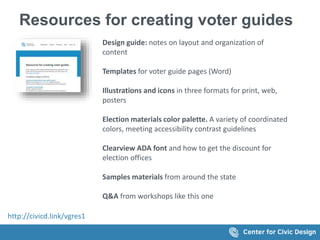
Resources for creating voter guides
Design guide: notes on layout and organization of
content
Templates for voter guide pages (Word)
Illustrations and icons in three formats for print, web,
posters
Election materials color palette. A variety of coordinated
colors, meeting accessibility contrast guidelines
Clearview ADA font and how to get the discount for
election offices
Samples materials from around the state
Q&A from workshops like this one
http://civicd.link/vgres1
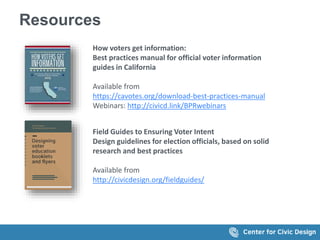
Resources
How voters get information:
Best practices manual for official voter information
guides in California
Available from
https://cavotes.org/download-best-practices-manual
Webinars: http://civicd.link/BPRwebinars
Field Guides to Ensuring Voter Intent
Design guidelines for election officials, based on solid
research and best practices
Available from
http://civicdesign.org/fieldguides/
Continued usability testing
 98 participants in 3 counties
 Partnered with election
offices to conduct sessions
 Content based on 2014
General Elections
 Focused on
 New or infrequent voters
 Language access
 Difficult voter information
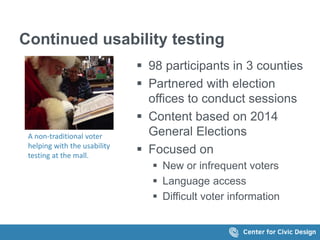
A non-traditional voter
helping with the usability
testing at the mall.
Focused on constraints
Legal
 Present the information as required by law
Fiscal
 Aim to not increase the number of pages in the
Voter packet.
Usable for voters
 Let voters express their intentions easily and
quickly.
Usable for election offices
 Use familiar tools to create documents
 Use free graphics from prototypes
 Use free or low cost fonts (Clearview ADA)
5 Big Tips
Create landmarks
Make instructions visual
Keep the design uncluttered
Present languages consistently
Help voters understand measures
Create landmarks
Help voters find their way
(even in small books)
Best Practices
Include features to guide the voter
 Help readers find their way: Provide a roadmap
through the whole book and on each page.
 Show readers where they are: Use headings on
each page and within content.
 Use page numbers: Help readers jump to the right
page quickly
 Include overview and details. Make it easy to get
the main point quickly.
 Answer voters' questions
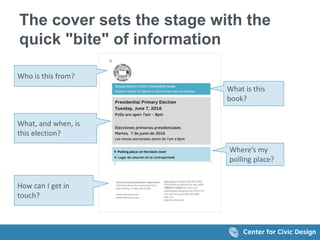
The cover sets the stage with the
quick "bite" of information
Key information on this page
- County
- Title of book
- Election
- Where’s your polling place
- Contact info
Who is this from?
What is this
book?
What, and when, is
this election?
Where’s my
polling place?
How can I get in
touch?
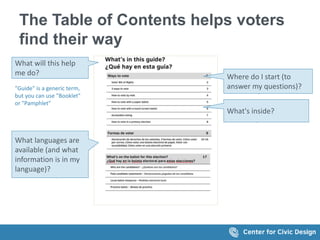
The Table of Contents helps voters
find their way
What will this help
me do? Where do I start (to
answer my questions)?
What's inside?
What languages are
available (and what
information is in my
language)?
"Guide" is a generic term,
but you can use "Booklet"
or "Pamphlet"
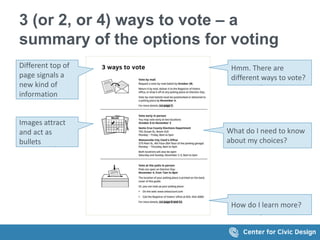
3 (or 2, or 4) ways to vote – a
summary of the options for voting
Images attract
and act as
bullets
Hmm. There are
different ways to vote?
Different top of
page signals a
new kind of
information
What do I need to know
about my choices?
How do I learn more?
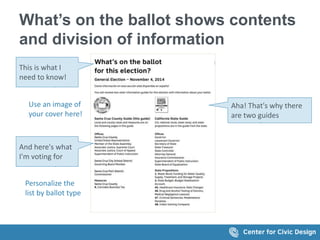
What’s on the ballot shows contents
and division of information
This is what I
need to know!
Aha! That's why there
are two guides
And here's what
I'm voting for
Use an image of
your cover here!
Personalize the
list by ballot type
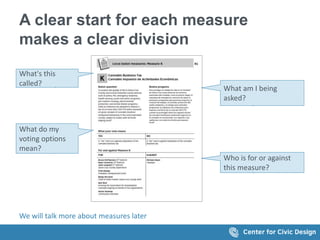
A clear start for each measure
makes a clear division
What do my
voting options
mean?
What am I being
asked?
What's this
called?
Who is for or against
this measure?
We will talk more about measures later
Make information
visual helpful ways
Layout, illustrations, and icons to
enhance text content
Best Practices
Use visual information to
 Show the big steps in instructions. Provide a
accurate instructional illustrations.
 Identify communication types: Signal web,
phone, and so on with images
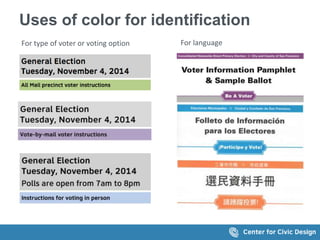
 Use color sparinly: Call attention, identify
languages, type of voter, or election year
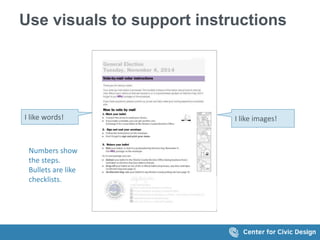
Use visuals to support instructions
I like words! I like images!
Numbers show
the steps.
Bullets are like
checklists.
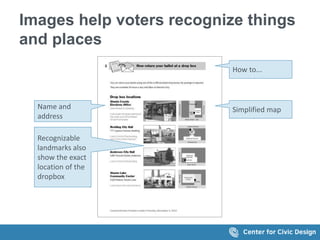
Images help voters recognize things
and places
Name and
address
Simplified map
Recognizable
landmarks also
show the exact
location of the
dropbox
How to...
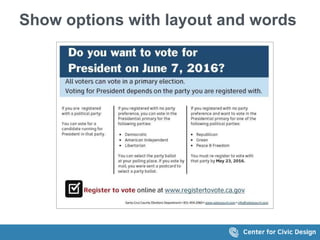
Show options with layout and words
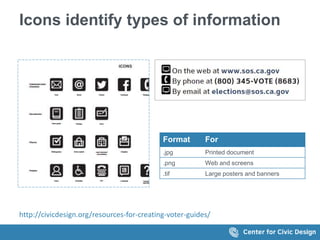
Icons identify types of information
Format For
.jpg Printed document
.png Web and screens
.tif Large posters and banners
http://civicdesign.org/resources-for-creating-voter-guides/
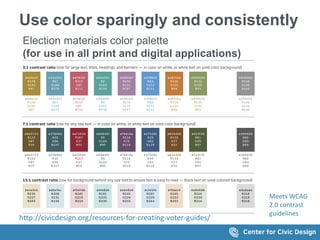
Use color sparingly and consistently
Election materials color palette
(for use in all print and digital applications)
Meets WCAG
2.0 contrast
guidelines
http://civicdesign.org/resources-for-creating-voter-guides/
Uses of color for identification
For type of voter or voting option For language
Keep the design
uncluttered
Best Practices
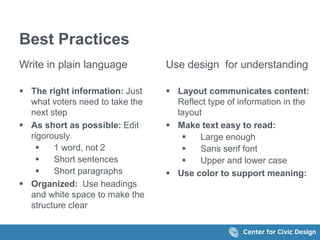
Write in plain language
 The right information: Just
what voters need to take the
next step
 As short as possible: Edit
rigorously.
 1 word, not 2
 Short sentences
 Short paragraphs
 Organized: Use headings
and white space to make the
structure clear
Use design for understanding
 Layout communicates content:
Reflect type of information in the
layout
 Make text easy to read:
 Large enough
 Sans serif font
 Upper and lower case
 Use color to support meaning:
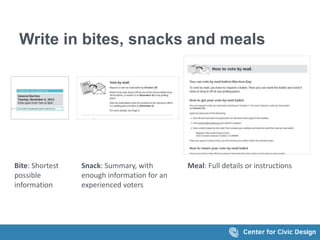
Write in bites, snacks and meals
Bite: Shortest
possible
information
Snack: Summary, with
enough information for an
experienced voters
Meal: Full details or instructions
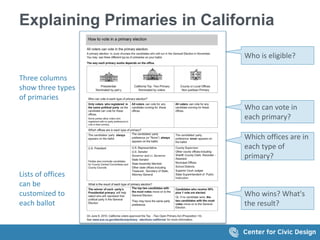
Explaining Primaries in California
Who can vote in
each primary?
Who is eligible?
Who wins? What's
the result?
Which offices are in
each type of
primary?
Three columns
show three types
of primaries
Lists of offices
can be
customized to
each ballot
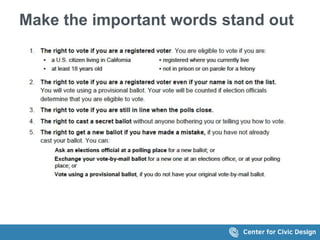
Make the important words stand out
Help voters
understand measures
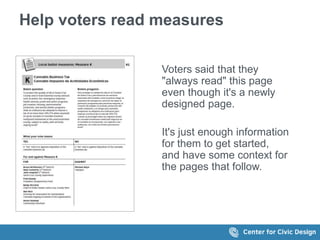
Help voters read measures
Voters said that they
"always read" this page
even though it's a newly
designed page.
It's just enough information
for them to get started,
and have some context for
the pages that follow.
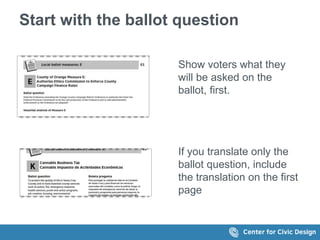
Start with the ballot question
Show voters what they
will be asked on the
ballot, first.
If you translate only the
ballot question, include
the translation on the first
page
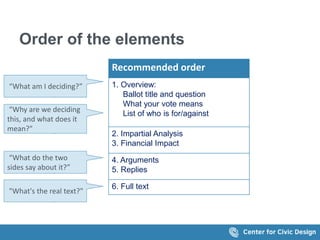
Order of the elements
Recommended order
1. Overview:
Ballot title and question
What your vote means
List of who is for/against
2. Impartial Analysis
3. Financial Impact
4. Arguments
5. Replies
6. Full text
“What am I deciding?”
“Why are we deciding
this, and what does it
mean?"
“What do the two
sides say about it?”
"What's the real text?"
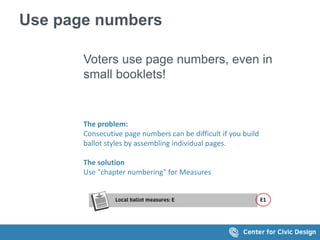
Use page numbers
Voters use page numbers, even in
small booklets!
The problem:
Consecutive page numbers can be difficult if you build
ballot styles by assembling individual pages.
The solution
Use "chapter numbering" for Measures
Present languages
consistently
Make it easy to figure out where
in-language information is
available
Make it easy to find each language
 Be consistent. Set up a pattern and stick
with it.
 Choose a pattern that works for the
requirements in your county.
Options for languages
 Separate books
 When there are more than two languages, or the
booklets are large
 Separate sections
 With the sample ballot in the middle
 Bilingual back cover fors
 Same page
 Left/right or top/bottom
 Facing pages
 English on the right, translation on the left
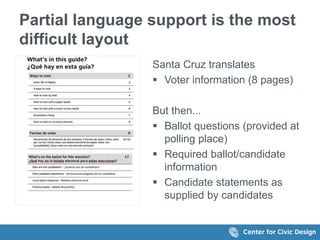
Partial language support is the most
difficult layout
Santa Cruz translates
 Voter information (8 pages)
But then...
 Ballot questions (provided at
polling place)
 Required ballot/candidate
information
 Candidate statements as
supplied by candidates
"Ways to vote" pages can be an
"anytime" pamphlet
It can be useful as part of your community
outreach for new voters:
 Give to voters when they register
 Hand out to people about to be eligible
(because of age, citizenship status).
 Provide official (accurate) information.
 Expand on the basic voter rights with
accurate information for your county.
 Make an attractive cover that welcomes
new voters, and lists the information
included
Possible pages in the booklet
Cover and TOC
California Voter Bill of Rights
3 ways to vote in <this> County
How to vote early
How to vote by mail
How to vote at the polls
How to vote by electronic ballot
Accessible voting
Language assistance
Check your voter registration status
Extra innings
Recommendations vs. election
code
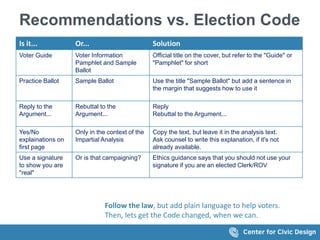
Recommendations vs. Election Code
Is it... Or... Solution
Voter Guide Voter Information
Pamphlet and Sample
Ballot
Official title on the cover, but refer to the "Guide" or
"Pamphlet" for short
Practice Ballot Sample Ballot Use the title "Sample Ballot" but add a sentence in
the margin that suggests how to use it
Reply to the
Argument...
Rebuttal to the
Argument...
Reply
Rebuttal to the Argument...
Yes/No
explainations on
first page
Only in the context of the
Impartial Analysis
Copy the text, but leave it in the analysis text.
Ask counsel to write this explanation, if it's not
already available.
Use a signature
to show you are
"real"
Or is that campaigning? Ethics guidance says that you should not use your
signature if you are an elected Clerk/ROV
Follow the law, but add plain language to help voters.
Then, lets get the Code changed, when we can.
Thanks!
Thanks to
Our funders and partners
 Irvine Foundation and the Future of California
Elections
 League of Women Voters of California Education
Fund
 Shasta, Santa Cruz and Orange Counties
 Our colleagues at Oxide Design
And you!
 For spending time learning about how to improve
your Voter Guide.
Nancy Frishberg
nancyf@civicdesign.org
Whitney Quesenbery
whitneyq@civicdesign.org
Drew Davies
drew@oxidedesign.com
civicdesign.org
@civicdesign

Making information easy for voters

  • 1.
    And partners • ShastaCounty • Santa Cruz County • Orange County • League of Women Voters Implementing the Best Practices for California Voter Guides Making Information for Voters Easy to Understand Workshop J at FOCE 2016 February 26, 2016 Whitney Quesenbery Nancy Frishberg Drew Davies
  • 2.
    About this project Builds on research in 2013-2014  Puts Best Practices Manual into action  Collaboration with 3 California counties  Continued usability testing and  Sharing with all California election offices to promote best practices in the 2016 election and beyond http://civicdesign.org/projects/how-voters-get-information/
  • 3.
    Resources for creatingvoter guides Design guide: notes on layout and organization of content Templates for voter guide pages (Word) Illustrations and icons in three formats for print, web, posters Election materials color palette. A variety of coordinated colors, meeting accessibility contrast guidelines Clearview ADA font and how to get the discount for election offices Samples materials from around the state Q&A from workshops like this one http://civicd.link/vgres1
  • 4.
    Resources How voters getinformation: Best practices manual for official voter information guides in California Available from https://cavotes.org/download-best-practices-manual Webinars: http://civicd.link/BPRwebinars Field Guides to Ensuring Voter Intent Design guidelines for election officials, based on solid research and best practices Available from http://civicdesign.org/fieldguides/
  • 5.
    Continued usability testing 98 participants in 3 counties  Partnered with election offices to conduct sessions  Content based on 2014 General Elections  Focused on  New or infrequent voters  Language access  Difficult voter information A non-traditional voter helping with the usability testing at the mall.
  • 6.
    Focused on constraints Legal Present the information as required by law Fiscal  Aim to not increase the number of pages in the Voter packet. Usable for voters  Let voters express their intentions easily and quickly. Usable for election offices  Use familiar tools to create documents  Use free graphics from prototypes  Use free or low cost fonts (Clearview ADA)
  • 7.
    5 Big Tips Createlandmarks Make instructions visual Keep the design uncluttered Present languages consistently Help voters understand measures
  • 8.
    Create landmarks Help votersfind their way (even in small books)
  • 9.
    Best Practices Include featuresto guide the voter  Help readers find their way: Provide a roadmap through the whole book and on each page.  Show readers where they are: Use headings on each page and within content.  Use page numbers: Help readers jump to the right page quickly  Include overview and details. Make it easy to get the main point quickly.  Answer voters' questions
  • 10.
    The cover setsthe stage with the quick "bite" of information Key information on this page - County - Title of book - Election - Where’s your polling place - Contact info Who is this from? What is this book? What, and when, is this election? Where’s my polling place? How can I get in touch?
  • 11.
    The Table ofContents helps voters find their way What will this help me do? Where do I start (to answer my questions)? What's inside? What languages are available (and what information is in my language)? "Guide" is a generic term, but you can use "Booklet" or "Pamphlet"
  • 12.
    3 (or 2,or 4) ways to vote – a summary of the options for voting Images attract and act as bullets Hmm. There are different ways to vote? Different top of page signals a new kind of information What do I need to know about my choices? How do I learn more?
  • 13.
    What’s on theballot shows contents and division of information This is what I need to know! Aha! That's why there are two guides And here's what I'm voting for Use an image of your cover here! Personalize the list by ballot type
  • 14.
    A clear startfor each measure makes a clear division What do my voting options mean? What am I being asked? What's this called? Who is for or against this measure? We will talk more about measures later
  • 15.
    Make information visual helpfulways Layout, illustrations, and icons to enhance text content
  • 16.
    Best Practices Use visualinformation to  Show the big steps in instructions. Provide a accurate instructional illustrations.  Identify communication types: Signal web, phone, and so on with images  Use color sparinly: Call attention, identify languages, type of voter, or election year
  • 17.
    Use visuals tosupport instructions I like words! I like images! Numbers show the steps. Bullets are like checklists.
  • 18.
    Images help votersrecognize things and places Name and address Simplified map Recognizable landmarks also show the exact location of the dropbox How to...
  • 19.
    Show options withlayout and words
  • 20.
    Icons identify typesof information Format For .jpg Printed document .png Web and screens .tif Large posters and banners http://civicdesign.org/resources-for-creating-voter-guides/
  • 21.
    Use color sparinglyand consistently Election materials color palette (for use in all print and digital applications) Meets WCAG 2.0 contrast guidelines http://civicdesign.org/resources-for-creating-voter-guides/
  • 22.
    Uses of colorfor identification For type of voter or voting option For language
  • 23.
  • 24.
    Best Practices Write inplain language  The right information: Just what voters need to take the next step  As short as possible: Edit rigorously.  1 word, not 2  Short sentences  Short paragraphs  Organized: Use headings and white space to make the structure clear Use design for understanding  Layout communicates content: Reflect type of information in the layout  Make text easy to read:  Large enough  Sans serif font  Upper and lower case  Use color to support meaning:
  • 25.
    Write in bites,snacks and meals Bite: Shortest possible information Snack: Summary, with enough information for an experienced voters Meal: Full details or instructions
  • 26.
    Explaining Primaries inCalifornia Who can vote in each primary? Who is eligible? Who wins? What's the result? Which offices are in each type of primary? Three columns show three types of primaries Lists of offices can be customized to each ballot
  • 27.
    Make the importantwords stand out
  • 28.
  • 29.
    Help voters readmeasures Voters said that they "always read" this page even though it's a newly designed page. It's just enough information for them to get started, and have some context for the pages that follow.
  • 30.
    Start with theballot question Show voters what they will be asked on the ballot, first. If you translate only the ballot question, include the translation on the first page
  • 31.
    Order of theelements Recommended order 1. Overview: Ballot title and question What your vote means List of who is for/against 2. Impartial Analysis 3. Financial Impact 4. Arguments 5. Replies 6. Full text “What am I deciding?” “Why are we deciding this, and what does it mean?" “What do the two sides say about it?” "What's the real text?"
  • 32.
    Use page numbers Votersuse page numbers, even in small booklets! The problem: Consecutive page numbers can be difficult if you build ballot styles by assembling individual pages. The solution Use "chapter numbering" for Measures
  • 33.
    Present languages consistently Make iteasy to figure out where in-language information is available
  • 34.
    Make it easyto find each language  Be consistent. Set up a pattern and stick with it.  Choose a pattern that works for the requirements in your county.
  • 35.
    Options for languages Separate books  When there are more than two languages, or the booklets are large  Separate sections  With the sample ballot in the middle  Bilingual back cover fors  Same page  Left/right or top/bottom  Facing pages  English on the right, translation on the left
  • 36.
    Partial language supportis the most difficult layout Santa Cruz translates  Voter information (8 pages) But then...  Ballot questions (provided at polling place)  Required ballot/candidate information  Candidate statements as supplied by candidates
  • 37.
    "Ways to vote"pages can be an "anytime" pamphlet It can be useful as part of your community outreach for new voters:  Give to voters when they register  Hand out to people about to be eligible (because of age, citizenship status).  Provide official (accurate) information.  Expand on the basic voter rights with accurate information for your county.  Make an attractive cover that welcomes new voters, and lists the information included Possible pages in the booklet Cover and TOC California Voter Bill of Rights 3 ways to vote in <this> County How to vote early How to vote by mail How to vote at the polls How to vote by electronic ballot Accessible voting Language assistance Check your voter registration status
  • 38.
  • 39.
    Recommendations vs. ElectionCode Is it... Or... Solution Voter Guide Voter Information Pamphlet and Sample Ballot Official title on the cover, but refer to the "Guide" or "Pamphlet" for short Practice Ballot Sample Ballot Use the title "Sample Ballot" but add a sentence in the margin that suggests how to use it Reply to the Argument... Rebuttal to the Argument... Reply Rebuttal to the Argument... Yes/No explainations on first page Only in the context of the Impartial Analysis Copy the text, but leave it in the analysis text. Ask counsel to write this explanation, if it's not already available. Use a signature to show you are "real" Or is that campaigning? Ethics guidance says that you should not use your signature if you are an elected Clerk/ROV Follow the law, but add plain language to help voters. Then, lets get the Code changed, when we can.
  • 40.
  • 41.
    Thanks to Our fundersand partners  Irvine Foundation and the Future of California Elections  League of Women Voters of California Education Fund  Shasta, Santa Cruz and Orange Counties  Our colleagues at Oxide Design And you!  For spending time learning about how to improve your Voter Guide.
  • 42.

Editor's Notes

  • #9 Dana
  • #10 https://cavotes.org/announcement/2015/apr/sign-our-voter-guide-best-practices-webinars Slides: https://cavotes.org/sites/default/files/jobs/Webinar4-Plain%20Language-2015-0423.pdf
  • #12 We noticed during our testing that voters referred back to the Table of Contents while looking at specific pages. This behavior gave us confidence that this page met their unspoken needs.
  • #16 Dana
  • #17 https://cavotes.org/announcement/2015/apr/sign-our-voter-guide-best-practices-webinars Slides: https://cavotes.org/sites/default/files/jobs/Webinar4-Plain%20Language-2015-0423.pdf
  • #25 https://cavotes.org/announcement/2015/apr/sign-our-voter-guide-best-practices-webinars Slides: https://cavotes.org/sites/default/files/jobs/Webinar4-Plain%20Language-2015-0423.pdf