IT management,
simplified.
Real-time IT management
solutions for the new
speed of business
Underpinning of a successful IT help desk
ServiceDesk Plus
Major incident management in
How Zylker handles major
incidents
EzeeBill, the billing software of Zylker, crashes and what
happens thereon!
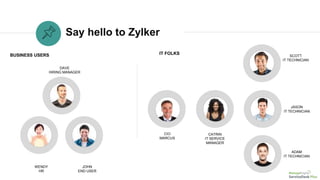
Say hello to Zylker
WENDY
HR
DAVE
HIRING MANAGER
JOHN
END USER
BUSINESS USERS IT FOLKS
CIO
MARCUS
SCOTT
IT TECHNICIAN
JASON
IT TECHNICIAN
ADAM
IT TECHNICIAN
CATRIN
IT SERVICE
MANAGER
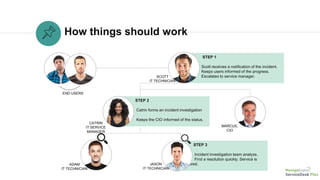
STEP 1
Scott receives a notification of the incident.
Keeps users informed of the progress.
Escalates to service manager.
How things should work
STEP 2
Catrin forms an incident investigation
team.
Keeps the CIO informed of the status.
STEP 3
Incident investigation team analyze.
Find a resolution quickly. Service is
restored.
END USERS
CATRIN
IT SERVICE
MANAGER
SCOTT
IT TECHNICIAN
MARCUS,
CIO
JASON
IT TECHNICIAN
ADAM
IT TECHNICIAN
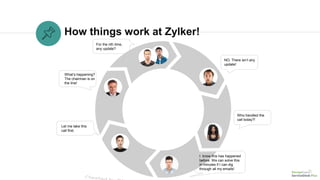
How things work at Zylker!
What’s happening?
The chairman is on
the line!
NO. There isn’t any
update!
For the nth time,
any update?
Who handled the
call today?!
I know this has happened
before. We can solve this
in minutes if I can dig
through all my emails!
Let me take this
call first.
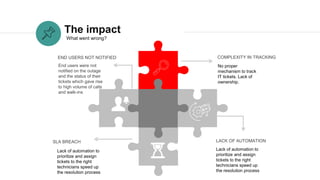
The impact
No proper
mechanism to track
IT tickets. Lack of
ownership.
COMPLEXITY IN TRACKING
End users were not
notified on the outage
and the status of their
tickets which gave rise
to high volume of calls
and walk-ins
END USERS NOT NOTIFIED
Lack of automation to
prioritize and assign
tickets to the right
technicians speed up
the resolution process
LACK OF AUTOMATIONSLA BREACH
What went wrong?
Lack of automation to
prioritize and assign
tickets to the right
technicians speed up
the resolution process
Major incident
management with
ServiceDesk Plus
How Zylker handles major incidents the ServiceDesk Plus way!
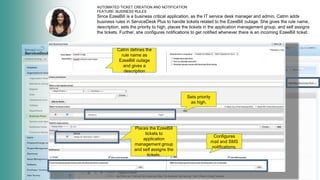
AUTOMATED TICKET CREATION AND NOTIFICATION
FEATURE: BUSINESS RULES
Since EzeeBill is a business critical application, as the IT service desk manager and admin, Catrin adds
business rules in ServiceDesk Plus to handle tickets related to the EzeeBill outage. She gives the rule name,
description, sets the priority to high, places the tickets in the application management group, and self assigns
the tickets. Further, she configures notifications to get notified whenever there is an incoming EzeeBill ticket.
Catrin defines the
rule name as
EzeeBill outage
and gives a
description
Sets priority
as high.
Places the EzeeBill
tickets to
application
management group
and self assigns the
tickets.
Configures
mail and SMS
notifications.
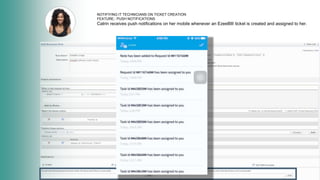
NOTIFIYING IT TECHNICIANS ON TICKET CREATION
FEATURE:: PUSH NOTIFICATIONS
Catrin receives push notifications on her mobile whenever an EzeeBIll ticket is created and assigned to her.
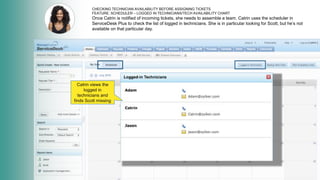
CHECKING TECHNICIAN AVAILABILITY BEFORE ASSIGNING TICKETS
FEATURE: SCHEDULER – LOGGED IN TECHNICIANS/TECH AVAILABILITY CHART
Once Catrin is notified of incoming tickets, she needs to assemble a team. Catrin uses the scheduler in
ServiceDesk Plus to check the list of logged in technicians. She is in particular looking for Scott, but he’s not
available on that particular day.
Catrin views the
logged in
technicians and
finds Scott missing
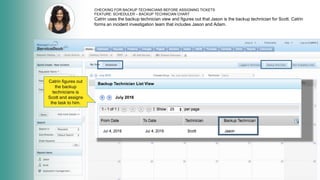
CHECKING FOR BACKUP TECHNICIANS BEFORE ASSIGNING TICKETS
FEATURE: SCHEDULER – BACKUP TECHNICIAN CHART
Catrin uses the backup technician view and figures out that Jason is the backup technician for Scott. Catrin
forms an incident investigation team that includes Jason and Adam.
Catrin figures out
the backup
technicians is
Scott and assigns
the task to him.
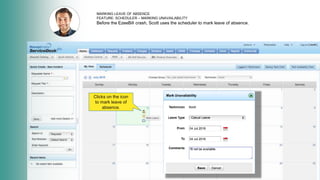
MARKING LEAVE OF ABSENCE
FEATURE: SCHEDULER – MARKING UNAVAILABILITY
Before the EzeeBill crash, Scott uses the scheduler to mark leave of absence.
Clicks on the icon
to mark leave of
absence.
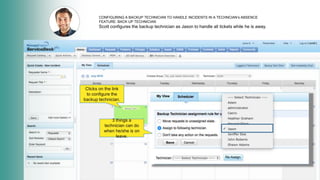
Clicks on the link
to configure the
backup technician.
3 things a
technician can do
when he/she is on
leave.
CONFIGURING A BACKUP TECHNICIAN TO HANDLE INCIDENTS IN A TECHNCIAN’s ABSENCE
FEATURE: BACK UP TECHNICIAN
Scott configures the backup technician as Jason to handle all tickets while he is away.
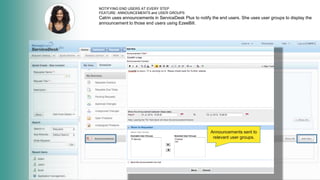
NOTIFYING END USERS AT EVERY STEP
FEATURE: ANNOUNCEMENTS and USER GROUPS
Catrin uses announcements in ServiceDesk Plus to notify the end users. She uses user groups to display the
announcement to those end users using EzeeBill.
Announcements sent to
relevant user groups.
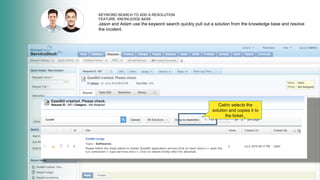
KEYWORD SEARCH TO ADD A RESOLUTION
FEATURE: KNOWLEDGE BASE
Jason and Adam use the keyword search quickly pull out a solution from the knowledge base and resolve
the incident.
Catrin selects the
solution and copies it to
the ticket.¸
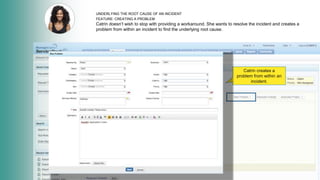
UNDERLYING THE ROOT CAUSE OF AN INCIDENT
FEATURE: CREATING A PROBLEM
Catrin doesn’t wish to stop with providing a workaround. She wants to resolve the incident and creates a
problem from within an incident to find the underlying root cause.
Catrin creates a
problem from within an
incident.
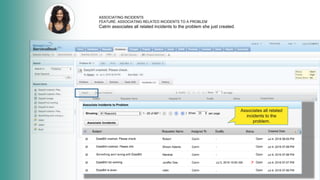
ASSOCIATING INCIDENTS
FEATURE: ASSOCIATING RELATED INCIDENTS TO A PROBLEM
Catrin associates all related incidents to the problem she just created.
Associates all related
incidents to the
problem.
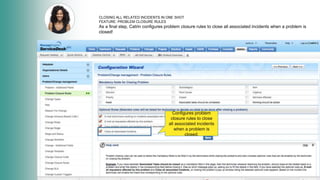
CLOSING ALL RELATED INCIDENTS IN ONE SHOT
FEATURE: PROBLEM CLOSURE RULES
As a final step, Catrin configures problem closure rules to close all associated incidents when a problem is
closed!
Configures problem
closure rules to close
all associated incidents
when a problem is
closed.
A happy ending with
ServiceDesk Plus!
CREATE
Ticket creation
is done via the
self-service
portal, email, or
phone
Push/SMS
notifications keep
the IT team
informed of the
incoming tickets.
NOTIFY1
2
3
4
5
6
7
AUTOMATE
Based on
preconfigured business
rules the tickets are
prioritized and assigned
to relevant technicians.
SLAs ensure response
times and escalation
paths
ENSURE
COMMUNICATE
Technician availability
chart and backup
technician ensure help
desk accountability
Announcements are
displayed to end users
to keep them informed
of the status.
PUBLISH
CLOSURE
Knowledge base allows
the technicians to pull
out a published solution
from the knowledge
base (KB) using a
keyword search.
Problem closure
rules allows
technicians to
associate all
related incidents
to a problem
and close all
those incidents
when the
problem is
resolved
James Arnold
Service desk manager
Manhattan Associates
ServiceDesk Plus has been a great decision both functionally and financially.
What customers say
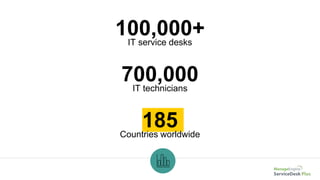
100,000+IT service desks
185Countries worldwide
700,000IT technicians
Get ServiceDesk
Plus
Sign up for a 30-day free trial.
Join the
100,000+ IT help
desks worldwide.
Have questions? Drop us a line at
hello@servicedeskplus.com

Major Incident Management in ServiceDesk Plus

  • 1.
    IT management, simplified. Real-time ITmanagement solutions for the new speed of business
  • 2.
    Underpinning of asuccessful IT help desk ServiceDesk Plus Major incident management in
  • 3.
    How Zylker handlesmajor incidents EzeeBill, the billing software of Zylker, crashes and what happens thereon!
  • 4.
    Say hello toZylker WENDY HR DAVE HIRING MANAGER JOHN END USER BUSINESS USERS IT FOLKS CIO MARCUS SCOTT IT TECHNICIAN JASON IT TECHNICIAN ADAM IT TECHNICIAN CATRIN IT SERVICE MANAGER
  • 5.
    STEP 1 Scott receivesa notification of the incident. Keeps users informed of the progress. Escalates to service manager. How things should work STEP 2 Catrin forms an incident investigation team. Keeps the CIO informed of the status. STEP 3 Incident investigation team analyze. Find a resolution quickly. Service is restored. END USERS CATRIN IT SERVICE MANAGER SCOTT IT TECHNICIAN MARCUS, CIO JASON IT TECHNICIAN ADAM IT TECHNICIAN
  • 6.
    How things workat Zylker! What’s happening? The chairman is on the line! NO. There isn’t any update! For the nth time, any update? Who handled the call today?! I know this has happened before. We can solve this in minutes if I can dig through all my emails! Let me take this call first.
  • 7.
    The impact No proper mechanismto track IT tickets. Lack of ownership. COMPLEXITY IN TRACKING End users were not notified on the outage and the status of their tickets which gave rise to high volume of calls and walk-ins END USERS NOT NOTIFIED Lack of automation to prioritize and assign tickets to the right technicians speed up the resolution process LACK OF AUTOMATIONSLA BREACH What went wrong? Lack of automation to prioritize and assign tickets to the right technicians speed up the resolution process
  • 8.
    Major incident management with ServiceDeskPlus How Zylker handles major incidents the ServiceDesk Plus way!
  • 9.
    AUTOMATED TICKET CREATIONAND NOTIFICATION FEATURE: BUSINESS RULES Since EzeeBill is a business critical application, as the IT service desk manager and admin, Catrin adds business rules in ServiceDesk Plus to handle tickets related to the EzeeBill outage. She gives the rule name, description, sets the priority to high, places the tickets in the application management group, and self assigns the tickets. Further, she configures notifications to get notified whenever there is an incoming EzeeBill ticket. Catrin defines the rule name as EzeeBill outage and gives a description Sets priority as high. Places the EzeeBill tickets to application management group and self assigns the tickets. Configures mail and SMS notifications.
  • 10.
    NOTIFIYING IT TECHNICIANSON TICKET CREATION FEATURE:: PUSH NOTIFICATIONS Catrin receives push notifications on her mobile whenever an EzeeBIll ticket is created and assigned to her.
  • 11.
    CHECKING TECHNICIAN AVAILABILITYBEFORE ASSIGNING TICKETS FEATURE: SCHEDULER – LOGGED IN TECHNICIANS/TECH AVAILABILITY CHART Once Catrin is notified of incoming tickets, she needs to assemble a team. Catrin uses the scheduler in ServiceDesk Plus to check the list of logged in technicians. She is in particular looking for Scott, but he’s not available on that particular day. Catrin views the logged in technicians and finds Scott missing
  • 12.
    CHECKING FOR BACKUPTECHNICIANS BEFORE ASSIGNING TICKETS FEATURE: SCHEDULER – BACKUP TECHNICIAN CHART Catrin uses the backup technician view and figures out that Jason is the backup technician for Scott. Catrin forms an incident investigation team that includes Jason and Adam. Catrin figures out the backup technicians is Scott and assigns the task to him.
  • 13.
    MARKING LEAVE OFABSENCE FEATURE: SCHEDULER – MARKING UNAVAILABILITY Before the EzeeBill crash, Scott uses the scheduler to mark leave of absence. Clicks on the icon to mark leave of absence.
  • 14.
    Clicks on thelink to configure the backup technician. 3 things a technician can do when he/she is on leave. CONFIGURING A BACKUP TECHNICIAN TO HANDLE INCIDENTS IN A TECHNCIAN’s ABSENCE FEATURE: BACK UP TECHNICIAN Scott configures the backup technician as Jason to handle all tickets while he is away.
  • 15.
    NOTIFYING END USERSAT EVERY STEP FEATURE: ANNOUNCEMENTS and USER GROUPS Catrin uses announcements in ServiceDesk Plus to notify the end users. She uses user groups to display the announcement to those end users using EzeeBill. Announcements sent to relevant user groups.
  • 16.
    KEYWORD SEARCH TOADD A RESOLUTION FEATURE: KNOWLEDGE BASE Jason and Adam use the keyword search quickly pull out a solution from the knowledge base and resolve the incident. Catrin selects the solution and copies it to the ticket.¸
  • 17.
    UNDERLYING THE ROOTCAUSE OF AN INCIDENT FEATURE: CREATING A PROBLEM Catrin doesn’t wish to stop with providing a workaround. She wants to resolve the incident and creates a problem from within an incident to find the underlying root cause. Catrin creates a problem from within an incident.
  • 18.
    ASSOCIATING INCIDENTS FEATURE: ASSOCIATINGRELATED INCIDENTS TO A PROBLEM Catrin associates all related incidents to the problem she just created. Associates all related incidents to the problem.
  • 19.
    CLOSING ALL RELATEDINCIDENTS IN ONE SHOT FEATURE: PROBLEM CLOSURE RULES As a final step, Catrin configures problem closure rules to close all associated incidents when a problem is closed! Configures problem closure rules to close all associated incidents when a problem is closed.
  • 20.
    A happy endingwith ServiceDesk Plus! CREATE Ticket creation is done via the self-service portal, email, or phone Push/SMS notifications keep the IT team informed of the incoming tickets. NOTIFY1 2 3 4 5 6 7 AUTOMATE Based on preconfigured business rules the tickets are prioritized and assigned to relevant technicians. SLAs ensure response times and escalation paths ENSURE COMMUNICATE Technician availability chart and backup technician ensure help desk accountability Announcements are displayed to end users to keep them informed of the status. PUBLISH CLOSURE Knowledge base allows the technicians to pull out a published solution from the knowledge base (KB) using a keyword search. Problem closure rules allows technicians to associate all related incidents to a problem and close all those incidents when the problem is resolved
  • 21.
    James Arnold Service deskmanager Manhattan Associates ServiceDesk Plus has been a great decision both functionally and financially. What customers say
  • 22.
    100,000+IT service desks 185Countriesworldwide 700,000IT technicians
  • 23.
    Get ServiceDesk Plus Sign upfor a 30-day free trial. Join the 100,000+ IT help desks worldwide. Have questions? Drop us a line at hello@servicedeskplus.com