Photo Manipulation
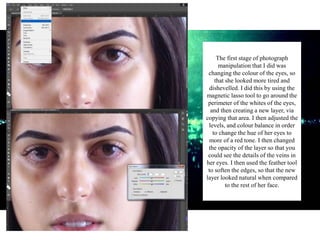
The first stage of photograph
manipulation that I did was
changing the colour of the eyes, so
that she looked more tired and
dishevelled. I did this by using the
magnetic lasso tool to go around the
perimeter of the whites of the eyes,
and then creating a new layer, via
copying that area. I then adjusted the
levels, and colour balance in order
to change the hue of her eyes to
more of a red tone. I then changed
the opacity of the layer so that you
could see the details of the veins in
her eyes. I then used the feather tool
to soften the edges, so that the new
layer looked natural when compared
to the rest of her face.
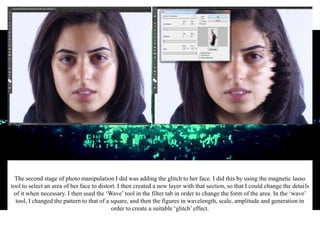
The second stage of photo manipulation I did was adding the glitch to her face. I did this by using the magnetic lasso
tool to select an area of her face to distort. I then created a new layer with that section, so that I could change the details
of it when necessary. I then used the ‘Wave’ tool in the filter tab in order to change the form of the area. In the ‘wave’
tool, I changed the pattern to that of a square, and then the figures in wavelength, scale, amplitude and generation in
order to create a suitable ‘glitch’effect.
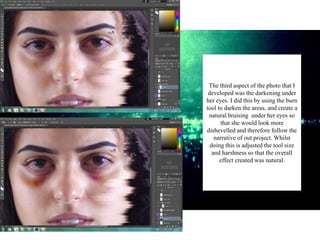
The third aspect of the photo that I
developed was the darkening under
her eyes. I did this by using the burn
tool to darken the areas, and create a
natural bruising under her eyes so
that she would look more
dishevelled and therefore follow the
narrative of out project. Whilst
doing this is adjusted the tool size
and harshness so that the overall
effect created was natural.

Magazine Photograph Manipulation

  • 1.
  • 2.
    The first stageof photograph manipulation that I did was changing the colour of the eyes, so that she looked more tired and dishevelled. I did this by using the magnetic lasso tool to go around the perimeter of the whites of the eyes, and then creating a new layer, via copying that area. I then adjusted the levels, and colour balance in order to change the hue of her eyes to more of a red tone. I then changed the opacity of the layer so that you could see the details of the veins in her eyes. I then used the feather tool to soften the edges, so that the new layer looked natural when compared to the rest of her face.
  • 3.
    The second stageof photo manipulation I did was adding the glitch to her face. I did this by using the magnetic lasso tool to select an area of her face to distort. I then created a new layer with that section, so that I could change the details of it when necessary. I then used the ‘Wave’ tool in the filter tab in order to change the form of the area. In the ‘wave’ tool, I changed the pattern to that of a square, and then the figures in wavelength, scale, amplitude and generation in order to create a suitable ‘glitch’effect.
  • 4.
    The third aspectof the photo that I developed was the darkening under her eyes. I did this by using the burn tool to darken the areas, and create a natural bruising under her eyes so that she would look more dishevelled and therefore follow the narrative of out project. Whilst doing this is adjusted the tool size and harshness so that the overall effect created was natural.

Editor's Notes